ASSEMBLY INSTRUCTIONS
PARTS INCLUDED
Power Input
110V-240V
Max.Speed
25 mm/s
Load Capability
176 lbs / 80 kg
Motion Noise
<55dB
RATED
● Desktop Dimensions: 140cm
● 2 Height Position Memory
● Vertical Range: 72-120cm
D-121D-5528IN-BK/DW-121D-5528IN-BK
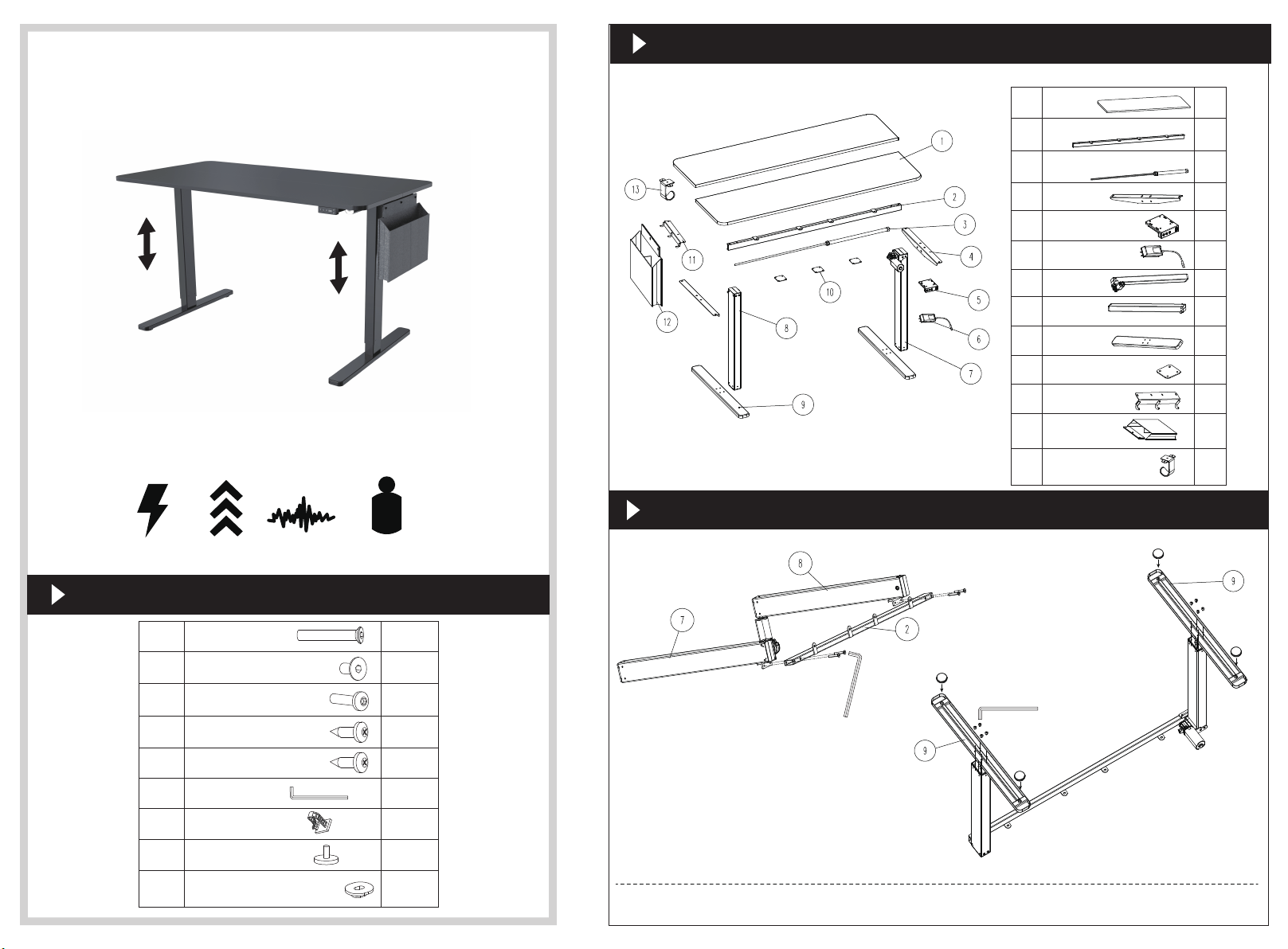
Desktop
Crossbar
Transmission rod assembly
Side plates
Controller panel
Wall Plug Power
Table leg
Table leg
Feet
Tabletop connector
Hook
Felt bag
Headphone hanger
1.
2.
3.
4.
5.
6.
7.
8.
9.
10.
11.
12.
13.
2pcs
1pc
3pcs
1pc
1pc
1pc
1pc
1pc
cp 1
cp 1
cp 1
2pcs
2pcs
SCREWS/FASTENERS (BAG)
Desk Parts
(Optional)
INSTALLATION
Foot pads
Sound insulation pads
5×16 screws
(Include 2pcs extra screws)
4×15 screws
M6×12 screws
M6×12 (x8)
M8×47 screws
(Include 2pcs extra screws)
(Include 2pcs extra screws)
(Include 2pcs extra screws)
(Include 2pcs extra pads)
M6×10 screws
A
A
B
C
C
D
E
F
G
H
H
S=2/4/5mm
S=5mm
S=4mm
1pc/1pc/1pc
4pcs
6pcs
10pcs
6pcs
32pcs
14pcs
4pcs
2pcs
Cable clip
M8×47 (x4)
I
QUESTIONS? CONTACT US: [email protected]
(1) (2)

INSTALLATION
OPERATION
M6×10 (x4)
B
5×16 (x14)
4×15 (x4)
D
E
S=4mm
5×16 (x16)
D
G
S=2mm
I
(3)
(4)
(6)
(7)
(8)
(9)
(5)
Press and display real height
Press and display real height
Press and the desk will move to the position you
once saved
Press and the desk will move to the position you
once saved
Over-heating
protection
Sensorless
alarm
Overload
protection
Rebound
protection
Overvoltage
alarm
Undervoltage
alarm
Step out alarm
Breaking
protection
Hot: It alarms when continuously working for 2 minutes.
Re-powered on and waiting for at least 18 minutes before
height adjustment.
E10: It alarms when motor sensor can’t be detected.
Power off first. Check the connecting of motor and control box,
and then re-power on.
E20: Overload alarm. If alarming when desk going up, remove
the stuff on the desk and try again. If alarming when desk going
down, power off first, remove the stuff on the desk and re-power on.
E02: It alarms when vibrated, collided or inclined in desk moving.
Check if there is vibrating, obstacles or incline. If no issues
above, do the reset process and use it again.
E32: It alarms when voltage is higher than required value.
Power off first. Check whether the connection between power
and control box is OK. Power on again.
E31: It alarms when voltage is lower than required value.
Power off first. Check whether the connection between power
and control box is OK. Power on again.
E60: It alarms when height difference between left leg and right
leg exceeds the set value.Power off first. Check whether the
left leg and the right leg are in the same height. If not, re-redo
process 4 to make them in same height. Power on again.
It stops and enters protection state when motor lines or
manual control lines are removed or disconnected accidentally;
back to normal after reconnected and alarm cleared.
Long press the button, “S--”shows and flashes. Press
again and the display shows “Un”. Press to select. Press
or to switch between“ ”(metric) or “ ” (imperial).
Press to save your choice.
Long press the button, “S--”shows and flashes. Press
again and the display shows “Un”. press or to switch to
“br”. Press to select. Press or to switch between
Low (L), Normal (n) or High (H) brightness.
Press to save your choice.
Long press the button,“S--”shows and flashes. Press
again and the display shows “Un”. press or to switch to
“CF”. Press to select. Press or to switch between
“OFF”, Low (L), Normal (n) or Heavy (H) collision force detection.
Press to save your choice.
Protection mode (auto lock screen mode)
Use up or down key to adjust to your desired position.
Press ,and press one of or keys to save position.
Engineering Mode
Reset
Long press for 5 seconds, and it will display RES.Keep
pressing and the desk will go down to the lowest position
and rebound a bit. Reset finished showing basic height.
S
S
S
S
S
S
S
S
S
S
S
S
S
S
Change Displayed
Unit ( )
Change
Brightness (br)
Collision Force
Detection (CF)
Headphone hanger
can hang anywhere