1
• Notallmodelsareavailableinallcountries.
• ThankyouforchoosingBrother.Yoursupport
isimportanttousandwevalueyourbusiness.
YourBrotherproductisengineeredand
manufacturedtothehigheststandardstodeliver
reliableperformance,day-inandday-out.
QuickSetupGuide
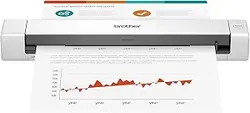
DSmobile DS-635/DS-640/DS-740D/DS-940DW
Please read the Product Safety Guide, located in this document, before you set up your machine. After
reading this guide, keep it in a safe place.
WARNING
WARNINGindicatesapotentiallyhazardoussituationwhich,ifnotavoided,couldresultin
deathorseriousinjuries.
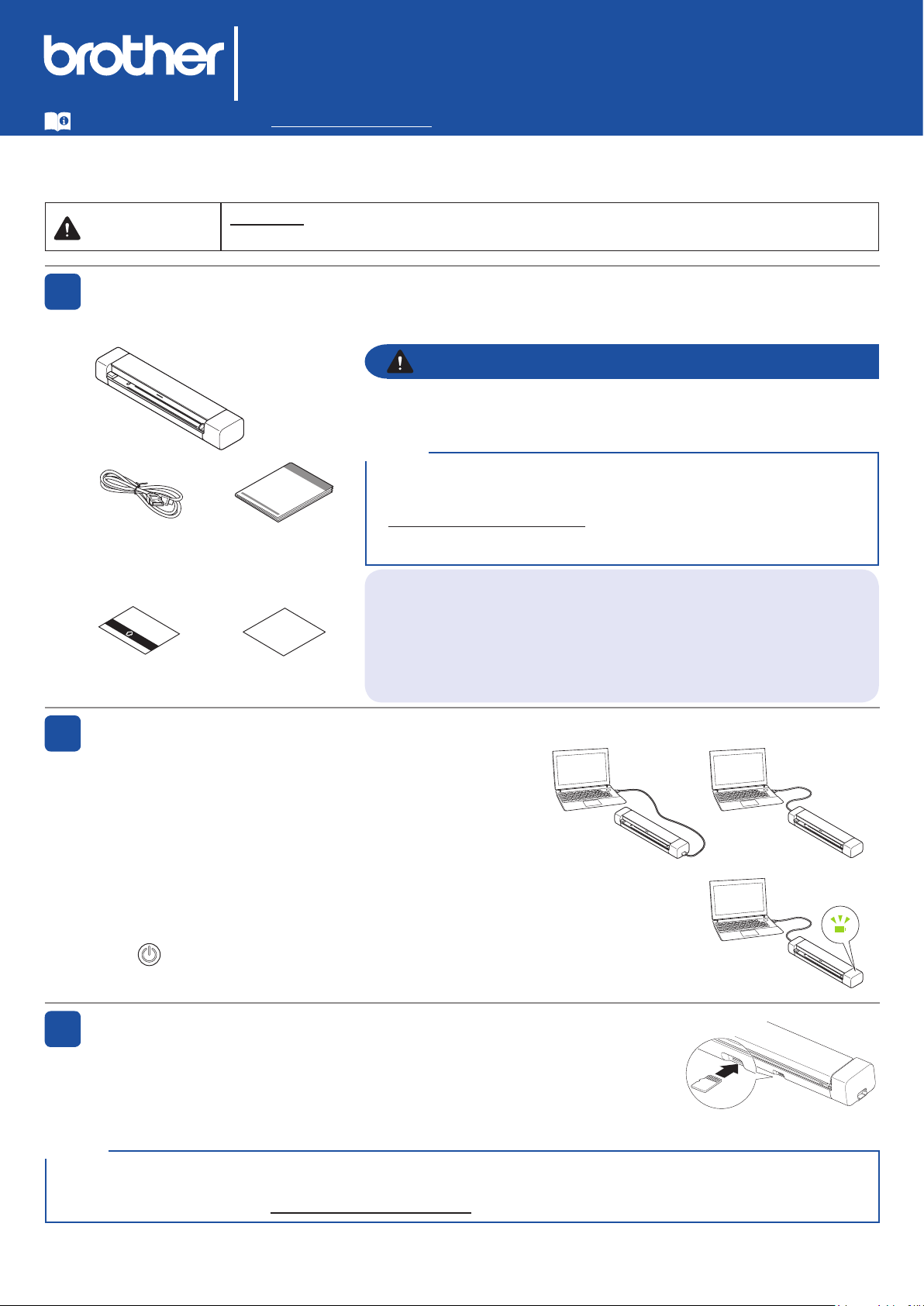
Unpack the machine and check the components
Thecomponentsincludedintheboxmaydifferdependingonyourcountry.Removetheprotectivetape
andlmcoveringthemachine.
Connect your machine to the computer using a USB cable
Thisproductispackagedinaplasticbag.Toavoidsuffocation,keep
plasticbagsawayfrombabiesandchildren.Donotusethebagin
cribs,beds,carriages,orplaypens.Thebagisnotatoy.
1
2
WARNING
Insert a microSD memory card into the machine
(microSD memory card not included; DSmobile DS-940DW only)
IfyouplantosavefilestoanexternalmicroSDmemorycard(optional),
gentlyinsertthemicroSDmemorycardintothescanner'sMemoryCard
Slotwiththemetalcontactpointsfacingupward.
3
Thelatestmanualsareavailableatsupport.brother.com/manuals.
CalibrationSheet WarrantyCard
• Toestablishalocalconnectiontoacomputer,usetheincluded
USB3.0(Micro)cable.
• Fordetailedinstructions,seetheOnline User’s Guideat
support.brother.com/manuals.
• Werecommendsavingtheoriginalpackagingincaseyoumustship
yourmachine.
NOTE
USAVersionB
For Network Users
Bestpracticeistoconfigureauniqueadminpasswordforanynetwork
device.
Yourmachine’sdefaultpasswordisonthebottomofthemachine
(theeight-digitcharacterstringmarked"Pwd").Werecommend
changingthisdefaultpasswordimmediatelyinordertousenetwork
tools/utilitiessecurely.
QuickSetup
Guide/Product
SafetyGuide
USB3.0
(Micro)Cable
DSmobile DS-635/DS-640/DS-740D
ThescannerpowersonwhenyouconnecttheUSBcable.
AmicroSDmemorycardisnotrequiredforuse.Ifyouplantosavescansdirectlytoamemorycard,youmust
purchaseamicroSDmemorycardseparatelyandinsertitintothedevice.FormicroSDmemorycardspecifications,
seetheOnline User's Guideatsupport.brother.com/manuals.
NOTE
DSmobile DS-940DW
ThescannerstartschargingwhenyouconnecttheUSBcable.
PleaseusethescanneraftertherechargeableLi-ionbatteryisfullycharged(the
BatteryLEDblinksingreen).
Press toturnonthemachine.
DSmobile
DS-635/DS-640
DSmobile
DS-740D

2
Install software
4
Using your scanner with your computer
Using your scanner with your mobile device (Wi-Fi
®
connection to network - DSmobile DS-940DW only)
A
B
Mac and Windows
Downloadthefulldriverandsoftwarepackage.
ForWindows:support.brother.com/windows
ForMac:support.brother.com/mac
Followtheon-screen
instructionstocontinue
installation.
Finish
• Whenfinished,restartyourcomputer.
• Fordetailedscanninginstructions,seetheOnline User’s Guideatsupport.brother.com/manuals.
• (USAonly)ForMacandWindowscomputers,internetconnectionisrequired.Ifnecessary,contactBrother Customer
Support at 1-877-BROTHER (877-276-8437)torequestaBrotherInstallationDisctoinstallthedriverandsoftwarepackage.
Brother SupportCenterisamobileappthatprovidesthelatestsupportinformationforyourBrotherproduct.
VisittheAppStoreorGooglePlay™todownloadandinstallitonyourmobiledevice.
NOTE
NOTE
MakesurethatyourcomputerisONandyouareloggedonwithAdministratorrights.
NOTE
Beforeyoustartscanning,confirmthescanmodeiscorrect.
microSDMode :sendsscanneddatatothemicroSDmemorycardinserted
USBMode :sendsscanneddatatothecomputerusingaUSBcable
Wi-FiMode :sendsscanneddatatothecomputerormobiledeviceusingawirelessconnection
Conrm the scan mode before scanning (DSmobile DS-940DW only)
LED Indications
DSmobile DS-940DW
• Coverisopen
• PaperJam
• ConnectionError
microSDmemorycard
isnotinserted(only
whenthemachineis
inmicroSDMode)
Wi-FiConnectionError
(onlywhenthemachine
isinWi-FiMode)
Blinksinorange
Blinksinwhite
Blinksinorange
Blinksinblue
DSmobile DS-635/DS-640/DS-740D
• Coverisopen
• PaperJam
Blinksinorange
Formoreinformationabouttroubleshootingyourmachine,seetheOnline User’s Guide.
Downloadourfreeapplication,
Brother iPrint&Scan,fromyourfavorite
appstoreusingyourmobiledevice.
SlidetheModeSelectSwitchto .
ActivatetheWi-Fi
functiononyour
mobiledeviceand
searchforthe
scanner.
Onyourmobiledevice,
selectyourscanner's
SSIDDIRECT-xxDS-
940DW_BRxxxx.
EntertheNetworkKey(Password)
whenitisrequested.
YourSSIDandNetwork
Key(alsocalledpassword,
or"PASS")arelocatedon
thebottomofthisdevice.
Finish
3
Failuretofollowtheseinstructionsmayresultin
anincreasedriskofpersonalinjuryordamageto
property,includingthroughfire,electricalshock,
burnsorsuffocation.
Symbols and conventions
used in the documentation
Thefollowingsymbolsandconventionsareused
throughoutthedocumentation.
DANGER
DANGERindicatesanimminentlyhazardoussituation
which,iftheproductishandledwithoutfollowingthe
warningsandinstructions,willresultindeathorserious
injuries.
WARNING
WARNINGindicatesapotentiallyhazardoussituation
which,ifnotavoided,couldresultindeathorserious
injuries.
CAUTION
CAUTIONindicatesapotentiallyhazardoussituation
which,ifnotavoided,mayresultinminorormoderate
injuries.
IMPORTANT
IMPORTANTindicatesapotentiallyhazardoussituation
which,ifnotavoided,mayresultindamagetoproperty
orlossofproductfunctionality.
NOTE
Notestellyouhowyoushouldrespondtoasituationthat
mayariseorgivetipsabouthowtheoperationworks
withotherfeatures.
Prohibitioniconsindicateactionsthatmustnot
beperformed.
Thisiconindicatesthatammablespraysmay
notbeused.
Thisiconindicatesthatorganicsolvents,alcohol,
orotherliquidsmaynotbeused.
ElectricalHazardiconsalertyoutopossible
electricalshock.
FireHazardiconsalertyoutothepossibilityof
re.
Followallwarningsandinstructionsmarkedonthe
machine.
Compilation and Publication
UnderthesupervisionofBrotherIndustries,Ltd.,this
manualhasbeencompiledandpublished,covering
thelatestproductdescriptionsandspecifications.
Thecontentsofthismanualandthespecificationsof
thisproductaresubjecttochangewithoutnotice.
Brotherreservestherighttomakechangeswithout
noticeinthespecificationsandmaterialscontained
hereinandshallnotberesponsibleforanydamages
(includingconsequential)causedbyrelianceon
thematerialspresented,includingbutnotlimited
totypographicalandothererrorsrelatingtothe
publication.
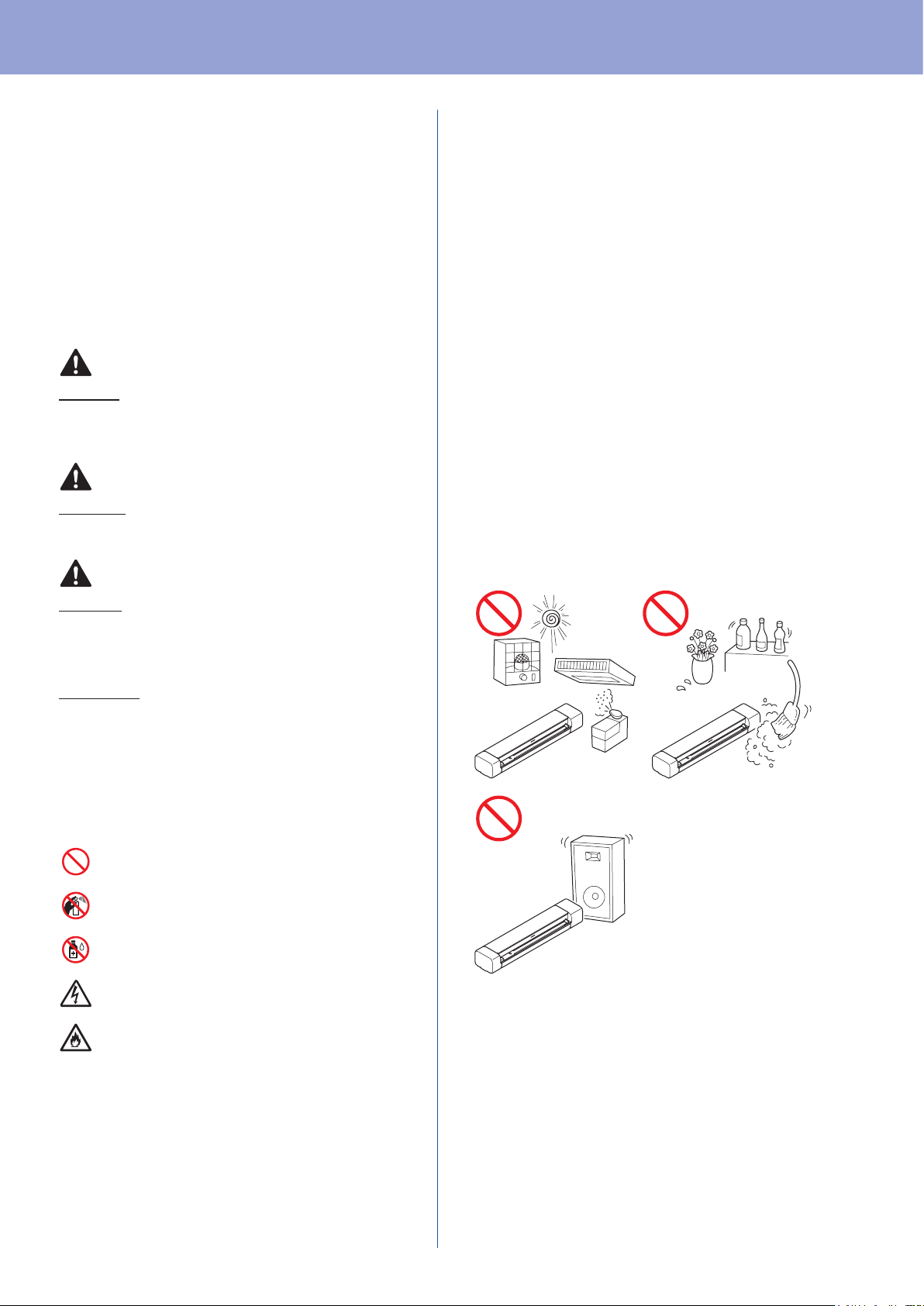
Choosing a location
Putyourmachineonaflat,level,stablesurface
thatisfreeofvibrationandshocks,suchasa
desk.Choosealocationwherethetemperature
remainsbetween41°Fand95°F(5°Cand35°C)
andthehumidityisbetween20to80%(without
condensation).
Product Safety Guide
Product Safety Guide
4
DANGER
(DSmobileDS-940DWonly)
UsetherechargeableLi-ionbatteryonlyforits
intendedpurpose.
(DSmobileDS-940DWonly)
TochargetherechargeableLi-ionbattery,connect
yourscannertoyourcomputerusingtheMicro
USBcable(included).
(DSmobileDS-940DWonly)
DONOTchargetherechargeableLi-ionbattery
nearareorindirectsunlight.Thiscouldactivate
theprotectioncircuitry,whichisdesignedtoprevent
dangerfromhighheat.Activationoftheprotection
circuitrycouldcausechargingtostop,charging
tooccurwithexcessivecurrentorvoltageifthe
protectioncircuitryfails,oranabnormalchemical
reactionwithintherechargeableLi-ionbattery.
(DSmobileDS-940DWonly)
Donotconnectthe+and-terminalswithmetal
objectssuchaswire.Donotcarryorstorethe
rechargeableLi-ionbatterywithmetalobjects.
(DSmobileDS-940DWonly)
KeeptherechargeableLi-ionbatteryawayfrom
heatandre.
(DSmobileDS-940DWonly)
DONOTuseorleaveascannerwiththe
rechargeableLi-ionbatteryinstallednearre,
heaters,orotherhigh-temperature(above
140°F/60°C)locations.
(DSmobileDS-940DWonly)
DONOTallowtherechargeableLi-ionbatteryto
comeintocontactwithliquids.
DONOTuseincorrosiveenvironments,suchas
areaswheresaltyair,saltwater,acids,alkalis,
corrosivegases,chemicals,oranycorrosiveliquid
arepresent.
(DSmobileDS-940DWonly)
DONOTusetherechargeableLi-ionbatteryifitis
damagedorleaking.
(DSmobileDS-940DWonly)
DONOTsolderanyconnectionstothe
rechargeableLi-ionbattery.
(DSmobileDS-940DWonly)
DONOTdirectlyconnecttherechargeableLi-ion
batterytoahouseholdelectricalsupply.
(DSmobileDS-940DWonly)
Liquid(electrolyte)leakingfromthescanneror
rechargeableLi-ionbatterymayindicatethatthe
rechargeableLi-ionbatteryisdamaged.Ifthe
rechargeableLi-ionbatteryleaks,immediately
discontinueuseofthescanner,unplugthecable,
andisolatethescannerbyputtingitinabag.
Donottouchtheelectrolyte.Ifliquidfromthe
rechargeableLi-ionbatterygetsintoyoureyes,
washthemimmediatelywithcleanwater.Contact
emergencyservicesimmediately.Ifleftalone,the
electrolytecouldcauseeyedamage.Ifelectrolyte
contactsyourskinorclothing,immediatelyrinse
themwithwater.
(DSmobileDS-940DWonly)
DONOTputtherechargeableLi-ionbattery,or
ascannerwiththerechargeableLi-ionbattery
installed,intoamicrowaveovenorahigh
pressurecontainer.
(DSmobileDS-940DWonly)
Ifthescannercanonlybeusedforashort
periodoftime,eventhoughtherechargeable
Li-ionbatteryisfullycharged,therechargeable
Li-ionbatterymayhavereachedtheendof
itsservicelife.Whenremovinganddisposing
therechargeableLi-ionbattery,coverthe
rechargeableLi-ionbatteryterminalswithtape
toavoidcreatingashortinthebattery.DONOT
disposetherechargeableLi-ionbatterywith
householdwaste.
Product Safety Guide
5
(DSmobileDS-940DWonly)
DONOTdisassembleormodifytherechargeable
Li-ionbattery.
(DSmobileDS-940DWonly)
DONOTdisposeoftherechargeableLi-ion
batteryinreorintentionallyoverheat.Thiscould
causetheinternalinsulationtomelt,gastobe
emitted,orsafetymechanismstofail.Additionally,
theelectrolytesolutioncouldcatchre.
(DSmobileDS-940DWonly)
DONOTpuncturetherechargeableLi-ion
batterywithanyobjects,subjectittosevere
shocksorthrowit.Damagetotherechargeable
Li-ionbattery'sprotectioncircuitcouldcausethe
rechargeableLi-ionbatterytoberechargedatan
abnormalcurrent/voltageorcauseanabnormal
chemicalreactionwithintherechargeableLi-ion
battery.
(DSmobileDS-940DWonly)
DONOTincineratetherechargeableLi-ionbattery
ordisposeofitwithhouseholdwaste.
WARNING
(DSmobileDS-940DWonly)
KeeptherechargeableLi-ionbatteryawayfrom
infants.Ifingested,contactemergencyservices
immediately.
StoretheUSBcablebundledandoutofthereach
ofchildrentoavoidtheriskofinjury.
DONOTdisassembleormodifythescanner,
otherwiseareorelectricshockmayoccur.If
thescannerrequiresrepair,contactyourBrother
dealerorBrothercustomerservice.
(DSmobileDS-940DWonly)
StopusingtherechargeableLi-ionbatteryifthere
arenoticeableabnormalitiessuchassmell,heat,
deformities,ordiscoloration.Turnthepower
switchoffimmediatelyandremovetheUSBcable
fromthepowersource.
Intheeventthatforeignmaterialentersthe
scanner,turnthepowerswitchoffimmediatelyand
removetheUSBcable.Contactthestorewhere
thisscannerwaspurchased.Thismayresultina
re,electricshock,ordevicefailure.
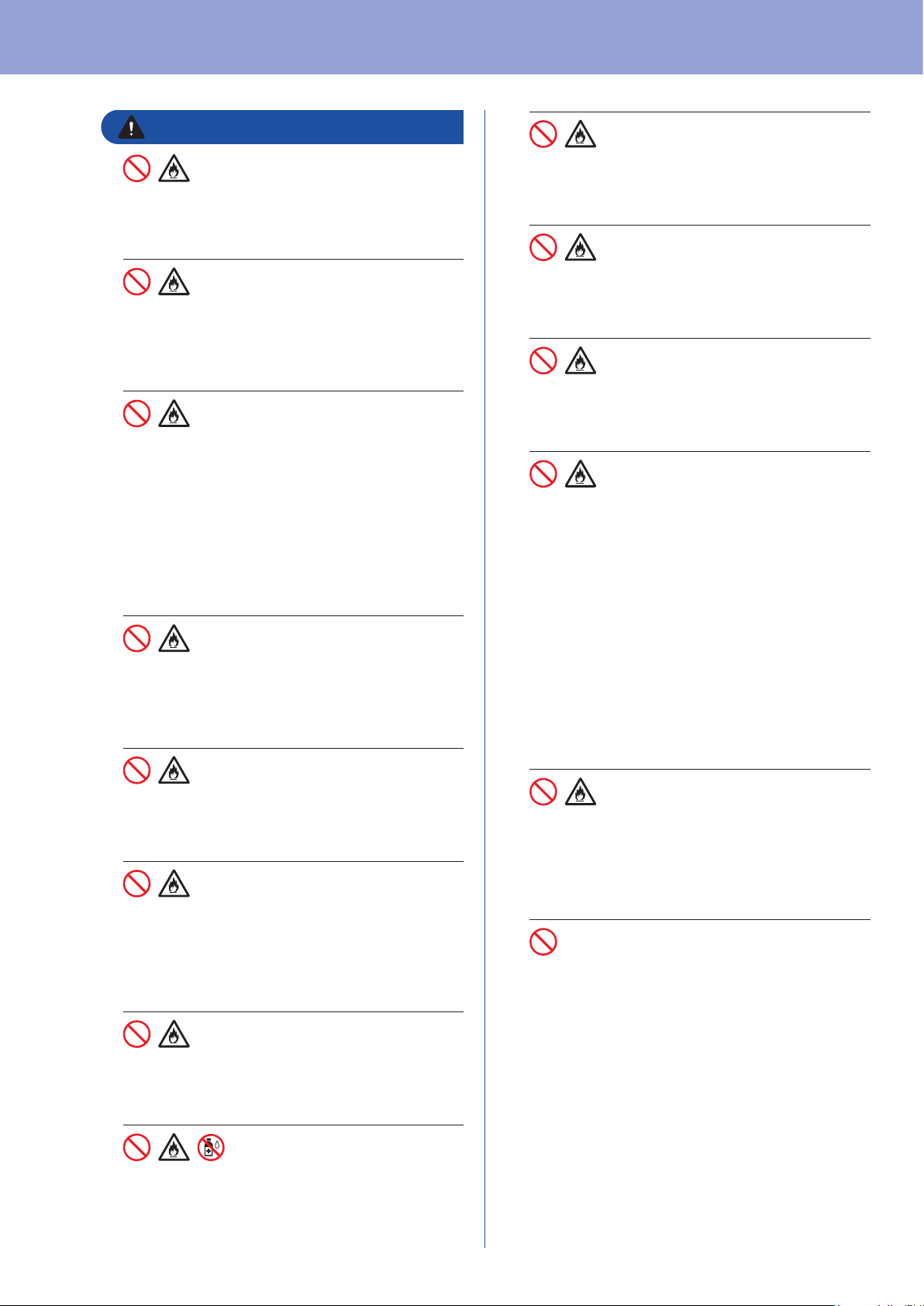
DONOTplacethescannernearradiators,
heaters,airconditioners,water,chemicals
ordevicesthatcontainmagnetsorgenerate
magneticelds.Doingsomaycreatetherisk
ofashortcircuitorreshouldwatercomeinto
contactwiththescanner(includingcondensation
fromheating,airconditioning,and/orventilation
equipmentthatmaybesufcienttocreateashort
circuitorre).
DONOTplacethescannernearchemicalsorin
aplacewherechemicalspillagecouldoccur.In
particular,organicsolventsorliquidsmaycause
thecasingand/orcablestomeltordissolve,
riskingareorelectricalshock.Theymayalso
causethescannertomalfunctionorbecome
discolored.
Plasticbagsareusedinthepackagingofthe
scanner.Toavoiddangerofsuffocation,keep
theseplasticbagsawayfrombabiesandchildren.
Plasticbagsarenottoys.
DONOTexposethescannertodirectsunlight,
excessiveheat,openames,corrosivegasses,
moistureordust.DONOTplacethescannerona
carpetorrug,asthiswillexposeittodust.Doing
somaycreateariskofanelectricalshortorre.
Itmayalsodamagethescannerand/orrenderit
inoperable.
Product Safety Guide
6
Ifthescannerbecomesunusuallyhot,releases
smoke,generatesanystrongsmells,orifyou
accidentallyspillanyliquidonit,immediately
unplugthescannerfromthepowersource.
ContactyourBrotherdealerorBrothercustomer
service.
DONOTuseammablesubstances,anytypeof
spray,oranorganicsolvent/liquidthatcontains
alcoholorammoniatocleantheinsideoroutside
ofthescanner.Doingthismaycauseareor
electricalshock.
CAUTION
Strongjolts,i.e.drop,beingsteppedon,etc.,may
damagethescanner.Thismayresultininjury.In
theeventthatthescannerisdamaged,turnthe
powerswitchoffimmediately,removetheUSB
cablefromtheoutlet.Contactthestorewherethis
scannerwaspurchased.
Avoidplacingthescannerinahigh-trafcarea.If
youmustplaceitinahigh-trafcarea,ensurethat
thescannerisinasafelocationwhereitcannot
beaccidentallyknockedover,whichcouldcause
injurytoyouorothersandseriousdamagetothe
scanner.
Ensurethatcablesandcordsleadingtothe
scanneraresecuredsoasnottoposeatripping
hazard.
Makesurethatnopartofthescannerprotrudes
fromthedeskorstandwherethescanneris
located.Makesurethatthescannerislocatedon
aat,level,andstablesurfacefreefromvibration.
Failuretoobservetheseprecautionscouldcause
thescannertofall,causinganinjury.
DONOTplacethescanneronanunstableor
tiltedcart,stand,ortable,oronanytilted/slanted
surface.Themachinemayfall,causinginjuryto
youandseriousdamagetothescanner.Thereis
anaddedriskofinjuryifthescannerglassshould
break.
Donotplaceheavyobjectsonthescanner.Itmay
causeunbalanceandthedevicemayfalldown.
Thismayresultininjury.
Becautiouswhenyouhandlepaper.Edgesof
papermaycutyourhands.
• Ifthemachinedoesnotoperatenormallywhen
theoperatinginstructionsarefollowed,adjust
onlythosecontrolsthatarecoveredbythe
operatinginstructions.Improperadjustmentof
othercontrolsmayresultindamageorminor
exposuretoelectromagneticwavesandwill
oftenrequireextensiveworkbyaqualied
techniciantorestorethemachinetonormal
operation.
• Donotusethedeviceinlocationswhere
temperaturechangesareextreme.The
resultingcondensationmayresultindevice
failureormalfunction.Intheeventof
condensation,useonlyafterdryingthedevice
naturally.
IMPORTANT
(DSmobileDS-940DWonly)
ATTENTION:
Theproductyouhavepurchasedis
poweredbyaLithiumIonbatterythat
isrecyclable.Attheendofitsuseful
life,undervariousstateandlocallaws,
itisillegaltodisposeofthisbatteryinto
yourmunicipalwastestream.Please
call1-800-8-BATTERYforinformation
onhowtorecyclethisbattery.
Product Safety Guide
7
DONOTattempttoservicethescanneryourself
becausedisassemblingthescannermayexposeyou
todangerousvoltagepointsandotherrisksandmay
voidyourwarranty.ReferallservicingtoaBrother
AuthorizedServiceCenter.Forthelocationofyour
nearestBrotherAuthorizedServiceCenter,contact:
InUSA:1-877-BROTHER(1-877-276-8437)
InCanada:www.brother.ca/support
Rechargeable Li-ion
battery (DSmobile
DS-940DW only)
• Atthetimeofpurchase,therechargeableLi-ion
batteryisslightlychargedsothattheoperation
ofthescannercanbeverified;however,the
rechargeableLi-ionbatteryshouldbefullycharged
viatheUSBportbeforethescannerisused.
• Ifthescannerwillnotbeusedforalongperiod
oftime,storeitinalocationwhereitisnot
exposedtohighhumidityorhightemperatures
(temperaturesbetween59°F/15°Cand
77°F/25°Cand40to60%humidityare
recommended).Inordertomaintaintheefficiency
andlifeoftherechargeableLi-ionbattery,chargeit
atleasteverythreemonths.
• Ifyounoticeanythingunusualaboutthe
rechargeableLi-ionbatterythefirsttimeitisused,
forexampleoverheatingorrust,DONOTcontinue
tousethebattery.ContactyourBrotherdealeror
Brothercustomerservice.
• ChargetherechargeableLi-ionbatterybeforeuse.
DonotusethescanneruntiltherechargeableLi-
ionbatteryhasbeenfullycharged.
• TherechargeableLi-ionbatterychargingcantake
placein41~102°F(5~39°C)environments.Ifthe
surroundingtemperatureisoutofthisrange,the
rechargeableLi-ionbatterywillnotbecharged,
andthebatteryindicatorwillremainlit.
• Ifthescannerisusedwhenboththerechargeable
Li-ionbatteryisinstalledandthescanneris
connectedtoyourcomputer,chargingmaystop
eveniftherechargeableLi-ionbatteryhasnot
beenfullycharged.
Important safety
instructions
Tips on using the
rechargeable Li-ion battery
(DSmobile DS-940DW
only)
Rechargeable Li-ion
battery characteristics
(DSmobile DS-940DW
only)
Understandingthepropertiesoftherechargeable
Li-ionbatterywillallowyoutooptimizeitsusage.
• UsingorstoringtherechargeableLi-ionbattery
inalocationexposedtohighorlowtemperatures
mayaccelerateitsdeterioration.Inparticular,
usingarechargeableLi-ionbatterywithahigh
charge(90%ormore)inalocationexposedto
hightemperatureswillconsiderablyaccelerate
batterydeterioration.
• UsingthescannerwhiletherechargeableLi-ion
batteryisinstalledandchargingmayaccelerate
thebattery’sdeterioration.
• Werecommendchargingthescannerevery
threemonthstomaintaintheefficiencyandlifeof
therechargeableLi-ionbattery.
• Ifyoutouchapartofthescannerwhilethe
rechargeableLi-ionbatteryischarging,thatpart
ofthescannermayfeelwarm.Thisisnormal,and
thescannermaybeusedsafely.Ifthescanner
becomesextremelyhot,discontinueuse.
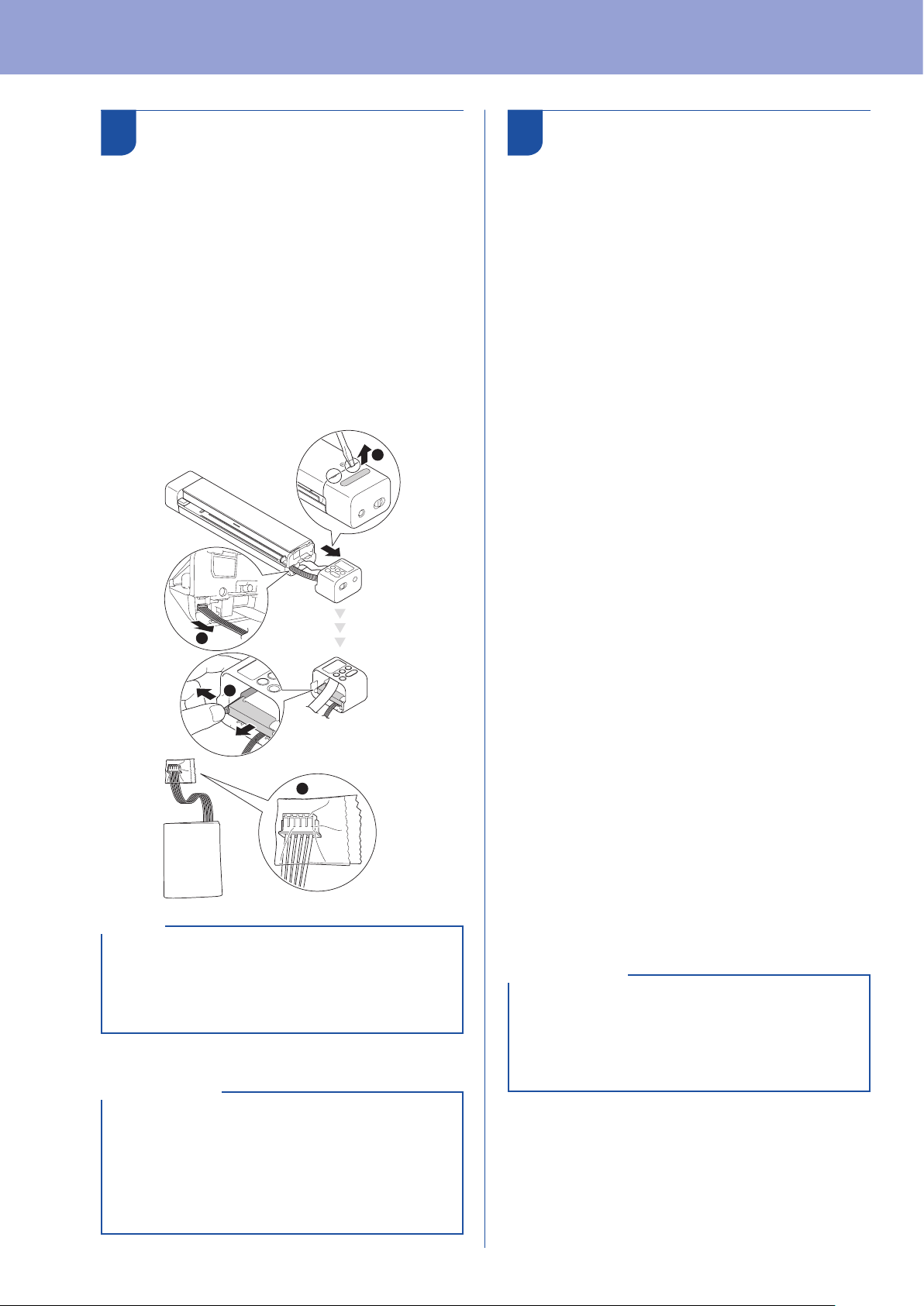
Surroundings temperature range
Charge
32~113°F
(0~45°C)
Standarddischargecurrent0.24A
14~140°F
(-10~60°C)
Maximumdischargecurrent1.2A
32~140°F
(0~60°C)
Battery
(Installed)
Lessthan
1month
-4~113°F
(-20~45°C)
Lessthan
3month
-4~95°F
(-20~35°C)
Lessthan
1year
-4~77°F
(-20~25°C)
Charging parameters
Maximumchargingvoltage 4.35Vdc
Maximumchargingcurrent 1200mA
Product Safety Guide
8
How to remove
and dispose of the
rechargeable Li-ion battery
(DSmobile DS-940DW only)
TurnoffthemachineandremovetheUSBcablefromthe
machinebeforeremovingtherechargeableLi-ionbattery.
1.
PlacethemachinefacedownandremovetheSide
Coverusingaflatheadscrewdriver.
2.
DisconnecttherechargeableLi-ionbatteryconnector
fromthePrintedCircuitBoardAssembly(PCBA).Do
notdisconnecttheFlexibleFlatCable(FFC).
3.Pushthereleasetab(asillustrated)toremovethe
rechargeableLi-ionbatteryfromtheSideCover.
4.
CovertherechargeableLi-ionbatteryterminalswith
tapeanddisposeaccordingtoyourlocalrecyclinglaws.
4
3
2
1
• Wedonotrecommendremovingtherechargeable
Li-ionbatteryunlessdisposingthescanner.
• Formoreinformationabouthandlingthe
rechargeableLi-ionbattery,seetheapplicable
instructionsandwarningsinthisguide.
NOTE
Regulation
• Brothercannotacceptanynancialorother
responsibilitiesthatmaybetheresultofyouruse
ofthisinformation,includingdirect,specialor
consequentialdamages.Therearenowarranties
extendedorgrantedbythisdocument.
• Thismachinehasbeencertiedtocomplywith
FCCstandards,whichareappliedtotheUSAonly.
IMPORTANT
Federal Communications
Commission (FCC)
supplier’s Declaration of
Conformity (For USA Only)
ResponsibleParty: BrotherInternationalCorporation
200CrossingBoulevard
Bridgewater,NJ08807-0911USA
TEL:(908)704-1700
declares,thattheproducts
ProductName:DSmobileDS-635,
DSmobileDS-640,
DSmobileDS-740D,
DSmobileDS-940DW
complieswithPart15oftheFCCRules.Operationis
subjecttothefollowingtwoconditions:(1)Thisdevice
maynotcauseharmfulinterference,and(2)thisdevice
mustacceptanyinterferencereceived,including
interferencethatmaycauseundesiredoperation.
Thisequipmenthasbeentestedandfoundtocomplywith
thelimitsforaClassBdigitaldevice,pursuanttoPart15
oftheFCCRules.Theselimitsaredesignedtoprovide
reasonableprotectionagainstharmfulinterferencein
aresidentialinstallation.Thisequipmentgenerates,
uses,andcanradiateradiofrequencyenergyand,ifnot
installedandusedinaccordancewiththeinstructions,
maycauseharmfulinterferencetoradiocommunications.
However,thereisnoguaranteethatinterferencewillnot
occurinaparticularinstallation.Ifthisequipmentdoes
causeharmfulinterferencetoradioortelevisionreception,
whichcanbedeterminedbyturningtheequipment
offandon,theuserisencouragedtotrytocorrectthe
interferencebyoneormoreofthefollowingmeasures:
Reorientorrelocatethereceivingantenna.
Increasetheseparationbetweentheequipment
andreceiver.
Connecttheequipmentintoanoutletona
circuitdifferentfromthattowhichthereceiver
isconnected.
Consultthedealeroranexperiencedradio/TV
technicianforhelp.
(DSmobileDS-940DWonly)
Thistransmittermustnotbeco-locatedor
operatedinconjunctionwithanyotherantenna
ortransmitter.
• Changesormodicationsnotexpressly
approvedbyBrotherIndustries,Ltd.couldvoid
theuser’sauthoritytooperatetheequipment.
• Aspecicshieldedinterfacecableshouldbe
usedtoensurecompliancewiththelimitsfora
ClassBdigitaldevice.
IMPORTANT

Product Safety Guide
9
Industry Canada
Compliance Statement
(Canada only)
ThisdevicecomplieswithIndustryCanada'slicence-exempt
RSSs.Operationissubjecttothefollowingtwoconditions:
(1)thisdevicemaynotcauseinterference,and(2)this
devicemustacceptanyinterference,includinginterference
thatmaycauseundesiredoperationofthedevice.
LepresentappareilestconformeauxCNRd’Industrie
Canadaapplicablesauxappareilsradioexemptsde
licence.L’exploitationestautoriseeauxdeuxconditions
suivantes:(1)l’appareilnedoitpasproduirede
brouillage,et(2)l’utilisateurdel’appareildoitaccepter
toutbrouillageradioelectriquesubi,memesilebrouillage
estsusceptibled’encompromettrelefonctionnement.
ThesemachinesaremadeforuseintheUSAandCanada
only.Wecannotrecommendusingthemoverseasbecausethe
powerrequirementsofyourmachinemaynotbecompatiblewith
thepoweravailableinforeigncountries.UsingUSAorCanada
modelsoverseasisatyourownriskandmayvoidyourwarranty.
International ENERGY
STAR
®
Qualication
Statement
ThepurposeoftheInternationalENERGYSTAR
®
Programistopromotethedevelopmentand
popularizationofenergy-efficientequipment.
AsanENERGYSTAR
®
Partner,BrotherIndustries,Ltd.
hasdeterminedthatthisproductmeetstheENERGY
STAR
®
specificationsforenergyefficiency.
RF Exposure Notice (USA/
Canada only) (DSmobile
DS-940DW only)
ThisequipmentcomplieswithFCC/ICradiationexposure
limitssetforthforanuncontrolledenvironmentandmeets
theFCCradiofrequency(RF)ExposureGuidelinesand
RSS-102oftheICradiofrequency(RF)Exposurerules.
Thisequipmentshouldbeinstalledandoperatedkeeping
theradiatoratleast20cmormoreawayfromperson’sbody.
For use in the USA or
Canada only
Avis d’exposition aux
RF (États-Unis/Canada
uniquement) (DSmobile
DS-940DW uniquement)
Cetéquipementestconformeauxlimitesd’expositionaux
rayonnementsénoncéespourunenvironnementnoncontrôlé
etrespecteleslignesdirectricesd'expositionauxfréquences
radioélectriques(RF)delaFCCetlesrèglesd’exposition
auxfréquencesradioélectriques(RF)CNR-102del’IC.Cet
équipementdoitêtreinstalléetutiliséengardantunedistance
de20cmouplusentreleradiateuretlecorpshumain.
Trademarks
BROTHERiseitheratrademarkoraregistered
trademarkofBrotherIndustries,Ltd.
AndroidandGooglePlayaretrademarksofGoogle
LLC.
Apple,AppStoreandMacaretrademarksofApple
Inc.,registeredintheU.S.andothercountries.
Wi-FiisaregisteredtrademarkofWi-FiAlliance
®
.
microSDLogoisatrademarkofSD-3CLLC.
Eachcompanywhosesoftwaretitleismentioned
inthismanualhasaSoftwareLicenseAgreement
specifictoitsproprietaryprograms.
Any trade names and product names of companies
appearing on Brother products, related documents
and any other materials are all trademarks
or registered trademarks of those respective
companies.
Copyright and License
©2019BrotherIndustries,Ltd.Allrightsreserved.
Open Source Licensing
Remarks
Thisproductincludesopen-sourcesoftware.
Pleasevisitsupport.brother.comtoseetheopen
sourcelicensingremarks.