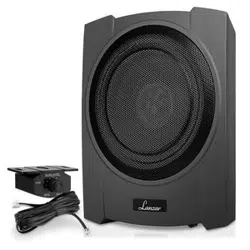

SBA10A
10” 900 Watts Low-Profile Active Amplified
Car Audio Subwoofer System
Suitable for Under-seat Installations
Questions? Issues?
We are here to help!
Phone: (1) 718-535-1800
Email: support@pyleusa.com
www.PyleUSA.com
2
www.Py leUSA.com
3
Introduction
With the SBA10A
high-powered subwoofer system to your audio system.
SBA10A features low pass crossovers, and a control for
adjusting the input sensitivity from 0.12V to 3.5V.
Both high level (speaker level) and low level (RCA type) inputs are present, making this a
universal solution for use with any head unit or other input source.
included. You can control the subwoofer level with the remote level control module.
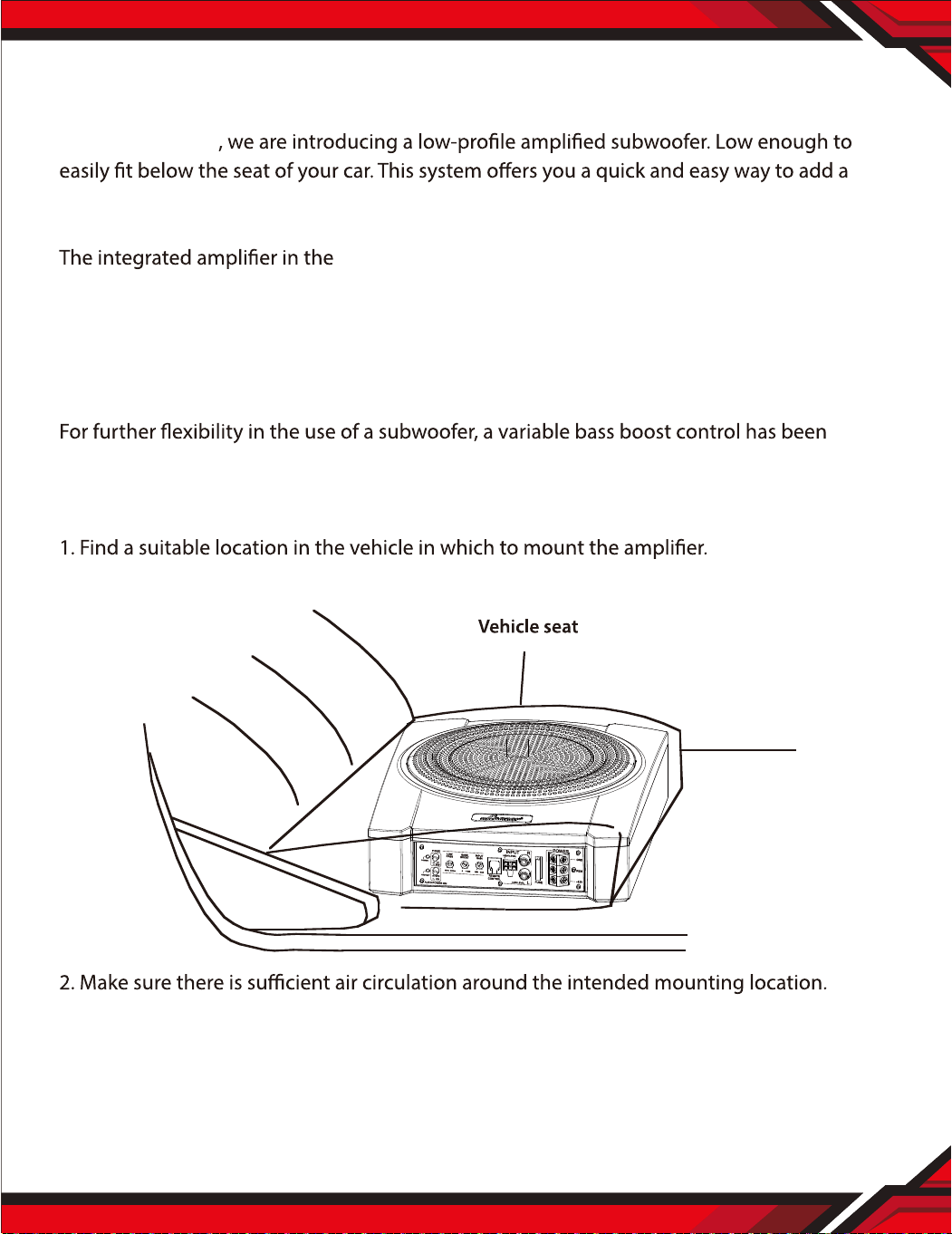
Mounting the Subwoofer
A typical location is shown below:
3. Mark the location for mounting hole screws by positioning the cabinet where you wish to
install it. Make a small mark to identify the position and remove the unit. Thoroughly clean
the area you plan to attach the subwoofer, using a vacuum cleaner and press down on it
securely.
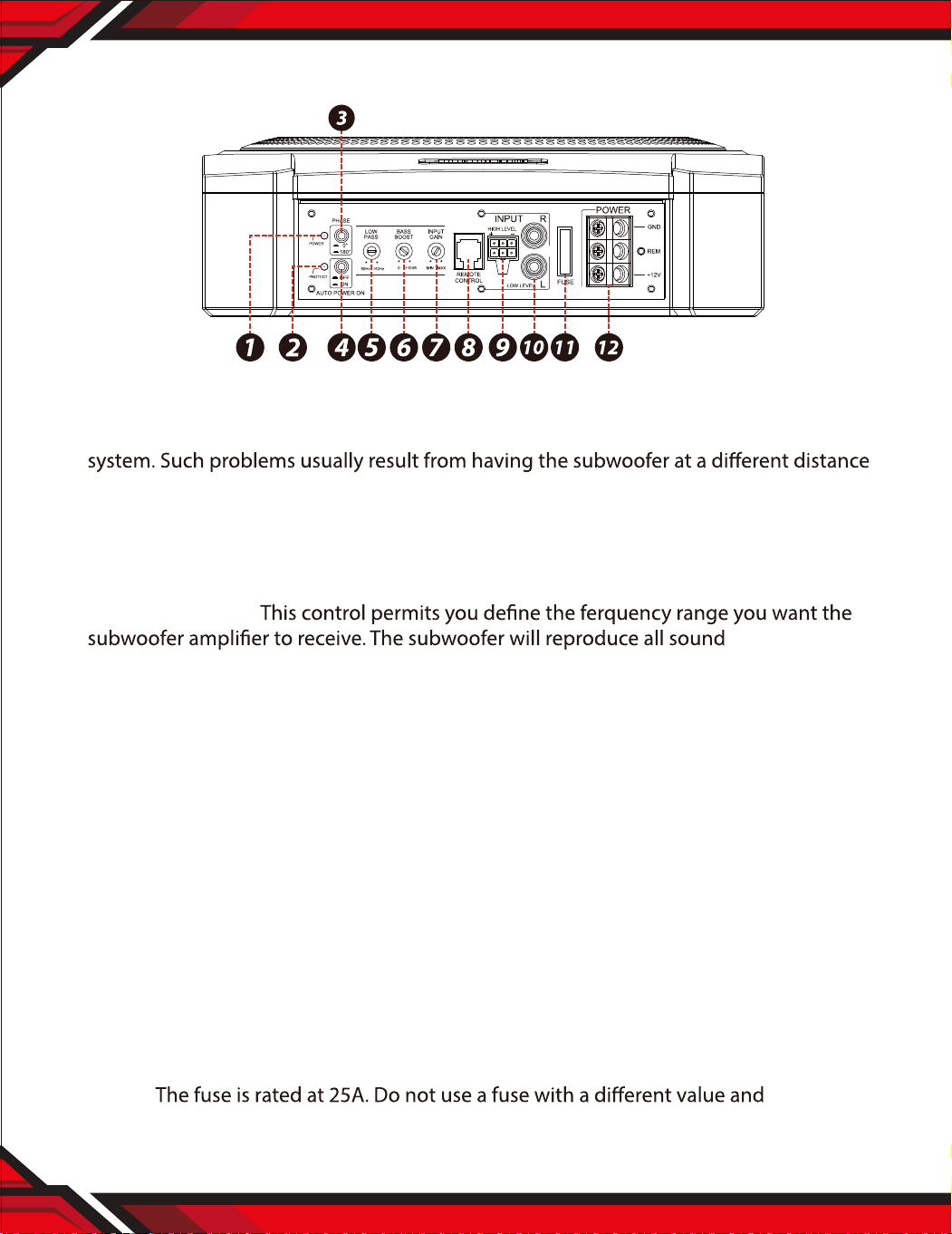
Control Panel and Features
1. POWER ON LED INDICATOR
2. PROTECT LED INDICATOR
3. PHASE SHIFT: Use this switch to help compensate for time alignment problems in the
from the listener than the other speakers in the system.
4. AUTO POWER ON: During ON mode, It’s not necessary to connect the remote cable if
you’re using the high level inputs. Do not function with the RCA inputs. On the contrary
while it is during AUTO POWER OFF mode that it needs remote cable connection to turn
on the unit.
5. LOW PASS FILTER:
BELOW the
frequency you set. If the rest of your system is weak on the mids, you may wish to set this
control relatively high. If the midrange is well covered by the rest of your system, you will
probably want the subwoofer to only receive lower frequency signal.
6. BASS BOOST: The bass boost feature will increase the sound level the bass frequencies.
7. INPUT GAIN CONTROL: After you have installed your system, turn this control to minimum.
Turn the head unit on (and the subwoofer will turn on via the remote connection).
Turn the head unit volume to about 2/3 full level. Slowly turn up the subwoofer input
gain control until you hear a small amount of distortion. Then reduce the level until the
distortion is completely gone. Leave the control at this setting.
8. REMOTE LEVEL CONTROL PORT: Attach the included remote level control to cotrol the
volume level of the subwoofer independently.
9. HIGH LEVEL (speaker level) INPUTS: If your head unit does not have RCA outputs, you
can use the speaker outputs for the audio source for the SBA10A. Use the supplied cable
and connect the outpu
ts properly as shown in the connection diagram in this manual.
10. LOW LEVEL RCA INPUTS: Low level inputs are the recommended way to introduce the
audio signal to the subwoofer if RCA outputs are present on your head unit or other
signal source (such as a sound processor).
11. FUSE:
NEVER
replace the fuse with a wire or coin.
12. POWER TERMINALS
www.PyleUSA.com
2
www.Py leUSA.com
3
Introduction
With the SBA10A
high-powered subwoofer system to your audio system.
SBA10A features low pass crossovers, and a control for
adjusting the input sensitivity from 0.12V to 3.5V.
Both high level (speaker level) and low level (RCA type) inputs are present, making this a
universal solution for use with any head unit or other input source.
included. You can control the subwoofer level with the remote level control module.
Mounting the Subwoofer
A typical location is shown below:
3. Mark the location for mounting hole screws by positioning the cabinet where you wish to
install it. Make a small mark to identify the position and remove the unit. Thoroughly clean
the area you plan to attach the subwoofer, using a vacuum cleaner and press down on it
securely.
Control Panel and Features
1. POWER ON LED INDICATOR
2. PROTECT LED INDICATOR
3. PHASE SHIFT: Use this switch to help compensate for time alignment problems in the
from the listener than the other speakers in the system.
4. AUTO POWER ON: During ON mode, It’s not necessary to connect the remote cable if
you’re using the high level inputs. Do not function with the RCA inputs. On the contrary
while it is during AUTO POWER OFF mode that it needs remote cable connection to turn
on the unit.
5. LOW PASS FILTER:
BELOW the
frequency you set. If the rest of your system is weak on the mids, you may wish to set this
control relatively high. If the midrange is well covered by the rest of your system, you will
probably want the subwoofer to only receive lower frequency signal.
6. BASS BOOST: The bass boost feature will increase the sound level the bass frequencies.
7. INPUT GAIN CONTROL: After you have installed your system, turn this control to minimum.
Turn the head unit on (and the subwoofer will turn on via the remote connection).
Turn the head unit volume to about 2/3 full level. Slowly turn up the subwoofer input
gain control until you hear a small amount of distortion. Then reduce the level until the
distortion is completely gone. Leave the control at this setting.
8. REMOTE LEVEL CONTROL PORT: Attach the included remote level control to cotrol the
volume level of the subwoofer independently.
9. HIGH LEVEL (speaker level) INPUTS: If your head unit does not have RCA outputs, you
can use the speaker outputs for the audio source for the SBA10A. Use the supplied cable
and connect the outpu
ts properly as shown in the connection diagram in this manual.
10. LOW LEVEL RCA INPUTS: Low level inputs are the recommended way to introduce the
audio signal to the subwoofer if RCA outputs are present on your head unit or other
signal source (such as a sound processor).
11. FUSE:
NEVER
replace the fuse with a wire or coin.
12. POWER TERMINALS
www.PyleUSA.com
4
www.Py leUSA.com
5
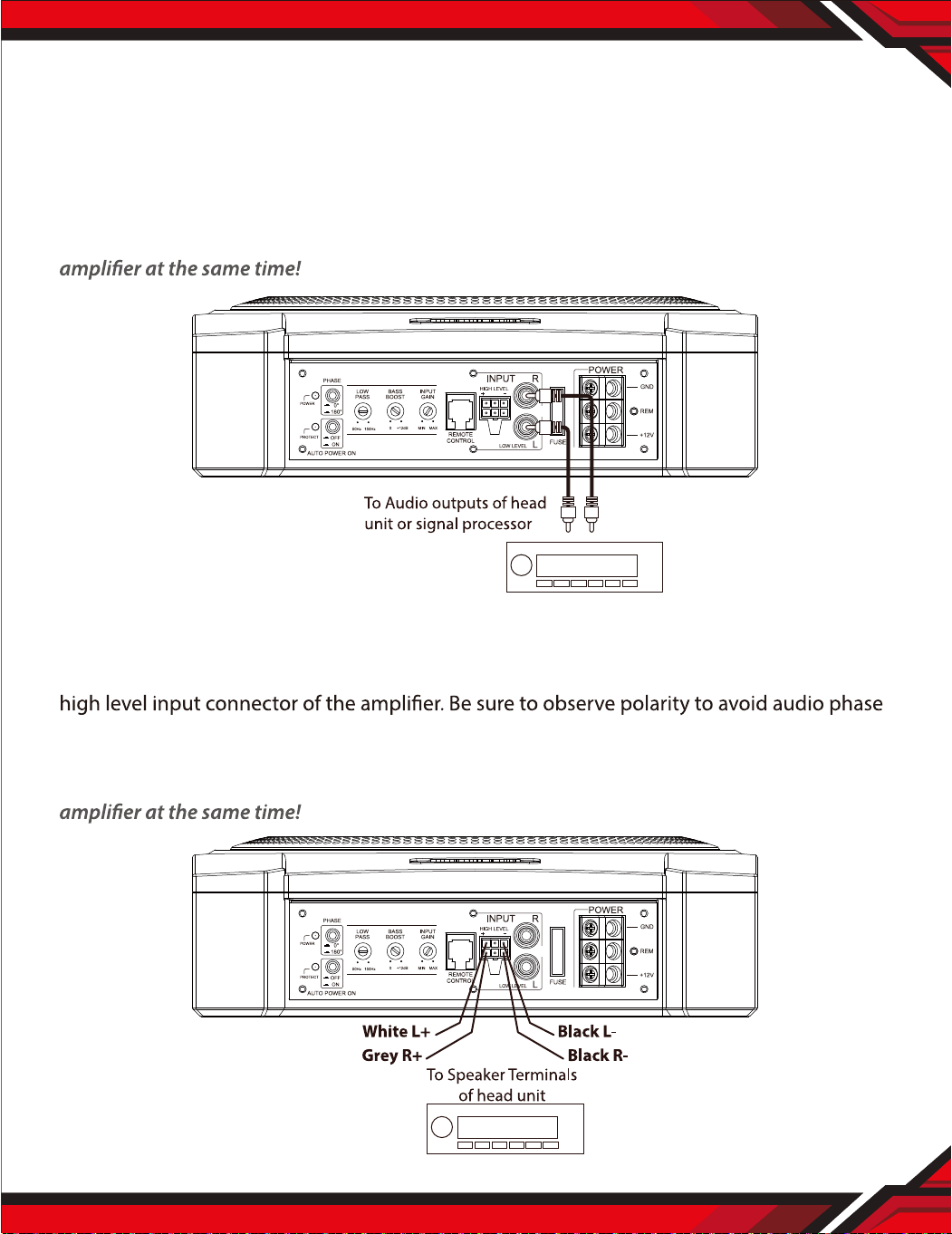
Low Level Input Wiring
Low-level (RCA) input wiring is preferred for best audio performance.
Most trunk or hatchback installations will require a 15-20 foot RCA cable, while pickup trunks
and under-seat installations will require a 6-12 foot RCA cable. Always use a high quality
cable.
NOTE: Do not connect BOTH the high level and low level inputs from your receiver to your
High Level Input Wiring
The high level input(s) should only be used when your receiver lacks RCA outputs.
If the RCA outputs are not present, connect the speaker outputs from the receiver to the
problems.
NOTE: Do not connect BOTH the high level and low level inputs from your receiver to your
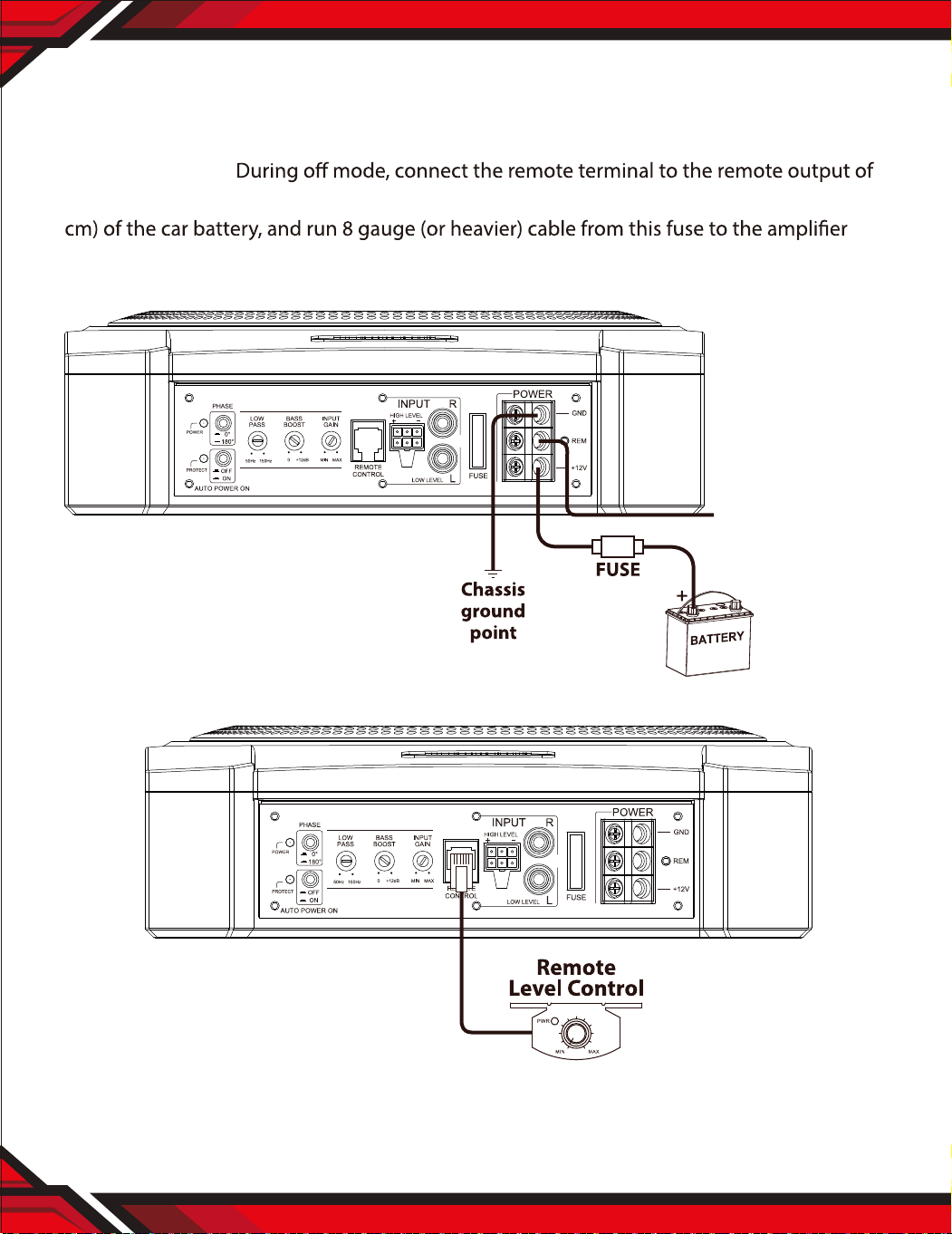
Power Connections
Connect the ground terminal to the closest point on the chassis of the vehicle.
Keep this ground wire to less than 39” (100 cm) inlength. Use 8 gauge (or heavier) wire.
AUTO POWER ON
the head unit using 16 gauge (or heavier) wire. Connect an empty fuse holder within 18” (45
location. Then connect the fuse holder to the “BATT+” connection on the subwoofer rear
panel.
Remote Level Control Connection
Instal the remote control securely under the
dash or in a similar location where using it will
not distract the driver.
To REMOTE TURN-ON
terminal of head unit
www.PyleUSA.com
4
www.Py leUSA.com
5
Low Level Input Wiring
Low-level (RCA) input wiring is preferred for best audio performance.
Most trunk or hatchback installations will require a 15-20 foot RCA cable, while pickup trunks
and under-seat installations will require a 6-12 foot RCA cable. Always use a high quality
cable.
NOTE: Do not connect BOTH the high level and low level inputs from your receiver to your
High Level Input Wiring
The high level input(s) should only be used when your receiver lacks RCA outputs.
If the RCA outputs are not present, connect the speaker outputs from the receiver to the
problems.
NOTE: Do not connect BOTH the high level and low level inputs from your receiver to your
Power Connections
Connect the ground terminal to the closest point on the chassis of the vehicle.
Keep this ground wire to less than 39” (100 cm) inlength. Use 8 gauge (or heavier) wire.
AUTO POWER ON
the head unit using 16 gauge (or heavier) wire. Connect an empty fuse holder within 18” (45
location. Then connect the fuse holder to the “BATT+” connection on the subwoofer rear
panel.
Remote Level Control Connection
Instal the remote control securely under the
dash or in a similar location where using it will
not distract the driver.
To REMOTE TURN-ON
terminal of head unit
www.PyleUSA.com
6
www.Py leUSA.com
7
Troubleshooting
If you experience operation or performance problems with this product, compare your
installation with the electrical wiring diagram on the previous pages. If problems persist,
read the following troubleshooting tips which may help eliminate the problems.
PROBLEM POSSIBLE REASON SOLUTION
Not switching on. Power
LED not ‘on’
No sound
Not working, but status
LED ‘on’
NO +12v to power wire Check fuses and connections to battery.
NO power to remote wire
Fuse broken
Fuse blown
Check remote on connections to head unit.
Replace fuse with correct type and amperage.
Replace fuse with correct type and amperage.
Head Unit
Gain control not set up
Connections
Move unit to vented area. Turn head unit down.
Check head unit volume level.
control
Check all power, remote on and ground
connections
Features:
• 10" Slim Woofer
• Low-Level RCA Input
• High-Level Speaker Line Input with
AUTO POWER ON/OFF selector
• Blue LED Power Status Indicator
• Red LED Protection Status Indicator
• Remote Bass Boost Level Control
• Delay Remote Turn-On Thermal
• Short and Overload Protection Circuits
What's in the Box:
•
• Remote Subwoofer Level Control
• Remote Subwoofer Control Cable
• Hi-level Input Wire
• Mounting Hardware
Technical Specs:
• Phase Shift Switch: 0 or 180°
• Adjustable Input Sensitivity: 0.12V-3.5V
• 0 to +12dB Variable Bass Boost (@50Hz)
• Low Pass Filter (50-150 Hz)
• Fuse: 1x25A
• Max Power: 900 watt
•
• THD: 14.4V
• Slim Woofer: 150Watt
• Product Dimension: 12.8" x 10.3" x 3.2" -inches

www.PyleUSA.com
6
www.Py leUSA.com
7
Troubleshooting
If you experience operation or performance problems with this product, compare your
installation with the electrical wiring diagram on the previous pages. If problems persist,
read the following troubleshooting tips which may help eliminate the problems.
PROBLEM POSSIBLE REASON SOLUTION
Not switching on. Power
LED not ‘on’
No sound
Not working, but status
LED ‘on’
NO +12v to power wire Check fuses and connections to battery.
NO power to remote wire
Fuse broken
Fuse blown
Check remote on connections to head unit.
Replace fuse with correct type and amperage.
Replace fuse with correct type and amperage.
Head Unit
Gain control not set up
Connections
Move unit to vented area. Turn head unit down.
Check head unit volume level.
control
Check all power, remote on and ground
connections
Features:
• 10" Slim Woofer
• Low-Level RCA Input
• High-Level Speaker Line Input with
AUTO POWER ON/OFF selector
• Blue LED Power Status Indicator
• Red LED Protection Status Indicator
• Remote Bass Boost Level Control
• Delay Remote Turn-On Thermal
• Short and Overload Protection Circuits
What's in the Box:
•
• Remote Subwoofer Level Control
• Remote Subwoofer Control Cable
• Hi-level Input Wire
• Mounting Hardware
Technical Specs:
• Phase Shift Switch: 0 or 180°
• Adjustable Input Sensitivity: 0.12V-3.5V
• 0 to +12dB Variable Bass Boost (@50Hz)
• Low Pass Filter (50-150 Hz)
• Fuse: 1x25A
• Max Power: 900 watt
•
• THD: 14.4V
• Slim Woofer: 150Watt
• Product Dimension: 12.8" x 10.3" x 3.2" -inches

SBA10A
10” 900 Watts Low-Profile Active Amplified
Car Audio Subwoofer System
Suitable for Under-seat Installations
Questions? Issues?
We are here to help!
Phone: (1) 718-535-1800
Email: suppor[email protected]