
55
Model Nominal Voltage Nominal Frequency Nominal Power
Instruc ons Manual
Fan Parts
PFT424R
1
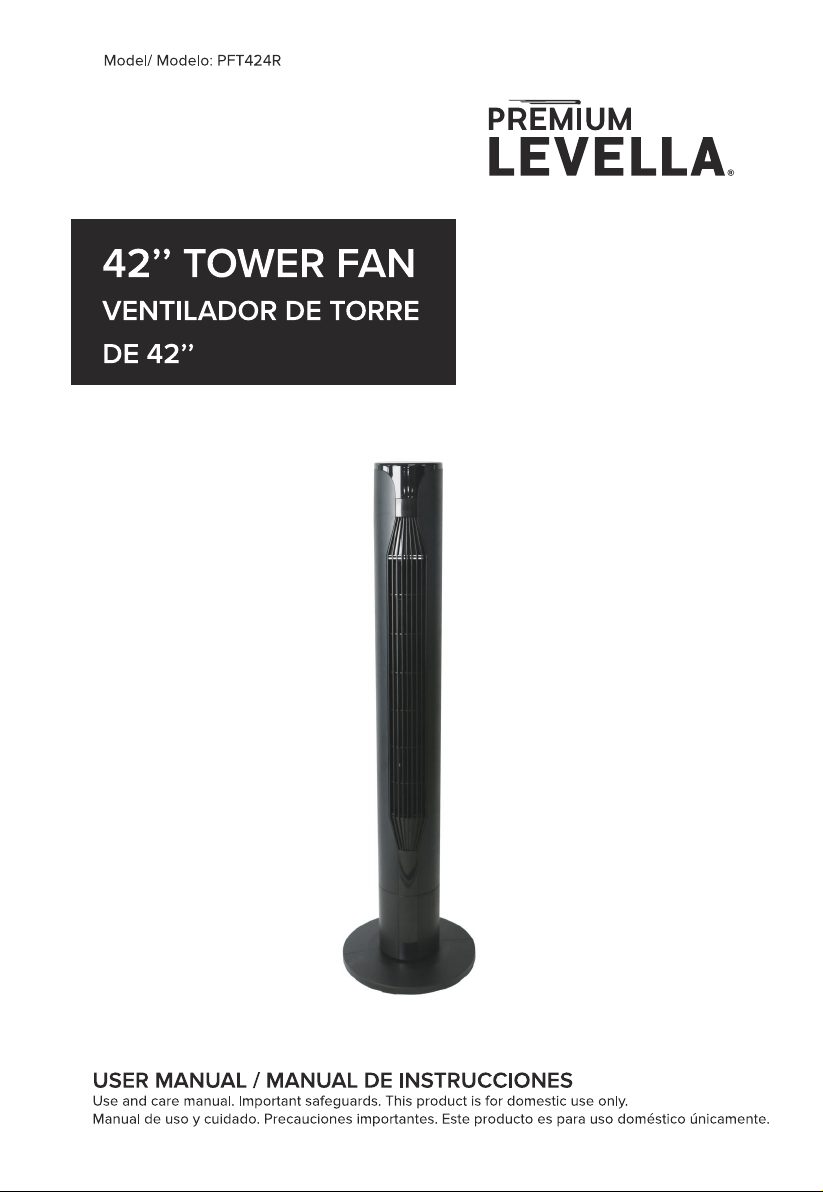
Thank you for your purchasing this fan. Please read all ins
carefully and keep for future use.
INSTRUCTIONS FOR USE
Please read these Opera
Ins carefully before c
your device to the mains, in order to avoid damage due to incorrect use.
Please pay
a en to the safety informa If you pass the
device on to a third party, these Opera
Ins s must also be
handed over.
WARNING-When using electrical appliances, basic safety prec
should always be followed to reduce the risk of fire, electrical shock and
personal injury.
SAFETY INFORMATION
1. Incorrect opera
and improper handling can lead to faults on the
device and injuries to the user.
2. In the event of improper use or incorrect handling, no liability can be
accepted for any damage that may occur.
3. Before you put the plug into the electrical socket, please check that
the type of current and mains voltage corresponds to the ins
on
the nameplate on the underside of the appliance.
2

4. Do not immerse the unit or mains plug in water or other liquids.
There is risk of electric shock! However, if this should occur, remove the
mains plug immediately and then have the unit checked by an expert
before using it again.
5. Do not operate the device if the mains cable or the mains plug show
signs of damage, or if the device has fallen on the floor or has been
otherwise damaged. In such cases take the device to a specialist for
checking and repair, if necessary.
6. Never remove the mains plug from the socket by pulling on the mains
cable, or with wet hands.
7. Ensure that the mains cable does not hang over sharp edges or it
becomes trapped.
8. Keep the appliance away from damp places and protect from
splashes.
9. Keep the appliance away from hot objects (e.g. oven) and open
flames.
10. If the supply cord is damaged, it must be replaced by the
manufacturer, its service agent, or similarly qualified persons in order to
avoid a hazard.
11. This appliance is not intended for use by persons (including children)
with reduced physical, sensory or mental c
or lack of
experience and knowledge, unless they have been given supervision or
3

ins s concerning the use of the appliance by a person responsible
for their safety.
12. Children should be supervised to ensure that they do not play with
the appliance.
13. The machine should not be operated by means of an external
or
by means of a separate system with remote control.
14. Use the appliance on a flat, dry and heat resistance surface.
15. This appliance is intended to be used in household and similar
applica
such as: staff kitchen areas in shops, offices and other
working environments; farmhouses; by clients in hotels, motels and
other residen
type environment; bed and breakfast type
environments.
16. Never leave the device in unattended during use.
17. Do not store or operate the appliance in the open air.
18. Keep the appliance in a dry place, inaccessible to children (in this
packaging).
19. Never put fingers or any other objects through the grilles (fan guards)
when the fan is running.
20. The appliance must be assembled completely before use.
21. Watch out for long hair! It can be caught in the fan due to the air
turbulence.
22. Do not point the air flow directly to people for a long
4

23. Ensure that the fan is switched off from the supply mains before
removing the guard.
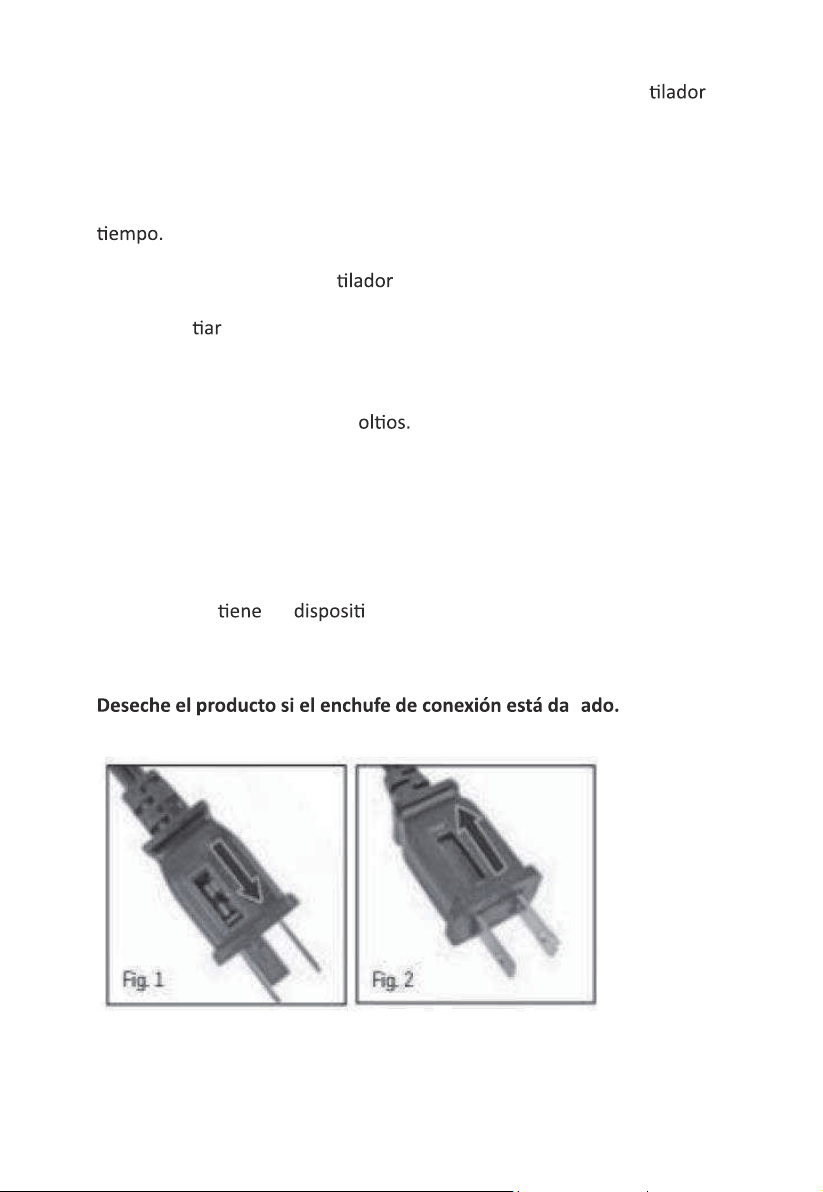
24. To reduce the risk of fire, replace fuse with a Max 5 Amp ,125 volt
fuse. Fully close the fuse door by sliding back into place (Fig.2) and
discard the blown fuse. The plug should now be ready for normal use.
25. To reduce the risk of fire, do not replace the a
achment plug. It
contains a safety device (fuse) that should not be removed.
Discard product if the attachmen
t plug is damaged
5
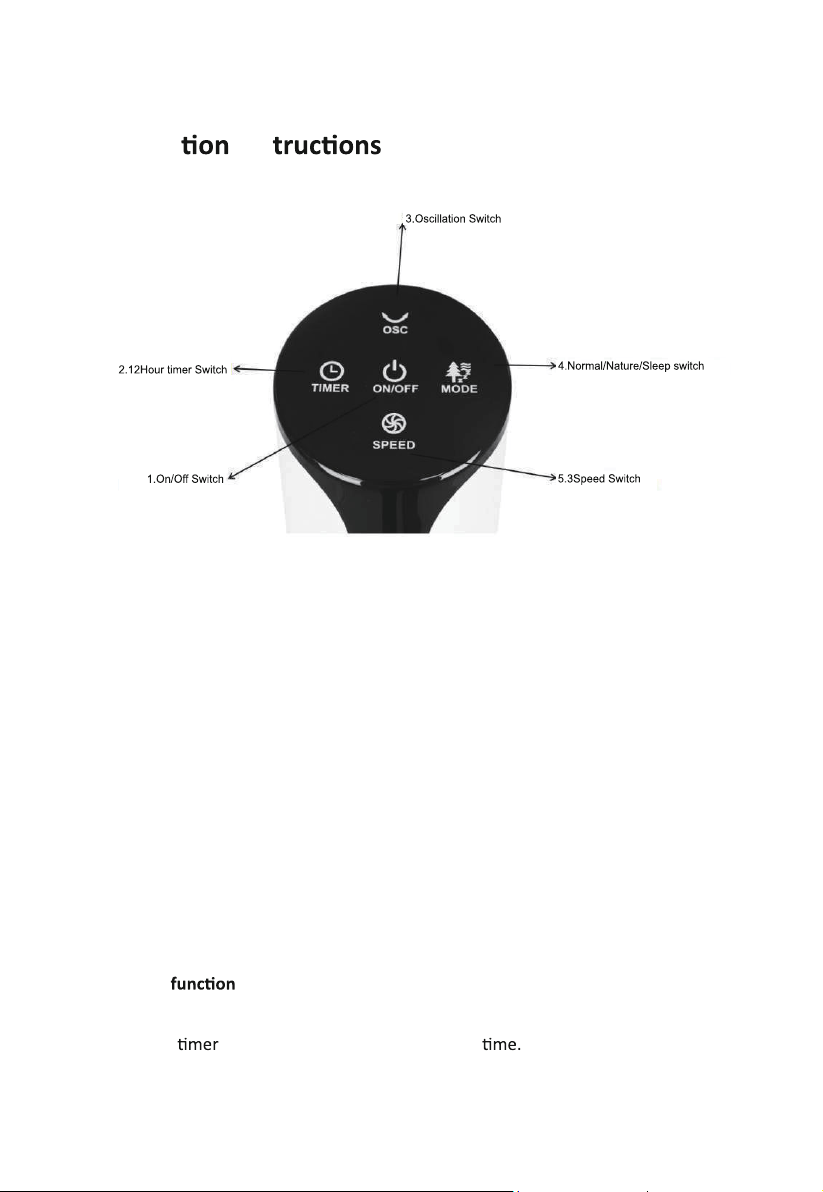
Opera Ins
DISTANCE OF FAN REMOTE CONTROL :5M
1.Power ON/OFF
Push the ON/OFF switch and the tower fan will start working. When the
fan is working push ON/OFF switch and the fan will stop working.
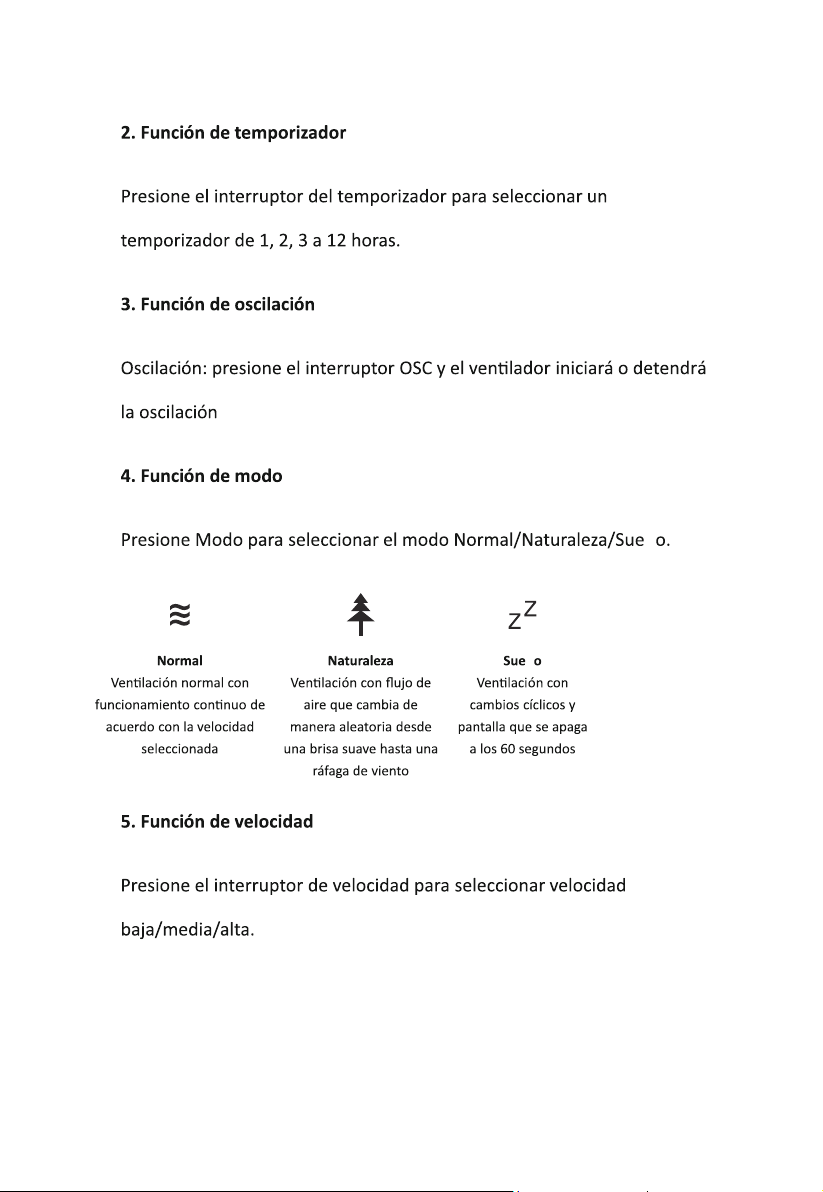
2.Timer
Push the switch to select 1, 2, 3 to 12hours
6

3.Oscilla
Oscilla - push the OSC switch, and the fan will start or stop the
oscilla
4.Mode
Push Mode to Select Normal/Nature/Sleep switch mode.
.
5.Speed
Push Speed switch to select Low/Medium/High Speed.
Normal
Normal fan with
constant running
according to the
fan speed
selected.
Nature
Nature mode the
airflow randomly
changes from a
gentle breeze to
gusts of wind.
SLEEP
The airflow
changes in cycles
also the Display(2)
will e
afer
60 seconds
7

55
Modelo Voltaje Frequency Nominal Potencia
Manual de Instrucciones
Partes del Ven lador
PFT424R
8

ñ
Ó
ñ
9
ñ
ñ
ñ
ñ
ñ
10
ñ
ñ
ñ
11
21. ¡Cuidado con el pelo largo! Puede quedar atrapado en el ven
debido a la turbulencia del aire.
22. No dirija el flujo de aire directamente a las personas durante mucho
23. Asegúrese de que el ven esté desconectado de la red eléctrica
antes de re
la rejilla de protección.
24. Para reducir el riesgo de incendio, reemplace el fusible con un fusible
máximo de 5 amperios y 125 v
Cierre completamente la puerta del
fusible deslizándola hacia su lugar (Fig. 2) y deseche el fusible quemado.
El enchufe ahora debería estar listo para un uso normal.
25. Para reducir el riesgo de incendio, no reemplace el enchufe de
conexión. Con
un o de seguridad (fusible) que no se debe
quitar.
ñ
12
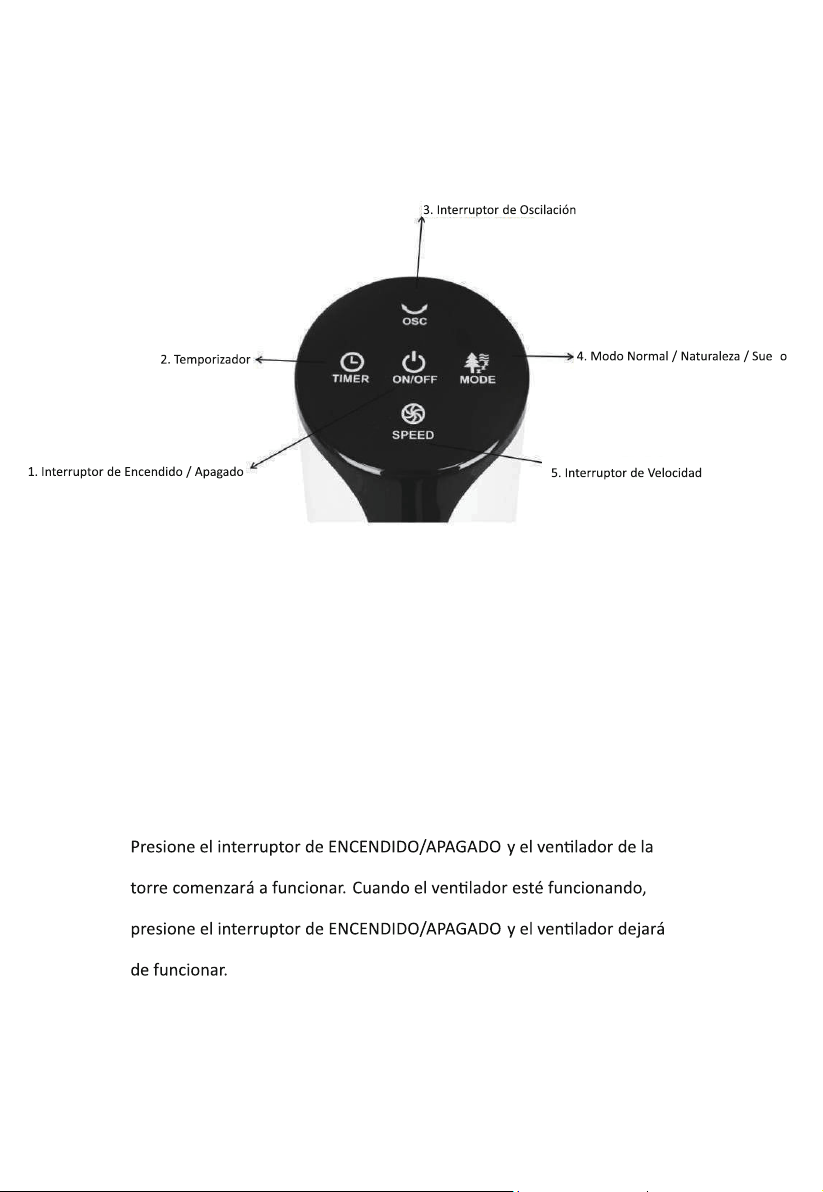
Instrucciones de Operación
DISTANCIA DEL VENTILADOR AL CONTROL
REMOTO: 5 METROS
1. Encendido/apagado
ñ
13
ñ
ñ
14