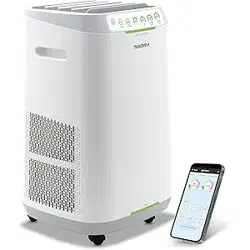
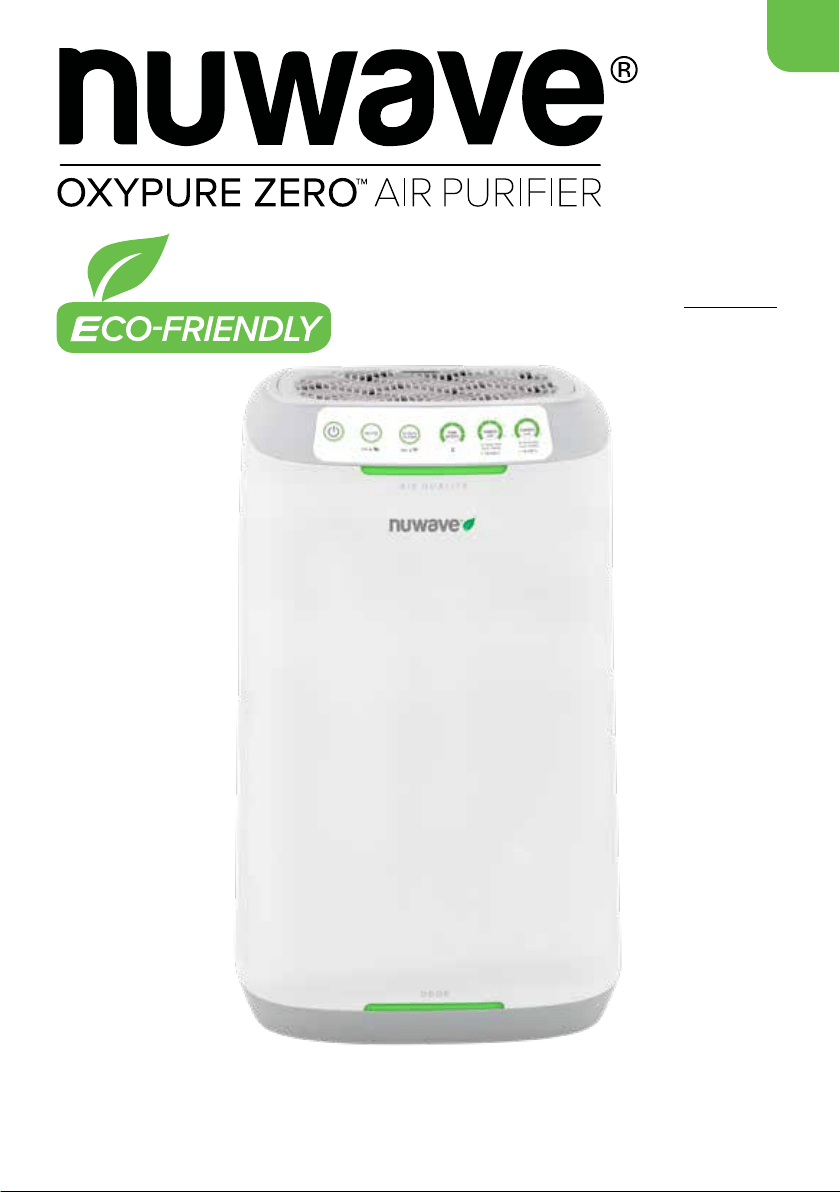
Owner’s Manual
Model 47351
Questions or Concerns?
Toll Free: 1-877-689-2838 • help@nuwavenow.com
(Mon-Fri 7:30am-4:30pm CST)
E500

2 | nuwavenow.com
THANK YOU
for purchasing the NuWave OxyPure ZERO E500.
REGISTER YOUR PURCHASE
1. Visit nuwavenow.com/QR
2. Scan the QR code using your mobile device.
RECORD THIS INFORMATION
Model Number: __________________________________________
Serial Number: ___________________________________________
Date of Purchase:_________________________________________
(Keep receipt)
Store of Purchase:________________________________________
TECHNICAL SPECIFICATIONS
Voltage: 120VAC/60Hz
Wattage: 48W
TIP: You can locate the model and serial numbers, as well as
the QR code, on the label on the back of the unit.
CUSTOMER SERVICE
Phone: 1-877-689-2838 (Mon - Fri 7:30am - 4:30pm)
Email: help@nuwavenow.com
Welcome to the
NuWave
®
Family!
Congratulations on getting your new NuWave
OxyPure ZERO E500 Smart Air Purier! We are
incredibly excited for you to enjoy pure, clean
air in your home and want to make sure you get
the most out of your OxyPure experience.
That’s what this manual is all about. In it, we
have provided detailed operating and care
instructions covering every aspect of your new
air purier to make sure the OxyPure is meeting
your needs.
Here at NuWave, the relationship we have with
our customers only begins with the purchase.
We are with you every step of the way because
we are dedicated to making your experience as
easy and rewarding as possible. So, if you have
any questions, comments, or concerns, please
don’t hesitate to contact Customer Service
by calling 1-877-689-2838 (Mon-Fri 7:30am-
4:30pm CST) or emailing us anytime at
help@nuwavenow.com.
We’re glad you’re with us, and we know that
you will be, too!
Connect with Us!
#nuwavenow
Visit nuwavenow.com to see other
great products and accessories.
Trademark & Copyright Notice
NuWave, NuWaveNow, and OxyPure are registerd
trademarks of NuWave, LLC. All Rights Reserved.
nuwavenow.com | 3
Para la versión en español de este manual, visita www.nuwavenow.com
CONTENTS
Important Safeguards .....................................................................4-5
Electrical Information ......................................................................5
Parts & Accessories........................................................................6
WiFi Connectivity ............................................................................7-8
Getting Started ...............................................................................8-9
Instructions .....................................................................................10-12
Maintenance ...................................................................................13
Troubleshooting..............................................................................14
Test Results ....................................................................................15-17
Limited Warranty ............................................................................18-19
Underwriters
Laboratories
Conformité Européenne
(European Union Health
and Safety Standards)
U.S Environmental
Protection Agency
Meets California ozone
emissions limit.
CARB certied

4 | nuwavenow.com
IMPORTANT SAFEGUARDS
HOUSEHOLD USE ONLY • READ ALL INSTRUCTIONS BEFORE USE
ALWAYS KEEP THIS MANUAL HANDY FOR FUTURE REFERENCE.
READ ALL INSTRUCTIONS and WARNINGS: The failure to follow any of the important safe-
guards, warnings, or instructions for safe use is a misuse of the OxyPure that can void your warranty
and create the risk of serious injury. When using the OxyPure, basic safety precautions should always
be followed.
1. ONLY use the OxyPure for its intended purpose.
2. To protect against the risk of electrical shock, DO NOT immerse the cord, plug, or any part of the
OxyPure in water or any other liquid.
3. Close supervision is necessary when the OxyPure is used by or near children. The OxyPure is
not intended for use by children, persons with reduced physical, sensory, or mental capabilities,
or those who lack expertise or knowledge of this device.
4. DO NOT operate the OxyPure with a damaged cord, plug, after any malfunction, or if the unit has
been dropped or damaged in any way. Contact Customer Service at 1-877-689-2838 or email
help@nuwavenow.com for more information.
5. Discard the protective plastic covering the power plug before use.
6. DO NOT run the cord under carpeting. DO NOT cover the cord with throw rugs, runners, or other
coverings.
7. DO NOT route the cord under furniture or appliances. Arrange the cord away from high-trafc
areas where it will not be tripped over.
8. DO NOT plug the OxyPure into an outlet or power strip that is being used by other appliances.
9. Remove any dust or water from the plug, if needed.
10. ALWAYS set up the OxyPure on a at, stable surface.
11. DO NOT set up the OxyPure where it could be pushed, kicked, or tripped over.
12. Leave at least 2-3 feet of space between the OxyPure’s vents and any walls.
13. DO NOT install the OxyPure near a heating device, ammable or combustible gases or vapors,
or in areas exposed to moisture or water.
14. DO NOT operate the OxyPure on its side.
15. DO NOT place objects on top of the OxyPure.
16. DO NOT sit or stand on, or lean against, the OxyPure.
17. Alteration or modication of any part of the OxyPure, or the use of attachments not recommend-
ed by the manufacturer, may cause re, injury, or damage to property.
18. As with most electrical units, electrical parts are live even when the OxyPure is off. Be sure the
OxyPure is unplugged when assembling.
19. DO NOT use the OxyPure in a factory or industrial setting where machine oil may be present in
the air.
WARNING
To reduce the risk of electric shock, DO NOT perform any
service or maintenance on this appliance except for that
which is contained in these instructions.

nuwavenow.com | 5
IMPORTANT SAFEGUARDS
HOUSEHOLD USE ONLY • READ ALL INSTRUCTIONS BEFORE USE
20. Turn the power OFF before unplugging the OxyPure.
21. Unplug the OxyPure from outlet when the unit is not in use or will be left unattended for an extend-
ed period of time; before putting on or taking off parts; when removing or replacing the lters; and
before cleaning.
22. DO NOT operate the OxyPure if abnormal sounds or motion are detected.
23. If a hard or foreign object comes into contact with the fan, do not operate. Turn off and unplug the
OxyPure.
24. Inspect the OxyPure for any loose or missing parts before and after each use. If parts are loose,
damaged, or missing, contact Customer Service at 1-877-689-2838 or email help@nuwavenow.
com.
25. DO NOT pull, lift, drag, pick up, or carry the OxyPure by its cord.
26. DO NOT block the air inlet or outlet vents.
27. DO NOT operate the OxyPure without lters.
FILTER CHANGING PRECAUTIONS
1. DO NOT throw away the Bio-Guard lters or the Stainless-Steel Prelters. They are washable and
have a useful lifespan of 20 years.
2. ALWAYS wear a mask and rubber gloves when handling dirty lters.
3. When removing dirty lters, ALWAYS do so outside or in a well ventilated area.
4. ALWAYS clean your lters according to the directions in this manual. If water is used for cleaning,
immerse your lter. DO NOT attempt to clean with a hose.
5. If necessary, replace your lters ONLY with NuWave lters made for your model of air purier.
ELECTRICAL INFORMATION
These servicing instructions are for qualied personnel only. To reduce the risk of electric shock, do
not perform any servicing other than that within these operating instructions unless you are fully qual-
ied.
Power-Supply Cords
A short, detachable power-supply cord is provided to reduce the risk of becoming entangled in, or trip-
ping over, a longer cord. Longer detachable power-supply cords or extension cords are available and
may be used if care is exercised in their use. If a longer, detachable power-supply cord or extension
cord is used:
1. The marked electrical rating of the extension cord should be at least as great as the electrical
rating of the appliance.
2. The longer cord should be arranged so that it will not drape over any countertop or tabletop where
it could be pulled on or tripped over unintentionally.
3. The OxyPure should be operated on a separate electrical outlet from other operating appliances
due to wattage limitations.
6 | nuwavenow.com
PARTS & ACCESSORIES
PART & ORDER INFORMATION • ASSEMBLY
Ordering Parts
To order new Bio-Guard Filters and other replaceable parts, nd the part number then call NuWave
Customer Service at 877-689-2838 or order online at www.nuwavenow.com.
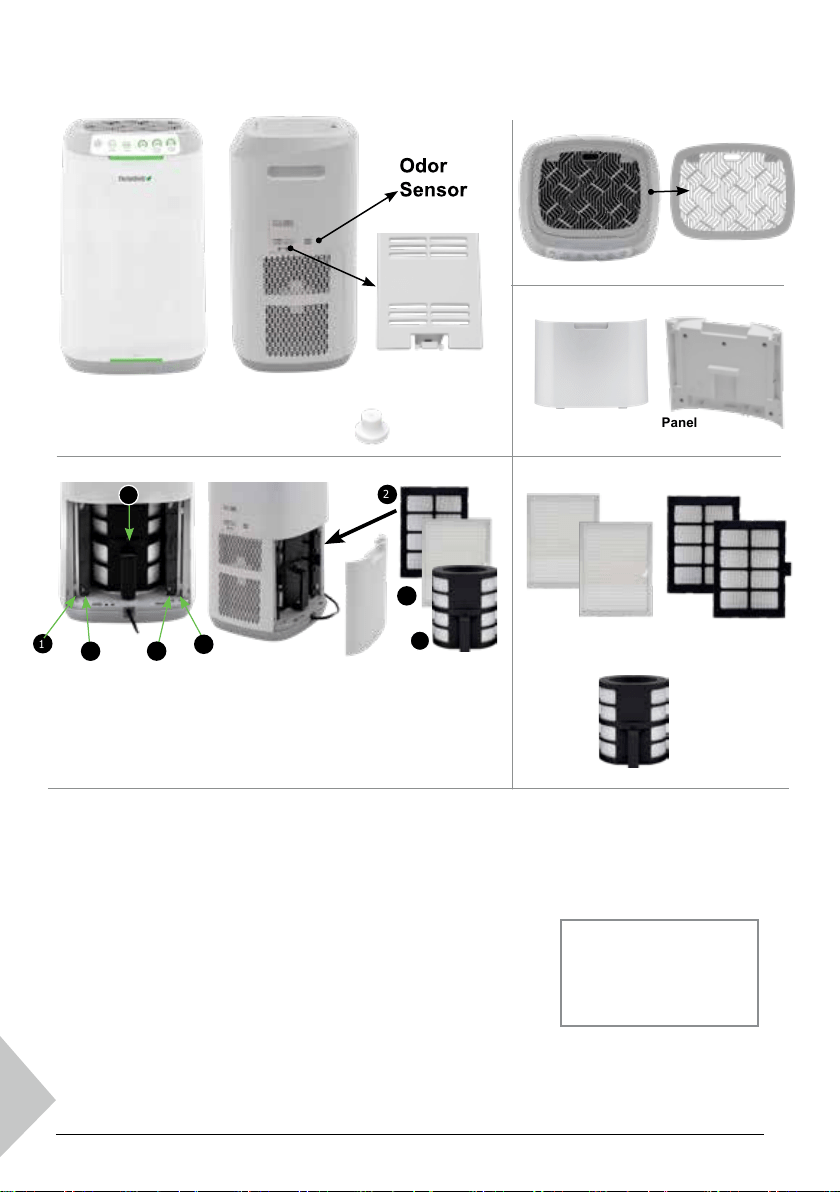
Filter Access Panel
Part #: OFP3
FRONT
OxyPure ZERO E500 Air Purier
Model #: 47351
Grid
Part #: OFP1
Rubber Feet
Part #: OFP4
Left: Filter Chamber with all 5
lters and their locations. From
the outside in, they are the
Stainless-Steel Prelters (1), the
Bio-Guard Filters (2) and the
Cylindrical Bio-Guard Filter (3).
Right: The Filter Access
Panel was removed revealing the
Stainless-Steel Prelters (1) and
the Bio-Guard Filters (2) on each
side with the cylindrical
Bio-Guard Filter (3) at the center.
Stainless-Steel
Prelter (2)
Part #: OFA3
Bio-Guard
Filter (2)
Part #: OFA2
Cylindrical
Bio-Guard Filter
Part #: OBA1
Note
Each lter is numbered. Match
the lter number with the slot
number when installing the
lters.
1. Open the Filter Access Panel on
the back of the OxyPure.
2. Remove the wrapped lters from their slots.
3. Remove the plastic wrapping from the lters.*
4. Fully insert the unwrapped lters into their slots.
5. Replace the Filter Access Panel, making sure that it is secure.
6. Remove the sticker from the control panel.*
*When using the OxyPure for the rst time.
Assembling the OxyPure
Before using your OxyPure, you need to make sure that the lters
are properly installed. With the OxyPure unplugged:
FILTERS
1
1
1
2
2
2
3
3
SIDE
Left Left
Right
Center
Right
TOP
BACK
Air Quality Sensor Cover
Part #: OFP2
nuwavenow.com | 7
WIFI CONNECTIVITY
THE NUWAVE CONNECT APP • WiFi ACTIVATION
Download the NuWave Connect App
This is an optional feature that is not required to
operate your OxyPure.
Using the QR reader in your Camera App:
1. Scan the QR code below.
2. It will take you to the App’s download page
on either the Google Play Store or the Apple
AppStore, then just follow the download and
installation instructions.
Downloading a QR reader App:
If your phone doesn’t have that capability built-in,
simply download a 3rd-Party QR Scanning App
before scanning the NuWave QR Codes and you
are ready to go.
1. Open your device’ mobile app store (Apple
App Store or the Google Play Store).
2. Search for “QR code readers.”
3. Simply download the QR code reader to your
phone, open it, scan the code and you are
ready to go.
The OxyPure is equipped with WiFi with back-up Bluetooth connectivity. This allows you to conveniently
operate your new air purier from nearly any location, whether at home or while you are out and about,
as long as you have a reliable Internet connection.
WiFi Activation & Connection
Once you have successfully installed the
NuWave Connect App:
1. Make sure your phone is fully updated and
connected to your network.
2. Open the app and follow the instructions for
the verication process.
3. Once verication is complete, begin adding
devices. Tap “+” then select “OxyPure.”
4. Plug the OxyPure into a compatible power
outlet.
5. Activate WiFi Pairing Mode.
• Press and hold ULTIMATE CLEAN on the
OxyPure for 2 seconds until the light next
WiFi begins to blink at a rate of about 2
blinks per second.
• Once the WiFi light is rapidly blinking, in
the app, tap Finish Network Congu-
ration at the bottom of the Add Device
page.
6. Follow the prompts to either connect to your
network or conrm your existing network
password.
7. To reset the OxyPure WiFi, press and hold
down ULTIMATE CLEAN for 3 seconds. Fol-
low Step 5 (see above). The OxyPure can now
be operated from any location.
When the OxyPure is connected to the WiFi,
the light next to “WiFi” will stop ashing and stay
continuously lit.
If the OxyPure did not connect to your network,
the WiFi light will turn off. Repeat steps 3-6 and
be sure to select the proper wi network and type
in the correct password.
Note
• To either connect to or change networks,
depending on your cellular service, you may
need to remove the app and reinstall it to com-
plete the connection before continuing with the
setup process.
• The OxyPure, like most IoT (computing) devic-
es, only connects to 2.4GHz networks. This is
the same broadcast frequency used by most
routers. Some, however, can broadcast at
other frequecies, so if you need help activating
2.4GHz on your router, please contact your
Internet Service Provider (ISP).
WiFi LED Status Light
Pairing Mode & Standby Mode
Solid Light. The OxyPure is paired with the wi
network and ready to be used.
Rapid Blinking Light. The OxyPure is in Pairing Mode.
The OxyPure will stay in Pairing Mode for up to 3 minutes
or until your device is paired.
No Light. The OxyPure’s WiFi is off.
8 | nuwavenow.com
WIFI CONNECTIVITY
WIFI ACTIVATION • BACK-UP BLUETOOTH
Bluetooth Connection
The OxyPure WiFi module also offers back-up Bluetooth connectivity. If your wi network goes down,
the OxyPure’s Bluetooth signal will automatically pair with your Bluetooth device.
To take advantage of this feature, ensure that your smart device’s Bluetooth, WiFi, and Mobile Data
options are all enabled.
Pairing your smart device with the OxyPure via Bluetooth takes up to 5 minutes, but once your device
is paired, the NuWave Connect App will operate normally as long as it is within the range of the Blue-
tooth signal.
GETTING STARTED
MEASURING AIR QUALITY
Measuring Air Quality: The OxyPure Sensors
The NuWave OxyPure has two sensors to monitor the state of your air, one for air quality and the other
for odor.
The rst measures the indoor Air Quality in your home using the PM2.5 benchmark for particle pol-
lution. “PM” stands for “Particulate Matter”, which is that airborne mixture of solid particles and liquid
droplets and “2.5” refers to the particle/droplet size in microns. Therefore, PM2.5 refers to ne, easily
inhalable particles with diameters of 2.5 microns or less. The OxyPure’s second sensor measures odor
contamination based on the presence of household chemical and cooking odors in the area in which
the OxyPure is operating.
The OxyPure’s sensors measure the amount of these airborne contaminants, displaying the results on
the colored indicator bars on the face of the unit, sounding an alarm if the Odor sensor detects very
strong odors, and adjusting the fan accordingly to quickly eliminate any air quality issues. See page 13
for information on resetting the Odor Sensor and Alarm.
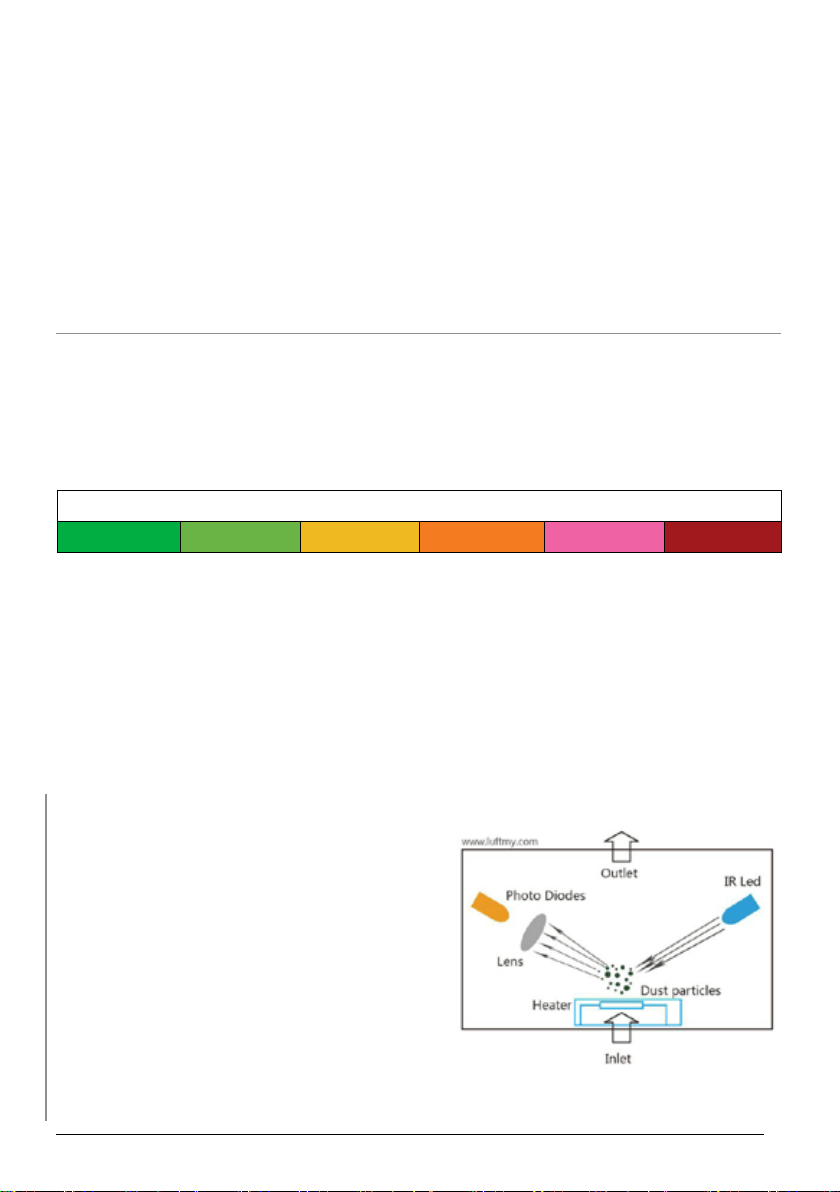
Particulate Matter (PM) with a diameter of 2.5 microns or less
0~5 5~10 10~20 20~30 30~50 Over 50
Did you know...?
PM sensors like the one in your OxyPure use infrared
technology to measure airborne contaminents with
diameters up to 2.5 microns, like dust, pollen, mold,
combustion particles, organic compounds and metals.
Here is how it works:
1. An infrared beam is connected to the sensor.
2. When a particle crosses the beam, it absorbs
some of the infrared light.
3. This change in the beam is recorded by the
sensor.
From there, the unit gives you an air quality reading
and responds accordingly.
https://ionizerhub.com/how-do-air-puriers-detect-air-quality/.
nuwavenow.com | 9
GETTING STARTED
CONTROL PANEL • BASIC FUNCTIONS
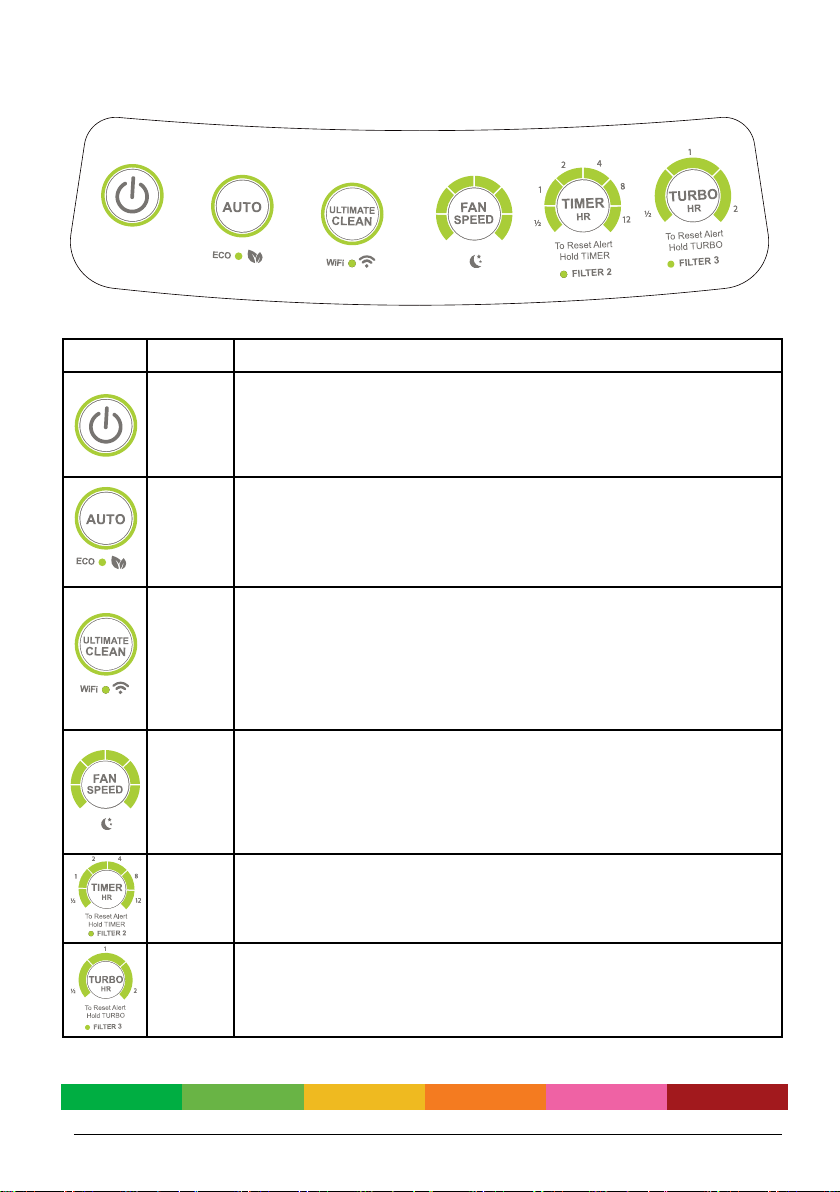
CONTROLS
ICON
NAME
FUNCTION
POWER
When the OxyPure is plugged in, the Power button will be red, indicating
that the unit is in Standby Mode. Press it once, the LED turns green and
the unit activates, either with the last settings used, or in Manual Fan
Speed Mode at Fan Speed 1 if the unit is being activated for the rst time.
AUTO
ECO
AUTO will put the unit into either Auto Mode or ECO Mode. Press it once
for Auto Mode, running the unit based on air quality. Press and hold it for 1
second for ECO Mode, where the unit stays off until air quality issues are
detected. To quit ECO Mode, press and hold the AUTO for 1 second.
ULTIMATE
CLEAN
WIFI
The OxyPure, while in Ultimate Clean Mode, automatically adjusts to the
highest or lowest fan speed based on the air quality at its
location, running as long as is necessary to clean the air. To turn it on or
off, simply press ULTIMATE CLEAN.
To activate WiFi, press and hold ULTIMATE CLEAN. Once the WiFi light
is rapidly blinking you can release the button and begin pairing.
FAN
SPEED
FAN SPEED controls the fan speed level, from 1 to 6, and also activates
Sleep Mode. Simply press it until you reach the fan speed you want. Press-
ing it a 7th time returns you to Fan Speed 1. Regardless of what mode the
unit is in, the OxyPure will always display the current fan speed.
To activate Sleep Mode, press and hold FAN SPEED for 1 second.
TIMER
Pressing TIMER lets you decide how long the OxyPure remains on the set
mode, pressing the button once for each of the following: 1hr, 2hrs, 4hrs,
6hrs, 8hrs, and 12hrs. Pushing it a seventh time will turn off the Timer but
not the unit. TIMER can be used with AUTO, FAN SPEED, and TURBO.
TURBO
Press TURBO to run the OxyPure at the highest fan speed for up to 2
hours. Press it once for 30 minutes, twice for 1 hour, and 3 times for 2
hours. Pressing TURBO four times turns it off. Once the time is up, the unit
will run at Fan Speed 1.
Air/Odor Quality
Clean Dirty
10 | nuwavenow.com
INSTRUCTIONS
AUTO MODE • ECO MODE
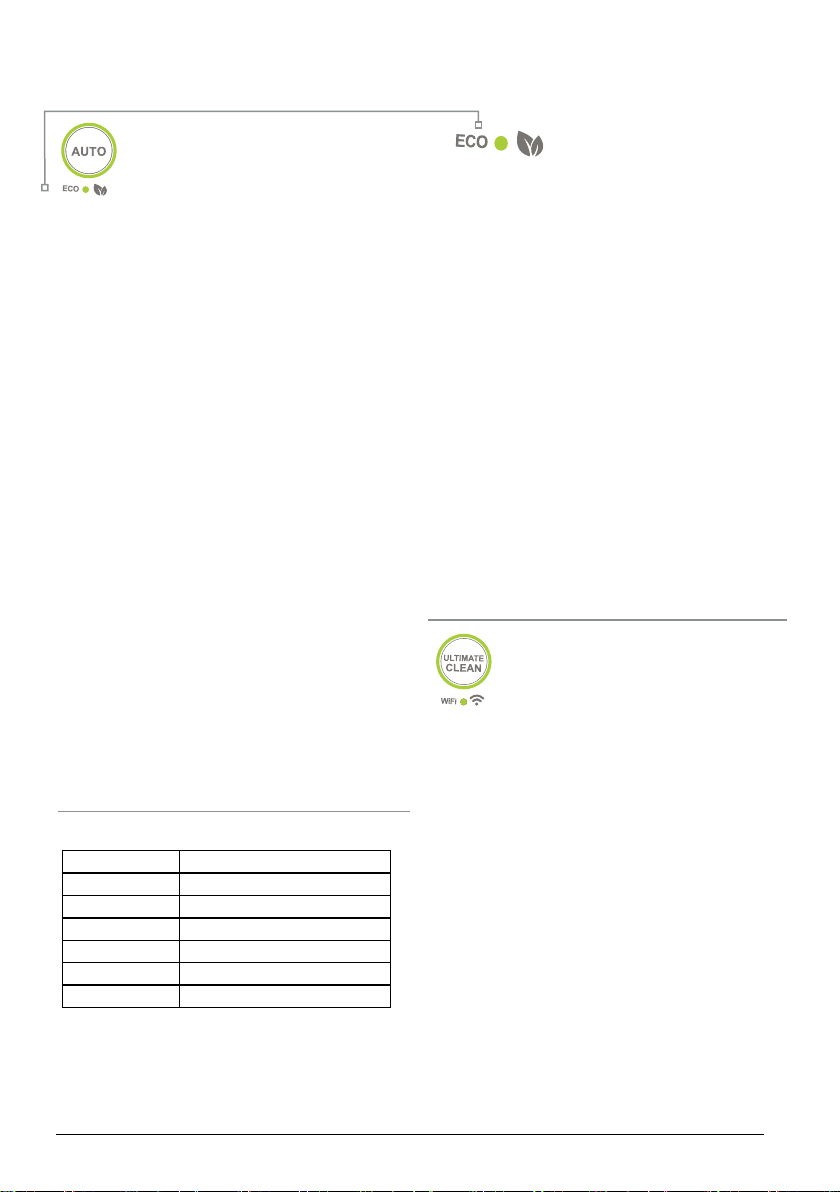
AUTO Mode
AUTO Mode runs the unit without a time
limit, automatically adjusting the fan
speed based on the current air quality.
To use it:
1. Press POWER. Then press Auto. The
backlights will turn on and the unit will go into
AUTO Mode.
• There is no time limit on AUTO Mode.
• Fan Speed increases as air quality
declines.
2. When you wish to deactivate AUTO Mode,
simply press AUTO. The OxyPure will revert
to MANUAL FAN SPEED Mode and run at the
lowest fan speed.
Note
AUTO and FAN SPEED cannot work together
While in AUTO Mode. If you press FAN SPEED,
AUTO Mode will turn off, replaced by MANUAL
FAN SPEED Mode.
While the unit is running in AUTO Mode, the user
can adjust the working time by pressing TIMER.
While in MANUAL FAN SPEED Mode, pressing
AUTO will engage AUTO Mode. The unit will
remain in AUTO Mode until changed.
You can use AUTO Mode and TURBO Mode
together, running in TURBO Mode for a time and
then switching to AUTO Mode. See the following
page for more information.
ECO Mode
ECO Mode also responds to
changes in Air Quality. However,
because it does not run the fan continuously, ECO
Mode is a real energy- and money-saver.
To use it:
1. Press and hold AUTO. The OxyPure will beep
and the green LED above ECO MODE will light.
2. When the air quality is bad, the OxyPure will
automatically run until air quality improves.
3. When the air quality is good (PM2.5 level under
5), the OxyPure fan will automatically turn off.
4. To deactivate ECO Mode, press and hold AUTO.
Once ECO Mode is off, the OxyPure will return to
its previous setting.
ECO Mode and Ultimate Clean
Press ULTIMATE CLEAN, then set the timer for
the length of time to run. Press and hold AUTO for
ECO mode to engage. Once the time for ULTIMATE
CLEAN has ended, the unit will go into ECO Mode
until switched.
ULTIMATE CLEAN
Mode
When in ULTIMATE CLEAN Mode, the
OxyPure will automatically adjust to the highest or lowest
fan speed based on your air quality, and run as long as
is necessary to clean the air.
1. Press ULTIMATE CLEAN. The LEDs around the
ULTIMATE CLEAN button will be lit green.
2. Press ULTIMATE CLEAN again, or the next mode
you wish to use, to turn it off.
Note
• Pressing FAN SPEED while in ULTIMATE CLEAN
will put the unit into MANUAL FAN SPEED Mode.
• In ULTIMATE CLEAN Mode, adjust the working time
by pressing TIMER.
• Pressing ULTIMATE CLEAN while in MANUAL
FAN SPEED Mode, will put the unit into ULTIMATE
CLEAN Mode.
• Press ULTIMATE CLEAN then select the time for
TURBO. Once TURBO nishes, the unit will enter
ULTIMATE CLEAN.
Function Key
ECO Mode Press & Hold AUTO
SLEEP Mode Press & Hold FAN SPEED
Wi-Fi Pairing Press & Hold ULTIMATE CLEAN
Reset Filter 2 Press & Hold TIMER
Reset Filter 3 Press & Hold TURBO
Reset Odor Alarm Press AUTO + FAN SPEED
Press & Hold Key Functions
Questions about your OxyPure?
Contact our friendly customer service staff from
7:30am to 4:30pm, Monday through Friday at
877-689-2838 or reach us via email anytime at
help@nuwavenow.com.
nuwavenow.com | 11
INSTRUCTIONS
MANUAL FAN SPEED MODE • TURBO MODE
MANUAL FAN SPEED
This is the basic operating mode for
the OxyPure, allowing you to manually
operate the Fan Speed without worrying
about the automatic modes or settings.
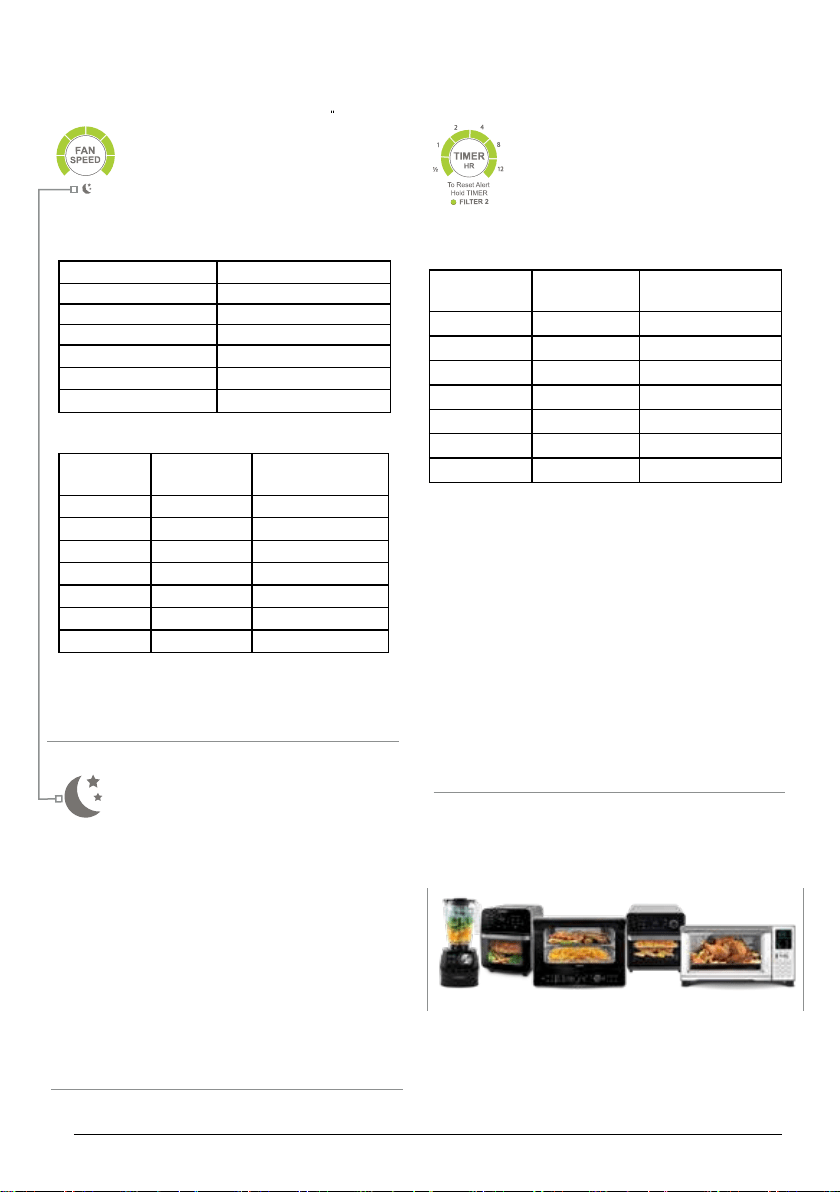
There are 6 Fan Speeds:
FAN SPEED LEVEL FAN SPEED (RPM)
1 350
2 800
3 1250
4 1700
5 2150
6 2280
Operating the Fan
Note
No matter what mode the OxyPure is in, it will
always
display the current Fan Speed Level.
SLEEP Mode
Ideal for light sleepers, SLEEP Mode
turns off the LED lights on the control
panel while keeping the fan active.
Using SLEEP Mode
1. Manually adjust the Fan Speed to the setting
most comfortable for you.
2. Press and hold FAN SPEED for 2 seconds to
activate Sleep mode. The control panel will go
dark, but the fan will continue to work.
To turn off SLEEP Mode, press any button.
TIMER
You can run the OxyPure for a set
period of time with the TIMER button.
There are 6 different timer selections:
30min, 1hr, 2hrs, 4hrs, 8hrs, 12hrs.
Using the Timer
Using Timer with Other Modes
TIMER can be used with AUTO, FAN SPEED,
TURBO and ULTIMATE CLEAN.
1. Press the mode to be used,
2. Then press TIMER to the amount of time the
selected mode is to run.
Using TIMER with TURBO and other modes.
1. Press TURBO.
2. Select the next mode and then select the
amount of time for that mode to run.
Number of
Presses
Fan Speed
Level
Number of Bars
on Panel
1 1 1
2 2 2
3 3 3
4 4 4
5 5 5
6 6 6
7 1 1
Number of
Presses
Running
Time
Number of Bars
on Panel
1 30 Minutes 1
2 1 Hour 2
3 2 Hours 3
4 4 Hours 4
5 8 Hours 5
6 12 Hours 6
7 OFF 0
Healthy, Delicious Meals
at the Press of a Button!
Check out the great line
of innovative kitchen
appliances from NuWave
at nuwavenow.com
12 | nuwavenow.com
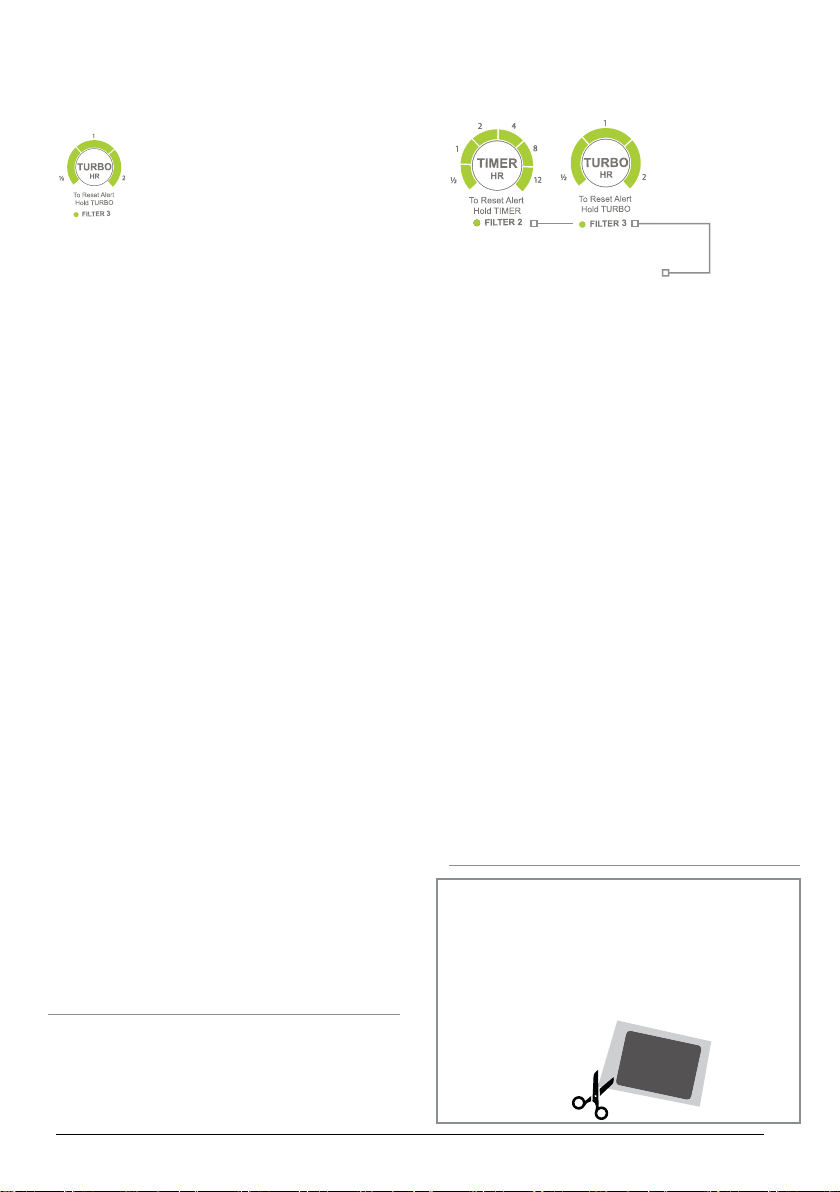
TURBO Mode
To quickly clear the air, choose the
TURBO Mode to run the OxyPure at
Fan Speed Level 6 (the highest) for
30 minutes, 1 hour, or 2 hours, after
which the unit will run at Fan Speed 1 if no other
buttons were pressed. If TURBO Mode is used
with other modes, it has priority. To use it:
• Press TURBO and keep pressing the button
until the time you want is reached.
• Once the selected time has nished the
OxyPure will run with last function selected.
TURBO + ULTIMATE CLEAN
Set the time you want for TURBO. Then, once
that time is reached, the unit will run under
ULTIMATE CLEAN until changed.
TURBO + AUTO
Press TURBO to the time desired and then
AUTO. The OxyPure will run in TURBO Mode
for selected time period, and then in AUTO Mode
until changed.
TURBO Mode + TIMER
When TURBO Mode is running, the user may set
the running time up to an additional 12 hours by
pressing TIMER.
• The OxyPure will operate under TURBO Mode
rst for the selected time. It will then continue
to run for the time specied on the Timer.
• After the Timer runs out, the unit will go on the
next mode or function.
Note
TURBO Mode and FAN SPEED do not work
together. Pressing FAN SPEED while TURBO
Mode is active will simply turn off TURBO Mode
and set the Fan Speed Level to 1.
INSTRUCTIONS
SLEEP MODE • FILTER INDICATORS
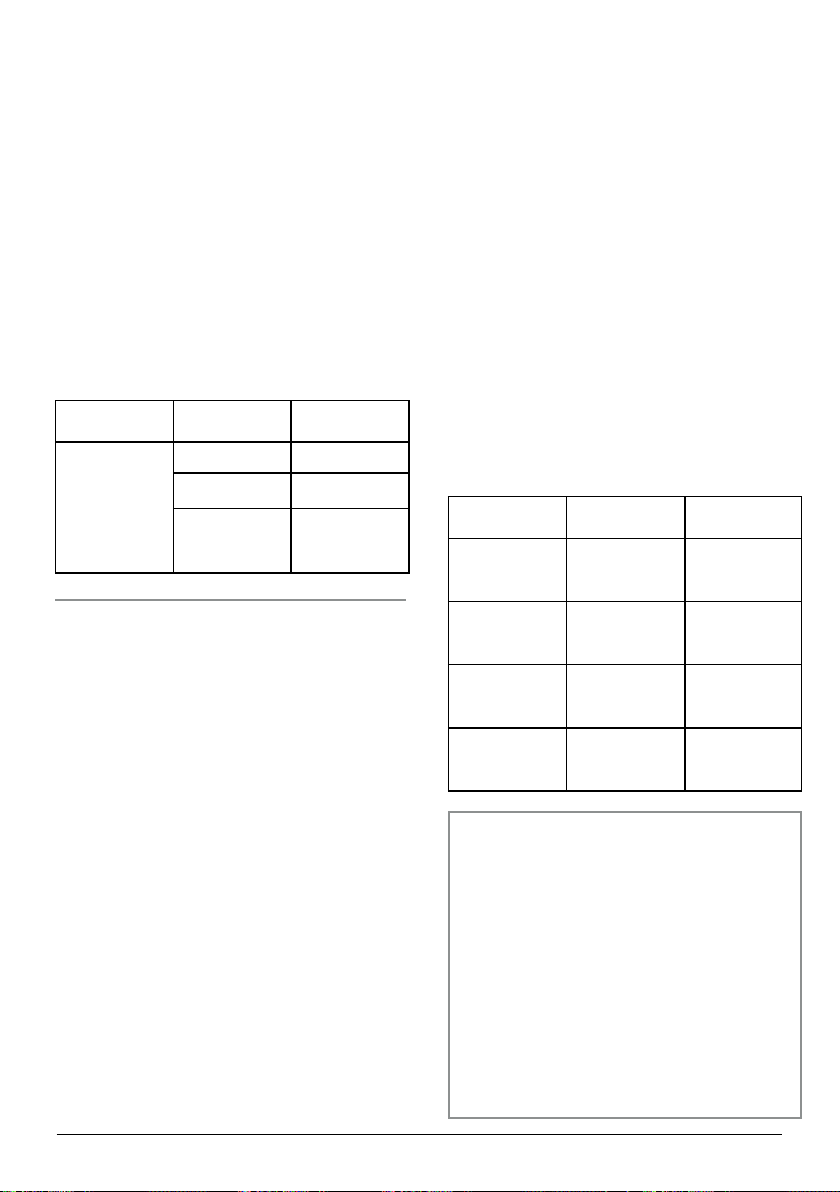
Filter Indicators
To alert you to the need to clean your Bio-Guard
Filters, there are LED Filter Indicators beneath
the TIMER and TURBO buttons. These will light
up based on the length of operation as follows:
• The Clean Filter 2 light will turn green after
about 3 months to alert you that the Bio-Guard
Filter(s) SHOULD be cleaned to maintain
optimal performance (NuWave Recommen-
dation). When the light turns red (after about
6 months), the Bio-Guard Filter(s) MUST be
cleaned.
• Once cleaned, press and hold TIMER for 2
seconds until a beep is heard to reset the
Filter Indicator for Filter 2.
• The Clean Filter 3 light will turn green in about
3 months to alert you that the Central Bio-
Guard Filter SHOULD be cleaned to maintain
optimal performance (NuWave Recommenda-
tion). When the light turns red (after about 6
months), the Central Bio-Guard Filter MUST
be cleaned.
• Once cleaned, press and hold down TURBO
for 2 seconds until a beep is heard to reset the
Filter Indicator for Filter 3
Depending on your operating environment, you
may wish to clean the lters more frequently.
Remember...
ALWAYS remove the plastic wrapping from
new lters BEFORE using them in the
OxyPure.
Failing to do so may damage the motor and
other parts of the OxyPure and may void your
warranty

nuwavenow.com | 13
MAINTENANCE
FILTER MAINTENANCE • SENSOR MAINTENANCE
Filter Maintenance
When maintaining the lters, unplug the unit and
open the Filter Access Panel. You will see that the
order of the lters, from the outside in, is as
follows:
1. 2 Stainless Steel Pre-Filters (washable)
2. 2 Bio-Guard Filters (washable)
3. 1 Cylindrical Bio-Guard Filter (washable)
Do not immerse the OxyPure in water. Clean the
outside of the unit with a damp sponge or cloth and
wipe it dry. Make sure all lters and the Filter Ac-
cess Panel are secured properly. If they are not, the
POWER button backlight will blink red and the unit
will not power on.
Filter Cleaning
The lters need to be cleaned regularly to help the
unit maintain optimum performance. The two Pre-
lters need to be cleaned at least once every three
months, depending on use, while the Bio-Guard
Filters should be cleaned, at minimum, once every
six months.
Stainless-Steel Prelters
1. Use a dry cloth or soft brush to remove any dust
or lint.
2. Clean the lter with warm soapy water.
3. Rinse the lter thoroughly, removing any soap
particles.
4. Allow the lter to dry completely (up to 24
hours).
Bio-Guard Filters
1. Spray the lter with a mild detergent and let it sit
for 2–3 minutes.
2. Submerge the lter in warm water, shake, re-
move. Repeat until the lter is clean.
3. Rinse the lter with warm water.
4. Dry the lter completely before use. Never
place a wet lter in the OxyPure.
Note
• Do not dry the lters with a hot blow dryer or in
direct sunlight.
• Be careful not to damage the tabs when secur-
ing the Filter Access Panel.
• The Filter Access Panel and Grid may be
cleaned with warm, soapy water. Dry thoroughly
before reattaching.
Sensor Maintenance
The Air Quality and Odor Sensors are located on
the right-hand side of the unit, just over the intake
vent. The Air Quality Sensor is accessible by re-
moving the Sensor Cover. The Odor Sensor is not
accessible. Do not insert anything into the Odor
Sensor vent. Doing so may damage the Sensor.
Cleaning the Air Quality Sensor
1. Using a dry cotton swab or small, soft brush,
gently remove any dirt or dust from the Sensor.
2. For more buildup on the Sensor, wipe it with a
cotton swab dipped in alcohol.
3. Remove any moisture with a dry cotton swab.
4. Dispose of the used cotton swab(s) and close
the Sensor Cover.
Cleaning the Odor Sensor
Because the Odor Sensor is not accessible, and
you may damage the sensor if anything is inserted
into the Odor Sensor vent, it may be cleaned as
follows:
1. Use a clean, dry cloth or duster to surface
clean the vent grooves.
2. Use a vacuum with a wand attachment to clear
anything that is in the vent grooves.
Odor Sensor & Alarm Reset
If the Odor Sensor detects an odor level higher
than Red, it usually indicates sensor contamina-
tion. The unit will alarm continuously and the lights
will blink in repeated series of 5.
1. Try to clear the contamination with a vacuum
cleaner and wand.
2. Turn off the alarm by pressing AUTO + FAN
and check the sensor for contamination.
3. If necessary, repeat Steps 1 and 2 in 1 hour.
4. Steps 1 and 2 can be repeated 4 times until
the sensor is cleared.
5. If the sensor is not clear after that, it cannot
be reset. Call Customer Service 877-689-
2838
Note
• The Air Quality Sensor requires regular clean-
ing (every 3 months) for the unit to operate
efciently.
• If the OxyPure is set up in an area with high
dust accumulation, more frequent cleaning is
needed.
• Do not use the cotton swab on any part or area
other than the Sensor.

14 | nuwavenow.com
MAINTENANCE
TROUBLESHOOTING GUIDE
The OxyPure Will Not Turn On
The unit is not plugged into a wall outlet.
• Plug the power cord into the socket of a wall
outlet.
The unit is plugged in but still not powering
on.
• Press the Power icon to turn the unit on.
• Try a different outlet.
• Check that the Filter Access Cover is rmly
closed.
• Check that all lters are properly placed and
that the sensor tabs, located at the bottom of
the lter chamber (will be raised), and at the
bottom of each of the Bio-Guard Filters, are
in place and engaged.
The Timer Doesn’t Work if Pressed
The unit is not reading the function selected.
• Press Fan Speed or Auto, then Timer.
The Fan is Not Blowing
The unit is not plugged into an appropriate
outlet.
• Make sure the outlet has the appropriate
voltage for use.
The Filter Access panel is not properly in
place.
• Check that the Filter Access Cover is secure
and completely closed.
Pressing Fan Speed Doesn’t
Change the Air Flow Speed
The unit may be in AUTO Mode.
• Press another operating mode, then press
FAN.
ULTIMATE CLEAN Doesn’t
Turn On When Pressed
The unit is not reading the function Ultimate
Clean as selected.
• Turn the unit off and back on by quickly
pressing Power twice.
The Air Flow From the
Top Vent is Weak
The lter(s) may be dirty. The stainless-steel
Prelters should be cleaned every 2 months.
The Bio-Guard Filters at least every 3- 6
months.
• Clean any dirty lters, then follow the reset
lter instructions.
The OxyPure is Producing Smoke or Odor
The lters are dirty.
• Wash the lters according to the directions.
The Filters Were Cleaned but the
Clean Filter Alert Won’t Reset
The Filter Sensor is not reading the rein
-
stalled clean lter.
• Turn the unit off and on again. Press and
hold Timer and/or Turbo (for the clean lter)
for 2 seconds until the unit beeps and the
rst bar on the indicator lights up.
• Turn the unit off, unplug then re-adjust the
lters.
• Turn the unit OFF then ON again.
• Make sure the Bio-Guard Filter sensors
connect with the sensors at the bottom of the
unit itself.
• Make sure the Filter Access Panel is secure
and closed.
• Clean the Air and Odor sensors.
The Power LED is Blinking Red
The Filter Access Cover is off.
• Be sure the Filter Access Cover is secure
and in place.
The lters are improperly placed.
• Be sure all lters are in the unit and placed in
their correct position within the unit.
The Air Quality and/or Odor Sensor(s) are
Not Resetting Themselves. The Indicator
Lights Remain Red
There is an issue with the room’s
atmosphere.
• Move the OxyPure into a closed-off room for
a few hours.
• Clean the sensors and Grid as directed.
• Check for any changes in the original room
that could have affected the unit, such as: an
open window, a new pet, current or recent
use of heating or cooling equipment.
The unit is too close to an object or a wall.
• Move the unit so it has at least 2–3 feet
clearance on all sides.
Questions and Issues?
If you still have questions and issues after
trying these troubleshooting steps, contact
Customer Service by phone at 877-689-2838,
Monday–Friday, 7:30am–4:30pm, or via email
anytime at help@nuwavenow.com
nuwavenow.com | 15
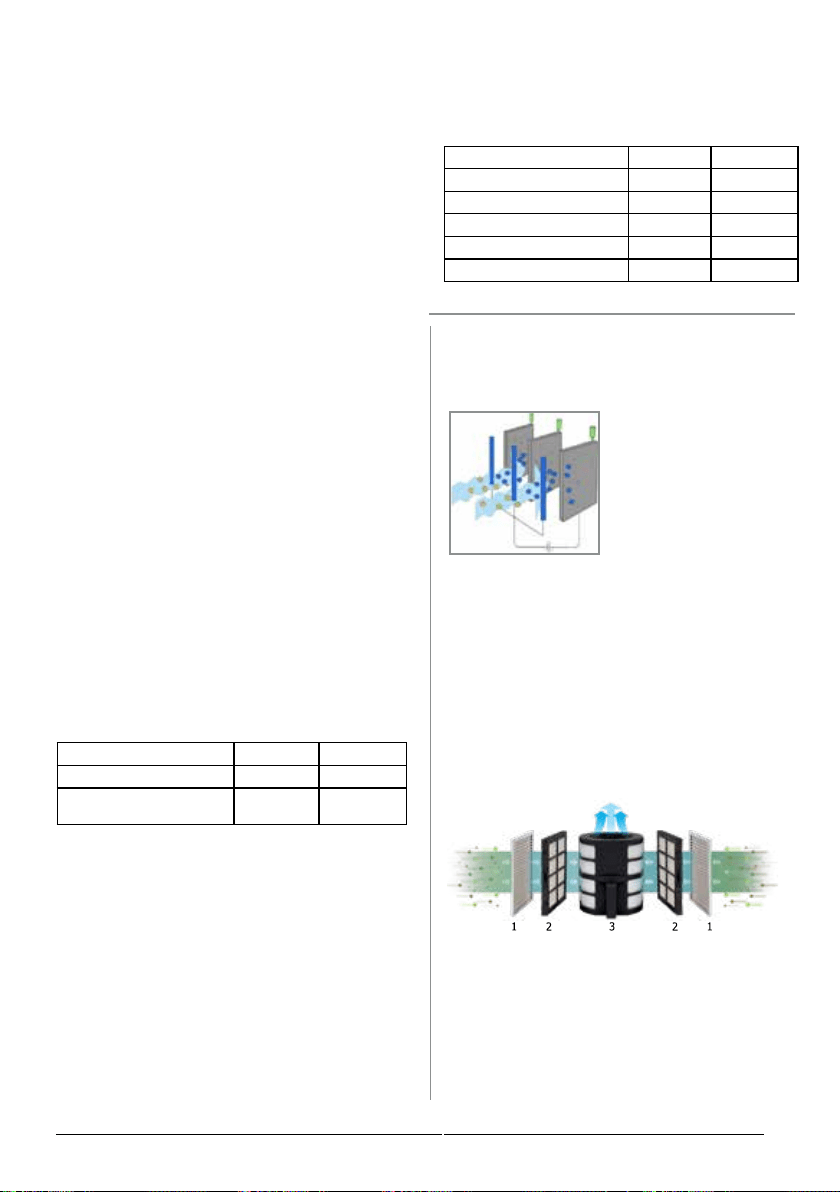
Airborne Virus Elimination Rate
Viruses can stay in the air on oating particles or
droplets from coughs and sneezes, or carried in
from outside. The OxyPure easily removes these
pathogens, helping to protect you and your family.
Inuenza A H3N2 is a variant of the 2009 H1N1
pandemic virus. It was rst identied in pigs in
2010 and then in people in July 2011. Also known
as swine inuenza, outbreaks occur during the
late fall and winter months with symptoms such
as fever/chills, cough, sore throat, runny or stuffy
nose, muscle/body aches, headaches, fatigue,
and vomiting and diarrhea (primarily in children).
(https://www.cdc.gov/u/swineu/variant-u-in-
humans.htm)
Test
Parameters
Action
Time (hours)
Sterilization
Rate
Pathogen:
Staphylococcus aureus
# of Tests: 3
Chamber: 30m³
2 >99.93%
Pathogen:
Staphylococcus albus
# of Tests: 3
Chamber: 30m³
2 >99.93%
Pathogen:
Escherichia coli
# of Tests: 3
Chamber: 30m³
2 >99.94%
Pathogen:
Aspergillus niger
# of Tests: 3
Chamber: 30m³
2 >99.94%
Test
Parameters
Test
Number
Removal
Rate
Pathogen:
H3N2 Inuenza A
Host Cell: MDCK
Action Time: 1
Hour
Chamber: 10m³
1 >99.99%
2 >99.99%
3 >99.99%
Airborne Bacteria and
Mold Elimination Rates
Airborne bacteria are introduced by coughing
or sneezing, while mold can be carried in from
outside or grow due to moisture.
Staphylococcus epidermidis (S. epidermidis),
is a round-shaped bacteria primarily found on the
skin, where it can cause skin conditions such as
Acne Vulgaris. However, it is also a major cause
of medical implant infections (especially in pe-
ripheral and central intravenous catheters), in-
ammation of the chest cavity (Mediastinitis) and
bacterial blood infections (Bacteremia).
(https://www.ncbi.nlm.nih.gov/pmc/articles/
PMC4184040/)
Staphylococcus aureus (S. aureus) is a round-
shaped bacteria found on the skin and in the
throat, nose, and sinuses. It spreads through
human-to-human contact, as well as by sneezing
or coughing and stays viable for weeks, making
it a common cause of infections like sinusitis
and acne, pneumonia, meningitis, osteomyelitis,
endocarditis, bacteremia, sepsis and MRSA.
(https://www.ncbi.nlm.nih.gov/pmc/articles/
PMC4451395/)
Escherichia coli (E. coli) is a rod-shaped coli-
form bacterium normally found in the lower intes-
tines of people and animals. While most strains of
E. coli are harmless, some cause food poisoning
and diarrhea, urinary tract and respiratory infec-
tions, and other illnesses.
(https://www.cdc.gov/ecoli/general/index.html)
Aspergillus niger (A. niger) is one of fteen
black-spored strains of the Aspergillus mold.
Indoors it’s often mistaken for the harmful Stachy-
botrys. The spores can become airborne, and are
occasionally inhaled. For those with compromised
immune systems, this can cause sinus and lung
infections called Aspergillosis, with symptoms
including fever, wheezing, shortness of breath,
and cough.
(https://www.cdc.gov/fungal/diseases/aspergillo-
sis/symptoms.html)
Did you know...?
When you cough, you expel enough air to ll a 1.5 liter container
in a plume that extends several feet and carries some 3,000
droplets of mucus, saliva and other material at speeds of up
to 50 miles per hour! That’s nothing, though, compared to a
sneeze.
When you sneeze, those 3,000 droplets will increase to as
many as 40,000, mostly less than 10 microns across, travelling
at speeds that can exceed 200 miles per hour. They can travel
over 8 feet and up to 20 feet into the air, high enough to get into
ventilation systems.
This is why a good air purier like the OxyPure is so important,
especially during cold and u season. Clean air is the rst step
to good health.
www.livescience.com/3686-gross-science-cough-sneeze.html
www.self.com/story/germs-sneezing-coughing.
All tests were performed by Intertek Labs.
TEST RESULTS
AIRBORNE PATHOGEN REMOVAL
16 | nuwavenow.com
Did you know...
The OxyPure does not rely on HEPA lters that
have to be changed as they ll up to clean the
air. Instead, its washable and reusable
Bio-Guard lters do it all
with electrical energy!
Here’s how it works:
The Bio-Guard lter
works on the principle
of electrostatic precip-
itation. In the diagram
(Source: Wikimedia
Commons), we see
particle laden airow (blue arrows) passing
between a row of negatively-charged elec-
trodes (blue vertical rods). The particles take
on a negative electrical charge and are then
attracted to the positively-charged collection
plates (red squares) where they are either
trapped (dust, pollen, smoke, etc.) or eliminat-
ed (bacteria, viruses, molds).
The OxyPureFlo has 3 Bio-Guard lters to
ensure that your air is as clear and clean as
possible without impeding airow in the least.
Air coming into the unit through the side
vents receive an initial cleaning from the two
Stainless-Steel Prelters, which catch large
particles, and then the side Bio-Guard lters
before it reaches the Cylindrical Bio-Guard
lter for a nal cleaning. Not only is your air
cleaner, but with no physical barriers to the air
ow, the motor doesn’t work as hard, meaning
it lasts longer and uses less power, saving you
money.
TEST RESULTS
CERTIFICATIONS
Ozone, CARB and
EnergySTAR Certications
Ozone (O3) is a gas made up of 3 oxygen atoms.
In the upper atmosphere it is life-sustaining,
protecting the surface of the Earth from harmful
solar radiation. On the ground, however, it can be
hazardous.
This ground-level ozone is the product of reac-
tions between air pollutants like the nitrogen oxide
and volatile organic chemicals found in automo-
tive exhaust and sunlight and stagnant air. It is
highly irritating, triggering numerous health issues
including chest pain, coughing and shortness of
breath, throat irritation, and congestion. It can
worsen bronchitis, emphysema, and asthma.
Ground level ozone concentrations (measured
in parts per billion or ppb) varies depending on
where you live. You can live in places where it is
fairly low, like Oahu in Hawaii, which averages
49ppb¹; or in places like Chicago, which averag-
es 72ppb². The national average hovers around
70ppb³, which is also the current EPA standard.
The State of California has lowered that to 50ppb.
CARB Certication
The California Air Resource Board (CARB) will
only certify units for sale in the state of California
that meet certain electrical safety standards and
do not produce ozone in excess of 50ppb.
The OxyPure produces only 0.423ppb of ozone,
Test Standard Measured
Ozone Concentration (ppb) <50ppb 1.944ppb
Electrical Safety
ANSI/
UL867
Compliant
which easily passes CARB certication. Howev-
er, the OxyPure also needed to earn the EPA’s
EnergySTAR Certication.
EnergySTAR
The U.S. Environmental Protection Agency
(EPA) has published specications of energy ef-
ciency using a Clean Air Delivery Rate (CADR)
to Watt ratio. The unit being tested must produce
a CADR of at least 50 for smoke while producing
no more than 70ppb of ozone. Minimum perfor-
mance is 2.0 CADR/Watt and the standby power
requirement is 2.0 Watts. The OxyPure passed
the test easily.
All tests were performed by Intertek Labs.
Criteria Standard Measured
Smoke CADR (ft³/min.) >50 114
Total Energy Conumed (Watts) -- 39.5
Smoke CADR/Watt (ft³/min./W) >2.4 2.9
Standby Power (Watts) <2.0 0.74
Ozone Production (24-hour Avg.) <70ppb 1.9
EnergySTAR Test Results
All tests were performed by Intertek Labs.
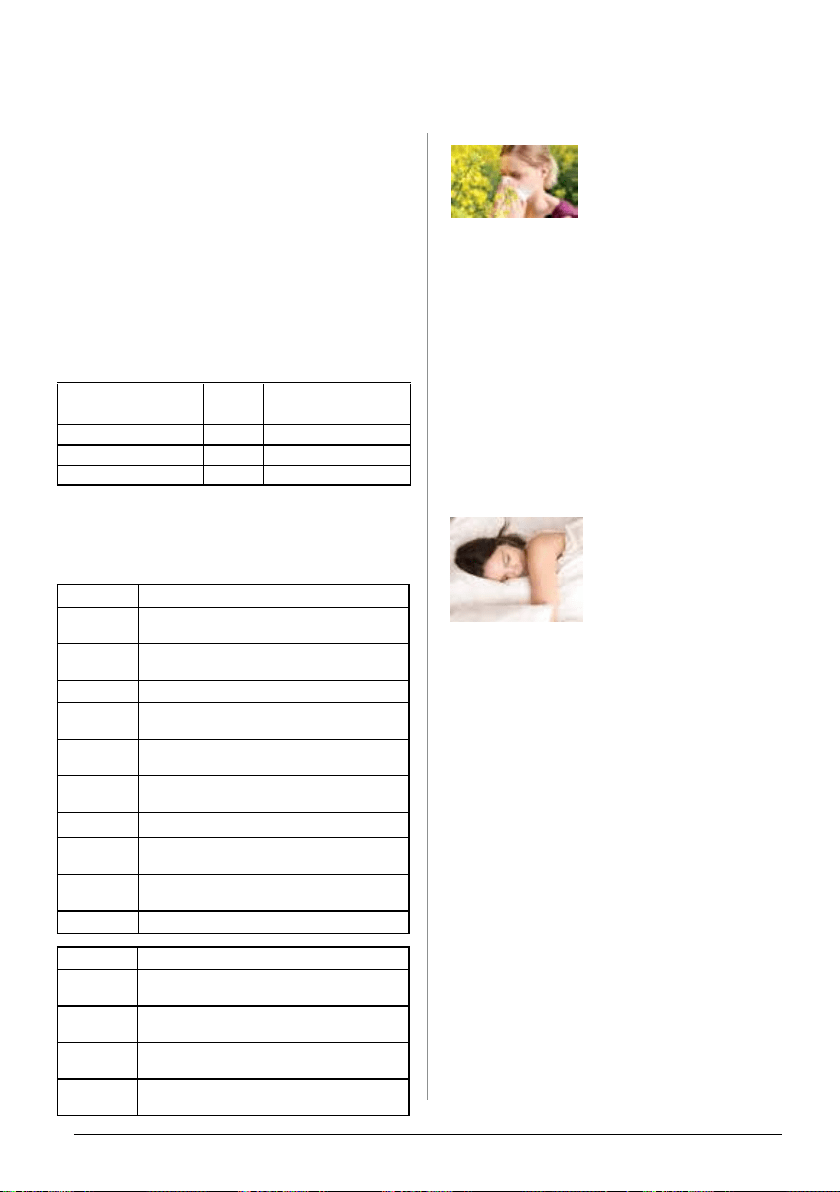
nuwavenow.com | 17
Size (µm)
Particles and Pathogens
10
Fertilizer, Pollen, Plant and ower
Allergens, Mold Spores, and Dust Mites
4
Iron, Textile, and Fiberglass Dust; and
Tobacco Smoke
3
Cement Dust, Burning Wood, Mold Spores
2.5
Combustion-Related, Motor Vehicle, and
Industrial Emissions
2
Lead Dust, Carbon Black Dust, Spores,
and Asbestos
1
Fiber Glass, Coal Dust, Anthrax, and Auto
Emissions
0.5
Talcum Dust and Copier Toner
0.2
Bacteria, Carbon Black Dust, Insecticide
Dust, Burning Wood Smoke, Coal Flue Gas
0.1
Paint Pigments, Clay, Lead and
Radioactive Fallout
0.09
Viruses and Atmospheric Dust
TEST RESULTS
CLEAN AIR DELIVERY RATE • REMOVAL EFFICIENCY
Clean Air Delivery Rate
and Removal Efciency
Particulate Matter
(Size in microns)
CADR
(Ft³/Min.)
Removal
Efciency
Smoke (0.1µm-1µm) 114 100% in 100 minutes
Dust (0.1µm-1µm) 102.2 99.98% in 2 hours
Pollen (0.1µm-1µm) 128.8 100% in 40 minutes
All tests were performed by Intertek Labs.
Pollutant Examples
ODORS
Household Fumes, Smoke, and
Cooking Odors
VOCS
Formaldehyde and Benzene from Carpets,
ooring, Furniture, Glues, and Cleansers.
FUMES
Nitrogen Dioxide from Gas Stoves and
Car Exhausts
OZONE
Pollutants Emitted by Power Plants, Oil
Reneries, and Chemical Plants
Did you know...
When you react to any aller-
gen or irritant, it is your body’s
immune system working to
clear away the harmful or
irritating substance by generating antibodies to
hunt down the intruder while releasing histimine
and a variety of other substances that cause the
typical symptoms seen in allergic reactions, which
can range from the barely noticed to the mildly
irritating to the deadly.
The OxyPure can help with airborne allergens
such as pollens, dust, dustmites, mold spores,
wood and coal ash, and any other particle that
might be ZEROating around in your home’s air,
eliminating them so that you breathe easier day
and night.
Sleep is Important
Allergies can do more than
just make you itch and
sneeze. They can keep you
up, or keep your spouse up,
as you snore and even choke
your way through the night. In
addition to robbing you of rest, nights like this can
leave you dragging through the day and even
lead to things like weight gain, headaches, cogni-
tive changes and confusion. It could even be a
sign of something even more dangerous, sleep
apnea.
There are as many causes for excess snoring
as there are symptoms of it, ranging from bone
structure to swelling to obesity and even pregnan-
cy, but two of the most common are congestion
due to allergies and colds, and the use of antihis-
tamines to relieve that congestion and sleeping
pills to try a get at least some rest.
If allergies are your problem, instead of relying
entirely on pills that can make things worse (nev-
er, of course, stop any medication without your
doctor’s advice), do something about the aller-
gens in your air with a good air purier with
a high CADR and get yourself a good night’s
sleep.
www.thehealthboard.com/what-is-an-allergic-reaction.htm
www.hopkinsmedicine.org/health/conditions-and-diseases/snoring
The Clean Air Delivery Rate (CADR) measures
the amount of clean air owing out of the unit.
In efcienct testing, the CADR is measured
against several different air pollutants, in this
case smoke, dust and pollen, to see how well the
unit maintains air ow. Removal efciency, on the
other hand, is a measure of how much of a given
pollutant is removed over a specic period of
time. The chart below details both of these mea-
surements as they pertain to the OxyPure E500.
These particles are just representative of the
wide variety of particles, gases, VOCs, and fumes
contaminating our air.

18 | nuwavenow.com
WARRANTY
MANUFACTURER WARRANTS • WARRANTY DOES NOT COVER • OBTAIN
SERVICE • MANUFACTURER’S OBLIGATION
THE MANUFACTURER WARRANTS
NuWave warrants that the OxyPure ZERO E500 Smart Air Purier fan motor, blower, control panel,
Stainless-steel Prelters and Bio-Guard lters will be free from manufacturer defects under normal
household use for 3 years from the date of pur chase. This Warranty covers original owner of this Air
Purier for personal household use only and when operated in accor dance with the Manufacturer’s
written instructions. This Warranty does not apply to products used for commercial, rental or resale pur-
poses. The Manufacturer will provide the necessary parts and labor to repair any part of the NuWave
OxyPure ZERO E500 at the NuWave® LLC Service Department.
THE WARRANTY DOES NOT COVER
The Limited Warranty is voided if repairs are made by an unauthorized dealer or the serial number data
plate is removed or defaced. Normal deterioration of nish due to use or exposure is not covered by
this Warranty. This Limited Warranty does not cover failure, damages or inadequate performance due
to accident, acts of God (such as lightning), uctuations in electric power, alterations, abuse, misuse,
misapplications, corrosive-type atmospheres, improper installation, failure to operate in accordance
with the Manufacturer’s written instructions, abnormal use or commercial use. NuWave LLC reserves
the right to void the Limited Warranty, where allowable by law, for products purchased from an unautho-
rized dealer.
TO OBTAIN SERVICE
The owner shall have the obligation and responsibility to: pay for all services and parts not covered by
the warranty; prepay the freight to and from Service Department for any part or system returned under
this warranty; and carefully package the product using adequate padding material to prevent damage in
transit. The original container is ideal for this purpose. Include in the package the owner’s name, ad-
dress, daytime telephone number, a detailed description of the problem, and your “RGA number.” (Call
1-877-689-2838) or email help@nuwavenow.com to obtain the RGA number (Return Goods Authoriza-
tion number). Provide the cooking system model & serial number and proof of date of purchase (a copy
of the receipt) when making claims under this warranty.
MANUFACTURER’S OBLIGATION
The Manufacturer’s obligation under this Limited Warranty is limited, to the extent allowable by law, to
repairing or replacing any part covered by this Limited Warranty which upon examination is found to
be defective under normal use. The Limited Warranty is applicable only within the continental United
States and only to the original purchaser of the manufacturer’s authorized channels of distribution. THE
LIMITED WARRANTY MAY NOT BE ALTERED, VARIED OR EXTENDED EXCEPT BY A WRITTEN
INSTRUMENT EXECUTED BY THE MANUFACTURER. THE REMEDY OF REPAIR OR REPLACE-
MENT AS PROVIDED UNDER THIS LIMITED WARRANTY IS EXCLUSIVE. IN NO EVENT SHALL
THE MANUFACTURER BE LIABLE FOR ANY CONSEQUENTIAL OR INCIDENTAL DAMAGES TO
ANY PERSON, WHETHER OR NOT OCCASIONED BY NEGLIGENCE OF THE MANUFACTURER,
INCLUDING WITHOUT LIMITATION, DAMAGES FOR LOSS OF USE, COSTS OF SUBSTITUTION,
PROPERTY DAMAGE, OR OTHER MONEY LOSS.
Some states do not allow the exclusion or limitation of incidental or consequential damages, so the
above limitation exclusions may not apply. This Limited Warranty gives specic legal rights, and there
may also be other rights which vary from state to state. EXCEPT AS OTHERWISE EXPRESSLY PRO-
VIDED ABOVE, THE MANUFACTURER MAKES NO WARRANTIES EXPRESSED OR IMPLIED ARIS-
ING BY LAW OR OTHERWISE, INCLUDING WITHOUT LIMITATION, THE IMPLIED WARRANTIES
OF MERCHANTABILITY AND FITNESS FOR A PARTICULAR PURPOSE TO ANY OTHER PERSON.
READ YOUR OWNER’S MANUAL. IF YOU STILL HAVE ANY QUESTIONS ABOUT OPERATION OR
WARRANTY OF THE PRODUCT, PLEASE CONTACT NUWAVE LLC.

nuwavenow.com | 19
WARRANTY
DISPUTE RESOLUTION PROCEDURE • OWNER’S MANUAL
DISPUTE RESOLUTION PROCEDURE
For disputes relating to use of the website or use or purchase of a NuWave product or service (collec-
tively “Disputes”), you agree to rst contact NuWave LLC at (877) 689-2838 (phone), (847) 367-5486
(facsimile), or legal@nuwavenow.com (email). If we cannot resolve your dispute informally, any and
all disputes shall be submitted to nal and binding arbitration. You may start the arbitration process by
submitting in writing a demand to the American Arbitration Association (“AAA”) and sending a copy to
NuWave. NuWave will pay all ling costs. A single arbitrator of the AAA will conduct the arbitration in a
location convenient to you or by phone. The arbitrator’s award will be binding and may be entered as
a judgment in a court of competent jurisdiction. The arbitration will be conducted in accordance with
the provisions of AAA’s Commercial Arbitration Rules and Mediation Procedures in effect at the time
of submission of your demand for arbitration. See https://www.adr.org/sites/default/les/Commercial-
Rules_Web.pdf. Except as may be required by law as determined by an arbitrator, no party or arbitrator
may disclose the existence, content, or results of any arbitration hereunder without prior written consent
of both parties.
A. WAIVER OF RIGHT TO SUE. By agreeing to arbitration you understand that, to the maximum
extent permitted by law, you are agreeing to waive your right to le suit in any court, to a court hearing,
judge trial, and jury trial.
B. CLASS ACTION WAIVER. To the maximum extent permitted by law you expressly agree to refrain
from bringing or joining any claims in any representative or class-wide capacity, including but not limited
to, bringing or joining any claims in any class action or class-wide arbitration.
C. OPT OUT PROCEDURE. To opt out of arbitration you must contact NuWave. To request to opt out
of arbitration contact us at legal@nuwavenow.com (email), NuWave LLC, 560 Bunker Ct., Vernon Hills,
IL 60061, U.S.A., (847) 367-5486 (fax), or (877) 689-2838 or (224) 206-3019 (phone). You will have
thirty (30) days from the date of product delivery to opt out of arbitration with respect to any dispute
arising out of or relating to use or purchase of any NuWave product. If more than 30 days have passed
you are not eligible to opt out of arbitration and will have waived your right to sue or participate in a
class action with respect to the dispute arising out of your purchase or use of a NuWave product. For
any dispute arising out of your use of NuWave’s website, you have thirty (30) days from the date you
provided information to the website to opt out of arbitration. If more than 30 days have passed you are
not eligible to opt out of arbitration and you will have waived your right to sue and participate in a class
action with respect to the dispute arising out of your use of NuWave’s website.
D. SOME MATTERS ARE NOT SUBJECT TO ARBITRATION. Notwithstanding the foregoing, the
following shall not be subject to arbitration and may be adjudicated only in the state and federal courts
of Illinois: (i) any dispute, controversy, or claim relating to or contesting the validity of our intellectual
property rights and proprietary rights, including without limitation, patents, trademarks, service marks,
copyrights, or trade secrets; (ii) an action by a party for temporary, preliminary, or permanent injunctive
relief, whether prohibitive or mandatory, or other provisional relief; or (iii) interactions with governmental
and regulatory authorities. (i) any dispute, controversy, or claim relating to or contesting the validity of
our intellectual property rights and proprietary rights, including without limitation, patents, trademarks,
service marks, copyrights, or trade secrets; (ii) an action by a party for temporary, preliminary, or per-
manent injunctive relief, whether prohibitive or mandatory, or other provisional relief; or (iii) interactions
with governmental and regulatory authorities. You expressly agree to refrain from bringing or joining
any claims in any representative or class-wide capacity, including but not limited to, bringing or joining
any claims in any class action or any class-wide arbitration.
READ YOUR OWNER’S MANUAL
If you still have any questions about operation or warranty of the product, please contact NuWave LLC
at: 1-877-689-2838 or emailing help@nuwavenow.com (Mon-Fri 7:30am-4:30pm CST).
FOR HOUSEHOLD USE ONLY
120VAC, 60Hz, 48 Watts
Model: 47351
Original
Para la versión en español de este manual,
visita www.nuwavenow.com.
For patent information please go to:
www.nuwavenow.com/legal/patent
Designed in France & Developed in USA
NuWave LLC
560 Bunker Ct.
Vernon Hills, IL 60061, U.S.A.
Tel: 1-877-689-2838
Mon - Fri 7:30 am to 4:30 pm (CST)
Email: help@nuwavenow.com
Made in China
©2022 NuWave LLC • All Rights Reserved.
BM47351
Orig.-CMC
05-31-22
E500