Positioning Bluelab Connect Devices
Information sheet
V01-20012014
Networking overview
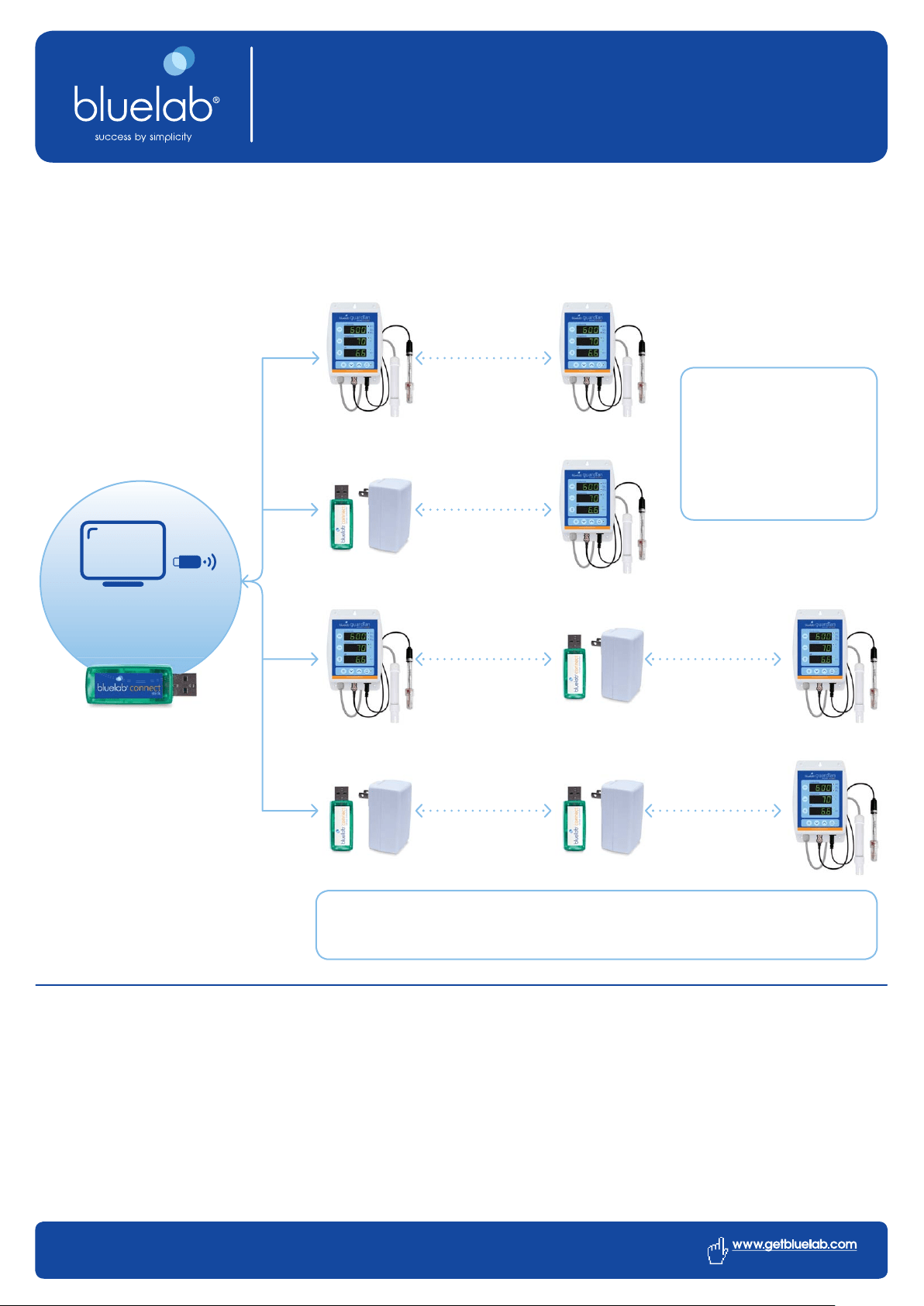
Bluelab Connect forms a wireless network between your computer and all of the devices in your system. These
devices are constantly in communication with the computer via the Bluelab Connect Stick, but they have only a
limited range over which this is possible.
Pg 1 of 2
Data can be passed from one
device to another to create a
chain to expand the range of the
network. This allows a virtually
unlimited communication
distance, as long as there is an
unbroken chain from one end to
the other.
If the distance between two devices is too far for a wireless link to be formed, a Bluelab Connect Range
Extender can be placed between them. This effectively doubles communication distance. If required
multiple Range Extenders can be placed in a chain.
Data log to
computer with
Connect Stick
Maximising Range
The communication distance is heavily dependent on the environment between the transmitter and receiver. Transmission is
most effective with a clear, unobstructed line of sight between the two points. However, a radio frequency (RF) line of sight is
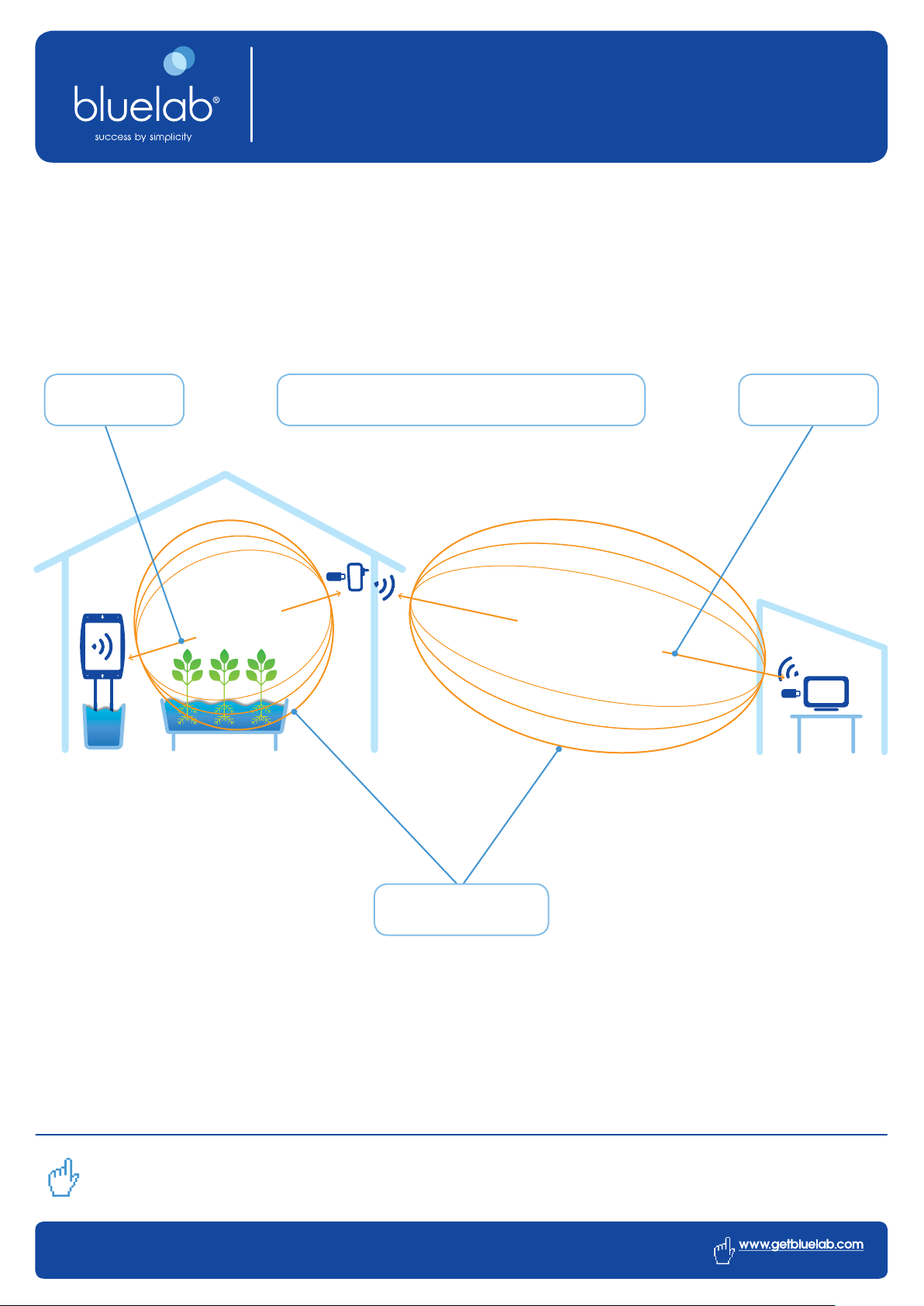
different from a visual one, in that it requires a football shaped area of free space between the transmitter and receiver (called
the “Fresnel zone”), rather than just a straight line.
If the communicating devices are mounted close to the ground (less than one foot), over half of the Fresnel zone can be
obstructed by the earth, which results in a signifi cant reduction in communication distance achieved. To avoid this problem the
communicating devices should be mounted high enough off of the ground (6 feet being optimum) to avoid the earth interfering
with the central diameter of the Fresnel zone.
Positioning Bluelab Connect Devices
Information sheet
Bluelab Corporation Limited 8 Whiore Avenue, Tauriko Industrial Park, Tauranga 3110, New Zealand
phone +64 7 578 0849 fax +64 7 578 0847 email salesupport@getbluelab.com
V01-20012014
If obstacles exist between two points resulting in poor signal strength, the communicating devices can be raised on one or
both ends to clear the Fresnel zone of obstructions. How far above the ground and other obstacles the antennas need to be is
determined by the diameter of the Fresnel zone. In this case, the central diameter required is approximately 3 meters (10 feet).
Mounting Devices
When mounting your devices, care should be taken to make sure they are as far away from metal objects as possible. It is
advisable to give at least four inches of separation, more if possible, between the communicating device and other metal
structures or objects. If nearby metal gets too close to the antenna it has the potential to interfere with transmission and may
reduce its range.
Do you need more information?
To download product specifi cations, user manuals or for technical advice, visit us online at www.getbluelab.com
Pg 2 of 2
The communicating devices should be mounted as high enough off of the
ground as possible, 6 feet is the optimum height for Bluelab Connect Devices.
Transmission is most effective with a clear, unobstructed line of sight between the two points...
a radio frequency (RF) line of sight requires a ‘Fresnel Zone’.
FRESNEL ZONE DISTANCE
FRESNEL ZONE
DISTANCE
Outdoor line-of-sight up to
164 feet / 50 meters
Indoor line-of-sight up to
66 feet / 20 meters
Central diameter required is
approximately 10 feet / 3 meters