Fr
Manuel d’utilisation
Jp
使用説明書
En
User’s Manual
Fr
Manuel d’utilisation
Sc
ҋᅶᢪϷ
Es
Manual del usuario
Kr
사용설명서
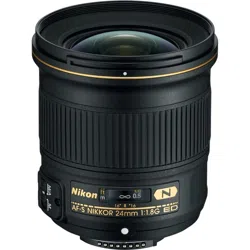
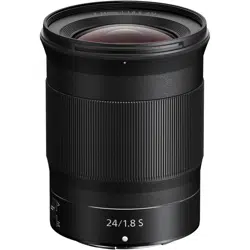
NIKKOR Z 24mm f/1.8 S
Avant d’utiliser ce produit, veuillez lire ces instructions attentivement. Vous devrez
également consulter le manuel de l’appareil photo.
• Cet objectif est destiné exclusivement aux appareils photo hybrides dotés d’une
monture Nikon Z.
Pour votre sécurité
Pour votre sécurité
Afi n d’éviter de provoquer des dommages matériels ou de vous blesser ou de blesser un
tiers, lisez intégralement «Pour votre sécurité» avant d’utiliser ce produit.
Conservez ces consignes de sécurité dans un endroit facilement accessible à tous
ceux qui pourraient se servir de ce produit.
A AVERTISSEMENT: le non-respect des consignes indiquées par cette icône peut
vous exposer à un danger de mort ou à de graves blessures.
A ATTENTION: le non-respect des consignes indiquées par cette icône peut vous
exposer à des blessures ou provoquer des dommages matériels.
A
A
AVERTISSEMENT
AVERTISSEMENT
•
•
Ne démontez pas ou ne modifi ez pas ce produit.
Ne démontez pas ou ne modifi ez pas ce produit.
Ne touchez pas les composants internes qui sont exposés suite à une chute
Ne touchez pas les composants internes qui sont exposés suite à une chute
ou à un autre accident.
ou à un autre accident.
Le non-respect de ces consignes peut provoquer un choc électrique ou d’autres blessures.
•
•
Si vous observez des anomalies provenant du produit comme de la fumée,
Si vous observez des anomalies provenant du produit comme de la fumée,
de la chaleur ou des odeurs inhabituelles, débranchez immédiatement la
de la chaleur ou des odeurs inhabituelles, débranchez immédiatement la
source d’alimentation de l’appareil photo.
source d’alimentation de l’appareil photo.
Continuer d’utiliser le matériel risque de provoquer un incendie, des brûlures ou
d’autres blessures.
•
•
Gardez votre matériel au sec.
Gardez votre matériel au sec.
Ne le manipulez pas avec les mains mouillées.
Ne le manipulez pas avec les mains mouillées.
Le non-respect de ces consignes de sécurité peut provoquer un incendie ou un
choc électrique.
•
•
N’utilisez pas ce produit en présence de poussières ou de gaz infl ammables
N’utilisez pas ce produit en présence de poussières ou de gaz infl ammables
comme du propane, de l’essence ou des aérosols.
comme du propane, de l’essence ou des aérosols.
Le non-respect de cette consigne peut provoquer une explosion ou un incendie.
•
•
N’observez pas directement le soleil ou toute autre source lumineuse
N’observez pas directement le soleil ou toute autre source lumineuse
puissante à travers l’objectif.
puissante à travers l’objectif.
Le non-respect de cette consigne peut provoquer des troubles visuels.
•
•
Conservez ce produit hors de portée des enfants.
Conservez ce produit hors de portée des enfants.
Le non-respect de cette consigne peut provoquer des blessures ou le dysfonctionnement
du produit. En outre, notez que les petites pièces présentent un risque d’étouff ement. Si
jamais un enfant avalait une pièce de ce produit, consultez immédiatement un médecin.
•
•
Ne manipulez pas le matériel à mains nues dans des lieux exposés à des
Ne manipulez pas le matériel à mains nues dans des lieux exposés à des
températures extrêmement basses ou élevées.
températures extrêmement basses ou élevées.
Le non-respect de cette consigne peut provoquer des brûlures ou des engelures.
A
A
ATTENTION
ATTENTION
•
•
Ne pointez pas l’objectif en direction du soleil ou d’autres sources très lumineuses.
Ne pointez pas l’objectif en direction du soleil ou d’autres sources très lumineuses.
La lumière focalisée par l’objectif peut provoquer un incendie ou endommager les
composants internes du produit. Lorsque vous photographiez un sujet à contre-
jour, veillez à garder toujours le soleil à l’extérieur du cadre. Lorsque le soleil se
trouve près du cadre, sa lumière risque de se concentrer dans l’appareil photo et de
provoquer un incendie.
•
•
Ne laissez pas le produit exposé à des températures excessivement chaudes
Ne laissez pas le produit exposé à des températures excessivement chaudes
pendant une période prolongée, comme dans une voiture fermée ou en plein soleil.
pendant une période prolongée, comme dans une voiture fermée ou en plein soleil.
Le non-respect de cette consigne peut provoquer un incendie ou le dysfonctionnement
du produit.
•
•
Ne transportez pas les appareils photo ou les objectifs si des trépieds ou
Ne transportez pas les appareils photo ou les objectifs si des trépieds ou
accessoires similaires sont fi xés.
accessoires similaires sont fi xés.
Le non-respect de cette consigne peut provoquer des blessures ou le dysfonctionnement
du produit.
Avis pour les clients au Canada
Avis pour les clients au Canada
CAN ICES-3 B / NMB-3 B
Utilisation de l’objectif
Utilisation de l’objectif
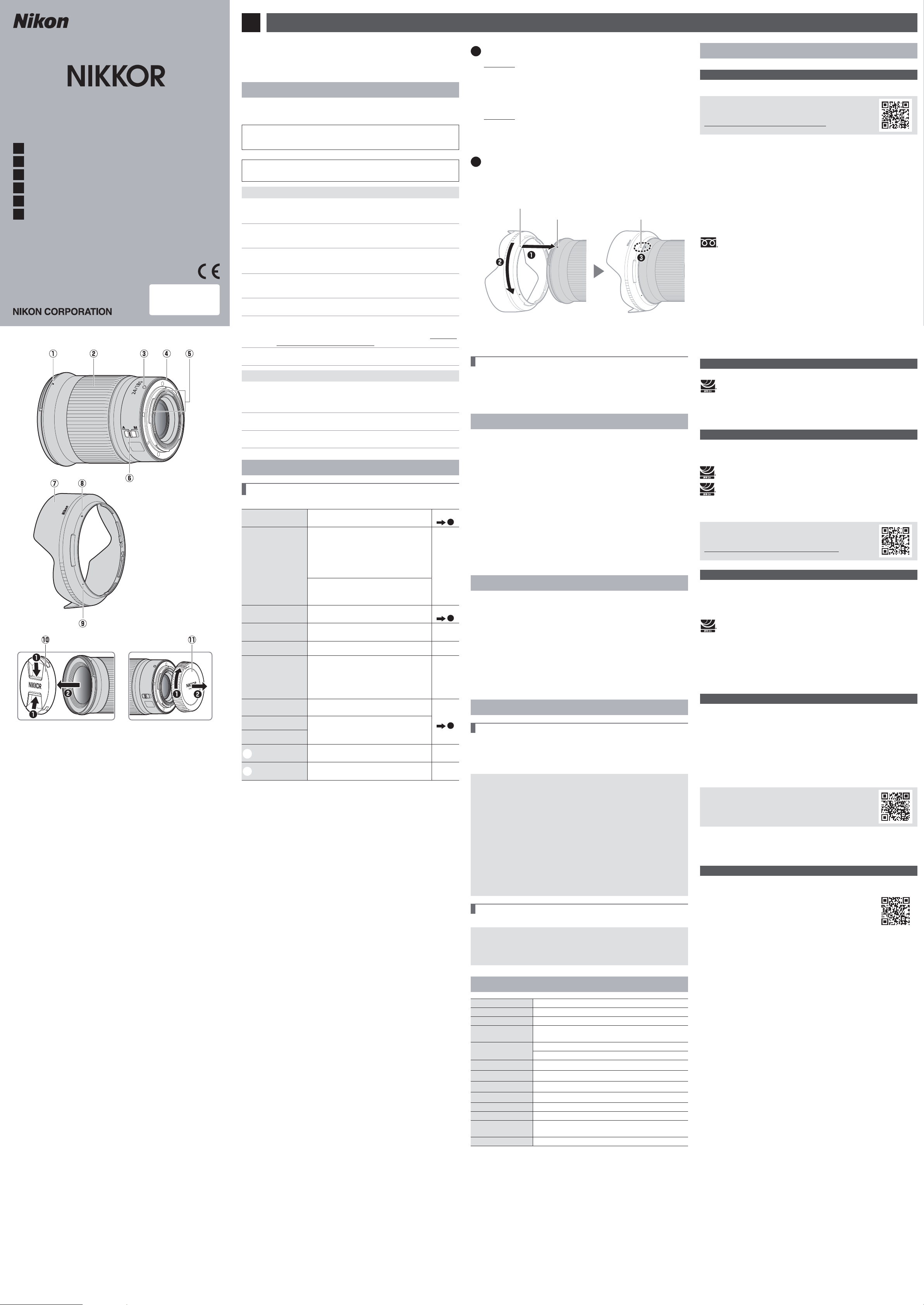
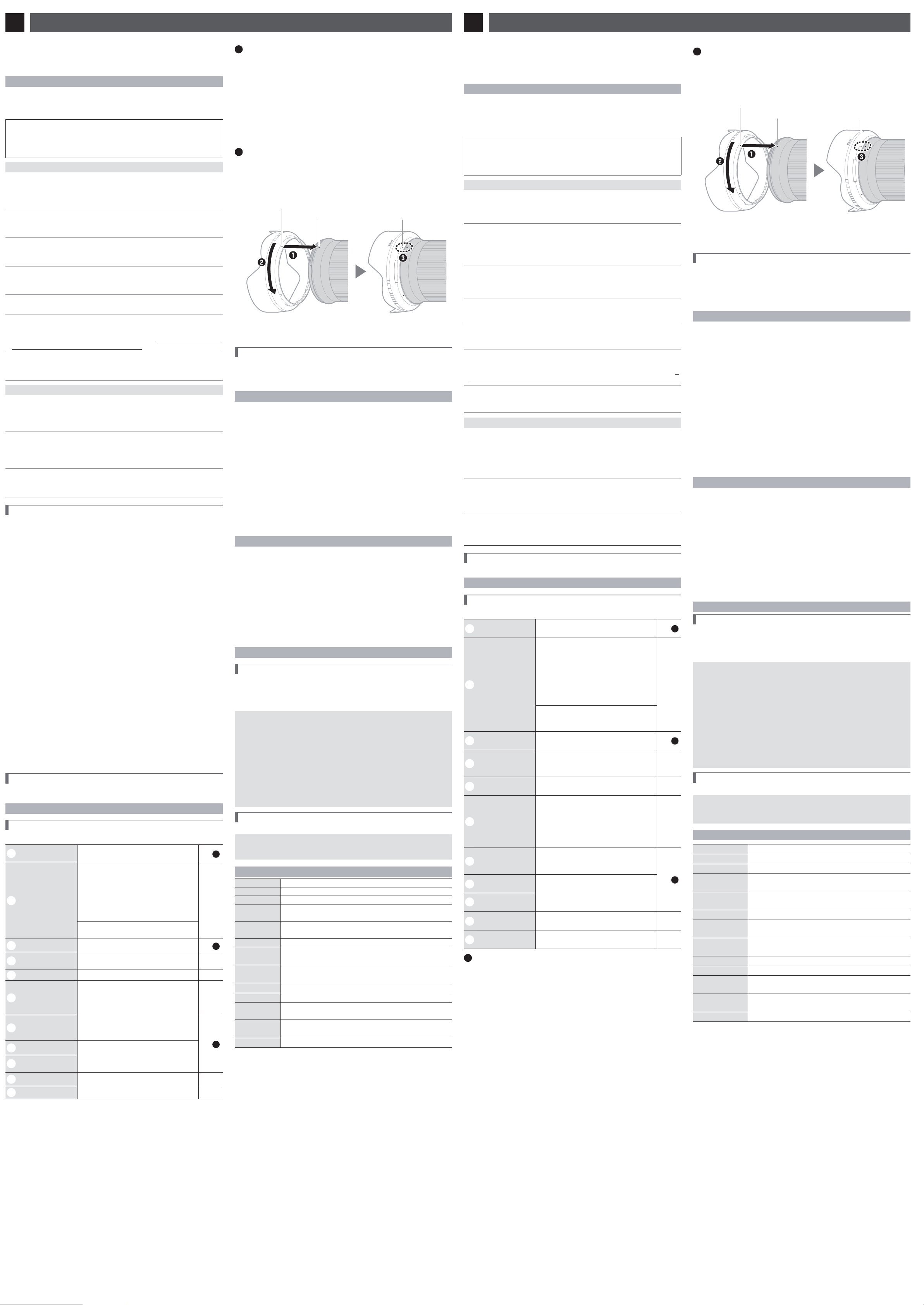
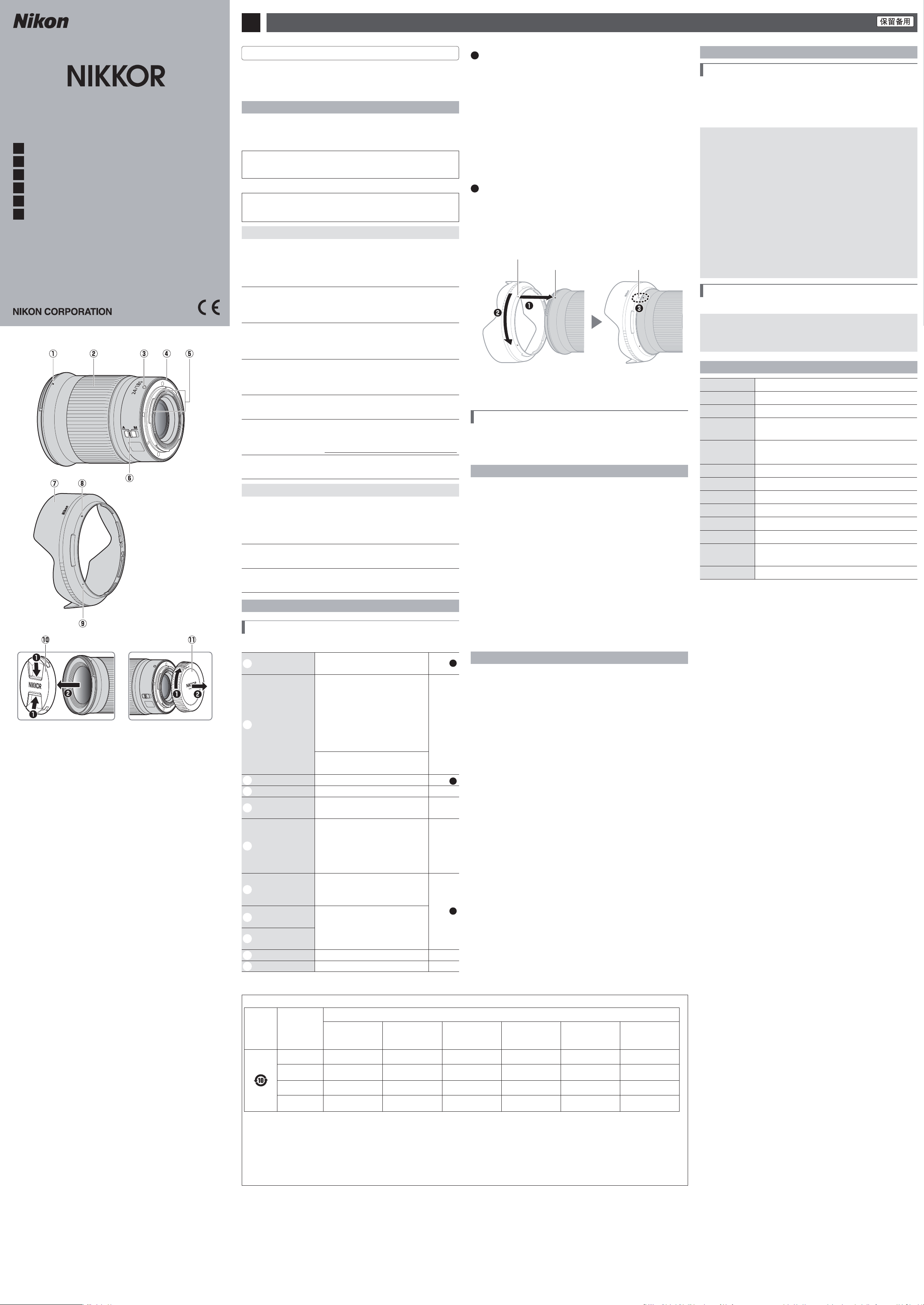
Descriptif de l’objectif : noms et fonctions
Descriptif de l’objectif : noms et fonctions
Reportez-vous aux fi gures situées à gauche.
q
Repère de montage
du parasoleil
Référez-vous à ce repère lorsque vous fi xez le
parasoleil.
Voir
B
w
Bague de réglage
Mode autofocus sélectionné:
En mode autofocus, tournez la bague pour
modifi er le réglage [Mise au point (M/A)] ou
[Ouverture], attribué à l’aide de l’appareil
photo. Pour en savoir plus, reportez-vous à la
description de [Défi nition réglages perso.]/
[Commandes perso (prise de vue)] dans le
manuel de l’appareil photo.
—
Mode de mise au point manuelle sélectionné:
Tournez la bague pour eff ectuer la mise au
point.
e
Repère de montage
de l’objectif
Référez-vous à ce repère lorsque vous fi xez
l’objectif sur l’appareil photo.
Voir
A
r
Joint en caoutchouc
de la monture
d’objectif
——
t
Contacts du
microprocesseur
Utilisés pour transférer les données depuis ou
vers l’appareil photo.
—
y
Commutateur du
mode de mise au
point
Choisissez A pour l’autofocus, M pour la mise au
point manuelle. Notez qu’indépendamment
du réglage choisi, vous devez modifi er la mise
au point manuellement lorsque le mode de
mise au point manuelle est sélectionné à l’aide
des commandes de l’appareil photo.
—
u
Parasoleil
Le parasoleil bloque la lumière diff use pouvant
provoquer de la lumière parasite ou une image
fantôme. Il permet aussi de protéger l’objectif.
Voir
B
i
Repère de verrouillage
du parasoleil
Référez-vous à ce repère lorsque vous fi xez le
parasoleil.
●
o
Repère d’alignement
du parasoleil
!0
Bouchon d’objectif
(avant)
——
!1
Bouchon d’objectif
(arrière)
——
A
Fixation et retrait
Fixation et retrait
Fixation de l’objectif
z
Mettez l’appareil photo hors tension, retirez le bouchon du boîtier et
détachez le bouchon arrière de l’objectif.
x
Placez l’objectif sur le boîtier de l’appareil photo, en maintenant le
repère de montage de l’objectif aligné sur le repère de montage du
boîtier de l’appareil photo, puis faites pivoter l’objectif dans le sens
inverse des aiguilles d’une montre jusqu’au déclic.
Retrait de l’objectif
z
Mettez l’appareil photo hors tension.
x
Maintenez appuyée la commande de déverrouillage de l’objectif tout
en faisant pivoter ce dernier dans le sens des aiguilles d’une montre.
B
Fixation et retrait du parasoleil
Fixation et retrait du parasoleil
Alignez le repère de montage du parasoleil sur le repère d’alignement du parasoleil
(
q
), puis tournez ce dernier (
w
) jusqu’à ce que le repère de montage s’aligne sur
le repère de verrouillage du parasoleil (
e
).
Pour retirer le parasoleil, effectuez les étapes ci-dessus dans le sens inverse.
Repère de verrouillage
du parasoleil
Repère d’alignement du parasoleil
Repère de montage du parasoleil
Lorsque vous fi xez ou retirez le parasoleil, tenez-le à proximité du repère
d’alignement (●) et évitez de le saisir trop fermement à l’avant. Le parasoleil peut
être retourné et monté sur l’objectif lorsqu’il n’est pas utilisé.
Lorsque l’objectif est fi xé
Lorsque l’objectif est fi xé
Le réglage de mise au point risque de changer si vous mettez l’appareil photo hors
tension puis à nouveau sous tension après avoir fait le point. Si vous avez fait le point sur
un emplacement sélectionné au préalable en attendant que votre sujet apparaisse, nous
vous recommandons de ne pas mettre l’appareil photo hors tension tant que vous n’avez
pas pris la photo.
Précautions d’utilisation
Précautions d’utilisation
• Ne prenez pas ou ne tenez pas l’objectif ou l’appareil photo en saisissant uniquement le parasoleil.
• Maintenez les contacts du microprocesseur propres.
• Si le joint en caoutchouc de la monture d’objectif est endommagé, cessez immédiatement
l’utilisation et confi ez l’objectif à un centre Nikon agréé pour le faire réparer.
• Remettez les bouchons en place lorsque vous n’utilisez pas l’objectif.
• Pour protéger l’intérieur de l’objectif, rangez-le à l’abri du soleil.
• Ne laissez pas l’objectif dans des endroits humides ou dans des lieux où il risque
d’être exposé à l’humidité. La formation de rouille sur les mécanismes internes peut
provoquer des dommages irréparables.
• Ne laissez pas l’objectif à proximité d’un feu ou dans d’autres endroits extrêmement
chauds. La chaleur extrême pourrait endommager ou déformer les pièces extérieures
composées de plastique renforcé.
• Les changements brusques de température peuvent être à l’origine d’une
condensation préjudiciable à l’intérieur et à l’extérieur de l’objectif. Avant de faire
passer l’objectif d’un environnement chaud à froid ou vice versa, rangez-le dans un
sac ou dans une boîte en plastique pour ralentir le changement de température.
• Nous vous recommandons de ranger l’objectif dans son étui afi n de le protéger des
rayures lors du transport.
Entretien de l’objectif
Entretien de l’objectif
• Normalement, enlever la poussière suffi t pour nettoyer les surfaces en verre de l’objectif.
• Les taches, les traces de doigt et autres taches grasses peuvent être retirées de
la surface de l’objectif avec un tissu propre et doux en coton ou un chiff on optique
légèrement imbibé d’une petite quantité d’éthanol ou de nettoyant pour objectif.
Essuyez délicatement avec un mouvement circulaire à partir du centre vers l’extérieur,
en prenant soin de ne pas laisser de traces, ni de toucher le verre avec les doigts.
• N’utilisez jamais de solvants organiques comme un diluant à peinture ou du benzène
pour nettoyer l’objectif.
• Les fi ltres neutres (NC, disponibles séparément) et autres accessoires similaires
permettent de protéger la lentille avant.
• Si vous n’avez pas l’intention d’utiliser l’objectif pendant une période prolongée, rangez-
le dans un endroit frais et sec pour éviter la moisissure et la rouille. Ne le rangez pas à
la lumière directe du soleil ou avec des boules antimites de naphtaline ou de camphre.
Accessoires
Accessoires
Accessoires fournis
Accessoires fournis
• Bouchon d’objectif LC-72B (avant)
• Bouchon d’objectif LF-N1 (arrière)
• Parasoleil HB-88
• Pochette pour objectifCL-C1
D
Utilisation de la pochette pour objectif
• La pochette est destinée à protéger l’objectif des rayures et non des chutes ou autres chocs physiques.
• La pochette n’est pas résistante à l’eau.
• La matière utilisée dans cette pochette peut se décolorer, déteindre, s’étirer, rétrécir ou changer de couleur en
cas de frottement ou d’humidité.
• Retirez la poussière avec un pinceau doux.
• L’eau et les taches peuvent être retirées de la surface avec un chi on doux et sec. N’utilisez pas d’alcool, de
benzène, de diluant ou d’autres substances chimiques volatiles.
• Ne rangez pas la pochette dans des lieux exposés à la lumière directe du soleil, à des températures élevées ou à l’humidité.
• N’utilisez pas la pochette pour nettoyer le moniteur ou les lentilles.
• Veillez à ce que l’objectif ne tombe pas de la pochette lorsque vous le transportez.
Matière : polyester
Accessoires compatibles
Accessoires compatibles
Filtres à visser 72 mm
D
Filtres
• N’utilisez qu’un seul filtre à la fois.
• Retirez le parasoleil avant de fixer un filtre ou de faire pivoter un filtre polarisant circulaire.
Caractéristiques
Caractéristiques
Monture
Monture Monture Nikon Z
Focale
Focale 24 mm
Ouverture maximale
Ouverture maximale f/1.8
Construction optique
Construction optique 12 lentilles en 10 groupes (dont 1 lentille en verre ED, 4 lentilles asphériques et
des lentilles béné ciant du Traitement nanocristal)
Angle de champ
Angle de champ • Format FX : 84°
• Format DX : 61°
Système de mise au point
Système de mise au point
Système de mise au point arrière
Distance minimale de
Distance minimale de
mise au point
mise au point
0,25 m à partir du plan focal
Rapport de
Rapport de
reproduction maximal
reproduction maximal
Environ 0,15×
Lamelles de diaphragme
Lamelles de diaphragme
9 (diaphragme circulaire)
Plage des ouvertures
Plage des ouvertures f/1.8 – 16
Diamètre de xation
Diamètre de xation
pour ltre
pour ltre
72 mm (P = 0,75mm)
Dimensions
Dimensions Environ 78 mm de diamètre maximum × 96,5 mm
(distance à partir du plan d’appui de la monture d’objectif de l’appareil photo)
Poids
Poids Environ 450 g
Nikon se réserve le droit de modifi er à tout moment l’apparence, les caractéristiques et les
performances de ce produit sans avis préalable.
Jp
使用説明書
ご使用の前に、この使用説明書をよくお読みの上、正しくお使いください。また、
カメラの説明書もご覧ください。
•
このレンズは、ニコン
Z マウントのミラーレスカメラ専用です。
安全上のご注意
あなたや他の人々への危害や財産への損害を未然に防止するため、ご使用の前に「安全上の
ご注意」をよくお読みの上、正しくお使いください。
この説明書をお読みになった後は、いつでも参照できるように保管してください。
A
警告
「死亡または重傷を負うおそれがある内容」です。
A
注意
「軽傷を負うことや財産の損害が発生するおそれがある内容」です。
お守りいただく内容を、以下の図記号で区分しています。
F
は、してはいけない内容です。
C
は、実行しなければならない内容です。
A
警告
E
分解
禁止
分解、修理または改造をしない
落下などによる破損で内部が露出したら、露出部に触らない
感電やけがの原因になります。
C
実行
熱くなる、煙が出る、こげ臭いなどの異常時は、直ちにカメラの電源を取り
外す
放置すると、発火、やけどの原因になります。
F
禁止
水でぬらさない
ぬれた手で触らない
感電や発火の原因になります。
F
禁止
引火、爆発のおそれのある場所では使わない
プロパンガス、ガソリン、可燃性スプレーなどの引火性ガスや粉塵の発生す
る場所で使うと、爆発や火災の原因になります。
F
禁止
レンズで直接太陽や強い光を見ない
失明や視力障碍の原因になります。
F
禁止
幼児の手の届くところに置かない
故障やけがの原因になります。
小さな付属品を誤って飲み込むと、身体に悪影響を及ぼします。飲み込んだ
ら、すぐに医師の診断を受けてください。
G
禁止
高温環境や低温環境では、直接触らない
やけどや低温やけど、凍傷の原因になることがあります。
A
注意
F
禁止
レンズを太陽や強い光源に向けたままにしない
集光して、内部部品の破損や発火の原因になることがあります。逆光撮影では、
太陽を画角から十分にずらしてください。画角から太陽をわずかに外しても、
発火の原因になります。
F
禁止
夏場の車内や直射日光の当たる所など高温環境に放置しない
故障や発火の原因になります。
F
禁止
三脚などにカメラやレンズを取り付けたまま移動しない
故障やけがの原因になります。
レンズの使い方
各部の名称と機能
左図で示されている各部の名称と機能は以下の通りです。
●
●
q
フード着脱指標 レンズにフードを取り付けるときの指標です。
詳しくは
B
●
w
コントロールリング
オートフォーカス時
このリングを回転させると、[フォーカス(M/A)]
や[絞り]などカメラで設定した機能を使用で
きます。詳しくは、カメラの説明書に記載され
ている[カスタムボタンの機能]または[カスタ
ムボタンの機能 ( 撮影 )]の説明をご覧ください。
マニュアルフォーカス時
このリングを回転させると手動でピント合わせ
ができます。
●
e
レンズ着脱指標 カメラにレンズを取り付けるときの指標です。
詳しくは
A
●
r
レンズマウント
ゴムリング
●
t
CPU
信号接点 カメラとレンズの間で情報を伝達します。
●
y
フォーカスモード
切り換えスイッチ
[
A
]を選ぶとオートフォーカスになり、[
M
]
を選ぶとマニュアルフォーカスになります。
•
カメラのフォーカスモードがマニュアルフォー
カスのときは、レンズで[
A
]を選んでいても
マニュアルフォーカスになります。
●
u
フード
画像に悪影響を及ぼす光線をカットします。
レンズ面の保護にも役立ちます。
詳しくは
B
●
i
フードセット指標
レンズにフードを取り付けるときの指標です。
●
o
フード取り付け指標
!0
レンズキャップ
(フロントキャップ)
!1
レンズキャップ
(リアキャップ)
A
カメラへの取り付け方・取り外し方
取り付け方
z
カメラの電源を
OFF
にして、レンズのリアキャップとカメラのボ
ディーキャップを外す
x
カメラとレンズのレンズ着脱指標を合わせ、反時計回りにカチッ
と音がするまでレンズを回す
取り外し方
z
カメラの電源を
OFF
にする
x
レンズ取り外しボタンを押しながら、時計回りにレンズを回して
取り外す
B
フードの取り付け方・取り外し方
•
フード着脱指標とフード取り付け指標を合わせて(
q
)、フードを矢印(
w
)
の方向に回転させ、フード着脱指標とフードセット指標を合わせてください
(
e
)。
フードセット指標
フード取り付け指標
フード着脱指標
•
フード先端を強くつかむと着脱が困難になります。着脱の際は、フード取り付け
指標(●)付近を持って回転させてください。
•
取り外しは、取り付けと逆の手順で行ってください。
•
収納時はフードを逆向きにしてレンズに取り付けられます。
カメラにレンズを取り付けたときのご注意
ピント合わせを行った後に、カメラの電源を OFF にして再び ON にするとピント位置
が変わることがあります。ピントをあらかじめ合わせておいて被写体を待つ置きピン撮
影などでは、ピントを合わせてからシャッターをきるまでにカメラの電源を OFF にしな
いことをおすすめします。
取り扱い上のご注意
•
フードをレンズに装着した状態で、フードだけを持たないでください。
•
CPU 信号接点は汚さないようにご注意ください。
•
レンズマウントゴムリングが破損した場合は、そのまま使用せず販売店またはニコン
サービス機関に修理を依頼してください。
•
レンズをカメラに装着していないときは、必ずレンズキャップを取り付けてください。
•
レンズを保管するときは、レンズ内部を保護するために太陽光のあたらない所に保管し
てください。
•
レンズを水にぬらしたり、湿気の多い場所に置かないでください。部品がサビつくな
どして故障の原因になりますのでご注意ください。
•
火の近くなど、極端に温度が高くなるところに置かないでください。外装の一部に使
用している強化プラスチックが変形することがあります。
•
極端に温度差のある場所に急にレンズを持ち込むと、レンズ内外に水滴が生じ、故障の
原因となります。レンズをバッグやビニール袋などに入れて、周囲の温度になじませて
からお使いください。
•
レンズを傷から守るために、持ち運ぶときはレンズケースに入れることをおすすめします。
レンズのお手入れ
•
レンズ面を清掃する場合、通常はほこりを払う程度にしてください。
•
レンズ面に指紋など油分を含む汚れがついたときは、少量の無水アルコール(エタノー
ル)や市販のレンズクリーナーで湿らせた柔らかい清潔な木綿の布または市販のレン
ズクリーニングペーパーを使って、レンズの中心から外周へ渦巻き状に拭いてくださ
い。その場合、拭きムラや拭き残りがないように注意してください。
•
シンナーやベンジンなどの有機溶剤は絶対に使用しないでください。
•
レンズ表面の汚れや傷を防ぐには、別売のニュートラルカラー
NC フィルターなどの
使用をおすすめします。
•
レンズを長期間使用しないときは、カビやサビを防ぐために、高温多湿のところを避
けて風通しのよい場所に保管してください。また、直射日光のあたるところ、防虫剤
のあるところも避けてください。
アクセサリー
付属アクセサリー
•
レンズキャップ
LC-72B(フロントキャップ)
•
レンズキャップ
LF-N1(リアキャップ)
•
レンズフード
HB-88
•
レンズケース
CL-C1
D
レンズケースのお取り扱いについて
•
レンズケースはレンズを傷から守ることを目的としており、落下や衝撃からレンズ
を保護する機能はありません。
•
レンズケースに撥水機能はありません。
•
レンズケースは材質の特性上、雨や水などで濡れた場合や摩擦によって、色落ち、
変色、色移り、伸縮することがあります。
•
ほこりは柔らかいブラシで払い落としてください。
•
表面に付着した汚れや水分は、乾いた柔らかい布で拭き取ってください。アルコール、
ベンジン、シンナーなどの溶剤は使わないでください。
•
直射日光があたる場所や、温度、湿度の高い場所に放置しないでください。
•
レンズ面や液晶画面などを拭くクリーニングクロスとしては使用できません。
•
レンズを収納して持ち運ぶ際、レンズが転がり出ないようご注意ください。
レンズケースの素材:ポリエステル
使用できるアクセサリー
72 mm ネジ込み式フィルター
D
フィルターを使用する場合
•
フィルターは
1 枚で使用してください。
•
フィルターは、フードを取り外してから装着してください。また、円偏光フィルター
の偏光効果の調節も、フードを取り外した状態で行ってください。
仕様
マウント ニコン Z マウント
焦点距離
24 mm
最大口径比 1:1.8
レンズ構成
10 群 12 枚(ED レンズ 1 枚、非球面レンズ 4 枚、ナノク
リスタルコートあり)
画角
84°(
撮像範囲 FX
)
61°(撮像範囲 DX)
フォーカシング方式 RF(リアフォーカス)方式
最短撮影距離 撮像面から
0.25 m
最大撮影倍率 約 0.15 倍
絞り羽根枚数 9 枚(円形絞り)
絞りの範囲 f/1.8 16
アタッチメントサイズ 72 mm(P=0.75 mm)
寸法
約
78 mm(最大径)× 96.5 mm(レンズマウント基準面
からレンズ先端まで)
質量 約
450 g
※製品の外観・仕様・性能は予告なく変更することがありますので、ご了承ください。
En
User’s Manual
Before using this product, please read these instructions carefully. You will also need to
consult the camera manual.
• This lens is intended exclusively for use with mirrorless cameras featuring a Nikon Z mount.
For Your Safety
For Your Safety
To prevent damage to property or injury to yourself or to others, read “For Your Safety”
in its entirety before using this product.
Keep these safety instructions where all those who use this product will read them.
A WARNING: Failure to observe the precautions marked with this icon could
result in death or severe injury.
A CAUTION: Failure to observe the precautions marked with this icon could
result in injury or property damage.
A
A
WARNING
WARNING
•
•
Do not disassemble or modify this product.
Do not disassemble or modify this product.
Do not touch internal parts that become exposed as the result of a fall or
Do not touch internal parts that become exposed as the result of a fall or
other accident.
other accident.
Failure to observe these precautions could result in electric shock or other injury.
•
•
Should you notice any abnormalities such as the product producing smoke, heat, or
Should you notice any abnormalities such as the product producing smoke, heat, or
unusual odors, immediately disconnect the camera power source.
unusual odors, immediately disconnect the camera power source.
Continued operation could result in fi re, burns or other injury.
•
•
Keep dry.
Keep dry.
Do not handle with wet hands.
Do not handle with wet hands.
Failure to observe these precautions could result in fi re or electric shock.
•
•
Do not use this product in the presence of fl ammable dust or gas such as
Do not use this product in the presence of fl ammable dust or gas such as
propane, gasoline or aerosols.
propane, gasoline or aerosols.
Failure to observe this precaution could result in explosion or fi re.
•
•
Do not directly view the sun or other bright light source through the lens.
Do not directly view the sun or other bright light source through the lens.
Failure to observe this precaution could result in visual impairment.
•
•
Keep this product out of reach of children.
Keep this product out of reach of children.
Failure to observe this precaution could result in injury or product malfunction. In
addition, note that small parts constitute a choking hazard. Should a child swallow any
part of this product, seek immediate medical attention.
•
•
Do not handle with bare hands in locations exposed to extremely high or
Do not handle with bare hands in locations exposed to extremely high or
low temperatures.
low temperatures.
Failure to observe this precaution could result in burns or frostbite.
A
A
CAUTION
CAUTION
•
•
Do not leave the lens pointed at the sun or other strong light sources.
Do not leave the lens pointed at the sun or other strong light sources.
Light focused by the lens could cause fi re or damage to product’s internal parts.When shooting
backlit subjects, keep the sun well out of the frame. Sunlight focused into the camera when the sun
is close to the frame could cause fi re.
•
•
Do not leave the product where it will be exposed to extremely high
Do not leave the product where it will be exposed to extremely high
temperatures, for an extended period such as in an enclosed automobile
temperatures, for an extended period such as in an enclosed automobile
or in direct sunlight.
or in direct sunlight.
Failure to observe this precaution could result in fi re or product malfunction.
•
•
Do not transport cameras or lenses with tripods or similar accessories
Do not transport cameras or lenses with tripods or similar accessories
attached.
attached.
Failure to observe this precaution could result in injury or product malfunction.
Notices for Customers in the U.S.A.
Notices for Customers in the U.S.A.
This device complies with part 15 of the FCC Rules. Operation is subject to the follow-
ing two conditions: (1) this device may not cause harmful interference, and (2) this
device must accept any interference received, including interference that may cause
undesired operation.
Federal Communications Commission (FCC) Radio Frequency Interference
Federal Communications Commission (FCC) Radio Frequency Interference
Statement
Statement
This equipment has been tested and found to comply with the limits for a Class B digital
device, pursuant to Part 15 of the FCC rules. These limits are designed to provide reason-
able protection against harmful interference in a residential installation. This equipment
generates, uses, and can radiate radio frequency energy and, if not installed and used in
accordance with the instructions, may cause harmful interference to radio communica-
tions. However, there is no guarantee that interference will not occur in a particular instal-
lation. If this equipment does cause harmful interference to radio or television reception,
which can be determined by turning the equipment off and on, the user is encouraged to
try to correct the interference by one or more of the following measures:
• Reorient or relocate the receiving antenna.
• Increase the separation between the equipment and receiver.
• Connect the equipment into an outlet on a circuit diff erent from that to which the
receiver is connected.
• Consult the dealer or an experienced radio/television technician for help.
CAUTIONS
CAUTIONS
Modi cations
The FCC requires the user to be notifi ed that any changes or modifi cations made to
this device that are not expressly approved by Nikon Corporation may void the user’s
authority to operate the equipment.
Nikon Inc., 1300 Walt Whitman Road,
Melville, New York 11747-3064, U.S.A.
Tel.: 631-547-4200
Notice for Customers in Canada
Notice for Customers in Canada
CAN ICES-3 B / NMB-3 B
Using the Lens
Using the Lens
Parts of the Lens: Names and Functions
Parts of the Lens: Names and Functions
Refer to the diagram on the left edge of this sheet.
q
Lens hood mounting
mark
Use when attaching the lens hood.
See
B
w
Control ring
Autofocus mode selected:
In autofocus mode, rotate the ring to adjust
a setting such as [Focus (M/A)] or [Aperture]
assigned using the camera. For more informa-
tion, see the description of [Custom control as-
signment]/[Custom controls (shooting)] in the
camera manual.
—
Manual focus mode selected:
Rotate the ring to focus.
e
Lens mounting mark Use when mounting the lens on the camera.
See
A
r
Rubber lens-mount
gasket
——
t
CPU contacts Used to transfer data to and from the camera. —
y
Focus-mode switch
Choose A for autofocus, M for manual focus.
Note that regardless of the setting chosen, fo-
cus must be adjusted manually when manual
focus mode is selected using camera controls.
—
u
Lens hood
Lens hoods block stray light that would other-
wise cause fl are or ghosting. They also serve to
protect the lens.
See
B
i
Lens hood lock mark
Use when attaching the lens hood.
●
o
Lens hood alignment
mark
!0
Lens cap (front cap)
——
!1
Lens cap (rear cap)
——
A
Attachment and Removal
Attachment and Removal
Attaching the Lens
z
Turn the camera o , remove the body cap, and detach the rear lens cap.
x
Position the lens on the camera body, keeping the mounting mark
on the lens aligned with the mounting mark on the camera body,
and then rotate the lens counterclockwise until it clicks into place.
Removing the Lens
z
Turn the camera o .
x
Press and hold the lens release button while turning the lens clockwise.
B
Attaching and Removing the Lens Hood
Attaching and Removing the Lens Hood
Align the lens hood mounting mark with the lens hood alignment mark (
q
) and
then rotate the hood (
w
) until the mounting mark is aligned with the lens hood
lock mark (
e
).
To remove the hood, reverse the above steps.
Lens hood lock mark
Lens hood alignment mark
Lens hood mounting mark
When attaching or removing the hood, hold it near the lens hood alignment mark (●)
and avoid gripping the front of the hood too tightly. The hood can be reversed and
mounted on the lens when not in use.
When the Lens Is Attached
When the Lens Is Attached
The focus position may change if you turn the camera off and then on again after fo-
cusing. If you have focused on a pre-selected location while waiting for your subject to
appear, we recommend that you do not turn the camera off until the picture is taken.
Precautions for Use
Precautions for Use
• Do not pick up or hold the lens or camera using only the lens hood.
• Keep the CPU contacts clean.
• Should the rubber lens-mount gasket be damaged, cease use immediately and take
the lens to a Nikon-authorized service center for repair.
• Replace the lens caps when the lens is not in use.
• To protect the interior of the lens, store it out of direct sunlight.
• Do not leave the lens in humid locations or in locations in which it may be exposed to
moisture. Rusting of the internal mechanism can cause irreparable damage.
• Do not leave the lens next to open fl ames or in other extremely hot locations. Ex-
treme heat could damage or warp exterior parts made from reinforced plastic.
• Rapid changes in temperature may cause damaging condensation inside and outside
the lens. Before taking the lens from a warm to a cold environment or vice versa, place
it in a bag or plastic case to slow the change in temperature.
• We recommend that you place the lens in its case to protect it from scratches during
transport.
Lens Care
Lens Care
• Removing dust is normally suffi cient to clean the glass surfaces of the lens.
• Smudges, fi ngerprints, and other oily stains can be removed from the lens surface
using a soft, clean cotton cloth or lens cleaning tissue lightly dampened with a small
amount of ethanol or lens cleaner. Wipe gently from the center outwards in a circular
motion, taking care not to leave smears or touch the lens with your fi ngers.
• Never use organic solvents such as paint thinner or benzene to clean the lens.
• Neutral Color (NC) fi lters (available separately) and the like can be used to protect the
front lens element.
• If the lens will not be used for an extended period, store it in a cool, dry location to
prevent mold and rust. Do not store in direct sunlight or with naphtha or camphor
moth balls.
Accessories
Accessories
Supplied Accessories
Supplied Accessories
• LC-72B Lens Cap (front cap)
• LF-N1 Lens Cap (rear cap)
• HB-88 Lens Hood
• CL-C1 Lens Case
D
Using the Lens Case
• The case is intended to protect the lens from scratches, not from falls or other physical shocks.
• The case is not water resistant.
• The material used in the case may fade, bleed, stretch, shrink, or change color when rubbed or wet.
• Remove dust with a soft brush.
• Water and stains can be removed from the surface with a soft, dry cloth. Do not use alcohol, benzene, thinner,
or other volatile chemicals.
• Do not store in locations exposed to direct sunlight or high temperatures or humidity.
• Do not use the case to clean the monitor or lens elements.
• Be careful that the lens does not fall from the case during transport.
Material: Polyester
Compatible Accessories
Compatible Accessories
72 mm screw-on fi lters
D
Filters
• Use only one lter at a time.
• Remove the lens hood before attaching lters or rotating circular polarizing lters.
Speci cations
Speci cations
Mount
Mount Nikon Z mount
Focal length
Focal length 24 mm
Maximum aperture
Maximum aperture
f/1.8
Lens construction
Lens construction 12 elements in 10 groups (including 1 ED element, 4 aspherical elements, and
elements with Nano Crystal Coat)
Angle of view
Angle of view • FX format: 84°
• DX format: 61°
Focusing system
Focusing system Rear focusing system
Minimum focus
Minimum focus
distance
distance
0.25 m (0.82 ft) from focal plane
Maximum repro-
Maximum repro-
duction ratio
duction ratio
Approx. 0.15×
Diaphragm blades
Diaphragm blades 9 (rounded diaphragm opening)
Aperture range
Aperture range f/1.8 – 16
Filter-attachment
Filter-attachment
size
size
72 mm (P = 0.75 mm)
Dimensions
Dimensions Approx. 78 mm/3.1 in. maximum diameter × 96.5 mm/3.8 in.
(distance from camera lens mount ange)
Weight
Weight Approx. 450 g (15.9 oz)
Nikon reserves the right to change the appearance, specifi cations, and performance of this
product at any time and without prior notice.
サービスとサポート
修理サービスのご案内
■
インターネットでのお申込み
ニコンイメージングジャパン修理センターで承ります。
下記のホームページからお申込みいただけます。
https://www.nikon-image.com/support/repair/
•
ニコン
ピックアップサービスで発送する場合
梱包資材のお届け・修理品のお引き取り、修理後のお届け・集金までをニコン指定の配送
業者(ヤマト運輸)が一括して代行するサービスです。全国一律の料金にて承ります(大
きさや重さには制限があり、取り扱いできない製品もあります)。
•
ご自身で発送する場合
インターネットでお申込みいただいた後、お客様ご自身で修理品を梱包し、修理センター
まで発送してください。
株式会社ニコンイメージングジャパン修理センター
〒
230-0052
横浜市鶴見区生麦
2-2-26
修理センターナビダイヤル
0570-02-8200
※
修理センターでは、宅配便、郵送をお受けします。ご来所の方の受付はしておりません。
■
お電話でのお申込み
お電話でのお申込みの場合は、ニコンピックアップサービスをご利用いただけます。
ニコン ピックアップサービス専用 フリーダイヤル(ヤマト運輸にて承ります)
0120-02-8155
営業時間:
9
:
00
〜
18
:
00
(年末年始を除く毎日)
※
上記フリーダイヤルは、ニコン指定の配送業者(ヤマト運輸)にて承ります。修理内容に
関するお問い合わせにはお答えできません。修理内容に関するお問い合わせは修理センター
へお願いいたします。
■
サービスセンターでのお手続き
ニコンプラザのサービスセンター窓口でお見積り・受付をいたします。
D
修理品をお預けいただく場合のご注意
•
ボディーキャップやレンズキャップが付属している製品の場合は、製品保護のため、装着して
お預けください。
•
修理に必要と思われるもの以外の付属品は、ご自身で保管ください。
•
カメラなどの修理では、受付や修理の過程で撮影データをやむを得ず消去する場合があります。
大切なデータは必ずバックアップをお取りください。
修理に関するお問い合わせ先
株式会社ニコンイメージングジャパン修理センター
修理センター ナビダイヤル
0570-02-8200
営業時間:
9
:
30
〜
18
:
00
(土曜日、日曜日、祝日、年末年始、夏期休業日など弊社定休日
を除く毎日)
•
ナビダイヤルをご利用いただけない場合は、ニコンカスタマーサポートセンター
(03) 6702-0577
におかけください。
ニコンプラザについて
ニコンプラザは、ショールーム、サービスセンター、ギャラリーを統合したニコン映像製品
の総合情報拠点です。
※
ニコンプラザサービスセンターでは持ち込み修理の受け付けも行っています。
ニコンプラザショールーム ナビダイヤル
0570-02-8080
ニコンプラザサービスセンター ナビダイヤル
0570-02-8060
•
音声ガイダンスにしたがってご利用ください。
•
ナビダイヤルをご利用いただけない場合は、ニコンカスタマーサポートセンター
(03) 6702-0577
におかけください。
ニコンプラザの所在地、営業時間などについては、下記
URL
を
ご覧ください。
https://www.nikon-image.com/support/showroom/
製品の使い方に関するお問い合わせ先
■
インターネットでのお問い合わせ
https://www.nikon-image.com/support/contact/
■
お電話でのお問い合わせ
ニコン カスタマーサポートセンター ナビダイヤル
0570-02-8000
営業時間:
9
:
30
〜
18
:
00
(年末年始、夏期休業日等を除く毎日)
•
ナビダイヤルをご利用いただけない場合は、ニコンカスタマーサポートセンター
(
03
)
6702-0577
におかけください。
•
ファクシミリは、(
03
)
5977-7499
にお送りください。
お問い合わせ時のお願い
•
おわかりになる範囲で「製品名」、「製品番号」、「ご購入日」、問題が発生した場合は「手順」、「現象
(表示されたメッセージ)」、「発生頻度」などをご確認のうえ、お問い合わせください。
ニコンイメージング会員「製品登録」のご案内
ニコンでは製品を安全に、安心してご使用いただくため「製品登録」へのご協力をお願いしてお
ります。ご登録いただいた製品に関するファームアップ情報や重要なお知らせなどをメールでご
案内いたします。
■
製品登録方法
製品は、「ニコンイメージング会員」(無料)の「製品登録」ページからご登録いただけます。
ニコンイメージング会員登録および製品登録は以下ニコンホームページからお手続きください。
ニコンイメージング会員のご案内
https://www.nikon-image.com/enjoy/membership/about/
■
ニコンイメージング会員とは
登録製品に関するサポート情報・ニコン製品情報や、お得で便利な会員特
典
※
などフォトライフをよりお楽しみいただくための会員サービスです。
※
特典は登録製品ごとに異なります。
ご注意
•
ご登録にはメールアドレスとインターネットに接続できる環境が必要です。
•
登録製品の製品番号(製品本体および保証書に記載)が必要です。
•
特典の内容は、予告なく変更される場合があります。あらかじめご了承ください。
ニコンイメージングサポートページのご案内
https://www.nikon-image.com/support/
最新の製品テクニカル情報や、ソフトウェアのアップデート情報をご覧いただ
けます。
製品をより有効にご利用いただくために、定期的なアクセスをお
すすめします。
Printed in Japan
SB9F01(64)
7MMA2664-01
U
Fr
Manuel d’utilisation
Jp
使用説明書
En
User’s Manual
Fr
Manuel d’utilisation
Sc
ҋᅶᢪϷ
Es
Manual del usuario
Kr
사용설명서
NIKKOR Z 24mm f/1.8 S
Avant d’utiliser ce produit, veuillez lire ces instructions attentivement. Vous devrez
également consulter le manuel de l’appareil photo.
• Cet objectif est destiné exclusivement aux appareils photo hybrides dotés d’une
monture Nikon Z.
Pour votre sécurité
Pour votre sécurité
Afi n d’éviter de provoquer des dommages matériels ou de vous blesser ou de blesser un
tiers, lisez intégralement «Pour votre sécurité» avant d’utiliser ce produit.
Conservez ces consignes de sécurité dans un endroit facilement accessible à tous
ceux qui pourraient se servir de ce produit.
A AVERTISSEMENT: le non-respect des consignes indiquées par cette icône peut
vous exposer à un danger de mort ou à de graves blessures.
A ATTENTION: le non-respect des consignes indiquées par cette icône peut vous
exposer à des blessures ou provoquer des dommages matériels.
A
A
AVERTISSEMENT
AVERTISSEMENT
•
•
Ne démontez pas ou ne modifi ez pas ce produit.
Ne démontez pas ou ne modifi ez pas ce produit.
Ne touchez pas les composants internes qui sont exposés suite à une chute
Ne touchez pas les composants internes qui sont exposés suite à une chute
ou à un autre accident.
ou à un autre accident.
Le non-respect de ces consignes peut provoquer un choc électrique ou d’autres blessures.
•
•
Si vous observez des anomalies provenant du produit comme de la fumée,
Si vous observez des anomalies provenant du produit comme de la fumée,
de la chaleur ou des odeurs inhabituelles, débranchez immédiatement la
de la chaleur ou des odeurs inhabituelles, débranchez immédiatement la
source d’alimentation de l’appareil photo.
source d’alimentation de l’appareil photo.
Continuer d’utiliser le matériel risque de provoquer un incendie, des brûlures ou
d’autres blessures.
•
•
Gardez votre matériel au sec.
Gardez votre matériel au sec.
Ne le manipulez pas avec les mains mouillées.
Ne le manipulez pas avec les mains mouillées.
Le non-respect de ces consignes de sécurité peut provoquer un incendie ou un
choc électrique.
•
•
N’utilisez pas ce produit en présence de poussières ou de gaz infl ammables
N’utilisez pas ce produit en présence de poussières ou de gaz infl ammables
comme du propane, de l’essence ou des aérosols.
comme du propane, de l’essence ou des aérosols.
Le non-respect de cette consigne peut provoquer une explosion ou un incendie.
•
•
N’observez pas directement le soleil ou toute autre source lumineuse
N’observez pas directement le soleil ou toute autre source lumineuse
puissante à travers l’objectif.
puissante à travers l’objectif.
Le non-respect de cette consigne peut provoquer des troubles visuels.
•
•
Conservez ce produit hors de portée des enfants.
Conservez ce produit hors de portée des enfants.
Le non-respect de cette consigne peut provoquer des blessures ou le dysfonctionnement
du produit. En outre, notez que les petites pièces présentent un risque d’étouff ement. Si
jamais un enfant avalait une pièce de ce produit, consultez immédiatement un médecin.
•
•
Ne manipulez pas le matériel à mains nues dans des lieux exposés à des
Ne manipulez pas le matériel à mains nues dans des lieux exposés à des
températures extrêmement basses ou élevées.
températures extrêmement basses ou élevées.
Le non-respect de cette consigne peut provoquer des brûlures ou des engelures.
A
A
ATTENTION
ATTENTION
•
•
Ne pointez pas l’objectif en direction du soleil ou d’autres sources très lumineuses.
Ne pointez pas l’objectif en direction du soleil ou d’autres sources très lumineuses.
La lumière focalisée par l’objectif peut provoquer un incendie ou endommager les
composants internes du produit. Lorsque vous photographiez un sujet à contre-
jour, veillez à garder toujours le soleil à l’extérieur du cadre. Lorsque le soleil se
trouve près du cadre, sa lumière risque de se concentrer dans l’appareil photo et de
provoquer un incendie.
•
•
Ne laissez pas le produit exposé à des températures excessivement chaudes
Ne laissez pas le produit exposé à des températures excessivement chaudes
pendant une période prolongée, comme dans une voiture fermée ou en plein soleil.
pendant une période prolongée, comme dans une voiture fermée ou en plein soleil.
Le non-respect de cette consigne peut provoquer un incendie ou le dysfonctionnement
du produit.
•
•
Ne transportez pas les appareils photo ou les objectifs si des trépieds ou
Ne transportez pas les appareils photo ou les objectifs si des trépieds ou
accessoires similaires sont fi xés.
accessoires similaires sont fi xés.
Le non-respect de cette consigne peut provoquer des blessures ou le dysfonctionnement
du produit.
Avis pour les clients au Canada
Avis pour les clients au Canada
CAN ICES-3 B / NMB-3 B
Utilisation de l’objectif
Utilisation de l’objectif
Descriptif de l’objectif : noms et fonctions
Descriptif de l’objectif : noms et fonctions
Reportez-vous aux fi gures situées à gauche.
q
Repère de montage
du parasoleil
Référez-vous à ce repère lorsque vous fi xez le
parasoleil.
Voir
B
w
Bague de réglage
Mode autofocus sélectionné:
En mode autofocus, tournez la bague pour
modifi er le réglage [Mise au point (M/A)] ou
[Ouverture], attribué à l’aide de l’appareil
photo. Pour en savoir plus, reportez-vous à la
description de [Défi nition réglages perso.]/
[Commandes perso (prise de vue)] dans le
manuel de l’appareil photo.
—
Mode de mise au point manuelle sélectionné:
Tournez la bague pour eff ectuer la mise au
point.
e
Repère de montage
de l’objectif
Référez-vous à ce repère lorsque vous fi xez
l’objectif sur l’appareil photo.
Voir
A
r
Joint en caoutchouc
de la monture
d’objectif
——
t
Contacts du
microprocesseur
Utilisés pour transférer les données depuis ou
vers l’appareil photo.
—
y
Commutateur du
mode de mise au
point
Choisissez A pour l’autofocus, M pour la mise au
point manuelle. Notez qu’indépendamment
du réglage choisi, vous devez modifi er la mise
au point manuellement lorsque le mode de
mise au point manuelle est sélectionné à l’aide
des commandes de l’appareil photo.
—
u
Parasoleil
Le parasoleil bloque la lumière diff use pouvant
provoquer de la lumière parasite ou une image
fantôme. Il permet aussi de protéger l’objectif.
Voir
B
i
Repère de verrouillage
du parasoleil
Référez-vous à ce repère lorsque vous fi xez le
parasoleil.
●
o
Repère d’alignement
du parasoleil
!0
Bouchon d’objectif
(avant)
——
!1
Bouchon d’objectif
(arrière)
——
A
Fixation et retrait
Fixation et retrait
Fixation de l’objectif
z
Mettez l’appareil photo hors tension, retirez le bouchon du boîtier et
détachez le bouchon arrière de l’objectif.
x
Placez l’objectif sur le boîtier de l’appareil photo, en maintenant le
repère de montage de l’objectif aligné sur le repère de montage du
boîtier de l’appareil photo, puis faites pivoter l’objectif dans le sens
inverse des aiguilles d’une montre jusqu’au déclic.
Retrait de l’objectif
z
Mettez l’appareil photo hors tension.
x
Maintenez appuyée la commande de déverrouillage de l’objectif tout
en faisant pivoter ce dernier dans le sens des aiguilles d’une montre.
B
Fixation et retrait du parasoleil
Fixation et retrait du parasoleil
Alignez le repère de montage du parasoleil sur le repère d’alignement du parasoleil
(
q
), puis tournez ce dernier (
w
) jusqu’à ce que le repère de montage s’aligne sur
le repère de verrouillage du parasoleil (
e
).
Pour retirer le parasoleil, effectuez les étapes ci-dessus dans le sens inverse.
Repère de verrouillage
du parasoleil
Repère d’alignement du parasoleil
Repère de montage du parasoleil
Lorsque vous fi xez ou retirez le parasoleil, tenez-le à proximité du repère
d’alignement (●) et évitez de le saisir trop fermement à l’avant. Le parasoleil peut
être retourné et monté sur l’objectif lorsqu’il n’est pas utilisé.
Lorsque l’objectif est fi xé
Lorsque l’objectif est fi xé
Le réglage de mise au point risque de changer si vous mettez l’appareil photo hors
tension puis à nouveau sous tension après avoir fait le point. Si vous avez fait le point sur
un emplacement sélectionné au préalable en attendant que votre sujet apparaisse, nous
vous recommandons de ne pas mettre l’appareil photo hors tension tant que vous n’avez
pas pris la photo.
Précautions d’utilisation
Précautions d’utilisation
• Ne prenez pas ou ne tenez pas l’objectif ou l’appareil photo en saisissant uniquement le parasoleil.
• Maintenez les contacts du microprocesseur propres.
• Si le joint en caoutchouc de la monture d’objectif est endommagé, cessez immédiatement
l’utilisation et confi ez l’objectif à un centre Nikon agréé pour le faire réparer.
• Remettez les bouchons en place lorsque vous n’utilisez pas l’objectif.
• Pour protéger l’intérieur de l’objectif, rangez-le à l’abri du soleil.
• Ne laissez pas l’objectif dans des endroits humides ou dans des lieux où il risque
d’être exposé à l’humidité. La formation de rouille sur les mécanismes internes peut
provoquer des dommages irréparables.
• Ne laissez pas l’objectif à proximité d’un feu ou dans d’autres endroits extrêmement
chauds. La chaleur extrême pourrait endommager ou déformer les pièces extérieures
composées de plastique renforcé.
• Les changements brusques de température peuvent être à l’origine d’une
condensation préjudiciable à l’intérieur et à l’extérieur de l’objectif. Avant de faire
passer l’objectif d’un environnement chaud à froid ou vice versa, rangez-le dans un
sac ou dans une boîte en plastique pour ralentir le changement de température.
• Nous vous recommandons de ranger l’objectif dans son étui afi n de le protéger des
rayures lors du transport.
Entretien de l’objectif
Entretien de l’objectif
• Normalement, enlever la poussière suffi t pour nettoyer les surfaces en verre de l’objectif.
• Les taches, les traces de doigt et autres taches grasses peuvent être retirées de
la surface de l’objectif avec un tissu propre et doux en coton ou un chiff on optique
légèrement imbibé d’une petite quantité d’éthanol ou de nettoyant pour objectif.
Essuyez délicatement avec un mouvement circulaire à partir du centre vers l’extérieur,
en prenant soin de ne pas laisser de traces, ni de toucher le verre avec les doigts.
• N’utilisez jamais de solvants organiques comme un diluant à peinture ou du benzène
pour nettoyer l’objectif.
• Les fi ltres neutres (NC, disponibles séparément) et autres accessoires similaires
permettent de protéger la lentille avant.
• Si vous n’avez pas l’intention d’utiliser l’objectif pendant une période prolongée, rangez-
le dans un endroit frais et sec pour éviter la moisissure et la rouille. Ne le rangez pas à
la lumière directe du soleil ou avec des boules antimites de naphtaline ou de camphre.
Accessoires
Accessoires
Accessoires fournis
Accessoires fournis
• Bouchon d’objectif LC-72B (avant)
• Bouchon d’objectif LF-N1 (arrière)
• Parasoleil HB-88
• Pochette pour objectifCL-C1
D
Utilisation de la pochette pour objectif
• La pochette est destinée à protéger l’objectif des rayures et non des chutes ou autres chocs physiques.
• La pochette n’est pas résistante à l’eau.
• La matière utilisée dans cette pochette peut se décolorer, déteindre, s’étirer, rétrécir ou changer de couleur en
cas de frottement ou d’humidité.
• Retirez la poussière avec un pinceau doux.
• L’eau et les taches peuvent être retirées de la surface avec un chi on doux et sec. N’utilisez pas d’alcool, de
benzène, de diluant ou d’autres substances chimiques volatiles.
• Ne rangez pas la pochette dans des lieux exposés à la lumière directe du soleil, à des températures élevées ou à l’humidité.
• N’utilisez pas la pochette pour nettoyer le moniteur ou les lentilles.
• Veillez à ce que l’objectif ne tombe pas de la pochette lorsque vous le transportez.
Matière : polyester
Accessoires compatibles
Accessoires compatibles
Filtres à visser 72 mm
D
Filtres
• N’utilisez qu’un seul filtre à la fois.
• Retirez le parasoleil avant de fixer un filtre ou de faire pivoter un filtre polarisant circulaire.
Caractéristiques
Caractéristiques
Monture
Monture Monture Nikon Z
Focale
Focale 24 mm
Ouverture maximale
Ouverture maximale f/1.8
Construction optique
Construction optique 12 lentilles en 10 groupes (dont 1 lentille en verre ED, 4 lentilles asphériques et
des lentilles béné ciant du Traitement nanocristal)
Angle de champ
Angle de champ • Format FX : 84°
• Format DX : 61°
Système de mise au point
Système de mise au point
Système de mise au point arrière
Distance minimale de
Distance minimale de
mise au point
mise au point
0,25 m à partir du plan focal
Rapport de
Rapport de
reproduction maximal
reproduction maximal
Environ 0,15×
Lamelles de diaphragme
Lamelles de diaphragme
9 (diaphragme circulaire)
Plage des ouvertures
Plage des ouvertures f/1.8 – 16
Diamètre de xation
Diamètre de xation
pour ltre
pour ltre
72 mm (P = 0,75mm)
Dimensions
Dimensions Environ 78 mm de diamètre maximum × 96,5 mm
(distance à partir du plan d’appui de la monture d’objectif de l’appareil photo)
Poids
Poids Environ 450 g
Nikon se réserve le droit de modifi er à tout moment l’apparence, les caractéristiques et les
performances de ce produit sans avis préalable.
Jp
使用説明書
ご使用の前に、この使用説明書をよくお読みの上、正しくお使いください。また、
カメラの説明書もご覧ください。
•
このレンズは、ニコン
Z マウントのミラーレスカメラ専用です。
安全上のご注意
あなたや他の人々への危害や財産への損害を未然に防止するため、ご使用の前に「安全上の
ご注意」をよくお読みの上、正しくお使いください。
この説明書をお読みになった後は、いつでも参照できるように保管してください。
A
警告
「死亡または重傷を負うおそれがある内容」です。
A
注意
「軽傷を負うことや財産の損害が発生するおそれがある内容」です。
お守りいただく内容を、以下の図記号で区分しています。
F
は、してはいけない内容です。
C
は、実行しなければならない内容です。
A
警告
E
分解
禁止
分解、修理または改造をしない
落下などによる破損で内部が露出したら、露出部に触らない
感電やけがの原因になります。
C
実行
熱くなる、煙が出る、こげ臭いなどの異常時は、直ちにカメラの電源を取り
外す
放置すると、発火、やけどの原因になります。
F
禁止
水でぬらさない
ぬれた手で触らない
感電や発火の原因になります。
F
禁止
引火、爆発のおそれのある場所では使わない
プロパンガス、ガソリン、可燃性スプレーなどの引火性ガスや粉塵の発生す
る場所で使うと、爆発や火災の原因になります。
F
禁止
レンズで直接太陽や強い光を見ない
失明や視力障碍の原因になります。
F
禁止
幼児の手の届くところに置かない
故障やけがの原因になります。
小さな付属品を誤って飲み込むと、身体に悪影響を及ぼします。飲み込んだ
ら、すぐに医師の診断を受けてください。
G
禁止
高温環境や低温環境では、直接触らない
やけどや低温やけど、凍傷の原因になることがあります。
A
注意
F
禁止
レンズを太陽や強い光源に向けたままにしない
集光して、内部部品の破損や発火の原因になることがあります。逆光撮影では、
太陽を画角から十分にずらしてください。画角から太陽をわずかに外しても、
発火の原因になります。
F
禁止
夏場の車内や直射日光の当たる所など高温環境に放置しない
故障や発火の原因になります。
F
禁止
三脚などにカメラやレンズを取り付けたまま移動しない
故障やけがの原因になります。
レンズの使い方
各部の名称と機能
左図で示されている各部の名称と機能は以下の通りです。
●
●
q
フード着脱指標 レンズにフードを取り付けるときの指標です。
詳しくは
B
●
w
コントロールリング
オートフォーカス時
このリングを回転させると、[フォーカス(M/A)]
や[絞り]などカメラで設定した機能を使用で
きます。詳しくは、カメラの説明書に記載され
ている[カスタムボタンの機能]または[カスタ
ムボタンの機能 ( 撮影 )]の説明をご覧ください。
マニュアルフォーカス時
このリングを回転させると手動でピント合わせ
ができます。
●
e
レンズ着脱指標 カメラにレンズを取り付けるときの指標です。
詳しくは
A
●
r
レンズマウント
ゴムリング
●
t
CPU
信号接点 カメラとレンズの間で情報を伝達します。
●
y
フォーカスモード
切り換えスイッチ
[
A
]を選ぶとオートフォーカスになり、[
M
]
を選ぶとマニュアルフォーカスになります。
•
カメラのフォーカスモードがマニュアルフォー
カスのときは、レンズで[
A
]を選んでいても
マニュアルフォーカスになります。
●
u
フード
画像に悪影響を及ぼす光線をカットします。
レンズ面の保護にも役立ちます。
詳しくは
B
●
i
フードセット指標
レンズにフードを取り付けるときの指標です。
●
o
フード取り付け指標
!0
レンズキャップ
(フロントキャップ)
!1
レンズキャップ
(リアキャップ)
A
カメラへの取り付け方・取り外し方
取り付け方
z
カメラの電源を
OFF
にして、レンズのリアキャップとカメラのボ
ディーキャップを外す
x
カメラとレンズのレンズ着脱指標を合わせ、反時計回りにカチッ
と音がするまでレンズを回す
取り外し方
z
カメラの電源を
OFF
にする
x
レンズ取り外しボタンを押しながら、時計回りにレンズを回して
取り外す
B
フードの取り付け方・取り外し方
•
フード着脱指標とフード取り付け指標を合わせて(
q
)、フードを矢印(
w
)
の方向に回転させ、フード着脱指標とフードセット指標を合わせてください
(
e
)。
フードセット指標
フード取り付け指標
フード着脱指標
•
フード先端を強くつかむと着脱が困難になります。着脱の際は、フード取り付け
指標(●)付近を持って回転させてください。
•
取り外しは、取り付けと逆の手順で行ってください。
•
収納時はフードを逆向きにしてレンズに取り付けられます。
カメラにレンズを取り付けたときのご注意
ピント合わせを行った後に、カメラの電源を OFF にして再び ON にするとピント位置
が変わることがあります。ピントをあらかじめ合わせておいて被写体を待つ置きピン撮
影などでは、ピントを合わせてからシャッターをきるまでにカメラの電源を OFF にしな
いことをおすすめします。
取り扱い上のご注意
•
フードをレンズに装着した状態で、フードだけを持たないでください。
•
CPU 信号接点は汚さないようにご注意ください。
•
レンズマウントゴムリングが破損した場合は、そのまま使用せず販売店またはニコン
サービス機関に修理を依頼してください。
•
レンズをカメラに装着していないときは、必ずレンズキャップを取り付けてください。
•
レンズを保管するときは、レンズ内部を保護するために太陽光のあたらない所に保管し
てください。
•
レンズを水にぬらしたり、湿気の多い場所に置かないでください。部品がサビつくな
どして故障の原因になりますのでご注意ください。
•
火の近くなど、極端に温度が高くなるところに置かないでください。外装の一部に使
用している強化プラスチックが変形することがあります。
•
極端に温度差のある場所に急にレンズを持ち込むと、レンズ内外に水滴が生じ、故障の
原因となります。レンズをバッグやビニール袋などに入れて、周囲の温度になじませて
からお使いください。
•
レンズを傷から守るために、持ち運ぶときはレンズケースに入れることをおすすめします。
レンズのお手入れ
•
レンズ面を清掃する場合、通常はほこりを払う程度にしてください。
•
レンズ面に指紋など油分を含む汚れがついたときは、少量の無水アルコール(エタノー
ル)や市販のレンズクリーナーで湿らせた柔らかい清潔な木綿の布または市販のレン
ズクリーニングペーパーを使って、レンズの中心から外周へ渦巻き状に拭いてくださ
い。その場合、拭きムラや拭き残りがないように注意してください。
•
シンナーやベンジンなどの有機溶剤は絶対に使用しないでください。
•
レンズ表面の汚れや傷を防ぐには、別売のニュートラルカラー
NC フィルターなどの
使用をおすすめします。
•
レンズを長期間使用しないときは、カビやサビを防ぐために、高温多湿のところを避
けて風通しのよい場所に保管してください。また、直射日光のあたるところ、防虫剤
のあるところも避けてください。
アクセサリー
付属アクセサリー
•
レンズキャップ
LC-72B(フロントキャップ)
•
レンズキャップ
LF-N1(リアキャップ)
•
レンズフード
HB-88
•
レンズケース
CL-C1
D
レンズケースのお取り扱いについて
•
レンズケースはレンズを傷から守ることを目的としており、落下や衝撃からレンズ
を保護する機能はありません。
•
レンズケースに撥水機能はありません。
•
レンズケースは材質の特性上、雨や水などで濡れた場合や摩擦によって、色落ち、
変色、色移り、伸縮することがあります。
•
ほこりは柔らかいブラシで払い落としてください。
•
表面に付着した汚れや水分は、乾いた柔らかい布で拭き取ってください。アルコール、
ベンジン、シンナーなどの溶剤は使わないでください。
•
直射日光があたる場所や、温度、湿度の高い場所に放置しないでください。
•
レンズ面や液晶画面などを拭くクリーニングクロスとしては使用できません。
•
レンズを収納して持ち運ぶ際、レンズが転がり出ないようご注意ください。
レンズケースの素材:ポリエステル
使用できるアクセサリー
72 mm ネジ込み式フィルター
D
フィルターを使用する場合
•
フィルターは
1 枚で使用してください。
•
フィルターは、フードを取り外してから装着してください。また、円偏光フィルター
の偏光効果の調節も、フードを取り外した状態で行ってください。
仕様
マウント ニコン Z マウント
焦点距離
24 mm
最大口径比 1:1.8
レンズ構成
10 群 12 枚(ED レンズ 1 枚、非球面レンズ 4 枚、ナノク
リスタルコートあり)
画角
84°(
撮像範囲 FX
)
61°(撮像範囲 DX)
フォーカシング方式 RF(リアフォーカス)方式
最短撮影距離 撮像面から
0.25 m
最大撮影倍率 約 0.15 倍
絞り羽根枚数 9 枚(円形絞り)
絞りの範囲 f/1.8 16
アタッチメントサイズ 72 mm(P=0.75 mm)
寸法
約
78 mm(最大径)× 96.5 mm(レンズマウント基準面
からレンズ先端まで)
質量 約
450 g
※製品の外観・仕様・性能は予告なく変更することがありますので、ご了承ください。
En
User’s Manual
Before using this product, please read these instructions carefully. You will also need to
consult the camera manual.
• This lens is intended exclusively for use with mirrorless cameras featuring a Nikon Z mount.
For Your Safety
For Your Safety
To prevent damage to property or injury to yourself or to others, read “For Your Safety”
in its entirety before using this product.
Keep these safety instructions where all those who use this product will read them.
A WARNING: Failure to observe the precautions marked with this icon could
result in death or severe injury.
A CAUTION: Failure to observe the precautions marked with this icon could
result in injury or property damage.
A
A
WARNING
WARNING
•
•
Do not disassemble or modify this product.
Do not disassemble or modify this product.
Do not touch internal parts that become exposed as the result of a fall or
Do not touch internal parts that become exposed as the result of a fall or
other accident.
other accident.
Failure to observe these precautions could result in electric shock or other injury.
•
•
Should you notice any abnormalities such as the product producing smoke, heat, or
Should you notice any abnormalities such as the product producing smoke, heat, or
unusual odors, immediately disconnect the camera power source.
unusual odors, immediately disconnect the camera power source.
Continued operation could result in fi re, burns or other injury.
•
•
Keep dry.
Keep dry.
Do not handle with wet hands.
Do not handle with wet hands.
Failure to observe these precautions could result in fi re or electric shock.
•
•
Do not use this product in the presence of fl ammable dust or gas such as
Do not use this product in the presence of fl ammable dust or gas such as
propane, gasoline or aerosols.
propane, gasoline or aerosols.
Failure to observe this precaution could result in explosion or fi re.
•
•
Do not directly view the sun or other bright light source through the lens.
Do not directly view the sun or other bright light source through the lens.
Failure to observe this precaution could result in visual impairment.
•
•
Keep this product out of reach of children.
Keep this product out of reach of children.
Failure to observe this precaution could result in injury or product malfunction. In
addition, note that small parts constitute a choking hazard. Should a child swallow any
part of this product, seek immediate medical attention.
•
•
Do not handle with bare hands in locations exposed to extremely high or
Do not handle with bare hands in locations exposed to extremely high or
low temperatures.
low temperatures.
Failure to observe this precaution could result in burns or frostbite.
A
A
CAUTION
CAUTION
•
•
Do not leave the lens pointed at the sun or other strong light sources.
Do not leave the lens pointed at the sun or other strong light sources.
Light focused by the lens could cause fi re or damage to product’s internal parts.When shooting
backlit subjects, keep the sun well out of the frame. Sunlight focused into the camera when the sun
is close to the frame could cause fi re.
•
•
Do not leave the product where it will be exposed to extremely high
Do not leave the product where it will be exposed to extremely high
temperatures, for an extended period such as in an enclosed automobile
temperatures, for an extended period such as in an enclosed automobile
or in direct sunlight.
or in direct sunlight.
Failure to observe this precaution could result in fi re or product malfunction.
•
•
Do not transport cameras or lenses with tripods or similar accessories
Do not transport cameras or lenses with tripods or similar accessories
attached.
attached.
Failure to observe this precaution could result in injury or product malfunction.
Notices for Customers in the U.S.A.
Notices for Customers in the U.S.A.
This device complies with part 15 of the FCC Rules. Operation is subject to the follow-
ing two conditions: (1) this device may not cause harmful interference, and (2) this
device must accept any interference received, including interference that may cause
undesired operation.
Federal Communications Commission (FCC) Radio Frequency Interference
Federal Communications Commission (FCC) Radio Frequency Interference
Statement
Statement
This equipment has been tested and found to comply with the limits for a Class B digital
device, pursuant to Part 15 of the FCC rules. These limits are designed to provide reason-
able protection against harmful interference in a residential installation. This equipment
generates, uses, and can radiate radio frequency energy and, if not installed and used in
accordance with the instructions, may cause harmful interference to radio communica-
tions. However, there is no guarantee that interference will not occur in a particular instal-
lation. If this equipment does cause harmful interference to radio or television reception,
which can be determined by turning the equipment off and on, the user is encouraged to
try to correct the interference by one or more of the following measures:
• Reorient or relocate the receiving antenna.
• Increase the separation between the equipment and receiver.
• Connect the equipment into an outlet on a circuit diff erent from that to which the
receiver is connected.
• Consult the dealer or an experienced radio/television technician for help.
CAUTIONS
CAUTIONS
Modi cations
The FCC requires the user to be notifi ed that any changes or modifi cations made to
this device that are not expressly approved by Nikon Corporation may void the user’s
authority to operate the equipment.
Nikon Inc., 1300 Walt Whitman Road,
Melville, New York 11747-3064, U.S.A.
Tel.: 631-547-4200
Notice for Customers in Canada
Notice for Customers in Canada
CAN ICES-3 B / NMB-3 B
Using the Lens
Using the Lens
Parts of the Lens: Names and Functions
Parts of the Lens: Names and Functions
Refer to the diagram on the left edge of this sheet.
q
Lens hood mounting
mark
Use when attaching the lens hood.
See
B
w
Control ring
Autofocus mode selected:
In autofocus mode, rotate the ring to adjust
a setting such as [Focus (M/A)] or [Aperture]
assigned using the camera. For more informa-
tion, see the description of [Custom control as-
signment]/[Custom controls (shooting)] in the
camera manual.
—
Manual focus mode selected:
Rotate the ring to focus.
e
Lens mounting mark Use when mounting the lens on the camera.
See
A
r
Rubber lens-mount
gasket
——
t
CPU contacts Used to transfer data to and from the camera. —
y
Focus-mode switch
Choose A for autofocus, M for manual focus.
Note that regardless of the setting chosen, fo-
cus must be adjusted manually when manual
focus mode is selected using camera controls.
—
u
Lens hood
Lens hoods block stray light that would other-
wise cause fl are or ghosting. They also serve to
protect the lens.
See
B
i
Lens hood lock mark
Use when attaching the lens hood.
●
o
Lens hood alignment
mark
!0
Lens cap (front cap)
——
!1
Lens cap (rear cap)
——
A
Attachment and Removal
Attachment and Removal
Attaching the Lens
z
Turn the camera o , remove the body cap, and detach the rear lens cap.
x
Position the lens on the camera body, keeping the mounting mark
on the lens aligned with the mounting mark on the camera body,
and then rotate the lens counterclockwise until it clicks into place.
Removing the Lens
z
Turn the camera o .
x
Press and hold the lens release button while turning the lens clockwise.
B
Attaching and Removing the Lens Hood
Attaching and Removing the Lens Hood
Align the lens hood mounting mark with the lens hood alignment mark (
q
) and
then rotate the hood (
w
) until the mounting mark is aligned with the lens hood
lock mark (
e
).
To remove the hood, reverse the above steps.
Lens hood lock mark
Lens hood alignment mark
Lens hood mounting mark
When attaching or removing the hood, hold it near the lens hood alignment mark (●)
and avoid gripping the front of the hood too tightly. The hood can be reversed and
mounted on the lens when not in use.
When the Lens Is Attached
When the Lens Is Attached
The focus position may change if you turn the camera off and then on again after fo-
cusing. If you have focused on a pre-selected location while waiting for your subject to
appear, we recommend that you do not turn the camera off until the picture is taken.
Precautions for Use
Precautions for Use
• Do not pick up or hold the lens or camera using only the lens hood.
• Keep the CPU contacts clean.
• Should the rubber lens-mount gasket be damaged, cease use immediately and take
the lens to a Nikon-authorized service center for repair.
• Replace the lens caps when the lens is not in use.
• To protect the interior of the lens, store it out of direct sunlight.
• Do not leave the lens in humid locations or in locations in which it may be exposed to
moisture. Rusting of the internal mechanism can cause irreparable damage.
• Do not leave the lens next to open fl ames or in other extremely hot locations. Ex-
treme heat could damage or warp exterior parts made from reinforced plastic.
• Rapid changes in temperature may cause damaging condensation inside and outside
the lens. Before taking the lens from a warm to a cold environment or vice versa, place
it in a bag or plastic case to slow the change in temperature.
• We recommend that you place the lens in its case to protect it from scratches during
transport.
Lens Care
Lens Care
• Removing dust is normally suffi cient to clean the glass surfaces of the lens.
• Smudges, fi ngerprints, and other oily stains can be removed from the lens surface
using a soft, clean cotton cloth or lens cleaning tissue lightly dampened with a small
amount of ethanol or lens cleaner. Wipe gently from the center outwards in a circular
motion, taking care not to leave smears or touch the lens with your fi ngers.
• Never use organic solvents such as paint thinner or benzene to clean the lens.
• Neutral Color (NC) fi lters (available separately) and the like can be used to protect the
front lens element.
• If the lens will not be used for an extended period, store it in a cool, dry location to
prevent mold and rust. Do not store in direct sunlight or with naphtha or camphor
moth balls.
Accessories
Accessories
Supplied Accessories
Supplied Accessories
• LC-72B Lens Cap (front cap)
• LF-N1 Lens Cap (rear cap)
• HB-88 Lens Hood
• CL-C1 Lens Case
D
Using the Lens Case
• The case is intended to protect the lens from scratches, not from falls or other physical shocks.
• The case is not water resistant.
• The material used in the case may fade, bleed, stretch, shrink, or change color when rubbed or wet.
• Remove dust with a soft brush.
• Water and stains can be removed from the surface with a soft, dry cloth. Do not use alcohol, benzene, thinner,
or other volatile chemicals.
• Do not store in locations exposed to direct sunlight or high temperatures or humidity.
• Do not use the case to clean the monitor or lens elements.
• Be careful that the lens does not fall from the case during transport.
Material: Polyester
Compatible Accessories
Compatible Accessories
72 mm screw-on fi lters
D
Filters
• Use only one lter at a time.
• Remove the lens hood before attaching lters or rotating circular polarizing lters.
Speci cations
Speci cations
Mount
Mount Nikon Z mount
Focal length
Focal length 24 mm
Maximum aperture
Maximum aperture
f/1.8
Lens construction
Lens construction 12 elements in 10 groups (including 1 ED element, 4 aspherical elements, and
elements with Nano Crystal Coat)
Angle of view
Angle of view • FX format: 84°
• DX format: 61°
Focusing system
Focusing system Rear focusing system
Minimum focus
Minimum focus
distance
distance
0.25 m (0.82 ft) from focal plane
Maximum repro-
Maximum repro-
duction ratio
duction ratio
Approx. 0.15×
Diaphragm blades
Diaphragm blades 9 (rounded diaphragm opening)
Aperture range
Aperture range f/1.8 – 16
Filter-attachment
Filter-attachment
size
size
72 mm (P = 0.75 mm)
Dimensions
Dimensions Approx. 78 mm/3.1 in. maximum diameter × 96.5 mm/3.8 in.
(distance from camera lens mount ange)
Weight
Weight Approx. 450 g (15.9 oz)
Nikon reserves the right to change the appearance, specifi cations, and performance of this
product at any time and without prior notice.
サービスとサポート
修理サービスのご案内
■
インターネットでのお申込み
ニコンイメージングジャパン修理センターで承ります。
下記のホームページからお申込みいただけます。
https://www.nikon-image.com/support/repair/
•
ニコン
ピックアップサービスで発送する場合
梱包資材のお届け・修理品のお引き取り、修理後のお届け・集金までをニコン指定の配送
業者(ヤマト運輸)が一括して代行するサービスです。全国一律の料金にて承ります(大
きさや重さには制限があり、取り扱いできない製品もあります)。
•
ご自身で発送する場合
インターネットでお申込みいただいた後、お客様ご自身で修理品を梱包し、修理センター
まで発送してください。
株式会社ニコンイメージングジャパン修理センター
〒
230-0052
横浜市鶴見区生麦
2-2-26
修理センターナビダイヤル
0570-02-8200
※
修理センターでは、宅配便、郵送をお受けします。ご来所の方の受付はしておりません。
■
お電話でのお申込み
お電話でのお申込みの場合は、ニコンピックアップサービスをご利用いただけます。
ニコン ピックアップサービス専用 フリーダイヤル(ヤマト運輸にて承ります)
0120-02-8155
営業時間:
9
:
00
〜
18
:
00
(年末年始を除く毎日)
※
上記フリーダイヤルは、ニコン指定の配送業者(ヤマト運輸)にて承ります。修理内容に
関するお問い合わせにはお答えできません。修理内容に関するお問い合わせは修理センター
へお願いいたします。
■
サービスセンターでのお手続き
ニコンプラザのサービスセンター窓口でお見積り・受付をいたします。
D
修理品をお預けいただく場合のご注意
•
ボディーキャップやレンズキャップが付属している製品の場合は、製品保護のため、装着して
お預けください。
•
修理に必要と思われるもの以外の付属品は、ご自身で保管ください。
•
カメラなどの修理では、受付や修理の過程で撮影データをやむを得ず消去する場合があります。
大切なデータは必ずバックアップをお取りください。
修理に関するお問い合わせ先
株式会社ニコンイメージングジャパン修理センター
修理センター ナビダイヤル
0570-02-8200
営業時間:
9
:
30
〜
18
:
00
(土曜日、日曜日、祝日、年末年始、夏期休業日など弊社定休日
を除く毎日)
•
ナビダイヤルをご利用いただけない場合は、ニコンカスタマーサポートセンター
(03) 6702-0577
におかけください。
ニコンプラザについて
ニコンプラザは、ショールーム、サービスセンター、ギャラリーを統合したニコン映像製品
の総合情報拠点です。
※
ニコンプラザサービスセンターでは持ち込み修理の受け付けも行っています。
ニコンプラザショールーム ナビダイヤル
0570-02-8080
ニコンプラザサービスセンター ナビダイヤル
0570-02-8060
•
音声ガイダンスにしたがってご利用ください。
•
ナビダイヤルをご利用いただけない場合は、ニコンカスタマーサポートセンター
(03) 6702-0577
におかけください。
ニコンプラザの所在地、営業時間などについては、下記
URL
を
ご覧ください。
https://www.nikon-image.com/support/showroom/
製品の使い方に関するお問い合わせ先
■
インターネットでのお問い合わせ
https://www.nikon-image.com/support/contact/
■
お電話でのお問い合わせ
ニコン カスタマーサポートセンター ナビダイヤル
0570-02-8000
営業時間:
9
:
30
〜
18
:
00
(年末年始、夏期休業日等を除く毎日)
•
ナビダイヤルをご利用いただけない場合は、ニコンカスタマーサポートセンター
(
03
)
6702-0577
におかけください。
•
ファクシミリは、(
03
)
5977-7499
にお送りください。
お問い合わせ時のお願い
•
おわかりになる範囲で「製品名」、「製品番号」、「ご購入日」、問題が発生した場合は「手順」、「現象
(表示されたメッセージ)」、「発生頻度」などをご確認のうえ、お問い合わせください。
ニコンイメージング会員「製品登録」のご案内
ニコンでは製品を安全に、安心してご使用いただくため「製品登録」へのご協力をお願いしてお
ります。ご登録いただいた製品に関するファームアップ情報や重要なお知らせなどをメールでご
案内いたします。
■
製品登録方法
製品は、「ニコンイメージング会員」(無料)の「製品登録」ページからご登録いただけます。
ニコンイメージング会員登録および製品登録は以下ニコンホームページからお手続きください。
ニコンイメージング会員のご案内
https://www.nikon-image.com/enjoy/membership/about/
■
ニコンイメージング会員とは
登録製品に関するサポート情報・ニコン製品情報や、お得で便利な会員特
典
※
などフォトライフをよりお楽しみいただくための会員サービスです。
※
特典は登録製品ごとに異なります。
ご注意
•
ご登録にはメールアドレスとインターネットに接続できる環境が必要です。
•
登録製品の製品番号(製品本体および保証書に記載)が必要です。
•
特典の内容は、予告なく変更される場合があります。あらかじめご了承ください。
ニコンイメージングサポートページのご案内
https://www.nikon-image.com/support/
最新の製品テクニカル情報や、ソフトウェアのアップデート情報をご覧いただ
けます。
製品をより有効にご利用いただくために、定期的なアクセスをお
すすめします。
Printed in Japan
SB9F01(64)
7MMA2664-01
U
©
2019 Nikon Corporation
Es
Manual del usuario
ДڳϔണႪᤌሇٍጣؠ٢
ඓ
ඓ
᪇хٍጣ
᪇хٍጣ
ണႪᤌ
ണႪᤌ
ᬢ
ᬢ
(Pb)
(Pb)
ໄ
ໄ
(Hg)
(Hg)
ᮘ
ᮘ
(Cd)
(Cd)
ԛцᭃ
ԛцᭃ
(Cr (VI))
(Cr (VI))
࠰࿁ᔌᘪ
࠰࿁ᔌᘪ
(PBB)
(PBB)
࠰࿁Ёᘪ
࠰࿁Ёᘪ
(PBDE)
(PBDE)
ࠤ
{{{{{{
സԈх
×
{{{{{
ԍࣣԈх
{{{{{{
ᆀ࣒Ԉх
×
{{{{{
ല៨ඨҗ௳
SJ/T
11364
ሇᠸࣽᒁցˊ
{
:
៨ዥᢜണႪᤌޗᢜ᪇хണަᤌൃಥϔሇ٢ަޗ
GB/T
26572
ᠸࣽሇᰊᠳຸмλˊ
×
:
៨ዥᢜണႪᤌᖭޗᢜ᪇хሇൺδަᤌൃಥϔሇ٢ᥑՠ
GB/T
26572
ᠸࣽሇᰊᠳຸˊѫƥмᄕണሇഴോхᠳҋၯሮ
സሮԟДڳࣶԘν٢ണκᨕണႪᤌ൚ϛޅᰯƥৰςκᨕДڳׇ٢ޗˏԟЃ
ണႪᤌҋᅶᰊցெл
2011
/
65
/EU
ːሇᣬԏ
ᘲއϥԬˊ
ᨆح۵ Ƴ
ӵоݥ᭖۩ơϔދƢണᰊԚـ
ơκཏেᛙᖪ
757
ؿಡϔ
12
ซ
01
-
07
ᩨᒁ Ƴ
200023
Ƣ
ୗಀϔദ֩ၔᐰ Ƴ
400
-
820
-
1665
ơڄδᖭڄೃ
9
:
00
–
18
:
00
ƥᰑ࠭λעёૉƢ
ࣻಲᒧ፠ Ƴ
http://www.nikon.com.cn/
ޗೃലւ
ՠႝೃഭ Ƴ
2019
৯
6
ഢ
1
ೃ
Sc
ҋᅶᢪϷ
Kr
사용설명서
Sc
ҋᅶᢪϷ
Es
Manual del usuario
Kr
사용설명서
Jp
使用説明書
En
User’s Manual
Fr
Manuel d’utilisation
NIKKOR Z 24mm f/1.8 S
ҋᅶДڳ֏аᐷᯛᢱലҋᅶᢪϷˊ
ޗҋᅶലДڳ֏ƥаᐷᯛᢱᨅЌெˊૣᨄ᱇ᠳඇᯛၯሮസᢪ
Ϸˊ
•
ലᮨ࠽ρҖണ
Z
ײحሇ߉תᆀሮസҋᅶˊ
ࣴԘቹ
ࣴԘቹ
ϛᲒૣୈвОᨲୄОᦳћୈᤆД௬࠼ƥޗҋᅶ֏аᐷᯛ
ᢱǼࣴԘቹǽƥৰмኵሇಲҋᅶˊ
ޗᯛᢱϥَܐұᎫലҋᅶᢪϷƥмҤᰡඇᯛˊ
A
ᡚٴ
៨ዥǼണظᕜᨲୄОٽЏୈᤄћሇԬǽˊ
A
༉ଐ
៨ዥǼണظᕜᨲୄОٽᤄћୈᤆД௬࠼ሇԬǽˊ
ലᗩҋᅶмλތዥڔؿᩓࣳሇԬѸмթᏚˊ
F
៨ዥνԇᡲᨆሇϛ
ˊ
C
៨ዥᨆሇϛ
ˊ
A
ᡚٴ
E
ጂ
ஜᡊ
ժׅᖪஜᡊˉһᄮୈಅ᠆ˊ
ДڳᅽЃᥥᚽᎋؑݿᓨኞ௬ҋԬ᪇᱘ƥժׅ
ᡌዉ᱘᪇թˊ
ٞմᖮᡌᆀୈاћˊ
C
୭
ؤᄕДڳبၔˉԱ၌ୈؤՠၢڇᎋয়ƥ፞ֆ
ժಯၯሮസᆀྶˊ
ᘧಇчνᎫƥᖮ᥎ဟୈၒћˊ
F
ጂ
ժׅҋДڳາཱུྰˊ
ժׅᅶྰୡᡌዉДڳˊ
ٞմᖮᡌᆀୈ᥎ဟˊ
F
ጂ
ժׅޗണظᕜ᥎ဟˉႍှሇޡҋᅶˊ
ᘧޗണφၖພˉ໑ˉظႄપܢ᱆ᎋႄપພѱˉ
ᏝሇޡҋᅶДڳƥᖮႍှୈဟဨˊ
F
ጂ
ժׅᨦ᧼ᮨ࠽ርఉᠷሷ࠷ୈԢвԍˊ
ٞմᖮ࠼ୈᠺᠽ௬ћˊ
F
ጂ
ժׅޗࢬ৴ԅѦୡظؠϥࠨᨆұᎫˊ
ٞմᖮಉᰧୈاћˊᘧᢥٙᐷ᪇хƥѕᦳ
ѱᨲୄћˊηδଐٙԗحϔƥ፞ఉاכᅴᢂᆢˊ
G
ጂ
ޗᴱྛᄔࠏୈѭྛᄔࠏϔƥժׅርఉఉᡌДڳˊ
ٞմظᕜᖮၒћˉѭྛၒћୈՆћˊ
A
༉ଐ
F
ጂ
ժׅᮨ࠽࠷ୈԍˊ
ٞմണظᕜᔎԍƥҋԬ᪇᱃хኞ௬ୈᖮ᥎ဟˊᨆ
ᔽԍేƥҋ࠷ԊթӝጌᠺᡅˊᘧЦҋ࠷
ጬӝጌᠺᡅƥϴظᕜᖮ᥎ဟˊ
F
ጂ
ժׅಇᒳЃࠫ࠶ᯄሇᦹԬୈርԍλᎋᴱྛᄔࠏϔˊ
ٞմᖮಉᰧୈ᥎ဟˊ
F
ጂ
ժׅጥ֬ࣴ᠆ണၯሮസୈᮨ࠽ሇιᕫ൳ˊ
ٞմᖮಉᰧୈاћˊ
ҋᅶᮨ࠽
ҋᅶᮨ࠽
ᮨ࠽᪇хƳٍጣڔ֧ᕜ
ᮨ࠽᪇хƳٍጣڔ֧ᕜ
؝ᯛലᲃᱤস᧵ሇތ៨ˊ
q
ᮨ࠽ᩑԍᒱࣴ᠆
ඓᡫ
ࣴ᠆ᮨ࠽ᩑԍᒱҋᅶˊ
؝ᯛ
B
w
ఊցᄔ
ᨢஶϽᖪ֬ၢา
Ƴ
ޗᖪ֬ၢาλƥᦾఊցᄔ
ظᢹಜҋᅶၯሮസெࣽሇ
[
ၢ
ơ
M/A
Ƣ
]
ୈ
[
ԍޑ
]
ᡷࣽˊണԟᢝ
ᐷҴૉƥ؝ᯛၯሮസᢪϷϔ
[
ᖪࣽϤఊց֧ᕜ
]/[
ᖪࣽϤఊց
ơేƢ
]
ሇሮԟᢪˊ
Ǹ
ᨢஶϽୡ֬ၢา
Ƴ
ᦾఊցᄔظᨆၢˊ
e
ᮨ࠽ࣴ᠆ඓᡫ
ᮨ࠽ࣴ᠆ᖭၯሮസҋᅶˊ
؝ᯛ
A
r
ᮨ࠽ײحเᕘߖޑ
ǸǸ
t
CPU
ఉဿ
ᅶЃಚ௳љᖭၯሮസୈЭၯ
ሮസϔљಚ௳ˊ
Ǹ
y
ၢาժ௮ݥ
ᨢஶ
A
ظᨆᖪ֬ၢƥᨢஶ
M
մظᨆୡ֬ၢˊ༉ଐƥು
ᡴᨢஶϽѲጕᡷࣽƥҋᅶၯሮ
സఊցᨢஶϽୡ֬ၢาƥ
ၢୡ֬ᨆᢹಜˊ
Ǹ
u
ᮨ࠽ᩑԍᒱ
ᮨ࠽ᩑԍᒱظظᕜᖮ഻ԍ
ୈᵃሇಖԍᐰˊ࣯рᨄظᅶ
Ѓұᮨ࠽ˊ
؝ᯛ
B
i
ᮨ࠽ᩑԍᒱ᭗ࣽ
ඓᡫ
ࣴ᠆ᮨ࠽ᩑԍᒱҋᅶˊ
●
o
ᮨ࠽ᩑԍᒱḌ
ඓᡫ
!0
ᮨ࠽ሣơ֏ሣƢ
ǸǸ
!1
ᮨ࠽ሣơَሣƢ
ǸǸ
A
ࣴ᠆ξئλ
ࣴ᠆ξئλ
ࣴ᠆ᮨ࠽
z
ԟᯄၯሮസƥئλസᦳሣƥၦَئλᮨ࠽َሣˊ
x
ᮨ࠽κሇࣴ᠆ඓᡫξၯሮസസᦳκሇࣴ᠆ඓᡫḌƥٌ
ᮨ࠽ᒳЃၯሮസസᦳκƥၦَᨡᦾᮨ࠽ርᖭԢ
ײԗኵѬᒳؤՠڙܭࠣˊ
ئλᮨ࠽
z
ԟᯄၯሮസˊ
x
ைѮᮨ࠽ಇைᬋৰٌᲈᦾᮨ࠽ˊ
B
ࣴ᠆ڔئλᮨ࠽ᩑԍᒱ
ࣴ᠆ڔئλᮨ࠽ᩑԍᒱ
ᮨ࠽ᩑԍᒱࣴ᠆ඓᡫξᮨ࠽ᩑԍᒱḌඓᡫơ
q
ƢḌƥ
ၦَᦾᩑԍᒱơ
w
Ƣርᖭࣴ᠆ඓᡫξᮨ࠽ᩑԍᒱ᭗ࣽඓᡫ
ơ
e
ƢḌˊ
ᘧᠳئλᩑԍᒱƥмሮأᲈ৽୭мκᴞˊ
ᮨ࠽ᩑԍᒱ᭗ࣽඓᡫ
ᮨ࠽ᩑԍᒱḌඓᡫ
ᮨ࠽ᩑԍᒱࣴ᠆ඓᡫ
ࣴ᠆ୈئλᩑԍᒱƥޗᮨ࠽ᩑԍᒱḌඓᡫơ
●
Ƣᰁᨀ
ԢతѮƥৰᩕԏᩑԍᒱሇ֏᪇త࠷ᐈˊνҋᅶƥظ
ᩑԍᒱأᦾৰފࣽޗᮨ࠽κˊ
ࣴ᠆ᮨ࠽َ
ࣴ᠆ᮨ࠽َ
ᘧૣޗၢَԟᯄၯሮസৰಱ٦ƥၢѬᒳظᕜѕؤᅴಅ
بˊᘧૣޗᎋేᣳՠᄕഭᯋীၢЃᲒᨢѬᒳƥрᡩ
ૣޗၯႜే֏νᠳԟᯄၯሮസˊ
ҋᅶ༉ଐЀᲇ
ҋᅶ༉ଐЀᲇ
•
᥎ୈతᮨ࠽ୈၯሮസƥժׅЦᮨ࠽ᩑԍᒱˊ
•
ұ
CPU
ఉဿྊ༚ˊ
•
ᘧᮨ࠽ײحเᕘߖޑ௬ޫƥ፞Ӡҋᅶৰᮨ࠽ᖭ
۩َദ֩ϔୈႯᐛᑢһᨆᑢһˊ
•
νҋᅶᮨ࠽ƥಱሣκᮨ࠽ሣˊ
•
ϛұᮨ࠽Ԭ᪇ƥԢࣘಇޗണԍၯሇޞಲˊ
•
ժׅᮨ࠽ᒳЃྰሇޞಲୈظᕜൽྰພሇޡˊԬ᪇᠆ᒳ
ᅴ᭞ᖮುݽሇ௬ޫˊ
•
ժׅᮨ࠽ᱢᨀဟୈᒳЃԢв᧼ၔሇޡˊ᧼ၔظᕜѕҋ
ࠅಥ៨ᱤ᪇хا௬ୈبˊ
•
ྛሇፇبظᕜᖮᮨ࠽Ԭ᪇ᑄ᱘мᖮ௬ޫˊᮨ࠽Эྛഉ
ሇᄔࠏԗՅሇᄔࠏୈЭՅሇᄔࠏԗྛഉሇᄔࠏϥ֏ƥ
ԌԢᒳЃׇԬୈࠅಥሡϔмᑾڔྛሇبˊ
•
᧿᧢Дڳƥޗׇ᠆ᎵԬ᠆ԗᥙ࠲࠰ሇᑾՁൃಥƥмՐ
ơᩕ
ԏƢ
ᅽЃՁաᖮДڳ௬ޫˊ
ᮨ࠽ұԦ
ᮨ࠽ұԦ
•
δᗇ૮Ճλƥྊ༚ᮨ࠽ሇᄚᅒ៨ᱤؚᰑဣظˊ
•
ᮨ࠽៨ᱤሇဿˉெᐬڔԢвྍظҋᅶδޮ৭Չሇᧁොৈୈ
ᮨ࠽ྊ༚ᐫጬκᡲϰୈᮨ࠽ྊ༚ൌྊᰑˊмސڄ
᧿֬ಲЭّ౸ஸƥ༉ଐνᠳᆎλྍƥϴνᠳᅶୡ
ெᡌዉᮨႜˊ
•
ժׅҋᅶདྷಥጧୈᘪᎋണസ࿂ྊ༚ᮨ࠽ˊ
•
ϔપᗡơ
NC
Ƣ࿗ᮨơذᤑƢᎋظᅶЃұ֏᪇ᮨႜˊ
•
ᘧૣޗ᧔ᮿᯋԬνҋᅶᮨ࠽ƥԢࣘಇޗՍ৭ႉሇޞ
ಲмؤᱍڔᅴ᭞ˊժνظࣘಇޗርԍλƥϴνظξኀ
ᕥୈัᕥϙδ᥎ࣘಇˊ
х
х
ᰡᰁх
ᰡᰁх
•
ᮨ࠽ሣ
LC-
72
B
ơ֏ሣƢ
•
ᮨ࠽ሣ
LF-N
1
ơَሣƢ
•
ᮨ࠽ᩑԍᒱ
HB-
88
•
ᮨ࠽ׇৈ
CL-C
1
D
ҋᅶᮨ࠽ׇৈ
•
ᮨ࠽ׇৈೆޗұᮨ࠽ԏاվћƥᓨνұԢԏاݿᥥᚽ
ୈԢв၇ዉౠᨲୄሇڻˊ
•
ᮨ࠽ׇৈνາˊ
•
ᮨ࠽ׇৈᅶሇൃᤌޗ౸ୈྰظᕜѕᠧᗡˉᗡˉ
டᮿˉሓᒓୈبᗡˊ
•
ҋᅶᧁւؚᰑဣˊ
•
៨ᱤᰁሇາڔྍظҋᅶδޮ৭ሇᧁৈᨆྊᰑˊժׅҋ
ᅶ᪢ᏲˉᘪˉጧୈԢвؤપࣣႪᤌˊ
•
ժׅԢࣘಇޗԍርˉᴱྛୈᴱྰሇᄔࠏϔˊ
•
ժׅҋᅶᮨ࠽ׇৈྊ༚ᮨႜڔၯሮസ೪ዥˊ
•
ޗ᧿᧢᧼ጫϔƥ༉ଐνᠳᡥᮨ࠽Эᮨ࠽ׇৈϔՠˊ
ൃᤌ Ƴᔎᐙᑢ
ԧሇх
ԧሇх
72
mm
ԗ࿗ᮨ
D
࿗ᮨ
•
δ๐Цظҋᅶδϑ࿗ᮨˊ
•
ࣴ᠆࿗ᮨୈᦾސӝ࿗ᮨ֏ƥԌئλᮨ࠽ᩑԍᒱˊ
ഴᠸඨ
ഴᠸඨ
ײح
ײح
Z
ײح
ၢᥭ
ၢᥭ
24
mm
ഡ࠵ԍޑ
ഡ࠵ԍޑ
f/
1
.
8
ᮨ࠽ᑄ൛
ᮨ࠽ᑄ൛
10
ᐵ
12
ႜơׇஷ
1
ൣѭᗡಖ
ED
ᮨႜˉ
4
ൣᱡᄬ
ᱤᮨႜмؠᐧᏘᑄഀདྷሇᮨႜƢ
ᠺᡅ
ᠺᡅ
•
FX
ඨ Ƴ
84
ă
•
DX
ඨ Ƴ
61
ă
ၢᐄᑏ
ၢᐄᑏ
َᐵၢᐄᑏ
ഡᨀၢᥭጌ
ഡᨀၢᥭጌ
ᐛ
0
.
25
m
ơᖭၢ৮ᱤƢ
ഡ࠵ࠪցຈᄈ
ഡ࠵ࠪցຈᄈ
ᐛ
0
.
15
Ӄ
ԍޑؾႜ
ԍޑؾႜ
9
ႜơސԍޑࣕƢ
ԍޑᘲއ
ԍޑᘲއ
f/
1
.
8
–
16
࿗ᮨᰁх
࿗ᮨᰁх
72
mm
ơ
P =
0
.
75
mm
Ƣ
ᐛ
78
mm
ơഡ࠵ርƢĆ
96
.
5
mm
ơЭၯሮസ
ᮨ࠽ײح᧵ᒃࡺሇᥭጌƢ
ᐛ
450
g
ԚـұᆎظᰡഛಅലДڳሇᠷˉഴᠸඨڔપᕜሇ഼ջˊ
Antes de utilizar este producto, lea atentamente estas instrucciones. También tendrá
que consultar el manual de la cámara.
• Este objetivo ha sido diseñado exclusivamente para su uso con cámaras sin espejo
con montura Z de Nikon.
Por su seguridad
Por su seguridad
Para evitar daños materiales, sufrir lesiones o lesionar a terceros, lea completamente
“Por su seguridad” antes de usar este producto.
Guarde estas instrucciones de seguridad en un lugar en el que todos los que usen el
producto puedan leerlas.
A ADVERTENCIA: No respetar las precauciones marcadas con este icono puede
causar lesiones graves o mortales.
A PRECAUCIÓN: No respetar las precauciones marcadas con este icono puede
causar lesiones o daños materiales.
A
A
ADVERTENCIA
ADVERTENCIA
•
•
No desmonte ni modifi que este producto.
No desmonte ni modifi que este producto.
No toque las piezas internas que puedan quedar expuestas como resultado
No toque las piezas internas que puedan quedar expuestas como resultado
de una caída u otro accidente.
de una caída u otro accidente.
No respetar estas precauciones puede causar descargas eléctricas u otras lesiones.
•
•
Si nota anomalías en el producto, como por ejemplo la emisión de humo, calor u
Si nota anomalías en el producto, como por ejemplo la emisión de humo, calor u
olores inusuales, desconecte inmediatamente la fuente de alimentación de la cámara.
olores inusuales, desconecte inmediatamente la fuente de alimentación de la cámara.
Continuar usando el producto podría causar incendios, quemaduras u otras lesiones.
•
•
Mantener seco.
Mantener seco.
No manipular con las manos mojadas.
No manipular con las manos mojadas.
No respetar estas precauciones puede causar incendios o descargas eléctricas.
•
•
No use este producto en presencia de polvo o gas infl amable, como por
No use este producto en presencia de polvo o gas infl amable, como por
ejemplo propano, gasolina o aerosoles.
ejemplo propano, gasolina o aerosoles.
No respetar esta precaución puede causar explosiones o incendios.
•
•
No mire directamente al sol o a otra fuente de luz brillante a través del
No mire directamente al sol o a otra fuente de luz brillante a través del
objetivo.
objetivo.
No respetar esta precaución puede causar discapacidad visual.
•
•
Mantenga este producto alejado de los niños.
Mantenga este producto alejado de los niños.
No respetar esta precaución puede causar lesiones o funcionamientos incorrectos
del producto. Además, tenga en cuenta que las piezas pequeñas pueden presentar
riesgos de asfi xia. Si un niño ingiere cualquier pieza de este producto, solicite asistencia
médica inmediatamente.
•
•
No manipular con las manos descubiertas en zonas expuestas a temperaturas
No manipular con las manos descubiertas en zonas expuestas a temperaturas
extremadamente altas o bajas.
extremadamente altas o bajas.
No respetar esta precaución puede causar quemaduras o congelación.
A
A
PRECAUCIÓN
PRECAUCIÓN
•
•
No deje el objetivo apuntando hacia el sol ni hacia otras fuentes de luz intensa.
No deje el objetivo apuntando hacia el sol ni hacia otras fuentes de luz intensa.
La luz enfocada a través del objetivo puede causar incendios o dañar las piezas
internas del producto. Al disparar en condiciones de contraluz, mantenga el sol
alejado del encuadre. La luz del sol enfocada en la cámara cuando el sol está cerca
del encuadre puede causar un incendio.
•
•
No deje el producto en zonas expuestas a temperaturas extremadamente altas
No deje el producto en zonas expuestas a temperaturas extremadamente altas
durante largos períodos, como por ejemplo, en el interior de un vehículo cerrado o
durante largos períodos, como por ejemplo, en el interior de un vehículo cerrado o
en contacto directo con la luz del sol.
en contacto directo con la luz del sol.
No respetar esta precaución puede causar incendios o funcionamientos incorrectos
del producto.
•
•
No transporte cámaras u objetivos con trípodes o accesorios similares instalados.
No transporte cámaras u objetivos con trípodes o accesorios similares instalados.
No respetar esta precaución puede causar lesiones o funcionamientos incorrectos del producto.
Avisos para los clientes de EE.UU.
Avisos para los clientes de EE.UU.
Este dispositivo cumple con la parte 15 de las normas de la FCC. El funcionamiento está
sujeto a las dos condiciones siguientes: (1) este dispositivo no puede causar interferencias
perjudiciales, y (2) este dispositivo debe aceptar cualquier interferencia recibida, incluidas las
interferencias que pudieran generar un funcionamiento no deseado.
Declaración sobre interferencias con radiofrecuencias de la Comisión
Declaración sobre interferencias con radiofrecuencias de la Comisión
Federal de Comunicaciones (FCC)
Federal de Comunicaciones (FCC)
Este equipo ha sido sometido a pruebas y se ha determinado que cumple con los límites para
un dispositivo digital clase B, de acuerdo con la sección 15 del Reglamento de la FCC. Estos
límites han sido establecidos para ofrecer una protección razonable contra interferencias
perjudiciales en un entorno residencial. Este equipo genera, utiliza y puede irradiar energía
de radiofrecuencia, y de no ser instalado y utilizado de acuerdo con las instrucciones,
puede producir interferencias perjudiciales en las comunicaciones de radio. Sin embargo,
no es posible garantizar que en una determinada instalación no habrá interferencias. Si este
equipo causa interferencias perjudiciales en la recepción de radio o televisión, lo cual puede
determinarse apagando y encendiendo el equipo, se aconseja al usuario que intente corregir
dichas interferencias tomando una o más de las medidas siguientes:
• Cambie la orientación o la ubicación de la antena receptora.
• Aumente la separación entre el equipo y el receptor.
• Conecte el equipo a una toma de un circuito distinto a aquél al que el receptor esté conectado.
• Consulte al proveedor o a un técnico de radio/televisión experimentado.
PRECAUCIONES
PRECAUCIONES
Modi caciones
La FCC exige que se le notifi que al usuario que la realización de cambios o modifi caciones
en este dispositivo no expresamente aprobados por Nikon Corporation puede invalidar
el derecho del usuario a utilizar el equipo.
Nikon Inc., 1300 Walt Whitman Road,
Melville, New York 11747-3064, U.S.A.
Tel.: 631-547-4200
Aviso para los Clientes de Canadá
Aviso para los Clientes de Canadá
CAN ICES-3 B / NMB-3 B
Uso del objetivo
Uso del objetivo
Partes del objetivo: Nombres y funciones
Partes del objetivo: Nombres y funciones
Consulte el diagrama que aparece en el margen izquierdo de esta página.
q
Marca de montaje del
parasol
Utilizar al instalar el parasol.
Consulte
B
w
Anillo de control
Modo de autofoco seleccionado:
En el modo de autofoco, gire el anillo para
ajustar una configuración tal como [Enfoque
(M/A)] o [Diafragmas] asignada usando
la cámara. Para obtener más información,
consulte la descripción de [Asignación control
personalizado]/[Controles pers. (disparo)] en
el manual de la cámara.
—
Modo de enfoque manual seleccionado:
Gire el anillo para enfocar.
e
Marca de montaje de
objetivo
Utilizar al montar el objetivo en la cámara.
Consulte
A
r
Junta de goma de
montaje del objetivo
——
t
Contactos de CPU
Se utiliza para transferir datos a y desde la
cámara.
—
y
Interruptor de modo
de enfoque
Seleccione A para autofoco, M para el
enfoque manual. Tenga en cuenta que,
independientemente de la opción seleccionada,
el enfoque debe ajustarse manualmente
al seleccionar el modo de enfoque manual
usando los controles de la cámara.
—
u
Parasol de objetivo
Los parasoles bloquean la luz directa que de
otro modo causaría destellos o efecto fantasma.
También sirven para proteger el objetivo.
Consulte
B
i
Marca de bloqueo del
parasol
Utilizar al instalar el parasol.
●
o
Marca de alineación
del parasol
!0
Tapa del objetivo
(tapa frontal)
——
!1
Tapa del objetivo
(tapa posterior)
——
A
Instalación y desinstalación
Instalación y desinstalación
Instalación del objetivo
z
Apague la cámara, retire la tapa del cuerpo y extraiga la tapa trasera del objetivo.
x
Coloque el objetivo en el cuerpo de la cámara, manteniendo la
marca de montaje del objetivo alineada con la marca de montaje
del cuerpo de la cámara y, a continuación, gire el objetivo en sentido
antihorario hasta que haga clic en su lugar.
Desinstalación del objetivo
z
Apague la cámara.
x
Mantenga pulsado el botón de liberación del objetivo mientras gira el
objetivo en sentido horario.
B
Instalación y extracción del parasol
Instalación y extracción del parasol
Alinee la marca de montaje del parasol del objetivo con la marca de alineación del
parasol (
q
) y, a continuación, gire el parasol (
w
) hasta que la marca de montaje
quede alineada con la marca de bloqueo del parasol del objetivo (
e
).
Para retirar el parasol, realice los pasos anteriores en orden inverso.
Marca de bloqueo del
parasol
Marca de alineación del parasol
Marca de montaje del parasol
Al montar o quitar el parasol, sujételo cerca de la marca de alineación del parasol
(
●) y evite agarrar la parte delantera del parasol con demasiada fuerza. El parasol
se puede invertir y montar sobre el objetivo cuando no esté en uso.
Cuando el objetivo está instalado
Cuando el objetivo está instalado
La posición del enfoque podría cambiar si apaga la cámara y luego vuelve a encenderla
después de enfocar. Si ha enfocado sobre una ubicación preseleccionada mientras
espera que su sujeto aparezca, se recomienda no apagar la cámara hasta capturar la
imagen.
Precauciones de uso
Precauciones de uso
• No recoja o sujete el objetivo o la cámara usando solamente el parasol.
• Mantenga los contactos de CPU limpios.
• Si se daña la junta de goma de montaje del objetivo, deje de usarlo inmediatamente
y lleve el objetivo al servicio técnico autorizado de Nikon para repararlo.
• Vuelva a colocar las tapas del objetivo cuando no utilice el objetivo.
• Para proteger el interior del objetivo, guárdelo fuera del alcance de la luz directa del sol.
• No deje el objetivo en lugares con mucha humedad o en aquellos lugares en los
que pueda estar expuesto a la humedad. El óxido en los mecanismos internos puede
producir daños irreparables.
• No deje el objetivo junto a llamas o en un lugar extremadamente caliente. El calor
extremo podría dañar o deformar las piezas hechas de plástico reforzado.
• Los cambios rápidos de temperatura podrían provocar condensación dañina dentro y
fuera del objetivo. Antes de transportar el objetivo de un ambiente frío a otro caliente
o viceversa, colóquelo en una bolsa o estuche de plástico para atenuar el cambio de
temperatura.
• Se recomienda colocar el objetivo en su funda para protegerlo de arañazos durante
el transporte.
Cuidado del objetivo
Cuidado del objetivo
• Retirar el polvo es, por norma general, sufi ciente para limpiar las superfi cies de cristal del objetivo.
• Las manchas grasientas, las huellas dactilares y otras manchas pueden eliminarse de la
superfi cie del objetivo con un paño de algodón suave y limpio o con papel de limpieza
para objetivos humedecido ligeramente con una pequeña cantidad de etanol o limpiador
de objetivos. Limpie delicadamente desde el centro hacia el exterior con movimientos
circulares, teniendo cuidado de no dejar manchas ni de tocar el objetivo con los dedos.
• Nunca use solventes orgánicos como el disolvente de pintura o benceno para limpiar el objetivo.
• Los fi ltros de color neutro (NC) (disponibles por separado) y similares pueden usarse
para proteger el elemento del objetivo delantero.
• Si el objetivo no se va a usar durante un periodo prolongado de tiempo, guárdelo en
un lugar frío y seco para evitar la formación de moho y corrosión. No lo guarde a la luz
solar directa o con bolas para polilla de alcanfor o de naftalina.
Accesorios
Accesorios
Accesorios suministrados
Accesorios suministrados
• Tapa del objetivo LC-72B (tapa frontal)
• Tapa del objetivo LF-N1 (tapa posterior)
• Parasol HB-88
• Estuche para objetivoCL-C1
D
Uso del estuche para objetivo
• El estuche está diseñado para proteger el objetivo contra arañazos, no contra caídas u otros impactos físicos.
• El estuche no es resistente al agua.
• El material utilizado en el estuche puede desvanecerse, desteñir, estirar, encoger o cambiar de color al frotarlo
o mojarlo.
• Limpie el polvo con un cepillo suave.
• El agua y las manchas pueden limpiarse de la super cie con un paño suave y seco. No utilice alcohol, benceno,
diluyente ni ningún otro producto químico volátil.
• No lo guarde en lugares expuestos a la luz directa del sol o a altas temperaturas o humedad.
• No use el estuche para limpiar la pantalla o los elementos del objetivo.
• Preste atención para evitar que el objetivo se caiga del estuche durante el transporte.
Material: Poliéster
Accesorios compatibles
Accesorios compatibles
Filtros con rosca de 72 mm
D
Filtros
• Utilice únicamente un filtro cada vez.
• Retire el parasol antes de colocar filtros o de girar los filtros polarizadores circulares.
Especi caciones
Especi caciones
Montura
Montura Montura Z de Nikon
Distancia focal
Distancia focal 24 mm
Diafragma máximo
Diafragma máximo f/1.8
Construcción de
Construcción de
objetivo
objetivo
12 elementos en 10 grupos (incluyendo 1 elemento ED, 4 elementos
asféricos y elementos con revestimiento de nanocristal)
Ángulo de visión
Ángulo de visión • Formato FX: 84°
• Formato DX: 61°
Sistema de enfoque
Sistema de enfoque
Sistema de enfoque posterior
Distancia de enfoque
Distancia de enfoque
mínima
mínima
0,25 m (
0,82
pies)
desde el plano focal
Relación de
Relación de
reproducción máxima
reproducción máxima
Aprox. 0,15×
Cuchillas del diafragma
Cuchillas del diafragma 9 (apertura de diafragma redondeada)
Alcance de diafragma
Alcance de diafragma f/1.8 – 16
Tamaño de accesorio
Tamaño de accesorio
del ltro
del ltro
72 mm (P = 0,75 mm)
Dimensiones
Dimensiones Aprox. 78 mm/3,1 pulg. de diámetro máximo ×
96,5 mm/3,8 pulg. (distancia a partir de la pletina de montaje del objetivo)
Peso
Peso Aprox. 450 g (15,9 oz)
Nikon se reserva el derecho de cambiar el aspecto, las especifi caciones y el rendimiento de
este producto en cualquier momento y sin previo aviso.
이 제품 을 사용하기 전에 본 지침을 주의해서 읽으십시오. 카메라 설명서도
참조해야 합니다.
• 이 렌즈 는 Nikon Z 마 운트 가 장착 된 미러리스 카 메라 전용입니다.
안전상의 주의
안전상의 주의
제품이 손상되거나 사용자나 타인이 상해를 입지 않도록 제품을 사용하기 전에 “안전상의
주의”에 나와 있는 모든 내용을 읽으십시오.
안전 지침은 모든 사용자가 읽을 수 있는 곳에 보관하십시오.
A 경고: 이 아이콘이 표시된 주의사항을 지키지 않을 경우 사망이나 심각한
상해를 입을 수 있습니다.
A 주의: 이 아이콘이 표시된 주의사항을 지키지 않을 경우 상해를 입거나
제품이 손상될 수 있습니다.
A
A
경고
경고
•
•
이 제품을 분해하거나 개조하지 마십시오.
이 제품을 분해하거나 개조하지 마십시오.
떨어뜨리거나 다른 사고로 인해 노출된 내부를 만지지 마십시오.
떨어뜨리거나 다른 사고로 인해 노출된 내부를 만지지 마십시오.
이 주의사항을 지키지 않으면 감전이나 다른 상해를 입을 수 있습니다.
•
•
제품에서 연기가 나거나 제품이 뜨겁거나 이상한 냄새가 나는 등 이상 징후가
제품에서 연기가 나거나 제품이 뜨겁거나 이상한 냄새가 나는 등 이상 징후가
발견되면 카메라 전원을 즉시 분리하십시오.
발견되면 카메라 전원을 즉시 분리하십시오.
계속 사용할 경우 화재가 발생하거나 화상 또는 다른 상해를 입을 수 있습니다.
•
•
건조한 곳에 보관하십시오.
건조한 곳에 보관하십시오.
젖은 손으로 만지지 마십시오.
젖은 손으로 만지지 마십시오.
이 주의사항을 지키지 않으면 화재가 발생하거나 감전될 수 있습니다.
•
•
프로판, 가솔린, 에어로졸과 같은 가연성 가스 또는 분진이 있을 경우에는
프로판, 가솔린, 에어로졸과 같은 가연성 가스 또는 분진이 있을 경우에는
제품을 사용하지 마십시오.
제품을 사용하지 마십시오.
이 주의사항을 지키지 않으면 폭발이나 화재가 발생할 수 있습니다.
•
•
렌즈를 통해 태양이나 다른 밝은 광원을 직접 쳐다보지 마십시오.
렌즈를 통해 태양이나 다른 밝은 광원을 직접 쳐다보지 마십시오.
이 주의사항을 지키지 않으면 시력이 손상될 수 있습니다.
•
•
어린이의 손이 닿지 않는 곳에 두십시오.
어린이의 손이 닿지 않는 곳에 두십시오.
이 주의사항을 지키지 않으면 상해를 입거나 제품이 고장 날 수 있습니다.
또한 작은 부품을 잘못 삼키면 질식될 위험이 있습니다. 어린이가 부품을
삼켰을 경우 즉시 응급 처치를 해야 합니다.
•
•
극고온이나 극저온 장소에서는 맨손으로 만지지 마십시오.
극고온이나 극저온 장소에서는 맨손으로 만지지 마십시오.
이 주의사항을 지키지 않으면 화상이나 동상을 입을 수 있습니다.
A
A
주의
주의
•
•
렌즈를 태양이나 다른 강한 광원을 향하게 두지 마십시오.
렌즈를 태양이나 다른 강한 광원을 향하게 두지 마십시오.
렌즈를 통해 초점에 모아진 빛으로 화재가 발생하거나 제품 내부가 손상될 수 있습니다.
역광을 받는 피사체를 촬영할 때는 태양을 프레임에서 충분히 멀리 떨어뜨려 두십시오.
태양이 프레임 가까이에 있을 경우 태양광이 카메라 내부에 초점을 형성해 화재가 발생할
수 있습니다.
•
•
밀폐된 자동차나 직사광선이 비치는 곳과 같이 온도가 매우 높은 장소에
밀폐된 자동차나 직사광선이 비치는 곳과 같이 온도가 매우 높은 장소에
장시간 제품을 노출하지 마십시오.
장시간 제품을 노출하지 마십시오.
이 주의사항을 지키지 않으면 화재가 발생하거나 제품이 고장 날 수 있습니다.
•
•
삼각대 또는 유사한 액세서리가 설치된 상태에서 카메라 또는 렌즈를
삼각대 또는 유사한 액세서리가 설치된 상태에서 카메라 또는 렌즈를
이동하지 마십시오.
이동하지 마십시오.
이 주의사항을 지키지 않으면 상해를 입거나 제품이 고장 날 수 있습니다.
렌즈 사용하기
렌즈 사용하기
렌즈의 부품: 이름 및 기능
렌즈의 부품: 이름 및 기능
이 시트의 왼쪽 가장자리에 있는 그림을 참조하십시오.
q
렌즈 후드 장착 마크 렌즈 후드를 부착할 때 사용합니다.
B
참조
w
조절 링
자동 초점 모드가 선택됨:
자동 초점 모드에서 카메라를 사용하여[초점
(M/A)] 또 는 [조 리 개]와 같 은 설 정 을
조정하려면 링을 돌리십시오. 자세한 내용은
카 메 라 설 명 서 의 [사 용 자 정 의 제 어
설정]/[사용자 제어 설정(촬영)] 설명을
참조하십시오.
—
수동 초점 모드가 선택됨:
링을 돌려 초점을 맞춥니다.
e
렌즈 장착 마크 렌즈를 카메라에 장착할 때 사용합니다.
A
참조
r
렌즈 장착 고무
가스켓
——
t
CPU 접촉부 카메라와 데이터를 주고 받는 데 사용됩니다. —
y
초점 모드 스위치
자동 초점일 경우에는
A
를, 수 동 초 점 일
경우에는
M
을 선택합니다. 선택한 설정에
관계없이 카메라 컨트롤을 사용하여 수동
초점 모드를 선택했다면 초점을 수동으로
조정해야 합니다.
—
u
렌즈 후드
렌즈 후드는 플레어나 고스트 현상을 초래할
우려가 있는 미광을 차단합니다. 렌즈를
보호하는 역할도 합니다.
B
참조
i
렌즈 후드 잠금 마크
렌즈 후드를 부착할 때 사용합니다.
●
o
렌즈 후드 정렬 마크
!0
렌즈 캡 (앞캡) ——
!1
렌즈 캡 (뒷캡) ——
A
부착 및 제거
부착 및 제거
렌즈 장착
z
카메라의 전원을 끄고 바디 캡을 제거한 다음 렌즈 뒷 커버를 분리합니다.
x
렌즈의 장착 마크와 카메라 본체의 장착 마크가 일치되도록 카메라
본체에서의 렌즈 위치를 조정합니다. 그런 다음 렌즈가 딸깍 소리를 내며
제자리에 들어갈 때까지 시계 반대 방향으로 돌려줍니다.
렌즈 제거
z
카메라 전원을 끕니다.
x
렌즈 릴리즈 버튼을 계속 누른 상태로 렌즈를 시계 방향으로 돌립니다.
B
렌즈 후드 부착 및 제거
렌즈 후드 부착 및 제거
렌즈 후드 장착 마크를 렌즈 후드 정렬 마크(
q
)와 맞춘 다음 장착 마크가
렌즈 후드 잠금 마크(
e
)에 일치할 때까지 후드(
w
)를 돌리십시오.
후드를 제거하려면 위의 단계를 역순으로 수행합니다.
렌즈 후드 잠금 마크
렌즈 후드 정렬 마크
렌즈 후드 장착 마크
후드를 연결하거나 분리할 때 렌즈 후드 정렬 마크(
●
) 근처를 잡고 후드
앞쪽을 너무 세게 잡지 마십시오. 사용하지 않을 경우 후드를 뒤집어서
렌즈에 장착할 수 있습니다.
렌즈가 부착된 경우
렌즈가 부착된 경우
초점을 맞춘 후 카메라 를 껐다가 다시 켜면 초점 위치가 변경될 수 있습니다.
피사체가 나타나기를 기다리면서 미리 선택한 위치에 초점을 맞춰뒀다면 화상을
촬영하기 전까지는 카메라를 끄지 않는 것이 좋습니다.
사용 시 주의사항
사용 시 주의사항
• 렌즈 후드로 렌즈 또는 카메라를 들어올리거나 잡지 마십시오.
• C PU 접촉 부 를 깨끗 하게 유지하 십시오.
• 렌즈 장착 고무 가스켓이 손상된 경우에는 즉시 사용을 중단하고 니콘 서비스
지정점에 렌즈 수리를 의뢰하여 주십시오.
• 렌즈를 사용하지 않을 때는 렌즈 캡을 닫으십시오.
• 렌즈 내부를 보호하려면 직사광선이 비치지 않는 곳에 보관합니다.
• 습한 장소나 수분에 노출될 수 있는 곳에 렌즈를 두지 마십시오. 내부 장치에
녹이 슬면 복구가 불가능한 손상을 입을 수 있습니다.
• 렌즈를 불 옆이나 기타 매우 뜨거운 장소에 두지 마십시오. 강한 열로 인해 강화
플라스틱으로 만든 외장 부품이 손상되거나 변형될 수 있습니다.
• 온도가 급격히 변하면 렌즈 내부와 외부에 결로 현상이 발생할 수 있습니다.
따뜻한 곳에서 추운 장소로 또는 그 반대로 렌즈를 옮기기 전에 가방이나
플라스틱 케이스에 넣어 온도 변화를 늦추십시오.
• 렌즈에 흠집이 생기지 않도록 렌즈를 케이스에 넣어 운반하는 것이 좋습니다.
렌즈 관리
렌즈 관리
• 일반적으로 렌즈의 유리면을 청소할 경우 먼지만 제거하면 됩니다.
• 소량의 에탄올이나 렌즈 클리너로 살짝 적신 부드럽고 깨끗한 면 헝겊이나 렌즈
클리닝 티슈를 사용하여 얼룩, 지문 및 기타 유성 얼룩을 렌즈 표면에서 제거할
수 있습니다. 중심에서 바 깥쪽으로 천천히 닦고 손가락으로 렌즈를 만지지
않도록 주의하십시오.
• 절대로 페인트 시너나 벤젠과 같은 유기용제를 사용하여 렌즈를 닦지 마십시오.
• 뉴트럴 컬러(NC) 필터(별매) 등 을 사 용 하 여 전면 렌즈 를 보 호합 니다.
• 렌즈를 오랫동안 사용하지 않을 경우에는 곰팡이나 녹이 슬지 않도록 서늘하고
건조한 장소에 보관하십시오. 직사광선 아래나 나프타나 좀약과 함께 보관하지
마십시오.
액세서리
액세서리
제공되는 액세서리
제공되는 액세서리
• 렌즈 캡 LC-72B (앞캡)
• 렌 즈 캡 L F-N1 (뒷캡)
• 렌 즈 후드 HB-8 8
• 소프트 렌즈 케이스 CL-C1
D
소프트 렌즈 케이스 사용
• 이 케이스는 렌즈에 흠집이 나지 않도록 보호하기 위한 것으로 떨어뜨리거나
다른 물리적인 충격으로부터 보호하기 위한 용도는 아닙니다.
• 이 케이스는 방수가 되지 않습니다.
• 케 이 스 에 사 용 된 재 료 는 문 지 르 거 나 젖 은 상 태 일 때 색 이 바 래 거 나,
흘러내리거나, 늘어나거나, 수축되거나, 변색될 수 있습니다.
• 먼지는 부드러운 솔을 이용해 제거하십시오.
• 부 드럽 고 마 른 천 으 로 표면에 묻 은 물기나 얼 룩 을 닦 아 줍 니다. 알 코올, 벤젠,
시너 또는 기타 휘발성 화학 물질은 사용하지 마십시오.
• 직 사 광선이나 고온 다 습 한 장 소에 보관 하지 마 십 시오 .
• 케이스를 사용하여 모니터 또는 렌즈 구성을 닦지 마십시오.
• 운반 중에 렌즈가 케이스에서 빠지지 않도록 주의하십시오.
소재: 폴리에스테르
호환 액세서리
호환 액세서리
72 mm 스크류식 필터
D
필터
• 필터는 한 번에 한 개씩만 사 용 하 십 시오 .
• 필터를 부착하거나 원편광 필터를 돌리려면 먼저 렌즈 후드를 제거하십시오.
사양
사양
마운트
마운트
Nikon Z 마운트
초점 거리
초점 거리
24 mm
최대 조리개값
최대 조리개값
f/1.8
렌즈 구성
렌즈 구성
10군 12매(ED 렌즈 1개, 비구면 렌즈 4개 및 나노 크리스탈 코트
렌즈 포함)
화각
화각
• F X 포맷: 8 4°
• DX 포맷: 61°
포커싱 시스템
포커싱 시스템
RF 방식
최단 초점 거리
최단 초점 거리
초점면에서 0.25 m
최대 촬영 배율
최대 촬영 배율
약 0.15×
조리개 날
조리개 날
9매(원형 조리개)
조리개 범위
조리개 범위
f/1.8 ~ 16
필터 부착 크기
필터 부착 크기
72 mm(P = 0.75 mm)
크기
크기
최 대 직 경 약 7 8 m m×9 6 .5 m m( 카메라 렌 즈 장 착 면 에 서 의 거 리)
무게
무게
약 450 g
Nikon은 언제든지 예고 없이 제품의 외관, 사양, 성능을 변경할 수 있습니다.
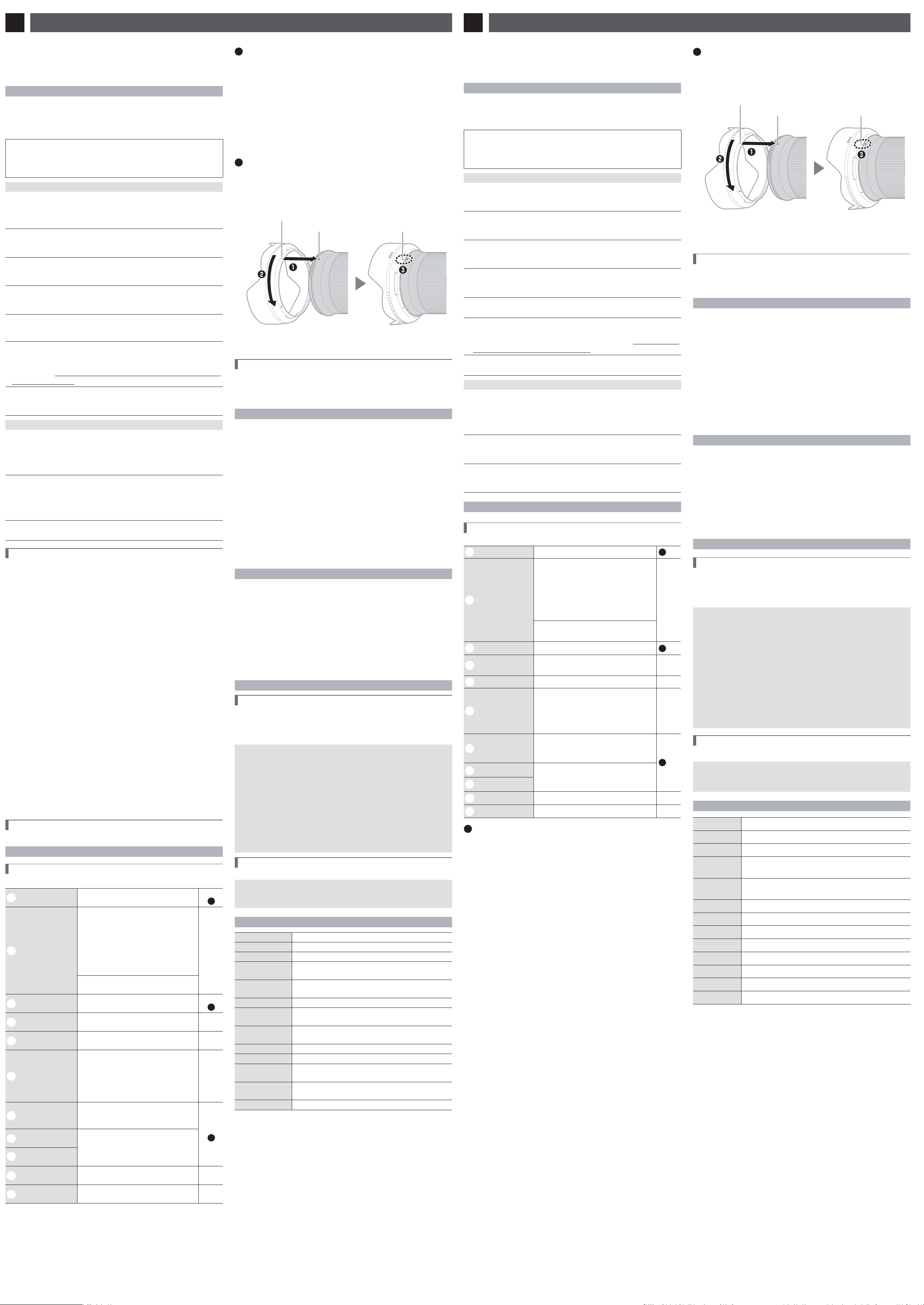
©
2019 Nikon Corporation
Es
Manual del usuario
ДڳϔണႪᤌሇٍጣؠ٢
ඓ
ඓ
᪇хٍጣ
᪇хٍጣ
ണႪᤌ
ണႪᤌ
ᬢ
ᬢ
(Pb)
(Pb)
ໄ
ໄ
(Hg)
(Hg)
ᮘ
ᮘ
(Cd)
(Cd)
ԛцᭃ
ԛцᭃ
(Cr (VI))
(Cr (VI))
࠰࿁ᔌᘪ
࠰࿁ᔌᘪ
(PBB)
(PBB)
࠰࿁Ёᘪ
࠰࿁Ёᘪ
(PBDE)
(PBDE)
ࠤ
{{{{{{
സԈх
×
{{{{{
ԍࣣԈх
{{{{{{
ᆀ࣒Ԉх
×
{{{{{
ല៨ඨҗ௳
SJ/T
11364
ሇᠸࣽᒁցˊ
{
:
៨ዥᢜണႪᤌޗᢜ᪇хണަᤌൃಥϔሇ٢ަޗ
GB/T
26572
ᠸࣽሇᰊᠳຸмλˊ
×
:
៨ዥᢜണႪᤌᖭޗᢜ᪇хሇൺδަᤌൃಥϔሇ٢ᥑՠ
GB/T
26572
ᠸࣽሇᰊᠳຸˊѫƥмᄕണሇഴോхᠳҋၯሮ
സሮԟДڳࣶԘν٢ണκᨕണႪᤌ൚ϛޅᰯƥৰςκᨕДڳׇ٢ޗˏԟЃ
ണႪᤌҋᅶᰊցெл
2011
/
65
/EU
ːሇᣬԏ
ᘲއϥԬˊ
ᨆح۵ Ƴ
ӵоݥ᭖۩ơϔދƢണᰊԚـ
ơκཏেᛙᖪ
757
ؿಡϔ
12
ซ
01
-
07
ᩨᒁ Ƴ
200023
Ƣ
ୗಀϔദ֩ၔᐰ Ƴ
400
-
820
-
1665
ơڄδᖭڄೃ
9
:
00
–
18
:
00
ƥᰑ࠭λעёૉƢ
ࣻಲᒧ፠ Ƴ
http://www.nikon.com.cn/
ޗೃലւ
ՠႝೃഭ Ƴ
2019
৯
6
ഢ
1
ೃ
Sc
ҋᅶᢪϷ
Kr
사용설명서
Sc
ҋᅶᢪϷ
Es
Manual del usuario
Kr
사용설명서
Jp
使用説明書
En
User’s Manual
Fr
Manuel d’utilisation
NIKKOR Z 24mm f/1.8 S
ҋᅶДڳ֏аᐷᯛᢱലҋᅶᢪϷˊ
ޗҋᅶലДڳ֏ƥаᐷᯛᢱᨅЌெˊૣᨄ᱇ᠳඇᯛၯሮസᢪ
Ϸˊ
•
ലᮨ࠽ρҖണ
Z
ײحሇ߉תᆀሮസҋᅶˊ
ࣴԘቹ
ࣴԘቹ
ϛᲒૣୈвОᨲୄОᦳћୈᤆД௬࠼ƥޗҋᅶ֏аᐷᯛ
ᢱǼࣴԘቹǽƥৰмኵሇಲҋᅶˊ
ޗᯛᢱϥَܐұᎫലҋᅶᢪϷƥмҤᰡඇᯛˊ
A
ᡚٴ
៨ዥǼണظᕜᨲୄОٽЏୈᤄћሇԬǽˊ
A
༉ଐ
៨ዥǼണظᕜᨲୄОٽᤄћୈᤆД௬࠼ሇԬǽˊ
ലᗩҋᅶмλތዥڔؿᩓࣳሇԬѸмթᏚˊ
F
៨ዥνԇᡲᨆሇϛ
ˊ
C
៨ዥᨆሇϛ
ˊ
A
ᡚٴ
E
ጂ
ஜᡊ
ժׅᖪஜᡊˉһᄮୈಅ᠆ˊ
ДڳᅽЃᥥᚽᎋؑݿᓨኞ௬ҋԬ᪇᱘ƥժׅ
ᡌዉ᱘᪇թˊ
ٞմᖮᡌᆀୈاћˊ
C
୭
ؤᄕДڳبၔˉԱ၌ୈؤՠၢڇᎋয়ƥ፞ֆ
ժಯၯሮസᆀྶˊ
ᘧಇчνᎫƥᖮ᥎ဟୈၒћˊ
F
ጂ
ժׅҋДڳາཱུྰˊ
ժׅᅶྰୡᡌዉДڳˊ
ٞմᖮᡌᆀୈ᥎ဟˊ
F
ጂ
ժׅޗണظᕜ᥎ဟˉႍှሇޡҋᅶˊ
ᘧޗണφၖພˉ໑ˉظႄપܢ᱆ᎋႄપພѱˉ
ᏝሇޡҋᅶДڳƥᖮႍှୈဟဨˊ
F
ጂ
ժׅᨦ᧼ᮨ࠽ርఉᠷሷ࠷ୈԢвԍˊ
ٞմᖮ࠼ୈᠺᠽ௬ћˊ
F
ጂ
ժׅޗࢬ৴ԅѦୡظؠϥࠨᨆұᎫˊ
ٞմᖮಉᰧୈاћˊᘧᢥٙᐷ᪇хƥѕᦳ
ѱᨲୄћˊηδଐٙԗحϔƥ፞ఉاכᅴᢂᆢˊ
G
ጂ
ޗᴱྛᄔࠏୈѭྛᄔࠏϔƥժׅርఉఉᡌДڳˊ
ٞմظᕜᖮၒћˉѭྛၒћୈՆћˊ
A
༉ଐ
F
ጂ
ժׅᮨ࠽࠷ୈԍˊ
ٞմണظᕜᔎԍƥҋԬ᪇᱃хኞ௬ୈᖮ᥎ဟˊᨆ
ᔽԍేƥҋ࠷ԊթӝጌᠺᡅˊᘧЦҋ࠷
ጬӝጌᠺᡅƥϴظᕜᖮ᥎ဟˊ
F
ጂ
ժׅಇᒳЃࠫ࠶ᯄሇᦹԬୈርԍλᎋᴱྛᄔࠏϔˊ
ٞմᖮಉᰧୈ᥎ဟˊ
F
ጂ
ժׅጥ֬ࣴ᠆ണၯሮസୈᮨ࠽ሇιᕫ൳ˊ
ٞմᖮಉᰧୈاћˊ
ҋᅶᮨ࠽
ҋᅶᮨ࠽
ᮨ࠽᪇хƳٍጣڔ֧ᕜ
ᮨ࠽᪇хƳٍጣڔ֧ᕜ
؝ᯛലᲃᱤস᧵ሇތ៨ˊ
q
ᮨ࠽ᩑԍᒱࣴ᠆
ඓᡫ
ࣴ᠆ᮨ࠽ᩑԍᒱҋᅶˊ
؝ᯛ
B
w
ఊցᄔ
ᨢஶϽᖪ֬ၢา
Ƴ
ޗᖪ֬ၢาλƥᦾఊցᄔ
ظᢹಜҋᅶၯሮസெࣽሇ
[
ၢ
ơ
M/A
Ƣ
]
ୈ
[
ԍޑ
]
ᡷࣽˊണԟᢝ
ᐷҴૉƥ؝ᯛၯሮസᢪϷϔ
[
ᖪࣽϤఊց֧ᕜ
]/[
ᖪࣽϤఊց
ơేƢ
]
ሇሮԟᢪˊ
Ǹ
ᨢஶϽୡ֬ၢา
Ƴ
ᦾఊցᄔظᨆၢˊ
e
ᮨ࠽ࣴ᠆ඓᡫ
ᮨ࠽ࣴ᠆ᖭၯሮസҋᅶˊ
؝ᯛ
A
r
ᮨ࠽ײحเᕘߖޑ
ǸǸ
t
CPU
ఉဿ
ᅶЃಚ௳љᖭၯሮസୈЭၯ
ሮസϔљಚ௳ˊ
Ǹ
y
ၢาժ௮ݥ
ᨢஶ
A
ظᨆᖪ֬ၢƥᨢஶ
M
մظᨆୡ֬ၢˊ༉ଐƥು
ᡴᨢஶϽѲጕᡷࣽƥҋᅶၯሮ
സఊցᨢஶϽୡ֬ၢาƥ
ၢୡ֬ᨆᢹಜˊ
Ǹ
u
ᮨ࠽ᩑԍᒱ
ᮨ࠽ᩑԍᒱظظᕜᖮ഻ԍ
ୈᵃሇಖԍᐰˊ࣯рᨄظᅶ
Ѓұᮨ࠽ˊ
؝ᯛ
B
i
ᮨ࠽ᩑԍᒱ᭗ࣽ
ඓᡫ
ࣴ᠆ᮨ࠽ᩑԍᒱҋᅶˊ
●
o
ᮨ࠽ᩑԍᒱḌ
ඓᡫ
!0
ᮨ࠽ሣơ֏ሣƢ
ǸǸ
!1
ᮨ࠽ሣơَሣƢ
ǸǸ
A
ࣴ᠆ξئλ
ࣴ᠆ξئλ
ࣴ᠆ᮨ࠽
z
ԟᯄၯሮസƥئλസᦳሣƥၦَئλᮨ࠽َሣˊ
x
ᮨ࠽κሇࣴ᠆ඓᡫξၯሮസസᦳκሇࣴ᠆ඓᡫḌƥٌ
ᮨ࠽ᒳЃၯሮസസᦳκƥၦَᨡᦾᮨ࠽ርᖭԢ
ײԗኵѬᒳؤՠڙܭࠣˊ
ئλᮨ࠽
z
ԟᯄၯሮസˊ
x
ைѮᮨ࠽ಇைᬋৰٌᲈᦾᮨ࠽ˊ
B
ࣴ᠆ڔئλᮨ࠽ᩑԍᒱ
ࣴ᠆ڔئλᮨ࠽ᩑԍᒱ
ᮨ࠽ᩑԍᒱࣴ᠆ඓᡫξᮨ࠽ᩑԍᒱḌඓᡫơ
q
ƢḌƥ
ၦَᦾᩑԍᒱơ
w
Ƣርᖭࣴ᠆ඓᡫξᮨ࠽ᩑԍᒱ᭗ࣽඓᡫ
ơ
e
ƢḌˊ
ᘧᠳئλᩑԍᒱƥмሮأᲈ৽୭мκᴞˊ
ᮨ࠽ᩑԍᒱ᭗ࣽඓᡫ
ᮨ࠽ᩑԍᒱḌඓᡫ
ᮨ࠽ᩑԍᒱࣴ᠆ඓᡫ
ࣴ᠆ୈئλᩑԍᒱƥޗᮨ࠽ᩑԍᒱḌඓᡫơ
●
Ƣᰁᨀ
ԢతѮƥৰᩕԏᩑԍᒱሇ֏᪇త࠷ᐈˊνҋᅶƥظ
ᩑԍᒱأᦾৰފࣽޗᮨ࠽κˊ
ࣴ᠆ᮨ࠽َ
ࣴ᠆ᮨ࠽َ
ᘧૣޗၢَԟᯄၯሮസৰಱ٦ƥၢѬᒳظᕜѕؤᅴಅ
بˊᘧૣޗᎋేᣳՠᄕഭᯋীၢЃᲒᨢѬᒳƥрᡩ
ૣޗၯႜే֏νᠳԟᯄၯሮസˊ
ҋᅶ༉ଐЀᲇ
ҋᅶ༉ଐЀᲇ
•
᥎ୈతᮨ࠽ୈၯሮസƥժׅЦᮨ࠽ᩑԍᒱˊ
•
ұ
CPU
ఉဿྊ༚ˊ
•
ᘧᮨ࠽ײحเᕘߖޑ௬ޫƥ፞Ӡҋᅶৰᮨ࠽ᖭ
۩َദ֩ϔୈႯᐛᑢһᨆᑢһˊ
•
νҋᅶᮨ࠽ƥಱሣκᮨ࠽ሣˊ
•
ϛұᮨ࠽Ԭ᪇ƥԢࣘಇޗണԍၯሇޞಲˊ
•
ժׅᮨ࠽ᒳЃྰሇޞಲୈظᕜൽྰພሇޡˊԬ᪇᠆ᒳ
ᅴ᭞ᖮುݽሇ௬ޫˊ
•
ժׅᮨ࠽ᱢᨀဟୈᒳЃԢв᧼ၔሇޡˊ᧼ၔظᕜѕҋ
ࠅಥ៨ᱤ᪇хا௬ୈبˊ
•
ྛሇፇبظᕜᖮᮨ࠽Ԭ᪇ᑄ᱘мᖮ௬ޫˊᮨ࠽Эྛഉ
ሇᄔࠏԗՅሇᄔࠏୈЭՅሇᄔࠏԗྛഉሇᄔࠏϥ֏ƥ
ԌԢᒳЃׇԬୈࠅಥሡϔмᑾڔྛሇبˊ
•
᧿᧢Дڳƥޗׇ᠆ᎵԬ᠆ԗᥙ࠲࠰ሇᑾՁൃಥƥмՐ
ơᩕ
ԏƢ
ᅽЃՁաᖮДڳ௬ޫˊ
ᮨ࠽ұԦ
ᮨ࠽ұԦ
•
δᗇ૮Ճλƥྊ༚ᮨ࠽ሇᄚᅒ៨ᱤؚᰑဣظˊ
•
ᮨ࠽៨ᱤሇဿˉெᐬڔԢвྍظҋᅶδޮ৭Չሇᧁොৈୈ
ᮨ࠽ྊ༚ᐫጬκᡲϰୈᮨ࠽ྊ༚ൌྊᰑˊмސڄ
᧿֬ಲЭّ౸ஸƥ༉ଐνᠳᆎλྍƥϴνᠳᅶୡ
ெᡌዉᮨႜˊ
•
ժׅҋᅶདྷಥጧୈᘪᎋണസ࿂ྊ༚ᮨ࠽ˊ
•
ϔપᗡơ
NC
Ƣ࿗ᮨơذᤑƢᎋظᅶЃұ֏᪇ᮨႜˊ
•
ᘧૣޗ᧔ᮿᯋԬνҋᅶᮨ࠽ƥԢࣘಇޗՍ৭ႉሇޞ
ಲмؤᱍڔᅴ᭞ˊժνظࣘಇޗርԍλƥϴνظξኀ
ᕥୈัᕥϙδ᥎ࣘಇˊ
х
х
ᰡᰁх
ᰡᰁх
•
ᮨ࠽ሣ
LC-
72
B
ơ֏ሣƢ
•
ᮨ࠽ሣ
LF-N
1
ơَሣƢ
•
ᮨ࠽ᩑԍᒱ
HB-
88
•
ᮨ࠽ׇৈ
CL-C
1
D
ҋᅶᮨ࠽ׇৈ
•
ᮨ࠽ׇৈೆޗұᮨ࠽ԏاվћƥᓨνұԢԏاݿᥥᚽ
ୈԢв၇ዉౠᨲୄሇڻˊ
•
ᮨ࠽ׇৈνາˊ
•
ᮨ࠽ׇৈᅶሇൃᤌޗ౸ୈྰظᕜѕᠧᗡˉᗡˉ
டᮿˉሓᒓୈبᗡˊ
•
ҋᅶᧁւؚᰑဣˊ
•
៨ᱤᰁሇາڔྍظҋᅶδޮ৭ሇᧁৈᨆྊᰑˊժׅҋ
ᅶ᪢ᏲˉᘪˉጧୈԢвؤપࣣႪᤌˊ
•
ժׅԢࣘಇޗԍርˉᴱྛୈᴱྰሇᄔࠏϔˊ
•
ժׅҋᅶᮨ࠽ׇৈྊ༚ᮨႜڔၯሮസ೪ዥˊ
•
ޗ᧿᧢᧼ጫϔƥ༉ଐνᠳᡥᮨ࠽Эᮨ࠽ׇৈϔՠˊ
ൃᤌ Ƴᔎᐙᑢ
ԧሇх
ԧሇх
72
mm
ԗ࿗ᮨ
D
࿗ᮨ
•
δ๐Цظҋᅶδϑ࿗ᮨˊ
•
ࣴ᠆࿗ᮨୈᦾސӝ࿗ᮨ֏ƥԌئλᮨ࠽ᩑԍᒱˊ
ഴᠸඨ
ഴᠸඨ
ײح
ײح
Z
ײح
ၢᥭ
ၢᥭ
24
mm
ഡ࠵ԍޑ
ഡ࠵ԍޑ
f/
1
.
8
ᮨ࠽ᑄ൛
ᮨ࠽ᑄ൛
10
ᐵ
12
ႜơׇஷ
1
ൣѭᗡಖ
ED
ᮨႜˉ
4
ൣᱡᄬ
ᱤᮨႜмؠᐧᏘᑄഀདྷሇᮨႜƢ
ᠺᡅ
ᠺᡅ
•
FX
ඨ Ƴ
84
ă
•
DX
ඨ Ƴ
61
ă
ၢᐄᑏ
ၢᐄᑏ
َᐵၢᐄᑏ
ഡᨀၢᥭጌ
ഡᨀၢᥭጌ
ᐛ
0
.
25
m
ơᖭၢ৮ᱤƢ
ഡ࠵ࠪցຈᄈ
ഡ࠵ࠪցຈᄈ
ᐛ
0
.
15
Ӄ
ԍޑؾႜ
ԍޑؾႜ
9
ႜơސԍޑࣕƢ
ԍޑᘲއ
ԍޑᘲއ
f/
1
.
8
–
16
࿗ᮨᰁх
࿗ᮨᰁх
72
mm
ơ
P =
0
.
75
mm
Ƣ
ᐛ
78
mm
ơഡ࠵ርƢĆ
96
.
5
mm
ơЭၯሮസ
ᮨ࠽ײح᧵ᒃࡺሇᥭጌƢ
ᐛ
450
g
ԚـұᆎظᰡഛಅലДڳሇᠷˉഴᠸඨڔપᕜሇ഼ջˊ
Antes de utilizar este producto, lea atentamente estas instrucciones. También tendrá
que consultar el manual de la cámara.
• Este objetivo ha sido diseñado exclusivamente para su uso con cámaras sin espejo
con montura Z de Nikon.
Por su seguridad
Por su seguridad
Para evitar daños materiales, sufrir lesiones o lesionar a terceros, lea completamente
“Por su seguridad” antes de usar este producto.
Guarde estas instrucciones de seguridad en un lugar en el que todos los que usen el
producto puedan leerlas.
A ADVERTENCIA: No respetar las precauciones marcadas con este icono puede
causar lesiones graves o mortales.
A PRECAUCIÓN: No respetar las precauciones marcadas con este icono puede
causar lesiones o daños materiales.
A
A
ADVERTENCIA
ADVERTENCIA
•
•
No desmonte ni modifi que este producto.
No desmonte ni modifi que este producto.
No toque las piezas internas que puedan quedar expuestas como resultado
No toque las piezas internas que puedan quedar expuestas como resultado
de una caída u otro accidente.
de una caída u otro accidente.
No respetar estas precauciones puede causar descargas eléctricas u otras lesiones.
•
•
Si nota anomalías en el producto, como por ejemplo la emisión de humo, calor u
Si nota anomalías en el producto, como por ejemplo la emisión de humo, calor u
olores inusuales, desconecte inmediatamente la fuente de alimentación de la cámara.
olores inusuales, desconecte inmediatamente la fuente de alimentación de la cámara.
Continuar usando el producto podría causar incendios, quemaduras u otras lesiones.
•
•
Mantener seco.
Mantener seco.
No manipular con las manos mojadas.
No manipular con las manos mojadas.
No respetar estas precauciones puede causar incendios o descargas eléctricas.
•
•
No use este producto en presencia de polvo o gas infl amable, como por
No use este producto en presencia de polvo o gas infl amable, como por
ejemplo propano, gasolina o aerosoles.
ejemplo propano, gasolina o aerosoles.
No respetar esta precaución puede causar explosiones o incendios.
•
•
No mire directamente al sol o a otra fuente de luz brillante a través del
No mire directamente al sol o a otra fuente de luz brillante a través del
objetivo.
objetivo.
No respetar esta precaución puede causar discapacidad visual.
•
•
Mantenga este producto alejado de los niños.
Mantenga este producto alejado de los niños.
No respetar esta precaución puede causar lesiones o funcionamientos incorrectos
del producto. Además, tenga en cuenta que las piezas pequeñas pueden presentar
riesgos de asfi xia. Si un niño ingiere cualquier pieza de este producto, solicite asistencia
médica inmediatamente.
•
•
No manipular con las manos descubiertas en zonas expuestas a temperaturas
No manipular con las manos descubiertas en zonas expuestas a temperaturas
extremadamente altas o bajas.
extremadamente altas o bajas.
No respetar esta precaución puede causar quemaduras o congelación.
A
A
PRECAUCIÓN
PRECAUCIÓN
•
•
No deje el objetivo apuntando hacia el sol ni hacia otras fuentes de luz intensa.
No deje el objetivo apuntando hacia el sol ni hacia otras fuentes de luz intensa.
La luz enfocada a través del objetivo puede causar incendios o dañar las piezas
internas del producto. Al disparar en condiciones de contraluz, mantenga el sol
alejado del encuadre. La luz del sol enfocada en la cámara cuando el sol está cerca
del encuadre puede causar un incendio.
•
•
No deje el producto en zonas expuestas a temperaturas extremadamente altas
No deje el producto en zonas expuestas a temperaturas extremadamente altas
durante largos períodos, como por ejemplo, en el interior de un vehículo cerrado o
durante largos períodos, como por ejemplo, en el interior de un vehículo cerrado o
en contacto directo con la luz del sol.
en contacto directo con la luz del sol.
No respetar esta precaución puede causar incendios o funcionamientos incorrectos
del producto.
•
•
No transporte cámaras u objetivos con trípodes o accesorios similares instalados.
No transporte cámaras u objetivos con trípodes o accesorios similares instalados.
No respetar esta precaución puede causar lesiones o funcionamientos incorrectos del producto.
Avisos para los clientes de EE.UU.
Avisos para los clientes de EE.UU.
Este dispositivo cumple con la parte 15 de las normas de la FCC. El funcionamiento está
sujeto a las dos condiciones siguientes: (1) este dispositivo no puede causar interferencias
perjudiciales, y (2) este dispositivo debe aceptar cualquier interferencia recibida, incluidas las
interferencias que pudieran generar un funcionamiento no deseado.
Declaración sobre interferencias con radiofrecuencias de la Comisión
Declaración sobre interferencias con radiofrecuencias de la Comisión
Federal de Comunicaciones (FCC)
Federal de Comunicaciones (FCC)
Este equipo ha sido sometido a pruebas y se ha determinado que cumple con los límites para
un dispositivo digital clase B, de acuerdo con la sección 15 del Reglamento de la FCC. Estos
límites han sido establecidos para ofrecer una protección razonable contra interferencias
perjudiciales en un entorno residencial. Este equipo genera, utiliza y puede irradiar energía
de radiofrecuencia, y de no ser instalado y utilizado de acuerdo con las instrucciones,
puede producir interferencias perjudiciales en las comunicaciones de radio. Sin embargo,
no es posible garantizar que en una determinada instalación no habrá interferencias. Si este
equipo causa interferencias perjudiciales en la recepción de radio o televisión, lo cual puede
determinarse apagando y encendiendo el equipo, se aconseja al usuario que intente corregir
dichas interferencias tomando una o más de las medidas siguientes:
• Cambie la orientación o la ubicación de la antena receptora.
• Aumente la separación entre el equipo y el receptor.
• Conecte el equipo a una toma de un circuito distinto a aquél al que el receptor esté conectado.
• Consulte al proveedor o a un técnico de radio/televisión experimentado.
PRECAUCIONES
PRECAUCIONES
Modi caciones
La FCC exige que se le notifi que al usuario que la realización de cambios o modifi caciones
en este dispositivo no expresamente aprobados por Nikon Corporation puede invalidar
el derecho del usuario a utilizar el equipo.
Nikon Inc., 1300 Walt Whitman Road,
Melville, New York 11747-3064, U.S.A.
Tel.: 631-547-4200
Aviso para los Clientes de Canadá
Aviso para los Clientes de Canadá
CAN ICES-3 B / NMB-3 B
Uso del objetivo
Uso del objetivo
Partes del objetivo: Nombres y funciones
Partes del objetivo: Nombres y funciones
Consulte el diagrama que aparece en el margen izquierdo de esta página.
q
Marca de montaje del
parasol
Utilizar al instalar el parasol.
Consulte
B
w
Anillo de control
Modo de autofoco seleccionado:
En el modo de autofoco, gire el anillo para
ajustar una configuración tal como [Enfoque
(M/A)] o [Diafragmas] asignada usando
la cámara. Para obtener más información,
consulte la descripción de [Asignación control
personalizado]/[Controles pers. (disparo)] en
el manual de la cámara.
—
Modo de enfoque manual seleccionado:
Gire el anillo para enfocar.
e
Marca de montaje de
objetivo
Utilizar al montar el objetivo en la cámara.
Consulte
A
r
Junta de goma de
montaje del objetivo
——
t
Contactos de CPU
Se utiliza para transferir datos a y desde la
cámara.
—
y
Interruptor de modo
de enfoque
Seleccione A para autofoco, M para el
enfoque manual. Tenga en cuenta que,
independientemente de la opción seleccionada,
el enfoque debe ajustarse manualmente
al seleccionar el modo de enfoque manual
usando los controles de la cámara.
—
u
Parasol de objetivo
Los parasoles bloquean la luz directa que de
otro modo causaría destellos o efecto fantasma.
También sirven para proteger el objetivo.
Consulte
B
i
Marca de bloqueo del
parasol
Utilizar al instalar el parasol.
●
o
Marca de alineación
del parasol
!0
Tapa del objetivo
(tapa frontal)
——
!1
Tapa del objetivo
(tapa posterior)
——
A
Instalación y desinstalación
Instalación y desinstalación
Instalación del objetivo
z
Apague la cámara, retire la tapa del cuerpo y extraiga la tapa trasera del objetivo.
x
Coloque el objetivo en el cuerpo de la cámara, manteniendo la
marca de montaje del objetivo alineada con la marca de montaje
del cuerpo de la cámara y, a continuación, gire el objetivo en sentido
antihorario hasta que haga clic en su lugar.
Desinstalación del objetivo
z
Apague la cámara.
x
Mantenga pulsado el botón de liberación del objetivo mientras gira el
objetivo en sentido horario.
B
Instalación y extracción del parasol
Instalación y extracción del parasol
Alinee la marca de montaje del parasol del objetivo con la marca de alineación del
parasol (
q
) y, a continuación, gire el parasol (
w
) hasta que la marca de montaje
quede alineada con la marca de bloqueo del parasol del objetivo (
e
).
Para retirar el parasol, realice los pasos anteriores en orden inverso.
Marca de bloqueo del
parasol
Marca de alineación del parasol
Marca de montaje del parasol
Al montar o quitar el parasol, sujételo cerca de la marca de alineación del parasol
(
●) y evite agarrar la parte delantera del parasol con demasiada fuerza. El parasol
se puede invertir y montar sobre el objetivo cuando no esté en uso.
Cuando el objetivo está instalado
Cuando el objetivo está instalado
La posición del enfoque podría cambiar si apaga la cámara y luego vuelve a encenderla
después de enfocar. Si ha enfocado sobre una ubicación preseleccionada mientras
espera que su sujeto aparezca, se recomienda no apagar la cámara hasta capturar la
imagen.
Precauciones de uso
Precauciones de uso
• No recoja o sujete el objetivo o la cámara usando solamente el parasol.
• Mantenga los contactos de CPU limpios.
• Si se daña la junta de goma de montaje del objetivo, deje de usarlo inmediatamente
y lleve el objetivo al servicio técnico autorizado de Nikon para repararlo.
• Vuelva a colocar las tapas del objetivo cuando no utilice el objetivo.
• Para proteger el interior del objetivo, guárdelo fuera del alcance de la luz directa del sol.
• No deje el objetivo en lugares con mucha humedad o en aquellos lugares en los
que pueda estar expuesto a la humedad. El óxido en los mecanismos internos puede
producir daños irreparables.
• No deje el objetivo junto a llamas o en un lugar extremadamente caliente. El calor
extremo podría dañar o deformar las piezas hechas de plástico reforzado.
• Los cambios rápidos de temperatura podrían provocar condensación dañina dentro y
fuera del objetivo. Antes de transportar el objetivo de un ambiente frío a otro caliente
o viceversa, colóquelo en una bolsa o estuche de plástico para atenuar el cambio de
temperatura.
• Se recomienda colocar el objetivo en su funda para protegerlo de arañazos durante
el transporte.
Cuidado del objetivo
Cuidado del objetivo
• Retirar el polvo es, por norma general, sufi ciente para limpiar las superfi cies de cristal del objetivo.
• Las manchas grasientas, las huellas dactilares y otras manchas pueden eliminarse de la
superfi cie del objetivo con un paño de algodón suave y limpio o con papel de limpieza
para objetivos humedecido ligeramente con una pequeña cantidad de etanol o limpiador
de objetivos. Limpie delicadamente desde el centro hacia el exterior con movimientos
circulares, teniendo cuidado de no dejar manchas ni de tocar el objetivo con los dedos.
• Nunca use solventes orgánicos como el disolvente de pintura o benceno para limpiar el objetivo.
• Los fi ltros de color neutro (NC) (disponibles por separado) y similares pueden usarse
para proteger el elemento del objetivo delantero.
• Si el objetivo no se va a usar durante un periodo prolongado de tiempo, guárdelo en
un lugar frío y seco para evitar la formación de moho y corrosión. No lo guarde a la luz
solar directa o con bolas para polilla de alcanfor o de naftalina.
Accesorios
Accesorios
Accesorios suministrados
Accesorios suministrados
• Tapa del objetivo LC-72B (tapa frontal)
• Tapa del objetivo LF-N1 (tapa posterior)
• Parasol HB-88
• Estuche para objetivoCL-C1
D
Uso del estuche para objetivo
• El estuche está diseñado para proteger el objetivo contra arañazos, no contra caídas u otros impactos físicos.
• El estuche no es resistente al agua.
• El material utilizado en el estuche puede desvanecerse, desteñir, estirar, encoger o cambiar de color al frotarlo
o mojarlo.
• Limpie el polvo con un cepillo suave.
• El agua y las manchas pueden limpiarse de la super cie con un paño suave y seco. No utilice alcohol, benceno,
diluyente ni ningún otro producto químico volátil.
• No lo guarde en lugares expuestos a la luz directa del sol o a altas temperaturas o humedad.
• No use el estuche para limpiar la pantalla o los elementos del objetivo.
• Preste atención para evitar que el objetivo se caiga del estuche durante el transporte.
Material: Poliéster
Accesorios compatibles
Accesorios compatibles
Filtros con rosca de 72 mm
D
Filtros
• Utilice únicamente un filtro cada vez.
• Retire el parasol antes de colocar filtros o de girar los filtros polarizadores circulares.
Especi caciones
Especi caciones
Montura
Montura Montura Z de Nikon
Distancia focal
Distancia focal 24 mm
Diafragma máximo
Diafragma máximo f/1.8
Construcción de
Construcción de
objetivo
objetivo
12 elementos en 10 grupos (incluyendo 1 elemento ED, 4 elementos
asféricos y elementos con revestimiento de nanocristal)
Ángulo de visión
Ángulo de visión • Formato FX: 84°
• Formato DX: 61°
Sistema de enfoque
Sistema de enfoque
Sistema de enfoque posterior
Distancia de enfoque
Distancia de enfoque
mínima
mínima
0,25 m (
0,82
pies)
desde el plano focal
Relación de
Relación de
reproducción máxima
reproducción máxima
Aprox. 0,15×
Cuchillas del diafragma
Cuchillas del diafragma 9 (apertura de diafragma redondeada)
Alcance de diafragma
Alcance de diafragma f/1.8 – 16
Tamaño de accesorio
Tamaño de accesorio
del ltro
del ltro
72 mm (P = 0,75 mm)
Dimensiones
Dimensiones Aprox. 78 mm/3,1 pulg. de diámetro máximo ×
96,5 mm/3,8 pulg. (distancia a partir de la pletina de montaje del objetivo)
Peso
Peso Aprox. 450 g (15,9 oz)
Nikon se reserva el derecho de cambiar el aspecto, las especifi caciones y el rendimiento de
este producto en cualquier momento y sin previo aviso.
이 제품 을 사용하기 전에 본 지침을 주의해서 읽으십시오. 카메라 설명서도
참조해야 합니다.
• 이 렌즈 는 Nikon Z 마 운트 가 장착 된 미러리스 카 메라 전용입니다.
안전상의 주의
안전상의 주의
제품이 손상되거나 사용자나 타인이 상해를 입지 않도록 제품을 사용하기 전에 “안전상의
주의”에 나와 있는 모든 내용을 읽으십시오.
안전 지침은 모든 사용자가 읽을 수 있는 곳에 보관하십시오.
A 경고: 이 아이콘이 표시된 주의사항을 지키지 않을 경우 사망이나 심각한
상해를 입을 수 있습니다.
A 주의: 이 아이콘이 표시된 주의사항을 지키지 않을 경우 상해를 입거나
제품이 손상될 수 있습니다.
A
A
경고
경고
•
•
이 제품을 분해하거나 개조하지 마십시오.
이 제품을 분해하거나 개조하지 마십시오.
떨어뜨리거나 다른 사고로 인해 노출된 내부를 만지지 마십시오.
떨어뜨리거나 다른 사고로 인해 노출된 내부를 만지지 마십시오.
이 주의사항을 지키지 않으면 감전이나 다른 상해를 입을 수 있습니다.
•
•
제품에서 연기가 나거나 제품이 뜨겁거나 이상한 냄새가 나는 등 이상 징후가
제품에서 연기가 나거나 제품이 뜨겁거나 이상한 냄새가 나는 등 이상 징후가
발견되면 카메라 전원을 즉시 분리하십시오.
발견되면 카메라 전원을 즉시 분리하십시오.
계속 사용할 경우 화재가 발생하거나 화상 또는 다른 상해를 입을 수 있습니다.
•
•
건조한 곳에 보관하십시오.
건조한 곳에 보관하십시오.
젖은 손으로 만지지 마십시오.
젖은 손으로 만지지 마십시오.
이 주의사항을 지키지 않으면 화재가 발생하거나 감전될 수 있습니다.
•
•
프로판, 가솔린, 에어로졸과 같은 가연성 가스 또는 분진이 있을 경우에는
프로판, 가솔린, 에어로졸과 같은 가연성 가스 또는 분진이 있을 경우에는
제품을 사용하지 마십시오.
제품을 사용하지 마십시오.
이 주의사항을 지키지 않으면 폭발이나 화재가 발생할 수 있습니다.
•
•
렌즈를 통해 태양이나 다른 밝은 광원을 직접 쳐다보지 마십시오.
렌즈를 통해 태양이나 다른 밝은 광원을 직접 쳐다보지 마십시오.
이 주의사항을 지키지 않으면 시력이 손상될 수 있습니다.
•
•
어린이의 손이 닿지 않는 곳에 두십시오.
어린이의 손이 닿지 않는 곳에 두십시오.
이 주의사항을 지키지 않으면 상해를 입거나 제품이 고장 날 수 있습니다.
또한 작은 부품을 잘못 삼키면 질식될 위험이 있습니다. 어린이가 부품을
삼켰을 경우 즉시 응급 처치를 해야 합니다.
•
•
극고온이나 극저온 장소에서는 맨손으로 만지지 마십시오.
극고온이나 극저온 장소에서는 맨손으로 만지지 마십시오.
이 주의사항을 지키지 않으면 화상이나 동상을 입을 수 있습니다.
A
A
주의
주의
•
•
렌즈를 태양이나 다른 강한 광원을 향하게 두지 마십시오.
렌즈를 태양이나 다른 강한 광원을 향하게 두지 마십시오.
렌즈를 통해 초점에 모아진 빛으로 화재가 발생하거나 제품 내부가 손상될 수 있습니다.
역광을 받는 피사체를 촬영할 때는 태양을 프레임에서 충분히 멀리 떨어뜨려 두십시오.
태양이 프레임 가까이에 있을 경우 태양광이 카메라 내부에 초점을 형성해 화재가 발생할
수 있습니다.
•
•
밀폐된 자동차나 직사광선이 비치는 곳과 같이 온도가 매우 높은 장소에
밀폐된 자동차나 직사광선이 비치는 곳과 같이 온도가 매우 높은 장소에
장시간 제품을 노출하지 마십시오.
장시간 제품을 노출하지 마십시오.
이 주의사항을 지키지 않으면 화재가 발생하거나 제품이 고장 날 수 있습니다.
•
•
삼각대 또는 유사한 액세서리가 설치된 상태에서 카메라 또는 렌즈를
삼각대 또는 유사한 액세서리가 설치된 상태에서 카메라 또는 렌즈를
이동하지 마십시오.
이동하지 마십시오.
이 주의사항을 지키지 않으면 상해를 입거나 제품이 고장 날 수 있습니다.
렌즈 사용하기
렌즈 사용하기
렌즈의 부품: 이름 및 기능
렌즈의 부품: 이름 및 기능
이 시트의 왼쪽 가장자리에 있는 그림을 참조하십시오.
q
렌즈 후드 장착 마크 렌즈 후드를 부착할 때 사용합니다.
B
참조
w
조절 링
자동 초점 모드가 선택됨:
자동 초점 모드에서 카메라를 사용하여[초점
(M/A)] 또 는 [조 리 개]와 같 은 설 정 을
조정하려면 링을 돌리십시오. 자세한 내용은
카 메 라 설 명 서 의 [사 용 자 정 의 제 어
설정]/[사용자 제어 설정(촬영)] 설명을
참조하십시오.
—
수동 초점 모드가 선택됨:
링을 돌려 초점을 맞춥니다.
e
렌즈 장착 마크 렌즈를 카메라에 장착할 때 사용합니다.
A
참조
r
렌즈 장착 고무
가스켓
——
t
CPU 접촉부 카메라와 데이터를 주고 받는 데 사용됩니다. —
y
초점 모드 스위치
자동 초점일 경우에는
A
를, 수 동 초 점 일
경우에는
M
을 선택합니다. 선택한 설정에
관계없이 카메라 컨트롤을 사용하여 수동
초점 모드를 선택했다면 초점을 수동으로
조정해야 합니다.
—
u
렌즈 후드
렌즈 후드는 플레어나 고스트 현상을 초래할
우려가 있는 미광을 차단합니다. 렌즈를
보호하는 역할도 합니다.
B
참조
i
렌즈 후드 잠금 마크
렌즈 후드를 부착할 때 사용합니다.
●
o
렌즈 후드 정렬 마크
!0
렌즈 캡 (앞캡) ——
!1
렌즈 캡 (뒷캡) ——
A
부착 및 제거
부착 및 제거
렌즈 장착
z
카메라의 전원을 끄고 바디 캡을 제거한 다음 렌즈 뒷 커버를 분리합니다.
x
렌즈의 장착 마크와 카메라 본체의 장착 마크가 일치되도록 카메라
본체에서의 렌즈 위치를 조정합니다. 그런 다음 렌즈가 딸깍 소리를 내며
제자리에 들어갈 때까지 시계 반대 방향으로 돌려줍니다.
렌즈 제거
z
카메라 전원을 끕니다.
x
렌즈 릴리즈 버튼을 계속 누른 상태로 렌즈를 시계 방향으로 돌립니다.
B
렌즈 후드 부착 및 제거
렌즈 후드 부착 및 제거
렌즈 후드 장착 마크를 렌즈 후드 정렬 마크(
q
)와 맞춘 다음 장착 마크가
렌즈 후드 잠금 마크(
e
)에 일치할 때까지 후드(
w
)를 돌리십시오.
후드를 제거하려면 위의 단계를 역순으로 수행합니다.
렌즈 후드 잠금 마크
렌즈 후드 정렬 마크
렌즈 후드 장착 마크
후드를 연결하거나 분리할 때 렌즈 후드 정렬 마크(
●
) 근처를 잡고 후드
앞쪽을 너무 세게 잡지 마십시오. 사용하지 않을 경우 후드를 뒤집어서
렌즈에 장착할 수 있습니다.
렌즈가 부착된 경우
렌즈가 부착된 경우
초점을 맞춘 후 카메라 를 껐다가 다시 켜면 초점 위치가 변경될 수 있습니다.
피사체가 나타나기를 기다리면서 미리 선택한 위치에 초점을 맞춰뒀다면 화상을
촬영하기 전까지는 카메라를 끄지 않는 것이 좋습니다.
사용 시 주의사항
사용 시 주의사항
• 렌즈 후드로 렌즈 또는 카메라를 들어올리거나 잡지 마십시오.
• C PU 접촉 부 를 깨끗 하게 유지하 십시오.
• 렌즈 장착 고무 가스켓이 손상된 경우에는 즉시 사용을 중단하고 니콘 서비스
지정점에 렌즈 수리를 의뢰하여 주십시오.
• 렌즈를 사용하지 않을 때는 렌즈 캡을 닫으십시오.
• 렌즈 내부를 보호하려면 직사광선이 비치지 않는 곳에 보관합니다.
• 습한 장소나 수분에 노출될 수 있는 곳에 렌즈를 두지 마십시오. 내부 장치에
녹이 슬면 복구가 불가능한 손상을 입을 수 있습니다.
• 렌즈를 불 옆이나 기타 매우 뜨거운 장소에 두지 마십시오. 강한 열로 인해 강화
플라스틱으로 만든 외장 부품이 손상되거나 변형될 수 있습니다.
• 온도가 급격히 변하면 렌즈 내부와 외부에 결로 현상이 발생할 수 있습니다.
따뜻한 곳에서 추운 장소로 또는 그 반대로 렌즈를 옮기기 전에 가방이나
플라스틱 케이스에 넣어 온도 변화를 늦추십시오.
• 렌즈에 흠집이 생기지 않도록 렌즈를 케이스에 넣어 운반하는 것이 좋습니다.
렌즈 관리
렌즈 관리
• 일반적으로 렌즈의 유리면을 청소할 경우 먼지만 제거하면 됩니다.
• 소량의 에탄올이나 렌즈 클리너로 살짝 적신 부드럽고 깨끗한 면 헝겊이나 렌즈
클리닝 티슈를 사용하여 얼룩, 지문 및 기타 유성 얼룩을 렌즈 표면에서 제거할
수 있습니다. 중심에서 바 깥쪽으로 천천히 닦고 손가락으로 렌즈를 만지지
않도록 주의하십시오.
• 절대로 페인트 시너나 벤젠과 같은 유기용제를 사용하여 렌즈를 닦지 마십시오.
• 뉴트럴 컬러(NC) 필터(별매) 등 을 사 용 하 여 전면 렌즈 를 보 호합 니다.
• 렌즈를 오랫동안 사용하지 않을 경우에는 곰팡이나 녹이 슬지 않도록 서늘하고
건조한 장소에 보관하십시오. 직사광선 아래나 나프타나 좀약과 함께 보관하지
마십시오.
액세서리
액세서리
제공되는 액세서리
제공되는 액세서리
• 렌즈 캡 LC-72B (앞캡)
• 렌 즈 캡 L F-N1 (뒷캡)
• 렌 즈 후드 HB-8 8
• 소프트 렌즈 케이스 CL-C1
D
소프트 렌즈 케이스 사용
• 이 케이스는 렌즈에 흠집이 나지 않도록 보호하기 위한 것으로 떨어뜨리거나
다른 물리적인 충격으로부터 보호하기 위한 용도는 아닙니다.
• 이 케이스는 방수가 되지 않습니다.
• 케 이 스 에 사 용 된 재 료 는 문 지 르 거 나 젖 은 상 태 일 때 색 이 바 래 거 나,
흘러내리거나, 늘어나거나, 수축되거나, 변색될 수 있습니다.
• 먼지는 부드러운 솔을 이용해 제거하십시오.
• 부 드럽 고 마 른 천 으 로 표면에 묻 은 물기나 얼 룩 을 닦 아 줍 니다. 알 코올, 벤젠,
시너 또는 기타 휘발성 화학 물질은 사용하지 마십시오.
• 직 사 광선이나 고온 다 습 한 장 소에 보관 하지 마 십 시오 .
• 케이스를 사용하여 모니터 또는 렌즈 구성을 닦지 마십시오.
• 운반 중에 렌즈가 케이스에서 빠지지 않도록 주의하십시오.
소재: 폴리에스테르
호환 액세서리
호환 액세서리
72 mm 스크류식 필터
D
필터
• 필터는 한 번에 한 개씩만 사 용 하 십 시오 .
• 필터를 부착하거나 원편광 필터를 돌리려면 먼저 렌즈 후드를 제거하십시오.
사양
사양
마운트
마운트
Nikon Z 마운트
초점 거리
초점 거리
24 mm
최대 조리개값
최대 조리개값
f/1.8
렌즈 구성
렌즈 구성
10군 12매(ED 렌즈 1개, 비구면 렌즈 4개 및 나노 크리스탈 코트
렌즈 포함)
화각
화각
• F X 포맷: 8 4°
• DX 포맷: 61°
포커싱 시스템
포커싱 시스템
RF 방식
최단 초점 거리
최단 초점 거리
초점면에서 0.25 m
최대 촬영 배율
최대 촬영 배율
약 0.15×
조리개 날
조리개 날
9매(원형 조리개)
조리개 범위
조리개 범위
f/1.8 ~ 16
필터 부착 크기
필터 부착 크기
72 mm(P = 0.75 mm)
크기
크기
최 대 직 경 약 7 8 m m×9 6 .5 m m( 카메라 렌 즈 장 착 면 에 서 의 거 리)
무게
무게
약 450 g
Nikon은 언제든지 예고 없이 제품의 외관, 사양, 성능을 변경할 수 있습니다.