1
Owner’s Manual
Español 11
Français 21
Deutsch 31
Italiano 41
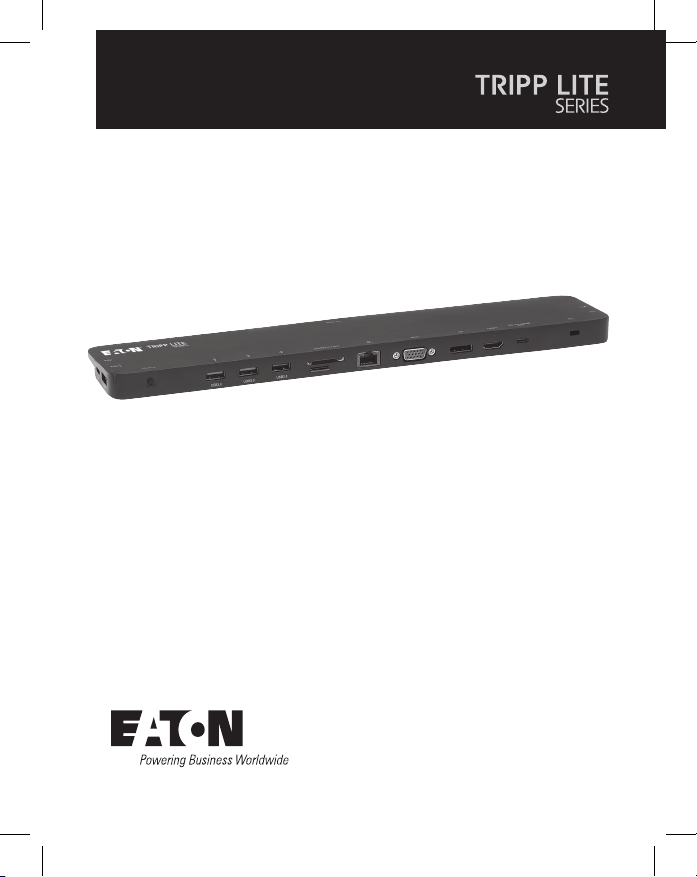
Model:
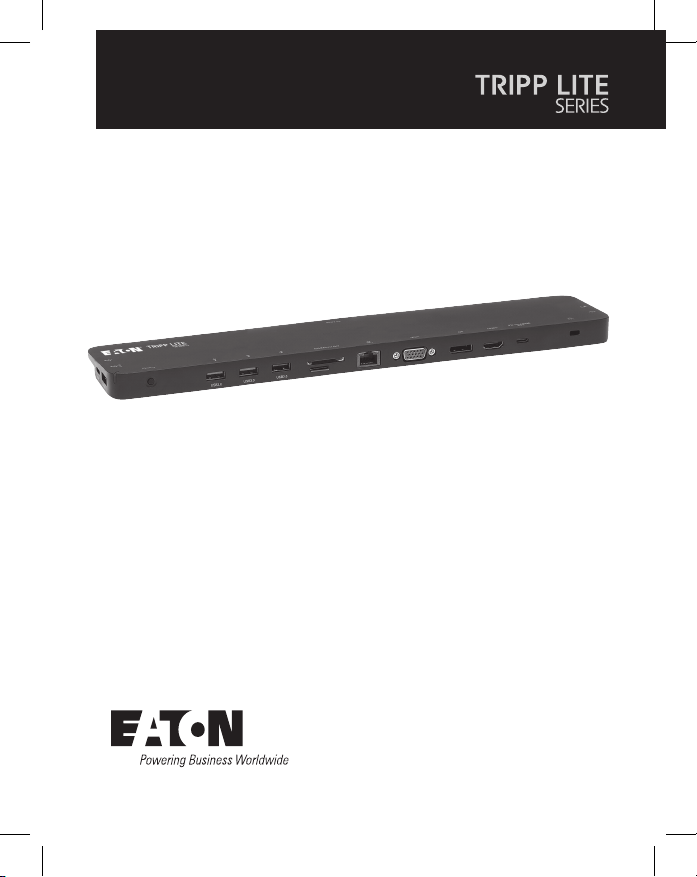
U442-DOCK7D-B
USB-C
®
Triple Display
Docking Station
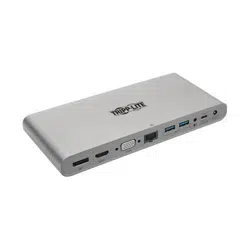
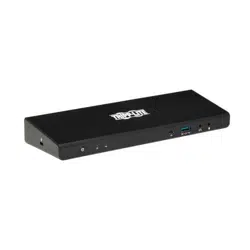
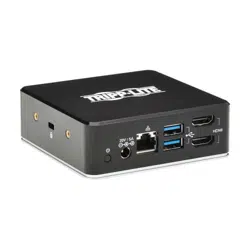
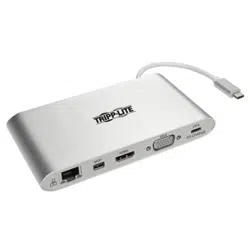
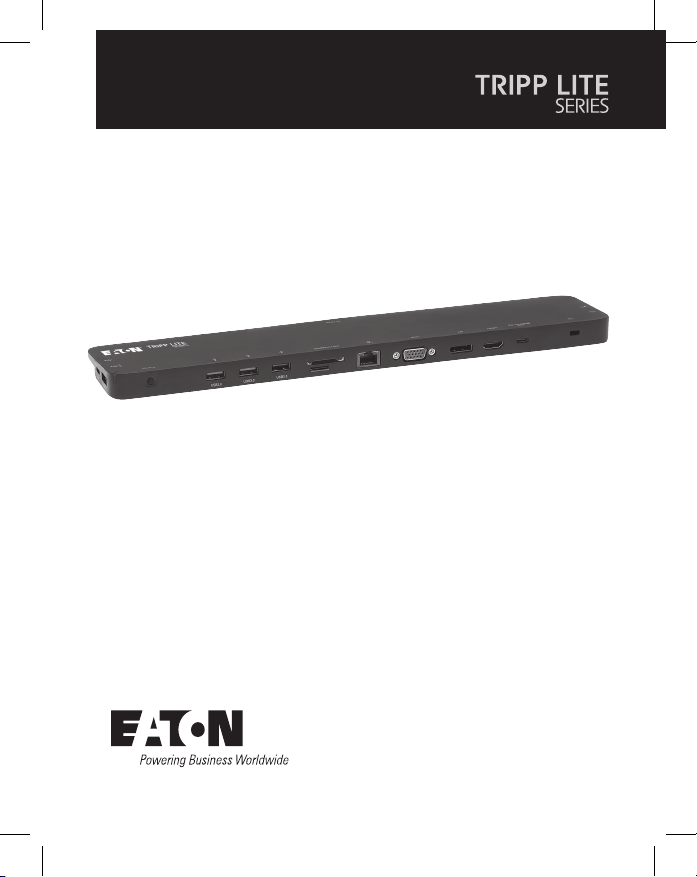
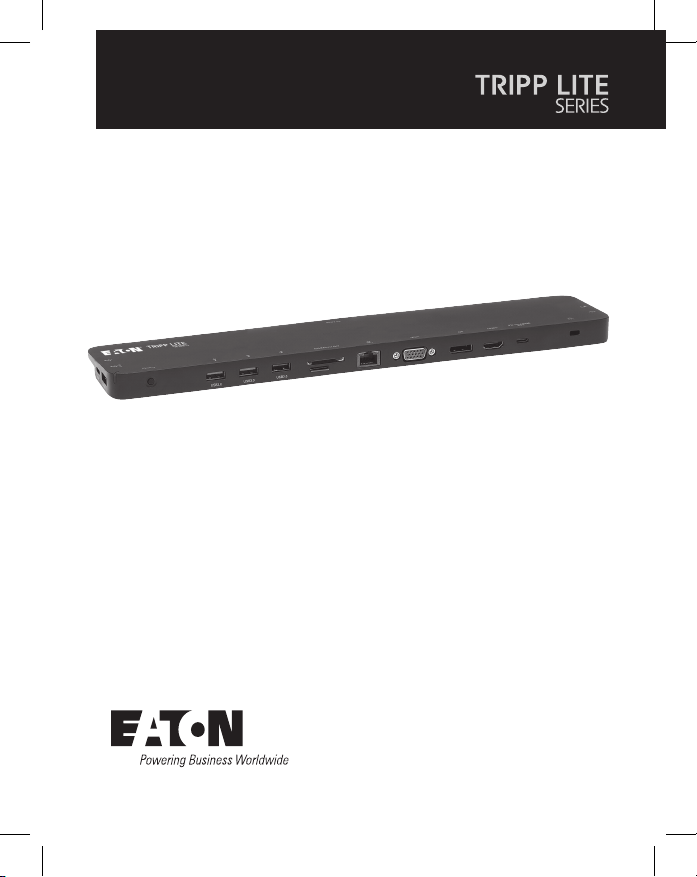
Purchased product may differ from image.

2
• All-in-one docking station includes ports for HDMI, DisplayPort, VGA,
Gigabit Ethernet, USB-C (x2), USB-A (x5) and 100W Power Delivery
(PD) charging.
• Connect up to three displays simultaneously and extend across all
displays (up to three).
• Supports HDMI and DisplayPort video resolutions up to 4096 x 2160
@ 30 Hz.
• Supports VGA video resolutions up to 1920 x 1200 @ 60 Hz.
• Ethernet port supports true 10/100/1000 Mbps network speeds.
• PD 3.0 Fast Role Swap maintains data and power connections upon
removal and connection of charging power adapter.
• USB-C PD charging port supports power input up to 20V/5A (100W).
• Supports dynamic current detection and power distribution enabling
your source (host) to be charged at a dynamic power level instead
of a xed power level.
• Dedicated 5V/1.5A USB ports provide fast charging power to
mobile devices.
• Secure Digital v3.0 SD/Micro SD card slots for external memory
may be used simultaneously.
• USB 3.2 and USB 2.0 ports support 5 Gbps and 480 Mbps data
transfer speeds respectively.
• Thunderbolt 3 compatible.
• Plug-and-play design – no software, drivers or external power required.
Product Features

3
• N201-Series Cat6 Gigabit Snagless Patch Cables
• P312-Series 3.5 mm Mini Stereo Audio Cables
• P502-Series High-Resolution VGA Cables
• P569-Series High-Speed HDMI Cables
• P580-Series DisplayPort Cables with Latches
• U322-Series USB 3.2 A/B Device Cables
• U420-Series USB 3.2 Gen 1 C/C Cables
• U428-Series USB 3.2 Gen 1 A/C Cables
• M100-Series USB Sync/Charge Cable – USB-A to Lightning
• U442-DOCK7D-B
• USB 3.2 Type-C Cable – 1 ft. (0.3 m), Black
• Owner’s Manual
Package Contents
Optional Accessories
4
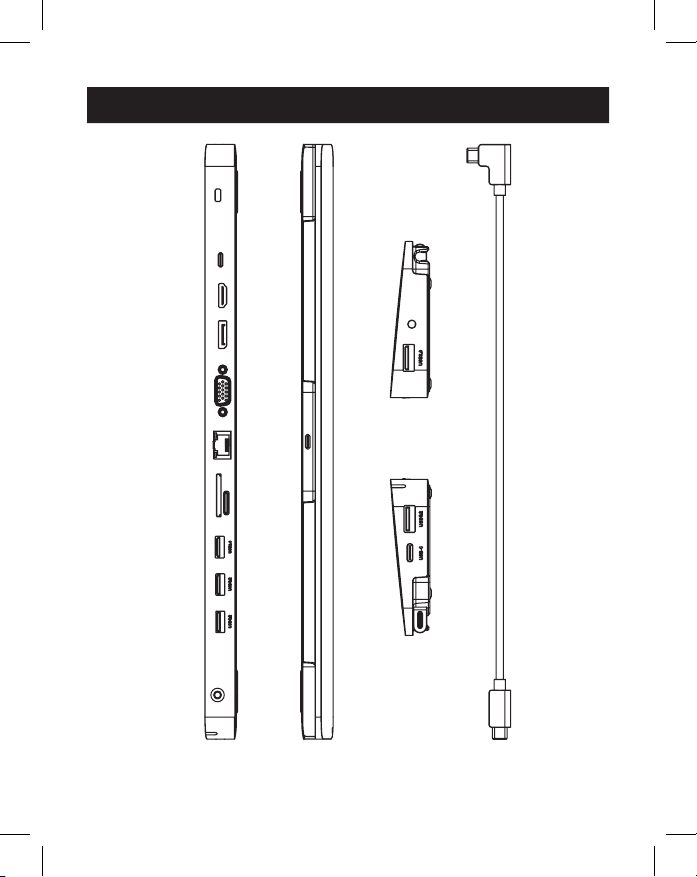
Product Overview
2
2
3
3
4
4
5
5
6
6
7
7
8
8
1
1
9
9
J
J
K
K
K
K
O
O
P
P
N
N
L
L
M
M
J
J

5
1
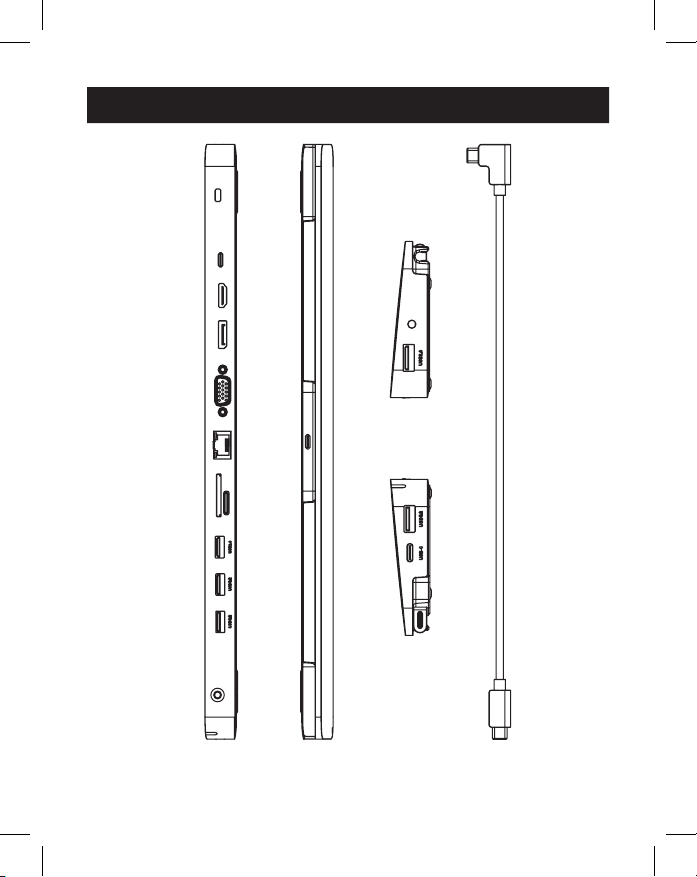
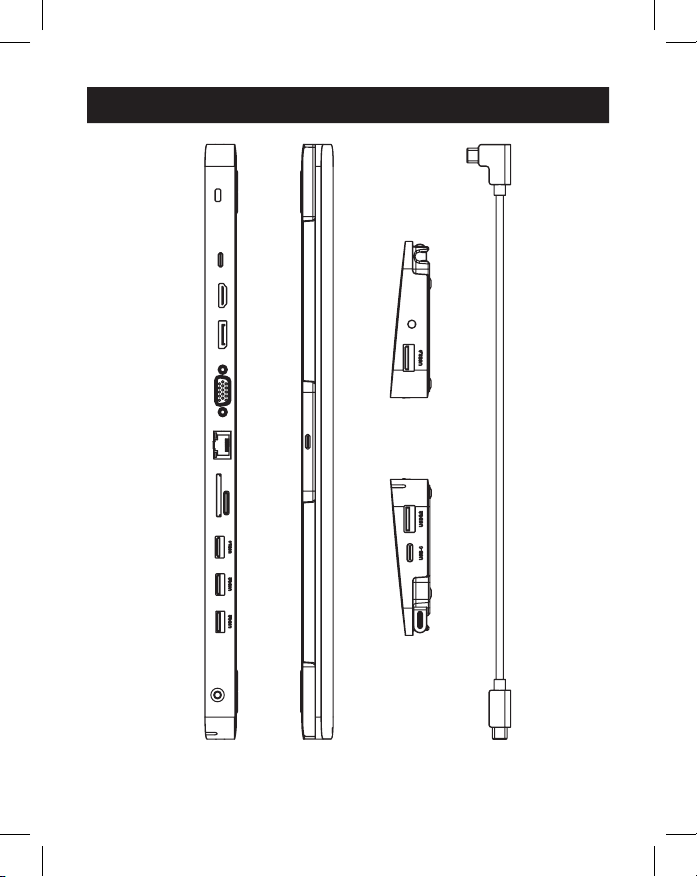
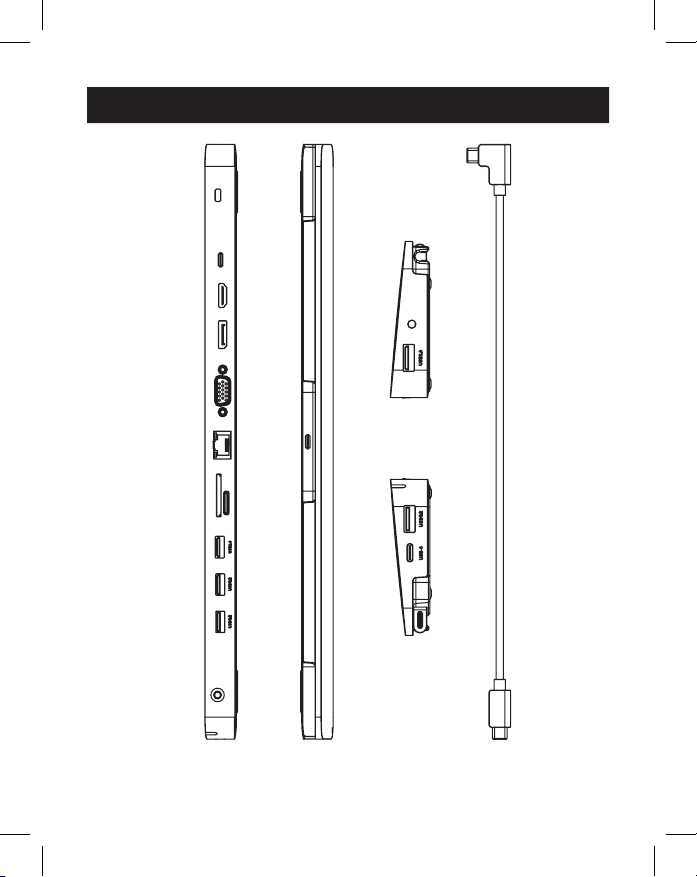
USB Type-C To Host: Connect this port to the host (source) via the
removable USB-C to USB-C cable.
2
USB Type-C Cable: Detachable USB-C to USB-C cable connects the
host to the docking station.
3
Anti-Theft Lock: Connect a user-supplied computer/laptop security
cable lock.
4
USB Type-C PD Charging Port:
Connect a device’s PD Power
Adapter.
5
HDMI Port: Connect an HDMI monitor.
6
DisplayPort Port: Connect a DisplayPort monitor.
7
VGA Port: Connect a VGA monitor.
8
RJ45 Port: Connect to a 10/100/1000 Mbps network.
9
SD/Micro SD Card Slot: Insert SD and Micro SD
memory cards.
J
USB-A 2.0 Ports (x2): Connect up to two USB 2.0 peripherals
or devices.
K
USB-A 3.2 Ports (x2): Connect up to two USB 3.2 peripherals
or devices.
L
USB-A 3.2 Port: Supports 5V 1.5A charging for power-hungry
devices.
M
USB Type-C Data Only Port: Supports the transmission of data up
to 5 Gbps.
N
3.5 mm Mini Stereo Port: Connect speaker or microphone.
O
Power Button: Turns the unit o and on.
P
LED: Green LED illuminates when the unit is on and receiving power.
Product Overview
6
Notes:
• Maximum resolutions when all three displays are connected are 1920 x 1080 @ 60
Hz in SST (Single Stream Transport) mode and 1280 x 720 @ 60 Hz in MST (Multi
Stream Transport) mode.
• Mac OS laptops or computers will only extend to one monitor. The others will be mirrored.
1. Detach the USB 3.2 Type-C cable from the unit. Plug the right-angled
USB-C connector to the docking station and the straight USB-C
connector to your source (e.g. laptop).
2. Connect up to three monitor(s) using the available HDMI, VGA and
DisplayPort video ports.
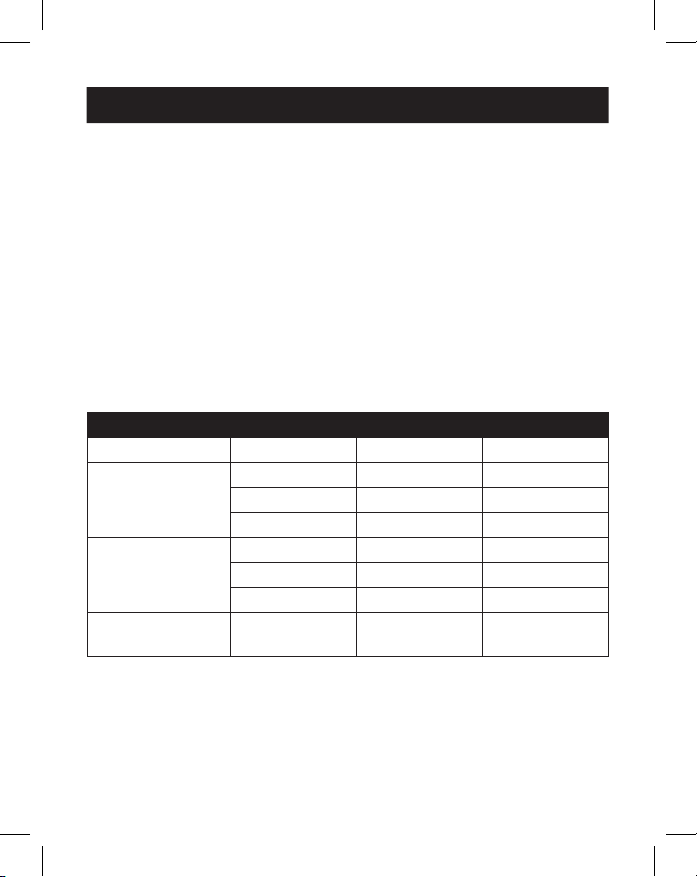
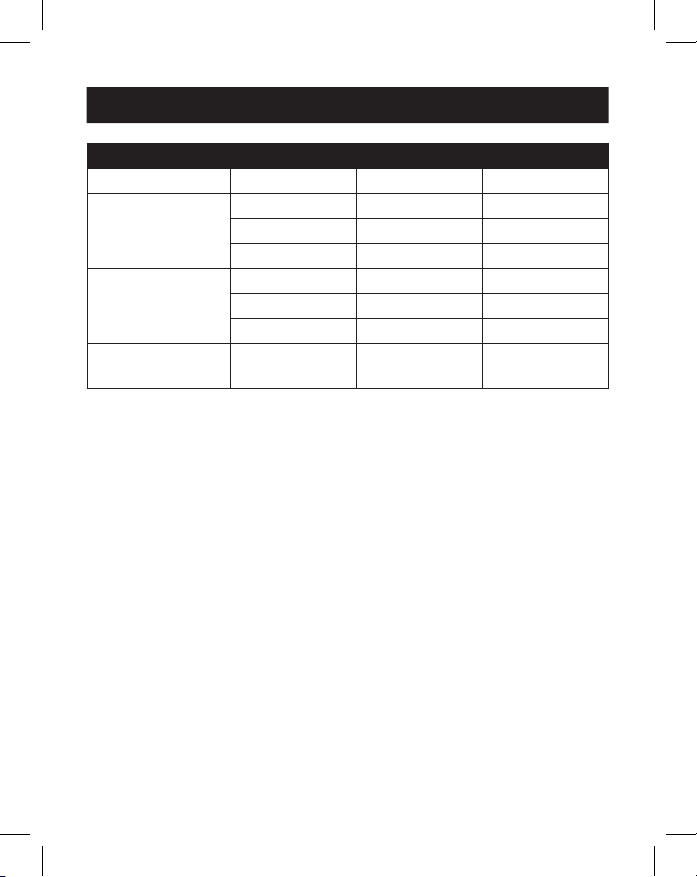
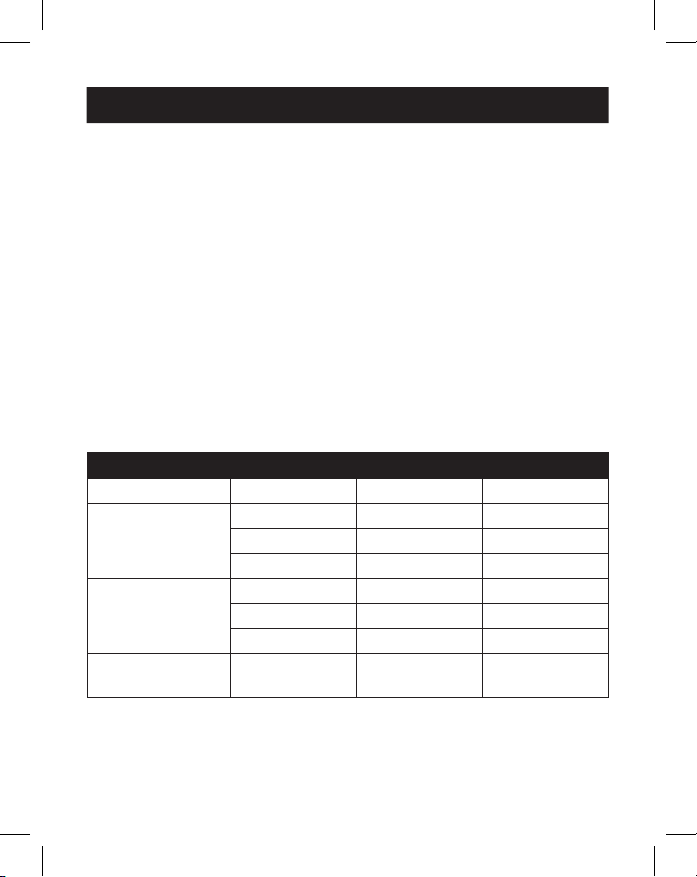
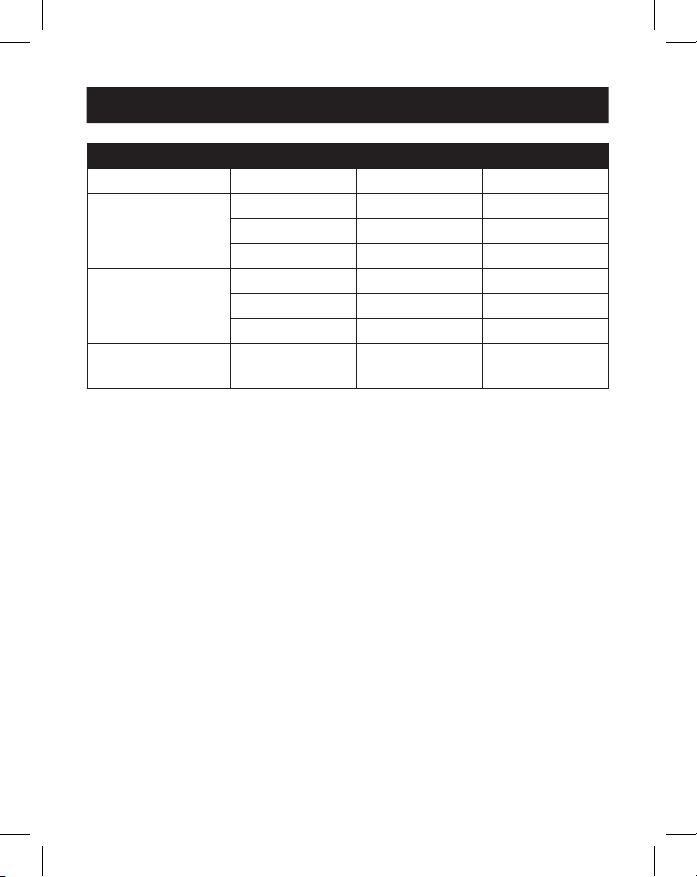
Note: Up to three monitor screens can be extended, providing a total of four separate
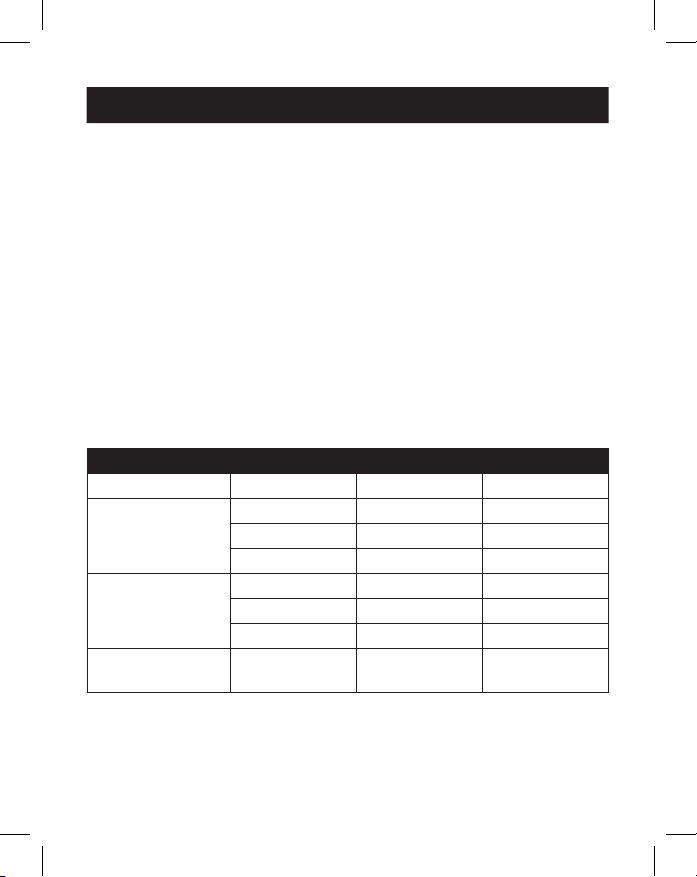
screens (including your source’s screen). The following table denes the maximum video
resolutions based on specic congurations while in SST and MST modes.
SST Mode (Single Downstream Display)
Ports VGA HDMI DP
Single Display
Connected
1080p/60 Hz N/A N/A
N/A 4K/30 Hz N/A
N/A N/A 4K/30 Hz
Dual Displays
Connected
1080p/60 Hz 1080p/60 Hz N/A
1080p/60 Hz N/A 1080p/60 Hz
N/A 4K/30 Hz 4K/30 Hz
Triple Displays
Connected
1080p/60 Hz 1080p/60 Hz 1080p/60 Hz
Installation
7
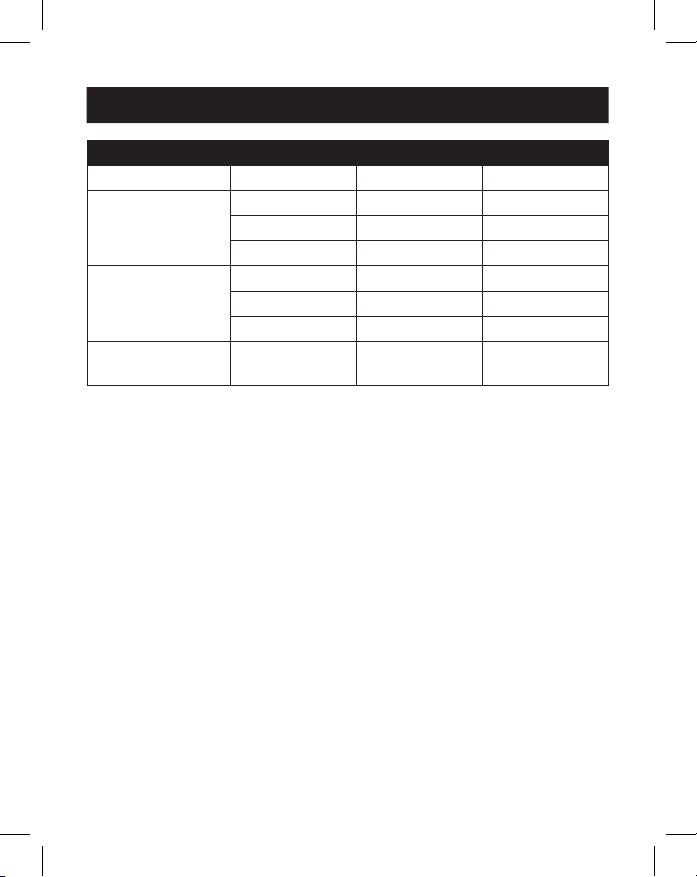
MST Mode (Multiple Downstream Displays)
Ports VGA HDMI DP
Single Display
Connected
1080p/60 Hz N/A N/A
N/A 4K/30 Hz N/A
N/A N/A 4K/30 Hz
Dual Displays
Connected
1080p/60 Hz 1080p/60 Hz N/A
1080p/60 Hz N/A 1080p/60 Hz
N/A 4K/30 Hz 4K/30 Hz
Triple Displays
Connected
720p/60 Hz 720p/60 Hz 720p/60 Hz
3. Connect up to two USB 2.0 peripherals such as a keyboard and mouse.
4. Connect up to three USB 3.2 peripherals.
Note: The USB 3.2 charging port supports up to 7.5W (5V 1.5A) of charging power.
5. Connect to an Ethernet network through the RJ45 port to achieve
speeds up to 10/100/1000 Mbps.
6. Connect the 3.5 mm Mini Stereo port to a microphone or speaker
with a user-supplied 3.5 mm audio cable.
7. Insert an SD or Micro SD card into the corresponding memory card
slots to access external memory.
Note: Both memory card slots may be used simultaneously.
8. Transfer data at speeds up to 5 Gbps using the USB Type-C data port.
9. Charge the source device by connecting its USB-C PD Charger to the
docking station’s USB-C PD Charging port for up to 100W (20V 5A)
of charging power.
10. Connect a security cable lock to the anti-theft lock port (optional).
Installation
8
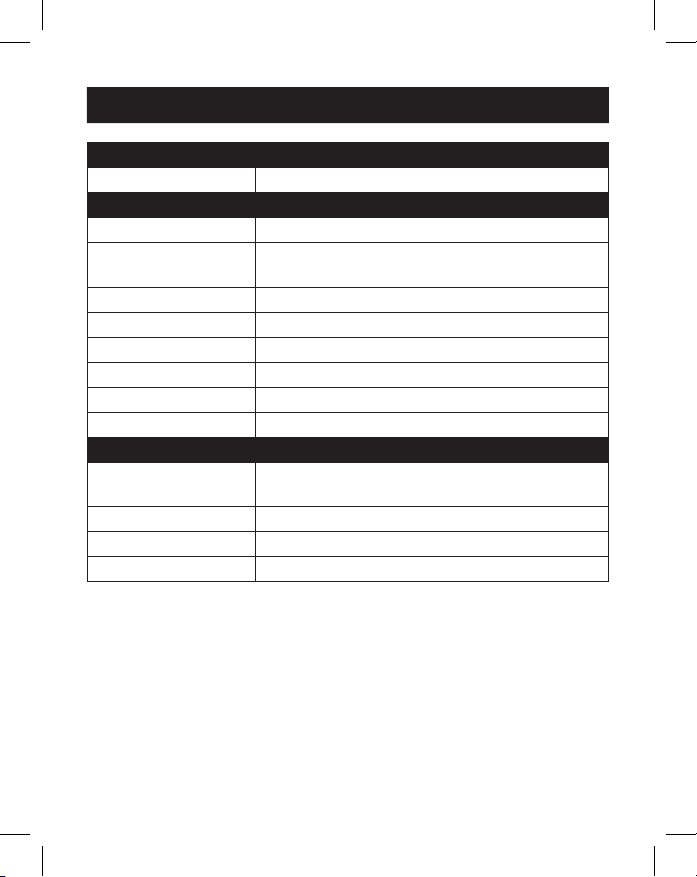
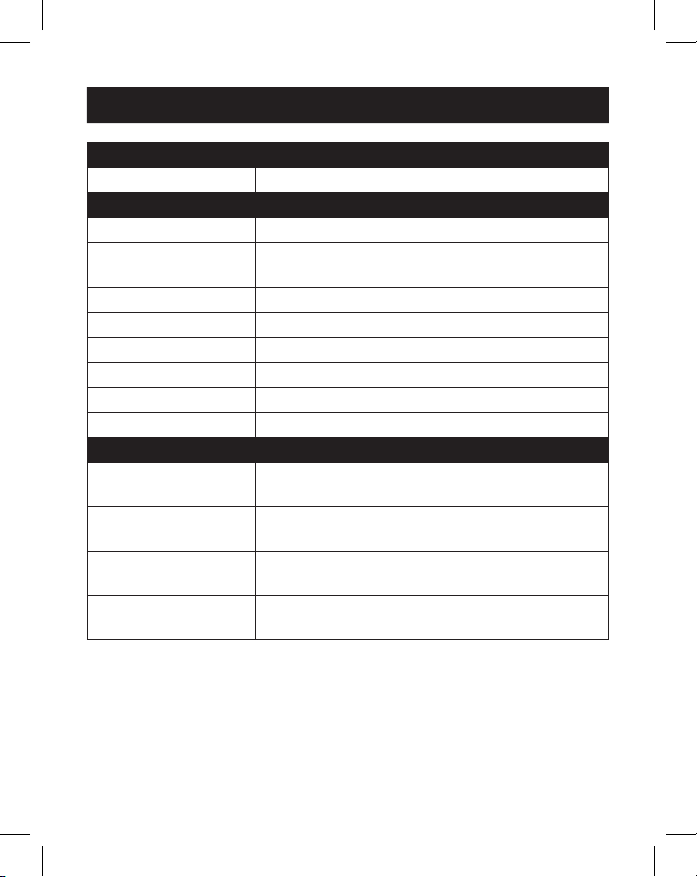
Input Connector
USB-C USB Type-C, Female
Output Connector(s)
USB-A USB 3.2, Female (x3), USB 2.0, Female (x2)
USB-C USB-C Data Only, Female
USB-C PD Charge Only, Female
Ethernet RJ45, Female
VGA VGA, Female
HDMI HDMI, Female
DisplayPort DisplayPort, Female
Audio 3.5 mm, Female
Memory Cards SD, Micro SD
Environmental
Operating
Temperature
32° to 113°F (0 to 45°C)
Operating Humidity 10% to 85% RH, Non-Condensing
Storage Temperature 14° to 158°F (-10 to 70°C)
Storage Humidity 5% to 90% RH, Non-Condensing
Specifications
9
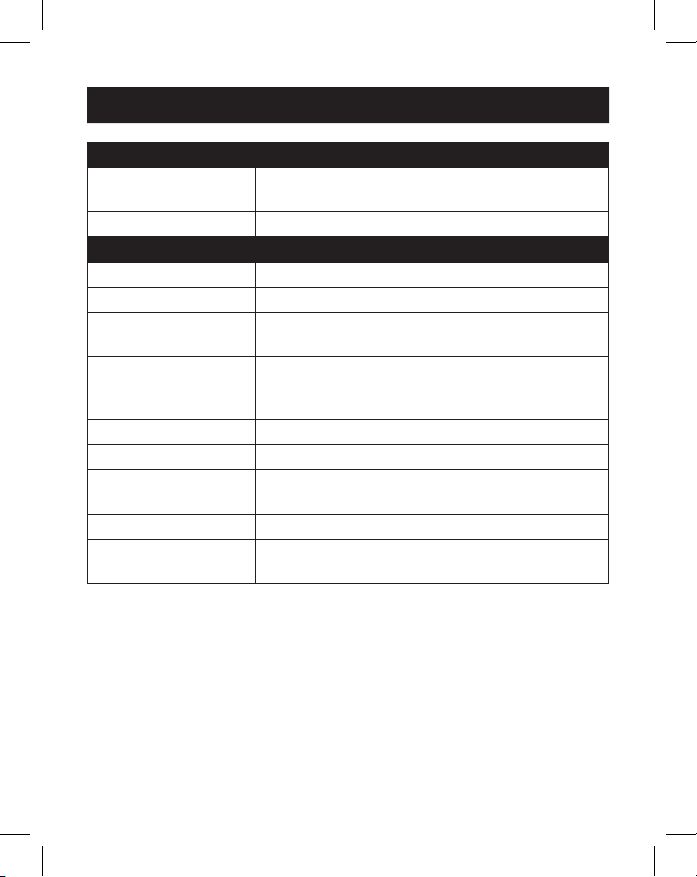
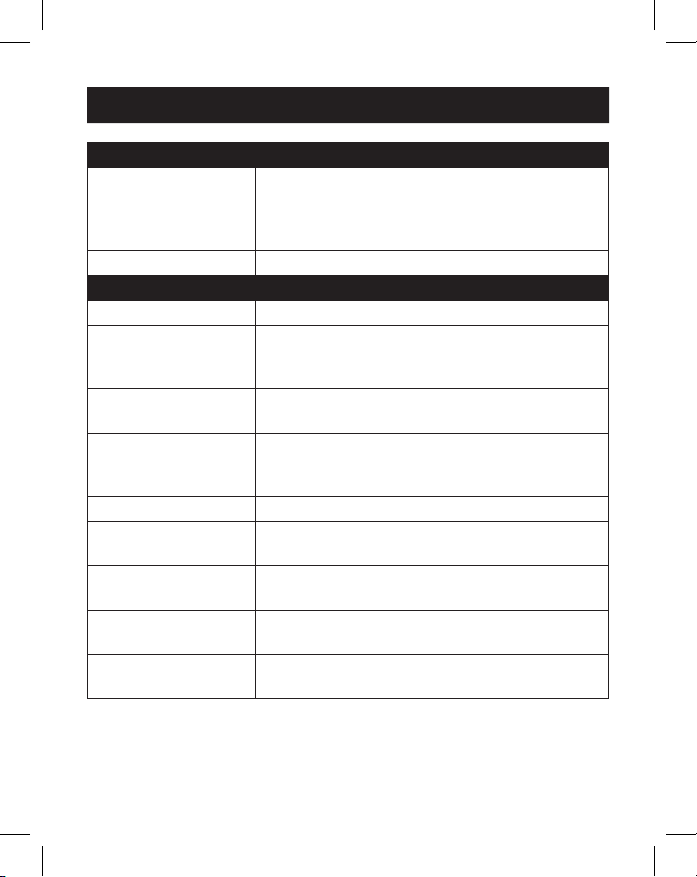
Mechanical
Unit Dimensions
[H x W x D]
0.71 x 13.76 x 2.91 in. (18.1 x 348 x 74 mm)
Unit Weight 0.55 lb. (0.25 kg)
Specications
HDMI Specication 1.4
HDCP Specication 1.4
DisplayPort
Specication
1.2
Maximum Supported
Video Resolution(s)
HDMI (4096 x 2160 @ 30 Hz),
DisplayPort (4096 x 2160 @ 30 Hz),
VGA (1920 x 1200 @ 60 Hz)
Network Speed 10/100/1000 Mbps or 1 Gbps
Color Depth (HDMI) 36 bit (12 bits per channel)
Chroma Subsampling
(HDMI)
YCbCr: 4:4:4, 4:2:2, 4:2:0 and RGB: 4:4:4
Audio Specications LPCM 7.1 Channel Surround Sound Audio
PD Charging
Specication
PD 3.0 (100W)
Specifications

10
3-Year Limited Warranty
We warrant our products to be free from defects in materials and workmanship for a period of
three (3) years from the date of initial purchase. Our obligation under this warranty is limited to
repairing or replacing (at its sole option) any such defective products. Visit Tripplite.Eaton.com/
support/product-returns before sending any equipment back for repair. This warranty does not
apply to equipment which has been damaged by accident, negligence or misapplication or has
been altered or modied in any way.
EXCEPT AS PROVIDED HEREIN, WE MAKE NO WARRANTIES, EXPRESS OR IMPLIED, INCLUDING
WARRANTIES OF MERCHANTABILITY AND FITNESS FOR A PARTICULAR PURPOSE. Some states do
not permit limitation or exclusion of implied warranties; therefore, the aforesaid limitation(s) or
exclusion(s) may not apply to the purchaser.
EXCEPT AS PROVIDED ABOVE, IN NO EVENT WILL WE BE LIABLE FOR DIRECT, INDIRECT, SPECIAL,
INCIDENTAL OR CONSEQUENTIAL DAMAGES ARISING OUT OF THE USE OF THIS PRODUCT, EVEN
IF ADVISED OF THE POSSIBILITY OF SUCH DAMAGE. Specically, we are not liable for any costs,
such as lost prots or revenue, loss of equipment, loss of use of equipment, loss of software, loss
of data, costs of substitutes, claims by third parties, or otherwise.
WEEE Compliance Information for Customers and Recyclers (European Union)
Under the Waste Electrical and Electronic Equipment (WEEE) Directive and implementing
regulations, when customers buy new electrical and electronic equipment from Eaton
they are entitled to:
• Send old equipment for recycling on a one-for-one, like-for-like basis (this varies
depending on the country)
• Send the new equipment back for recycling when this ultimately becomes waste
WARNING
Use of this equipment in life support applications where failure of this equipment can reasonably
be expected to cause the failure of the life support equipment or to signicantly aect its safety
or eectiveness is not recommended.
Eaton has a policy of continuous improvement. Specications are subject to change without
notice.
Warranty
Eaton
1000 Eaton Boulevard
Cleveland, OH 44122
United States
Eaton.com
© 2023 Eaton
All Rights Reserved
Publication No. 23-07-693 /
93-3B68_RevD
July 2023
Eaton is a registered
trademark.
All trademarks are property
of their respective owners.
11
Manual del Propietario
English 1
Français 21
Deutsch 31
Italiano 41
Modelo:
U442-DOCK7D-B
USB-C
®
Estación de
acoplamiento de
triple pantalla
El producto comprado puede
ser diferente al de la imagen.

12
• La estación de acoplamiento todo en uno incluye puertos para HDMI,
DisplayPort, VGA, Gigabit Ethernet, USB-C (x2), USB-A (x5) y 100 W
Potencia Entrega (PD) de carga.
• Conecte hasta tres pantallas simultáneamente y amplíe a todas las
pantallas (hasta tres).
• Soporta resoluciones de video HDMI y DisplayPort hasta 4096 x 2160
@ 30 Hz.
• Suporta resoluciones de video VGA de hasta 1920 x 1200 @ 60 Hz.
• El puerto Ethernet soporta velocidades reales de red de 10Mbos /
100Mbps / 1000Mbps
• PD 3.0 Fast Role Swap mantiene las conexiones de datos y potencia al
retirar y conectar el adaptador de alimentación de carga.
• El puerto de carga USB-C PD admite la entrada de potencia de hasta
20V/5A (100 W).
• Admite la detección dinámica de corriente y la distribución de
potencia, lo que permite que su fuente (host) se cargue a un nivel de
potencia dinámico en lugar de a un nivel de potencia jo.
• Los puertos USB dedicados 5V/1.5A proporcionan potencia de carga
rápida a los dispositivos móviles.
• Las ranuras para tarjetas Secure Digital v3.0 SD/Micro SD para
memoria externa pueden utilizarse simultáneamente.
• Los puertos USB 3.2 y USB 2.0 soportan velocidades de transferencia
de datos de 5 Gbps y de 480 Mbps, respectivamente.
• Compatible con Thunderbolt 3
• Conectar y usar diseño - no requiere software, controladores o
potencia externa.
Características del Producto

13
• N201-Series Gigabit Cat6 Cable Patch Snagless
• P312-Series 3.5 mm Mini cables de audio estéreo
• P502-Series Cables VGA de alta resolución
• P569-Series Cables HDMI de alta velocidad
• P580-Series Cables DisplayPort con Broches
• U322-Series USB 3.2 Cables para dispositivos A/B
• U420-Series USB 3.2 Gen C1/C Cables
• U428-Series USB 3.2 Gen 1 Cables A/C
• M100-Series Cable de carga/sincronización USB - USB-A a Lightning
• U442-DOCK7D-B
• Cable USB 3.2 Type-C Cable – 0.3 m [1 pie], Negro
• Manual del Propietario
Contenido del Empaque
Accesorios Opcionales
14
Producto Descripción General
2
2
3
3
4
4
5
5
6
6
7
7
8
8
1
1
9
9
J
J
K
K
K
K
O
O
P
P
N
N
L
L
M
M
J
J

15
1
USB Type-C Al host: Conecte este puerto al host (Fuente) a través
del cable USB-C a USB-C de removible.
2
USB Type-C Cable: El cable USB-C a USB-C desmontable conecta el
host a la estación de acoplamiento.
3
Cerradura antirrobo: Conecte una cerradura de cable de seguridad
suministrada por el usuario Computadora/Laptop
4
USB Type-C PD Charging Port:
Conecte el adaptador PD Potencia
de un dispositivo.
5
Puerto HDMI: Conecte un monitor HDMI.
6
Puerto DislayPort: Conecte un monitor DisplayPort.
7
Puerto VGA: Conecte un monitor VGA.
8
Puerto RJ45: Conéctelo a una Red de 10/100/1000 Mbps.
9
Ranura para tarjetas SD/Micro SD: Inserte tarjetas de memoria
SD y Micro SD.
J
Puertos USB-A 2.0 (x2): Conecte hasta dos periféricos o dispositivos
USB 2.0.
K
Puertos USB-A 3.2 (x2): Conecte hasta dos periféricos o dispositivos
USB 3.2.
L
Puerto USB-A 3.2: Admite la carga de 5 V 1.5 A para dispositivos que
consumen mucha energía.
M
Puerto USB Type-C de sólo datos: Admite la transmisión de datos
de hasta 5 Gbps.
N
3.5 mm Puerto mini estéreo: Conecte un altavoz o un micrófono.
O
“Botón POWER” [Encendido]: Enciende la unidad apagado y
encendido.
P
LED: El LED verde se ilumina cuando la unidad está encendida y
recibiendo potencia.
Producto Descripción General
16
Notas:
•
Las resoluciones máximas cuando las tres pantallas están conectadas son 1920 x
1080 a 60 Hz en modo de SST (Single Stream Transport) y 1280 x 720 a 60 Hz en
modo MST (Multi Stream Transport).
•
Las laptops o computadoras con OS de Mac solo se extienden a un monitor. Los
otros se reproducirán en Modo Espejo.
1. Desprenda el cable USB 3.2 Type-C de la unidad. Enchufe el conector
USB-C en ángulo recto a la estación de acoplamiento y el conector
USB-C recto a la fuente (p. ej., laptop).
2. Conecte hasta tres monitores usando el puerto disponible de video
HDMI, VGA y DisplayPort.
Nota: Se pueden añadir hasta tres pantallas de monitores, proporcionando un total
de cuatro pantallas independientes (incluyendo la pantalla de su fuente). La siguiente
tabla dene las resoluciones de vídeo máximas basadas encendido en conguraciones
especícas mientras se está en los modos SST y MST.
Modo SST (Pantalla Bajada Sencilla)
Puertos VGA HDMI DP
Una Pantalla
Conectada
1080p/60 Hz N/D N/D
N/D 4K/30 Hz N/D
N/D N/D 4K/30 Hz
Dos Pantallas
Conectadas
1080p/60 Hz 1080p/60 Hz N/D
1080p/60 Hz N/D 1080p/60 Hz
N/D 4K/30 Hz 4K/30 Hz
Tres Pantallas
Conectadas
1080p/60 Hz 1080p/60 Hz 1080p/60 Hz
Instalación
17
Modo MST (Varias Pantallas Bajadas)
Puertos VGA HDMI DP
Una Pantalla
Conectada
1080p/60 Hz N/D N/D
N/D 4K/30 Hz N/D
N/D N/D 4K/30 Hz
Dos Pantallas
Conectadas
1080p/60 Hz 1080p/60 Hz N/D
1080p/60 Hz N/D 1080p/60 Hz
N/D 4K/30 Hz 4K/30 Hz
Tres Pantallas
Conectadas
720p/60 Hz 720p/60 Hz 720p/60 Hz
3. Conecte hasta dos periféricos USB 2.0 como un teclado y mouse.
4. Conecte hasta 3 periféricos USB 3.2.
Nota: El puerto de carga USB 3.2 admite hasta 7.5 W (5 V 1.5 A) de potencia de carga.
5. Conecte a una red Ethernet a través del puerto RJ45 para alcanzar
velocidades hasta 10/100/1000 Mbps.
6. Conecte el puerto mini estéreo de 3.5 mm a un micrófono o altavoz
con un cable de audio de 3.5 mm suministrado por el usuario.
7. Para acceder a la memoria externa, inserte una tarjeta SD o Micro SD
en las ranuras correspondientes para tarjetas de memoria.
Nota: Ambas ranuras para tarjetas de memoria pueden usarse simultáneamente.
8. Transera datos a velocidades de hasta 5 Gbps usando el puerto de
datos USB Type-C.
9. Cargue el dispositivo fuente conectando su cargador USB-C PD al
puerto de carga USB-C PD de la estación de acoplamiento para hasta
100 W (20 V 5 A) de potencia de carga.
10. Conecte un candado de cable de seguridad al puerto de seguro
antirrobo (opcional).
Instalación
18
Conector de Entrada
USB-C USB Type-C, Hembra
Conector(es) de Salida
USB-A USB 3.2, Hembra (x3), USB 2.0, Hembra (x2)
USB-C USB-C Solo para Datos, Hembra
USB-C Solo para Carga PD, Hembra
Ethernet RJ45, Hembra
VGA VGA, Hembra
HDMI HDMI, Hembra
DisplayPort DisplayPort, Hembra
Audio 3.5 mm, Hembra
Tarjetas de Memoria SD, Micro SD
Medio ambiente
Temperatura de
Operación
32° a 113 °F (0 a 45 °C)
Humedad de
Operación
10 % a 85 % RH, Non-Condensing
Temperatura de
Almacenamiento
14° a 158 °F (-10 a 70 °C)
Humedad de
Almacenamiento
5 % a 90 % RH, Non-Condensing
Especificaciones
19
Mecánica
Dimensiones de la
unidad (Al x An x
Pr), (Alto x Ancho x
Profundidad)
0.71" x 13.76" x 2.91" 18.1 x 348 x 74 mm
Peso de la Unidad 0.55 lb. (0.25 kg)
Especicaciones
Especicación HDMI 1.4
HDCP [High Denition
Copy Protocol]
Especicación
1.4
DisplayPort
Specication
1.2
Máxima(s)
Resolución(es) de
Video Soportada(s)
HDMI (4096 x 2160 a 30 Hz),
DisplayPort (4096 x 2160 a 30 Hz),
VGA (1920 x 1200 a 60 Hz)
Velocidad de la Red 10Mbps / 100Mbps / 1000Mbps o 1 Gbps
Profundidad de Color
(HDMI)
36 bits (12 bits por canal)
Submuestreo
Cromático (HDMI)
YCbCr: 4:4:4, 4:2:2, 4:2:0 y RGB: 4:4:4
Especicaciones de
Audio
Audio de Sonido Envolvente LPCM de 7.1
Canales
Especicación de
Carga PD
PD 3.0 (100 W)
Especificaciones

20
Garantía Limitada de 3 años
Garantizamos por tres (3) años a partir de la fecha de compra inicial que nuestros productos no
presentan defectos de materiales ni de mano de obra. Nuestra obligación bajo esta garantía está
limitada a la reparación o reemplazo (a su entera discreción) de cualquier producto defectuoso.
Antes de devolver cualquier equipo para reparación, visite Tripplite.Eaton.com/support/product-
returns. Esta garantía no se aplica a equipos que hayan sido dañados por accidente, negligencia
o mal uso, o hayan sido alterados o modicados de alguna manera.
SALVO POR LO QUE SE INDICÓ AQUÍ, NO OTORGAMOS GARANTÍAS EXPRESAS O IMPLÍCITAS,
INCLUIDAS GARANTÍAS DE COMERCIABILIDAD Y ADECUACIÓN PARA UN PROPÓSITO
PARTICULAR. Algunos estados no permiten la limitación o exclusión de garantías implícitas; por lo
tanto, las limitaciones o exclusiones antes mencionadas pueden no aplicarse al comprador.
SALVO POR LO QUE SE INDICÓ ANTERIORMENTE, EN NINGÚN CASO SEREMOS RESPONSABLES
POR DAÑOS DIRECTOS, INDIRECTOS, ESPECIALES, INCIDENTALES O CONSECUENTES QUE
SURJAN DEL USO DE ESTE PRODUCTO, INCLUSO SI SE ADVIERTE SOBRE LA POSIBILIDAD DE TAL
DAÑO. Especícamente, no somos responsables por ningún costo, como pérdida de ganancias o
ingresos, pérdida de equipos, pérdida del uso de equipos, pérdida de software, pérdida de datos,
costos de sustituciones, reclamos de terceros o de cualquier otra forma.
WEEE Información de cumplimiento para clientes y recicladores (Unión Europea)
Conforme a la Directiva de Residuos de Equipos Eléctricos y Electrónicos (WEEE) y
regulaciones aplicables, al adquirir un equipo eléctrico y electrónico nuevo de Eaton, los
clientes están obligados a:
•
Envíe los equipos viejos para su reciclaje sobre una base de uno por uno, igual por
igual (esto varía dependiendo el país).
•
Devolver el equipo nuevo para nes de reciclaje una vez que nalmente se convierta
en residuo
ADVERTENCIA
No se recomienda el uso de este equipo en aplicaciones de soporte de vida en donde
razonablemente se pueda esperar que la falla de este equipo cause la falla del equipo de soporte
de vida o afecte signicativamente su seguridad o efectividad.
Eaton tiene una política de mejora continua. Las especicaciones están sujetas a cambio sin
previo aviso.
Garantía
Eaton
1000 Boulevard Eaton
Cleveland, OH 44122
Estados Unidos
Eaton.com
© 2023 Eaton
Todos los derechos reservados
Publicación No. 23-07-693 /
93-3B68_RevD
julio de 2023
Eaton es una marca
registrada.
Todas las marcas registradas
son propiedad de sus
respectivos propietarios.
21
Manuel d'utilisation
English 1
Español 11
Deutsch 31
Italiano 41
Modèle:
U442-DOCK7D-B
Station d'accueil USB-C
®
pour triple écran
Le produit acheté peut différer de l'image.

22
• La station d'accueil tout-en-un comprend des ports HDMI, DisplayPort,
VGA, Ethernet Gigabit, USB-C (x2), USB-A (x5) et une charge de 100 W
avec Power Delivery (PD).
• Connectez jusqu'à trois écrans simultanément et étendez l'achage
sur tous les écrans (jusqu'à trois).
• Prend en charge les résolutions vidéo HDMI et DisplayPort jusqu'à
4096 x 2160 à 30 Hz.
• Prend en charge les résolutions vidéos VGA jusqu'à 1920 x 1200 à 60 Hz.
• Le port Ethernet prend en charge des vitesses de réseau réelles de
10/100/1000 Mbps.
• L'échange de rôle rapide PD 3.0 maintient les connexions de données
et d'alimentation lors du retrait et de la connexion de l'adaptateur de
charge.
• Le port de charge USB-C PD prend en charge une entrée
d'alimentation jusqu'à 20 V/5 A (100 W).
• Prend en charge la détection dynamique du courant et la distribution
de l'alimentation permettant à votre source (hôte) d'être chargée à un
niveau de puissance dynamique au lieu d'un niveau de puissance xe.
• Les ports USB 5 V/1,5 A dédiés fournissent une alimentation de charge
rapide aux appareils mobiles.
• Les emplacements pour carte SD/Micro SD Secure Digital v3.0 pour
mémoire externe peuvent être utilisés simultanément.
• Les ports USB 3.2 et USB 2.0 supportent respectivement les vitesses
de transfert de données 5 Gbps et 480 Mbps.
• Compatibilité Thunderbolt 3.
• Conception plug-and-play - aucun logiciel, pilote ou alimentation
externe requis.
Caractéristiques du produit

23
• Câbles patch Cat6 Gigabit série N201 avec protection anti-accrochage
• Câbles mini-audio stéréo 3,5 mm série P312
• Câbles VGA haute résolution série P502
• Câbles HDMI haute vitesse série P569
• Câbles DisplayPort série P580 avec loquets
• Câbles de périphérique USB 3.2 A/B série U322
• Câbles USB 3.2 Gen 1 C/C série U420
• Câbles USB 3.2 Gen 1 A/C série U428
• Câble de synchronisation/charge USB série M100 – USB-A à Lightning
• U442-DOCK7D-B
• Câble USB 3.2 Type-C – 0,3 m (1 pied), noir
• Manuel d'utilisation
Contenu du carton d'emballage
Accessoires disponibles en option
24
Présentation du produit
2
2
3
3
4
4
5
5
6
6
7
7
8
8
1
1
9
9
J
J
K
K
K
K
O
O
P
P
N
N
L
L
M
M
J
J

25
1
USB Type-C vers hôte: connectez ce port à l'hôte (source) via le
câble amovible USB-C vers USB-C
2
Câble USB Type-C : un câble amovible USB-C vers USB-C connecte
l'hôte à la station d'accueil.
3
Verrouillage antivol : connectez un câble de sécurité pour
ordinateur/portable fourni par l'utilisateur.
4
Port de charge USB Type-C PD:
connectez l'adaptateur
d'alimentation PD d'un appareil.
5
Port HDMI : connectez un écran HDMI.
6
Port Display Port : connectez un écran DisplayPort.
7
Port VGA : connectez un écran VGA.
8
Port RJ45 : connexion à un réseau 10/100/1000 Mbps.
9
Emplacement pour carteSD / Micro SD : insérez des cartes
mémoire SD et Micro SD.
J
Ports USB-A 2.0 (x2) : connectez jusqu'à deux périphériques ou
appareils USB 2.0.
K
Ports USB-A 3.2 (x2) : connectez jusqu'à deux périphériques ou
appareils USB 3.2.
L
Port USB-A 3.2 : prend en charge la charge 5 V 1,5 A pour les
appareils gourmands en énergie.
M
Port de données USB Type-C uniquement : prend en charge la
transmission de données jusqu'à 5 Gbps.
N
Miniport stéréo 3,5 mm : connectez un haut-parleur ou un
microphone.
O
Bouton d'alimentation : permet d'éteindre et de rallumer l'appareil.
P
LED : la LED verte s'allume lorsque l'appareil est sous tension et sous
tension.
Présentation du produit
26
Remarques:
• Les résolutions maximales lorsque les trois écrans sont connectés sont de 1920 x
1080 à 60 Hz en mode SST (Single Stream Transport) et de 1280 x 720 à 60 Hz en
mode MST (Multi Stream Transport).
• Les ordinateurs portables ou Mac OS ne s'étendent qu'à un seul moniteur. Les
autres seront en miroir.
1. Débranchez le câble USB 3.2 Type-C de l'appareil. Branchez le connecteur
USB-C à angle droit sur la station d'accueil et le connecteur USB-C droit
sur votre source (par exemple, un ordinateur portable).
2. Connectez jusqu'à trois écrans en utilisant les ports vidéo HDMI, VGA
et DisplayPort disponibles.
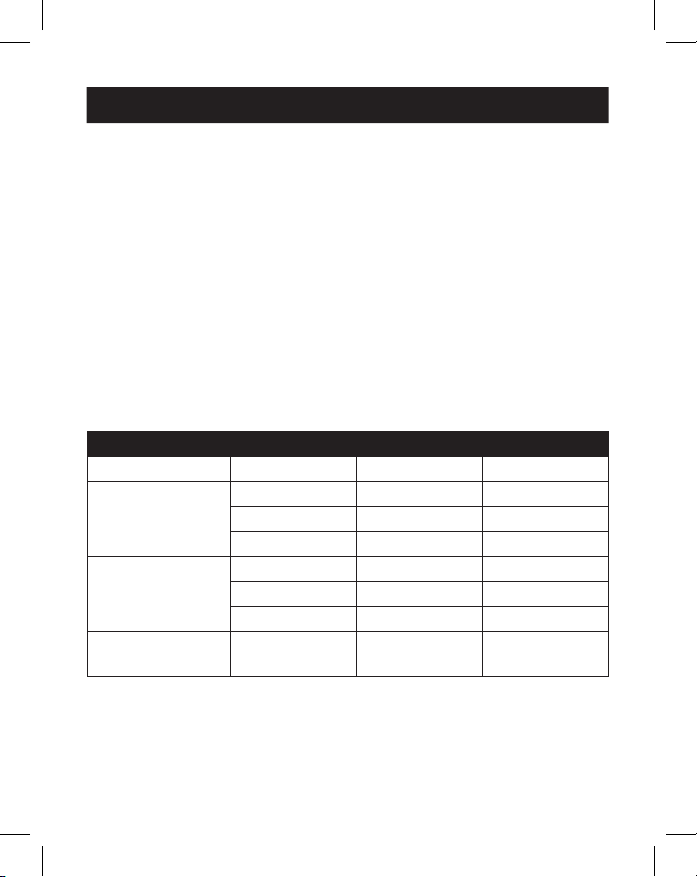
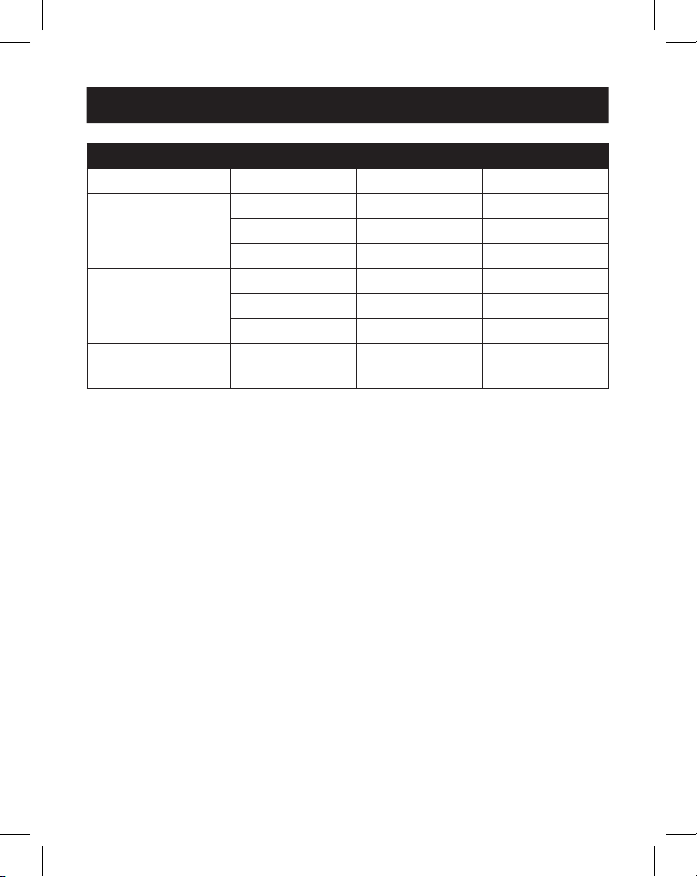
Remarque : Il est possible d'étendre jusqu'à trois écrans, ce qui permet d'obtenir un total
de quatre écrans distincts (y compris l'écran de votre source). Le tableau suivant dénit les
résolutions vidéo maximales en fonction de congurations spéciques en mode SST et MST.
Mode SST (achage unique en aval)
Ports VGA HDMI DP
Achage unique
connecté
1080p/60 Hz S.O. S.O.
S.O. 4K/30 Hz S.O.
S.O. S.O. 4K/30 Hz
Deux écrans
connectés
1080p/60 Hz 1080p/60 Hz S.O.
1080p/60 Hz S.O. 1080p/60 Hz
S.O. 4K/30 Hz 4K/30 Hz
Triple achage
connecté
1080p/60 Hz 1080p/60 Hz 1080p/60 Hz
Installation
27
Mode MST (achages multiples en aval)
Ports VGA HDMI DP
Achage unique
connecté
1080p/60 Hz S.O. S.O.
S.O. 4K/30 Hz S.O.
S.O. S.O. 4K/30 Hz
Deux écrans
connectés
1080p/60 Hz 1080p/60 Hz S.O.
1080p/60 Hz S.O. 1080p/60 Hz
S.O. 4K/30 Hz 4K/30 Hz
Triple achage
connecté
720p/60 Hz 720p/60 Hz 720p/60 Hz
3. Connectez jusqu'à deux périphériques USB 2.0, tels qu'un clavier et
une souris.
4. Connectez jusqu'à trois périphériques USB 3.2.
Remarque : le port de charge USB 3.2 supporte jusqu'à 7,5 W (5 V 1,5 A) de
puissance de charge.
5. Connectez-vous à un réseau Ethernet via le port RJ45 pour atteindre
des vitesses allant jusqu'à 10/100/1000 Mbit/s.
6. Connectez le port mini stéréo 3,5 mm à un microphone ou à un haut-
parleur avec un câble audio 3,5 mm fourni par l'utilisateur.
7. Insérez une carte SD ou Micro SD dans les emplacements de carte
mémoire correspondants pour accéder à la mémoire externe.
Remarque : Les deux emplacements de carte mémoire peuvent être utilisés
simultanément.
8. Transférez des données à des vitesses allant jusqu'à 5 Gbit/s à l'aide
du port de données USB Type-C.
9. Chargez l'appareil source en connectant son chargeur USB-C PD au
port de charge USB-C PD de la station d'accueil pour une puissance
de charge allant jusqu'à 100 W (20 V 5 A).
10. Connectez un câble de sécurité au port de verrouillage antivol
(en option).
Installation
28
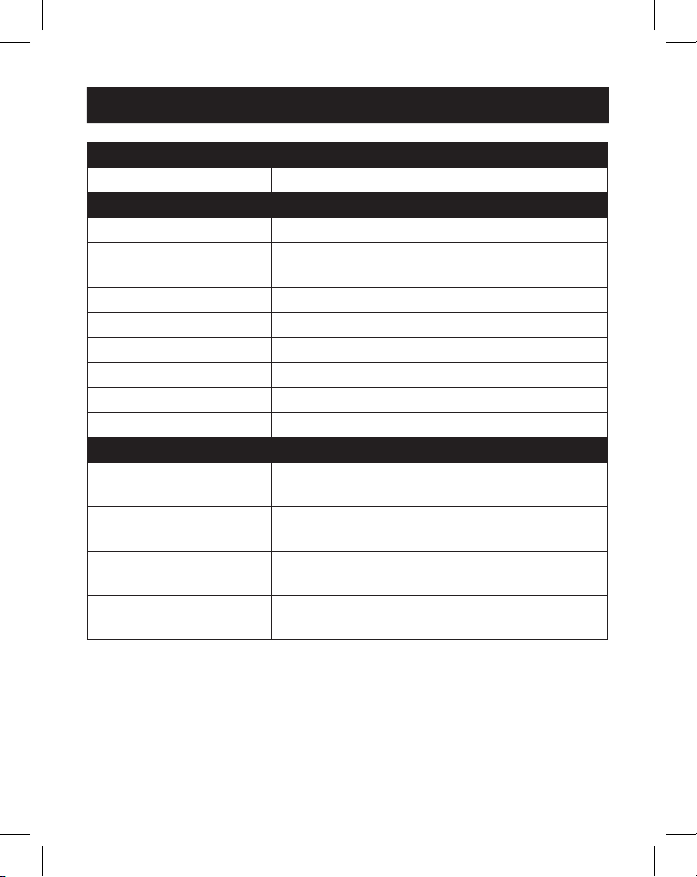
Connecteur d'entrée
USB-C USB Type-C, Femelle
Connecteur(s) de sortie
USB-A USB 3.2, Femelle (x3), USB 2.0, Femelle (x2)
USB-C USB-C données uniquement, Femelle
USB-C PD charge uniquement, Femelle
Ethernet RJ45, Femelle
VGA VGA, Femelle
HDMI HDMI, Femelle
DisplayPort DisplayPort, Femelle
Audio 3,5 mm, Femelle
Cartes mémoire SD, Micro SD
Environnement
Température de
fonctionnement
0 à 45 °C (32 à 113 °F)
Taux d'humidité en
fonctionnement
De 10 % à 85 % d'humidité relative, sans
condensation
Température de
stockage
-10 à 70 °C (14 à 158 °F)
Humidité de stockage De 5 % à 90 % d'humidité relative, sans
condensation
Caractéristiques
29
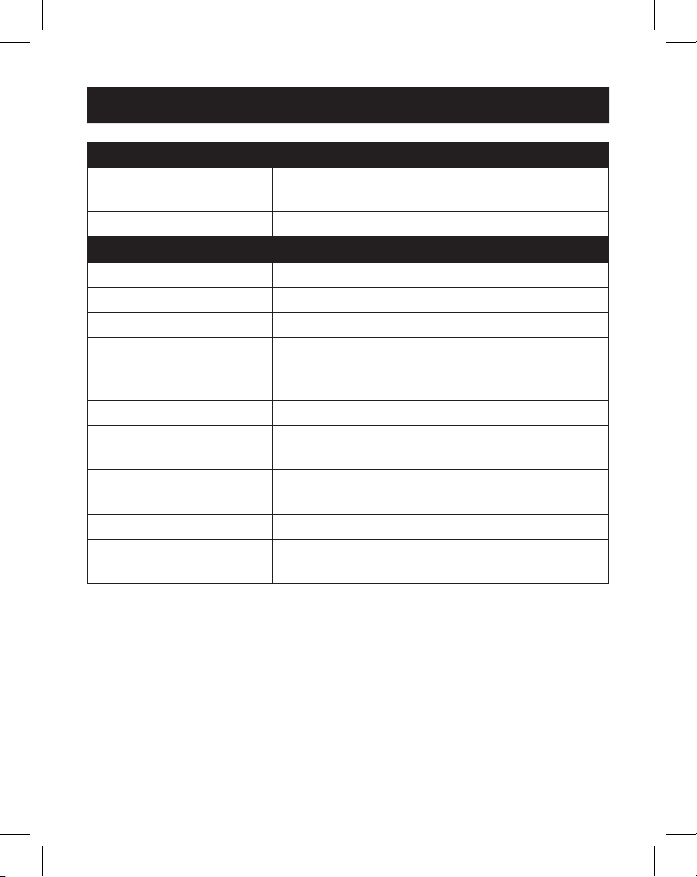
Mécanique
Dimensions de l'appareil
[H x L x P]
18,1 x 348 x 74 mm (0,71 x 13,76 x 2,91
pouces)
Poids de l'unité 0,25 kg (0,55 lb.)
Caractéristiques
Caractéristiques HDMI 1.4
Caractéristiques HDCP 1.4
Spécication DisplayPort 1.2
Résolution(s) vidéo
maximale(s) prise(s) en
charge
HDMI (4096 x 2160 à 30 Hz),
DisplayPort (4096 x 2160 à 30 Hz),
VGA (1920 x 1200 à 60 Hz)
Vitesse réseau 10/100/1000 Mbit/s ou 1 Gbit/s
Profondeur de couleur
(HDMI)
36 bit (12 bits par canal)
Sous-échantillonnage de
la chrominance (HDMI)
YCbCr: 4:4:4, 4:2:2, 4:2:0 et RVB: 4:4:4
Spécications audio Son surround 7.1 canaux LPCM
Spécication
de charge PD
PD 3.0 (100 W)
Caractéristiques

30
Garantie limitée de 3ans
Nous garantissons que nos produits sont exempts de défauts de matériaux et de fabrication
pendant une période de trois (3) ans à compter de la date d'achat initial Notre obligation en vertu
de cette garantie est limitée à la réparation ou au remplacement (à sa seule discrétion) de tout
produit défectueux. Veuillez consulter le site Tripplite.Eaton.com/support/product-returns avant
d'envoyer un produit pour le faire réparer. Cette garantie ne s'applique pas aux équipements qui
ont été endommagés par accident, négligence ou par une mauvaise utilisation, ni à ceux qui ont
été altérés ou modiés d'une façon quelconque.
SAUF INDICATION CONTRAIRE DANS LE PRÉSENT DOCUMENT, NOUS N'OFFRONS AUCUNE
GARANTIE, EXPRESSE OU IMPLICITE, Y COMPRIS LES GARANTIES DE QUALITÉ MARCHANDE
ET D'ADÉQUATION À UN USAGE PARTICULIER. Certains états n'autorisent pas la limitation ou
l'exclusion des garanties implicites ; par conséquent, les limitations ou exclusions susmentionnées
peuvent ne pas s'appliquer à l'acheteur.
SAUF INDICATION CI-DESSUS, NOUS NE SERONS EN AUCUN CAS RESPONSABLES DES
DOMMAGES DIRECTS, INDIRECTS, SPÉCIAUX, ACCIDENTELS OU CONSÉCUTIFS RÉSULTANT DE
L'UTILISATION DE CE PRODUIT, MÊME SI AVISÉS DE LA POSSIBILITÉ DE TELS DOMMAGES. Plus
précisément, nous ne sommes pas responsables de tout coût, tel que les pertes de prots ou de
revenus, la perte d'équipement, la perte d'utilisation d'équipement, la perte de logiciels, la perte
de données, les coûts de remplacement, les réclamations de tiers, ou autrement.
Informations sur la conformité DEEE pour les clients et les recycleurs (Union européenne)
En vertu de la directive sur les déchets d'équipements électriques et électroniques
(DEEE) et des règlements d'application, lorsqu'un consommateur achète un équipement
électrique ou électronique neuf auprès de Tripp Lite, il est habilité à :
• Envoyer l'équipement usagé pour recyclage sur la base d'un équipement équivalent en
nombre et en type (cela varie d'un pays à l'autre)
• Renvoyer le nouvel équipement pour recyclage lorsqu'il devient nalement un déchet.
AVERTISSEMENT
L'utilisation de ce produit avec des dispositifs de maintien en vie n'est pas recommandée dans
les cas où une panne de ce produit serait susceptible d'entraîner une panne du dispositif de
maintien en vie ou de nuire considérablement à sa sécurité ou à son ecacité.
Eaton a une politique d'amélioration continue. Les spécicités peuvent être modiées sans préavis.
Garantie
Eaton
1000 Eaton Boulevard
Cleveland, OH 44122
États-Unis
Eaton.com
© 2023 Eaton
Tous droits réservés.
Publication n°23-07-693 /
93-3B68_RevD
Juillet 2023
Eaton est une marque
déposée.
Toutes les marques
commerciales appartiennent
à leurs propriétaires respectifs.
31
Betriebsanleitung
English 1
Español 11
Français 21
Italiano 41
Modell:
U442-DOCK7D-B
USB-C
®
Dockingstation
für drei Displays
Das gekaufte Produkt kann vom Bild abweichen.

32
• Die All-in-One-Dockingstation verfügt über Anschlüsse für HDMI,
DisplayPort, VGA, Gigabit-Ethernet, USB-C (x2), USB-A (x5) und 100 W
Stromversorgung (PD).
• Sie können bis zu drei Displays gleichzeitig anschließen und den
Desktop auf alle Displays erweitern (bis zu drei).
• Unterstützt HDMI- und DisplayPort-Videoauösungen bis zu 4096 x
2160 bei 30 Hz.
• Unterstützt VGA-Videoauösungen bis zu 1920 x 1200 bei 60 Hz.
• Der Ethernet-Port unterstützt tatsächliche Netzwerkgeschwindigkeiten
von 10/100/1000 MBit/s.
• PD 3.0 Fast Role Swap hält Daten- und Stromverbindungen aufrecht,
während das Netzteil entfernt und angeschlossen wird.
• Der USB-C PD-Ladeanschluss unterstützt eine Stromaufnahme von bis
zu 20 V/5 A (100 W).
• Unterstützt eine dynamische Stromerkennung und Stromverteilung,
sodass Ihre Quelle (Host) auf einem dynamischen Leistungsniveau statt
einem xen aufgeladen werden kann.
• Spezielle 5-V-/1,5-A-USB-Anschlüsse sorgen für schnelles Auaden
mobiler Geräte.
• Secure Digital v3.0 SD/Micro SD-Kartensteckplätze für externen
Speicher können gleichzeitig verwendet werden.
• USB 3.2- und USB 2.0-Anschlüsse unterstützen Datenübertragungs-
geschwindigkeit von 5 GBit/s bzw. 480 MBit/s.
• Thunderbolt 3-kompatibel.
• Plug-and-Play-Design – keine Software, Treiber oder externe
Stromversorgung erforderlich.
Produktmerkmale

33
• Hakenloses Cat6-Gigabit-Patchkabel der N201-Serie
• 3,5-mm-Mini-Stereo-Audiokabel der P312-Serie
• Hochauösende VGA-Kabel der P502-Serie
• Hochgeschwindigkeits-HDMI-Kabel der P569-Serie
• DisplayPort-Kabel der P580-Serie mit Riegeln
• USB 3.2 A/B-Gerätekabel der U322-Serie
• USB 3.2 Gen 1 C/C-Kabel der U420-Serie
• USB 3.2 Gen 1 A/C-Kabel der U428-Serie
• USB-Synchronisierungs-/Ladekabel der M100-Serie – USB-A auf
Lightning
• U442-DOCK7D-B
• USB 3.2 Typ-C-Kabel – 1 Fuß (0,3 m), Schwarz
• Betriebsanleitung
Packungsinhalt
Optionales Zubehör
34
Produktübersicht
2
2
3
3
4
4
5
5
6
6
7
7
8
8
1
1
9
9
J
J
K
K
K
K
O
O
P
P
N
N
L
L
M
M
J
J

35
1
USB Typ-C zum Host: Verbinden Sie diesen Anschluss über das
abnehmbare USB-C-zu-USB-C-Kabel mit dem Host (Quelle).
2
USB-Typ-C-Kabel: Das abnehmbare USB-C-zu-USB-C-Kabel
verbindet den Host mit der Dockingstation.
3
Diebstahlschutzschloss: Schließen Sie ein vom Benutzer
bereitgestelltes Computer-/Laptop-Sicherheitskabelschloss an.
4
USB-Typ-C-PD-Ladeanschluss: Schließen Sie das Kabel eines Geräts
zur Stromversorgung an.
5
HDMI-Anschluss: Schließen Sie einen HDMI-Monitor an.
6
DisplayPort-Anschluss: Schließen Sie einen DisplayPort-Monitor an.
7
VGA-Anschluss: Schließen Sie einen VGA-Monitor an.
8
RJ45-Port: Verbinden Sie sich mit einem 10/100/1000 MBit/
s-Netzwerk.
9
SD-/Micro-SD-Kartensteckplatz: Stecken Sie SD- und Micro-SD-
Speicherkarten ein.
J
USB-A 2.0-Anschlüsse (x2): Schließen Sie bis zu zwei USB
2.0-Peripheriegeräte oder sonstige Geräte an.
K
USB-A 3.2-Anschlüsse (x2): Schließen Sie bis zu zwei USB
3.2-Peripheriegeräte oder sonstige Geräte an.
L
USB-A 3.2-Anschluss: Unterstützt das Laden mit 5 V und 1,5 A für
leistungshungrige Geräte.
M
USB-Typ-C-Anschluss nur für die Datenübertragung: Unterstützt
die Übertragung von Daten mit bis zu 5 GBit/s.
N
3,5-mm-Mini-Stereo-Anschluss: Schließen Sie Lautsprecher oder
ein Mikrofon an.
O
An-/Aus-Taste: Schaltet das Gerät ein und aus.
P
LED: Die grüne LED leuchtet, wenn das Gerät eingeschaltet ist und
mit Strom versorgt wird.
Produktübersicht
36
Anmerkungen:
• Die maximale Auösung, wenn alle drei Bildschirme angeschlossen sind, beträgt
1920 x 1080 @ 60 Hz im SST-Modus (Single Stream Transport) und 1280 x 720 @ 60
Hz im MST-Modus (Multi Stream Transport).
• macOS-Laptops oder Computer werden nur auf einen Monitor erweitert. Die anderen
werden gespiegelt.
1. Trennen Sie das USB 3.2 Typ-C-Kabel vom Gerät. Stecken Sie den
rechtwinkligen USB-C-Stecker in die Dockingstation und den geraden
USB-C-Stecker in Ihre Quelle (z. B. Laptop).
2. Schließen Sie bis zu drei Monitore über die verfügbaren HDMI-, VGA-
und DisplayPort-Videoanschlüsse an.
Hinweis: Das Bildschirm kann auf bis zu drei Monitore erweitert werden, so dass
insgesamt vier separate Bildschirme zur Verfügung stehen (einschließlich des Bildschirms
Ihrer Quelle). Die folgende Tabelle deniert die maximalen Videoauösungen basierend
auf bestimmten Kongurationen im SST- und MST-Modus.
SST-Modus (Single Downstream Display)
Anschlüsse VGA HDMI DP
Einzelnes Display
angeschlossen
1080p/60 Hz Nicht verfügbar Nicht verfügbar
Nicht verfügbar 4K/30 Hz Nicht verfügbar
Nicht verfügbar Nicht verfügbar 4K/30 Hz
Zwei Displays
angeschlossen
1080p/60 Hz 1080p/60 Hz Nicht verfügbar
1080p/60 Hz Nicht verfügbar 1080p/60 Hz
Nicht verfügbar 4K/30 Hz 4K/30 Hz
Drei Displays
angeschlossen
1080p/60 Hz 1080p/60 Hz 1080p/60 Hz
Installation
37
MST-Modus (Multiple Downstream Displays)
Anschlüsse VGA HDMI DP
Einzelnes Display
angeschlossen
1080p/60 Hz Nicht verfügbar Nicht verfügbar
Nicht verfügbar 4K/30 Hz Nicht verfügbar
Nicht verfügbar Nicht verfügbar 4K/30 Hz
Zwei Displays
angeschlossen
1080p/60 Hz 1080p/60 Hz Nicht verfügbar
1080p/60 Hz Nicht verfügbar 1080p/60 Hz
Nicht verfügbar 4K/30 Hz 4K/30 Hz
Drei Displays
angeschlossen
720p/60 Hz 720p/60 Hz 720p/60 Hz
3. Schließen Sie bis zu zwei USB 2.0 Peripheriegeräte an, z. B. eine
Tastatur und eine Maus.
4. Schließen Sie bis zu drei USB 3.2 Peripheriegeräte an.
Hinweis: Der USB-Ladeanschluss 3.2 unterstützt bis zu 7,5 W (5 V bei 1,5 A)
Ladeleistung.
5. Verbinden Sie sich über den RJ45-Anschluss mit einem Ethernet-
Netzwerk, um Geschwindigkeiten von bis zu 10/100/1000 MBps zu
erreichen.
6. Verbinden Sie den 3,5 mm Mini-Stereo-Anschluss mit einem Mikrofon
oder Lautsprecher über ein vom Benutzer bereitgestelltes 3,5 mm
Audiokabel.
7. Stecken Sie eine SD- oder Micro-SD-Karte in die entsprechenden
Speicherkartensteckplätze, um auf den externen Speicher zuzugreifen.
Hinweis: Beide Speicherkartensteckplätze können gleichzeitig verwendet werden.
8. Übertragen Sie Daten mit einer Geschwindigkeit von bis zu 5 GBps
über den USB Typ-C Datenanschluss.
9. Laden Sie das Quellgerät auf, indem Sie das USB-C PD-Ladegerät an
den USB-C-Anschluss der Dockingstation anschließen und es mit bis
zu 100 W (20 V bei 5 A) auaden.
10. Schließen Sie ein Sicherheitskabelschloss an den Anschluss für das
Diebstahlschutzschloss an (optional).
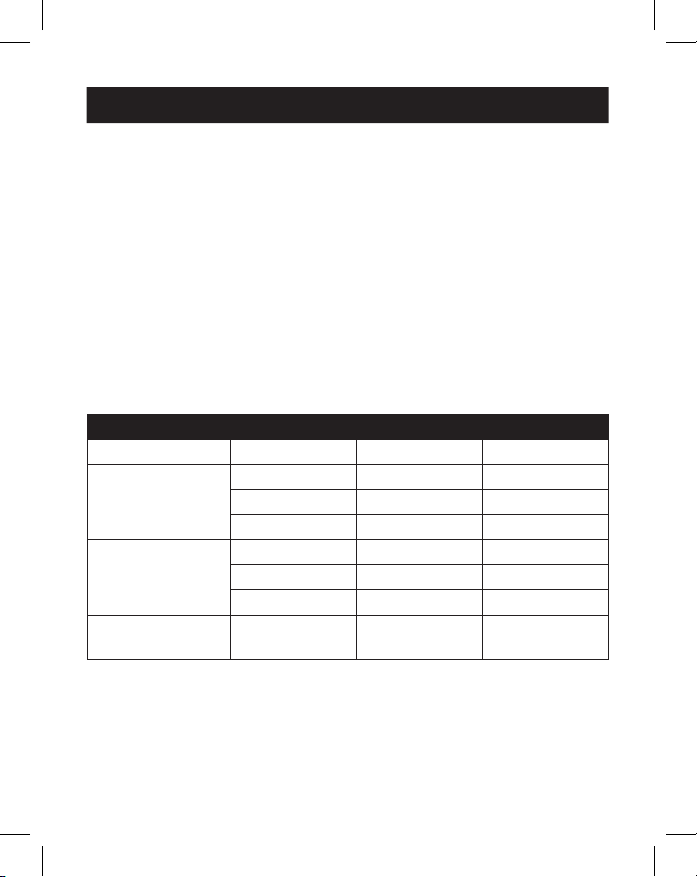
Installation
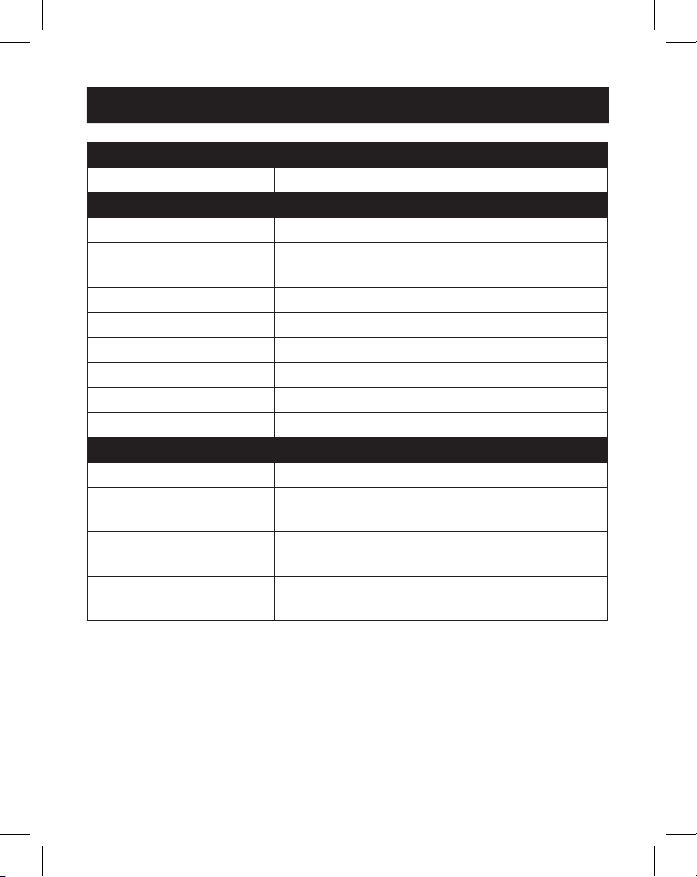
38
Eingangsanschluss
USB-C USB Type-C, Buchse
Ausgangsbuchse(n)
USB-A USB 3.2, Buchse (x3), USB 2.0, Buchse (x2)
USB-C USB-C nur für Datenübertragung, Buchse
USB-C nur für Auadung (PD), Buchse
Ethernet RJ45, Buchse
VGA VGA, Buchse
HDMI HDMI, Buchse
DisplayPort DisplayPort, Buchse
Audio 3,5 mm, Buchse
Speicherkarten SD, Micro SD
Umwelt
Betriebstemperatur 32 bis 113 °F (0 bis 45 °C)
Luftfeuchtigkeit bei
Betrieb
10 % auf 85 % RH, nicht kondensierend
Temperaturbereich
während der Lagerung
14 bis 158 °F (-10 bis 70 °C)
Luftfeuchtigkeit während
der Lagerung
5 % auf 90 % RH, Nicht kondensierend
Technische Daten
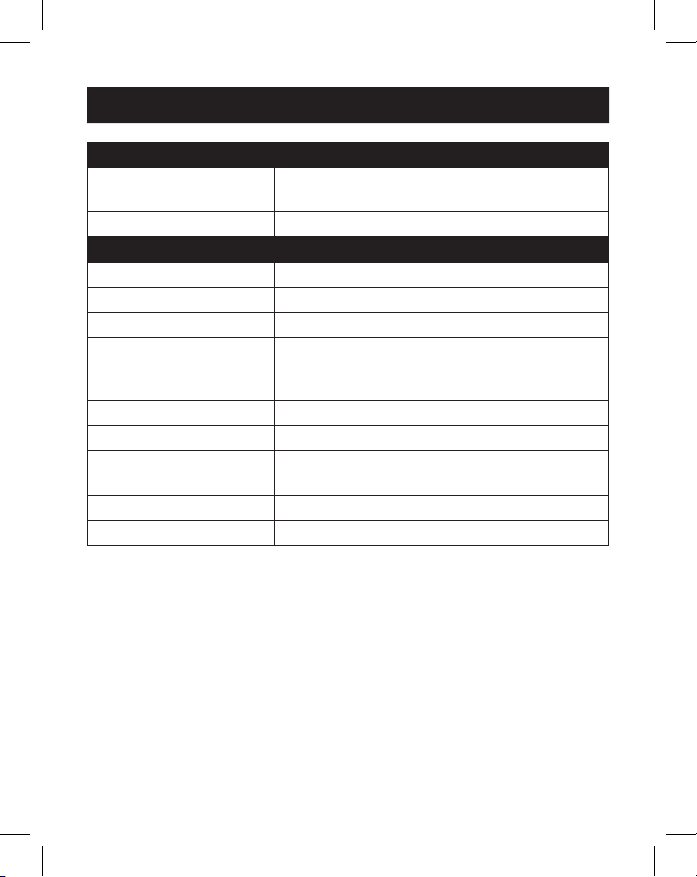
39
Mechanik
Abmessungen
[H x B x T]
0,71 x 13,76 x 2,91 in. (18,1 x 348 x 74 mm)
Gewicht 0,55 lb. (0,25 kg)
Technische Daten
HDMI-Spezikation 1.4
HDCP-Spezikation 1.4
DisplayPort-Spezikation 1.2
Maximal unterstützte
Videoauösung(en)
HDMI (4096 x 2160 @ 30 Hz),
DisplayPort (4096 x 2160 @ 30 Hz),
VGA (1920 x 1200 @ 60 Hz)
Netzwerkgeschwindigkeit 10/100/1000 MBit/s oder 1 GBit/s
Farbtiefe (HDMI) 36 Bit (12 Bits pro Kanal)
Farbunterabtastung
(HDMI)
YCbCr: 4:4:4, 4:2:2, 4:2:0 und RGB: 4:4:4
Audio-Spezikationen LPCM 7.1 Kanal Surround Sound Audio
PD-Ladespezikation PD 3.0 (100 W)
Technische Daten

40
3Jahre eingeschränkte Garantie
Wir garantieren, dass unsere Produkte frei von Material- und Verarbeitungsfehlern sind, und zwar für
einen Zeitraum von drei (3) Jahren ab dem Datum des Erstkaufs. Unsere Verpichtung im Rahmen
dieser Garantie beschränkt sich auf die Reparatur oder den Ersatz (nach eigenem Ermessen) der
fehlerhaften Produkte. Besuchen Sie Tripplite.Eaton.com/support/product-returns, bevor Sie Gerät
zur Reparatur zurücksenden. Diese Garantie gilt nicht für Geräte, die durch Unfall, Fahrlässigkeit oder
unsachgemäße Anwendung beschädigt oder in irgendeiner Weise verändert oder modiziert wurden.
MIT AUSNAHME DER HIERIN ENTHALTENEN BESTIMMUNGEN GEBEN WIR KEINE GARANTIEN, WEDER
AUSDRÜCKLICH NOCH STILLSCHWEIGEND, EINSCHLIESSLICH GARANTIEN DER MARKTGÄNGIGKEIT
UND EIGNUNG FÜR EINEN BESTIMMTEN ZWECK. In einigen Staaten ist die Einschränkung oder der
Ausschluss stillschweigender Garantien nicht zulässig; daher kann es sein, dass die zuvorgenannte(n)
Einschränkung(en) oder Ausschluss(e) für den Käufer nicht gelten.
MIT AUSNAHME DER OBIGEN BESTIMMUNGEN SIND WIRUNTER KEINEN UMSTÄNDEN HAFTBAR
FÜR DIREKTE, INDIREKTE, SPEZIELLE, ZUFÄLLIGE ODER FOLGESCHÄDEN, DIE SICH AUS DER
VERWENDUNG DIESES PRODUKTES ERGEBEN, SELBST WENN AUF DIE MÖGLICHKEIT SOLCHER
SCHÄDEN HINGEWIESEN WURDE. Insbesondere haften wir nicht für Kosten wie entgangene Gewinne
oder Einnahmen, Verlust von Geräten, Verlust der Nutzung von Geräten, Verlust von Software, Verlust
von Daten, Kosten für Ersatzprodukte, Ansprüche von Dritten oder anderes.
Informationen zur WEEE-Konformität für Kunden und Recycler (Europäische Union)
Gemäß der Richtlinie über Elektro- und Elektronik-Altgeräte (WEEE) und den
dazugehörigen Durchführungsbestimmungen haben Kunden, die neue Elektro- und
Elektronikgeräte von Eaton kaufen, ein Recht auf Folgendes:
• Die Rücksendung alter Geräte zum Recycling auf einer Eins-zu-Eins-Basis (dies variiert
je nach Land)
• Die Rücksendung neuer Geräte zum Recycling, wenn diese nicht mehr funktionsfähig sind
WARNUNG
Die Verwendung dieses Geräts für Lebenserhaltungssysteme, in denen der Ausfall des Geräts
den Ausfall des Lebenserhaltungssystems verursachen oder dessen Sicherheit
beziehungsweise Wirksamkeit erheblich beeinträchtigen kann, wird nicht empfohlen.
Eaton verfolgt eine Politik der kontinuierlichen Verbesserung. Spezikationen können ohne
Ankündigung geändert werden.
Garantie
Eaton
1000Eaton Boulevard
Cleveland, OH44122
Vereinigte Staaten
Eaton.com
© 2023 Eaton
Alle Rechte vorbehalten.
Veröffentlichung Nr. 23-07-
693 / 93-3B68_RevD
Juli 2023
Eaton ist eine eingetragene
Marke.
Alle Marken sind Eigentum
der jeweiligen Inhaber.
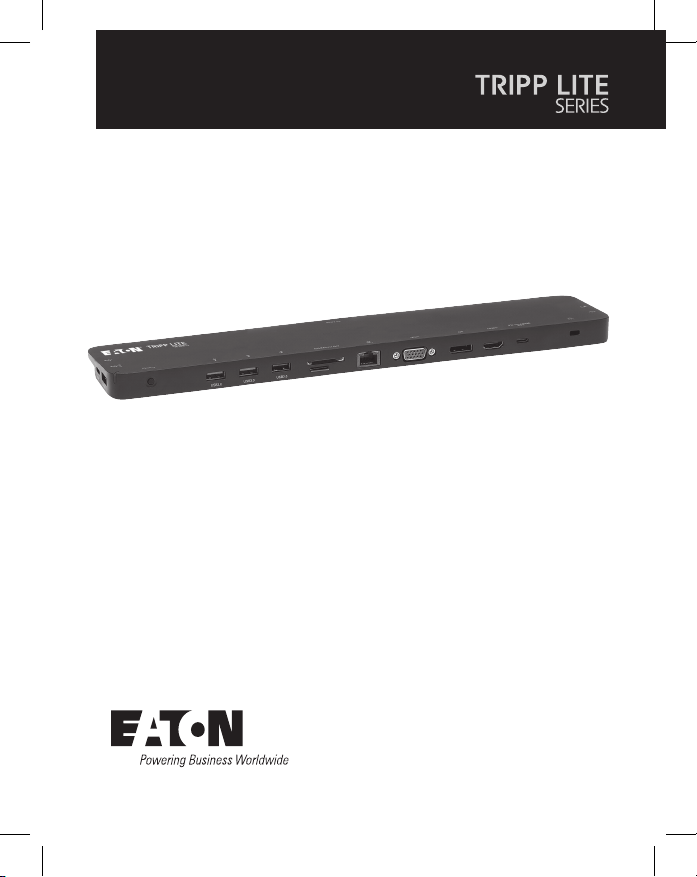
41
Manuale utente
English 1
Español 11
Français 21
Deutsch 31
Modello:
U442-DOCK7D-B
Docking station USB-C
®
per triplo display
Il prodotto acquistato può
differire dall'immagine.

42
• Questa docking station all-in-one include porte per HDMI, DisplayPort,
VGA, Gigabit Ethernet, USB-C (x2), USB-A (x5) e ricarica Power Delivery
(PD) 100 W.
• Collega no a tre display contemporaneamente ed estende il video su
tutti i display (no a tre).
• Supporta risoluzioni video HDMI e DisplayPort no a 4096 x 2160
@ 30 Hz.
• Supporta risoluzioni video VGA no a 1920 x 1200 @ 60 Hz.
• La porta Ethernet supporta una velocità di rete reale di 10/100/1000
Mbps.
• PD 3.0 Fast Role Swap mantiene i dati e i collegamenti di alimentazione
al momento della rimozione e del collegamento dell'alimentatore.
• La porta di ricarica PD USB-C supporta una potenza in ingresso no a
20 V/5 A (100 W).
• Supporta il rilevamento dinamico della corrente e la distribuzione
dell'energia, consentendo alla sorgente (host) di essere caricata a un
livello di potenza dinamico anziché sso.
• Le porte USB dedicate da 5 V/1,5 A forniscono energia di ricarica
rapida ai dispositivi mobili.
• È possibile utilizzare contemporaneamente gli slot per schede Secure
Digital v3.0 SD/Micro SD per la memoria esterna.
• Le porte USB 3.2 e USB 2.0 supportano rispettivamente velocità di
trasferimento dati di 5 Gbps e 480 Mbps.
• Compatibile con Thunderbolt 3.
• Design plug-and-play che non richiede software, driver o alimentazione
esterna
Caratteristiche del prodotto

43
• Cavi patch senza strappo Cat6 Gigabit serie N201
• Cavi audio mini stereo da 3,5 mm serie P312
• Cavi VGA ad alta risoluzione serie P502
• Cavi HDMI ad alta velocità serie P569
• Cavi DisplayPort serie P580 bloccabili
-• Cavi per dispositivi USB 3.2 A/B serie U322
• Cavi C/C USB 3.2 Gen 1 serie U420
• Cavi USB 3.2 Gen 1 A/C serie U428
• Cavo di sincronizzazione/ricarica USB serie M100 - da USB-A a
Lightning
• U442-DOCK7D-B
• Cavo USB 3.2 Type-C - 0,3 m, nero
• Manuale utente
Contenuto della confezione
Accessori opzionali
44
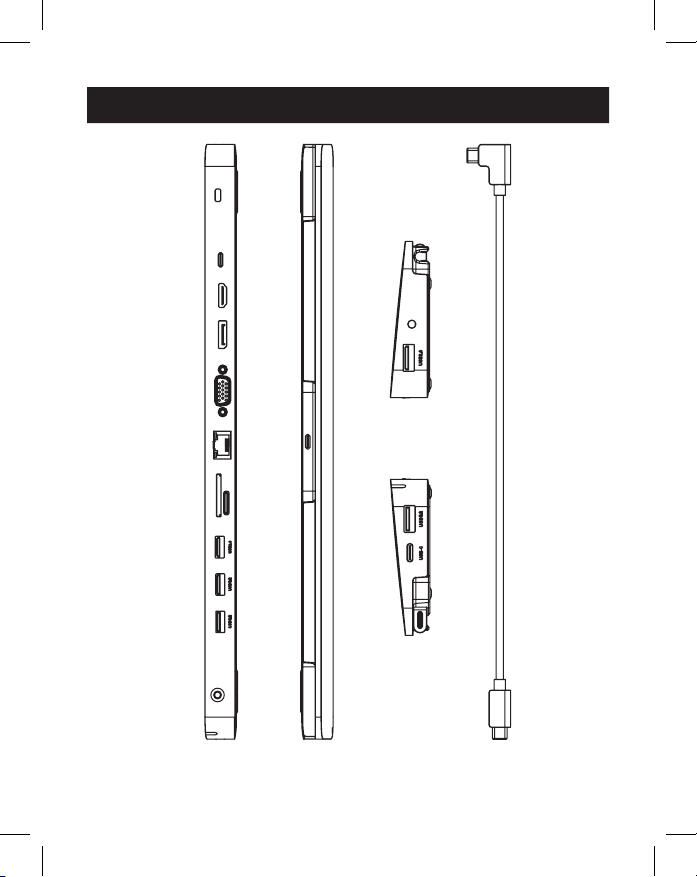
Panoramica del prodotto
2
2
3
3
4
4
5
5
6
6
7
7
8
8
1
1
9
9
J
J
K
K
K
K
O
O
P
P
N
N
L
L
M
M
J
J

45
1
USB Type-C a Host: collegare questa porta all'host (sorgente)
tramite il cavo USB-C a USB-C rimovibile.
2
Cavo USB Type-C: il cavo USB-C a USB-C staccabile collega l'host alla
docking station.
3
Blocco antifurto: collegare un cavo di sicurezza per computer/
laptop fornito dall'utente.
4
Porta di ricarica PDUSB Type-C:
collegare l'adattatore di
alimentazione PD di un dispositivo.
5
PortaHDMI: collegare un monitor HDMI.
6
PortaDisplayPort: collegare un monitor DisplayPort.
7
PortaVGA: collegare un monitor VGA.
8
PortaRJ45: collegare a una rete 10/100/1000 Mbps.
9
Slot per schedeSD/Micro SD: inserire schede di memoria SD e
Micro SD.
J
PorteUSB-A 2.0 (x2): collegare no a due periferiche o dispositivi
USB 2.0.
K
PorteUSB-A 3.2 (x2): collegare no a due periferiche o dispositivi
USB 3.2.
L
PortaUSB-A 3.2: supporta la ricarica a 5 V 1,5 A per dispositivi ad
alto consumo energetico.
M
PortaUSB Type-C solo dati: supporta la trasmissione di dati no a
5Gbps.
N
Porta mini stereo da3,5 mm: collega un altoparlante o un
microfono.
O
Pulsante di alimentazione: spegne e accende l'unità.
P
LED: il LED verde si illumina quando l'unità è accesa e alimentata.
Panoramica del prodotto
46
Note:
• Le risoluzioni massime quando tutti e tre i display sono collegati sono 1920 x
1080 @ 60 Hz in modalità SST (Single Stream Transport) e 1280 x 720 @ 60 Hz in
modalità MST (Multi Stream Transport).
• I computer o laptop Mac OS si estendono solo a un monitor. Gli altri saranno duplicati.
1. Staccare il cavo USB 3.2 Type-C dall'unità. Collegare il connettore
USB-C ad angolo retto alla docking station e il connettore USB-C diritto
alla sua sorgente (ad esempio, il computer portatile).
2. Collegare no a tre monitor utilizzando le porte video HDMI, VGA e
DisplayPort disponibili.
Nota: è possibile estendere no a tre schermi monitor, per un totale di quattro schermi
separati (incluso lo schermo della sorgente). La tabella seguente denisce le risoluzioni
video massime in base a congurazioni speciche in modalità SST e MST.
Modalità SST (visualizzazione singola downstream)
Porte VGA HDMI DP
Display singolo
collegato
1080p/60 Hz N/A N/A
N/A 4K/30 Hz N/A
N/A N/A 4K/30 Hz
Doppio display
collegato
1080p/60 Hz 1080p/60 Hz N/A
1080p/60 Hz N/A 1080p/60 Hz
N/A 4K/30 Hz 4K/30 Hz
Tre display collega-
ti
1080p/60 Hz 1080p/60 Hz 1080p/60 Hz
Installazione
47
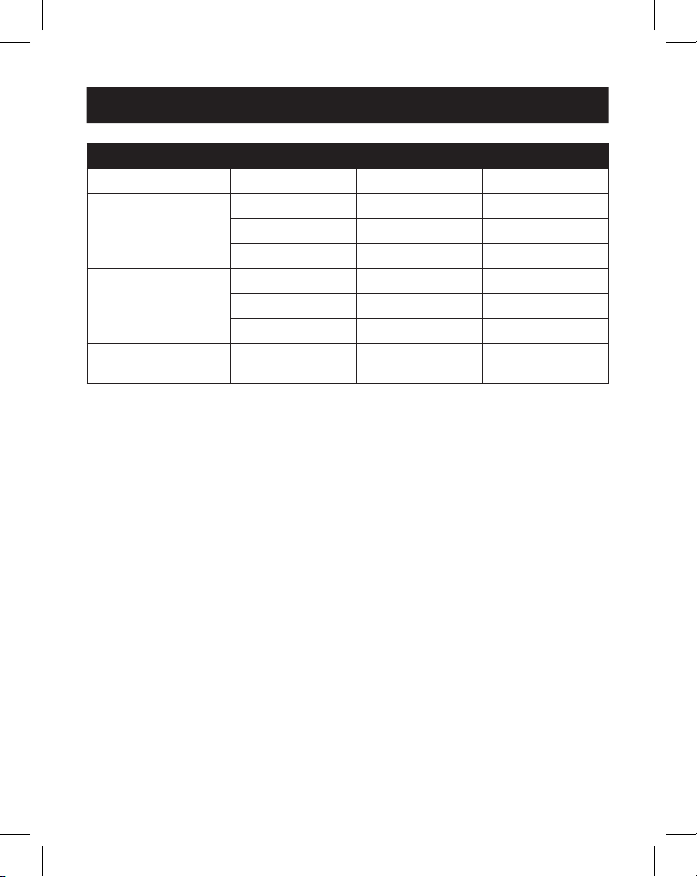
Modalità MST (visualizzazioni multiple downstream)
Porte VGA HDMI DP
Display singolo
collegato
1080p/60 Hz N/A N/A
N/A 4K/30 Hz N/A
N/A N/A 4K/30 Hz
Due display
collegati
1080p/60 Hz 1080p/60 Hz N/A
1080p/60 Hz N/A 1080p/60 Hz
N/A 4K/30 Hz 4K/30 Hz
Tre display collegati 720p/60 Hz 720p/60 Hz 720p/60 Hz
3. Collegare no a due periferiche USB 2.0, come una tastiera e un mouse.
4. Collegare no a tre periferiche USB 3.2.
Nota: la porta di ricarica USB 3.2 supporta no a 7,5 W (5 V 1,5 A) di potenza di
ricarica.
5. Collegarsi a una rete Ethernet attraverso la porta RJ45 per
raggiungere velocità no a 10/100/1000 Mbps.
6. Collegare la porta mini stereo da 3,5 mm a un microfono o a un
altoparlante con un cavo audio da 3,5 mm fornito dall'utente.
7. Inserire una scheda SD o Micro SD negli slot corrispondenti per
accedere alla memoria esterna.
Nota: è possibile utilizzare contemporaneamente entrambi gli slot delle schede di
memoria.
8. Trasfere dati a velocità no a 5 Gbps utilizzando la porta dati USB
Type-C.
9. Ricaricare il dispositivo sorgente collegando il suo caricatore USB-C
PD alla porta di ricarica PD USB-C della docking station per una
potenza di ricarica no a 100 W (20 V 5 A).
10. Collegare un lucchetto di sicurezza per cavo alla porta del lucchetto
antifurto (opzionale).
Installazione
48
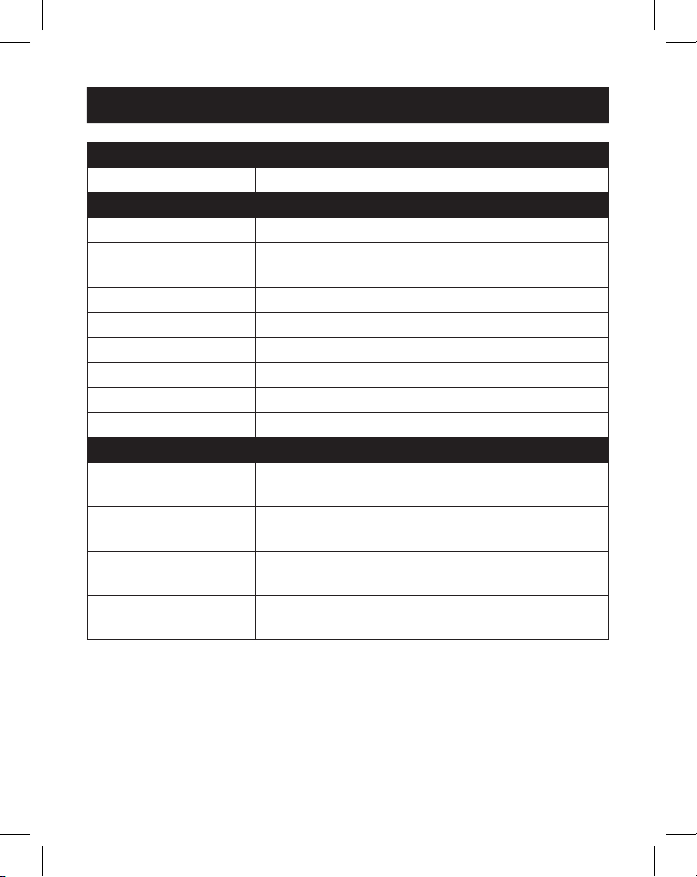
Connettore di ingresso
USB-C USB Type-C, femmina
Connettore/i di uscita
USB-A USB 3.2, femmina (x3), USB 2.0, femmina (x2)
USB-C USB-C solo dati, femmina
PD USB-C solo ricarica, femmina
Ethernet RJ45, femmina
VGA VGA, femmina
HDMI HDMI, femmina
DisplayPort DisplayPort, femmina
Audio 3,5 mm, femmina
Schede di memoria SD, Micro SD
Condizioni ambientali
Temperatura di
esercizio
Da 32 a 113 °F (da 0 a 45 °C)
Umidità operativa Umidità relativa dal 10% all'85%, senza
condensa
Temperatura di
conservazione
Da 14 a 158 °F (da -10 a 70 °C)
Umidità di
conservazione
Umidità relativa dal 5% al 90%, senza condensa
Specifiche
49
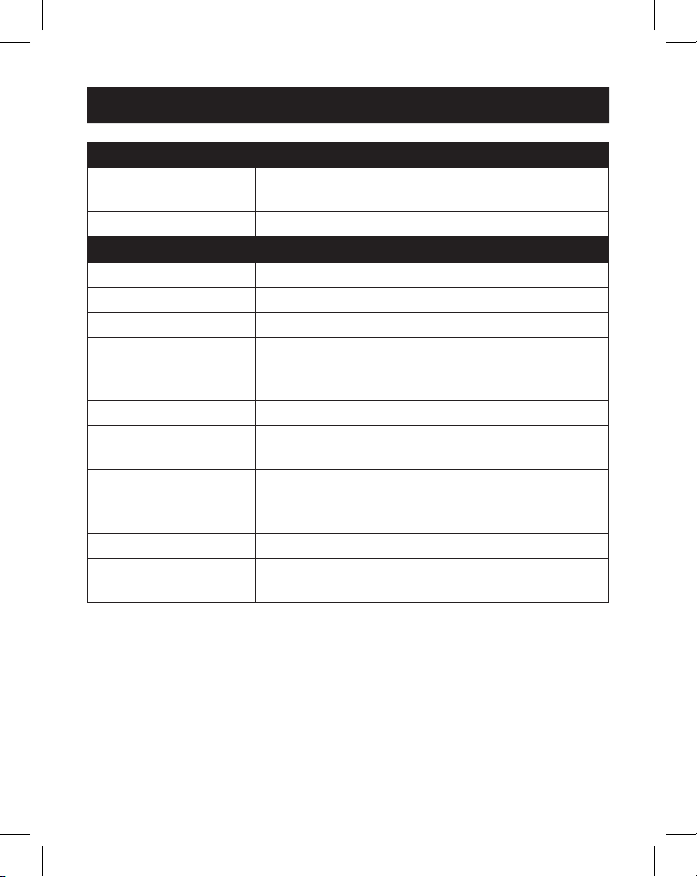
Meccanico
Dimensioni dell'unità
[A x L x P]
0,71 x 13,76 x 2,91 poll. (18,1 x 348 x 74 mm)
Peso unitario 0,55 lb. (0,25 kg)
Speciche
Speciche HDMI 1,4
Speciche HDCP 1,4
Speciche DisplayPort 1,2
Massima risoluzione
video supportata
HDMI (4096 x 2160 @ 30 Hz),
DisplayPort (4096 x 2160 @ 30 Hz),
VGA (1920 x 1200 @ 60 Hz)
Velocità di rete 10/100/1000 Mbps o 1 Gbps
Profondità colore
(HDMI)
36 bit (12 bit per canale)
Sottocampionamento
della crominanza
(HDMI)
YCbCr: 4:4:4, 4:2:2, 4:2:0 e RGB: 4:4:4
Speciche audio Sistema audio surround a 7,1 canali LPCM
Speciche di ricarica
PD
PD 3.0 (100 W)
Specifiche
50
Garanzia limitata di 3 anni
Garantiamo che i nostri prodotti sono privi di difetti nei materiali e nella lavorazione per un periodo di
tre (3) anni dalla data di acquisto iniziale. I nostri obblighi ai sensi della presente garanzia sono limitati
alla riparazione o sostituzione (a nostra esclusiva discrezione) di eventuali prodotti che presentino tali
difetti. Prima di inviare un prodotto per la riparazione, visitare Tripplite.Eaton.com/support/product-
returns. La presente garanzia non si applica alle unità danneggiate accidentalmente, a causa di
negligenza o di un'errata applicazione, o che siano state in qualsiasi modo alterate o modicate.
SALVO QUANTO PREVISTO NEL PRESENTE DOCUMENTO, NON FORNIAMO ALCUNA GARANZIA,
ESPLICITA O IMPLICITA, INCLUSE LE GARANZIE DI COMMERCIABILITÀ E IDONEITÀ PER UN PARTICOLARE
SCOPO. Alcuni stati non consentono la limitazione o l'esclusione di garanzie implicite; pertanto, in tali
casi, le suddette limitazioni o esclusioni potrebbero non essere applicabili all'acquirente.
SALVO QUANTO SOPRA PREVISTO, IN NESSUN CASO SAREMO RESPONSABILI DI DANNI DIRETTI,
INDIRETTI, SPECIALI, ACCIDENTALI O CONSEQUENZIALI DOVUTI ALL'UTILIZZO DEL PRODOTTO, ANCHE
SE AVVISATI DELLA POSSIBILITÀ DI TALI DANNI. Nello specico, non siamo responsabili di alcun costo,
quali mancati redditi o guadagni, perdita di attrezzature, perdita dell'uso di attrezzature, perdita di
software, perdita di dati, costi relativi a soluzioni alternative, reclami da parte di terzi o costi di altra
natura.
Informazioni sulla conformità alla direttiva RAEE per clienti e riciclatori (Unione europea)
In base alla Direttiva sui riuti di apparecchiature elettriche ed elettroniche (RAEE) e ai
regolamenti sulla relativa attuazione, i clienti che acquistano apparecchiature elettriche
ed elettroniche nuove da Eaton hanno il diritto di:
• Restituire i dispositivi usati per consentirne il riciclaggio e la sostituzione con prodotti
equivalenti (a seconda delle prassi adottate da ogni singolo Paese)
• Restituire i dispositivi al termine del loro ciclo di vita anché vengano riciclati.
AVVERTENZA
È sconsigliato l'utilizzo di questo apparecchio in applicazioni di sostegno vitale laddove sia
ragionevolmente prevedibile che un malfunzionamento dell'apparecchio possa causare un
malfunzionamento dell'appar ecchiatura di sostegno vitale o avere gravi ripercussioni sulla sua
sicurezza o ecacia.
Eaton ha una politica di miglioramento continuo. Le speciche sono soggette a modiche senza
alcun preavviso.
Garanzia

51

52
Eaton
1000 Eaton Boulevard
Cleveland, Ohio 44122
Stati Uniti
Eaton.com
© 2023 Eaton
Tutti i diritti riservati
Pubblicazione n. 23-07-
693/93-3B68_RevD
Luglio 2023
Eaton è un marchio
registrato.
Tutti i marchi commerciali
sono di proprietà
dei rispettivi titolari.