1
Owner’s Manual
1111 W. 35th Street, Chicago, IL 60609 USA • tripplite.com/support
Copyright © 2022 Tripp Lite. All rights reserved.
USB-C
®
Dual Display Docking Station
with International Power Supply
Model: U442-DOCK20BINT
USB Type-C and USB-C are registered trademarks of USB Implementers Forum
WARRANTY REGISTRATION
Register your product today and be
automatically entered to win an ISOBAR
®
surge protector in our monthly drawing!
tripplite.com/warranty
Español 12 • Français 22 • Русский 32 • Deutsch 42

2
Product Features
• Dual-display capability lets you extend across up to three
screens (including the host computer) at resolutions up to
1920 x 1080p @ 60 Hz when connecting up to two HDMI
displays
• Single-monitor installations support resolutions up to
2560 x 1440 @ 50 Hz
• USB-C PD 3.0 charging port provides up to 85W of power to
the connected source
• RJ45 Ethernet port supports true 10/100/1000 Mbps network
speeds, providing 1 Gbps connectivity for when Wi-Fi signals
are weak or unavailable
• Read, write and transfer data at up to 5 Gbps via the docking
station’s three USB 3.2 Gen1 ports, or connect other USB
peripherals, such as a keyboard and mouse
• Dedicated USB 3.2 Type-A charging port provides up to 5V
1.5A (7.5W) of fast charging power to mobile devices and 2.4A
to Apple devices
• Multi-mount design provides an all-in-one desktop solution to
help create a clutter-free work environment

3
Package Includes
Optional Accessories
System Requirements
• U442-DOCK20BINT
• USB 3.2 Gen2 C-to-C Cable with C-to-A Adapter – 1 m
• External Power Supply with BS 1363 UK and CEE 7/8 EU
Power Cords
• Owner’s Manual
• P569-Series High Speed HDMI Cables
• N201-Series Cat6 Gigabit Snagless Patch Cables
• U038-0XX-GY-MAX Heavy-Duty USB A-to-C Cables
• M100-Series USB A-to-Lightning Cables
• Windows or Mac Operating System
4
Product Overview
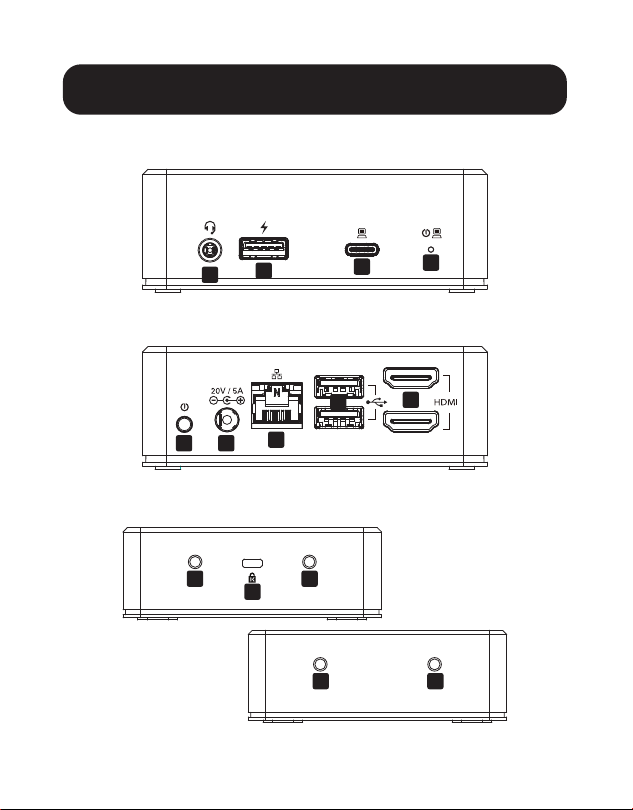
Front:
Back:
Sides:
A
B
C
D
E F
G
K
J
J
J
J
H
I
5
Product Overview
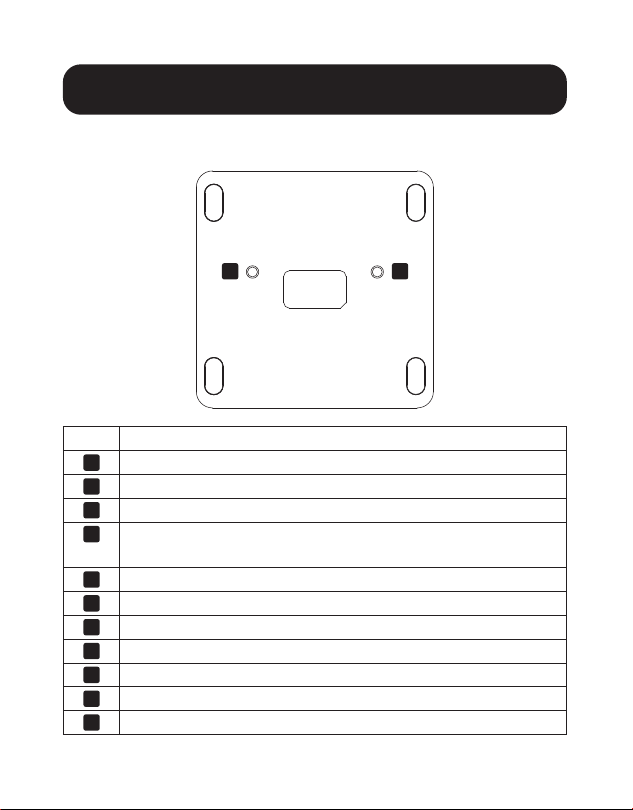
Bottom:
Item Description
A
Audio In/Out Jack
B
USB 3.2 Gen1 Type-A Port, BC 1.2-Compliant
C
USB Type-C Port with PD 3.0 Charging
D
LED Indicator - Illuminates blue when powered,
green when active
E
Power On/Off Button
F
DC Power In Jack
G
RJ45 Ethernet Port
H
USB 3.2 Gen1 Type-A Ports
I
HDMI Ports
J
Mounting Screw Holes
K
K-Lock for Securing Device
J J
6
Installation
Prior to Installation -
for Windows operating systems only:
DisplayLink drivers are required for both video and audio functions
when using Windows OS. The drivers can be downloaded and
installed from www.displaylink.com/downloads. Once the drivers
are successfully installed, restart the host computer.
Notes:
• The U442-DOCK20BINT is able to recognize USB peripherals such as
a mouse, keyboard or flash drive, without DisplayLink drivers installed
on the host PC or laptop running Windows.
• Mac operating systems do not require the drivers. In the event a Mac
OS driver is needed, the drivers can be downloaded from
www.displaylink.com/downloads.
Installation
1
2
3
3
4
5
6
7
7

7
Installation
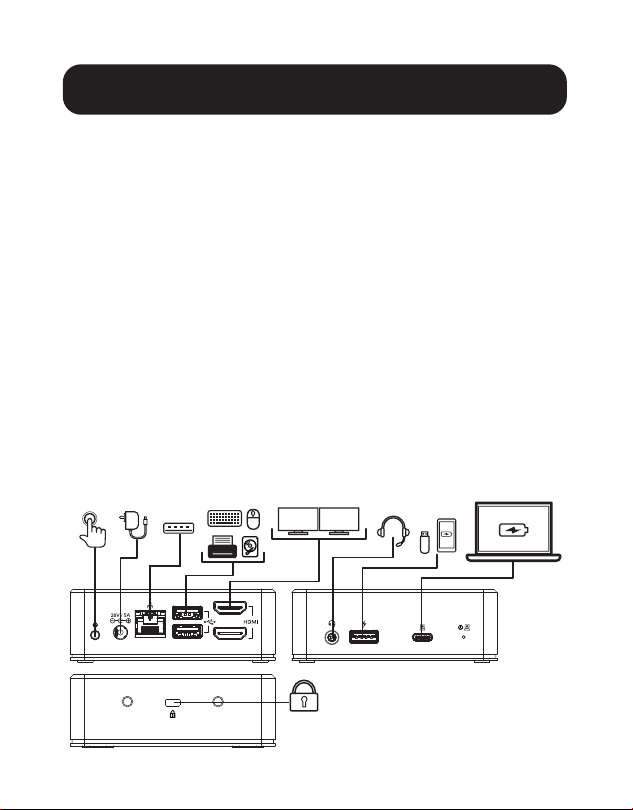
1. Connect the host computer or laptop to the U442-
DOCK20BINT using the included USB-C to C cable. Use the
USB-A to C adapter if necessary.
Note: Your source device will only charge when using a USB-C to C cable.
2. Connect up to two HDMI-compliant displays to the
U442-DOCK20BINT using Tripp Lite’s P569-Series cable
(sold separately).
Note: Up to three screens can be extended in a multi-monitor
configuration. Manipulate the orientation or mode of the displays
(mirror or extend) through the host computer’s display settings.
3. Connect up to three USB peripherals such as a keyboard,
mouse, flash drive or smartphone.
Note: The front panel USB port labeled with a charging symbol
supports fast charging up to 1.5A and Apple Charge up to 2.4A.
4. Connect to a wired Gigabit LAN using Tripp Lite’s N201-Series
Cat6 Cable (sold separately) if Wi-Fi signals are weak or
unavailable.
5. Connect headphones to the available 3.5 mm port.
Note: If no sound is output, the audio output source must be
changed to USB audio.
6. (Optional) Lock and secure your U442-DOCK20BINT docking
station to your desk using the K-LOCK port located on the side
of the unit.
7. Connect the included power supply to the docking station and
power on the unit using the power button located to the left
of the DC port.
8
Specifications
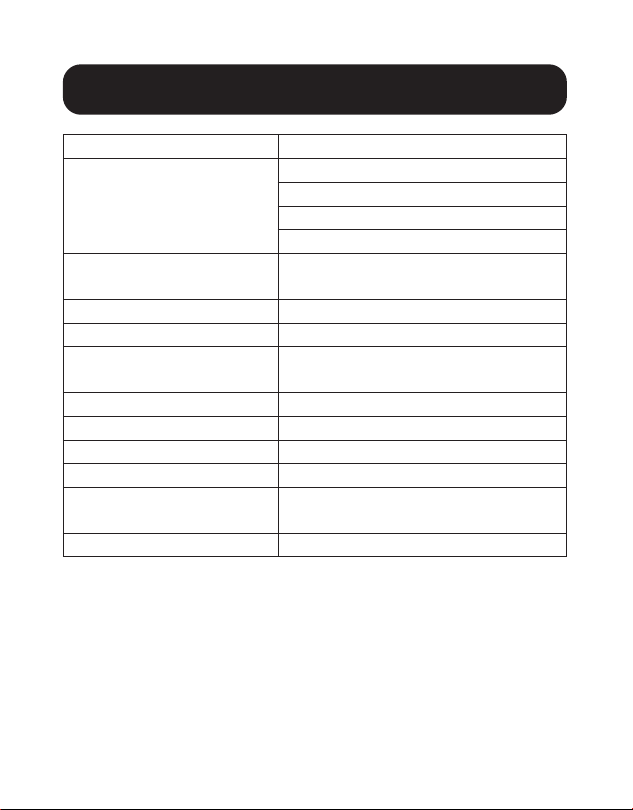
Input USB-C
Output
(x2) HDMI
RJ45
(x3) USB 3.2 Gen 1 Type-A
3.5 mm
Video (HDMI)
Single: 2560 x 1440 @ 50 Hz
Dual: 1920 x 1080 @ 60 Hz
Audio (3.5 mm)
2.1 Channel Surround Sound
Ethernet (RJ45)
10/100/1000 Mbps
Power Supply
Input: 100-240V @ 50/60 Hz, 2A
Output: 20V 5A
HDMI Specification
1.3
BC 1.2 Compliant
Yes
Operating Temperature
32°F to 104°F (0°C to 40°C)
Storage Temperature
-4°F to 158°F (-20°C to 70°C)
PD Charging Specification
PD 3.0 up to 85W
(20/15/9/5V 4.25A)
Power In
DC 100W (20V 5A)

9
Warranty & Product Registration
3-Year Limited Warranty
Tripp Lite warrants its products to be free from defects in materials and workmanship
for a period of three (3) years from the date of initial purchase. Tripp Lite’s obligation
under this warranty is limited to repairing or replacing (at its sole option) any
such defective products. To obtain service under this warranty, you must obtain a
Returned Material Authorization (RMA) number from Tripp Lite or an authorized
Tripp Lite service center. Products must be returned to Tripp Lite or an authorized
Tripp Lite service center with transportation charges prepaid and must be
accompanied by a brief description of the problem encountered and proof of date
and place of purchase. This warranty does not apply to equipment, which has been
damaged by accident, negligence or misapplication or has been altered or modified
in any way.
EXCEPT AS PROVIDED HEREIN, Tripp Lite MAKES NO WARRANTIES, EXPRESS OR
IMPLIED, INCLUDING WARRANTIES OF MERCHANTABILITY AND FITNESS FOR A
PARTICULAR PURPOSE. Some states do not permit limitation or exclusion of implied
warranties; therefore, the aforesaid limitation(s) or exclusion(s) may not apply to the
purchaser.
EXCEPT AS PROVIDED ABOVE, IN NO EVENT WILL Tripp Lite BE LIABLE FOR DIRECT,
INDIRECT, SPECIAL, INCIDENTAL OR CONSEQUENTIAL DAMAGES ARISING OUT
OF THE USE OF THIS PRODUCT, EVEN IF ADVISED OF THE POSSIBILITY OF SUCH
DAMAGE. Specifically, Tripp Lite is not liable for any costs, such as lost profits or
revenue, loss of equipment, loss of use of equipment, loss of software, loss of data,
costs of substitutes, claims by third parties, or otherwise.
PRODUCT REGISTRATION
Visit tripplite.com/warranty today to register your new Tripp Lite product. You’ll be
automatically entered into a drawing for a chance to win a FREE Tripp Lite product!
** No purchase necessary. Void where prohibited. Some restrictions apply. Open to U.S. residents
only. See tripplite.com for details.
10
Warranty & Product Registration
FCC Notice, Class B
This device complies with part 15 of the FCC Rules. Operation is subject to the
following two conditions: (1) This device may not cause harmful interference, and
(2) this device must accept any interference received, including interference that
may cause undesired operation.
Note: This equipment has been tested and found to comply with the limits for
a Class B digital device, pursuant to part 15 of the FCC Rules. These limits are
designed to provide reasonable protection against harmful interference in a
residential installation. This equipment generates, uses and can radiate radio
frequency energy and, if not installed and used in accordance with the instructions,
may cause harmful interference to radio communications. However, there is
no guarantee that interference will not occur in a particular installation. If this
equipment does cause harmful interference to radio or television reception, which
can be determined by turning the equipment off and on, the user is encouraged to
try to correct the interference by one or more of the following measures:
• Reorient or relocate the receiving antenna.
• Increase the separation between the equipment and receiver.
• Connect the equipment into an outlet on a circuit different from that to which the
receiver is connected.
• Consult the dealer or an experienced radio/TV technician for help.
Any changes or modifications to this equipment not expressly approved by Tripp Lite
could void the user’s authority to operate this equipment.
WEEE Compliance Information for Tripp Lite Customers and Recyclers
(European Union)
Under the Waste Electrical and Electronic Equipment (WEEE) Directive and
implementing regulations, when customers buy new electrical and electronic
equipment from Tripp Lite they are entitled to:
• Send old equipment for recycling on a one-for-one, like-for-like basis (this
varies depending on the country)
• Send the new equipment back for recycling when this ultimately becomes
waste
11
Warranty & Product Registration
Use of this equipment in life support applications where failure of this equipment
can reasonably be expected to cause the failure of the life support equipment or to
significantly affect its safety or effectiveness is not recommended.
Tripp Lite has a policy of continuous improvement. Specifications are subject to
change without notice. Photos and illustrations may differ slightly from actual
products.
1111 W. 35th Street, Chicago, IL 60609 USA • tripplite.com/support
21-12-046 934080_RevA

12
Manual del Propietario
1111 W. 35th Street, Chicago, IL 60609, EE. UU. • tripplite.com/support
Copyright © 2022 Tripp Lite. Todos los derechos reservados.
Estación de Conexión USB-C
®
para Dos Pantallas con Fuente de
Alimentación Internacional
Modelo: U442-DOCK20BINT
USB Type-C y USB-C son marcas comerciales registradas del USB Implementers
Forum
English 1 • Français 22 • Русский 32 • Deutsch 42

13
Características del Producto
• La capacidad para dos pantallas le permite extender hasta tres
pantallas (incluyendo la computadora anfitrión) a resoluciones
de hasta 1920 x 1080p @ 60 Hz al conectar hasta dos
pantallas HDMI
• Las instalaciones de un solo monitor soportan resoluciones de
hasta 2560 x 1440 @ 50 Hz
• El puerto de carga USB C PD 3.0 proporciona hasta 85W de
potencia al dispositivo conectado
• El puerto Ethernet RJ45 soporta velocidades reales de red de
10Mbps / 100Mbps / 1000Mbps, proporcionando conectividad
de 1 Gbps para cuando las señales de Wi-Fi sean débiles o no
estén disponibles
• Lea, escriba y transfiera datos a hasta 5 Gbps mediante los
tres puertos USB 3.2 Gen1 de la estación de conexión o
conecte otros periféricos USB, como un teclado y mouse.
• Un puerto de carga USB 3.2 Type-A dedicado proporciona
hasta 5V 1.5A (7.5W) de potencia de carga rápida a los
dispositivos móviles y 2.4A a dispositivos Apple
• El diseño para instalación múltiple proporciona una solución
de escritorio todo en uno para ayudar a crear un entorno de
trabajo libre de desorden

14
El Paquete Incluye
Accesorios Opcionales
Requisitos del Sistema
• U442-DOCK20BINT
• Cable USB 3.2 Gen2 C a C con Adaptador C a A – 1 m
• Fuente de Alimentación Externa con Cables de Alimentación
BS 1363 para el Reino Unido y CEE 7/8 para la Unión Europea
• Manual del Propietario
• Cables HDMI de Alta Velocidad de la Serie P569
• Cables Patch Snagless Cat6 Gigabit Serie N201
• Cables USB A a C para Servicio Pesado U038-0XX-GY-MAX
• Cables USB A a Lightning de la Serie M100
• Sistema Operativo Windows o Mac
15
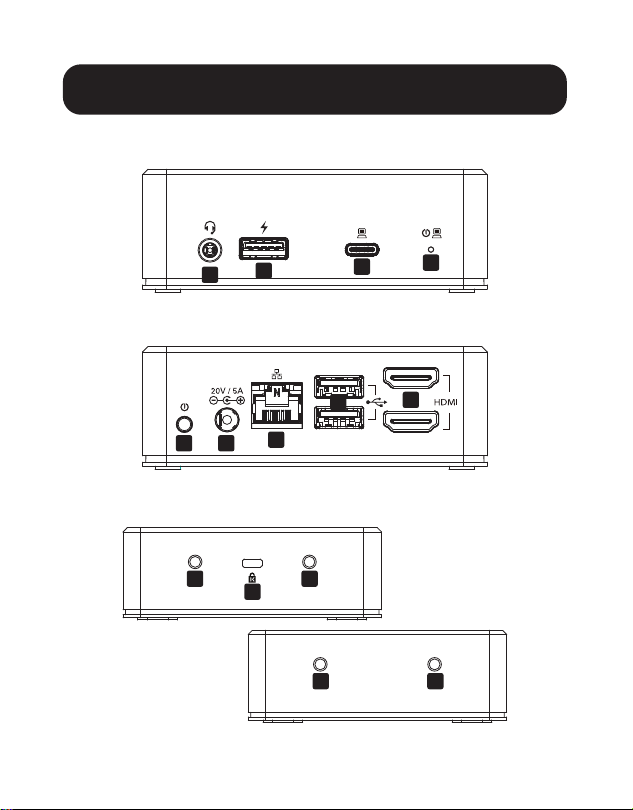
Vista General del Producto
Frente:
Atrás:
Costados:
A
B
C
D
E F
G
K
J
J
J
J
H
I
16
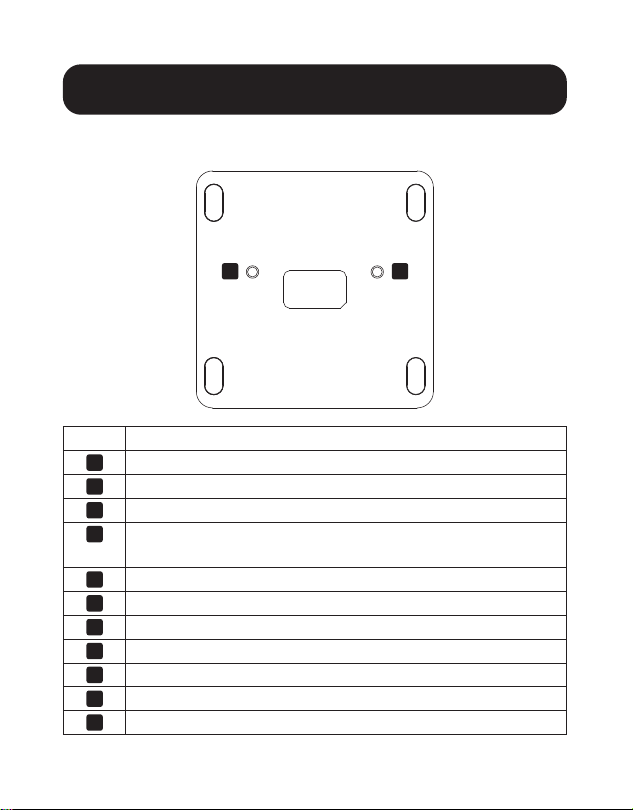
Vista General del Producto
Parte Inferior:
Rubro Descripción
A
Enchufe de Entrada y Salida de Audio
B
Puerto USB 3.2 Gen1 Type-A, Compatible con BC 1.2
C
Puerto USB Tipo C con Carga PD 3.0
D
Indicador LED - Se ilumina en azul cuando se enciende,
verde cuando está activo
E
Botón de Encendido y Apagado
F
Enchufe de Alimentación CD
G
Puerto Ethernet RJ45
H
Puertos USB 3.2 Gen1 Type-A
I
Puertos HDMI
J
Orificios para Tornillos de Instalación
K
Cerradura K para Asegurar el Dispositivo
J J

17
Instalación
Antes de la Instalación - para sistemas
operativos Windows solamente:
Se requieren controladores de DisplayLink para las funciones
de video y audio al usar Windows. Los controladores pueden
descargarse e instalarse desde www.DisplayLink.com/downloads.
Una vez instalados con éxito los controladores, reinicie la
computadora anfitrión.
Notas:
• El U442-DOCK20BINT es capaz de reconocer periféricos USB como
mouse, teclado o memoria USB, sin controladores de DisplayLink
instalados en la PC anfitrión o laptop operando con Windows.
• Los sistemas operativos Mac no requieren de los controladores. En
caso de necesitar un controlador para Mac OS, los controladores
pueden descargarse desde www.displaylink.com/downloads.
Instalación
1
2
3
3
4
5
6
7
7

18
Instalación
1. Conecte la computadora o laptop anfitrión al
U442-DOCK20BINT usando el cable USB-C a C incluido.
Use el adaptador USB A a C si fuera necesario.
Nota: su dispositivo fuente solo se cargará cuando se use un cable
USB C a C.
2. Conecte hasta dos pantallas compatibles con HDMI al
U442-DOCK20BINT usando el cable de la Serie P569 de
Tripp Lite (vendido por separado).
Nota: pueden extenderse hasta tres pantallas en una configuración
de múltiples monitores. Manipule la orientación o modo de las
pantallas (espejo o extendido) a través de los parámetros de pantalla
de la computadora anfitrión.
3. Conecte hasta tres periféricos USB como un teclado, mouse,
memoria USB o smartphone.
Nota: El puerto USB del panel frontal etiquetado con un símbolo de
carga soporta carga rápida de hasta 1.5A y carga de Apple hasta
2.4A.
4. Si las señales de Wi-Fi son débiles o no están disponibles,
conecte a una LAN Gigabit cableada usando un Cable Cat6
de la serie N201 de Tripp Lite (vendido por separado).
5. Conecte los audífonos al puerto de 3.5 mm disponible.
Nota: Si no hay salida de sonido, la fuente de salida de audio debe
cambiarse a audio USB.
6. (Opcional) Bloquee y asegure su estación de conexión
U442-DOCK20BINT a su escritorio usando el puerto K-LOCK
ubicado en el costado de la unidad.
19
Instalación
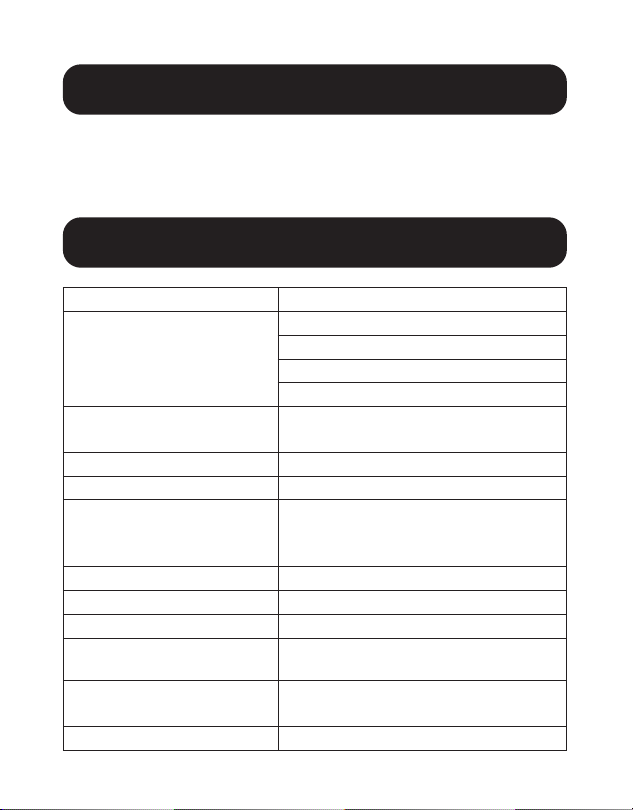
Especificaciones
Entrada USB C
Salida
(x2) HDMI
RJ45
(x3) USB 3.2 Gen 1 Type-A
3.5 mm
Video (HDMI)
Uno: 2560 x 1440 @ 50 Hz
Dos: 1920 x 1080 @ 60 Hz
Audio (3.5 mm)
Sonido Envolvente de 2.1 Canales
Ethernet (RJ45)
10/100/1000 Mbps
Fuente de Alimentación
Entrada: 100V ~ 240V @ 50Hz /
60Hz, 2A
Salida: 20V 5A
Especificación HDMI
1.3
Cumple con BC 1.2
Sí
Temperatura de Operación
0 °C a 40 °C [32 °F a 104 °F]
Temperatura de
Almacenamiento
-20 °C a 70 °C [-4 °F a 158 °F]
Especificación de
Carga PD
PD 3.0 hasta 85W
(20V / 15V / 9V / 5V @ 4.25A)
Entrada de Potencia
100W CD (20V 5A)
7. Conecte la fuente de alimentación incluida a la estación de
conexión y encienda la unidad usando el botón de encendido
ubicado a la izquierda del puerto de CD.

20
Garantía
Garantía Limitada de 3 años
Tripp Lite garantiza durante un período de tres (3) años a partir de la fecha de
compra inicial que este producto no presenta defectos de materiales ni de mano de
obra. La obligación de Tripp Lite bajo esta garantía está limitada a la reparación o
reemplazo (a su entera discreción) de cualquier producto defectuoso. Para obtener
servicio bajo esta garantía, debe obtener un número de Autorización de Devolución
de Mercancía [RMA] de Tripp Lite o de un
centro de servicio autorizado de Tripp Lite. Los productos deben devolverse a
Tripp Lite o a un centro de servicio autorizado de Tripp Lite con los cargos de
transporte prepagados y deben acompañarse con una breve descripción del
problema y un comprobante de la fecha y el lugar de compra. Esta garantía no se
aplica a equipos que hayan sido dañados por accidente, negligencia o mal uso o
hayan sido alterados o modificados de alguna manera.
EXCEPTO COMO SE INDICA EN EL PRESENTE, TRIPP LITE NO OTORGA GARANTÍAS
EXPRESAS O IMPLÍCITAS, INCLUIDAS LAS GARANTÍAS DE COMERCIABILIDAD Y
ADECUACIÓN PARA UN DETERMINADO PROPÓSITO. Algunos estados no permiten
la limitación o exclusión de garantías implícitas; por lo tanto, las limitaciones o
exclusiones antes mencionadas pueden no aplicarse al comprador.
EXCEPTO COMO SE INDICA ANTERIORMENTE, EN NINGÚN CASO TRIPP LITE SERÁ
RESPONSABLE POR DAÑOS DIRECTOS, INDIRECTOS, ESPECIALES, INCIDENTALES
O CONSECUENTES QUE SURJAN DEL USO DE ESTE PRODUCTO, INCLUSO SI SE
ADVIERTE SOBRE LA POSIBILIDAD DE TAL DAÑO. Específicamente, Tripp Lite no es
responsable por ningún costo, como pérdida de ganancias o ingresos, pérdida de
equipos, pérdida del uso de equipos, pérdida de software, pérdida de datos, costos
de sustituciones, reclamaciones de terceros o de cualquier otra forma.
21
Garantía
Información de Cumplimiento con WEEE para Clientes y Recicladores de
Tripp Lite (Unión Europea)
Conforme a la Directiva de Residuos de Equipos Eléctricos y Electrónicos
[WEEE] y regulaciones aplicables, cuando los clientes adquieren un equipo
eléctrico y electrónico nuevo de Tripp Lite están obligados a:
• Enviar para reciclaje equipos viejos del mismo tipo y en el mismo número
(esto varía de un país a otro)
• Devolver el equipo nuevo para fines de reciclaje una vez que finalmente se
convierta en residuo
No se recomienda el uso de este equipo en aplicaciones de soporte de vida en
donde razonablemente se pueda esperar que la falla de este equipo cause la falla
del equipo de soporte de vida o afecte significativamente su seguridad o efectividad.
Tripp Lite tiene una política de mejora continua. Las especificaciones están sujetas
a cambio sin previo aviso. Las fotografías e ilustraciones pueden diferir ligeramente
de los productos reales.
1111 W. 35th Street, Chicago, IL 60609 EE UU • tripplite.com/support
21-12-046 934080_RevA

22
Manuel de l'utilisateur
1111 W. 35th Street, Chicago, IL 60609 USA • tripplite.com/support
Droits d'auteur © 2022 Tripp Lite. Tous droits réservés.
Station d'accueil pour deux
écrans USB-C
®
avec alimentation
internationale
Modèle : U442-DOCK20BINT
USB Type-C et USB-C sont des marques de commerce enregistrées d'USB Imple-
menters Forum
English 1 • Español 12 • Русский 32 • Deutsch 42

23
Caractéristiques du produit
• La capacité à deux écrans permet l'extension jusqu'à trois
écrans (incluant l'ordinateur hôte) à des résolutions pouvant
atteindre jusqu'à 1 920 x 1 080p @ 60 Hz en connectant
jusqu'à deux écrans HDMI.
• Les installations avec un seul moniteur prennent en charge des
résolutions jusqu'à 2 560 x 1440 @ 50 Hz.
• Le port de chargement de la distribution de puissance 3.0
USB-C fournit jusqu'à 85 W de puissance de charge à la
source connectée.
• Le port Ethernet RJ45 prend en charge de véritables
vitesses de réseau de 10/100/1 000 Mbps, fournissant une
connectivité de 1 Gbps lorsque les signaux Wi-Fi sont faibles
ou indisponibles.
• Permet la lecture, l'écriture et le transfert des données pouvant
atteindre jusqu'à 5 Gbps via les trois ports USB 3.2 Gen1 de
la station d'accueil ou le raccordement d'autres équipements
périphériques USB comme un clavier et une souris.
• Le port Type-A USB 3.2 dédié de chargement procure jusqu'à
5 V 1,5 A (7,5 W) de chargement rapide aux appareils mobiles
et 2,4 A aux appareils Apple.
• La conception à montage multiple offre une solution
d'ordinateur de bureau tout-en-un pour aider à créer un
environnement de travail sans encombrement.

24
L'emballage comprend
Accessoires en option
Configuration requise
• U442-DOCK20BINT
• Câble USB 3.2 Gen2 C à C avec adaptateur C à A – 1 m
• Alimentation externe avec
cordons d'alimentation BS 1363 (Royaume-Uni) et CEE 7/8
(Europe)
• Manuel de l'utilisateur
• Câbles HDMI haute vitesse de la série P569
• Cordons de raccordement anticoupure Gigabit Cat6 de la série
N201
• Câbles U038-0XX-GY-MAX USB A à C robustes
• Câbles USB A à Lightning de la série M100
• Système d'exploitation Windows ou Mac
25
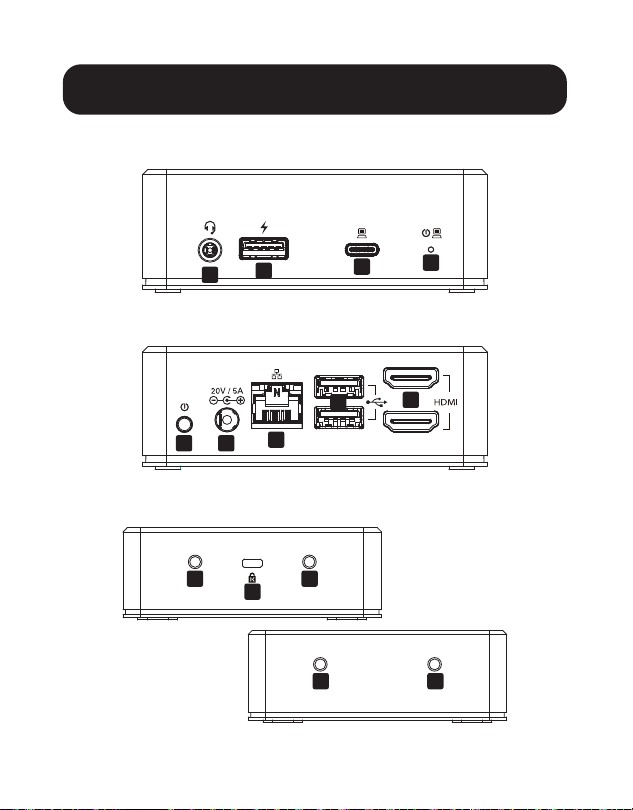
Aperçu du produit
Avant :
Arrière :
Côtés :
A
B
C
D
E F
G
K
J
J
J
J
H
I
26
Aperçu du produit
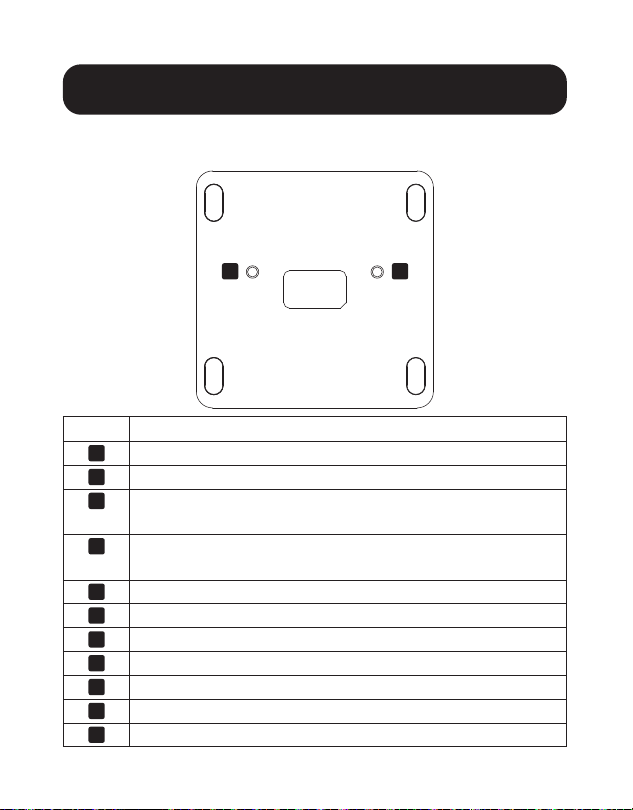
Bas :
Article Description
A
Prise audio entrée/sortie
B
Port Type-A USB 3.2 Gen1, conforme BC 1.2
C
Port Type-C USB avec chargement de la distribution de
puissance 3.0
D
Voyant à DEL - s'allume en bleu lorsque l'appareil est
sous tension, en vert lorsque l'appareil est activé
E
Bouton d'alimentation On/Off (marche/arrêt)
F
Prise d'entrée d'alimentation CC
G
Port Ethernet RJ45
H
Ports Type-A Gen1 USB 3.2
I
Ports HDMI
J
Trous pour vis de montage
K
K-Lock pour sécuriser le dispositif
J J

27
Installation
Avant l'installation - pour les systèmes
d'exploitation Windows uniquement :
Des lecteurs DisplayLink sont requis pour les fonctions vidéo et
audio lorsque Windows OS est utilisé. Les lecteurs peuvent être
téléchargés et installés depuis www.displaylink.com/downloads.
Une fois les lecteurs installés avec succès, redémarrer
l'ordinateur hôte.
Remarques :
• Le U442-DOCK20BINT est capable de reconnaître des équipements
périphériques USB comme une souris, un clavier ou une clé sans avoir
à installer des lecteurs DisplayLink sur l'ordinateur hôte ou l'ordinateur
portable utilisant Windows.
• Les systèmes d'exploitation Mac ne nécessitent pas les lecteurs. Si un
lecteur Mac OS est nécessaire, les lecteurs peuvent être téléchargés
depuis www.displaylink.com/downloads.
Installation
1
2
3
3
4
5
6
7
7

28
Installation
1. Connecter l'ordinateur hôte ou l'ordinateur portable à
U442-DOCK20BINT en utilisant le câble USB-C à C. Utiliser
l'adaptateur de USB-A à C au besoin.
Remarque : Le dispositif se chargera uniquement en utilisant un
câble USB-C à C.
2. Permet de raccorder jusqu'à deux écrans conformes HDMI à
U442-DOCK20BINT en utilisant le câble de la série P569 de
Tripp Lite (vendu séparément).
Remarque : Jusqu'à trois écrans peuvent être étendus dans une
configuration à plusieurs moniteurs. Manipuler l'orientation ou le
mode des écrans (en miroir ou étendu) par le biais des réglages de
l'écran de l'ordinateur hôte.
3. Connecter jusqu'à trois équipements périphériques USB
comme un clavier, une souris, une clé ou un téléphone
intelligent.
Remarque : Le port USB du panneau avant étiqueté avec un
symbole de chargement prend en charge le chargement rapide
jusqu'à 1,5 A et le chargement jusqu'à 2,4 A.
4. Raccorder à un réseau local sans fil Gigabit câblé en
utilisant le câble Cat6 de la série N201 de Tripp Lite (vendu
séparément) si les signaux Wi-Fi sont faibles ou indisponibles.
5. Connecter un casque d'écoute au port de 3,5 mm disponible.
Remarque : Si aucun son n'est audible, la source de sortie audio
doit être changée à audio USB.
6. (facultatif) Verrouiller et sécuriser la station d'accueil
U442-DOCK20BINT au bureau en utilisant le port K-LOCK
situé sur le côté de l'appareil.
29
Installation
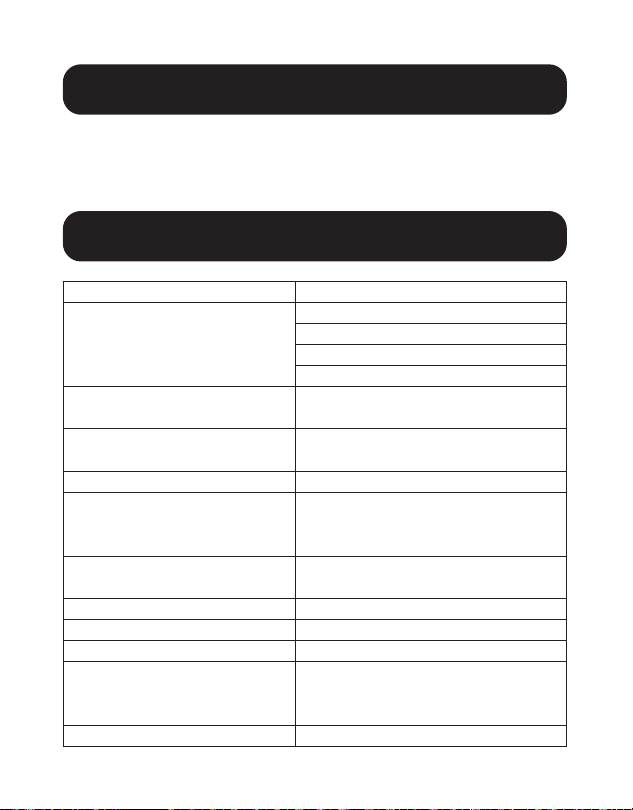
Caractéristiques techniques
Entrée USB-C
Sortie (x2) HDMI
RJ45
(x3) USB 3.2 Gen 1 Type-A
3,5 mm
Vidéo (HDMI) Simple : 2 560 x 1 440 @ 50 Hz
Double : 1 920 x 1 080 @ 60 Hz
Audio (3,5 mm) Systèmes ambiophoniques de
2.1 canaux
Ethernet (RJ45) 10/100/1 000 Mbps
Alimentation Entrée : 100 à 240 V @
50/60 Hz, 2 A
Sortie : 20 V 5 A
Caractéristiques techniques
HDMI
1.3
Conforme BC 1.2 Oui
Température de fonctionnement
0 à 40 °C (32 à 104 °F)
Température d'entreposage -20 à 70 °C (-4 à 158 °F)
Caractéristiques techniques
du chargement de la
distribution de puissance (PD)
Distribution de puissance 3.0
jusqu'à 85 W
(20/15/9/5 V @ 4,25 A)
Entrée de l'alimentation CC 100 W (20 V 5 A)
7. Raccorder la source d'alimentation incluse à la station
d'accueil, puis mettre l'appareil sous tension en utilisant le
bouton d'alimentation situé à gauche du port CC.

30
Garantie
Garantie limitée de 3 ans
Tripp Lite garantit que ses produits sont exempts de vices de matériaux et de
fabrication pendant une période de trois (3) ans à partir de la date d'achat initiale.
La responsabilité de Tripp Lite, en vertu de la présente garantie, se limite à la
réparation ou au remplacement (à sa seule discrétion) de ces produits défectueux.
Pour obtenir réparation sous cette garantie, vous devez obtenir un numéro
d'autorisation de retour de matériel (« RMA ») auprès de Tripp Lite ou d'un centre de
réparation autorisé par Tripp Lite. Les produits doivent être retournés à Tripp Lite
ou à un centre de réparation autorisé par Tripp Lite en port prépayé et être
accompagnés d'une brève description du problème et d'un justificatif de la date et
du lieu d'achat. Cette garantie ne s'applique pas au matériel ayant été endommagé
suite à un accident, à une négligence ou à une application abusive, ou ayant été
altéré ou modifié d'une façon quelconque.
SAUF INDICATION CONTRAIRE DANS LES PRÉSENTES, Tripp Lite N'ÉMET AUCUNE
GARANTIE, EXPRESSE OU TACITE, Y COMPRIS DES GARANTIES DE QUALITÉ
COMMERCIALE ET D'ADÉQUATION À UN USAGE PARTICULIER. Certains États
n'autorisant pas la limitation ni l'exclusion de garanties tacites, les limitations ou
exclusions susmentionnées peuvent ne pas s'appliquer à l'acheteur.
À L'EXCEPTION DES DISPOSITIONS CI-DESSUS, Tripp Lite NE POURRA EN AUCUN
CAS ÊTRE TENUE RESPONSABLE DE DOMMAGES DIRECTS, INDIRECTS, SPÉCIAUX,
FORTUITS OU CONSÉCUTIFS RÉSULTANT DE L'UTILISATION DE CE PRODUIT, MÊME
SI AYANT ÉTÉ AVISÉE DE L'ÉVENTUALITÉ DE TELS DOMMAGES. Plus précisément,
Tripp Lite ne pourra être tenue responsable de coûts, tels que perte de bénéfices
ou de recettes, perte de matériel, impossibilité d'utilisation du matériel, perte de
logiciel, perte de données, frais de produits de remplacement, réclamations d'un
tiers ou autres.
31
Garantie
Renseignements sur la conformité à la directive DEEE pour les clients de
Tripp Lite et les recycleurs (Union européenne)
En vertu de la directive et des règlements d'application relatifs aux déchets
d'équipements électriques et électroniques (DEEE), lorsque des clients
achètent de l'équipement électrique et électronique neuf de Tripp Lite, ils
ont droit :
• D'envoyer l'équipement usagé au recyclage pourvu qu'il soit remplacé par
un équipement équivalent (cela varie selon les pays)
• De retourner le nouvel équipement afin qu'il soit recyclé à la fin de sa vie
utile
Il n'est pas recommandé d'utiliser cet équipement pour des appareils de survie où
une défaillance de cet équipement peut, selon toute vraisemblance, entraîner la
défaillance de l’appareil de maintien de la vie ou de nuire de façon majeure à sa
sécurité ou à son efficacité.
La politique de Tripp Lite en est une d'amélioration continue. Les caractéristiques
techniques sont modifiables sans préavis. Les produits réels peuvent différer
légèrement des photos et des illustrations.
1111 W. 35th Street, Chicago, IL 60609 USA • tripplite.com/support
21-12-046 934080_RevA
32
Руководство пользователя
1111 W. 35th Street, Chicago, IL 60609 USA • tripplite.com/support
Copyright © 2022 Tripp Lite. Перепечатка запрещается.
Док-станция USB-C
®
на 2 дисплея
с блоком питания международного образца
Модель: U442-DOCK20BINT
USB Type-C и USB-C являются зарегистрированными торговыми знаками компании USB Implementers Forum
English 1 • Español 12 • Français 22 • Deutsch 42

33
Характеристики изделия
• Возможность подключения двух дисплеев обеспечивает ретрансляцию на три
экрана (включая головной компьютер) с разрешениями до 1920 x 1080p при 60 Гц
при подключении до двух HDMI-дисплеев
• Одномониторные установки поддерживают разрешения до 2560 x 1440 при 50 Гц
• Зарядный порт USB-C PD 3.0 обеспечивает подачу питания мощностью до 85 Вт на
подключенный источник
• Порт RJ45 Ethernet поддерживает сетевые скорости 10/100/1000 Мбит/с,
обеспечивая возможность подключения на скорости 1 Гбит/с в случае слабого или
недоступного сигнала Wi-Fi
• Чтение, запись и передача данных со скоростью до 5 Гбит/с через три порта USB
3.2 Gen1 док-станции или подключение других периферийных USB-устройств, в
частности клавиатуры и мыши
• Выделенный зарядный порт USB 3.2 Type-A обеспечивает питание мощностью до
7,5 Вт (5 В / 1,5 А) для быстрой зарядки мобильных устройств и 2,4 А для устройств
Apple
• Конструкция, рассчитанная на различные способы монтажа, обеспечивает
универсальное настольное решение, помогающее созданию рабочей среды без
путаницы проводов

34
Комплект поставки
Oпциональные кoмплектующие
Cиcтемные требования
• U442-DOCK20BINT
• Кабель с разъемами USB 3.2 Gen2 C/C с переходником C/A (1 м)
• Внешний источник питания со шнурами питания
BS 1363 (для Великобритании) и CEE 7/8 (для ЕС)
• Pуководство пользователя
• Высокоскоростные HDMI-кабели серии P569
• Безразрывные соединительные кабели Сat6 Gigаbit серии N201
• Сверхпрочные кабели U038-0XX-GY-MAX с разъемами USB A/C
• Kaбели серии M100 с разъемами USB A / Lightning
• Операционная система Windows или Mac
35
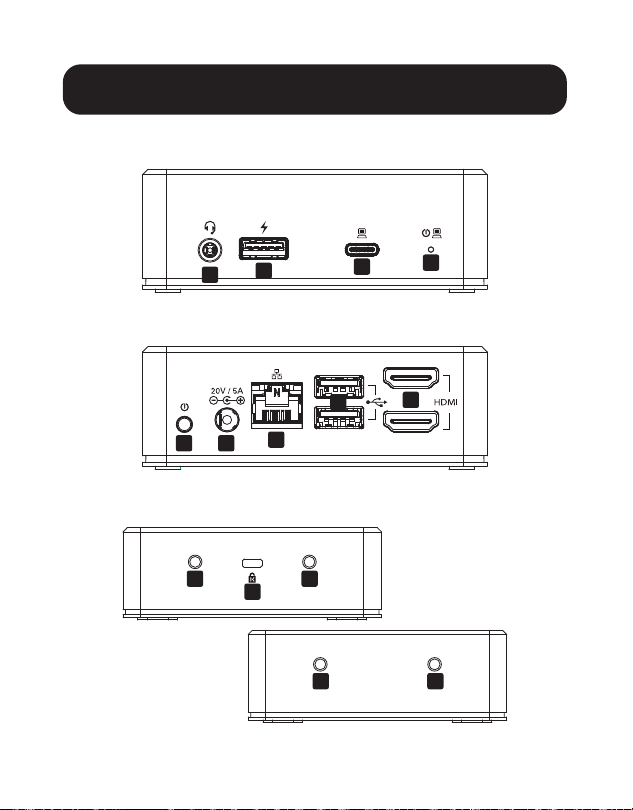
Kраткое описание изделия
Спереди:
Сзади:
С боков:
A
B
C
D
E F
G
K
J
J
J
J
H
I
36
Kраткое описание изделия
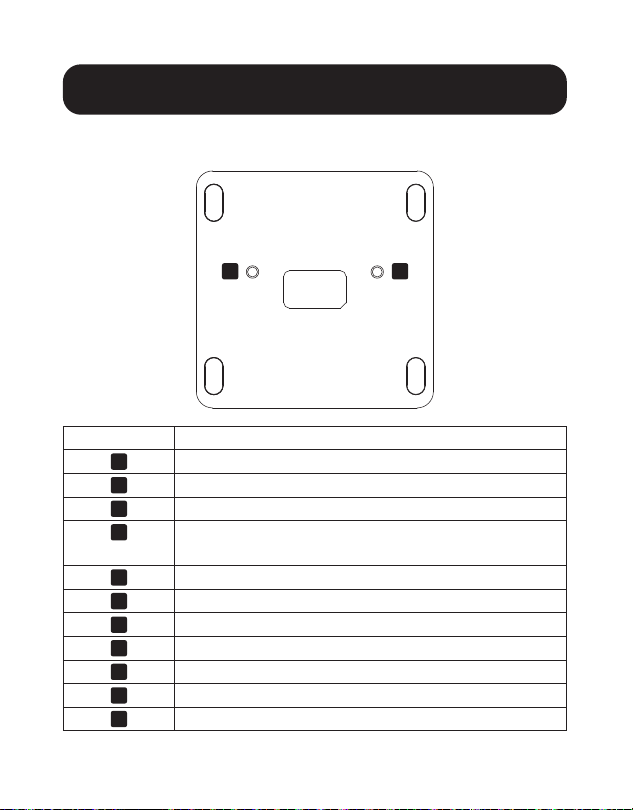
Снизу:
Наименование Описание
A
Входной/выходной аудиоразъем
B
Порт USB 3.2 Gen1 Type-A, соответствующий требованиям BC 1.2
C
Порт USB Type-C с технологией PD 3.0 Charging
D
Светодиодный индикатор: питание (синий),
активное состояние (зеленый)
E
Выключатель питания On/O
F
Входной разъем питания постоянного тока
G
Порт RJ45 Ethernet
H
Порты USB 3.2 Gen1 Type-A
I
Порты HDMI
J
Монтажные резьбовые отверстия
K
Гнездо K-Lock для крепления устройства
J J
37
Установка
Перед началом установки
(только для операционных систем Windows):
При использовании ОС Windows требуется установка драйверов DisplayLink для
видео- и аудиофункций. Драйверы можно загрузить и установить со страницы
www.displaylink.com/downloads. После успешной установки драйверов перезапустите
головной компьютер.
Примечания:
• Док-станция U442-DOCK20BINT может распознавать периферийные USB-устройства,
в частности мышь, клавиатуру или флэш-накопитель, без драйверов DisplayLink,
установленных на головном ПК или портативном компьютере с ОС Windows.
• Операционные системы Mac не требуют драйверов. В случае необходимости установки
какого-либо драйвера для Mac OS требуемые драйверы можно загрузить со страницы
www.displaylink.com/downloads.
Установка
1
2-
3
3
4
5
6
7
7

38
Установка
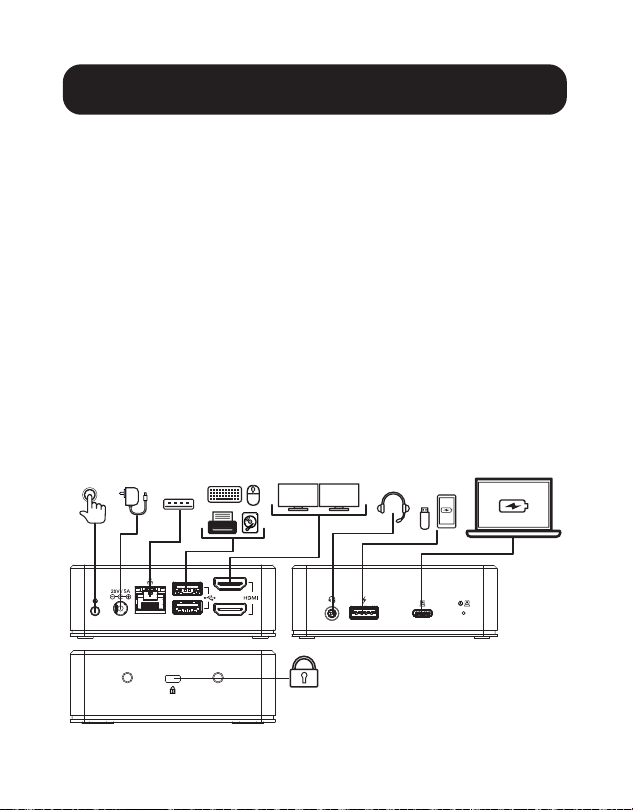
1. Подсоедините головной стационарный или портативный компьютер U442-
DOCK20BINT, используя поставляемый в комплекте кабель с разъемами USB-C/C.
При необходимости используйте переходник USB-A/C.
Примечание. Зарядка устройства-источника производится только при использовании
кабеля с разъемами USB-C/C.
2. Подключите до двух HDMI-совместимых дисплеев к док-станции
U442-DOCK20BINT с помощью предлагаемого компанией Tripp Lite кабеля серии
P569 (продается отдельно).
Примечание. В многомониторной конфигурации возможная ретрансляция сигнала на три
экрана. Сориентируйте дисплеи или установите нужный режим их работы (зеркальный
или ретрансляция) через настройки дисплея на головном компьютере.
3. Подключите до трех периферийных USB-устройств (например, клавиатуру,
мышь, флэш-накопитель или смартфон).
Примечание. Порт USB на передней панели, обозначенный символом зарядки,
поддерживает режимы быстрой зарядки (до 1,5 А) и Apple Charge (до 2,4 А).
4. В случае слабого или недоступного сигнала Wi-Fi подключитесь к проводной
гигабитной ЛВС, используя предлагаемый компанией Tripp Lite кабель Cat6 серии
N201 (продается отдельно).
5. Подключите гарнитуру или микрофон к свободному аудиопорту 3,5 мм.
Примечание. При отсутствии звука на выходе источник выходного аудиосигнала должен
быть изменен на USB-аудио.
6. (Опционально) Прикрепите док-станцию U442-DOCK20BINT к своему столу,
используя гнездо K-LOCK, расположенное сбоку.
7. Подключите поставляемый в комплекте блок питания к док-станции и подайте
питание на устройство кнопкой питания, расположенной слева от разъема
питания постоянного тока.
39
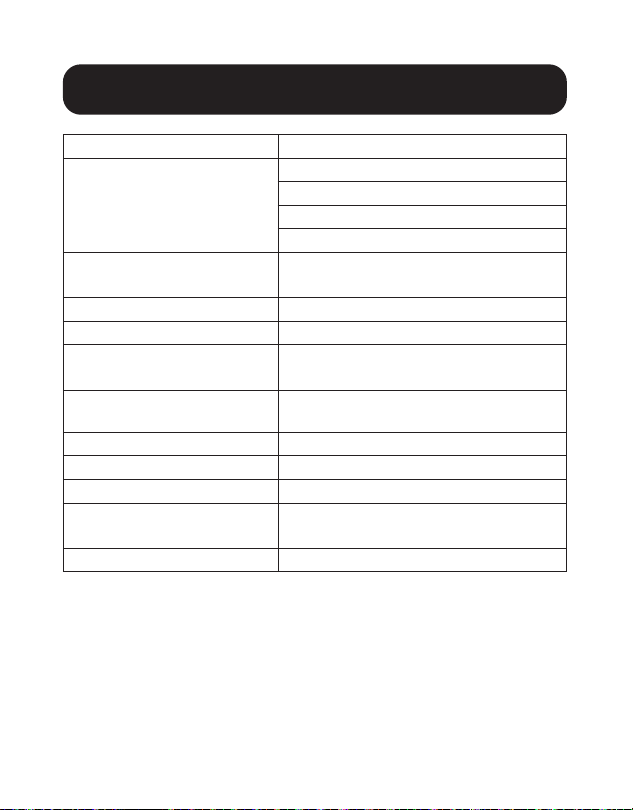
Технические характеристики
Вход USB-C
Выход
HDMI — 2 шт.
RJ45
USB 3.2 Gen 1 Type-A — 3 шт.
3.5 mm
Видео (HDMI)
Для одного дисплея: 2560 x 1440 при 50 Гц
Для двух дисплеев: 1920 x 1080 при 60 Гц
Аудио (3.5 mm)
2.1 Channel Surround Sound
Ethernet (RJ45)
10/100/1000 Мбит/с
Блок питания
Вход: 100-240 В при 50/60 Гц; 2 А
Выход: 20 В, 5 А
Технические требования к
изделиям стандарта HDMI
1.3
Соотв. треб. BC 1.2
Да
Диапaзoн рабочих температур
От 0 до 40°C
Диапазон температур хранения
От -20 до 70°C
Параметры PD Charging
PD 3.0 до 85 Вт
(20/15/9/5 В; 4,25 А)
Входное питание
100 Вт (20 В / 5 А) постоянного тока

40
Гарантийные обязательства
Ограниченная гарантия сроком 3 года
Компания ТrippLite гарантирует отсутствие дефектов материалов и изготовления в течение трех (3) лет с
момента первоначальной покупки. Обязательства компании Тripp Lite по настоящей гарантии ограничиваются
ремонтом или заменой (по ее единоличному усмотрению) любых таких дефектных изделий. Для получения
услуг по данной гарантии необходимо получить номер Returned Material Authorization (RМА ― разрешение на
возврат материалов) от компании Тripp Lite или ее авторизованного сервисного центра. Изделия должны быть
возвращены в компанию Тripp Lite или ее авторизованный сервисный центр с предоплатой транспортных
расходов и сопровождаться кратким описанием возникшей проблемы и документом, подтверждающим
дату и место его приобретения. Действие настоящей гарантии не распространяется на оборудование,
поврежденное в результате аварии, небрежного обращения или неправильного использования, а тaкже
видоизмененное каким бы то ни было oбразом.
ЗА ИСКЛЮЧЕНИЕМ ПРЕДУСМОТРЕННЫХ ЗДЕСЬ СЛУЧАЕВ КОМПАНИЯ Тripp Lite НЕ ПРЕДOСТАВЛЯЕТ КАКИХ-
ЛИБО ЯВНЫХ ИЛИ ПОДРАЗУМЕВАЕМЫХ ГАРАНТИЙ, ВКЛЮЧАЯ ГAPAНТИИ КОММЕРЧЕСКОЙ ПРИГОДНОСТИ
И ПРИГОДНОСТИ ДЛЯ КАКОЙ-ЛИБО КОНКРЕТНОЙ ЦЕЛИ. B некоторых штатах/государствах ограничение
или исключение подразумеваемых гaрантий не допускается; следовательно, вышеуказанное(-ые)
ограничение(-я) или исключение(-я) могут не распространяться на покупателя.
ЗA ИСКЛЮЧЕНИЕМ ПРЕДУСМОТРЕННЫХ ВЫШЕ СЛУЧАЕВ КОМПАНИЯ Тripp Lite НИ ПРИ КАКИХ ОБСТОЯТЕЛЬСТВАХ
НЕ НЕСЕТ ОТВЕТСТВЕННОСТИ ЗА ПРЯМЫЕ, КOCBEHHЫЕ, СЛУЧАЙНЫЕ ИЛИ ПОБОЧНЫЕ УБЫТКИ ЛИБО УБЫТКИ,
ОПРЕДЕЛЯЕМЫЕ ОСОБЫМИ ОБСТОЯТЕЛЬСТВАМИ, ВОЗНИКАЮЩИЕ В СВЯЗИ С ИСПОЛЬЗОВАНИЕМ ДАННОГО
ИЗДЕЛИЯ, ДАЖЕ В СЛУЧАЕ ЕЕ ИНФОРМИРОВАНИЯ О ВОЗМОЖНОСТИ НАСТУПЛЕНИЯ ТАКИХ УБЫТКОВ. B частности,
компания Тripp Lite не несет ответственности за какие-либо издержки, такие как упущенные прибыли или
доходы, потеря оборудования, потеря возможности использования оборудования, потеря программного
обеспечения, потеря данных, расходы на заменители, урегулирование претензий третьих лиц и пр.

41
Гарантийные обязательства
Информация по выполнению требований Директивы WЕЕЕ для покупателей и переработчиков
продукции компании Tripp Lite (являющихся резидентами Eврoпейского союза)
Согласно положениям Директивы об утилизации отходов электрического и электронного
оборудования (WЕЕЕ) и исполнительных распоряжений по ее применению, при покупке
потребителями нового электрического или электронного оборудования производства компании
Тripp Lite они получают право на:
• Продажу старого оборудования по принципу "один за один" и/или на эквивалентной основе (в
зависимости от конкретной страны)
• Oтправку нового оборудования на переработку после окончательной выработки его pecypca
Не рекомендуется использование данного оборудования в системах жизнеобеспечения, где его выход из
строя предположительно может привести к перебоям в работе оборудования жизнеобеспечения или в
значительной мере снизить его безопасность или эффективность.
Компания Tripp Lite постоянно совершенствует свою продукцию. B связи с этим возможно изменение
технических характеристик без предварительного уведомления. Внeшний вид реальных изделий может
несколько отличаться от представленного на фотографиях и иллюстрацияx.
1111 W. 35th Street, Chicago, IL 60609 USA • tripplite.com/support
21-12-046 934080_RevA
42
Benutzerhandbuch
1111 W. 35th Street, Chicago, IL 60609 USA • tripplite.com/support
Copyright © 2022 Tripp Lite. Alle Rechte vorbehalten.
USB-C
®
Dual-Display-Dockingstation
mit internationalem Netzteil
Modell: U442-DOCK20BINT
USB Type-C and USB-C sind registrierte Marken des USB Implementers Forum
English 1 • Español 12 • Français 22 • Русский 32

43
Produktmerkmale
• Mit der Dual-Display-Funktion können Sie bis zu drei
Bildschirme (einschließlich des Hostcomputers) mit
Auflösungen bis zu 1920 x 1080p bei 60 Hz verwenden, wenn
Sie bis zu zwei HDMI-Displays anschließen
• Installationen von einem Monitor unterstützen Auflösungen bis
zu 2560 x 1440 bei 50 Hz
• Der USB-C PD 3.0 Ladeanschluss liefert eine Leistung bis zu
85 W an die angeschlossene Quelle
• Der RJ45-Ethernet-Anschluss unterstützt echte
10/100/1000 Mbit/s Netzwerkgeschwindigkeiten und bietet
1 Gbit/s Konnektivität, wenn die Wi-Fi-Signale schwach oder
nicht verfügbar sind
• Lesen, schreiben und übertragen Sie Daten mit bis zu 5 Gbit/s
über die drei USB 3.2 Gen 1-Anschlüsse der Dockingstation
oder schließen Sie andere USB-Peripheriegeräte an, z. B. eine
Tastatur und Maus
• Der dedizierte USB 3.2 Type-A Ladeanschluss bietet eine
schnelle Ladeleistung von 5 V 1,5 A (7,5 W) für Mobilgeräte
und 2,4 A für Apple-Geräte
• Das Multi-Mount-Design bietet eine Desktop-Komplettlösung,
um eine übersichtliche Arbeitsumgebung zu schaffen

44
Im Paket enthalten
Optionales Zubehör
Systemanforderungen
• U442-DOCK20BINT
• USB 3.2 Gen 2 C-zu-C-Kabel mit C-zu-A-Adapter – 1 m
• Externes Netzteil mit BS 1363 UK und CEE 7/8 EU Netzkabel
• Bedienungsanleitung
• Hochgeschwindigkeits-HDMI-Kabel der P569-Serie
• Hakenlose Patchkabel Cat6-Gigabit der Serie N201
• U038-0XX-GY-MAX hochbelastbare USB A-zu-C-Kabel
• USB A-zu-Lightning-Kabel der M100-Serie
• Windows- oder Mac-Betriebssystem
45
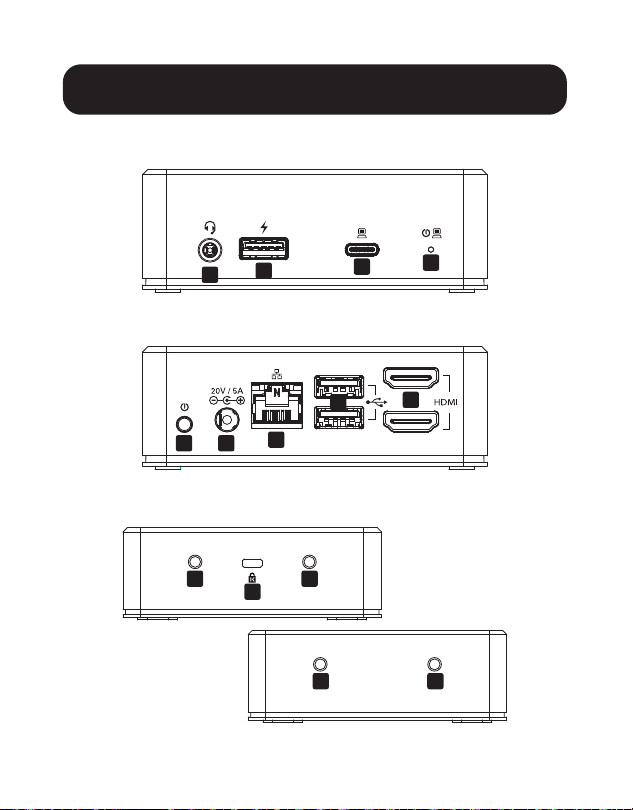
Produktübersicht
Vorderseite:
Rückseite:
Seiten:
A
B
C
D
E F
G
K
J
J
J
J
H
I
46
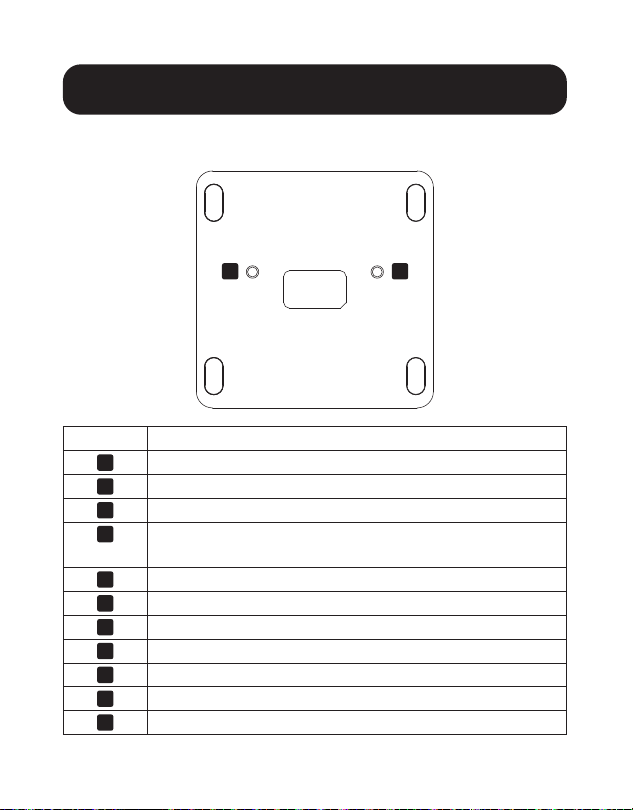
Produktübersicht
Unten:
Element Beschreibung
A
Audio In/Out-Buchse
B
USB 3.2 Gen 1 Type-A-Anschluss, BC 1.2-konform
C
USB Type-C-Anschluss mit PD 3.0 Aufladung
D
LED-Anzeige – leuchtet blau, wenn eingeschaltet,
grün, wenn aktiv
E
Power On/Off-Taste
F
DC Power In-Buchse
G
RJ45-Ethernet-Anschluss
H
USB 3.2 Gen 1 Type-A-Anschlüsse
I
HDMI-Anschlüsse
J
Bohrungen für Befestigungsschrauben
K
K-Lock für Sicherungsvorrichtung
J J

47
Installation
Vor der Installation - nur für Windows-
Betriebssysteme:
Wenn ein Windows-Betriebssystem verwendet wird, sind
DisplayLink-Treiber für Video- und Audiofunktionen erforderlich.
Die Treiber können von www.displaylink.com/downloads
heruntergeladen und installiert werden. Starten Sie den
Hostcomputer neu, nachdem die Treiber installiert wurden.
Hinweise:
• Das U442-DOCK20BINT kann USB-Peripheriegeräte erkennen, z. B.
eine Maus, eine Tastatur oder ein Flash-Laufwerk, auch wenn keine
DisplayLink-Treiber auf dem Windows-Host-PC oder Windows-Laptop
installiert sind.
• Mac-Betriebssysteme erfordern keine Treiber. Wenn ein Mac OS-Treiber
benötigt wird, kann der Treiber von www.displaylink.com/downloads
heruntergeladen werden.
Installation
1
2
3
3
4
5
6
7
7

48
Installation
1. Schließen Sie den Hostcomputer oder Laptop mit dem im
Lieferumfang enthaltenen USB-C-zu-C-Kabel an das
U442-DOCK20BINT an. Falls erforderlich, verwenden Sie den
USB-A-zu-C-Adapter.
Hinweis: Ihr Quellgerät wird nur geladen, wenn Sie ein USB-C-zu-C-Kabel
verwenden.
2. Schließen Sie bis zu zwei HDMI-kompatible Displays mit einem
Kabel der P569-Serie von Tripp Lite (separat erhältlich) an das
U442-DOCK20BINT an.
Hinweis: In einer Multi-Monitor-Konfiguration können bis zu drei Bildschirme
verwendet werden. Ändern Sie die Ausrichtung oder den Modus der Displays
(spiegeln oder erweitern) über die Anzeigeeinstellungen des Hostcomputers.
3. Schließen Sie bis zu drei USB-PeripherieGeräte an, z. B. eine
Tastatur, eine Maus, ein Flash-Laufwerk oder ein Smartphone.
Hinweis: Der mit einem Ladesymbol gekennzeichnete USB-Anschluss an der
Vorderseite unterstützt das schnelle Aufladen bis zu 1,5 A und die Apple-
Aufladung bis zu 2,4 A.
4. Schließen Sie das Cat6-Kabel der N201-Serie von Tripp Lite
(separat erhältlich) an ein verkabeltes Gigabit-LAN an, wenn die
Wi-Fi-Signale schwach oder nicht verfügbar sind.
5. Schließen Sie den Kopfhörer an den verfügbaren 3,5-mm-
Anschluss an.
Hinweis: Wenn kein Ton ausgegeben wird, muss die Audioausgangsquelle in
USB-Audio geändert werden.
6. (Optional) Sperren und befestigen Sie Ihre U442-DOCK20BINT
Dockingstation über den K-LOCK-Anschluss an der Seite des
Geräts an Ihrem Schreibtisch.

49
Installation
Technische Daten
Eingang USB-C
Ausgang
(x2) HDMI
RJ45
(x3) USB 3.2 Gen 1 Type-A
3,5 mm
Video (HDMI)
Single: 2560 x 1440 bei 50 Hz
Dual: 1920 x 1080 bei 60 Hz
Audio (3,5 mm)
2.1-Kanal-Surround-Sound
Ethernet (RJ45)
10/100/1000 Mbit/s
Stromversorgung
Eingang: 100-240 V bei 50/60 Hz, 2 A
Ausgang: 20 V 5 A
HDMI-Spezifikation
1.3
BC 1.2-konform
Ja
Betriebstemperatur
0 °C bis 40 °C
Lagertemperatur
-20 °C bis 70 °C)
PD-Ladespezifikation
PD 3.0 bis zu 85 W
(20/15/9/5 V 4,25 A)
Stromeingang
DC 100 W (20 V 5 A)
7. Schließen Sie das im Lieferumfang enthaltene Netzteil an
die Dockingstation an und schalten Sie das Gerät über den
Netzschalter links neben dem DC-Anschluss ein.

50
Garantie
3 Jahre eingeschränkte Garantie
Tripp Lite garantiert, dass seine Produkte für einen Zeitraum von drei (3) Jahren
ab dem Datum des Erstkaufs frei von Material- und Verarbeitungsfehlern sind. Die
Verpflichtung von Tripp Lite im Rahmen dieser Garantie beschränkt sich auf die
Reparatur oder den Ersatz (nach eigenem Ermessen) der fehlerhaften Produkte. Um
Service im Rahmen dieser Garantie zu erhalten, müssen Sie eine RMA-Nummer
(Returned Material Authorization) von Tripp Lite oder einem autorisierten
Tripp-Lite-Servicezentrum erhalten. Die Produkte müssen an Tripp Lite oder an ein
autorisiertes Tripp-Lite-Servicezentrum unter Vorauszahlung der Transportkosten
zurückgeschickt werden und mit einer kurzen Beschreibung des aufgetretenen
Problems sowie einem Nachweis über Datum und Ort des Kaufs versehen sein.
Diese Garantie gilt nicht für Geräte, die durch Unfall, Fahrlässigkeit oder falsche
Anwendung beschädigt wurden oder in irgendeiner Weise geändert oder modifiziert
wurden.
MIT AUSNAHME DER HIERIN ENTHALTENEN BESTIMMUNGEN GIBT Tripp Lite KEINE
GARANTIEN, WEDER AUSDRÜCKLICH NOCH STILLSCHWEIGEND, EINSCHLIESSLICH
GARANTIEN DER MARKTGÄNGIGKEIT UND EIGNUNG FÜR EINEN BESTIMMTEN
ZWECK. Einige Staaten gestatten keine Beschränkung oder keinen Ausschluss
stillschweigender Gewährleistungen; daher kann es sein, dass die oben genannten
Beschränkungen oder Ausschlüsse auf den Käufer nicht zutreffen.
MIT AUSNAHME DER OBIGEN BESTIMMUNGEN IST Tripp Lite UNTER KEINEN
UMSTÄNDEN HAFTBAR FÜR DIREKTE, INDIREKTE, SPEZIELLE, ZUFÄLLIGE ODER
FOLGESCHÄDEN, DIE SICH AUS DER VERWENDUNG DIESES PRODUKTES
ERGEBEN, SELBST WENN AUF DIE MÖGLICHKEIT SOLCHER SCHÄDEN
HINGEWIESEN WURDE. Insbesondere haftet Tripp Lite nicht für Kosten, wie
entgangene Gewinne oder Einnahmen, Verlust von Geräten, Verlust der Nutzung von
Geräten, Verlust von Software, Datenverlust, Kosten für Ersatzprodukte, Ansprüche
Dritter oder anderes.
51
Garantie
WEEE-Compliance-Informationen for Tripp-Lite-Kunden und Recycler
(Europäische Union)
Die WEEE-Richtlinie und deren Ausführungsbestimmungen besagen, dass
Kunden, die neue Elektro- oder Elektronikgeräte von Tripp Lite kaufen, ein
Anrecht auf Folgendes haben:
• Rücksendung von Altgeräten zum Recycling beim Kauf eines neuen,
gleichwertigen Geräts (dies variiert je nach Land)
• Rücksendung der neuen Geräte zum Recyling, wenn ihr Lebenszyklus
abgelaufen ist
Die Verwendung dieses Geräts für Lebenserhaltungssysteme, in denen der Ausfall
des Geräts den Ausfall des Lebenserhaltungssystems verursachen oder dessen
Sicherheit beziehungsweise Wirksamkeit bedeutend beeinträchtigen kann, wird nicht
empfohlen.
Tripp Lite hat den Grundsatz, sich kontinuierlich zu verbessern. Spezifikationen
können ohne Ankündigung geändert werden. Fotos und Illustrationen können von
den tatsächlichen Produkten leicht abweichen.
52
1111 W. 35th Street, Chicago, IL 60609 USA • tripplite.com/support
21-12-046 934080_RevA