INSTRUCTIONS FOR USE
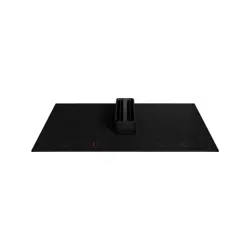
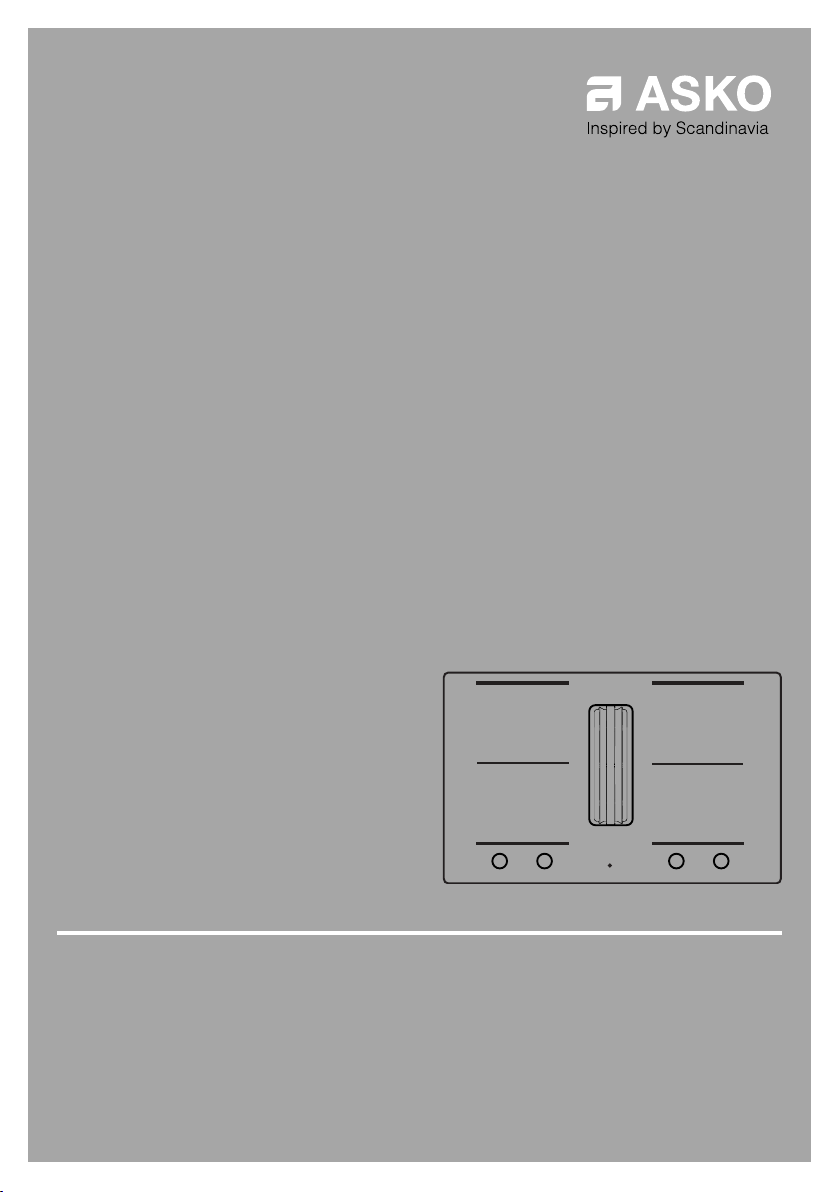
Induction hob with integrated extractor
EN
HIHD854GF
HIHD854MM

3Pictograms used ........................................
4Safety ..........................................................
9Safe use .......................................................
10‘Open window’ function ...............................
10Power management .....................................
11Your hob with integrated extractor ..........
11Dear customer! ............................................
11These instructions ........................................
13Description ...................................................
14Control panel ...............................................
17Indications on the display ............................
18Use ..............................................................
18Induction cooking ........................................
20Induction sounds .........................................
20Pans for induction cooking ..........................
22Cooking settings ..........................................
23Using the extraction module ........................
26Operation ....................................................
26Start Preparing .............................................
26Standard cooking ........................................
28Cooking with the PLUS menu ......................
30Cooking with Celsius°Cooking™ .................
31
Cooking with Celsius°Cooking™ cookware
and Hestan Cue programs ..........................
35
Step-by-Step cooking guide on
CelsiusCooking.com ....................................
35Bridge Induction zone .................................
36Pause ...........................................................
37Child lock .....................................................
37Timer functions ............................................
39Operating the extraction module .................
41ConnectLife and Wi-Fi ...............................
41ConnectLife-app and Wi-Fi connection ......
43Firmware Update .........................................
44Settings .......................................................
48Maintenance ...............................................
48Cleaning glass top .......................................
48Cleaning the extraction module ...................
51Filter indication .............................................
51
Replacing recirculation filter (when using the
recirculation box) .........................................
52Troubleshooting .........................................
52General ........................................................
52Troubleshooting table ..................................
56Technical data ............................................
56
Information according to regulation (EU)
66/2014 ........................................................
57EU Product Fiche .........................................
57Compliance information ...............................
58Environmental aspects ..............................
58Disposal of the appliance and packaging ....
59Installation ..................................................
59Safety ..........................................................
62Preparations for installation .........................
71Built-in ..........................................................
78Your notes ..................................................
Contents
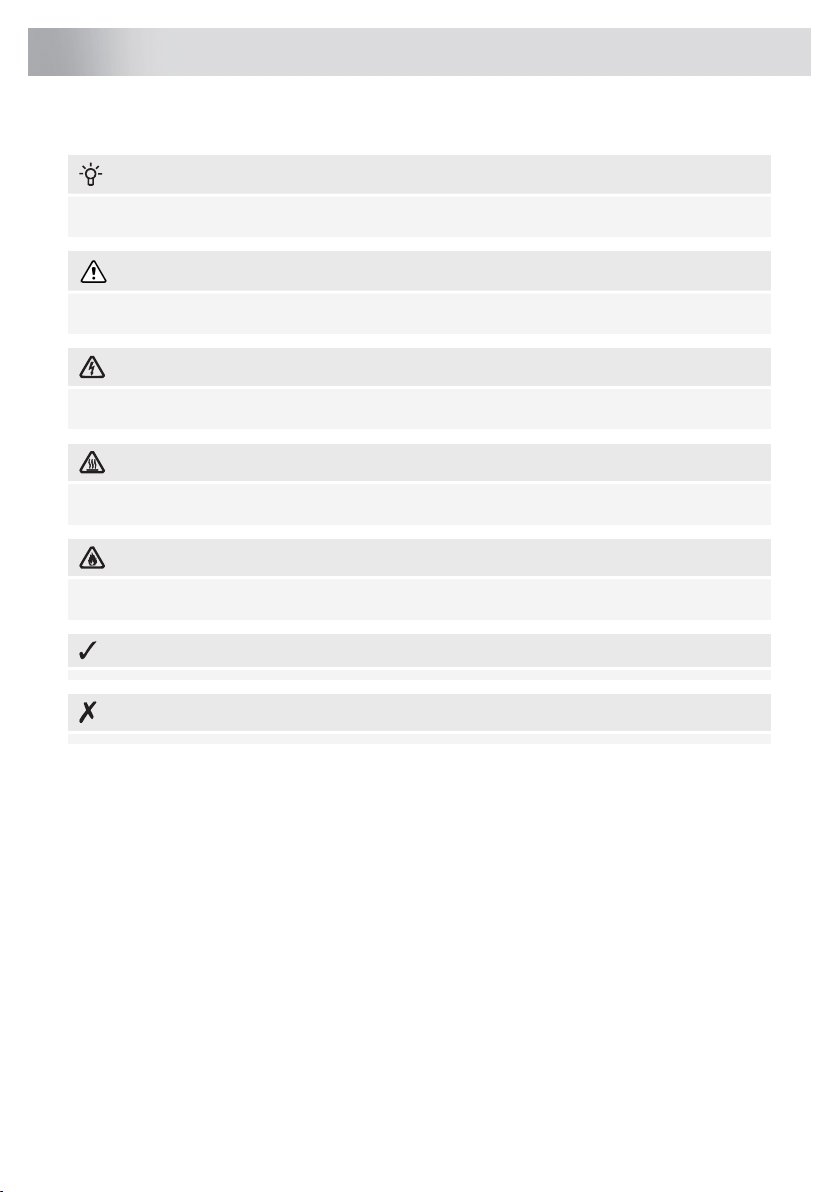
The following symbols are used throughout the manual, and they have the following meanings:
INFORMATION!
Information, advice, tip, or recommendation
WARNING!
Warning – general danger
ELECTRIC SHOCK!
Warning – danger of electric shock
HOT SURFACE!
Warning – danger of hot surface
DANGER OF FIRE!
Warning – danger of fire
RIGHT!
WRONG!
It is important that you carefully read the instructions.
3
Pictograms used
WARNING!
READ CAREFULLY AND KEEP IT FOR FUTURE REFERENCE!
General
The manufacturer cannot be held liable for any damage resulting
from failure to follow the safety instructions and warnings.
Damage caused by incorrect connection, incorrect fitting, or incorrect
use is not covered by the warranty.
WARNING!
• This appliance can be used by children aged from 8 years and
above and persons with reduced physical, sensory or mental
capabilities or lack of experience and knowledge if they have
been given supervision or instruction concerning use of the
appliance in a safe way and understand the hazards involved.
• This appliance and the accessible parts will become hot during
use. Do not touch hot parts. Keep children younger than 8 away
from the appliance unless they are under continuous
supervision.
• Children shall not play with the appliance. Cleaning and user
maintenance shall not be made by children without supervision.
DANGER OF FIRE!
WARNING: Danger of fire: do not store items on the cooking
surfaces.
NOTE!
CAUTION! The cooking process has to be supervised. A short
term cooking process has to be supervised continuously.
4
Safety
DANGER OF FIRE!
WARNING: Cooking with fat or oil on a hob without supervision
can be dangerous and can lead to a fire.
• NEVER try to extinguish a fire with water. Instead, switch the
appliance off and then cover the flames with, for example, a lid
or a fire blanket.
WARNING!
Use only hob guards designed by the manufacturer of the cooking
appliance or indicated by the appliance manufacturer in the
instructions for use as suitable or hob guards incorporated in the
appliance. The use of inappropriate guards can cause accidents.
• If a drawer underneath the appliance is permitted (see the
installation instructions), without an intermediate bottom, this
should not be used to store highly flammable objects/materials.
Ensure that there is adequate clearance of a few centimetres
between the bottom of the hob and the contents of any drawers.
• The hob is only to be used for the preparation of food.
• This appliance is only designed for household use.
• The appliance is not designed for heating rooms.
• Do not warm closed tins on the hob. There will be a build-up of
pressure that will cause tins to explode. You might get injured or
scalded.
• Never cover the appliance with a cloth or something similar. If the
appliance is still hot or is switched on, there is a risk of fire.
• Do not use the appliance as a worktop. The appliance may
accidentally be switched on or still be hot, which means objects
could melt, become hot or catch fire.
• Do not use the appliance in temperatures below 5 °C.
• The appliance should not be placed or used outdoors.
5
Safety

• When you use the hob for the first time, you will notice a “new
smell”. Don’t worry, this is normal. If the kitchen is well ventilated,
the smell will soon disappear.
• The appliance is not intended to be operated by means of an
external timer or separate remote control system.
• Never open the casing of the appliance.
• Never use a steam cleaner for cleaning the appliance.
Only clean the appliance when switched off. The steam of a steam
cleaner could reach the conducting parts and cause an electrical
short.
• The ceramic top is extremely strong but not unbreakable.
For example, a spice jar or sharp utensil falling on it could cause
it to break.
• The hob is fitted with a Wi-Fi module that allows the appliance to
connect to a mobile device such as a smartphone or tablet.
It offers to monitor the cooking hob status via the mobile device.
For safety reasons, it is not possible to remotely control, turn on
or turn off the hob. The monitoring function via mobile device shall
not be used to replace the personal supervision of the cooking
process directly at the hob.
• If you decide to discontinue using the appliance because of a
fault, we recommend you cut off the cable after removing the plug
from the plug socket. Take the appliance to your municipality’s
waste disposal site.
WARNING!
WARNING: If the surface is cracked, switch off the appliance to
avoid the possibility of electric shock.
6
Safety

Ceramic glass plate broke
• Shut immediately off all burners and any electrical heating element
and isolate the appliance from the power supply.
• Do not touch the appliance surface.
• Do not use the appliance.
• Do not keep objects that children might find interesting in
cupboards above or behind the appliance.
• The cooking zones/burners heat up during use and stay hot for
a while afterwards. Keep young children away from the hob during
and immediately after cooking.
Induction use
• Do not place metal objects such as knives, forks, spoons, and
lids on the surface of the cooking hob; they may become hot.
• As soon as you remove the pan from the hob, the cooking process
will stop automatically. Get into the habit of switching off the
cooking zone or hob manually to avoid unintentionally switching
on the appliance.
• After use, switch off the hob element using the controls and don’t
rely only on the pan detector.
• Remember that if the hob is used in a high setting, the heating
time will be very short. Do not leave the hob unattended if you are
using a zone in a high setting.
• When the induction hob is in use, keep objects that are sensitive
to magnetic fields (credit cards, bank cards, discs, watches and
similar items) away from the hob. We advise anyone with a
pacemaker to consult their cardiologist first.
• Never use aluminium foil for cooking, and never place products
packaged in aluminium on the hob. The aluminium would melt
and irreparably damage your device.
7
Safety
Extraction use
WARNING!
Life-threatening, the danger of poisoning through back-drafting
of combustion gasses!
• Never use the appliance to extract air while using a cooker that
consumes air from the room unless the room is sufficiently
ventilated. Cooking appliances that consume air in the room (such
as equipment that heats using gas, oil, wood or coal, geysers,
and hot water appliances) draw the combustion air out of the
room and carry these gasses outside via the outlet (e.g. chimney).
In combination with an activated cooker hood, the air is withdrawn
from the kitchen and the adjacent rooms. This creates negative
pressure if there is an insufficient air supply. Poisonous gasses
from the chimney or outlet channel are back-drafted into the living
area.
• Always provide adequate ventilation!
• When the extraction unit and appliances supplied with energy
other than electricity are simultaneously in operation, the negative
pressure in the room must not exceed 4 Pa (4 × 10
-5
bar).
• Local regulations concerning the discharge of air have to be
fulfilled.
ELECTRIC SHOCK!
Avoid the risk of electric shock; make sure the appliance is
switched off before cleaning the appliance.
• Do not use the extraction unit if the grease filter has not been fitted
properly!
• To prevent hot fat from catching fire, you should only deep-fry
under continuous supervision.
• Clean the filters on time.
• Follow the instructions in the manual for cleaning or replacing the
grease filters and/or carbon filters!
8
Safety
DANGER OF FIRE!
There is a risk of fire if the instructions for cleaning or replacing
grease filters and/or carbon filters are not followed. Consult chapter
'Maintenance' concerning the details of the method and frequency
of cleaning.
Grease deposits in the metal grease filters can cause a fire.
Never flambé on a cooking zone with the extractor switched on.
The high flames can cause a fire. Always use the appliance with
the metal grease filter. Clean the grease filter regularly.
Overheated fat or oil can start a fire. Always supervise the heating
of fat and oil. Never extinguish a fire with water; always use a fire
blanket, lid or plate.
Safe use
Temperature safety
• The hob is fitted with a cooling fan which cools the electronic components during cooking.
The fan may operate for a while, even after the end of the cooking process.
• The induction cooking hob is also fitted with an overheating protector which protects the electronic
components from damage. The protector operates in several ways. When the cooking zone
temperature gets very high, the cooking power is automatically reduced. If this does not suffice,
the cooking zone power continues to decrease, until the safety mechanisms switch off the cooking
zone completely. When the cooking hob is cooled down, its total power will be available again.
Cooking time limiter
WARNING!
The cooking-time limiter is a safety function of your cooking appliance. It will operate if you forget
to switch off your hob.
Depending on the setting you have chosen, the cooking time will be limited as follows:
The cooking zone switches off automatically
after:
Setting
9 hours1 and 2
6 hours3, 4 and 5
4 hours6, 7 and 8
3 hours9
2 hours10
9
Safety

The cooking zone switches off automatically
after:
Setting
1 hour11 and 12
The cooking-time limiter switches the cooking zones off if the time in the table has elapsed.
The cooking zone switches automatically to
setting 12 after:
Setting
10 minutesBoost
NOTE!
The Cooking-time limiter for the specific cooking zone is reset after the user has changed the
cooking level of the specific cooking zone.
NOTE!
Cooking zone related timers take priority over the cooking-time limiter.
‘Open window’ function
If it is prescribed that an extraction unit, which is located in a room where a fireplace is present, may
only be used when a (kitchen) window is open, then a window sensor must be installed.
The ‘open window’ function is automatically activated as soon as an ‘open window’ sensor is
connected to the appliance. The use of an ‘open window’ sensor type ‘FDS 100’ is recommended.
Power management
This induction hob is equipped with a smart power management system. This system ensures a
maximum permissible power cannot be exceeded for safety reasons.
• The smart power management system will arrange the power distribution across the zones
automatically. This means the hob could automatically decrease the power on one zone when
the power level of another zone is increased. The level of activity of the power management
system depends on the available power per electrical phase, the setting of the current limiter
and the connected load.
• The power level of one zone can affect the power of another zone as the maximum available
power is distributed among the zones. If the combined zones reach the maximum available
power when a new power level is set, the power levels of one or more zones are automatically
reduced within the power limit. This is indicated by the flashing of the relevant control element.
• In case a zone is used for Celsius°Cooking
TM
, this zone always gets the highest priority.
• Intervention by the smart power management system is more likely when the current limiter is
set to a lower level.
• The current limiter setting must be set according to your connection and circuit breakers by a
registered and qualified installer (see 'Current limiter' for the details on currents and electrical
installation).
Table continued from last page
10
Safety
Dear customer!
Welcome to our growing ASKO family!
We are proud of our appliances. We hope that this appliance will be an appreciated and dependable
aid for many years to come.
Please read the operating instructions before use. They include general tips, information about the
settings and adjustments you can make, and the best way to take care of your appliance.
The manual also serves as reference material for service technicians. Please, therefore, stick the
appliance identification card in the space provided at the back of the manual. The appliance
identification card contains all the information that the service technician will need in order to respond
appropriately to your needs and questions.
TIP!
You can find the most recent version of the instructions for use on our website.
Enjoy your cooking!
These instructions
These instructions are written for:
• The user; to quickly become familiar and make optimal use of the appliance.
• An installer; to install the appliance in accordance with the applicable standards.
The table below gives you information on the different chapters you can find in order in these
instructions.
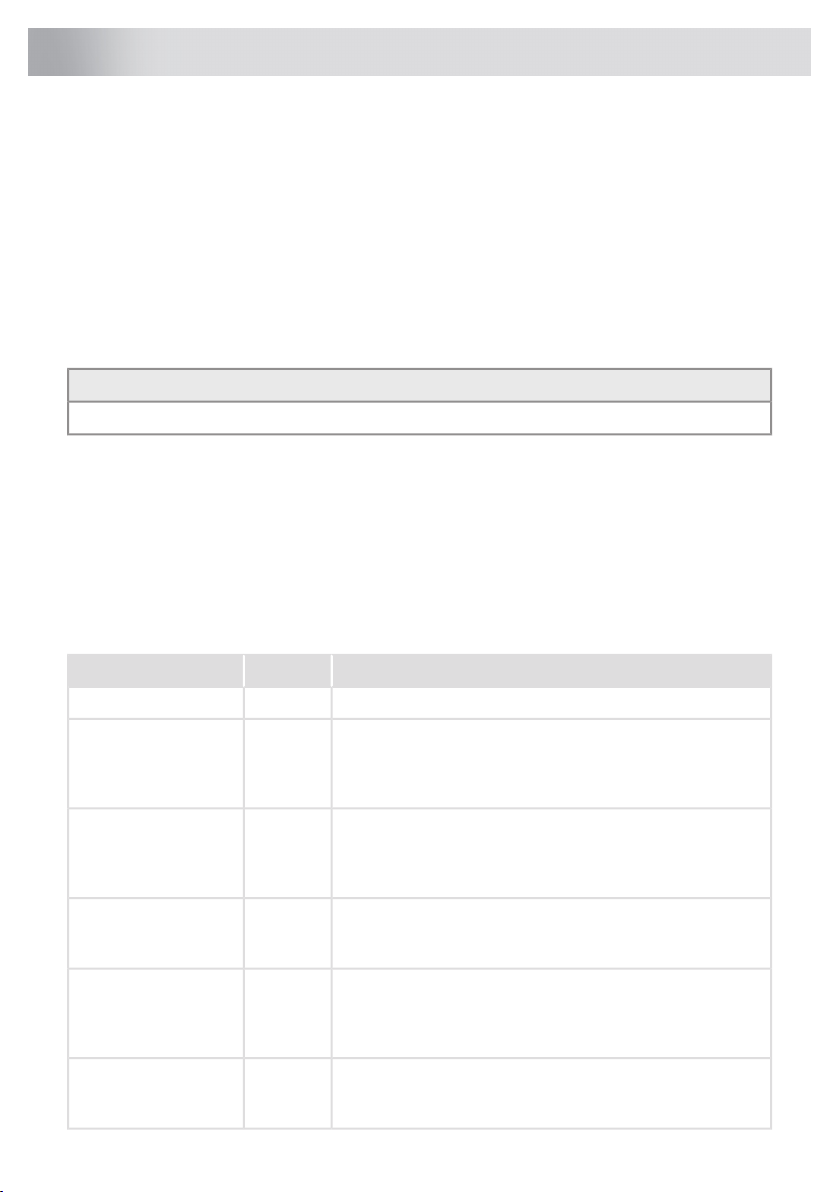
PurposePageChapter
Explains the pictograms used in these instructions.3Pictograms used
Provides information, warnings and tips on using the appliance
safely so that you will not get hurt and the device will not
malfunction. Always read this section thoroughly before using
the appliance.
4Safety
Describes the available functions of the appliance. The tables
clearly show what the different keys can be used for.
The various possible displays and messages on the appliance
are also explained.
11Your hob with
integrated extractor
This chapter finds information on the operation and use of
induction and the exhaust module. You will also find advice
on the cookware to be used and information on cooking levels.
18Use
It gives you step-by-step information on how to operate the
device. The steps include illustrations that consist of a left-side
drawing showing the action (which key to touch) and a
right-side drawing showing the reaction of the device.
26Operation
Refer to this section if you want to connect the appliance to
Wi-Fi in your home. It also describes how to use the
ConnectLife app and how to update the appliance firmware.
41ConnectLife and Wi-Fi
11
Your hob with integrated extractor
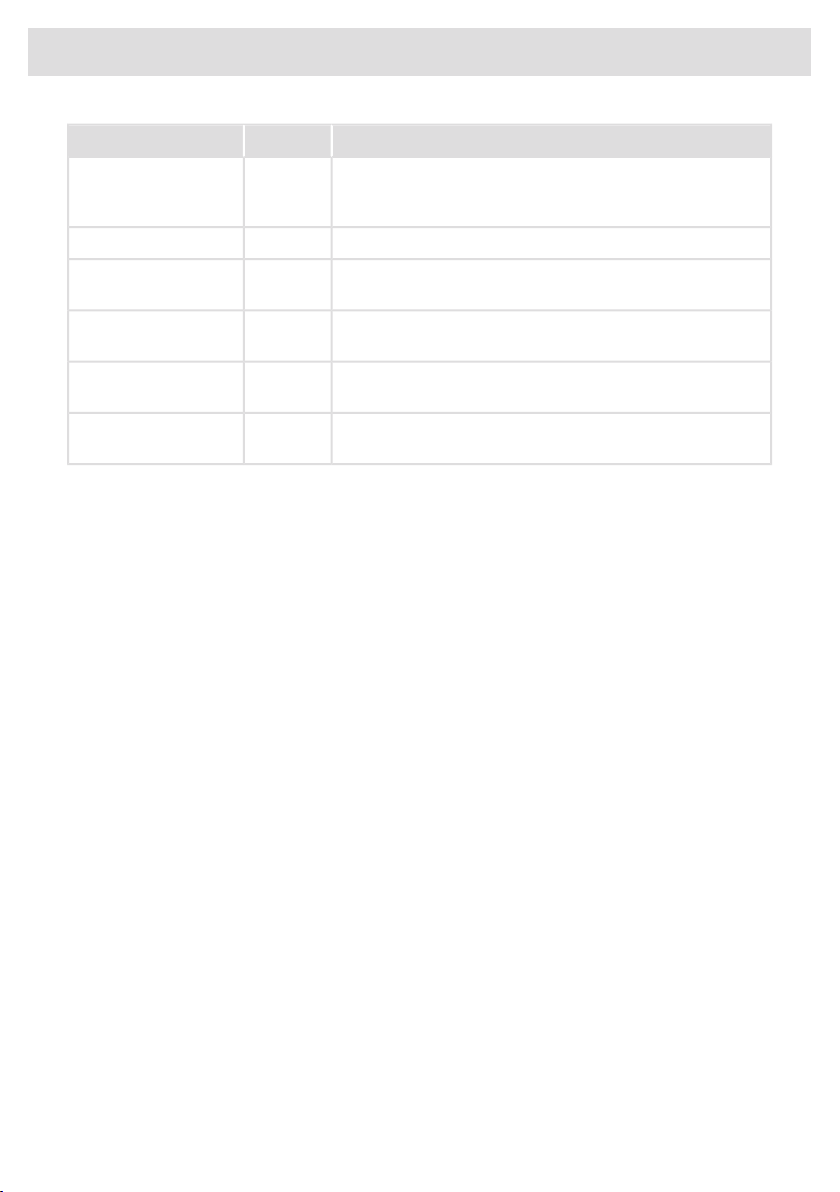
PurposePageChapter
You can fully customise this induction hob to your cooking
style! Several settings can be adjusted. This chapter also
contains settings for the installer.
44Settings
Provides information on cleaning and maintaining your device.48Maintenance
If the appliance does not work correctly or displays unclear
messages, please refer to this section.
52Troubleshooting
Describes the technical data and specifications of your
appliance.
56Technical data
It gives you packaging information and how to dispose of the
appliance responsibly at the end of its life.
58Environmental aspects
This chapter is intended for the installer. Only a qualified
installer may install this appliance.
59Installation
Table continued from last page
12
Your hob with integrated extractor
Description
Since the appliances for which these instructions were drawn up may have different equipment,
some functions or equipment may be described in the manual that may not be present in your
appliance.
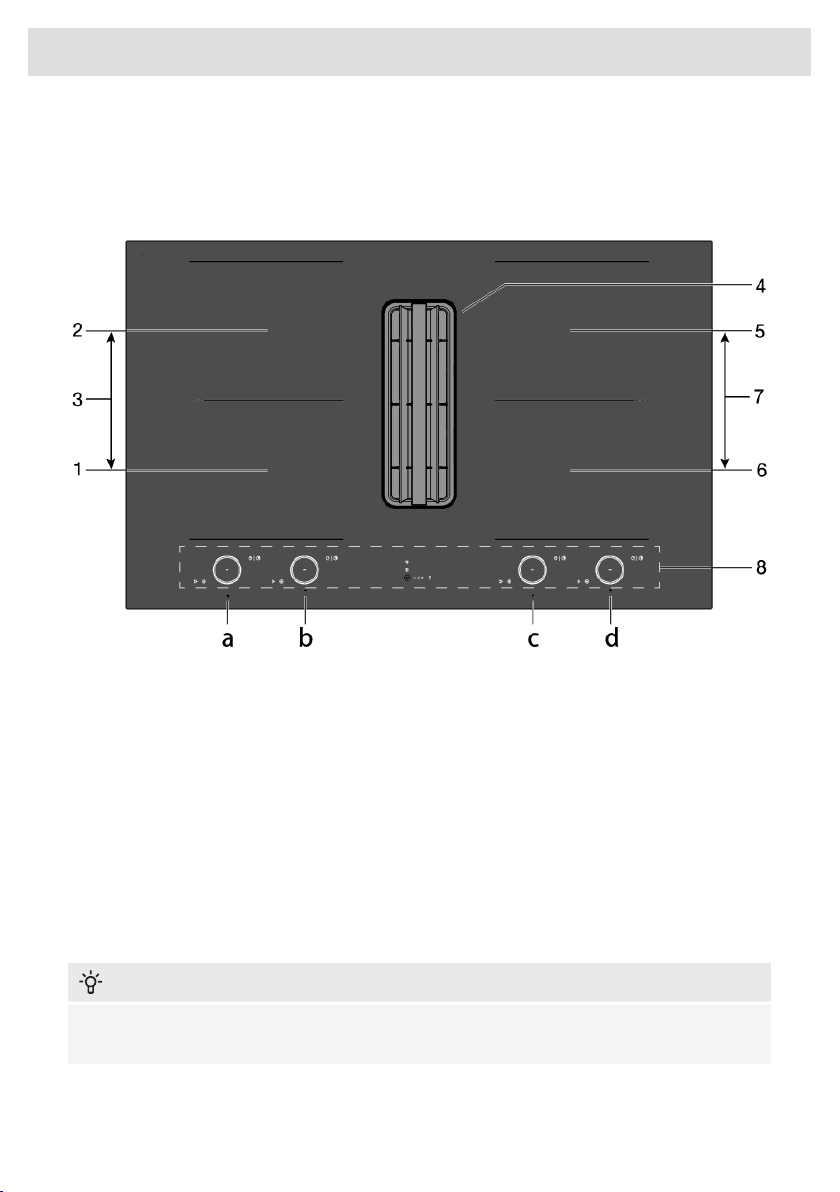
1. Bridge Induction Cooking zone 18 x 22 cm / max. 2.3 kW / max. 3.7 kW (boost) to be operated
with 'a'
2. Bridge Induction Cooking zone 18 x 22 cm / max. 2.3 kW / max. 3.7 kW (boost) to be operated
with 'b'
3. Connected Bridge Induction cooking zones (1 and 2) to be operated with 'a'
4. Extraction module
5. Bridge Induction Cooking zone 18 x 22 cm / max. 2.3 kW / max. 3.7 kW (boost) to be operated
with 'd'
6. Bridge Induction Cooking zone 18 x 22 cm / max. 2.3 kW / max. 3.7 kW (boost) to be operated
with 'c'
7. Connected Bridge Induction cooking zones (5 and 6) to be operated with 'c'
8. Control panel (visible only when the hob is turned on)
INFORMATION!
The maximum power output is depending on the type of cookware used and the thermal condition
of the appliance.
13
Your hob with integrated extractor
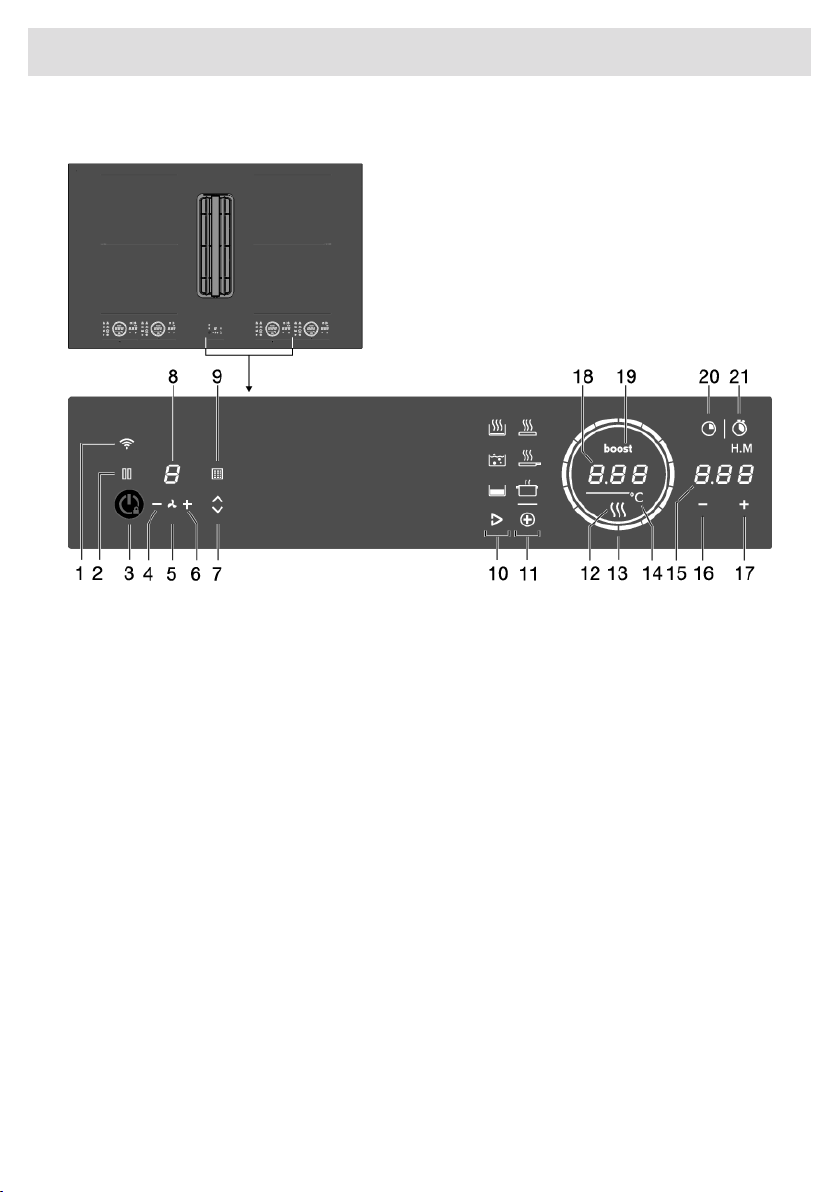
Control panel
1. Wi-Fi/connectivity touch key
2. Pause touch key
3. On/Off and Child lock touch key
4. - (minus) touch key for less extraction
5. Extraction on/off indication
6. + (plus) touch key for more extraction
7. Tower up/down touch key
8. Display extraction level
9. Filter indicator to clean grease filters or replace recirculation filter / Touch key to reset filter
indicator
10. Touch key to start Hestan Cue programs (present depending on the appliance type)
11. Touch key to start PLUS programs
12. Residual Heat indication
13. Slide control (12 settings) / Hob standby indication
14. Degrees celsius indication for Hestan Cue and PLUS programs
15. Display time function
16. Time setting - (minus) touch key
17. Time setting + (plus) touch key
18. Display cooking settings / Text display
19. Boost indicator
20. Count-down timer touch key
21. Touch key for display cooking time - stopwatch
14
Your hob with integrated extractor
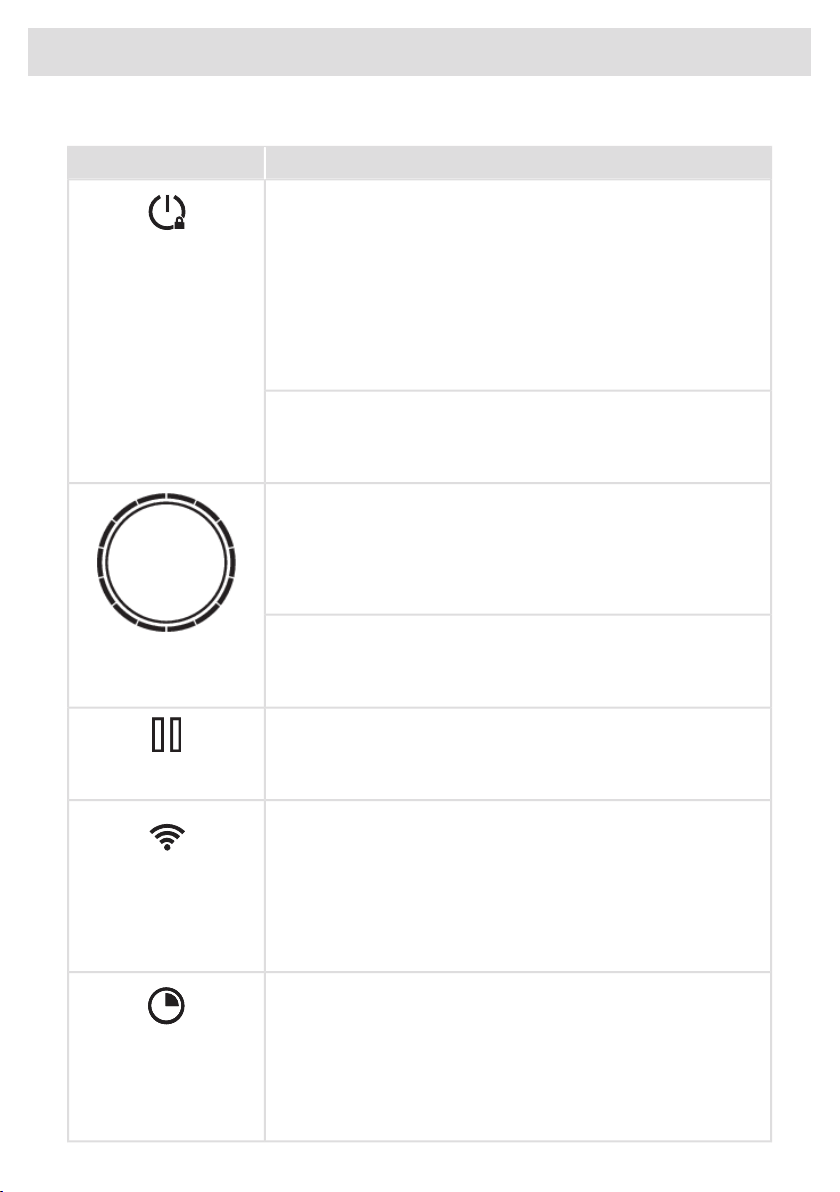
Explanation of the touch keys function
Description (see chapter 'Operation')
Touch key/slider
Switching the hob on/off
The appliance can be switched on and off with the on/off key.
Depending on the 'Synchro Stop' setting, only the hob part or also the
extraction module is switched off.
On/Off
• Synchro Stop switched on (by default): the appliance (hob part
and extraction module) are switched off.
• Synchro Stop switched off: only the hob part will switch off.
Switch off the extraction module by setting the extraction level to '0'
(or by activating Air-Dry mode).
Child lock
The cooking zones can be locked and unlocked to prevent them from
being switched on inadvertently. Touch the on/off key for approximately
3 seconds.
Slider inner circle
• Hob switched on indication.
• If the hob is switched off and at least one of the cooking zones is
still hot, the inner circle remains illuminated. When the temperature
of the hob drops below 65 °C, the inner circle also goes out.
Slider outer circle
Slide control (12 settings)
• Setting cooking zone power levels.
• Setting temperature for Hestan Cue and PLUS function.
Pause
The pause function can be used to pause the operation of the entire
cooking hob for up to 10 minutes. This gives you time to safely clean
the cooking hob without losing your settings.
Pause
Wi-Fi
The cooking hob is equipped with a Wi-Fi module that allows the
appliance to connect to a mobile device such as a smartphone or
tablet. It offers to monitor the cooking hob status via the mobile device.
It is not possible to remotely control, turn on, or turn off the cooking hob
for safety reasons.
Wi-Fi
The monitoring function via mobile device shall not be used to directly
replace the cooking process personal supervision on the cooking hob.
Count-down timer
The count-down timer makes the cooking process easier by setting the
cooking time for the selected cooking zone. When the time set on the
timer expires, the cooking zone will automatically switch off and emit
an acoustic signal. You can switch off the acoustic signal by touching
the count-down timer key; alternatively, it will switch off automatically
after a while. You can set the count-down timer independently for all
cooking zones.
Count-down timer
15
Your hob with integrated extractor
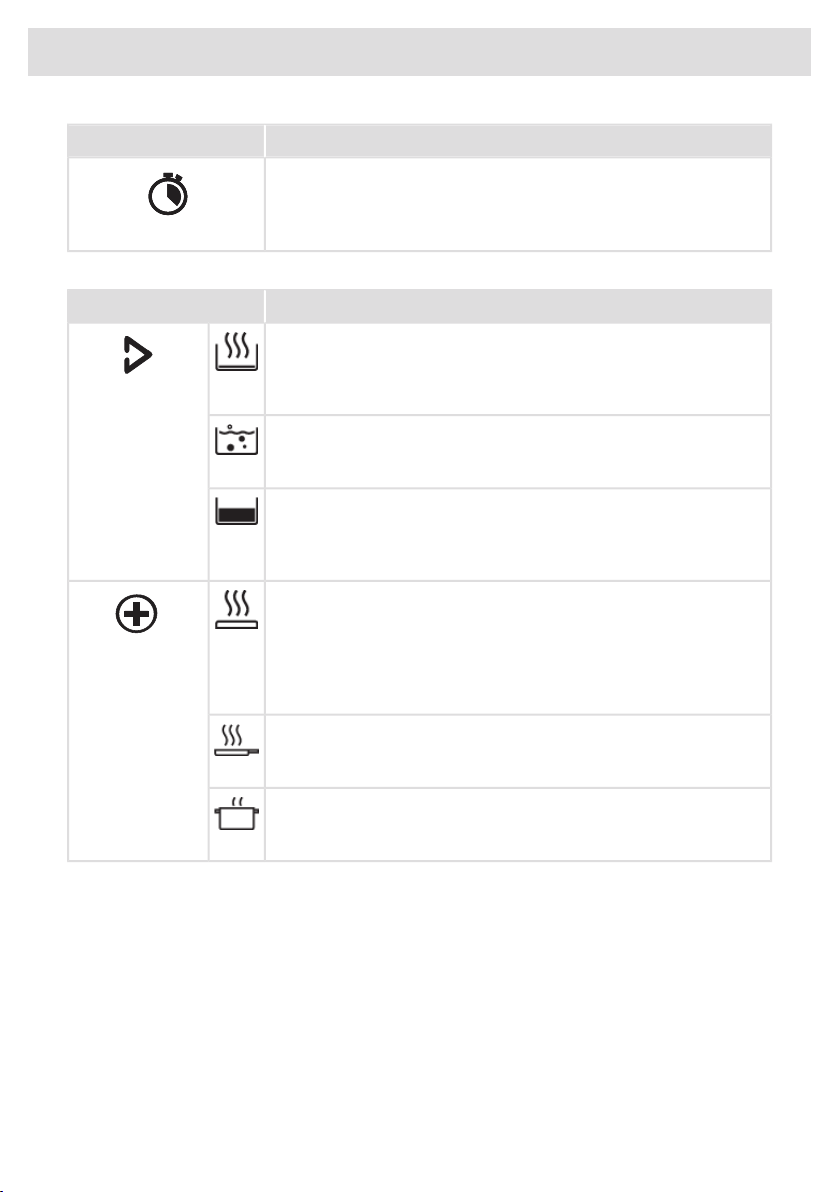
Description (see chapter 'Operation')
Touch key/slider
Cooking time display - stopwatch
The stopwatch can be used to see how long you have been
continuously cooking on the selected cooking zone and starts counting
automatically in the background.
Stopwatch
Program function explanation
Description (see chapter 'Operation')
Program
Heating up and frying
This program is to reach high temperatures rapidly. High pan bottom
temperatures can be reached. Always add oil or butter before starting
it. For healthy cooking don’t exceed the smoke point of the used oil.
Hestan Cue
Only visible as a
Celsius°Cooking™
pan or probe is
detected.
Boiling/cooking with water
With this program, the water gets to boil quickly. Always add water
before starting.
Slow cooking or sous vide
This program is to control low to medium temperatures, preventing high
bottom temperatures. Larger quantities and thicker dishes need to be
stirred occasionally to ensure a homogeneous heat distribution.
Grill
This function is exclusively for Bridge Induction cooking zones, that
are linked to create one larger cooking zone.
PLUS
Grilling is optimized for ASKO induction accessories grill plate and
teppanyaki. But it will also work with different cookware, but perhaps
less accurate.
(Automatic
cooking programs)
Frying/wok
With this function, you can cook vegetables, fish, bacon, meat, fried
potatoes, or eggs in butter or oil.
Heating up/keeping warm
With this function you can, for example, melt chocolate (45 °C), keep
food warm (70 °C), simmer (94 °C) or bring it to boil (100 °C).
Hob recall function
This feature allows you to recall all the settings of the cooking zones if the hob was accidentally
switched off.
Within 6 seconds, the hob must be switched back on. Pressing anywhere on the slider within
6 seconds recalls all the settings from before the last switching off of the appliance.
Pan move function
If you remove the pan from an active cooking zone and within 6 seconds place it on a different
cooking zone, you can transfer all the timer and cooking-related settings to the new cooking zone
by touching the slider of the new cooking zone. To indicate this possibility, the new cooking zone
displays copied settings on the slider. When the confirmation is done, the previous cooking zone is
deactivated.
Table continued from last page
16
Your hob with integrated extractor
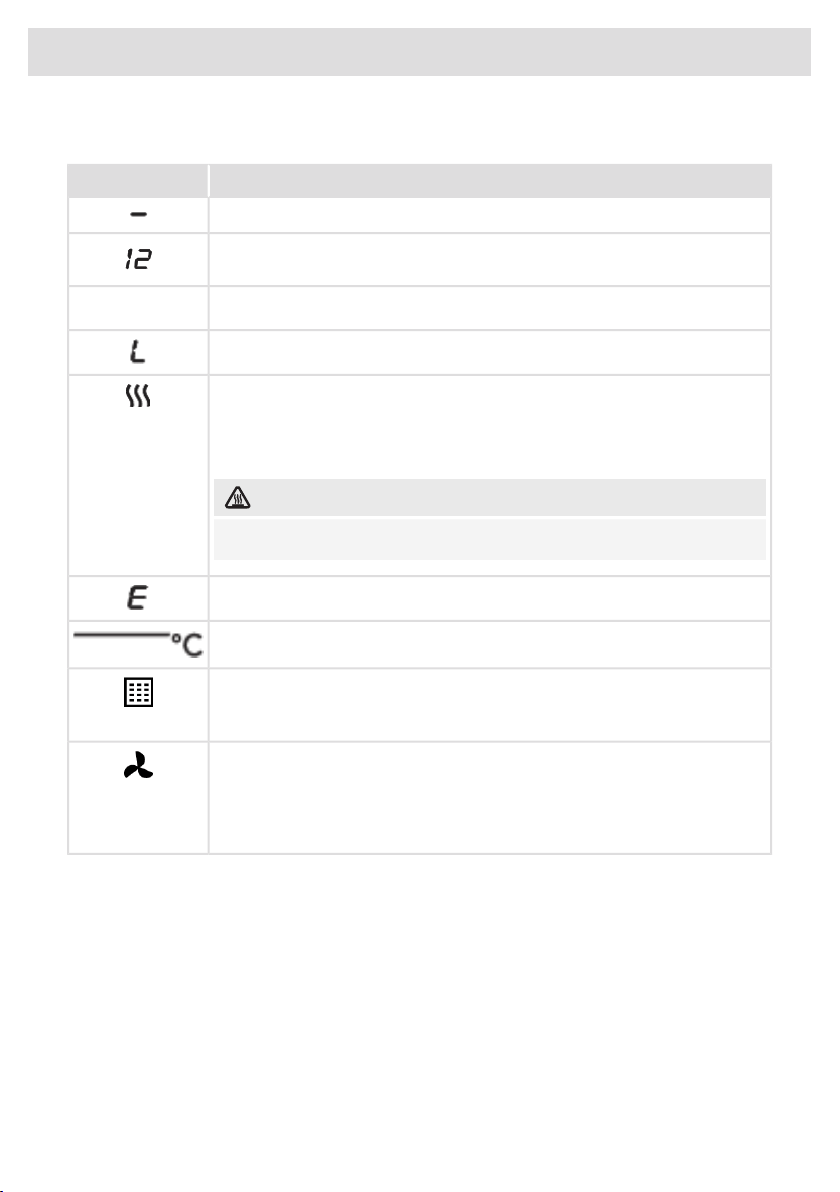
Indications on the display
StatusIn display
Power level ‘0’ for a cooking zone.
Power level that is set for a cooking zone; 1 = low / 12 = high.
Boost function active.
boost
The locking function is activated; the control panel is locked.
Residual heat indicator: The hob has a residual heat indicator for each cooking
zone to show which cooking zones are hot after the cooking zone is turned off.
Although the hob is switched off, the indicator will remain on as long as the
cooking zone is hot! Avoid touching those cooking zones when this indicator
is lit.
HOT SURFACE!
Danger! Risk of burns.
Error code; See chapter 'Troubleshooting'.
Degrees Celsius indication for Hestan Cue and PLUS programs.
Filter indicator (and touch key) for cleaning the grease filters or replacing the
recirculation filter.
Touch the key for 2 seconds to reset the filter indicator.
Extraction indication
• Steady light: extraction is on.
• When dimmed: extraction is disabled or in Air-Dry mode, or Synchro Control
is enabled (automatic extraction).
17
Your hob with integrated extractor
Induction cooking
Induction cooking is fast
To start with, you will be surprised by the speed of induction cooking.
Especially at higher settings, foods and liquids will come to a boil very
rapidly. It is best not to leave pans unattended to avoid them boiling
over or boiling dry. With induction cooking, there is no heat loss, and
the handles stay cool.
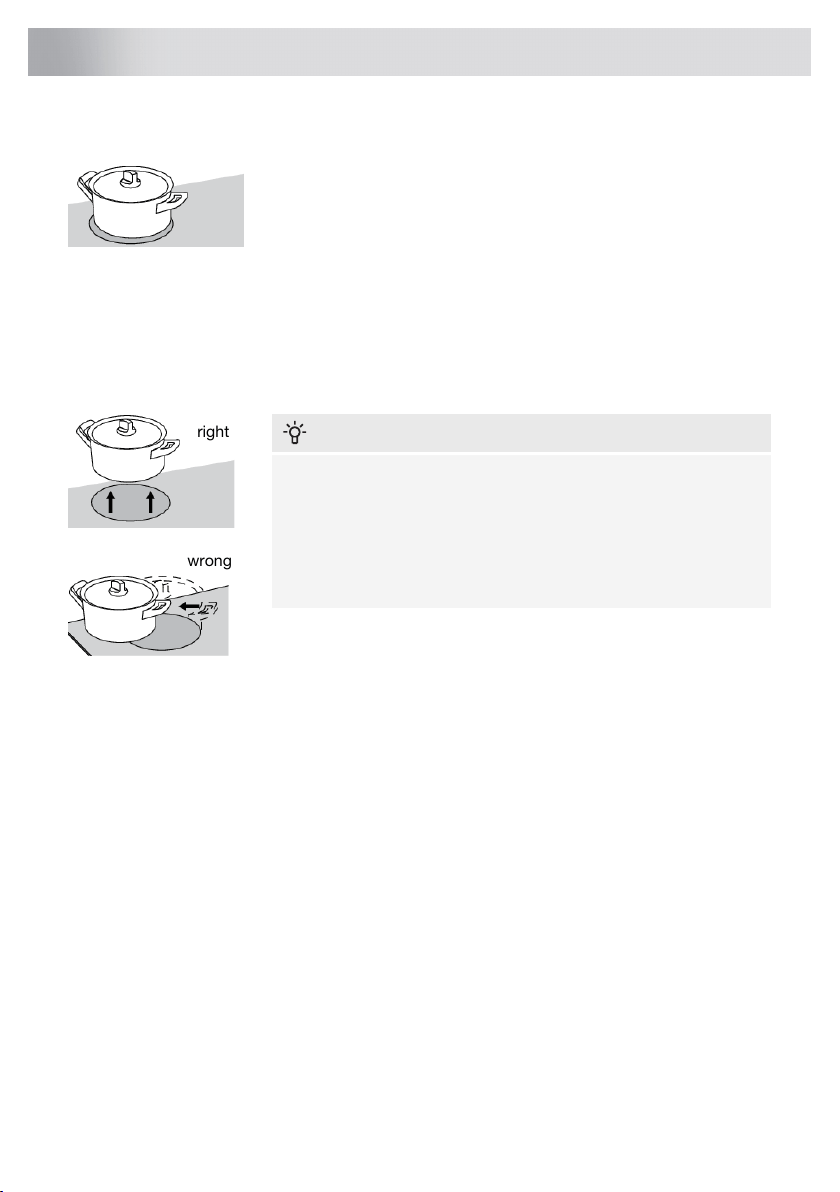
The power level adjusts itself
In induction cooking, only the zone on which the pan is placed is used. If you use a small pan on a
large zone, the zone will adjust the power to the pan's diameter. The power will thus be lower, and
it will take longer before the food comes to a boil.
right
wrong
INFORMATION!
• Grains of sand may cause scratches that you cannot remove.
Therefore, only put pans with a clean base on the cooking
surface and always pick pans up to move them.
• Do not use the hob as a worktop.
• Always keep the lid on the pan when cooking, in order to avoid
energy loss.
Operation of the touch keys and sliders
• The touch controls may take some getting used to if you are used to other (rotary) controls.
Place the tip of your finger flat on the control to achieve the best results.
• The touch sensors only react to the light pressure of a fingertip. Do not operate the controls with
any other objects.
• The cooking hob is operated by a slider. You can either touch the selected part of the slider or
slide in a circular motion clockwise to increase or anti-clockwise to decrease the power level
and temperature.
• To set the cooking zone power level, touch the desired spot on the slider. As you touch the slider,
the selected power level will appear on the cooking zone display unit.
• The selected part of the slider will be fully lit.
• Do not use any objects to operate the slider.
18
Use
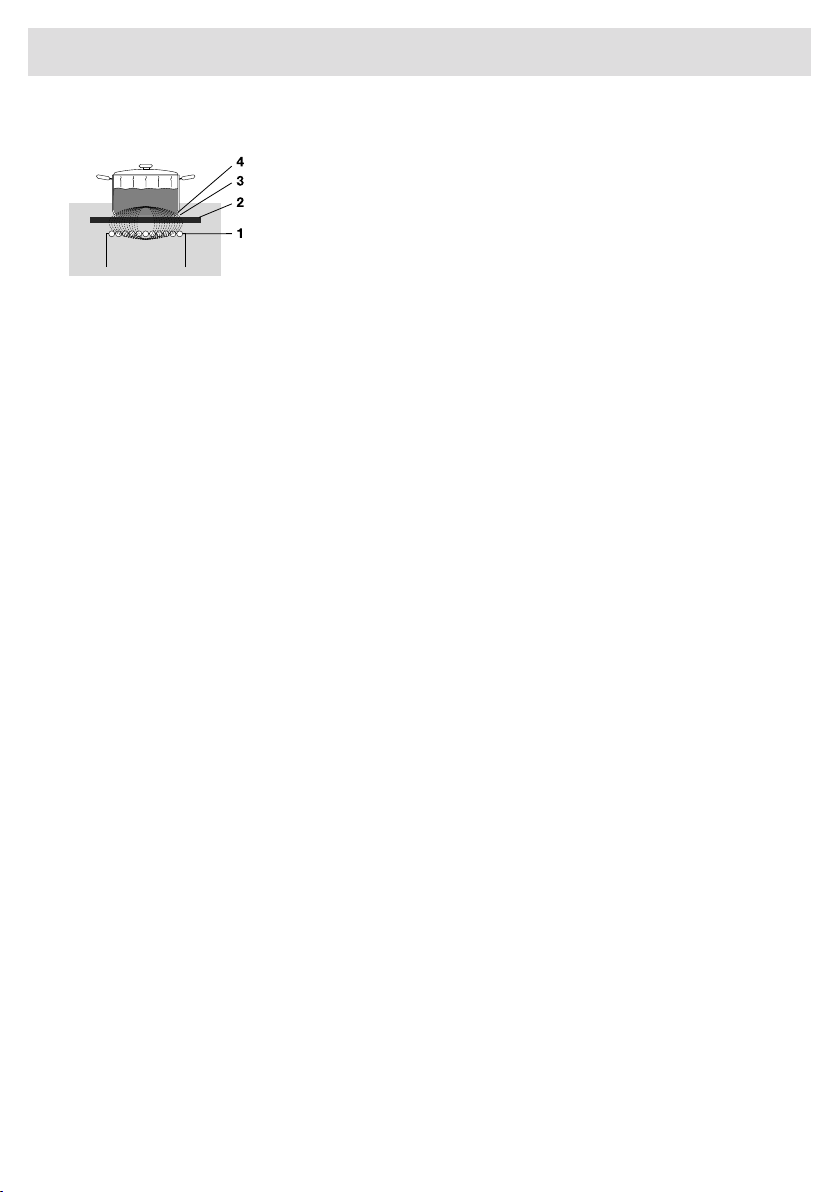
How induction works
The coil (1) in the hob (2) generates a magnetic field (3). By placing a
pan with an iron base (4) on the coil, a current is induced in the base
of the pan.
Easy
The electronic controls are accurate and easy to set. On the lowest setting, you can melt chocolate
directly in the pan, for example, or cook ingredients that you would normally heat in au bain-marie.
Fast
Thanks to the induction hob high power levels, bringing food to a boil is very quick.
Clean
The hob is easy to clean. Because the cooking zones do not get any hotter than the pans themselves,
food spills are unlikely to burn into the glass.
Safe
The heat is generated in the pan itself. The glass top does not get any hotter than the pan. This means
that the cooking zone is considerably cooler than a ceramic hob, for example.
Once a pan has been removed, the cooking zone cools down quickly.
Capacity distribution of cooking zones
Depending on the hob model, the cooking zones can affect each other. When several cooking zones
are switched on simultaneously, the available capacity is shared automatically between them.
When the maximum capacity of the combination of cooking levels is reached during setting, one or
more zones are automatically reduced to the highest possible setting at that moment. This is indicated
by the flashing of the relevant control element.
19
Use
Induction sounds
• Ticking sound
This sound can be caused at lower power level settings or by the automatic pot detection.
• Pan makes sounds
Pans can make some noise during cooking. This is caused by the energy flowing from the hob
to the pan. At high settings, this is perfectly normal for some pans. It will not damage either the
pans or the hob.
• Ventilator makes sounds
To increase the lifespan and performance of the electronics, the appliance is equipped with
fans. During intense appliance use, the fan is activated to cool down the appliance, and you will
hear a buzzing sound. The fan still runs for several minutes after the hob has been switched off.
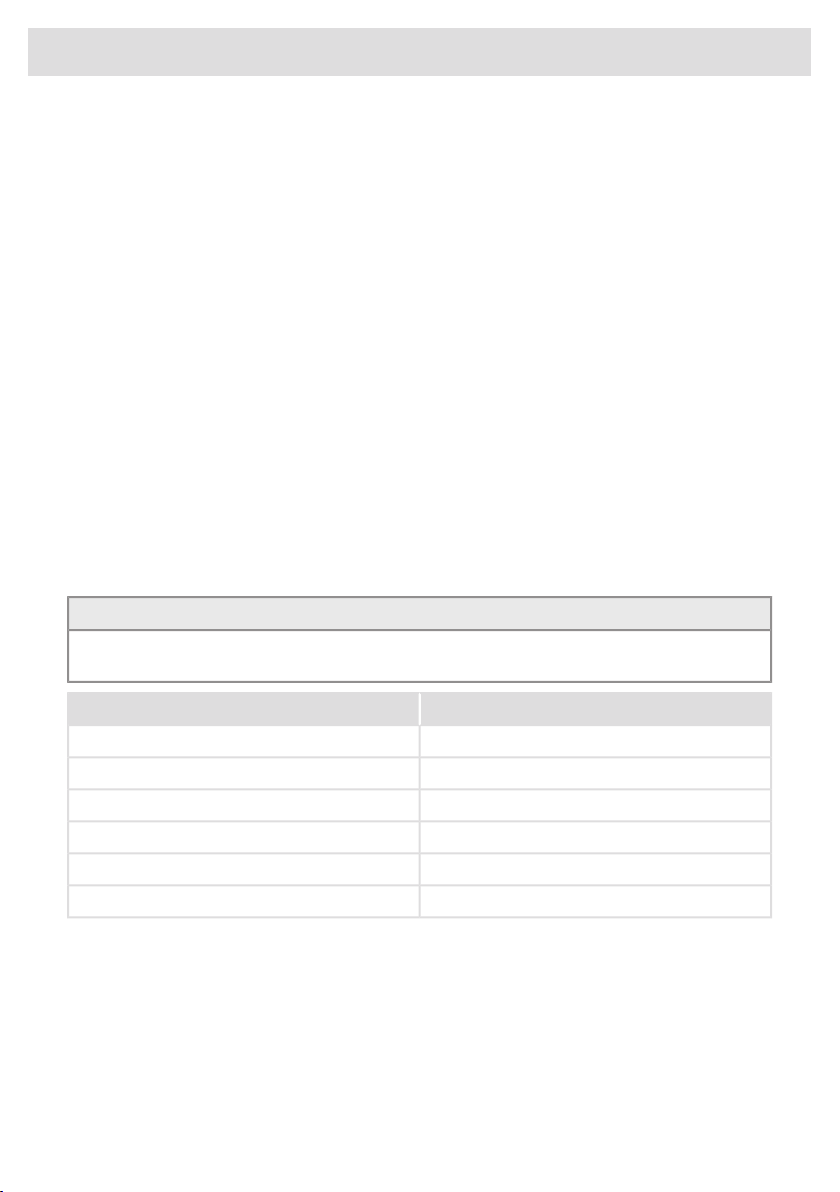
Pans for induction cooking
Induction cooking requires a particular type of pan in terms of quality.
Pans that have already been used for cooking on a gas hob are no longer suitable for use on an
induction hob.
Only use pans that are suitable for electric and induction cooking with:
• a thick base of a minimum of 2.25 mm;
• a flat base.
TIP!
You can check for yourself whether your pans are suitable using a magnet. A pan is suitable if the
base of the pan is sufficiently attracted by the magnet.
UnsuitableSuitable
EarthenwareSpecial stainless steel pans
Stainless steelClass Induction
PorcelainSolid enamelled pans
CopperEnamelled cast-iron pans
Plastic
Aluminium
20
Use
WARNING!
Be careful with enamelled sheet-steel pans:
• the enamel may chip (the enamel comes loose from the steel) if you switch the hob on at a
high setting when the pan is (too) dry;
• the base of the pan may warp - for example: Due to overheating;
• heat enamelled pans slowly.
Never use pans with a misshapen base. A hollow or rounded base can interfere with the operation
of the overheating protection, causing the appliance to become too hot. This may lead to the
glass top cracking and the pan base melting. Damage caused by using unsuitable pans or boiling
dry is excluded from the guarantee.
Pan diameter
The diameter of the bottom of the pan must be at least 12 cm. You will achieve the best results by
using a pan with the same diameter as the cooking zone. If a pan is too small, the zone will not work.
Pressure cookers
Induction cooking is very suitable for pressure cookers. The fast-reacting cooking zone brings the
pressure cooker to pressure quickly. As soon as you switch off a cooking zone, the dish stops
cooking immediately.
Pan detection
The cooking zone automatically detects a suitable pan placed on a cooking zone. The cooking zone
display lights up.
Integrated pan recognition
If a certain power level is set for a cooking zone and there is no (suitable) pan on the cooking zone,
the cooking zone will not deliver any power. After a certain period, the cooking zone will switch off
automatically.
Grill plates
The hob has a Grill function (depending on the model) for using a grill plate. The function keeps the
grill plate at an ideal temperature for grilling.
21
Use

Cooking settings
Because the settings depend on the quantity and composition of the pan and its contents, the table
below is intended as a guideline only.
PurposeLevel
Use settings 1 - 5 to:
• simmer bouillon,
• stew meats,
• simmer vegetables,
• melt chocolate,
• poach,
• melt cheese.
Use settings 6 - 9 to:
• complete the cooking of large quantities,
• defrost hard vegetables,
• fry thick slices of breaded meat.
Use settings 10 - 11 to:
• fry thick pancakes,
• fry bacon (fat),
• cook raw potatoes,
• make breaded fish,
• cook through fish,
• fry thin slices of breaded meat.
Use setting 12 to:
• sear meats,
• cook fish,
• cook omelettes,
• fry boiled potatoes,
• deep fry foods.
Use setting boost to:
• bring liquids to a boil quickly,
• shrink greens,
• heat oil and fat,
• wok.
22
Use
Using the extraction module
The extraction module is equipped with a movable tower. Using the tower in the raised position, the
extraction module will catch vapour more effectively, especially when using tall pans.
• The tower has two positions; lowered and raised. The position can be changed by touching the
tower up/down key. By default, the tower rises automatically when the induction hob is operated.
This can be changed in the 'Settings' menu.
• Change the extraction setting with the - (minus) and + (plus) keys for the fan (1-4 and boost).
Setting the extraction level to '0' will manually switch off the extraction module or activate the Air-Dry
function if necessary. Use Synchro Stop to automatically switch off the extraction module upon
switching off the hob.
When the tower up/down key is touched during movement, the direction of movement is immediately
changed. Also, if upward movement is obstructed (by an object for example) the direction of
movement changes.
WARNING!
Make sure no objects obstruct the tower in its movement. Any object that is lifted or tilted may
damage the hob and create a hazard (for example, spilling hot contents).
NOTE!
Disable setting 'Automatic raising of the tower' if it is undesirable for the tower to rise automatically
when the extraction is switched on. See chapter 'Settings'.
If the hob is switched off (manually or automatically) while the tower is in the raised position, the
tower automatically lowers.
Automatic extraction
The extraction module has three automatic extraction settings (see chapter 'Settings'):
• Synchro Control: Extraction is automatically controlled when a cooking zone is operated (the
higher the power level of the cooking zone, the higher the extraction). Synchro Control overrides
Synchro Start.
• Synchro Start: Extraction switches on at a fixed setting when a cooking zone is operated. Set the
fixed setting via the settings menu.
• Synchro Stop: The extraction module is automatically switched off and is set to the Air-Dry
function if necessary upon switching off the hob.
23
Use
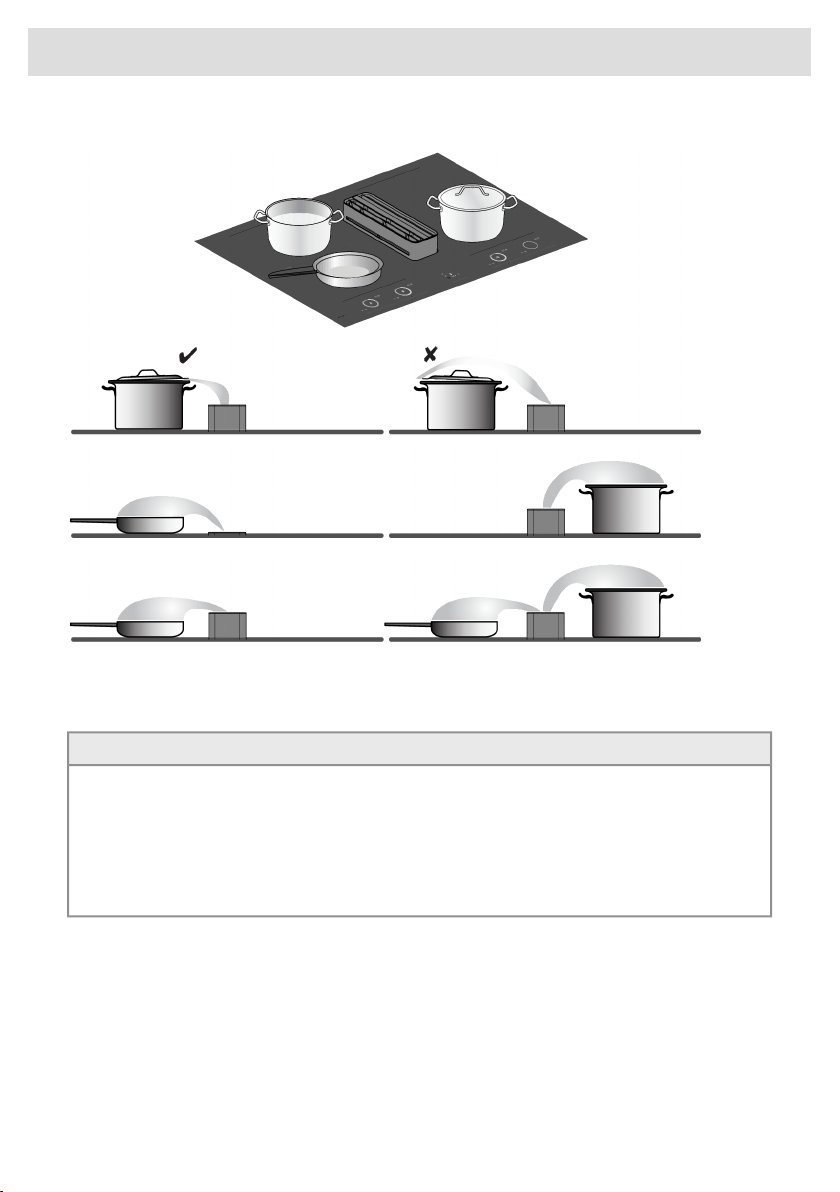
Placing pans and lids
We recommend placing pans as close to the tower as possible, within the dimensions of the cooking
zones. If a lid is used, place it at an angle on the pan with the opening towards the tower. This
ensures optimal extraction.
TIP!
The use of lids has advantages:
• The heat remains in the pan so that the contents reach the desired temperature faster. The
energy consumption is consequently lower.
• Most cooking vapours condense on the lid, allowing for less (moist) air extraction. With
recirculation, humidity levels increase significantly less as a result. In addition, the exhaust
module could run at a lower noise level.
Use the tower in the raised position for greater effectiveness, especially when using tall pans.
Air-Dry function
The Air-Dry function ensures that the extraction channels and grease filters are blown dry.
After 10 minutes, the Air-Dry function switches off automatically.
24
Use

Clean grease filter indicator
The extraction module has a filter indicator. This indicator flashes when the grease filters need to be
cleaned. Three use intensities can be set, which determine the cleaning interval of the grease filters.
By selecting the correct intensity of use based on cooking habits, the filters will not need to be
cleaned more than necessary.
See the table for the required grease filter cleaning interval.
Filter cleaning after
(hour):
Intensity of useIndication
40Cooking and frying with little use of greases and
oils.
L1
20Cooking and frying with moderate use of greases
and oils.
L2 (default)
10Cooking and frying with lots of use of greases
and oils.
L3
40Manual: The filters can be cleaned at any time
(before signalled by the filter indication). The filter
indication can then be reset. Note! Always reset
the filter indicator after cleaning the filters. In the
‘off’ setting, the filter indicator appears only if you
have not cleaned the filters for a long time.
off
Replace recirculation filter indicator
The extraction module has a filter indicator. This indicator and the letter ‘r’ on the display flash when
the recirculation filter needs to be replaced.
The recirculation filter has a replacement interval of 300 operating hours. See ‘Replacing the
recirculation filter’ in chapter 'Maintenance'.
25
Use
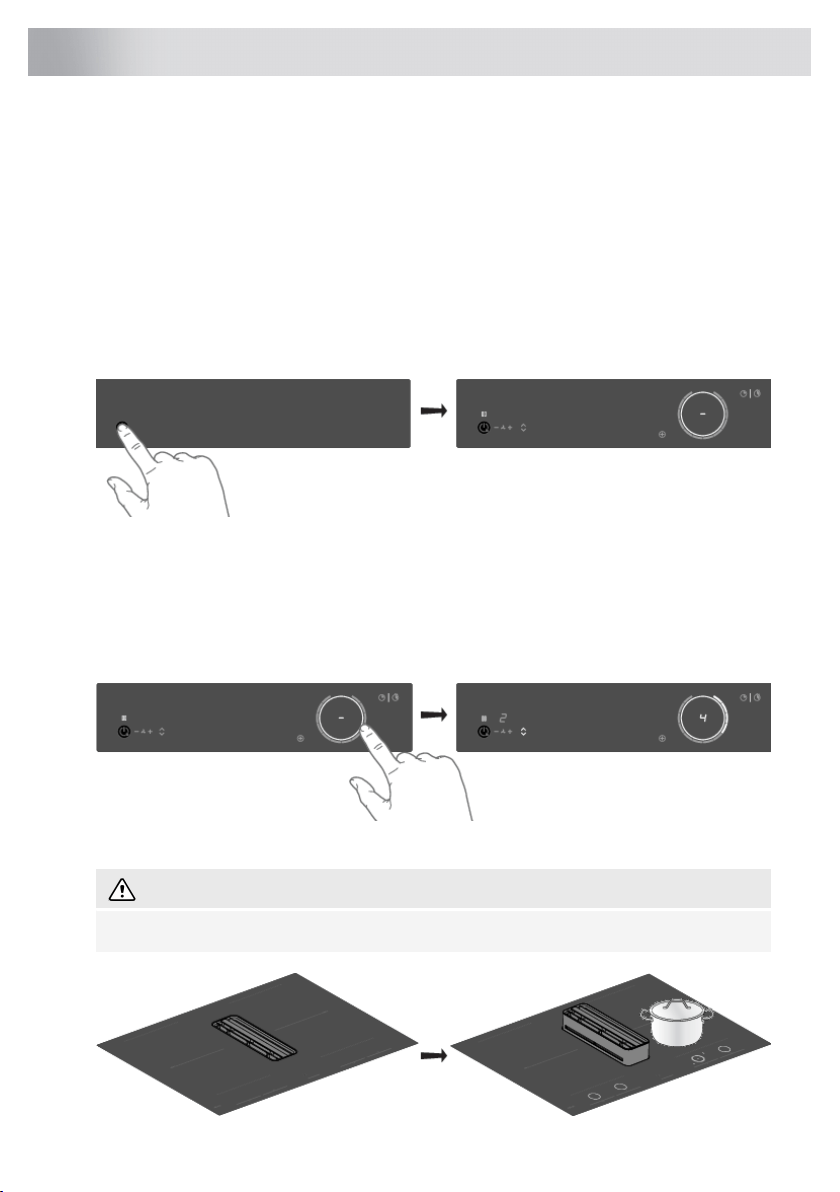
Start Preparing
Three cooking modes are available:
1. Standard cooking with power levels.
2. Cooking with the PLUS menu.
3. Cooking with Hestan Cue by measuring cookware temperature (available depending on the
model).
Standard cooking
1. Place a pan on a cooking zone.
2. Touch the on/off key to switch on the hob.
• A single audio signal sounds.
• The inner rings will light up.
• All the sliders light up; then they gradually go out. The slider only remains lit for the selected
cooking zones on which you have placed a pan.
3. Slide with your finger over the slide control (clockwise) or tap with your finger on the slide control
to set the desired setting.
• The cooking zone starts automatically at the setting that has been set.
WARNING!
Depending on the settings, the tower can move up and down automatically.
26
Operation
4. Set a higher or lower setting by sliding over the slide control with your finger or by tapping on
the slide control.
• The cooking zones have 12 settings. There is also a ‘boost’ setting.
5. Remove the pan or touch the slider for 3 seconds to switch the cooking zone off.
NOTE!
When no cooking zone is active for 60 seconds, the cooking hob will power off.
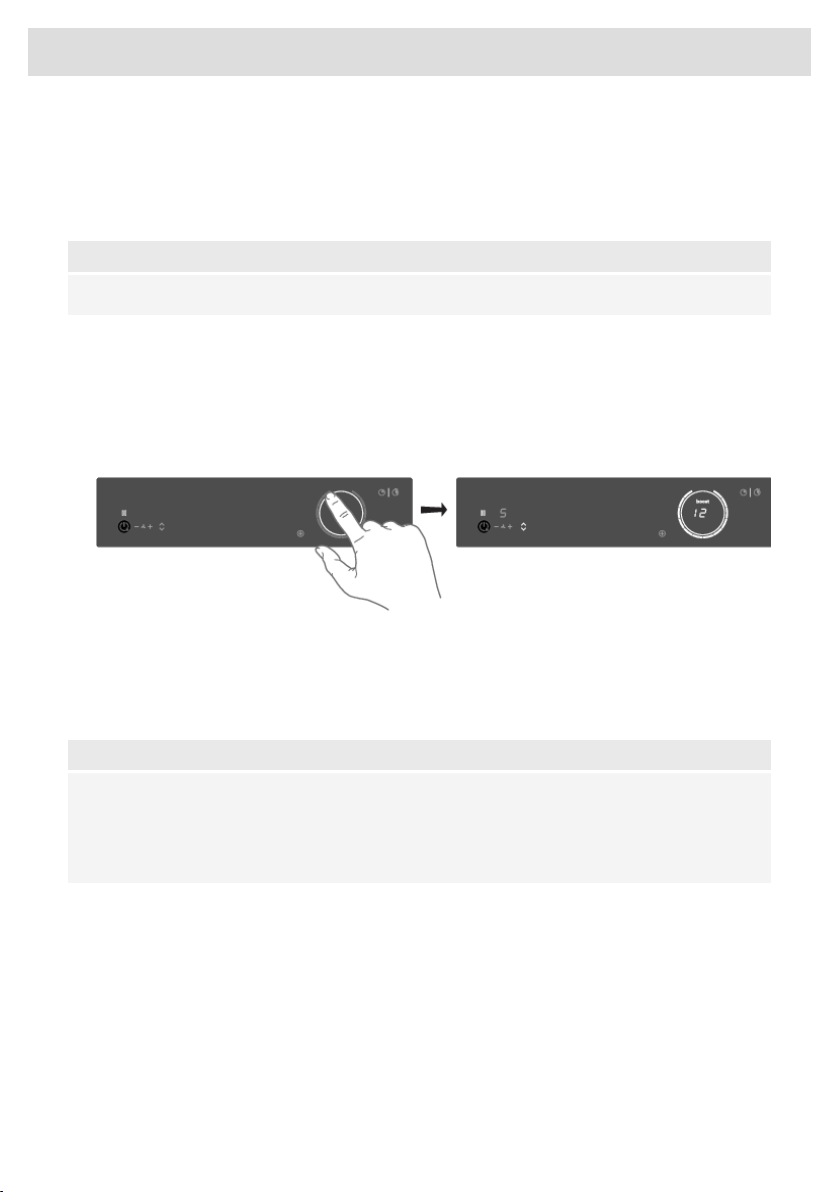
Boost
You can use the ‘boost’ function for cooking at the highest power level during a short time (max.
10 minutes). After the maximum boost time has passed, the power will be reduced to setting 12.
1. Place a pan on a cooking zone.
2. Touch level 12 of the slider or slide along level 12 to set the boost level. Touch level 12 twice if
'Auto Boost' is off (refer to chapter 'Settings').
• ‘12’ and ‘boost’ appear in the display.
• If 'Auto Boost' is active, boost is automatically activated when power level 12 is selected
(consult chapter 'Settings').
3. To deactivate the boost for the selected cooking zone, again touch level 12 on the slider.
NOTE!
To avoid overheating, the electronic control system may automatically deactivate boost prematurely
and decrease the power level to 12.
If there is no suitable pan on the cooking zone, the set level of temperature will flash. After one
minute, the cooking zone will be switched off.
27
Operation
Cooking with the PLUS menu
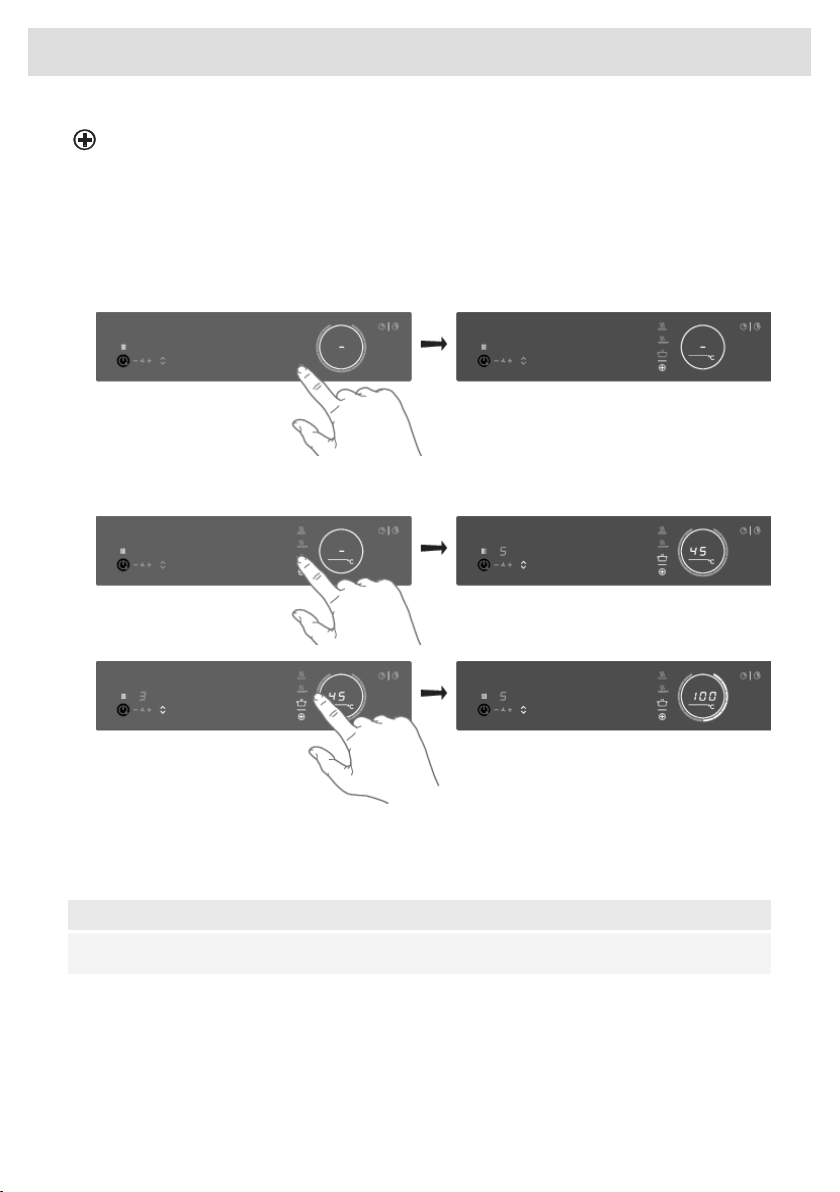
The PLUS menu allows cooking with semi-automatic programs, enabling temperature cooking for
all kinds of cookware that fit the program's purpose.
1. Touch the PLUS menu key to display the program line: keeping warm/heating up, frying/wok,
and grill.
• When selecting the Grill program, you must use a grill plate that covers two linked cooking
zones.
2. Select the desired program and temperature range by touching the relevant symbol. You can
also toggle through the menu or temperature by long-pressing the relating touch key.
When the program or temperature selection does not change for 3 seconds, the program is activated.
To deactivate a PLUS program, press the active program key for about three seconds or select a
power level manually.
NOTE!
Always add water, oil or butter before starting a program; do not use an empty pan or pot.
28
Operation
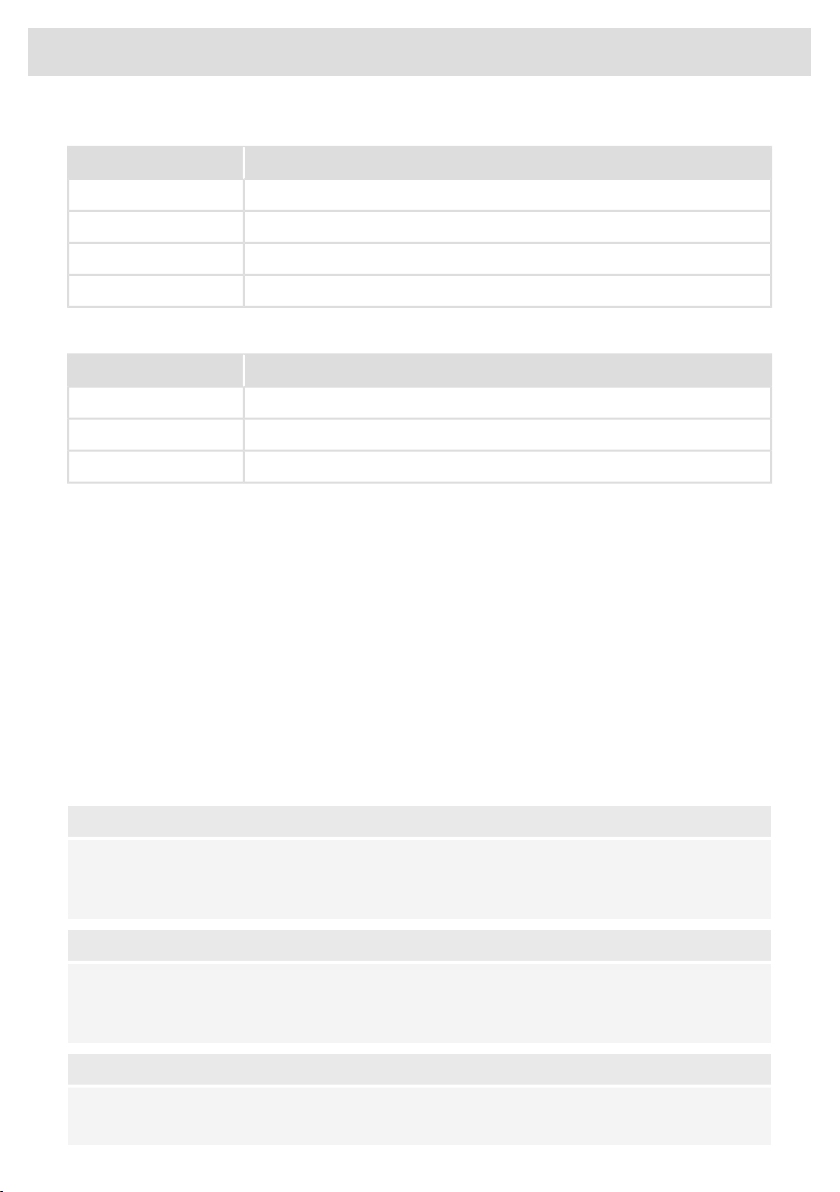
Keeping warm and Heating up
UseTemperature (°C)
melt chocolate45
heating up/keeping warm70
simmer vegetables94
bring food or liquid to the boil quickly100
Frying/wok
UseTemperature (°C)
fish, bacon, fried egg, vegetables in butter140 / 160
schnitzel, sausages, jacket potatoes180 / 200
wok220
Grill
This function is exclusively for connected Bridge Induction cooking zones that are combined to form
a larger cooking zone.
Grilling is optimized for ASKO induction accessories: the grill plate and the teppanyaki. It will also
work with different cookware, but perhaps less accurate.
Some functions are indicating the heat up time, counting down. In the heating-up stage, the slider
and the set temperature will flash. When the set temperature is reached, a short beep will be emitted,
and the slider will be constantly lit. You may then start cooking.
The sensor which measures the temperature while cooking within the PLUS menu programs is located
in the glass below the cookware. Because of this, there is always an offset between the setpoint and
the actual temperature of the content inside the cookware. The temperature of the content inside
the cookware is therefore also dependent on factors such as the type of pan, the volume of liquid
and whether a lid is placed on the pan.
NOTE!
Up to a temperature of 94 °C, the programs allow the hob to reach and maintain the set
temperature automatically by measuring the glass surface temperature. This will avoid liquids
overflowing and burning on the bottom of the pan.
NOTE!
From 100 °C on these programs will heat cookware with different timed power steps. The set
temperature serves as an indication of the approximately to be reached temperature range.
Someone must always be present to supervise the cooking process.
NOTE!
For more accuracy, Celsius°Cooking™ cookware such as Frying Pan, Chef's Pot or the Probe is
recommended, with separate functions for it (see chapter 'Cooking with Celsius°Cooking™').
29
Operation
NOTE!
Starting these menu functions at the beginning of the cooking process will give the best results.
An already hot surface will influence the performance.
Cooking with Celsius°Cooking™
Introduction
Welcome to Celsius°Cooking™.
Your new induction hob is fully packed with smart functions and features that make cooking easier
and more pleasant.
In order to get the most out of these and explore what's possible with Celsius°Cooking™, you can
also buy some additional connected equipment that will help you gain total control over temperatures
and timings.
Additional accessories are included with some models.
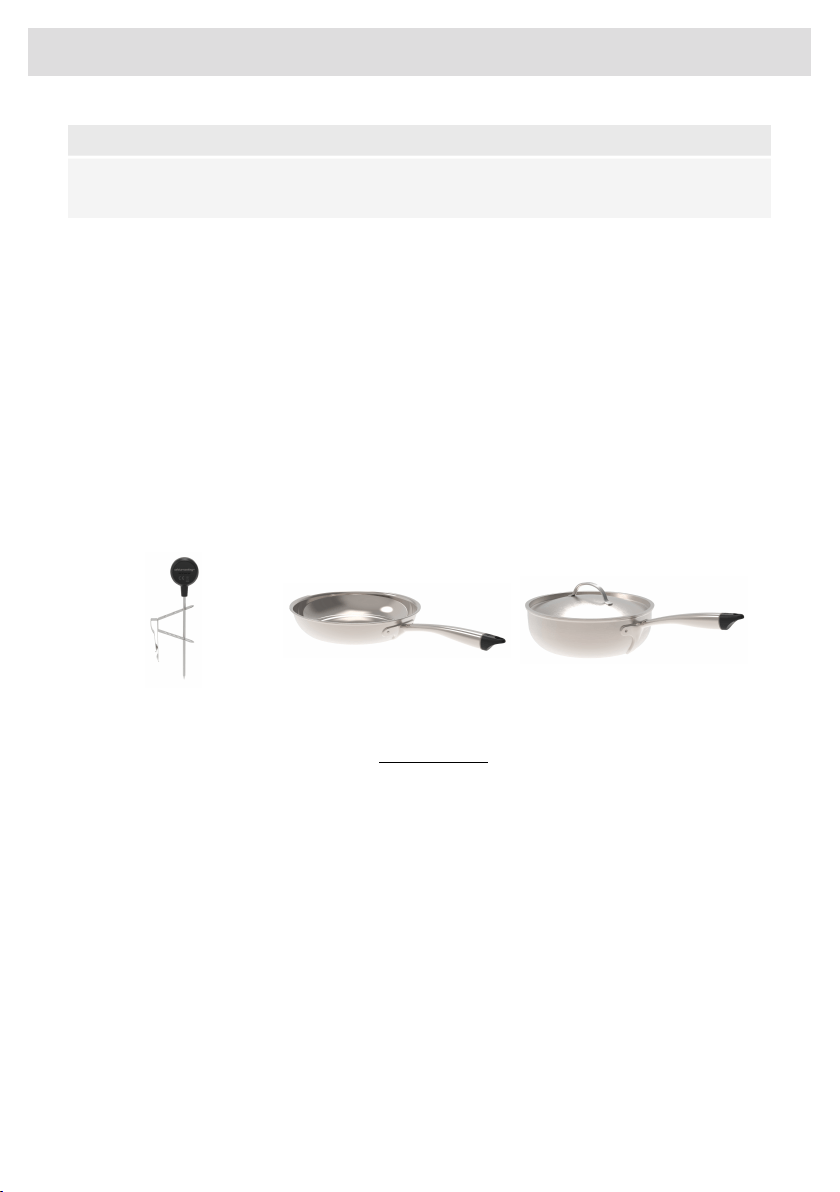
This equipment lets you unlock the full power of Celsius°Cooking™, reading and communicating
exact information about the temperature of your ingredients, giving perfect results. The equipment
is:
Chef's potFrying panProbe
Find out more at www.celsiuscooking.com, www.asko.com.
30
Operation
Cooking with Celsius°Cooking™ cookware and Hestan Cue
programs
This option involves cooking using either the Celsius°Cooking™ cookware (frying pan or pot’s) that
continuously measures the temperature inside the cookware or the Celsius°Cooking™ temperature
probe. All use Bluetooth connections to send information about the temperature to the cooking hob.
Preparing the system
Before you start cooking, please make sure you complete all the preparation steps. Otherwise, you
may run into difficulties or inadvertently cause damage to the system.
Using Celsius°Cooking™ ensures the cookware is always at the right temperature needed to prepare
the food you are cooking.
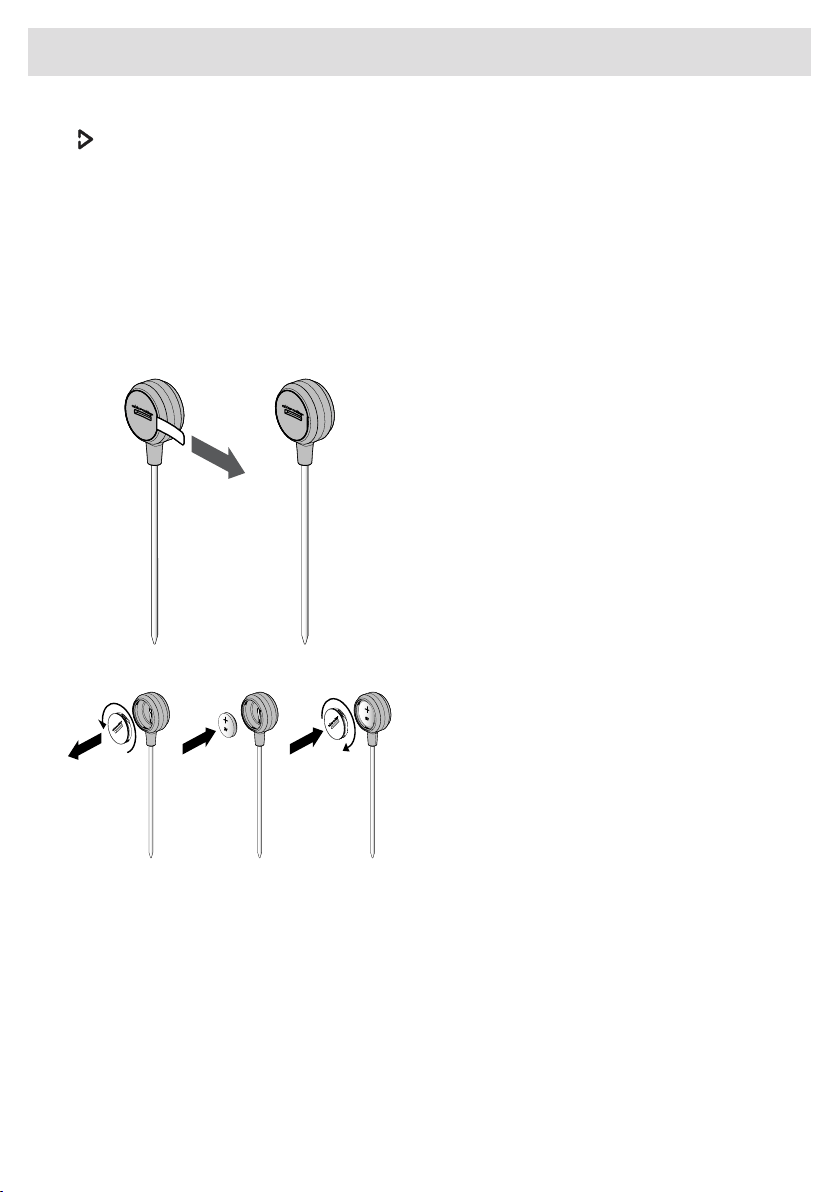
Prepare Celsius°Cooking™ Probe
1. Pull the battery protection tab out of the
Celsius°Cooking™ Probe housing.
2. The Celsius°Cooking™ Probe is ready to
be used. If necessary, replace the battery.
Battery installation Celsius°Cooking™
Probe
1. Unscrew and remove the battery cover
and replace the battery (negative (-) side
goes in first).
2. Replace the battery cover. Do not
overtighten.
Insert the Celsius°Cooking™ Probe into a cooking pan
The Celsius°Cooking™ Probe can be used with different types and sizes of pans. Due to the use of
a suspension bracket with different holes, the Probe can be suspended in different ways.
31
Operation
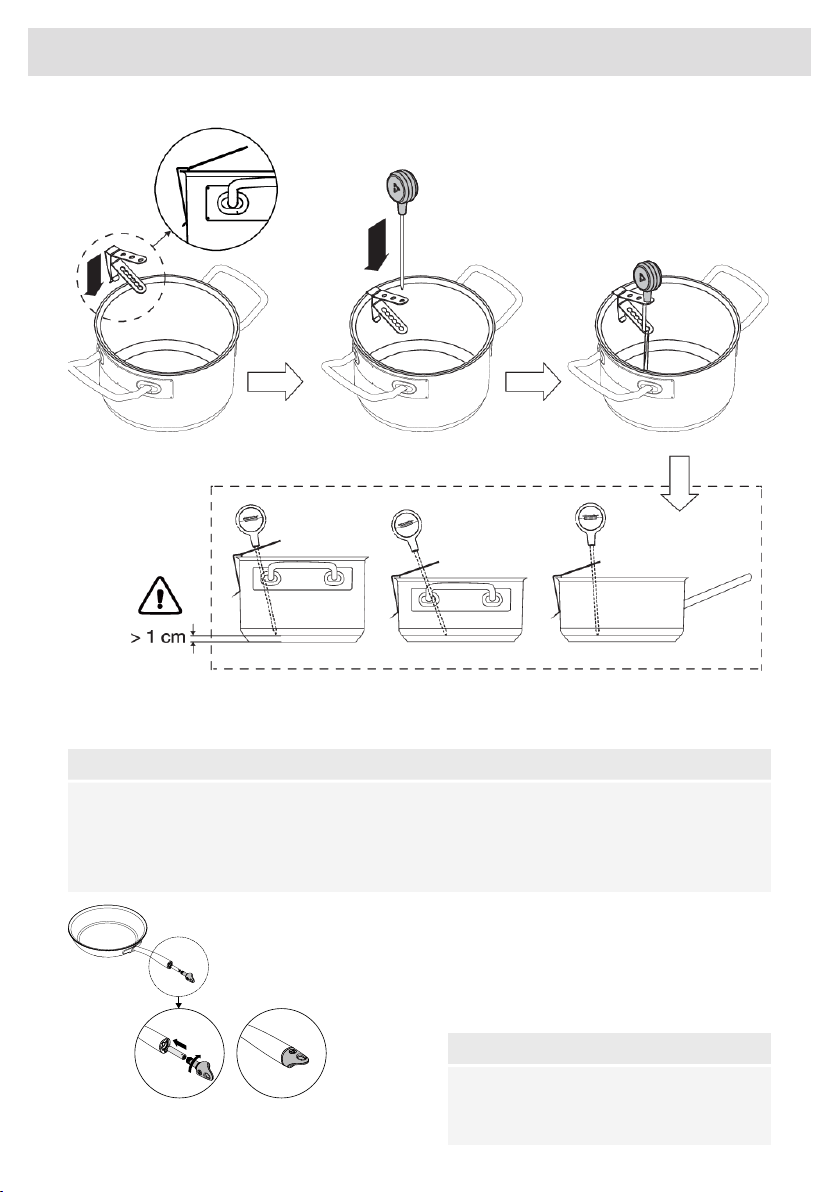
1. Slide the suspension bracket over the pan edge.
2. Insert the probe into the suspension bracket from above.
NOTE!
• Leave a minimum distance of 1 cm between the pan base and the measuring point of the
probe!
• In case the connectivity between cookware and the hob is unstable, this could be due to a
low battery. In those cases, we recommend changing the battery.
Celsius°Cooking™ Cookware
1. Insert an AAA battery in the panhandle
(negative (-) end goes in first).
2. Insert the handle end into the panhandle
and turn it a quarter to secure.
NOTE!
Do not exchange the handle cap of a chef's
pot (31620) with that of a frying pan (31619)
or vice versa.
32
Operation
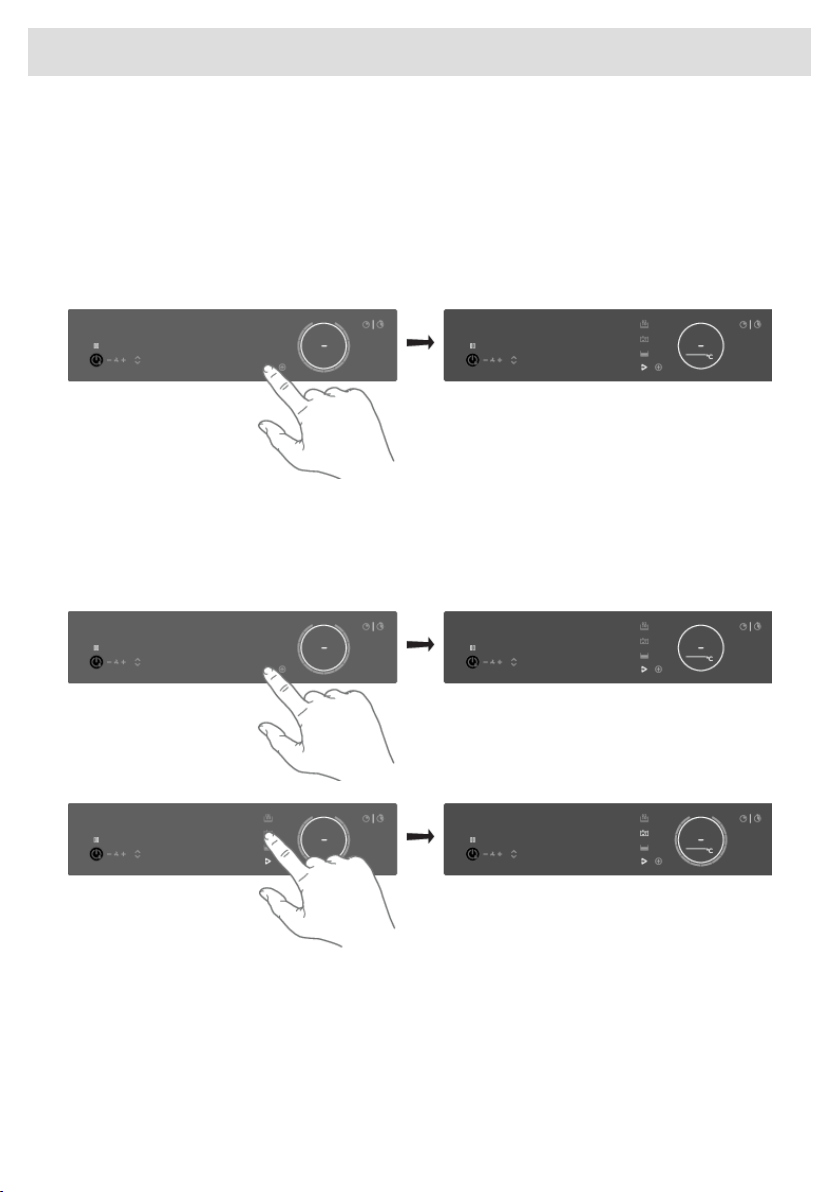
Assigning the cookware to the cooking zone
Switch on the hob and wait until the end of the start-up animation.
Place the Celsius°Cooking™ cookware or a regular pan fitted with the Celsius°Cooking™ probe on
the desired cooking zone. After it has been detected, quickly tap twice with your fingertip on the
sensor in the end cap or the probe housing to activate it. Then the Hestan Cue mode key will
immediately light up. To assign the probe, the Hestan Cue mode key will light upon every possible
cooking zone. Press the Hestan Cue mode key of the desired cooking zone. The Hestan Cue menu
will be opened. With a short press again, it can be closed.
Cooking with the embedded Hestan Cue programs
The hob comes along with integrated Hestan Cue programs, optimized for Celsius°Cooking™
cookware. With the opened menu, 3 different cooking methods can be chosen, with different
temperature ranges. If the probe is used, only two suitable Hestan Cue methods are shown. Use the
one that fits the desired purpose:
33
Operation
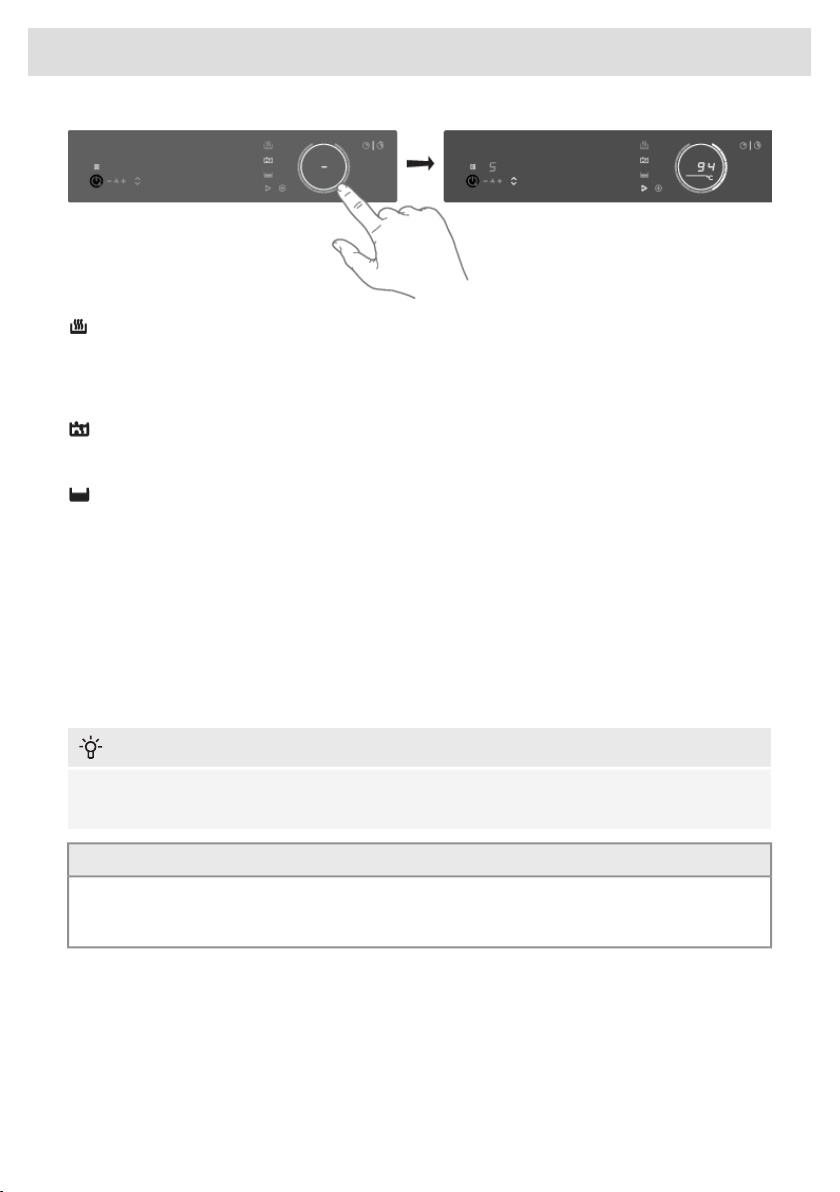
Heating up and frying
This program is to reach high temperatures rapidly. High pan bottom temperatures can be reached.
Always add oil or butter before starting it. For healthy cooking don’t exceed the smoke point of the
used oil.
Boiling or cooking with water
With this program, the water gets to boil quickly. Always add water before starting.
Slow cooking or sous vide
This program is to control low to medium temperatures, preventing high bottom temperatures.
Larger quantities and thicker dishes need to be stirred occasionally to ensure a homogeneous heat
distribution.
Using the probe as a cooking thermometer
When a Celsius°Cooking
TM
probe is used it can also be used as a thermometer to just monitor e.g.
the core temperature of a certain dish. This can be done on normal level cooking or PLUS menu
programs. To use the probe as thermometer, lift up the pan you want to use for a few seconds, place
it back on the zone and activate the probe by tapping. When the Hestan Cue symbol appears on
the display, touch it.
INFORMATION!
Please make sure that the appliance is already switched on before placing the Celsius°Cooking™
cookware so that the system can clearly identify its position.
TIP!
When the Celsius°Cooking™ Probe is recognized on a cooking zone, it can also be used as a
thermometer. The display then shows the temperature instead of the power level. As the power
level changes, it is temporarily displayed in place of the actual temperature.
Probe removal detection
If the probe is moved out during cooking, the hob will detect that and stop heating. When placed
back, the user can confirm that by touching the now blinking Hestan Cue mode button, or it might
get re-detected automatically.
E.g. adding cold water to the pot might trigger this detection too!
34
Operation
Step-by-Step cooking guide on CelsiusCooking.com
The best-tasting food is prepared at the right temperature and for the
right length of time. The ability to set temperature instead of power levels
supported by how-to (video) guidance lets you create chef-like meals
cooked to perfection. The CelsiusCooking.Com website is full of inspiring
recipes with step-by-step instructions based on chef=tested techniques
guiding you to prepare deliciously, fail-proof recipes over and over
again.
CelsiusCooking.com
• Whether you are a chef or a beginner, CelsiusCooking.com is going to help you cook better food
more often by acting as your guide in the kitchen. You'll learn new techniques, novel combinations,
and gain confidence in more difficult dishes. Instead of just cooking at a power level, you will
be cooking at an exact temperature level.
• Our recipes lead you through the process of 'Mise en place’ where you'll gather and prepare all
of your ingredients in advance. This is particularly important following the recipes on
CelsiusCooking.com as each recipe has been carefully timed to give you the perfect results.
• Just follow the steps. The timing and temperature guide will make sure your food is prepared to
perfection. It may take some getting used to, but you will end up with an even better meal.
Switching off the cooking zone
Switching off a Hestan Cue controlled zone is possible by setting the temperature to zero (0).
The display will show a dash. Alternatively, touch the Slider or the Hestan Cue key from the zone to
be switched off for at least 3 seconds to deactivate the Hestan Cue mode completely.
INFORMATION!
While the Celsius°Cooking™ probe is used to control the temperature of the content inside a pan
(e.g. water or soup) the Celsius°Cooking™ cookware is controlled on the pan bottom temperature.
Due to this, there is always an offset between the set-point and actual temperature of the content
INSIDE the cookware. When, e.g. trying to boil a liquid on the Celsius°Cooking™ cookware may
be necessary to set a higher temperature to reach the boiling point. Reaching the boiling point
is also further dependent on the volume of the liquid and whether a lid is placed on top of the
cookware. Furthermore, regular stirring improves this behaviour, even when cooking with the
probe.
Bridge Induction zone
The Bridge Induction zones can be linked together. This creates one large zone that can be used,
for example, for a large fish pan or various pans at the same power.
• Pan position recognition is activated automatically after the appliance is switched on. When a
pan is placed on the hob, the pan recognition function recognizes its position and automatically
bridges the cooking zones depending on the size of the pan (only if the hob was already switched
on).
• If the Bridge Induction zones are linked, they cannot be set to boost and, the menu functions
cannot be used.
• Use a fish pan or other pan covering at least one of the Bridge Induction zones in the middle.
35
Operation
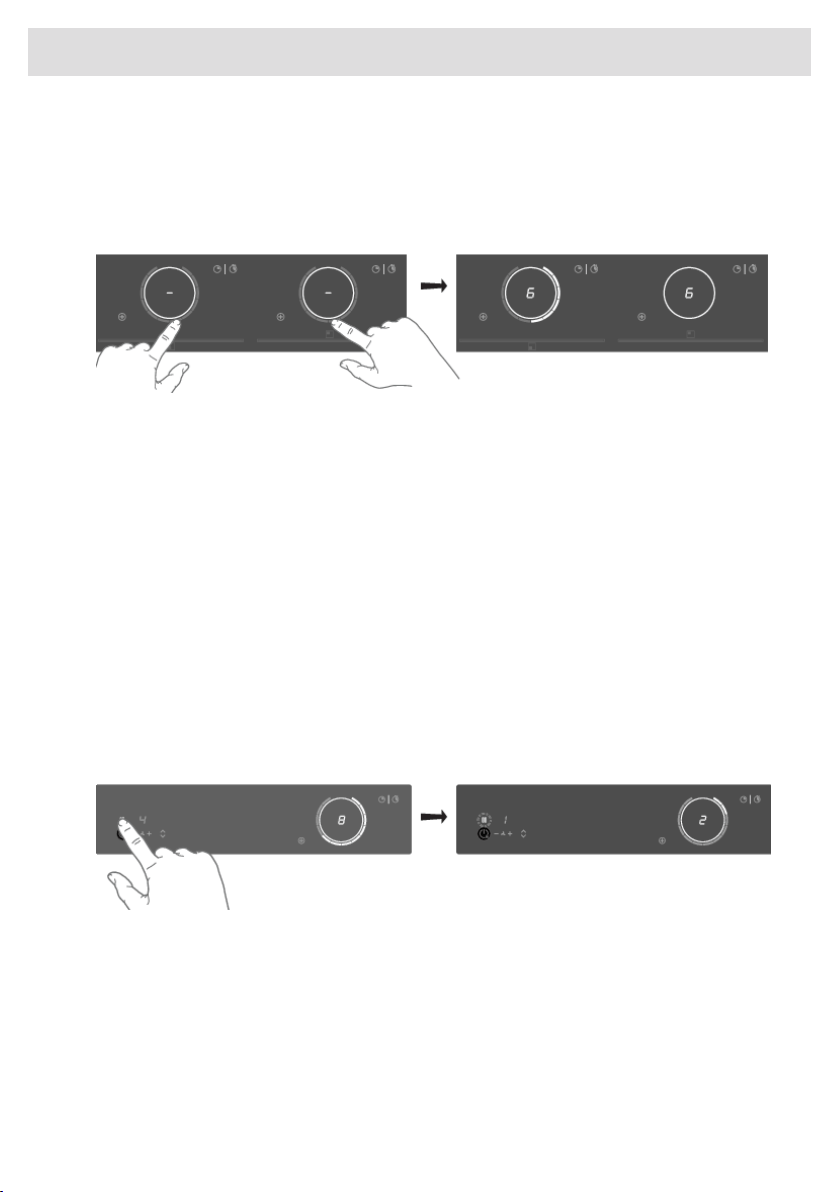
Connecting Bridge Induction zones
1. Place a large pan on both cooking zones so that both zones are well covered.
•
If the brd (auto-connecting) function is active, the zones are linked automatically (consult
chapter 'Settings').
2. Touch the sliders of both left or both right cooking zones.
• The power level or temperatures are displayed simultaneously on both connected cooking
zones.
3. Use the slider of the front cooking zone to set the desired cooking setting for the linked cooking
zones.
4. Touch both sliders again to unlink the cooking zones.
Pause
The pause function can be used to pause the operation of the entire cooking hob for up to 10 minutes.
Thus, you can walk away from the appliance or safely clean the cooking hob, within a short period,
without losing your settings.
Switching on the pause
At least one cooking zone must be active.
Touch the pause key.
• You will hear a short beep.
• The settings on all active hobs are reduced to level 2.
• All timer functions are paused.
• The pause key flashes.
• All keys are inactive except the pause and on/off-key.
If no key is touched within 10 minutes, all active hobs automatically turn off.
Hestan Cue programs are not paused since they are automatically operated.
36
Operation
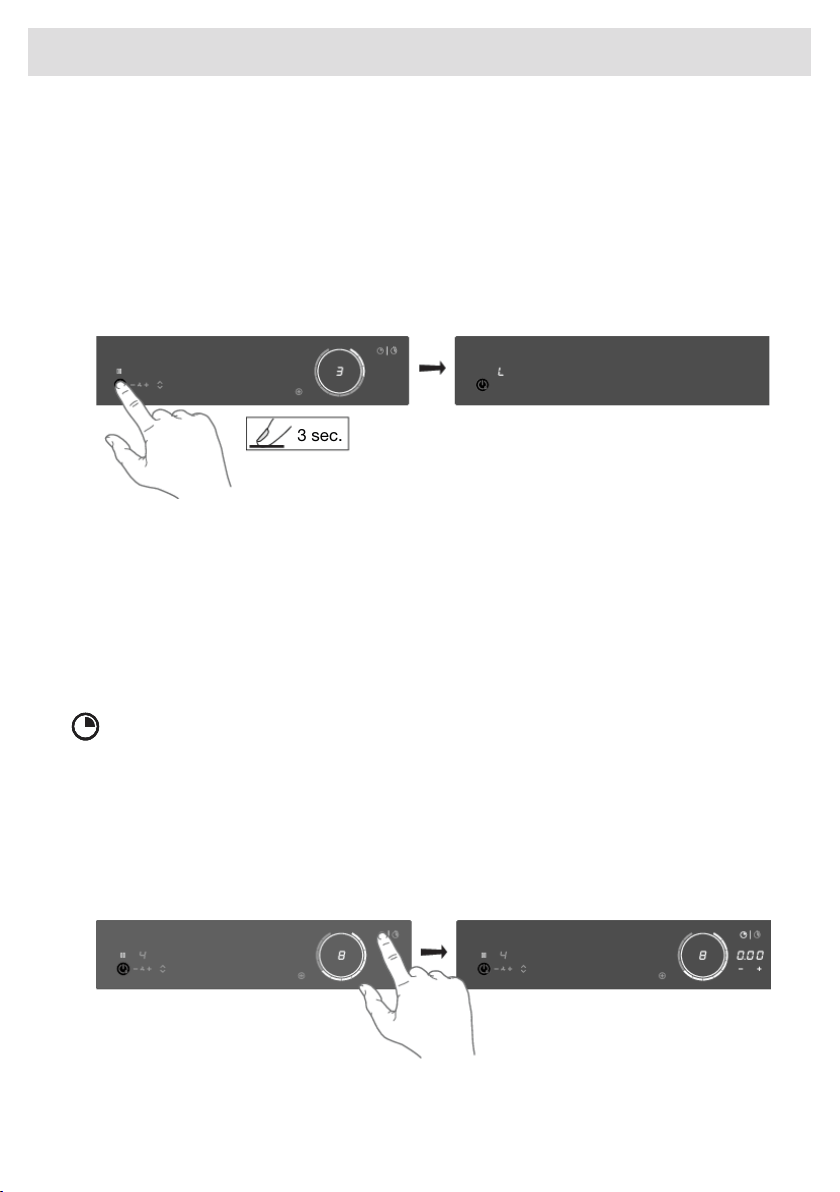
Switching off the pause
Touch the pause key again within 10 minutes.
• The hob continues to operate with the same settings.
Child lock
The cooking zones can be locked to prevent them from being switched on inadvertently.
1. Touch the on/off key to switch on the hob.
2. Touch the on/off key for approximately 3 seconds.
3 sec.
• The indication 'L' appears on the display and the hob controls are locked.
3. Proceed in the same way to unlock the controls.
• When touching and holding the on/off key, 'L' appears on the display and then disappears.
The controls are unlocked.
Timer functions
Every cooking zone has two timers: a count-down timer and a stopwatch (count-up timer).
Count-down timer
The count-down timer makes the cooking process easier by setting the cooking time for the selected
cooking zone. When the time set on the timer expires, the cooking zone will automatically switch off
and emit an acoustic signal. You can switch off the acoustic signal by touching the count-down timer
key; alternatively, it will switch off automatically after a while. You can set the count-down timer
independently for all cooking zones.
Setting the count-down timer
1. Touch the count-down timer key for the desired active cooking zone.
• The count-down timer key and 000 will flash on the cooking zone display unit.
37
Operation
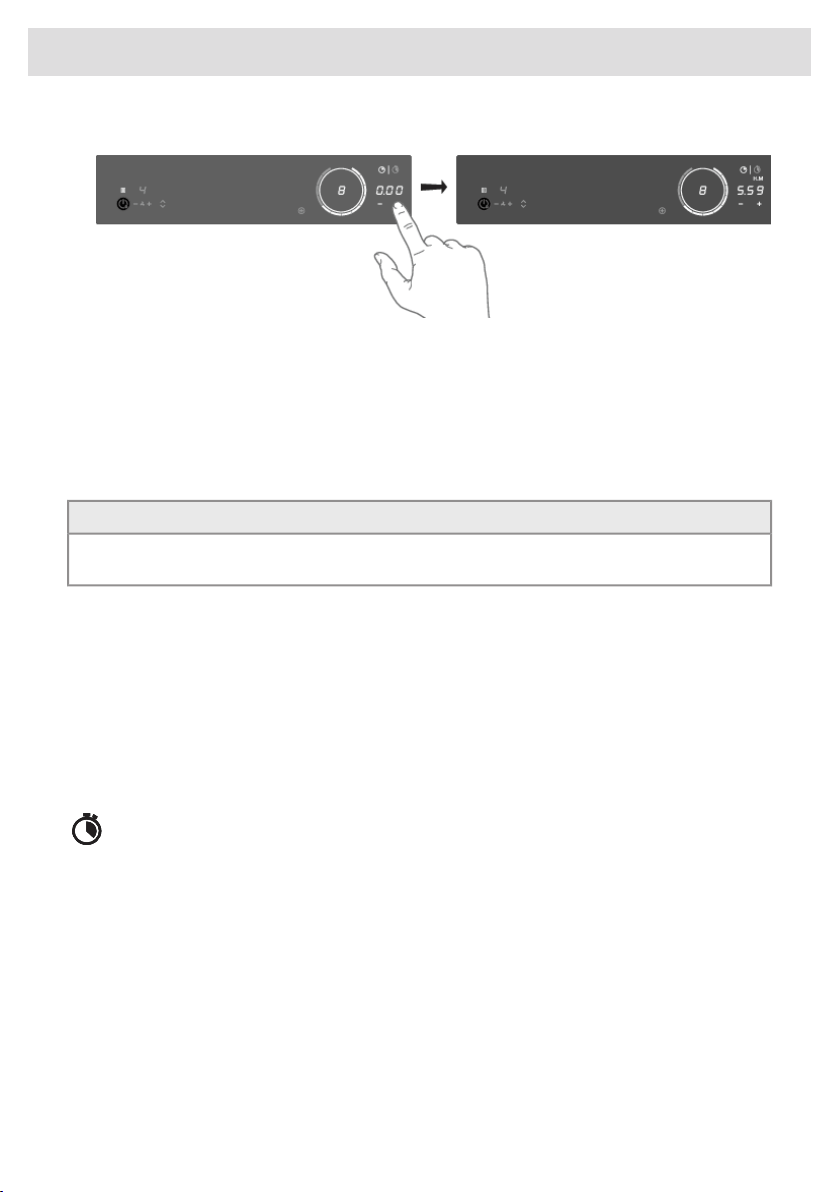
2. Set the desired cooking time with + (plus) and - (minus) touch keys.
• Touch the - (minus) key to increase the time in hours. Touch the + (plus) key to increase the
time in minutes. Then, if desired, touch the - (minus) key to decrease the time in minutes.
• If the time is not set within five seconds, the count-down timer is disabled.
3. If desired, repeat the same steps to set the count-down timer for another active cooking zone.
• When a Hestan Cue program is active, the timer will start counting down when the program
reaches the desired temperature.
TIP!
If you move the pan from the cooking zone, all timer functions set for that cooking zone will be
paused.
Deactivating the count-down timer
Long touch the count-down timer key for the desired active cooking zone.
• The timer is switched off.
• Deactivating the count-down timer alarm.
• When the set time expires, alarm will be sounded, the key for the relevant cooking zone will flash,
and 0:00 will flash on the count-down timer display unit.
• To acknowledge and stop the alarm, touch the count-down timer key, or remove the pan from
the cooking zone.
Cooking time display – stopwatch
The stopwatch can be used to see how long you have been continuously cooking on the selected
cooking zone and starts counting automatically in the background.
Touch the stopwatch key.
• The stopwatch time will be displayed on the cooking zone display unit.
• The stopwatch can be reset if you press the stopwatch key for 3 seconds.
38
Operation
Operating the extraction module
The extraction module is set to Synchro Control by default (see ‘Automatic Extraction’ in the 'Use'
chapter). In Synchro Control, the extraction module keys/indicators are dimmed. The suction is
adjusted according to the use of the cooking zones. Setting 5 (boost) is a temporary setting in
Synchro Control too. The tower automatically rises when the extraction module becomes active (if the
setting 'Automatic raising of the tower' is switched on).
NOTE!
Disable setting 'Automatic raising of the tower' if it is undesirable for the tower to rise automatically
when the extraction is switched on. See chapter 'Settings'.
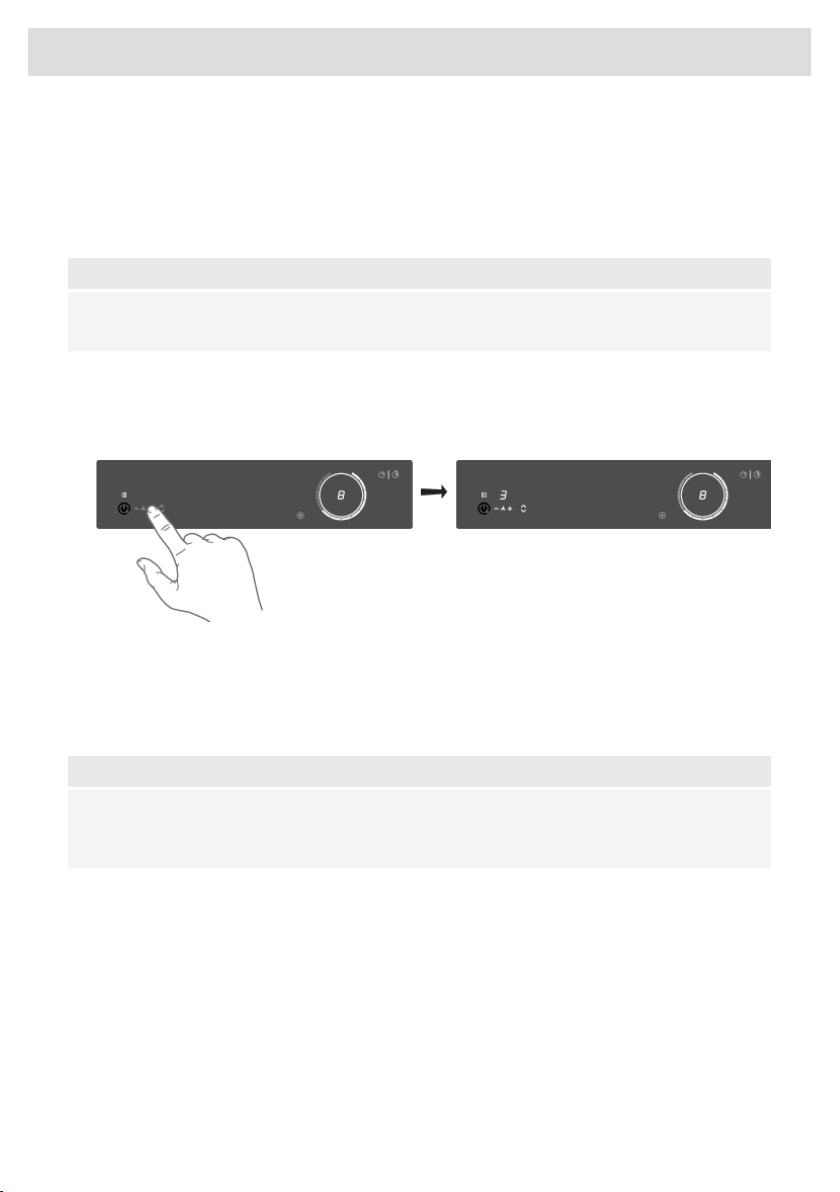
Setting the extraction level manually:
1. Touch the + (plus) key to start the extraction.
• Tower rises (if 'Automatic raising of the tower' is enabled).
2. Use the + (plus) and - (minus) keys to set the desired extraction level.
• There are 4 extraction levels and a boost level (level 5) available.
• Long touch the + (plus) touch key to directly select boost mode.
• After 10 minutes, the boost level automatically switches back to setting 4.
NOTE!
Simply touch the - (minus) or + (plus) touch key to override Synchro Control. When Synchro
Control is overruled, simultaneously touch the - (minus) and + (plus) touch keys to set the extraction
to automatic operation (Synchro Control).
39
Operation
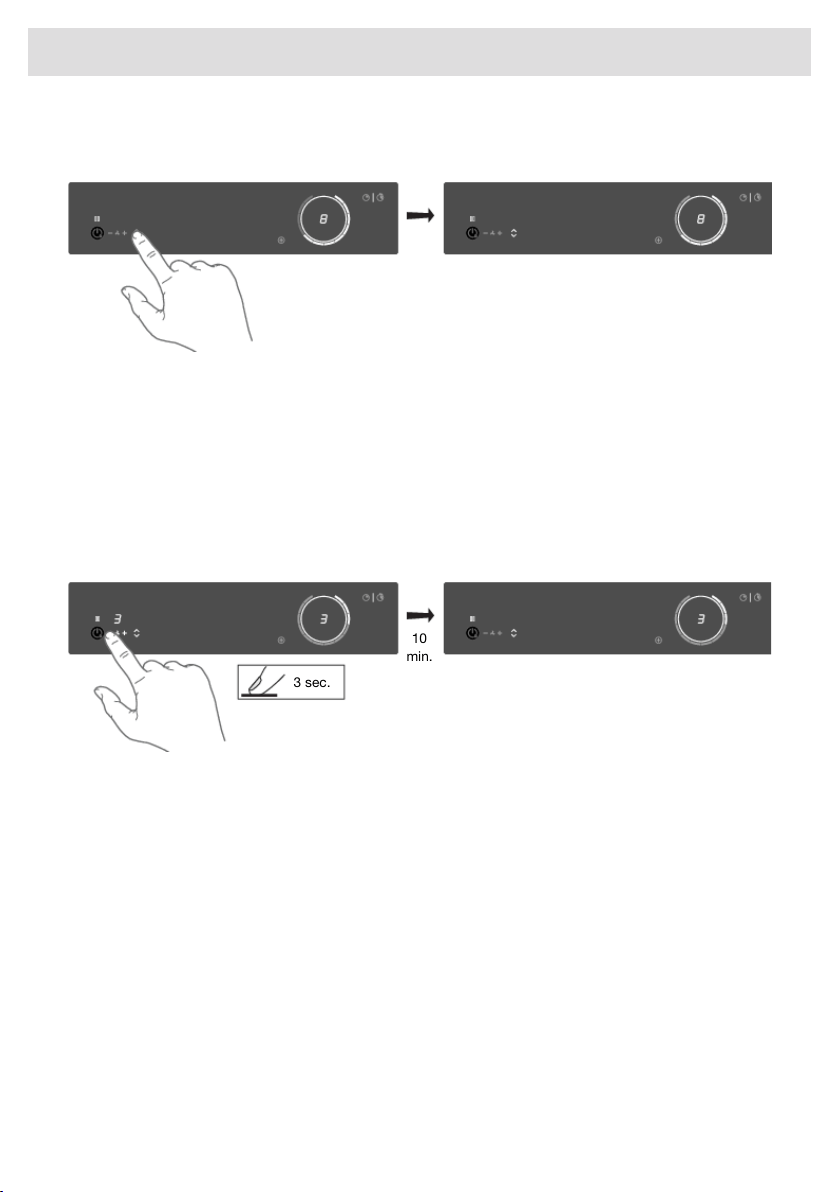
Raising or lowering the tower manually:
Touch the tower up/down key.
• The tower rises.
• Touching the up/down key again while the tower moves up/down reverses the direction of
movement. If something stops the tower while it is moving up, the tower will move down again.
Air-Dry function
The Air-Dry function is automatically activated as soon as the extraction module is switched off. If
the cooking area is already switched off, the Air-Dry function is automatically activated as soon as
the extraction module is also switched off (by setting the extraction level to '0').
Touch the - (minus) key for 3 seconds to activate the Air-Dry function during cooking.
3 sec.
10
min.
• The extraction indicator pulses (dimmed).
• Switch off the Air-Dry function at any time by touching the - (minus) key for 2 seconds.
• After 10 minutes, the Air-Dry function switches off automatically.
40
Operation
ConnectLife-app and Wi-Fi connection
The hob is equipped with a Wi-Fi module that allows the appliance to connect to the internet via your
home network and to use it with the ConnectLife-app, installed on a mobile device like a smartphone
or tablet.
The app is available on the Apple App Store and Google Play Store. You will need the app to connect
the hob to your network. After your user account is paired with the cooking hob, the app can be
used to monitor the status of the cooking hob and enables to update its firmware (see chapter
‘Firmware Update').
You can find direct links for the different stores to the ConnectLife-app under
www.connectlife.io/getstarted and more information about the system, support, available
functionalities, and additional options under www.connectlife.io.
For safety reasons, it is not possible to remotely control, turn on or turn off the hob.
Preparation
• Make sure you know the name/SSID of your router’s Wi-Fi network and its password
1)
.
• Make sure you have the label with the QR code of the appliance unique ID (‘AUID’) accessible
– you need to scan it with your mobile device when the App prompts to do so.
• Make sure that Wi-Fi is activated on the hob by checking if the Wi-Fi key is visible when the hob
is on.
Else see “Activate Wi-Fi”.
•
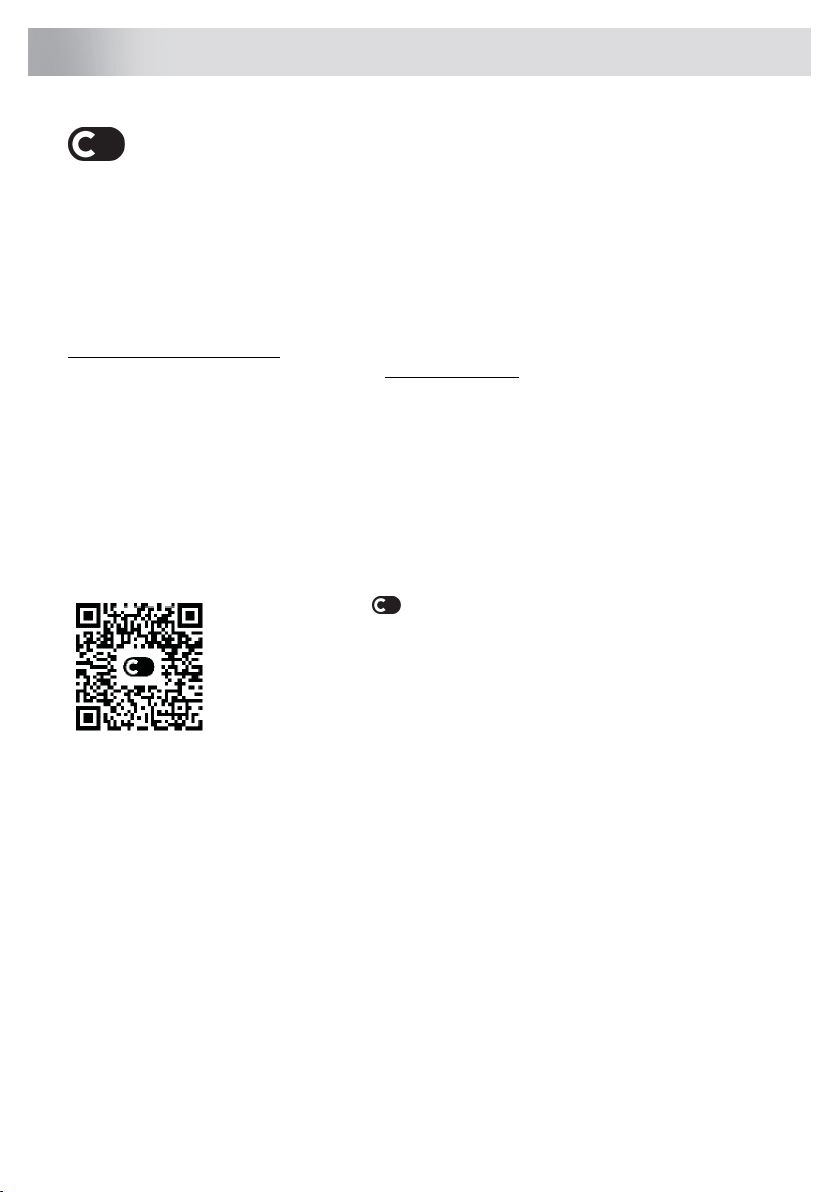
Install the ConnectLife-app on a mobile device – scan the QR
code to find it.
• Launch the App. Please register if you don’t have an account yet.
• Log in with your account.
• The App will need access the mobile’s location to search for Wi-Fi
networks and to the camera to scan QR codes.
Wi-Fi Connection setup
You will first connect your mobile device directly to the appliance via Wi-Fi, and then use this
connection to share the data of your Wi-Fi home network. The hob can then connect to the home
network.
1. Launch the ConnectLife-app.
2. Select “Add appliances” in “Appliances”, choose “Home appliances”, and follow the instructions.
3. Scan the QR code with the AUID code when asked or type it in.
Proceed on the appliance:
4. Switch on the hob.
5. Touch the Wi-Fi key for 3 seconds to enter the Wi-Fi menu (only possible when NOT cooking).
6. When ‘C' (connection) Connection Setup Mode is shown in the display, touch the Wi-Fi key to
activate the Connection setup. When ‘C’ flashes the Connection setup
2)
starts.
1)
NOTE: only 2,4 Ghz networks are supported
2)
NOTE: will be deactivated after 5 minutes when unsuccessful
41
ConnectLife and Wi-Fi

Proceed on the mobile device in the ConnectLife-app:
7. Connect your mobile device to the Wi-Fi network of the appliance when asked.
8. When your mobile asks whether to keep the connection, despite no internet connection, choose
yes.
9. Follow the instructions in the ConnectLife-app.
The user account signed in on the mobile device used for the Connection setup will automatically
be paired with the cloud. If you’d like to pair another account, e.g. on a second user’s mobile device
see “Pairing additional user”.
For safety reasons, only paired users can communicate with the hob.
Activate Wi-Fi
1. Switch off the hob.
2. Touch the on/off key for 5 seconds.
• A short beep will be emitted. The Wi-Fi key will appear.
Wi-Fi menu
Activate Wi-Fi to enable the Wi-Fi menu. The hob must be switched on.
1. Touch the Wi-Fi key for 3 seconds to open the Wi-Fi menu.
•
Depending on the Wi-Fi state, there are 1 to 3 options available in the menu: 'C’ (connection)
to set up a connection, 'P' (pair) to pair an additional user, and 'U’ (unpair) to unpair all users.
2. Use the + (plus) and - (minus) keys to switch between them, if more than 1 option is available.
3. Touch the Wi-Fi key to confirm the selected option.
4. Touch the on/off key or touch the slider to close the menu.
• If no key is pressed within 60 seconds, the menu will be switched off automatically.
Connection setup
1. Select option ‘C’ in the Wi-Fi menu.
• The appliance is in “Connection Setup Mode” for 5 minutes.
•
‘C’ will flash, and the + (plus) and – (minus) keys will be switched off.
2. On the mobile app, start the process to ‘Add appliances’ and follow the instructions to set up
the network.
Pairing additional user
This option requires that the connection setup has been performed successfully and the hob is
connected to the cloud (Wi-Fi key is constantly full lit).
1. Select option ‘P’ in the Wi-Fi menu.
• The appliance is in “Pairing Mode” for 3 minutes.
• The Wi-Fi key will flash, and the + (plus) and – (minus) keys will be off.
2. On the mobile app, start the process to ‘Add appliances’ and follow the instructions to pair the
appliance.
42
ConnectLife and Wi-Fi

Unpair all users
This option requires that the connection setup has been performed successfully and the hob is
connected to the cloud (Wi-Fi key is constantly full lit).
1. Select option ‘U’ in the Wi-Fi menu to unpair all users and disconnect from the cloud.
• The Wi-Fi key will flash 3 times.
• The hob will delete all paired users and disconnects from the cloud (“unpair”).
Switching off Wi-Fi
1. Enter the Wi-Fi menu as explained in ‘Wi-Fi menu’.
2. Touch the Wi-Fi key for 3 seconds to deactivate Wi-Fi.
• A short beep will be emitted. The Wi-Fi key will be off.
Firmware Update
The cooking hob is equipped with a Wi-Fi module that you could use to receive updates of the
appliance firmware (for example, improved function updates or safety-relevant updates). This requires
that the cooking hob is connected to the cloud and paired with a registered user account on the
ConnectLife-app. If this is not yet established, consult chapter 'Wi-Fi Connection setup'.
When new firmware is available, a notification is sent to the ConnectLife-app. Please follow the
instructions.
To start the update process, the cooking hob needs to have the FoA setting set to ON in the settings
menu (see ‘Settings’). This confirms your presence at the cooking hob. After 90 minutes, this setting
is automatically reset to OFF.
After the FoA setting on the cooking hob is set to ON, start the update process on your
ConnectLife-app. The cooking hob will switch OFF. As an indication, the Wi-Fi symbol flashes during
the process. Depending on the configuration, the update process can take up to 60 minutes.
NOTE!
During the update process, you cannot use the hob. The hob will restart several times and will
not respond for periods. Make sure that the power supply and the Wi-Fi connection are not
interrupted during the update.
If the update fails, the hob will remain on the previous firmware version and operate as usual. Try again
after a short period of time. If the update continues to fail, please get in touch with the service
department for further assistance.
If the hob is not responding after updating, it may not have completed the update. Wait for the update
process to complete. If the hob still does not respond after a while, please contact the service
department for further assistance.
43
ConnectLife and Wi-Fi
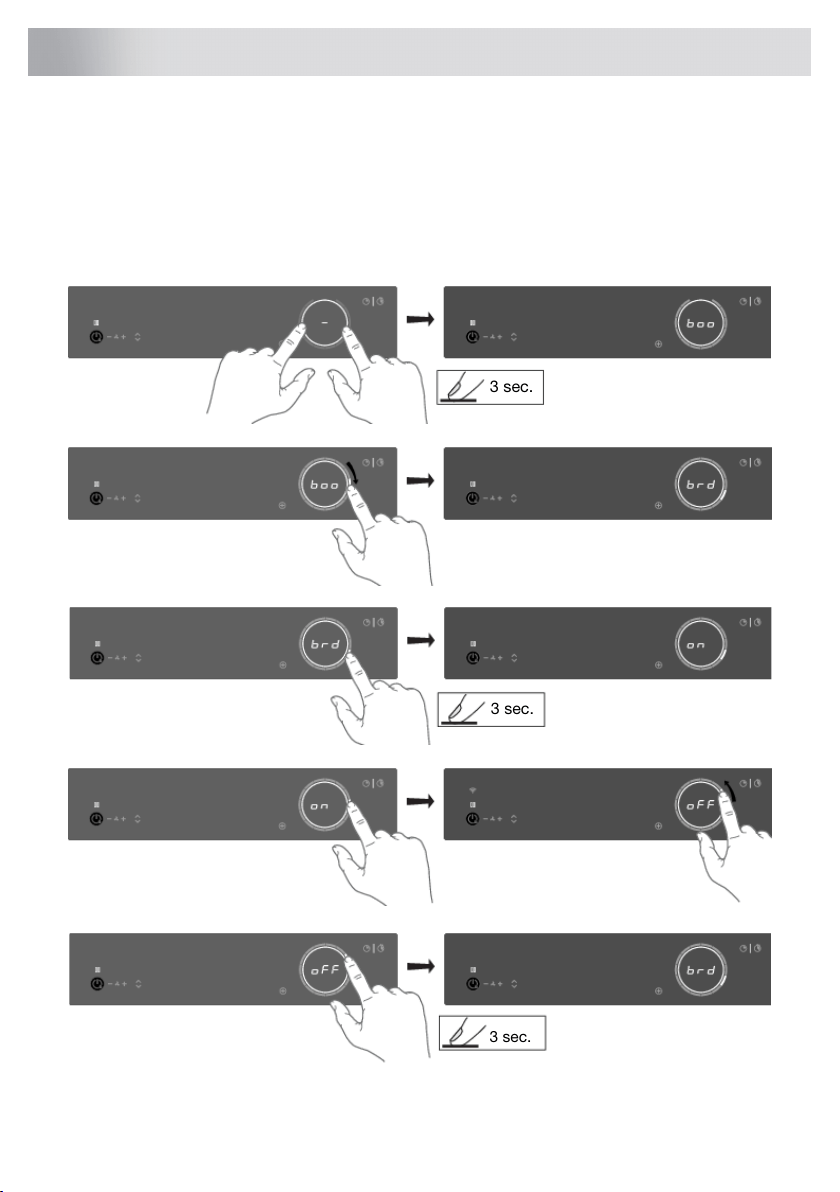
You can tailor the behaviour of this induction hob to suit your cooking style! There are various settings
available for adjustment.
While there are no pans on any zone, touch any slider with two fingers and keep it touched for
3 seconds. Different settings can now be toggled through using the slider. To view or change a
particular setting, touch the highlighted element of the slider with one finger and keep it touched for
3 seconds. Now you can choose to change or disable that setting. To do this, toggle to the desired
value. After 3 seconds of inactivity, the new setting will be confirmed.
3 sec.
3 sec.
3 sec.
44
Settings
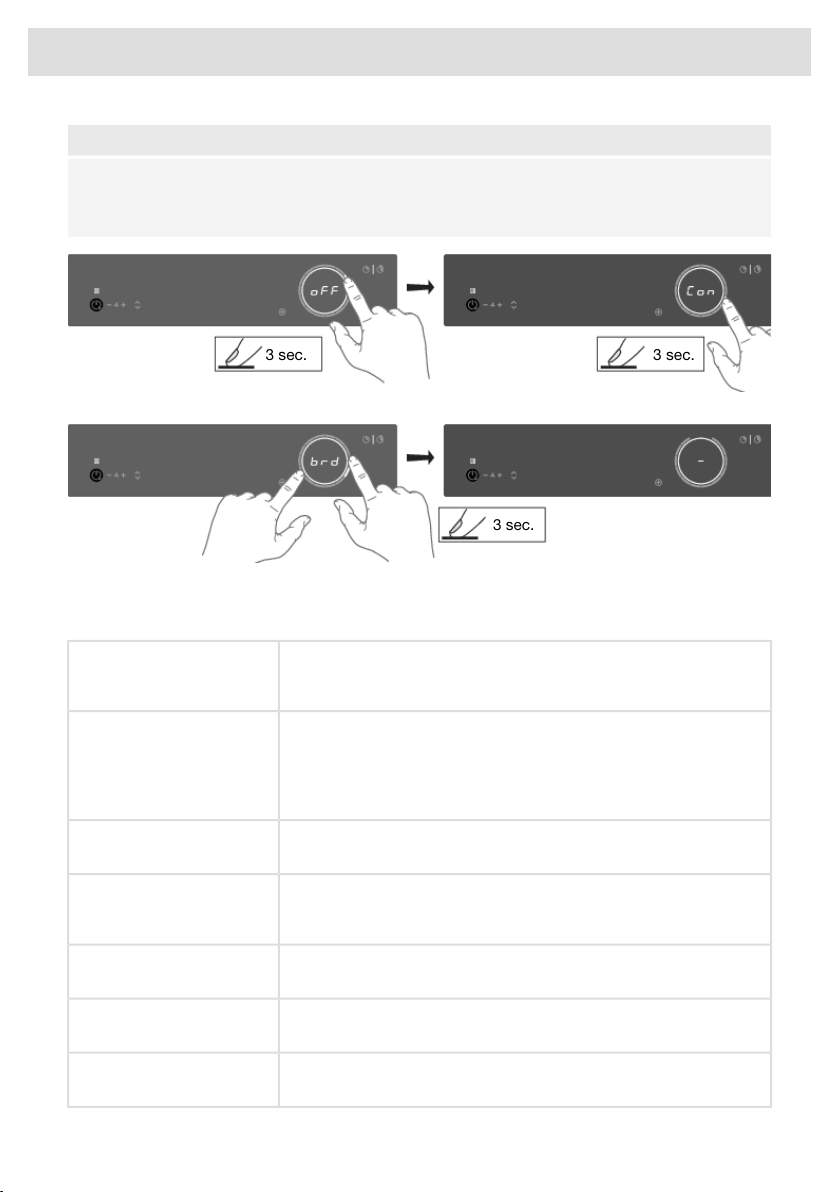
NOTE!
To prevent unintentional adjustment of the 'Con - connected power', Con setting must be confirmed
when changed by touching the slider for 3 seconds. A change without confirmation will not be
implemented!
3 sec. 3 sec.
3 sec.
To exit the menu, touch with two fingers anywhere the slider for 3 seconds.
The following settings are available (depending on the model).
While on, boost is automatically activated when power level 12 is
activated. While off, the boost is activated by sliding past the power
level 12 or touching power level 12 twice.
boo - Auto boost
Automatic Boost activation
While on, when a new pan is detected on two connected Bridge
Induction cooking zones, the cooking zones are automatically
connected into one big cooking zone. While off, connecting must be
done manually by pressing on the sliders of two Bridge Induction
cooking zones at the same time.
brd - Auto bridge
Automatic coupling
While on, the recovery function is active and, settings can be moved
from one cooking zone to the other when a pan switches position.
rEC – Recovery function
Recovery function
While on, the stopwatch (count-up timer) starts counting in the
background whenever a cooking zone is activated. While off, the
stopwatch must be activated manually and starts counting from 0:00.
Ati – Auto timer
Automatic stopwatch timer
While on, the hob is automatically locked at every switch off.ACL - Auto child lock
Auto child lock
Sound volume has 4 different options. L3 (high), L2 (medium), L1
(low), off (only error and alarm sounds).
Snd - Sound volume
Sound volume
Key responsiveness has 3 different speed options. L3 (quick), L2
(medium), L1 (slow).
SEn - Key sensitiveness
Key responsiveness
45
Settings

This setting allows the induction hob to automatically activate the
suction of the extraction module every time the induction hob is turned
on. Depending on the value you set, the suction will automatically
start at that speed level when any cooking zone is activated.
hSt - Synchro Start
(Synchro Start Level
This setting allows the induction hob to control the extraction module.
The extraction module will automatically switch on when setting a
cooking zone power. The cooking zone with the highest power setting
determines the degree of extraction. Synchro Control can be overruled
by using the + (plus) and - (minus) keys and it can be reactivated by
touching the + (plus) and - (minus) keys simultaneously. The response
sensitivity can be set: L3 (high), L2 (medium), L1 (low), off.
hSc - Synchro Control
Synchro Control response
Level
With this setting, when the appliance is switched off, the extraction
module can also be switched off automatically and the Air-Dry function
can be activated if necessary. If there are still hot pans on the hob,
the Air-Dry function will start at a higher setting if essential until all
cooking zones have cooled down. Then Air-Dry continues with the
normal cycle of 10 minutes on extraction level 1.
hSP - Synchro Stop
Synchro Stop, switch off
function extraction module
Disable this setting if it is undesirable for the tower to rise automatically
when the extraction is switched on.
Ato - Automatic raising of the
tower
Automatic raising of the
tower
Activate this setting if a recirculation filter is installed. There are 3
options available:
rCi - Recirculation filter
Recirculation filter
off - (default)
CAr - Recirculation filter
PLA - Plasma
Activate this setting if the filter cleaning indication is desired. There
are 4 options available:
GrF - Clean grease filters
indicator
Clean grease filters indicator
off - Manually
L1 - Cooking and frying small quantities
L2 - Cooking and grilling medium quantities (standard)
L3 - Frying, grilling, and woking
To pair a Bluetooth device, set this setting to on. You now have 3
minutes to pair a new Bluetooth device to this induction hob.
btP - Bluetooth pairing
Bluetooth device pairing
To unpair, all the Bluetooth devices set this setting to Clr. All your
connected Bluetooth devices are now unpaired.
btC - Bluetooth clear
Bluetooth clear paired
devices
To display the current software versions of the hob. The UI software
version and the Celsius°Cooking
TM
software version will be shown in
alternating order.
Fir - Display firmware version
Firmware version
Table continued from last page
46
Settings
To receive firmware updates for the cooking hob, you need to be
paired to the cooking hob via the mobile app. You will receive a
notification, or you can check available firmware updates on the
mobile app menu for updates.
FoA - Firmware update over
the air
Firmware update via Wi-Fi
In order to start the firmware update via the mobile app, set this setting
to on to confirm your presence at the cooking hob. For more
information, see chapter "Wi-Fi Connection setup". After 10 min, this
setting is automatically reset to off.
If your electrical wiring or circuit breakers do not meet the specified
current draw on the rating plate, the current limiter can be activated
by reducing the value of this setting. Doing so may cause a reduced
performance of the induction hob.
Con - Connection power
Current limiter
(connection to power grid)
The following numbering format of the setting is available: X.XX.
The number left of the dot represents the number of connected
phases, while the number right of the dot represents the electrical
current per phase in Ampere.
NOTE!
To prevent unintentional adjustment of the 'Con - connected
power', Con setting must be confirmed when changed by touching
the slider for 3 seconds. A change without confirmation will not
be implemented!
WARNING!
The appliance must always be set to the actual or lower rating of
the electrical wiring or circuit breakers. This setting can only be
set by an authorised expert.
Resets to default settings.rES - Factory reset
Factory reset
In demo mode, the appliance will act as usual, without the possibility
to heat the cookware.
dE - Demo mode
Demo Mode for Dealer
Showrooms When set, this will be indicated after switching on the appliance with
a short "d" indication.
Without any user interaction, the appliance will automatically switch
off after 10 minutes.
Table continued from last page
47
Settings
Cleaning glass top
TIP!
Activate the child lock before cleaning the hob.
Daily cleaning
• Although food spills cannot burn into the glass, we nevertheless recommend you clean the hob
immediately after use.
• For daily cleaning, a damp cloth with a mild cleaning agent is best.
• Dry off with kitchen paper or a dry tea towel.
Stubborn stains
• Stubborn stains can also be removed with a mild cleaning agent, washing-up liquid, for example.
• Remove water circles and limescale with cleaning vinegar.
• Traces of metals (caused by sliding pans) can be difficult to remove. Special products are
available for this.
• Use a glass scraper to remove food spills. Melted plastic and sugar are also best removed with
a glass scraper.
NOTE!
• Never use abrasives. These leave scratches in which dirt and limescale can accumulate.
• Never use anything sharp such as steel wool or scourers.
Cleaning the extraction module
WARNING!
The extraction module must be cleaned regularly. Mind that the pins bearing the tower are cleaned
after every use.
Do not use abrasive cleaning products. Do not use alcohol!
If the instructions regarding cleaning the appliance or replacing the filters are not followed, this
can cause a fire. These instructions must be followed! The manufacturer is not liable for damage
to the appliance or fire damage resulting from incompetent maintenance or from non-adherence
to the safety instruction above.
48
Maintenance
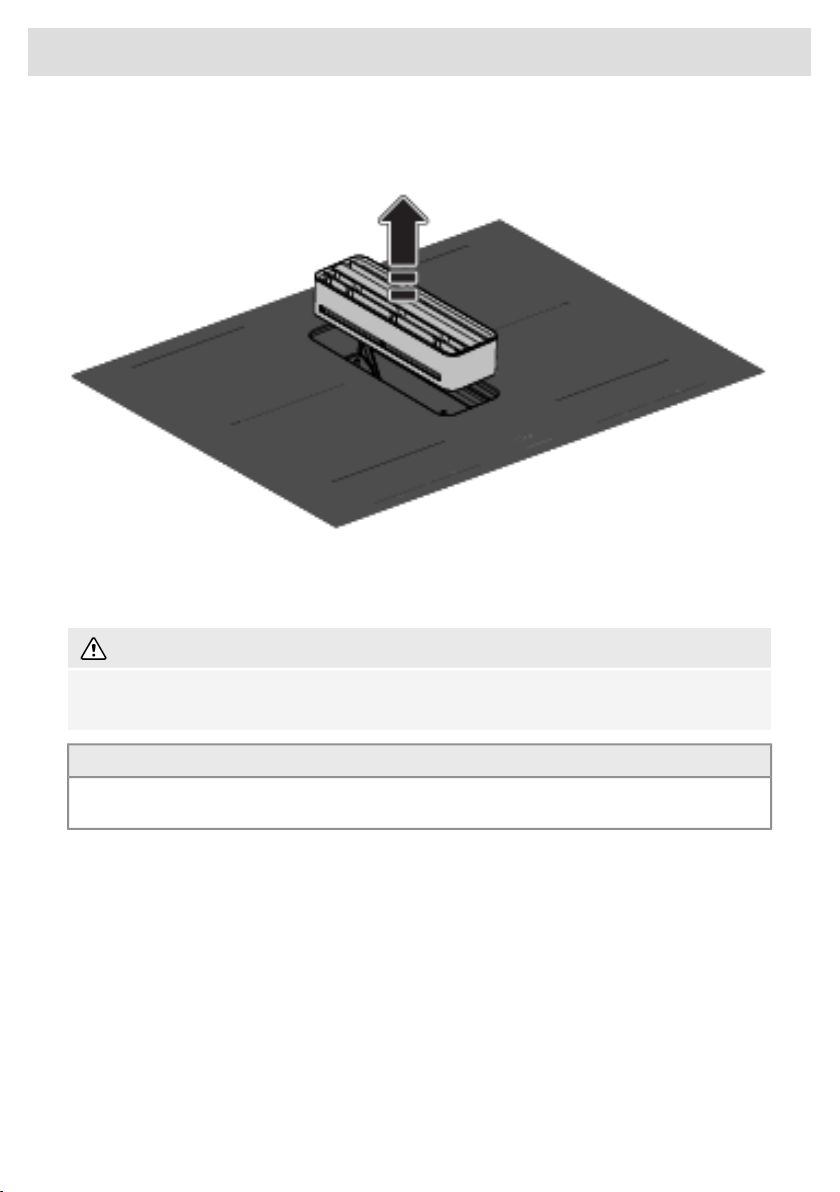
Cleaning the tower
Remove the tower.
Rinse the tower daily under the tap with warm water. Clean the tower weekly with water and a little
washing-up liquid. The tower can also be cleaned in the dishwasher.
The glass trim is not resistant to falls or bumps.
WARNING!
Replace the tower if the tower's glass trim is damaged. Sharp edges on the strip can cause
injuries.
TIP!
The underside of the tower is marked with an arrow. The tower will be best aligned with the glass
when the arrow is pointed backwards.
Cleaning grease filters
Remove the grease filters from the extraction module. The metal filters can be pushed out of their
plastic frame if necessary.
49
Maintenance
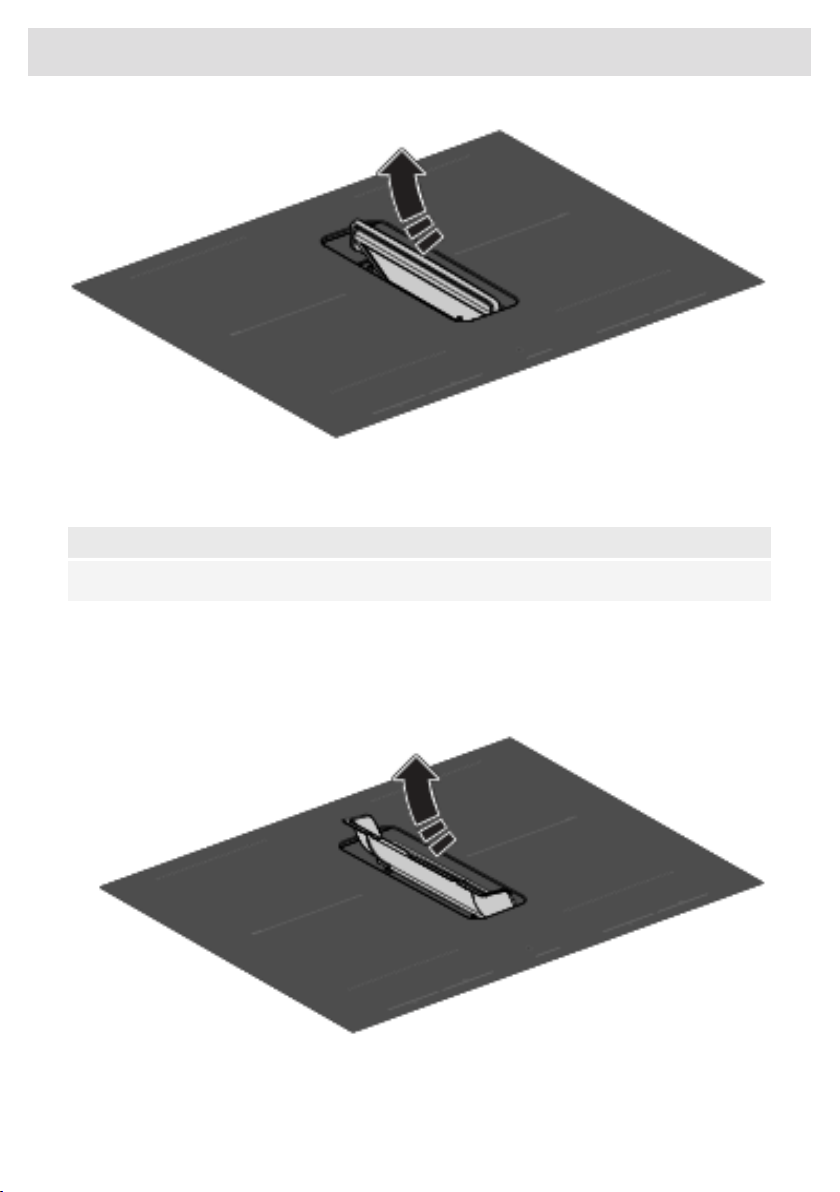
When indicated by the filter indicator, the metal filters must be cleaned by hand or in the dishwasher
at low temperatures with a short program. Never put the plastic frames in the dishwasher separately,
without metal grease filters. See chapter 'Settings' for filter cleaning settings.
NOTE!
It is important that the grease filters are thoroughly dried before they are fitted again.
Cleaning the condensate reservoirs
It is recommended to check and empty the condensate reservoirs every two weeks.
1. Remove the condensate reservoirs from the exhaust inlet with the handles.
• Attention: remove the filters first before removing the condensate reservoirs.
2. Empty the condensate reservoirs and clean them with warm water and a little washing-up liquid
or in the dishwasher.
3. Clean the interior of the extraction module with a damp cloth.
50
Maintenance
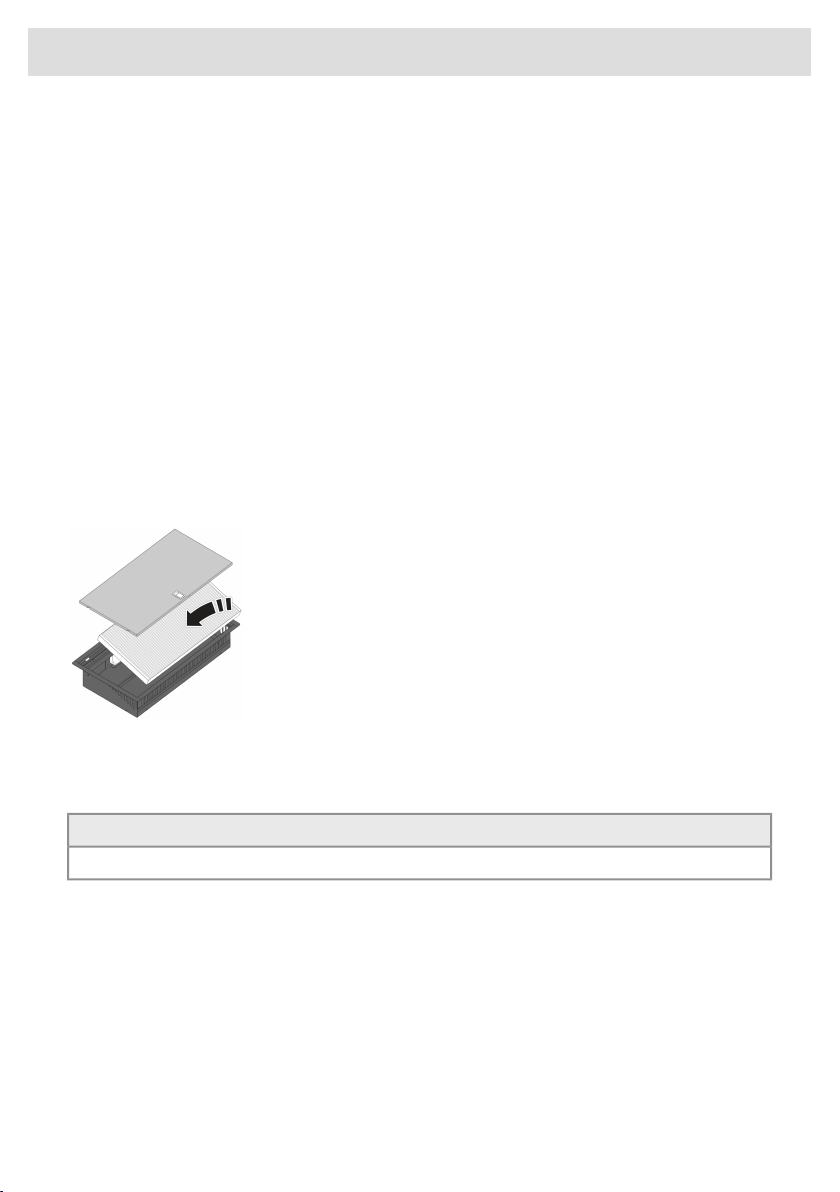
Filter indication
Saturation of grease filter and recirculation filter
If only the filter indicator is flashing, the grease filters need to be cleaned. If both the filter indicator
and the letter ‘r’ flash in the display, replace the recirculation filter.
Grease filter
After 10, 20, or 40 hours of operation, the grease filter indicator lights up (depending on the intensity
of use).
• The grease filters should then be cleaned.
• Reset the filter indicator by touching the filter indicator key for 2 seconds.
Recirculation filter (if in recirculation mode)
After 300 operating hours (recirculation filter), the filter indicator and the letter ‘r’ flash on the display.
• Replace the recirculation filter.
• Reset the filter indicator by touching the filter indicator key for 2 seconds.
Replacing recirculation filter (when using the recirculation box)
The recirculation box with a filter is located under the bottom of the
cabinet and is accessible from the kitchen cabinet.
1. Open or remove the bottom drawer of the kitchen cabinet.
2. Remove the cover of the recirculation box.
3. Remove the filter.
4. Fit a new filter with the arrow (see on the side of the filter) pointing
upwards.
5. Fit the cover of the recirculation box, and close the drawer or put
it back in place.
6. Reset the filter indicator by touching the filter indicator key for 2
seconds.
TIP!
Consult the website for additional maintenance and cleaning instructions!
51
Maintenance

General
NOTE!
If you notice a crack in the glass top (however small), switch off the hob immediately and
disconnect the power supply (remove the plug from the socket).
Then contact the Service Department.
Troubleshooting table
If your hob does not work properly, it does not always mean that it is defective. Make sure to check
the points mentioned below in the table, or visit our website for more information.
Induction zones
SolutionPossible causeSymptom
Normal operation.This is the standard set-up
routine.
Characters appear in the
displays when the appliance is
connected for the first time.
Normal operation.The hob is cooling down.The fan runs on for several
minutes after the hob has been
switched off.
This is normal and disappears
after the hob has been used a
few times. Ventilate the kitchen.
The new appliance is heating
up.
A slight smell is noticeable the
first few times the hob is used.
Normal operation.This is caused by the capacity
limiter on the front and back
zones. A soft ticking sound can
also occur at lower settings.
You can hear a ticking sound in
your hob.
Clean the induction hob with a
ceramic hob cleaner and
remove the dirt / grease from the
pan bottom.
Contaminated pan bottom used
on the cooking zone.
Circle of pan bottom remains
visible after cleaning.
This is normal for certain pans,
particularly at high settings.
This is not harmful to the pans
or the hob.
This is caused by the energy
flowing from the hob to the
saucepan.
The pans make noise while
cooking.
Use a suitable pan (see chapter
'Use').
The pan you are using is not
suitable for induction cooking or
has a diameter of less than
12 cm.
You have switched a cooking
zone on, but the display keeps
flashing.
Switch off the signal by pressing
the - or + key on the timer.
The preset time has ended.A cooking zone suddenly stops
working and you hear a signal.
Check the fuses or the electric
switch (if there is no plug).
There is no power supply due to
a defective cable or a faulty
connection.
The hob is not working and
nothing appears in the display.
52
Troubleshooting

SolutionPossible causeSymptom
After the hob has cooled down,
cooking can be continued.
Zone is overheated.Zone stops unintended and
residual heat indicator is shown.
Check the electrical
connections.
The appliance is incorrectly
connected.
A fuse blows as soon as the hob
is switched on.
Remove cookware and assign
again.
Celsius°Cooking™ cookware is
assigned to wrong cooking
zone.
Hestan Cue key is blinking,
together with set cooking
method key and display.
Switch off the cooktop for 10
seconds and/or change the
battery.
Low battery of cookware or
unstable bluetooth connection.
Unstable connection between
cookware and hob.
Place Probe back or reposition
- press cooking method key if
probe isn't auto detect.
Celsius°Cooking™ Probe is
removed or not in touch with the
content. Or the temperature has
fallen rapidly, e.g. due to adding
cold water.
Set Hestan Cue cooking method
key is blinking together with set
temperature display while using
the probe.
Pull the plug out of the socket.
Contact your installer.
The ceramic glass plate broke.
Please note! Do not throw a
broken ceramic glass plate in
the glass recycling bin but take
this to the Municipality's waste
recycling centre.
Extraction module
SolutionPossible causeSymptom
Clean the pins bearing the
tower.
The pins bearing the tower are
dirty.
The movement of the tower is
labored and / or makes more
noise.
The Air-Dry function is not a
setting. However, by turning off
the Synchro Stop setting, Air-Dry
will only be activated at
extraction level 1.
The Air-Dry function is active.
This after-run function ensures
that the extraction channels and
grease filters are blown dry.
When switching off the hob, the
hob will continue to extract at
levels 1, 2, or 3, and the
extraction indicator pulses.
Error codes
SolutionPossible causeSymptomError code
Clean the control panel.The control panel is dirty
or has water on it.
Er03 appears on display.Er03
Wait for cooking zone to
cool down or fill the pan
with foodstuff.
Empty pan was heated on
the cooking zone.
E2 appears on display.E2
Table continued from last page
53
Troubleshooting
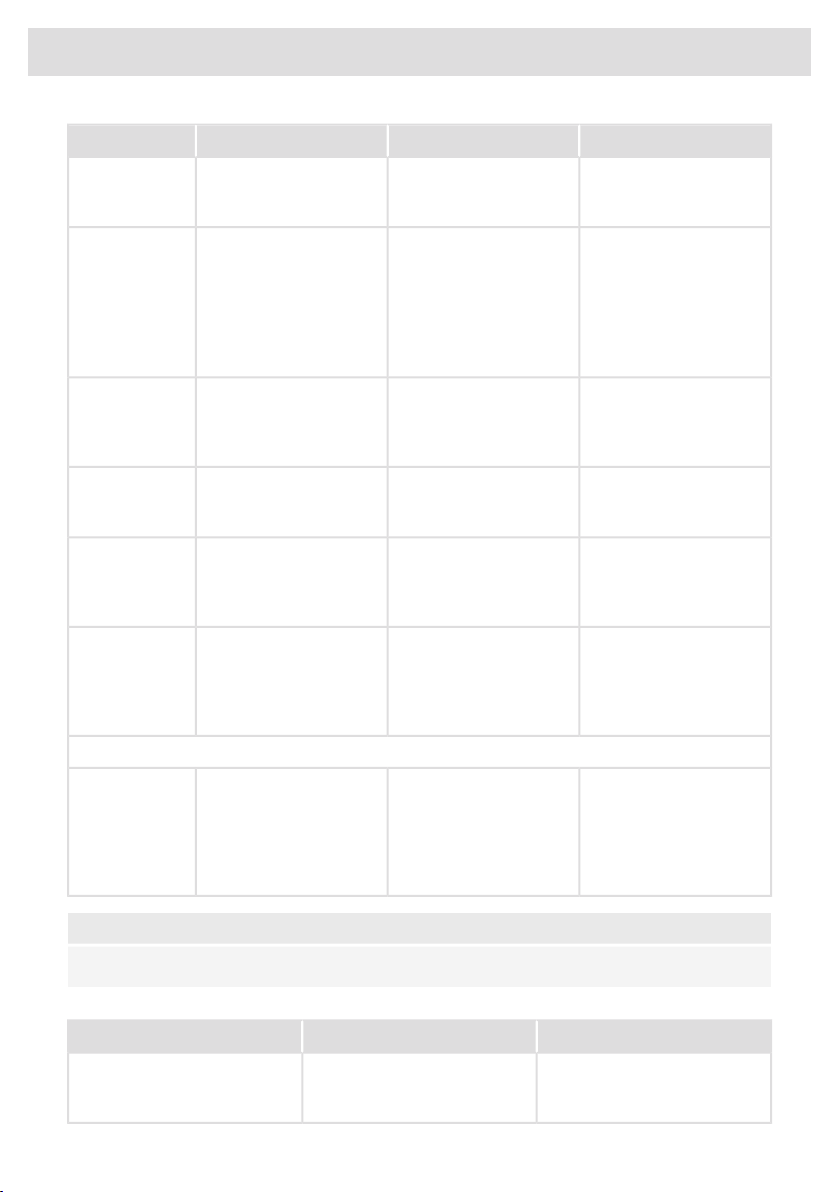
SolutionPossible causeSymptomError code
Connect the appliance in
accordance to rating plate
and instructions.
Voltage of the mains is too
high.
U 400 appears on display
with continuous sound
tone.
U400
Try to connect the device
to your network again.
Failed to connect to Wi-Fi
network.
E7 appears on display
after setting up the Wi-Fi
connection.
E7
Make sure that new
devices can connect to
the network (e.g. MAC
address filtering is
disabled).
Unblock the ventilator;
disconnect appliance
from main voltage for
10 sec.
Ventilator is blocked (eg
possible by item in the
drawer).
E8 appears on display.E8
Use Celsius°Cooking™
cookware.
Non-Celsius°Cooking™
cookware is not
supported.
E65 appears on display,
together with Hestan Cue
is blinking
E65
Replace battery - check
the status with the Hestan
Cue App when unsure.
Celsius°Cooking™
cookware was not found
(empty battery, out of
range, etc.).
E66 is blinking together
with the Hestan Cue key.
E66
If handle cap is mounted
correctly; Replace battery
- check the status with the
Hestan Cue App when
unsure.
Celsius°Cooking™
cookware missing.
E67 is blinking together
with the Hestan Cue key.
E67
Extraction module
Open the window to be
able to use the extraction
module or stop the
message by touching the
flashing - (minus) or +
(plus) key(s).
The window, with mounted
window sensor is not
opened.
E80 appears on display.E80
NOTE!
In case of other error codes: please write down the error code and contact the service department.
Troubleshooting Wi-Fi
SolutionPossible causeSymptom
The hob must be switched off,
then touch the on/off key and
hold it for 5 seconds.
Wi-Fi turned off.Wi-Fi icon not shown.
Table continued from last page
54
Troubleshooting

SolutionPossible causeSymptom
Check that your home network
signal is strong and internet
connection is working.
Home network issues.Wi-Fi setup failed.
Please check the network
settings. Ensure a 2.4 GHz and
visible network. If the signal is
too weak, try to move the
network router closer to the
appliance.
The home network is not on
2.4 GHz, the network is hidden,
or the signal strength is too
weak.
Home network is not displayed
during the connection setup
process.
Ensure that Wi-Fi is enabled,
and the internet connection of
your home network is working.
Repeat the connection setup if
necessary.
Wi-Fi is disabled or home
network issues.
Cooking hob is shown
disconnected on the mobile app
First disable the Wi-Fi and
enable it again. Check that the
internet connection in your home
network is working. Repeat the
connection setup if necessary.
Different causes.Other Wi-Fi problem.
Further troubleshooting available
on www.connectlife.io or contact
the service department.
Ensure the power supply is not
terminated and a stable internet
connection before retrying
again. If failed again, contact the
service department.
Internet connection lost or power
supply terminated.
Firmware update process failed.
Table continued from last page
55
Troubleshooting

Information according to regulation (EU) 66/2014
Measurements according EN60350-2 / EN 30-2-1
HIHD854GF / HIHD854MM
Model identification
ASKO
Trademark
Induction hob with integrated extractor
Type of hob
4
Number of electric cooking zones and/or areas
Induction cooking zones and cooking
areas
Heating technology
22.0 x 18.0 cm
For non-circular cooking zones or areas: length and width
of useful surface area per electric heated cooking zone or
area
188.8
Energy consumption per cooking zone or area calculated
per kg (EC
electric cooking
) in Wh/kg
188.8
Energy consumption of the hob, calculated per kg
(EC
electric hob
) in Wh/kg
28.3
Annual Energy Consumption (AEC
hood
) [kWh/a]
A
Energy efficiency class
28.6
Fluid Dynamic Efficiency (FDE
hood
) [%]
A
Fluid Dynamic Efficiency class
95.7
Grease Filtering Efficiency (GFE
hood
) [%]
A
Grease Filtering Efficiency class
213.8 - 449.4
Air flow at minimum and maximum speed in normal use
[m
3
/h]
617.2
Air flow at intensive or boost setting [m
3
/h]
44 - 60
Airborne acoustical A-weighted sound power emissions at
minimum and maximum speed in normal use [dB(A)]
68
Airborne acoustical A-weighted sound power emissions at
intensive or boost setting [dB(A)]
-
Power consumption off mode (P
o
)
0.48 - 0.70 (WiFi)
Power consumption in standby mode (P
s
) [W]
56
Technical data
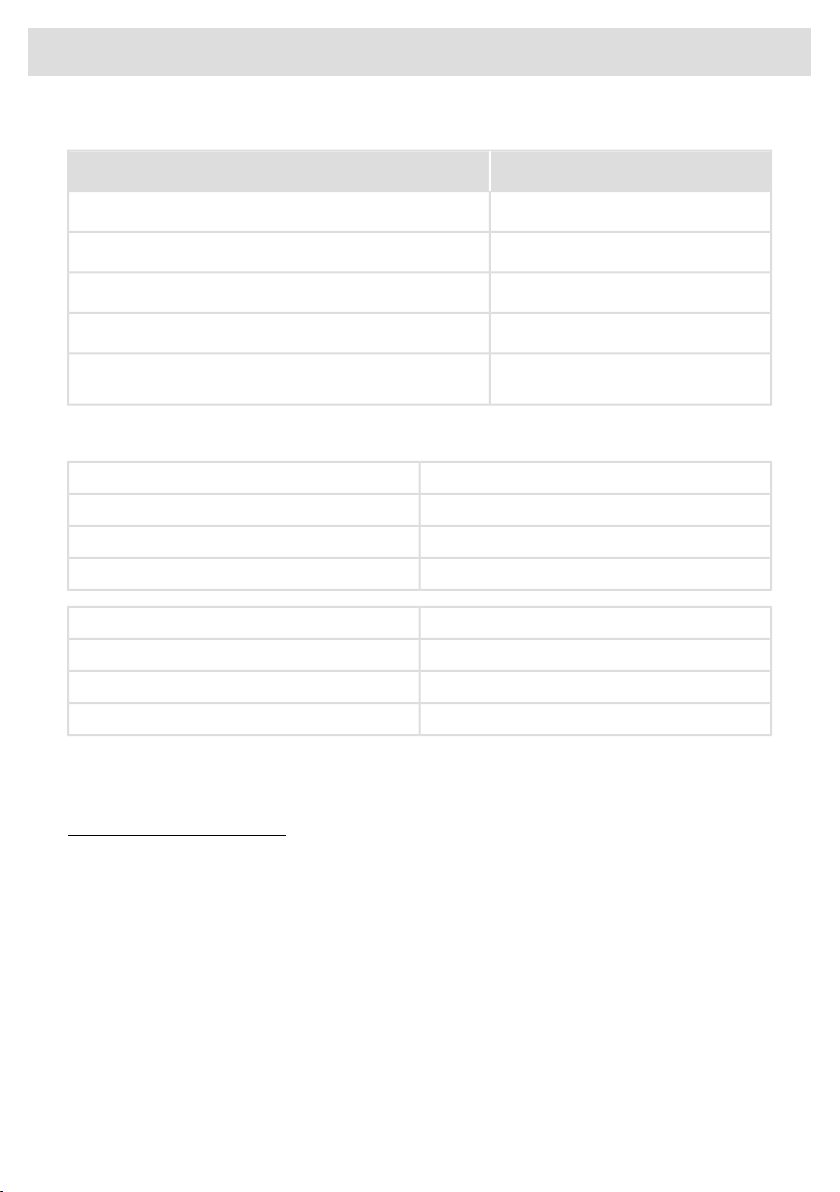
EU Product Fiche
HIHD854GF / HIHD854MM
Model identification
1
Time increase factor (f)
48.8
Energy Efficiency Index (EEI
hood
)
346.8
Measured air flow rate at best efficiency point (Q
BEP
) [m
3
/h]
230
Measured air pressure at best efficiency point (P
BEP
)
77.6
Measured electric power input at best efficiency point
(W
BEP
)
Compliance information
HSCIM - 1 moduleRadio equipment type
2402.0 - 2480.0 MHzOperating frequency range
<10 dBm EIRP average (calculated)Maximum output power
G1DEmission type:
Wi-Fi moduleRadio equipment type
2412 - 2472 MHz (16 channels)Operating frequency range
17.7 dBm EIRP average (calculated)Maximum output power
2.7 dBiMaximum antenna gain
ASKO, with this, declares that the induction hob with integrated extractor including radio equipment
complies with Directive 2014/53/EU.
The full text of the EU declaration of conformity is available at the following internet address:
www.celsiuscooking.com/DoC.
57
Technical data
Disposal of the appliance and packaging
Sustainable materials have been used during the manufacture of this appliance. This appliance must
be disposed of responsibly at the end of its service life. Ask your local authorities for more information
about how to do this.
The appliance packaging is recyclable. The following may have been used:
• cardboard;
• polyethylene film (PE);
• CFC-free polystyrene (PS rigid foam).
Dispose of these materials in a responsible manner and in accordance with government regulations.
The product has been marked with a crossed-out dustbin symbol to
remind you of the obligation to dispose of electrical household
appliances separately. This means that the appliance may not be
included with normal domestic refuse at the end of its service life.
The appliance must be taken to a special municipal centre for separated
waste collection or to a dealer providing this service.
A separate collection of household appliances helps to prevent any
potential negative impact on the environment and on human health
caused by improper disposal. It ensures that the materials of which the
appliance is composed can be recovered to obtain significant savings
in energy and raw materials.
NOTE!
Please note! Do not throw a broken ceramic glass plate in the glass recycling bin but take this
to the Municipality's waste recycling centre.
Declaration of conformity
We hereby declare that our products satisfy the applicable European
directives, orders and regulations, as well as the requirements stated
in the referenced standards.
58
Environmental aspects

Safety
If the safety instructions and warnings are not followed, the
manufacturer cannot be held responsible for any resulting damage.
• This appliance should only be connected by a registered installer.
• Check the appliance for transport damage. Do not connect a
damaged appliance.
• The walls and the worktop surrounding the appliance must be
heat resistant up to at least 105 °C.
• The worktop into which the hob is fitted should be flat.
• The air must not be discharged into a flue that is used for
exhausting fumes from appliances burning gas or other fuels (not
applicable to appliances that only discharge the air back into the
room).
• Extraction hoods and other appliances that extract cooking
vapours can affect the safe operation of appliances that burn gas
or other fuel (including those in other rooms) by backflowing
combustion gases. These gases can potentially lead to carbon
monoxide poisoning. After installing an extraction hood or other
vapour extractor, the operation of appliances with flue gas
extraction must be tested by a competent person to ensure that
the combustion gases do not flow back.
• Local regulations concerning the discharge of air have to be
fulfilled.
Electrical connection
• This appliance must be earthed.
• The electrical connection must comply with national and local
regulations.
• Prior to installation, ensure that the local distribution conditions
(voltage and frequency) and the adjustment of the appliance are
compatible.
• The voltage, frequency, power and the country for which the
appliance has been designed are shown on the appliance rating
plate.
59
Installation

• For class I appliances, check that your home’s electrical system
provides proper earthing.
• The wall plug socket and plug should always be accessible.
• If a stationary appliance is not fitted with a supply cord and a
plug, or with other means for disconnection from the supply mains
having a contact separation in all poles that provide full
disconnection under overvoltage category III conditions, the
means for disconnection must be incorporated in the fixed wiring
in accordance with the wiring rules. This is also applicable for
appliances with a supply cord and plug when the plug is not
accessible after installing the appliance. Using an omnipolar
switch with a contact separation of at least 3 mm fitted in the fixed
wiring will fulfil this requirement.
For AU/NZS: Means providing full disconnection under
overvoltage category III conditions must be incorporated in the
fixed wiring in accordance with AS/NZS 3000.
• The supply cord must hang freely and should not be fed through
a drawer.
• Use an approved cable with the correct cable diameters
appropriate for the connection. The cable casing should be able
to withstand at least 70 °C and therefore preferably be of type
H05V2V2 or H07V2V2.
• Before connecting the appliance, make sure the voltage indicated
on the rating plate conforms to the voltage in your power mains.
• The connection should be adjusted to the current and fuses.
• The appliance should not be connected to the mains via a
multi-plug adapter or extension cable, as the safe use of the
equipment cannot be guaranteed.
• After installation, the parts carrying electrical current and insulated
parts shall be protected against contact.
WARNING!
Failure to use screws or fasteners for installation as described in
the installation instructions may result in electric shock.
60
Installation

Service
• Disconnect the appliance from the mains supply before starting
any repair work.
• Faulty parts may only be replaced by original parts.
The manufacturer can only guarantee that original parts meet
safety requirements.
• If the supply cord is damaged, it must be replaced by the
manufacturer, its service agent or similarly qualified persons in
order to avoid a hazard.
61
Installation
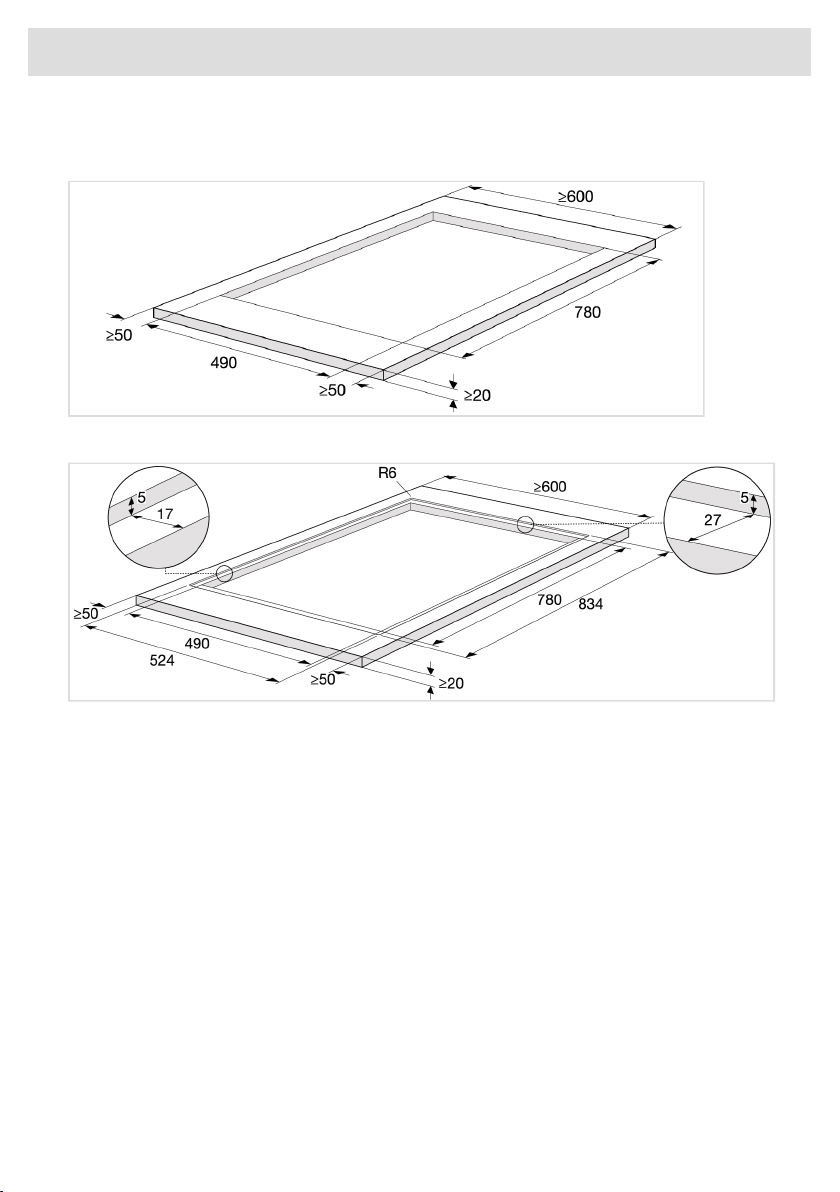
Preparations for installation
Cut-out in the worktop
Cut-out in the worktop for flush-mounted hobs
62
Installation
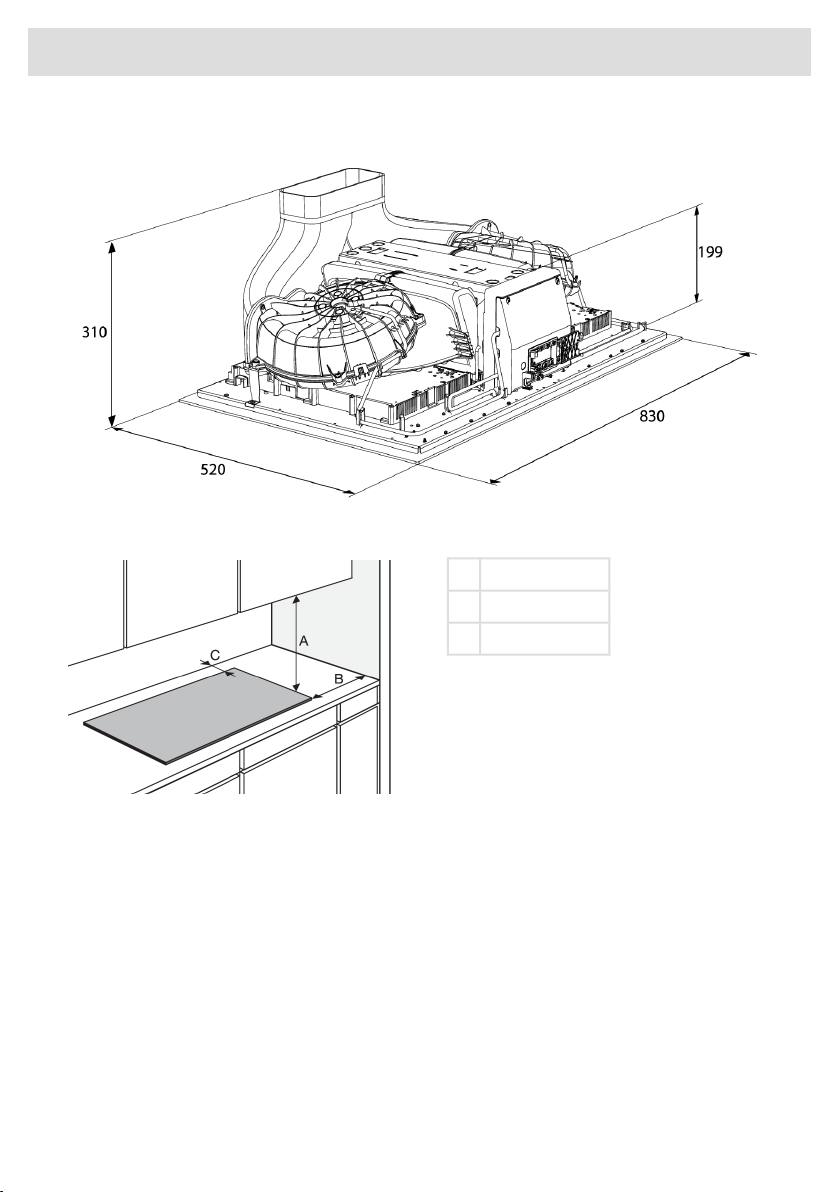
Appliance dimensions
Free space around the appliance
min. 550 mmA
min. 40 mmB
min. 35 mmC
63
Installation
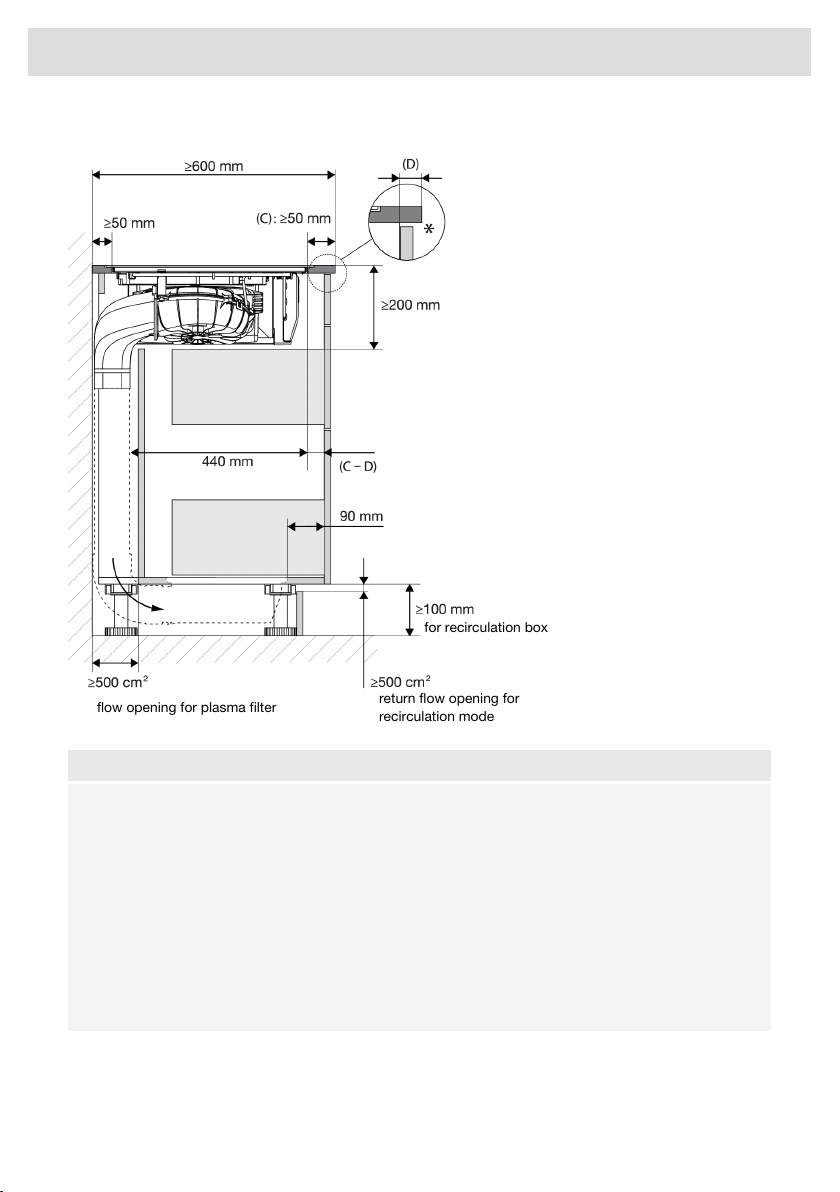
Kitchen cabinet dimensions
return flow opening for
recirculation mode
for recirculation box
flow opening for plasma filter
NOTE!
• * For optimal hob performance, a ventilation gap of ≥6 mm is advised.
• Minimum cabinet width: 800 mm.
• For installation and service, the back panel must be dismountable.
• With recirculation, the humidity can rise. Therefore, a return opening of at least 500 cm
2
must
be provided and the cut surfaces must be made moisture resistant.
• With recirculation, please note that condensation may occur if the kitchen unit is installed
against an uninsulated wall or floor. If necessary, choose an alternative recirculation set that
is mounted in the plinth.
• The power cord connection is located at the front of the appliance. At least 900 mm length
of the power cord is required to lead it to the socket designated location behind the appliance.
64
Installation
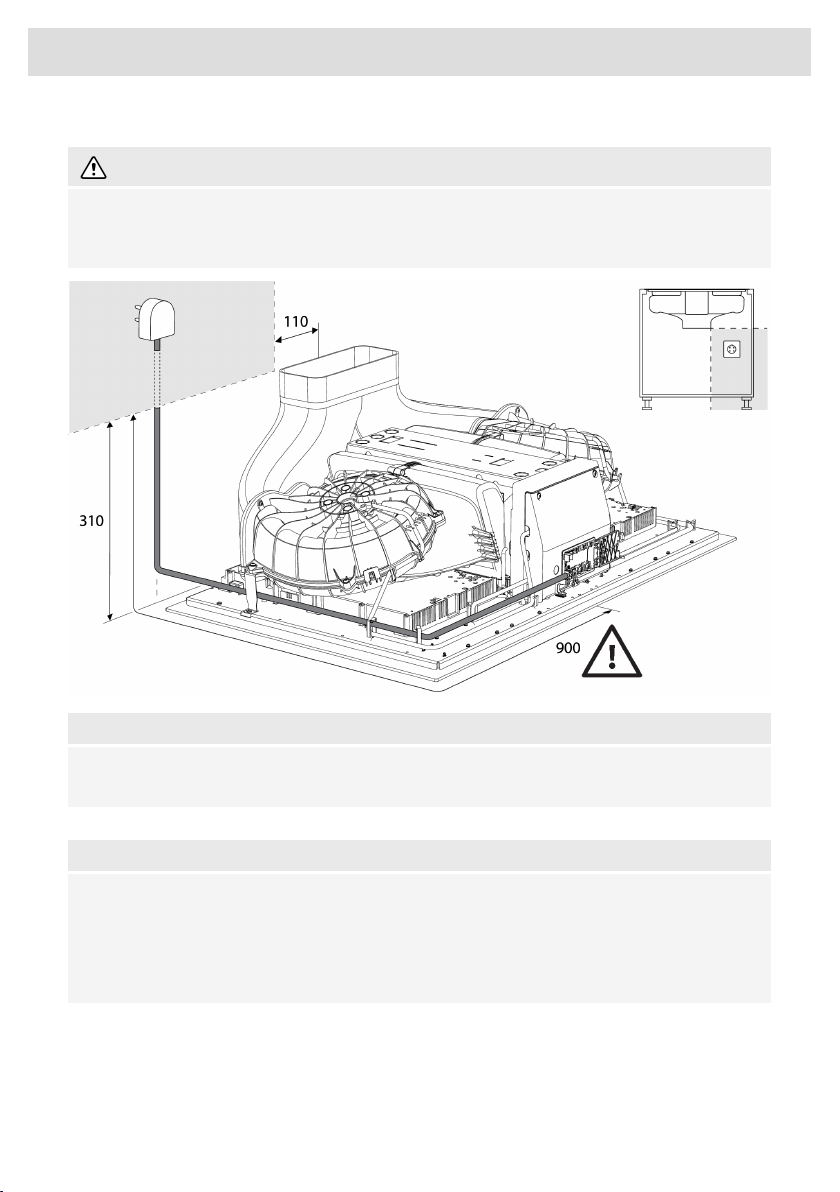
Electrical connection
WARNING!
The appliance may only be connected by an authorised expert. False connection can destroy
parts of the appliance. In such case, there is no right to warranty. Disconnect the appliance from
the power mains before any repair or maintenance operation.
NOTE!
The power cord connection is located at the front of the appliance. At least 900 mm length of the
power cord is required to lead it to the socket designated location behind the appliance.
Determining the existing electrical connection
NOTE!
Check the voltage. Before connecting the appliance, make sure the voltage specified on the
rating plate conforms to the voltage of your power mains. The voltage of your power mains
(220–240 V between L and N) should be checked by an expert using an appropriate measuring
device.
Check the voltages present as indicated in the diagrams below.
65
Installation
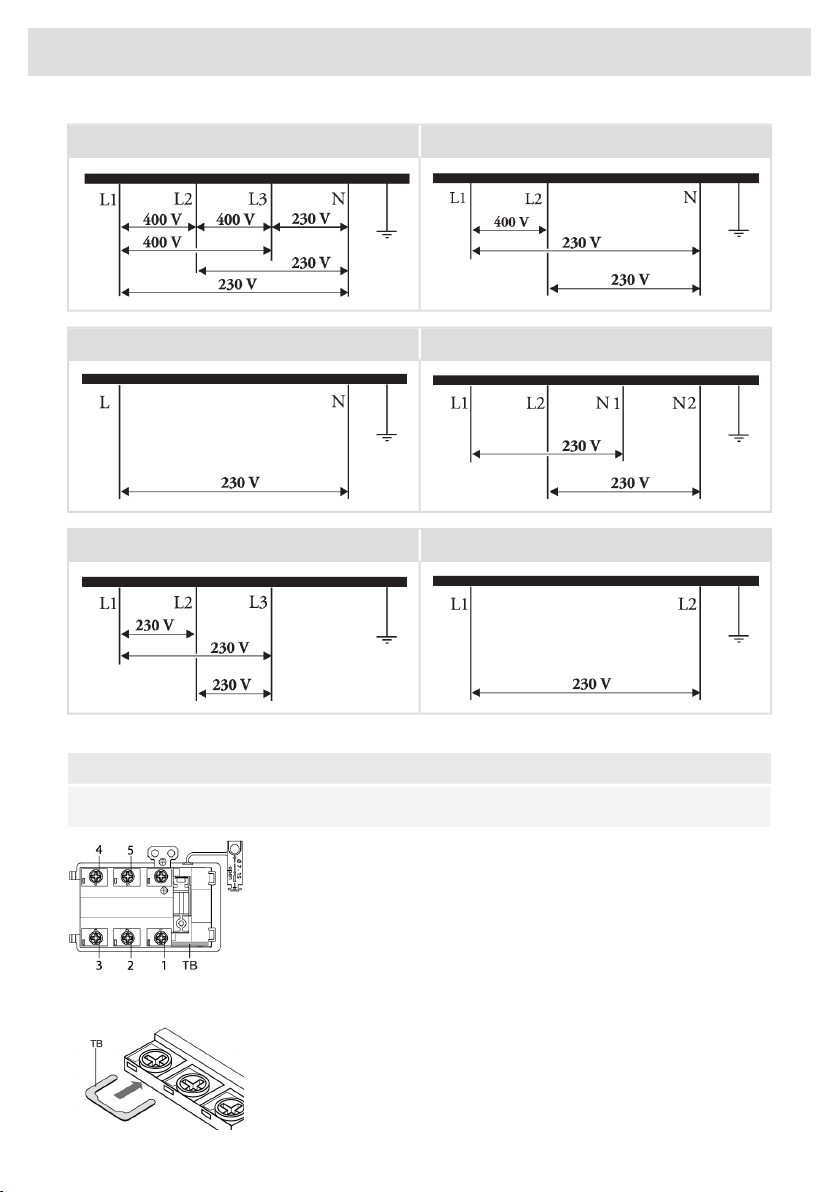
2 phases - 1 neutral3 phases - 1 neutral
2 phases - 2 neutral (only for NL)1 phase - 1 neutral
1 phase (only for BE)3 phases (only for BE)
Connection diagram
NOTE!
Consult the wiring diagrams on the front of the appliance.
• Open the cover of the connection terminal box.
• Run the power cord through a cord strain relief (clamp) which
protects the cable from being pulled out.
• Connect the wires according to your type of appliance.
• Make the necessary connections between the terminals using the
supplied terminal bridges. The terminal bridges are located in the
connection box.
66
Installation
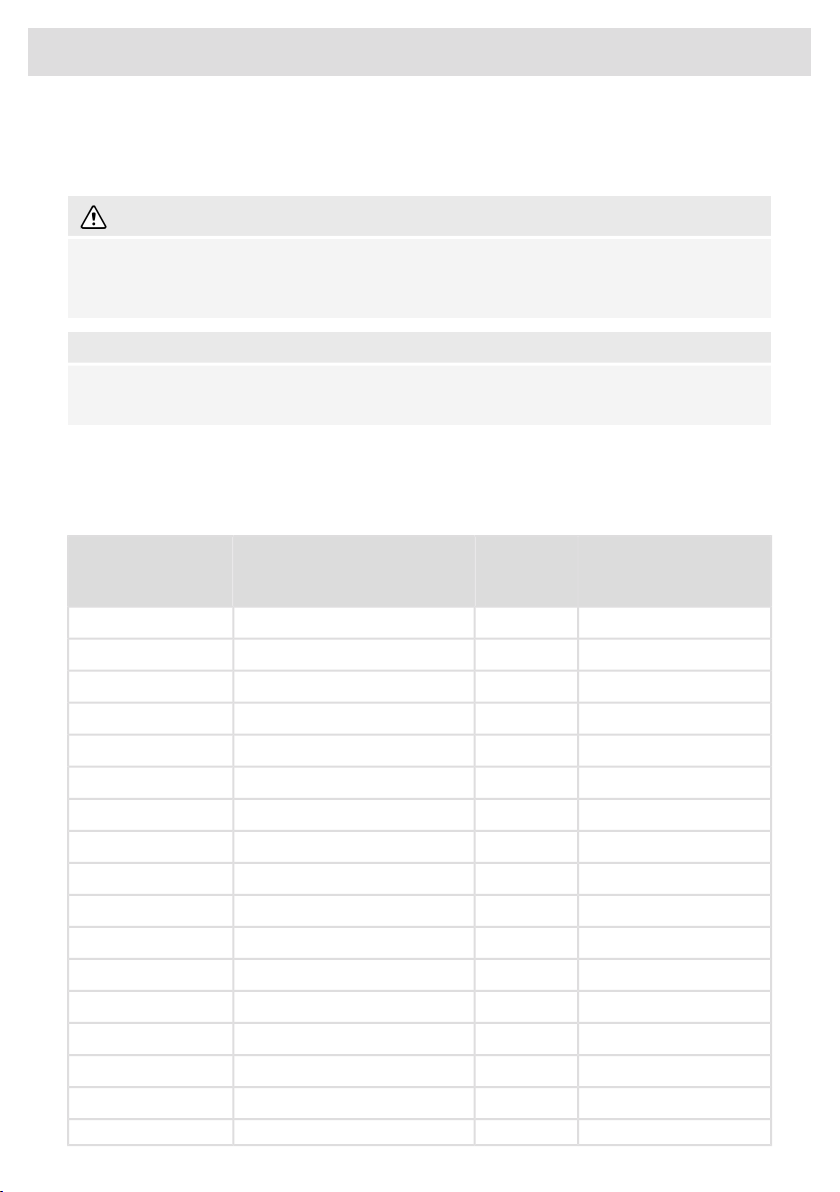
Current limiter
See chapter 'Settings', under parameter Con - Current limiter to set the parameter. This parameter
must be set before any pan is placed on the hob or cooking zone activated.
WARNING!
Current limiter setting must be set according to your connection and circuit breakers by a
registered and qualified installer. Please read the safety regulations and the installation instructions
carefully.
NOTE!
Setting a lower value of the Current limiter parameter may cause a reduced performance of the
induction hob.
See the connection diagrams for the voltage between the phase and neutral conductors and voltage
between the phase conductors.
Power cord core cross sectional area should be at least 1,5 mm² for the following current limiter
settings which should be adjusted to your circuit breakers:
Number and cross
section of Power cord
wires
Power cord
Type
Connection typeCurrent limiter
settings
5 x 1.5 mm²H05V2V2-F3 phases - 1 neutral3 x 16 A
5 x 1.5 mm²H05V2V2-F3 phases - 1 neutral3 x 13 A
5 x 1.5 mm²H05V2V2-F3 phases - 1 neutral3 x 10 A
5 x 1.5 mm²H05V2V2-F3 phases - 1 neutral3 x 06 A
4 x 1.5 mm²H05V2V2-F2 phases - 1 neutral2 x 16 A
4 x 1.5 mm²H05V2V2-F2 phases - 1 neutral2 x 13 A
4 x 1.5 mm²H05V2V2-F2 phases - 1 neutral2 x 10 A
4 x 1.5 mm²H05V2V2-F2 phases - 1 neutral2 x 06 A
5 x 1.5 mm²H05V2V2-F2 phases - 2 neutral (only for NL)2 x 16 A
4 x 1.5 mm²H05V2V2-F3 phases (only for BE)3 x 16 A
4 x 4.0 mm²H05V2V2-F2 phases - 1 neutral2 x 32 A
3 x 6.0 mm²H05V2V2-F1 phase - 1 neutral1 x 48 A
3 x 6.0 mm²H05V2V2-F1 phase - 1 neutral1 x 35 A
3 x 4.0 mm²H05V2V2-F1 phase - 1 neutral1 x 32 A
3 x 4.0 mm²H05V2V2-F1 phase - 1 neutral1 x 25 A
3 x 2.5 mm²H05V2V2-F1 phase - 1 neutral1 x 20 A
3 x 1.5 mm²H05V2V2-F1 phase - 1 neutral1 x 16 A
67
Installation
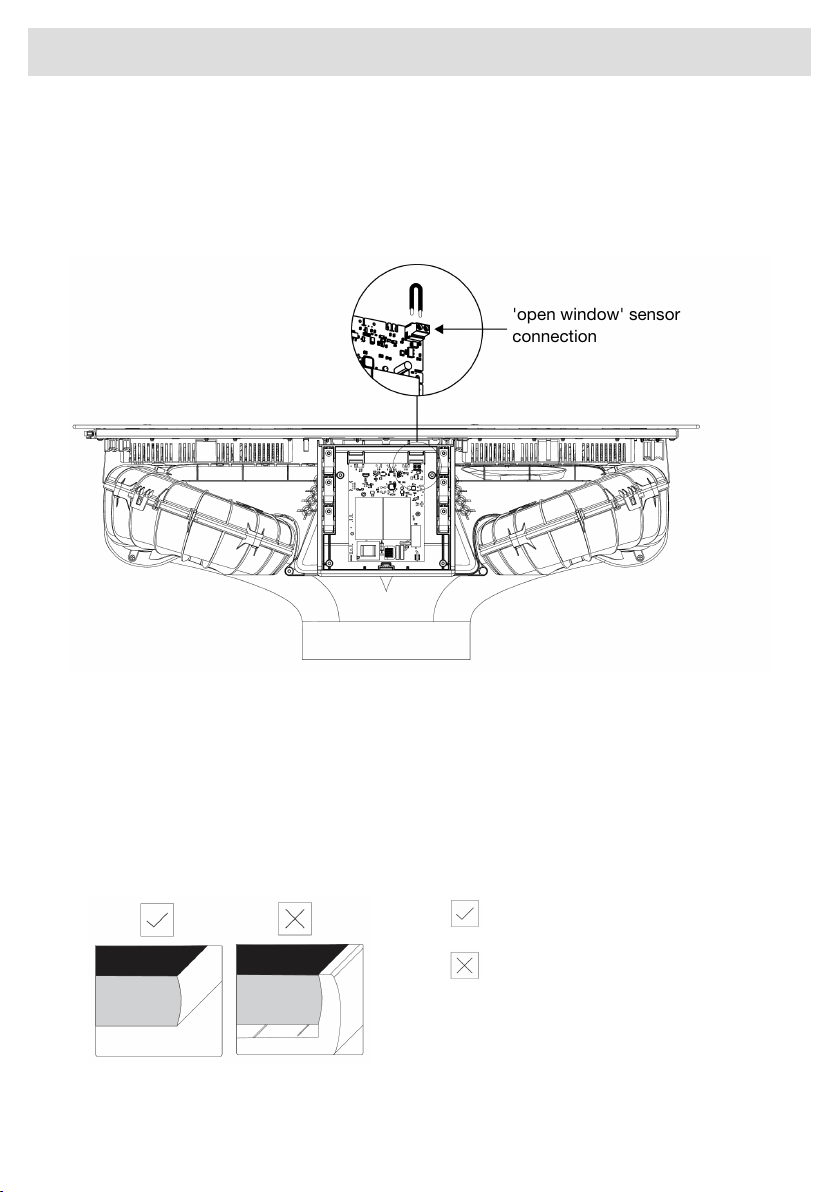
Connecting an ‘open window’ sensor
The use of sensor type ‘FDS 100’ is recommended if a window sensor must be installed. The sensor
must be of the potential-free NO (normally open) contact type. It must be connected to the designated
port on the motor control unit (MCU) in the enclosure at the front of the appliance. A cord of type
H05VV-F 2x0,5 mm
2
(or similar) is recommended for connecting a window sensor. Without a window
sensor, a jumper closes the electrical circuit.
'open window' sensor
connection
1. Unscrew and remove the cover of the MCU enclosure.
2. Remove the jumper of the sensor connection.
3. Connect the wires of the cord to the sensor connection.
4. Use the available strain relief clamp to secure the cord.
5. Connect the wires of the cord to the window sensor in such a way the contact is open when the
window is closed (consult the instructions included with the window sensor).
Flush-mount installation into the worktop
Appliances without decorative frames are suitable for flush mounting.
brushed edge
decorative frame
68
Installation
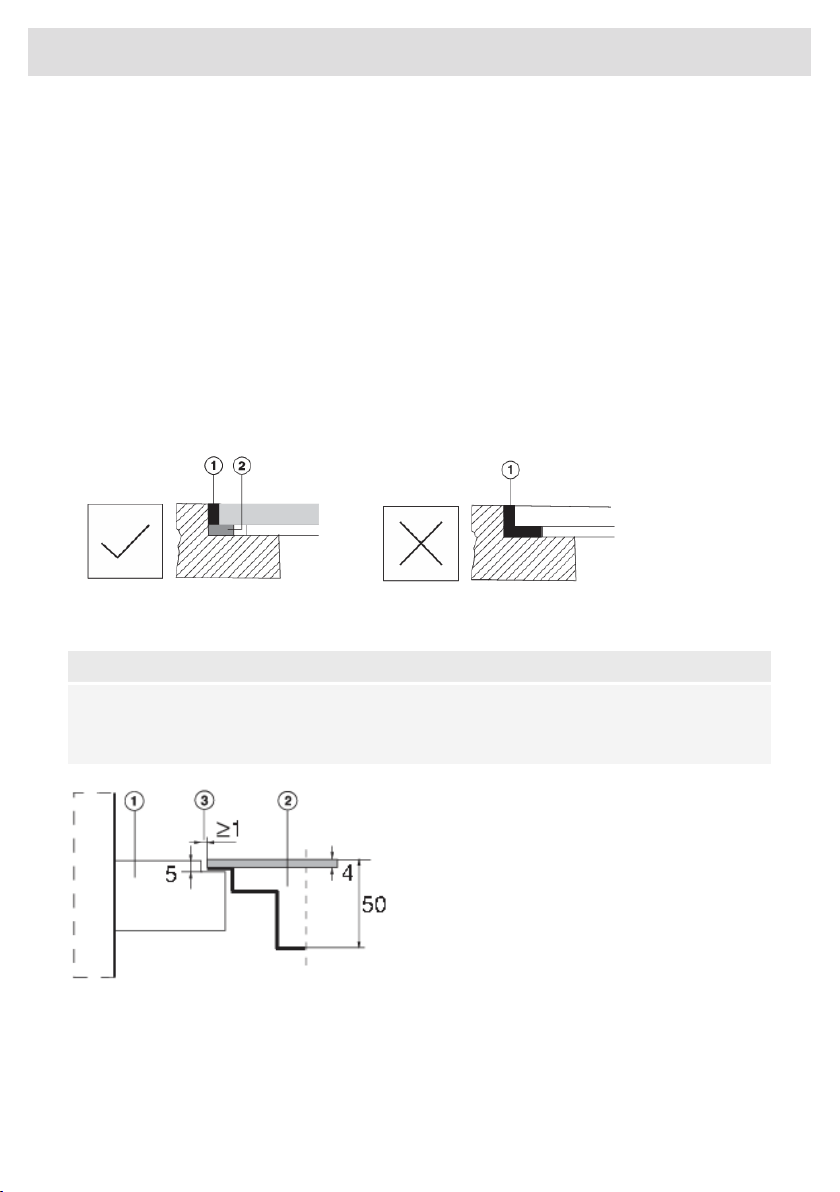
Installing the appliance
The appliance may only be installed into a temperature- and water-resistant countertop, such as a
countertop made of (natural) stone (marble, granite), or solid wood (the edges along the cut-out
have to be sealed). When installing into a countertop made of ceramics, wood, or glass, a wooden
sub-frame should be used. The frame is not supplied with the appliance. The appliance may only
be installed into a countertop made of other materials after you have consulted the countertop
manufacturer and obtained his express approval. Internal dimension of the basic unit should be at
least equal to the internal cutout for the appliance. This will allow simple removal of the appliance
from the countertop. Attach sealing tape along the perimeter of the bottom of the glass panel.
Install the appliance (see ‘Installation’) and connect the appliance to the mains power supply (see
instructions for connecting the appliance). Test the operation of the appliance before applying the
seal. Seal the groove between the appliance and the kitchen worktop with a silicone sealant.
The silicone sealant used to seal the appliance must be temperature-resistant (to at least 160 °C).
Smooth out the silicone sealant using suitable tools. Observe the instructions for use of the selected
silicone sealant. Do not switch on the appliance until the silicone sealant has dried completely.
1. Silicone sealant, 2. Sealing tape
NOTE!
Pay particular attention to built-in dimensions with (natural) stone countertops. When choosing
the silicone sealant, observe the countertop material and consult the countertop manufacturer.
Use of inappropriate silicone sealants can result in permanent discolouration of some parts.
Stone countertop
1. Countertop
2. Appliance
3. Slot
Given the margin of error (tolerance) for the glass ceramic plate of the appliance, and the cutout in
the countertop, the slot is adjustable (min. 2 mm).
69
Installation
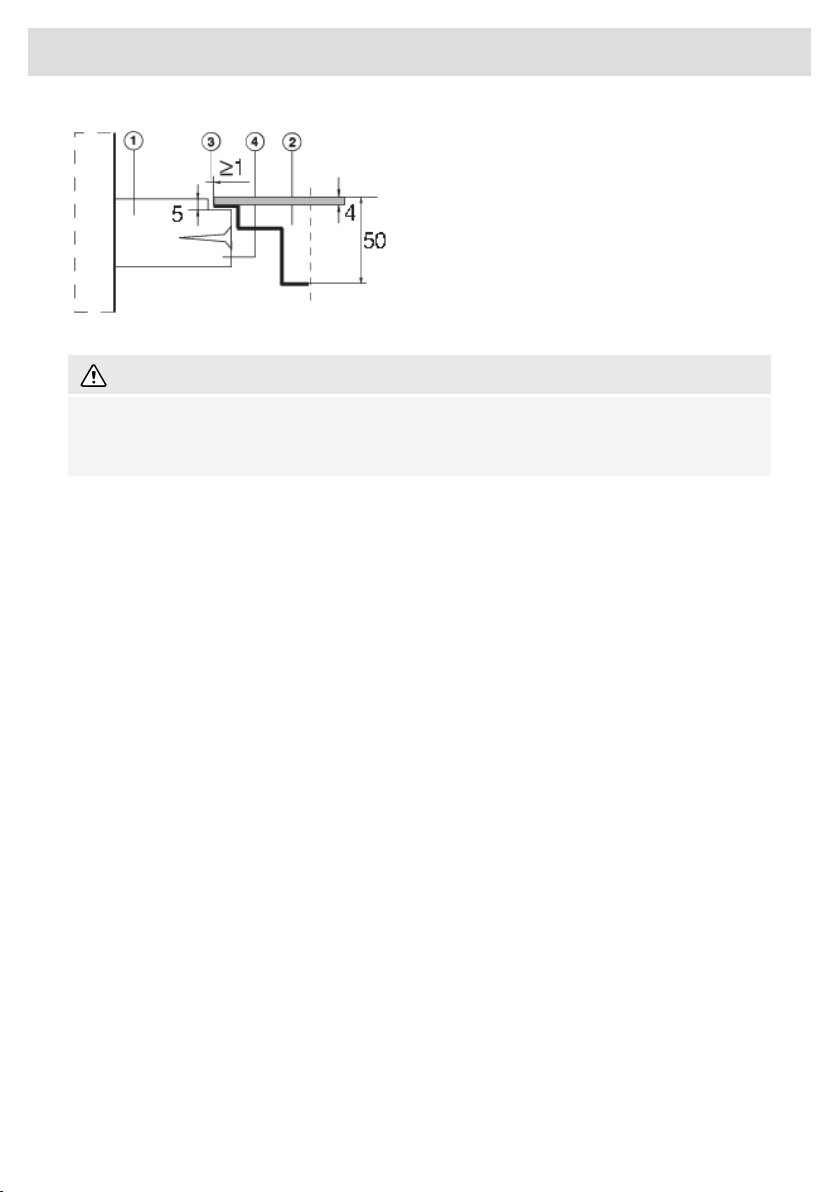
Ceramic, wooden, or glass countertop
1. Countertop
2. Appliance
3. Slot
4. Wooden frame, thickness 16 mm
WARNING!
The service department shall only be responsible for repair and servicing of the cooking hob.
Consult your specialized kitchen equipment dealer regarding the re-installation of the flush-mount
cooking hob.
70
Installation
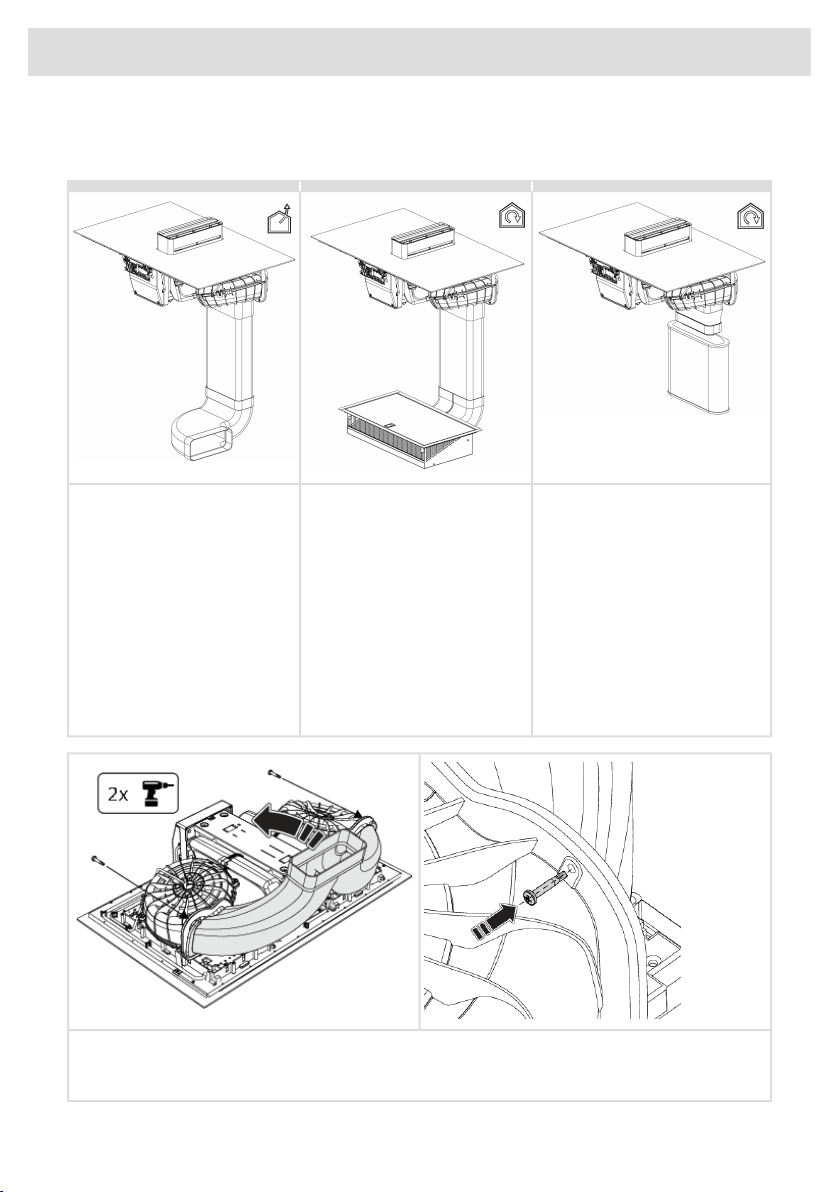
Built-in
This unit can be connected to various discharge systems:
To a plasma filterTo a recirculation filterTo an exhaust duct (outlet)
After filtration through grease
filters and the plasmafilter, the
After filtration through grease
filters and the odour control/fine
After filtration through grease
filters, the extracted air is
extracted air is discharged back
into the room.
particle filter, the extracted air
is discharged back into the
room.
discharged to the outside
through a series of ducts (to be
purchased separately).
Required part:
Required parts:Required parts: • PlasmaMade filter (HF4003)
•• Recirculation set including
ducts (HR0016)
Connection piece (HD2001)
• Exhaust air duct (HD1001)
• Replace combi-filter
odour/fine dust (HF3010)
• Vertical / horizontal elbow
1. Hook the Y-duct into the lower edge of both motor housings and tilt the Y-duct up.
2. Attach the Y-duct to the motor housings with the two screws.
71
Installation
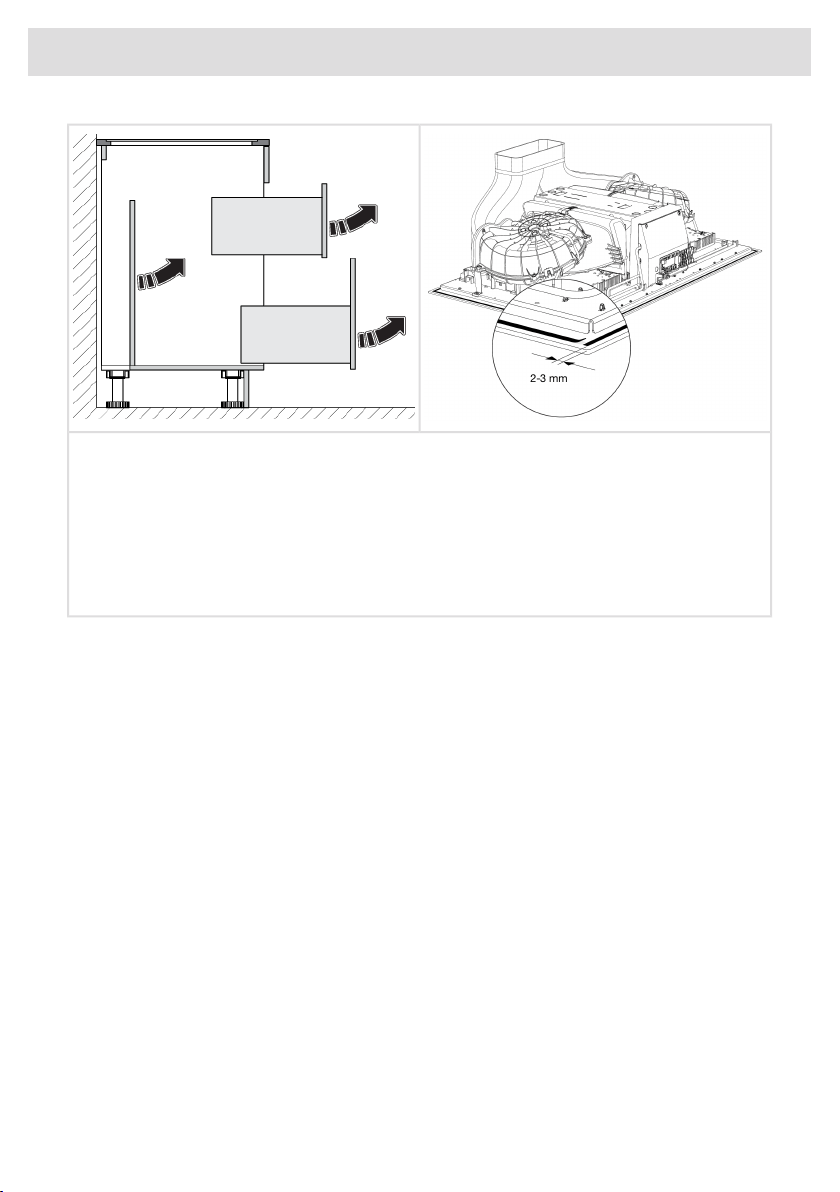
2-3 mm
1. Remove the drawers and the back panel from the kitchen cabinet.
2. Before installing the appliance into a kitchen worktop, attach the foam gasket supplied with
the appliance to the bottom side of the glass ceramic hob.
3. Remove the protective film from the gasket.
4. Attach the gasket to the bottom side of the glass (2–3 mm away from the edge). The gasket
has to be applied along the entire edge of the glass. The gasket may not overlap in the corners.
When fitting the gasket, make sure it is not damaged by or in contact with any sharp objects.
72
Installation
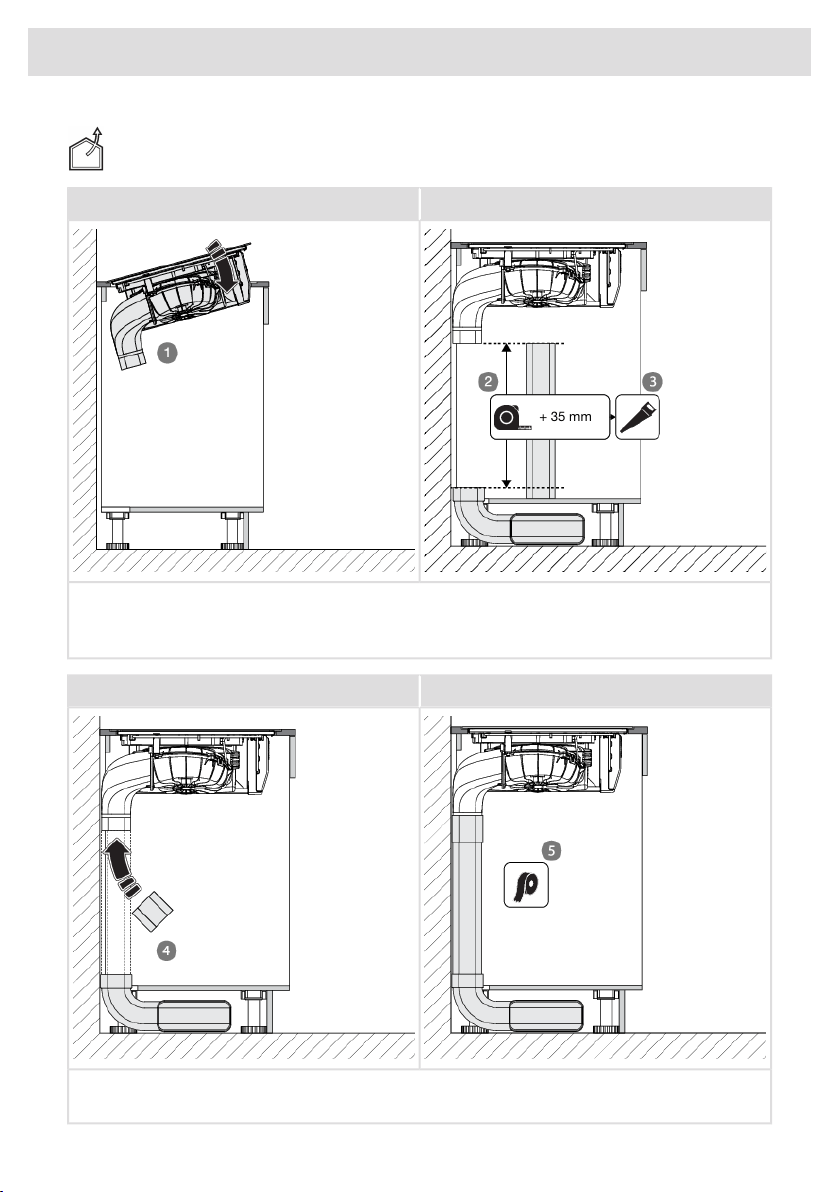
Connecting to an exhaust duct (outlet)
BA
+ 35 mm
1. Place the appliance in the cut-out in the worktop.
2. Measure the distance as indicated in the figure and add 35 mm.
3. Saw the flat duct to size.
DC
4. Install the coupling, flat duct, and Naber elbow set.
5. Make the duct airtight with sealing tape.
73
Installation
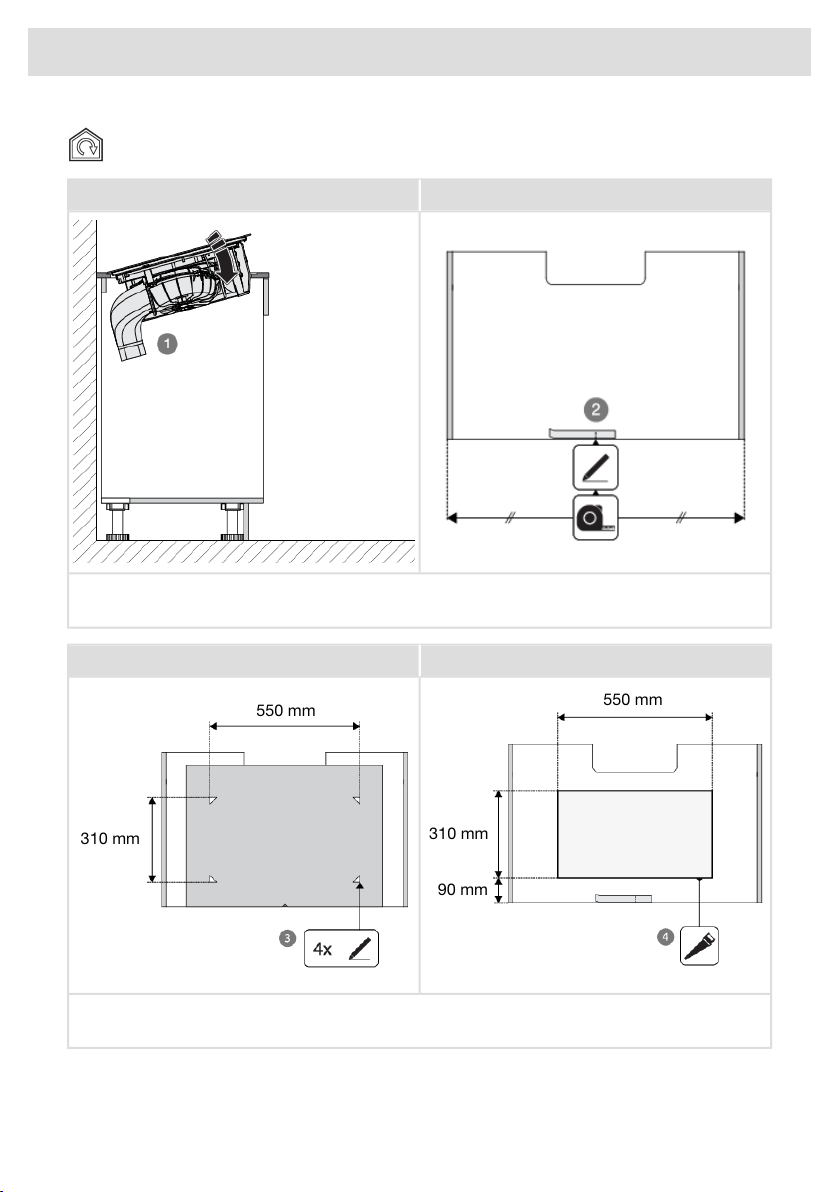
Connecting to a recirculation filter
BA
1. Place the appliance in the cut-out in the worktop.
2. Mark the centre of the cabinet bottom with a strip of masking tape.
DC
550 mm
310 mm
90 mm
550 mm
310 mm
3. Mark the corners of the cut-out using the template provided.
4. Saw the cut-out in the cabinet bottom and finish the cut surfaces moisture resistant.
74
Installation
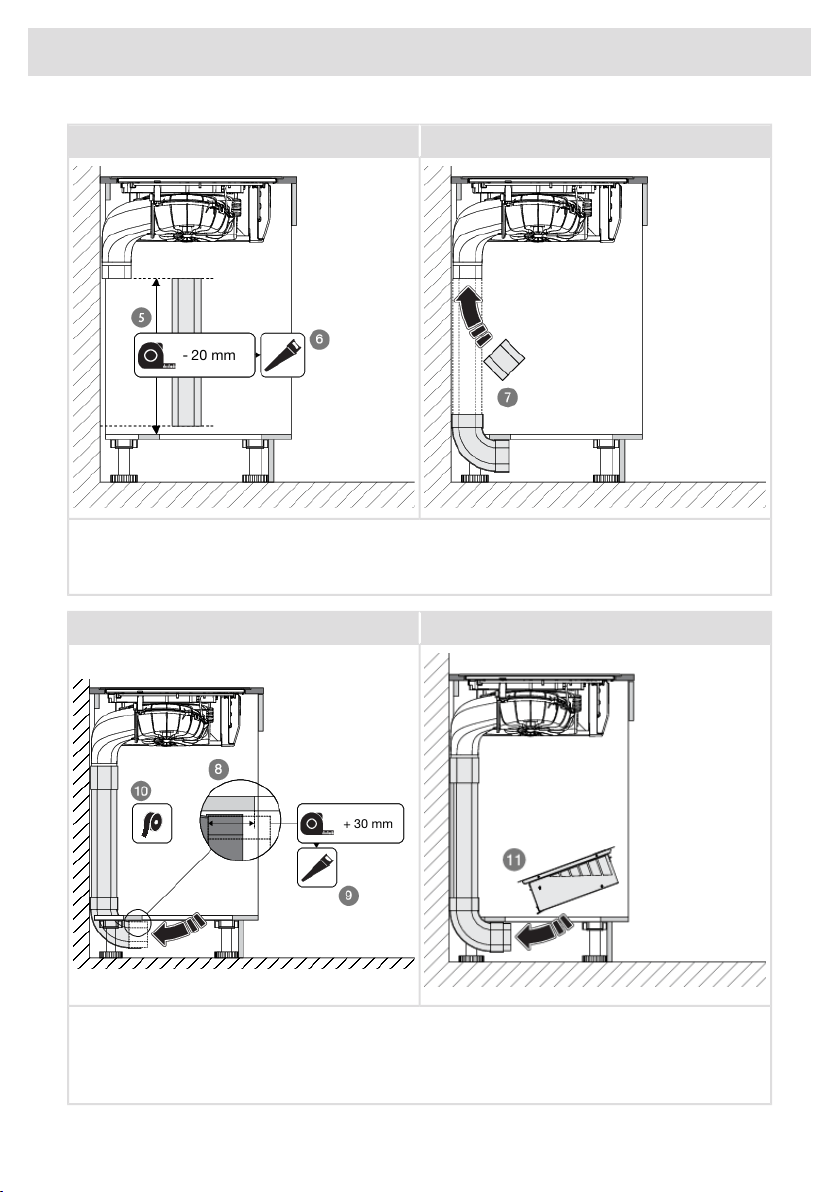
FE
- 20 mm
5. Measure the distance as indicated in the figure and subtract 20 mm.
6. Saw the flat duct to size.
7. Install the coupling, the vertical elbow and the flat duct.
HG
+ 30 mm
8. Measure the distance between the vertical elbow and the cut-out and add 30 mm.
9. Saw the coupling to size. If necessary, use the sawn-off part of the flat channel for this.
10. Make the duct airtight with sealing tape.
11. Place the box.
75
Installation
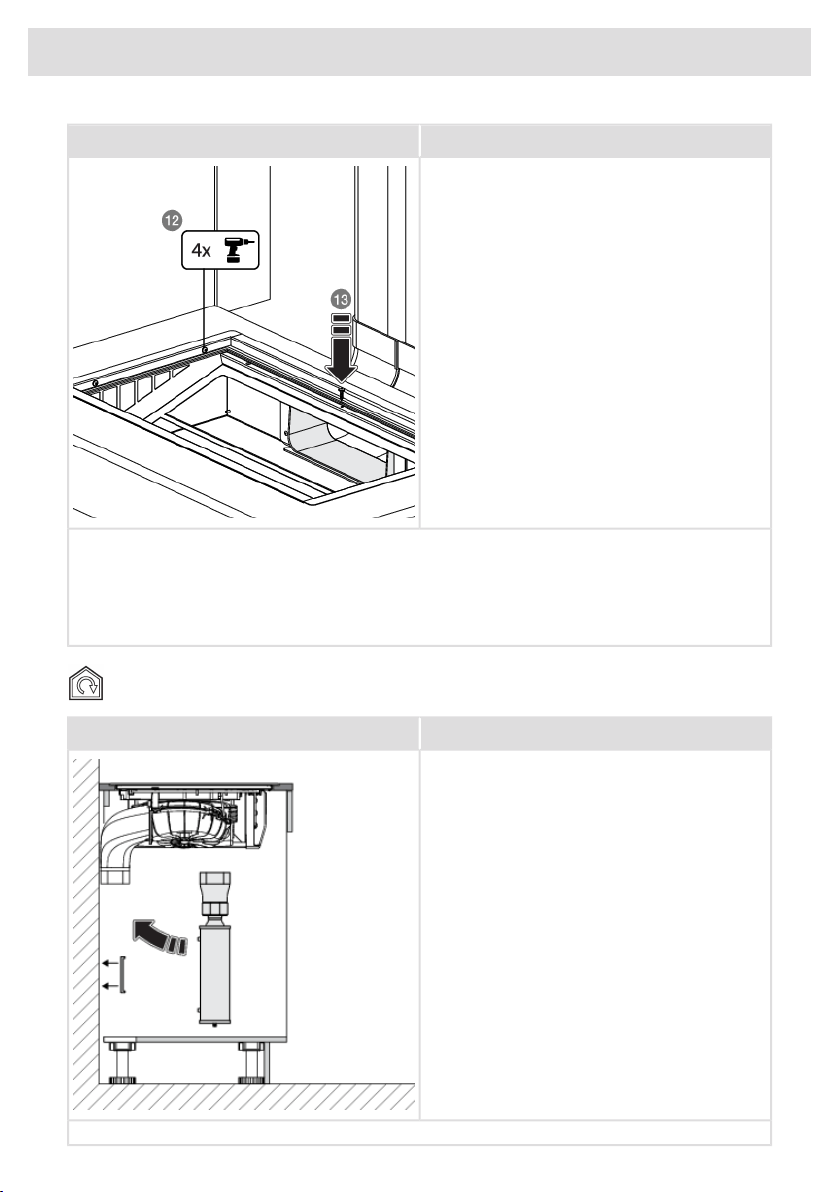
I
12. Remove the cover of the box and screw the box in place from the inside.
13. Fix the position of the coupling with a screw from the top. Do not forget to pre-drill a hole for
the screw.
14. Fit the filter and the cover of the box.
15. Fit the recirculation filter and the cover.
Connecting to a plasma filter
A
Refer to the installation instructions supplied with the plasma filter.
76
Installation

• Connect the appliance to the power supply with a plug. The socket must be earthed. The nominal
voltage and frequency required for the appliance are shown on the appliance’s type plate/label
with basic information.
• Fit the back of the cabinet and the drawers.
• Place the condensation reservoirs, filters, and the tower in the extraction module.
• Test if the appliance operates correctly.
• For flush mounting, seal the hob (see ‘Flush-mount installation into the worktop’).
Removing the built-in appliance
Disconnect the appliance from the power mains and disconnect it from the discharge duct. Use a
suitable tool to remove the silicone seal from around the edge. Remove the appliance by pushing
it upwards from the bottom.
NOTE!
Do not attempt to remove the appliance from the upper side of the counter!
77
Installation
859011
The appliance identification card is located on the bottom of the appliance.
Stick the appliance identification card here.
www.asko.com
We reserve the right to make changes.
-a8