Operating instructions
Washer-dryer
To avoid the risk of accidents or damage to the appliance, it is
essential to read these instructions before it is installed and used for
the first time.
en-AU, NZ M.-Nr. 12 248 400

Contents
2
Caring for the environment .............................................................................. 5
Warning and Safety instructions ..................................................................... 6
Operating the washer-dryer ............................................................................. 16
Control panel....................................................................................................... 16
How the control panel works .............................................................................. 17
Applications......................................................................................................... 17
Before the first use............................................................................................ 18
Miele@home ........................................................................................................ 19
Setting up Miele@home ...................................................................................... 20
Running the first wash programme ..................................................................... 20
Environmentally friendly washing and drying................................................. 22
Washing.............................................................................................................. 23
1. Preparing the laundry ...................................................................................... 23
2. Loading the drum ............................................................................................ 24
3. Selecting a programme ................................................................................... 25
4. Adding detergent............................................................................................. 27
5. Starting the programme .................................................................................. 31
6. End of the programme/unloading laundry....................................................... 31
Spin cycle............................................................................................................ 32
Programme chart................................................................................................. 34
Programme sequence ......................................................................................... 36
Detergent............................................................................................................. 38
Water softeners .............................................................................................. 38
Fabric softeners, liquid starch, starch ............................................................ 38
Colour run and dye removers/dyes................................................................ 39
Drying ................................................................................................................. 42
1. Preparing the laundry ...................................................................................... 42
2. Loading the drum ............................................................................................ 43
3. Selecting a programme ................................................................................... 43
4. Selecting programme settings ........................................................................ 44
5. Starting the programme .................................................................................. 45
6. End of the programme/unloading laundry....................................................... 45
Programme chart................................................................................................. 46
Thermospin .................................................................................................... 48
Washing and Drying .......................................................................................... 49
1. Preparing the laundry ...................................................................................... 49
2. Loading the drum ............................................................................................ 49
3. Selecting a programme ................................................................................... 49
4. Selecting programme settings ........................................................................ 49
5. Adding detergent............................................................................................. 50

Contents
3
6. Programme start/finish .................................................................................... 50
After each washing or drying programme ........................................................... 50
Rinse out fluff programme................................................................................ 51
Changing the programme sequence............................................................... 52
Changing the programme (safety lock) ............................................................... 52
Cancelling a programme ..................................................................................... 52
Adding laundry - AddLoad .................................................................................. 53
Delay start/SmartStart ...................................................................................... 54
Delay start ........................................................................................................... 54
Cleaning and care ............................................................................................. 56
Cleaning the external casing and fascia panel.................................................... 56
Cleaning the detergent dispenser drawer ........................................................... 56
Cleaning the drum............................................................................................... 58
Cleaning the water inlet filter............................................................................... 58
Problem solving guide ...................................................................................... 59
A programme cannot be started ......................................................................... 59
Programme cancellation and fault indicator light ................................................ 60
Fault indicator light lights up at the end of a programme.................................... 61
Symbols in the time display ................................................................................ 62
General problems with the washer-dryer ............................................................ 63
An unsatisfactory wash result ............................................................................. 66
Unsatisfactory drying result................................................................................. 67
The door will not open......................................................................................... 68
Opening the door in the event of a blocked drain outlet and/or power cut ........ 69
Service................................................................................................................ 71
Contact in case of fault ....................................................................................... 71
Warranty .............................................................................................................. 71
Optional accessories........................................................................................... 71
Garment care label symbols............................................................................. 72
Installation.......................................................................................................... 73
Front view ............................................................................................................ 73
Rear view............................................................................................................. 74
Installation surface .............................................................................................. 75
Carrying the washer-dryer to its installation site ................................................. 75
Removing the transit bars ................................................................................... 75
Refitting the transit bars ...................................................................................... 77
Installing under a continuous worktop ................................................................ 77
Levelling the washer-dryer .................................................................................. 78
The Miele water protection system .................................................................... 79

Contents
4
Water intake ........................................................................................................ 80
Drainage .............................................................................................................. 81
Electrical connection .......................................................................................... 82
Technical data.................................................................................................... 83
Consumption data............................................................................................. 84
Programmable functions .................................................................................. 85
Choosing and selecting programmable functions .............................................. 85
Editing and saving the programmable function .................................................. 86
Exiting the programming level............................................................................. 86
Buzzer duration...............................................................................................
87
Buzzer............................................................................................................
87
Keypad tone...................................................................................................
87
PIN code........................................................................................................
87
Control panel switch-off status ....................................................................
88
Memory ........................................................................................................
88
Gentle action ................................................................................................
88
Temperature reduction .................................................................................
89
Maximum rinse level.....................................................................................
89
Suds cooling .................................................................................................
89
Low water pressure......................................................................................
89
Display brightness........................................................................................
90
Cottons drying levels....................................................................................
90
Minimum iron drying levels............................................................................
90
Extended cool down.....................................................................................
90
Compressed laundry protection ...................................................................
91
Operating hours ...........................................................................................
91
Remote control .............................................................................................
91
SmartGrid (only functional in selected countries) ........................................
92
RemoteUpdate.............................................................................................
92
Factory default setting..................................................................................
93
Switching off Wi-Fi .............................................................................................. 94
Copyright and licences for the communication module ..................................... 94
Detergents and care products ......................................................................... 95
Detergent............................................................................................................. 95
Sensitive Skin (powder detergent).................................................................. 95
Specialist detergents .................................................................................... 96
Fabric care .................................................................................................... 96
Additive ........................................................................................................ 97
Machine care products........................................................................................ 97
Caring for the environment
5
Disposal of the packing
material
The transport and protective packaging
has been selected from materials which
are environmentally friendly for
disposal, and can normally be recycled.
Recycling the packaging reduces the
use of raw materials in the
manufacturing process and also
reduces the amount of waste in landfill
sites. Ensure that any plastic
wrappings, bags etc. are disposed of
safely and kept out of the reach of
babies and young children. Danger of
suffocation.
Disposing of your old
appliance
Electrical and electronic appliances
often contain valuable materials. They
also contain specific materials,
compounds and components, which
were essential for their correct function
and safety. These could be hazardous
to human health and to the environment
if disposed of with your domestic waste
or if handled incorrectly. Please do not,
therefore, dispose of your old appliance
with your household waste.
Please dispose of it at your local
community waste collection / recycling
centre for electrical and electronic
appliances. You are also responsible for
deleting any personal data that may be
stored on the appliance prior to
disposal. Please ensure that your old
appliance poses no risk to children
while being stored prior to disposal.
Warning and Safety instructions
6
It is essential to read these instructions.
This washer-dryer complies with all current local and national
safety requirements. However, inappropriate use can lead to
personal injury and damage to property.
Read the operating instructions carefully before using the washer-
dryer. They contain important information on safety, installation,
use and maintenance of the appliance. This prevents both
personal injury and damage to the washer-dryer.
In accordance with standard IEC60335-1, Miele expressly and
strongly advises that you read and follow the instructions in
“Installation”, as well as in the “Warning and Safety instructions”.
Miele cannot be held liable for injury or damage caused by non-
compliance with these instructions.
Keep these operating instructions in a safe place and pass them
on to any future owner.
Correct application
This washer-dryer is intended for use in domestic households and
similar residential environments, by guests in hotel or motel rooms,
bed & breakfasts and other typical living quarters. This does not
include common/shared facilities or commercial facilities within
hotels, motels or bed & breakfasts.
This washer-dryer is intended for the following applications only:
- washing textiles which have a care label stating that they are
washable.
- drying textiles which have been washed in water and have a care
label stating that they are suitable for tumble drying.

Warning and Safety instructions
7
All other types of use are not permitted. Miele cannot be held liable
for damage resulting from incorrect or improper use or operation.
The washer-dryer is not intended for outdoor use.
This appliance is not intended for use by persons (including
children) with reduced physical, sensory or mental capabilities, or
lack of experience and knowledge, unless they have been given
supervision or instruction concerning its use by a person responsible
for their safety.
Safety with children
Young children must be kept away from the washer-dryer unless
they are constantly supervised.
Older children may only use the washer-dryer unsupervised if they
have been shown how to use it safely. Children must be able to
understand and recognise the possible dangers caused by incorrect
operation.
Children must not be allowed to clean or maintain the washer-
dryer unsupervised.
Please supervise young children in the vicinity of the washer-
dryer. Never allow children to play with the appliance.
Technical safety
Before installation check the washer-dryer for visible signs of
damage. Do not install or use a damaged appliance.
Before connecting the appliance, make sure that the connection
data on the data plate (voltage, frequency, and connected load)
match the mains electricity supply. If in doubt, consult a qualified
electrician.

Warning and Safety instructions
8
The electrical safety of this appliance can only be guaranteed
when continuity is complete between it and an effective earthing
system which complies with current local and national safety
regulations.
It is essential that this standard safety requirement is observed and
regularly tested. If in any doubt, have the electrical installation
inspected by a qualified electrician.
Miele cannot be held liable for the consequences of an inadequate
earthing system (e.g. electric shock).
Do not connect the washer-dryer to the mains electricity supply
by a multi-socket adapter, extension lead or similar. These do not
guarantee the required safety of the machine (fire hazard due to the
risk of overheating).
Unauthorised repairs could result in unforeseen dangers for the
user, for which the manufacturer cannot accept liability. Repairs
should only be carried out by a Miele authorised service technician,
otherwise any subsequent damage will not be covered by the
warranty.
Please observe the instructions in “Installation” and “Technical
data”.
The electrical plug must be easily accessible after installation so
that the washer-dryer can be disconnected from the electricity
supply if necessary.
In the event of a fault or for cleaning purposes, the washer-dryer
must be disconnected from the mains electricity supply. It is only
completely isolated from the electricity supply when:
- switched off at the wall socket and the power plug is withdrawn
from the socket
- the mains circuit breaker has been switched off, or
- the screw-out fuse is removed (in countries where this is
applicable).

Warning and Safety instructions
9
The Miele water protection system protects from water damage
provided the following conditions are met:
- The machine is correctly plumbed in and connected to the
electricity supply.
- If a fault or damage has been identified, the washer-dryer must be
repaired by a competent person before further use.
The machine must only be connected to the on-site water supply
using a new hose kit. Old hose kits must not be re-used. Check the
condition of the hoses regularly so that you can replace them in
good time and avoid the risk of any water damage.
The water inlet pressure must be at least 100kPa and must not
exceed 1000kPa.
Faulty components must only be replaced by Miele original spare
parts. Miele can only guarantee the safety standards of the appliance
when Miele replacement parts are used.
If the connection cable is faulty, it must only be replaced by a
Miele authorised service technician to protect the user from danger.
This washer-dryer must not be operated in mobile installations
(e.g. on a ship).
Do not make any alterations to the washer-dryer, unless
authorised to do so by Miele.
Temporary or permanent operation with a self-sufficient or non-
mains synchronous energy supply system (e.g. isolated networks,
back-up systems) is possible. A requirement for the operation is that
the energy supply system complies with all current local and national
requirements that apply to stand-alone, solar and/or battery
systems.
The protective measures provided in the installation and in this Miele
product must also be assured in their function and operation in
isolated operation or in non-mains synchronous operation, or
replaced with equivalent measures in the installation.

Warning and Safety instructions
10
The manufacturer’s warranty will be invalidated if the washer-dryer
is not repaired by a service technician authorised by Miele.
In areas which may be subject to infestation by cockroaches or
other vermin, pay particular attention to keeping the machine and its
surroundings in a clean condition at all times. Any damage which
may be caused by cockroaches or other vermin will not be covered
by the machine warranty.
Warning and Safety instructions
11
Correct use
Warning: Risk of fire / Flammable materials. To avoid the possible
danger of fire, please read these warnings carefully.
Do not install the washer-dryer in rooms that are subject to frost.
Frozen hoses may burst or split, and the reliability of the electronic
control unit may be impaired at temperatures below freezing point.
Before using the machine for the first time, check that the transit
bars at the rear of the appliance have been removed (see
“Installation - Removing the transit bars”). During the spin cycle, a
transit bar which is still in place may result in damage to the washer-
dryer and adjacent furniture or appliances.
Turn off the tap if the washer-dryer is to be left for a longer period
of time (e.g. while on holiday), especially if there is no floor drain
(gully) in the immediate vicinity.
Danger of flooding! If hooking the drain hose into a wash basin,
check that the water can drain away fast enough to prevent the sink
from overflowing. Secure the drain hose against slipping. The force
of the water flowing out of the hose can dislodge it.
Make sure that no foreign objects (e.g. nails, pins, coins, paper
clips) find their way into the machine with the laundry. These may
damage components of the machine (e.g. suds container, drum).
Damaged components can, in turn, result in damage to the laundry.
Take care to remove any detergent dispensing aids (e.g. detergent
balls) before drying the laundry. These can melt during the drying
programme and cause damage to the machine and the laundry.

Warning and Safety instructions
12
Risk of burning or scalding due to hot temperatures. The metal
cap located on the inside of the door glass will be hot after drying.
Open the door wide after drying. Do not touch the metal cap.
Fabric softener and similar products must be used according to
the instructions on the manufacturer's packaging.
If the correct amount of detergent is dispensed, the washer-dryer
should not need to be descaled. If, however, you do wish to descale
your washer-dryer, only use special non-corrosive descaling agents.
These are available from Miele. Strictly observe the instructions on
the packaging.
To prevent the risk of fire, the following textiles must not be dried
in this washer-dryer:
- Items which have not been washed.
- Items, such as workwear, which have not been thoroughly
cleaned and are still soiled with grease, oil or other deposits (such
as cooking oils, cosmetics, lotions etc). If items have not been
thoroughly cleaned, there is a danger that they might ignite when
heated, even after they have been removed from the dryer at the
end of the programme.
- Items that have been soiled with flammable substances such as
cooking oil, acetone, petrol, kerosene, spot removers, turpentine,
waxes, wax removers and other chemicals (e.g. mops and floor
cloths).
- Items which have been splashed with hair lacquer, hair spray, nail
varnish remover or similar substances.
When washing such heavily soiled items ensure that you use
sufficient detergent and select a high temperature. If in doubt,
wash the items several times.

Warning and Safety instructions
13
To prevent the risk of fire, the following textiles must never be
dried in this washer-dryer:
- Items which have been cleaned using chemicals (e.g. professional
dry-cleaning agents).
- Fabrics which contain a large proportion of rubber, foam rubber or
rubber-like materials. For example, products made from latex
foam rubber, shower caps, waterproof textiles, rubberised articles
and items of clothing and pillows with foam rubber filling.
- Fabrics which contain padding or fillings (e.g. pillows, jackets). If
these were damaged the filling could come out with the risk of
igniting in the dryer.
Only use dyes specified by the manufacturer as being suitable for
use in a domestic washer-dryer, and only use them in domestic
quantities. Always observe the manufacturer's instructions carefully.
Dye removers contain sulphur compounds which can cause
damage such as corrosion. Do not use dye removers in this washer-
dryer.
In many programmes, the heating phase is followed by a cooling
down phase to ensure that the items are not too hot to handle when
you remove them (this also reduces the risk of the laundry self-
igniting). The programme is not finished until after the cooling down
phase. It is advisable to remove all laundry as soon as the
programme has finished.
Do not switch the washer-dryer off before the end of the drying
programme, unless all items are removed immediately and spread
out to cool down.
This washer-dryer must not be connected to a controllable socket,
e.g. a timer or a peak-load switch-off device. There is a risk of the
laundry igniting itself if a drying programme is cancelled before the
cooling phase has finished.

Warning and Safety instructions
14
Fabrics that have been pre-treated in solvent-based cleaning
agents must be thoroughly rinsed in clean water before being placed
in the machine.
Never use solvent based cleaning agents (e.g. one containing
benzine) in this washer-dryer. This may result in damage to
component parts and create toxic fumes. Risk of fire and explosion!
If detergent has come into contact with the eyes, rinse out
immediately with plenty of lukewarm water. If detergent has
accidentally been ingested seek medical advice immediately. People
with damaged or sensitive skin should avoid contact with the
detergent.
The maximum dry laundry weight is 8.0 kg for washing and 4.0 kg
for drying. See the “Programme chart” for the maximum
recommended loads for individual programmes.
Fluff must not be allowed to accumulate in and around the tumble
dryer.
Oil-affected items can ignite spontaneously, especially when
exposed to heat sources such as in a tumble dryer. The items
become warm, causing an oxidation reaction in the oil. Oxidation
creates heat. If the heat cannot escape, the items can become hot
enough to catch fire. Piling, stacking or storing oil-affected items can
prevent heat from escaping and so create a fire hazard.
If it is unavoidable that fabrics contaminated with vegetable or
cooking oil, or hair care products, are placed in a tumble dryer, they
should first be washed in hot water with extra detergent - this will
reduce, but not eliminate, the hazard.
Remove all items from pockets (e.g. lighters, matches).

Warning and Safety instructions
15
Accessories
Only use genuine Miele spare parts and accessories with this
machine. Using spare parts or accessories from other manufacturers
will invalidate the warranty, and Miele cannot accept liability.
Miele will guarantee to supply functional spare parts for a
minimum of 10years and up to 15years following the
discontinuation of your washer-dryer.
Miele cannot be held liable for damage caused by non-compliance
with these Warning and Safety instructions.
Operating the washer-dryer
16
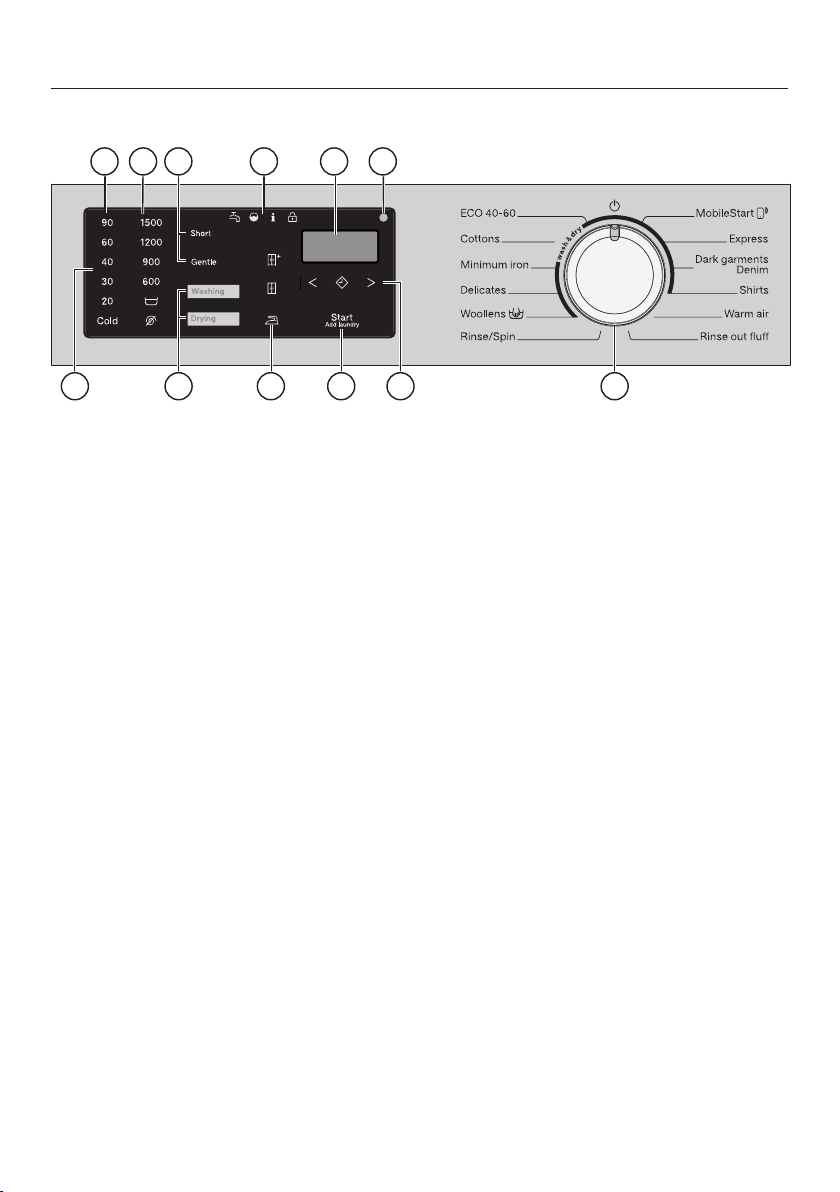
Control panel
2 3
7
12
1
64
9
10
5
8
11
a
Control panel
The control panel consists of a time
display and various sensors. The
individual sensors are explained in
the following.
b
Temperature sensors
For selecting the temperature
c
Spin speed sensors
For selecting the spin speed
d
Extras sensors
You can supplement programmes
with Extras.
When a programme is selected, the
sensors for the possible Extras light
up.
e
Washing/Drying sensors
You can use the Washing and Drying
sensors to select whether you want
to wash, dry or wash and dry.
f
Indicator lights
lights up if there are faults with
the water inlet and drainage
lights up if excess detergent
was used
displays various information in
combination with a number in
the time display (see “Problem
solving guide”)
The Add laundry function
cannot be selected
g
Drying level sensors
Select the drying level of a drying
programme using the , and
sensors.
h
Time display
After the programme has started, the
programme duration will appear in
the display in hours and minutes.
When Delay start is being used, the
programme duration will appear after
the Delay start time has elapsed.

Operating the washer-dryer
17
i
Start/Add laundrysensor
– The programme can be started as
soon as the sensor is flashing on
and off. Touching the Start/Add
laundry sensor starts the selected
programme. The sensor lights up
constantly.
– Once the programme has been
started, the Start/Add laundry
sensor allows you to add laundry.
j
Optical interface
For service technicians.
k
Delay start sensor with arrow
sensors and
With Delay start you can delay the
start of a programme.
Please see “Delay start/SmartStart”
for more information.
l
Programme selector
For selecting programmes and for
switching off the appliance. The
washer-dryer is switched on by
selecting a programme. You can
switch the washer-dryer off by
turning the programme selector to
the position.
How the control panel works
The sensors react to fingertip contact.
Selection is possible as long as the
respective sensor is illuminated.
If a sensor is brightly lit, this means it is
currently selected.
If a sensor is dimly lit, this means it can
be selected.
Applications
You can use this washer-dryer to:
- wash separately
Maximum load (depending on
programme) 8.0kg.
- dry separately
Maximum load (depending on
programme) 4.0kg.
or
- wash and dry in a continuous
sequence
Maximum load (depending on
programme) 4.0kg.
Before the first use
18
Damage resulting from incorrect
installation and connection.
Installing and connecting the
washer-dryer incorrectly will cause
serious property damage.
Please observe the instructions in
“Installation”.
This washer-dryer has undergone a
complete functional test at the factory
and there will be some residual water
in the drum from this process.
Removing the protective foil
and advertising stickers
Remove:
- the protective foil from the door (if
present).
- any advertising stickers from the front
and the lid.
Please do not remove any labels
(e.g. the data plate) which are visible
when you open the door.
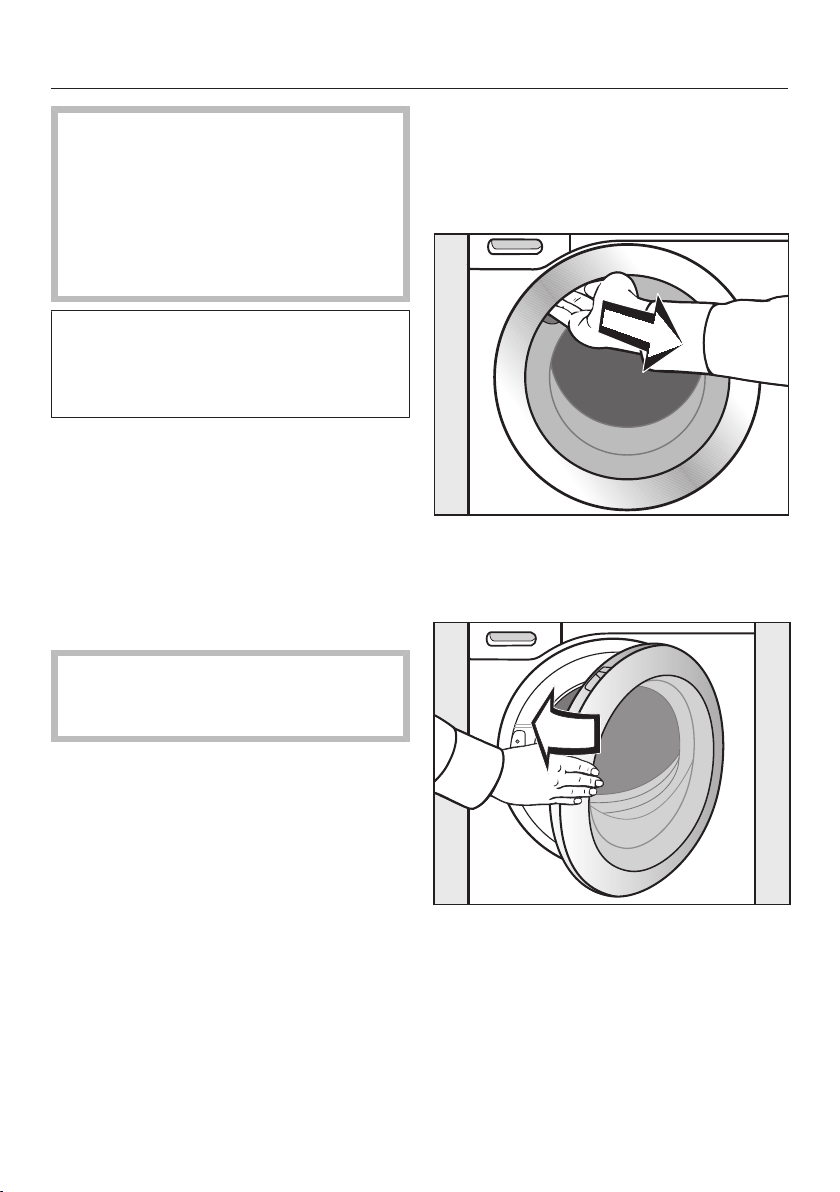
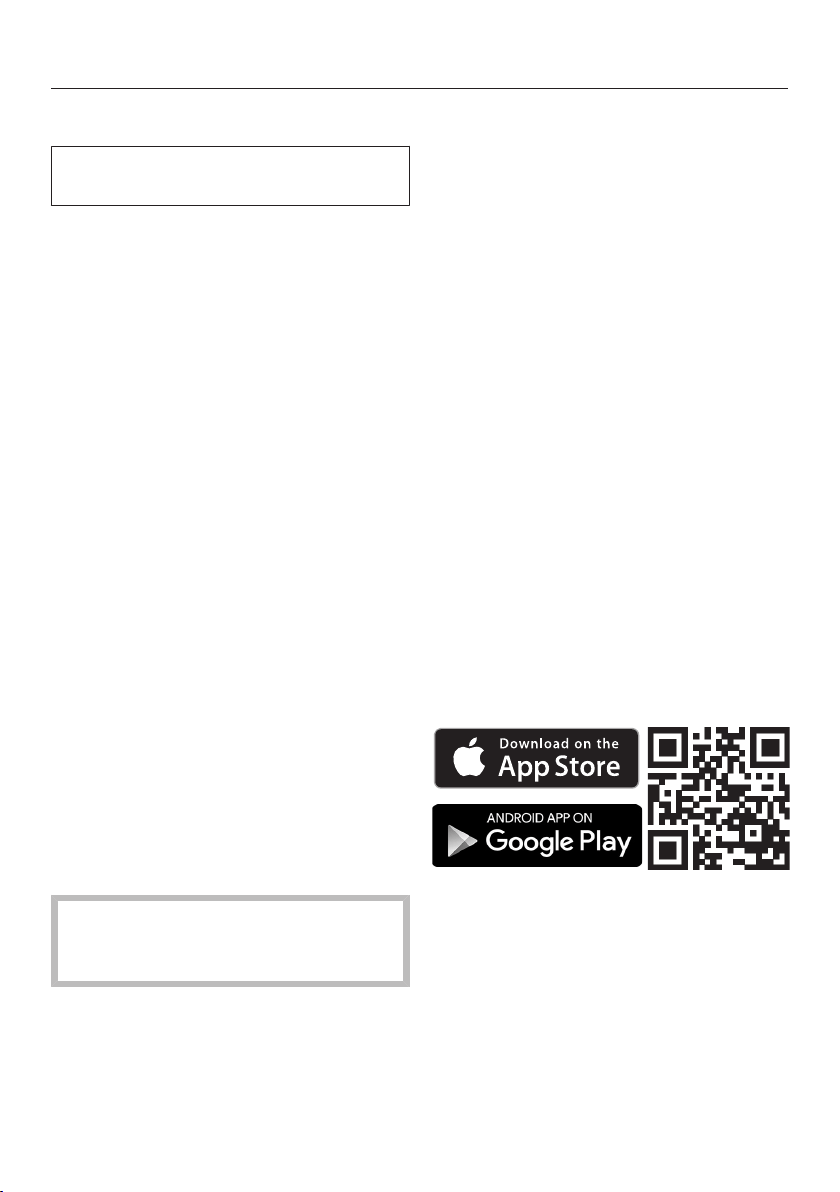
Remove the drain hose elbow
from the drum
An elbow piece for the drain hose is
stored in the drum.
Reach under the door grip and pull
the door open.
Remove the elbow piece.
Shut the door with a gentle swing.
Before the first use
19
Miele@home
Your washer-dryer is equipped with an
integrated Wi-Fi module.
To use this feature, you will need:
- a Wi-Fi network
- the Miele App
- a Miele user account. The user
account can be created via the Miele
App.
The Miele App will guide you as you
connect your washer-dryer to your
home Wi-Fi network.
Once your washer-dryer is connected
to your Wi-Fi network, you can use the
App to carry out the following activities,
for example:
- Controlling your washer-dryer
remotely
- Calling up information on the
operating status of your washer-dryer
- Calling up information on the
programme sequence of your
washer-dryer
Connecting your washer-dryer to your
Wi-Fi network will increase energy
consumption, even when the washer-
dryer is switched off.
Make sure there is sufficient signal
strength for your Wi-Fi network at
the washer-dryer installation site.
Availability of the Wi-Fi connection
The Wi-Fi connection shares a
frequency range with other appliances
(including microwave ovens and remote
control toys). This may result in
sporadic or even complete connection
failures. Therefore, a constant
availability of featured functions cannot
be guaranteed.
Miele@home availability
The ability to use the Miele App
depends on the availability of the
Miele@home service in your country.
The Miele@home service is not
available in every country.
For information about availability,
please visit www.miele.com.
Miele App
You can download the Miele App from
the Apple App Store
®
or the Google
Play Store™ free of charge (only
functional in selected countries).
Before the first use
20
Setting up Miele@home
There are 2 ways of connecting:
1. Via the Miele@mobile App (default)
2. Via WPS
Signing on via the Miele@mobile App
Turn the programme selector to the
MobileStart programme.
appears in the time display. The
timeout time then starts to count down
from 10minutes in the time display.
The Miele@mobile App will guide you
through the remaining steps.
When you have successfully connected,
will appear in the time display.
Signing on via WPS
Turn the programme selector to the
MobileStart programme.
Touch the sensor until
appears in the time display and a
short keypad tone sounds.
The timeout time then starts to count
down from 2minutes in the time
display.
When you have successfully connected,
will appear in the time display.
Useful tip: If the connection has not
been set up when the timeout has
finished counting down, repeat the
process.
Running the first wash
programme
Damage resulting from failure to
remove the transit bars.
Failure to remove the transit bars can
result in damage to the washer-dryer
and to adjacent cabinetry or
appliances.
Remove the transit bars as described
in “Installation”.
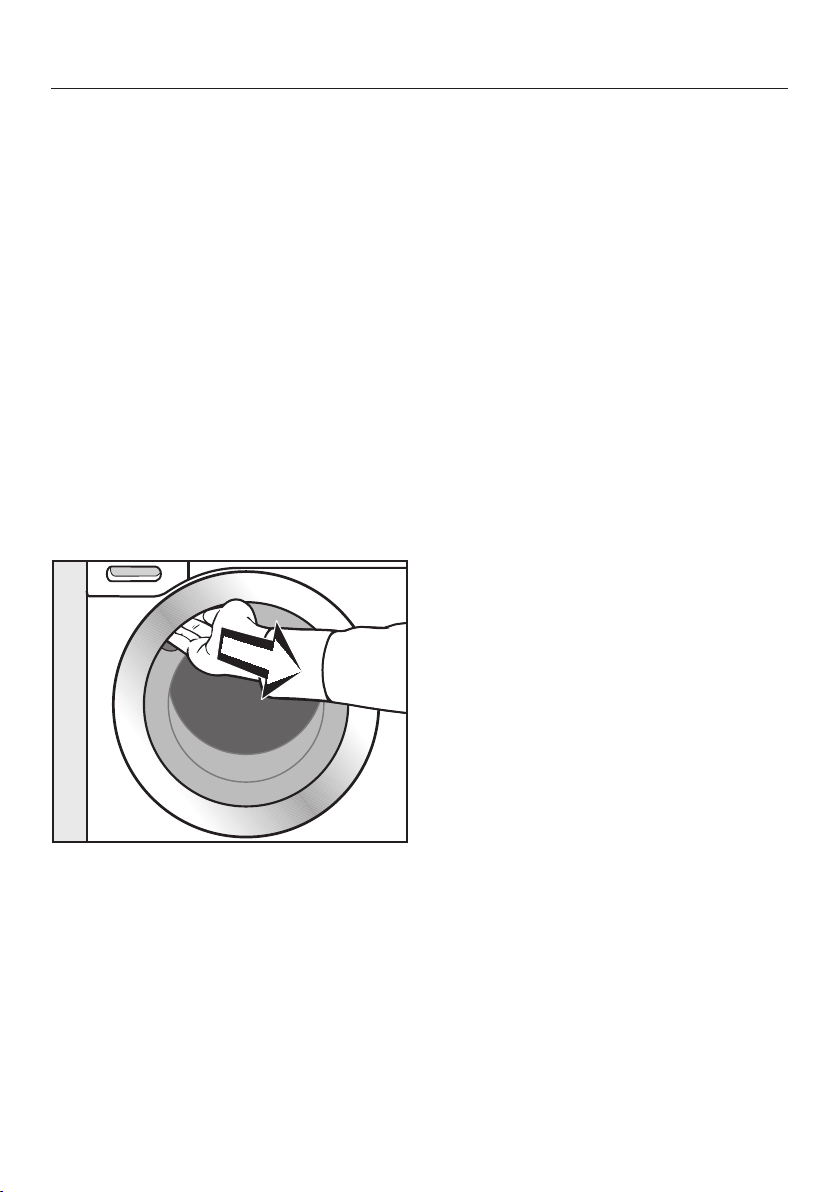
Before first use, the Cottons
programme must be run without
laundry and without detergent.
Turn on the tap.
Turn the programme selector to
Cottons.
The washer-dryer is switched on and
the temperature 90°C lights up on the
control panel.
Touch the Start/Add laundry sensor.
The programme will start.
After 10minutes, the indicators dim,
except for the Start/Add laundry
sensor.
Before the first use
21
Opening the door at the end of
the programme
The door remains locked during the
Anti-crease phase. The control panel
lights up for the first 10minutes. The
control panel then goes out and
theStart/Add laundry sensor flashes.
Turn the programme selector to the
position.
appears in the time display and the
indicator light goes out.
The door will unlock.
Useful tip: After the Anti-crease phase,
the washer-dryer switches off. The door
is unlocked automatically. The control
panel is completely dark.
Reach under the door grip and pull
the door open.
Useful tip: For safety reasons, close the
door when the machine is not in use.
Otherwise there is a danger of objects
being placed inadvertently in the drum.
If these remain unnoticed and were
washed in the next load, they could
damage the laundry. An open door is
also a danger to pets and children.
The appliance is now ready for use.

Environmentally friendly washing and drying
22
Energy and water consumption
- Use the maximum load size for the
current programme. The energy and
water consumption will then be the
lowest in relation to the size of the
load.
- Programmes that are more efficient
with regard to energy and water
consumption generally have a longer
programme running time. By
extending the programme running
time, the wash temperature that is
actually reached can be reduced
while still providing the same wash
results.
For example, the ECO40-60
programme has a longer programme
running time than the Cottons 40°C
or 60°C programme. The ECO40-60
programme, however, is more
efficient in terms of energy and water
consumption.
- Use the Express programme for
small, lightly soiled loads.
- Modern detergents make it possible
to wash at lower temperatures (e.g.
20°C). Using lower temperature
settings will save energy.
- To maintain the hygiene of the
machine, carry out a hot wash (above
60°C) at regular intervals. The
indicator light lights up in the
control panel and appears in the
time display of the washer-dryer to
remind you.
Detergent
- Do not exceed the amounts of
detergent recommended by the
manufacturer on the packaging.
- Adjust the dosage to the degree of
soiling of the laundry.
- Reduce the amount of detergent with
smaller loads (e.g. reduce the amount
of detergent by ⅓ when washing a
half load).
Information about subsequent
tumble drying
To save energy when tumble drying,
select the highest possible spin speed
for the wash programme and for the
thermospin.
Washing
23
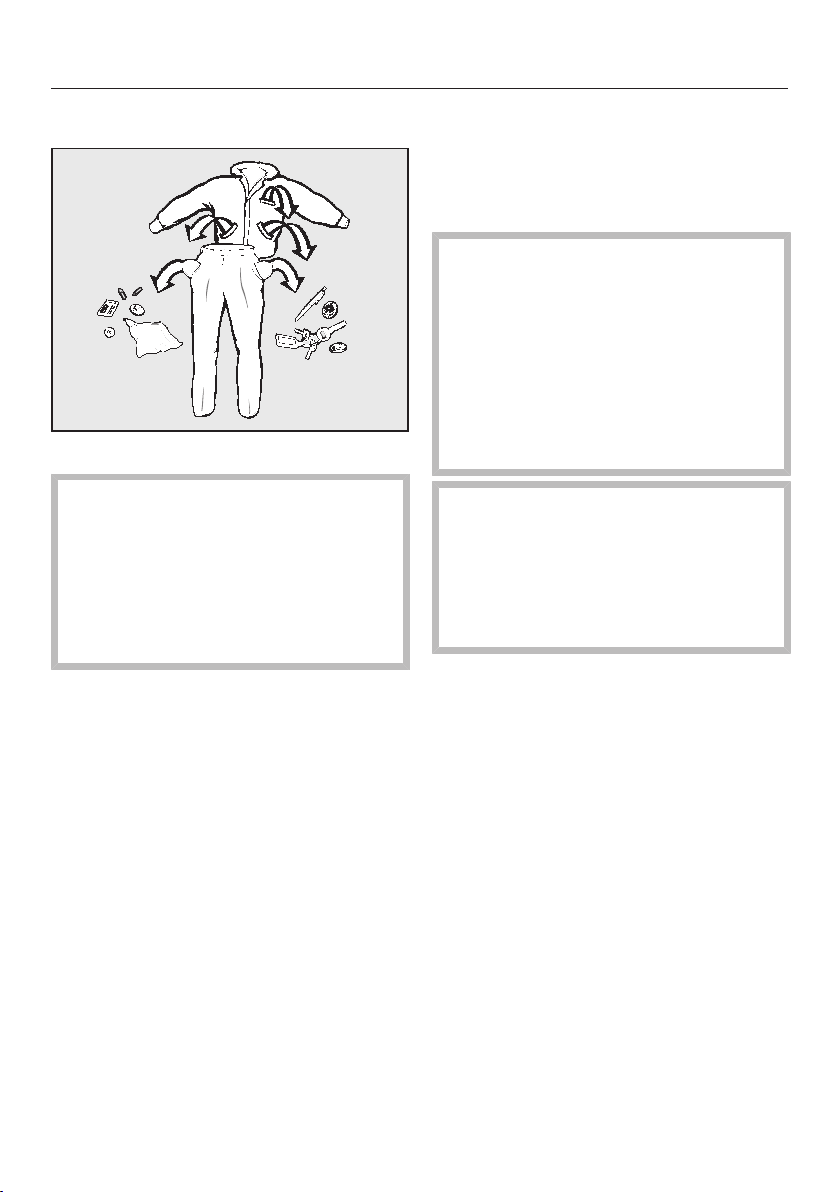
1. Preparing the laundry
Empty all pockets.
Damage due to foreign objects.
Foreign objects (e.g. nails, coins,
paper clips etc.) can cause damage
to garments and to components in
the machine.
Check the laundry before washing
and remove any foreign objects.
Sorting the laundry
Sort the laundry by colour and by
care label. Most garments have a
textile care label in the collar or side
seam.
Useful tip: Dark textiles often contain
excess dye and should be washed
separately several times before being
included in a mixed load. Wash light
and dark coloured items separately.
Pre-treating stains
Badly soiled areas and stains should
be cleaned as soon as possible,
preferably whilst still fresh. Spillages
should be carefully dabbed off using
a soft, colourfast cloth. Do not rub.
Useful tip: Stains (e.g. blood, egg,
coffee, tea) can be pre-treated using
some handy tricks which can be found
under the "ABC of Stains" on the Miele
website.
Damage due to solvent-based
cleaning agents.
Cleaning agents containing benzine,
stain remover, etc., can damage
plastic parts.
When pre-treating garments, make
sure that any plastic parts (e.g.
buttons) do not come into contact
with cleaning agent.
Risk of explosion due to solvent-
based cleaning agents.
If solvent-based cleaning agents are
used, an explosive mixture can form.
Never use solvent-based cleaning
agents in the washer-dryer.
General tips
- Curtains: Remove lead weights first
or place in a laundry bag.
- Wash light and coloured items
separately.
- Remove or sew in any loose
underwiring in bras or shirt collar
stiffeners.
- Close any zips, attach velcro
fasteners, fasten hooks and eyes etc.
before washing.
- Fasten duvet covers and pillow cases
to prevent small items from being
rolled up inside them.
Do not wash items which are specified
by the manufacturer as not washable
on the care label (symbol).
Washing
24
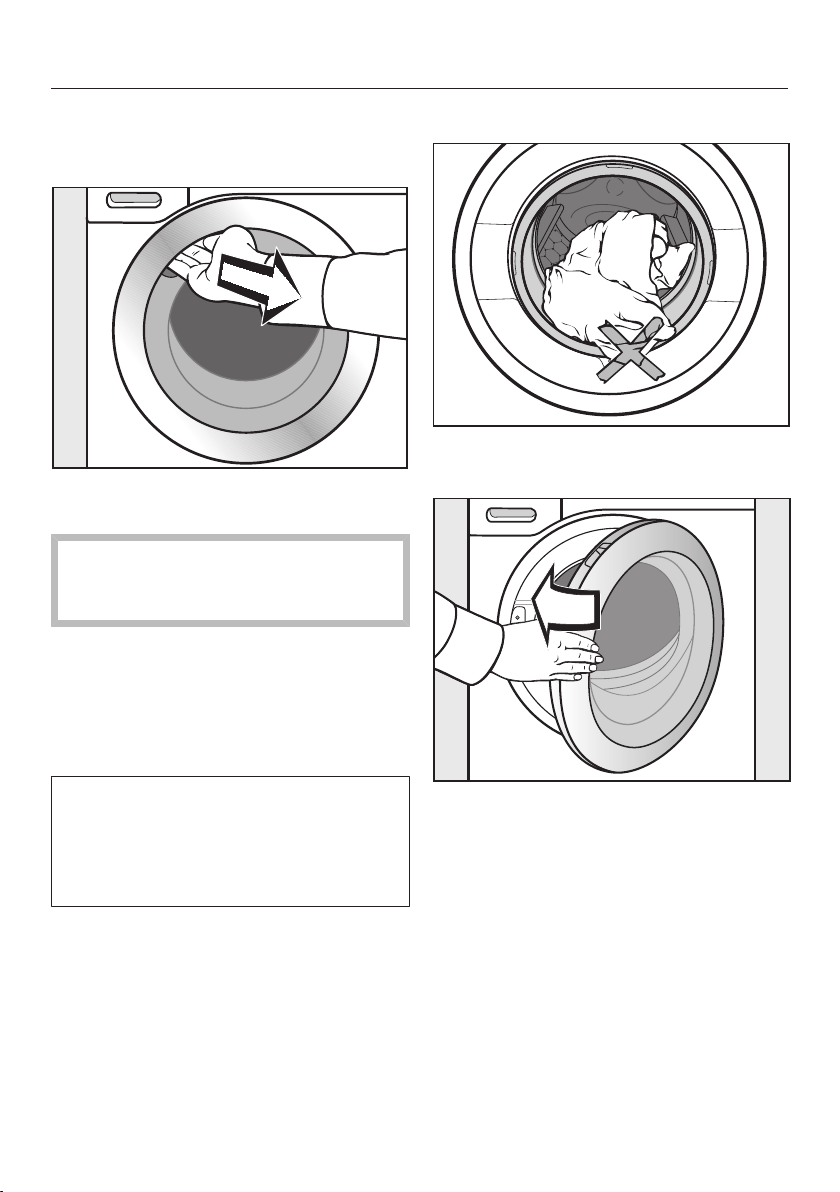
2. Loading the drum
Opening the door
Reach under the door grip and pull
the door open.
Check the drum for pets or foreign
objects before loading it with
laundry.
Unfold the laundry and load loosely in
the drum.
Mixing both large and small items gives
better wash results and helps distribute
the load evenly during spinning.
The most efficient use of energy and
water is achieved when a full load is
washed. However, do not overload as
this reduces cleaning efficiency and
causes creasing.
Useful tip: Please note the maximum
load size for different wash
programmes.
Closing the door
Make sure that no items are caught
between the door and the seal.
Shut the door with a gentle swing.
Washing
25
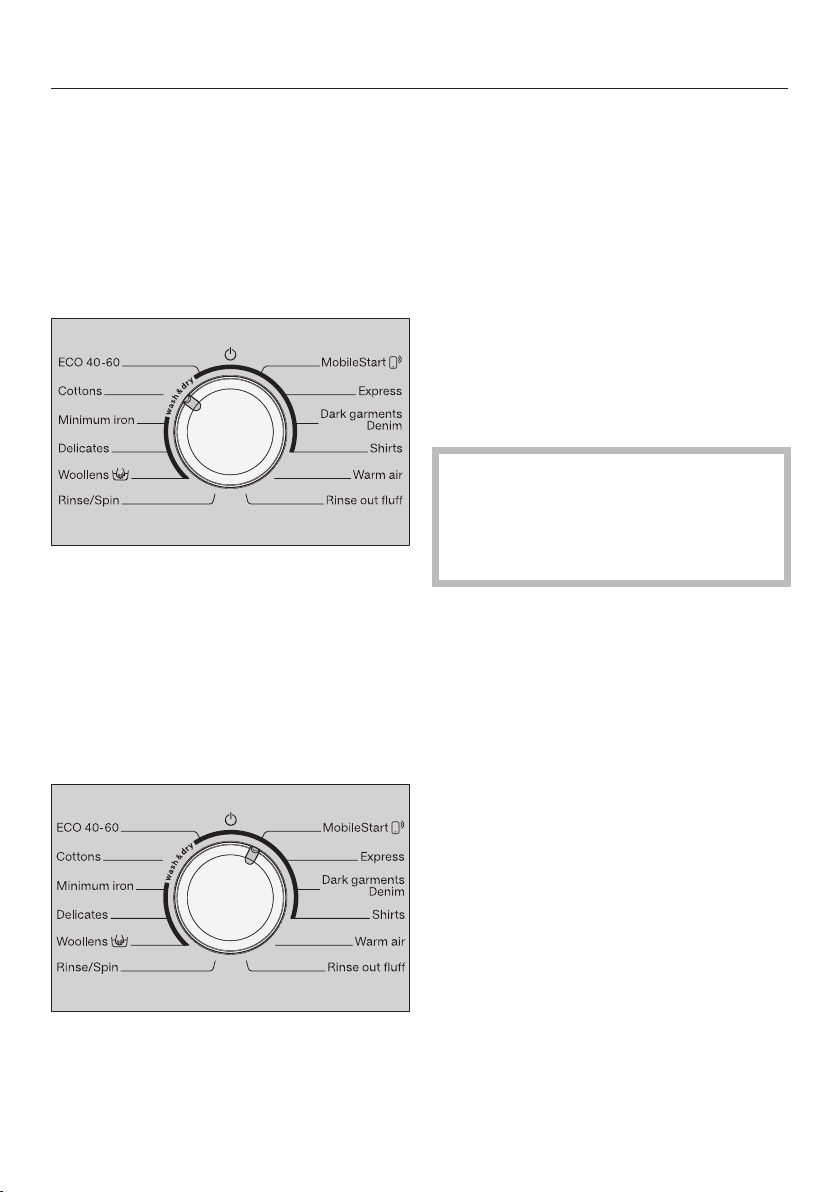
3. Selecting a programme
Switching the washer-dryer on
Turn the programme selector to a
programme.
The control panel lights up.
Selecting a programme
Turn the programme selector to the
required programme.
The estimated programme running time
is shown in the time display and the
preset temperature and spin speed light
up in the control panel.
- Using the MobileStart programme
selector position
Turn the programme selector to the
MobileStart position.
Useful tip: In order to use MobileStart,
the washer-dryer must be logged on to
the Wi-Fi network and Remote control
must be switched on.
appears in the time display.
Once the programme has started, the
washer-dryer can be operated with the
Miele@mobile App.
Selecting washing
Touch the Washing or Drying sensor
until just the Washing sensor is
brightly lit up.
The Drying sensor must only light up
dimly as otherwise the wash
programme would be followed
immediately by the relevant drying
programme.
Washing
26
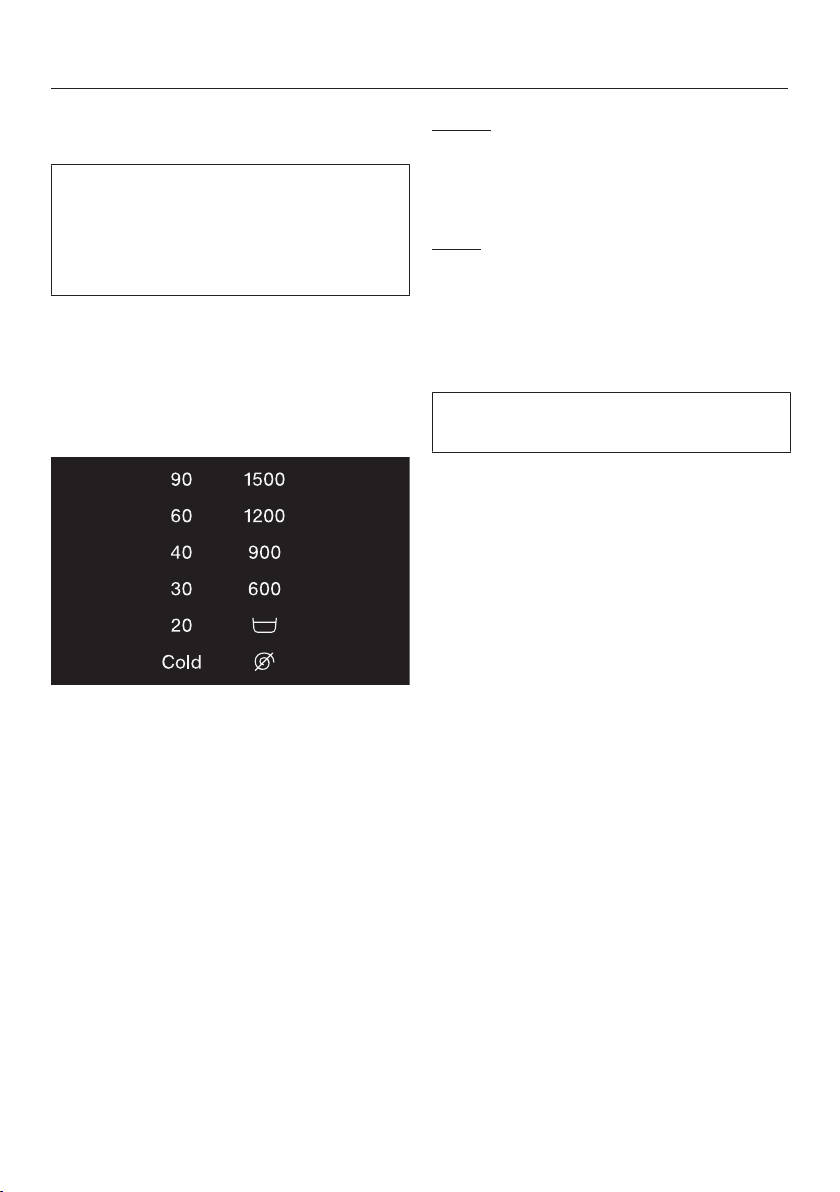
Selecting the temperature and spin
speed
The wash programme's preset
temperature and spin speed light up
brightly. The choice of temperatures
and spin speeds selectable for the
wash programme light up dimly.
The temperatures reached in the wash
programme might not be the same as
the temperatures selected. The
combination of energy input and
washing time achieves an optimum
washing result.
Touch the sensor for the temperature
you want.
The sensor lights up brightly.
Touch the sensor for the spin speed
you want.
The sensor lights up brightly.
Selecting Extras
The sensors for the Short and Gentle
Extras light up dimly when they can be
selected in addition to the programme.
Touch the sensor for the Extra you
want.
The sensor lights up brightly.
Gentle
Drum rotation and wash duration are
reduced. Lightly soiled fabrics are
washed more gently.
Short
For light soiling with no visible staining.
The duration of the main wash is
reduced.
Selecting Delay start
You can use Delay start to set the start
time for a programme.
Select a Delay start time if required.
Please see “Delay start/SmartStart” for
more information.
Washing
27
4. Adding detergent
Detergent can be dispensed via the
detergent dispenser drawer or via
CapDosing.
Detergent dispenser drawer
Any detergent suitable for automatic
front loading washing machines can be
used with this appliance. Please
observe the instructions for use and
dosage on the detergent packaging.
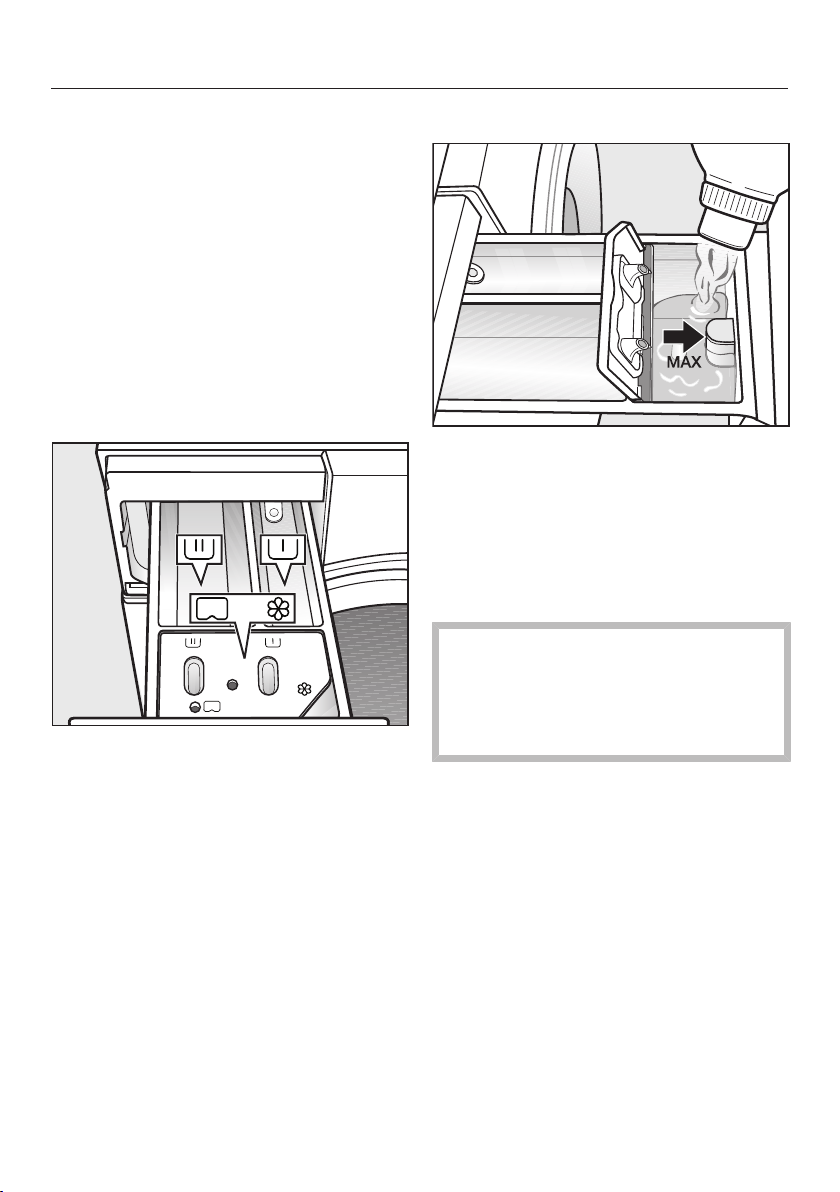
Adding detergent
Pull out the detergent dispenser
drawer and add detergents to the
compartments.
Detergent for the main wash
Fabric softener, liquid starch, or
capsules
Adding fabric softener
Add the fabric softener or the liquid
starch to the compartment. Do not
exceed the maximum level mark.
This will be automatically dispensed in
the final rinse. At the end of the wash
programme a small amount of water
remains in the compartment.
Starch can make the siphon tube
sticky. If starching frequently,
thoroughly clean the detergent
drawer, especially the siphon,
regularly.

Washing
28
Tips on dosing
Adjust the detergent dosage to the level
of soiling of the laundry and the size of
the load. Reduce the amount of
detergent with smaller load sizes (e.g.
reduce the amount of detergent by ¹⁄₃
when washing a half load).
Too little detergent results in:
- laundry not getting properly clean
and with time it may become grey
and hard to the touch.
- a possible build-up of mould in the
washer-dryer.
- grease not being completely removed
from the laundry.
- possible limescale deposits on the
heater elements.
Too much detergent results in:
- poor wash, rinse, and spin results.
- a higher water consumption as an
extra rinse cycle is automatically
activated.
- a greater burden on the environment.
See "Washing - Detergent" for further
information about detergents and how
much to dispense.
Using detergent tablets or pods
Always put detergent tablets or pods
directly in the drum with the laundry.
They cannot be added via the detergent
dispenser drawer.
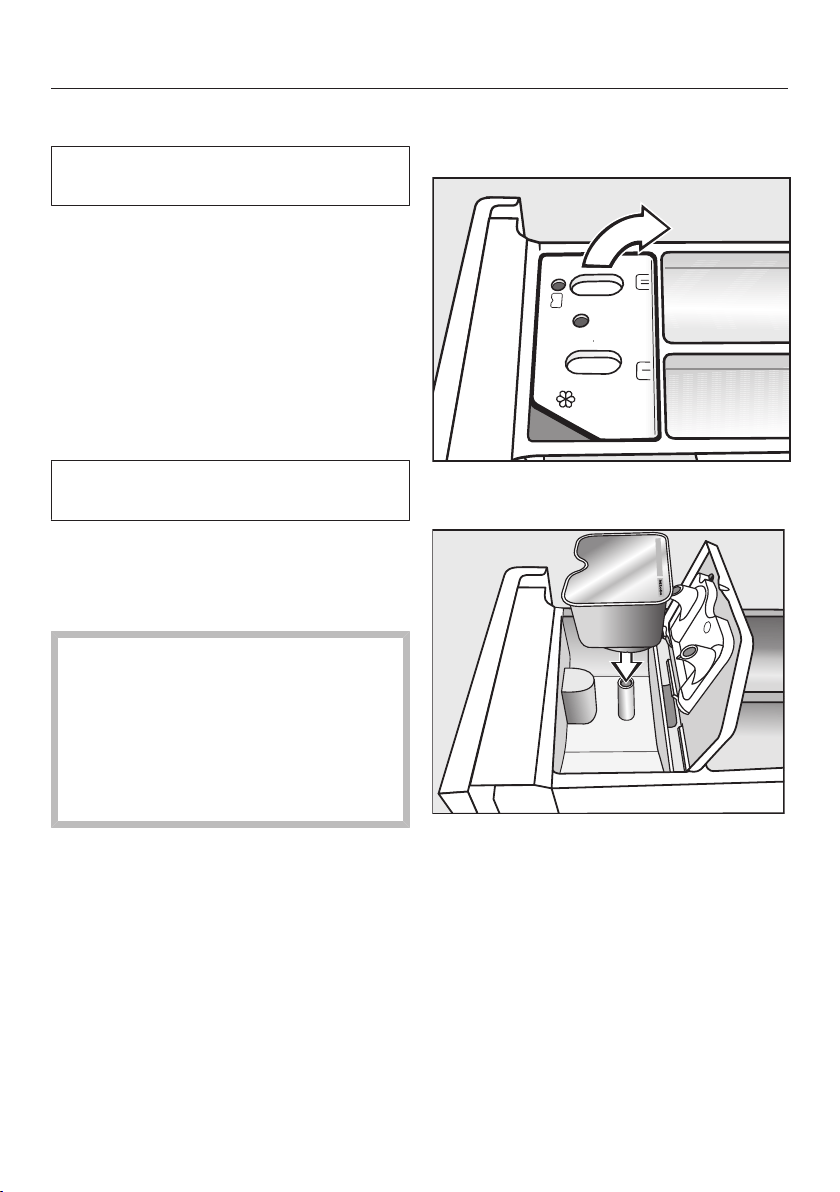
Washing
29
CapDosing
CapDosing can only be activated via
the Miele@mobile App.
Three different types of capsules are
available:
= Fabric care (e.g. fabric
softener, proofing agent)
= Additives (e.g. detergent
enhancers)
= Detergent (for the main wash
only)
Each capsule contains the correct
amount for one wash cycle.
Caps are available from
shop.miele.com, by contacting Miele
directly, or at a Miele Experience
Centre.
Capsules pose a health risk.
The ingredients of capsules can be
hazardous to health if they are
swallowed or come into contact with
skin.
Keep capsules out of the reach of
children.
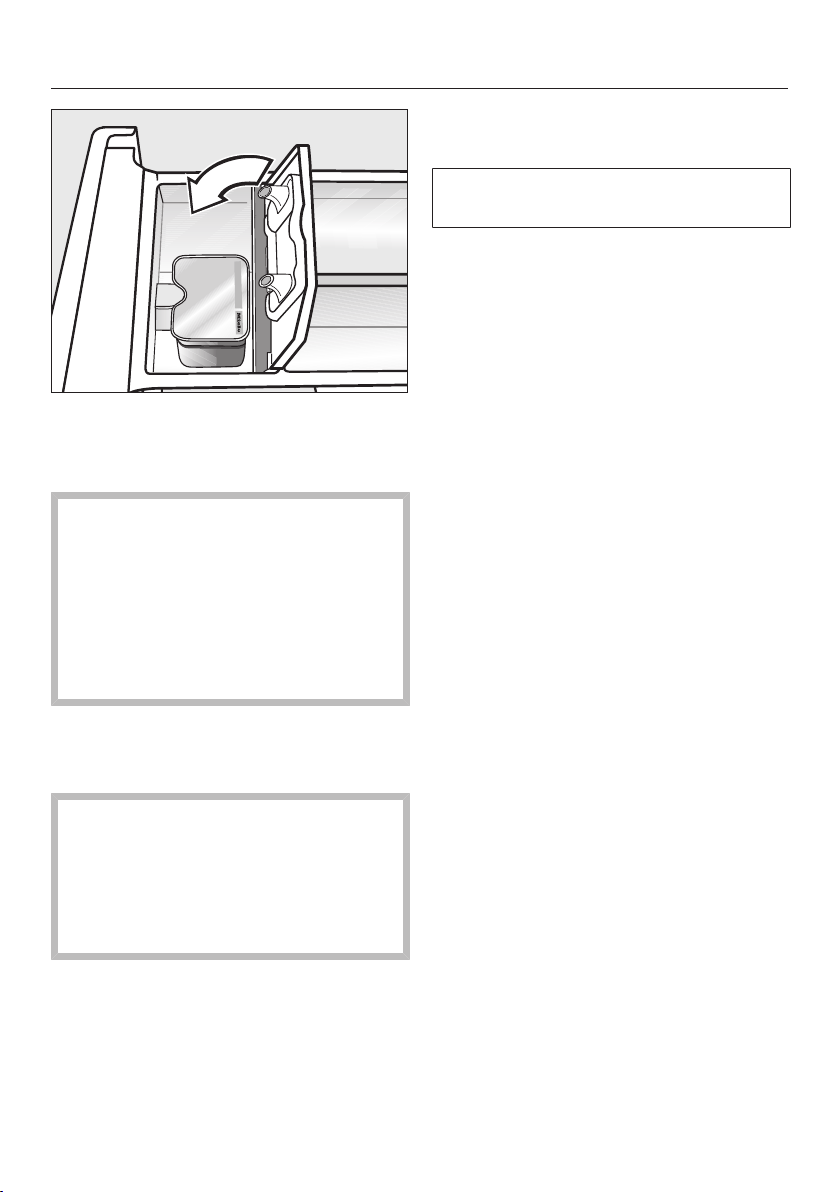
Inserting a capsule
Open the detergent dispenser drawer.
Open the lid of the /
compartment.
Press the capsule in firmly.
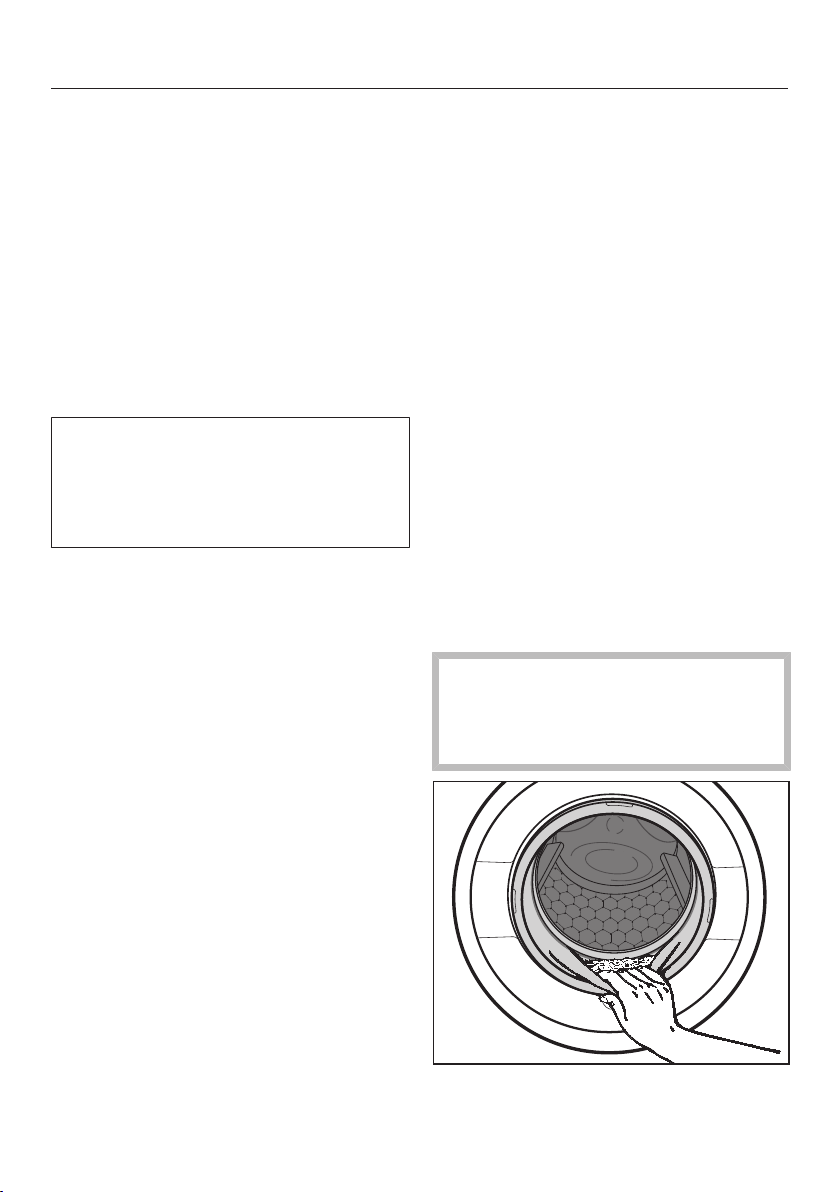
Washing
30
Close the lid and press it firmly shut.
Close the detergent dispenser
drawer.
The capsule is opened by the act of
inserting it in the detergent dispenser
drawer. The contents can run out of
the capsule if you then remove it
from the detergent drawer before it is
used.
In this case, dispose of the capsule
and do not re-use it.
The wash programme will dispense the
contents of the capsule at the correct
time.
When using CapDosing, water intake
to the compartment takes place
solely via the capsule.
When using capsules, do not add
fabric softener to the
compartment.
Remove the empty capsule at the
end of the wash programme.
For technical reasons, a small amount
of water will remain in the capsule.
Washing
31
5. Starting the programme
Touch the flashing Start/Add laundry
sensor.
The door will lock and the programme
will start.
If a Delay start time has been selected,
this counts down in the time display. At
the end of the Delay start period or
immediately after the programme has
started, the programme running time
will appear in the time display.
Laundry can be added or removed at
any time, provided that the symbol
is not illuminated in the display (see
“Changing the programme sequence –
Adding laundry”).
Saving energy
After 10 minutes, the indicators will dim.
The Start/Add laundry sensor flashes
slowly.
You can reactivate the indicators:
Touch the Start/Add laundry sensor
(this does not have any effect on a
programme that is running).
6. End of the programme/
unloading laundry
At the end of the programme, the drum
continues to turn at intervals for up to
30 minutes. The door is locked. The
control panel lights up for the first
10minutes. The control panel then
goes out and theStart/Add laundry
sensor flashes.
Turn the programme selector to the
position.
appears in the time display and the
indicator light goes out.
The door will unlock.
Useful tip: The door unlocks
automatically at the end of the Anti-
crease phase.
Pull open the door.
Remove the laundry.
Items left in the drum could shrink or
discolour other items in the next
wash.
Remove all items from the drum.
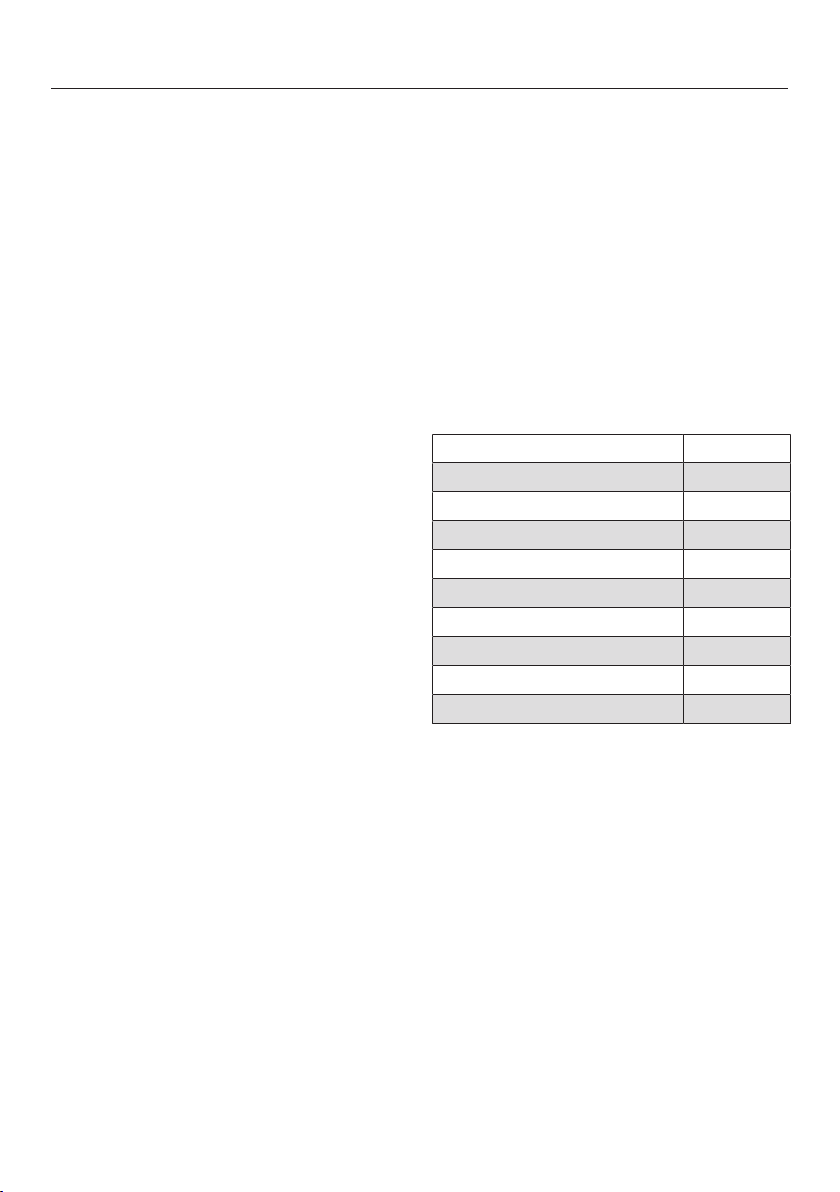
Washing
32
Check the folds in the door seal for
any small articles, e.g. buttons, which
might be lodged there.
Useful tip: For safety reasons, close the
door when the machine is not in use.
Otherwise there is a danger of objects
being placed inadvertently in the drum.
If these remain unnoticed and were
washed in the next load, they could
damage the laundry. An open door is
also a danger to pets and children.
If applicable, remove the used
capsule from the detergent dispenser
drawer.
Useful tip: Leave the detergent
dispenser drawer slightly open to allow
it to dry.
Spin cycle
Final spin speed in wash
programmes
When a programme is selected, the
sensor for the optimum spin speed for
that programme will be brightly lit up in
the control panel.
A faster spin speed can be selected for
certain wash programmes.
The highest selectable spin speed is
indicated in the table.
Programme rpm
ECO40-60 1500
Cottons 1500
Minimum iron 1200
Delicates 900
Woollens 1200
Rinse/Spin 1500
Express 1200
Dark garments/Denim 900
Shirts 900
Interim spin
There is a spin cycle after the main
wash and between the rinses. A
reduction in the final spin speed will
also reduce the interim spin speed as
appropriate.

Washing
33
Omitting the final spin (Rinse hold)
Touch the sensor (Rinse hold).
The laundry is not spun after the final
rinse and remains in the rinse water.
This helps prevent creasing if the
laundry is not going to be removed from
the drum immediately after the end of
the programme.
To start the final spin:
The sensor for the optimum spin speed
lights up in the control panel. You can
change the spin speed.
Start the final spin with the Start/Add
laundry sensor.
To end the programme:
Touch the sensor (no spin).
Touch the Start/Add laundry sensor.
The water will be pumped away.
Deselecting the interim spin and the
final spin
Touch the sensor (no spin).
After the last rinse, the water will be
pumped away and the Anti-crease
phase will switch on.
In some programmes an additional rinse
is introduced with this setting.
Washing
34
Programme chart
ECO40-60 Max. load 8.0kg
Items Normally soiled cotton garments.
Notes - A laundry load consisting of mixed cottons that are intended for
washing at 40°C or 60°C can be washed in the same wash cycle.
- This programme is the most efficient in terms of energy and water
consumption for washing cottons.
Energy labelling programme according to AS/NZS 2040.1 & AS/NZS 2040.2
(refer to www.energyrating.gov.au website for consumption data), with default
settings (i.e. temperature selection 40°C).
Cottons Cold to 90°C Max. load 8.0kg
Items Cottons, linens or cotton mix fabrics, e.g. table linen, towelling,
underwear, T-shirts etc.
Notes - Select the temperature according to the instructions on the care
label, the detergent, the type of soiling and the hygiene
requirements.
- For dark-coloured fabric, use a colour detergent.
Minimum iron Cold to 60°C Max. load 3.5kg
Items Synthetic, mixed fibre and easy care cotton.
Notes Reduce the spin speed for items which crease easily.
Delicates Cold to 40°C Max. load 2.0kg
Items Delicate garments made from synthetic fibre, mixed fibre, rayon and
viscose.
Notes For items which crease easily, deselect the spin.
Woollens Cold to 40°C Max. load 2.0 kg
Items Machine-washable or hand-washable wool or wool blend fabric. If
the care label does not specify a temperature, wash using the cold
setting.
Notes Reduce the spin speed for fabrics that crease easily.
Washing
35
Rinse/Spin Max. load 8.0kg
Items Rinsing and spinning hand-washed items
Notes - Make sure you select the appropriate spin speed.
- Spin only: select the Short Extra.
- Rinse only: set spin speed to.
MobileStart
Notes The Miele App is used for selecting programmes and operating the
machine.
Express Cold to 40°C Max. load 3.5 kg
Items Cotton garments that have hardly been worn or are only very lightly
soiled.
Dark garments/
Denim
Cold to 60°C Max. load 3.0 kg
Items Black and dark garments made from cotton, mixed fibres and
denim.
Notes - Wash inside out.
- Denim often contains excess dye and may run during the first few
washes. Wash light and coloured items separately.
- Close any zips, do up buttons etc. before washing.
Shirts Cold to 40°C Max. load 2.0 kg
Items Shirts and blouses made of cotton and mixed fibre.
Notes - Pre-treat collars and cuffs if necessary.
- Turn shirts and blouses inside out, do up buttons and turn collars
and cuffs inwards.
Warm air "Programme chart – Drying"
Rinse out fluff "Rinse out fluff programme"
Washing
36
Programme sequence
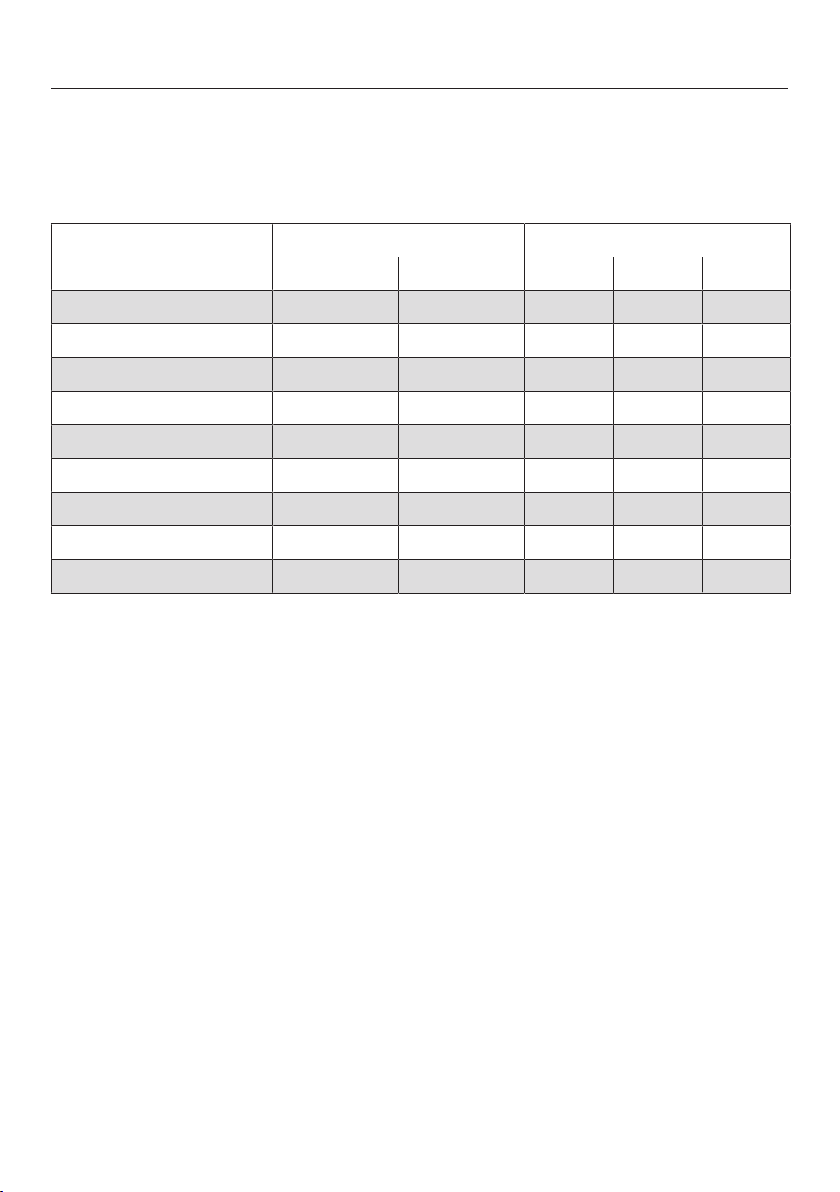
Main wash Rinses Spin cycle
Water level Wash
rhythm
Water level Rinses
ECO40-60
2–3
2
Cottons
2-4
1,2
Minimum iron
2-3
2
Delicates
2-3
2
Woollens
2
Rinse/Spin – –
1
Express
1
Dark garments
3-4
2
Shirts
3
Please see the next page for a description of the symbols.

Washing
37
= low water level
= medium water level
= high water level
= intensive rhythm
= normal rhythm
= sensitive rhythm
= handwash rhythm
= carried out
– = not carried out
This washer-dryer has fully electronic
controls with automatic load
recognition. It takes in the right amount
of water required for the programme
depending on the amount of laundry
and its absorbency rate.
The programme sequences outlined are
based on the basic programme with a
full load.
Special features in the programme
sequence
Anti-crease
At the end of the programme, the drum
continues to turn at intervals for up to
30 minutes to help prevent creasing.
Exception: there is no Anti-crease
phase in the Woollens programme.
The drum door can be opened at any
time during the Anti-crease phase.
1
If a temperature of 60°C or higher is
selected, 2 rinses are carried out. If a
temperature of less than 60°C is
selected, 3 rinses are carried out.
2
An additional rinse is carried out if:
- there is too much foam in the drum
- the spin speed is less than 700rpm
Washing
38
Detergent
Any detergent suitable for automatic
front loading washing machines can be
used with this appliance. Follow the
manufacturer's instructions and dosage
recommendations on the packaging.
The amount to dispense will depend
on:
- the degree of soiling of the laundry
- the amount of laundry
- the water hardness
Check with your local water supplier
if you do not know the water
hardness level in your area.
Water softeners
A water softener can be used to cut
down on the use of detergents in areas
with water hardness levels II and III.
Dispense according to the amount
specified on the packaging. First add
detergent and then the water softener.
You can then use the recommended
amount of detergent for water hardness
level I.
Water hardness levels
Hardness
range
Hardness level
in mmol/l
German scale
in °d
Soft (I) 0 – 1.5 0 – 8.4
Medium (II) 1.5 – 2.5 8.4 – 14
Hard (III) above 2.5 above 14
Detergent dispensing aids
Use dispensing aids (e.g. balls) if these
are supplied with the detergent,
particularly when using liquid detergent.
Refill packs of detergent
When purchasing detergent, buy refill
packs wherever possible. This helps
reduce the amount of waste packaging.
Fabric softeners, liquid starch, starch
Fabric softeners make garments soft to
handle and help prevent static cling
when tumble drying.
Fabric shapers are synthetic starches
and give an even stiffer hold.
Starch stiffens and gives body to fabric.

Washing
39
Using fabric softener, liquid starch or
starch separately
Prepare the starch in accordance with
the manufacturer's instructions on the
packaging.
Add fabric softener to the
compartment.
Add liquid starch to the
compartment and powder or
viscous starch to the
compartment.
Select the Rinse/Spin programme.
Change the spin speed if necessary.
Touch the Start/Add laundrysensor.
Colour run and dye removers/dyes
Damage due to colour run/dye
removers.
Colour run and dye removers can
cause corrosion in the washer-dryer.
Do not use colour run or dye
removers in this washer-dryer.
Dyes suitable for use in domestic
washing machines can be used.
However, please note that the salt used
in the dyeing process can cause
corrosion to stainless steel components
in the machine if you use dye
frequently. Always observe the
manufacturer's instructions carefully.
Washing
40
Miele detergents
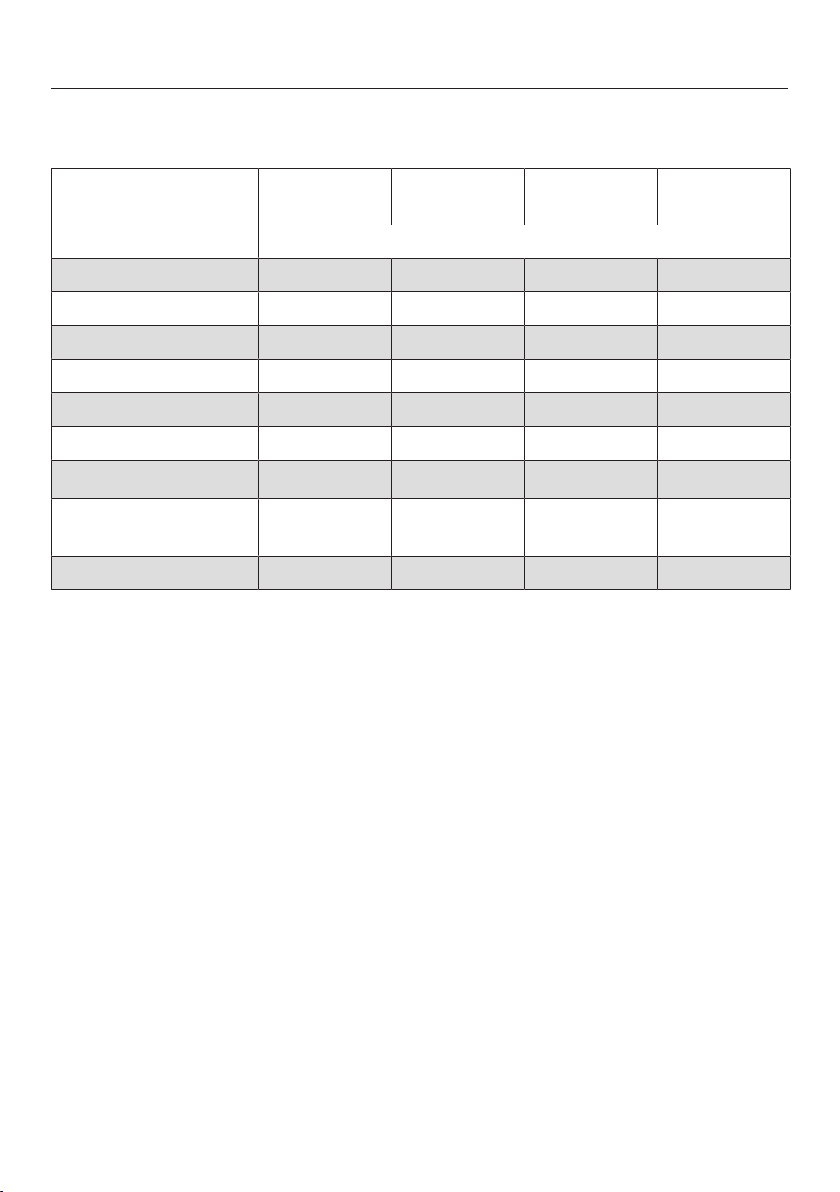
Miele detergents have been specially designed for everyday use in Miele washing
machines. See “Detergents and care products” for more information about these
detergents.
Miele detergents Miele capsules
UltraWhite UltraColor
ECO40-60 –
Cottons –
Minimum iron – –
Delicates – –
Woollens – – – –
Rinse/Spin – – – –
Express – – –
Dark garments/Denim – –
Shirts –
Recommended Specialist detergents (e.g. WoolCare)
– Not recommended Fabric care (e.g. fabric softener)
Additive (e.g. booster)
Washing
41
The recommendations apply to the temperature ranges given in the section
"Washing" in the Programme chart.
Universal Colour Delicates
and woollens
Special
detergent
ECO40-60 – –
Cottons – –
Minimum iron – – –
Delicates – – –
Woollens – –
Rinse/Spin – – –
Express –
1
– –
Dark garments/
Denim –
1
– –
Shirts – –
Recommended
1
Liquid detergent
– Not recommended

Drying
42
Separate drying
The separate drying programme
should be run if the load in the wash
programme is greater than the
maximum load permitted for drying, or
if you only want to dry part of the load
that was washed.
1. Preparing the laundry
Sorting the laundry
Sort the laundry according to type of
fibre/weave, size, garment care label
symbol, and the drying level required.
This will help you to achieve an even
drying result.
Before drying, check the drying
symbol on the care label.
If there is no care label, the article
should only be tumble dried in a
programme specially designed for it.
Tips on drying
- Do not load the drum with items that
are still soaking wet. Spin the laundry
for at least 30 seconds after washing.
- Woollens and wool blends are
susceptible to becoming matted or
shrinking. Only use the Woollens
programme for these textiles.
- Pure linen should only be tumble
dried if it is specified as suitable on
the care label. The surface of the
fabric may otherwise become rough.
- Loopknit garments (e.g. T-Shirts,
underwear) have a tendency to shrink
after the first wash. Do not overdry
these fabrics to prevent further
shrinking. When buying loopknit
garments, it is advisable to take their
shrinkage potential into account.
- Starched laundry can be tumble
dried. To achieve the usual finish,
double the amount of starch should
be used.
- New dark coloured garments should
be washed and dried separately from
light coloured garments. The colour
of dark garments can run or fluff from
garments of other colours may settle
on them.
- Observe the maximum loads given
for the drying programmes in the
Programme chart.
The drying result and amount of
creasing depend on the size of the
load. The smaller the load in the dryer
the better the result. Therefore, if you
reduce the load, you will achieve a
more even drying result with less
creasing.
Drying
43
2. Loading the drum
Opening the door
Reach under the door grip and pull
the door open.
Check the drum for pets or foreign
objects before loading it with
laundry.
Load the laundry loosely in the drum.
Overloading places a strain on the
textiles and affects drying results.
Observe the maximum loads listed in
the Programme chart.
Closing the door
Make sure that no items are caught
between the door and the seal.
Shut the door with a gentle swing.
Detergent dispensing aids, e.g.
plastic dispenser balls, can melt
during the drying programme and
cause damage to the machine and
the laundry.
These dispensing aids must be
removed from the laundry before
drying.
The mains water tap must be kept
open for drying.
3. Selecting a programme
Switching the washer-dryer on
Turn the programme selector to a
programme.
The control panel lights up.
Selecting a programme
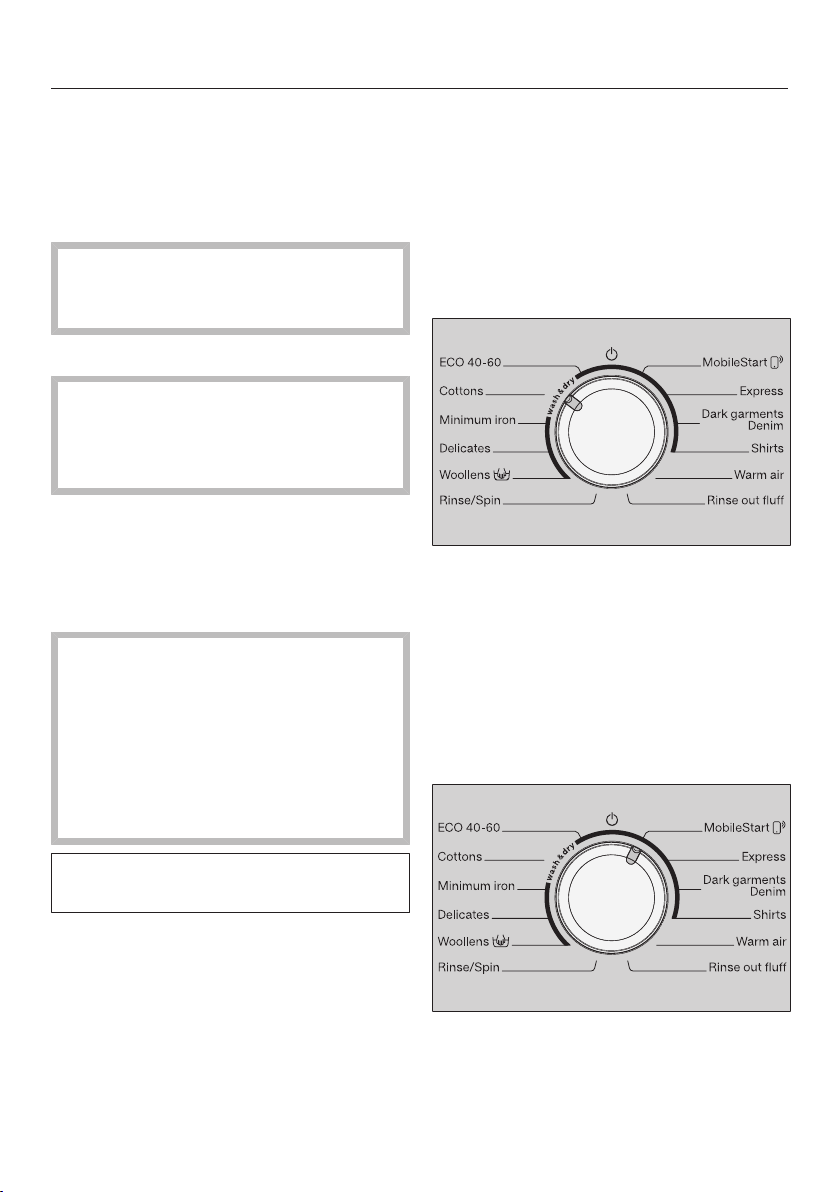
Turn the programme selector to the
required programme.
The estimated programme running time
is shown in the time display and the
preset temperature and spin speed light
up in the control panel.
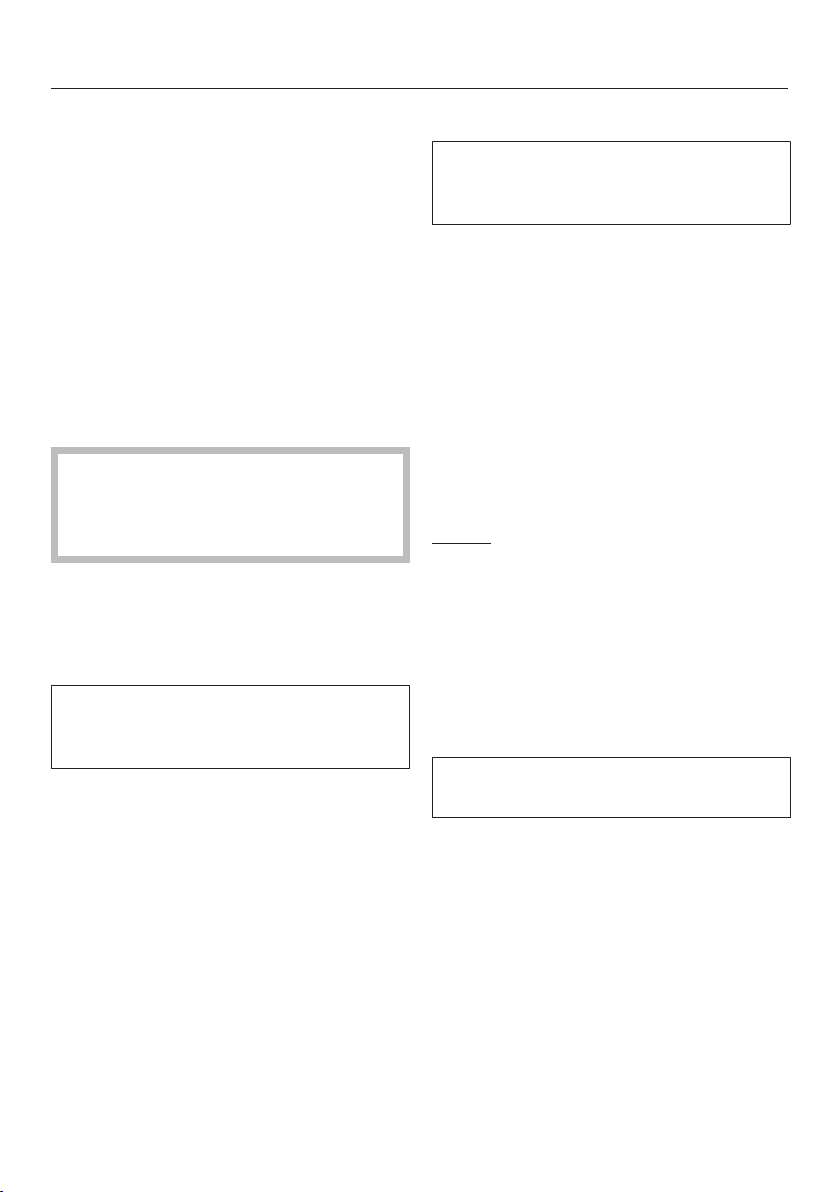
- Using the MobileStart programme
selector position
Turn the programme selector to the
MobileStart position.
Drying
44
Useful tip: In order to use MobileStart,
the washer-dryer must be logged on to
the Wi-Fi network and Remote control
must be switched on.
appears in the time display.
Once the programme has started, the
washer-dryer can be operated with the
Miele@mobile App.
Selecting drying
Touch the Washing or Drying sensor
until just the Drying sensor is brightly
lit up.
The Washing sensor must only light
up dimly as otherwise the relevant
wash programme would begin before
the drying process.
4. Selecting programme
settings
Selecting the drying level
The preset drying level for a
programme can be changed if
required.
Touch the sensor for the required
drying level.
- Normal plus
- Normal
- Hand iron
The sensor for the selected drying level
lights up brightly.
Warm air programme: Select the
drying time with the or sensor.
Selecting a thermospin spin speed
The preset spin speed for the
thermospin can be changed if
required.
Touch the sensor for the spin speed
you want.
The sensor lights up brightly.
Selecting Extras
The sensor for the Gentle Extra lights
up dimly if the Gentle Extra can be
selected in addition to the programme.
Touch the Gentle sensor.
The sensor lights up brightly.
Gentle
Delicate textiles such as acrylics are
dried gently (care label symbol ).
The programme running time will
increase when the Gentle Extra is
selected because of the lower
temperature.
Selecting Delay start
You can use Delay start to set the start
time for a programme.
Select a Delay start time if required.
Please see “Delay start/SmartStart” for
more information.
Drying
45
5. Starting the programme
Touch the flashing Start/Add laundry
sensor.
The door will lock and the drying
programme will start.
If a Delay start time has been selected,
this counts down in the time display. At
the end of the Delay start period or
immediately after the programme has
started, the programme running time
will appear in the time display.
Laundry can be added or removed at
any time, provided that the symbol
is not illuminated in the display (see
“Changing the programme sequence –
Adding laundry”).
Saving energy
After 10 minutes, the indicators will dim.
The Start/Add laundry sensor flashes
slowly.
You can reactivate the indicators:
Touch the Start/Add laundry sensor
(this does not have any effect on a
programme that is running).
6. End of the programme/
unloading laundry
At the end of the programme, the drum
continues to turn at intervals for up to
150 minutes. The door is locked. The
control panel lights up for the first
10minutes. The control panel then
goes out and theStart/Add laundry
sensor flashes.
Turn the programme selector to the
position.
The door will unlock.
If you unload the laundry during the
Anti-crease phase, heat can build up.
Spread the laundry out to cool it
down.
The door unlocks automatically at the
end of the Anti-crease phase.
Pull open the door.
Remove the laundry.
Items left in the dryer could be
damaged by overdrying when the
dryer is used the next time.
Remove all items from the drum.
Useful tip: See "Washing and Drying -
After each washing or drying
programme".
Drying
46
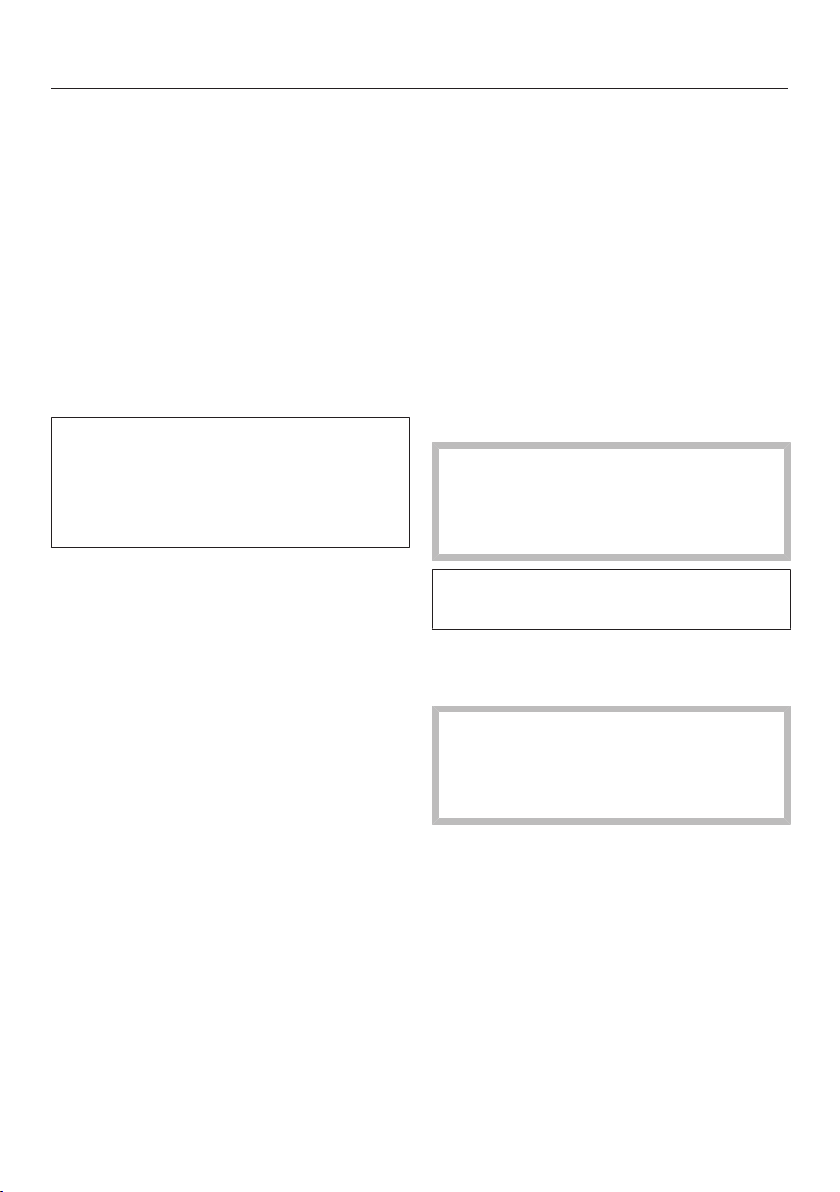
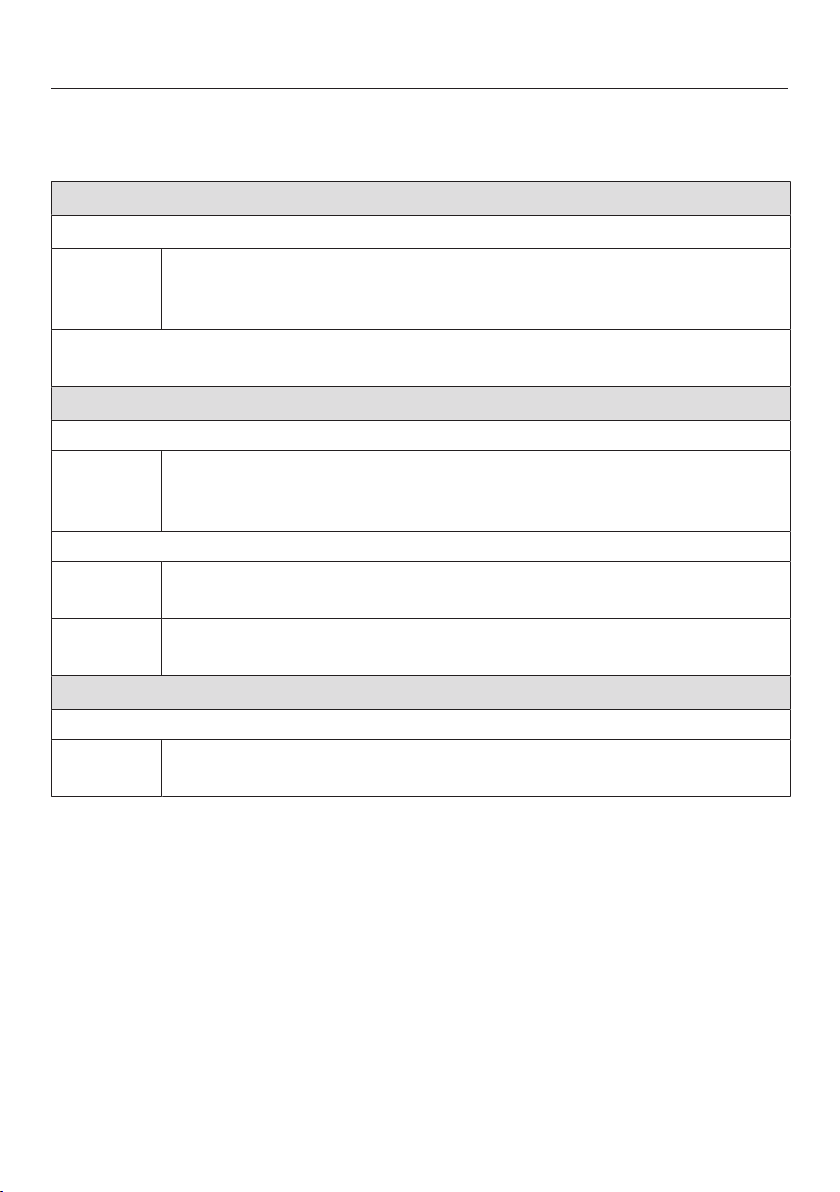
Programme chart
* Weights are based on the weight of dry laundry.
ECO40-60 Max. load 4.0 kg*
Drying levels:
Cotton textiles: T-shirts, underwear, baby clothes, workwear, jackets,
covers, aprons, overalls, hand towels, bath towels, bathrobes and
flannelette/bed linen.
Energy labelling programme according to AS/NZS 2442.1 & AS/NZS 2442.2 (refer
to www.energyrating.gov.au website for consumption data).
Cottons Max. load 4.0 kg*
Drying levels: ,
Items Single and multi-layered cotton fabric such as towelling, T-shirts,
underwear, baby clothes, workwear, jackets, covers, aprons, gowns,
flannelette bed linen, towels and bath robes.
Drying levels:
Items Cotton or linen fabric requiring further processing, e.g. table linen,
bed linen, starched laundry.
Notes Roll up laundry that you want to machine iron to prevent it from
drying out until you are ready for ironing.
Minimum iron Max. load 3.5 kg*
Drying levels: , ,
Items Minimum iron items made of cotton, synthetic or mixed fibre, e.g.
workwear, overalls, jumpers, dresses, trousers, table linen, tights.
Drying
47
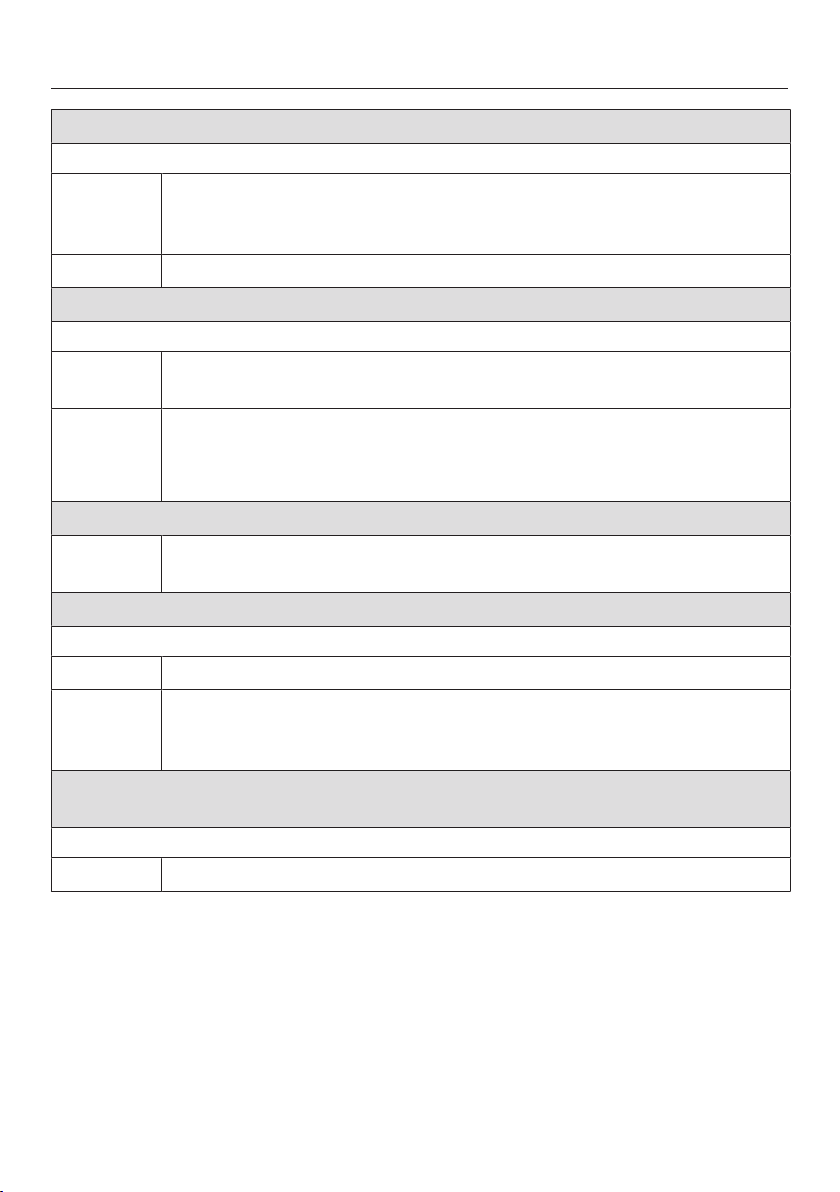
Delicates Max. load 1.0 kg*
Drying levels: , ,
Items Delicate items with the symbol on the care label made of
synthetic fibres, easy care cotton or blended fabric, e.g. shirts,
blouses, lingerie and evening wear with sequins and beading.
Notes Reducing the load will reduce creasing.
Woollens Max. load 2.0 kg*
3 minutes
Items Woollen garments and textiles containing wool blends, e.g.
pullovers, cardigans, stockings.
Notes - Wool and wool blend items are only fluffed up; they are not dried
completely.
- Remove garments as soon as the programme has finished.
MobileStart
Notes The Miele App is used for selecting programmes and operating the
machine.
Express Max. load 3.5 kg*
Drying levels: , ,
Items Garments suitable for the Cottons programme.
Notes The programme running time for this programme is particularly short
when washing and drying lightly soiled laundry in a continuous
sequence.
Dark garments/
Denim
Max. load 3.0 kg*
Drying levels: , ,
Items Black and dark garments made from cotton, mixed fibres and denim.
Drying
48
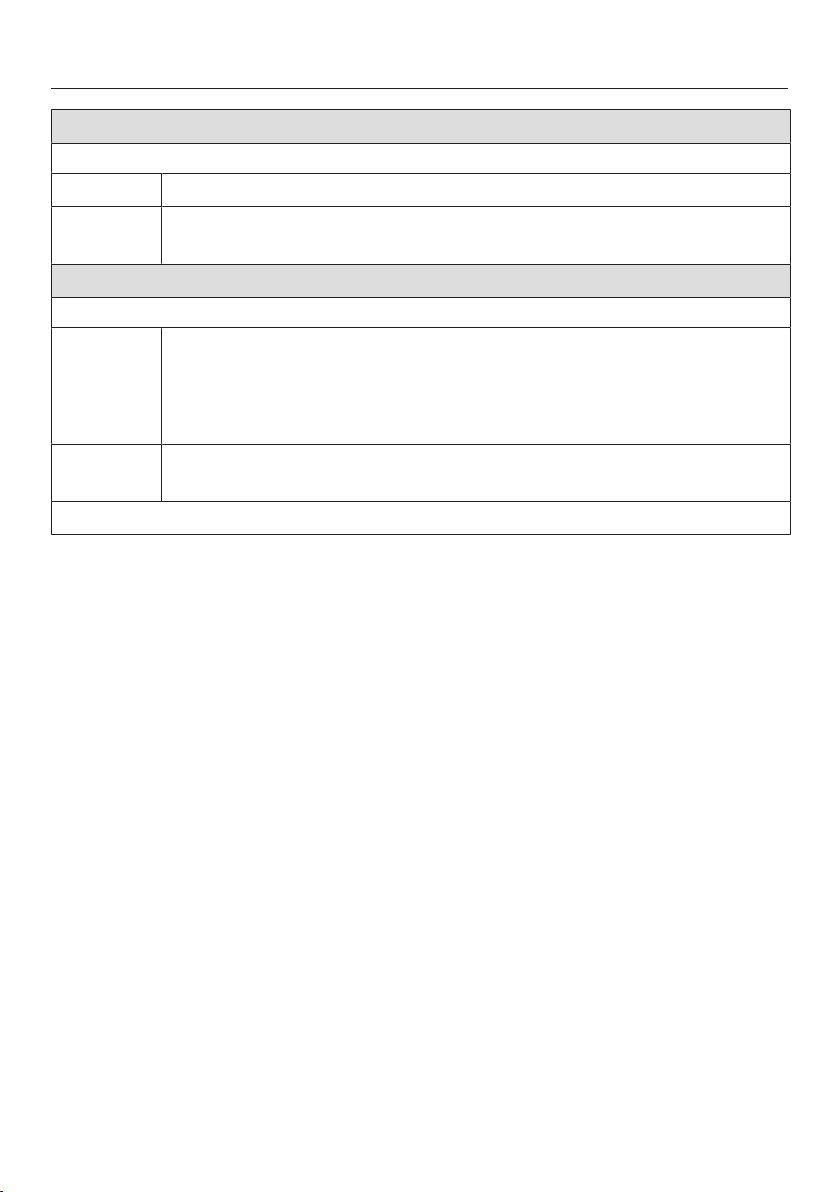
Shirts Max. load 1.0 kg*
Drying levels: , ,
Items Shirts and blouses.
Notes Turn shirts and blouses inside out, do up buttons and turn collars
and cuffs inwards.
Warm air Max. load 4.0 kg*
20–120minutes
Items - Multi-layered items whose layers have different drying
characteristics, e.g. jackets, pillows, sleeping bags and other
voluminous items.
- For drying and airing individual items.
Notes Do not select the longest drying time to start with. Check the items
as you are drying them to find the optimal time.
Rinse out fluff Rinse out fluff programme
Thermospin
A thermospin is carried out in some drying programmes to reduce energy
consumption.
The maximum spin speed for the thermospin is the maximum permitted spin
speed for the appropriate wash programme.
The thermospin spin speed can be reduced in some programmes to 900rpm.

Washing and Drying
49
Washing and drying in one
continuous sequence
It is advisable to wash and dry in a
continuous sequence when the
amount of laundry to be washed does
not exceed the amount to be dried,
and the amount to be dried does not
exceed the permitted dry weight for
the programme.
It is essential to read the sections
“Washing” and “Drying”.
1. Preparing the laundry
Empty all pockets.
Sort the laundry according to colour
and type of fibre/weave.
Check the symbols on the care
labels.
2. Loading the drum
Open the door.
Check the drum for pets or foreign
objects before loading it with
laundry.
Unfold the laundry and load loosely in
the drum.
Detergent dispensing aids, e.g.
plastic dispenser balls, can melt
during the drying programme and
cause damage to the machine and
the laundry.
These dispensing aids must be
removed from the laundry before
drying.
Close the door.
3. Selecting a programme
Turn the programme selector and
select the required programme.
The control panel lights up.
Touch the Washing and Drying
sensors until both sensor controls are
brightly lit up.
4. Selecting programme
settings
Select the desired spin speed,
temperature and drying level.
The sensors for the selected settings
light up brightly.
The minimum spin speed cannot be
lower than 900rpm.
For some programmes the spin speed
cannot be changed.
Select Extras as required.
With the thermospin the spin speed
displayed for the wash cycle is used.
Select a Delay start time if required.
Washing and Drying
50
5. Adding detergent
Dispense detergent with CapDosing
or via the detergent dispenser drawer.
6. Programme start/finish
Touch the flashing Start/Add laundry
sensor.
The door will lock.
The programme will start.
The Anti-crease phase will start at the
end of the programme.
The door remains locked during the
Anti-crease phase.
Touch the Start/Add laundry sensor
or turn the programme selector to the
position.
The door will unlock.
If you have unloaded the drum
during the Anti-crease phase, make
sure you spread out the laundry to
cool it down.
The door unlocks automatically at the
end of the Anti-crease phase.
Pull the door open and unload the
drum.
See "After each washing or drying
programme".
After each washing or drying
programme
Open the drum door fully.
Risk of burning due to hot metal.
The metal cap located on the inside
of the door glass will be hot after
drying.
Do not touch the metal cap.
Remove the laundry.
Laundry left in the drum could shrink,
discolour or be damaged in the next
washing or drying programme.
Check that all items have been
removed from the drum.
Check the folds in the door seal for
any small articles, e.g. buttons, which
might be lodged there. After drying,
remove any fluff from around the door
seal and the porthole glass.
Useful tip: For safety reasons, close the
door when the machine is not in use.
Otherwise there is a danger of objects
being placed inadvertently in the drum.
If these remain unnoticed and were
washed in the next load, they could
damage the laundry. An open door is
also a danger to pets and children.
Turn the programme selector to the
position.
Useful tip: Leave the detergent
dispenser drawer slightly open to allow
it to dry.

Rinse out fluff programme
51
During drying, fluff is developed and
can collect in the drum and suds
container. Run the Rinse out fluff
programme before the machine is used
again so that fluff cannot be deposited
on the next load or cause a blockage.
The Rinse out fluff programme must
not be used for rinsing laundry.
Ensure there are no items of laundry
in the drum before starting the
programme.
Turn the programme selector to the
Rinse out fluff programme.
Do not use detergent.
Touch the Start/Add laundrysensor.
Any fluff will be rinsed away within a
few minutes.
If necessary, wipe any remaining fluff
off the door seal and door glass.
Switch the washer-dryer off.

Changing the programme sequence
52
Changing the programme
(safety lock)
It is not possible to change the
programme, the temperature, the spin
speed or the selected Extras after the
programme has started. This prevents
the appliance being operated
unintentionally, e.g. by children.
If the washer-dryer is switched off
during active programme operation,
the standby function does not switch
the washer-dryer off completely after
15minutes. Safety functions continue
to be active because there may still be
water inside the drum.
Cancelling a programme
You can cancel a programme at any
time after it has started.
Turn the programme selector to the
position.
The programme is interrupted.
Then turn the programme selector to
any position.
Rotating bars ...... appear
in the time display.
- During washing
The suds will be pumped away and the
programme is cancelled.
The door lock is released.
- During drying
The laundry will be cooled down before
the door can be opened.
Removing the laundry
Wait until the symbol in the display
goes out and the door is unlocked.
Pull the door open and unload the
drum.
Selecting another programme
Close the door.
Select the required programme.
Add detergent to the detergent
dispenser drawer, if necessary.
Touch the Start/Add laundrysensor.
The programme will start.

Changing the programme sequence
53
Adding laundry - AddLoad
You can add or remove items during the
first few minutes after the programme
has started.
Laundry cannot be added if the
symbol is illuminated in the display.
Touch the Start/Add laundrysensor.
Rotating bars ...... appear
in the time display.
appears in the time display.
Open the door.
Add or remove laundry.
Close the door.
Touch the Start/Add laundrysensor.
The programme will continue.
Laundry cannot be added or removed
if:
- The suds temperature is above 55°C
- The water inside the drum is above a
certain level
Delay start/SmartStart
54
Delay start
Delay start is active when the
SmartGrid programmable function
is switched off.
With Delay start you can delay the start
of a programme from 30 minutes up to
a maximum of 24hours. This allows
you to make use of night-time economy
electricity rates, for example.
Setting the Delay start time
Select the programme required.
Touch the sensor.
The sensor lights up brightly.
Touch the or sensor repeatedly
until the required Delay start time
appears in the time display.
- For below 10hours, the Delay start
time changes in increments of
30minutes.
- For more than 10hours, the Delay
start time changes in increments of
1hour.
Starting Delay start
Touch the flashing Start/Add laundry
sensor.
The Delay start process starts and
counts down in the time display.
Changing or cancelling Delay start
If the selected Delay start function has
started, it is no longer possible to
change the time.
Turn the programme selector to the
position.
Turn the programme selector to any
programme.
Rotating bars ... ... or
are shown in the time display.
The Delay start process stops.
Select a programme and a new Delay
start time if required.

Delay start/SmartStart
55
SmartStart (only functional in
selected countries)
The SmartStart function is active when
the SmartGrid programmable
function is switched on.
The SmartStart function lets you define
a time period during which your
washer-dryer will start automatically
based on an external signal. The
machine will start on receipt of a signal,
e.g. from your energy supplier, that
indicates that the electricity rate is
particularly economical.
The timeframe can be defined between
30minutes and 24hours. During this
period, the washer-dryer waits for the
external signal. If no signal is sent
during the defined period, the washer-
dryer starts the programme.
Setting the timeframe
If the SmartGrid programmable
function is activated, the function of
the sensor changes. The time
display no longer shows the Delay
start period, and instead shows the
time period in which your washer-
dryer can be started automatically
(see “Programmable functions –
SmartGrid”).
The procedure for setting this is the
same as for setting the time for Delay
start.
Touch the sensor.
Set the time period you want using
the or sensor.
Touch the Start/Add laundrysensor.
appears in the time display.
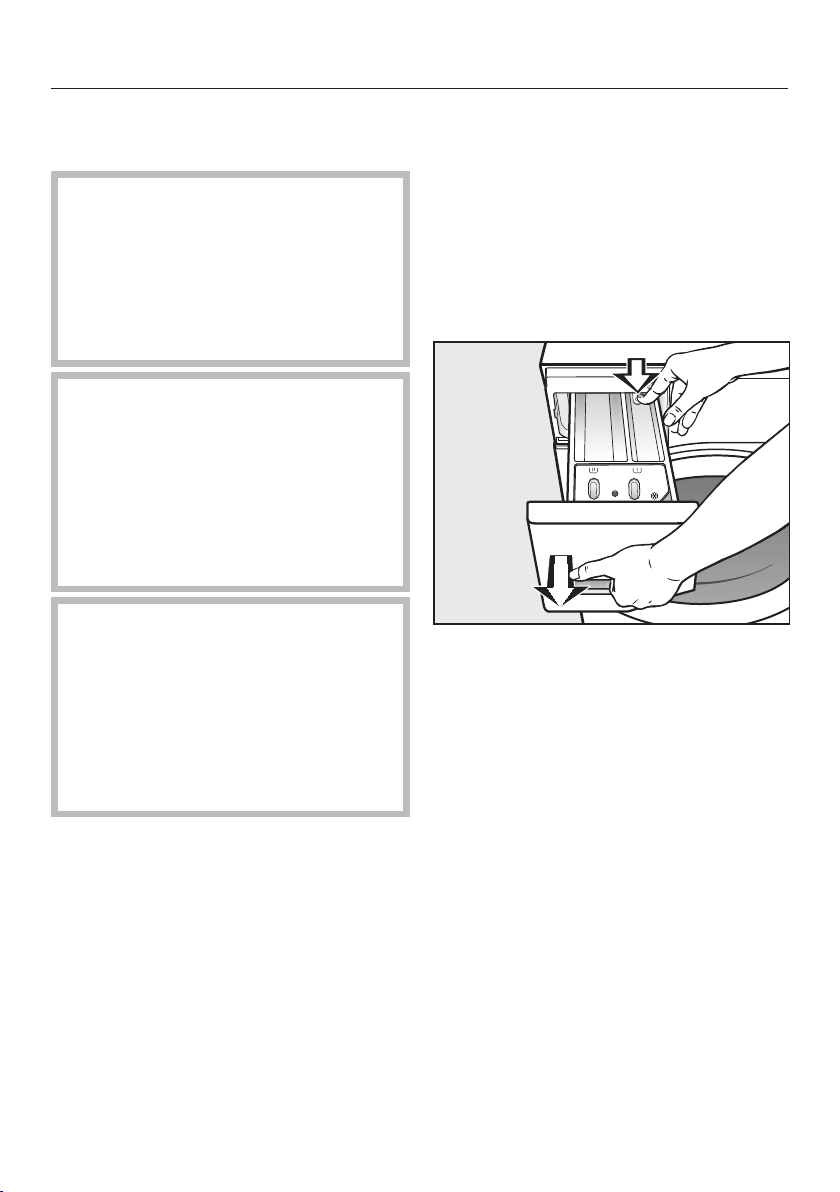
Cleaning and care
56
Cleaning the external casing
and fascia panel
Risk of electric shock.
The mains voltage is applied to the
washer-dryer even if it is switched
off.
Disconnect the machine from the
electricity supply before cleaning or
maintenance.
Risk of damage due to ingress of
water.
The pressure of a water jet can
cause water to get into the washer-
dryer, resulting in damage to
components.
Do not spray the washer-dryer with a
water jet.
Damage caused by cleaning
agents.
Solvent-based cleaning agents,
abrasive cleaners, glass cleaners or
multi-purpose cleaning agents can
cause damage to plastic surfaces
and other parts.
Do not use these cleaning agents.
Clean the casing and control panel
with a mild cleaning agent or soap
and water and dry both with a soft
cloth.
The drum can be cleaned using a
suitable stainless steel cleaning agent
following the manufacturer's
instructions on the packaging.
Cleaning the detergent
dispenser drawer
Washing at low temperatures and the
use of liquid detergent can lead to a
build-up of mould and bacteria in the
detergent dispenser drawer.
For hygiene reasons, clean the entire
drawer at regular intervals.
Pull out the detergent dispenser
drawer until a resistance is felt. Press
down the release button and at the
same time pull the drawer right out of
the machine.
Clean the detergent dispenser drawer
with warm water.
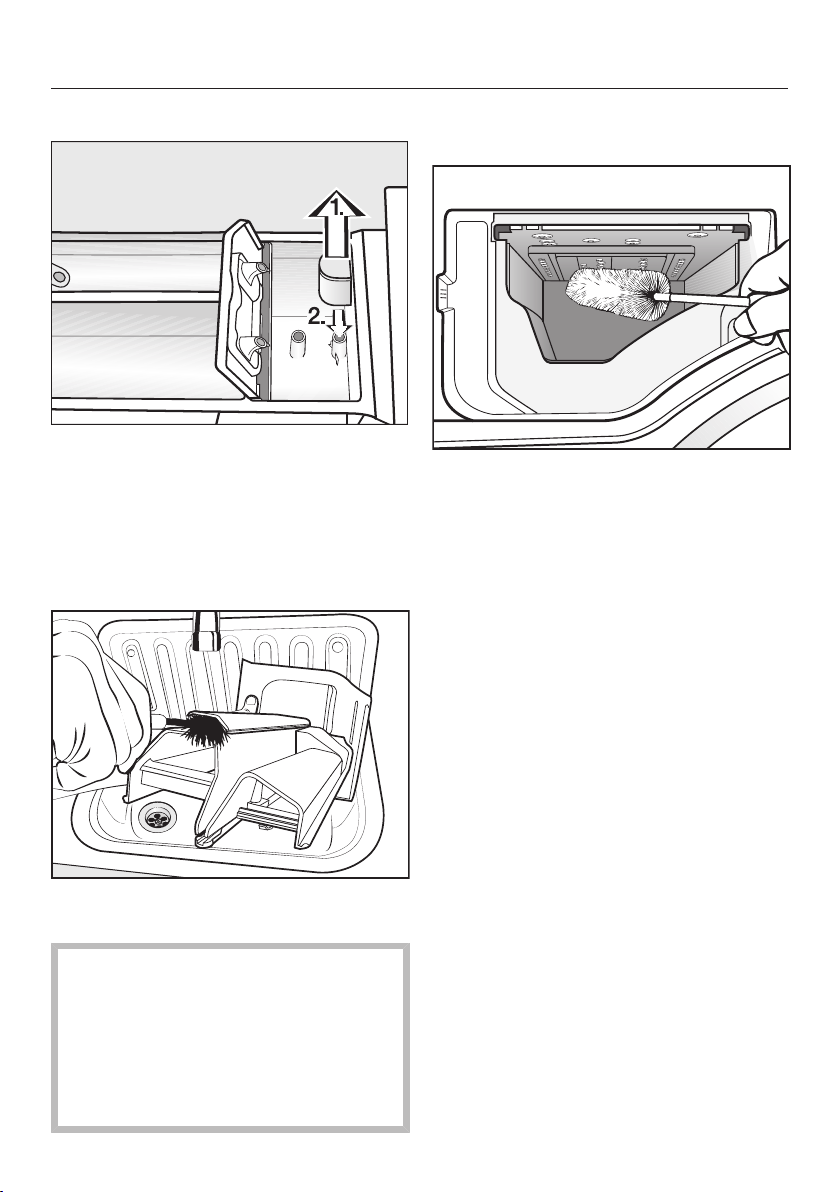
Cleaning and care
57
Cleaning the siphon and the channel
Pull the siphon out of the
compartment and clean it under
warm running water.
Clean the siphon tube in the same
way.
Refit the siphon.
Clean the fabric softener channel
using a brush and warm water.
Liquid starch results in clogging. If
clogged, the siphon in the /
compartment will not work and the
compartment can overflow.
Clean the siphon particularly
thoroughly after using liquid starch a
few times.
Cleaning the detergent dispenser
drawer housing
Use a bottle brush to remove
detergent residues and limescale
from the jets inside the detergent
dispenser drawer housing.
Replace the detergent dispenser
drawer.
Useful tip: Leave the detergent
dispenser drawer slightly open to allow
it to dry.
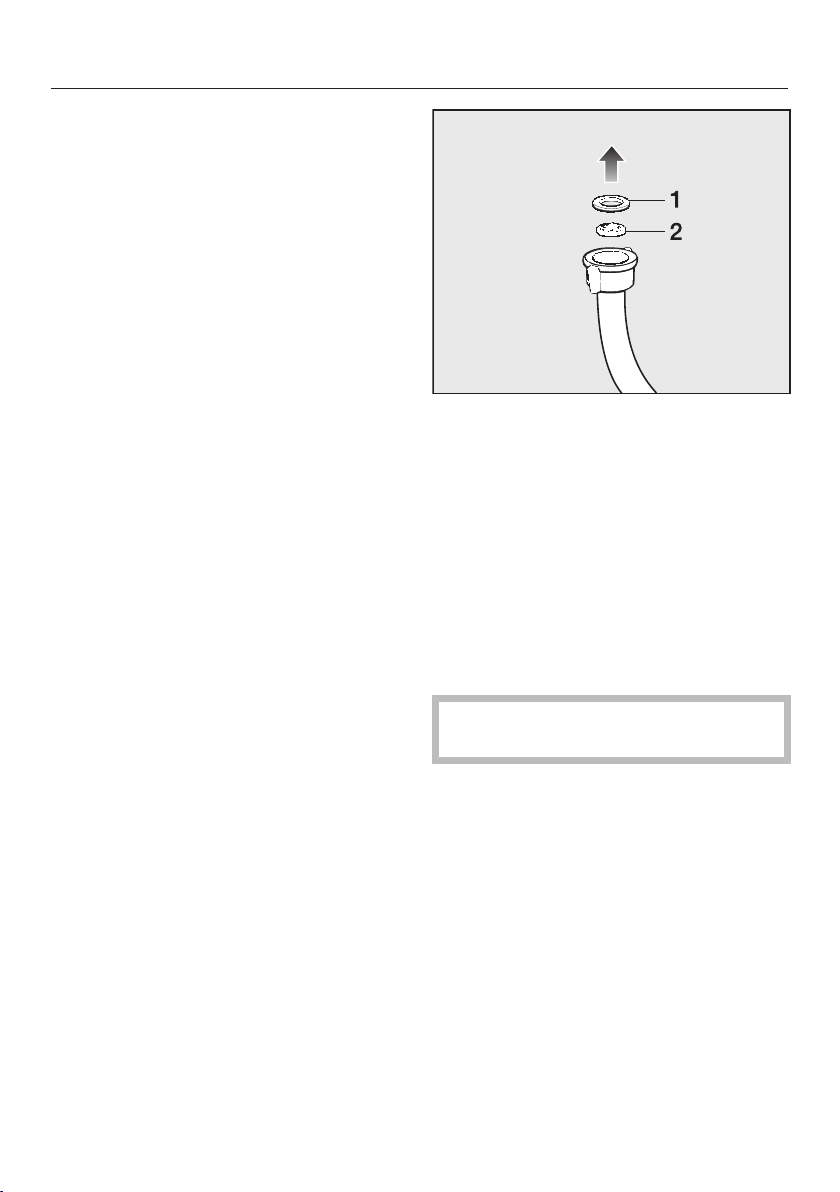
Cleaning and care
58
Cleaning the porthole glass
Clean the inside of the porthole glass
from time to time and the metal cap
inside the porthole glass with a
suitable mild cleaning agent or with
soapy water.
Dry both with a soft cloth.
Cleaning the drum
Washing at low temperatures and/or
using liquid detergent can cause
bacteria and unpleasant odours to build
up in the washer-dryer. Use the Cottons
90°C programme to clean the washer-
dryer. Clean the drum no later than the
point at which the indicator light and
light up in the time display.
Cleaning the water inlet filter
The washer-dryer has a filter to protect
the water inlet valve. The filter at the
open end of the water inlet hose should
be checked approximately every
6months. Perform this check more
often if there are frequent interruptions
to the external water supply.
First turn off the tap.
Unscrew the water inlet hose from the
tap.
Remove the rubber seal 1 from the
recess.
Hold the free end of the water inlet
hose upside down. The plastic filter 2
will fall out.
Clean the plastic filter.
Reassemble in reverse order.
Turn on the tap and check that the
connection is watertight. If water
drips out, tighten the connection.
Never forget to put the filter back in
place after cleaning.
Problem solving guide
59
With the help of the following guide, minor faults in the performance of the
appliance, some of which may result from incorrect operation, can be remedied
without contacting Miele. This will save you time and money because you won't
need a service call.
Please note that a call-out charge will be applied to unnecessary service visits
where the problem could have been rectified as described in these operating
instructions.
A programme cannot be started
Problem Possible cause and remedy
The control panel
remains dark.
There is no power to the machine.
Check whether the mains plug is plugged in and
switched on.
Check whether the circuit breaker has tripped.
The washer-dryer has switched off automatically to
save energy.
Switch the washer-dryer on again by turning the
programme selector.
and alternate in the
time display.
The door is not closed properly. The door lock could
not engage.
Close the door again.
Start the programme again.
If the fault message appears again, contact Miele.

Problem solving guide
60
Programme cancellation and fault indicator light
Problem Possible cause and remedy
The fault indicator
light lights up. and
alternate in the time
display and the buzzer
sounds.
The water inlet is blocked or restricted.
Check whether the tap is turned on properly.
Check whether the inlet hose is kinked.
Check whether there is sufficient water pressure.
The filter in the water inlet is blocked.
Clean the filter.
The fault indicator
light lights up. and
alternate in the time
display and the buzzer
sounds.
The water outlet is blocked or restricted.
The drain hose has been fixed too high.
Clean the drain filter and the drain pump.
Check whether the maximum delivery height of
1m has been exceeded.
The fault indicator
light lights up. and
alternate in the time
display and the buzzer
sounds.
The water protection system has reacted.
Turn off the tap.
Call Miele.
and alternate in
the time display and the
buzzer sounds.
There is a fault.
Disconnect the washer-dryer from the electricity
supply. Switch off at the wall and withdraw the
plug from the socket, or switch off the mains
circuit breaker.
Wait at least 2minutes before reconnecting the
washer-dryer to the electricity supply.
Switch the washer-dryer back on.
Restart the programme.
If the fault message appears again, contact Miele.

Problem solving guide
61
Fault indicator light lights up at the end of a programme
Problem Possible cause and remedy
The indicator light
lights up.
Excessive foam has built up during washing.
Use less detergent next time and follow the
manufacturer's instructions on dosage given on
the packaging.
The indicator light
lights up and appears
in the time display.
A wash programme using a temperature above 60°C
has not been run for a long time.
Run the Cottons90°C programme using the Miele
machine cleaner or a multi-purpose powder
detergent.
This will clean the washer-dryer and prevent a build-
up of bacteria and odours.
The indicator light
lights up and appears
in the time display.
TheRinse out fluff programme has not been used for
a long time.
Start the Rinse out fluff programme as described
in “Rinse out fluff programme”.
The indicator light
lights up and appears
in the time display.
There is no laundry in the drum.
The load is too small. The laundry is still damp
because the residual moisture content in the laundry
cannot be measured.
In the future, use the Warm air programme for
small amounts of laundry.
The amount of laundry exceeded the maximum load
for the selected programme.
Observe the maximum loads listed in the
Programme chart.
Problem solving guide
62
Symbols in the time display
Message Possible cause and remedy
is lit up in the time
display.
The programme selector was moved to a different
position after the programme had started.
Turn the programme selector back to the original
position.
lights up when the
washer-dryer is
switched on.
An update is available for the washer-dryer. See
“Programmable functions – RemoteUpdate” for
more information.
lights up briefly in
the time display when a
programme is selected.
The washer-dryer is indicating that it is networked.
lights up in the time
display when the
MobileStart
programme is
selected.
The remote control function is switched off.
Activate the remote control programmable
function to operate the washer-dryer via the
App.
lights up in the time
display when the
MobileStart
programme is
selected.
The washer-dryer is networked and can be
operated via the App.
lights up in the time
display when the
MobileStart
programme is
selected.
Miele@home is not set up.
Network the washer-dryer; see “Before using for
the first time – Setting up Miele@home”.
lights up when the
washer-dryer is
switched on.
There is a fault.
Switch the washer-dryer off.
Switch the washer-dryer back on.
If appears again, contact Miele.
You can continue to use the washer-dryer.
Touch the illuminated sensor.
Problem solving guide
63
General problems with the washer-dryer
Problem Possible cause and remedy
The display is dark. The display has switched off automatically to save
energy (Standby mode).
Press any button. This switches Standby off.
The washer-dryer is not
steady during a spin
cycle.
The machine feet are not level.
Level the machine and adjust the feet correctly.
Unusual pumping
noises.
This is not a fault. Slurping noises occur at the end
of the pump sequence as a normal part of
operation.
Spinning sounds during
the drying process.
This is not a fault. The machine will spin even during
a drying programme (thermospin).
The laundry has not
been spun properly and
the laundry is still wet.
The machine detected an imbalance during the final
spin and reduced the spin speed automatically.
Include both large and small items in the load as
this will give better distribution.
Large amounts of
detergent residue
remain in the detergent
drawer.
The water pressure is too low.
Clean the filters in the water inlet.
It may be useful to select the Water plus option.
Powder detergent used in conjunction with water
softeners tends to become sticky.
Clean the detergent dispenser drawer and, in the
future, add washing powder to the dispenser
drawer first, and then add the water softener.
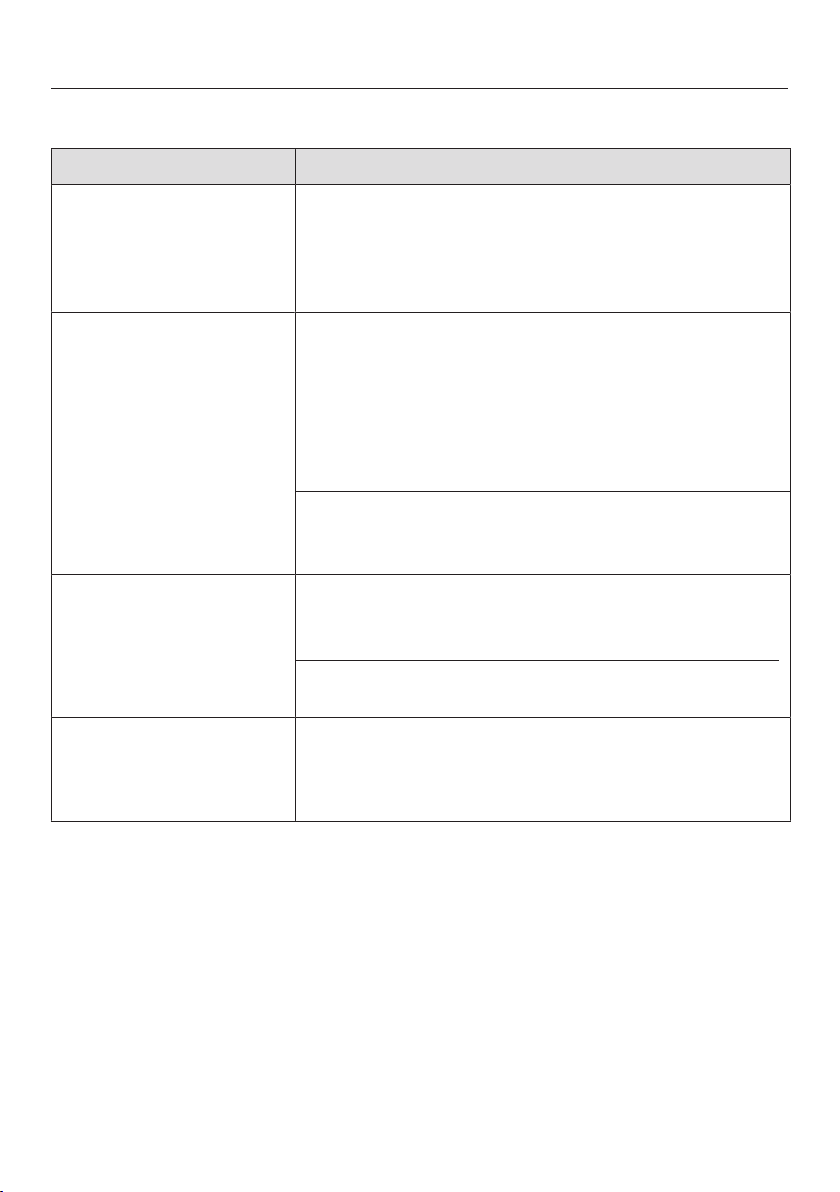
Problem solving guide
64
General problems with the washer-dryer
Problem Possible cause and remedy
Fabric softener is not
completely dispensed
or too much water
remains in the
compartment.
The siphon tube is not correctly positioned or
clogged.
Clean the siphon (see “Cleaning and care -
Cleaning the detergent dispenser drawer”).
There is water in the
fabric softener
compartment next to
the capsule.
CapDosing was not activated or an empty capsule
was not removed at the end of the last wash
programme.
Make sure that you remember to activate
CapDosing the next time you insert a capsule.
Remove and dispose of the empty capsule at the
end of each programme.
The small pipe in the detergent dispenser drawer
onto which the capsule is placed is blocked.
Clean the small pipe.
At the end of the
programme there is still
liquid in the capsule.
The small pipe in the detergent dispenser drawer
onto which the capsule is placed is blocked.
Clean the small pipe.
This is not a fault. For technical reasons a small
amount of water will remain in the capsule.
The programme
duration remaining that
is shown in the display
fluctuates.
The countdown time adapts constantly to the
current washing and drying situation.

Problem solving guide
65
General problems with the washer-dryer
Problem Possible cause and remedy
Foam comes out of the
detergent dispenser
drawer while the Rinse
out fluff programme is
running.
There is residual detergent from the last programme
in the suds container.
Make sure you always dispense the correct
amount of detergent.
Follow the detergent manufacturer's dosage
recommendations.
There is foam in the
drum at the end of the
Rinse out fluff
programme.
The Rinse out fluff programme also rinses out
residual detergent from the suds container. This can
lead to the formation of foam.
Run the Rinse out fluff programme regularly to
prevent detergent residues from accumulating in
the suds container.
There is still fluff in the
drum after the end of
the Rinse out fluff
programme.
You have not run the Rinse out fluff programme for a
long time.
Remove the fluff from the drum.
Run the Rinse out fluff programme on a regular
basis.
The washer-dryer
smells.
The indicator light was ignored. A wash programme
using a temperature above 60°C has not been run for
a long time.
In order to prevent bacteria and unpleasant odours
building up in the washer-dryer, run the Cottons
90°C programme using the Miele IntenseClean
machine cleaner or multi-purpose powder
detergent.
The detergent dispenser drawer was left closed after
washing.
Leave the detergent dispenser drawer slightly
open to allow it to dry.

Problem solving guide
66
An unsatisfactory wash result
Problem Possible cause and remedy
White residues which
look like powder
detergent are seen on
dark textiles after
washing.
The detergent contains compounds (zeolites) to aid
water softening which are not soluble in water. These
have ended up on the laundry.
Try and brush off the residues with a soft brush
once the laundry is dry.
In the future, wash dark textiles with a detergent
which contains no zeolites. Liquid detergents do
not usually contain zeolites.
Use the Dark garments programme.
Grey, greasy particles
cling to washed laundry.
Insufficient amounts of detergent were used. The
laundry was heavily soiled with grease (oils,
ointments).
Use more detergent or liquid detergent with this
type of soiled laundry.
Before washing the next load, run the Clean
machine programme using the Miele machine
cleaner or a powder detergent.

Problem solving guide
67
Unsatisfactory drying result
Problem Possible cause and remedy
The laundry is too damp
after a drying cycle.
The load is too small. The electronics could not
assess the residual moisture correctly.
In the future, use the Warm air programme for
small amounts of laundry.
During the spin cycle, the laundry formed a ring in
the drum because the laundry was distributed
unevenly.
The laundry formed a ring during the thermospin
because it was too damp or because the spin speed
was set too high.
Open the door and loosen the laundry.
Start the drying programme again with a lower
spin speed.
The laundry feels damp
after drying.
Warm laundry can feel damp.
Spread the laundry out to cool it down.
The laundry is too damp
or too dry after a drying
cycle.
The desired residual moisture level is between two
drying levels.
Change the level of drying as described in
“Settings - Drying levels”.
There is still water in
the drum after drying.
There is a blockage in the water outlet.
Clean the drain filter and the drain pump as
described in “Opening the door in the event of a
blocked drain outlet and/or power cut” and check
the height of the drainage point.

Problem solving guide
68
The door will not open
Problem Possible cause and remedy
The door cannot be
opened while a
programme is running.
The door is locked during a programme.
Follow the instructions in “Changing the
programme sequence – Adding laundry”.
There is still water in the drum and the washer-dryer
is unable to drain.
Clean the drain filter and the drain pump as
described in “Opening the door in the event of a
blocked drain outlet and/or power cut”.
The water level in the drum is too high.
Cancel the programme. The water will be pumped
away.
The door cannot be
opened at the end of
the programme or after
a programme
cancellation. Flashing
bars ......... are
shown in the time
display.
The door cannot be opened for safety reasons. The
temperature in the drum exceeds 55°C during
washing or 70°C during drying.
Wait until the temperature in the drum has
decreased and the door is unlocked.
The door will not
unlock. and
alternate in the time
display.
The door lock has jammed.
Call Miele.
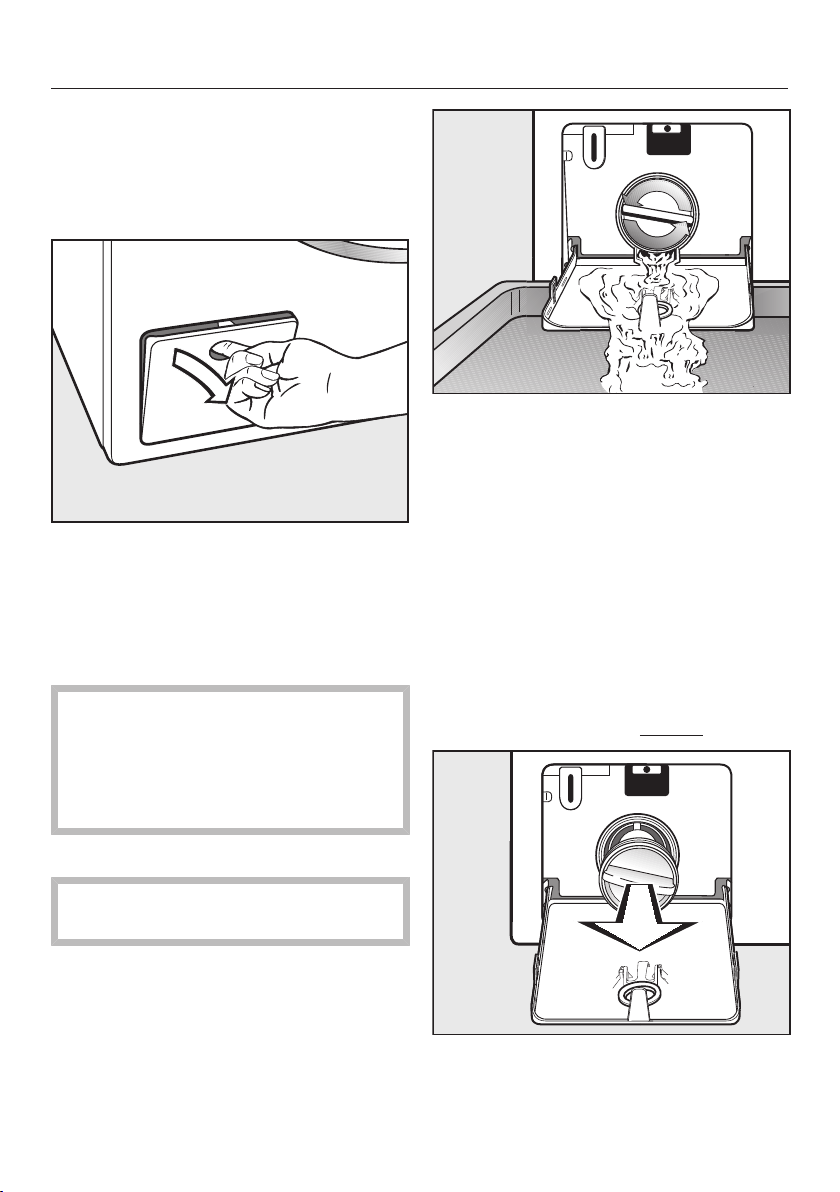
Problem solving guide
69
Opening the door in the event
of a blocked drain outlet and/
or power cut
Switch the washer-dryer off.
Open the drain pump access panel.
Blocked drain outlet
If the drain outlet is blocked, a large
quantity of water can remain in the
washer-dryer.
Risk of scalding due to hot suds.
Escaping suds will be hot if laundry
has been washed at high
temperatures.
Drain the suds carefully.
Draining water from the machine
Remove the drain filter, though not
completely.
Place a suitable container under the
access panel, e.g. a universal oven
tray.
Slowly and carefully unscrew the filter
to let the water out. Be careful not to
release too much water at once. If the
flow of water is too strong, some
water can seep into the machine
base and activate the water
protection float switch. This will
prevent the machine from
functioning.
Tighten the drain filter back up again
if you need to interrupt the flow of
water.
Once the flow of water ceases:
Remove the drain filter completely.
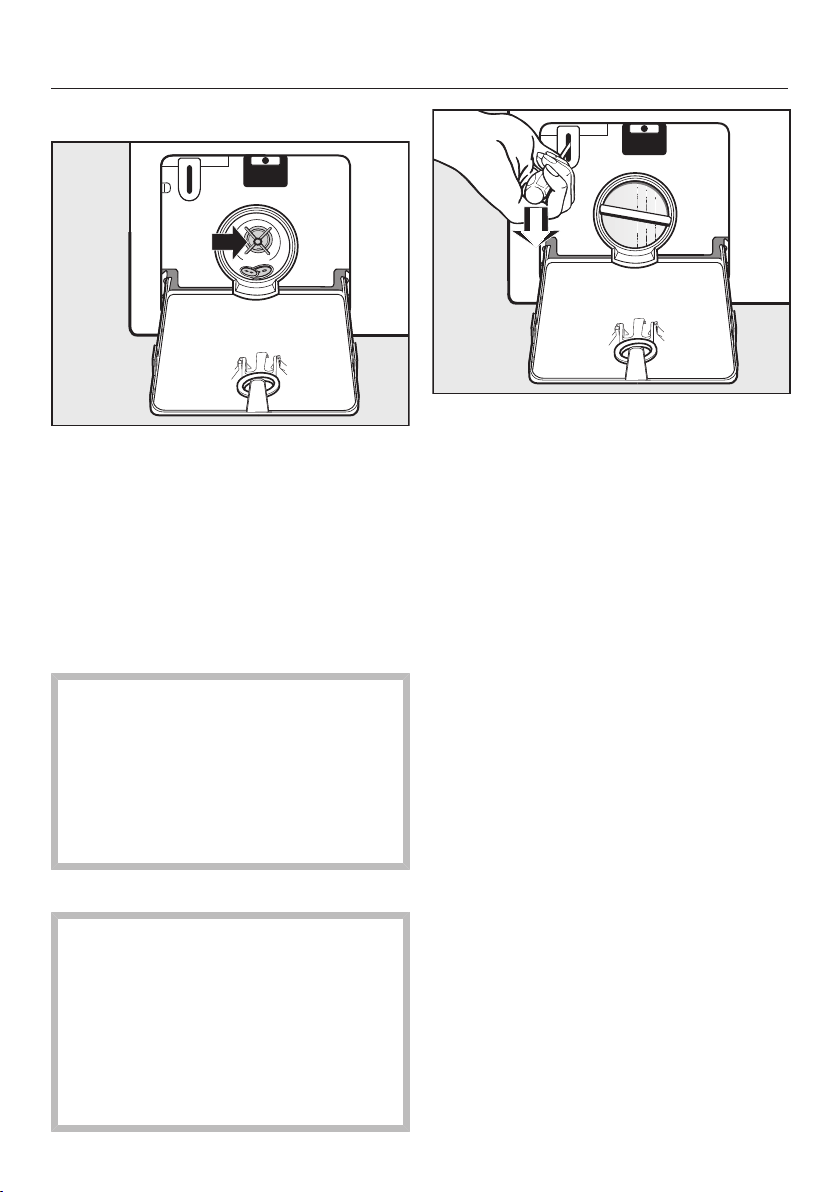
Problem solving guide
70
Cleaning the drain filter
Clean the drain filter thoroughly.
Remove any foreign objects (e.g.
buttons, coins, etc.) and clean the
interior.
Turn the impeller by hand to check
that they rotate freely.
Put the drain filter back in place and
secure it.
Risk of damage from leaking
water.
Water will escape from the washer-
dryer if you forget to replace the
drain filter.
Replace the drain filter correctly and
tighten it securely.
Opening the door
Danger of injury due to rotating
drum!
Reaching into a moving drum is
extremely dangerous. Danger of
injury!
Always make sure that the drum is
stationary before reaching in to
remove laundry.
Use a screwdriver to unlock the door
of the appliance as shown.
Pull open the door.
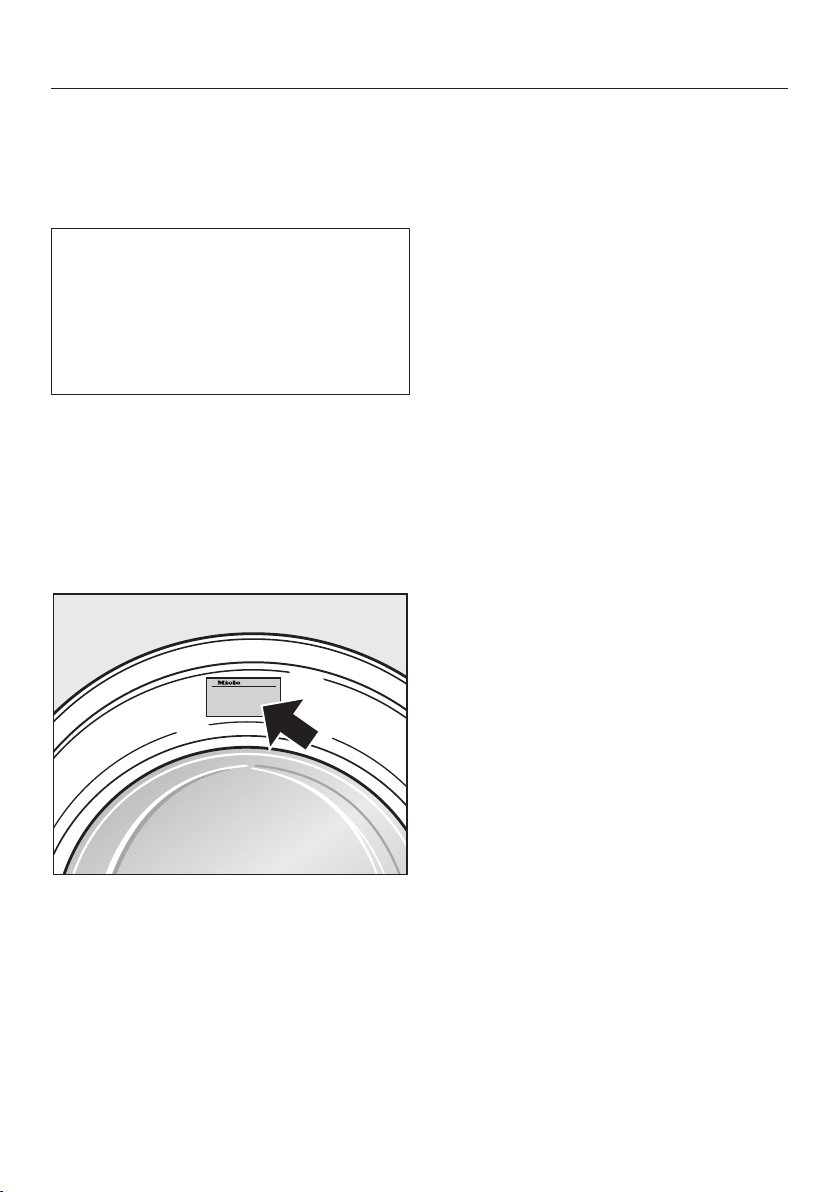
Service
71
Contact in case of fault
In the event of any faults which you
cannot remedy yourself, please contact
Miele.
You can book a Miele customer
service call-out online at
www.miele.com.au/service or
www.miele.co.nz/service.
Contact information for Miele can be
found at the end of this booklet.
Please quote the model and serial
number of your appliance when
contacting Miele. This information can
be found on the data plate.
The data plate is found above the
porthole glass when the door is
opened.
Warranty
The manufacturer's warranty for this
appliance is 2years.
For further information, please refer to
your warranty booklet.
Optional accessories
Optional accessories for this washer-
dryer are available from Miele.
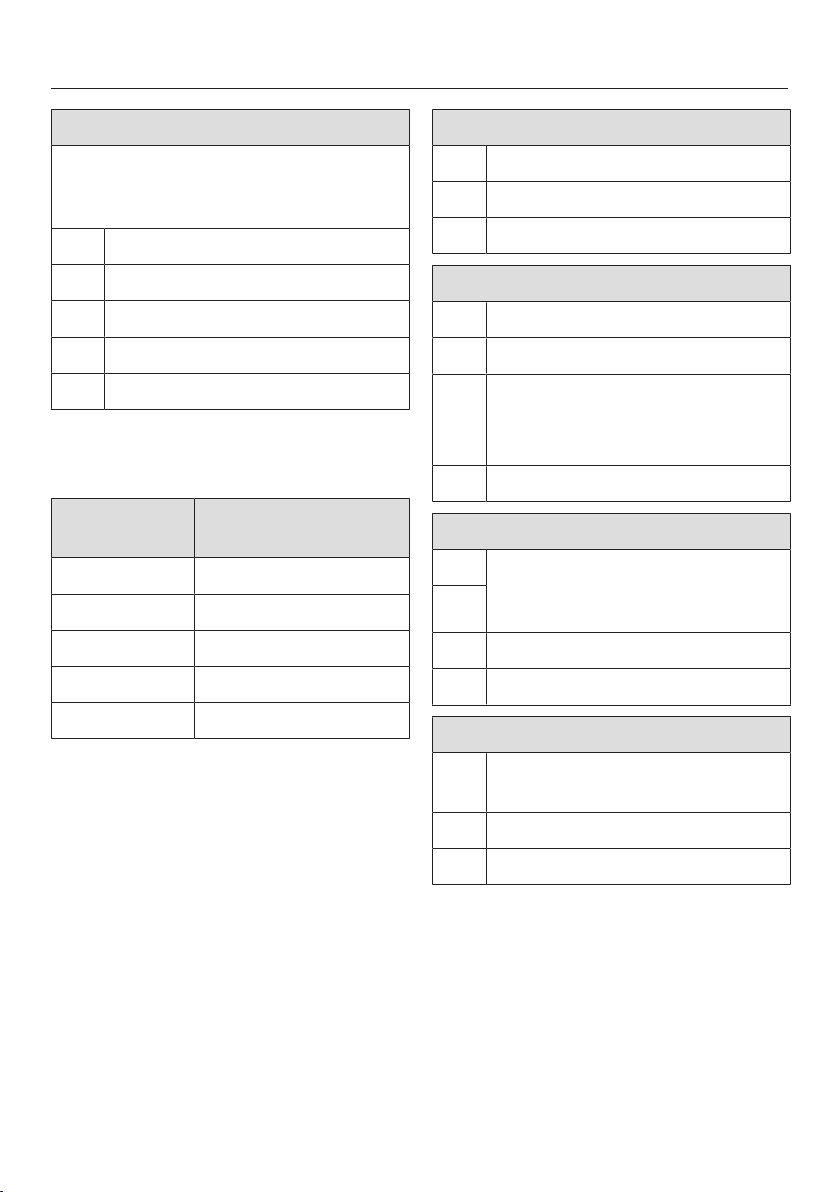
Garment care label symbols
72
Washing
The figure quoted in the bucket is the
maximum temperature at which the
garment can be washed.
Normal agitation
Reduced agitation
Much reduced agitation
Hand wash
Do not wash
Programme selection
examples
Programme Garment care label
symbols
ECO40-60
Cottons
Minimum iron
Delicates
Woollens
Drying
Normal temperature
Low temperature
Do not tumble dry
Ironing
Approx. 200°C
Approx. 150°C
Approx. 110°C
Ironing with steam can cause
irreversible damage.
Ironing prohibited
Professional cleaning
Dry clean only. The letters
indicate the type of cleaning
agent required.
Wet cleaning
Dry cleaning prohibited
Bleaching
Any oxidation bleach can be
used
Use oxygen bleach only
Do not bleach
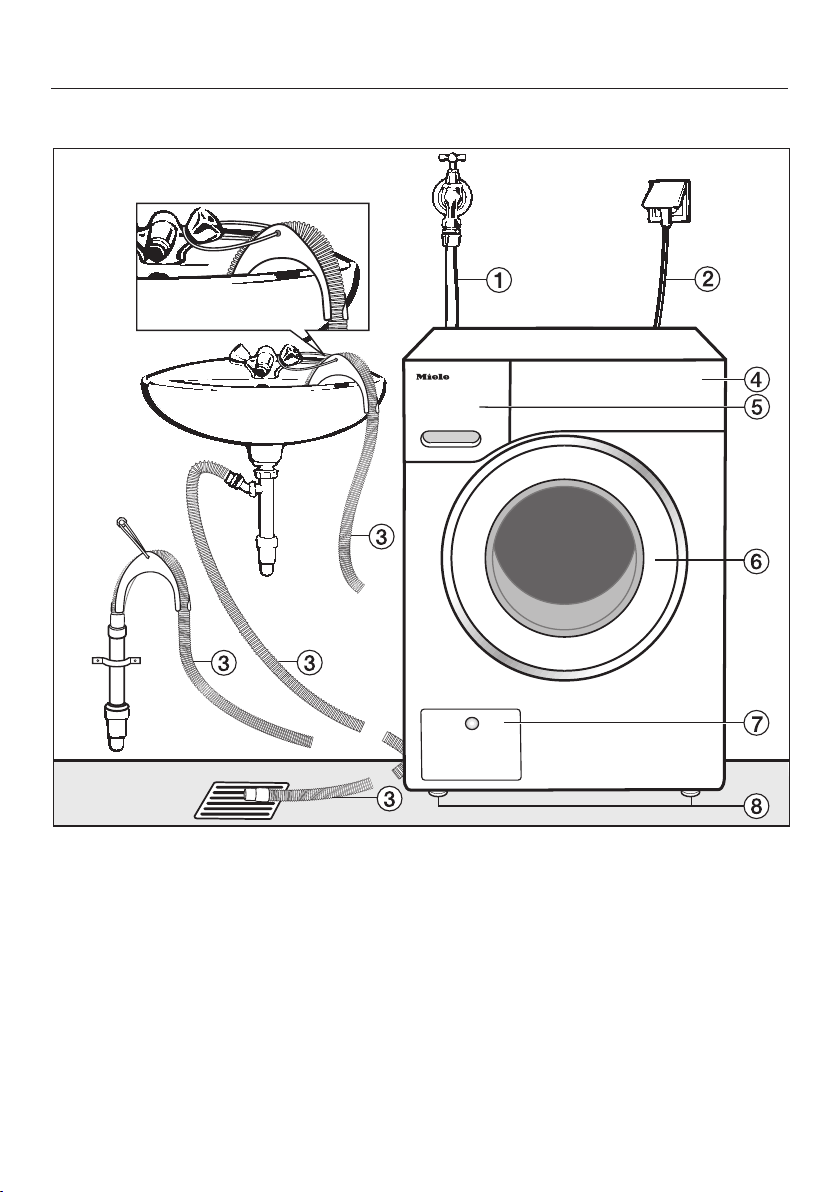
Installation
*INSTALLATION*
73
Front view
a
Water inlet hose
b
Electrical connection
c
Flexible drain hose (with detachable
swivel elbow)
d
Control panel
e
Detergent dispenser drawer
f
Door
g
Access to drain filter, drain pump and
emergency release
h
4height-adjustable feet
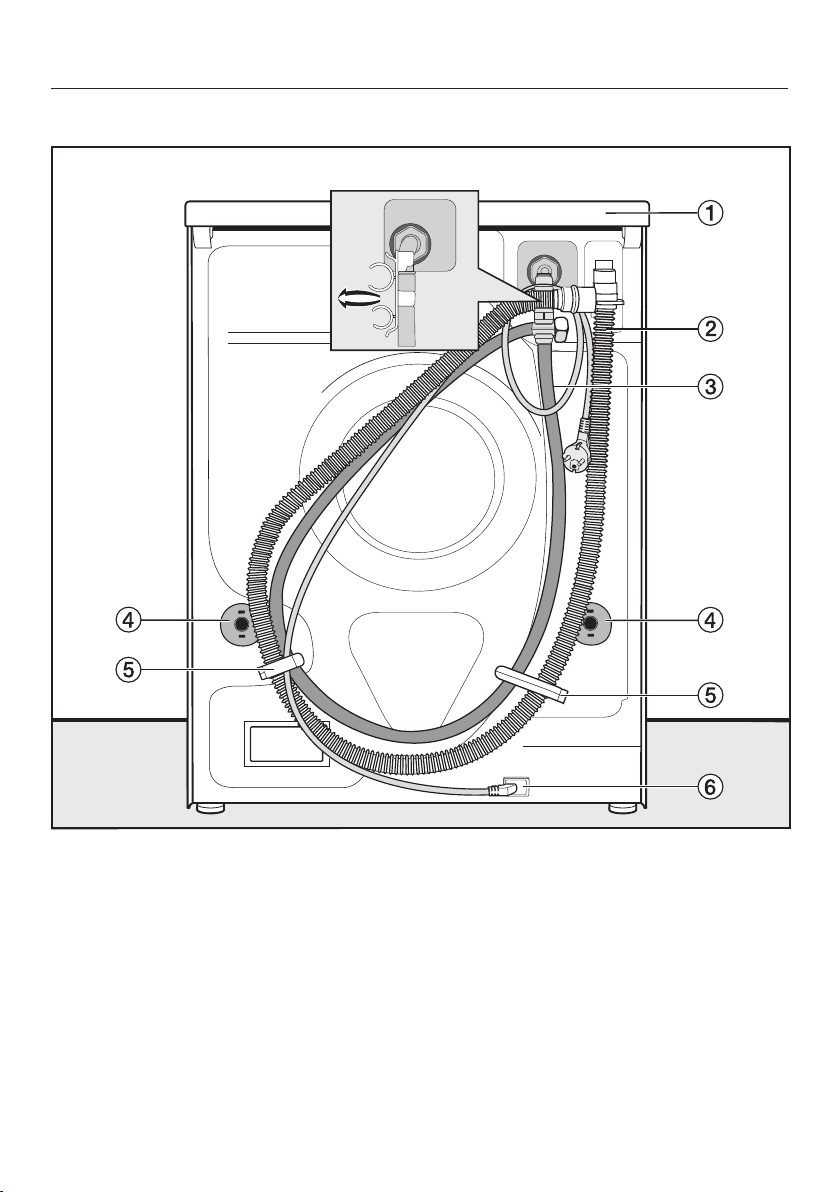
Installation
*INSTALLATION*
74
Rear view
a
Protruding lid for holding when
moving the machine
b
Drain hose
c
Water inlet hose
d
Safety caps for transit bars
e
Transport clips for water inlet hoses
and drain hoses
f
Electrical connection
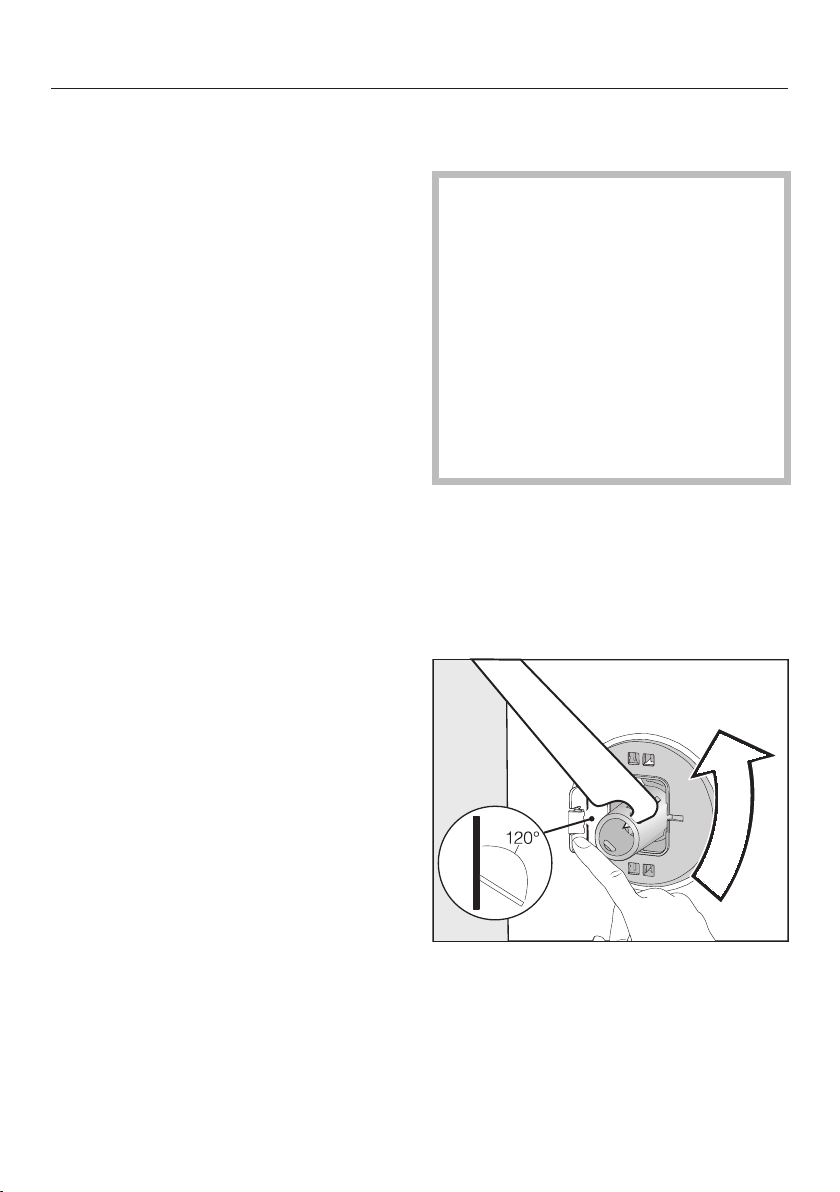
Installation
*INSTALLATION*
75
Installation surface
A concrete floor is the most suitable
installation surface. It is far less prone
to vibration during the spin cycle than
wooden floorboards or a carpeted
surface.
Please note:
The washer-dryer must be level and
securely positioned.
To avoid vibrations during spinning
the washer-dryer must not be
installed on soft floor coverings.
If installing on a wooden joist floor,
please note:
Check for the presence of pipes and
cables first.
Use a plywood base underneath the
washer-dryer (at least
59x52x3cm). The base must span
several joists and be bolted to the
joists and not only to the floorboards.
Useful tip: If possible, install the
washer-dryer in a corner of the room, as
this is usually the most stable part of
the floor.
Carrying the washer-dryer to
its installation site
Danger of injury due to
unsecured lid.
Make sure the fixings at the back of
the lid are secure. They may become
brittle due to external circumstances.
There is a danger of the lid being
pulled off when carrying the
appliance.
Before carrying the machine, check
that the lid is secure where it
protrudes at the back of the
machine.
Carry the washer-dryer by the front
feet and by the lid where it protrudes
at the back of the appliance.
Removing the transit bars
Removing the left transit bar
Push the flap outwards and turn the
transit bar 90° using the enclosed
spanner.
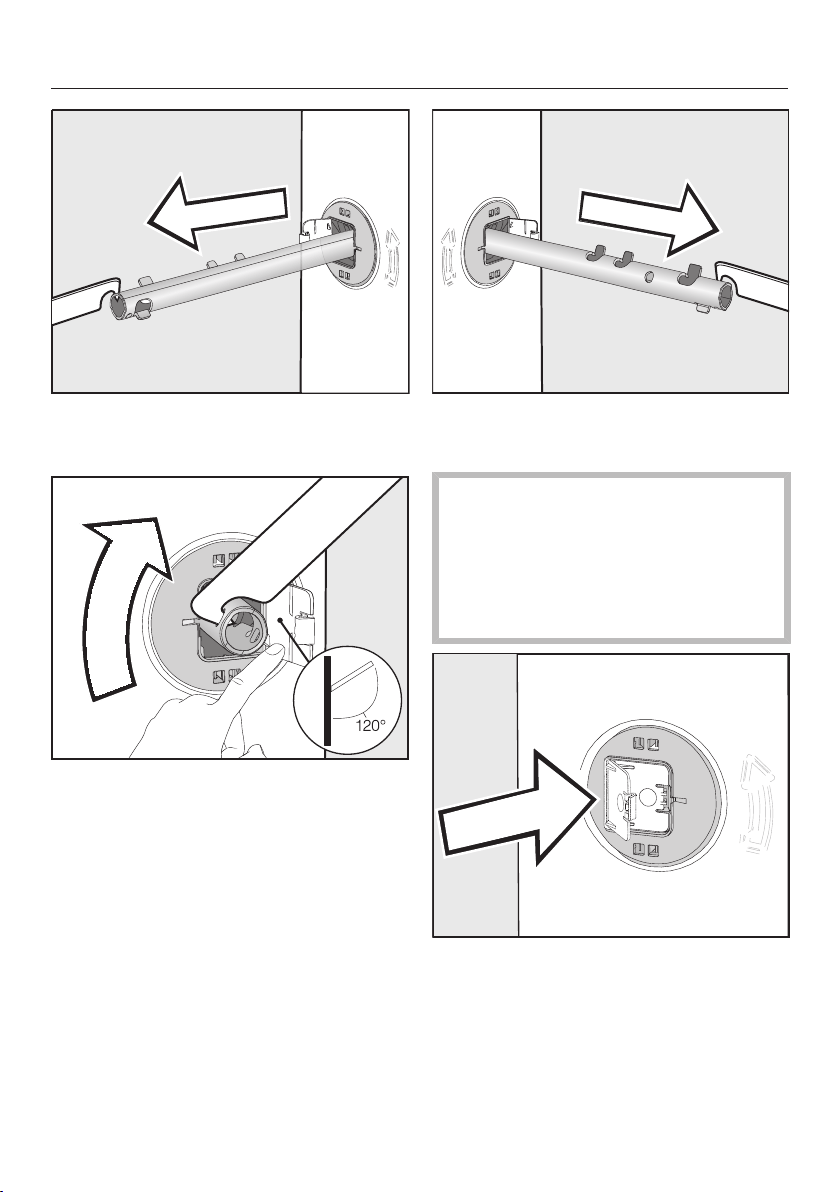
Installation
*INSTALLATION*
76
Then pull the transit bar out.
Removing the right transit bar
Push the flap outwards and turn the
transit bar 90° using the enclosed
spanner.
Then pull the transit bar out.
Covering the holes
Risk of injury from sharp edges!
There is a risk of injury from reaching
into holes that are not covered.
The holes for the transit bars must be
covered after the transit bars have
been removed.
Press the flaps firmly shut until they
click into place.
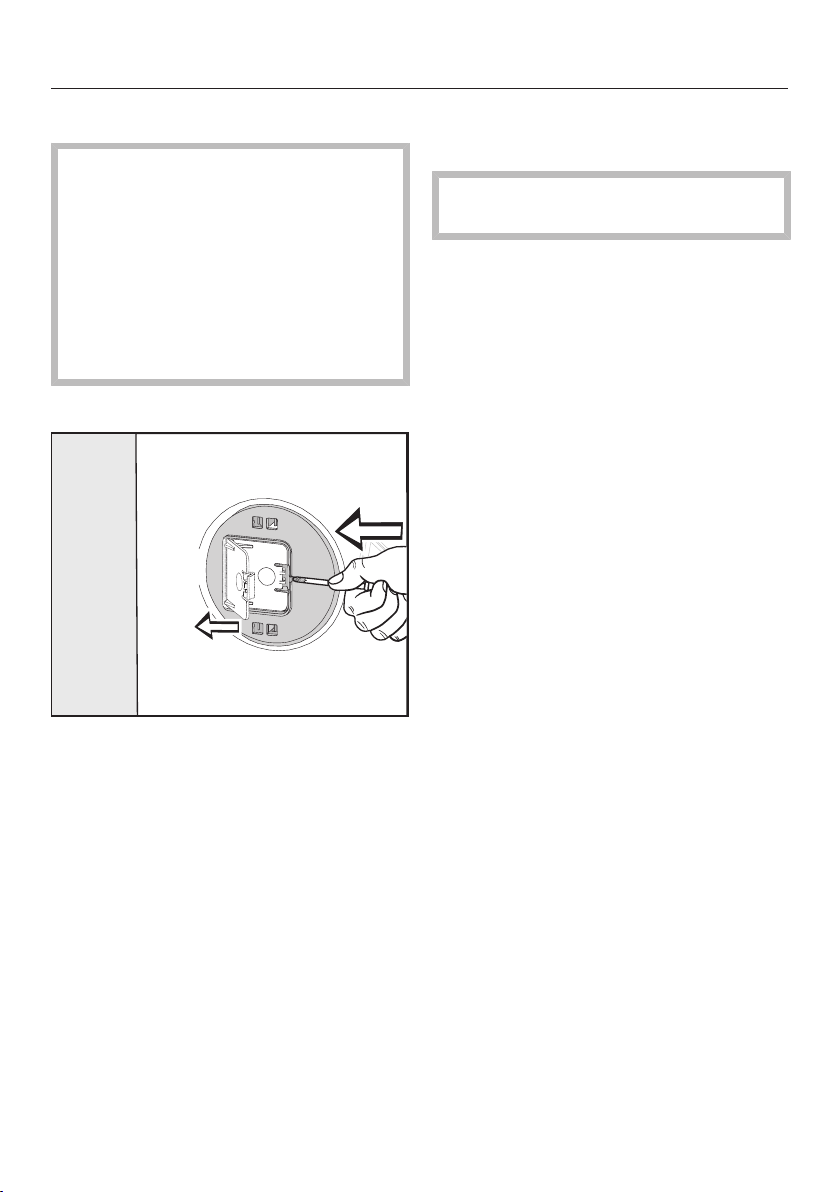
Installation
*INSTALLATION*
77
Refitting the transit bars
Risk of damage from incorrect
transport.
The washer-dryer may become
damaged if moved without the transit
bars in place.
Keep the transit bars in a safe place.
Fit them again if the washer-dryer is
to be moved (e.g. when moving
house).
Opening the flaps
Push against the catch with a pointed
object, e.g. a narrow screwdriver.
The flap will open.
Fitting the transit bars
Install the transit bars in reverse order
to their removal.
Useful tip: If you lift the drum slightly,
the transit bars can be pushed in more
easily.
Installing under a continuous
worktop
Building under kits* must only be
installed/dismantled by a specialist.
- A special building under kit* is
required. The cover plate included in
the building under kit* replaces the lid
of the washer-dryer. It is necessary to
fit the cover plate for electrical safety
reasons.
- Connections for electricity, water and
drainage should be installed in such a
way that they remain accessible
when the washer-dryer is in its final
position.
The building under kit includes
installation instructions.
* Optional accessories
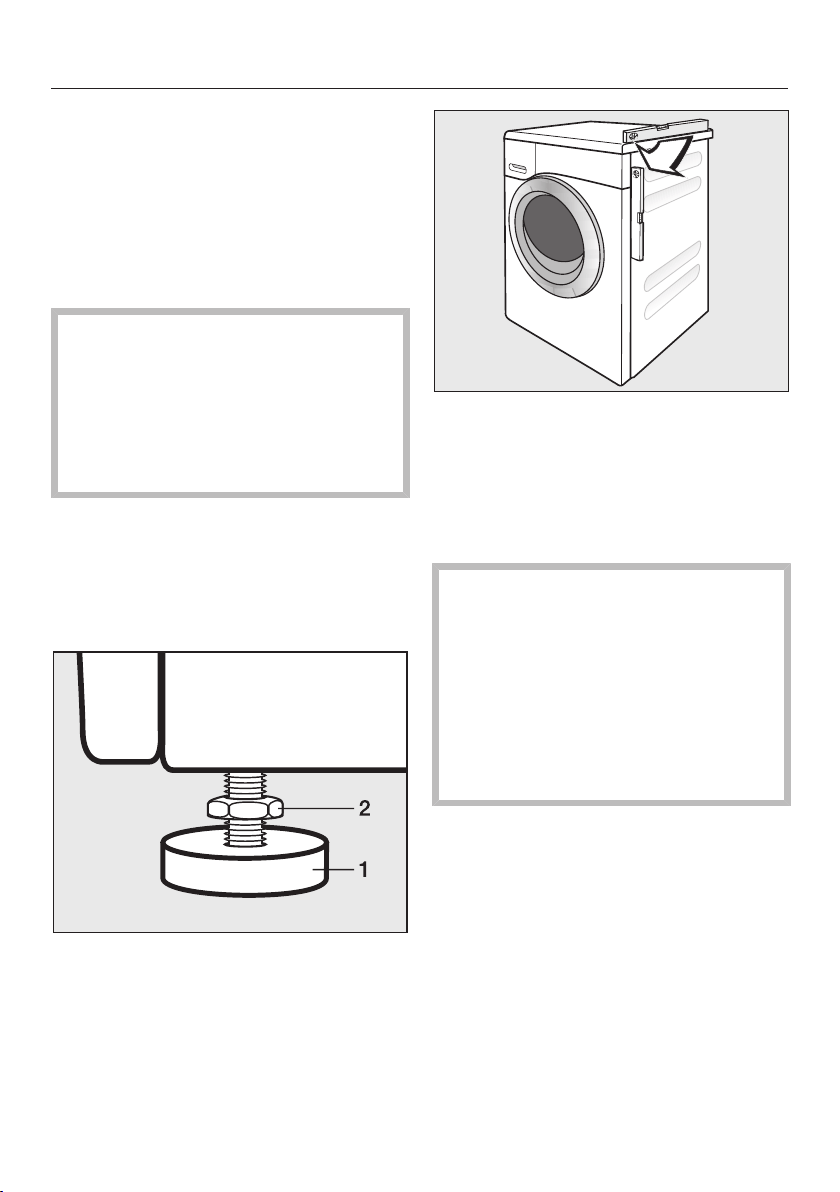
Installation
*INSTALLATION*
78
Levelling the washer-dryer
The washer-dryer must stand perfectly
level on all four feet to ensure safe and
proper operation.
Incorrect installation may increase
electricity and water consumption and
may cause the machine to move about.
The appliance must not be
installed behind a lockable door, a
sliding door or a door with a hinge on
the opposite side to that of the
appliance, in such a way that a full
opening of the appliance door is
restricted.
Screwing out and adjusting the feet
The 4 adjustable feet are used to level
the washer-dryer. All four feet are
screwed in when the appliance is
delivered.
Using the spanner supplied, turn
counter nut 2 in a clockwise direction.
Then turn counter nut 2 together with
foot 1 to unscrew.
Use a spirit level to check the
washer-dryer is standing level.
Hold foot 1 securely with a pipe
wrench. Turn counter nut 2 again
using the spanner supplied until it sits
firmly up against the housing.
Risk of damage from incorrectly
aligned washer-dryer.
There is a danger of the washer-
dryer moving about if the feet are not
secured.
Turn all 4 counter nuts for the feet
until they sit firmly up against the
casing. Please also check this for the
feet which did not need adjustment.

Installation
*INSTALLATION*
79
The Miele water protection
system
The water protection system protects all
parts of the washer-dryer from water
damage.
The system consists of three main
components:
- the inlet hose
- the electronic unit, and the drainage
and overflow protection
- the drain hose
Inlet hose
- Protected from bursting
The inlet hose can withstand
pressure of more than 7000kPa.
Electronic unit and machine housing
- Sump
Any leaking water is collected in a
sump in the base of the machine. A
float switches off the water inlet
valves. Further water intake is
blocked. The water inside the suds
container is pumped out.
- Overflow protection
This prevents the machine from
taking in too much water and
overflowing. If the water level
exceeds a certain level, the drain
pump switches on and pumps the
excess water away.
Drain hose
The drain hose is protected by a
ventilation system which prevents the
machine from being emptied
completely.
Installation
*INSTALLATION*
80
Water intake
Health risk and risk of damage
due to contaminated incoming water.
The quality of the water used must
correspond to the drinking water
specification of the country in which
the appliance is being operated.
Always connect the appliance to
potable water.
The washer-dryer must be connected to
a mains water supply in accordance
with current local and national safety
regulations.
The water inlet pressure must be at
least 100kPa and must not exceed an
overpressure of 1000kPa. If the
pressure exceeds 1000kPa, a pressure
reducing valve must be installed.
Connection to the mains water supply
should incorporate a water tap with a
¾" threaded union. If no tap is
available, only a qualified installer may
connect the washer-dryer to the mains
water supply.
The connection point is subject to
mains water pressure.
You should turn on the tap slowly
and check for leaks. Correct the
position of the seal and screw thread
if water escapes.
The washer-dryer is not suitable for
connection to a hot water supply.
Maintenance
Only use a genuine Miele hose that has
been pressure tested to withstand at
least 7,000kPa should you ever need a
replacement.
The dirt filter in the union nut at the
open end of the water inlet hose
protects the water intake valve.
This filter must not be removed.
Hose extension
Longer hoses 2.5m or 4.0m in length
are available from Miele as optional
accessories.
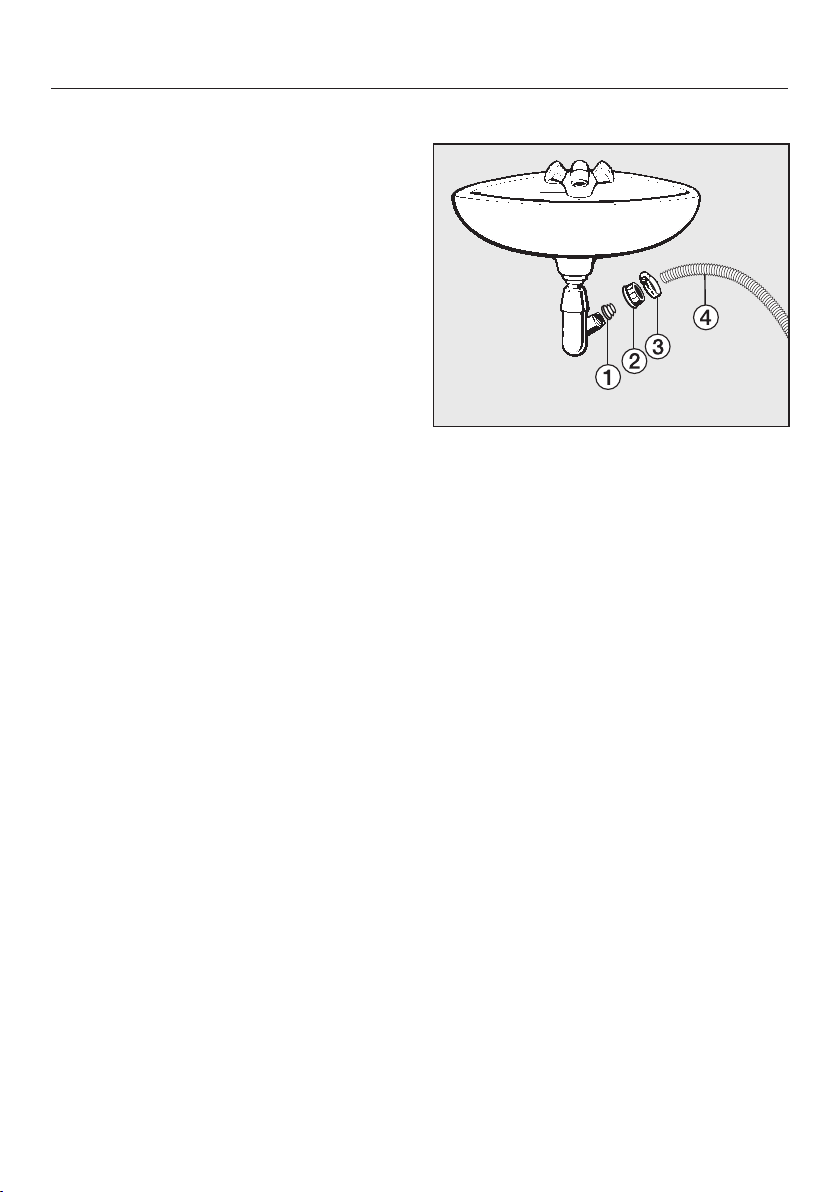
Installation
*INSTALLATION*
81
Drainage
The suds are drained through a drain
pump with a 1m delivery head. For the
water to drain freely, the hose must be
installed free of kinks. The elbow piece
supplied hooks onto the end of the
hose. If required, the hose can be
extended to a length of up to 5m. The
necessary parts can be purchased from
Miele.
For a delivery head of more than 1m
(up to a max. of 1.8m) a replacement
drain pump will need to be fitted.
Please contact Miele for advice. In this
case the hose can be extended to a
maximum of 2.5m. The necessary
parts can be purchased from Miele.
Drain hose connection options
1. Directed into a sink or basin.
Please note:
– Hook the hose over the edge and
secure it.
– Make sure that the water can drain
away freely without hindrance.
Otherwise there is a risk of water
overflowing or of some of the
drained water being sucked back
into the machine.
2. Connected securely to a plastic drain
pipe with a rubber nipple (there is no
need to use a siphon).
3. Connected securely to a floor drain
(gully).
4. Connected securely to a standpipe.
Connecting to a washbasin
a
Adapter
b
Washbasin nut
c
Hose clip
d
End of the hose
Fit the adapter to the sink drain
outlet using the nut .
Attach the end of the hose to the
adapter .
Use a screwdriver to tighten the hose
clip up close to the nut.

Installation
*INSTALLATION*
82
Electrical connection
The washer-dryer is supplied with a
mains cable with moulded plug ready
for connection to a 230V electricity
supply. The voltage, rated load and plug
rating are given on the data plate.
Please ensure these match the
household mains supply.
The socket must be easily accessible
after the washer-dryer has been
installed. If the switch is not accessible
after installation an additional means of
disconnection must be provided for all
poles.
Risk of fire from overheating.
Connecting the washer-dryer to a
multi-socket adapter or to an
extension lead can overload the
cable.
For safety reasons, do not use an
extension lead or multi-socket
adapter.
All electrical work must be carried out
by a suitably qualified and competent
person, in strict accordance with
national and local safety regulations.
For extra safety, it is advisable to install
a residual current device (RCD) with a
trip current of 30mA. Ensure power is
not supplied to the appliance until after
the installation has been completed.
Connection should be made via a
suitable switched socket.
If the connection cable is damaged, it
must only be replaced with a specific
connection cable of the same type
(available from Miele) in order to avoid a
hazard. For safety reasons, such
replacement may only be carried out by
a suitably qualified and competent
technician or by Miele.
The data plate indicates the nominal
power consumption and the
appropriate fuse rating. Compare the
specifications on the data plate with
those of the mains electricity supply.
If in any doubt, consult a qualified
electrician.
Temporary or permanent operation with
a self-sufficient or non-mains
synchronous energy supply system
(e.g. isolated networks, back-up
systems) is possible. A requirement for
the operation is that the energy supply
system complies with all current local
and national requirements that apply to
stand-alone, solar and/or battery
systems”.
The protective measures provided in
the domestic installation and in this
Miele product must also be assured in
their function and operation in isolated
operation or in non-mains synchronous
operation, or replaced with equivalent
measures in the installation.
The machine must not be used with so-
called energy-saving devices either.
These reduce the amount of energy
supplied to the machine, causing it to
overheat.

Technical data
83
Height 850 mm
Width 596 mm
Depth 637mm
Depth with door open 1055mm
Height for building under 820(+8/-2)mm
Width for building under 600 mm
Weight Approx. 95kg
Capacity, washing
Capacity, drying
8.0 kg dry laundry
4.0 kg dry laundry
Supply voltage see data plate
Rated load see data plate
Fuse rating see data plate
Minimum water flow pressure 100 kPa (1 bar)
Maximum water flow pressure 1000 kPa (10 bar)
Water inlet hose length 1.55 m
Drain hose length 1.50 m
Mains connection cable length 2.00 m
Drain pump head height max. 1.00 m
Drain pump length max. 5.00 m
LEDs Class 1
Test certifications awarded see data plate
Frequency band 2.4000 GHz – 2.4835 GHz
Maximum transmission power < 100 mW
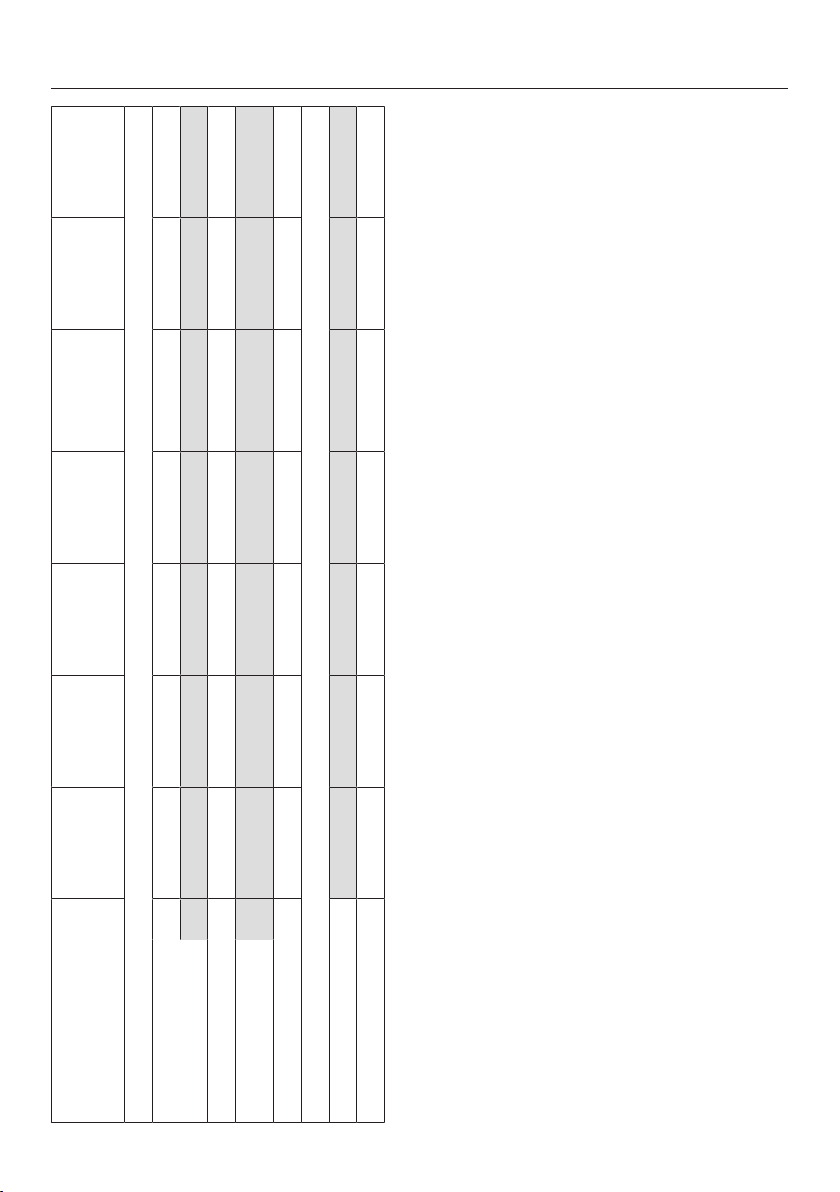
Consumption data
84
Programmes Load Energy Water Duration
Temperature
1
Residual
moisture Spin speed
kg kWh Litres h:min °C % rpm
Washing
Cottons 60 8.0 1.35 57 2:29 54 51 1500
20 8.0 0.35 72 2:39 20 51 1500
Minimum iron 30 3.5 0.32 47 1:59 30 30 1200
Express
2
40 3.5 0.33 30 0:20 27 60 1200
Woollens 30 2.0 0.23 35 0:39 – – –
Drying
Cottons 4.0 2.03 17 2:06 – – –
Minimum iron 3.5 1.22 11 1:21 – – –
1
Maximum laundry temperature reached in main wash.
2
Short Extra activated
Information for customers:
Consumption data can vary from the nominal values listed depending on water pressure, water hardness, water inlet temperature, room
temperature, type and volume of load, fluctuations in the electricity supply and any Extras selected.
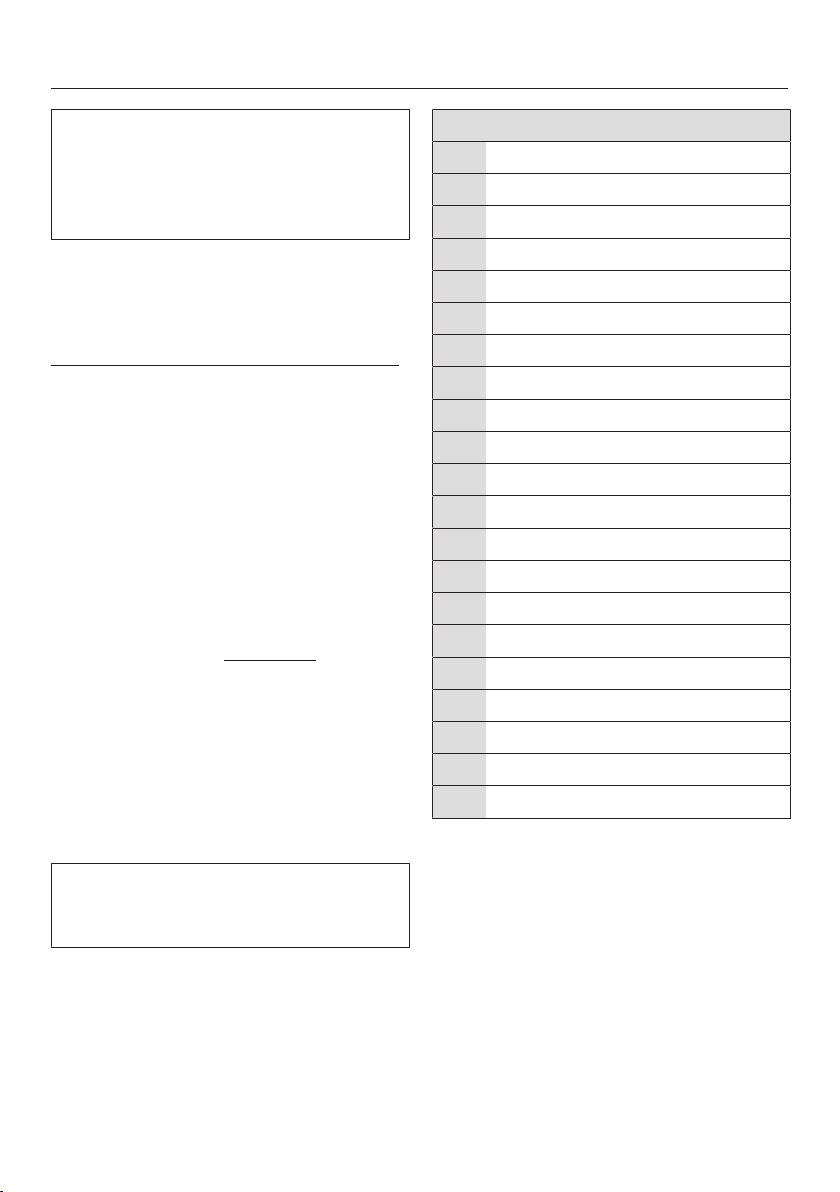
Programmable functions
85
The programmable functions are used
to alter the washer-dryer’s electronics
to suit changing requirements.
Programmable functions can be
altered at any time.
Programming is carried out in 9 steps
(, , ...) using the sensors.
Opening the programming level
Before you begin, ensure the following:
- The washer-dryer is switched on and
the programme selector is pointing to
a programme.
- The door of the washer-dryer is open.
Touch the Start/Add laundry sensor
and hold it down whilst carrying out
steps –.
Close the washer-dryer door.
Wait until the Start/Add laundry
sensor lights up constantly...
...and then release the Start/Add
laundry sensor.
After a few seconds, , for example,
will light up in the time display.
Choosing and selecting
programmable functions
The number of the programmable
function will appear in the display as
and a number: e.g. .
Touch the or sensor to scroll to
the next or previous programmable
function:
Programmable functions
Buzzer duration
Buzzer
Keypad tone
PIN code
Display switch-off status
Memory
8 Gentle action
Temperature reduction
Maximum rinse level
Suds cooling
Low water pressure
Display brightness
Cottons drying level
Minimum iron drying level
Extended cool down
Compressed laundry protection
Operating hours
Remote control
SmartGrid
RemoteUpdate
Factory default setting
Confirm the selected programmable
function by touching the Start/Add
laundry sensor.
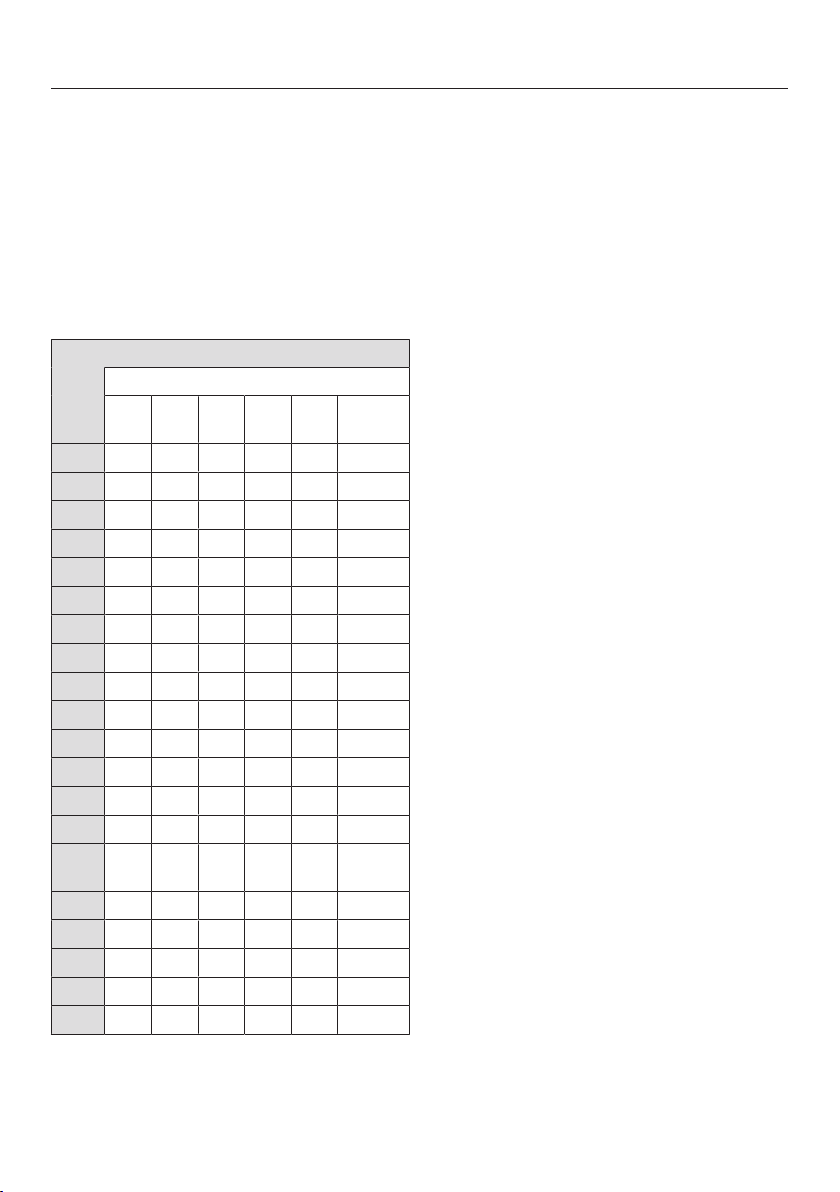
Programmable functions
86
Editing and saving the
programmable function
You can switch a programmable
function on/off or select different
options.
Touch the or sensor to switch a
programmable function on/off or to
select an option.
Programmable function
Available options
4 to
8
to
Confirm your selection with the Start/
Add laundrysensor.
The number of the programmable
function, e.g. , will light up again.
Exiting the programming level
Turn the programme selector to the
position.
The settings have been changed. You
can alter the settings again at any time.
Programmable functions
87
Buzzer duration
The buzzer sounds to let you know the
programme has finished. You can
decide how long the buzzer should
sound for.
Options
= The buzzer sounds 3times at
the end of the programme.
= The buzzer sounds until the
washer-dryer switches off
automatically (max. 1hour).
Buzzer
The buzzer sounds to let you know the
programme has finished.
Options
= Off
= On - Quiet
= On - Loud
Keypad tone
The tone that sounds when a sensor is
pressed can be switched on or off.
Options
= Off
= On - Quiet
= On - Loud
PIN code
The PIN code prevents your washer-
dryer being used without your
knowledge.
When the PIN code has been activated,
you have to enter the code after
switching the washer-dryer on.
Otherwise the washer-dryer cannot be
operated.
Options
= Off
= On
If the option has been selected, you
will have to enter the PIN code before
you can operate the washer-dryer.
Using the washer-dryer when the PIN
code is activated
The code is 125 and cannot be altered.
Switch the washer-dryer on.
appears in the time display and
the and sensors light up.
Touch the sensor.
appears in the time display.
Confirm the number with the Start/
Add laundry sensor.
The first number has been saved.
Enter the second and third numbers
using the and sensors and
confirm the numbers with the Start/
Add laundry sensor.
The lock function is deactivated.

Programmable functions
88
Control panel switch-off
status
To save energy, the time display and
sensors will go out after 10 minutes,
and only the Start/Stop sensor will
flash slowly.
Options
= Off
The time display and sensors
will remain lit up while the
washer-dryer is switched on.
= On
The time display and sensors
will switch off 10minutes after
the programme has started.
However, the time display and
sensors will remain lit up for 10
minutes after a Delay start time
has elapsed, after the end of a
programme, or at the end of
the Anti-crease phase.
Memory
The washer-dryer will save the last
settings selected for a programme
(temperature, spin speed) after the
programme has started.
The next time the programme is
selected these saved settings will
appear in the display.
Options
= Off
= On
Gentle action
With Gentle action activated, drum
agitation is reduced. In this way, lightly
soiled items can be washed more
gently.
Gentle action can be activated for the
Cottons and the Minimum iron wash
programmes.
Options
= Off
= On

Programmable functions
89
Temperature reduction
At high altitudes water has a lower
boiling point. Miele recommends
activating the reduced temperature
setting at altitudes of 2000m or above
to prevent water from boiling.
Options
= Off
= On
Maximum rinse level
The water level in the rinses can be
permanently set to the highest value in
the Cottons and Minimum iron
programmes.
This function is important for allergy
sufferers as it achieves excellent rinse
results. The water consumption will be
increased.
Options
= Off
= On
Suds cooling
Additional water flows into the drum at
the end of the main wash to cool the
suds down. Hot suds can damage
plastic drainage pipes.
Suds cooling takes place when a
Cottons programme with a temperature
of 70°C or higher is selected.
Suds cooling should be activated:
- to prevent the danger of scalding if
the drain hose is hooked over the
edge of a sink or laundry tub.
- where the drainage pipes are rated
less than 70°C.
Options
= Off
= On
Low water pressure
If the water pressure is below 100kPa
(1bar), the washer-dryer will stop the
programme and a water intake fault
message will appear in the display. If
the on-site water pressure cannot be
increased, activating this setting will
prevent the programme from being
cancelled.
Options
= Off
= On

Programmable functions
90
Display brightness
The brightness of the dimmed sensors
in the control panel can be set to one
of 7 different levels.
The brightness will change as soon as a
different setting is chosen.
Options
= Darkest level
= Brightest level
Cottons drying levels
You can adjust the drying levels for the
Cottons programme if needed.
Options
= Damper
= Drier
Minimum iron drying levels
You can adjust the drying levels for the
Minimum iron programme if needed.
Options
= Damper
= Drier
Extended cool down
The cooling down phase which takes
place before the end of a programme
can be extended if required. This cools
the garments down even more. The
cooling down phase can only be
extended if a drying level has been
selected. Extended cool down is not
active for timed drying.
Options
= Minutes
= Minutes

Programmable functions
91
Compressed laundry
protection
The maximum final spin speed can be
limited to prevent laundry forming a
ring around the drum.
The Compressed laundry protection
setting is only effective with continuous
washing and drying.
Options
= Off
= 1200rpm
= 1100rpm
= 1000rpm
= 900rpm
Operating hours
You can read off how many hours your
washer-dryer has been in operation
for.
The total operating time is shown in the
time display in single digits. The
washer-dryer has been in operation for
1234hours, for example. The figure
shown in the time display will start with
an followed by a, then a and after
this a and a. The letter is
displayed again after this.
Remote control
You can use the Miele App to check
the status of your washer-dryer from
anywhere and start it remotely. You
can also control it remotely via the
MobileStart programme.
You can switch off the
programmable function if you do
not want to operate the washer-dryer
with your mobile device.
If the programmable function is not
switched on, the App can still be used
to cancel the programme.
Use the sensor to set a time period
within which you want to start the
washer-dryer and start the Delay start
function (see “Delay start/SmartStart”).
The washer-dryer will then start within
the specified timeframe when it receives
your signal. If it has not received a start
signal by the latest start time set, the
washer-dryer will start automatically.
Options
= Off
= On
Programmable functions
92
SmartGrid (only functional
in selected countries)
You can set your washer-dryer to start
automatically based on an external
signal within a certain time period.
If you have activated SmartGrid, the
sensor will have the new SmartStart
function instead of the Delay start
function.
Use the sensor to set a SmartStart
time period. The washer-dryer will then
start within the time period specified by
you when it receives an external signal.
If an external signal has not been
received by the latest start time set, the
washer-dryer will start automatically
(see “Delay start/SmartStart”).
Options
= Off
= On
RemoteUpdate
The RemoteUpdate function is used for
updating the software in your washer-
dryer. If an update is available for your
washer-dryer, it will automatically
download it. Updates will not be
installed automatically. They must be
initiated manually.
If you do not install an update, you can
continue to use your washer-dryer in
the usual way. However, Miele
recommends installing updates.
RemoteUpdate procedure
Information about the content and
scope of an update is provided in the
Miele App.
The message will appear in the time
display if an update is available.
You can install the update immediately
or postpone this until later. When the
washer-dryer is switched on again, you
will be reminded about the update.
The update may take several minutes.
Please note the following about the
RemoteUpdate function:
- You will only receive a message when
an update is available.
- Once an update has been installed, it
cannot be undone.
- Do not switch off the washer-dryer
during an update. Otherwise, the
update will be aborted and will not be
installed.
- Some updates can only be carried
out by a Miele service technician.

Programmable functions
93
Activating/Deactivating
The RemoteUpdate function is
activated as standard. A new update
will be downloaded automatically but
will only be installed if you initiate
installation manually. Deactivate the
RemoteUpdate function if you do not
want any updates to be downloaded
automatically.
Options
= Off
= On
Starting the update
After the washer-dryer is switched on,
appears in the time display.
Touch the Start/Add laundry sensor.
will flash in the time display. The
update starts.
Bars in the time display show the
progress of the update:
= 0%
= 100%
Postponing the update
After the washer-dryer is switched on,
appears in the time display.
Touch the sensor.
The running time of the selected
programme appears in the time display.
The next time you switch on the
appliance, you will be prompted to start
the update again.
Factory default setting
All programmable functions except
operating hours are reset to the
factory default settings.
Options
= Go back (without reset to
factory default settings)
= Reset programmable functions
to the factory default settings

Programmable functions
94
Switching off Wi-Fi
Turn the programme selector to the
MobileStartprogramme.
appears in the time display.
Touch and hold the sensor
until the countdown in the time
display has finished.
appears in the time display.
- The Wi-Fi is switched off.
- The Wi-Fi connection will be reset to
the factory setting.
The network configuration should be
reset whenever a washer-dryer is
being disposed of or sold, or if a
used washer-dryer is being put into
operation. This is the only way to
ensure that all personal data has
been removed and, in the case of the
latter, the previous owner will no
longer be able to access the
appliance.
A new connection set-up has to be
carried out in order to use
Miele@home again.
Copyright and licences for the
communication module
For the purpose of operating and
controlling the communication module,
Miele uses proprietary or third-party
software that is not covered by open
source licensing terms. These items of
software/software components are
protected by copyright. The copyright
powers of Miele and third parties must
be respected.
In addition, the communication module
contains software components which
are distributed under open source
licensing terms. The open source
components contained in the appliance
along with the corresponding copyright
notices, copies of the licensing terms
valid at the time, and any further
information can be accessed locally via
IP using a web browser (http://<IP
address>/Licenses), where <IP
address> is the IP address of the
appliance. The liability and warranty
arrangements for the open source
licences displayed in this location only
apply in relation to the respective rights
holders.

Detergents and care products
95
Detergent, fabric care products,
additives and machine care products
are available for this washing machine.
All products have been designed for
Miele washing machines.
These and many other products can be
ordered from shop.miele.com, Miele
directly or a Miele Experience Centre.
Detergent
UltraWhite (powder detergent)
- Best results at 20/30/40/60/95°C
- Radiant white laundry thanks to
powerful formula with active oxygen
- Excellent stain removal even at low
temperatures
UltraColor (liquid detergent)
- Best wash results at 20/30/40/60°C
- With colour-protection formula for
brilliant colours
- Excellent stain removal even at low
temperatures
- Also available as a powder detergent
WoolCare delicates detergent (liquid
detergent)
- For wool, silks and delicates
- Special care complex based on
wheat protein and with colour-
protection formula
- Best wash results at 20/30/40°C
UltraDark (liquid detergent)
- For black and dark textiles
- With special colour-protection
formula
- Anti-pilling effect protects your
garments from discolouration
- Excellent stain removal even at low
temperatures
Sensitive Skin (powder detergent)
- High quality detergent formulated for
people with sensitive skin
- Contains no dyes and preservatives
- Most suitable for white or light
coloured textiles

Detergents and care products
96
Specialist detergents
These specialist detergents are
available as convenient single-use
capsules.
Caps Sport
- For synthetic fabrics
- Neutralises odours thanks to built-in
odour absorber
- Prevents static charge in clothes
- Retains the shape and breathability
of synthetic fabrics
Caps DownCare
- For down-filled items
- Retains the elasticity and
breathability of downs
- Lanolin for effective cleaning and
gentle care
- Feathers do not stick together and
stay fluffy
Caps WoolCare
- Woollens and delicates detergent
- Special care complex with wheat
proteins
- Fibre protection technology to
prevent felting
- Colour protection formula for gentle
cleaning
Caps CottonRepair
- Special detergent for cotton fabrics
- Visibly renews fabric with just one
wash
- Special Miele formula with
Novozymes technology
- Removes pilling and renews colour
intensity and brightness
- Depending on fabric do not use more
than 1–2 times per year
Fabric care
These fabric care products are available
as convenient single-use capsules.
Caps Fabric Softener
- Fabric softener for freshly scented
laundry
- Pure and thorough cleanliness with a
fresh scent
- For cuddly soft laundry
- Prevents static charge in clothes

Detergents and care products
97
Additive
The additive is available as a
convenient single-use capsule.
Caps Booster
- Highly effective stain remover
- Enzyme technology to help remove
stubborn stains
- Suitable for whites and colours
- For excellent wash results even at
low temperatures
Machine care products
Descaling agent
- Removes heavy limescale deposits
- Mild and gentle with natural citric
acid
- Gentle on heater elements, drum and
other components
IntenseClean
- For hygienic cleanliness in washing
machines
- Removes grease, bacteria and
unpleasant odours
- Effective thorough cleaning


Miele Head Office Melbourne:
Level 4, 141 Camberwell Road
Hawthorn East, VIC 3123
Miele Experience Centre South Melbourne:
206-210 Coventry Street
South Melbourne, VIC 3205
Miele Experience Centre and Office Sydney:
3 Skyline Place
Frenchs Forest, NSW 2086
Miele Experience Centre and Office Brisbane:
Tenancy 4C, 63 Skyring Terrace
Newstead, QLD 4006
Miele Experience Centre and Office Perth:
83-85 Sir Donald Bradman Drive
Hilton, SA 5033
Miele Experience Centre and Office Adelaide:
Miele Australia Pty. Ltd. Miele New Zealand Limited
Miele Global Headquarters
Germany
Miele & Cie. KG
Carl-Miele-Straße 29
33332 Gütersloh
Federal Republic of Germany
IRD 98 463 631
ACN 005 635 398
ABN 96 005 635 398
Miele Experience Centre Gold Coast:
131 Ferry Road
Southport, QLD 4215
Miele Experience Centre
and Head Office Auckland:
8 College Hill
Freemans Bay, Auckland 1011
Miele Experience Centre
Wellington:
183 Featherston Street
Wellington 6011
0800 464 353 (0800 4 MIELE)
www.miele.co.nz
205-207 Stirling Highway
Claremont, WA 6010
1300 464 353 (1300 4 MIELE)
www.miele.com.au
Miele Experience Centre Doncaster:
1136/7 Doncaster Shopping Centre
619 Doncaster Rd, Doncaster, VIC 3108

M.-Nr. 12 248 400 / 00en-AU, NZ
WTD 160