)$67$&&85$7(5(/,$%/(
&21&5(7(&$/&
Ð
3 52
$'9$ 1&('<$5')((7 ,1&+)5$&7,21
&21&5(7(&216758&7,210$7+&$/&8/$725
0RGHO
PRG4225E-E.indd 1 6/28/2016 1:03:07 PM

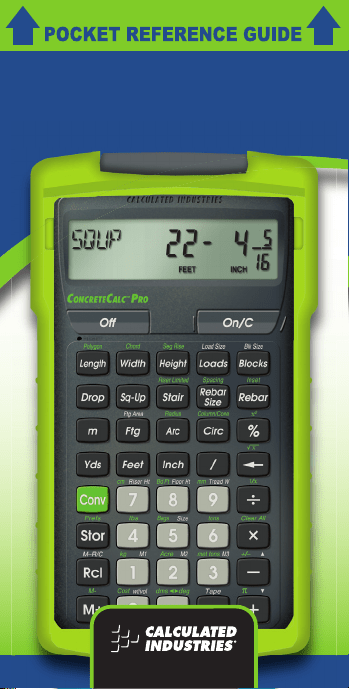
ConcreteCalc™ Pro
Designed for today’s concrete professional,
the ConcreteCalc Pro adds even more
power to the already powerful Construction
Master line of construction-math
calculators. This calculator is so simple to
use, even the novice user can easily solve
dimension-related problems.
• Solve Dimensional Math with Ease
• Dimensional Conversions
• U.S./Metric Conversions
• Weight/Volume Conversions
• Rectangular Area/Volume Calculations
• Block Quantity Solutions
• Footing Volume Calculations
• Instant Square-Up (Diagonal) Solutions
• Drop Distance Calculations
• Circular Area and Circumference
• Arc Length Calculations
• Calculate Stair Risers, Treads, Stringers
and Inclination Angle
• Material Estimations
• Paperless Tape
PRG4225E-E.indd 2 6/28/2016 1:03:08 PM

TABLE OF CONTENTS
GETTING STARTED .................................1
Key Denitions .......................................1
Preference Settings .............................10
Entering Dimensions ............................12
Conversions .........................................12
Basic Math Operations ........................14
Percentage Calculations ......................15
Memory Operation ...............................16
Paperless Tape ....................................17
USING THE CONCRETECALC PRO .....18
Length, Width, and Height Keys ..........18
Circle Calculations ...............................20
Squaring-Up a Concrete Slab .............23
Calculating Rebar ................................24
Calculating Loads ................................26
Blocks and Bricks.................................26
Polygon (Equal-Sided) .........................27
Concrete Footing .................................28
Finding Weight Per Volume .................29
Concrete Bags .....................................29
Calculating Drop ..................................30
Stair Calculations .................................32
APPENDIX ...............................................35
Accuracy/Errors ...................................35
Battery and Auto Shut-O ...................36
Default Settings ....................................36
Area Formulas .....................................38
Surface Area and Volume Formulas ...39
REPAIR AND RETURN ...........................40
Warranty, Repair and
Return Information ...............................40
WARRANTY ............................................41
PRG4225E-E.indd 3 6/28/2016 1:03:08 PM

— 2
GETTING STARTED
KEY DEFINITIONS
Basic Function Keys
+ - x z = Arithmetic operation
keys.
% Percent Key – Used to
nd a given percentage of
a number.
0 - 9 and . Keys used for entering
numbers.
O Turns all power
o, clearing all non-
permanent registers.
o On/Clear Key – Turns
on power. Pressing
once clears the display.
Pressing twice clears all
temporary values.
c Convert Key – Used
with the dimensional
keys to convert between
dimensions or with other
keys to access special
functions.
; Store Key – Used for
storing values.
s Recalls
stored values.
Unit Keys
y Yards Key – Enters or
converts to Yards.
f Feet Key – Enters or
converts to Feet as whole
PRG4225E-E.indd 1 6/28/2016 1:03:08 PM

— 2
or decimal numbers.
Also used with the i
and / keys for entering
Feet-Inch values (e.g.,
6 f 9 i 1 /
2). Repeated presses
during conversions toggle
between Fractional and
Decimal Feet.
i Inch Key – Enters or
converts to Inches. Entry
can be whole or decimal
numbers. Also used with
the / key for entering
fractional Inch values
(e.g., 9 i 1 /
2). Repeated presses
during conversions toggle
between Fractional and
Decimal Inches.
/ Fraction Bar Key –
Used to enter Fractions.
Fractions can be entered
as proper (1/2, 1/8,
1/16) or improper (3/2,
9/8). If the denominator
(bottom) is not entered,
the calculator’s fractional
accuracy setting is
automatically used.
m Meters Key – Enters or
converts to Meters.
c 7 Centimeters – Enters or
converts to Centimeters.
(Cont’d)
PRG4225E-E.indd 2 6/28/2016 1:03:08 PM

— 4
c 9 Millimeters – Enters or
converts to Millimeters.
c 2 Acres – Enters or
converts to Acres.
Length, Width and Height Keys
l Enters Length for
calculation of Area or
Volume.
] Enters Width and
calculates Area, Square-
up and perimeter.
h Enters Height and
calculates Volume, wall
Area and total room
Area. This is a permanent
entry; stored value holds
when turned o.
Arc, Circle Keys
k Arc — Calculates arc
Length or degree, chord
Length, segment Area,
pie slice Area and
segment rise.
e Circle — Enters diameter
and calculates circle Area
and circumference.
c k — Enters or
calculates circle radius.
c ] Chord — Enters or
calculates the chord
Length of a circle segment.
c h — Enters
or calculates the rise of a
circle segment.
(Cont’d)
PRG4225E-E.indd 3 6/28/2016 1:03:08 PM

— 4
Construction Project Keys
r — Given
stored or entered rebar
inset, rebar size, rebar
on-center spacing and
entered Length and Width
values, calculates the
following:
Press Result
1 Total Feet
2 Total Weight
3 Rebar Size
4 Rebar On-Center
5 Rebar Inset
6 Stored Length
7 Stored Width
If you already know your total linear Feet of rebar, you
can enter the Length to calculate the total Weight based
on the Weight per Foot of the stored rebar size (e.g. 1 0
0 f r r).
c r Inset — Stores rebar
inset. Default is 3 inches.
Rebar inset is the spacing
between the rebar and
the perimeter of the forms
or foundation.
' —
Stores rebar size. Rebar
size can be entered as
a number for rebar sizes
3-11, 14, and 18 (e.g.,
5 r for number 5
rebar), or as a decimal
or fractional value not
PRG4225E-E.indd 4 6/28/2016 1:03:08 PM

— 6
exceeding 6 inches in
diameter (e.g., 5 / 8
r for 5/8 inch bar
size). Default is
number 5 (5/8″).
c Spacing — Stores
rebar on-center spacing.
Default is 18″.
p Loads Key — Calculates
number of loads for a given
Volume or Length, Width,
and Height (Depth) values
and stored load size.
; p — Stores load
size. Load size must be
entered as a cubic value
(e.g., 8 y y y
; p). The default
size is 8 cubic yards.
c 5 Bags — Calculates
number of concrete bags
for a given Volume and
stored bag size.
; 5 — Stores bag
size (Volume per bag of
concrete). Bag size must
be entered as a cubic
value (e.g., . 6 7
f f f ; 5).
Default is 0.666667 cubic
feet per bag, based on a
standard 80 pound bag.
b Blocks/Bricks —
Calculates the number of
concrete blocks required
PRG4225E-E.indd 5 6/28/2016 1:03:08 PM

— 6
to ll a given Area. This
key can also be used for
calculating the number of
“face” or “paver” bricks by
storing a brick size (see
Block Size).
; b — Stores the
block size. Block size must
be entered as a linear
value or a square value.
The default is 128 square
inches block Area and 16
inches block Length.
Note: For bricks, you may also enter a brick size using
; b. For example, when building with standard
“face” bricks, store a brick size of 21 square inches (e.g.,
2 1 i i ; b) or store 32 square Inches
(e.g., 3 2 i i ; b) for “paver” bricks. This
is based on Modular U.S. brick size of 3-5/8 inches x
2-1/4 inches x 7-5/8 inches, including 3/8 inch mortar = 4
inches x 2-5/8 inches x 8 inches.
u —
Calculates the “Square-
Up” (diagonal) Length
given entered Length and
Width values.
d Drop Key — Calculates
total drop (or fall) over
an entered Length given,
entered percentage
drop, inch per foot drop,
or degrees of drop.
Continued presses
will act as a “constant
add” for displaying
successive drops.
PRG4225E-E.indd 6 6/28/2016 1:03:08 PM

— 8
c 8 Board Feet — Enters or
converts cubic values to
board feet.
c e —
Calculates the Volume
and surface Area of a
column and/or cone.
g Footing — Finds quantity
of concrete, based on
entered wall Length and
stored footing Area.
; g Footing Area — Stores
footing Area. Footing
Area must be entered as
a square value (e.g., 2
6 4 i i ;
g).The default footing
is 264 square inches.
c l Polygon — Calculates
full angle, bi-sect angle,
side Length, perimeter
and Area based on
entered radius and
number of sides.
Stair Layout Key
t
Given Height and/or Length
and stored variables,
calculates or displays:
Press Result
1 Riser Height (R-HT)
2 Number of Risers
(RSRS)
3 Riser Overage/
Underage (R+/-)
PRG4225E-E.indd 7 6/28/2016 1:03:08 PM

— 8
4 Tread Width (T-WD)
5 Number of Treads
(TRDS)
6 Tread Overage/
Underage (T+/-)
7 Stairwell Opening
(OPEN)
8 Stringer Length
(STRG)
9 Angle of Incline (INCL)
10 Stored or Calculated
Run (RUN)
11 Stored or Calculated
Rise (RISE)
12 Stored Desired Riser
Height (R-HT)
13 Stored Desired Tread
Width (T-WD)
14 Stored Headroom
(HDRM)
15 Stored Floor
Thickness (FLOR)
c t —
Calculates riser Height and
other stair values if you’re
limited by local code. The
calculated riser Height will
never exceed the stored
desired riser Height.
STAIR DEFAULT VALUES
• 7-1/2″ Desired Riser Height
• 10″ Desired Tread Width
• 10″ Floor Thickness
• 6′ 8″ Headroom
PRG4225E-E.indd 8 6/28/2016 1:03:08 PM

— 10
Customizable Stair Settings
; 7 Stores Desired Riser
Height.
; 9 Stores Desired Tread
Width.
; 8 Stores Floor Thickness.
c ; ;
; ; Sets Headroom.
Miscellaneous Functions
a Backspace Key
s = Paperless Tape
c ; Preference Settings
c z —
Finds the reciprocal of a
number (e.g., 8 c z
0.125).
c x Clear All — Returns
all stored values to the
default settings. (Does
not aect Preference
Settings.)
c - (+/-) Toggle
c + Pi (π) 3.141593
c . Converts between D:M:S
and decimal degrees.
c % X
2
— Squares the value in
the display.
c a ( √ ) Square Root
c / Exponential Notation (x10
y
)
c 0 Total Cost (based on
entry of per unit cost).
; 0 Weight per Volume —
Stores a new Weight per
Volume value.
PRG4225E-E.indd 9 6/28/2016 1:03:08 PM

— 10
Note: After entering a value and pressing ; 0,
continue pressing the 0 digit key until you’ve reached
the desired Weight per Volume format. To recall your
setting, press s 0.
c 6 Tons — Enters or
converts to Tons.
c 4 — Enters or
converts to Pounds.
c 3 Metric Tons — Enters or
converts to Metric Tons.
c 1 Kilograms — Enters or
converts to Kilograms.
n Memory +
c n (M-) Memory Minus
; 1 (M1) Storage Register
; 2 (M2) Storage Register
; 3 (M3) Storage Register
c s Clear M+
s s Recall and Clear M+
s n, 1,
2 or 3 Recall M+, M1, M2 or M3
PREFERENCE SETTINGS
Press c, then ;, then keep pressing
; to toggle through the main settings.
Press the + key to advance within
subsetting. Use the - key to back up.
Press any key to exit Preferences.
PRESS c AND: SETTING—FUNCTION
First press Fractional Resolution:
of ;: --1/16
+ --1/32
+ --1/64
+ 1/2
+ 1/4
PRG4225E-E.indd 10 6/28/2016 1:03:08 PM

— 12
+ 1/8
+ 1/16 (repeats options)
Second press Area Displays:
of ;: --Std.
+ --0. SQ FEET
+ --0. SQ YD
+ --0. SQ M
+ Std. (repeats options)
Third press Volume Displays:
of ;: --Std.
+ -- 0. CU YD
+ -- 0. CU FEET
+ -- 0. CU M
+ Std. (repeats options)
Fourth press Headroom Height Setting:
of ;: --6 FEET 8 INCH
+* --6 FEET 9 INCH
-* --6 FEET 8 INCH
*Press + to increase or - to decrease by one inch.
Fifth press Exponential Mode:
of ;: --OFF
+ --ON
+ --OFF (repeats options)
Sixth press Meter Linear Displays:
of ;: --0.000 M
+ --FLOAT M (oating point)
+ --0.000 M (repeats options)
Seventh press Decimal Degree Displays:
of ;: --0.00° M
+ --FLOAT M (oating point)
+ --0.00° M (repeats options)
Eighth press Fractional Mode:
of ;: --Std.
+ --COnSt
PRG4225E-E.indd 11 6/28/2016 1:03:08 PM

— 12
+ --Std. (repeats options)
Note: Press o at any time to exit the Preference Settings.
ENTERING DIMENSIONS
Linear Dimensions
When entering feet-inch values, enter
dimensions from largest to smallest — feet
before inches, inches before fractions. Enter
fractions by entering the numerator (top
number), pressing / (Fraction Bar key) and
then the denominator (bottom number).
Note: If a denominator is not entered, the fractional
setting value is used.
Examples of how linear dimensions are
entered (press o after each entry):
DIMENSION KEYSTROKES
5 Yards 5 y
5 Feet 1-1/2 Inch 5 f 1 i 1 / 2
17.5 Meters 1 7 . 5 m
Square and Cubic Dimensions
Examples of how Square and Cubic
dimensions are entered (press o after
each entry):
DIMENSION KEYSTROKES
5 Cubic Yards 5 y y y
140 Square Feet 1 3 0 f f
33 Square Meters 3 3 m m
CONVERSIONS
Linear Conversions
Convert 10 feet 6 Inches to other
dimensions, including metric:
PRG4225E-E.indd 12 6/28/2016 1:03:08 PM

— 14
KEYSTROKE DISPLAY
1 0 f 6 i 10 FEET 6 INCH
c f 10.5 FEET
c i 126. INCH
c y 3.5 YD
c m 3.200 M
c 9 3200.4 MM
c 7 320.04 MM
*Repeated presses of f or i will toggle between
Feet-Inch-Fractions and Decimal Feet or Inches.
Square and Cubic Conversions
Convert 14 square feet to square yards:
KEYSTROKE DISPLAY
1 4 f f 14 SQ FEET
c y 1.555556 SQ YD
Convert 12 cubic feet to cubic yards:
KEYSTROKE DISPLAY
1 2 f f f 12 CU FEET
c y 0.444444 SQ YD
Weight Conversions
Convert 25 tons to other weights:
KEYSTROKE DISPLAY
2 5 c 6 (tons) 25 Ton
c 4 (lbs) 50000. LB
c 1 (kg) 22679.62 kG
c 3 (met tons) 22.67962 MET Ton
Weight per Volume Conversions
Your calculator has the capability of
converting between Weight and Volume. The
Weight/Volume ratio is permanently stored by
entering the value and pressing ; 0. The
default value is 1.5 tons per cubic yard.
Find the Weight of 15 cubic yards at 1.75 tons
PRG4225E-E.indd 13 6/28/2016 1:03:08 PM

— 14
per cubic yard, then convert to other Weights:
KEYSTROKE DISPLAY
1 . 7 5 ; 0
STORED 1.75 Ton Per CU YD
1 5 y y y 15 CU YD
c 6 (tons) 26.25 Ton
c 4 (lbs) 52500. LB
c 1 (kg) 23813.6 kG
c 3 (met tons) 23.8136 MET Ton
Converting D:M:S
Convert 23° 42′ 39″ to decimal degrees:
KEYSTROKE DISPLAY
o o 0.
2 3 . 4 2 . 3 9 DMS 23.42.39
c . 23.71°
BASIC MATH OPERATIONS
Your calculator uses standard chaining logic,
which simply means that you enter your
rst value, the operator ( +, -, x, z ) the
second value and then the Equals sign (=).
A. 3 + 2 = 5.
B. 3 - 2 = 1.
C. 3 x 2 = 6.
D. 3 z 2 = 1.5
This feature also makes the calculator
simple to use for dimensional applications:
Adding and Subtracting Strings of
Dimensions
Add the following measurements:
• 6 feet 2-1/2 inches
• 11 feet 5-1/4 inches
• 18.25 inches
PRG4225E-E.indd 14 6/28/2016 1:03:08 PM

— 16
Then subtract 2-1/8 inches.
KEYSTROKE DISPLAY
6 f 2 i 1 / 2 +
1 1 f 5 i 1 / 4 +
1 8 . 2 5 i = 19 FEET 2 INCH
- 2 i 1 / 8 = 18 FEET 11-7/8 INCH
Multiplying Dimensions
Multiply 5 feet 3 inches by 11 Feet 6-1/2 inches:
KEYSTROKE DISPLAY
5 f 3 i x 1 1 f
6 i 1 / 2 = 60.59375 SQ FEET
Dividing Dimensions
Divide 30 feet 4 inches by 7 inches:
KEYSTROKE DISPLAY
3 0 f 4 i z 7 i = 52.
Divide 20 feet 3 inches by 9:
2 0 f 3 i z 9 = 2 FEET 3 INCH
PERCENTAGE CALCULATIONS
The % key can be used for nding a
given percent of a number or for working
add-on, discount or division percentage
calculations. It can be used with any type
of number, in any dimension (feet, inch,
millimeter, etc.) and any type of convention
(non-dimensioned, linear, square or cubic).
Calculating Percentages
Find 18% of 500 feet:
KEYSTROKE DISPLAY
5 0 0 f x 1 8 % 90 FEET 0 INCH
Add 10% to 137 square feet:
KEYSTROKE DISPLAY
1 3 7 f f +
PRG4225E-E.indd 15 6/28/2016 1:03:09 PM

— 16
1 0 % 150.7 SQ FEET
Take 20% from 552 feet 6 inches:
KEYSTROKE DISPLAY
5 5 2 f 6 i -
2 0 % 442 FEET 0 INCH
Divide 350 cubic yards by 80%:
KEYSTROKE DISPLAY
3 5 0 y y y z 8 0 %
437.5 CU YD
MEMORY OPERATION
Whenever the n key is pressed, the
displayed value will be added to the
Memory. Other memory functions:
FUNCTION KEYSTROKES
Add to Memory n
Subtract from Memory c n
Recall total from Memory s n
Display/Clear Memory s s
Clear Memory c s
Memory is semi-permanent, clearing only
when you:
1) turn o the calculator;
2) press s s ;
3) press c s ;
4) press c x (Clear All).
When memory is recalled (s n),
consecutive presses of n will display the
calculated average and total count of the
accumulated values.
Example:
KEYSTROKE DISPLAY
3 5 5 n M+ 355. M
PRG4225E-E.indd 16 6/28/2016 1:03:09 PM

— 18
2 5 5 n M+ 255. M
7 4 5 c n M- 745. M
s n TTL STORED - 135. M
n AVG - 45. M
n CNT 3. M
s s M+ -135.
PAPERLESS TAPE
The Paperless Tape allows you to
display and review the last 20 entries of
a calculation. s = accesses the tape
mode and + or - scrolls forward or
backward through the entries.
Note: The Paperless Tape is cleared each time o is
pressed twice, the unit is shut o, or a Clear All is performed.
Previewing Paperless Tape
KEYSTROKE DISPLAY
1. Enter a string of numbers:
4 f + 4 FEET 0 INCH
5 f + 9 FEET 0 INCH
6 f + 15 FEET 0 INCH
7 f + 22 FEET 0 INCH
2. Access the Tape function:
s = TTL= 22 FEET 0 INCH
3. Scroll from rst value to total:
+ 01 4 FEET 0 INCH
+ 02+ 5 FEET 0 INCH
+ 03+ 6 FEET 0 INCH
+ 04+ 7 FEET 0 INCH
+ TTL= 22 FEET 0 INCH
4. Scroll to last 2 values:
- 04+ 7 FEET 0 INCH
- 03+ 6 FEET 0 INCH
5. Exit Tape function and continue:
=* TTL= 22 FEET 0 INCH
PRG4225E-E.indd 17 6/28/2016 1:03:09 PM

— 18
+ 22 FEET 0 INCH
2 f = 24 FEET 0 INCH
*Displays total before exiting.
USING THE CONCRETECALC PRO
LENGTH, WIDTH AND HEIGHT KEYS
Using the Multi-Function ] Key to
nd Area, Square-Up and Perimeter
Find the area, square-up and perimeter of a
room measuring 15′ x 20′.
KEYSTROKE DISPLAY
o o 0.
1 5 f l LNTH 15 FEET 0 INCH
2 0 f ] WDTH 20 FEET 0 INCH
] AREA 300 SQ FEET
] SQUP 25 FEET 0 INCH
] PER 70 FEET 0 INCH
Using the Multi-Function h Key to
nd Volume, Wall Area and Room Area
Find the volume, wall area and total surface/
room area if you have a length of 15 feet,
width of 20 feet and height of 12 feet.
KEYSTROKE DISPLAY
o o 0.
1 5 f l LNTH 15 FEET 0 INCH
2 0 f ] WDTH 20 FEET 0 INCH
1 2 f h HGHT 12 FEET 0 INCH
h VOL 3600. CU FEET
h WALL 840. SQ FEET
h ROOM 1140. SQ FEET
Volume of a Concrete Slab
Calculate the cubic yards of concrete
required to pour a slab that measures 45
PRG4225E-E.indd 18 6/28/2016 1:03:09 PM
— 20
feet 5 inches long x 13 feet 6 inches wide x
5 inches deep. If concrete is $65 per cubic
yard, what will it cost?
KEYSTROKE DISPLAY
o o 0.
4 5 f
5 i l LNTH 45 FEET 5 INCH
1 3 f
6 i ] WDTH 13 FEET 6 INCH
5 i h h VOL 9.461806 CU YD
x 6 5 c 0 $615.02 (Total cost)
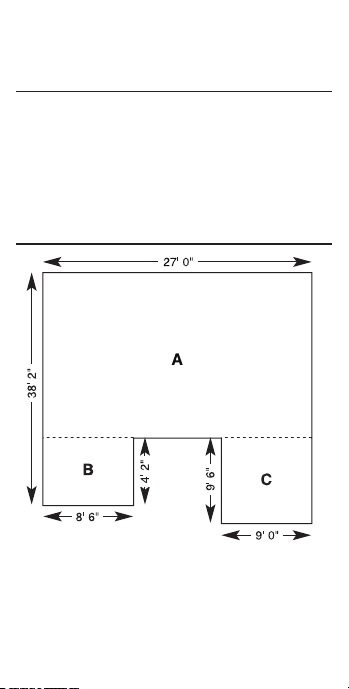
Complex Concrete Volume
You’re going to pour an odd-shaped patio
4-1/2 Inches deep with the dimensions as
shown. First, calculate the total area (by
dividing the drawing into three individual
rectangles) and then determine the total
cubic yards of concrete required for this
job. What is the total cost of the concrete if
PRG4225E-E.indd 19 6/28/2016 1:03:09 PM

— 20
it is selling for $55 per cubic yard?
KEYSTROKE DISPLAY
1. Clear calculator:
o o 0.
2. Find area “A” and add to Memory:
3 8 f 2 i -
4 f
2 i = l LNTH 34 FEET 0 INCH
2 7 f ] WDTH 27 FEET 0 INCH
] AREA 918. SQ FEET
n M+ 918. SQ FEET M
3. Find area “B” and add to Memory:
4 f 2 i l LNTH 4 FEET 2 INCH
8 f 6 i ] WDTH 8 FEET 6 INCH
] AREA 35.41667 SQ FEET
n M+ 35.41667 SQ FEET M
4. Find area “C” and add to Memory:
9 f l LNTH 9 FEET 0 INCH
9 f 6 i ] WDTH 8 FEET 6 INCH
] AREA 85.5 SQ FEET
n M+ 85.5 SQ FEET M
5. Find total area/volume and cost:
s s M+ 10398.917 SQ FEET
x 4 i 1 / 2 = 14.4294 CU YD
x 5 5 c 0 $793.62
CIRCLE CALCULATIONS
Circumference and Area
Find the circumference and area of a circle
having a diameter of 10 inches.
KEYSTROKE DISPLAY
1. Clear calculator and enter diameter:
o o 0.
1 0 i e DIA 10 INCH
PRG4225E-E.indd 20 6/28/2016 1:03:09 PM
— 22
2. Find circle area and circumference:
e AREA 78.53982 SQ INCH
e CIRC 31-7/16 INCH
3. Convert to decimal inches:
c i 31.41593 INCH
Arc Lengths
Find the arc length of an 85° portion of a
circle with a 5 foot diameter.
KEYSTROKE DISPLAY
1. Clear calculator and enter diameter:
o o 0.
5 f e DIA 5 FEET 0 INCH
2. Enter arc angle then nd arc length,
chord, segment area, pie slice area and
segment rise:
8 5 k k ARC 3 FEET 8-1/2 INCH
k CORD 3 FEET 4-9/16 INCH
k SEG 1.522922 SQ FEET
k PIE 4.636031 SQ FEET
k RISE 0 FEET 7-7/8 INCH
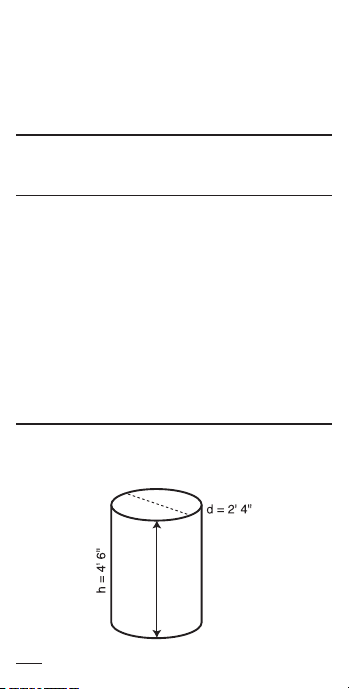
Volume of a Cylinder
Calculate the volume of a cylinder with a
diameter of 2 feet 4 inches and a height of
4 feet 6 inches:
Note: For a cylinder, use the column function.
PRG4225E-E.indd 21 6/28/2016 1:03:09 PM

— 22
KEYSTROKE DISPLAY
1. Find circle Area:
o o 0.
2 f 4 i e DIA 2 FEET 4 INCH
e AREA 4.276057 SQ FEET
2. Enter Height and nd Volume:
4 f 6 i h HGHT 4 FEET 6 INCH
c e COL 19.24226 CU FEET
Volume of a Cone
Calculate the volume of a cone with a
diameter of 3 feet 6 inches and a height of
5 feet:
KEYSTROKE DISPLAY
1. Find circle area:
o o 0.
3 f 6 i e DIA 3 FEET 6 INCH
e AREA 9.621128 SQ FEET
2. Enter height and nd volume:
5 f h HGHT 5 FEET 0 INCH
c e e e*
CONE 16.03521 CU FEET
*To access cone volume, press e three times after c.
Volume of a Semicircular Pad
You want to calculate the volume of a semi-
circular pad with a diameter of 16 feet and a
thickness of 4 inches. (Use the e to nd
circle area).
KEYSTROKE DISPLAY
1. Clear calculator:
o o 0.
2. Enter diameter:
1 6 f e DIA 16 FEET 0 INCH
3. Find circle area:
PRG4225E-E.indd 22 6/28/2016 1:03:09 PM

— 24
e AREA 201.0619 SQ FEET
4. Divide by 2 for semi-circle:
z 2 = 100.531 SQ FEET
5. Multiply by thickness to nd cubic yards:
x 4 i = 1.241123 CU YD
Concrete Columns
Find the total cubic yards and tons of
concrete (using 1.5 tons per cubic yard)
required for 3 columns, each with a diameter
of 5 feet 2-3/4 inches and a height of 10 feet:
KEYSTROKE DISPLAY
1. Recall stored weight per volume:
o o 0.
s 0 STORED 1.5 Ton Per CU YD*
2. Enter diameter:
5 f 2 i 3 / 4 e DIA 5 FEET
2-3/4 INCH
3. Find total volume:
1 0 f h c e COL 214.7607 CU
FEET
c y 7.954101 CU YD
x 3 = 23.8623 CU YD
4. Convert to tons:
c 6 35.79345 Ton
*If it is not 1.5 Ton Per CU YD, enter 1 .
5 ; 0.
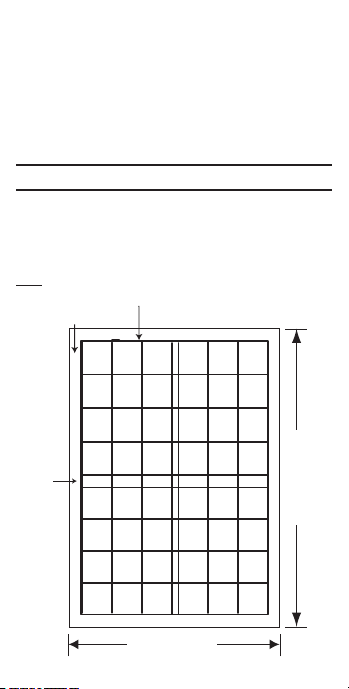
SQUARING-UP A CONCRETE SLAB
Square-up a concrete slab measuring 45
feet 6 inches by 24 feet 4 inches.
KEYSTROKE DISPLAY
1. Clear calculator:
o o 0.
PRG4225E-E.indd 23 6/28/2016 1:03:09 PM
— 24
2. Enter length, width and solve for diagonal
length (square-up):
4 5 f 6 i l
LNTH 45 FEET 6 INCH
2 4 f 4 i ]
WDTH 24 FEET 4 INCH
u SQUP 51 FEET 7-3/16 INCH
CALCULATING REBAR
Rebar – Total Linear Feet
Find the total linear feet of rebar for a 23
feet x 16 feet concrete slab, using default
values for rebar size (No. 5), on-center
spacing (18 inches), and inset (3 inches).
Note: Overlap is not included in the calculation.
23 Feet (Length)
16 Feet (Width)
3 Inch
Inset
#5 Rebar at 18 in. o.c.
On-center spacing adjustment*
PRG4225E-E.indd 24 6/28/2016 1:03:10 PM

— 26
KEYSTROKE DISPLAY
1. Clear calculator:
o o 0.
2. Enter rebar size*:
5 ' No 5 STORED 0.625 INCH
3. Find rebar weight per foot:
' No 5 1.04188 LB Per FEET
4. Enter rebar spacing:
1 8 i c ' R-oc STORED 18
INCH
5. Enter rebar inset:
3 i c r R-oc STORED 3 INCH
6. Enter slab length
2 3 f l LNTH 23 FEET 3 INCH
7. Enter slab width:
1 6 f ] WDTH 16 FEET 0 INCH
8. Find rebar total linear feet:
r RBAR 533 FEET 6 INCH
9. Find rebar total weight:
r No 5 555.8428 LB
10. Display values used for calculating rebar:
r No 5 STORED 0.625 INCH
r R-oc STORED 18 INCH
r R-IN STORED 3 INCH
r LNTH 23 FEET 0 INCH
r WDTH 16 FEET 0 INCH
*Rebar size can be entered as a number for rebar sizes
3-11, 14, and 18 (e.g., 5 ' for #5 rebar), or as a
decimal or fractional value not exceeding 6 Inches in
diameter (e.g., 5 / 8 ' for 5/8 Inch rebar size).
Rebar – Total Weight
How many pounds of #5 rebar are needed
to layout 100 linear feet of footings?
KEYSTROKE DISPLAY
PRG4225E-E.indd 25 6/28/2016 1:03:10 PM

— 26
1. Clear calculator:
o o 0.
2. Enter rebar size:
5 ' No 5 STORED
0.625 INCH
3. Enter length:
1 0 0 f r RBAR 100 FEET 0 INCH
4. Calculate weight:
r RBAR 104.188 LB
CALCULATING LOADS
How many 8 cubic yard truck loads would be
needed to haul the dirt from an excavation
measuring 108′ x 48′ and 1′ deep?
KEYSTROKE DISPLAY
1. Clear calculator:
o o 0.
2. Enter load size:
8 y y y ; p L-SZ 8. CU YD
3. Enter site length:
1 0 8 f l LNTH 108 FEET 0 INCH
4. Enter site width:
4 8 f ] WDTH 48 FEET 0 INCH
5. Enter site depth:
1 f h HGHT 1 FEET 0 INCH
6. Find number of loads:
p LOAD 24.
BLOCKS AND BRICKS
Calculating Number of Blocks
You are building an “L” shaped retaining
wall out of standard 8 inch x 16 inch blocks.
One side of the retaining wall is 22 feet
long, and the other side is 15 feet 8 inches
PRG4225E-E.indd 26 6/28/2016 1:03:10 PM

— 28
long. The wall is to be 4 feet high. How
many blocks are required to build this wall?
KEYSTROKE DISPLAY
1. Clear calculator:
o o 0.
2. Enter block size:
8 i x 1 6 i = ; b
B-AR 128. SQ INCH
3. Add both wall lengths:
2 2 f + 1 5 f 8 i =
37 FEET 8 INCH
4. Multiply length times height:
x 4 f = 150.6667 SQ FEET
5. Find number of Blocks and add 5% waste:
b BLKS 169.5 (170 Blocks)
+ 5 % 177.975 (178 Blocks)
Masonry – Estimating Bricks
How many standard bricks (2-1/4 x 8 inch)
are needed for a wall measuring 36 feet 6
inches long and 8 feet high?
KEYSTROKE DISPLAY
1. Clear calculator:
o o 0.
2. Enter brick area:
2 i 1 / 4 x 8 i = ; b
B-AR STORED 18. SQ INCH
3. Multiply wall length times height:
3 6 f 6 i x 8 f =
292. SQ FEET
4. Find number of bricks:
b (Bricks) BLKS 2336.
POLYGON (Equal-Sided)
Find the full angle, bi-sect angle, side
PRG4225E-E.indd 27 6/28/2016 1:03:10 PM

— 28
length, perimeter and area of a pentagon-
shaped patio to be paved with bricks. The
radius is 7 feet 5 inches and the number of
sides is ve:
KEYSTROKE DISPLAY
1. Clear calculator:
o o 0.
2. Enter radius:
7 f 5 i c k
RAD 7 FEET 5 INCH
3. Enter polygon sides and calculate:
5 c l FULL 108.00°
l HALF 54.00°
l SIDE 8 FEET 8-5/8 INCH
l PER 43 FEET 7-1/8 INCH
l AREA 130.7868 SQ FEET
CONCRETE FOOTING
Find the number of cubic yards of concrete
required for a (16 inch x 8 inch) footing that
measures 232 feet 6 inches in length.
KEYSTROKE DISPLAY
1. Clear calculator:
o o 0.
2. Enter footing area:
8 i x 1 6 i = ; g
F-AR STORED 128. SQ INCH
3. Enter length to nd volume:
2 3 2 f 6 i g
FTG 7.654321 CU YD
Concrete Footings –
You are going to pour concrete for a 264
square inch footing being used for the
PRG4225E-E.indd 28 6/28/2016 1:03:10 PM

— 30
following continuous lengths of footing: 15
feet, 18 feet, 24 feet and 33 feet. What is
the total volume of concrete you’ll need?
KEYSTROKE DISPLAY
1. Clear calculator:
o o 0.
2. Enter footing area:
2 6 4 i i ; g
F-AR STORED 264. SQ INCH
3. Add lengths:
1 5 + 1 8 + 2 4 + 3 3 = f
90.FEET
4. Find total volume:
g FTG 6.111111 CU YD
FINDING WEIGHT PER VOLUME
Find the total volume and weight of a 10
foot high by 16 foot long by 8 inch thick
concrete tilt–up wall. The unit weight is 1.5
tons per cubic yard of concrete.
KEYSTROKE DISPLAY
1. Clear calculator:
o o 0.
2. Store unit weight:
1 . 5 ; 0 1.5 Ton Per CU YD
3. Enter height, length and thickness:
1 6 f l LNTH 16 FEET 0 INCH
8 i ] WDTH 8 INCH
1 0 f h HGHT 10 FEET 0 INCH
4. Solve for volume:
h VOL 3.950617 CU YD
5. Find weight in tons:
c 6 5.925926 Ton
CONCRETE BAGS
PRG4225E-E.indd 29 6/28/2016 1:03:10 PM

— 30
How many 80 lb. bags of concrete would it
take for a 4′ x 8′ slab 4″ deep? Use default
of 0.666667 cubic feet per bag.
KEYSTROKE DISPLAY
1. Multiply length times width times depth:
o o 0.
4 f x 8 f x 4 i =
0.395062 CU YD
2.Find number of bags:
c 5 BAGS 16.
Note: To change your bag size, enter the new volume
per bag and press ; 5 (e.g.,. 5 f f f
; 5). Bag size remains stored until a new bag size
is stored in its place, or a Clear All ( c x) or reset is
performed.
CALCULATING DROP
Drop of a Sloped Patio
You’re pouring a sloped concrete patio with
a Length of 14 feet. If the standard drop
or fall is 1/8 inch per foot, what is the total
drop or fall? What if the drop is 1/4 inch per
foot or .375 inch per foot?
KEYSTROKE DISPLAY
1. Clear calculator:
o o 0.
2. Enter total length of wall:
1 4 f l LNTH 14 FEET 0 INCH
3. Enter 1/8 inch drop per foot and nd
amount of drop:
1 / 8 d d
DROP 0 FEET 1-3/4 INCH
4. Enter 1/4 inch drop per foot and nd
amount of drop:
PRG4225E-E.indd 30 6/28/2016 1:03:10 PM

— 32
1 / 4 d d
DROP 0 FEET 3-1/2 INCH
5. Enter .375 inch drop per foot and nd
amount of drop:
. 3 7 5 i d d
DROP 0 FEET 5-1/4 INCH
6. Convert to decimal inches:
c i 5.25 INCH
7. Convert to decimal feet:
c f 0.4375 FEET
Drop of a Retaining Wall
You’re building a 61 foot 8 inch retaining
wall along a driveway that slopes away
at 1/4 inch per foot. There are 4 sections,
each measuring 15 feet 5 inches in length.
What is the proper drop amount for each
section? What is the total (accumulated)
drop depth at the end of all four sections?
KEYSTROKE DISPLAY
1. Clear calculator:
o o 0.
2. Enter wall section length:
1 5 f 5 i l
LNTH 15 FEET 5 INCH
3. Enter drop per foot to nd the drop per
section and the total drop depth at rst
wall section:
1 / 4 d d
DROP 0 FEET 3-7/8 INCH
4. Find the total drop depth of second
through fourth wall sections:
d DROP 0 FEET 7-11/16 INCH
d DROP 0 FEET 11-9/16 INCH
d DROP 1 FEET 3-7/16 INCH
PRG4225E-E.indd 31 6/28/2016 1:03:10 PM
— 32
Note: Successive presses of d will continue to add the
drop amount of 3-7/8 Inches to the prior wall section’s
drop, for an accumulated drop total.
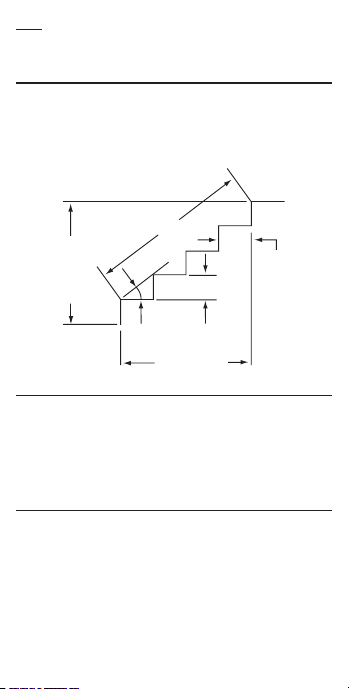
STAIR CALCULATIONS
The ConcreteCalc Pro can calculate the
values used in stair building, given entered
values for oor-to-oor rise h or run of
treads l, based on desired riser height
and tread width.
Floor
to
Floor
Height
Stringer
Riser Height
Total Run
Inclination
Angle
Tread
Width
Stairs –
You’re going to build a stairway that has
a oor-to-oor height of 10 feet 1 inch, a
run of 12 feet 5 inches, and a desired riser
height of 7-1/2 inches (default). Find the
stair values:
KEYSTROKE DISPLAY
1. Enter rise and run:
o o 0.
1 0 f 1 i h
HGHT 10 FEET 1 INCH
1 2 f 5 i l
LNTH 12 FEET 5 INCH
PRG4225E-E.indd 32 6/28/2016 1:03:10 PM

— 34
2. Recall stored 7-1/2 inch desired riser
height, then nd the stair values:
s 7 R-HT STORED 7-1/2 INCH
t R-HT ! 7-9/16 INCH*
t RSRS 16.
t R+/- 0 INCH
t T-WD ! 9-5/16 INCH*
t TRDS 15.
t T+/- 0-1/16 INCH
t OPEN 9 FEET 10-1/4 INCH
t STRG 15 FEET 7-5/16 INCH
t INCL 37. 27°
! in the display means that the calculated riser Height
exceeds the desired (stored) riser height, or the calculated
tread width is below the desired (stored) tread width.
Stairs –
You’re building a stairway with a total rise
of 9 feet 11 inches. Using the default riser
height of 7-1/2 inches and tread width of 10
inches, nd the stair values:
KEYSTROKE DISPLAY
1. Enter known rise:
o o 0.
9 f 1 1 i h
HGHT 9 FEET 11 INCH
2. Recall stored desired stair riser height:
s 7 R-HT STORED 7-1/2 INCH
3. Recall stored desired stair tread width:
s 9 T-WD STORED 10 INCH
4. Find stair values:
t R-HT 7-7/16 INCH
t RSRS 16.
t R+/- 0 INCH
t T-WD STORED 10 INCH
t TRDS 15.
t T+/- 0 INCH
PRG4225E-E.indd 33 6/28/2016 1:03:10 PM

— 34
t OPEN 10 FEET 1 INCH
t STRG 15 FEET 6-15/16 INCH
t INCL 36.64°
To calculate stairs given run (length) only:
If you have a value stored in height, it will
be used in the stair calculation. You will
need to clear the value by entering zero into
height (e.g. 0 h).
Stairs –
Calculate stairs using the Riser Limited
function, if you must limit the riser height to
7-1/2 inches:
KEYSTROKE DISPLAY
1. Enter rise and run:
o o 0.
1 0 f 1 i h
HGHT 10 FEET 1 INCH
1 2 f 5 i l
LNTH 12 FEET 5 INCH
2. Recall stored 7-1/2 inch desired riser
height and nd stair values:
s 7 R-HT STORED 7-1/2 INCH
c t R-HT 7-1/8 INCH
t RSRS 17.
t R+/- 0-1/8 INCH
t T-WD ! 9-5/16 INCH*
t TRDS 16.
t T+/- 0 INCH
t OPEN 9 FEET 9-5/8 INCH
t STRG 15 FEET 7-5/8 INCH
t INCL 37.42°
*! in the display means that the calculated riser height
exceeds the desired (stored) riser height, or the calculated
tread width is below the desired (stored) tread width.
PRG4225E-E.indd 34 6/28/2016 1:03:10 PM

— 36
APPENDIX
ACCURACY/ERRORS
Accuracy/Display Capacity – Your
calculator has a twelve digit display. This
is made up of eight digits (normal display)
and four fractional digits. You may enter
or calculate values up to 19,999,999.99.
Each calculation is carried out internally to
twelve digits.
Errors – When an incorrect entry is made,
or the answer is beyond the range of the
calculator, it will display the word “ERROR.”
To clear an error condition you must press
the o button once. At this point you
must determine what caused the error and
re-key the problem.
Error Codes
DISPLAY ERROR TYPE
OFLO Overow (too large)
MATH Error Divide by 0
DIM Error Dimension error
ENT Error Invalid entry error
None Attempts to calculate stairs
without entering rise and run
Auto-Range – If an “overow” is created
because of a calculation with small units
that are out of the standard digit range of
the display, the answer will be automatically
expressed in the next larger units
(instead of showing “ERROR”) e.g.,
20,000,000 mm is shown as 20,000 m.
Also applies to inches, feet and yards.
Note: If exponential notation is activated through the
preference setting, the value will be shown in scientic
notation (e.g., 20 million mm – 2.00000 07 mm).
PRG4225E-E.indd 35 6/28/2016 1:03:10 PM
— 36
BATTERY AND AUTO SHUTOFF
Your calculator is powered by a single
3-Volt Lithium CR-2016 battery. This should
last approximately 800 hours of actual use
(1 year plus for most people). Should the
display become very dim or erratic, replace
the battery. Please use caution
when disposing of your old batteries as
they contain hazardous chemicals. Your
calculator is designed to shut itself o after
about 8-12 minutes of non-use.
Note: Values in memory or shown on the display will
be cleared.
Replacing the Battery
Turn the calculator over and open user
guide door located at the top. Pull battery
holder out (top left corner) and turn over.
Remove old battery and slide new
battery under tabs. Turn holder over
(negative side facing you) and insert
into calculator.
DEFAULT SETTINGS
After a Clear All (c x), your calculator
will return to the following settings:
STORED VALUES DEFAULT VALUE
Desired Riser Height 7-1/2 INCH
Desired Tread Width 10 INCH
Floor Height 10 INCH
Rebar Spacing 18 INCH
Rebar Inset 3 INCH
Rebar Size #5 (5/8″)
Load Size 8 CU YD
Bag Size 0.666667 CU FEET
Weight per Volume 1 .5 Ton Per CU YD
PRG4225E-E.indd 36 6/28/2016 1:03:11 PM

— 38
Block Area 128 SQ INCH
Block Length 16 INCH
Footing Area 264 SQ INCH
If you replace your battery or perform a
Full Reset* (press O, hold down x, and
press o) your calculator will return to the
following settings (in addition to those listed
above):
PREFERENCE SETTINGS DEFAULT VALUE
Fractional Resolution 1/16″
Area Display Standard
Volume Display Standard
Stairway Headroom 6 FEET 8 INCH
Exponent O
Meter Linear Display 0.000
Decimal Degree Display 0.00°
Fractional Mode Standard
*Depressing the reset button located above the l key
will also perform a full reset.
PRG4225E-E.indd 37 6/28/2016 1:03:11 PM
— 38
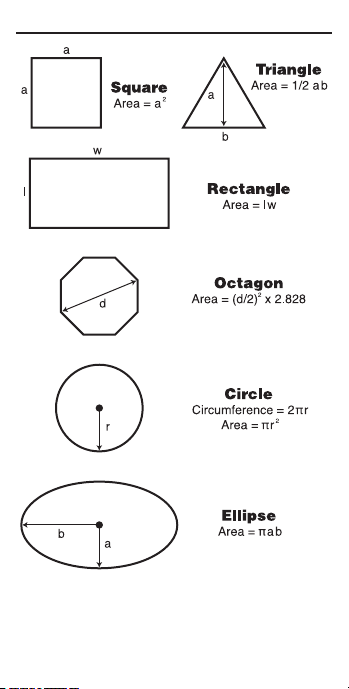
AREA FORMULAS
PRG4225E-E.indd 38 6/28/2016 1:03:11 PM
— 40
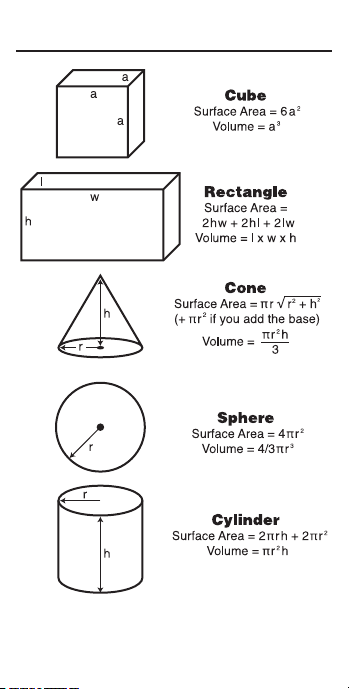
SURFACE AREA AND VOLUME
FORMULAS
PRG4225E-E.indd 39 6/28/2016 1:03:11 PM

— 40
REPAIR AND RETURN
WARRANTY, REPAIR AND RETURN
INFORMATION
Return Guidelines
1. Please read the Warranty in this User’s
Guide to determine if your Calculated
Industries product remains under
warranty before calling or returning any
device for evaluation or repairs.
2. If your product won’t turn on, check the
battery as outlined in the User’s Guide.
3. If you need more assistance, please go
to the website listed below.
4. If you believe you need to return your
product, please call a Calculated
Industries representative between 7
am and 4 pm Pacic Time for additional
information and a Return Merchandise
Authorization (RMA).
Call Toll Free: 1-800-854-8075
Outside USA: 775-885-4900
www.calculated.com/warranty
PRG4225E-E.indd 40 6/28/2016 1:03:11 PM

— 42
WARRANTY
Warranty Repair Service –
Calculated Industries (“CI”) warrants this product
against defects in materials and workmanship for
a period of one (1) year from the date of original
consumer purchase in the U.S. If a defect exists
during the warranty period, CI at its option will
either repair (using new or remanufactured
parts) or replace (with a new or remanufactured
calculator) the product at no charge.
THE WARRANTY WILL NOT APPLY TO
THE PRODUCT IF IT HAS BEEN DAMAGED
BY MISUSE, ALTERATION, ACCIDENT,
IMPROPER HANDLING OR OPERATION, OR IF
UNAUTHORIZED REPAIRS ARE ATTEMPTED
OR MADE. SOME EXAMPLES OF DAMAGES
NOT COVERED BY WARRANTY INCLUDE,
BUT ARE NOT LIMITED TO, BATTERY
LEAKAGE, BENDING, A BLACK “INK SPOT” OR
VISIBLE CRACKING OF THE LCD, WHICH ARE
PRESUMED TO BE DAMAGES RESULTING
FROM MISUSE OR ABUSE.
To obtain warranty service in the U.S., please go
to the website.
A repaired or replacement product assumes the
remaining warranty of the original product or 90
days, whichever is longer.
Non-Warranty Repair Service –
Non-warranty repair covers service beyond the
warranty period, or service requested due to
damage resulting from misuse or abuse.
Contact Calculated Industries at the number
listed on the last page of this guide to obtain
current product repair information and charges.
Repairs are guaranteed for 90 days.
Repair Service – Outside the
To obtain warranty or non-warranty repair service
PRG4225E-E.indd 41 6/28/2016 1:03:11 PM

— 42
for goods purchased outside the U.S., contact
the dealer through which you initially purchased
the product. If you cannot reasonably have the
product repaired in your area, you may contact CI
to obtain current product repair information and
charges, including freight and duties.
Disclaimer
CI MAKES NO WARRANTY OR
REPRESENTATION, EITHER EXPRESS
OR IMPLIED, WITH RESPECT TO THE
PRODUCT’S QUALITY, PERFORMANCE,
MERCHANTABILITY, OR FITNESS FOR A
PARTICULAR PURPOSE. AS A RESULT, THIS
PRODUCT, INCLUDING BUT NOT LIMITED TO,
KEYSTROKE PROCEDURES, MATHEMATICAL
ACCURACY AND PREPROGRAMMED
MATERIAL, IS SOLD “AS IS,” AND YOU THE
PURCHASER ASSUME THE ENTIRE RISK AS
TO ITS QUALITY AND PERFORMANCE. IN
NO EVENT WILL CI BE LIABLE FOR DIRECT,
INDIRECT, SPECIAL, INCIDENTAL, OR
CONSEQUENTIAL DAMAGES RESULTING
FROM ANY DEFECT IN THE PRODUCT OR ITS
DOCUMENTATION.
The warranty, disclaimer, and remedies set forth
above are exclusive and replace all others, oral
or written, expressed or implied. No CI dealer,
agent, or employee is authorized to make any
modication, extension, or addition to this
warranty.
Some states do not allow the exclusion or
limitation of implied warranties or liability for
incidental or consequential damages, so the
above limitation or exclusion may not apply to
you. This warranty gives you specic rights, and
you may also have other rights, which vary from
state to state.
PRG4225E-E.indd 42 6/28/2016 1:03:11 PM

FCC Class B
This equipment has been certied to comply
with the limits for a Class B computing device,
pursuant to Subpart J of Part 15 of FCC rules.
Looking For New Ideas
Calculated Industries, a leading manufacturer of
special-function calculators and digital measuring
instruments, is always looking for new product
ideas in these areas. If you have an idea, or a
suggestion for improving this productor User’s
Guide, please submit your comments online at
www.calculated.com under “ContactUs”, “Product
Idea Submittal Agreement”. Thank you.
PRG4225E-E.indd 43 6/28/2016 1:03:11 PM

'HVLJQHGLQWKH8QLWHG6WDWHVRI$PHULFD
35*((
3ULQWHGLQ&KLQD
PRG4225E-E.indd 45 6/28/2016 1:03:11 PM