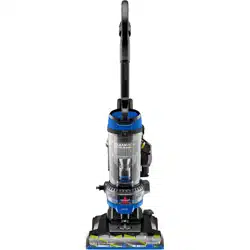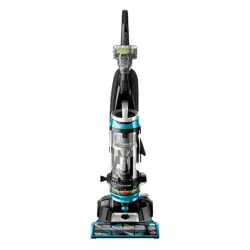
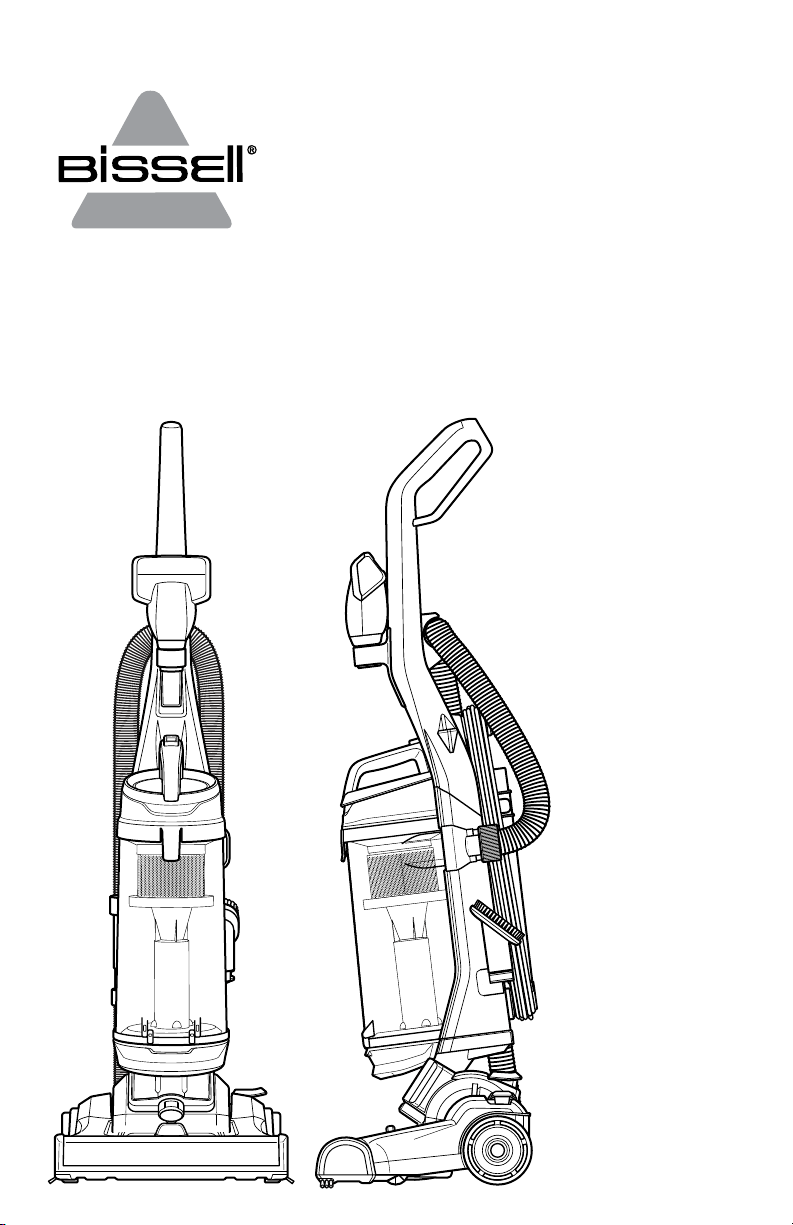
CLEANVIEW® SWIVEL PET
UPRIGHT VACUUM
2316 SERIES
2 BISSELL.com
IMPORTANT SAFETY INSTRUCTIONS
WARNING
TO REDUCE THE RISK OF FIRE,
ELECTRIC SHOCK OR INJURY:
» Do not leave vacuum cleaner
when it is plugged in. Unplug from
outlet when not in use and before
servicing.
» Do not use outdoors or on
wet surfaces.
» Do not allow to be used as a toy.
Close attention is necessary when
used by or near children.
» Do not use for any purpose
other than described in this user
guide. Use only manufacturer’s
recommended attachments.
» Do not use with damaged cord or
plug. If appliance is not working
as it should, has been dropped,
damaged, left outdoors, or dropped
into water, have it repaired at an
authorized service center.
» Do not pull or carry by cord, use
cord as a handle, close a door on
cord, or pull cord around sharp
edges or corners. Do not run
appliance over cord. Keep cord away
from heated surfaces.
» Do not unplug by pulling on
cord. To unplug, grasp the plug,
not the cord.
» Do not handle plug or vacuum
cleaner with wet hands.
» Do not put any object into
openings. Do not use with any
opening blocked; keep openings free
of dust, lint, hair, and anything that
may reduce air flow.
» Keep hair, loose clothing, fingers,
and all parts of body away from
openings and moving parts.
» Turn OFF all controls before
plugging or unplugging
vacuum cleaner.
» Use extra care when cleaning
on stairs.
» Do not use to pick up flammable or
combustible materials (lighter fluid,
gasoline, kerosene, etc.) or use in
areas where they may be present.
» Do not use vacuum cleaner in an
enclosed space filled with vapors
given off by oil-based paint, paint
thinner, some moth-proofing
substances, flammable dust, or other
explosive or toxic vapors.
» Do not use to pick up toxic
material (chlorine bleach,
ammonia, drain cleaner, etc.).
» Do not pick up anything that is
burning or smoking, such as
cigarettes, matches or hot ashes.
» Do not use without filters in place.
» Do not pick up hard or sharp objects
such as glass, nails, screws, coins, etc.
» Use only on dry, indoor surfaces.
» Keep appliance on a level surface.
» Do not carry the vacuum cleaner
while it is running.
» Unplug before connecting or
disconnecting the Pet TurboEraser®
Tool.
READ ALL INSTRUCTIONS BEFORE USING YOUR UPRIGHT VACUUM.
Always connect to a polarized outlet (one slot is wider than the other). Unplug from outlet when not in
use and before conducting maintenance. When using an electrical appliance, basic precautions should be
observed, including the following:
This model is for household use only.
SAVE THESE INSTRUCTIONS
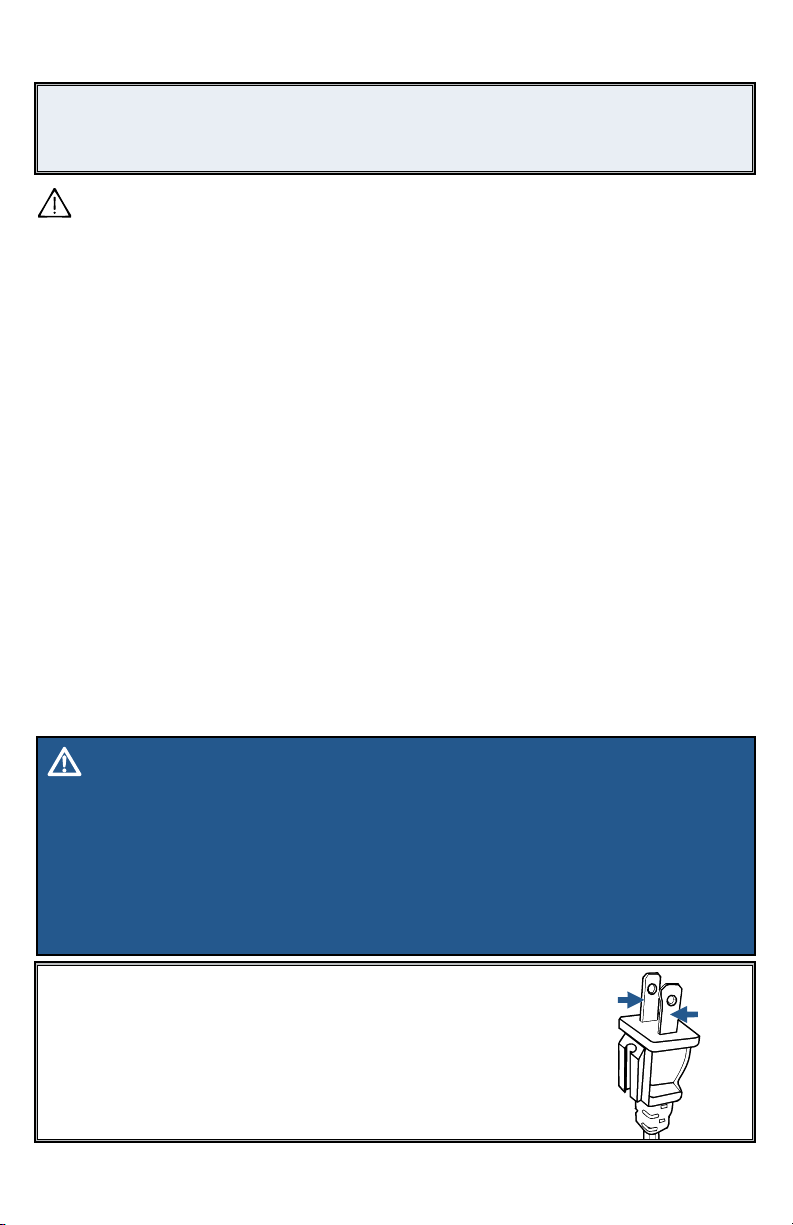
THIS APPLIANCE HAS
A POLARIZED PLUG
To reduce the risk of electric shock, this appliance has a polarized plug (one blade
is wider than the other). This plug will fit in a polarized outlet only one way. If the
plug does not fit fully in the outlet, reverse the plug. If it still does not fit, contact a
qualified electrician to install a proper outlet. Do not change the plug in any way.
Hot
Neutral
WARNING
››
Before using your vacuum, make sure the dirt tank is in locked position and that all filters, both
pre- and post-filters, are in place. DO NOT operate your vacuum without these filters.
›› Plastic film can be dangerous. To avoid danger of suocation, keep away from children.
›› Do not plug in your vacuum UNTIL you are familiar with all instructions and operating
procedures.
›› To reduce the risk of electrical shock, turn power switch OFF and disconnect polarized
plug from electrical outlet BEFORE performing maintenance or troubleshooting checks.
BISSELL.com 3
Safety Instructions...........2
Product View................4
Assembly ...................5
Operations ..................6
Maintenance & Care .......7-9
Troubleshooting ............10
Warranty ....................11
Parts & Supplies ............12
Service .....................12
Product Registration........12
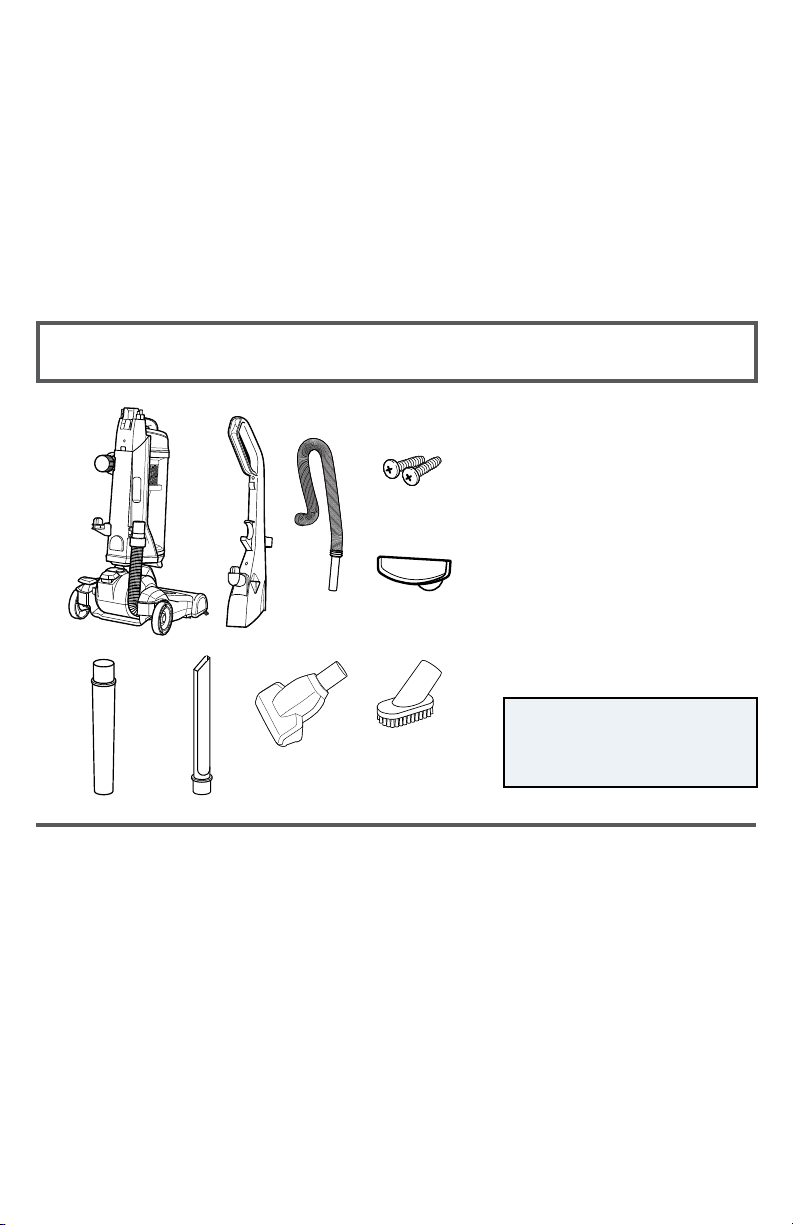
NOTE: Not all accessories
come with every model. Be
sure to check the carton for
additional tools.
What’s In The Box?
Thanks for buying a BISSELL® vacuum!
We love to clean and we’re excited to share one of our innovative
products with you. This guide has important instructions on how your
new vacuum works, including using, maintaining, and if there is a
problem, troubleshooting.
In just a few simple assembly steps, you’ll be ready to vacuum. Flip to page
5 and let’s get started!
1.
5.
6. 7. 8.
9.
2. 3. 4.
1. Vacuum Base
2. Handle
3. Hose
4. 2 Screws
(taped to Handle)
5. Lower Cord Wrap
6. Extension Wand
7. Crevice Tool
(stored inside Extension Wand)
8. Pet TurboEraser® Tool
9. Dusting Brush
4 BISSELL.com
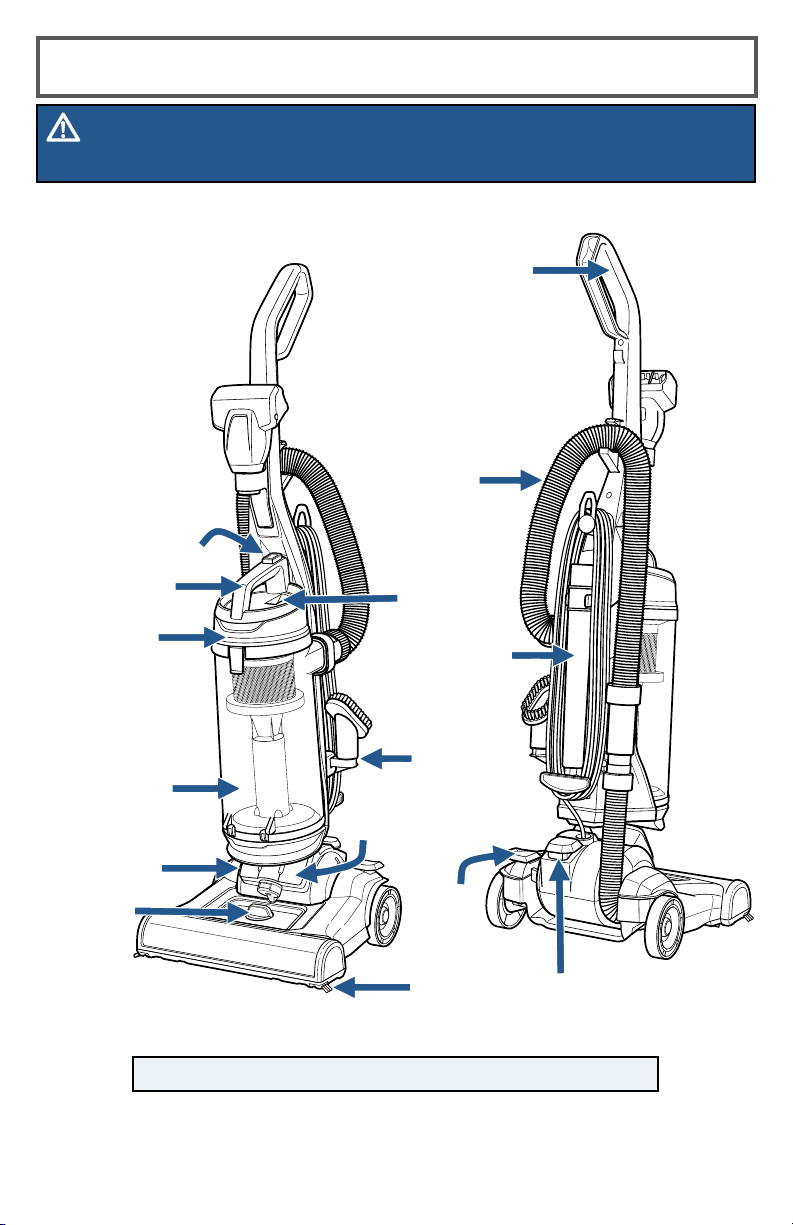
Product View
WARNING
Do not plug in your vacuum until you are familiar with all instructions and operating procedures.
NOTE: The crevice tool is stored inside the extension wand.
Handle
Height
Adjustment
Carry Handle
Lifetime
Post-Motor
Filter
Pre-Motor
Filter
(not shown)
Dirt Tank
Extension
Wand
Tank
Release Button
Stretch
Hose
Power Pedal
Dusting
Brush
Holder
Suction
Indicator
Swivel
Steering
Edge
Bristles
Recline
Pedal
BISSELL.com 5
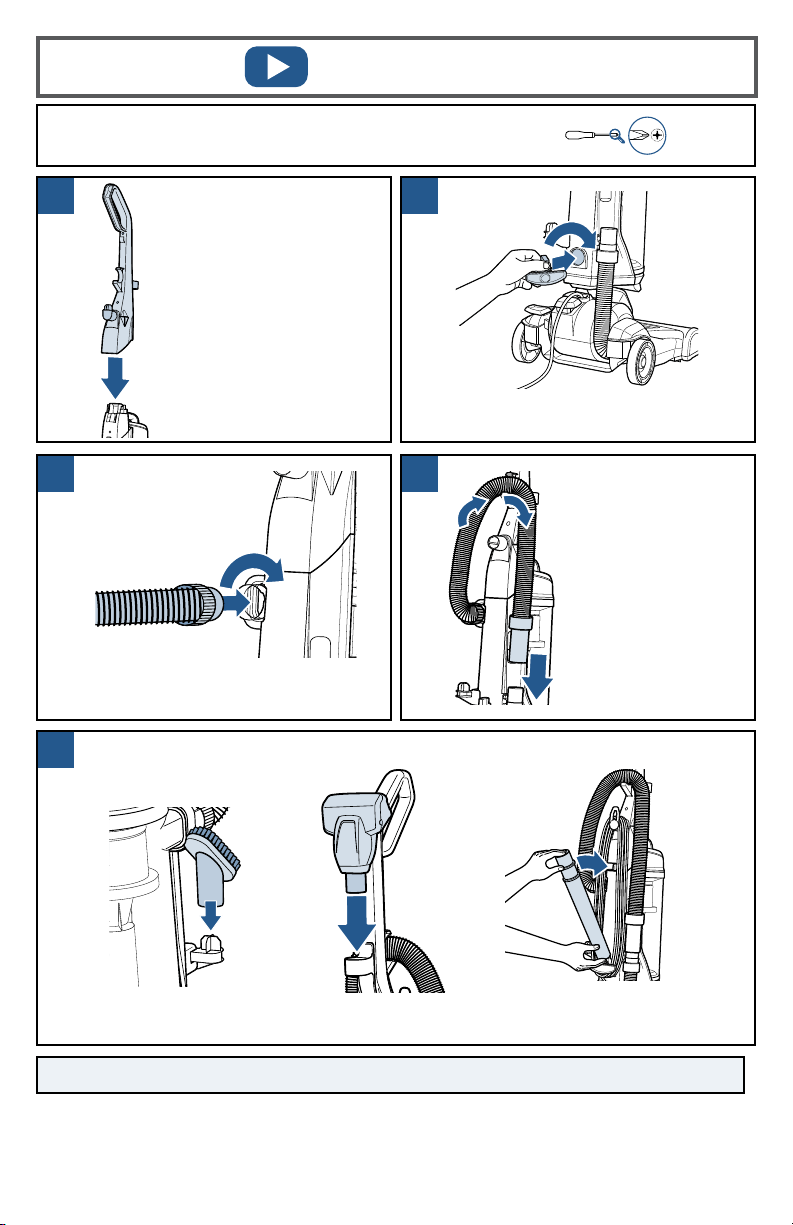
Place the upper handle onto
the base and push it down.
Attach the handle with the
2 screws taped to the handle
in a plastic bag.
Assembly
Insert the lower cord wrap and turn
it to the right to lock in place.
Insert the hose end into the back of the
vacuum and twist right to lock in place.
NOTE: The powerfoot will not suction properly unless the hose is firmly attached.
Wrap hose up and
around the hose
wrap on the handle.
Slide end of hose
into vacuum base.
TurboEraser® ToolDusting Brush
Extension Wand
(Crevice Tool stores inside)
Now, put your accessory tools on the vacuum and you’re ready to go!
A Phillips-head screwdriver is required for Assembly in Step 1.
1
5
2
3 4
6 BISSELL.com
Power ON & Settings
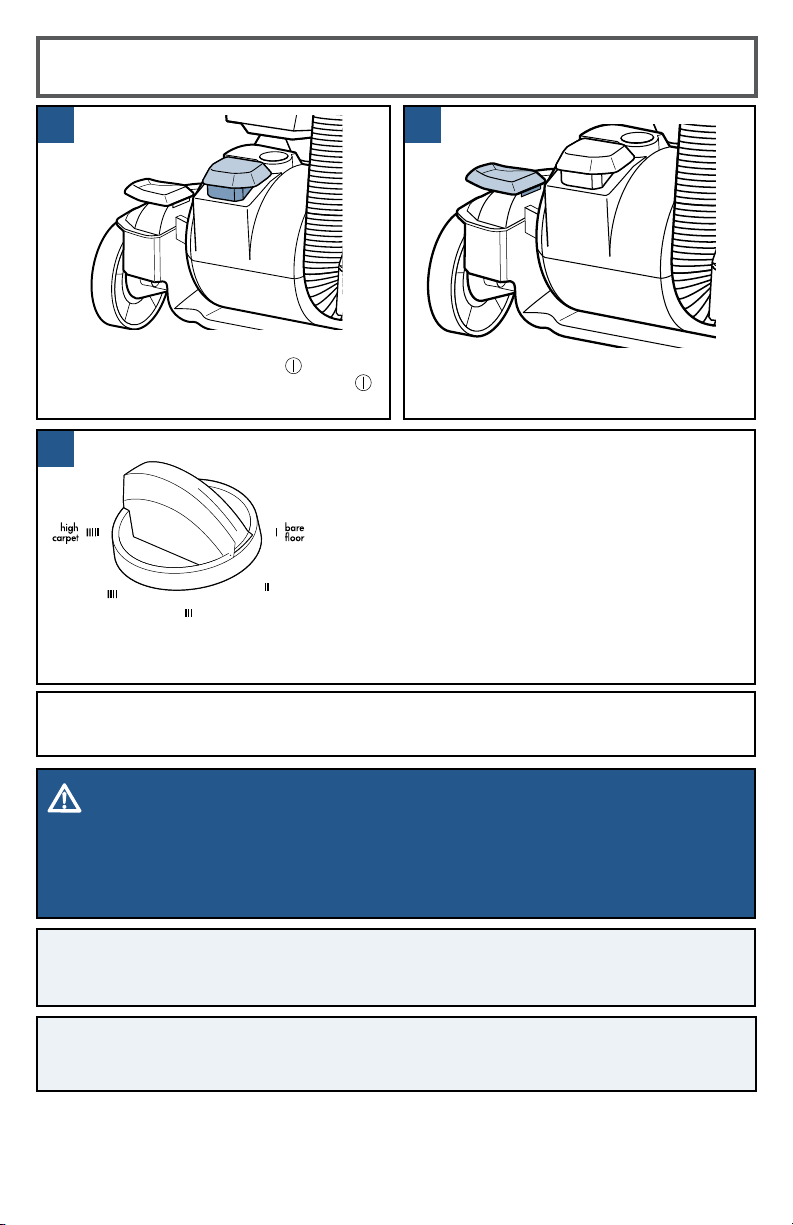
Turn the dial on the foot of the vacuum to the
desired setting. If the dial is difficult to turn, tilt the
vacuum back slightly to take the weight off the foot
while turning.
Press the recline pedal and pull handle
back towards you.
TIP: For optimal carpet cleaning performance, adjust to the lowest practical setting.
If your vacuum is difficult to push, adjust to the next higher setting.
Lowest setting – For low pile carpet or bare floors.
To pick up debris, it may be
necessary to move up one setting.
Medium setting – For medium pile carpet.
Highest setting – For high pile and most shag carpet.
WARNING
To reduce the risk of injury from moving parts while the vacuum is turned ON, always
move the vacuum via the rolling wheels by using the upper handle at the back of the
vacuum. Do not carry the vacuum while it is running. Always place vacuum on floor with
handle in upright position when using tools.
NOTE: Brush roll continues to rotate while tools are in use. Never place fingers under
the vacuum when it is running. Never place powerfoot on furniture or uneven surfaces.
Do not place vacuum close enough to objects to pull into brush roll.
Press the red power button with your
foot to turn the vacuum ON
and
once again to turn your vacuum OFF
.
NOTE: Certain carpets and low humidity conditions may generate small static
discharges. Static discharges are entirely harmless and are not associated in any way
with the main power supply.
3
2
1
BISSELL.com 7
WARNING
To reduce the risk of electric shock, turn power switch o and disconnect polarized plug
from electrical outlet before performing maintenance or troubleshooting checks.
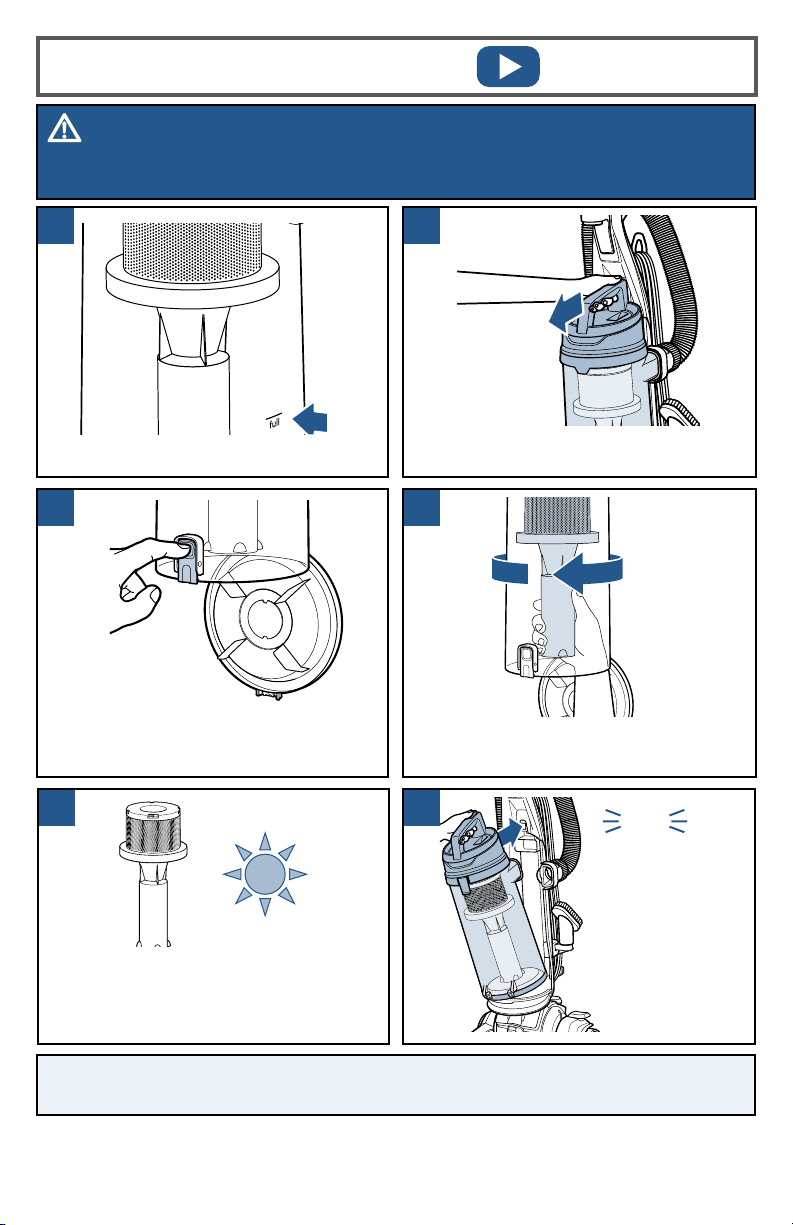
Press the tank release button and pull
out to remove dirt tank.
Once emptied,
place tank back
on vacuum and
press firmly
until you hear
a “click”.
Empty once tank is full.
NOTE: The dirt tank may be washed in warm water with a mild detergent. Make sure it
is completely dry before replacing.
Hold the dirt tank over a trash container.
Press the bottom release button to
empty. Once empty, close the lid.
Emptying the Dirt Tank
Twist cyclone left and pull down to
remove from tank.
Clean cyclone with warm water and mild
detergent. Let cyclone completely dry
before replacing. To replace, fit into place
and twist to the right.
click
1
2
3 4
5 6
8 BISSELL.com
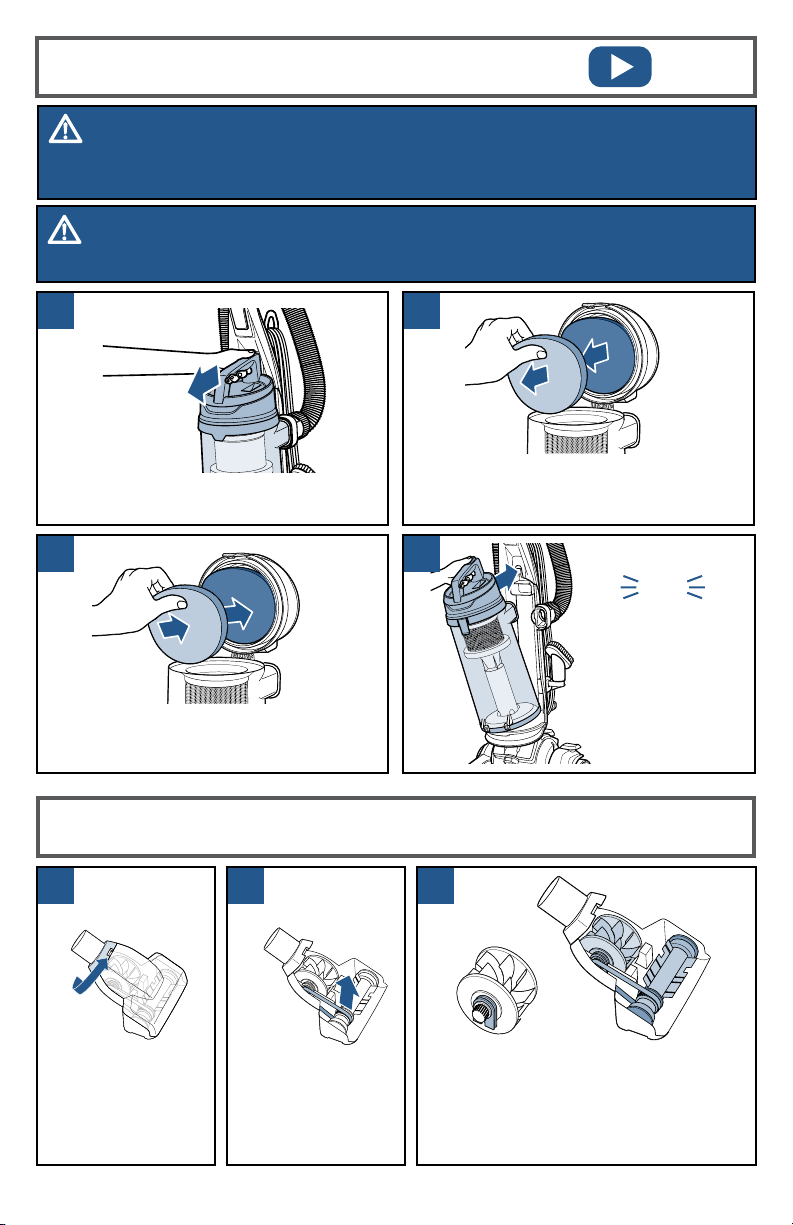
Cleaning the Pre-Motor Filter
Return tank back
on vacuum and
press firmly until
you hear a “click”.
Remove carbon and foam filter from lid.
Hand wash in warm water and rinse well;
mild detergent may be used if desired.
Twist gray collar
counter-clockwise,
until slot appears,
then separate
faceplate.
click
Maintaining the TurboEraser
®
Tool
Remove brush roll,
belt, and paddle
wheel. Inspect
for damages and
replace if necessary.
To reassemble, align two clips on each
end of paddle wheel with belt on
and pop back into place. Place brush
roll with belt back in. Faceplate will
not close properly if all parts are not
aligned correctly.
Press the tank release button and pull
out to remove dirt tank.
Allow filter to air dry completely before
placing back into the tank lid. The carbon
filter should be on top of the foam filter.
WARNING
To reduce the risk of electric shock, turn power switch OFF and disconnect plug from
electrical outlet before performing maintenance or troubleshooting checks.
WARNING
Do not operate vacuum with damp or wet filters or without all filters in place.
1 2
3 4
1 2 3
BISSELL.com 9
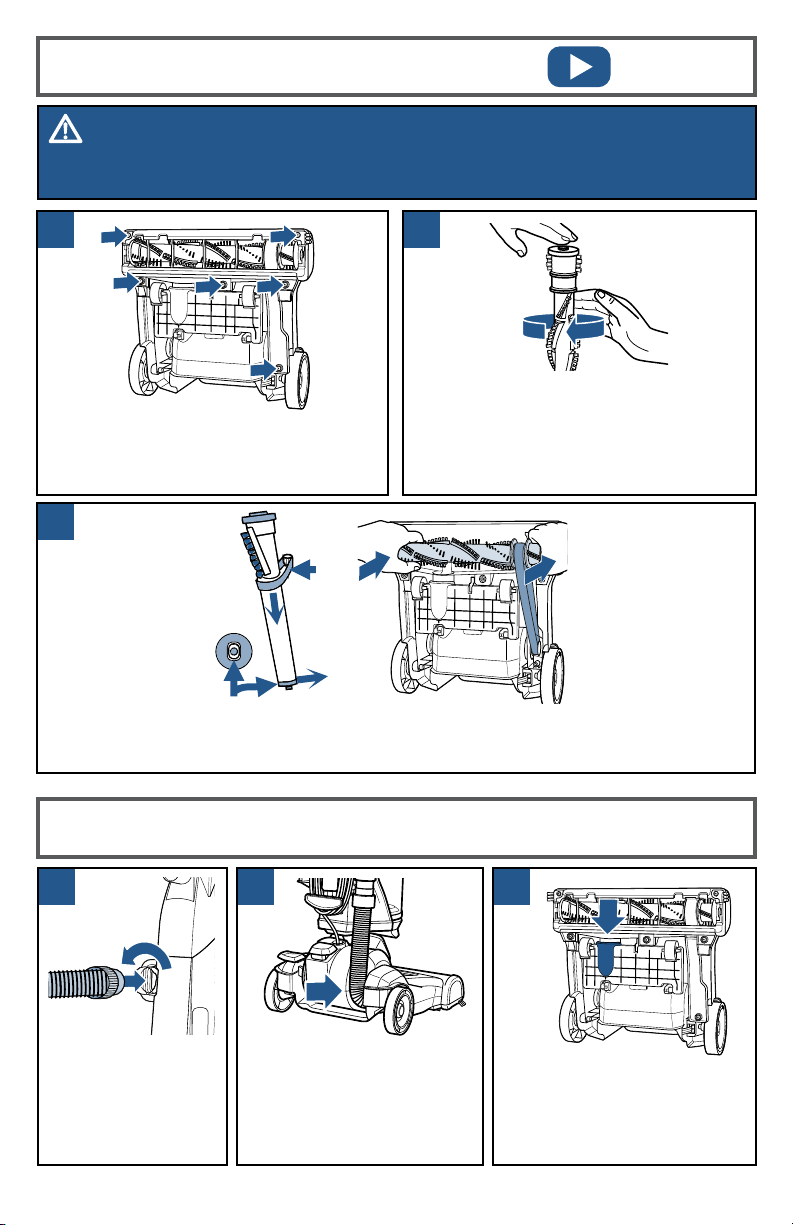
Unplug vacuum, turn over and unscrew
six (6) Phillips-head screws to remove
the bottom cover. Lift brush straight out
and remove belt.
Clean debris from brush roll. Inspect
by placing on its end and spinning.
The brush roll should spin freely,
multiple times by one flick. If it doesn’t,
replace brush roll. Check belt for wear
or cuts and replace if necessary.
Replace the brush roll and belt by looping the belt over the motor shaft and the brush
roll. Line up the end caps and pull the brush forward into place. This will stretch the
belt. Return bottom cover back on and replace the screws.
End Cap
Belt
Replacing the Brush & Belt
Clearing a Clog
Remove the hose
from the back of the
vacuum by twisting
it to the left. Remove
any debris that may
have gotten clogged.
Check the foot hose on
the back of your vacuum
down towards the bottom.
If necessary, remove the
screw from the foot hose
and check for clogs.
Check the air passageway on
the bottom of your vacuum.
Remove the bottom cover and
the brush. Remove any debris.
WARNING
To reduce the risk of electric shock, turn power switch OFF and disconnect plug from
electrical outlet before performing maintenance or troubleshooting checks.
1
2
3
1 2 3

10 BISSELL.com
Troubleshooting
WARNING
To reduce the risk of electric shock, turn power switch OFF and disconnect plug from
electrical outlet before performing maintenance or troubleshooting checks.
Problem Possible causes Remedies
Vacuum won’t
turn ON
Power cord not plugged in Check electrical plug
Blown fuse/tripped breaker Check/replace fuse or reset breaker
Vacuum won’t
pick up dirt
Incorrect height adjustment
Adjust powerfoot to correct height setting
Hose not attached to suction
opening
Grasp the hose wand and firmly push
into the hose wand base
Crack or hole in hose Check hose and replace if needed
Broken or worn drive belt Replace drive belt, see page 9
Rotating floor brush jammed Remove brush and clean debris from
brush ends, see page 9
Clog in vacuum Check for debris build-up or clogs in the
inner tank, hose and foot/lower hose;
See online video for more help
Dirt tank full Empty dirt tank
Dirt tank or upper tank not
installed properly
Position correctly and lock in place,
see page 7
Filters are dirty
Check and clean or replace pre-motor
and post-motor filters, see page 8
Tool won’t
pick up
Crack or hole in hose Check hose and replace if needed
Clog in vacuum Check for debris build-up or clogs in the
inner tank, hose and foot/lower hose;
See online video for more help
Dirt tank full Empty dirt tank
Dirt tank or upper tank not
installed properly
Position correctly and lock in place,
see page 7
Filters are dirty
Check and clean or replace pre-motor
and post-motor filters, see page 8
Vacuum
difficult to push
Incorrect height adjustment Adjust powerfoot to correct
height setting, see page 6
Visible dirt
escaping from
vacuum
Dirt tank full Empty dirt tank
Filters missing or installed
incorrectly
Check pre-motor and post-motor
filters for correct installation, see page 8

BISSELL.com 11
This warranty gives you specific legal rights,
and you may also have other rights which may
vary from state to state. If you need additional
instruction regarding this warranty or have
questions regarding what it may cover, please
contact BISSELL® Consumer Care by email or
telephone as described below.
It may be necessary to obtain some of your
personal information, such as a mailing
address, to fulfill terms of this warranty. Any
personal data will be handled pursuant to
BISSELL’s Privacy Policy, which can be found
online at www.BISSELL.com/privacy-policy.
Limited Three-Year Warranty
Subject to the *Exceptions and Exclusions
from the Terms of the Limited Warranty, upon
receipt of the product BISSELL will repair or
replace (with new, refurbished, lightly used, or
remanufactured components or products), at
BISSELL’s option, free of charge from the date
of purchase by the original purchaser, for three
years, any defective or malfunctioning part.
See information below on "If your BISSELL
product should require service”.
This warranty applies to product used for
personal, and not commercial or rental,
service. This warranty does not apply to
fans or routine maintenance components
such as filters, belts or brushes. Damage or
malfunction caused by negligence, abuse,
neglect, unauthorized repair, or any other use
not in accordance with the user guide is not
covered. This warranty will only be valid if the
product is used in the same country in which
it was sold.
BISSELL is not liable for incidental or
consequential damages of any nature
associated with the use of this product.
BISSELL’s liability will not exceed the purchase
price of the product.
Some states do not allow the exclusion or
limitation of incidental or consequential
damages, so the above limitation or
exclusion may not apply to you.
*Exceptions and Exclusions from the
Terms of the Limited Warranty
This warranty is exclusive and in lieu of
any other warranties, either oral or written.
Any implied warranties, which may arise
by operation of law, including the implied
warranties of merchantability and fitness for
a particular purpose, are limited to the three-
year duration from the date of purchase as
described above.
Some states do not allow limitations on how
long an implied warranty lasts, so the above
limitation may not apply to you.
Warranty
NOTE: Please keep your original sales receipt. It provides proof of date of purchase in the
event of a warranty claim.
Service
Please do not return this product to the store. Other maintenance or service not included in
the manual should be performed by an authorized service representative.
If your BISSELL product should require service: Visit support.BISSELL.com or call
1-800-237-7691 for warranty information, BISSELL Authorized Service Centers, and
replacement parts.
©2021 BISSELL Inc. All rights reserved.
Part Number 1623689 05/21 RevB
Love 5your BISSELL® product?
Don’t keep it a secret. Let us, and millions of others, know what
you think! Leave your star-rating on BISSELL.com.
We’re Waggin’ Our Tails!
BISSELL® proudly supports BISSELL Pet
Foundation® and its mission to help save
homeless pets. When you buy a BISSELL
product, you help save pets, too. We’re proud
to design products that help make pet messes,
odors and pet homelessness disappear.
Visit BISSELLsavespets.com to learn more.
Registering is quick, easy and offers you benefits over the lifetime of your product.
BISSELL® Rewards Points
Automatically earn points for discounts and
free shipping on future purchases.
Faster Service
Supplying your information now saves you
time should you need to contact us with
questions regarding your product.
Product Support Reminders and Alerts
We’ll contact you with any important
product maintenance reminders and alerts.
Special Promotions
Optional: Register your email to receive
notice of offers, contests, cleaning tips,
and more!
Visit BISSELL.com/registration!
Parts & Supplies
Register Your Product
For Parts and Supplies, go to BISSELL.com and enter your model number in the
search field.