Rev_1.4
www.taotronics.com
MADE IN CHINA
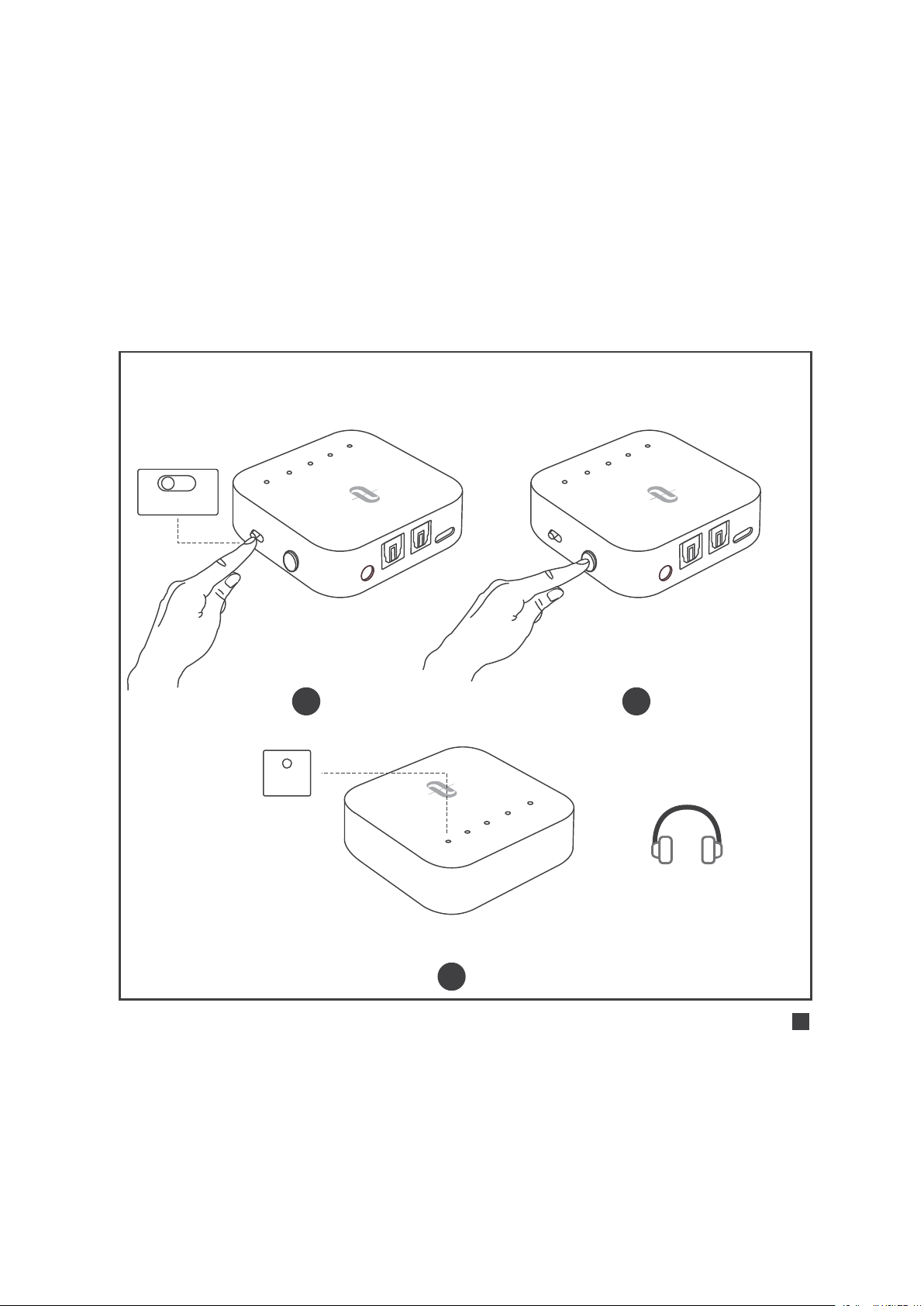
Manufacturer: Shenzhen NearbyExpress Technology
Development Co.,Ltd.
Address: Floor 7, Building E, Galaxy World Phase II,
Shenzhen, China
E-mail: [email protected]
User Guide
Model:TT-BA09 Pro
WIRELESS ADAPTER


CONTENTS
English
Deutsch
Français
Español
Italiano
01/16
17/32
33/48
49/64
65/80
81/95
A
B
S
B
C
A
P
T
X
L
L
1 2
3
4
5 6
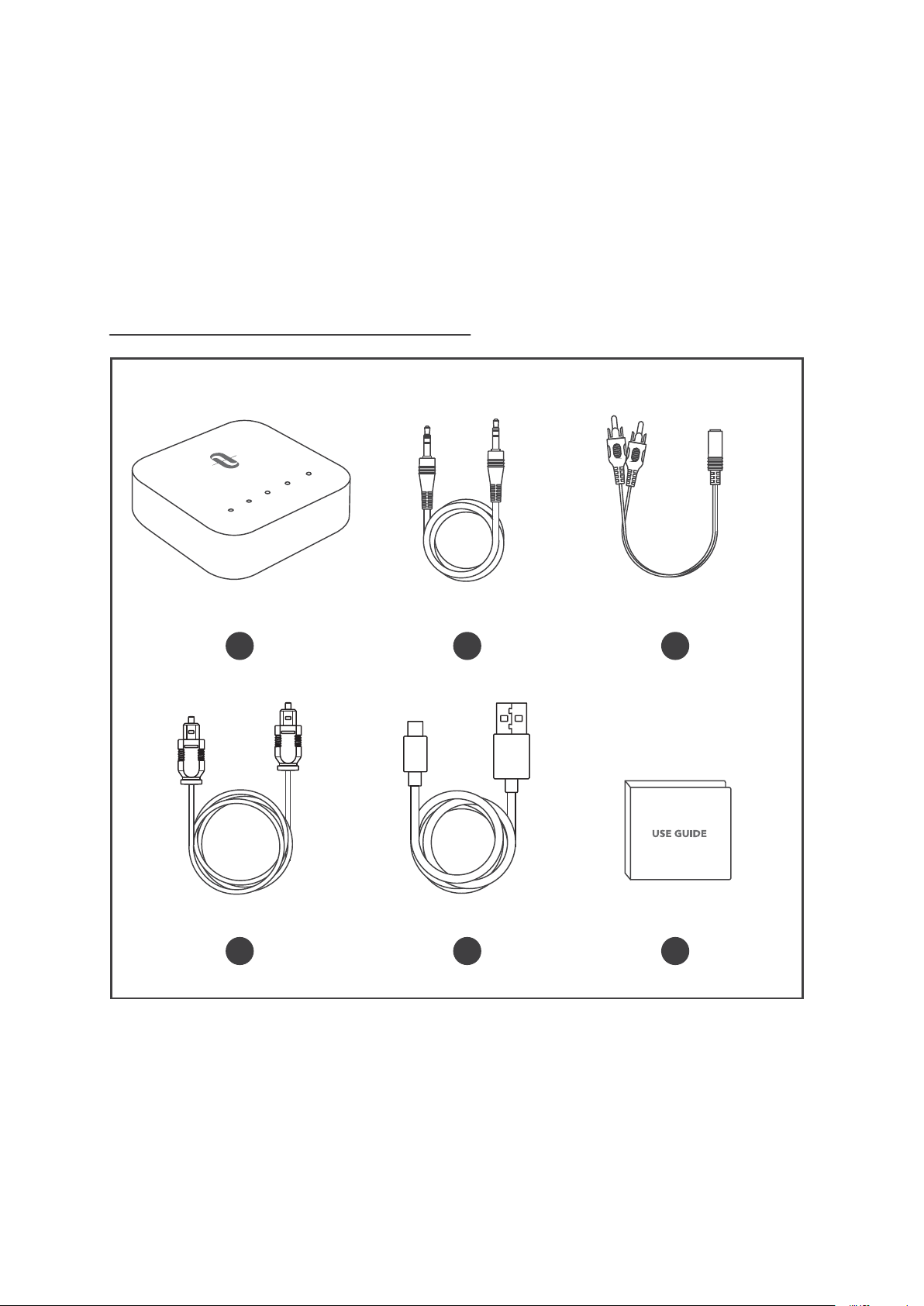
PACKAGE CONTENTS

1 x TaoTronics Wireless Adapter (TT-BA09 Pro)
1 x 3.5mm Audio Cable
1 x 3.5mm Female to RCA Male Cable
1 x Optical Cable
1 x USB-C Charging Cable
1 x User Guide
1 x TaoTronics kabelloser Adapter (TT-BA09 Pro)
1 x 3,5 mm Audiokabel
1 x 3,5mm weiblich-zu-Cinch-männlich-Kabel
1 x Optisches Kabel
1 x USB-C-Ladekabel
1 x Bedienungsanleitung
1 x Adaptateur Sans Fil TaoTronics (TT-BA09 Pro)
1 x Câble Audio 3.5mm
1 x Câble 3.5mm Femelle vers RCA Mâle
1 x Câble Optique
1 x Câble de Charge USB-C
1 x Guide d’Utilisation
DE
FR
Lieferumfang
Contenu du Package
EN
Package Contents
1 x Adaptador inalámbrico TaoTronics (TT-BA09 Pro)
1 x Cable de audio de 3,5 mm
1 x Cable macho de 3.5mm hembra a RCA
1 x Cable óptico
1 x Cable de carga USB-C
1 x Guía del usuario
1 x Adattatore Wireless di TaoTronics (TT-BA09 Pro)
1 x Cavo Audio da 3.5mm
1 x Cavo Maschio da 3.5mm - connettore femmina a RCA
1 x Cavo Ottico
1 x Cavo di Ricarica USB-C
1 x Guida Utente
ES
IT
JP
Contenido del paquete
Contenuto della Confezione
A
UX
S
PD
IF
IN
S
P
D
I
F
O
UT
D
C
5V
A
B
S
B
C
A
P
TX
L
L
T
X
RX
AUX DC5V
SPDIF IN SPDIF OUT
AUX OPT USB-C
12
3
4
5
6
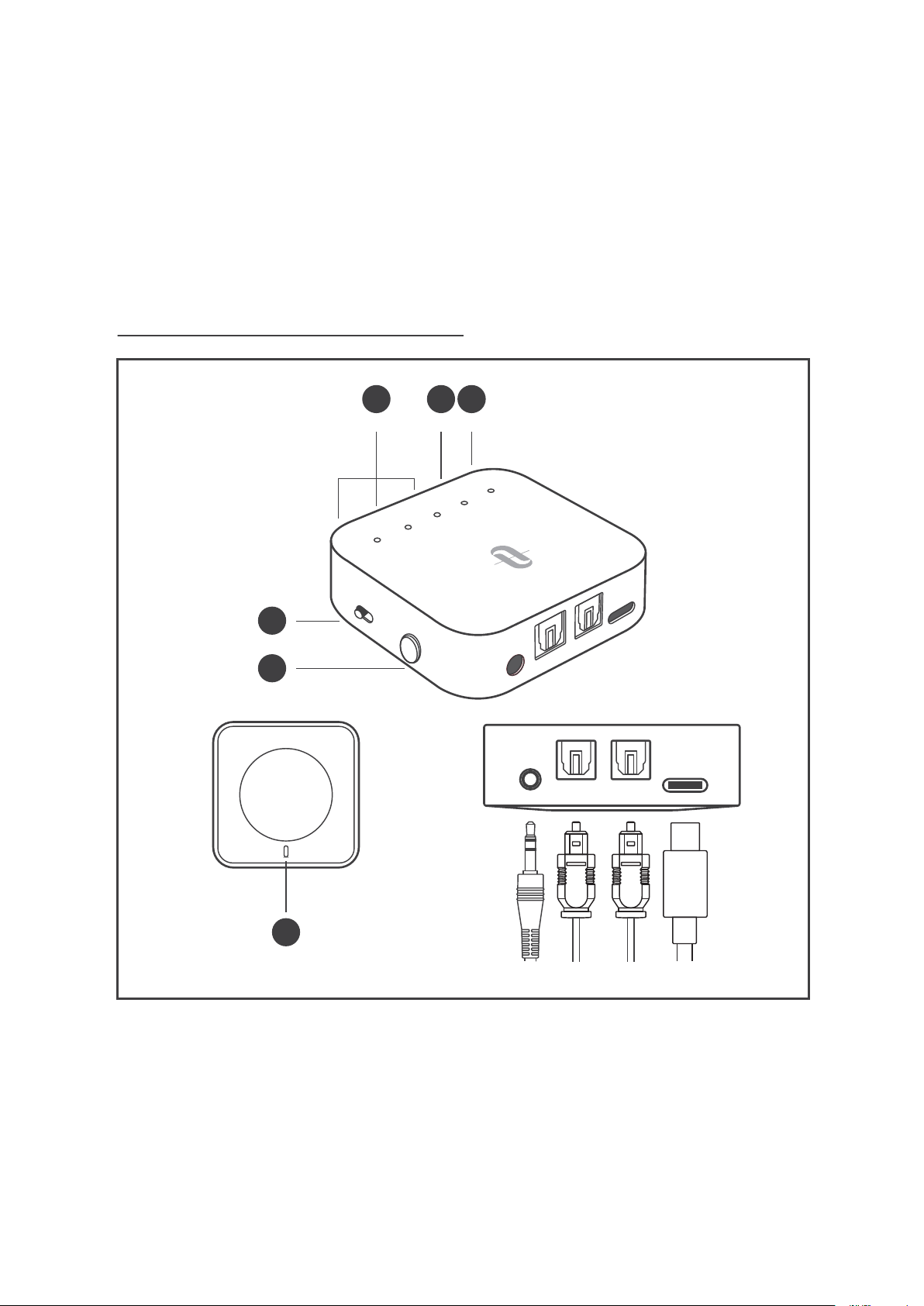
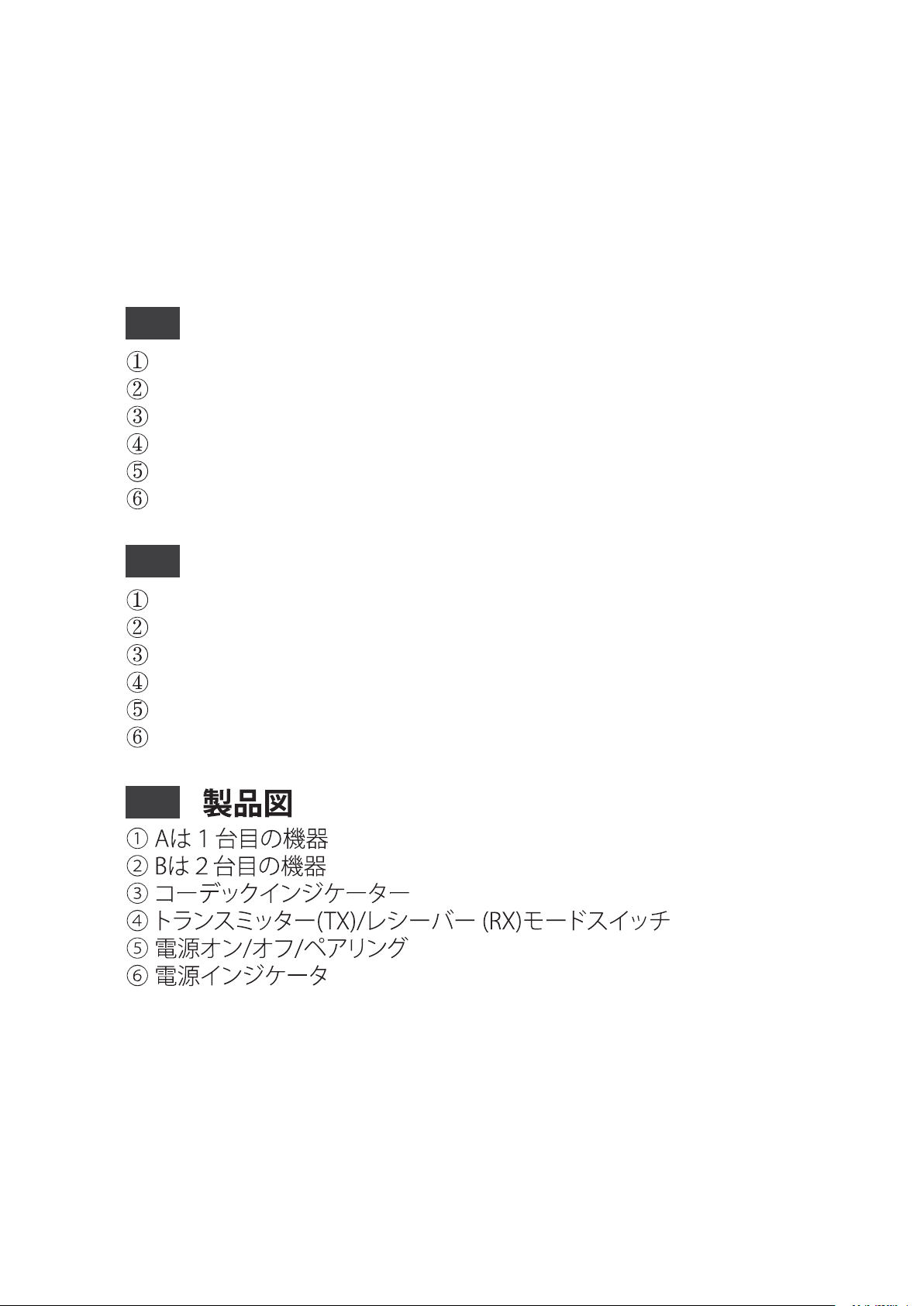
PRODUCT DIAGRAM

A for 1st Device
B for 2nd Device
Codec Indicators
Transmitter (TX) / Receiver (RX) Mode Switch
Power ON/OFF/Pairing
Power Indicator
A für 1. Gerät
B für 2. Gerät
Codec-Anzeigen
Transmitter (TX) / Empfänger (RX) Modusschalter
Power AN/AUS/Koppeln
Stromanzeige
A pour 1er appareil
B pour 2eme appareil
Indicateurs codec
Interrupteur mode Transmetteur (TX) / Récepteur (RX)
Alimentation ON/OFF / Appairage
Indicateur d'allumage
EN
DE
FR
Product Diagram
Produktdiagramm
Description du Produit
A para el primer dispositivo
B para el segundo dispositivo
Indicadores del Códec
Transmisor (TX) / Receptor (RX) Cambio de Modo
ON/OFF/Emparejando
Indicador de Encendido
A per il 1° Dispositivo
B per il 2° Dispositivo
Indicatori Codec
Pulsante Modalità Trasmittente (TX) / Ricevitore (RX)
Accensione/Spegnimento/Accoppiamento
Indicatore di Alimentazione
ES
IT
JP
Diagrama del producto
Schema del Prodotto
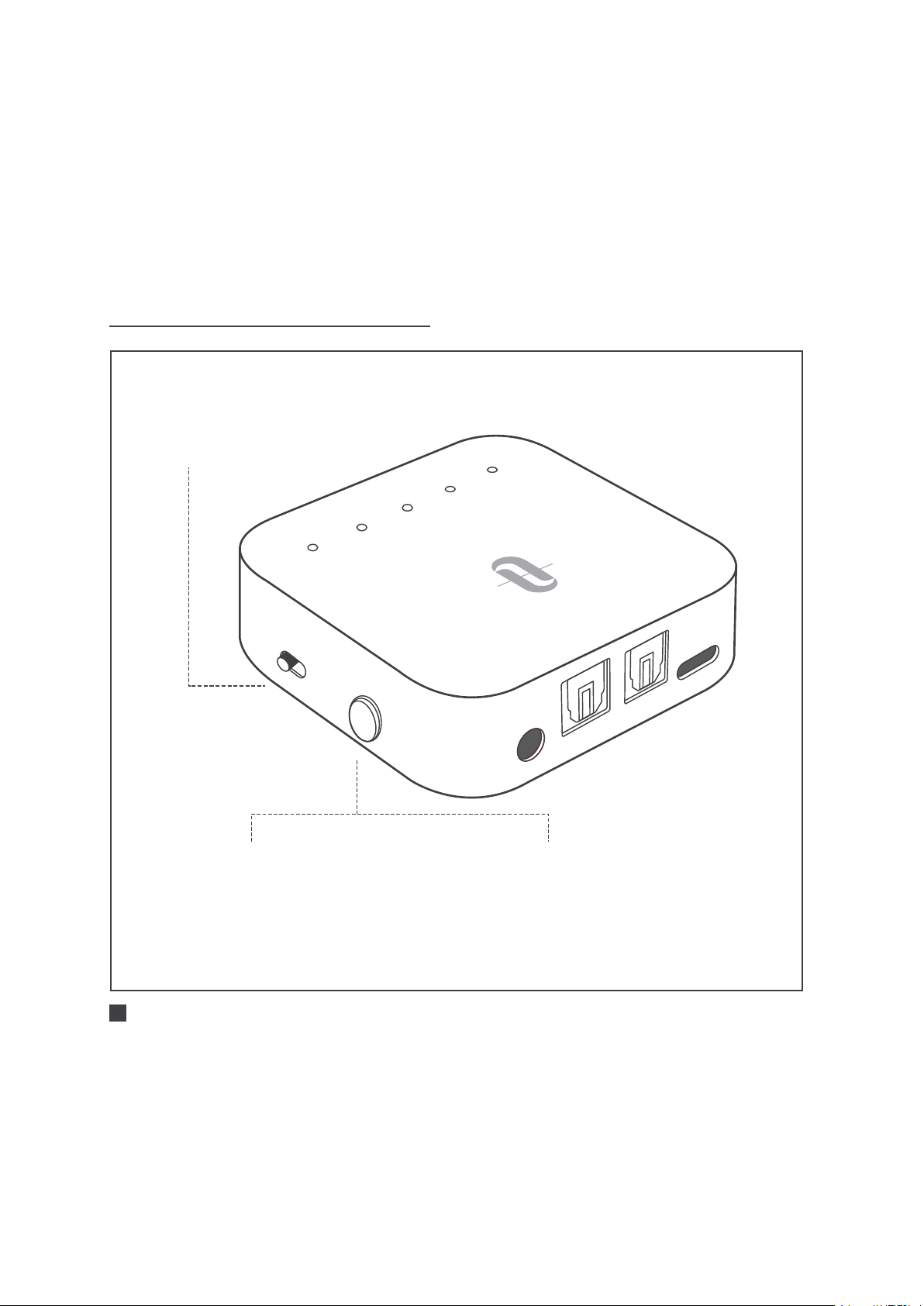
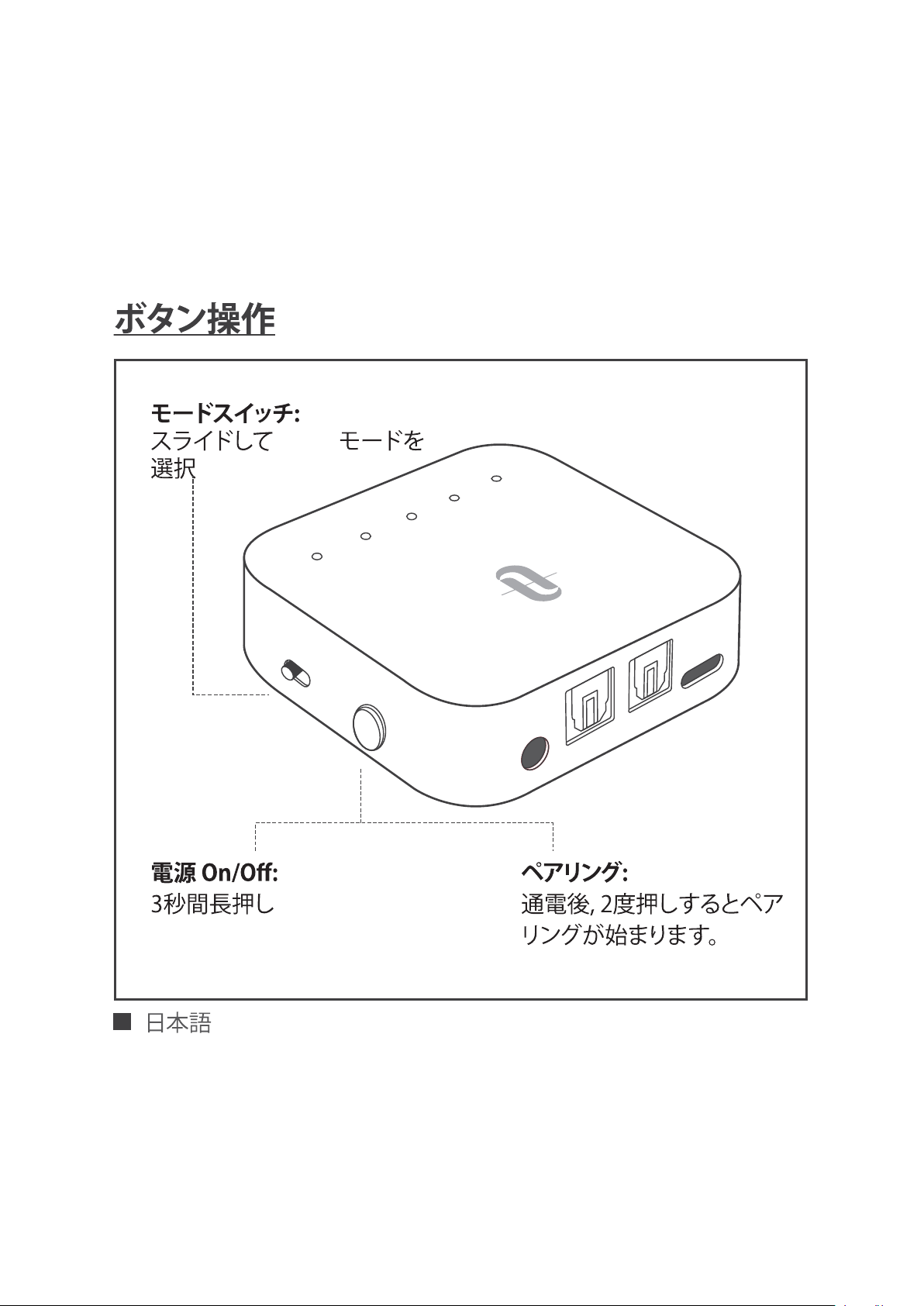
BUTTON CONTROL
AU
X
SP
D
I
F
I
N
SPD
IF
OUT
D
C5V
A
B
SB
C
A
P
TX
LL
T
X
RX
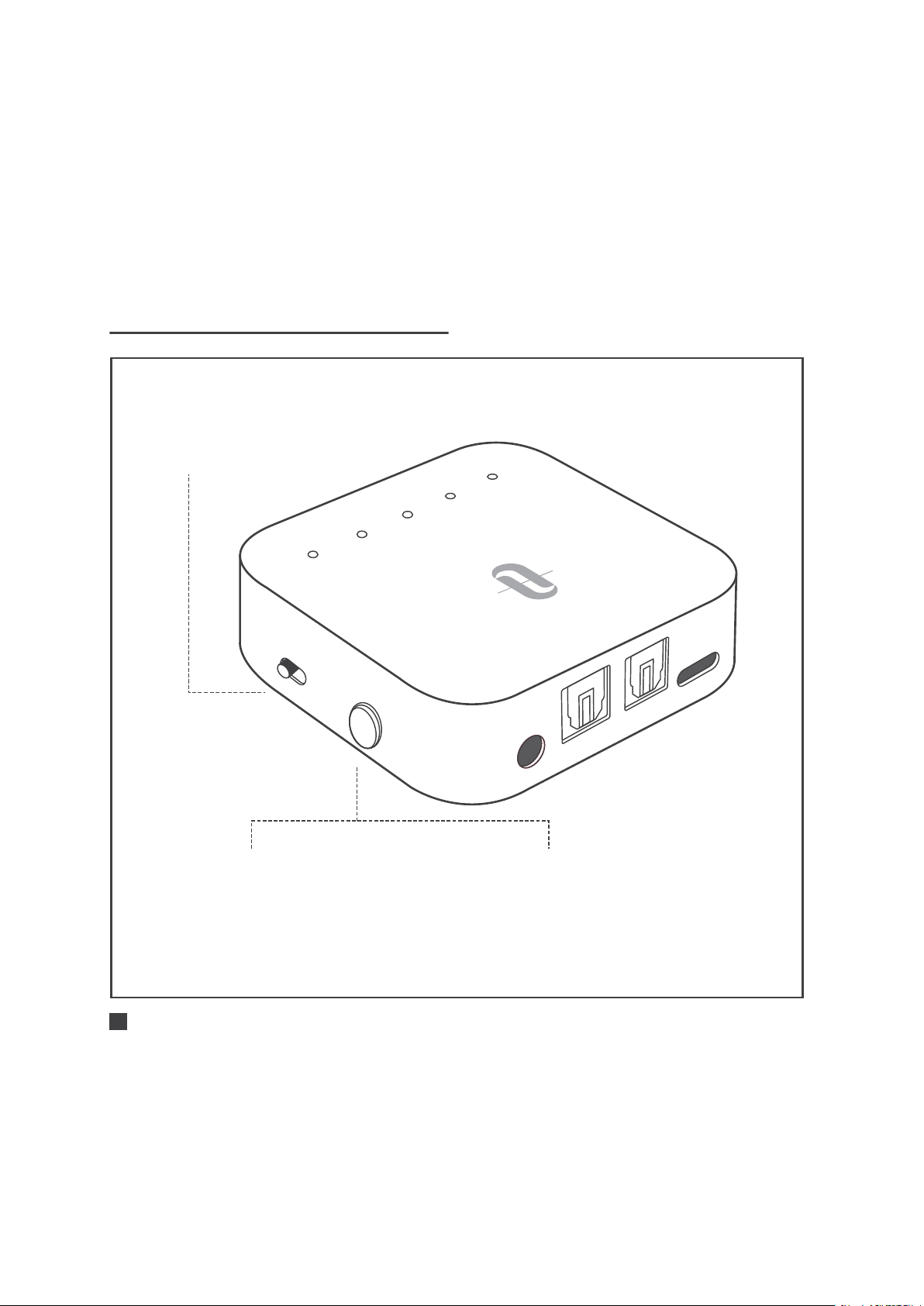
Power ON/OFF:
Press and hold for 3 seconds
Mode Switch:
Slide to select TX/RX mode
Pairing:
When powered on,
press twice to enter
pairing mode
ENGLISH / 01

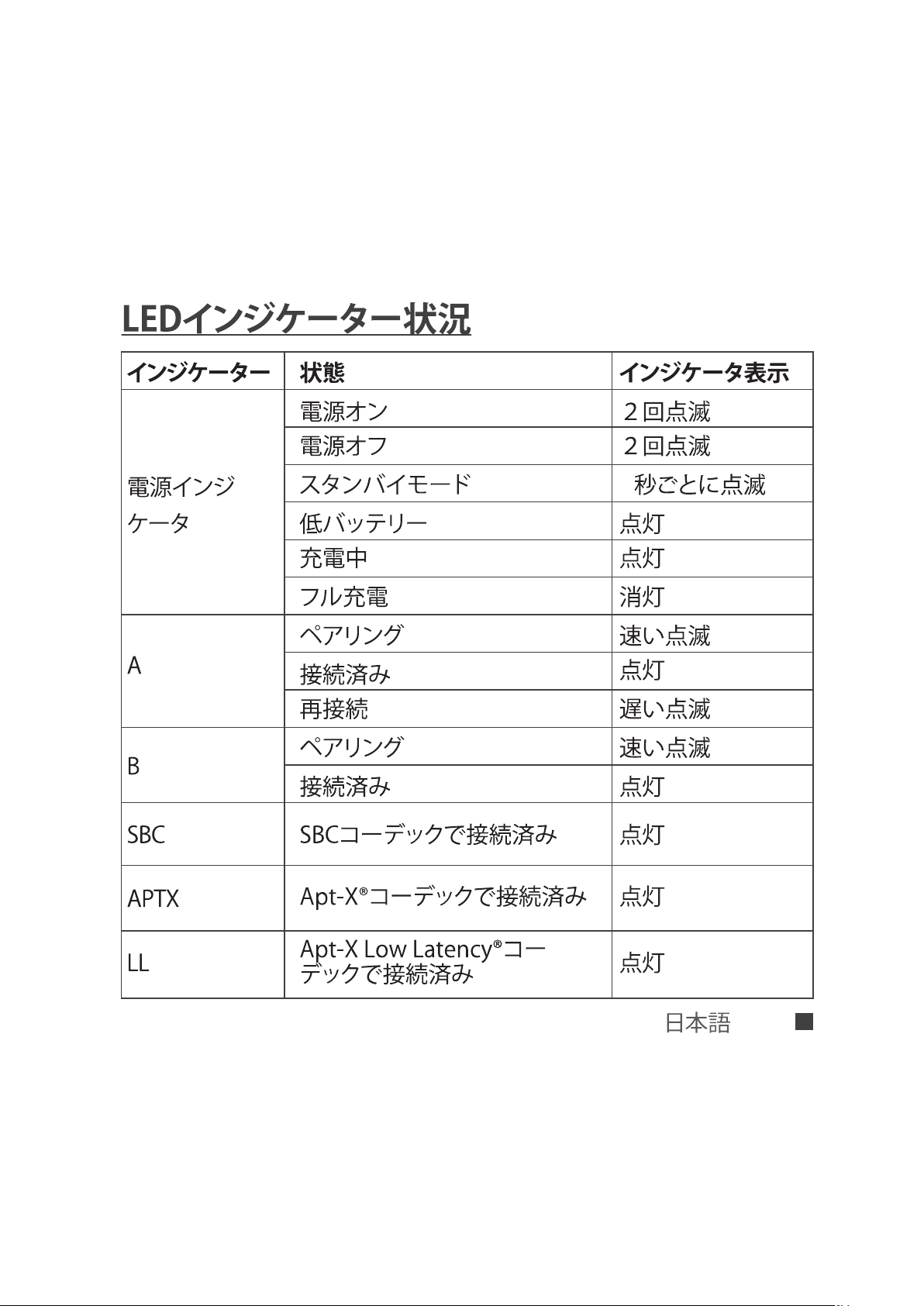
LED INDICATOR STATUS
Function
Power ON
Power OFF
Standby Mode
Battery Low
Charging
Fully Charged
Pairing
Connected
Re-connect
Pairing
Connected
Connected using
the SBC codec
Connected using
the Apt-X® codec
Connected using the
Apt-X Low Latency® codec
Status
Flashing twice
Flashing twice
Flashing every 5 seconds
Solid on
Solid on
Off
Flashing quickly
Solid on
Flashing slowly
Flashing quickly
Solid on
Solid on
Solid on
Solid on
Indicators
Power
Indicator
A
B
SBC
APTX
LL
ENGLISH / 02

· SBC: SBC codec, supported by most Bluetooth® devices
· APTX: Apt-X® codec, the Bluetooth® device shall support Apt-X®
codec. Prior than SBC.
· LL: Apt-X Low Latency® codec, the Bluetooth® device shall
support Apt-X low latency®. Prior than SBC and Apt-X®.
HOW TO USE
Charging
1. Connect the charging port with any USB charging adapter or
active computer USB port.
2. The Power indicator will stay solid on during charging. Once
fully charged, it will turn off.
Note:
You can use the adapter during charging, however,
there might be background buzz noise.
We recommend charging the unit for at least 2 hours
before using it for the first time.
ENGLISH / 03
A
U
X
S
P
D
I
F
I
N
SP
D
IF
O
UT
D
C
5
V
A
B
S
BC
A
P
TX
L
L
T
X
R
X
A
U
X
S
P
D
I
F I
N
S
P
D
IF
O
UT
D
C
5
V
A
B
S
BC
A
P
TX
L
L
T
X
R
X
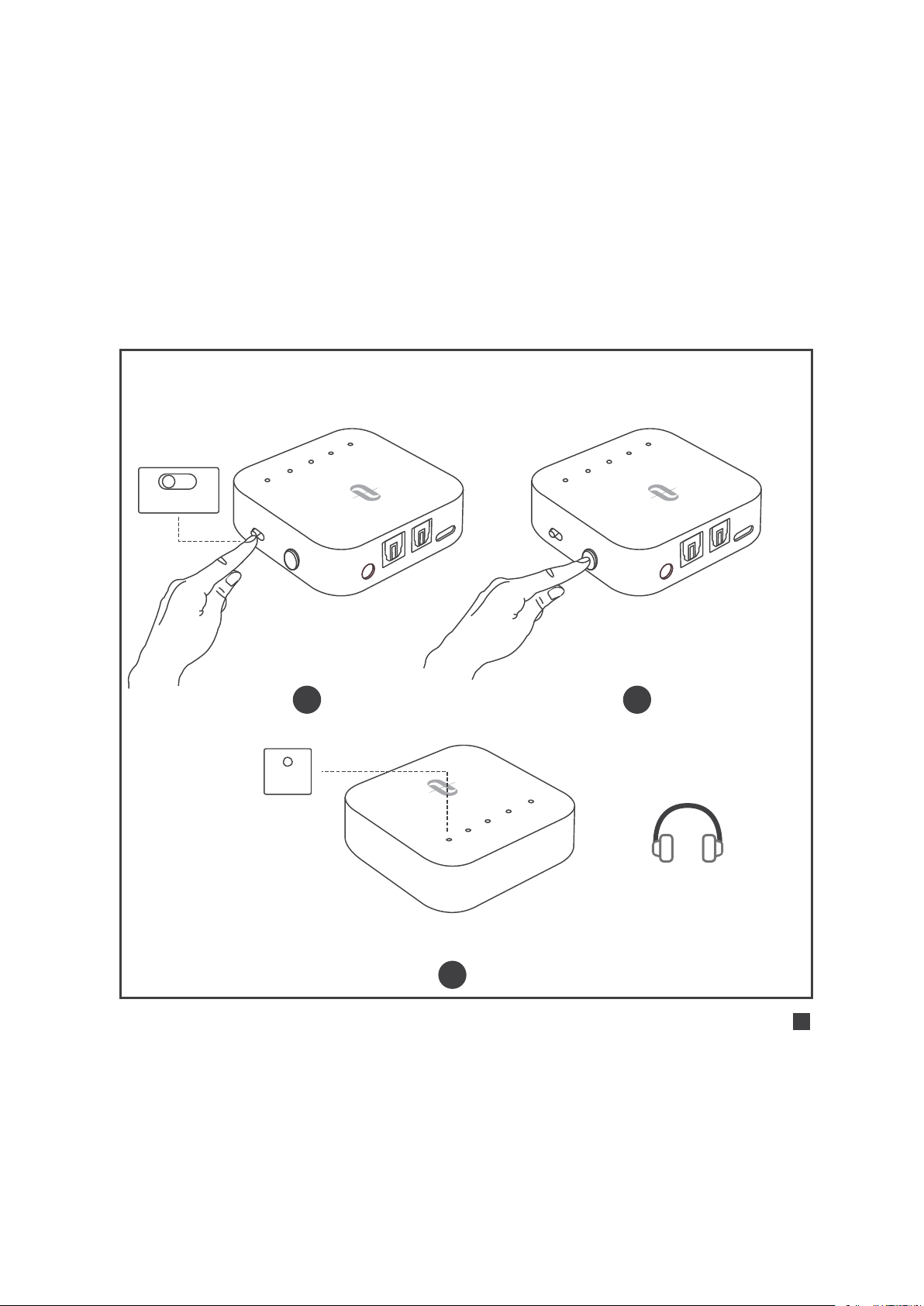
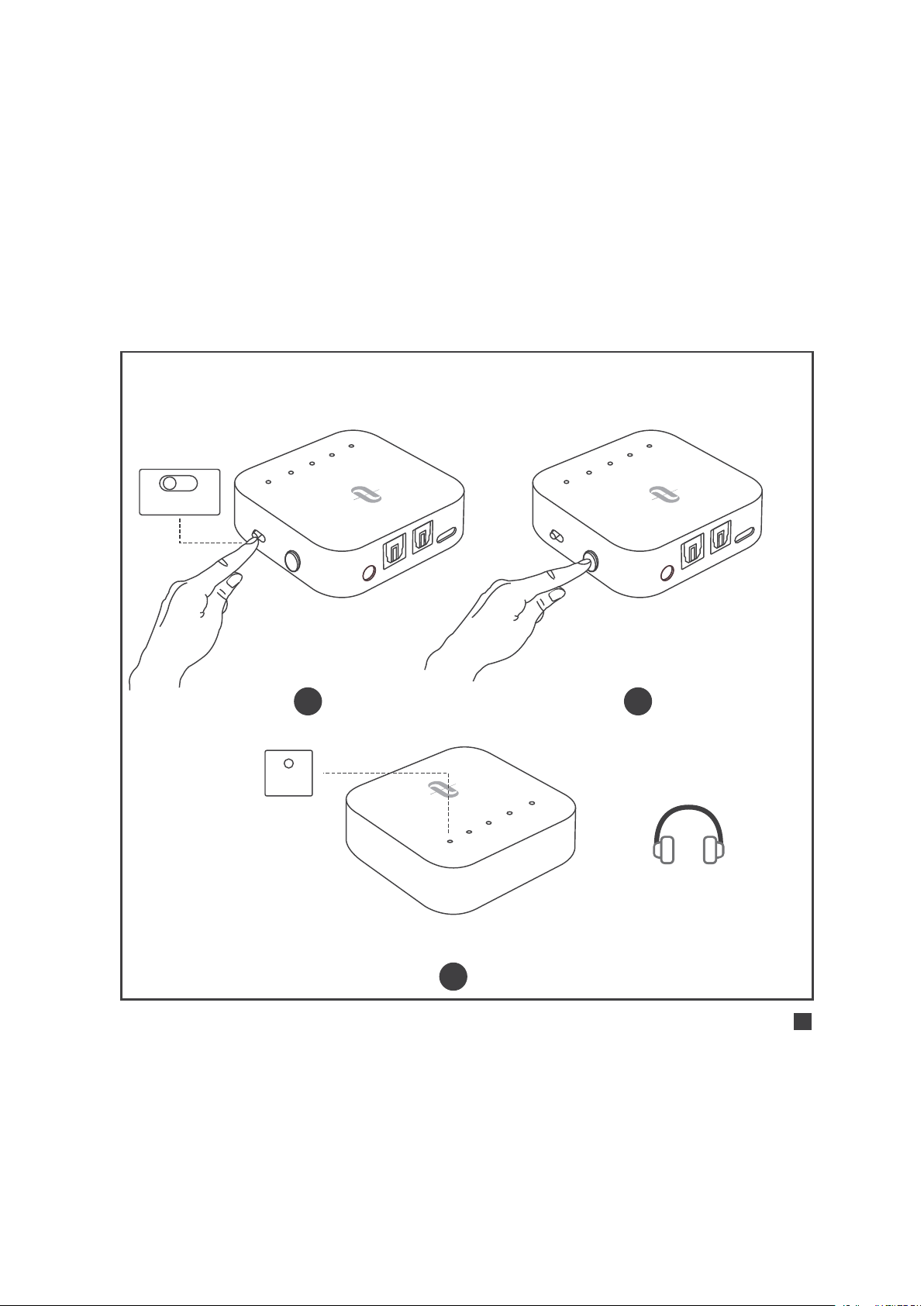
Use in TX Mode |
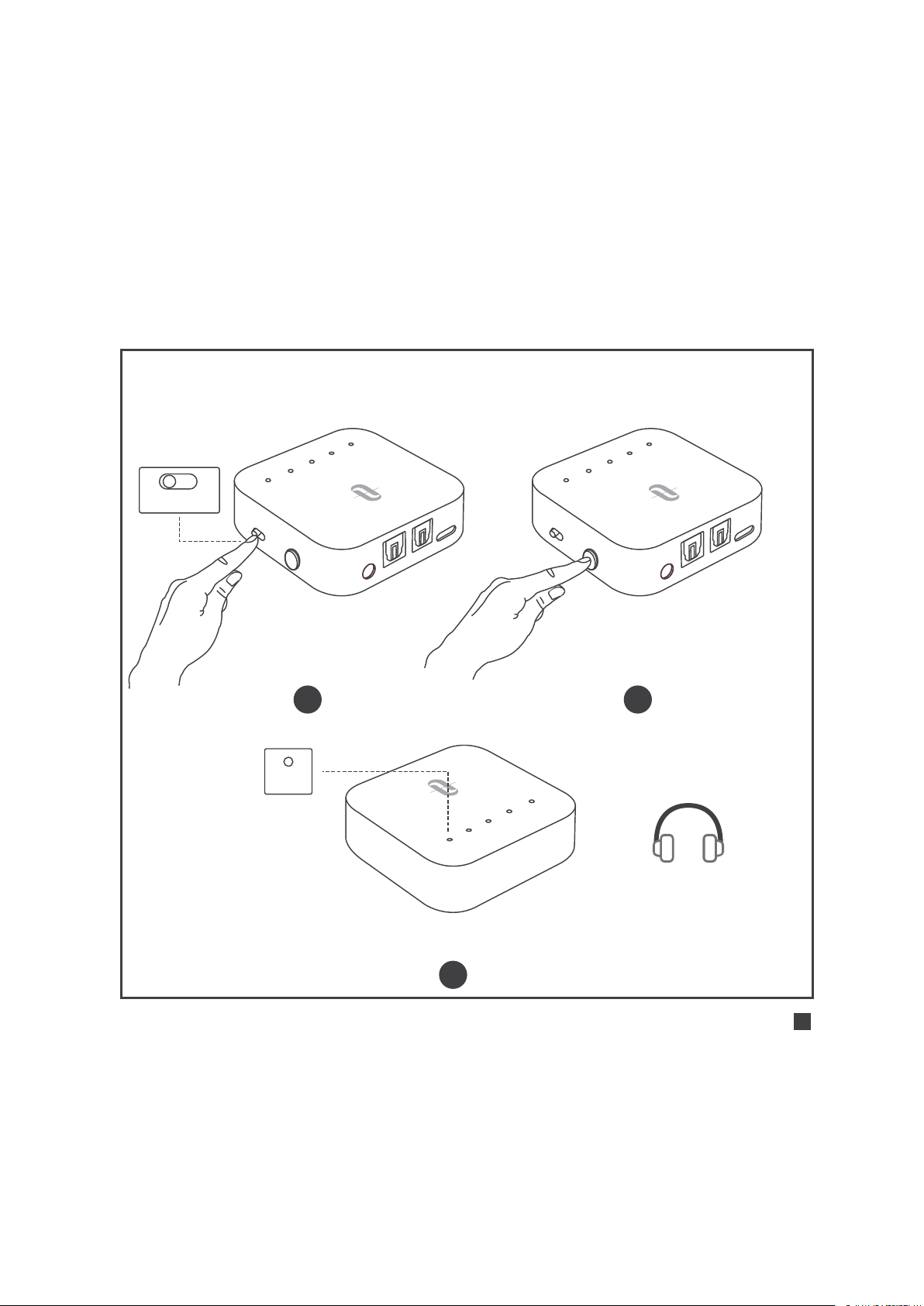
Initial Pairing
TX RX
Turn on: Press and hold the
Power button for 3 seconds
1 2
A
B
SB
C
AP
TX
L
L
Pairing: “A” flashes quickly
3
A
Pair with the 1st Bluetooth® Device
ENGLISH / 04
SBC APTX LL
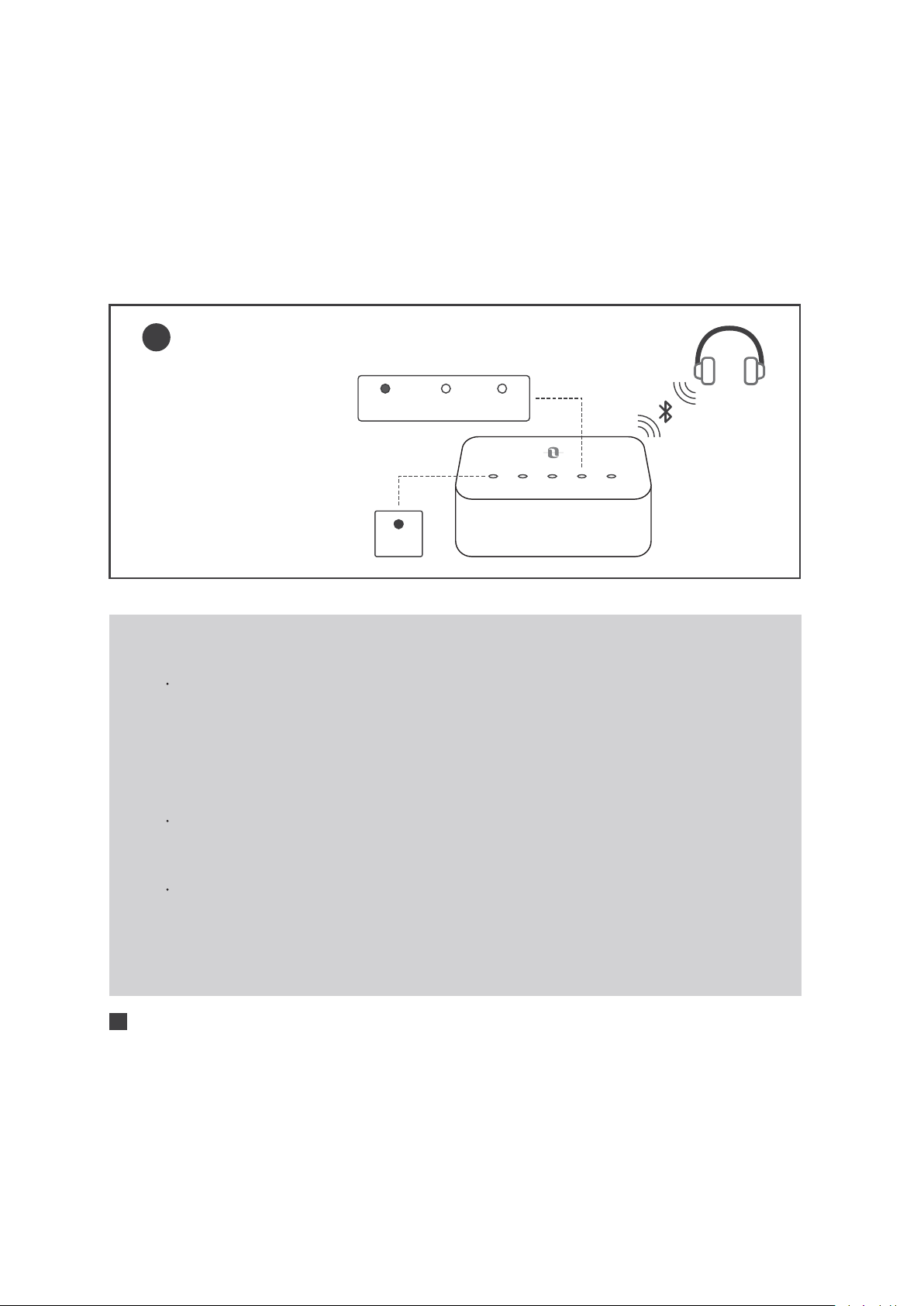
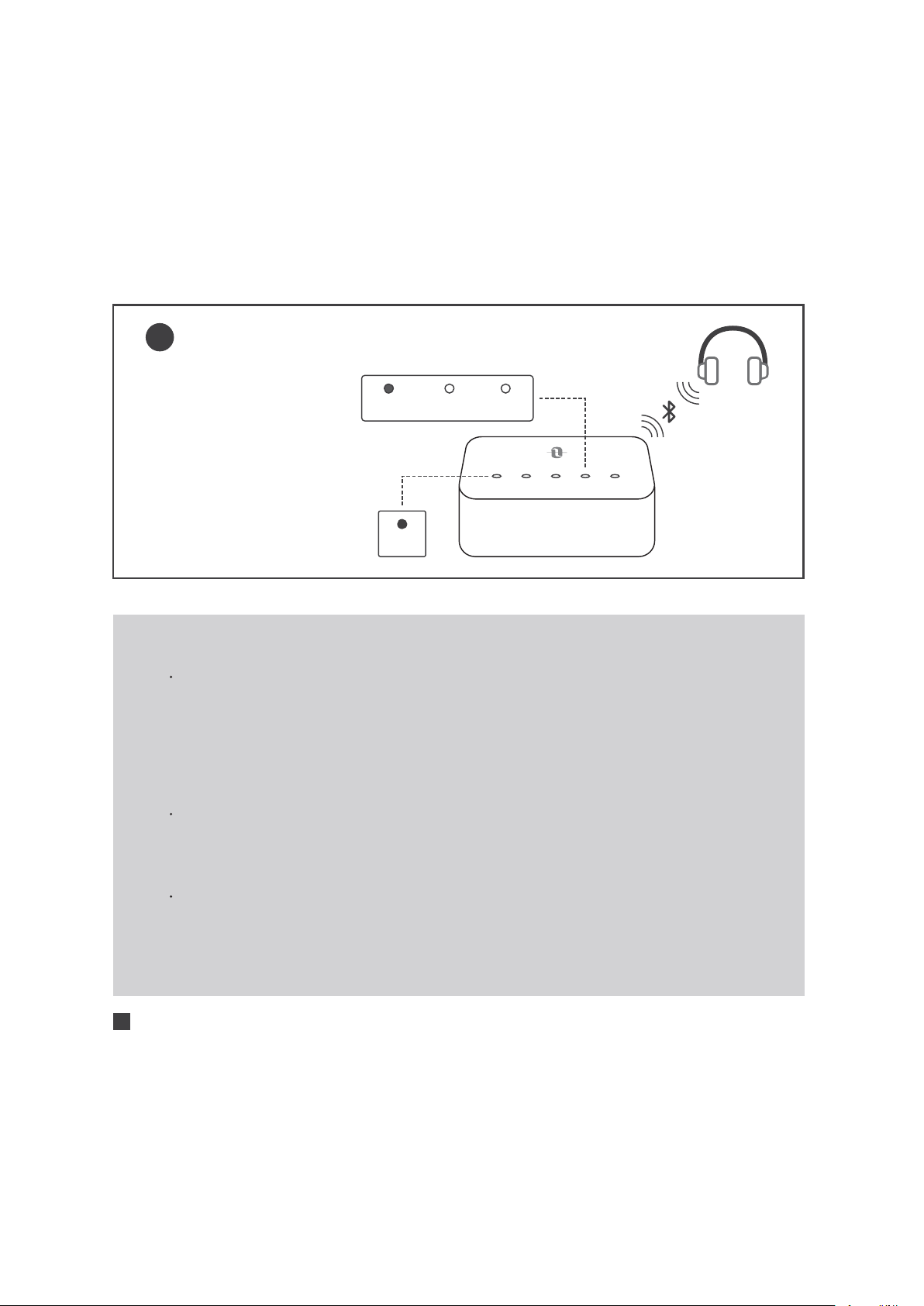
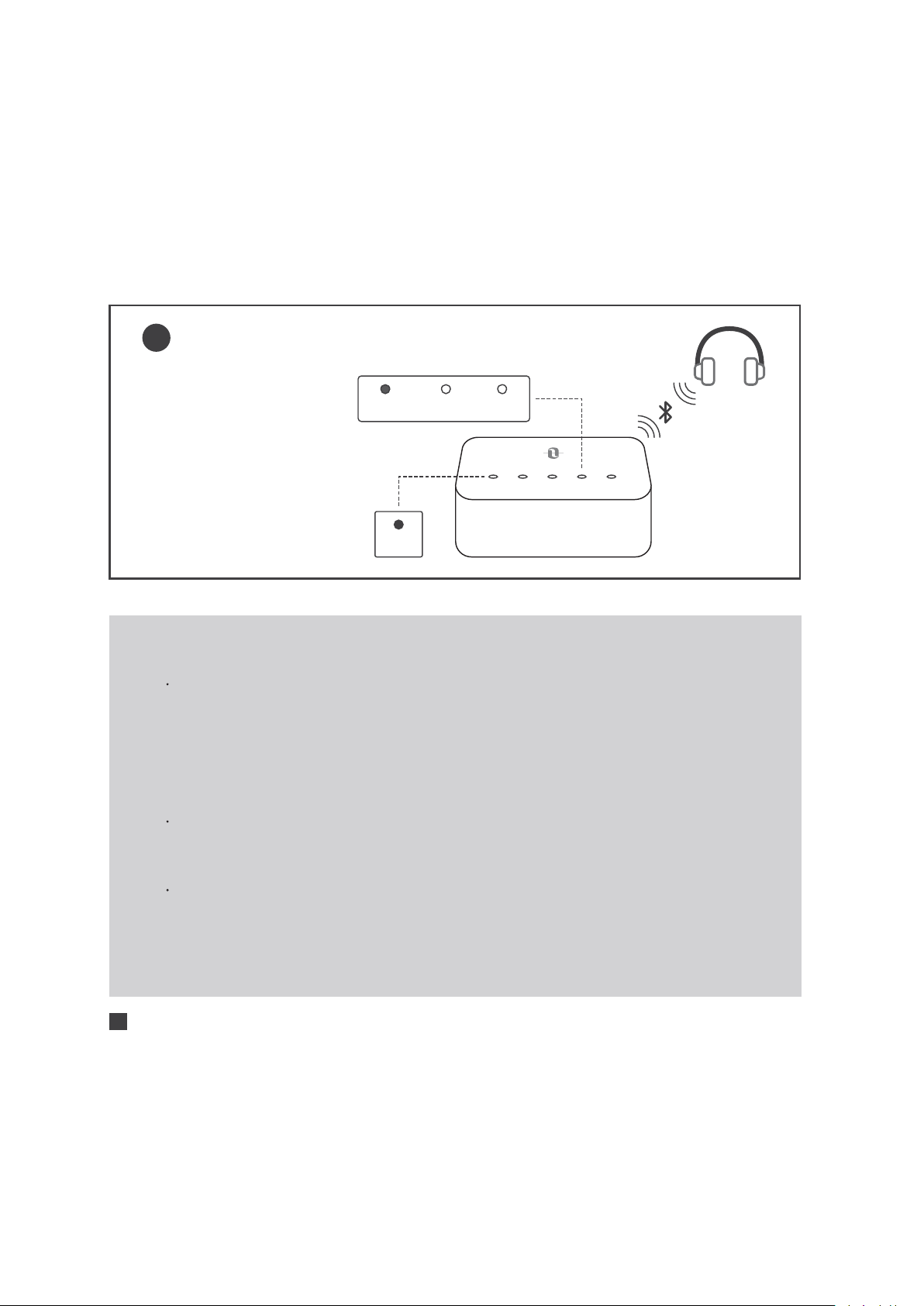
Successfully paired:
“A” solid on, the Codec
indicator for the current
streaming codec will
light up
4
A B SBC APTX LL
A
Note:
If you want to experience LIP SYNC, make sure your
Bluetooth® device supports apt-X Low Latency®
codec. After connected, the Codec indicator “LL” will
light up to indicate the low latency streaming codec.
The default input mode is SPDIF. When the AUX cable
is plugged in, it will switch to AUX mode automatically.
Please do not connect TT-BA09 Pro to an amplifier
output in TX mode, which may cause over-voltage and
damage the adapter.
ENGLISH / 05
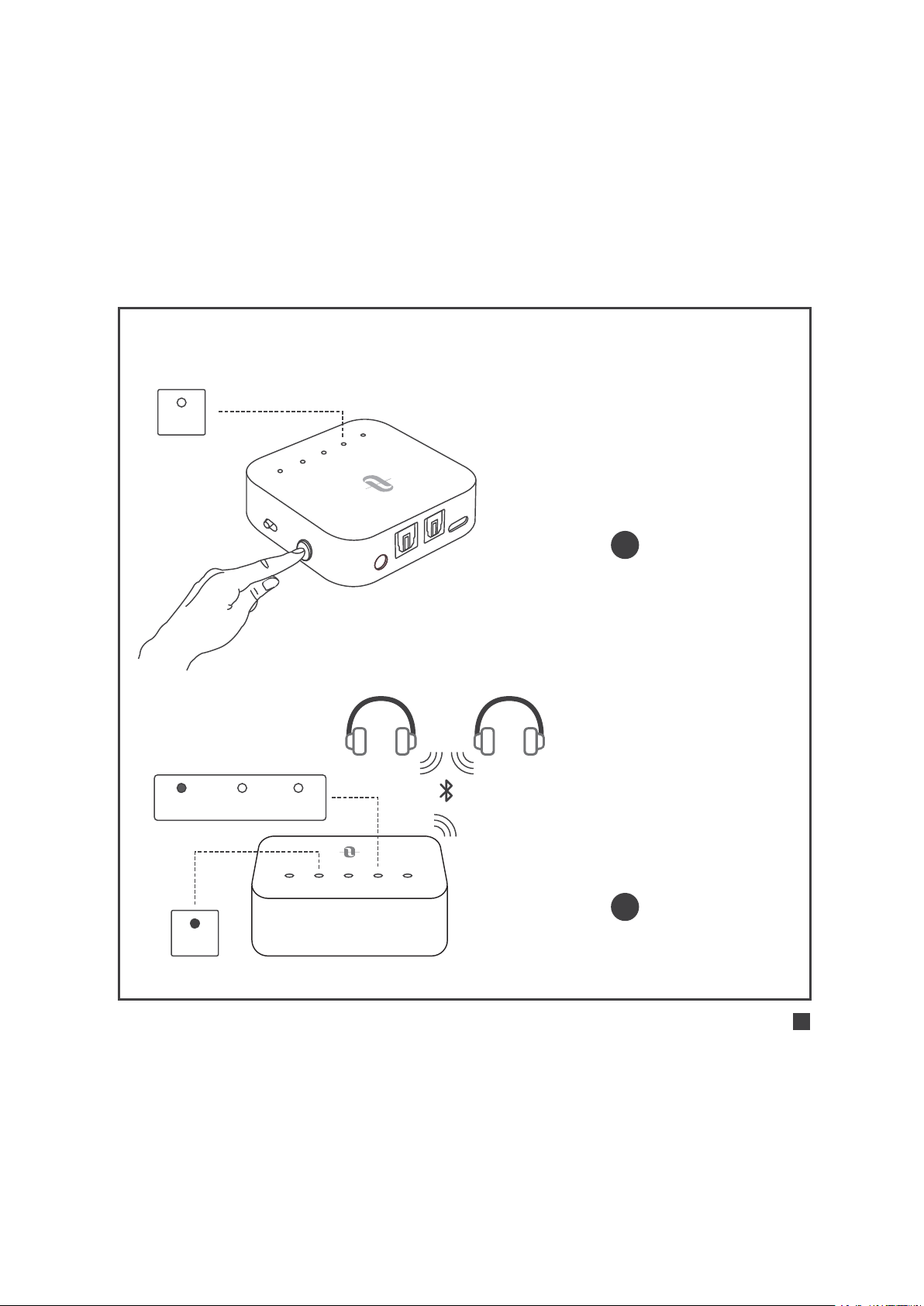
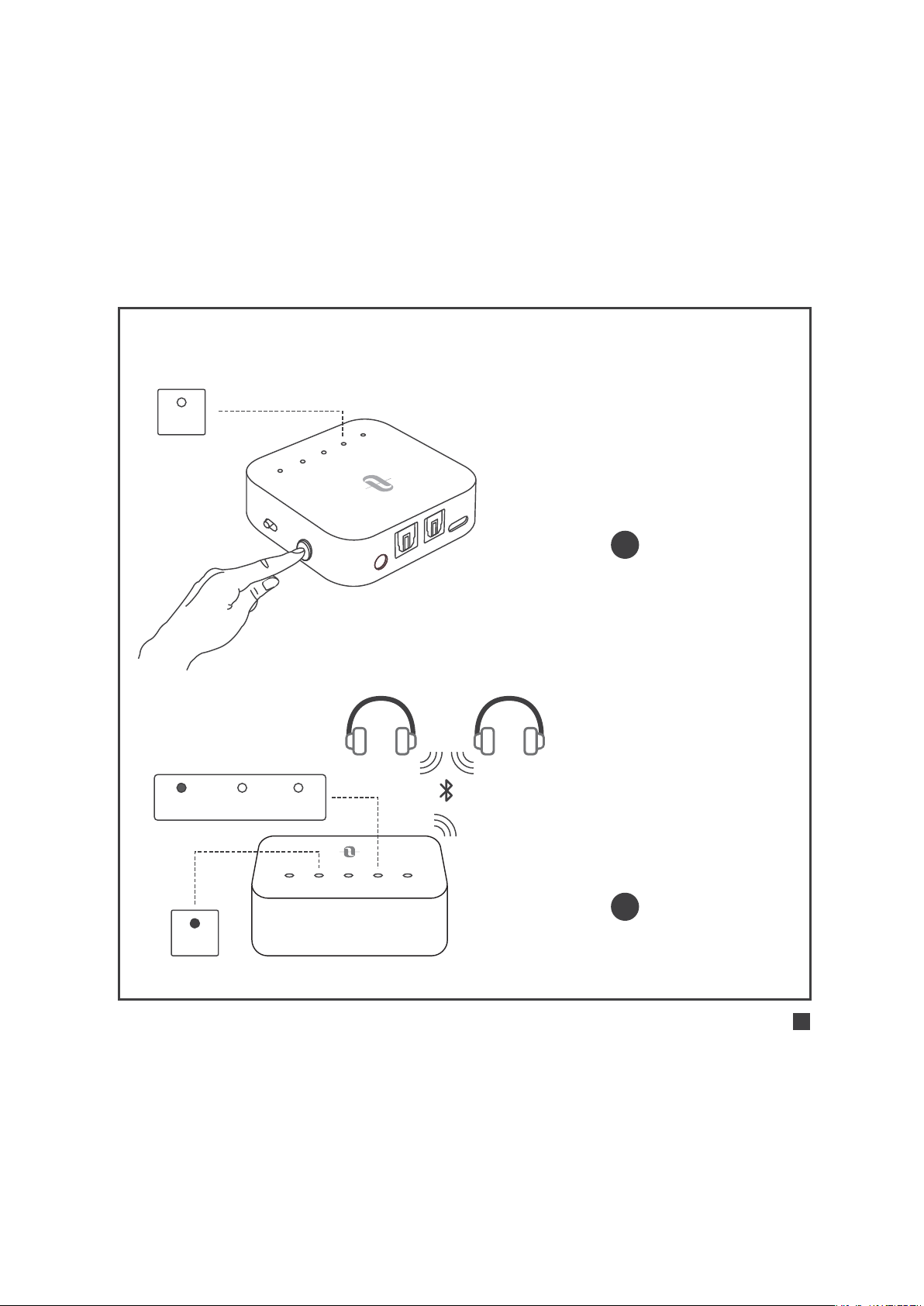
Pair with the 2nd Bluetooth® Device
A
U
X
S
PDI
F
I
N
SP
D
I
F
O
UT
D
C
5
V
A
B
S
B
C
A
P
TX
LL
T
X
R
X
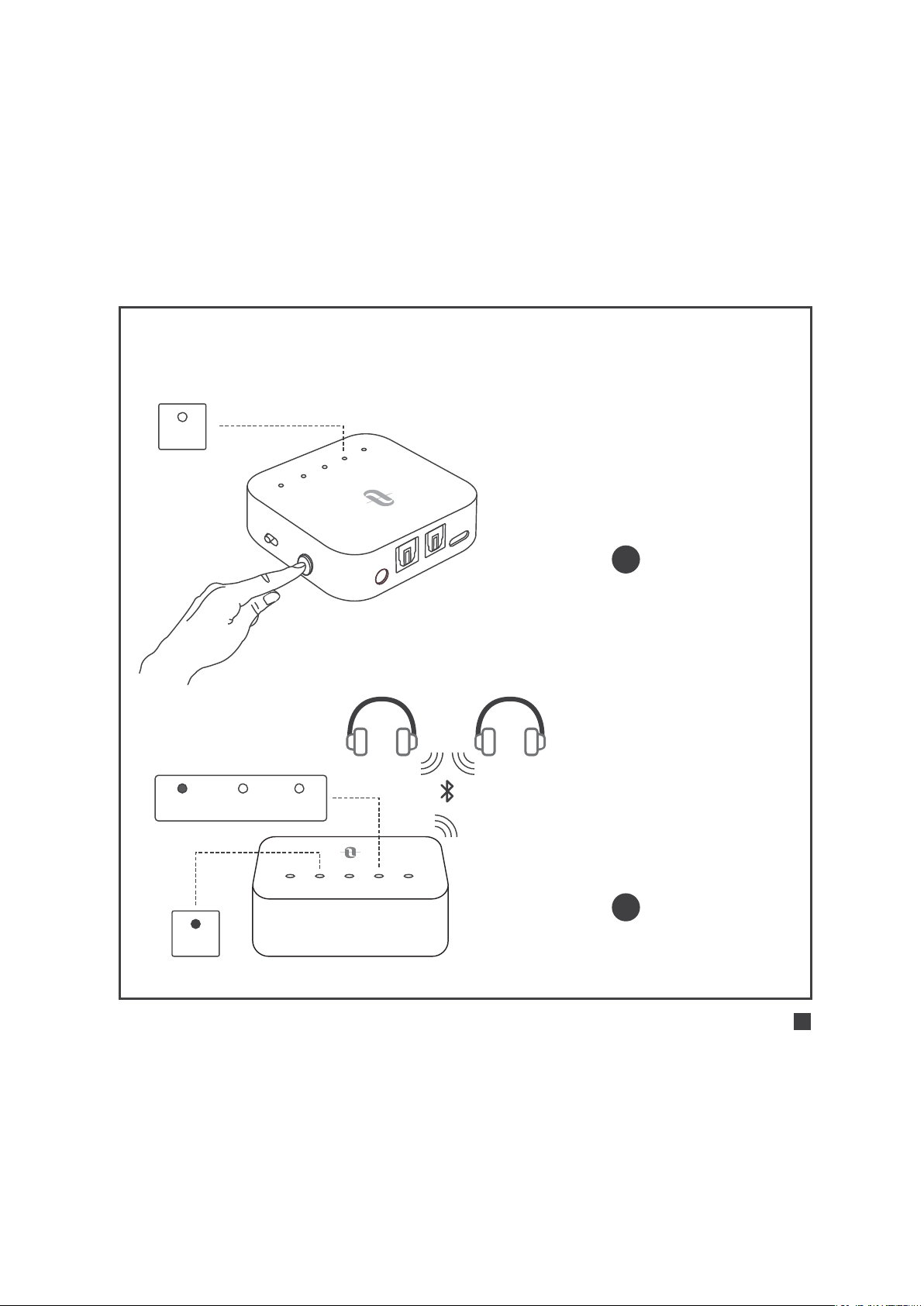
Press the Power button twice,
“B” flashes quickly
1
2
B
SBC APTX LL
A B SBC APTX LL
B
Successfully paired:
“B” solid on, the Codec
indicator for the current
streaming codec will light up
ENGLISH / 06

Note:
After connecting with two Bluetooth® devices, the
Codec indicator for the highest codec supported by
both devices will light up (e.g., if device “A” supports
SBC and Apt-X codec, while device “B” supports SBC
codec, then Codec indicator “SBC” will light up).
After disconnecting with one of the devices, the Codec
indicator for the highest codec supported by the
remaining device will stay on.
Use in TX Mode |
Automatic Re-connect
TT-BA09 Pro can remember the devices paired previously, and will
attempt to pair with the last connected devices (up to 2 devices)
automatically once it is turned on.
Use in TX Mode |
Clear Pairing History
When the adapter is off, clear the pairing history by sliding the
Mode switch to “RX”, then power it on.
ENGLISH / 07
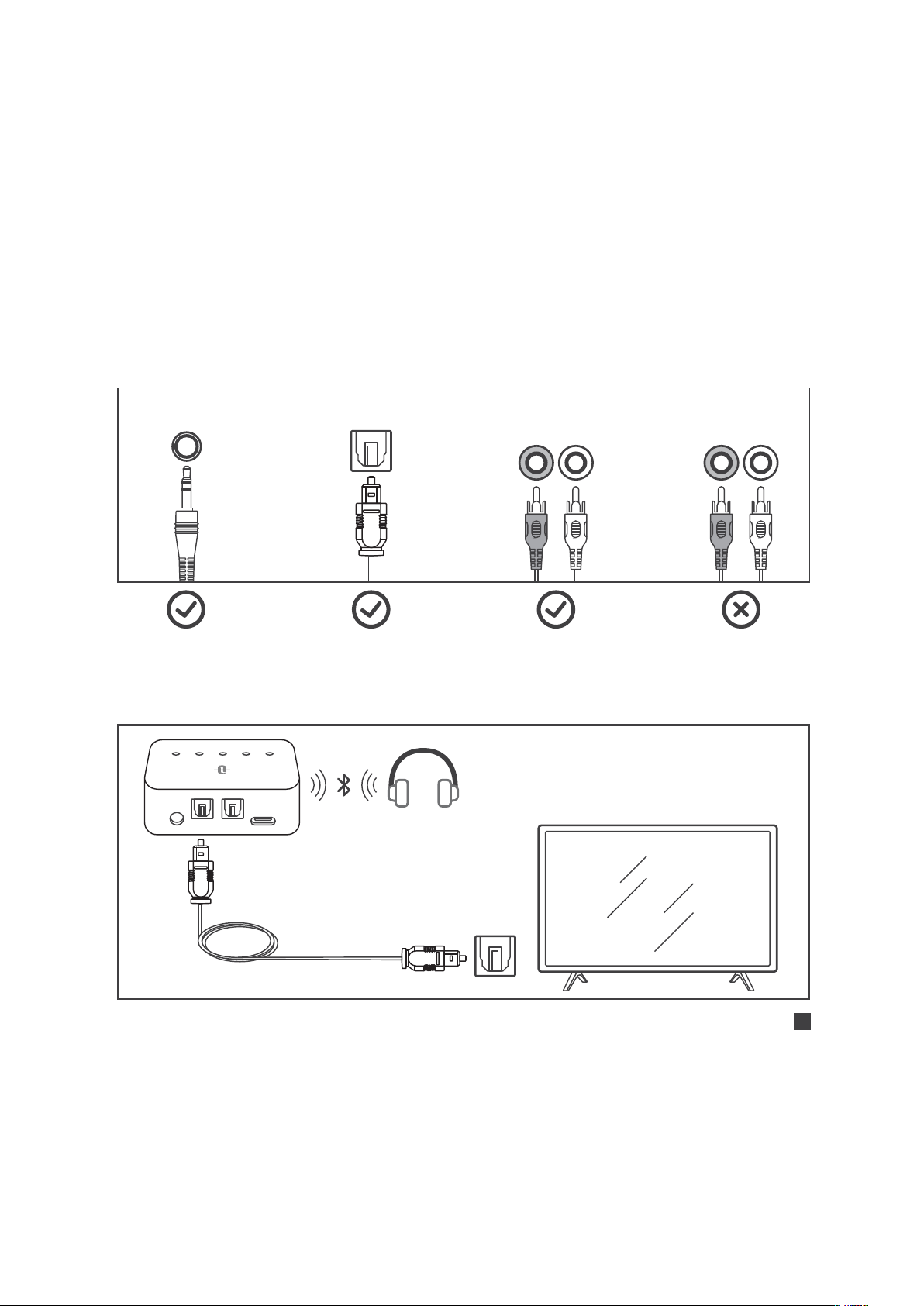
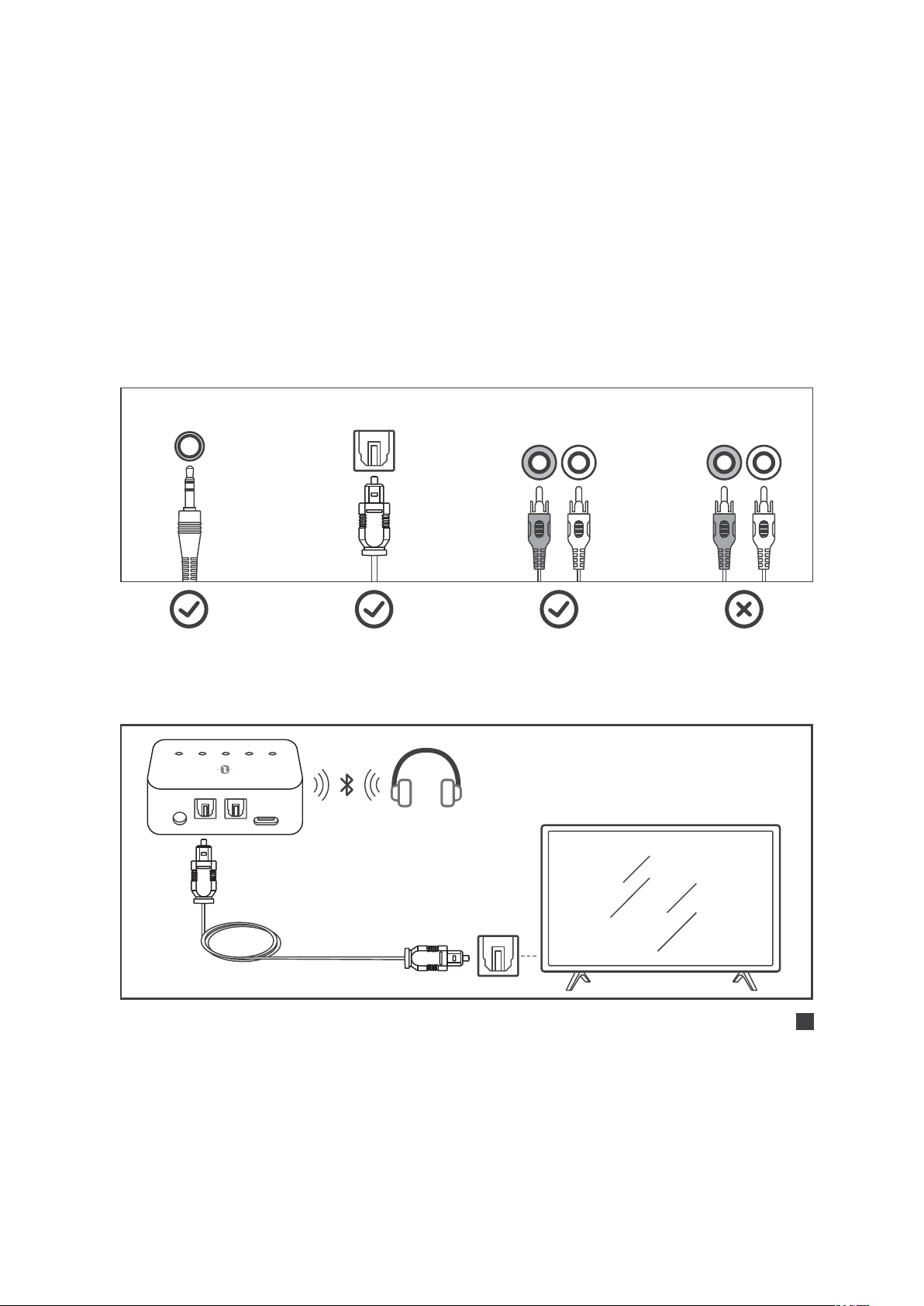
Use in TX Mode |
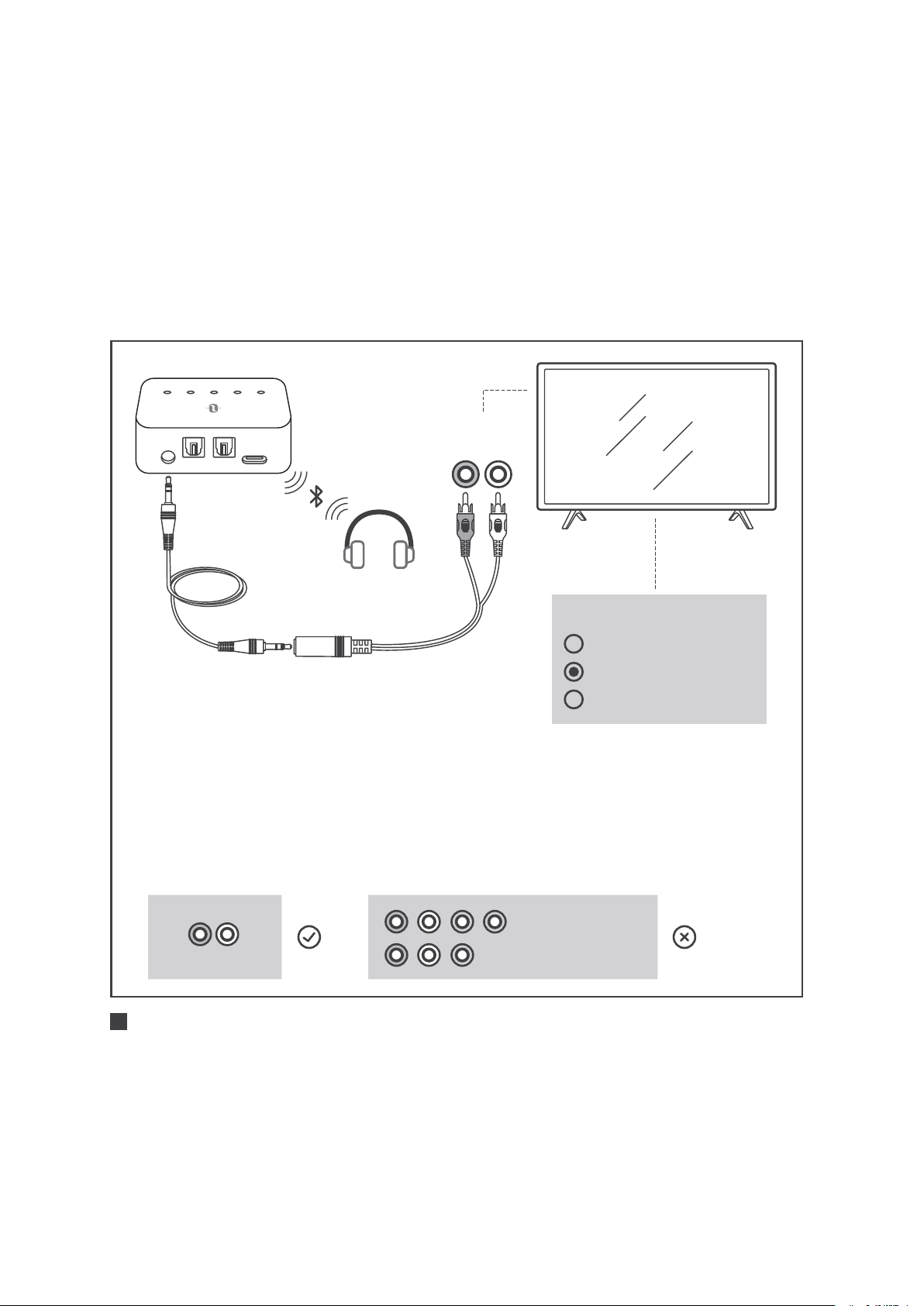
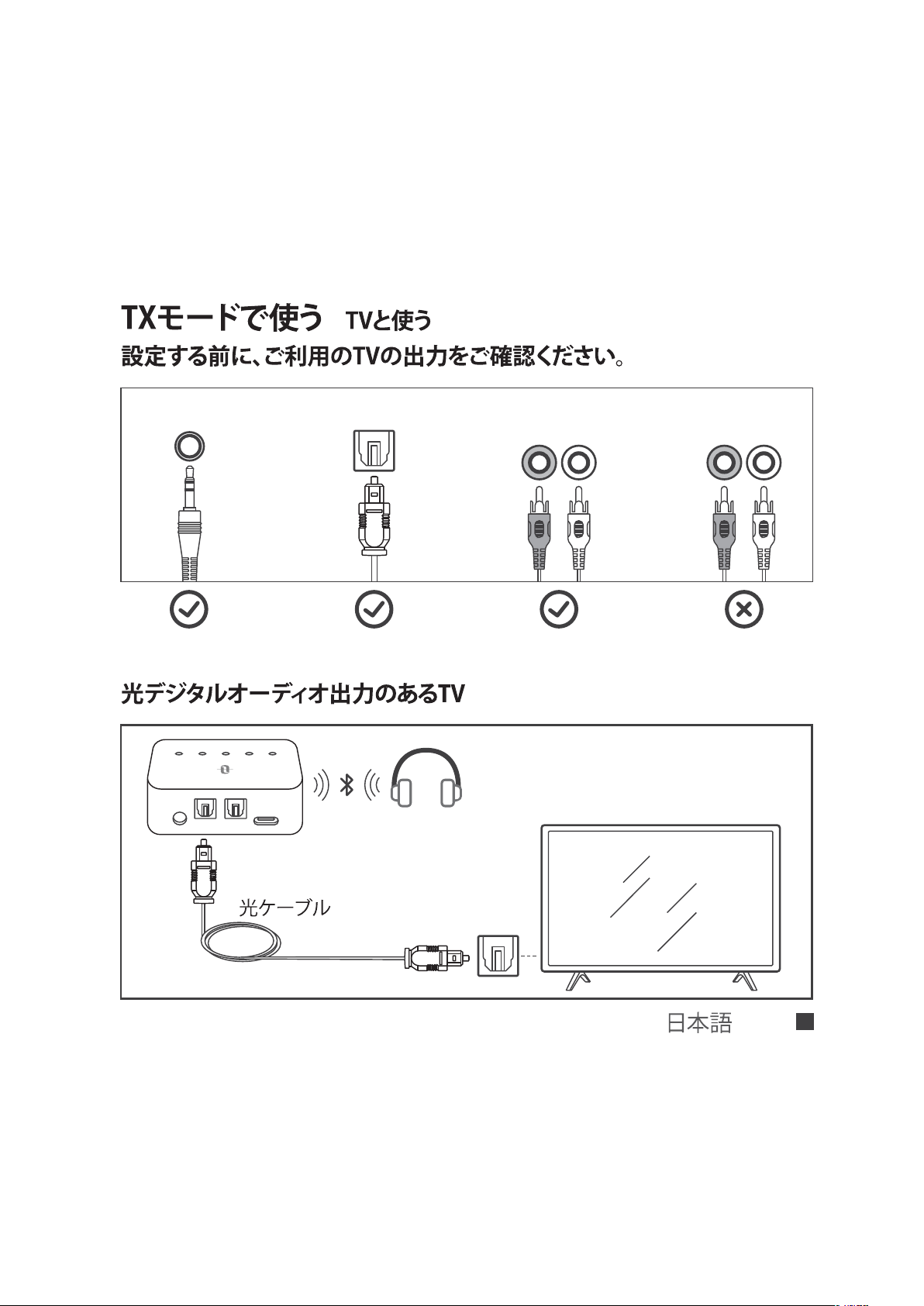
Use with your TV
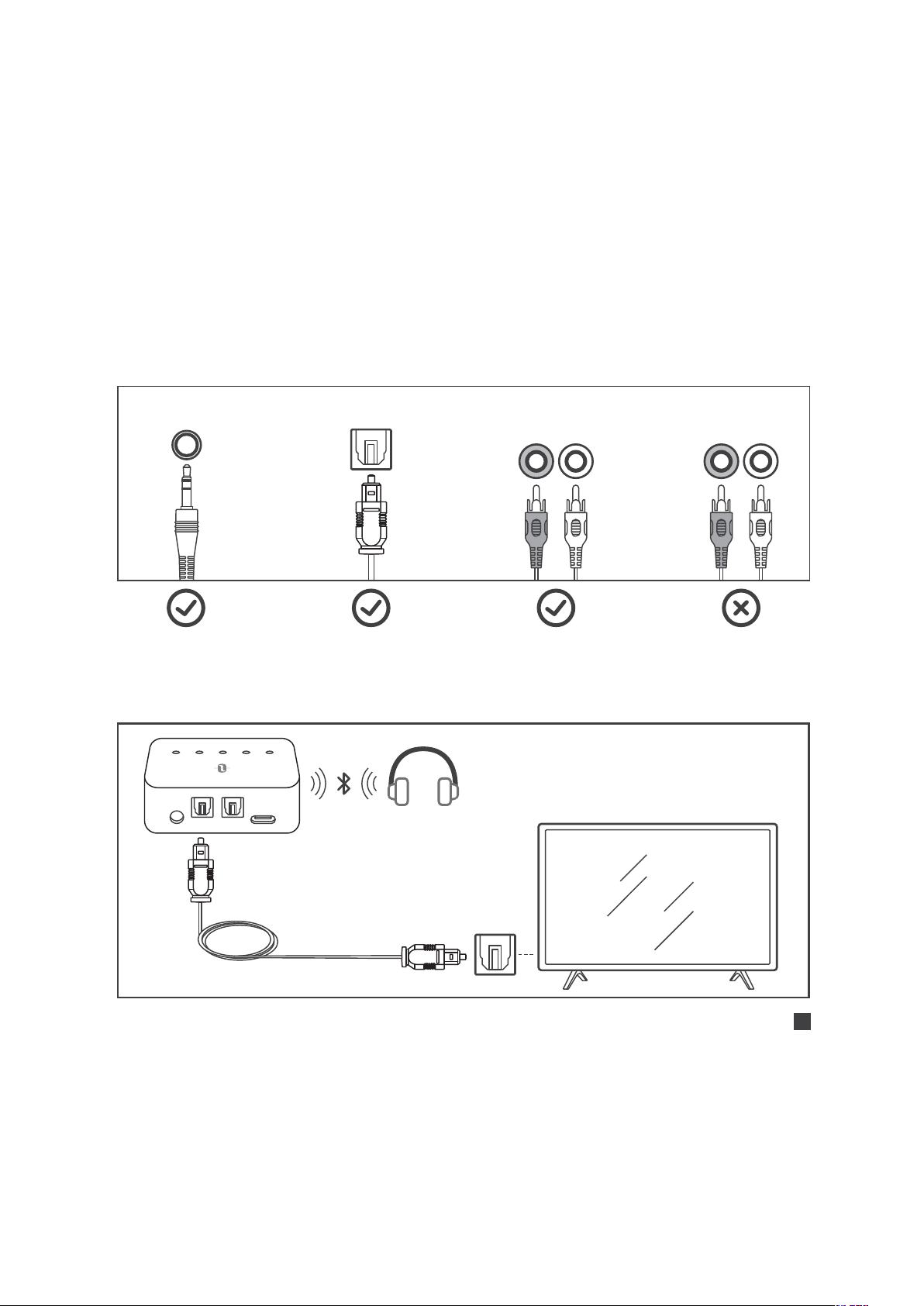
Check your TV output options before the set up
AUX/3.5mm Optical Out AUDIO OUT
AUDIO IN
TVs with OPTICAL audio out
AUX DC5V
SPDIF IN SPDIF OUT
A B SBC APTX LL
Optical Audio Cable
R L R L
ENGLISH / 08
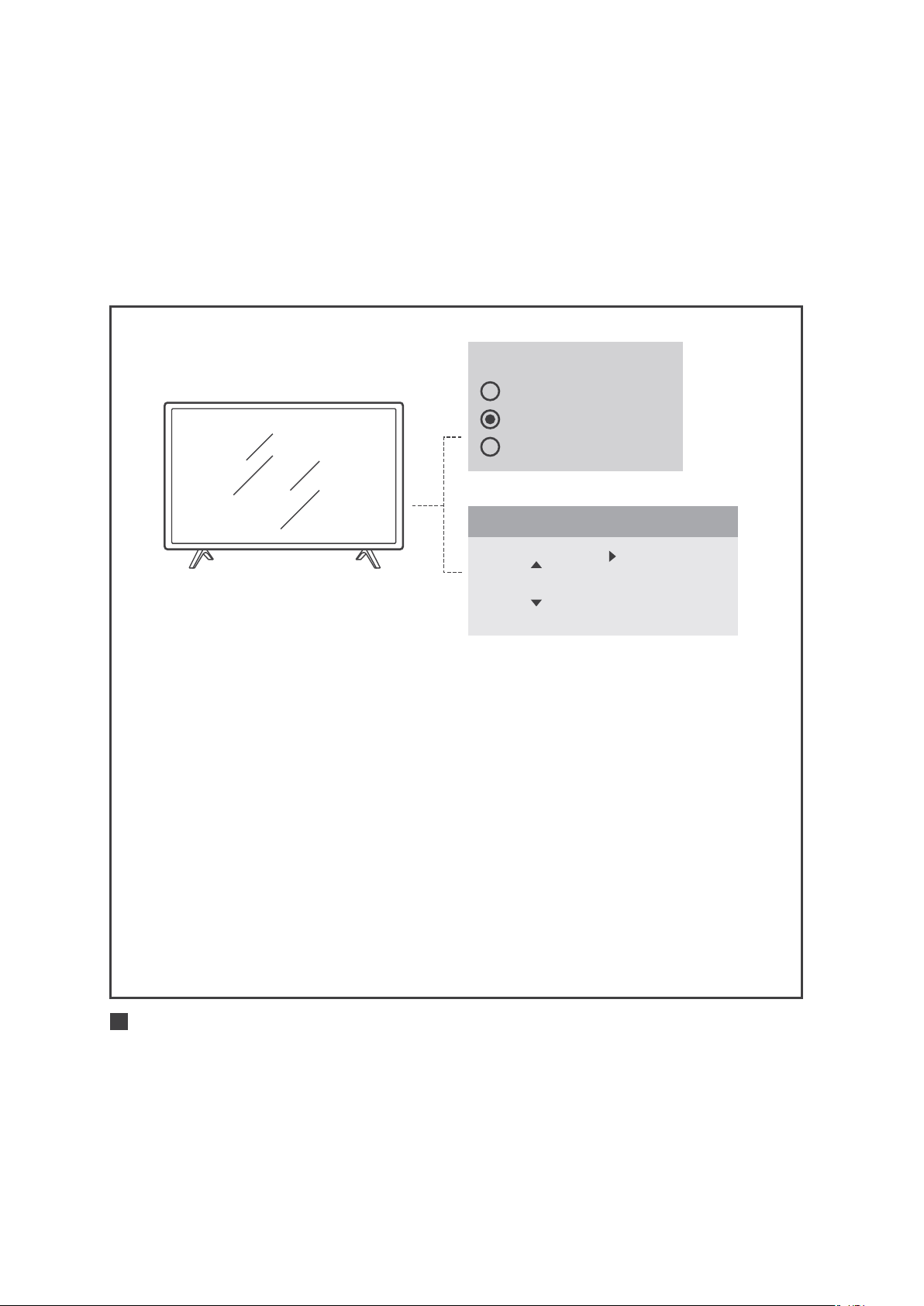
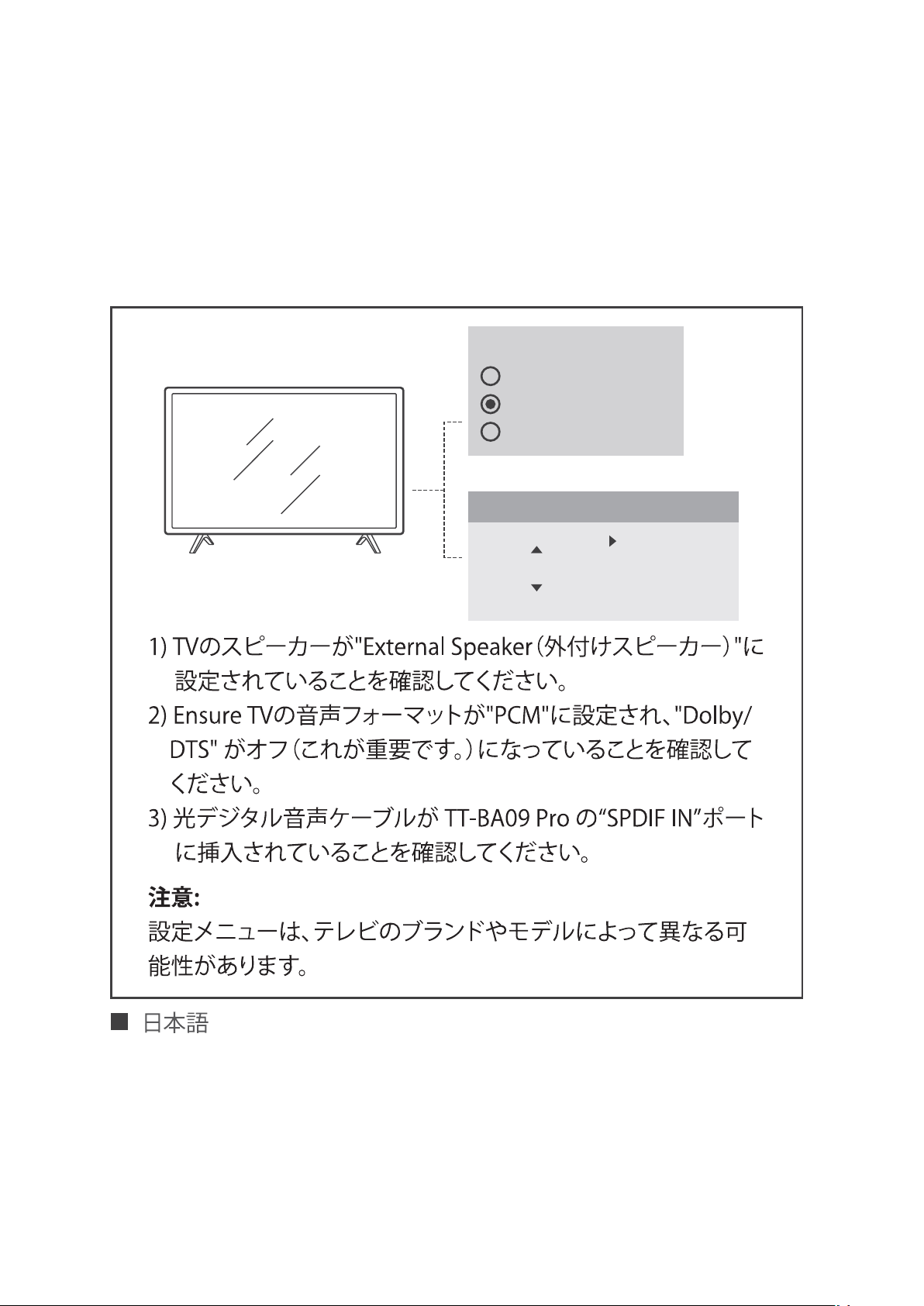
Speakers
Internal Speakers
External Speakers
Headset
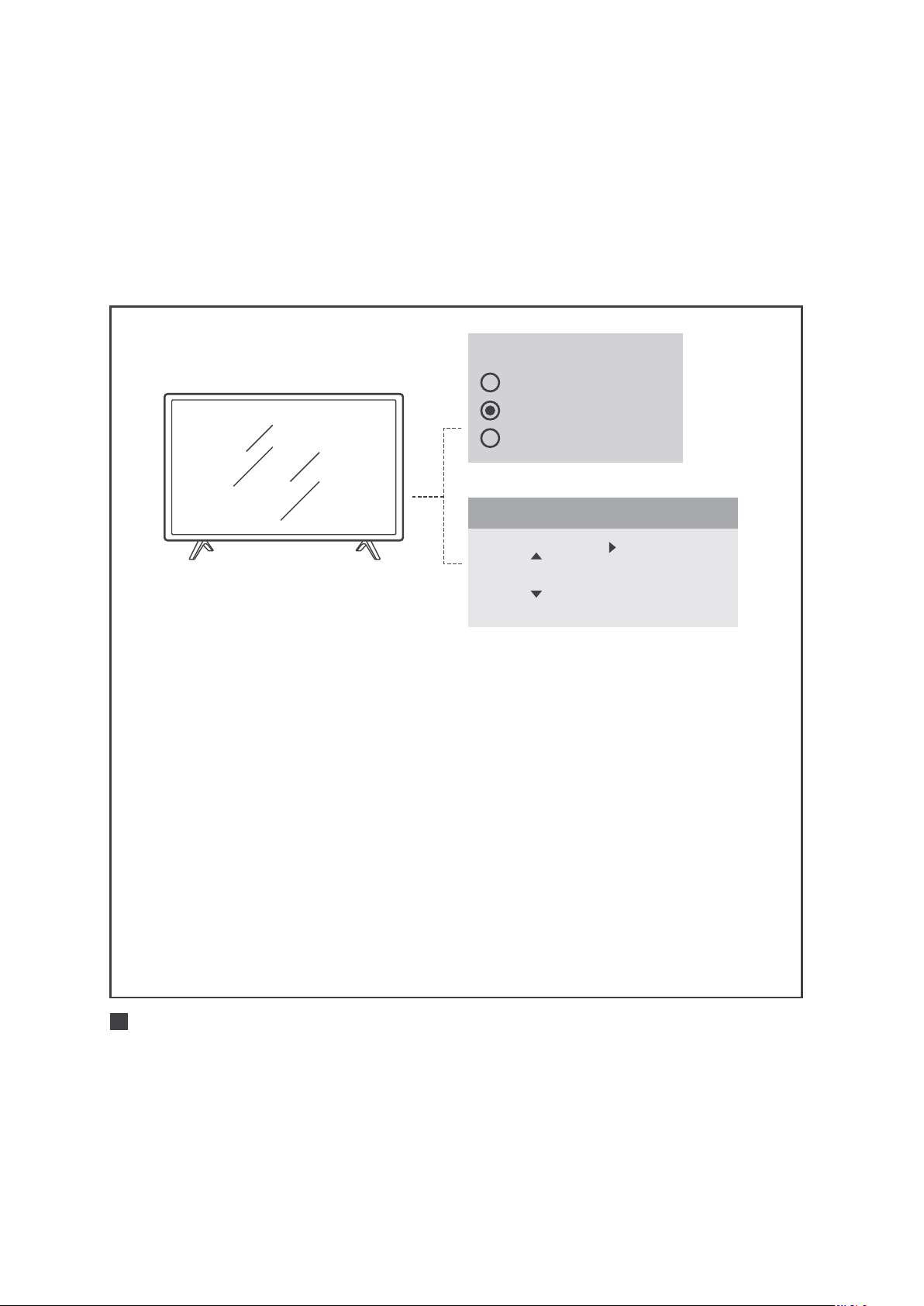
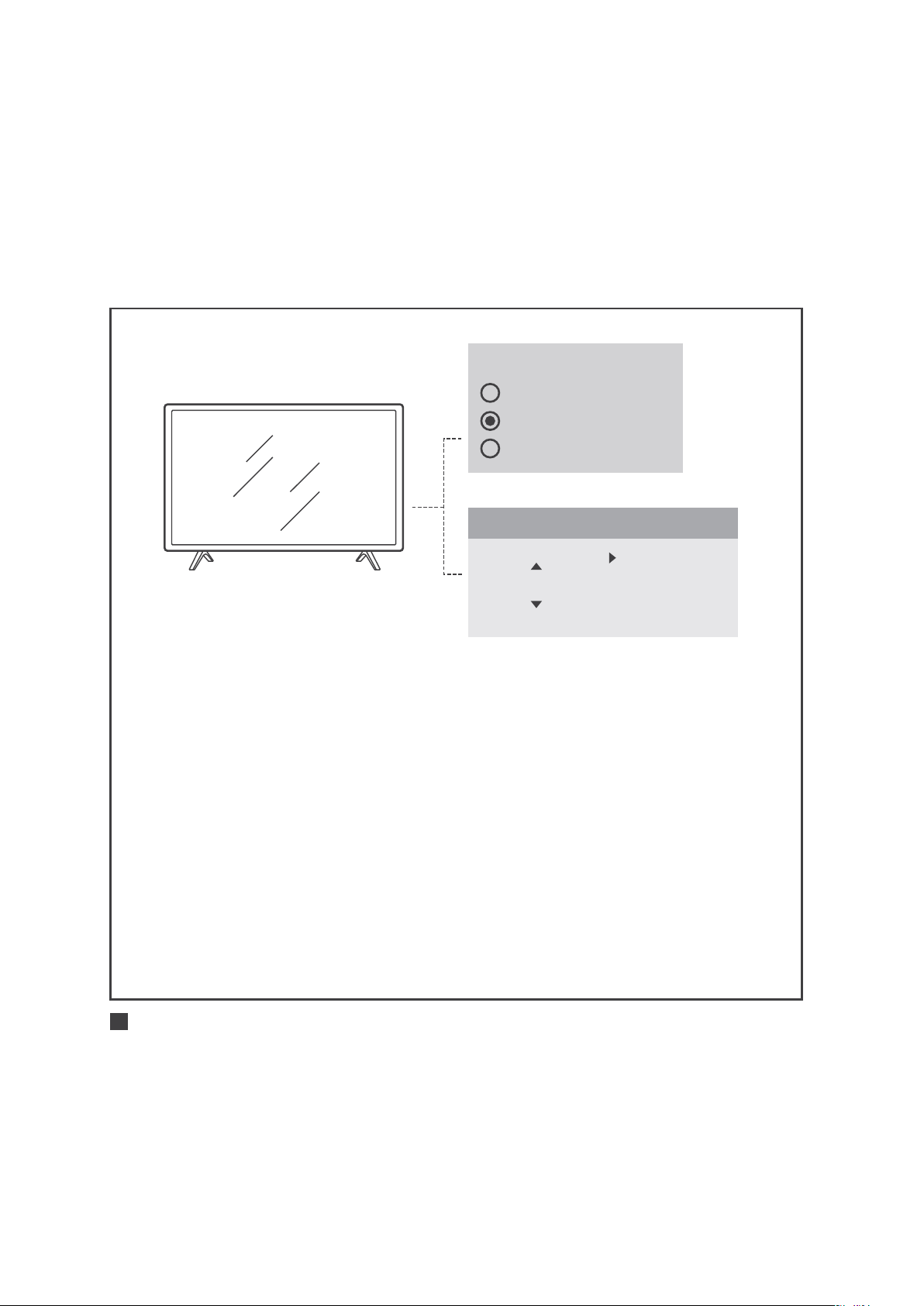
1) Ensure your TV speaker is set to "External Speaker".
2) Ensure TV audio format is set to "PCM" or "Dolby/DTS"
is OFF (This is IMPORTANT).
3) Ensure the optical audio cable is plugged in “SPDIF IN”
port on TT-BA09 Pro.
Note:
Setting menu may be different depending on different TV
brands and models.
Audio Format
PCM
Dolby/DTS
DTS Neo 2.5
Settings
ENGLISH / 09
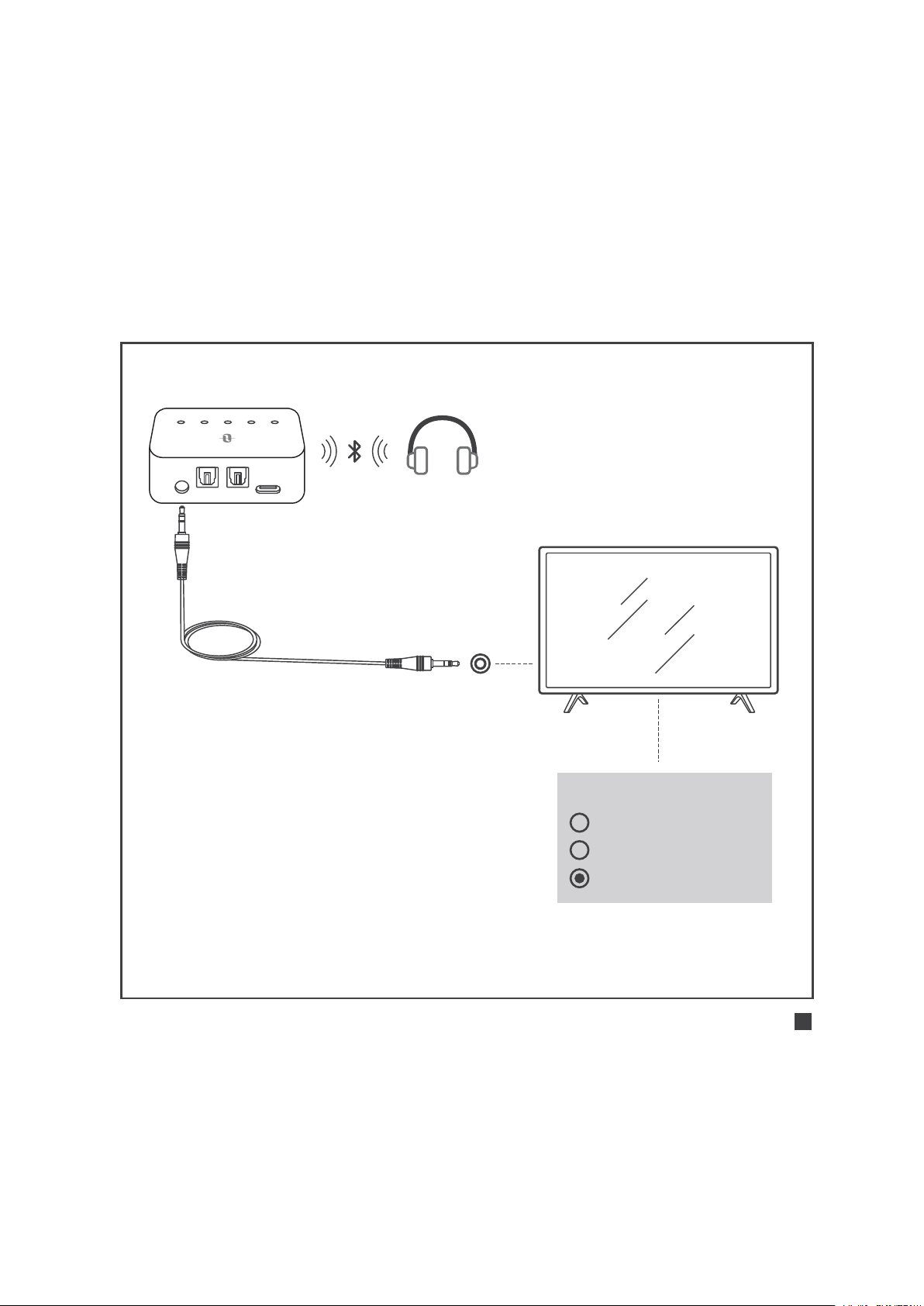
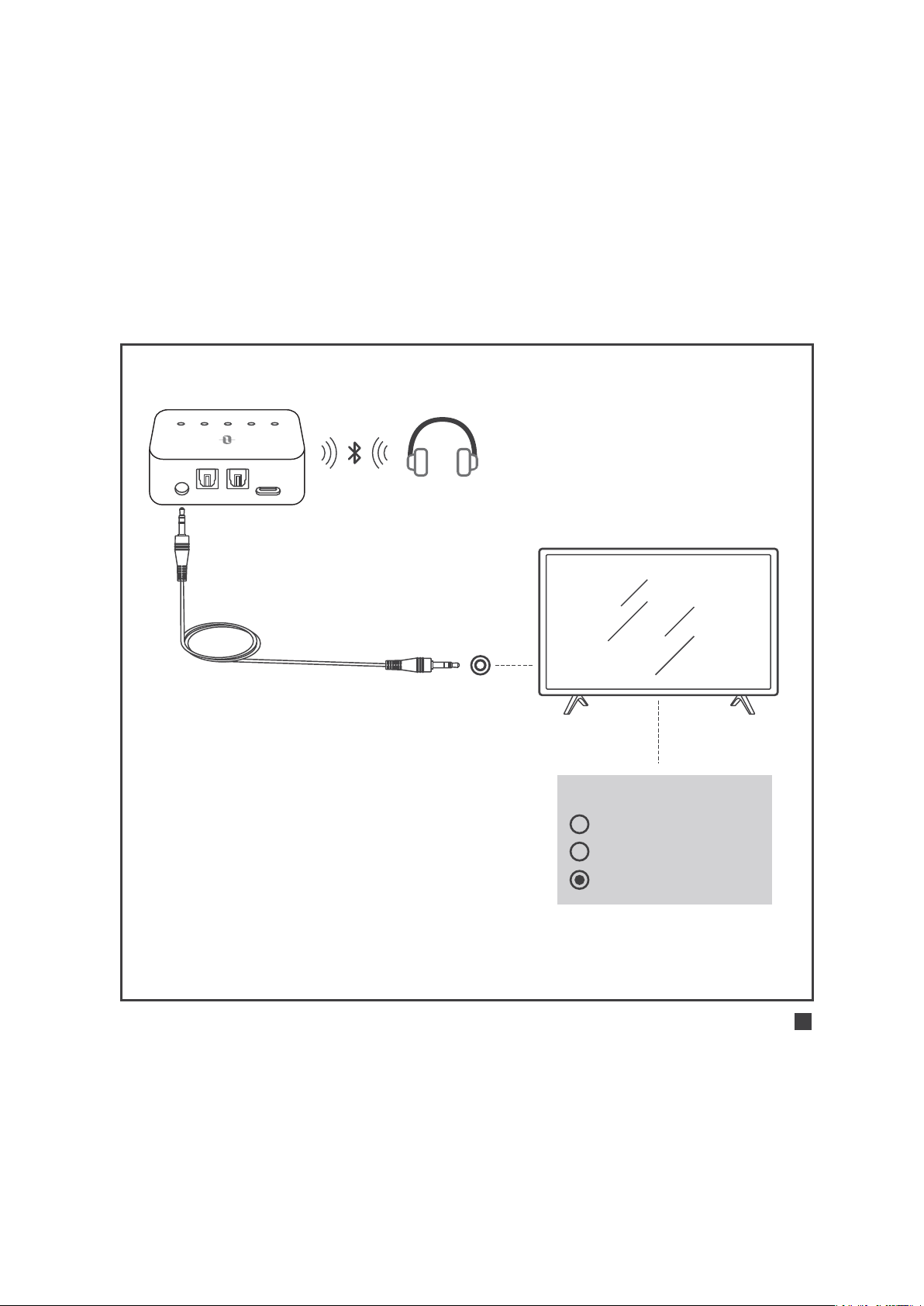
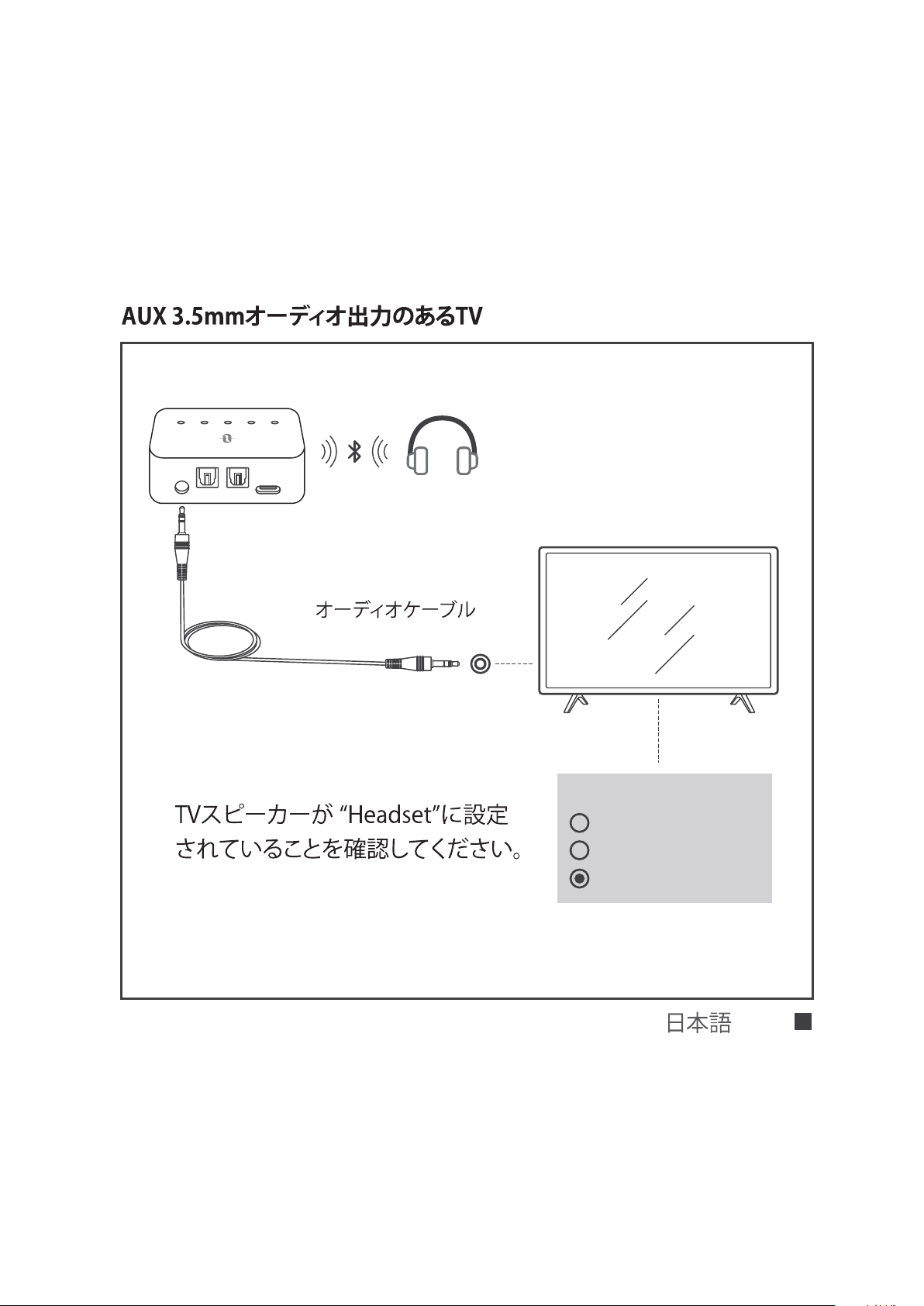
TVs with AUX 3.5mm audio out
AUX DC5V
SPDIF IN SPDIF OUT
A B SBC APTX LL
AUX 3.5mm Audio Cable
Ensure your TV speaker is set to
“Headset”.
Speakers
Internal Speakers
External Speakers
Headset
ENGLISH / 10
AUX DC5V
SPDIF IN SPDIF OUT
A B SBC APTX LL
AUX 3.5mm
Audio Cable
3.5mm to RCA
Audio Cable
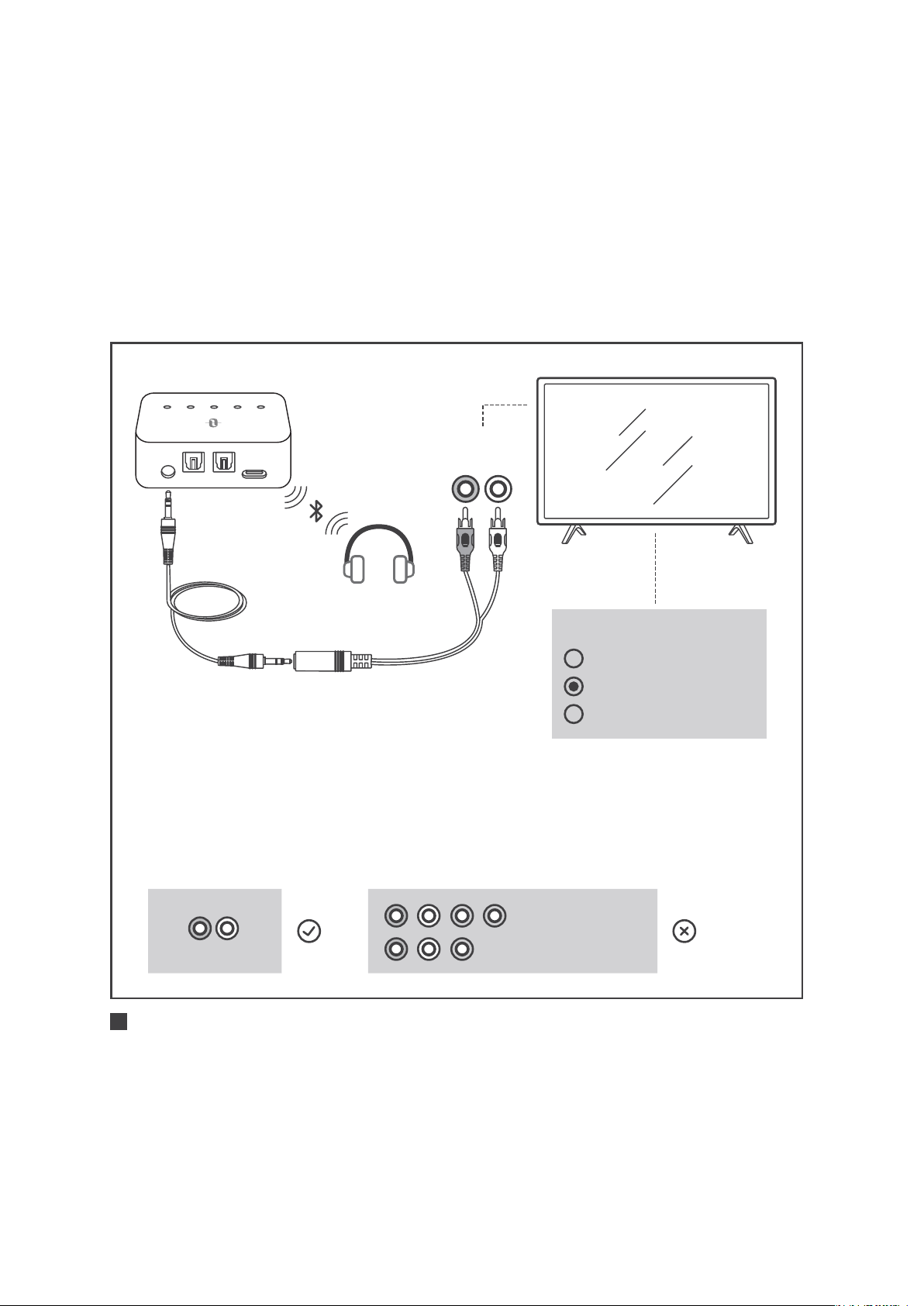
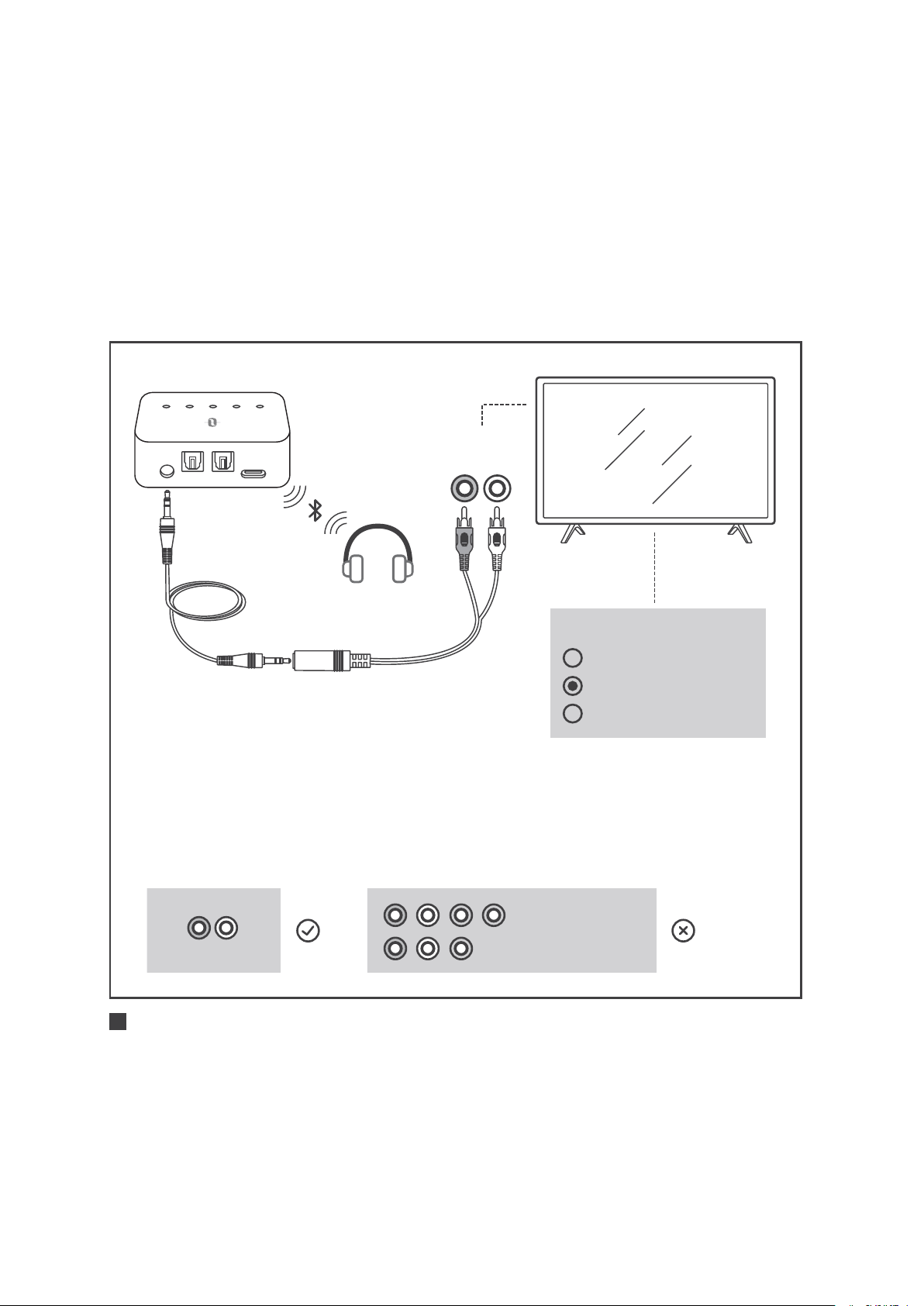
TVs with RCA audio out (Red/White ports labeled "AUDIO OUT")
1) Ensure TV Red/White ports labeled “Audio Out” is used, other
Red/White ports are incorrect.
2) Ensure your TV speaker is set to “External Speaker”.
Speakers
Internal Speakers
External Speakers
Headset
R L
AUDIO OUT
COMPUTER IN
VIDEO IN
AUDIO OUT
R L
ENGLISH / 11
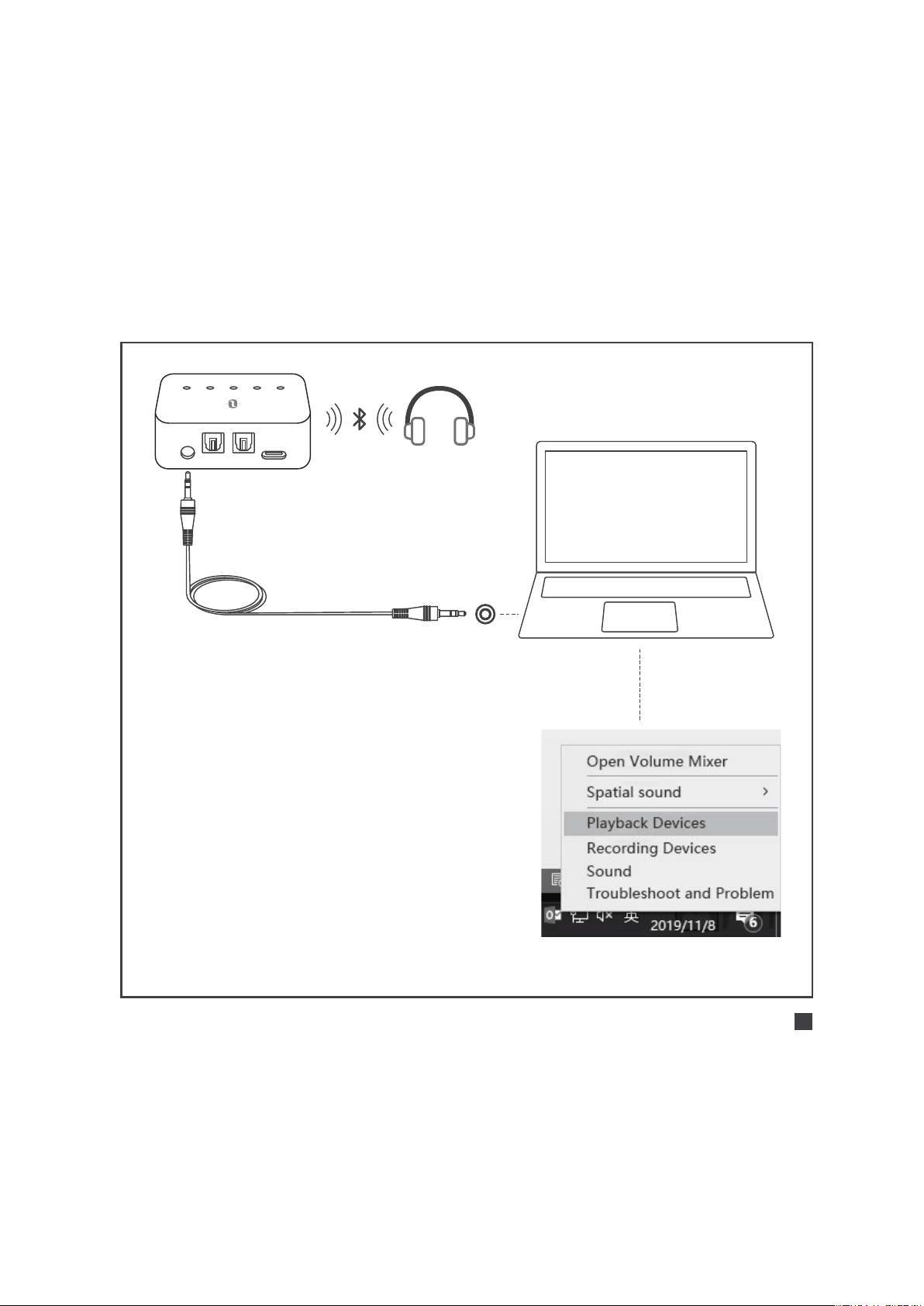
Use in TX Mode |
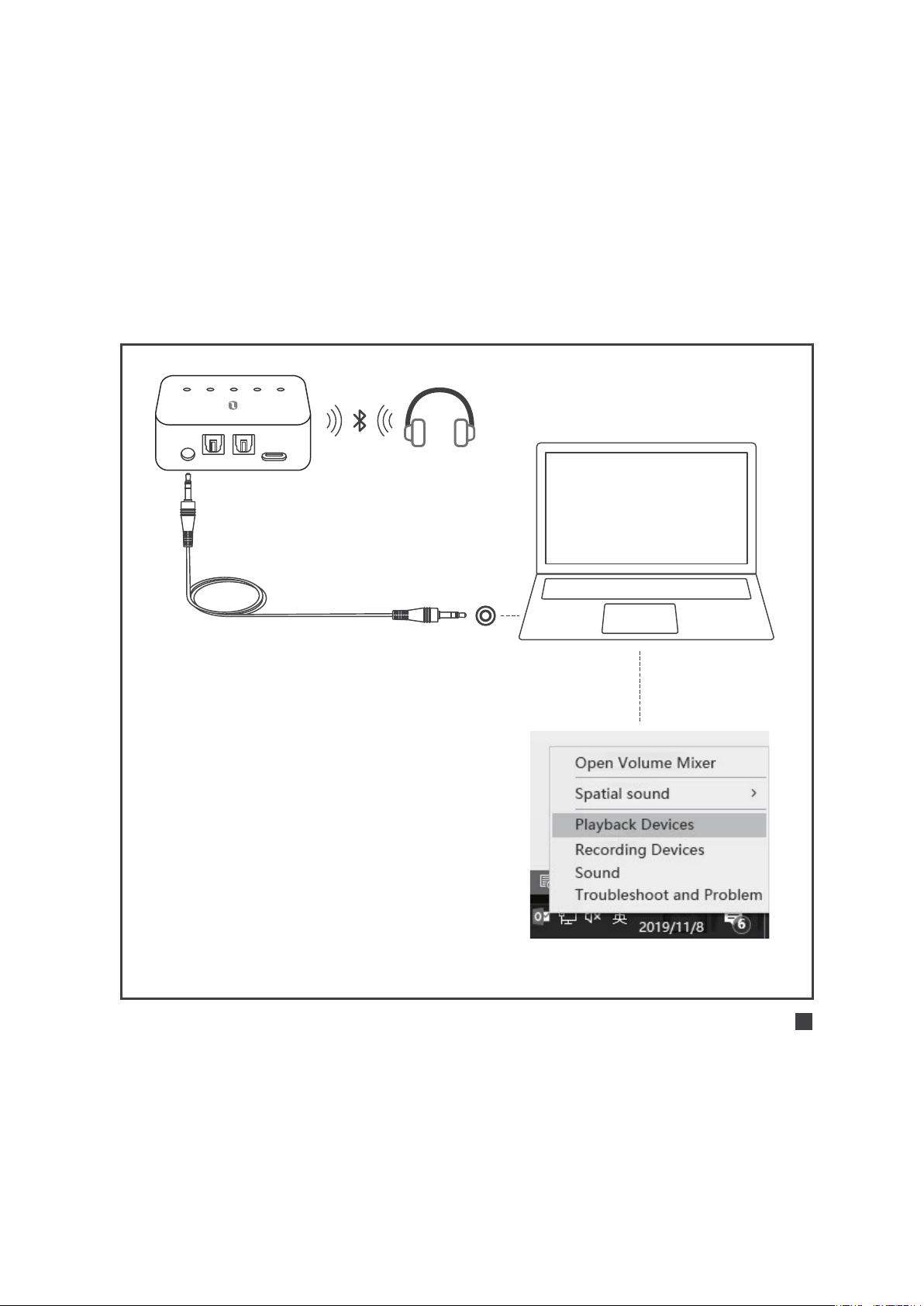
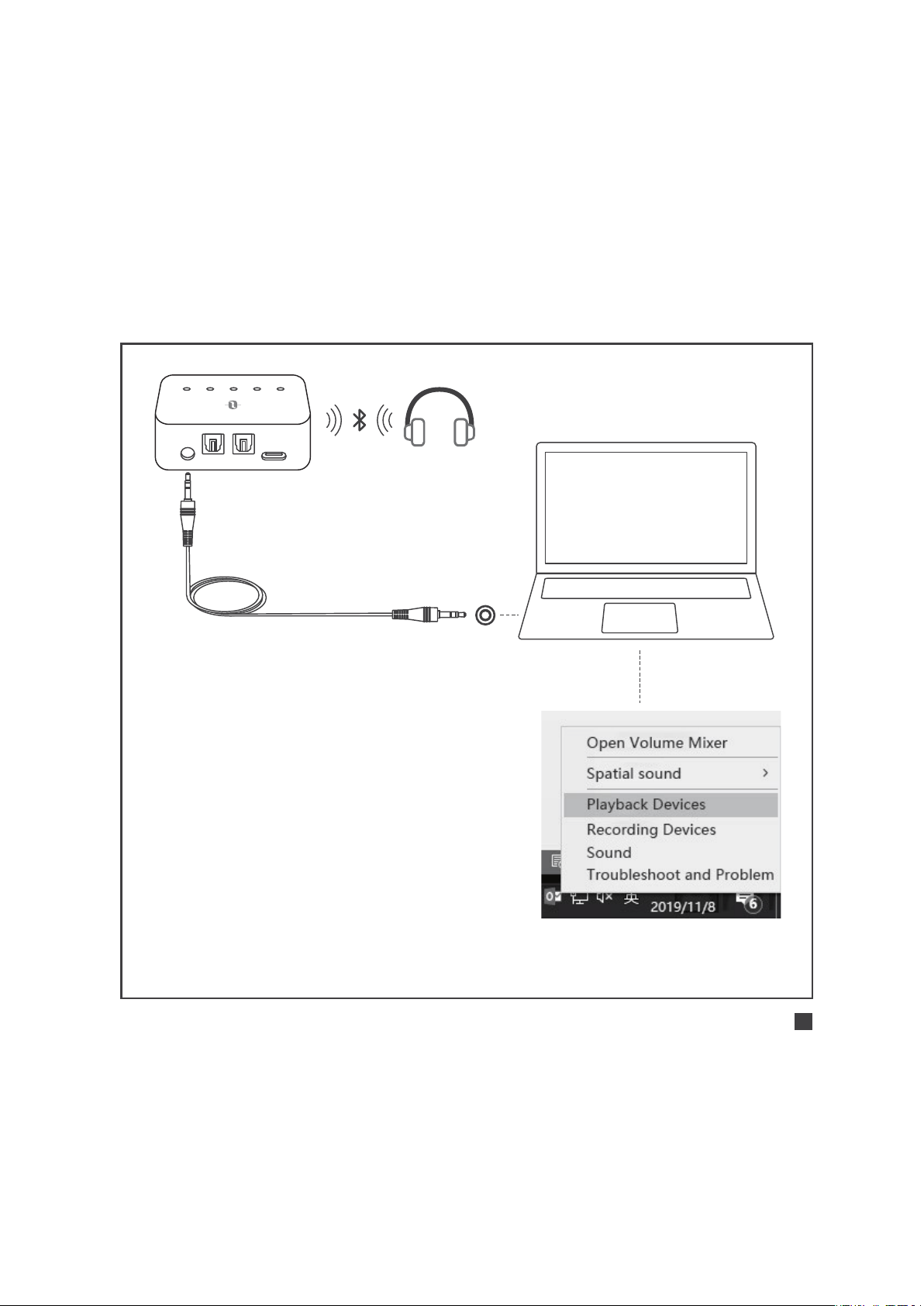
Use with your PC/Laptop
AUX DC5V
SPDIF IN SPDIF OUT
A B SBC APTX LL
1) Set as default "Playback device"
on PC/laptop - Right-click the
speaker icon in the bottom-
right of the taskbar and select
"Playback devices".
2) Set the “TT-BA09 Pro" as the
"Default Device".
AUX 3.5mm
Audio Cable
ENGLISH / 12

Use in RX Mode |
Initial Pairing
Pair with the 1st Bluetooth® Device
1) Slide the Mode switch to “RX” mode.
2) Press and hold the Power button for 3 seconds to turn on the adapter.
3) For the first use, TT-BA09 Pro will enter pairing mode
automatically with indicator “A” flashing quickly.
4) Activate the Bluetooth® function on your phone/tablet, find
“TaoTronics TT-BA09 Pro” in the search results and tap to connect.
Once connected, the indicator “A” will turn solid on.
Pair with the 2nd Bluetooth® Device
1) After connecting with the 1st Bluetooth® device, press the Power
button twice, the indicator “B” will flash quickly.
2) Place your 2nd Bluetooth® device close to the adapter (within 3
feet / 1 meter). Activate the Bluetooth® function on your phone/
tablet, find “TaoTronics TT-BA09 Pro” in the search results and tap
to connect. Once connected, the indicator “B” will turn solid on.
ENGLISH / 13

Use in RX Mode |
Automatic Re-connect
TT-BA09 Pro can remember the devices paired previously, and will
attempt to pair with the last connected devices (up to 2 devices)
automatically once it is turned on.
Use in RX Mode |
Clear Pairing History
When the adapter is off, clear the pairing history by sliding the
Mode switch to “TX”, then power it on.
ENGLISH / 14

TROUBLESHOOTING
Solutions
Make sure that you have followed the
instructions for cable connections and
settings on TV/PC/Laptop.
Make sure your Bluetooth® device
supports apt-X Low Latency® codec.
After connected, the Codec indicator
“LL” will light up to indicate the low
latency streaming codec.
When TT-BA09 Pro is powered on, press
the Power button twice to enter pairing
mode before reconnecting to the
paired device.
Each time you switch the modes, the pairing
history will be cleared. Please re-pair with
your Bluetooth® device as instructed.
Problem
No audio input
Audio delay
Pair with a new
Bluetooth® device
Can’t reconnect
with the last
connected device
ENGLISH / 15

ENGLISH / 16
WARRANTY AND SERVICE
Thank you for choosing the TaoTronics TT-BA09 Pro Wireless
Adapter. If any problems occur, please contact the TaoTronics
Customer Care Centre in your country via the contact information
listed in this User Guide.
TASTENSTEUERUNG
AU
X
SP
DI
F
IN
SPD
IF
OUT
DC
5V
A
B
SBC
A
P
T
X
LL
T
X
R
X
Einschalten/Ausschalten:
3 Sekunden lang gedrückt halten
Modusschalter:
Schieben, um TX-/RX-Modus
auszuwählen
Verbinden:
Nach dem Einschalten
zweimal drücken, um
Verbinden zu starten
DEUTSCH / 17

LED-ANZEIGENSTATUS
Funktion
Power AN
Power AUS
Standby-Modus
Akkustand niedrig
Ladevorgang
Vollständig geladen
Koppeln
Verbunden
Neuverbinden
Koppeln
Verbunden
Verbunden bei Nutzung
des SBC-Codecs
Verbunden bei Nutzung
des Apt-X®-Codecs
Verbunden bei Nutzung des
Apt-X Low Latency®-Codecs
Status
Zweifaches Blinken
Zweifaches Blinken
Alle 5 Sekunden Blinken
Konstant an
Konstant an
Aus
Schnelles Blinken
Konstant an
Langsames Blinken
Schnelles Blinken
Konstant an
Konstant an
Konstant an
Konstant an
Anzeigen
Stroman-
zeige
A
B
SBC
APTX
LL
DEUTSCH / 18

· SBC: SBC-Codec, von den meisten Bluetooth®-Geräten unterstützt
· APTX: Apt-X®-Codec, das Bluetooth®-Gerät sollte den Apt-X®-
Codec unterstützen. Vorrangig vor SBC.
· LL: Apt-X Low Latency®-Codec, das Bluetooth®-Gerät sollte Apt-X
Low Latency® unterstützen. Vorrangig vor SBC und Apt-X®.
ANLEITUNG
Ladevorgang
1. Schließen Sie den Ladeanschluss an einem beliebigen USB-
Ladeadapter oder einem aktiven Computer-USB-Anschluss an.
2. Die Stromanzeige leuchtet während des Ladens konstant an.
Nach vollständiger Ladung schaltet sie sich aus.
Anmerkung:
Sie können den Adapter während des Ladens verwen-
den, was allerdings zu einem Summton führen kann.
Wir empfehlen, das Gerät mindestens 2 Stunden zu
laden, bevor Sie es zum ersten Mal verwenden.
DEUTSCH / 19
A
U
X
S
P
D
I
F
I
N
SP
D
I
F
O
UT
D
C
5
V
A
B
S
B
C
A
P
TX
LL
T
X
R
X
A
U
X
S
P
D
I
F
I
N
SP
D
IF
O
UT
D
C
5
V
A
B
S
B
C
A
P
TX
L
L
T
X
R
X
Benutzung im TX-Modus |
Erstes Koppeln
TX RX
Einschalten: Halten Sie die
Powertaste 3 Sekunden lang
gedrückt
1 2
A
B
S
B
C
APT
X
L
L
Koppeln: “A” blinkt schnell
3
A
Koppeln mit dem 1. Bluetooth®-Gerät
DEUTSCH / 20
SBC APTX LL
Erfolgreich gekoppelt:
“A” leuchtet konstant,
die Codec-Anzeige für
den aktuellen Streaming-
Codec leuchtet auf.
4
A B SBC APTX LL
A
Anmerkung:
Wenn Sie von LIP SYNC profitieren möchten, achten Sie
darauf, dass Ihr Bluetooth®-Gerät apt-X Low Latency®-
Codec unterstützt. Nach erfolgreicher Verbindung
leuchtet die Codec-Anzeige "LL" auf, um den Low
Latency Streaming-Codec anzuzeigen.
Der Standard-Inputmodus ist SPDIF. Sobald ein AUX-
Kabel eingesteckt wird, wechselt das Gerät automatisch
in den AUX-Modus.
Schließen Sie TT-BA09 Pro bitte nicht im TX-Modus an
einen Verstärker an, da dies zu Überspannung und somit
Schäden am Adapter führen kann.
DEUTSCH / 21
Koppeln mit dem 2. Bluetooth®-Gerät
A
U
X
S
P
D
I
F I
N
S
P
D
IF
O
UT
D
C
5
V
A
B
S
BC
A
P
TX
L
L
T
X
R
X
Koppeln: Drücken Sie die
Powertaste zwei Mal, "B" blinkt
schnell.
1
2
B
SBC APTX LL
A B SBC APTX LL
B
Erfolgreich gekoppelt: “B”
leuchtet konstant, die Codec-
Anzeige für den aktuellen
Streaming-Codec leuchtet auf.
DEUTSCH / 22

Anmerkung:
Nach erfolgreicher Verbindung mit zwei Bluetooth®-
Geräten leuchtet die Codec-Anzeige für den höchsten von
beiden Geräten unterstützten Codec auf (wenn z.B. Gerät
"A" SBC und Apt-X-Codec unterstützt, Gerät "B" aber nur
SBC-Codec, dann leuchtet die Codec-Anzeige "SBC" auf).
Sobald die Verbindung zu einem der Geräte getrennt
wird, leuchtet die Codec-Anzeige für den höchsten vom
verbleibenden Gerät unterstützten Codec auf.
Benutzung im TX-Modus |
Automatisches Neuverbinden
TT-BA09 Pro kann sich die zuvor bereits gekoppelten Geräte merken
und versucht, sich beim Einschalten automatisch mit den zuletzt
verbunden Geräten (bis zu 2 Geräten) zu koppeln.
Benutzung im TX-Modus |
Kopplungsverlauf löschen
Wenn der Adapter ausgeschaltet ist, können Sie den Kopplungsve-
rlauf löschen, indem Sie den Modusschalter auf "RX" stellen, dann
schalten Sie es ein.
DEUTSCH / 23
Benutzung im TX-Modus |
Benutzung mit Ihrem TV
Überprüfen Sie vor dem Einrichten Ihre TV-Ausgangsoptionen
AUX/3.5mm Optical Out AUDIO OUT
AUDIO IN
TVs mit OPTISCHEM Audioausgang
AUX DC5V
SPDIF IN SPDIF OUT
A B SBC APTX LL
Optisches Kabel
R L R L
DEUTSCH / 24
Speakers
Internal Speakers
External Speakers
Headset
1) Achten Sie darauf, dass Ihre TV-Lautsprecher auf "Externe
Lautsprecher" gestellt sind.
2) Stellen Sie sicher, dass das TV-Audioformat auf "PCM"
oder "Dolby/DTS" auf AUS gestellt ist (Das ist WICHTIG).
3) Vergewissern Sie sich, dass das Audiokabel in den
“SPDIF IN”-Anschluss des TT-BA09 Pros eingesteckt ist.
Anmerkung:
Das Einstellungsmenü kann je nach TV-Marke und Modell
abweichen.
Audio Format
PCM
Dolby/DTS
DTS Neo 2.5
Settings
DEUTSCH / 25
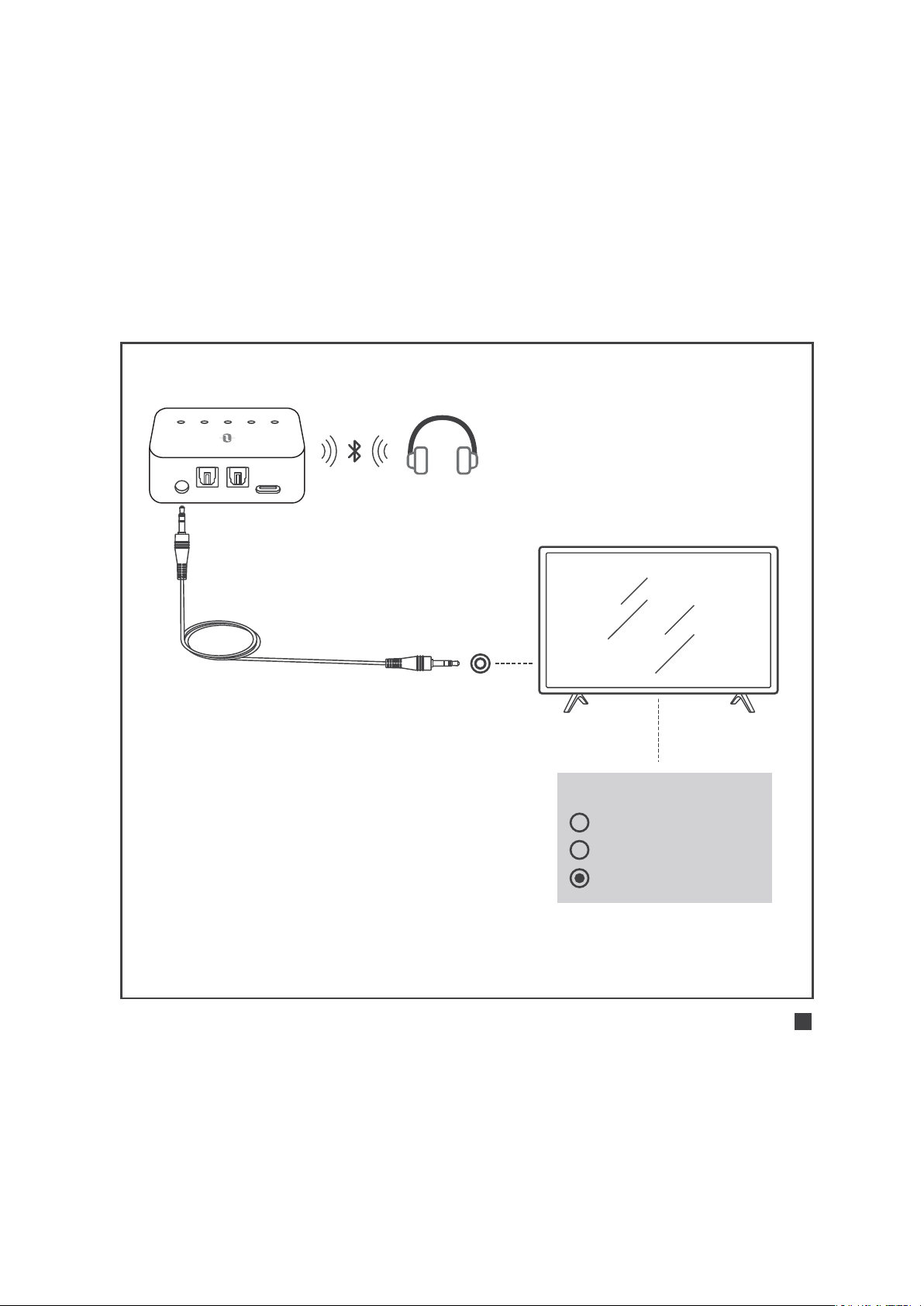
TVs mit AUX 3.5mm Audioausgang
AUX DC5V
SPDIF IN SPDIF OUT
A B SBC APTX LL
3,5 mm Audiokabel
Achten Sie darauf, dass Ihre
TV-Lautsprecher auf "Kopfhörer"
gestellt sind.
Speakers
Internal Speakers
External Speakers
Headset
DEUTSCH / 26
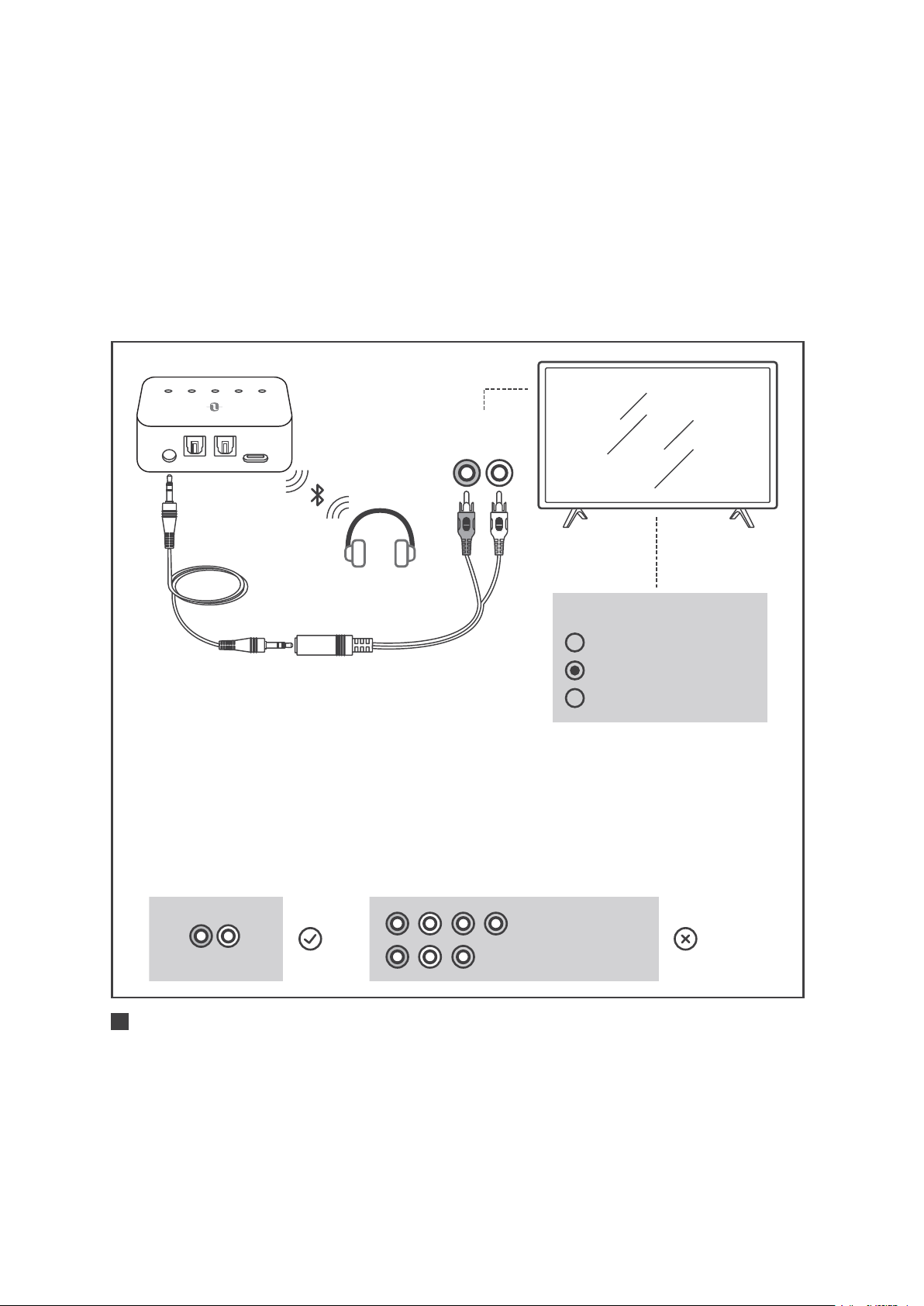
AUX DC5V
SPDIF IN SPDIF OUT
A B SBC APTX LL
3,5 mm
Audiokabel
3,5mm weiblich-zu-
Cinch-männlich-Kabel
TVs mit Cinch-Audioausgang
1) Stellen Sie sicher, dass die rot/weißen als "Audio Out"
gekennzeichneten Anschlüsse des TVs verwendet werden,
andere rot/weiße Anschlüsse sind falsch.
2) Achten Sie darauf, dass Ihre TV-Lautsprecher auf "Externe
Lautsprecher" gestellt sind.
Speakers
Internal Speakers
External Speakers
Headset
R L
AUDIO OUT
COMPUTER IN
VIDEO IN
AUDIO OUT
R L
DEUTSCH / 27
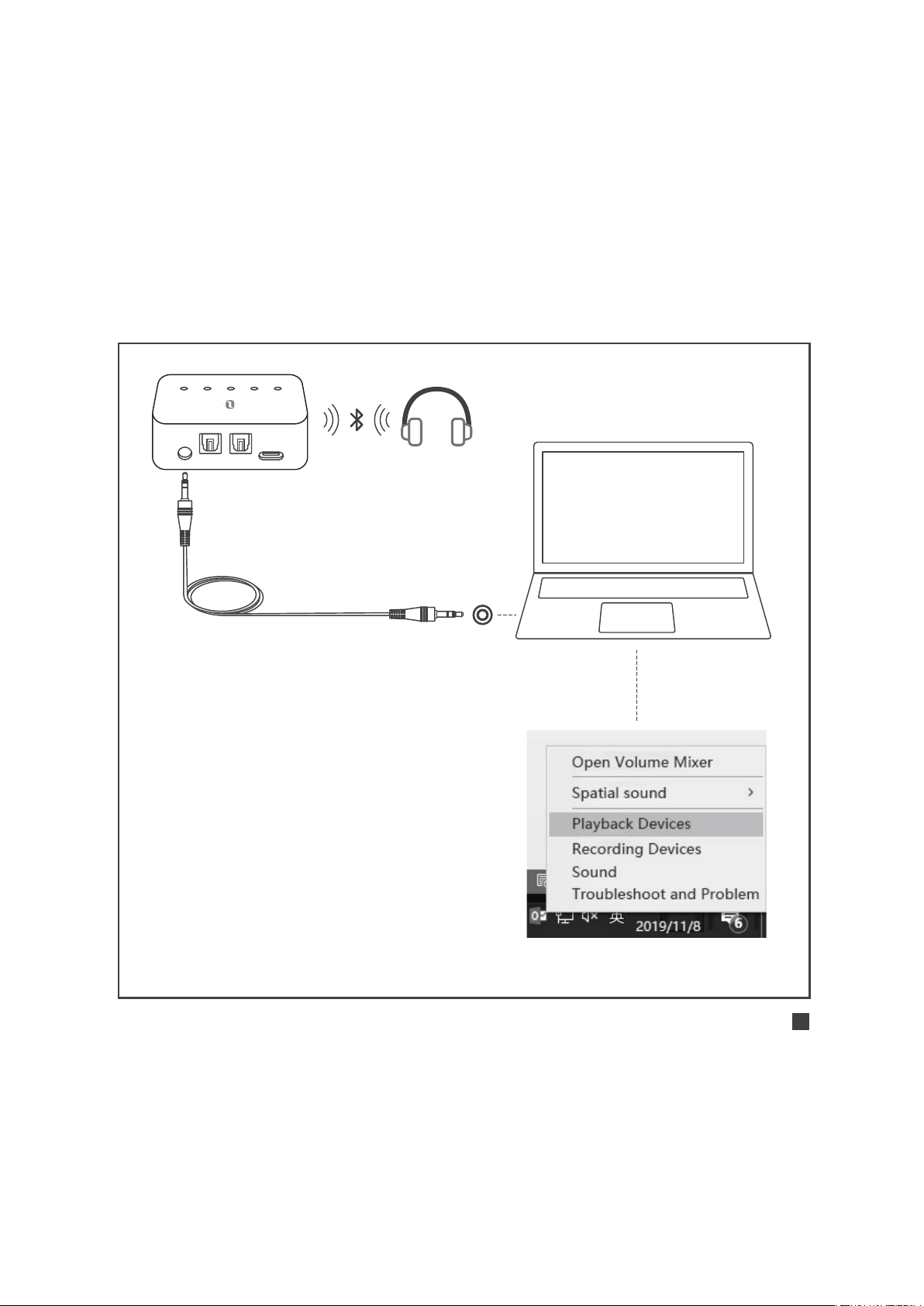
Benutzung im TX-Modus |
Benutzung mit Ihrem PC/Laptop
AUX DC5V
SPDIF IN SPDIF OUT
A B SBC APTX LL
1) Stellen Sie es als "Standard-
Wiedergabegerät" auf PC/
Laptop ein - rechtsklicken Sie
das Lautsprechersymbol in der
Taskleiste unten rechts und
wählen Sie "Wiedergabegeräte".
2) Setzen Sie das “TT-BA09 Pro"
als "Standard-Gerät" fest.
3,5 mm Audiokabel
DEUTSCH / 28

Benutzung im RX-Modus |
Erstes Koppeln
Koppeln mit dem 1. Bluetooth®-Gerät
1) Schieben Sie den Modusschalter auf "RX"-Modus.
2) Halten Sie die Powertaste 3 Sekunden lang gedrückt, um den
Adapter einzuschalten.
3) Bei der ersten Benutzung wechselt TT-BA09 automatisch in den
Kopplungsmodus, wobei die Anzeige "A" schnell blinkt.
4) Aktivieren Sie die Bluetooth®-Funktion auf Ihrem Handy/Tablet,
suchen Sie “TaoTronics TT-BA09 Pro” aus den Suchergebnissen
heraus und tippen Sie den Namen zum Verbinden an. Nach
erfolgreicher Verbindung leuchtet die Anzeige "A" konstant.
Koppeln mit dem 2. Bluetooth®-Gerät
1) Drücken Sie die Powertaste zwei Mal, nachdem das 1. Bluetooth®-
Gerät verbunden ist, und die Anzeige "B" blinkt schnell.
2) Platzieren Sie Ihr 2. Bluetooth®-Gerät in der Nähe des Adapters
(innerhalb von 1 Meter / 3 Fuß). Aktivieren Sie die Bluetooth®-
Funktion auf Ihrem Handy/Tablet, suchen Sie “TaoTronics TT-BA09
Pro” aus den Suchergebnissen heraus und tippen Sie den Namen
DEUTSCH / 29

Benutzung im RX-Modus |
Automatisches Neuverbinden
TT-BA09 Pro kann sich die zuvor bereits gekoppelten Geräte merken
und versucht, sich beim Einschalten automatisch mit den zuletzt
verbunden Geräten (bis zu 2 Geräten) zu koppeln.
Benutzung im RX-Modus |
Kopplungsverlauf löschen
Wenn der Adapter ausgeschaltet ist, können Sie den
Kopplungsverlauf löschen, indem Sie den Modusschalter auf "TX"
stellen, dann schalten Sie es ein.
zum Verbinden an. Nach erfolgreicher Verbindung leuchtet die
Anzeige "B" konstant.
DEUTSCH / 30

PROBLEMLÖSUNG
Lösungen
Vergewissern Sie sich, dass Sie sich an die
Anleitung für Kabelverbindungen und Ein-
stellungen auf TV/PC/Laptop gehalten haben.
Stellen Sie sicher, dass Ihr Bluetooth®-
Gerät den apt-X Low Latency®-Codec
unterstützt. Nach erfolgreicher Verbindung
leuchtet die Codec-Anzeige "LL" auf, um
den Low Latency Streaming-Codec anzuzeigen.
Wenn TT-BA09 Pro eingeschaltet wird, können
Sie die Powertaste zwei Mal drücken, um in
den Kopplungsmodus zu wechseln, bevor
es sich automatisch mit gekoppelten Geräten
verbindet.
Jedes Mal, wenn Sie den Modus wechseln,
wird der Kopplungsverlauf bereinigt. Bitte
koppeln Sie Ihr Bluetooth®-Gerät der Anleitung
entsprechend neu.
Problem
Kein Audio-Input
Audio-Verzögerung
Koppeln mit einem
neuen Bluetooth®-
Gerät
Lässt sich nicht mit
zuletzt verbundenen
Geräten
wiederverbinden
DEUTSCH / 31

DEUTSCH / 32
GARANTIE UND SERVICE
Vielen Dank, dass Sie sich für die TaoTronics TT-BA09 Pro
Kabellosen Adapter entschieden haben. Sollten Probleme auftreten,
kontaktieren Sie bitte das TaoTronics Kundenservice-Center in Ihrem
Land mithilfe der Kontaktdetails in dieser Bedienungsanleitung.
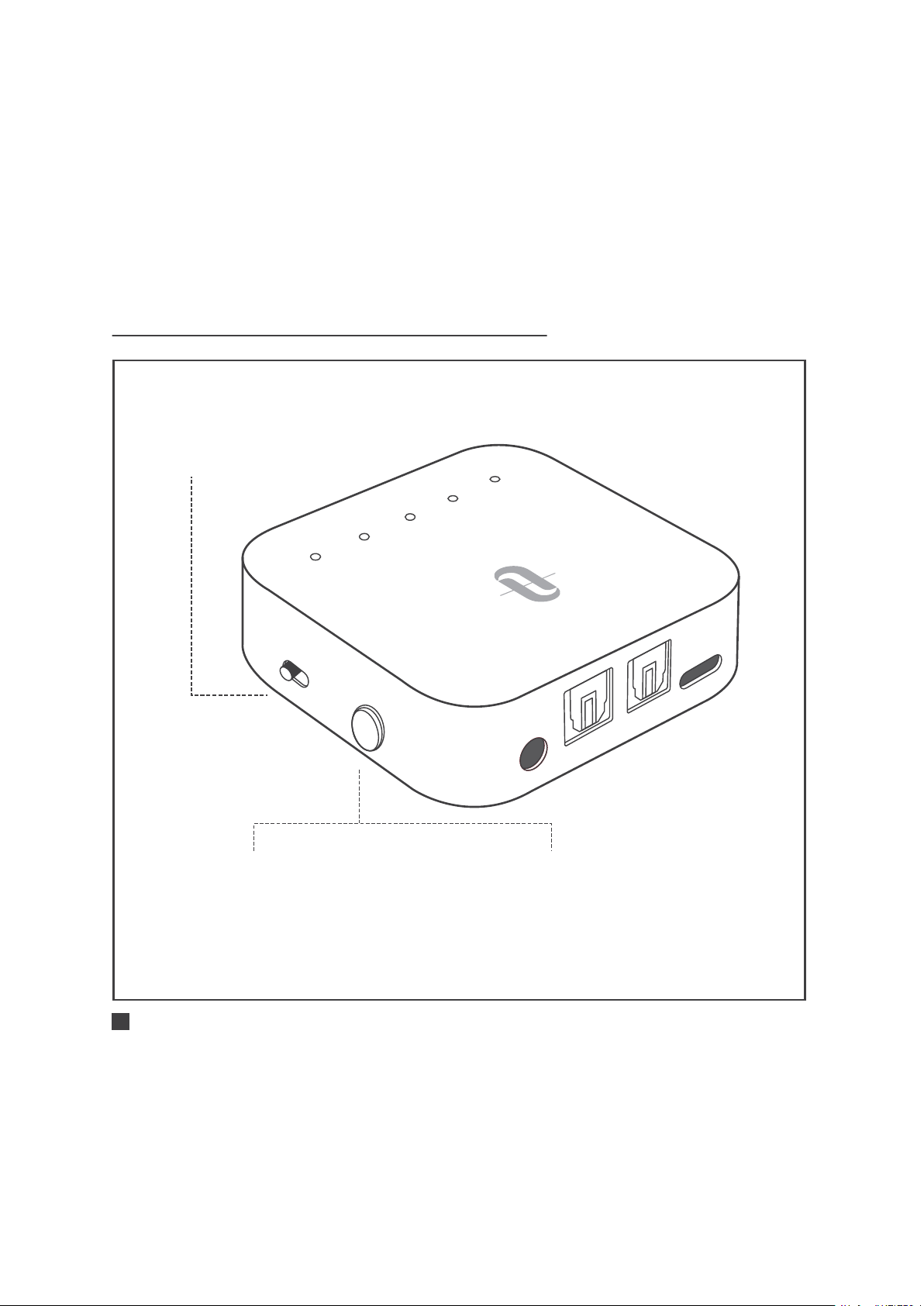
BOUTON DE COMMANDE
A
U
X
SP
DIF
I
N
SP
D
IF
O
U
T
D
C
5
V
A
B
SB
C
AP
T
X
L
L
T
X
R
X
Allumer/Éteindre:
Appuyez et maintenez
pendant 3 secondes
Bascule de Mode:
Basculez pour sélectionner
les modes TX/RX
Couplage:
Appareil allumé, appuyez
deux fois sur pour lancer
le couplage
FRANÇAIS / 33

TÉMOIN LED DE STATUT
Fonction
Allumage
Extinction
Mode Veille
Batterie faible
Charge en cours
Charge complète
Appairage
Connecté
Re-connexion
Appairage
Connecté
Connecté avec le
codec SBC
Connecté avec le
codec Apt-X®
Connecté avec le codec
Apt-X Low Latency®
Statut
Clignotement double
Clignotement double
Clignotement toutes les 5 secondes
Allumé
Allumé
Éteint
Clignotement rapide
Allumé
Clignotement lent
Clignotement rapide
Allumé
Allumé
Allumé
Allumé
Indicators
Power
Indicator
A
B
SBC
APTX
LL
FRANÇAIS / 34

· SBC: codec SBC, pris en charge par la majorité des appareils
Bluetooth®.
· APTX: codec Apt-X®, l'appareil Bluetooth® doit prendre en charge
le codec Apt-X®. Avant SBC.
· LL: Apt-X codec Low Latency®, l'appareil Bluetooth® doit prendre
en charge le codec Apt-X low latency®. Avant SBC et Apt-X®.
AVANT UTILISATION
Charge
1. Branchez le port de charge à n'importe quel chargeur USB ou
port USB d'ordinateur allumé.
2. L'indicateur d'allumage restera allumé fixe pendant la recharge.
Une fois rechargé, il s'éteindra.
Note:
Vous pouvez utiliser l'adaptateur pendant la charge,
mais un bruit d'interférence pourra être entendu.
Nous recommandons de charger l'appareil pendant
au moins 2 heures avant la première utilisation.
FRANÇAIS / 35
A
U
X
S
P
D
IF I
N
S
P
D
I
F
O
UT
D
C
5
V
A
B
S
B
C
A
P
TX
L
L
T
X
R
X
A
U
X
S
PD
IF I
N
S
P
D
I
F
O
U
T
D
C
5
V
A
B
SB
C
A
P
T
X
L
L
T
X
R
X
Utilisation en mode TX |
Appairage initial
TX RX
Allumage: Appuyez et
maintenez le bouton d'allumage
pendant 3 secondes
1 2
A
B
S
B
C
A
PT
X
LL
Appairage: “A” clignote rapidement.
3
A
Appairage avec le 1er appareil Bluetooth®
FRANÇAIS / 36
SBC APTX LL
Appairage réussi: “A”
allumé fixe, l'indicateur
de codec pour le codec
actif sera allumé.
4
A B SBC APTX LL
A
Note:
Si vous voulez utilisez LIP SYNC, assurez-vous que l'appareil
Bluetooth® supporte le codec apt-X Low Latency®. Après
connexion, l'indicateur codec "LL" s'allumera pour
indiquer le codec de streaming basse latence.
Le mode d'entrée par défaut est SPDIF. Lorsque le câble
AUX est branché, il passera en mode AUX automatiquement.
Veuillez ne pas connecter le TT-BA009 Pro à un amp-
lificateur en sortie en mode TX, ce qui pourrait causer
une surtension et endommager l'adaptateur.
FRANÇAIS / 37
Appairage avec le 2eme appareil Bluetooth®
A
UX
S
P
D
IF I
N
SP
D
IF
OUT
D
C
5
V
A
B
S
B
C
A
P
T
X
L
L
T
X
R
X
Appairage: Appuyez sur le
bouton d'allumage deux fois,
"B" clignote rapidement.
1
2
B
SBC APTX LL
A B SBC APTX LL
B
Appairage réussi: “B” allumé
fixe, l'indicateur de codec pour
le codec actif sera allumé.
FRANÇAIS / 38

Note:
Après la connexion à deux appareils Bluetooth®,
l'indicateur de codec pour le meilleur codec supporté
par les deux appareils s'allumera (par ex. si l'appareil
"A" supporte SBC et Apt-X, alors que l'appareil "B"
supporte SBC, alors l'indicateur codec affichera "SBC").
Après la déconnexion d'un des appareils, l'indicateur
de codec pour le meilleur codec supporté par l'appareil
restant s'allumera.
Utilisation en mode TX |
Re-connexion automatique
Le TT-BA09 Pro peut se souvenir des appareils appairés auparavant,
et essayera de se reconnecter aux appareils précédents (jusqu'à 2
appareils) automatiquement à l'allumage.
Utilisation en mode TX |
Nettoyage de l'historique d'appairage
Lorsque l'adaptateur est éteint, videz l'historique d'appairage en
passant l'interrupteur en mode "RX", puis allumez-le.
FRANÇAIS / 39
Utilisation en mode TX |
Utilisation avec votre TV
Vérifiez les options de sortie de votre TV avant installation
AUX/3.5mm Optical Out AUDIO OUT
AUDIO IN
TVs avec Sortie audio Optique
AUX DC5V
SPDIF IN SPDIF OUT
A B SBC APTX LL
Câble Optique
R L R L
FRANÇAIS / 40
Speakers
Internal Speakers
External Speakers
Headset
1) Vérifiez que le haut-parleur de votre TV est réglé sur "Externe".
2) Assurez-vous que le format audio TV est réglé sur "PCM"
ou que "Dolby/DTS" est désactivé (ceci est IMPORTANT).
3) Assurez-vous que le câble audio optique est branché au
port "SPDIF IN" sur le TT-BA09 Pro.
Note:
Le menu de réglage peut être différent selon les modèles
et marques de TV.
Audio Format
PCM
Dolby/DTS
DTS Neo 2.5
Settings
FRANÇAIS / 41
TVs avec sortie AUX 3.5mm
AUX DC5V
SPDIF IN SPDIF OUT
A B SBC APTX LL
Câble Audio 3.5mm
Assurez-vous que votre
haut-parleur de TV est réglé
sur "Casque".
Speakers
Internal Speakers
External Speakers
Headset
FRANÇAIS / 42
AUX DC5V
SPDIF IN SPDIF OUT
A B SBC APTX LL
Câble Audio
3.5mm
Câble 3.5mm Femelle
vers RCA Mâle
TVs avec sortie audio RCA
1) Assurez-vous que les ports TV Rouge/Blanc intitulés "Audio Out"
sont utilisés, les autres ports Rouge/Blanc ne sont pas adaptés.
2) Assurez-vous que votre haut-parleur de TV est réglé sur "Externe".
Speakers
Internal Speakers
External Speakers
Headset
R L
AUDIO OUT
COMPUTER IN
VIDEO IN
AUDIO OUT
R L
FRANÇAIS / 43
Utilisation en mode TX |
Utilisation avec votre PC/Laptop
AUX DC5V
SPDIF IN SPDIF OUT
A B SBC APTX LL
1) Réglez en tant que "Périphérique
de lecture" par défaut sur le PC/
laptop - Faites un clic droit sur
l'icône haut-parleur en bas à
droite de la barre des tâches et
sélectionnez "Appareils audio".
2) Réglez le “TT-BA09 Pro" en tant
que "Périphérique par défaut".
Câble Audio 3.5mm
FRANÇAIS / 44

Utilisation en mode RX |
Appairage initial
Appairage avec le 1er appareil Bluetooth®
1) Passez l'interrupteur en mode "RX".
2) Appuyez et maintenez le bouton d'allumage pendant 3 secondes
pour allumer l'adaptateur.
3) Pour la première utilisation, le TT-BA09 Pro passera en mode
appairage automatique avec l'indicateur "A" clignotant rapidement.
4) Activez la fonction Bluetooth® sur votre téléphone/tablette,
trouvez “TaoTronics TT-BA09 Pro” dans les résultats de recherche
et touchez pour vous connecter. Une fois connecté, l'indicateur
"A" restera allumé fixe.
Appairage avec le 2eme appareil Bluetooth®
1) Après la connexion avec le 1er appareil Bluetooth®, appuyez sur
le bouton d'allumage deux fois, l'indicateur "B" clignotera rapidement.
2) Placez votre 2eme appareil Bluetooth® à proximité de l'adaptateur
(dans les 3 pieds / 1 mètre). Activez le Bluetooth® sur votre
téléphone/tablette, trouvez “TaoTronics TT-BA09 Pro” dans les
résultats de recherche et touchez pour vous connecter. Une fois
connecté, l'indicateur "B" restera allumé fixe.
FRANÇAIS / 45

Utilisation en mode RX |
Re-connexion automatique
Le TT-BA09 Pro peut se souvenir des appareils appairés auparavant,
et essayera de se reconnecter aux appareils précédents (jusqu'à 2
appareils) automatiquement à l'allumage.
Utilisation en mode RX |
Nettoyage de l'historique
d'appairage
Lorsque l'adaptateur est éteint, videz l'historique d'appairage en
passant l'interrupteur en mode "TX", puis allumez-le.
FRANÇAIS / 46

RÉSOLUTION DES PROBLÈMES
Solutions
Assurez-vous d'avoir suivi les instructions
pour les branchements par câble et les
réglages appropriés sur votre TV/PC/Laptop.
Vérifiez que votre appareil Bluetooth®
prend en charge le codec apt-X Low
Latency®.
Après connexion, l'indicateur de codec
"LL" s'allumera pour indiquer la présence
du codec basse latence.
Lorsque le TT-BA09 Pro est allumé,
appuyez sur le bouton d'allumage deux
fois pour passer en mode appairage avant
la connexion à l'appareil.
A chaque changement de mode, l'historique
d'appairage sera nettoyé. Veuillez ré-appairer
votre appareil Bluetooth tel qu'indiqué.
Problème
Aucune entrée
audio
Décalage audio
Appairage avec
un nouvel appareil
Bluetooth®
Impossible de se
reconnecter au
dernier appareil
FRANÇAIS / 47

FRANÇAIS / 48
GARANTIE ET SERVICE
Merci d'avoir choisi les Adaptateur Sans Fil TaoTronics TT-BA09 Pro.
En cas de problème, veuillez contacter le Centre de Support Client
TaoTronics de votre pays via les informations de contact listées
dans le Guide d’Utilisation.
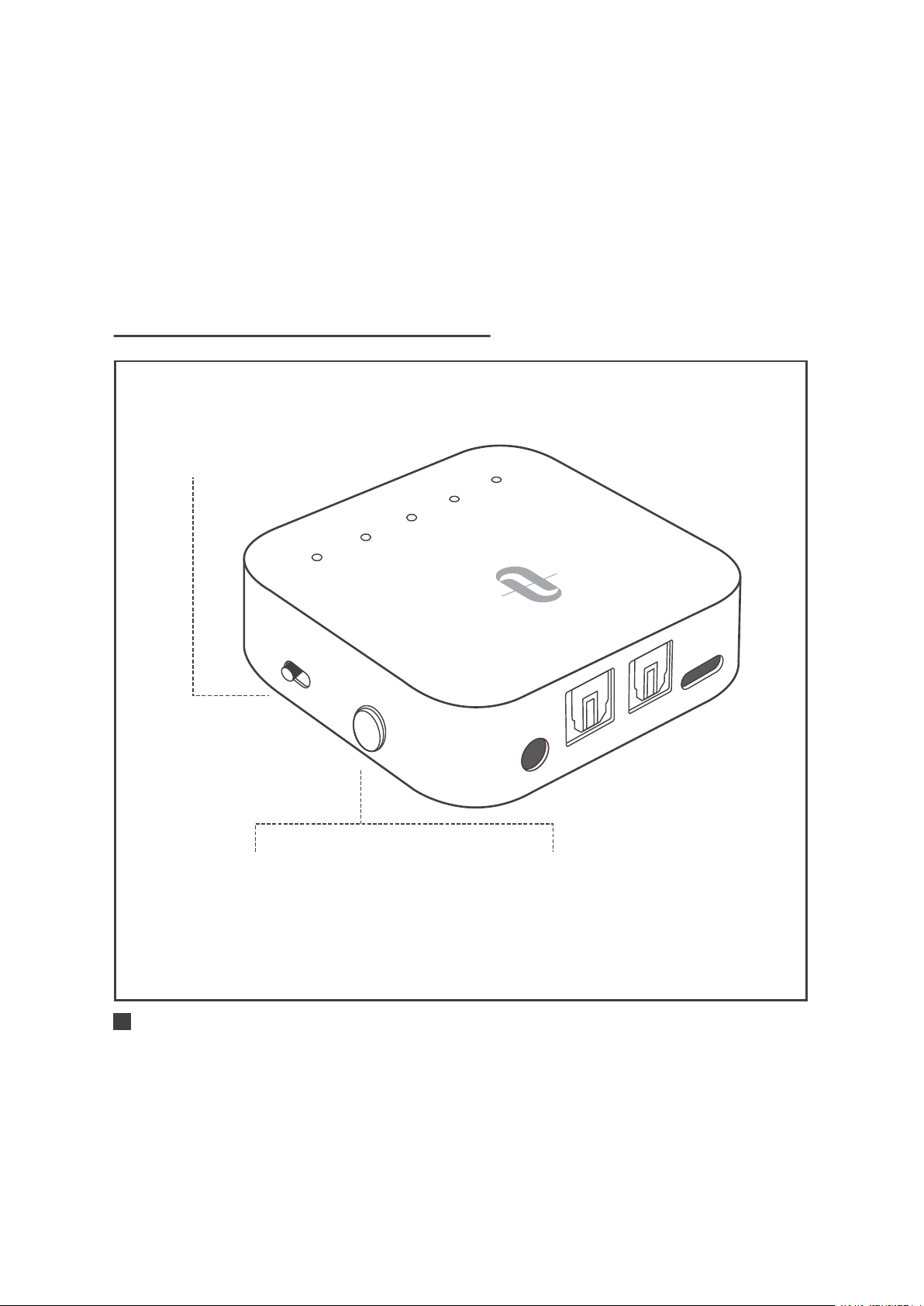
CONTROL DEL BOTÓN
A
U
X
SP
D
IF
I
N
SP
D
I
F O
U
T
D
C
5
V
A
B
SB
C
AP
T
X
L
L
T
X
RX
Encendido / apagado:
Mantenga pulsado durante
3 segundos
Cambio de Modo:
Deslice para seleccionar
entre el Modo TX/RX
Emparejamiento:
Una vez encendido, pulse
dos veces para iniciar
el emparejamiento
ESPAÑOL / 49

LED INDICATOR DE ESTATUS
Función
Encender
Apagar
Modo de Espera
Batería BAJA
Cargando
Completamente Cargado
Emparejando
Conectado
Volver a Conectar
Emparejando
Conectado
Conectado usando el
códec SBC
Conectado usando el
códec Apt-X ®
Conectado usando el códec
Apt-X de Baja Latencia®
Estatus
Parpadea dos veces
Parpadea dos veces
Parpadea cada 5 segundos
Iluminado
Iluminado
Apagado
Parpadea rápidamente
Iluminado
Parpadea lentamente
Parpadea rápidamente
Iluminado
Iluminado
Iluminado
Iluminado
Indicadores
Indicador
de Encendido
A
B
SBC
APTX
LL
ESPAÑOL / 50

· SBC: Códec SBC, compatible con la mayoría de los dispositivos Bluetooth®
· APTX: Códec Apt-X®, el dispositivo Bluetooth® debe ser
compatible con el códec Apt-X® anterior a SBC.
· LL: El Códec Apt-X de Baja Latencia®, el dispositivo Bluetooth®
deberá ser compatible con el Codex Apt-X de Baja Latencia®
anterior a SBC y Apt-X®.
CÓMO USAR
Cargar
1. Conecte el puerto de carga a cualquier adaptador de carga USB
o computadora activa.
2. El indicador de encendido se iluminado durante la carga. Una
vez que esté completamente cargado, se apagará.
Notas:
Puede usar el adaptador durante la carga, sin embargo,
puede generar un zumbido.
Recomendamos cargar la unidad durante al menos 2
horas antes de usarla por primera vez.
ESPAÑOL / 51
A
U
X
S
P
D
IF I
N
S
P
D
I
F
O
UT
D
C
5
V
A
B
S
B
C
A
P
TX
L
L
T
X
R
X
A
U
X
S
PD
IF I
N
S
P
D
I
F
O
U
T
D
C
5V
A
B
SB
C
A
P
T
X
L
L
T
X
R
X
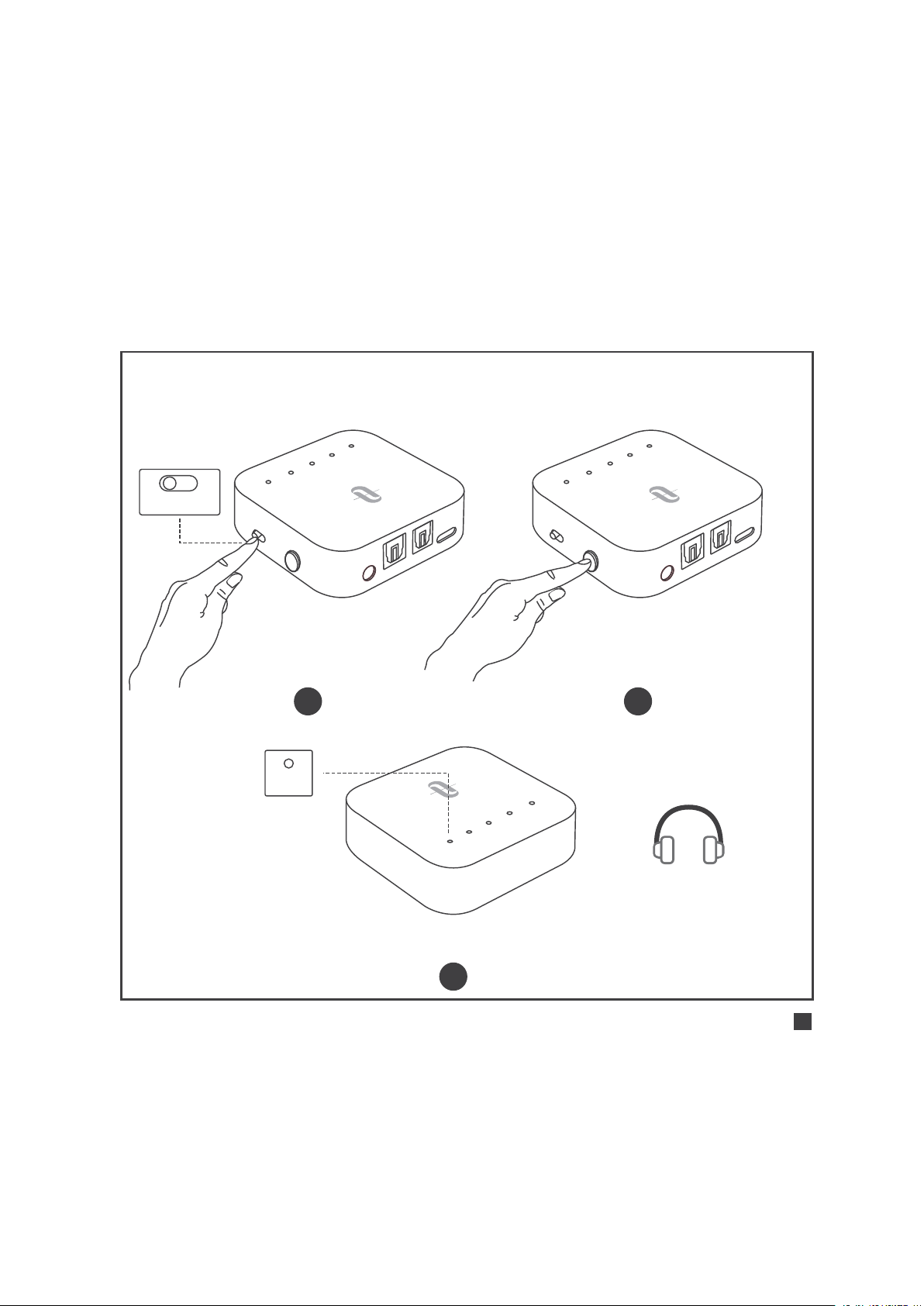
Uso En Modo TX |
Emparejamiento Inicial
TX RX
Encienda: Presione el Botón
de Encendido por 3 segundos
1 2
A
B
S
B
C
A
PT
X
LL
Emparejamiento: “A” parpadeara rápidamente.
3
A
Emparejamiento con el primer dispositivo Bluetooth®
ESPAÑOL / 52
SBC APTX LL
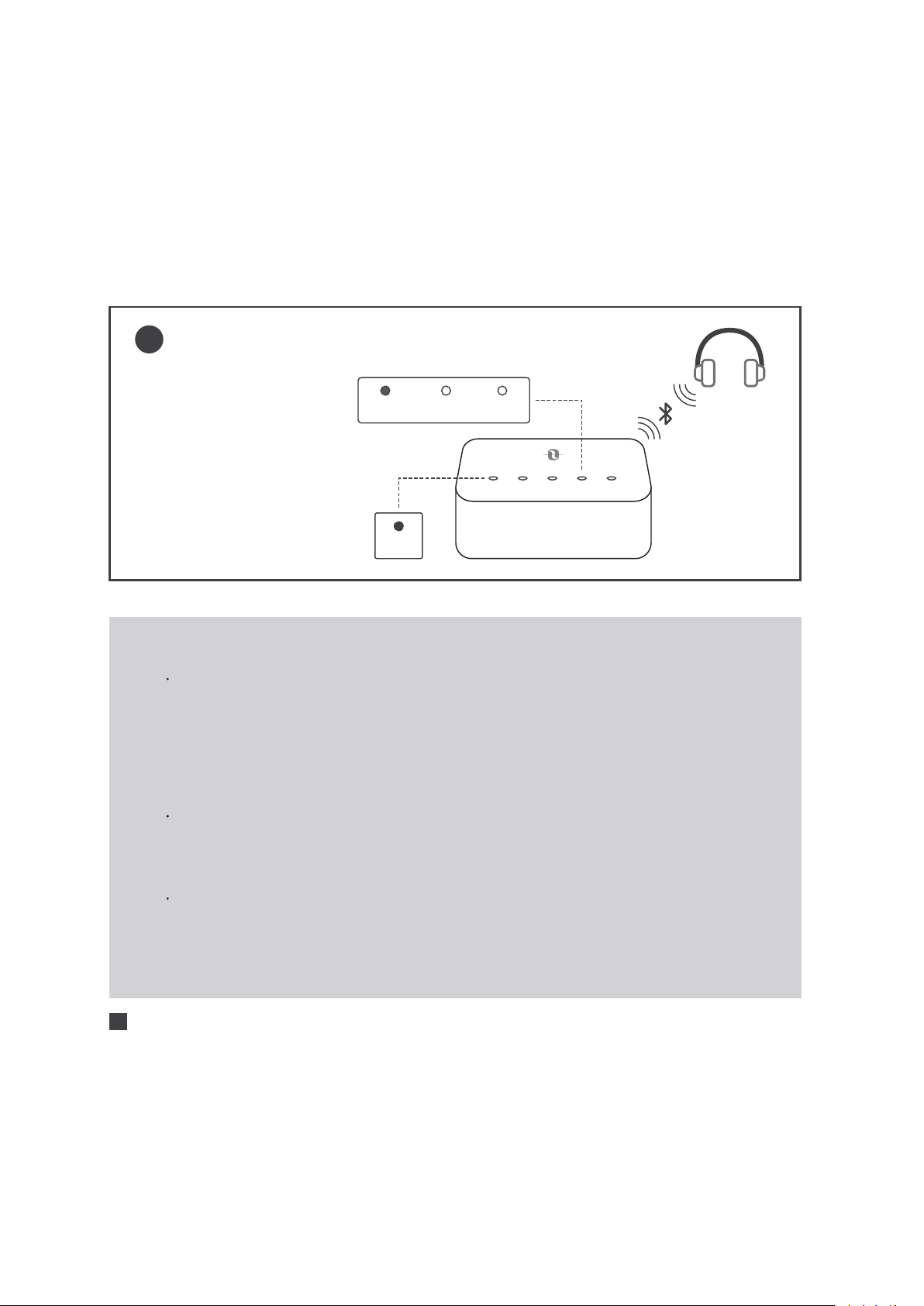
Emparejamiento
Exitoso: “A” se ilumina,
el indicador del Códec
de transmisión se iluminará.
4
A B SBC APTX LL
A
Notas:
Si desea experimentar LIP SYNC, asegúrese de que su
dispositivo Bluetooth® sea compatible con el códec
apt-X de Baja Latencia®. Después de conectarse, el
indicador del códec "LL" se iluminará indicando la
activación del códec de transmisión de baja latencia.
El modo de entrada predeterminado es SPDIF. Cuando
el cable AUX está enchufado, cambiará al modo AUX
automáticamente.
No conecte el TT-BA09 Pro a una salida de amplificador
en modo TX, ya que puede causar sobre voltaje y dañar
el adaptador.
ESPAÑOL / 53
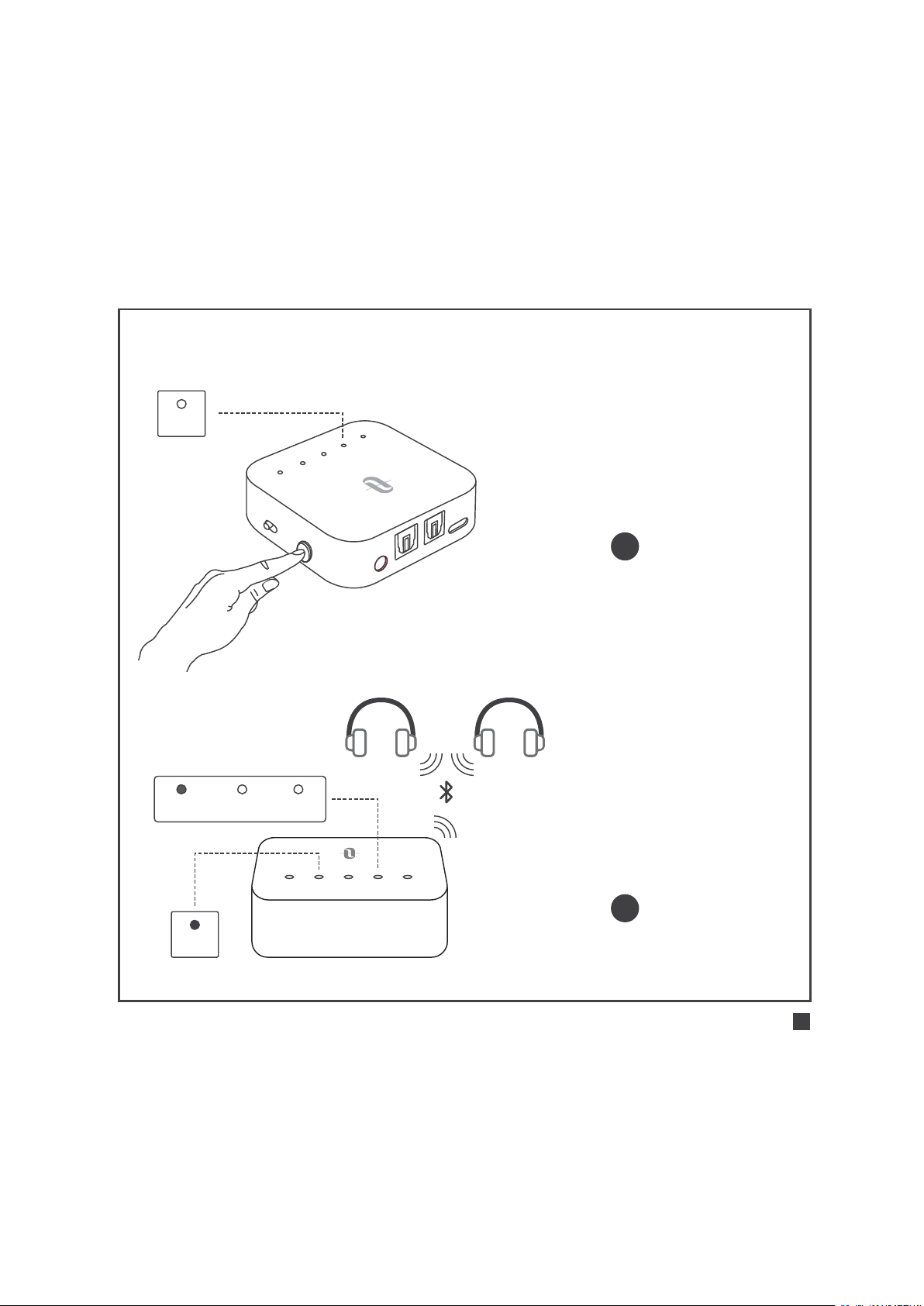
Emparejamiento del Segundo Dispositivo Bluetooth®
A
U
X
S
PD
I
F I
N
SP
D
IF
O
U
T
D
C
5
V
A
B
S
B
C
A
P
T
X
L
L
T
X
R
X
Emparejamiento: presione el
Botón de Encendido dos veces,
el indicador ¨B¨ parpadeara
1
2
B
SBC APTX LL
A B SBC APTX LL
B
Emparejamiento Exitoso: “B” se
ilumina, el indicador del Códec
de transmisión se iluminará.
ESPAÑOL / 54

Notas:
Después de emparejar dos dispositivos Bluetooth ®, el
indicador del códec para el más alto, compatible con
ambos dispositivos se iluminará (por ejemplo, si el
dispositivo “A” de es compatible con el códec SBC y
Apt X-, mientras que el dispositivo “B” solo es compatible
con el SBC, se iluminara el indicador el Códec ¨SBC¨.
Al desconectar uno de los dispositivos, el indicador del
códec más alto se mantendrá iluminado.
Uso En Modo TX |
Reconexión Automática
El TT-BA09 Pro puede recordar los dispositivos emparejados
previamente e intentara emparejarse con el ultimo dispositivo
conectado, (hasta dos dispositivos) de manera automáticamente
una vez que se encendido.
Uso En Modo TX |
Borrar el Historial de Emparejamiento
Cuando el adaptador está apagado, borre el historial de empare-
jamiento deslizando el interruptor de Modo a "RX", luego enciéndalo.
ESPAÑOL / 55
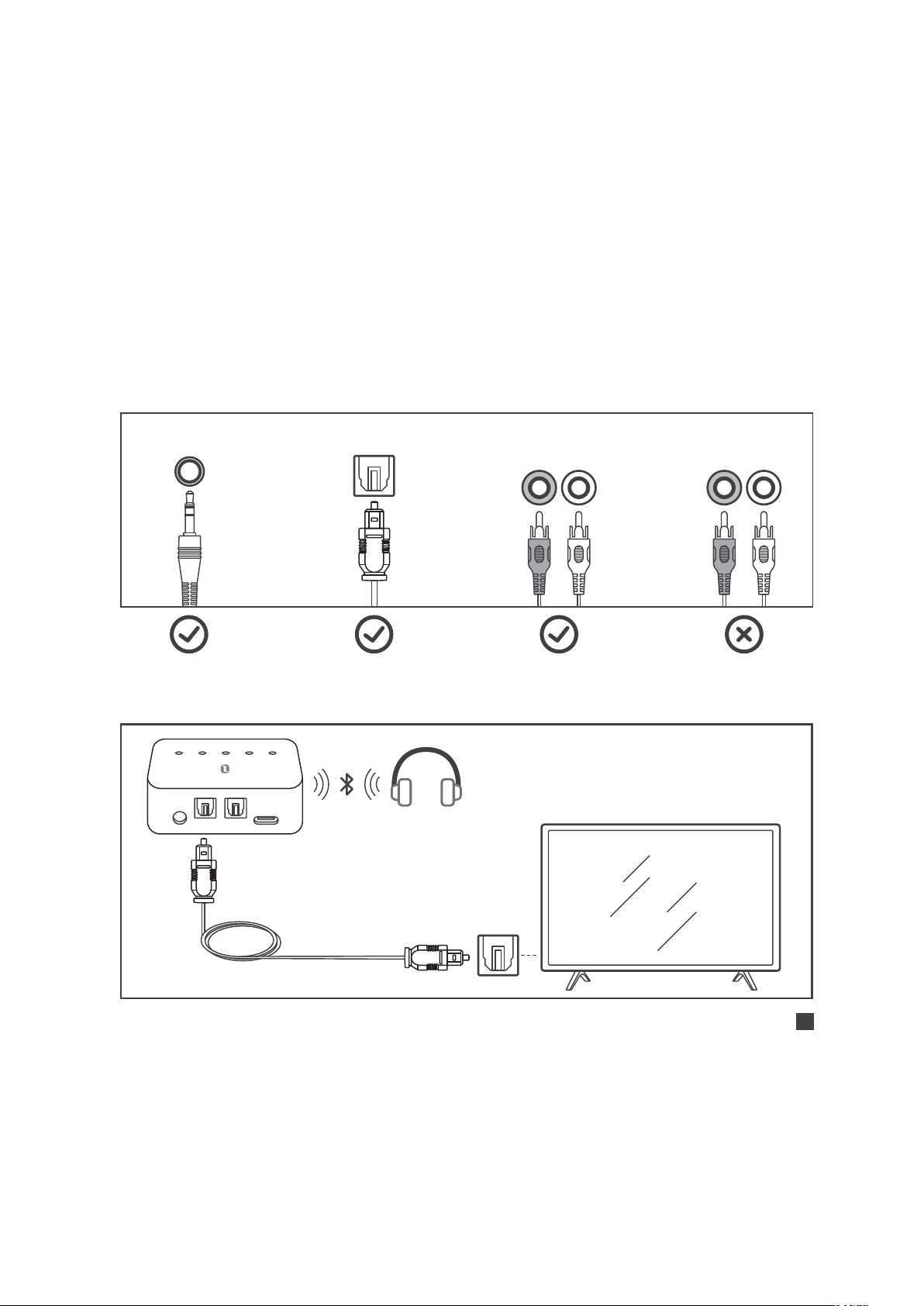
Uso En Modo TX |
Úselo con su televisor
Verifique las opciones de salida de su TV antes de iniciar la
configuración
AUX/3.5mm Optical Out AUDIO OUT
AUDIO IN
Televisores con salida de audio ÓPTICA
AUX DC5V
SPDIF IN SPDIF OUT
A B SBC APTX LL
Cable óptico
R L R L
ESPAÑOL / 56
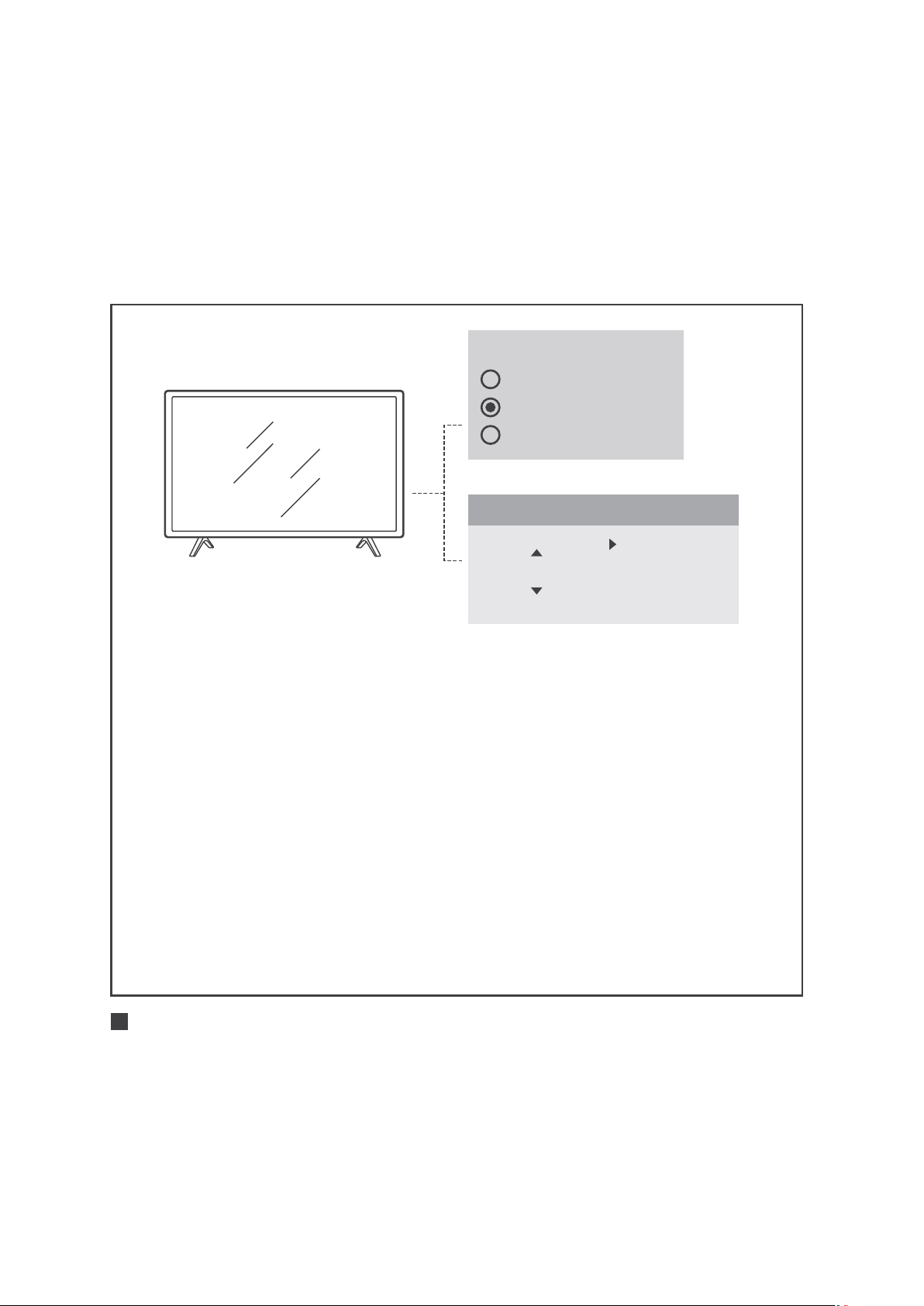
Speakers
Internal Speakers
External Speakers
Headset
1) Asegúrese de que la bocina de su TV esté configurada
como "Bocina Externa".
2) Asegúrese de que el formato de audio de su televisor
esté configurado como "PCM" o que el “Dolby / DTS"
esté APAGADO (esto es IMPORTANTE).
3) Asegúrese de que el cable de audio óptico esté enchufado
al puerto "SPDIF IN" del TT-BA09 Pro.
Nota:
El menú de configuración puede ser diferente dependiendo
el modelo y marca de TV
Audio Format
PCM
Dolby/DTS
DTS Neo 2.5
Settings
ESPAÑOL / 57
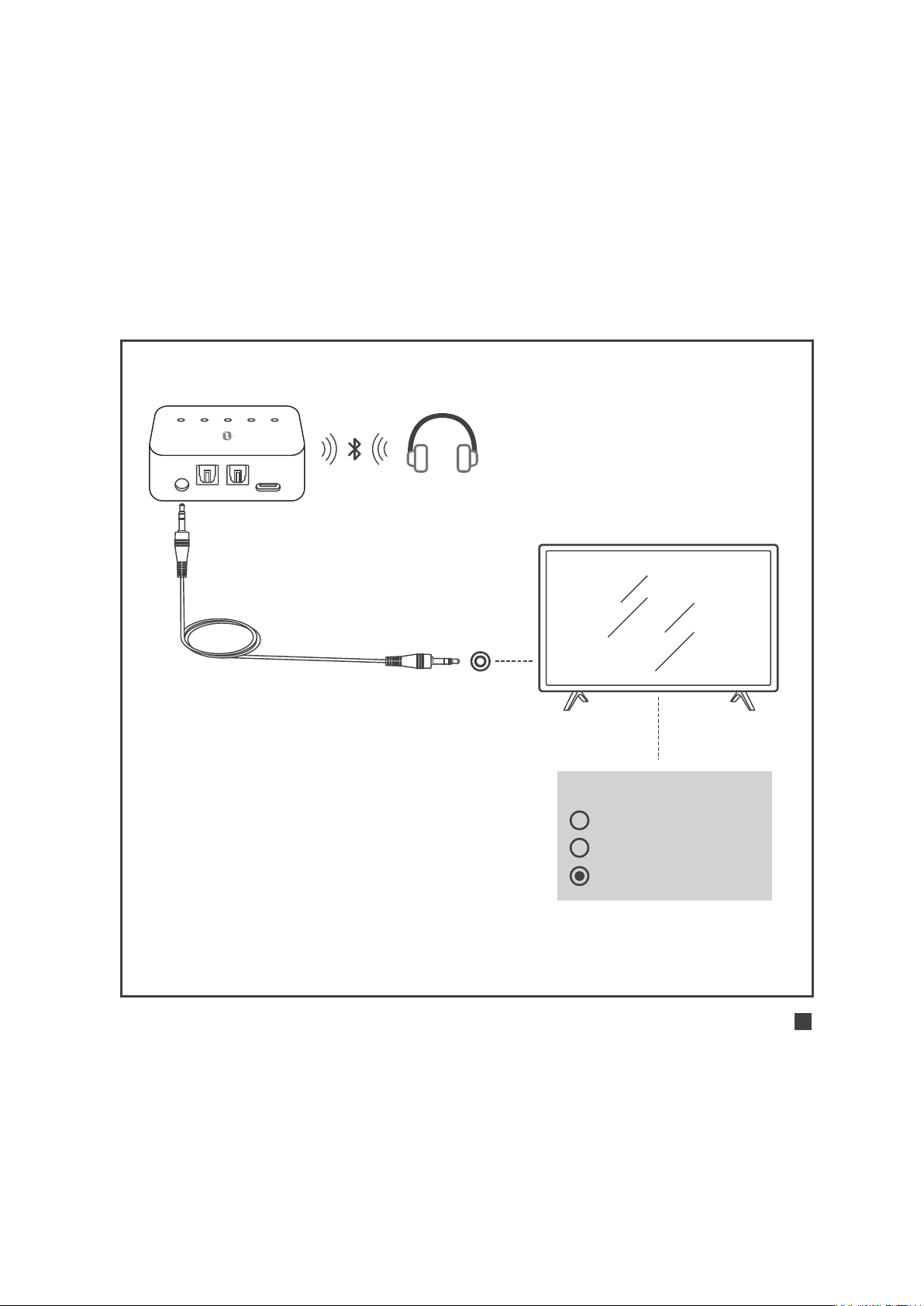
Televisores con salida de audio AUX 3.5mm
AUX DC5V
SPDIF IN SPDIF OUT
A B SBC APTX LL
Cable de audio de 3,5 mm
Asegúrese de que la bocina
de su TV esté configurada
como "Auriculares".
Speakers
Internal Speakers
External Speakers
Headset
ESPAÑOL / 58
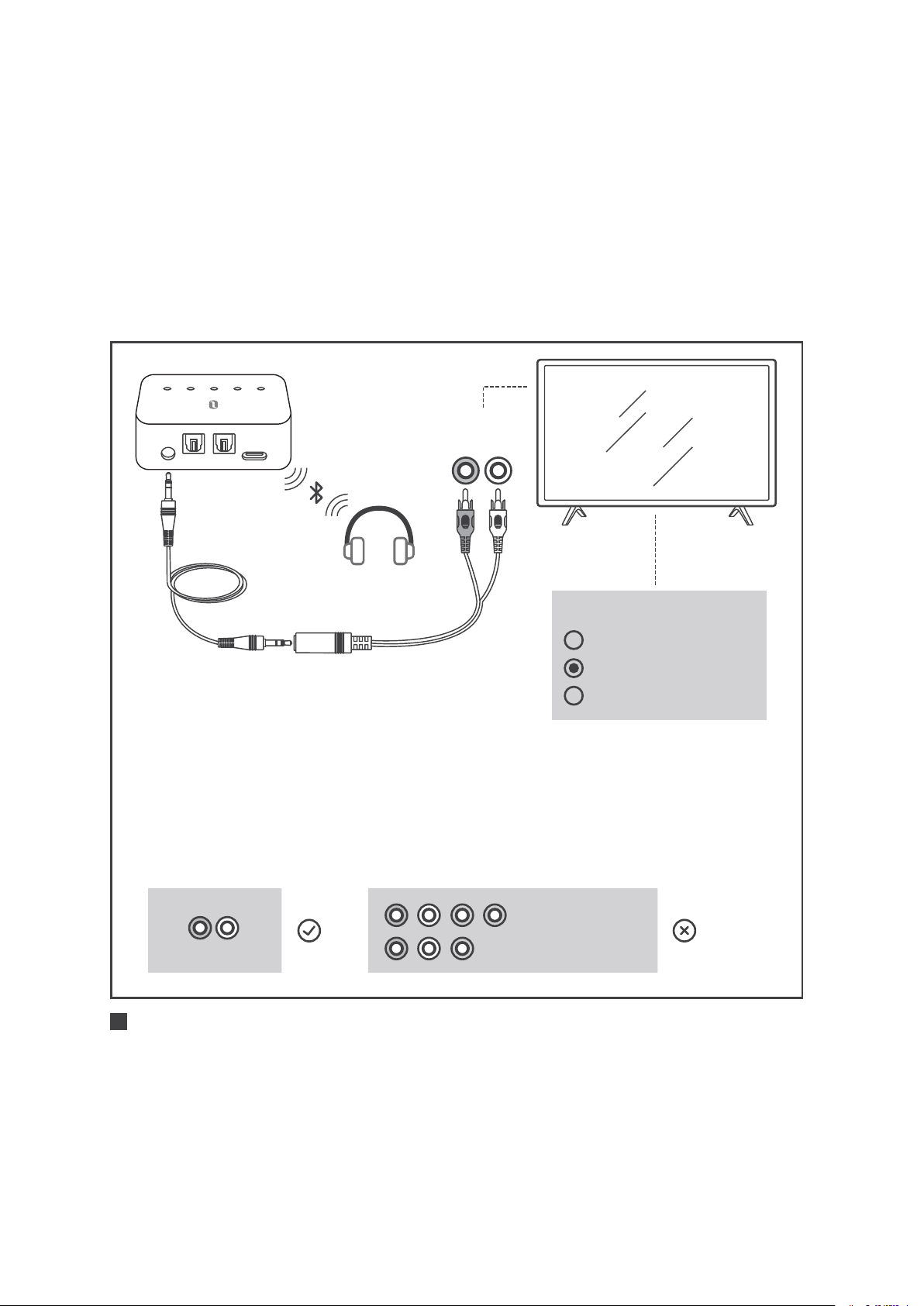
AUX DC5V
SPDIF IN SPDIF OUT
A B SBC APTX LL
Cable de audio
de 3,5 mm
Cable macho de
3.5mm hembra a RCA
Televisores con salida de audio RCA
1) Asegúrese de que se usen los puertos rojos/blancos del
televisor con la etiqueta "Salida de audio", los otros puertos
rojos / blancos no son los correctos
2) Asegúrese de que la bocina de su TV esté configurada
como "Bocina Externa".
Speakers
Internal Speakers
External Speakers
Headset
R L
AUDIO OUT
COMPUTER IN
VIDEO IN
AUDIO OUT
R L
ESPAÑOL / 59
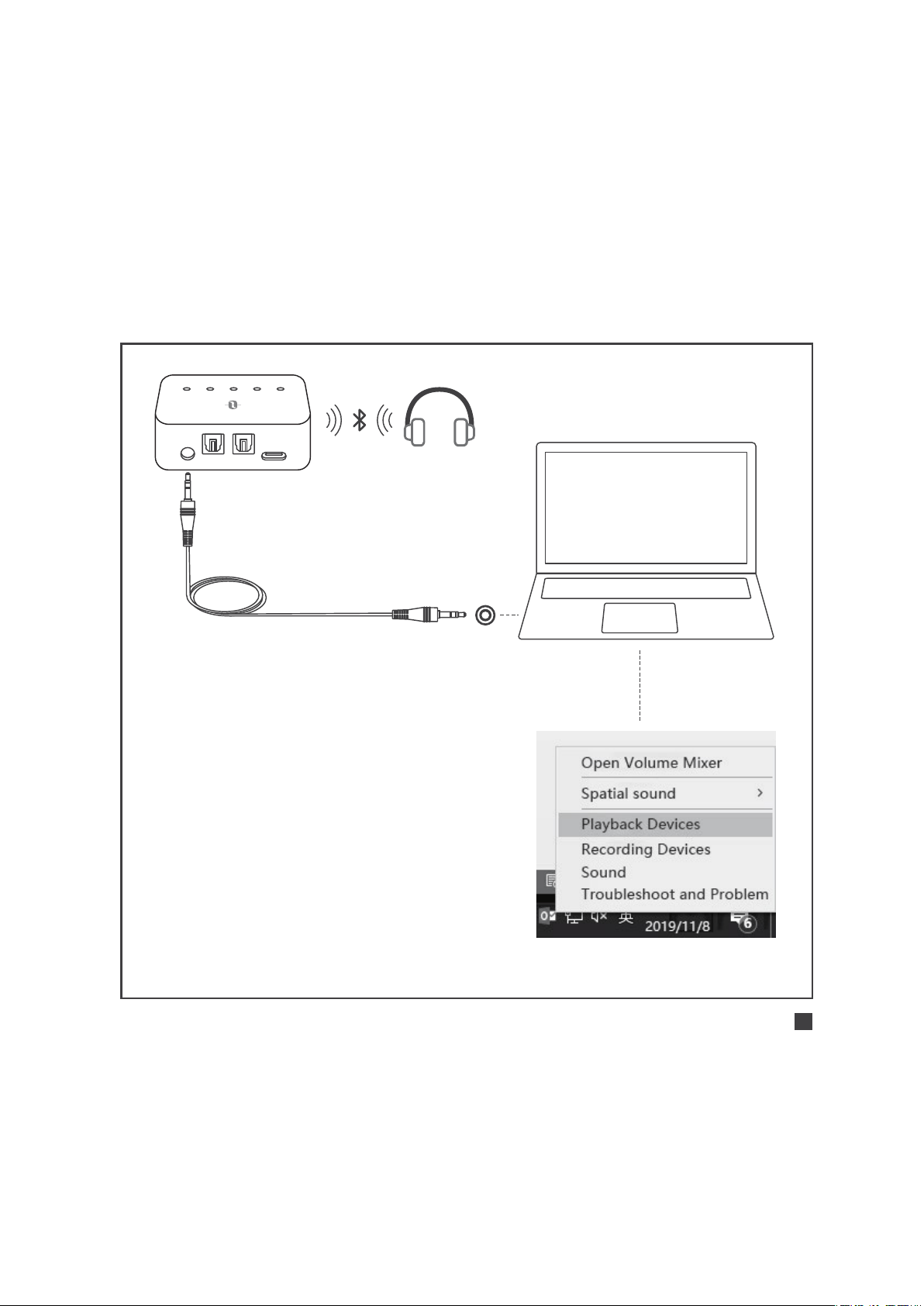
Uso En Modo TX |
Uso con su PC/Laptop
AUX DC5V
SPDIF IN SPDIF OUT
A B SBC APTX LL
1) Para configurar como
"Dispositivo de reproducción"
predeterminado en su PC/
laptop: haga clic con el botón
derecho en la esquina inferior
derecha de la barra de tareas
de la bocina y seleccione
"Dispositivos de reproducción".
2) Seleccione el "TT-BA09 Pro"
como "Dispositivo
predeterminado”.
Cable de audio
de 3,5 mm
ESPAÑOL / 60

Uso En Modo RX |
Emparejamiento Inicial
Emparejamiento con el primer dispositivo Bluetooth®
1) Deslice el interruptor de Modo al modo "RX”.
2) Presione el Botón de Encendido por 3 segundos para encender el
adaptador.
3) Al usar por primera vez el TT-BA09 Pro entrará en modo de
emparejamiento automáticamente con el indicador "A"
parpadeando rápidamente.
4) Active la función Bluetooth ® en su teléfono/tableta, busque
“TaoTronics TT-BA09 Pro” en los resultados de búsqueda y
toque para conectarse. Una vez conectado, el indicador "A"
se iluminará.
Emparejamiento del Segundo Dispositivo Bluetooth
1) Después de conectarse con el primer dispositivo Bluetooth®,
presione el Botón de Encendido dos veces, el indicador "B"
parpadeará rápidamente.
2) Coloque el 2 segundo dispositivo Bluetooth® cerca de la
Adaptador (a menos de 3 pies/ 1 metro de distancia).
3) Active la función Bluetooth ® en su teléfono/tableta, busque
ESPAÑOL / 61

Uso En Modo RX |
Reconexión Automática
El TT-BA09 Pro puede recordar los dispositivos emparejados
previamente e intentara emparejarse con el ultimo dispositivo
conectado, (hasta dos dispositivos) de manera automáticamente
una vez que se encendido.
Uso En Modo RX |
Borrar Historial de Emparejamiento
Con el adaptador apagado, borre el historial de emparejamiento
deslizando el interruptor de Modo a "TX", luego enciéndalo.
“TaoTronics TT-BA09 Pro” en los resultados de búsqueda y
toque para conectar. Una vez conectado, el indicador "B"
se iluminará.
ESPAÑOL / 62

SOLUCIÓN DE PROBLEMAS
Solución
Asegúrese de seguir las instrucciones de
conexión del cable y de configuración de
su TV/PC/Laptop
Asegúrese de que sus dispositivos
Bluetooth® soporten el códec apt-X de
Baja Latencia Una vez conectado, el
indicador del códec ¨LL¨ se iluminará
indicando el códec de transmisión de baja
latencia está activado
Cuando el TT-BA09 Pro esté encendido,
presión el Botón de Encendido dos veces
para iniciar el modo de emparejamiento
antes de volver a conectarse al otro
dispositivo emparejado.
Cada vez que cambie de modo, se borrará
el historial de emparejamiento. Vuelva a
emparejar su dispositivo Bluetooth® como
previamente indicado.
Problema
Sin entrada
de audio
Latencia auditiva
Emparejar con un
nuevo dispositivo
Bluetooth®
No se puede
conectar con el
último dispositivo
conectado
ESPAÑOL / 63

ESPAÑOL / 64
GARANTÍA Y SERVICIO
Gracias por elegir los Adaptador inalámbrico TT-BA09 Pro
TaoTronics. Si ocurre algún problema, por favor contacte el Centro
de Atención al Cliente de TaoTronics de su país a través de la
información de contacto señalada en esta Guía de Usuario.
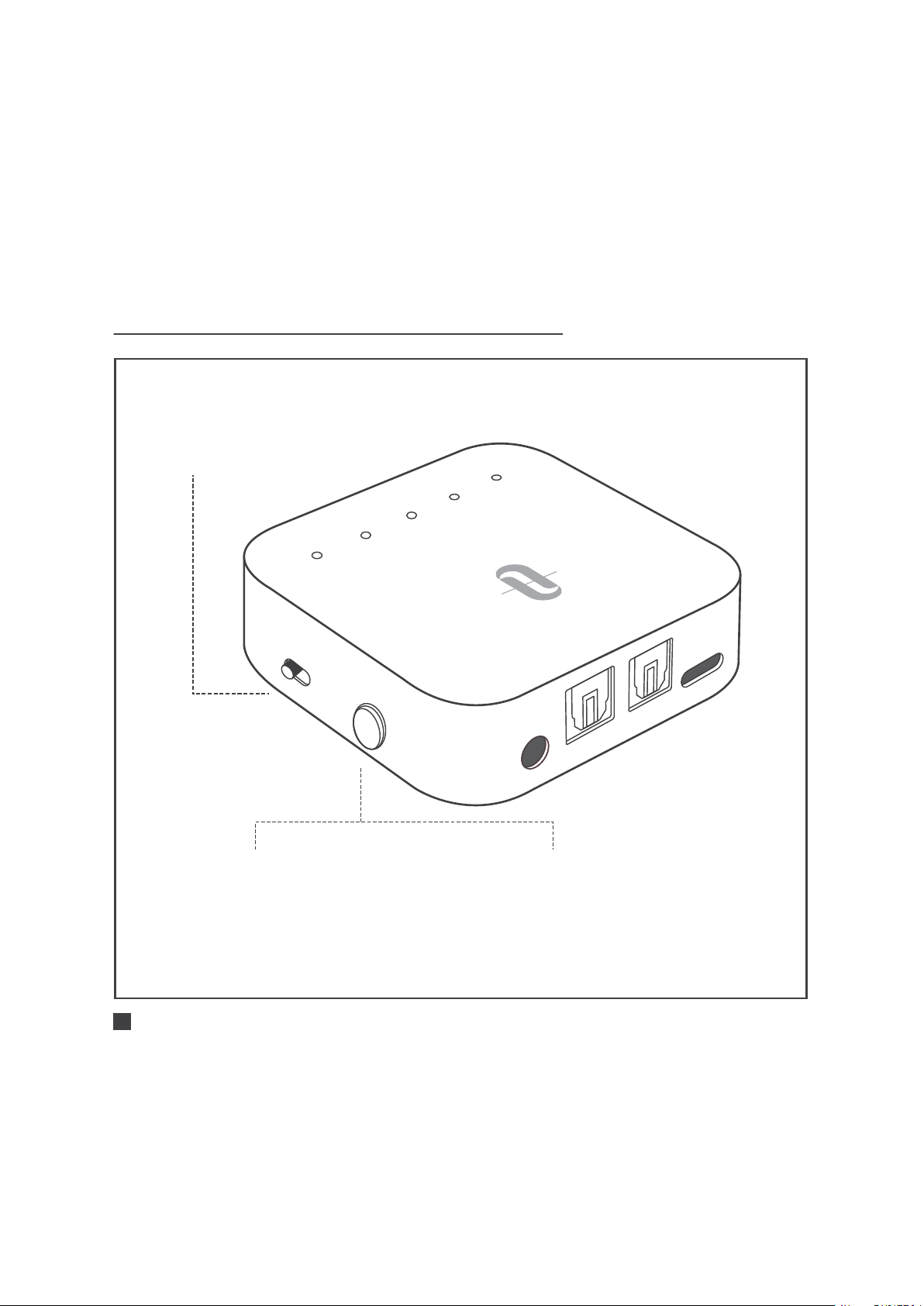
PULSANTE DI CONTROLLO
AUX
SP
D
I
F
I
N
SPDI
F
O
UT
D
C
5
V
A
B
SBC
APTX
LL
T
X
R
X
Accensione/Spegnimento:
Tenere premuto per 3 secondi
Interruttore Modalità:
Spostare per selezionare la
modalità TX/RX
Associazione:
Quando è acceso, premere
due volte per avviare
l'accoppiamento
ITALIANO / 65

LED INDICATORI DI STATO
Funzione
Accensione
Spegnimento
Modalità Standby
Batteria Bassa
Ricarica in Corso
Ricarica Completata
Accoppiamento
Connesso
Riconnessione
Accoppiamento
Connesso
Connesso con il
codec SBC
Connesso con il codec
Apt-X®
Connesso con il codec
Apt-X® a bassa Latenza
Stato
Lampeggiante due volte
Lampeggiante due volte
Lampeggiante ogni 5 secondi
Acceso fisso
Acceso fisso
Spento
Lampeggiante veloce
Acceso fisso
Lampeggiante lento
Lampeggiante veloce
Acceso fisso
Acceso fisso
Acceso fisso
Acceso fisso
Indicatori
Indicatore
di Alimen-
tazione
A
B
SBC
APTX
LL
ITALIANO / 66

MODALITA’ D’UTILIZZO
Nota:
E’ possibile utilizzare l’adattatore durante la ricarica,
tuttavia potrebbe udirsi un ronzio.
Consigliamo di ricaricare il dispositivo per almeno 2
ore prima del primo utilizzo.
ITALIANO / 67
· SBC: Codec SBC supportato dalla maggior parte dei dispositivi Bluetooth®
· APTX: Codec Apt-X®. Il dispositivo Bluetooth® dovrebbe
supportare il codec Apt-X® prima dell’SBC.
· LL: Codec Apt-X® a bassa Latenz etooth®
dovrebbe supportare il codec Apt-X® a bassa Latenza prima
dell’SBC e dell’Apt-X®.
Ricarica
1. Collegare la porta di ricarica con qualsiasi adattatore USB o
porta USB attiva di un computer.
2. L’indicatore di alimentazione resterà acceso fisso durante la
ricarica. Una volta completata la ricarica esso si spegnerà.
AU
X
S
P
D
I
F
I
N
S
P
D
IF
O
UT
D
C
5
V
A
B
S
B
C
A
P
TX
L
L
T
X
R
X
A
U
X
S
P
D
IF I
N
S
P
D
I
F
O
UT
D
C
5
V
A
B
S
B
C
A
P
TX
L
L
T
X
R
X
Utilizzo in Modalità TX |
Accoppiamento Iniziale
TX RX
Accensione: Premere e tenere
premuto il Pulsante di
accensione per 3 secondi
1 2
A
B
SB
C
AP
TX
L
L
Accoppiamento: “A” lampeggerà rapidamente.
3
A
Accoppiamento con il 1° Dispositivo Bluetooth®
ITALIANO / 68
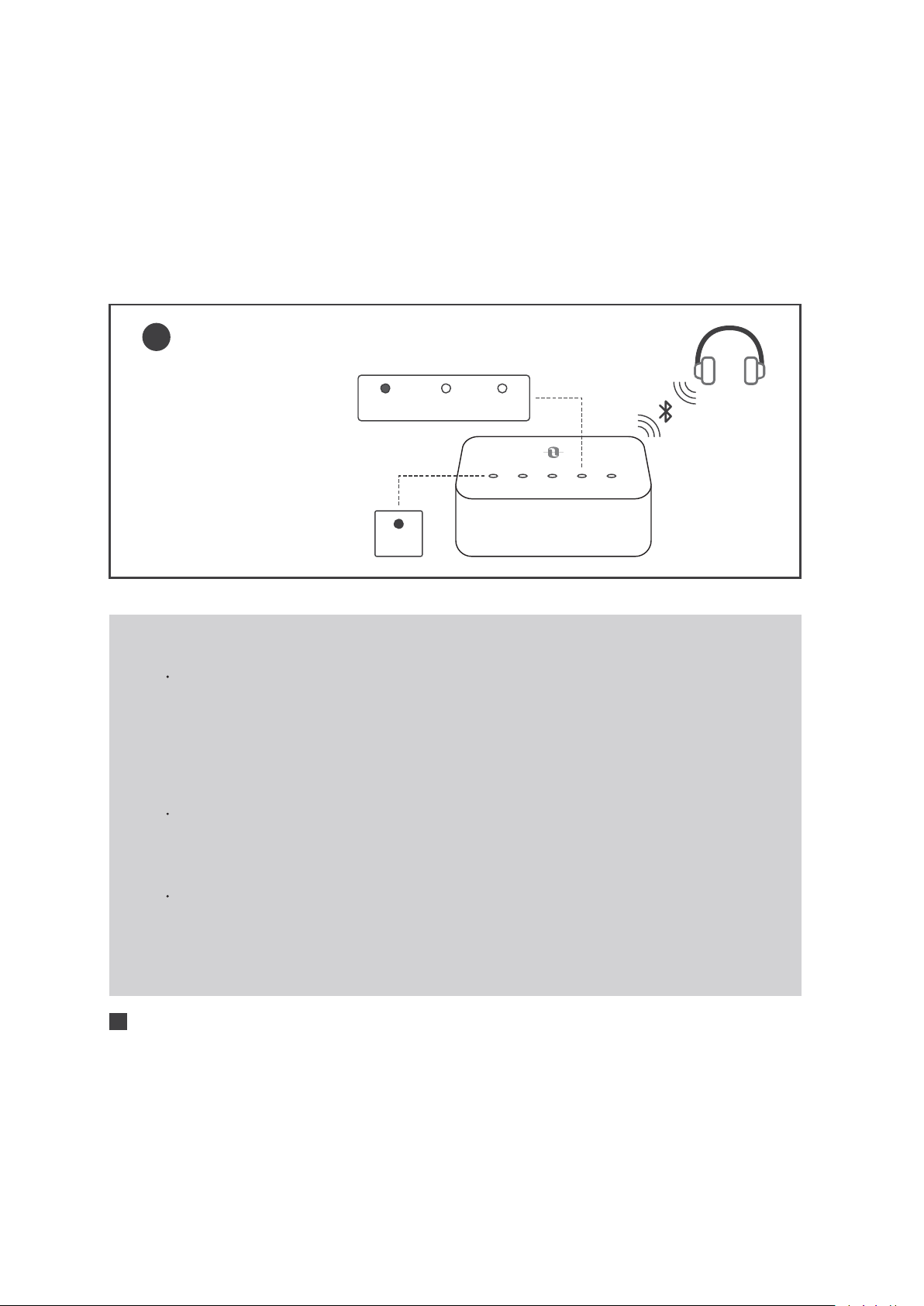
SBC APTX LL
Accoppiamento
avvenuto: “A” resterà
acceso, l’indicatore del
codec del flusso attuale
si accenderà.
4
A B SBC APTX LL
A
Nota:
Se si desidera provare l’esperienza LIP SYNC, assicurarsi
che il proprio dispositivo Bluetooth® supporti il codec
Apt-X® a bassa Latenza. Dopo la connessione,
l’indicatore del codec “LL” si accenderà ad indicare il
flusso a bassa latenza.
La modalità di ingresso di default è SPDIF. Quando il
cavo AUX viene collegato, passerà automaticamente
alla modalità AUX.
Si prega di non collegare il dispositivo TT-BA09 Pro ad
un uscita di un amplificatore in modalità TX, che
potrebbe causare sovratensione e danni all’adattatore.
ITALIANO / 69
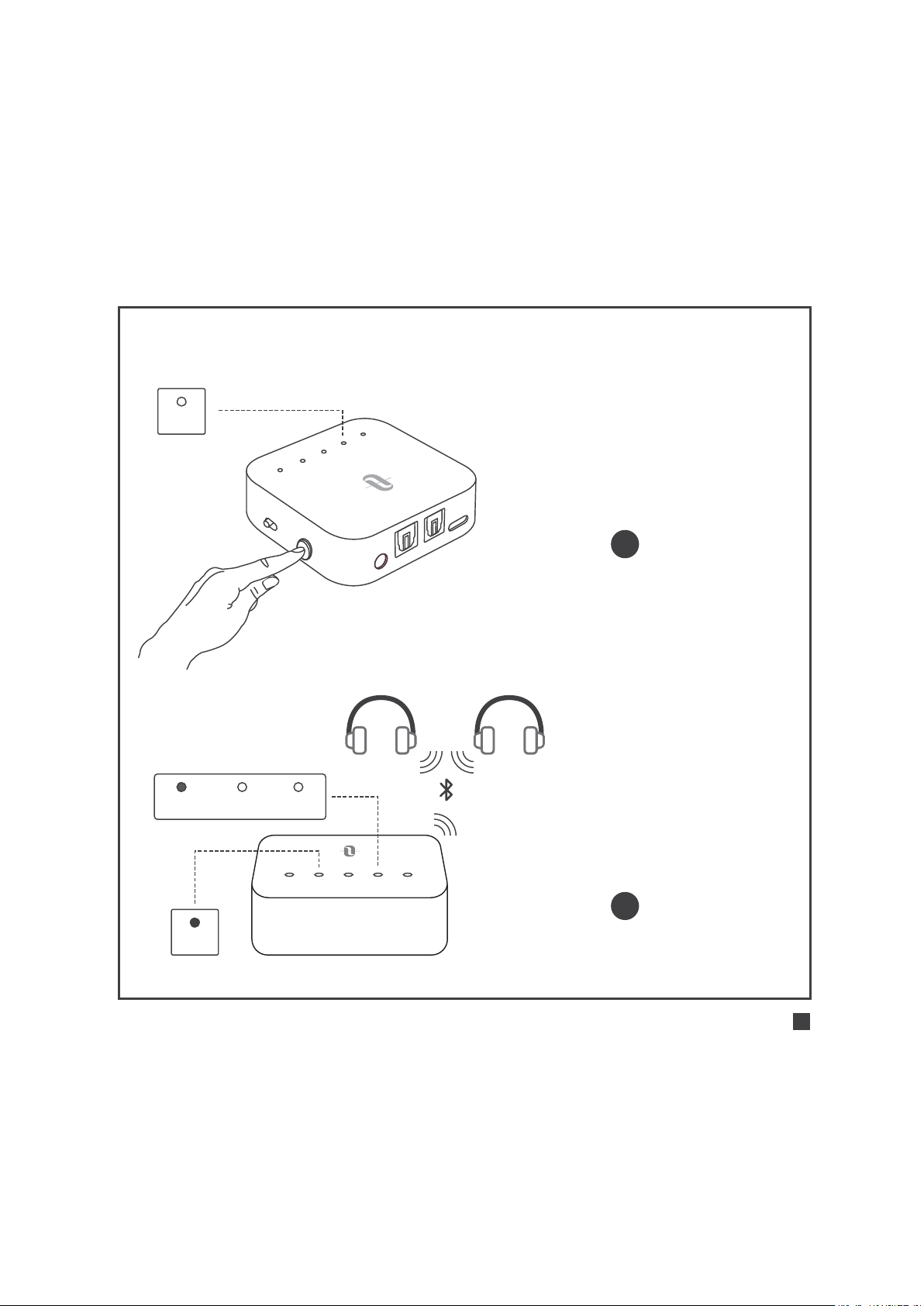
Accoppiamento con il 2° Dispositivo Bluetooth®
A
UX
S
PD
I
F
I
N
SP
D
IF
O
UT
D
C
5
V
A
B
S
B
C
A
P
T
X
L
L
T
X
R
X
Accoppiamento: Premere il
Pulsante di accensione due volte.
“B” lampeggerà velocemente.
1
2
B
SBC APTX LL
A B SBC APTX LL
B
Accoppiamento avvenuto: “B”
resterà acceso, l’indicatore del
codec del flusso attuale si
accenderà.
ITALIANO / 70

Nota:
Dopo aver connesso due dispositivi Bluetooth®,
l’indicatore Codec per il codec più elevato supportato
da entrambi i dispositivi si accenderà (ad es., se il
dispositivo “A” supporta i codec SBC e Apt-X, mentre il
dispositivo “B” supporta il solo codec SBC, si accenderà
l’indicatore codec “SBC”).
Dopo la disconnessione di uno dei dispositivi, resterà
acceso l’indicatore codec per il codec più elevato
supportato dal dispositivo rimanente.
Utilizzo in Modalità TX |
Riconnessione Automatica
Il dispositivo TT-BA09 Pro può ricordare i dispositivi accoppiati in
precedenza, e cercherà di riaccoppiarsi automaticamente con gli
ultimi dispositivi collegati (fino a 2 dispositivi) alla sua accensione.
Utilizzo in Modalità TX |
Cancellazione dello Storico
degli Accoppiamenti
Quando l’adattatore è spento, è possibile cancellare lo storico degli
accoppiamenti spostando il pulsante Modalità su “RX”, quindi accendilo.
ITALIANO / 71
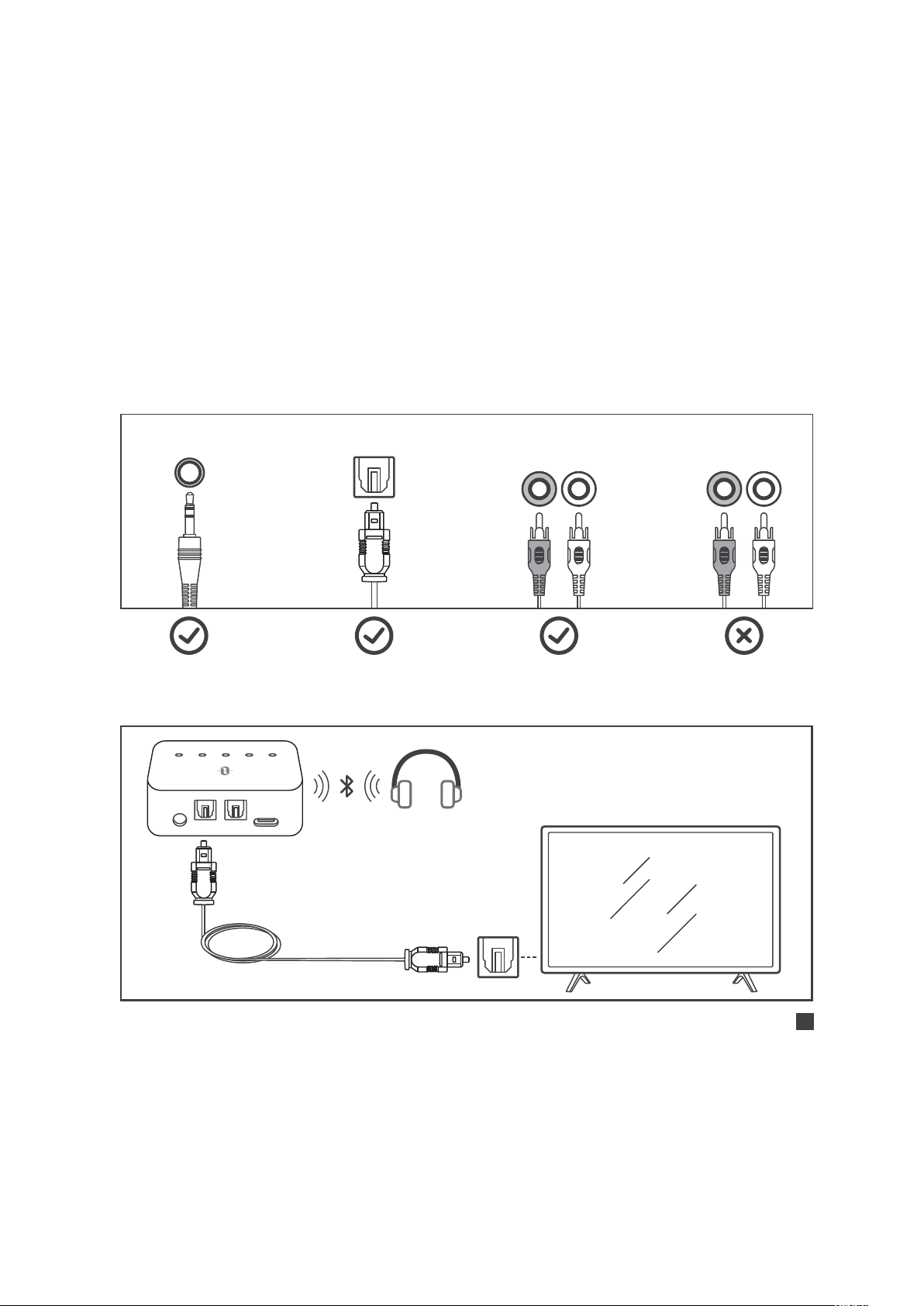
Utilizzo in Modalità TX |
Utilizzo con il Televisore
Controllare le opzioni di uscita del televisore prima di
programmare il dispositivo
AUX/3.5mm Optical Out AUDIO OUT
AUDIO IN
Televisori con uscita audio OTTICA
AUX DC5V
SPDIF IN SPDIF OUT
A B SBC APTX LL
Cavo Ottico
R L R L
ITALIANO / 72
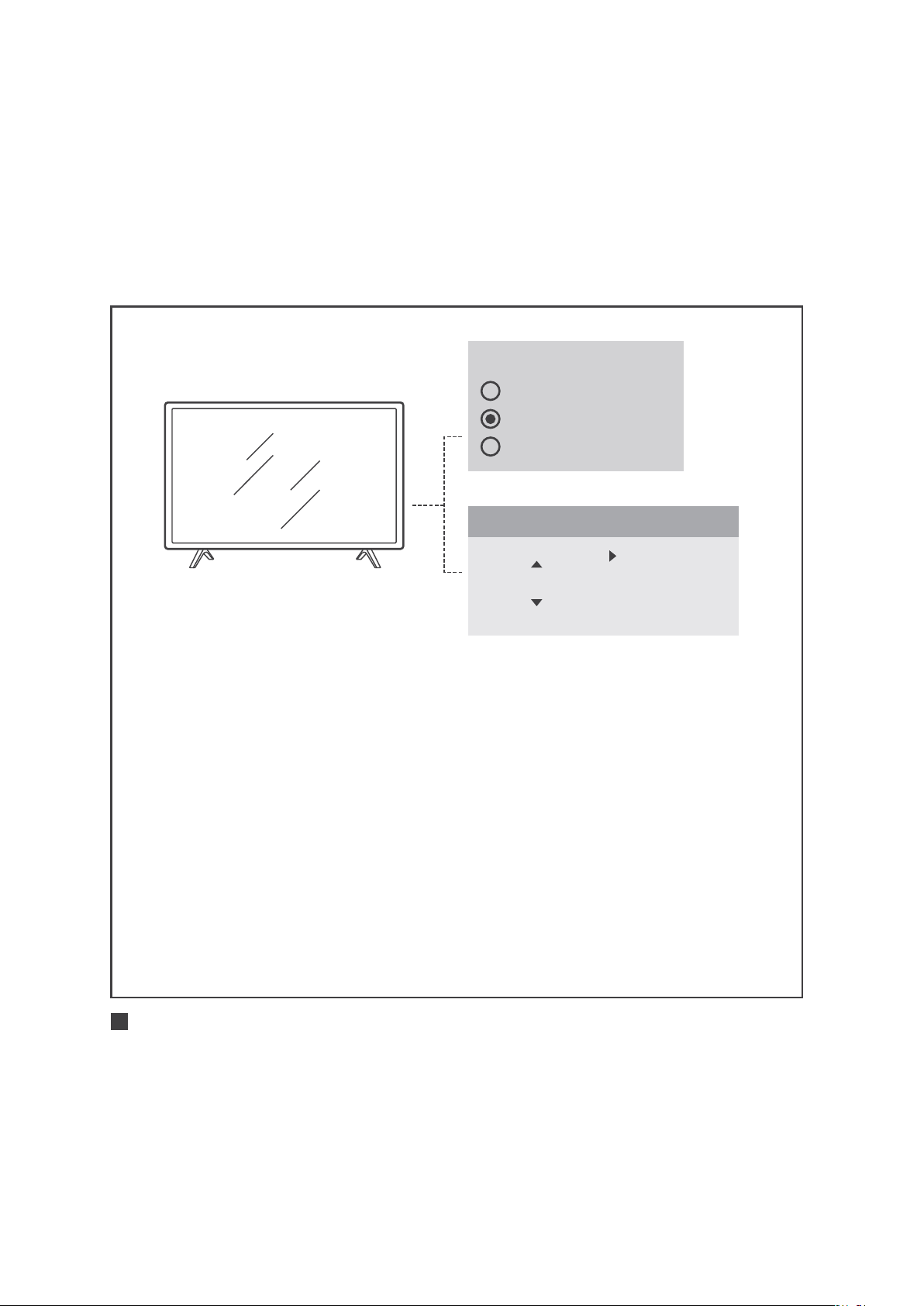
Speakers
Internal Speakers
External Speakers
Headset
1) Assicurarsi che lo speaker del televisore sia impostato su
“Speaker Esterno”.
2) Assicurarsi che il formato audio del televisore sia impostato su
"PCM" e che "Dolby/DTS" sia SPENTO (questo è IMPORTANTE).
3) Assicurarsi che il cavo audio ottico sia inserito nella porta
“SPDIF IN” sul dispositivo TT-BA09 Pro.
Nota:
Le impostazioni dei menu possono variare in base a
marca e modello del televisore.
Audio Format
PCM
Dolby/DTS
DTS Neo 2.5
Settings
ITALIANO / 73
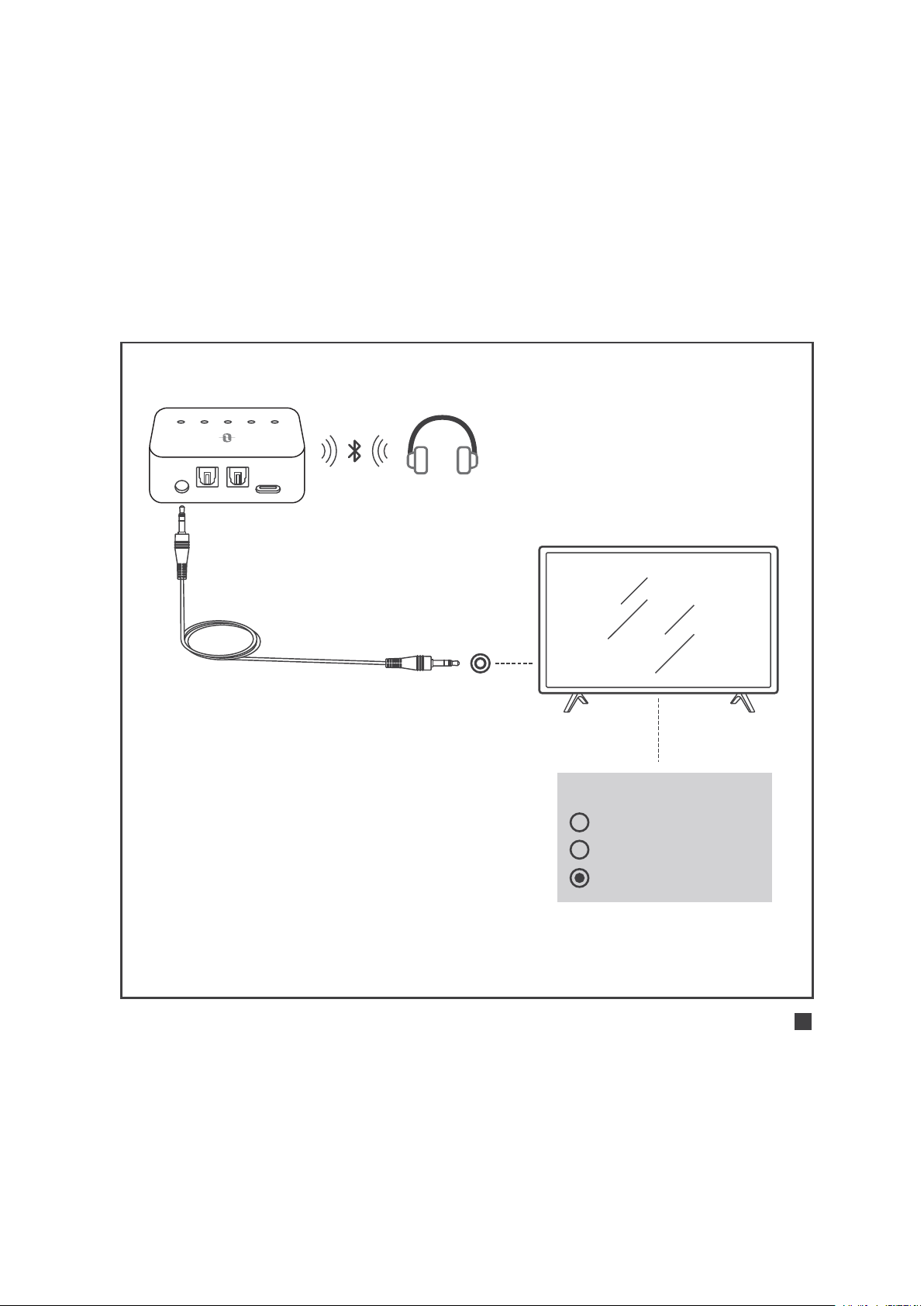
Televisori con uscita audio AUX da 3,5 mm
AUX DC5V
SPDIF IN SPDIF OUT
A B SBC APTX LL
Cavo Audio da 3.5mm
Assicurarsi che lo speaker del
televisore sia impostato su “Cuffie”.
Speakers
Internal Speakers
External Speakers
Headset
ITALIANO / 74
AUX DC5V
SPDIF IN SPDIF OUT
A B SBC APTX LL
Cavo Audio
da 3.5mm
Cavo Maschio da
3.5mm - connettore
femmina a RCA
Televisori con uscita audio RCA
1) Assicurarsi vengano utilizzate le porte del televisore rossa/
bianca indicate con “Audio Out”, eventuali altri porte rosse/
bianche non sono corrette.
2) Assicurarsi che lo speaker del televisore sia impostato su
“Speaker Esterno”.
Speakers
Internal Speakers
External Speakers
Headset
R L
AUDIO OUT
COMPUTER IN
VIDEO IN
AUDIO OUT
R L
ITALIANO / 75
Utilizzo in Modalità TX |
Utilizzo con PC/Laptop
AUX DC5V
SPDIF IN SPDIF OUT
A B SBC APTX LL
1) Impostare come "Dispositivo di
riproduzione" predefinito su
PC/laptop - Cliccare con il
pulsante destro del mouse
l’icona dell’altoparlante in basso
a destra nella barra degli
strumenti e selezionare
"Dispositivi di riproduzione".
2) Impostare il dispositivo
“TT-BA09 Pro" come
“Dispositivo predefinito”.
Cavo Audio
da 3.5mm
ITALIANO / 76

Utilizzo in Modalità RX |
Accoppiamento Iniziale
Accoppiamento con il 1° Dispositivo Bluetooth®
1) Scorrere il pulsante Modalità nella posizione “RX”.
2) Premere e tenere premuto il Pulsante di accensione per 3 secondi
per accendere l’adattatore.
3) Per il primo utilizzo, il dispositivo TT-BA09 Pro entrerà
automaticamente in modalità di accoppiamento e l’indicatore
“A” lampeggerà velocemente.
4) Attivare la funzione Bluetooth® sul proprio telefono/tablet,
trovare “TaoTronics TT-BA09 Pro” nei risultati di ricerca e premere
per collegare. Una volta collegato, l’indicatore “A” si accenderà
e la luce resterà fissa.
Accoppiamento con il 2° Dispositivo Bluetooth®
1) Dopo aver collegato il 1° dispositivo Bluetooth® premere il
Pulsante di accensione due volte. L’indicatore “B” lampeggerà
velocemente.
2) Collocare il 2° dispositivo Bluetooth® vicino all’adattatore (nel
raggio di 1 metro). Attivare la funzione Bluetooth® sul proprio
telefono/tablet, trovare “TaoTronics TT-BA09 Pro” nei risultati di
ITALIANO / 77

Utilizzo in Modalità RX |
Riconnessione Automatica
Il dispositivo TT-BA09 Pro può ricordare i dispositivi accoppiati in
precedenza, e cercherà di riaccoppiarsi automaticamente con gli
ultimi dispositivi collegati (fino a 2 dispositivi) alla sua accensione.
Utilizzo in Modalità RX |
Cancellazione dello Storico
degli Accoppiamenti
Quando l’adattatore è spento, è possibile cancellare lo storico
degli accoppiamenti spostando il pulsante Modalità su “TX”,
quindi accendilo.
ricerca e premere per collegare. Una volta collegato, l’indicatore
“B” si accenderà e la luce resterà fissa.
ITALIANO / 78

GUIDA ALLA RISOLUZIONE DEI PROBLEMI
Soluzioni
Assicurarsi di aver seguito le istruzioni per
la connessione dei cavi e le impostazioni
di TV/PC/Laptop.
Assicurarsi che il dispositivo Bluetooth®
supporti il codec Apt-X® a bassa Latenza.
Dopo la connessione l’indicatore del
codec “LL” si accenderà per indicare il
flusso del codec a bassa latenza.
Quando il dispositivo TT-BA09 Pro è acceso,
premere e tenere premuto il Pulsante di
accensione due volte per entrare in modalità
di accoppiamento prima di riconnettere al
dispositivo accoppiato.
Ogni volta che si passa da una modalità all’altra,
lo storico degli accoppiamenti viene cancellato.
Si prega di riaccoppiare con il proprio
dispositivo Bluetooth® come da istruzioni.
Problema
Nessun ingresso
audio
Ritardo audio
Accoppiamento
con un nuovo
dispositivo Bluetooth®
Non è possibile
riconnettersi
all’ultimo dispositivo
collegato
ITALIANO / 79

ITALIANO / 80
GARANZIA E ASSISTENZA
Grazie per aver scelto gli Adattatore Wireless TT-BA09 Pro di
TaoTronics. Per qualsiasi problema si prega di contattare il Centro di
Assistenza Clienti TaoTronics nel proprio paese di residenza (vedi le
informazioni di contatto elencate nel presente Manuale Utente).
AUX
S
PDIF IN
S
P
DI
F O
U
T
D
C
5
V
A
B
SB
C
AP
T
X
LL
T
X
R
X
TX/RX
/ 81
5
/ 82
· SBC Bluetooth® SBC
· APTX Apt-X® Bluetooth® SBC Apt-X®
· LL Apt-X Low Latency® Bluetooth® SBC Apt-X®
Apt-X low latency®
1. USB
USB
2.
/ 83
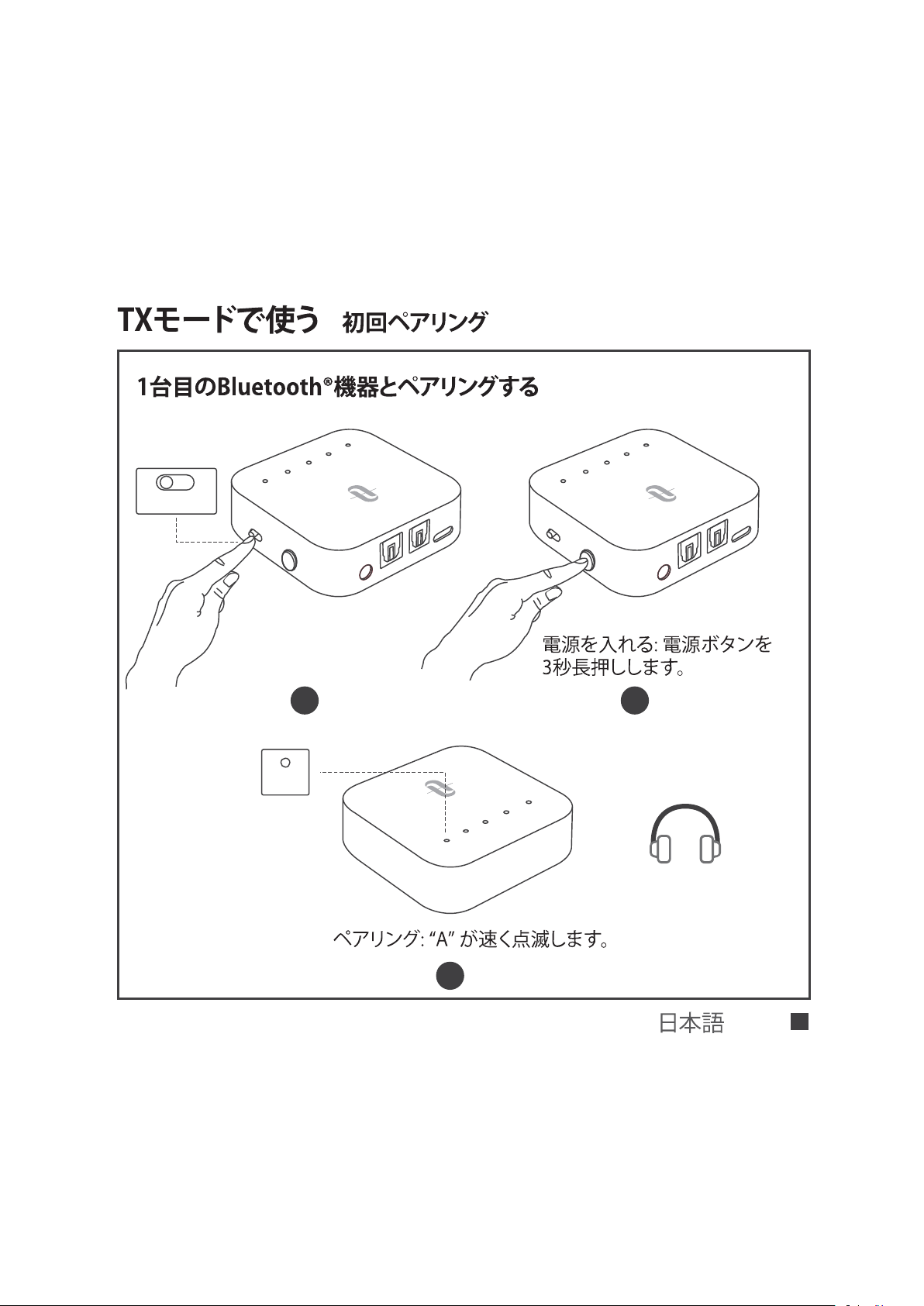
A
UX
S
P
D
I
F
I
N
SP
D
I
F
OUT
D
C
5
V
A
B
S
B
C
A
P
T
X
LL
T
X
R
X
A
UX
S
P
D
I
F I
N
SP
D
IF
OUT
D
C
5
V
A
B
S
B
C
A
P
T
X
LL
T
X
R
X
|
TX RX
1 2
A
B
S
B
C
A
P
T
X
L
L
3
A
/ 84
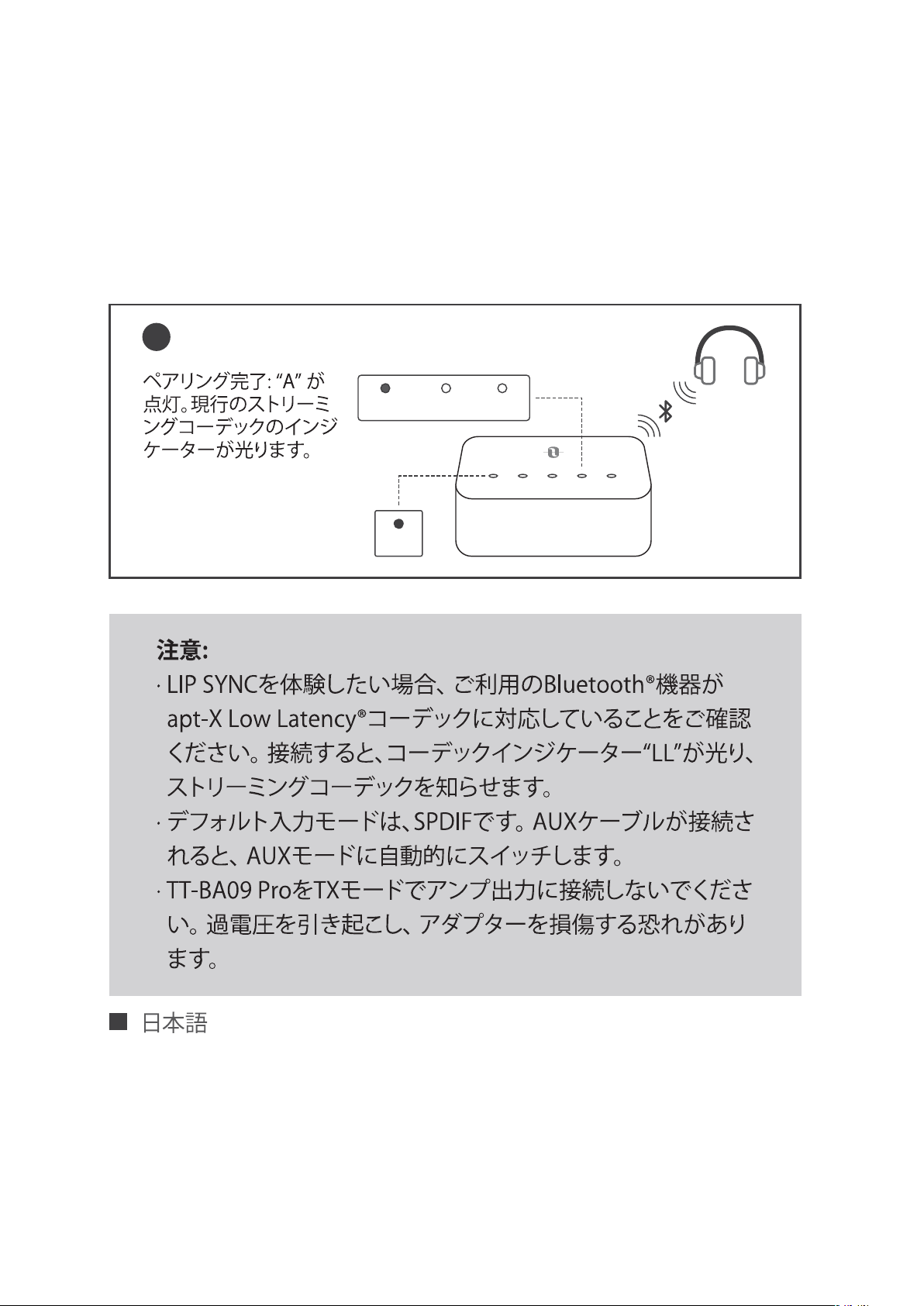
SBC APTX LL
4
A B SBC APTX LL
A
/ 85
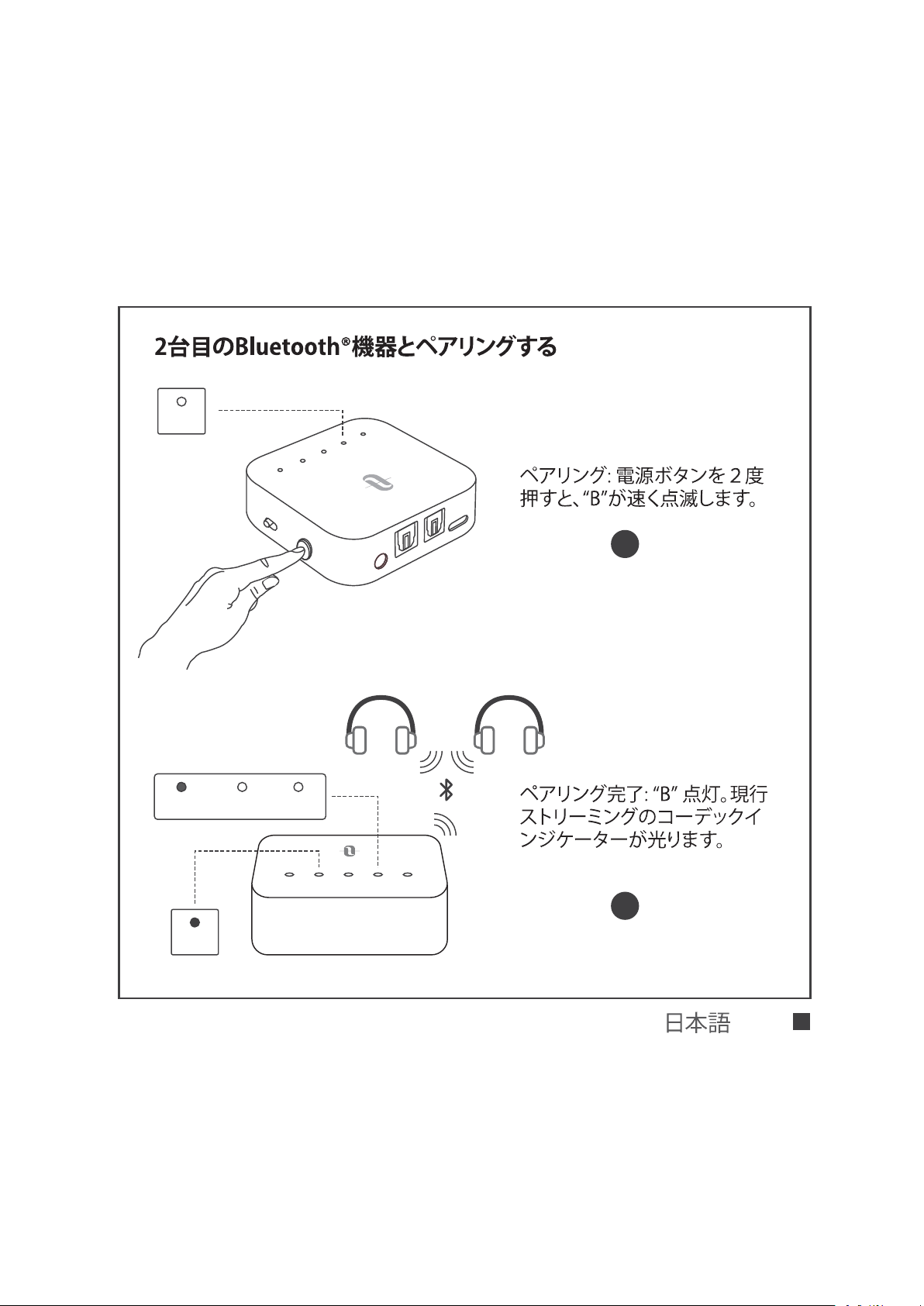
A
U
X
S
PD
IF I
N
SP
D
IF
O
UT
D
C
5V
A
B
S
B
C
A
P
T
X
L
L
T
X
R
X
1
2
B
SBC APTX LL
A B SBC APTX LL
B
/ 86
|
|
/ 87
|
AUX/3.5mm Optical Out AUDIO OUT
AUDIO IN
AUX DC5V
SPDIF IN SPDIF OUT
A B SBC APTX LL
R L R L
/ 88
Speakers
Internal Speakers
External Speakers
Headset
Audio Format
PCM
Dolby/DTS
DTS Neo 2.5
Settings
/ 89
AUX DC5V
SPDIF IN SPDIF OUT
A B SBC APTX LL
3.5mm
Speakers
Internal Speakers
External Speakers
Headset
/ 90
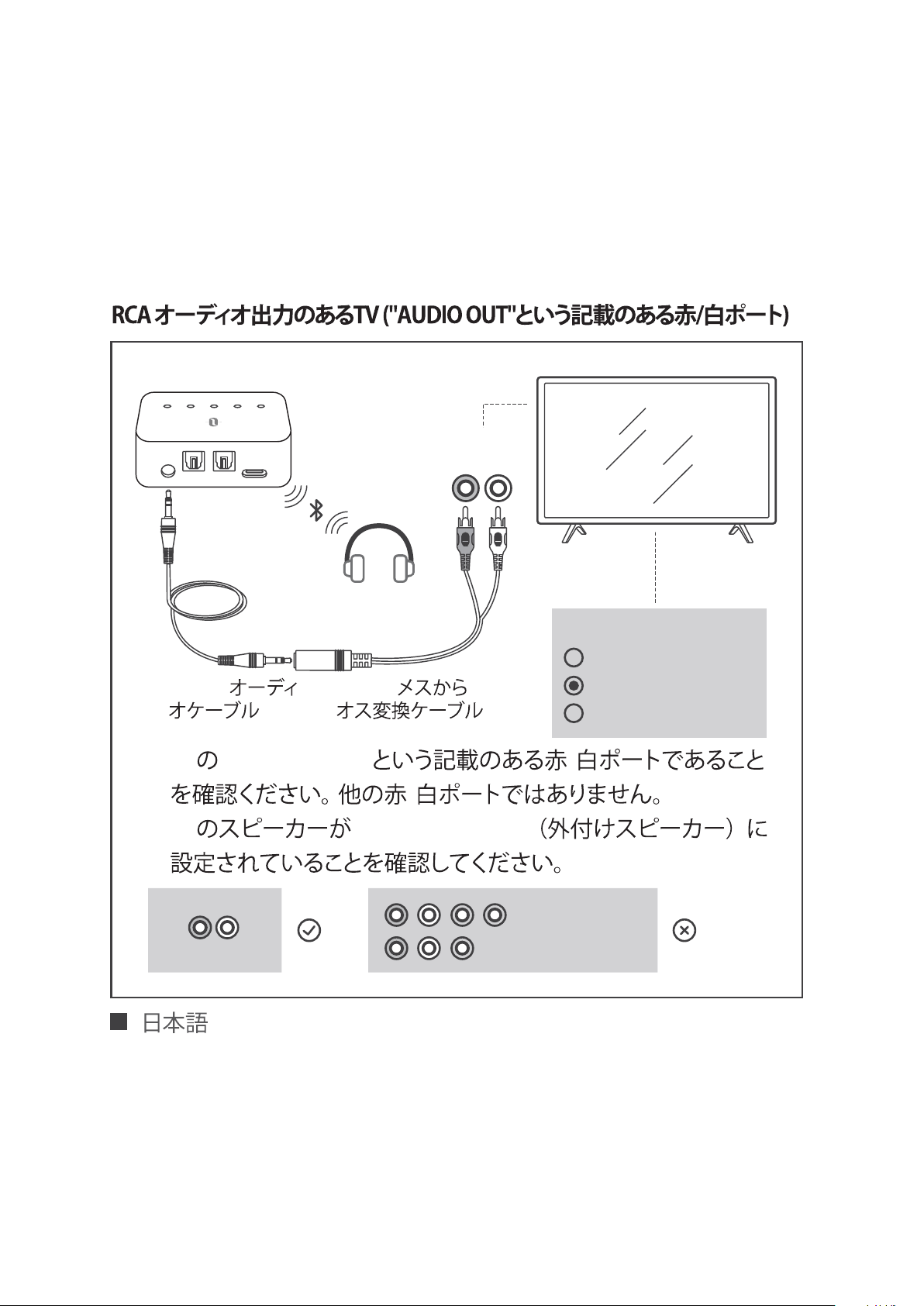
AUX DC5V
SPDIF IN SPDIF OUT
A B SBC APTX LL
3.5mm 3.5mm RCA
1) TV "AUDIO OUT" /
/
2) TV “External Speaker ”
Speakers
Internal Speakers
External Speakers
Headset
R L
AUDIO OUT
COMPUTER IN
VIDEO IN
AUDIO OUT
R L
/ 91
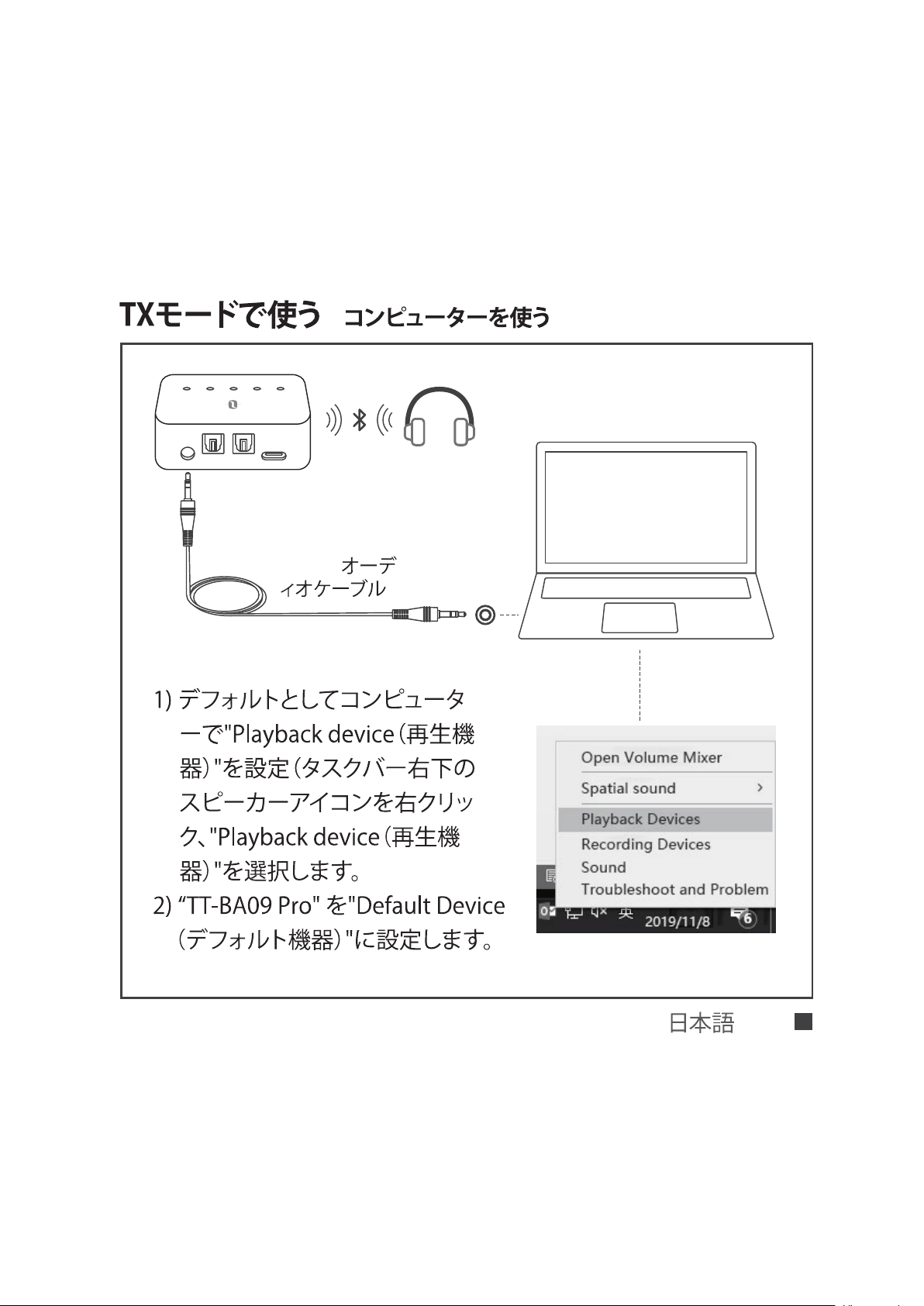
|
AUX DC5V
SPDIF IN SPDIF OUT
A B SBC APTX LL
3.5mm
/ 92
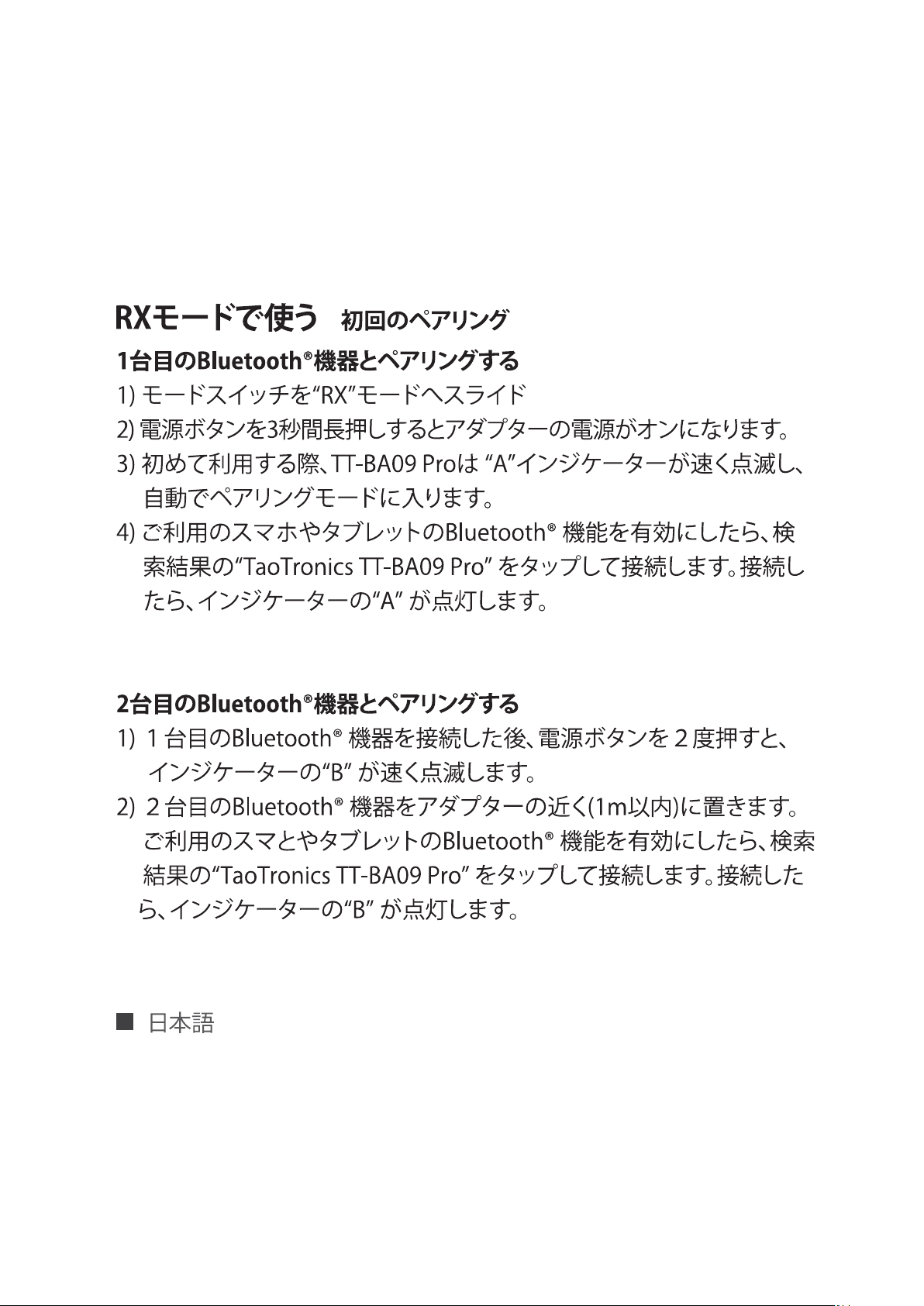
|
/ 93
|
|
“TX”
/ 94
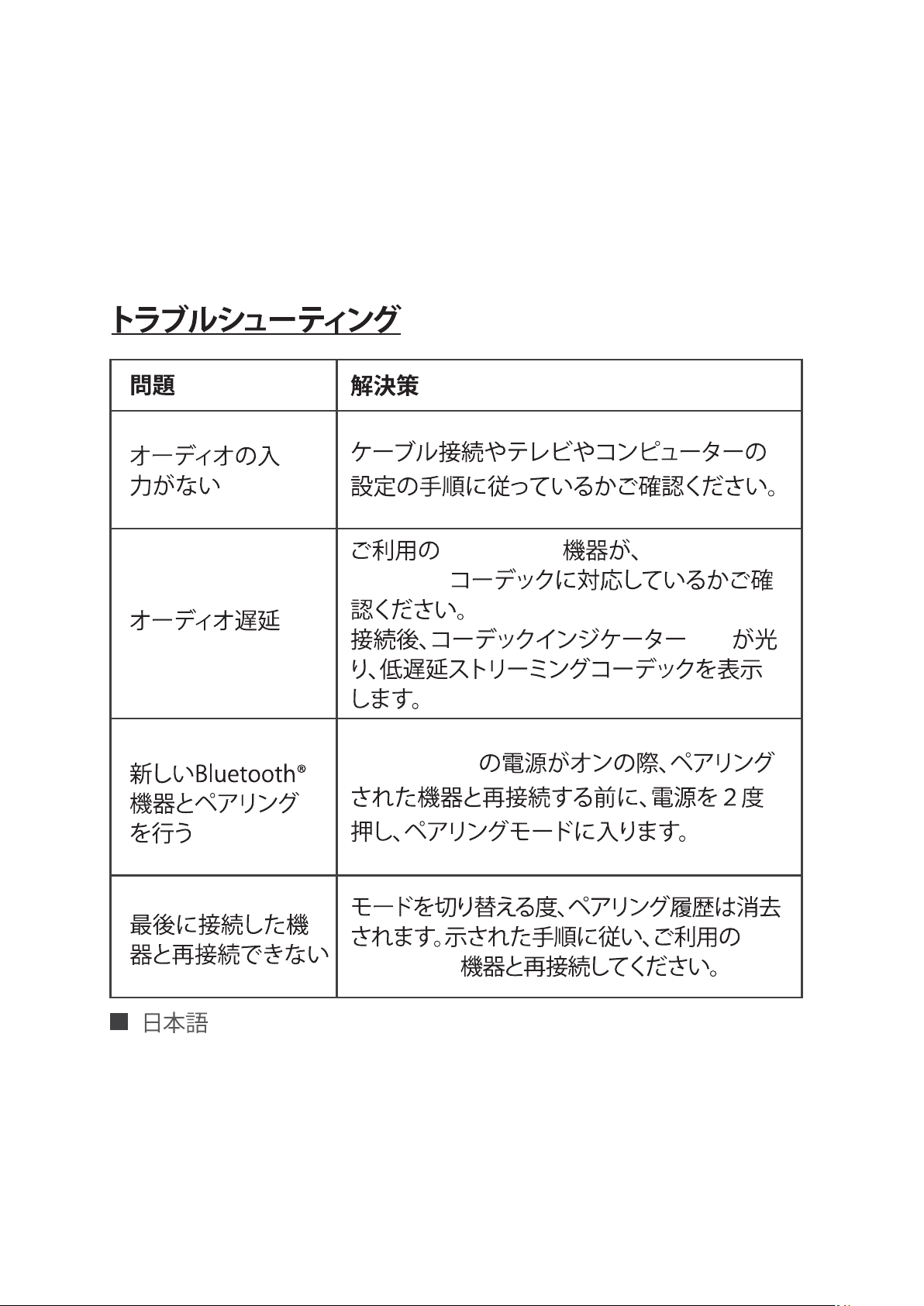
Bluetooth® apt-X Low
Latency®
“LL”
TT-BA09 Pro
Bluetooth®
/ 95
EN The
Bluetooth
®
word mark and logos are registered
trademarks owned by the Bluetooth SIG, Inc. and any use
of such marks by Sunvalleytek International Inc. is under
license. Other trademarks and trade names are those of their respective
owners.
DE Die Marke
Bluetooth
®
und das Bluetooth Logo sind eingetragene
Markenzeichen der Bluetooth SIG, Inc. und jegliche Verwendung dieser Marke
durch Sunvalleytek International Inc. ist lizensiert. Die Rechte an anderen
Markenzeichen liegen beim jeweiligen Eigentümer.
FR Le terme et les logos
Bluetooth
®
sont la propriété de Bluetooth SIG, Inc. et
toute utilisation de ces marques par Sunvalleytek International Inc. se fait sous
licence.Les autres désignations commerciales et marques mentionnées sont
détenues par leur propriétaire respectif.
ES La marca
Bluetooth
®
y los logotipos son de propiedad de Bluetooth SIG,
Inc. y se encuentra autorizado cualquier uso de estas marcas por parte de
Sunvalleytek International Inc. Otras marcas y nombres comerciales son
aquellas de sus respectivos propietarios.
IT La parola e i loghi
Bluetooth
®
sono marchi di fabbrica registrati di proprietà
di Bluetooth SIG, Inc. e qualsiasi utilizzo di questi marchi da parte di
Sunvalleytek International Inc., avviene su licenza.Gli altri marchi di fabbrica e
nomi commerciali appartengono ai rispettivi proprietari.
JP
Bluetooth
®
Bluetooth SIG, Inc.
Sunvalleytek International Inc.

FCC Compliance
NOTE: This equipment has been tested and found to comply with the limits
for a Class B digital device, pursuant to part 15 of the FCC Rules. These limits
are designed to provide reasonable protection against harmful interference in
a residential installation. This equipment generates uses and can radiate radio
frequency energy and, if not installed and used in accordance with the
instructions, may cause harmful interference to radio communications.
However, there is no guarantee that interference will not occur in a particular
installation. If this equipment does cause harmful interference to radio or
television reception, which can be determined by turning the equipment off
and on, the user is encouraged to try to correct the interference by one or
more of the following measures:
- Reorient or relocate the receiving antenna.
- Increase the separation between the equipment and receiver.
-Connect the equipment into an outlet on a circuit different from that to which
the receiver is connected.
-Consult the dealer or an experienced radio/TV technician for help
Changes or modifications not expressly approved by the party responsible for
compliance could void the user's authority to operate the equipment.
This device complies with Part 15 of the FCC Rules. Operation is subject to the
following two conditions:
(1) this device may not cause harmful interference, and
(2) this device must accept any interference received, including interference
that may cause undesired operation.

WEEE Compliance
Correct Disposal of This Product (Waste Electrical & Electronic Equipment)
(Applicable in countries with separate collection systems)
This marking on the product, accessories or literature indicates that the product
and its electronic accessories should not be disposed of with other household
waste at the end of their working life. To prevent possible harm to the
environment or human health from uncontrolled waste disposal, please separate
these items from other types of waste and recycle them responsibly to promote
the sustainable reuse of material resources. Household users should contact
either the retailer where they purchased this product, or their local government
office, for details of where and how they can take these items for environmentally
safe recycling. Business users should contact their supplier and check the terms
and conditions of the purchase contract. This product and its electronic
accessories should not be mixed with other commercial wastes for disposal.