V4.3
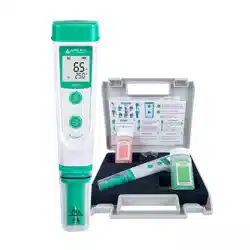
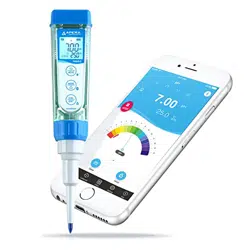
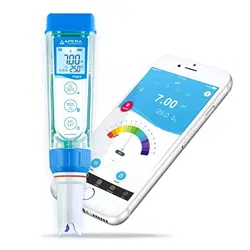
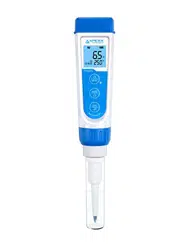
SX610 pH Pen Tester Kit User Manual
1. Brief Introduction
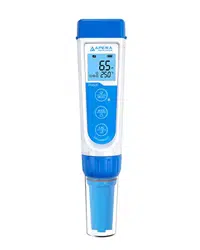
Thank you for purchasing APERA INSTRUMENTS SX610 pH Pen Tester. This product is featured with
reliable and accurate measuring performance with a single-button operation in a slim body, ideal for
measuring pH in general water solution applications such as hydroponics, greenhouse, aquaculture,
aquarium, water treatment, pools& spas, cooling towers, beverage making, education, environmental
monitoring, body fluid (e.g. urine, saliva). The pH probe is replaceable and suitable for test tube measuring
and other small-volume sample testing.
2. Specifications
1) Range: 0 to 14.0 pH; 32 to 140°F (0 to 60°C)
2) Resolution: 0.1 pH; 0.1°C
3) Accuracy: ± 0.1 pH ±1 digit; ±1°C
4) Automatic temperature compensation: 32 to 140°F (0 to 60°C)
5) Automatic calibration: 1-point calibration (pH 7.0)
6) Power: CR2032 Cell Batteries
7) Dimension and Weight: 148*29*14mm/49g
8) Waterproof rating: IP57
3. Instructions
1) Calibration: Rinse the probe in distilled water and shake off excess water. Immerse the probe in
the standard buffer solution pH7.00. Stir for a few seconds and wait for the reading to stabilize.
Then press the CAL button for about two seconds until CAL appears on the screen. When the
calibration value 7.0 flashes, the calibration will finish after several seconds, and the meter will
return to measurement mode and the icon will appear on the screen.
2) Measurement: Rinse the probe in distilled water and shake off excess water. Immerse the probe
in your sample solution. Stir the probe for a few seconds and wait for the reading to stabilize, then
record the measurement.
3) After measurement, rinse the probe with distilled water, shake off excess water, and put the
protection cap back on.
4) Storage: Always leave a bit 3M KCL storage solution in the probe cap when storing the meter as it
will optimize the performance and maximize the life of the pH probe.
5) Change temperature unit: When meter is turned off, hold the CAL button until the meter reboots
and then the temperature unit will be switched (˚C–˚F)
4. Notes
1) Calibrate the pH pen at least once a month.
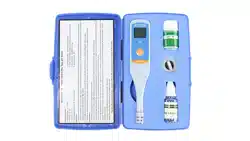
2) To ensure the accuracy, make sure the pH standard buffer is fresh and clean. The small bottle of

V4.3
pH buffer that comes with the kit is good for 5-10 times of calibration.
3) Keeping the probe clean is critical to reliable tests. If contaminated, clean the probe head in soap
water with a soft brush. Then rinse off the probe with distilled water, soak the probe in 3M KCL
for at least 30 minutes, then perform calibration before using again. If the contaminant is hard to
remove, use Apera’s cleaning solution instead of soap water.
4) The typical service life of the pH electrode is about 12-18 months. When the icon “Err” appears
on the screen, or the accuracy or response speed cannot meet your demand, please replace a new
probe. The replacement probe’s model number is SX615. Please go to support.aperainst.com to
watch a tutorial video for how to replace the pH probe.
5) The instrument will turn off automatically after 10 minutes without operation.
6) Replace the batteries when appears on screen.
7) NEVER store the probe in distilled, RO, or deionized water.
8) NEVER test samples over 60°C (140°F). Testing samples at room temperature will give you the
most accurate results.
5. Warranty
We warrant this instrument to be free from defects in material and workmanship and agrees to repair or
replace free of charge, at option of APERA INSTRUMENTS, LLC, any malfunctioned or damaged product
attributable to responsibility of APERA INSTRUMENTS, LLC for a period of two years from the delivery (a
six-month warranty applies to the probe). Warranty period is the time limit to provide free service for the
products purchased by customers, not the service life of the tester or electrodes.
What is NOT covered by the Warranty:
i. accidental damage;
ii. transportation;
iii. improper use;
iv. failure to follow the product instructions or to perform any preventive maintenance;
v. unauthorized modifications;
vi. unauthorized repair;
vii. normal wear and tear;
viii. other external causes or actions beyond our reasonable control.
APERA INSTRUMENTS, LLC
Address: 6656 Busch Blvd, Columbus Ohio 43229
Tel: 1-614-285-3080
Email: info@aperainst.com
Website: aperainst.com