Table of Contents
3
EN
1 Description 12
1.1 General Description 12
1.2 Control panel 12
1.3 Cooktop 13
1.4 Other parts 14
1.5 Available accessories 15
2Use 16
2.1 Using the accessories 18
2.2 Using the cooktop 18
2.3 Settings menu 32
2.4 User menu 34
2.5 Error codes 37
2.6 Using the oven 38
2.7 Programming clock 39
2.8 Using the temperature probe 43
2.9 Cooking advice 46
3 Cleaning and maintenance 50
3.1 Cleaning the cooktop 51
3.2 Cleaning the door 52
3.3 Cleaning the oven cavity 53
3.4 Steam clean function 54
3.5 Extraordinary maintenance 55
Definitions
This manual contains important safety symbols and instructions. Please pay
attention to these symbols and follow all instructions given.
WARNING
This symbol will help alert you to situations that may cause serious bodily harm, death
or property damage.
CAUTION
This symbol will help alert you to situations that may cause injury or property damage.
We advise you to read this manual carefully, which contains all the instructions for
maintaining the appliance’s aesthetic and functional qualities.
For further information on the product: www.smeg.com

Important Safety Instructions
4
Important Note to the Customer
Do not attempt to install or operate
your appliance until you have read
the safety precautions in this manual.
Safety items throughout this manual
are labeled with a WARNING or
CAUTION statement based on the
risk type.
Warnings and important instructions
appearing in this guide are not
meant to cover all possible
conditions and situations that may
occur. Common sense, caution, and
care must be exercised with
installing, maintaining, or operating
your appliance.
• Check for proper installation and
use of the anti-tip bracket.
Carefully tip the range forward
by pulling it from the back to
ensure that the anti-tip bracket
engages the range leg and
prevents tip-over. The range
should not move more than 1”
(2.5cm).
• Read all instructions before using
this appliance.
• Keep these instructions with your
owner's guide for future
reference.
Unpacking and installation
• Remove all tape and packaging
before using the appliance.
Dispose of the carton and plastic
bags after unpacking the
appliance. Never allow children
to play with packaging material.
Do not remove the wiring label
and other information attached to
the appliance. Do not remove
model/serial number plate.
IMPORTANT SAFETY INSTRUCTIONS
WARNING: Tip Over Hazard
• A child or adult
could tip the
range over and
be killed.
• Verify the anti-tip
device has been properly
installed and engaged.
• Ensure the anti-tip device is re-
engaged when the range is
moved.
• Do not operate the range
without the anti-tip device in
place and engaged.
• Failure to follow these
instructions can result in death or
serious burns to children and
adults.

Important Safety Instructions
5
EN
• Cold temperatures can damage
the electronic control. If this
appliance has not been used for
a long time, make sure that it has
been stored at temperatures
above 32ºF (0ºC) for at least 3
hours before turning on power to
the appliance.
• Never modify or alter the
construction of the appliance by
removing the leveling legs,
panels, wire covers, anti-tip
brackets/screws, or any other
part of the appliance. Be sure to
have an appropriate foam-type
fire extinguisher available, clearly
visible and easily accessible
located near the appliance.
• All materials used in construction
of cabinets, enclosures, and
supports surrounding the product
must have a temperature rating
above 200°F (94°C).
Grounding instructions
• Proper Installation—Be sure your
appliance is properly installed
and grounded by a qualified
technician. In the United States,
install in accordance with the
National Fuel Gas Code ANSI
Z223.1/NPFA No. 54, latest
edition and National Electrical
Code NFPA No. 70 latest
edition, and local electrical code
requirements. In Canada, install in
accordance with CAN/CGA
B149.1 and CAN/CGA B149.2
and CSA Standard C22.1,
Canadian Electrical code, Part 1-
latest editions and local electrical
code requirements. Install only as
per the installation instructions
provided in the documentation
received with this appliance.
• For personal safety, this appliance
must be properly grounded. For
maximum safety, the power cord
must be securely connected to an
electrical outlet or junction box
that is the correct voltage, is
correctly polarized and properly
grounded, and protected by a
circuit breaker in accordance with
local codes.
WARNING
• Avoid fire hazard or electrical shock.
Failure to follow this warning may cause
fire, serious injury, or death.
• Avoid fire hazard or electrical shock. Do
not use an adapter plug, an extension
cord, or remove the grounding prong
from the power plug. Failure to follow
this warning may cause fire, serious
injury, or death.

Important Safety Instructions
6
• It is the personal responsibility of
the consumer to have the
appropriate outlet or junction box
with the correct, properly
grounded wall receptacle
installed by a qualified electrician.
It is the responsibility and
obligation of the consumer to
contact a qualified installer to
ensure that the electrical
installation is suitable and in
conformance with all local codes
and ordinances.
• See the installation instructions
provided with this appliance for
complete installation and
grounding instructions.
Important instruction for using the
appliance
• Persons with a pacemaker or
similar medical device should
exercise caution using or standing
near an induction unit while it is in
operation as the electromagnetic
field may affect the working of the
pacemaker or similar medical
device. It would be advisable to
consult your doctor or the
pacemaker or similar medical
device manufacturer about your
particular situation.
• Do not touch surface cooking
zones, areas near these zones or
elements, interior surfaces of the
oven, or the warmer drawer (if
provided). Surface and oven
elements may be hot even though
they appear to be cool. Areas
near surface elements may
become hot enough to cause
burns. During and after use, do
not touch, or let clothing or other
flammable materials come into
contact with these areas until they
are cool. These areas may
include the cooktop, surfaces
facing the cooktop, oven vent
areas and the oven door and
oven window.
• Storage In or On the Appliance -
Flammable materials should not
be stored in the oven, near
surface burners or elements, or in
the storage or warmer drawer (if
provided). This includes paper,
plastic, and cloth items, such as
cookbooks, plasticware and
towels, as well as flammable
liquids. Do not store explosives,
such as aerosol cans, on or near
the appliance.

Important Safety Instructions
7
EN
• Do not leave children alone -
Children should not be left alone
or unattended in the area where
appliance is in use. They should
never be allowed to sit or stand
on any part of the appliance,
PIPPO including the storage
drawer, lower broiler drawer,
warmer drawer, or lower double
oven.
• Do not store items of interest to
children in the cabinets above the
appliance or on the backguards
of ranges. Children climbing on or
near the appliance to reach items
could be seriously injured.
• Do not allow children to climb or
play around the appliance. The
weight of a child on an open
oven door may cause the
appliance to tip, resulting in
serious burns or other injury. An
open drawer when hot may
cause burns.
• Stepping, leaning, or sitting on the
door or drawers of this appliance
can result in serious injuries and
also cause damage to the
appliance.
• Never cover any slots, holes or
passages in the oven bottom or
cover and entire rack with
materials such as aluminum foil.
Aluminum foil linings may also
trap heat, causing a fire hazard.
• When heating fat or grease,
watch it closely. Grease may
catch fire if it becomes too hot.
• Do not use water or flour on
grease fires.
• Smother fire or flame or use dry
chemical or foam-type
extinguisher. Cover the fire with a
pan lid or use baking soda.
• Only use dry potholders. Moist or
damp potholders on hot surfaces
may result in burns from steam. Do
not let potholders touch hot
heating elements or hot cooking
areas. Do not use towels or other
bulky cloths.
• Do not heat unopened food
containers - Build-up of pressure
may cause the container to burst
and result in injury.
• Wear proper apparel - Loose-
fitting or hanging garments should
never be worn while using the
appliance. Do not let clothing or
other flammable materials come
into contact with hot surfaces.
• Do not attempt to operate the
appliance during a power failure.
If the power fails, always turn off
the appliance. If the appliance is
not turned off, electric surface
elements may resume operation
when power is restored. Once the
power is restored, reset the clock
and the oven function.

Important Safety Instructions
8
• Never use your appliance for
warming or heating the room.
Important instruction for using your
induction cooktop
• Know which knob or key controls
each surface heating area. Place
the cookware containing food on
the cooking area before turning it
on. Turn the cooking area off
before removing the cookware.
• Cookware handles should be
turned inward and not extend
over adjacent surface elements. —
To reduce the risk of burns,
ignition of flammable materials
and spillage due to unintentional
contact with the utensil, the handle
of the cookware should be
positioned so that it is turned
inward and does not extend over
other cooking areas.
• Use proper pan size — This
appliance is equipped with one
or more surface units of different
sizes. Select cookware with flat
bottoms that match the surface unit
size. Using the proper cookware
on the cooking area will improve
efficiency.
• Glazed cooking utensils — Only
certain types of cookware are
suitable for cooktop service and
must be magnetic in order to work
properly on the induction zones.
Check the manufacturer’s
recommendations for cooktop use
to ensure that the cookware is
compatible with induction
cooking.
• Improper cookware may break
due to sudden changes in
temperature. Check the
cookware manufacturer’s
recommendations for cooktop
use.
• Do not place metallic objects
such as knives, forks, spoons and
lids on the cooktop surface since
they can become hot.
• Never leave surface elements
unattended. Boil-overs may cause
smoking and greasy spills that
may ignite. A pan that has boiled
dry could be damaged and may
damage the cooktop
• When you are flaming foods
under a ventilating hood, turn on
the fan.

Important Safety Instructions
9
EN
Important instructions for glass and
ceramic cooktops
Clean cooktop glass with caution. If
a wet sponge or cloth is used to
wipe spills on a hot cooking area, be
careful to avoid steam burns. Some
cleaners can produce harmful fumes
if applied to a hot surface. Avoid
scratching the cooktop glass with
sharp objects.
Important instructions for using
your oven
• Protective liners—Do not use
aluminum foil, aftermarket oven
liners, or any other materials or
devices to line oven bottom, oven
racks, or any other part of the
appliance. Only use aluminum as
recommended for baking, such as
lining cookware or as a cover
placed on food. Any other use of
protective liners or aluminum foil
may result in a risk of electric
shock, fire or a short circuit.
• Take care when opening oven
door, lower oven door, or
warmer drawer (some models).
Stand to the side of the appliance
when opening the door of a hot
oven. Let hot air or steam escape
before you remove food or place
it back in the oven.
• Keep oven vent ducts
unobstructed. Touching surfaces in
this area when the oven is on may
cause severe burns. Do not place
plastic or heat-sensitive items on
or near the oven vent. These items
can melt or ignite.
• Placement of oven racks - Always
place oven racks in required
position while the oven is cool. If a
rack has to be moved while the
oven is hot, do not let the
potholder come into contact with
a hot burner or element in oven.
Use potholders and grasp the
rack with both hands when
repositioning it. Remove all
cookware and utensils before
moving the rack.
• Do not use a broiler pan without
its insert.
• Broiler pans and inserts allow
dripping fat to drain away from
the high heat of the broiler. Do not
cover the broiler insert with
aluminum foil; exposed fat and
grease could ignite.
WARNING
• Do Not Clean or Operate a Broken
Cooktop. If cooktop should break,
cleaning solutions and spillovers may
penetrate the broken cooktop and
create a risk of electric shock. Contact a
qualified technician immediately.

Important Safety Instructions
10
• Do not cook food on the oven
bottom.
• Always cook in proper cookware
and always use the oven racks.
• Prevent aluminum foils and the
temperature probe from
contacting the heating elements.
Important instructions for cleaning
your appliance
• Clean the appliance regularly to
keep all parts free of grease that
could catch fire. Do not allow
grease to accumulate. Greasy
deposits in the fan could catch
fire.
• Always follow the manufacturer’s
recommended directions when
using kitchen cleaners and
aerosols. Be aware that excess
residue from cleaners and
aerosols may ignite causing
damage and injury.
• Clean ventilating hoods
frequently, grease should not be
allowed to accumulate on hood
or filter. Follow the manufacturer’s
instructions for cleaning ventilating
hoods.
Important instruction for service
and maintenance
• Do not repair or replace any part
of the appliance unless
specifically recommended in the
manuals. All other servicing
should be done only by a
qualified technician. This reduces
the risk of personal injury and
damage to the appliance.
• Always contact your dealer,
distributor, service agent, or
manufacturer about problems or
conditions you do not understand.
• Ask your dealer to recommend a
qualified technician and an
authorized repair service. Know
how to disconnect the power to
the appliance at the circuit
breaker or fuse box in case of an
emergency.
• Remove the oven door from any
unused oven if it is to be stored or
discarded.
• Do not touch a hot oven light bulb
with a damp cloth. Doing so
could cause the bulb to break.
Handle halogen lights (if
provided) with paper towels or
soft gloves.
• Disconnect the appliance or shut
off the power to the appliance
before removing and replacing
the bulb.
CAUTION
• Make sure all controls are turned off
and that the appliance is cool before
manually cleaning any part of the
appliance. Cleaning a hot appliance
can cause burns.

Important Safety Instructions
11
EN
Important: This appliance has been
tested and found to comply with the
limits for a class B digital device,
pursuant to Part 18 of the FCC rules
(United States) and ICES-001
(Canada). These limits are designed
to provide reasonable protection
against harmful interference in a
residential installation. This unit uses
and can radiate radio frequency
energy that may interfere with radio
communications if not installed and
used in accordance with the
instructions manual. However, there
is no guarantee that interference will
not occur in a particular installation. If
this unit does cause interference to
radio or television reception, which
can be determined by turning the unit
off and on, the user is encouraged to
try to correct the interference by one
or more of the following measures:
• Reorient or relocate the receiving
antennae.
• Increase distance between unit
and receiver.
• Connect the unit into an outlet or a
circuit different from the one to
which the receiver is connected.
How to read the user manual
This user manual uses the following reading
conventions:
1. Use instruction sequence.
• Single use instructions.
SAVE THESE INSTRUCTIONS
State of California Proposition 65
WARNING
Cancer or Reproductive Harm -
www.P65Warnings.ca.gov
Instructions
General information on this user
manual, on safety and final
disposal.
Description
Description of the appliance and its
accessories.
Use
Information on the use of the
appliance and its accessories,
cooking advice.
Cleaning and maintenance
Information for proper cleaning and
maintenance of the appliance.
Safety instructions
Information/Advice

Description
12
1 Description
1.1 General Description
1 Cooktop
2 Control panel
3 Seal
4 Oven light
5 Door
6 Fan
Rack/tray support frame shelf
1.2 Control panel
1 Pre-heating indicator light
The pre-heating indicator light comes on to
indicate that the oven is pre-heating up. It
turns off as soon as it reaches the set
temperature.
It flashes regularly to indicate that the
temperature set inside the oven is kept
constant.

Description
13
EN
2 Temperature knob
This knob allows you to select the cooking
temperature. Turn the knob clockwise to the
required value between the minimum and
maximum settings.
3 Programming clock
Useful for displaying the current time, set
programmed cooking operations and
program the timer
4 Function knob
The oven's various functions are suitable for
different cooking modes. After selecting the
required function, set the cooking
temperature using the temperature knob.
1.3 Cooktop
* Power levels are approximate and can vary according to the pan used or the settings made.
Zone
Dimensions Max. power draw Power draw in
H x L (mm - in) (W)* Booster function (W)*
1 - 2 Single Zone
190 x 195
2100 2500 3000
7
7
/
16
x 7
5
/
8
1 - 2 Double Zone 385 x 195
3700 - -
(MULTIZONE)
15
1
/
8
x 7
5
/
8
3
210 x 210
2300 3000 -
8
1
/
4
x 8
1
/
4
4
160 x 160
1400 2100 -
6
5
/
16
x 6
5
/
16

Description
14
Advantages of induction cooking
• Energy saving thanks to the direct
transmission of energy to the pan
(suitable magnetisable cookware is
required) compared to traditional
electric cooking.
• Improved safety as the energy is only
transmitted to the pan placed on the
cooktop.
• High level of energy transmitted from the
induction cooking zone to the base of
the pan.
• Rapid heating speed.
• Reduced danger of burns as the cooking
surface is only heated under the base of
the pan; foods which overflow do not
stick.
1.4 Other parts
Shelves
The appliance features shelves to position
trays and racks at different heights. The
insertion heights are indicated from the
bottom upwards (see 1.1 General
Description).
Cooling fan
The fan cools the oven and comes into
operation during cooking.
The fan causes a steady outflow of air that
exits from the rear of the appliance, which
may continue for a brief period of time even
after the appliance has been turned off.
Interior lighting
The appliance’s interior lighting comes on:
• When the door is opened.
• When any function is selected.
NOTE: The cooktop is equipped
with an induction generator for
each cooking zone. Each
generator located under the glass
ceramic cooking surface creates
an electromagnetic field which
induces a thermal current in the
base of the pan. This means the
heat is no longer transmitted from
the hob to the pan but created
directly inside the pan by the
inductive current.
NOTE: Do not obstruct ventilation
openings and heat dispersal slots.
NOTE: When the door is open, it
is not possible to turn off the interior
lighting.

Description
15
EN
1.5 Available accessories
Rack
Used to hold containers containing food to
be cooked.
Temperature probe
With the temperature probe, you can cook
according to the temperature measured at
the center of the food.
Protective cover
Used to cover and protect the temperature
probe socket when the temperature probe
is not in use.
NOTE: Some models are not
provided with all accessories.
NOTE: The accessories intended
to come into contact with food are
made of materials that comply with
the provisions of current legislation.
NOTE: Supplied and optional
accessories can be requested to
Authorized Assistance Centers.
Use only original accessories
supplied by the manufacturer.

Use
16
2 Use
Instructions
High temperature inside the oven
during use
Danger of burns
• Keep the oven door closed during
cooking.
• Protect your hands by wearing oven
gloves when moving food inside the
oven.
• Do not touch the heating elements inside
the oven.
• Do not pour water directly onto very hot
trays.
• Keep children under the age of 8 away
from the appliance when it is in use.
• If you need to move food or at the end
of cooking, open the door 5 cm for a
few seconds, let the steam come out,
then open it fully.
High temperature inside the oven
during use
Danger of fire or explosion
• Do not spray any spray products near
the appliance.
• Do not use or leave flammable materials
near the appliance or the storage
compartment.
• Do not use plastic cookware or
containers when cooking food.
• Do not put sealed tins or containers in
the oven.
• Remove all trays and racks which are
not required during cooking.
Improper use
Risk of damage to surfaces
• Do not cover the bottom of the oven
cavity with aluminium or tin foil sheets.
• If you wish to use greaseproof paper,
place it so that it will not interfere with the
hot air circulation inside the oven.
• Do not place pans or trays directly on
the bottom of the oven cavity.
• Do not use the open door to rest pans or
trays on the internal glass pane.
• Do not pour water directly onto very hot
trays.
• Cooking vessels or griddle plates
should be placed inside the perimeter of
the hob.
• All pans must have smooth, flat bottoms.
• If any liquid does boil over or spill,
remove the excess from the hob.
• Use only pans with perfectly flat and
smooth bases on the cooktop.
• Avoid letting heavy objects fall on the
cooktop surface.
• In the case of cracks or fractures or if
you cannot switch off the appliance,
disconnect the power supply
immediately and call Customer Service.
• Do not use the cooktop as a work
surface.

Use
17
EN
First-time use
1. Remove any protective film from the
outside or inside of the appliance,
including accessories.
2. Remove any labels (apart from the
technical data plate) from the
accessories and from the oven cavity.
3. Remove and wash all the appliance
accessories (see 3 Cleaning and
maintenance).
4. Heat the empty oven to the maximum
temperature to burn off any residues left
by the manufacturing process.
Sounds
The magnetic field over the induction
cooking zone may cause cookware to
vibrate, creating a buzzing or humming
noise. These sounds are not unusual,
especially at high settings.
Cookware that is not perfectly flat on the
bottom may vibrate slightly against the
cooktop.
A loose handle may vibrate in its socket.
Multi-material cookware may allow small
vibrations in its structure.
High temperature
Burn hazard
• Protect your hands with thermal gloves
during use.
• Do not touch or clean the cooktop
surface during operation or when the
residual heat warning lights are on.
• Surface units may be hot even though
they are dark in color.
• Do not place empty pots and pans on
the cooking zones when they are
switched on.
• Do not allow children of less than 8
years of age approach the appliance
during operation.
• Enables the control lock in the presence
of children or pets able to reach the
cooktop.
• After use, turn off the cooking zones.
They will remain hot for a certain period
of time after switching them off. Do not
touch the surfaces of the cooktop.
• Do not leave the appliance unattended
during cooking operations that could
release fats or oils.
High temperature inside the
storage compartment
Danger of burns
• Do not open the storage compartment
when the appliance is on and still hot.
• The items inside the storage
compartment could be very hot after
using the appliance.
Use
18
Sounds are less likely to occur with heavier,
higher quality cookware.
An induction cooktop may also produce
faint clicking sounds from the electronic
switches that maintain the desired cooking
temperature. You may also hear a fan that
cools the electronics inside the cooktop.
2.1 Using the accessories
Racks and trays
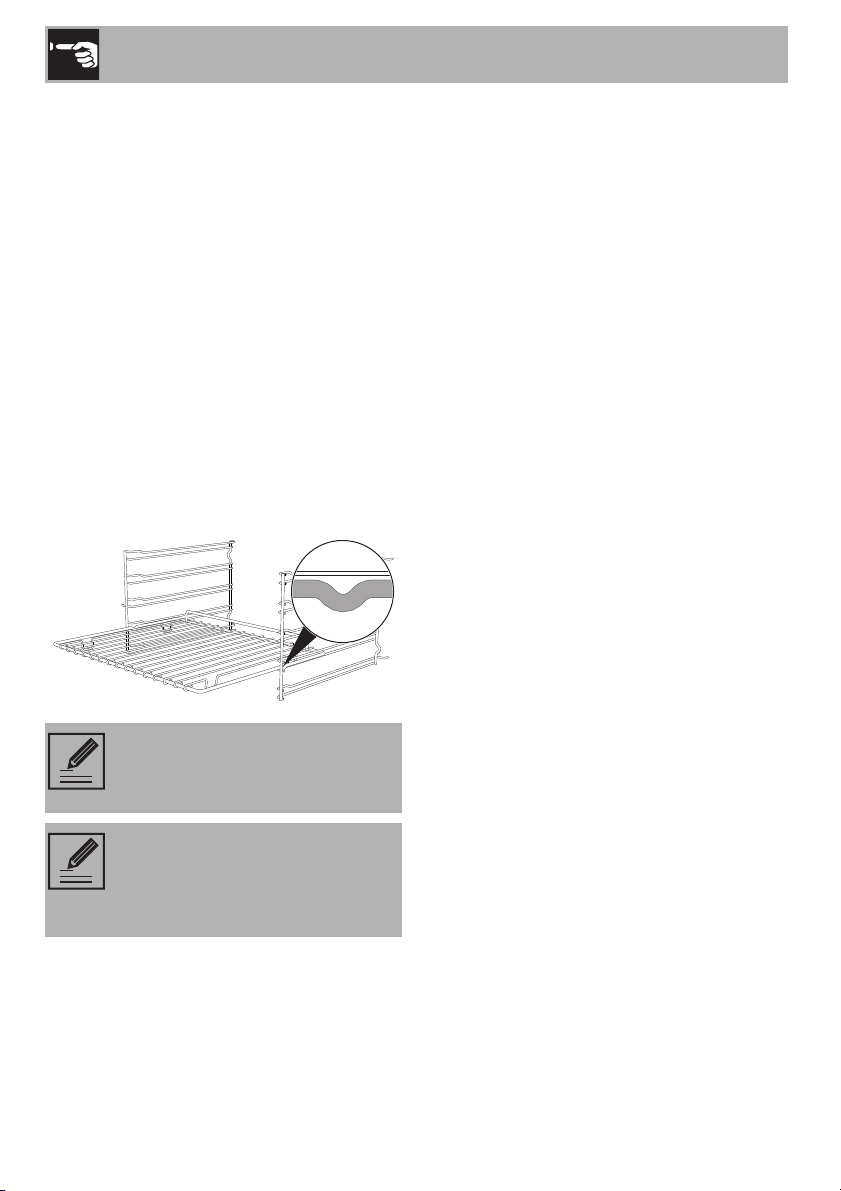
Racks and trays have to be inserted into the
side guides until they come to a complete
stop.
The mechanical safety locks that prevent the
rack from being taken out accidentally have
to face downwards and towards the oven
back.
2.2 Using the cooktop
Cookware type
Ideally, cookware should have a flat
bottom, straight sides, a tight-fitting lid and
medium-to-heavy thickness.
Rough cookware finishes may scratch the
cooktop. Aluminum and copper may be
used in cookware as a core material or for
the base. However, when used as a base
they can leave permanent marks on the
cooktop or grates. Cookware properties
are a factor in how quickly and evenly heat
is distributed, which affects cooking results.
A non-stick finish has the same
characteristics as its base material. For
example, a non-stick finish on aluminum
cookware will take on the properties of
aluminum.
Refer to the following chart as a guide to
the physical properties of cookware.
Aluminum
• Heats quickly and evenly.
• Suitable for all types of cooking.
• Medium or heavy thickness is best for
most cooking tasks.
Cast iron
• Heats slowly and evenly.
• Good for browning and frying.
• Maintains heat for slow cooking.
Ceramic or glass-ceramic
• Follow the manufacturer’s instructions.
• Heats slowly but unevenly.
• Best results with low to medium heat
settings.
Copper
• Heats very quickly and evenly.
NOTE: Gently insert racks and
trays into the oven until they come
to a stop.
NOTE: Clean the trays before
using them for the first time to
remove any residues left by the
manufacturing process.

Use
19
EN
Earthenware
• Follow the manufacturer’s instructions.
• Use low heat settings.
Porcelain enameled steel or cast iron
• See stainless steel or cast iron.
Stainless steel
• Heats quickly but unevenly.
• Stainless steel cookware with an
aluminum or copper core or bottom
provides even heating.
To see whether the pan is suitable, bring a
magnet close to the bottom: if it is attracted,
the pan is suitable for induction cooking. If
you do not have a magnet, you can put a
small amount of water in the pan, place it
on a cooking zone and start the hot plate. If
the symbol appears on the display, it
means the pan is not suitable.
Cookware recognition
When there is no saucepan on a cooking
zone or if the saucepan is too small, no
energy will be transmitted and the
symbol will appear on the display. If there is
a suitable saucepan on the cooking zone,
the recognition system detects it and
switches on the cooktop to the power level
set using the knob. Energy transmission is
also interrupted when the saucepan is
removed from the cooking zone (the
symbol will be shown on the display). If the
cookware recognition function is activated
in spite of the saucepan or frying pan on the
cooking zone being smaller than the zone
itself, only the necessary energy will be
transmitted.
Pan diameters
Make sure that the minimum diameters of
the pans are those indicated in the
following table:
NOTE: Use only cookware with a
perfectly flat bottom which is
suitable for induction hot plates.
Using cookware with an irregular
bottom could jeopardise the
efficiency of the heating system
and prevent cookware from being
detected on the hot plate.
Zone
minimum Ø
(cm - inches)
recommended Ø
(cm - inches)
Zone 1 and 2
(single zone)
11 - 5” 18 - 7”
Zone 1 and 2
(Multizone)
19 - 8” 22 - 9”
Zone 3 13 - 5” 25 - 10”
Zone 4 9 - 4” 16 - 6”

Use
20
Bear in mind the following:
• Do not exceed the limits of the zones
printed on the cooktop.
• Do not cover the control panel.
• Do not place the pans close to the
edges of the glass.
• If you intend to use a griddle or a long
pan in zones 1 and 2 in Multizone
mode, it is recommended that you use
one with a maximum size of 22 x 36 cm
(9” x 36”) and a minimum size of 19 x
19 cm (8” x 8”).
Limiting the cooking duration
The hob has an automatic device which
limits the duration of use. If the cooking
zone settings are not changed, the
maximum duration of operation for each
zone depends on the power level selected.
When the device for limiting the duration of
use is activated, the cooking zone turns off,
a short alert sounds and, if the zone is hot,
the symbol appears on the display.
Protection from overheating
If the cooktop is used on full power for a
long period, the electronics will have
trouble cooling down if the room temperature
is high. To avoid excessively high
temperatures forming in the electronics, the
power to the cooking zone is reduced
automatically.
Advice on energy-saving
• The diameter of the base of the pan must
correspond to the diameter of the
cooking zone.
• When buying a pan, check whether the
diameter indicated is that of the base or
the top of the pan, as the top is almost
always larger than the base.
• When preparing dishes with long
cooking times, you can save time and
energy by using a pressure cooker,
which also helps to retain vitamins
contained in the food.
• Make sure that the pressure cooker
contains enough liquid as, if there is not
enough and it overheats, this may cause
damage to both the pressure cooker and
the cooking zone.
• If possible, always cover pans with a
suitable lid.
Livello di potenza
impostato
Durata massima della
cottura in ore
6
6
-
5
4
- - -
1 ½

Use
21
EN
• Choose a pan suitable for the quantity of
food to be cooked. A large, half-empty
saucepan leads to a waste of energy.
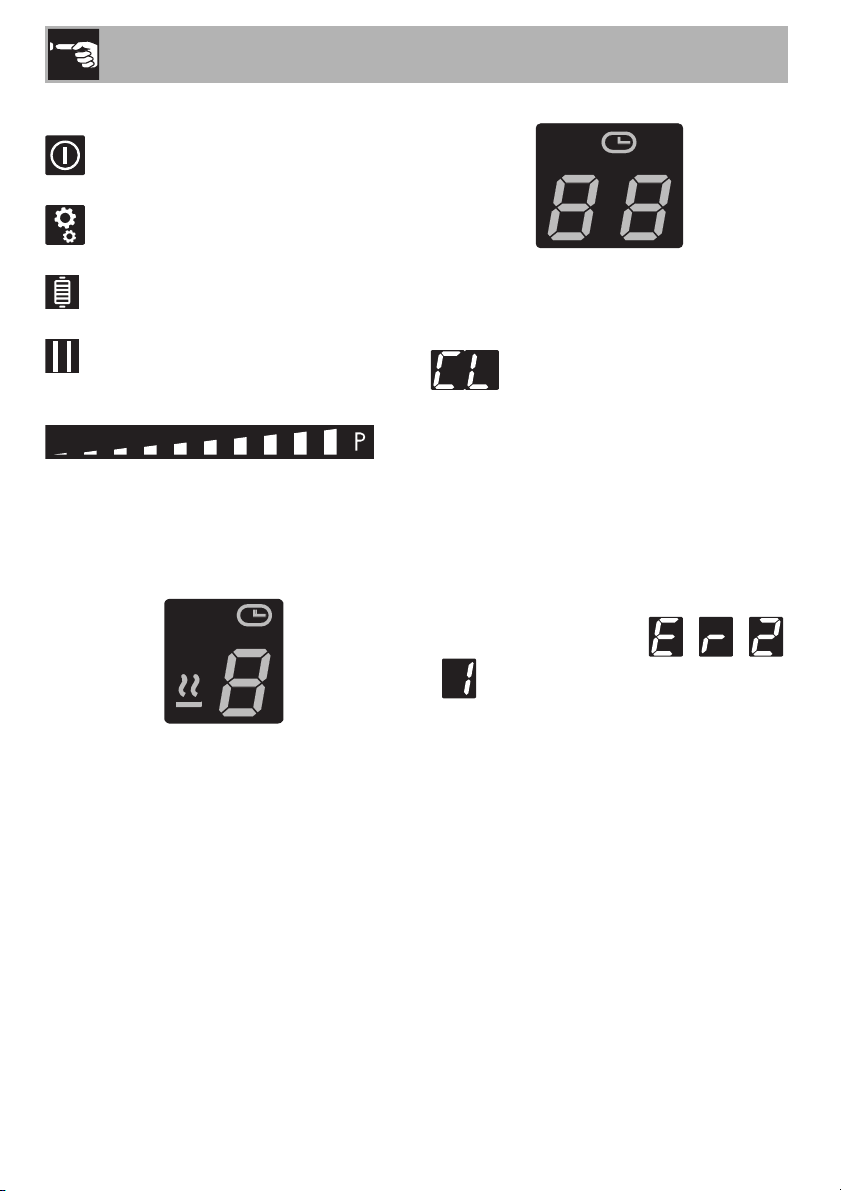
Induction cooktop control panel
1 On/Off button
2 Scroll bar
3 Grill function button
4 Pause button
5 Settings menu button
6 Timer display
7 Cooking zones display
8 Settings icons
Switching on the cooktop for the first time
When the appliance is used for the first
time, after being connected to the mains,
the flashing symbol appears on the
display. It is used to access the appliance’s
technical menu and is intended only for
Technical Support personnel.
Once the appliance has been switched on,
the icon, the dimmed button and
the text appears on the timer
display.
List of icons
Warming
Timer
Pause
Clean
Control lock
Automatic pan detection
Button volume
Display brightness
Eco mode
NOTE: Under certain
circumstances, if the cooktop and
the oven are being used at the
same time, the maximum power
limit that can be used by the
electrical system might be
exceeded.
NOTE: When the appliance is first
connected to the mains power
supply, an automatic check is run
and will turn on all the lights for a
few moments.
Use
22
List of buttons
On/Off button: turns the cooktop on
or off.
Settings menu button: allows you to
access the appliance’s settings.
Grill function button: activates the Grill
function.
Pause button: pauses the function on a
specific cooking zone.
Scroll bar: increases or decreases the
power level of a cooking zone; allows you
to adjust settings and to select user menu
options.
Cooking zones display
The buttons for selecting the cooking zones,
the timer icons above each of them and the
Warming function icons are located in this
zone.
Timer display
The controls for setting the independent
timer and the timer for the cooking zones
are located in this area. When it is possible
to set an independent timer, the text
is displayed.
Overheating protection
If the cooktop is used on full power for a
long time, it may be difficult for the
electronics to cool down if the room
temperature is high.
If the temperature of the internal electronic
components exceeds the safety threshold,
the appliance will switch off automatically
and the following symbols - -
- will be displayed in sequence (see
2.5 Error codes).

Use
23
EN
Energy saving tips
• The diameter of the base of the pan must
not be greater than the width of the
cooking zone printed on the cooktop.
• Pans must not be placed outside the
perimeter of the cooktop or over the front
control panel.
• When buying a pan, check whether the
diameter indicated refers to the base or
to the top of the pan, as the top is almost
always larger than the base.
• When preparing dishes with long
cooking times, you can save time and
energy by using a pressure cooker,
which also helps to retain vitamins
contained in the food.
• Make sure that the pressure cooker
contains enough liquid, as overheating
caused by the lack of water could
damage the pan and the cooking zone.
• If possible, always cover pans with a
suitable lid.
• Choose the right pan for the quantity of
food to be cooked. A large, half-empty
pan wastes energy.
Power levels
The power of the cooking zone can be set
to various levels. The table shows the levels
suitable for various types of cooking.
* see Booster and Double Booster function
NOTE: Under certain
circumstances, if the cooktop and
an oven are used at the same time,
the maximum power limit of your
electrical system might be
exceeded.
Power level Suitable for:
OFF position
-
Cooking small amounts of food
(minimum power), reheating
food, keeping small amounts of
water boiling, and whipping
egg yolk or butter sauces.
-
Cooking solid or liquid foods,
keeping water boiling,
defrosting frozen foods,
making 2- or 3-egg omelets,
fruit and vegetable dishes,
various preparations.
-
Cooking large quantities of
food, roasting larger portions,
stewing meat, fish and
vegetables, simmering food,
making jams, etc.
-
Roasting meat or fish, sautéing
steaks or liver with flour,
browning meat and fish, eggs,
etc.
Roasting, browning, cooking,
etc.
-
Deep-frying potatoes, etc.,
bringing water to boil quickly
(maximum power)*.

Use
24
Switching the cooktop on and off
To activate the cooktop, keep the
On/Off button pressed in for at least 1
second. Press it again for at least one
second to deactivate it.
• The text appears on the timer
display for a few seconds, during which
an independent timer can be set (see
"Minute timer").
• If a power limitation has been set, the
number associated with the set power
level will be displayed for a few seconds
instead of the text . In this case,
you can still set an independent timer by
touching the timer display.
Automatic cooking zone activation
After switching on the cooktop:
• Place a pan (suitable for induction
cooking and not empty) on the cooking
zone you wish to use.
• The button corresponding to the zone on
which the pan has been placed turns on
automatically and displays . The
other zones cannot be activated.
If automatic pan detection is disabled,
when the appliance is switched on, the
symbol appears on the displays of all the
cooking zones. To activate the zones, select
them via the relative display and then select
the required power level.
Regulating the cooking zone
After selecting a cooking zone:
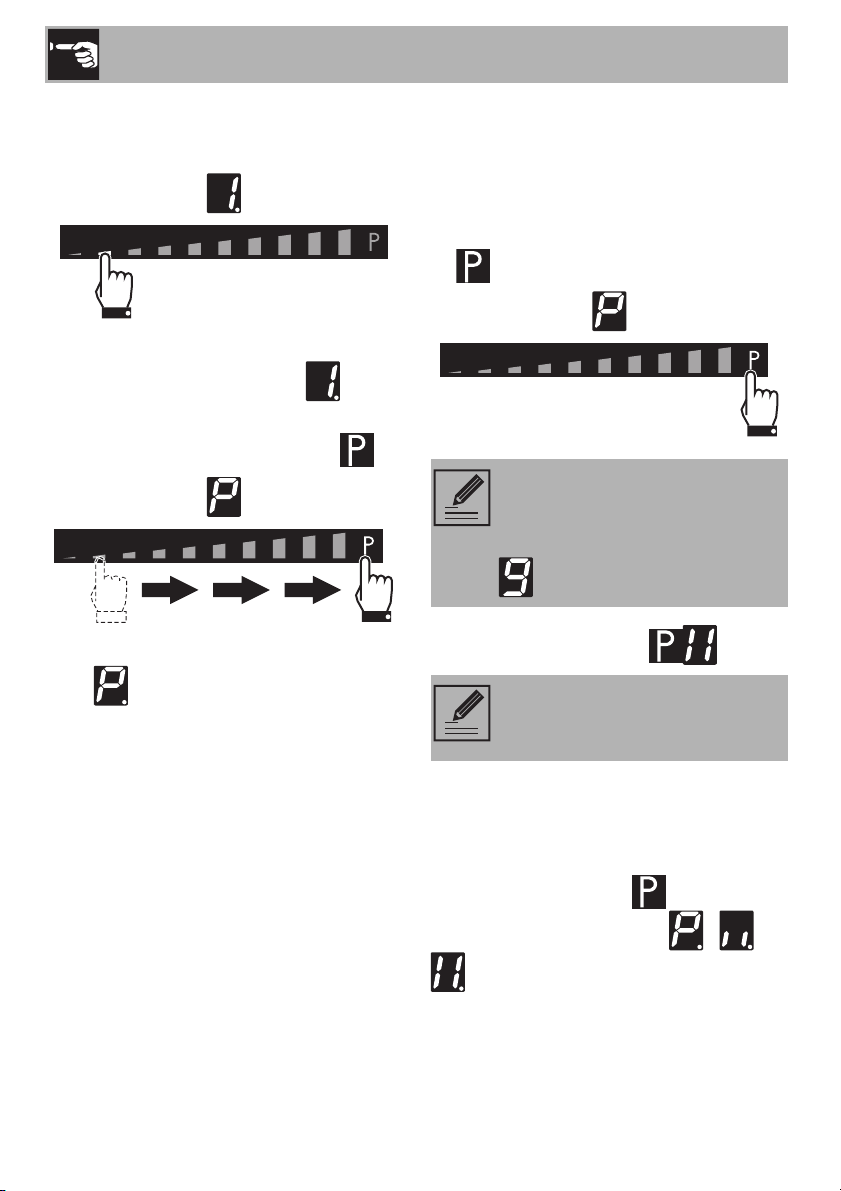
1. Place your finger on the left-hand side of
the scroll bar of the cooking zone to be
used.
The power level indicated is now .
NOTE: If a power level is not
selected within a few seconds, the
cooktop will be automatically
deactivated.
NOTE: The cooktop is fitted with
an automatic pan detection
system, indicated by the icon.
This function is enabled by default,
but can be deactivated via the user
menu.

Use
25
EN
2. Slide your finger to the left or right on the
scroll bar to select the power level,
between and or activate the
Booster function (see "Booster
Function").
The display of the zone being used will
indicate the power level selected.
Switching off the cooking zone
1. Slide your finger all the way to the left on
the scroll bar of the cooking zone you
wish to turn off.
The display of the selected zone indicates
.
Quick selection
After switching on the cooktop and
selecting a cooking zone:
• Place a finger at approximately the
power level required on the scroll bar.
Booster Function
NOTE: Hold the On/Off
button down for at least 2 seconds
to switch off all the cooking zones
at the same time.
NOTE: This function allows you to
set the cooking zones to the
required power level quickly.
Improper use
Burn hazard
• Do not use the Booster and Double
Booster functions to heat fats or oils as
they could catch fire.
NOTE: Through this function, the
maximum deliverable power of the
cooking zone can be used, which
is useful for bringing large amounts
of water to a boil.
Use
26
After switching on the cooktop and
selecting a cooking zone:
1. Place a finger on the left of the scroll bar.
The display of the cooking zone used turns
on: the power level indicated is .
2. Move your finger to the right of the scroll
bar to select the Booster function .
The display of the cooking zone used will
show .
The Booster function can be activated
quickly.
• After switching on the cooktop and
selecting a cooking zone, place a finger
at the far right of the scroll bar of the
cooking zone you wish to use (on the
symbol).
Double Booster Function
The Double Booster function allows more
power to be supplied than with the Booster
function.
After activating the Booster function for a
cooking zone, press the symbol at the
far right of the scroll bar. The - -
symbols will be displayed in sequence.
NOTE: The Booster function
remains active for a maximum of 5
minutes, after which the power is
reduced automatically to level
.
NOTE: There is no Double Booster
Function in cooking zone 1 of the
30” (762 mm) model.

Use
27
EN
Multizone Function
After switching on the cooktop:
1. Place a finger on the front left and rear
left cooking zone buttons at the same
time.
After a short beep, the symbol will
appear next to the button of the rear zone.
The Multizone function is now active.
2. Use the left-hand scroll bar to set the
required cooking power.
The same power level will be set for both
cooking zones.
NOTE: This function allows you to
operate two cooking zones at the
same time (front and rear) when
using pans such as fish kettles or
rectangular pans.
NOTE: The Multizone function can
be activated automatically by
placing a long pan on zones 1
and 2.
NOTE: It is only possible to
activate the Multizone function
using zones 1 and 2.
NOTE:
• This function automatically
divides the power equally
between both of the plates used.
• It is not possible to activate the
Double Booster function for the
cooking zones on which the
Multizone function is active.

Use
28
If a large, oval or oblong pan is being
used, make sure that it is placed in the
center of the cooking zone.
Example of correct pan position
Example of incorrect pan position.
Examples of griddle position
To deactivate the Multizone function:
Press the buttons of the cooking zones on
which the Multizone function is activated
the same time. The symbol disappears
and the two zones can be adjusted
separately.
Residual heat indicator
After a cooking zone has been switched
off, each display shows a special symbol to
indicate whether the zone is still hot,
together with its approximate temperature:
if the temperature is between 60°C
and 79°C.
if the temperature is between 80°C
and 99°C.
if the temperature is 100°C or higher.
Rapid heating
Improper use
Burn hazard
• Supervise children carefully as they
cannot easily see the residual heat
indicator. In fact, even after being
switched off, the cooking zone remains
hot for a certain period of time. Make
sure that children never touch the
cooktop.
NOTE: This function is not
available for power level ,
Booster and Double booster
.

Use
29
EN
The rapid heating function heats one
cooking zone at maximum power for a
limited time, after which it continues cooking
at the set power level.
After selecting a cooking zone:
• Press and hold a power level (from
to ) for at least 3 seconds.
The symbol appears on the cooking
zone display.
After the heating time has elapsed, the
cooking zone reverts to the previously
selected power level.
This function can be deactivated by
selecting a different power level or by
switching the zone off.
Warming Function
To activate the Warming function, turn on
the cooktop and then:
1. Select a cooking zone.
2. Press the scroll bar between level 0 and
level 1.
3. The symbol and the icon
appear on the cooking zone display.
To deactivate the Warming function:
1. Select the cooking zone on which the
function is active.
2. Select another power level or switch off
the zone.
NOTE: This function allows you to
keep cooked food warm or to
keep water boiling.
Use
30
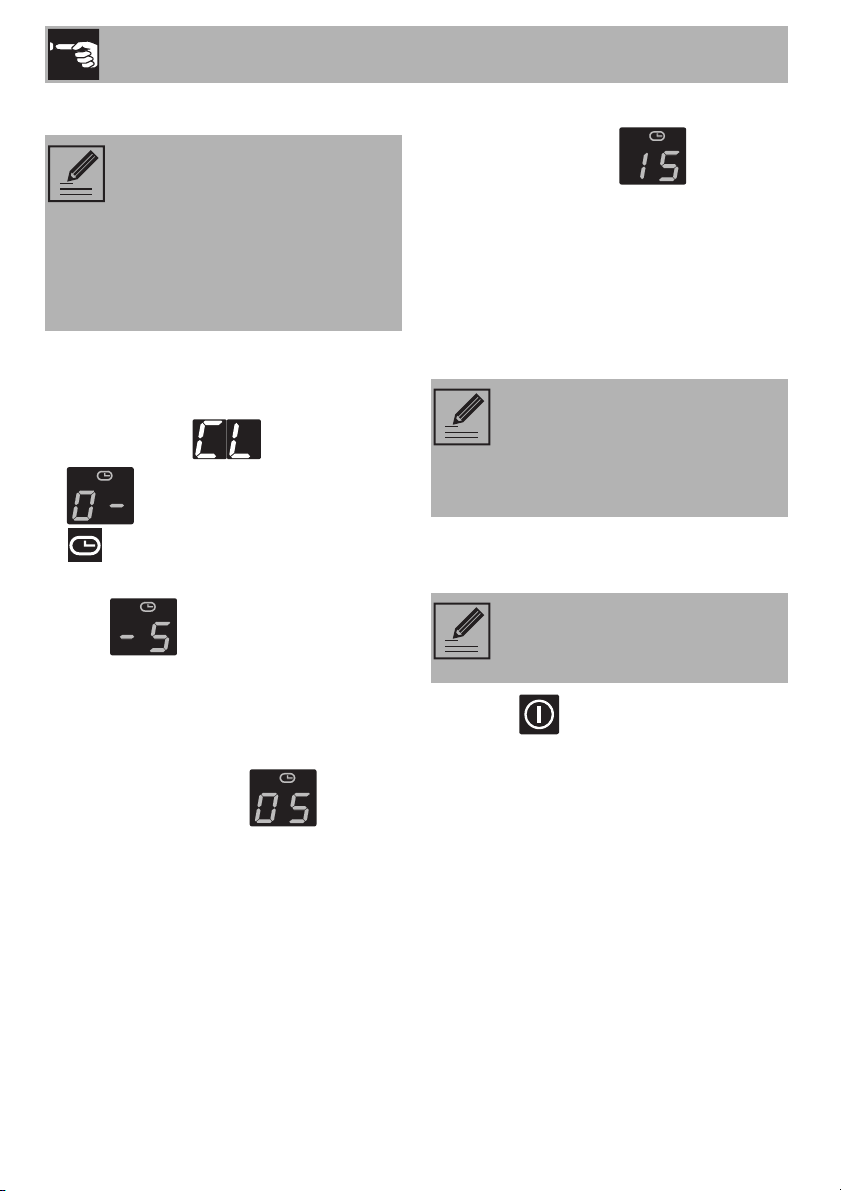
Minute timer
After switching on the cooktop, without
selecting a cooking zone:
1. Touch the inside of the timer setting area,
which displays .
2. appears on the display and the
icon flashes.
3. Select the minutes using the scroll bar
(e.g. ). If no selection has been
made for a few seconds, a 5-minute
timer can be started.
4. Once selected, the minutes digit flashes
briefly and then the display allows you to
select tens of minutes ( ).
5. When the digit on the left stops flashing,
tens of minutes (e.g. ) can be
selected following the same procedure.
6. After a few seconds, the timer will start
the countdown.
7. When the time elapses, a series of beeps
will be emitted and the timer display will
start to flash. Press the timer display to
deactivate the alarm.
Modifying and deactivating the minute
timer
1. Use the button to activate the
cooktop.
2. Press the timer display to reset the timer
following the relative instructions.
3. To reset the timer, simply set both digits of
the timer to zero.
NOTE:
• This function is used to set a
countdown timer that will emit a
sound when the set time elapses.
• A minimum of 1 minute to a
maximum of 99 minutes can be
set.
NOTE: The independent timer
does not switch off the cooking
zones; it only warns the user when
the set number of minutes have
elapsed.
NOTE: If you modify a timer that
has already been started, it has to
be completely reset.

Use
31
EN
Minute timer on cooking zones
To activate additional minute timers after at
least one cooking zone has been activated:
1. Select a power level.
2. Follow the same procedure as for an
independent timer.
The symbol appears above the
cooking zone display to indicate that the
zone is timed.
3. the timer will start a few seconds after the
last selection was made.
4. When the time has elapsed, a series of
beeps will be emitted; press the timer
area to silence them.
Modifying and deactivating minute timer
on cooking zones
1. Use the button to activate the
cooktop.
2. Select the cooking zone to modify.
3. Press the timer display to reset the
countdown following the relative
instructions.
4. To reset the timer, simply set both digits of
the timer to zero.
Recall Function
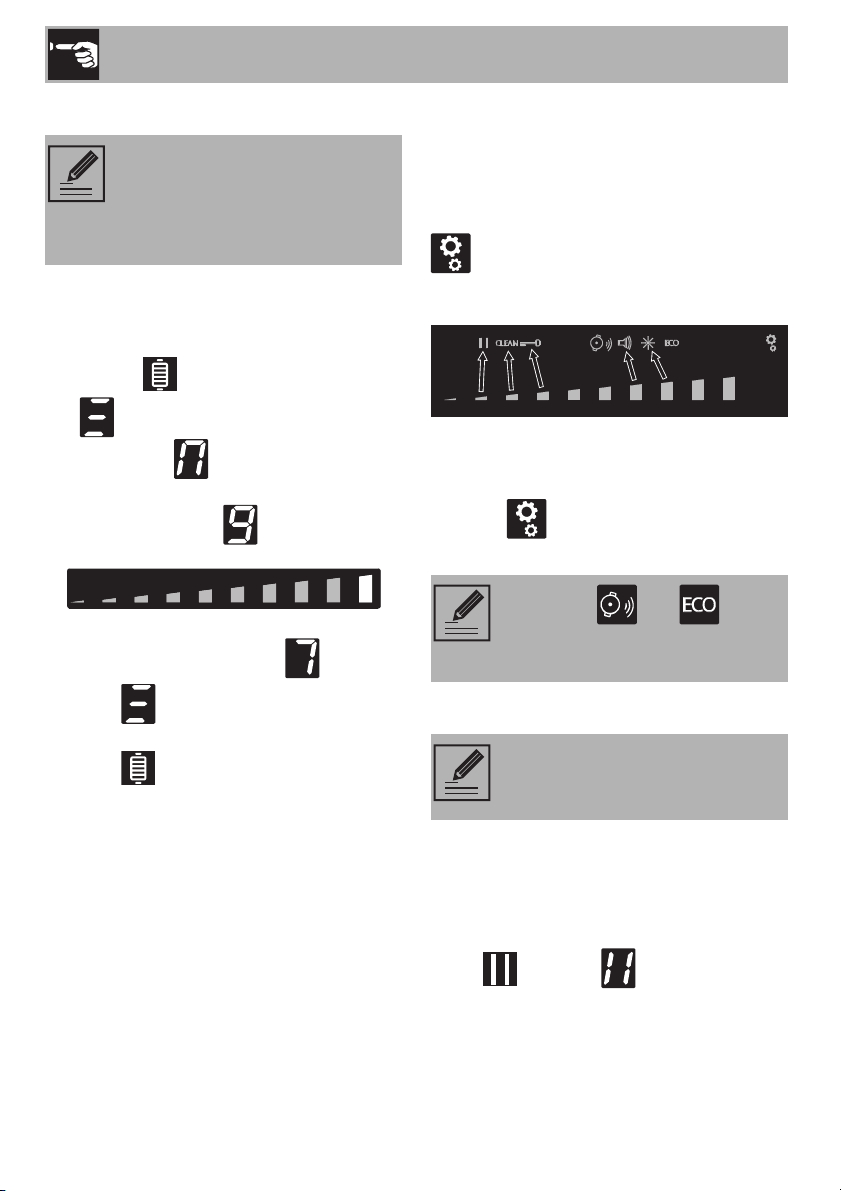
If the appliance has been switched off
unintentionally, carry out the following
procedure within 6 seconds:
1. Switch on the appliance.
• The icon starts to flash.
2. Immediately press the segment of the
scroll bar directly below the icon to
restore the functions that were previously
active.
NOTES: This function allows you
to set additional independent
timers at the same time, the number
of which depends on the number
of cooking zones available.
NOTE: This function is used to
restore some functions that have
already been started after the
appliance has been switched off
unintentionally.
NOTE: This function restores the
cooking zones, timer and rapid
heating functions. No other
functions will be restored.
Use
32
Grill Function
To activate the Grill function:
1. Place a griddle or a long pan on the left
zones.
2. Press the button.
The symbol appears on the front zone
display and the symbol appears on the
rear zone display. The scroll bar will be set
automatically to level . (preheating
stage)
After three minutes of operation, the power
level will be reduced to level .
Press the button and use the scroll bar
to modify the power level at any time.
Press the button to deactivate the Grill
function..
2.3 Settings menu
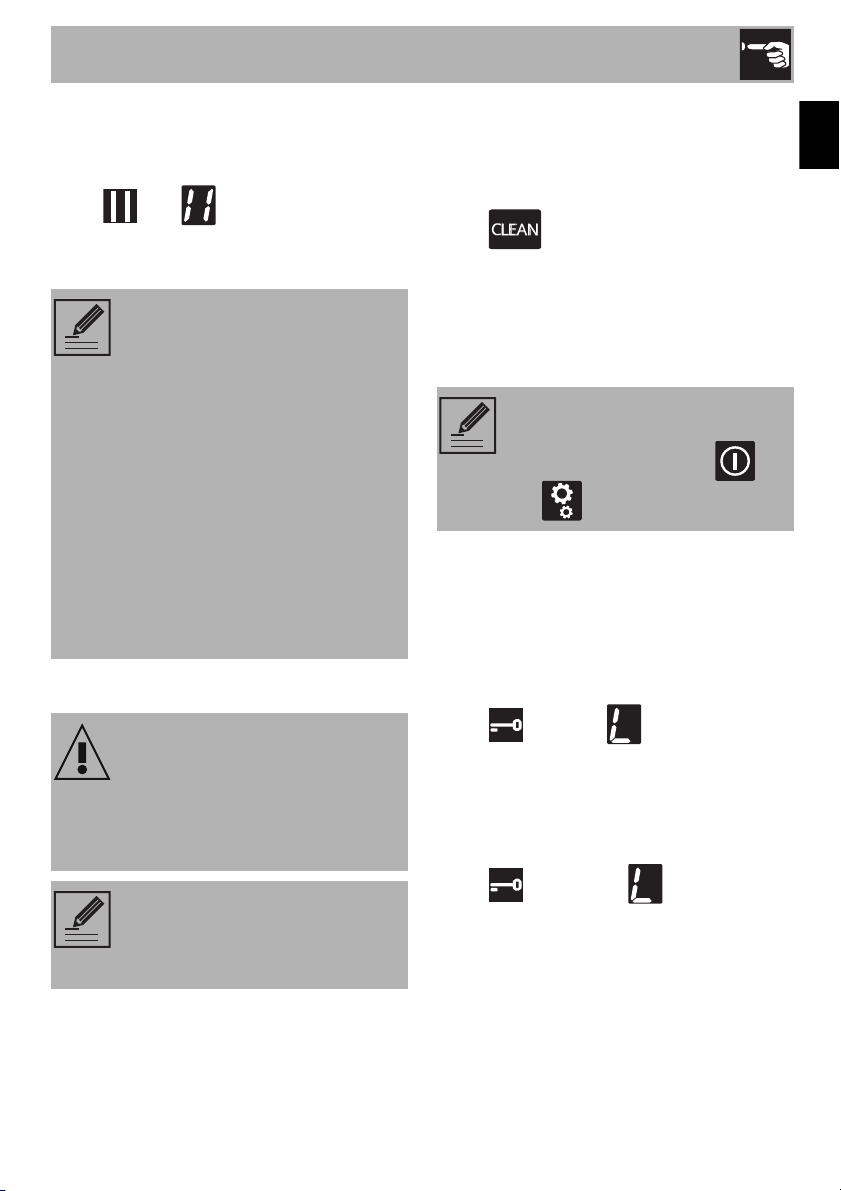
The settings menu allows you to modify
some of the operating characteristics of the
appliance and allows you to.
With the appliance switched on, press the
button to access the settings menu.
The scroll bar and the icons of all the
settings that can be modified appear:
Individual settings can be selected by
touching the segment of the scroll bar that is
most directly underneath.
Press the button again to exit from the
menu.
Pause function
To activate the Pause function:
1. Switch on at least one cooking zone.
2. Access the settings menu.
3. Press the segment of the scroll bar below
the icon. The symbol appears
on the cooking zone displays.
NOTE: This function is used to
automatically activate the
Multizone function for the left
zones only. It is used when using a
griddle or cooking with long pans.
NOTE: The and icons
refer to functions that can only be
modified via the user menu.
NOTE: This function pauses the
operation of all the cooking zones
and the timer.
Use
33
EN
To deactivate the Pause function:
1. Access the settings menu.
2. Press the segment of the scroll bar below
the . The symbols disappear
and the appliance reverts to its previous
functions.
Clean Function
At least one cooking zone must be active in
order for the Clean function to be used:
1. Access the settings menu.
2. Press the segment of the scroll bar below
the icon.
3. A 15-second countdown appears on the
timer display, after which the appliance
reverts to its previous functions.
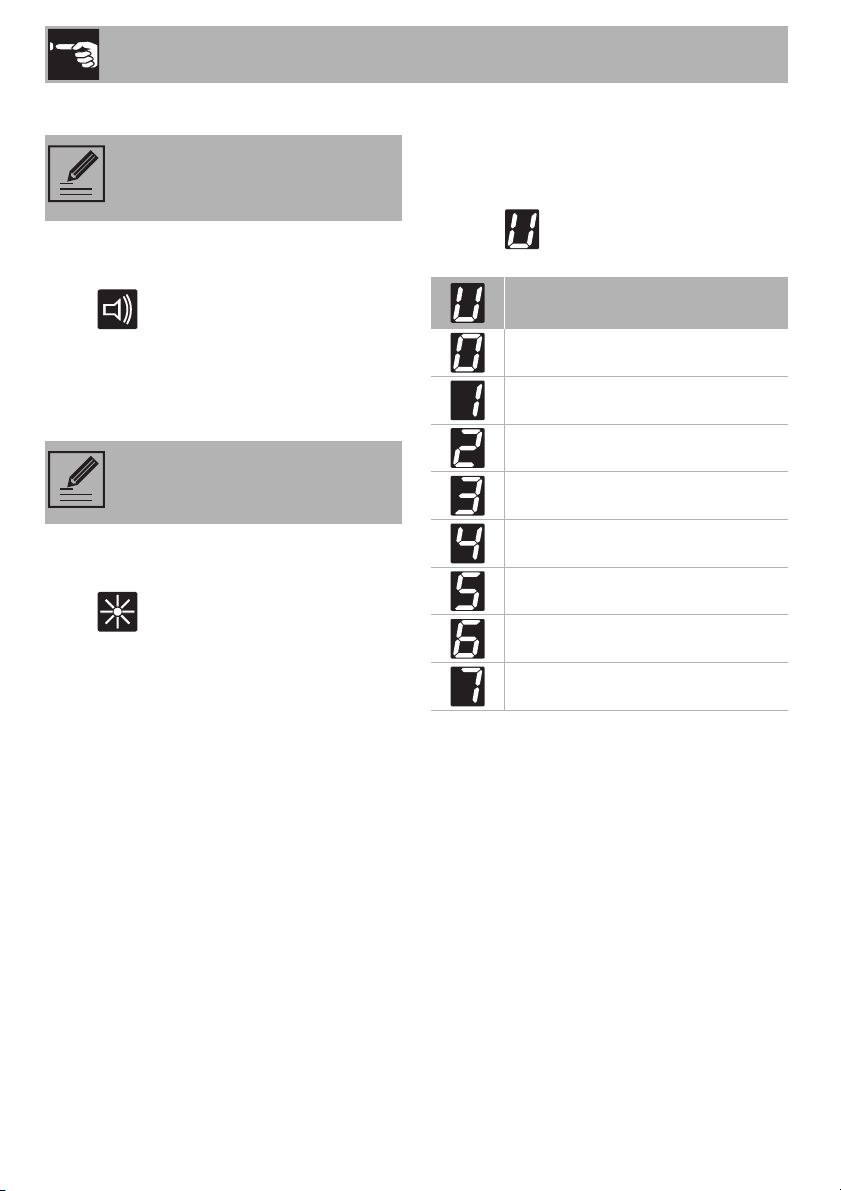
Control lock
This is useful when cleaning the appliance
and to prevent functions being activated by
mistake.
To activate the controls lock:
1. Access the settings menu.
2. Press the segment of the scroll bar below
the icon. The symbol appears
on the displays of all the cooking zones.
To deactivate the control lock:
1. Access the settings menu.
2. Press the segment of the scroll bar below
the icon. All the symbols
disappear.
NOTE:
• The cooking time limitation, the
residual heat indicators and the
control lock function remain
enabled during the Pause
function.
• The pause function can be
maintained for a maximum of 10
minutes, after which the
appliance switches off.
• When the power comes back
on after a power failure, the
pause function will be
deactivated.
Improper use
Burn hazard
• When this function is active, take extra
care when removing dirt if the glass
surface is hot.
NOTE: This function pauses the
appliance for 15 seconds, during
which it is possible to remove dirt
or stains.
NOTE: This function allows you to
disable all the buttons of the
appliance, except for the
and button.
Use
34
Button sound volume
1. Access the settings menu.
2. Press the segment of the scroll bar below
the icon.
3. Use the scroll bar to select the required
volume.
Display lighting
1. Access the settings menu.
2. Press the segment of the scroll bar below
the icon.
3. Use the scroll bar to select the required
level of brightness.
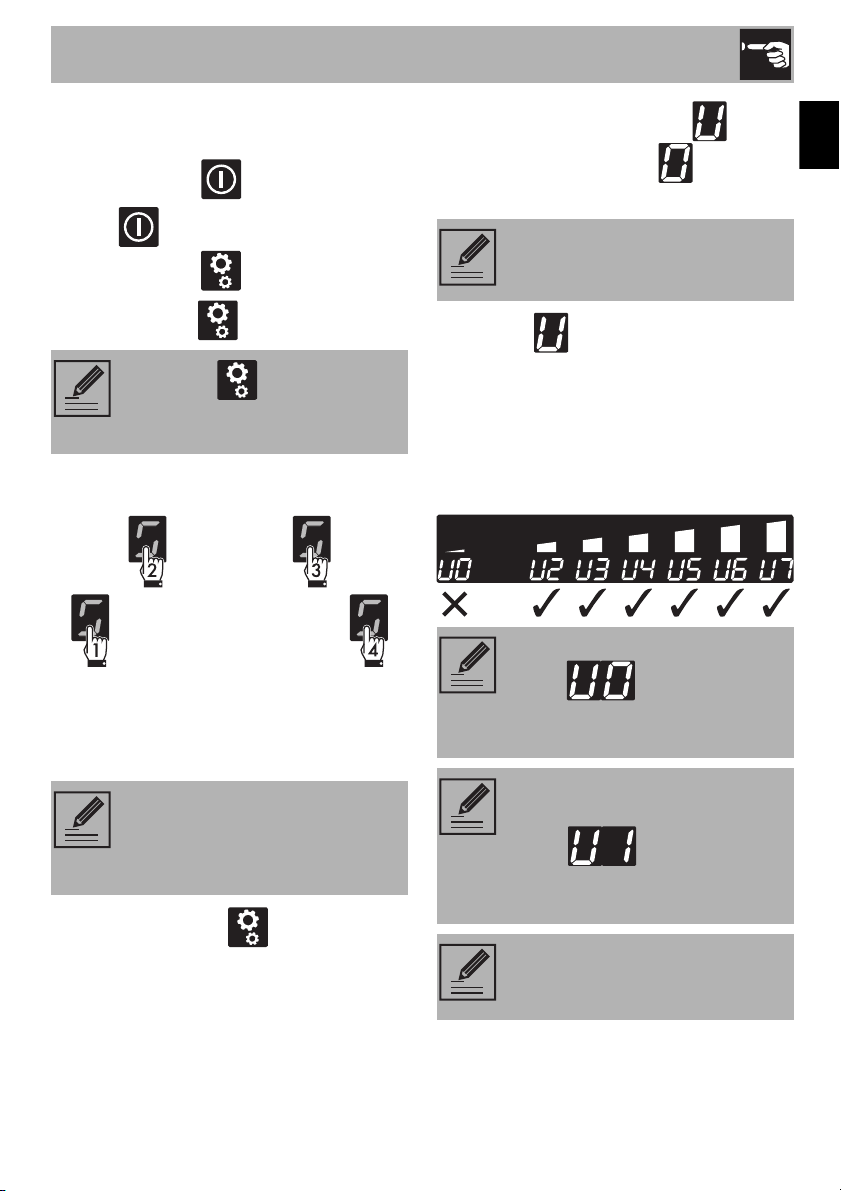
2.4 User menu
The user menu allows you to modify the
operating characteristics of the appliance.
Each option is indicated on the display with
the letter which alternates with a
progressive number.
NOTE: Allows you to adjust the
volume of the sounds associated
with pressing the buttons.
NOTE: Allows you to adjust the
general brightness of the displays.
Description
(installers only)
Option disabled
Button volume
Timer alarm volume
Display brightness
Timer animation
Automatic pan detection
Timer alarm duration
Use
35
EN
Accessing the user menu
1. If the cooktop is off, switch it on using the
On/Off button .
2. Press again within 3 seconds to
switch it off; the button starts to flash.
3. Press and hold .
4. The following appear on the cooking
zone displays:
Press all the buttons of the cooking zones in
sequence in a clockwise direction starting
from the front left (1). Every effective touch
will be confirmed by a beep.
5. Release the button .
The user menu is active and the symbol
alternating with the number will appear
at the top of the cooking zones display.
6. Press the symbol to go back to
selecting the options. The scroll bar
appears in which each segment is
associated with a menu option.
7. Press the segments of the scroll bar
(except the first two) to select the
available options.
NOTE: The button continues
to flash when you access the user
menu.
NOTE: If the buttons are pressed in
the incorrect order, the procedure
for accessing the menu has to be
repeated from step 3.
NOTE: This option is restricted to
the installer.
NOTE: The first segment on the left
(option ) is reserved for the
power limitation procedure
(installer only).
NOTE: For technical reasons, the
second segment from the left
(option ) is disabled.
Selecting this option will have no
effect.
NOTE: For each option, press the
value symbol to activate the scroll
bar in order to modify it.

Use
36
Option
Modifies the volume of the button sounds.
• : minimum volume.
• : maximum volume.
Option
Modifies volume of the sound signals when
the timer has ended.
• : minimum volume.
• : maximum volume.
Option
Modifies the brightness of the display.
• : maximum brightness.
• : minimum brightness.
Option
Allows you to display the countdown of the
minute timer and timed cooking in seconds,
from 59 to 0 seconds.
• : animation off.
• : animation on.
NOTE: Option can also
be modified via the settings menu
(corresponding to ).
NOTE: Depending on the
adjustment range of each option,
the scroll bar will show only those
segments that correspond to the
adjustments available for each
option.
NOTE: The sound associated with
the On/Off button and the
sounds associated with error
messages cannot be deactivated.
NOTE: Option can also
be modified via the settings menu
(corresponding to ).
NOTE: The second count is
displayed when the timer is set for
less than 10 minutes.

Use
37
EN
Option
Allows you to activate or deactivate the
automatic pan detection function.
• : automatic detection off.
• : automatic detection on.
Option
Specifies the duration of the alarm when the
timer has ended:
• : alarm duration 120 seconds.
• : alarm duration 10 seconds.
• : alarm off.
Exiting the user menu
There are two ways to exit from the user
menu:
1. Press the button. Any modifications
will be discarded and the cooktop will
be switched off.
Or
2. Press and hold the On/Off button
for at least 2 seconds. The modifications
will be saved and the cooktop will be
switched off.
2.5 Error codes
If the appliance malfunctions or operates
incorrectly, the associated error code
appears on the displays of the cooking
zones.
The error codes always start with or
- , followed by a number.
The following error codes can be corrected
without having to contact the Technical
Support Service.
• - - - : Remove any
materials or pans from the area around
the front control panel.
• - : Make sure that the pans are
suitable for induction cooking and that
they are not empty; allow the appliance
to cool down.
For all other errors, make a note of the
code, if possible, and contact Technical
Support.
NOTE: If automatic pan detection
is disabled, the zone has to be
switched on manually when a pan
is placed on the cooktop.
NOTE: If these error codes
appear frequently, contact
Technical Support.

Use
38
2.6 Using the oven
To switch the oven on:
1. Select the cooking function using the
function knob.
2. Select the temperature using the
temperature knob.
3. If you wish, you can set the a timed
cooking with the programmer clock. If
you avoid using the programmer clock
and thus setting a manual cooking you
have to stop the oven manually by
turning both the temperature and the
function knobs to the OFF position.
Functions list
NOTE: Ensure that the
programmer clock shows the
cooking duration symbol ,
otherwise it will not be possible to
turn on the oven.
Press the key to reset the
programmer clock.
BAKE
As the heat comes from above and below
at the same time, this system is particularly
suitable for certain types of food. Traditional
cooking, also known as static cooking, is
suitable for cooking just one dish at a time.
Perfect for all types of roasts, bread and
cakes, and in any case, particularly suitable
for fatty meats such as goose and duck.
CONV BOTTOM
The combination of the fan with just the
bottom heating element allows cooking to
be completed more rapidly. This system is
recommended for sterilizing or for finishing
off the cooking of foods which are already
well-cooked on the surface, but not inside,
which therefore need a little more heat.
Perfect for any type of food.
BROIL
Using the heat released from the central
part of the broil element, this function allows
you to grill small portions of meat and fish
for making kebabs, toasted sandwiches
and any types of grilled vegetable side
dishes
BROIL MAX
The heat coming from the whole broil
element gives perfect grilling results above
all for thin and medium thickness meat and
in combination with the rotisserie (where
fitted) gives the food an even browning at
the end of cooking. This function is perfect
for sausages, ribs and ham. This function
enables large quantities of food,
particularly meat, to be grilled evenly.
CONV BROIL
The airflow produced by the fan softens the
strong heatwave generated by the broil
element, grilling perfectly even very thick
foods. Perfect for large cuts of meat (e.g.
shin of pork).

Use
39
EN
2.7 Programming clock
Value decrease key
Clock key
Value increase key
CONV BAKE
The operation of the fan, combined with
traditional cooking, ensures consistent
cooking even with complex recipes. Perfect
for biscuits and cakes, even when
simultaneously cooked on several levels.
(For multiple-level cooking, we recommend
using the 2nd and 4th shelves)
TRUE CONV
The combination of the fan and the circular
heating element (incorporated in the rear of
the oven) allows you to cook different foods
on several levels, as long as they need the
same temperatures and same type of
cooking. Hot air circulation ensures instant
and even distribution of heat. It will be
possible, for instance, to cook fish,
vegetables and biscuits simultaneously (on
different levels) without odours and flavours
mingling.
STEAM CLEAN
This function makes cleaning easier using
the steam produced by a little quantity of
water poured onto the appropriate groove
placed on the bottom (see "Steam clean
function").
DEFROST (Rapid)
Rapid defrost is assisted by the activation of
a fan to ensure uniform distribution of room
temperature air inside the oven. This
function can be used for any type of food.
PIZZA
The operation of the fan, combined with the
broil and the bottom heating element,
ensures uniform cooking even with complex
recipes. Perfect not just for pizzas, but also
for biscuits and cakes
NOTE: Ensure that the
programmer clock shows the
cooking duration symbol ,
otherwise it will not be possible to
turn on the oven.
Press the key to reset the
programmer clock.

Use
40
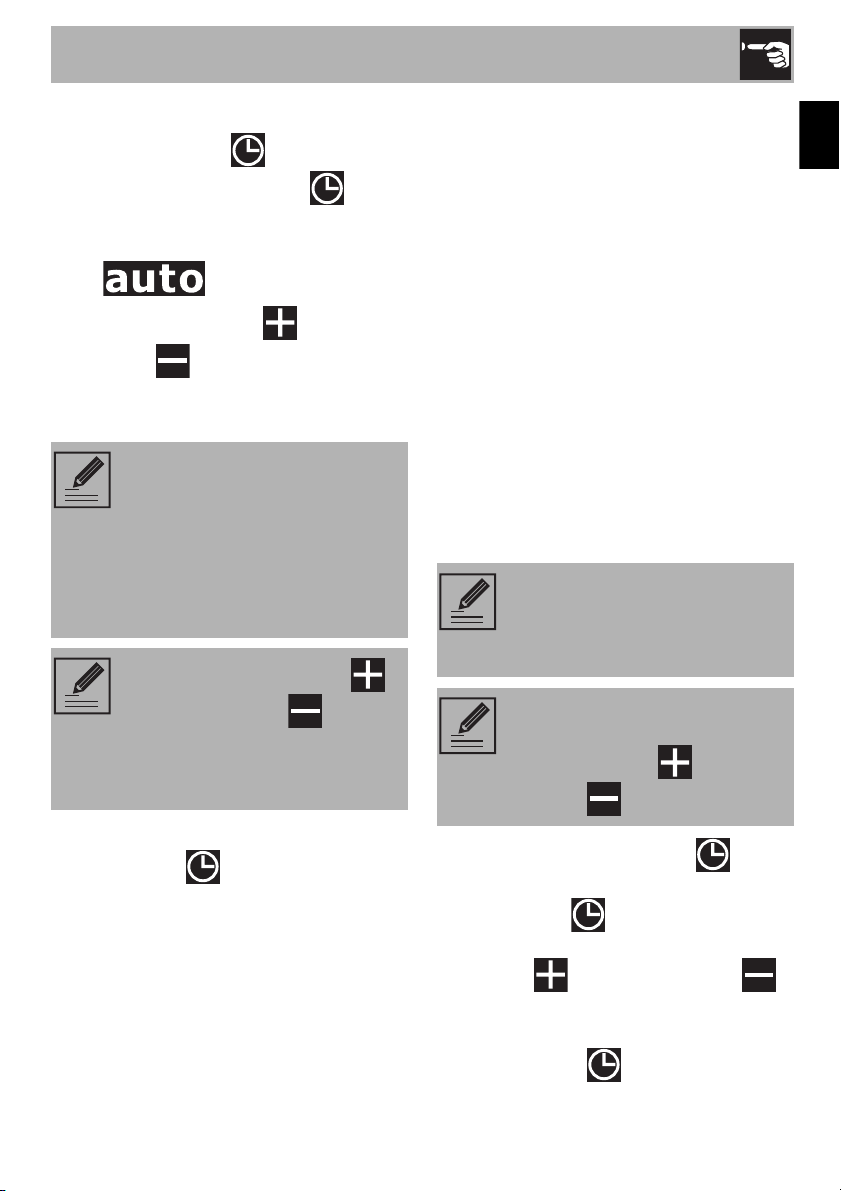
Setting the time
On the first use, or after a power failure, the
digits will be flashing on
the appliance’s display.
1. Keep the clock key for two seconds.
The dot between the hours and the
minutes flashes.
2. The time can be set via the value
increase key and value decrease
key . Keep the key pressed in to
increase or decrease rapidly.
3. Wait 7 seconds. The dot between the
hours and the minutes stops flashing.
The symbol on the display indicates
that the appliance is ready to start cooking.
Minute minder timer
The minute minder timer can be activated at
any time.
1. Keep the clock key pressed for a
few seconds. The display shows the
figures and the symbol
flashing between the hours and
minutes.
2. Use the value increase and value
decrease keys to set the number of
minutes required.
3. Wait approx. 5 seconds without pressing
any key to finish setting the minute
minder. The current time and the symbol
appear on the display.
4. A buzzer will sound when the set time is
reached.
5. Press the value decrease key to turn
the buzzer off.
NOTE: If the time is not set, the
oven will not switch on.
NOTE: To change the time, hold
down the value increase key
and value decrease key at the
same time for two seconds, then
set the time.
NOTE: The minute minder timer
does not stop the cooking
operation but rather informs the
user when the set time has run out.
NOTE: The minute minder timer
can be set from 1 minute to a
maximum of 23 hours and 59
minutes.

Use
41
EN
Timed cooking
1. Keep the clock key pressed for a
few seconds. The display shows the
figures and the symbol
flashing between the hours and
minutes.
2. Press the clock key again. On the
display the digit
appear alternating with the digit
and the symbol
flashing under the minutes.
3. Use the value increase and value
decrease keys to set the required
minutes of cooking.
4. Select a function and a cooking
temperature.
5. Wait approx. 5 seconds without pressing
any key in order for the function to
activate. The current time and the symbol
will appear on the display.
At the end of cooking the heating elements
will be deactivated. On the display, the
symbol turns off, the symbol
flashes and the buzzer sounds.
6. To turn the buzzer off, simply press one of
the programmer clock keys.
7. Press the clock key to reset the
programmer clock.
NOTE: Timed cooking is the
function which allows a cooking
operation to be started and then
ended after a specific length of
time set by the user.
NOTE: It is not possible to set a
cooking time of more than 10
hours.
NOTE: To cancel the set
programming press and hold
down the value increase and
the value decrease keys at the
same time and then turn the oven
off manually.

Use
42
Programmed cooking
1. Set the cooking time as described in the
previous point "Timed cooking".
2. Press the clock key again. On the
display the digit
appear alternating with the current timen
digit and the symbol
flashing under the minutes.
3. Use the value increase and value
decrease to set the cooking end
time.
4. Select a function and a cooking
temperature.
5. Wait approx. 5 seconds without pressing
any key in order for the function to
activate. The current time and the symbol
will appear on the display.
The simbol disappear on the
display.
At the end of cooking the heating elements
will be deactivated. On the display, the
symbol turns off, the symbol
flashes and the buzzer sounds.
6. To turn the buzzer off, simply press one of
the programmer clock keys.
7. Press the clock key to reset the
programmer clock.
12h or 24h format
The default mode is 12h format.
1. Keep the value increase key for a
few seconds. The symbols or
disappear on the display and
24h format is set.
2. Keep the value increase key for a
few seconds to return in 12h format.
Selecting the buzzer
The buzzer can have 3 tones.
1. Hold down the value increase and
value decrease keys at the same
time.
2. Press the clock key . On the display
the digit appear.
3. Press the value decrease key to
select a different buzzer tone
( or ).
NOTE: Programmed cooking is
the function which allows a
cooking operation to be started at
a set time and then ended after a
specific length of time set by the
user.

Use
43
EN
2.8 Using the temperature probe
With the temperature probe, roasts, pork
loin and various cuts and sizes of meat can
be cooked to perfection.
The probe, in fact, allows foods to be
cooked to perfection because it accurately
monitors the core temperature of the food.
The core temperature of the food is
measured by a sensor located in the tip of
the probe.
High temperature of the
temperature probe
Danger of burns
• Do not touch the rod or the tip of the
probe after having used it.
• Wear oven gloves when handling the
temperature probe.
Improper use
Risk of damage to surfaces
• Take care not to scratch or damage
enamelled or chrome-plated surfaces
with the tip or the plug of the
temperature probe.
Improper use
Risk of damage to the appliance
• Do not insert the probe into openings
and slots on the appliance.
• When the probe is not in use, make sure
that the protective cover is properly
closed.
Improper use
Risk of injury
• Do not leave the temperature probe
unattended.
• Do not allow children to play with the
probe.
• Take care not to injure yourself on the
sharp parts of the probe.
Improper use
Risk of damage to temperature
probe
• Do not pull the cable to remove the
probe from the socket or from the food.
• Make sure that the probe or its cable do
not get caught in the door.
• No part of the probe should be allowed
to come into contact with the walls of the
oven cavity, the heating elements, the
racks or the trays when they are still hot.
• When not in use, the probe should not
be kept inside the appliance.
• Make sure the plug of the probe is fully
inserted into the socket.
• Do not use the probe to place food into
or to remove it from the oven cavity.

Use
44
Positioning the probe
1. Place the food on a tray.
2. Insert the tip of the probe into the food
before placing it in the oven.
3. For best results, make sure that the
temperature probe is placed transversely
in the thickest part of the food and for
least 3/4 of its length. Make sure that it
does not touch the tray underneath and
that it does not protrude from the food.
Cooking using the temperature probe
With preheating:
1. Set manual cooking (see "Using the
oven").
2. After preheating, open the door and
insert the tray onto which the food has
been placed into the appropriate
guides.
3. Insert the plug of the probe into the
socket at the side, using the probe to
open the cover.
NOTE: In order for the probe to
measure the core temperature of
the food precisely, its tip must not
be in contact with bones or fat.
NOTE: The minimum
recommended oven temperature
when cooking using the probe is
250°F, unless slow cooking is
used (see Chap. 2.7).
High temperature inside the oven
during use
Danger of burns
• Wear oven gloves when handling the
temperature probe.
Use
45
EN
4. Close the door.
5. Press the clock key for a few
seconds; Press the clock key again.
The default target temperature 176°F
(80°C) is indicated on the display and
the symbol flashes.
6. Use the value increase and value
decrease keys to regulate the target
temperature to a value between the
minimum and a maximum.
7. Wait for a few seconds and then press
the clock key to display the
instantaneous temperature measured by
the probe.
Cooking will now continue until the
instantaneous temperature measured by the
probe is the same as the target temperature
set by the user.
Without preheating:
1. Open the door.
2. Put the tray, on which the food has been
placed with the probe in position, into
the oven.
3. Insert the plug of the probe into the
socket at the side, using the probe to
open the cover.
4. Set the cooking using the probe as
indicated in steps 5, 6 and 7 in the
previous section.
5. Set manual cooking by selecting the
temperature and cooking function (see
"Using the oven").
When cooking with the temperature
probe is in progress
1. Press and hold the clock key to
activate the minute minder timer; press
the clock key again to display the
target temperature and use the value
increase and value decrease
keys to adjust it while cooking is in
progress.
2. Press clock key again or wait 5
seconds to return to cooking mode.
NOTE:
• Minimum target temperature:
corresponds to the instantaneous
temperature measured by the
probe plus 35°F (2°C).
• Maximum target temperature:
210°F (99°C).
NOTE: If the value increase
and value decrease keys are
not pressed within approximately 2
seconds, the display shows the
actual temperature inside the oven.
NOTE: When the temperature
probe is used, it is not possible to
set programmed cooking or timed
cooking.
NOTE: When cooking with the
temperature probe is in progress,
the value increase and value
decrease keys are disabled.

Use
46
At the end of cooking
When the set target temperature for the
temperature probe is reached, the heating
elements are switched off and the
appliance emits a series of beeps.
1. Press a button on the programmer clock
to stop the buzzer.
2. Open the door.
3. Remove the probe from the food and
unplug it from the socket.
4. Remove the food from the oven.
5. Make sure that the protective cover is
properly closed.
2.9 Cooking advice
General advice
• Use pans/trays with a maximum width of
13-14” max.
• It is not possible to shorten cooking times
by increasing the temperature (the food
could be overcooked on the outside and
undercooked on the inside).
• It is recommended to preheat the oven
before baking.
• Using several ovens at the same time
might affect the final cooking results.
Advice for cooking meat
• Cooking times vary according to the
thickness and quality of the food and to
consumer taste.
• Turn the food to brown both sides.
• Use a meat thermometer when roasting
meat, or simply press on the roast with a
spoon. If it is hard, it is ready; if not, it
needs another few minutes cooking.
Advice for cooking with the Broiler
• Meat can be grilled even when it is put
into a cold oven or into a preheated
oven if you wish to change the effect of
the cooking.
• When using the Broil function, preheat
the oven for 15 minutes before cooking.
Cooking times may vary depending on
the thickness of the food.
• We recommend placing the food at the
center of the rack.
• Foods should be seasoned before
cooking. Foods should also be coated
with oil or melted butter before cooking.
• Use the oven tray on the first bottom shelf
to collect fluids produced by grilling.
Advice for cooking desserts and biscuits
• Temperature and cooking time depend
on the quality and consistency of the
dough.
• To check whether the dessert is cooked
right through, at the end of the cooking
time, put a toothpick into the highest point
of the dessert. If the batter does not stick
to the toothpick, the dessert is done.
• If the dessert collapses when it comes out
of the oven, on the next occasion reduce
the set temperature by about 50°F,
selecting a longer cooking time if
necessary.
• While cooking desserts or vegetables,
excessive condensation may form on the
glass. In order to avoid this, open the
door very carefully a couple of times
while cooking.

Use
47
EN
Tips for cooking on two shelves:
• Use a fan-assisted function to achieve
uniform cooking at several levels. Use
shelves 2 and 4.
• It is recommended to use 2 racks (can
be requested from Authorized Assistance
Centers).
• To facilitate the flow of air, place the
molds/pans in the center of the racks
and make sure that their width/diameter
does not exceed 11”.
• Position the racks keeping an empty level
between them.
• Depending on the food and the
increased load in the oven, cooking on
two levels may take a few minutes longer
than on a single shelf.
• The functions indicated for cooking on
two shelves are the CONV functions.
Advice for defrosting and proving
• Place frozen foods without their
packaging in a lidless container on the
first shelf of the oven.
• Avoid overlapping the food.
• To defrost meat, use a rack placed on
the second level and a tray on the first
level. In this way, the liquid from the
defrosting food drains away from the
food.
• The tenderest parts of the food can be
protected with aluminum foil.
• For successful rising, a container of water
should be placed at the bottom of the
oven.
To save energy
• Unless otherwise indicated on the
packaging, defrost frozen food before
placing it in the oven.
• In case of multiple cooking, it is
advisable to cook the products one after
the other to make the most of the already
hot oven.
• Use preferably dark metal molds: they
help to absorb the heat better.
• Remove all trays and racks which are not
required during cooking.
• Stop cooking a few minutes before the
time normally used. Cooking will
continue for the remaining minutes with
the heat that has accumulated inside the
oven.
• Reduce any opening of the door to a
minimum to avoid heat dispersal.
• Keep the inside of the appliance clean at
all times.
Slow cooking with the probe
• This cooking mode is recommended for
tender and lean meat whose core
temperature should not exceed 65°C
(149°F). Set the temperature of the oven
to between 90° (194°F) and 100°C
(212°F). This increases the cooking time,
but maintains the quality of the food and
prevents an excessive reduction in its
volume.
• For a better result, before slow cooking,
brown the meat in a pan over high heat
for 1 or 2 minutes on each side.

Use
48
Cooking information table
Food g lbs
Recommended
cooking mode
Temp.°F (°C) Preheat
Number of
racks
Rack
position
Time (min)
Angel Cake 500 1,1 BAKE 350 (180) Yes Single 2 45-50
Angel Cake 500 1,1 CONV BAKE 350 (180) Yes Single 2 25-30
Sheet Cake 1400 2,8
CONV BAKE
320 (160)
Yes Single 2
30-35
Apple Pie - - BAKE 375 (190) No Single 2 55-60
Brownies - - BAKE 350 (180) Yes Single 2 30-35
Chocolate Chip Cookies - - BAKE 350 (180) Yes Single 2 15-20
Chocolate Chip Cookies - - TRUE CONV 350 (180) Yes Multiple 2 & 4 10-15
Cookie Bars - - CONV BAKE 350(180) Yes Single 2 30-35
Sugar Cookies - - BAKE 400 (200) Yes Single 2 9,10
Sugar Cookies - - TRUE CONV 350 (180) Yes Single 2 10-11
Sugar Cookies - - TRUE CONV 350 (180) Yes Multiple 2 & 4 10-11
Quiche - - BAKE 400 (205) Yes Single 1 35-40
Vegetables - - BAKE 500 (260) Yes Single 3 30-40
Baked Potatoes 600 1,3 BAKE 500 (260) Yes Single 3 40-45
Jam Tart 800 1,7 BAKE 375 (190) Yes Single 2 20,25
Frozen - - BAKE 400 (200) Yes Single 2, 3
Package
Time
Pecan - - BAKE 350 (180) Yes Single 2, 3 45-50
Pumpkin Pie 900 2 BAKE 350 (180) Yes Single 1 45-50
Fresh 500 1,1 PIZZA 500 (260) Yes Single 1, 2 6,8
Thick Crust (frozen) - - PIZZA on package Yes 3
on
package
recipe time
Thin Crust (frozen) - - PIZZA on package Yes 1,3
on
package
recipe time
Biscuits - - BAKE 350 (180) Yes Single 3 15-20
Biscuits - - TRUE CONV 350 (180) Yes Multiple 2 & 4 15-20
Cup Cakes - - BAKE 400 (205) Yes Single 2 18-20
Cup Cakes - - TRUE CONV 350 (180) Yes Single 2 25-28
Cup Cakes - - TRUE CONV 350 (180) Yes Multiple 2 & 4 26-28
Dinner Rolls - - BAKE 350 (180) Yes Single 2 25-30
Dinner Rolls - - TRUE CONV 350 (180) Yes Multiple 2 & 4 25-30
Bread 800 1,7 CONV BAKE 400 (205) Yes Single 2 35
Sweet Rolls 500 1,1 CONV BAKE 350 (180) Yes Single 2 15-20
Focaccia Bread 1000 2,2 BAKE 450 (230) Yes Single 2 20,25
Focaccia Bread 1000 2,2 CONV BAKE 400 (205) Yes Single 2 20,25

Use
49
EN
Probe-cooking information table
Food g lbs
Recommended
cooking mode
Temp.°F (°C) Preheat Doneness
Rack
position
Time (min)
Hamburgers 140 0.3 CONV BROIL 500 (260) No Medium 4
Side 1: 9
Side 2: 5
Hamburgers 140 0.3 CONV BROIL 500 (260) Yes Medium 4
Side 1: 7
Side 2: 8
Tenderloin 1200 2,6 TRUE CONV 450 (230) No
Rare
Medium
Well Done
2
44
52
60
Lamb Ribs - - CONV BROIL 500 (260) No - 4
Side 1: 13
Side 2: 7
Chops 150 0.3 CONV BROIL 500 (260) No Well Done 4
Side 1: 10
Side 2: 4
Sausage 150 0.3 CONV BROIL 500 (260) No Well Done 4
Side 1: 12
Side 2: 6
Ribs - - TRUE CONV 400 (205) No Well Done 2 110
Chicken Breast, Bone-in 700 1,5 CONV BROIL 450 (230) No - 3
Side 1: 25
Side 2: 20
Chicken Thighs, Bone-in - - CONV BROIL 500 (260) No - 4
Side 1: 14
Side 2: 15
Fish Filets Salmon 600 1,3 BROIL 500 (260) No - 4 30
Whole Fish Bream 600 1,3 TRUE CONV 400 (205) No - 2 35
Food g lbs
Recommended cooking
mode
Temp.°F (°C)
Internal
Temp.°F
(°C)
Doneness
Rack
position
Roast Beef 2000 4,4 TRUE CONV 350 (180) 130 (54) Medium 2
Loin Roast 2000 4,4 TRUE CONV 350 (180) 160 (71) Medium 2
Tenderloin 450 1 TRUE CONV 450 (230) 158 (70) Medium 2
Chicken Whole 1100 2,4 TRUE CONV 400 (205) 185 (85) - 2
Turkey Breast 2250 5 TRUE CONV 350 (180) 185 (85) - 2

Cleaning and Maintenance
50
3 Cleaning and maintenance
Instructions
Recommendations
To keep the surfaces in good condition,
they should be cleaned regularly after use.
Let them cool first.
Regular daily cleaning
Always use only specific products that do
not contain abrasives or chlorine-based
acids.
Pour the product onto a damp cloth and
wipe the surface, rinse thoroughly and dry
with a soft cloth or a microfiber cloth.
Food stains or residues
Do not use metallic sponges or sharp
scrapers as they will damage the surfaces.
Use ordinary non-abrasive products with
the aid of wooden or plastic utensils if
necessary. Rinse thoroughly and dry with a
soft cloth or a microfiber cloth.
Do not allow residues of sugary foods (such
as jam) to set inside the oven. If allowed to
set for too long, sugar residue could pit the
enamel lining of the oven.
WARNING
Electrical Shock Hazard
• Before servicing, disconnect the
appliance from the power supply.
WARNING
Risk of damage to surfaces
Improper use
• Do not use steam jets to clean the
appliance.
• Do not use cleaning products containing
chlorine, ammonia or bleach on steel
parts or parts with metallic finishes on the
surface (e.g. anodizing, nickel- or
chromium-plating).
• Do not use abrasive or corrosive
detergents on glass parts (e.g. powder
products, stain removers and metallic
sponges).
• Do not use rough or abrasive materials
or sharp metal scrapers.
• Keep cooktop area clear and free from
combustible materials, gasoline other
flammable vapors and liquids.
• Do not obstruct the flow of combustion
and ventilation air.
NOTE: We recommend the use of
cleaning products distributed by
the manufacturer.
NOTE: After cleaning, dry the
appliance thoroughly to prevent
any water or detergent from
interfering with its operation or
creating unsightly marks.

Cleaning and Maintenance
51
EN
3.1 Cleaning the cooktop
Cleaning the glass ceramic surface
Light coloured marks from pans with
aluminium bases can be easily cleaned off
with a cloth moistened in vinegar. After
cooking, remove any burnt residues; rinse
with water and dry thoroughly with a clean
cloth.
Dirt which may have fallen on the hob
while cleaning lettuce or potatoes can
scratch the hob when moving pans.
Consequently, remove any dirt from the
cooking surface immediately.
Changes in colour do not affect the
operation and stability of the glass. These
are not alterations to the material of the hob
but just residues which have not been
removed and have then carbonised.
Shiny surfaces can form due to the bases
of pans, especially aluminium ones, rubbing
on the surface, and due to the use of
unsuitable detergents. They are difficult to
remove using conventional cleaning
products. It may be necessary to repeat the
cleaning process several times. Use of
corrosive detergents or rubbing of pan
bases can wear away the decoration on
the hob over time and contribute to the
formation of stains.
Weekly cleaning
Clean and maintain the hob once a week
using an ordinary glass ceramic cleaning
product. Always follow the manufacturer’s
instructions. The silicon in these products
creates a protective, water-repellent
membrane which also resists dirt. All marks
stay on the membrane and can therefore be
removed easily. After cleaning, dry the
surface with a clean cloth. Make sure that
there is no detergent left on the cooking
surface as it might undergo an aggressive
reaction when heated up and could modify
the structure of the cooking surface.
Knobs
The knobs should be cleaned with a soft
cloth dampened with lukewarm water, then
dried carefully. They can be removed by
pulling them out from their housings.
NOTE: Do not use aggressive
products containing alcohol or
products for cleaning steel and
glass when cleaning the knobs, as
these products could cause
permanent damage.

Cleaning and Maintenance
52
3.2 Cleaning the door
Removing the door
For easier cleaning it is recommended to
remove the door and place it on a tea
towel.
To remove the door proceed as follows:
1. Open the door completely and insert two
pins into the holes on the hinges
indicated in the figure.
2. Grasp the door on both sides with both
hands, lift it forming an angle of around
30° and remove it.
3. To reassemble the door, put the hinges in
the relevant slots in the oven, making sure
that grooved sections A are resting
completely in the slots. Lower the door
and once it is in place remove the pins
from the holes in the hinges.
Cleaning the door glazing
The glass in the door should always be kept
thoroughly clean. Use absorbent kitchen
roll. In case of stubborn dirt, wash with a
damp sponge and an ordinary detergent.
Removing the inner glass
To facilitate cleaning, the inner glass panels
of the door can be removed.
1. Remove the inner glass panel by pulling it
gently upward at the rear, moving it as
indicated by the arrows (1).
2. Then pull the front part of the glass panel
upwards (2). This way, the four pins
attached to the glass panel are
disengaged from their grooves in the
door.

Cleaning and Maintenance
53
EN
3. Remove the intermediate glass pane by
lifting it upwards.
4. Clean the external glass panel and the
one you just removed. Use paper towels.
If there are tough to clean spots, use a
damp sponge and mild detergent.
5. Reinsert the glass panels in the reverse
order of removal.
6. Reposition the inner glass panel. Make
sure you center and insert the four pins
into their grooves in the door, using a
little pressure.
3.3 Cleaning the oven cavity
In order to keep your oven in the best
possible condition, clean it regularly after
letting it cool down.
Avoid letting food residue dry inside the
oven cavity, as this could damage the
enamel.
Take out all removable parts before
cleaning.
For easier cleaning, we recommend
removing:
• the door;
• the rack/tray support frames;
• removable guides, where fitted;
•the seal.
NOTE: In the event you are using
specific cleaning products, we
recommend running the oven at
maximum temperature for 15-20
minutes in order to eliminate any
residue.

Cleaning and Maintenance
54
Removal of the frame supports for racks/
trays
Removing the guide frames makes it easier
to clean the sides of the oven. This must be
done each time you use the automatic
cleaning cycle (only on some models).
To remove the guide frames:
• Pull the frame towards the inside of the
oven to unhook it from its housing A, and
then slide it out of the grooves at the
back B.
• When you have finished cleaning the
oven, repeat the procedures indicated
above to reposition the guide frames.
3.4 Steam clean function
Preliminary operations
Before starting the Steam clean function:
1. Completely remove all accessories from
inside the oven. The upper guard can be
left inside the oven.
2. Pour approximately 13.5 fl. oz. (400 cc -
1.7 cup) of water onto the bottom of the
oven. Make sure it does not overflow out
of the cavity.
CAUTION
Improper use
Risk of damaging the surfaces
• Remove any food residues or large spills
from previous cooking operations from
the inside of the oven.
• Carry out steam assisted oven cleaning
operations only when the oven is cold.
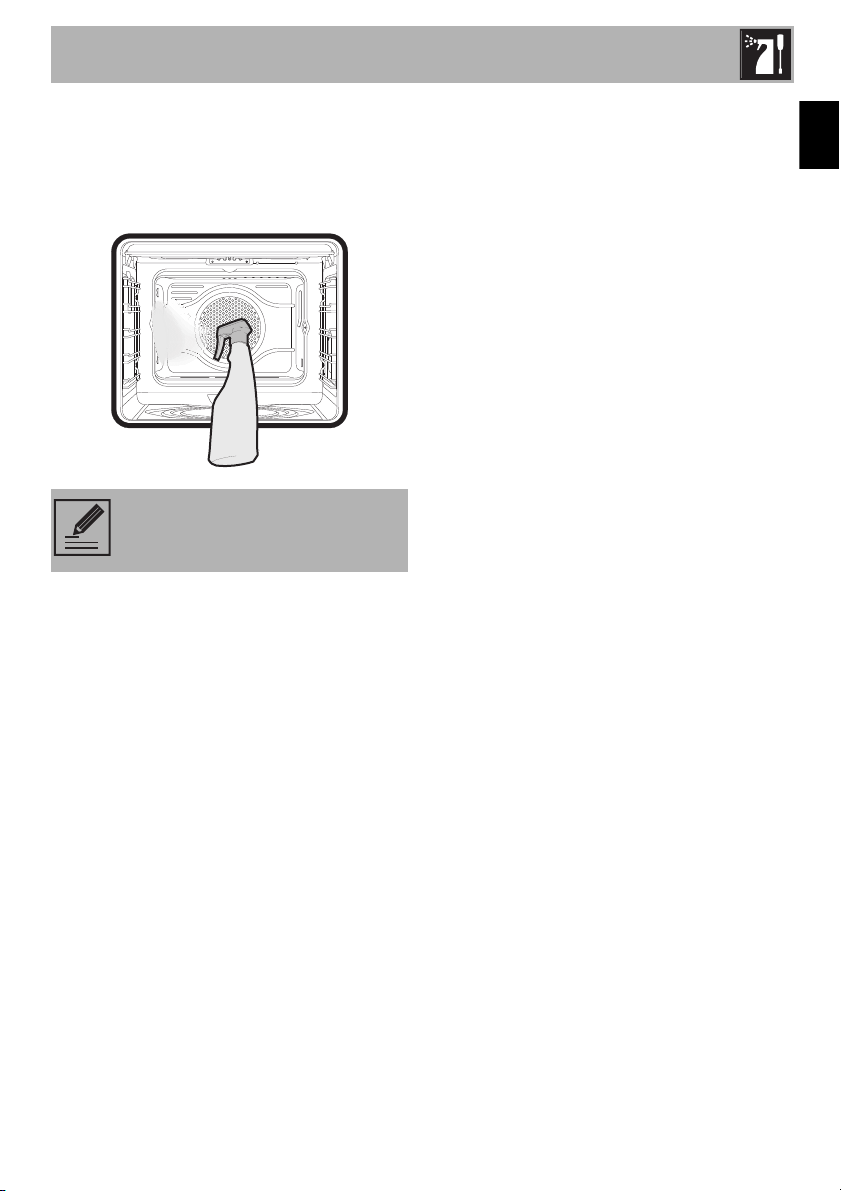
Cleaning and Maintenance
55
EN
3. Spray a water and washing up liquid
solution inside the oven using a spray
nozzle. Direct the spray towards the side
walls, upwards, downwards and
towards the deflector.
4. Close the door.
Steam clean settings
1. Turn the function knob to the STEAM
CLEAN position and the temperature
knob to 150°F (65°C).
2. Set a cooking time of 45 minutes using
the programmer clock.
3. At the end of the cooking time, the timer
will switch the oven heating elements off
and the buzzer will start to sound.
End of the Steam clean function
1. Open the door and wipe away the less
stubborn dirt with a damp cloth.
2. Use a non-scratch sponge with brass
filaments to remove hard deposits.
3. In case of grease residues use specific
oven cleaning products.
4. Remove the water left inside the oven.
For improved hygiene and to avoid food
being affected by any unpleasant odours,
we recommend that the oven is dried using
a convection function at 300°F for
approximately 10 minutes.
3.5 Extraordinary maintenance
Seal maintenance tips
The seal should be soft and elastic.
• To clean the seal, use a non-abrasive
sponge and wash with lukewarm water.
NOTE: We recommend spraying
approx. 20 times at the most.

Cleaning and Maintenance
56
Replacing the internal light bulb
1. Completely remove all accessories from
inside the oven.
2. Remove the rack/tray supports.
3. Use a tool (e.g. a spoon) to remove the
bulb cover.
4. Loosen and remove the light bulb.
5. Replace the bulb with a similar one
(40 W).
6. Reattach the cover. Leave the inside of
the glass molding (A) facing the door.
7. Press the cover firmly so that it adheres
tightly to the light bulb holder.
WARNING
Danger of electrocution
• Unplug the appliance.
• Use protective gloves.
NOTE: The oven is fitted with two
40W light bulbs.
NOTE: Pay attention not to scratch
the oven cavity enamel.
NOTE: Do not touch the halogen
bulb with your fingers; cover it with
an insulating cloth.