MODEL: TT-BH071
SOUNDELITE 71
WIRELESS STEREO EARPHONES
User Guide
EN
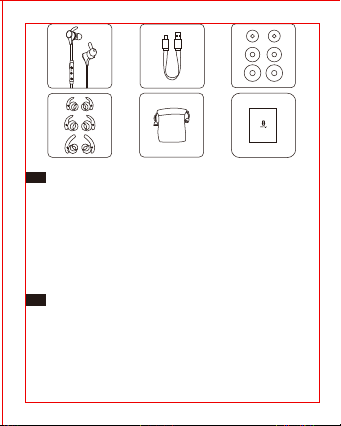
Package Contents
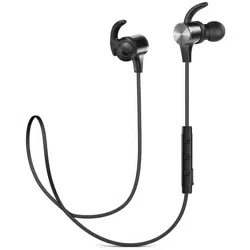
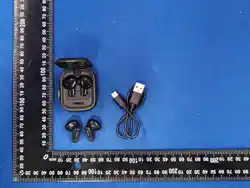
• 1 × TaoTronics Wireless Stereo Earphones
• 1 × USB Charging Cable
• 6 × Ear Buds (two are equipped on the earphones)
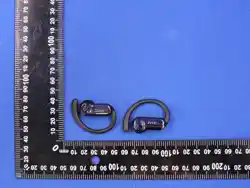
• 6 × Ear Hooks (two are equipped on the earphones)
• 1 × Travel Pouch
• 1 × User Guide
DE
Lieferumfang
• 1 × TaoTronics Kabellose Stereo Kopfhörer
• 1 × USB-Ladekabel
• 6 × Ohrstöpsel (ein Paar kommt bereits an den Kopfhörern)
• 6 × Ohrbügel (ein Paar kommt bereits an den Kopfhörern)
• 1 × Reiseetui
• 1 × Bedienungsanleitung
FR
Contenu du Package
• 1 × TaoTronics Écouteurs Stéréo Sans Fil
• 1 × Câble de Charge USB
• 6 × Oreillettes (deux sont déjà installées sur les écouteurs)
• 6 × Crochets d’Oreille (deux sont déjà installés sur les écouteurs)
• 1 × Pochette de Transport
• 1 × Guide d’Utilisation
ES
Contenido del paquete
• 1 × Auriculares Estéreo Inalámbricos TaoTronics
• 1 × Cable de Carga USB
• 6 × Tapones (dos están equipados en los auriculares)
• 6 × Ganchos de Oído (dos están equipados en los auriculares)
• 1 × Bolsa de Viaje
• 1 × Manual del Usuario
IT
Contenuto della Confezione
• 1 × TaoTronics Auricolari Stereo Bluetooth
• 1 × Cavo di Ricarica USB
• 6 × Gommini Auricolari (2 presenti sugli auricolari)
• 6 × Ganci Auricolari (2 presenti sugli auricolari)
• 1 × Custodia
• 1 × Guida Utente
JP
同梱物
• 1 × TaoTronics ワイヤレスステレオイヤホン
• 1 × USB 充電ケーブル
• 6 × イヤーピース(つは既にイヤホンに装着されています)
• 6 × イヤーフック(つはイヤホンに装着済)
• 1 × トラベルポーチ
• 1 × 取扱説明書
DC IN
EN
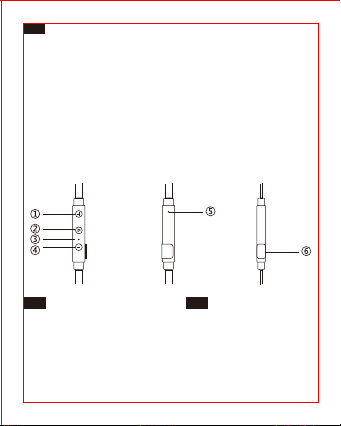
Product Diagram
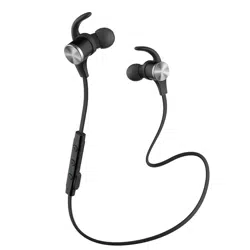
1. Volume+/Next Track
2. Multifunction Button
3. LED Indicator
4. Volume-/Previous Track
5. Microphone
6. Micro USB Charging Port
DE
Produktdiagramm
1. Lautstärke+/Nächstes Lied
2. Multifunktionsknopf
3. LED-Anzeige
4. Lautstärke-/Vorheriges Lied
5. Mikrofon
6. Mikro USB-Ladeanschluss
FR
Description du Produit
1. Volume+/Piste Suivante
2. Bouton Multifonction
3. Voyant à LED
4. Volume-/Piste Précédente
5. Microphone
6. Port de Charge Micro-USB
ES
Diagrama del producto
1. Volumen + / Pista Siguiente
2. Botón Multifunción
3. Indicador LED
4. Volumen - / Pista anterior
5. Micrófono
6. Puerto de Carga Micro USB
IT
Schema del Prodotto
1. Volume +/Traccia Successiva
2. Tasto Multifunzione
3. Indicatore LED
4. Volume-/Traccia Precedente
5. Microfono
6. Porta di Ricarica Micro-USB
JP
製品図
1.音量+/次の曲
2.多機能ボタン
3.LEDインジケーター
4.音量-/前の曲
5.マイク
6.MicroUSB充電ポート
EN
How to Use
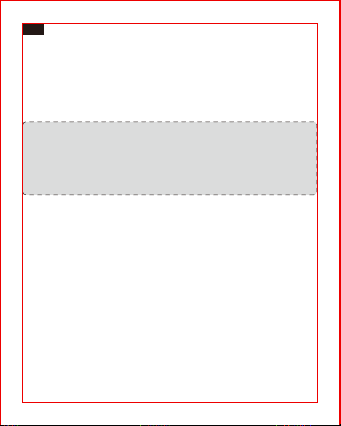
1. Charging
1) Connect the charging port with any USB charging adapter or active
computer USB port.
2) Charging will start automatically with the LED indicator turning red.
3) The earphones are fully charged when the LED indicator turns blue.
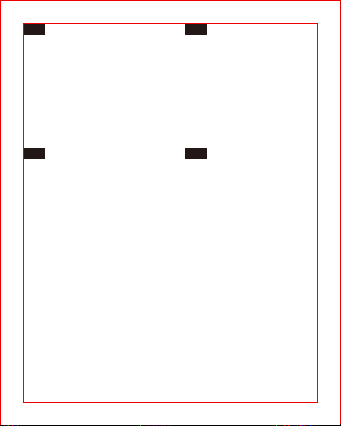
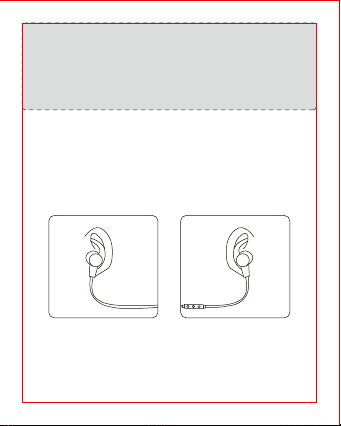
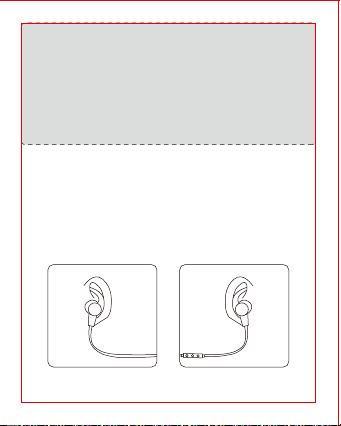
How to Wear
Please wear the earphones as shown in the diagram:
1) Attach the ear hooks onto the earphones.
2) Wear the earphones and the hooks on your ears and adjust for the
best fit.
Note:
• Charge the earphones at least once every 6 months when not
using for a long time.
• Make sure the battery is fully charged before putting the
earphones away for storage.
2. Pairing
1) Make sure the earphones and your Bluetooth® device are next to
each other (within 3 feet / 1 meter).
2) The first time you use the earphones, press and hold the
Multifunction Button until the LED indicator flashes red and blue
alternately. Now the earphones is in pairing mode.
3) Activate Bluetooth® function on your phone and search for the
nearby Bluetooth® connection: Find “TAOTRONICS SoundElite 71” in
the search results. Tap on the name to connect. Once connected, only
the blue LED will flash.
Note:
• The Bluetooth® earphones can remember previous paired devices.
• If the earphones cannot pair with your Bluetooth device, press
and hold the Volume+ / - Button at the same time until the LED
Indicator flashes twice and 2 beep sounds are heard to clear the
pairing history. Then restart the earphones to pair again.
DE
Bedienungsanleitung
1. Aufladen
1) Verbinden Sie den Ladeanschluss mit irgendeinem USB-Ladeadapter
oder aktivem Computer via USB-Anschluss.
2) Der Ladeprozess wird automatisch gestartet und die LED-Anzeige
wird rot leuchten.
3) Die Kopfhörer sind vollständig aufgeladen, wenn die LED-Anzeige
blau leuchtet.
2. Kopplung
1) Stellen Sie sicher, dass die Kopfhörer und Ihr Bluetooth®-Gerät sich
nah beieinander befinden (innerhalb von 1 Meter).
2) Wenn Sie die Kopfhörer das erste Mal benutzen, halten Sie den
Multifunktionsknopf gedrückt, bis die LED-Anzeige abwechselnd
rot und blau leuchtet. Die Kopfhörer befinden sich jetzt im
Kopplungsmodus.
3) Aktivieren Sie die Bluetooth®-Funktion auf Ihrem Smartphone
und suchen Sie nach Bluetooth®-Verbindungen in der Nähe:
Wählen Sie “TAOTRONICS SoundElite 71” aus der Liste aus. Sobald
die Verbindung besteht, blinkt die LED nur blau.
Hinweis:
• Die Bluetooth®-Kopfhörer speichern bereits gekoppelte Geräte
ab.
• Wenn sich die Kopfhörer nicht mit Ihrem Bluetooth®-Gerät
verbinden können, halten Sie den Lautstärke + / - Knopf
gleichzeitig gedrückt, bis die LED-Anzeige zweimal
aufleuchtet und die Kopfhörer 2 Mal piepen. Dies heißt, der
Kopplungsverlauf wurde gelöscht und der Kopplungsprozess
kann frisch gestartet werden.
Wie zu Tragen
Tragen Sie die Kopfhörer, wie abgebildet:
1) Bringen Sie die Ohrenbügel an den Kopfhörern an.
2) Tragen Sie die Kopfhörer so, dass die Ohrbügel bequem in Ihr
Ohr passen.
Hinweis:
• Laden Sie die Kopfhörer mindestens alle sechs Monate auf, wenn
Sie sie für eine längere Zeit nicht benutzen.
• Stellen Sie sicher, dass der Akku vollständig geladen ist, bevor Sie
die Kopfhörer zum Lagern verstauen.
FR
Mode d’Emploi
1. Chargement
1) Connectez le port de charge à un adaptateur USB ou un port USB
d’ordinateur actif.
2) Le chargement va démarrer automatiquement et le voyant à LED
deviendra rouge.
3) Les écouteurs seront entièrement chargés quand le voyant à LED
devient bleu.
2. Couplage
1) Assurez-vous que les écouteurs et votre appareil Bluetooth® soient à
proximité l’un de l’autre (à moins d’un mètre).
2) La première fois que vous utilisez les écouteurs, appuyez et
maintenez le Bouton Multifonction jusqu’à ce que le voyant à LED
clignote rouge et bleu alternativement. Les écouteurs sont
maintenant en mode de couplage.
3) Activez la fonction Bluetooth® sur votre téléphone et cherchez
les connexions Bluetooth® à proximité : localisez “TAOTRONICS
SoundElite 71” dans les résultats de la recherche. Cliquez dessus
pour établir la connexion. Une fois connecté, le voyant à LED
clignotera lentement en bleu.
Remarque:
• Les écouteurs Bluetooth® mémorisent les appareils précédemment
couplés.
• Si les écouteurs n’arrivent pas à se coupler avec votre appareil
Bluetooth, veuillez effacer l’historique de couplage en maintenant
appuyé simultanément sur les Boutons Volume + et Volume –
jusqu’à ce que le voyant à LED clignote pour 2 fois et que vous
entendez 2 bips. Puis redémarrez les écouteurs pour relancer le
couplage.
Comment les Porter
Veuillez porter les écouteurs comme indiqué sur le dessin :
1) Attachez les crochets d’oreille sur les écouteurs.
2) Portez les écouteurs et les crochets sur vos oreilles et réglez-les
pour vous convenir le mieux.
Remarque:
• Chargez les écouteurs au minimum une fois tous les 6 mois si vous
ne les utilisez pas dans une longue période.
• Assurez-vous que la batterie est complètement chargée avant de
ranger les écouteurs pour la préservation.
MODEL: TT-BH071
SOUNDELITE 71
WIRELESS STEREO EARPHONES
User Guide
MODEL: TT-BH071
SOUNDELITE 71
WIRELESS STEREO EARPHONES
User Guide
EN
Package Contents
• 1 × TaoTronics Wireless Stereo Earphones
• 1 × USB Charging Cable
• 6 × Ear Buds (two are equipped on the earphones)
• 6 × Ear Hooks (two are equipped on the earphones)
• 1 × Travel Pouch
• 1 × User Guide
DE
Lieferumfang
• 1 × TaoTronics Kabellose Stereo Kopfhörer
• 1 × USB-Ladekabel
• 6 × Ohrstöpsel (ein Paar kommt bereits an den Kopfhörern)
• 6 × Ohrbügel (ein Paar kommt bereits an den Kopfhörern)
• 1 × Reiseetui
• 1 × Bedienungsanleitung
FR
Contenu du Package
• 1 × TaoTronics Écouteurs Stéréo Sans Fil
• 1 × Câble de Charge USB
• 6 × Oreillettes (deux sont déjà installées sur les écouteurs)
• 6 × Crochets d’Oreille (deux sont déjà installés sur les écouteurs)
• 1 × Pochette de Transport
• 1 × Guide d’Utilisation
ES
Contenido del paquete
• 1 × Auriculares Estéreo Inalámbricos TaoTronics
• 1 × Cable de Carga USB
• 6 × Tapones (dos están equipados en los auriculares)
• 6 × Ganchos de Oído (dos están equipados en los auriculares)
• 1 × Bolsa de Viaje
• 1 × Manual del Usuario
IT
Contenuto della Confezione
• 1 × TaoTronics Auricolari Stereo Bluetooth
• 1 × Cavo di Ricarica USB
• 6 × Gommini Auricolari (2 presenti sugli auricolari)
• 6 × Ganci Auricolari (2 presenti sugli auricolari)
• 1 × Custodia
• 1 × Guida Utente
JP
同梱物
• 1 × TaoTronics ワイヤレスステレオイヤホン
• 1 × USB 充電ケーブル
• 6 × イヤーピース(つは既にイヤホンに装着されています)
• 6 × イヤーフック(つはイヤホンに装着済)
• 1 × トラベルポーチ
• 1 × 取扱説明書
DC IN
EN
Product Diagram
1. Volume+/Next Track
2. Multifunction Button
3. LED Indicator
4. Volume-/Previous Track
5. Microphone
6. Micro USB Charging Port
DE
Produktdiagramm
1. Lautstärke+/Nächstes Lied
2. Multifunktionsknopf
3. LED-Anzeige
4. Lautstärke-/Vorheriges Lied
5. Mikrofon
6. Mikro USB-Ladeanschluss
FR
Description du Produit
1. Volume+/Piste Suivante
2. Bouton Multifonction
3. Voyant à LED
4. Volume-/Piste Précédente
5. Microphone
6. Port de Charge Micro-USB
ES
Diagrama del producto
1. Volumen + / Pista Siguiente
2. Botón Multifunción
3. Indicador LED
4. Volumen - / Pista anterior
5. Micrófono
6. Puerto de Carga Micro USB
IT
Schema del Prodotto
1. Volume +/Traccia Successiva
2. Tasto Multifunzione
3. Indicatore LED
4. Volume-/Traccia Precedente
5. Microfono
6. Porta di Ricarica Micro-USB
JP
製品図
1.音量+/次の曲
2.多機能ボタン
3.LEDインジケーター
4.音量-/前の曲
5.マイク
6.MicroUSB充電ポート
EN
How to Use
1. Charging
1) Connect the charging port with any USB charging adapter or active
computer USB port.
2) Charging will start automatically with the LED indicator turning red.
3) The earphones are fully charged when the LED indicator turns blue.
How to Wear
Please wear the earphones as shown in the diagram:
1) Attach the ear hooks onto the earphones.
2) Wear the earphones and the hooks on your ears and adjust for the
best fit.
Note:
• Charge the earphones at least once every 6 months when not
using for a long time.
• Make sure the battery is fully charged before putting the
earphones away for storage.
2. Pairing
1) Make sure the earphones and your Bluetooth® device are next to
each other (within 3 feet / 1 meter).
2) The first time you use the earphones, press and hold the
Multifunction Button until the LED indicator flashes red and blue
alternately. Now the earphones is in pairing mode.
3) Activate Bluetooth® function on your phone and search for the
nearby Bluetooth® connection: Find “TAOTRONICS SoundElite 71” in
the search results. Tap on the name to connect. Once connected, only
the blue LED will flash.
Note:
• The Bluetooth® earphones can remember previous paired devices.
• If the earphones cannot pair with your Bluetooth device, press
and hold the Volume+ / - Button at the same time until the LED
Indicator flashes twice and 2 beep sounds are heard to clear the
pairing history. Then restart the earphones to pair again.
DE
Bedienungsanleitung
1. Aufladen
1) Verbinden Sie den Ladeanschluss mit irgendeinem USB-Ladeadapter
oder aktivem Computer via USB-Anschluss.
2) Der Ladeprozess wird automatisch gestartet und die LED-Anzeige
wird rot leuchten.
3) Die Kopfhörer sind vollständig aufgeladen, wenn die LED-Anzeige
blau leuchtet.
2. Kopplung
1) Stellen Sie sicher, dass die Kopfhörer und Ihr Bluetooth®-Gerät sich
nah beieinander befinden (innerhalb von 1 Meter).
2) Wenn Sie die Kopfhörer das erste Mal benutzen, halten Sie den
Multifunktionsknopf gedrückt, bis die LED-Anzeige abwechselnd
rot und blau leuchtet. Die Kopfhörer befinden sich jetzt im
Kopplungsmodus.
3) Aktivieren Sie die Bluetooth®-Funktion auf Ihrem Smartphone
und suchen Sie nach Bluetooth®-Verbindungen in der Nähe:
Wählen Sie “TAOTRONICS SoundElite 71” aus der Liste aus. Sobald
die Verbindung besteht, blinkt die LED nur blau.
Hinweis:
• Die Bluetooth®-Kopfhörer speichern bereits gekoppelte Geräte
ab.
• Wenn sich die Kopfhörer nicht mit Ihrem Bluetooth®-Gerät
verbinden können, halten Sie den Lautstärke + / - Knopf
gleichzeitig gedrückt, bis die LED-Anzeige zweimal
aufleuchtet und die Kopfhörer 2 Mal piepen. Dies heißt, der
Kopplungsverlauf wurde gelöscht und der Kopplungsprozess
kann frisch gestartet werden.
Wie zu Tragen
Tragen Sie die Kopfhörer, wie abgebildet:
1) Bringen Sie die Ohrenbügel an den Kopfhörern an.
2) Tragen Sie die Kopfhörer so, dass die Ohrbügel bequem in Ihr
Ohr passen.
Hinweis:
• Laden Sie die Kopfhörer mindestens alle sechs Monate auf, wenn
Sie sie für eine längere Zeit nicht benutzen.
• Stellen Sie sicher, dass der Akku vollständig geladen ist, bevor Sie
die Kopfhörer zum Lagern verstauen.
FR
Mode d’Emploi
1. Chargement
1) Connectez le port de charge à un adaptateur USB ou un port USB
d’ordinateur actif.
2) Le chargement va démarrer automatiquement et le voyant à LED
deviendra rouge.
3) Les écouteurs seront entièrement chargés quand le voyant à LED
devient bleu.
2. Couplage
1) Assurez-vous que les écouteurs et votre appareil Bluetooth® soient à
proximité l’un de l’autre (à moins d’un mètre).
2) La première fois que vous utilisez les écouteurs, appuyez et
maintenez le Bouton Multifonction jusqu’à ce que le voyant à LED
clignote rouge et bleu alternativement. Les écouteurs sont
maintenant en mode de couplage.
3) Activez la fonction Bluetooth® sur votre téléphone et cherchez
les connexions Bluetooth® à proximité : localisez “TAOTRONICS
SoundElite 71” dans les résultats de la recherche. Cliquez dessus
pour établir la connexion. Une fois connecté, le voyant à LED
clignotera lentement en bleu.
Remarque:
• Les écouteurs Bluetooth® mémorisent les appareils précédemment
couplés.
• Si les écouteurs n’arrivent pas à se coupler avec votre appareil
Bluetooth, veuillez effacer l’historique de couplage en maintenant
appuyé simultanément sur les Boutons Volume + et Volume –
jusqu’à ce que le voyant à LED clignote pour 2 fois et que vous
entendez 2 bips. Puis redémarrez les écouteurs pour relancer le
couplage.
Comment les Porter
Veuillez porter les écouteurs comme indiqué sur le dessin :
1) Attachez les crochets d’oreille sur les écouteurs.
2) Portez les écouteurs et les crochets sur vos oreilles et réglez-les
pour vous convenir le mieux.
Remarque:
• Chargez les écouteurs au minimum une fois tous les 6 mois si vous
ne les utilisez pas dans une longue période.
• Assurez-vous que la batterie est complètement chargée avant de
ranger les écouteurs pour la préservation.
MODEL: TT-BH071
SOUNDELITE 71
WIRELESS STEREO EARPHONES
User Guide

MODEL: TT-BH071
SOUNDELITE 71
WIRELESS STEREO EARPHONES
User Guide
EN
Package Contents
• 1 × TaoTronics Wireless Stereo Earphones
• 1 × USB Charging Cable
• 6 × Ear Buds (two are equipped on the earphones)
• 6 × Ear Hooks (two are equipped on the earphones)
• 1 × Travel Pouch
• 1 × User Guide
DE
Lieferumfang
• 1 × TaoTronics Kabellose Stereo Kopfhörer
• 1 × USB-Ladekabel
• 6 × Ohrstöpsel (ein Paar kommt bereits an den Kopfhörern)
• 6 × Ohrbügel (ein Paar kommt bereits an den Kopfhörern)
• 1 × Reiseetui
• 1 × Bedienungsanleitung
FR
Contenu du Package
• 1 × TaoTronics Écouteurs Stéréo Sans Fil
• 1 × Câble de Charge USB
• 6 × Oreillettes (deux sont déjà installées sur les écouteurs)
• 6 × Crochets d’Oreille (deux sont déjà installés sur les écouteurs)
• 1 × Pochette de Transport
• 1 × Guide d’Utilisation
ES
Contenido del paquete
• 1 × Auriculares Estéreo Inalámbricos TaoTronics
• 1 × Cable de Carga USB
• 6 × Tapones (dos están equipados en los auriculares)
• 6 × Ganchos de Oído (dos están equipados en los auriculares)
• 1 × Bolsa de Viaje
• 1 × Manual del Usuario
IT
Contenuto della Confezione
• 1 × TaoTronics Auricolari Stereo Bluetooth
• 1 × Cavo di Ricarica USB
• 6 × Gommini Auricolari (2 presenti sugli auricolari)
• 6 × Ganci Auricolari (2 presenti sugli auricolari)
• 1 × Custodia
• 1 × Guida Utente
JP
同梱物
• 1 × TaoTronics ワイヤレスステレオイヤホン
• 1 × USB 充電ケーブル
• 6 × イヤーピース(つは既にイヤホンに装着されています)
• 6 × イヤーフック(つはイヤホンに装着済)
• 1 × トラベルポーチ
• 1 × 取扱説明書
DC IN
EN
Product Diagram
1. Volume+/Next Track
2. Multifunction Button
3. LED Indicator
4. Volume-/Previous Track
5. Microphone
6. Micro USB Charging Port
DE
Produktdiagramm
1. Lautstärke+/Nächstes Lied
2. Multifunktionsknopf
3. LED-Anzeige
4. Lautstärke-/Vorheriges Lied
5. Mikrofon
6. Mikro USB-Ladeanschluss
FR
Description du Produit
1. Volume+/Piste Suivante
2. Bouton Multifonction
3. Voyant à LED
4. Volume-/Piste Précédente
5. Microphone
6. Port de Charge Micro-USB
ES
Diagrama del producto
1. Volumen + / Pista Siguiente
2. Botón Multifunción
3. Indicador LED
4. Volumen - / Pista anterior
5. Micrófono
6. Puerto de Carga Micro USB
IT
Schema del Prodotto
1. Volume +/Traccia Successiva
2. Tasto Multifunzione
3. Indicatore LED
4. Volume-/Traccia Precedente
5. Microfono
6. Porta di Ricarica Micro-USB
JP
製品図
1.音量+/次の曲
2.多機能ボタン
3.LEDインジケーター
4.音量-/前の曲
5.マイク
6.MicroUSB充電ポート
EN
How to Use
1. Charging
1) Connect the charging port with any USB charging adapter or active
computer USB port.
2) Charging will start automatically with the LED indicator turning red.
3) The earphones are fully charged when the LED indicator turns blue.
How to Wear
Please wear the earphones as shown in the diagram:
1) Attach the ear hooks onto the earphones.
2) Wear the earphones and the hooks on your ears and adjust for the
best fit.
Note:
• Charge the earphones at least once every 6 months when not
using for a long time.
• Make sure the battery is fully charged before putting the
earphones away for storage.
2. Pairing
1) Make sure the earphones and your Bluetooth® device are next to
each other (within 3 feet / 1 meter).
2) The first time you use the earphones, press and hold the
Multifunction Button until the LED indicator flashes red and blue
alternately. Now the earphones is in pairing mode.
3) Activate Bluetooth® function on your phone and search for the
nearby Bluetooth® connection: Find “TAOTRONICS SoundElite 71” in
the search results. Tap on the name to connect. Once connected, only
the blue LED will flash.
Note:
• The Bluetooth® earphones can remember previous paired devices.
• If the earphones cannot pair with your Bluetooth device, press
and hold the Volume+ / - Button at the same time until the LED
Indicator flashes twice and 2 beep sounds are heard to clear the
pairing history. Then restart the earphones to pair again.
DE
Bedienungsanleitung
1. Aufladen
1) Verbinden Sie den Ladeanschluss mit irgendeinem USB-Ladeadapter
oder aktivem Computer via USB-Anschluss.
2) Der Ladeprozess wird automatisch gestartet und die LED-Anzeige
wird rot leuchten.
3) Die Kopfhörer sind vollständig aufgeladen, wenn die LED-Anzeige
blau leuchtet.
2. Kopplung
1) Stellen Sie sicher, dass die Kopfhörer und Ihr Bluetooth®-Gerät sich
nah beieinander befinden (innerhalb von 1 Meter).
2) Wenn Sie die Kopfhörer das erste Mal benutzen, halten Sie den
Multifunktionsknopf gedrückt, bis die LED-Anzeige abwechselnd
rot und blau leuchtet. Die Kopfhörer befinden sich jetzt im
Kopplungsmodus.
3) Aktivieren Sie die Bluetooth®-Funktion auf Ihrem Smartphone
und suchen Sie nach Bluetooth®-Verbindungen in der Nähe:
Wählen Sie “TAOTRONICS SoundElite 71” aus der Liste aus. Sobald
die Verbindung besteht, blinkt die LED nur blau.
Hinweis:
• Die Bluetooth®-Kopfhörer speichern bereits gekoppelte Geräte
ab.
• Wenn sich die Kopfhörer nicht mit Ihrem Bluetooth®-Gerät
verbinden können, halten Sie den Lautstärke + / - Knopf
gleichzeitig gedrückt, bis die LED-Anzeige zweimal
aufleuchtet und die Kopfhörer 2 Mal piepen. Dies heißt, der
Kopplungsverlauf wurde gelöscht und der Kopplungsprozess
kann frisch gestartet werden.
Wie zu Tragen
Tragen Sie die Kopfhörer, wie abgebildet:
1) Bringen Sie die Ohrenbügel an den Kopfhörern an.
2) Tragen Sie die Kopfhörer so, dass die Ohrbügel bequem in Ihr
Ohr passen.
Hinweis:
• Laden Sie die Kopfhörer mindestens alle sechs Monate auf, wenn
Sie sie für eine längere Zeit nicht benutzen.
• Stellen Sie sicher, dass der Akku vollständig geladen ist, bevor Sie
die Kopfhörer zum Lagern verstauen.
FR
Mode d’Emploi
1. Chargement
1) Connectez le port de charge à un adaptateur USB ou un port USB
d’ordinateur actif.
2) Le chargement va démarrer automatiquement et le voyant à LED
deviendra rouge.
3) Les écouteurs seront entièrement chargés quand le voyant à LED
devient bleu.
2. Couplage
1) Assurez-vous que les écouteurs et votre appareil Bluetooth® soient à
proximité l’un de l’autre (à moins d’un mètre).
2) La première fois que vous utilisez les écouteurs, appuyez et
maintenez le Bouton Multifonction jusqu’à ce que le voyant à LED
clignote rouge et bleu alternativement. Les écouteurs sont
maintenant en mode de couplage.
3) Activez la fonction Bluetooth® sur votre téléphone et cherchez
les connexions Bluetooth® à proximité : localisez “TAOTRONICS
SoundElite 71” dans les résultats de la recherche. Cliquez dessus
pour établir la connexion. Une fois connecté, le voyant à LED
clignotera lentement en bleu.
Remarque:
• Les écouteurs Bluetooth® mémorisent les appareils précédemment
couplés.
• Si les écouteurs n’arrivent pas à se coupler avec votre appareil
Bluetooth, veuillez effacer l’historique de couplage en maintenant
appuyé simultanément sur les Boutons Volume + et Volume –
jusqu’à ce que le voyant à LED clignote pour 2 fois et que vous
entendez 2 bips. Puis redémarrez les écouteurs pour relancer le
couplage.
Comment les Porter
Veuillez porter les écouteurs comme indiqué sur le dessin :
1) Attachez les crochets d’oreille sur les écouteurs.
2) Portez les écouteurs et les crochets sur vos oreilles et réglez-les
pour vous convenir le mieux.
Remarque:
• Chargez les écouteurs au minimum une fois tous les 6 mois si vous
ne les utilisez pas dans une longue période.
• Assurez-vous que la batterie est complètement chargée avant de
ranger les écouteurs pour la préservation.
MODEL: TT-BH071
SOUNDELITE 71
WIRELESS STEREO EARPHONES
User Guide
MODEL: TT-BH071
SOUNDELITE 71
WIRELESS STEREO EARPHONES
User Guide
EN
Package Contents
• 1 × TaoTronics Wireless Stereo Earphones
• 1 × USB Charging Cable
• 6 × Ear Buds (two are equipped on the earphones)
• 6 × Ear Hooks (two are equipped on the earphones)
• 1 × Travel Pouch
• 1 × User Guide
DE
Lieferumfang
• 1 × TaoTronics Kabellose Stereo Kopfhörer
• 1 × USB-Ladekabel
• 6 × Ohrstöpsel (ein Paar kommt bereits an den Kopfhörern)
• 6 × Ohrbügel (ein Paar kommt bereits an den Kopfhörern)
• 1 × Reiseetui
• 1 × Bedienungsanleitung
FR
Contenu du Package
• 1 × TaoTronics Écouteurs Stéréo Sans Fil
• 1 × Câble de Charge USB
• 6 × Oreillettes (deux sont déjà installées sur les écouteurs)
• 6 × Crochets d’Oreille (deux sont déjà installés sur les écouteurs)
• 1 × Pochette de Transport
• 1 × Guide d’Utilisation
ES
Contenido del paquete
• 1 × Auriculares Estéreo Inalámbricos TaoTronics
• 1 × Cable de Carga USB
• 6 × Tapones (dos están equipados en los auriculares)
• 6 × Ganchos de Oído (dos están equipados en los auriculares)
• 1 × Bolsa de Viaje
• 1 × Manual del Usuario
IT
Contenuto della Confezione
• 1 × TaoTronics Auricolari Stereo Bluetooth
• 1 × Cavo di Ricarica USB
• 6 × Gommini Auricolari (2 presenti sugli auricolari)
• 6 × Ganci Auricolari (2 presenti sugli auricolari)
• 1 × Custodia
• 1 × Guida Utente
JP
同梱物
• 1 × TaoTronics ワイヤレスステレオイヤホン
• 1 × USB 充電ケーブル
• 6 × イヤーピース(つは既にイヤホンに装着されています)
• 6 × イヤーフック(つはイヤホンに装着済)
• 1 × トラベルポーチ
• 1 × 取扱説明書
DC IN
EN
Product Diagram
1. Volume+/Next Track
2. Multifunction Button
3. LED Indicator
4. Volume-/Previous Track
5. Microphone
6. Micro USB Charging Port
DE
Produktdiagramm
1. Lautstärke+/Nächstes Lied
2. Multifunktionsknopf
3. LED-Anzeige
4. Lautstärke-/Vorheriges Lied
5. Mikrofon
6. Mikro USB-Ladeanschluss
FR
Description du Produit
1. Volume+/Piste Suivante
2. Bouton Multifonction
3. Voyant à LED
4. Volume-/Piste Précédente
5. Microphone
6. Port de Charge Micro-USB
ES
Diagrama del producto
1. Volumen + / Pista Siguiente
2. Botón Multifunción
3. Indicador LED
4. Volumen - / Pista anterior
5. Micrófono
6. Puerto de Carga Micro USB
IT
Schema del Prodotto
1. Volume +/Traccia Successiva
2. Tasto Multifunzione
3. Indicatore LED
4. Volume-/Traccia Precedente
5. Microfono
6. Porta di Ricarica Micro-USB
JP
製品図
1.音量+/次の曲
2.多機能ボタン
3.LEDインジケーター
4.音量-/前の曲
5.マイク
6.MicroUSB充電ポート
EN
How to Use
1. Charging
1) Connect the charging port with any USB charging adapter or active
computer USB port.
2) Charging will start automatically with the LED indicator turning red.
3) The earphones are fully charged when the LED indicator turns blue.
How to Wear
Please wear the earphones as shown in the diagram:
1) Attach the ear hooks onto the earphones.
2) Wear the earphones and the hooks on your ears and adjust for the
best fit.
Note:
• Charge the earphones at least once every 6 months when not
using for a long time.
• Make sure the battery is fully charged before putting the
earphones away for storage.
2. Pairing
1) Make sure the earphones and your Bluetooth® device are next to
each other (within 3 feet / 1 meter).
2) The first time you use the earphones, press and hold the
Multifunction Button until the LED indicator flashes red and blue
alternately. Now the earphones is in pairing mode.
3) Activate Bluetooth® function on your phone and search for the
nearby Bluetooth® connection: Find “TAOTRONICS SoundElite 71” in
the search results. Tap on the name to connect. Once connected, only
the blue LED will flash.
Note:
• The Bluetooth® earphones can remember previous paired devices.
• If the earphones cannot pair with your Bluetooth device, press
and hold the Volume+ / - Button at the same time until the LED
Indicator flashes twice and 2 beep sounds are heard to clear the
pairing history. Then restart the earphones to pair again.
DE
Bedienungsanleitung
1. Aufladen
1) Verbinden Sie den Ladeanschluss mit irgendeinem USB-Ladeadapter
oder aktivem Computer via USB-Anschluss.
2) Der Ladeprozess wird automatisch gestartet und die LED-Anzeige
wird rot leuchten.
3) Die Kopfhörer sind vollständig aufgeladen, wenn die LED-Anzeige
blau leuchtet.
2. Kopplung
1) Stellen Sie sicher, dass die Kopfhörer und Ihr Bluetooth®-Gerät sich
nah beieinander befinden (innerhalb von 1 Meter).
2) Wenn Sie die Kopfhörer das erste Mal benutzen, halten Sie den
Multifunktionsknopf gedrückt, bis die LED-Anzeige abwechselnd
rot und blau leuchtet. Die Kopfhörer befinden sich jetzt im
Kopplungsmodus.
3) Aktivieren Sie die Bluetooth®-Funktion auf Ihrem Smartphone
und suchen Sie nach Bluetooth®-Verbindungen in der Nähe:
Wählen Sie “TAOTRONICS SoundElite 71” aus der Liste aus. Sobald
die Verbindung besteht, blinkt die LED nur blau.
Hinweis:
• Die Bluetooth®-Kopfhörer speichern bereits gekoppelte Geräte
ab.
• Wenn sich die Kopfhörer nicht mit Ihrem Bluetooth®-Gerät
verbinden können, halten Sie den Lautstärke + / - Knopf
gleichzeitig gedrückt, bis die LED-Anzeige zweimal
aufleuchtet und die Kopfhörer 2 Mal piepen. Dies heißt, der
Kopplungsverlauf wurde gelöscht und der Kopplungsprozess
kann frisch gestartet werden.
Wie zu Tragen
Tragen Sie die Kopfhörer, wie abgebildet:
1) Bringen Sie die Ohrenbügel an den Kopfhörern an.
2) Tragen Sie die Kopfhörer so, dass die Ohrbügel bequem in Ihr
Ohr passen.
Hinweis:
• Laden Sie die Kopfhörer mindestens alle sechs Monate auf, wenn
Sie sie für eine längere Zeit nicht benutzen.
• Stellen Sie sicher, dass der Akku vollständig geladen ist, bevor Sie
die Kopfhörer zum Lagern verstauen.
FR
Mode d’Emploi
1. Chargement
1) Connectez le port de charge à un adaptateur USB ou un port USB
d’ordinateur actif.
2) Le chargement va démarrer automatiquement et le voyant à LED
deviendra rouge.
3) Les écouteurs seront entièrement chargés quand le voyant à LED
devient bleu.
2. Couplage
1) Assurez-vous que les écouteurs et votre appareil Bluetooth® soient à
proximité l’un de l’autre (à moins d’un mètre).
2) La première fois que vous utilisez les écouteurs, appuyez et
maintenez le Bouton Multifonction jusqu’à ce que le voyant à LED
clignote rouge et bleu alternativement. Les écouteurs sont
maintenant en mode de couplage.
3) Activez la fonction Bluetooth® sur votre téléphone et cherchez
les connexions Bluetooth® à proximité : localisez “TAOTRONICS
SoundElite 71” dans les résultats de la recherche. Cliquez dessus
pour établir la connexion. Une fois connecté, le voyant à LED
clignotera lentement en bleu.
Remarque:
• Les écouteurs Bluetooth® mémorisent les appareils précédemment
couplés.
• Si les écouteurs n’arrivent pas à se coupler avec votre appareil
Bluetooth, veuillez effacer l’historique de couplage en maintenant
appuyé simultanément sur les Boutons Volume + et Volume –
jusqu’à ce que le voyant à LED clignote pour 2 fois et que vous
entendez 2 bips. Puis redémarrez les écouteurs pour relancer le
couplage.
Comment les Porter
Veuillez porter les écouteurs comme indiqué sur le dessin :
1) Attachez les crochets d’oreille sur les écouteurs.
2) Portez les écouteurs et les crochets sur vos oreilles et réglez-les
pour vous convenir le mieux.
Remarque:
• Chargez les écouteurs au minimum une fois tous les 6 mois si vous
ne les utilisez pas dans une longue période.
• Assurez-vous que la batterie est complètement chargée avant de
ranger les écouteurs pour la préservation.
MODEL: TT-BH071
SOUNDELITE 71
WIRELESS STEREO EARPHONES
User Guide
MODEL: TT-BH071
SOUNDELITE 71
WIRELESS STEREO EARPHONES
User Guide
EN
Package Contents
• 1 × TaoTronics Wireless Stereo Earphones
• 1 × USB Charging Cable
• 6 × Ear Buds (two are equipped on the earphones)
• 6 × Ear Hooks (two are equipped on the earphones)
• 1 × Travel Pouch
• 1 × User Guide
DE
Lieferumfang
• 1 × TaoTronics Kabellose Stereo Kopfhörer
• 1 × USB-Ladekabel
• 6 × Ohrstöpsel (ein Paar kommt bereits an den Kopfhörern)
• 6 × Ohrbügel (ein Paar kommt bereits an den Kopfhörern)
• 1 × Reiseetui
• 1 × Bedienungsanleitung
FR
Contenu du Package
• 1 × TaoTronics Écouteurs Stéréo Sans Fil
• 1 × Câble de Charge USB
• 6 × Oreillettes (deux sont déjà installées sur les écouteurs)
• 6 × Crochets d’Oreille (deux sont déjà installés sur les écouteurs)
• 1 × Pochette de Transport
• 1 × Guide d’Utilisation
ES
Contenido del paquete
• 1 × Auriculares Estéreo Inalámbricos TaoTronics
• 1 × Cable de Carga USB
• 6 × Tapones (dos están equipados en los auriculares)
• 6 × Ganchos de Oído (dos están equipados en los auriculares)
• 1 × Bolsa de Viaje
• 1 × Manual del Usuario
IT
Contenuto della Confezione
• 1 × TaoTronics Auricolari Stereo Bluetooth
• 1 × Cavo di Ricarica USB
• 6 × Gommini Auricolari (2 presenti sugli auricolari)
• 6 × Ganci Auricolari (2 presenti sugli auricolari)
• 1 × Custodia
• 1 × Guida Utente
JP
同梱物
• 1 × TaoTronics ワイヤレスステレオイヤホン
• 1 × USB 充電ケーブル
• 6 × イヤーピース(つは既にイヤホンに装着されています)
• 6 × イヤーフック(つはイヤホンに装着済)
• 1 × トラベルポーチ
• 1 × 取扱説明書
DC IN
EN
Product Diagram
1. Volume+/Next Track
2. Multifunction Button
3. LED Indicator
4. Volume-/Previous Track
5. Microphone
6. Micro USB Charging Port
DE
Produktdiagramm
1. Lautstärke+/Nächstes Lied
2. Multifunktionsknopf
3. LED-Anzeige
4. Lautstärke-/Vorheriges Lied
5. Mikrofon
6. Mikro USB-Ladeanschluss
FR
Description du Produit
1. Volume+/Piste Suivante
2. Bouton Multifonction
3. Voyant à LED
4. Volume-/Piste Précédente
5. Microphone
6. Port de Charge Micro-USB
ES
Diagrama del producto
1. Volumen + / Pista Siguiente
2. Botón Multifunción
3. Indicador LED
4. Volumen - / Pista anterior
5. Micrófono
6. Puerto de Carga Micro USB
IT
Schema del Prodotto
1. Volume +/Traccia Successiva
2. Tasto Multifunzione
3. Indicatore LED
4. Volume-/Traccia Precedente
5. Microfono
6. Porta di Ricarica Micro-USB
JP
製品図
1.音量+/次の曲
2.多機能ボタン
3.LEDインジケーター
4.音量-/前の曲
5.マイク
6.MicroUSB充電ポート
EN
How to Use
1. Charging
1) Connect the charging port with any USB charging adapter or active
computer USB port.
2) Charging will start automatically with the LED indicator turning red.
3) The earphones are fully charged when the LED indicator turns blue.
How to Wear
Please wear the earphones as shown in the diagram:
1) Attach the ear hooks onto the earphones.
2) Wear the earphones and the hooks on your ears and adjust for the
best fit.
Note:
• Charge the earphones at least once every 6 months when not
using for a long time.
• Make sure the battery is fully charged before putting the
earphones away for storage.
2. Pairing
1) Make sure the earphones and your Bluetooth® device are next to
each other (within 3 feet / 1 meter).
2) The first time you use the earphones, press and hold the
Multifunction Button until the LED indicator flashes red and blue
alternately. Now the earphones is in pairing mode.
3) Activate Bluetooth® function on your phone and search for the
nearby Bluetooth® connection: Find “TAOTRONICS SoundElite 71” in
the search results. Tap on the name to connect. Once connected, only
the blue LED will flash.
Note:
• The Bluetooth® earphones can remember previous paired devices.
• If the earphones cannot pair with your Bluetooth device, press
and hold the Volume+ / - Button at the same time until the LED
Indicator flashes twice and 2 beep sounds are heard to clear the
pairing history. Then restart the earphones to pair again.
DE
Bedienungsanleitung
1. Aufladen
1) Verbinden Sie den Ladeanschluss mit irgendeinem USB-Ladeadapter
oder aktivem Computer via USB-Anschluss.
2) Der Ladeprozess wird automatisch gestartet und die LED-Anzeige
wird rot leuchten.
3) Die Kopfhörer sind vollständig aufgeladen, wenn die LED-Anzeige
blau leuchtet.
2. Kopplung
1) Stellen Sie sicher, dass die Kopfhörer und Ihr Bluetooth®-Gerät sich
nah beieinander befinden (innerhalb von 1 Meter).
2) Wenn Sie die Kopfhörer das erste Mal benutzen, halten Sie den
Multifunktionsknopf gedrückt, bis die LED-Anzeige abwechselnd
rot und blau leuchtet. Die Kopfhörer befinden sich jetzt im
Kopplungsmodus.
3) Aktivieren Sie die Bluetooth®-Funktion auf Ihrem Smartphone
und suchen Sie nach Bluetooth®-Verbindungen in der Nähe:
Wählen Sie “TAOTRONICS SoundElite 71” aus der Liste aus. Sobald
die Verbindung besteht, blinkt die LED nur blau.
Hinweis:
• Die Bluetooth®-Kopfhörer speichern bereits gekoppelte Geräte
ab.
• Wenn sich die Kopfhörer nicht mit Ihrem Bluetooth®-Gerät
verbinden können, halten Sie den Lautstärke + / - Knopf
gleichzeitig gedrückt, bis die LED-Anzeige zweimal
aufleuchtet und die Kopfhörer 2 Mal piepen. Dies heißt, der
Kopplungsverlauf wurde gelöscht und der Kopplungsprozess
kann frisch gestartet werden.
Wie zu Tragen
Tragen Sie die Kopfhörer, wie abgebildet:
1) Bringen Sie die Ohrenbügel an den Kopfhörern an.
2) Tragen Sie die Kopfhörer so, dass die Ohrbügel bequem in Ihr
Ohr passen.
Hinweis:
• Laden Sie die Kopfhörer mindestens alle sechs Monate auf, wenn
Sie sie für eine längere Zeit nicht benutzen.
• Stellen Sie sicher, dass der Akku vollständig geladen ist, bevor Sie
die Kopfhörer zum Lagern verstauen.
FR
Mode d’Emploi
1. Chargement
1) Connectez le port de charge à un adaptateur USB ou un port USB
d’ordinateur actif.
2) Le chargement va démarrer automatiquement et le voyant à LED
deviendra rouge.
3) Les écouteurs seront entièrement chargés quand le voyant à LED
devient bleu.
2. Couplage
1) Assurez-vous que les écouteurs et votre appareil Bluetooth® soient à
proximité l’un de l’autre (à moins d’un mètre).
2) La première fois que vous utilisez les écouteurs, appuyez et
maintenez le Bouton Multifonction jusqu’à ce que le voyant à LED
clignote rouge et bleu alternativement. Les écouteurs sont
maintenant en mode de couplage.
3) Activez la fonction Bluetooth® sur votre téléphone et cherchez
les connexions Bluetooth® à proximité : localisez “TAOTRONICS
SoundElite 71” dans les résultats de la recherche. Cliquez dessus
pour établir la connexion. Une fois connecté, le voyant à LED
clignotera lentement en bleu.
Remarque:
• Les écouteurs Bluetooth® mémorisent les appareils précédemment
couplés.
• Si les écouteurs n’arrivent pas à se coupler avec votre appareil
Bluetooth, veuillez effacer l’historique de couplage en maintenant
appuyé simultanément sur les Boutons Volume + et Volume –
jusqu’à ce que le voyant à LED clignote pour 2 fois et que vous
entendez 2 bips. Puis redémarrez les écouteurs pour relancer le
couplage.
Comment les Porter
Veuillez porter les écouteurs comme indiqué sur le dessin :
1) Attachez les crochets d’oreille sur les écouteurs.
2) Portez les écouteurs et les crochets sur vos oreilles et réglez-les
pour vous convenir le mieux.
Remarque:
• Chargez les écouteurs au minimum une fois tous les 6 mois si vous
ne les utilisez pas dans une longue période.
• Assurez-vous que la batterie est complètement chargée avant de
ranger les écouteurs pour la préservation.
MODEL: TT-BH071
SOUNDELITE 71
WIRELESS STEREO EARPHONES
User Guide
MODEL: TT-BH071
SOUNDELITE 71
WIRELESS STEREO EARPHONES
User Guide
EN
Package Contents
• 1 × TaoTronics Wireless Stereo Earphones
• 1 × USB Charging Cable
• 6 × Ear Buds (two are equipped on the earphones)
• 6 × Ear Hooks (two are equipped on the earphones)
• 1 × Travel Pouch
• 1 × User Guide
DE
Lieferumfang
• 1 × TaoTronics Kabellose Stereo Kopfhörer
• 1 × USB-Ladekabel
• 6 × Ohrstöpsel (ein Paar kommt bereits an den Kopfhörern)
• 6 × Ohrbügel (ein Paar kommt bereits an den Kopfhörern)
• 1 × Reiseetui
• 1 × Bedienungsanleitung
FR
Contenu du Package
• 1 × TaoTronics Écouteurs Stéréo Sans Fil
• 1 × Câble de Charge USB
• 6 × Oreillettes (deux sont déjà installées sur les écouteurs)
• 6 × Crochets d’Oreille (deux sont déjà installés sur les écouteurs)
• 1 × Pochette de Transport
• 1 × Guide d’Utilisation
ES
Contenido del paquete
• 1 × Auriculares Estéreo Inalámbricos TaoTronics
• 1 × Cable de Carga USB
• 6 × Tapones (dos están equipados en los auriculares)
• 6 × Ganchos de Oído (dos están equipados en los auriculares)
• 1 × Bolsa de Viaje
• 1 × Manual del Usuario
IT
Contenuto della Confezione
• 1 × TaoTronics Auricolari Stereo Bluetooth
• 1 × Cavo di Ricarica USB
• 6 × Gommini Auricolari (2 presenti sugli auricolari)
• 6 × Ganci Auricolari (2 presenti sugli auricolari)
• 1 × Custodia
• 1 × Guida Utente
JP
同梱物
• 1 × TaoTronics ワイヤレスステレオイヤホン
• 1 × USB 充電ケーブル
• 6 × イヤーピース(つは既にイヤホンに装着されています)
• 6 × イヤーフック(つはイヤホンに装着済)
• 1 × トラベルポーチ
• 1 × 取扱説明書
DC IN
EN
Product Diagram
1. Volume+/Next Track
2. Multifunction Button
3. LED Indicator
4. Volume-/Previous Track
5. Microphone
6. Micro USB Charging Port
DE
Produktdiagramm
1. Lautstärke+/Nächstes Lied
2. Multifunktionsknopf
3. LED-Anzeige
4. Lautstärke-/Vorheriges Lied
5. Mikrofon
6. Mikro USB-Ladeanschluss
FR
Description du Produit
1. Volume+/Piste Suivante
2. Bouton Multifonction
3. Voyant à LED
4. Volume-/Piste Précédente
5. Microphone
6. Port de Charge Micro-USB
ES
Diagrama del producto
1. Volumen + / Pista Siguiente
2. Botón Multifunción
3. Indicador LED
4. Volumen - / Pista anterior
5. Micrófono
6. Puerto de Carga Micro USB
IT
Schema del Prodotto
1. Volume +/Traccia Successiva
2. Tasto Multifunzione
3. Indicatore LED
4. Volume-/Traccia Precedente
5. Microfono
6. Porta di Ricarica Micro-USB
JP
製品図
1.音量+/次の曲
2.多機能ボタン
3.LEDインジケーター
4.音量-/前の曲
5.マイク
6.MicroUSB充電ポート
EN
How to Use
1. Charging
1) Connect the charging port with any USB charging adapter or active
computer USB port.
2) Charging will start automatically with the LED indicator turning red.
3) The earphones are fully charged when the LED indicator turns blue.
How to Wear
Please wear the earphones as shown in the diagram:
1) Attach the ear hooks onto the earphones.
2) Wear the earphones and the hooks on your ears and adjust for the
best fit.
Note:
• Charge the earphones at least once every 6 months when not
using for a long time.
• Make sure the battery is fully charged before putting the
earphones away for storage.
2. Pairing
1) Make sure the earphones and your Bluetooth® device are next to
each other (within 3 feet / 1 meter).
2) The first time you use the earphones, press and hold the
Multifunction Button until the LED indicator flashes red and blue
alternately. Now the earphones is in pairing mode.
3) Activate Bluetooth® function on your phone and search for the
nearby Bluetooth® connection: Find “TAOTRONICS SoundElite 71” in
the search results. Tap on the name to connect. Once connected, only
the blue LED will flash.
Note:
• The Bluetooth® earphones can remember previous paired devices.
• If the earphones cannot pair with your Bluetooth device, press
and hold the Volume+ / - Button at the same time until the LED
Indicator flashes twice and 2 beep sounds are heard to clear the
pairing history. Then restart the earphones to pair again.
DE
Bedienungsanleitung
1. Aufladen
1) Verbinden Sie den Ladeanschluss mit irgendeinem USB-Ladeadapter
oder aktivem Computer via USB-Anschluss.
2) Der Ladeprozess wird automatisch gestartet und die LED-Anzeige
wird rot leuchten.
3) Die Kopfhörer sind vollständig aufgeladen, wenn die LED-Anzeige
blau leuchtet.
2. Kopplung
1) Stellen Sie sicher, dass die Kopfhörer und Ihr Bluetooth®-Gerät sich
nah beieinander befinden (innerhalb von 1 Meter).
2) Wenn Sie die Kopfhörer das erste Mal benutzen, halten Sie den
Multifunktionsknopf gedrückt, bis die LED-Anzeige abwechselnd
rot und blau leuchtet. Die Kopfhörer befinden sich jetzt im
Kopplungsmodus.
3) Aktivieren Sie die Bluetooth®-Funktion auf Ihrem Smartphone
und suchen Sie nach Bluetooth®-Verbindungen in der Nähe:
Wählen Sie “TAOTRONICS SoundElite 71” aus der Liste aus. Sobald
die Verbindung besteht, blinkt die LED nur blau.
Hinweis:
• Die Bluetooth®-Kopfhörer speichern bereits gekoppelte Geräte
ab.
• Wenn sich die Kopfhörer nicht mit Ihrem Bluetooth®-Gerät
verbinden können, halten Sie den Lautstärke + / - Knopf
gleichzeitig gedrückt, bis die LED-Anzeige zweimal
aufleuchtet und die Kopfhörer 2 Mal piepen. Dies heißt, der
Kopplungsverlauf wurde gelöscht und der Kopplungsprozess
kann frisch gestartet werden.
Wie zu Tragen
Tragen Sie die Kopfhörer, wie abgebildet:
1) Bringen Sie die Ohrenbügel an den Kopfhörern an.
2) Tragen Sie die Kopfhörer so, dass die Ohrbügel bequem in Ihr
Ohr passen.
Hinweis:
• Laden Sie die Kopfhörer mindestens alle sechs Monate auf, wenn
Sie sie für eine längere Zeit nicht benutzen.
• Stellen Sie sicher, dass der Akku vollständig geladen ist, bevor Sie
die Kopfhörer zum Lagern verstauen.
FR
Mode d’Emploi
1. Chargement
1) Connectez le port de charge à un adaptateur USB ou un port USB
d’ordinateur actif.
2) Le chargement va démarrer automatiquement et le voyant à LED
deviendra rouge.
3) Les écouteurs seront entièrement chargés quand le voyant à LED
devient bleu.
2. Couplage
1) Assurez-vous que les écouteurs et votre appareil Bluetooth® soient à
proximité l’un de l’autre (à moins d’un mètre).
2) La première fois que vous utilisez les écouteurs, appuyez et
maintenez le Bouton Multifonction jusqu’à ce que le voyant à LED
clignote rouge et bleu alternativement. Les écouteurs sont
maintenant en mode de couplage.
3) Activez la fonction Bluetooth® sur votre téléphone et cherchez
les connexions Bluetooth® à proximité : localisez “TAOTRONICS
SoundElite 71” dans les résultats de la recherche. Cliquez dessus
pour établir la connexion. Une fois connecté, le voyant à LED
clignotera lentement en bleu.
Remarque:
• Les écouteurs Bluetooth® mémorisent les appareils précédemment
couplés.
• Si les écouteurs n’arrivent pas à se coupler avec votre appareil
Bluetooth, veuillez effacer l’historique de couplage en maintenant
appuyé simultanément sur les Boutons Volume + et Volume –
jusqu’à ce que le voyant à LED clignote pour 2 fois et que vous
entendez 2 bips. Puis redémarrez les écouteurs pour relancer le
couplage.
Comment les Porter
Veuillez porter les écouteurs comme indiqué sur le dessin :
1) Attachez les crochets d’oreille sur les écouteurs.
2) Portez les écouteurs et les crochets sur vos oreilles et réglez-les
pour vous convenir le mieux.
Remarque:
• Chargez les écouteurs au minimum une fois tous les 6 mois si vous
ne les utilisez pas dans une longue période.
• Assurez-vous que la batterie est complètement chargée avant de
ranger les écouteurs pour la préservation.
MODEL: TT-BH071
SOUNDELITE 71
WIRELESS STEREO EARPHONES
User Guide
MODEL: TT-BH071
SOUNDELITE 71
WIRELESS STEREO EARPHONES
User Guide
EN
Package Contents
• 1 × TaoTronics Wireless Stereo Earphones
• 1 × USB Charging Cable
• 6 × Ear Buds (two are equipped on the earphones)
• 6 × Ear Hooks (two are equipped on the earphones)
• 1 × Travel Pouch
• 1 × User Guide
DE
Lieferumfang
• 1 × TaoTronics Kabellose Stereo Kopfhörer
• 1 × USB-Ladekabel
• 6 × Ohrstöpsel (ein Paar kommt bereits an den Kopfhörern)
• 6 × Ohrbügel (ein Paar kommt bereits an den Kopfhörern)
• 1 × Reiseetui
• 1 × Bedienungsanleitung
FR
Contenu du Package
• 1 × TaoTronics Écouteurs Stéréo Sans Fil
• 1 × Câble de Charge USB
• 6 × Oreillettes (deux sont déjà installées sur les écouteurs)
• 6 × Crochets d’Oreille (deux sont déjà installés sur les écouteurs)
• 1 × Pochette de Transport
• 1 × Guide d’Utilisation
ES
Contenido del paquete
• 1 × Auriculares Estéreo Inalámbricos TaoTronics
• 1 × Cable de Carga USB
• 6 × Tapones (dos están equipados en los auriculares)
• 6 × Ganchos de Oído (dos están equipados en los auriculares)
• 1 × Bolsa de Viaje
• 1 × Manual del Usuario
IT
Contenuto della Confezione
• 1 × TaoTronics Auricolari Stereo Bluetooth
• 1 × Cavo di Ricarica USB
• 6 × Gommini Auricolari (2 presenti sugli auricolari)
• 6 × Ganci Auricolari (2 presenti sugli auricolari)
• 1 × Custodia
• 1 × Guida Utente
JP
同梱物
• 1 × TaoTronics ワイヤレスステレオイヤホン
• 1 × USB 充電ケーブル
• 6 × イヤーピース(つは既にイヤホンに装着されています)
• 6 × イヤーフック(つはイヤホンに装着済)
• 1 × トラベルポーチ
• 1 × 取扱説明書
DC IN
EN
Product Diagram
1. Volume+/Next Track
2. Multifunction Button
3. LED Indicator
4. Volume-/Previous Track
5. Microphone
6. Micro USB Charging Port
DE
Produktdiagramm
1. Lautstärke+/Nächstes Lied
2. Multifunktionsknopf
3. LED-Anzeige
4. Lautstärke-/Vorheriges Lied
5. Mikrofon
6. Mikro USB-Ladeanschluss
FR
Description du Produit
1. Volume+/Piste Suivante
2. Bouton Multifonction
3. Voyant à LED
4. Volume-/Piste Précédente
5. Microphone
6. Port de Charge Micro-USB
ES
Diagrama del producto
1. Volumen + / Pista Siguiente
2. Botón Multifunción
3. Indicador LED
4. Volumen - / Pista anterior
5. Micrófono
6. Puerto de Carga Micro USB
IT
Schema del Prodotto
1. Volume +/Traccia Successiva
2. Tasto Multifunzione
3. Indicatore LED
4. Volume-/Traccia Precedente
5. Microfono
6. Porta di Ricarica Micro-USB
JP
製品図
1.音量+/次の曲
2.多機能ボタン
3.LEDインジケーター
4.音量-/前の曲
5.マイク
6.MicroUSB充電ポート
EN
How to Use
1. Charging
1) Connect the charging port with any USB charging adapter or active
computer USB port.
2) Charging will start automatically with the LED indicator turning red.
3) The earphones are fully charged when the LED indicator turns blue.
How to Wear
Please wear the earphones as shown in the diagram:
1) Attach the ear hooks onto the earphones.
2) Wear the earphones and the hooks on your ears and adjust for the
best fit.
Note:
• Charge the earphones at least once every 6 months when not
using for a long time.
• Make sure the battery is fully charged before putting the
earphones away for storage.
2. Pairing
1) Make sure the earphones and your Bluetooth® device are next to
each other (within 3 feet / 1 meter).
2) The first time you use the earphones, press and hold the
Multifunction Button until the LED indicator flashes red and blue
alternately. Now the earphones is in pairing mode.
3) Activate Bluetooth® function on your phone and search for the
nearby Bluetooth® connection: Find “TAOTRONICS SoundElite 71” in
the search results. Tap on the name to connect. Once connected, only
the blue LED will flash.
Note:
• The Bluetooth® earphones can remember previous paired devices.
• If the earphones cannot pair with your Bluetooth device, press
and hold the Volume+ / - Button at the same time until the LED
Indicator flashes twice and 2 beep sounds are heard to clear the
pairing history. Then restart the earphones to pair again.
DE
Bedienungsanleitung
1. Aufladen
1) Verbinden Sie den Ladeanschluss mit irgendeinem USB-Ladeadapter
oder aktivem Computer via USB-Anschluss.
2) Der Ladeprozess wird automatisch gestartet und die LED-Anzeige
wird rot leuchten.
3) Die Kopfhörer sind vollständig aufgeladen, wenn die LED-Anzeige
blau leuchtet.
2. Kopplung
1) Stellen Sie sicher, dass die Kopfhörer und Ihr Bluetooth®-Gerät sich
nah beieinander befinden (innerhalb von 1 Meter).
2) Wenn Sie die Kopfhörer das erste Mal benutzen, halten Sie den
Multifunktionsknopf gedrückt, bis die LED-Anzeige abwechselnd
rot und blau leuchtet. Die Kopfhörer befinden sich jetzt im
Kopplungsmodus.
3) Aktivieren Sie die Bluetooth®-Funktion auf Ihrem Smartphone
und suchen Sie nach Bluetooth®-Verbindungen in der Nähe:
Wählen Sie “TAOTRONICS SoundElite 71” aus der Liste aus. Sobald
die Verbindung besteht, blinkt die LED nur blau.
Hinweis:
• Die Bluetooth®-Kopfhörer speichern bereits gekoppelte Geräte
ab.
• Wenn sich die Kopfhörer nicht mit Ihrem Bluetooth®-Gerät
verbinden können, halten Sie den Lautstärke + / - Knopf
gleichzeitig gedrückt, bis die LED-Anzeige zweimal
aufleuchtet und die Kopfhörer 2 Mal piepen. Dies heißt, der
Kopplungsverlauf wurde gelöscht und der Kopplungsprozess
kann frisch gestartet werden.
Wie zu Tragen
Tragen Sie die Kopfhörer, wie abgebildet:
1) Bringen Sie die Ohrenbügel an den Kopfhörern an.
2) Tragen Sie die Kopfhörer so, dass die Ohrbügel bequem in Ihr
Ohr passen.
Hinweis:
• Laden Sie die Kopfhörer mindestens alle sechs Monate auf, wenn
Sie sie für eine längere Zeit nicht benutzen.
• Stellen Sie sicher, dass der Akku vollständig geladen ist, bevor Sie
die Kopfhörer zum Lagern verstauen.
FR
Mode d’Emploi
1. Chargement
1) Connectez le port de charge à un adaptateur USB ou un port USB
d’ordinateur actif.
2) Le chargement va démarrer automatiquement et le voyant à LED
deviendra rouge.
3) Les écouteurs seront entièrement chargés quand le voyant à LED
devient bleu.
2. Couplage
1) Assurez-vous que les écouteurs et votre appareil Bluetooth® soient à
proximité l’un de l’autre (à moins d’un mètre).
2) La première fois que vous utilisez les écouteurs, appuyez et
maintenez le Bouton Multifonction jusqu’à ce que le voyant à LED
clignote rouge et bleu alternativement. Les écouteurs sont
maintenant en mode de couplage.
3) Activez la fonction Bluetooth® sur votre téléphone et cherchez
les connexions Bluetooth® à proximité : localisez “TAOTRONICS
SoundElite 71” dans les résultats de la recherche. Cliquez dessus
pour établir la connexion. Une fois connecté, le voyant à LED
clignotera lentement en bleu.
Remarque:
• Les écouteurs Bluetooth® mémorisent les appareils précédemment
couplés.
• Si les écouteurs n’arrivent pas à se coupler avec votre appareil
Bluetooth, veuillez effacer l’historique de couplage en maintenant
appuyé simultanément sur les Boutons Volume + et Volume –
jusqu’à ce que le voyant à LED clignote pour 2 fois et que vous
entendez 2 bips. Puis redémarrez les écouteurs pour relancer le
couplage.
Comment les Porter
Veuillez porter les écouteurs comme indiqué sur le dessin :
1) Attachez les crochets d’oreille sur les écouteurs.
2) Portez les écouteurs et les crochets sur vos oreilles et réglez-les
pour vous convenir le mieux.
Remarque:
• Chargez les écouteurs au minimum une fois tous les 6 mois si vous
ne les utilisez pas dans une longue période.
• Assurez-vous que la batterie est complètement chargée avant de
ranger les écouteurs pour la préservation.
MODEL: TT-BH071
SOUNDELITE 71
WIRELESS STEREO EARPHONES
User Guide
MODEL: TT-BH071
SOUNDELITE 71
WIRELESS STEREO EARPHONES
User Guide
EN
Package Contents
• 1 × TaoTronics Wireless Stereo Earphones
• 1 × USB Charging Cable
• 6 × Ear Buds (two are equipped on the earphones)
• 6 × Ear Hooks (two are equipped on the earphones)
• 1 × Travel Pouch
• 1 × User Guide
DE
Lieferumfang
• 1 × TaoTronics Kabellose Stereo Kopfhörer
• 1 × USB-Ladekabel
• 6 × Ohrstöpsel (ein Paar kommt bereits an den Kopfhörern)
• 6 × Ohrbügel (ein Paar kommt bereits an den Kopfhörern)
• 1 × Reiseetui
• 1 × Bedienungsanleitung
FR
Contenu du Package
• 1 × TaoTronics Écouteurs Stéréo Sans Fil
• 1 × Câble de Charge USB
• 6 × Oreillettes (deux sont déjà installées sur les écouteurs)
• 6 × Crochets d’Oreille (deux sont déjà installés sur les écouteurs)
• 1 × Pochette de Transport
• 1 × Guide d’Utilisation
ES
Contenido del paquete
• 1 × Auriculares Estéreo Inalámbricos TaoTronics
• 1 × Cable de Carga USB
• 6 × Tapones (dos están equipados en los auriculares)
• 6 × Ganchos de Oído (dos están equipados en los auriculares)
• 1 × Bolsa de Viaje
• 1 × Manual del Usuario
IT
Contenuto della Confezione
• 1 × TaoTronics Auricolari Stereo Bluetooth
• 1 × Cavo di Ricarica USB
• 6 × Gommini Auricolari (2 presenti sugli auricolari)
• 6 × Ganci Auricolari (2 presenti sugli auricolari)
• 1 × Custodia
• 1 × Guida Utente
JP
同梱物
• 1 × TaoTronics ワイヤレスステレオイヤホン
• 1 × USB 充電ケーブル
• 6 × イヤーピース(つは既にイヤホンに装着されています)
• 6 × イヤーフック(つはイヤホンに装着済)
• 1 × トラベルポーチ
• 1 × 取扱説明書
DC IN
EN
Product Diagram
1. Volume+/Next Track
2. Multifunction Button
3. LED Indicator
4. Volume-/Previous Track
5. Microphone
6. Micro USB Charging Port
DE
Produktdiagramm
1. Lautstärke+/Nächstes Lied
2. Multifunktionsknopf
3. LED-Anzeige
4. Lautstärke-/Vorheriges Lied
5. Mikrofon
6. Mikro USB-Ladeanschluss
FR
Description du Produit
1. Volume+/Piste Suivante
2. Bouton Multifonction
3. Voyant à LED
4. Volume-/Piste Précédente
5. Microphone
6. Port de Charge Micro-USB
ES
Diagrama del producto
1. Volumen + / Pista Siguiente
2. Botón Multifunción
3. Indicador LED
4. Volumen - / Pista anterior
5. Micrófono
6. Puerto de Carga Micro USB
IT
Schema del Prodotto
1. Volume +/Traccia Successiva
2. Tasto Multifunzione
3. Indicatore LED
4. Volume-/Traccia Precedente
5. Microfono
6. Porta di Ricarica Micro-USB
JP
製品図
1.音量+/次の曲
2.多機能ボタン
3.LEDインジケーター
4.音量-/前の曲
5.マイク
6.MicroUSB充電ポート
EN
How to Use
1. Charging
1) Connect the charging port with any USB charging adapter or active
computer USB port.
2) Charging will start automatically with the LED indicator turning red.
3) The earphones are fully charged when the LED indicator turns blue.
How to Wear
Please wear the earphones as shown in the diagram:
1) Attach the ear hooks onto the earphones.
2) Wear the earphones and the hooks on your ears and adjust for the
best fit.
Note:
• Charge the earphones at least once every 6 months when not
using for a long time.
• Make sure the battery is fully charged before putting the
earphones away for storage.
2. Pairing
1) Make sure the earphones and your Bluetooth® device are next to
each other (within 3 feet / 1 meter).
2) The first time you use the earphones, press and hold the
Multifunction Button until the LED indicator flashes red and blue
alternately. Now the earphones is in pairing mode.
3) Activate Bluetooth® function on your phone and search for the
nearby Bluetooth® connection: Find “TAOTRONICS SoundElite 71” in
the search results. Tap on the name to connect. Once connected, only
the blue LED will flash.
Note:
• The Bluetooth® earphones can remember previous paired devices.
• If the earphones cannot pair with your Bluetooth device, press
and hold the Volume+ / - Button at the same time until the LED
Indicator flashes twice and 2 beep sounds are heard to clear the
pairing history. Then restart the earphones to pair again.
DE
Bedienungsanleitung
1. Aufladen
1) Verbinden Sie den Ladeanschluss mit irgendeinem USB-Ladeadapter
oder aktivem Computer via USB-Anschluss.
2) Der Ladeprozess wird automatisch gestartet und die LED-Anzeige
wird rot leuchten.
3) Die Kopfhörer sind vollständig aufgeladen, wenn die LED-Anzeige
blau leuchtet.
2. Kopplung
1) Stellen Sie sicher, dass die Kopfhörer und Ihr Bluetooth®-Gerät sich
nah beieinander befinden (innerhalb von 1 Meter).
2) Wenn Sie die Kopfhörer das erste Mal benutzen, halten Sie den
Multifunktionsknopf gedrückt, bis die LED-Anzeige abwechselnd
rot und blau leuchtet. Die Kopfhörer befinden sich jetzt im
Kopplungsmodus.
3) Aktivieren Sie die Bluetooth®-Funktion auf Ihrem Smartphone
und suchen Sie nach Bluetooth®-Verbindungen in der Nähe:
Wählen Sie “TAOTRONICS SoundElite 71” aus der Liste aus. Sobald
die Verbindung besteht, blinkt die LED nur blau.
Hinweis:
• Die Bluetooth®-Kopfhörer speichern bereits gekoppelte Geräte
ab.
• Wenn sich die Kopfhörer nicht mit Ihrem Bluetooth®-Gerät
verbinden können, halten Sie den Lautstärke + / - Knopf
gleichzeitig gedrückt, bis die LED-Anzeige zweimal
aufleuchtet und die Kopfhörer 2 Mal piepen. Dies heißt, der
Kopplungsverlauf wurde gelöscht und der Kopplungsprozess
kann frisch gestartet werden.
Wie zu Tragen
Tragen Sie die Kopfhörer, wie abgebildet:
1) Bringen Sie die Ohrenbügel an den Kopfhörern an.
2) Tragen Sie die Kopfhörer so, dass die Ohrbügel bequem in Ihr
Ohr passen.
Hinweis:
• Laden Sie die Kopfhörer mindestens alle sechs Monate auf, wenn
Sie sie für eine längere Zeit nicht benutzen.
• Stellen Sie sicher, dass der Akku vollständig geladen ist, bevor Sie
die Kopfhörer zum Lagern verstauen.
FR
Mode d’Emploi
1. Chargement
1) Connectez le port de charge à un adaptateur USB ou un port USB
d’ordinateur actif.
2) Le chargement va démarrer automatiquement et le voyant à LED
deviendra rouge.
3) Les écouteurs seront entièrement chargés quand le voyant à LED
devient bleu.
2. Couplage
1) Assurez-vous que les écouteurs et votre appareil Bluetooth® soient à
proximité l’un de l’autre (à moins d’un mètre).
2) La première fois que vous utilisez les écouteurs, appuyez et
maintenez le Bouton Multifonction jusqu’à ce que le voyant à LED
clignote rouge et bleu alternativement. Les écouteurs sont
maintenant en mode de couplage.
3) Activez la fonction Bluetooth® sur votre téléphone et cherchez
les connexions Bluetooth® à proximité : localisez “TAOTRONICS
SoundElite 71” dans les résultats de la recherche. Cliquez dessus
pour établir la connexion. Une fois connecté, le voyant à LED
clignotera lentement en bleu.
Remarque:
• Les écouteurs Bluetooth® mémorisent les appareils précédemment
couplés.
• Si les écouteurs n’arrivent pas à se coupler avec votre appareil
Bluetooth, veuillez effacer l’historique de couplage en maintenant
appuyé simultanément sur les Boutons Volume + et Volume –
jusqu’à ce que le voyant à LED clignote pour 2 fois et que vous
entendez 2 bips. Puis redémarrez les écouteurs pour relancer le
couplage.
Comment les Porter
Veuillez porter les écouteurs comme indiqué sur le dessin :
1) Attachez les crochets d’oreille sur les écouteurs.
2) Portez les écouteurs et les crochets sur vos oreilles et réglez-les
pour vous convenir le mieux.
Remarque:
• Chargez les écouteurs au minimum une fois tous les 6 mois si vous
ne les utilisez pas dans une longue période.
• Assurez-vous que la batterie est complètement chargée avant de
ranger les écouteurs pour la préservation.
MODEL: TT-BH071
SOUNDELITE 71
WIRELESS STEREO EARPHONES
User Guide
MODEL: TT-BH071
SOUNDELITE 71
WIRELESS STEREO EARPHONES
User Guide
EN
Package Contents
• 1 × TaoTronics Wireless Stereo Earphones
• 1 × USB Charging Cable
• 6 × Ear Buds (two are equipped on the earphones)
• 6 × Ear Hooks (two are equipped on the earphones)
• 1 × Travel Pouch
• 1 × User Guide
DE
Lieferumfang
• 1 × TaoTronics Kabellose Stereo Kopfhörer
• 1 × USB-Ladekabel
• 6 × Ohrstöpsel (ein Paar kommt bereits an den Kopfhörern)
• 6 × Ohrbügel (ein Paar kommt bereits an den Kopfhörern)
• 1 × Reiseetui
• 1 × Bedienungsanleitung
FR
Contenu du Package
• 1 × TaoTronics Écouteurs Stéréo Sans Fil
• 1 × Câble de Charge USB
• 6 × Oreillettes (deux sont déjà installées sur les écouteurs)
• 6 × Crochets d’Oreille (deux sont déjà installés sur les écouteurs)
• 1 × Pochette de Transport
• 1 × Guide d’Utilisation
ES
Contenido del paquete
• 1 × Auriculares Estéreo Inalámbricos TaoTronics
• 1 × Cable de Carga USB
• 6 × Tapones (dos están equipados en los auriculares)
• 6 × Ganchos de Oído (dos están equipados en los auriculares)
• 1 × Bolsa de Viaje
• 1 × Manual del Usuario
IT
Contenuto della Confezione
• 1 × TaoTronics Auricolari Stereo Bluetooth
• 1 × Cavo di Ricarica USB
• 6 × Gommini Auricolari (2 presenti sugli auricolari)
• 6 × Ganci Auricolari (2 presenti sugli auricolari)
• 1 × Custodia
• 1 × Guida Utente
JP
同梱物
• 1 × TaoTronics ワイヤレスステレオイヤホン
• 1 × USB 充電ケーブル
• 6 × イヤーピース(つは既にイヤホンに装着されています)
• 6 × イヤーフック(つはイヤホンに装着済)
• 1 × トラベルポーチ
• 1 × 取扱説明書
DC IN
EN
Product Diagram
1. Volume+/Next Track
2. Multifunction Button
3. LED Indicator
4. Volume-/Previous Track
5. Microphone
6. Micro USB Charging Port
DE
Produktdiagramm
1. Lautstärke+/Nächstes Lied
2. Multifunktionsknopf
3. LED-Anzeige
4. Lautstärke-/Vorheriges Lied
5. Mikrofon
6. Mikro USB-Ladeanschluss
FR
Description du Produit
1. Volume+/Piste Suivante
2. Bouton Multifonction
3. Voyant à LED
4. Volume-/Piste Précédente
5. Microphone
6. Port de Charge Micro-USB
ES
Diagrama del producto
1. Volumen + / Pista Siguiente
2. Botón Multifunción
3. Indicador LED
4. Volumen - / Pista anterior
5. Micrófono
6. Puerto de Carga Micro USB
IT
Schema del Prodotto
1. Volume +/Traccia Successiva
2. Tasto Multifunzione
3. Indicatore LED
4. Volume-/Traccia Precedente
5. Microfono
6. Porta di Ricarica Micro-USB
JP
製品図
1.音量+/次の曲
2.多機能ボタン
3.LEDインジケーター
4.音量-/前の曲
5.マイク
6.MicroUSB充電ポート
EN
How to Use
1. Charging
1) Connect the charging port with any USB charging adapter or active
computer USB port.
2) Charging will start automatically with the LED indicator turning red.
3) The earphones are fully charged when the LED indicator turns blue.
How to Wear
Please wear the earphones as shown in the diagram:
1) Attach the ear hooks onto the earphones.
2) Wear the earphones and the hooks on your ears and adjust for the
best fit.
Note:
• Charge the earphones at least once every 6 months when not
using for a long time.
• Make sure the battery is fully charged before putting the
earphones away for storage.
2. Pairing
1) Make sure the earphones and your Bluetooth® device are next to
each other (within 3 feet / 1 meter).
2) The first time you use the earphones, press and hold the
Multifunction Button until the LED indicator flashes red and blue
alternately. Now the earphones is in pairing mode.
3) Activate Bluetooth® function on your phone and search for the
nearby Bluetooth® connection: Find “TAOTRONICS SoundElite 71” in
the search results. Tap on the name to connect. Once connected, only
the blue LED will flash.
Note:
• The Bluetooth® earphones can remember previous paired devices.
• If the earphones cannot pair with your Bluetooth device, press
and hold the Volume+ / - Button at the same time until the LED
Indicator flashes twice and 2 beep sounds are heard to clear the
pairing history. Then restart the earphones to pair again.
DE
Bedienungsanleitung
1. Aufladen
1) Verbinden Sie den Ladeanschluss mit irgendeinem USB-Ladeadapter
oder aktivem Computer via USB-Anschluss.
2) Der Ladeprozess wird automatisch gestartet und die LED-Anzeige
wird rot leuchten.
3) Die Kopfhörer sind vollständig aufgeladen, wenn die LED-Anzeige
blau leuchtet.
2. Kopplung
1) Stellen Sie sicher, dass die Kopfhörer und Ihr Bluetooth®-Gerät sich
nah beieinander befinden (innerhalb von 1 Meter).
2) Wenn Sie die Kopfhörer das erste Mal benutzen, halten Sie den
Multifunktionsknopf gedrückt, bis die LED-Anzeige abwechselnd
rot und blau leuchtet. Die Kopfhörer befinden sich jetzt im
Kopplungsmodus.
3) Aktivieren Sie die Bluetooth®-Funktion auf Ihrem Smartphone
und suchen Sie nach Bluetooth®-Verbindungen in der Nähe:
Wählen Sie “TAOTRONICS SoundElite 71” aus der Liste aus. Sobald
die Verbindung besteht, blinkt die LED nur blau.
Hinweis:
• Die Bluetooth®-Kopfhörer speichern bereits gekoppelte Geräte
ab.
• Wenn sich die Kopfhörer nicht mit Ihrem Bluetooth®-Gerät
verbinden können, halten Sie den Lautstärke + / - Knopf
gleichzeitig gedrückt, bis die LED-Anzeige zweimal
aufleuchtet und die Kopfhörer 2 Mal piepen. Dies heißt, der
Kopplungsverlauf wurde gelöscht und der Kopplungsprozess
kann frisch gestartet werden.
Wie zu Tragen
Tragen Sie die Kopfhörer, wie abgebildet:
1) Bringen Sie die Ohrenbügel an den Kopfhörern an.
2) Tragen Sie die Kopfhörer so, dass die Ohrbügel bequem in Ihr
Ohr passen.
Hinweis:
• Laden Sie die Kopfhörer mindestens alle sechs Monate auf, wenn
Sie sie für eine längere Zeit nicht benutzen.
• Stellen Sie sicher, dass der Akku vollständig geladen ist, bevor Sie
die Kopfhörer zum Lagern verstauen.
FR
Mode d’Emploi
1. Chargement
1) Connectez le port de charge à un adaptateur USB ou un port USB
d’ordinateur actif.
2) Le chargement va démarrer automatiquement et le voyant à LED
deviendra rouge.
3) Les écouteurs seront entièrement chargés quand le voyant à LED
devient bleu.
2. Couplage
1) Assurez-vous que les écouteurs et votre appareil Bluetooth® soient à
proximité l’un de l’autre (à moins d’un mètre).
2) La première fois que vous utilisez les écouteurs, appuyez et
maintenez le Bouton Multifonction jusqu’à ce que le voyant à LED
clignote rouge et bleu alternativement. Les écouteurs sont
maintenant en mode de couplage.
3) Activez la fonction Bluetooth® sur votre téléphone et cherchez
les connexions Bluetooth® à proximité : localisez “TAOTRONICS
SoundElite 71” dans les résultats de la recherche. Cliquez dessus
pour établir la connexion. Une fois connecté, le voyant à LED
clignotera lentement en bleu.
Remarque:
• Les écouteurs Bluetooth® mémorisent les appareils précédemment
couplés.
• Si les écouteurs n’arrivent pas à se coupler avec votre appareil
Bluetooth, veuillez effacer l’historique de couplage en maintenant
appuyé simultanément sur les Boutons Volume + et Volume –
jusqu’à ce que le voyant à LED clignote pour 2 fois et que vous
entendez 2 bips. Puis redémarrez les écouteurs pour relancer le
couplage.
Comment les Porter
Veuillez porter les écouteurs comme indiqué sur le dessin :
1) Attachez les crochets d’oreille sur les écouteurs.
2) Portez les écouteurs et les crochets sur vos oreilles et réglez-les
pour vous convenir le mieux.
Remarque:
• Chargez les écouteurs au minimum une fois tous les 6 mois si vous
ne les utilisez pas dans une longue période.
• Assurez-vous que la batterie est complètement chargée avant de
ranger les écouteurs pour la préservation.
MODEL: TT-BH071
SOUNDELITE 71
WIRELESS STEREO EARPHONES
User Guide
MODEL: TT-BH071
SOUNDELITE 71
WIRELESS STEREO EARPHONES
User Guide
EN
Package Contents
• 1 × TaoTronics Wireless Stereo Earphones
• 1 × USB Charging Cable
• 6 × Ear Buds (two are equipped on the earphones)
• 6 × Ear Hooks (two are equipped on the earphones)
• 1 × Travel Pouch
• 1 × User Guide
DE
Lieferumfang
• 1 × TaoTronics Kabellose Stereo Kopfhörer
• 1 × USB-Ladekabel
• 6 × Ohrstöpsel (ein Paar kommt bereits an den Kopfhörern)
• 6 × Ohrbügel (ein Paar kommt bereits an den Kopfhörern)
• 1 × Reiseetui
• 1 × Bedienungsanleitung
FR
Contenu du Package
• 1 × TaoTronics Écouteurs Stéréo Sans Fil
• 1 × Câble de Charge USB
• 6 × Oreillettes (deux sont déjà installées sur les écouteurs)
• 6 × Crochets d’Oreille (deux sont déjà installés sur les écouteurs)
• 1 × Pochette de Transport
• 1 × Guide d’Utilisation
ES
Contenido del paquete
• 1 × Auriculares Estéreo Inalámbricos TaoTronics
• 1 × Cable de Carga USB
• 6 × Tapones (dos están equipados en los auriculares)
• 6 × Ganchos de Oído (dos están equipados en los auriculares)
• 1 × Bolsa de Viaje
• 1 × Manual del Usuario
IT
Contenuto della Confezione
• 1 × TaoTronics Auricolari Stereo Bluetooth
• 1 × Cavo di Ricarica USB
• 6 × Gommini Auricolari (2 presenti sugli auricolari)
• 6 × Ganci Auricolari (2 presenti sugli auricolari)
• 1 × Custodia
• 1 × Guida Utente
JP
同梱物
• 1 × TaoTronics ワイヤレスステレオイヤホン
• 1 × USB 充電ケーブル
• 6 × イヤーピース(つは既にイヤホンに装着されています)
• 6 × イヤーフック(つはイヤホンに装着済)
• 1 × トラベルポーチ
• 1 × 取扱説明書
DC IN
EN
Product Diagram
1. Volume+/Next Track
2. Multifunction Button
3. LED Indicator
4. Volume-/Previous Track
5. Microphone
6. Micro USB Charging Port
DE
Produktdiagramm
1. Lautstärke+/Nächstes Lied
2. Multifunktionsknopf
3. LED-Anzeige
4. Lautstärke-/Vorheriges Lied
5. Mikrofon
6. Mikro USB-Ladeanschluss
FR
Description du Produit
1. Volume+/Piste Suivante
2. Bouton Multifonction
3. Voyant à LED
4. Volume-/Piste Précédente
5. Microphone
6. Port de Charge Micro-USB
ES
Diagrama del producto
1. Volumen + / Pista Siguiente
2. Botón Multifunción
3. Indicador LED
4. Volumen - / Pista anterior
5. Micrófono
6. Puerto de Carga Micro USB
IT
Schema del Prodotto
1. Volume +/Traccia Successiva
2. Tasto Multifunzione
3. Indicatore LED
4. Volume-/Traccia Precedente
5. Microfono
6. Porta di Ricarica Micro-USB
JP
製品図
1.音量+/次の曲
2.多機能ボタン
3.LEDインジケーター
4.音量-/前の曲
5.マイク
6.MicroUSB充電ポート
EN
How to Use
1. Charging
1) Connect the charging port with any USB charging adapter or active
computer USB port.
2) Charging will start automatically with the LED indicator turning red.
3) The earphones are fully charged when the LED indicator turns blue.
How to Wear
Please wear the earphones as shown in the diagram:
1) Attach the ear hooks onto the earphones.
2) Wear the earphones and the hooks on your ears and adjust for the
best fit.
Note:
• Charge the earphones at least once every 6 months when not
using for a long time.
• Make sure the battery is fully charged before putting the
earphones away for storage.
2. Pairing
1) Make sure the earphones and your Bluetooth® device are next to
each other (within 3 feet / 1 meter).
2) The first time you use the earphones, press and hold the
Multifunction Button until the LED indicator flashes red and blue
alternately. Now the earphones is in pairing mode.
3) Activate Bluetooth® function on your phone and search for the
nearby Bluetooth® connection: Find “TAOTRONICS SoundElite 71” in
the search results. Tap on the name to connect. Once connected, only
the blue LED will flash.
Note:
• The Bluetooth® earphones can remember previous paired devices.
• If the earphones cannot pair with your Bluetooth device, press
and hold the Volume+ / - Button at the same time until the LED
Indicator flashes twice and 2 beep sounds are heard to clear the
pairing history. Then restart the earphones to pair again.
DE
Bedienungsanleitung
1. Aufladen
1) Verbinden Sie den Ladeanschluss mit irgendeinem USB-Ladeadapter
oder aktivem Computer via USB-Anschluss.
2) Der Ladeprozess wird automatisch gestartet und die LED-Anzeige
wird rot leuchten.
3) Die Kopfhörer sind vollständig aufgeladen, wenn die LED-Anzeige
blau leuchtet.
2. Kopplung
1) Stellen Sie sicher, dass die Kopfhörer und Ihr Bluetooth®-Gerät sich
nah beieinander befinden (innerhalb von 1 Meter).
2) Wenn Sie die Kopfhörer das erste Mal benutzen, halten Sie den
Multifunktionsknopf gedrückt, bis die LED-Anzeige abwechselnd
rot und blau leuchtet. Die Kopfhörer befinden sich jetzt im
Kopplungsmodus.
3) Aktivieren Sie die Bluetooth®-Funktion auf Ihrem Smartphone
und suchen Sie nach Bluetooth®-Verbindungen in der Nähe:
Wählen Sie “TAOTRONICS SoundElite 71” aus der Liste aus. Sobald
die Verbindung besteht, blinkt die LED nur blau.
Hinweis:
• Die Bluetooth®-Kopfhörer speichern bereits gekoppelte Geräte
ab.
• Wenn sich die Kopfhörer nicht mit Ihrem Bluetooth®-Gerät
verbinden können, halten Sie den Lautstärke + / - Knopf
gleichzeitig gedrückt, bis die LED-Anzeige zweimal
aufleuchtet und die Kopfhörer 2 Mal piepen. Dies heißt, der
Kopplungsverlauf wurde gelöscht und der Kopplungsprozess
kann frisch gestartet werden.
Wie zu Tragen
Tragen Sie die Kopfhörer, wie abgebildet:
1) Bringen Sie die Ohrenbügel an den Kopfhörern an.
2) Tragen Sie die Kopfhörer so, dass die Ohrbügel bequem in Ihr
Ohr passen.
Hinweis:
• Laden Sie die Kopfhörer mindestens alle sechs Monate auf, wenn
Sie sie für eine längere Zeit nicht benutzen.
• Stellen Sie sicher, dass der Akku vollständig geladen ist, bevor Sie
die Kopfhörer zum Lagern verstauen.
FR
Mode d’Emploi
1. Chargement
1) Connectez le port de charge à un adaptateur USB ou un port USB
d’ordinateur actif.
2) Le chargement va démarrer automatiquement et le voyant à LED
deviendra rouge.
3) Les écouteurs seront entièrement chargés quand le voyant à LED
devient bleu.
2. Couplage
1) Assurez-vous que les écouteurs et votre appareil Bluetooth® soient à
proximité l’un de l’autre (à moins d’un mètre).
2) La première fois que vous utilisez les écouteurs, appuyez et
maintenez le Bouton Multifonction jusqu’à ce que le voyant à LED
clignote rouge et bleu alternativement. Les écouteurs sont
maintenant en mode de couplage.
3) Activez la fonction Bluetooth® sur votre téléphone et cherchez
les connexions Bluetooth® à proximité : localisez “TAOTRONICS
SoundElite 71” dans les résultats de la recherche. Cliquez dessus
pour établir la connexion. Une fois connecté, le voyant à LED
clignotera lentement en bleu.
Remarque:
• Les écouteurs Bluetooth® mémorisent les appareils précédemment
couplés.
• Si les écouteurs n’arrivent pas à se coupler avec votre appareil
Bluetooth, veuillez effacer l’historique de couplage en maintenant
appuyé simultanément sur les Boutons Volume + et Volume –
jusqu’à ce que le voyant à LED clignote pour 2 fois et que vous
entendez 2 bips. Puis redémarrez les écouteurs pour relancer le
couplage.
Comment les Porter
Veuillez porter les écouteurs comme indiqué sur le dessin :
1) Attachez les crochets d’oreille sur les écouteurs.
2) Portez les écouteurs et les crochets sur vos oreilles et réglez-les
pour vous convenir le mieux.
Remarque:
• Chargez les écouteurs au minimum une fois tous les 6 mois si vous
ne les utilisez pas dans une longue période.
• Assurez-vous que la batterie est complètement chargée avant de
ranger les écouteurs pour la préservation.
MODEL: TT-BH071
SOUNDELITE 71
WIRELESS STEREO EARPHONES
User Guide
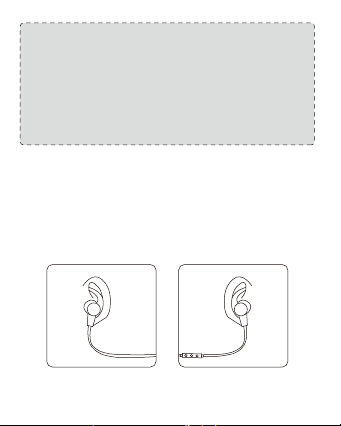
MODEL: TT-BH071
SOUNDELITE 71
WIRELESS STEREO EARPHONES
User Guide
EN
Package Contents
• 1 × TaoTronics Wireless Stereo Earphones
• 1 × USB Charging Cable
• 6 × Ear Buds (two are equipped on the earphones)
• 6 × Ear Hooks (two are equipped on the earphones)
• 1 × Travel Pouch
• 1 × User Guide
DE
Lieferumfang
• 1 × TaoTronics Kabellose Stereo Kopfhörer
• 1 × USB-Ladekabel
• 6 × Ohrstöpsel (ein Paar kommt bereits an den Kopfhörern)
• 6 × Ohrbügel (ein Paar kommt bereits an den Kopfhörern)
• 1 × Reiseetui
• 1 × Bedienungsanleitung
FR
Contenu du Package
• 1 × TaoTronics Écouteurs Stéréo Sans Fil
• 1 × Câble de Charge USB
• 6 × Oreillettes (deux sont déjà installées sur les écouteurs)
• 6 × Crochets d’Oreille (deux sont déjà installés sur les écouteurs)
• 1 × Pochette de Transport
• 1 × Guide d’Utilisation
ES
Contenido del paquete
• 1 × Auriculares Estéreo Inalámbricos TaoTronics
• 1 × Cable de Carga USB
• 6 × Tapones (dos están equipados en los auriculares)
• 6 × Ganchos de Oído (dos están equipados en los auriculares)
• 1 × Bolsa de Viaje
• 1 × Manual del Usuario
IT
Contenuto della Confezione
• 1 × TaoTronics Auricolari Stereo Bluetooth
• 1 × Cavo di Ricarica USB
• 6 × Gommini Auricolari (2 presenti sugli auricolari)
• 6 × Ganci Auricolari (2 presenti sugli auricolari)
• 1 × Custodia
• 1 × Guida Utente
JP
同梱物
• 1 × TaoTronics ワイヤレスステレオイヤホン
• 1 × USB 充電ケーブル
• 6 × イヤーピース(つは既にイヤホンに装着されています)
• 6 × イヤーフック(つはイヤホンに装着済)
• 1 × トラベルポーチ
• 1 × 取扱説明書
DC IN
EN
Product Diagram
1. Volume+/Next Track
2. Multifunction Button
3. LED Indicator
4. Volume-/Previous Track
5. Microphone
6. Micro USB Charging Port
DE
Produktdiagramm
1. Lautstärke+/Nächstes Lied
2. Multifunktionsknopf
3. LED-Anzeige
4. Lautstärke-/Vorheriges Lied
5. Mikrofon
6. Mikro USB-Ladeanschluss
FR
Description du Produit
1. Volume+/Piste Suivante
2. Bouton Multifonction
3. Voyant à LED
4. Volume-/Piste Précédente
5. Microphone
6. Port de Charge Micro-USB
ES
Diagrama del producto
1. Volumen + / Pista Siguiente
2. Botón Multifunción
3. Indicador LED
4. Volumen - / Pista anterior
5. Micrófono
6. Puerto de Carga Micro USB
IT
Schema del Prodotto
1. Volume +/Traccia Successiva
2. Tasto Multifunzione
3. Indicatore LED
4. Volume-/Traccia Precedente
5. Microfono
6. Porta di Ricarica Micro-USB
JP
製品図
1.音量+/次の曲
2.多機能ボタン
3.LEDインジケーター
4.音量-/前の曲
5.マイク
6.MicroUSB充電ポート
EN
How to Use
1. Charging
1) Connect the charging port with any USB charging adapter or active
computer USB port.
2) Charging will start automatically with the LED indicator turning red.
3) The earphones are fully charged when the LED indicator turns blue.
How to Wear
Please wear the earphones as shown in the diagram:
1) Attach the ear hooks onto the earphones.
2) Wear the earphones and the hooks on your ears and adjust for the
best fit.
Note:
• Charge the earphones at least once every 6 months when not
using for a long time.
• Make sure the battery is fully charged before putting the
earphones away for storage.
2. Pairing
1) Make sure the earphones and your Bluetooth® device are next to
each other (within 3 feet / 1 meter).
2) The first time you use the earphones, press and hold the
Multifunction Button until the LED indicator flashes red and blue
alternately. Now the earphones is in pairing mode.
3) Activate Bluetooth® function on your phone and search for the
nearby Bluetooth® connection: Find “TAOTRONICS SoundElite 71” in
the search results. Tap on the name to connect. Once connected, only
the blue LED will flash.
Note:
• The Bluetooth® earphones can remember previous paired devices.
• If the earphones cannot pair with your Bluetooth device, press
and hold the Volume+ / - Button at the same time until the LED
Indicator flashes twice and 2 beep sounds are heard to clear the
pairing history. Then restart the earphones to pair again.
DE
Bedienungsanleitung
1. Aufladen
1) Verbinden Sie den Ladeanschluss mit irgendeinem USB-Ladeadapter
oder aktivem Computer via USB-Anschluss.
2) Der Ladeprozess wird automatisch gestartet und die LED-Anzeige
wird rot leuchten.
3) Die Kopfhörer sind vollständig aufgeladen, wenn die LED-Anzeige
blau leuchtet.
2. Kopplung
1) Stellen Sie sicher, dass die Kopfhörer und Ihr Bluetooth®-Gerät sich
nah beieinander befinden (innerhalb von 1 Meter).
2) Wenn Sie die Kopfhörer das erste Mal benutzen, halten Sie den
Multifunktionsknopf gedrückt, bis die LED-Anzeige abwechselnd
rot und blau leuchtet. Die Kopfhörer befinden sich jetzt im
Kopplungsmodus.
3) Aktivieren Sie die Bluetooth®-Funktion auf Ihrem Smartphone
und suchen Sie nach Bluetooth®-Verbindungen in der Nähe:
Wählen Sie “TAOTRONICS SoundElite 71” aus der Liste aus. Sobald
die Verbindung besteht, blinkt die LED nur blau.
Hinweis:
• Die Bluetooth®-Kopfhörer speichern bereits gekoppelte Geräte
ab.
• Wenn sich die Kopfhörer nicht mit Ihrem Bluetooth®-Gerät
verbinden können, halten Sie den Lautstärke + / - Knopf
gleichzeitig gedrückt, bis die LED-Anzeige zweimal
aufleuchtet und die Kopfhörer 2 Mal piepen. Dies heißt, der
Kopplungsverlauf wurde gelöscht und der Kopplungsprozess
kann frisch gestartet werden.
Wie zu Tragen
Tragen Sie die Kopfhörer, wie abgebildet:
1) Bringen Sie die Ohrenbügel an den Kopfhörern an.
2) Tragen Sie die Kopfhörer so, dass die Ohrbügel bequem in Ihr
Ohr passen.
Hinweis:
• Laden Sie die Kopfhörer mindestens alle sechs Monate auf, wenn
Sie sie für eine längere Zeit nicht benutzen.
• Stellen Sie sicher, dass der Akku vollständig geladen ist, bevor Sie
die Kopfhörer zum Lagern verstauen.
FR
Mode d’Emploi
1. Chargement
1) Connectez le port de charge à un adaptateur USB ou un port USB
d’ordinateur actif.
2) Le chargement va démarrer automatiquement et le voyant à LED
deviendra rouge.
3) Les écouteurs seront entièrement chargés quand le voyant à LED
devient bleu.
2. Couplage
1) Assurez-vous que les écouteurs et votre appareil Bluetooth® soient à
proximité l’un de l’autre (à moins d’un mètre).
2) La première fois que vous utilisez les écouteurs, appuyez et
maintenez le Bouton Multifonction jusqu’à ce que le voyant à LED
clignote rouge et bleu alternativement. Les écouteurs sont
maintenant en mode de couplage.
3) Activez la fonction Bluetooth® sur votre téléphone et cherchez
les connexions Bluetooth® à proximité : localisez “TAOTRONICS
SoundElite 71” dans les résultats de la recherche. Cliquez dessus
pour établir la connexion. Une fois connecté, le voyant à LED
clignotera lentement en bleu.
Remarque:
• Les écouteurs Bluetooth® mémorisent les appareils précédemment
couplés.
• Si les écouteurs n’arrivent pas à se coupler avec votre appareil
Bluetooth, veuillez effacer l’historique de couplage en maintenant
appuyé simultanément sur les Boutons Volume + et Volume –
jusqu’à ce que le voyant à LED clignote pour 2 fois et que vous
entendez 2 bips. Puis redémarrez les écouteurs pour relancer le
couplage.
Comment les Porter
Veuillez porter les écouteurs comme indiqué sur le dessin :
1) Attachez les crochets d’oreille sur les écouteurs.
2) Portez les écouteurs et les crochets sur vos oreilles et réglez-les
pour vous convenir le mieux.
Remarque:
• Chargez les écouteurs au minimum une fois tous les 6 mois si vous
ne les utilisez pas dans une longue période.
• Assurez-vous que la batterie est complètement chargée avant de
ranger les écouteurs pour la préservation.
MODEL: TT-BH071
SOUNDELITE 71
WIRELESS STEREO EARPHONES
User Guide
IT
Funzionamento
1. Come Ricaricare
1) Connettere la porta micro-USB degli auricolari con un adattatore
USB o alla porta USB del computer.
2) La ricarica inizierà automaticamente e l’indicatore LED diverrà rosso.
3) L’indicatore diverrà blu quando gli auricolari sono carichi.
2. Come Connettere
1) Assicurarsi che gli auricolari ed il dispositivo Bluetooth® siano entro
1 metro/3 piedi di distanza.
2) Tenere premuto il Tasto Multifunzione fino a che l’indicatore LED non
lampeggi rosso e blu la prima volta che si utilizzano gli auricolari
perché questi entrino in modalità d’associazione.
3) Attivare la funzione Bluetooth® del proprio dispositivo e cercare i
dispositivi Bluetooth® disponibili nelle vicinanze: selezionare
“TAOTRONICS SoundElite 71” tra la lista dei risultati. Una volta
connessi, la luce blu del LED di notifica lampeggerà.
Nota:
• Gli auricolari Bluetooth® ritengono in memoria i dispositivi
precedentemente collegati.
• Se gli auricolari non si connettono con il dispositivo Bluetooth®,
mantenere premuto i tasti Volume + e Volume – assieme fino a che
l’indicatore LED non lampeggi 2 volte e non si sentano 2 bip
indicando che gli auricolari sono stati rimessi a posto.
Riavviare gli auricolari e associarli nuovamente.
Come Indossare gli Auricolari
Fare riferimento allo schema sottostante per indossare gli auricolari:
1) Fissare gli appositi ganci sugli auricolari
2) Inserire auricolari e ganci nelle orecchie fino a che questi non siano
confortabili.
Nota:
• Ricaricare gli auricolari almeno una volta ogni 6 mesi per periodi di
inutilizzo prolungato.
• Assicurarsi che la batteria sia completamente carica prima della
perservazione delle cuffie.
JP
使い方
1.充電
1)付属の充電ケーブルを本製品のMicroUSB充電ポートに接続し、もう片方
の端子を電源の入ったUSBポートに接続します。
2)LEDインジケーターが赤色になると自動的に充電が開始されます。
3)イヤホンはLEDインジケーターが青色になると完全に充電されます。
2.ペアリング
1)イヤホンとBluetooth®デバイスが隣り合っていることを確認します
(3フィート/1メートル以内)。
2)初めてイヤホンを使用するときは、LEDインジケーターが交互に赤と青で
点滅するまで多機能ボタンを押し続け、ペアリングモードにします。
3)お使いの携帯電話でBluetooth®機能を有効にし、近くのBluetooth®デバ
イスを検索します。検索結果で「TAOTRONICSSoundElite71」の名前をタ
ップします。ペアリングができたら、LEDインジケーターは青く点滅します。
装着方法
図のようにイヤホンを着用してください:
1) イヤーフックをイヤホンに取り付 けます。
2)イヤホンとイヤーフックを耳に付けて、最適なフィット感に調整します。
注 意:
•長時間ご使用にならない場合は、6ヶ月に1回はイヤホンを充電してください。
•長時間使用しない場合は、一度フル充電した後で保管してください。
注 意:
•このBluetoothイヤホンは以前接続されたデバイスを記録しています。
•音量調節「+ー」ボタンをLED点滅し、2回ビープ音を出すまで同時に
長押して、工場出荷時に戻せます。その後、イヤホンを再起動してペア
リングを再開してください。
NOTE: This equipment has been tested and found to comply with the
limits for a Class B digital device, pursuant to part 15 of the FCC Rules.
These limits are designed to provide reasonable protection against
harmful interference in a residential installation. This equipment
generates uses and can radiate radio frequency energy and, if not
installed and used in accordance with the instructions, may cause
harmful interference to radio communications. However, there is no
guarantee that interference will not occur in a particular installation. If
this equipment does cause harmful interference to radio or television
reception, which can be determined by turning the equipment off and
on, the user is encouraged to try to correct the interference by one or
more of the following measures:
- Reorient or relocate the receiving antenna.
- Increase the separation between the equipment and receiver.
-Connect the equipment into an outlet on a circuit different from that to
which the receiver is connected.
-Consult the dealer or an experienced radio/TV technician for help
Changes or modifications not expressly approved by the party
responsible for compliance could void the user's authority to operate
the equipment. This device complies with Part 15 of the FCC Rules.
Operation is subject to the following two conditions:
(1) this device may not cause harmful interference, and(2) this device must
accept any interference received, including interference that may cause
undesired operation.
EN The Bluetooth
®
word mark and logos are
registered trademarks owned by the Bluetooth
SIG, Inc. and any use of such marks by Sunvalleytek International Inc. is
under license. Other trademarks and trade names are those of their
respective owners.
DE Die Marke Bluetooth
®
und das Bluetooth Logo sind eingetragene
Markenzeichen der Bluetooth SIG, Inc. und jegliche Verwendung dieser
Marke durch Sunvalleytek International Inc. ist lizensiert. Die Rechte an
anderen Markenzeichen liegen beim jeweiligen Eigentümer.
FR Le terme et les logos Bluetooth
®
sont la propriété de Bluetooth
SIG, Inc. et toute utilisation de ces marques par Sunvalleytek
International Inc. se fait sous licence. Les autres désignations
commerciales et marques mentionnées sont détenues par leur
propriétaire respectif.
ES La marca Bluetooth
®
y los logotipos son de propiedad de Bluetooth
SIG, Inc. y se encuentra autorizado cualquier uso de estas marcas por
parte de Sunvalleytek International Inc. Otras marcas y nombres
comerciales son aquellas de sus respectivos propietarios.
IT La parola e i loghi Bluetooth
®
sono marchi di fabbrica registrati di
proprietà di Bluetooth SIG, Inc. e qualsiasi utilizzo di questi marchi da
parte di Sunvalleytek International Inc. avviene su licenza. Gli altri marchi
di fabbrica e nomi commerciali appartengono ai rispettivi proprietari.
JP Bluetooth®のワードマークおよびロゴはBluetooth SIG, Inc. が所有す
る登録商標であり 、Sunvalleytek International Inc.はこれらのマークおよび
ロゴをライセンスに基づいて使用しています。その他の 商標およびトレード
ネームは、それぞれの所有者に帰属します。
およびロゴをライセンスに基づいて使用しています。その他の 商標およびト
レードネームは、それぞれの所有者に帰属します。
EUROPE
E-mail:
EU Importer: ZBT International Trading GmbH
Address: Halstenbeker Weg 98C, 25462 Rellingen, Deutschland
NORTH AMERICA
E-mail : [email protected](US)
Tel : 1-888-456-8468 (Monday-Friday: 9:00 – 17:00 PST)
US Distributor: SUNVALLEYTEK INTERNATIONAL INC.
Address: 46724 Lakeview Blvd, Fremont, CA 94538
www.taotronics.com
ASIA PACIFIC
E-mail: [email protected](JP)
JP Importer: 株式会社SUNVALLEYJAPAN
Address:〒104-0032東京都中央区八丁堀3丁目18-6PMO京橋東9F
MANUFACTURER
Shenzhen NearbyExpress Technology Development Co.,Ltd.
Address: 333 Bulong Road, Shenzhen, China, 518129
MADE IN CHINA
Learn more about the EU Declaration of Conformity:
https://www.taotronics.com/downloads-TT-BH071-CE-Cert.html
TT-BH071_V1.6
ES
Cómo utilizarlos
1. Carga
1) Conecte el puerto de carga con cualquier adaptador de carga USB o
a un puerto USB de un ordenador encendido.
2) La carga comenzará automáticamente cuando el indicador del LED
se pondrá en rojo.
3) Los auriculares están completamente cargados cuando el
indicador LED se vuelve azul.
2. Emparejamiento
1) Asegúrese de que los auriculares y el dispositivo Bluetooth® estén
uno al lado del otro (a menos de 3 pies / 1 metro).
2) La primera vez que utilice los auriculares, mantenga pulsado el
botón multifunción hasta que el indicador LED parpadee en rojo y
azul alternativamente. Ahora los auriculares están en modo de
emparejamiento.
3) Active la función Bluetooth® en su teléfono y busque la conexión
Bluetooth® cercana: Encuentre "TAOTRONICS SoundElite 71" en los
resultados de búsqueda. Toque en el nombre para conectarse.
Una vez conectado, el LED azul parpadeará.
Nota:
• Los auriculares Bluetooth® pueden recordar los dispositivos
emparejados anteriormente.
• Si los auriculares no pueden emparejarse con su dispositivo
Bluetooth, presione y mantenga presionande el botón Volume+
/- al mismo tiempo hasta que el Indacador LED parpadee en 2
veces y 2 pitidos se oigan a borrar el historial de emparejamiento.
A continuación, reinicie los auriculares para volver a emparejarse.
Como ponérselos
Por favor use los auriculares como se muestra en el diagrama:
1) Coloque los ganchos de oreja en los auriculares.
2) Use los auriculares y los ganchos en sus oídos y regúlelos para un
mejor ajuste.
Nota:
• Cargue los auriculares al menos una vez cada 6 meses cuando no lo
utilice durante mucho tiempo.
• Asegúrese de que la batería está completamente cargada antes de
guardarlos.
FCC Compliance
WEEE Compliance
Correct Disposal of This Product (Waste Electrical & Electronic
Equipment)
(Applicable in countries with separate collection systems)
This marking on the product, accessories or literature indicates that the
product and its electronic accessories should not be disposed of with
other household waste at the end of their working life. To prevent
possible harm to the environment or human health from uncontrolled
waste disposal, please separate these items from other types of waste
and recycle them responsibly to promote the sustainable reuse of
material resources. Household users should contact either the retailer
where they purchased this product, or their local government office, for
details of where and how they can take these items for environmentally
safe recycling. Business users should contact their supplier and check
the terms and conditions of the purchase contract. This product and its
electronic accessories should not be mixed with other commercial
wastes for disposal.
IT
Funzionamento
1. Come Ricaricare
1) Connettere la porta micro-USB degli auricolari con un adattatore
USB o alla porta USB del computer.
2) La ricarica inizierà automaticamente e l’indicatore LED diverrà rosso.
3) L’indicatore diverrà blu quando gli auricolari sono carichi.
2. Come Connettere
1) Assicurarsi che gli auricolari ed il dispositivo Bluetooth® siano entro
1 metro/3 piedi di distanza.
2) Tenere premuto il Tasto Multifunzione fino a che l’indicatore LED non
lampeggi rosso e blu la prima volta che si utilizzano gli auricolari
perché questi entrino in modalità d’associazione.
3) Attivare la funzione Bluetooth® del proprio dispositivo e cercare i
dispositivi Bluetooth® disponibili nelle vicinanze: selezionare
“TAOTRONICS SoundElite 71” tra la lista dei risultati. Una volta
connessi, la luce blu del LED di notifica lampeggerà.
Nota:
• Gli auricolari Bluetooth® ritengono in memoria i dispositivi
precedentemente collegati.
• Se gli auricolari non si connettono con il dispositivo Bluetooth®,
mantenere premuto i tasti Volume + e Volume – assieme fino a che
l’indicatore LED non lampeggi 2 volte e non si sentano 2 bip
indicando che gli auricolari sono stati rimessi a posto.
Riavviare gli auricolari e associarli nuovamente.
Come Indossare gli Auricolari
Fare riferimento allo schema sottostante per indossare gli auricolari:
1) Fissare gli appositi ganci sugli auricolari
2) Inserire auricolari e ganci nelle orecchie fino a che questi non siano
confortabili.
Nota:
• Ricaricare gli auricolari almeno una volta ogni 6 mesi per periodi di
inutilizzo prolungato.
• Assicurarsi che la batteria sia completamente carica prima della
perservazione delle cuffie.
JP
使い方
1.充電
1)付属の充電ケーブルを本製品のMicroUSB充電ポートに接続し、もう片方
の端子を電源の入ったUSBポートに接続します。
2)LEDインジケーターが赤色になると自動的に充電が開始されます。
3)イヤホンはLEDインジケーターが青色になると完全に充電されます。
2.ペアリング
1)イヤホンとBluetooth®デバイスが隣り合っていることを確認します
(3フィート/1メートル以内)。
2)初めてイヤホンを使用するときは、LEDインジケーターが交互に赤と青で
点滅するまで多機能ボタンを押し続け、ペアリングモードにします。
3)お使いの携帯電話でBluetooth®機能を有効にし、近くのBluetooth®デバ
イスを検索します。検索結果で「TAOTRONICSSoundElite71」の名前をタ
ップします。ペアリングができたら、LEDインジケーターは青く点滅します。
装着方法
図のようにイヤホンを着用してください:
1) イヤーフックをイヤホンに取り付 けます。
2)イヤホンとイヤーフックを耳に付けて、最適なフィット感に調整します。
注 意:
•長時間ご使用にならない場合は、6ヶ月に1回はイヤホンを充電してください。
•長時間使用しない場合は、一度フル充電した後で保管してください。
注 意:
•このBluetoothイヤホンは以前接続されたデバイスを記録しています。
•音量調節「+ー」ボタンをLED点滅し、2回ビープ音を出すまで同時に
長押して、工場出荷時に戻せます。その後、イヤホンを再起動してペア
リングを再開してください。
NOTE: This equipment has been tested and found to comply with the
limits for a Class B digital device, pursuant to part 15 of the FCC Rules.
These limits are designed to provide reasonable protection against
harmful interference in a residential installation. This equipment
generates uses and can radiate radio frequency energy and, if not
installed and used in accordance with the instructions, may cause
harmful interference to radio communications. However, there is no
guarantee that interference will not occur in a particular installation. If
this equipment does cause harmful interference to radio or television
reception, which can be determined by turning the equipment off and
on, the user is encouraged to try to correct the interference by one or
more of the following measures:
- Reorient or relocate the receiving antenna.
- Increase the separation between the equipment and receiver.
-Connect the equipment into an outlet on a circuit different from that to
which the receiver is connected.
-Consult the dealer or an experienced radio/TV technician for help
Changes or modifications not expressly approved by the party
responsible for compliance could void the user's authority to operate
the equipment. This device complies with Part 15 of the FCC Rules.
Operation is subject to the following two conditions:
(1) this device may not cause harmful interference, and(2) this device must
accept any interference received, including interference that may cause
undesired operation.
EN The Bluetooth
®
word mark and logos are
registered trademarks owned by the Bluetooth
SIG, Inc. and any use of such marks by Sunvalleytek International Inc. is
under license. Other trademarks and trade names are those of their
respective owners.
DE Die Marke Bluetooth
®
und das Bluetooth Logo sind eingetragene
Markenzeichen der Bluetooth SIG, Inc. und jegliche Verwendung dieser
Marke durch Sunvalleytek International Inc. ist lizensiert. Die Rechte an
anderen Markenzeichen liegen beim jeweiligen Eigentümer.
FR Le terme et les logos Bluetooth
®
sont la propriété de Bluetooth
SIG, Inc. et toute utilisation de ces marques par Sunvalleytek
International Inc. se fait sous licence. Les autres désignations
commerciales et marques mentionnées sont détenues par leur
propriétaire respectif.
ES La marca Bluetooth
®
y los logotipos son de propiedad de Bluetooth
SIG, Inc. y se encuentra autorizado cualquier uso de estas marcas por
parte de Sunvalleytek International Inc. Otras marcas y nombres
comerciales son aquellas de sus respectivos propietarios.
IT La parola e i loghi Bluetooth
®
sono marchi di fabbrica registrati di
proprietà di Bluetooth SIG, Inc. e qualsiasi utilizzo di questi marchi da
parte di Sunvalleytek International Inc. avviene su licenza. Gli altri marchi
di fabbrica e nomi commerciali appartengono ai rispettivi proprietari.
JP Bluetooth®のワードマークおよびロゴはBluetooth SIG, Inc. が所有す
る登録商標であり 、Sunvalleytek International Inc.はこれらのマークおよび
ロゴをライセンスに基づいて使用しています。その他の 商標およびトレード
ネームは、それぞれの所有者に帰属します。
およびロゴをライセンスに基づいて使用しています。その他の 商標およびト
レードネームは、それぞれの所有者に帰属します。
EUROPE
E-mail:
support.uk@taotronics.com(UK)
support.de@taotronics.com(DE)
support.fr@taotronics.com(FR)
support.es@taotronics.com(ES)
support.it@taotronics.com(IT)
EU Importer: ZBT International Trading GmbH
Address: Halstenbeker Weg 98C, 25462 Rellingen, Deutschland
NORTH AMERICA
E-mail : support@taotronics.com(US)
support.ca@taotronics.com(CA)
Tel : 1-888-456-8468 (Monday-Friday: 9:00 – 17:00 PST)
US Distributor: SUNVALLEYTEK INTERNATIONAL INC.
Address: 46724 Lakeview Blvd, Fremont, CA 94538
www.taotronics.com
ASIA PACIFIC
E-mail: support.jp@taotronics.com(JP)
JP Importer: 株式会社SUNVALLEYJAPAN
Address:〒104-0032東京都中央区八丁堀3丁目18-6PMO京橋東9F
MANUFACTURER
Shenzhen NearbyExpress Technology Development Co.,Ltd.
Address: 333 Bulong Road, Shenzhen, China, 518129
MADE IN CHINA
Learn more about the EU Declaration of Conformity:
https://www.taotronics.com/downloads-TT-BH071-CE-Cert.html
TT-BH071_V1.6
ES
Cómo utilizarlos
1. Carga
1) Conecte el puerto de carga con cualquier adaptador de carga USB o
a un puerto USB de un ordenador encendido.
2) La carga comenzará automáticamente cuando el indicador del LED
se pondrá en rojo.
3) Los auriculares están completamente cargados cuando el
indicador LED se vuelve azul.
2. Emparejamiento
1) Asegúrese de que los auriculares y el dispositivo Bluetooth® estén
uno al lado del otro (a menos de 3 pies / 1 metro).
2) La primera vez que utilice los auriculares, mantenga pulsado el
botón multifunción hasta que el indicador LED parpadee en rojo y
azul alternativamente. Ahora los auriculares están en modo de
emparejamiento.
3) Active la función Bluetooth® en su teléfono y busque la conexión
Bluetooth® cercana: Encuentre "TAOTRONICS SoundElite 71" en los
resultados de búsqueda. Toque en el nombre para conectarse.
Una vez conectado, el LED azul parpadeará.
Nota:
• Los auriculares Bluetooth® pueden recordar los dispositivos
emparejados anteriormente.
• Si los auriculares no pueden emparejarse con su dispositivo
Bluetooth, presione y mantenga presionande el botón Volume+
/- al mismo tiempo hasta que el Indacador LED parpadee en 2
veces y 2 pitidos se oigan a borrar el historial de emparejamiento.
A continuación, reinicie los auriculares para volver a emparejarse.
Como ponérselos
Por favor use los auriculares como se muestra en el diagrama:
1) Coloque los ganchos de oreja en los auriculares.
2) Use los auriculares y los ganchos en sus oídos y regúlelos para un
mejor ajuste.
Nota:
• Cargue los auriculares al menos una vez cada 6 meses cuando no lo
utilice durante mucho tiempo.
• Asegúrese de que la batería está completamente cargada antes de
guardarlos.
FCC Compliance
WEEE Compliance
Correct Disposal of This Product (Waste Electrical & Electronic
Equipment)
(Applicable in countries with separate collection systems)
This marking on the product, accessories or literature indicates that the
product and its electronic accessories should not be disposed of with
other household waste at the end of their working life. To prevent
possible harm to the environment or human health from uncontrolled
waste disposal, please separate these items from other types of waste
and recycle them responsibly to promote the sustainable reuse of
material resources. Household users should contact either the retailer
where they purchased this product, or their local government office, for
details of where and how they can take these items for environmentally
safe recycling. Business users should contact their supplier and check
the terms and conditions of the purchase contract. This product and its
electronic accessories should not be mixed with other commercial
wastes for disposal.
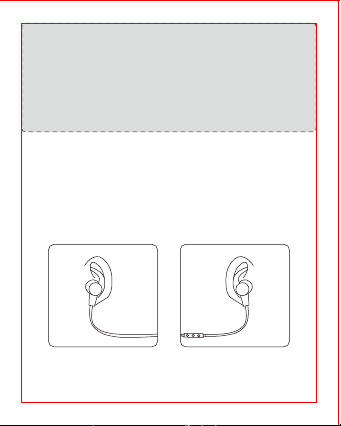
IT
Funzionamento
1. Come Ricaricare
1) Connettere la porta micro-USB degli auricolari con un adattatore
USB o alla porta USB del computer.
2) La ricarica inizierà automaticamente e l’indicatore LED diverrà rosso.
3) L’indicatore diverrà blu quando gli auricolari sono carichi.
2. Come Connettere
1) Assicurarsi che gli auricolari ed il dispositivo Bluetooth® siano entro
1 metro/3 piedi di distanza.
2) Tenere premuto il Tasto Multifunzione fino a che l’indicatore LED non
lampeggi rosso e blu la prima volta che si utilizzano gli auricolari
perché questi entrino in modalità d’associazione.
3) Attivare la funzione Bluetooth® del proprio dispositivo e cercare i
dispositivi Bluetooth® disponibili nelle vicinanze: selezionare
“TAOTRONICS SoundElite 71” tra la lista dei risultati. Una volta
connessi, la luce blu del LED di notifica lampeggerà.
Nota:
• Gli auricolari Bluetooth® ritengono in memoria i dispositivi
precedentemente collegati.
• Se gli auricolari non si connettono con il dispositivo Bluetooth®,
mantenere premuto i tasti Volume + e Volume – assieme fino a che
l’indicatore LED non lampeggi 2 volte e non si sentano 2 bip
indicando che gli auricolari sono stati rimessi a posto.
Riavviare gli auricolari e associarli nuovamente.
Come Indossare gli Auricolari
Fare riferimento allo schema sottostante per indossare gli auricolari:
1) Fissare gli appositi ganci sugli auricolari
2) Inserire auricolari e ganci nelle orecchie fino a che questi non siano
confortabili.
Nota:
• Ricaricare gli auricolari almeno una volta ogni 6 mesi per periodi di
inutilizzo prolungato.
• Assicurarsi che la batteria sia completamente carica prima della
perservazione delle cuffie.
JP
使い方
1.充電
1)付属の充電ケーブルを本製品のMicroUSB充電ポートに接続し、もう片方
の端子を電源の入ったUSBポートに接続します。
2)LEDインジケーターが赤色になると自動的に充電が開始されます。
3)イヤホンはLEDインジケーターが青色になると完全に充電されます。
2.ペアリング
1)イヤホンとBluetooth®デバイスが隣り合っていることを確認します
(3フィート/1メートル以内)。
2)初めてイヤホンを使用するときは、LEDインジケーターが交互に赤と青で
点滅するまで多機能ボタンを押し続け、ペアリングモードにします。
3)お使いの携帯電話でBluetooth®機能を有効にし、近くのBluetooth®デバ
イスを検索します。検索結果で「TAOTRONICSSoundElite71」の名前をタ
ップします。ペアリングができたら、LEDインジケーターは青く点滅します。
装着方法
図のようにイヤホンを着用してください:
1) イヤーフックをイヤホンに取り付 けます。
2)イヤホンとイヤーフックを耳に付けて、最適なフィット感に調整します。
注 意:
•長時間ご使用にならない場合は、6ヶ月に1回はイヤホンを充電してください。
•長時間使用しない場合は、一度フル充電した後で保管してください。
注 意:
•このBluetoothイヤホンは以前接続されたデバイスを記録しています。
•音量調節「+ー」ボタンをLED点滅し、2回ビープ音を出すまで同時に
長押して、工場出荷時に戻せます。その後、イヤホンを再起動してペア
リングを再開してください。
NOTE: This equipment has been tested and found to comply with the
limits for a Class B digital device, pursuant to part 15 of the FCC Rules.
These limits are designed to provide reasonable protection against
harmful interference in a residential installation. This equipment
generates uses and can radiate radio frequency energy and, if not
installed and used in accordance with the instructions, may cause
harmful interference to radio communications. However, there is no
guarantee that interference will not occur in a particular installation. If
this equipment does cause harmful interference to radio or television
reception, which can be determined by turning the equipment off and
on, the user is encouraged to try to correct the interference by one or
more of the following measures:
- Reorient or relocate the receiving antenna.
- Increase the separation between the equipment and receiver.
-Connect the equipment into an outlet on a circuit different from that to
which the receiver is connected.
-Consult the dealer or an experienced radio/TV technician for help
Changes or modifications not expressly approved by the party
responsible for compliance could void the user's authority to operate
the equipment. This device complies with Part 15 of the FCC Rules.
Operation is subject to the following two conditions:
(1) this device may not cause harmful interference, and(2) this device must
accept any interference received, including interference that may cause
undesired operation.
EN The Bluetooth
®
word mark and logos are
registered trademarks owned by the Bluetooth
SIG, Inc. and any use of such marks by Sunvalleytek International Inc. is
under license. Other trademarks and trade names are those of their
respective owners.
DE Die Marke Bluetooth
®
und das Bluetooth Logo sind eingetragene
Markenzeichen der Bluetooth SIG, Inc. und jegliche Verwendung dieser
Marke durch Sunvalleytek International Inc. ist lizensiert. Die Rechte an
anderen Markenzeichen liegen beim jeweiligen Eigentümer.
FR Le terme et les logos Bluetooth
®
sont la propriété de Bluetooth
SIG, Inc. et toute utilisation de ces marques par Sunvalleytek
International Inc. se fait sous licence. Les autres désignations
commerciales et marques mentionnées sont détenues par leur
propriétaire respectif.
ES La marca Bluetooth
®
y los logotipos son de propiedad de Bluetooth
SIG, Inc. y se encuentra autorizado cualquier uso de estas marcas por
parte de Sunvalleytek International Inc. Otras marcas y nombres
comerciales son aquellas de sus respectivos propietarios.
IT La parola e i loghi Bluetooth
®
sono marchi di fabbrica registrati di
proprietà di Bluetooth SIG, Inc. e qualsiasi utilizzo di questi marchi da
parte di Sunvalleytek International Inc. avviene su licenza. Gli altri marchi
di fabbrica e nomi commerciali appartengono ai rispettivi proprietari.
JP Bluetooth®のワードマークおよびロゴはBluetooth SIG, Inc. が所有す
る登録商標であり 、Sunvalleytek International Inc.はこれらのマークおよび
ロゴをライセンスに基づいて使用しています。その他の 商標およびトレード
ネームは、それぞれの所有者に帰属します。
およびロゴをライセンスに基づいて使用しています。その他の 商標およびト
レードネームは、それぞれの所有者に帰属します。
EUROPE
E-mail:
support.uk@taotronics.com(UK)
support.de@taotronics.com(DE)
support.fr@taotronics.com(FR)
support.es@taotronics.com(ES)
support.it@taotronics.com(IT)
EU Importer: ZBT International Trading GmbH
Address: Halstenbeker Weg 98C, 25462 Rellingen, Deutschland
NORTH AMERICA
E-mail : support@taotronics.com(US)
support.ca@taotronics.com(CA)
Tel : 1-888-456-8468 (Monday-Friday: 9:00 – 17:00 PST)
US Distributor: SUNVALLEYTEK INTERNATIONAL INC.
Address: 46724 Lakeview Blvd, Fremont, CA 94538
www.taotronics.com
ASIA PACIFIC
E-mail: support.jp@taotronics.com(JP)
JP Importer: 株式会社SUNVALLEYJAPAN
Address:〒104-0032東京都中央区八丁堀3丁目18-6PMO京橋東9F
MANUFACTURER
Shenzhen NearbyExpress Technology Development Co.,Ltd.
Address: 333 Bulong Road, Shenzhen, China, 518129
MADE IN CHINA
Learn more about the EU Declaration of Conformity:
https://www.taotronics.com/downloads-TT-BH071-CE-Cert.html
TT-BH071_V1.6
ES
Cómo utilizarlos
1. Carga
1) Conecte el puerto de carga con cualquier adaptador de carga USB o
a un puerto USB de un ordenador encendido.
2) La carga comenzará automáticamente cuando el indicador del LED
se pondrá en rojo.
3) Los auriculares están completamente cargados cuando el
indicador LED se vuelve azul.
2. Emparejamiento
1) Asegúrese de que los auriculares y el dispositivo Bluetooth® estén
uno al lado del otro (a menos de 3 pies / 1 metro).
2) La primera vez que utilice los auriculares, mantenga pulsado el
botón multifunción hasta que el indicador LED parpadee en rojo y
azul alternativamente. Ahora los auriculares están en modo de
emparejamiento.
3) Active la función Bluetooth® en su teléfono y busque la conexión
Bluetooth® cercana: Encuentre "TAOTRONICS SoundElite 71" en los
resultados de búsqueda. Toque en el nombre para conectarse.
Una vez conectado, el LED azul parpadeará.
Nota:
• Los auriculares Bluetooth® pueden recordar los dispositivos
emparejados anteriormente.
• Si los auriculares no pueden emparejarse con su dispositivo
Bluetooth, presione y mantenga presionande el botón Volume+
/- al mismo tiempo hasta que el Indacador LED parpadee en 2
veces y 2 pitidos se oigan a borrar el historial de emparejamiento.
A continuación, reinicie los auriculares para volver a emparejarse.
Como ponérselos
Por favor use los auriculares como se muestra en el diagrama:
1) Coloque los ganchos de oreja en los auriculares.
2) Use los auriculares y los ganchos en sus oídos y regúlelos para un
mejor ajuste.
Nota:
• Cargue los auriculares al menos una vez cada 6 meses cuando no lo
utilice durante mucho tiempo.
• Asegúrese de que la batería está completamente cargada antes de
guardarlos.
FCC Compliance
WEEE Compliance
Correct Disposal of This Product (Waste Electrical & Electronic
Equipment)
(Applicable in countries with separate collection systems)
This marking on the product, accessories or literature indicates that the
product and its electronic accessories should not be disposed of with
other household waste at the end of their working life. To prevent
possible harm to the environment or human health from uncontrolled
waste disposal, please separate these items from other types of waste
and recycle them responsibly to promote the sustainable reuse of
material resources. Household users should contact either the retailer
where they purchased this product, or their local government office, for
details of where and how they can take these items for environmentally
safe recycling. Business users should contact their supplier and check
the terms and conditions of the purchase contract. This product and its
electronic accessories should not be mixed with other commercial
wastes for disposal.
IT
Funzionamento
1. Come Ricaricare
1) Connettere la porta micro-USB degli auricolari con un adattatore
USB o alla porta USB del computer.
2) La ricarica inizierà automaticamente e l’indicatore LED diverrà rosso.
3) L’indicatore diverrà blu quando gli auricolari sono carichi.
2. Come Connettere
1) Assicurarsi che gli auricolari ed il dispositivo Bluetooth® siano entro
1 metro/3 piedi di distanza.
2) Tenere premuto il Tasto Multifunzione fino a che l’indicatore LED non
lampeggi rosso e blu la prima volta che si utilizzano gli auricolari
perché questi entrino in modalità d’associazione.
3) Attivare la funzione Bluetooth® del proprio dispositivo e cercare i
dispositivi Bluetooth® disponibili nelle vicinanze: selezionare
“TAOTRONICS SoundElite 71” tra la lista dei risultati. Una volta
connessi, la luce blu del LED di notifica lampeggerà.
Nota:
• Gli auricolari Bluetooth® ritengono in memoria i dispositivi
precedentemente collegati.
• Se gli auricolari non si connettono con il dispositivo Bluetooth®,
mantenere premuto i tasti Volume + e Volume – assieme fino a che
l’indicatore LED non lampeggi 2 volte e non si sentano 2 bip
indicando che gli auricolari sono stati rimessi a posto.
Riavviare gli auricolari e associarli nuovamente.
Come Indossare gli Auricolari
Fare riferimento allo schema sottostante per indossare gli auricolari:
1) Fissare gli appositi ganci sugli auricolari
2) Inserire auricolari e ganci nelle orecchie fino a che questi non siano
confortabili.
Nota:
• Ricaricare gli auricolari almeno una volta ogni 6 mesi per periodi di
inutilizzo prolungato.
• Assicurarsi che la batteria sia completamente carica prima della
perservazione delle cuffie.
JP
使い方
1.充電
1)付属の充電ケーブルを本製品のMicroUSB充電ポートに接続し、もう片方
の端子を電源の入ったUSBポートに接続します。
2)LEDインジケーターが赤色になると自動的に充電が開始されます。
3)イヤホンはLEDインジケーターが青色になると完全に充電されます。
2.ペアリング
1)イヤホンとBluetooth®デバイスが隣り合っていることを確認します
(3フィート/1メートル以内)。
2)初めてイヤホンを使用するときは、LEDインジケーターが交互に赤と青で
点滅するまで多機能ボタンを押し続け、ペアリングモードにします。
3)お使いの携帯電話でBluetooth®機能を有効にし、近くのBluetooth®デバ
イスを検索します。検索結果で「TAOTRONICSSoundElite71」の名前をタ
ップします。ペアリングができたら、LEDインジケーターは青く点滅します。
装着方法
図のようにイヤホンを着用してください:
1) イヤーフックをイヤホンに取り付 けます。
2)イヤホンとイヤーフックを耳に付けて、最適なフィット感に調整します。
注 意:
•長時間ご使用にならない場合は、6ヶ月に1回はイヤホンを充電してください。
•長時間使用しない場合は、一度フル充電した後で保管してください。
注 意:
•このBluetoothイヤホンは以前接続されたデバイスを記録しています。
•音量調節「+ー」ボタンをLED点滅し、2回ビープ音を出すまで同時に
長押して、工場出荷時に戻せます。その後、イヤホンを再起動してペア
リングを再開してください。
NOTE: This equipment has been tested and found to comply with the
limits for a Class B digital device, pursuant to part 15 of the FCC Rules.
These limits are designed to provide reasonable protection against
harmful interference in a residential installation. This equipment
generates uses and can radiate radio frequency energy and, if not
installed and used in accordance with the instructions, may cause
harmful interference to radio communications. However, there is no
guarantee that interference will not occur in a particular installation. If
this equipment does cause harmful interference to radio or television
reception, which can be determined by turning the equipment off and
on, the user is encouraged to try to correct the interference by one or
more of the following measures:
- Reorient or relocate the receiving antenna.
- Increase the separation between the equipment and receiver.
-Connect the equipment into an outlet on a circuit different from that to
which the receiver is connected.
-Consult the dealer or an experienced radio/TV technician for help
Changes or modifications not expressly approved by the party
responsible for compliance could void the user's authority to operate
the equipment. This device complies with Part 15 of the FCC Rules.
Operation is subject to the following two conditions:
(1) this device may not cause harmful interference, and(2) this device must
accept any interference received, including interference that may cause
undesired operation.
EN The Bluetooth
®
word mark and logos are
registered trademarks owned by the Bluetooth
SIG, Inc. and any use of such marks by Sunvalleytek International Inc. is
under license. Other trademarks and trade names are those of their
respective owners.
DE Die Marke Bluetooth
®
und das Bluetooth Logo sind eingetragene
Markenzeichen der Bluetooth SIG, Inc. und jegliche Verwendung dieser
Marke durch Sunvalleytek International Inc. ist lizensiert. Die Rechte an
anderen Markenzeichen liegen beim jeweiligen Eigentümer.
FR Le terme et les logos Bluetooth
®
sont la propriété de Bluetooth
SIG, Inc. et toute utilisation de ces marques par Sunvalleytek
International Inc. se fait sous licence. Les autres désignations
commerciales et marques mentionnées sont détenues par leur
propriétaire respectif.
ES La marca Bluetooth
®
y los logotipos son de propiedad de Bluetooth
SIG, Inc. y se encuentra autorizado cualquier uso de estas marcas por
parte de Sunvalleytek International Inc. Otras marcas y nombres
comerciales son aquellas de sus respectivos propietarios.
IT La parola e i loghi Bluetooth
®
sono marchi di fabbrica registrati di
proprietà di Bluetooth SIG, Inc. e qualsiasi utilizzo di questi marchi da
parte di Sunvalleytek International Inc. avviene su licenza. Gli altri marchi
di fabbrica e nomi commerciali appartengono ai rispettivi proprietari.
JP Bluetooth®のワードマークおよびロゴはBluetooth SIG, Inc. が所有す
る登録商標であり 、Sunvalleytek International Inc.はこれらのマークおよび
ロゴをライセンスに基づいて使用しています。その他の 商標およびトレード
ネームは、それぞれの所有者に帰属します。
およびロゴをライセンスに基づいて使用しています。その他の 商標およびト
レードネームは、それぞれの所有者に帰属します。
EUROPE
E-mail:
support.uk@taotronics.com(UK)
support.de@taotronics.com(DE)
support.fr@taotronics.com(FR)
support.es@taotronics.com(ES)
support.it@taotronics.com(IT)
EU Importer: ZBT International Trading GmbH
Address: Halstenbeker Weg 98C, 25462 Rellingen, Deutschland
NORTH AMERICA
E-mail : support@taotronics.com(US)
support.ca@taotronics.com(CA)
Tel : 1-888-456-8468 (Monday-Friday: 9:00 – 17:00 PST)
US Distributor: SUNVALLEYTEK INTERNATIONAL INC.
Address: 46724 Lakeview Blvd, Fremont, CA 94538
www.taotronics.com
ASIA PACIFIC
E-mail: support.jp@taotronics.com(JP)
JP Importer: 株式会社SUNVALLEYJAPAN
Address:〒104-0032東京都中央区八丁堀3丁目18-6PMO京橋東9F
MANUFACTURER
Shenzhen NearbyExpress Technology Development Co.,Ltd.
Address: 333 Bulong Road, Shenzhen, China, 518129
MADE IN CHINA
Learn more about the EU Declaration of Conformity:
https://www.taotronics.com/downloads-TT-BH071-CE-Cert.html
TT-BH071_V1.6
ES
Cómo utilizarlos
1. Carga
1) Conecte el puerto de carga con cualquier adaptador de carga USB o
a un puerto USB de un ordenador encendido.
2) La carga comenzará automáticamente cuando el indicador del LED
se pondrá en rojo.
3) Los auriculares están completamente cargados cuando el
indicador LED se vuelve azul.
2. Emparejamiento
1) Asegúrese de que los auriculares y el dispositivo Bluetooth® estén
uno al lado del otro (a menos de 3 pies / 1 metro).
2) La primera vez que utilice los auriculares, mantenga pulsado el
botón multifunción hasta que el indicador LED parpadee en rojo y
azul alternativamente. Ahora los auriculares están en modo de
emparejamiento.
3) Active la función Bluetooth® en su teléfono y busque la conexión
Bluetooth® cercana: Encuentre "TAOTRONICS SoundElite 71" en los
resultados de búsqueda. Toque en el nombre para conectarse.
Una vez conectado, el LED azul parpadeará.
Nota:
• Los auriculares Bluetooth® pueden recordar los dispositivos
emparejados anteriormente.
• Si los auriculares no pueden emparejarse con su dispositivo
Bluetooth, presione y mantenga presionande el botón Volume+
/- al mismo tiempo hasta que el Indacador LED parpadee en 2
veces y 2 pitidos se oigan a borrar el historial de emparejamiento.
A continuación, reinicie los auriculares para volver a emparejarse.
Como ponérselos
Por favor use los auriculares como se muestra en el diagrama:
1) Coloque los ganchos de oreja en los auriculares.
2) Use los auriculares y los ganchos en sus oídos y regúlelos para un
mejor ajuste.
Nota:
• Cargue los auriculares al menos una vez cada 6 meses cuando no lo
utilice durante mucho tiempo.
• Asegúrese de que la batería está completamente cargada antes de
guardarlos.
FCC Compliance
WEEE Compliance
Correct Disposal of This Product (Waste Electrical & Electronic
Equipment)
(Applicable in countries with separate collection systems)
This marking on the product, accessories or literature indicates that the
product and its electronic accessories should not be disposed of with
other household waste at the end of their working life. To prevent
possible harm to the environment or human health from uncontrolled
waste disposal, please separate these items from other types of waste
and recycle them responsibly to promote the sustainable reuse of
material resources. Household users should contact either the retailer
where they purchased this product, or their local government office, for
details of where and how they can take these items for environmentally
safe recycling. Business users should contact their supplier and check
the terms and conditions of the purchase contract. This product and its
electronic accessories should not be mixed with other commercial
wastes for disposal.
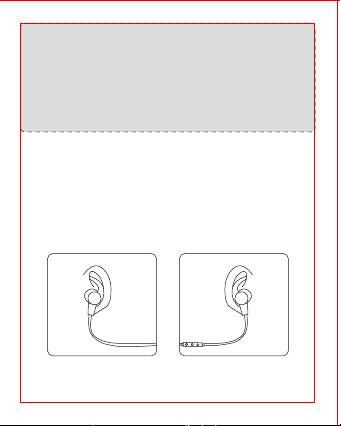
IT
Funzionamento
1. Come Ricaricare
1) Connettere la porta micro-USB degli auricolari con un adattatore
USB o alla porta USB del computer.
2) La ricarica inizierà automaticamente e l’indicatore LED diverrà rosso.
3) L’indicatore diverrà blu quando gli auricolari sono carichi.
2. Come Connettere
1) Assicurarsi che gli auricolari ed il dispositivo Bluetooth® siano entro
1 metro/3 piedi di distanza.
2) Tenere premuto il Tasto Multifunzione fino a che l’indicatore LED non
lampeggi rosso e blu la prima volta che si utilizzano gli auricolari
perché questi entrino in modalità d’associazione.
3) Attivare la funzione Bluetooth® del proprio dispositivo e cercare i
dispositivi Bluetooth® disponibili nelle vicinanze: selezionare
“TAOTRONICS SoundElite 71” tra la lista dei risultati. Una volta
connessi, la luce blu del LED di notifica lampeggerà.
Nota:
• Gli auricolari Bluetooth® ritengono in memoria i dispositivi
precedentemente collegati.
• Se gli auricolari non si connettono con il dispositivo Bluetooth®,
mantenere premuto i tasti Volume + e Volume – assieme fino a che
l’indicatore LED non lampeggi 2 volte e non si sentano 2 bip
indicando che gli auricolari sono stati rimessi a posto.
Riavviare gli auricolari e associarli nuovamente.
Come Indossare gli Auricolari
Fare riferimento allo schema sottostante per indossare gli auricolari:
1) Fissare gli appositi ganci sugli auricolari
2) Inserire auricolari e ganci nelle orecchie fino a che questi non siano
confortabili.
Nota:
• Ricaricare gli auricolari almeno una volta ogni 6 mesi per periodi di
inutilizzo prolungato.
• Assicurarsi che la batteria sia completamente carica prima della
perservazione delle cuffie.
JP
使い方
1.充電
1)付属の充電ケーブルを本製品のMicroUSB充電ポートに接続し、もう片方
の端子を電源の入ったUSBポートに接続します。
2)LEDインジケーターが赤色になると自動的に充電が開始されます。
3)イヤホンはLEDインジケーターが青色になると完全に充電されます。
2.ペアリング
1)イヤホンとBluetooth®デバイスが隣り合っていることを確認します
(3フィート/1メートル以内)。
2)初めてイヤホンを使用するときは、LEDインジケーターが交互に赤と青で
点滅するまで多機能ボタンを押し続け、ペアリングモードにします。
3)お使いの携帯電話でBluetooth®機能を有効にし、近くのBluetooth®デバ
イスを検索します。検索結果で「TAOTRONICSSoundElite71」の名前をタ
ップします。ペアリングができたら、LEDインジケーターは青く点滅します。
装着方法
図のようにイヤホンを着用してください:
1) イヤーフックをイヤホンに取り付 けます。
2)イヤホンとイヤーフックを耳に付けて、最適なフィット感に調整します。
注 意:
•長時間ご使用にならない場合は、6ヶ月に1回はイヤホンを充電してください。
•長時間使用しない場合は、一度フル充電した後で保管してください。
注 意:
•このBluetoothイヤホンは以前接続されたデバイスを記録しています。
•音量調節「+ー」ボタンをLED点滅し、2回ビープ音を出すまで同時に
長押して、工場出荷時に戻せます。その後、イヤホンを再起動してペア
リングを再開してください。
NOTE: This equipment has been tested and found to comply with the
limits for a Class B digital device, pursuant to part 15 of the FCC Rules.
These limits are designed to provide reasonable protection against
harmful interference in a residential installation. This equipment
generates uses and can radiate radio frequency energy and, if not
installed and used in accordance with the instructions, may cause
harmful interference to radio communications. However, there is no
guarantee that interference will not occur in a particular installation. If
this equipment does cause harmful interference to radio or television
reception, which can be determined by turning the equipment off and
on, the user is encouraged to try to correct the interference by one or
more of the following measures:
- Reorient or relocate the receiving antenna.
- Increase the separation between the equipment and receiver.
-Connect the equipment into an outlet on a circuit different from that to
which the receiver is connected.
-Consult the dealer or an experienced radio/TV technician for help
Changes or modifications not expressly approved by the party
responsible for compliance could void the user's authority to operate
the equipment. This device complies with Part 15 of the FCC Rules.
Operation is subject to the following two conditions:
(1) this device may not cause harmful interference, and(2) this device must
accept any interference received, including interference that may cause
undesired operation.
EN The Bluetooth
®
word mark and logos are
registered trademarks owned by the Bluetooth
SIG, Inc. and any use of such marks by Sunvalleytek International Inc. is
under license. Other trademarks and trade names are those of their
respective owners.
DE Die Marke Bluetooth
®
und das Bluetooth Logo sind eingetragene
Markenzeichen der Bluetooth SIG, Inc. und jegliche Verwendung dieser
Marke durch Sunvalleytek International Inc. ist lizensiert. Die Rechte an
anderen Markenzeichen liegen beim jeweiligen Eigentümer.
FR Le terme et les logos Bluetooth
®
sont la propriété de Bluetooth
SIG, Inc. et toute utilisation de ces marques par Sunvalleytek
International Inc. se fait sous licence. Les autres désignations
commerciales et marques mentionnées sont détenues par leur
propriétaire respectif.
ES La marca Bluetooth
®
y los logotipos son de propiedad de Bluetooth
SIG, Inc. y se encuentra autorizado cualquier uso de estas marcas por
parte de Sunvalleytek International Inc. Otras marcas y nombres
comerciales son aquellas de sus respectivos propietarios.
IT La parola e i loghi Bluetooth
®
sono marchi di fabbrica registrati di
proprietà di Bluetooth SIG, Inc. e qualsiasi utilizzo di questi marchi da
parte di Sunvalleytek International Inc. avviene su licenza. Gli altri marchi
di fabbrica e nomi commerciali appartengono ai rispettivi proprietari.
JP Bluetooth®のワードマークおよびロゴはBluetooth SIG, Inc. が所有す
る登録商標であり 、Sunvalleytek International Inc.はこれらのマークおよび
ロゴをライセンスに基づいて使用しています。その他の 商標およびトレード
ネームは、それぞれの所有者に帰属します。
およびロゴをライセンスに基づいて使用しています。その他の 商標およびト
レードネームは、それぞれの所有者に帰属します。
EUROPE
E-mail:
support.uk@taotronics.com(UK)
support.de@taotronics.com(DE)
support.fr@taotronics.com(FR)
support.es@taotronics.com(ES)
support.it@taotronics.com(IT)
EU Importer: ZBT International Trading GmbH
Address: Halstenbeker Weg 98C, 25462 Rellingen, Deutschland
NORTH AMERICA
E-mail : support@taotronics.com(US)
support.ca@taotronics.com(CA)
Tel : 1-888-456-8468 (Monday-Friday: 9:00 – 17:00 PST)
US Distributor: SUNVALLEYTEK INTERNATIONAL INC.
Address: 46724 Lakeview Blvd, Fremont, CA 94538
www.taotronics.com
ASIA PACIFIC
E-mail: support.jp@taotronics.com(JP)
JP Importer: 株式会社SUNVALLEYJAPAN
Address:〒104-0032東京都中央区八丁堀3丁目18-6PMO京橋東9F
MANUFACTURER
Shenzhen NearbyExpress Technology Development Co.,Ltd.
Address: 333 Bulong Road, Shenzhen, China, 518129
MADE IN CHINA
Learn more about the EU Declaration of Conformity:
https://www.taotronics.com/downloads-TT-BH071-CE-Cert.html
TT-BH071_V1.6
ES
Cómo utilizarlos
1. Carga
1) Conecte el puerto de carga con cualquier adaptador de carga USB o
a un puerto USB de un ordenador encendido.
2) La carga comenzará automáticamente cuando el indicador del LED
se pondrá en rojo.
3) Los auriculares están completamente cargados cuando el
indicador LED se vuelve azul.
2. Emparejamiento
1) Asegúrese de que los auriculares y el dispositivo Bluetooth® estén
uno al lado del otro (a menos de 3 pies / 1 metro).
2) La primera vez que utilice los auriculares, mantenga pulsado el
botón multifunción hasta que el indicador LED parpadee en rojo y
azul alternativamente. Ahora los auriculares están en modo de
emparejamiento.
3) Active la función Bluetooth® en su teléfono y busque la conexión
Bluetooth® cercana: Encuentre "TAOTRONICS SoundElite 71" en los
resultados de búsqueda. Toque en el nombre para conectarse.
Una vez conectado, el LED azul parpadeará.
Nota:
• Los auriculares Bluetooth® pueden recordar los dispositivos
emparejados anteriormente.
• Si los auriculares no pueden emparejarse con su dispositivo
Bluetooth, presione y mantenga presionande el botón Volume+
/- al mismo tiempo hasta que el Indacador LED parpadee en 2
veces y 2 pitidos se oigan a borrar el historial de emparejamiento.
A continuación, reinicie los auriculares para volver a emparejarse.
Como ponérselos
Por favor use los auriculares como se muestra en el diagrama:
1) Coloque los ganchos de oreja en los auriculares.
2) Use los auriculares y los ganchos en sus oídos y regúlelos para un
mejor ajuste.
Nota:
• Cargue los auriculares al menos una vez cada 6 meses cuando no lo
utilice durante mucho tiempo.
• Asegúrese de que la batería está completamente cargada antes de
guardarlos.
FCC Compliance
WEEE Compliance
Correct Disposal of This Product (Waste Electrical & Electronic
Equipment)
(Applicable in countries with separate collection systems)
This marking on the product, accessories or literature indicates that the
product and its electronic accessories should not be disposed of with
other household waste at the end of their working life. To prevent
possible harm to the environment or human health from uncontrolled
waste disposal, please separate these items from other types of waste
and recycle them responsibly to promote the sustainable reuse of
material resources. Household users should contact either the retailer
where they purchased this product, or their local government office, for
details of where and how they can take these items for environmentally
safe recycling. Business users should contact their supplier and check
the terms and conditions of the purchase contract. This product and its
electronic accessories should not be mixed with other commercial
wastes for disposal.
IT
Funzionamento
1. Come Ricaricare
1) Connettere la porta micro-USB degli auricolari con un adattatore
USB o alla porta USB del computer.
2) La ricarica inizierà automaticamente e l’indicatore LED diverrà rosso.
3) L’indicatore diverrà blu quando gli auricolari sono carichi.
2. Come Connettere
1) Assicurarsi che gli auricolari ed il dispositivo Bluetooth® siano entro
1 metro/3 piedi di distanza.
2) Tenere premuto il Tasto Multifunzione fino a che l’indicatore LED non
lampeggi rosso e blu la prima volta che si utilizzano gli auricolari
perché questi entrino in modalità d’associazione.
3) Attivare la funzione Bluetooth® del proprio dispositivo e cercare i
dispositivi Bluetooth® disponibili nelle vicinanze: selezionare
“TAOTRONICS SoundElite 71” tra la lista dei risultati. Una volta
connessi, la luce blu del LED di notifica lampeggerà.
Nota:
• Gli auricolari Bluetooth® ritengono in memoria i dispositivi
precedentemente collegati.
• Se gli auricolari non si connettono con il dispositivo Bluetooth®,
mantenere premuto i tasti Volume + e Volume – assieme fino a che
l’indicatore LED non lampeggi 2 volte e non si sentano 2 bip
indicando che gli auricolari sono stati rimessi a posto.
Riavviare gli auricolari e associarli nuovamente.
Come Indossare gli Auricolari
Fare riferimento allo schema sottostante per indossare gli auricolari:
1) Fissare gli appositi ganci sugli auricolari
2) Inserire auricolari e ganci nelle orecchie fino a che questi non siano
confortabili.
Nota:
• Ricaricare gli auricolari almeno una volta ogni 6 mesi per periodi di
inutilizzo prolungato.
• Assicurarsi che la batteria sia completamente carica prima della
perservazione delle cuffie.
JP
使い方
1.充電
1)付属の充電ケーブルを本製品のMicroUSB充電ポートに接続し、もう片方
の端子を電源の入ったUSBポートに接続します。
2)LEDインジケーターが赤色になると自動的に充電が開始されます。
3)イヤホンはLEDインジケーターが青色になると完全に充電されます。
2.ペアリング
1)イヤホンとBluetooth®デバイスが隣り合っていることを確認します
(3フィート/1メートル以内)。
2)初めてイヤホンを使用するときは、LEDインジケーターが交互に赤と青で
点滅するまで多機能ボタンを押し続け、ペアリングモードにします。
3)お使いの携帯電話でBluetooth®機能を有効にし、近くのBluetooth®デバ
イスを検索します。検索結果で「TAOTRONICSSoundElite71」の名前をタ
ップします。ペアリングができたら、LEDインジケーターは青く点滅します。
装着方法
図のようにイヤホンを着用してください:
1) イヤーフックをイヤホンに取り付 けます。
2)イヤホンとイヤーフックを耳に付けて、最適なフィット感に調整します。
注 意:
•長時間ご使用にならない場合は、6ヶ月に1回はイヤホンを充電してください。
•長時間使用しない場合は、一度フル充電した後で保管してください。
注 意:
•このBluetoothイヤホンは以前接続されたデバイスを記録しています。
•音量調節「+ー」ボタンをLED点滅し、2回ビープ音を出すまで同時に
長押して、工場出荷時に戻せます。その後、イヤホンを再起動してペア
リングを再開してください。
NOTE: This equipment has been tested and found to comply with the
limits for a Class B digital device, pursuant to part 15 of the FCC Rules.
These limits are designed to provide reasonable protection against
harmful interference in a residential installation. This equipment
generates uses and can radiate radio frequency energy and, if not
installed and used in accordance with the instructions, may cause
harmful interference to radio communications. However, there is no
guarantee that interference will not occur in a particular installation. If
this equipment does cause harmful interference to radio or television
reception, which can be determined by turning the equipment off and
on, the user is encouraged to try to correct the interference by one or
more of the following measures:
- Reorient or relocate the receiving antenna.
- Increase the separation between the equipment and receiver.
-Connect the equipment into an outlet on a circuit different from that to
which the receiver is connected.
-Consult the dealer or an experienced radio/TV technician for help
Changes or modifications not expressly approved by the party
responsible for compliance could void the user's authority to operate
the equipment. This device complies with Part 15 of the FCC Rules.
Operation is subject to the following two conditions:
(1) this device may not cause harmful interference, and(2) this device must
accept any interference received, including interference that may cause
undesired operation.
EN The Bluetooth
®
word mark and logos are
registered trademarks owned by the Bluetooth
SIG, Inc. and any use of such marks by Sunvalleytek International Inc. is
under license. Other trademarks and trade names are those of their
respective owners.
DE Die Marke Bluetooth
®
und das Bluetooth Logo sind eingetragene
Markenzeichen der Bluetooth SIG, Inc. und jegliche Verwendung dieser
Marke durch Sunvalleytek International Inc. ist lizensiert. Die Rechte an
anderen Markenzeichen liegen beim jeweiligen Eigentümer.
FR Le terme et les logos Bluetooth
®
sont la propriété de Bluetooth
SIG, Inc. et toute utilisation de ces marques par Sunvalleytek
International Inc. se fait sous licence. Les autres désignations
commerciales et marques mentionnées sont détenues par leur
propriétaire respectif.
ES La marca Bluetooth
®
y los logotipos son de propiedad de Bluetooth
SIG, Inc. y se encuentra autorizado cualquier uso de estas marcas por
parte de Sunvalleytek International Inc. Otras marcas y nombres
comerciales son aquellas de sus respectivos propietarios.
IT La parola e i loghi Bluetooth
®
sono marchi di fabbrica registrati di
proprietà di Bluetooth SIG, Inc. e qualsiasi utilizzo di questi marchi da
parte di Sunvalleytek International Inc. avviene su licenza. Gli altri marchi
di fabbrica e nomi commerciali appartengono ai rispettivi proprietari.
JP Bluetooth®のワードマークおよびロゴはBluetooth SIG, Inc. が所有す
る登録商標であり 、Sunvalleytek International Inc.はこれらのマークおよび
ロゴをライセンスに基づいて使用しています。その他の 商標およびトレード
ネームは、それぞれの所有者に帰属します。
およびロゴをライセンスに基づいて使用しています。その他の 商標およびト
レードネームは、それぞれの所有者に帰属します。
EUROPE
E-mail:
support.uk@taotronics.com(UK)
support.de@taotronics.com(DE)
support.fr@taotronics.com(FR)
support.es@taotronics.com(ES)
support.it@taotronics.com(IT)
EU Importer: ZBT International Trading GmbH
Address: Halstenbeker Weg 98C, 25462 Rellingen, Deutschland
NORTH AMERICA
E-mail : support@taotronics.com(US)
support.ca@taotronics.com(CA)
Tel : 1-888-456-8468 (Monday-Friday: 9:00 – 17:00 PST)
US Distributor: SUNVALLEYTEK INTERNATIONAL INC.
Address: 46724 Lakeview Blvd, Fremont, CA 94538
www.taotronics.com
ASIA PACIFIC
E-mail: support.jp@taotronics.com(JP)
JP Importer: 株式会社SUNVALLEYJAPAN
Address:〒104-0032東京都中央区八丁堀3丁目18-6PMO京橋東9F
MANUFACTURER
Shenzhen NearbyExpress Technology Development Co.,Ltd.
Address: 333 Bulong Road, Shenzhen, China, 518129
MADE IN CHINA
Learn more about the EU Declaration of Conformity:
https://www.taotronics.com/downloads-TT-BH071-CE-Cert.html
TT-BH071_V1.6
ES
Cómo utilizarlos
1. Carga
1) Conecte el puerto de carga con cualquier adaptador de carga USB o
a un puerto USB de un ordenador encendido.
2) La carga comenzará automáticamente cuando el indicador del LED
se pondrá en rojo.
3) Los auriculares están completamente cargados cuando el
indicador LED se vuelve azul.
2. Emparejamiento
1) Asegúrese de que los auriculares y el dispositivo Bluetooth® estén
uno al lado del otro (a menos de 3 pies / 1 metro).
2) La primera vez que utilice los auriculares, mantenga pulsado el
botón multifunción hasta que el indicador LED parpadee en rojo y
azul alternativamente. Ahora los auriculares están en modo de
emparejamiento.
3) Active la función Bluetooth® en su teléfono y busque la conexión
Bluetooth® cercana: Encuentre "TAOTRONICS SoundElite 71" en los
resultados de búsqueda. Toque en el nombre para conectarse.
Una vez conectado, el LED azul parpadeará.
Nota:
• Los auriculares Bluetooth® pueden recordar los dispositivos
emparejados anteriormente.
• Si los auriculares no pueden emparejarse con su dispositivo
Bluetooth, presione y mantenga presionande el botón Volume+
/- al mismo tiempo hasta que el Indacador LED parpadee en 2
veces y 2 pitidos se oigan a borrar el historial de emparejamiento.
A continuación, reinicie los auriculares para volver a emparejarse.
Como ponérselos
Por favor use los auriculares como se muestra en el diagrama:
1) Coloque los ganchos de oreja en los auriculares.
2) Use los auriculares y los ganchos en sus oídos y regúlelos para un
mejor ajuste.
Nota:
• Cargue los auriculares al menos una vez cada 6 meses cuando no lo
utilice durante mucho tiempo.
• Asegúrese de que la batería está completamente cargada antes de
guardarlos.
FCC Compliance
WEEE Compliance
Correct Disposal of This Product (Waste Electrical & Electronic
Equipment)
(Applicable in countries with separate collection systems)
This marking on the product, accessories or literature indicates that the
product and its electronic accessories should not be disposed of with
other household waste at the end of their working life. To prevent
possible harm to the environment or human health from uncontrolled
waste disposal, please separate these items from other types of waste
and recycle them responsibly to promote the sustainable reuse of
material resources. Household users should contact either the retailer
where they purchased this product, or their local government office, for
details of where and how they can take these items for environmentally
safe recycling. Business users should contact their supplier and check
the terms and conditions of the purchase contract. This product and its
electronic accessories should not be mixed with other commercial
wastes for disposal.
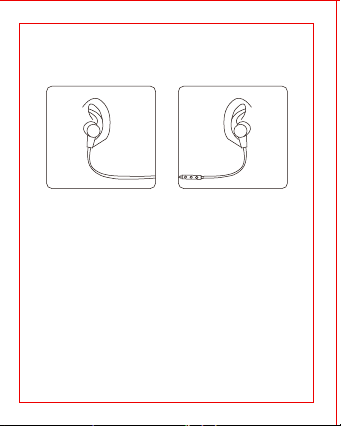
IT
Funzionamento
1. Come Ricaricare
1) Connettere la porta micro-USB degli auricolari con un adattatore
USB o alla porta USB del computer.
2) La ricarica inizierà automaticamente e l’indicatore LED diverrà rosso.
3) L’indicatore diverrà blu quando gli auricolari sono carichi.
2. Come Connettere
1) Assicurarsi che gli auricolari ed il dispositivo Bluetooth® siano entro
1 metro/3 piedi di distanza.
2) Tenere premuto il Tasto Multifunzione fino a che l’indicatore LED non
lampeggi rosso e blu la prima volta che si utilizzano gli auricolari
perché questi entrino in modalità d’associazione.
3) Attivare la funzione Bluetooth® del proprio dispositivo e cercare i
dispositivi Bluetooth® disponibili nelle vicinanze: selezionare
“TAOTRONICS SoundElite 71” tra la lista dei risultati. Una volta
connessi, la luce blu del LED di notifica lampeggerà.
Nota:
• Gli auricolari Bluetooth® ritengono in memoria i dispositivi
precedentemente collegati.
• Se gli auricolari non si connettono con il dispositivo Bluetooth®,
mantenere premuto i tasti Volume + e Volume – assieme fino a che
l’indicatore LED non lampeggi 2 volte e non si sentano 2 bip
indicando che gli auricolari sono stati rimessi a posto.
Riavviare gli auricolari e associarli nuovamente.
Come Indossare gli Auricolari
Fare riferimento allo schema sottostante per indossare gli auricolari:
1) Fissare gli appositi ganci sugli auricolari
2) Inserire auricolari e ganci nelle orecchie fino a che questi non siano
confortabili.
Nota:
• Ricaricare gli auricolari almeno una volta ogni 6 mesi per periodi di
inutilizzo prolungato.
• Assicurarsi che la batteria sia completamente carica prima della
perservazione delle cuffie.
JP
使い方
1.充電
1)付属の充電ケーブルを本製品のMicroUSB充電ポートに接続し、もう片方
の端子を電源の入ったUSBポートに接続します。
2)LEDインジケーターが赤色になると自動的に充電が開始されます。
3)イヤホンはLEDインジケーターが青色になると完全に充電されます。
2.ペアリング
1)イヤホンとBluetooth®デバイスが隣り合っていることを確認します
(3フィート/1メートル以内)。
2)初めてイヤホンを使用するときは、LEDインジケーターが交互に赤と青で
点滅するまで多機能ボタンを押し続け、ペアリングモードにします。
3)お使いの携帯電話でBluetooth®機能を有効にし、近くのBluetooth®デバ
イスを検索します。検索結果で「TAOTRONICSSoundElite71」の名前をタ
ップします。ペアリングができたら、LEDインジケーターは青く点滅します。
装着方法
図のようにイヤホンを着用してください:
1) イヤーフックをイヤホンに取り付 けます。
2)イヤホンとイヤーフックを耳に付けて、最適なフィット感に調整します。
注 意:
•長時間ご使用にならない場合は、6ヶ月に1回はイヤホンを充電してください。
•長時間使用しない場合は、一度フル充電した後で保管してください。
注 意:
•このBluetoothイヤホンは以前接続されたデバイスを記録しています。
•音量調節「+ー」ボタンをLED点滅し、2回ビープ音を出すまで同時に
長押して、工場出荷時に戻せます。その後、イヤホンを再起動してペア
リングを再開してください。
NOTE: This equipment has been tested and found to comply with the
limits for a Class B digital device, pursuant to part 15 of the FCC Rules.
These limits are designed to provide reasonable protection against
harmful interference in a residential installation. This equipment
generates uses and can radiate radio frequency energy and, if not
installed and used in accordance with the instructions, may cause
harmful interference to radio communications. However, there is no
guarantee that interference will not occur in a particular installation. If
this equipment does cause harmful interference to radio or television
reception, which can be determined by turning the equipment off and
on, the user is encouraged to try to correct the interference by one or
more of the following measures:
- Reorient or relocate the receiving antenna.
- Increase the separation between the equipment and receiver.
-Connect the equipment into an outlet on a circuit different from that to
which the receiver is connected.
-Consult the dealer or an experienced radio/TV technician for help
Changes or modifications not expressly approved by the party
responsible for compliance could void the user's authority to operate
the equipment. This device complies with Part 15 of the FCC Rules.
Operation is subject to the following two conditions:
(1) this device may not cause harmful interference, and(2) this device must
accept any interference received, including interference that may cause
undesired operation.
EN The Bluetooth
®
word mark and logos are
registered trademarks owned by the Bluetooth
SIG, Inc. and any use of such marks by Sunvalleytek International Inc. is
under license. Other trademarks and trade names are those of their
respective owners.
DE Die Marke Bluetooth
®
und das Bluetooth Logo sind eingetragene
Markenzeichen der Bluetooth SIG, Inc. und jegliche Verwendung dieser
Marke durch Sunvalleytek International Inc. ist lizensiert. Die Rechte an
anderen Markenzeichen liegen beim jeweiligen Eigentümer.
FR Le terme et les logos Bluetooth
®
sont la propriété de Bluetooth
SIG, Inc. et toute utilisation de ces marques par Sunvalleytek
International Inc. se fait sous licence. Les autres désignations
commerciales et marques mentionnées sont détenues par leur
propriétaire respectif.
ES La marca Bluetooth
®
y los logotipos son de propiedad de Bluetooth
SIG, Inc. y se encuentra autorizado cualquier uso de estas marcas por
parte de Sunvalleytek International Inc. Otras marcas y nombres
comerciales son aquellas de sus respectivos propietarios.
IT La parola e i loghi Bluetooth
®
sono marchi di fabbrica registrati di
proprietà di Bluetooth SIG, Inc. e qualsiasi utilizzo di questi marchi da
parte di Sunvalleytek International Inc. avviene su licenza. Gli altri marchi
di fabbrica e nomi commerciali appartengono ai rispettivi proprietari.
JP Bluetooth®のワードマークおよびロゴはBluetooth SIG, Inc. が所有す
る登録商標であり 、Sunvalleytek International Inc.はこれらのマークおよび
ロゴをライセンスに基づいて使用しています。その他の 商標およびトレード
ネームは、それぞれの所有者に帰属します。
およびロゴをライセンスに基づいて使用しています。その他の 商標およびト
レードネームは、それぞれの所有者に帰属します。
EUROPE
E-mail:
support.uk@taotronics.com(UK)
support.de@taotronics.com(DE)
support.fr@taotronics.com(FR)
support.es@taotronics.com(ES)
support.it@taotronics.com(IT)
EU Importer: ZBT International Trading GmbH
Address: Halstenbeker Weg 98C, 25462 Rellingen, Deutschland
NORTH AMERICA
E-mail : support@taotronics.com(US)
support.ca@taotronics.com(CA)
Tel : 1-888-456-8468 (Monday-Friday: 9:00 – 17:00 PST)
US Distributor: SUNVALLEYTEK INTERNATIONAL INC.
Address: 46724 Lakeview Blvd, Fremont, CA 94538
www.taotronics.com
ASIA PACIFIC
E-mail: support.jp@taotronics.com(JP)
JP Importer: 株式会社SUNVALLEYJAPAN
Address:〒104-0032東京都中央区八丁堀3丁目18-6PMO京橋東9F
MANUFACTURER
Shenzhen NearbyExpress Technology Development Co.,Ltd.
Address: 333 Bulong Road, Shenzhen, China, 518129
MADE IN CHINA
Learn more about the EU Declaration of Conformity:
https://www.taotronics.com/downloads-TT-BH071-CE-Cert.html
TT-BH071_V1.6
ES
Cómo utilizarlos
1. Carga
1) Conecte el puerto de carga con cualquier adaptador de carga USB o
a un puerto USB de un ordenador encendido.
2) La carga comenzará automáticamente cuando el indicador del LED
se pondrá en rojo.
3) Los auriculares están completamente cargados cuando el
indicador LED se vuelve azul.
2. Emparejamiento
1) Asegúrese de que los auriculares y el dispositivo Bluetooth® estén
uno al lado del otro (a menos de 3 pies / 1 metro).
2) La primera vez que utilice los auriculares, mantenga pulsado el
botón multifunción hasta que el indicador LED parpadee en rojo y
azul alternativamente. Ahora los auriculares están en modo de
emparejamiento.
3) Active la función Bluetooth® en su teléfono y busque la conexión
Bluetooth® cercana: Encuentre "TAOTRONICS SoundElite 71" en los
resultados de búsqueda. Toque en el nombre para conectarse.
Una vez conectado, el LED azul parpadeará.
Nota:
• Los auriculares Bluetooth® pueden recordar los dispositivos
emparejados anteriormente.
• Si los auriculares no pueden emparejarse con su dispositivo
Bluetooth, presione y mantenga presionande el botón Volume+
/- al mismo tiempo hasta que el Indacador LED parpadee en 2
veces y 2 pitidos se oigan a borrar el historial de emparejamiento.
A continuación, reinicie los auriculares para volver a emparejarse.
Como ponérselos
Por favor use los auriculares como se muestra en el diagrama:
1) Coloque los ganchos de oreja en los auriculares.
2) Use los auriculares y los ganchos en sus oídos y regúlelos para un
mejor ajuste.
Nota:
• Cargue los auriculares al menos una vez cada 6 meses cuando no lo
utilice durante mucho tiempo.
• Asegúrese de que la batería está completamente cargada antes de
guardarlos.
FCC Compliance
WEEE Compliance
Correct Disposal of This Product (Waste Electrical & Electronic
Equipment)
(Applicable in countries with separate collection systems)
This marking on the product, accessories or literature indicates that the
product and its electronic accessories should not be disposed of with
other household waste at the end of their working life. To prevent
possible harm to the environment or human health from uncontrolled
waste disposal, please separate these items from other types of waste
and recycle them responsibly to promote the sustainable reuse of
material resources. Household users should contact either the retailer
where they purchased this product, or their local government office, for
details of where and how they can take these items for environmentally
safe recycling. Business users should contact their supplier and check
the terms and conditions of the purchase contract. This product and its
electronic accessories should not be mixed with other commercial
wastes for disposal.

IT
Funzionamento
1. Come Ricaricare
1) Connettere la porta micro-USB degli auricolari con un adattatore
USB o alla porta USB del computer.
2) La ricarica inizierà automaticamente e l’indicatore LED diverrà rosso.
3) L’indicatore diverrà blu quando gli auricolari sono carichi.
2. Come Connettere
1) Assicurarsi che gli auricolari ed il dispositivo Bluetooth® siano entro
1 metro/3 piedi di distanza.
2) Tenere premuto il Tasto Multifunzione fino a che l’indicatore LED non
lampeggi rosso e blu la prima volta che si utilizzano gli auricolari
perché questi entrino in modalità d’associazione.
3) Attivare la funzione Bluetooth® del proprio dispositivo e cercare i
dispositivi Bluetooth® disponibili nelle vicinanze: selezionare
“TAOTRONICS SoundElite 71” tra la lista dei risultati. Una volta
connessi, la luce blu del LED di notifica lampeggerà.
Nota:
• Gli auricolari Bluetooth® ritengono in memoria i dispositivi
precedentemente collegati.
• Se gli auricolari non si connettono con il dispositivo Bluetooth®,
mantenere premuto i tasti Volume + e Volume – assieme fino a che
l’indicatore LED non lampeggi 2 volte e non si sentano 2 bip
indicando che gli auricolari sono stati rimessi a posto.
Riavviare gli auricolari e associarli nuovamente.
Come Indossare gli Auricolari
Fare riferimento allo schema sottostante per indossare gli auricolari:
1) Fissare gli appositi ganci sugli auricolari
2) Inserire auricolari e ganci nelle orecchie fino a che questi non siano
confortabili.
Nota:
• Ricaricare gli auricolari almeno una volta ogni 6 mesi per periodi di
inutilizzo prolungato.
• Assicurarsi che la batteria sia completamente carica prima della
perservazione delle cuffie.
JP
使い方
1.充電
1)付属の充電ケーブルを本製品のMicroUSB充電ポートに接続し、もう片方
の端子を電源の入ったUSBポートに接続します。
2)LEDインジケーターが赤色になると自動的に充電が開始されます。
3)イヤホンはLEDインジケーターが青色になると完全に充電されます。
2.ペアリング
1)イヤホンとBluetooth®デバイスが隣り合っていることを確認します
(3フィート/1メートル以内)。
2)初めてイヤホンを使用するときは、LEDインジケーターが交互に赤と青で
点滅するまで多機能ボタンを押し続け、ペアリングモードにします。
3)お使いの携帯電話でBluetooth®機能を有効にし、近くのBluetooth®デバ
イスを検索します。検索結果で「TAOTRONICSSoundElite71」の名前をタ
ップします。ペアリングができたら、LEDインジケーターは青く点滅します。
装着方法
図のようにイヤホンを着用してください:
1) イヤーフックをイヤホンに取り付 けます。
2)イヤホンとイヤーフックを耳に付けて、最適なフィット感に調整します。
注 意:
•長時間ご使用にならない場合は、6ヶ月に1回はイヤホンを充電してください。
•長時間使用しない場合は、一度フル充電した後で保管してください。
注 意:
•このBluetoothイヤホンは以前接続されたデバイスを記録しています。
•音量調節「+ー」ボタンをLED点滅し、2回ビープ音を出すまで同時に
長押して、工場出荷時に戻せます。その後、イヤホンを再起動してペア
リングを再開してください。
NOTE: This equipment has been tested and found to comply with the
limits for a Class B digital device, pursuant to part 15 of the FCC Rules.
These limits are designed to provide reasonable protection against
harmful interference in a residential installation. This equipment
generates uses and can radiate radio frequency energy and, if not
installed and used in accordance with the instructions, may cause
harmful interference to radio communications. However, there is no
guarantee that interference will not occur in a particular installation. If
this equipment does cause harmful interference to radio or television
reception, which can be determined by turning the equipment off and
on, the user is encouraged to try to correct the interference by one or
more of the following measures:
- Reorient or relocate the receiving antenna.
- Increase the separation between the equipment and receiver.
-Connect the equipment into an outlet on a circuit different from that to
which the receiver is connected.
-Consult the dealer or an experienced radio/TV technician for help
Changes or modifications not expressly approved by the party
responsible for compliance could void the user's authority to operate
the equipment. This device complies with Part 15 of the FCC Rules.
Operation is subject to the following two conditions:
(1) this device may not cause harmful interference, and(2) this device must
accept any interference received, including interference that may cause
undesired operation.
EN The Bluetooth
®
word mark and logos are
registered trademarks owned by the Bluetooth
SIG, Inc. and any use of such marks by Sunvalleytek International Inc. is
under license. Other trademarks and trade names are those of their
respective owners.
DE Die Marke Bluetooth
®
und das Bluetooth Logo sind eingetragene
Markenzeichen der Bluetooth SIG, Inc. und jegliche Verwendung dieser
Marke durch Sunvalleytek International Inc. ist lizensiert. Die Rechte an
anderen Markenzeichen liegen beim jeweiligen Eigentümer.
FR Le terme et les logos Bluetooth
®
sont la propriété de Bluetooth
SIG, Inc. et toute utilisation de ces marques par Sunvalleytek
International Inc. se fait sous licence. Les autres désignations
commerciales et marques mentionnées sont détenues par leur
propriétaire respectif.
ES La marca Bluetooth
®
y los logotipos son de propiedad de Bluetooth
SIG, Inc. y se encuentra autorizado cualquier uso de estas marcas por
parte de Sunvalleytek International Inc. Otras marcas y nombres
comerciales son aquellas de sus respectivos propietarios.
IT La parola e i loghi Bluetooth
®
sono marchi di fabbrica registrati di
proprietà di Bluetooth SIG, Inc. e qualsiasi utilizzo di questi marchi da
parte di Sunvalleytek International Inc. avviene su licenza. Gli altri marchi
di fabbrica e nomi commerciali appartengono ai rispettivi proprietari.
JP Bluetooth®のワードマークおよびロゴはBluetooth SIG, Inc. が所有す
る登録商標であり 、Sunvalleytek International Inc.はこれらのマークおよび
ロゴをライセンスに基づいて使用しています。その他の 商標およびトレード
ネームは、それぞれの所有者に帰属します。
およびロゴをライセンスに基づいて使用しています。その他の 商標およびト
レードネームは、それぞれの所有者に帰属します。
EUROPE
E-mail:
support.uk@taotronics.com(UK)
support.de@taotronics.com(DE)
support.fr@taotronics.com(FR)
support.es@taotronics.com(ES)
support.it@taotronics.com(IT)
EU Importer: ZBT International Trading GmbH
Address: Halstenbeker Weg 98C, 25462 Rellingen, Deutschland
NORTH AMERICA
E-mail : support@taotronics.com(US)
support.ca@taotronics.com(CA)
Tel : 1-888-456-8468 (Monday-Friday: 9:00 – 17:00 PST)
US Distributor: SUNVALLEYTEK INTERNATIONAL INC.
Address: 46724 Lakeview Blvd, Fremont, CA 94538
www.taotronics.com
ASIA PACIFIC
E-mail: support.jp@taotronics.com(JP)
JP Importer: 株式会社SUNVALLEYJAPAN
Address:〒104-0032東京都中央区八丁堀3丁目18-6PMO京橋東9F
MANUFACTURER
Shenzhen NearbyExpress Technology Development Co.,Ltd.
Address: 333 Bulong Road, Shenzhen, China, 518129
MADE IN CHINA
Learn more about the EU Declaration of Conformity:
https://www.taotronics.com/downloads-TT-BH071-CE-Cert.html
TT-BH071_V1.6
ES
Cómo utilizarlos
1. Carga
1) Conecte el puerto de carga con cualquier adaptador de carga USB o
a un puerto USB de un ordenador encendido.
2) La carga comenzará automáticamente cuando el indicador del LED
se pondrá en rojo.
3) Los auriculares están completamente cargados cuando el
indicador LED se vuelve azul.
2. Emparejamiento
1) Asegúrese de que los auriculares y el dispositivo Bluetooth® estén
uno al lado del otro (a menos de 3 pies / 1 metro).
2) La primera vez que utilice los auriculares, mantenga pulsado el
botón multifunción hasta que el indicador LED parpadee en rojo y
azul alternativamente. Ahora los auriculares están en modo de
emparejamiento.
3) Active la función Bluetooth® en su teléfono y busque la conexión
Bluetooth® cercana: Encuentre "TAOTRONICS SoundElite 71" en los
resultados de búsqueda. Toque en el nombre para conectarse.
Una vez conectado, el LED azul parpadeará.
Nota:
• Los auriculares Bluetooth® pueden recordar los dispositivos
emparejados anteriormente.
• Si los auriculares no pueden emparejarse con su dispositivo
Bluetooth, presione y mantenga presionande el botón Volume+
/- al mismo tiempo hasta que el Indacador LED parpadee en 2
veces y 2 pitidos se oigan a borrar el historial de emparejamiento.
A continuación, reinicie los auriculares para volver a emparejarse.
Como ponérselos
Por favor use los auriculares como se muestra en el diagrama:
1) Coloque los ganchos de oreja en los auriculares.
2) Use los auriculares y los ganchos en sus oídos y regúlelos para un
mejor ajuste.
Nota:
• Cargue los auriculares al menos una vez cada 6 meses cuando no lo
utilice durante mucho tiempo.
• Asegúrese de que la batería está completamente cargada antes de
guardarlos.
FCC Compliance
WEEE Compliance
Correct Disposal of This Product (Waste Electrical & Electronic
Equipment)
(Applicable in countries with separate collection systems)
This marking on the product, accessories or literature indicates that the
product and its electronic accessories should not be disposed of with
other household waste at the end of their working life. To prevent
possible harm to the environment or human health from uncontrolled
waste disposal, please separate these items from other types of waste
and recycle them responsibly to promote the sustainable reuse of
material resources. Household users should contact either the retailer
where they purchased this product, or their local government office, for
details of where and how they can take these items for environmentally
safe recycling. Business users should contact their supplier and check
the terms and conditions of the purchase contract. This product and its
electronic accessories should not be mixed with other commercial
wastes for disposal.

IT
Funzionamento
1. Come Ricaricare
1) Connettere la porta micro-USB degli auricolari con un adattatore
USB o alla porta USB del computer.
2) La ricarica inizierà automaticamente e l’indicatore LED diverrà rosso.
3) L’indicatore diverrà blu quando gli auricolari sono carichi.
2. Come Connettere
1) Assicurarsi che gli auricolari ed il dispositivo Bluetooth® siano entro
1 metro/3 piedi di distanza.
2) Tenere premuto il Tasto Multifunzione fino a che l’indicatore LED non
lampeggi rosso e blu la prima volta che si utilizzano gli auricolari
perché questi entrino in modalità d’associazione.
3) Attivare la funzione Bluetooth® del proprio dispositivo e cercare i
dispositivi Bluetooth® disponibili nelle vicinanze: selezionare
“TAOTRONICS SoundElite 71” tra la lista dei risultati. Una volta
connessi, la luce blu del LED di notifica lampeggerà.
Nota:
• Gli auricolari Bluetooth® ritengono in memoria i dispositivi
precedentemente collegati.
• Se gli auricolari non si connettono con il dispositivo Bluetooth®,
mantenere premuto i tasti Volume + e Volume – assieme fino a che
l’indicatore LED non lampeggi 2 volte e non si sentano 2 bip
indicando che gli auricolari sono stati rimessi a posto.
Riavviare gli auricolari e associarli nuovamente.
Come Indossare gli Auricolari
Fare riferimento allo schema sottostante per indossare gli auricolari:
1) Fissare gli appositi ganci sugli auricolari
2) Inserire auricolari e ganci nelle orecchie fino a che questi non siano
confortabili.
Nota:
• Ricaricare gli auricolari almeno una volta ogni 6 mesi per periodi di
inutilizzo prolungato.
• Assicurarsi che la batteria sia completamente carica prima della
perservazione delle cuffie.
JP
使い方
1.充電
1)付属の充電ケーブルを本製品のMicroUSB充電ポートに接続し、もう片方
の端子を電源の入ったUSBポートに接続します。
2)LEDインジケーターが赤色になると自動的に充電が開始されます。
3)イヤホンはLEDインジケーターが青色になると完全に充電されます。
2.ペアリング
1)イヤホンとBluetooth®デバイスが隣り合っていることを確認します
(3フィート/1メートル以内)。
2)初めてイヤホンを使用するときは、LEDインジケーターが交互に赤と青で
点滅するまで多機能ボタンを押し続け、ペアリングモードにします。
3)お使いの携帯電話でBluetooth®機能を有効にし、近くのBluetooth®デバ
イスを検索します。検索結果で「TAOTRONICSSoundElite71」の名前をタ
ップします。ペアリングができたら、LEDインジケーターは青く点滅します。
装着方法
図のようにイヤホンを着用してください:
1) イヤーフックをイヤホンに取り付 けます。
2)イヤホンとイヤーフックを耳に付けて、最適なフィット感に調整します。
注 意:
•長時間ご使用にならない場合は、6ヶ月に1回はイヤホンを充電してください。
•長時間使用しない場合は、一度フル充電した後で保管してください。
注 意:
•このBluetoothイヤホンは以前接続されたデバイスを記録しています。
•音量調節「+ー」ボタンをLED点滅し、2回ビープ音を出すまで同時に
長押して、工場出荷時に戻せます。その後、イヤホンを再起動してペア
リングを再開してください。
NOTE: This equipment has been tested and found to comply with the
limits for a Class B digital device, pursuant to part 15 of the FCC Rules.
These limits are designed to provide reasonable protection against
harmful interference in a residential installation. This equipment
generates uses and can radiate radio frequency energy and, if not
installed and used in accordance with the instructions, may cause
harmful interference to radio communications. However, there is no
guarantee that interference will not occur in a particular installation. If
this equipment does cause harmful interference to radio or television
reception, which can be determined by turning the equipment off and
on, the user is encouraged to try to correct the interference by one or
more of the following measures:
- Reorient or relocate the receiving antenna.
- Increase the separation between the equipment and receiver.
-Connect the equipment into an outlet on a circuit different from that to
which the receiver is connected.
-Consult the dealer or an experienced radio/TV technician for help
Changes or modifications not expressly approved by the party
responsible for compliance could void the user's authority to operate
the equipment. This device complies with Part 15 of the FCC Rules.
Operation is subject to the following two conditions:
(1) this device may not cause harmful interference, and(2) this device must
accept any interference received, including interference that may cause
undesired operation.
EN The Bluetooth
®
word mark and logos are
registered trademarks owned by the Bluetooth
SIG, Inc. and any use of such marks by Sunvalleytek International Inc. is
under license. Other trademarks and trade names are those of their
respective owners.
DE Die Marke Bluetooth
®
und das Bluetooth Logo sind eingetragene
Markenzeichen der Bluetooth SIG, Inc. und jegliche Verwendung dieser
Marke durch Sunvalleytek International Inc. ist lizensiert. Die Rechte an
anderen Markenzeichen liegen beim jeweiligen Eigentümer.
FR Le terme et les logos Bluetooth
®
sont la propriété de Bluetooth
SIG, Inc. et toute utilisation de ces marques par Sunvalleytek
International Inc. se fait sous licence. Les autres désignations
commerciales et marques mentionnées sont détenues par leur
propriétaire respectif.
ES La marca Bluetooth
®
y los logotipos son de propiedad de Bluetooth
SIG, Inc. y se encuentra autorizado cualquier uso de estas marcas por
parte de Sunvalleytek International Inc. Otras marcas y nombres
comerciales son aquellas de sus respectivos propietarios.
IT La parola e i loghi Bluetooth
®
sono marchi di fabbrica registrati di
proprietà di Bluetooth SIG, Inc. e qualsiasi utilizzo di questi marchi da
parte di Sunvalleytek International Inc. avviene su licenza. Gli altri marchi
di fabbrica e nomi commerciali appartengono ai rispettivi proprietari.
JP Bluetooth®のワードマークおよびロゴはBluetooth SIG, Inc. が所有す
る登録商標であり 、Sunvalleytek International Inc.はこれらのマークおよび
ロゴをライセンスに基づいて使用しています。その他の 商標およびトレード
ネームは、それぞれの所有者に帰属します。
およびロゴをライセンスに基づいて使用しています。その他の 商標およびト
レードネームは、それぞれの所有者に帰属します。
EUROPE
E-mail:
support.uk@taotronics.com(UK)
support.de@taotronics.com(DE)
support.fr@taotronics.com(FR)
support.es@taotronics.com(ES)
support.it@taotronics.com(IT)
EU Importer: ZBT International Trading GmbH
Address: Halstenbeker Weg 98C, 25462 Rellingen, Deutschland
NORTH AMERICA
E-mail : support@taotronics.com(US)
support.ca@taotronics.com(CA)
Tel : 1-888-456-8468 (Monday-Friday: 9:00 – 17:00 PST)
US Distributor: SUNVALLEYTEK INTERNATIONAL INC.
Address: 46724 Lakeview Blvd, Fremont, CA 94538
www.taotronics.com
ASIA PACIFIC
E-mail: support.jp@taotronics.com(JP)
JP Importer: 株式会社SUNVALLEYJAPAN
Address:〒104-0032東京都中央区八丁堀3丁目18-6PMO京橋東9F
MANUFACTURER
Shenzhen NearbyExpress Technology Development Co.,Ltd.
Address: 333 Bulong Road, Shenzhen, China, 518129
MADE IN CHINA
Learn more about the EU Declaration of Conformity:
https://www.taotronics.com/downloads-TT-BH071-CE-Cert.html
TT-BH071_V1.6
ES
Cómo utilizarlos
1. Carga
1) Conecte el puerto de carga con cualquier adaptador de carga USB o
a un puerto USB de un ordenador encendido.
2) La carga comenzará automáticamente cuando el indicador del LED
se pondrá en rojo.
3) Los auriculares están completamente cargados cuando el
indicador LED se vuelve azul.
2. Emparejamiento
1) Asegúrese de que los auriculares y el dispositivo Bluetooth® estén
uno al lado del otro (a menos de 3 pies / 1 metro).
2) La primera vez que utilice los auriculares, mantenga pulsado el
botón multifunción hasta que el indicador LED parpadee en rojo y
azul alternativamente. Ahora los auriculares están en modo de
emparejamiento.
3) Active la función Bluetooth® en su teléfono y busque la conexión
Bluetooth® cercana: Encuentre "TAOTRONICS SoundElite 71" en los
resultados de búsqueda. Toque en el nombre para conectarse.
Una vez conectado, el LED azul parpadeará.
Nota:
• Los auriculares Bluetooth® pueden recordar los dispositivos
emparejados anteriormente.
• Si los auriculares no pueden emparejarse con su dispositivo
Bluetooth, presione y mantenga presionande el botón Volume+
/- al mismo tiempo hasta que el Indacador LED parpadee en 2
veces y 2 pitidos se oigan a borrar el historial de emparejamiento.
A continuación, reinicie los auriculares para volver a emparejarse.
Como ponérselos
Por favor use los auriculares como se muestra en el diagrama:
1) Coloque los ganchos de oreja en los auriculares.
2) Use los auriculares y los ganchos en sus oídos y regúlelos para un
mejor ajuste.
Nota:
• Cargue los auriculares al menos una vez cada 6 meses cuando no lo
utilice durante mucho tiempo.
• Asegúrese de que la batería está completamente cargada antes de
guardarlos.
FCC Compliance
WEEE Compliance
Correct Disposal of This Product (Waste Electrical & Electronic
Equipment)
(Applicable in countries with separate collection systems)
This marking on the product, accessories or literature indicates that the
product and its electronic accessories should not be disposed of with
other household waste at the end of their working life. To prevent
possible harm to the environment or human health from uncontrolled
waste disposal, please separate these items from other types of waste
and recycle them responsibly to promote the sustainable reuse of
material resources. Household users should contact either the retailer
where they purchased this product, or their local government office, for
details of where and how they can take these items for environmentally
safe recycling. Business users should contact their supplier and check
the terms and conditions of the purchase contract. This product and its
electronic accessories should not be mixed with other commercial
wastes for disposal.

IT
Funzionamento
1. Come Ricaricare
1) Connettere la porta micro-USB degli auricolari con un adattatore
USB o alla porta USB del computer.
2) La ricarica inizierà automaticamente e l’indicatore LED diverrà rosso.
3) L’indicatore diverrà blu quando gli auricolari sono carichi.
2. Come Connettere
1) Assicurarsi che gli auricolari ed il dispositivo Bluetooth® siano entro
1 metro/3 piedi di distanza.
2) Tenere premuto il Tasto Multifunzione fino a che l’indicatore LED non
lampeggi rosso e blu la prima volta che si utilizzano gli auricolari
perché questi entrino in modalità d’associazione.
3) Attivare la funzione Bluetooth® del proprio dispositivo e cercare i
dispositivi Bluetooth® disponibili nelle vicinanze: selezionare
“TAOTRONICS SoundElite 71” tra la lista dei risultati. Una volta
connessi, la luce blu del LED di notifica lampeggerà.
Nota:
• Gli auricolari Bluetooth® ritengono in memoria i dispositivi
precedentemente collegati.
• Se gli auricolari non si connettono con il dispositivo Bluetooth®,
mantenere premuto i tasti Volume + e Volume – assieme fino a che
l’indicatore LED non lampeggi 2 volte e non si sentano 2 bip
indicando che gli auricolari sono stati rimessi a posto.
Riavviare gli auricolari e associarli nuovamente.
Come Indossare gli Auricolari
Fare riferimento allo schema sottostante per indossare gli auricolari:
1) Fissare gli appositi ganci sugli auricolari
2) Inserire auricolari e ganci nelle orecchie fino a che questi non siano
confortabili.
Nota:
• Ricaricare gli auricolari almeno una volta ogni 6 mesi per periodi di
inutilizzo prolungato.
• Assicurarsi che la batteria sia completamente carica prima della
perservazione delle cuffie.
JP
使い方
1.充電
1)付属の充電ケーブルを本製品のMicroUSB充電ポートに接続し、もう片方
の端子を電源の入ったUSBポートに接続します。
2)LEDインジケーターが赤色になると自動的に充電が開始されます。
3)イヤホンはLEDインジケーターが青色になると完全に充電されます。
2.ペアリング
1)イヤホンとBluetooth®デバイスが隣り合っていることを確認します
(3フィート/1メートル以内)。
2)初めてイヤホンを使用するときは、LEDインジケーターが交互に赤と青で
点滅するまで多機能ボタンを押し続け、ペアリングモードにします。
3)お使いの携帯電話でBluetooth®機能を有効にし、近くのBluetooth®デバ
イスを検索します。検索結果で「TAOTRONICSSoundElite71」の名前をタ
ップします。ペアリングができたら、LEDインジケーターは青く点滅します。
装着方法
図のようにイヤホンを着用してください:
1) イヤーフックをイヤホンに取り付 けます。
2)イヤホンとイヤーフックを耳に付けて、最適なフィット感に調整します。
注 意:
•長時間ご使用にならない場合は、6ヶ月に1回はイヤホンを充電してください。
•長時間使用しない場合は、一度フル充電した後で保管してください。
注 意:
•このBluetoothイヤホンは以前接続されたデバイスを記録しています。
•音量調節「+ー」ボタンをLED点滅し、2回ビープ音を出すまで同時に
長押して、工場出荷時に戻せます。その後、イヤホンを再起動してペア
リングを再開してください。
NOTE: This equipment has been tested and found to comply with the
limits for a Class B digital device, pursuant to part 15 of the FCC Rules.
These limits are designed to provide reasonable protection against
harmful interference in a residential installation. This equipment
generates uses and can radiate radio frequency energy and, if not
installed and used in accordance with the instructions, may cause
harmful interference to radio communications. However, there is no
guarantee that interference will not occur in a particular installation. If
this equipment does cause harmful interference to radio or television
reception, which can be determined by turning the equipment off and
on, the user is encouraged to try to correct the interference by one or
more of the following measures:
- Reorient or relocate the receiving antenna.
- Increase the separation between the equipment and receiver.
-Connect the equipment into an outlet on a circuit different from that to
which the receiver is connected.
-Consult the dealer or an experienced radio/TV technician for help
Changes or modifications not expressly approved by the party
responsible for compliance could void the user's authority to operate
the equipment. This device complies with Part 15 of the FCC Rules.
Operation is subject to the following two conditions:
(1) this device may not cause harmful interference, and(2) this device must
accept any interference received, including interference that may cause
undesired operation.
EN The Bluetooth
®
word mark and logos are
registered trademarks owned by the Bluetooth
SIG, Inc. and any use of such marks by Sunvalleytek International Inc. is
under license. Other trademarks and trade names are those of their
respective owners.
DE Die Marke Bluetooth
®
und das Bluetooth Logo sind eingetragene
Markenzeichen der Bluetooth SIG, Inc. und jegliche Verwendung dieser
Marke durch Sunvalleytek International Inc. ist lizensiert. Die Rechte an
anderen Markenzeichen liegen beim jeweiligen Eigentümer.
FR Le terme et les logos Bluetooth
®
sont la propriété de Bluetooth
SIG, Inc. et toute utilisation de ces marques par Sunvalleytek
International Inc. se fait sous licence. Les autres désignations
commerciales et marques mentionnées sont détenues par leur
propriétaire respectif.
ES La marca Bluetooth
®
y los logotipos son de propiedad de Bluetooth
SIG, Inc. y se encuentra autorizado cualquier uso de estas marcas por
parte de Sunvalleytek International Inc. Otras marcas y nombres
comerciales son aquellas de sus respectivos propietarios.
IT La parola e i loghi Bluetooth
®
sono marchi di fabbrica registrati di
proprietà di Bluetooth SIG, Inc. e qualsiasi utilizzo di questi marchi da
parte di Sunvalleytek International Inc. avviene su licenza. Gli altri marchi
di fabbrica e nomi commerciali appartengono ai rispettivi proprietari.
JP Bluetooth®のワードマークおよびロゴはBluetooth SIG, Inc. が所有す
る登録商標であり 、Sunvalleytek International Inc.はこれらのマークおよび
ロゴをライセンスに基づいて使用しています。その他の 商標およびトレード
ネームは、それぞれの所有者に帰属します。
およびロゴをライセンスに基づいて使用しています。その他の 商標およびト
レードネームは、それぞれの所有者に帰属します。
EUROPE
E-mail:
support.uk@taotronics.com(UK)
support.de@taotronics.com(DE)
support.fr@taotronics.com(FR)
support.es@taotronics.com(ES)
support.it@taotronics.com(IT)
EU Importer: ZBT International Trading GmbH
Address: Halstenbeker Weg 98C, 25462 Rellingen, Deutschland
NORTH AMERICA
E-mail : support@taotronics.com(US)
support.ca@taotronics.com(CA)
Tel : 1-888-456-8468 (Monday-Friday: 9:00 – 17:00 PST)
US Distributor: SUNVALLEYTEK INTERNATIONAL INC.
Address: 46724 Lakeview Blvd, Fremont, CA 94538
www.taotronics.com
ASIA PACIFIC
E-mail: support.jp@taotronics.com(JP)
JP Importer: 株式会社SUNVALLEYJAPAN
Address:〒104-0032東京都中央区八丁堀3丁目18-6PMO京橋東9F
MANUFACTURER
Shenzhen NearbyExpress Technology Development Co.,Ltd.
Address: 333 Bulong Road, Shenzhen, China, 518129
MADE IN CHINA
Learn more about the EU Declaration of Conformity:
https://www.taotronics.com/downloads-TT-BH071-CE-Cert.html
TT-BH071_V1.6
ES
Cómo utilizarlos
1. Carga
1) Conecte el puerto de carga con cualquier adaptador de carga USB o
a un puerto USB de un ordenador encendido.
2) La carga comenzará automáticamente cuando el indicador del LED
se pondrá en rojo.
3) Los auriculares están completamente cargados cuando el
indicador LED se vuelve azul.
2. Emparejamiento
1) Asegúrese de que los auriculares y el dispositivo Bluetooth® estén
uno al lado del otro (a menos de 3 pies / 1 metro).
2) La primera vez que utilice los auriculares, mantenga pulsado el
botón multifunción hasta que el indicador LED parpadee en rojo y
azul alternativamente. Ahora los auriculares están en modo de
emparejamiento.
3) Active la función Bluetooth® en su teléfono y busque la conexión
Bluetooth® cercana: Encuentre "TAOTRONICS SoundElite 71" en los
resultados de búsqueda. Toque en el nombre para conectarse.
Una vez conectado, el LED azul parpadeará.
Nota:
• Los auriculares Bluetooth® pueden recordar los dispositivos
emparejados anteriormente.
• Si los auriculares no pueden emparejarse con su dispositivo
Bluetooth, presione y mantenga presionande el botón Volume+
/- al mismo tiempo hasta que el Indacador LED parpadee en 2
veces y 2 pitidos se oigan a borrar el historial de emparejamiento.
A continuación, reinicie los auriculares para volver a emparejarse.
Como ponérselos
Por favor use los auriculares como se muestra en el diagrama:
1) Coloque los ganchos de oreja en los auriculares.
2) Use los auriculares y los ganchos en sus oídos y regúlelos para un
mejor ajuste.
Nota:
• Cargue los auriculares al menos una vez cada 6 meses cuando no lo
utilice durante mucho tiempo.
• Asegúrese de que la batería está completamente cargada antes de
guardarlos.
FCC Compliance
WEEE Compliance
Correct Disposal of This Product (Waste Electrical & Electronic
Equipment)
(Applicable in countries with separate collection systems)
This marking on the product, accessories or literature indicates that the
product and its electronic accessories should not be disposed of with
other household waste at the end of their working life. To prevent
possible harm to the environment or human health from uncontrolled
waste disposal, please separate these items from other types of waste
and recycle them responsibly to promote the sustainable reuse of
material resources. Household users should contact either the retailer
where they purchased this product, or their local government office, for
details of where and how they can take these items for environmentally
safe recycling. Business users should contact their supplier and check
the terms and conditions of the purchase contract. This product and its
electronic accessories should not be mixed with other commercial
wastes for disposal.

IT
Funzionamento
1. Come Ricaricare
1) Connettere la porta micro-USB degli auricolari con un adattatore
USB o alla porta USB del computer.
2) La ricarica inizierà automaticamente e l’indicatore LED diverrà rosso.
3) L’indicatore diverrà blu quando gli auricolari sono carichi.
2. Come Connettere
1) Assicurarsi che gli auricolari ed il dispositivo Bluetooth® siano entro
1 metro/3 piedi di distanza.
2) Tenere premuto il Tasto Multifunzione fino a che l’indicatore LED non
lampeggi rosso e blu la prima volta che si utilizzano gli auricolari
perché questi entrino in modalità d’associazione.
3) Attivare la funzione Bluetooth® del proprio dispositivo e cercare i
dispositivi Bluetooth® disponibili nelle vicinanze: selezionare
“TAOTRONICS SoundElite 71” tra la lista dei risultati. Una volta
connessi, la luce blu del LED di notifica lampeggerà.
Nota:
• Gli auricolari Bluetooth® ritengono in memoria i dispositivi
precedentemente collegati.
• Se gli auricolari non si connettono con il dispositivo Bluetooth®,
mantenere premuto i tasti Volume + e Volume – assieme fino a che
l’indicatore LED non lampeggi 2 volte e non si sentano 2 bip
indicando che gli auricolari sono stati rimessi a posto.
Riavviare gli auricolari e associarli nuovamente.
Come Indossare gli Auricolari
Fare riferimento allo schema sottostante per indossare gli auricolari:
1) Fissare gli appositi ganci sugli auricolari
2) Inserire auricolari e ganci nelle orecchie fino a che questi non siano
confortabili.
Nota:
• Ricaricare gli auricolari almeno una volta ogni 6 mesi per periodi di
inutilizzo prolungato.
• Assicurarsi che la batteria sia completamente carica prima della
perservazione delle cuffie.
JP
使い方
1.充電
1)付属の充電ケーブルを本製品のMicroUSB充電ポートに接続し、もう片方
の端子を電源の入ったUSBポートに接続します。
2)LEDインジケーターが赤色になると自動的に充電が開始されます。
3)イヤホンはLEDインジケーターが青色になると完全に充電されます。
2.ペアリング
1)イヤホンとBluetooth®デバイスが隣り合っていることを確認します
(3フィート/1メートル以内)。
2)初めてイヤホンを使用するときは、LEDインジケーターが交互に赤と青で
点滅するまで多機能ボタンを押し続け、ペアリングモードにします。
3)お使いの携帯電話でBluetooth®機能を有効にし、近くのBluetooth®デバ
イスを検索します。検索結果で「TAOTRONICSSoundElite71」の名前をタ
ップします。ペアリングができたら、LEDインジケーターは青く点滅します。
装着方法
図のようにイヤホンを着用してください:
1) イヤーフックをイヤホンに取り付 けます。
2)イヤホンとイヤーフックを耳に付けて、最適なフィット感に調整します。
注 意:
•長時間ご使用にならない場合は、6ヶ月に1回はイヤホンを充電してください。
•長時間使用しない場合は、一度フル充電した後で保管してください。
注 意:
•このBluetoothイヤホンは以前接続されたデバイスを記録しています。
•音量調節「+ー」ボタンをLED点滅し、2回ビープ音を出すまで同時に
長押して、工場出荷時に戻せます。その後、イヤホンを再起動してペア
リングを再開してください。
NOTE: This equipment has been tested and found to comply with the
limits for a Class B digital device, pursuant to part 15 of the FCC Rules.
These limits are designed to provide reasonable protection against
harmful interference in a residential installation. This equipment
generates uses and can radiate radio frequency energy and, if not
installed and used in accordance with the instructions, may cause
harmful interference to radio communications. However, there is no
guarantee that interference will not occur in a particular installation. If
this equipment does cause harmful interference to radio or television
reception, which can be determined by turning the equipment off and
on, the user is encouraged to try to correct the interference by one or
more of the following measures:
- Reorient or relocate the receiving antenna.
- Increase the separation between the equipment and receiver.
-Connect the equipment into an outlet on a circuit different from that to
which the receiver is connected.
-Consult the dealer or an experienced radio/TV technician for help
Changes or modifications not expressly approved by the party
responsible for compliance could void the user's authority to operate
the equipment. This device complies with Part 15 of the FCC Rules.
Operation is subject to the following two conditions:
(1) this device may not cause harmful interference, and(2) this device must
accept any interference received, including interference that may cause
undesired operation.
EN The Bluetooth
®
word mark and logos are
registered trademarks owned by the Bluetooth
SIG, Inc. and any use of such marks by Sunvalleytek International Inc. is
under license. Other trademarks and trade names are those of their
respective owners.
DE Die Marke Bluetooth
®
und das Bluetooth Logo sind eingetragene
Markenzeichen der Bluetooth SIG, Inc. und jegliche Verwendung dieser
Marke durch Sunvalleytek International Inc. ist lizensiert. Die Rechte an
anderen Markenzeichen liegen beim jeweiligen Eigentümer.
FR Le terme et les logos Bluetooth
®
sont la propriété de Bluetooth
SIG, Inc. et toute utilisation de ces marques par Sunvalleytek
International Inc. se fait sous licence. Les autres désignations
commerciales et marques mentionnées sont détenues par leur
propriétaire respectif.
ES La marca Bluetooth
®
y los logotipos son de propiedad de Bluetooth
SIG, Inc. y se encuentra autorizado cualquier uso de estas marcas por
parte de Sunvalleytek International Inc. Otras marcas y nombres
comerciales son aquellas de sus respectivos propietarios.
IT La parola e i loghi Bluetooth
®
sono marchi di fabbrica registrati di
proprietà di Bluetooth SIG, Inc. e qualsiasi utilizzo di questi marchi da
parte di Sunvalleytek International Inc. avviene su licenza. Gli altri marchi
di fabbrica e nomi commerciali appartengono ai rispettivi proprietari.
JP Bluetooth®のワードマークおよびロゴはBluetooth SIG, Inc. が所有す
る登録商標であり 、Sunvalleytek International Inc.はこれらのマークおよび
ロゴをライセンスに基づいて使用しています。その他の 商標およびトレード
ネームは、それぞれの所有者に帰属します。
およびロゴをライセンスに基づいて使用しています。その他の 商標およびト
レードネームは、それぞれの所有者に帰属します。
EUROPE
E-mail:
support.uk@taotronics.com(UK)
support.de@taotronics.com(DE)
support.fr@taotronics.com(FR)
support.es@taotronics.com(ES)
support.it@taotronics.com(IT)
EU Importer: ZBT International Trading GmbH
Address: Halstenbeker Weg 98C, 25462 Rellingen, Deutschland
NORTH AMERICA
E-mail : support@taotronics.com(US)
support.ca@taotronics.com(CA)
Tel : 1-888-456-8468 (Monday-Friday: 9:00 – 17:00 PST)
US Distributor: SUNVALLEYTEK INTERNATIONAL INC.
Address: 46724 Lakeview Blvd, Fremont, CA 94538
www.taotronics.com
ASIA PACIFIC
E-mail: support.jp@taotronics.com(JP)
JP Importer: 株式会社SUNVALLEYJAPAN
Address:〒104-0032東京都中央区八丁堀3丁目18-6PMO京橋東9F
MANUFACTURER
Shenzhen NearbyExpress Technology Development Co.,Ltd.
Address: 333 Bulong Road, Shenzhen, China, 518129
MADE IN CHINA
Learn more about the EU Declaration of Conformity:
https://www.taotronics.com/downloads-TT-BH071-CE-Cert.html
TT-BH071_V1.6
ES
Cómo utilizarlos
1. Carga
1) Conecte el puerto de carga con cualquier adaptador de carga USB o
a un puerto USB de un ordenador encendido.
2) La carga comenzará automáticamente cuando el indicador del LED
se pondrá en rojo.
3) Los auriculares están completamente cargados cuando el
indicador LED se vuelve azul.
2. Emparejamiento
1) Asegúrese de que los auriculares y el dispositivo Bluetooth® estén
uno al lado del otro (a menos de 3 pies / 1 metro).
2) La primera vez que utilice los auriculares, mantenga pulsado el
botón multifunción hasta que el indicador LED parpadee en rojo y
azul alternativamente. Ahora los auriculares están en modo de
emparejamiento.
3) Active la función Bluetooth® en su teléfono y busque la conexión
Bluetooth® cercana: Encuentre "TAOTRONICS SoundElite 71" en los
resultados de búsqueda. Toque en el nombre para conectarse.
Una vez conectado, el LED azul parpadeará.
Nota:
• Los auriculares Bluetooth® pueden recordar los dispositivos
emparejados anteriormente.
• Si los auriculares no pueden emparejarse con su dispositivo
Bluetooth, presione y mantenga presionande el botón Volume+
/- al mismo tiempo hasta que el Indacador LED parpadee en 2
veces y 2 pitidos se oigan a borrar el historial de emparejamiento.
A continuación, reinicie los auriculares para volver a emparejarse.
Como ponérselos
Por favor use los auriculares como se muestra en el diagrama:
1) Coloque los ganchos de oreja en los auriculares.
2) Use los auriculares y los ganchos en sus oídos y regúlelos para un
mejor ajuste.
Nota:
• Cargue los auriculares al menos una vez cada 6 meses cuando no lo
utilice durante mucho tiempo.
• Asegúrese de que la batería está completamente cargada antes de
guardarlos.
FCC Compliance
WEEE Compliance
Correct Disposal of This Product (Waste Electrical & Electronic
Equipment)
(Applicable in countries with separate collection systems)
This marking on the product, accessories or literature indicates that the
product and its electronic accessories should not be disposed of with
other household waste at the end of their working life. To prevent
possible harm to the environment or human health from uncontrolled
waste disposal, please separate these items from other types of waste
and recycle them responsibly to promote the sustainable reuse of
material resources. Household users should contact either the retailer
where they purchased this product, or their local government office, for
details of where and how they can take these items for environmentally
safe recycling. Business users should contact their supplier and check
the terms and conditions of the purchase contract. This product and its
electronic accessories should not be mixed with other commercial
wastes for disposal.