website
.,oo_Air Conditioner
thoroughly
air conditioner.
ire reference a_er

FOR YOUR RECORDS
Wrile the m,_el and seriai numbers here:
Model #
_rial #
You can find them on a label on the side of each uni[l:.
Dealees Name
Da_ Purc_sed
i! Stap!e your r_eipt to this page in the event you need
it to prove date d purchase or _or warranty issues..
READ TH!S MANUAL
Inside you will find many helpful hints on how to use
arid maintain your a_r conditioner properly Just a littie
preventive care on your part can save you a g_eat dea_
of time and mo_ey over tise life o_ your a_ co_ditio_er.
Youli find many answers to common p_oblems in the
chart of troublesh_ting tips.. If you review our chart ,d
Troubleshoo_ingi Tips first° you may not need to ca/i
fo_ service at all.
PRECAUTION
* Co_ct the authorized service technician |or
repair or mai_te_ance of this u_it,
, _act: the insta|ler for installation ot _is u_it.
.The air conditioner is not intended _or use by
yo_ ,children or Invalids 'without su_rvlsl_,
. Young chiidre_ shou|d be su_rvi_d to e_sure
that: they do not play 'w_h the air conditioner,.
*When the power cord is to be replaced,
replacement work shall be performed by
authorized personnel only usin9 only genuine
replacement _rts.
.|_sta||ation work must be performed in
_ccordance with the Nationa| E|ectric 'Code by
qua|ified a_d authonz_ _r--=onne_ o_|y.
2 Room Air Conditioner

To prevent the injury of the user or eft'let _ople and pro_rty damage the follllowing i_trudio, ns musl
folio,wed.
[] ir_orre_;topera, on due to ignorir_ instruction wi!i cause, harm! or damage. Tile seriousne_ is classified
by tim followin 9 indications.
[]The meanings of the symbols u_d inthis manual are as shown Ibe_ow.
( )
I Ins ilation
, _he_ise it may cause electricaJ sh_k.
• _herwise, it may cause a fire, ele_:rical sf#ck_
exp_osio,n or' injury.
• Otherwise it may cau_ a fire or eie_rical shock.
• If tJ-_eele_rical part cover of the ind_r unit and
the service _ne! ,of the outdoor unit are _t
atta.ch_ _curely, ff could result in a fire or
etectric sh_k due to.dust, water, etc.
Owner's Manual 3
SafetyPrecautions
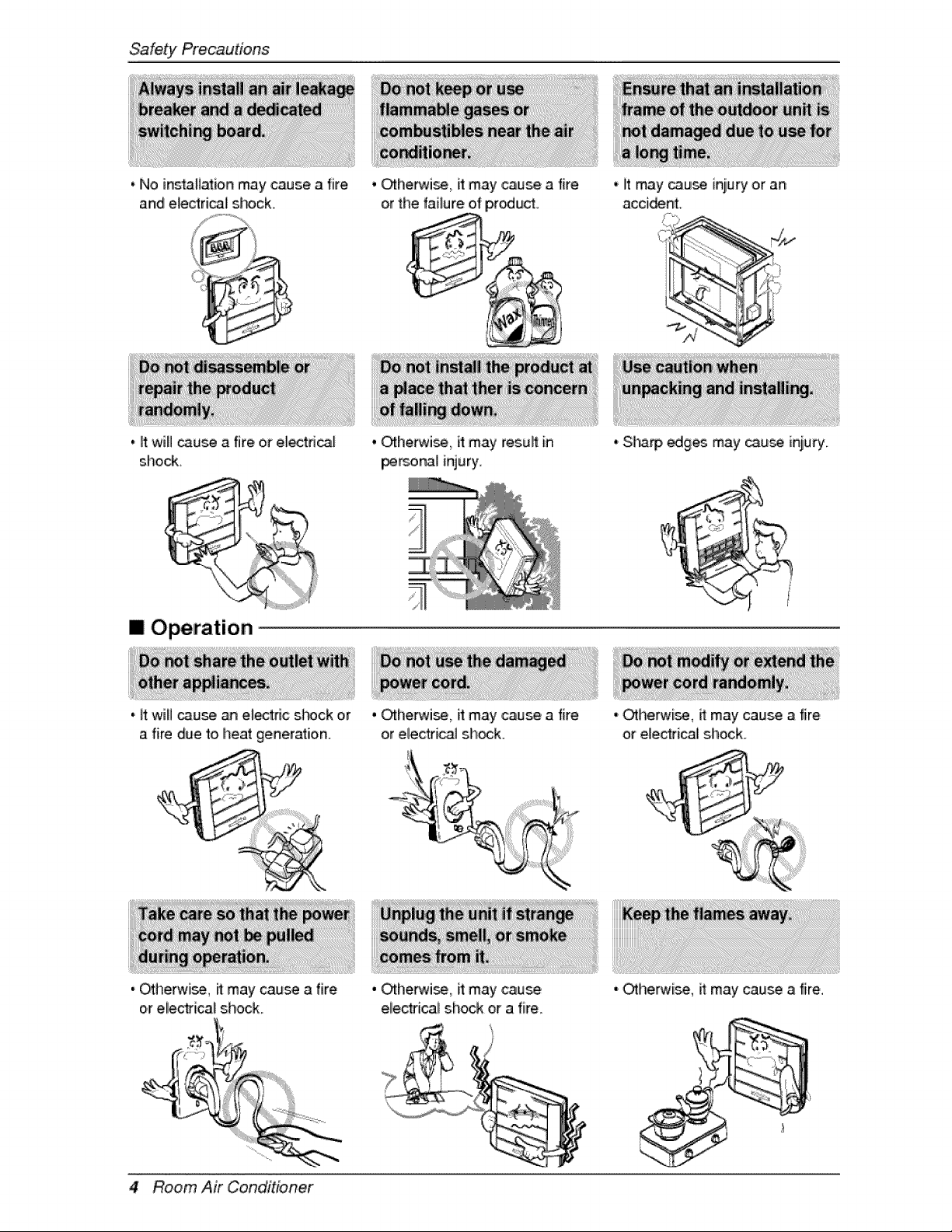
• No instaB_ion may cause a fire
and electrical sL#ck.
, ff will cause i_ 'fire or electrical
shock.
' _he_i_, it may ,cause a fire
or the faiture o,fp,r_ucL
, Cffherwi_ it may resuff in
per_na] injury,
,' it may _us4_ injury or an
accident.
?
[] Operation
a fire due to heat £eneration_
, O_herwi_, ff may cause a [ire
or eliectr[cal s.hock.
, _herwi_, it may ,cause a fire
or electrical sh_k.
.' Sharp _ges may _u_ iniury_
, _he_i_,, it may cause
eliectfical shock or a fire
,.Otherwi_, it may cau_ a fire
or electrical shock.
, _herwise, it may cause a fire.
4 Room Air Conditioner
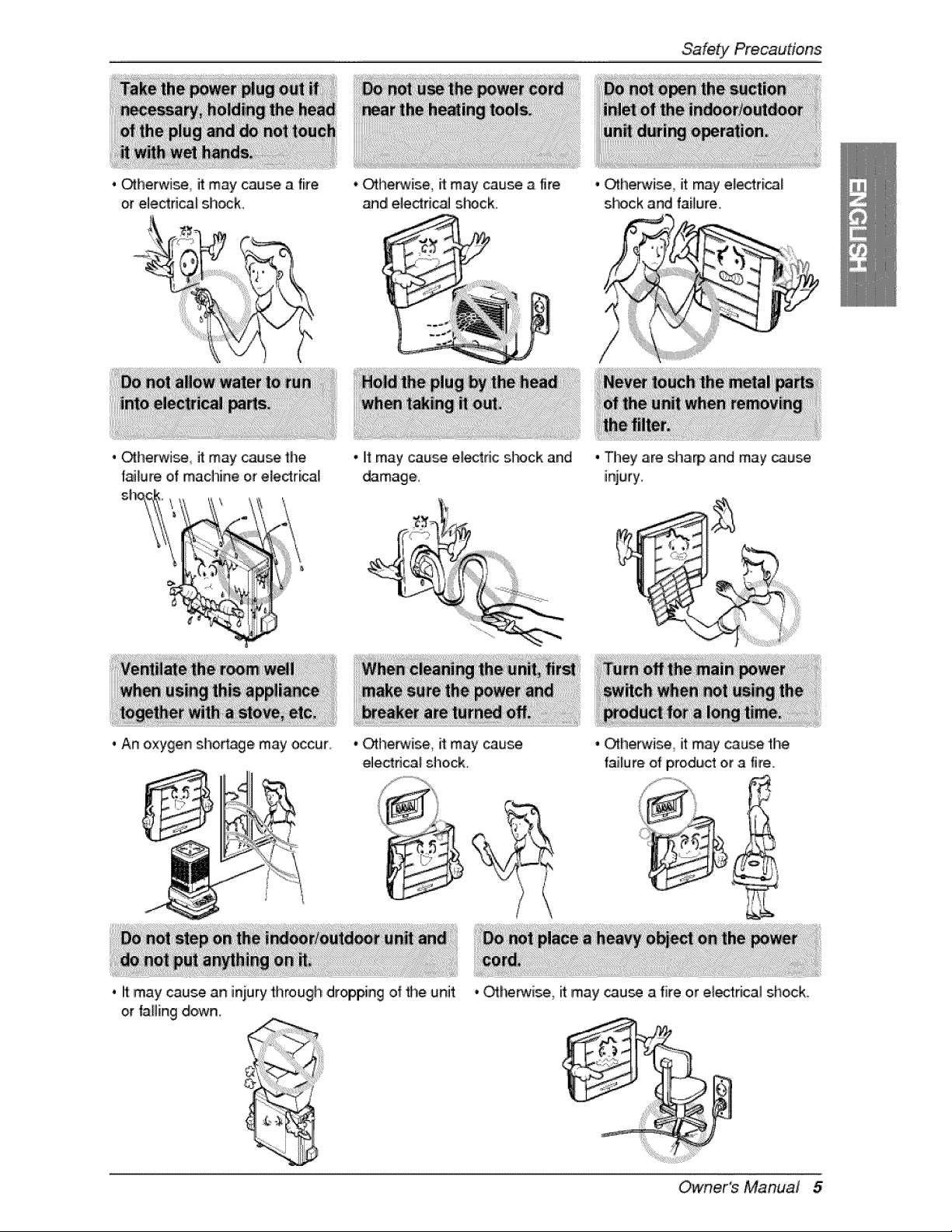
. _herwi_ it may cause a fire
or eUe,ctrica_shock_
• Otherwise, it:may cause a fire
and el,e_rica_shock.
Safety Precau,dons
• _herwise it may cause the
failure of machine or electrical
• It may cause e_ric s_c:k and
damage,.
• _herwise_ it may electri_f
shock and failure.
/
/
• They are sha_, and may _use
injury.
. An oxygen shortage may occur, • Otherwise, it may cause
ele,ctdcal shock.
. it may cause an i_ury _hrough dropping of _e unit
or falling down_
• Ot:he_#ise, it may cause thie
failure of product eta fire.
• _he_ise, it may cau_ a fire or ele_rical shock.
Owner's Manual 5

Sa'fety Precautions
* O_herw'i_, ff may cau_ a fire or e_ectrica_shock ' Othier_ei_ children may be sedou_y iniured due
to falling down.
[] Installation
'i Otherwi_, ff may cau_ water fea_ge.
,,,Otherwise, it may cause dispute wffh the
neighbors,
* Oiherwi_, ff may cau_ t#_ failure of product , Othe_ise, it may cause vibration or water
lea_age,,
6 Room Air Conditioner
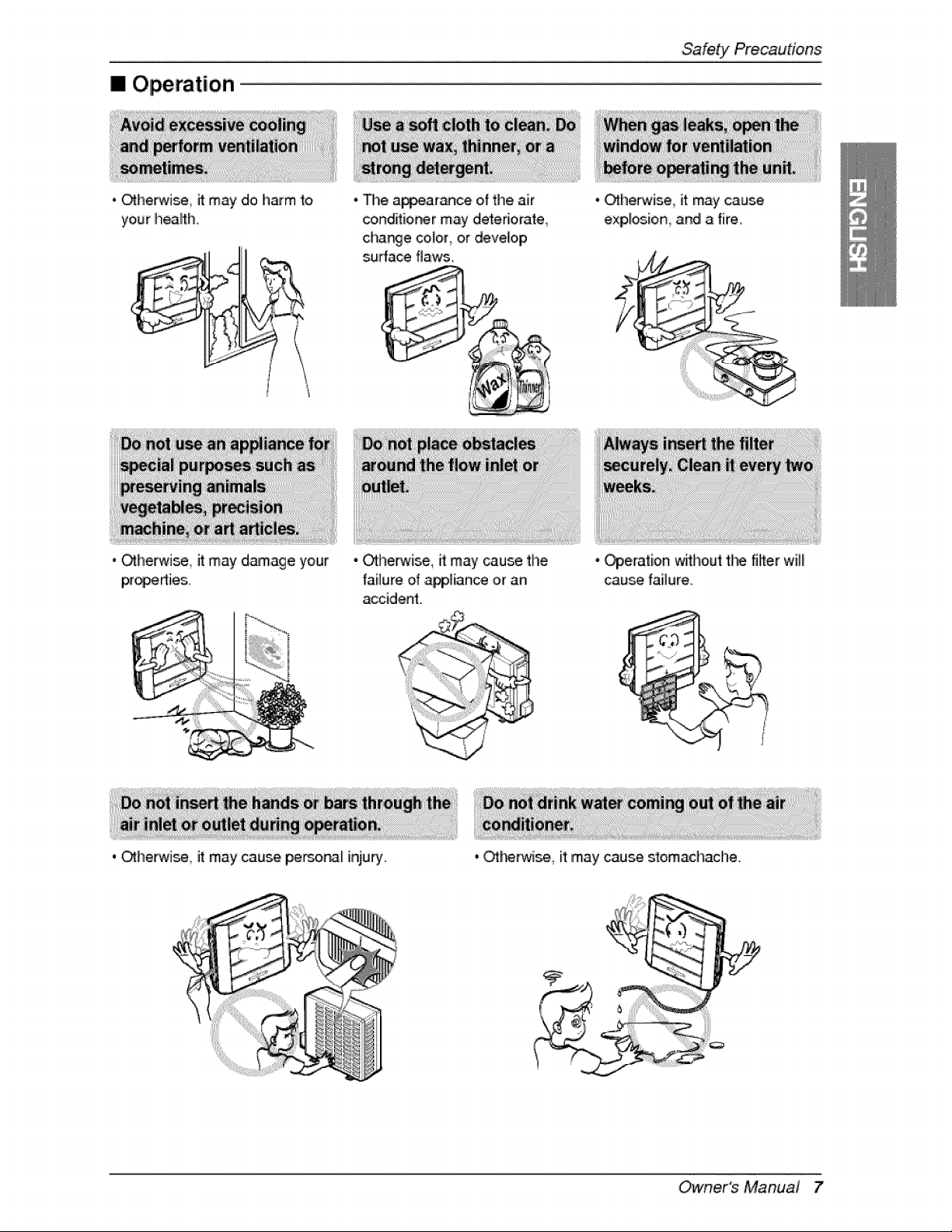
[] Operation
• Otherwise it may do h_m to
your heaffh.
• _herwise it may damage your
• The a_arance of the air
c_onditio_r may deteriiorate
charge color, or deve[oip
su_ace flaws,
• _herwise, it may cause the
failure of _]ian_ or an
accident.
. _he_ise it may cause perso_l injury,
• _herwise it may cause
exp,l_ion and a fire.
• _eration without the filiterwill
cau_ failure
• Other, wise it may cause stomachache.
Owner's Manual 7

Prior to Operation
1. Co,r_act an installation s_cialist for installation.
2. P_ug in the power #ug properly.
3, Use a dedicated circuit.
4. D,o not use an exten_on cord.
5. D,o not staWstop operation by p,fuggi_/unpluggi_ the power cord.
6. If the cord/plu 9 is damage, replace _ with only an auft_orized replacement _d_
1. Being exposed to direct airflow for a Io_ _me may _ hazardous to, your heaffh. Do, not expo,_
occu_nts_ _ts_ or plants to dired aidllow for a _ongtime.
2. Due to the possibility of oxygen deficiency, ventilate t_ room when using the a_liance together with
stoves or o_her heatir_ _vic_.,
3,_Do not u_ this _r condi'_ioner for non-_dfied s_cial purpo_ (eg, preserving _ecisio, n devices,
food, pets, pla_s, or art objects).. Such use may damage your priories..
1oDo no_touch the meta_parts of the unit when removing the filler. Injury c_ occur.
2. D,o not u_ water to clean i_ide the air conditioner Exposure '_owa_er can ,destroy the insullation_
leading to electric shock.
3 When cleaning t_e un_, first make _re that the _r and breaker are turned off_The fan routes at a
very high speed duri_ o,peration_The_e is ,apossibility/of injury if the unff's power is triggered while
inner parts, of the unff.
For repair a_ maintenance, co_d your autl_#rized service dealer.
8 Room Air Conditioner
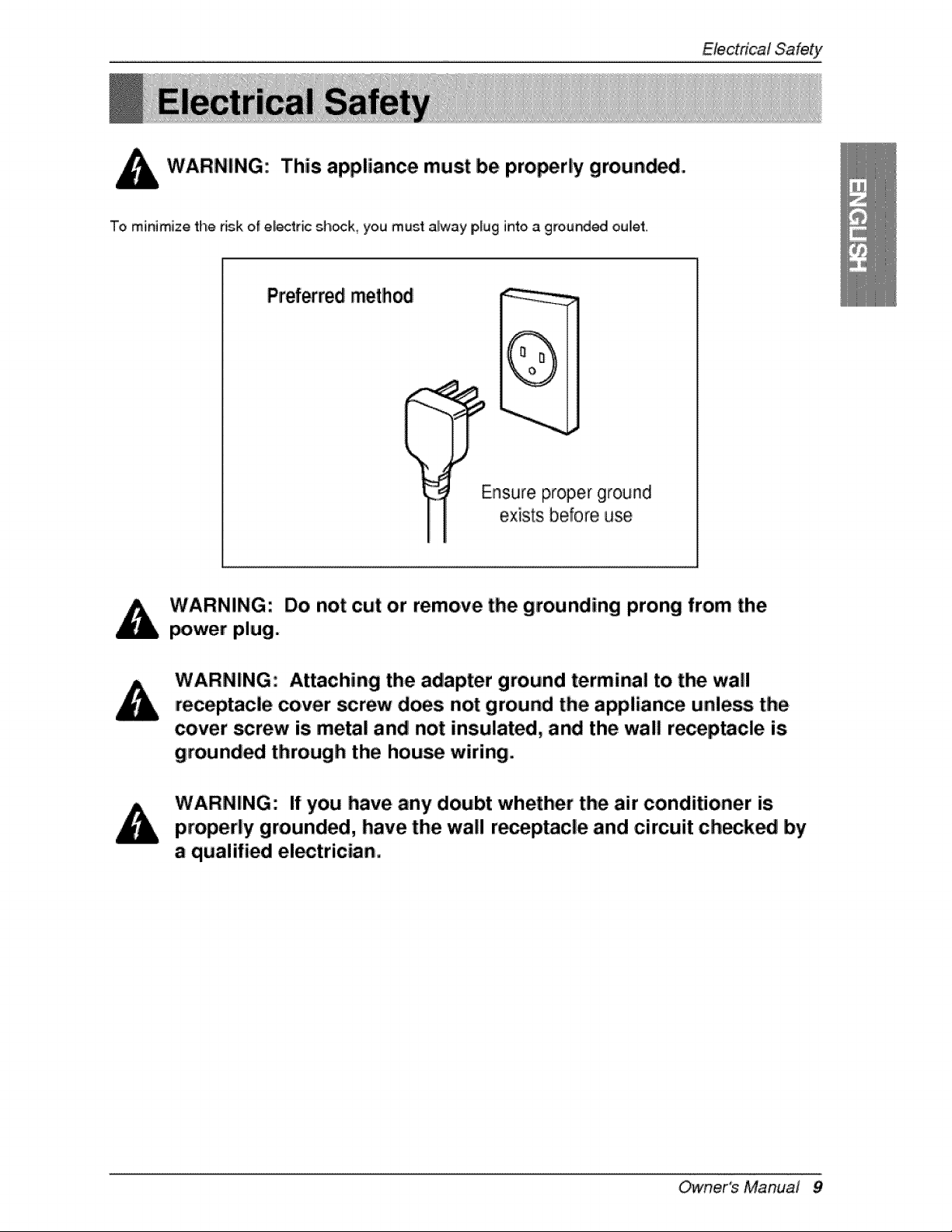
This appliance must be pro_rly grounded.
To minimize the dsk of electric sh_k, you must alway piug into a grounded oulet.
Preferredmethod
(
Ensu_e proper ground
exists before use
Do not cut or remove the grounding prong from the
power plug.
Attaching the adapter ground terminal to. the wal!
=receptacle cover _rew does not ground the appliance unless the
cover screw is metal and not insulated, and the wall re_p._cle is
grounded through the hou_ wiring.
If you have any doubt whether the air conditioner is
properly grounded, have the wall r_eptacle and circuit ch_k_ by
a qualified el_trician.
Owner's Manual 9

We strongly discourage the use of an a_ter due to _te_ial _fety h_ards For tempo,ra_
conr_dions, use only a UL-lJsted adapter, available from most IIocaJhardware stor_i, Ensure that the
large s_otin the a_pter is aligned with the large slot in the receptacle for a proof _arity connediono
'To,disconnect the _wer co,rd from tl'_ adapter, use one hand on each to avoid damaging _he ground
terminal Avoid freque_ly unplugging the _wer cord as this can lead to eventual ground terminal
damage,
Teml_,rary method
Adapter Plug-._
Receptacie Cover
_"Metall Screw
WARNING: Never use the appliance with a broken adapter.
We stro_ly discourage the use of an extension cord due 1_opotentia_ safety hazard& For _em_irary
sit::ua_ons,use only CSA certified and UL list_ 3-wire grounded extension co,r_, rat_ 15 A, 125 W
10 Room Air Conditioner
OperatingInstruc#ons
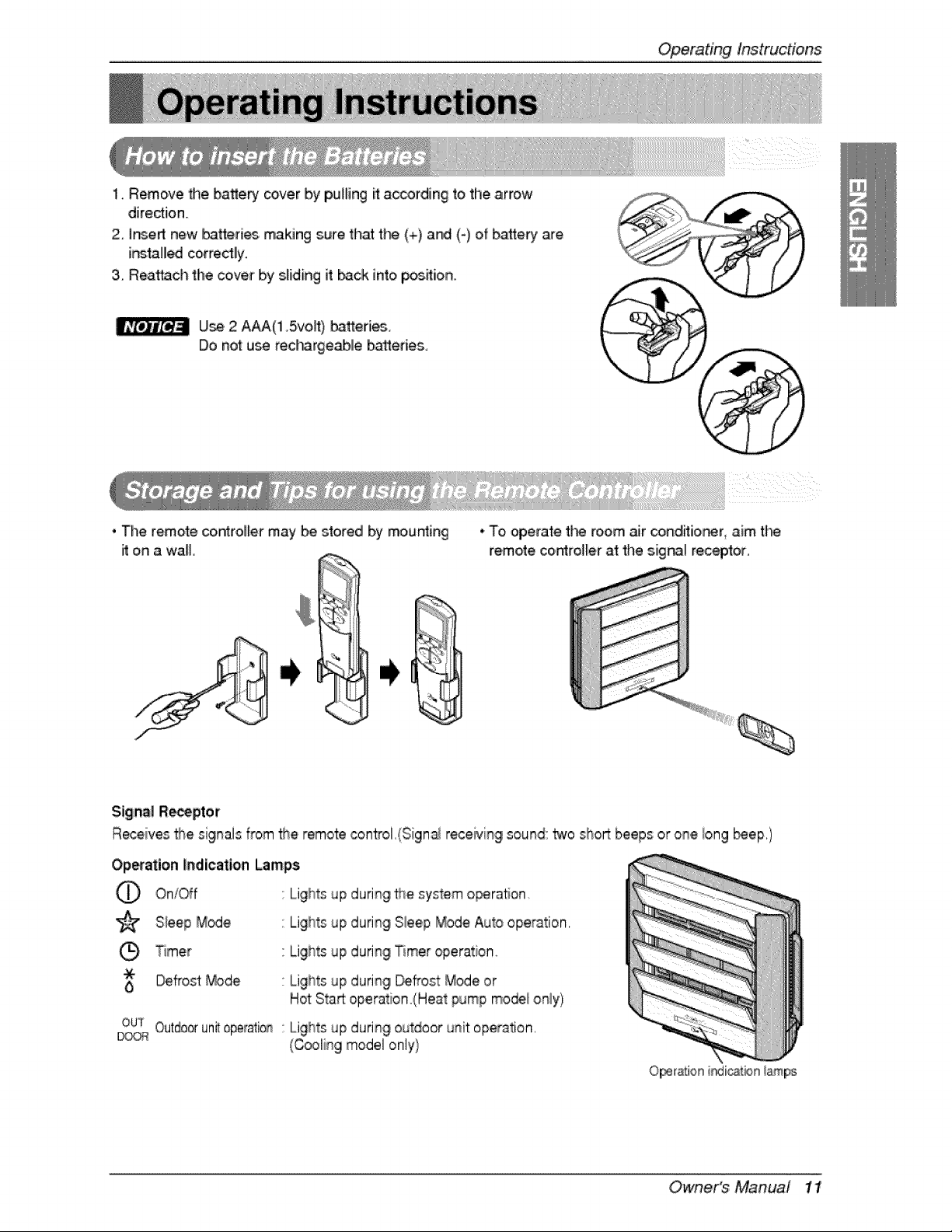
1, Remove _e bakery" cover by p,u_lingit:according to the arrow
dire_ion.
2ohsert new Ib,atteri_ making sure that t_ (+) and (-) of battery are
i_tal_ co,rrectlly.
3. Reattach the cover by s_iding it back into p_ion..
U_, 2 A_(1.5voff) _tteri_.
Do not u_ recl-_rgeablle batteries.
, The remote controller may be stored by mousing
it on a wall.
• To, operate tl'_ room ,_r condRio_r, mm the
remote co,n_rol_erat the siig_ receptor,
Signal R_p'tor
Receives the signals from _e remote control.(Sign_ receiving souk_d:two sho_ beeps or onielong _ep.)
Op_atio,n Indication Lamps
C) On/_f
'_ S{eep Mode
T_mer
t _frost _de
OUT
Outdooruni_aperafio,_
Lights up during _e system operation
Lights up during Sleep Mode Auto operation,
Lights up during Timer operation.
Lights up during _frost Mode or
Hot Start:operation (Heat pump mo_i only)
Lights up during outdoor unit operation,
(Cooling model only}
O_ration iadicai#n _am_
Owne,r's Manual 1!
Operatinglnstruc#ons
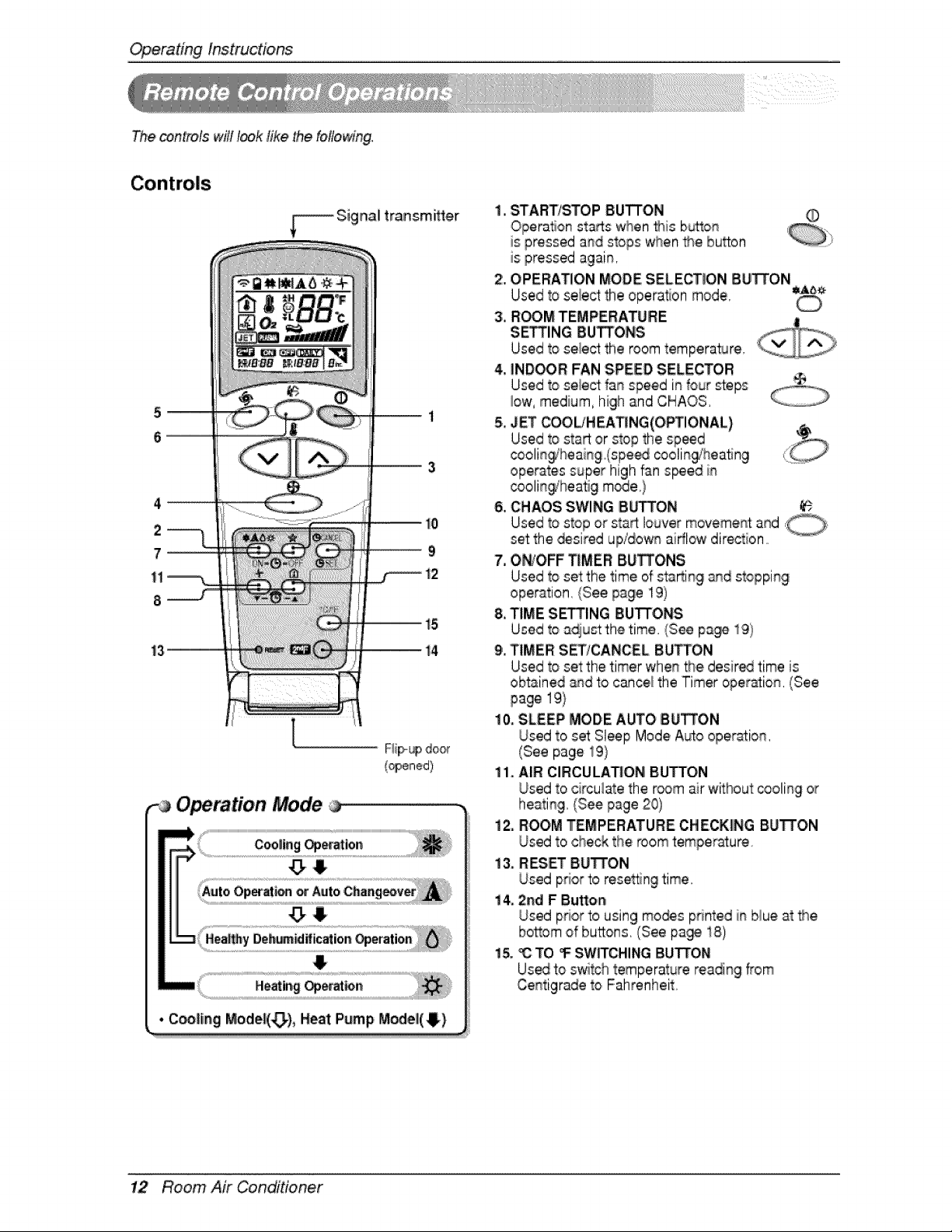
The _n_fo[s w_H I_k _ike the following°
t5
|4
Operation Mode
{opened)
• C_|ing Mode|(_), Heat Pump IMc_ell(4}
i ,i START/STOP BUTTON
Operation starts when _is b_ton
is pressed a_d stops when _e burn
is pressed again,
2, OPERATION MODE SELECTION BUTTON
Used to select the operation mode, ,Aa_
3,iR_OM TEMPERATURE
S$1NG BUTTONS _
Used to seiect the room temperature, '
4, IND_R FAN SPEED SELECTOR
Used to select fan speed in four steps
_ow,medium, high and CHAOS
5, JET COOL/HiEATING(O_IONAL)
Used to start or stop the sp_d
coolin_heaing (spe_ cooling_'heatmg
operates super high fan s_ed in
coolitqgiheatig m_e,}
6, CHAOS,SWING SUTTON
Used to stop or start louver moveme_ and,
set the ,desiredupidow_ airflow direction
7. Ot_#OFF_MER BUTTONS
Used to set the time of sta_ing an,ds_opping
operation, (See,page 19)
8. TIME S_ING IBUTTONS
Used to sdju_th,e time. (See p_cje 19)
9',,TIMER S_/CANCEL BUTTON
Used to seeth,etimer when the desired time is
obtained &qd to cance_the Timer opier_io_, (See
page 19}
10. SLEEP MODE AUTO BUTTON
Used to set:Sleep Mode A_o oper_ion,
(See page 19}
ii. AIR CIRCULAr,ON BUTTON
Used to circulate the r_m air without _oling or
heating, (See page 20)
12. ROOM TEMPERATURE CHECKING BUTTON
Used to check the room temper_ure.
13. RESET 8u'FrON
Used prior to resetting time,
i4_ 2rid F IButton
Used pdor to using mo_s printed i_ blue a__e
bottom of buttons, (See pa_ 18)
i& _ TO • SW_CHING BUTTON
Usedto switch temperature reading from
Centigrade _oFahrenheit.
12 Room Air Conditioner
OperatingInstructions
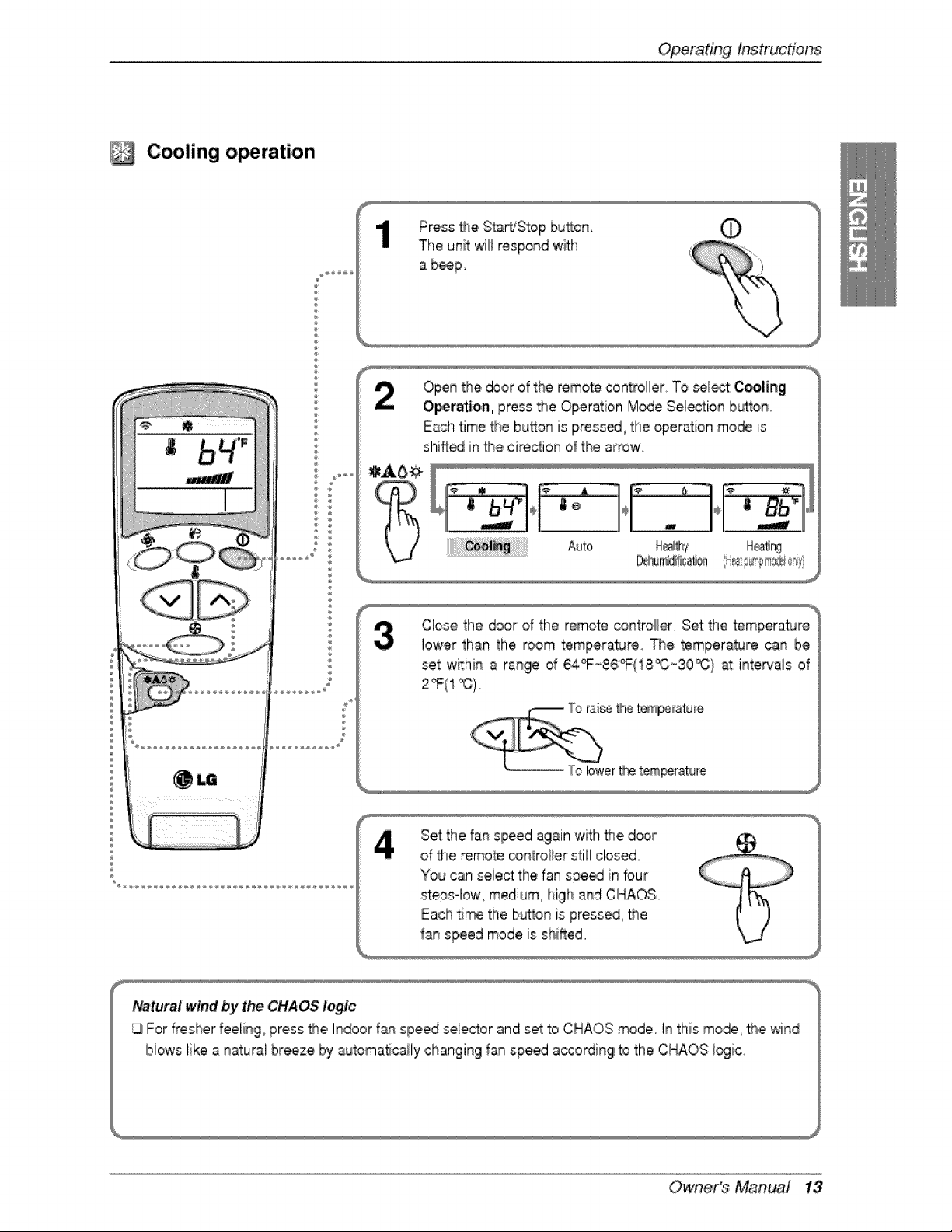
C lingi o ration
Open the door of the remote controller To sel_ C_,ling
O_t_to,n, press the Operation Mode Sel_io_ b_tto_
Each time the bu_o_ is press_, the operation mode is
shift_ in the dire_ion of the arrow
Close the door d the remote _troller, Set the temperat_Jre
lower ttlan the room temperature _e temperature ca_ be
set w_hn a ra_ of 64_86_(18_30_} _ intervals of
2°F(1 _),,
#_etem_,_ature
Set the fainspeed again with _e d_r
of the remote contro#er still closed,
"Youcan select the fan spe_ in four
steps-low, medium, high and CNAOS
Each time the b_o_ is pressed, _e
fa_ speed mode is shifted,
Owne,r's Manual 13
Operatinglnstruc#o,ns
Auto operation (Cooling model only)
®
®
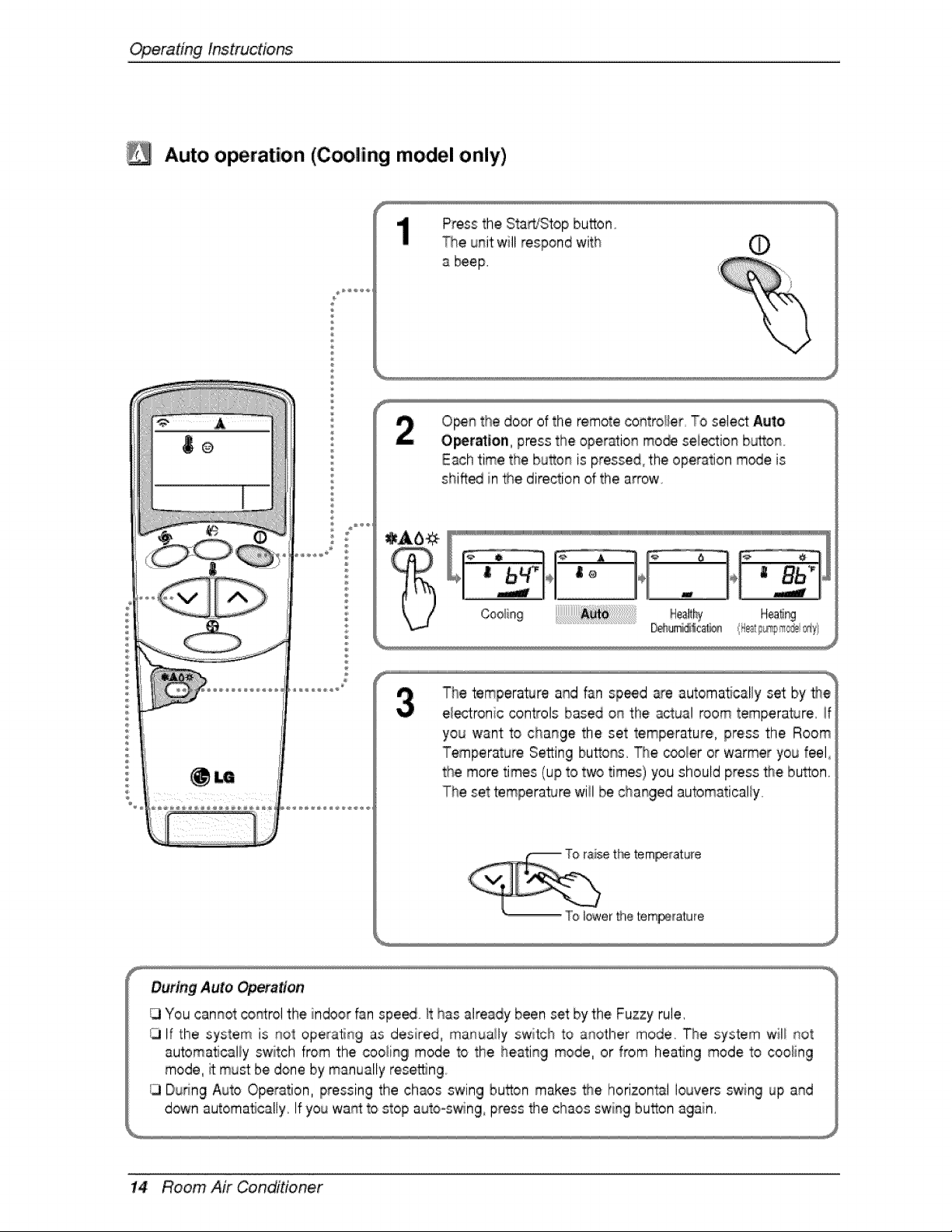
Press the Sta_Stop button
_e unit will respond with
a beef
O_n the door of the remote contro#er To sele_ Auto
O_ratton, press the operation mo_ =sei_io_ b_ton,
Each time the bu_on is pressed, the operation m_e is
shift_ in _e direction of the arrow
The temperatJre and fan speed are automa_cally set by 'fl_e
ei_tronic controls based o_ the actual room temperature, !f
you want to cha_ge the set temperature,,, press the Room
Temperature Setting bu_o_s, The cooler or warmer you feel
the more times (up to two times) you should press _re button,
The set temperature wiil be cha_ged automaticaliy,
t[_ tem_at_re
T'o lower #'_etem_[ature
During Auto _eraition
13You cannot _rol the indoor fan spe_ it has already been set by the Fuzzy rule.
/j If the system is not operatir_g as desired, ma,r_uaHyswitch to ar_other mode The system wil! not
automatically switch from the cooling mode to the he,ati_g mode, or from heating mode to cooling
mode, it m_st be done by manually resetting,
/3 Duhng Auto Operation, pressing the chaos swing button makes the horizontal louvers swing up a_d
down automa%ally, If you wa_ to stop auto=s_ng, press the chaos swing button again,
14 Room Air Conditioner
OperatingInstructions
Healthy dehumidification ,operation
®
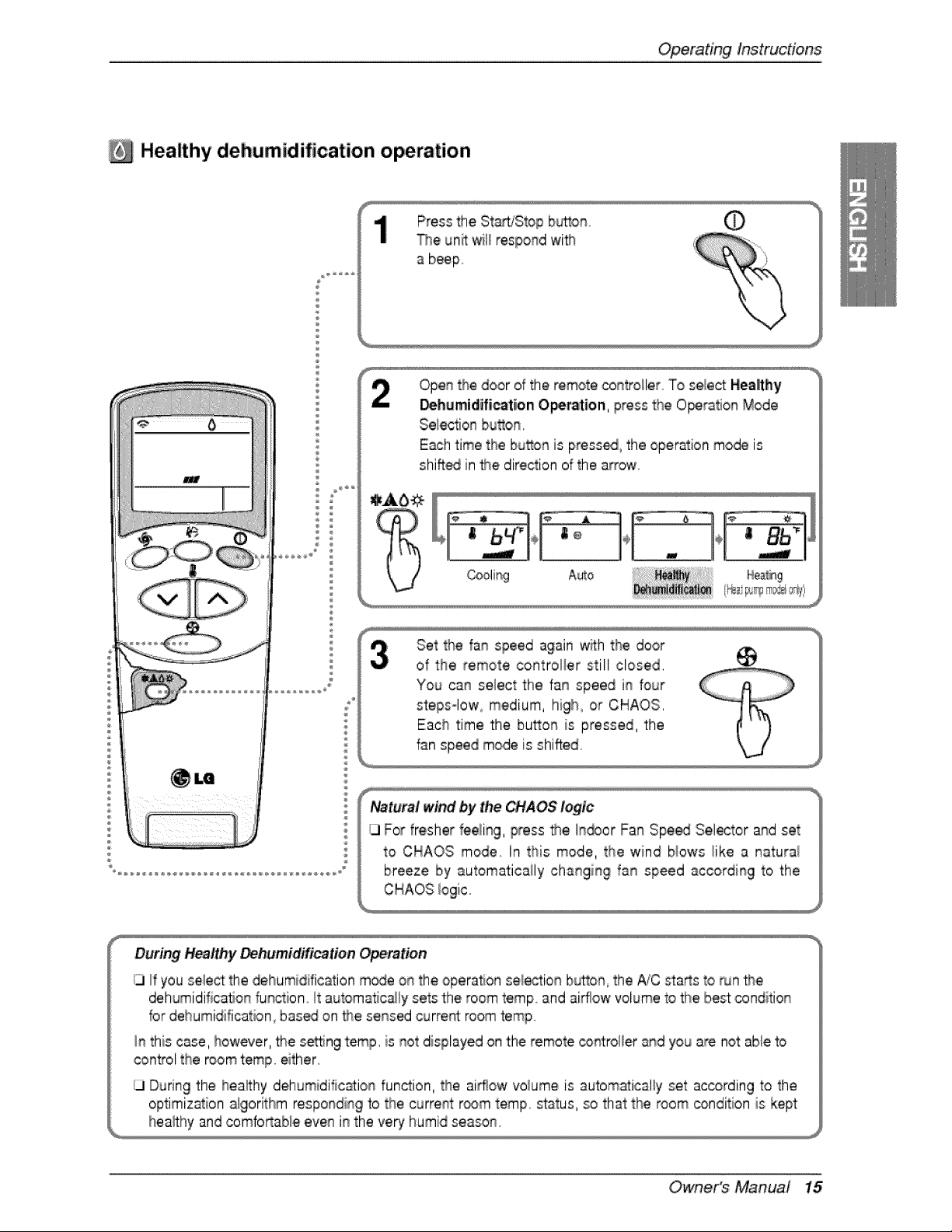
Press the Start/Stop bu_on.
The unit wil_respo#d wi_
a beep
Ope# the door of the remote co#troller To sie/ectHealthy
_hemidifi_tion ,Operation, press the O_ration Mode
Selectio_qbuttoln.
Each time tlhe bu_on is press_ the operation mode is
shift_ in the direction of the a_ow
Set the fan speed again w_ththe door
of 'the remote controller still closed.
You can select the fan speed in four
steps-low, medium, high, or CHAOS.
Eac:h time the bu_on is pressed, the
f_n speed mode is shifted
Natural wind by the CHAOS logic
ILlFor fresher feeling, press the h_or Fan Spe,_ Selector and set
to CHAOS mode In this mode, the wind biows !ike a naturai
breeze by automatically changing fan speed according to the
During Healthy Dehumidification Operation
ILl If you select the _humidific_tion m_e o_ the operation se_iectio_b_tton, the _C sta_s to run _e
deh_midificatio_ function It automatica_lysets the room temp and airflow volume to #_ebest condition
for dehumidification_ bas_ on the sensed curre_ room temp
In this case, however, the se_ng temp. is _ot displayed on the remote _t:rol_er _d you are not: able to
cont_o!the room temp. either.
ILlDuring the healthy dehumidific_io_ function, the airflow volume is automatically set according to the
optimization algorithm responding b the current r_m temp status, so that the room condition is kept
Owne,r's Manual 15
Operatinglnstruc#ons
Heating o,_ration (Heat pump model only)
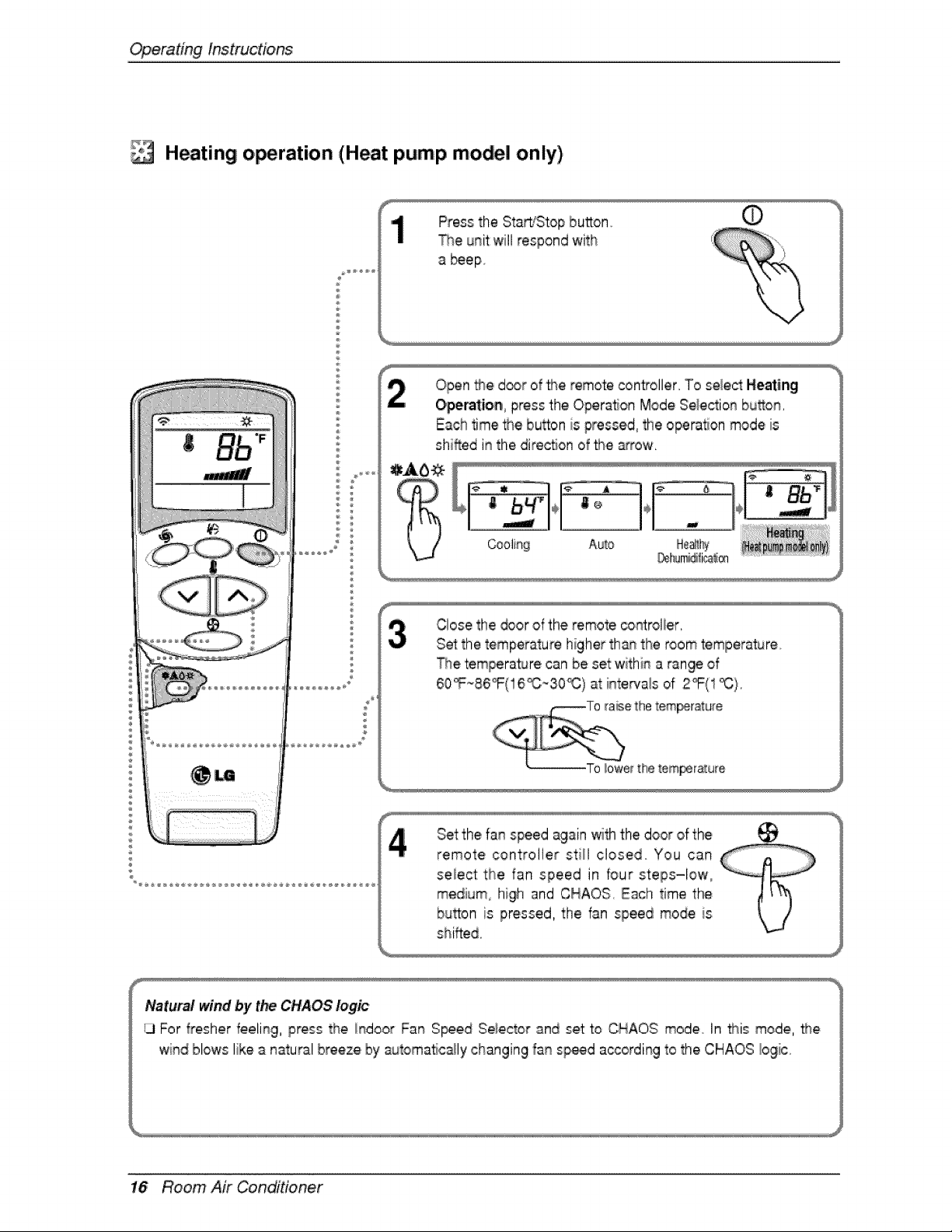
Press the Sta_Stop bu_on _'
The unit willrespond with
beep
Open #_e d_r of _e remote controller. To select Heating
Operatio_ press the Operalon Mode Selection buflon.
Each time _e button is pressed, the opera, on mode is
shifted in the dire_on of the _row.
Auto
_hJ_ica_®
Close the _or of the remote co.relic,r,
Set the temperature higher th_ the room temperature
_e tempera_re can be set:within a range of
60_86°F(! 6_;-30_ ;)at intervais of 2°F(1 _}.
Set the fan speed again withthe door of the ___
remote controller st:iil closed You can
se!ect the fan speed in four steps-low0
medium,, high and CHAOS, Each time thie
button is pressed, the fan speed mode is
shifted,
Natural wind by the CHAOS logic
13For fresher feeling, press the indoor Fan S_ed Se_eictorand set to CHAOS mode In #_is mode, _e
wind blows like a natural breeze by automatic_ly changing fan sp_d a_ording to the CHAOS bgic.
16 Room Air Conditioner
OperatingInstructions
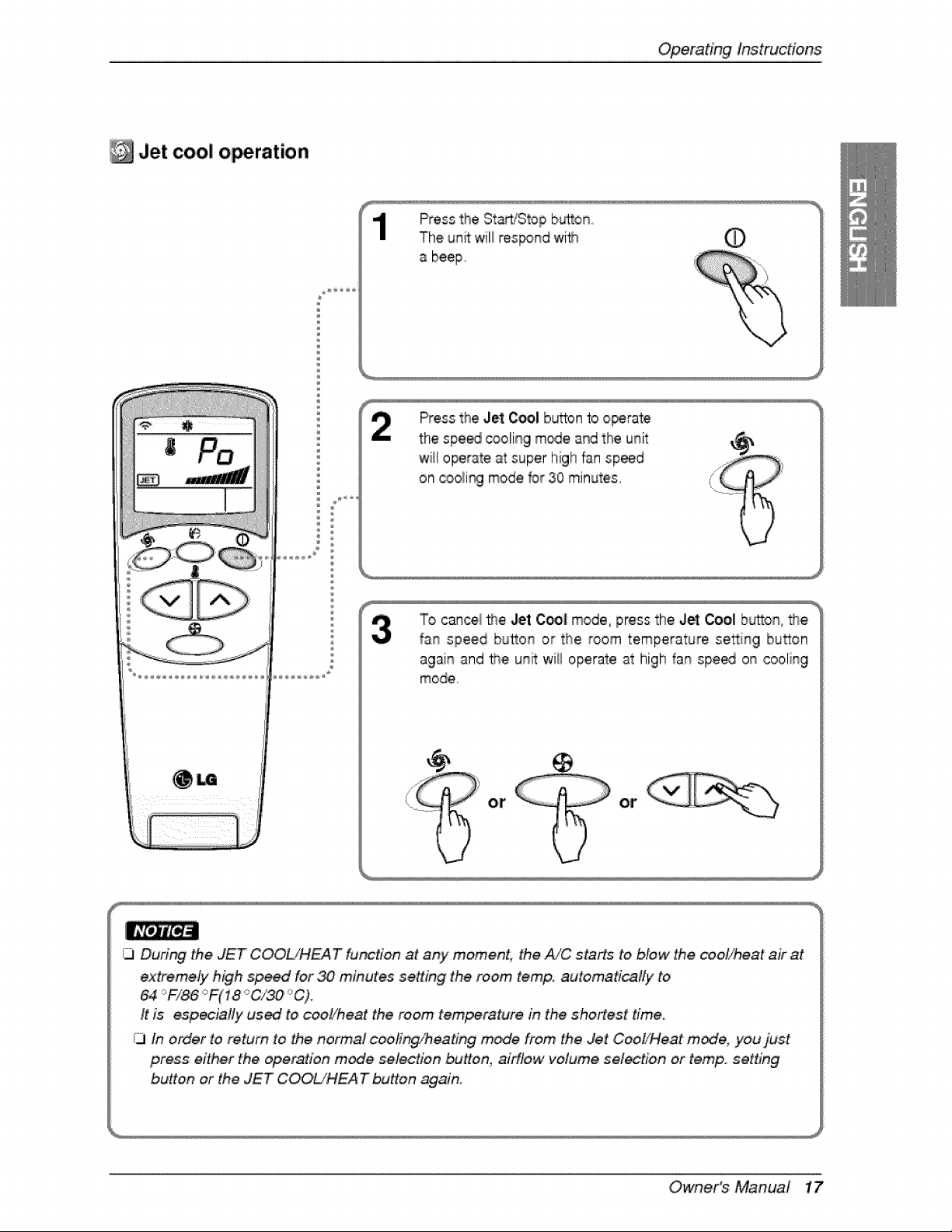
Jet coo! o ration
Press the St_dStop b_on
The unit will res_nd with
a beep
Press the Je_:C_I bu_on to operate
the spe_ coolin9 m_e and the unit
wiil o_tate at super high fan speed
on cooling mode for 30 minutes.
To cancel _e Jet C_| mode, press the Jet Cool bu_on,,_e
fan speed button or the room temperature se_ing bu_on
again and _e unit wii! operate at high fan spe_ on cooling
mode
Or' Or
_J Durin.g the JET COOL/HEA T function at any moment, the A/C starts to blew the _o!/heat air at
extremely h_gh speed for 30 minutes setting the room temp. automatically to
64 _F/86 _:_F(18'_:_C/30_C).
# ts especially us_ to coo_/heat the room temperature in the shortest time.
iJ In order to return to the n'erma! coolir_/_.eating mode from the Jet CooZ/Heat mode, you just
press eit,her the ope_tion mode selection .buflon, drflew "volume, selection or temp. setting
butto# or the J_T ,C T button af:ja_n.
Owne,r's Manuai 17

Operatinglnstruc#ons
2nd F o_ration
f
Press the StarLZSt,opbutton,
The unit:will respond with O
%
O_n the door of the remote control and press the 2rid
Function bu_on to o_rate f_nctions pri_ in blue u_er
buttons
(Check the indication of 2rid run.ion on the display of tj_e
These bu_ons can s_ the timer as follows:
-%
ON-,®' oFF ®s_ ....
1,8 Room Air Conditioner
Operatinginstructions
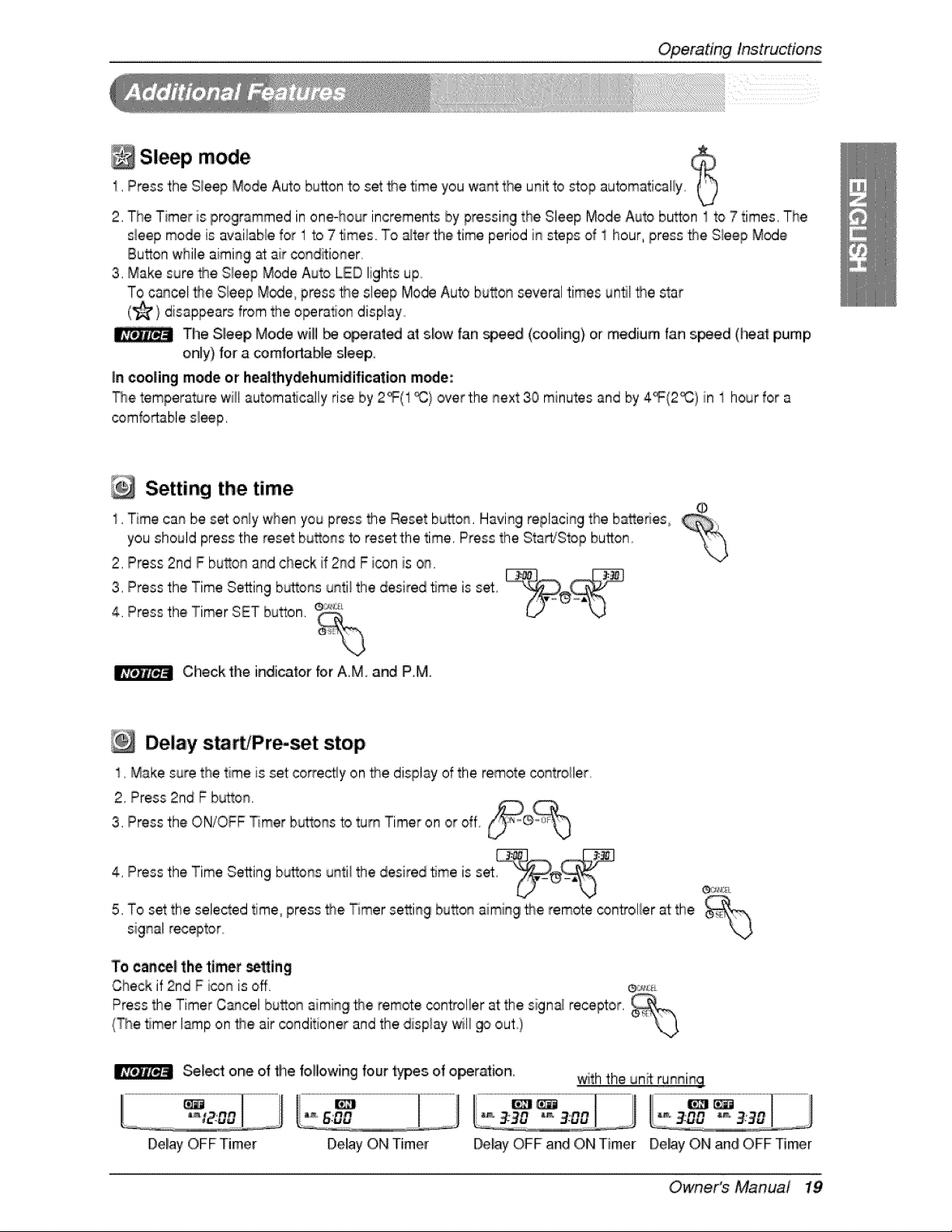
Sleep mode
1, Pressthe Sieep Mode Auto button to set _e, time you want tt_e unit to _,op automati_lly,
2, The Timer is programmed in one-hour increments by pressing the Sleep Mode Auto button 1to 7 times, The
sleep mode is availaNe fob,1 to 7 5rues TOalter the time period in steps of 1 hour, press _e S_eepMode
Button while aiming at air conditioner,
3, Make sure _e S_eepMode Auto LED lights up,
To cancel the Sleep Modie,press t_e sleep Mode Auto button several times unll l_e star
(_} disappears from the operation display,
Thi8 Sleep Mode will _ _rated at S_OWfan _ied (COOling}Or medium fan s_ed (_at pump
only) for a comfortable sliceF
In cooling m_e or healthydehumidification mode:
The temperature will automatically rise b'y2_(1 _} over the next 30 minutes and by 4_(2%) in I hour for a
comfortable sl_p,
Setting the time
1, Time can be set o_ly when you press the Reset button, Having replacing the batteries°
you should press the reset bu_ons to reset the time, Press the Sta_Stop button
2, Press 2nd F button and check if 2rid F icon is on,
3, Press thie Time Setting buttonse_:._unti_the desired 5me is set
4, Press the Timer SET button,
%
Check the indicator for A,M, and P,M,
Delay s r 'Prmset stop
1, Make sure the time is set co_ect!y on the display of;the remote controiler
2, Press 2nd F b_on
3, Press the ON/OFF _mer b_ons to turn Timer on or off.
4, Press the Time Se_ing b_ons until the desired 5me is set ®_::_.
5, To set the selected time press the Timer setting button aimingl_e remote _n'troller at the _!_
signa! receptor
To ean_l the timer _tting
Check if 2rid F i_n is off ®_:_;:_
Press the Timer Cancel bu_on aming _e remote controller at the signa_receptor,
{The timer I_p on _e, air _nditioner and the display willgo out)
Se_t one of file following four type,s of operation, with the unit running
Detay ON Timer Delay OFF and ON Timer Del_ ON and OFF Timer
Owne,r's Manual 19

Operatinglnstruc#o,ns
I_ Ai#low direction control
The up/down and rightile_ ai_low can be adjusted by
using the remote controi,
Press Chaos Swing button and the louvers willswing
Press _[e _a_Stop button to _art the u_qito
Press the bu_o_qagain and the louvers will stop, After
30 minutes, the buy,ors return to the maximum airflow
position automatically,
Air circulation mode
Circulates the room air without_oling or heating,
1, Press the StaWStop button_the unit will respond w_h a beeF
2, ,Open_e door on t_e remote control Press the Air Circulation button,,C_osethe door on the remote cent-el,
Now each time that you press the _ndoor Fan Speed Selector, the fan speed is shined from _owto CHAOS
and back to low again
+
J d
CHA_ A# Faa sr_d is ® low, Fan _ee_ is on medium Fan s_d is ® high
CHiAOG,Air _onomizes _wer co_u!mption and prevents o,verc_ling. The fan speed is
autom_icaHy changed from high to Iio,wor vice ver_, _nding on the ambient temperature.
20 Room Air Conditioner
OperatingInstructions
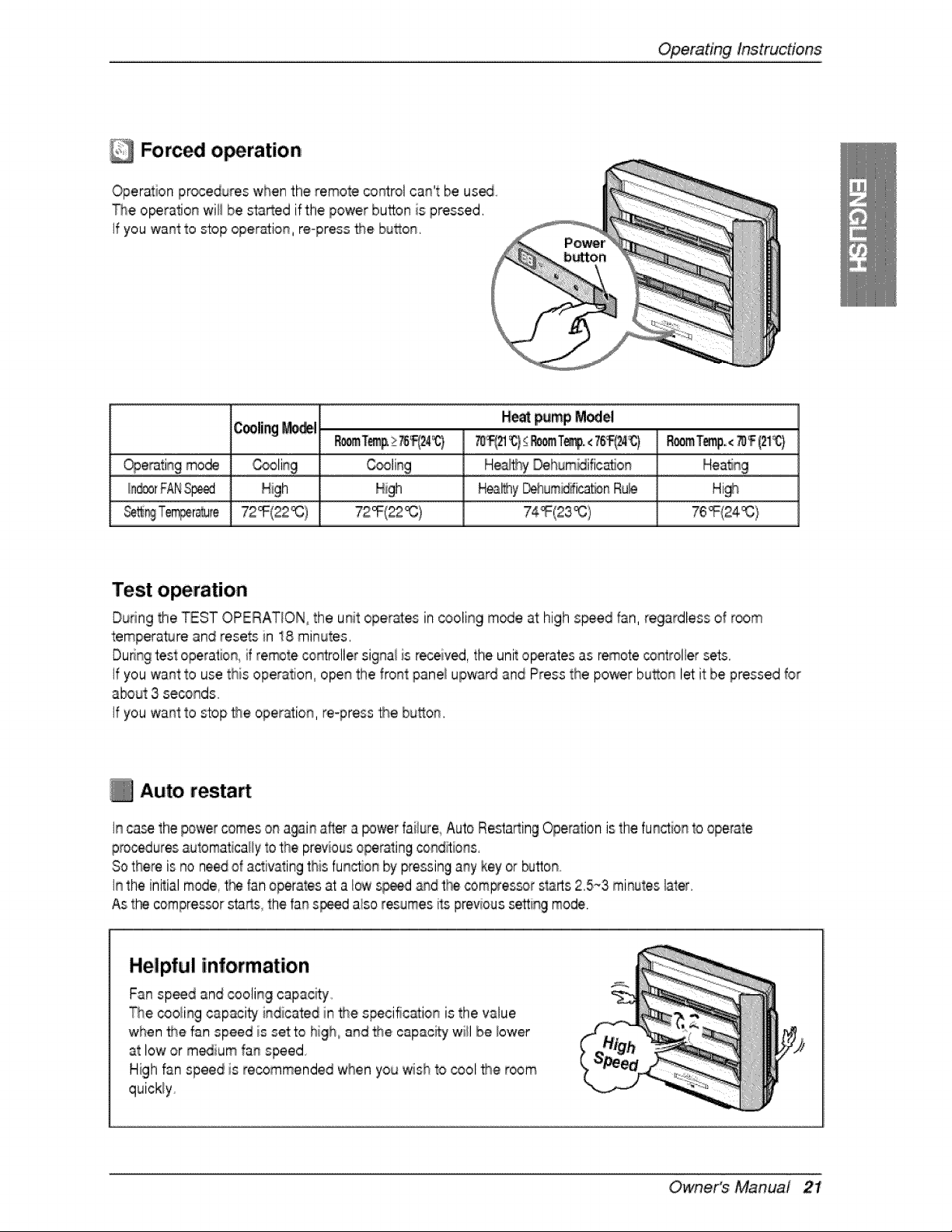
Forc l o ration
Operation pr_edures when the remote co_rol can't be usa
The o_ration will be started if the power bu_on is pressed.
If you wurstto _op oper_ti,on, re-press f_.e bu_on.
Heat pump Model
Cooling_il
Hea_y _um_ica_n Ru_ Hi_
_ T,em_r_te 72_(22_) 72_(22_) 74_(23_) 76_(24_:}
Test operation
During the TEST OPERATION, the unit operates in cooling m_e at high s_ed fan, regardless of room
temperature and resets in 18 minutes.
Duringtest operation,if remote controller signai is received the unit o_rates as remoteco,roller sets.
If you want to use this operation, open the front panel upward and Press the power bu_on let it be pressed _or
a_ut 3 se_nds
If:you want to stop _e operation, re-press _e bu_on.
Auto resta
In ca_ the power ,comeso_ again after a _wer faiiure Auto Resta_ingOperation is the function1ooperate
proceduresautomatica#yto the previous operatingconditions.
Sothere is no needof activating this functio_qby pressinga_y key or _tton
In the initial mode, tt_ fan operates at a I_wspeed _d the _m_essor starts2.5-3 minute_later.
As the cornpres_r sta_s the fan s_ also resumes its previoussetting mode.
Helpful information
Fan speed and cooling capac_y
_qe,_oli_g capacity' i_dicated in _e s_cific_ion is the value
when _e fan speed is setto high_a_d the capacity will b.e_ower
at low or m_ium fag speed
High fan speed is recommended when you wish to cool _e room
quickly
Owne,r's Manual 21

Maintenanceand Servi_
WARNING: Turn the system ,off before cleaning. To clean, wi_ with a soft, diry,cloth.
Do not u_ bleach or abra_ves.
Supply power must be disconn_ted before denning the indoor uni[
Air fi!ter
The air filters behind the front 9dll should be checked and clean_
once every 2 weeks or more often if n_cessary_
I Lift the front: _nel After liftingup the filter f_b a bit, take the filter
out slowly
Clean the filter after stopping the product.
2_Clean the filter with a vacuum or warm _y water
• If di_ is cornspicuous, wash with a solution o[ detergent in
Ilukewarm water.
• ff hot 'wa_r (104'_F(40oC) o.r more) is used, it maybe _formed
& After washing with water, d_ weli in the shade,
4 Re-install the air filter.
Never use any of tt_ followi_s:
,1Water _#_er than 104 '_F(_ °C).
Could cause deformaJion and/or disco!oratio,n.
, Vo,latile substanc_
Could damage the surfaces of #_eair co_itio, ner.
Fitte_-
_'l_e heat exc|-_nger coils and panell vents of the outdoor unit should be checked regularly,
If clogged with dirt or _ot the I_at exchanger
and pane[ vents maybe pro,fessio,nai[y steam cleaned,
Dirty or clogged _ils wi[[ reduce fl_e
operating efficiency of the system and cause,
higher o_r_ing cos_o
-Dra_inHose
Air
vel_s
::lear)
Room Air Conditioner
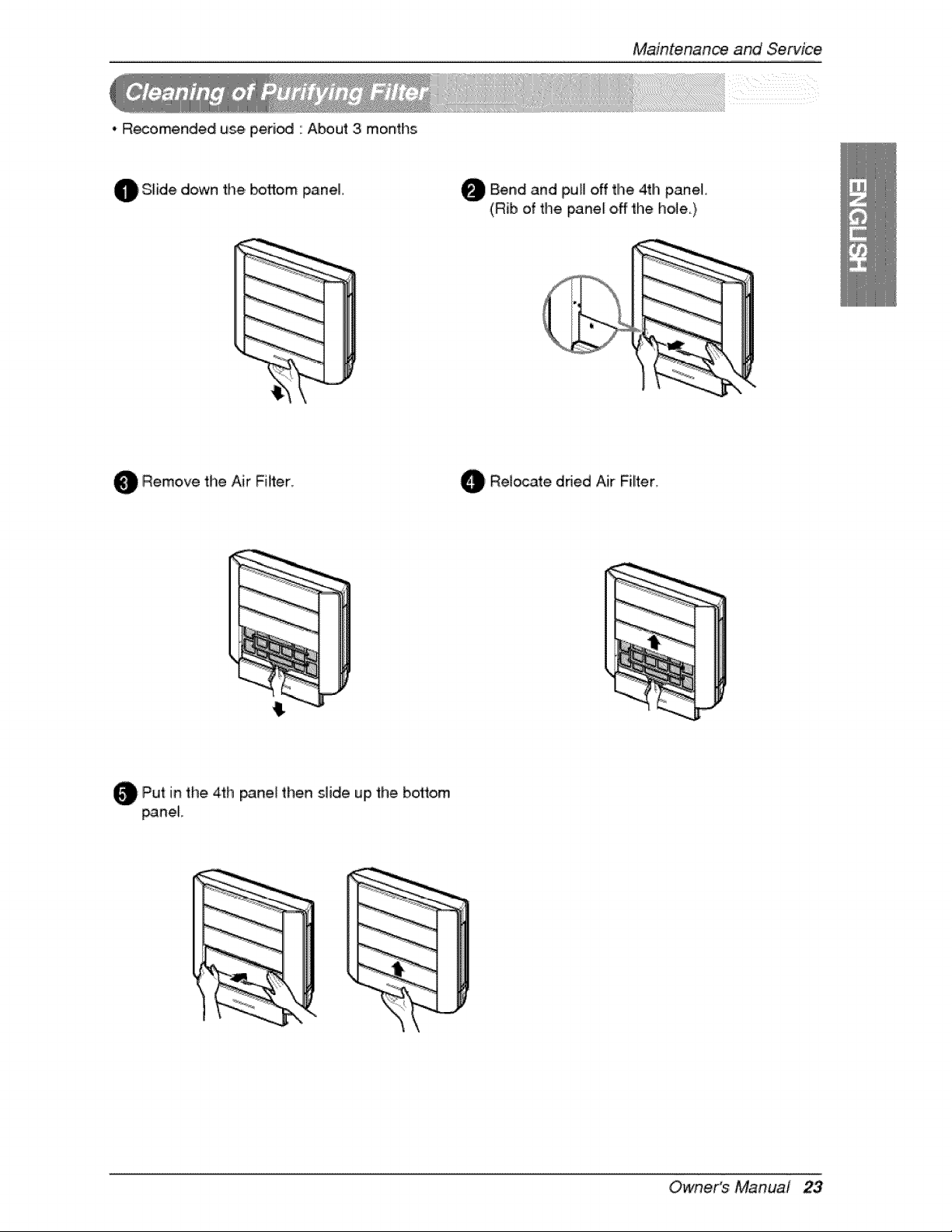
• R_omended use peri_ " About 3 months
Maintenani_ and Service
O Slide down the _flom panel,
O Bend and off the 4tlhpull panel
(Rib of the panel off the hole)
Remove the Air Filter
, Relocate dried Air Filiter.
O Pu't in the 4th then slide the bosom
_neJ
up
_neL
Owne,r's Manual 23
MaintenanceandService
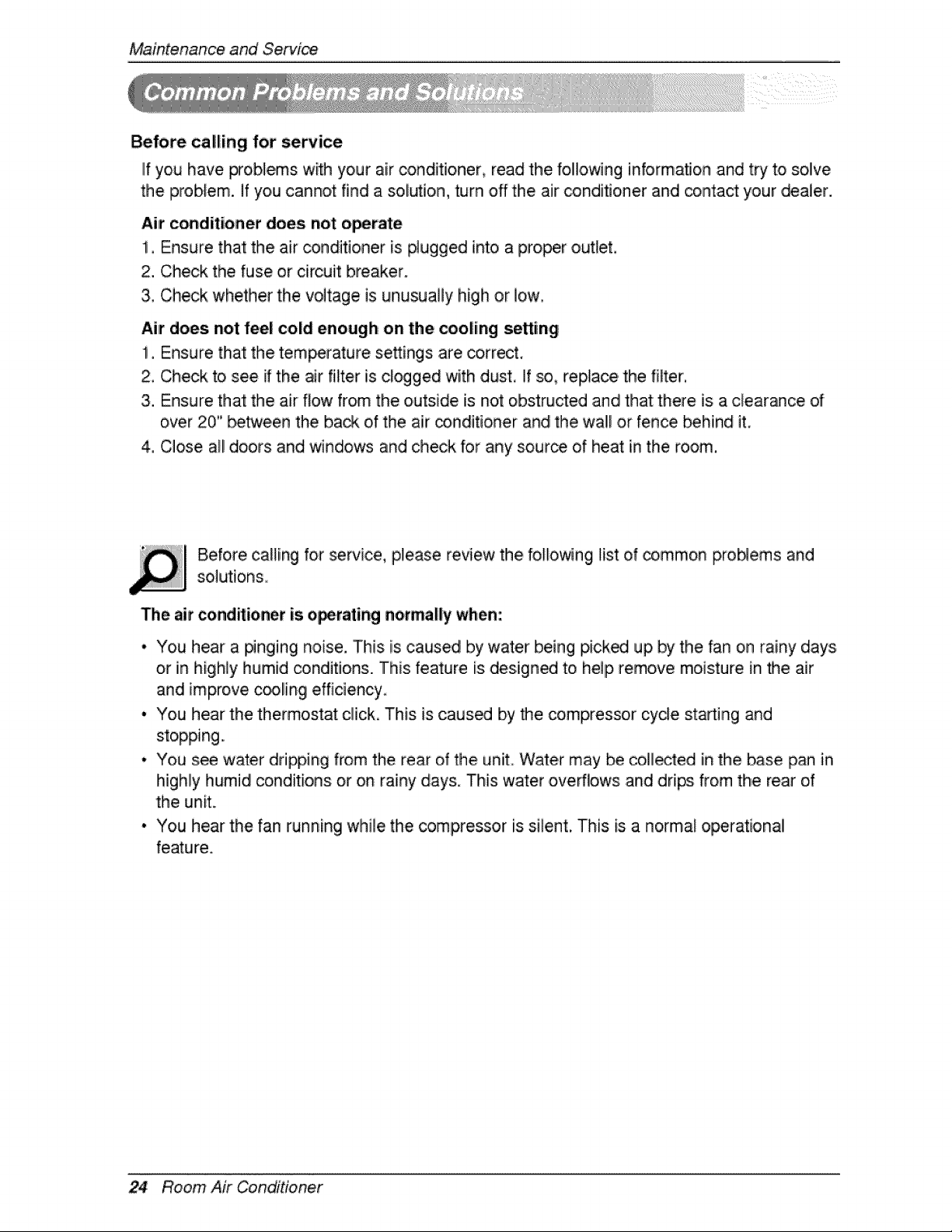
Before calling for service
IIf you have F_'oblems with your air conditioner, read the following information and try to solve
the problem, if you cannot find a soK,_ion, turn off the air conditioner and _ntact your dealer.
Air conditioner does not o_rate
!. Ensure that the air _nditioner is #ugged into a proper out_et,
2. Check the fuse or circuit breaker.
3. Check whether the voltage is unusually high or low.
Air does, not feel cold enough on the cooling setting
1, Ensure that the tempierature settings are correct,
2, Check to see if the air filter is c!ogged with dust, If _ replace the fi_ter,
3. Ensure that the air flow from the outside is not obstructed and that there is a clearance of
over 20" between the back of the air _inditioner and the wal! or fence _hind it,
4, Close all doors and _ndows and check for any source of heat in the room,
Before calling for service, please review the folio_ng Hst of common proNems and
The, air conditioner is o_,rating normally when:
• You hear a #nging noise. This is caused by water being picked up by the fan on rainy days
or in highly humid conditions. This feature is design_ to help remove moisture in the air
and improve c_ling efficiency
• You hear the thermostat click, This is caused by _e compressor cycle starting and
stopping.,
• You s_ 'water dripping from the rear of the unit Water may _ collected in the base pan in
highly humid conditions: or on rainy day& This water oveffbws and drips from the rear of
the unit.,
• You hear the fan running while the compressor is silent. This is a normal operational
feature.
24 Room Air Conditioner
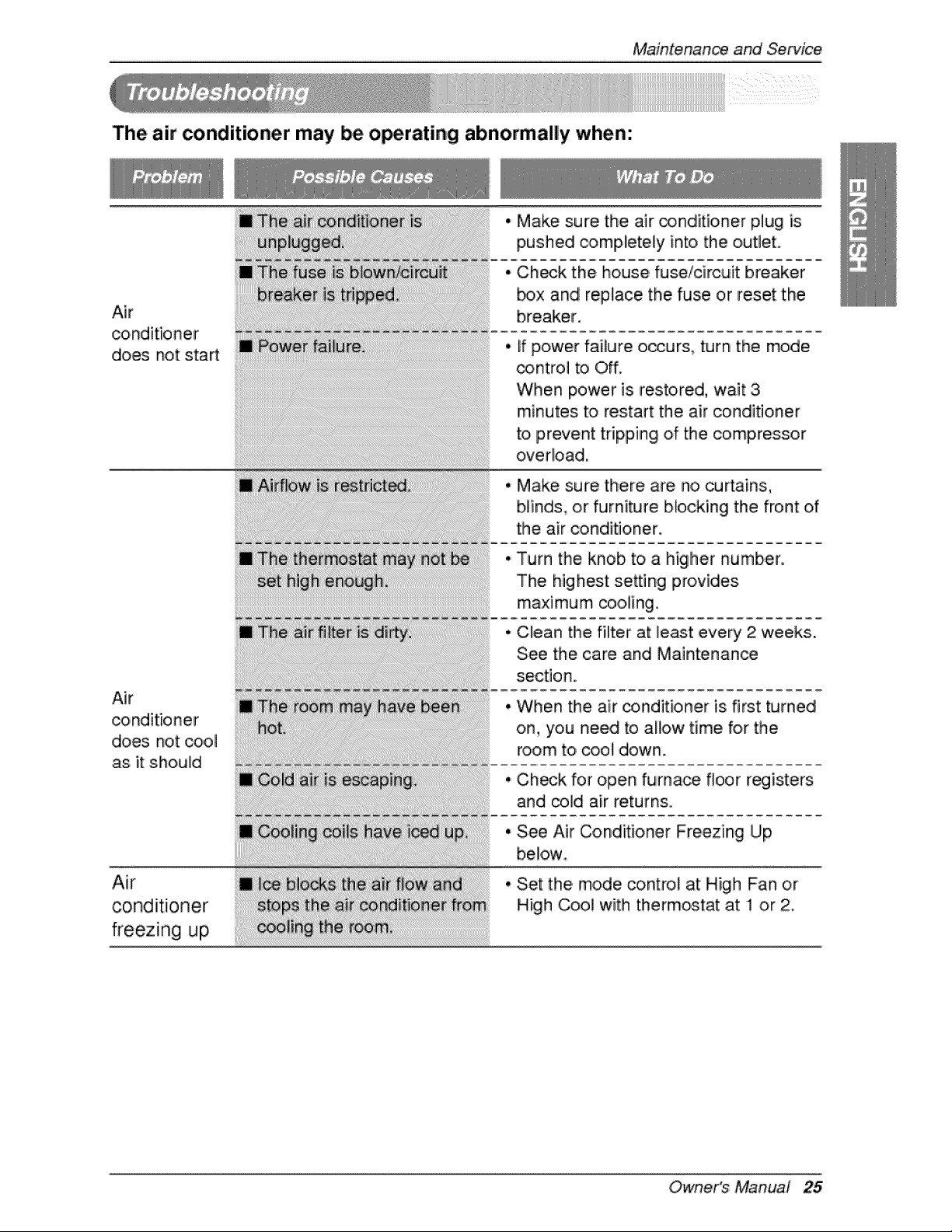
The air conditioner may be o_rating abnormally when:
Maintenance and Service
Air
conditioner
does not start
Air
conditioner
does not cool
as. it should
Air
conditioner
freezing up,
• Make sure the air ,_nditioner plug is
pushed completely into the outlet.
• Ch_k the house fuse/circuit breaker
_x and replace the fuse or reset the
breaker.
If power failure occurs, turn the mode
_ntrol to Off
When power is restored, wait 3
minutes to restart the air conditioner
to, prevent tripping of the compressor
overload,
• Make sure there are no curtains,
blinds, or furniture Mocking the front ,of
the air conditioner.
Turn the knob to a higher number.
The highest setLing provides
maximum cooling.
Clean tlhe filter at least every 2 weeks.
See the care and Maintenance
section.
When the air _nditioner is first turned
on, you need to allow time for the
room to, cool down.
Ch_k for open furnace floor r_isters
and cold air returns,
See Air Conditioner Freezing Up
below
Set: the mode _ntro,! at High Fan or
High Coo! with thermostat at ! or 2.
Owne,r's Manual 25
Memo
26 Room Air Conditioner

