CANDY HOOVER GROUP Via Comolli 16 Brugherio – Italy
User Instructions
Istruzioni per l’uso
OVENS
FORNI
2
23
EN
IT
Mode d’emploi
FOURS
44FR
Handleiding
OVENS
65NL

EN 2
Safety Indications
General Instructions
Product description
Display description
Use of the appliance
Connectivity
General notes on cleaning
Maintenance
Troubleshooting
Installation
Summary
3
7
9
10
13
15
19
19
22
86

EN 3
• During cooking, moisture may condense inside the oven cavity
or on the glass of the door. This is a normal condition. To reduce
•
tray.
• Avoid leaving food inside the oven after cooking for more than
•
•
•
•
•
•
•
•
•
vised children.
•
to clean the oven door glasses, as they can scratch the surface
Safety Indications

EN 4
and cause the glass to shatter.
•
tions.
•
•
• IF THE OVEN IS PROVIDED BY THE MANUFACTURER WITH
OUT PLUG:
• HE APPLIANCE MUST NOT BE CONNECTED TO THE POWER
SOURCE USING PLUG OR SOCKETS, BUT MUST BE DIRECTLY
CONNECTED TO THE SUPPLY MAINS. The connection to the
• IF THE OVEN IS PROVIDED BY THE MANUFACTURER WITH
PLUG:

EN 5
•
.
•
•
•
ing.
•
may cause a malfunction of the monitor. ln this case contact
customer service.
•
order to avoid overheating.
•

EN 6
•
•
ing and deteriorating the enamel of the insides.
• WARNING: Never remove the oven door seal.
•
•
•
•

EN 7
General Instructions
Safety Indications
read this manual carefully and retain it for future reference. Before installing the oven, take note
NOTE:
usage.
Electrical Safety
ENSURE THAT AN ELECTRICIAN OR QUALIFIED TECHNICIAN MAKES THE ELECTRICAL
CONNECTIONS.
CONNECTION

EN 8
WARNING
earth connection that has defective continuity.
NOTE:
Recommendations
Installation
First Use
EN 9
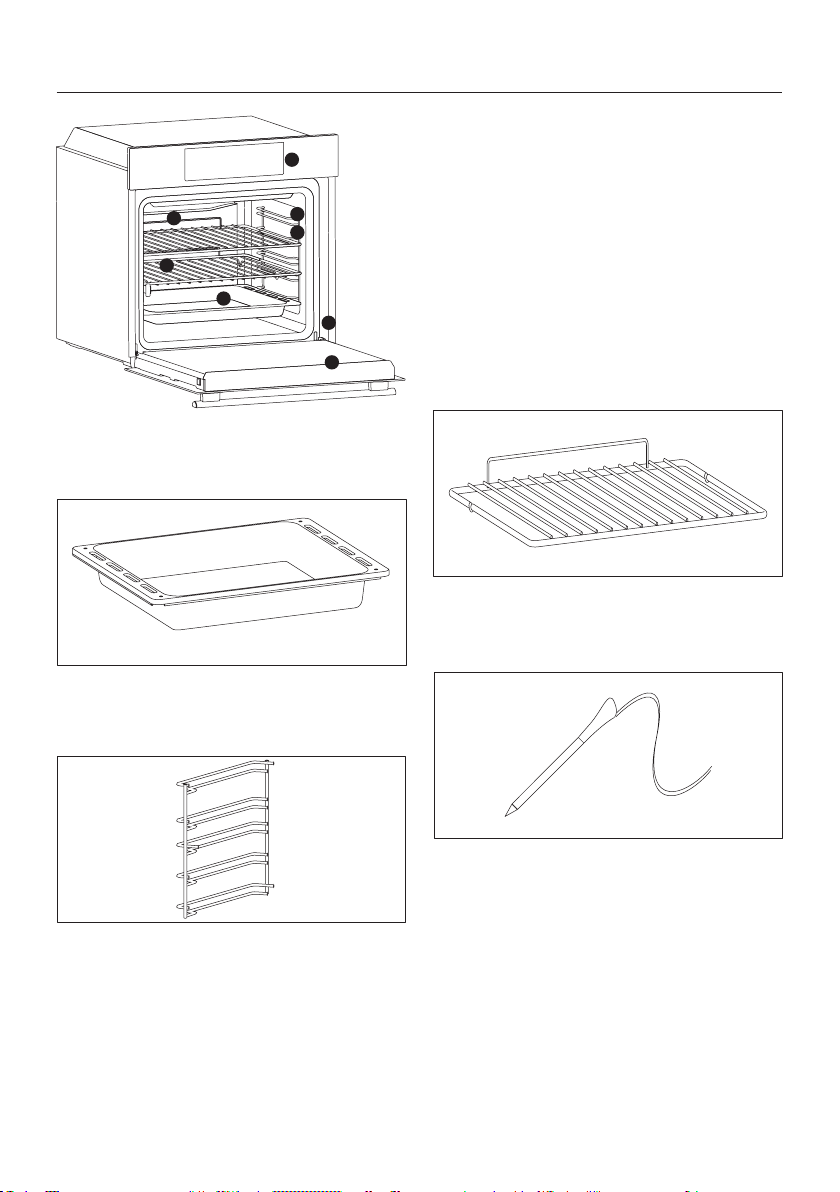
1.
3. Grids
Trays
6. Oven door
7.
8. Serial number
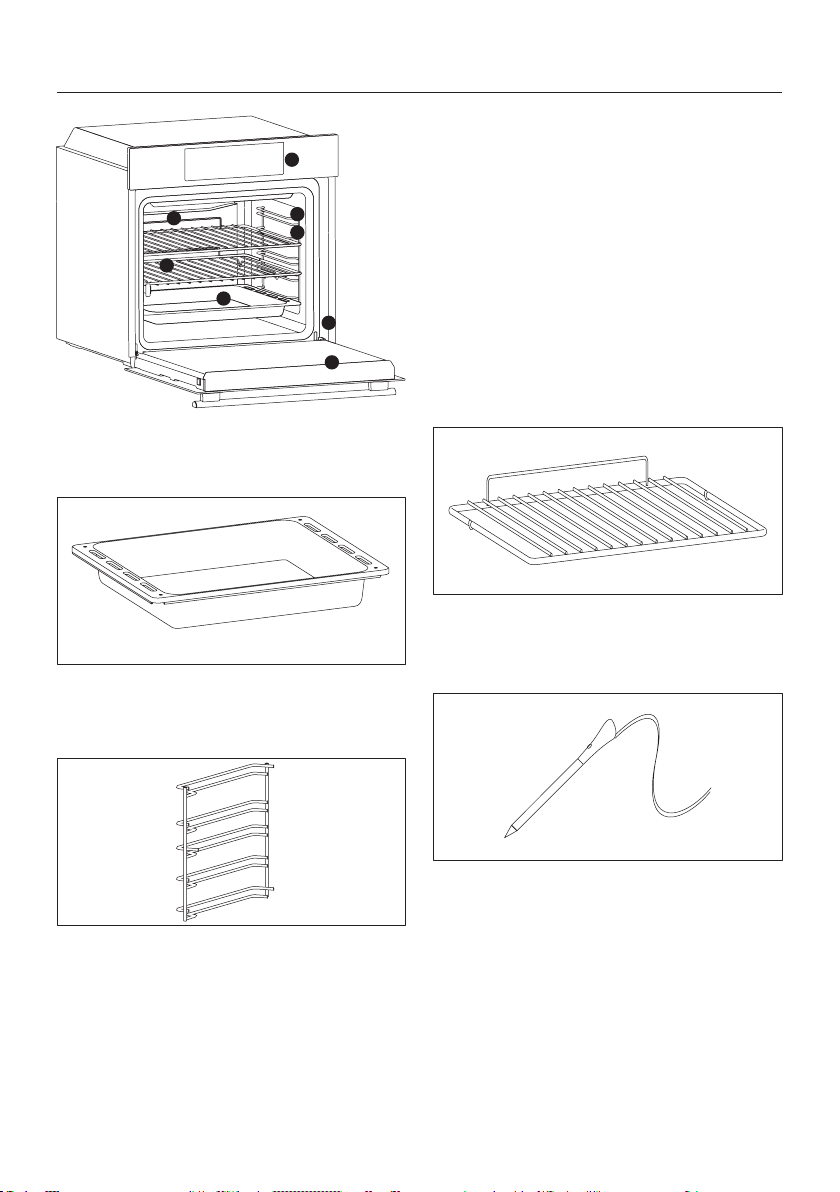
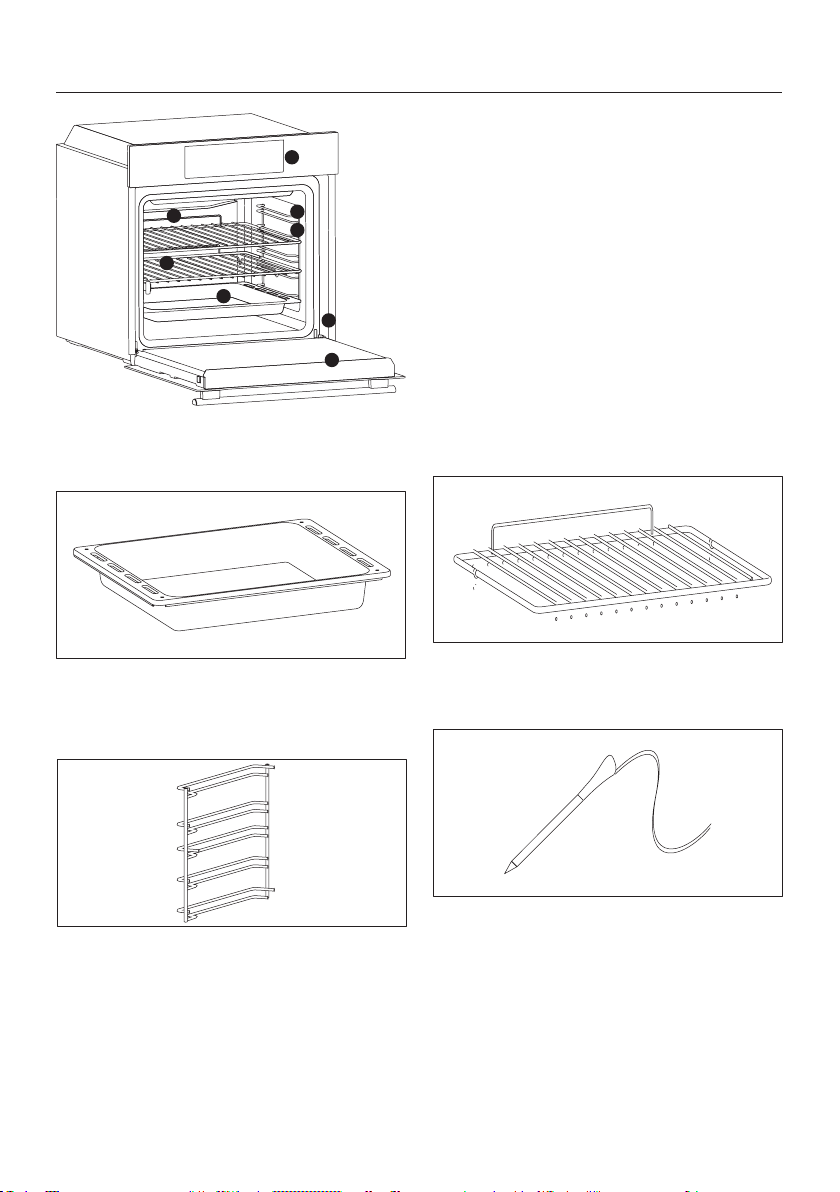
Product description
ACCESSORIES
Drip tray
Metal grid
on the grills.
Lateral wire grids
1
2
7
3
8
4
6
5
Meat probe
ing cooking.
the cavity.
WARNINGS:
•
oven is still cool.
•
•
EN 10
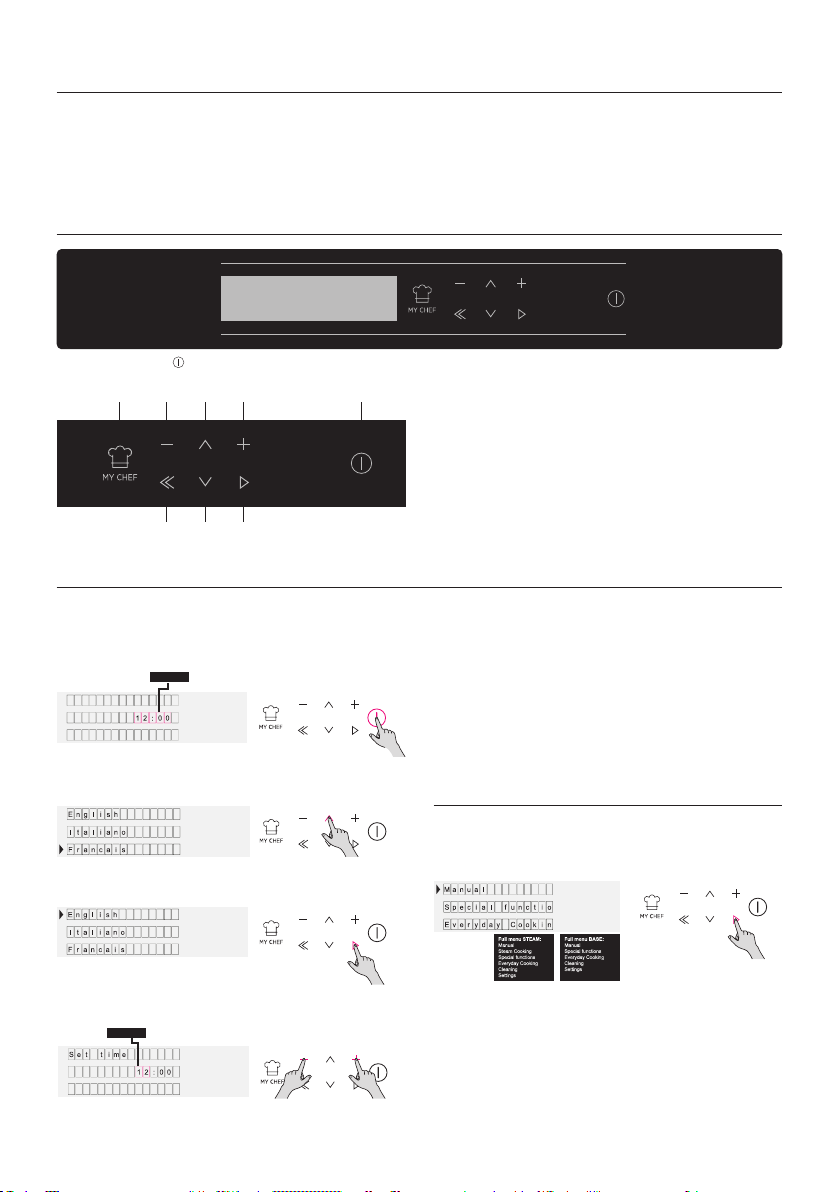
Display description
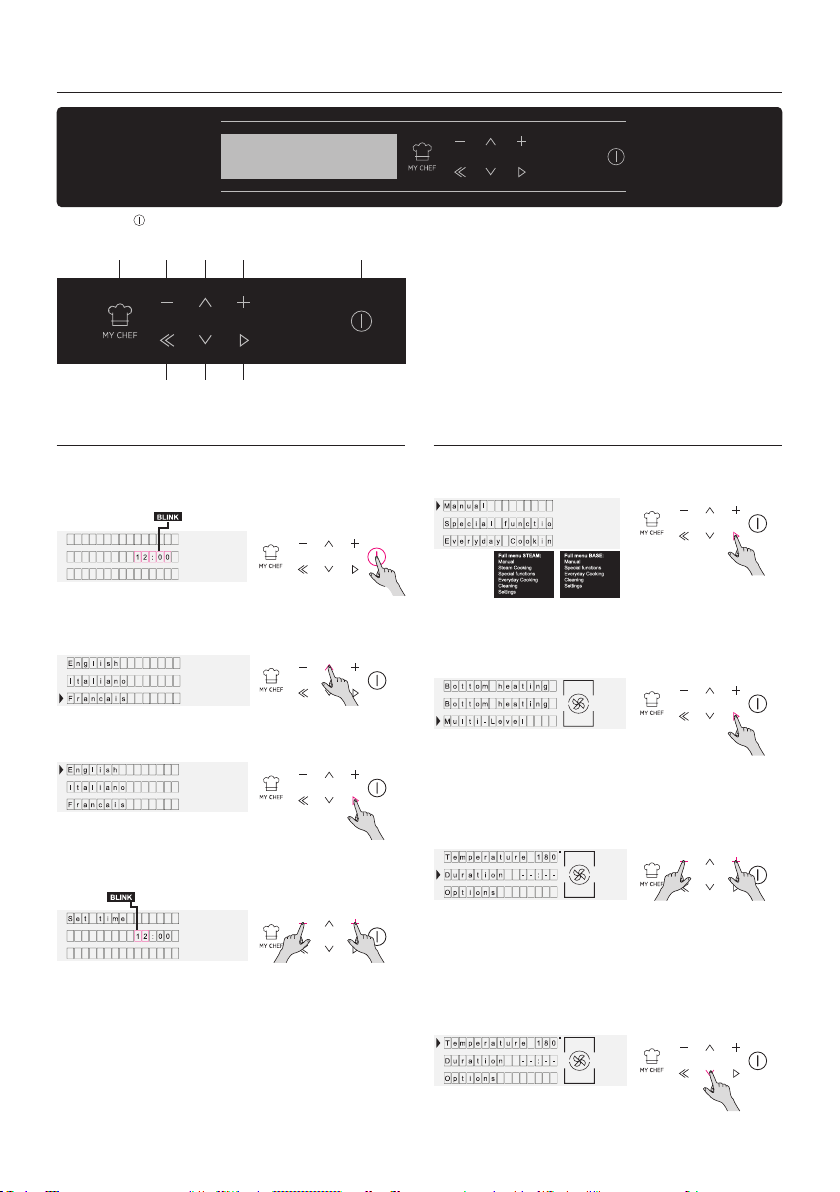
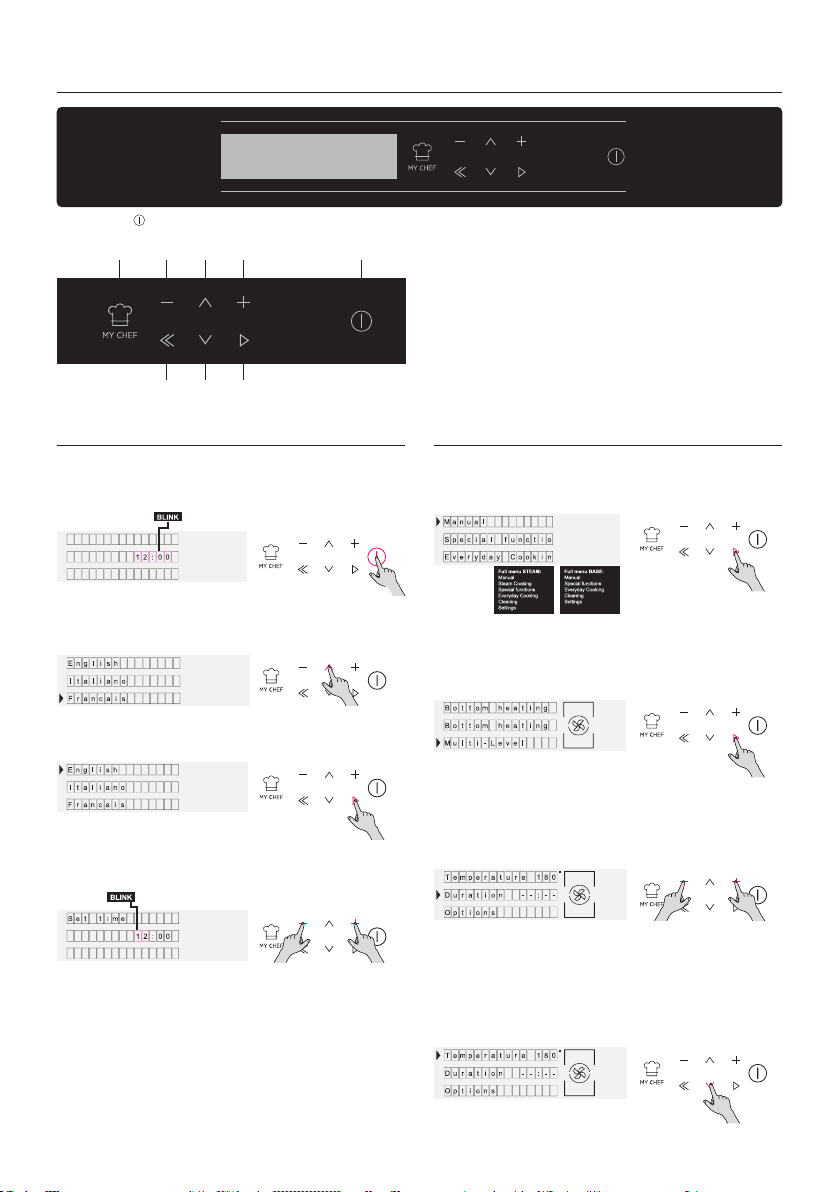
Product Setting Operating In Manual Mode
ON / OFF -
clock. When the oven is inactive, all the functions are
oking.
rature in selected function. Press OK to go ahead or
BACK to return to the cooking functions selection.
Press DOWN to change the cooking duration. It is
Please enter in the settings section and select the
Figure 1
Figure 5
Figure 6
Figure 7
Figure 8
Figure 2
Figure 3
Figure 4
MY CHEF MINUS
BACK
DOWN
UP
PLUS
OK
ON / OFF
EN 11
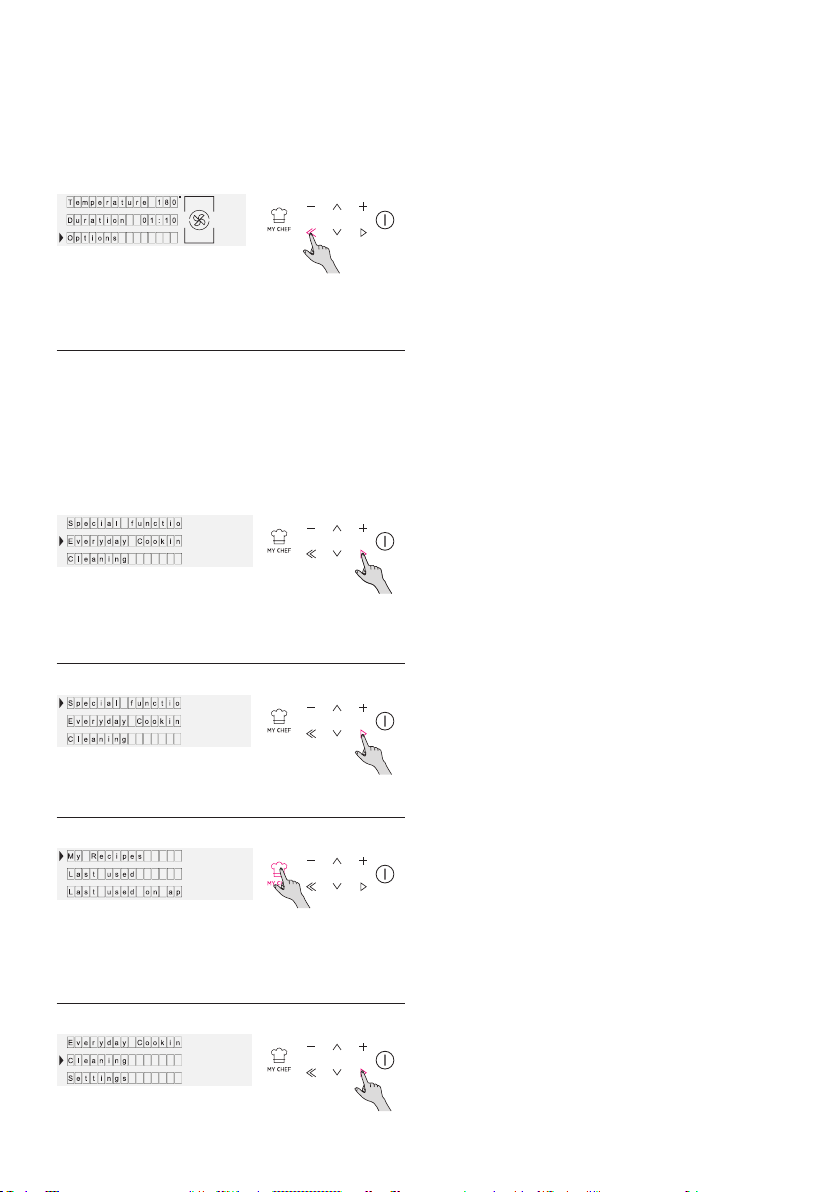
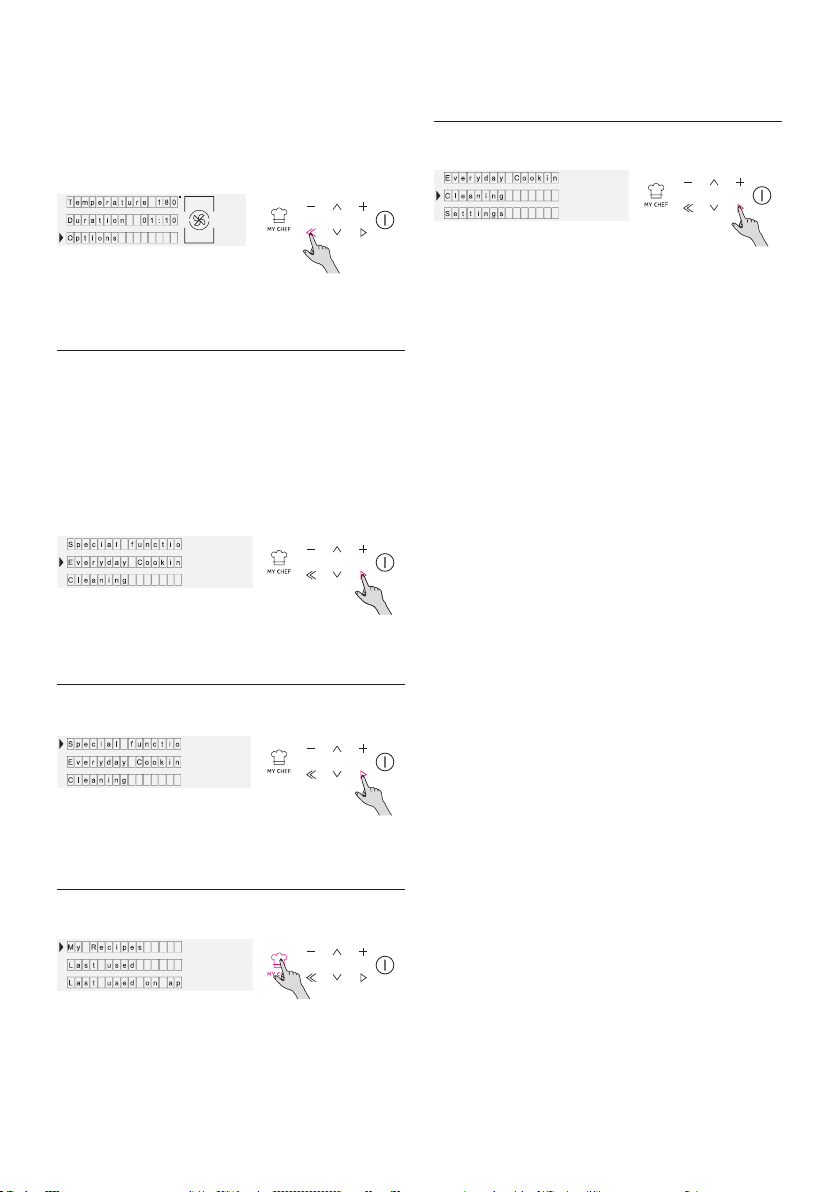
Operating In Special
Functions Mode
Operating In My Chef Mode
Operating In Cleaning
System Mode
Operating In Everyday
Cooking Mode
When a cooking is running you can:
Navigate the HOME menu till reaching the Everyday
Cooking area
UI and in APP.
to consumer needs.
Figure 9
Figure 10
Figure 11
Figure 12
Figure 13
EN 12
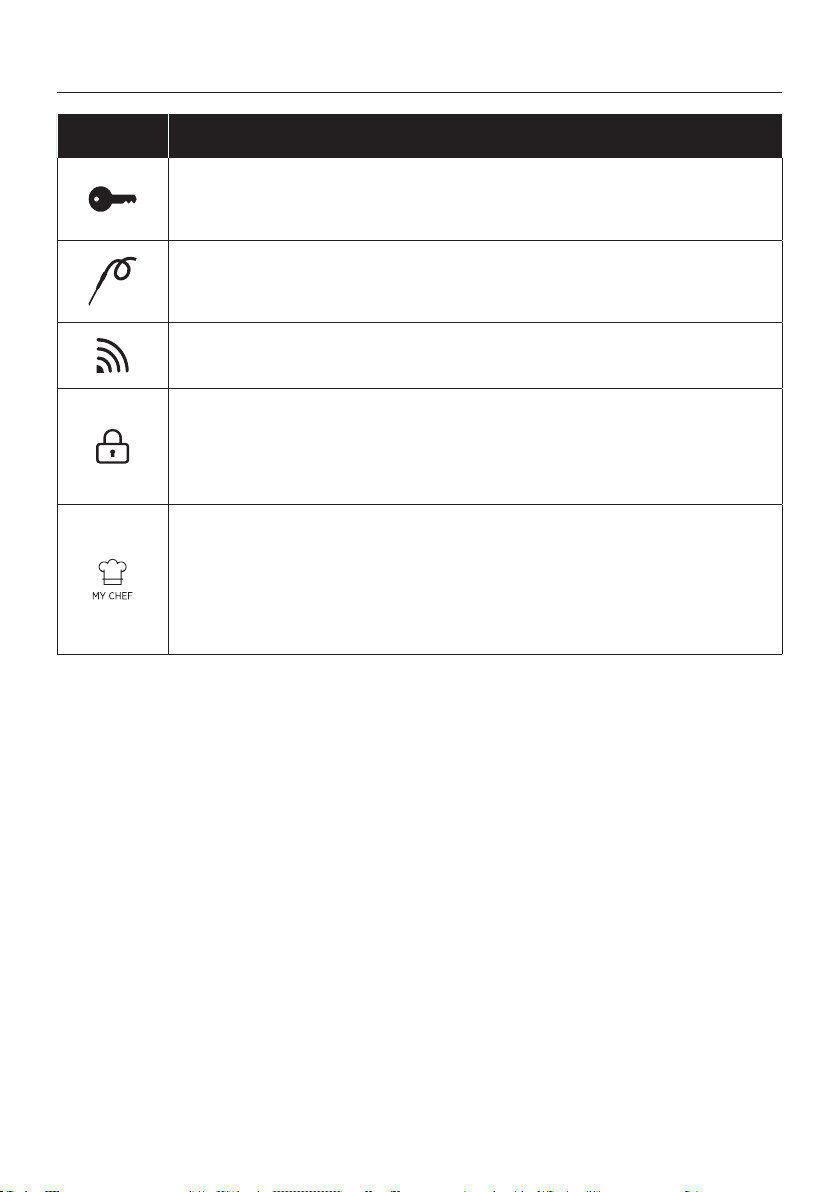
Function Descriptions
FUNCTION DESCRIPTION
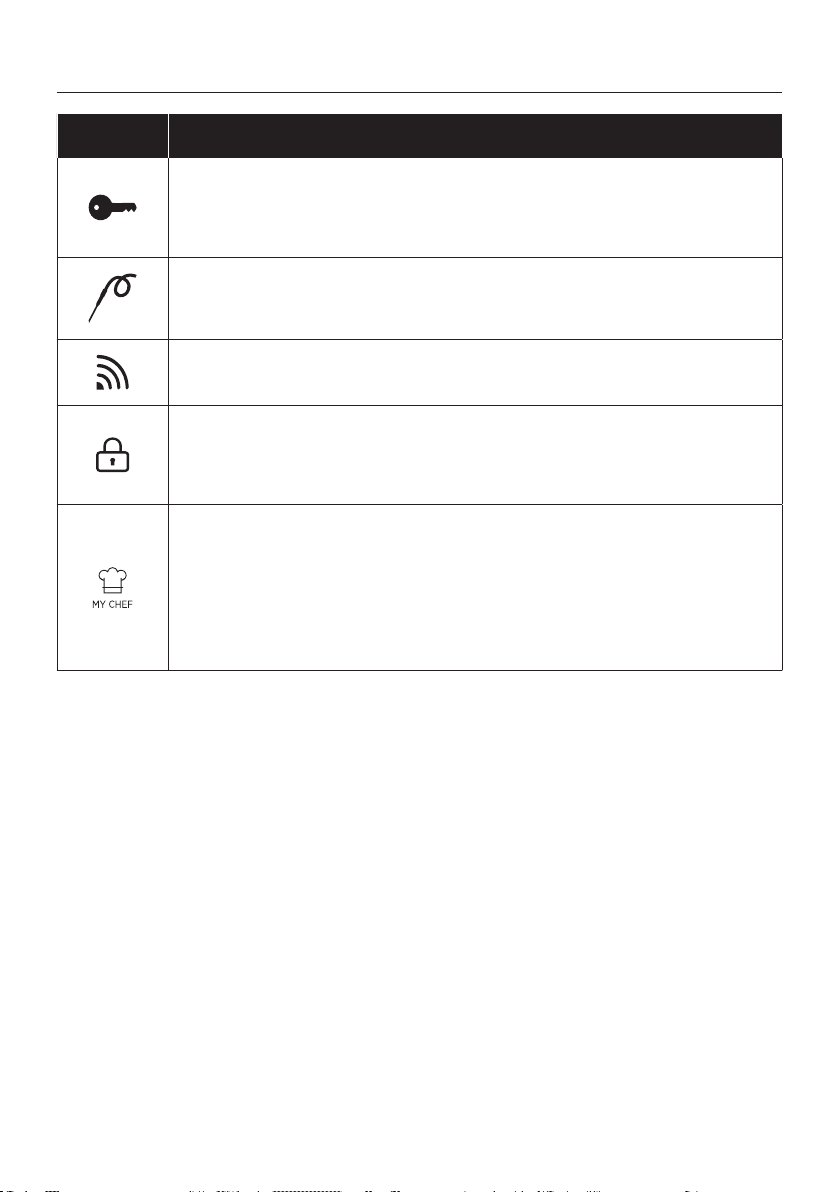
KEY LOCK
MEAT PROBE
WIFI
LOCK
the door is unlocked.
MY CHEF
EN 13
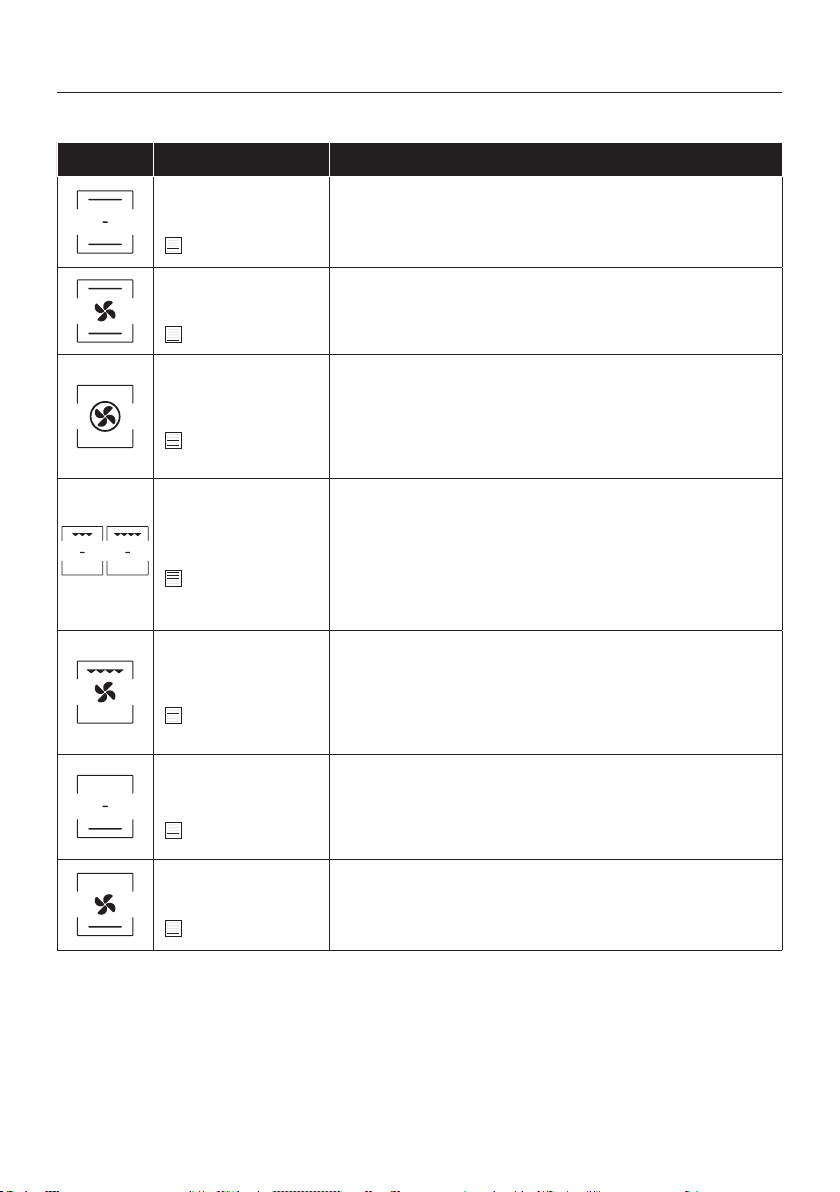
Symbol Description Suggestions
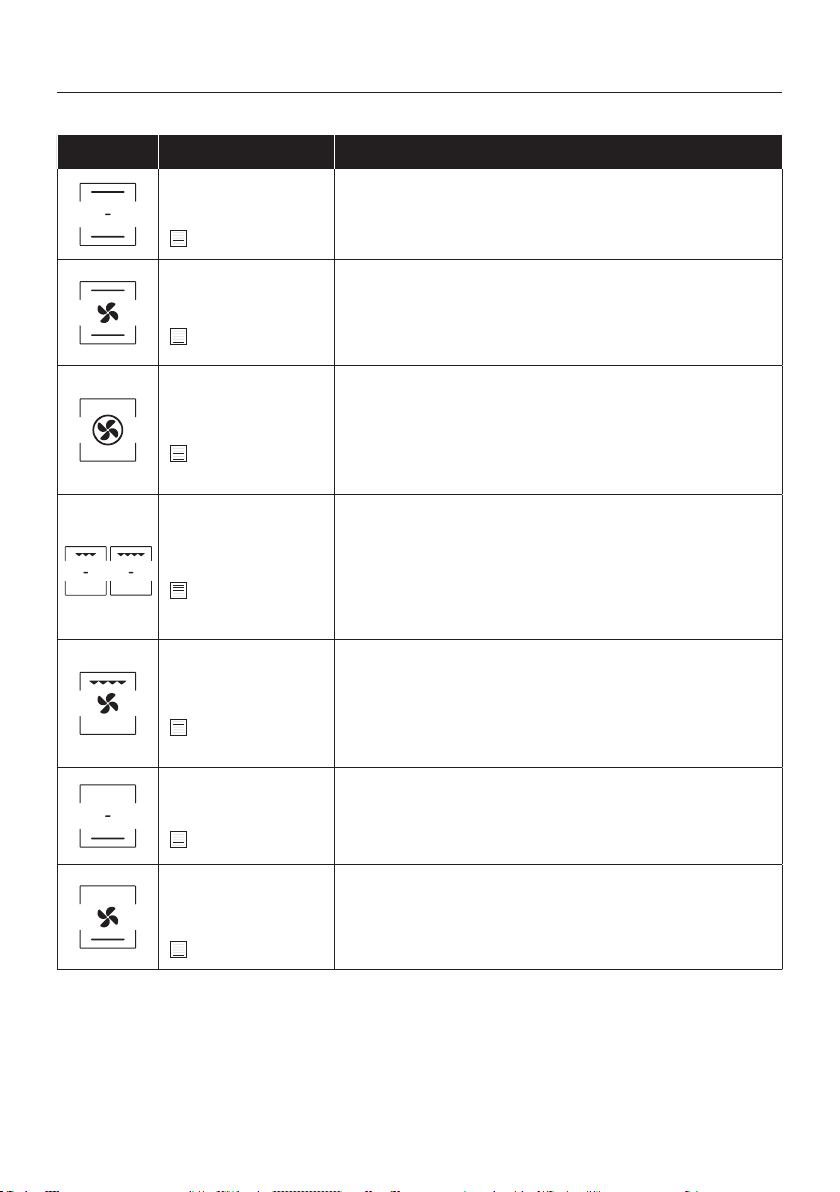
Conventional ***
160-200°C **
2° level
Convection + Fan
240°C **
1° level
Multi-level
180-200°C **
1°/3° level
Grill
L5 (power) **
3°/4°/5° level
Grill + Fan
200°C **
4° level
meats.
Bottom heating
160-180°C **
2° level
Bottom heating + Fan
210°C **
1° level
IDEAL FOR: tarts.
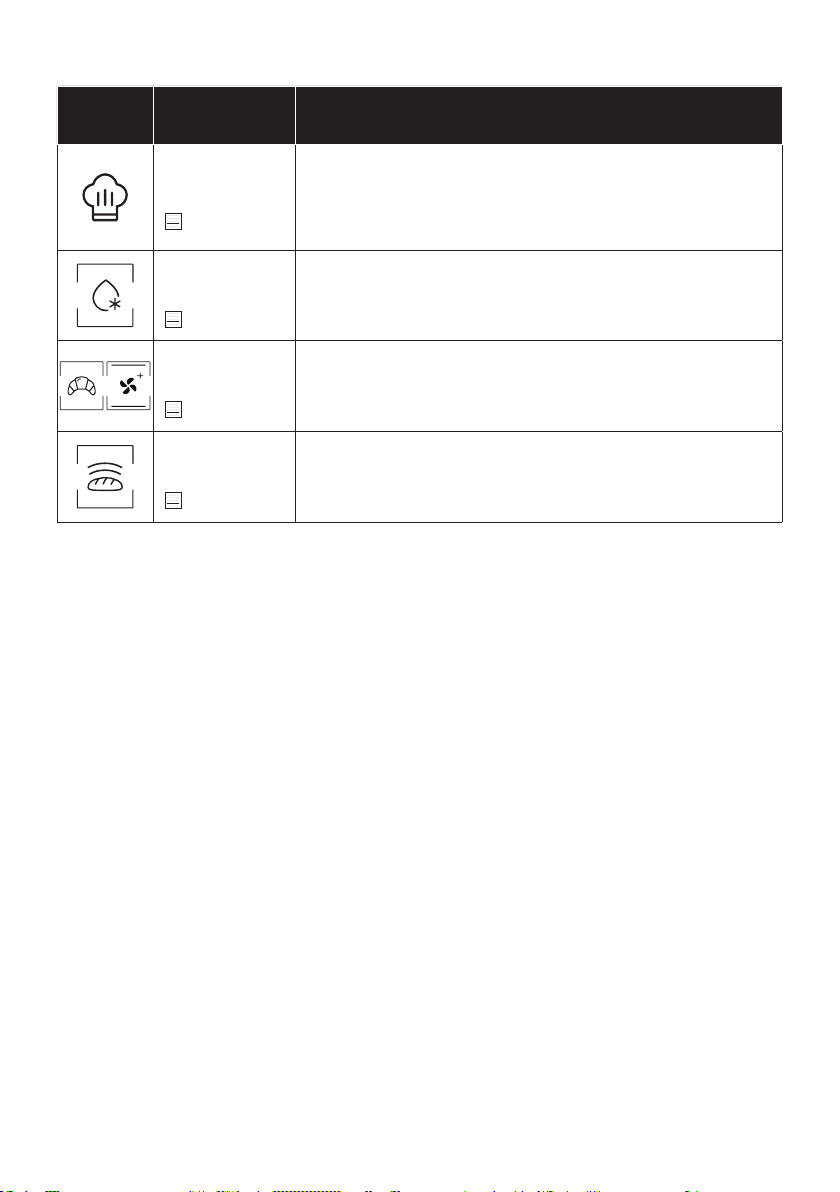
COOKING MODES *
Use of the appliance
EN 14
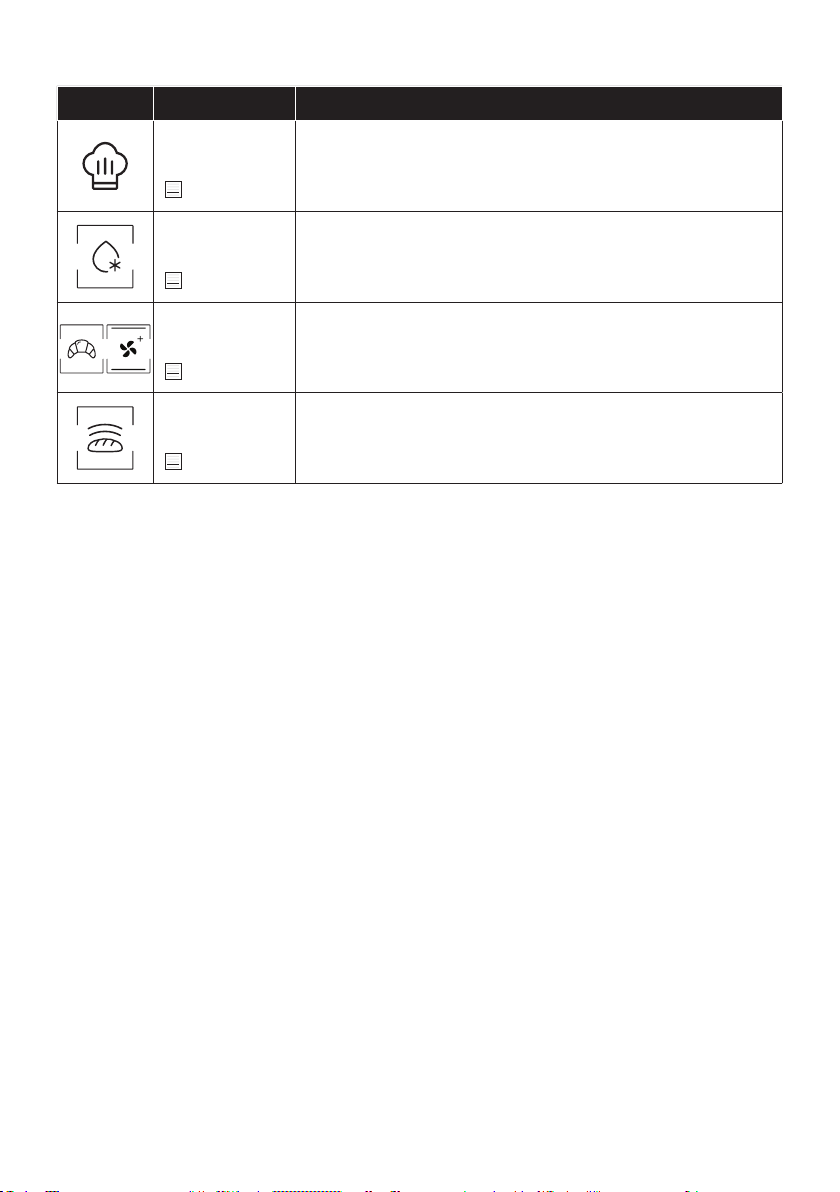
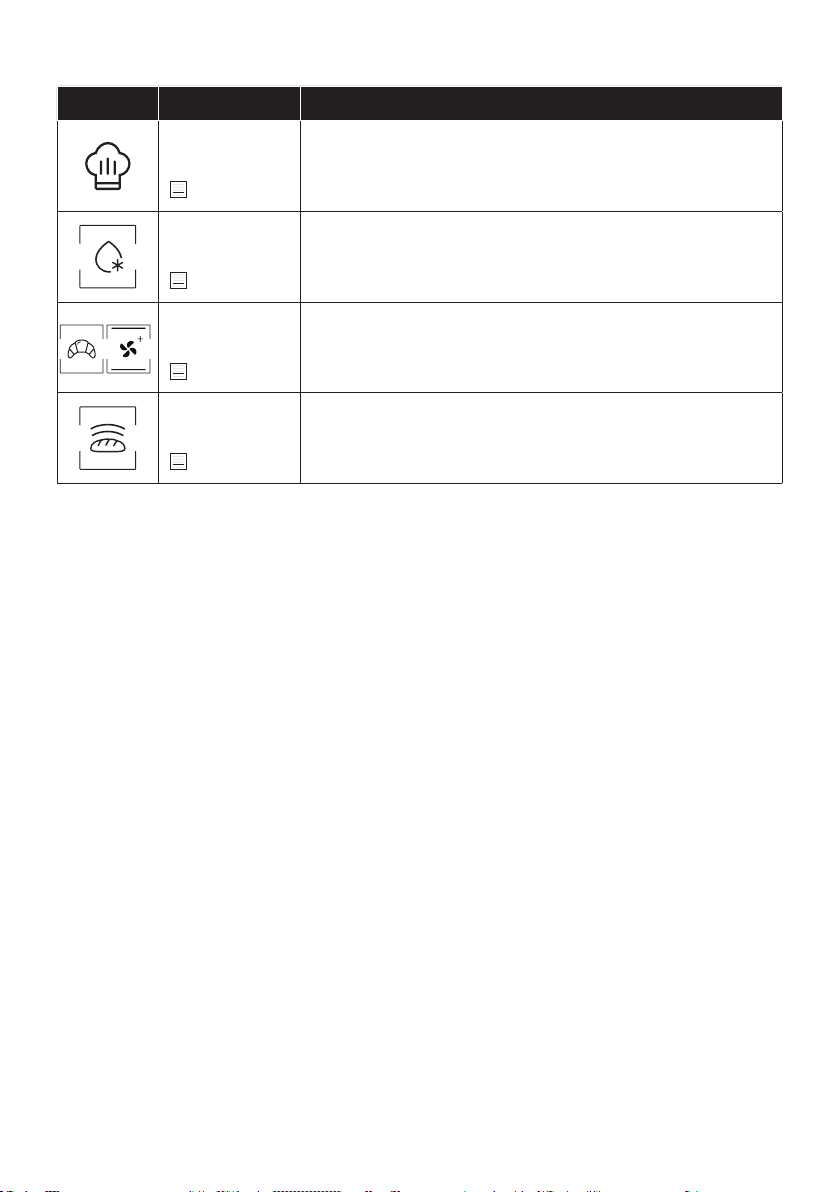
SPECIAL FUNCTIONS *
Symbol Description Suggestions
Master bake ***
180-200°C **
2° level
For healthy cooking, this function reduces the amount of fat or oil re
Defrost
40°C
2° level
Convection+
180-200°C *
2° level
Leavening
40°C
2° level

EN 15
Technology Wi-Fi Bluetooth
Standard
WIRELESS PARAMETERS
PRODUCT INFORMATION FOR NETWORKED EQUIPMENT
•
How to activate wireless network port:
• Navigate to settings > WiFi
•
1.
enrollment.
3.
•
1.
How to deactivate wireless network port:
• Navigate to settings > WiFi
•
1.
•
Connectivity
EN 16
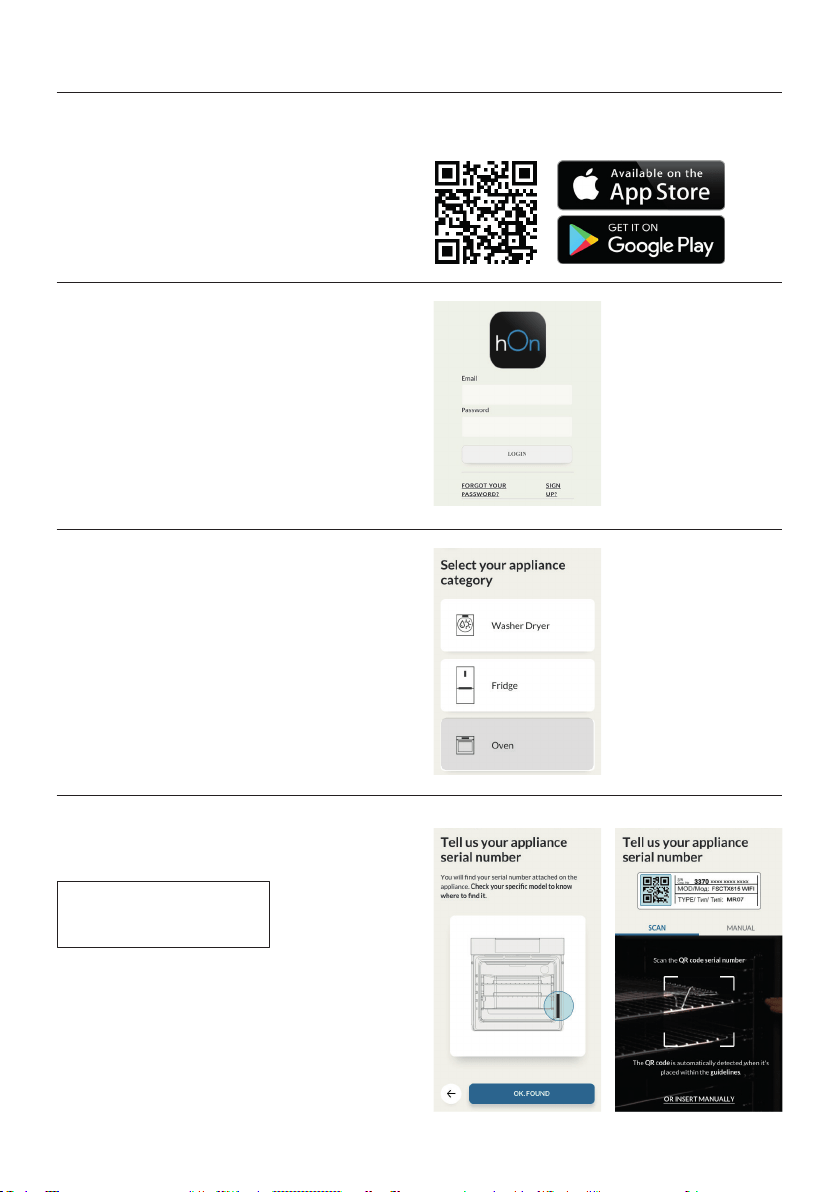
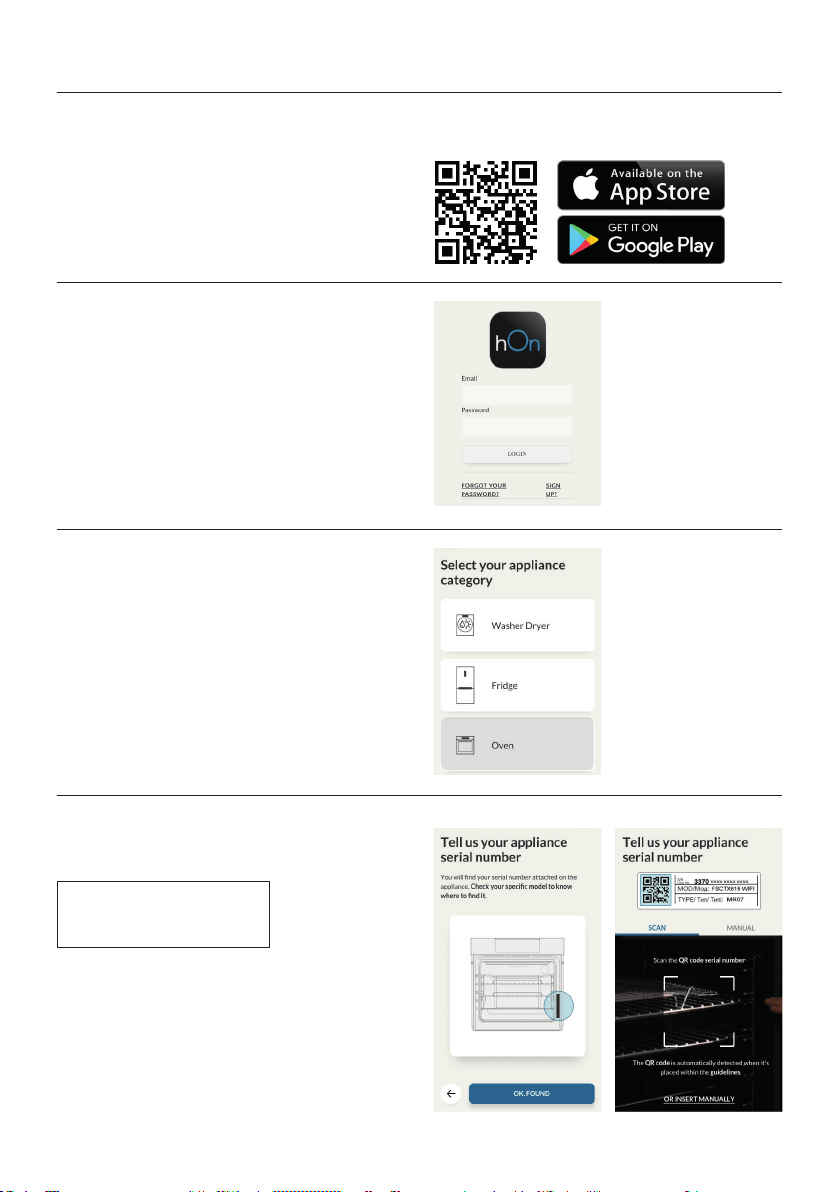
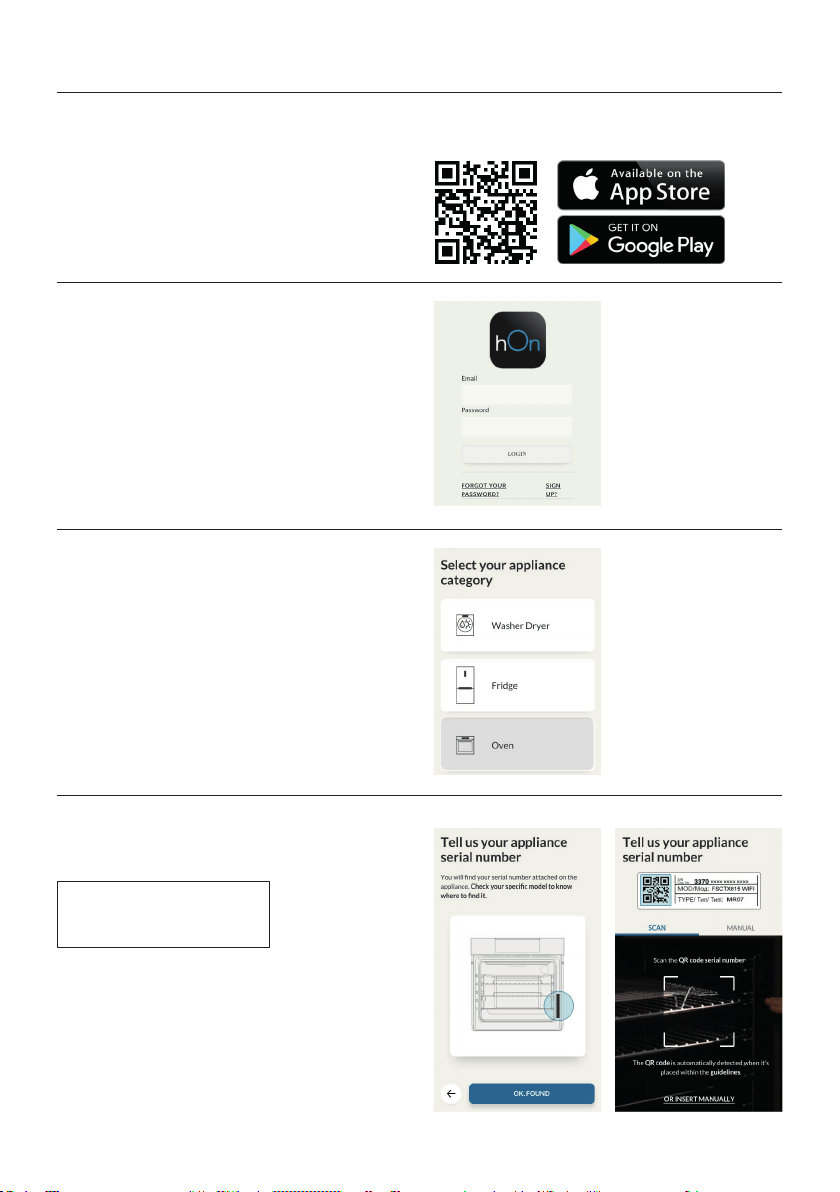
Oven enrollment on app
ON THE SMARTPHONE
Step 1
•
Step 2
•
Step 3
•
Step 4
•
EN 17
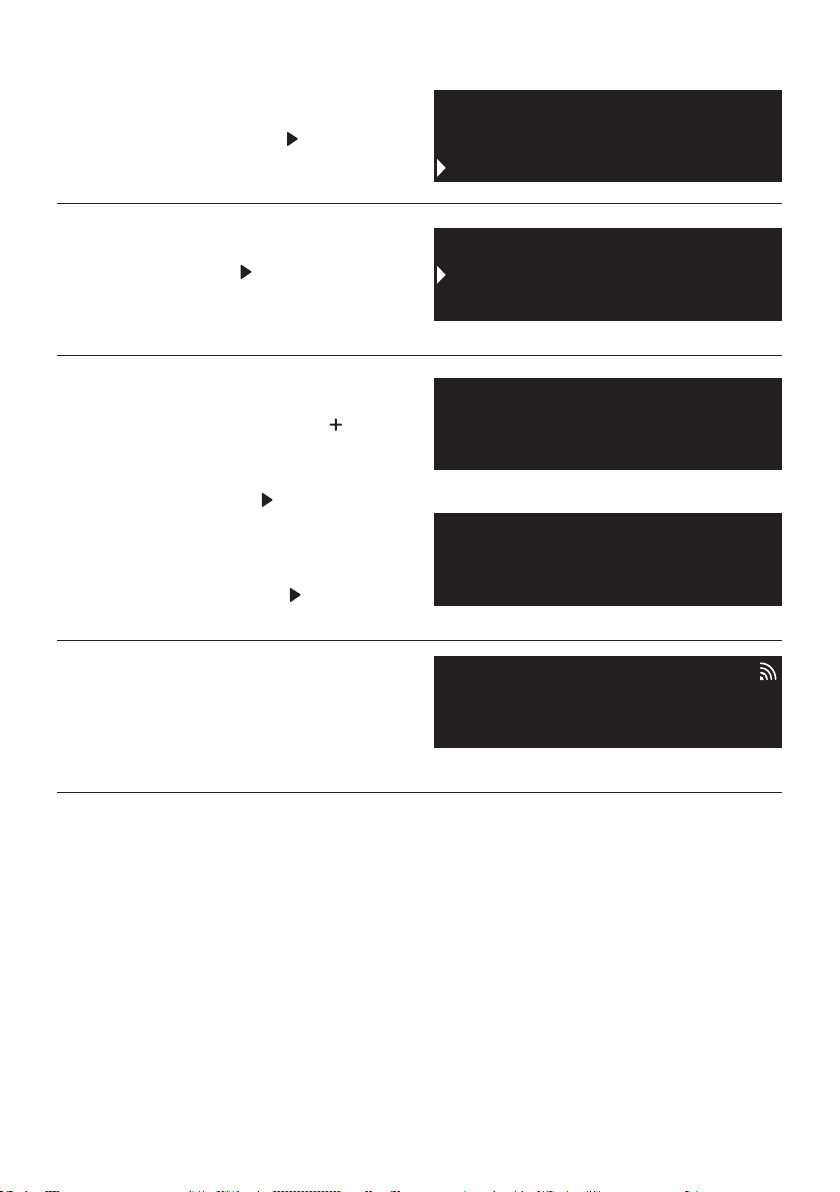
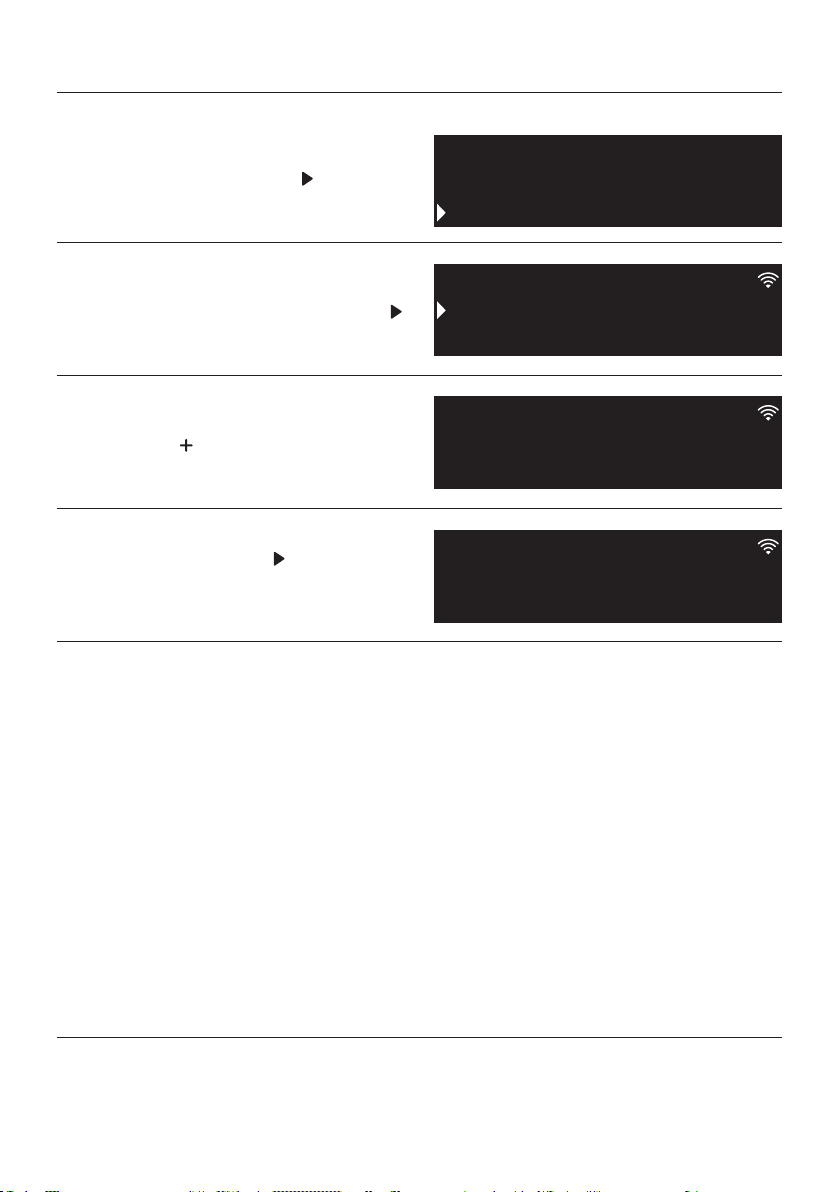
ON THE APPLIANCE
Step 5
•
Step 6
•
Step 7
•
•
•
Step 8
•
NOTE:
•
•
•
•
Cleaning
Settings
Everday Cooking
Wifi
Sounds
Lamp
Easy
Enrollment
Standard
Enrollment
Enrollment in progress
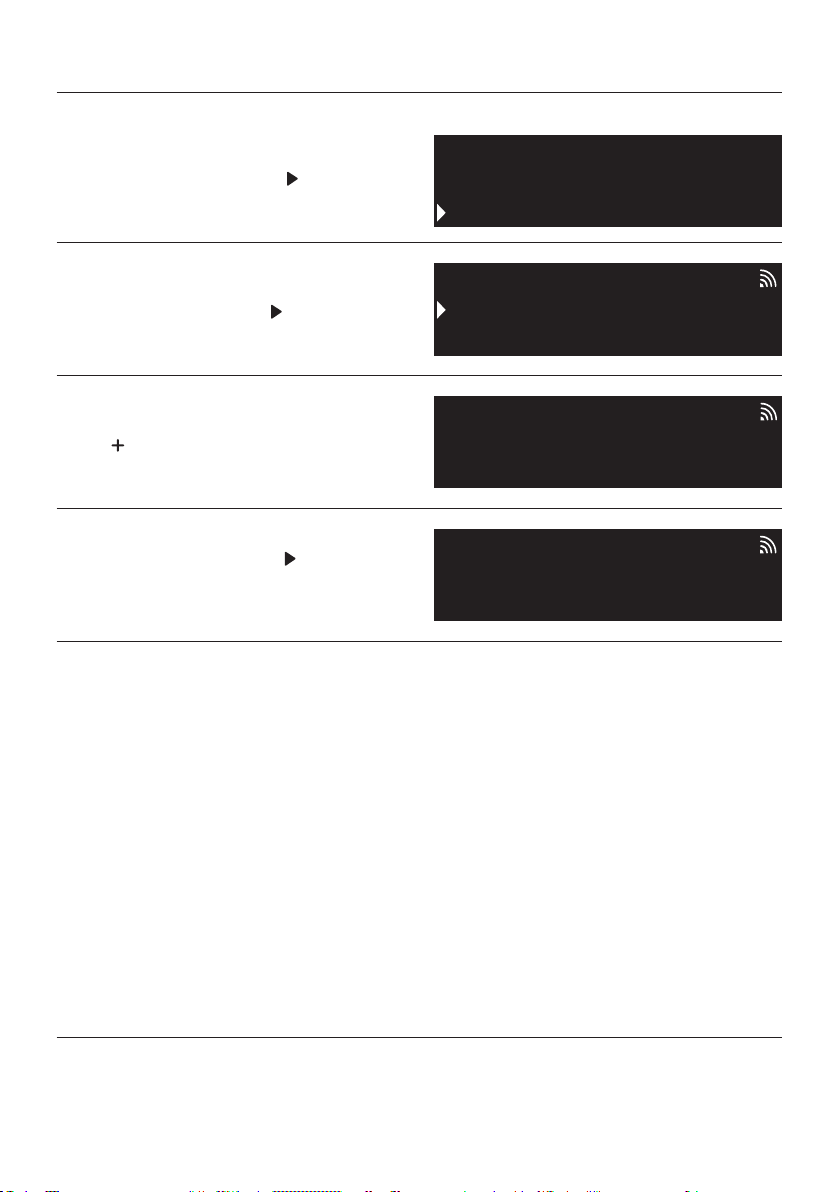
EN 18
NOTE:
Step 1
•
Step 2
•
Step 3
•
the
Step 4
•
Remote control mode
Cleaning
Settings
Everday Cooking
Remote control active
On
Remote control
Remote control
Wifi
Lamp
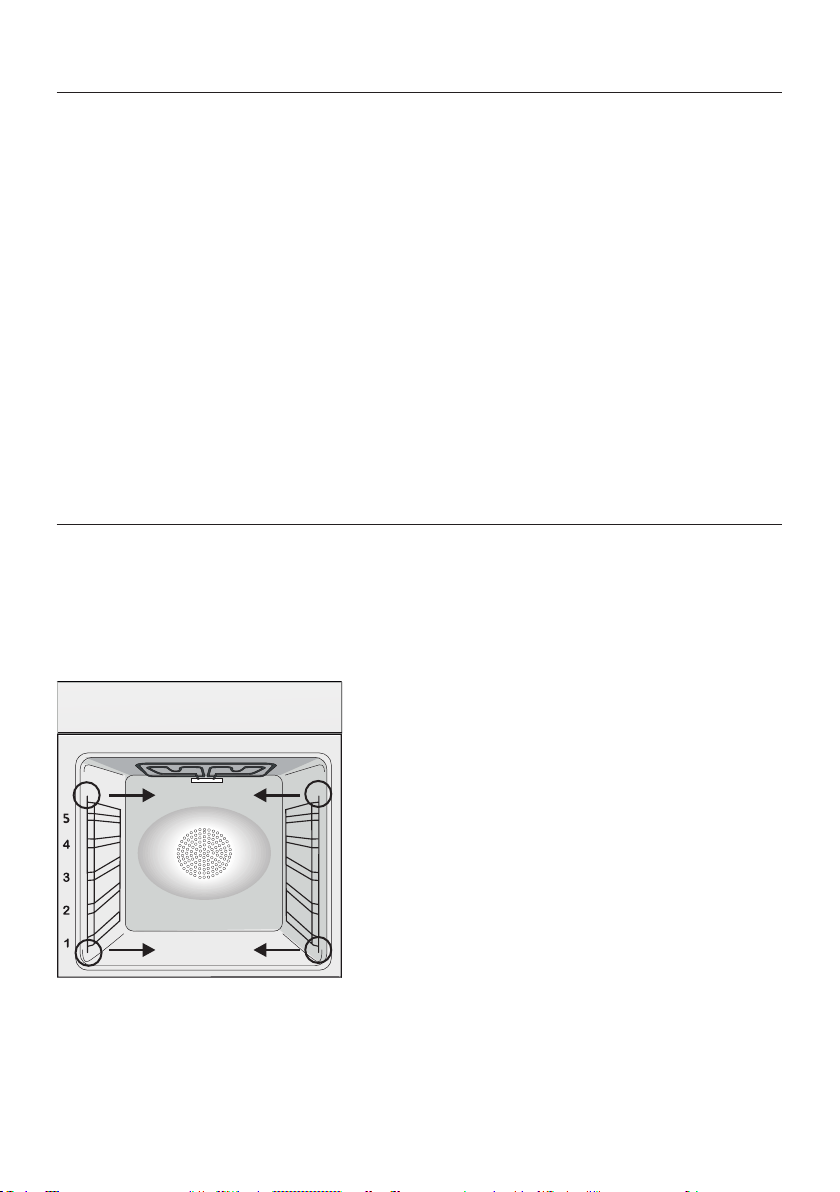
EN 19
through regular cleaning. Wait for the oven to
GLASS PARTS
OVEN WINDOW SEAL
General notes on cleaning
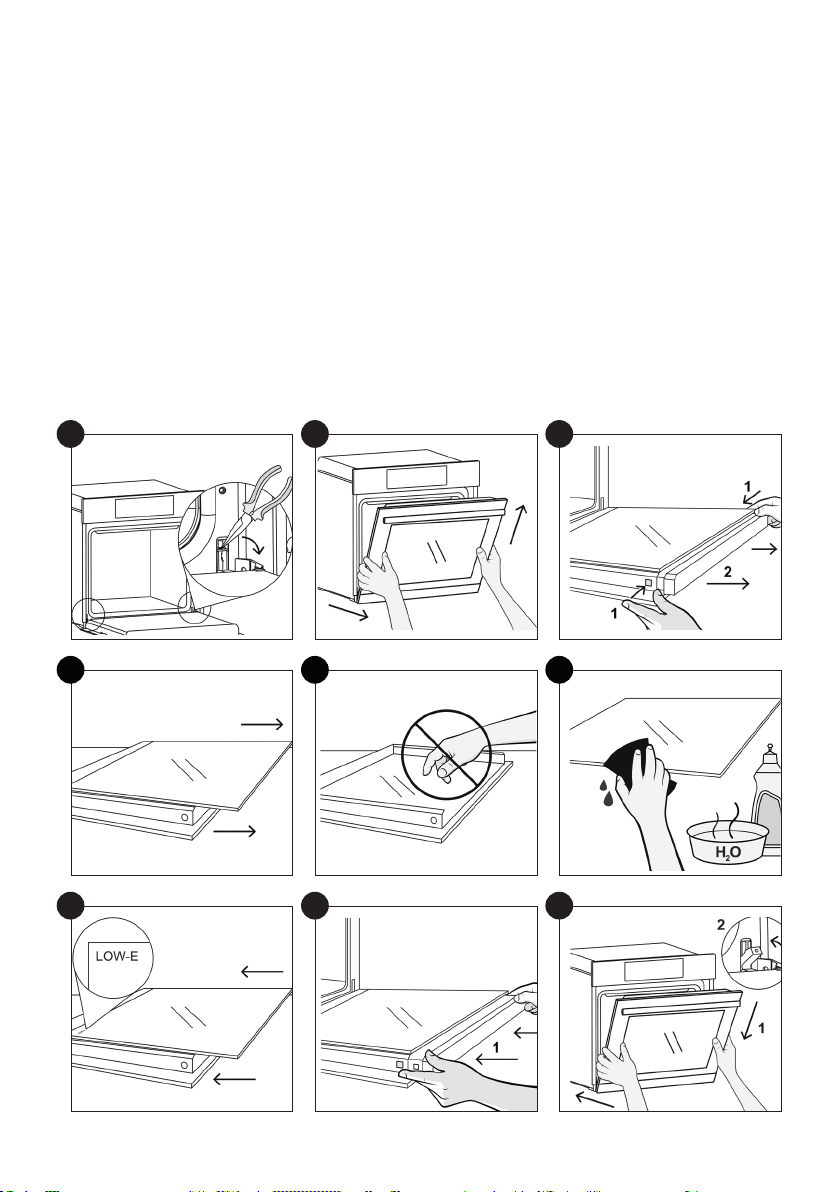
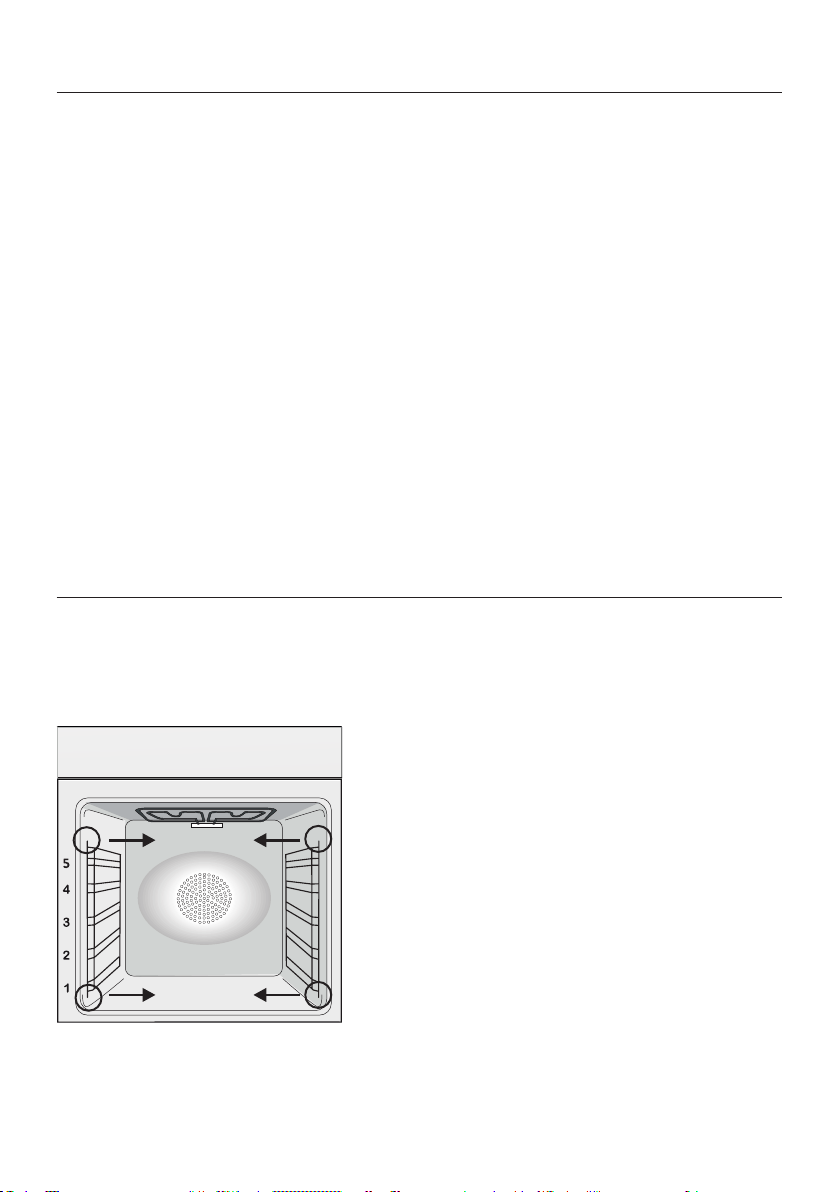
REMOVAL AND CLEANING OF THE SIDE RACKS
Maintenance
ACCESSORIES
DRIP PAN
oven. Pour the hot fat into a container and
CHANGING THE BULB
the glass cover.
EN 20
1.
2.
3.
4.
5.
6.
7.
8.
9.
1
4
7
2
5
8
3
6
9
EN 21
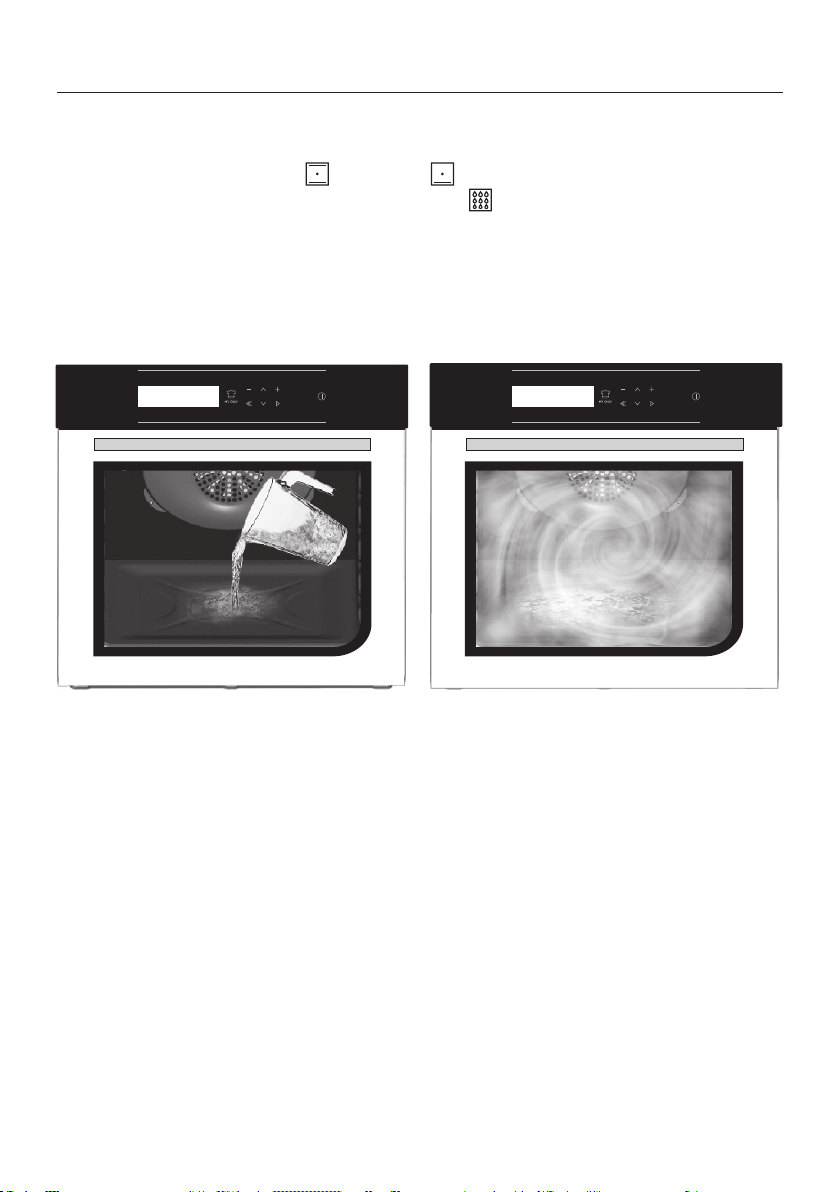
Hydro Easy Clean Function
the oven.
300 ml
EN 22
Waste management and environmental protection
(that can have a negative ef
and recover all the materials. Individuals can
In many countries, domestic collections may
Troubleshooting
Problem Possible cause Solution
the oven does not heat
The clock is not set Set the clock
The oven does not
Ensure that the necessary settings
are correct
No reaction of the
touch user interface
Steam and condensation on the user in
condensation layer
SAVING AND RESPECTING THE ENVIRON-
MENT
residual heat that the oven continues to gen
time slot.

IT 23
Indicazioni di Sicurezza
Avvertenze Generali
Descrizione del Prodotto
Descrizione del display
Uso dell’elettrodomestico
Connettività
Pulizia e manutenzione del forno
Manutenzione
Risoluzione dei Problemi
Garanzie
Installation
Sommario
24
28
30
31
34
36
40
40
43
43
86
1
12

IT 24
•
•
•
•
•
•
•
•
sionati.
•
Indicazioni di Sicurezza

IT 25
stesso.
•
•
•
•
•
•
• SE IL FORNO È FORNITO DAL PRODUTTORE SENZA SPINA:
FONTE DI ALIMENTAZIONE TRAMITE SPINA O PRESE, MA
DEVE ESSERE COLLEGATO DIRETTAMENTE ALLA RETE DI
deve essere in linea con la normativa vigente. Il cavo di terra gial
•

IT 26
•
• .
•
originali.
•
•
•

IT 27
•
•
•
•
smalto caldo, rischiano di fondere e deteriorare lo smalto degli
interni.
•
forno.
•
•
•
•

IT 28
Avvertenze Generali
Suggerimenti sulla Sicurezza
NOTA:
a seconda dei modelli.
Sicurezza Elettrica
FARE EFFETTUARE I COLLEGAMENTI ELETTRICI AD UN’ELETTRICISTA O TECNICO
QUALIFICATO.
COLLEGAMENTO
di terra della rete elettrica.

IT 29
ATTENZIONE
NOTA
Raccomandazioni
Installazione
Primo utilizzo
PULIZIA PRELIMINARE
IT 30
1. Pannello di controllo
3. Griglie
Vassoi
6.
7.
8. Numero di serie
Descrizione del Prodotto
1
2
7
3
8
4
6
5
ACCESSORI
Vassoio di gocciolamento
Griglia metallica
Raccoglie i residui del gocciolamento durante
la cottura degli alimenti sulle griglie.
Griglie metalliche laterali
sostengono le griglie metalliche e i vassoi di goc
ciolamento.
NOTA:
Sonda per la carne
AVVERTENZE:
•
la carne.
•
negli alimenti congelati.
IT 31
Descrizione del display
Impostazione del prodotto
Funzionamento in modalità Manuale
ON / OFF -
ne il forno.
Figura 1
Figura 5
Figura 6
Figura 7
Figura 8
Figura 2
Figura 3
Figura 4
MY CHEF MENO
INDIETRO
GIÙ
SU
PIÙ
OK
ON / OFF
IT 32
Funzionamento in modalità
Funzioni speciali
Funzionamento in modalità
My Chef
Funzionamento in modalità
Sistema di pulizia
Funzionamento in modalità
Cucina quotidiana
cottura.
cottura
Figura 9
Figura 10
Figura 11
Figura 12
Figura 13
IT 33
Descrizioni delle funzioni
Simbolo Suggerimento
BLOCCO TASTO
SONDA PER LA CARNE
WIFI
LOCK
MY CHEF
IT 34
* A seconda del modello del forno.
Simbolo Descrizione Suggerimento
Statico ***
160-200 °C **
2° livello
Cottura ventilata
240 °C **
1° livello
di cottura uniformi.
Cottura multilivello
180-200°C **
1°/3° livello
cucinano insieme alimenti diversi.
Grill
L5 (potenza) **
3°/4°/5° livello
Grill ventilato
200°C **
4° livello
Resistenza inferiore
160-180°C **
2° livello
Resistenza inferiore
ventilata
210°C **
1° livello
IDEALE PER: torte.
MODALITÀ DI COTTURA*
Uso dell’elettrodomestico
IT 35
FUNZIONI PARTICOLARI *
Simbolo Descrizione Suggerimento
Master bake ***
180-200 °C **
2° livello
Scongelamento
40°C
2° livello
Ventilata+
180-200°C *
2° livello
Lievitazione
40°C
2° livello
* A seconda del modello del forno.

IT 36
Tecnologia Wi-Fi Bluetooth
Standard
PARAMETRI WIRELESS
INFORMAZIONI SUL PRODOTTO PER LE APPARECCHIATURE COLLEGATE IN RETE
•
Come attivare la porta di rete wireless:
•
•
1.
3.
•
1.
ferma.
Come disattivare la porta di rete wireless:
•
•
1.
ferma.
•
Connettività
IT 37
Registrazione del forno sull’app
SU SMARTPHONE
Fase 1
•
Fase 2
•
Fase 3
• Aggiungere un nuovo elettrodomestico.
Fase 4
•
manualmente il numero di serie.
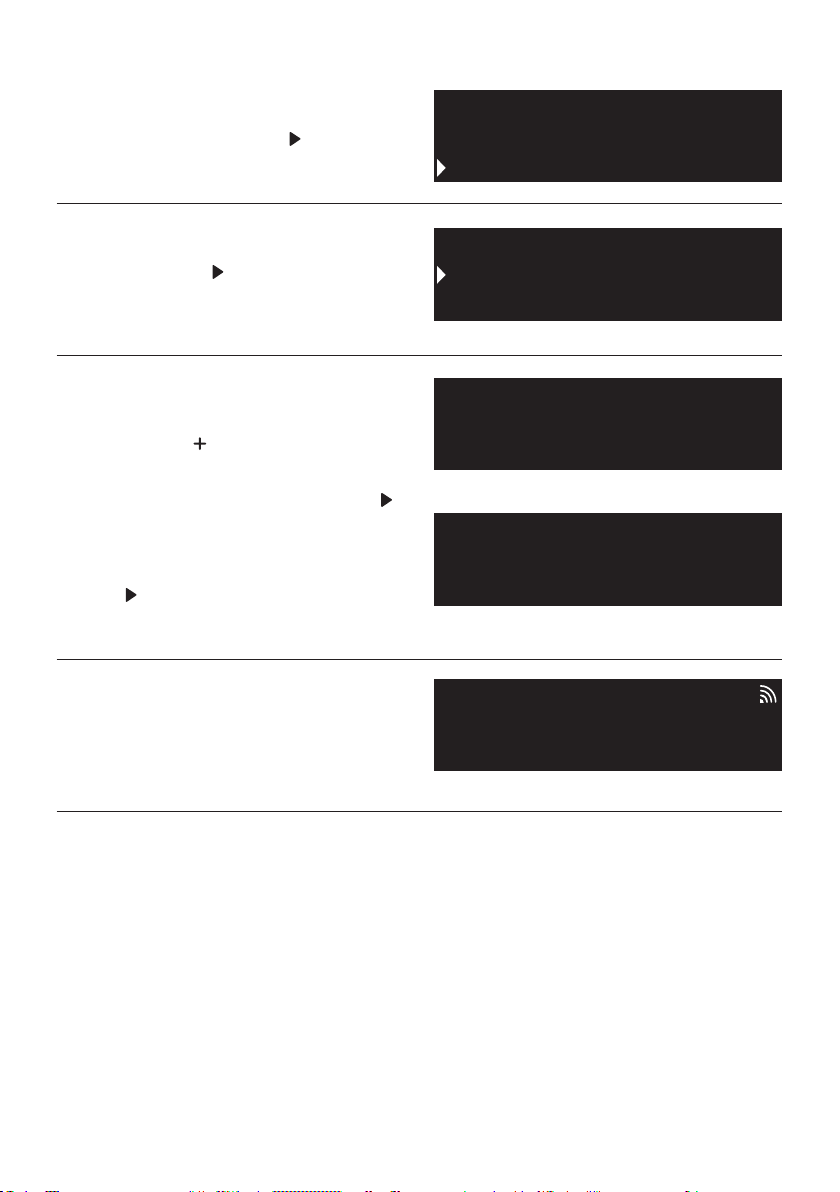
IT 38
Cleaning
Settings
Everday Cooking
Wifi
Sounds
Lamp
Easy
Enrollment
Standard
Enrollment
Enrollment in progress
SULL’ELETTRODOMESTICO
Fase 5
•
IMPOSTAZIONI con il tasto
Fase 6
•
WI FI con il tasto
Fase 7
•
ARRUOLAMENTO FACILE o STANDARD
cliccare il tasto
.
•
.
•
tasto
.
Fase 8
•
NOTA:
•
•
dati serviranno in un secondo momento.
•
domestica sia eccellente.
•
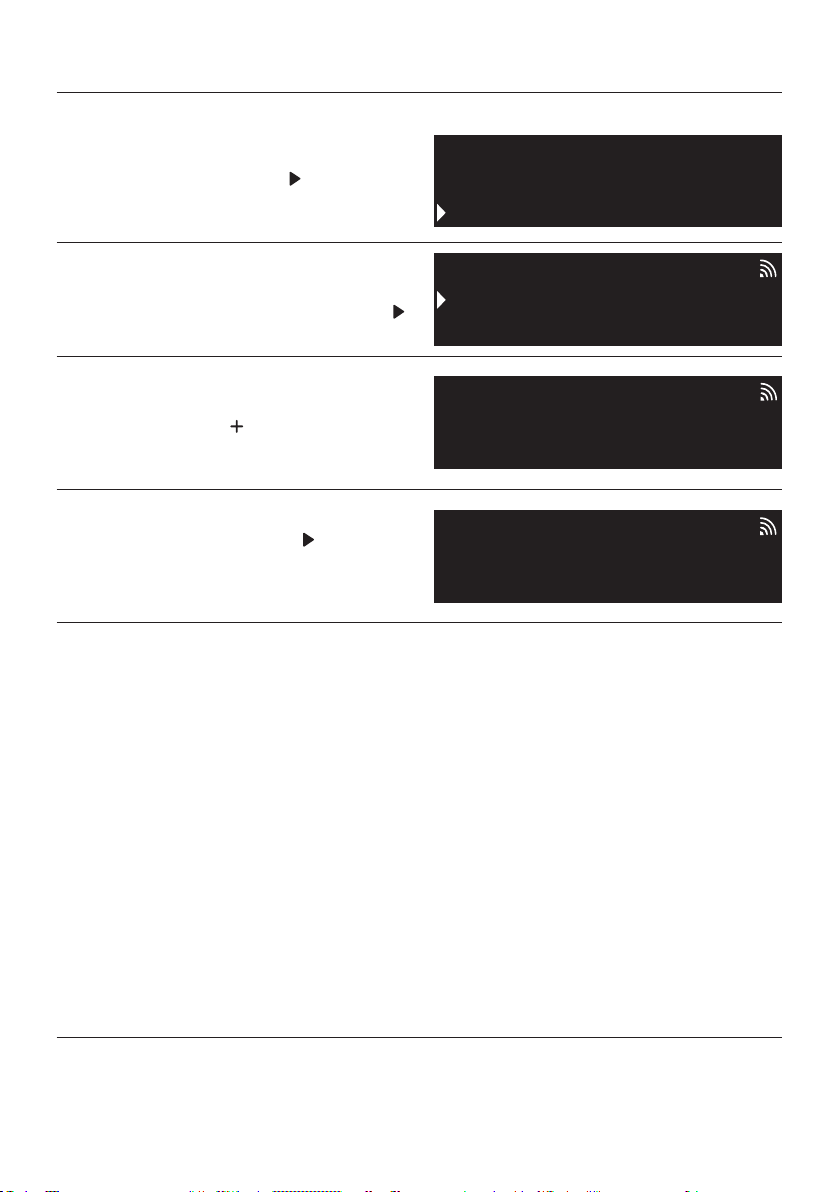
IT 39
Cleaning
Settings
Everday Cooking
Remote control active
On
Remote control
Remote control
Wifi
Lamp
NOTA:
Fase 1
•
IMPOSTAZIONI con il tasto
Fase 2
•
Fase 3
•
remoto con il tasto
Fase 4
•
Modalità controllo remoto
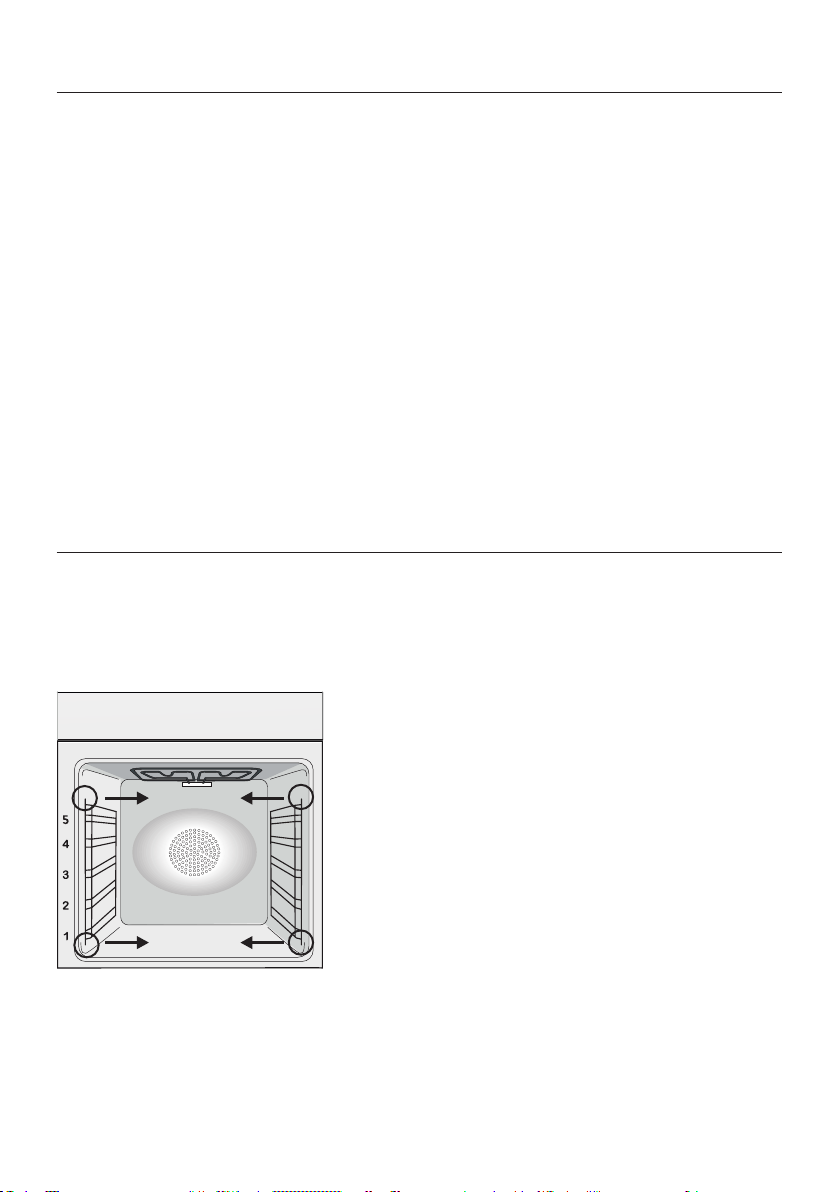
IT 40
PARTI IN VETRO
GUARNIZIONE DELLO SPORTELLO DEL FOR-
NO
Pulizia e manutenzione del forno
RIMOZIONE E PULIZIA DELLE SCAFFALATURE A FILO
che siano successivamente asciugate.
Manutenzione
ACCESSORI
VASCHETTA DI GOCCIOLAMENTO
forno. Versare il grasso caldo in un contenitore
Se rimangono dei residui di grasso, immergere
SOSTITUZIONE DELLA LAMPADINA
1. Scollegare il forno alla rete.
modello.
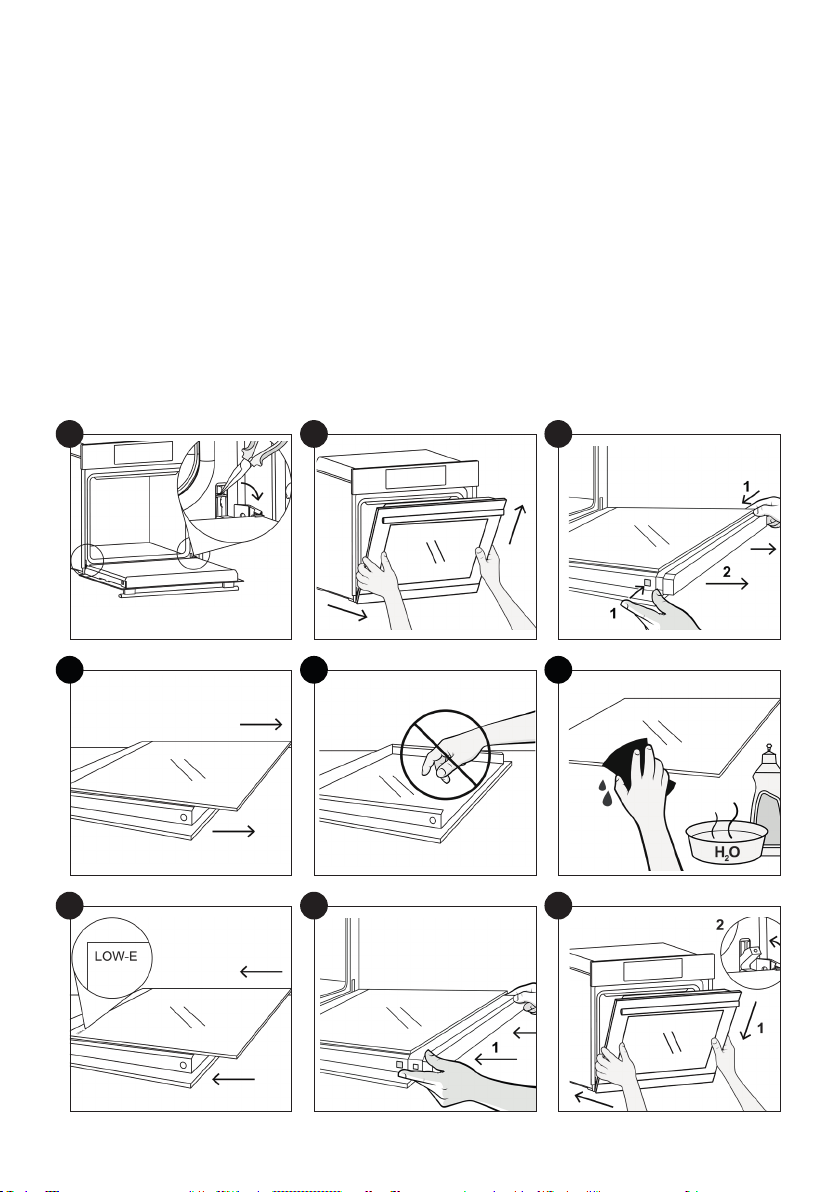
IT 41
1.
2.
3.
4. Rimuovere con molta cura il vetro interno del forno, tenendolo saldamente con due mani e
5.
6.
7.
8.
9.
1
4
7
2
5
8
3
6
9
IT 42
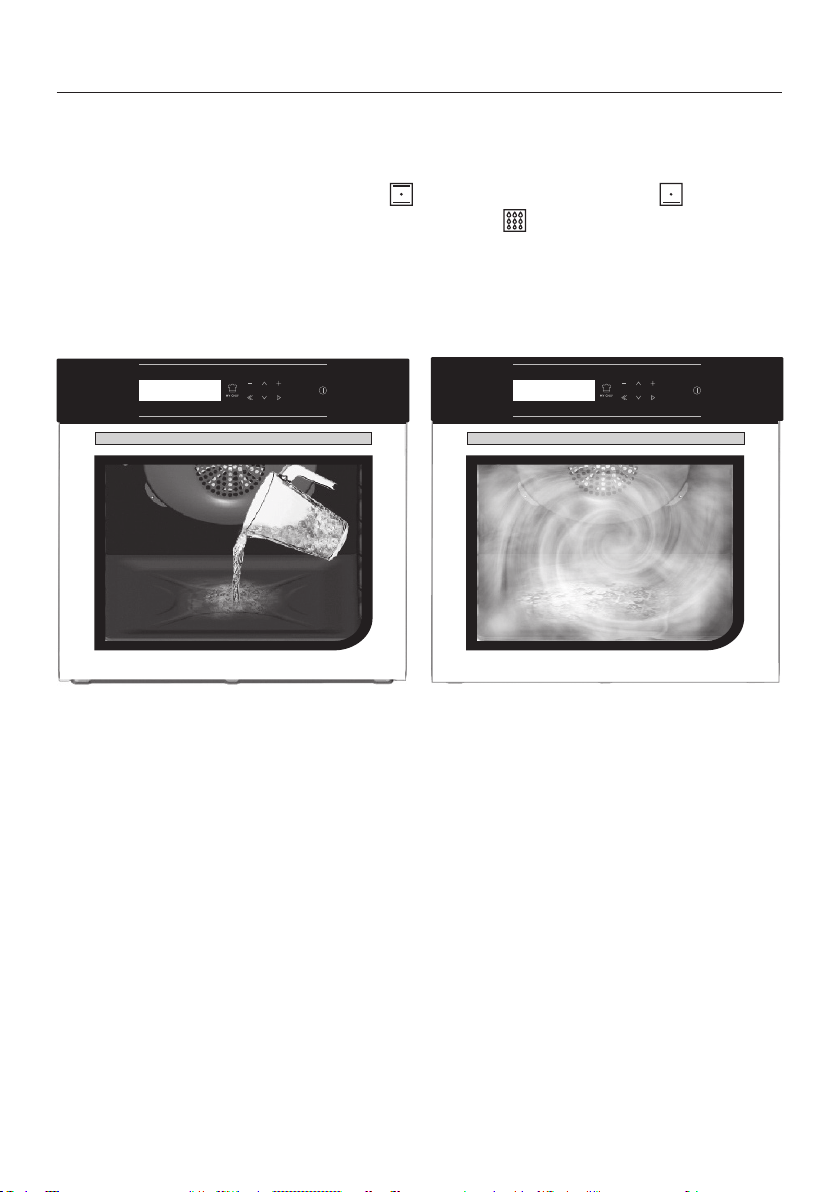
Funzione Hydro Easy Clean
forno.
Attenzione:
300 ml
IT 43
Gestione dei riuti e rispetto dell’ambiente
istrate.
Risoluzione dei Problemi
Garanzie
PROBLEMA POSSIBILE CAUSA SOLUZIONE
Il forno non si scalda
Il forno non si scalda
Il forno non si scalda
necessarie siano corrette
RISPARMIARE E RISPETTARE L’AMBIENTE
ridotta.

FR 44
Sommaire
Conseils De Sécurité
Instructions Générales
Description du produit
Description de l’achage
Utilisation de l’appareil
Connectivité
Nettoyage du four et maintenance
Entretien
Dépannage
Installation
44
49
51
52
55
57
61
61
64
86
•
•
dans un ustensile ouvert.
•
•
Conseils De Sécurité

FR 45
•
•
•
•
•
•
•
des enfants sans surveillance.
•
de la vitre.
•
•
•
four.
•
• SI LE FOUR EST FOURNI PAR LE FABRICANT SANS BOU
CHON:

FR 46
• SI LE FOUR EST FOURNI PAR LE FABRICANT AVEC FICHE:

FR 47
•
•
•
•
•
•
nettoyage.
•
•
•
•
•
•

FR 48
•
•
•
•
• AVERTISSEMENT : Avant de lancer le cycle de nettoyage au
•
•
•

FR 49
Instructions Générales
Indications de sécurité
REMARQUE:
y toucher.
Sécurité électrique
LE BRANCHEMENT ELECTRIQUE DOIT ÊTRE REALISE PAR UN INSTALLATEUR AGREE OU
UN TECHNICIEN DE QUALIFICATION SIMILAIRE.
surer une alimentation normale du four.
CONNEXION

FR 50
ATTENTION
REMARQUE:
Recommandations
Installation
FR 51
1. Panneau de commande
3. Grilles
6. Porte du four
7.
8. Numéro de série
Description du produit
1
2
7
3
8
4
6
5
ACCESSOIRES
Bac de récupération de l’eau
Grille métallique
cuisson des aliments sur les grilles.
Grilles latérales
Sonde de cuisson
AVERTISSEMENTS :
•
sonde de cuisson.
•
FR 52
Première Utilisation
Description de l’achage
Marche / Arrêt ->
MY CHEF MOINS
RETOUR
EN BAS
EN HAUT
PLUS
OK
ON/OFF
Conguration du produit
Figure 1
Figure 2
Figure 3
Figure 4
four.
Figure 5
CLIGNOTE
CLIGNOTE
Fonctionnement en mode
Manuel
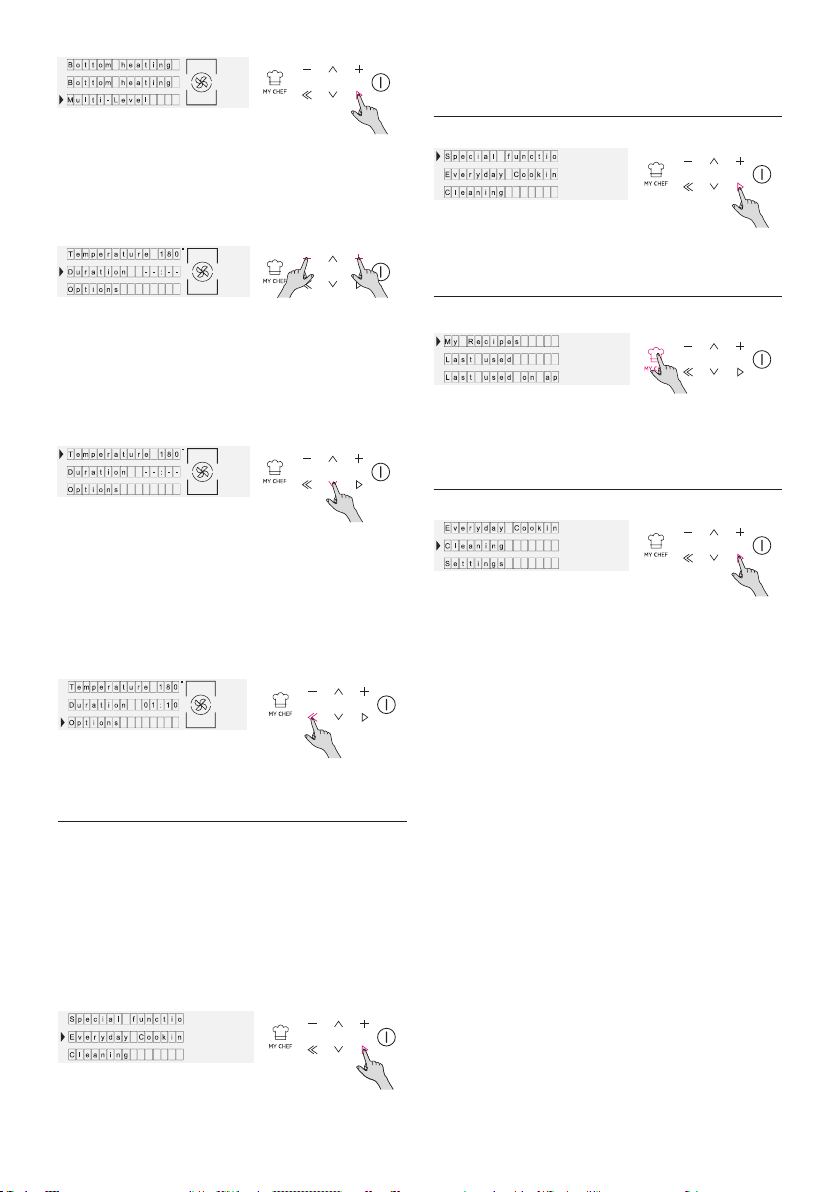
FR 53
Figure 6
Figure 7
Figure 8
Fonctionnement en mode
Fonctions spéciales
Fonctionnement en mode
Cuisine de tous les jours
cuisson.
Figure 9
Figure 10
Figure 11
Fonctionnement en mode
My Chef
Fonctionnement en mode
Système de nettoyage
Figure 12
Figure 13
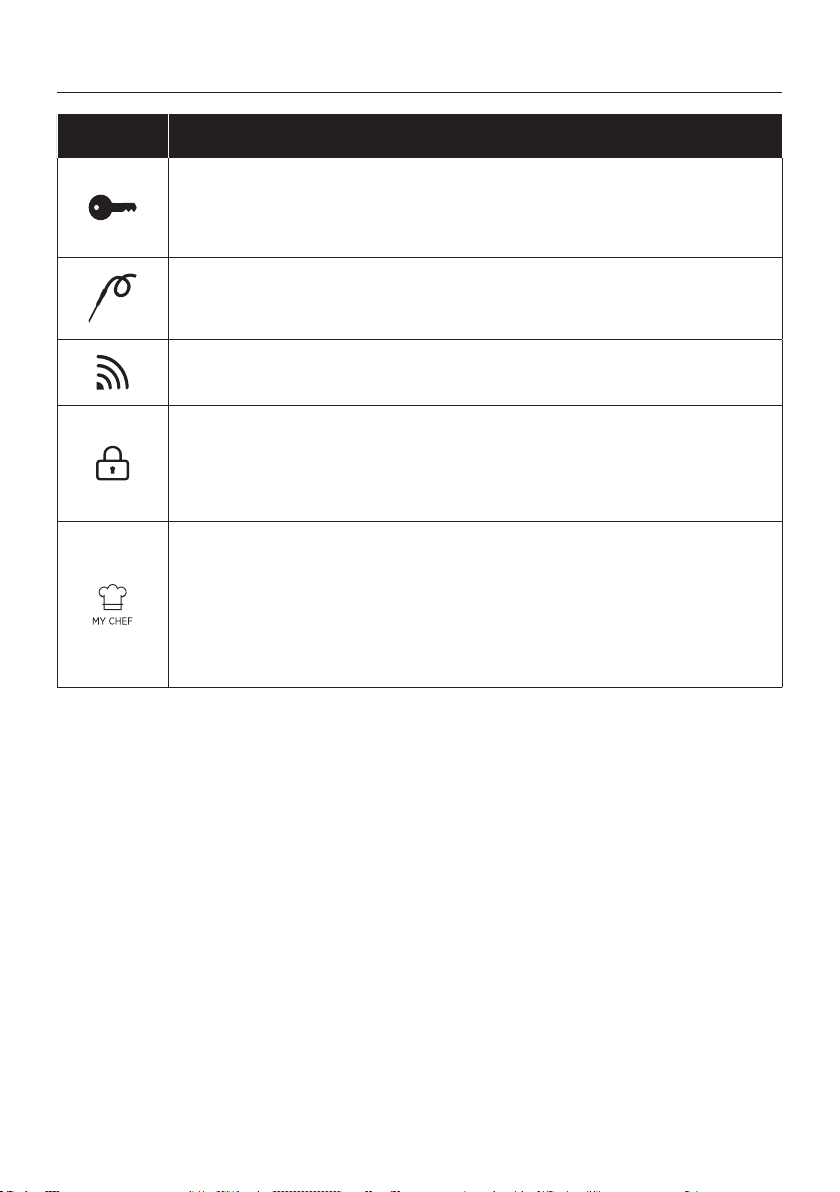
FR 54
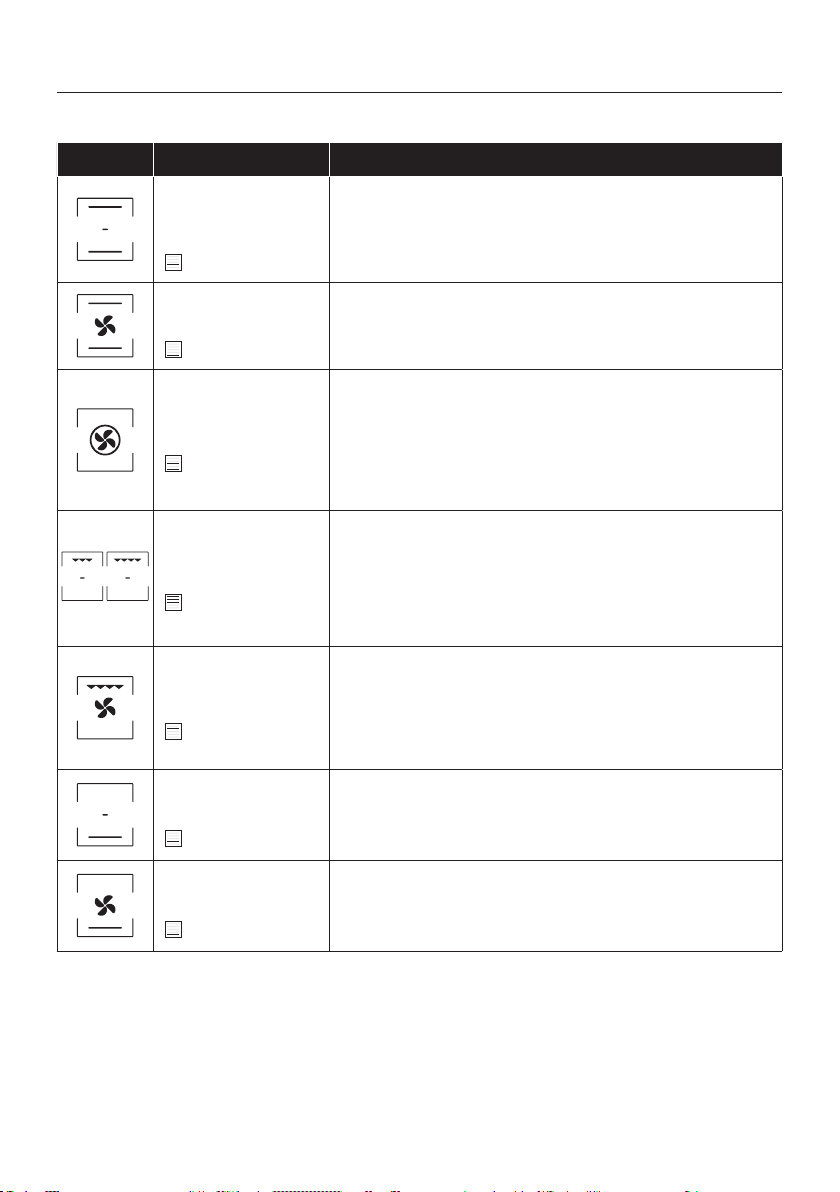
Descriptions des fonctions
Symbole Suggestion
VERROUILLAGE DE LA TOUCHE
SONDE DE CUISSON
WIFI
VERROUILLAGE
MY CHEF
FR 55
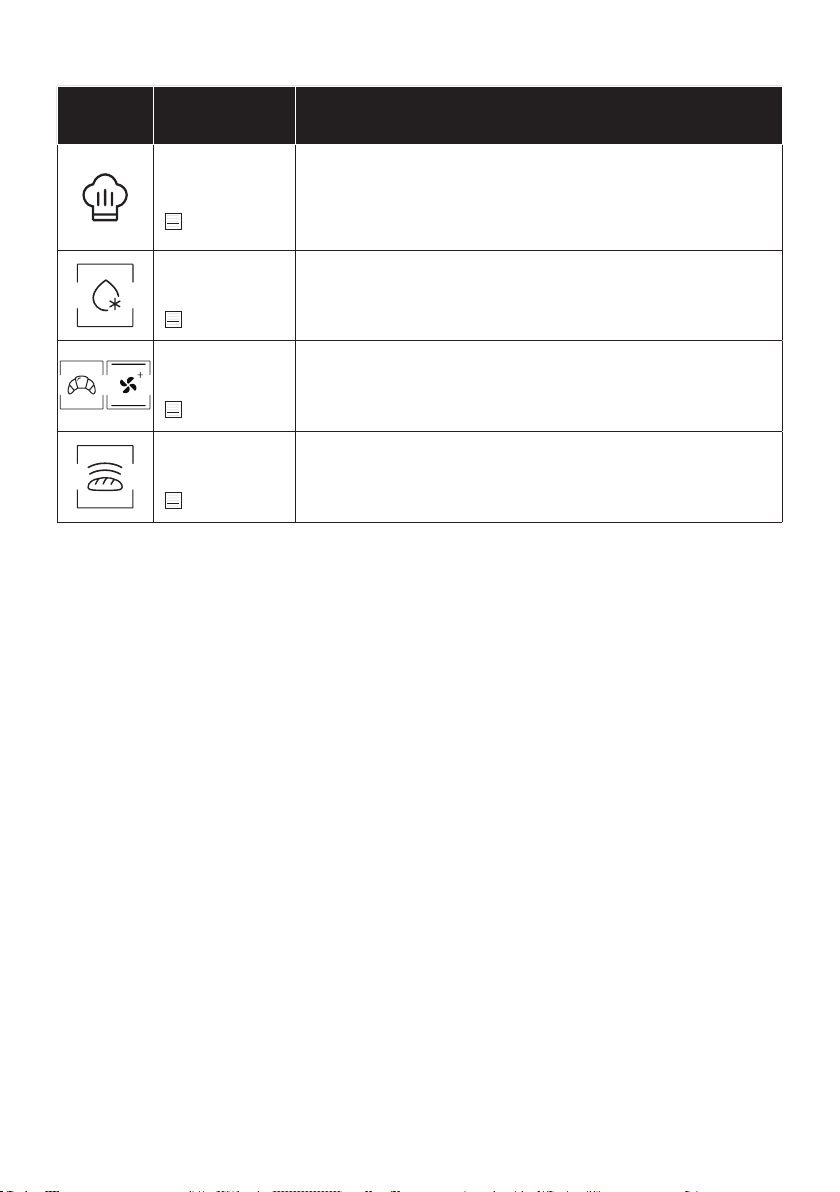
Symbole Description Suggestions
Convection
naturelle ***
160-200°C **
niveau 2°
Chaleur tournante
240°C **
niveau 1°
Chaleur pulsée
180-200°C **
niveau 1°/3°
Gril
L5 (puissance) **
niveau 3°/4°/5°
Turbogril
200°C **
niveau 4°
Sole
160-180°C **
niveau 2°
Sole Brassée
210°C **
niveau 1°
IDÉAL POUR : tartes.
MODES DE CUISSON *
Utilisation de l’appareil
FR 56
FONCTIONS SPÉCIALES *
Sym-
bole
Description Suggestions
Master bake ***
180-200°C **
niveau 2°
cuisson uniformes.
Décongélation
40°C
niveau 2°
Convection+
180-200°C *
niveau 2°
Levage
40°C
niveau 2°
des aliments cuits au four.

FR 57
INFORMATIONS SUR LE PRODUIT POUR LES ÉQUIPEMENTS EN RÉSEAU
•
Comment activer le port de réseau sans l :
•
•
et facile.
1.
clignoter.
3.
•
1.
Comment désactiver le port de réseau sans f il:
•
•
1.
•
Connectivité
Technologie Wi-Fi Bluetooth
Standard
PARAMÈTRES SANS FIL
FR 58
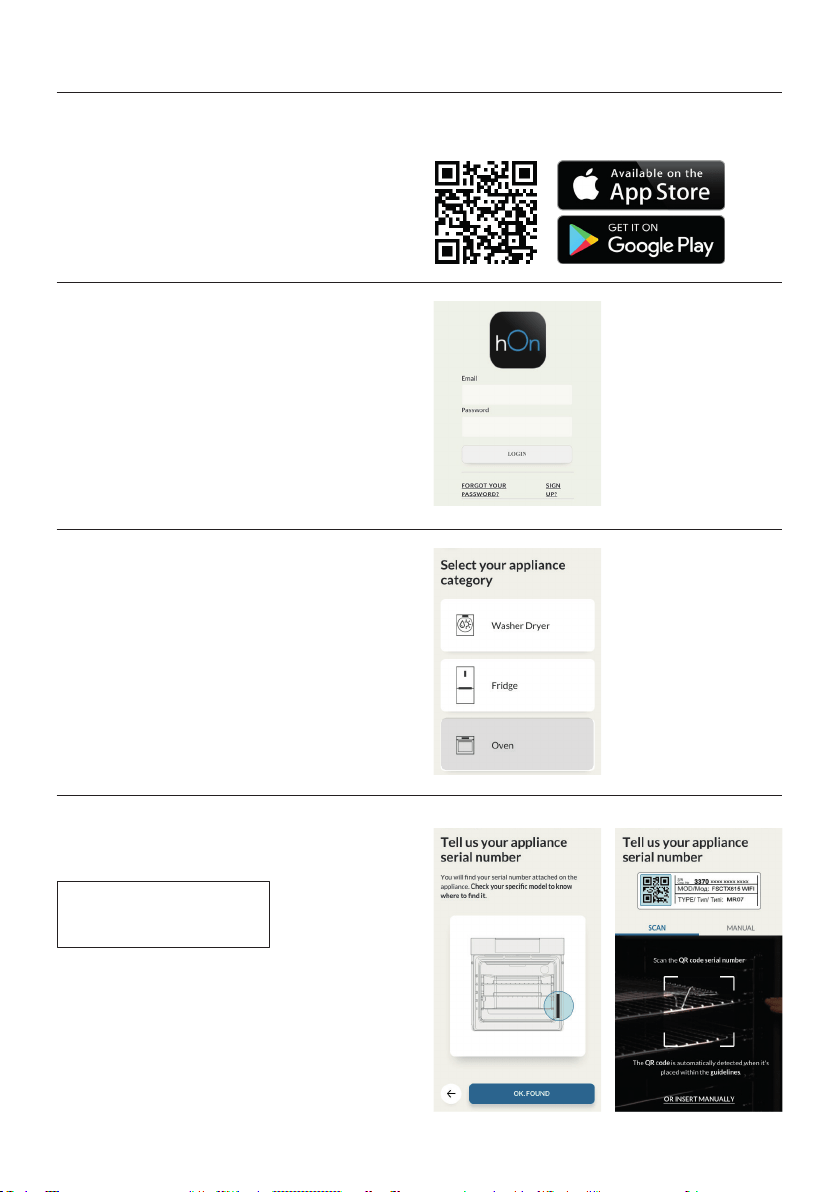
Connexion du four à l’application
SUR LE SMARTPHONE
Étape 1
•
Étape 2
•
Étape 3
•
Étape 4
•
FR 59
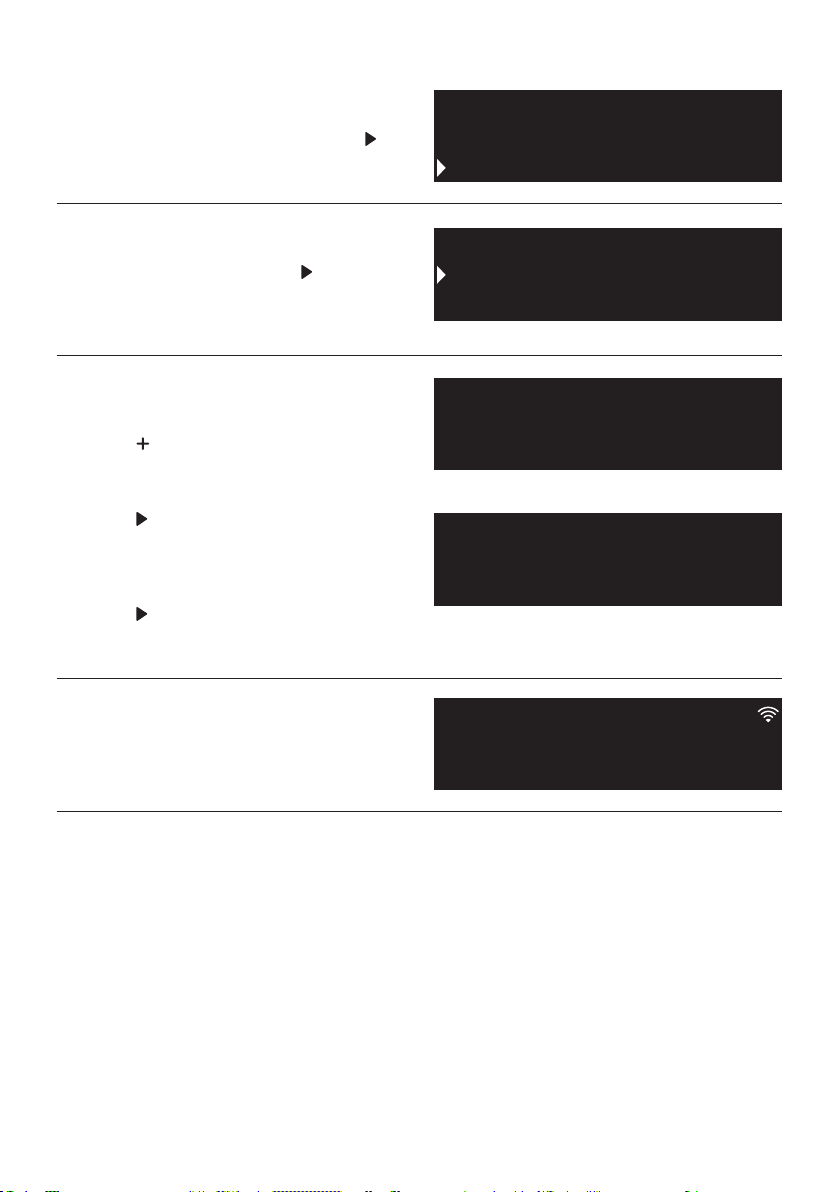
SUR L’APPAREIL
Étape 5
•
Étape 6
•
Étape 7
•
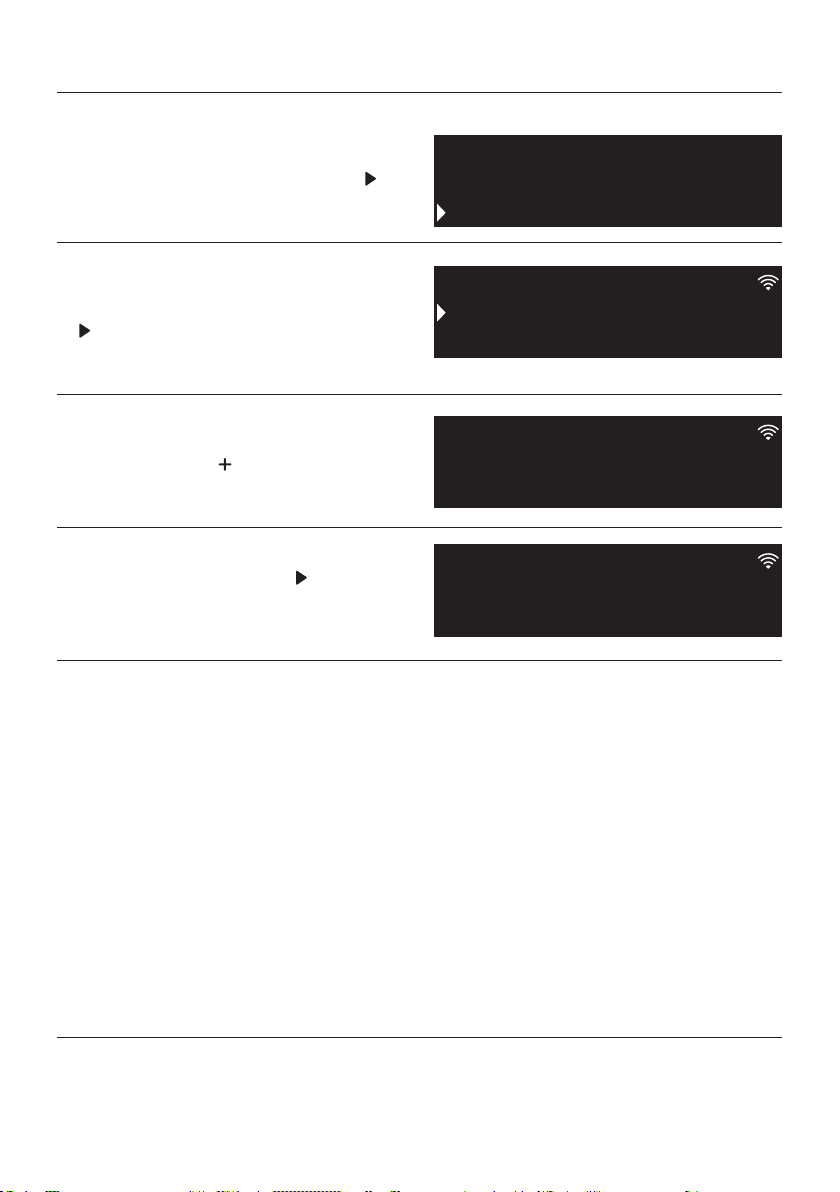
touche
.
•
touche
.
•
touche
.
Étape 8
•
REMARQUE:
•
•
•
•
Cleaning
Settings
Recipes
Wifi
Sounds
Lamp
Easy
Enrollment
Standard
Enrollment
Enrollment in progress
FR 60
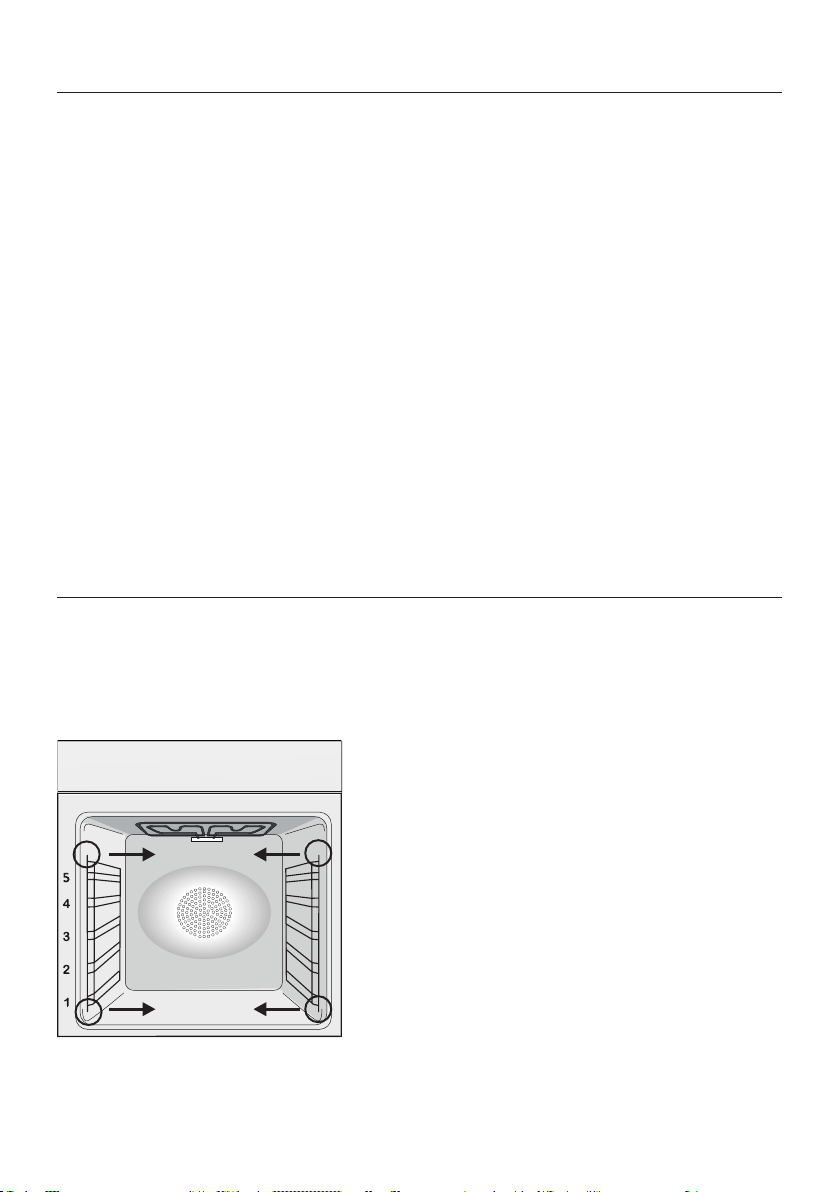
REMARQUE:
Étape 1
•
Étape 2
•
Étape 3
•
Étape 4
•
Mode Contrôle à distance
Cleaning
Settings
Recipes
Remote control
Wifi
Lamp
On
Remote control
Remote control active
FR 61
PARTIE VITREE
JOINT DE LA PORTE
Nettoyage du four et maintenance
RETRAIT ET NETTOYAGE DES GRILLES LATÉRALES
Entretien
ACCESSOIRES
LECHEFRITE
frite du four. Prendre soin de reverser les
duit du commerce.
REMPLACEMENT DE L’AMPOULE
couvercle en verre.
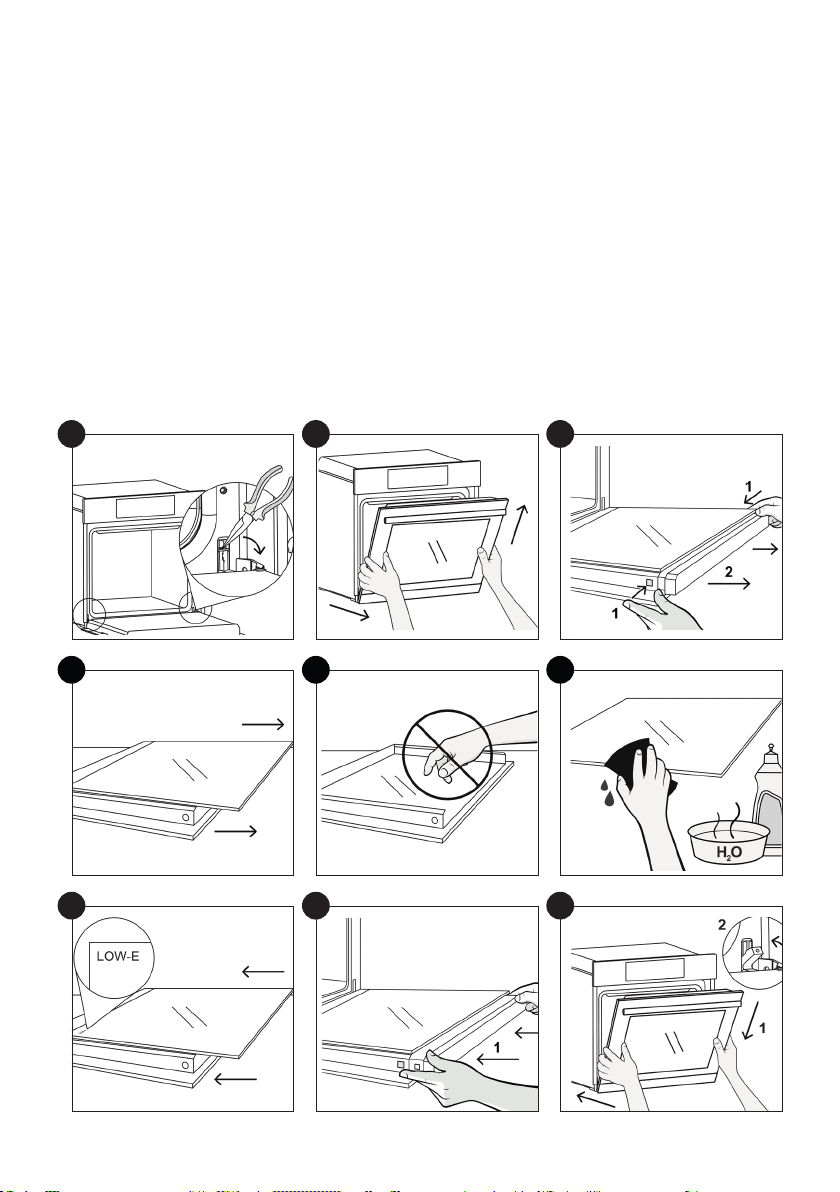
FR 62
1
2.
3.
4.
5.
6.
7.
8.
9.
1
4
7
2
5
8
3
6
9
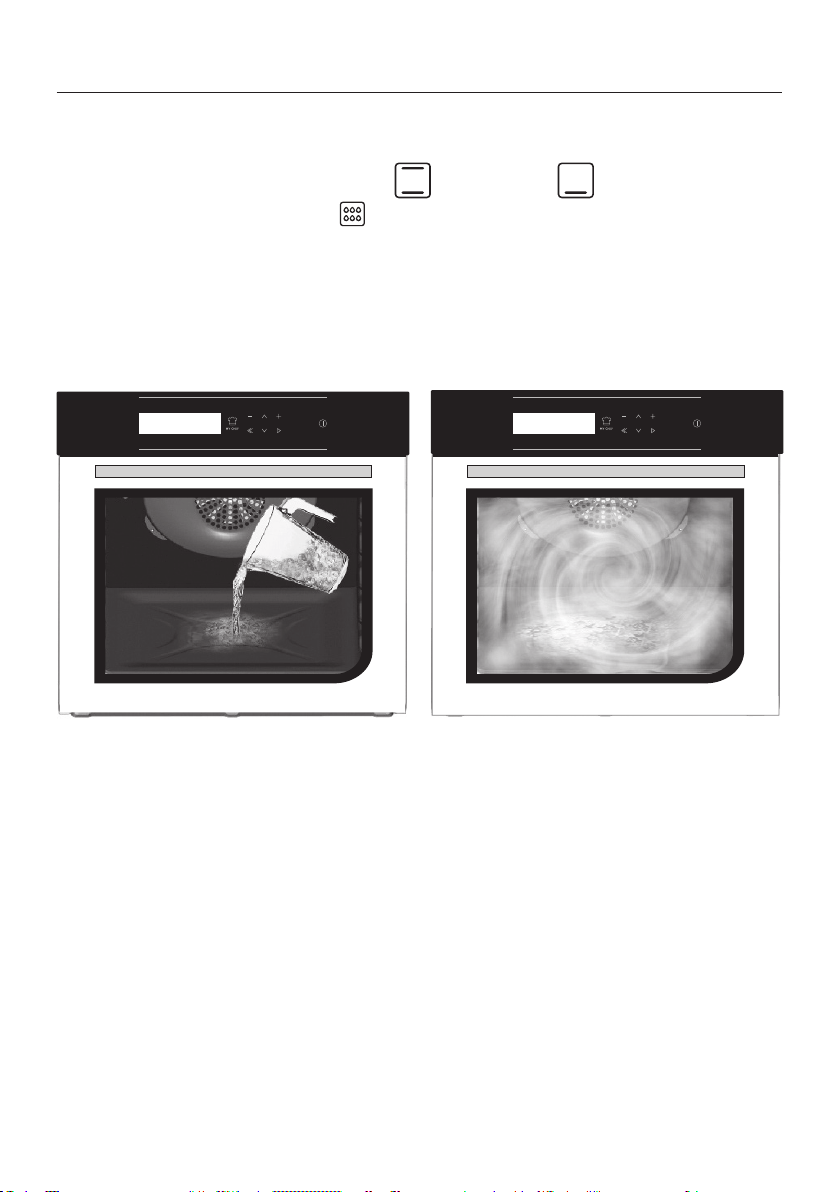
FR 63
Hydro Easy Clean Fonction
Attention:
300 ml
FR 64
La gestion des déchets et la protection de vironnement
:
Dépannage
Problemes Cause possible Solution
sont corrects
fourni.
ÉCONOMIE ET RESPECT DE L’ENVIRONNE-
MENT

NL 65
Veiligheidsvoorschriften
Avvertenze Generali
Productbeschrijving
Beschrijving van het display
Bereidingswijzen
Connectiviteit
Algemene opmerkingen over de reiniging
Onderhoud
Problemen oplossen
Installation
Belangrijke veiligheidsinstructies
65
70
71
73
73
78
82
82
85
86
•
glas van de deur condenseren. Dit is normaal. Om dit ef
schakelen van de stroom voordat u voedsel in de oven doet.
•
• Laat geen voedsel in de oven achter na het koken voor langer dan
•
Veiligheidsvoorschriften

NL 66
• delen aanraakt.
•
•
•
•
staan.
•
•
•
•
•
instructies.
•
•
•

NL 67
• HET APPARAAT MAG NIET OP DE VOEDINGSBRON WORDEN
AANGESLOTEN DOOR MIDDEL VAN STEKKERS OF CON
TACTDOZEN, MAAR MOET RECHTSTREEKS OP HET ELEK
met een contactscheiding die voldoet aan de eisen voor over
•
contactscheiding in overeenstemming met de vereisten voor

NL 68
•
•
kant, of via de klantenservice.
•
•
serveonderdelen.
•
len.
•
raat schoon te maken.
•
met de klantenservice.
•
•
•
• WAARSCHUWING: Bekleed de ovenruimte niet met aluminium

NL 69
•
contact komen met het hete email, kunnen smelten en het email
•
deur.
•
•
•
•
• WAARSCHUWING: alvorens de automatische reinigingscyclus
te starten:
•
geleverde moer te sluiten alvorens de reinigingscyclus te starten.
•
•

NL 70
Avvertenze Generali
Veiligheidsaanwijzingen
Opmerking:
Elektrische veiligheid
VERZEKER DAT DE ELEKTRISCHE AANSLUITINGEN WORDEN GEMAAKT DOOR EEN ELE-
KTRICIEN OF GEKWALIFICEERD TECHNICUS.
AANSLUITING

NL 71
WAARSCHUWING
stroomdoorgang heeft.
NB:
Aanbevelingen
Installatie
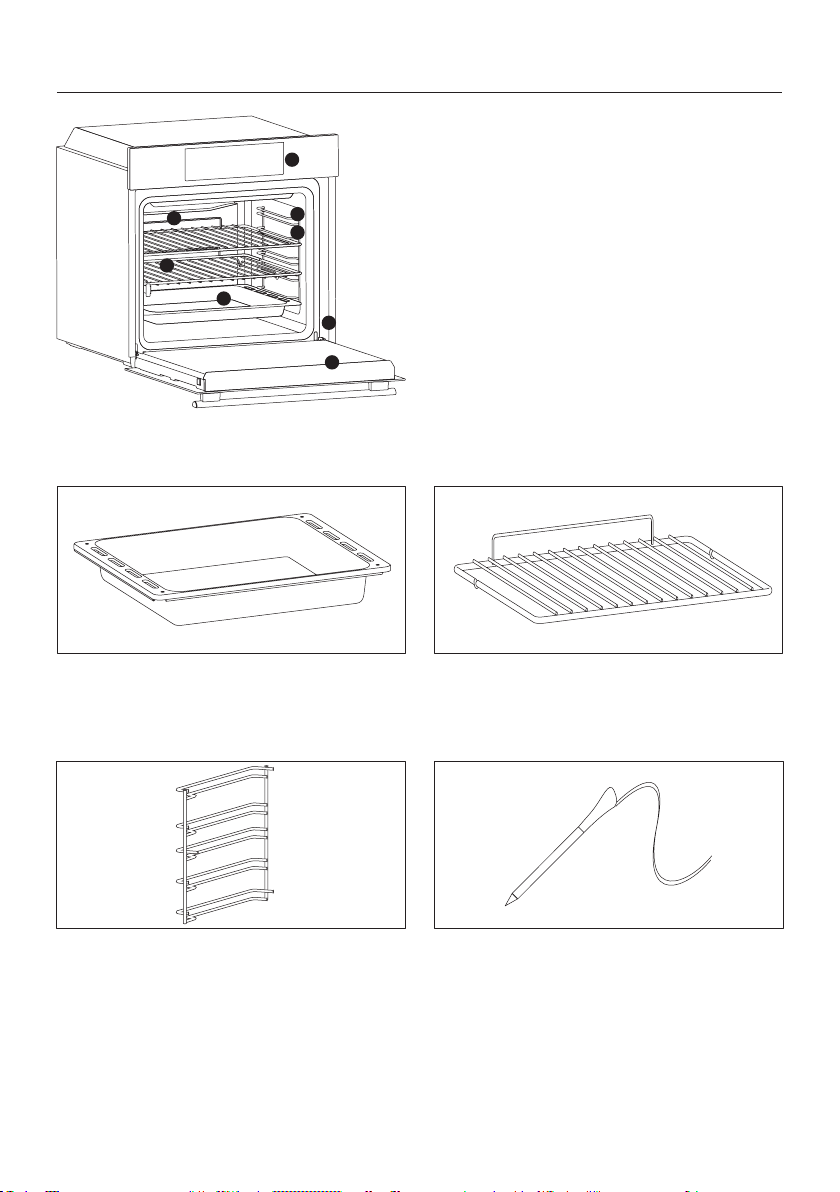
NL 72
1
2
7
3
8
4
6
5
1.
3. Roosters
6. Ovendeur
7.
8. Serienummer
Productbeschrijving
ACCESSOIRES
Lekbak
Metalen rooster
vallen.
Zijroosters
Vleessonde
WAARSCHUWINGEN:
•
e
•
NL 73
Eerste gebruik
VOORAFGAANDE REINIGING
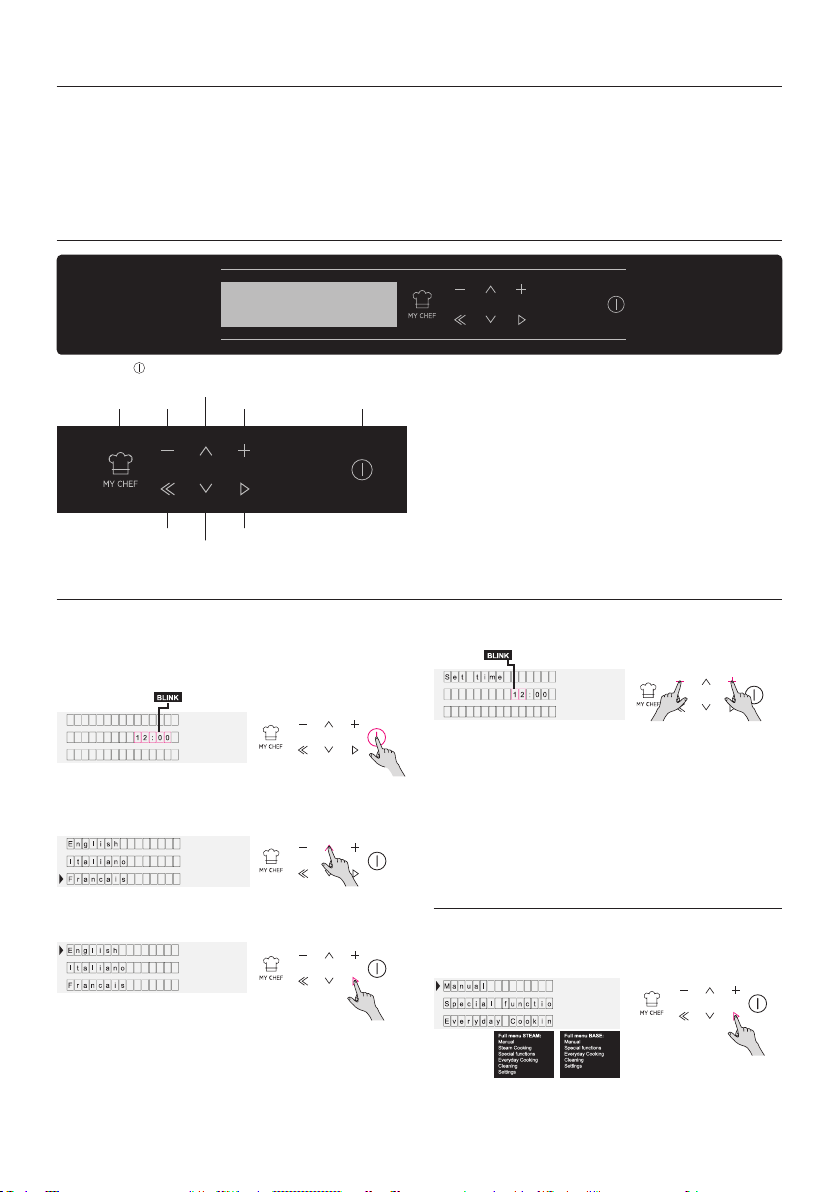
Beschrijving van het display
Instelling van het product
ON / OFF -
Ga naar het instellingengedeelte en selecteer de
voor meer details.
Afbeelding 1
Afbeelding 5
Afbeelding 2
Afbeelding 3
Afbeelding 4
MY CHEF MIN
TERUG
OMLAAG
OMHOOG
PLUS
OK
ON / OFF
Gebruik in de
handbedieningsmodus
NL 74
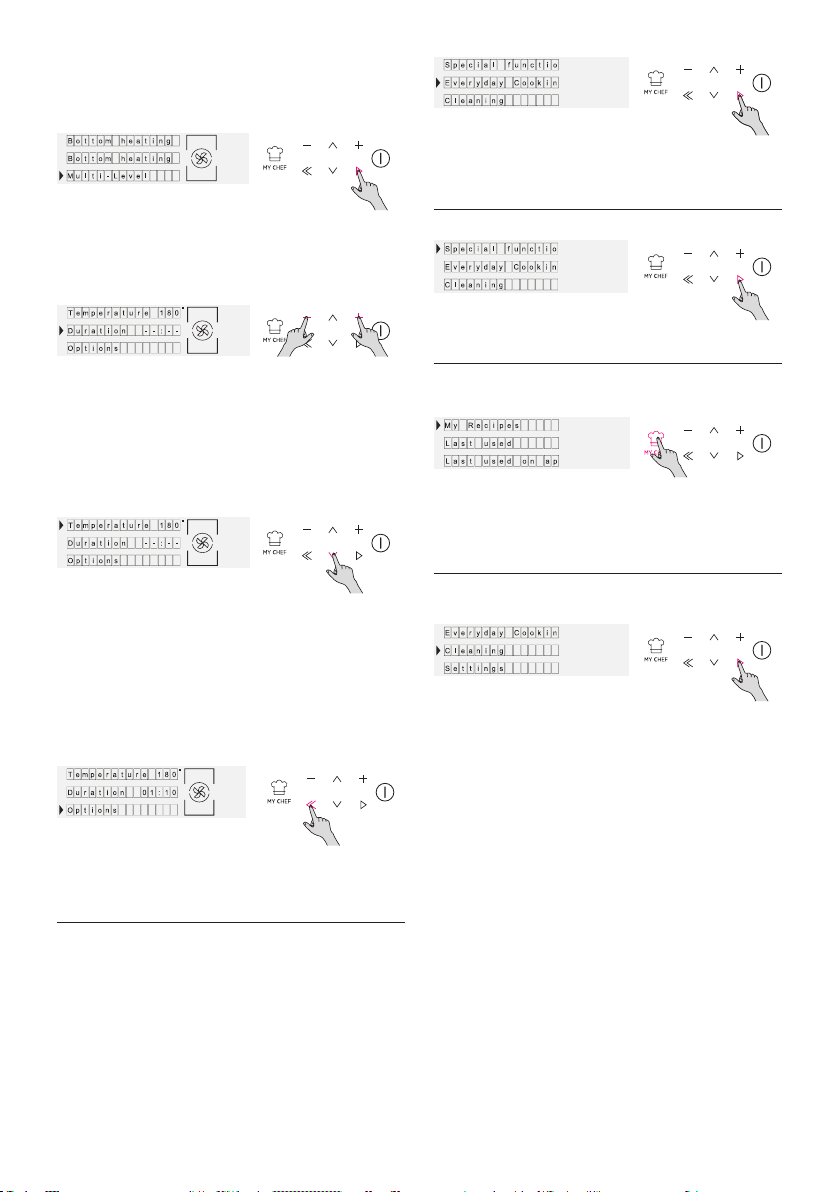
Afbeelding 8
Afbeelding 7
Afbeelding 6
Gebruik in Dagelijkse
bereidingen
Afbeelding 9
Afbeelding 10
Gebruik in de modus
Speciale Functies
Gebruik in de modus My Chef
Gebruik in de modus
Reinigingssysteem
functies.
smethoden
Afbeelding 11
Afbeelding 12
Afbeelding 13
NL 75
Gebruik in de modus My Chef
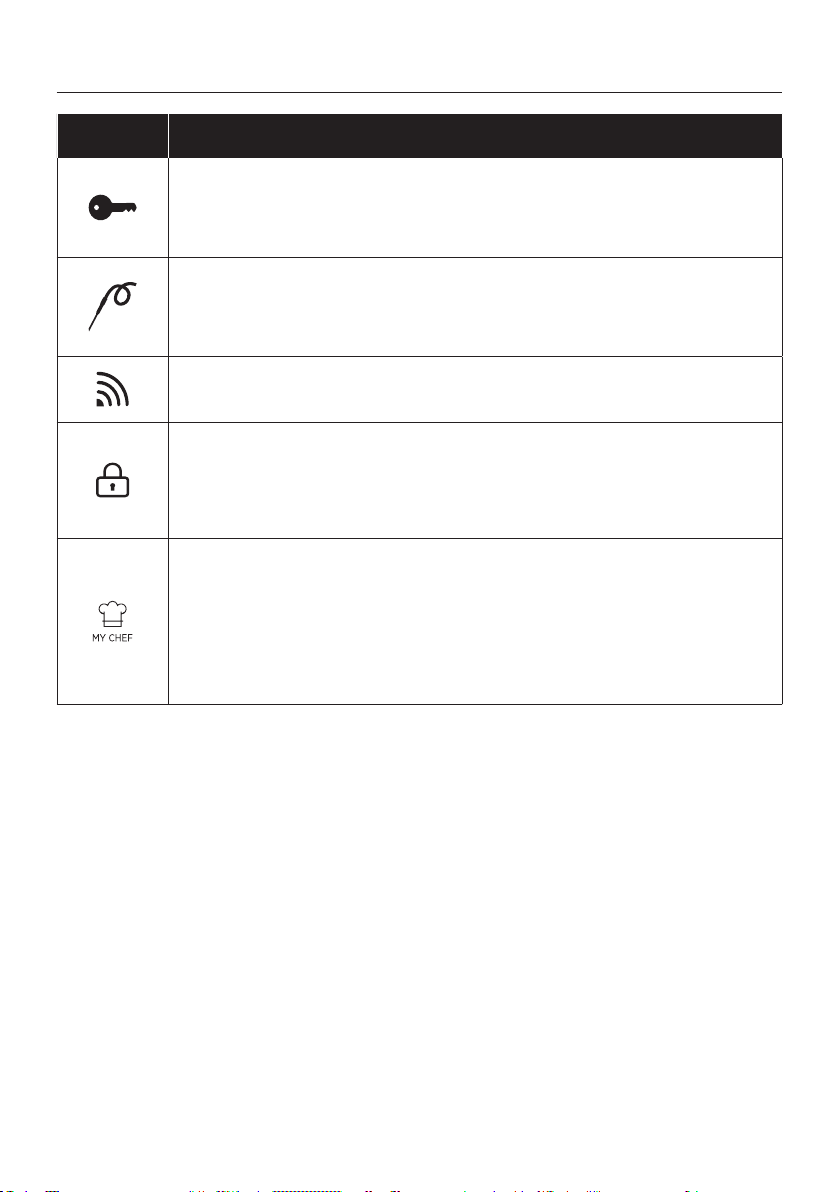
Beschrijvingen van de functies
Symbool Tip
TOETSENVERGRENDELING
VLEESSONDE
naar het hoofdmenu.
WIFI
SLOT
MY CHEF
NL 76
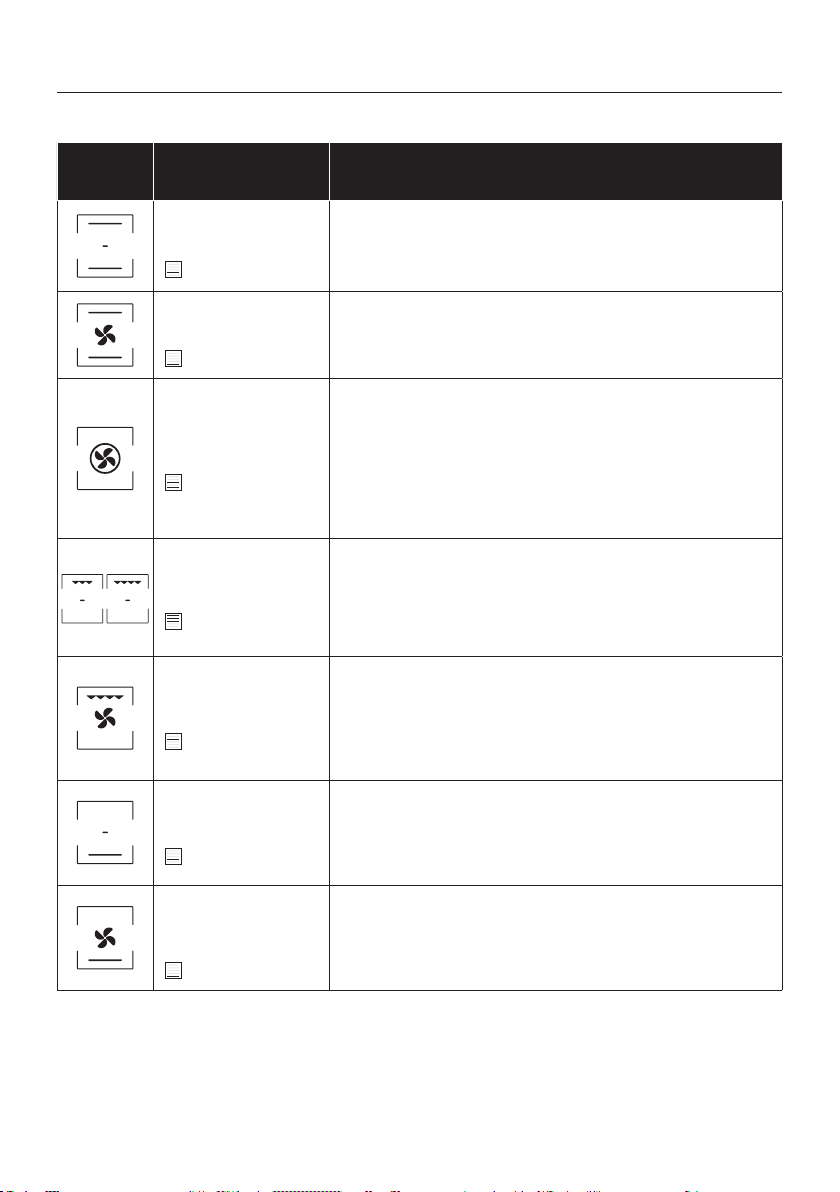
geventileerde functies.
Sym-
bool
Beschrijving Suggesties
Conventioneel***
160-200°C **
2° level
Met ventilator
240°C **
1° level
Multi-level
180-200°C **
1°/3° level
Grill
L5 (power) **
3°/4°/5° level
Grill + ventilator
200°C **
4° level
G
Bodemverwarming
160-180°C **
2° level
Bodemverwarming
+ Ventilator
210°C **
1° level
ventilator die lucht in de oven laat circuleren. Het voorkomt
KOOKMODI *
Gebruik van het apparaat
NL 77
SPECIALE FUNCTIES*
Sym-
bool
Beschrijving Suggesties
Master bake ***
180-200°C **
2° niveau
en.
Ontdooien
40°C
2° niveau
ervan aan te tasten.
Soft+
180-200°C *
2° niveau
cycli met verschillende ventilatorsnelheden.
Gisting
40°C
2° niveau
geventileerde functies.

NL 78
Technologie Wi-Fi Bluetooth
Standaard
DRAADLOZE PARAMETERS
PRODUCTINFORMATIE VOOR NETWERKAPPARATUUR
•
Een draadloze netwerkpoort activeren:
•
•
1.
de registratie te starten.
3.
•
1.
Een draadloze netwerkpoort deactiveren:
•
•
1.
•
Connectiviteit
NL 79
Verbinding oven op het apparaat
OP DE SMARTPHONE
Stap 1
•
Stap 2
• Log in of meld u aan.
Stap 3
•
Stap 4
•
handmatig in.

NL 80
OP HET APPARAAT
Stap 5
•
.
Stap 6
•
.
Stap 7
•
VERBINDING
.
•
•
Stap 8
•
NOTE:
•
•
•
•
Cleaning
Settings
Recipes
Wifi
Sounds
Lamp
Easy
Enrollment
Standard
Enrollment
Enrollment in progress
NL 81
NOTE:
of te resetten.
Stap 1
•
Stap 2
• Vanuit het instellingenmenu, selecteert u
Stap 3
•
Stap 4
• Bevestig de selectie met
Afstandsbedieningsmodus
Cleaning
Settings
Recipes
Remote control
Wifi
Lamp
On
Remote control
Remote control active
NL 82
en, gaat het langer mee. Wacht tot de oven
is afgekoeld voordat u het met de hand gaat
GLAZEN DELEN
Algemene opmerkingen over de reiniging
VERWIJDERING EN REINIGING VAN ROOSTERS
Onderhoud
AFDICHTING OVENVENSTER
ACCESSOIRES
LEKBAK
VERWIJDEREN EN REINIGEN VAN DE
ZIJLINGSE ROOSTERS
roosters in omgekeerde volgorde.
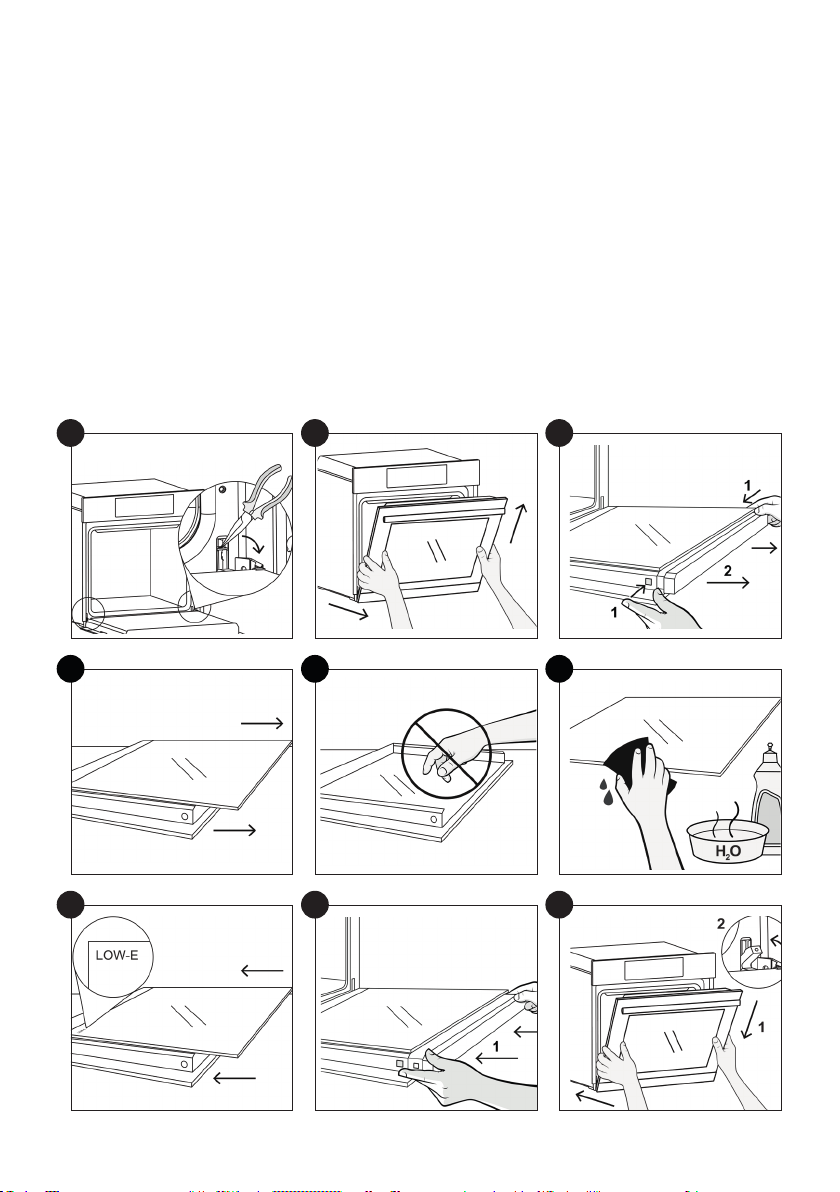
NL 83
1
4
7
2
5
8
3
6
9
1.
2.
3.
4.
ondergrond.
5.
6.
7.
8.
9.
NL 84
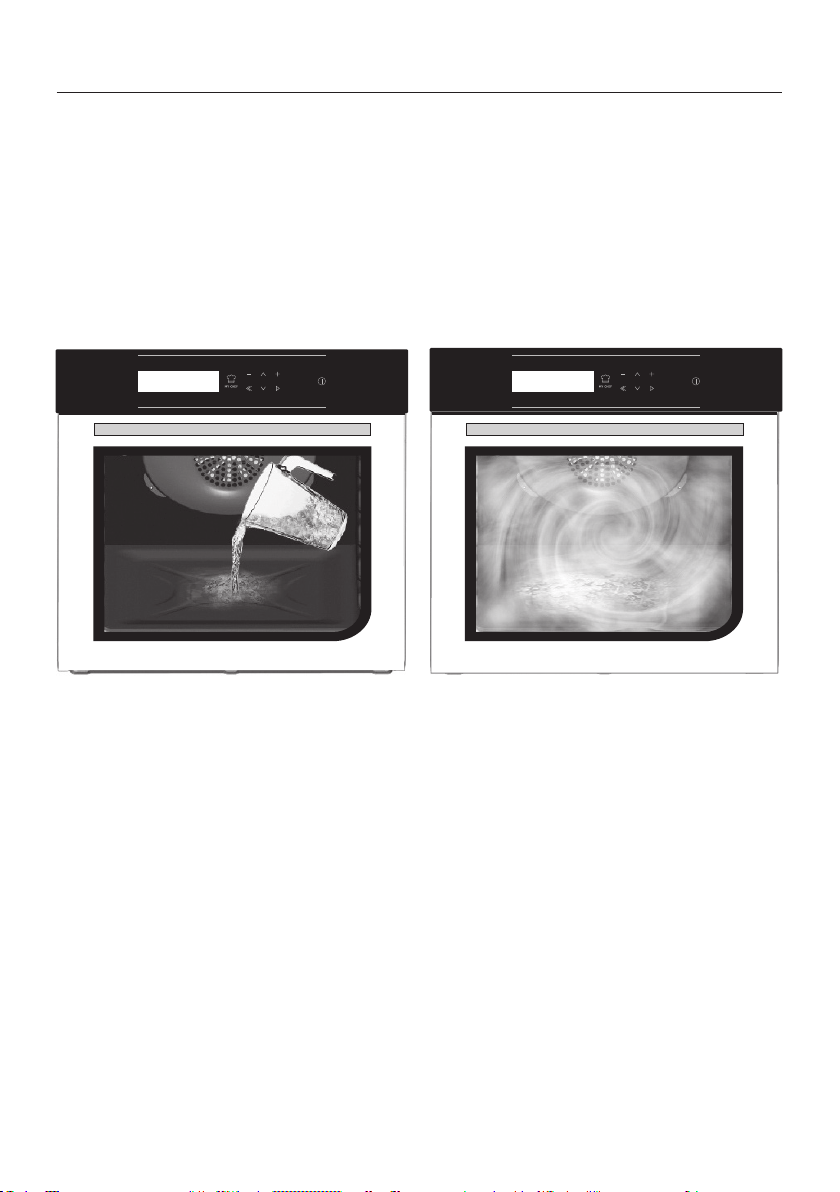
Hydro Easy Clean Functie
Waarschuwing:
300 ml
NL 85
Afvalbeheer en milieubescherming
elektrisch en elektronisch
alen te herstellen en te recyclen.
door de gemeente of door geregistreerde
Problemen oplossen
Probleem Mogelijke oorzaak Oplossing
De klok is niet ingesteld Stel de klok in
Het kinderslot is ingeschakeld Schakel het kinderslot uit
ENERGIE BESPAREN MET RESPECT VOOR
HET MILIEU
inhoud te laten draaien. Laat de ovendeur niet
eren. Houd de dichtingen schoon en in goede
staat, om energieverlies te voorkomen. Als u
een contract heeft met een laag energie tarief,
INSTALLATION 86
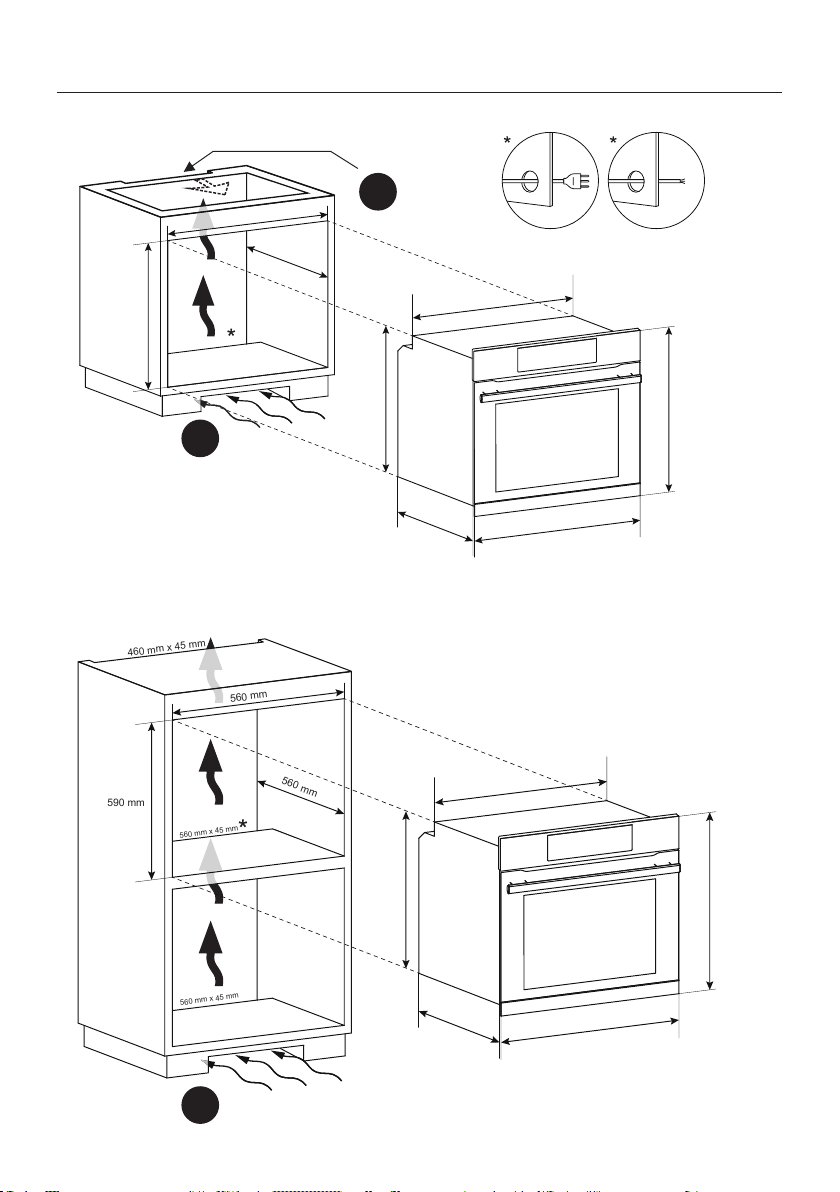
Installation
A
A
B
560 mm
560 mm
600 mm
560 mm x 45 mm
595 mm
560 mm
548,5 mm
595 mm
577,5 mm
20 mm
560 mm
560 mm
590 mm
560 mm x 45 mm
560 mm x 45 mm
460 mm x 45 mm
595 mm
560 mm
548,5 mm
595 mm
577,5 mm
20 mm

INSTALLATION 87
A
B
EN
IT
.
EN
.
IT
.
EN If the oven does not have a cooling fan, create
IT
mm
.
EN
IT
FR
NL
FR
FR
mm
NL
NL
FR
NL