1
Owner’s Manual
USB 3.2 Gen1 USB-C
®
Aluminum Docking Station
with PD Charging
Model: U442-DOCK11-S
1111 W. 35th Street, Chicago, IL 60609 USA
tripplite.com/support
Copyright © 2021 Tripp Lite. All rights reserved.
WARRANTY REGISTRATION
Register your product today and be
automatically entered to win an ISOBAR
®
surge protector in our monthly drawing!
tripplite.com/warranty
Español 13 • Français 21 • Русский 29

2
Package Contents
Optional Accessories
• U442-DOCK11-S
• Owner’s Manual
• N201-Series Cat6 Gigabit Snagless Patch Cables
• P566-Series HDMI to DVI Adapter Cables
• P569-XXX-CERT* Series High Speed HDMI Cables
• U322-Series USB A/B Device Cables
• U326-Series USB Micro-B Device Cables
• U420-003-G2-5A USB 3.2 Gen 2 (10 Gbps)
USB-C M/M Cable with 5A rating, 3 ft.
• U428-003 USB 3.2 Gen 1 (5 Gbps) Cable,
USB-C to USB-A M/M, 3 ft.
*XXX represents length, in feet (e.g. 003 for 3 ft., 006 for
6 ft., etc.).

3
System Requirements
• Computer with USB-C
®
port that supports USB
DisplayPort Alternate Mode
• DVI* or HDMI monitor
• Ethernet network with speeds up to
10/100/1000 Mbps
*Requires an adapter. See Optional Accessories for more
information.
USB Type-C
®
and USB-C
®
are registered trademarks of
USB Implementers Forum

4
Product Features
• Supports USB DisplayPort Alternate Mode for
connecting an HDMI monitor
• Supports connection of a DVI monitor
(HDMI to DVI adapter required, sold separately)
• HDMI port supports 4K UHD video resolutions up
to 3840 x 2160 @ 30 Hz
• Ethernet port supports true 10/100/1000 Mbps
network speeds
• USB-A hub ports support data transfer rates up
to 5 Gbps
• Micro SD and SD/MMC memory card slots
provide external memory access
• USB-C port supports USB 3.2 Gen1 data transfer
rates up to 5Gbps, and power input up to 20V 3A
(60W)
• Automatically resumes operation from hibernation
and suspend modes
• Complies with IEEE 802.3az
(Energy Efficient Ethernet)
• Supports full- and half-duplex operations

5
Product Features
• Supports IPv4 and IPv6 pack Checksum Offload
Engine (COE) to reduce CPU loading
• Supports Wake-on-LAN
• Plug and play—no software, drivers or external
power supply required

6
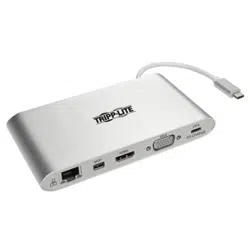
Product Overview
1
USB-C Connector
with Built-In Cable
2
USB-A Ports
3
Micro SD Memory
Card Slot
4
SD/MMC Memory
Card Slot
5
RJ45 Ethernet
Network Port
6
4K HDMI Port
7
USB-C Data/
Charging Port
8
(Optional) 5V DC
Power Jack
6
8 15 7
4 3 2 2

7
Installation
Notes:
• Both memory card slots can be used at the same time.
• When connected to an AC power source by way of the
USB-C charging port, 5W is dedicated to the docking
station and connected USB peripherals. The remaining
power is used to charge the connected USB-C device.
• See Optional Accessories section for suggested
cables.
• When the unit is connected to the USB-C port on your
computer and to a network via Cat5e/6 cabling, a
network connection will automatically be established.
If no connection is made, one can be established
manually by going to your computer’s network settings
page. For example, when using a Mac, navigate to the
Network section found in System Preferences, click the
‘Assist Me’ button to get to the Network Setup Assistant,
then follow the prompts to establish a connection.
• If additional power is required for your installation, the
U442-DOCK11-S is compatible with user-supplied 5V
DC power jacks equipped with a 3.5 x 1.35 x
9.5 mm output plug with a positive tip and negative
sleeve.

8
Installation
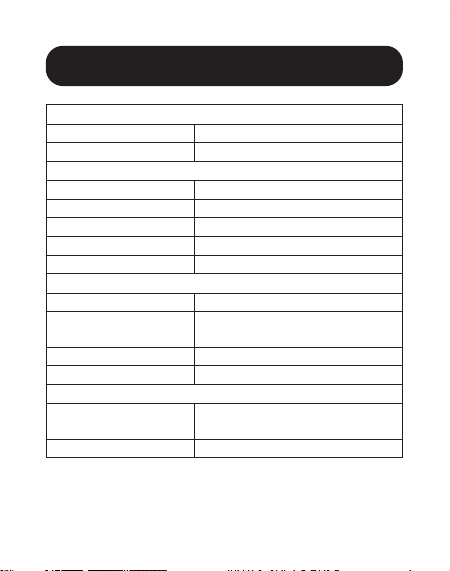
1. Connect the built-in USB-C cable to USB-C port
on your laptop, tablet or other device.
2. Use an HDMI cable to connect a monitor or
display to the unit’s HDMI port.
3. Connect USB peripherals to the unit’s USB-A
hub ports.
4. For an Ethernet connection, use Cat5e/6 UTP
cable to connect to the unit’s RJ45 port.
5. Insert Micro SD or SD/MMC cards into their
corresponding slots to access external memory.
6. Charge a device by connecting a USB-C charger
to the unit’s USB-C port. The USB-C port can
also be used to connect a USB-C peripheral
device.
9
Specifications
Input Connectors
USB 1x USB-C (Male)
DC Port DC Power (Female)
Output Connectors
USB-A 2x USB-A (Female)
USB-C 1x USB-C (Female)
HDMI 1x HDMI (Female)
Memory Cards 1x Micro SD, 1x SD/MMC
Ethernet 1x RJ45
Environmental
Operating Temperature 32° to 131°F (0° to 55°C)
Operating Humidity 10% to 85% RH,
Non-Condensing
Storage Temperature 14° to 158°F (-10° to 70°C)
Storage Humidity 5% to 90% RH, Non-Condensing
Power Requirements
USB-C Charging Port Supports up to 20V 3A (60W)
Input*
DC Port 5V 2A
*5W of power is dedicated to the unit; the remaining power
goes to the USB-C device the unit is connected to.

10
Warranty and
Product Registration
3-Year Limited Warranty
Tripp Lite warrants its products to be free from defects in materials
and workmanship for a period of three (3) years from the date of initial
purchase. Tripp Lite’s obligation under this warranty is limited to repairing or
replacing (at its sole option) any such defective products. To obtain service
under this warranty, you must obtain a Returned Material Authorization
(RMA) number from Tripp Lite or an authorized Tripp Lite service center.
Products must be returned to Tripp Lite or an authorized Tripp Lite service
center with transportation charges prepaid and must be accompanied by a
brief description of the problem encountered and proof of date and place
of purchase. This warranty does not apply to equipment, which has been
damaged by accident, negligence or misapplication or has been altered or
modified in any way.
EXCEPT AS PROVIDED HEREIN, Tripp Lite MAKES NO WARRANTIES,
EXPRESS OR IMPLIED, INCLUDING WARRANTIES OF MERCHANTABILITY
AND FITNESS FOR A PARTICULAR PURPOSE. Some states do not permit
limitation or exclusion of implied warranties; therefore, the aforesaid
limitation(s) or exclusion(s) may not apply to the purchaser.
EXCEPT AS PROVIDED ABOVE, IN NO EVENT WILL Tripp Lite BE LIABLE FOR
DIRECT, INDIRECT, SPECIAL, INCIDENTAL OR CONSEQUENTIAL DAMAGES
ARISING OUT OF THE USE OF THIS PRODUCT, EVEN IF ADVISED OF THE
POSSIBILITY OF SUCH DAMAGE. Specifically, Tripp Lite is not liable for any
costs, such as lost profits or revenue, loss of equipment, loss of use of
equipment, loss of software, loss of data, costs of substitutes, claims by
third parties, or otherwise.

11
Warranty and
Product Registration
Product Registration
Visit tripplite.com/warranty today to register your new Tripp Lite product.
You’ll be automatically entered into a drawing for a chance to win a FREE
Tripp Lite product!*
* No purchase necessary. Void where prohibited. Some restrictions apply.
See website for details.
FCC Notice, Class B
This device complies with part 15 of the FCC Rules. Operation is subject
to the following two conditions: (1) This device may not cause harmful
interference, and (2) this device must accept any interference received,
including interference that may cause undesired operation.
Note: This equipment has been tested and found to comply with the limits
for a Class B digital device, pursuant to part 15 of the FCC Rules. These
limits are designed to provide reasonable protection against harmful
interference in a residential installation. This equipment generates, uses
and can radiate radio frequency energy and, if not installed and used in
accordance with the instructions, may cause harmful interference to radio
communications. However, there is no guarantee that interference will not
occur in a particular installation. If this equipment does cause harmful
interference to radio or television reception, which can be determined by
turning the equipment off and on, the user is encouraged to try to correct
the interference by one or more of the following measures:
• Reorient or relocate the receiving antenna.
• Increase the separation between the equipment and receiver.
• Connect the equipment into an outlet on a circuit different from that to
which the receiver is connected.
• Consult the dealer or an experienced radio/TV technician for help.

12
Any changes or modifications to this equipment not expressly approved by
Tripp Lite could void the user’s authority to operate this equipment.
WEEE Compliance Information for Tripp Lite Customers and Recyclers
(European Union)
Under the Waste Electrical and Electronic Equipment (WEEE)
Directive and implementing regulations, when customers buy
new electrical and electronic equipment from Tripp Lite they are
entitled to:
• Send old equipment for recycling on a one-for-one, like-for-like
basis (this varies depending on the country)
• Send the new equipment back for recycling when this ultimately
becomes waste
Use of this equipment in life support applications where failure of this
equipment can reasonably be expected to cause the failure of the life
support equipment or to significantly affect its safety or effectiveness is not
recommended.
Tripp Lite has a policy of continuous improvement. Specifications are
subject to change without notice. Photos and illustrations may differ slightly
from actual products.
1111 W. 35th Street, Chicago, IL 60609 USA
tripplite.com/support
21-11-039 9337BC_RevC
Warranty and
Product Registration

13
Manual del Propietario
Estación de Conexión USB
3.2 Gen1 USB-C
®
con
Carga PD, Aluminio
Modelo: U442-DOCK11-S
English 1 • Français 21 • Русский 29
1111 W. 35th Street, Chicago, IL 60609 EE. UU. • tripplite.com/support
Copyright © 2022 Tripp Lite. Todos los derechos reservados.

14
Contenido del Empaque
Requisitos del Sistema
Accesorios Opcionales
• U442-DOCK11-S
• Manual del Propietario
• Computadora con puerto USB-C
®
que soporte USB DisplayPort Modo
Alterno
• Monitor DVI* o HDMI
• Red Ethernet con velocidades hasta 10Mbps / 100Mbps / 1000Mbps
* Requiere un adaptador. Ver Accesorios Opcionales para obtener información
adicional.
USB Type-C
®
y USB-C
®
son marcas comerciales registradas del USB Implementers
Forum
• Cables Patch Snagless Gigabit Cat6 Serie N201
• Cables Adaptadores de HDMI a DVI Serie P566
• Cables HDMI de Alta Velocidad Serie P569-XXX-CERT*
• Cables para Dispositivo USB A/B Serie U322
• Cables para Dispositivo USB Micro-B Serie U326
• U420-003-G2-5A – Cable USB 3.2 Gen 2 (10 Gbps) USB-C M/M con
especificación de 5A, 91 cm [3 pies]
• U428-003 – Cable USB 3.2 Gen 1 (5 Gbps), USB-C a USB-A M/M,
91 cm [3 pies]
*XXX representa la longitud, en pies (p.e. 003 para 3 pies, 006 para 6 pies, etc.).

15
Características del Producto
• Soporta USB DisplayPort de Modo Alterno para conectar un monitor
HDMI
• Soporta la conexión un monitor DVI (requiere de un adaptador HDMI a
DVI, vendido por separado)
•
El puerto HDMI soporta resoluciones de video UHD 4K de hasta
3840 x 2160 @ 30 Hz
• El puerto Ethernet soporta velocidades reales de red de 10Mbps /
100Mbps / 1000Mbps
• Los puertos del hub USB-A soportan tasas de transferencia de datos
hasta 5 Gbps
• Ranuras para tarjeta de memoria Micro SD y SD / MMC proporcionan
acceso a memoria externa
• El puerto USB-C soporta tasas de transferencia de datos USB 3.2 Gen1
de hasta 5 Gbps, y alimentación hasta 20V 3A (60W)
• Restablece automáticamente la operación desde los modos de
hibernación y suspensión
• Cumple con IEEE 802.3az (Consumo eficiente de energía en redes
Ethernet)
• Soporta operaciones Dúplex y Semi-dúplex
• Soporta Checksum Offload Engine (COE) de módulo IPv4 e IPv6 para
reducir la carga del CPU
• Soporta Wake-on-LAN
• Conectar y Usar—No requiere fuente de alimentación externa,
controladores o software

16
Vista General del Producto
1
Conector USB-C con Cable Incorporado
2
Puertos USB-A
3
Ranura para Tarjeta de Memoria Micro SD
4
Ranura para Tarjeta de Memoria SD / MMC
5
Puerto de Red Ethernet RJ45
6
Puerto HDMI 4K
7
Puerto de Carga / Datos USB-C
8
(Opcional) Enchufe de Alimentación 5V CD
6
8 15 7
4 3 2 2

17
Instalación
Notas:
• Ambas ranuras para tarjetas de memoria pueden usarse simultáneamente.
• Cuando se conecta a una fuente de alimentación de CA por medio del puerto
de carga USB-C, 5W se dedican a la estación de conexión y periféricos USB
conectados. La potencia restante se usa para cargar el dispositivo USB-C
conectado.
• Para consultar los cables sugeridos, vea la sección Accesorios Opcionales.
• Cuando la unidad esté conectada al puerto USB-C en su computadora y a una red
mediante cableado Cat5e / Cat6, se establecerá automáticamente una conexión
de red. Si no se realiza una conexión, puede establecerse una manualmente
accediendo a la página de configuración de red de la computadora. Por ejemplo,
cuando usa una Mac, vaya a la sección de Red en Preferencias del Sistema, haga
click en el botón 'Ayúdame' para llegar al Asistente de Configuración de Red, luego
siga las instrucciones para establecer una conexión.
• Si se requiere alimentación adicional para su instalación, el U442-DOCK11-S es
compatible con convertidores de corriente de 5V CD suministrados por el usuario
equipado con una clavija de salida de 3.5 x 1.35 x
9.5 mm con una punta positiva y casquillo negativo.
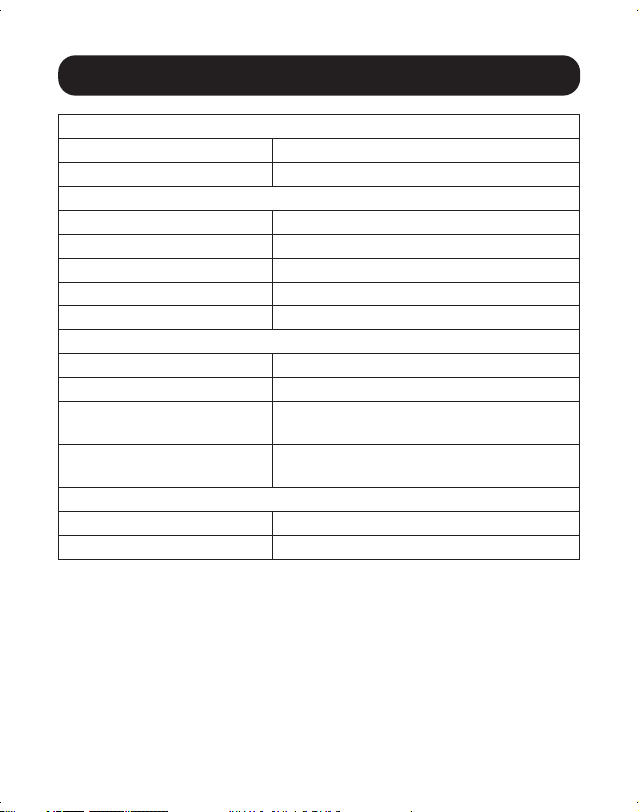
1. Conecte el cable USB-C incorporado al puerto USB-C en su laptop,
tableta u otro dispositivo.
2. Use un cable HDMI para conectar un monitor o pantalla al puerto HDMI
de la unidad.
3. Conecte periféricos USB a los puertos del hub USB-A de la unidad.
4. Para una conexión Ethernet, utilice cable UTP Cat5e / Cat6 para
conectar al puerto RJ45 de la unidad.
5. Inserte tarjetas Micro SD o SD / MMC en sus ranuras correspondientes
para acceder a la memoria externa.
6. Cargue un dispositivo conectando un cargador USB-C al puerto USB-C
de la unidad. El puerto USB-C puede usarse también para conectar un
dispositivo periférico USB-C.
18
Especificaciones
Conectores de Entrada
USB 1x USB-C (Macho)
Puerto de CD Alimentación de CD (Hembra)
Conectores de Salida
USB-A 2x USB-A (Hembra)
USB-C 1x USB-C (Hembra)
HDMI 1x HDMI (Hembra)
Tarjetas de Memoria 1x Micro SD, 1x SD / MMC
Ethernet 1x RJ45
Ambiental
Temperatura de Operación 0 °C a 55 °C [32 °F a 131 °F]
Humedad de Operación De 10% a 85% de HR, sin condensación
Temperatura de Almace-
namiento
-10 °C a 70 °C [14 °F a 158 °F]
Humedad de Almace-
namiento
De 5% a 90% de HR, sin condensación
Requerimientos de Energía
Puerto de Carga USB-C Soporta hasta 20V 3A (60W) de Entrada*
Puerto de CD 5V 2A
*5W de potencia está dedicada a la unidad. La potencia restante va al dispositivo
USB-C al que la unidad está conectada.

19
Garantía
Garantía Limitada de 3 años
Tripp Lite garantiza durante un período de tres (3) años a partir de la fecha de compra inicial
que este producto no tiene defectos de materiales ni de mano de obra. La obligación de
Tripp Lite bajo esta garantía está limitada a la reparación o reemplazo (A su entera discreción)
de cualquier producto defectuoso. Para obtener servicio bajo esta garantía, debe obtener
un número de Autorización de Devolución de Mercancía (RMA) de Tripp Lite o de un centro
de servicio autorizado de Tripp Lite. Los productos deben ser regresados a Tripp Lite o a un
centro de servicio autorizado de Tripp Lite con los cargos de transporte prepagados y deben
acompañarse con una breve descripción del problema y un comprobante de la fecha y el
lugar de compra. Esta garantía no se aplica a equipos que hayan sido dañados por accidente,
negligencia o mal uso, o hayan sido alterados o modificados de alguna manera.
EXCEPTO COMO SE INDICA EN EL PRESENTE, TRIPP LITE NO HACE GARANTÍAS EXPRESAS
O IMPLÍCITAS, INCLUIDAS GARANTÍAS DE COMERCIABILIDAD Y ADECUACIÓN PARA UN
PROPÓSITO PARTICULAR. Algunos estados no permiten la limitación o exclusión de garantías
implícitas; por lo tanto, las limitaciones o exclusiones antes mencionadas pueden no
aplicarse al comprador.
EXCEPTO COMO SE INDICA ANTERIORMENTE, EN NINGÚN CASO TRIPP LITE SERÁ
RESPONSABLE POR DAÑOS DIRECTOS, INDIRECTOS, ESPECIALES, INCIDENTALES O
CONSECUENTES QUE SURJAN DEL USO DE ESTE PRODUCTO, INCLUSO SI SE ADVIERTE
SOBRE LA POSIBILIDAD DE TAL DAÑO. Específicamente, Tripp Lite no es responsable por
ningún costo, como pérdida de ganancia o ingresos, pérdida de equipos, pérdida del uso de
equipos, pérdida de software, pérdida de datos, costos de sustituciones, reclamaciones de
terceros o de cualquier otra forma.

20
Garantía
Información de sobre Cumplimiento de la WEEE para Clientes de Tripp Lite y
Recicladores (Unión Europea)
Según la Directiva de Residuos de Aparatos Eléctricos y Electrónicos (Waste Electrical
and Electronic Equipment, WEEE) y sus reglamentos, cuando los clientes compran
nuevos equipos eléctricos y electrónicos a Tripp Lite, tienen derecho a:
• Enviar equipos antiguos para reciclaje según una base de uno por uno, entre
productos similares (esto varía dependiendo del país)
• Enviar el equipo nuevo de vuelta para reciclaje cuando este se convierta finalmente
en desecho
El uso de este equipo en aplicaciones de soporte de vida en donde la falla de este equipo
pueda razonablemente hacer suponer que causará fallas en el equipo de soporte de vida o
afecte significativamente su seguridad o efectividad, no está recomendado.
Tripp Lite tiene una política de mejora continua. Las especificaciones están sujetas a cambios
sin previo aviso. Las fotografías e ilustraciones pueden diferir ligeramente de los productos
reales.
1111 W. 35th Street, Chicago, IL 60609 EE. UU. • tripplite.com/support
21-11-039 9337BC_RevC

21
Manuel de l'utilisateur
Station d'accueil en
aluminium USB 3.2 Gen1
USB-C
®
avec chargement
PD (distribution de
puissance)
Modèle : U442-DOCK11-S
English 1 • Español 13 • Русский 29
1111 W. 35th Street, Chicago, IL 60609 USA • tripplite.com/support
Droits d'auteur © 20122 Tripp Lite. Tous droits réservés.

22
Contenu de l'emballage
Configuration requise
Accessoires en option
• U442-DOCK11-S
• Manuel de l'utilisateur
• Ordinateur avec port USB-C
®
qui prend en charge le mode alternatif USB
DisplayPort
• Moniteur DVI* ou HDMI
• Réseau Ethernet avec des vitesses jusqu'à 10/100/1 000 Mbps
*Exige un adaptateur. Consulter Accessoires en option pour plus d'informations.
USB Type-C
®
et USB-C
®
sont des marques de commerce d'USB Implementers Forum
• Cordon de raccordement anticoupure Gigabit Cat6 de la série N201
• Câbles d'adaptateur de HDMI à DVI de la série P566
• Câbles HDMI haute vitesse de la série P569-XXX-CERT*
• Câbles de l'appareil A/B USB de série U322
• Câbles de l'appareil USB Micro-B de la série U326
• Câble U420-003-G2-5A USB 3.2 Gen 2 (10 Gbps) USB-C (M/M) avec
une capacité nominale de 5 A, 0,9 m (3 pi)
• Câble U428-003 USB 3.2 Gen 1 (5 Gbps), USB-C à USB-A M/M, 0,9 m
(3 pi)
* XXX représente la longueur en pieds (p. ex. 003 pour 3 pi (0,9 m),
006 pour 6 pi (1,8 m)).

23
Caractéristiques du produit
• Prend en charge le mode alternatif USB DisplayPort pour connecter un
moniteur HDMI
• Prend en charge la connexion d'un moniteur DVI (un adaptateur de HDMI
à DVI requis, vendu séparément)
•
Le port HDMI prend en charge les résolutions vidéo 4K UHD jusqu'à 3 840 x
2 160 @ 30 Hz.
• Ethernet prend en charge de véritables vitesses de réseau de 10/100/1
000 Mbps.
• Les ports du concentrateur USB-A prennent en charge des taux de
transfert de données pouvant atteindre jusqu'à 5 Gbps.
• Des fentes pour cartes mémoire Micro SD et SD/MMC fournissent un
accès à la mémoire externe
• Le port USB-C prend en charge des taux de transfert de données USB
3.2 Gen1 jusqu'à 5 Gbps et une entrée d'alimentation jusqu'à 20 V 3 A
(60 W).
• Se remet automatiquement en marche du mode de mise en veille ou de
mise en attente
• Conforme à IEEE 802.3az (Ethernet à haute efficacité énergétique)
• Prend en charge les exploitations en duplex intégral et en semi-duplex
• Prend en charge le moteur de déchargement de contrôle de somme des
modules IPv4 et IPv6 pour réduire la charge de l'UCT
• Prend en charge Wake-on-LAN
• Prêt à l'emploi; aucun logiciel, lecteur ou alimentation externe requis

24
Aperçu du produit
1
Connecteur USB-C avec câble intégré
2
Ports USB-A
3
Fente pour carte mémoire Micro SD
4
Fente pour carte mémoire SD/MMC
5
Port de réseau Ethernet RJ45
6
Port 4K HDMI
7
Port de données/chargement USB-C
8
Prise d’alimentation CC de 5 V (optionnelle)
6
8 15 7
4 3 2 2

25
Installation
Remarques :
• Les deux fentes pour carte mémoire peuvent être utilisées en même temps.
• Lorsque l'appareil est connecté à une source d'alimentation CA par le biais du port
de chargement USB-C, 5 W sont dédiés à la station d'accueil et aux périphériques
USB connectés. La puissance restante est utilisée pour charger le dispositif USB-C
connecté.
• Consulter la section Accessoires en option pour des suggestions concernant les
câbles.
• Lorsque l'appareil est raccordé au port USB-C d'un ordinateur et à un réseau via un
câble Cat5e/6, un raccordement au réseau sera automatiquement établi. Si aucun
raccordement n'a été établi, un raccordement peut être établi manuellement depuis
la page des paramètres réseau de l'ordinateur. Par exemple, sur un Mac, se rendre
à la section Network (réseau) qui se trouve dans System Preferences (préférences
du système), cliquer sur le bouton « Assist Me » (obtenir de l'aide) pour accéder à
Network Setup Assistant (assistant à la configuration du réseau), puis suivre les
messages-guides pour établir une connexion.
• Si de l'alimentation supplémentaire est requise pour l’installation, l'U442-DOCK11-S
est compatible avec les prises d'alimentation CC de 5 V fournies par l'utilisateur
équipées d'une fiche de sortie de 3,5 x 1,35 x 9,5 mm avec une extrémité positive
et un manchon négatif.
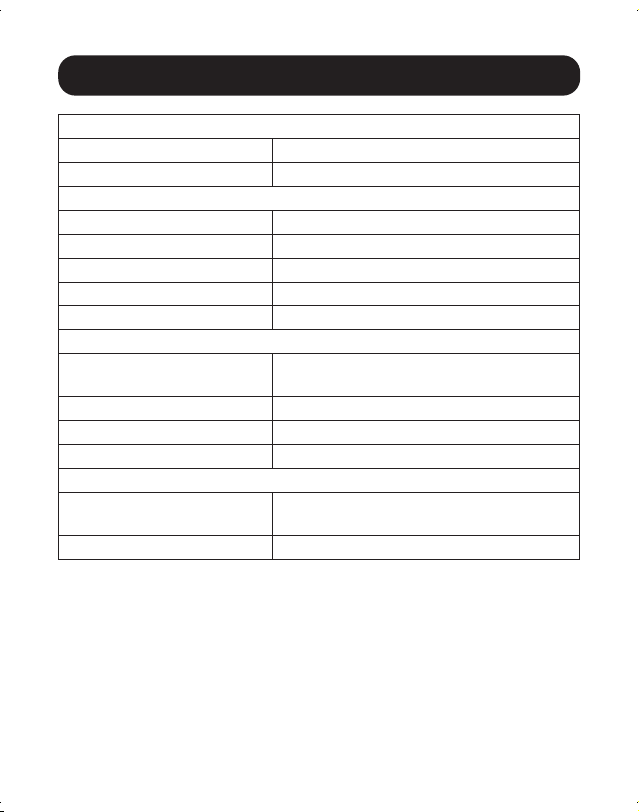
1. Raccorder le câble USB-C intégré au port USB-C sur l'ordinateur, la
tablette ou tout autre appareil.
2. Utiliser un câble HDMI pour raccorder un moniteur ou un écran au port
HDMI de l'appareil.
3. Raccorder des périphériques USB aux ports du concentrateur USB-A.
4. Pour une connexion Ethernet, utiliser un câble Cat5e/6 UTP pour
raccorder au port RJ45 de l'appareil.
5. Insérer une carte Micro SD ou SD/MMC dans la fente correspondante
pour accéder à la mémoire externe.
6. Charger un appareil en raccordant le chargeur USB-C au port USB-C de
l'appareil. Le port USB-C peut également être utilisé pour raccorder un
équipement périphérique USB-C.
26
Caractéristiques techniques
Connecteurs d'entrée
USB 1x USB-C (mâle)
Port CC Alimentation CC (femelle)
Connecteurs de sortie
USB-A 2x USB-A (femelle)
USB-C 1x USB-C (femelle)
HDMI 1x HDMI (femelle)
Cartes de mémoire 1x Micro SD, 1x SD/MMC
Ethernet 1x RJ45
Écologique
Température de fonctionne-
ment
0° à 55 °C (32° à 131 °F)
Humidité de fonctionnement 10 à 85 % HR, sans condensation
Température d'entreposage -10° à 70 °C (14° à 158 °F)
Humidité d'entreposage 5 à 90 % HR, sans condensation
Besoins en matière de puissance
Port de chargement USB-C Prend en charge une entrée jusqu'à 20 V
3 A (60 W)*
Port CC 5 V 2 A
*5 W d'alimentation sont dédiés à l'appareil et la puissance restante est dirigée vers le
dispositif USB-C auquel l'appareil est connecté.

27
Garantie
Garantie limitée de 3 ans
Tripp Lite garantit que ses produits sont exempts de vices de matériaux et de fabrication
pendant une période de trois (3) ans à partir de la date d'achat initiale. La responsabilité de
Tripp Lite, en vertu de la présente garantie, se limite à la réparation ou au remplacement (à
sa seule discrétion) de ces produits défectueux. Pour obtenir réparation sous cette garantie,
vous devez obtenir un numéro d'autorisation de retour de matériel (« RMA ») auprès de
Tripp Lite ou d'un centre de réparation autorisé par Tripp Lite. Les produits doivent être
retournés à Tripp Lite ou à un centre de réparation autorisé par Tripp Lite en port prépayé et
être accompagnés d'une brève description du problème et d'un justificatif de la date et du
lieu d'achat. Cette garantie ne s'applique pas au matériel ayant été endommagé suite à un
accident, à une négligence ou à une application abusive, ou ayant été altéré ou modifié d'une
façon quelconque.
SAUF INDICATION CONTRAIRE DANS LES PRÉSENTES, Tripp Lite N'ÉMET AUCUNE GARANTIE,
EXPRESSE OU TACITE, Y COMPRIS DES GARANTIES DE QUALITÉ COMMERCIALE ET
D'ADÉQUATION À UN USAGE PARTICULIER. Certains États n'autorisant pas la limitation ni
l'exclusion de garanties tacites, les limitations ou exclusions susmentionnées peuvent ne pas
s'appliquer à l'acheteur.
À L'EXCEPTION DES DISPOSITIONS CI-DESSUS, Tripp Lite NE POURRA EN AUCUN CAS
ÊTRE TENUE RESPONSABLE DE DOMMAGES DIRECTS, INDIRECTS, SPÉCIAUX, FORTUITS
OU CONSÉCUTIFS RÉSULTANT DE L'UTILISATION DE CE PRODUIT, MÊME SI AYANT ÉTÉ
AVISÉE DE L'ÉVENTUALITÉ DE TELS DOMMAGES. Plus précisément, Tripp Lite ne pourra être
tenu responsable de coûts, tels que perte de bénéfices ou de recettes, perte de matériel,
impossibilité d'utilisation du matériel, perte de logiciel, perte de données, frais de produits de
remplacement, réclamations d'un tiers ou autres.
28
Garantie
L’information de conformité WEEE pour les clients de Tripp Lite et recycleurs
(Union européenne)
Sous les directives et règlements de déchet d’équipements électrique et électronique
(Waste Electrical and Electronic Equipment, WEEE), lorsque les clients achètent le
matériel électrique et électronique neuf de Tripp Lite ils sont autorisés à :
• Envoyer le vieux matériel pour le recyclage sur une base de un-contre-un et en
nature (ceci varie selon le pays)
• Renvoyer le matériel neuf pour recyclage quand ceci devient éventuellement un
rebut
Il est déconseillé d’utiliser cet équipement dans des applications médicales où une panne
de cet équipement pourrait normalement provoquer la panne de l’équipement de survie ou
altérer notablement sa sécurité ou son efficacité.
La politique de Tripp Lite en est une d’amélioration continue. Les spécifications sont sujettes
à changement sans préavis. Les spécifications sont sujettes à changement sans préavis. Les
produits réels peuvent différer légèrement des photos et des illustrations.
1111 W. 35th Street, Chicago, IL 60609 USA • tripplite.com/support
21-11-039 9337BC_RevC

29
Руководство пользователя
Док-станция USB 3.2 Gen 1 USB-C®
в алюминиевом корпусе с зарядкой PD
Модель: U442-DOCK11-S
English 1 • Español 13 • Français 21
1111 W. 35th Street, Chicago, IL 60609 USA • tripplite.com/support
Охраняется авторским правом © 2022 TrippLite. Перепечатка запрещается.

30
Содержимое упаковки
Системные требования
Опциональные комплектующие
• Устройство мод. U442-DOCK11-S
• Руководство пользователя
• Компьютер с портом USB-C®, поддерживающий режим USB DisplayPort Alternate
• Монитор DVI* или HDMI
• Сеть Ethernet с поддержкой скоростей до 10/100/1000 Мбит/с
*Требуется переходник. Подробнее см. в разделе "Опциональные комплектующие".
USB Type-C® и USB-C® являются торговыми знаками компании USB Implementers Forum
• Безразрывные соединительные кабели Cat6 Gigabitсерии N201
• Кабели-переходники серии P566 с разъемами HDMI и DVI
• Высокоскоростные HDMI-кабели серии P569-XXX-CERT*
• Кабели серии U322 для подключения устройств с разъемами USB A/B
• Кабели серии U326 для подключения устройств с разъемами USB Micro-B
• Кабель U420-003-G2-5A с разъемами USB 3.2 Gen 2 (10 Гбит/с) / USB-C (штекер/штекер) с
номиналом 5 А (длина 0,9 м)
• Кабель U428-003 USB 3.2 Gen 1 (5 Гбит/с) с разъемами USB-C / USB-A (штекер/штекер) (длина 0,9 м)
*XXX соответствует длине в футах (например, 003 = 3 фт./0,9 м, 006 = 6 фт./1,8 м и т.д.)

31
Характеристики продукта
• Поддержка режима USB DisplayPort Alternate для подключения HDMI-монитора
• Возможность подключения DVI-монитора (требуется переходник HDMI-DVI, продаваемый
отдельно)
•
Порт HDMI поддерживает видеоразрешения до 3840 x 2160 (4K UHD) при 30 Гц
• Порт Ethernet поддерживает сетевые скорости 10/100/1000 Мбит/с
• Порты концентратора USB-A поддерживают скорости передачи данных до 5 Гбит/с
• Разъемы для подключения карт памяти Micro SD и SD/MMC обеспечивают доступ к внешним
накопителям
• Порт USB-C поддерживает как передачу данных со скоростью до 5 Гбит/с, так и зарядку с
подачей питания через интерфейс USB 3.2 Gen1 при входном питании до 20 В / 3 А (60 Вт)
• Автоматическое восстановление из режимов ожидания и приостановки
• Соответствие требованиям IEEE 802.3az (энергоэффективный Ethernet)
• Поддержка полнодуплексного и полудуплексного режимов работы
• Поддержка контрольной суммы разгрузки (СОЕ) IPv4 и IPv6, обеспечивающая снижение
нагрузки на ЦП
• Поддержка Wake-on-LAN
• Удобство подключения по технологии Plug-and-Play — отсутствие необходимости в
программном обеспечении, драйверах или внешнем источнике питания
32
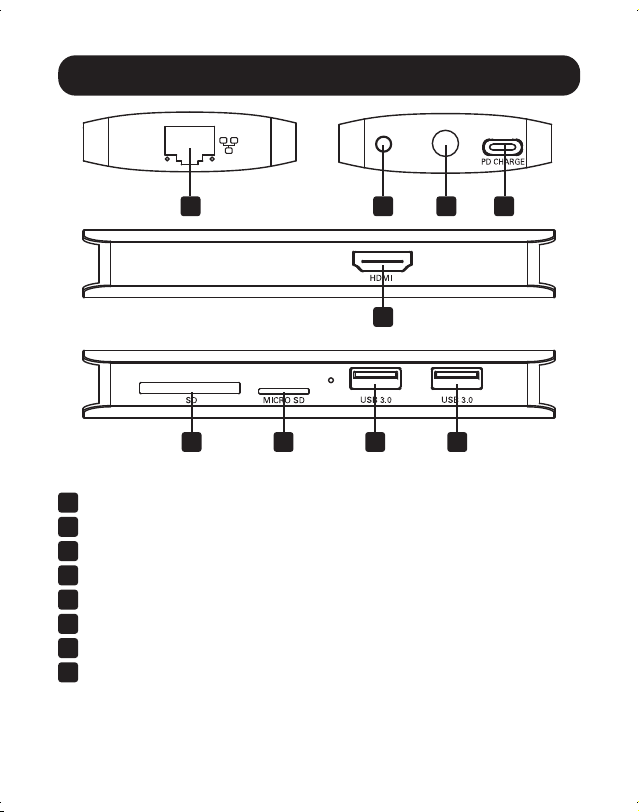
Краткое описание изделия
1
Разъем USB-C с вмонтированным кабелем
2
Порты USB-A
3
Разъем для карты памяти Micro SD
4
Разъем для карты памяти SD/MMC
5
Порт RJ45 для подключения к сети Ethernet
6
Порт 4K HDMI
7
Порт USB-C для передачи данных/подзарядки
8
(Опционально) Разъем питания 5 В пост. тока
6
8 15 7
4 3 2 2

33
Установка
Примечания:
• Возможно одновременное использование обоих разъемов для подключения карт памяти.
• При подключении к источнику питания переменного тока через зарядный порт USB-C 5 Вт мощности
выделяется на док-станцию и подключаемые периферийные USB-устройства. Остальная мощность
используется для зарядки подключенного устройства с разъемом USB-C.
• Рекомендуемые типы кабелей перечислены в разделе Опциональные комплектующие.
• Если данное устройство подключено к порту USB-C компьютера и к сети через кабели Cat5e/6, то сетевое
соединение устанавливается автоматически. При отсутствии соединения оно может быть установлено
вручную со страницы сетевых настроек компьютера. Например, на устройстве Mac следует перейти в раздел
Network ("Сеть") в меню System Preferences ("Параметры системы"), нажать на кнопку ‘Assist Me’ ("Требуется
помощь") для вызова утилиты Network Setup Assistant ("Помощник настройки сетевых параметров"), а затем
следовать подсказкам для установления соединения.
• Устройство моделиU442-DOCK11-S совместимо с разъемами питания на 5 В постоянного тока (в комплект не
входят) при использовании выходного разъема размерами 5,5 x 2,1 x 9,5 мм с плюсовым наконечником и
минусовой гильзой.
1. Подключите вмонтированный кабель с разъемом USB-C к порту USB-C своего портативного
компьютера, планшета или другого устройства.
2. Подключите монитор или дисплей к HDMI-порту устройства при помощи HDMI-кабеля.
3. Подключите USB-устройства к портам USB-A концентратора.
4. Для подключения к сети Ethernet используйте кабель Cat5e/6 UTP, подключаемый к порту RJ45
устройства.
5. Вставьте карту Micro SD или SD/MMC в соответствующий разъем для подключения к внешнему
накопителю.
6. Зарядите устройство, подключив зарядное устройство с разъемом USB-C к порту USB-C
данного модуля. Порт USB-C может также использоваться для подключения периферийного
устройства с разъемом USB-C.
34
Технические характеристики
Входные разъемы
USB USB-C (штекерный) ― 1 шт.
Разъем питания постоянного тока Разъем питания постоянного тока (гнездовой)
Выходные разъемы
USB-A USB-A (гнездовой) ― 2 шт.
USB-C USB-C (гнездовой) ― 1 шт.
HDMI HDMI (гнездовой) ― 1 шт.
Карты памяти Micro SD (1 шт.), SD/MMC (1 шт.)
Ethernet RJ45 ― 1 шт.
Условия эксплуатации
Диапазон рабочих температур От 0 до 55°C
Рабочий диапазон влажности Относительная влажность от 10 до 85%, без
образования конденсата
Диапазон температур хранения От -10 до 70°C
Диапазон влажности при хранении Относительная влажность от 5 до 90%, без образования
конденсата
Требования к электропитанию
Зарядный порт USB-C Поддерживает входное питание до 20 В / 3 А (60 Вт)*
Разъем питания постоянного тока 5 В / 2 А
*5 Вт мощности выделяется на модуль. А остальная мощность направляется на подключенное к нему устройство
с разъемом USB-C

35
Гарантийные обязательства
Ограниченная гарантия сроком 3 года
Компания TrippLite гарантирует отсутствие дефектов материалов и изготовления в течение трех (3) лет с момента
первоначальной покупки. Обязательства компании TrippLite по настоящей гарантии ограничиваются ремонтом или
заменой (по ее единоличному усмотрению) любых таких дефектных изделий. Для получения услуг по данной гарантии
необходимо получить номер Returned Material Authorization (RMA ― разрешение на возврат материалов) от компании
TrippLite или ее авторизованного сервисного центра. Изделия должны быть возвращены в компанию TrippLite или
авторизованный сервисный центр TrippLite с предоплатой транспортных расходов и сопровождаться кратким описанием
возникшей проблемы и документом, подтверждающим дату и место его приобретения. Действие настоящей гарантии
не распространяется на оборудование, поврежденное в результате аварии, небрежного обращения или неправильного
использования, а также видоизмененное каким бы то ни было образом.
ЗА ИСКЛЮЧЕНИЕМ ПРЕДУСМОТРЕННЫХ ЗДЕСЬ СЛУЧАЕВ КОМПАНИЯ TrippLite НЕ ПРЕДОСТАВЛЯЕТ КАКИХ-ЛИБО ЯВНЫХ ИЛИ
ПОДРАЗУМЕВАЕМЫХ ГАРАНТИЙ, ВКЛЮЧАЯ ГАРАНТИИ КОММЕРЧЕСКОЙ ПРИГОДНОСТИ И ПРИГОДНОСТИ ДЛЯ КАКОЙ-ЛИБО
КОНКРЕТНОЙ ЦЕЛИ. В некоторых штатах/государствах ограничение или исключение подразумеваемых гарантий не
допускается; следовательно, вышеуказанное(-ые) ограничение(-я) или исключение(-я) могут не распространяться на
покупателя.
ЗА ИСКЛЮЧЕНИЕМ ПРЕДУСМОТРЕННЫХ ВЫШЕ СЛУЧАЕВ КОМПАНИЯ TrippLite НИ ПРИ КАКИХ ОБСТОЯТЕЛЬСТВАХ НЕ НЕСЕТ
ОТВЕТСТВЕННОСТИ ЗА ПРЯМЫЕ, КОСВЕННЫЕ, СЛУЧАЙНЫЕ ИЛИ ПОБОЧНЫЕ УБЫТКИ ЛИБО УБЫТКИ, ОПРЕДЕЛЯЕМЫЕ
ОСОБЫМИ ОБСТОЯТЕЛЬСТВАМИ, ВОЗНИКАЮЩИЕ В СВЯЗИ С ИСПОЛЬЗОВАНИЕМ ДАННОГО ИЗДЕЛИЯ, ДАЖЕ В СЛУЧАЕ
ЕЕ ИНФОРМИРОВАНИЯ О ВОЗМОЖНОСТИ НАСТУПЛЕНИЯ ТАКИХ УБЫТКОВ. В частности, компания TrippLite не несет
ответственности за какие-либо издержки, такие как упущенные прибыли или доходы, потеря оборудования, потеря
возможности использования оборудования, потеря программного обеспечения, потеря данных, расходы на заменители,
урегулирование претензий третьих лиц и пр.

36
Гарантийные обязательства
Информация для клиентов компании TrippLite о соблюдении требований директивы ЕС об отходах
электрического и электронного оборудования (WEEE)
Согласно директиве ЕС об отходах электрического и электронного оборудования (WEEE) и применимым нормам
в случаях, когда покупатели приобретают новое электрическое и электронное оборудование компании TrippLite,
они имеют право на следующее:
• Отправку старого оборудования, которое является эквивалентным по количеству и идентичным полученному
новому оборудованию, на утилизацию (это условие может отличаться в зависимости от страны)
• Отправку нового оборудования обратно на утилизацию, когда оно в конечном итоге становится изношенным
Не рекомендуется использовать данное оборудование в системах жизнеобеспечения в тех случаях, когда его сбой с
большой вероятностью приведет к сбою оборудования жизнеобеспечения или значительному снижению его безопасности
или эффективности.
Компания Tripp Lite постоянно совершенствует свою продукцию. В связи с этим возможно изменение технических
характеристик без предварительного уведомления. Внешний вид реальных изделий может несколько отличаться от
представленного на фотографиях и иллюстрациях.
1111 W. 35th Street, Chicago, IL 60609 USA • tripplite.com/support
21-11-039 9337BC_RevC