User Manual
用户手册
SR-BH5
Noise Cancelling Wireless
Sport Headphones
室外运动降噪耳机
Statement
Thank you for purchasing Saramonic!
Please read this manual carefully before using and strictly operate and store it in
accordance with the instructions. Please save manual for your future reference.
If you need further assistance than the user manual, please consult with your retailer
for help or email us: [email protected]
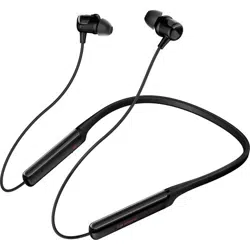
SR-BH5 Headphones
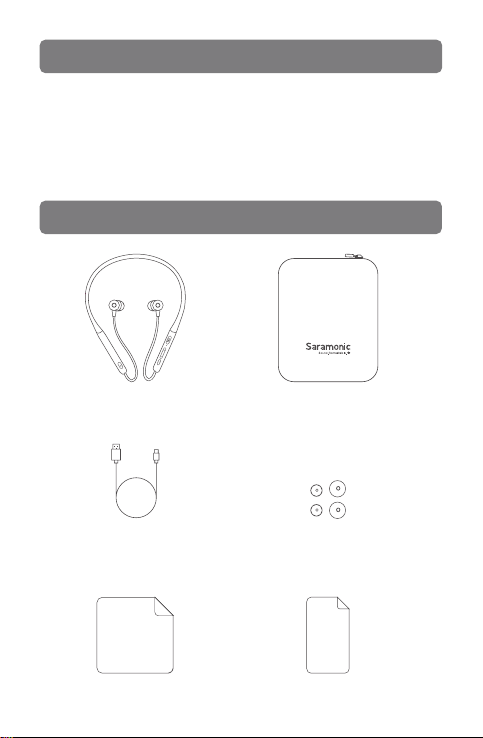
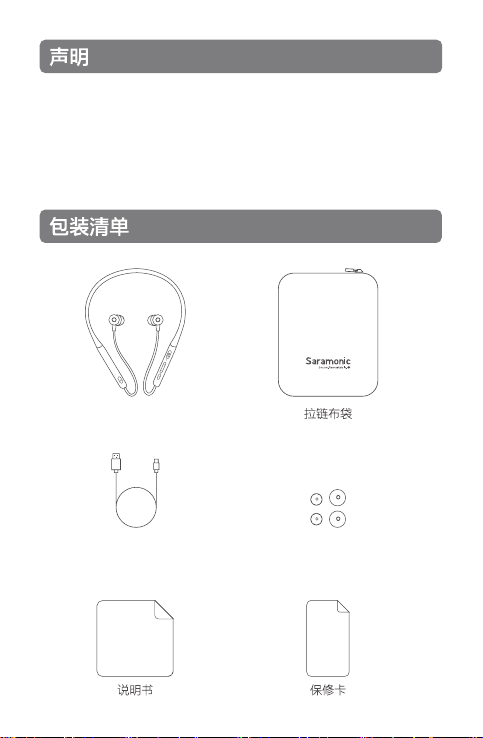
Packaging List
Carrying Bag
Charging Cable (Type-C) Eartips (2 Pairs)
User Manual Warranty Card
01
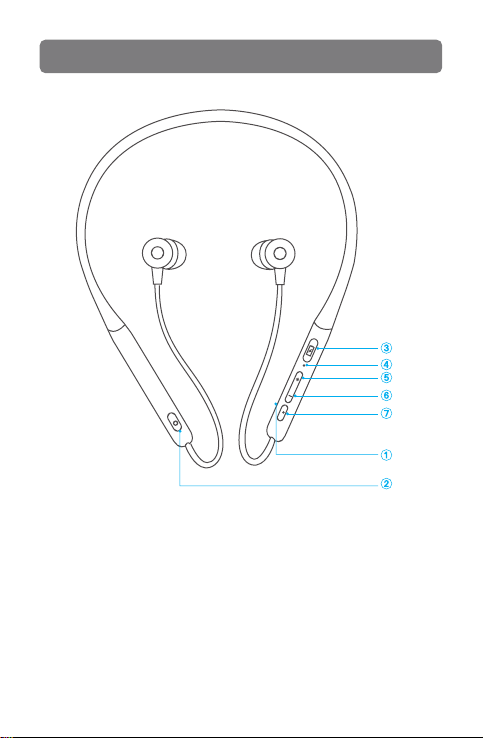
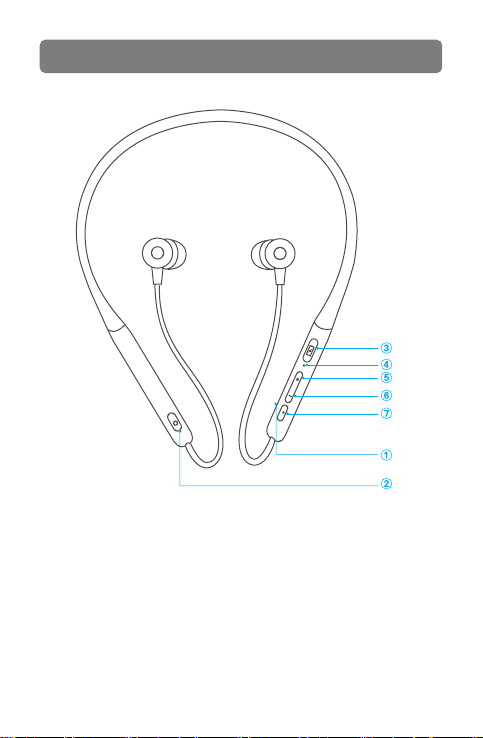
① Microphone
② Active Noise Cancellation (ANC) Switch
③ Type-C Charging Port
④ Indicator
⑤ Volume +/ Previous Song
⑥ Volume -/ Next Song
⑦ Multi-function button
Product Overview
02
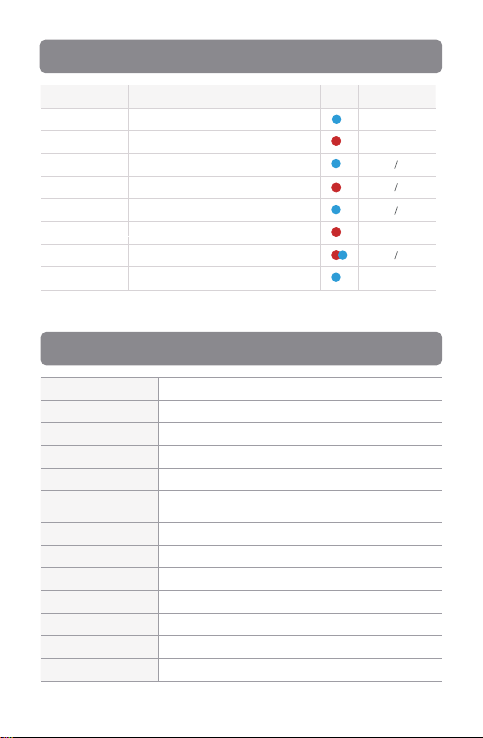
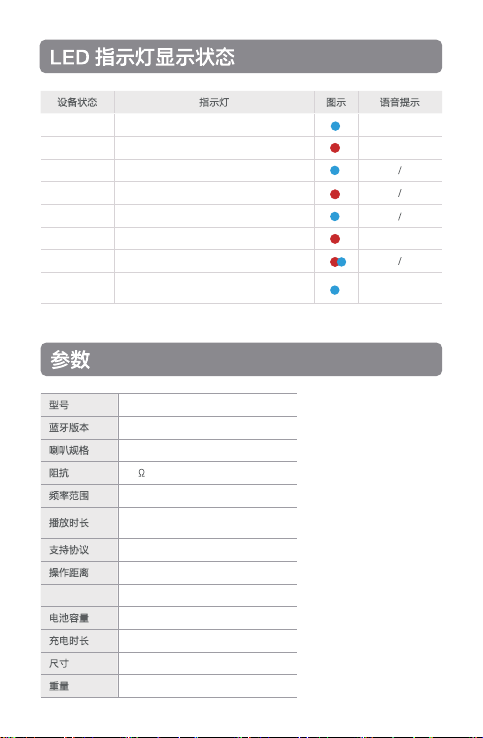
Equipment Status
Power on
Poweroff
Playing
Charging
Fullycharged
Battery low
Pairing
Connected
Indicator Light
Blue indicator flashing 1s
Red indicator flashing 1s and then turn off
Blue indicator flashing 1 time / 3s
Indicator solid red
Indicator solid blue
When connected,
the red indicator flashing 1 time / 10s
Red and blue indicators flashing alternately
Blue indicator flashing 1 time / 3s
LED Indicator Status
Specifications
Icon
Model
Bluetooth Version
Driver Specifications
Impedance
Frequency Response
Music Play time
Supported Audio Formats
Operating Distance
Noise Cancellation
Depth
Battery Capacity
Charging Time
Dimensions
Weight
SR-BH5
5.0
12mm Graphene
32Ω
20Hz~20kHz
APTX, APTX-HD, AAC, SBC
10m
22dB
182mAh
Approx 2 hrs
160*130*35mm
37g
Approx 15 hrs
(ANC off, BT on)
Approx 9 hrs (ANC on, BT on)
Voice Prompts
Your headset is
connected
Battery low
Power on
Power off
Note: BT=bluetooth, ANC=active noise cancelling
03
Button Operation
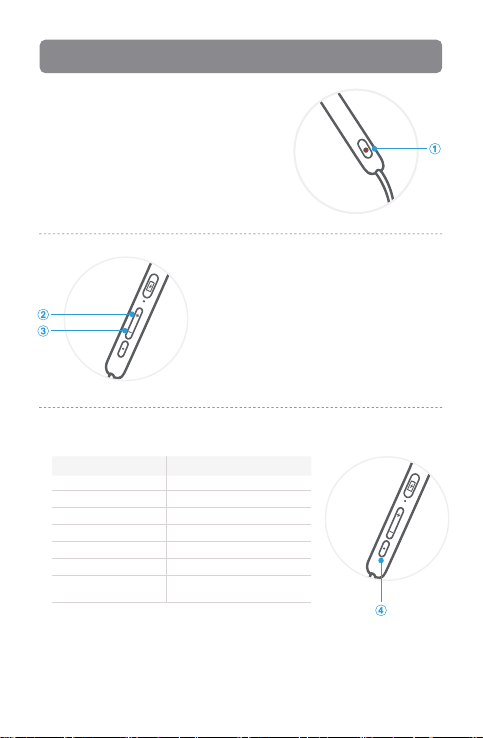
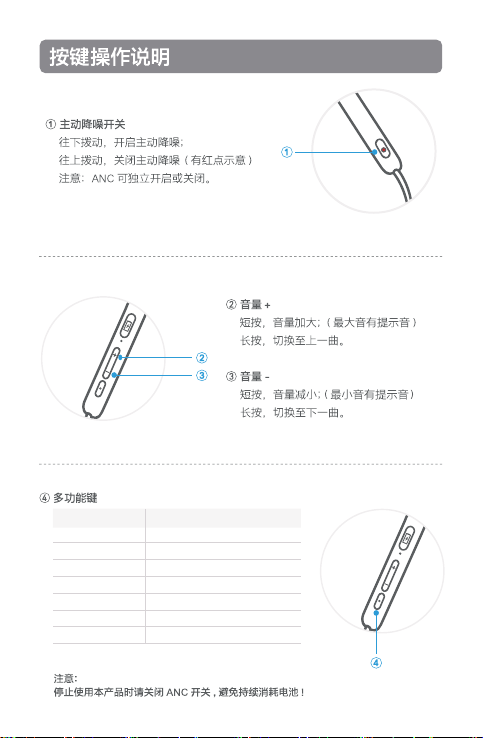
① Active Noise Cancellation (ANC) switch
Turn on the ANC mode:
Flick down the ANC switch
Turn off ANC mode:
Swipe up the ANC switch (red dot indicates)
Note: Slide the ANC on / off switch to turn
on or turn off the ANC mode.
② Volume +/Previous Track
Volume up: Short press the Volume + button
(Maximum volume will be reminded)
Previous song: Long press the Volume + button
for 3s
③ Volume-/Next Track
Volume down: Short press the Volume- button
(Minimum volume will be reminded)
Next song: Long press the Volume- button for 3s
④ Multi-function button
Tips:
Please turn off the ANC function when stop using this headphone to avoid battery consumption.
Please use high-quality playback sources to experience the best sound quality.
04
Equipment Status
Turn on/ off
Play/ Pause
Voice assistant
Reset the device
Answer/ hand up
Reject Calls
Headphones / mobile
phone hands-free switch
Instructions
Long Press for 5s
Click once
Double-click
After power off, long press for 8s
Double clickn
Long press for 1s
Long press for 1s
Instructions for Use
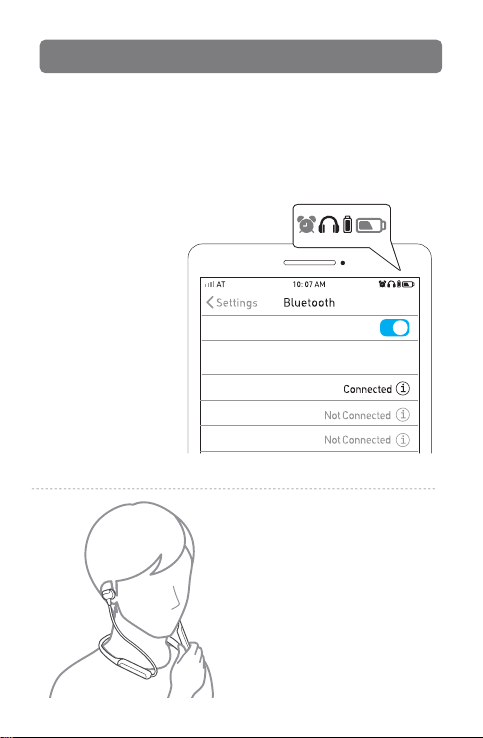
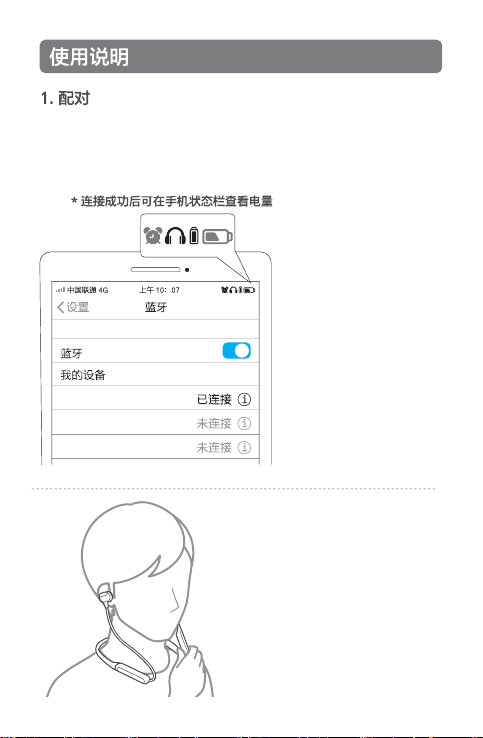
1. Pairing
①
Long press the multi-function button for 5s, the headphone will automatically start pairing;
② The red and blue lights flash alternately;
③ Select the Bluetooth name "SR-BH5" on your device;
④ Once successful, the voice prompts "Your Headset is Connected".
Note:
The headphone will
automatically turn off if
there's no connection
after 5 mins.
After the connection is successful, you
can check the battery level on the phone.
SR-BH5
Bluetooth
MY DEVICES
SR-BH600
SR-BH900
2. Unfold and put on the headphone,
adjust it into a comfortable position in
the direction shown.
05
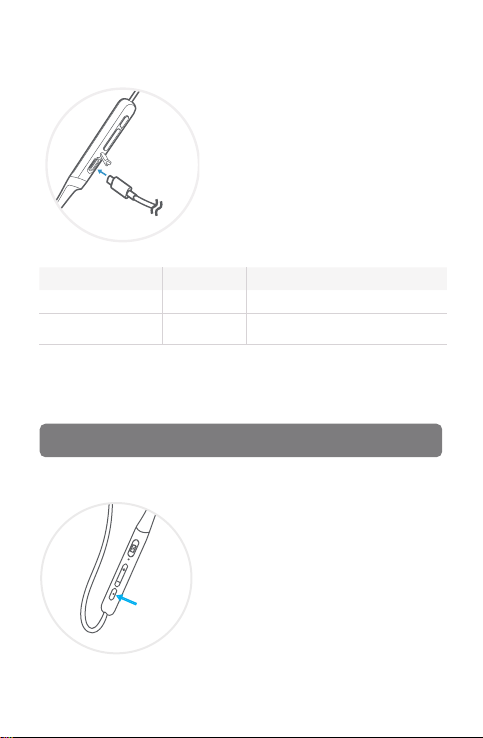
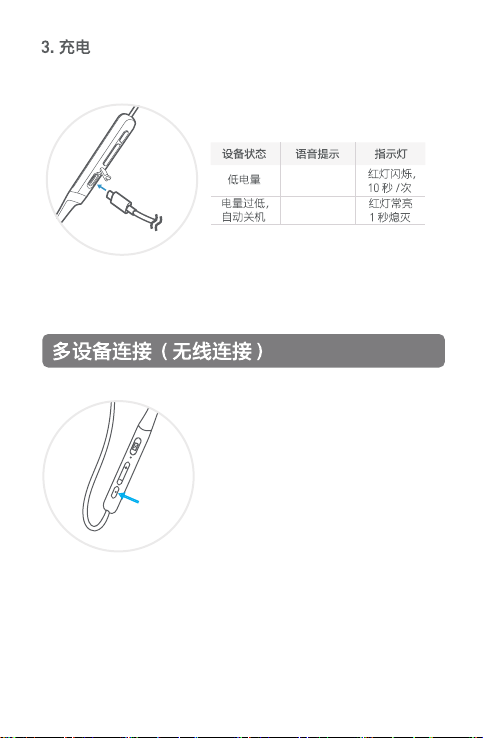
3. Charging
Use the Type-C cable to charge the headphones.
Equipment Status
Battery low
Battery low and turn off
automatically
Voice Prompts
Battery low
Power off
Indicator Light
When connected,
the red indicator flashes 1 time / 10s
Red indicators flashes 1s and then turn off
1. Connect the headphone with the first
device.
2. Turn off Bluetooth on the first device, the
headphone will enter pairing mode
automatically again.
3. Search the Saramonic SR-BH5 on the
bluetooth list of the second device, select
it and connect the headphone.
4. Go back to first device, select SR-BH5 and
connect.
5. Now the headphone is connecting with
two devices simultaneously.
Multi-Device Connection (Wireless)
06

According to the relevant laws and regulations of consumer electronic products and the
actual the situation of the industry, the following after-sales service regulations are
formulated to provide consumers with satisfactory after-sales services:
1. Warranty certificate mainly includes: warranty card and sales certificate.
2. After-sales service scope:
• During the warranty period of the product, the company will be responsible for
providing free maintenance for any failure caused by the quality problem of the
product itself under normal use without disassembly and repair;
• For products beyond the warranty period, the warranty certificate shall be issued and
the maintenance fee shall be paid. If any spare parts are needed for repair cost for the
spare parts would be born by the purchaser; please avoid repair and replace when the
product is not tested by Saramonic after-sales department;
• Once the warranty certificate is altered, the warranty will become invalid immediately;
• The warranty certificate of the product shall be properly kept by the consumer and shall
not be supplemented if lost.
3. Warranty Period:
• Within two years after purchasing this product, there are quality problems in normal use
(non-human damage) without disassembly and repair;
• Consumers who have quality problems in normal use (non-human damage) within 7
days from the date of purchase, without repair, can enjoy the replacement service;
1-year warranty (including all accessories) from the date of issuing the sales certificate;
4. Regulations on invalidation of the warranty during the warranty period:
4.1 In the following cases, the warranty is invalid, but the maintenance service is provided,
the labor fee and parts fee are charged:
(1) any damage to accessories caused by improper use, maintenance and storage of
consumers;
(2) damage caused by force majeure, such as natural disasters.
4.2 In the following cases, the company will refuse to provide maintenance services or
provide charged maintenance services:
(1) fail to provide holograms on product packaging box;
(2) the contents of the holograms are altered or illegible;
(3) It is unable to provide the product warranty card or the content recorded in the
warranty card is inconsistent with the product, or the content is altered or illegible;
(4) headphones that have been removed by any unauthorized person of Shenzhen
Jiayz Photo Industrial., Ltd. (such as changing wires, removing voice coils, etc.);
(5) there is no sales voucher or the content of the sales voucher is inconsistent with the
product.
5. We will not provide warranty service in the following cases after our inquiry: if we find
that your repair products are not our products, we will refuse to provide warranty
service, or double the maintenance fee. Please attach the warranty certificate when you
send the headphones to our company for repair. If you don't have any certificate, our
company will handle it as parallel imports.
After-sales and Supports
Warranty Service:
2 years Quality Warranty
Life time Technical Service Support
07

Safety Instructions
Please read the following precautions carefully before using.
1. Please do not put the headphones close to flammable materials to avoid
fire accidents when charging.
2. Please keep the plastic bag away from babies and children to avoid
suffocation.
3. Please keep the headphones and all accessories away from children and
pets, to avoid swallowing as it may cause asphyxia and other dangers.
4. Please do not use the headphones in situation which need concentration,
such as driving, cycling and etc. Please abide by the local laws and
regulations for using headphone when driving.
5. Please avoid using indicator light of the device near children or animals
eyes.
6. Please do not use the headphones too long at high volume as it may
damage your hearing, it is recommended to use an appropriate volume
when listening to calls and music.
7. Please do not rinse or immerse the headphones in water to avoid damage.
8. Please do not disassemble the headphones and accessories by yourself to
avoid damage and invalidation of the warranty.
9. Please do not subject the headphones to a strong shock or vibration to
avoid damage.
10. Please do not use chemical solvents or detergents to clean the headset.
11. If this headset will not be used for a long time, it should be power off after
fully charged. Please unplug the charging cable after charging and use
the charger provided by the official manufacturer or for charging.
08

Q&A
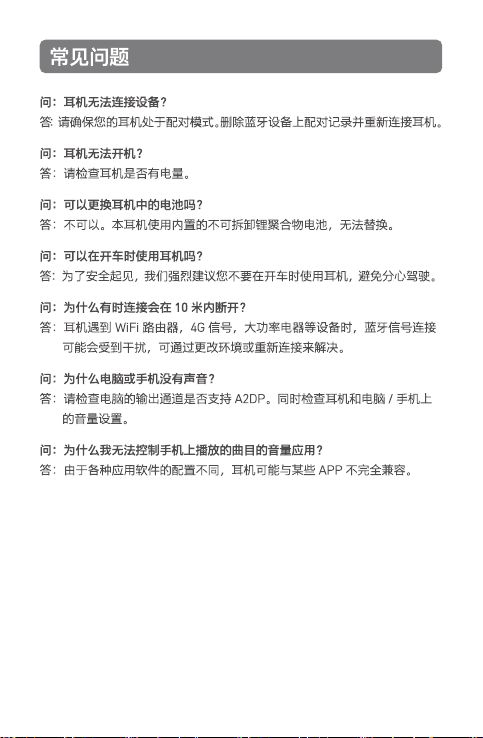
Q: The headphone cannot connect to the device?
A: Please make sure your headphone is in pairing mode. Delete the pairing record
on the Bluetooth device and reconnect the headphone.
Q: The headphone cannot be turned on?
A: Please check if the headphone has power.
Q: Can the battery in the headphone be replaced?
A: No. This headphone uses a built-in non-removable lithium polymer battery that
cannot be replaced.
Q: Can I use headphone while driving?
A: For your safety, we strongly recommend that do not use the headphone while
driving to avoid danger.
Q: Why the headphone is disconnected within 10 meters?
A: As the Bluetooth signal connection may be interfered when it encounters WiFi
routers, 4G signals, high-power electrical appliances and other devices etc. You can
change the environment or try again.
Q: Why is there no sound on the computer or mobile phone?
A: Please check whether the output channel of the computer supports A2DP. Also
check the volume setting on the headphone and computer/phone.
Q: Why can't I control the volume of the tracks playing on my phone?
A: As the headphone may not be fully compatible with some apps, due to the
different configurations of various APP.
09
感谢您选择Saramonic!
请在使用前仔细阅读本手册,并严格按照说明进行操作和存储。
请妥善保存好说明书以供将来参考。如果用户手册不能帮助您解决某些问题,
请向零售商寻求帮助或给我们发送电子邮件: [email protected]
SR-BH5耳机
充电线(Type-C) 耳套 x2
10
产品结构
① 麦克风
② 主动降噪开关
③ Type-C充电口
④ 状态/电量指示灯
⑤ 音量+/上一曲
⑥ 音量-/下一曲
⑦ 多功能键
11
Your headset is
connected
Battery low
Power on
Power off
开机
关机
播放中
充电中
充电完成
低电量提醒
配对中
蓝牙已连接
蓝灯亮一秒
红灯亮一秒后熄灭
蓝灯3秒/次
红灯长亮
蓝灯长亮
已连接状态下,红灯闪烁10秒/次
红蓝灯交替闪烁
蓝灯闪烁3秒/次
SR-BH5
5.0
12mm石墨烯
32
20Hz~20kHz
约15小时(降噪关,蓝牙连接开)
约9小时(降噪开,蓝牙连接开)
aptX,aptX-HD,AAC,SBC
10米
22dB
182mAh
约2小时
160x130x35mm
37克
降噪值
12
13
设备状态
开机/关机
暂停/播放
开启语音助手
重置
接听/挂断
拒接
耳机/手机免提切换
操作说明
长按多功能键5秒
单击多功能键
双击多功能键(蓝牙已连接状态下)
长按多功能键8秒(关机状态下)
双击
长按1秒(来电状态下)
长按1秒(通话状态下)
① 长按多功能按键5秒,设备自动进入配对模式;
② 红蓝灯交替闪烁;
③ 在设备上选择蓝牙名称“SR-BH5”;
④ 连接成功,语音提示“Your headset is connected”。
注意:
配对模式持续5分钟內,还未
与任何设备进行蓝牙连接,将
自动关机。
SR-BH5
SR-BH600
SR-BH900
2. 展开并戴上耳机,将耳机按下图
所示方向调整至舒适位置。
14
使用Type-C充电线给耳机充电。
Power off
Battery low
1. 按配对步骤,将耳机连接到第一台设备;
2. 在第一台设备上断开蓝牙连接,耳机重新进入配对状态;
3. 将耳机与第二台设备配对并连接;
4. 回到第一台设备端,在蓝牙列表选择SR-BH5耳机进行连接;
5. 此时耳机已成功同时连接两台设备。
注意:在充电状态下,请关闭主动降噪 开关,否则会延长充电时间。
15
2 年质量保修
根据消费类电子产品的有关法规以及行业的实际情况,为消费者提供满意
的售后服务, 特制定以下售后服务条例 :
1. 保修凭证主要包括 :
保修卡及销售凭证。
2. 售后服务范围 :
• 在产品保修期内,凡属于正常使用情况下,由于产品本身质量问题引
起的故障,未经拆修,本公司将负责给予免费维修 ;
• 超出保修期产品,需出具保修凭证并支付维修费。如需订配件,需支
付配件费 ; 订购其他的配件则需把维 修的产品寄到我司 ; 经我司专业
维修人员检测后维 修并更换配件 ;
• 保修凭证一经涂改,保修即时失效。
• 产品的保修凭证,请消费者妥善保存,遗失不补。
3. 保修期 :
• 自开具销售凭证之日起计算, 购买本产品一年内,在正常使用情况下
(非人为损坏或拆修)出现质量问题, 可享受保修服务(包括所有配
件);
• 消费者由购买之日起7天内,在正常使 用情况下(非人为损坏)出现质
量问题,未经拆修,可享受包换服务;
• 包换服务,仅限于同型号、同颜色的产品。
4. 保修期内保修失效条例 :
• 以下情况保修失效,但提供维修服务,收取人工费,配件费 :
(1)消费者因使用、维护、保管不当造成任何配件的损坏 ;
(2)由不可抗力因素所引致的损坏,如天灾等。
• 在下列情况,本公司将拒绝提供维修服务或提供收费维修服务 :
(1)不能提供产品保修卡或保修卡所记载的内容与产品不符,或内
容经涂改,或模糊不清无法辨认;
(2)由任何未经深圳市长丰影像器材有限公司授权人士拆动过的耳
机(如:换线,拆卸音圈等);
(3)无销售凭证或销售凭证内容与产品不符。
5. 如下情况我司将不提供保修服务 :
经我司查询,如发现您的送修产品不属我司生产品,我司将拒绝提供
保修服务,或是加倍收取维修费。 请您在把需要维修的耳机寄到我司
时,附上保修凭证,如无任何凭证,我司则作水货处理。
16

1.请勿在耳机充电时靠近易燃物品,以免发生火灾事故。
2.请保持耳机的塑料配件远离婴幼儿或孩子,避免意外发生窒息。
3.请让耳机和所有配件远离儿童和宠物,避免吞咽,因为这可能会导致窒息或
其他危险。
4.请不要在需要集中注意力的情况下使用耳机,例如开车,骑自行车等。请遵
守当地法律和驾驶时使用耳机的规定。
5.请避免在儿童或动物的眼睛附近使用设备的指示灯。
6.请勿在高音量下长时间使用耳机,在听电话和音乐时建议使用适当的音量以
免损害您的听力。
7.请不要用水冲洗或浸泡耳机,以免造成损坏。
8.请不要自行拆卸耳机和配件,以避免损坏和保修失效。
9.请勿使耳机受到强烈撞击或震动,以免损坏耳机。
10.请不要使用化学溶剂或清洁剂清洁耳机。
11.如果长时间不使用此耳机,请充满电后将其关机。充电或使用耳机时请拔
出充电线。请使用由官方制造商提供或适用于充电的充电器。
17
18
Shenzhen Jiayz Photo Industrial., Ltd
深圳市长丰影像器材有限公司
A16 Building, Intelligent Terminal Industrial Park of Silicon Valley
Power, Guanlan, Longhua District, Shenzhen, China
深圳市龙华区观澜街道大富工业区硅谷动力智能终端产业园A16栋
400-613-1096
www.saramonic.com
Scan the QR code and follow us!
扫描微信关注枫笛公众号!
SR-BH5 说明书
SR-BH5 说明书
杨帆/2021.04.08
1 :1
85×130mm
V00
157克铜版纸过油 压痕折页 正反面印刷