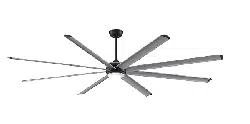

Net Weight 18.89 lbs (8.57 kg)
Date Code
Purchase Date
For best and quickest service please provide date code. You can find the date code on the carton,
hand-held remote (inside of the battery compartment), receiver or top of fan housing.
ATTACH YOUR RECEIPT HERE AND REGISTER YOUR FAN AT FANIMATION.COM
READ AND SAVE THESE INSTRUCTIONS
MODEL #MAD7998**
™
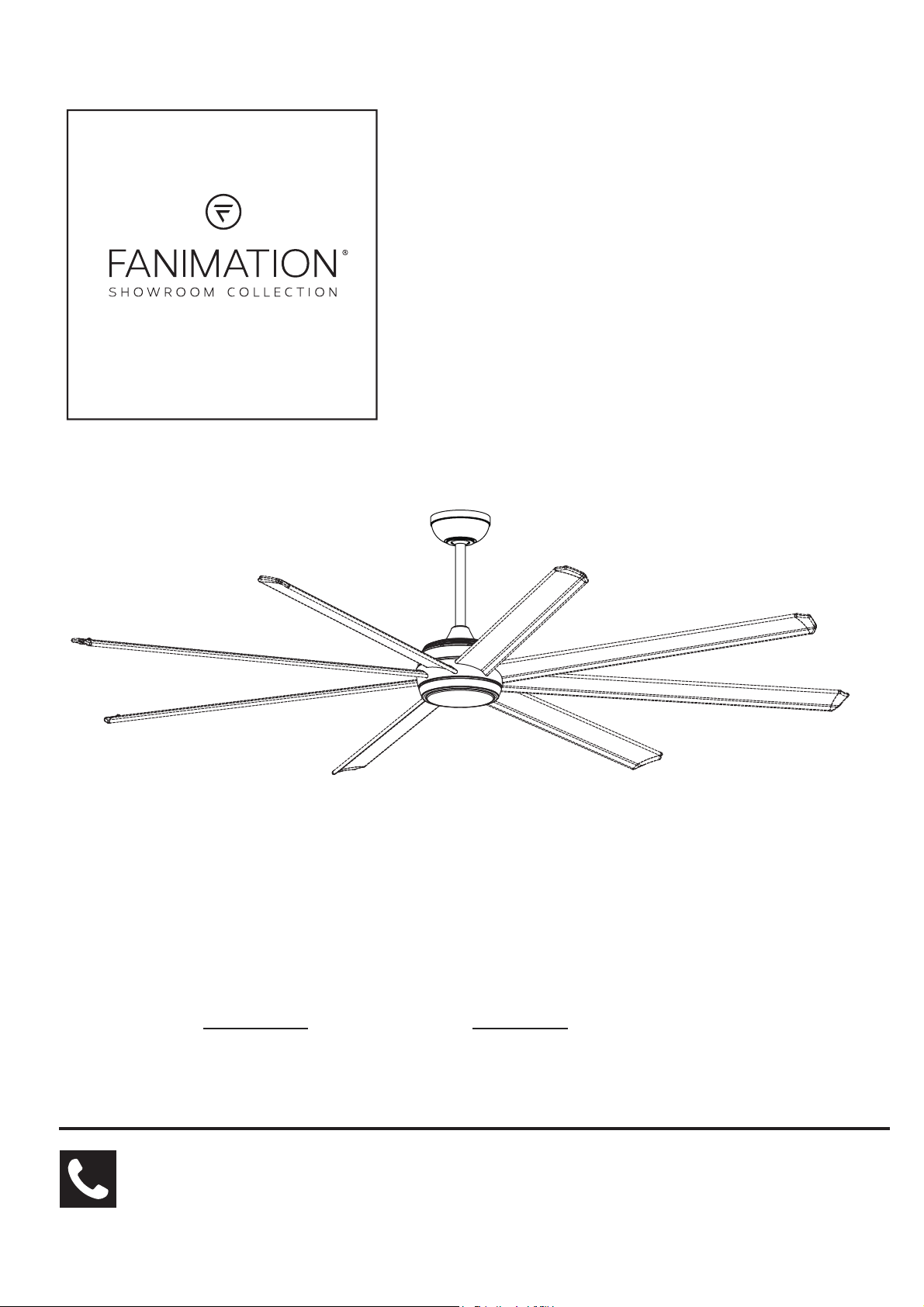
STELLAR 96 CEILING FAN
Español p. 27
Questions, problems, missing parts? Before returning to your retailer, call our customer
service department at 1-888-567-2055, 8 a.m.-5 p.m., EST, Monday-Friday.
Important Safety Instructions
WARNING: To avoid fire, shock and serious personal injury, follow these instructions.
1. Read your owner’s manual and safety information before installing your new fan. Review the accompanying assembly diagrams.
2. Before servicing or cleaning unit, switch power off at service panel and lock service panel disconnecting means to prevent power
from being switched on accidentally. When the service disconnecting means cannot be locked, securely fasten a warning device, such
as a tag, to the service panel.
3. Be careful of the fan and blades when cleaning, painting, or working near the fan. Always turn off the power to the ceiling fan before
servicing.
4. Do not insert anything into the fan blades while the fan is operating.
5. Do not operate reversing switch until fan blades have come to a complete stop.
Additional Safety Instructions
1. To avoid possible shock, be sure electricity is turned off at the fuse box before wiring, and do not operate fan without blades.
2. All wiring and installation procedures must satisfy National Electrical Codes (ANSI/ NFPA 70) and Local Codes. The ceiling fan
must be grounded as a precaution against possible electrical shock. Electrical installation should be made or approved by a licensed
electrician.
3. The fan base must be securely mounted and capable of reliably supporting at least 35 lbs. See page 5 of owner’s manual for
support requirements. Consult a qualified electrician if in doubt.
4. The fan must be mounted with the fan blades at least 7 feet from the floor to prevent accidental contact with the fan blades.
5. Follow the recommended instructions for the proper method of wiring your ceiling fan. If you do not have adequate electrical
knowledge or experience, have your fan installed by licensed electrician.
6. Suitable for use with solid-state speed controls.
WARNING:
TO REDUCE THE RISK OF ELECTRIC SHOCK, THIS FAN MUST BE INSTALLED WITH A GENERAL USE ISOLATING
WALL CONTROL/SWITCH.
WARNING: This product is designed to use only those parts supplied with this product and/or accessories designated specifically for
use with this product. Using parts and/or accessories not designated for use with this product could result in personal injury or property
damage.
WARNING:
WARNING: Do not operate this fan with a variable (Rheostat) wall controller or dimmer switch. Doing so could result in damage to the
To reduce the risk of personal injury, do not bend the blade bracket (flange or blade holder) when installing the brackets,
balancing the blades, or cleaning the fan. Do not insert foreign objects in between rotating fan blades.
6. The appliance is not intended for use by young children or infirm persons without supervision. Young children should be supervised to
ensure that they do not play with the appliance.
8. For supply connections, if the conductor of a fan is identified as a grounded conductor, then it should be connected to a grounded
conductor power supply. If the conductor of a fan is identified as an ungrounded conductor, then it should be connected to an ungrounded
conductor power supply. If the conductor of a fan is identified for equipment grounding, then it should be connected to an
equipment grounding conductor.
7. This fan is to be used in wet locations.
ceiling fan's remote control unit.
This device complies with Part 15 of the FCC Rules. Operation is subject to the following two conditions:
(1) This device may not cause harmful interference, and (2) this device must accept any interference received, including
interference that may cause undesired operation. Please note that changes or modifications not expressly approved by the
party responsible for compliance could void the user's authority to operate the equipment.
Note: This equipment has been tested and found to comply with the limits for Class B digital device, pursuant to part 15 of the
FCC Rules. These limits are designed to provide reasonable protection against harmful interference in a residential installation.
This equipment generates, uses and can radiate radio frequency energy and, if not installed and used in accordance with the
instructions, may cause harmful interference to radio or television reception, which can be determined by turning the
equipment off and on, the user is encouraged to try to correct the interference by one or more of the following measures:
- Reorient or relocate the receiving antenna.
- Increase the separation between the equipment and the receiver.
- Connect the equipment into an outlet on a circuit different from that to which the receiver is connected.
Consult the dealer or an experienced radio/TV technician for help.
WARNING: To reduce the risk of fire, electric shock, and injury to persons, ceiling fan, model Stellar 96 must be installed with optional
fan blades indicated in Page 23, that are marked on their cartons to indicate the suitability with this model. Other blades cannot be
substituted.
WARNING: Chemical Burn Hazard. Keep batteries away from children.
9. The remote control of this product contains lithium button/coin cell batteries. If a new or used lithium button/coin cell battery is swallowed
or enters the body, it can cause severe internal burns and can lead to death in as little as 2 hours. Always completely secure the battery
compartment. If the battery compartment does not close securely, stop using the remote control of the product, remove the batteries, and
keep it away from children. If you think batteries might have been swallowed or placed inside any part of the body, seek immediate
medical attention.
- The cells shall be disposed of properly, including keeping them away from children.
- Even used cells may cause injury.
WARNING: Mount to an outlet box marked acceptable for fan support of 15.9 kg (35 lbs) or Less.
1. LIMITED LIFETIME MOTOR WARRANTY - If any part of your fan motor fails, due to a defect in materials or workmanship during
the lifetime of the original purchaser, Fanimation will provide the replacement part free of charge, when the defective fan is returned
to our national service center. Proof of purchase is required. Customer shall be responsible for all costs incurred in the removal or
reinstallation and shipping of the product for repairs or replacement.
2. ONE YEAR MOTOR LABOR WARRANTY - If your fan motor fails at any time within one year from the original purchase, due to
defects in materials or workmanship, labor to repair the motor will be provided free of charge at our national service center. Purchaser
will be responsible for labor charges after this one-year period. Customer shall be responsible for all costs incurred in the removal or
reinstallation and shipping of the product for repairs or replacement.
3. If any other part of your fan fails at any time within one year after original purchase, due to a defect in materials or workmanship, we
will repair, or replace, at our option, the defective part free of charge for parts and labor performed at our national service center.
4. Because of varying climate conditions, this warranty does not cover changes in the finish, including rusting, pitting, corroding,
tarnishing, or peeling.
5. This warranty is void and does not apply to damage from improper installation, neglect, accident, misuse, exposure to extremes of
heat or humidity, or as a result of any modification to the original product.
6. All costs of removal and reinstallation of the fan are the sole responsibility of the owner of the fan and not the store that sold the fan
or Fanimation.
7. Fanimation reserves the right to modify or discontinue any product at any time and may substitute any part under this warranty.
8. Under no circumstances may a fan be returned without prior authorization from Fanimation. The receipt of purchase must ac-
company authorized returns and must be sent freight prepaid to Fanimation. The fan to be returned must be properly packed to avoid
damage in transit; Fanimation will not be responsible for any damage resulting from improper packaging.
9. It is understood that any repair or replacement is the exclusive remedy available from Fanimation. There is no other expressed or
implied warranty. Fanimation hereby disclaims any and all implied warranties, including, but not limited to those of merchantability and
fitness for a particular purpose to the extent permitted by law. Some states do not allow limitations on implied warranties. Fanimation
will not be liable for incidental, consequential, or special damages arising out of or in conjunction with product use or performance,
except as may otherwise be accorded by law. This warranty gives you special legal rights and you may also have other rights that vary
from state to state.
10. A certain amount of wobble is normal and should not be considered a problem or a defect.
LIMITED LIFETIME WARRANTY
Extends to the original purchaser of a Fanimation fan from an authorized Fanimation dealer/retailer only
Table of Contents
4
5
5
7
9
10
12
13
13
Unpacking Instructions. . . . . . . . . . . . . . . . . . . . . . . . . . . . . .
Energy Efficient Use of Ceiling Fans . . . . . . . . . . . . . . . . . . .
Electrical and Structural Requirements. . . . . . . . . . . . . . . . .
How to Assemble Your Ceiling Fan . . . . . . . . . . . . . . . . . . . .
How to Hang Your Ceiling Fan . . . . . . . . . . . . . . . . . . . . . . . .
How to Wire Your Ceiling Fan . . . . . . . . . . . . . . . . . . . . . . . .
How to Install Your Canopy Housing . . . . . . . . . . . . . . . . . .
How to Assemble Your Ceiling Fan Blades . . . . . . . . . . . . .
How to Assemble Your Light Kit or Cap. . . . . . . . . . . . . . . .
15
18
21
21
21
22
23
23
24
How to Operate Your Ceiling Fan. . . . . . . . . . . . . . . . . . . . . .
How to Set Up the fanSync WiFi APP . . . . . . . . . . . . . . . . . .
How to Install Your Remote Control . . . . . . . . . . . . . . . . . . .
Maintenance . . . . . . . . . . . . . . . . . . . . . . . . . . . . . . . . . . . . . .
How to Clean Your Ceiling Fan Blades . . . . . . . . . . . . . . . .
Troubleshooting . . . . . . . . . . . . . . . . . . . . . . . . . . . . . . . . . . .
Parts List . . . . . . . . . . . . . . . . . . . . . . . . . . . . . . . . . . . . . . . . .
Fan Blades—Sold Separately. . . . . . . . . . . . . . . . . . . . . . . . .
Exploded-View Illustration. . . . . . . . . . . . . . . . . . . . . . . . . . .
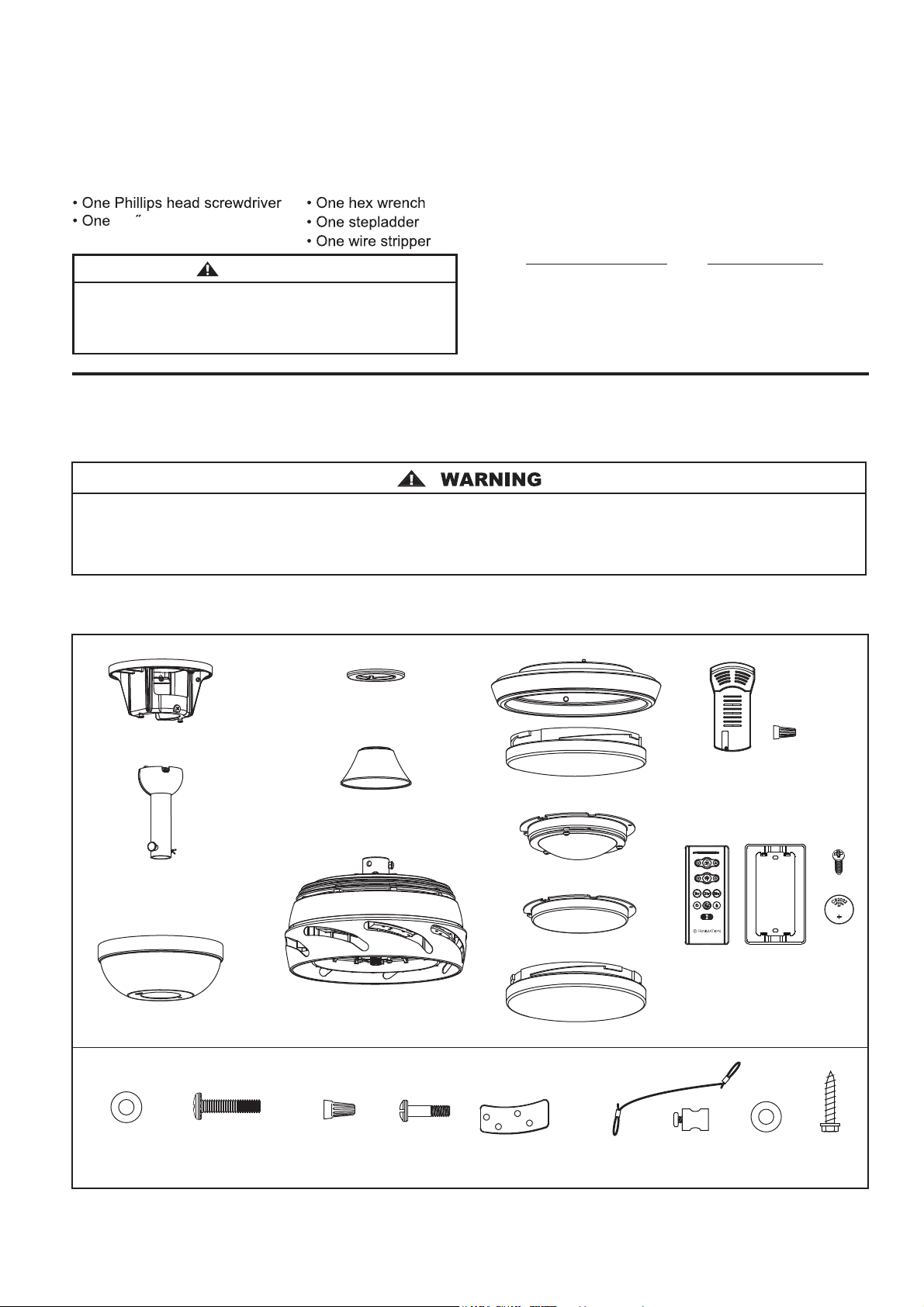
NOTE: Place the parts from the loose parts bags in a small
container to keep them from being lost. If any parts are missing,
contact your local retailer.
This manual is designed to make it as easy as possible for you
to assemble, install, operate, and maintain your ceiling fan.
Unpacking Instructions
For your convenience, check-off each step. As each step is completed, place a check mark. This will ensure that all
.detpurretniebuoydluohsecalpruoygnidnifnilufpleheblliwdnadetelpmocneebevahspets
Wiring outlet box and box connectors must be of type
required by local code. The minimum wire would be a 3-
conductor (2-wire with ground) of the following size:
Tools Needed for Assembly (Not included) Materials
Wire Size A.W.G.Installed Wire Length
14
12
Up to 50 ft.
50 - 100 ft.
NOTE: If you are uncertain of part description, refer to exploded view illustration.
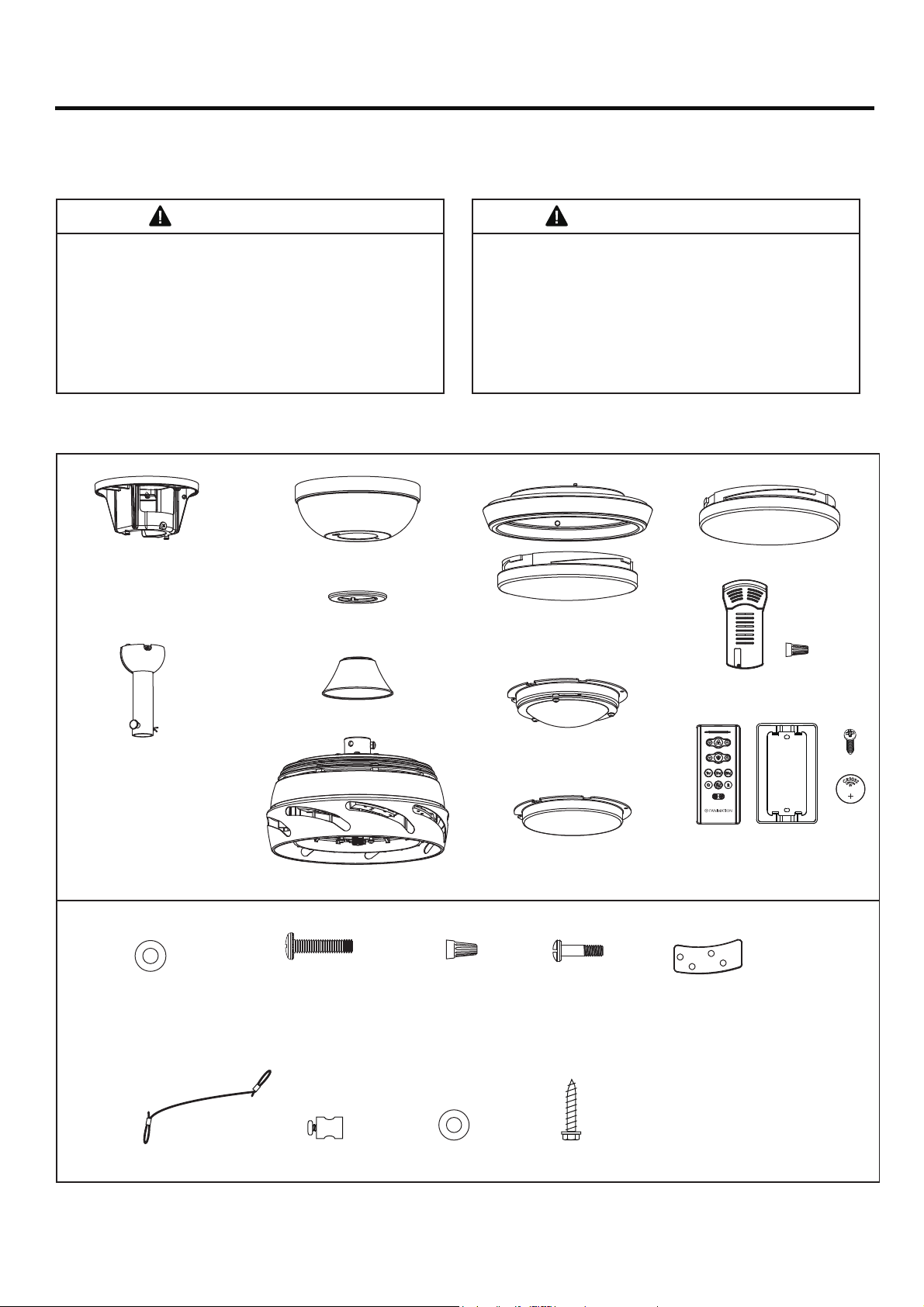
1. Check to see that you have received the following parts:
Hardware Bags
Safety Cable Kit
1/4 flat head screwdriver
WARNING
Before assembling your ceiling fan, refer to section on
proper method of wiring your fan (page 10). If you feel you
do not have enough wiring knowledge or experience,
have your fan installed by a licensed electrician.
Hand-held Remote (1)
Wall Plate (1)
Screws (2)
Batteries (2)
Receiver (1)
Wire Connectors (9)
Do not install or use fan if any part is damaged or missing. This product is designed to use only those parts supplied
with this product and/or any accessories designated specifically for use with this product by Fanimation. Substitution
of parts or accessories not designated for use with this product by Fanimation could result in personal injury
or property damage.
#8-32 Outlet Box
Screws, Stainless Steel
(2)
Flat Washers,
Stainless Steel
(2)
Flat Washer,
Stainless Steel
(1)
#10-24 Button
Head Screws (33)
Wire Connectors
(4)
Blade Plates (8) Safety Cable
(1)
Cable Clamp
(1)
Lag Bolt
(1)
4
Motor Assembly (1)
Ceiling Canopy (1)
Hanger Bracket
Assembly
(1)
Motor Coupling
Cover Assembly
(1)
Canopy Screw
Cover Assembly
(1)
Light Kit/Glass Assembly (1)
LED Assembly (1)
Light Kit Wire Cover
(1)
Steel Cap (1)
Downrod/Hanger Ball Assembly (1)
– Downrod (1) – Hairpin Clip (1)
– Hanger Ball (1) – Clevis Pin (1)
– Set Screw (1) – Pin (1)
5
Energy Efficient Use of Ceiling Fans
Ceiling fan performance and energy savings rely
heavily on the proper installation and use of the ceiling
fan. Here are a few tips to ensure efficient product
performance.
Using the Ceiling Fan Year Round
Summer Season: Use the ceiling fan in the counter-
clockwise direction. The airflow produced by the ceiling
fan creates a wind-chill effect, making you “feel” cooler.
Select a fan speed that provides a comfortable breeze,
lower speeds consume less energy.
Winter Season: Reverse the motor and operate the ceiling
fan at low speed in the clockwise direction. This produces
a gentle updraft, which forces warm air near the ceiling
down into the occupied space.Remember to adjust your
thermostat when using your ceiling fan - additional energy
and dollar savings could be realized with this simple step!
Electrical and Structural Requirements
Your new ceiling fan will require a grounded electrical
supply line of 120 volts AC, 60 HZ, 15 Amp Circuit.
Electrical code requires use of a fan-rated outlet box to
support the extra weight and motion associated with a
ceiling fan. A fan-rated box will be labeled as such and
typically supports up to a 70lb ceiling fan. Fan-Rated
Outlet Boxes vary in ratings and design. Ensure the
ratings of your ceiling fan outlet box meet the
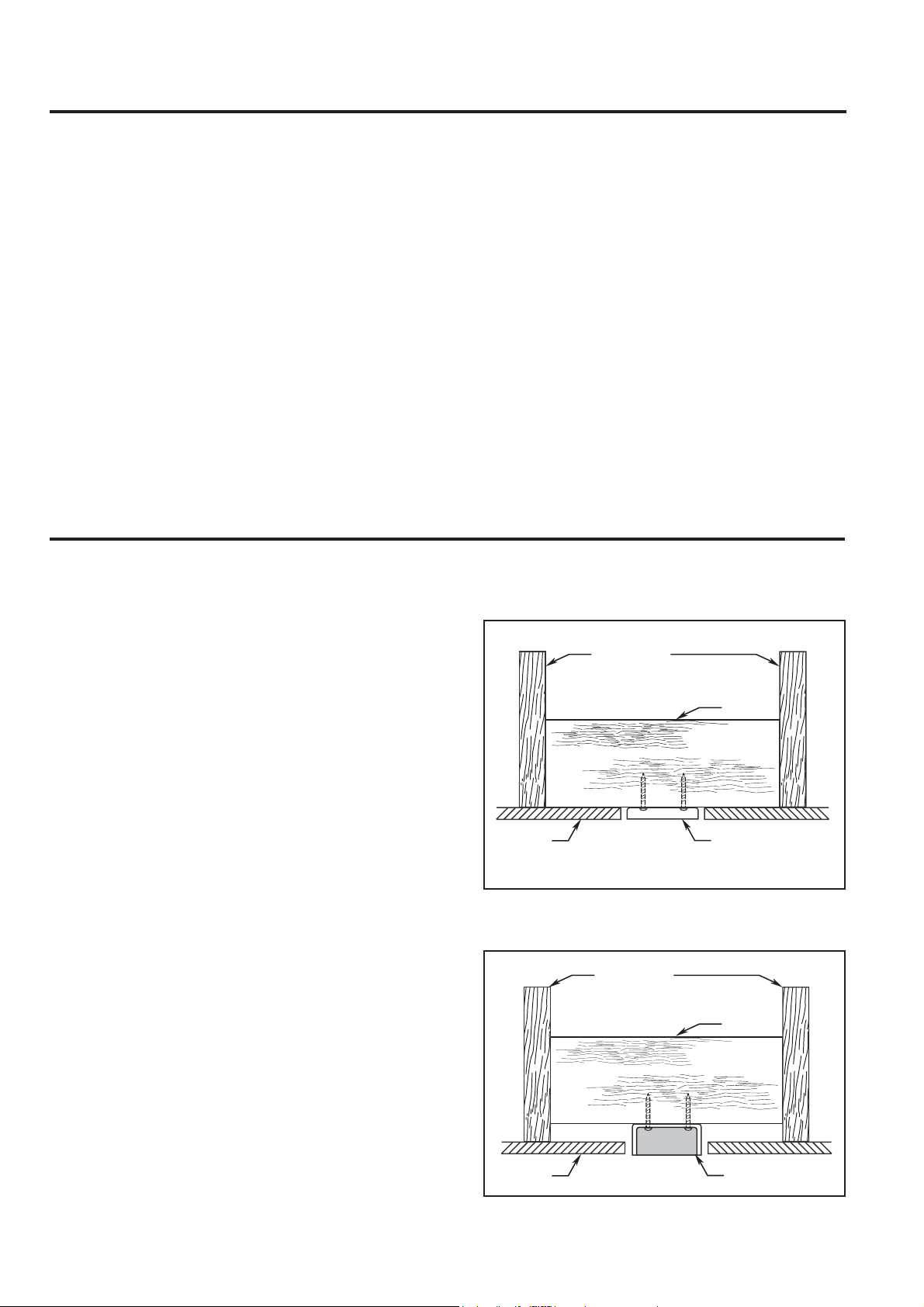
requirements for the ceiling fan being installed. Figure 1,
Figure 2 and Figure 3 depicts different structural
configurations that may be used for mounting the
outlet box.
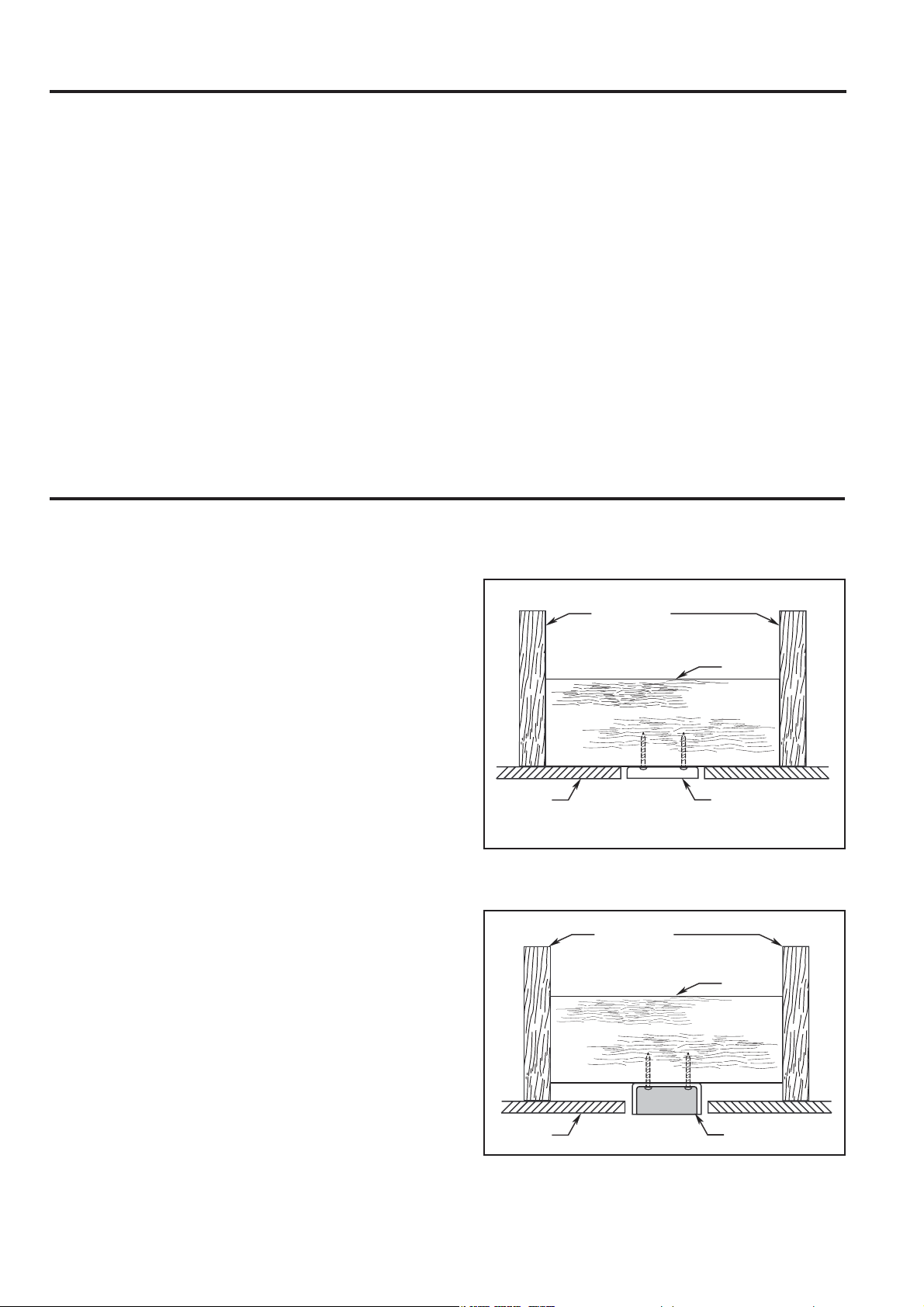
Low profile box (Figure 1)
A 1/2-in.-deep pancake box is meant to be screwed to a
joist or block. It’s used if only one cable is coming into
the box. It is also available in a saddle-mount
configuration.
CEILING
2" x 4"
CEILING JOIST
OUTLET BOX
Figure 1
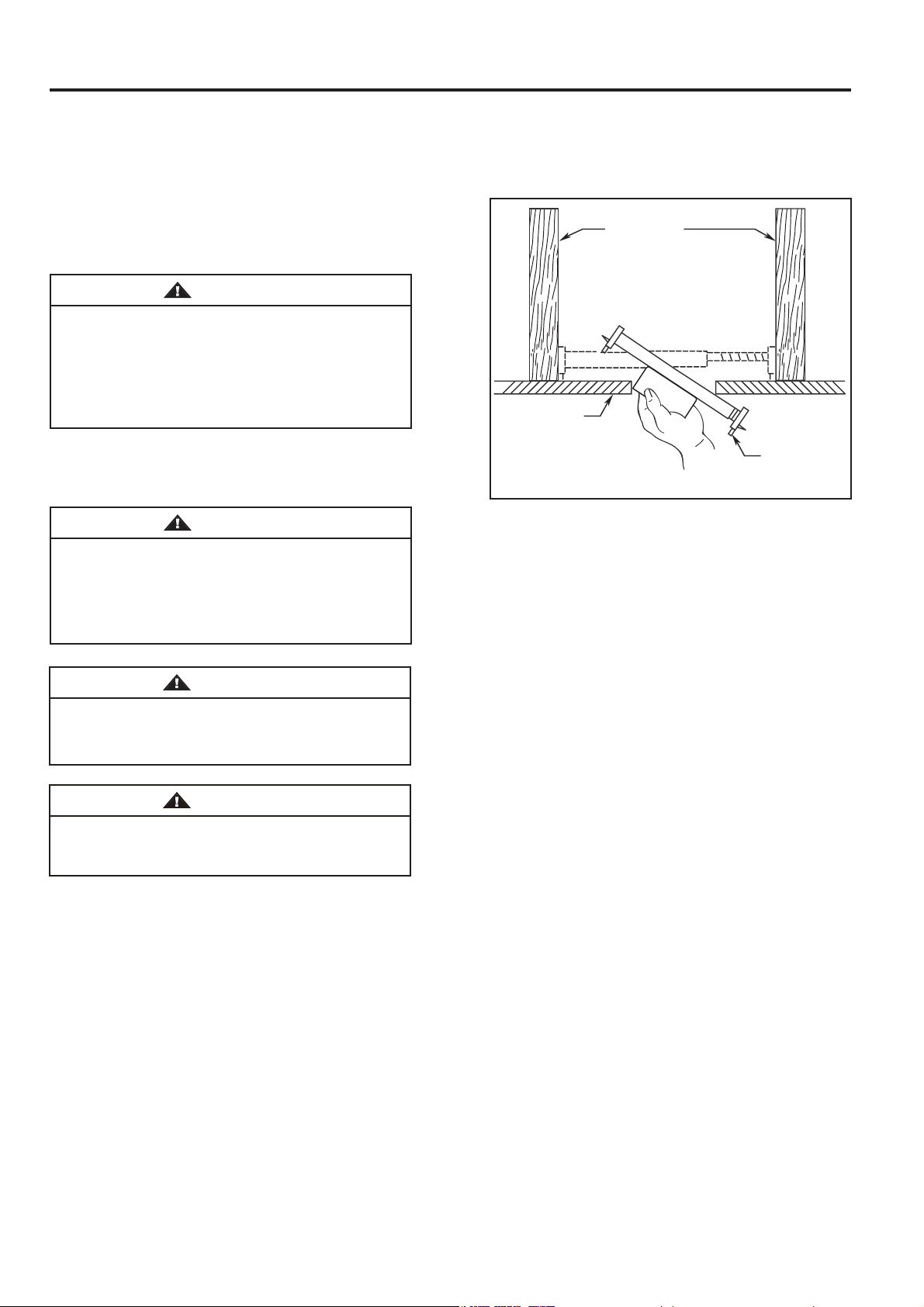
Figure 2
2" x 4"
CEILING JOIST
CEILING
OUTLET BOX
Deep box (Figure 2)
A 2-1/4-in.-deep box can be attached to blocking
between joists and is roomy enough to handle more
than one cable.
Turn Off When Not in the Room
Ceiling fans cool people, not rooms. If the room is
unoccupied, turn off the ceiling fan to save energy.
Choosing the Appropriate Mounting Location
Ceiling fans should be installed, or mounted, in the middle
of the room and at least 7 feet from floor to the blade and
18 inches from wall to the blade. If ceiling height allows,
install the fan 8 - 9 feet from floor to the blade for optimal
airflow. Consult your Fanimation Retailer for optional
mounting accessories.
6
Electrical and Structural Requirements (Continued)
If your fan is to replace an existing light fixture, turn
electricity off at the main fuse box at this time and
remove the existing light fixture.
Turning off wall switch is not sufficient. To avoid
possible electrical shock, be sure electricity is
turned off at the main fuse box before wiring. All
wiring must be in accordance with National and
Local codes and the ceiling fan must be properly
grounded as a precaution against possible electrical
shock.
WARNING
WARNING
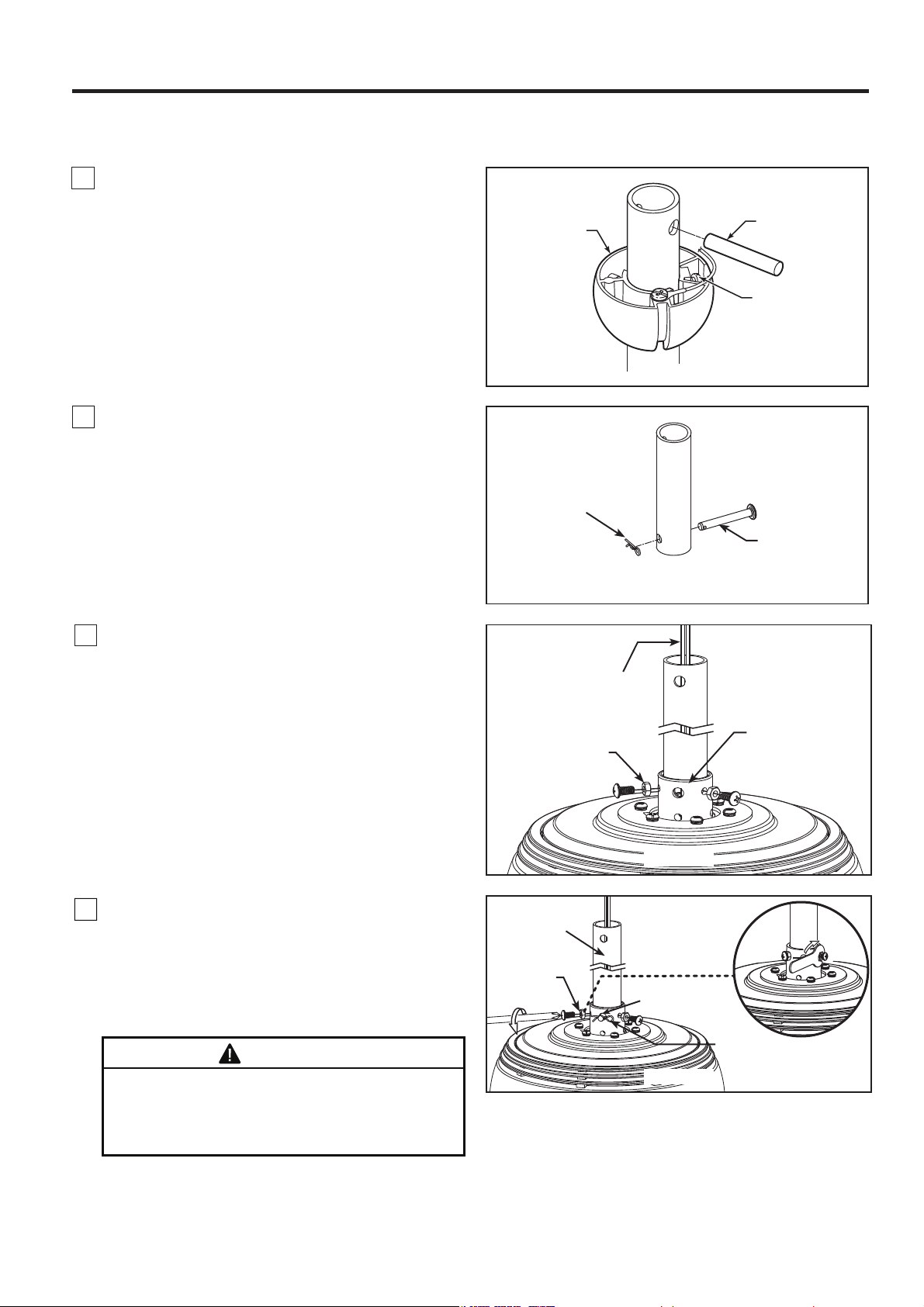
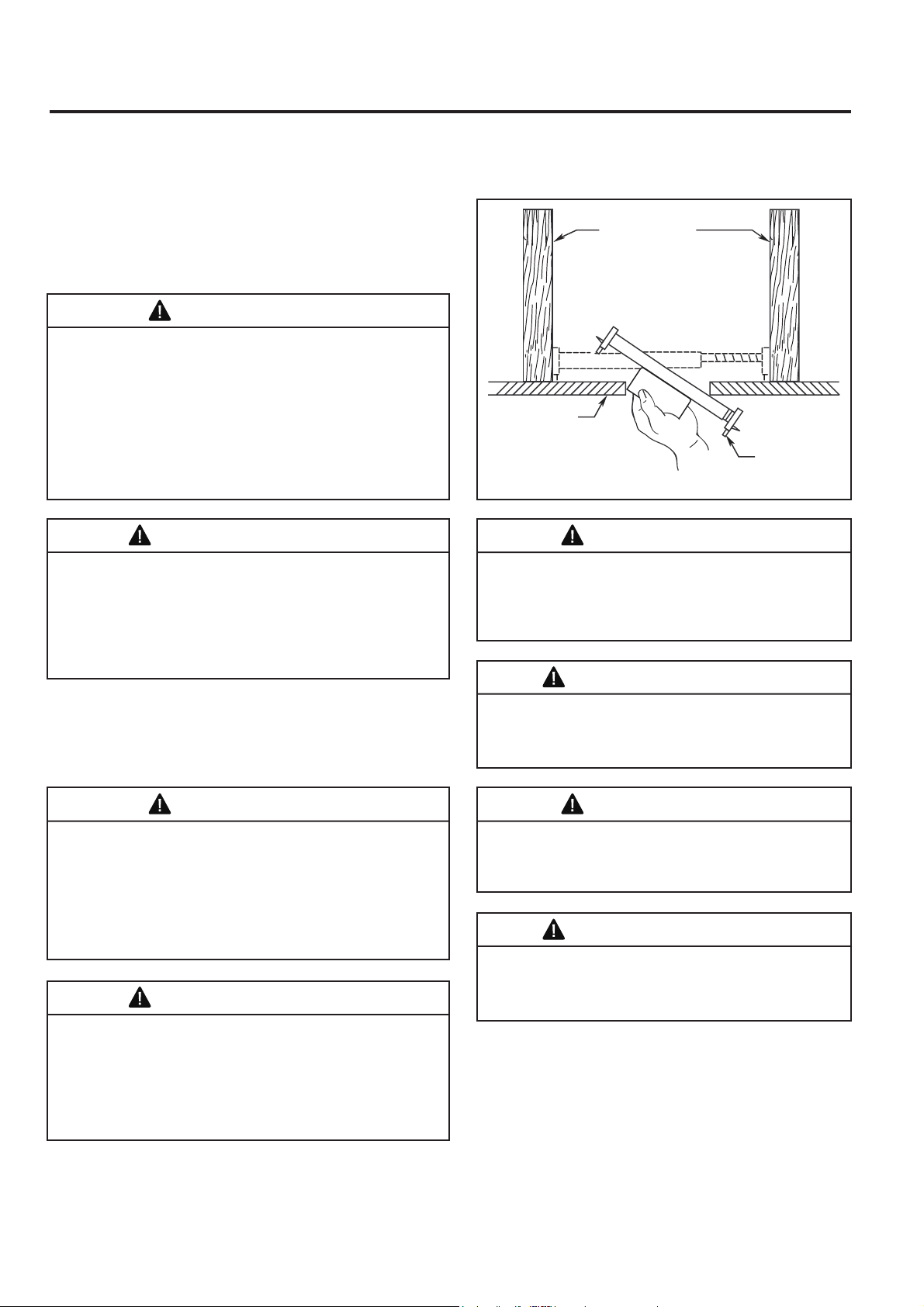
Deep box with brace (Figure 3)
Paired with a deep box, this hanger is meant to span
between two joists and takes the place of wooden
blocking.
To avoid fire or shock, follow all wiring instructions
carefully. Any electrical work not described in these
instructions should be done or approved by a
licensed electrician.
WARNING
Figure 3
CEILING JOIST
CEILING
OUTLET BOX
To reduce the risk of fire, electric shock, or personal
injury, mount to outlet box marked acceptable for fan
support of 15.9 kg (35 lbs) or less and use mounting
screws provided with the outlet box. Most outlet boxes
commonly used for the support of luminaires are not
acceptable for fan support and may need to be
replaced, consult a qualified electrician if in doubt.
Do not operate this fan with a variable (Rheostat) wall
controller or dimmer switch. Doing so could result in
damage to the ceiling fan's remote control unit.
WARNING
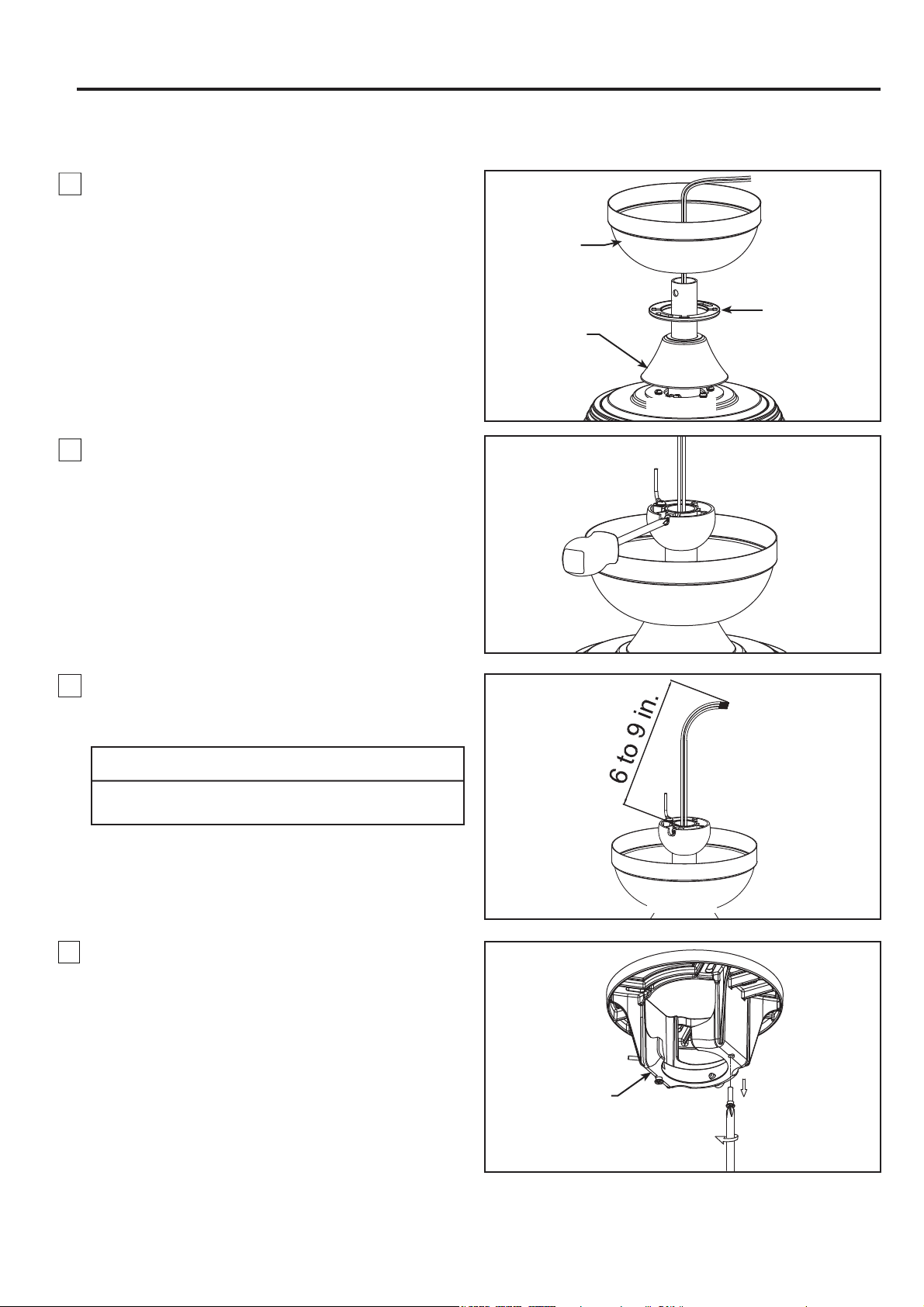
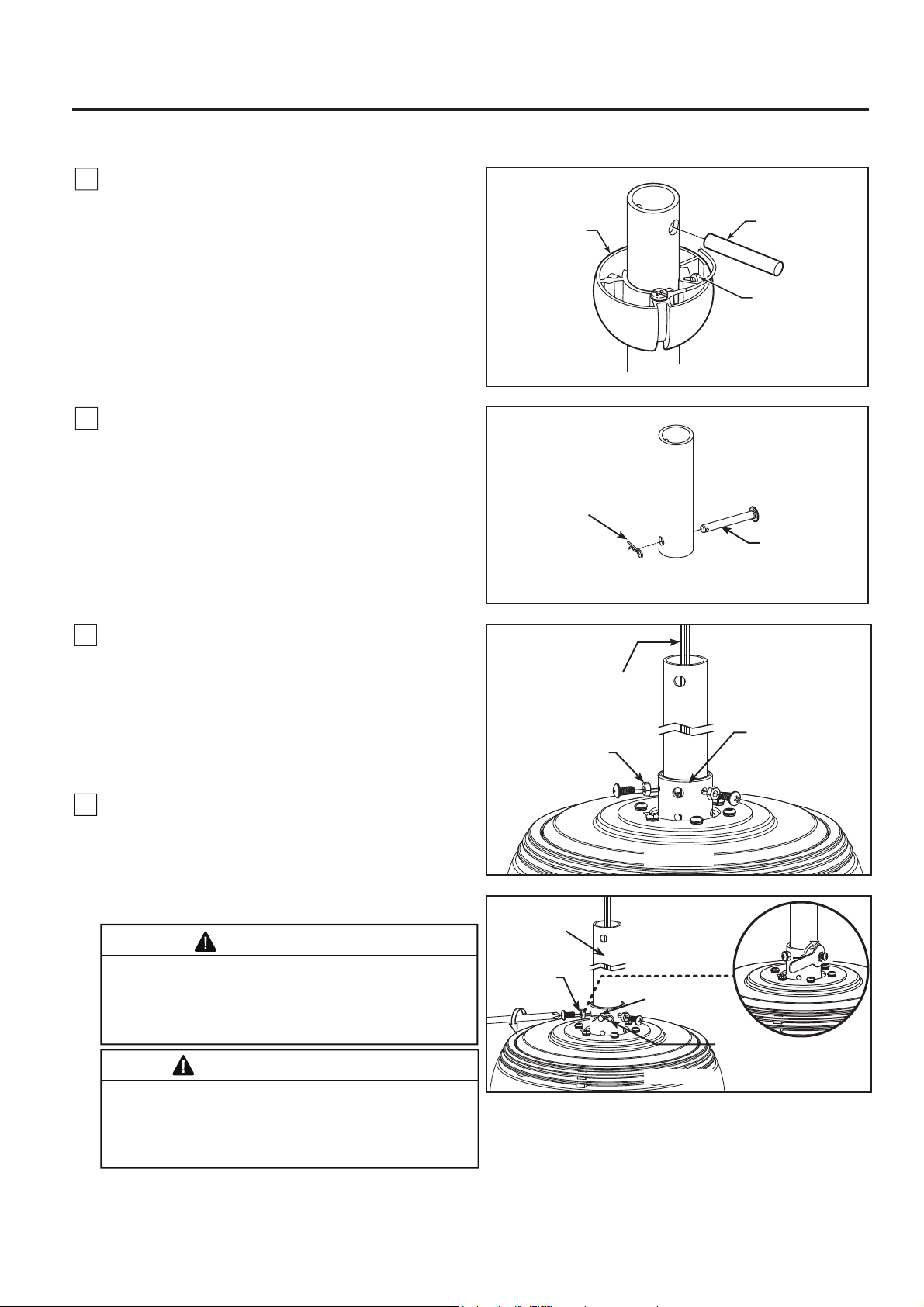
1. Prior to assembly, set aside and save the hardware
bags included in the packaging. Remove the hanger
ball by loosening the set screw in the hanger ball until
the ball falls freely down the downrod. Remove the pin
from the downrod, then remove the hanger ball.
Retain the pin and hanger ball for reinstallation in
Step 6. (Figure1)
7
How to Assemble Your Ceiling Fan
Figure 1
Pin
Set screw
Hanger
Ball
2. Remove the hairpin clip and clevis pin from the
bottom of downrod. Retain the pin and clip for
reinstallation in Step 4. (Figure 2)
Figure 2
Downrod Support
Figure 3
Set Screws
and Nuts (2)
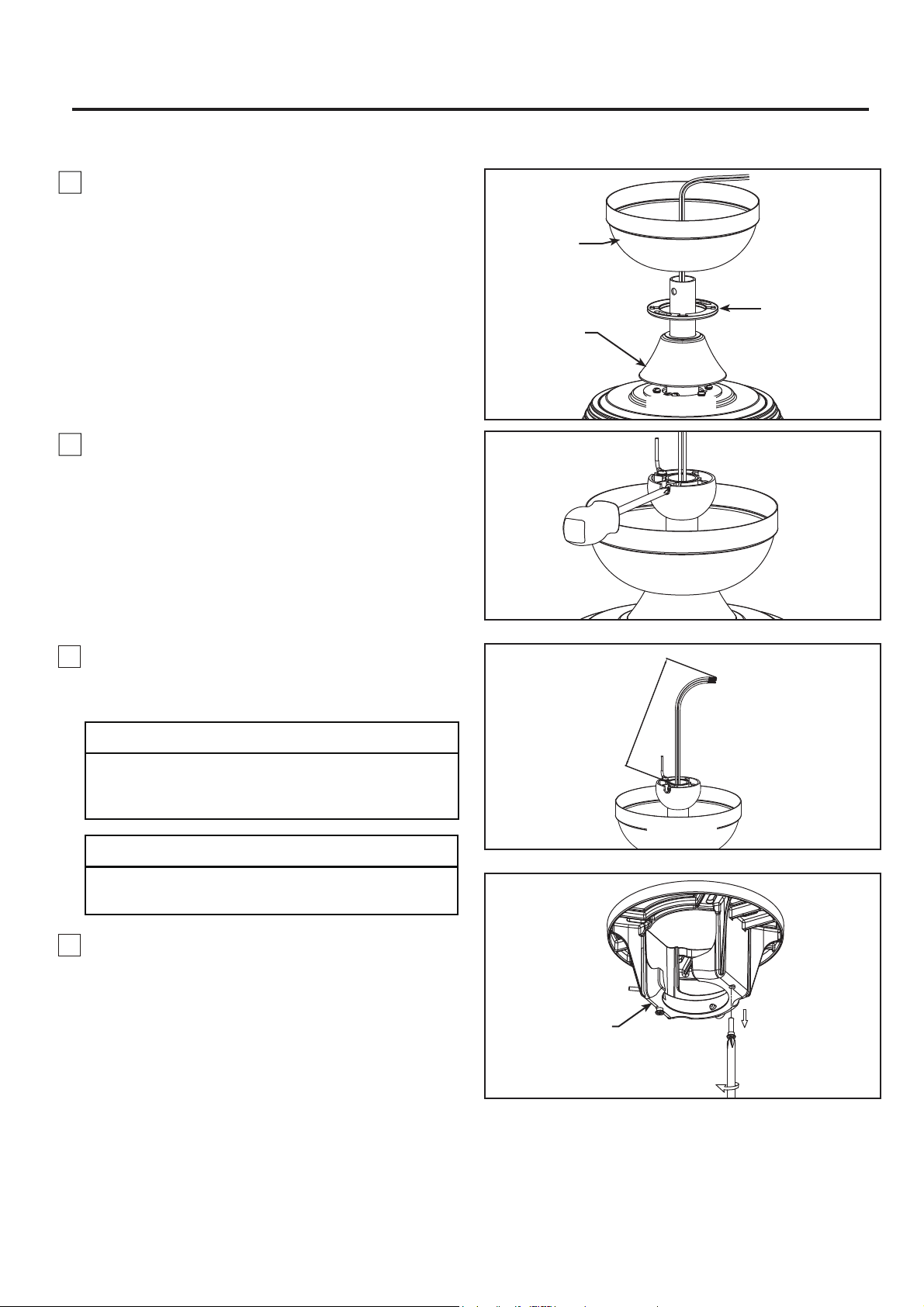
4. Slide downrod into the downrod support on top of
the motor. Install the clevis pin by aligning the holes
in the downrod support with holes in the downrod.
Secure clevis pin with hairpin clip. Install the two
set screws with nuts in the downrod support. Securely
tighten the set screws with screwdriver then fully
tighten the nuts using the hex wrench. (Figure 4)
WARNING
Hairpin Clip
Clevis Pin
It is critical that the clevis pin in the downrod
support is properly installed and the set screws
and nuts are securely tightened. Failure to do
so could result in the fan falling.
Hairpin Clip
Set Screws
and Nuts (2)
Downrod
Clevis Pin
Figure 4
Brown, Blue, Red,
Gray, Yellow wires
and Safety Cable
3. Loosen the two set screws and locking nuts in
the downrod support of the motor assembly. Route
brown, blue, red, gray and yellow wires and safety
cable through the downrod. (Figure 3)
8. Remove one of the two shoulder screws in the
hanger bracket and retain the screw for later. Loosen
the second shoulder screw without fully removing it.
(Figure 8)
Figure 8
Hanger Bracket
8
How to Assemble Your Ceiling Fan (continued)
7. Cut off excess lead wire approximately 6 to 9
inches above top of the downrod. Strip
insulation
off
1/2 inch from the end of each lead wire. (Figure 7)
Canopy Screw
Cover
Ceiling
Canopy
Motor Coupling
Cover
Figure 5
Figure 6
Figure 7
5. Route wires and safety cable through motor coupling
cover, canopy screw cover and ceiling canopy.
(Figure 5)
6. Reinstall the hanger ball on the downrod as follows.
Route the brown, blue, red, gray, yellow wires and
safety cable through the hanger ball. Position the pin
through the two holes in the downrod and align the
hanger ball so the pin is captured in the groove in the
top of the hanger ball. Pull the hanger ball up tight
against the pin. Securely tighten the set screw in the
hanger ball. A loose set screw could cause fan
wobble. (Figure 6)
CAUTION
All set screws must be checked, and retightened where
necessary before installation.
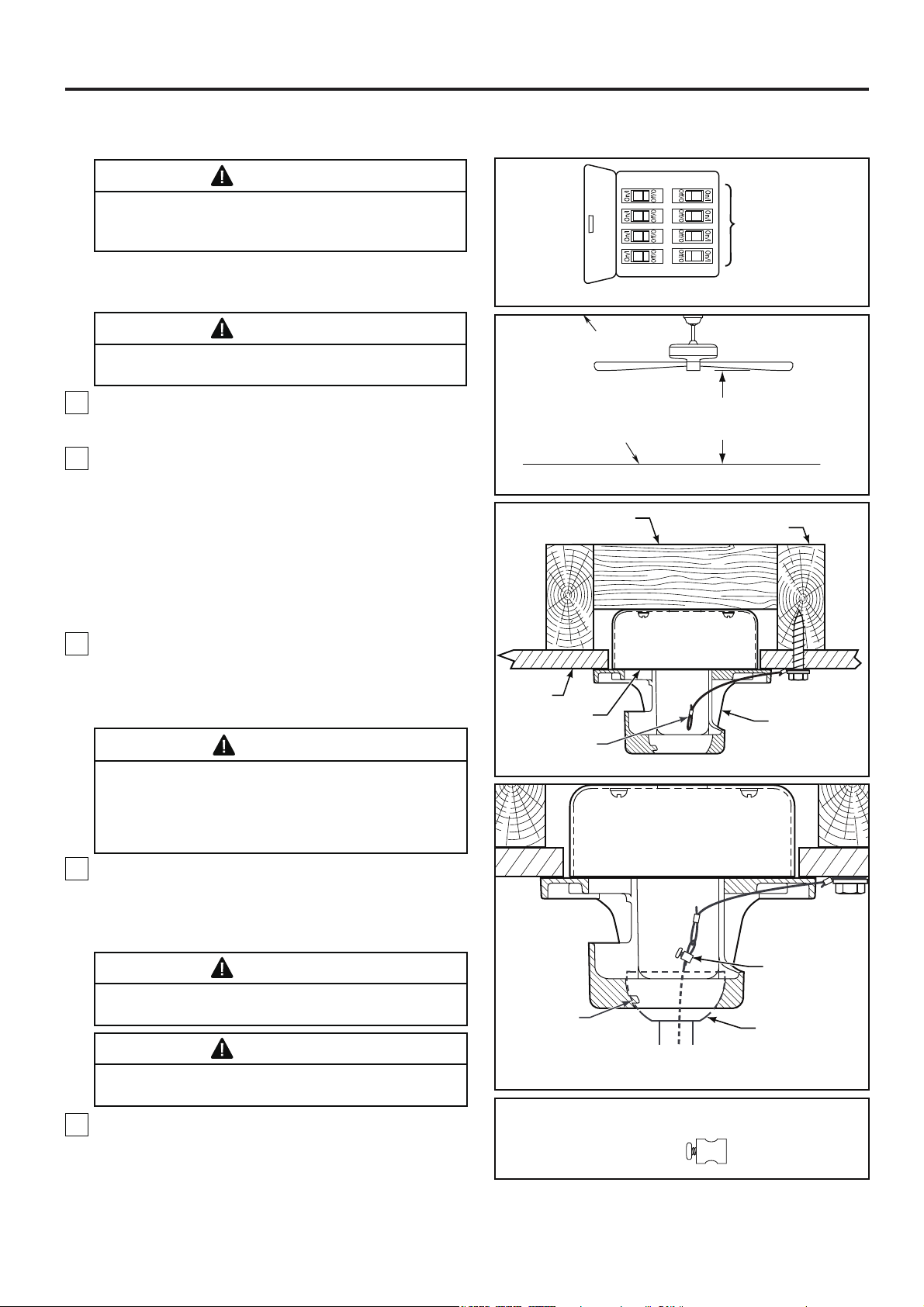
How to Hang Your Ceiling Fan
NOTE:
CAUTION:
Do not connect fan blades until the fan is
completely installed. Hanging fan with blades connected
may result in damage to the fan blades.
If you are not sure if the outlet box is grounded,
contact a licensed electrician for advice, as it must be
grounded for safe operation.
WARNING
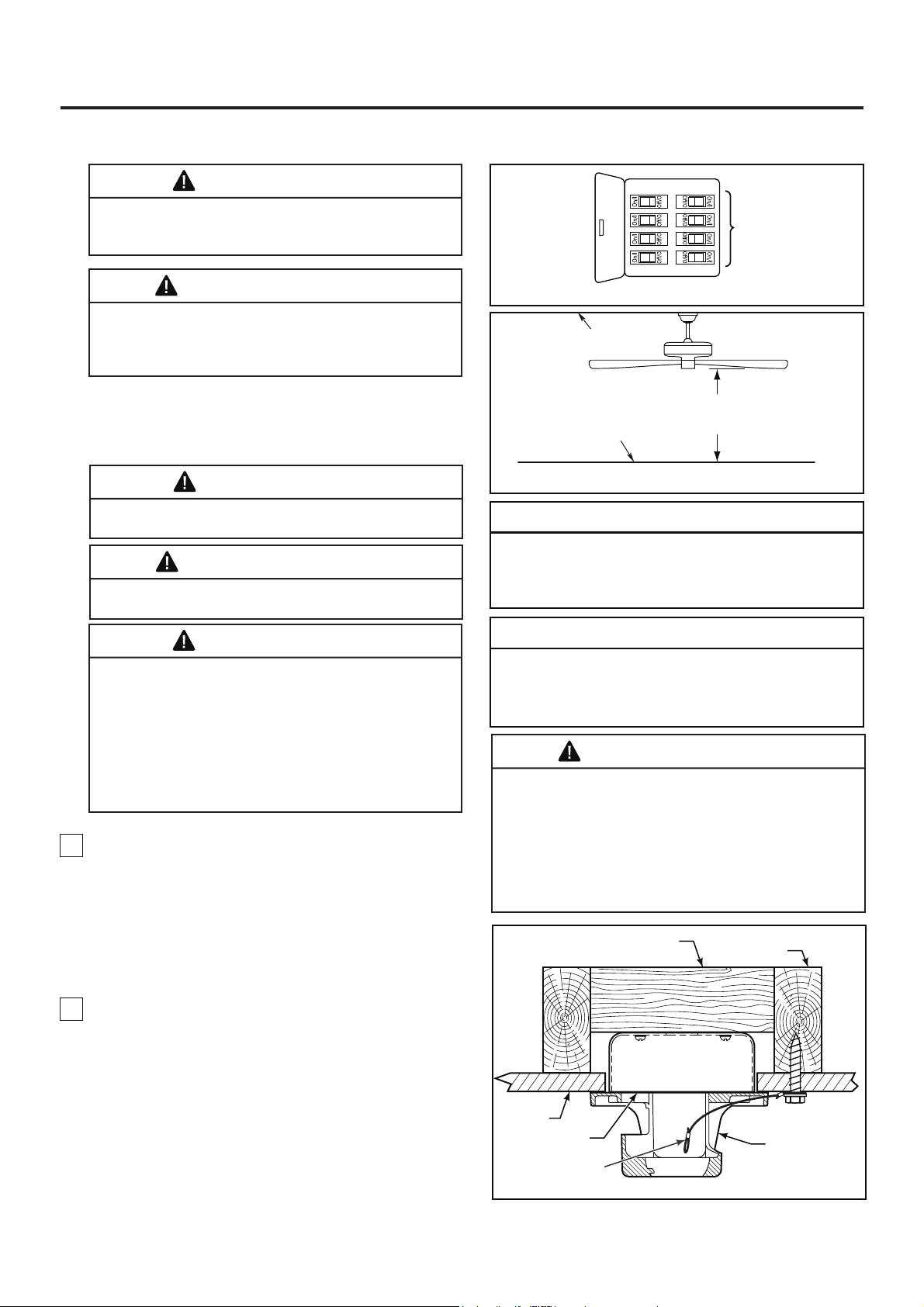
To avoid possible fire or shock, be sure electricity is
turned off at the main fuse box before hanging.
(Figure 1)
Figure 1
WARNING
The fan must be hung with at least 7’ of clearance from
floor to blades. (Figure 2)
Figure 2
Figure 3
Figure 4
1. Securely attach the hanger bracket to the outlet box
using the outlet box screws and washers supplied with
the fan. (Figure 3)
2. Drill a 1/4” pilot hole into the building structure to
prevent splitting or cracking with installation of the lag
bolt. Using the 3/8” x 2” lag bolt and flat washer, attach
safety cable to ceiling joist or wood structural member.
The lag bolt will pass through the flat washer, safety
cable loop, and into the building structure. (Figure 3)
NOTE: Ceiling support cable cannot be secured to
outlet box only, it must be directly secured to ceiling
joist or structural member using the 3/8” x 2” lag bolt
and flat washer. (Figure 3)
3. Make sure the electrical supply wires, including the
hanger bracket grounding wire and safety cable are
pulled through the downrod, between the hanger
bracket and the outlet box so that electrical
connections can be made later.
4. Carefully lift the fan and seat the downrod/hanger
ball assembly onto the hanger bracket that was just
attached to the outlet box. Be sure the groove in the
ball is lined up with tab on the hanger bracket.
(Figure 4)
5. Attach the safety cable to ceiling support cable.
Slide cable clamp and washer onto safety cable
(from fan). Place the end of cable through the loop of
ceiling support cable. Pull as much cable through loop
as possible. Feed end of cable into clamp hole and
firmly tighten screw. (Figure 4)
WARNING
The outlet box must be securely anchored. Hanger
bracket must seat firmly against outlet box. If the
outlet box is recessed, remove wall board until bracket
contacts box. If bracket and /or outlet box are not
securely attached, the fan could wobble or fall.
WARNING
Failure to seat tab in groove could cause damage to
electrical wires and possible shock or fire hazard.
WARNING
To avoid possible shock, do not pinch wires between
the hanger ball assembly and the hanger bracket.
HARDWARE USED:
Main Fuse Box
Ceiling
Floor
Ceiling Joist
Hanger Bracket
Attach Safety
Cable To Ceiling
Support Cable
Downrod/Hanger
Ball Assembly
Ceiling Support
Cable Clamp
W/Screw
x 1
Tab
Ceiling
Outlet Box
Ceiling Support
Cable
Wood Member
(2” x 4” Approx.)
No Less
Than
7 Feet
NOTE: SUPPLY WIRES
AND FAN WIRES OMITTED
FOR CLARITY
9
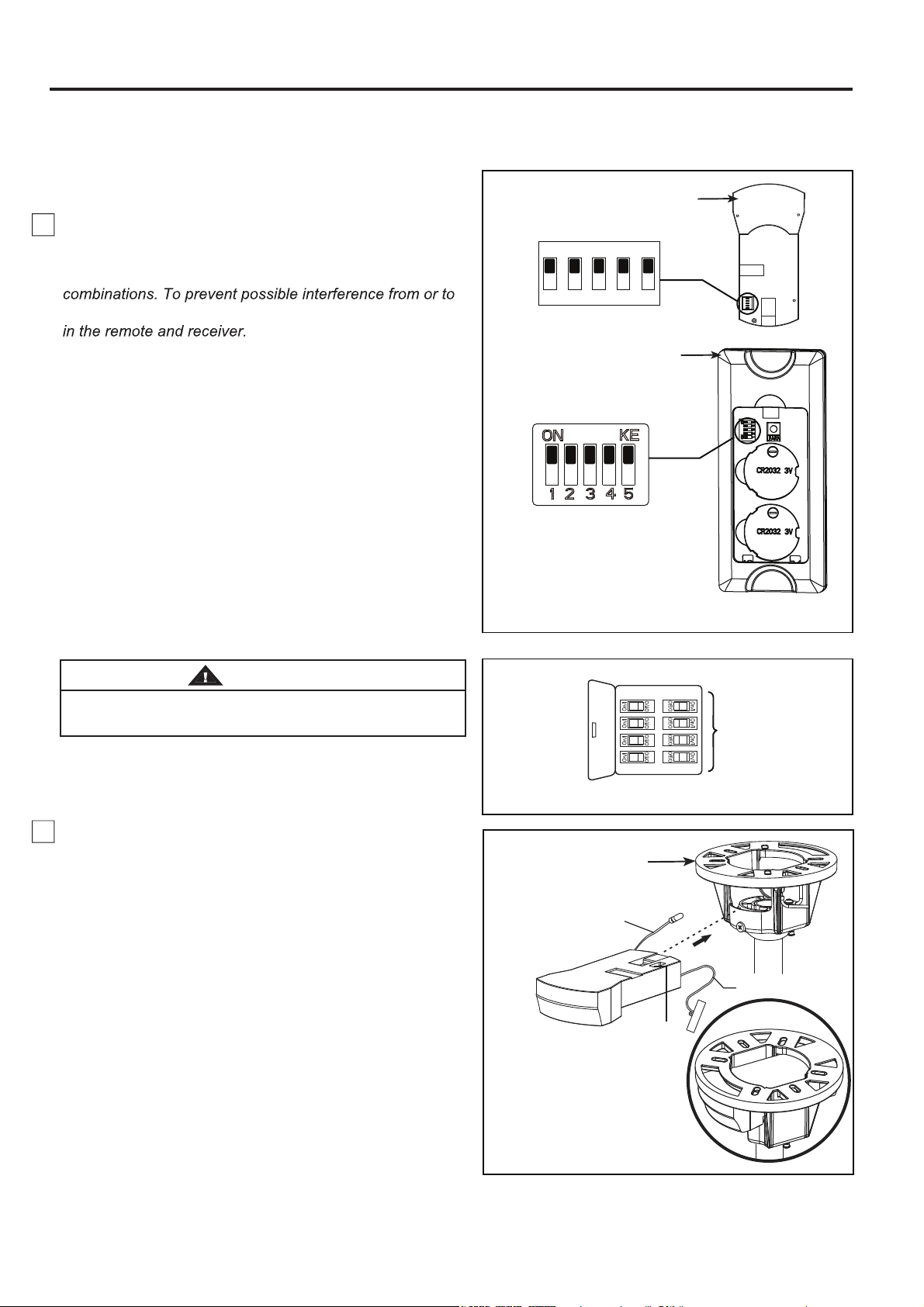
How to Wire Your Ceiling Fan
10
NOTE: If fan or supply wires are different colors than
indicated, have this unit installed by a qualified electrician.
MAIN FUSE BOX
Figure 2
Figure 1
1. To set the code on receiver unit, slide dip switches to
the same positions as set on the remote control. (Figure 1)
NOTE: The remote unit has 32 different code
other remote units, simply change the combination code
NOTE: Factory setting is all up. Do not use this position.
2. Slide the receiver into the hanger bracket before wiring
as shown in figure 3.
NOTE:
If you are not sure if the outlet box is
grounded, contact a licensed electrician for advice, as
it must be grounded for safe operation.
WARNING
To avoid possible electrical shock, be sure electricity is
turned off at the main fuse box before wiring. (Figure 2)
Figure 3
NOTE: Supply wires omitted
for clarity
Dip Switch
WIFI Antenna
Hanger Bracket
RF Antenna
(Leave connected
and do not cut)
Dip Switch
ON
1 2 3 4 5
Receiver
Remote Control
Dip Switch
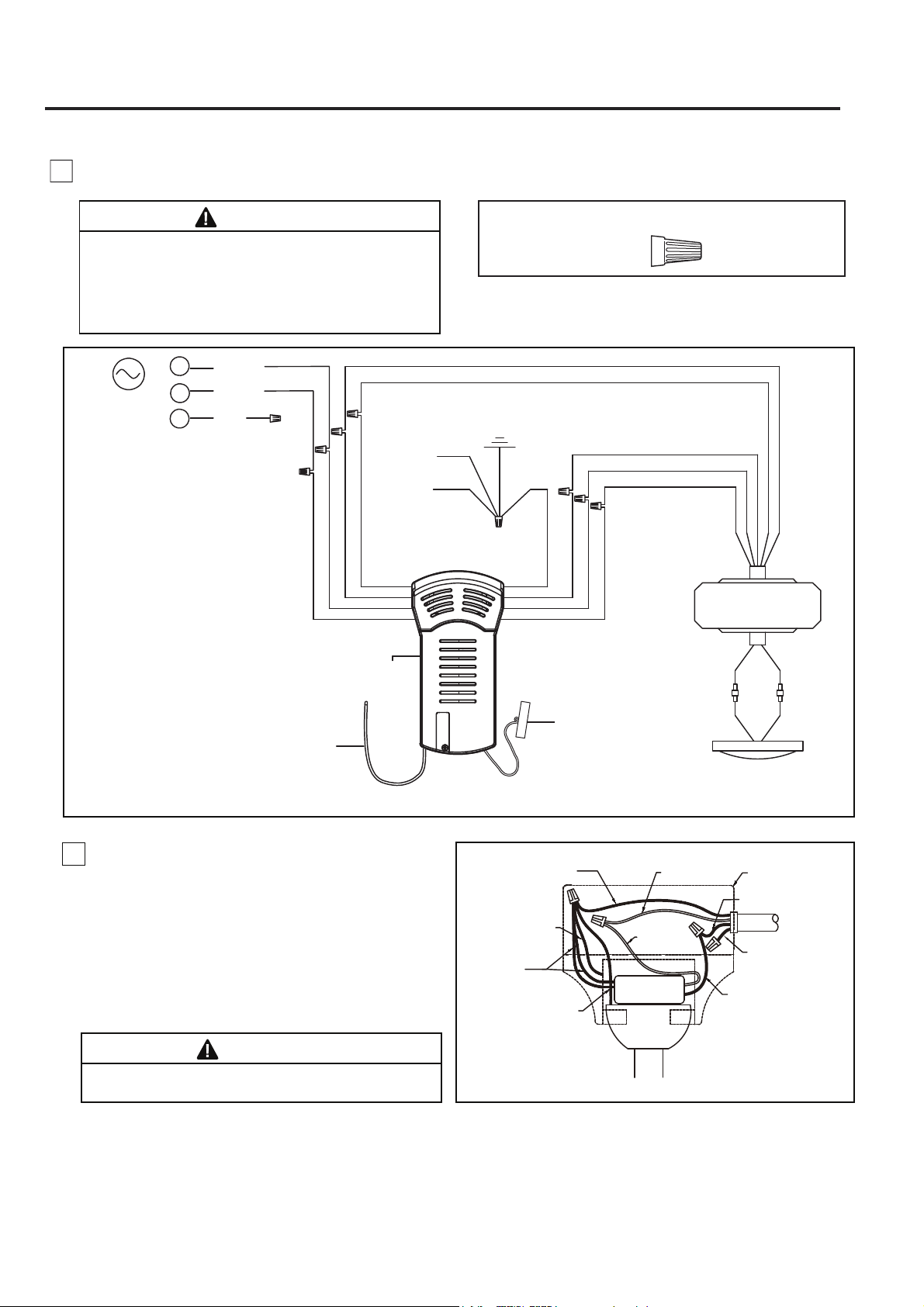
How to Wire Your Ceiling Fan (continued)
11
WARNING
The blades must be installed first before programming
is performed.
3. Connect wires using connectors as shown in
Figure 4.
x 9
RECEIVER HARDWARE USED:
CAUTION: INCORRECT WIRE CONNECTION
COULD DAMAGE THIS RECEIVER.
WARNING
Check to see that all connections are tight,
including ground, and that no bare wire is
visible at the wire connectors. Do not operate
fan until the blades are in place. Noise and
motor damage could result.
Listed Outlet Box
White Wire
from Supply
Green Wire
from Supply
(Ground)
Household
Supply
Black Wire
from Supply
Black Wire
from Receiver
White Wire
from Receiver
Green Wire
from Hanger
Bracket (Ground)
Green Wire
from Hanger
Ball (Ground)
Green Wire
from Receiver (2)
(Ground)
Receiver
Figure 5
Red Wire
from Supply
4. After connections have been made, put the
white and green leads to one side and the black
leads towards the other side, the connection
should be turned upward and carefully push leads
into the outlet box. The wires should be spread
apart with the grounded conductor and the
equipment-grounding conductor on one side of
the outlet box and the ungrounded conductor on
the other side. (Figure 5)
Wire
Connectors
Figure 4
BLACK
WHITE
L
N
RED
L1
AC POWER
BLUE
LIGHT KIT
DC MOTOR
RF ANTENNA
RECEIVER
BROWN
WHITE
BLACK
WHITE
BLUE
BLUE
BROWN
YELLOW /
GREEN (2)
HANGER
BRACKET
HANGER
BALL
RED
GRAY
YELLOW
RED
GRAY
YELLOW
GROUND
WIFI ANTENNA
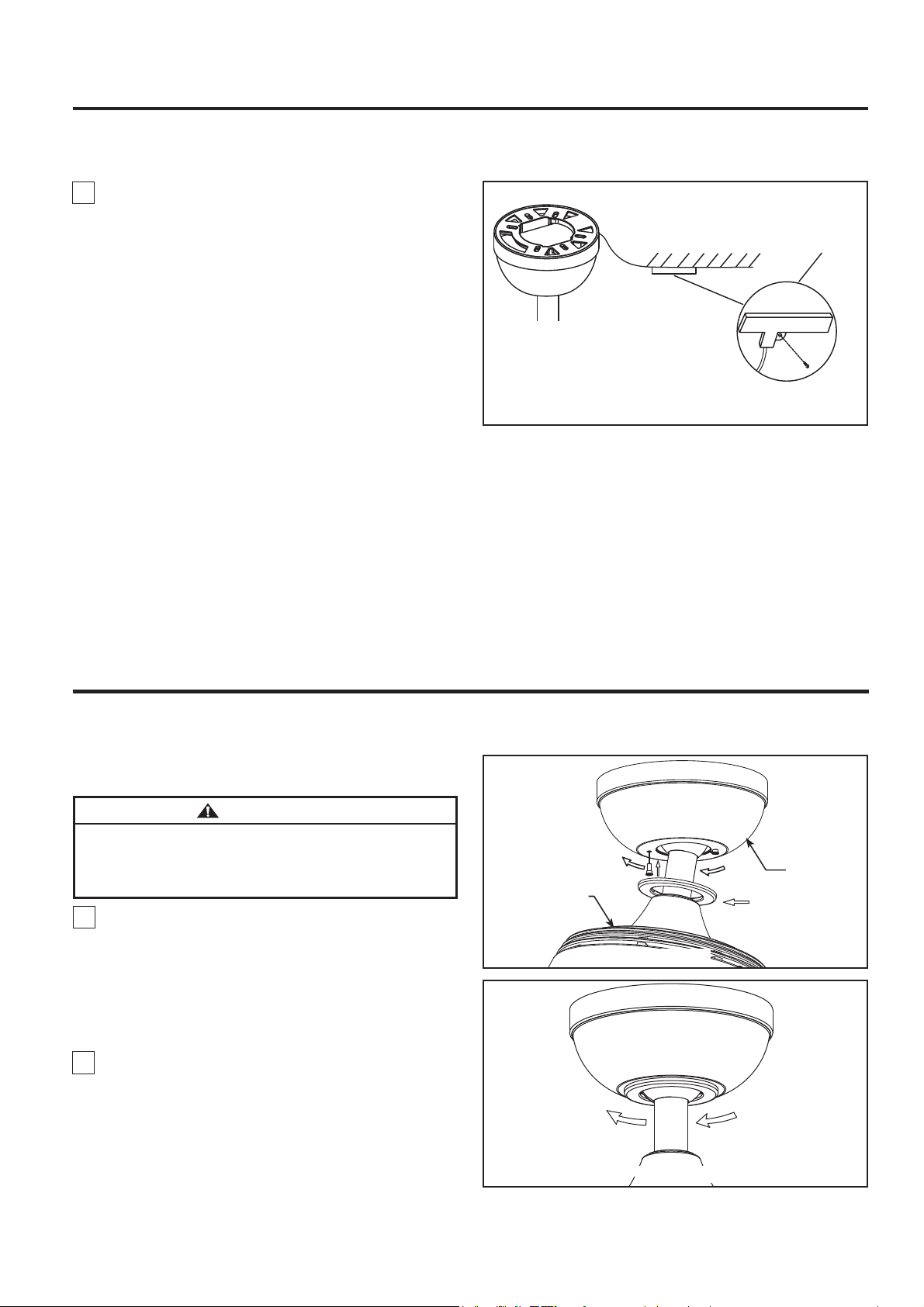
How to Wire Your Ceiling Fan (continued)
Figure 2
12
Figure 1
NOTE: This step is applicable after the necessary wiring
is completed.
WARNING
To avoid possible fire or shock, make sure that the
electrical wires are completely inside the canopy
housing and not pinched between the housing and the
ceiling.
2. Securely attach and tighten the canopy screw
cover over the shoulder screws in the hanger
bracket utilizing the keyslot twist-lock feature.
(Figure 2)
How to Install Your Canopy Housing
Motor Assembly
Canopy
1. Assemble canopy by rotating key slot in canopy
over shoulder screw in hanger bracket and care not
to pinch the wires. Tilt the motor assembly to the
side to have more space to tighten shoulder screws.
Fully assemble and tighten second shoulder screw
that was previously removed. (Figure 1)
Figure 6 (Optional)
WIFI antenna
Ceiling
After Installation
WIFI Antenna
mount to ceiling using
wood screw
5. The receiver has a wifi antenna that can be used if
you experience range issues. (Figure 6)
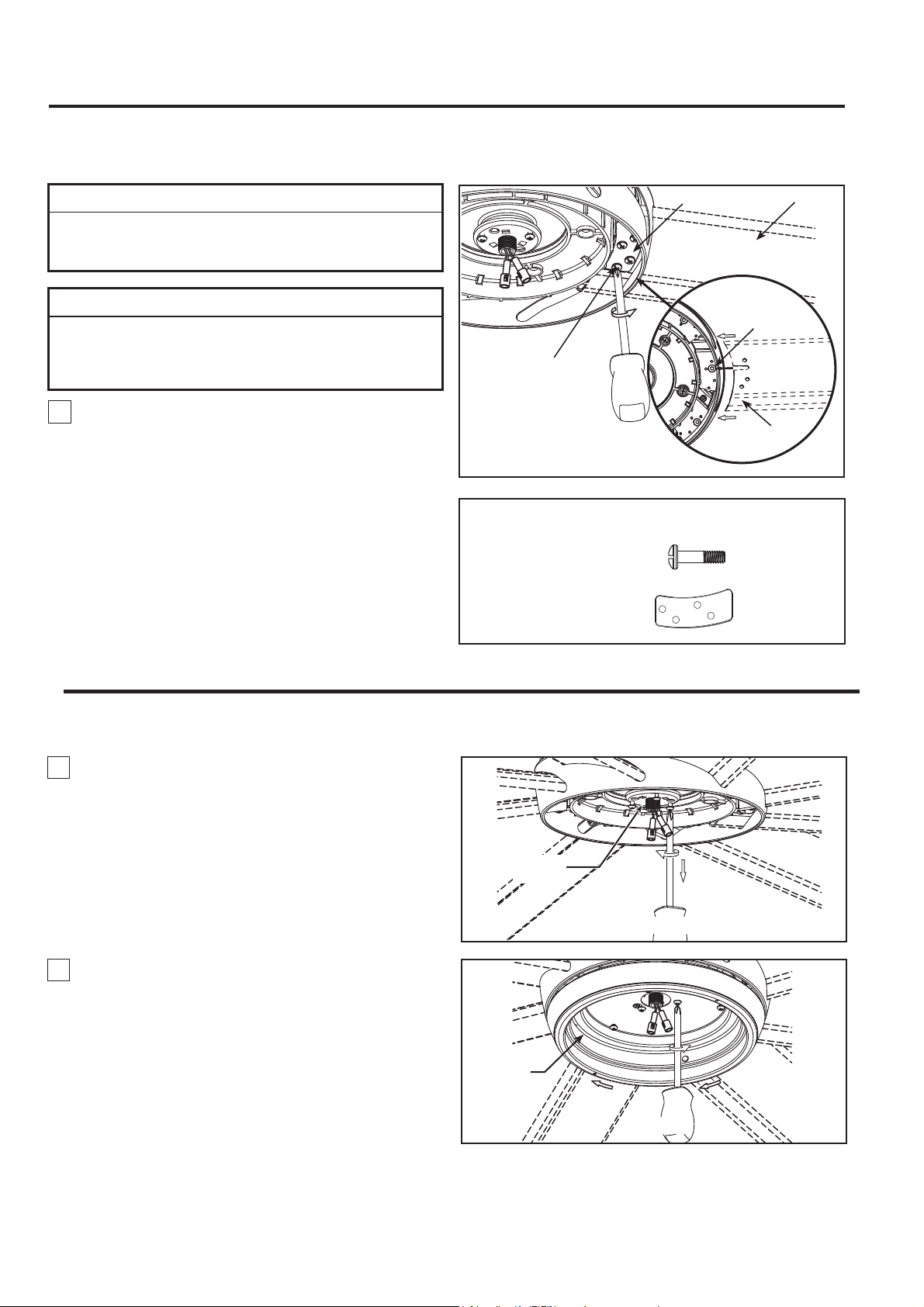
Figure 1
HARDWARE USED:
x 32
x 8
#10-24 Button
Head Screw
1. Carefully slide the blade through the slot as shown.
Make sure the notch of blade is fully seated into the
hex socket screw. Securely fasten the eight blades
to the motor housing using the blade plates and
button head screws. (Figure 1)
INSTALLATION NOTE
Do not connect fan blades until the fan is completely
installed. Installing the fan with blades assembled may
result in damage to the fan blades.
▲
WARNING
To reduce the risk of personal injury, do not bend the
blades when installing, balancing or cleaning the fan.
Do not insert foreign objects in between the rotating
blades.
NOTE: You will find the fan blade set packed in its own
carton and hardware bag in the fan box.
Blade
#10-24
Button Head Screws
(4 each per blade)
Blade Plate
Hex Socket
Screw
Blade
Motor Assembly
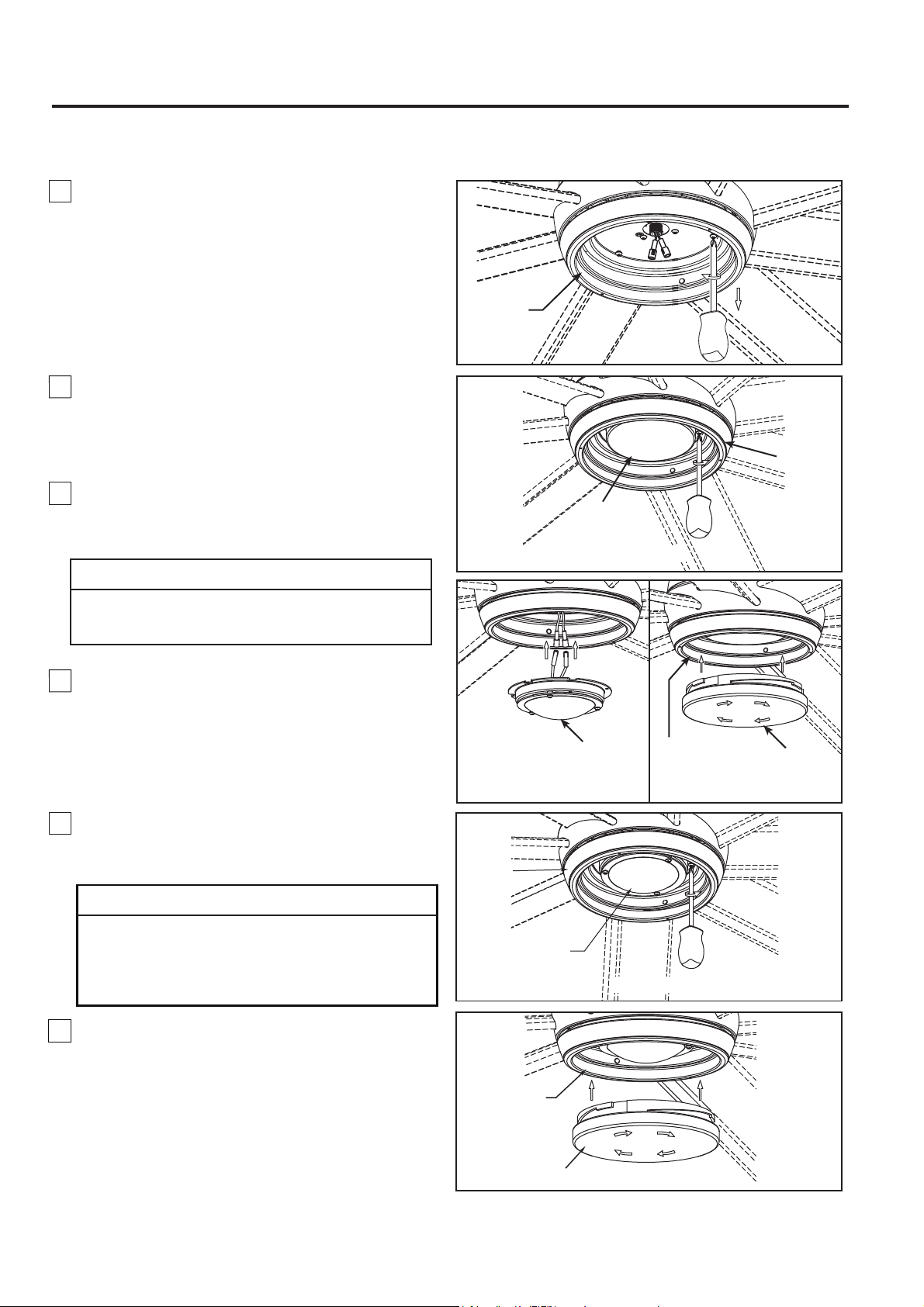
1. Remove one of the three screws in the support
bracket at the bottom of the motor assembly. Retain
the screw for later and slightly loosen the remaining
two screws. (Figure 1)
2. Assemble the light kit to the support bracket using
the two key slots in the light kit. Replace the previously
removed screw and securely tighten all three screws.
(Figure 2)
How to Assemble Your Ceiling Fan Blades
How to Assemble Your Light Kit or Cap
13
Figure 1
Light Kit
Figure 2
Blade Plate
Light Kit
Glass
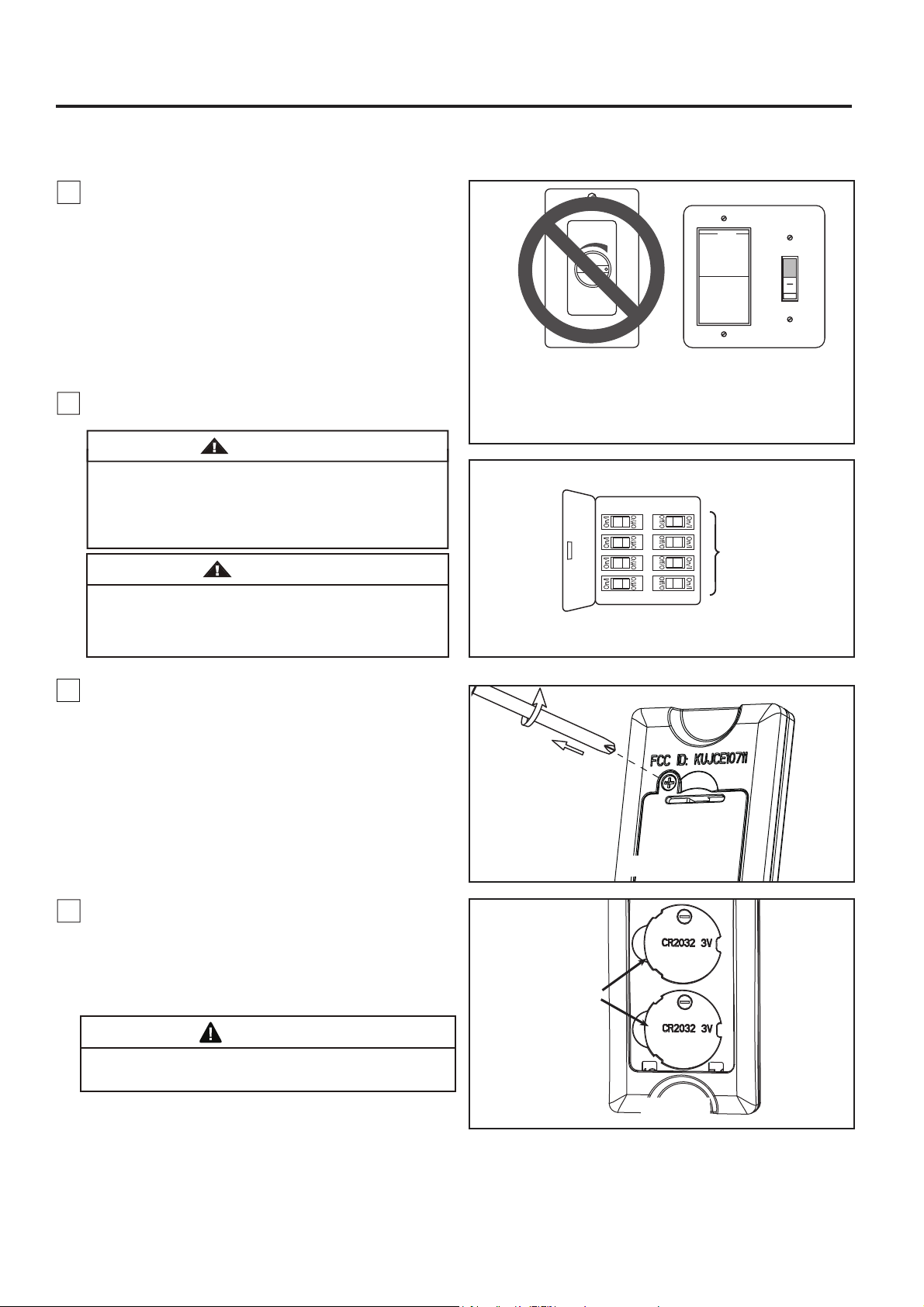
3. Remove one of the three screws in the light kit.
Retain the screw for later and slightly loosen the
remaining two screws. (Figure 3)
Light Kit
Figure 3
4. If installing the light kit, skip this step.
Assemble the light kit wire cover to the light kit using
the two key slots. Replace the removed screw and
secure all three screws.
(Figure 4)
Light Kit
Wire Cover
Figure 4
Light Kit
Light Kit
Figure 5A
Connect the 2 single pin connectors from the LED
assembly to the 2 single pin connectors from motor
assembly. (Figure 5A)
To reduce the risk of electric shock, disconnect the
electrical supply circult to the fan before installing
light kit.
CAUTION
5A. For use with light kit.
5B. For use with steel cap.
If you want to install the steel cap and not the light kit.
Assemble the steel cap to the light kit by twisting in
a clockwise direction. (Figure 5B)
NOTE:
If you have installed your fan with the steel
cap, skip Steps 6 and 7.
Figure 5B
LED Assembly
Steel Cap
How to Assemble Your Light Kit or Cap (continued)
The light source is designed for this specific
application and can overheat if serviced by untrained
personnel. If any servicing is required, the product
should be returned to an authorized service facility
for examination or repair.
CAUTION
14
Light Kit
LED Assembly
Figure 6
Figure 7
7. Secure the glass to light kit by twisting in a
clockwise direction. Twist the glass gradually
until
it snaps onto the light kit.
Do not over-tighten.
(Figure 7)
6. Assemble the LED assembly to the light kit using
the two key slots. Replace the removed screw from
Step 3 and secure all three screws. (Figure 6)
3V CR2032
Battery (2 pcs)
How to Operate Your Ceiling Fan
MAIN FUSE BOX
Figure 2
Figure 1
For illustrative purposes only-not
intended to cover all types of controls
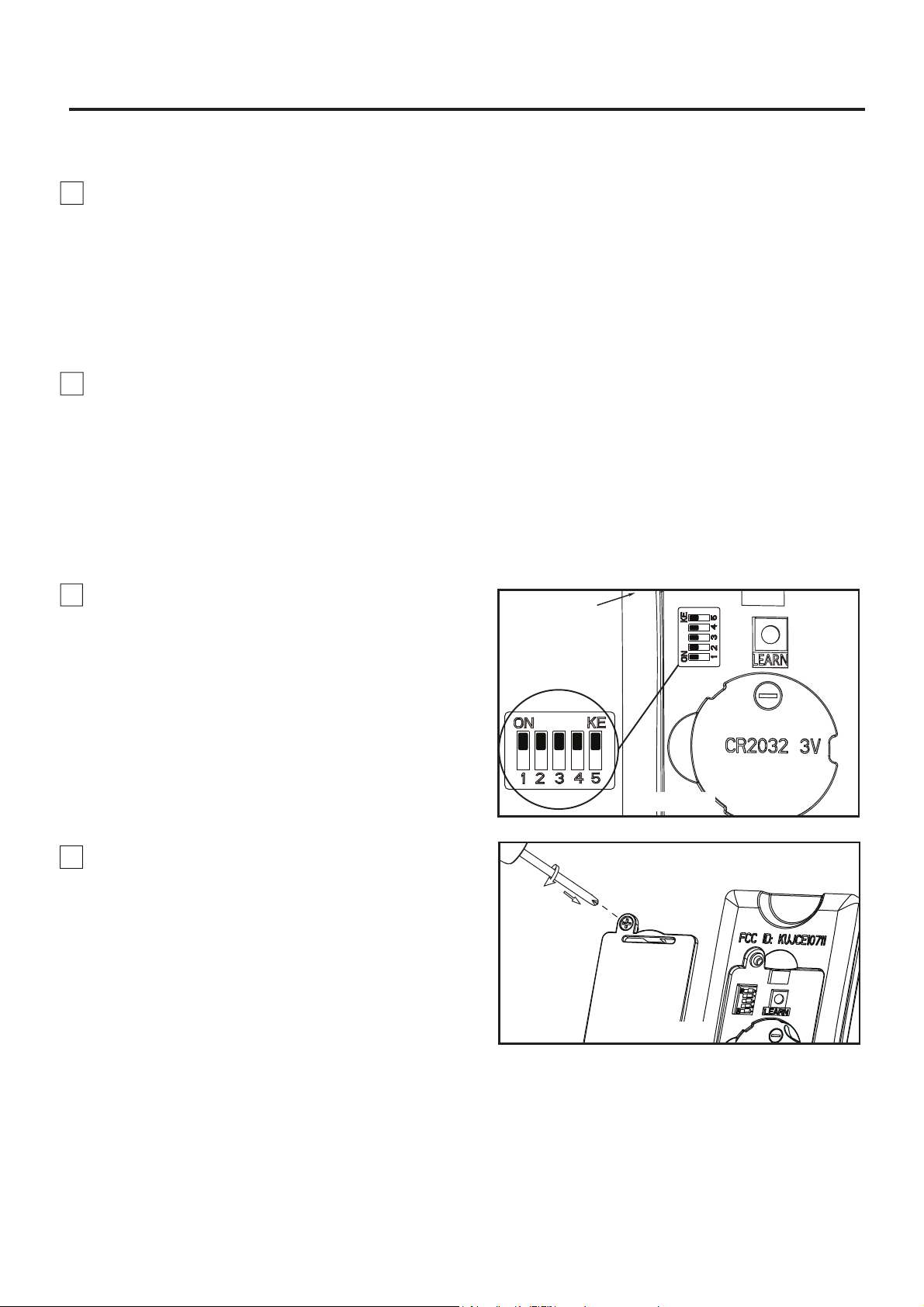
1. IMPORTANT: Using a full range dimmer switch
(not included) to control fan speed will damage the fan.
To reduce the risk of fire or electrical shock, do not use
a full range dimmer switch to control the fan speed.
(Figure 1)
2. Restore electrical power to the outlet box by turning
the electricity on at the main fuse box. (Figure 2)
Check to see that all connections are tight, including
ground, and that no bare wire is visible at the wire
connectors, except for the ground wire. Do not
operate fan until the blades are in place. Noise and
fan damage could result.
WARNING
Do not operate this fan with a variable (Rheostat)
wall controller or dimmer switch. Doing so could
result in damage to the ceiling fan's remote control
unit.
WARNING
Figure 4
15
3. Remove the battery cover from remote control by
screwdriver and retain the screw for later. (Figure 3)
Figure 3
4. To make fan operational, install two 3V batteries
(included) in hand-held remote transmitter, with fan
power off. Then, follow the remote code setting
process. If not used for long periods of time, remove
battery to prevent damage to transmitter. Store the
remote away from excessive heat or humidly. (Figure 4)
Chemical Burn Hazard. Keep batteries away from
children.
WARNING
16
Figure 6
8. Replace battery cover on the remote control and
secure with the previously removed screw. (Figure 6)
How to Operate Your Ceiling Fan (continued)
NOTE: Factory setting is all up. Do not use this
position.
NOTE: The remote unit has 32 different code
combinations. To prevent possible interference from
or to other remote units, simply change the
combination code in the remote and receiver.
7.
To set the remote code same positions as the
receiver with a small screwdriver or ball point pen
(neither included), slide dip switches firmly up or
down. (Figure 5)
Remote
Control
Dip Switch
Figure 5
5. If you have multiple fans and want to program all
fans to one handheld control. Slide the Dip Switches
to the same position in ALL receivers as ONE
handheld control, then follow Step 1 of the remote
control speed set up process. Each fan needs to be
no more than 30 feet from the handheld control that
you would like to program. Please note the wall switch
that controls the power to your fan(s) should be in the
off position until you are ready to program your
handheld remote(s).
6. If you have multiple fans and want to program
each fan to separate handheld controls, slide the Dip
Switches to the same position in both receiver and
handheld control, then follow Step 1 of the remote
control speed set up process below for each fan.
Repeat these steps for each fan that you would like to
program to a separate handheld remote. Please note
that the wall switch that controls the power to your
fan(s) should be in the off position until you are ready
to program your handheld remote(s).
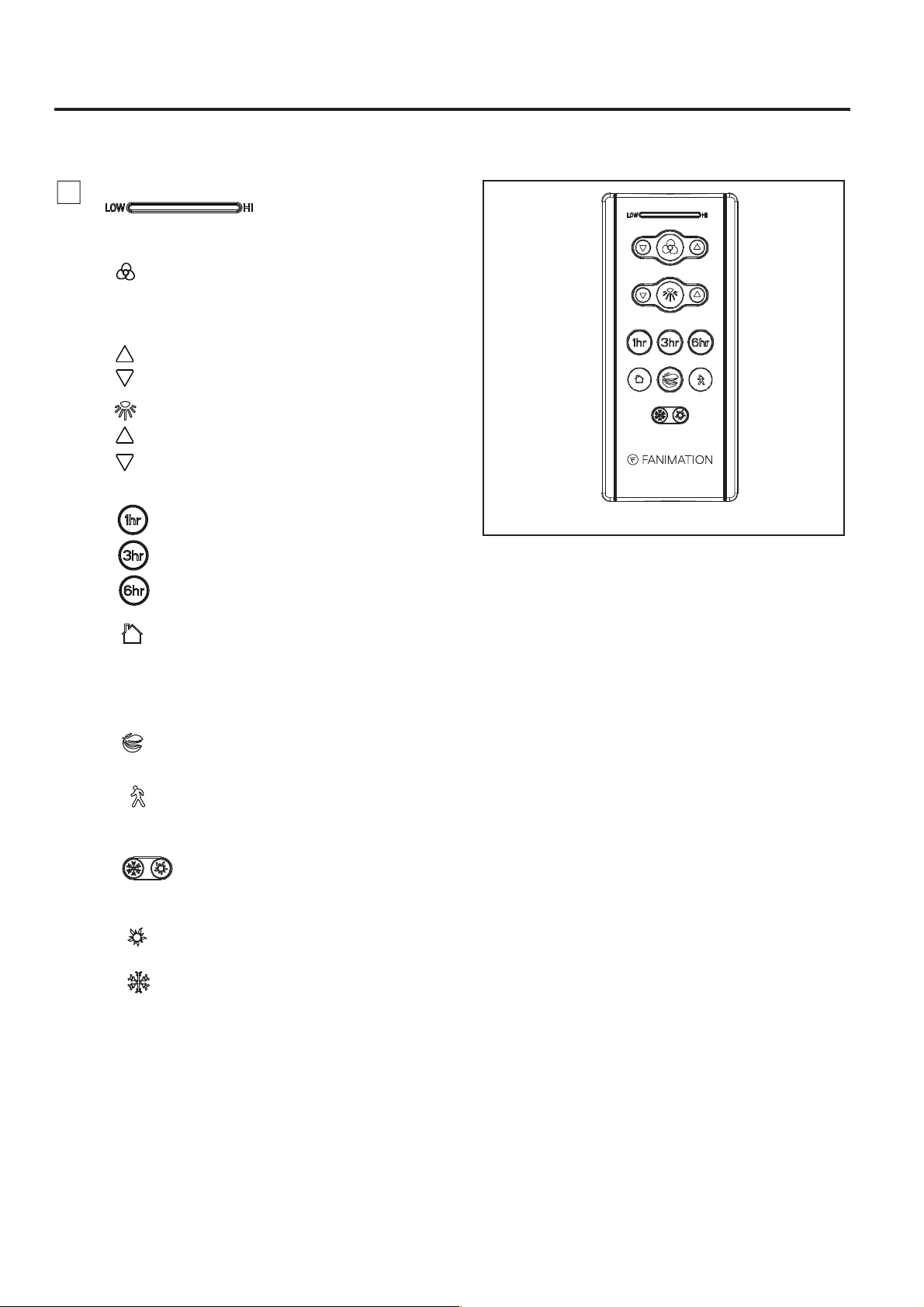
• Sleep Timer:
The fan and light will turn off after 1 hour.
The fan and light will turn off after 3 hours.
The fan and light will turn off after 6 hours.
9. Remote functions: (Figure 7)
• Indicator LED light: fan speed and light
dimmer indicator
• Fan Speed:
• button: Tap once to turn off the fan. Press and
hold this button for 5 seconds to turn on or turn off
the buzzer.
• Light button: Turn ON\OFF the light.
Turn on fan and turn speed up.
Turn on fan and turn speed down.
Increase light output level.
Decrease light output level.
• Home Away: Tap this button, the light will
blink twice signaling this feature is on; the fan
will turn off and the light will randomly turn on
and off while you are away. Pressing any button
will cancel the feature.
• Fresh Air: Fan speed will modulate to
simulate a natural breeze.
Figure 7
How to Operate Your Ceiling Fan (continued)
17
• Safe Exit: Tap once, the light will blink once;
fan and light will turn off after 1 minute. Pressing
any button will cancel this feature.
• Reverse button:
Summer- The fan runs counterclockwise.
Airflow will provide a downward cooling breeze.
Winter- The fan runs clockwise. Airflow will force
warm air downward without a noticeable breeze.
In order to reverse the direction of the fan, the fan
must be running.
18
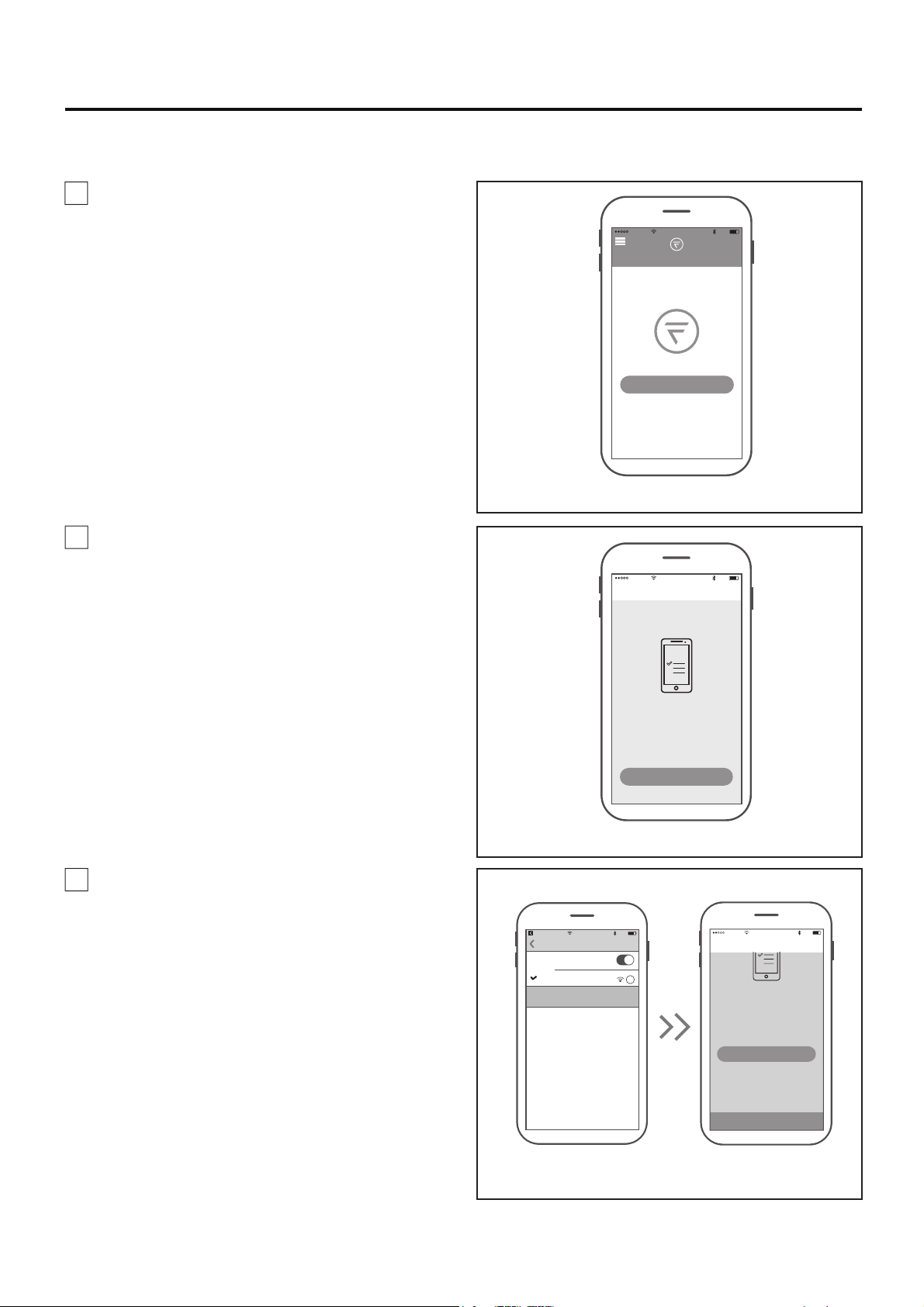
How to Set Up the fanSync WiFi APP
1. Visit the Apple APP Store or the Google Play
Store to download the free fanSync WiFi APP.
Create your Fanimation fanSync account. (Figure 1)
Figure 1
Figure 2
Figure 3
10:37 AM
80%
All
Home
Your dashboard is empty
Add a Fanimation Ceiling Fans
10:37 AM
80%
Add Fainmation..
Connect To Your Dvice
WI-FI
To begin you must first connect your phone
to the Fanimation Ceiling Fans you are
setting up. Your Fanimation Ceiling Fans will
broadcast a temporary Wi-Fi hotspot that
looks like
“Fanimation_xxxxxx”.
Once you’ve completed this step come back
Go to Settings
10:38 AM
80%
fanSync W...
Settings
Wi-Fi
Wi-FI
i
Fanimation_402AD4
Unsecured Network
CHOOSE A NETWORK
10:39 AM
80%
Add Fainmation..
CONTINUE
To begin you must first connect your phone
to the Fanimation Ceiling Fans you are
setting up. Your Fanimation Ceiling Fans will
broadcast a temporary Wi-Fi hotspot that
looks like
“Fanimation_xxxxxx”.
Once you’ve completed this step, come back
to the fanSync Wifi app to continue the
setup.
Go to Settings
2. At this stage, your ceiling fan WiFi receiver
should be installed and within range of your WiFi
router. With the APP open, select "add device".
(Figure 2)
NOTE: The device default WiFi SSID :
Fanimation_XXXXXX (ex: Fanimation_402AD4).
3. Select the Fanimation_XXXXXX device and back
to fanSync WiFI app and press" CONTINUE".
(Figure 3)
19
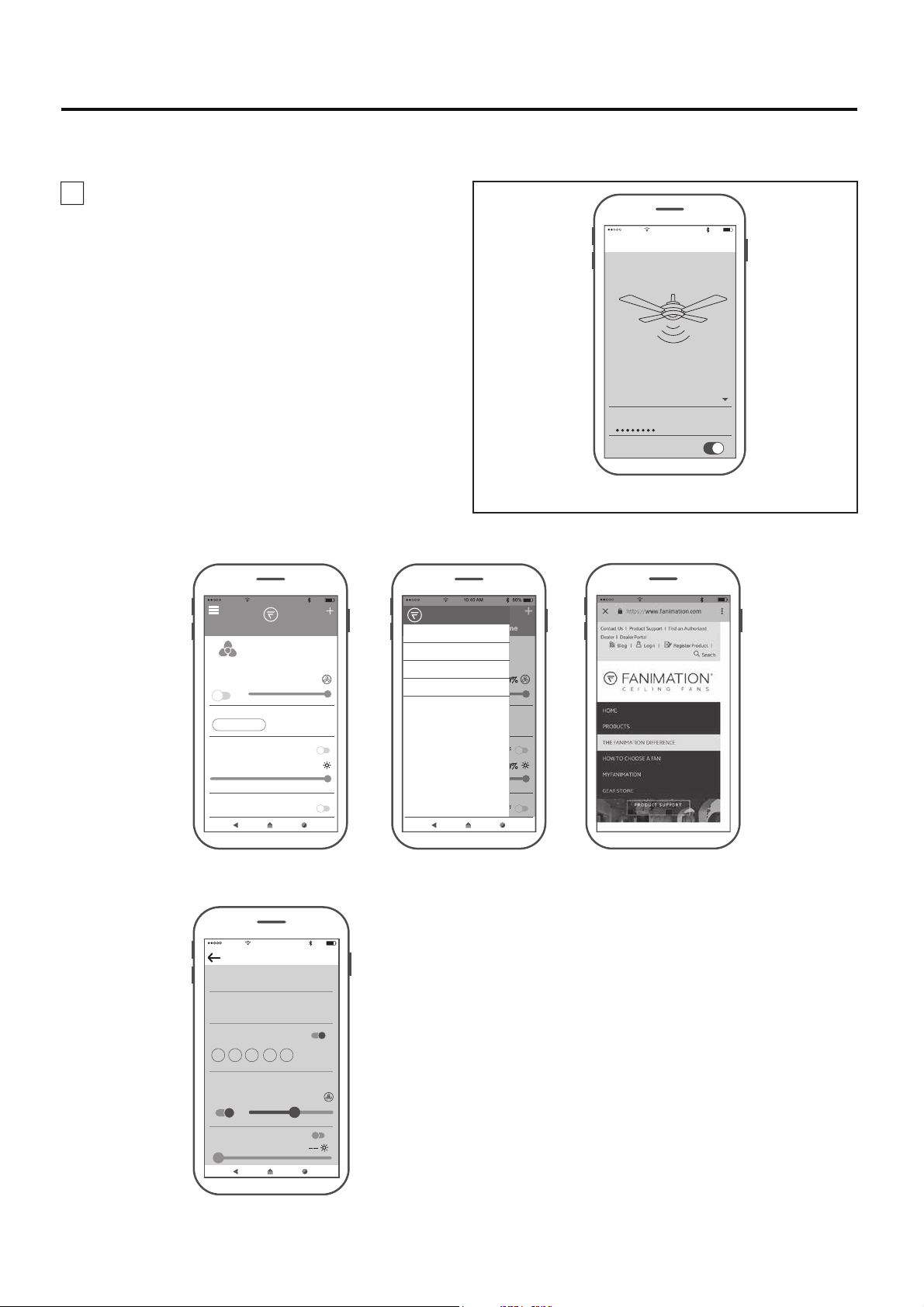
4. Select your WiFi router and enter the WiFi
password to connect your fanSync WiFi receiver.
It will take 1-2 minutes to connect. After your WiFi
receiver is connected, you can now name your
ceiling fan in the APP and customize your settings.
(Figure 4)
●
fanSync WiFi APP Overview
● Set up Real Time Schedule
Figure 4
10:40 AM
80%
Add Fainmation..
Enter your network settings below to
connect your device online.
SSID
PASSWORD
XXXXX
Remember my SSID and pa...
Set Up Wi-Fi Network
10:40 AM
80%
All
Home
OFF 100%
100%
Lounge
BREEZE MODE
LIGHT
OFF
NORMAL
FRESH AIR
OFF
HOME AWAY
HOME
MY GROUP
SETTINGS
SUPPORT
10:43 AM
80%
Edit Schedule
SCHEDULE NAME
START TIME END TIME
Work Days
8:00 PM 5:00 PM
REPEAT
ON
M T W TH F SA SU
Settings
ON
OFFLIGHT
51 %
10:42 AM
80%
How to Set Up the fanSync WiFi APP (Continued)
20
10:45 AM
80%
Settings
Lounge
EXTRA DEVICE CONTROLS !
FAMILY SHARING
Save
SHARE DEVICE
DEVICE NAME
HIDE FAN DIRECTION
HIDE LIGHT POWER
HIDE LIGHT DIMMER
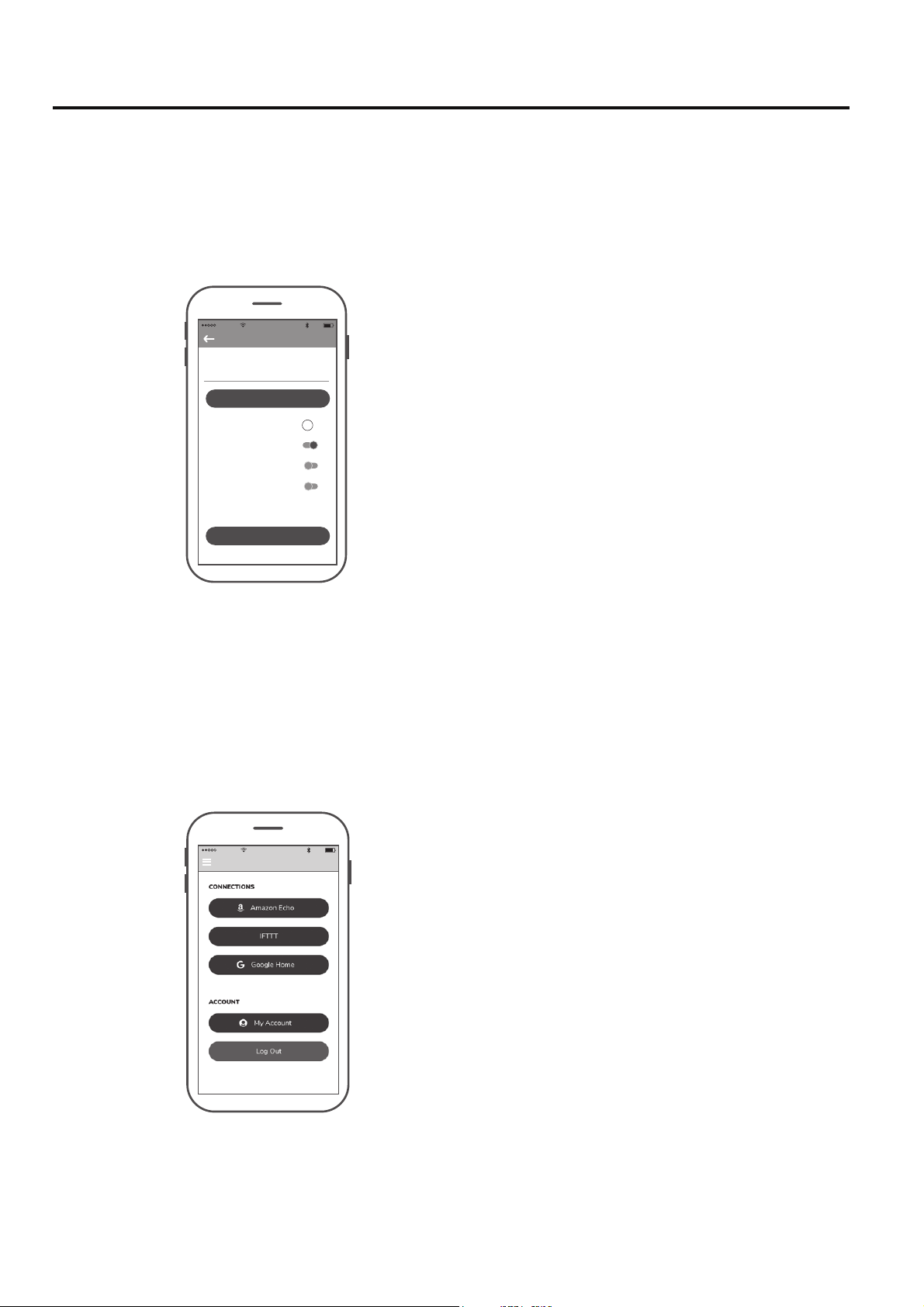
● Share Device
● Link with Amazon Echo, Google Home and IFTTT
10:46 AM
80%
Settings
Select the device you want to connect and follow the instructions in the set up procedure.
Amazon Alexa Help:https://www.amazon.com/gp/help/customer/display.html?nodeId=201749240
In order to connect with NEST, ECOBEE, Samsung Smart things, wink, etc. that you must connect via IFTTT.
IFTTT Help: https://help.ifttt.com/hc/en-us/articles/115010325748-What-is-IFTTT-
Google He: https://support.google.com/googlehome/answer/7073578?hl=en
After one smart device is connected to a fan,
you must share the device with other users in
order to control the fan with their device's APP.
How to Set Up the fanSync WiFi APP (Continued)
21
Maintenance
How to Clean Your Ceiling Fan Blades
Periodic light dusting of the blades is recommended.
A feather duster will work best.
Avoid using water, cleansers, or harsh rags, which can
warp and ruin the blades.
CAUTION
Do not use solvents when cleaning your ceiling fan. It
could damage the motor or the blades and create the
possibility of electrical shock.
Periodic cleaning of your new ceiling fan is the
only maintenance that is needed. When cleaning,
use only a soft brush or lint free cloth to avoid
scratching the finish. Abrasive cleaning agents
are not required and should be avoided to prevent
damage to finish.
How to Install Your Remote Control
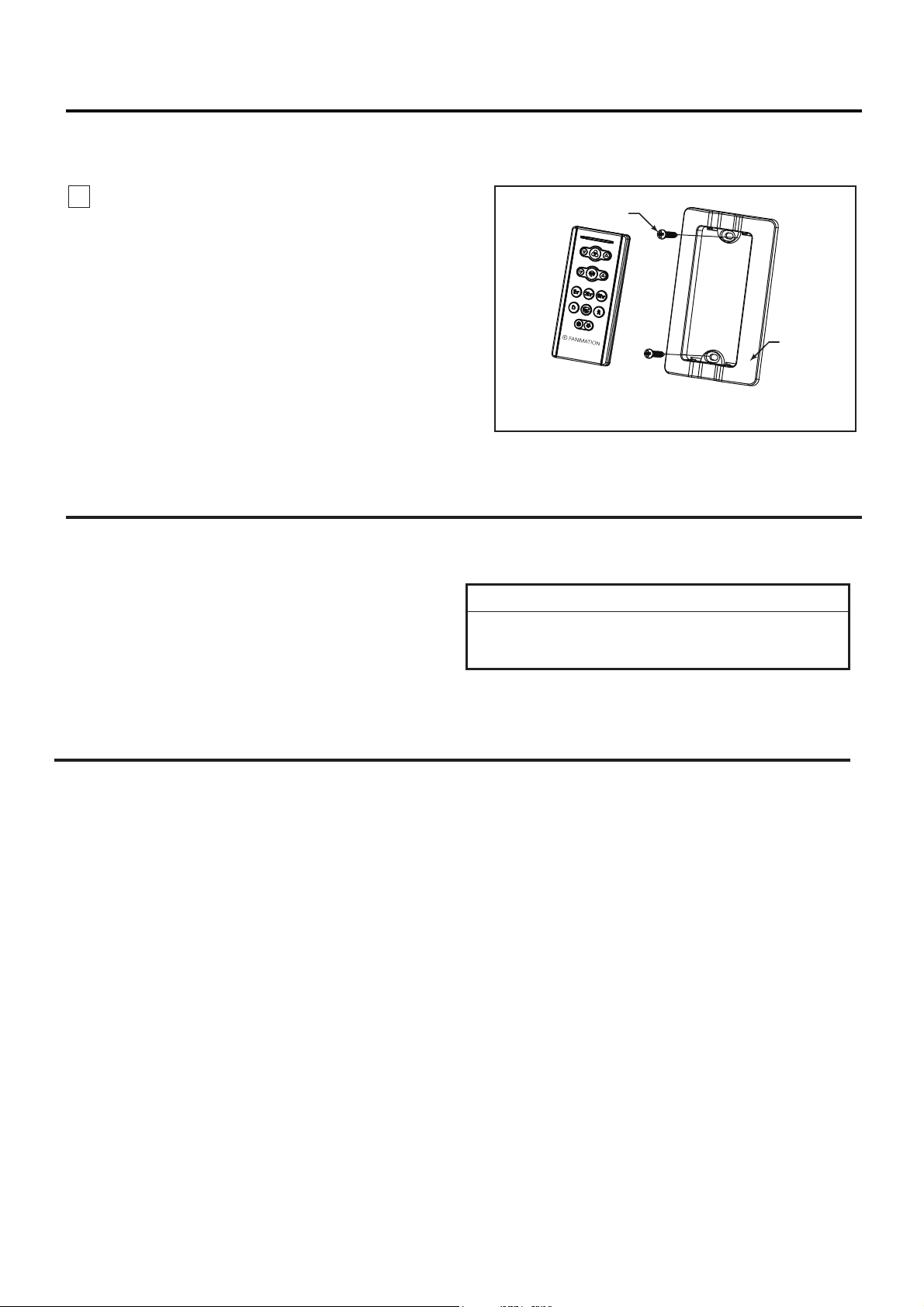
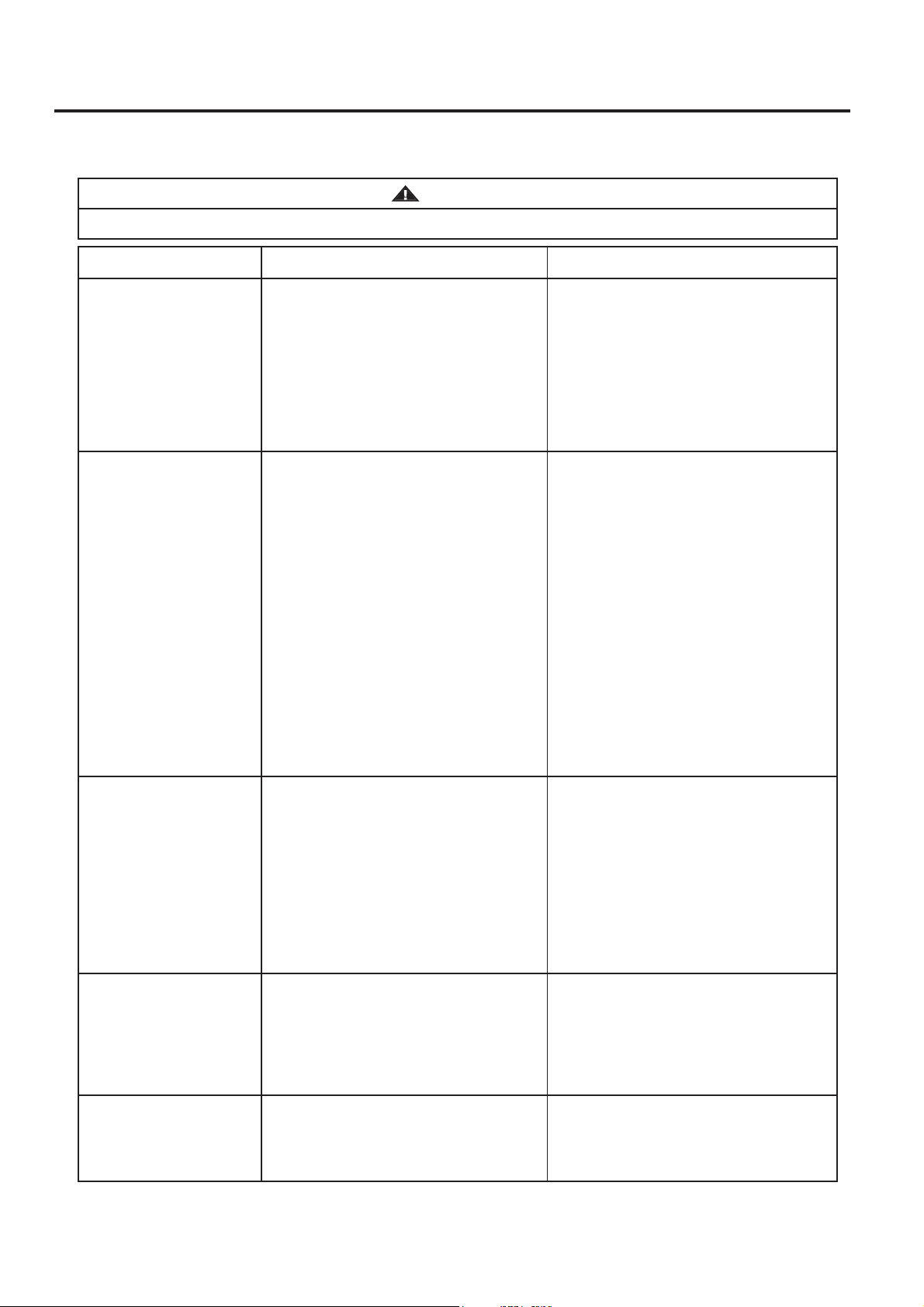
1. Installing Wall Plate: (Figure 1)
Attach wall plate using the two provided screws.
Figure 1
Screws (2)
Wall Plate
22
Troubleshooting
For your own safety turn off power at fuse box or circuit breaker before trouble shooting your fan.
WARNING
Trouble Probable Cause Suggested Remedy
1. FAN WILL
NOT START
1. Check main and branch circuit fuses
or circuit breakers.
2. Check line wire connections to fan
and switch wire connections in the
switch housings.
CAUTION: Make sure main power is
turned off !
1. Fuse or circuit breaker blown.
2. Loose power line connections to the
fan, or loose switch wire connections
in the switch housing.
2. FAN SOUNDS NOISY
3. FAN WOBBLES
EXCESSIVELY
1. Tighten both setscrews securely in
downrod support.
2. Tighten the setscrew in the downrod/
hanger ball assembly.
4. Tighten the hanger bracket screws to
the outlet box, and secure outlet box.
1. Setscrew in downrod support is
loose.
2. Setscrew in downrod/hanger ball
3. The groove hanger ball not lined up
with the tab.
3. Re-hanging the hanger ball secure
the tab into the groove.
assembly is loose.
4. Hanger bracket and/or ceiling outlet
box is not securely fastened.
5. NOT ENOUGH AIR
MOVEMENT
3. Dead battery in remote control. 3. Replace with new battery.
2. Check to make sure all screws in
1. Attach blades to fan before operating.
motor housing are snug (do not
overtighten).
3. Check to make sure wire connectors
in switch housing are not rattling
against each other or against the
interior wall of the switch housing.
CAUTION: Make sure main power is
turned off !
4. Some fan motors are sensitive to
signals from solid-state variable
speed controls. Solid-state controls
are not recommended, choose an
alternative control method.
2. Loose screws in motor housing.
1. Blades not attached to fan.
3. Wire connectors inside housing
rattling.
4. Motor noise caused by solid state
variable speed control.
1. If possible, consider using a longer
downrod (not included, you can buy
the longer downrod from
fanimation.com).
4. REMOTE CONTROL
DOES NOT WORK.
THE CONTROL
INDICATOR LED IS
CONSTANTLY
FLASHING.
1. The battery/batteries are going to
run out.
1. Please replace the battery/batteries.
Blade Plate (8 pcs)
23
2 Downrod/Hanger Ball Assembly
3 Ceiling Canopy
1 Hanger Bracket Assembly
Canopy Screw Cover Assembly4
Motor Coupler Cover Assembly5
Motor Assembly6
Light Kit/Glass Assembly7
LED Aassembly8
9
11
ADR1SS-12**
P799301**
AP255BL
AP260**
APPCP1404**
AMA7998**
AP799309**
AP799311
13
Ref.# Description Part#
Hardware Bag Containing:
HDWMAD7997**
Blade Mounting Hardware Bag Containing:
#10-24 Button Head Screw (33 pcs)
P799314
P799312**
TR205D
WFRCCD799800
Light Kit Wire Cover
12
Hand-held Remote
10
Steel Cap
revieceR
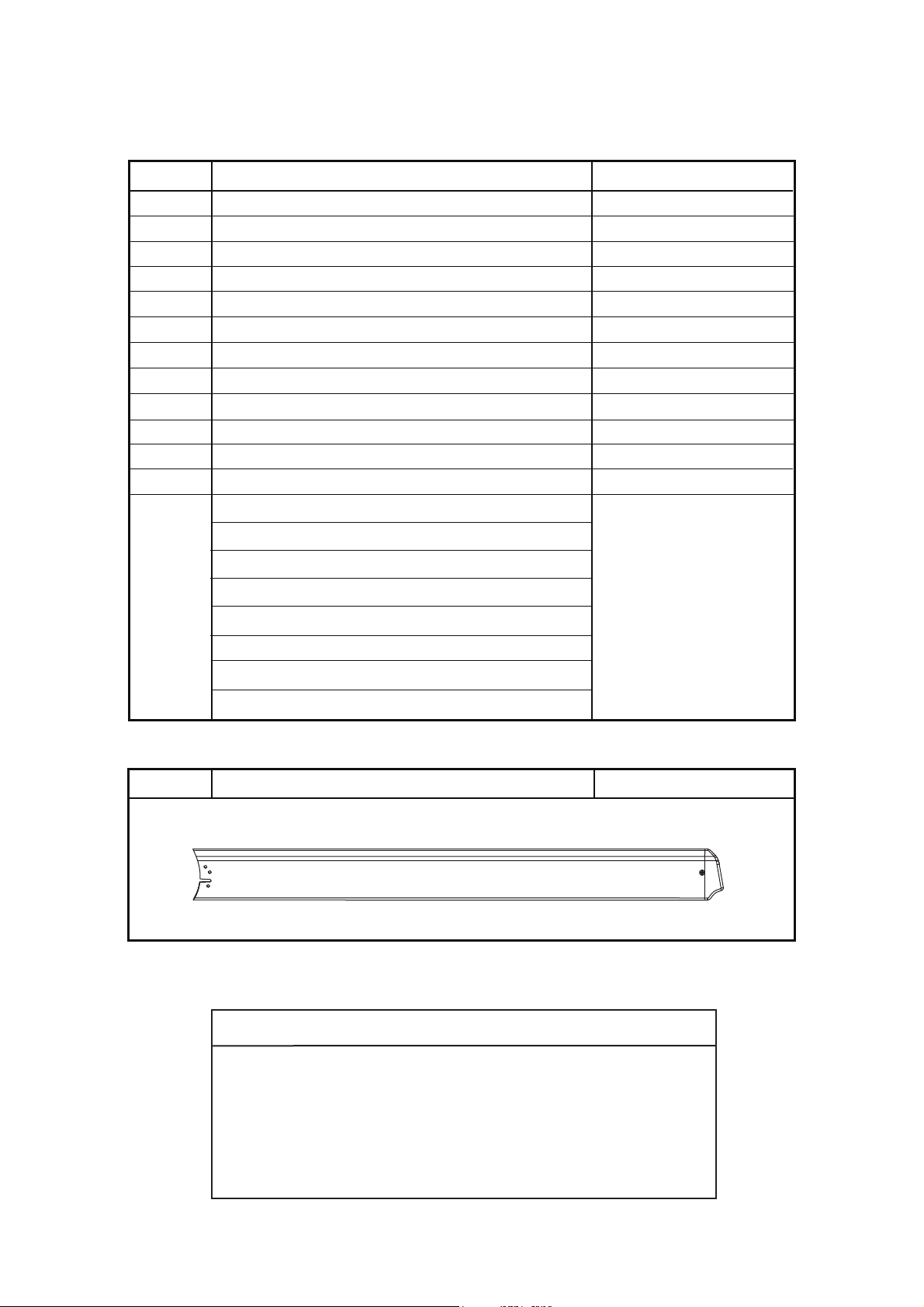
Fan Blades — Sold Separately
Blade Set1
B7998-96**
#8-32 Outlet Box Screws, Stainless Steel (2)
Flat Washer, Stainless Steel (2)
Parts List
Model #MAD7998**
Safety Cable Kit
Wire Connectors (4)
Before discarding packaging material, be certain all parts have been removed.
** Insert FINISH CODES (Refer to fan model number located on downrod support)
HOW TO ORDER REPAIR PARTS
When ordering repair parts, always give the following information:
Contact [email protected] or call 1.888.567.2055
for repair parts.
• Fan Model Number
• Part Number
• Part Description
• Date Code
24
1
2
3
4
5
6
7
10
13
13
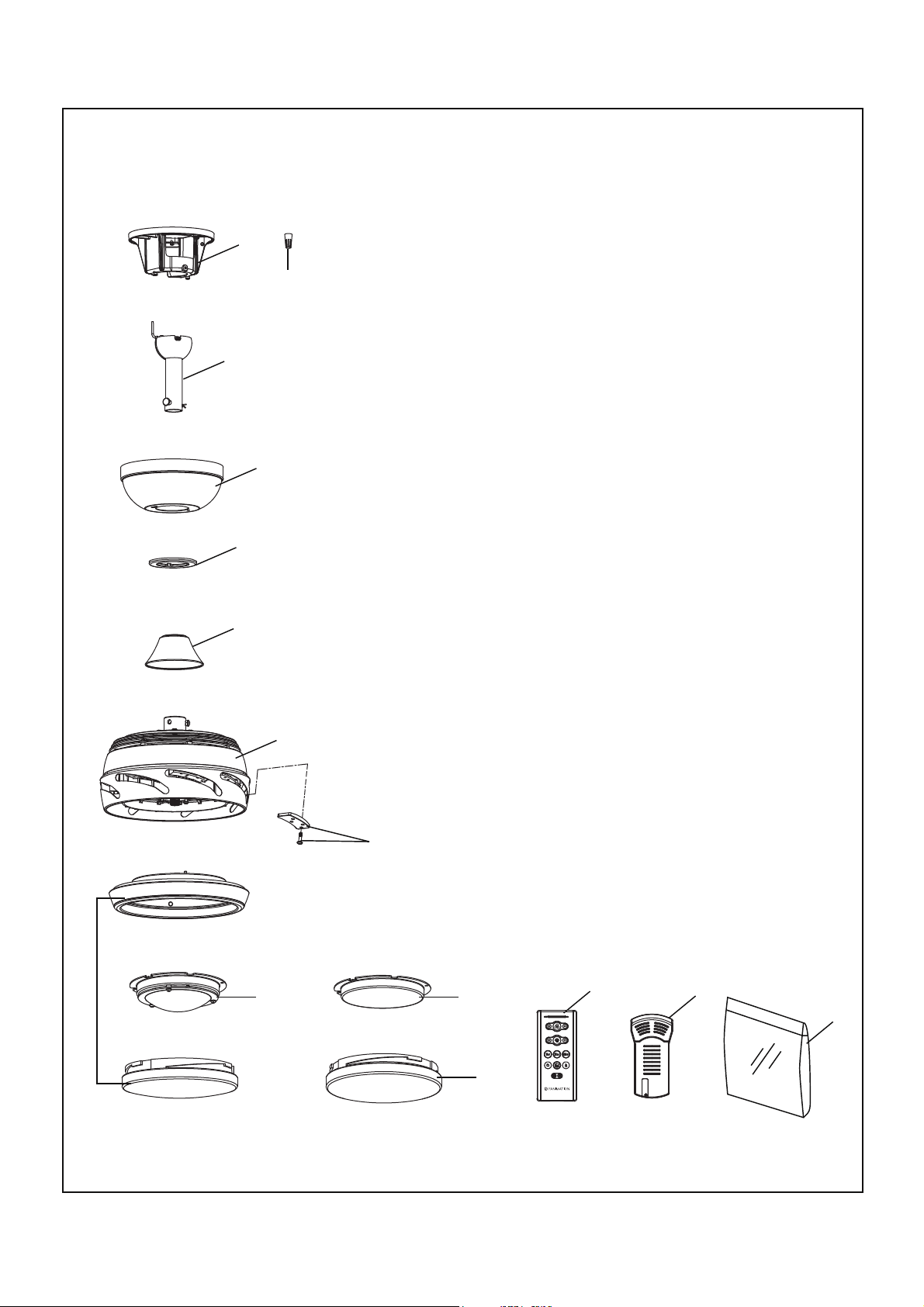
Model MAD7998**
Exploded-View Illustration
13
Stellar 96
™
11
12
NOTE: The illustration shown is not to scale or its actual configuration may vary.
9
8


2021/08 V.01
Copyright 2021 Fanimation
10983 Bennett Parkway
Zionsville, IN 46077
Phone: 888-567-2055
Outside U.S.: 317-733-4113
FANIMATION.COM
FAX: 866-482-5215
MODELO#MAD7998**
VENTILADOR DE TECHO STELLAR 96
™
Preguntas, problemas, piezas faltantes? Antes de volver a la tienda, llame a nuestro
Departamento de Servicio al Cliente al 1-888-567-2055, 8 a.m. - 5 pm, hora del Este, de
lunes - viernes.
Peso neto 8.57 kg (18.89 lbs)
Código de fecha
Fecha de compra
Para ofrecer un servicio rápido y de calidad, por favor suministre el código de fecha. Puede
encontrar el código de fecha en el paquete, en el mando a distancia (dentro del compartimento de
las pilas), en el receptor o en la parte superior de la carcasa del ventilador.
ADJUNTE SU RECIBO AQUÍ Y REGISTRE SU VENTILADOR EN FANIMATION.COM
LEA Y GUARDE ESTAS INSTRUCCIONES
ADVERTENCIA:
Instrucciones de seguridad importantes
ADVERTENCIA: Siga estas instrucciones para prevenir incendios, descargas eléctricas y lesiones personales graves.
Lea el manual del propietario y la información de seguridad antes de instalar su nuevo ventilador. Observe los diagramas de 1.
ensamblaje adjuntos.
Antes de llevar a cabo el mantenimiento o la limpieza de la unidad, desconecte la electricidad en el panel de servicio y bloquee los 2.
medios de desconexión del mismo para evitar que se active accidentalmente. Si no se pueden bloquear los medios de desconexión
del servicio, coloque un dispositivo de advertencia, como una etiqueta, en el panel de servicio.
Tenga cuidado con la estructura y las aspas del ventilador cuando limpie, pinte o trabaje cerca del mismo. Desconecte siempre la3.
electricidad del ventilador de techo antes de llevar a cabo el mantenimiento.
No coloque nada en las aspas del ventilador cuando éste se encuentra en funcionamiento.4.
Instrucciones de seguridad adicionales
Para evitar posibles descargas eléctricas, asegúrese de que la electricidad esté desconectada en la caja de fusibles antes de realizar1.
la instalación eléctrica, y no haga funcionar el ventilador sin las aspas.
Todos los procedimientos de conexión eléctrica e instalación deben cumplir con los Códigos eléctricos nacionales (ANSI/NFPA 2.
70) y Códigos locales. El ventilador de techo debe estar conectado a tierra a fin de prevenir posibles descargas eléctricas. La
instalación eléctrica debe ser llevada a cabo o aprobada por un electricista autorizado.
Se debe fijar bien la base del ventilador; ésta debe ser capaz de soportar sin problemas al menos 15,9 kg (35 lb). Consulte la página3.
32 del manual del propietario para ver los requisitos de soporte. Si tiene dudas, consulte a un electricista calificado.
Las aspas del ventilador deben instalarse por lo menos a 2,13 m (7 pies) del suelo, a fin de evitar un contacto accidental con las mismas.4.
Siga las recomendaciones sobre el método correcto de instalación eléctrica de su ventilador de techo. Si no posee la experiencia o 5.
los conocimientos eléctricos adecuados, contrate a un electricista autorizado para instalar el ventilador.
Apto para usar con controles de velocidad de estado sólido.6.
Este ventilador es ideal para lugares secos y húmedos.7.
PARA REDUCIR EL RIESGO DE DESCARGAS ELÉCTRICAS, ESTE VENTILADOR SE DEBE INSTALAR CON UN
CONTROL/INTERRUPTOR DE PARED AISLADO.
ADVERTENCIA: Este producto está diseñado para ser usado sólo con las piezas suministradas o los accesorios indicados
específicamente para el mismo. Si utiliza piezas o accesorios que no están indicados para su uso con este producto, podría
sufrir lesiones personales o dañar el ventilador.
ADVERTENCIA: Para reducir el riesgo de lesiones personales, no doble los soportes de las aspas (borde o soporte de aspas) al instalar
los soportes, balancear las aspas o limpiar el
ventilad
or. No coloque objetos extraños entre las aspas del ventilador en funcionamiento.
6. El dispositivo no ha sido diseñador para ser utilizado por niños o personas enfermas sin supervisión. Los niños deben ser supervisados
para asegurarse de que no juegan con el dispositivo.
8. En lo que respecta a las conexiones de suministro, si el conductor del ventilador está identificado como conductor con conexión a tierra,
se le debe conectar a un suministro de electricidad con conductor de puesta a tierra. Si el conductor del ventilador está identificado
como conductor que no es de puesta a tierra, se le debe conectar a un suministro de electricidad con conductor sin puesta a tierra.
Si el conductor del ventilador está identificado para equipos de puesta a tierra, se le debe conectar al conductor de equipos de puesta
a tierra.
No accione el conmutador inversor hasta que las aspas del ventilador se hayan detenido por completo.5.
ADVERTENCIA: No utilice este ventilador con un controlador variable de pared (Rheostat) o un regulador de intensidad. Si lo hiciera
podría dañar la unidad del mando a distancia del ventilador de techo.
AVERTISSEMENT: CE VENTILATEUR DOIT ÊTRE INSTALLÉ AVEC UNE COMMANDE/INTERRUPTEUR MURAL ISOLANT À
USAGE GÉNÉRAL AFIN DE RÉDUIRE LES RISQUES D'ÉLECTROCUTION.
AVERTISSEMENT: Ce produit est conçu pour utiliser uniquement les pièces l'accompagnant et/ou les accessoires spécifiquement
conçus pour ce produit. L'utilisation de pièces et/ou d'accessoires qui ne sont pas conçus pour être utilisés avec ce produit peut
provoquer des blessures ou des dommages matériels.
AVERTISSEMENT: Afin de réduire le risque de blessure, ne pliez pas le support de pale (bride ou porte-pale) lors de l'installation des
supports, de l'équilibrage des pales ou du nettoyage du ventilateur. N'insérez pas de corps étrangers entre les pales du ventilateur en
rotation.
AVERTISSEMENT: N'utilisez pas ce ventilateur avec un contrôleur mural (rhéostat) variable ou un gradateur. Cela pourrait endommager la
télécommande du ventilateur de plafond.
AVERTISSEMENT: Afin de réduire le risque d'incendie, de choc ou de blessure, le ventilateur de plafond, modèle Stellar 96 doit être installé
avec des pales de ventilateur en option indiquées en page 53, qui sont marquées sur leurs cartons pour indiquer la compatibilité avec ce modèle.
Les autres lames ne peuvent pas être remplacées.
ADVERTENCIA: Para reducir el riesgo de incendio, descarga eléctrica y lesiones personales, el ventilador de techo, modelo Stellar 96
debe instalarse con opcional las aspas del ventilador indicadas en la página 53, que están marcadas en sus cajas para indicar la
idoneidad con este modelo. Otras cuchillas no puede ser sustituido.
ADVERTENCIA: Peligro de quemadura química. Mantenga las pilas lejos del alcance de los niños.
9. El mando a distancia de este producto contiene una pilas de botón/pila de litio. Si la pila de botón/plana de litio nueva o usada se
ingiere o entrase en el cuerpo humano, puede causar severas quemaduras internas y puede causar la muerte en tan solo 2 horas.
Asegure siempre por completo el compartimento de la pila. Si el compartimento de la pila no está cerrado de forma segura, deje de
utilizar el mando a distancia del producto, extraiga las pilas y manténgalo alejado del alcance de los niños. Si piensa que las pilas
pueden haber sido tragadas o colocadas dentro de cualquier parte del cuerpo humano, busque asistencia médica inmediatamente.
- Las pilas planas deben ser desechadas adecuadamente, y siempre debe estar fuera del alcance de los niños.
- Las pilas planas también pueden causar heridas.
AVERTISSEMENT: Risque de brûlure chimique. Gardez les piles hors de portée des enfants.
ADVERTENCIA: Monte a una caja de salida aceptable para apoyo de los aficionados de 15.9 kg (35 lbs) o menos.
Instrucciones de seguridad adicionales
(1) Este equipo no causará interferencias perjudiciales y (2) este equipo tolerará cualquier interferencia recibida, incluidas las
interferencias que puedan provocar un funcionamiento no deseado. Las modifications que no estén aprobadas por la parte responsable
del cumplimiento podrían anular la autorización del usuario para utilizear el equipo.
Nota: Tras someterlo a las pruebas correspondientes, se ha determinado que este equipo cumple con los límites establecidos para
dispositivos digitales de Clase B de conformidad con la parte 15 de la Normativa FCC. Estos límites se han establecido con el objetivo
de aportar una protección razonable contra interferencias perjudiciales cuando el equipo se utiliza en el hogar. Este equipo genera,
utiliza y puede emitir energía de radiofrecuencia y, a menos que se instale y se utilice de acuerdo con el manual de instrucciones, puede
provocar interferencias perjudiciales en las comunicaciones por radio y televisión. Si el equipo produce interferencias perjudiciales en la
recepción de radio o televisión, lo cual puede probarse encendiendo y apagando el equipo, se recomienda al usuario corregir dichas
interferencias tomando una o varias de las siguientes medidas:
- Modificar la orientación o ubicación de la antena de recepción;
- Aumentar la separación entre el equipo y el receptor;
- Conectar el equipo a una toma de corriente o circuito diferente al del receptor;
Consulte al distribuidor o a un técnico especialista de radio o TV para obtener más ayuda.
1. GARANTÍA LIMITADA DE POR VIDA DEL MOTOR: si se produce una falla en alguna de las partes del motor de su ventilador debido
a un defecto en los materiales o en la fabricación durante el tiempo de vida del comprador original, Fanimation proporcionará la pieza de
repuesto sin cargo una vez que se devuelva el ventilador defectuoso a nuestro centro de servicios nacional. Se requiere comprobante de
venta. El cliente se hará responsable de todos los gastos de remoción o reinstalación y envío del producto para reparaciones o sustitución.
2. GARANTÍA DE MANO DE OBRA DEL MOTOR POR UN AÑO: si el motor de su ventilador falla antes de cumplirse un año a partir del
momento de su compra original debido a defectos en los materiales o en la fabricación, se efectuará la reparación del mismo sin cargo en
nuestro centro de servicios nacional. El comprador se hará responsable de los gastos de mano de obra luego del período de un año. El
cliente se hará responsable de todos los gastos de remoción o reinstalación y envío del producto para reparaciones o sustitución.
3. Si otra pieza del ventilador fallara dentro del período de un año a partir de la fecha de compra original debido a un defecto en los
materiales o en la fabricación, repararemos o sustituiremos, según creamos conveniente, la pieza defectuosa sin cargo alguno en
nuestro centro de servicios nacional. 4. Debido a las diversas condiciones climáticas, esta garantía no cubre cambios en el acabado,
incluidos oxidación, corrosión, falta de brillo o peladuras.
4. Debido a las diversas condiciones climáticas, esta garantía no cubre cambios en el acabado, incluidos oxidación, corrosión, falta
de brillo o peladuras.
5. Esta garantía es nula y no se aplica a daños por instalación incorrecta, negligencia, accidentes, uso indebido, exposición al calor o
a la humedad en exceso, o como resultado de cualquier modificación realizada al producto original.
6. Todos los gastos de remoción y reinstalación del ventilador son responsabilidad exclusiva del propietario, y no de la tienda que
vendió el ventilador o de Fanimation.
7. Fanimation se reserva el derecho de modificar o discontinuar un producto en cualquier momento, o sustituir cualquier pieza según
lo establecido por esta garantía.
8. Bajo ninguna circunstancia se podrá devolver un ventilador sin previa autorización por parte de Fanimation. Las devoluciones
autorizadas deberán ir acompañadas del recibo de venta y deberán enviarse a Fanimation, previo pago del flete. El ventilador que se
devuelve deberá estar embalado en forma adecuada a fin de evitar daños durante su transporte. Fanimation no se hará responsable
de los daños que resulten del mal empaquetamiento del producto.
9. Se entiende que las reparaciones y las sustituciones son el único recurso disponible de Fanimation. No existe ninguna garantía
expresa o implícita. Por la presente, Fanimation niega todas las garantías implícitas, que incluyen, entre otras, la comerciabilidad y la
aptitud para determinado fin hasta donde la ley lo permita. Algunos estados no permiten limitaciones sobre las garantías implícitas.
Fanimation no se hará responsable por daños accidentales, resultantes o especiales derivados del uso o el rendimiento del producto o
en conjunción con éste, excepto en los casos en los que la ley así lo disponga. Esta garantía le otorga derechos legales especiales y
es posible que también goce de otros derechos que pueden variar según el estado.
GARANTÍA LIMTADA DE POR VIDA
10. Es normal que se produzca un cierto movimiento oscilante y esto no debe considerarse un problema o defecto.
Se extiende al comprador original del ventilador Fanimation solo desde un distribuidor/minorista
autorizado de Fanimation
Este manual está diseñado para facilitar, en la medida de lo posible, el ensamblaje,
la instalación, el funcionamiento y el mantenimiento de su ventilador de techo
La caja de distribución eléctrica y los conectores de la caja
deben ser del tipo requerido por el código local. El cable más
pequeño debe ser un cable de tres conductores (de dos
conductores con conexión a tierra) del siguiente tamaño:
Materiales
longitud del cable instalado tamaño del cable según el A.W.G.
(Calibre de Alambre Estadounidense)
14
12
hasta 15,2 m (50 pies)
de 15,2 a 30,5 m (50 a 100 pies)
NOTA: coloque las piezas de las bolsas de piezas individuales
en un contenedor pequeño para evitar que se extravíen. Si faltan
piezas, póngase en contacto con su proveedor local.
Antes de ensamblar el ventilador de techo, consulte la
sección sobre el método correcto de instalación eléctrica del
ventilador (página 38). Si siente que no posee la experiencia
o los conocimientos eléctricos necesarios, contrate a un
electricista autorizado para instalar el ventilador.
▲
ADVERTENCIA
Reportez-vous à la section sur la méthode appropriée
de câblage du ventilateur (page 38) avant d'assembler
votre ventilateur de plafond. Faites installer votre
ventilateur par un électricien agréé si vous pensez que
vous n'avez pas assez de connaissances ou
d'expérience en câblage.
AVERTISSEMENT
Herramientas necesarias para
el ensamblaje (No incluido)
• Destornillador Phillips
• Escalera de tijera
•
• Pelacables
30
Tabla de contenidos
Instrucciones para el desempaque . . . . . . . . . . . . . . . . . . . . .
Uso eficiente de la energía en ventiladores de techo . . . . . .
Requisitos eléctricos y estructurales . . . . . . . . . . . . . . . . . . . .
Cómo ensamblar el ventilador de techo . . . . . . . . . . . . . . . . . .
Cómo colgar el ventilador de techo . . . . . . . . . . . . . . . . . . . . .
Cómo realizar la instalación eléctrica del ventilador de techo
Cómo instalar la carcasa de la cubierta . . . . . . . . . . . . . . . . . .
Cómo ensamblar las aspas del ventilador de techo . . . . . . . .
Cómo ensamblar su el kit de iluminación o la tapa. . . . . . . . .
31
32
32
34
36
38
41
42
43
Cómo utilizar su ventilador de techo . . . . . . . . . . . . . . . . . . .
Cómo Configuración de la App fanSync Wifi . . . . . . . . . . . .
Cómo instalar su mando a distancia. . . . . . . . . . . . . . . . . . .
Mantenimiento. . . . . . . . . . . . . . . . . . . . . . . . . . . . . . . . . . . . . .
Limpieza de las aspas. . . . . . . . . . . . . . . . . . . . . . . . . . . . . . .
Solución de problemas . . . . . . . . . . . . . . . . . . . . . . . . . . . . . .
Lista de piezas . . . . . . . . . . . . . . . . . . . . . . . . . . . . . . . . . . . . .
Pala de ventilador—Se compra por separado . . . . . . . . . . . .
Ilustración del despiece . . . . . . . . . . . . . . . . . . . . . . . . . . . . . .
45
48
51
51
51
52
53
53
54
31
Ensamble de la placa
de iluminación/vidrio (1)
Cubierta del cable del kit
de iluminación (1)
Unidad de luz LED (1)
Tapa de acero (1)
Unidad del motor (1)
Unidad del soporte
de suspensión (1)
Capuchón de techo (1)
Cubierta de unión del motor (1)
Cubierta para el tornillo
del capuchón (1)
Receptor (1)
Conectores de cables (9)
Mano a distancia (1)
Placa de la pared (1)
Tornillos (2)
Baterías (2)
Bolsas de accesorios
Kit de cable de seguridad
Tornillos para cajas de conexionesde
#8-32, acero inoxidable (2)
Arandela plana,
acero inoxidable (2)
Arandela plana,
acero inoxidable (1)
Tornillos de cabeza
de botón #10-24 (33)
Conectores
de cables (4)
Placa de pala (8)
Cable de soporte (1) Abrazadera del cable
de soporte (1)
Tornillo de intervalo (1)
1. Verifique que haya recibido las siguientes piezas:
NOTA: Si no está seguro de la descripción de una pieza, consulte la ilustración del despiece.
Instrucciones para el desempaque
Para su comodidad, marque cada uno de los pasos. A medida que completa cada paso, coloque una marca de verificación.
Con esto se asegurará de completar todos los pasos y podrá saber desde dónde retomar si fuera interrumpido.
ADVERTENCIA
No instale ni utilice el ventilador si falta alguna pieza o si
hay piezas dañadas. Este producto está diseñado para ser
utilizado sólo con las piezas suministradas o los
accesorios indicados por Fanimation específicamente
para el mismo. La sustitución de piezas o accesorios que
Fanimation no designó para usar con este producto
podría ocasionar lesiones personales o daños en el
ventilador. Póngase en contacto con su tienda si faltan
piezas o hay piezas dañadas.
AVERTISSEMENT
N'i nstallez pas et n'utilisez pas le ventilateur si l'une de
ses pièces est endommagée ou manquante. Ce produit
est conçu pour utiliser uniquement les pièces l'accompag-
nant et/ou les accessoires spécifiquement conçus pour ce
produit par Fanimation. La substitution de pièces ou
d'accessoires non conçus par Fanimation pour être
utilisés avec ce produit peut provoquer des bless-ures ou
des dommages matériels. Contactez votre lieu de vente en
cas de pièces manquantes ou endommagées.
Unidad del barral/
de la semiesfera (1)
- Bola para colgar (1)
- Varilla (1)
- Tornillo de fijación (1)
- Pasador (1)
- Clip de horquilla (1)
- Pasador de horquilla (1)
Requisitos eléctricos y estructurales
Su nuevo ventilador de techo requiere una línea de
suministro eléctrico con conexión a tierra de 120 voltios de
CA, 60 Hz, circuito de 15 amperios. La normativa eléctrica
requiere el uso de una caja de distribución eléctrica para
ventiladores que soporte el peso extra y el movimiento
asociado a un ventilador de techo. La caja de distribución
eléctrica será etiquetada como tal y soportará un ventilador
de techo de un peso de hasta 70 libras. Dichas cajas varían
en tipos y diseños. Asegúrese d que el tipo de su caja reúne
los criterios para el ventilador que se está instalando. Las
ilustraciones 1, 2 y 3 muestran las diferentes configuraciones
estructurales que pueden ser utilizadas para dicha caja de
distribución eléctrica.
Uso de perfil bajo (Figura 1)
La caja lisa de 1/2 pulgada de profundidad será atornillada a
una viga o bloque. Se utilizará si solo un cable va a ser
introducido en la caja. También está disponible en una
configuración de montaje endosado.
2" x 4"
Figura 1
Figura 2
2" x 4"
Uso de perfil profundo (Figura 2)
La caja de 2-1/4 pulgada será atornillada a un bloque entre
vigas que tenga suficiente espacio para colocar más de un
cable.
El nivel de rendimiento y ahorro de energía de los
ventiladoresdetechodependendesucorrectainstalación
yuso.Acontinuaciónlepresentamosalgunassugerencias
para asegurar un rendimiento eficiente del producto.
Apague el ventilador cuando no se encuentre en la
habitación
Los ventiladores son para refrescar a la gente, no a
las habitaciones. Si la habitación está vacía, apague el
ventilador de techo para ahorrar energía.
Uso del ventilador de techo todo el año
En verano: Use el ventilador de techo en sentido contrario a
las agujas del reloj. El flujo de aire que produce el ventilador
crearáunefectofríodelairequelorefrescarámás.Seleccione
una velocidad que le proporcione una brisa confortable. Las
velocidades más bajas consumen menos energía.
En invierno: Inviertael motor y haga funcionar el ventilador
de techo a velocidad baja y en el sentido de las agujas
del reloj. Esto produce una suave corriente ascendente,
que obliga al aire cálido que se acumula cerca del techo a
bajar al espacio ocupado. No olvide ajustar el termostato
cuando utilice el ventilador de techo. Con este sencillo
paso puede ahorrar energía adicional y dinero.
Techo
Techo
Vigas del
techo
Vigas del
techo
Caja de distribución
eléctrica
Caja de distribución
eléctrica
32
Selección del lugar de montaje adecuado
Los ventiladores de techo se deben instalar en el centro
de la habitación, a 2,13 m (7 pies) de altura del piso hasta
la cuchilla como mínimo y 0,5m (18 pulgadas) de las
paredes hasta la cuchilla. Si la altura del techo lo permite,
instale el ventilador a 2,5m (8-9 pies) de altura del piso
hasta la cuchilla para un flujo de aire óptimo. Consulte en
su tienda minorista de Fanimation para obtener
accesorios de montaje opcionales.
Uso eficiente de la energía en ventiladores de techo
Requisitos eléctricos y estructurales (cont.)
33
Uso del soporte (Figura 3)
Conectado a una caja de distribución eléctrica, este
colgador sirve para abarcar el espacio entre dos vigas y
ocupar el lugar de bloqueo de la madera.
Si su ventilador va a sustituir una instalación de
iluminación existente, desconecte la electricidad de la caja
del fusible principal en esta ocasión y extraiga la unidad
de iluminación.
Figura 3
Vigas del techo
Techo
Caja de
distribución
eléctrica
ADVERTENCIA
Para reducir el riesgo de incendios, descargas eléctricas
o lesiones personales, fije el ventilador a la caja de
distribución eléctrica marcada como aceptable para soporte
de ventilador de 15,88kg (35lb). Utilice los tornillos
suministrados con la caja de distribución eléctrica. La
mayoría de las cajas de distribución eléctricas que
comúnmente se utilizan como soporte de lámparas no son
aptas para soporte de ventiladores y es posible que deban
reemplazarse. Consulte a un electricista calificado si tiene
dudas.
ADVERTENCIA
Apagar el interruptor de pared no es suficiente. Para evitar
posibles descargas eléctricas, asegúrese de que la
electricidad esté desconectada en la caja de fusibles
principal antes de realizar la instalación eléctrica. Toda
instalación eléctrica debe cumplir con los códigos
nacionales y locales y el ventilador de techo debe tener la
conexión a tierra adecuada como forma de precaución ante
posibles descargas eléctricas.
ADVERTENCIA
A fin de evitar incendios o descargas eléctricas, siga
con cuidado todas las instrucciones de instalación
eléctrica. Cualquier trabajo eléctrico que no se describa
en estas instrucciones deberá ser realizado o aprobado
por un electricista autorizado.
Respectez attentivement toutes les instructions de
câblage pour éviter tout incendie ou électrocution.
Tout travail électrique non décrit dans ces instructions
doit être fait ou approuvé par un électricien agréé.
AVERTISSEMENT
Pour réduire le risque d'incendie, d'électrocution ou de
blessure, montez sur une boîte de sortie indiquée comme
étant acceptable pour supporter un ventilateur. La plupart
des boîtes de sortie communément utilisées pour supporter
les luminaires ne sont pas acceptables pour supporter des
ventilateurs et devraient être remplacées. Consultez un
électricien qualifié en cas de doutes.
AVERTISSEMENT
Éteindre l'interrupteur mural ne suffit pas. Pour éviter tout
risque d'électrocution, assurez-vous que l'alimentation
électrique est coupée au niveau du boîtier à fusibles
principal avant d'effectuer le câblage. Le câblage doit être
entièrement conforme aux codes nationaux et locaux, et le
ventilateur de plafond doit être correctement mis à la terre
par mesure de précaution contre les risques d'électrocution.
AVERTISSEMENT
ADVERTENCIA
No utilice este ventilador con un controlador variable de
pared (Rheostat) o un regulador de intensidad. Si lo
hiciera podría dañar la unidad del mando a distancia del
ventilador de techo.
N'utilisez pas ce ventilateur avec un contrôleur mural
(rhéostat) variable ou un gradateur. Cela pourrait
endommager la télécommande du ventilateur de
plafond.
AVERTISSEMENT
2. Retire el clip de horquilla y pasador de horquilla
de la parte inferior de la bola para colgar. Retener el
pasador y clip para la reinstalación en el paso 4.
(Figura 2)
1. Extraiga la pieza de la bola colgante de la unidad
de la bola colgante / varilla aflojando el tornillo de
presión de la bola colgante hasta que la bola se
libere de la varilla. Retire el pasador del barral y
luego extraiga la semiesfera. Conserve el pasador
y la semiesfera para su reinstalación en el Paso 6.
(Figura 1)
Cómo ensamblar el ventilador de techo
Figura 1
Figura 2
Figura 3
Figura 4
Ranura de la
bola colgante
Pasador
Tornillo
de fijación
Pasador de
horquilla
Tornillo de
fijación (2)
Bola para colgar
Pasador de
horquilla
Clip de horquilla
Clip de
horquilla
34
ADVERTENCIA
Il est crucial que l'axe à épaulement dans le support de
la tige de suspension descendante soit correctement
installé. Le ventilateur risque de tomber si vous ne
vérifiez pas que l'axe et la pince de retenue sont
correctement installés.
AVERTISSEMENT
Es fundamental que instale correctamente el
pasadorde horquilla en el soporte de la varilla, y que
ajustefirmemente los tornillos de fijación y las
tuercas. El incumplimiento de dicho paso podría hacer
que el ventilador se caiga.
Barral de soporte
Tornillo de
fijación (2)
3. Afloje los dos tornillos de fijación del soporte del
barral de soporte para techo a través de la varilla.
Lntroduzca los cables de color marrón, azul, rojo,
gris, amarillo cables y cable de seguridad a través
de la varilla. (Figura 3)
Marrón, Azul, Rojo, Gris,
Amarillo cables y
cable de seguridad
4. Coloque el soporte de la varilla y alinee los
orificios de la clavija de horquilla en ambas piezas.
Instale la clavija de horquilla y asegúrela con la pinza
de horquilla. Instale los set de tornillos con tuercas
en el soporte de la varilla. Fije con seguridad el set
de tornillos con el destornillador y luego fije bien las
tuercas con una llave hexagonal. (Figura 4)
8. Extraiga una de los tornillos de hombro en el soporte
del gancho y guarde los tornillos para pasos posteriores.
Afloje el segundo tornillo de hombro sin extraiga
completamente. (Figura 8)
Unidad del soporte
de suspensión
Figura 8
15,24 cm a
22,86 cm
Figura 5
Cómo ensamblar el ventilador de techo (cont.)
7. Corte el exceso de cable aproximadamente de 15
a 23 cm (6 a 9 pulgadas) por encima de la parte
superior del barral. Pele 1,2 cm (½˝) del aislamiento
en cada extremo del cable. (Figura 7)
Figura 7
5. Pase los cables y cable de seguridad a través de
la cubierta de unión del motor, la cubierta para el
tornillo del capuchón y el capuchón con el lado abierto
apuntando hacia arriba. (Figura 5)
Capuchón
de techo
Cubierta de
unión del motor
Cubierta del
tornillo de la base
Figura 6
35
6. Vuelva a colocar la semiesfera en el barral como se
indica a continuación. Pase los cables de marrón,
azul, rojo, gris, amarillo y cable de soporte para techo
a través de la semiesfera. Pase el pasador a través de
los dos orificios en el barral y alinee la semiesfera de
modo que el pasador quede atrapado en la ranura de
la parte superior de la misma. Empuje la semiesfera
hacia arriba, bien ajustada contra el pasador. Ajuste
firmemente el tornillo de fijación en la semiesfera. Si el
tornillo de fijación está flojo, podría provocar
oscilación del ventilador. (Figura 6)
PRECAUCIÓN
Se deben revisar todos los tornillos de fijación y
volver a ajustarlos cuando sea necesario antes de
realizar la instalación.
Toutes les vis de réglage doivent être vérifiées et
resserrées nécessaire avant l'installation.
ATTENTION
Cómo colgar el ventilador de techo
Figura 1
Figura 2
EI Techo
EI Piso
No
menos de
2,13 m
NOTA: Si no está seguro de si la caja de salida tiene
conexión a tierra, pida consejo a un electricista
certificado, ya que debe tener conexión a tierra para
un funcionamiento seguro.
ADVERTENCIA
Para evitar una posible descarga eléctrica, asegúrese
de cortar la alimentación eléctrica de la caja de
fusiblesprincipal antes de colgar el ventilador.
(Figura 1)
AVERTISSEMENT
Assurez-vous que l'alimentation électrique est coupée
au niveau du boîtier à fusibles principal avant de
suspendre le ventilateur afin d'éviter tout risque
d'électrocution. (Figure 1)
ADVERTENCIA
La caja de distribución eléctrica de be estar bien
asegurada y debe ser capaz de soportar una carga de al
menos 15.9kg (35lb). El soporte de suspensión debe
estar colocado firmemente contra la caja de distribución
eléctrica. Si la cajade distribución eléctrica está
empotrada, retire la tablaroca hasta que el soporte haga
contacto con la caja.Si elsoporte o la caja de
distribución eléctrica no están bien asegurados, el
ventilador podría oscilar o caerse.
AVERTISSEMENT
La boîte de sortie doit être solidement ancrée et
acceptable pour supporter un ventilateur de 15,9 kg (35
livres) au moins. Le support de suspension doit reposer
fermement contre la boîte de sortie. Si la boîte de sortie
est encastrée, retirez le panneau de revêtement jusqu'à
ce que le support entre en contact avec la boîte. Si le
support et/ou la boîte ne sont pas solidement attachés,
le ventilateur risque d'osciller ou même de tomber.
AVERTISSEMENT
Le ventilateur doit être accroché de façon à ce que ses
pales soient au moins à 7 pieds. (Figure 2)
ADVERTENCIA
Debe colgar el ventilador a una distancia mínima de
2,13 m desde las aspas hasta el piso. (Figura 2)
PRECAUCIÓN
No conecte las aspas hasta que el ventilador esté
totalmente instalado. Instalar el ventilador con las
aspas colocadas podría ocasionar daños en las
mismas.
ATTENTION
Ne raccordez pas les pales du ventilateur tant que le
ventilateur n'est pas complètement installé.
Suspendre un ventilateur avec des lames raccordées
peut endommager les pales du ventilateur.
Principal Caja
De Fusibles
36
1. Perfore un orificio de 1/4” en la estructura del
edificio para evitar grietas con la instalación del tornillo
de intervalo. Utilice el tornillo de intervalo de 3/8”x 2” y
la arandela plana para fijar el cable de seguridad a la
viga del techo o a la estructura de madera. Dicho
tornillo pasará a través de arandela plana, la presilla
del cable de seguridad y se fijará en la estructura del
edificio. (Figura 3)
2. Fije adecuadamente el soporte colgante a la caja
de empalme del techo que sea aceptable para el
soporte del techo.
NOTA: el cable de soporte para techo no se puede
asegurar solamente a la caja de conexiones; se debe
asegurar directamente a la viga de techo o miembro
estructural con el tornillo de cabeza cuadrada de
3/8"x2" y la arandela plana. (Figura 3)
Figura 3
Viga del techo
Soporte de
suspensión
Techo
Caja de
conexiones
Cable de soporte
para techo
Miembro de madera (5 x 10 cm
[2”x 4”] aprox.)
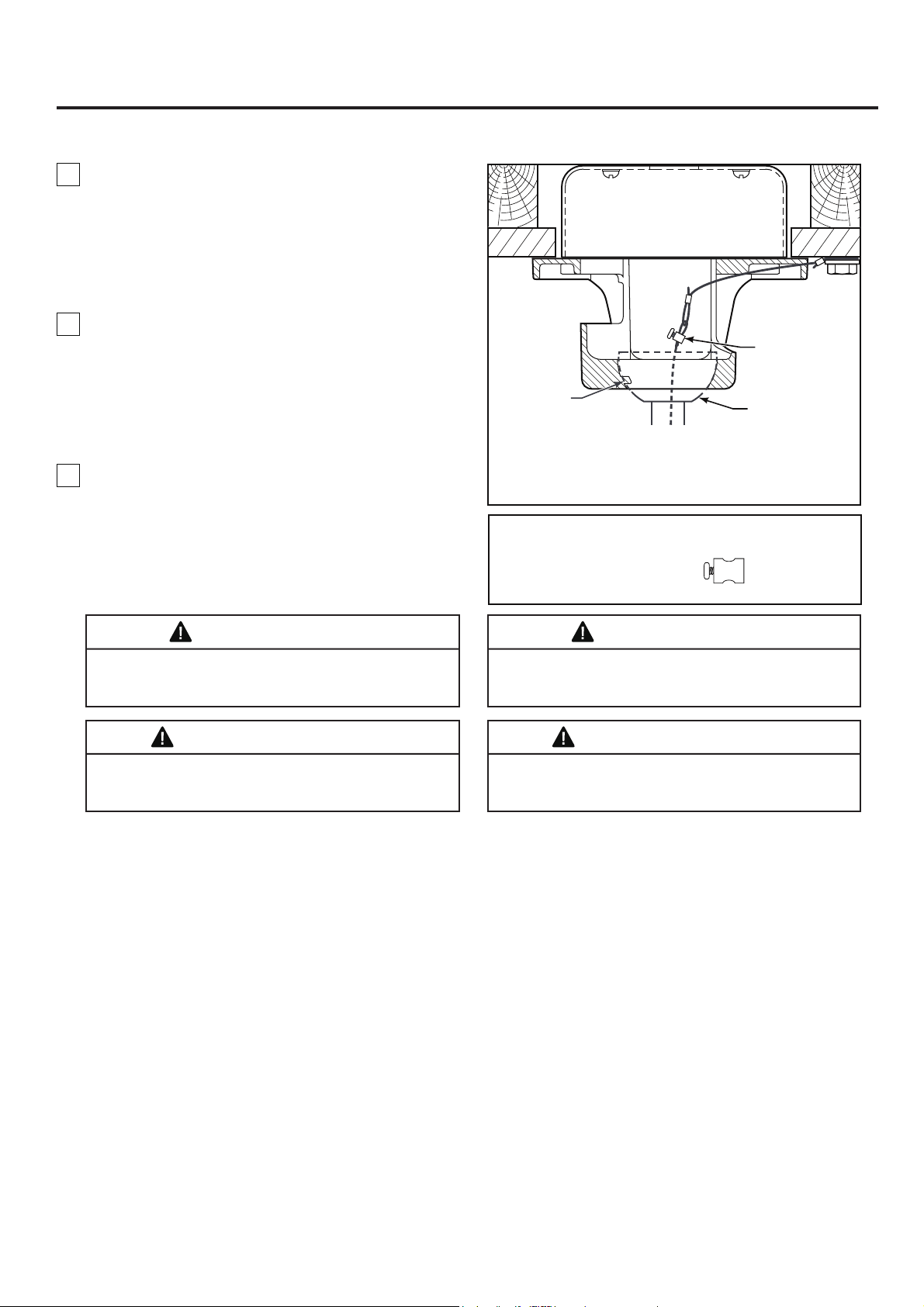
Cómo colgar el ventilador de techo (cont.)
37
Figura 4
Fije el cable de
seguridad al
cable de soporte
para techo
Unidad del barral/
de la semiesfera
Pestaña
NOTA: se omiten los cables de
suministro y los cables del
ventilador para mayor claridad.
4. Levante cuidadosamente el ventilador y coloque el
ensamble de la bola para colgar/varilla en la
abrazadera para colgar que acaba de fijar a la caja de
salida. Asegúrese de que la ranura de la bola esté
alineada con la lengüeta de la abrazadera para
colgar. (Figura 4)
3. Asegúrese de que los cables de suministro
eléctrico, incluido el cable de conexión a tierra del
soporte de suspensión y el cable de seguridad, hayan
atravesado el barral, entre el soporte de suspensión y
la caja de conexiones, de modo que más tarde se
pueda realizar la instalación eléctrica.
Ne pincez pas les fils entre la tige de suspension
descendante et le support de suspension éviter toute
électrocution.
AVERTISSEMENT
ADVERTENCIA
Si no coloca la lengüeta en la ranura, podrían dañarse
los cables eléctricos y podrían ocurrir ncendios o
descargas eléctricas.
5. Fije el cable de seguridad al cable de soporte para
techo. Deslice la abrazadera de cables por el cable de
seguridad (del ventilador). Pase el
extremo
del
cable
a
través del aro que forma el cable de soporte para
techo. Tire lo más posible del cable a través del aro.
Inserte el extremo del cable en el orificio de la
abrazadera y ajuste firmemente el tornillo. (Figura 4)
ADVERTENCIA
Para evitar una posible descarga eléctrica, no apriete
los cables entre el ensamble de la bola para colgar y la
abrazadera para colgar.
Si vous n'installez pas la languette dans la rainure, vous
risquez d'endommager les fils électriques et de causer
éventuellement une décharge électrique ou un incendie.
AVERTISSEMENT
Aditamentos utilizados:
x 1
Abrazadera Del Cable
De Soporte Del Techo
Con Tornillo
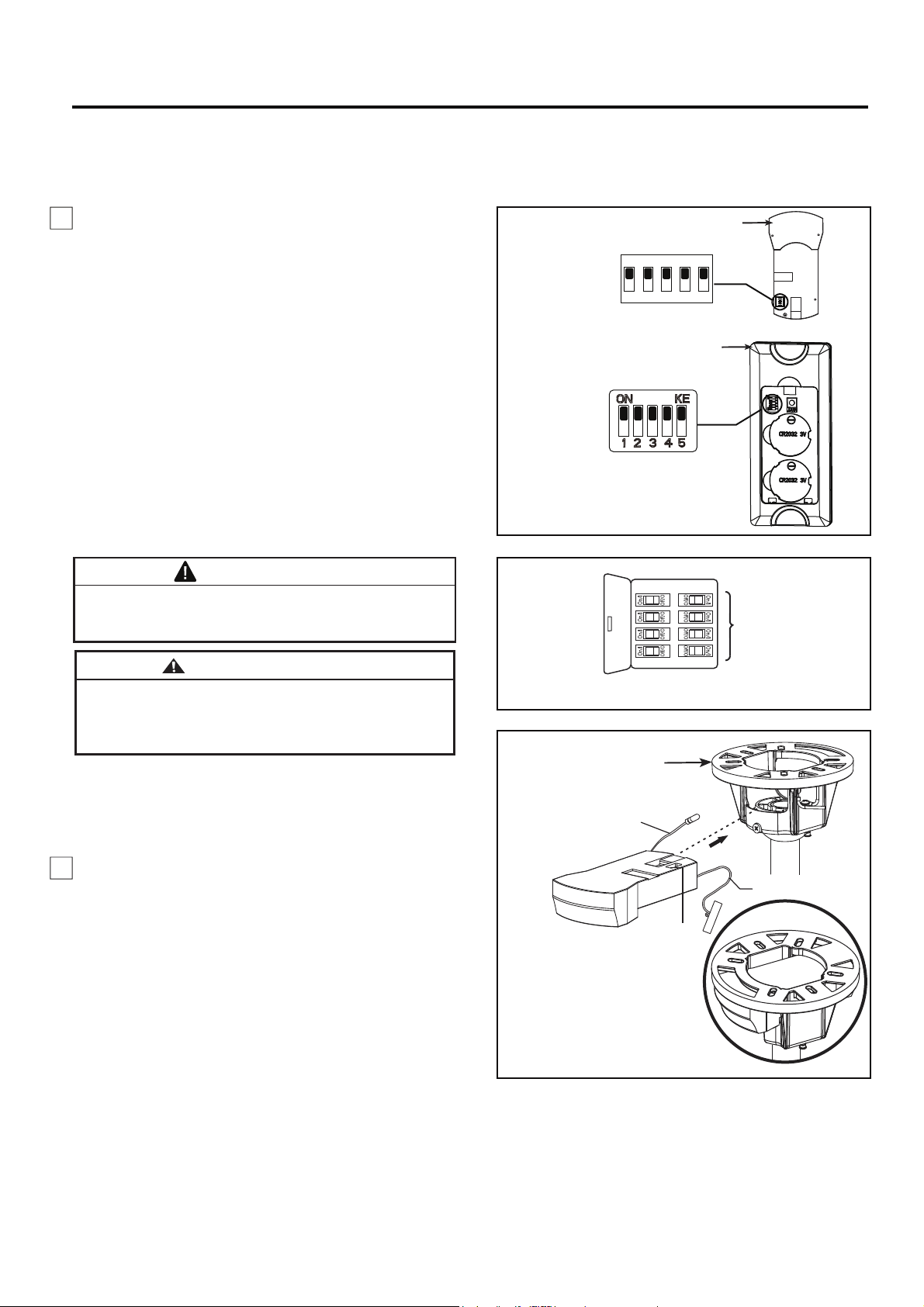
1. Para configurar el código de unidad del receptor.
Deslice los interruptores de código a las mismas
posiciones que en el transmisor. (Figura 1)
NOTA: Los ajustes de fábricas vienen con todos los
interruptores hacia arriba. No utilice esta posición.
NOTA: El mando a distancia incluido en este ventilador
tiene 32 combinaciones diferentes de códigos. Para
evitar posibles interferencias desde o hacia otros
mandos a distancia, modifique el código de combinación
de su transmisor y receptor.
NOTA: Si los cables de suministro o del ventilador son de colores diferentes que los indicados, contrate a un electricista
calificado para que realice la instalación.
Figura 2
PRINCIPAL CAJA
DE FUSIBLES
Cómo realizar la instalación eléctrica del ventilador de techo
2. Deslice el receptor en el soporte de suspensión
antes de realizar el cableado como se muestra
en la figura 3.
Para evitar una posible descarga eléctrica, asegúrese de
cortar la alimentación eléctrica de la caja de fusibles
principal antes de alambrado el ventilador. (Figura 2)
Pour éviter tout risque d'électrocution, assurez-vous
que l'alimentation électrique est coupée au niveau du
boîtier à fusibles principal avant d'effectuer le câblage.
(Figure 2)
AVERTISSEMENT
ADVERTENCIA
NOTA:
Si no está seguro de si la caja de salida tiene
conexión a tierra, pida consejo a un electricista certificado,
ya que debe tener conexión a tierra para un funcionamiento
seguro.
38
Figura 3
Interruptores
Soporte del colgador
NOTA: Se omiten los cables del
suministro eléctrico y del
ventilador por claridad.
ANTENA RF
(Dejar conectado
y no cortar)
ANTENA WIFI
Receptor
Interruptores
Interruptores
Mando a distancia
Figura 1
ON
1 2 3 4 5
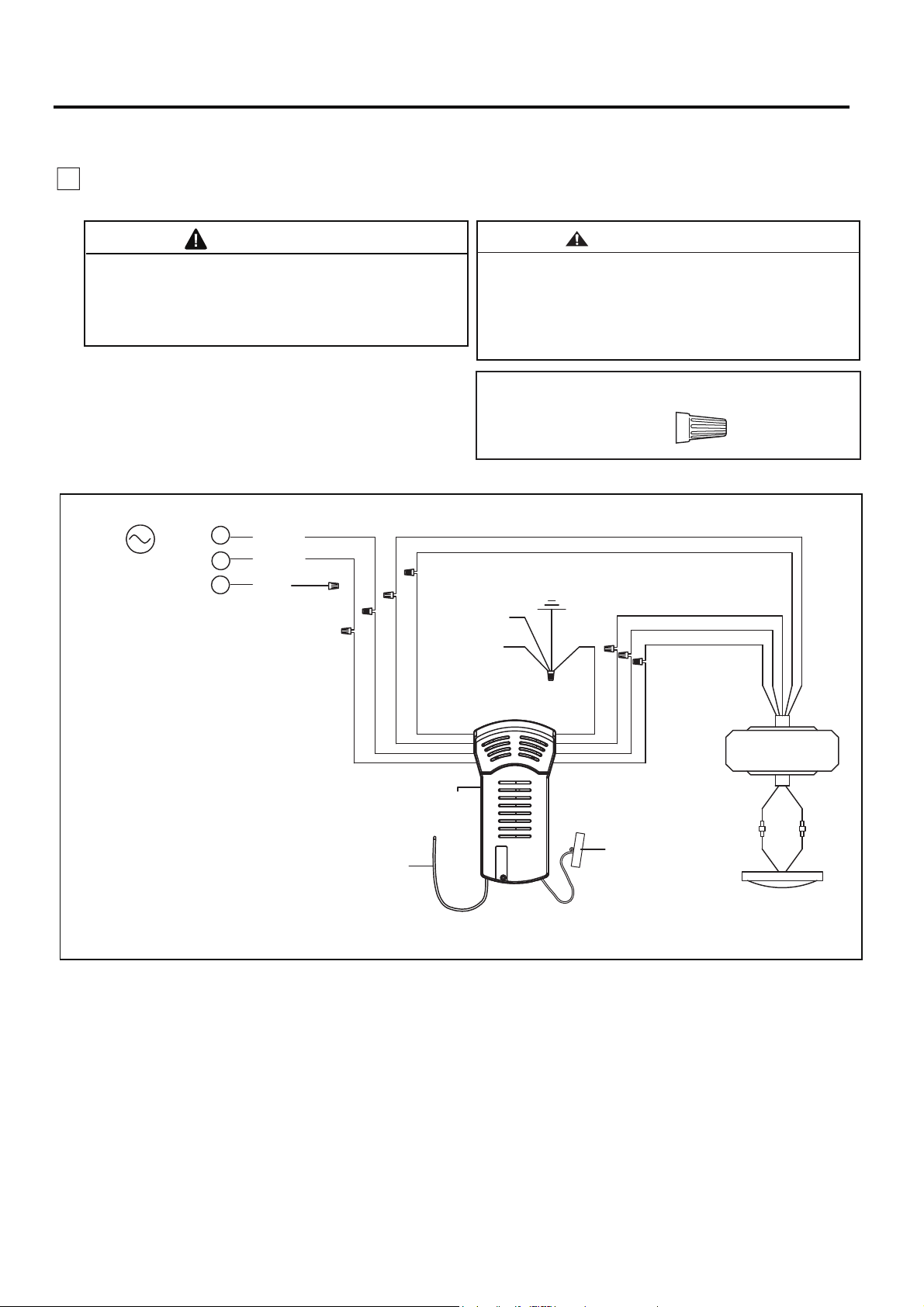
Cómo realizar la instalación eléctrica del ventilador de techo (cont.)
39
PRECAUCIÓN: UNA CONEXIÓN INCORRECTA
DEL CABLE PODRÍA DAÑAR ESTE RECEPTOR.
ATTENTION: UNE CONNEXION DE FIL
INCORRECTE PEUT ENDOMMAGER CE
RECEPTEUR.
3. Realice las conexiones de cables al bloque del
terminal como se muestra en la Figura 4.
Verifique que todas las conexiones estén ajustadas,
incluida la conexión a tierra, y que no haya conductores
desnudos visibles en los conectores. No opere el
ventilador hasta que las aspas estén instaladas. Podría
ocasionar ruidos y daños al motor.
ADVERTENCIA
AVERTISSEMENT
Vérifiez que tous les raccordements sont bien serrés,
y compris la mise à la terre, et qu’aucun fil dénudé
n’est visible au niveau des capuchons de connexion.
Ne faites pas fonctionner le ventilateur avant d'avoir
installé les pales. Du bruit et des dommages au moteur
pourraient en résulter.
x 9
Conectores
de cable
Aditamentos utilizados:
L
N
L1
Figura 4
Azul
Negro
Blanco
Blanco
KIT DE LUZ
Puesta a tierra
DC de MOTOR
ALIMENTACIÓN
DE CA
Bola para
colgar
Abrazadera
para colgar
Azul
Marrón
Marrón
Negro
Blanco
Azul
Rojo
Gris
Amarillo
Rojo
Gris
Amarillo
Amarillo /
Verde (2)
Receptor
ANTENA
RF
Rojo
ANTENA
WIFI
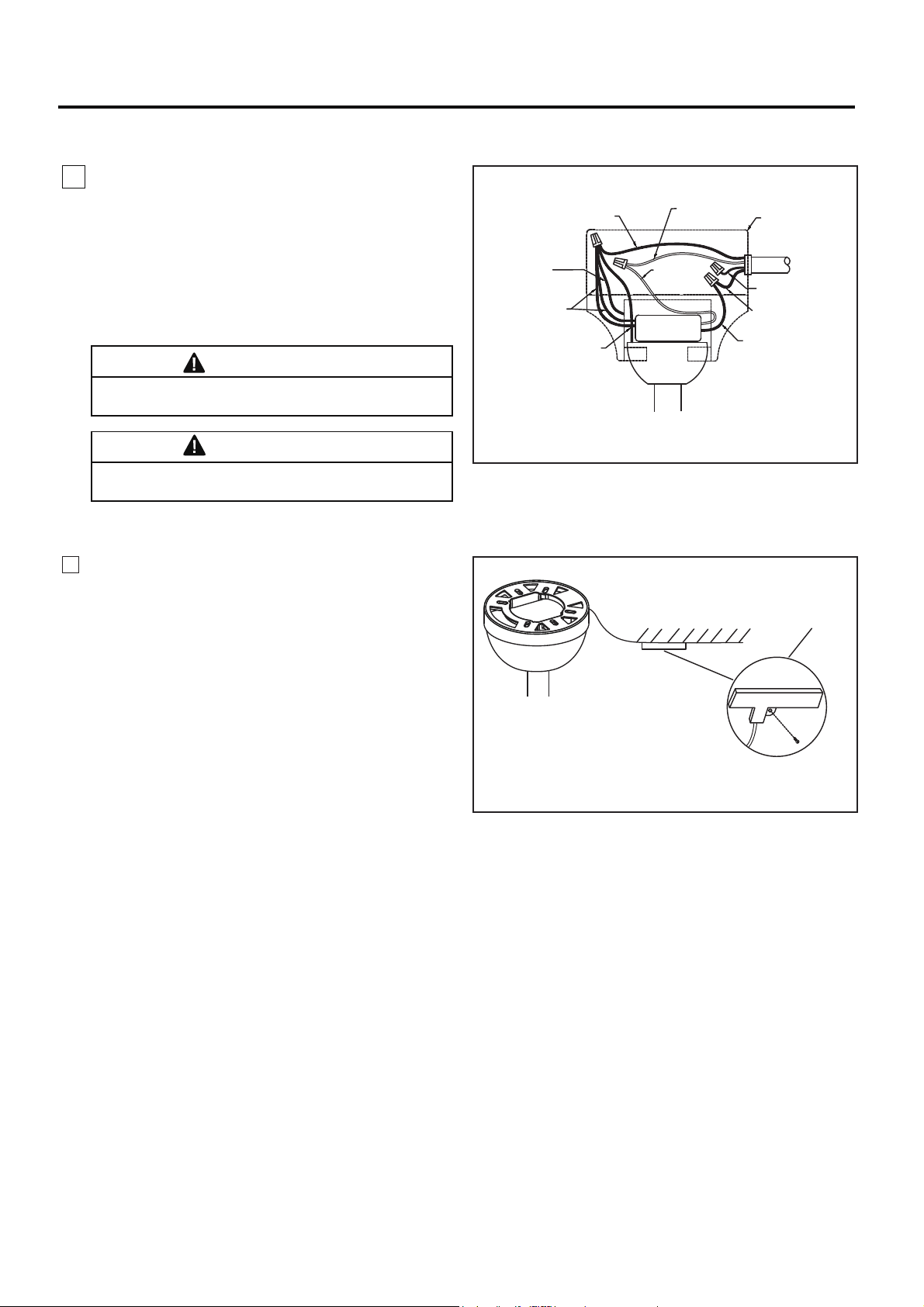
Cómo realizar la instalación eléctrica del ventilador de techo (cont.)
40
ADVERTENCIA
Las aspas debe ser instalarse primero antes de
programación
Les lames doivent être installées avant la
programmation.
AVERTISSEMENT
Figura 6 (Opcional)
Figura 5
Antena WIFI
Techo
Después de la instalación
Instale la antena WIFI
en el techo usando
un tornillo para madera
5. El receptor tiene una antena Wifi que puede
utilizarse si sufre problemas de rango. (Figura 6)
Conductor verde
del suministro
(puesta a tierra)
Conductor verde
del soporte de
suspensión
(puesta a tierra)
Receiver
Conductor blanco
del suministro
Conductor verde
de la bola para
colgar (puesta a tierra)
Caja de salida
homologada
Suministro
eléctrico
Conductor negro
del suministro
Conductor verde
del receptor (2)
(puesta a tierra)
Conductor negro
del receptor
Conductor
blanco
del receptor
Conductor rojo
del suministro
4. Una vez realizadas las conexiones, los cables
deben ser colocados de forma extendida poniendo
el conductor de la toma de tierra y el conductor de
toma de tierra del equipo a un lado de la caja,
colocando el conductor sin toma de tierra en el otro
lado de la caja. gire los conductores hacia arriba y,
con cuidado, colóquelos dentro de la caja de salida;
con los conductores blancos y verdes hacia un lado
y los conductores negros hacia el otro. (Figura 5)
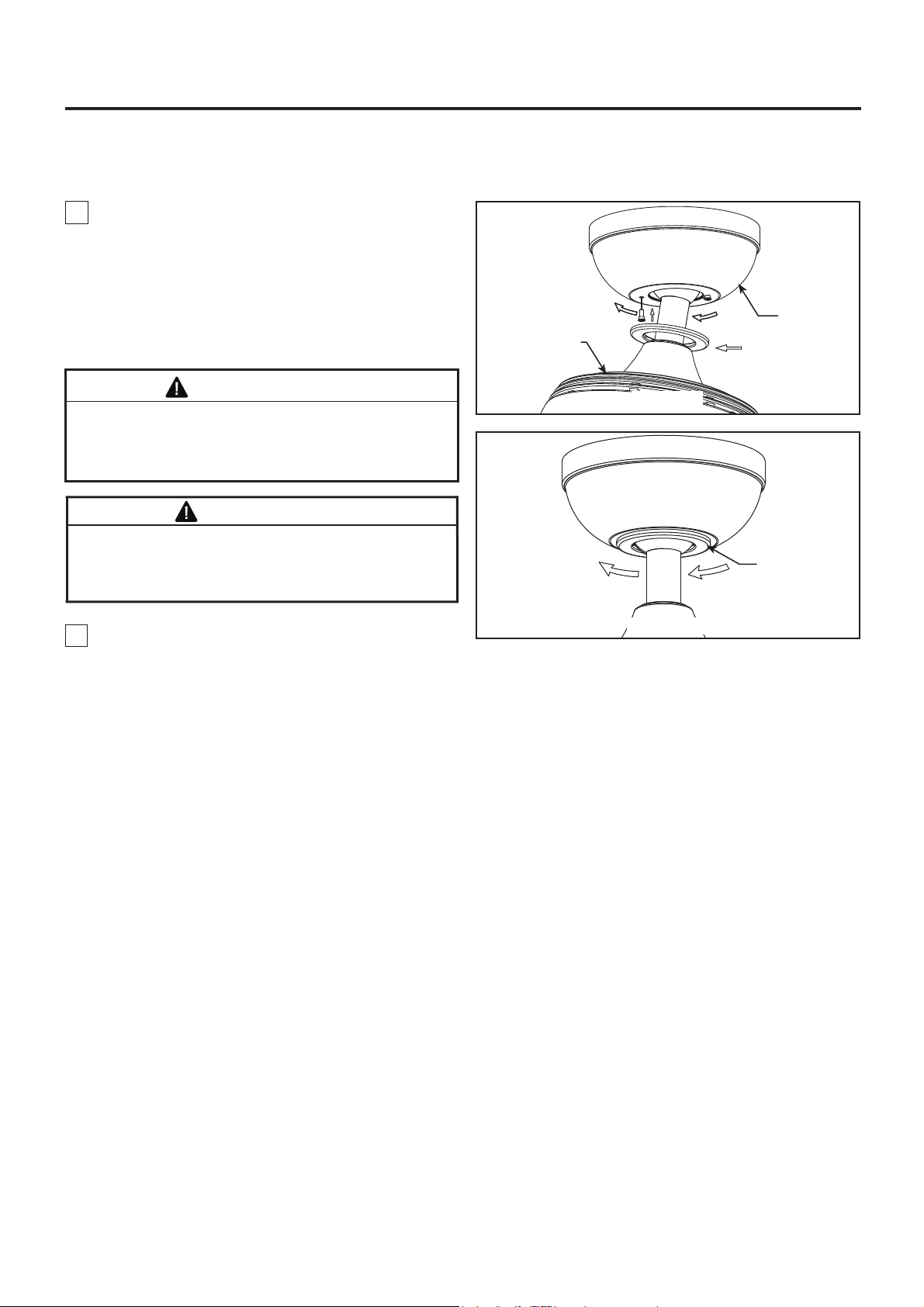
Para evitar posibles incendios o descargas eléctricas,
asegúrese de que los cables eléctricos se encuentren
completamente adentro de la cubierta del capuchón y
de que no estén aprisionados entre la cubierta y el techo.
ADVERTENCIA
NOTA: Este paso se debe realizar luego de completar la instalación eléctrica necesaria.
2. Coloque y ajuste firmemente la cubierta para el
tornillo de la base sobre los tornillos de reborde de la
abrazadera para colgar mediante el mecanismo de
seguro por giro del chavetero. (Figura 2)
Cómo instalar la carcasa de la cubierta
Figura 2
Figura 1
Motor
Capuchón
AVERTISSEMENT
Pour éviter tout risque d'incendie ou de choc,
assurez-vous que les fils électriques sont complètement
à l'intérieur du boîtier de la monture et qu'ils ne sont pas
pincés entre le boîtier et le plafond.
Cubierta para
el tornillo del
capuchón
1.
1.
Ensamble la base girando
y teniendo cuidado de
no pisar los cables el chavetero de la base sobre el
tornillo de reborde de la abrazadera para colgar.
Presionesligeramente e incline el motor para tener
más espacios para fijar los tornillos del hombro.
Ajusteel tornillo de reborde. Ensamble por comple-
to elsegundo tornillo de reborde que antes había
retiradoy ajústelo. (Figura 1)
41
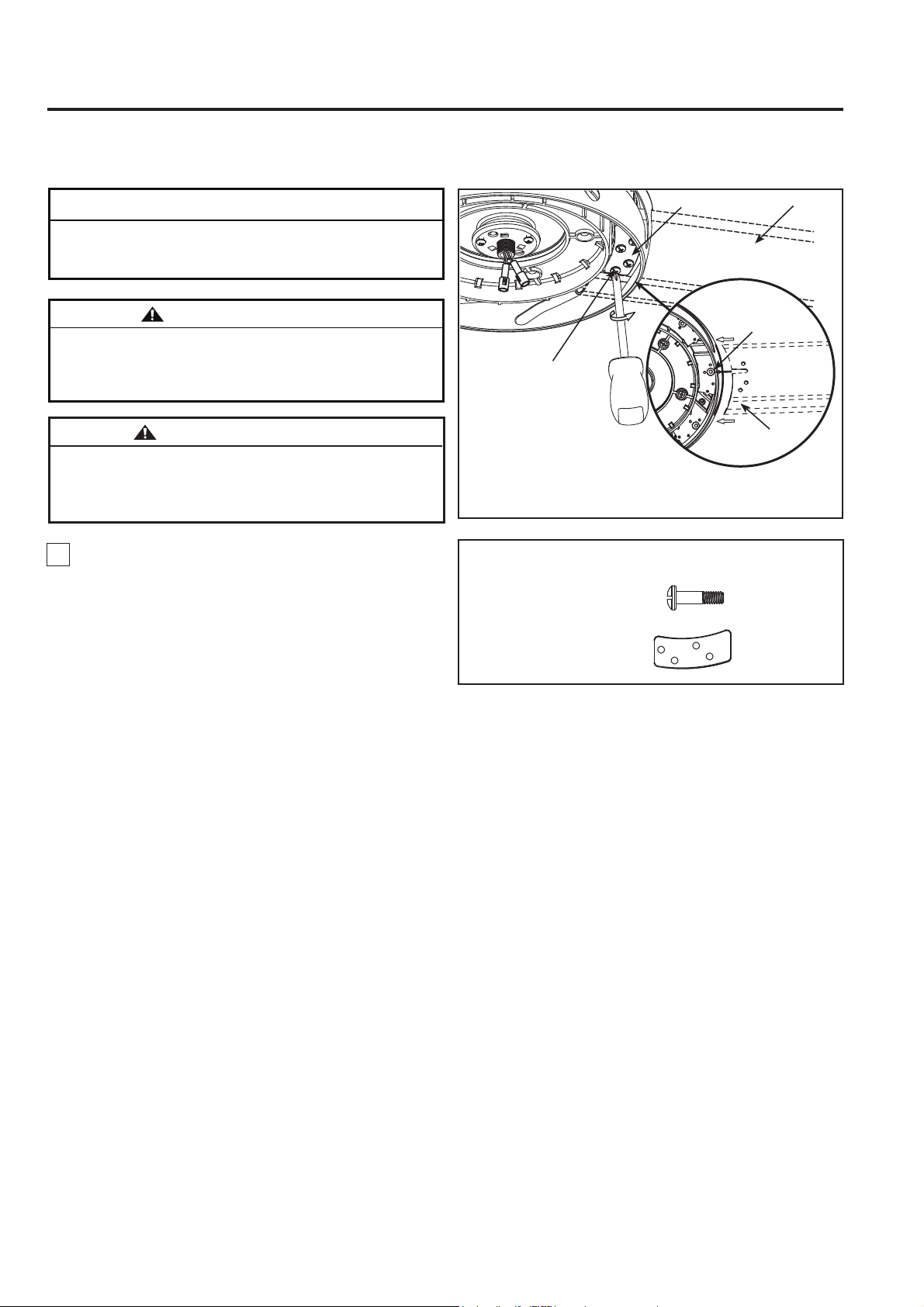
NOTA DE INSTALACIÓN
No conecte las aspas hasta que el ventilador esté
totalmente instalado. Instalar el ventilador con las aspas
colocadas podría ocasionar daños en las mismas.
ADVERTENCIA
Para reducir el riesgo de lesiones personales, no doble
las aspas al instalar, balancear o limpiar el ventilador. No
coloque objetos extraños entre las aspas del ventilador
en funcionamiento.
Cómo ensamblar las aspas del ventilador de techo
1. Deslice con cuidado las aspas a través de la
ranura, como se muestra. Asegúrese de que la
muesca de la pala esté completamente colocada en
el tornillo hexagonal de cabeza hueca. Fije las ocho
palas correctamente usando las placas de las palas
y los tornillos de cabeza de botón. (Figura 1)
Figura 1
#10-24
Tornillos de cabeza de
botón (4 por conjunto)
Tornillo hexagonal
de cabeza hueca
NOTA: Encontrará que la pala del ventilador viene
empaquetada en su propio envoltorio de cartón la
bolsa del hardware vienen en la caja del ventilador.
Aspa
Aspa
Placa de pala
AVERTISSEMENT
Afin de réduire le risque de blessure, ne pliez pas les
porte-pales lors de l'installation, de l'équilibrage des
pales, ou du nettoyage du ventilateur. N'insérez pas de
corps étrangers entre les pales en rotation.
42
x 32
x 8
#10-24
Tornillos de
cabeza de botón
Aditamentos utilizados:
Placa de pala
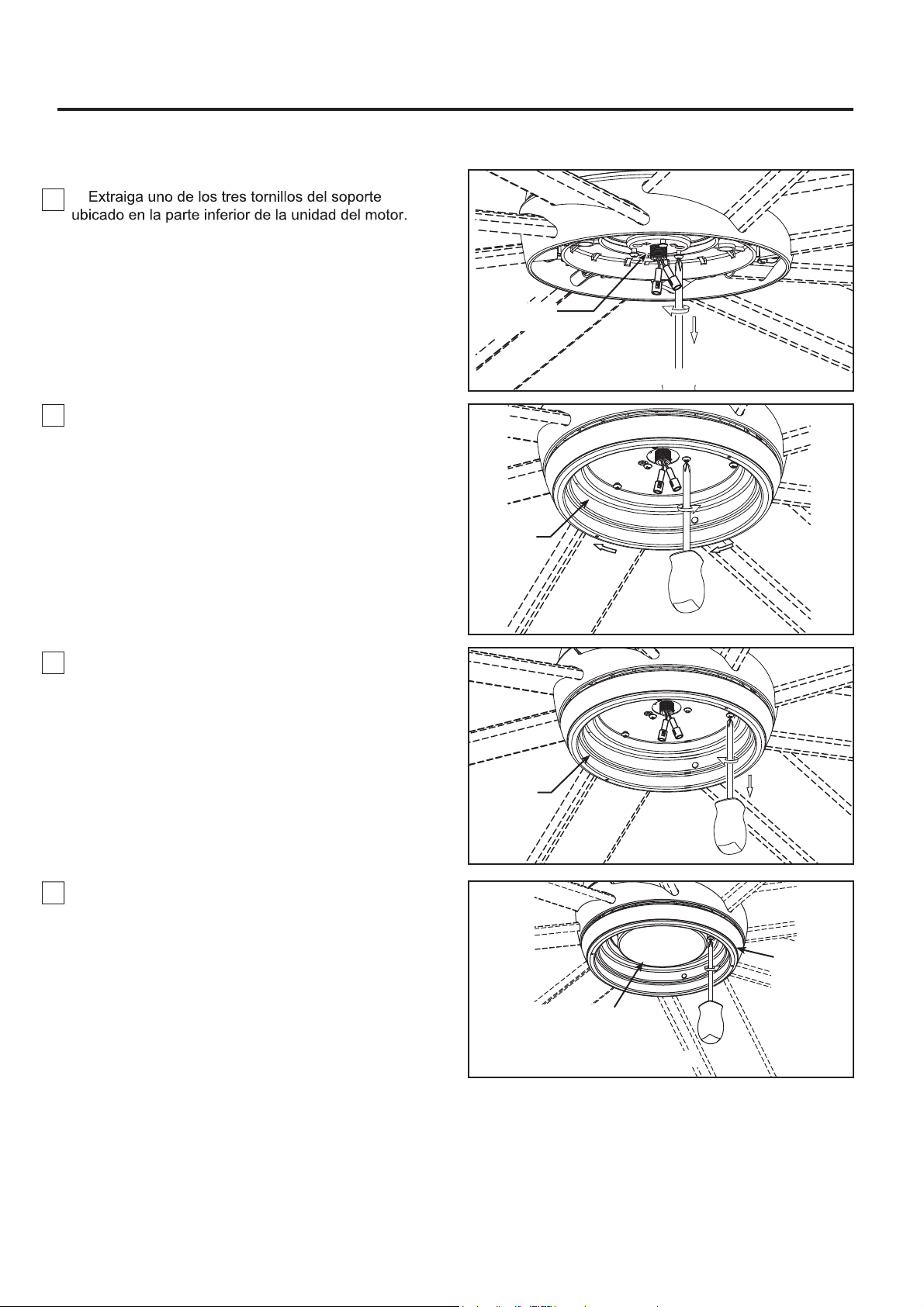
2. Instale la ensamble de la placa de iluminación
en el soporte utilizando las dos ranuras principales
de conexión. Vuelva a colocar el tercer tornillo y
asegure los tres tronillos. (Figura 2)
1.
Guárdelos para después y afloje levemente los otros
dos tronillos. (Figura 1)
43
Cómo ensamblar su el kit de iluminación o la tapa
Figura 4
Cubierta del cable
del kit de iluminación
Ensamble de
la placa de
iluminación
Figura 1
Unidad del
motor
Figura 2
Ensamble de
la placa de
iluminación
Ensamble de
la placa de
iluminación
Figura 3
3. Extraiga uno de los tres tornillos del ensamble de
la placa de iluminación y guarde los tornillo para
pasos posteriores. Afloje levemente los otros dos
tronillos. (Figura 3)
4. Si desea instalar el kit de iluminación, sáltese
este paso.
Instale la cubierta del cable del kit de iluminación en la
ensamble de la placa de iluminación usando las dos
ranuras con clave. Sustituya el tornillo extraído y
fije bien los tres tornillos. (Figura 4)
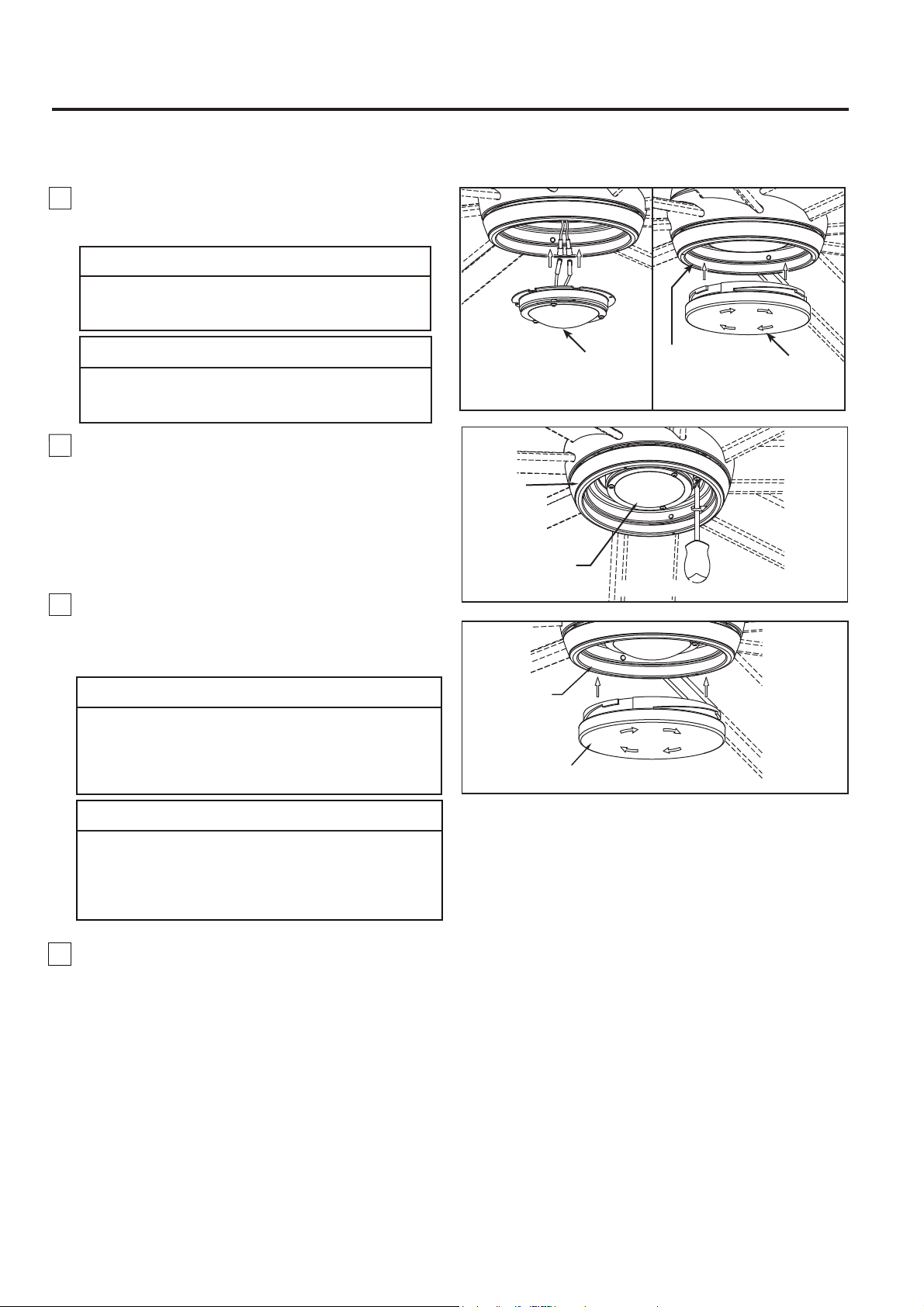
5B. Para su uso con la tapa de acero
Si desea instalar la tapa de acero y no el conjunto de
luz. Monte el la tapa de acero en la kit de luz del
interruptor girándolo en el sentido de las agujas del
reloj. No apriete demasiado. (Figura 5B)
NOTA:
Si ha instalado su ventilador con la tapa de
acero, sáltese los pasos 6 a 7.
Instale el conector de 2 clavijas desde unidad de luz
LED conexión a la unidad del motor. (Figura 5A)
5A. Para su uso con el kit de iluminación
A fin de reducir el riesgo descargas eléctricas,
desconecte el circuito de suministro eléctrico al
ventilador antes de instalar el kit de iluminación.
PRECAUCIÓN
Pour réduire le risque d'électrocution, débranchez le
circuit d'alimentation électrique du ventilateur avant
d'installer le kit d'éclairage.
ATTENTION
Cómo ensamblar su el kit de iluminación o la tapa (cont.)
La fuente de luz está diseñado para esta aplicación
específica y puede recalentarse si reparado por personal
no capacitado. Si se requiere ningún tipo de servicio,
el producto debe ser devuelto a un centro de servicio
autorizado para su revisión o reparación.
PRECAUCIÓN
44
Ensamble
de la placa de
iluminación
Unidad de
luz LED
Figura 6
Vidrio
Ensamble
de la placa de
iluminación
Figura 7
La source lumineuse est conçue pour cette application
spécifique et peut surchauffer si par un personnel
non formé. Si un entretien est nécessaire, le produit
doit être retourné à un centre de service agréé pour
examen ou réparation.
ATTENTION
7. Asegure el vidrio en la ernsamble de la placa
de iluminación girándolo en el sentido de las agujas
del reloj y sin apretar demasiado. (Figura 7)
Figura 5A Figura 5B
Ensamble de
la placa de
iluminación
Unidad de luz LED
Tapa de acero
6. Instale la unidad de luz LED en la ensamble de la
placa de iluminación mediante los dos chaveteros.
Vuelva a colocar el los tornillo extraídos en el paso 3
y apriete todos los tornillos. (Figura 6)
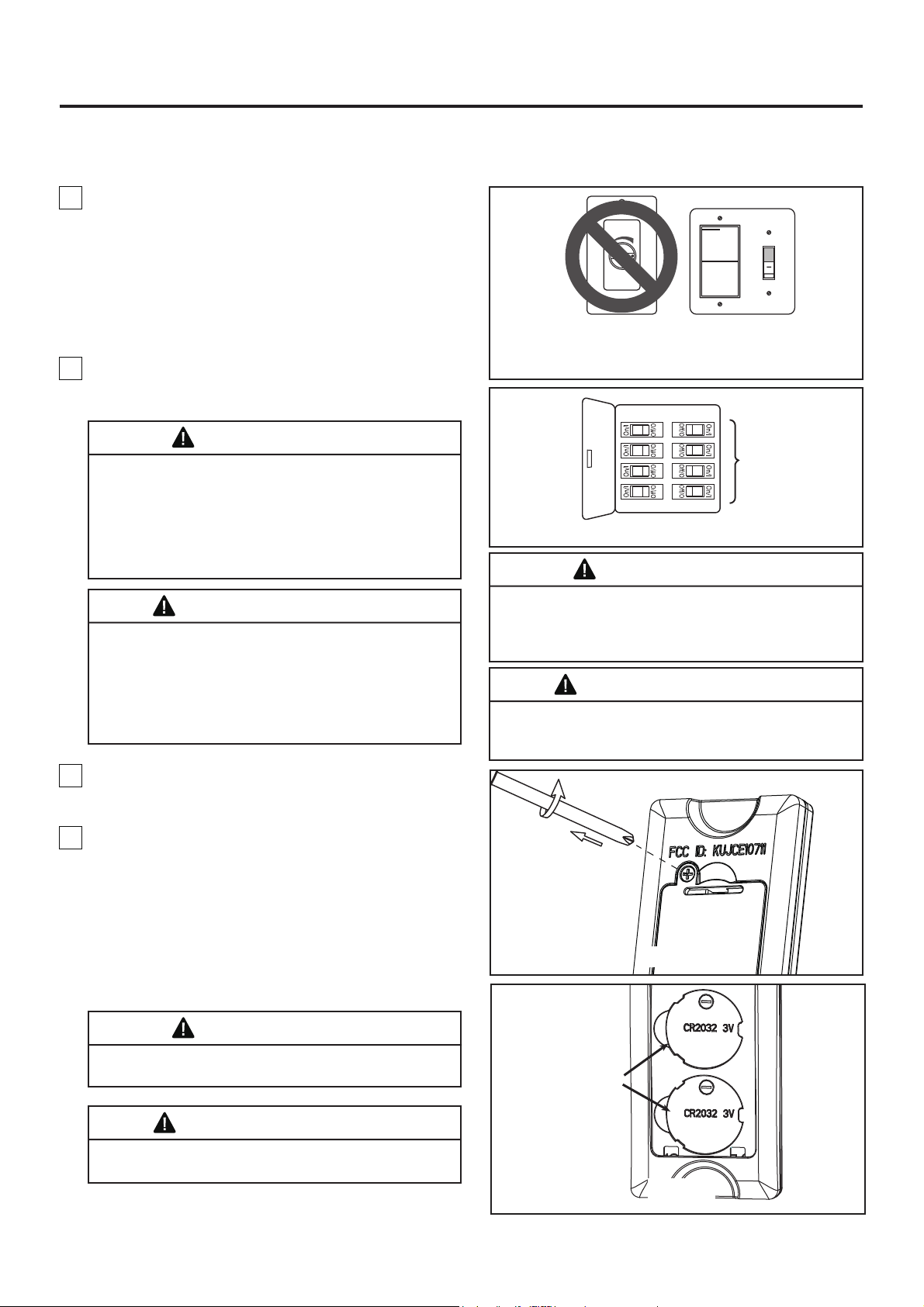
1. IMPORTANTE: El uso de un regulador de la
intensidad completa (no incluido) para controlar la
velocidad del ventilador dañará el dispositivo. Para
reducir el riesgo de incendio o descarga eléctrica, no
utilice dicho regulador para controlar la velocidad del
ventilador. (Figura 1)
2. Restaure la fuente de alimentación de la toma de
corriente enciendo la electricidad del fusible principal.
(Figura 2)
Figura 1
Figura 2
Solo para referencia visual-no ha sido diseñado
para cubrir todos los tipos de controles
Cómo utilizar su ventilador de techo
Principal Caja
De Fusibles
45
ADVERTENCIA
Compruebe que todas las conexiones realizadas
correctamente, incluyendo la toma de tierra, y que no se
visualizan ningún cable pelado en los conectores de
cables, con la excepción del cable de toma de tierra. No
utilice el ventilador hasta que las palas estén colocadas
en su lugar, ya que de lo contrario se podría causar
ruido y daños.
ADVERTENCIA
No utilice este ventilador con un controlador variable de
pared (Rheostat) o un regulador de intensidad. Si lo
hiciera podría dañar la unidad del mando a distancia del
ventilador de techo.
Vérifiez que tous les raccordements sont bien serrés, y
compris la mise à la terre, et qu’aucun fil dénudé n’est
visible au niveau des capuchons de connexion, à
l’exception du fil de mise à la terre. Ne faites pas
fonctionner le ventilateur avant d'avoir installé les pales.
Du bruit et des dommages au ventilateur pourraient en
résulter.
AVERTISSEMENT
N'utilisez pas ce ventilateur avec un contrôleur mural
(rhéostat) variable ou un gradateur. Cela pourrait
endommager la télécommande du ventilateur de plafond.
AVERTISSEMENT
Figura 3
3. Retire la cubierta de la batería del control remoto
con un destornillador y conserve el tornillo para luego.
(Figura 3)
Batería de
3V CR2032
(2 pc)
Figura 4
4. Para que el ventilador sea functional,
instale las
pila
(incluidas) de 3V en el transmisor del mando a
distancia. Mientras el ventilador esté apagado. A
continuación, siga el proceso de fijación remota de
código. Si no se utiliza el ventilador durante un largo
periodo de tiempo, extraiga la batería para evitar
cualquier daño al transmisor. Almacene el mando a
distancia en un lugr alejado del calor o la humedad
excesiva. (Figura 4)
ADVERTENCIA
Peligro de quemadura química. Mantenga las pilas
lejos del alcance de los niños.
Risque de brûlure chimique. Gardez les piles hors
de portée des enfants.
AVERTISSEMENT
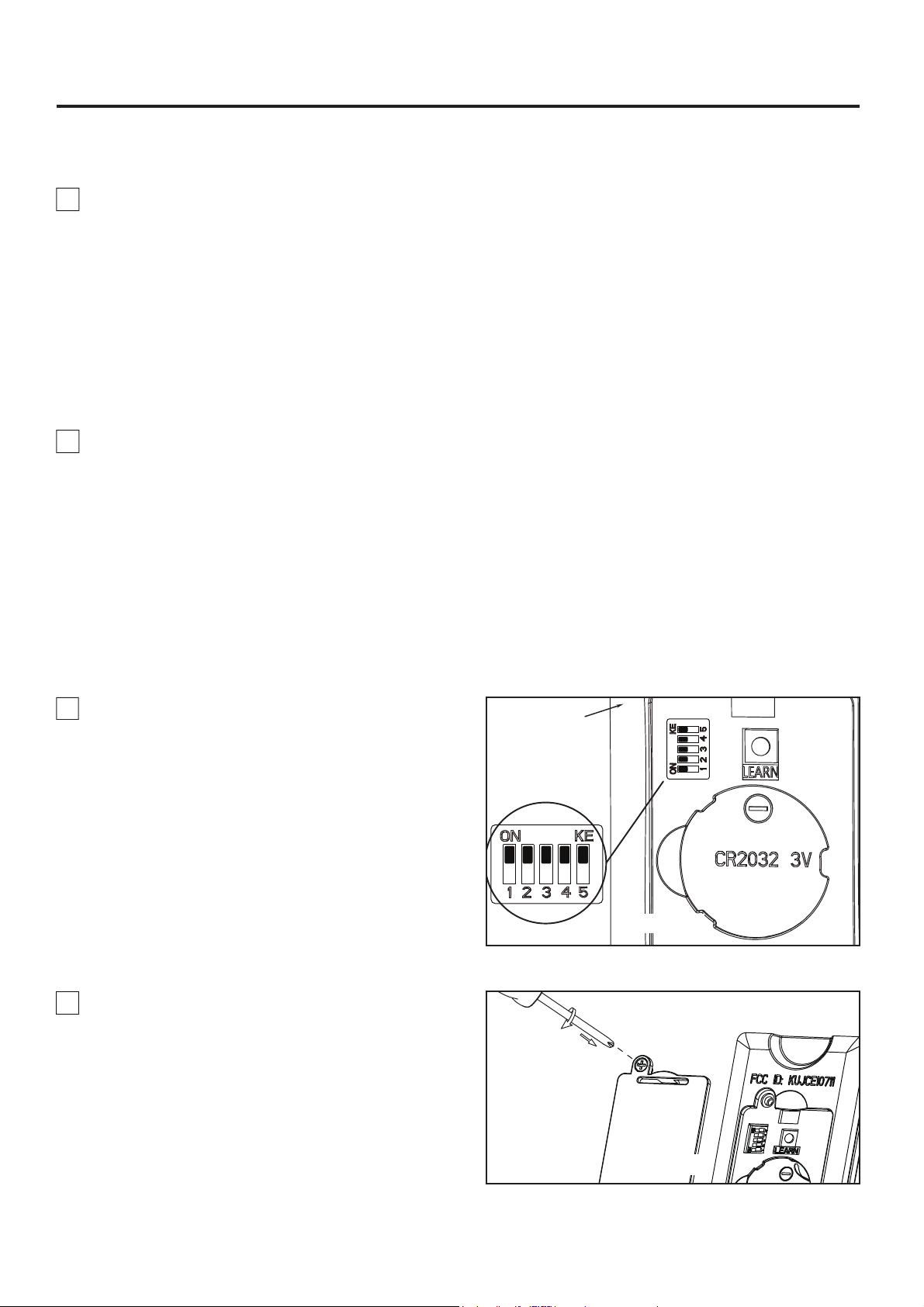
46
Cómo utilizar su ventilador de techo (Cont.)
NOTA: Los ajustes de fábricas vienen con todos los
interruptores hacia arriba. No utilice esta posición.
NOTA: El mando a distancia incluido en este
ventilador tiene 32 combinaciones diferentes de
códigos. Para evitar posibles interferencias desde o
hacia otros mandos a distancia, modifique el código
de combinación de su transmisor y receptor.
7. Para configurar el código del mando a distancia
a las mismas posiciones que en el receptor. Mueva
los interruptores de código hasta colocar elcódigo de
selección en la posición arriba o abajo. Con un
destornillador pequeño o con una lapicera (no se
incluye) deslice firmemente hacia arriba o hacia
abajo. (Figura 5)
8. Vuelva a colocar la cubierta de la batería en el
mando a distancia con un tornillo retirados
previamente. (Figura 6)
Figura 6
Mando a
distancia
Interruptores
Figura 5
5. Si tiene varios ventiladores y desea programarlos
todos en un único mando a distancia, Deslice el
interruptor DIP a la misma posición en TODOS los
receptores a UN dispositivo móvil para configurar el
código de cada ventilador y siga el Paso 1 del proceso
de configuración de la velocidad del mando a distacia.
Cada ventilador necesita estar a menos de 30 pies de
distancia del mando al que desea programarlo. Tenga
en cuenta que el interruptor de pared que controla la
fuente de alimentación de su(s) ventilador(es) debería
estar en la posición Apagado hasta que esté listo para
programar su(s) mando(s) a distancia.
6. Si tiene múltiples ventiladores y desea programar
cada uno con mandos a distancia diferentes, Deslice
el interrup-tor DIP a la misma posición tanto en el
receptor como en el dispositivo móvil para configurar
el código de cada ventilador y siga el Paso 1 del
siguiente proceso de configuración de la velocidad del
mando a distancia. Repite estos pasos para cada uno
de los ventiladores que desea programar a un mando
a distancia diferente. Tenga en cuenta que el
interruptor de pared que controla el encendido de
su(s) ventilador(es) debería estar en la posición
apagado hasta que esté preparado para programar
su(s) mando(s) a distancia.
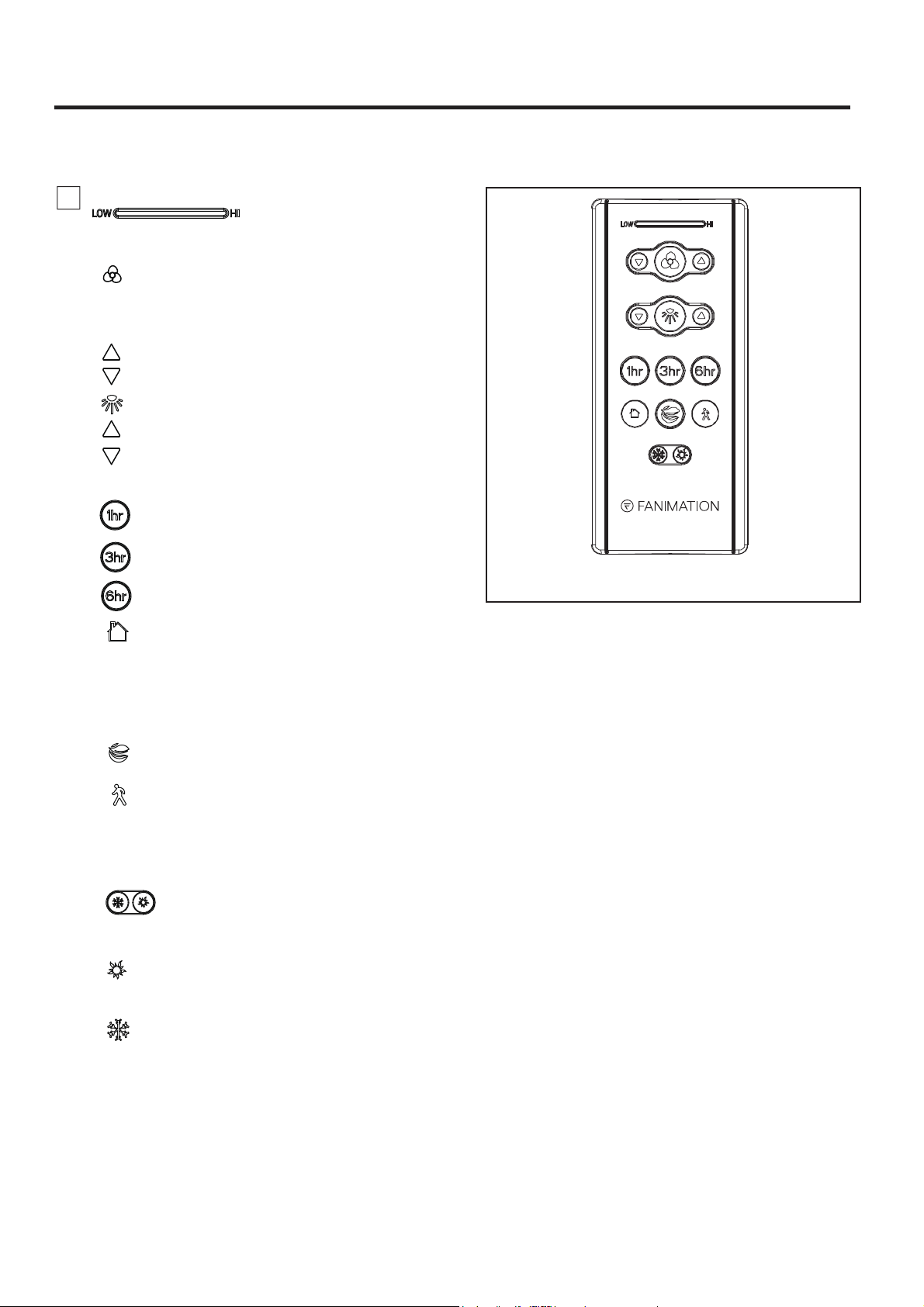
Figura 7
47
9. Funciones del control remoto: (Figura 7)
• Luz LED del indicador: Velocidad del ventilador e
indicador atenuante de la iluminación
• Velocidad del ventilado:
• Botón:
Toque este botón apaga el ventilador.
Mantenga pulsado el botón durante 5 segundos para
encender o apagalo el zumbador.
• Botón de la lámpara: Enciende o apaga la luz
Enciende el ventilador y aumenta la velocidad.
Enciende el ventilador y disminuye la velocidad.
Aumenta el nivel de salida de la iluminación.
Disminuye el nivel de salida de la iluminación.
Cómo utilizar su ventilador de techo (Cont.)
• Lejos de casa: Toque este botón, la luz
parpadeará dos veces para indicarle que se habrá
completado el proceso de configuración, el ventilador
se apagará y la luz se encenderá y apagará
aleatoriamente mientras esté lejos, pulse ningún
botón(es) cancelar la función.
• Air Fresco: La velocidad del ventilador
se modulará para simular la brisa natural.
• Salida segura: Toque este botón, la luz
parpadeará dos veces para indicarle que se habrá
completado el proceso de configuración, la luz y el
ventilador se apagará después de 1 minuto, pulse
ningún botón(es) cancelar la función.
• Botón de revesa:
Verano- El ventilador funciona en el sentido
contrario a las agujas del reloj. El flujo del aire
ofrece una brisa refrigerante hacia abajo.
Invierno- El ventilador funciona en el sentido
de las agujas del reloj. El flujo del aire fuerza
el aire caliente hacia abajo sin una brisa visible.
hacia delante o al revés. El ventilador debe estar
funcionando para podrá revertir la dirección.
• Temporizador de apagado automático:
El ventilador y la luz se apagará después de
1 horas.
El ventilador y la luz se apagará después de
3 horas.
El ventilador y la luz se apagará después de
6 horas.
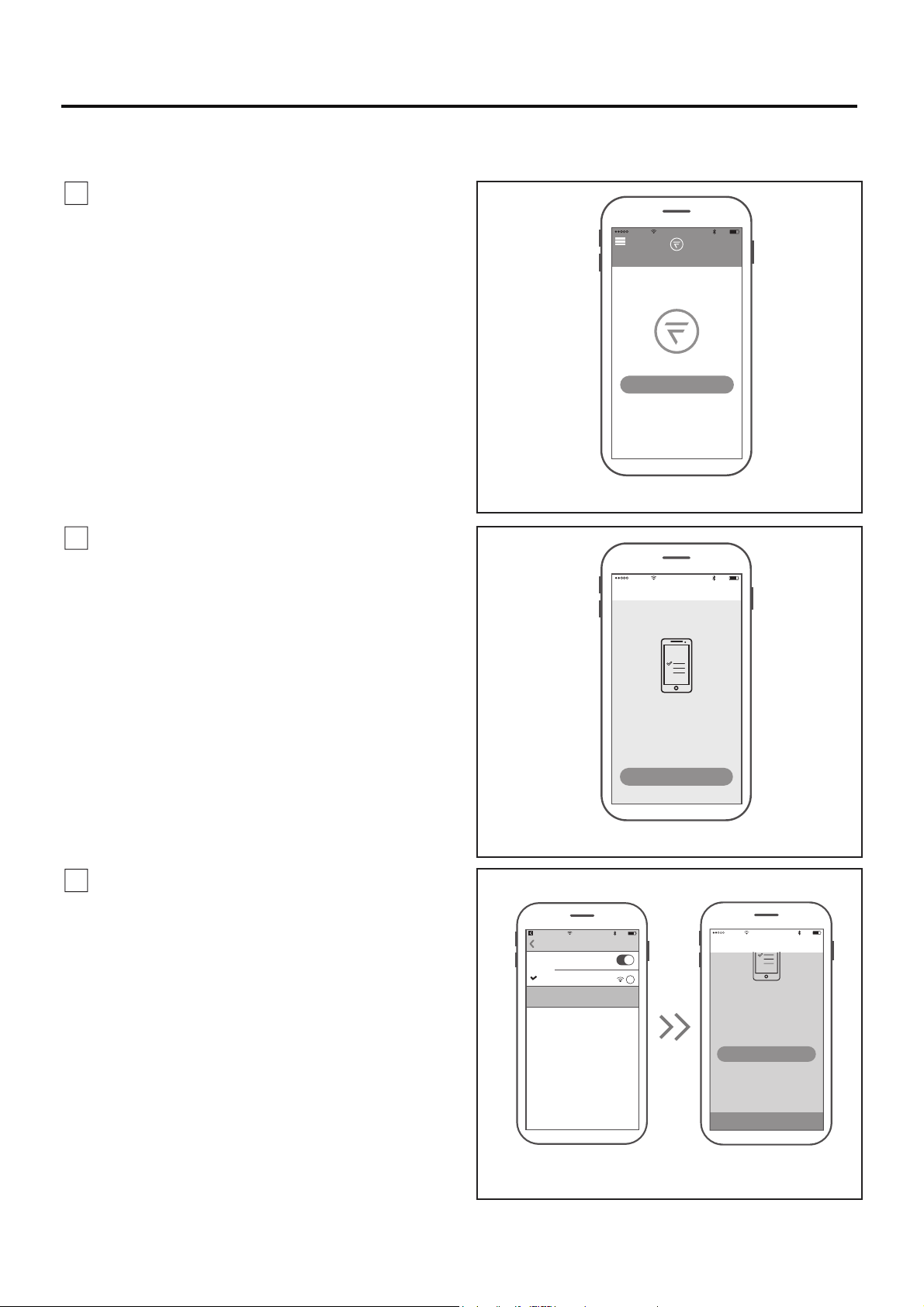
1. Visite el App Store de Apple o el Play Store de
Google para descargarse la App gratuita fanSinc Wifi.
Cree su cuenta Fanimation fanSync. (Figura 1)
2. En este paso, el receptor Wifi de su ventilador de
techo debe estar instalado y dentro del rango de su
router Wifi. Con la App abierta, seleccione “añadir
dispositivo”. (Figura 2)
Figura 1
Figura 2
Figura 3
10:37 AM
80%
All
Home
Your dashboard is empty
Add a Fanimation Ceiling Fans
10:37 AM
80%
Add Fainmation..
Connect To Your Dvice
WI-FI
To begin you must first connect your phone
to the Fanimation Ceiling Fans you are
setting up. Your Fanimation Ceiling Fans will
broadcast a temporary Wi-Fi hotspot that
looks like
“Fanimation_xxxxxx”.
Once you’ve completed this step come back
Go to Settings
10:38 AM
80%
fanSync W...
Settings
Wi-Fi
Wi-FI
i
Fanimation_402AD4
Unsecured Network
CHOOSE A NETWORK
10:39 AM
80%
Add Fainmation..
CONTINUE
To begin you must first connect your phone
to the Fanimation Ceiling Fans you are
setting up. Your Fanimation Ceiling Fans will
broadcast a temporary Wi-Fi hotspot that
looks like
“Fanimation_xxxxxx”.
Once you’ve completed this step, come back
to the fanSync Wifi app to continue the
setup.
Go to Settings
48
Cómo Configuración de la App fanSync Wifi
NOTA: El SSID Wifi predeterminada del dispositivo
es: Fanimation_XXXXXX (ej.: Fanimation_402AD4).
3. Seleccione el dispositivo Fanimation_XXXXXX
y vuelve a la App fanSinc Wifi y pulse "CONTINUAR".
(Figura 3)
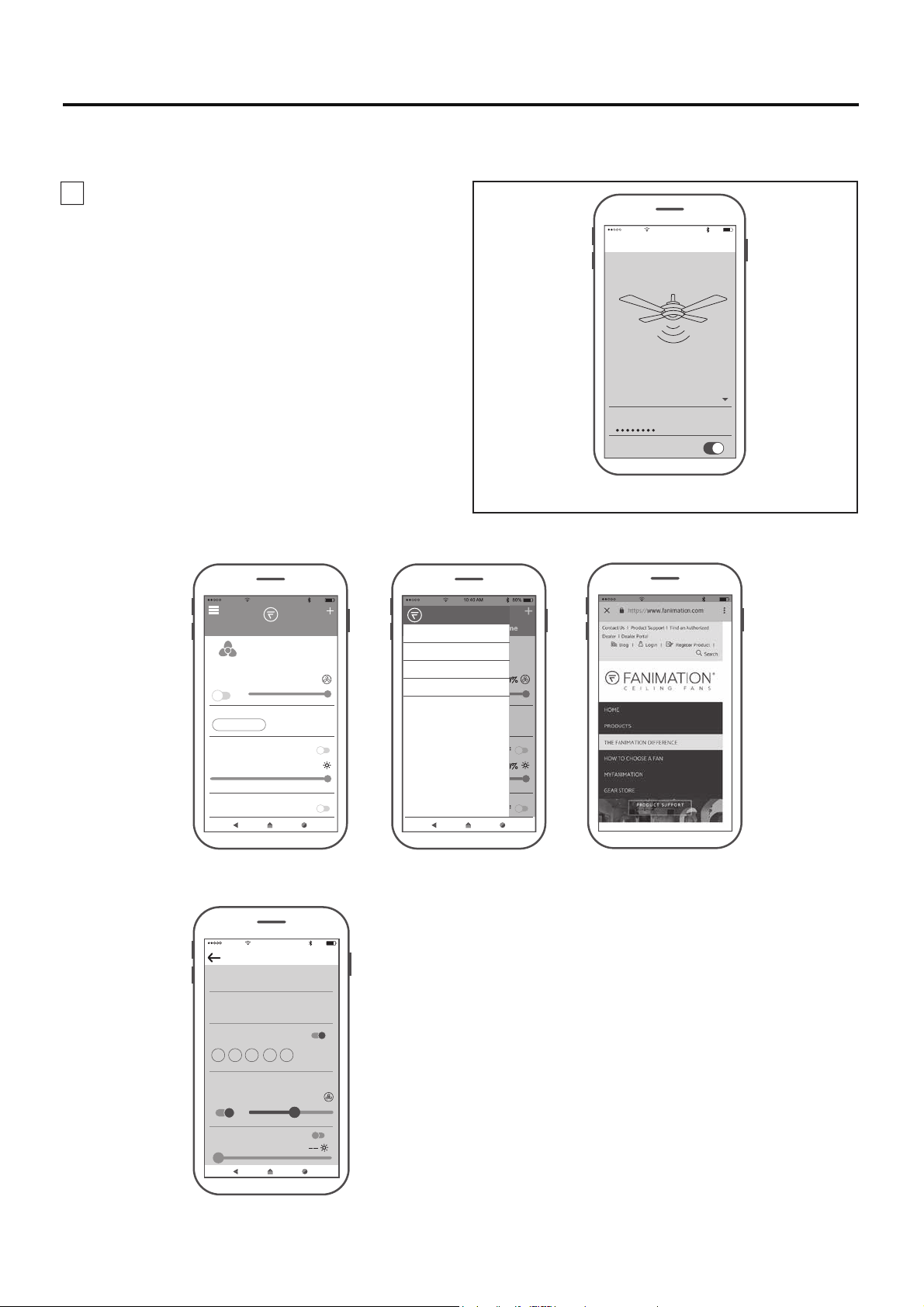
●
Vista general de la App fanSync Wifi
● Configuración de programación en tiempo real
Figura 4
10:40 AM
80%
Add Fainmation..
Enter your network settings below to
connect your device online.
SSID
PASSWORD
XXXXX
Remember my SSID and pa...
Set Up Wi-Fi Network
10:40 AM
80%
All
Home
OFF 100%
100%
Lounge
BREEZE MODE
LIGHT
OFF
NORMAL
FRESH AIR
OFF
HOME AWAY
HOME
MY GROUP
SETTINGS
SUPPORT
10:43 AM
80%
Edit Schedule
SCHEDULE NAME
START TIME END TIME
Work Days
8:00 PM 5:00 PM
REPEAT
ON
M T W TH F SA SU
Settings
ON
OFFLIGHT
51 %
49
4. Seleccione su router Wifi e introduzca la
contraseña Wifi para conectarse a su receptor Wifi
fanSync. Tardará 1 - 2 minutos en conectarse. Una
vez que su receptor Wifi se haya conectado, ahora
puede nombrar su ventilador de techo en la App y
personalizar sus ajustes. (Figura 4)
10:42 AM
80%
Cómo Configuración de la App fanSync Wifi (cont.)
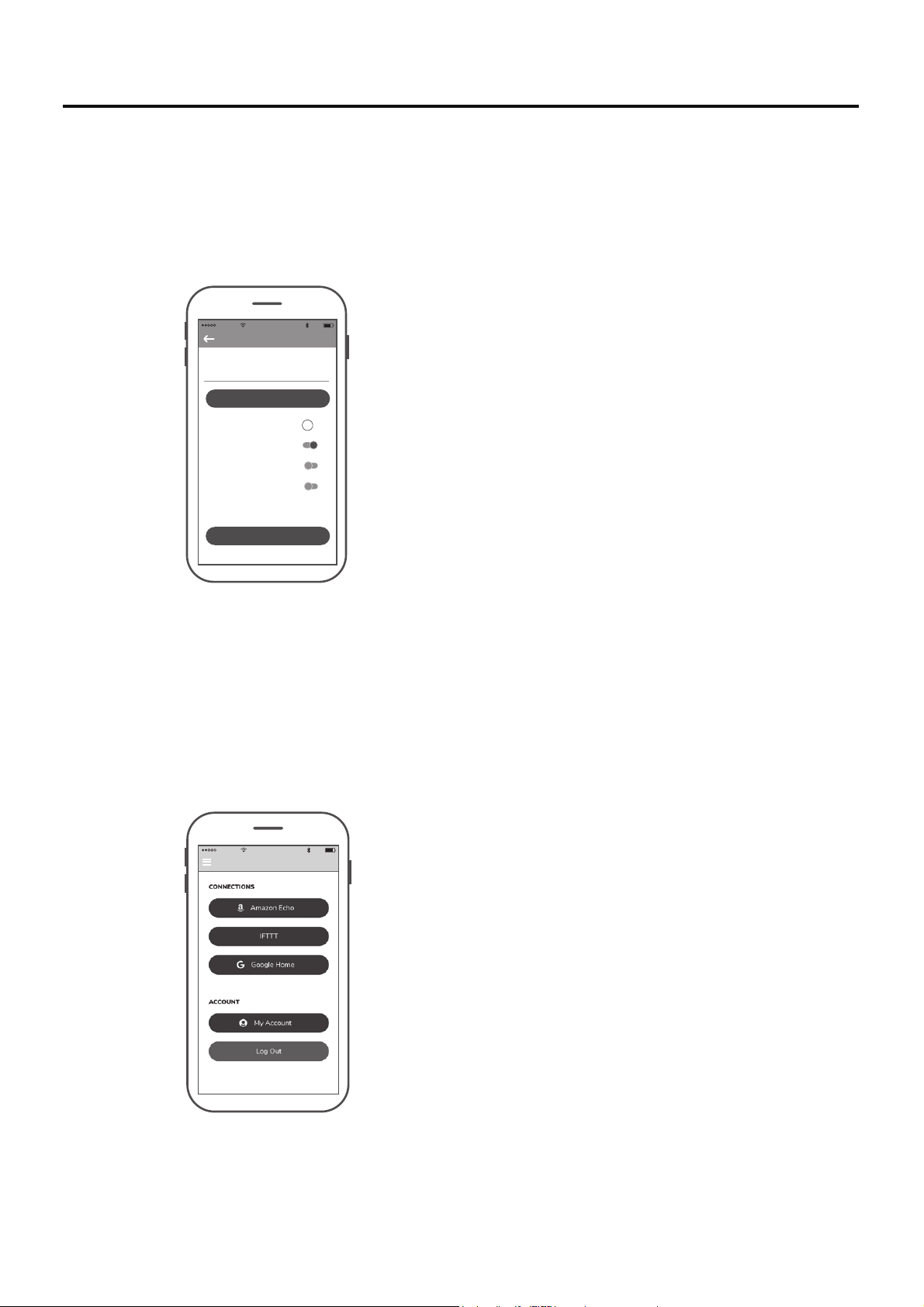
10:45 AM
80%
Settings
Lounge
EXTRA DEVICE CONTROLS !
FAMILY SHARING
Save
SHARE DEVICE
DEVICE NAME
HIDE FAN DIRECTION
HIDE LIGHT POWER
HIDE LIGHT DIMMER
● Compartir dispositivo
● Enlace con Amazon Echo, Google Home y IFTTT
10:46 AM
80%
Settings
50
Una vez que un dispositivo inteligente es conectado al
ventilador, debe compartir el dispositivo con otros usuarios
para que otros usuarios de la App puedan controlar el
ventilador.
Seleccione el dispositivo que desee conectar y siga las instrucciones en el procedimiento de configuración.
Ayuda para Amazon Alexa: https://www.amazon.com/gp/help/customer/display.html?nodeId=201749240 Para
conectarse a NEST, ECOBEE, Samsung Smart things, wink, etc. debe conectarse a través de IFTTT.
Ayuda para IFTTT: https://help.ifttt.com/hc/en-us/articles/115010325748-What-is-IFTTT-
Ayuda de Google: https://support.google.com/googlehome/answer/7073578?hl=en
Cómo Configuración de la App fanSync Wifi (cont.)
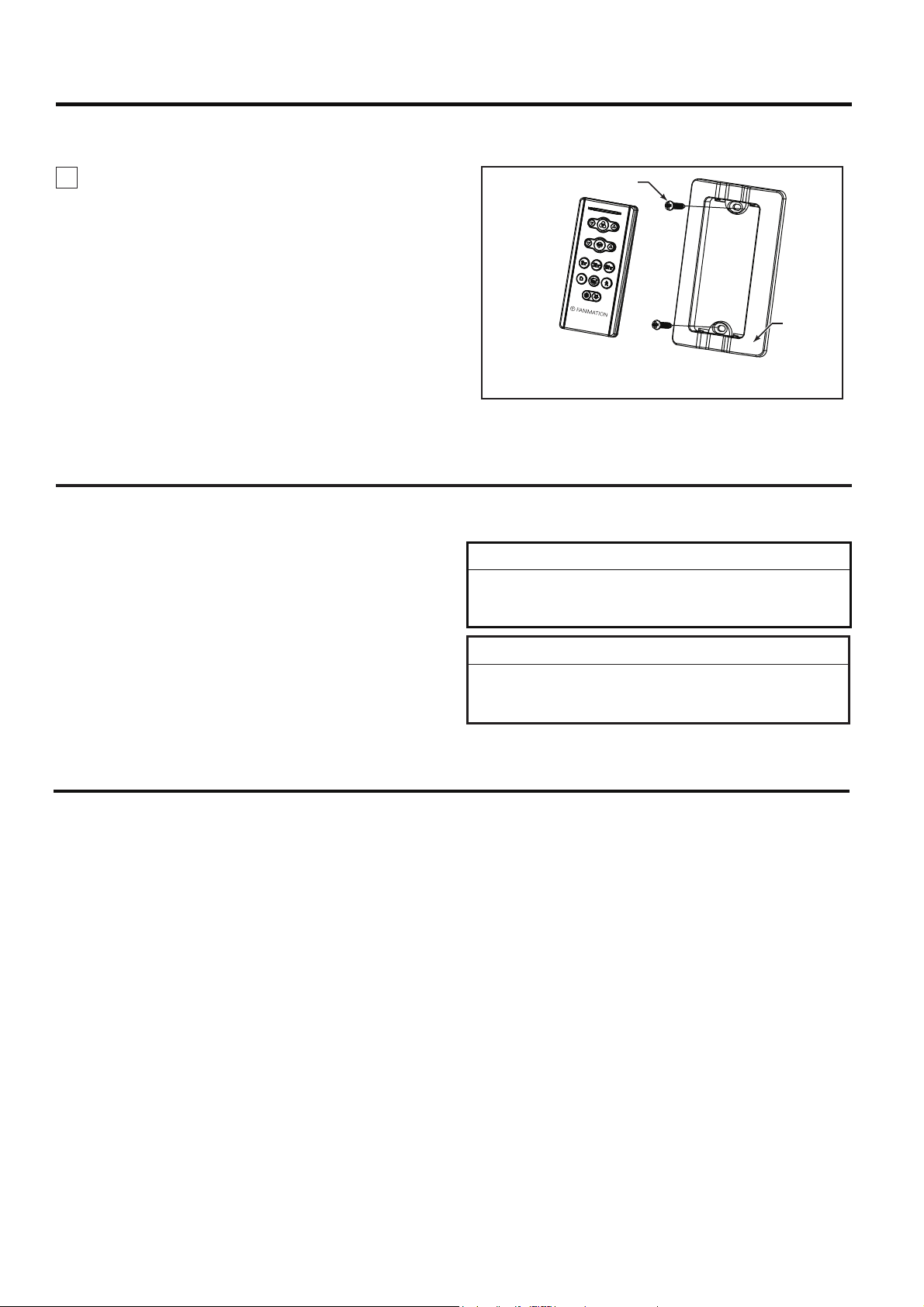
51
Mantenimiento
PRECAUCIÓN
No utilice solventes para limpiar el ventilador de techo.
Podrían dañar el motor o las aspas y ocasionar posibles
descargas eléctricas.
ATTENTION
N'utilisez pas d'eau pour nettoyer votre ventilateur de
plafond. Cela pourrait endommager le moteur ou la
finition, et créer une possibilité d'électrocution.
El único mantenimiento necesario para el ventilador de
techo es una limpieza periódica.
Al llevar a cabo la limpieza, use sólo un cepillo suave o
un paño sin pelusas, para evitar rayar el acabado.
No se requieren agentes abrasivos de limpieza; los
mismos deben evitarse para prevenir daños en el
acabado.
Limpieza de las aspas
Se recomienda limpiar el polvo de las aspas
periódicamente. Lo mejor es utilizar un plumero.
Evite usar agua, productos de limpieza o trapos
ásperos, que pueden combar o dañar las aspas.
Cómo instalar su mando a distancia
1. Instalación de la placa de la pared: (Figura 1)
Fije la placa de la pared usando los dos tornillos
suministrados.
Figura 1
Tornillos (2)
Placa de
la pared
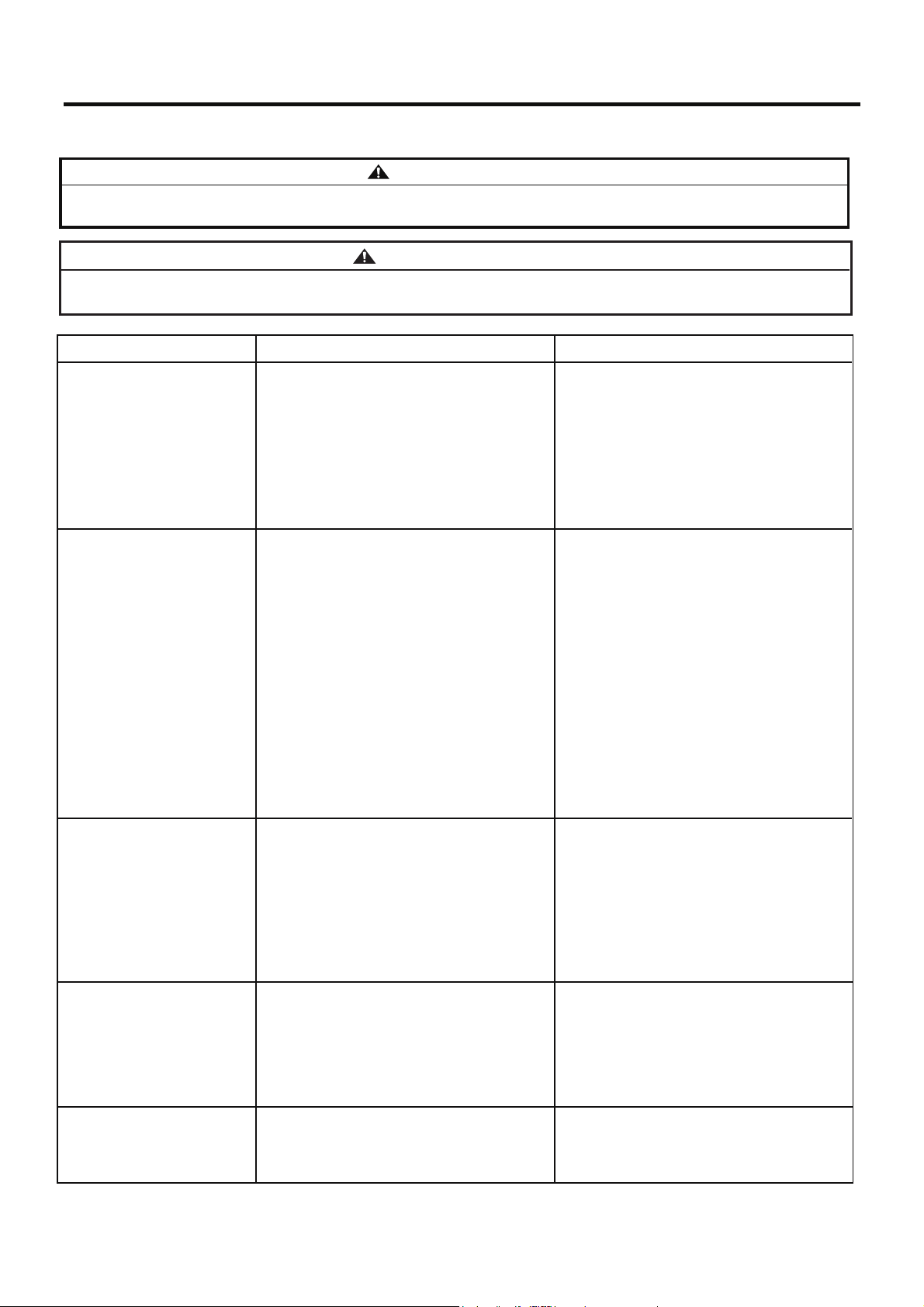
52
Solución de problemas
Problema Causa posible Solución sugerida
1. EL VENTILADOR NO
ARRANCA
1. El fusible o el disyuntor están fundidos.
2. Las conexiones eléctricas del ventilador o del
interruptor en la caja del interruptor están flojas.
1. Controle los fusibles del circuito principal y
derivado o los disyuntores.
2. Controle las conexiones eléctricas del ventilador
y del interruptor en las cajas de los interruptores.
2. EL VENTILADOR
HACE RUIDO
1. Las aspas no están sujetas al ventilador
2. Hay tornillos flojos en la caja del motor.
3. Los conectores de cables dentro de la caja
hacen ruido.
4. Ruido del motor provocado por el control de
velocidad de estado sólido variable.
1. Ajuste las aspas al ventilador antes de ponerlo
en funcionamiento.
2. Asegúrese de que todos los tornillos de la caja
del motor estén bien ajustados (pero no en exceso).
3. EL VENTILADOR
OSCILA EN EXCESO
1. El tornillo de fijación y la tuerca del soporte de
barral están flojos.
2. La bola colgante con ranura no está alineada
con la pestaña.
2. Vuelva a colgar la bola colgante para asegurar la
pestaña en la ranura.
3. El tornillo de fijación en la unidad del barral/de la
semiesfera está flojo.
4. El soporte de suspensión o la caja de distribución
eléctrica del techo no están bien asegurados.
1. Ajuste bien los dos tornillos de fijación y las
tuercas en el soporte de barral.
5. NO HAY SUFICIENTE
MOVIMIENTO DE AIRE
Para su propia seguridad, desconecte la electricidad de la caja de fusibles o disyuntor antes de
solucionar problemas en su ventilador.
PRECAUCIÓN: ¡Asegúrese de que el suministro
principal de electricidad esté desconectado!
3. Asegúrese de que los conectores de cables en
la caja del interruptor no produzcan ruido al rozar
unos con otros o al rozar la pared interior de la caja
del interruptor.
4. Algunos motores de ventilador son sensibles a
las señales de los controles de velocidad de estado
sólido variables. Los controles de estado sólido no
son recomendables. Escoja un método de control
alternativo.
PRECAUCIÓN: ¡Asegúrese de que el suministro
principal de electricidad esté desconectado!
3. Pila agotada del mando a distancia. 3. Sustituir con una pila nueva.
3. Ajuste el tornillo de fijación en la unidad del
barral/de la semiesfera.
4. Ajuste los tornillos del soporte de suspensión de
la caja de distribución eléctrica y asegúrela.
ATTENTION: Assurez-vous que l'alimentation
électrique principale est coupée !
ATTENTION: Assurez-vous que l'alimentation
électrique principale est coupée !
Pour votre sécurité, placez le coffret à fusibles ou le disjoncteur hors tension avant de tenter
d’identifier tout problème pouvant affecter votre ventilateur.
ADVERTENCIA
AVERTISSEMENT
1. Si es posible, considere el uso de un barral más
largo. Por ejemplo (no incluido, usted puede
comprar el tiempo de la vara hacia abajo
fanimation.com).
4. EL MANDO A
DISTANCIA SIN
FUNCIONAR. EL LED
INDICADOR DE
CONTROL PARPADEA
CONSTANTEMENTE.
1. La batería / baterías (pila/ pilas) se van a agotar.
1. Sustituir con la batería / baterías (pila/ pilas)
nueva.
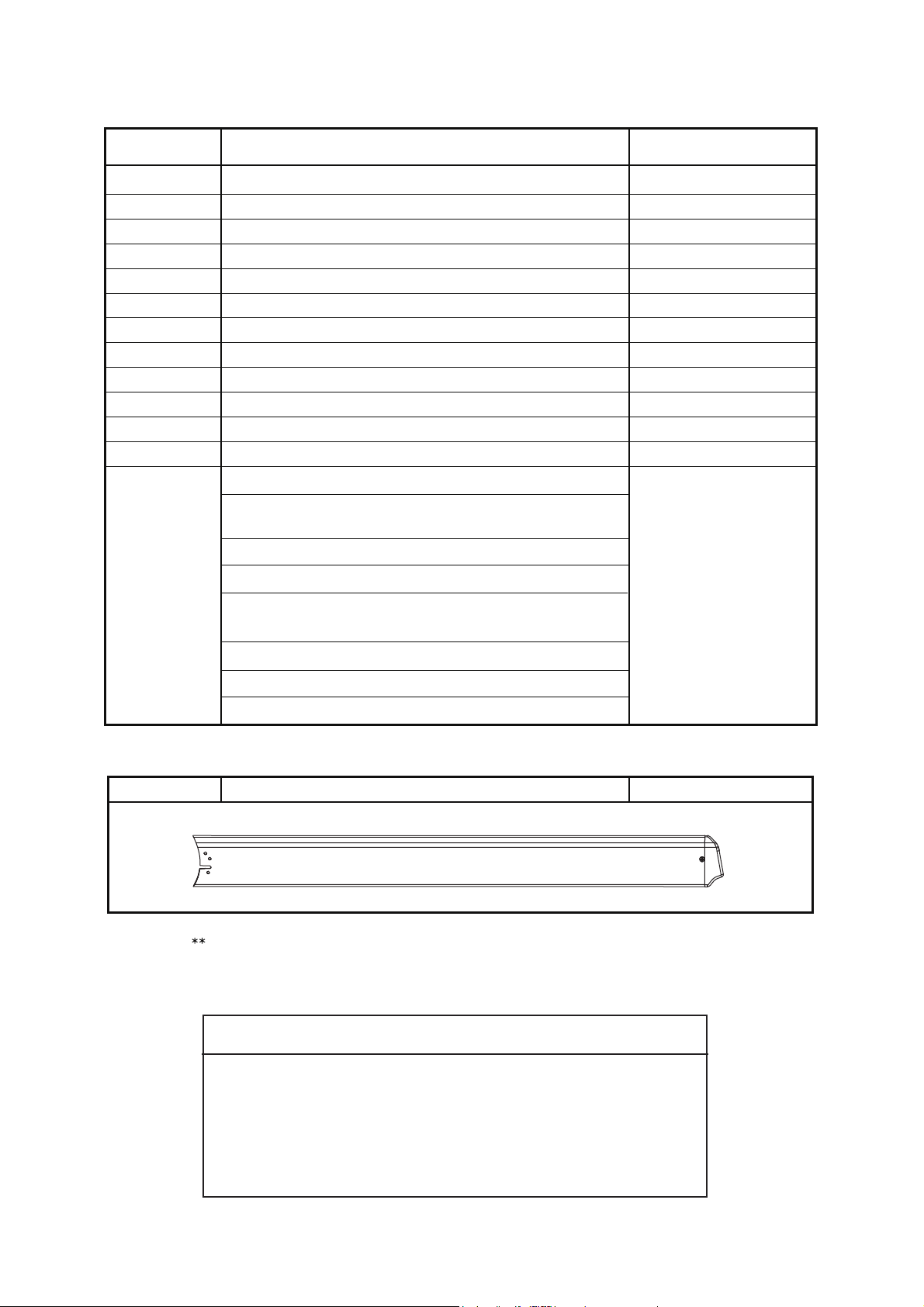
53
Juego de spas1 B7998-96**
1
2
3
4
5
6
7
Unidad de luz LED
Ensamble de la placa de iluminación/vidrio
8
Cubierta del cable del kit de iluminación
9
Mano a distancia
10
Receptor
Tapa de acero
12
11
13
Cubierta de unión del motor
Unidad del motor
Unidad del soporte de suspensión
Unidad del barral/de la semiesfera
Capuchón de techo
Cubierta para el tornillo del capuchón
Bolsa de accesorios para el montaje de aspas
que contiene:
Bolsa de accesorios:
Descripción
N.° de Ref.
Pieza # N.°
Tornillos para cajas de conexiones,
acero inoxidable de #8-32 (2)
Arandela plana, acero inoxidable (2)
Lista de piezas
Conectores de cables (4)
Kit de cable de seguridad
Placa de pala (8)
Tornillos de cabeza de botón de #10-24 (33)
P799301**
AP255BL
AP260**
APPCP1404**
AMA7998**
AP799309**
AP799311
P799314
P799312**
TR205D
ADR1SS-12**
HDWMAD7997**
WFRCCD799800
Pala de ventilador-Se compra por separado
Antes de desechar los materiales de embalaje, asegúrese de
haber extraído todas las piezas
Inserte los CÓDIGOS DE ACABADO (consulte el número de modelo del ventilador
que se encuentra en el soporte de barral)
Cómo hacer un pedido de piezas
Al hacer un pedido de piezas de repuesto, proporcione siempre
la siguiente información:
Póngase en [email protected] o al 1-888-567-2055 para
obtener las piezas de repuesto.
• Número de modelo del ventilado • Número de pieza
• Descripción de la pieza • Código de fecha
Modelos N.° MAD7998**
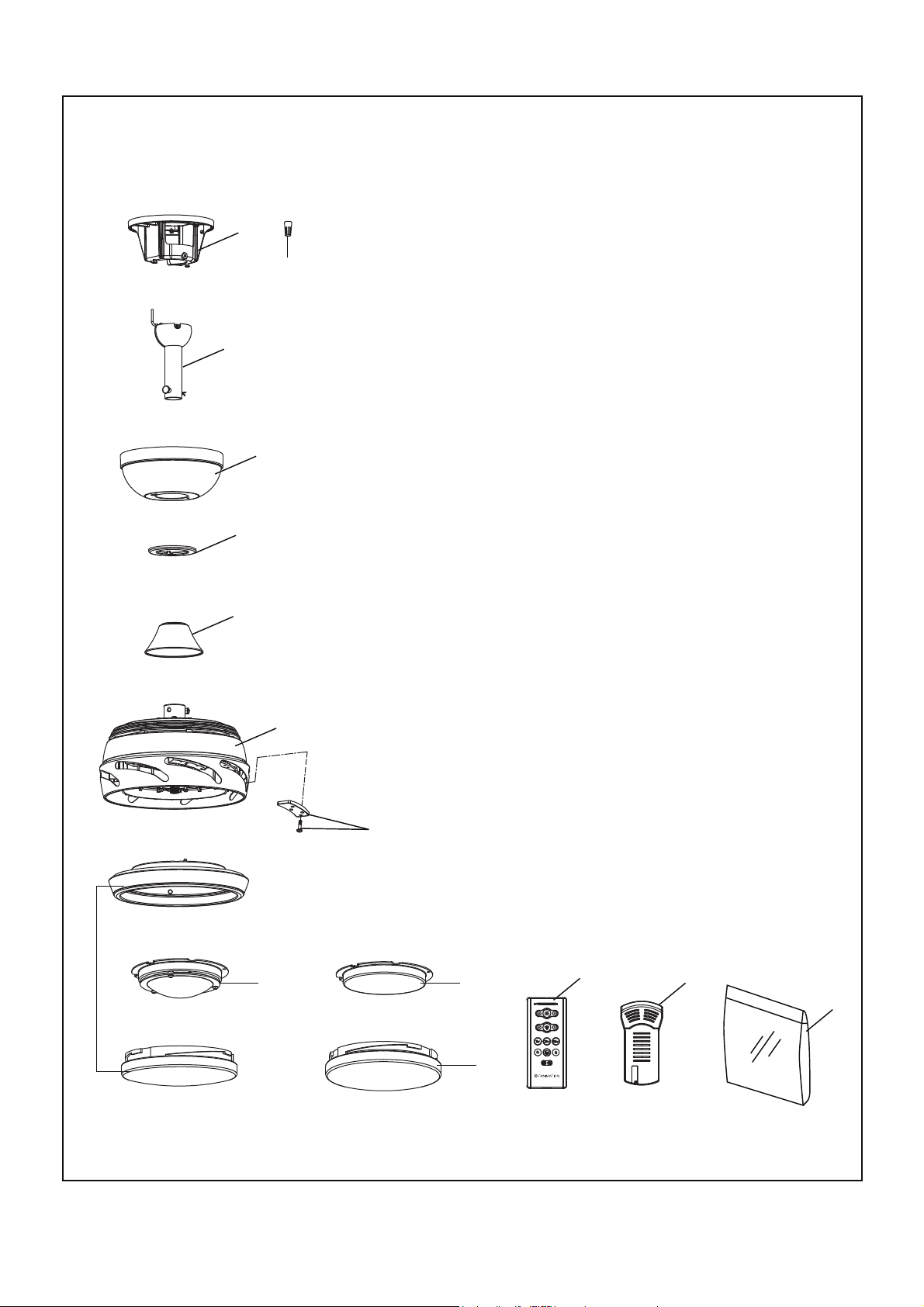
11
12
Stellar 96
™
54
1
2
3
4
5
6
7
10
13
13
Modelo MAD7998**
Ilustración del despiece
13
NOTA: La ilustración que se muestra no está hecha a escala y su configuración real y/o terminación
puede variar.
9
8


Visite nuestro sitio Web en www.fanimation.com
10983 Bennett Parkway
Zionsville, IN 46077
Llame sin cargo al (888) 567-2055
FAX (866) 482-5215
Desde fuera de los EE.UU., llame al (317) 733-4113
2021/08 V.01
Copyright 2021 Fanimation
