User manual
Jabra
Talk 65

© 2022 GN Audio A/S. All rights reserved. Jabra
®
is a
trademark of GN Audio A/S. The Bluetooth
®
word mark and
logos are registered trademarks owned by the Bluetooth
SIG, Inc. and any use of such marks by GN Audio A/S is under
license.
Declaration of Conformity can be found on
www.jabra.com/doc
Made in China
MODEL: OTE970

3
ENGLISH
1. Welcome .........................................4
2. Jabra Talk 65 overview ................5
2.1 Included accessories
3. How to wear ...................................6
3.1 Selecting an EarGel
3.2 How to get the perfect fit
4. How to charge ............................... 8
5. How to connect .......................... 10
5.1 Power on
5.2 Power o
5.3 Pair to your smartphone
5.4 Connect to your smartphone using NFC
6. How to use ................................. 13
6.1 Calls
6.2 Multiple call handling
6.3 Multipoint mode
6.4 How to reset
7. Support ........................................ 17
7.1 FAQ
7.2 How to care for your headset
7.3 How to clean your headset

4
ENGLISH
1. Welcome
Thank you for using the Jabra Talk 65. We hope
you will enjoy it!
Jabra Talk 65 features
• 80% noise cancellation with 2 microphones
• All-day calls with up to 14 hours talk time
• Outstanding fit & comfort
• Up to 300 feet/100 meters wireless range
• Protection against dust and water (IP54
rated)
• Media streaming & voice assistant access
5
ENGLISH
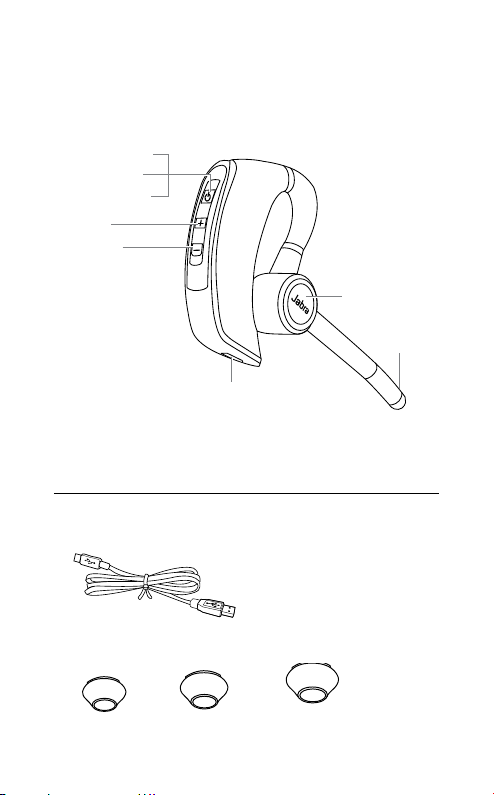
2. Jabra Talk 65
overview
*Device dependent
Power on/o (hold)
Volume up
Volume down
Microphone
Charging port
Answer/end call
Reject call (hold)
Voice assistant*
Mute microphone
2.1 Included accessories
USB cable
EarGels
Small Medium Large
6
ENGLISH
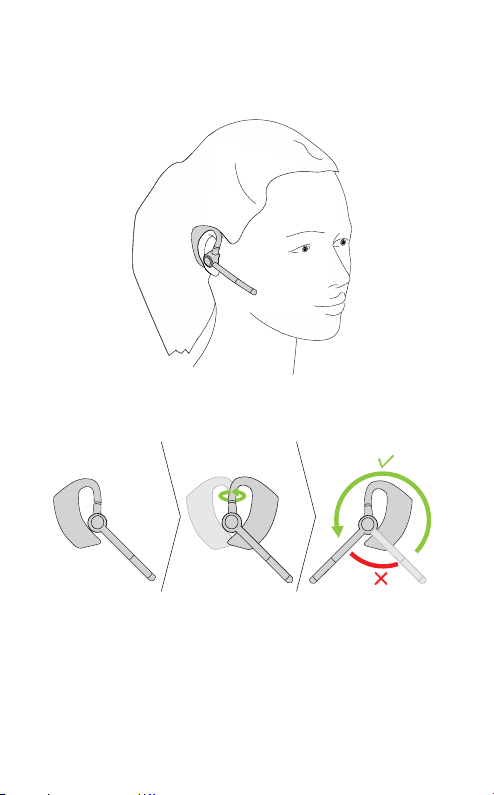
3. How to wear
The headset can be worn on the left or right ear.
Right
Left
To wear the headset on the other ear, rotate
the microphone horizontally to the other side.
Then swivel the microphone up and over and
point it towards your mouth.
7
ENGLISH
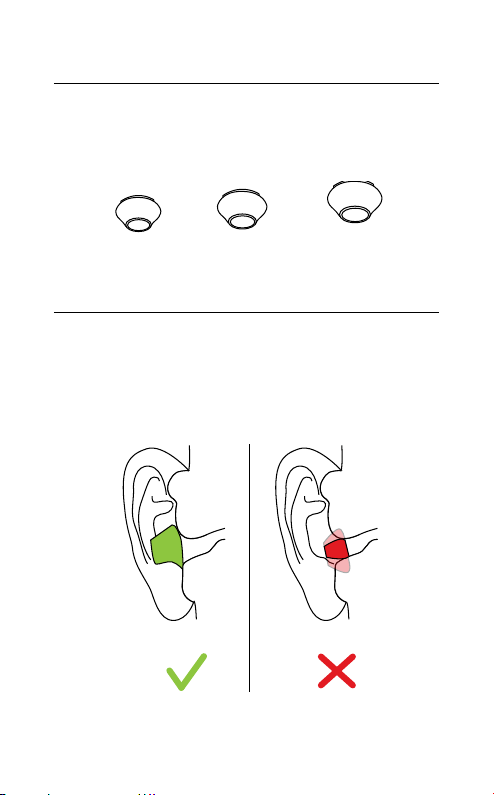
3.1 Selecting an EarGel
It is important to wear the headset with the
most comfortable EarGel size for your ears.
This will ensure the best audio experience.
Small Medium Large
3.2 How to get the perfect fit
For the best audio quality and comfort, the
eargel should fit firmly in your ear, but should
not be squeezed into your ear canal.
8
ENGLISH
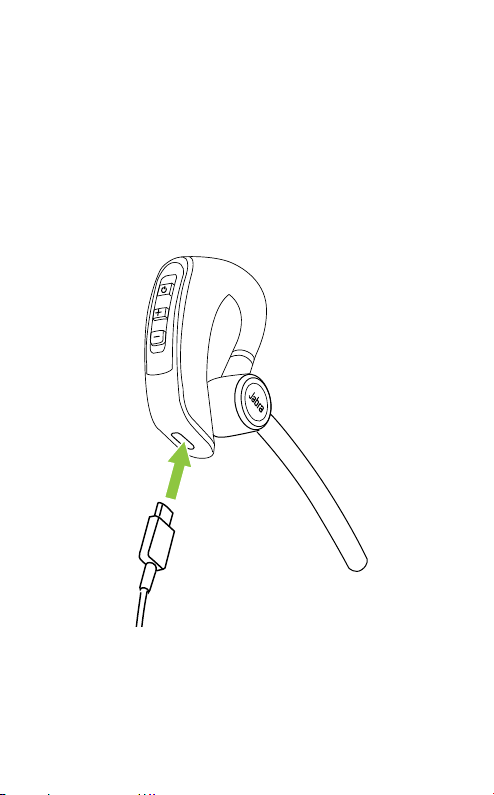
4. How to charge
To charge the headset, connect the USB
charging cable to the headset’s USB charging
port. It is recommended to charge the headset
using the supplied charging cable. It takes up
to 150 minutes to fully charge the battery.
9
ENGLISH
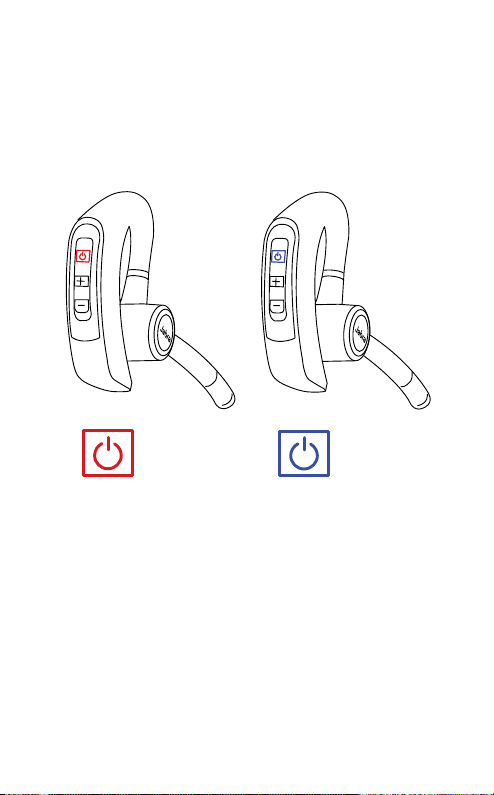
While charging, the LED indicator shows the
charging status. Red indicates the headset is
charging. Blue indicates the headset is fully
charged.
Charging
Fully charged
10
ENGLISH
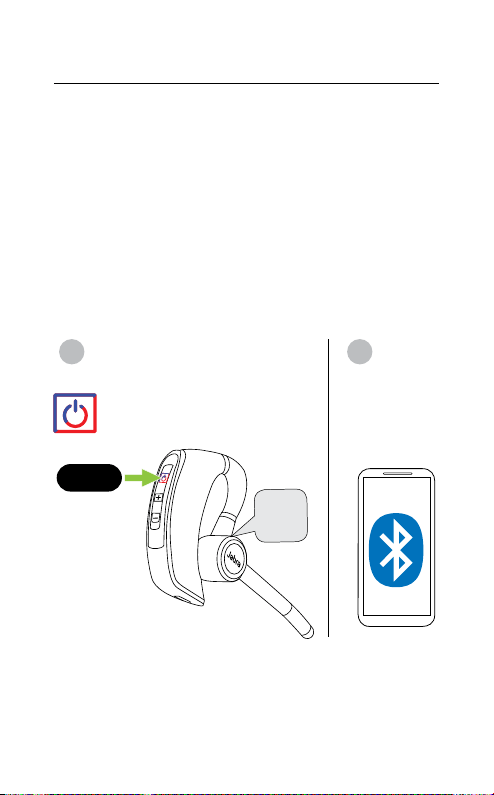
5. How to connect
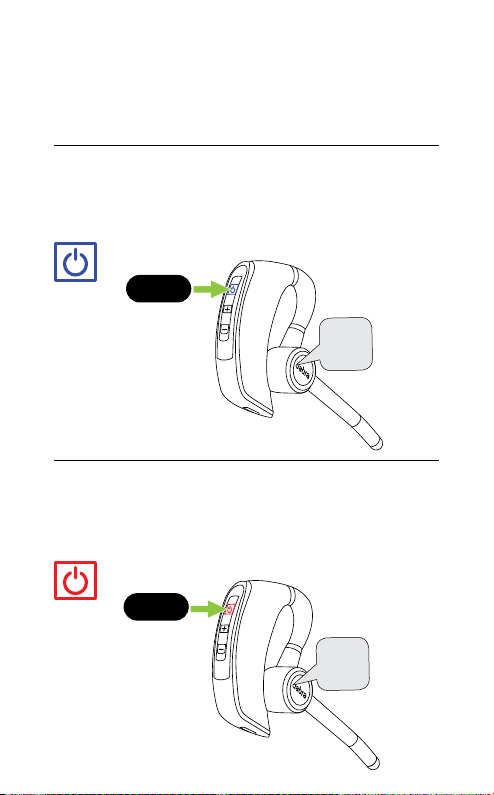
5.1 Power on
Press and hold the Multi-function button for 1
second until the LED flashes blue and you hear
“Power on”.
Power
on
1 sec
5.2 Power o
Press and hold the Multi-function button for 3
seconds until the LED flashes red and you hear
“Power off”.
Power
o
3 sec
11
ENGLISH
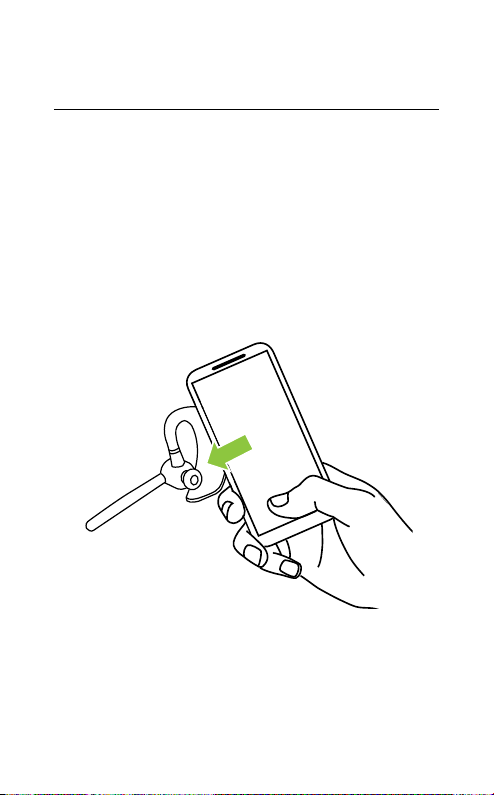
5.3 Pair to your smartphone
1. Ensure the headset is powered off.
2. Press and hold the Multi-function button for
approx. 6 seconds until you hear “Pair mode”
and the LED flashes red and blue. The
headset is now ready to pair.
3. Go to the Bluetooth menu on your
smartphone and select the Talk 65 from the
list of available devices.
1 2
Pair
mode
6 sec
12
ENGLISH
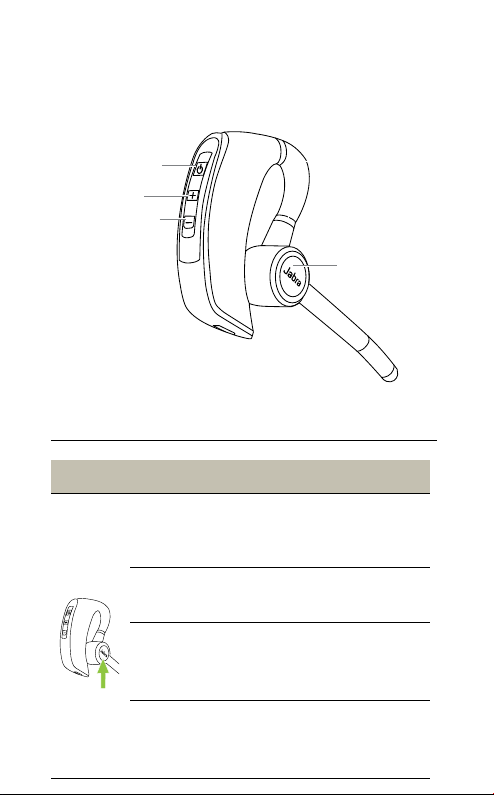
5.4 Connect to your smartphone using
NFC
1. Ensure your headset is powered on, and that
NFC is enabled on your smartphone.
2. Place the NFC zone of your smartphone
against the NFC zone of the headset until
your smartphone confirms the connection.
Please note that not all phones support NFC
pairing.
NFC Zone
13
ENGLISH
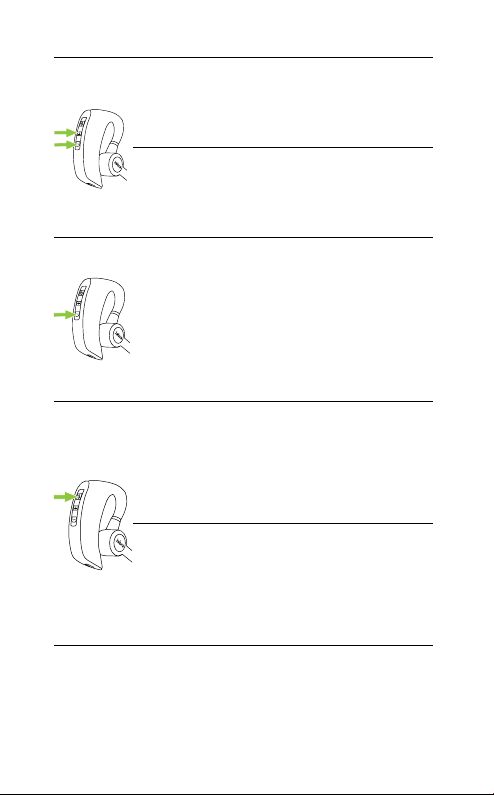
6. How to use
Answer/end call
button
Volume up button
Volume down button
Multi-function button
6.1 Calls
What the buttons do
Answer call
Press the Answer/end
call button
End call
Press the Answer/end
call button
Reject call
Double press the
Answer/end call button
Redial last
number
Double press the
Answer/end call button
when not on a call
14
ENGLISH
Adjust volume
Press the Volume up or
Volume down button,
when listening to music
or on a call
Turn LEDs on/o
Press both the Volume
up and Volume down
buttons simultaneously
Transfer audio
from headset to
smartphone
While on a call, press and
hold (2 sec) the Volume
down button to transfer
to the call audio to your
paired smartphone.
Repeat to transfer the
call audio back to your
headset
Mute/un-mute
microphone
Press the Multi-function
button when on a call
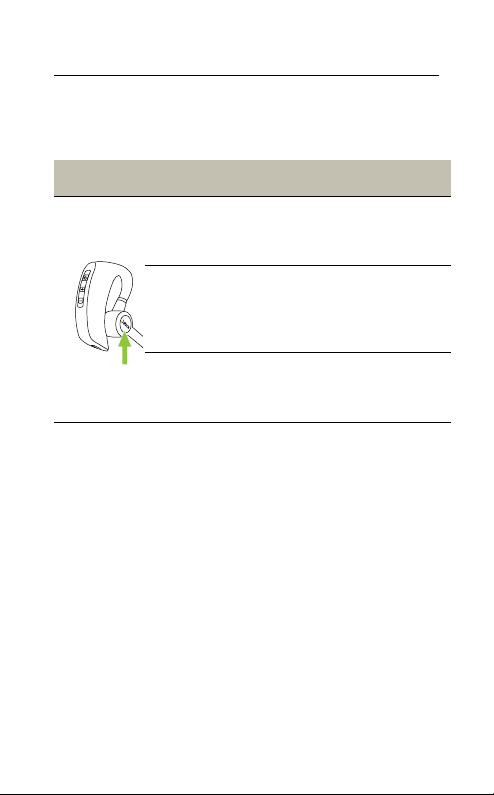
Activate Voice
Assistant (i.e. Siri,
Google Assistant)
Press the Multi-function
button when not on
a call
15
ENGLISH
6.2 Multiple call handling
The headset can accept and handle multiple
calls at the same time.
Multiple call handling
End current
call and answer
incoming call
Press the Answer/end
call button
Put current call
on hold and
answer incoming
call
Press and hold
(2 second) the
Answer/end call button
Reject incoming
call when on
a call
Quickly press the
Answer/end call button
twice

16
ENGLISH
6.3 Multipoint mode
The headset can pair to 8 smartphones or
tablets and connect to two at once (Multipoint
mode).
To connect to two smartphones, use the
normal pairing process separately for each
smartphone (refer to section 5).
The Jabra Talk 65 will monitor both
smartphones and enable you to answer a call
on either one using the headset.
If you are on a call and the other smartphone
receives a call, you will hear a notification in the
headset.
6.4 How to reset
Resetting the headset clears the list of paired
devices.
1. Ensure the headset is powered on.
2. Press and hold (10 sec) both the Volume up
and Volume down buttons until you hear
two beeps.
3. Power off the headset.
You will need to re-pair the headset to your
smartphone.

17
ENGLISH
7. Support
7.1 FAQ
View the FAQs on Jabra.com/help/talk65
7. 2 How to care for your headset
• To prevent the depletion of the battery
lifetime or capacity, avoid storing the headset
in hot or cold environments, such as a closed
truck in summer or in winter conditions.
• When exposed to water, allow the headset
sufficient time to dry. It may take up to one
hour for the headset to dry thoroughly and
power on.
• Do not store the headset for extended
periods of time without recharging them
(max. three months).

18
ENGLISH
7. 3 How to clean your headset
1. Apply normal dish soap and water to a cloth,
making sure to wring out any excess liquid so
the cloth is not dripping wet. Use soap and
water only; do not use strong cleaning
agents.
2. Gently wipe the headset with the wet cloth,
making sure the headset is clean with no
layer of suds on the surface.
3. Let the headset rest for at least one minute.
4. Wipe the headset clean with a cloth
dampened with water only.
5. Allow the product to dry.
