1
OPERATING
T21STK-0
INSTRUCTION

2
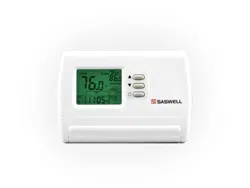
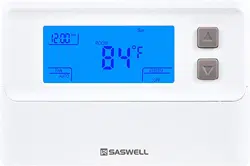
T21STK-0 SINGLE STAGE THERMOSTAT
1 Heat / 1 Cool single stage thermostat.
Non Programmable, Compatible with heat pump system
Installation and Operation Manual
Specification:-------------------------------------------------------------------------
Power Supply: 20VAC-30VAC 50-60HZ or Battery powered.
Terminal Load: 1.0A per terminal, 3.0A maximum total load
Set Point Temp. Range: 45ºF to 90ºF (7ºC to 32ºC).
Accuracy: +/- 1ºF or +/- 0.5ºC.
Dimensions: 6.0” W X 4.7” H X 1.1” D
Color: White

3
FEATURES:----------------------------------------------------------------------------
• Large LCD display with backlight, continuous backlight option.
• Simultaneous heat and cool set point storage.
• Display of room temperature, set temperature and current time
simultaneously.
• Fan switch with ON and AUTO functions.
• Permanent user setting retention during power loss. No batteries are
required.*
• Operates from 24VAC, or from 2 size “AA” alkaline batteries.
• Air Filter change Indicator.
• Low Battery Indicator.
• Temperature calibration.
• Batteries required to maintain clock function.

4
IMPORTANT SAFETY INFORMATION-----------------------------------------
• Always turn off power at the main power source by removing the fuse,
or switching the circuit breaker to the off position before installing,
removing, cleaning, or servicing this thermostat.
• Read all of the information in this manual before installing this
thermostat.
• Use a professional contractor to install this thermostat.
• This is a 24VAC low-voltage thermostat
DO NOT INSTALL ON VOLTAGES HIGHER THAN 30 VAC.
• ALL wiring must conform to local and national building and electrical
codes and ordinances.
• Do not short (jumper) across terminals on the gas valve or at the
system control to test installation. This will damage the thermostat and

5
void the warranty.
• Do not switch the system to cool if the temperature is below 50ºF
(10ºC). This may damage the air conditioning system.
• Replace batteries when the battery icon indicates the low battery
message.
• Change the Air Filter when the Filter Change Icon begins blinking.
• Use this thermostat only as described in this manual.
REMOVE THE OLD THERMOSTAT--------------------------------------------
WARNING ! Electrical Shock Hazard
1.Turn off power at the main service panel by removing the fuse or
switching the appropriate circuit breaker to the OFF position before
removing the existing thermostat.

6
2. Turn off power to the heating and cooling system by removing the
fuse or switching the appropriate circuit breaker off.
3. Remove the cover of the old thermostat. This should expose the
wires.
4. Label the existing wires from the existing thermostat before
removing.
5. After labeling the wires, remove the wires from the wire terminals.
6. Remove the existing thermostat from the wall
7. Refer to the following section for instructions on how to install this
thermostat.
7
INSTALL THE THERMOSTAT ----------------------------------------------
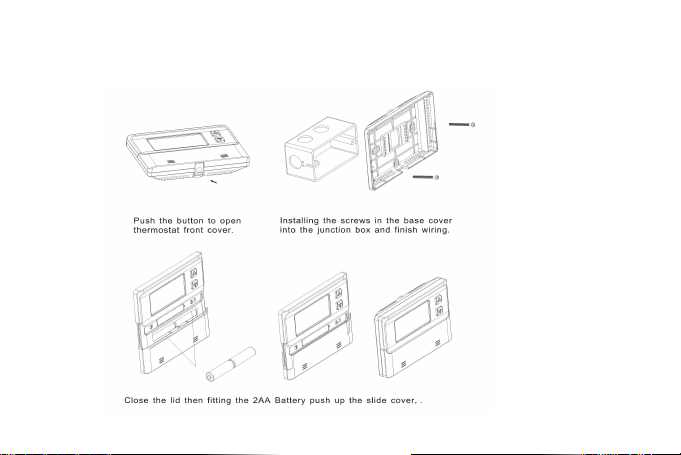
ATTACH THERMOSTAT BASE TO WALL PULL THE COVER OFF THE BASE.
Figure 1

8
WARNING!Electrical Shock Hazard
Turn off power at the main service panel by removing the fuse or
switching the appropriate circuit breaker to the OFF position before
removing the existing thermostat.
1. Turn off power to the heating and cooling system by removing the
fuse or switching the appropriate circuit breaker off.
2. Place the system switch (HEAT/OFF/COOL) in the OFF position.
3. Place the FAN (ON /AUTO) switch in the AUTO position.
4. Gently pull the cover straight off the base. (See figure 1.)
5. Put the thermostat base against the wall where you plan to mount it.
(Be sure the wires will feed through the wire opening in the base of the
thermostat.)

9
6. Mark the placement of the mounting holes.
7. Move the base out of the way. Drill mounting holes. Use a hammer
to tap in the supplied anchors into the mounting holes.
8. Fasten the base loosely to the wall as shown in Figure 1, using two
mounting screws. Place a level against the bottom of the base and
adjust until level, then tighten the screws. (Leveling is for appearance
only, and will not affect thermostat operation.)
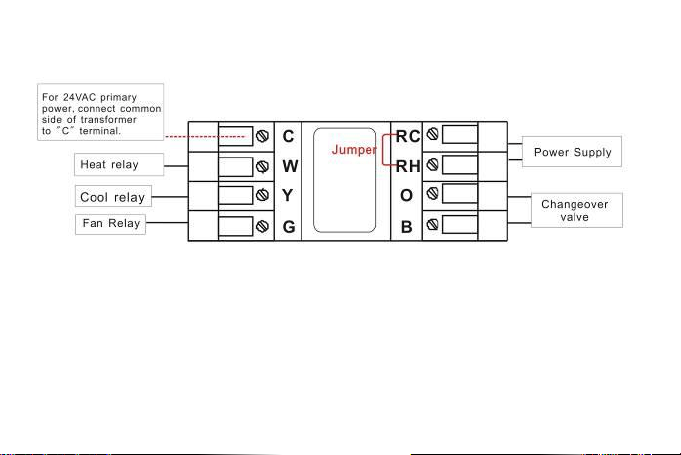
9. Insert stripped, labeled wires into matching wire terminals. See
“Wiring Diagrams”, Figure 2.
CAUTION: Be sure exposed portions of wires do not touch other wires.
10. Tighten screws on terminal block. Gently tug on each wire to be
sure of proper connection. Double check that each wire is connected to
the proper terminal.

10
CAUTION: Installing batteries backwards can damage the thermostat.
11. Install two fresh “AA” alkaline batteries in the battery compartment.
Be sure to match positive (+) ends of batteries with positive (+) battery
terminals in the battery compartment. (The thermostat will operate
from 2 size “AA” alkaline batteries or 24VAC power. When operated
from 24VAC power, your thermostat will maintain time and
continuously display the temperature during a loss of AC power with
the batteries installed).
12. Replace the cover on the thermostat by snapping it in place.
13. Turn on power to the system at the main service panel.
14. Test thermostat operation as described in the following section.

11
Fan operation switch
Read the following information before setting the fan option switch
(See figure 3). If you are unsure of your application, contact a qualified
service person.
This thermostat is configured from the factory to energize the fan on a
call for heat. If your system is an electric heat or heat pump that
REQUIRES the thermostat to turn on the fan on a call for heat, place
the fan option switch in the ELEC position. If your system does not
require the thermostat to energize the fan on a call for heat such as
fossil fuel (gas, oil, etc.), forced air system as well as hydraulic heating
systems, place the fan option switch in the GAS position.

12
BATTERY OPERATION
The thermostat will operate from 2 size “AA” alkaline batteries or
24VAC power. When operated from batteries, connection to the “C”
(common) or (neutral) terminal is not required.
NOTE: When operated from batteries only, the LCD display
backlight will be lighted less than 5 seconds after each button
pressed ,when backlight option are set to 2) or 3).
If the battery icon on the display is flashing, it indicates that the
batteries need to be replaced. When the thermostat is powered only by
battery, the battery icon will flash for approximately 2 months before
the batteries are expected to expire.
13
WIRING DIAGRAM
Figure 2
Typical wiring diagram for heat/cool, 5 wire two transformer system.
In heat pump system, first you must select configuration menu 3
item. Or the Y terminal would not activated. In heat pump system,
W & Y terminal reverse each other work.
14
CHECK THERMOSTAT OPERATION-----------------------------------------
If at any time during testing your system does not operate properly,
contact a qualified service person.
Turn on power to the system.
Fan Operation
Move the system switch to the OFF position. If your system does not
have a “G” (Fan) terminal connection, skip to the Heating System.
1. Move the fan switch to the ON position. The blower should begin to
operate.

15
2. Move the fan switch to the AUTO position. The blower should stop
immediately.
Heating system
1. Move the SYSTEM switch to the HEAT position. If the auxiliary
heating system has a standing pilot, be sure to light it.
2. When the (FA)st heating cycle rate is selected in the configuration
menu, (see configuration menu item 2), the thermostat will call for heat
at 0.5ºF (0.5ºC) below set-point, and turn off at set point. When the
(SL)ow heating cycle rate is selected, the thermostat will call for heat at
1.5ºF (1.5ºC) below set-point, and turn off at set-point. When the
thermostat calls for heat, the display will show Heat On. If the Heat On
display is flashing, the compressor lockout feature is operating in the
heat pump mode. (Note: See Configuration menu item 8).

16
Cooling System
CAUTION: To prevent compressor and/or property damage, if the
outdoor temperature is below 50ºF (10ºC), DO NOT operate the
cooling system.
1. Move the SYSTEM switch to the COOL position.
2. When the (FA)st cooling cycle rate is selected in the configuration
menu, (see configuration menu item 2), the thermostat will call for
cooling at 0.5ºF (0.5ºC) above set-point, and turn off at set point. When
the (SL)ow cool cycle rate is selected, the thermostat will call for
cooling at 1.5ºF (1.5ºC) above set-point, and turn off at set-point. When
the thermostat calls for cooling, the display will show COOL On. If the
COOL On display is flashing, the compressor lockout feature is
operating. (Note: See Configuration menu item 8). If all functions
17
operate properly, the thermostat is installed correctly.
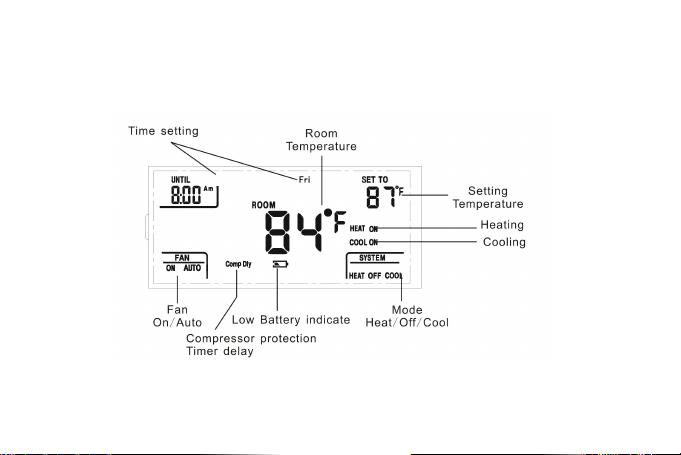
THERMOSTAT LCD DISPLAY
Figure 3
18
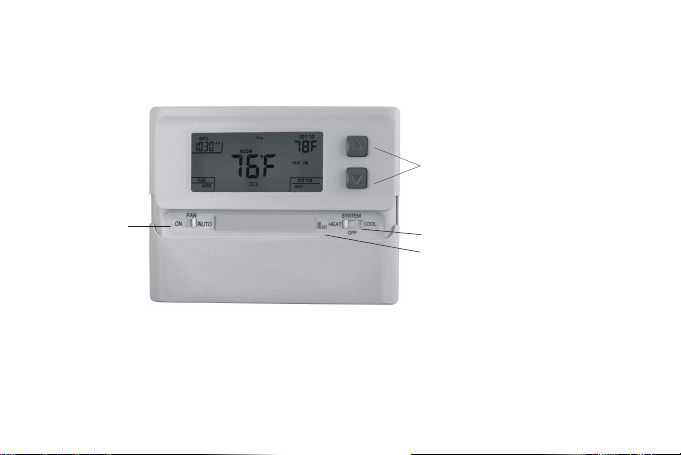
THERMOSTAT BUTTONS AND SWITCHES
1 Raises or lowers the temperature setting
2
Selects options in the configuration menu.
3 OFF mode
Hold the down button enter into clock
setting mode
. .
.
. :
.
OFF mode :
Fan control
switch (On )/Auto
System control switch ( /OFF/ )HEAT COOL
User setting reset
Figure 4

19
THERMOSTAT OPERATION--------------------------------------
1. Setting the thermostat
This thermostat is very easy to operate. Set the SYSTEM switch to
either HEAT or COOL, then press the ▲ or ▼ buttons until the
temperature you want to maintain is shown on the right side of the
display. If you want to turn the system off, just move the SYSTEM
switch to the OFF position and the FAN switch to the AUTO position.
2. Time and day setting
Move the SYSTEM switch to the OFF position, then press and hold the
▼ buttons for 5 seconds to enter the clock setting mode. The display
will show the HOUR setting first . Use the ▲ button to select each
user setting. Press the ▼ button to shift to the next menu item
( MINUTES,WEEK DAY). Use the ▲ button to select each user
setting also.

20
Move the SYSTEM switch to the HEAT or COOL position to exit the
setting menu. If no buttons are pressed within 15 seconds , the
thermostat will exit the configuration menu.
3. Filter review
Move the SYSTEM switch to the HEAT or COOL position, then press
and hold the ▲ and ▼ buttons for 5 seconds to review filter running
days.
To exit the review menu press the ▲ or ▼ buttons one time. Or If
no buttons are pressed within 15 seconds, the thermostat will exit the
configuration menu. In review mode, press and hold the ▲ and ▼
15 sec. to clean the filter warning. It will show “dEF” blink.

21
Troubleshooting
----------------------------------------------------------------
If a voltage spike or static discharge blanks out the display or
causes erratic thermostat operation, you can reset the thermostat by
pressing the reset button (See Figure 4). If the thermostat has power,
and has been reset and still does not function correctly, contact your
heating/cooling service contractor .
1. Select cooling cycle rate
The FA setting is used to produce shorter cooling cycles. The SL
setting produces a longer cooling cycle. Both settings produce very
accurate temperature control and can be set to your personal
preference. FA cycles the system at a 0.5ºF (0.5ºC) differential, and SL
cycles the system at 1.5ºF (1.5ºC).

22
2. Select heating cycle rate
The FA setting is used to produce shorter heating cycles. The SL
setting produces a longer heating cycle. Both settings produce very
accurate temperature control and can be set to your personal
preference. FA cycles the system at a 0.5ºF (0.5ºC) differential, and SL
cycles the system at 1.5ºF (1.5ºC).
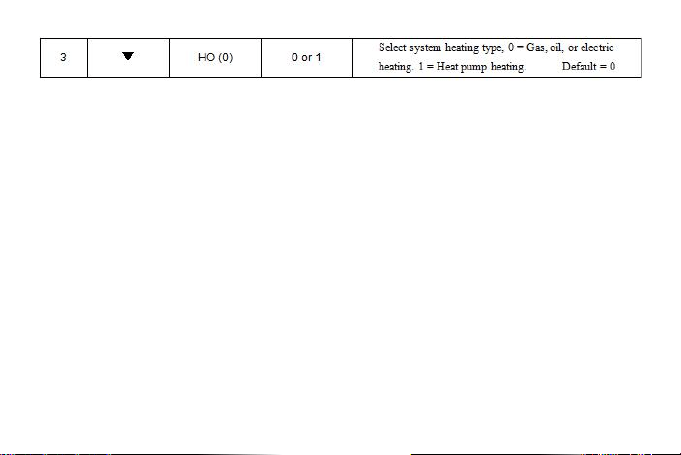
3. Select system heating type
Users can select the system heating type according to their
heating system. Select 0 for gas, oil, or electric heating systems.
Select 1 for a heat pump heating system.
4. Select display backlight
The display backlight improves display contrast in low lighting

23
conditions. Select 1 for NO backlight display. Select 2 for the backlight
to come on for approximately 30 seconds when any button of the
thermostat is touched. Select 3 for the backlight to remain on
continuously.
NOTE: When operated from batteries only, the LCD display
backlight will be illuminated less than 5 seconds after each button
pressed ,when backlight option are set to 2) or 3). Options 2) & 3)
will operate the same when terminal “C” is not connected.
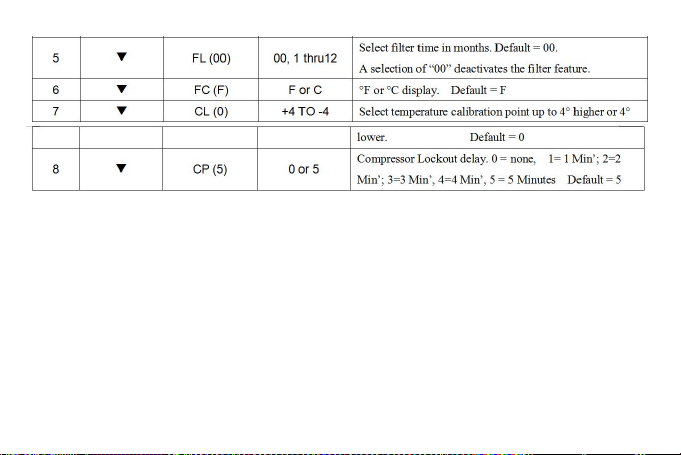
5. Select filter replacement run time
The thermostat will display the Filter Alarm after a set time of operation.
This is a reminder to change or clean your air filter. This time can be
set from 0 to 12 months in 1 month increments. Selection of 00 WILL

24
CANCEL THIS FEATURE. When Filter Alarm is displayed, you can
clear it by pressing the ▲ and ▼ buttons. This resets the timer and
starts counting the days until the next filter change.
6. Select ºF or ºC readout
Changes the display readout to Centigrade or Fahrenheit as
required.
7. Select temperature recalibration
This feature allows you to adjust the displayed room temperature
up to 4º higher or lower. Your thermostat can be accurately calibrated
to match your previous thermostat. The current or adjusted room
temperature will be displayed on the display.
8. Select compressor lockout delay 0,1,2,3,4,5

25
To protect the compressor from short cycling, you can select
compressor off-time cycle between 0 to 5 minutes. When the
thermostat compressor time delay occurs, the Cool On or Heat On
display will flash during compressor lockout.
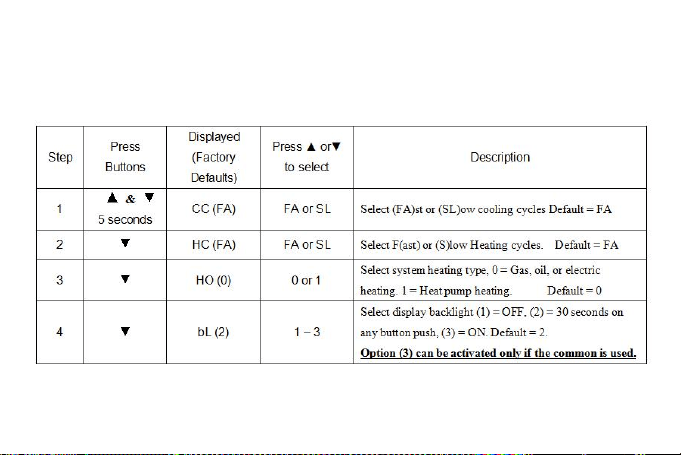
CONFIGURATION AND OPERATION
The configuration menu allows you to set certain thermostat
operating characteristics to your system or personal requirements.
Move the SYSTEM switch to the OFF position, then press and hold the
▲ and ▼ buttons for 5 seconds to enter the configuration menu. The
display will show the first item in the configuration menu. Press the ▼
button to shift to the next menu item. Use the ▲ button to select each
user setting. To exit the configuration menu and return to normal
operation, move the SYSTEM switch to the HEAT or COOL position. If
26
no buttons are pressed within 2 minutes, the thermostat will exit the
configuration menu. The configuration menu chart summaries the
configuration options. An explanation of each option follows.
27
Mark: RESET function.
This function can help operator to recovery system when fault happened ,
display outoforder or system halted. Please use a pin to insert in button
RESET hole till sounded click, then loosen it. Switch on thermostat and
observe it, if there still have troubles, please don’t hesitate to contact with local
agency for warranty.

28