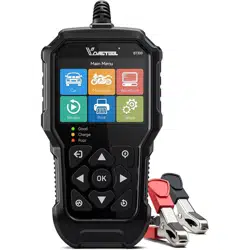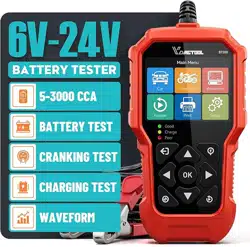
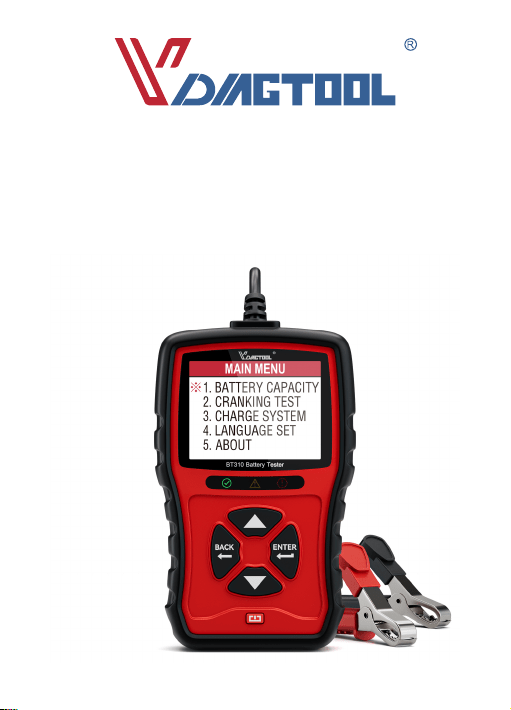
BT310
12V & 24V Batte Analyzer
USER MANUAL

Contents
1.Welcome
2.About
3.Packing List
4.Compatibility
5.Cautions
6.Features
7.Operation Introduction
8.Technical Specication
9.Warranty
10.After Sales Seice
11.Warning
12.FAQ
...................................................................................................................................................................... 2
............................................................................................................................................................................ 2
................................................................................................................................................................. 2
.............................................................................................................................................................. 2
....................................................................................................................................................................... 2
....................................................................................................................................................................... 3
.......................................................................................................................................... 4
......................................................................................................................................... 13
..................................................................................................................................................................... 14
............................................................................................................................................. 14
................................................................................................................................................................... 14
........................................................................................................................................................................... 14
BT310 12V & 24V Batte Analyzer
1

2. About
1. Welcome
Thank you for purchasing VDIAGTOOL BT310 Batte Tester. Please take time to read and
understand this user manual before operation.
Applying advanced conductance testing technology and incorporating reverse polarity
protection, the VDIAGTOOL BT310 Batte Tester will provide the technician, professional and
DIYer with critical information about 12v and 24v batte health status and identifying batte
and charging problem quickly, easily and accurately.
1.
2.
VDIAGTOOL BT310 Batte Tester
User Manual
3. Packing List
Note: If you vehicle batte is not the batte mentioned about and you were not sure which
type it is, please contact us via customer suppo and send us some batte pictures or ask
your retailer.
1.
2.
3.
4.
5.
VRLA(Valve-regulated lead-acid batte)
GEL
AGM
SLA
STANDARD LSI
Refer to the batte label for batte type and CCA values( Cold Cranking Amp)
4. Compatibility
5. Cautions
◆ Using this tester in accordance with those instructions, taking into account the working
conditions and the work to be peormed. Hazardous results could occur if tool is used for
purpose not intended;
BT310 12V & 24V Batte Analyzer
2
6. Features
◆ Using it for 12V/24V batte, working voltage: DC 9V to 36V;
◆ Ensure the batte terminal are clean, grease and dust car result in inaccurate test result;
◆ Wearing eyes protection when working around batte;
◆ Test it in a well-ventilated area, vehicle exhaust contain toxic carbon monoxide;
◆ Keep hair, hands & clothing as well as tester leads& cords away from moving blades& belts;
◆ Keep the tester out of the reach of children;
◆ Check the insulating layer of the clamps to ensure they are in proper condition without
damage, exposed wires, or disconnections to avoid electric shock;
BT310 12V & 24V Batte Analyzer
3
7. Operation Instructions
7.1 Main menu
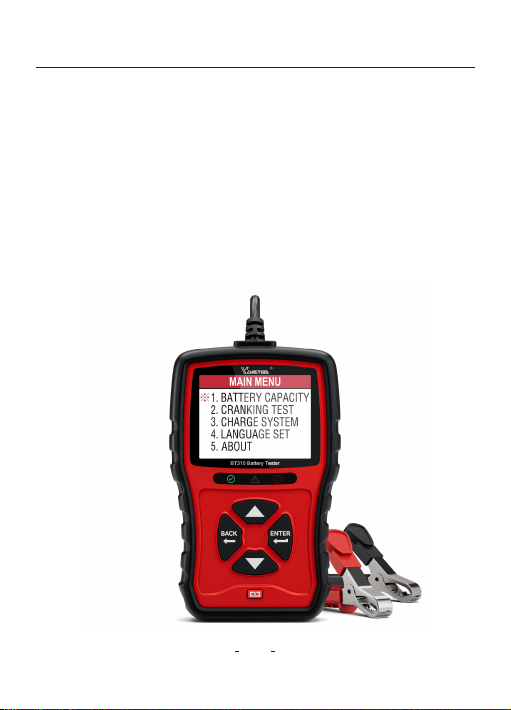
The tester is powered solely by the vehicle batte. Connect the Red (+) positive batte clamp
to the (+) positive batte terminal. And connect the Black (-) negative batte clamp to the (-)
negative batte terminal. Ensure that the clamp is securely attached to the correct terminals.
The display will show the page 1 below if all corrected. If not, you may get errors pages
(page 2) below, please double check the clamps and connection and have another t;
BT310 12V & 24V Batte Analyzer
4
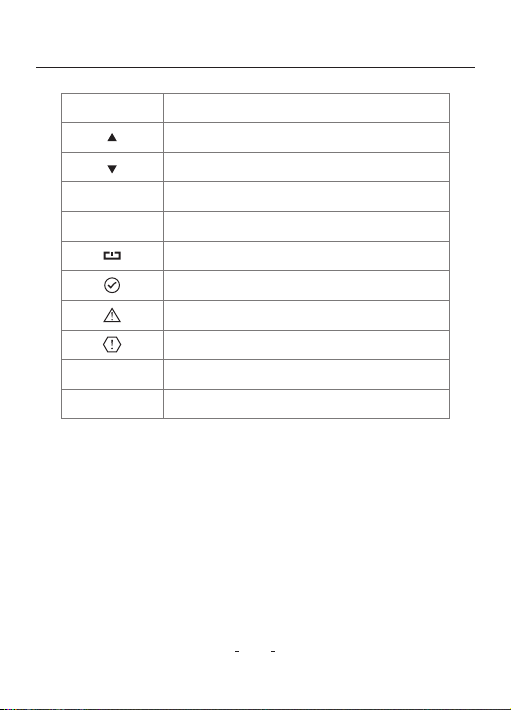
OperationButtons
Increase the value / Page up
Decrease the value / Page down
Cancel / ReturnBack
Red Clamp
Black Clamp
ENTER Conrm / Enter / Proceed
Resta unit / Return under any status
Batte good condition light
Batte warning condition light
Batte bad condition light
Positive connection
Negative connection

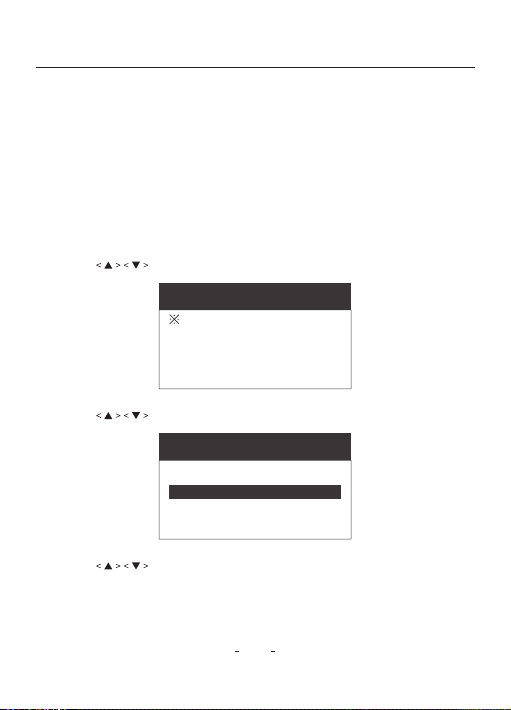
Choose preferable Batte Voltage and enter the page below, choose “12V” for example, Press
“ ENTER” You will enter MAIN MENU, and choose the Preferable Languages;
BT310 12V & 24V Batte Analyzer
5
Page 1
BATTERY VOLTS
24V
12V
Page 2
Black clamp(NEG.)
contact is bad,
please check!
Red clamp(POSI.)
contact is bad,
please check!
MAIN MENU
1.
2.
3.
4.
5.
BATTERY CAPACITY
CRANKING TEST
CHARGE SYSTEM
LANGUAGE SET
ABOUT
LANGUAGE SETTING
ENGLISH
7.2 BATTERY CAPACITY ( For example, for 12V Batte )
Thistesterdeterminesconditionofthebatteaccordingtotheratedvalue labeledonthebatte.
7.2.1 BeforeTest
The engine and all the other accesso load must be OFF in order to have accurate result.
Turn on the vehicle headlight for 2-3 minutes till the batte voltage back to the normal
values if the batte voltage is just fully charged.
7.2.2 Steps
7.2.2.1 Press to select “BATTERY CAPACITY” and press “ENTER” to continue.
BT310 12V & 24V Batte Analyzer
6
MAIN MENU
1.
2.
3.
4.
5.
BATTERY CAPACITY
CRANKING TEST
CHARGE SYSTEM
LANGUAGE SET
ABOUT
7.2.2.3 Press
page below,and press “ENTER” to contiue.
to select “CCA TYPE” which is displayed on the batte rating label
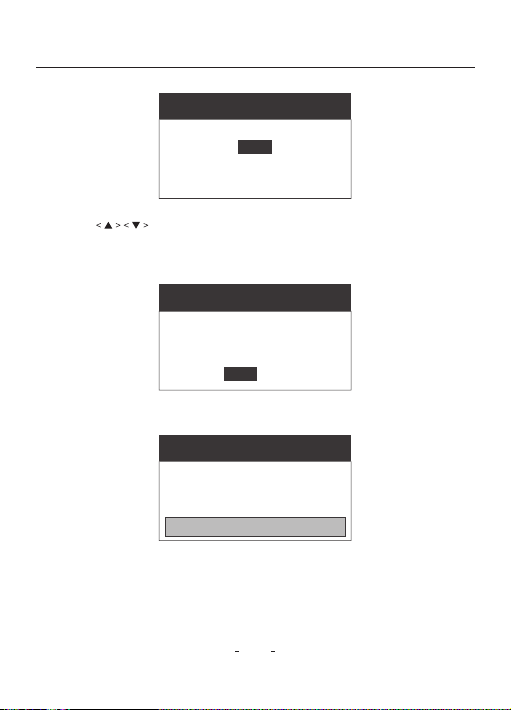
7.2.2.2 Press to select preferable “BATTERY TYPE” ,press “ENTER” to continue.
MAIN MENU
BATTERY TYPE:
STANDARD LSI
VRLA / GEL / AGM / SLA
CCA TYPE: CCA, IEC, EN, DIN, JIS, GB
Note: Choose the right CCA TYPE according to your own batte information.
BT310 12V & 24V Batte Analyzer
7
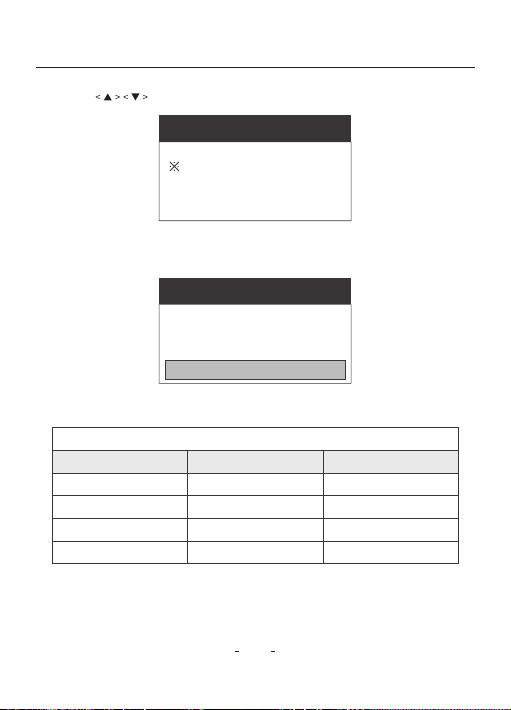
7.2.2.5 Press “ENTER” to sta Batte Test, the test result will be displayed as below.
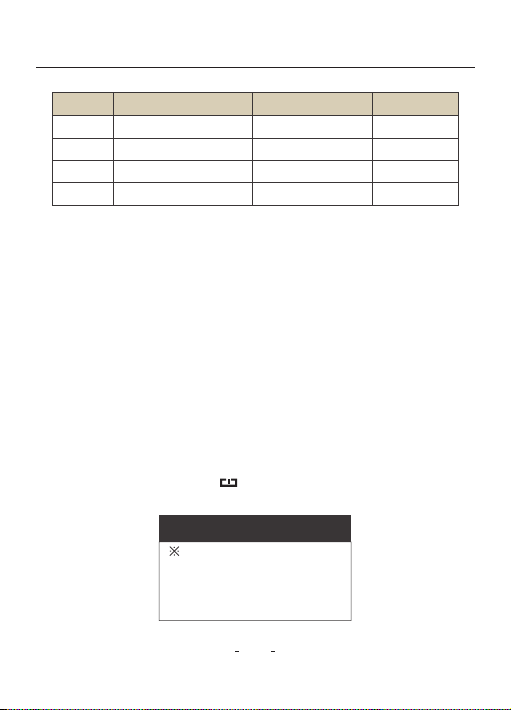
7.2.2.6 Reference Table Replace the batte if the LED indicator is Red.
Batte State of Health (SOH) and Test Result Reference Table
7.2.2.4 Press
and press “ENTER” to contiue.
to select “CCA RATED” which is displayed on the batte rating label,
MAIN MENU
CCA TYPE:
CCA RATER:
800 CCA
CCA
MAIN MENU
CCA TYPE:
CCA RATER:
800 CCA
CCA
CCA RATED: Enter the exact CCA RATED according to your own batte information.
Note: Number near or equal to the batte CCA RATED is recommended.
BATTERY CAPACITY
11.89V
SOC:37%
Batte Ω :
RATED:
780 CCA
SOH: 64%
4.14m Ω
800 CCA
CHARGE & RETEST
7.3. CRANKING TEST
This test determines cranking state by testing cranking voltage and time.
7.3.1 Before Test
The engine and all the other accesso load must be OFF rst in order to have accurate result.
7.3.2 Steps
7.3.2.1 Connect the Red (+) positive batte clamp to the (+) positive batte terminal. And
connect the Black (-) negative batte clamp to the (-) negative batte terminal.Ensure
that the clamp is securely attached to the correct terminals.
7.3.2.2 Ensure the tester is in the MAIN MENU page below, press “BACK” key till you nd pade
below or just press resta key st till you nd the MAIN MENU page below and
t it.
BT310 12V & 24V Batte Analyzer
8
MAIN MENU
1.
2.
3.
4.
5.
BATTERY CAPACITY
CRANKING TEST
CHARGE SYSTEM
LANGUAGE SET
ABOUT
Reference Table for 12V Batte
LIFE RESULT NOTE LED
>80% GREAT Good to Use GREEN
>60% NORMAL Not Bad GREEN
>45% CAUTION Keep Caution YELLOW
<45% SUGGESTREPLACE Replace Needed RED
BT310 12V & 24V Batte Analyzer
9
MAIN MENU
1.
2.
3.
4.
5.
BATTERY CAPACITY
CRANKING TEST
CHARGE SYSTEM
LANGUAGE SET
ABOUT
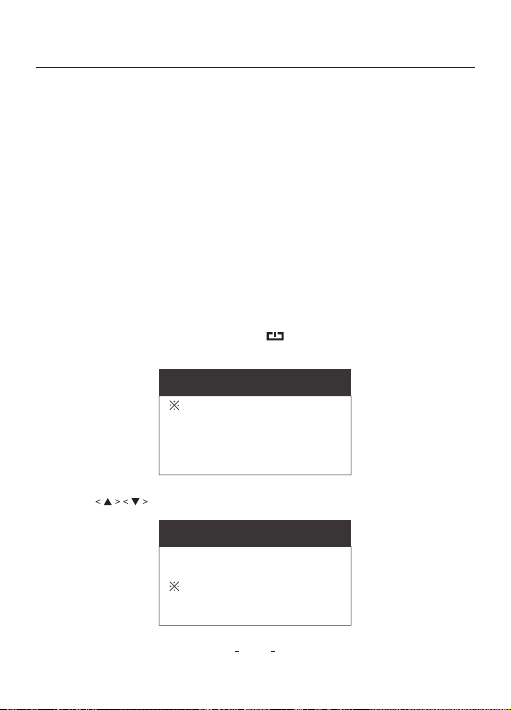
Cranking Test Result Reference Table
7.3.2.3 Press to and select “CRANKING TEST”.
7.3.2.4 Press“ENTER”to initiate the Cranking Test and sta the engine according to the
insatruction on the tester’s screen, You will get page below.
CRANKING TEST
TIME
CRANKING V
836ms
12.69 V
CRANKING GOOD
7.3.2.5 Reference Table (CRANKING V = Cranking Voltage)
Cranking Voltage Cranking Ability Action to Batte
Reference Table (For 12V System)
>10.7V Good No Action
10.2V~10.7V Normal Keep Caution
9.6V~10.2V Bad Replace It Soon
<9.6V Ve Bad Relpace It Immediately
7.4. CHARGE SYSTEM
This test determines charging system by testing its condition under loaded and unloaded
status.
7.4.1 Before Test
The engine and all the other accesso load must be OFF rst
7.4.2 Steps
7.4.2.1 Connect the Red (+) positive batte clamp to the (+) positive batte terminal. And
connect the Black (-) negative batte clamp to the (-) negative batte terminal. Ensure
that the clamp is securely attached to the correct terminals.
7.4.2.2 Ensure that the tester is in the MAIN MENU page below rst, press “BACK” key till you
nd page below or just press resta key rst till you nd the MAIN MENU page
below and t it.
BT310 12V & 24V Batte Analyzer
10
MAIN MENU
1.
2.
3.
4.
5.
BATTERY CAPACITY
CRANKING TEST
CHARGE SYSTEM
LANGUAGE SET
ABOUT
MAIN MENU
1.
2.
3.
4.
5.
BATTERY CAPACITY
CRANKING TEST
CHARGE SYSTEM
LANGUAGE SET
ABOUT
7.4.2.3 Press to and select “CHARGING SYSTEM”.
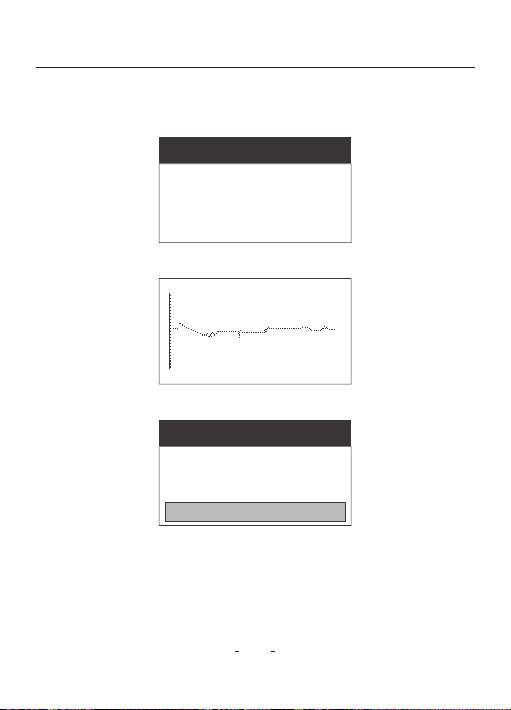
7.4.2.4 Press “ENTER” to conrm and Sta the engine according to the instructions on the
tester’s screen, you will get test result page below.
BT310 12V & 24V Batte Analyzer
11
Page 1
CHARGE SYSTEM
Turn on all loads
speed up to 2000
to 2500 rpm
then press <Enter>
Page 3
CHARGE SYSTEM
RIPPLE:
LOADED:
UNOLADED:
650mV
13.01V
14.60V
CHARGING GOOD
Page 2
12.98V
RIPPLE TEST
7.5 LANGUAGE SET
7.5.1 Steps
7.5.1.1 Ensure that the tester is in the MAIN MENU page below rst, press “BACK” key till you
nd page below or just press resta key rst till you nd the MAIN MENU page
below and t it.
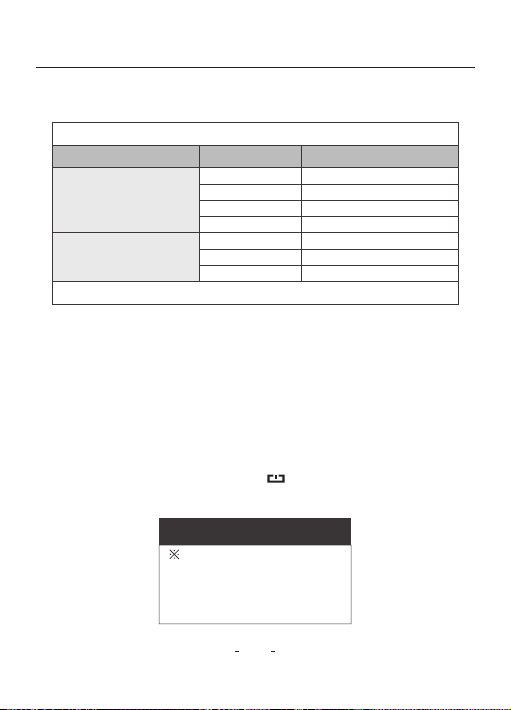
7.4.2.5 Reference Table
7.4.2.6 Note: Tool saves the result of the last test, not all testing data.
BT310 12V & 24V Batte Analyzer
12
MAIN MENU
1.
2.
3.
4.
5.
BATTERY CAPACITY
CRANKING TEST
CHARGE SYSTEM
LANGUAGE SET
ABOUT
Charging Test Result Reference Table
Status Batte Voltage
>13.5
All Electric System O
(Depress Accelerator)
All Electric System On
(Depress Accelerator)
Normal
13.2~13.5 General
13.0~13.2 Keep Caution
<13 Inspection Immediately
13.4~14.8 Normal
13.2~13.4 Keep Caution
<13.2
Inspection Immediately
Engine Peirmance
Reference Table (For 12V System)
For reference only. Bad batteries will a ect the test results.
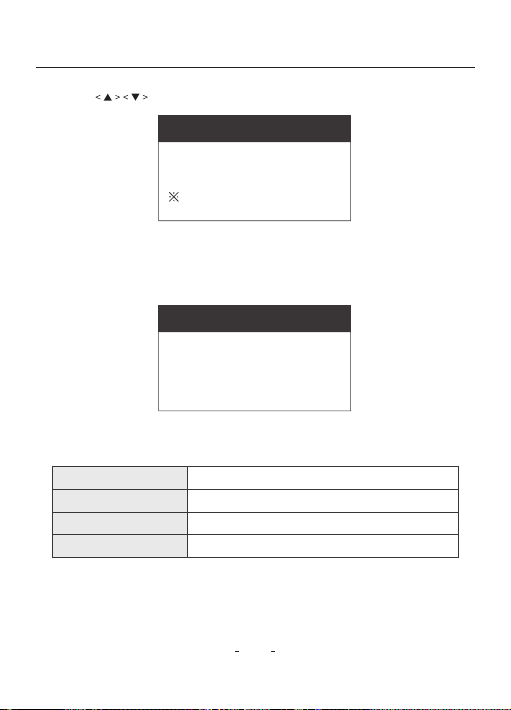
7.5.1.3 Choose Preferable Language and press “ENTER” to conrm.
Suppos Language (English, Deutsch, Espanol, Lefrancais, Japanese, Pougues, Polski,
Italiano, Magyarnyelv, Svenska, Slovak, Cesky, Neder Lands, Pyccknn)
BT310 12V & 24V Batte Analyzer
13
MAIN MENU
1.
2.
3.
4.
5.
BATTERY CAPACITY
CRANKING TEST
CHARGE SYSTEM
LANGUAGE SET
ABOUT
7.5.1.2 Press to select “LANGUAGE SET”
8. Tecnical Specication
LANGUAGE SETTING
English
2.8” TFT coloul display
-4°F - 140°F
21.8cm × 14.4cm × 6.8cm
Display
Working Temperature
Dimension
Weight
0.45kg

9. Warranty
9.1 VDIAGTOOL Two Year Limit Warranty
VDIAGTOOL warrants to its original purchaser that VDIAGTOOL products will be free from
defects is the meterial or workmanship 24 our from the day of purchase. For the repo
from the date of warranty period, VDIAGTOOL will, according to the technical suppo and
analysis and conrmation, either repair or replace the defective pa or product.
9.2 The Limit Warranty Void Under the Following Conditions
Misused, disassembled, altered or repaired by Non-VDIAGTOOL technical repair specialist.
Careless handling and violation of operation.
10. After Sales Seice
+86-0755-86266490
VDIAGT[email protected]
www.vdiagtool.com
Room 801. Block A, Zaoan Business Building, Shiling Indusial Zone, Xunwei
Village, Xinwei Community,Xili Street, Nanshan District, Shenzhen, Guangdong.
Hotline:
E-mail:
Website:
Address:
11. Warning
◆ Do not place the tester or accessories near the engine or exhaust pipe to avoid damage
12. FAQ
● Q: Is BT310 able to test vehicle alternator?
A: BT310 can test alternator(charging test)
● Q: Will BT310 hold the last result in memo?
A: Yes, it will keep the last result for data review.
from the high temperature.
◆ Do not smoke, cause spark, or strike matches near the batte when testiong.
◆ Do not remove batte clamp while testhing.
◆ Do not use or store the tester in the condition of high temperature, high humidity,
combustibility, explosion and strog electromagnetic eld.
◆ Do not disassemble the tester yourself to avoid self-inju.
BT310 12V & 24V Batte Analyzer
14

● Q: Could it test 12 volt truck batte?
A: Yes, BT310 works on all the 12 volt and 24 volt batte, ranging fron 100-2000CCA.
● Q: How to set the CCA RATED?
A: You can set the data near the standard number of your batte.
● Q: Is the CCA value tested by this tester correct?
A: CCA is considered as ac control standard with the produce of the batte. According to
the accumulated records, the tesed value of new batte is 10-15% higher than the
standard value, and along with consuming of the batte, the value is getting close to
standard, even lower afterward.
● Q: Can this batte tester to be used in vehicle and out of vehicle?
A: Yes, it can be used in vehicle or out of vehicle.
● Q: What does SOC, SOH, CCA mean?
A: SOC=State of charge / SOH= State of health / CCA= Cold Cranking Ampere.
● Q: What the meaning of the abbreviations in the instructions, such as CCA, IEC, EN, DIN,
JIS, GB?
A: Those are some industrial standard of dierent countries. CCA= Cold Cranking Ampere.
● Q: Is there any way to contact seller if we have any questions?
A: Feel free to contact us via amazon customer suppo or contact us at
VDIAGT[email protected]OM, we will reply within 24 hours and t our best to help you.
IEC= International Education Consoium. JIS= Japanese Industrial Standards. Simply
choose it according to your batte specication.
BT310 12V & 24V Batte Analyzer
15

SHENZHEN CHUANG XIN HONG TECHNOLOGY Co., Ltd.
Address: Room 801, Block A, Zaoan Business Building, Shiling Industrial Zone, Xinwei Village,
Xinwei Community, Xili Street, Nanshan District,Shenzhen, Guangdong.
Phone: +86-0755-86266490
E-mail: VDIAGTOOL@Gmail.com
Website: www. vdiagtool.com