EN
EN
Thank you
2
Legend
Warning – Important Safety information
General information and tips
Environmental information
Environmental conditions
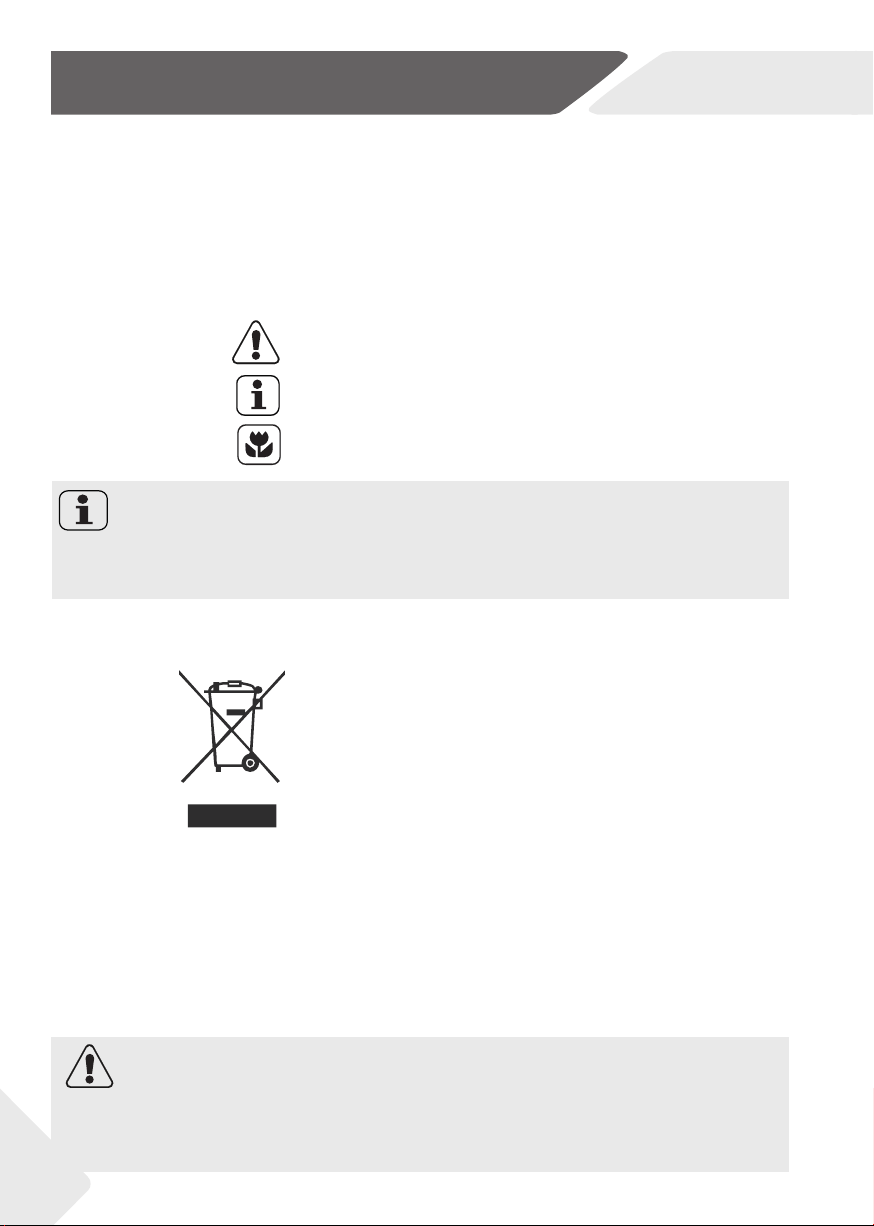
This appliance is marked according to the European
directive 2012/19/EU on Waste Electrical and Elec-
tronic Equipment (WEEE).
WEEE contains both polluting substances (which
can cause negative consequences for the environ-
ment) and basic components (which can be reused).
It is important to have WEEE subjected to specifi c
treatments, in order to remove and dispose properly
all pollutants, and recover and recycle all materials.
Individuals can play an important role in ensuring that
WEEE does not become an environmental issue; it is
essential to follow some basic rules:
• WEEE should not be treated as household waste;
• WEEE should be handed over to the relevant collec-
tion points managed by the municipality or by regis-
tered companies. In many countries, for large WEEE,
home collection could be present. In many countries,
when you buy a new appliance, the old one may be
returned to the retailer who has to collect it free of
charge on a one-to-one basis, as long as the equip-
ment is of equivalent type and has the same functions
as the supplied equipment.
Thank you for purchasing a Haier Product.
Please read these instructions carefully before using this appliance. The instructions
contain important information which will help you get the best out of the appliance and
ensure safe and proper installation, use and maintenance.
Keep this manual in a convenient place so you can always refer to it for the safe and
proper use of the appliance.
If you sell the appliance, give it away, or leave it behind when you move house, make sure
you also pass this manual so that the new owner can become familiar with the appliance
and safety warnings.
WARNING!
Risk of injury or suff ocation!
Disconnect the appliance from the mains supply. Cut off the mains cable and dispose
of it. Remove the door catch to prevent children and pets to get closed in the appliance.
Note: FOR U.K. ONLY
On receipt of your appliance please check it carefully for damage. Any damage found-
must be reported to the delivery driver immediately. Alternatively damage found must
be reported to the retailer within 2 days of receipt.
EN
Content
3
1-Safety information...............................................................................................................................4
2-Installation............................................................................................................................................7
3-Practical hints.....................................................................................................................................11
4-Product description.........................................................................................................................13
5-Control panel.....................................................................................................................................14
6-Programmes.......................................................................................................................................21
7-Consumption.....................................................................................................................................24
8-Daily use..............................................................................................................................................25
9-Remote Control (WI-FI)...................................................................................................................30
10-Care and cleaning...........................................................................................................................32
11-Troubleshooting..............................................................................................................................35
12-Technical data.................................................................................................................................38
13-Customer service...........................................................................................................................39
Download the
App

EN
1-Safety information
Before switching on the appliance for the fi rst time read the follow-
ing safety hints!:
WARNING!
Daily use
▶ This appliance is intended to be used in household and similar
applications such as:
-Staff kitchen areas in shops, offi ces and other working environ
ments;
-Farmhouses;
-By clients in hotels, motels and other residential type environ
ments;
-Bed and breakfast type environments.
A diff erent use of this appliance from household environment
or from typical housekeeping functions, as commercial use by
expert or trained users, is excluded even in the above applica-
tions. If the appliance is used in a manner inconsistent with this it
may reduce the life of the appliance and may void the manufac-
turer’s warranty. Any damage to the appliance or other damage
or loss arising through use that is not consistent with domestic
or household use (even if located in a domestic or household
environment) shall not be accepted by the manufacturer to the
fullest extent permitted by law.
▶ This appliance can be used by children aged from 8 years and
above and persons with reduced physical, sensory or mental ca-
pabilities or lack of experience and knowledge if they have been
given supervision or instruction concerning use of the appliance
in a safe way and understand the hazards involved.
Children shall not play with the appliance. Cleaning and user
maintenance shall not be made by children without supervision.
▶ Children should be supervised to ensure that they do not play
with the appliance.
▶ Children of less than 3 years should be kept away unless con-
tinuously supervised.
▶ If the supply cord is damaged, it must be replaced by a special cord
or assembly available from the manufacturer or its service agent.
▶ Only use the hose-sets supplied with the appliance for the water
supply connection (do not reuse old hose-sets).
▶ Water pressure must be between 0.03 MPa and 1 MPa.
4
EN
1-Safety information
WARNING!
▶ Make sure carpets or rugs do not obstruct the base or any of
the ventilation openings.
▶ After installation, the appliance must be positioned so that the
plug is accessible.
▶ The maximum load capacity of dry clothes depends on the
model used (see control panel).
▶ To consult the product technical specifi cation please refer to
the manufacturer website.
Electrical connections and safety instructions
▶ The technical details (supply voltage and power input) are indi-
cated onthe product rating plate.
▶ Make sure that the electrical system is earthed, complies with all
applicable law and that the (electricity) socket is compatible with
the plug of the appliance. Otherwise, seek qualifi ed professional
assistance.
▶ The use of converters, multiple sockets or extension cords is
strongly advised against.
▶ Before cleaning or maintaining the washing machine, unplug the
appliance an d turn off the water tap.
▶ Do not pull on the power cord or appliance to unplug the machine.
▶ Make sure there is no water in the drum before opening the
door.
WARNING!
.
▶ Do not expose the washing machine to rain, direct sunlight or
other weather elements. Protect from possible freezing.
▶ When moving, do not lift the washing machine by the knobs or
detergent drawer; during transport, never rest the door on the
trolley. We recommend two people lift the washing machine.
▶ In the event of fault and/or malfunction, turn off the washing
machine, close the water tap and do not tamper with the appli-
ance. Immediately contact the customer service centre and
only use original spare parts. Failure to observe these instruct-
ion may jeopardise appliance safety.
Water may reach very high temperatures during the wash cycle.
5

EN
1-Safety information
6
Intended use
This appliance is intended for washing machine-washable laundry only. Anytime
follow the instructions given on the label of each garment label. It is designed
exclusively for domestic use inside the house. It is not intended for commercial
or industrial use.
Changes or modifi cations to the device are not allowed. Unintended use may
cause hazards and loss of of all warranty and liability claims.
EN
2-Installation
7
2.1 Preparation
▶ Make sure there is no transport damage.
▶ Make sure all transport bolts are removed.
▶ Handle the appliance always with at least two persons because it is heavy.
▶ Take the appliance out of the packaging.
▶ Remove all packaging material including protecting fi lm on cabinet, polystyrene
base, keep them out of children reach. While opening the package, water drops may
be seen on plastic bag and porthole. This normal phenomenon results from water
tests in the factory.
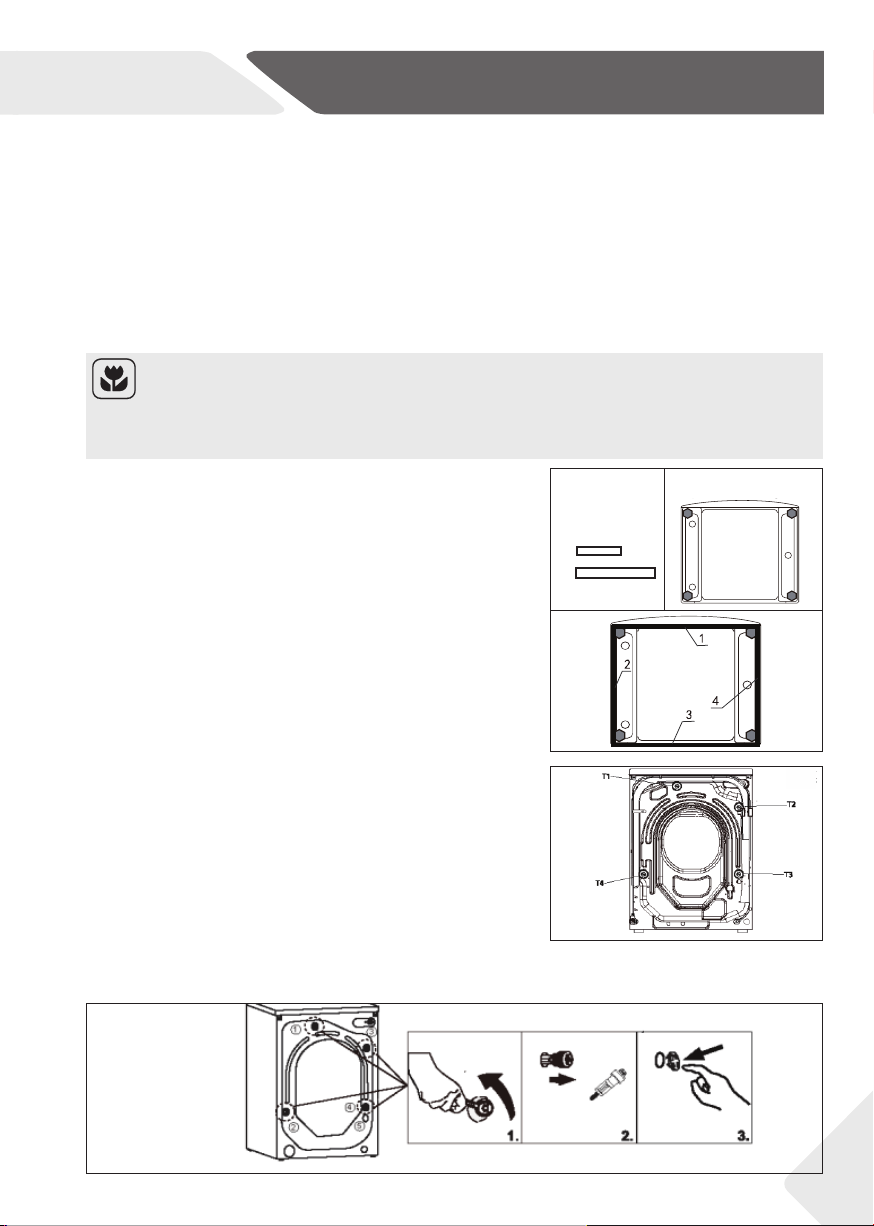
1. When opening the shrink package, you will fi nd
some noise reduction pads.These are used for re-
ducing noise. (Fig. 2-1)
2. Lay the washing machine down to its side, porthole
pointing upwards, bottom side towards operator.
3. Take out the noise reduction pads and remove
the double-sided adhesive protective film; paste
around the bottom; the noise reduction pads
under the washing machine cabinet as shown in
Figure 3. (two longer pads in position 1 and 3, two
shorter pads in position 2 and 4). Finally set the
machine upright again.
Note: Packaging disposal
Keep all packaging materials out of children´s reach and dispose them in an environ-
mentally friendly manner.
2.3 Dismantle the transportation bolts
The transport protection on the rear side is designed
for clamping anti-vibration components inside the ap-
pliance during transportation to prevent inner dam-
age. All elements (T1, T2,T3 and T4, F ig 2 -2) must be
removed before use.
1. Remove all 4 bolts (T1 - T4) (Fig. 2-3).
2. Fill the 5 holes with blanking plugs.
Please note: for 8kg models, please fi ll the
4 h oles w ith blanking plugs.
2x
3.
2x
2-2
2-3
2-2
2-1
2-2
1.
2.
2.
10-1
2.2 OPTIONAL: Install noise reduction pads
Packing boll(1234) Hole wall(12345)
Remove the four Plug the five hole walls
packing bolls
2-3
EN
2-Installtion
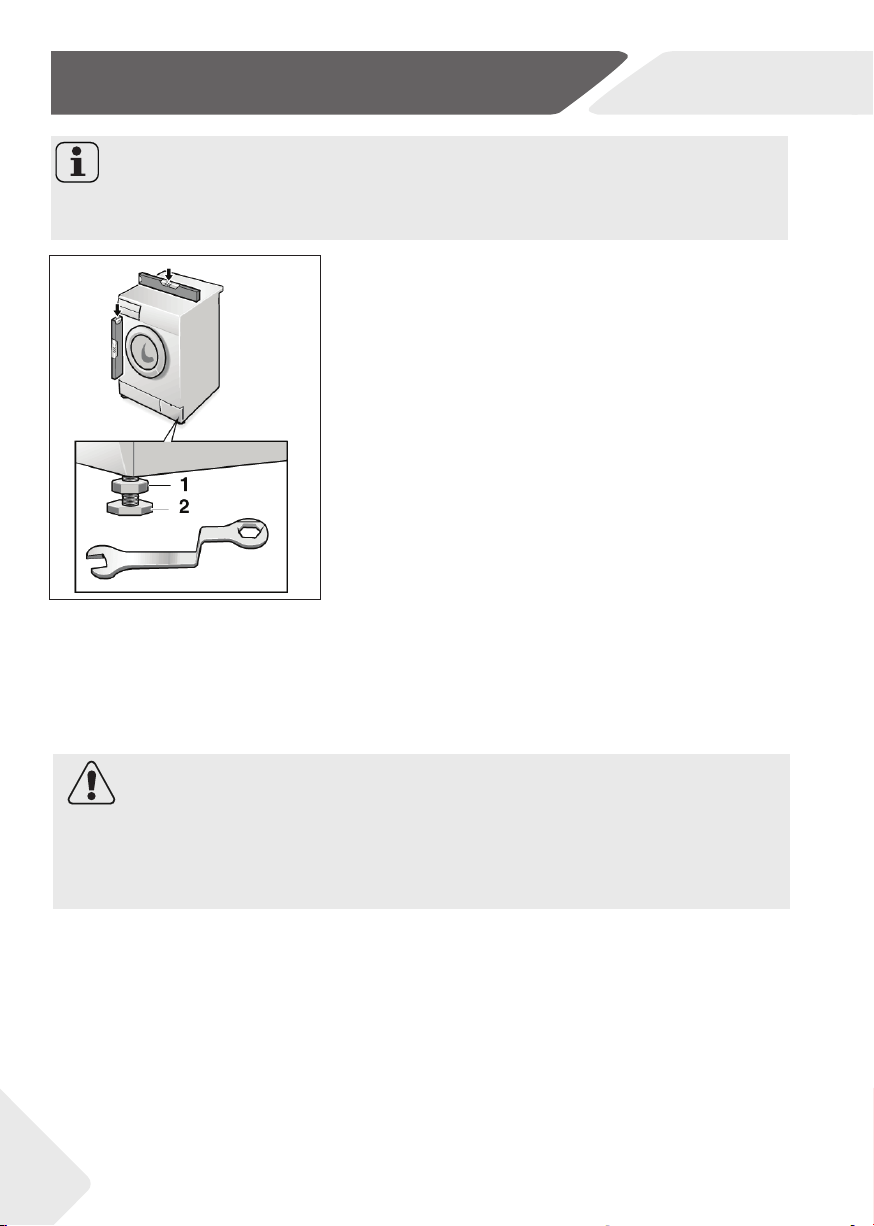
2.5 Aligning the appliance
Adjust all feet (Fig. 2-4) to achieve a complete level
position. This will minimize vibrations and thus noise
during use. It will also reduce wear and tear. We recom-
mend to use a spirit level for adjustment. Floor should
be as stable and fl at as possible.
1. Loose the locknut (1) by using a wrench.
2. Adjust the high by turning the foot (2).
3. Tighten lock ut (1) against the housing.
2.4 Moving the appliance
If the machine is to be moved to a distant location, re-
place the transportation bolts removed before instal-
lation to prevent damage. The assembly takes place in
reverse order.
Note: Keep in safe place
Keep the transportation bolts in a safe place for later use. Whenever the appliance is to
be moved at fi rst reinstall the bolts.
2-4
2.6 Drain Water Connection
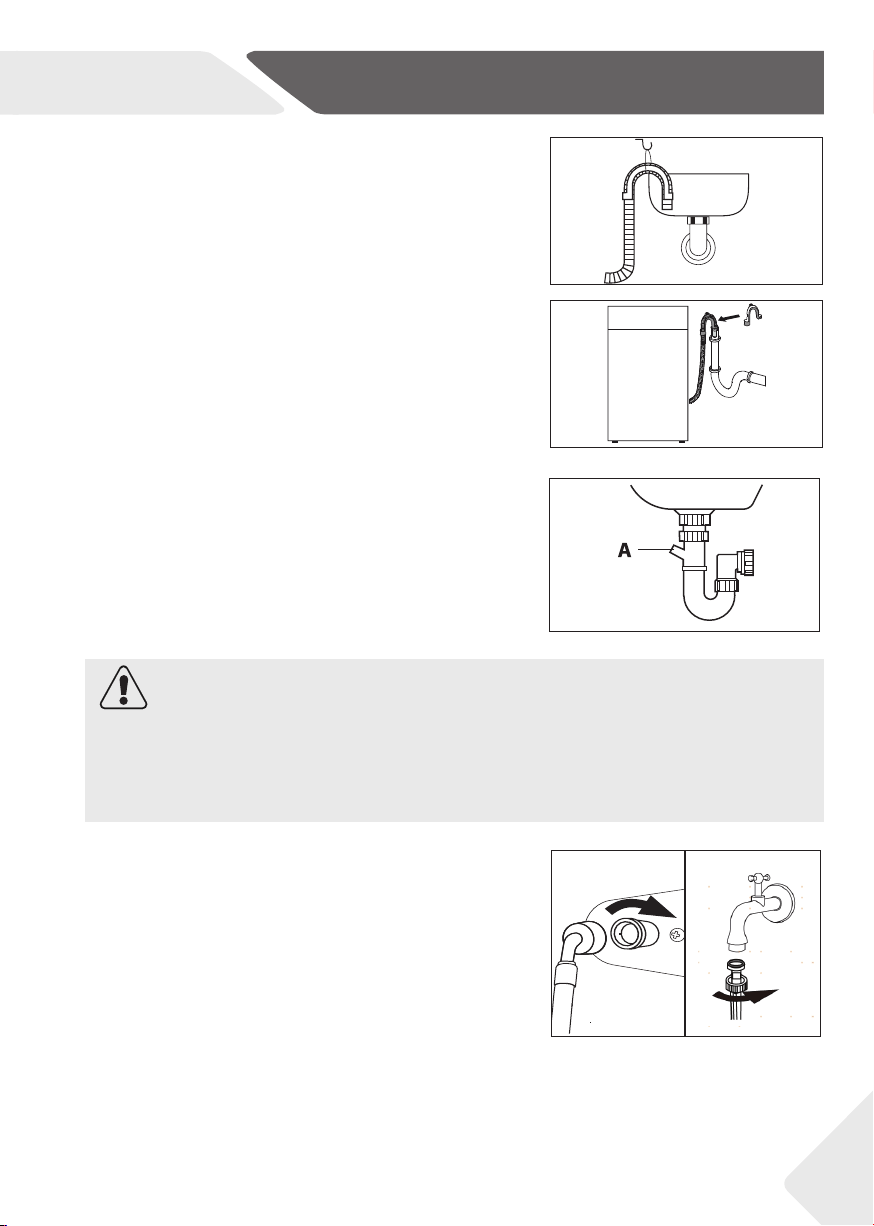
Fix the water drain hose properly to the piping. The hose has to reach at one point a height
between 80 and 100 cm above the appliance bottom line! If possible keep always drain
hose fi xed to the clip at the appliance back.
WARNING!
▶ Use only the supplied hose set for the connection.
▶ Never reuse old hose sets!
▶ Only connect to cold water supply.
▶ Before connection, check whether the water is clean and clear.
8
EN
2-Installation
2.7 Fresh Water Connection
Make sure that the gaskets are inserted.
1. Connect the water inlet hose with the angled
end to the appliance (Fig. 2-8). Tighten the
screw joint by hand.
2. The other end connect to a water tap with a
3/4“ thread (Fig.2-9).
2-92-8
9
Following connections are possible:
2.6.1 Drain hose to sink
▶ Hang the drain hose with the U-support over the
edge of a sink with adequate size (Fig. 2-5).
▶ Protect the U-support suffi ciently against slip-
ping.
2.6.2 Drain hose to waste water connection
▶ The internal diameter of the stand pipe with
vent-hole must be minimum 40 mm.
▶ Put the drain hose for approx. 80-100 mm in the
wastewater pipe.
▶ Attach the U-support and secure it suffi ciently
(Fig. 2-6).
CAUTION!
▶ The drain hose should not be submerged in water and should be securely fixed and
leak-free. If the drain hose is placed on the ground or if the pipe is at a height of less
than 80 cm, the washing machine will continuously drain while being filled (self-si-
phoning).
▶ Drain hose is not to be extended. If necessary contact after sales service.
2.6.3 Drain hose to sink connection
▶ The junction must lie above the siphon
▶ A spigot connection is usually closed by a pad (A).
That must be removed to prevent any disfunc-
tion (Fig. 2-7).
▶ Secure the drain hose with a clamp.
2-6
2-5
2-7
EN
2-Installation
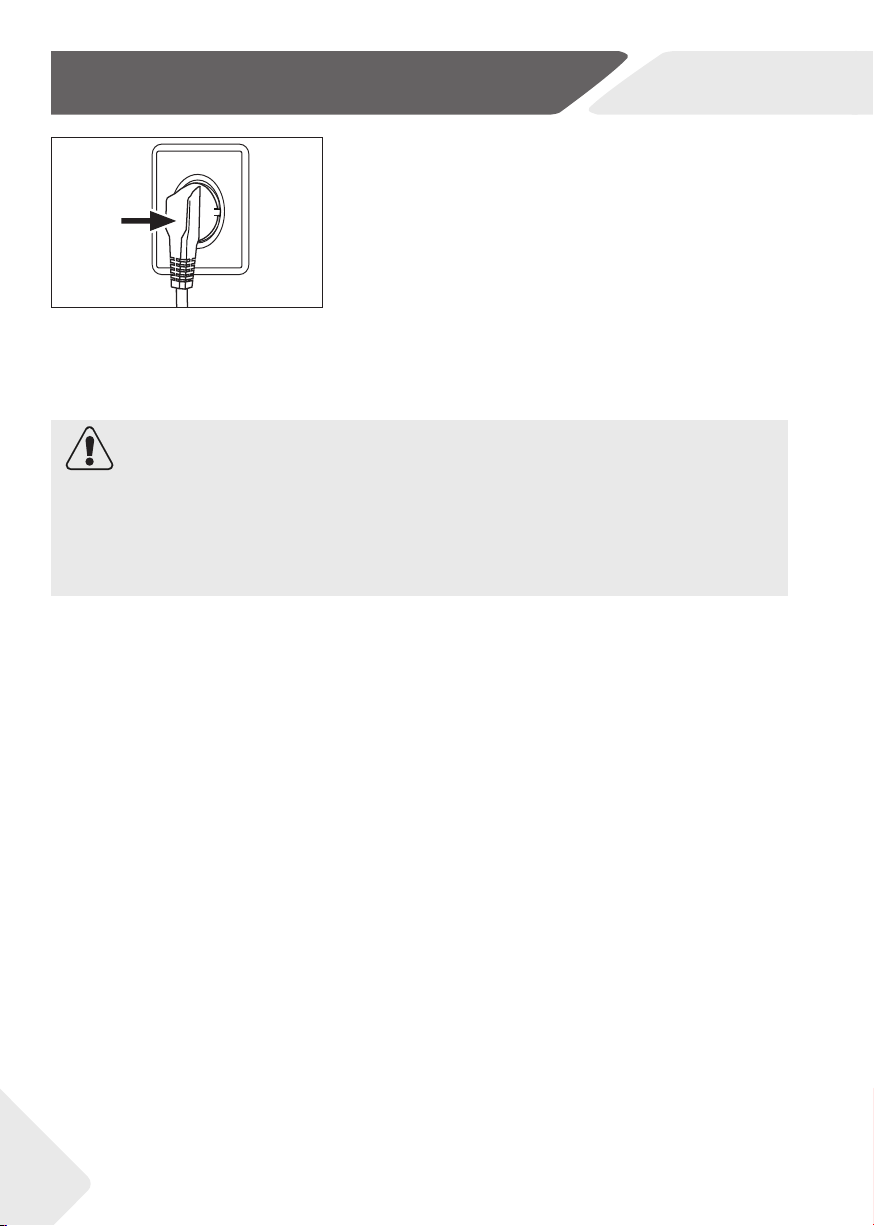
2.8 Electrical Connection
Before each connection check if:
▶ power supply, socket and fusing are appropriate to
the rating plate.
▶ the power socket is earthed and no multi-plug or
extension are used.
▶ the power plug and socket are strictly according.
▶ Only UK: The UK plug meets BS1363A standard.
Put the plug into the socket (Fig. 2-10).
WARNING!
▶ Ensure always that all connections (power supply, drain and fresh water hose) are fi rm,
dry and leack free!
▶ Take care these parts are never to be crushed, kinked, or twisted
▶ If the supply cord is damaged, it must be replaced by the service agent (see warranty
card) in order to avoid a hazard. .
2-10
10

EN
3-Practical hints
3.1 Load tips
When sorting laundry, make sure:
• have eliminated metallic objects such as hair clips, pins, coins, from laundry;
• to have buttoned pillow cases, closed zips, tied loose belts and long robe ribbons;
• to have removed rollers, hooks or clips from curtains;
• to have carefully read clothing washing labels;
• to have removed any persistent stains using specifi c detergents.
▶ When washing rugs, bedcovers or other heavy clothing, we recommend you avoid the
spinning cycle.
▶ To wash wool, make sure the item can be machine washed. Check the fabric label.
▶ Leave the appliance’s door slightly open between washes, to prevent possible bad
smells developing inside the machine.
3.2 Useful advice for saving
Tips on how to save money and not damage the environment when using your appliance.
▶ Load the machine with suggested capacity shown in the programme table for each
programme - this will allow you to SAVE energy and water.
▶ Noise and residual laundry moisture are aff ected by spin speed: a faster spin is associ-
ated with greater noise and lower residual moisture in the laundry.
▶ The most effi cient programmes in terms of combined use of water and energy are
usually the longer-lasting ones with lower temperature.
▶ Scan QR code on energy label for energy consumption information. The actual energy
consumption may diff er from the declared one according to local conditions.
Maximise the load size
▶ Achieve the best use of energy, water, detergent and time by using the recommended
maximum load size. Save up to 50% energy by washing a full load instead of 2 half loads.
Do you need to pre-wash?
▶ For heavily soiled laundry only!
SAVE detergent, time, water and energy consumption by NOT selecting Prewash
for slight to normally soiled laundry.
Is a hot wash required?
▶ Pretreat stains with stain remover or soak dried in stains in water before washing to.
reduce the necessity of a hot wash programme.Save energy by using a low tempera-
ture wash programme.
3.3 Dosing the detergent
Below is a short guide with tips and advice on the use of detergent
▶ Only use detergents suitable for washing m achine.
▶ Select your detergent according to the type of fabric (cotton, delicates, synthetics,
wool, silk, etc.), the colour, the type and level of soiling and the programmed washing
temperature.
▶ To use the right amount of detergent, softener or any other additives, carefully follow
the manufacturer’s instructions every time: correctly using the appliance with the
right dose allow you to avoid waste and to reduce the environmental impact.
11

EN
3- Practical hints
▶ Too much detergent leads to excessive foam, which prevents the cycle being carried
out correctly. It could also aff ect the quality of the washing and rinsing.
The use of ecological detergents without phosphates may cause the following eff ects:
• cloudier rinse drain water: This eff ect is tied to the suspended zeolites which do not
have negative eff ects on rinse effi ciency.
• white powder (zeolites) on laundry at the end of the wash: this is normal, the powder
is not absorbed by fabric and does not change its colour.
To remove the zeolites, select a rinse programme. In the future consider using slightly
less detergent.
• foam in the water at last rinse: this does not necessary indicate poor rinsing.
Consider using less detergent in future washes.
• abundant foam: This is often due to the anionic surfactants found in the detergents
which are hard to eliminate from laundry.
In this case, do not re-rinse to eliminate these eff ects: it will not help at all.
We suggest conducting a maintenance wash using a proprietary cleaner.
If the problem persists or if you suspect a malfunction, immediately contact an
Authorised Customer Service Centre.
Note: Detergent
When washing heavily soiled whites, we recommend using cotton programs of 60°C or
above and a normal washing powder (heavy duty) that contains bleaching agents that
at medium/high temperatures provide excellent results.
For washes between 40°C and 60°C the type of detergent used needs to be appropri-
ate for the type of fabric and level of soiling. Normal powders are suitable for “white”
or colour fast fabrics with high soiling, while liquid detergents or “colour protecting”
powders are suitable for coloured fabrics with light levels of soiling.
For washing at temperatures below 40°C we recommend the use of liquid detergents
or detergents specifi cally labeled as suitable for low temperature washing.
For washing wool or silk, only use detergents specifi cally formulated for these fabrics.
12
EN
4-Product description
13
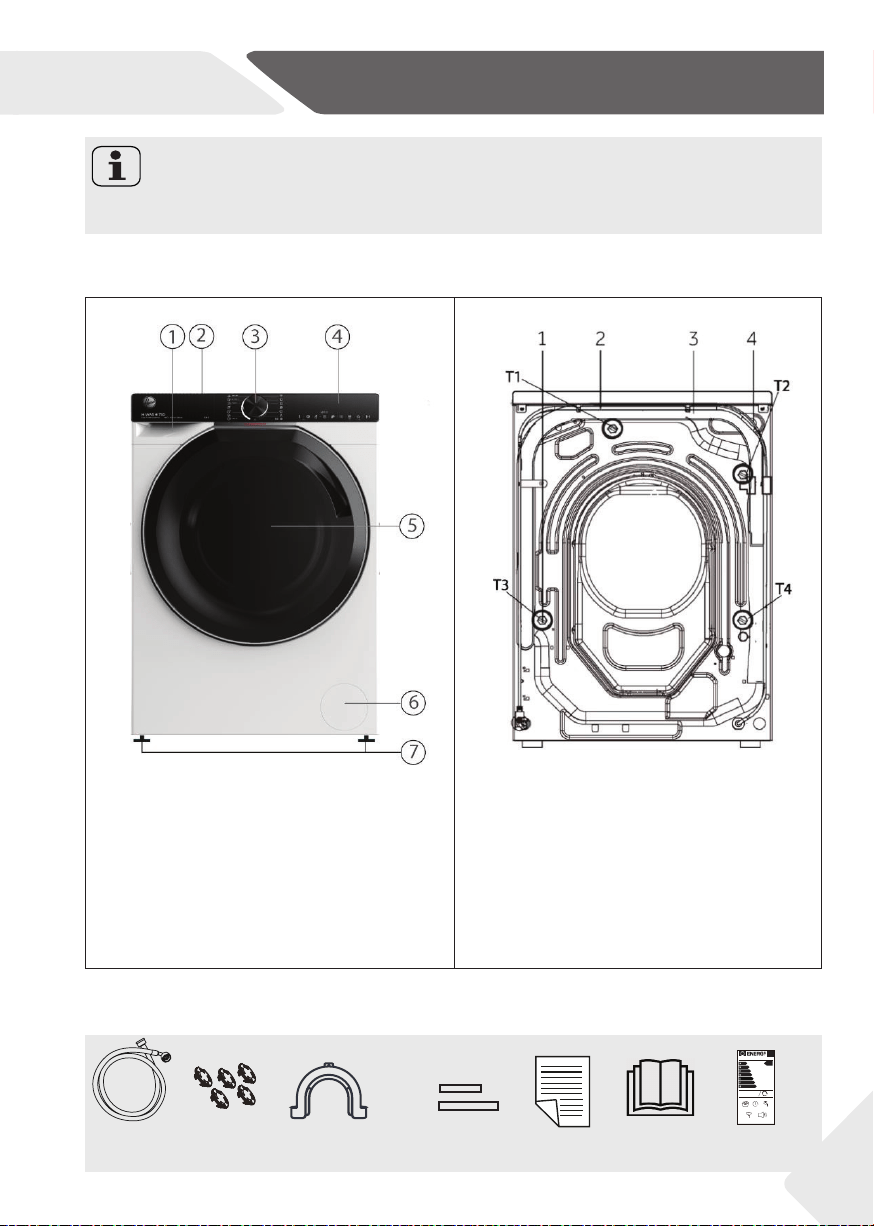
4.1 Picture of appliance
Note: Deviations
Due to technical changes and diff erent models, the illustrations in the following chap-
ters may diff er from your model.
1 Detergent / Softener drawer
2 Worktop
3 Programme selector
4 Control panel
5 Washer door
6 Service fl ap
7 Adjustable feet
1 Transportation bolts (T1-T4)
2 Power cord
3 Drain hose
4 Water inlet valve
4-2
Rear side (Fig. 4-2):
Inlet hose
assembvly
5 Blanking
plugs
Drain hose bracket
Noise
reduction pads
User manual Energy label
Warranty card
2x
2x
4-1
HW110-B14979U1
Haier
A
54
kWh
100
11,0
kg
3:58 56
L
A
B
CDEFG
70
dB
A
BCD
2019/2014
Front (Fig. 4-1):
4-1
4.2 Accessories
Check the accessories and literature in accordance with this list (Fig. 4-3):
EN
5-Control panel
14
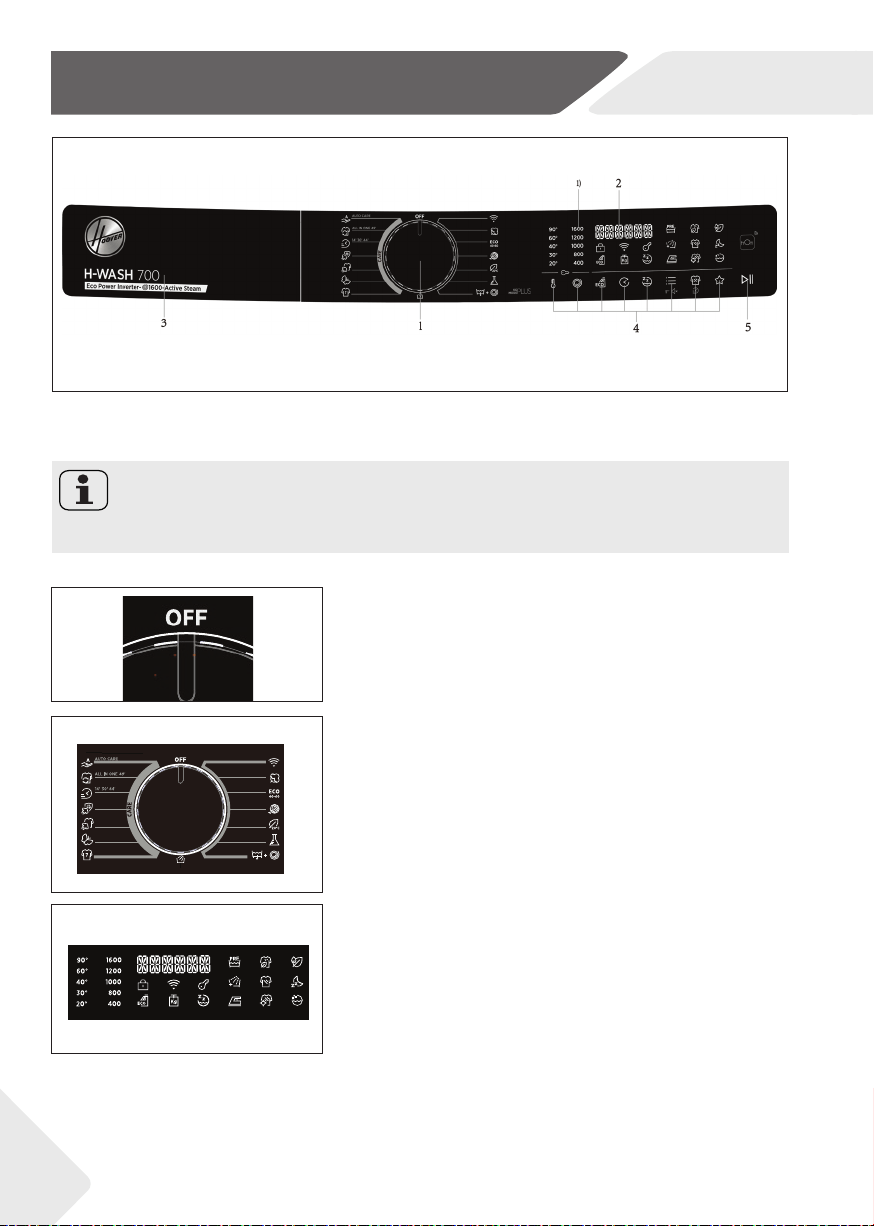
5-1
5-1
1 Programme selector
2 Display
4 Function buttons
5 “Start/Pause” button
3 Detergent/Softenener
drawer
Note: Acoustic signal
The acoustic signal can be selected if necessary: see DAILY USE (P29, 8.13)
5.1 OFF
Turn the knob to any position (except OFF) to start
the machine. Turn the knob to the OFF position to
shut down the machine (Fig.5-2).
5.2 Programme selector
By turning the knob (Fig.5-3) one of 15 pro-
grammes can be selected, its default settings will
be displayed.
5-4
5-2
5-3
5-4
5.3 Display
The display (Fig. 5-4) shows following information:
▶ Program name
▶ Remaining time
▶ Reservation remaining time
▶ Alarm information and prompt information
▶ Pause end information
▶ Delay time
1)1600 rpm:H7W 610*/H7W 69*;
1400 rpm:H7W 412*/:H7W 4105*/H7W 449*/H7W 448*
.

EN
5-Control panel
15
5.4 Detergent drawer
Open dispenser drawer, the following components
can be seen (Fig. 5-5):
1: Compartment for powder or liquid detergent
2: Detergent flap slector, lift it up for powder deter-
gent, keep it down for liquid detergent.
3: Put a small amount of washing powder.
4: Compartment for softener.
5: Lock tab, press it down to pull out dispenser drawer
The recommendation on the type of the detergents
is suitable for the various washing temperatures.
Please refer to the manual of detergent.
5-5
5.5 Function buttons
The function buttons (Fig. 5-6) enable additional options
in the selected programme before programme starts.
The related indicators are displayed.
By switching off the appliance or setting a new pro-
gramme all options are displayed.
If a button has multiple options, the desired option can
be selected by pressing the button sequentially.
By touching the buttons, when it is in dull light, the
function is unselected; when it is in bright light, the
function is selected.
By switching o the appliance or setting a new progra-
the
5.5.1
5.5.2
5.5.3
5.5.4
5.5.5
5.5.6 5.5.7 5.5.8 5.5.9
5.5.10 5.5.11
5.5.12
5-6
5-7
5-8
Note: Factory settings
To get best results in each programme Hoover has well defi ned specifi c default set-
tings. If there is no special requirement default settings are recommended.
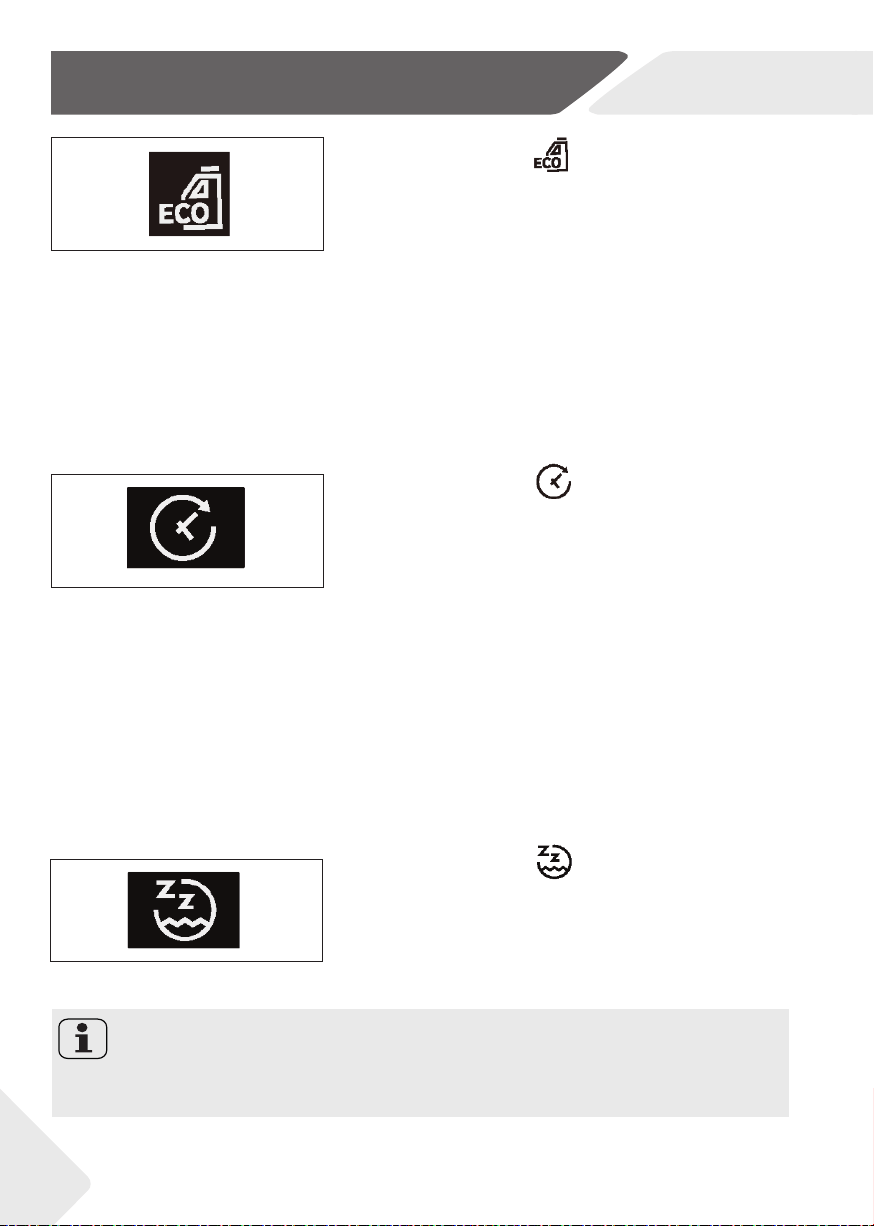
5.5.1-Function button “
on " "
(Fig.5
“
Touch this button (Fig.5-7) to change the washing tem-
perature of the programme. If no light is illuminated and
display „COLD“, the water will not be heated.
5.5.2 Function button “
on " "
”
Touch this button (Fig.5-8) to change or deselect the
spin of the programme. If no light is illuminated and
display “NO SPIN”, the laundry will not spin.
EN
5-Control panel
16
5-9
5-10
5-11
5-10
5.5.3 Function button“
on " "
Dose r (Fig.
“
• Thanks to Eco Doser (Fig.5-9), the appliance is
able to suggest the optimal amount of washing
detergent to pour into the drawer based on the
actual load.
• This smart suggestion can only be activated in
certain programmes in the following way:
- Place the laundry in the drum and close the door.
- Press the ECO DOS ER button on the layout.
- Press START/PAUSE. After a while, the display
will show the recommended amount of deter-
gent to be used.
- Pour the detergent into the drawer and press
START/PAUSE to start the cycle.
5.5.4 Function button“
" "
10) allows
“
• This button (Fig.5-10) allows you to preprogramme
the wash cycle to delay the start of the cycle for up
to 24 hours.
• To delay the start use the following procedure:
- Select the required programme.
- Press the button once to activate the delay start
and then press it again to set the desired delay .
The delay increases in in steps of 30 minutes, the
button is pressed up to 24 hours, at which point
pressing the button again will reset the delay
start to zero.
- Confi rm by pressing the START/PAUSE button.
The delay countdown will begin and when it has
fi nished the programme will start automatically.
• It is possible to cancel the delay start by turning the
programme selector other programmes.
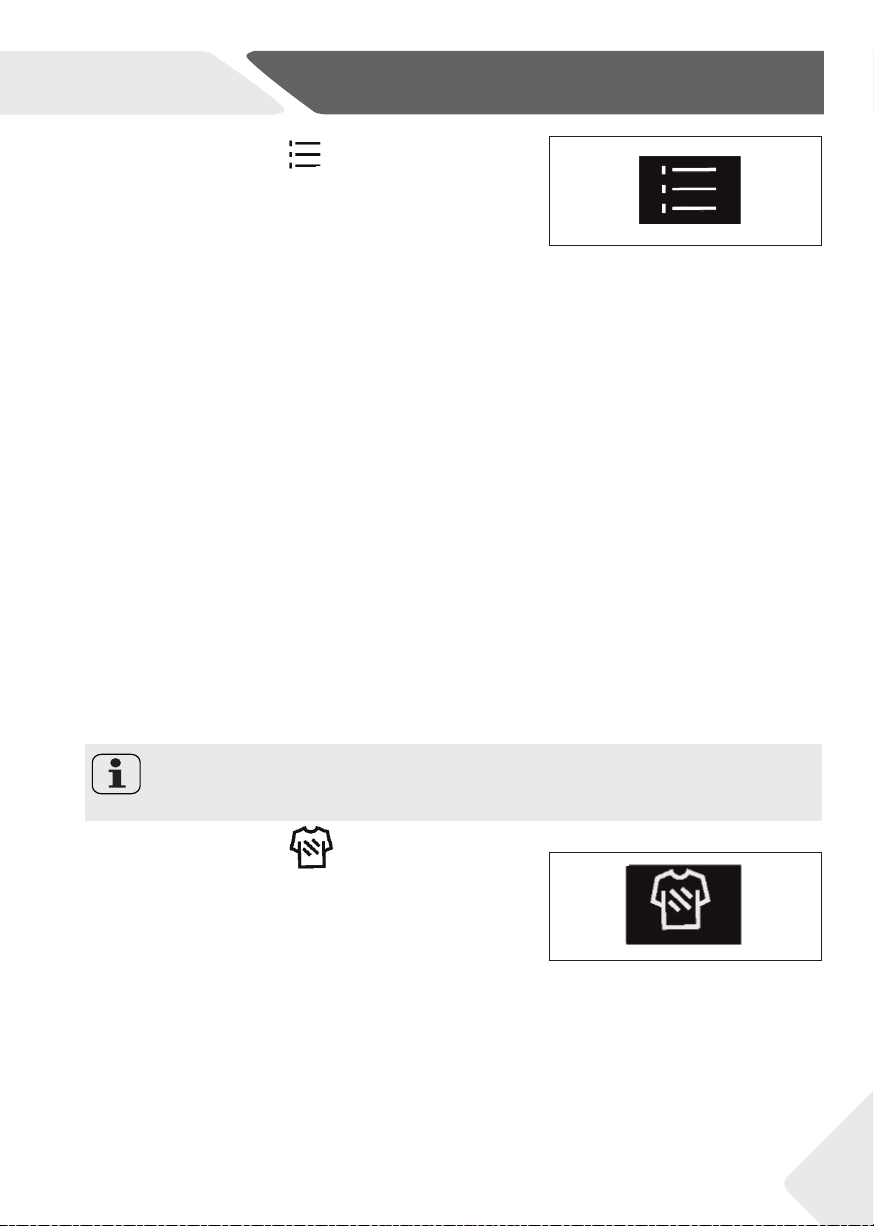
5.5.5 Function button“
on " "
Select the program that can selcct this function.And the
“
• Select the program that can select this function and
the corresponding icon will light up after selection.
• After selecting this program, the noise of spin will be
reduced and all beeps except alarm will be cancelled.
• Press this key again to cancel this function.
Note: Speed
After selecting this function,user cannot select speed.But the machine will complete
spinning process.
EN
5-Control panel
17
5-12
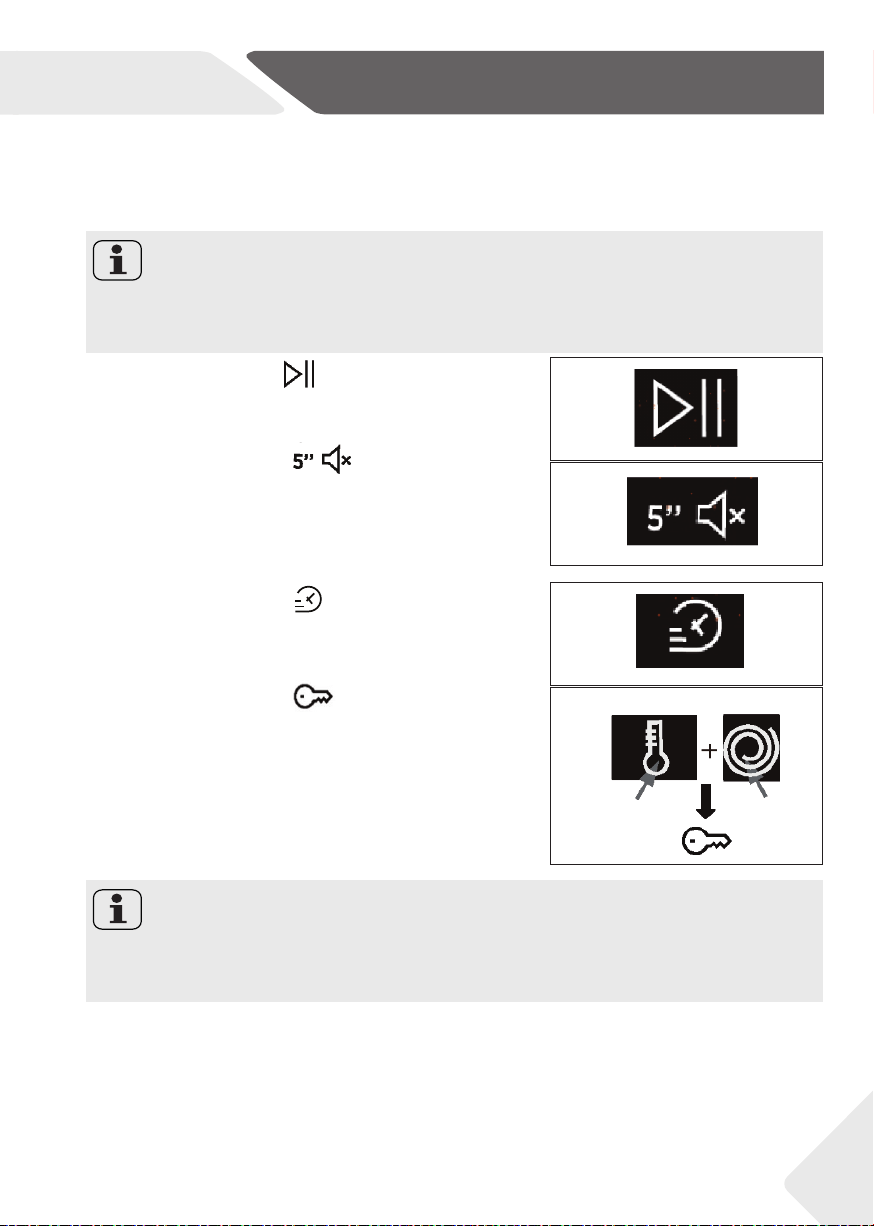
5-13
5-13
5.5.7 Function button“
This button (Fig.5-13) allows you to choose between three
“
• This button (Fig.5-13) allows you to choose be-
tween three diff erent options, depending on the
selected programme:
- STAIN LEVEL
• Once the programme has been selected the wash time
set for that programme will be automatically shown.
• This option allows you to choose between 3 lev-
els of wash intensity modifying the length of the
programme, depending on how much the fab-
rics are soiled (can only be used on some pro-
grammes as shown in the table of programmes).
- RAPID CARE
• The button becomes active when you select the RAP-
ID CARE (14‘/30‘/44‘) programme on the knob and
allows you to select one of three durations indicated.
5.5.6 Function button“
This button (Fig.5-12) allows you to choose between three
“
• This button (Fig.5-12) allows you to choose between
three diff erent options:
- PREWASH
• This option allows you to make a prewash and it is particular-
ly useful for heavily soiled loads (can be used only on some
programmes as shown in the table of programmes).
• We recommend you use no or a small amount of
detergent quantities shown on the detergent pack.
- EXTRA RINSE
• This option allows you to add one rinse at the end of
the washing cycle and is useful for people with deli-
cate and sensitive skin, for which a small amount of
detergent residue can cause irritations or allergies.
• It is advisable to also use this function for the child-
ren clothes and for the washing of heavily soiled
items, which requires a lot of detergent to be used,
or for the washing of toweling items whose fi bers
mostly have the tendency to hold the detergent.
- ANTICREASE
• This option allows the washing machine keeps
intermittent operation after fi nal spin to shake off the
clothes to prevent mildew and odor, reduce wrinkles
and make them smoother after hanging up.
• Under „ANTICREASE“ function, the max. spin speed will
decrease. After selecting this function, the user can no
longer select the speed. During the operation, the LED
display shows „-“ „--“ „---“„----“ “-----” “------” and this
phase lasts for 12 hours at most, users can touch „Start /
Pause“ to terminate the programme at any time.
Note: Options
These options must be selected before pressing the START/PAUSE button.
EN
5-Control panel
18
• After selecting the STEAM CARE PRO programme, you
can use this button to choose between three steam
treatments of diff erent intensities, designed only for dry
garments and depending on the type of fabric:
- COTTON (default selection)
This programme is used for cotton garments. The cycle
refreshes and relaxes creases in suitable for dry fabrics.
-SYNTHETIC (press button once)
This programme is used for synthetic garments.
The cycle refreshes and relaxes creases in gar-
ments after use.The cycle is suitable for dry fabrics.
-DELICATES (press button twice)
The cycle is suitable for soft fabrics.The cycle re-
freshes and relaxes creases in garments after use.
The cycle is suitable for dry fabrics.
• This button (Fig.5-15) allows you to choose between
three diff erent options (available for some pro-
grammes only):
- ACTIVE WASH
ACTIVE WASH
• ACTIVE WASH is designed for reduced loads and lightly
soiled garments, aiming to limit the unnecessary waste.
- NIGHT & DAY
ACTIVE WASH
NIGHT & DAY
• Selecting this program will turn off the beep except
for the alarm,reduce and the intermediate spin speed.
• The laundry keep immersed in water after the fi nal
rinse, in order to spread the fi ber perfectly. During
the drum water retention phase, the machine will
pause the timing. Press START to end the cycle with
the spin and drain phase.
-DRUM CLEAN
NIGHT & DAY
DRUM CLEAN
• This program can carry out the self-cleaning of the
washing machine.
-STEAM LEVEL
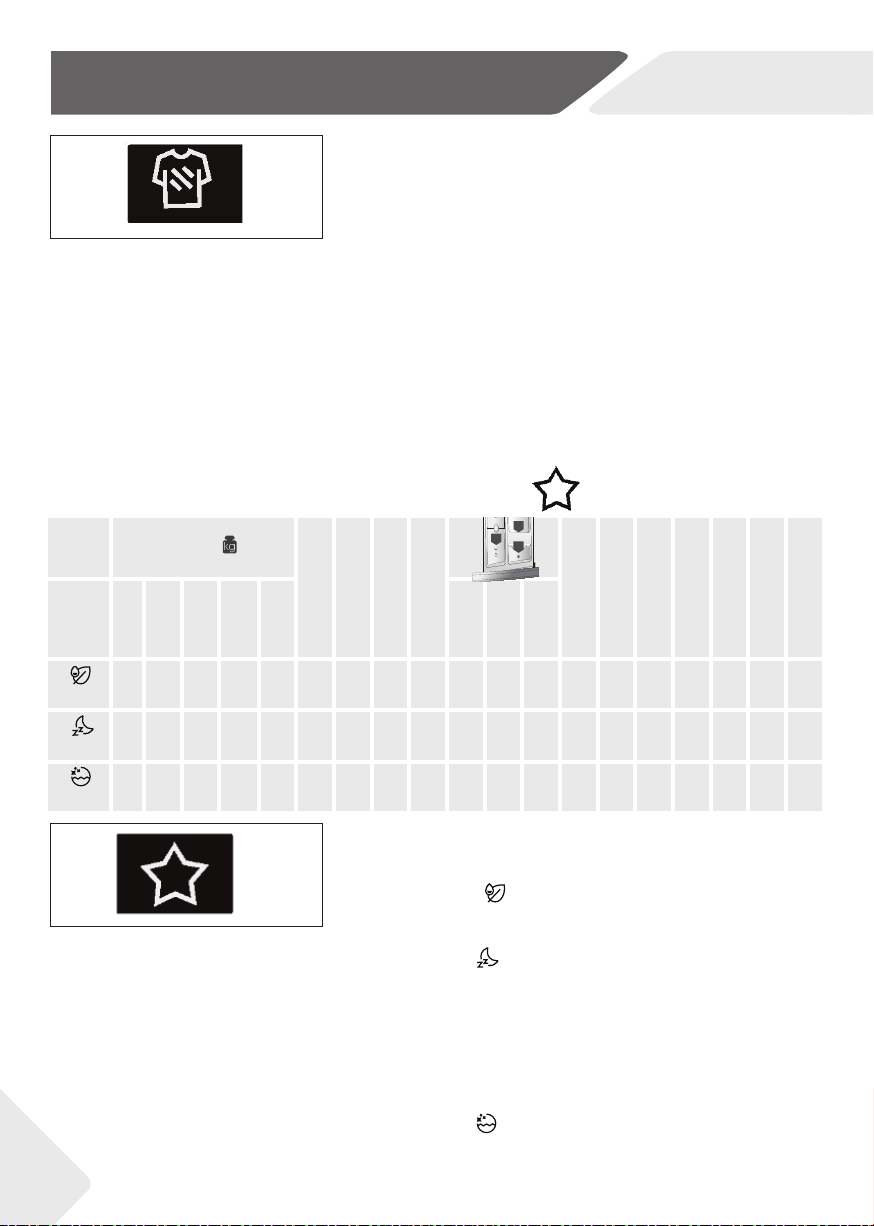
5.5.8 Function button“
on " "
“ SPECIAL PROGRAMMES.
• Yes
º
Optional
/ No
max. kg
MAX KG
STD TEMP
MAX TEMP
PRESET SPIN
MAX SPIN
Wash intensity
Ecco doser
Silent mode
Pre wash
Extra rinse
Anti crease
Delay
Special
programmes
8
kg
9
kg
10
kg
10.5
kg
12
kg
1 2 3
Active wash
1 1 2 2 2 30 30
1000 1000
•
º
/ / / / / / /
•
Night & Day
4 4 5 5.5 6 40 60
800 1000
•
º
/
• •
/ /
•
/ /
Drum clean
-
-
- - - 90 90
400 400
/ / / / / / / / / /
5-15
5-14
5-14
5-13
3
2
1
SPECIAL PROGRAMMES
ACTIVE WASH
ACTIVE WASH
NIGHT & DAY
NIGHT & DAY
DRUM CLEAN
EN
5-Control panel
19
5-16
5-17
5-18
5-19
Note: Options
These options must be selected before pressing the START/PAUSE button.
If an option is selected that is not compatible with the selected programme
then the option indicator light goes off .
Note: Child lock
The child lock which is set up manually must be cancelled manually or will be canceled
automatically at the end of programme. Power off and error information won’t cancel
child lock. It still works when the appliance is powered on next time.
• We recommend a bucket self-cleaning after using
the washing machine for 50 times.
• When using this program, please do not put any
clothes detergent or washing machine cleaner.
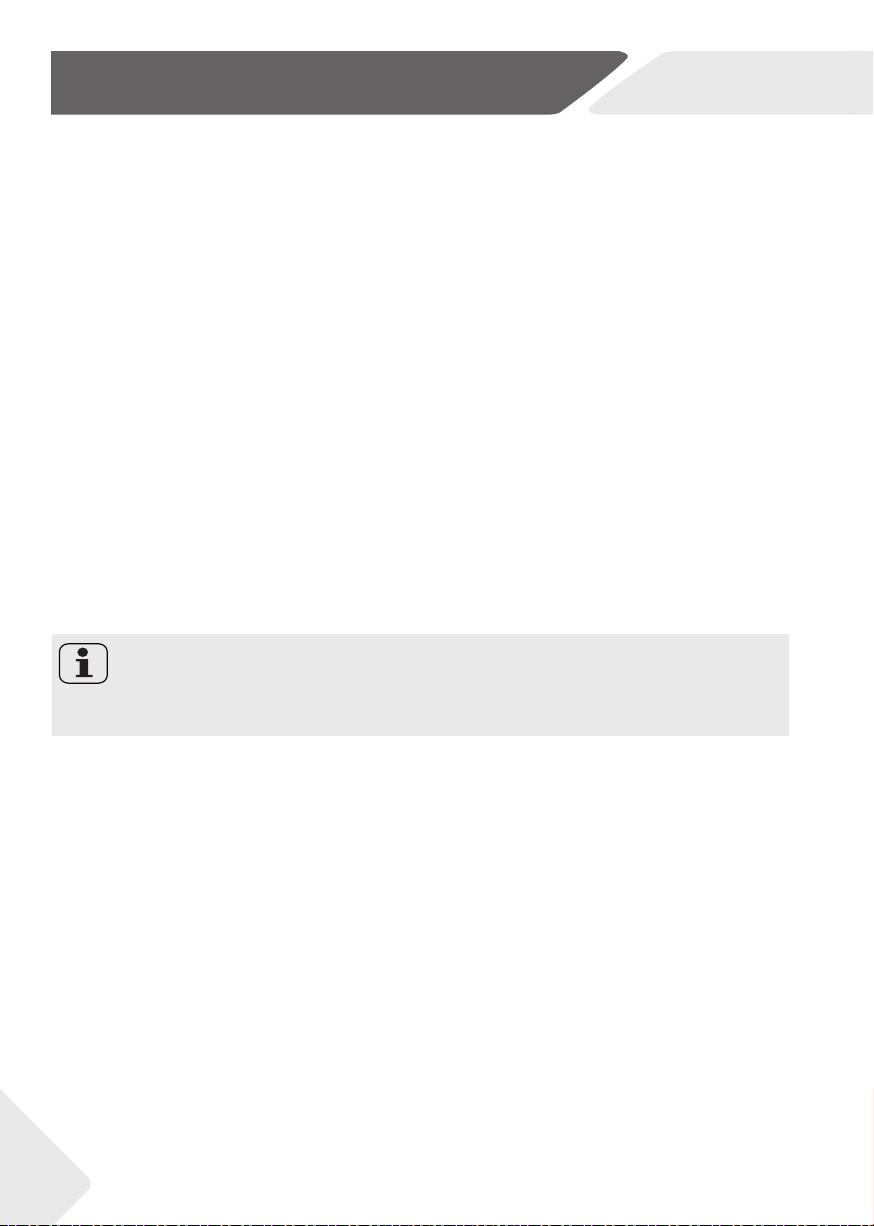
5.5.9 Function button“
"
Touch this button (Fig.5-15) gently to start or interrupt the
“
• Touch this button (Fig.5-16) gently to start or inter-
rupt the currently displayed programme.
5.5.10 Function button“
currently displayed programme.
on " "
mode after power
“
• In the standby mode after power on, long press the
button (Fig.5-17) for more than 5 seconds to turn on
or off the sound.The interface will display “SOUND
OFF “.Press and hold this key again for more than
5 seconds, and the interface will “SOUND ON”.
5.5.11 Function button“
“
• The button becomes active when you select the RAP-
ID CARE (14’/30’/44’) programme on the knob and
allows you to select one of three durations indicated.
5.5.12 Function button“
on "
After selecting a program to start,long press the “temperature”
“
• After selecting a program to start, long press the
“temperature” button and “speed” button for 3
seconds to open the child lock (Fig.5-19). “CHILD
LOCK ON” will be displayed on the interface. Press and
hold the “temperature” button and “speed” button for
about 3 seconds to unlock the child lock, and “CHILD
LOCK OFF” will be displayed on the interface.
• Child lock can’t be set up or cancelled through hOn APP.
5.6 First starting
5.6.1 Language setting
• After connecting the machine to power and turning
it on, press the “speed” or “temperature” button to
display the available languages.
• Select the desired language pressing the START/
PAUSE button.
5-15
5-16
EN
5-Control panel
20
5.6.2 Change the language
• If you want to change the setting language you will have to press simultaneously “Delay”
and “Option” buttons for about 5 seconds, the language choose last time will appear on
display, and you will be able to choose a new language (by pressing button “speed” or
”temperature”).
• Confi rm by pressing the START/PAUSE button.
5.6.3 Choosing the type of detergent used
• Thanks to Eco Doser, the appliance is able to suggest the optimal amount of washing
detergent to pour into the drawer based on the actual load.
• In order for the Eco Doser to work properly, it is necessary to select the type of deter-
gent used, choosing between normal or concentrated liquid detergent or powder de-
tergent.
• Press „speed” or “temperature” button to display the available options and press
START/ PAUSE to confi rm your choice.
5.6.4 Changing the type of detergent used
• If you wish to change the type of detergent used, you will need to press and hold down
“Delay” and “Option” buttons simultaneously for about 5 seconds. The display shows
the detergent selection option again.
• Press “speed” or “temperature” button to display the available options and press
START/ PAUSE to confi rm your choice.
5.6.6 Changing the Water hardness level setting
• If you wish to change the type of detergent used, it is necessary to fi rst go through the lan-
guage and type of detergent change menu (and change the language and type of detergent
used) by holding down “delay” and “option” buttons simultaneously for about 5 seconds.
• Once you have confi gured the language (and the type of detergent used) as explained
in the dedicated paragraphs, you can select the desired water hardness level using but-
ton “speed” or “temperature” button.
• Confi rm by pressing the START/PAUSE button.
5.6.5 Setting the Water hardness level
• In order to make some automatisms of the appliance work correctly, it is necessary to
set the Water Hardness level.
Water Hardness level:
L1 = LOW (0-12 °fH o 0-7 °dH)
L2 = MEDIUM (13-30 °fH o 8-17 °dH)
L3 = HIGH (≥ 30 °fH o ≥ 17 °dH)
• To confi rm the standard water hardness level set by the factory, press START/PAUSE button.
• If you want to change the standard water hardness setting, press the “speed” or “tem-
perature” button.
• Once chosen the water hardness level, confi rm by pressing the START/PAUSE button.
Note: Water hardness
The default setting for the water hardness is set in the factory at level 2 (L2) as this
satisfi es the requirements of the majority of users.
EN
6-Programmes
21
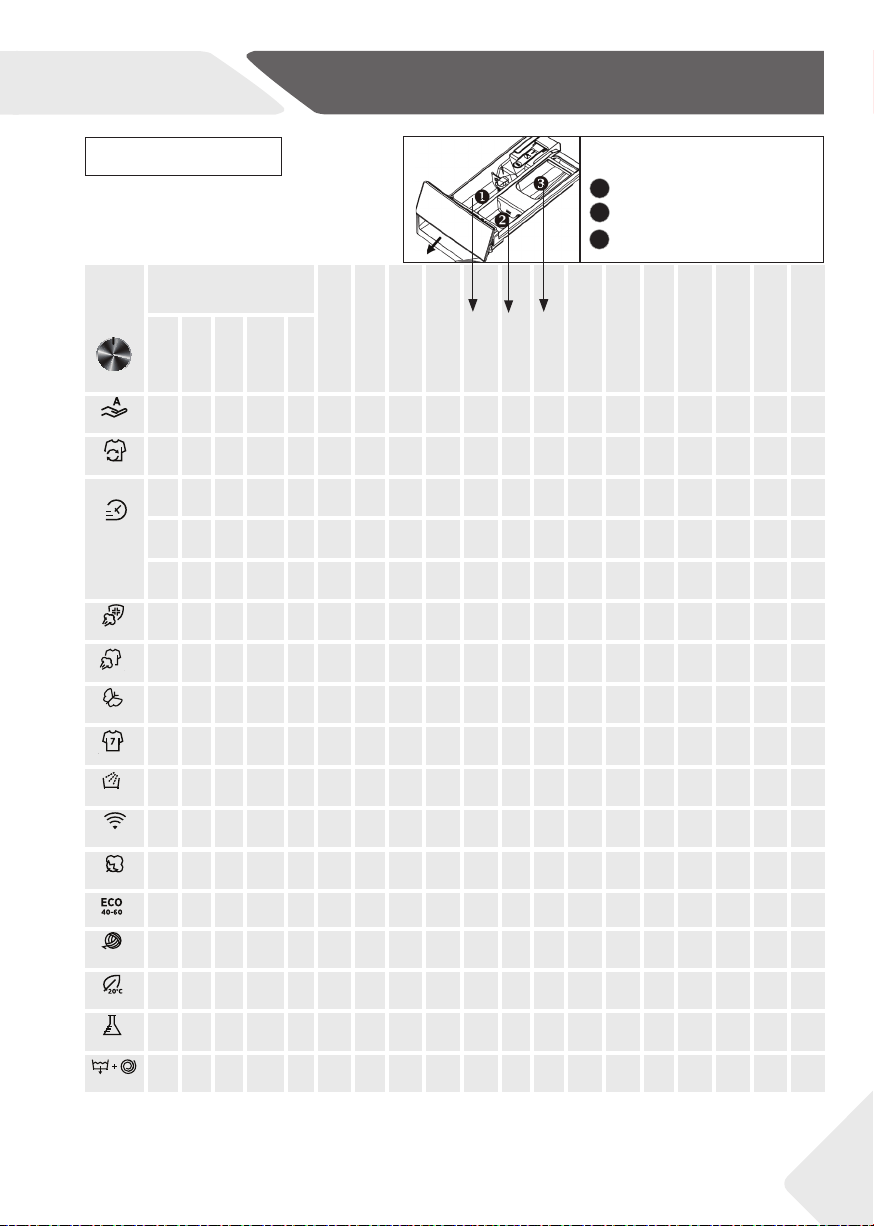
1)
A little detergent can be added only with the pre-wash function.
2)
This button also for selecting duration of rapid care and diff erent steam intensities as explained in the dedicated paragraphs,
but the light is not illuminated.
•
Yes,
º
Optional, / No
Detergent compartment for:
1
Detergent
2
Softener or care product
Prewash
1)
3
max. kg
STD TEMP
MAX TEMP
PRESET SPIN
MAX SPIN
1 2 3
Wash intensity
2)
Ecco doser
Silent mode
Pre wash
Extra rinse
Anti crease
Delay
8
kg
9
kg
10
kg
10.5
kg
12
kg
Auto Care
5 6 7 7 8 30 30
1000 1000
•
º
/
• •
/ /
•
/
•
All In One 49’
8 9 10 10.5 12 40 40
800 MAX
•
º
/ /
• •
/
• • •
Rapid Care 14’
Rapid Care 30’
Rapid Care44’
1
1
2 2 2 30 30
800 MAX
•
º
/
•
/ / /
•
/
•
2
2
2 2 3 30 30
800 MAX
•
º
/
•
/ / /
•
/
•
2
2
3 3 3 40 40
800 MAX
•
º
/
•
/ / /
•
/
•
AllergyCarePro
4
4
5 5 6 60 60
MAX MAX
•
º
/ / /
•
/ / /
•
SteamCarePro
1
1
2 2 2 - - - -
/ / /
•
/ / / / / /
Soft Care
2
2
2 2 3 30 40
400 400
•
º
/ / / / / / /
•
Fitness Care
2
2
2 2 3 40 40
800 MAX
•
º
/ /
•
/ /
•
/
•
Rinse
8
9
10 10.5 12 - -
1000 1000
/
º
/ / / / / / / /
Remote
Control (Wifi )
-
-
- - - - - - -
/ / / / / / / / / /
Cottons
8
9
10 10.5 12 40 90
MAX MAX
•
º º
• • • • • • •
Eco 40-60
8
9
10 10.5 12 - -
MAX MAX
•
º
/ / / / / / /
•
Wool &Hand
Wash
2
2
2 2 3 30 30
800 800
•
º
/ / / / / / /
•
20°C
8
9
10 10.5 12 20 20
1000 1000
•
º
/
• • •
/
•
/
•
Synthetic&
Coloured
5
6
7 7 8 40 60
1200 1200
•
º º
• • • • • • •
Drain&Spin
8
9
10 10.5 12 - -
1000 MAX
/ / / / /
•
/ / / /
INFORMATION FOR THE TEST LABORATORIES STANDARD PROGRAMME ACCORDING TO (EU) No 2019/2023: ECO 40-60 PROGRAMME
3
2
1
ALL IN ONE 49′
STEAM CARE PRO
SOFT CARE
FITNESS CARE
RINSE
REMOTE CONTROL
COTTONS
ECO 40-60
WOOL & HAND WASH
20℃
SYNTHETIC &
COLOURED
DRAIN & SPIN

EN
6-Programmes
WARNING! IMPORTANT WASH PERFORMANCE ADVICE.
▶ New, coloured garments should be washed separately for at least 5 or 6 washes.
▶ Certain large dark items such as jeans and towels should always be washed
separately.
▶ Never mix NON COLOURFAST fabrics.
22
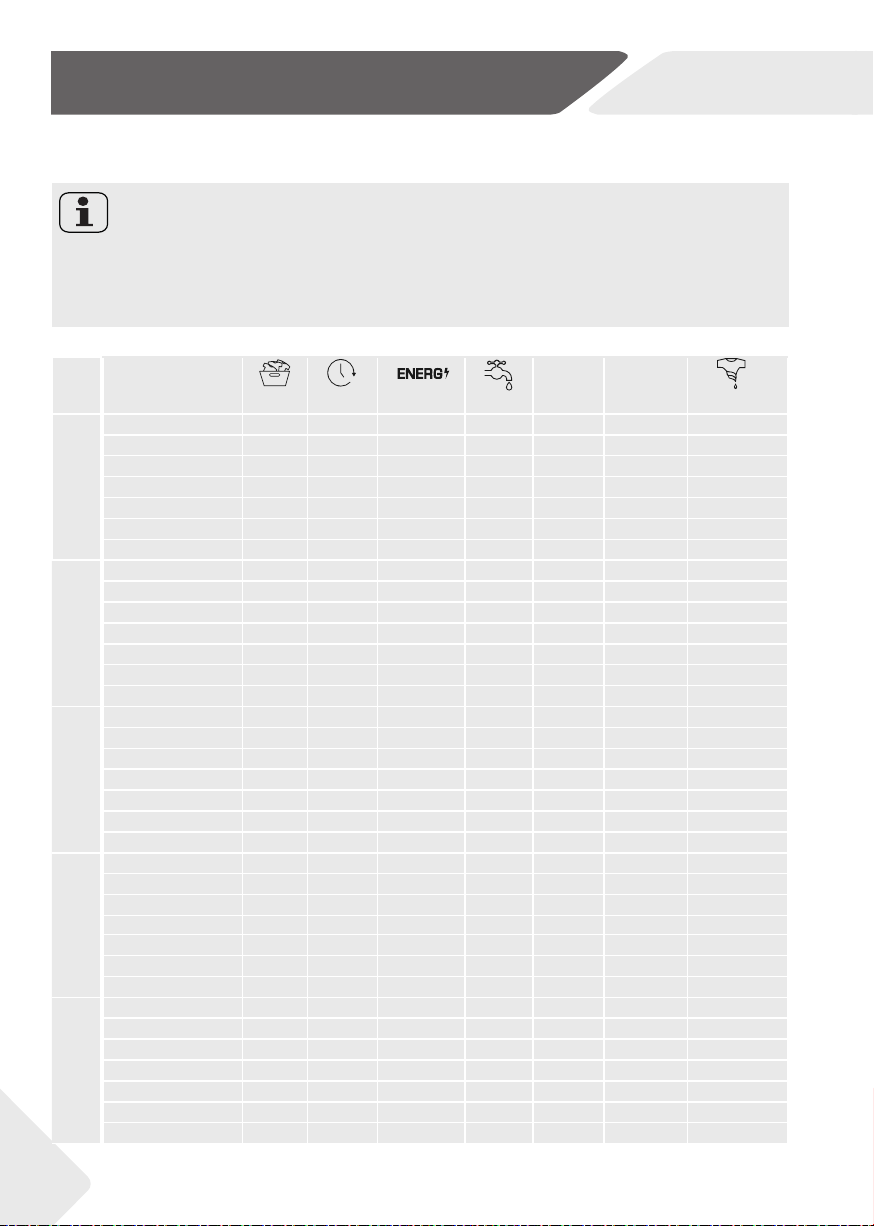
Description of programmes
To clean diff erent types of fabrics and various levels of dirt, the washing machine
has specifi c programs to meet every need of washing (see table of programmes).
AUTO CARE
The new POWER CARE technology, through a perfect mix of water and detergent,
guarantees the maximum care of your clothes, at a 30°C temperature with a per-
fect washing performance.
This innovative programme is capable to automatically the cleaning action to the
capacity and typology of the load for the best results without any worries.
This program can wash lightly soiled mixed laundry of cotton and synthetic.
ALL IN ONE 49’
This programme allows you to wash diff erent fabrics together such as cottons,
synthetics and mixed fabrics in only 49 minutes at 40°C (or less ) temperature. This
programme is particularly suited to slightly dirty fabrics.
RAPID CARE (14’/30’/44’)
Saving without compromising! This new programme may be used to obtain excel-
lent results while saving water, energy, detergent and time. This option washes
at a medium temperature suitable for lightly soiled mixed laundry of cotton and
synthetic. Recommended for small loads and lightly soiled items.
ALLERGY CARE PRO
This washing programme is capable of reaching a temperature of 60°C for an ex-
tended period of time, combining the steam action with a powerful rinsing action for
thoroughly clean and hygienic clothing. Recommended for cotton fabrics.
STEAM CARE PRO
This programme uses a steam treatment to relax creases.Three diff erent intensity
levels can be selected via the button, designed only for dry garments and depend-
ing on the type of fabric.
SOFT CARE
Developed to take good care of delicate items, this programme washes at a low
temperature in short time. An extended, in - depth rinse nourishes fabric fi bres.
Note: Choosing programme
Choose programme in accordance with the laundry instructions appearing on
labels, especially the maximum recommended temperature.
EN
6-Programmes
23
FITNESS CARE
The perfect combination of time and performance. Created to eliminate dirt from
athletic garments and sportswear. A low temperature wash recommended for small
loads of synthetic items.
RINSE
This program performs 2 rinses with an intermediate spin (which can be reduced or
excluded by using the appropriate button). It is used for rinsing any type of fabric,
for example after a wash carried out by hand.
REMOTE CONTROL (Wi-Fi)
Position that you have to select when you want to enable / disable remote control
through the App, via Wi-Fi. In this case, the start of cycle will take place through
the App commands. More details in the REMOTE CONTROL (Wi-Fi) section.
COTTONS
This programme is suitable for washing coloured cotton garments at 40°C or for en-
suring the highest degree of cleanliness for cotton resistant laundry washing at 60°C or
90°C.The fi nal spin is at maximum speed that ensures excellent water removal.
ECO 40-60
The ECO 40-60 programme is able to clean normally soiled cotton laundry de-
clared to be washable at 40°C or 60°C, together in the same cycle. This pro-
gramme is used to assess the compliance with the EU Ecodesign legislation (envi-
ronmentally friendly products design).
WOOL & HAND WASH
This programme performs a wash cycle dedicated to the wool fabrics that can be
washed in a washing machine, the articles to be washed by hand.
20°C
This innovative programme, allows you to wash diff erent fabrics and colours
together, such as cottons, synthetics and mixed fabrics at only 20°C and provides
an excellent cleaning performance.
SYNTHETIC & COLOURED
This programme allows you to wash diff erent fabrics and diff erent colours all
together. The rotation movement of the drum and the water levels are optimized,
both during the washing the rinsing phase. The accurate spin action, ensures a
reduced formation of creases in the fabrics.
DRAIN & SPIN
The program completes the drain and a maximum spin. It is possible to delete or
reduce the spin through the SPIN SELECTION button.
Note: The procedure to check the number of cycle that the machine has run.
Procedure:under standby mode,select “DRAIN & SPIN” programme fi rst,then press
“speed” and “delay” at the same time, it will display the number of running cycle for 2
seconds,and then back to standby interface.The cumulativer running cycles will add
after the programme ends.The running cycles will be displayed in hexadecimal it is
over 9999.
EN
7-Consumption
24
Scan QR code on energy label for energy consumption information. The actual energy
consumption may diff er from the declared one according to local conditions.
Note: Auto Weight
The appliance is equipped with a loading recognition. At low loading, energy, water and
washing time will be reduced automatically in some programmes. The display default
time may vary depending on the load weight, involving the “Smart, Synthetic, Cotton,
Cotton 20°C, Eco 40-60’ programme.
Indicative information(as per Commission Regulation (EU) 2019/2023):
Rated
Ca-
pacity
Programme
(kg) (HH:MM) (kWh/cycle)
(L/cycle)
Max.
Temp.(°C)
Eff ective
Speed
(RPM)
Residual
Moisture (%)
8 kg
1400 r
Eco 40-60 8.0 3:38 0.690 60.0 32 1330 53.0
Eco 40-60 4.0 2:48 0.500 41.0 30 1330 52.0
Eco 40-60 2.0 2:48 0.210 30.0 25 1330 55.6
Cotton 20°C 8.0 1:58 0.220 75.0 20 1000 65.0
Cotton 60°C 8.0 3:03 2.100 75.0 57 1400 53.0
Wool 30°C 2.0 0:50 0.250 38.0 30 800 37.0
RapidCare14’30°C 1.0 0:14 0.250 38.0 30 1000 65.0
9 kg
1400 r
Eco 40-60 9.0 3:48 0.760/0.750 68.0 35 1330/1550 52.0
Eco 40-60 4.5 2:52 0,550 43.0 33 1330/1550 52.0
Eco 40-60 2.5 2:52/2:45 0.230/0.240 35.0 25 1330/1550 56.0
Cotton 20°C 9.0 1:58 0.220 80.0 20 1000 65.0
Cotton 60°C 9.0 3:03 2.300 80.0 57 1400/1600 53.0
Wool 30°C 2.0 0:50 0.250 40.0 30 800 37.0
RapidCare14’30°C 1.0 0:14 0.250 40.0 30 1000 65.0
10 kg
1600 r
Eco 40-60 10.0 3:58 0.865 78.0 35 1550 52.0
Eco 40-60 5.0 2:58 0.560 47.0 33 1550 52.0
Eco 40-60 2.5 2:58 0.250 35.0 25 1550 56.0
Cotton 20°C 10.0 1:58 0.220 85.0 20 1000 65.0
Cotton 60°C 10.0 3:03 2.500 85.0 57 1600 53.0
Wool 30°C 2.5 0:50 0.300 45.0 30 800 37.0
RapidCare14’30°C 1.0 0:14 0.250 40.0 30 1000 65.0
10.5 kg
1400r
Eco 40-60 10.5 3:58 1.035 98.0 35 1330 53.0
Eco 40-60 5.5 2:58 0.700 55.0 33 1330 52.0
Eco 40-60 2.5 2:58 0.270 40.0 25 1330 54.0
Cotton 20°C 10.5 1:58 0.250 100.0 20 1000 65.0
Cotton 60°C 10.5 3:03 2.800 100.0 57 1400 55.0
Wool 30°C 3.5 0:50 0.350 50.0 30 800 37.0
RapidCare14’30°C 1.0 0:14 0.280 40.0 30 1000 65.0
12 kg
1400 r
Eco 40-60 12.0 3:58 1.035 98.0 35 1330 53.0
Eco 40-60 6.0 2:58 0.700 55.0 33 1330 52.0
Eco 40-60 3.0 2:58 0.270 40.0 25 1330 54.0
Cotton 20°C 12.0 1:58 0.250 100.0 20 1000 65.0
Cotton 60°C 12.0 3:03 2.800 100.0 57 1400 55.0
Wool 30°C 3.5 0:50 0.350 50.0 30 800 37.0
RapidCare14’30°C 1.0 0:14 0.280 40.0 30 1000 65.0
Residua
The values given for programmes other than the Eco 40-60 programme and the wash and dry cycle are indicative only.
EN
8-Daily use
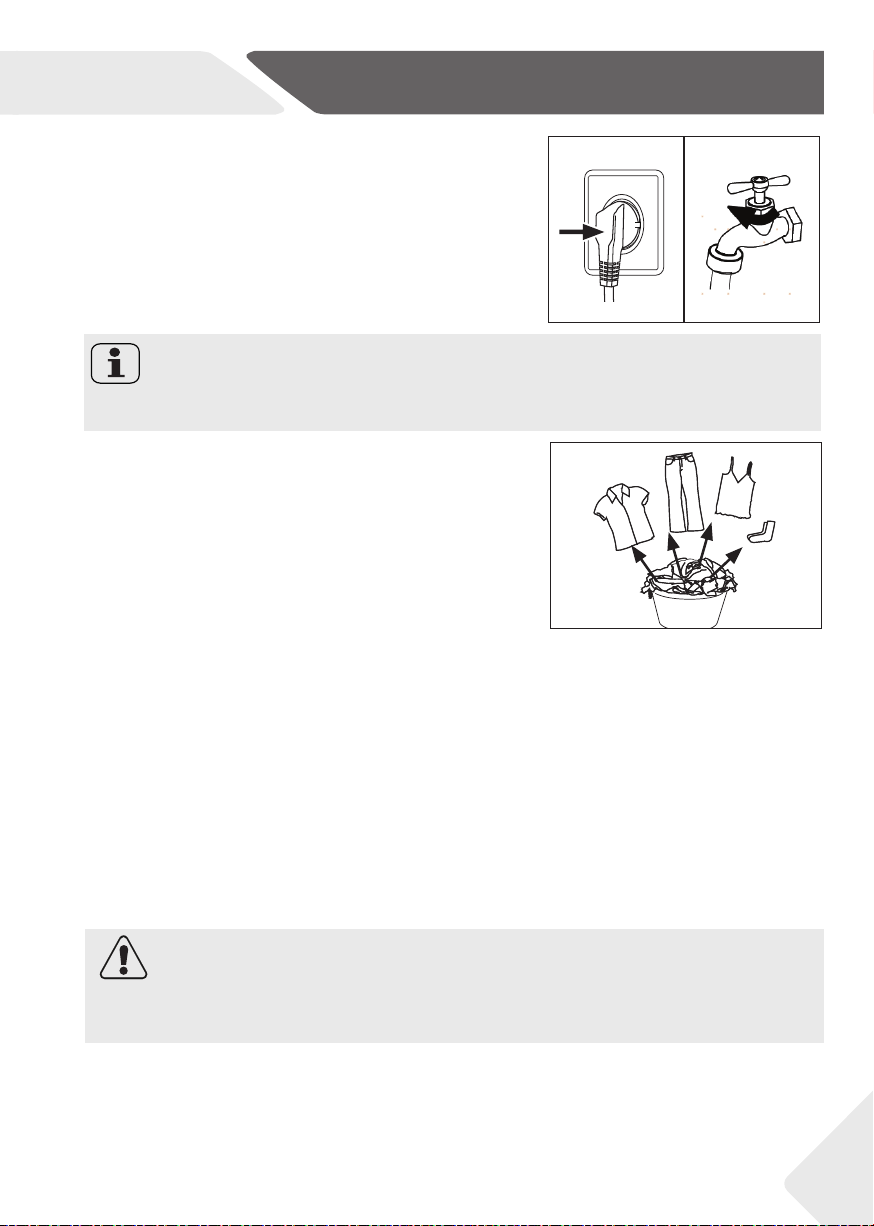
8.3 Preparing laundry
▶ Sort out clothes according to fabric (cotton, syn-
thetics, wool or silk) and to how dirty they are (Fig.
8-3). Pay attention to the care labelling of wash-
ing labels.
▶ Separate white clothes from coloured ones.
Wash coloured textiles fi rst by hand to check if
they fade or run.
▶ Empty pockets (keys, coins, etc.) and remove
harder decorative objects (e.g. brooches).
▶ Garments without hems, delicates and fi nely wo-
ven textile such as fi ne curtains are to be put into
a wash bag to care for this delicate laundry (hand
or dry cleaning would be better).
▶ Close zippers, velco fastener and hooks, make
sure the buttons are sewn on tightly.
▶ Place sensitive items like laundry without fi rm
hem, delicate underwear (Dessous) and small
items such as socks, belts, bras, etc. in a wash bag.
▶ Unfold large pieces of fabric such as bed sheets,
bedspreads etc.
▶ Turn jeans and printed, decorated or color-inten-
sive textiles inside out; possibly wash separately.
8-3
8.1 Power supply
Connect the washing machine to a power supply
(220V to 240V~/50Hz; Fig. 8-1). Please refer also to
section INSTALLATION (see P28).
8.2 Water connection
▶ Before connecting check the cleanliness and clar-
ity of the water inlet.
▶ Tun on the tap (Fig. 8-2).
Note: Tightness
Before use check for leakage in the joints between the tap and the inlet hose by turning
on the tap.
8-1 8-2
25
CAUTION!
Non-textile, as well as small, loose or sharp-edged items may cause malfunctions and
damage of clothes and appliance.
EN
8-Daily use
Note: Auto Weight
The display default time may vary depending on the load weight, involving the
“COTTONS, ECO 40-60, 20°C, SYNTHETIC & COLOURED, ALLERGY CARE
PRO, AUTO CARE, NIGHT & DAY” program.
26
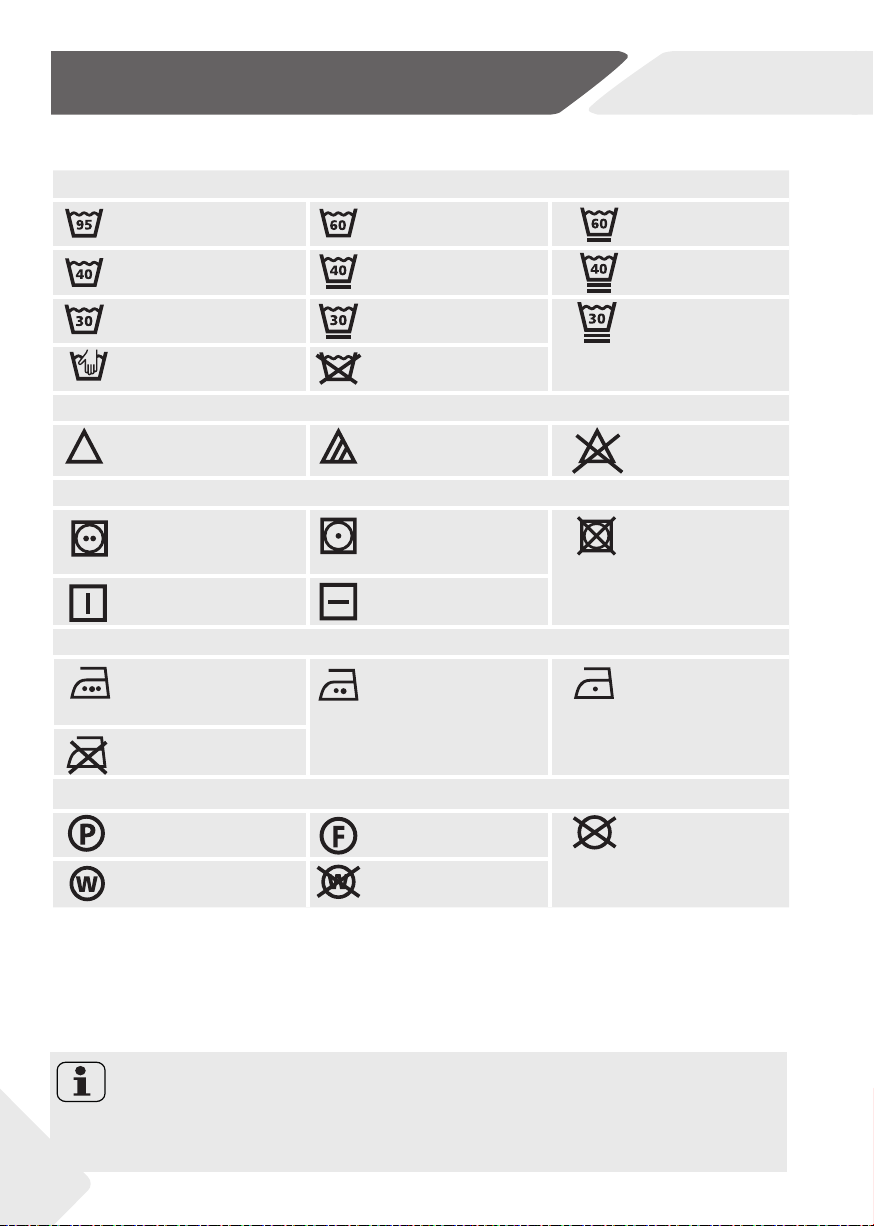
8.4 Care chart
Washing
Washable up to 95°C
normal process
Washable up to 60°C
normal process
Washable up to 60°C
mild process
Washable up to 40°C
normal process
Washable up to 40°C
mild process
Washable up to 40°C
very mild process
Washable up to 30°C
normal process
Washable up to 30°C
mild process
Washable up to 30°C
very mild process
Wash by hand
max. 40°C
Do not wash
Bleaching
Any bleaching allowed Only oxygen/
non -chlorine
Do not bleach
Drying
Tumble drying possible
normal temperature
Tumble drying possible
lower temperature
Do not tumble dryr
Line drying Flat drying
Ironing
Iron at a maximum
temperature
up to 200 °C
Iron at a medial tem-
perature
up to 150°C
Iron at a low temper-
ature up to 110 °C;
without steam (steam
ironing may cause irre-
versible damage)
Do not iron
Professional Textile Care
Dry cleaning in tetra-
chloroethene
Dry cleaning in hy-
drocarbons
Do not dry clean
Professional wet clean Do not professional
wet clean
8.5 Loading the appliance
▶ Put in the laundry piece by piece.
▶ Don’t overload. Note the diff erent maximum load according to programmes! Rule
of thumb for maximum load: Keep six inches between load and drum top.
▶ Close the door carefully. Make sure that no pieces of laundry are pinched.
EN
8-Daily use
27
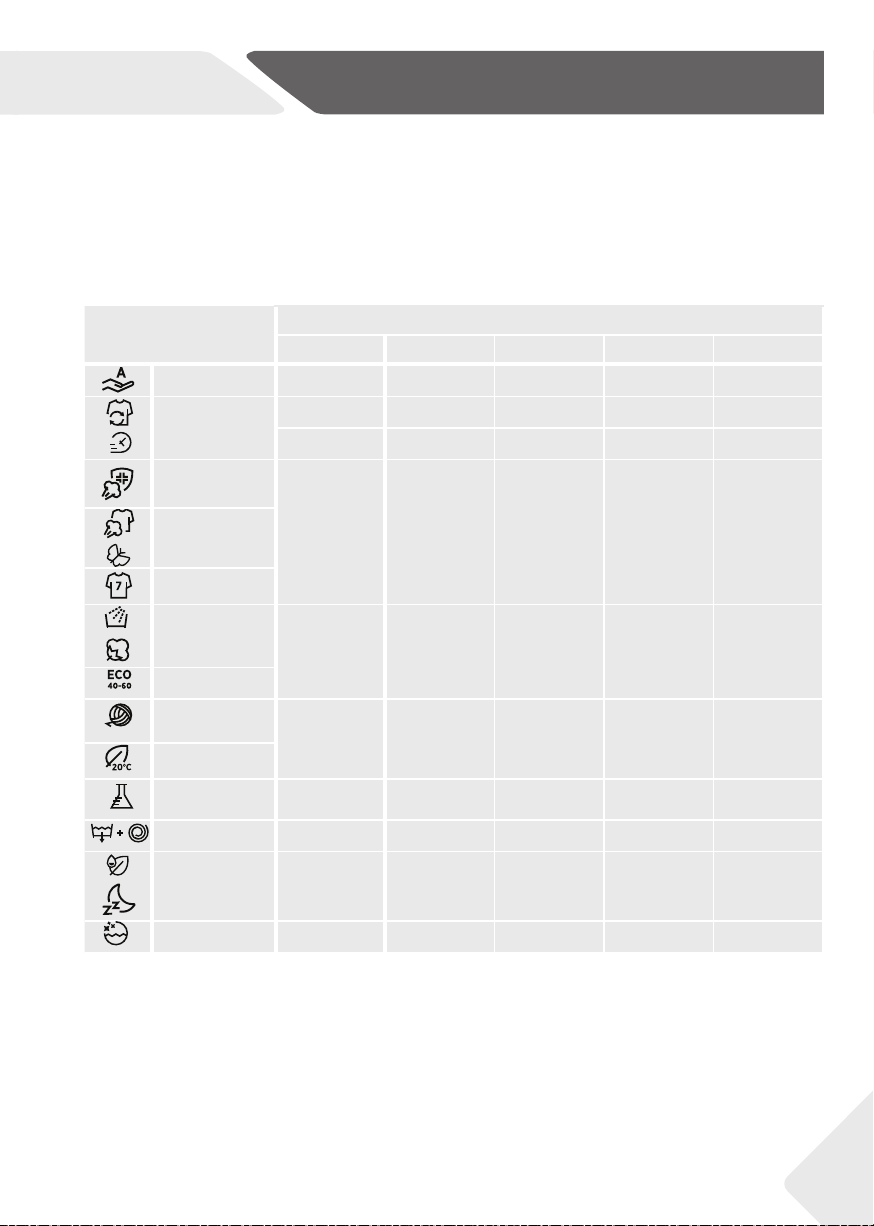
Programme
Kind of detergent
Universal Colour Delicate Special Softener
Auto Care L/P L/P - - o
All in One 49’
Rapid Care
14’ 30’ 44’
L L - - o
L L - - -
Allergy Care
Pro
-
-
-
-
-
-
-
-
o
-
o
o
o
-
o
o
o
-
o
o
Steam Care
Pro
Soft Care
Fitness Care
Rinse
Cottons
-
L/P
L/P
-
L/P
L/P
-
-
-
-
-
-
o
o
o
Eco 40-60
Wool &
Handwash
-
L/P
-
L/P
L/P
-
L/P
-
o
o
20°C
Synthetic &
Coloured
- O - - o
Drain & Spin - - - - -
Active Wash
Night & Day
L
L/P
L
L/P
-
-
-
-
-
o
Drum Clean - - - o -
L = gel-/liquid detergent P = powder detergent O = optional
_
= no
If using liquid detergent, it is not recommended to activate the time dela
y.
*Choose 90°C wash temperature only for special hygienic requirements.
*If you choose the water temperature 60°C or above, we would like to advise you to use less detergent.
* It is better to use less or free suds detergent powder.
* Suggested detergent type on remote control depends on the program choosen on APP.
We recomment by using:
▶ Laundry powder: 20°C to 90°C* (best use: 40-60°C)
▶ Color detergent: 20°C to 60°C (best use: 30-60°C)
▶ Wool/delicate detergent: 20°C to 30°C (= best use: 20°C to 30°C)
8.6 Selecting detergent
▶ Washing effi ciency and performance is determined by used detergent quality.
▶ Use only machine wash approved detergent.
▶ If needed use specifi c detergents, e.g. for synthetic and woolen fabric.
▶ See tips for countertop detergent stickers.
▶ Do not use dry cleaning agents such as trichloroethylene and similar products.
Choose the best detergent
ALL IN ONE 49′
STEAM CARE PRO
SOFT CARE
FITNESS CARE
RINSE
COTTONS
ECO 40-60
WOOL & HAND WASH
20℃
SYNTHETIC &
COLOURED
DRAIN & SPIN
ACTIVE WASH
ACTIVE WASH
NIGHT & DAY
NIGHT & DAY
DRUM CLEAN

EN
8-Daily use
28
Note: Detergent
▶ Remove detergent residues before next wash cycle from the detergent drawer.
▶ Do not overuse detergent or softener.
▶ Please follow the instruction on the detergent package.
▶ Always fi ll the detergent just before the beginning of the wash cycle.
▶ Concentrated liquid detergent should be diluted before adding.
▶ Do not use liquid detergent if “Delay“ is selected.
▶ Carefully choose the programme settings according to the care symbols on all laun-
dry labels and according to the programme table.
8.8 Switch on the appliance
Turn the knob (Fig.8-5) from “OFF” to any position to
switch on the machine.
8-4
8-4
8.7 Adding detergent
1. Slide out the detergent drawer.
2. Put the required chemicals into corresponding
compartments (Fig. 8-4)
3. Push back the drawer gently.
8.9 Select a programme
To get the best washing results, select a programme
which fi ts the degree of soiling and sort of laundry
type.
Turn the programme knob (Fig. 8-5) to select the
right programme.The display will show the selected
programme name.
8-5
Note: Odor removal
Before fi rst use we recommended to run programme “DRUM CLEAN “ to remove pos-
sibly corruptive residues.Please don’t put any detergent or special machine cleaner in
washing agent compartment (2).
8.10 Add individual selections
Select required options and settings (Fig. 8-6); refer to
CONTROL PANEL.
8-6
8-5
EN
6-Daily use
29
8.11 Start wash programme
Touch “Start/Pause” button (Fig. 8-7) to start.
Appliance operates according to present settings.
Changes are only possible by cancelling the pro-
gramme.
8-7
8.14 Activate or deactivate the buzzer
The acoustic signal can be deselected if necessary:
In the standby mode after power on, long press the button “OPTION”for more than 5S
to turn off the sound. The interface will display “SOUND OFF”. Press and hold this key
again for more than 5S, and the interface will “SOUND ON”.
1. At programme cycle end END is displayed.
2. The appliance switches off automatically.
3. Remove laundry as soon as possible to go easy on it and to prevent more wrinkling.
4. Turn off the water supply.
5. Unplug the power cord.
6. Open the door to prevent formation of moisture and odours. Let it open while not used.
Note: Door lock
▶ For safety reasons the door is locked partially during the washing cycle. It is only pos-
sible to open the door at the end of the programme or after the programme was can-
celled correctly (see description above).
▶ In case of high water level, high water temperature and during spinning it is not pos-
sible to open the door; Lock is displayed.
Note: Standby mode / energy-saving mode
The switched on appliance will go into standby-mode if it will not be activated within 2
minutes before starting the programme or at the end of programme, except REMOTE
CONTROL.The display switches off . This saves energy.To interrupt the standby mode
turn the knob to any other programme except “OFF”.
8.13 After washing
8.12 Interrupt / cancel wash programme
To interrupt a running programme press gently “Start/Pause“. The LED above the button
is fl ashing. Press it again to resume operation.
To cancel a running programme and all its individual settings
1. Touch “Start/Pause” button to interrupt the running programme.
2. Turn the knob to the programme DRAIN & S PIN and select”NO SPIN” to drain the
water.
3. After closing the programm to restart the appliance, select a new programme and
start it.
EN
9-Remote control (Wi-Fi)
30
9.2 Requirements
1. One wireless router (802.11b/g/n protocol) which supports only the frequency band
of 2.4 GHz. Length of Router SSID is 1-31 characters(including 1 and 31), and pass-
word is 8-64 characters. Minimum length of password must be 8 characters. Router
encryption methods include open, WPA-PSK and WPA2-PSK.
2. The App is available for devices running Android, Huawei or iOS, both for tablets and
for smartphones.
3. The appliance shall be installed in a position where it can receive a strong Wi-Fi signal.
Once the appliance has been correctly associated with the APP, if it’s not properly
connected to the wireless router, no Wi-Fi icon appears on the display
9.1 General
This appliance is equipped with Wi-Fi technology that allows you to control it remotely
via App.
9.3 Download and installation of hOn APP:
Download the hOn App on your device by framing the following QR code:
or by the link: go.haier-europe.com/download-app
WARNING!
Please observe the safety precautions in this user manual and make sure that these
are complied with even when operating the appliance via the hOn APP while you are
away from home. You must also follow the instructions in the hOn.
Note: Registration
Registration is required when fi rst time to use or the formal account has been deleted/
closed. For further use, you need to enter user name and password after you log in.
Frequency rate (OFR)
2400 MHz - 2483,5 MHz
Max. power (ERP)
20dBM
Wireless standard
IEEE802.11b/g/n & BLE V4.2
Download the
App
EN
9-Remote control (Wi-Fi)
31
Note: Wi-Fi Network
It is not possible to connect the appliance to a public Wi-Fi network. It may cause
malfunction.
Note: Use same Wi-Fi
Connect with your smartphone to the network you want to connect the product to.
Note: Remote control expiration
Once the remote control is activated, if the end user doesn’t start any cycle from App in
10 minutes, the appliance will go to Networked Delay Start Mode, and keeps remote
control up to 24 hours, then shut off .
9.4 Appliance pairing (on app)
1. The App is available for devices running both Android and iOS, both for tablets and
for smartphones.
2. Get all the details of the Wi-FI functions by browsing the App in DEMO mode.
3. The frequency of the home Wi-Fi network has to be set on the 2.4 GHZ band. You
cannot confi gure the machine if your home network is set to the 5 GHZ band.
4. Open the App, create the user profi le (or log-in if it is already created previously)
and pairing the appliance following the instructions on the device display.
9.5 To enable remote control
1. Check that the router is switched on and connected to the Internet.
2. Load the laundry, close the door, add the detergent if it’s necessary.
3. Turn the programme selector to the REMOTE CONTROL (Wi-Fi) position .
REMOTE CONTROL
The door will lock and the controls on the control panel will be disabled.
4. Start the cycle using the App. When the cycle has been completed, turn off the
machine by turning the programme selector to the OFF position to unlock the door.
9.6 To disable remote control
1. To exit REMOTE CONTROL mode while a cycle is underway, turn the programme
selector to any position other than REMOTE CONTROL (Wi-Fi), without going
through the OFF. The control panel on the appliance will be operative once again,
and if the cycle is paused, you will be able to open the door once the DOOR
LOCKED indicator light switches off .
2. For safety reasons, in some wash cycle phases, the door can be opened only if the
level of the water is below its lower edge and if the temperature is below its lower
edge. If these conditions are met, wait for the DOOR LOCKED light to switch off
before opening the door.
3. With the door closed, turn the knob to the REMOTE CONTROL (Wi-Fi) position to
control the appliance using the App once again. If there is a cycle underway, it will
continue.
EN
10-Care and Cleaning
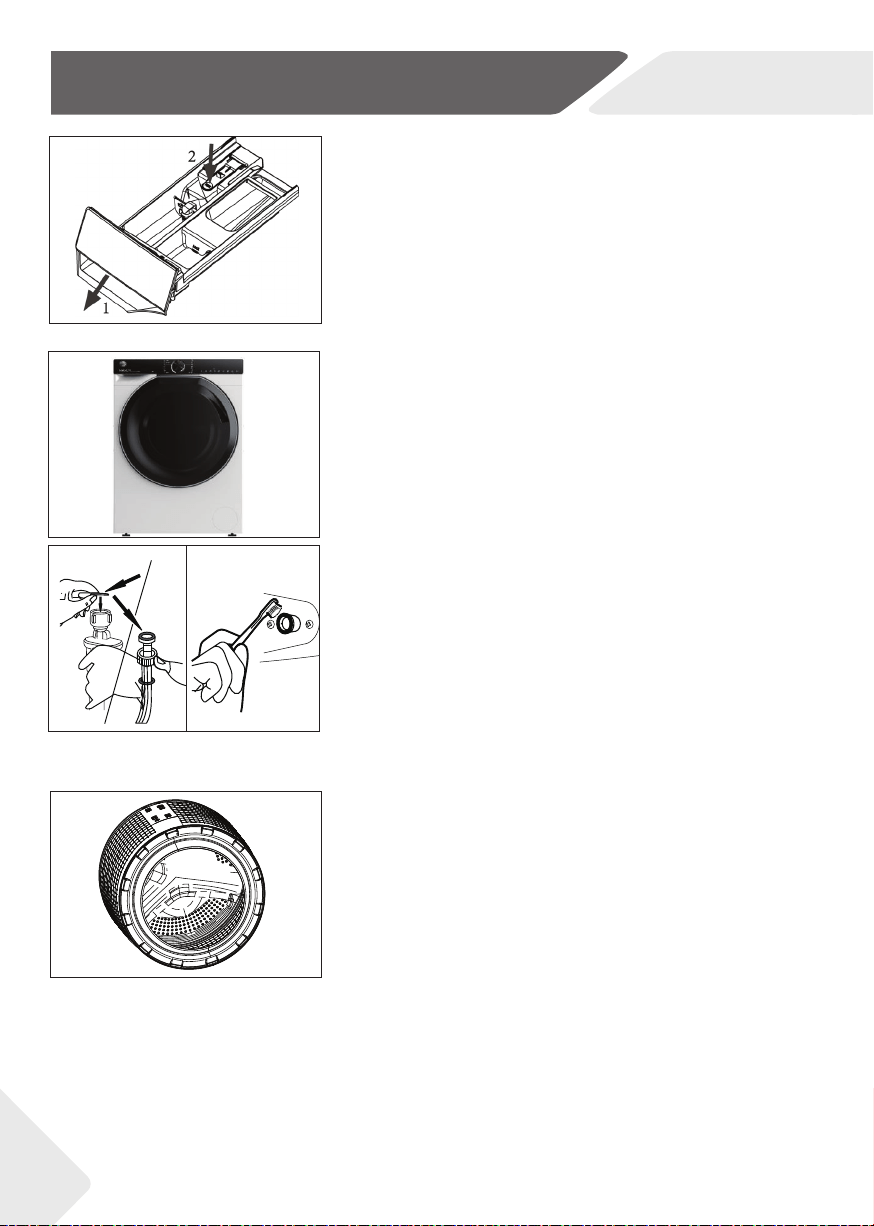
10.1 Cleaning the detergent drawer
Take always care there are no detergent residues.
Clean the drawer regularly (Fig. 10-1):
1. Pull out the drawer until it stops.
2. Press the release button and remove the drawer.
3. Flush the drawer with water until it is clean and
insert the drawer back in the appliance.
10.2 Cleaning the machine
▶ Unplug the machine during cleaning and mainte-
nance.
▶ Use a soft cloth with soap liquid to clean the ma-
chine case (Fig. 10-2) and rubber components.
▶ Do not use organic chemicals or corrosive sol-
vents.
10.3 Water inlet valve and inlet valve fi lter
To prevent blockage of water supply by solid substanc-
es like lime clean regularly the inlet valve fi lter.
▶ Unplug the power cord and turn off the water
supply.
▶ Unscrew the water inlet hose at the back (Fig. 10-
3) of the appliance as well as on the tap.
▶ Flush the fi lters with water and a brush (Fig. 10-4).
▶ Insert the fi lter and install the inlet hose.
10.4 Cleaning the drum
▶ Remove accidentally washed items, especially metal
parts such as pins, coins, etc. from the drum (Fig. 10-
5) because they cause rust stains and damage.
▶ Use a non-chloride cleaner for removing rust
stains. Observe the warning hints of the cleaning
agent manufacturer.
▶ Do not use any hard objects or steel wool for
cleaning.
10-1
10-2
10-5
10-3 10-4
32
EN
10-Care and Cleaning
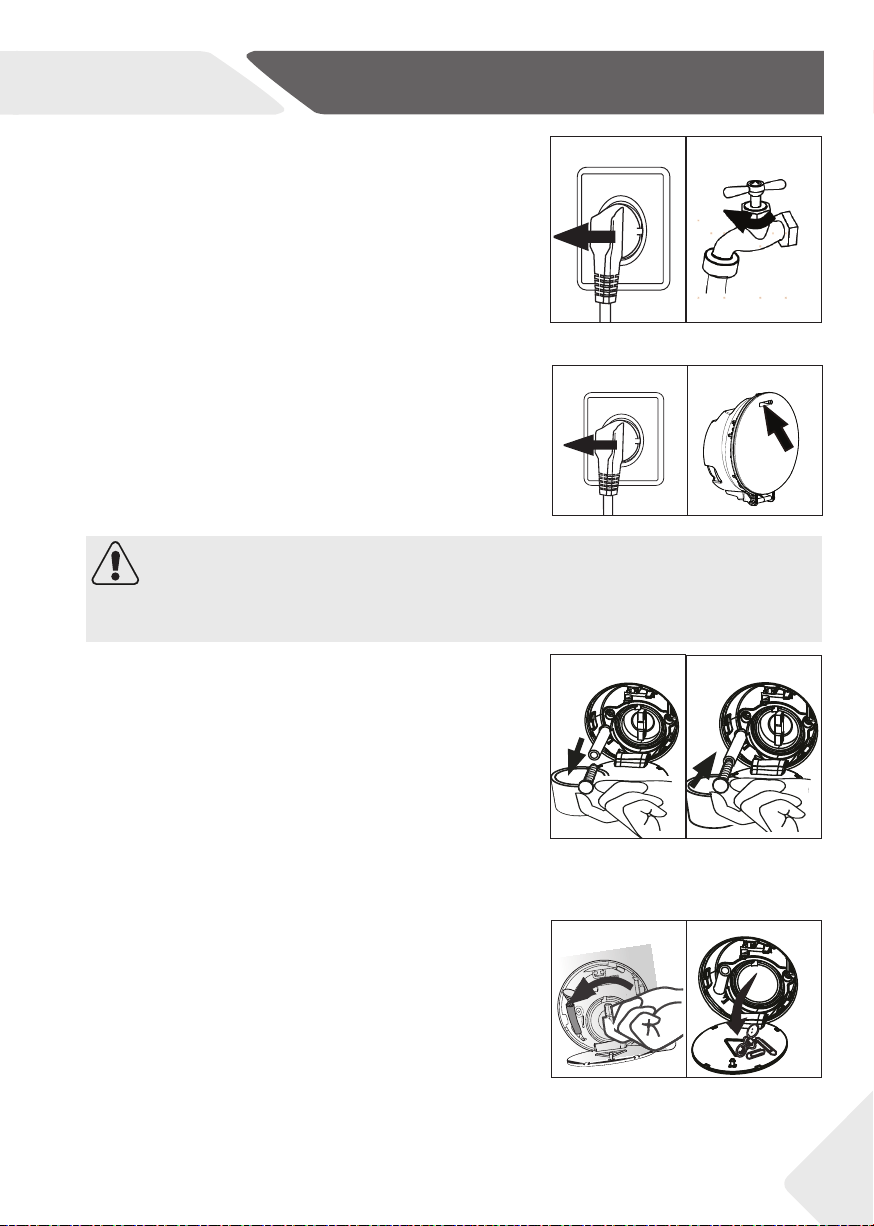
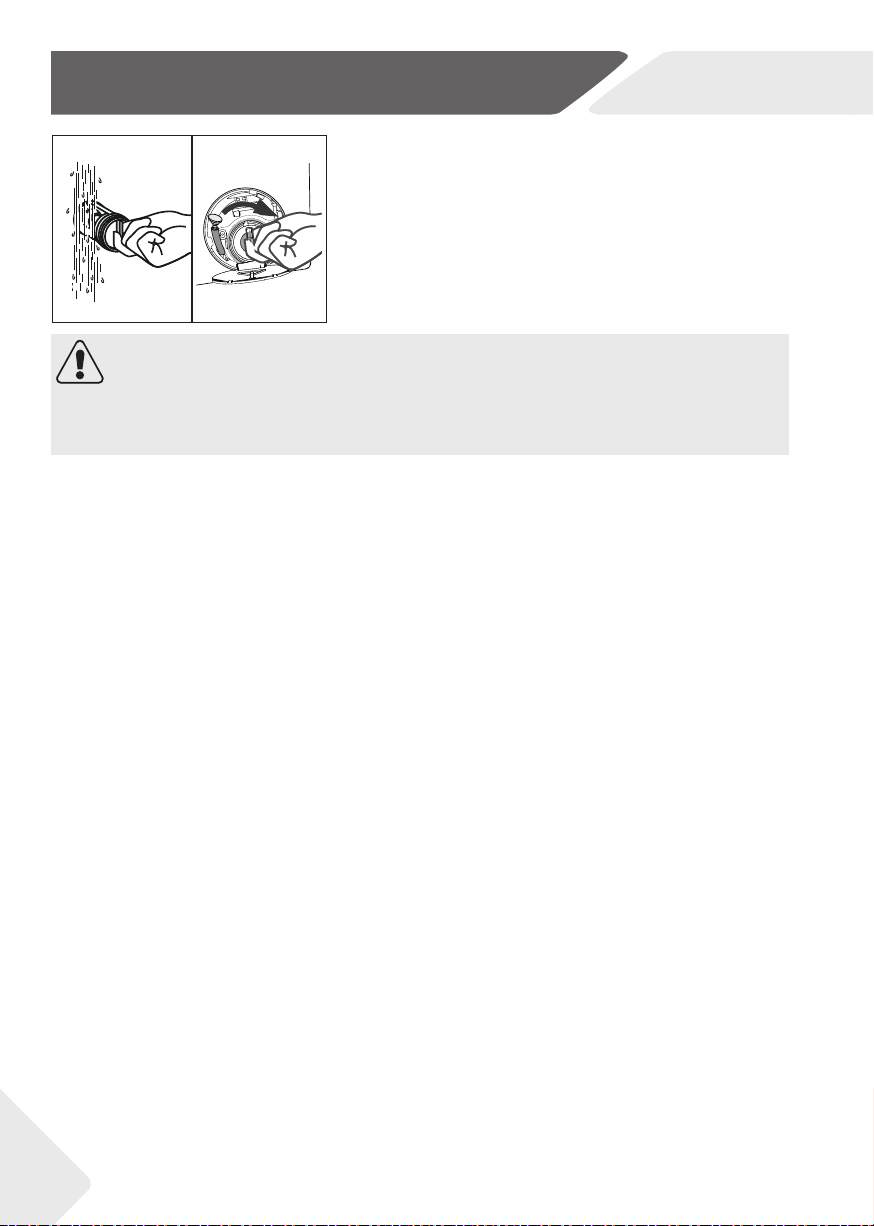
1. Turn off and unplug the machine (Fig. 10-8).
2. Open service fl ap. You can either use a coin or a
screwdriver (Fig. 10-9).
3. Provide a fl at container to catch leach water
(Fig. 10-10). There could be bigger amounts!
4. Pull the drainhose out and hold its end above the
container (Fig. 10-10).
5. Take the sealing plug out of the drainhose (Fig.
10-10).
6. After complete drainage close drainhose (Fig. 10-
11). and push it back into the machine.
7. Unscrew and remove counter clockwise the
pump fi lter (Fig. 10-12).
8. Remove contaminants and dirt (Fig. 10-13).
10.5 Long periods of disuse
If the appliance is left idle for a longer period:
1. Pull out the electrical plug (Fig. 10-6).
2. Turn off water supply (Fig. 10-7).
3. Open the door to prevent formation of moisture
and odours. Let door open while not used.
Before next usage check carefully power cord, water
inlet and drain hose. Make sure everything is properly
installed and without leackage.
WARNING!
Scalding Risk! Water in the pump fi lter can be very hot! Before any action please ensure
water has cooled down.
10.6 Pump fi lter
Clean the fi lter once a month and check the pump fi lter
for instance if the appliance:
▶ Doesn´t drain the water.
▶ Doesn´t spin.
▶ Cause unusual noise while running.
10-6 10-7
8-11
8-10
10-10
10-11
8-12
10-12
10-13
10-8 10-9
33
EN
10-Care and cleaning
CAUTION!
▶ Pump fi lter sealing has to be clean and unhurt. If the lid is not full tightened, water
can escape.
▶ The fi lter must be in place, or it may lead to leakage.
10-14
10-15
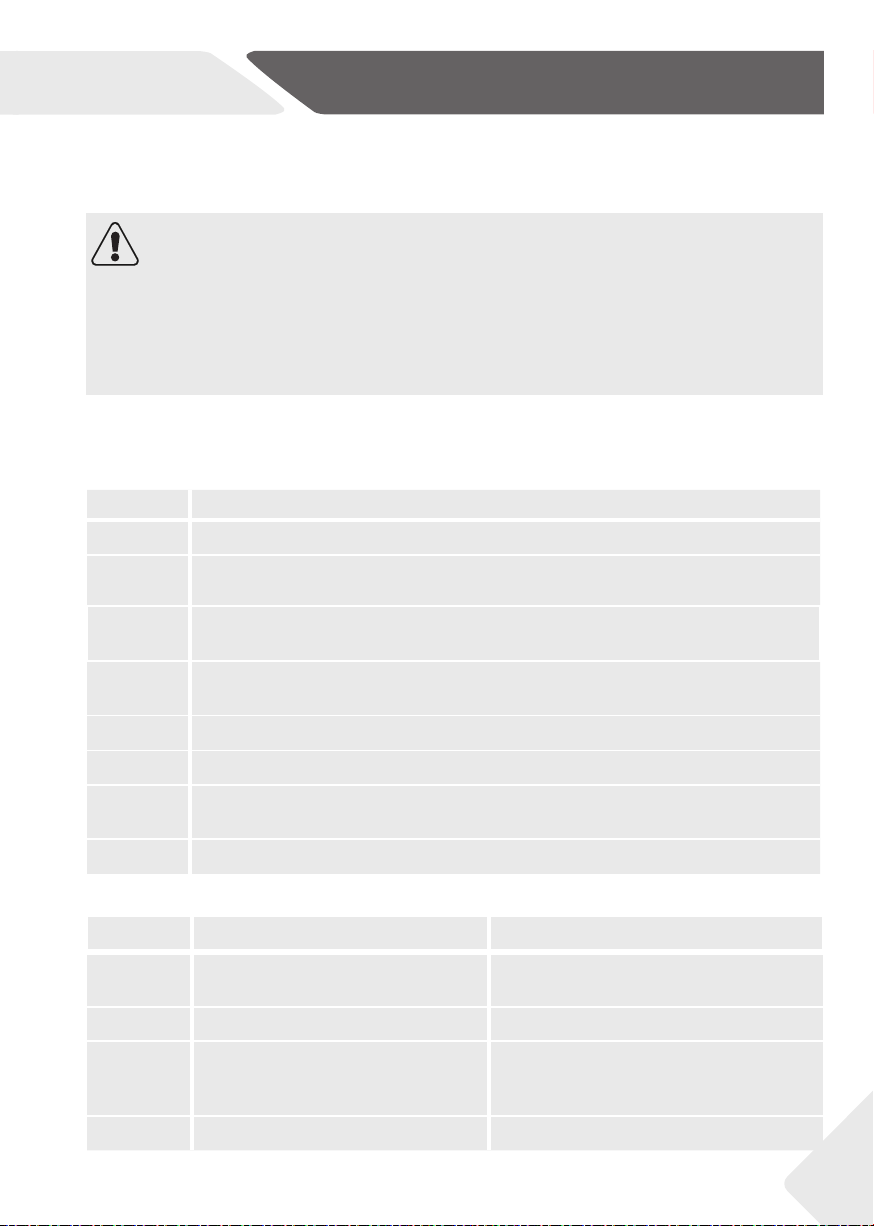
9. Clean carefully pump fi lter, e.g. using running
water (Fig. 10-14).
10. Refi x it thoroughly (Fig. 10-15).
11. Close service fl ap.
34
EN
11-Troubleshooting
35
11.2 Troubleshooting with display code
Problem Cause Solution
CLR FLTR
• Drainage error, water is not fully
drained within 6 minutes
.
• Clean pump fi lter.
• Check drain hose installation.
E2
• Lock error • Shut the door properly.
E4
• Water level not reached after 12
minutes
.
Drain hose is self-syphoning.
• Make sure that tap is fully opened and
water pressure is normal.
• Check drain hose installation.
E8
• Water protective level error. • Contact the After sales service.
Many occuring problems could be solved by yourself without specifi c expertise. In case
of a problem please check all shown possibilities and follow below instructions before you
contact an after sales service. See CUSTOMER SERVICE.
WARNING!
▶ Before maintenance, deactivate the appliance and disconnect the mains plug from
the mains socket.
▶ Electrical equipment should be serviced only by qualifi ed electrical experts, because
improper repairs can cause considerable consequential damages..
▶ A damaged power cable should only be replaced by the manufacturer, its service
agent or similarly qualifi ed persons in order to avoid a hazard.
11.1 Information codes
Following codes are displayed only for information referring to the washing cycle. No
measures must be performed.
Code Message
1:25
The remaining wash cycle time will be 1 hour and 25 minutes
6:30
The remaining wash cycle time including chosen end-time delay will be 6 hours and
30 minutes
CHILD
LOCK
ON
Function child lock is activated .
CHILD LOCK
OFF
Function child lock is not activated .
END
The washing cycle is fi nished. The appliance shuts off automatically
LOCK
Door is closed because of high water level, high water temperature or spinning cycle.
SOUND
OFF
The buzzer is activated
SOUND ON
The buzzer is deactivated

EN
11-Troubleshooting
Problem Cause Solution
F3
• Temperature sensor error. • Contact the After sales service.
F4
• Heating error
.
• Contact the After sales service.
F7
• Motor error • Contact the After sales service
FA
• Water level sensor error. • Contact the After sales service.
FC0, FC1 or
FC2
• Abnormal communication error. • Contact the After sales service.
FH
• The iot module fails to be confi gured. • Contact the After sales service
to replace the iot module.
E5
• Drainage error. • Water is not fully drained in set time.
Problem Cause Solution
Appliance fails to op-
erate.
• Programme is not yet started. • Check programme and start it.
• Door is not properly closed. • Close the door properly.
• Machine has not been switched on. • Switch the machine on.
• Power failure. • Check power supply.
• Child lock is activated. • Deactivate child lock.
Appliance will not be
fi lled with water.
• No water. • Check water tap.
• Inlet hose is kinked. • Check inlet hose.
• Inlet hose fi lter is blocked. • Unblock inlet hose fi lter.
• Water pressure is less than 0.03 MPa.
• Check water pressure.
• Door is not properly closed. • Close the door properly.
• Water supply failure. • Ensure the water supply.
Appliance is draining
while being fi lled.
• Height of drain hose is below 80 cm.
• Make sure that drain hose is
properly installed.
• Drain hose end could reach into
water.
• Make sure the drain hose is not
in water.
Drainage failure. • Drain hose is blocked. • Unblock drain hose.
• Pump fi lter is blocked. • Clean pump fi lter.
• Drain hose end is higher than 100 cm
above fl oor level.
• Make sure that drain hose is
properly installed.
Strong vibration while
spinning
• Not all transportation bolts have
been removed.
• Appliance has no solid position.
• Machine load is not correct.
• Remove all transportation bolts
.
• Ensure solid ground and a levelled
position
• Check load weight and balance.
Operation stops
before completing
wash cycle
• Appliance displays error code
• Problem due to load pattern.
• Programme performs soaking cycle
• Consider display codes.
• Reduce or adjust load.
• Cancel programme and restart.
Operation stops for
a period of time.
• Appliance displays error code.
• Problem due to load pattern.
• Programme performs soaking cycle.
• Consider display codes.
• Reduce or adjust load.
• Cancel programme and restart.
11.3 Troubleshooting without display code
36
EN
11-Troubleshooting
37
Should the error messages reappear even after the taken measures, switch off the appli-
ance, disconnect the power supply and contact the customer service.
Note: Foam formation
If too much foam is inspected during spin cycle, motor stops and drain pump will be ac-
tivated for 90 seconds. If that elimination of foam fails up to 3 times, programme ends
without spinning.
Problem Cause Solution
Excessive foam fl oats
drum and/or deter-
gent drawer.
• Detergent is not a appropriate. • Check detergent recommen-
dations.
• Excessive use of detergent. • Reduce amount of detergent.
Automatic adjust-
ment of washing time.
• Washing programme duration will
be adjusted.
• This is normal and doesn‘t af-
fect functionality.
Spinning fails. • Unbalance of laundry. • Check machine load and laundry and
run a spinning programme again.
Unsatisfactory wash-
ing result.
• Degree of pollution does not agree
with selected programme.
• Select an other programme.
• Detergent quantitiy was not suf-
fi cient.
• Choose the detergent acc. to
the degree of pollution and acc.
to manufaturer specifi cations.
• Maximum load has been exceeded. • Reduce loading.
• Laundry was unevenly distributed
in the drum.
• Loose the laundry.
Washing powder
residues are on the
laundry.
• Insoluble particles of detergent can
remain as white spots on the laun-
dry.
• Perform extra rinse.
• Try to brush the points from
the dry laundry.
• Choose an other detergent.
Laundry has grey
patches.
• Caused by fats such as oils, creams
or ointments.
• Pretreat the laundry with a
special cleaner.
11.4 In case of power failure
The current programme and its setting will be saved.
When power supply is restored operation will be re-
sumed.
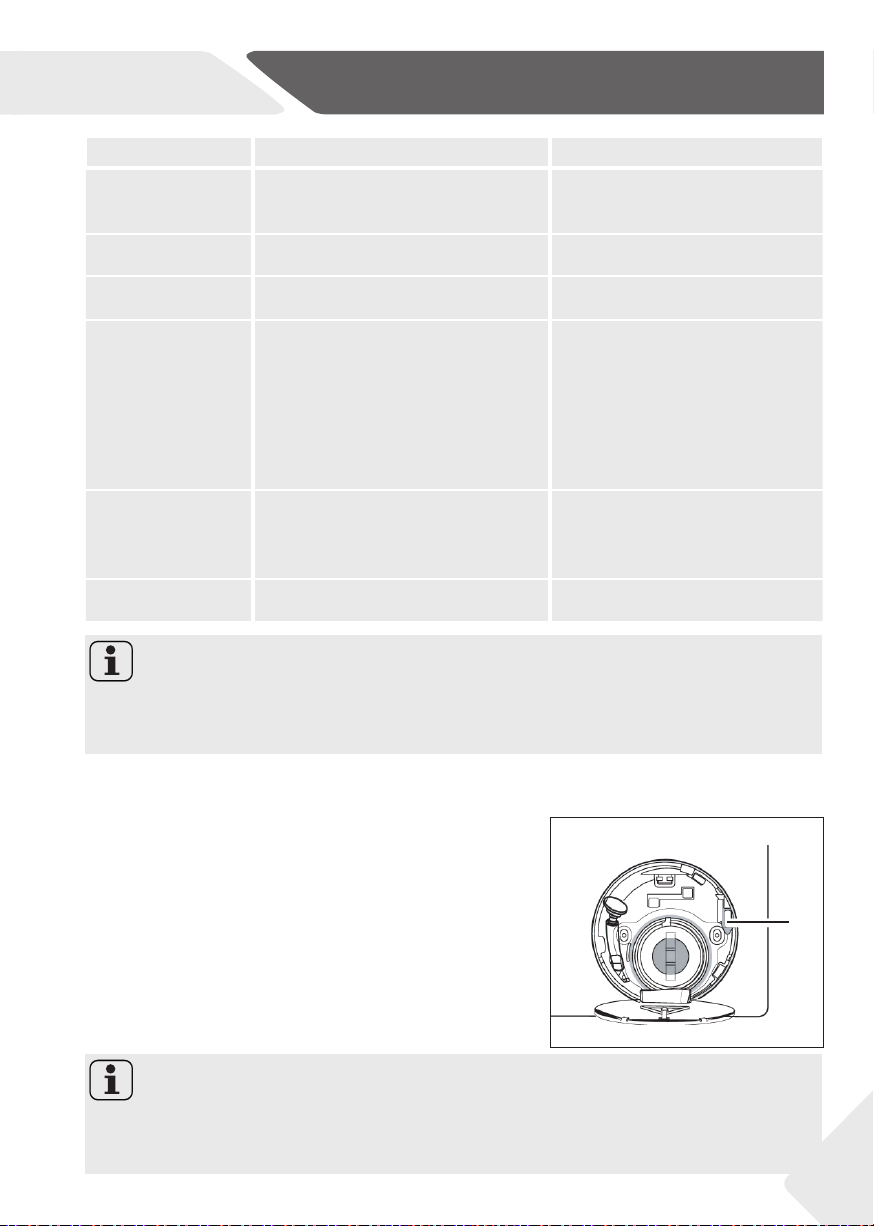
If a power failure cuts an operating wash programme
door opening is mechanically blocked. To get out any
laundry water level should not be seen in the glassy
porthole of the door - Danger of burns! Water level has
to be lowered as described in “Pump fi lter”. Not till then
pull lever (A) beneath service fl ap (Fig. 11-1) until door
is unlocked by a gentle click. Afterwards refi x all parts.
10-1
A
Note: Unlock the door
When the washing machine in a safe state (under the water level below the window
along a certain distance, barrel temperature below 55 °C, the inner barrel did not turn),
may unlock the doors of the machine operation
EN
12-Technical data
38
11.1 Additional technical data
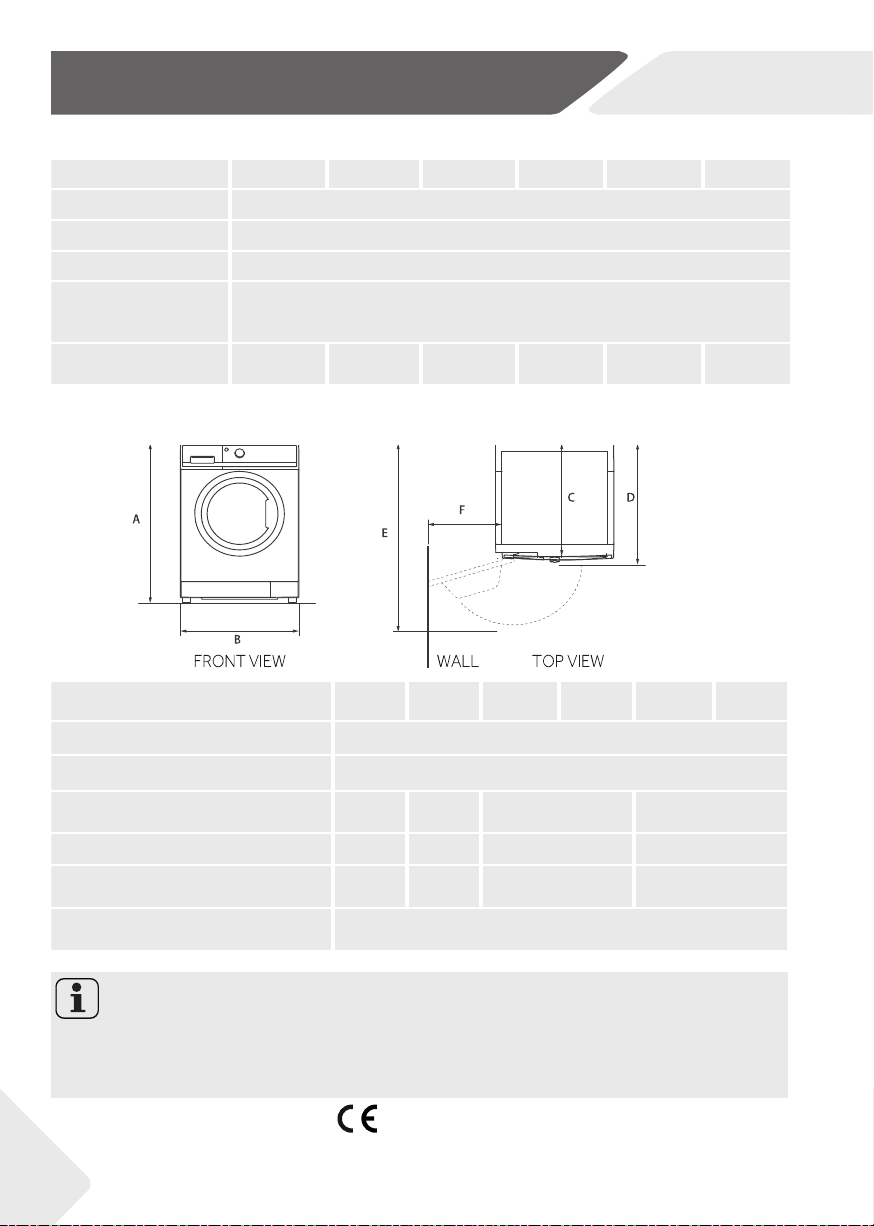
11.2 Product dimensions
11.3 Standards and Directives
This product meets the requirements of all applicable EC directives with the correspon-
ding harmonised standards, which provide for CE marking.
PRODUCT DIMENSIONS
H7W 448* H7W 449* H7W 610* H7W 69* H7W4105* H7W 412*
A Overall height of product mm
850
B
Overall width of product mm
595
C
Overall depth of product
(To main control board size) mm
414 447 503 605
D
Depth of door open mm
480 510 565 665
E
Minimum door clearance
to adjacent wall mm
955 995 1050 1150
F
Overall depth of product ( Inclu-
ding the thickness of the door) mm
205
Hinweis: Exact height
The exact height of your washer is dependent on how far the feet are extended from the
base of the machine. The space where you install your washer needs to be at least 40mm
wider and 20mm deeper than its dimensions.
H7W 448* H7W 449* H7W 610* H7W 69* H7W4105* H7W 412*
Voltage in V 220-240 V~/50Hz
Current in A 10
Max. power in W 1900
Water pressure in MPa 0,03-≤P≤1
Netto weight in kg 55 58 64 64 69 69

EN
13-Customer service
We recommend our Hoover Customer Service and the use of original spare parts.
If you have a problem with your appliance, please fi rst check section TROUBLESHOOT-
ING.
If you cannot fi nd a solution there, please contact
▶ your local dealer or
▶ the Assistence Area on the Hoover website where you can fi nd information on
Warranties, Accessories and Spare Parts and Contact numbers.
To contact our Service, ensure that you have the following data available.
Each product is identifi ed by a unique code, also called the “serial number”, printed on a
sticker. This can be found inside the door opening.
Model ____________________ Serial No. _____________________
Also check the Warranty Card supplied with the product in case of warranty.
It is always recommended to use original spare parts, that are available at our Authorised
Customer Service Centres.
Warranty
The product is guaranteed under the terms and conditions stated on the certifi cate
included with the product. The certifi cate has to be stored so as to be shown to the
Authorized Customer Service Centre in case of need. You can also check the warranty
conditions on our web site. To obtain assistance, please fi ll in the form on-line or contact
us at the number indicated on the support page of our web site.
The standard manufacturer warranty covers faults caused by electrical or
mechanical faults in the product due to an act or omission of the manufacturer. If a
fault is found to be caused by factors outside the product supplied, miss-use or as a
result of the instructions on use not being followed, a charge may be applied.
The manufacturer declines all responsibility for any printing errors in the booklet included
with this product. Moreover, it also reserves the right to make any changes deemed
useful to its products without changing their essential characteristics.
39

23.04 - 0020509288CR
- H7W -