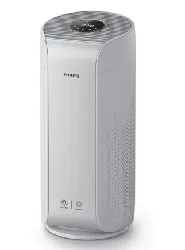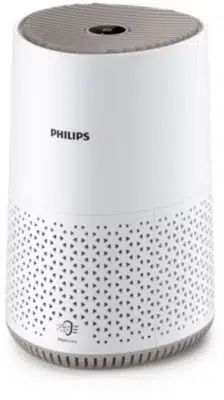
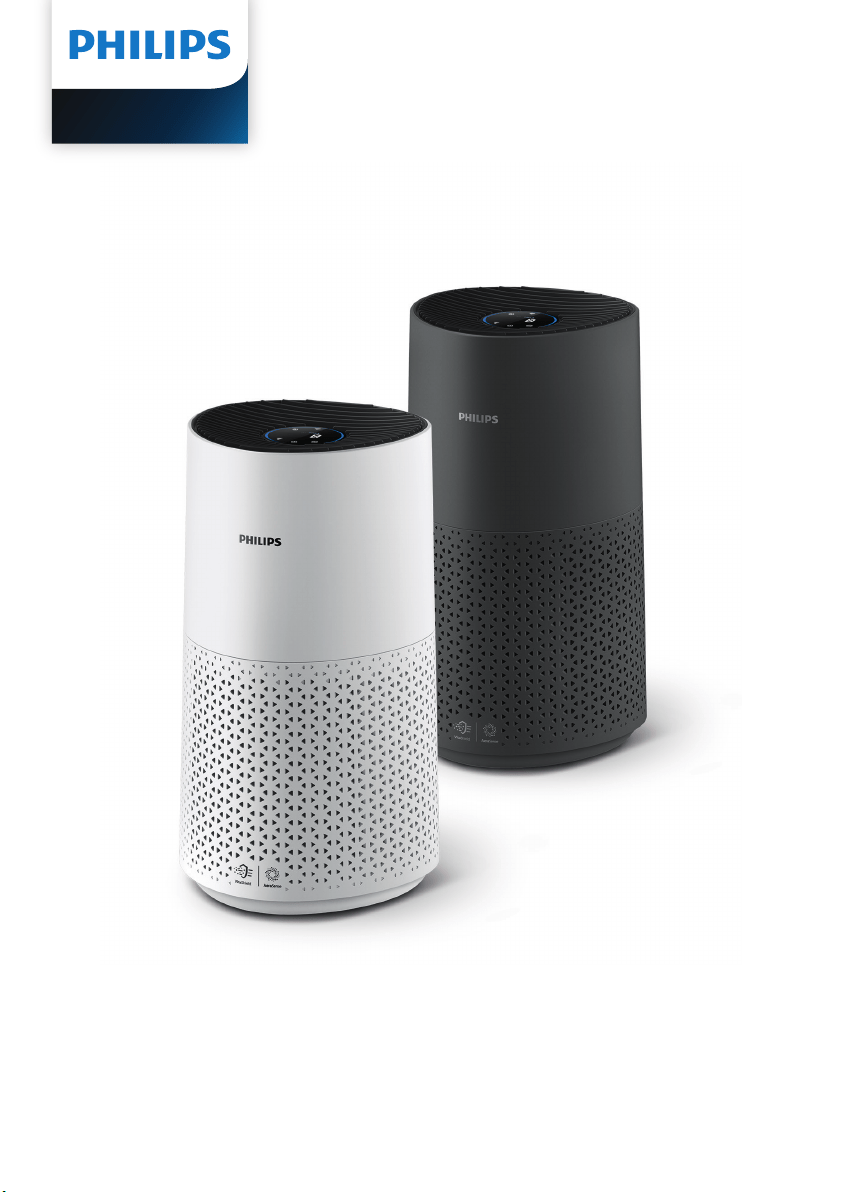
User manual
AC1715

Contents
1 Important �������������������������������������������������������������������������������� 1
Safety �������������������������������������������������������������������������������������������������������� 1
Electromagnetic elds (EMF) �������������������������������������������������������������3
Recycling ��������������������������������������������������������������������������������������������������3
2 Yourairpurier ��������������������������������������������������������������������� 4
Product overview ���������������������������������������������������������������������������������4
Controls overview ���������������������������������������������������������������������������������5
3 Gettingstarted ���������������������������������������������������������������������� 6
Installing the lter ��������������������������������������������������������������������������������� 6
Understanding Wi-Fi indicator ����������������������������������������������������������6
Connecting power ��������������������������������������������������������������������������������7
Wi-Fi connection �����������������������������������������������������������������������������������7
4 Usingtheairpurier ������������������������������������������������������������ 8
Understanding the air quality light ��������������������������������������������������8
Turning on and o ��������������������������������������������������������������������������������9
Changing the mode setting ���������������������������������������������������������������9
Switching the display indicator ������������������������������������������������������ 10
Using the light on/o function ����������������������������������������������������� 10
5 Cleaningandmaintenance ����������������������������������������������11
Cleaning schedule ������������������������������������������������������������������������������ 11
Cleaning the body of the air purier �������������������������������������������� 11
Cleaning the particle sensor ������������������������������������������������������������ 12
Cleaning the surface of the lter ��������������������������������������������������� 12
Replacing the lter����������������������������������������������������������������������������� 13
Filter reset ��������������������������������������������������������������������������������������������� 14
6 Storage ����������������������������������������������������������������������������������15
7 Troubleshooting ������������������������������������������������������������������15
8 Guaranteeandservice �������������������������������������������������������18
Order parts or accessories ���������������������������������������������������������������� 18

1EN
1 Important
Safety
Read this user manual carefully before you use the appliance, and save it for future
reference�
To ensure the best performance, please ensure your purier is upgraded to the
latest version. You can do this upgrade via the Clean Home+ app.
Danger
•
Do not clean the appliance with water, any other liquid, or a
(ammable) detergent, nor let them enter the appliance, to
avoid electric shock and/or a re hazard.
•
Do not spray any ammable materials such as insecticides or
fragrance around the appliance.
Warning
•
Check if the voltage indicated on the appliance corresponds to
the local power voltage before you connect the appliance.
•
If the power cord is damaged, you must have it replaced by
Philips, a service center authorized by Philips, or similarly
qualied persons in order to avoid a hazard.
•
Do not use the appliance if the plug, the power cord, or the
appliance itself is damaged.
•
This appliance can be used by children aged from 8 years and
above and persons with reduced physical, sensory or mental
capabilities or lack of experience and knowledge if they have
been given supervision or instruction concerning use of the
appliance in a safe way and understand the hazards involved.
•
Children shall not play with the appliance.
•
Cleaning and maintenance shall not be made by children
without supervision.
•
Do not block the air inlet and outlet, e.g. by placing items on
the air outlet or in front of the air inlet.
•
Make sure that foreign objects do not fall into the appliance
through the air outlet.
•
Standard WiFi interface based on 802.11b/g/n at 2.4 GHz with
a maximum output power of 31.62 mW EIRP.

2 EN
Caution
•
This appliance is not a substitute for proper ventilation, regular
vacuum cleaning, or use of an extractor hood or fan while
cooking.
•
Always place and use the appliance on a dry, stable, level, and
horizontal surface.
•
Leave at least 20cm free space around the appliance and leave
at least 30cm free space above the appliance.
•
Do not sit or stand on the appliance. Do not place anything on
top of the appliance.
•
Do not place the appliance directly below an air conditioner to
prevent condensation from dripping onto the appliance.
•
Only use the original Philips lters specially intended for this
appliance. Donot use any other lters.
•
Combustion of the lter may cause irreversible human hazard
and/or jeopardize other lives. Do not use the lter as fuel or for
similar purpose.
•
Avoid knocking against the appliance (the air inlet and outlet
in particular) with hard objects.
•
Do not insert your ngers or objects into the air outlet or the
air inlet to prevent physical injury or malfunctioning of the
appliance�
•
Do not use this appliance when you have used indoor smoke-
type insect repellents or in places with oily residues, burning
incense, or chemical fumes.
•
Do not use the appliance near gas appliances, heating devices
or replaces.
•
Always unplug the appliance when you want to move, clean
appliance, replace the lter or carry out other maintenance.
•
The appliance is only intended for household use under normal
operating conditions.
•
Do not use the appliance in wet surroundings or in
surroundings with high humidity or high ambient
temperatures, such as the bathroom, toilet, or kitchen, or in a
room with major temperature changes.

3EN
•
The appliance does not remove carbon monoxide (CO) or
radon (Rn). It cannot be used as a safety device in case of
accidents with combustion processes and hazardous chemicals.
Electromagneticelds(EMF)
This Philips appliance complies with all applicable standards and regulations
regarding exposure to electromagnetic elds.
Recycling
Do not throw away the product with the normal household waste at the end of
its life, but hand it in at an ocial collection point for recycling. By doing this, you
help to preserve the environment.
Follow your country's rules for the separate collection of electrical and electronic
products. Correct disposal helps prevent negative consequences for the
environment and human health.
4 EN
2 Your air purifier
Congratulations on your purchase, and welcome to Philips!
To fully benet from the support that Philips oers, register your product at
www.philips.com/welcome.
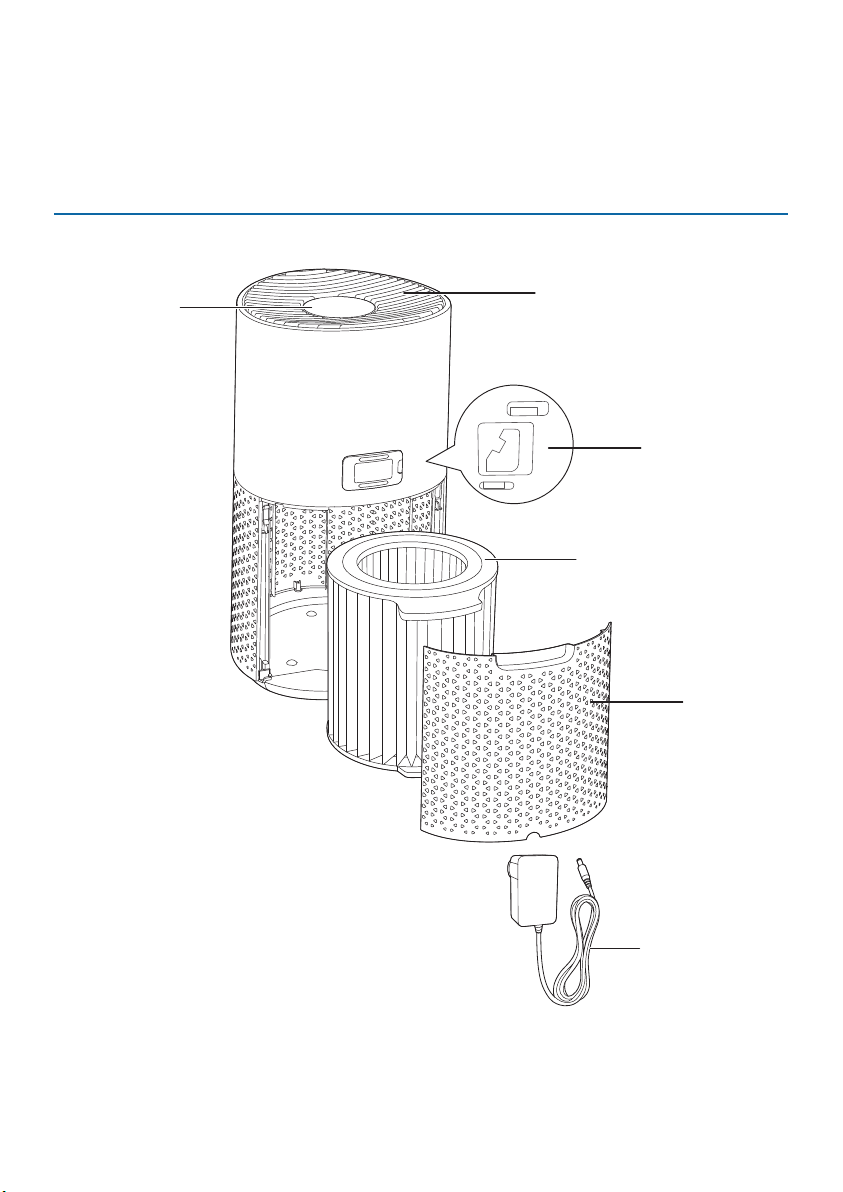
Product overview
Back cover
Control panel
Air outlet
Particle sensor
NanoProtect lter
(FY1700/30)
Plug adaptor*
(KA3601A-
2401500BS )
*Please use only the plug adaptor provided
5EN
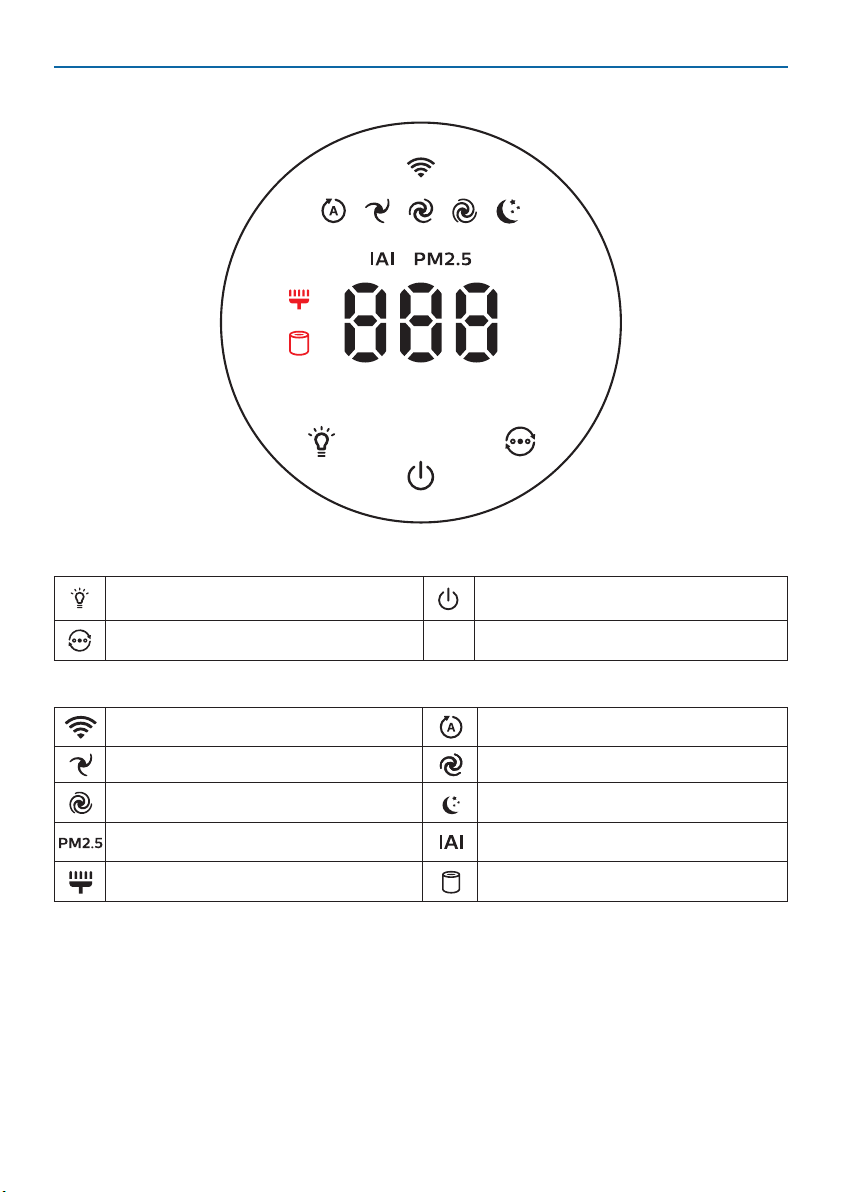
Controls overview
Control buttons
Light on/o button Power on/o button
Mode switch button
Display panel
Wi-Fi indicator Auto mode
Speed 1 Speed 2
Turbo mode Sleep mode
PM2.5 display Indoor Allergen Index display
Filter cleaning alert Filter replacement alert
6 EN
3 Getting started
Installingthelter
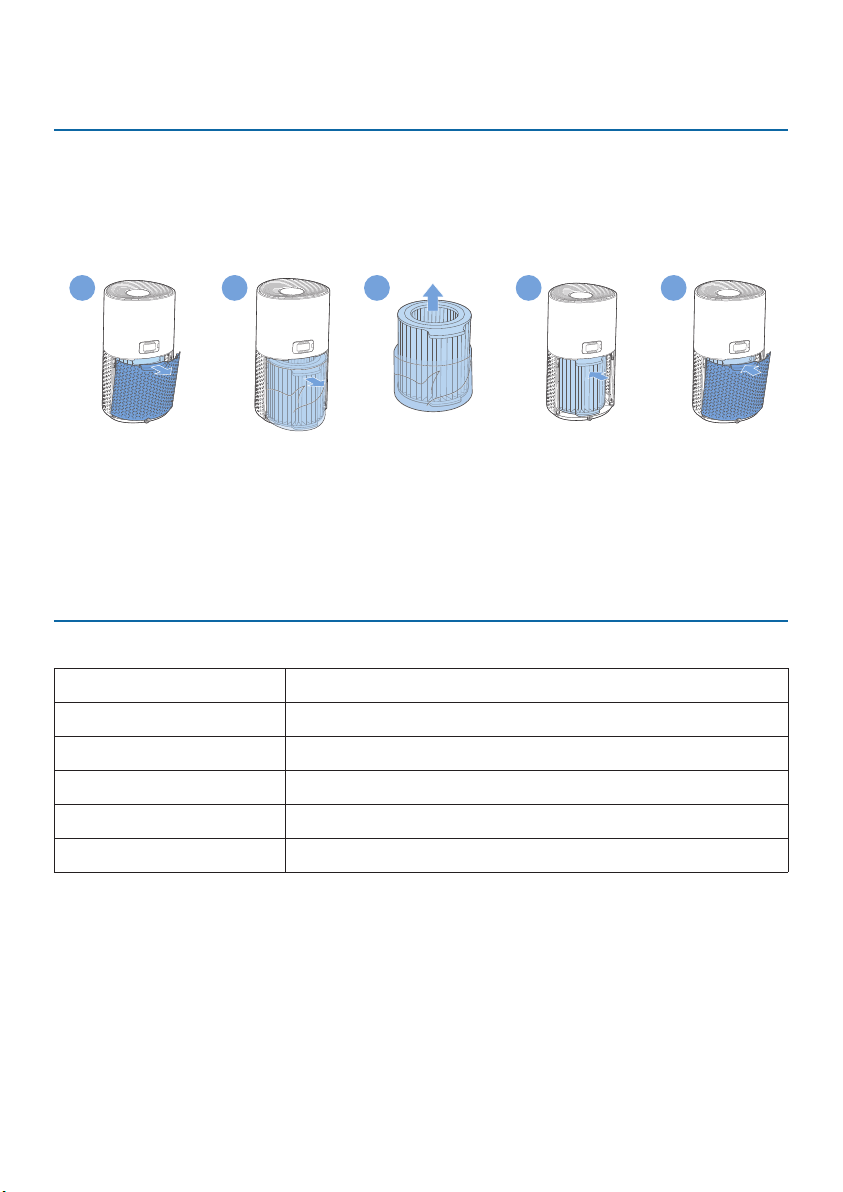
Remove all packaging of the lter before rst use.
Note: Make sure the air purier is unplugged from the electrical outlet before
installing the lter.
1
2
3
4
5
1 Pull the back cover and remove it from the appliance.
2 Pull the lter from the appliance.
3 Remove all packaging materials of the air purication lter.
4 Put the lter back into the appliance.
5 Reattach the back cover.
UnderstandingWi-Fiindicator
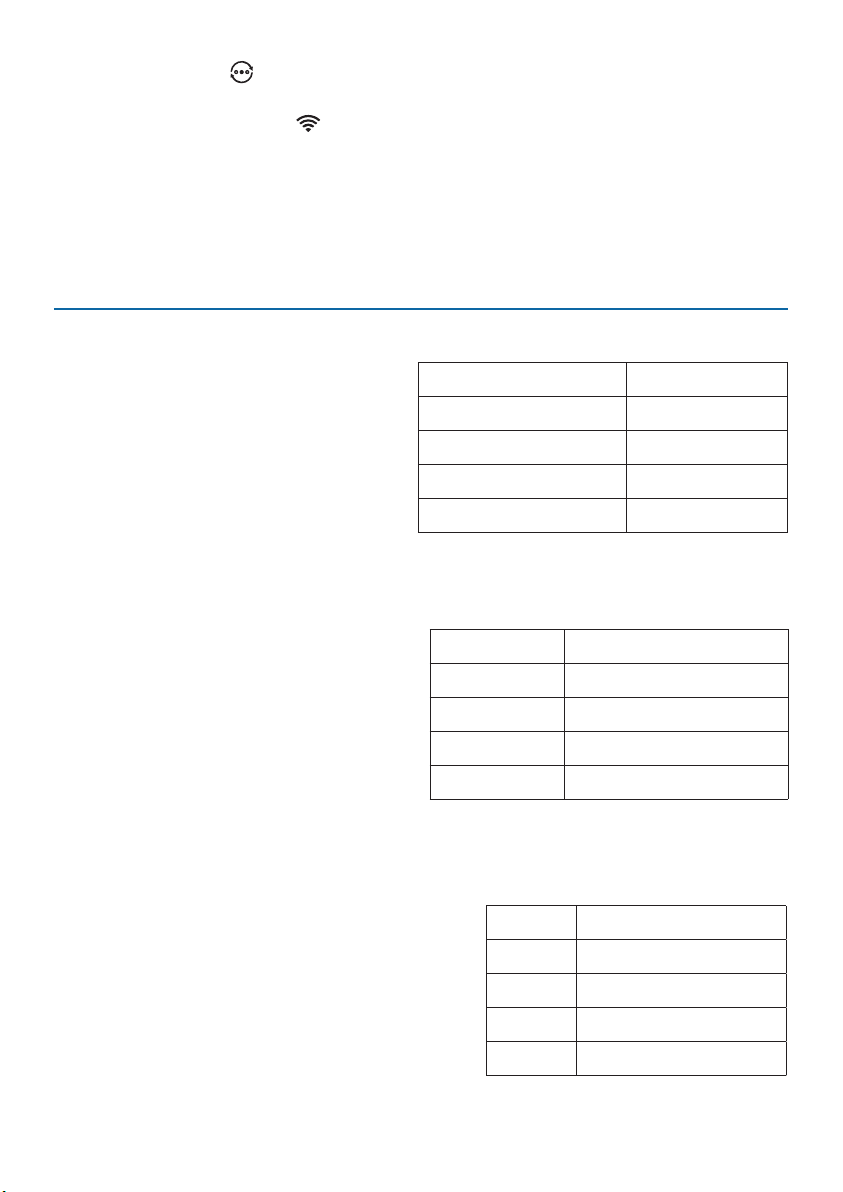
Wi-Fiiconstatus Wi-Ficonnectionstatus
Blink in orange Connecting to the smartphone
Stable in orange Connected to the smartphone
Blink in white Connecting to the server
Stable in white Connected to the server
O Wi-Fi function disabled
7EN
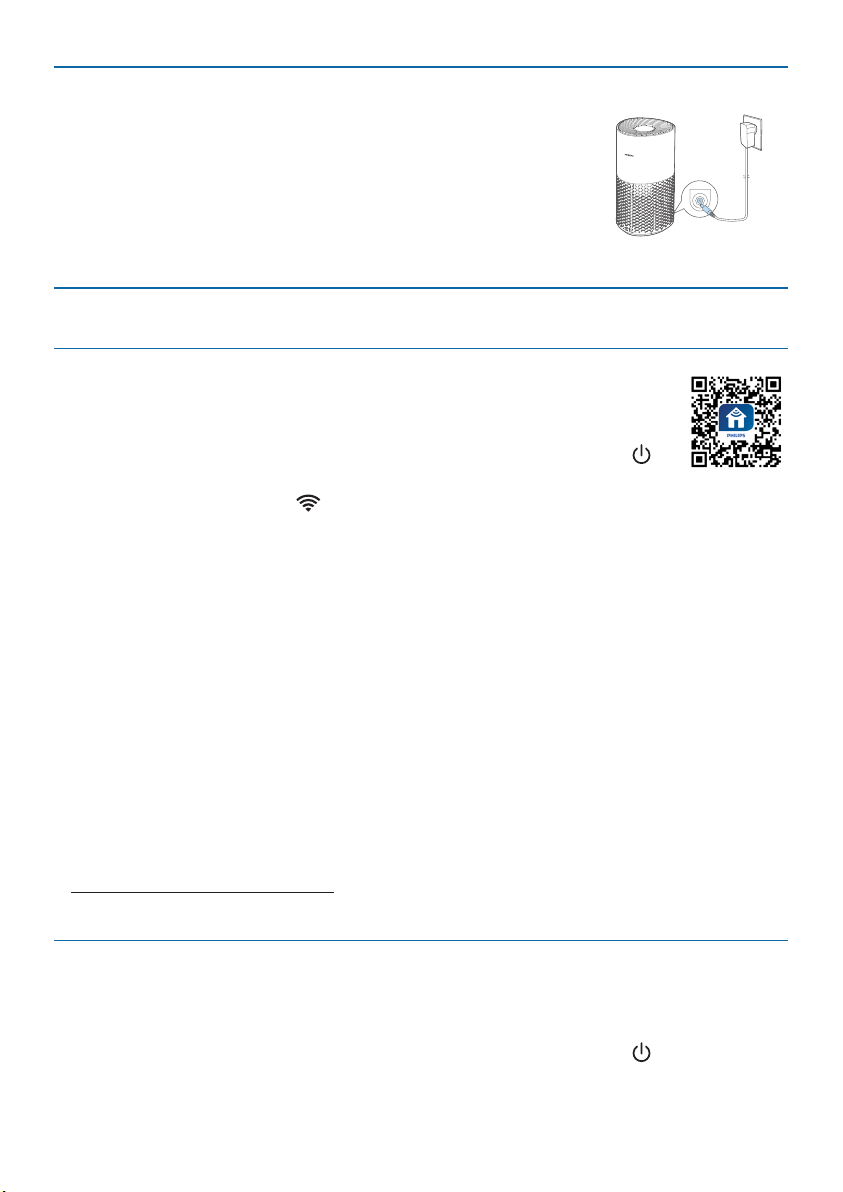
Connecting power
Note: Risk of electric shock! When you unplug the AC power
cord, always pull the plug from the socket. Never pull the
cord.
Connect the power adapter to:
• First, the power socket on the appliance.
• Then, the wall outlet.
Wi-Ficonnection
SettinguptheWi-Ficonnectionforthersttime
1 Download and install the Philips “Clean Home+” app from the
App Store or Google Play�
2 Put the plug of the air purier in the power socket and touch to
turn on the air purier.
» The Wi-Fi indicator blinks orange for the rst time.
3 Make sure that your smartphone or tablet is successfully connected to your
Wi-Fi network.
4 Launch the “Clean Home+” app and click on “Connect a New Device” or
press the “+” button on the top of the screen. Follow the onscreen instructions
to connect the air purier to your network.
Note:
•
This instruction is only valid when the air purier is being set up for the rst
time. If the network has changed or the setup needs to be performed again, see
Chapter “Reset the Wi-Fi connection” on page 7�
•
If you want to connect more than one air purier to your smartphone or tablet,
you have to do this one by one.
•
Make sure that the distance between your smartphone or tablet and the air
purier is less than 10 m without any obstructions.
•
This App supports the latest versions of Android and iOS. Please check
www.philips.com/cleanhome for the latest update of supported operating
systems and devices.
ResettheWi-Ficonnection
Note:
•
Reset the Wi-Fi connection when your default network has changed.
1 Put the plug of the air purier in the power socket and touch to turn on the
air purier.
8 EN
2 Touch and hold for 3 seconds until you hear a beep.
» The air purier goes to pairing mode.
» The Wi-Fi indicator blinks orange.
3 Follow the steps 3-4 in “SettinguptheWi-Ficonnectionforthersttime”
section.
4 Using the air purifier
Understanding the air quality light
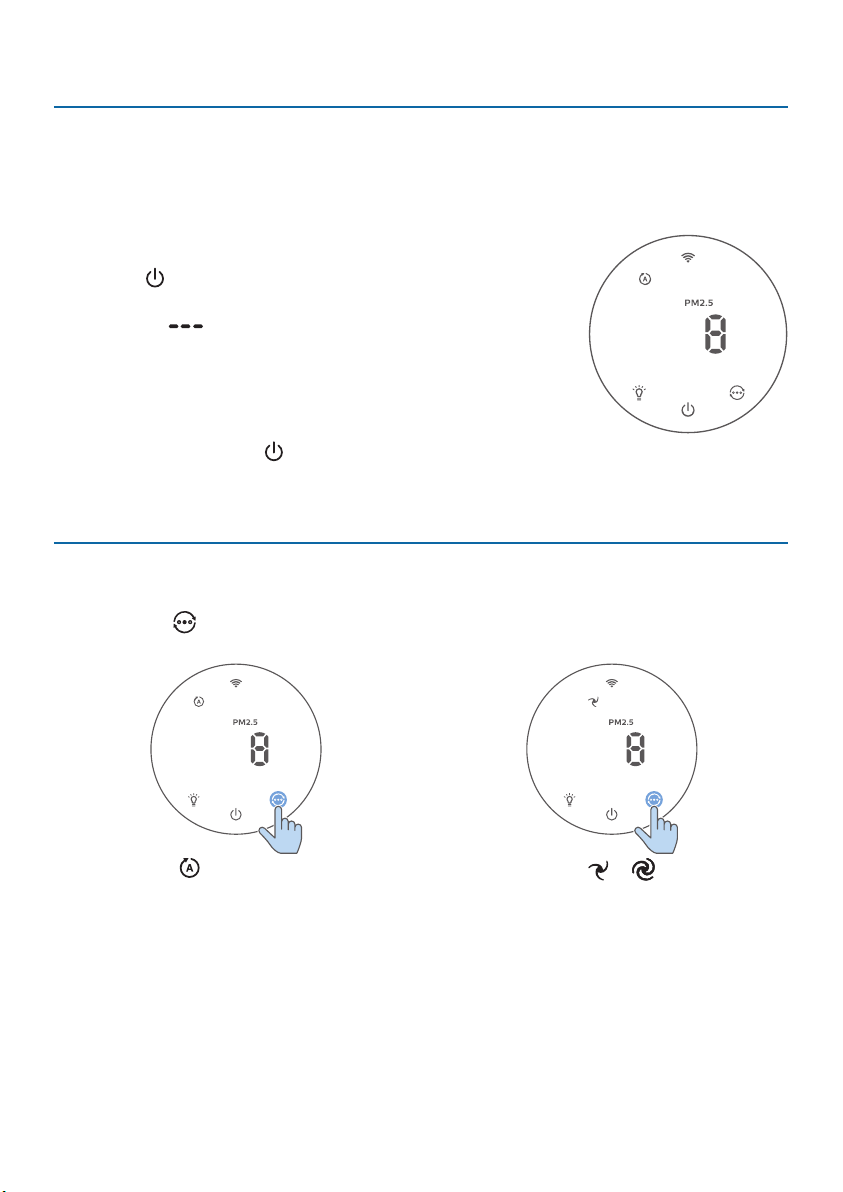
The air quality light automatically goes
on when the air purier is switched on,
and lights up all colors in sequence.
After approximately 30 seconds, the
particle sensor selects the color that
corresponds to the surrounding air
quality of airborne particles.
The color of the air quality light is
determined by the highest index among PM2.5 and IAI readings.
PM2.5
AeraSense sensing technology accurately
detects and quickly responds to even
the slightest particle change in the air. It
provides you with reassurance with real-
time PM2.5 feedback.
Most of the indoor air pollutants fall
under PM2.5 – which refers to airborne
particle pollutants smaller than
2.5micrometers. Common indoor sources of ne particles are tobacco smoke,
cooking, burning candles. Some airborne bacteria and the smallest mold spores,
pet allergen and dust mite allergen particles also fall under PM2.5.
IAI
The professional-grade AeraSense sensor
detects the level of indoor air allergen and
with numerical feedback from 1 to 12 the
potential risk level of indoor air allergens can be
displayed. 1 indicates best air quality.
Air quality light color Air quality level
Blue Good
Blue-purple Fair
Purple-red Poor
Red Very poor
PM2.5level Air quality light color
≤12 Blue
13-35 Blue-purple
36-55 Purple-red
>55 Red
IAI level Air quality light color
1-3 Blue
4-6 Blue-purple
7-9 Purple-red
10-12 Red
9EN
Turningonando
Note:
•
For optimum purication performance, close doors and windows.
•
Keep curtains away from the air inlet or air outlet.
1 Put the plug of the air purier in the power socket.
2 Touch to switch on the air purier.
» The air purier beeps.
» The “ ” displays on the screen during warming
up. Then the air purier shows the PM2.5/IAI level
after measuring the air quality.
» The air purier operates in the auto mode with IAI
displayed on the screen.
3 Touch and hold the button for 3 seconds to switch o the air purier.
Note: If the air purier stays connected to the electrical outlet after turning OFF,
the air purier will operate under the previous settings when turned ON again.
Changing the mode setting
You can choose Auto mode, Speed 1, Speed 2, Turbo mode or Sleep mode by
touching the button.
Automode( ):The air purier
automatically adjusts the fan speed in
accordance with the ambient air quality.
Manualspeed( & ): In manual
mode, the air purier operates on
speed 1 or speed 2.
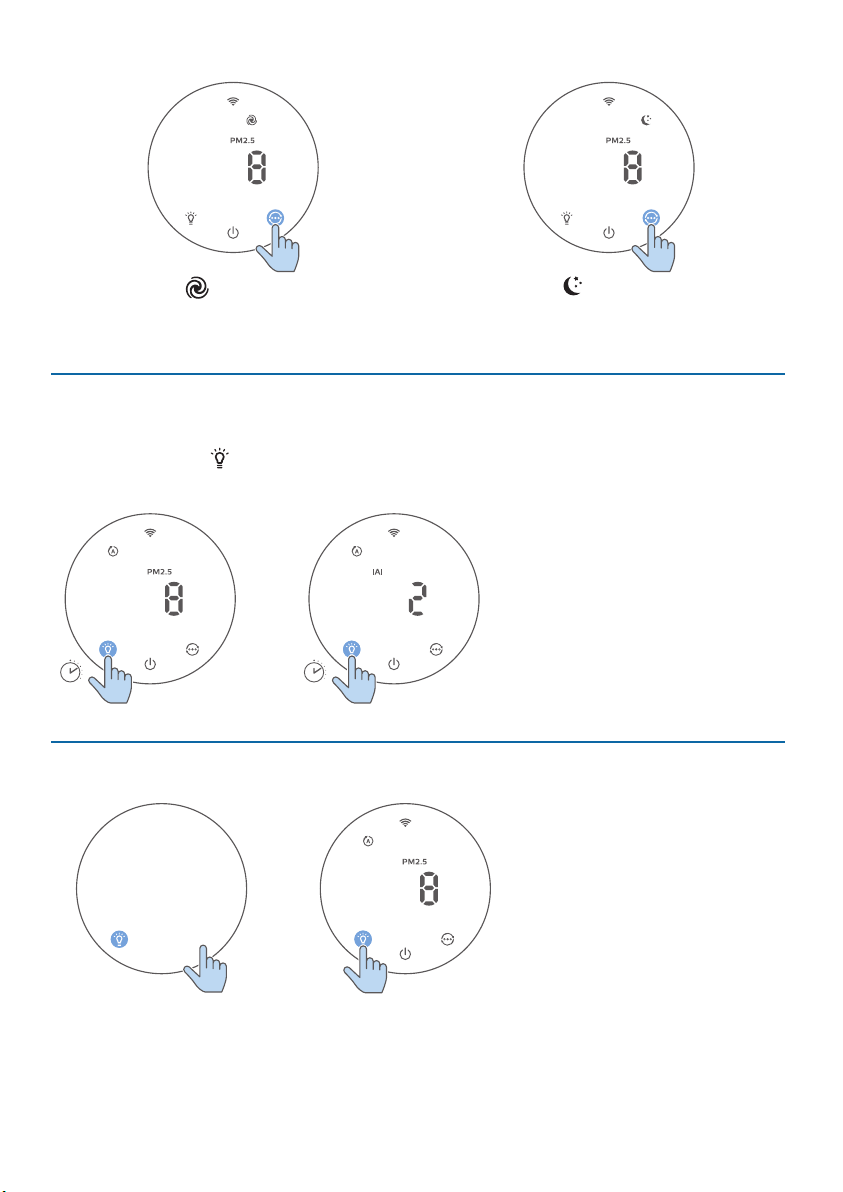
10 EN
Turbomode( ):The air purier
operates on the highest speed.
Sleepmode( ):The air purier
operates quietly at a low speed. After
3seconds, the screen lights o.
Switching the display indicator
Note: The appliance displays PM2.5 level by default.
•
Touch and hold button for 3 seconds to switch display indicator among IAI /
PM2.5.
3s
3s
Usingthelighton/ofunction
With the light sensor, the control panel can automatically turn on, turn o or dim
according to the ambient light. The control panel will be o or dim when the
ambient light is dark. You can touch any button to wake up all lights. Then, if no
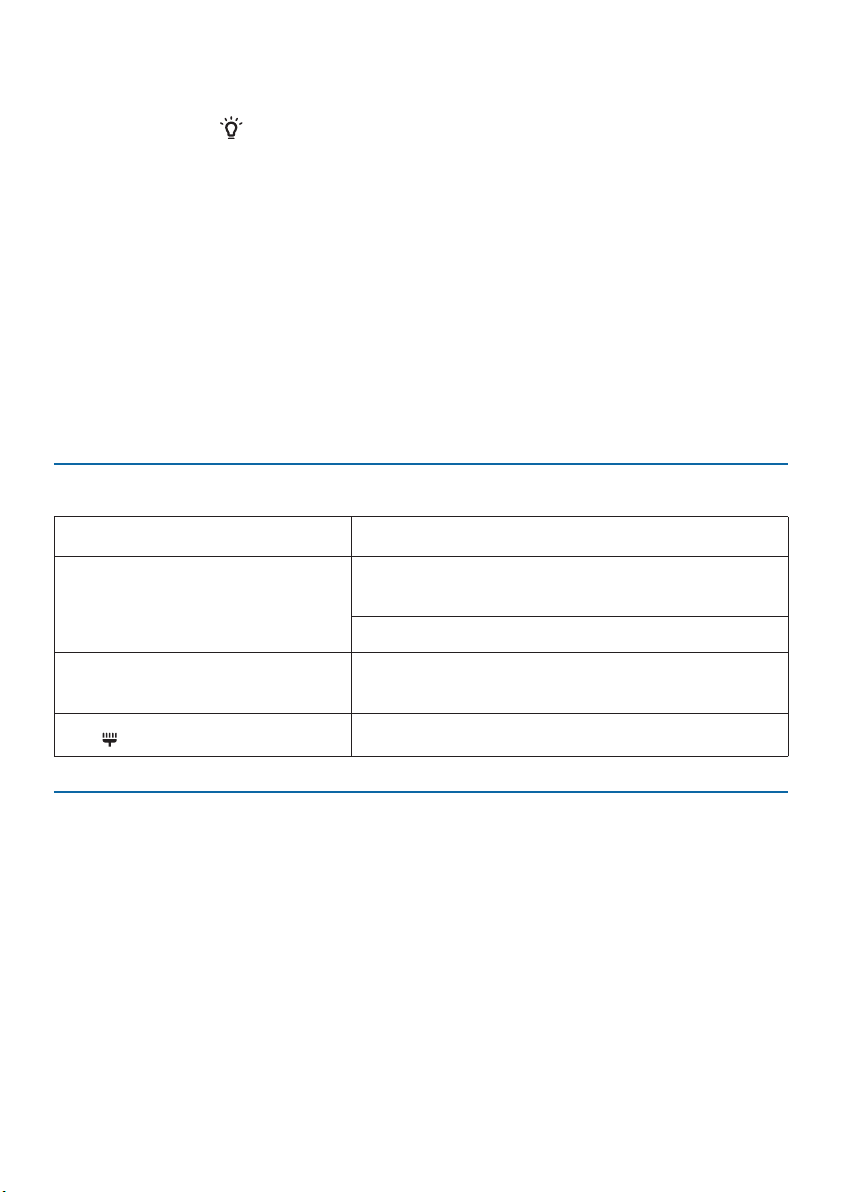
11EN
further operation, all lights will be o or dim again to match with the ambient
light.
You can touch the button manually to turn o all lights and the control panel.
Touch any button to wake up all lights.
5 Cleaning and maintenance
Note:
•
Always unplug the appliance before you clean it.
•
Never immerse the appliance in water or any other liquid.
•
Never use abrasive, aggressive, or ammable cleaning agents such as bleach or
alcohol to clean any part of the appliance.
•
Never use any liquids (including water) to clean the lter.
•
Do not attempt to clean the particle sensor with a vacuum cleaner.
Cleaning schedule
Frequency Cleaning method
When necessary
Wipe the plastic part of the appliance with a
soft, dry cloth
Clean the air outlet cover
Every two months
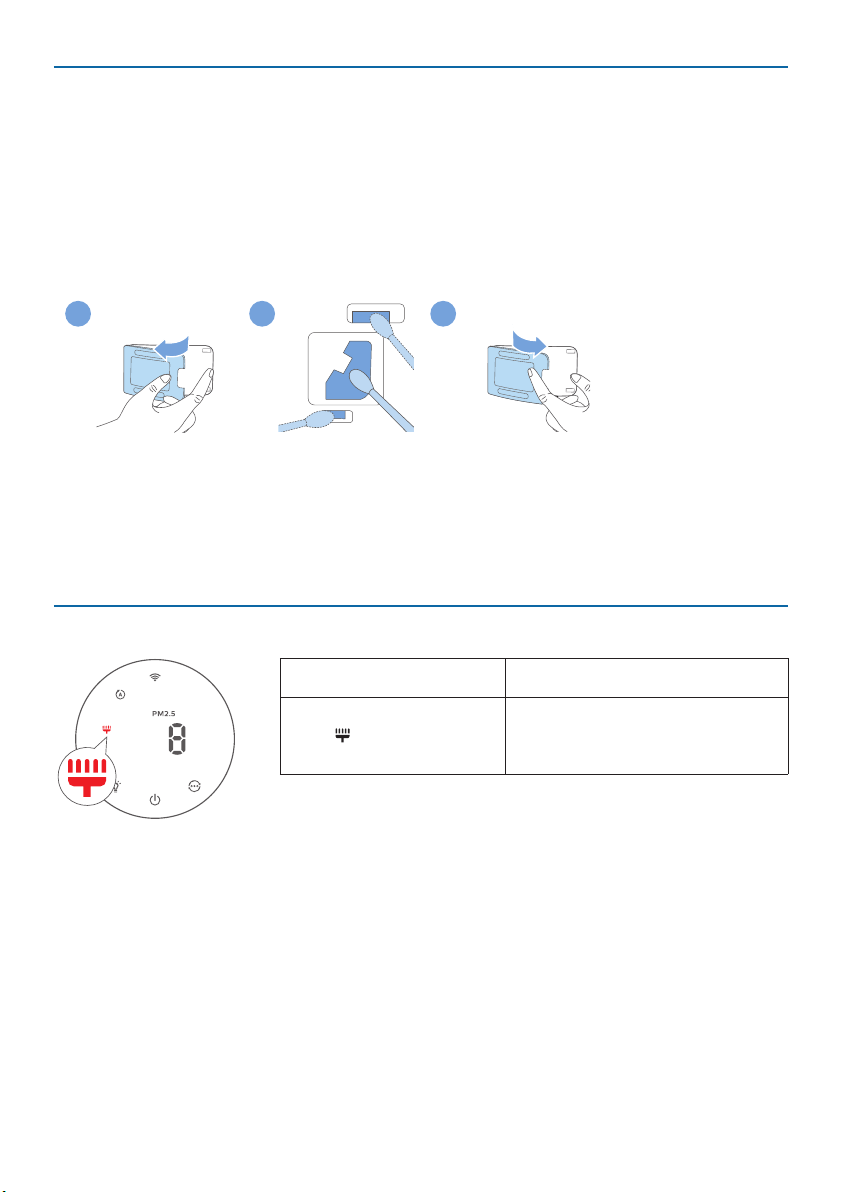
Clean the particle sensor with a dry cotton
swab
The displays on the screen.
Clean the surface of the lter
Cleaningthebodyoftheairpurier
Regularly clean the inside and outside of the air purier to prevent dust from
collecting�
•
Use a soft, dry cloth to clean both the interior and exterior of the air purier and
the air outlet.
12 EN
Cleaning the particle sensor
Clean the particle sensor every 2 months for optimal functioning of the appliance.
Note:
•
If the air purier is used in a dusty environment, it may need to be cleaned more
often�
•
If the humidity level in the room is very high, condensation may develop on the
particle sensor and the air quality light may indicate a more poor air quality even
though the air quality is actually good. If this occurs, clean the particle sensor.
2 3 5
1 Switch o the air purier and unplug from the power socket.
2 Open the air quality sensor cover.
3 Clean the particle sensor with a damp cotton swab.
4 Dry all parts thoroughly with a dry cotton swab.
5 Close the air quality sensor.
Cleaningthesurfaceofthelter
Filteralertlightstatus Action
The lter cleaning
alert displays on the
screen.
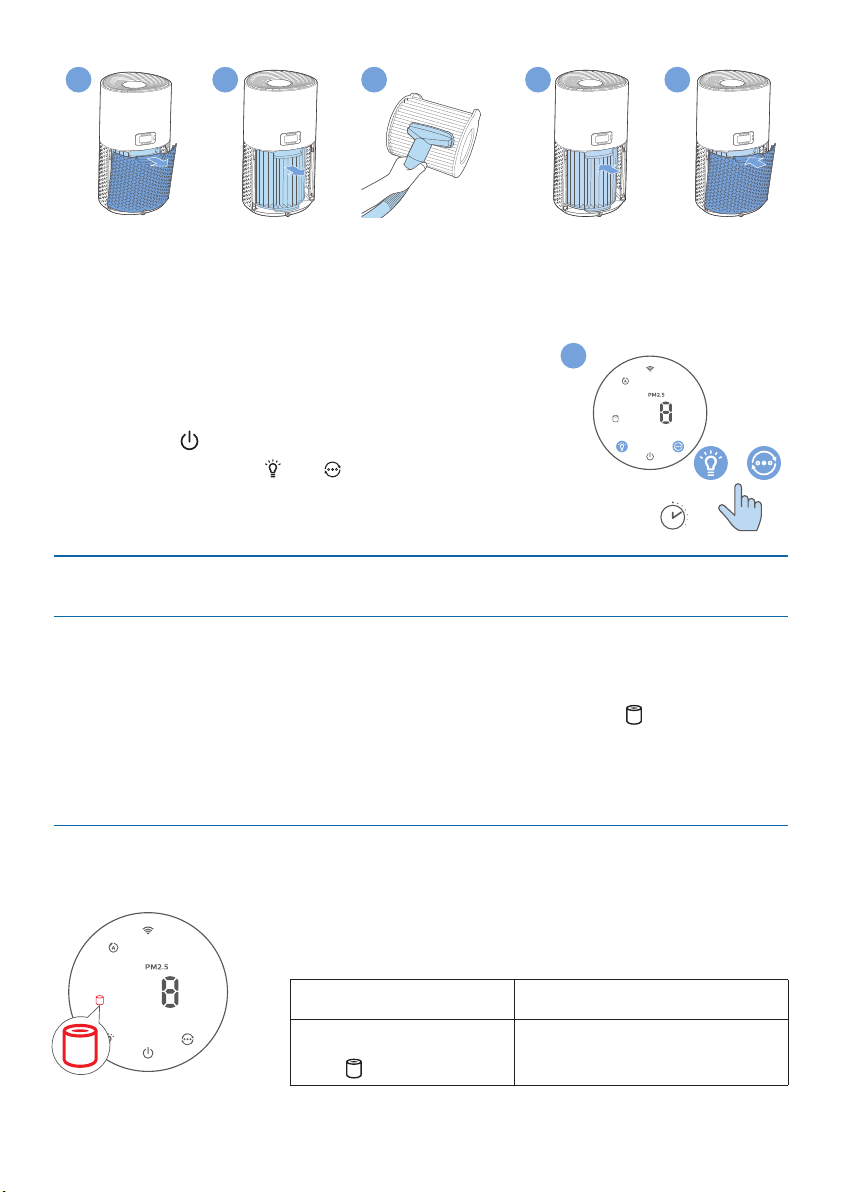
Clean the surface of the lter
with a vacuum cleaner.
1 Switch o the air purier and unplug from the power socket.
13EN
2
5
6
3
4
2 Pull the back cover and remove it from the appliance.
3 Pull the lter from the appliance.
4 Clean the surface of the lter with a vacuum cleaner.
5 Put the lter back into the appliance.
6 Reattach the back cover.
7 Put the plug of the air purier in the power socket.
8 Touch the button to switch on the appliance.
9 Touch and hold the and button for 3seconds to
reset the lter cleaning time.
10 Wash your hands thoroughly after cleaning the lter.
Replacingthelter
Understanding the healthy protection lock
This air purier is equipped with a lter replacement indicator to make sure that
the air purication lter is in optimal condition when the air purier is operating.
When the lter need to be replaced, the lter replacement alert lights up red.
If the lter is not replaced in time, the air purier will stop operating and
automatically lock to protect the air quality in the room. Replace the lter as soon
as possible.
Replacingthelter
Note:
•
The lter is not washable or reusable.
•
Always turn o the air purier and unplug from the
electrical outlet before replacing the lters.
Filteralertlightstatus Action
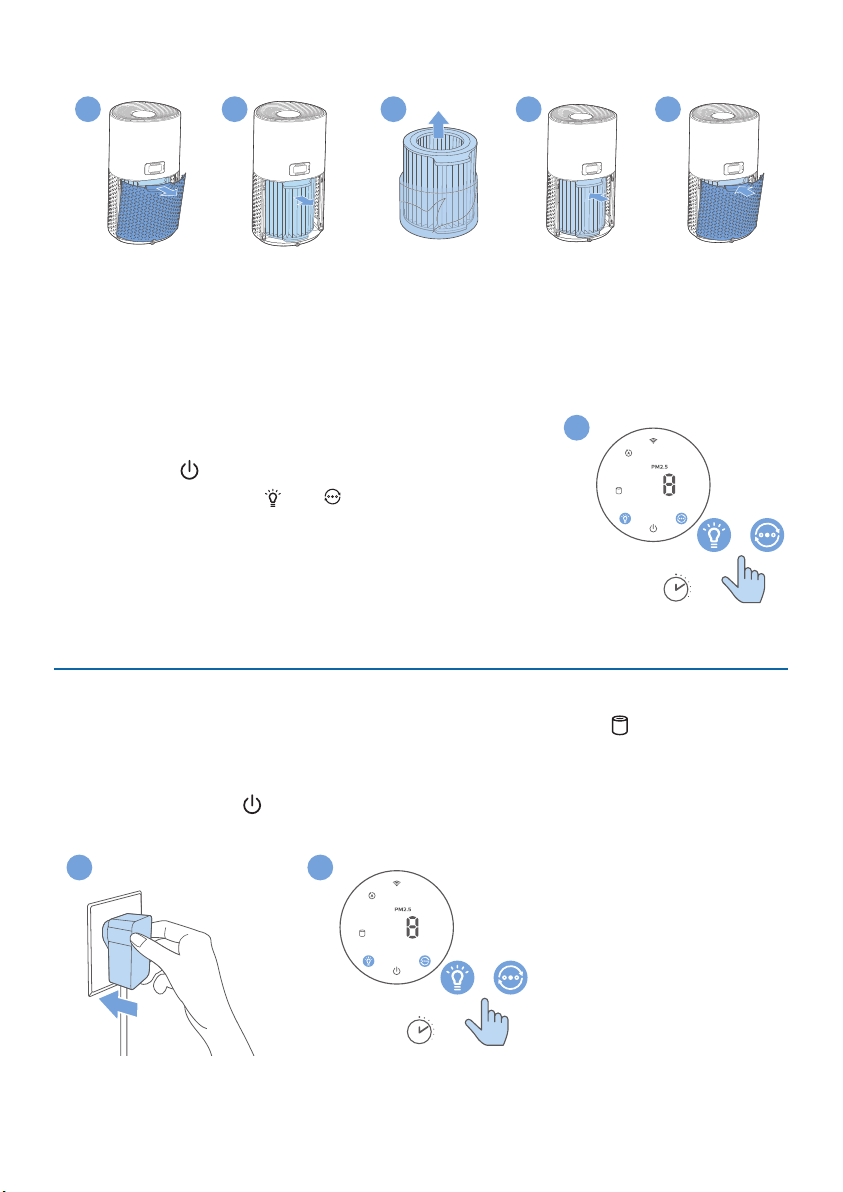
The lter replacement
alert lights up
Replace the NanoProtect
lter (FY1700/30)
3s
+
9
14 EN
1 Switch o the air purier and unplug from the power socket.
2
5
6
3
4
2 Pull the back cover and remove it from the appliance.
3 Pull the lter from the appliance.
4 Remove all packaging materials of the new lter.
5 Put the new lter into the appliance.
6 Reattach the back cover.
7 Put the plug of the air purier in the power socket.
8 Touch the button to switch on the appliance.
9 Touch and hold the and button for 3seconds to
reset the lter lifetime counter.
10 Wash your hands thoroughly after replacing the
lter.
Note: Do not smell the lter as it has collected
pollutants from the air.
Filterreset
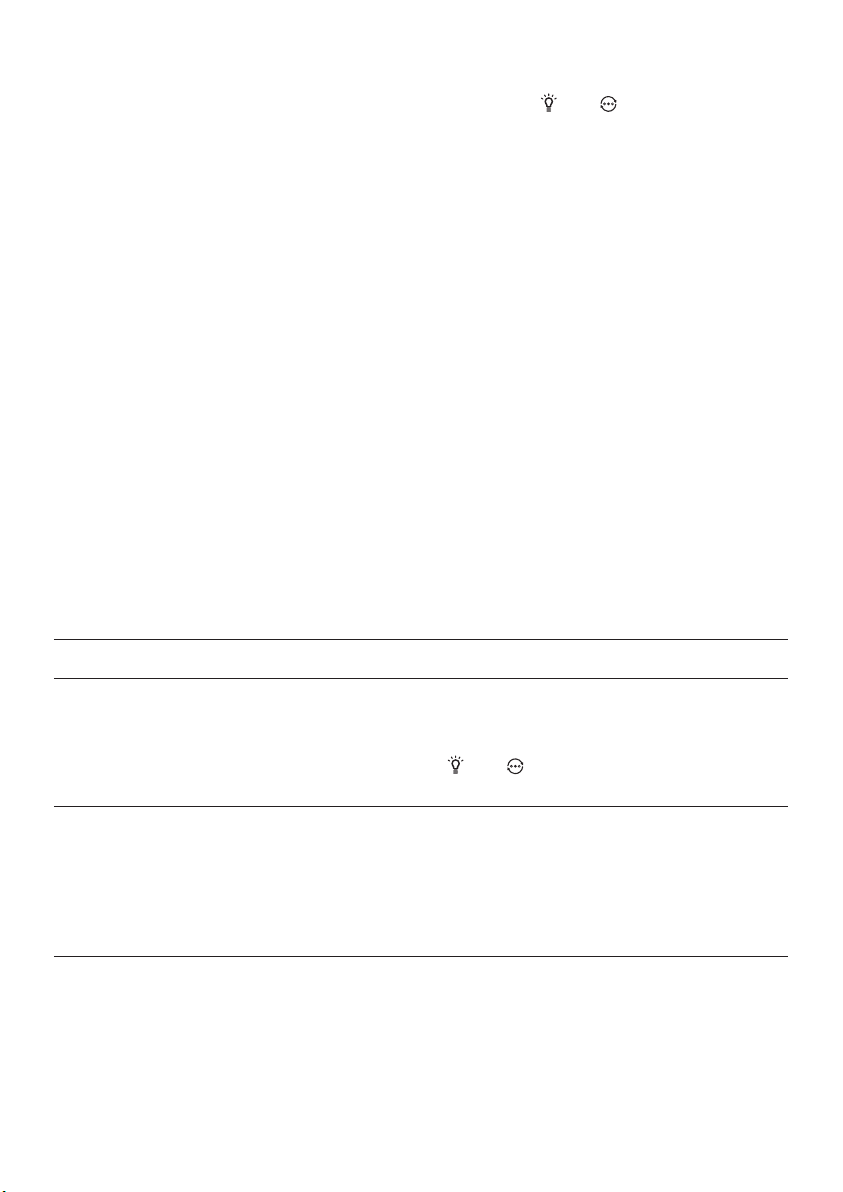
You can replace the lter even before lter replacement alert ( ) displays on
the screen. After replacing a lter, you need to reset the lter lifetime counter
manually.
1 Touch the power button for 3 seconds to turn o the appliance and unplug
from power socket.
3s
+
2
3
3s
+
9
15EN
2 Put the power plug in the power socket.
3 Within 15 seconds after power on, touch and hold and button for
3seconds to reset the lter lifetime counter.
6 Storage
1 Turn o the air purier and unplug from the power socket.
2 Clean the air purier, particle sensor and the surface of the lter (see chapter
“Cleaning and maintenance”).
3 Let all parts air dry thoroughly before storing.
4 Wrap the lter in air tight plastic bags.
5 Store the air purier, lter in a cool, dry location.
6 Always thoroughly wash hands after handling the lter.
7 Troubleshooting
This chapter summarizes the most common problems you could encounter with
the appliance. If you are unable to solve the problem with the information below,
contact the Consumer Care Center in your country.
Problem Possible solution
The appliance does
not work properly.
•
The lter replacement alert has been on continuously
but you have not replaced the corresponding lter. As a
result, the appliance is now locked. In this case, replace the
lter and long touch and to reset the lter lifetime
counter.
The airow that
comes out of
the air outlet
is signicantly
weaker than
before.
•
The surface of the lter is dirty. Clean the surface of the
lter (see the chapter “Cleaning and maintenance”).

16 EN
Problem Possible solution
The air quality
does not improve,
even though the
appliance has been
operating for a
long time�
•
Check if the packing material is removed from the lter.
•
The lter has not been placed in the appliance. Make sure
that the lter (FY1700/30) is properly installed.
•
The particle sensor is wet. The humidity level in your room
is high and causes condensation. Make sure that the
particle sensor is clean and dry (see the chapter “Cleaning
and maintenance”).
•
Room size is large or the outdoor air quality is poor.
For optimum purication performance, please close the
doors and windows when operating the air purier.
•
There are indoor pollution resources. For instances,
smoking, cooking, incense, perfume or alcohol.
•
Filter reaches the end of life. Replace the lter with a new
one�
The color of the air
quality light always
stays the same.
•
The particle sensor is dirty. Clean the particle sensor (see
the chapter “Cleaning and maintenance”).
The appliance
produces a strange
smell.
•
The rst few times you use the appliance, it may produce
a plastic smell. This is normal. However, if the appliance
produces a burnt smell even if removing lters, contact
your Philips dealer or an authorized Philips service
center. The lter may produce smell after being used for
a while because of the absorption of indoor gases. It’s
recommended that you reactivate the lter by putting it in
direct sunlight for repeated use. If odor still exists, replace
the lter.
The appliance is
extra loud.
•
It's normal if the appliance runs at the Turbo mode.
•
In the Auto mode, if the appliance is too loud, maybe the
appliance runs at high speed because air quality becomes
worse, or your personalized setting in App triggers a
higher fan speed. You can choose the Sleep mode, or
change the settings in the App.
•
If there is abnormal sound, contact the Consumer Care
Center in your country.
•
If anything drops into air outlet, it may also cause
abnormal loud sound. Immediate turn o appliance, turn
appliance upside down, to get foreign objectives out of
appliance�

17EN
Problem Possible solution
The appliance still
indicates that I
need to replace a
lter, but I already
did.
•
Perhaps you did not reset the lter lifetime counter. Switch
on the appliance. Then touch and hold the and for
3seconds.
Error code “E1”
displays on the
screen.
•
The motor has malfunctions. Contact the Consumer Care
Center in your country.
The Wi-Fi setup is
not successful.
•
If the router your purier is connected to is dual – band
and currently it is not connecting to a 2.4GHz network,
please switch to another band of the same router (2.4GHz)
and try to pair your purier again. 5GHz networks are not
supported.
•
Web authentication networks are not supported.
•
Check if the purier is within range of the Wi-Fi router. You
can try to locate the air purier closer to the Wi-Fi router.
•
Check if the network name is correct. The network name is
case-sensitive.
•
Check if the Wi-Fi password is correct. The password is
case-sensitive.
•
Retry the setup with the instructions in section “Reset the
Wi-Fi connection”�
•
The Wi-Fi connectivity can be interrupted by electromagnetic
or other interferences. Keep the appliance away from other
electronic devices that may cause interferences.
•
Check if the mobile device is in airplane mode. Make sure
to have the airplane mode deactivated when connecting
to the Wi-Fi network.
•
Consult the help section in the App for extensive and up-
to-date troubleshooting tips.

18 EN
8 Guarantee and service
If you need information or if you have a problem, please visit the Philips website
at www.philips.com or contact the Philips Consumer Care Center in your country
(you can nd its phone number in the worldwide guarantee leaet). If there is no
Consumer Care Center in your country, go to your local Philips dealer.
Order parts or accessories
If you have to replace a part or want to purchase an additional part, go to your
Philips dealer or visit www.philips.com/support�
If you have problems obtaining the parts, please contact the Philips Consumer
Care Center in your country (you can nd its phone number in the worldwide
guarantee leaet).

©2021PhilipsDomesticAppliancesHoldingB.V.
All rights reserved�
AC1715_UM_HK&UK_v1.0(10/11/2021)