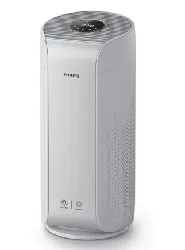
EN User manual 1 ZH-T 使用手冊 15
Original instruction by Philips
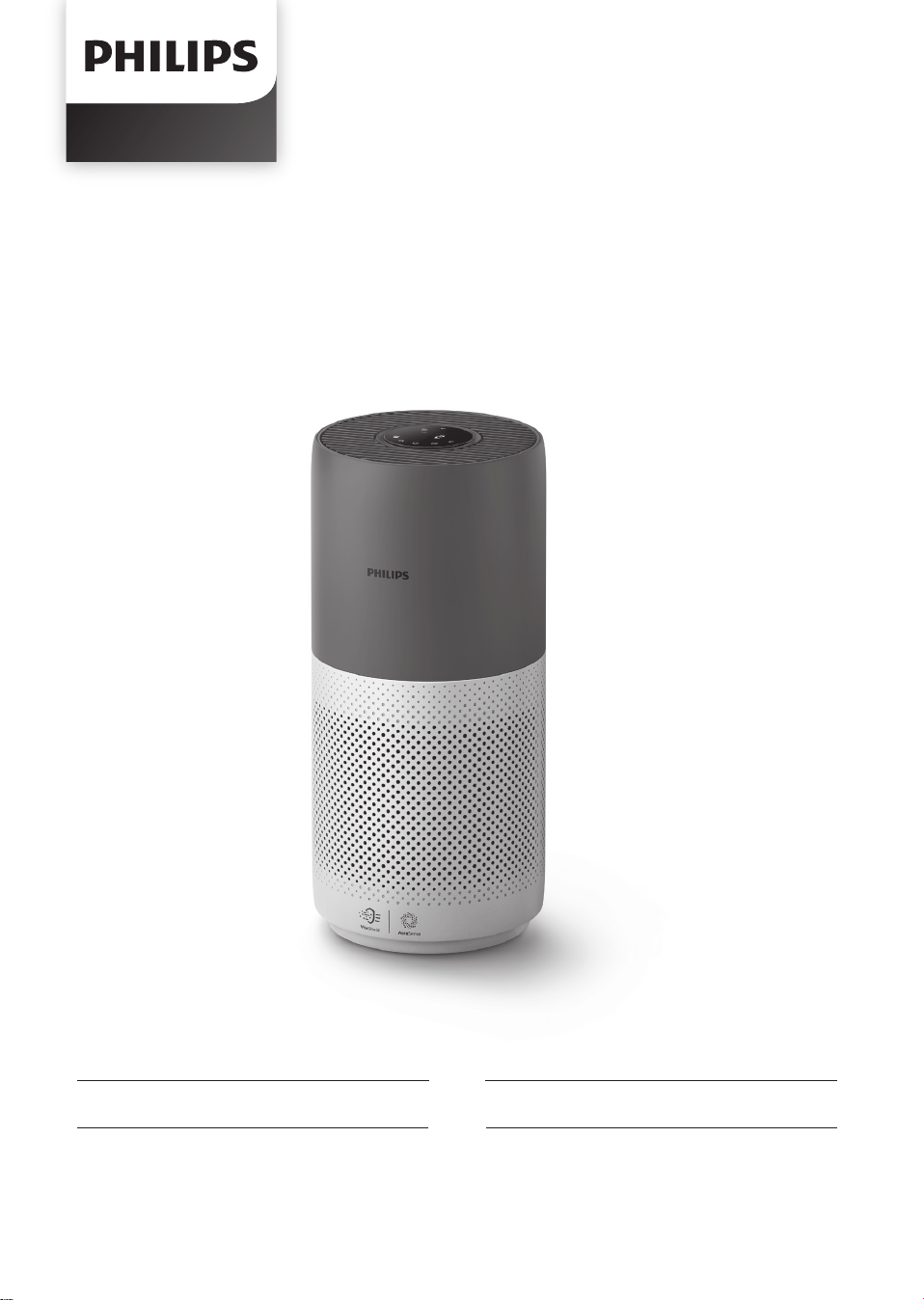
AC2936/86

1EN
Contents
1. Your.air.purier.. ������������������������������������������������������������������������������2
Product overview ����������������������������������������������������������������������������������������������������������2
Controls overview ���������������������������������������������������������������������������������������������������������3
2 Getting started �������������������������������������������������������������������������������3
Installing the lter ���������������������������������������������������������������������������������������������������������3
Wi-Fi indicator ����������������������������������������������������������������������������������������������������������������4
Wi-Fi connection �����������������������������������������������������������������������������������������������������������4
3. Using.the.air.purier.. ���������������������������������������������������������������������5
Air quality light ��������������������������������������������������������������������������������������������������������������5
Turning On and O �������������������������������������������������������������������������������������������������������6
Changing the mode setting ���������������������������������������������������������������������������������������7
Switching the display indicator ��������������������������������������������������������������������������������� 7
Using the light on/o function ���������������������������������������������������������������������������������8
Setting the child lock ���������������������������������������������������������������������������������������������������8
Checking the lter status ��������������������������������������������������������������������������������������������9
4 Cleaning and maintenance ����������������������������������������������������������9
Cleaning the body of the air purier �����������������������������������������������������������������������9
Cleaning the particle sensor ���������������������������������������������������������������������������������������9
Cleaning the surface of the lter ����������������������������������������������������������������������������10
Replacing the lter �����������������������������������������������������������������������������������������������������11
Filter reset ����������������������������������������������������������������������������������������������������������������������12
5 Storage ������������������������������������������������������������������������������������������� 12
6 Troubleshooting �������������������������������������������������������������������������� 12
2 EN
1 Your air purifier
Congratulations on your purchase of air cleaner AC2936.
To fully benet from the support that Philips oers, register your product at www.philips.com/welcome.
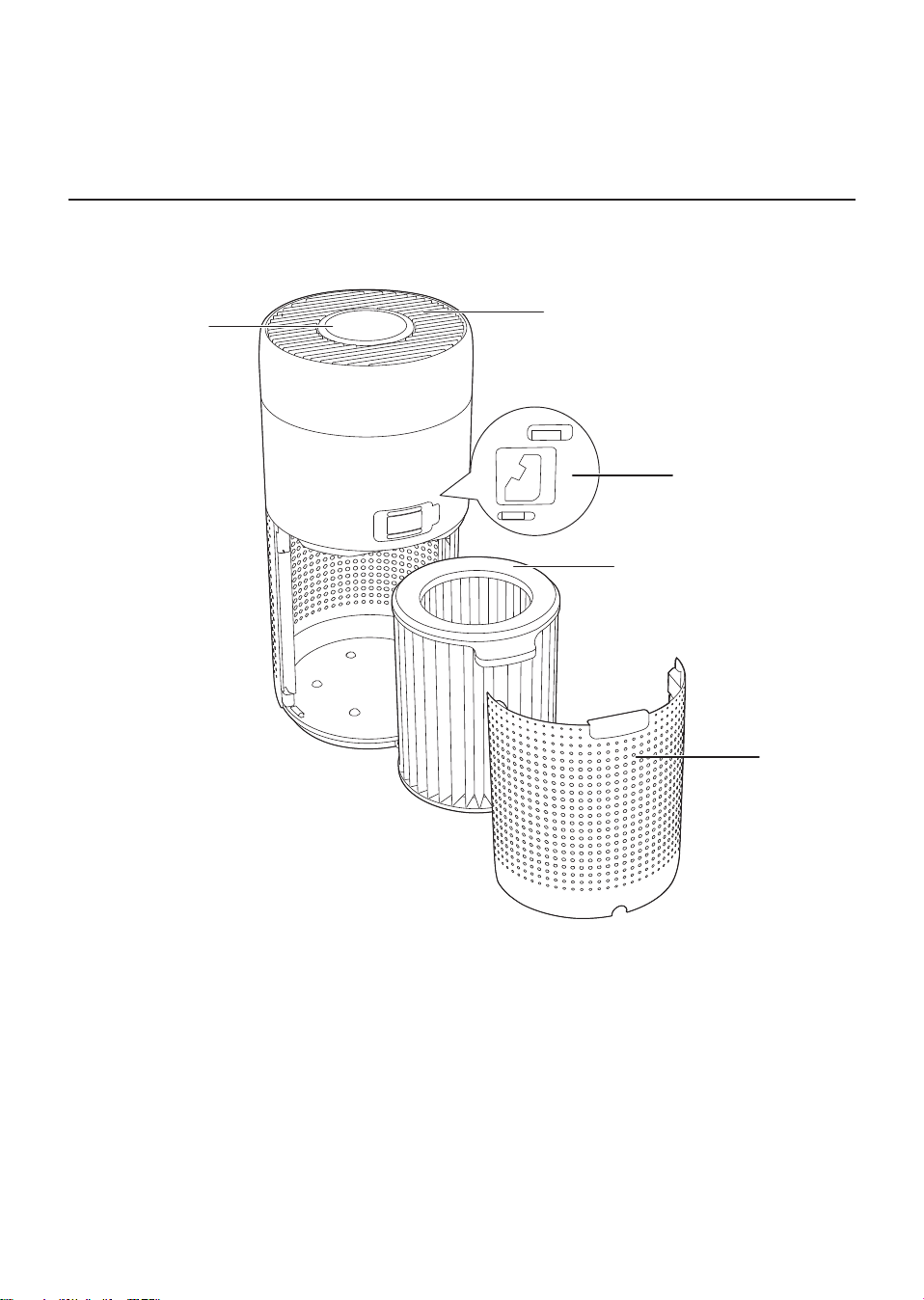
Product overview
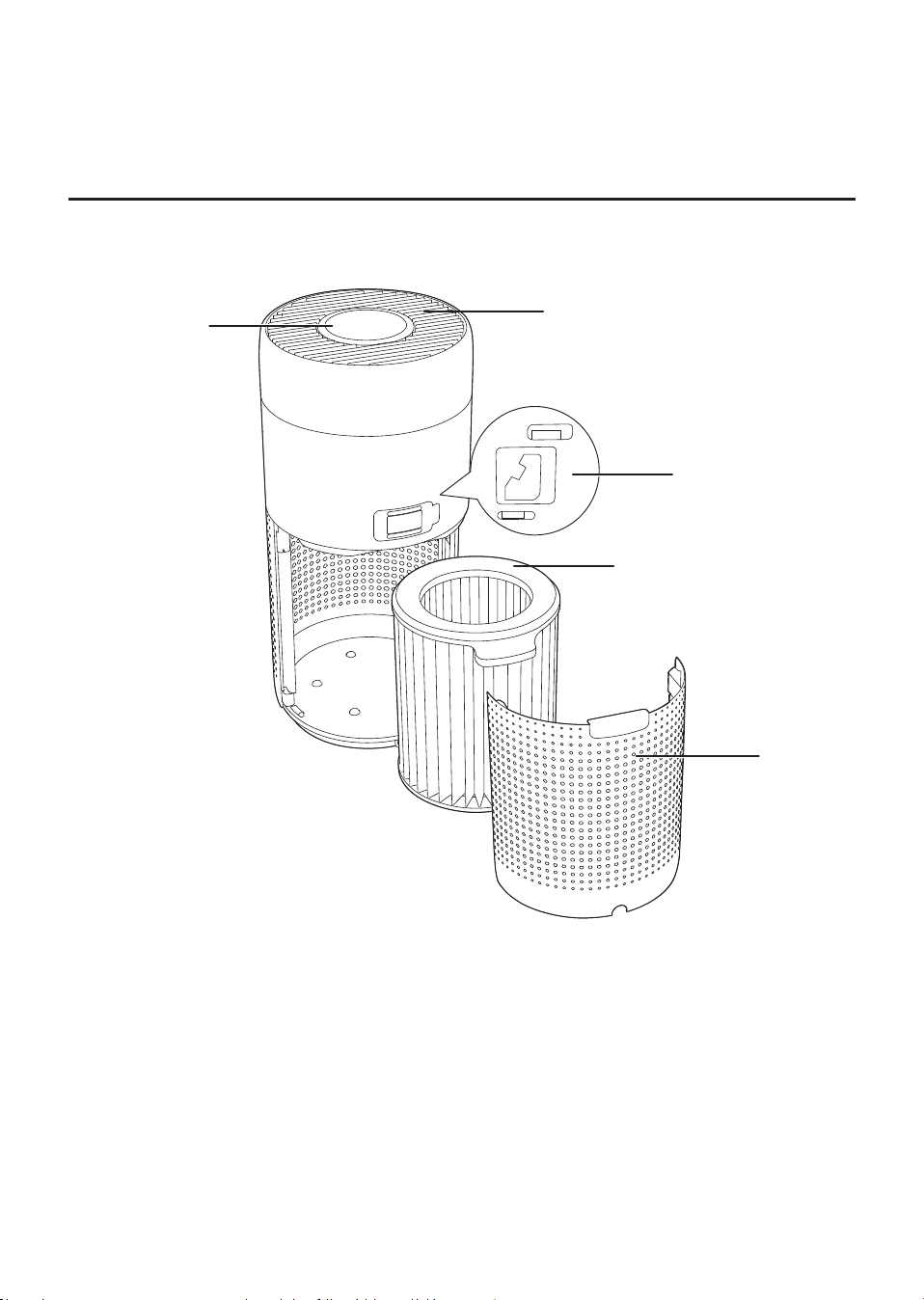
Control panel
Air outlet
Back cover
NanoProtect lter Series 3
(FY2180/30)
Particle sensor
3EN
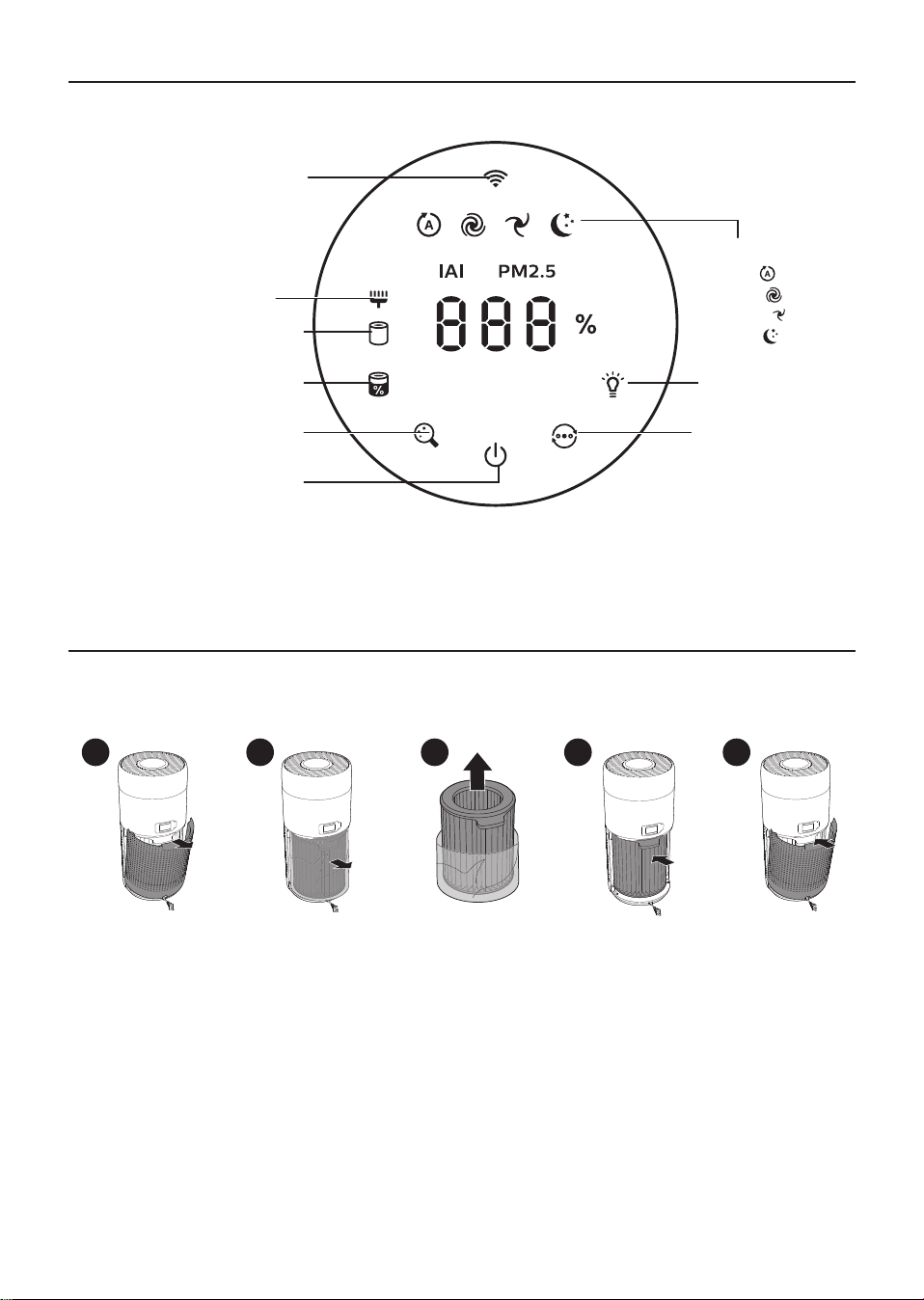
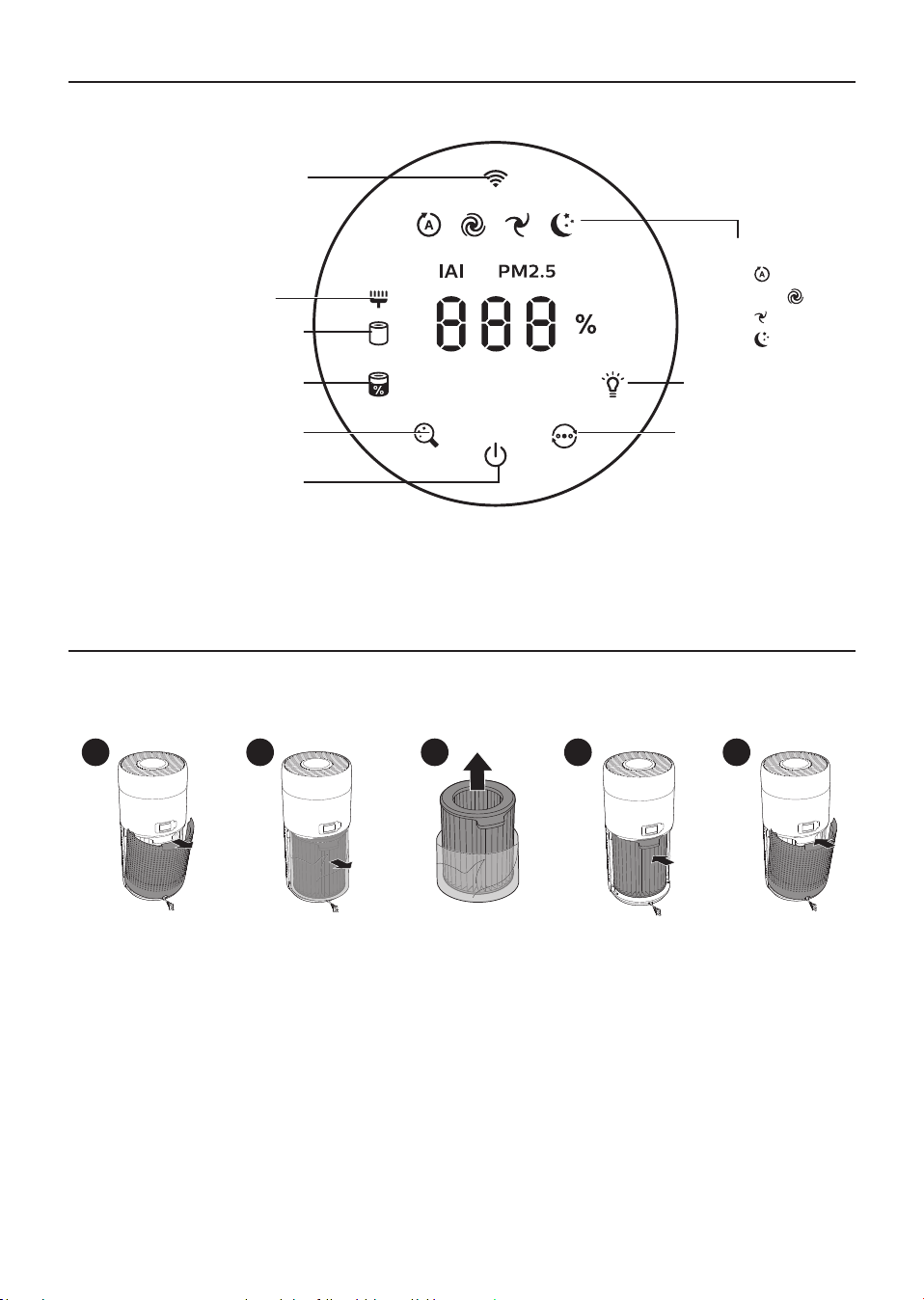
Controls overview
2 Getting started
Installing.the.lter
Note: Make sure the air purier is unplugged from the electrical outlet before installing the lter.
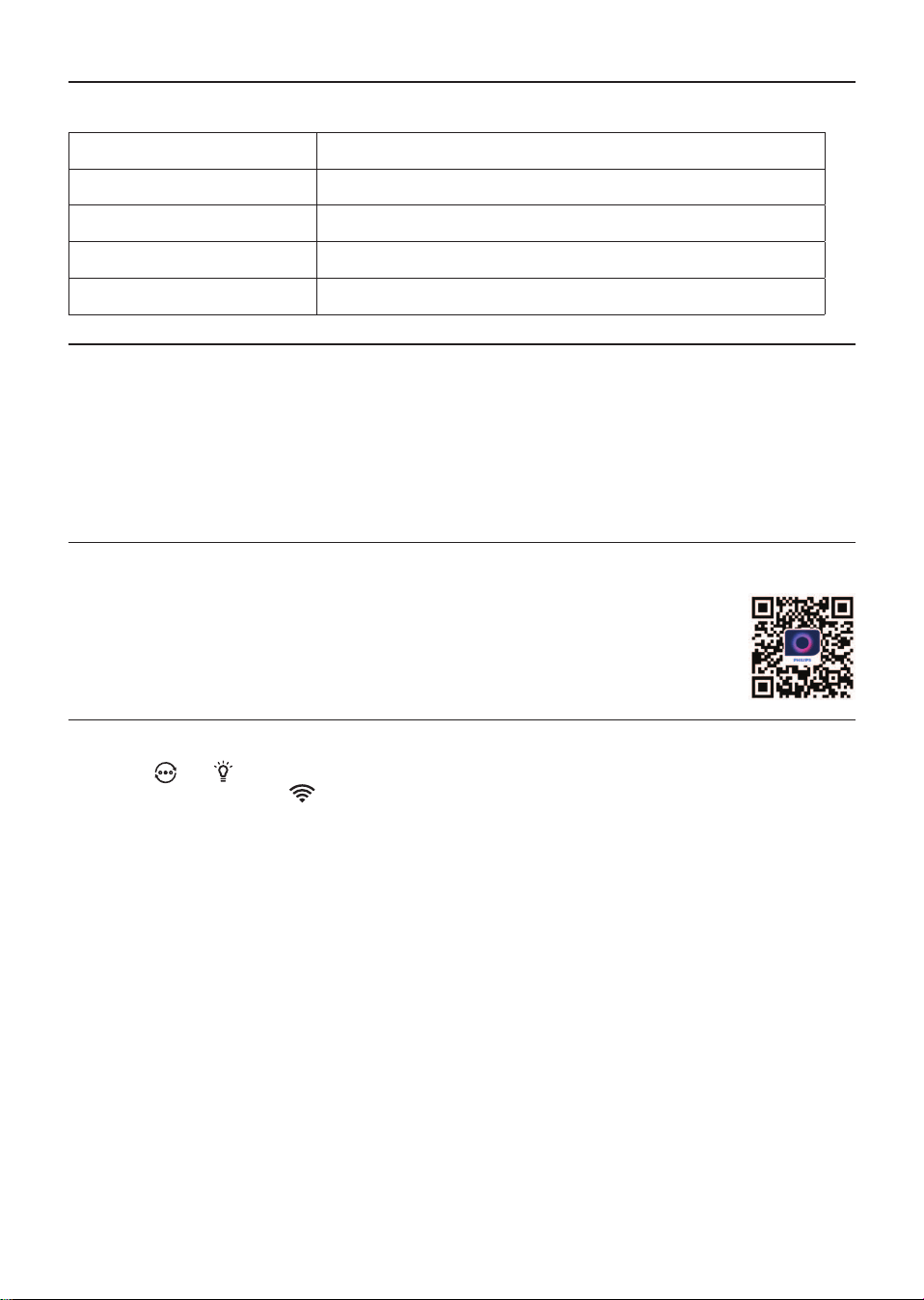
1 2 3 4 5
1 Pull the back cover and remove it from the appliance.
2 Pull the lter from the appliance.
3 Remove all packaging materials of the air purication lter.
4 Put the lter back into the appliance.
5 Reattach the back cover�
Wi-Fi indicator
Filter cleaning alert
Filter replacement alert
Filter status/ reset button
Power on/o button
Mode display:
Auto (
)
Turbo ( )
Gentle ( )
Sleep ( )
Display switch button
Mode switch button
Light on/o button
4 EN
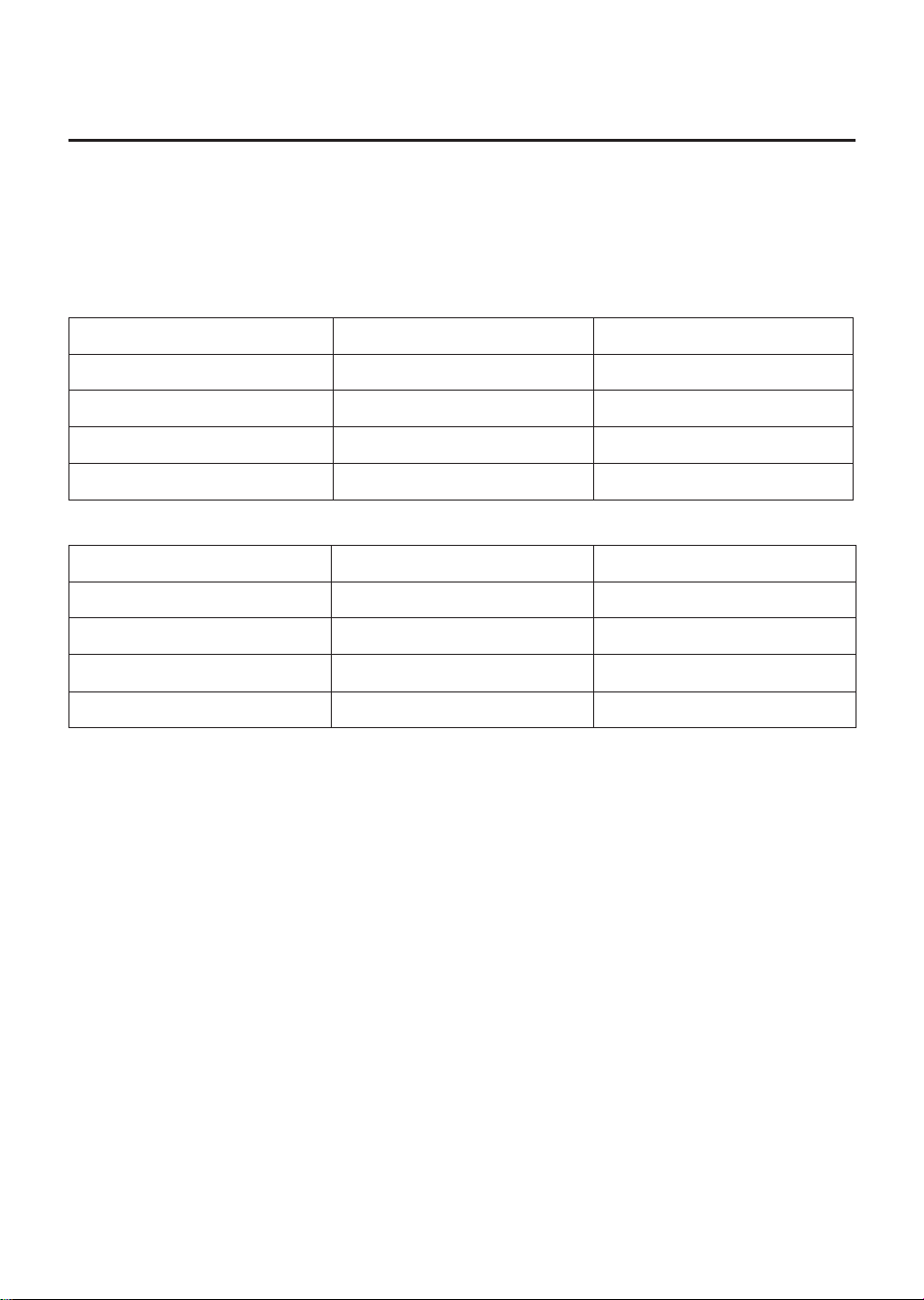
Wi-Fi indicator
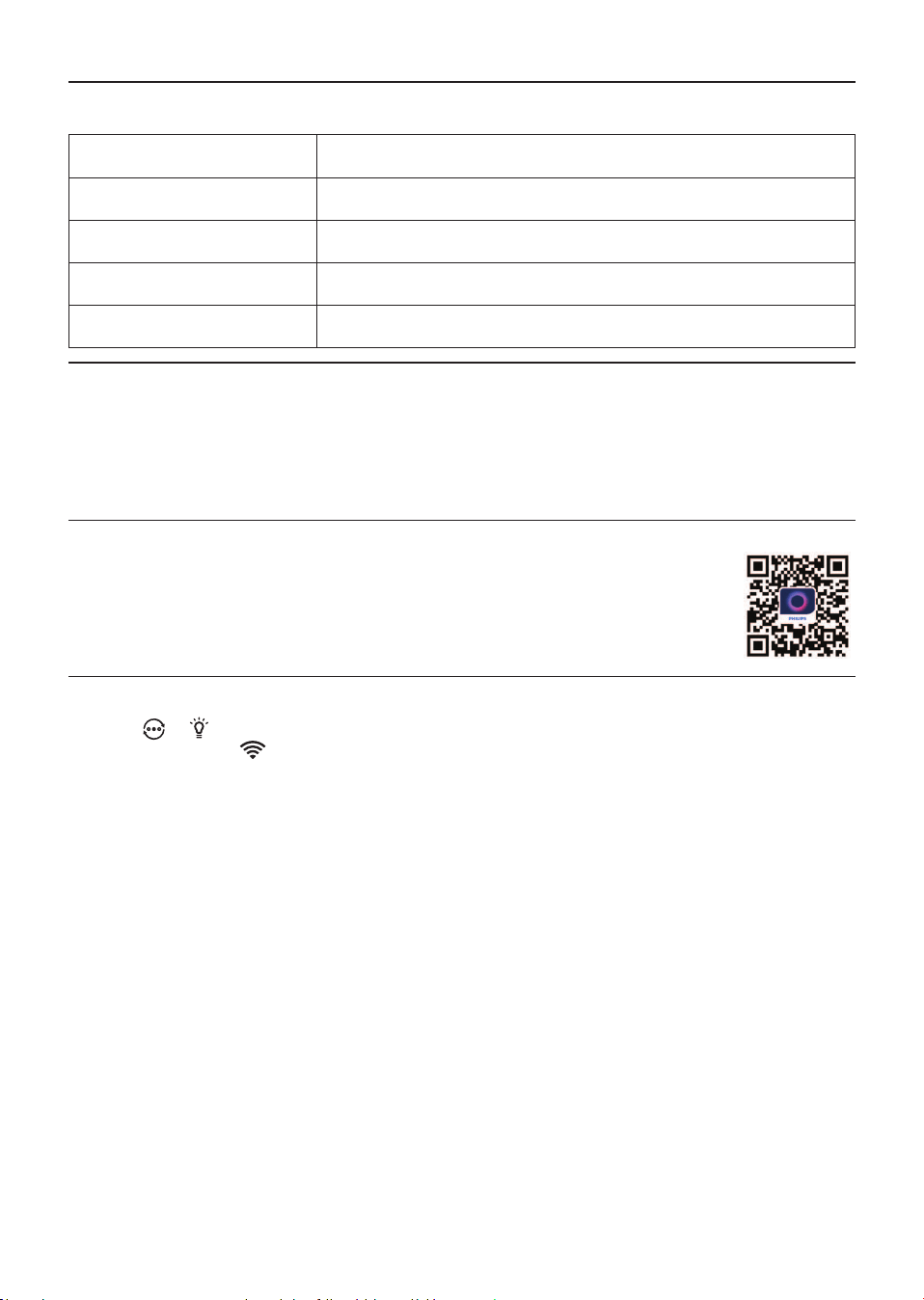
Wi-Fi icon status Wi-Fi connection status
Blink in orange Connecting to the smartphone
Blink in white Connecting to the router
Stable in white Connected to the router
O Wi-Fi function disabled
Wi-Fi connection
Note:
•
Corporate/Enterprise networks (e.g. certicates, network proles) are not supported. We
recommend setting up the Philips Air Puriers on a dedicated network created for IoT devices or
WPA2-Personal networks�
•
Conguration details are provided in the Air+ app (e.g. Mac address) to help set-up on managed
networks�
First time connection
1 Download and install the Philips “Air+” app from the App Store or Google Play�
2 Connect your smartphone or tablet to your Wi-Fi network�
3 Launch the “Air+” app and click on “Connect a New Device” or press the “+”
button on the top of the screen. Follow the onscreen instructions to connect the air
purier to your network.
Reset the Wi-Fi connection
1 Touch
and for 3 seconds until you hear a beep.
» The Wi-Fi indicator blinks orange�
2 Follow the steps 3 in “First time connection” section�
Note:
•
Enterprise/Additional webpage authentication networks are not supported�
5EN
3 Using the air purifier
Air quality light
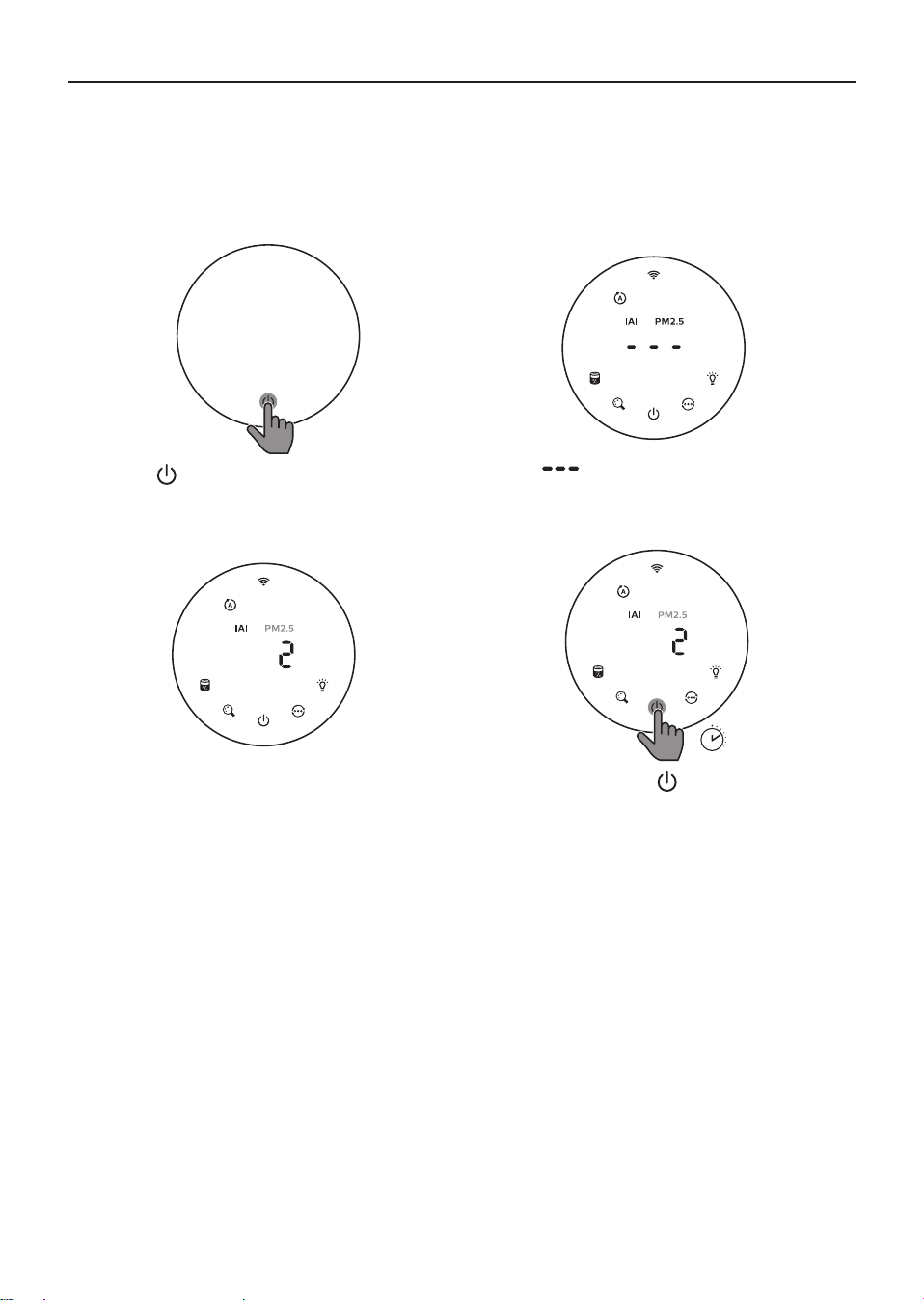
After approximately 30 seconds, the particle sensor selects the color that corresponds to the
surrounding air quality of airborne particles.
Note: The color of the air quality light is determined by the highest risk index among PM2.5, IAI and
readings�
IAI refers to the level of indoor air allergen.
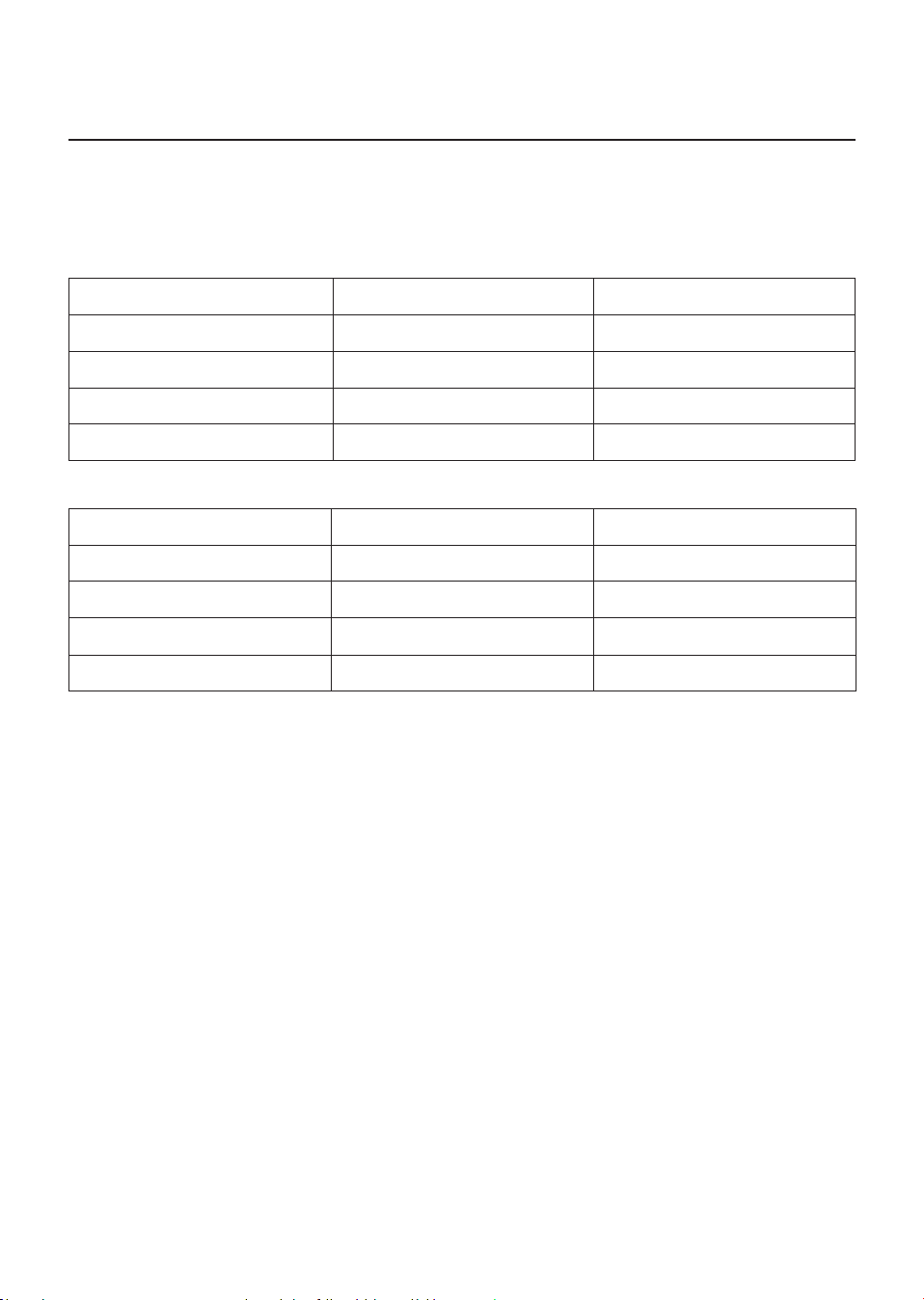
IAI level Air quality light color Air quality level
1-3 Blue Good
4-6 Blue-purple Fair
7-9 Purple-red Poor
10-12 Red Very poor
PM2�5 refers to airborne particle pollutants smaller than 2.5 micrometers.
PM2�5 level Air quality light color Air quality level
≤12 Blue Good
13-35 Blue-purple Fair
36-55 Purple-red Poor
>55 Red Very poor
6 EN
Turning.On.and.O
Note:
•
Put the plug of the air purier in the power socket.
•
If the purier stays connected to the electrical outlet after turning OFF, the air purier will operate
under the previous settings when turned ON again�
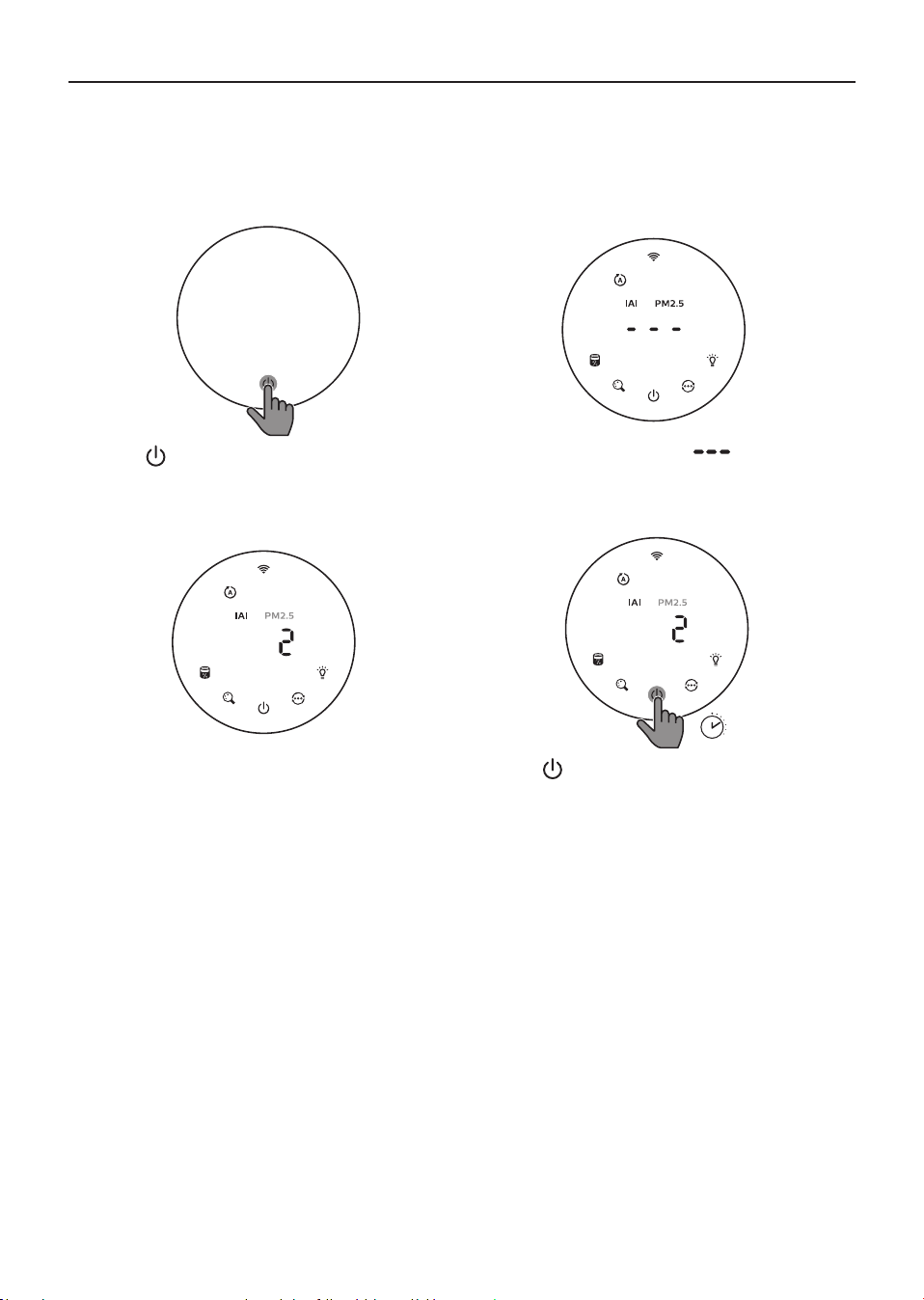
» Touch to switch on the air purier.
» The “
” displays on the screen during
warming up. Then the air purier shows
the IAI/PM2.5 level after measuring the air
quality�
3
s
» The air purier operates in the auto mode
with IAI displayed on the screen�
» Touch and hold the
button for 3 seconds
to switch o the air purier.
7EN
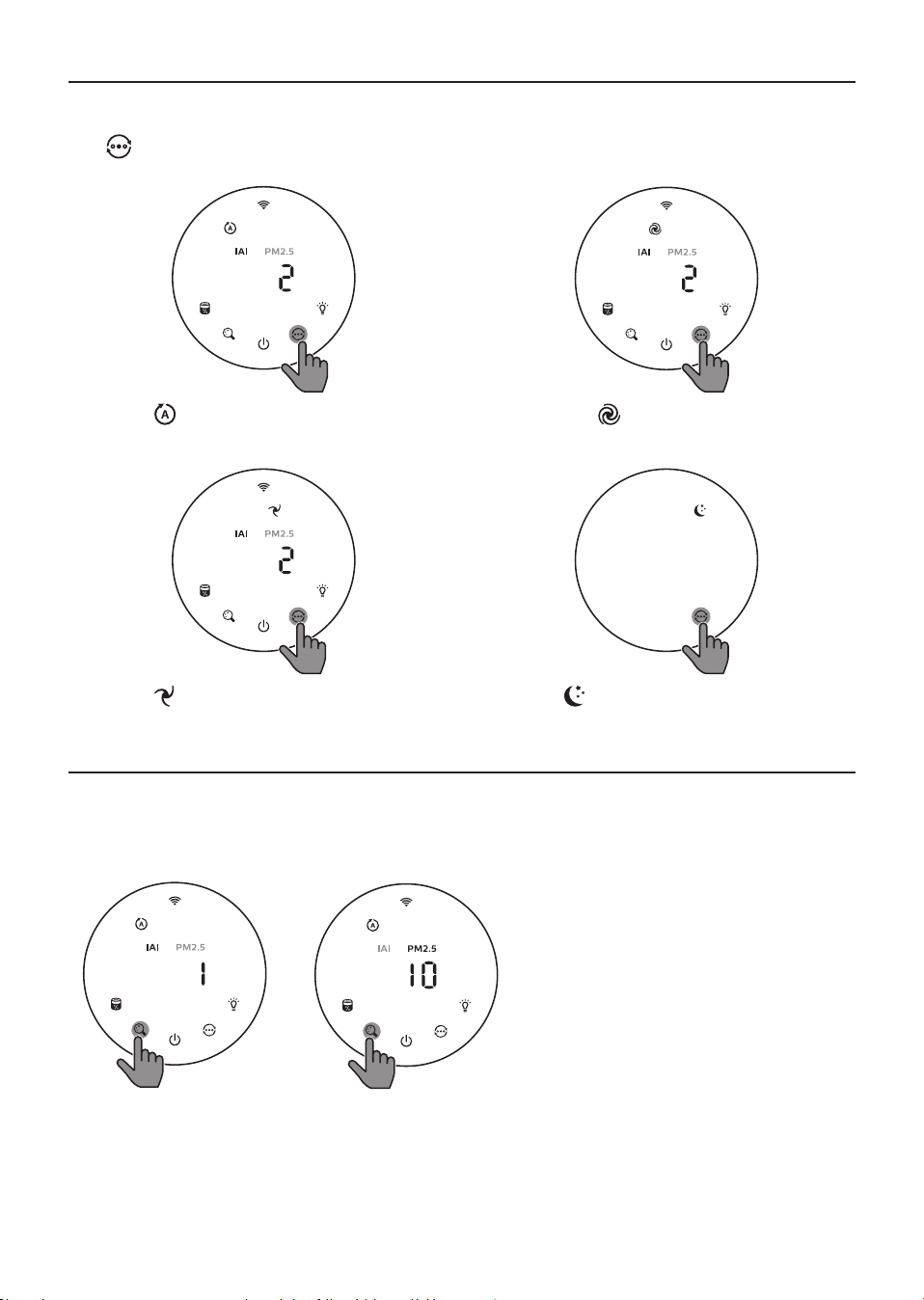
Changing the mode setting
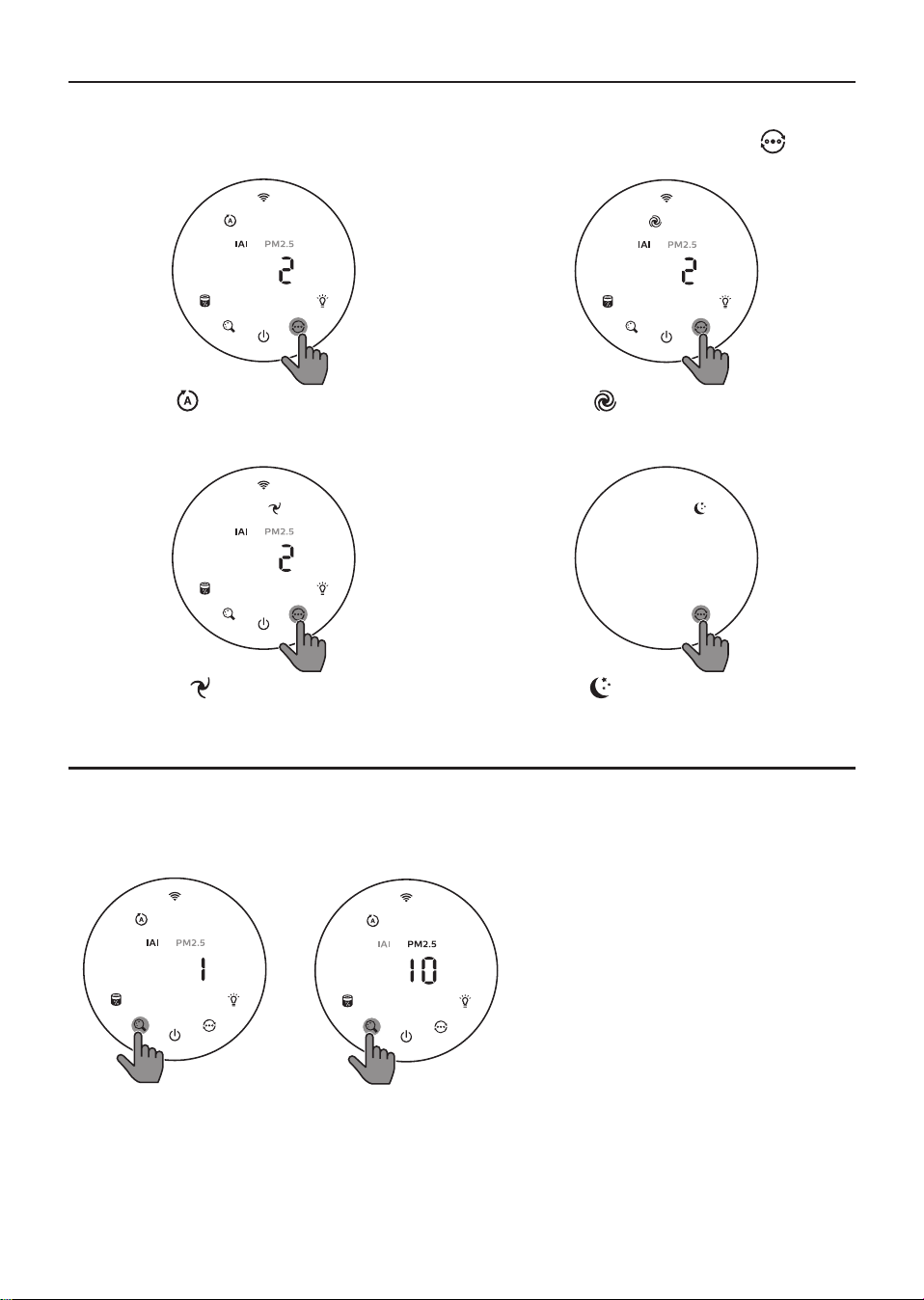
You can choose Auto mode, Turbo mode, Gentle mode or the Sleep mode by touching the
button�
Auto mode ( ): The air purier automatically
adjusts the fan speed in accordance with the
ambient air quality�
Turbo mode (
): The air purier operates on
the highest speed�
Gentle mode ( ): The air purier operates at a
low speed�
Sleep mode (
): The air purier operates
quietly at a low speed. After 3 seconds, the
screen lights o.
Switching the display indicator
Note:
•
The appliance display IAI level by default.
8 EN
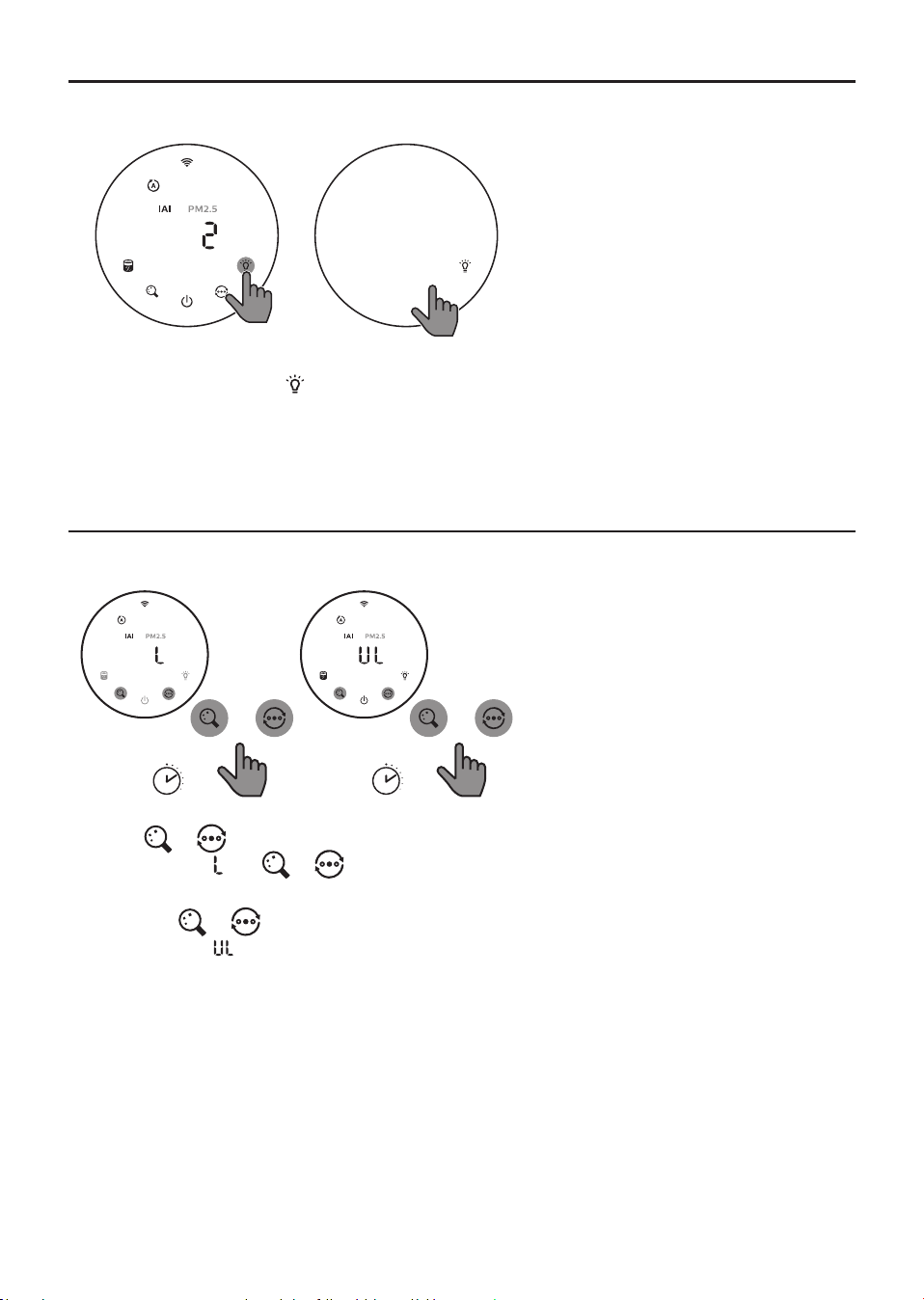
Using.the.light.on/o.function
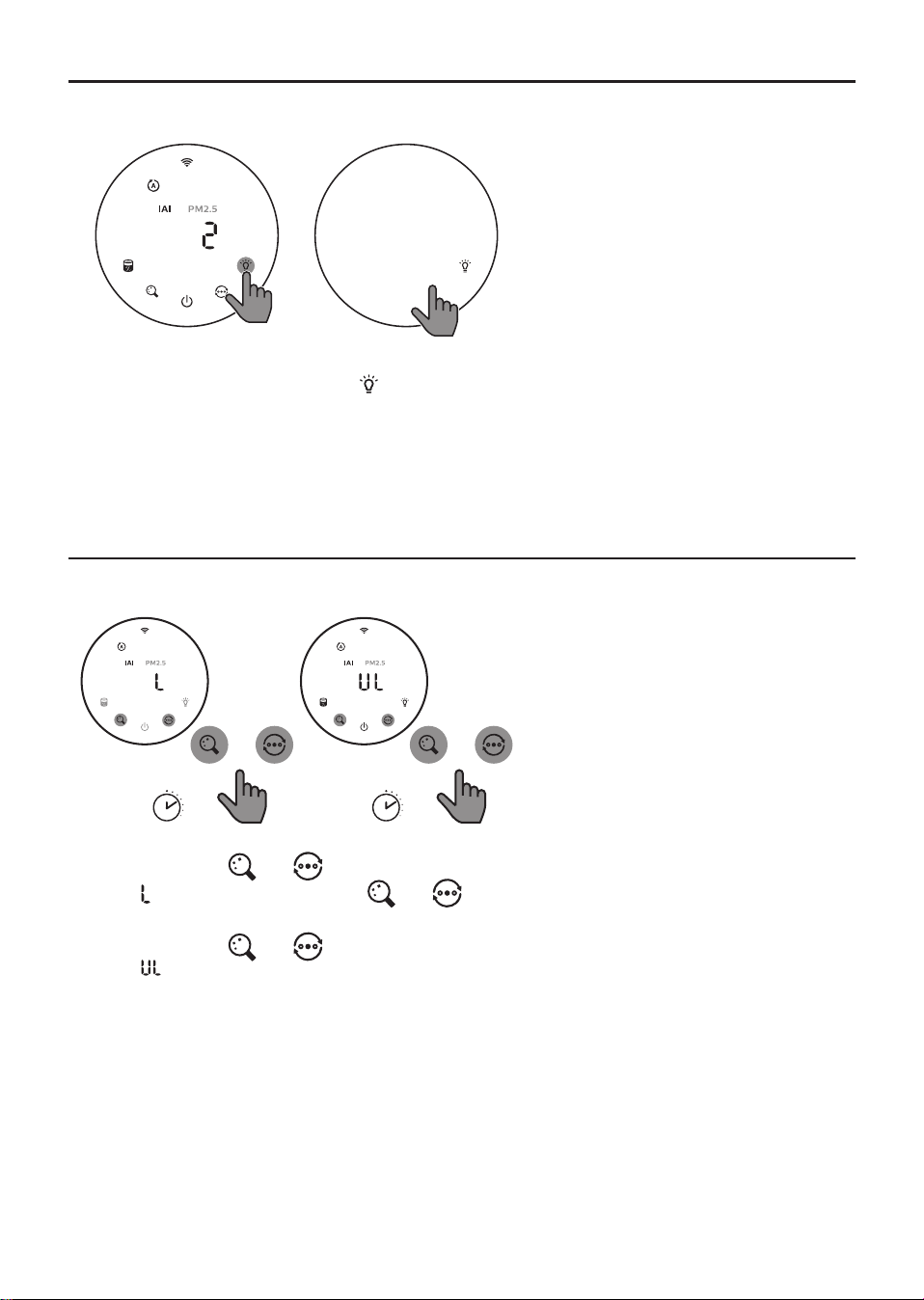
You can touch the light on/o button manually to turn o all lights and the control panel. Touch any
button to wake up all lights�
With the light sensor:
•
The control panel can automatically turn on, turn o or dim according to the ambient light.
•
The control panel will be o or dim when the ambient light is dark.
You can touch any button to wake up all lights. If no further operation, all lights will be o or dim again
to match with the ambient light�
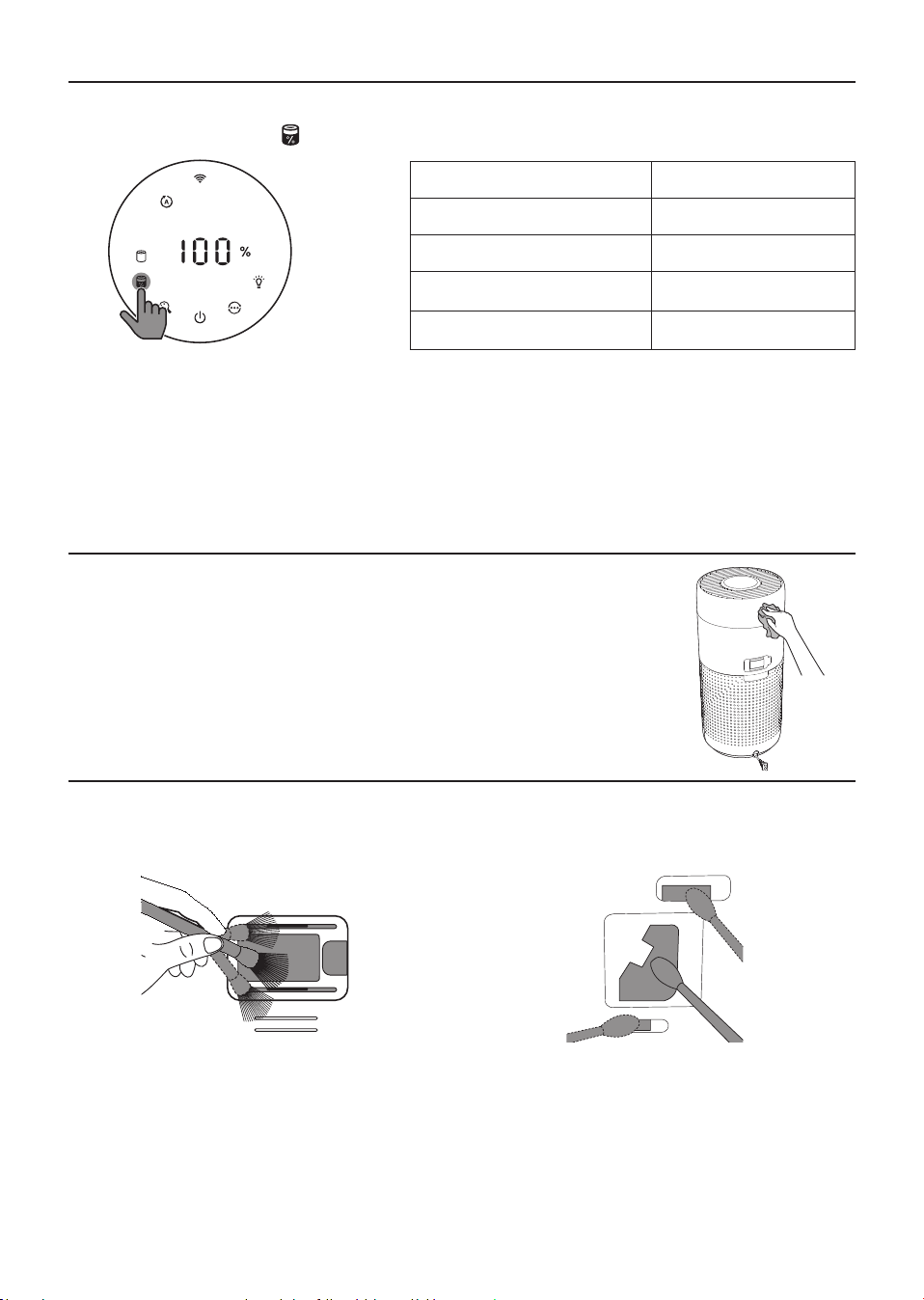
Setting the child lock
3s
+
3s
+
1 Touch and hold and button for 3 seconds to activate child lock.
»
displays on the screen, only and button light up�
» After 3 seconds, the screen goes back to normal display.
2 Touch and hold
and button for 3 seconds again to deactivate child lock.
» displays on the screen for 3 seconds and goes back to normal display.
» All buttons light up�
9EN
Checking.the.lter.status
•
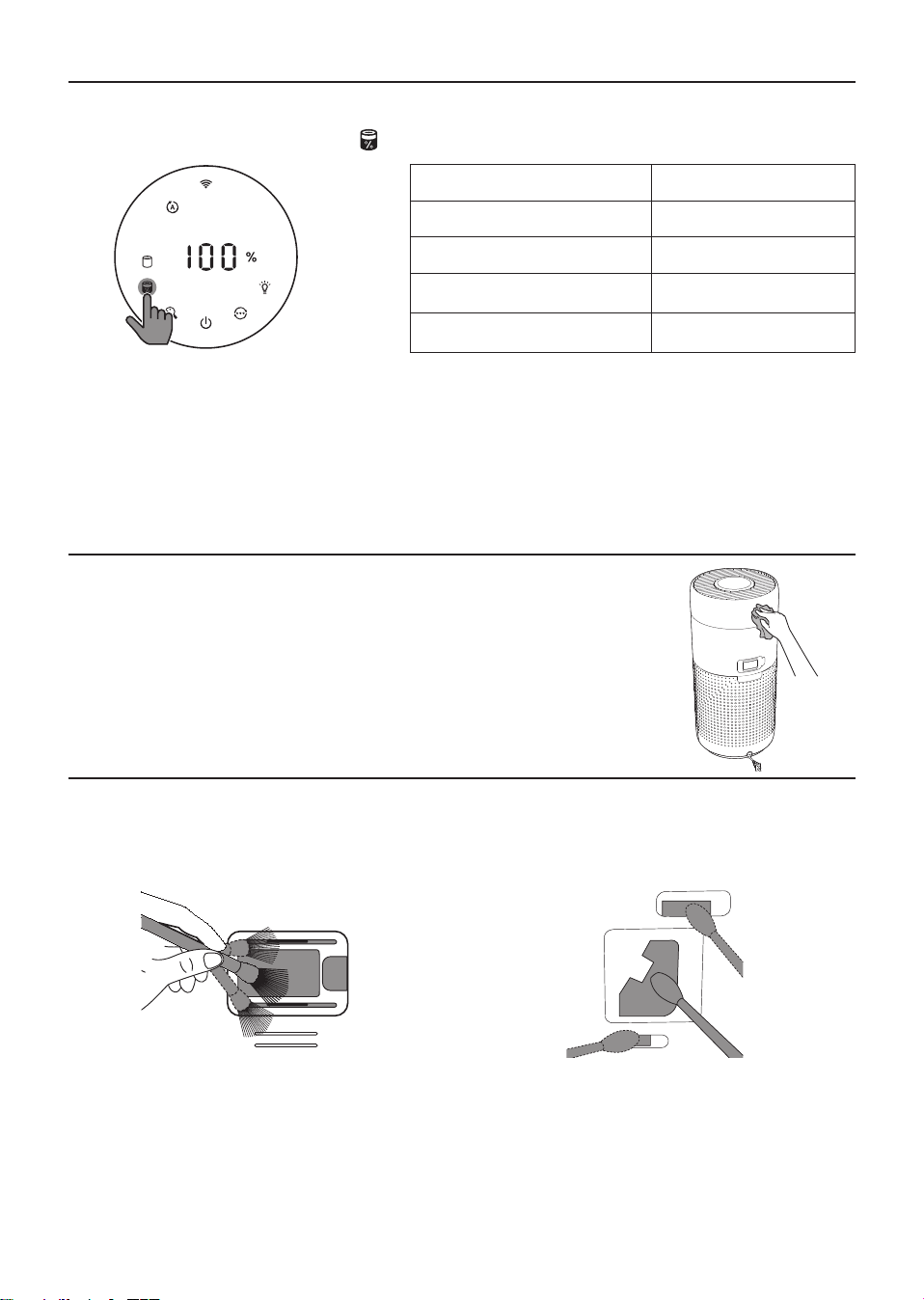
Touch the lter status check/reset
button to check the lter service life status�
Icon color Display (%)
Blue 16-100
Blue-purple 9-15
Purple-red 4-8
Red 0-3
Note: The appliance goes back to normal display if no operations after 3 seconds.
4 Cleaning and maintenance
Note:
•
Do not attempt to clean the particle sensor with a vacuum cleaner�
•
Switch o the air purier and unplug from the power socket before following action.
Cleaning.the.body.of.the.air.purier
Use a soft, dry cloth to clean both the interior and exterior of the air
purier and the air outlet.
Cleaning the particle sensor
Clean the particle sensor every 2 months for optimal functioning of the appliance.
1 Clean the particle sensor inlet and outlet
with a soft brush.
2 Clean the particle sensor with a damp cotton
swab� Dry all parts thoroughly with a dry
cotton swab�
10 EN
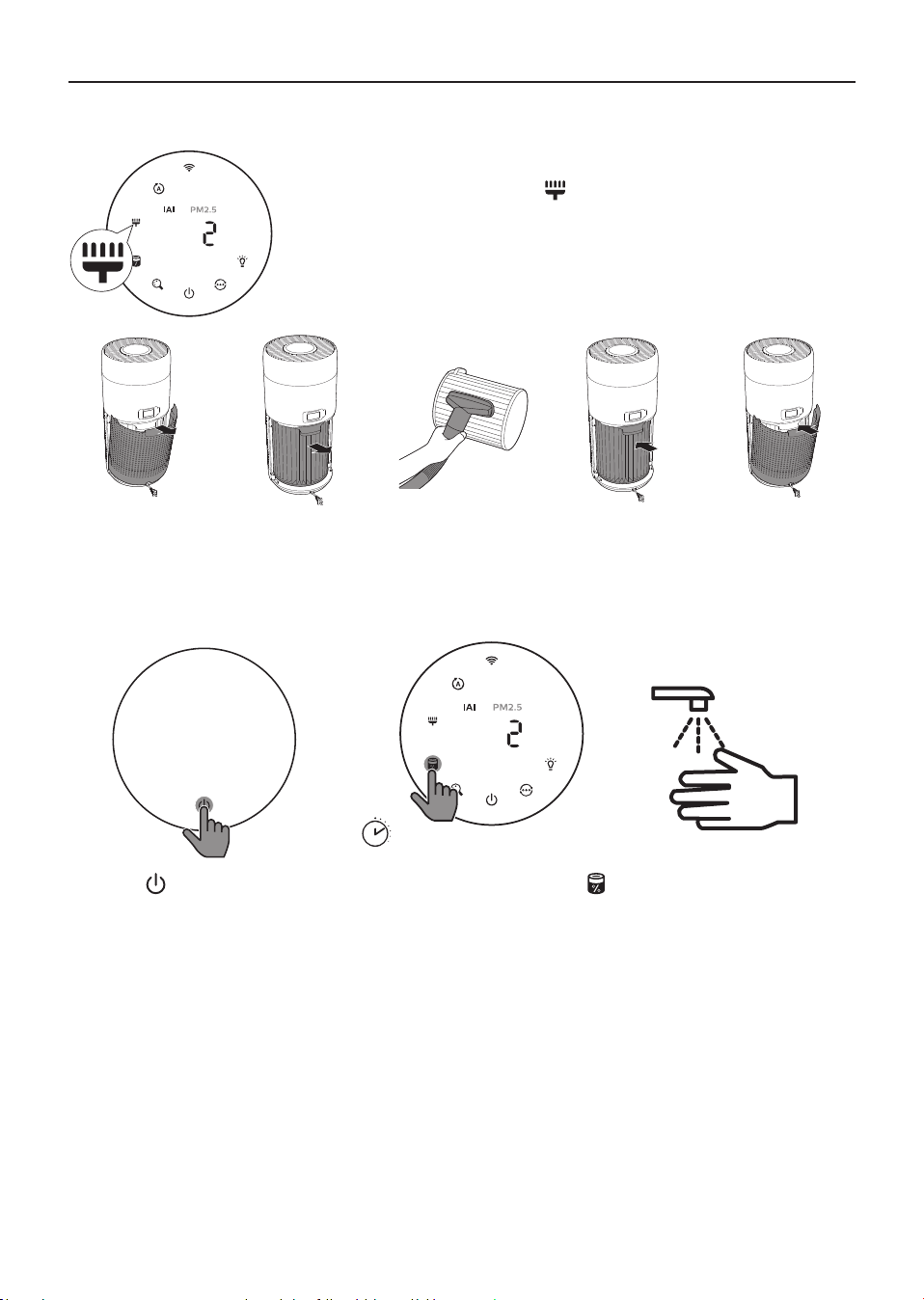
Cleaning.the.surface.of.the.lter
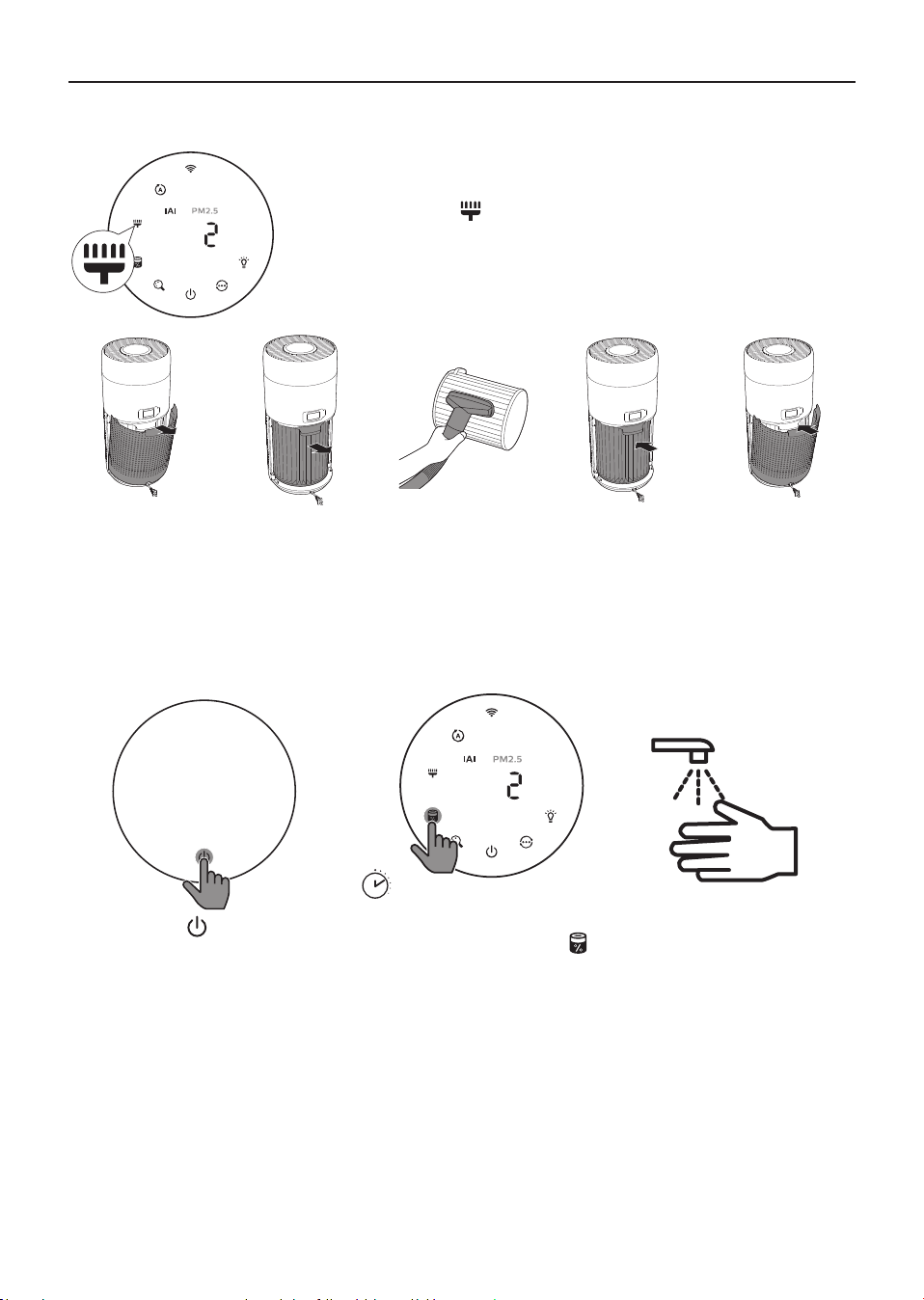
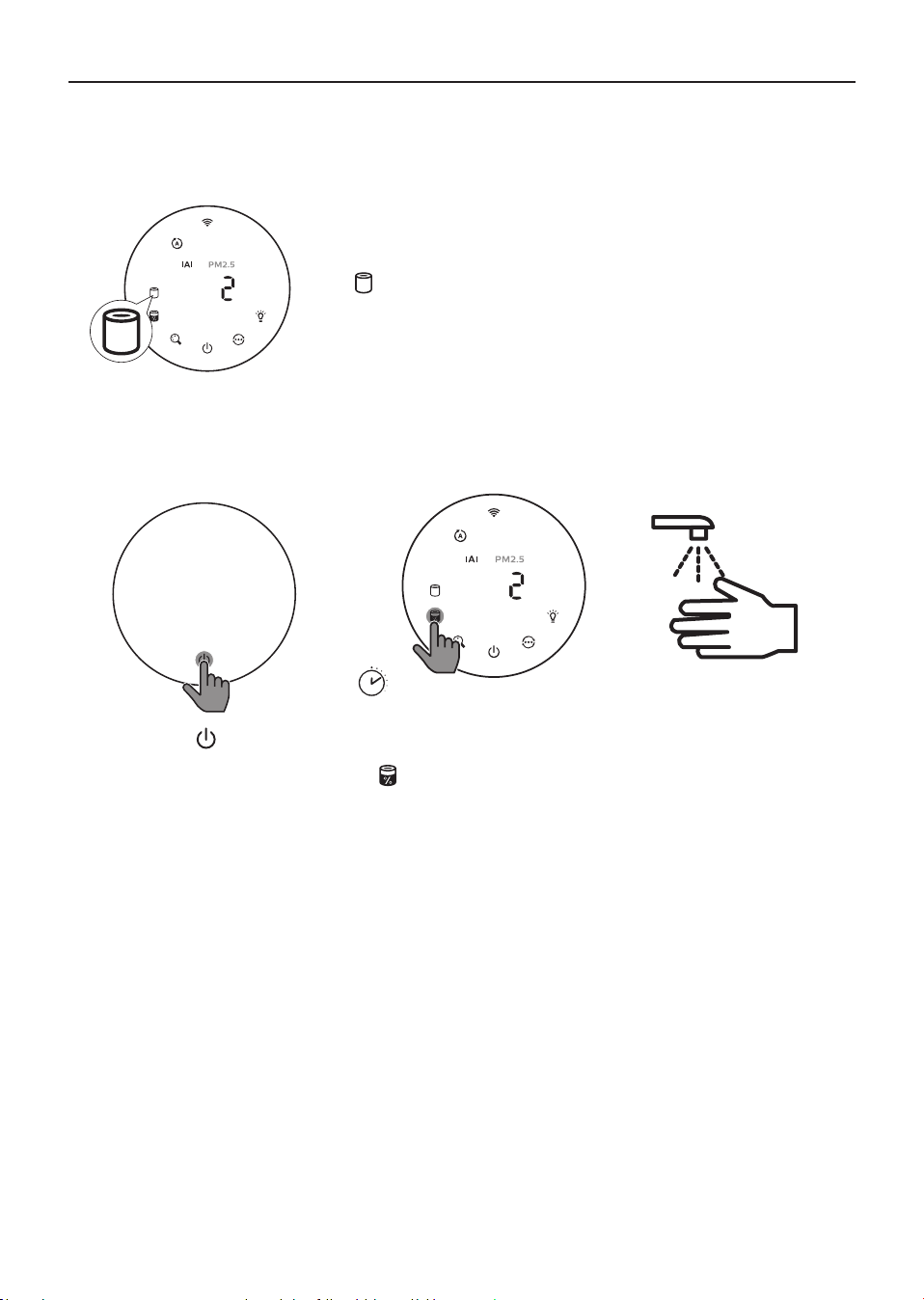
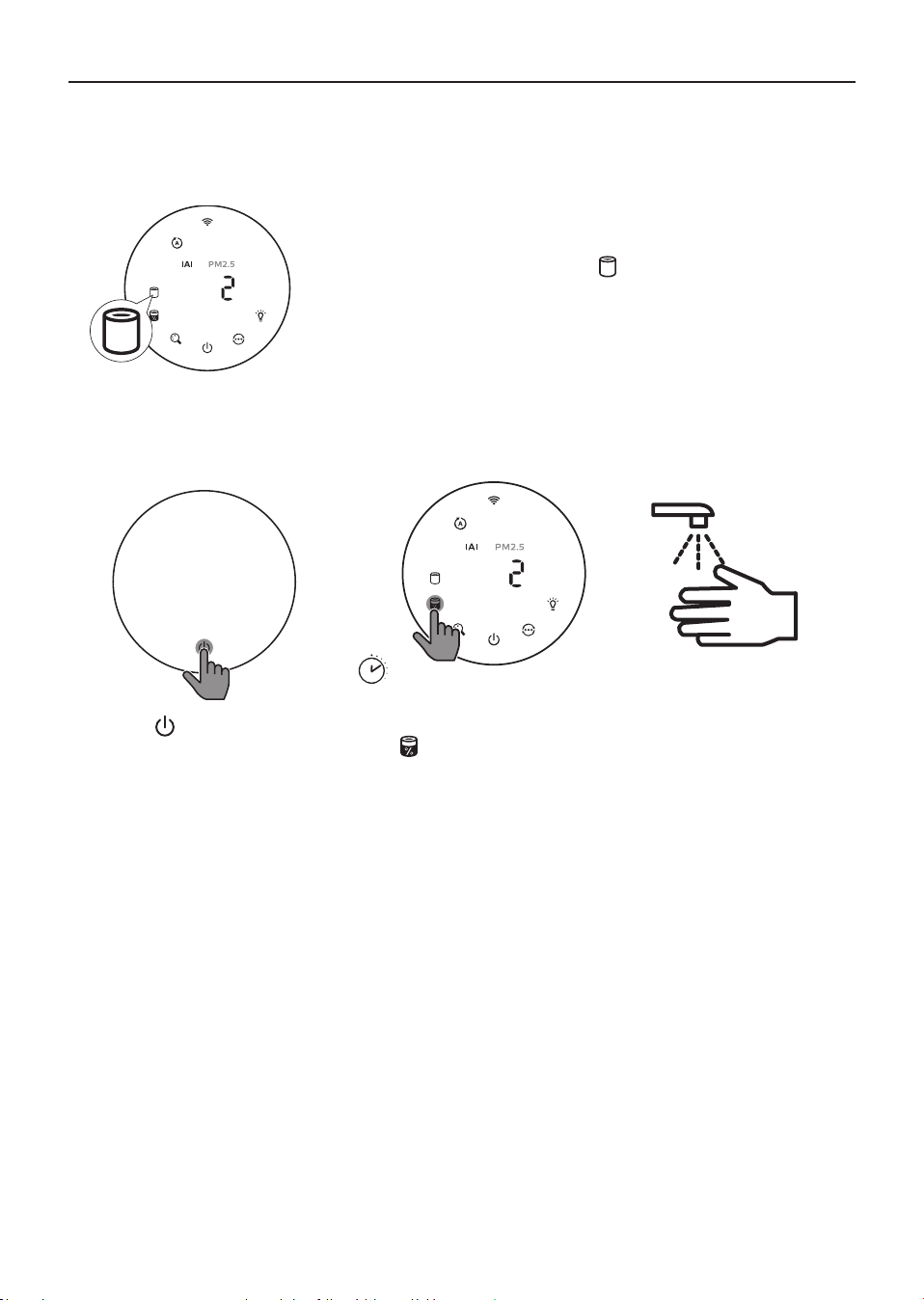
Clean the surface of lter with vacuum cleaner when the lter
cleaning alert
display on the screen�
1 Pull the back
cover and
remove it from
the appliance�
2 Pull the lter
from the
appliance�
3 Clean the
surface of
the lter with
a vacuum
cleaner�
4 Put the lter
back into the
appliance�
5 Reattach the
back cover�
3
s
6 Touch the button to
switch on the appliance�
7 Touch and hold the lter
status check/reset button
for 3 seconds to reset the lter
cleaning time�
8 Wash your hands
thoroughly after
cleaning the lter.
11EN
Replacing.the.lter
Note:
•
The lter is not washable or reusable.
•
Do not smell the lter as it has collected pollutants from the air.
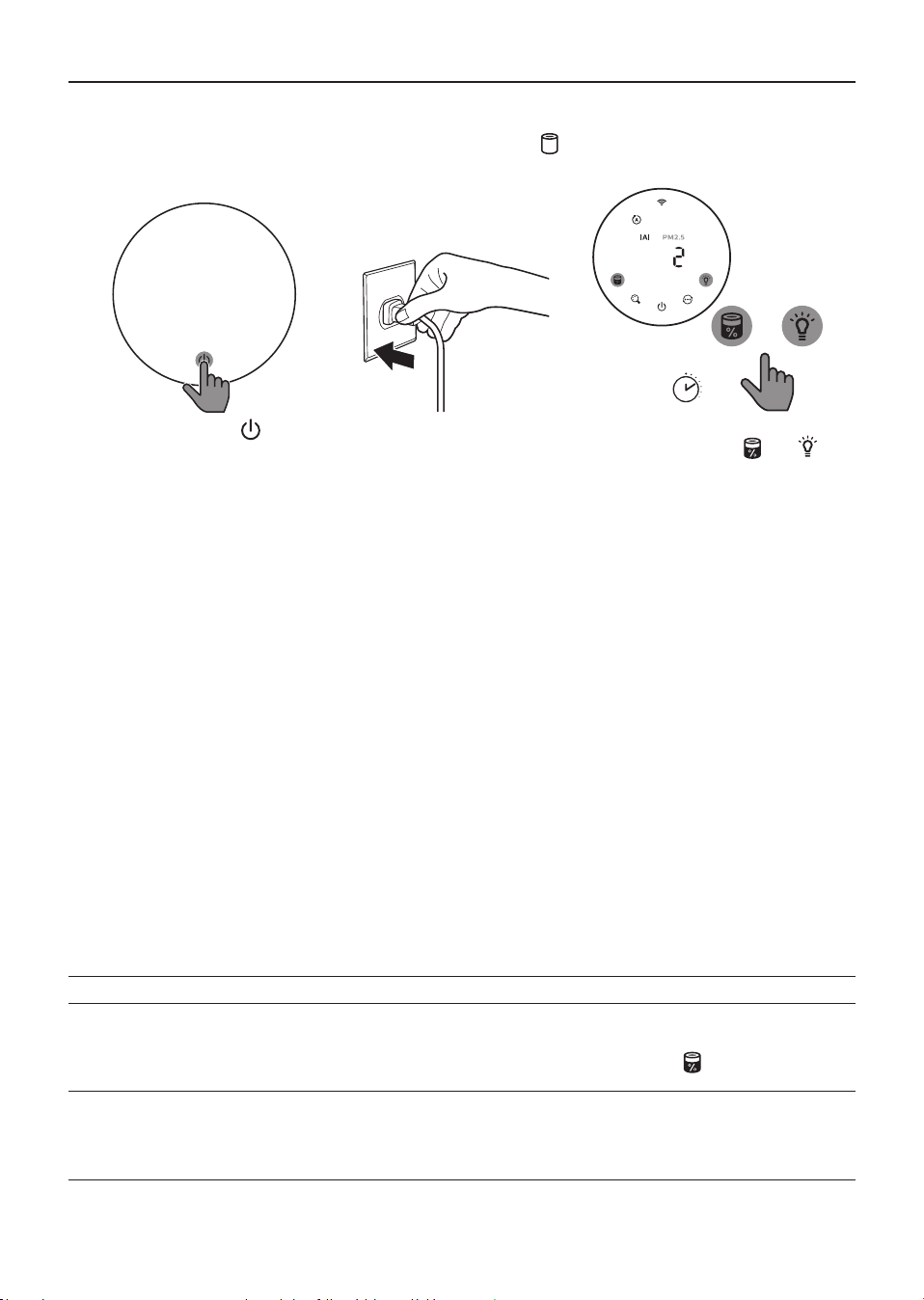
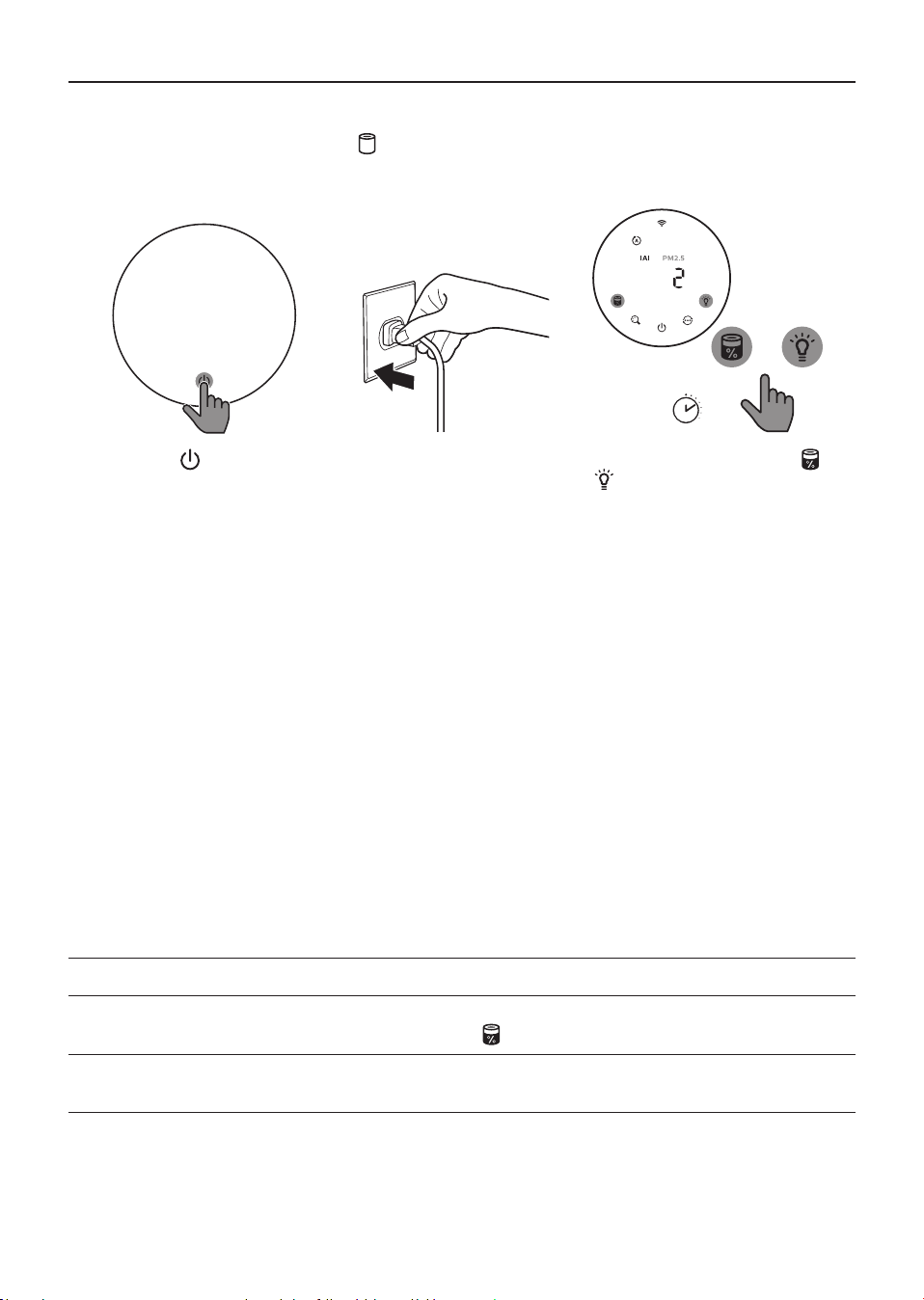
When the lter need to be replaced, the lter replacement alert
lights up red�
1 Replace the lter with Philips NanoProtect lter Series 3 (FY2180/30) , Please follow the step of
Chapter “Installing the lter”.
3
s
2 Touch the button to
switch on the appliance�
3 Touch and hold the lter
status check/reset button
for 3 seconds to reset the
lter replacement time.
4 Wash your hands
thoroughly after
replacing the lter.
12 EN
Filter reset
You can also replace the lter before lter replacement alert (
) displays on the screen. After
replacing a lter, you need to reset the lter lifetime counter manually.
3
s
+
1 Touch the power button
for 3 seconds to turn o the
appliance and unplug from
power socket�
2 Put the power plug in
the power socket�
3 Within 15 seconds after power
on, touch and hold
and
button for 3 seconds to reset the
lter lifetime counter.
5 Storage
1 Turn o the air purier and unplug from the power socket.
2 Clean the air purier, particle sensor and the surface of the lter (see the chapter “Cleaning and
maintenance”)�
3 Let all parts air dry thoroughly before storing.
4 Wrap the lter in air tight plastic bags.
5 Store the air purier, lter in a cool, dry location.
6 Always thoroughly wash hands after handling lters.
6 Troubleshooting
This chapter summarizes the most common problems you could encounter with the appliance. If you
are unable to solve the problem with the information below, contact the Consumer Care Center in your
country�
Problem Possible solution
The appliance does not
work properly�
•
The lter replacement alert has been on continuously but you have
not replaced the corresponding lter. As a result, the appliance is now
locked. In this case, replace the lter and long press
to reset the lter
lifetime counter.
The airow that comes
out of the air outlet is
signicantly weaker
than before.
•
The surface of the lter is dirty. Clean the surface of the lter (see the
chapter “Cleaning and maintenance”)�
13EN
Problem Possible solution
The air quality does not
improve, even though
the appliance has been
operating for a long
time�
•
Check if the packing material is removed from the lter.
•
The lter has not been placed in the appliance. Make sure that the lter
(FY2180/30) is properly installed�
•
The particle sensor is wet� The humidity level in your room is high and
causes condensation� Make sure that the particle sensor is clean and dry
(see the chapter “Cleaning and maintenance”)�
•
Room size is large or the outdoor air quality is poor�
For optimum purication performance, please close the doors and
windows when operating the air purier.
•
There are indoor pollution resources. For instances, smoking, cooking,
incense, perfume or alchohol.
•
Filter reaches the end of life. Replace the lter with a new one.
The color of the air
quality light always
stays the same�
•
The particle sensor is dirty� Clean the particle sensor (see the chapter
“Cleaning and maintenance”)�
The appliance produces
a strange smell�
•
The rst few times you use the appliance, it may produce a plastic smell.
This is normal. However, if the appliance produces a burnt smell even
if removing lters, contact your Philips dealer or an authorized Philips
service center. The lter may produce smell after being used for a while
because of the absorption of indoor gases. It’s recommended that you
reactivate the lter by putting it in direct sunlight for repeated use. If
odor still exists, replace the lter.
The appliance is extra
loud�
•
It's normal if the appliance runs at the Turbo mode.
•
In the Auto mode, if the appliance is too loud, maybe the appliance runs
at high speed because air quality becomes worse, or your personalized
setting in App triggers a higher fan speed. You can choose the Sleep
mode, or change the settings in the app.
•
If anything drops into air outlet, it may also cause abnormal loud sound.
Immediate turn o appliance, turn appliance upside down, to get foreign
objectives out of appliance.
•
If there is abnormal sound, contact the Consumer Care Center in your
country�
The appliance still
indicates that I need
to replace a lter, but I
already did�
•
Perhaps you did not reset the lter lifetime counter. Switch on the
appliance� Then touch and hold the reset button ( ) for 3 seconds.
Error code “E1” displays
on the screen�
•
The motor has malfunctions. Contact the Consumer Care Center in your
country�

14 EN
Problem Possible solution
The Wi-Fi setup is not
successful.
•
If the router your purier is connected to is dual – band and currently it
is not connecting to a 2.4GHz network, please switch to another band
of the same router (2.4GHz) and try to pair your purier again. 5GHz
networks are not supported. If your purier is connected to a dual – band
router, please switch to the 2.4GHz network of the router and try to pair
your purier again.
•
Web authentication networks are not supported�Public Wi-Fi such as
oce or hotel networks are not supported.
•
Check if the purier is within range of the Wi-Fi router. You can try to
locate the air purier closer to the Wi-Fi router.
•
Check if the Wi-Fi password is correct. The password is case-sensitive.
•
Retry the setup with the instructions in section “Reset the Wi-Fi
connection”�
•
Keep the appliance away from other electronic devices that may cause
interferences.
•
Check if the mobile device is in airplane mode. Make sure to have the
airplane mode deactivated when connecting to the Wi-Fi network�
•
If the Wi-Fi pairing fails after trying several times, please turn of the
cellular data on your smartphone in the Settings section and start the
pairing again�
•
If the Wi-Fi icon on your purier’s display is in stable white but without
seeing the purier in your app, click on “Connect a New Device” and add
the purier from the local list on “Begin setup” page.
•
Consult the help section in the app for extensive and up-to-date
troubleshooting tips�

15ZH-T
內容
1 您的空氣清淨機 ����������������������������������������������������������������������������� 16
產品概覽 ������������������������������������������������������������������������������������������������������������������������16
控制項概覽 ��������������������������������������������������������������������������������������������������������������������17
2 快速入門 ����������������������������������������������������������������������������������������� 17
安裝濾網 ������������������������������������������������������������������������������������������������������������������������17
Wi-Fi 指示燈 ������������������������������������������������������������������������������������������������������������������18
Wi-Fi 連線 ����������������������������������������������������������������������������������������������������������������������18
3 使用空氣清淨機 ����������������������������������������������������������������������������� 19
空氣品質指示燈 ������������������������������������������������������������������������������������������������������������19
開啟和關閉電源 ������������������������������������������������������������������������������������������������������������20
變更模式設定 ����������������������������������������������������������������������������������������������������������������21
切換顯示指示燈 ������������������������������������������������������������������������������������������������������������21
使用開/關燈按鈕 ����������������������������������������������������������������������������������������������������������22
設定兒童鎖 �������������������������������������������������������������������������������������������������������������������22
檢查濾網狀態 ����������������������������������������������������������������������������������������������������������������23
4 清潔與維護 ������������������������������������������������������������������������������������� 23
清潔空氣清淨機的機體 �����������������������������������������������������������������������������������������������23
清潔微粒感測器 ������������������������������������������������������������������������������������������������������������23
清潔濾網表面 ����������������������������������������������������������������������������������������������������������������24
更換濾網 ������������������������������������������������������������������������������������������������������������������������25
濾網重設 ������������������������������������������������������������������������������������������������������������������������26
5 收納 ������������������������������������������������������������������������������������������������� 26
6 疑難排解 ����������������������������������������������������������������������������������������� 26
16 ZH-T
1 您的空氣清淨機
恭喜您購買空氣清淨機 AC2936。
若要獲得飛利浦提供的完整支援,請註冊您的產品: www�philips�com/welcome。
產品概覽
控制面板
出風口
背蓋
奈米級勁護濾網 S3型
(FY2180/30)
微粒感測器
17ZH-T
控制項概覽
2 快速入門
安裝濾網
備註:請確定已從電源插座拔除空氣清淨機的電源插頭後,再安裝濾網。
1 2 3 4
5
1 拉動背蓋並將其從產品上取下。
2 從產品拉出濾網。
3 拆下空氣淨化濾網的所有包裝材料。
4 將濾網裝回產品。
5 將背蓋重新裝回。
Wi-Fi 指示燈
濾網清潔 警示
濾網更換 警示
濾網狀態/ 重設按鈕
電源開關按鈕
模式顯示:
自動 ( )
加速增強 ( )
溫和 ( )
睡眠 ( )
顯示切換按鈕
模式切換按鈕
開/關燈按鈕
18 ZH-T
Wi-Fi 指示燈
Wi-Fi 圖示狀態 Wi-Fi 連線狀態
閃爍橘燈 正在連線至智慧型手機
閃爍白燈 正在連線至路由器
穩定白燈 已連線至路由器
熄滅 Wi-Fi 功能已停用
Wi-Fi 連線
備註:
•
不支援公司/企業網路 (如憑證、網路設定檔)。建議於專為 IoT 裝置建立的專用網路或 WPA2-Personal
網路上設定飛利浦空氣清淨機。
•
如需在受管理網路上協助設定,Air+ 應用程式有提供組態詳細資料 (如 Mac 位址)。
首次連線
1 下載並安裝飛利浦「Air+」應用程式,下載位置如下: App Store 或 Google Play。
2 將您的智慧型手機或平板電腦連線至 Wi-Fi 網路。
3 啟動「Air+」應用程式,並按一下「連接新裝置」或按下畫面上方的「+」按鈕。
依照螢幕指示將空氣清淨機連接至您的網路。
重設 Wi-Fi 連線
1 按下
和 3 秒鐘,直到聽到嗶聲。
» Wi-Fi 指示燈 會閃爍橘光。
2 請依照「首次連線」一節的步驟 3 操作。
備註:
•
不支援企業/額外網頁驗證網路。
19ZH-T
3 使用空氣清淨機
空氣品質指示燈
在約 30 秒後,微粒感測器會選擇符合周遭空氣粒子品質的相應顏色。
備註:空氣品質指示燈的顏色取決於 PM2�5、IAI 及讀數間的最高風險指數。
IAI
是指室內空氣過敏原的等級。
IAI 等級 空氣品質指示燈顏色 空氣品質等級
1-3 藍色 良好
4-6 藍色 - 紫色 普通
7-9 紫色 - 紅色 不良
10-12 紅色 非常不良
PM2.5
是指小於 2�5 微米的空氣微粒汙染物。
PM2�5 等級 空氣品質指示燈顏色 空氣品質等級
≤12 藍色 良好
13-35 藍色 - 紫色 普通
36-55 紫色 - 紅色 不良
>55 紅色 非常不良
20 ZH-T
開啟和關閉電源
備註:
•
將空氣清淨機的插頭插入電源插座。
•
如果清淨機在關閉之後保持連接至電源插座,則當空氣清淨機再次開啟時,會以先前的設定運作。
•
按下 即可開啟空氣清淨機的電源。
•
暖機期間螢幕上會顯示「
」。接著空氣
清淨機會在測量空氣品質後顯示 IAI/PM2�5
等級。
3
s
•
空氣清淨機會以自動模式運作,螢幕上會顯
示 IAI。
•
按住
按鈕 3 秒鐘即可關閉空氣清淨機的
電源。
21ZH-T
變更模式設定
按下
按鈕即可選擇自動模式、加速增強模式、溫和模式或睡眠模式。
自動模式 ( ):空氣清淨機會依照周遭空氣品質自
動調整風扇速度。
加速增強模式 (
):空氣清淨機會以最高速度
運作。
溫和模式 ( ):空氣清淨機會以低速
運作。
睡眠模式 (
):空氣清淨機會以低速安靜地運
作。3 秒後,螢幕燈光會熄滅。
切換顯示指示燈
備註:
•
產品預設會顯示 IAI 等級。
22 ZH-T
使用開/關燈按鈕
您可以手動按下開/關燈按鈕 來關閉所有燈號和控制面板。按下任何按鈕即可喚醒所有燈號。
使用光線感應器:
•
控制面板會根據環境光線自動開啟、關閉或調暗。
•
當環境光線變暗時,控制面板會關閉或變暗。
您可以按下任何按鈕以喚醒所有燈號。如果沒有進一步的操作,所有燈號將會熄滅或變暗,以配合環境
光線。
設定兒童鎖
3s
+
3s
+
1 按住 及 按鈕 3 秒鐘,可啟動保護鎖。
» 螢幕顯示 ,僅 及 按鈕亮起。
» 3 秒鐘後,螢幕即返回正常顯示。
2 再次按住
及 按鈕 3 秒鐘,可停用保護鎖。
» 螢幕顯示 3 秒鐘後,隨即返回正常顯示。
» 所有按鈕亮起。
23ZH-T
檢查濾網狀態
•
按下濾網狀態檢查/重設
按鈕,以檢查濾網使用壽命狀態。
圖示顏色 顯示 (%)
藍色 16-100
藍色 - 紫色 9-15
紫色 - 紅色 4-8
紅色 0-3
備註:如果 3 秒後沒有任何操作,產品會返回正常顯示。
4 清潔與維護
備註:
•
請勿試圖以吸塵器清理微粒感測器。
•
進行以下操作前,請關閉空氣清淨機的電源,並從電源插座拔掉插頭。
清潔空氣清淨機的機體
使用柔軟乾布清潔空氣清淨機與出風口的內外部。
清潔微粒感測器
每 2 個月清潔一次微粒感測器,可確保產品發揮最佳效果。
1 請使用軟刷來清潔微粒感測器的進風口及
出風口。
2 使用濕棉棒清潔微粒感測器。使用乾棉棒擦乾
所有零件。
24 ZH-T
清潔濾網表面
當螢幕顯示濾網清潔警示
時,請使用吸塵器清潔濾網表面。
1 拉動背蓋並將
其從產品上取
下。
2 從產品拉出濾
網。
3 使用吸塵器清
潔濾網表面。
4 將濾網裝回產
品。
5 將背蓋重新裝
回。
3
s
6 按下 按鈕以開啟產品電
源。
7 按住濾網狀態檢查/重設按鈕
3 秒以重設濾網清潔時間。
8 清潔濾網後請徹底清洗
雙手。
25ZH-T
更換濾網
備註:
•
濾網不可水洗或重複使用。
•
請勿嗅聞濾網,因為它收集了空氣中的汙染物。
需要更換濾網時,濾網更換警示
會亮起紅燈。
1 請以飛利浦奈米級勁護濾網 S3型 (FY2180/30) 更換濾網,請依照「安裝濾網」單元的步驟操作。
3
s
2 按下 按鈕以開啟產品
電源。
3 按住濾網狀態檢查/重設按
鈕
3 秒以重設濾網更換
時間。
4 更換濾網後請徹底清
洗雙手。
26 ZH-T
濾網重設
您也可以在螢幕上出現濾網更換警示 (
) 之前更換濾網。更換濾網後,您需要手動重設濾網使用壽命
計時器。
3
s
+
1 按住電源 按鈕 3 秒鐘,關
閉產品電源,並從電源插座
拔除插頭。
2 將電源插頭插入
插座。
3 電源開啟後 15 秒內, 按住
和
按鈕 3 秒鐘,可重設濾網使用
壽命計時器。
5 收納
1 關閉空氣清淨機的電源,從電源插座拔掉插頭。
2 清潔空氣清淨機、微粒感測器和濾網表面 (請參閱「清潔與維護」單元)。
3 收納之前,請確保所有零件徹底風乾。
4 將濾網包在氣密塑膠袋中。
5 將空氣清淨機和濾網存放在涼爽乾燥處。
6 接觸過濾網後,請務必徹底清洗雙手。
6 疑難排解
本單元概述您使用本產品時可能遇到的最常見問題。如果您無法利用以下資訊解決您遇到的問題,請聯
絡您所在國家/地區的客戶服務中心。
問題 可能的解決方法
產品無法正常運作。
•
濾網更換警示持續亮起,但未更換相應濾網。結果導致產品鎖定。在此情
況下,請更換濾網並長按
即可重設濾網使用壽命計時器。
出風口流出的風速比之
前慢很多。
•
濾網表面髒汙。清潔濾網表面 ( 請參閱「清潔與維護」單元)。
27ZH-T
問題 可能的解決方法
即使產品已經長時間運
作,空氣品質仍未獲得
改善。
•
請檢查是否已拆下濾網的包裝材料。
•
濾網尚未裝入產品中。請確認濾網 (FY2180/30) 已正確安裝。
•
微粒感測器潮溼。室內的濕度很高,造成水珠凝結。請確認微粒感測器乾
淨且乾燥 ( 請參閱「清潔與維護」單元)。
•
房間很大,或戶外空氣品質不佳。 為獲得最佳淨化效能,請在操作空氣清
淨機時關閉門窗。
•
有室內汙染源。例如吸煙、烹飪、薰香、使用香水或酒精。
•
濾網使用壽命已盡。更換新的濾網。
空氣品質指示燈的顏色
一直維持不變。
•
微粒感測器髒污。清潔微粒感測器 ( 請參閱「清潔與維護」單元)。
使用產品時發出異味。
•
使用本產品的前幾分鐘,可能會產生塑膠味。此為正常現象。然而,如果
取下濾網後產品依然發出焦味,請聯絡您的飛利浦經銷商或授權的飛利浦
服務中心。使用一段時間之後,濾網可能會因為吸收室內氣體而產生異
味。建議將濾網拿到陽光下曝曬以供重複使用。如果異味仍然存在,請更
換濾網。
產品噪音太大。
•
產品以加速增強模式運作時,這是正常現象。
•
在自動模式中,如果產品聲音太大,可能是因為空氣品質變差使得產品以
高速運轉,或是應用程式的個人化設定觸動風扇速度提高。您可以選擇睡
眠模式,或變更應用程式中的設定。
•
如果有任何東西掉入出風口,可能也會造成異常大的聲響。立即關閉產品
電源,將產品上下顛倒放置,從產品中取出異物。
•
如果出現異常聲音,請聯絡所在國家/地區的客戶服務中心。
產品不斷指示需
更換濾網,但濾網已經
更換了。
•
您或許未重設濾網使用壽命計時器。開啟產品。然後按住重設按鈕 (
)
3 秒鐘。
螢幕顯示「E1」錯誤
代碼。
•
馬達故障。請聯絡您所在國家/地區的客戶服務中心。
Wi-Fi 設定不成功。
•
如果清淨機連接的路由器為雙波段,且目前並未連接至 2�4GHz 網路,請
切換到相同路由器的另一個波段 (2�4GHz) 並嘗試再次配對您的清淨機。
不支援 5GHz 網路。如果清淨機連接至雙頻路由器,請切換至路由器的
2�4GHz 網路,然後嘗試再次配對清淨機。
•
不支援 Web 驗證網路。不支援公共 Wi-Fi,例如辦公室或飯店網路。
•
檢查清淨機是否位於 Wi-Fi 路由器的範圍內。您可以嘗試將空氣清淨機移
近 Wi-Fi 路由器。
•
檢查 Wi-Fi 密碼是否正確。密碼需區分大小寫。
•
請依照「重設 Wi-Fi 連線」一節的指示重試設定。
•
請讓本產品盡量遠離可能造成干擾的其他電子裝置。
•
檢查行動裝置是否處於飛航模式。連接至 Wi-Fi 網路時,請務必先停用飛
航模式。
•
如果嘗試數次後 Wi-Fi 配對失敗,請在「設定」部分關閉智慧型手機的行
動數據,然後重新開始配對。
•
如果清淨機螢幕上的 Wi-Fi 圖示為持續亮起的白色,但在應用程式中沒看
到清淨機,請按一下「連接新裝置」,並從「開始設定」頁面的本機清單
新增清淨機。
•
請參閱應用程式的說明一節,以深入掌握最新的疑難排解秘訣。
單元 Unit 鉛
(Pb)
Lead
汞
(Hg)
Mercury Cadmium
Hexavalent
chromium
Polybrominated
biphenyls
Polybrominated
diphenyl ethers
鎘
(Cd)
六價鉻
(Cr
+6
)
多溴聯苯
(PBB)
多溴二苯醚
(PBDE)
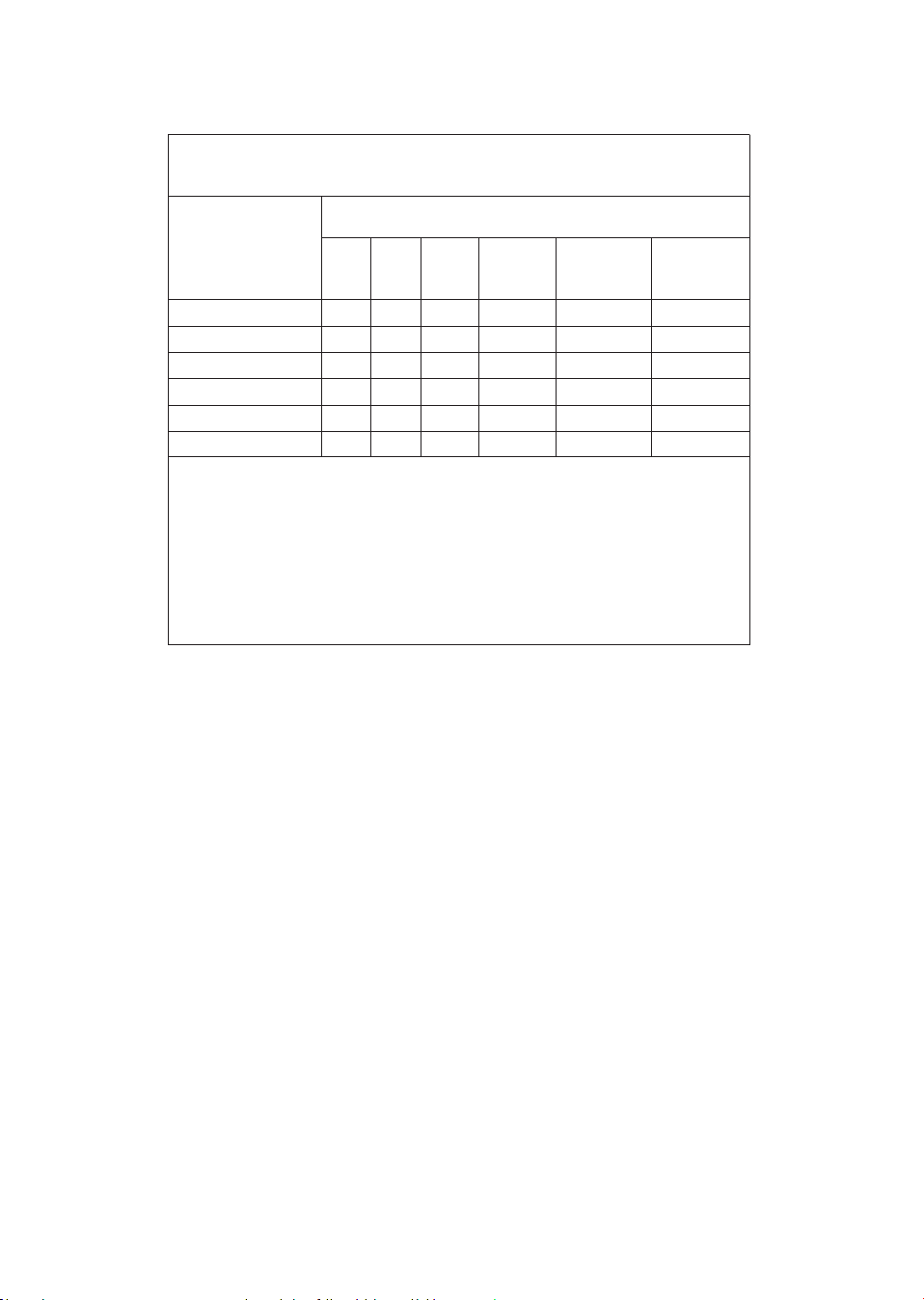
限用物質及其化學符號
Restricted substances and its chemical symbols
電源線組
塑膠外殼
電源板組件
電機組件
顯示燈板組件
傳感器板組件
○
○
-
-
○
○
○
○
○
○
○
○
○
○
○
○
○
○
○
○
○
○
○
○
○ ○ ○ ○ ○ ○
- ○ ○ ○ ○ ○
設備名稱:飛利浦空氣清淨機, 型號(型式): AC2936/86
Equipment name Type designation (Type)
備考1:“超出 0�1 wt %”及“超出 0�01 wt %”係指限用物質之百分比含量超出百分比
含量基準值。
備考
2:“○”係指該項限用物質之百分比含量未超出百分比含量基準值。
備考
3:“-”係指該項限用物質為排除項目。
Note 1 :
Note 2 : “○
” indicates that the percentage content of the restricted substance does not exceed the percentage of
reference value of presence�
Note 3 : The “ -” indicates that the restricted substance corresponds to the exemption�
“Exceeding 0�1 wt %” and “exceeding 0�01 wt %” indicate that the percentage content of the
restricted substance exceeds the reference percentage value of presence condition�
NCC
警語:
取得審驗證明之低功率射頻器材,非經核准,公司、商號或使用者均不得擅自變更頻率、加大功率或變
更原設計之特性及功能。低功率射頻器材之使用不得影響飛航安全及干擾合法通信;經發現有干擾現象
時,應立即停用,並改善至無干擾時方得繼續使用。前述合法通信,指依電信管理法規定作業之無線電
通信。低功率射頻器材須忍受合法通信或工業、科學及醫療用電波輻射性電機設備之干擾。


© 2022 Philips Domestic Appliances Holding B�V�
All rights reserved�
Tussendiepen 4 a, 9206AD Drachten, The Netherlands
3000�095� 8812�1 (23/06/2022)