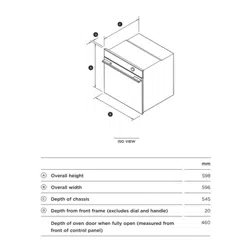

BUILT-IN OVEN
INSTALLATION GUIDE
US CA
MINIMAL
OB24SMPTDG1, OB24SMPTNG1, OB24SMPTDB1,
OB24SMPTNB1, OB24SM16PLG1 & OB24SM16PLB1
CONTEMPORARY
OB24SDPTDX2, OB24SD16PLX1 & OB24SD11PLX1
2
!
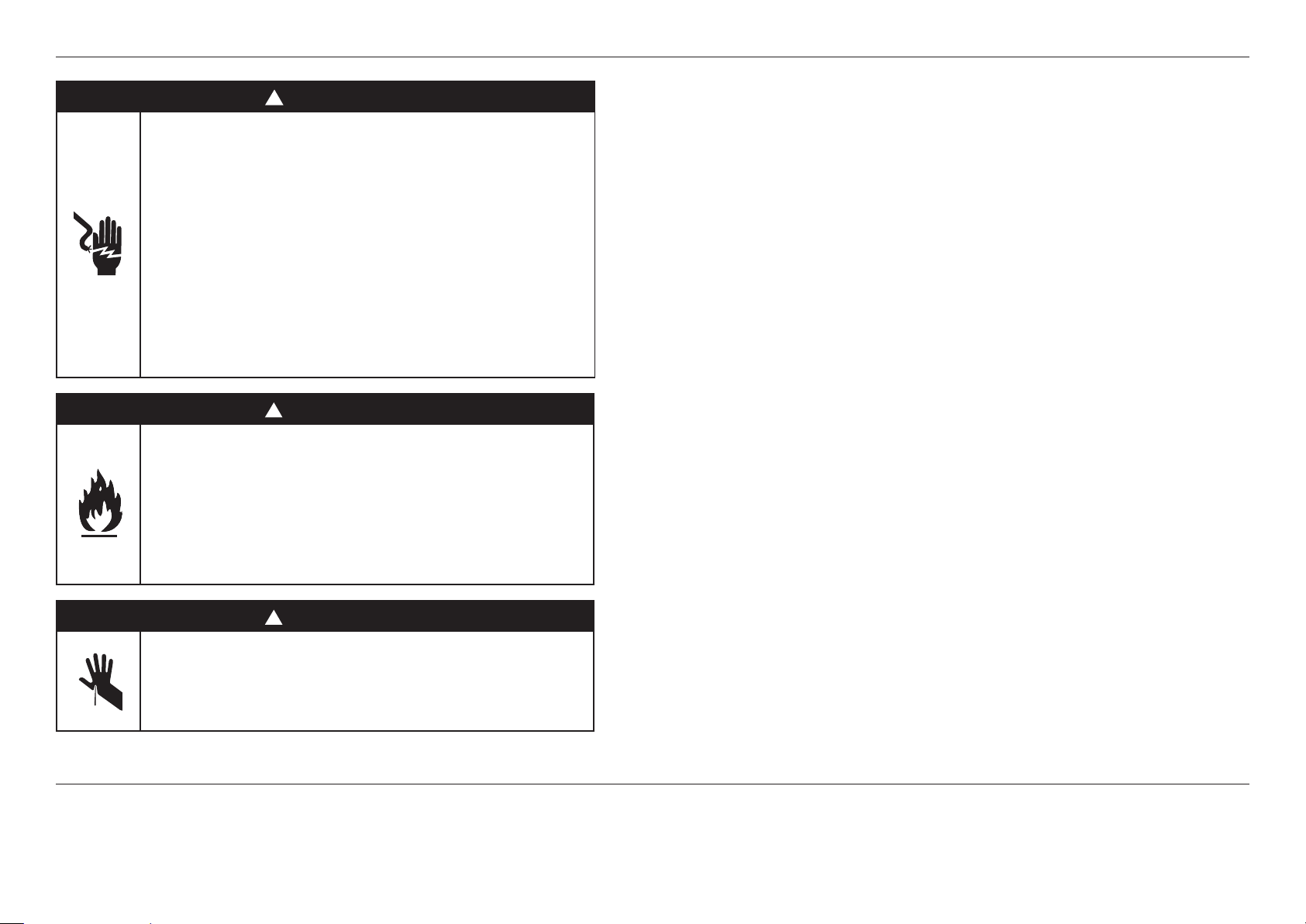
WARNING!
Electric Shock Hazard
Failure to follow this advice may result in
electric shock or death.
• Before carrying out any work on the
electrical section of the appliance, it must be
disconnected from the mains electricity supply.
• Connection to a good ground wiring system is
absolutely essential and mandatory.
• Alterations to the domestic wiring system
must only be made by a qualified electrician
!
WARNING!
Fire Hazard
Failure to follow this advice may result in
overheating, burning, and injury.
• Do not use adapters, reducers, or branching
devices to connect this appliance to the mains
power supply.
!
WARNING!
Cut Hazard
Failure to use caution could result in injury.
• Take care: some edges are sharp.
IMPORTANT!
SAVE THESE INSTRUCTIONS
The models shown in this installation guide may not be available in all markets and are subject to change at any time. For current details about model and specification availability in your country, please go
to our website www.fisherpaykel.com or contact your local Fisher & Paykel dealer.
WARNING!
To avoid hazard, follow these instructions carefully before installing or using this appliance.
z
Please make this information available to the person installing the appliance—doing so could
reduce your installation costs.
z
Save these instructions for the local inspectors use.
z
This oven is to be installed and connected to the electricity supply only by an authorized person.
z
If the installation requires alterations to the domestic electrical system, call a qualified electrician.
The electrician should also check that the socket cable section is suitable for the electricity drawn
by the oven.
z
The oven must be grounded.
z
Installation must comply with your local building and electricity regulations.
z
This appliance must be installed and connected to the mains power supply only by a suitably
qualified person according to these installation instructions and in compliance with any applicable
local building and electricity regulations. Failure to install the appliance correctly could invalidate
any warranty or liability claims.
z
If the power supply cable is damaged, it must be replaced by the manufacturer, its service agent
or similarly qualified person in order to avoid a hazard.
z
A circuit breaker is recommended.
z
Do not use adaptors, reducers or branching devices to connect the oven to the mains electricity
supply, as they can cause overheating and burning.
z
The appliance must not be installed behind a decorative door in order to avoid overheating.
z
Please take extra care not to damage the lower trim of the oven during installation. The trim is
important for correct air circulation and allows the door to open and close without obstruction.
The manufacturer does not accept any responsibility for damage resulting from incorrect
installation.
Electrical requirements
z
Connect oven with copper wire only.
z
Do not cut the conduit.
z
A U.L. listed conduit connector must be provided at the junction box.
z
Do not ground to a gas pipe.
z
Do not have a fuse in the grounding or neutral circuit.
z
Fuse both sides of the line.
z
A time delay fuse or circuit breaker is recommended. If using a time delay fuse, then fuse both
sides of the line.
z
Flexible armored cable from the appliance should be connected directly to the junction box.
z
Connect directly to the fused disconnect (or circuit breaker box) through flexible, armored or
non-metallic sheathed, copper cable (with grounding wire).
z
If codes permit and a separate grounding wire is used, it is recommended that a qualified
electrician determine that the grounding path and wire gauge are in accordance with local codes.
SAFETY AND WARNINGS
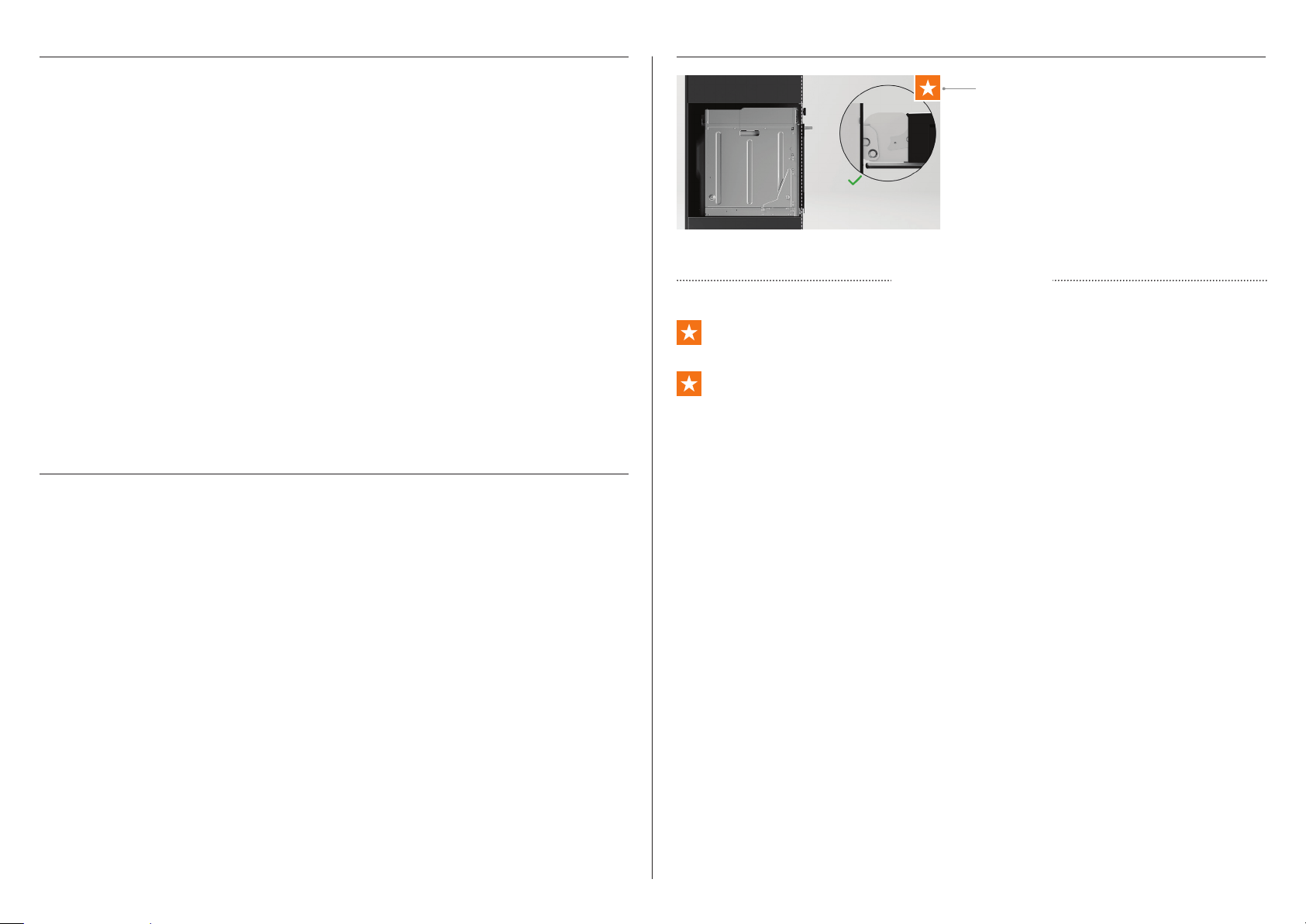
Ensure that:
z
the oven door can open fully without obstruction
z
the oven is not sealed into the cabinetry with silicone or glue. This makes future servicing
difficult. Fisher & Paykel will not cover the costs of removing the oven, or of damage caused
by this removal
z
the power supply cable does not touch any hot metal parts
z
the isolating switch is easily accessible to the customer with the oven installed
z
you complete the ‘Final checklist’ at the end of the installation
If, after following the guidance given, correct performance cannot be achieved, please contact
your nearest Fisher & Paykel trained and supported service technician, Customer Care, or
contact us through our website fisherpaykel.com
PRIOR TO INSTALLATION INSTALLATION MILESTONES
AFTER INSTALLATION
Ensure that:
• The countertop and oven cavity are square and level, and are the required dimensions.
• The installation will comply with all clearance requirements and applicable standards and
regulations.
• The isolating switch will be easily accessible to the customer with the oven installed.
• The electrician provides sufficient free length of power supply cable to reach from the
bottom rear of the cavity to at least 1.5 metres in front of the bottom edge of the opening.
• The cable may enter the cavity from the side, top or bottom, but top entry must be at the
rear of the cavity.
• The oven connection socket (if fitted) is outside the cavity if the oven is flush to the rear
wall.
• The oven will rest on a surface that can support its weight.
• The height from the floor suits the customer.
• You consult local building authorities and by-laws if in doubt regarding installation.
IMPORTANT!
Some environmental factors and cooking habits can cause condensation in and around the
oven during use. To protect surrounding cabinetry from possible damage caused by frequent
or excessive condensation, we recommend moisture-proofing the oven cavity.
These milestones represent areas throughout
that are pivotal to an optimal installation
outcome. These steps require additional
installer attention and should be quality
checked once completed.
Ensure both hinges are fully locked before shutting the door.
Align oven with surrounding cabinetry and appliances.
Milestone indicator
MILESTONE LINKS
3
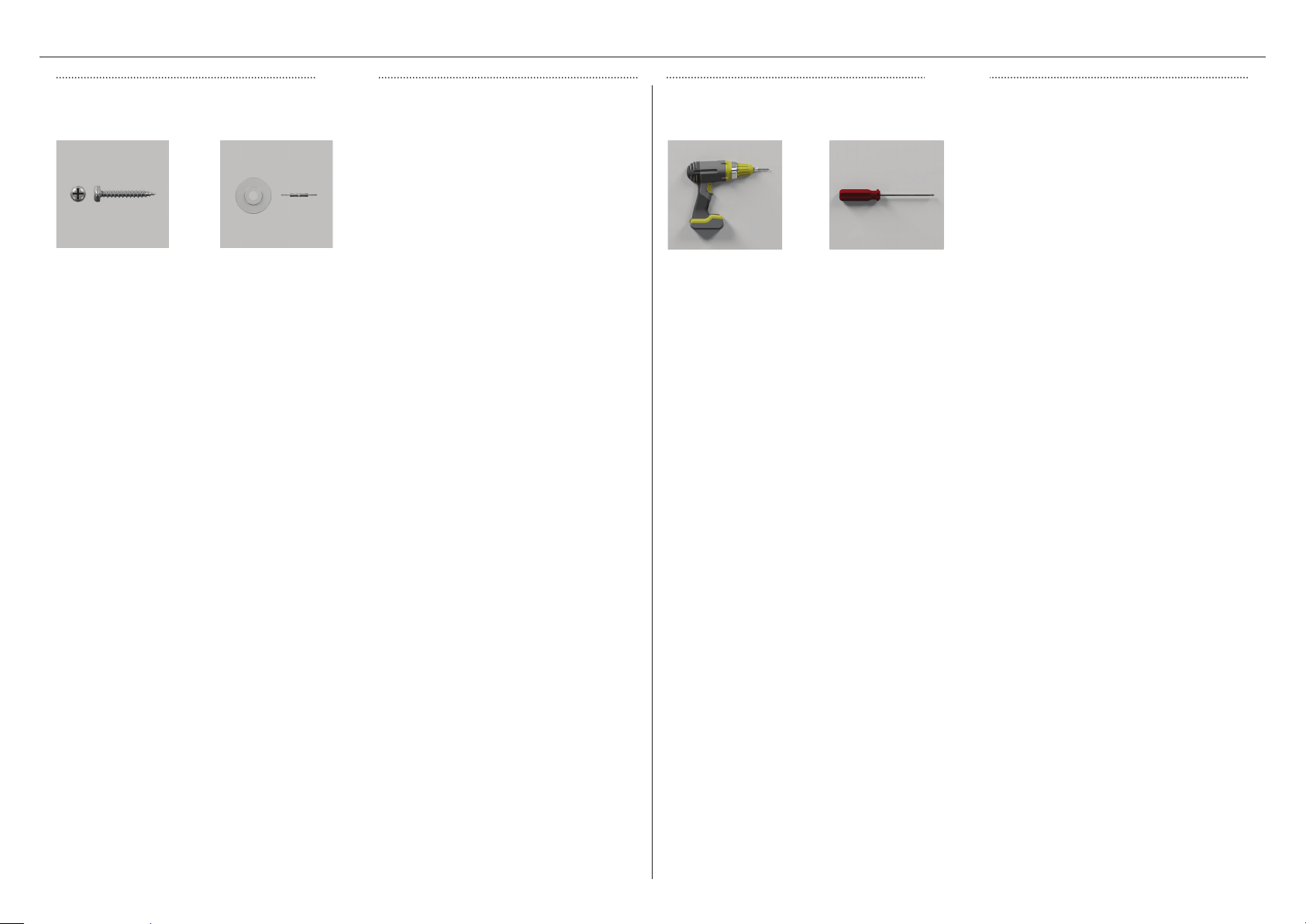
COMPONENTS
PARTS
Supplied
Screws (2)
Metal side shelves
fixing nut (2)
TOOLS
Not supplied
Powered driver Cross-head
screwdriver
4
5
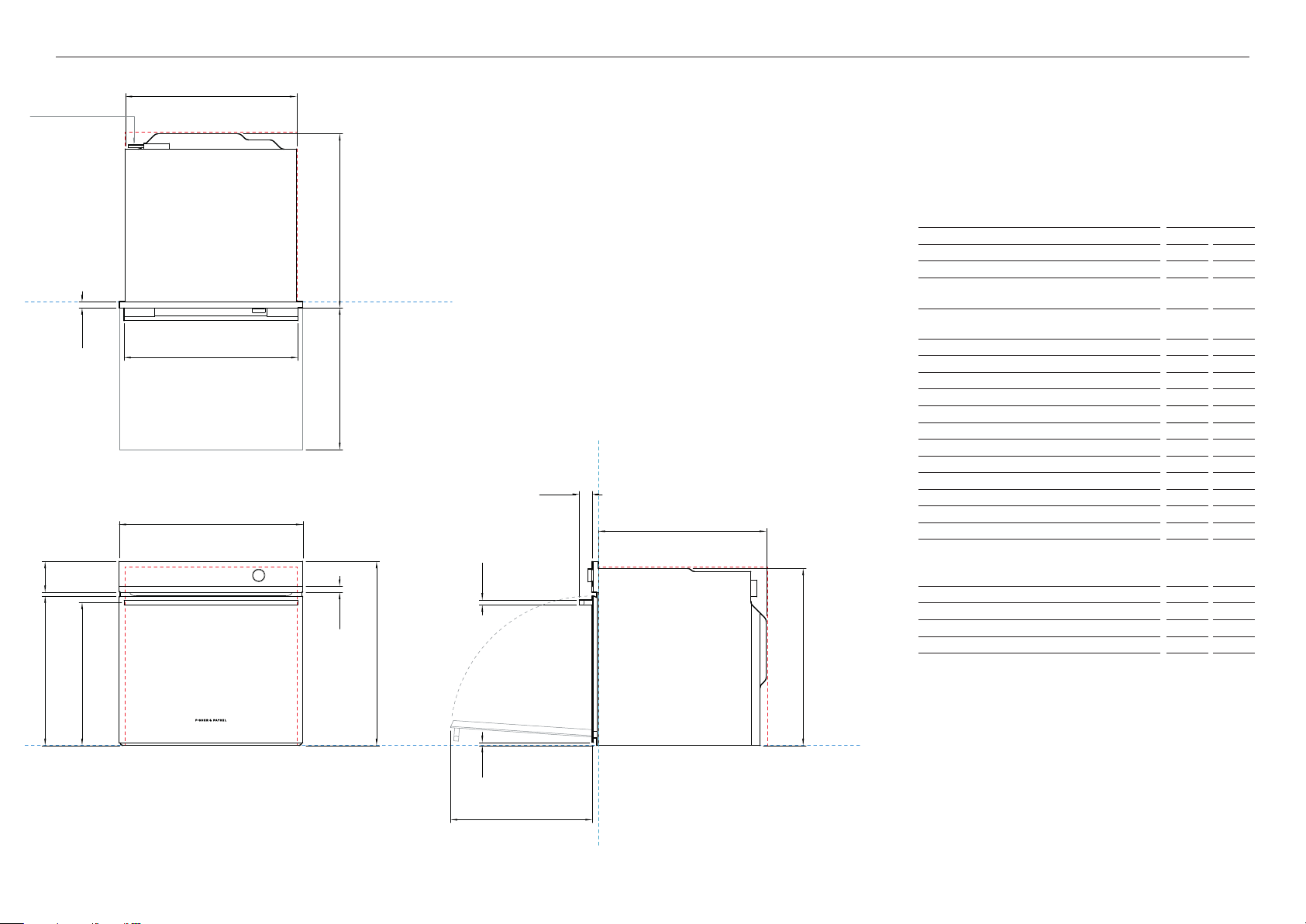
PRODUCT DIMENSIONS
PLAN VIEW
FRONT VIEW PROFILE VIEW
E
n
o
f
p
i
a
k
b
j
h
l
p
m
c
d
g
DATUM : FRONT OF CHASSIS
DATUM : FRONT OF CHASSIS
DATUM : BOTTOM OF CHASSIS
POWER OUTLET LOCATION
21 7/16
2 7/16
2 9/16
Product Dimensions
inches
mm
a Overall height of oven
2 9/16
598
B Overall width of oven
2 7/16
596
c Depth of front frame (excludes dial, handle and front
stainless trim)
1/16
20
d Depth of oven chassis and front frame (excludes dial,
handle and front stainless trim)
22 1/4
565
E Depth of chassis
21 7/16
545
F Height of chassis
18 11/16
475
G Width of chassis
21 7/8
556
h Height from bottom datum to top of oven door
19 /16
487
i Distance from bottom datum to bottom of door
1/2
12
j Height of control panel
15/16
100
k Height of stainless steel cap on control panel
1/16
20
l Height from bottom datum to centreline of handle
18 1/4
464
m Width of handle
22 1/4
565
n Depth of handle (measured from front of door)
1 5/8
42
o Thickness of handle
5/8
16
p Depth of door (open) (measured from front of door)
18 1/8
460
Minimum Clearances
inches
mm
Minimum inside height of cavity
22 1/16
580
Minimum inside width of cavity
22 1/16
560
Minimum inside depth of cavity
21 5/8
550
IMPORTANT NOTE: Throughout this guide, dimensions may vary by 1/16” (mm)
INDICATES PRODUCT DATUM -------------------------------------------
INDICATES CABINETRY CLEARANCES --------------------------------
6
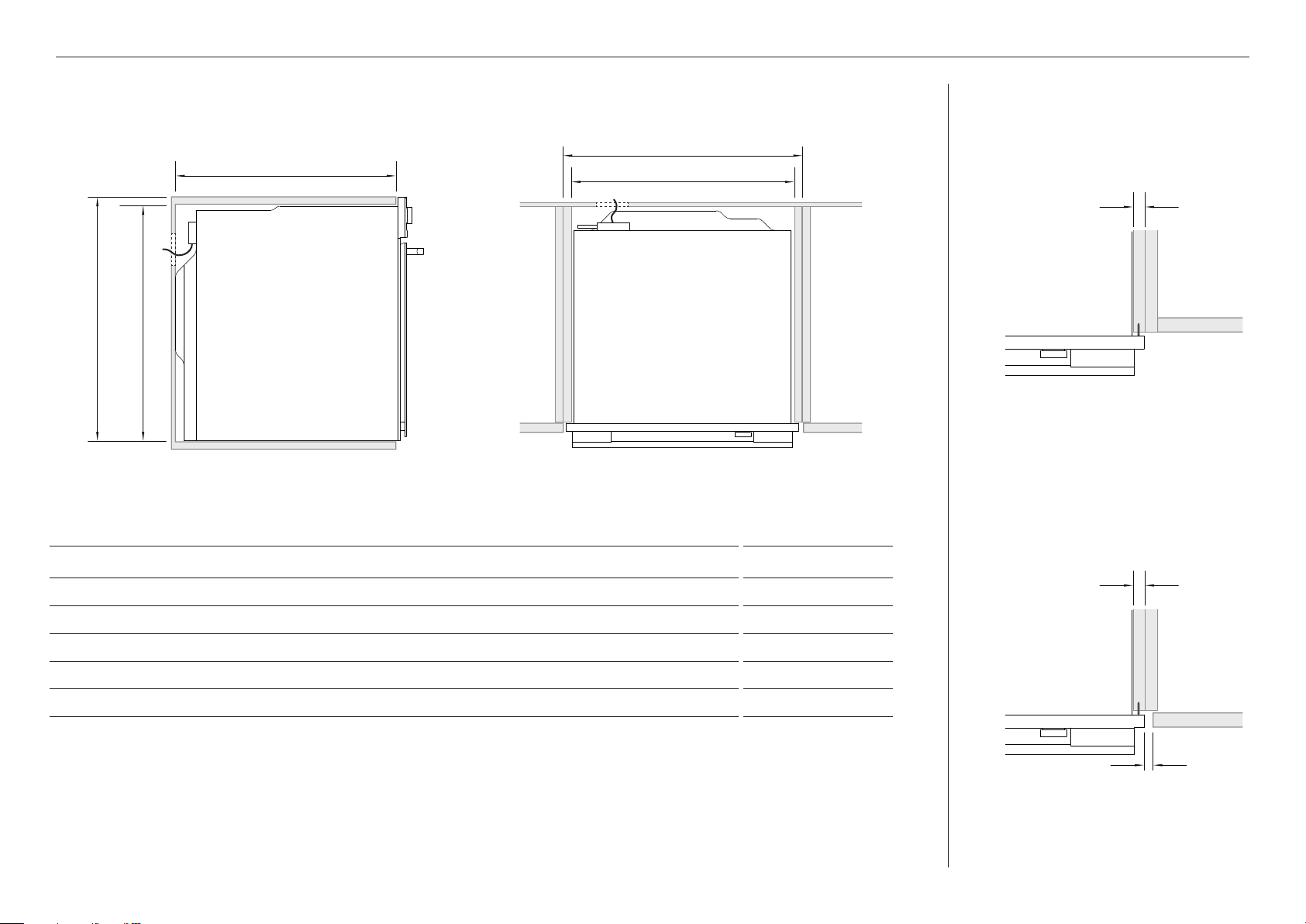
CABINETRY DIMENSIONS INCHES MM
A Minimum inside width of cavity
22 1/16 560
B Overall width of cabinetry
23 5/8 600
C Overall height of cabinetry
23 5/8 600
D Minimum inside height of cavity
22 13/16 580
E Minimum inside depth of cavity
21 5/8 550
If installing a cooktop above the oven, ensure adequate clearance is provided as per the cooktop manufacturer’s instructions.
CABINETRY DIMENSIONS
PROUD INSTALL
FLUSH INSTALL
PROFILE PLAN
c
e
b
d a
5/8-13/16"
(16-20mm)
5/8-13/16"
(16-20mm)
1/16"
(2mm)
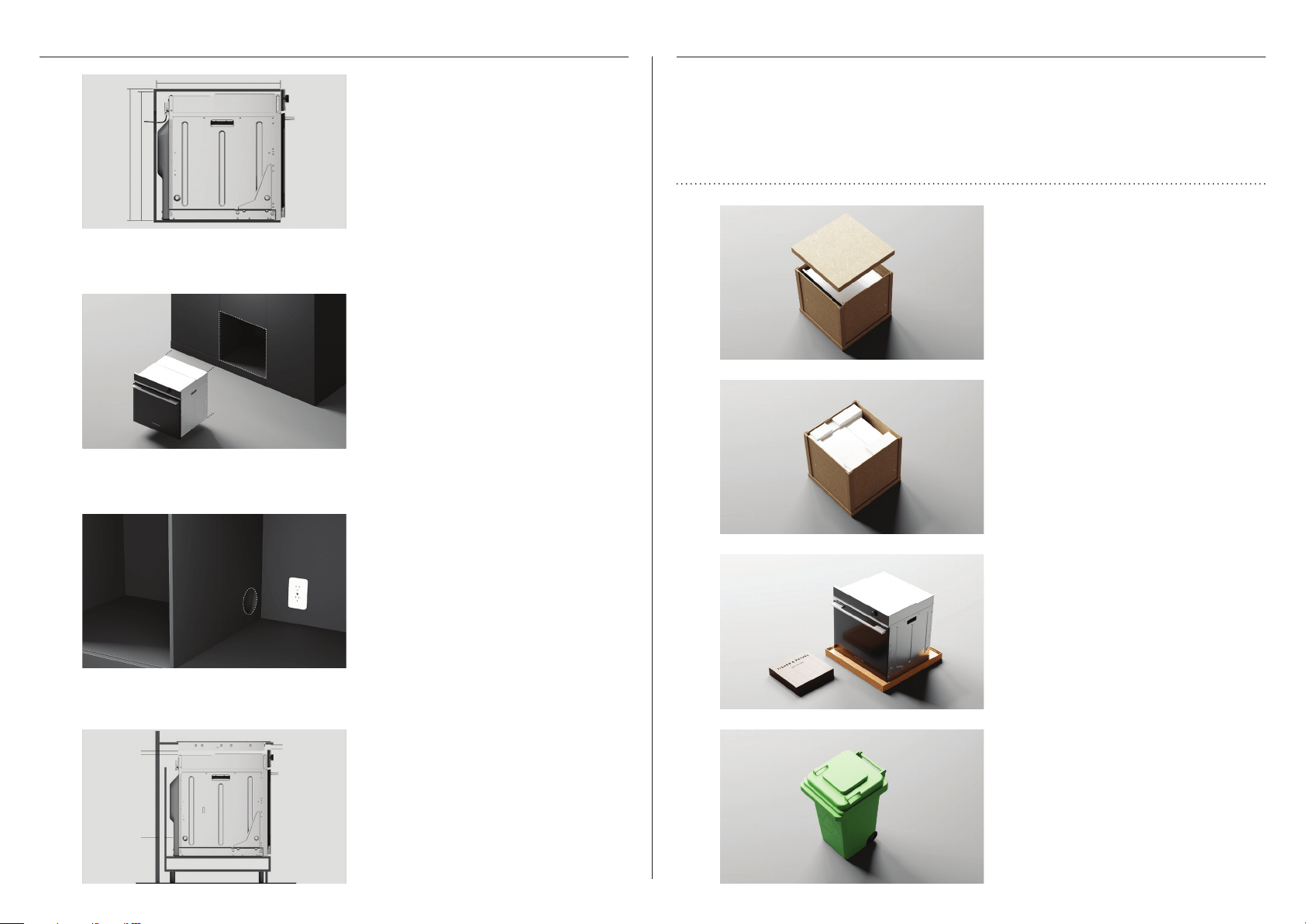
CHECK CAVITY
For dark cabinetry, ensure clashing has
been considered and installed.
Measure cavity dimensions. Ensure all
minimum specifications have been met.
Refer to page 6.
Ensure service access complies with
local requirements. Refer to page 8 for
details.
1
2
3
4
Ensure any cooktop ventilation
requirements have been considered.
UNPACK PRODUCT
Lift the carton sleeve and remove any
transit packaging.
Cut all straps and remove the carton top
cap.
Set aside any accessories.
1
2
3
4
Dispose responsibly.
z
Do not lift or move the product using the handle.
z
Keep all packing materials until the unit has been inspected.
z
Inspect the product to ensure there is no shipping damage. If any damage is
detected contact the dealer or retailer you brought the product from to report the
damage.
z
Fisher & Paykel is not responsible for shipping damage.
7
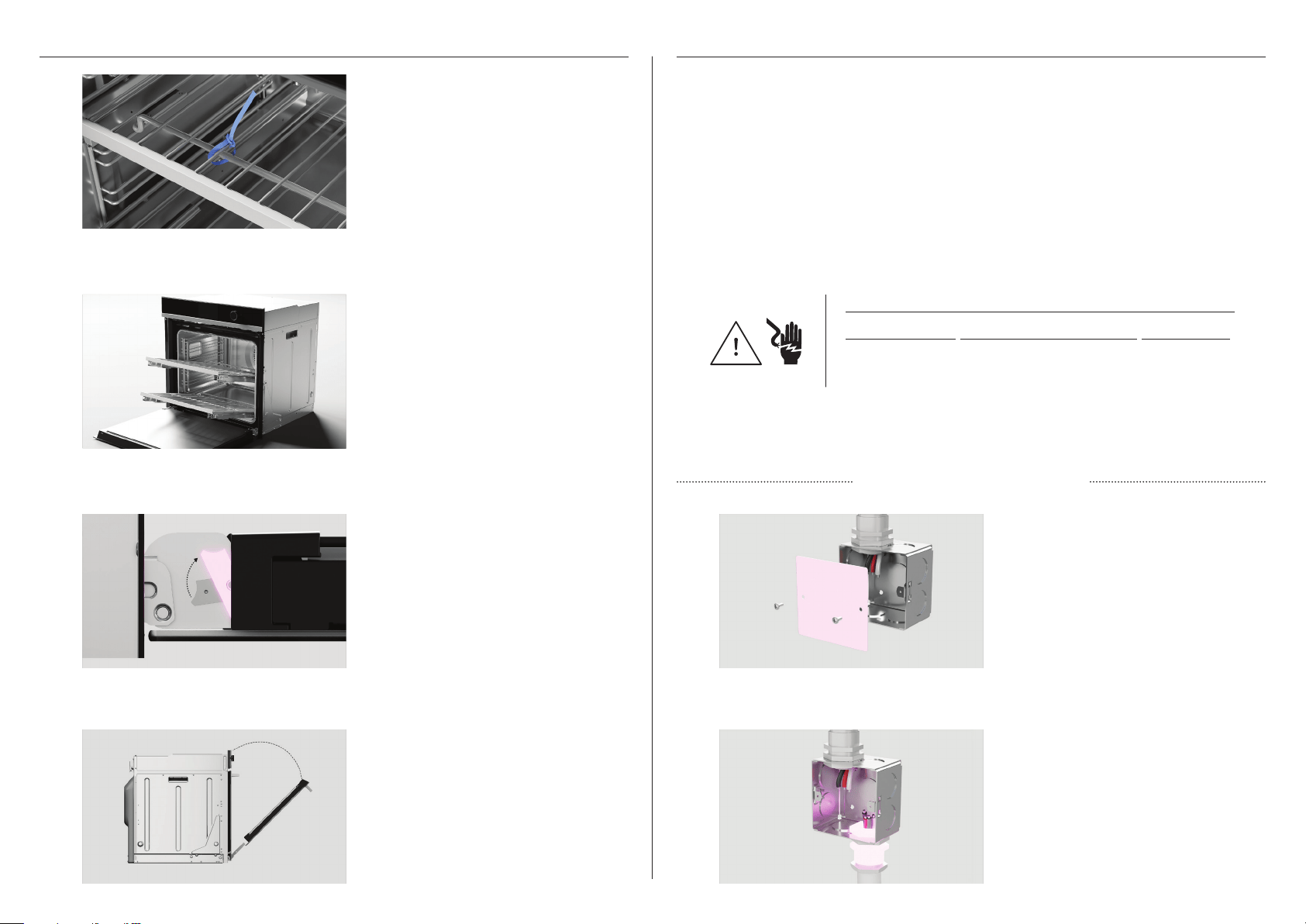
REMOVE DOOR
Grip the shelves at the front, making
sure to hold the wire shelf and frame
together. Lift upwards and pull out from
the oven.
Open the door and remove all cable ties
and packaging holding the oven shelves
in place.
Locate the hinge locks on either side
of the door. Push the locks upwards to
release.
1
2
3
4
Holding the door on both sides, partially
close the door and carefully pull the
door away from the hinges.
CONNECT POWER
OB24S MODELS
VOLTAGE MAX. CURRENT DRAW MAX LOAD
208 V 16.6 A 3.5 kW
240 V 19.4 A 4.6 kW
z
This oven must be connected to the mains power supply only by a suitably qualified
person.
z
This oven must be earthed.
Before connecting the oven to the mains power supply, check that:
the domestic wiring system is suitable for the power drawn by the oven (as specified on the
rating plate)
the voltage corresponds to the value given on the rating plate.
THREE WIRE CONNECTION
Disconnect the power supply and
remove the junction box cover.
1
2
Connect the oven cable to the junction
box through the U.L-listed conduit
connector.
8
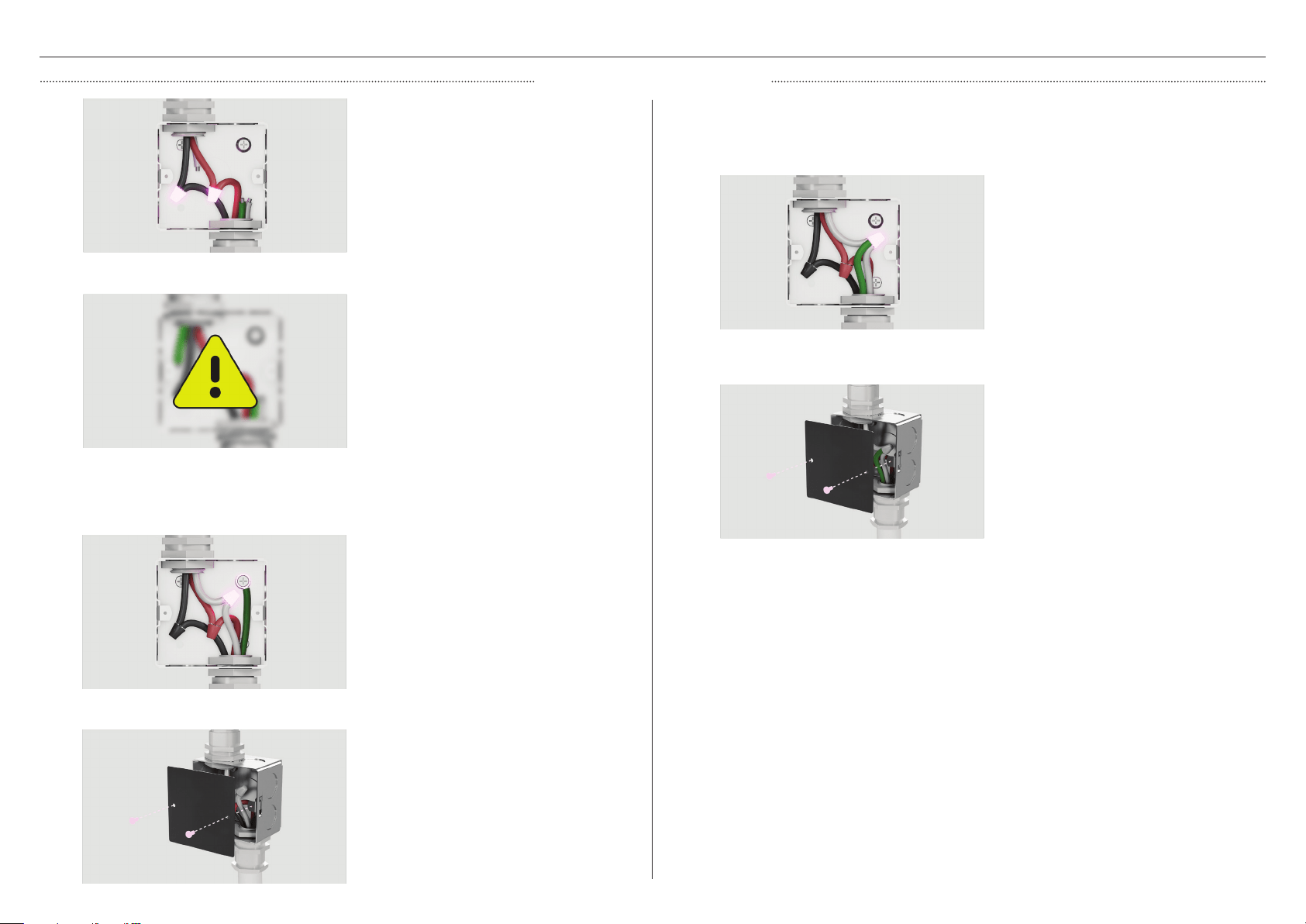
CONNECT POWER
THREE WIRE CONNECTION
Connect the two black wires together
with twist-on connectors and the
two red wires together with twist-on
connectors.
Seperate the factory-taped green and
white oven cable wires. If junction box is
grounded, connect the green wire to the
metal junction box with a screw before
connecting the white oven cable wire to
the neutral (white) wire in juction box.
3
1
2
Replace the junction box cover.
If local codes DO NOT PERMIT connecting the cabinet-grounding conductor to the neutral
(white) wire in junction box.
If local codes permit connecting the cabinet-grounding conductor to the neutral (white) wire
in junction box.
Connect the factory-taped gree and
white oven wires to the neutral (white)
wire in the junction box.
1
2
Replace the junction box cover.
4
Connect electrical connection according
to local codes and ordinances.
9
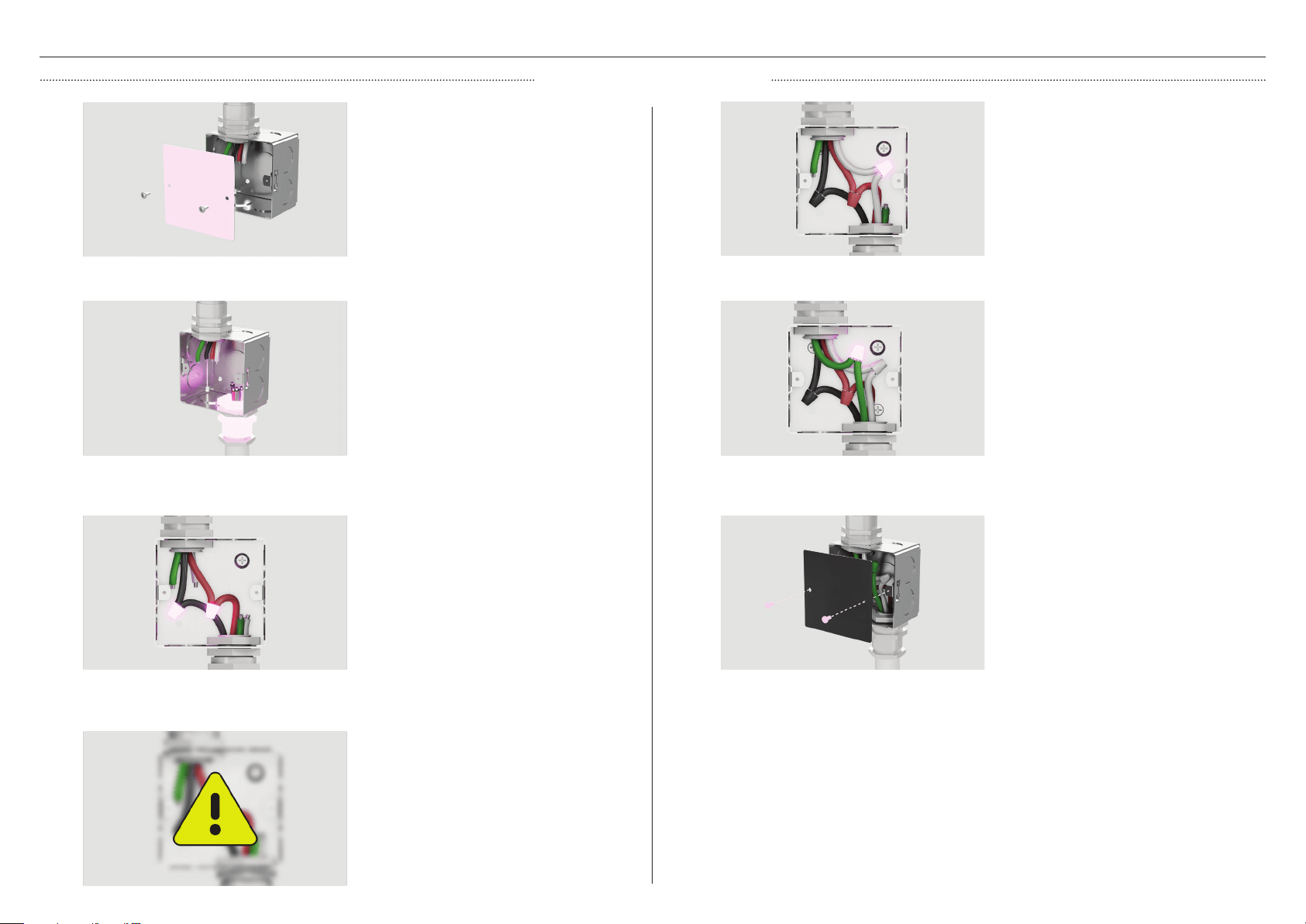
CONNECT POWER
FOUR WIRE CONNECTION
Connect the oven cable to the junction
box through the U.L - listed confuit
connector.
Disconnect the power supply and
remove the junction box cover.
Connect the two black wires together
with twist-on connectors and the
two red wires togeher with twist-on
connectors.
1
2
3
4
Connect electrical connection according
to local codes and ordinances.
Connect the green grounding oven
cable wire to the (green) grounding
wire in the junction box. Do not connect
the green grounding wire to the neutral
(white) wire in junction box.
Seperate the green and white oven cable
wires. Connect the white oven cable wire
to the neutral (white) wire in junction
box.
Replace the junction box cover.
5
6
7
10
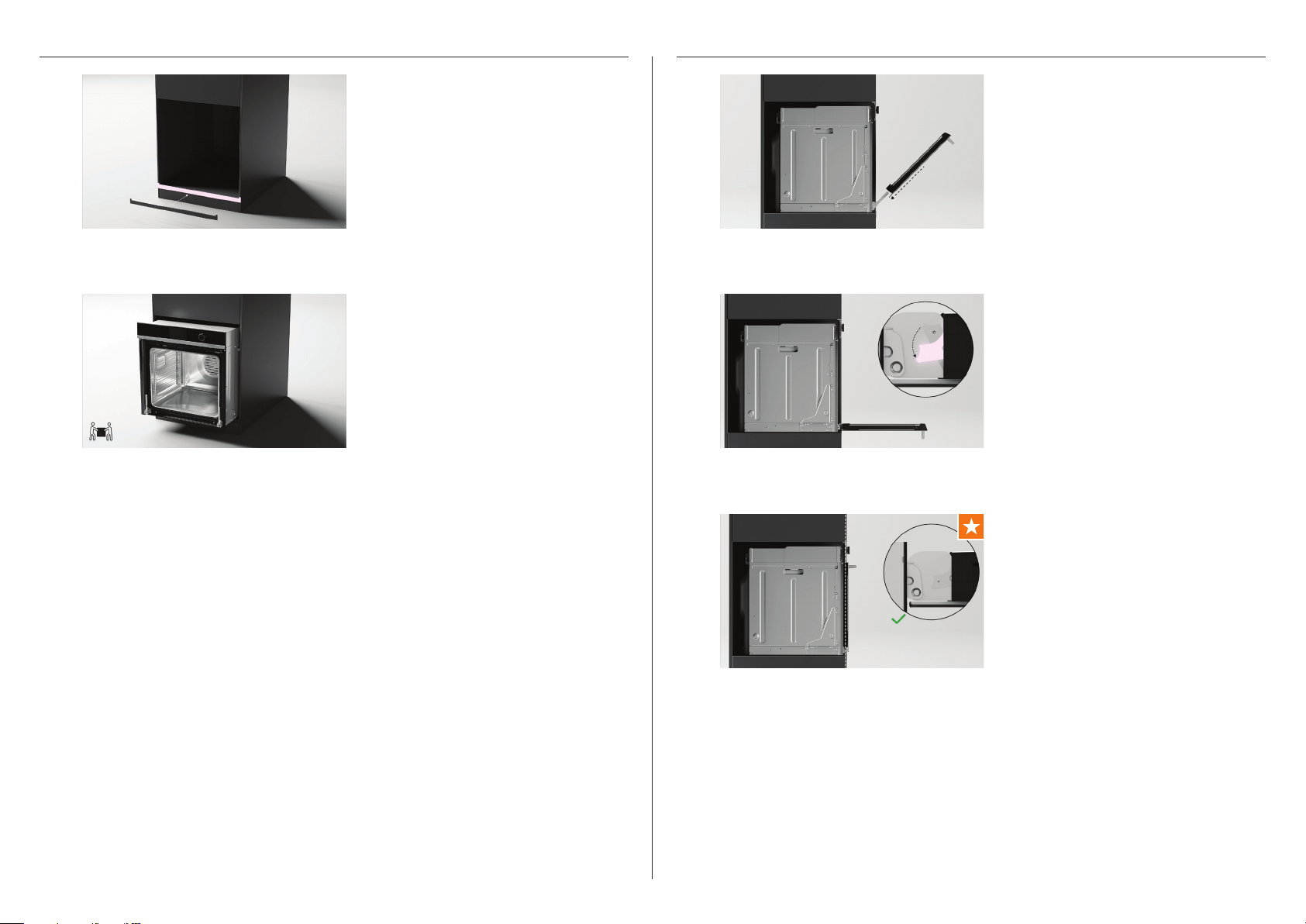
POSITION OVEN INTO CAVITY
Lift product into cavity.
Some models only*:
For dark cabinetry, the supplied trim can
be used to enhance clashing finish.
To install, remove the trim adhesive and
press to secure to cavity.
1
2
REFIT DOOR
Open the door fully and push each
locking lever down and lock into place.
Holding the door on both sides, carefully
lift door back onto the hinges.
Ensure both hinges are fully locked
before shutting the door.
1
2
3
*Model code 565881. To purchase cabinetry trim as an optional accessory, visit fisherpaykel.com
11
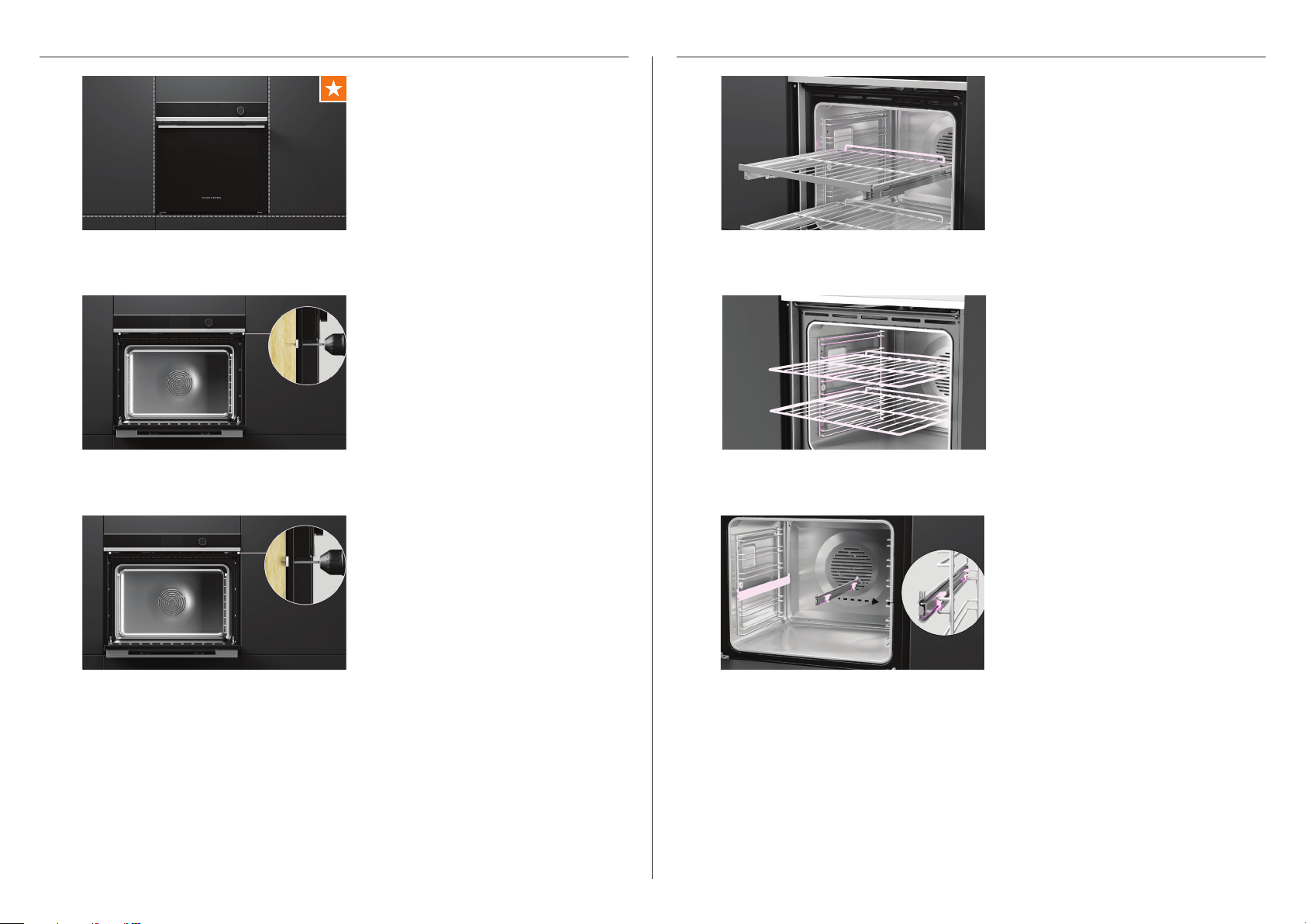
ALIGN AND SECURE
Using the product as a guide, pre-drill 2
x 3mm pilot holes.
Align oven with surrounding cabinetry
and appliances.
Secure oven to cavity using the 2 x
#7x13 pan head screws provided.
1
2
3
REFIT SHELVES
Sliding shelves
Place shelves back into the oven at the
desired level.
Ensure shelves are level and correctly
positioned with the guard rail at the back.
Clip on sliding shelf supports
Ensure the slides are positioned the
correct way around, with the triangular
tab at the front.
Fit the top clips over the side rack. The
front clip should be fitted as close to the
front of the side rack as possible. Make
sure the rear clip has engaged.
Click the bottom clips into place.
Wire shelves
Slide shelves into the cavity.
1
2
3
12

TO BE COMPLETED BY THE INSTALLER
Ensure the oven is level and securely fitted to the cabinetry.
Check the lower trim is undamaged.
Open the oven door slowly until it is fully open and check there is adequate clearance
between the bottom of the door and the lower trim.
This is to ensure correct air circulation. Should the lower trim become damaged,
straighten the trim and ensure the oven door opens fully without obstruction.
Ensure you remove all internal packaging (including the circular yellow packing retainers
holding the accessory box in place).
Ensure all oven vents and openings are clear and free of any obstruction or damage.
Failure to make sure all oven vents are clear may result in poor product performance.
Ensure the isolating switch is accessible by the customer.
Complete and keep for safe reference:
Model
Serial No.
Purchase Date
Purchaser
Dealer Address
Installer’s Name
Installer’s Signature
Installation Company
Installation Date
INSTALLER CHECKLISTTEST OVEN
Follow the guidance on screen to ensure
oven turns on and heats correctly.
Refer to your User Guide for more
information.
13

14
FISHERPAYKEL.COM
US CA
900026A 09.22
© Fisher & Paykel Appliances 2023. All rights reserved.
The models shown in this guide may not be available in all markets
and are subject to change at any time.
The product specifications in this guide apply to the specific products and
models described at the date of issue. Under our policy of continuous product
improvement, these specifications may change at any time.
For current details about model and specification availability in your country,
please go to our website or contact your local Fisher&Paykel dealer.