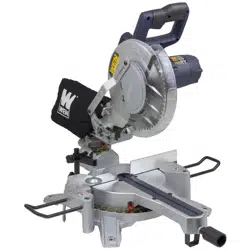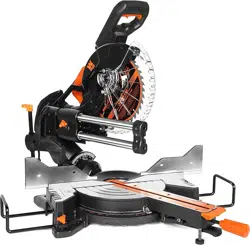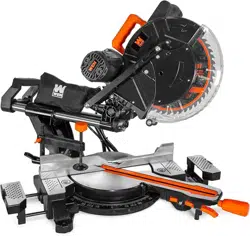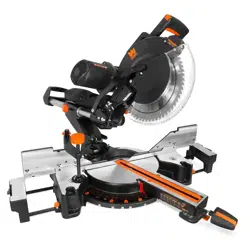
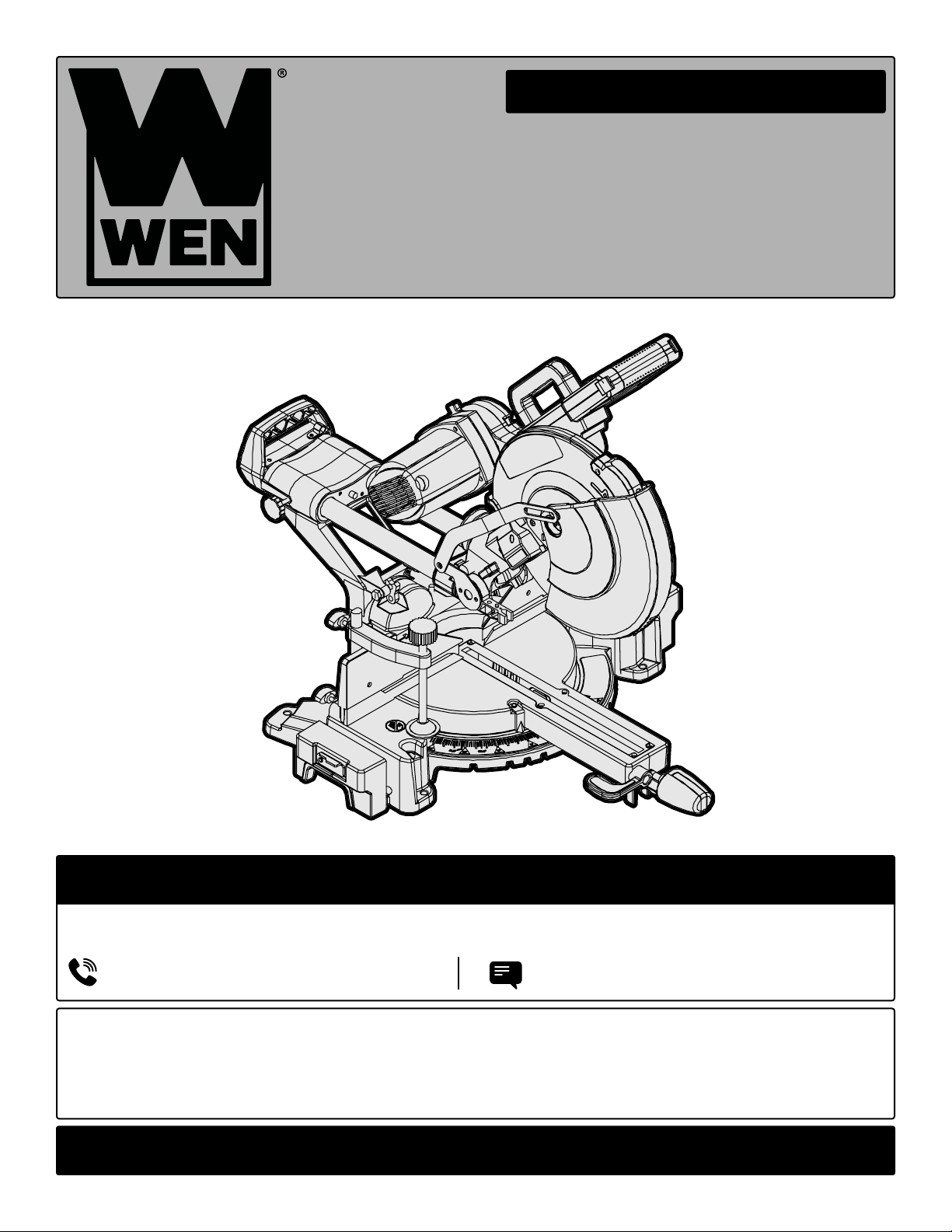
12" DUAL-BEVEL
MITER SAW
Instruction Manual
IMPORTANT: Your new tool has been engineered and manufactured to WEN’s highest standards for dependability,
ease of operation, and operator safety. When properly cared for, this product will supply you years of rugged,
trouble-free performance. Pay close attention to the rules for safe operation, warnings, and cautions. If you use
your tool properly and for its intended purpose, you will enjoy years of safe, reliable service.
NEED HELP? CONTACT US!
Have product questions? Need technical support? Please feel free to contact us:
TECHSUPPOR[email protected]1-800-232-1195 (M-F 8AM-5PM CST)
For replacement parts and the most up-to-date instruction manuals, visit WENPRODUCTS.COM
MODEL MM1214, MM1214T

32
CONTENTS
WELCOME 3
Introduction ..................................................................................................... 3
Specifications ................................................................................................... 3
SAFETY 4
General Safety Rules ........................................................................................ 4
Miter Saw Safety Warnings .............................................................................. 6
Electrical Information ....................................................................................... 8
BEFORE OPERATING 9
Unpacking & Transportation .............................................................................9
Know Your Miter Saw .................................................................................... 10
Assembly & Adjustments ............................................................................... 12
OPERATION & MAINTENANCE 19
Operation ....................................................................................................... 19
Maintenance ....................................................................................................21
Troubleshooting Guide ................................................................................... 22
Exploded View & Parts List .............................................................................23
Warranty Statement ........................................................................................27
To purchase accessories and replacement parts for your tool, visit WENPRODUCTS.COM
Replacement Miter Saw Blades (Model MM1214B)
Replacement Carbon Brushes (Model MM1214-114)
32
SPECIFICATIONS
INTRODUCTION
Thanks for purchasing the WEN Miter Saw. We know you are excited to put your tool to work, but first, please
take a moment to read through the manual. Safe operation of this tool requires that you read and understand this
operator’s manual and all the labels affixed to the tool. This manual provides information regarding potential safety
concerns, as well as helpful assembly and operating instructions for your tool.
NOTE: The following safety information is not meant to cover all possible conditions and situations that may occur.
WEN reserves the right to change this product and specifications at any time without prior notice.
At WEN, we are continuously improving our products. If you find that your tool does not exactly match this manual,
please visit wenproducts.com for the most up-to-date manual or contact our customer service at 1-800-232-1195.
Keep this manual available to all users during the entire life of the tool and review it frequently to maximize
safety for both yourself and others.
Indicates danger, warning, or caution. The safety symbols and the explanations with them deserve your
careful attention and understanding. Always follow the safety precautions to reduce the risk of fire, electric shock
or personal injury. However, please note that these instructions and warnings are not substitutes for proper ac-
cident prevention measures.
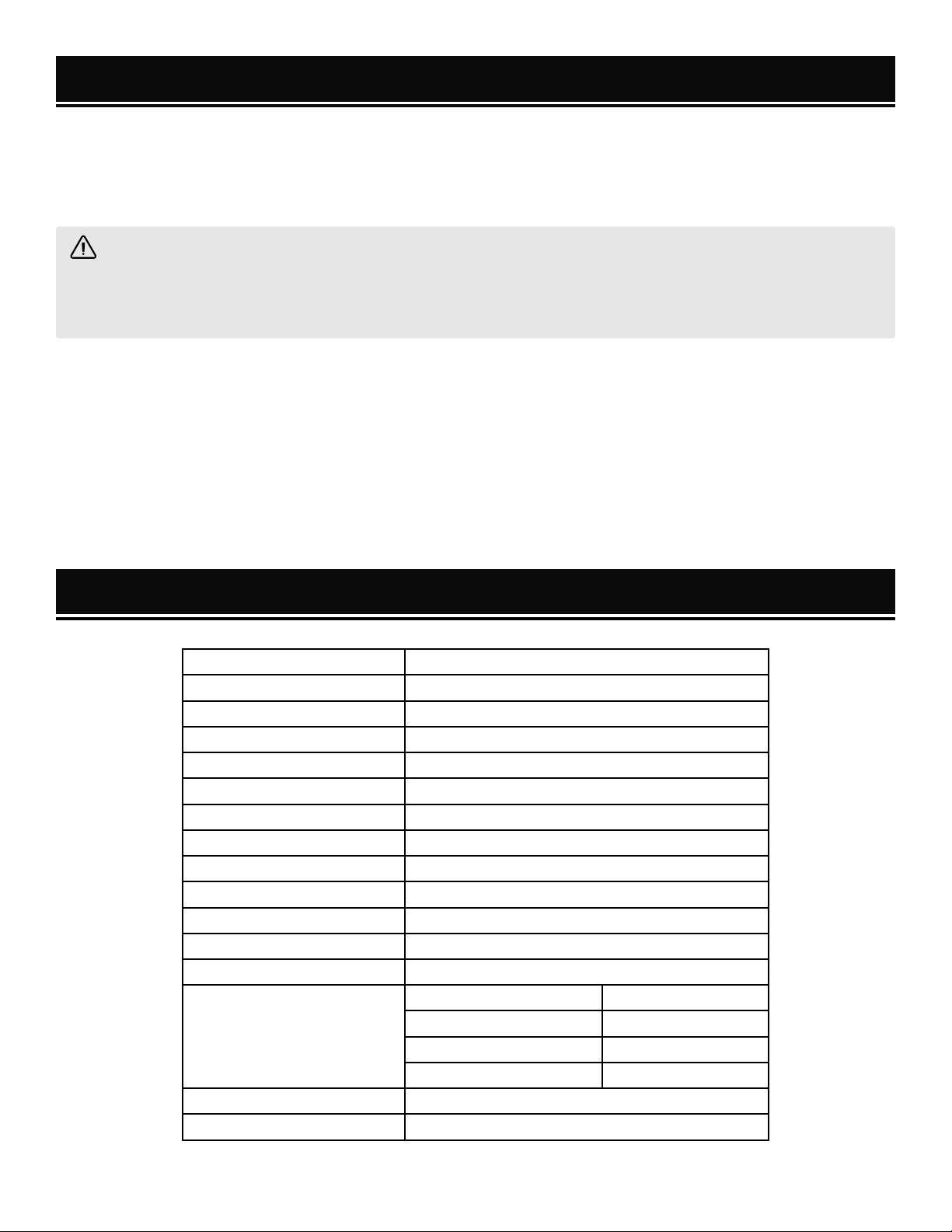
Model Number MM1214, MM1214T
Motor 120V, 60 Hz, 15A
Laser Type 650 nm, <1 mW
Laser Class II
No-Load Speed 3800 RPM
Blade Part Number MM1214B
Blade Size 12" (305mm) TCT
Arbor Size 1" (25.4mm)
Kerf 2.8mm
Teeth 60T
Miter Table Angles 0° - 45° Left & Right
Bevel Cut Angles 0° - 45° Left & Right
Positive Miter Stops
0°, 15°, 22.5°, 30°, and 45° Left & Right
Cutting Capacity
0° Miter, 90° Bevel 3-1/2" x 13-3/8"
45° Miter, 90° Bevel 3-1/2" x 9-1/2"
0° Miter, 45° Bevel 2-1/8" x 13-3/8"
45° Miter, 45° Bevel 2-1/8" x 9-1/2"
Weight 61 Pounds
Product Dimensions 27 in. x 35 in. x 20 in.

54
GENERAL SAFETY RULES
WORK AREA SAFETY
1. Keep work area clean and well lit. Cluttered or dark
areas invite accidents.
2. Do not operate power tools in explosive atmo-
spheres, such as in the presence of flammable liquids,
gases or dust. Power tools create sparks which may ig-
nite the dust or fumes.
3. Keep children and bystanders away while operating
a power tool. Distractions can cause you to lose control.
ELECTRICAL SAFETY
1. Power tool plugs must match the outlet. Never mod-
ify the plug in any way. Do not use any adapter plugs
with earthed (grounded) power tools. Unmodified plugs
and matching outlets will reduce risk of electric shock.
2. Avoid body contact with earthed or grounded surfac-
es such as pipes, radiators, ranges and refrigerators.
There is an increased risk of electric shock if your body
is earthed or grounded.
3. Do not expose power tools to rain or wet conditions.
Water entering a power tool will increase the risk of elec-
tric shock.
4. Do not abuse the cord. Never use the cord for car-
rying, pulling or unplugging the power tool. Keep cord
away from heat, oil, sharp edges or moving parts.
Damaged or entangled cords increase the risk of electric
shock.
5. When operating a power tool outdoors, use an ex-
tension cord suitable for outdoor use. Use of a cord
suitable for outdoor use reduces the risk of electric
shock.
6. If operating a power tool in a damp location is un-
avoidable, use a ground fault circuit interrupter (GFCI)
protected supply. Use of a GFCI reduces the risk of elec-
tric shock.
PERSONAL SAFETY
1. Stay alert, watch what you are doing and use com-
mon sense when operating a power tool. Do not use a
power tool while you are tired or under the influence
of drugs, alcohol or medication. A moment of inatten-
tion while operating power tools may result in serious
personal injury.
2. Use personal protective equipment. Always wear
eye protection. Protective equipment such as a respira-
tory mask, non-skid safety shoes and hearing protection
used for appropriate conditions will reduce the risk of
personal injury.
3. Prevent unintentional starting. Ensure the switch is
in the off-position before connecting to power source
and/or battery pack, picking up or carrying the tool.
Carrying power tools with your finger on the switch or
energizing power tools that have the switch on invites
accidents.
4. Remove any adjusting key or wrench before turning
the power tool on. A wrench or a key left attached to a
rotating part of the power tool may result in personal
injury.
5. Do not overreach. Keep proper footing and balance
at all times. This enables better control of the power
tool in unexpected situations.
6. Dress properly. Do not wear loose clothing or jew-
elry. Keep your hair and clothing away from moving
parts. Loose clothes, jewelry or long hair can be caught
in moving parts.
Safety is a combination of common sense, staying alert and knowing how your item works. The term “power tool”
in the warnings refers to your mains-operated (corded) power tool or battery-operated (cordless) power tool.
SAVE THESE SAFETY INSTRUCTIONS.
WARNING! Read all safety warnings and all instructions. Failure to follow the warnings and instructions may
result in electric shock, fire and/or serious injury.

54
GENERAL SAFETY RULES
7. If devices are provided for the connection of dust
extraction and collection facilities, ensure these are
connected and properly used. Use of dust collection
can reduce dust-related hazards.
POWER TOOL USE AND CARE
1. Do not force the power tool. Use the correct power
tool for your application. The correct power tool will
do the job better and safer at the rate for which it was
designed.
2. Do not use the power tool if the switch does not turn
it on and off. Any power tool that cannot be controlled
with the switch is dangerous and must be repaired.
3. Disconnect the plug from the power source and/or
the battery pack from the power tool before making
any adjustments, changing accessories, or storing
power tools. Such preventive safety measures reduce
the risk of starting the power tool accidentally.
4. Store idle power tools out of the reach of children
and do not allow persons unfamiliar with the power
tool or these instructions to operate the power tool.
Power tools are dangerous in the hands of untrained us-
ers.
5. Maintain power tools. Check for misalignment or
binding of moving parts, breakage of parts and any
other condition that may affect the power tool’s opera-
tion. If damaged, have the power tool repaired before
use. Many accidents are caused by poorly maintained
power tools.
6. Keep cutting tools sharp and clean. Properly main-
tained cutting tools with sharp cutting edges are less
likely to bind and are easier to control.
7. Use the power tool, accessories and tool bits, etc.
in accordance with these instructions, taking into ac-
count the working conditions and the work to be per-
formed. Use of the power tool for operations different
from those intended could result in a hazardous situa-
tion.
8. Use clamps to secure your workpiece to a stable
surface. Holding a workpiece by hand or using your
body to support it may lead to loss of control.
9. KEEP GUARDS IN PLACE and in working order.
SERVICE
1. Have your power tool serviced by a qualified repair
person using only identical replacement parts. This
will ensure that the safety of the power tool is main-
tained.
CALIFORNIA PROPOSITION 65 WARNING
Some dust created by power sanding, sawing, grinding,
drilling, and other construction activities may contain
chemicals, including lead, known to the State of Califor-
nia to cause cancer, birth defects, or other reproductive
harm. Wash hands after handling. Some examples of
these chemicals are:
• Lead from lead-based paints.
• Crystalline silica from bricks, cement, and other
masonry products.
• Arsenic and chromium from chemically treated
lumber.
Your risk from these exposures varies depending on
how often you do this type of work. To reduce your ex-
posure to these chemicals, work in a well-ventilated area
with approved safety equipment such as dust masks
specially designed to filter out microscopic particles.
Safety is a combination of common sense, staying alert and knowing how your item works. The term “power tool”
in the warnings refers to your mains-operated (corded) power tool or battery-operated (cordless) power tool.
SAVE THESE SAFETY INSTRUCTIONS.
WARNING! Read all safety warnings and all instructions. Failure to follow the warnings and instructions may
result in electric shock, fire and/or serious injury.

76
MITER SAW SAFETY WARNINGS
SAW BLADE SAFETY
1. Always wear protective gloves when handling saw
blades.
2. Only use blades with correct size and type for both
your miter saw and your workpiece.
• The rated diameter of the saw blade is 12" with a 1"
arbor.
• The no-load speed of the miter saw is 3800 RPM. The
maximum permissible speed of your saw blade should
always be higher than the no-load rotational speed of
the saw.
3. Never use damaged or deformed saw blades. Only use
sharp blades.
4. Install the saw blade in the correct orientation indi-
cated in the instructions (see “Changing the Saw Blade”,
p. 17).
5. Keep hands out of path of saw blade. Never use your
hands to remove sawdust, chips or workpiece near the
saw blade or the cutting path of the saw.
6. Never reach around saw blade or reach in back of the
saw blade.
7. Do not use blades made from high-speed steel, abra-
sive blades, metal-cutting blades or masonry-cutting
blades. The guards of this saw are not designed to pro-
tect against the failure of such blades.
8. The use of accessories or attachments not recom-
mended by the manufacturer may result in a risk of per-
sonal injury.
PERSONAL SAFETY
1. Operate in a well ventilated area. Keep the floor area
around the miter saw level and free of slippery substanc-
es or other tripping hazards.
2. Wear ANSI-approved safety goggles to protect your
eyes from sparks and saw dust. Use hearing protection
to protect yourself from hearing loss.
3. People with pacemakers should consult their
physician(s) before use. Electromagnetic fields in close
proximity to pacemakers could cause pacemaker inter-
ference or pacemaker failure.
4. Wear work gloves when handling saw blades. DO NOT
wear gloves while operating the saw.
5. Sawdust is harmful to your health. Use NIOSH-ap-
proved dust masks or other respiratory protection dur-
ing operation and cleaning.
6. Always turn off and unplug the miter saw before mak-
ing any adjustments or repair tasks. Never adjust the
miter saw or the workpiece while the saw the running.
7. The lock down pin is to be used only to lock the head
in place for carrying and storage. It is not to be used for
any cutting operation.
8. Never use damaged or incorrect blade flanges or bolt.
The blade flanges and bolt were specially designed for
your saw, for optimum performance and safety of opera-
tion.
9. Do not use to cut metal, logs, tree limbs, or uneven
lumber.
10. Wet lumber, green (unseasoned) lumber, and pres-
sure treated lumber all have an increased potential for
kickback and should only be cut with a blade specifically
designed for that lumber type. Wear a NIOSH-approved
respirator and have appropriate ventilation whenever
cutting pressure treated lumber.
PREPARING THE MITER SAW
1. When transporting the miter saw, carry it by either the
carrying handle or the base. Never carry the device by its
guards or its accessories. Make sure that the lower part
of the saw blade is covered by the blade guard during
transportation.
2. Securely bolt the miter saw onto a miter saw stand or
a workbench before operating.
WARNING! Do not operate the miter saw until you have read and understood the following instructions and
the warning labels.

76
MITER SAW SAFETY WARNINGS
3. Examine the miter saw for any damaged or missing
parts. Replace or repair damaged parts before operation.
Periodically check that all nuts, bolts and other fasteners
are properly tightened.
SECURE YOUR WORKPIECE
1. Always position the workpiece on the miter table and
firmly against the fence. Use the included hold-down
clamp to secure the workpiece. Never perform any op-
eration freehand.
2. Use a clamp or other securing methods to support the
workpiece whenever possible.
3. When cutting round workpieces, use clamps on both
sides of the table to prevent the workpiece from turning.
Position the convex (curved) side against the fence.
4. Always support long workpieces properly using
stands or roller tables.
5. Never hand-hold a workpiece that is too small to be
clamped, as it can be launched away and cause injury.
Use proper support and guides to secure the small
workpiece.
DURING CUTTING OPERATIONS
1. Make sure the path of the saw blade is clear of ob-
struction. Before turning on the miter saw, do a dry run
and make sure that the saw blade does not touch any-
thing other than the workpiece during its entire line of
travel.
2. Always stand to one side when operating the saw.
Never have any part of the body in line with the path of
the saw.
3. Feed work into a blade against the direction of rotation
of the blade only.
4. Do not use the miter saw unless all guards are in
place. Do not operate with any guard disabled, damaged,
or removed. Moving guards must move freely and close
instantly.
5. Turn on the miter saw and let it reach full speed, then
slowly lower the saw into the workpiece. This will help
produce safer and cleaner cuts.
6. During slide cutting, always push the saw blade away
from you. Do not pull the saw towards you.
7. Never cut more than one piece at a time. Do not stack
workpieces together.
8. Turn off tool and wait for saw blade to stop before
moving workpiece or changing settings. Do not slow or
stop a blade with a piece of wood. Let the blade come
to rest naturally. Do not attempt to free a jammed blade
while the machine is still running.
9. To reduce risk of injury, return carriage to the full rear
position after each crosscut operation.
LASER SAFETY
ATTENTION: LASER RADIATION. Class 2 laser.
DO NOT STARE INTO THE BEAM
1. Do not look directly into the laser beam with unpro-
tected eyes. Never look into the path of the beam.
2. Never point the laser beam towards reflecting sur-
faces. Never point the laser towards people or animals.
Even a laser beam with a low output can cause damage
to the eyes.
3. Never open the laser module as unexpected exposure
to the beam can occur. The laser cannot be replaced with
a different type of laser.
4. Repairs of the laser may only be carried out by the
laser manufacturer or an authorized representative.
WARNING! Do not operate the miter saw until you have read and understood the following instructions and
the warning labels.
98
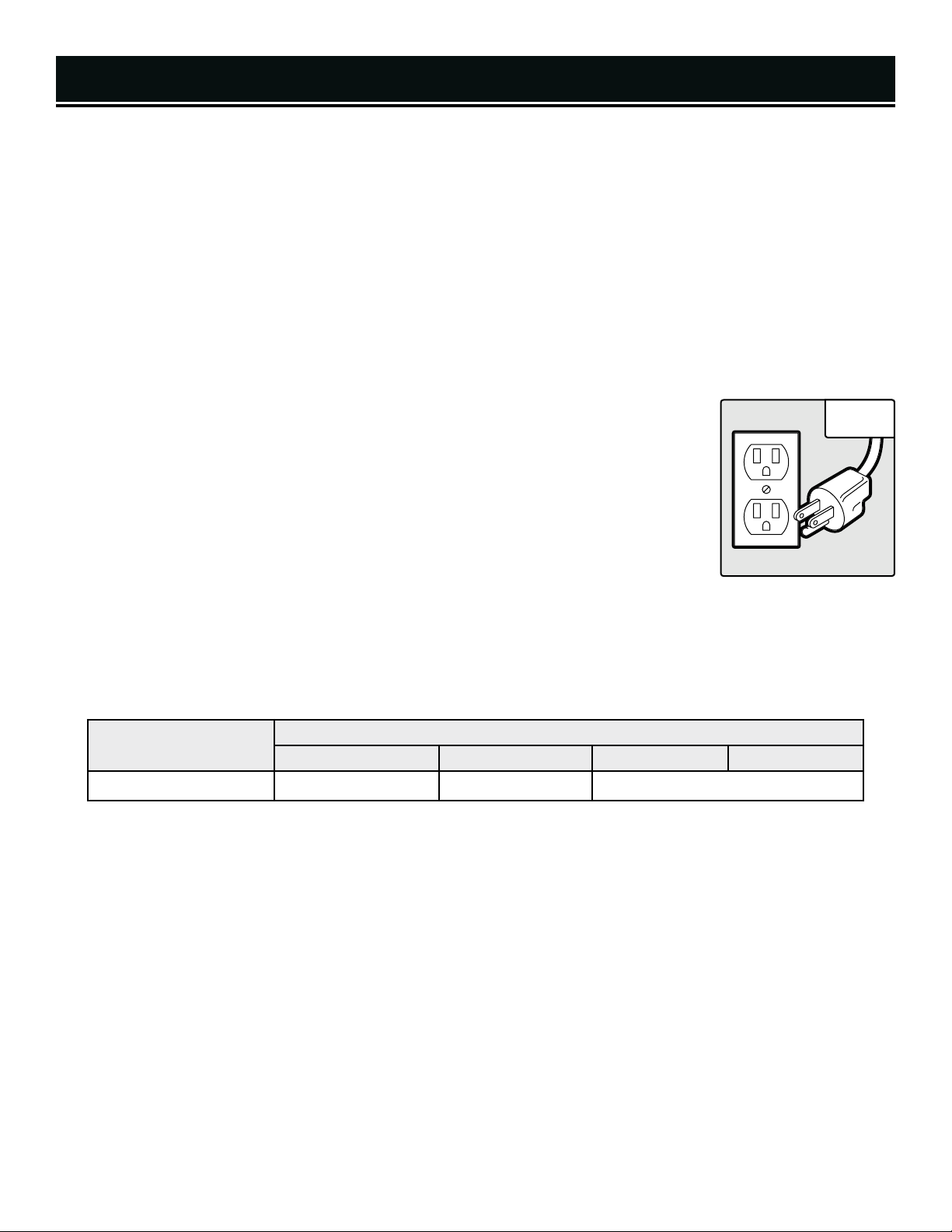
AMPERAGE
REQUIRED GAUGE FOR EXTENSION CORDS
25 ft. 50 ft. 100 ft. 150 ft.
15A 14 gauge 12 gauge Not Recommended
GROUNDING INSTRUCTIONS
IN THE EVENT OF A MALFUNCTION OR BREAKDOWN, grounding provides the path of least resistance for an elec-
tric current and reduces the risk of electric shock. This tool is equipped with an electric cord that has an equipment
grounding conductor and a grounding plug. The plug MUST be plugged into a matching outlet that is properly
installed and grounded in accordance with ALL local codes and ordinances.
DO NOT MODIFY THE PLUG PROVIDED. If it will not fit the outlet, have the proper outlet installed by a licensed
electrician.
IMPROPER CONNECTION of the equipment grounding conductor can result in electric shock. The conductor with
the green insulation (with or without yellow stripes) is the equipment grounding conductor. If repair or replacement
of the electric cord or plug is necessary, DO NOT connect the equipment grounding conductor to a live terminal.
CHECK with a licensed electrician or service personnel if you do not completely under-
stand the grounding instructions or whether the tool is properly grounded.
USE ONLY THREE-WIRE EXTENSION CORDS that have three-pronged plugs and outlets
that accept the tool’s plug (Fig. 1). Repair or replace a damaged or worn cord immediately.
CAUTION:
In all cases, make certain the outlet in question is properly grounded. If you
are not sure, have a licensed electrician check the outlet.
GUIDELINES AND RECOMMENDATIONS FOR EXTENSION CORDS
When using an extension cord, be sure to use one heavy enough to carry the current your product will draw. An un-
dersized cord will cause a drop in line voltage resulting in loss of power and overheating. The table below shows the
correct size to be used according to cord length and ampere rating. When in doubt, use a heavier cord. The smaller
the gauge number, the heavier the cord.
1. EXAMINE EXTENSION CORD BEFORE USE. Make sure your extension cord is properly wired and in good condi-
tion. Always replace a damaged extension cord or have it repaired by a qualified person before using it.
2. DO NOT ABUSE EXTENSION CORD. Do not pull on cord to disconnect from receptacle; always disconnect by pull-
ing on plug. Disconnect the extension cord from the receptacle before disconnecting the product from the extension
cord. Protect your extension cords from sharp objects, excessive heat and damp/wet areas.
3. USE A SEPARATE ELECTRICAL CIRCUIT FOR YOUR TOOL. This circuit must not be less than a 12-gauge wire
and should be protected with a 15A time-delayed fuse. Before connecting the motor to the power line, make sure
the switch is in the OFF position and the electric current is rated the same as the current stamped on the motor
nameplate. Running at a lower voltage will damage the motor.
Fig. 1
ELECTRICAL INFORMATION
98
UNPACKING
With the help of a friend or trustworthy foe, carefully remove the miter saw from the packaging. Make sure to take
out all contents and accessories. Do not discard the packaging until everything is removed. Check the packing list
below to make sure you have all of the parts and accessories. If any part is missing or broken, please contact our
customer service at 1-800-232-1195.
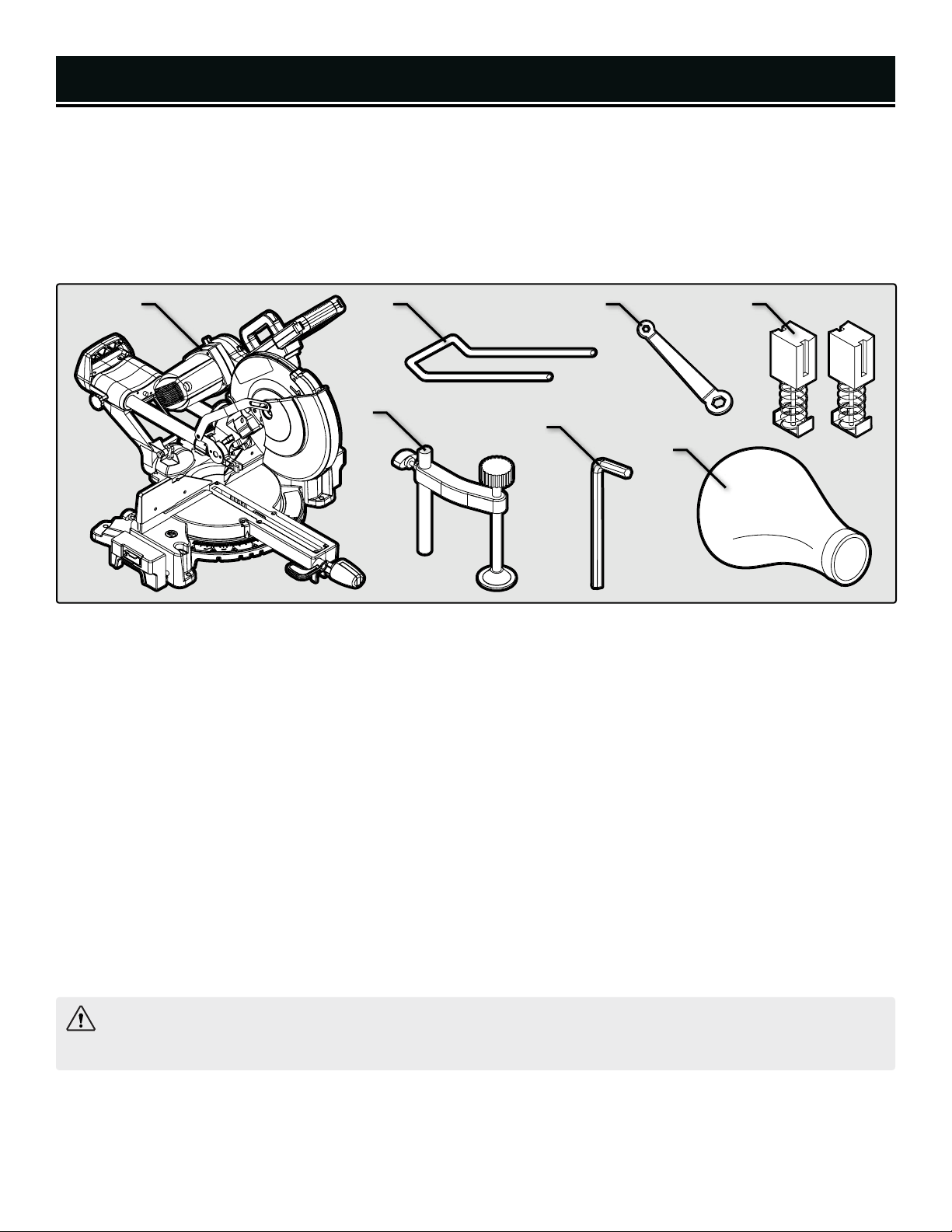
PACKING LIST
A. Miter Saw (1)
B. Support Stand (1)
C. 10mm/13mm Box-End Wrench (1)
D. Carbon Brush Replacement (2)
E. Clamp Assembly (1)
F. 6mm Hex Wrench (1)
G. Dust Collection Bag (1)
The tools listed below are not included but are required for either assembly or adjustment.
• Mounting Hardware
• Combination Square
• Phillips-head Screwdriver
TRANSPORTING THE MITER SAW
Before transporting your miter saw, make sure saw arm is locked down, the miter table is locked in position and
the slide lock knob is tightened. Only lift the saw by the carrying handle located on top of the belt housing or at the
back of the rails. Do not lift the saw using the guards or the operating handle.
WARNING: Do not plug in or turn on the tool until it is fully assembled according to the instructions. Failure
to follow the safety instructions may result in serious personal injury.
A
E
F
B
G
DC
UNPACKING & TRANSPORTATION
1110
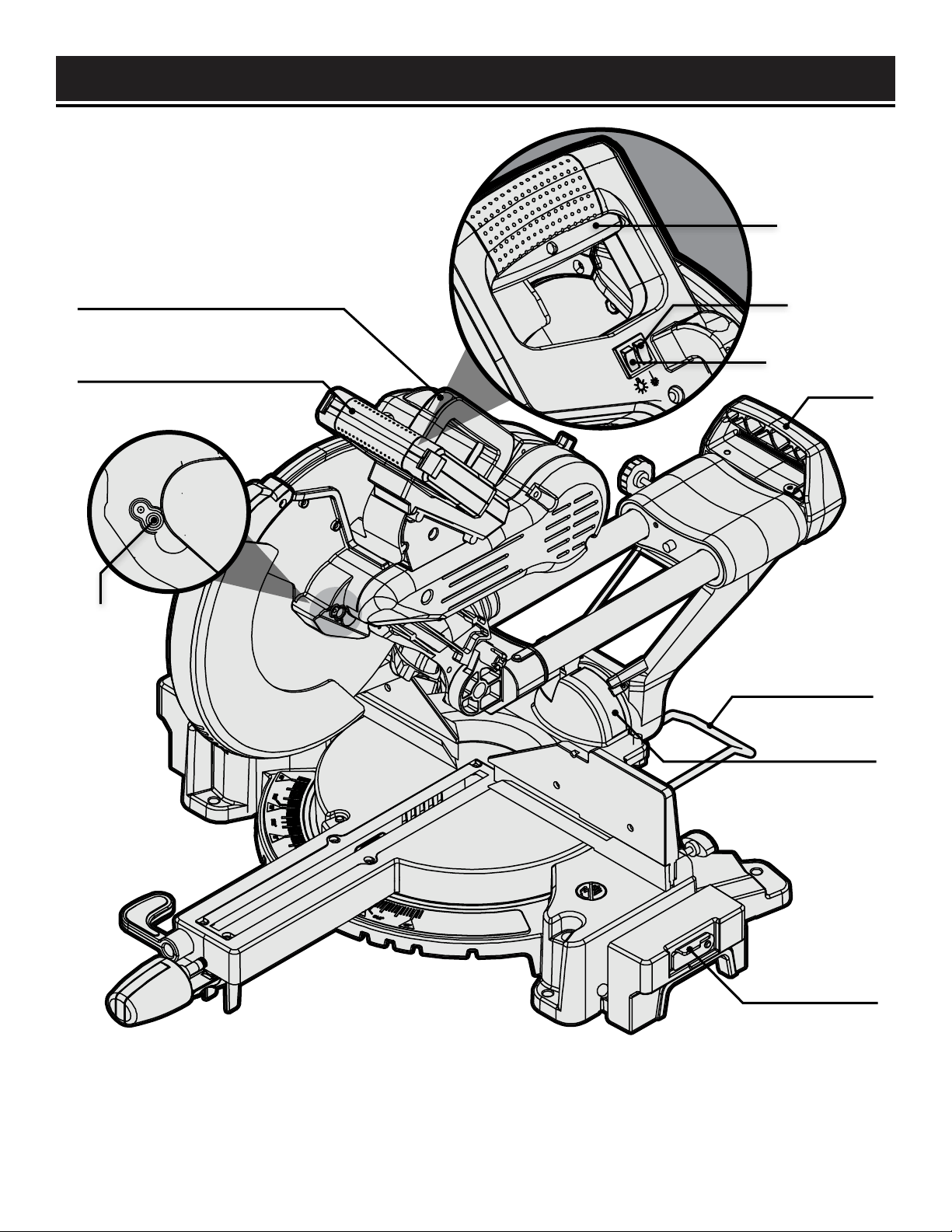
KNOW YOUR MITER SAW
TOOL PURPOSE
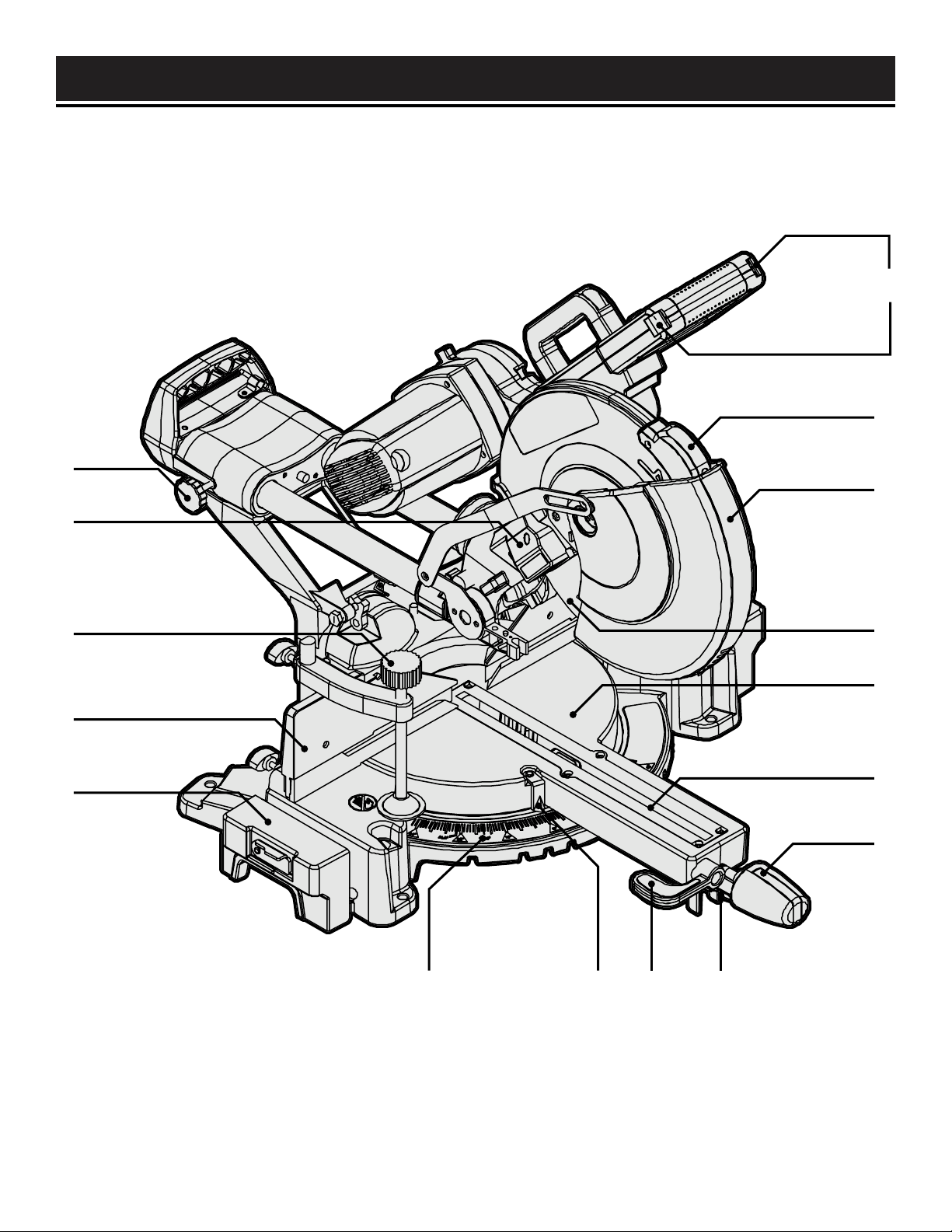
Miter Saws allow you to easily make cuts at a variety of angles. Refer to the following diagrams to become famil-
iarized with all the parts and controls of your miter saw. The components will be referred to later in the manual for
assembly and operation instructions.
C
B
A
P O N M
G
F
E
D
J
K
H
I
L
A. Table Extension
B. Fence
C. Clamp Assembly
D. LED Work Light
E. Slide Lock Knob
F. Trigger Locks
G. Laser
H. Lower Blade Guard
I. Blade
J. Miter Table
K. Kerf Board
L. Miter Lock Knob
M. Miter Stop Lever
N. Bevel Lock Lever
O. Miter Angle Indicator
P. Miter Scale
1110
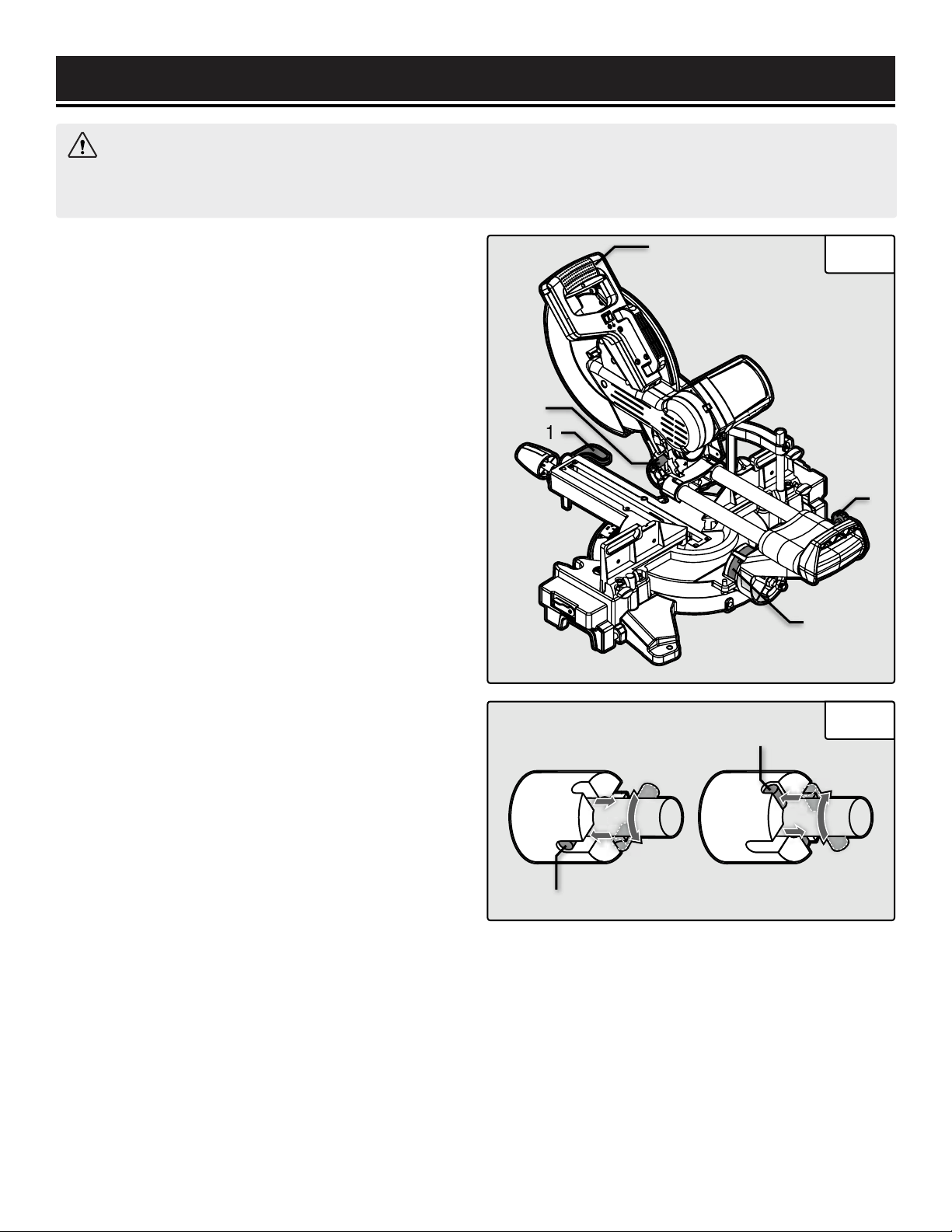
KNOW YOUR MITER SAW
Y
Z
Q
U
V
T
W
X
R
S
Q. Spindle Lock
R. Operating Handle
S. Carrying Handle
T. Power Trigger
U. Laser ON/OFF
V. Work Light ON/OFF
W. Rear Carrying Handle
X. Support Stand
Y. Bevel Scale
Z. Stop Plate
1312
3
2
1
4
5
Fig. 2
ASSEMBLY & ADJUSTMENTS
WARNING: Do not plug in or turn on the tool until it is fully assembled according to the instructions. Read
through and become familiarized with the following procedures of handling and adjusting your miter saw. Failure
to follow the safety instructions may result in serious personal injury.
GUARD OPERATION
NOTE: Keep hands clear of the blade when the operat-
ing handle is lowered. Do not interfere with the proper
movement of the blade guard.
When the handle is lowered, the blade guard raises au-
tomatically. When the handle is raised, the blade guard
returns to its safety position, covering the blade.
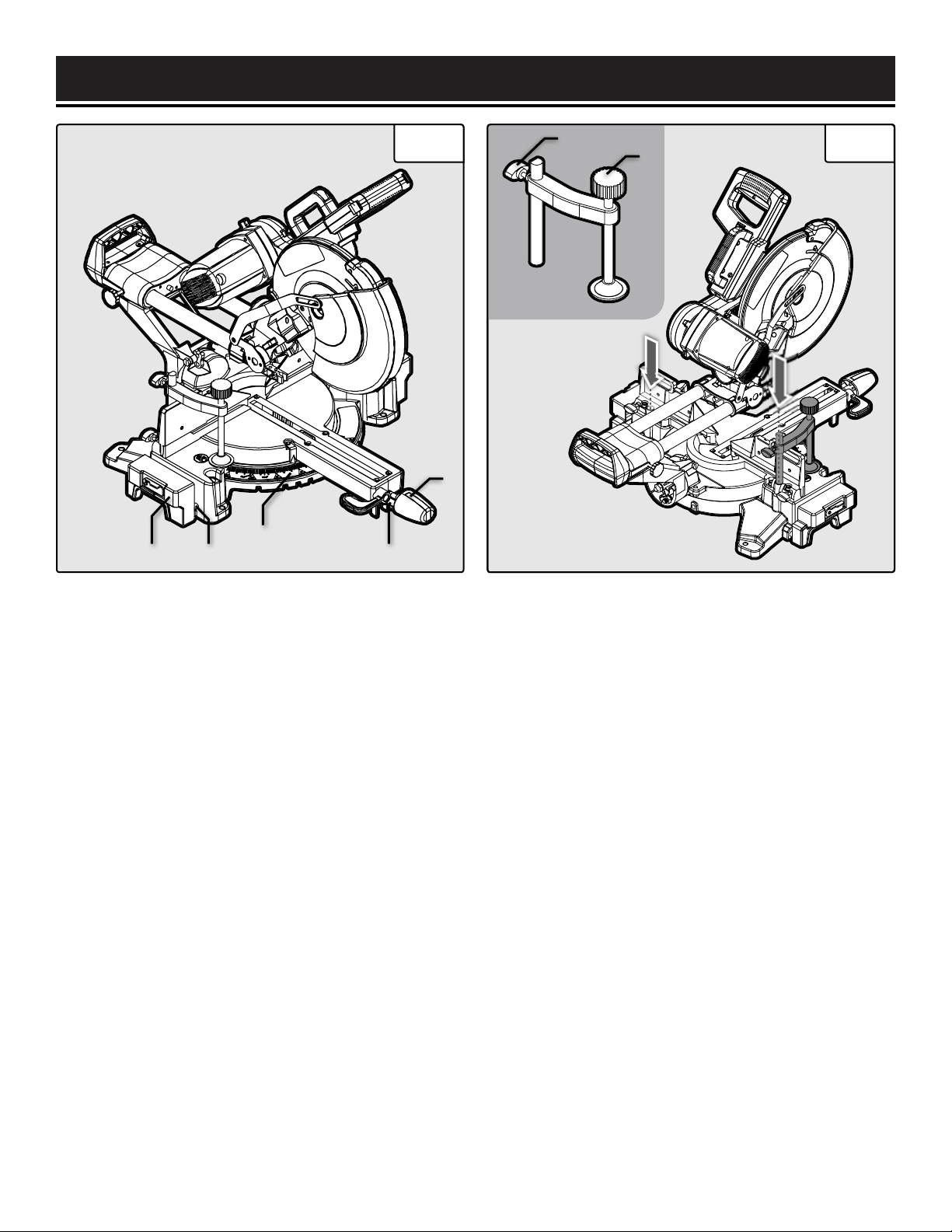
RAISING/LOWERING THE SAW ARM
The saw arm needs to be raised up before operation and
locked down for transporting and storing.
To raise saw arm from the lower position:
1. Holding the operating handle (Fig. 2 - 3), lightly press
down on the saw arm and pull out the release knob (Fig.
2 - 2). Slowly raise the saw arm to the upper position.
2. Set the release knob pin into the deep groove (Fig.
3 - 1) to lock the cutting head. Set the release knob pin
into the shallow groove (Fig. 3 - 2) to unlock the cutting
head.
To lower saw arm from the upper position:
1. Holding the operating handle (Fig. 2 - 3), push the
blade guard lever and pull out the release knob (Fig. 2
- 2).
2. Slowly lower the saw arm to the lower position and
lock the release knob into the deep groove (Fig. 3 - 1).
ADJUSTING THE BEVEL ANGLE
The saw arm can bevel from 0° to 45° to the left or right.
1. Unlock the bevel lock lever (Fig. 2 - 1) by rotating it
upwards (clockwise).
2. Tilt the saw arm until the bevel angle indicator points
to the desired angle on the bevel scale (Fig. 2 - 5).
3. Tighten the bevel lock lever (Fig. 2 - 1) by rotating it
down (counterclockwise). Be sure to tighten firmly with-
out over-tightening.
SETTING UP ARM SLIDE
The saw arm can be adjusted to different lengths using
the slide bar, and can slide back and forth when cross-
cutting.
For sliding cuts: Loosen the slide lock knob (Fig. 2 - 4)
and slide the saw arm to desired position.
For non-sliding cuts and transportation: Tighten the
slide lock knob (Fig. 2 - 4) for non-sliding operations
and before transporting the miter saw.
Fig. 3
1
2
1312
Fig. 4 Fig. 5
ASSEMBLY & ADJUSTMENTS
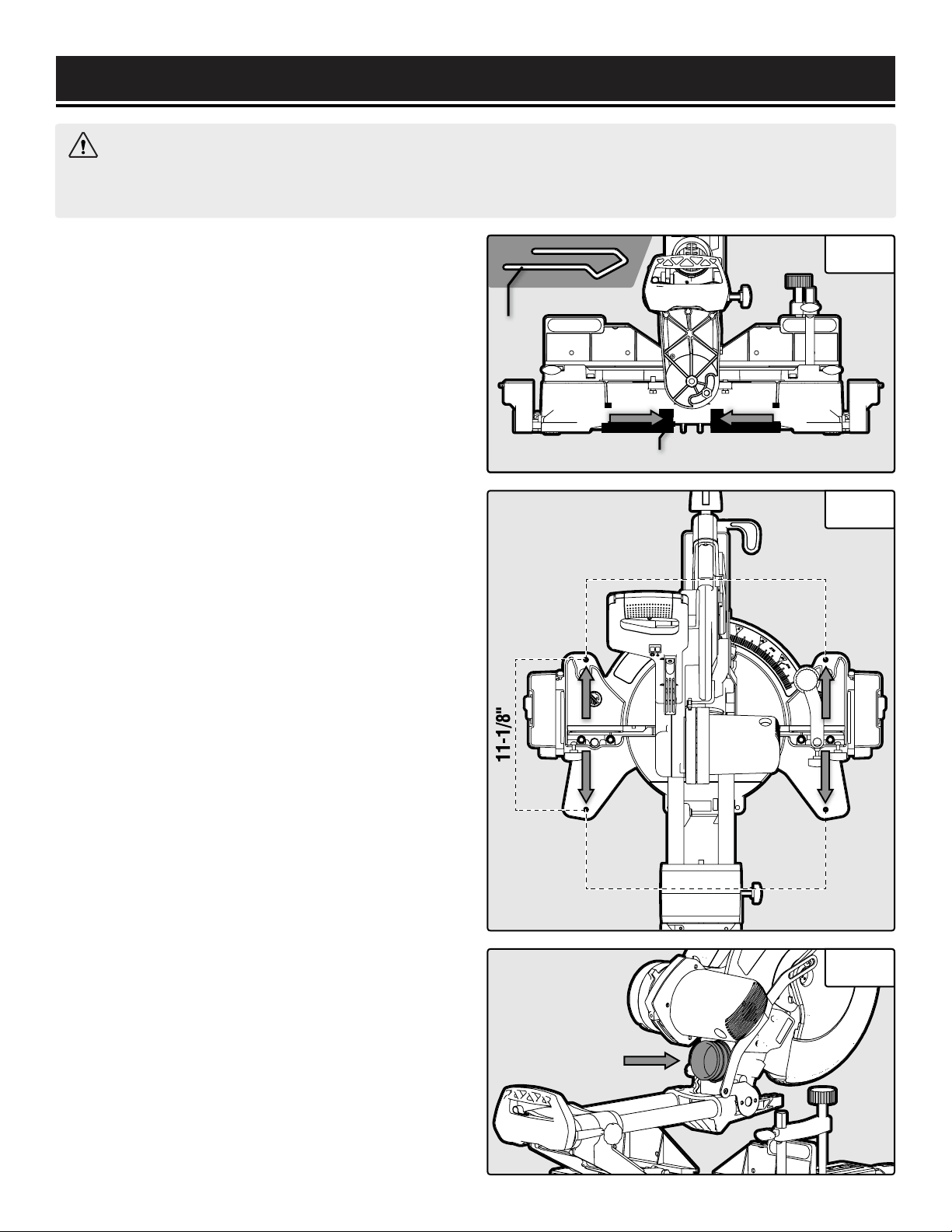
ADJUSTING THE MITER ANGLE
The miter table can be adjusted from 0° to 45° to both
left and right to create miter cuts.
1. Loosen the miter lock knob (Fig. 4 - 5) by turning it
one or two turns counterclockwise.
2. Pull up on the miter stop lever (Fig. 4 - 4) to unlock
the table. While holding the miter stop lever up, adjust
the table to the desired angle. The miter scale indica-
tor (Fig. 4 - 3) will point towards the selected angle. To
make micro adjustments to a specific angle, rotate the
table while pulling up on the miter stop lever. The miter
table has positive stops at 0°, 15°, 22.5°, 30°, and 45°
in both directions for quick adjustments.
3. After selecting your miter angle, release the miter
stop lever and tighten the miter lock knob (Fig. 4 - 5) by
turning it clockwise to lock the table in place.
WARNING: Be sure the miter table is locked in place be-
fore making a cut. Failure to do so can cause the table
to move during the cut, which could result in serious
personal injury.
USING THE TABLE EXTENSIONS
The table extensions (Fig. 4 - 1) come pre-installed on
either side of your miter saw and serve as extra support
for your workpiece. Loosen the table extension knobs
(Fig. 4 - 2) to adjust their positioning. The stop plate on
each table extension can be raised to quickly and easily
make repeated cuts.
INSTALLING THE CLAMP ASSEMBLY
The clamp comes pre-assembled and can be mounted
on the left or right side of the saw depending on the cut-
ting task at hand.
1. Locate the hole for the clamp on the left or right side
of the miter saw behind the fence (Fig. 5 - arrows). In-
sert the clamp assembly (Fig. 5) into the slot.
2. Secure the clamp into place by tightening the clamp
lock screw (Fig. 5 - 1).
NOTE: Check that the clamp won’t interfere with the
blade travel before operating the saw.
3. Rotate the clamp knob (Fig. 5 - 2) to move it up or
down as needed to securing the workpiece. Check that
the workpiece is secure and does not wobble before cut-
ting.
1 2
3
4
5
Clamp
Assembly
2
1
1514
Back View
17-7/8"
18"
WARNING: Do not plug in or turn on the tool until it is fully assembled according to the instructions. Read
through and become familiarized with the following procedures of handling and adjusting your miter saw. Failure
to follow the safety instructions may result in serious personal injury.
INSTALLING THE SUPPORT STAND
The support stand offers additional stability for your
miter saw. Follow the instructions below to install the
support stand.
1. Locate the two holes for the support stand on the back
of the miter saw (Fig. 6 - arrows). Loosen the Phillips-
head screw on the bottom of the left hole (Fig. 6 - 2),
then insert the support stand (Fig. 6 - 1) into the holes.
2. Secure the stand into place by tightening the stand
lock screw (Fig. 6 - 1). See p. 11 - X for installation ori-
entation.
BENCH MOUNTING
1. The miter saw base has four holes on the base for
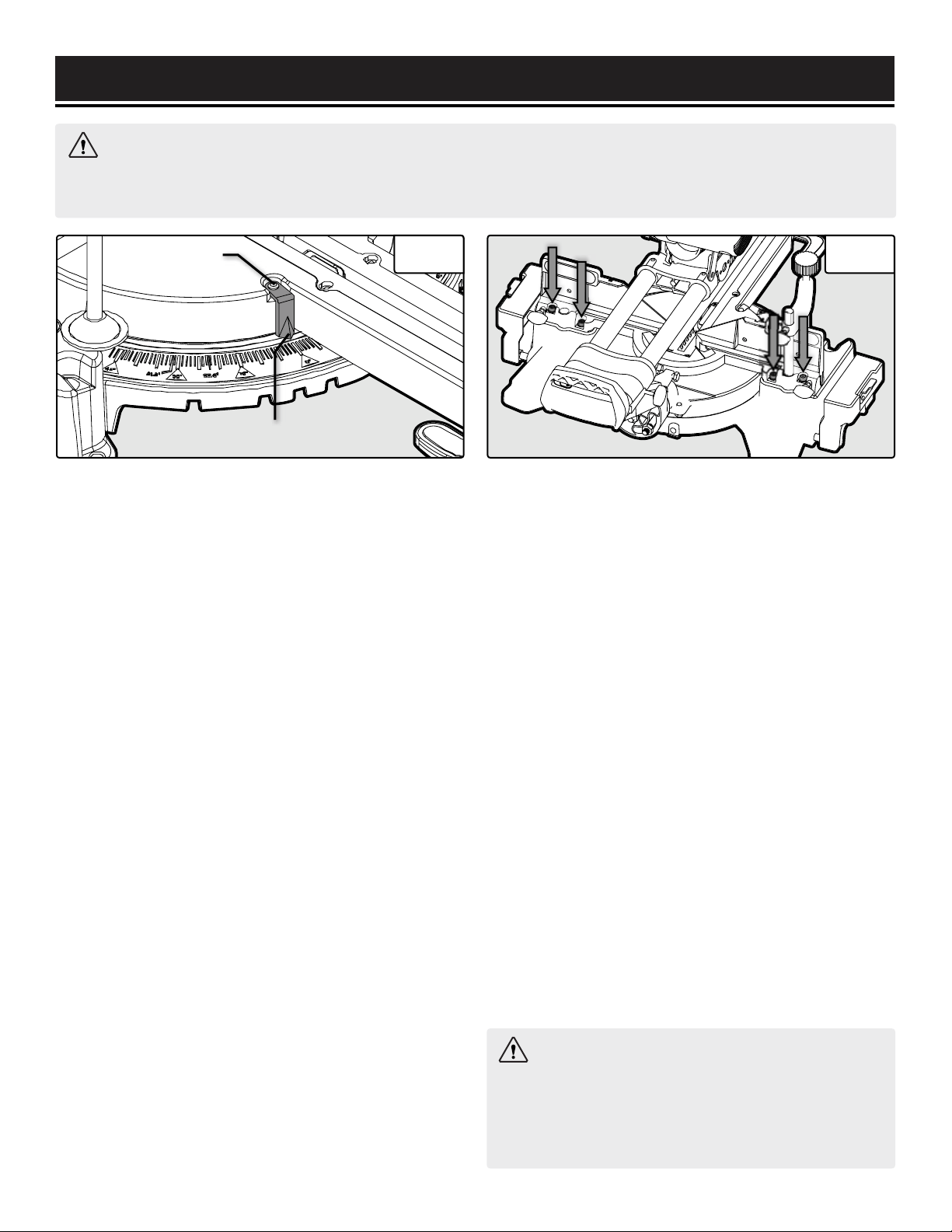
bench mounting (Fig. 7 - arrows). Mount and fix the
saw to a level, horizontal bench, worktable, or miter
saw stand (compatible with WEN Models MSA330 and
MSA750) using four bolts and nuts (not included).
2. If desired, you can mount the saw to a piece of 1/2"
or thicker plywood which can then be clamped to your
work bench or moved to other job sites and reclamped.
CAUTION: Make sure that the mounting surface is not
warped. Uneven surfaces can cause binding and inac-
curate sawing.
INSTALLING THE DUST COLLECTION BAG
The dust collection bag should be used at all times. Fol-
low the instructions below to install the bag.
1. Locate the dust port on the back of the miter saw (Fig.
8 - arrow).
2. Squeeze the metal clip on the dust collection bag to
open the mouth of the bag. Slip the mouth of the dust
collection bag over the dust port and release the clip to
secure the bag to the outlet.
3. Open the zipper on the bottom of the bag to empty.
For efficient operation, empty the dust bag when half full
to allow for better air flow through the bag.
Fig. 6
Fig. 7
Fig. 8
1
2
ASSEMBLY & ADJUSTMENTS
1514
WARNING: Do not plug in or turn on the tool until it is fully assembled according to the instructions. Read
through and become familiarized with the following procedures of handling and adjusting your miter saw. Failure
to follow the safety instructions may result in serious personal injury.
SQUARING THE FENCE WITH THE BLADE
To make accurate cuts, the fence must be perpendicular
to the saw blade.
1. Lower the saw arm down to the lower position and
lock the release knob. See section titled, "Raising/Low-
ering the Saw Arm" on page 12.
2. Slide the saw arm to the back and tighten the slide
lock knob. See section titled, "Setting Up Arm Slide" on
page 12.
3. Set the miter table indicator (Fig. 9 - 2) to 0° and
tighten the miter lock knob. Place a combination square
(not included) against the fence and alongside the saw
blade (should be in contact with the surface of the blade,
not the teeth).
4. Slightly loosen the four fence adjusting bolts on the
back of the fence (Fig. 10 - arrows) with the included hex
wrench. Adjust the fence position until it is 90° with the
blade. Tighten the four bolts to secure the fence.
5. Make a test cut. Repeat step 4 until your test cut is
accurate.
SETTING THE MITER SCALE INDICATOR
1. Loosen the screw (Fig. 9 - 1) holding the miter scale
indicator.
2. Adjust the direction of the indicator (Fig. 9 - 2) so that
it accurately points to 0° on the miter scale. Tighten the
screw.
2
1
Fig. 10 Fig. 9
SQUARING THE TABLE WITH THE BLADE
To make accurate cuts, the table must be perpendicular
to the saw blade.
1. Lower the saw arm down to the lower position and
lock the release knob. See section titled, "Raising/Low-
ering the Saw Arm" on page 12.
2. Slide the saw arm to the back and tighten the slide
lock knob. See section titled, "Setting Up Arm Slide" on
page 12.
3. Set the miter table indicator (Fig. 9 - 2) to 0° and
tighten the miter lock knob. Set the bevel angle indicator
to 0° (Fig. 11 - 6, p. 16) and tighten the bevel lock lever.
4. Place a combination square (not included) against the
table and alongside the saw blade (should be in contact
with the surface of the blade, not the teeth). Wearing
work gloves, rotate the blade by hand and check the
blade-to-table alignment at several points. The edge of
the combination square and the saw blade should be
parallel. If the saw blade tilts away from the combina-
tion square, continue on with the steps on the following
page.
Instructions continue on the next page.
WARNING: To prevent serious injury, after mak-
ing any adjustments to the cutting angle, make sure
the both sides of the fence are clear of the blade's
cutting path. With the power OFF, move the blade
through its full range of motion to check this.
ASSEMBLY & ADJUSTMENTS
1716
WARNING: Do not plug in or turn on the tool until it is fully assembled according to the instructions. Read
through and become familiarized with the following procedures of handling and adjusting your miter saw. Failure
to follow the safety instructions may result in serious personal injury.
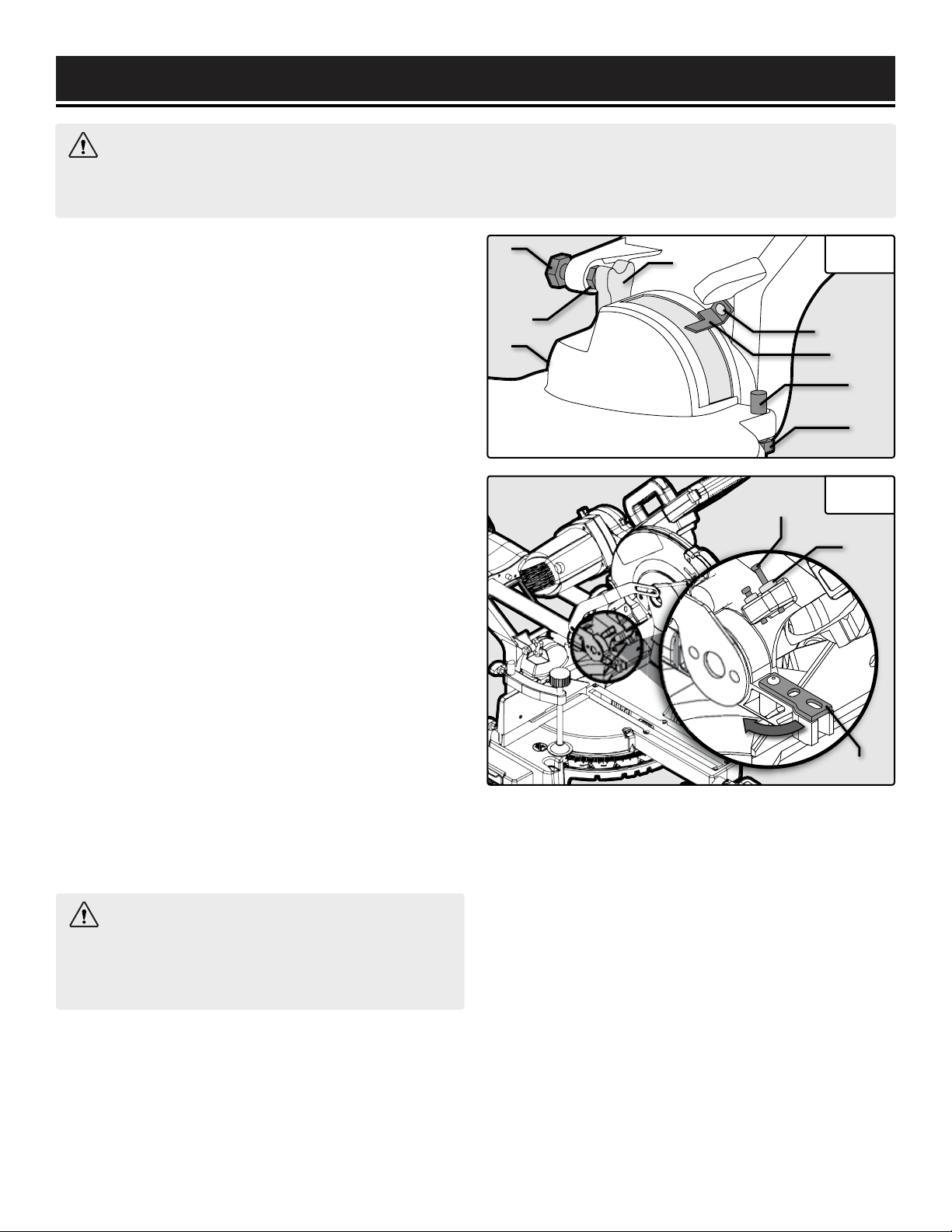
WARNING: Only adjust the front bolt (Fig. 12
- 1). The rear bolt is used to prevent the blade from
cutting the table during normal cutting. DO NOT ad-
just the rear depth bolt.
5. Flip the bevel stop block (Fig. 11 - 4) up. Loosen the
zero stop lock nut (Fig. 11 - 2) and adjust the zero stop
screw (Fig. 11 - 1) until the table is 90° with the blade.
Tighten the zero stop lock nut to secure the blade.
6. Make a test cut. Repeat step 5 until your test cut is
accurate.
NOTE: To adjust one of the 45° bevel stop screws (Fig.
11 - 3 & 7), loosen the bevel adjustment nut (Fig. 11 -
8), flip down the bevel stop block, and turn the bevel
adjustment screw (Fig. 11 - 7) using a hex wrench. Turn
clockwise to increase the bevel and counterclockwise to
decrease the bevel. Tighten the nut after adjustment.
SETTING THE BEVEL SCALE INDICATOR
1. Before setting the bevel scale indicator, the table must
be perpendicular to the saw blade. See section titled,
"Squaring the Table with the Blade" on page 15.
2. Loosen the screw (Fig. 11 - 5) holding the bevel scale
indicator.
3. Adjust the direction of the indicator so that it accu-
rately points to 0° on the bevel scale. Tighten the screw.
ADJUSTING THE CUTTING DEPTH
The saw cutting depth can be adjusted if you would like
to perform a kerfing or rabbet cut that does not cut all
the way through the workpiece.
Fig. 12
Fig. 11
1
3
2
6
4
5
7
8
1. Unplug the tool from its power source and raise the
saw head assembly.
2. Locate the depth stop settings on the left side of the
saw (Fig. 12). Rotate the depth stop plate (Fig. 12 - 3) to
the left to use the depth stop bolt setting.
3. Pull down on the saw head to check the current set-
ting. To change the setting, continue to step 4.
4. Loosen the depth stop nut (Fig. 12 - 2) on the depth
stop bolt (Fig. 12 - 1). To decrease depth, turn the depth
stop bolt clockwise. To increase depth, turn the depth
stop bolt counterclockwise. Tighten the nut after adjust-
ment.
NOTE: If needed, push the depth stop plate (Fig. 12 - 3)
to the position shown in Fig. 12 to temporarily disable it.
Make sure the depth stop is properly aligned to allow the
bolt to pass through it.
5. Check the cutting depth setting by completing a test
cut on a piece of scrap wood. Repeat steps 4 - 5 until the
desired depth is achieved.
1
2
3
ASSEMBLY & ADJUSTMENTS
1716
CHANGING THE SAW BLADE
DANGER! Never try to use a blade larger than the stated capacity of the
saw. Do not use a blade thicker than 1.9mm. It will prevent the blade
screw from properly securing the blade on the spindle. Install the suitable
blade for your cutting operation.
1. Unplug the tool from its power source. Place a piece of paper on the
miter table to catch the screws.
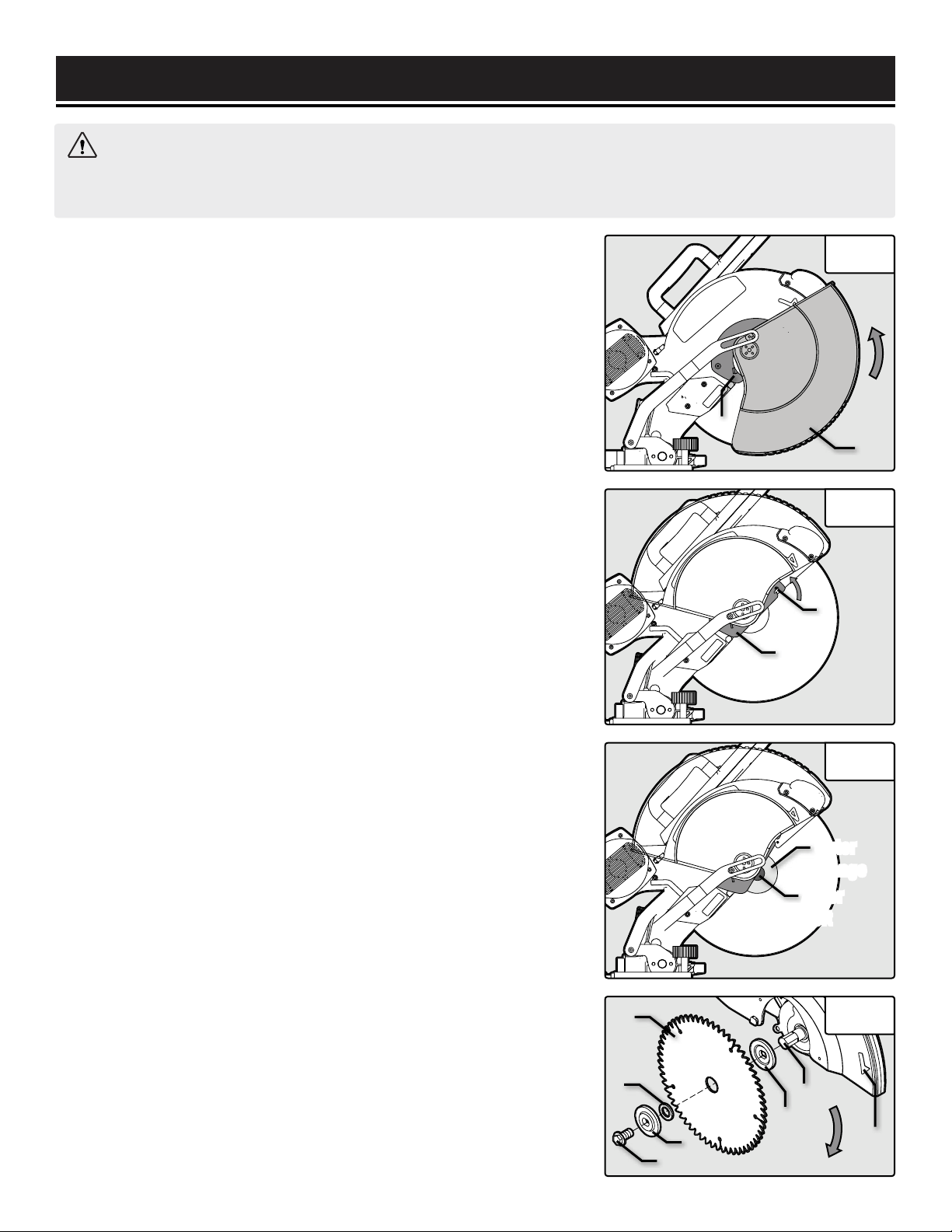
2. Lift the saw arm to the upper position and lock it in place. Raise the
lower blade guard (Fig. 13 - 2) out of the way and hold it up. Loosen the
lower blade guard screw (Fig. 14 - 1) with a Phillips-head screwdriver
(not included) until it disengages the guard plate (Fig. 14 - 2). Swing the
guard plate up and out of the way. NOTE: the safety guard does not need
to be taken off from the saw.
3. Firmly press down the saw spindle lock (p. 11 - Q) on the back of the
saw's head and hold it in. Use the 13mm box-end wrench to turn the ar-
bor bolt (Fig. 15) clockwise and remove it (the bolt is left-hand threaded),
remove outer flange (Fig. 16 - 4), and arbor insert (Fig. 16 - 2). Make sure
the inner flange (Fig. 16 - 5) stays in place on the spindle (Fig. 16 - 6).
4. Slowly remove the blade by pulling it out and down. Clean the arbor
bolt (Fig. 15 - 3), outer flange (Fig. 15 - 4), and arbor insert (Fig. 15 - 2).
5. Place the arbor insert (Fig. 16 - 2) onto the spindle (Fig. 16 - 6). Place
the new blade over the arbor insert.
IMPORTANT: Make sure the blade's rotation arrow points in the same
direction as the rotation arrow on the upper blade guard (Fig. 16 - 7).
6. Reinstall the outer flange and arbor bolt. Hold down the spindle lock
and tighten the arbor bolt with the 13mm box-end wrench, turning it
counterclockwise. Release the spindle lock.
7. Return the guard plate (Fig. 14 - 2) back into place, and secure it with
the guard plate screw (Fig. 14 - 1).
IMPORTANT: Carefully rotate the saw blade and make sure that it does
not wobble. Lower the saw arm and check if the blade spins freely in the
table insert in both perpendicular and 45° angles. Make sure the lower
blade guard operates properly before using the saw.
WARNING: Do not plug in or turn on the tool until it is fully assembled according to the instructions. Read
through and become familiarized with the following procedures of handling and adjusting your miter saw. Failure
to follow the safety instructions may result in serious personal injury. Wear gloves while changing the blade.
Fig. 13
2
1
1
Fig. 14
Arbor
Bolt
Outer
Flange
Fig. 15
1
4
5
6
3
2
Fig. 16
2
7
ASSEMBLY & ADJUSTMENTS
1918
Fig. 17
WARNING: Do not plug in or turn on the tool until it is fully assembled according to the instructions. Read
through and become familiarized with the following procedures of handling and adjusting your miter saw. Failure
to follow the safety instructions may result in serious personal injury.
ADJUSTING THE DRIVE BELT
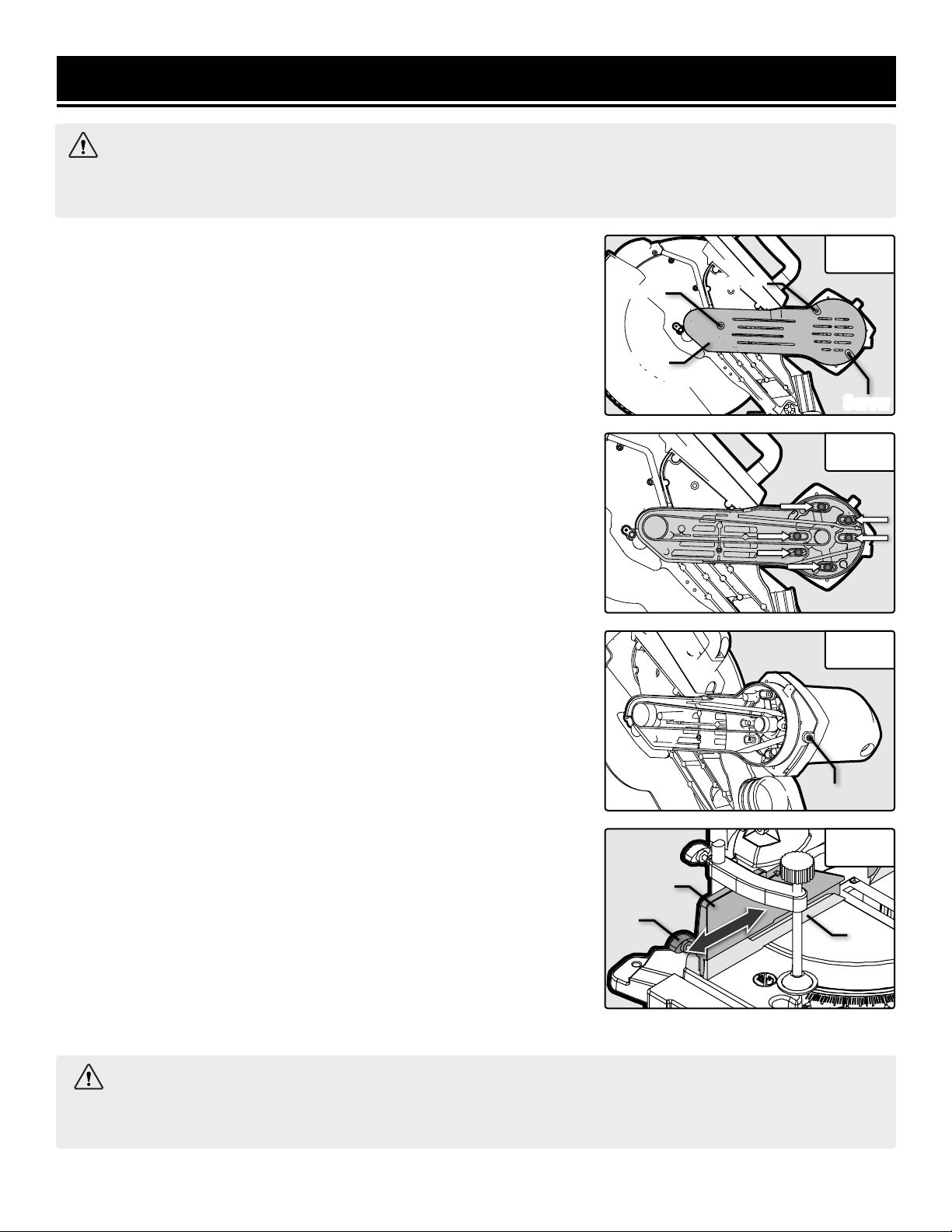
1. Unplug the tool from its power source. Loosen the 3 screws securing
the drive belt housing cover (Fig. 17) to the drive belt housing. Remove
the drive belt housing cover.
2. Using a 5mm hex wrench (not included), loosen, but do not remove,
the 6 hex screws (Fig. 18) that secure the motor to the belt drive housing.
3. Using a 4mm hex wrench (not included), turn counterclockwise
to loosen the set screw (Fig. 19 - 1) at the top of the of the belt drive
housing. This will release the tension on the drive belt and allow for
adjustments or replacements of the belt.
4. Re-seat the belt on the pulley, making sure the belt is properly
seated in the grooves of both pulleys. Re-tighten the belt by turning
the set screw (Fig. 19 - 1) clockwise. Re-tighten the 6 hex screws
(Fig. 18).
5. Test belt tension by squeezing both sides of the belt. If properly
adjusted, the belt should “give” between 1/16" - 1/8" (1.5mm - 3mm).
Make sure that the belt grooves are properly seated in the pulleys.
6. Carefully reinstall the drive belt housing cover by tightening the 3
screws (F
ig. 17
).
NOTE: Excessive tightness on the pulley belt will cause increased
noise and motor overload. Premature failure will occur if the belt is
too loose.
ADJUSTING THE FENCES
1. Loosen the fence adjustment knob (Fig. 20 - 2).
2. Adjust the fence as desired. The top portion of the fence (Fig. 20 - 1)
can slide to the left and right, while the bottom portion of the fence (Fig.
20 - 3) stays stationary.
3. Tighten the fence adjustment knob to lock the fence into place.
WARNING: To prevent serious injury, after making any adjustments to the cutting angle, make sure the
both sides of the fence are clear of the blade's cutting path. With the power OFF, move the blade through its full
range of motion to check this.
Fig. 18
Fig. 19
1
Fig. 20
2
1
3
Screw
Screw
Screw
Drive
Belt Housing
Cover
ASSEMBLY & ADJUSTMENTS
1918
1. RAISE THE SAW ARM
Before operation, raise the saw arm from the lower position. See section
titled, "Raising/Lowering the Saw Arm" on page 12.
2. SET UP THE CUT ANGLE & DEPTH
The miter saw can be set up to create cuts at different angles by adjust-
ing the angle of the miter table and the saw bevel angle. There are four
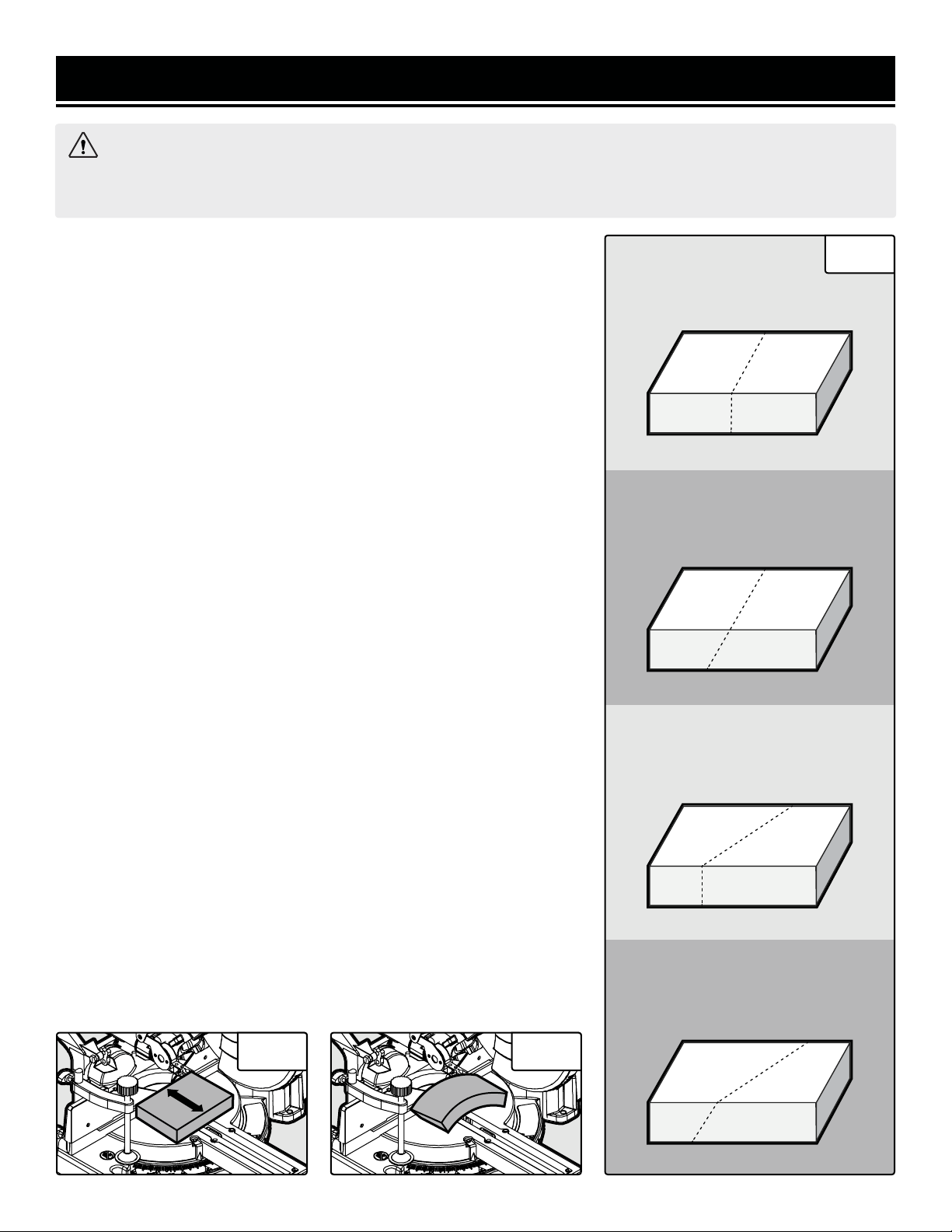
types of cuts you can create: a cross cut, a miter cut, a bevel cut, and a
compound cut. See Fig. 21 to understand each type of cut. If you do not
want to cut all the way through your workpiece, adjust the cutting depth.
See note below.
To adjust the bevel angle: see section titled, "Adjusting the Bevel Angle"
on page 12. To adjust the miter angle: see section titled, "Adjusting the
Miter Angle" on page 13. To adjust the cutting depth: see section titled,
"Adjusting the Cutting Depth" on page 16.
2. SET UP SLIDING FUNCTION (FIG. 22)
For materials with a width under 4 inches (100 mm): the sliding func-
tion isn’t necessary. See section titled, "Setting Up Arm Slide" on page 12
to disable the sliding function.
For materials with a width over 4 inches (100 mm): the saw arm will
need to slide to cut through the workpiece. See section titled, "Setting Up
Arm Slide" on page 12 to enable the sliding function.
4. SET UP WORKPIECE
Place the workpiece flat on the table with one edge securely against the
fence.
Warped Boards: If the board is warped, place the convex side against the
fence (Fig. 23). CAUTION: The board could break and jam the blade if the
concave side is placed against the fence
Long Boards: When cutting long workpieces, support the opposite end of
the material with the support table, a roller stand or a work surface that
is level with the saw table.
WARNING: Do not plug in or turn on the tool until it is fully assembled according to the instructions. Read
through and become familiarized with the following procedures of handling and adjusting your miter saw. Failure
to follow the safety instructions may result in serious personal injury.
Fig. 21
CROSS CUT
Miter table 0°, Saw arm 0°
BEVEL CUT
Miter table 0°, Saw arm 0° - 45°
MITER CUT
Miter table 0° - 45°, Saw arm 0°
COMPOUND CUT
Miter table 0° - 45°,
Saw arm 0° - 45°
Fig. 22 Fig. 23
w
OPERATION
2120
WARNING: Before operating the miter saw, make sure to equip yourself with a dust mask, ear protection,
and safety glasses for protection from possible injuries. Tie back long hair and do not wear loose clothing or
jewelry. DO NOT look into the laser beam, this can cause serious eye damage or blindness. Do not wear gloves
while operating the saw.
5. SECURE WORKPIECE
Secure the workpiece with the clamping device on the fixed table when-
ever possible to prevent the material from moving during the cutting op-
erations. See section, "Installing the Clamp Assembly" on page 13.
6. CHECK BEFORE OPERATION
• Check that the miter table does not rotate and the saw arm does not
bevel.
• Check that the workpiece is fully supported, against the fence and se-
curely clamped down.
• Check that you have the proper blade for the material you are cutting.
• Without turning on the saw, perform a dry run of the cutting operation
to check that nothing is obstructing the path of the saw.
7. PERFORM THE CUT
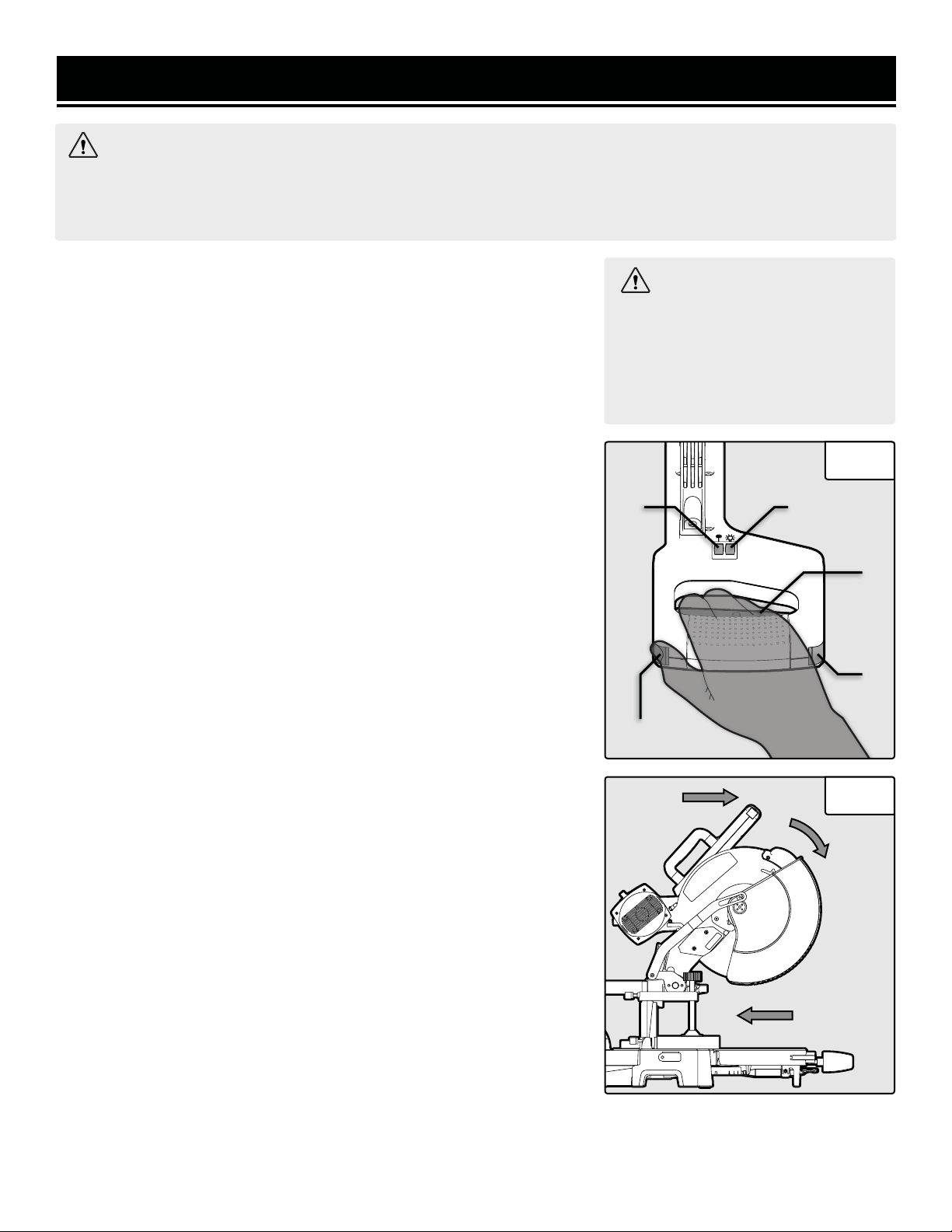
1. Plug in the miter saw. Turn on the work light (Fig. 24 - 2) so you can
easily see what you are working on. Turn on the laser (Fig. 24 - 1) to see
where your cut will land on the material. CAUTION: DO NOT look into the
laser beam.
2. Grip the operating handle firmly, press one of the blade trigger lock
buttons (Fig. 24 - 4) with your thumb, and squeeze the power trigger (Fig.
24 - 3) to turn the saw ON. NOTE: The trigger locks are a safety feature
that prevent the power trigger from being pressed down to reduce the
risk of accidentally starting the machine.
2. Allow the blade to reach full speed. Make sure the workpiece is held
securely against the table and fence at all times. If the material binds the
blade, release the power trigger.
• For non-sliding cuts: Slowly lower the blade into and through the
workpiece.
• For sliding cuts: Pull the saw arm all towards the front of the machine.
Slowly lower the blade into the workpiece while steadily pushing it
away from you until the workpiece is cut (Fig. 25). CAUTION: Never
slide the saw arm towards yourself while cutting. Always push away.
3. Release the power trigger and wait until the blade fully stops before
raising it from the workpiece.
4. Unplug the miter saw before leaving your work station. Clean your
work station and store tools out of reach of children.
WARNING: Be sure to tighten
the miter lock and bevel lock before
making a cut. Failure to do so could
result in the table moving during the
cut and may cause serious personal
injuries.
Fig. 24
21
4
4
3
Fig. 25
1. Pull
Forwards
2. Lower
Blade
3. Push Back
To Cut
OPERATION
2120
ROUTINE INSPECTION
Before each use, inspect the general condition of the tool. If any of these
following conditions exist, do not use until parts are replaced or the
sharpener is properly repaired.
Check for:
• Loose hardware,
• Misalignment or binding of moving parts,
• Damaged cord/electrical wiring,
• Cracked or broken parts, and
• Any other condition that may affect its safe operation
WARNING: Any attempt to repair or replace electrical parts on this tool may be hazardous. Servicing
of the tool must be performed by a qualified technician. When servicing, use only identical WEN replacement
parts. Use of other parts may be hazardous or induce product failure.
CAUTION: Most plastics are suscep-
tible to damage from various types
of commercial solvents. Do not use
any solvents or cleaning products
that could damage the plastic parts.
Some of these include but are not
limited to: gasoline, carbon tetra-
chloride, chlorinated cleaning sol-
vents, and household detergents
that contain ammonia.
WARNING: To avoid accidents, turn OFF and unplug the tool from the electrical outlet before cleaning,
adjusting, or performing any maintenance work.
CLEANING & STORAGE
1. Keep the ventilation openings free from dust and debris to prevent
the motor from overheating.
2. Wipe the tool surfaces clean with a clean cloth. Make sure water does
not get into the tool.
3. Store the tool in a clean and dry place away from the reach of chil-
dren. Store in temperatures between 41° to 86°F.
4. Cover the miter saw in order to protect it from dust and moisture. It is preferable to store it in its original pack-
aging with the instruction manual.
CARBON BRUSH REPLACEMENT
Replacement carbon brushes (Part No.
MM1214-114
) can be ordered at wenproducts.com. Only genuine WEN
replacement brushes designed specifically for your tool should be used.
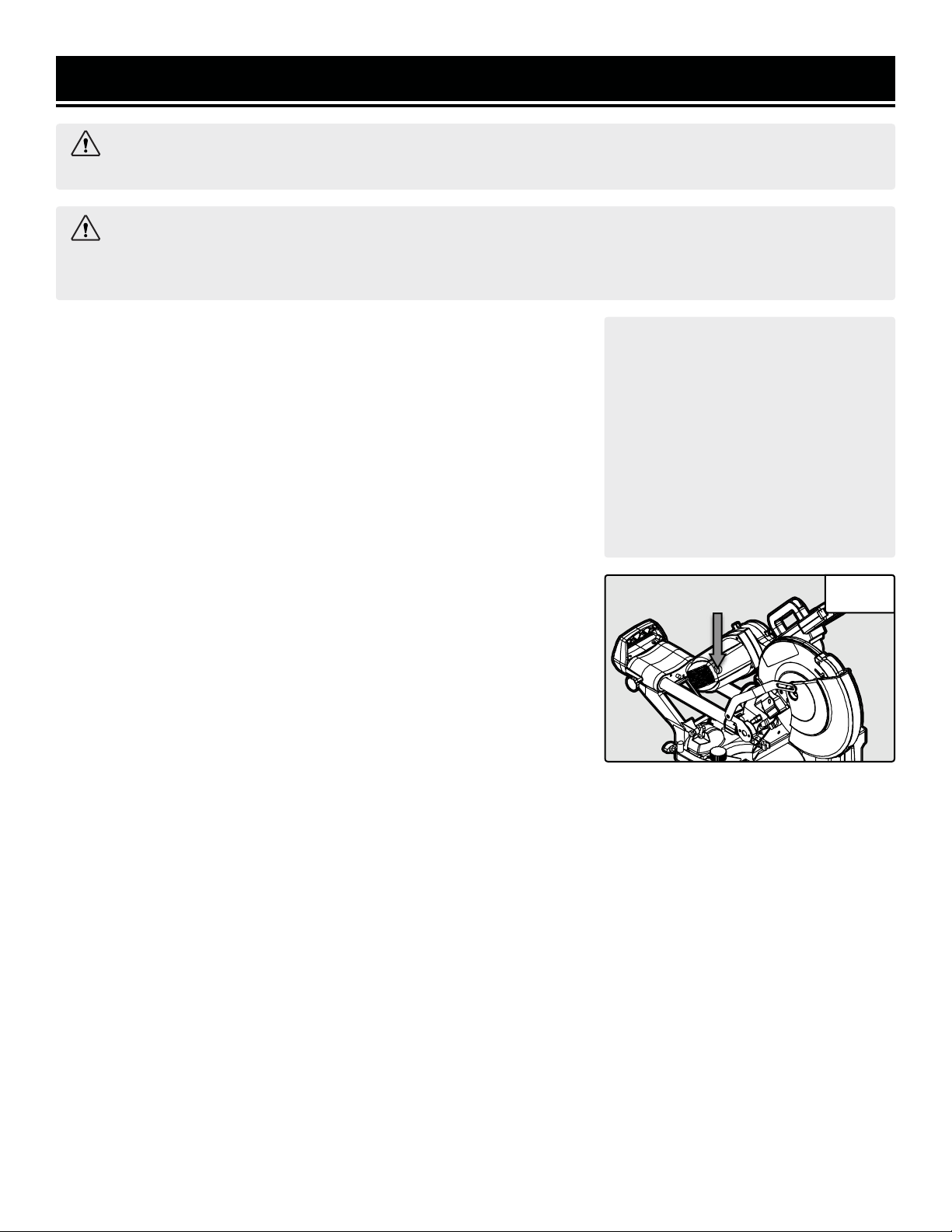
1. To access the carbon brushes, remove the carbon brush cap (Fig. 26) with a flat-head screwdriver (not included).
2. Carefully remove the old carbon brushes using pliers.
3. Install the new carbon brushes. Both carbon brushes should be replaced at the same time. Replace the carbon
brush cap. NOTE: New carbon brushes tend to spark for a few minutes during the first use as they wear down.
PRODUCT DISPOSAL
Used power tools should not be disposed of together with household waste. This product contains electronic
components that should be recycled. Please take this product to your local recycling facility for responsible dis-
posal and to minimize its environmental impact.
Fig. 26
MAINTENANCE
2322
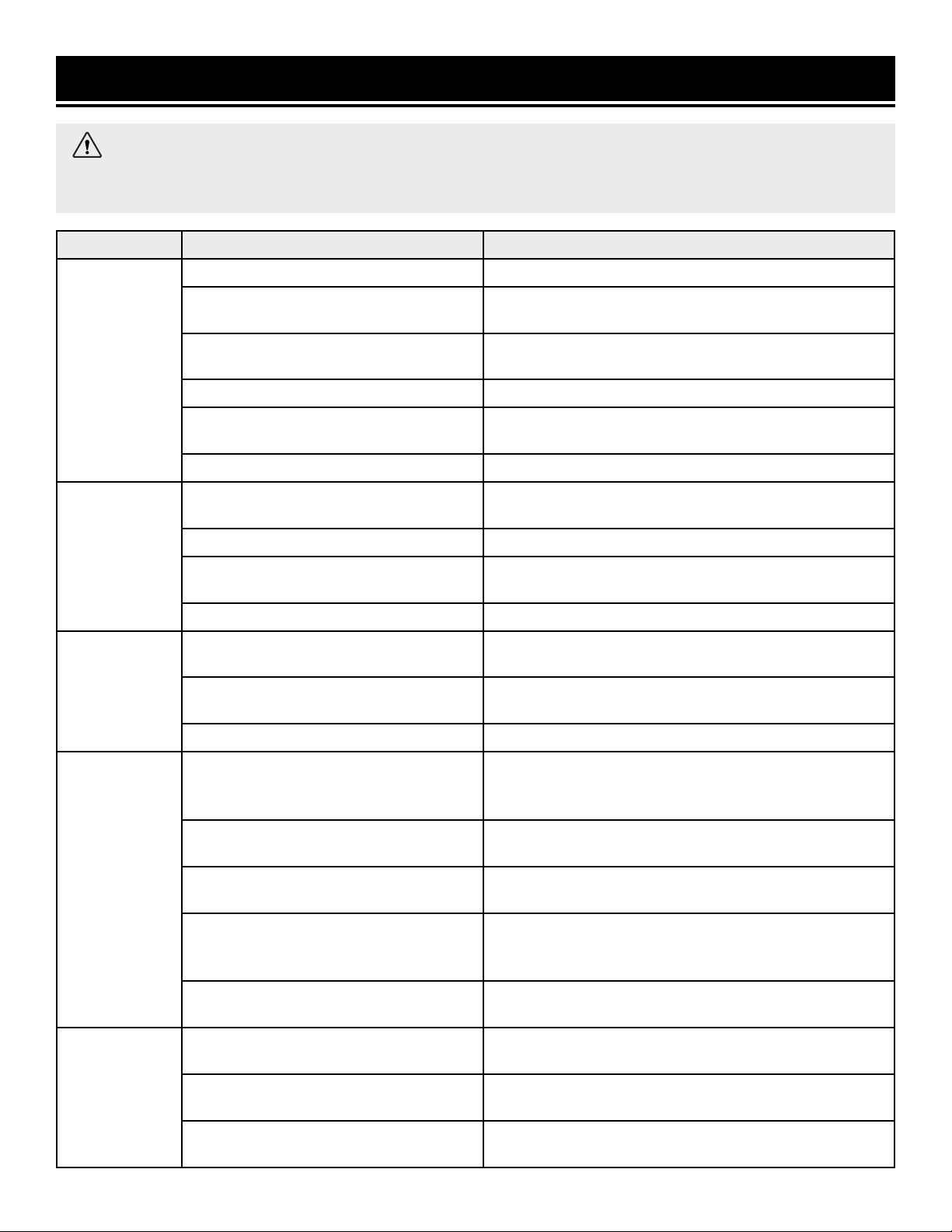
PROBLEM CAUSE SOLUTION
Ineffective
cutting perfor-
mance
Blade is dull Sharpen or replace blade.
Blade is dirty
Remove the blade and clean the surface and cutting edge
with steel wool and turpentine.
The blade is not secure
Make sure the blade flanges are flush against the blade and
arbor bolt is tightened completely.
Belt is worn See page 18 to replace the belt.
Incorrect blade used for workpiece
Ensure the blade is compatible with the material type and
thickness being cut.
Blade mounted backwards. Mount blade in correct orientation.
Excessive noise
or vibration
Not mounted properly
Make sure the saw is mounted securely to a flat and level
work surface.
Damaged saw blade Replace blade.
The blade is not secure
Make sure the blade flanges are flush against the blade and
arbor bolt is tightened completely.
Belt is worn See page 18 to replace the belt.
Blade will not
turn
Excessive sawdust or chips between blade
and frame
Clean the space between the blade and frame with com-
pressed air and ensure no chips are stuck within.
Spindle lock is depressed
Move the blade back and forth to unlock the spindle lock
button.
Belt is broken See page 18 to replace the belt.
Motor does not
start
Power cord damaged or not properly
plugged in
Check the power cord, extension cord, power plug and
the power outlet. Do not use the tool if any cord is dam-
aged.
Defective power switch
Stop using the tool and contact customer service at (800)
232-1195, M-F 8-5 CST for assistance.
Insufficient power from power outlet.
Make sure the outlet is functional and is the right capacity
for the tool.
Carbon brushes are worn
Inspect and replace carbon brushes as needed (see page
21) Replacement brushes (Model MM1214-114) can be
ordered from wenproducts.com.
Defective motor or other internal problem
Stop using the tool and contact customer service at (800)
232-1195, M-F 8-5 CST for assistance.
Saw overheats
Tool forced to work too fast
Do not force the tool and make sure the workpiece is com-
patible with the blade in use.
The extension cord is too long
or too thin
See page 8 for selecting the proper size of extension cord
for your tool.
Blocked motor housing vents
Blow dust out of the motor housing vents while wearing
safety goggles and dust mask.
WARNING: Stop using the tool immediately if any of the following problems occur. Repairs and replace-
ments should only be performed by an authorized technician. For any questions, please contact our customer
service at (800) 232-1195, M-F 8-5 CST or email us at [email protected].
TROUBLESHOOTING GUIDE
2322
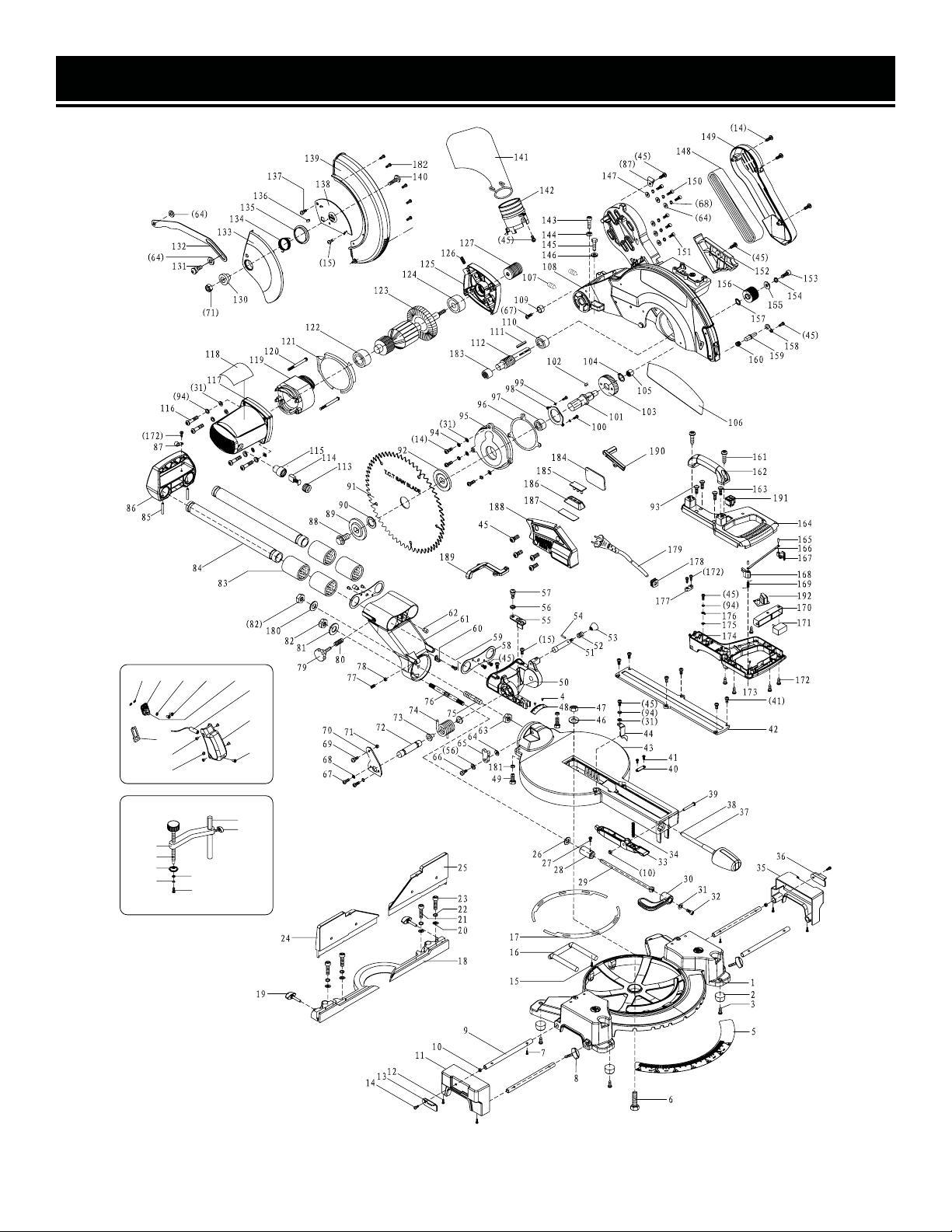
EXPLODED VIEW & PARTS LIST
193
194
195
196
197
198
199
200
201 202 203 204 205
206
207
208
209
210
211
NOTE: Not all parts may be available for purchase. Parts and accessories that wear down over the course of
normal use are not covered under the warranty.
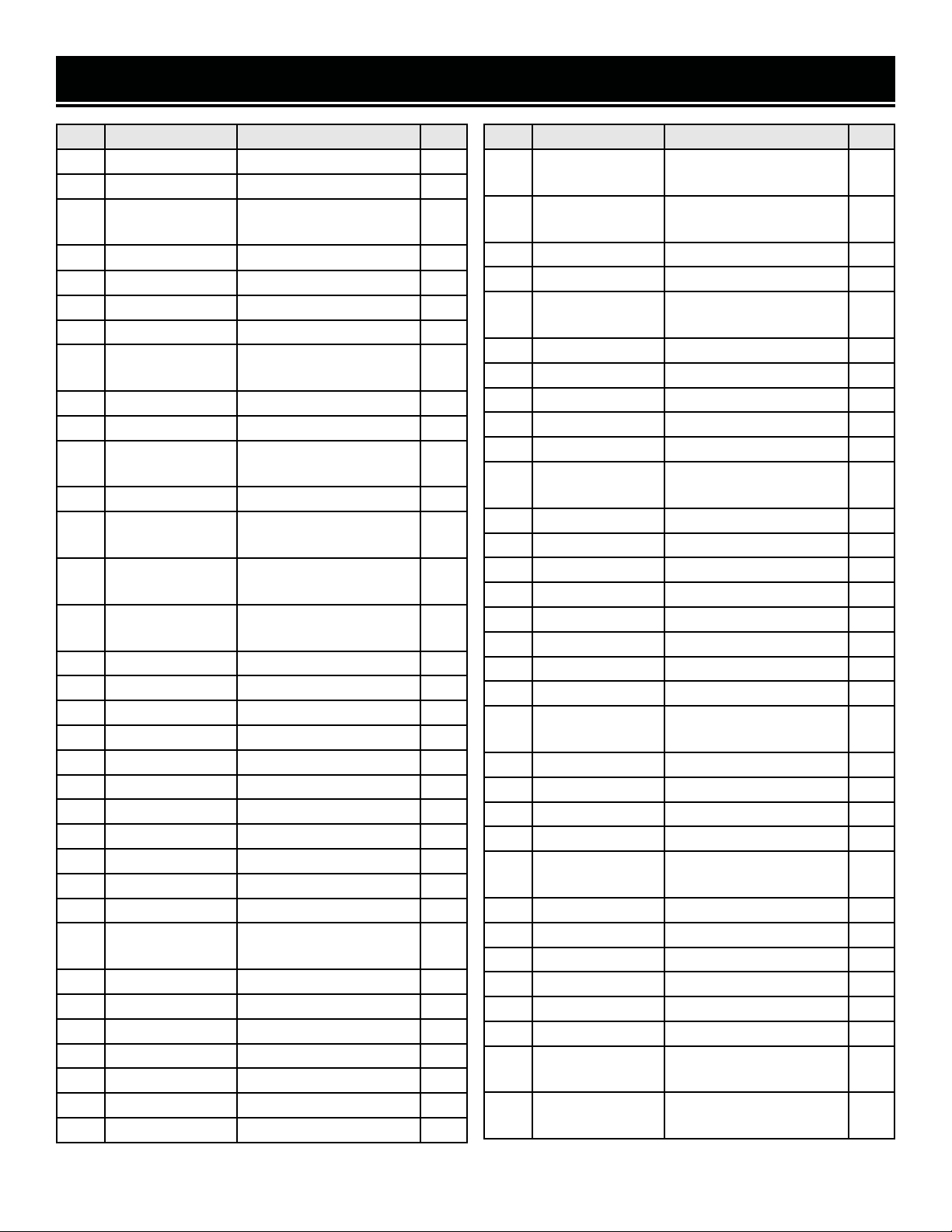
2524
No. Part. No. Description Qty.
1 MM1214-001 Base 1
2 MM1214-002 Foot 4
3 MM1214-003
M4 x 12 Self-Tapping
Screw
4
4 MM1214-004 Ø2 x 4 Rivet 2
5 MM1214-005 Miter Scale 1
6 MM1214-006 M8 x 55 Hex Bolt 1
7 MM1214-007 M5 x 6 Cross Head Screw 2
8 MM1214-008
M6 x 25 Table Extension
Knob
2
9 MM1214-009 Table Extension Rod 4
10 MM1214-010 M5 Lock Nut 3
11 MM1214-011
Table Extension Block
(Left)
1
12 MM1214-012 M5 x 8 Cross Head Screw 4
13 MM1214-013
Left Table Extension Stop
Plate
1
14 MM1214-014
M5 x 20 Cross Head
Screw
9
15 MM1214-015
M6 x 10 Cross Head
Screw
4
16 MM1214-016 Anti-Tip Support 1
17 MM1214-017 Swivel Plate 2
18 MM1214-018 Fence 1
19 MM1214-019 M6 x 32 Knob 2
20 MM1214-020 M8 Flat Washer 4
21 MM1214-021 M8 x 25 Hex Screw 2
22 MM1214-022 M8 Spring Washer 4
23 MM1214-023 M8 x 35 Hex Screw 2
24 MM1214-024 Left Fence Extension 1
25 MM1214-025 Right Fence Extension 1
26 MM1214-026 M12 Washer 1
27 MM1214-027
M5 x 10 Cross Head
Screw
1
28 MM1214-028 Lock Nut 1
29 MM1214-029 Locking Rod 1
30 MM1214-030 Bevel Lock Lever 1
31 MM1214-031 M5 Flat Washer 9
32 MM1214-032 M5 x 10 Hex Screw 1
33 MM1214-033 Miter Detent Lever 1
34 MM1214-034 Compression Spring 1
No. Part. No. Description Qty.
35 MM1214-035
Table Extension Block
(Right)
1
36 MM1214-036
Right Table Extension
Stop Plate
1
37 MM1214-037 Miter Lock Knob 1
38 MM1214-038 Miter Lock Knob Washer 1
39 MM1214-039
M5 x 35 Socket Head
Screw
1
40 MM1214-040 Small Press Board 1
41 MM1214-041 M4 x 8 Cross Head Screw 8
42 MM1214-042 Kerf Board 1
43 MM1214-043 Table 1
44 MM1214-044 Miter Angle Indicator 1
45 MM1214-045
M5 x 10 Cross Head
Screw
17
46 MM1214-046 M8 Flat Washer 1
47 MM1214-047 M8 Lock Nut 2
48 MM1214-048 Bevel Scale 1
49 MM1214-049 M8 x 20 Hex Screw 2
50 MM1214-050 Bevel Hinge 1
51 MM1214-051 Lock-Down Pin 1
52 MM1214-052 Lock-Down Spring 1
53 MM1214-053 Lock-Down Pin Head 1
54 MM1214-054
Ø3 x 16 Spring Cylindrical
Pin
1
55 MM1214-055 Depth Stop 1
56 MM1214-056 M8 Wavy Washer 2
57 MM1214-057 M8 Pan Head Bolt 1
58 MM1214-058 Bearing Cover 2
59 MM1214-059
M4 x 10 Cross Head
Screw
1
60 MM1214-060 Bevel Angle Indicator 1
61 MM1214-061 Table Support 1
62 MM1214-062 Stop Pin 2
63 MM1214-063 M10 Hex Nut 1
64 MM1214-064 M6 Flat Washer 8
65 MM1214-065 Bevel Stop Block 1
66 MM1214-066
M6 x 16 Non-Standard
Screw
1
67 MM1214-067
M6 x 14 Cross Head
Screw
3
EXPLODED VIEW & PARTS LIST
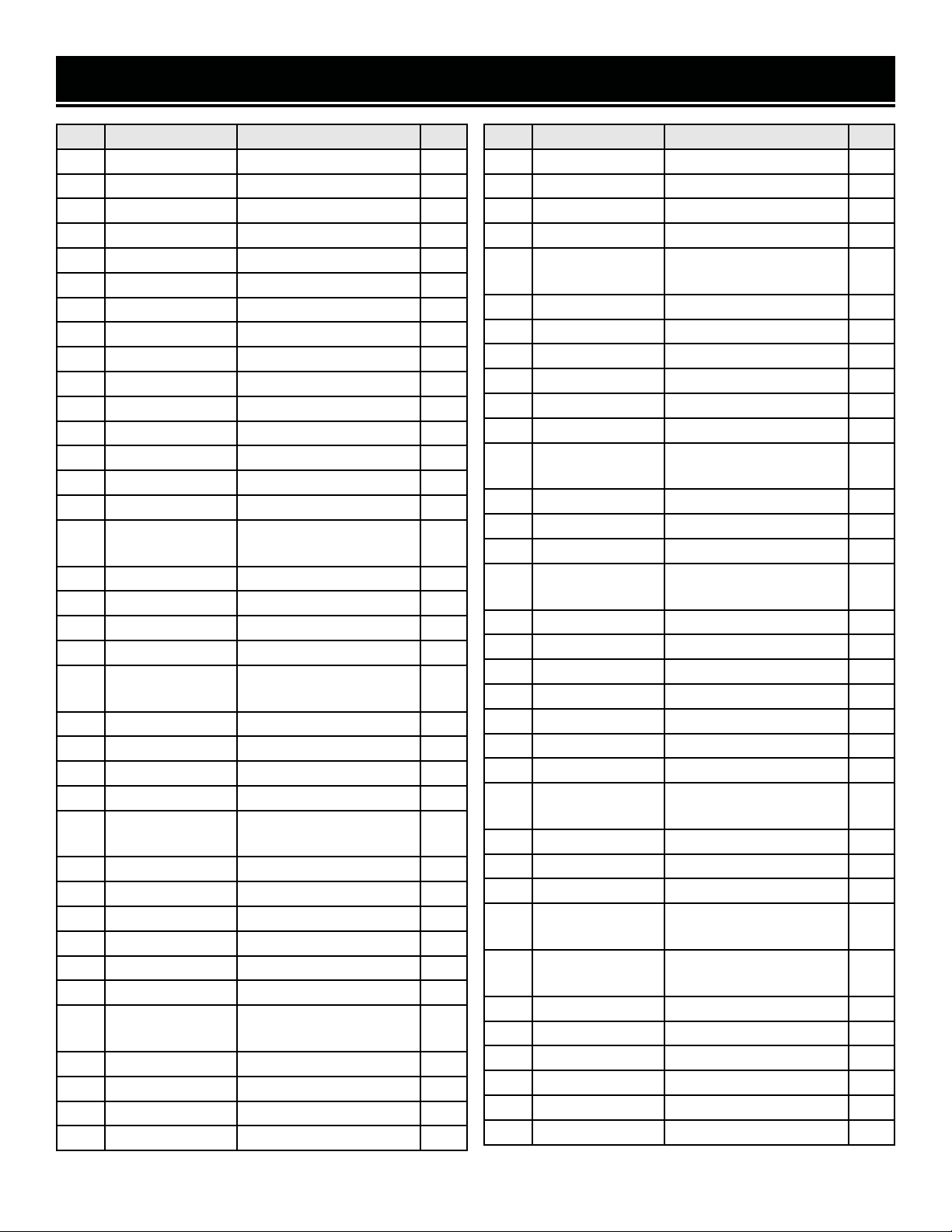
2524
No. Part. No. Description Qty.
68 MM1214-068 M6 Spring Washer 8
69 MM1214-069 M6 x 10 Cross Bolt 1
70 MM1214-070 Connecting Bar Support 1
71 MM1214-071 M6 Lock Nut 2
72 MM1214-072 Hinge Pin 1
73 MM1214-073 Spring Sleeve 2
74 MM1214-074 Torsion Spring 1
75 MM1214-075 M10 x 80 Stud 1
76 MM1214-076 Locking Rod 1
77 MM1214-077 M8 x 25 Zero Stop Screw 1
78 MM1214-078 M8 Zero Stop Lock Nut 1
79 MM1214-079 M6 x 25 Slide Lock Knob 1
80 MM1214-080 Spring 1
81 MM1214-081 M10 x M28 x 3 Flat Washer 1
82 MM1214-082 M10 Lock Nut 1
83 MM1214-083
Ø45 x Ø30 x 35 Linear
Bearing
4
84 MM1214-084 Slide Rail 2
85 MM1214-085 Ø5 x 44 Roll Pin 2
86 MM1214-086 Slide Rail Cover 1
87 MM1214-087 Cable Clamp 2
88 MM1214-088
M8 x 18 Arbor Screw
(Left)
1
89 MM1214-089 Outer Flange 1
90 MM1214-090 Arbor Insert 1
91 MM1214B TCT 12 in. Blade 1
92 MM1214-092 Inner Flange 1
93 MM1214-093
M5 x 40 Cross Pan Head
Screw
2
94 MM1214-094 M5 Spring Washer 9
95 MM1214-095 Gearbox Cover 1
96 MM1214-096 Gasket 1
97 MM1214-097 6003 Bearing 1
98 MM1214-098 Bearing Retainer 1
99 MM1214-099 M4 Spring Washer 2
100 MM1214-100
M4 x 12 Cross Head
Screw
2
101 MM1214-101 Spindle 1
102 MM1214-102 Flat Key 4 x 4 x 8 1
103 MM1214-103 Large Gear 1
104 MM1214-104 Ø15 Retaining Ring 1
No. Part. No. Description Qty.
105 MM1214-105 Roller Bearing HK1010 1
106 MM1214-106 Guard Label 1
107 MM1214-107 M6 x 10 Set Screw 2
108 MM1214-108 Upper Blade Guard 1
109 MM1214-109
Upper Blade Guard
Bushing
1
110 MM1214-110 6001 Bearing 1
111 MM1214-111 Flat Key 4 x 4 x 20 1
112 MM1214-112 Gear Shaft 1
113 MM1214-113 Brush Holder Cap 2
114 MM1214-114 Carbon Brush 2
115 MM1214-115 Brush Holder 2
116 MM1214-116
M5 x 35 Cross Head
Screw
4
117 MM1214-117 Motor Housing 1
118 MM1214-118 Motor Housing Label 1
119 MM1214-119 Stator 1
120 MM1214-120
ST4.8 x 65 Self-Tapping
Screw
2
121 MM1214-121 Seal 1
122 MM1214-122 6000 Bearing 1
123 MM1214-123 Rotor 1
124 MM1214-124 6002 Bearing 1
125 MM1214-125 Middle Cover 1
126 MM1214-126 M8 x 25 Set Screw 1
127 MM1214-127 Small Pulley 1
130 MM1214-130
Lower Blade Guard
Washer
1
131 MM1214-131 Connecting Bar Screw 1
132 MM1214-132 Connecting Bar 1
133 MM1214-133 Lower Blade Guard Panel 1
134 MM1214-134
Lower Blade Guard Coil
Spring
1
135 MM1214-135
Lower Blade Guard
Washer
1
136 MM1214-136 Rubber Stopper 1
137 MM1214-137 M6 x 7 Flat Head Bolt 1
138 MM1214-138 Guard Plate 1
139 MM1214-139 Lower Blade Guard 1
140 MM1214-140 M6 x 14 Hex Screw 1
141 MM1214-141 Dust Collection Bag 1
EXPLODED VIEW & PARTS LIST
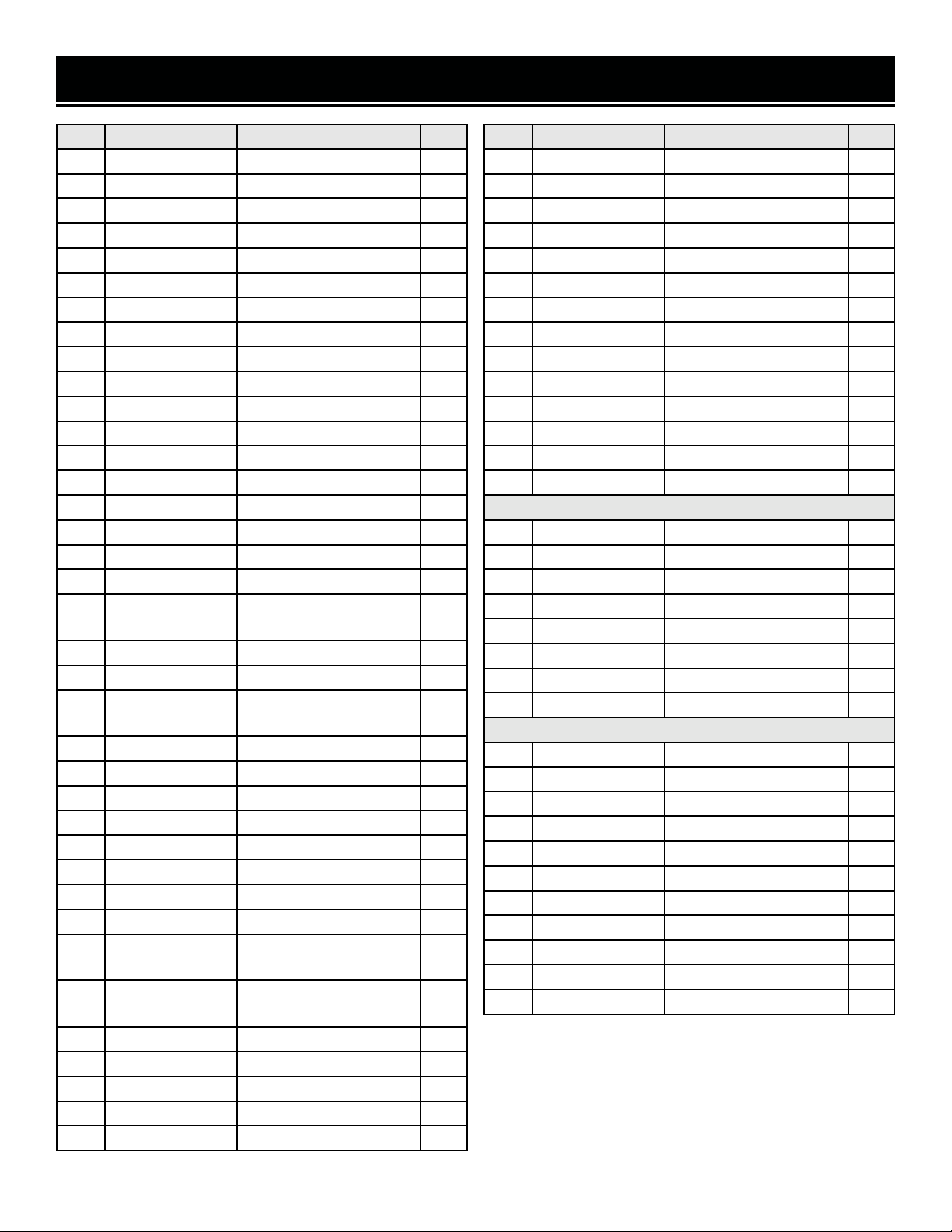
2726
No. Part. No. Description Qty.
142 MM1214-142 Dust Outlet 1
143 MM1214-143 M6 x 25 Hex Screw 2
144 MM1214-144 M6 Hex Nut 2
145 MM1214-145 M6 x 35 Hex Screw 1
146 MM1214-146 Depth Adjustment Nut 1
147 MM1214-147 M6 Flat Washer 1
148 MM1214-148 Belt (10PJ560) 1
149 MM1214-149 Belt Cover 1
150 MM1214-150 M6 x 20 Hex Screw 3
151 MM1214-151 M6 x 16 Hex Screw 3
152 MM1214-152 Cover 1
153 MM1214-153 M6 x 16 Cap Screw (Left) 1
154 MM1214-154 M6 Spring Washer 1
155 MM1214-155 M6 Thick Flat Washer 1
156 MM1214-156 Large Pulley 1
157 MM1214-157 Ø28 Retaining Ring 1
158 MM1214-158 Spindle Lock Bracket 1
159 MM1214-159 Spindle Lock 1
160 MM1214-160
Spindle Lock Taper
Spring
1
161 MM1214-161 ST6 x 18 Screw 2
162 MM1214-162 Handle 1
163 MM1214-163
M5 x 50 Cross Pan Head
Bolt
2
164 MM1214-164 Upper Handle 1
165 MM1214-165 Pin 2
166 MM1214-166 Trigger Lock Connector 1
167 MM1214-167 Right Trigger Lock 1
168 MM1214-168 Left Trigger Lock 1
169 MM1214-169 Switch Torsion Spring 1
170 MM1214-170 Trigger 1
171 MM1214-171 Switch 1
172 MM1214-172
ST3.9 x 14 Self-Tapping
Screw
7
173 MM1214-173
ST3.9 x 10 Self-Tapping
Screw
2
174 MM1214-174 Lower Handle 1
175 MM1214-175 M5 Toothed Washer 1
176 MM1214-176 Terminal 1
177 MM1214-177 Cable Clamp 1
178 MM1214-178 Grommet 1
No. Part. No. Description Qty.
179 MM1214-179 Power Cord 1
180 MM1214-180 M10 Flat Washer 1
181 MM1214-181 M8 Hex Nut 2
182 MM1214-182 M5 Cross Head Screw 5
183 MM1214-183 607 Bearing 1
184 MM1214-184 Cover 1
185 MM1214-185 LED Light 1
186 MM1214-186 Reflecting Board 1
187 MM1214-187 Transparent Panel 1
188 MM1214-188 LED Light Cover 1
189 MM1214-189 LED Wire Cover 1
190 MM1214-190 Laser Wire Cover 1
191 MM1214-191 Double Switch 1
192 MM1214-192 Transformer PCB 1
Clamp Assembly MM1214-197ASM
193 MM1214-193 M5 x 12 Cross Screw 1
194 MM1214-194 M5 Spring Washer 1
195 MM1214-195 M6 Flat Washer 1
196 MM1214-196 Clamp Pressure Plate 1
197 MM1214-197 Clamp 1
198 MM1214-198 Small Connecting Bar 1
199 MM1214-199 M6 x 20 Knob 1
200 MM1214-200 Clamp Locating Bar 1
Laser Module MM1214-206ASM
201 MM1214-201 M4 Wavy Washer 2
202 MM1214-202 Laser Seat 1
203 MM1214-203 M3 Flat Washer 2
204 MM1214-204 M3 x 8 Cross Screw 2
205 MM1214-205 M4 x 6 Screw 1
206 MM1214-206 Laser 1
207 MM1214-207 Laser Cover 1
208 MM1214-208 M4 x 14 Screw 1
209 MM1214-209 M4 Nut 1
210 MM1214-210 M4 x 8 Cross Screw 8
211 MM1214-211 Dust Cover 1
EXPLODED VIEW & PARTS LIST
NOTE: Not all parts may be available for purchase. Parts
and accessories that wear down over the course of
normal use are not covered under the warranty.

2726
WARRANTY STATEMENT
WEN Products is committed to building tools that are dependable for years. Our warranties are consistent with this
commitment and our dedication to qualit
y.
LIMITED WARRANTY OF WEN PRODUCTS FOR HOME USE
GRE
AT LAKES TECHNOLOGIES, LLC (“Seller”) warrants to the original purchaser only, that all WEN
consumer
power tools will be free from defects in material or workmanship during personal use for a period of two (2) years
used
for professional or commercial use. Purchaser has 30 days from the date of purchase to report missing or
damaged parts.
SELLER’S
SOLE OBLIGATION AND YOUR EXCLUSIVE REMEDY under this Limited Warranty and, to the extent per-
mitted
by law, any warranty or condition implied by law, shall be the replacement of parts, without charge, which a
re
defective
in material or workmanship and which have not been subjected to misuse, alteration, careless handling,
misrepai
r, abuse, neglect, normal wear and tear,
improper maintenance, or other conditions adversely affecting the
Product
or the component of the Product, whether by accident or intentionally, by persons other than Seller. To
make
a claim under this Limited Warranty, you must make sure to keep a copy of your proof of purchase that
clearly
-
dor
of Great Lakes Technologies, LLC. Purchasing through third party vendors, including but not limited to garage
sales,
pawn shops, resale shops, or any other secondhand merchant, voids the warranty included with this
product.
Contact [email protected] or 1-800-232-1195 with the following information to make arrangements:
your
shipping address, phone number, serial number, required part numbers, and proof of purchase. Damaged
or
defective parts and products may need to be sent to WEN before the replacements can be shipped out.
-
turning
a product for warranty service, the shipping charges must be prepaid by the purchaser. The product
must
be
shipped in its original container (or an equivalent), properly packed to withstand the hazards of shipment. The
product
must be fully insured with a copy of the proof of purchase enclosed. There must also be a description of
the
will be returned and shipped back to the pur
chaser at no charge for addresses within the contiguous United States.
THIS
LIMITED WARRANTY DOES NOT APPLY TO ITEMS THAT WEAR OUT FROM REGULAR USAGE OVER TIME,
INCLUDING
BELTS, BRUSHES, BLADES, BATTERIES, ETC. ANY IMPLIED WARRANTIES SHALL BE LIMITED IN
DUR
ATION TO TWO (2) YEARS FROM DATE OF PURCHASE. SOME STATES IN THE U.S. AND SOME CANADIAN
PROVINCES
DO NOT ALLOW LIMITATIONS ON HOW LONG AN IMPLIED WARRANTY LASTS, SO THE ABOVE LIMI-
TAT
ION MAY NOT APPLY TO YOU.
IN
NO EVENT SHALL SELLER BE LIABLE FOR ANY INCIDENTAL OR CONSEQUENTIAL DAMAGES (INCLUDING
BUT
NOT LIMITED TO LIABILITY FOR LOSS OF PROFITS) ARISING FROM THE SALE OR USE OF THIS PRODUCT.
SOME ST
ATES IN THE U.S. AND SOME CANADIAN PROVINCES DO NOT ALLOW THE EXCLUSION OR LIMITAT
ION
OF
INCIDENTAL OR CONSEQUENTIAL DAMAGES, SO THE ABOVE LIMITATION OR EXCLUSION MAY NOT APPLY
TO YOU.
THIS
LIMITED WARRANTY GIVES YOU SPECIFIC LEGAL RIGHTS, AND YOU MAY ALSO HAVE OTHER RIGHTS
WHICH
VARY FROM STATE TO STATE IN THE U.S., PROVINCE TO PROVINCE IN CANADA AND FROM COUNTRY
TO COUNT
RY.
THIS
LIMITED WARRANTY APPLIES ONLY TO ITEMS SOLD WITHIN THE UNITED STATES OF AMERICA, CANA-
DA
AND THE COMMONWEALTH OF PUERTO RICO. FOR WARRANTY COVERAGE WITHIN OTHER
COUNTRIES,
CONT
ACT THE WEN CUSTOMER SUPPORT LINE. FOR WARRANTY PARTS OR PRODUCTS REPAIRED UNDER
W
ARRANTY SHIPPING TO ADDRESSES OUTSIDE OF THE CONTIGUOUS UNITED STATES, ADDITIONAL
SHIPPING
CHARGES MAY APPLY.

THANKS FOR
REMEMBERING
V. 2021.01.26