INSTRUCTIONS FOR USE
Induction hob
EN
HID144/654/754/865MC
HID925/945/956MC
HID352/654/754GC
HID824/956/965GC
HID144/754/865MFC
HID925/956MFC

3Safety ..........................................................
7Introduction ................................................
7Dear customer! ............................................
9Your hob .....................................................
9Induction hob ...............................................
10Use ..............................................................
10Using the touch controls ..............................
10Induction cooking ........................................
11How does induction work ............................
11Power management .....................................
12Pans .............................................................
13Induction noises ...........................................
14Power level settings .....................................
15Control panel ..............................................
16Indications on the display .........................
17Operation ....................................................
17Switching the hob on/off ..............................
17Child lock .....................................................
18Cooking ........................................................
18Standard cooking ........................................
19Move function ..............................................
19Automatic cooking zone bridging ................
19Chef mode ...................................................
20Pause ...........................................................
20Recall function .............................................
21Time functions ..............................................
22Hot cooking zone .........................................
22Overheat protection .....................................
23Cooking with the PLUS menu ......................
25Cooking with Celsius°Cooking™ .................
26
Cooking with Celsius°Cooking™ cookware
and Hestan Cue programs ..........................
30
Step-by-Step cooking guide on
CelsiusCooking.com ....................................
31Hood control ................................................
32ConnectLife and Wi-Fi ...............................
32ConnectLife-app and Wi-Fi connection ......
35Firmware Update ........................................
36Settings .......................................................
39Maintenance ...............................................
39Cleaning .......................................................
40Troubleshooting .........................................
40General ........................................................
42Troubleshooting Wi-Fi ..................................
43Installation ..................................................
43Safety ..........................................................
45Installing a built-in hob ..............................
47Air vents in the lower kitchen cabinet ..........
48Flush-mount installation into the worktop .....
51Fitting the foam gasket ................................
52Electrical installation .................................
52
Connecting the cooking hob to the power
mains ...........................................................
52Connection ...................................................
59Current limiter ..............................................
60Environmental aspects ..............................
60Disposal of packaging and appliance .........
61Compliance information ............................
Contents
WARNING!
Before use, read the Safety instructions first!
General safety instruction
The appliance is not intended to be operated by means of an external
timer or separate remote-control system.
If the supply cord is damaged, it must be replaced by the
manufacturer, its service agent or similarly qualified persons in order
to avoid a hazard (only for appliances supplied with connection
cord).
Do not use steam cleaners or high-pressure cleaners to clean the
appliance, as this may result in an electric shock.
CAUTION!
CAUTION: The cooking process has to be supervised. A short
term cooking process has to be supervised continuously.
Metallic objects such as knives, forks, spoons and lids should not
be placed on the hob surface since they can get hot.
After use, switch off the hob element by its control and do not rely
solely on the pan detector.
Danger of fire!
Danger of fire: Do not store items on the cooking surfaces.
Households with children and people with special needs
This appliance can be used by children aged from 8 years and
above and persons with reduced physical, sensory or mental
capabilities or lack of experience and knowledge if they have been
given supervision or instruction concerning use of the appliance in
a safe way and understand the hazards involved. Children shall not
play with the appliance. Cleaning and user maintenance shall not
be made by children without supervision.
3
Safety
Children should be supervised to ensure that they do not play with
the appliance.
WARNING!
WARNING: The appliance and its accessible parts become hot
during use. Care should be taken to avoid touching heating
elements. Children younger than 8 years of age shall be kept away
unless continuously supervised.
WARNING: Accessible parts may become hot during use. Young
children should be kept away.
WARNING: Accessible parts will become hot when in use. To
avoid burns and scalds children should be kept away.
Risk of electric shock!
WARNING!
WARNING: If the surface is cracked, switch off the appliance to
avoid the possibility of electric shock.
WARNING: Unattended cooking on a hob with fat or oil can be
dangerous and may result in fire. NEVER try to extinguish a fire
with water, but switch off the appliance and then cover flame e.g.
with a lid or a fire blanket.
WARNING: Danger of fire: do not store items on the cooking
surfaces.
Means for disconnection must be incorporated in the fixed wiring in
accordance with the wiring rules.
The appliance is intended for household use. Do not use it for any
other purpose, such as room heating, drying of pets or other animals,
paper, fabrics, herbs etc. As this may lead to injury or fire hazard.
The appliance may only be connected to the power mains by an
authorised service technician or expert. Tampering with the appliance
or non-professional repair thereof may result in risk of severe injury
or damage to the product.
4
Safety
If another electrical appliance is connected to an AC power socket
near the appliance, make sure the power cord does not come into
contact with hot cooking zones.
If the power cord is damaged, it should be replaced by the
manufacturer or an authorised service technician, in order to avoid
hazard.
Using the glass ceramic hob as a storage area may result in
scratches or other damage to it. Never heat food in aluminium foil
or in plastic containers on the cooking hob. Such foil or containers
may melt which can result in a fire or damage to the cooking hob.
Do not store temperature-sensitive items underneath the appliance,
such as cleaners or detergents, spray cans etc.
WARNING!
Carefully read the instructions for use before connecting the
appliance. Repair or any warranty claim resulting from incorrect
connection or use of the appliance shall not be covered by the
warranty.
Temperature safety
A sensor continuously measures the temperature of certain parts of
the hob. Every cooking zone is equipped with a sensor that measures
the temperature of the glass-ceramic cooking zone to avoid any risk
of overheating when a pan boils dry. In case of temperatures rising
too high, the power is reduced automatically, or the hob switches
off automatically.
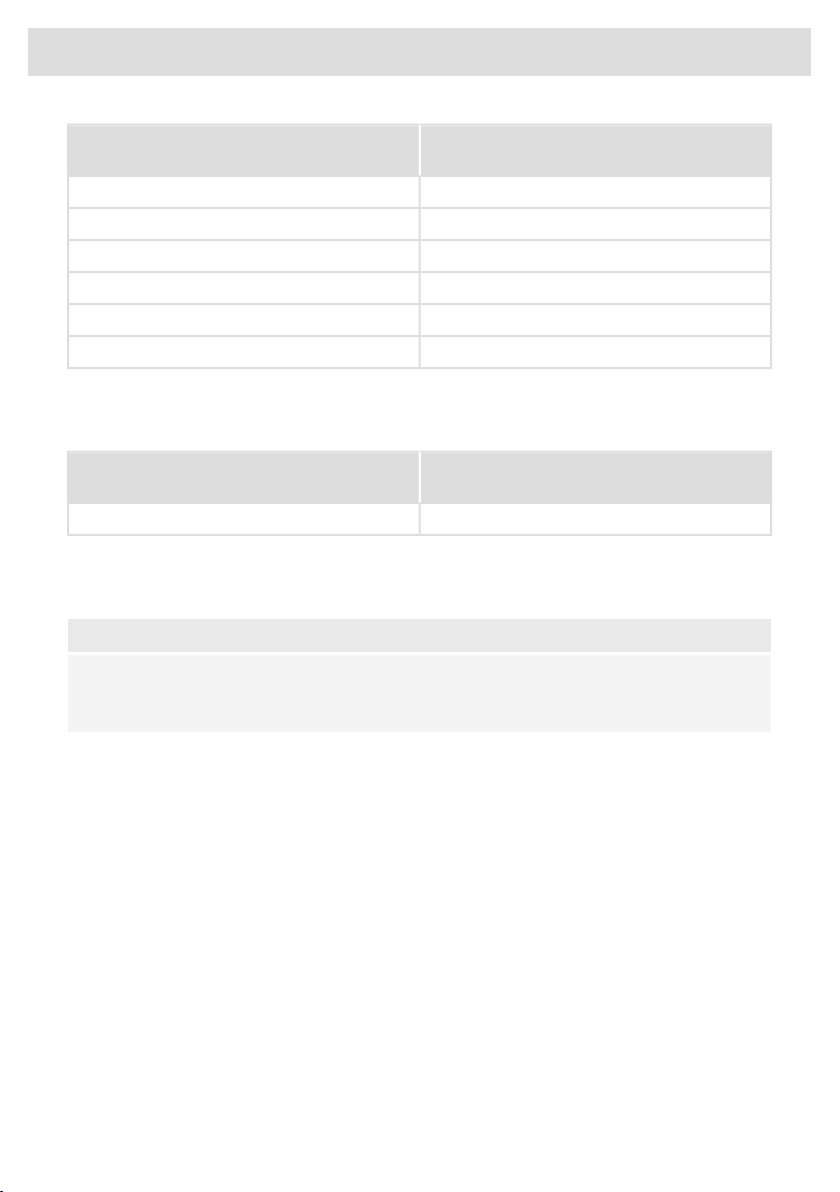
Cooking-time limiter
The cooking-time limiter is a safety function of your cooking
appliance. It will operate if you forget to switch off your hob.
Depending on the setting you have chosen, the cooking time will be
limited as follows:
5
Safety
The cooking zone switches off automatically
after:
Setting
9 hours1 and 2
6 hours3, 4 and 5
4 hours6, 7 and 8
3 hours9
2 hours10
1 hour11 and 12
The cooking-time limiter switches the cooking zones off if the time
in the table has elapsed.
The cooking zone switches automatically to
setting 12 after:
Setting
10 minutesboost
Cooking-time limiter for specific cooking zone is reset after the user
has changed the cooking level of the specific cooking zone.
NOTE!
Cooking zone related timers take priority over the cooking-time
limiter.
6
Safety

Dear customer!
Welcome to our growing Celsius Cooking family!
We are proud of our appliances. We hope that this appliance will be an appreciated and dependable
aid for many years to come.
Please read the operating instructions before use. They include general tips, information about the
settings and adjustments you can make, and the best way to take care of your appliance.
This hob has been designed for the real lover of cooking. Cooking on an induction hob has a number
of advantages. It is easy, because the hob reacts quickly and can also be set to a very low power
level. Because, moreover, it can also be set to a high power level, it can bring dishes to the boil very
quickly. The ample space between the cooking zones makes cooking comfortable.
Cooking on an induction hob is different from cooking on a traditional appliance. Induction cooking
makes use of a magnetic field to generate heat. This means that you cannot use just any pan on it.
The pans section gives more information about this.
For optimum safety the induction hob is equipped with several temperature protections and a residual
heat indicator, which shows which cooking zones are still hot.
This manual describes how you can make the best possible use of the induction hob. In addition to
information about operation, you will also find background information that can assist you in using
this product. You will also find cooking tables and maintenance tips.
Read the manual thoroughly before using the appliance, and store these instructions in a safe
place for future reference.
The manual also serves as reference material for service technicians. Please, therefore, stick the
appliance identification card at the back of the manual. The appliance identification card contains
all the information that the service technician will need in order to respond appropriately to your
needs and questions.
Enjoy your cooking!
7
Introduction
The following symbols are used throughout the manual and they have the following meanings:
INFORMATION!
Information, advice, tip, or recommendation
WARNING!
Warning – general danger
ELECTRIC SHOCK!
Warning – danger of electric shock
HOT SURFACE!
Warning – danger of hot surface
DANGER OF FIRE!
Warning – danger of fire
8
Introduction
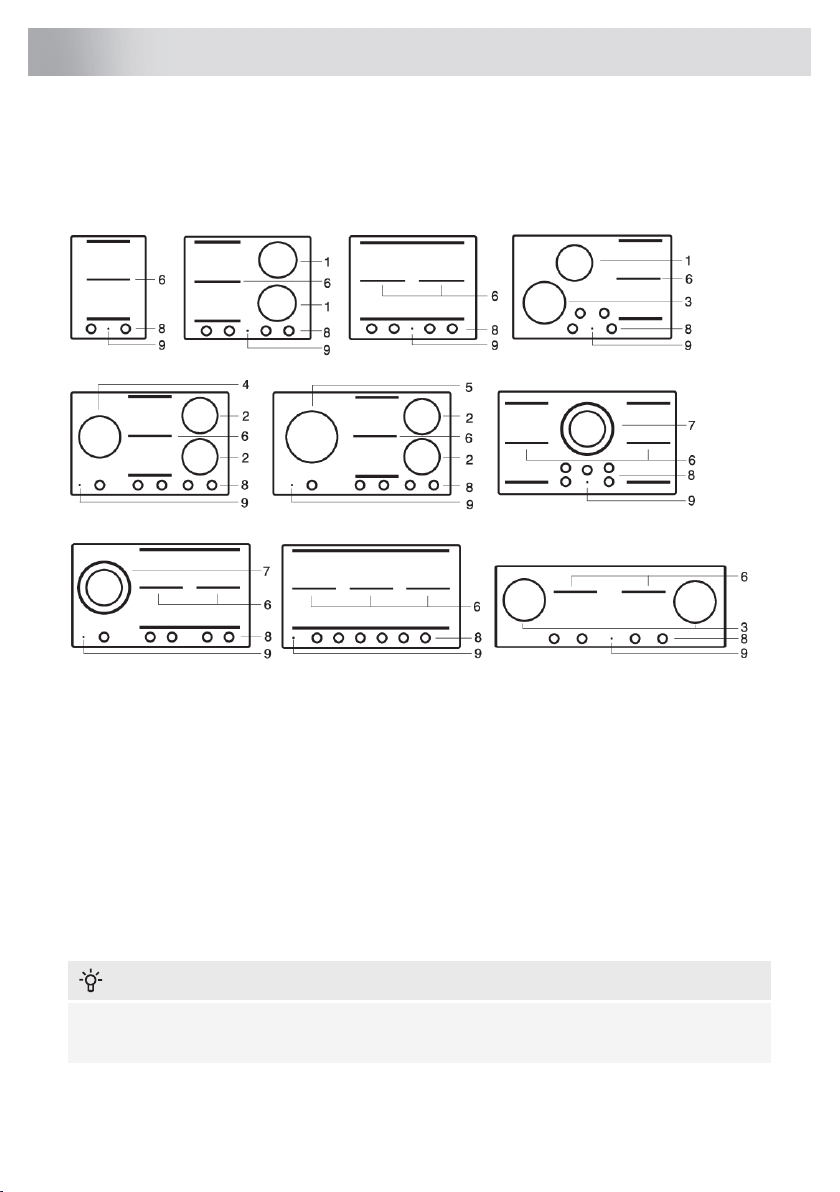
Induction hob
(depending on the model)
Since the appliances for which these instructions were drawn up may have different features, some
functions or equipment may be described in the manual that may not be present in your appliance.
1. Cooking zone ø 18 cm - Max. 1.85 kW / 3.0 kW (boost)
2. Cooking zone ø 18 cm - Max. 1.4 kW / 3.0 kW (boost)
3. Cooking zone ø 21 cm - Max. 2.3 kW / 3.7 kW (boost)
4. Cooking zone ø 21 cm - Max. 2.3 kW / 3.0 kW (boost)
5. Cooking zone ø 26 cm - Max. 2.6 kW / 3.7 kW (boost)
6. Bridge induction cooking zone 18 x 22 cm - Max. 2.3 kW / 3.7 kW (boost)
7. Cooking zone Double Ring:
ø 18 cm - Max. 1.85 - 3.0 kW (boost)
ø 26 cm - Max. 2.60 - 5.5 kW (boost)
8. Control panel (visible only when the hob is turned on)
9. On/Off touch key
INFORMATION!
The maximum power output is depending on the type of cookware used and the thermal condition
of the appliance.
9
Your hob
Using the touch controls
• The touch controls may take some getting used to if you are used to other (rotary) controls. Place
the tip of your finger flat on the control to achieve the best results. You do not have to apply any
pressure.
• The touch sensors only react to the light pressure of a fingertip. Do not operate the controls with
any other objects.
• The cooking hob is operated by a slider. You can either touch the selected part of the slider or
slide in a circular motion clockwise to increase or anti-clockwise to decrease the power level
and temperature.
• To set the cooking zone power level, touch the desired spot on the slider. As you touch the slider,
the selected power level will appear on the cooking zone display unit.
• The selected part of the slider will be fully lit.
Induction cooking
Induction cooking is fast
In the beginning you will be surprised by the speed of induction cooking. Especially at higher settings,
foods and liquids will boil very rapidly.
It is best not to leave pans unattended to avoid them boiling over or boiling dry.
Always keep the lid on the pan when cooking, in order to avoid energy
loss, and therefore temperature loss.
Attention
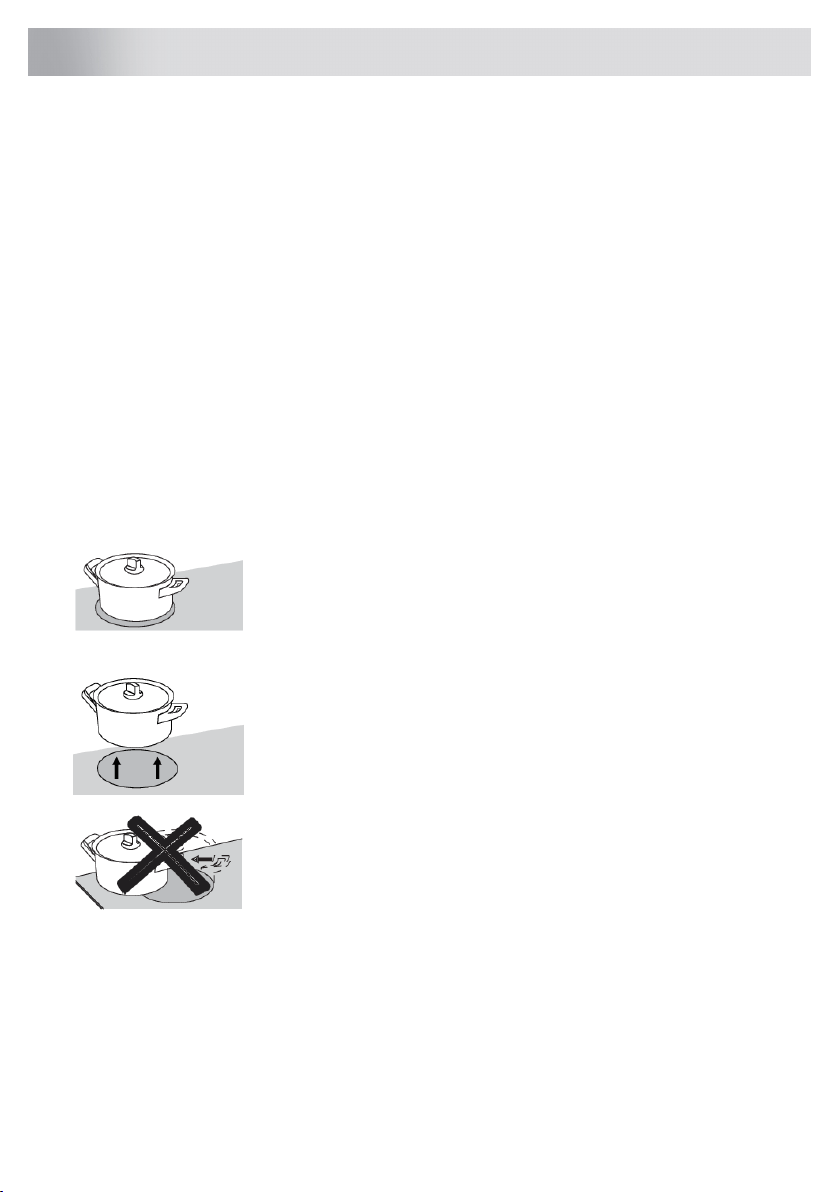
Only put pans with a clean base on the cooking surface and always
pick pans up to move them.
Grains of sand, salt, sugar or crystals may cause scratches which
cannot be removed.
10
Use

How does induction work
A magnetic field is generated in the appliance. By placing a pan with
an iron base on a cooking zone, a current is induced in the pan base.
This induced current generates heat in the base of the pan.
Easy
The electronic controls are accurate and easy to set. On the lowest
setting, you can melt chocolate directly in the pan, for example, or cook
ingredients that you would normally heat in a bain-marie.
Fast
Thanks to the induction hob’s high power levels, bringing liquid to the
boil is very quick. Cooking food through takes just as long as for other
types of cooking.
Clean
The hob is easy to clean. Because the cooking zones do not get any
hotter than the pans themselves, food spills cannot be burnt on the
cooking zone.
Safe
The heat is generated in the pan itself. The glass top does not get any
warmer than the pan. This means that the cooking zone is considerably
cooler compared to that from a ceramic hob or a gasburner. Once a
pan has been taken away, the cooking zone cools down quickly.
Power management
This induction hob is equipped with a smart power management system. This system ensures a
maximum permissible power cannot be exceeded for safety reasons.
• The smart power management system will arrange the power distribution across the zones
automatically. This means the hob could automatically decrease the power on one zone when
the power level of another zone is increased. The level of activity of the power management
system depends on the available power per electrical phase, the setting of the current limiter
and the connected load.
• The power level of one zone can affect the power of another zone as the maximum available
power is distributed among the zones. If the combined zones reach the maximum available
power when a new power level is set, the power levels of one or more zones are automatically
reduced within the power limit. This is indicated by the flashing of the relevant control element.
• In case a zone is used for Celsius Cooking, this zone always gets highest priority.
• Intervention by the smart power management system is more likely when the current limiter is
set to a lower level.
• The current limiter setting must be set according to your connection and circuit breakers by a
registered and qualified installer (see ‘Current limiter’ for the details on currents and electrical
installation).
11
Use
Pans
Pans for induction cooking
Induction cooking requires a particular quality of pan.
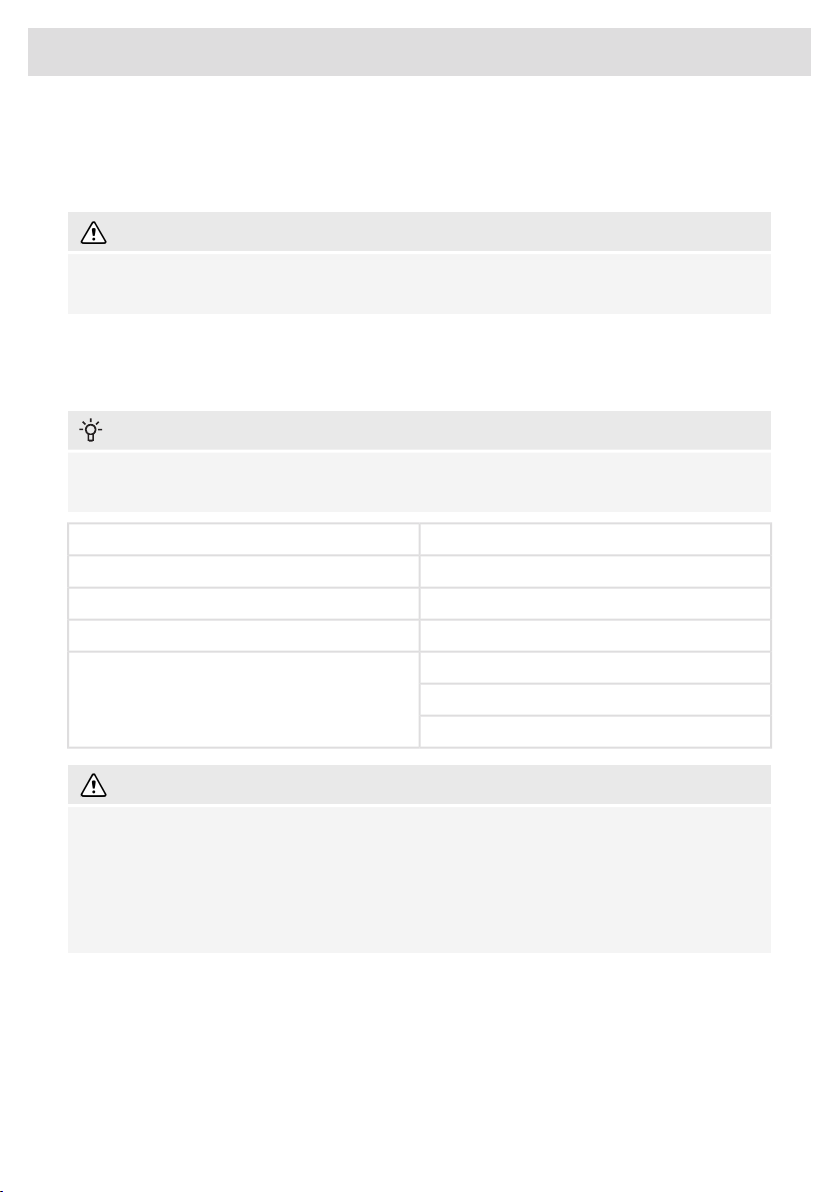
WARNING!
Pans that have already been used for cooking on a gas hob are no longer suitable for use on an
induction hob.
Only use pans that are suitable for induction cooking with a thick base (minimum 2.25 mm) and a
flat base.
• The best are pans with the ‘Class Induction’ quality mark.
INFORMATION!
You can check for yourself whether your pans are suitable using a magnet. A pan is suitable if
the base of the pan is sufficiently attracted by the magnet.
UnsuitableSuitable
EarthenwareSpecial stainless steel pans
Stainless steelClass Induction
PorcelainHard-wearing enamelled pans
CopperEnamelled cast-iron pans
Plastic
Aluminium
WARNING!
Be careful with enamelled sheet-steel pans:
• the enamel may chip (the enamel comes loose from the steel), if you switch the hob on at a
high setting when the pan is (too) dry
• the base of the pan may warp - for example: Due to overheating
• heat up enamelled pans slowly
12
Use
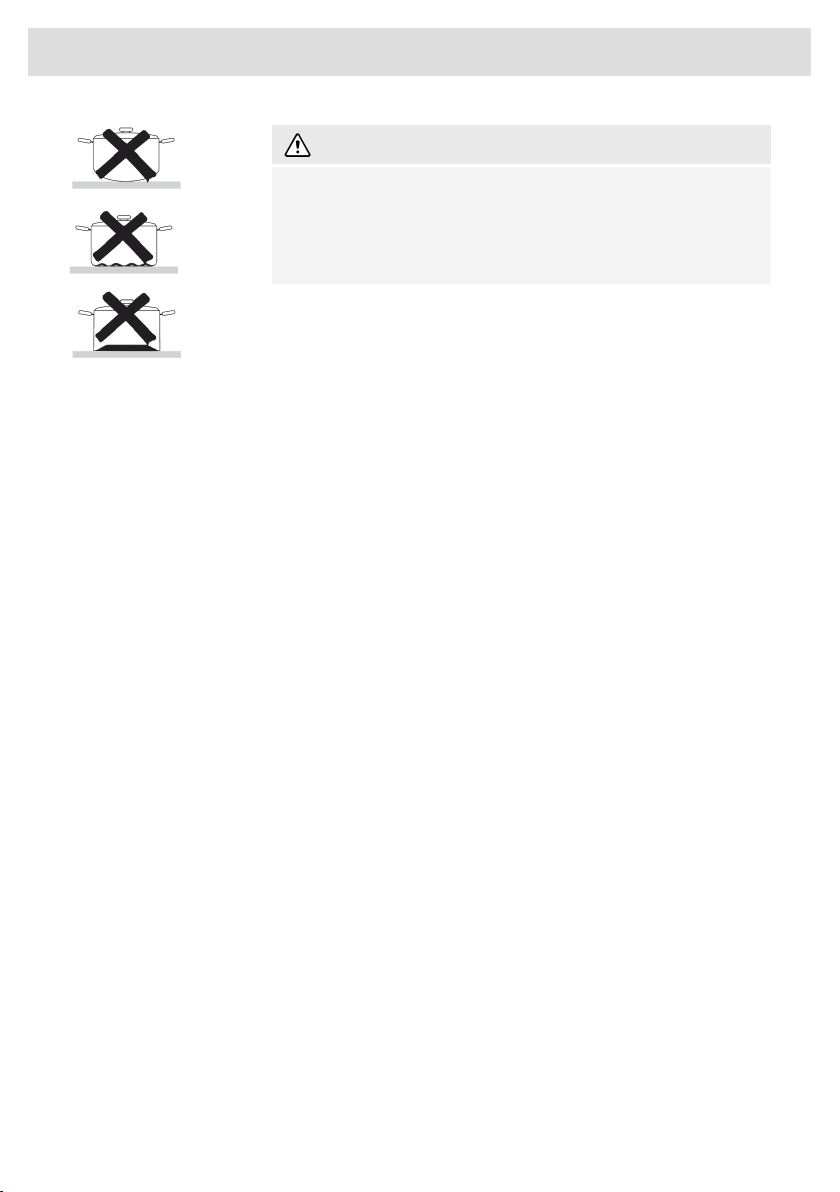
WARNING!
Never use pans with a misshapen base. A hollow or rounded base
can interfere with the operation of the overheating protection, so that
the appliance becomes too hot. This may lead to the glass top
cracking and the pan base melting. Damage arising from the use
of unsuitable pans or from boiling dry is excluded from the guarantee.
Minimum pan diameter
The diameter of the bottom of the pan must be at least 12 cm. You will achieve the best results by
using a pan with the same diameter as the cooking zone. If a pan is too small the zone will not work.
Pressure cookers
Induction cooking is very suitable for cooking in pressure cookers. The cooking zone reacts very
quickly, and so the pressure cooker is quickly up to pressure. As soon as you switch a cooking zone
off, the heating process stops immediately.
Pan detection
The cooking zone automatically detects a suitable pan placed on a cooking zone. The cooking zone
display lights up.
Integrated pan recognition
If a certain power level is set for a cooking zone and there is no suitable pan or any pan on the
cooking zone, then the cooking zone will not deliver any power. After a certain period, the cooking
zone will switch off automatically.
Grill plates
The hob has a Grill function (depending on the model) for using a grill plate or teppan yaki. The
function keeps the grill plate or teppan yaki at an ideal temperature for grilling.
Induction noises
A ticking sound
This sound can be caused at lower power level settings or by the automatic pot detection.
Pans are making noise
Pans can make some noise during cooking. This is caused by the energy flowing from the hob to
the pan. This is perfectly normal for some pans. It will not damage either the pans or the hob.
The fan is making noise
To increase the lifespan and performance of the electronics, the appliance is equipped with fans.
During intense use of the appliance, the fan is activated to cool down the appliance and you will
hear a buzzing sound. The fan still runs for several minutes after the hob has been switched off.
13
Use

Power level settings
Because the settings depend on the quantity and composition of the contents of the pan, the table
below is intended as a guideline only.
PurposeLevel
Use settings 1 - 5 to:
• simmer bouillon
• stew meats
• simmer vegetables
• melt chocolate
• poach
• melt cheese
Use settings 6 - 9 to:
• complete the cooking of large quantities
• defrost hard vegetables
• fry thick slices of breadded meat
Use settings 10 - 11 to:
• fry thick pancakes
• fry thick slices of breadded meat
• fry bacon (fat)
• cook raw potatoes
• make breadded fish
• cook through fish
• fry thin slices of breadded meat
Use setting 12 to:
• sear meats,
• cook fish,
• cook omelettes,
• fry boiled potatoes,
• deep fry foods.
Use setting 'boost' to:
• bring the food or liquid to the boil quickly
• shrink greens
Power distribution of cooking zones
• Depending on the type of hob, the cooking zones can affect each other. When several of these
cooking zones are switched on at the same time, the capacity is shared automatically between
them.
• When the maximum capacity of the combination of cooking levels is reached during setting, one
or more zones are automatically reduced to the highest possible setting at that moment. This is
indicated by the flashing of the relevant control element.
14
Use
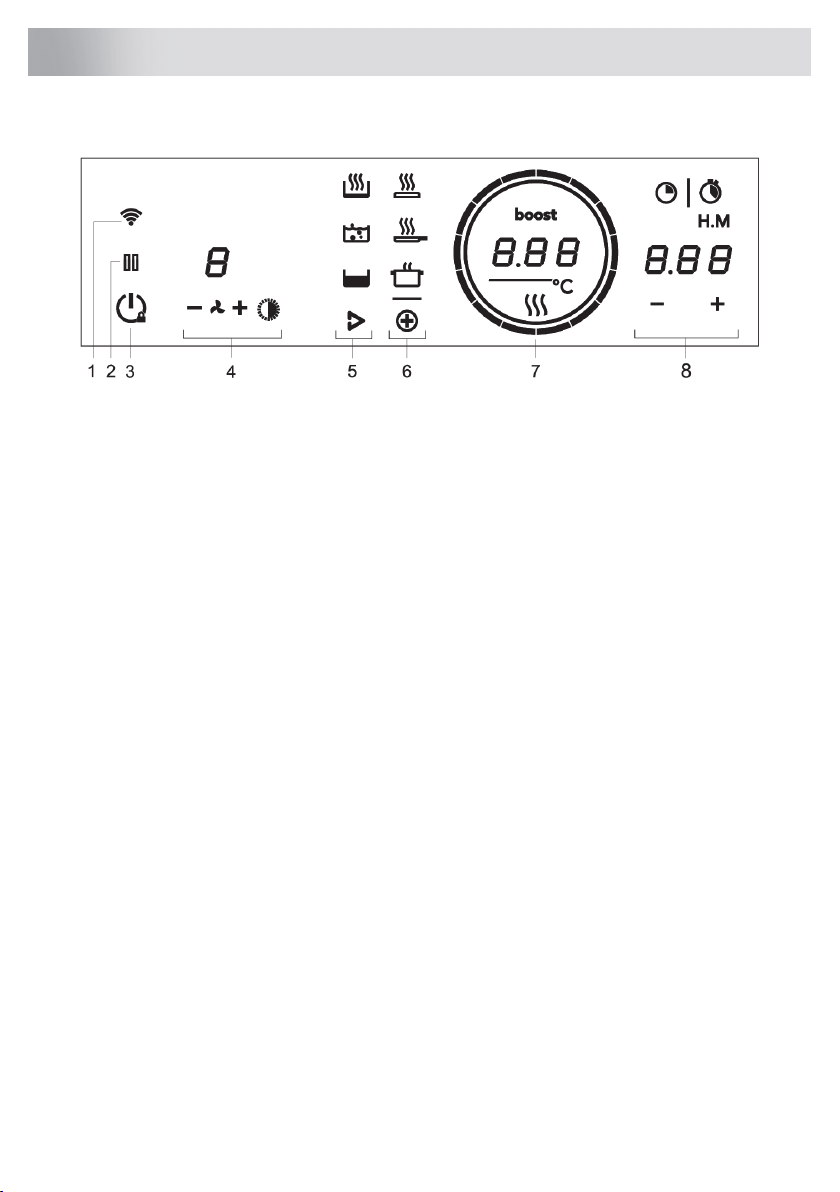
(lay-out of user interface depends on model)
1. Wi-Fi/Connectivity
2. Pause
• Key lock for cleaning
• Pause and resume cooking
3. On/Off
• Child lock
4. Hood control
• Minus
• Fan
• Plus
• Lighting
• Display
5. Hestan Cue
• Heating up and frying
• Boiling/cooking with water
• Slow cooking or sous vide
6. PLUS programs
• Grill
• Frying/wok
• Heating up/keeping warm
7. Cooking Level or Temperature Display
• Residual Heat indication
• Boost indication
8. Time functions
• Stopwatch
• Kitchen timer
15
Control panel
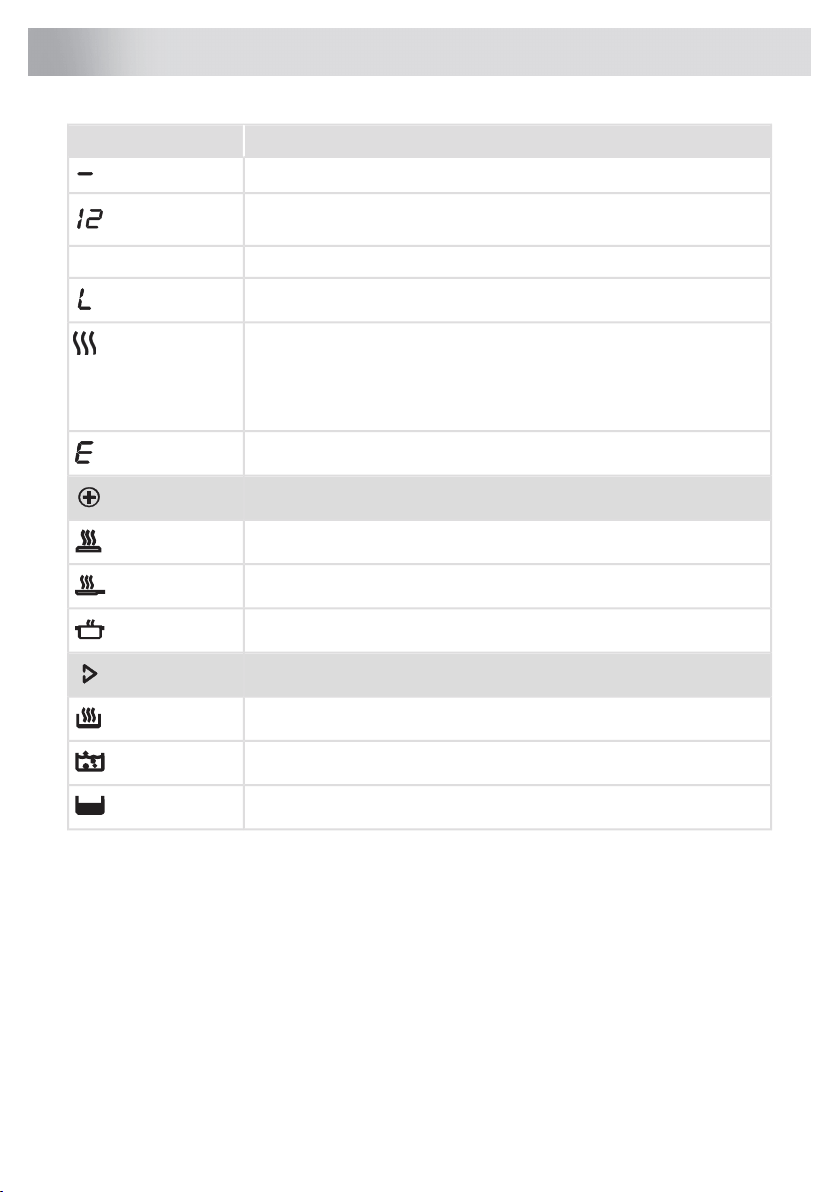
StatusIn display
Power level ‘0’ for a cooking zone
Power level that is set for a cooking zone; 1 = low / 12 = high
Boost function active
boost
Locking function is activated; the control panel is locked
Residual heat indicator; The hob has a residual heat indicator for each
cooking zone to show which cooking zones are hot after cooking zone is
turned off. Although the hob is switched off, the indicator will remain on
for as long as the cooking zone is hot! Avoid touching those cooking zones
when this indicator is lit. Danger! Risk of burns.
Error code; See chapter Troubleshooting
PLUS programs
Grill
Frying/wok
Heating up/keeping warm
Hestan Cue programs
Heating up and frying
Boiling/cooking with water
Slow cooking or sous vide
16
Indications on the display
Switching the hob on/off
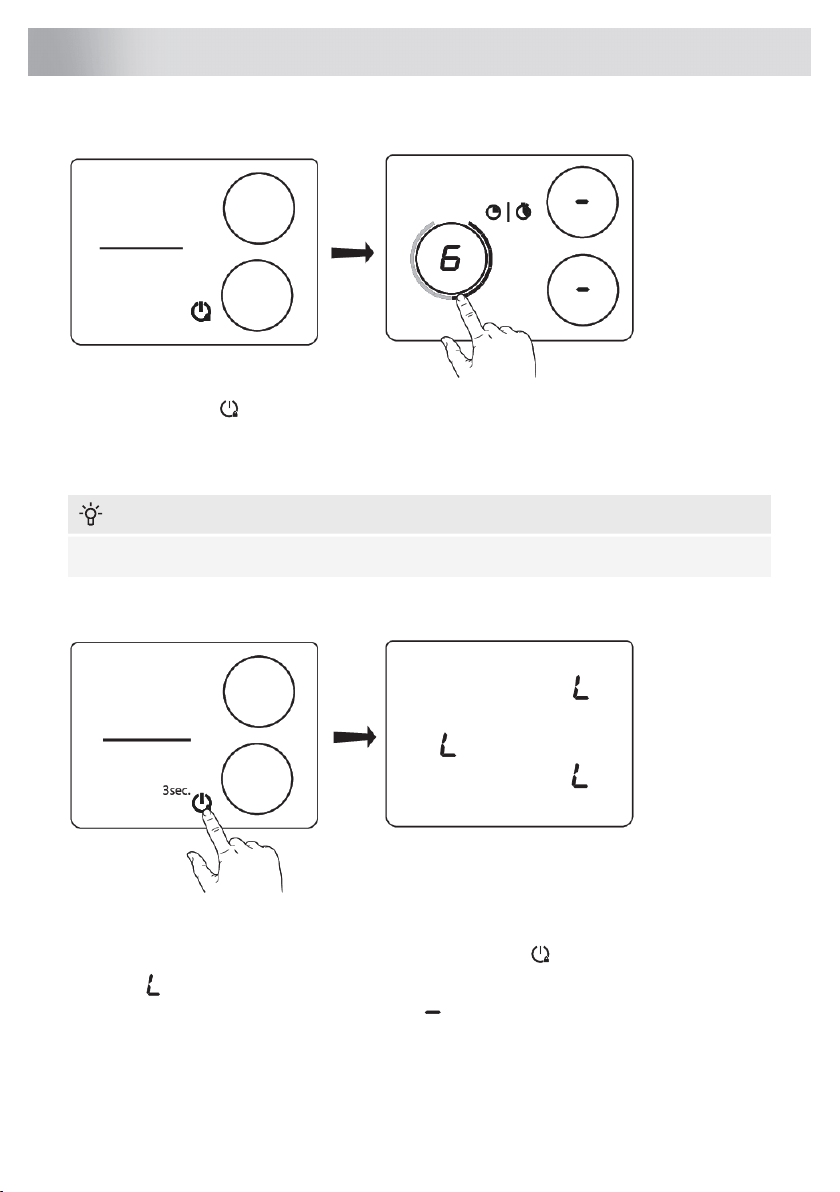
Touch the on/off key to switch on the hob. A short beep will be emitted. Rings on all sliders will
light up, then slider will gradually fade out. Slider will only remain lit on the selected cooking zones
on which you have the pans placed. When the pan is removed, the slider will be switched off, while
all internal rings will remain lit.
INFORMATION!
When no cooking zone is active for 60 seconds, the cooking hob will power off.
Child lock
Cooking hob controls can be locked to prevent it from being switched on inadvertently.
Turn on the hob by pressing the on/off key. Touch the on/off key and hold it for 3 seconds. The
indication will appear on the display unit, and the hob controls will be locked. To unlock the
controls, proceed in the same way. The indication together with sliders will appear on all cooking
zone display on which pans are present, and the hob controls will be unlocked.
17
Operation
INFORMATION!
Child lock should be activated before the start of cleaning to avoid accidentally switching on the
hob.
Cooking
Three cooking modes are available:
1. Standard cooking with power levels
2. Cooking with the PLUS menu
3. Hestan Cue cooking by measuring cookware temperature
Standard cooking
Place the pan on a certain cooking zone. Set the power level as desired. Power level can be set by
sliding in circular motion or by directly touching an area or position on the slider. Slider elements
will be fully lit. To switch the cooking zone off slide backwards or touch the empty area on top of the
slider at the right side.
Boost
Rapid cooking, boost can be activated for any cooking zone. This will allow you to rapidly heat large
amounts of food using extra power. Boost is active for no more than 10 minutes; then, the power
level is automatically decreased to 12. If the cooking hob is not too hot, the boost can be reactivated
again for 10 minutes after it is switched off.
Activating boost
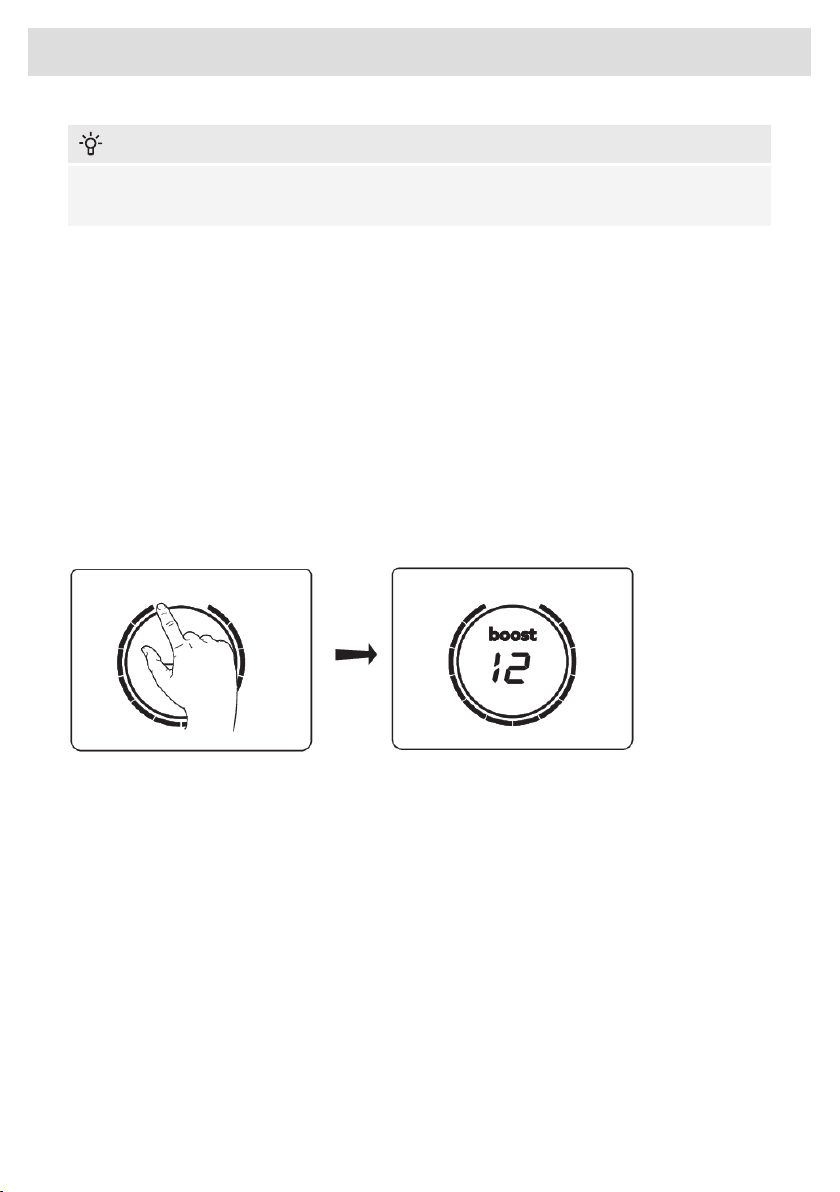
First activate power level 12 and then press the button for power level 12 a second time. "boost"
will appear on the display. The boost function is now activated.
Alternatively, the power level 12 can be activated clockwise and slide a little beyond the button 12.
If auto boost is activated (see chapter Settings), boost is always activated together with power level
12.
Deactivating boost
To deactivate the boost for the selected cooking zone, press level 12 again or any other power level
on the slider.
18
Operation
INFORMATION!
To avoid overheating, the electronic control system may automatically deactivate boost prematurely
and decrease the power level to 12.
If there is no suitable pan on the cooking zone, the set level of temperature will flash. After one
minute, the cooking zone will be switched off.
Move function
If you remove the pan from an active cooking zone and within 6 seconds place it on a different
cooking zone, all the timer and cooking-related settings can be transferred to the new cooking zone
by touching the slider of the new cooking zone. To indicate this possibility, the new cooking zone
displays copied settings on the slider. When the confirmation is done, the previous cooking zone is
deactivated.
Automatic cooking zone bridging
Two adjacent square cooking zones can be merged into a single large cooking zone. Pan position
recognition is activated automatically after the appliance is switched on. When a pan will be placed
on the hob, the pan recognition function will recognize its position and automatically connect the
bridge cooking zones depending on the size of the pan (only when hob was already switched on).
The power level or temperatures are displayed simutaneously on both bridged cooking zones, but
the power level or temperature can only be adjusted on the left or upper slider.
You can un-bridge or manualy bridge the cooking zone by touching the two corresponding sliders
at the same time.
Chef mode
(only on type models: HID956MC HID956MFC HID956GC)
In this mode, all cooking zones are switched on simultaneously and the cooking hob is divided into
three zones.
• On all left-hand side cooking zones, power level 12 is automatically activated.
• On all middle cooking zones, power level 7 is automatically activated.
• On all right-hand side cooking zones, power level 1 is automatically activated.
Power levels can then be adjusted to any value.
19
Operation

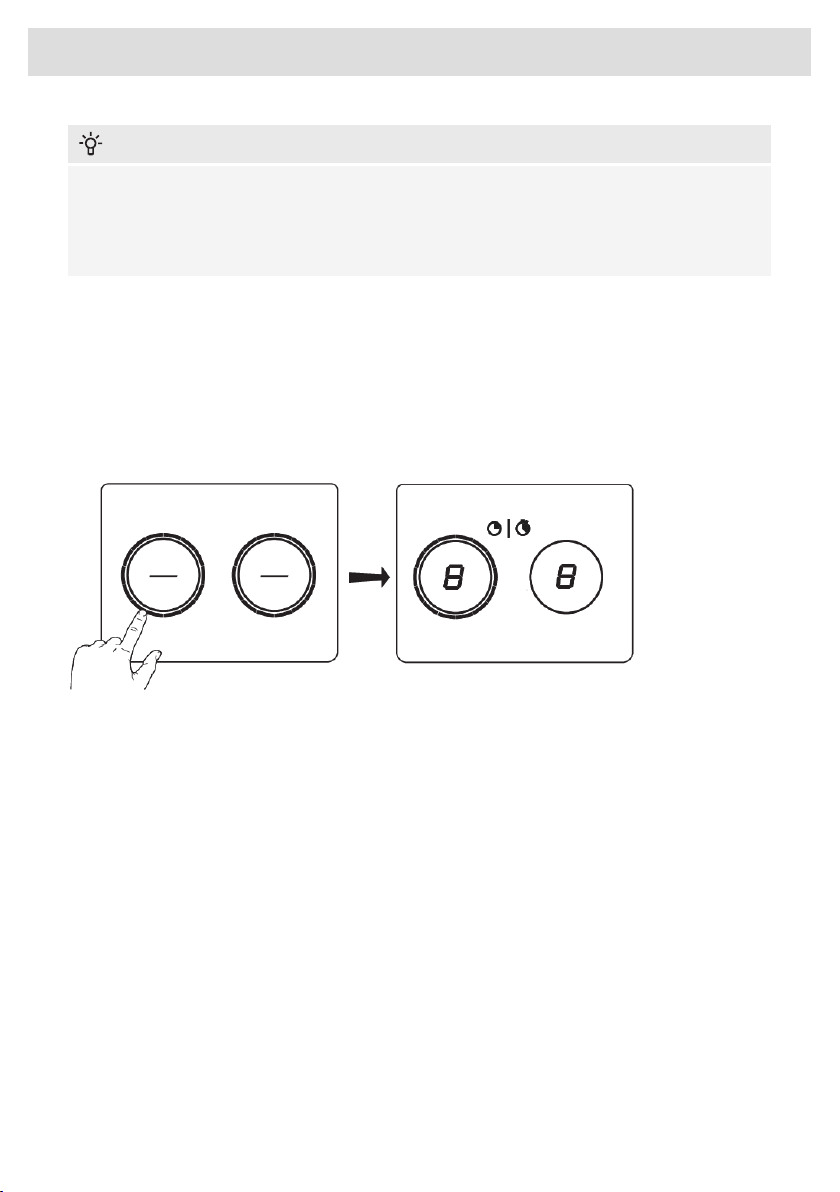
To activate this mode, touch two sliders at the same time for 3 seconds. All zones must be inactive
and Celsius°Cooking™ pans should not be assigned. To turn off this mode, tap any two sliders at
the same time.
In this mode, the hob does not warn of an empty cooking zone, even if there is no suitable pan
placed on any cooking zone. The hob switches off automaticaly, if there is no cooking pot detected
on the hob for 10 minutes.
INFORMATION!
Please lift pans when moving them from one zone to another, not slide them.
Pause
The pause function can be used to pause the operation of the entire cooking hob for up to 10
minutes. Thus, you can walk away from the appliance or safely clean the cooking hob, within a short
period of time, without losing your settings.
Switching on the pause
At least one cooking zone must be active.
Touch the pause button . You will hear a short beep. The settings on all active hobs are reduced
to level 2.
All timer functions are paused.
All keys are inactive except the pause and on/off key.
If no key is pressed within 10 minutes, all active hobs automatically turn off.
Hestan Cue programs are not paused since they are automatically operated.
Switching off the pause
Press the pause key again within 10 minutes.
The hob continues to operate with the same settings as before the break.
Timers are also unpaused.
Recall function
This feature allows you to recall all the settings of the cooking zones if the hob was accidentally
switched off.
Within 6 seconds the hob must be switched back on. Pressing anywhere on the slider within 6
seconds recalls all the settings from before the appliance was last switched off.
20
Operation
Time functions
Every cooking zone has two timers: a count-down program timer and a stopwatch (count-up timer).
Count-down timer
The count-down timer makes the cooking process easier by allowing you to set the cooking time for
the selected cooking zone. When the time set on the timer expires, the cooking zone will automatically
switch off and emit an acoustic signal. Switch off the acoustic signal by touching the count-down
timer key ; alternatively, it will switch off automatically after a while. The count-down timer can be
set independently for all cooking zones.
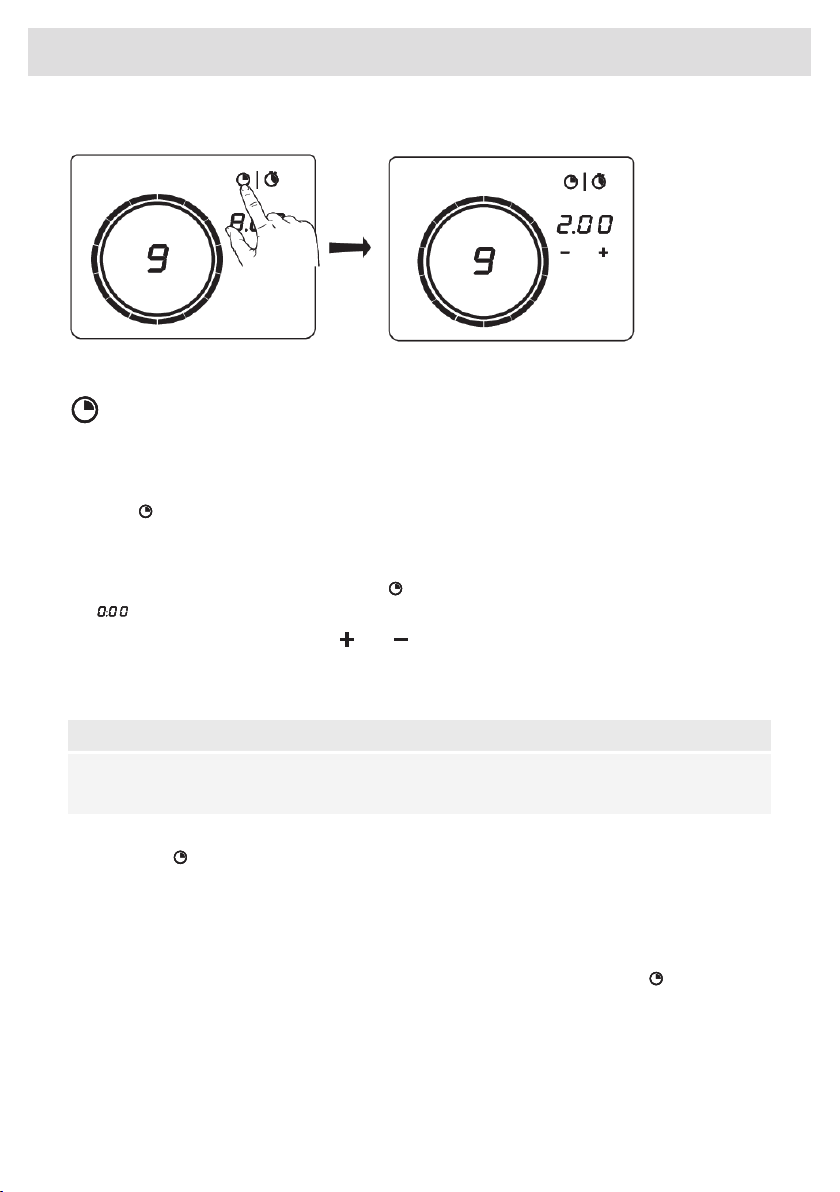
Setting the count-down timer
•
Press the count-down timer selector key for the desired active cooking zone. The key and
will flash on the cooking zone display unit.
•
Set the desired cooking time with and .
• If the time is not set within five seconds, the count-down timer is disabled.
• Repeat the same steps to set the count-down program timer for another active cooking zone.
NOTE!
If you move the pan from the cooking zone, all timer functions set for that cooking zone will be
paused.
Deactivating the count-down timer
Press the icon for the selected cooking zone and hold it for 3 seconds. The timer will be switched
off.
Deactivating the count-down timer alarm.
• When the set time expires, alarm will be sounded, the key for the relevant cooking zone will flash,
and 0:00 will flash on the count-down timer display unit.
•
To acknowledge and stop the alarm, press the count-down timer selector key , or remove the
pan from the cooking zone.
21
Operation

Cooking time display – stopwatch
The stopwatch can be used to see how long you have been continuously cooking on the selected
cooking zone and starts counting automatically in the background.
• Press the stopwatch key.
• Stopwatch time will be displayed on the cooking zone display unit.
• Stopwatch can be reset if you press on the stopwatch key for 3 seconds.
Hot cooking zone
The hot zone symbol lights up if the cooking zone is innactive, or there is no pan present on the
cooking zone while its temperature is higher than 65 °C.
If the hob is switched off and at least one of the cooking zones is still hot, the inner circle remains
illuminated. When the temperature of the hob is reduced below 65 °C all lights turn off.
Overheat protection
• The hob is fitted with a cooling fan which cools the electronic components during cooking. The
fan may operate for a while even after the end of the cooking process.
• Induction cooking hob is also fitted with an overheating protector which protects the electronic
components from damage. The protector operates in several ways. When the cooking zone
temperature gets very high, the cooking power is automatically reduced. If this does not suffice,
the cooking zone power continues to decrease, until the safety mechanisms switches off the
cooking zone completely. When the cooking hob has cooled off, its total power will be available
again.
22
Operation

Cooking with the PLUS menu
The PLUS menu allows cooking with semi-automatic programs, enabling temperature cooking for
all kinds of cookware that fit the purpose of the program.
Touch the PLUS menu key to display the program line: keeping warm/heating up, frying/wok
and grill (in bridge mode).
Choose one of the Plus programs by touching the relevant symbol. Then you set the temperature
with the slider. You can toggle through the menu or temperature by long pressing the relating button
too.
When the program or temperature selection does not change for 3 seconds, the program is activated.
To deactivate a PLUS program, press the active program key for about three seconds or select a
power level manually.
Always add water, oil or butter before starting a program, use no empty pan or pot.
Keeping warm and Heating up
With this function you can for example melt chocolate (45 °C), keep food warm (70 °C), simmer (94
°C) or bring to boil (100 °C).
Frying/wok
With this function you can cook vegetable, fish, bacon, meat, fried potatoes or eggs by using butter
or oil.
Grill
This function is exclusively for bridged cooking zones, that are combined to a larger cooking zone.
Grilling is optimized for ASKO induction accessories grill plate and teppanyaki. But it will also work
with different cookware, but perhaps less accurate.
Some functions are indicating the heat up time, counting down. In the heating-up stage, the slider
and the set temperature will flash. When the set temperature is reached, a short beep will be emitted,
and the slider will be constantly lit. You may then start cooking.
The sensor which measures the temperature while cooking within the PLUS menu programs, is
located in the glass, below the cookware. Because of this there is always an offset between setpoint
and actual temperature of the content inside the cookware. The temperature of the content inside
the cookware is therefore also dependent on factors such as: type of pan, volume of liquid and
whether a lid is placed on the pan.
23
Operation
INFORMATION!
Up to value 94 °C the programs allow the hob to reach and maintain automatically the set
temperature by measuring the glass surface temperature. This will avoid liquids overflowing and
burning on the bottom of the pan.
INFORMATION!
From 100 °C and higher temperatures the programs will heat up cookware with different timed
power steps. The set temperature serves as an indication which temperature range can be
reached approximately. Cooking process must be attended.
INFORMATION!
For more accuracy Celsius°Cooking™ cookware such as Frying Pan, Chef's Pot or the Probe is
recommend, with separate functions for it (see chapter Celsius°Cooking™).
INFORMATION!
These menu functions work best if they are started at the beginning of the cooking process. A
already hot surface will influence the performance.
24
Operation
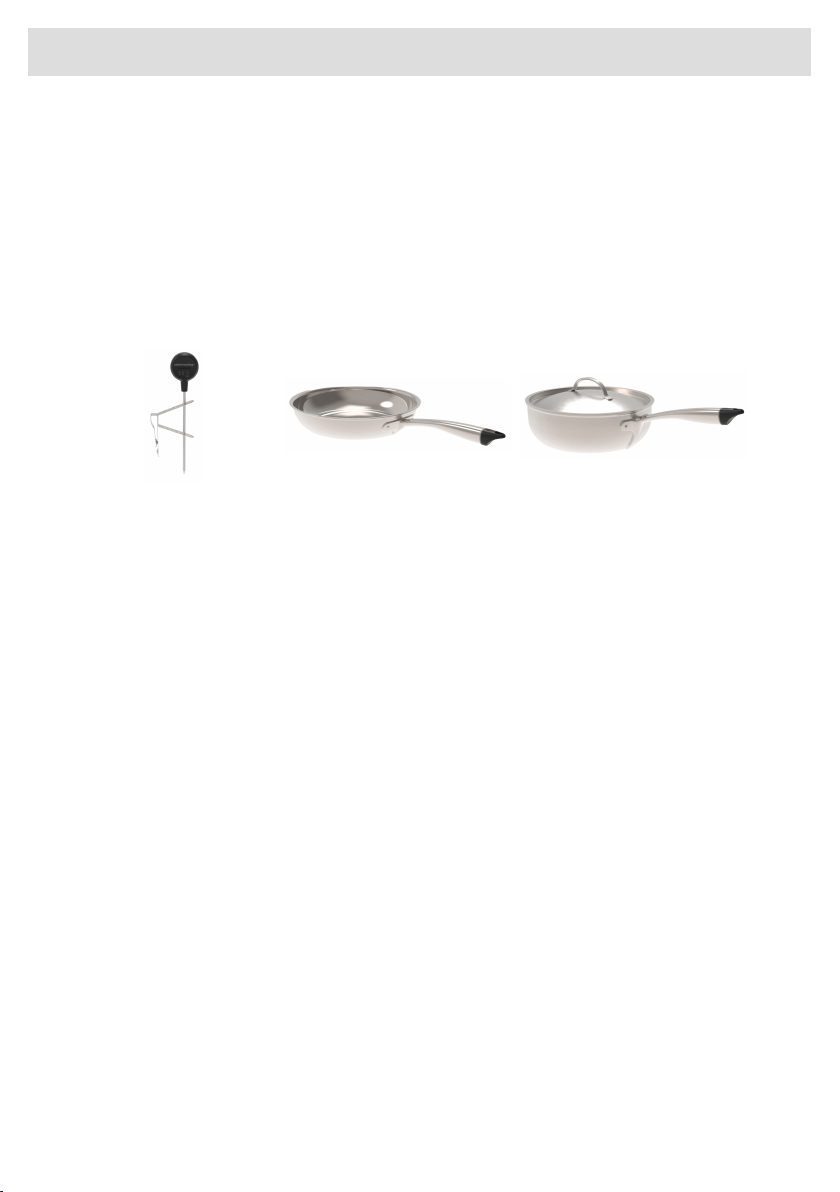
Cooking with Celsius°Cooking™
Your new induction hob is fully packed with smart functions and features that will make cooking
easier and more pleasant.
In order to get the most out of these and explore what's possible with Celsius°Cooking™, you can
also buy some additional connected equipment that will help you gain total control over temperatures
and timings.
This equipment lets you unlock the full power of Celsius°Cooking™, reading and communicating
exact information about the temperature of your ingredients, giving perfect results. The equipment
is:
Chef's potFrying panProbe
Find out more at www.celsiuscooking.com, www.asko.com.
25
Operation
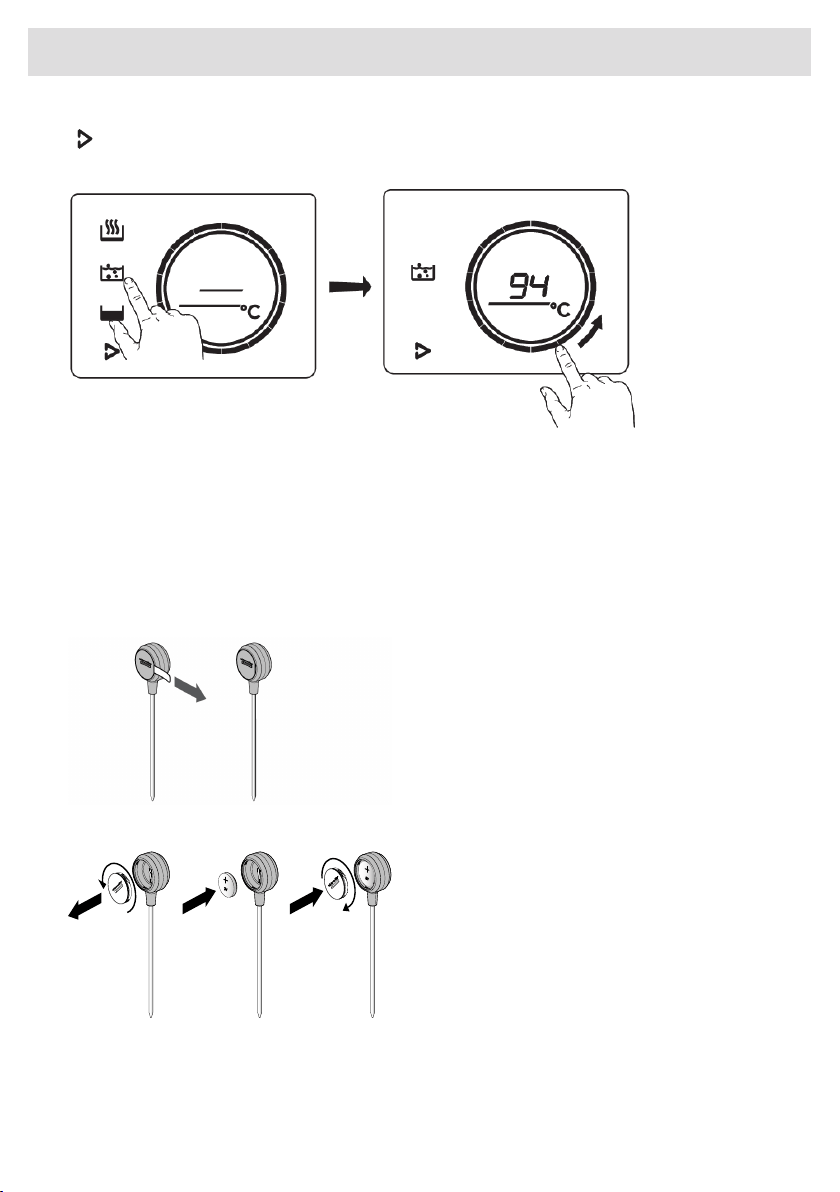
Cooking with Celsius°Cooking™ cookware and Hestan Cue
programs
This option involves cooking using either the Celsius°Cooking™ cookware frying pan or pot’s that
continuously measures the temperature inside the cookware or the Celsius°Cooking™ temperature
probe. All use Bluetooth connection to send information about the temperature to the cooking hob.
Preparing the system
Before you start cooking, please make sure you complete all the preparation steps. Otherwise, you
may run into difficulties or inadvertently cause damage to the system.
Using Celsius°Cooking™ ensures you the cookware is always at just the right temperature needed
to prepare the food you are cooking.
Prepare Celsius°Cooking™ Probe
1. Pull the battery protection tab out of the
Celsius°Cooking™ Probe housing.
2. The Celsius°Cooking™ Probe is ready to
be used. If necessary replace the battery.
Battery installation Celsius°Cooking™
Probe
1. Unscrew and remove the battery cover
and replace the battery (negative (-) side
goes in first).
2. Replace the battery cover. Do not
overtighten.
26
Operation
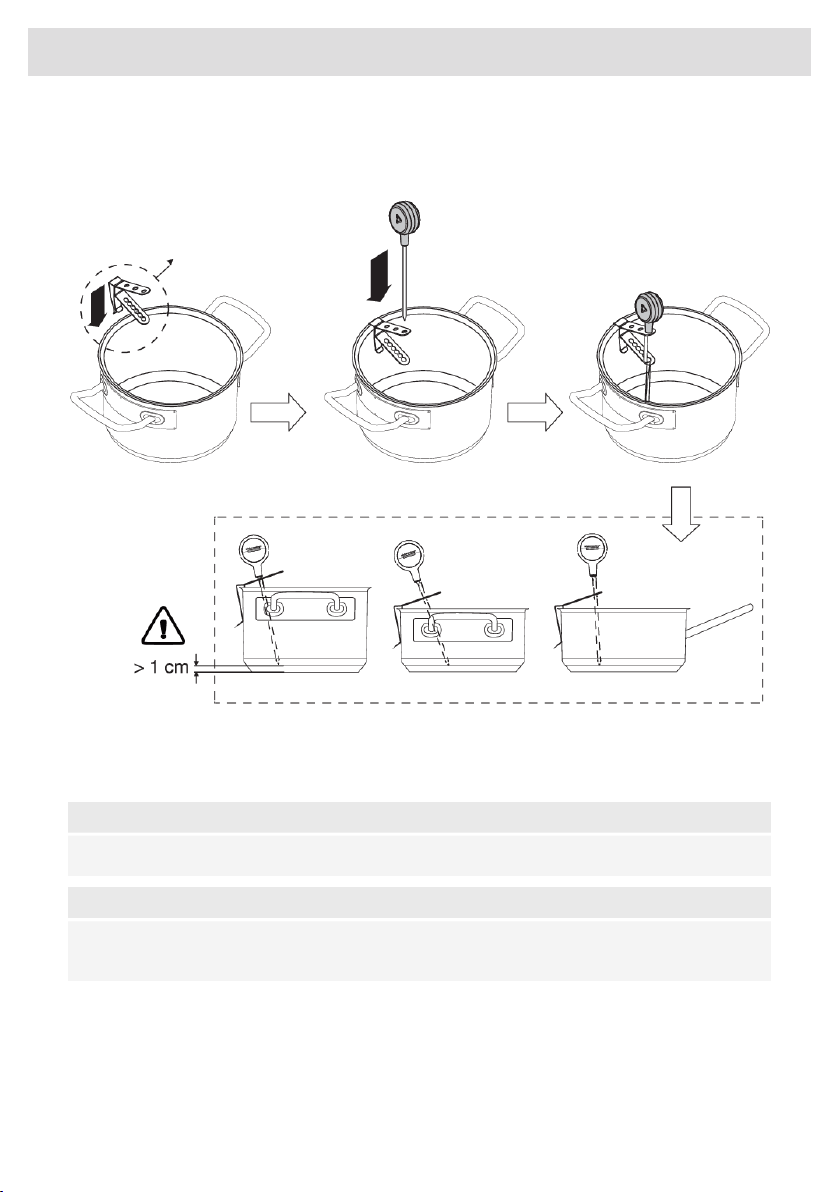
Insert the Celsius°Cooking™ Probe into a cooking pan
The Celsius°Cooking™ Probe can be used with different types and sizes of pans. Due to the use of
a suspension bracket with different holes, the Probe can be suspended in different ways.
1. Slide the suspension bracket over the pan edge.
2. Slide the Probe pin from the top into the suspension bracket. The tip of the probe should be 1
cm or > from the pan bottom.
NOTE!
Leave a minimum distance of 1 cm between the pan base and the measuring point of the probe!
NOTE!
In case the connectivity between cookware and the hob is unstable, this could be due to low
battery. In those cases we recommend to change the battery.
27
Operation
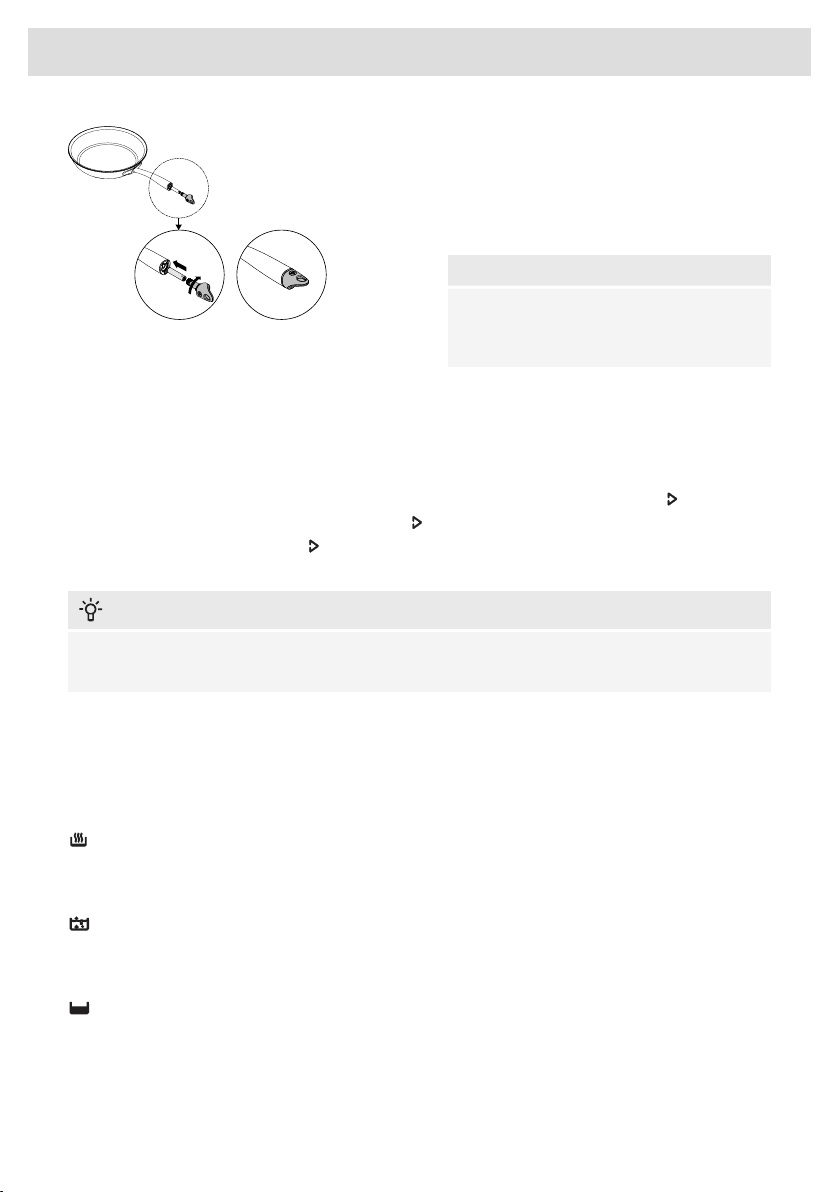
Celsius°Cooking™ Cookware
1. Insert an AAA battery in the panhandle
(negative (-) end goes in first).
2. Insert the handle cap end into the
panhandle and turn it a quarter to secure.
NOTE!
Do not exchange the handle cap of a chef's
pot (31620) with that of a frying pan (31619)
or vice versa.
Assigning the cookware to the cooking zone
Switch on the hob and wait until the end of the start up animation
Place the Celsius°Cooking™ cookware or a regular pot fitted with the Celsius°Cooking™ probe on
a desired cooking zone. After it has been detected, quickly tap twice with your fingertip on the handle
cap sensor or the probe housing to activate it. Right after the Hestan Cue mode key will light up.
To assign the probe the Hestan Cue mode key will light up on every possible cooking zone.
Press the Hestan Cue mode key on the needed cooking zone. The Hestan Cue menu will be
opened. With a short press again it can be closed.
INFORMATION!
Please make sure that the appliance is already switched on before placing the Celsius°Cooking™
cookware so that the system can clearly identify its position.
Cooking with the embedded Hestan Cue programs
The hob comes along with integrated Hestan Cue programs, optimized for Celsius°Cooking™
cookware. When cooking with one of the available Celsius Cooking cookware, the possible cooking
methods will be shown in the opened menu, which are applicable to the cookware used. Use the
one that’s fits the desired purpose:
Heating up and frying
This program is to reach high temperatures rapidly. Always add oil or butter before starting it. For
healthy cooking don’t exceed the smoke point of the used oil.
Boiling or cooking with water
This program is to reach higher water temperatures quick. Always add water to the cookware before
starting it.
Slow cooking or sous vide
This program is to control low to medium temperatures, preventing high bottom temperatures. Larger
quantities and thicker dishes need to be stirred occasionally to ensure a homogeneous heat
distribution.
28
Operation

Using the probe as a cooking thermometer
When a Celsius°Cooking™ probe is used it can also be used as a thermometer to just monitor e.g.
the core temperature of a certain dish. This can be done on normal level cooking or PLUS menu
programs. To use the probe as thermometer, lift up the pan you want to use for a few seconds, place
it back on the zone and activate the probe by tapping. When the Hestan Cue symbol appears on
the display, touch it.
The measured temperature is displayed dimmed.
Probe removal detection
If the probe is moved out during cooking, the hob will detect that and stop heating. When placed
back, the user can confirm that by touching the now blinking Hestan Cue mode button, or it might
get re-detected automatically.
NOTE!
e.g. adding cold water to the pot might trigger this detection too!
Switching off the cooking zone
Touch the slider for the selected cooking zone and hold it for 3 seconds. The sign will appear on
the display.
The cooking zone can also be turned of by pressing the selected Hestan Cue program key and hold
it for 3 seconds
29
Operation
Step-by-Step cooking guide on CelsiusCooking.com
The best tasting food is prepared at the right temperature and for the
right length of time. The ability to set temperature instead of power levels
supported by how-to (video) guidance lets you create chef-like meals
cooked to perfection. The CelsiusCooking.com website is full of inspiring
recipes with step-by-step instructions based on chef tested techniques
guiding you to prepare delicious, fail proof recipes over and over again.
CelsiusCooking.com
• Whether you are a chef or a beginner, CelsiusCooking.com is going to help you cook better food
more often by acting as your guide in the kitchen. You'll learn new techniques, novel combinations,
and gain confidence in more difficult dishes. Instead of just cooking at a power level, you will
be cooking at an exact temperature level.
• Our recipes lead you through the process of 'Mise En Place' where you'll gather and prepare
all of your ingredients in advance. This is particularly important following the recipes on
CelsiusCooking.com as each recipe has been carefully timed to give you the perfect results.
• Just follow the steps. The timing and temperature guide will make sure your food is prepared to
perfection. It may take some getting used to, but you will end up with an even better meal.
Switching off the cooking zone
Touch the slider for the selected cooking zone and hold it for 3 seconds. The sign will appear on
the display.
The cooking zone can also be turned of by pressing the selected Hestan Cue program key and hold
it for 3 seconds
INFORMATION!
While the Celsius°Cooking™ probe is used to control the temperature of the content inside a pan
(e.g. water or soup) the Celsius°Cooking™ cookware is controlled on the pan bottom temperature.
Due to this there is always an offset between set-point and actual temperature of the content
INSIDE the cookware. When e.g. trying to boil a liquid on the Celsius°Cooking™ cookware it may
be necessary to set a higher temperature to reach the boiling point. Reaching the boiling point
is also further dependent on the volume of the liquid and whether a lid is placed on top of the
cookware. Furthermore, regular stirring improves this behaviour, even when cooking with the
probe.
30
Operation
Hood control
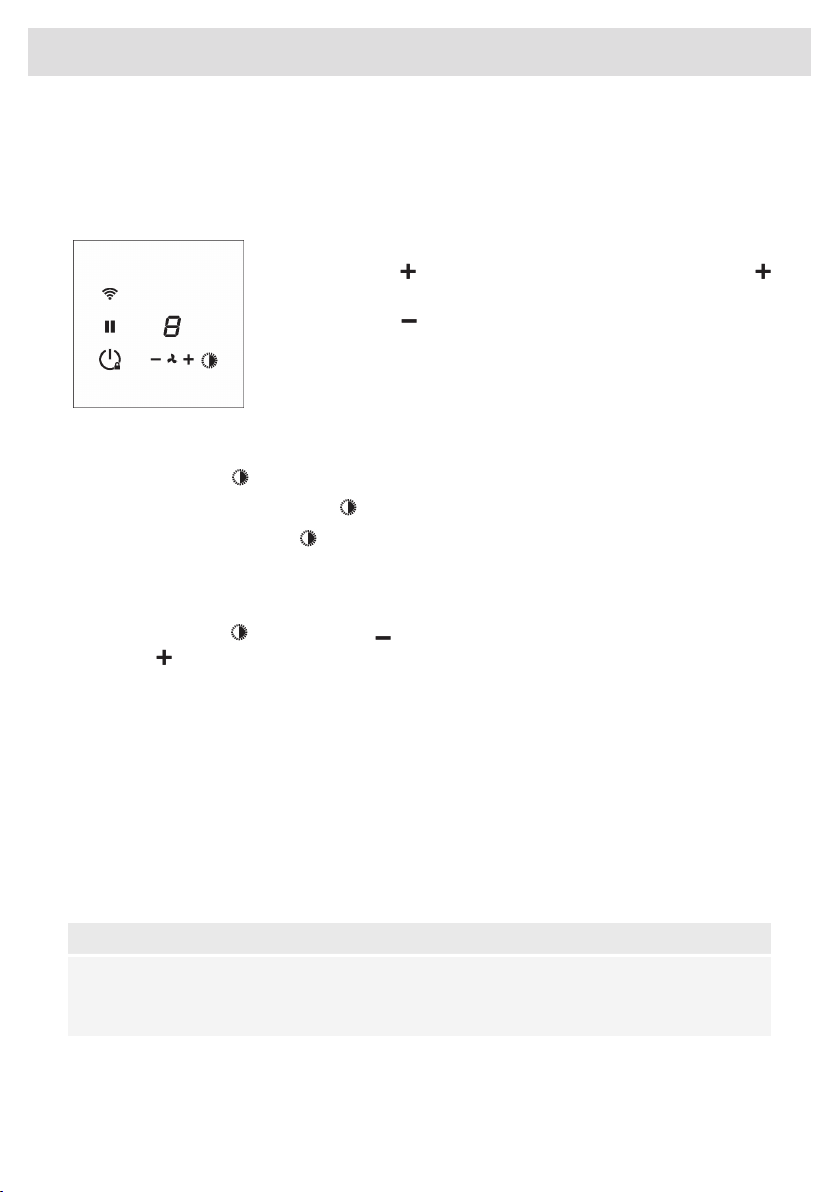
If you own a compatible RF enabled hood, it can be connected to your induction hob. To pair and
customize the behaviour of your hood see chapter: Settings. Parameter hth (Hob to Hood) is used
for pairing, while Hst and Hsc effect the behaviour of your hood so you can customize it according
to your kitchen habbits.
Switching extraction on and off
•
Press the key for a higher fan setting. Press and hold the key
for 1 second to select the highest setting.
• Press the key to select a lower setting.
Switching the light on and off
•
Press the light key . The light switches on at maximum strength.
•
To turn off the light, press the key again.
•
Press and hold the light key to set the lighting intensity.
Changing the colour lighting temperature
You can adjust the lighting temperature.
•
Press the light key together with the key to make the light ‘colder’ or the light key together
with the key to make the light ‘warmer’.
Synchro Start (Settings)
This setting allows the induction hob to automatically activate the lights of the connected hood every
time the induction hob is turned on. Depending on the value you set, the ventilation will automatically
start at that speed level when any cooking zone is activated.
Synchro Control (Settings)
In addition to Synchro Start the hood will be controlled automatically depending on the current highest
activated cooking level.
Synchro Stop (Settings)
The lights will be switched off together with the hob and the fan will, with a delay, also be switched
off.
NOTE!
When Synchro Control (see chapter Settings) is enabled a manual operation will deactivate
Synchro Control temporarily (hood icons will turn from being dimmed to lit). The function is active
again when the hob is switched on next time.
31
Operation
ConnectLife-app and Wi-Fi connection
The hob is equipped with a Wi-Fi module that allows the appliance to connect to the internet via your
home network and to use it with the ConnectLife-app, installed on a mobile device like a smartphone
or tablet.
The app is available on the Apple App Store and Google Play Store. You will need the app to connect
the hob to your network. After your user account is paired with the cooking hob, the app can be
used to monitor the status of the cooking hob and enables to update its firmware (see chapter
‘Firmware Update').
You can find direct links for the different stores to the ConnectLife-app under
www.connectlife.io/getstarted and more information about the system, support, available functionalities
and additional options under www.connectlife.io.
For safety reasons, it is not possible to remotely control, turn on or turn off the hob.
Preparation
• Make sure you know the name/SSID of your router’s Wi-Fi network and its password
1)
.
• Make sure you have the label with the QR code of the appliance unique ID (‘AUID’) accessible
– you need to scan it with your mobile device when the App prompts to do so.
• Make sure that Wi-Fi is activated on the hob by checking if the Wi-Fi key is visible when the hob
is on.
Else see “Activate Wi-Fi”.
•
Install the ConnectLife-app on a mobile device – scan the QR
code to find it.
• Launch the App. Please register if you don’t have an account yet.
• Log in with your account.
• The App will need access the mobile’s location to search for Wi-Fi
networks and to the camera to scan QR codes.
Wi-Fi Connection setup
You will first connect your mobile device directly to the appliance via Wi-Fi, and then use this
connection to share the data of your Wi-Fi home network. The hob can then connect to the home
network.
1. Launch the ConnectLife-app.
2. Select “Add appliances” in “Appliances”, choose “Hob”, and follow the instructions.
3. Scan the QR code with the AUID code when asked or type it in.
Proceed on the appliance:
4. Switch on the hob.
5. Touch the Wi-Fi key for 3 seconds to enter the Wi-Fi menu (only possible when NOT cooking).
6. When ‘C' (connection) Connection Setup Mode is shown in the display, touch the Wi-Fi key to
activate the Connection setup. When ‘C’ flashes the Connection setup
2)
starts.
1)
NOTE: only 2,4Ghz networks are supported
2)
NOTE: will be deactivated after 5 minutes when unsuccessful
32
ConnectLife and Wi-Fi

Proceed on the mobile device in the ConnectLife-app:
7. Connect your mobile device to the Wi-Fi network of the appliance when asked.
8. When your mobile asks whether to keep the connection, despite no internet connection, choose
yes.
9. Follow the instructions in the ConnectLife-app.
The user account signed in on the mobile device used for the Connection setup will automatically
be paired with the cloud. If you’d like to pair another account, e.g. on a second user’s mobile device
see “Pairing additional user”.
For safety reasons, only paired users can communicate with the hob.
Activate Wi-Fi
1. Switch off the hob.
2. Touch the on/off key for 5 seconds.
• A short beep will be emitted. The Wi-Fi key will appear.
Wi-Fi menu
Activate Wi-Fi to enable the Wi-Fi menu. The hob must be switched on.
1. Touch the Wi-Fi key for 3 seconds to open the Wi-Fi menu.
•
Depending on the Wi-Fi state, there are 1 to 3 options available in the menu: 'C’ (connection)
to set up a connection, 'P' (pair) to pair an additional user, and 'U’ (unpair) to unpair all users.
2. Use the + (plus) and - (minus) keys to switch between them, if more than 1 option is available.
3. Touch the Wi-Fi key to confirm the selected option.
4. Touch the on/off key or touch the slider to close the menu.
• If no key is pressed within 60 seconds, the menu will be switched off automatically.
Connection setup
1. Select option ‘C’ in the Wi-Fi menu.
• The appliance is in “Connection Setup Mode” for 5 minutes.
•
‘C’ will flash, and the + (plus) and – (minus) keys will be switched off.
2. On the mobile app, start the process to ‘Add appliances’ and follow the instructions to pair the
appliance.
Pairing additional user
This option requires that the connection setup has been performed successfully and the hob is
connected to the cloud (Wi-Fi key is constantly full lit).
1. Select option ‘P’ in the Wi-Fi menu.
• The appliance is in “Pairing Mode” for 3 minutes.
• The Wi-Fi key will flash, and the + (plus) and – (minus) keys will be off.
2. On the mobile app, start the process to ‘Add appliances’ and follow the instructions to pair the
appliance.
33
ConnectLife and Wi-Fi

Unpair all users
This option requires that the connection setup has been performed successfully and the hob is
connected to the cloud (Wi-Fi key is constantly full lit).
1. Select option ‘U’ in the Wi-Fi menu to unpair all users and disconnect from the cloud.
• The Wi-Fi key will flash 3 times.
• The hob will delete all paired users and disconnects from the cloud (“unpair”).
Switching off Wi-Fi
1. Enter the Wi-Fi menu as explained in ‘Wi-Fi menu’.
2. Touch the Wi-Fi key for 3 seconds to deactivate Wi-Fi.
• A short beep will be emitted. The Wi-Fi key will be off.
34
ConnectLife and Wi-Fi

The cooking hob, equipped with a Wi-Fi module, can receive updates of the appliance firmware (for
example improved function updates or safety relevant updates). This requires, that the cooking hob
is connected to the cloud and ConnectLife app with a registered user account. If this is not yet
established, please proceed with the chapter for Wi-Fi Connectivity.
When a new firmware is available, a notification is sent to the ConnectLife app. Please follow the
instructions given on the mobile app.
To start the update process, the cooking hob needs to have the FoA setting set to ON in the settings
menu (see chapter Settings). This confirms your presence at the cooking hob. After 90 minutes, this
setting is automatically reset to OFF.
After the FoA setting on the cooking hob is set to ON, start the update process on you mobile app.
The cooking hob will switch off. As indication, the Wi-Fi symbol flashes during the process.
Depending on the configuration, the update process can take up to 60 minutes.
NOTE!
During the update process, the hob cannot be used. Make sure, the power supply and Wi-Fi
connection are not terminated. The update process may take a while. It is normal, if there may
be no response during the update or the cooking hob is restarting multiple times.
In case, the process failed, the cooking hob remains on the previous firmware version and should
operate as normal. Please wait for some time before trying again. If the process continues to fail,
contact the service department for further support.
If the hob is not responding after the update process, please wait for some time, the cooking hob
might be still in the update process. If there is still no response after multiple hours, contact the
service department for further support.
35
Firmware Update
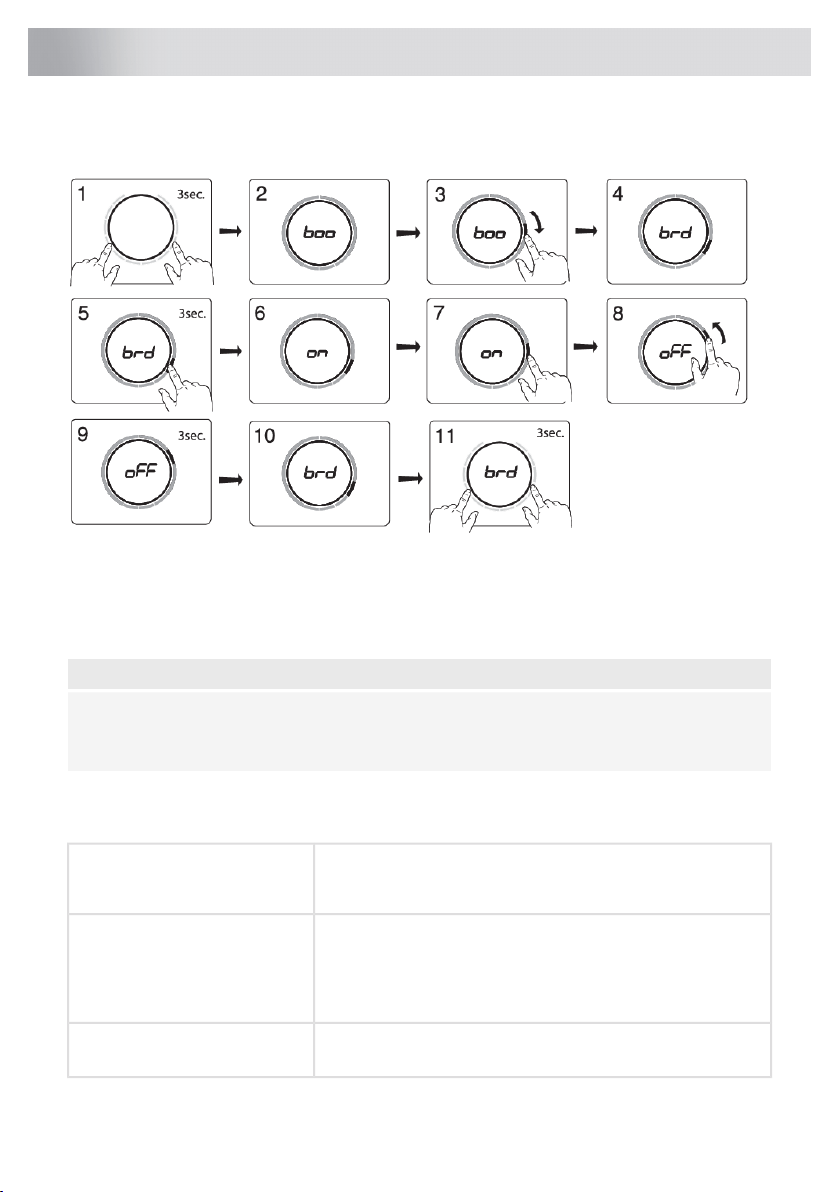
You can tailor the behaviour of this induction hob to suit your cooking style! There are various settings
available for adjustment.
While there are no pans on any zone, touch any slider with two fingers and keep it pressed for 3
seconds. Different settings can now be toggled through using the slider. To view or change a
particular setting, touch the slider element of the slider with one finger and keep it pressed for 3
seconds. Now you can choose to change or disable that setting. To do this, toggle to the desired
value. After 3 seconds of innactivity the new setting will be confirmed.
NOTE!
A change to 'current limiter' setting (CON) can only be confirmed or accepted by a 3 second-press
after step 9, in order to avoid unintentional adjustment. A change without confirmation will not be
applied!
To exit the menu, press with two fingers anywhere on the slider for 3 seconds.
The following settings are available (depending on the model).
While on, boost is automatically activated when power level 12
is activated. While off, the boost is activated by sliding past the
power level 12 or touching power level 12 twice.
boo - Auto boost
Automatic Boost activation
While on, when a new pan is detected on two bridgeable cooking
zones, the cooking zones are automatically bridged into one
big cooking zone. While off, bridging must be done manually
by pressing on the sliders of two bridgable cooking zones at
the same time.
brd - Auto bridge
Automatic cooking zone bridging
While on, recovery function is active and settings can be moved
from one cooking zone to the other when a pan switches position.
rEC – Recovery function
Recovery function
36
Settings

While on, stopwatch (count-up timer) starts counting in the
background whenever a cooking zone is activated. While off,
stopwatch must be activated manually and starts counting from
0:00.
Atl– Auto timer
Automatic stopwatch timer
While on, the hob is automatically locked at every switch off.ACL - Auto child lock
Auto child lock
Sound volume has 4 different options. L3 (high), L2 (medium),
L1 (low), off (only error and alarm sounds).
Snd - Sound volume
Sound volume
Key responsiveness has 3 different speed options. L3 (quick),
L2 (medium), L1 (slow).
Sen - Key sensitiveness
Key responsiveness
If you own a compatible hood with RF connectivity, you can pair
it with your induction hob! To do so, set this parameter to on.
Hood control icons will start blinking. You now have 5 minutes
to activate the pairing on your RF hood. Once the hood is paired
with your induction hob, the hood control icons will stop blinking.
hth - Hob-to-hood pairing (RF)
Hood control
If you wish to unpair the hood, set the hth parameter again to
off.
This setting allows the induction hob to automatically activate
the lights of the connected hood every time the induction hob
is turned on. Depending on the value you set, the ventilation will
automatically start at that speed level when any cooking zone
is activated.
hSt - Hob-to-hood
(Synchro Start Level)
Hood Start Level
This setting allows the induction hob to automatically activate
the lights of the connected hood every time the induction hob
is turned on. While on, the hood will be controlled automatically
depending on the current highest activated cooking level. If you
manually change any hood related settings, the hood turns to
manual control for the rest of this cooking session. The response
level can be set: L3 (high), L2 (medium), L1 (low), off.
hSC - Hob-to-hood
(Synchro Control response Level)
Hood response Level
This setting allows the induction hob to automatically deactivate
the lights of the connected hood every time the induction hob
is turned off. Depending on the value you set, the ventilation will
switch to that speed level and stop with a delay.
hSp- Hob-to-hood
(Synchro Stop Level)
Hood Stop Level
To pair a bluetooth device, set this setting to on. You now have
3 minutes to pair a new bluetooth device to this induction hob.
btP - Bluetooth pairing
Bluetooth device pairing
To unpair all the bluetooth devices, set this setting to Clr. All
your connected bluetooth devices are now unpaired.
btC - Bluetooth clear
Bluetooth clear paired devices
To display the current software versions of the hob. The UI
software version and the Celsius°CookingTM software version
will be shown in alternating order.
FIr - Display firmware version
37
Settings
To receive firmware updates for the cooking hob, you need to
be paired to the cooking hob via the mobile app. You will receive
a notification, or you can check available firmware updates on
the mobile app menu for updates.
FoA - Firmware update over the
air
In order to start the firmware update via the mobile app, set this
setting to on to confirm your presence at the cooking hob. For
more information see chapter Firmware Update. After 10 min,
this setting is automatically reset to off.
In demo the appliance will act as usual, without the possibility
to heat the cookware.
dE - Demo Mode
(Demo Mode for Dealer
Showrooms) When set this will be indicated after switching on the appliance
with a short "d" indication;
Without any user interaction the appliance will automatically
switch off after 10 minutes.
If your electrical wiring or circuit breakers do not meet the
specified current draw on the rating plate, the current limiter can
be activated by reducing the value of this setting. Doing so may
cause a reduced performance of the induction hob.
Con - connection power
Current limiter
NOTE!
To prevent unintentional
adjustment of the 'CON -
connected power', CON
setting must be confirmed
when changed by touching the
slider for 3 seconds. A change
without confirmation will not be
implemented!
The following numbering format of the setting is available: X.XX.
The number left of the dot represents the number of connected
phases, while the number right of the dot represents the
electrical current per phase in Ampere.
WARNING!
The appliance must always be set to the actual or lower rating
of the electrical wiring or circuit breakers. This setting can
only be set by an authorised expert.
38
Settings
Cleaning
INFORMATION!
Set the locking function before you start cleaning the hob. We recommend that you clean the
appliance after each use. This prevents that over cooked food can damage the glass surface.
Daily cleaning
1. Use a damp cloth and a mild cleaning agent (washing-up liquid) to clean the appliance.
2. Dry the appliance with a paper towel or a cloth.
Heavily polluted glass
1. Immediately remove any food remains, burned grease, sugar or stubborn stains from the hob
using a scraper, even if the hob is still hot! Sugar and/or other food related remains may
permanently damage the glass ceramic surface.
2. Hold the scraper at the correct angle (45° to 60°) in relative to the glass. Gently press the scraper
against the glass and slide it over the surface to remove the dirt. Make sure the plastic handle
of the scraper (in some models) does not meet with a hot cooking zone. Do not press the scraper
perpendicularly against the glass. Do not scratch the hob surface with the tips of the scraper
blade. This can cause permanent scratches in the glass.
3. After you have removed the stubborn stains from the glass, use the steps of the daily cleaning
to clean the hob.
4. If necessary a special intensive cleaner for ceran/induction hobs can be used.
5. If the cleaning result is not at your satisfaction you can repeat the above cleaning steps as often
as needed or check www.atagservice.nl for additional cleaning information.
WARNING!
Do not use abrasive cleaning agents, because they can cause scratches. Do not use steelwool,
scourers or any type of sharp objects to clean the appliance.
WARNING!
The hob can be still very hot due to the cooking process! Do not touch the surface directly. If
desired use oven gloves to prevent burning while cleaning directly after cooking.
39
Maintenance

General
If you notice a crack in the glass top (however small), switch the hob off immediately, unplug the
hob, turn off the (automatic) fuse switch(es) in the meter cupboard or, in the event of a permanent
connection, set the switch in the power supply lead to zero. Contact the service department.
Troubleshooting table
If the appliance does not work properly, this does not always mean that it is defective. Try to deal
with the problem yourself first by checking the points mentioned below or check the website for more
information.
SolutionPossible causeSymptom
This is normal and will disappear
once it has been used a few times.
Ventilate the kitchen.
The new appliance is heating
up for the first time.
A slight smell is noticeable the
first few times the hob is used.
At high settings this is perfectly
normal for some pans. It will not
damage either the pans or the hob.
This is caused by the energy
flowing from the hob to the
pan.
The pans make noise while
cooking.
Clean the induction hob with a
ceramic hob cleaner and remove
the dirt / grease from the pan
bottom.
Contaminated pan bottom
used on the cooking zone.
Circle of pan bottom remains
visible after cleaning.
Switch off the beeping by touching
the cooking zone blinking timer key.
The pre-set time has ended.A cooking zone suddenly stops
working and you hear a signal.
Check the fuses and the electric
switch and the power socket.
There is no power supply
due to a defective cable or
a faulty connection.
The hob is not working and
nothing appears in the display.
Check the electrical connections.The hob has been wrongly
connected.
A fuse blows as soon as the hob
is switched on.
Solution: remove cookware and
assign again.
Celsius°Cooking™ cookware
is assigned to wrong cooking
zone.
Hestan Cue key is blinking,
together with set cooking
method key and display
Place Probe back or reposition -
press cooking method key if probe
isn't auto detect.
Celsius°Cooking™ Probe is
removed or not in touch with
the content. Or the
temperature has fallen
rapidly, e.g. due to adding
cold water.
Set Hestan Cue cooking method
key is blinking together with set
temperature display while using
the probe
Switch off the cooktop for 10
seconds and/or change the battery
Low battery of cookware or
unstable bluetooth
connection
Unstable connection between
cookware and hob
40
Troubleshooting
SolutionPossible causeSymptomError code
Connect the appliance in
accordance to rating plate
and instructions.
Voltage of the mains is too
high.
U 400 appears on
display with continuous
sound tone.
U400
Wait for cooking zone to cool
down or fill the pan with
foodstuff.
Empty pan was heated on
the cooking zone.
E2 appears on display.E2
Clean the control panel.One of the controls is
pressed to long. Or there is
water, dirt or a pan on the
controls.
Er03 appears on
display.
Er03
Retry connecting the
appliance to your network.
Make sure that new devices
may connect to it (e.g.
MAC-address filtering is
deactivated).
Connection Setup failed.E7 appears on display
after doing the Wi-Fi
connection setup.
E7
Use Celsius°Cooking™
cookware
Non-Celsius°Cooking™
cookware is not supported
E65 appears on
display, together with
Hestan Cue is blinking
E65
Replace battery - check the
status with the Hestan App
when unsure.
Celsius°Cooking™ cookware
was not found (empty
battery, out of range, etc.).
E66 appears on
display, together with
Hestan Cue is blinking.
E66
If handle cap is mounted
correctly; Replace battery -
check the status with the
Hestan App when unsure.
Celsius°Cooking™ cookware
missing.
E67 appears on
display, together with
Hestan Cue key is
blinking.
E67
Unblock the ventilator;
disconnect appliance from
main voltage for 10 sec
Ventilator is blocked (eg
possible by item in the
drawer)
E8 appears on displayE8
After the hob has cooled
down, cooking can be
continued
Zone is overheatedZone stops unintended
and residual heat
indicator is shown
NOTE!
In case of other error codes: please write down the error code and contact the service department.
41
Troubleshooting
Troubleshooting Wi-Fi
SolutionPossible causeSymptom
The hob must be switched off,
then touch the on/off key and
hold it for 5 seconds.
Wi-Fi disabledWi-Fi icon not shown
Check that your home network
signal is strong and internet
connection is working.
Home network issues.Wi-Fi setup failed
Please check the network
settings. Ensure a 2.4 GHz and
visible network. If the signal is too
weak, try to move the network
router closer.
Home network is not on 2.4
GHz, the network is hidden, or
signal strength is too weak.
Home network is not displayed
during the connection setup
process.
Ensure the Wi-Fi is enabled, and
internet connection of your home
network is working. Repeat the
connection setup if needed.
Wi-Fi is disabled or Home
network issues.
Cooking hob is shown
disconnected on the mobile app
First disable and enable again
the Wi-Fi. Ensure internet
connection of your home network
is working. Repeat the
connection setup if needed.
Different causes.Other Wi-Fi issue
Further troubleshooting available
on www.connectlife.io or contact
the service department.
Ensure the power supply is not
terminated and a stable internet
connection before retrying again.
If failed again, contact the
service department.
Internet connection lost or
power supply terminated.
Firmware update process failed.
42
Troubleshooting

Safety
If the safety instructions and warnings are not followed, the
manufacturer cannot be held responsible for any resulting damage.
• This appliance should only be connected by a registered installer.
• Check the appliance for transport damage. Do not connect a
damaged appliance.
• The walls and the worktop surrounding the appliance must be
heat resistant up to at least 85 °C. Even though the appliance
itself does not get hot, the heat of a hot pan could discolour or
deform the wall.
• The worktop into which the hob is fitted should be flat.
• The air must not be discharged into a flue that is used for
exhausting fumes from appliances burning gas or other fuels (not
applicable to appliances that only discharge the air back into the
room).
• Extraction hoods and other appliances that extract cooking
vapours can affect the safe operation of appliances that burn gas
or other fuel (including those in other rooms) by backflowing
combustion gases. These gases can potentially lead to carbon
monoxide poisoning. After installing an extraction hood or other
vapour extractor, the operation of appliances with flue gas
extraction must be tested by a competent person to ensure that
the combustion gases do not flow back.
• Local regulations concerning the discharge of air have to be
fulfilled.
• For stationary appliances permanently connected to the fixed
wiring, compliance with this requirement is considered to be met
if the instruction concerning disconnection incorporated in the
fixed wiring is in accordance with AS/NZS 3000.
Electrical connection
• This appliance must be earthed.
• The electrical connection must comply with national and local
regulations.
43
Installation

• Prior to installation, ensure that the local distribution conditions
(voltage and frequency) and the adjustment of the appliance are
compatible.
• Means for disconnection must be incorporated in the fixed wiring
in accordance with the wiring rules.
• The voltage, frequency, power and the country for which the
appliance has been designed are shown on the appliance rating
plate.
• For class I appliances, check that your home’s electrical system
provides proper earthing.
• The wall plug socket and plug should always be accessible.
• If a stationary appliance is not fitted with a supply cord and a
plug, or with other means for disconnection from the supply mains
having a contact separation in all poles that provide full
disconnection under overvoltage category III conditions, the
means for disconnection must be incorporated in the fixed wiring
in accordance with the wiring rules. This is also applicable for
appliances with a supply cord and plug when the plug is not
accessible after installing the appliance. Using an omnipolar
switch with a contact separation of at least 3 mm fitted in the fixed
wiring will fulfil this requirement.
• The connection cable must hang freely and should not be fed
through a drawer.
• For connecting, use an approved cable with the correct cable
diameters appropriate for the connection. The cable casing should
be made of rubber (preferably of the H05V2V2 or H07V2V2 type).
• Before connecting the appliance, make sure the voltage indicated
on the rating plate conforms to the voltage in your power mains.
• The connection should be adjusted to the current and fuses.
• The appliance should not be connected to the mains via a
multi-plug adapter or extension cable, as the safe use of the
equipment cannot be guaranteed.
• After installation, the parts carrying electrical current and insulated
parts shall be protected against contact.
44
Installation
WARNING!
Failure to use screws or fasteners for installation as described in
the installation instructions may result in electric shock.
Service
• Disconnect the appliance from the mains supply before starting
any repair work.
• Faulty parts may only be replaced by original parts.
The manufacturer can only guarantee that original parts meet
safety requirements.
• If the supply cord is damaged, it must be replaced by the
manufacturer, its service agent or similarly qualified persons in
order to avoid a hazard.
Installing a built-in hob
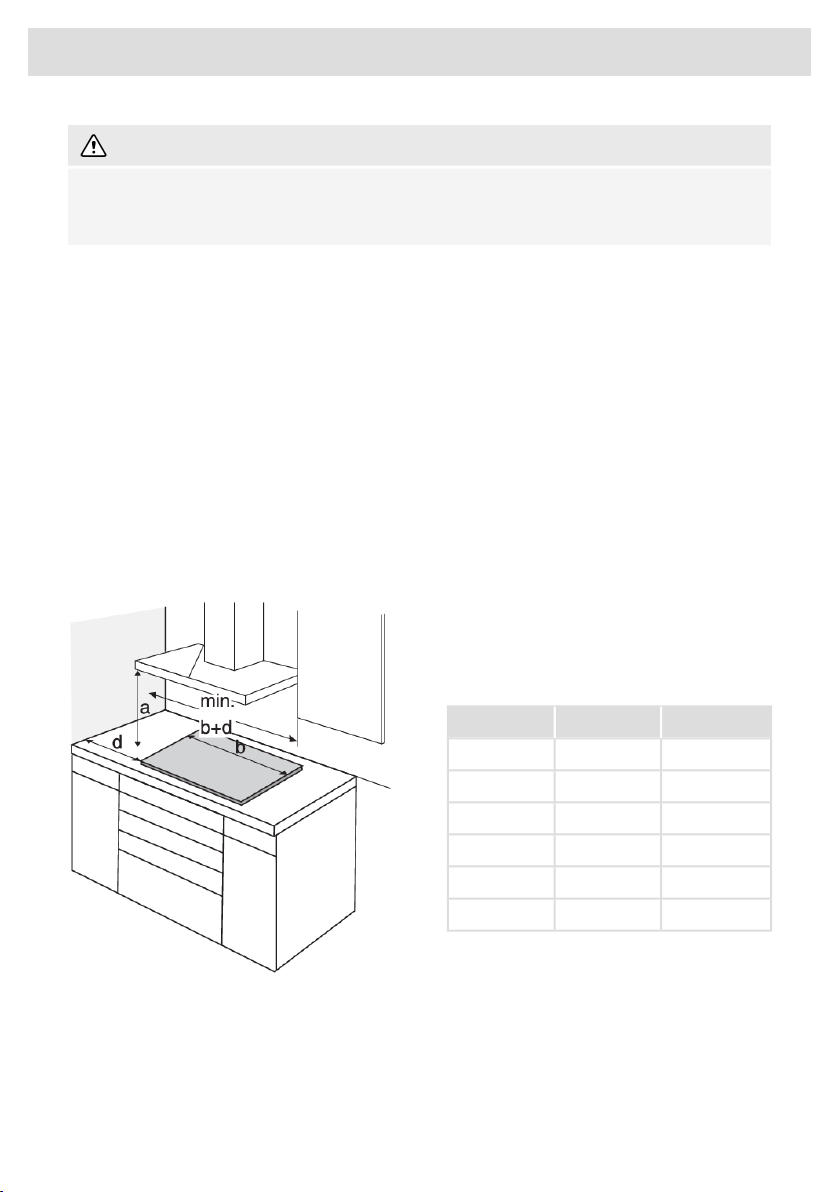
Use of solid wood corner trims on worktops
behind the cooking hob is only allowed if the
clearance between the trim and the cooking
hob is no smaller than indicated on the
installation plans.
d (mm)b (mm)a (mm)
40380600
40640600
40720600
40800600
40900600
401110600
45
Installation
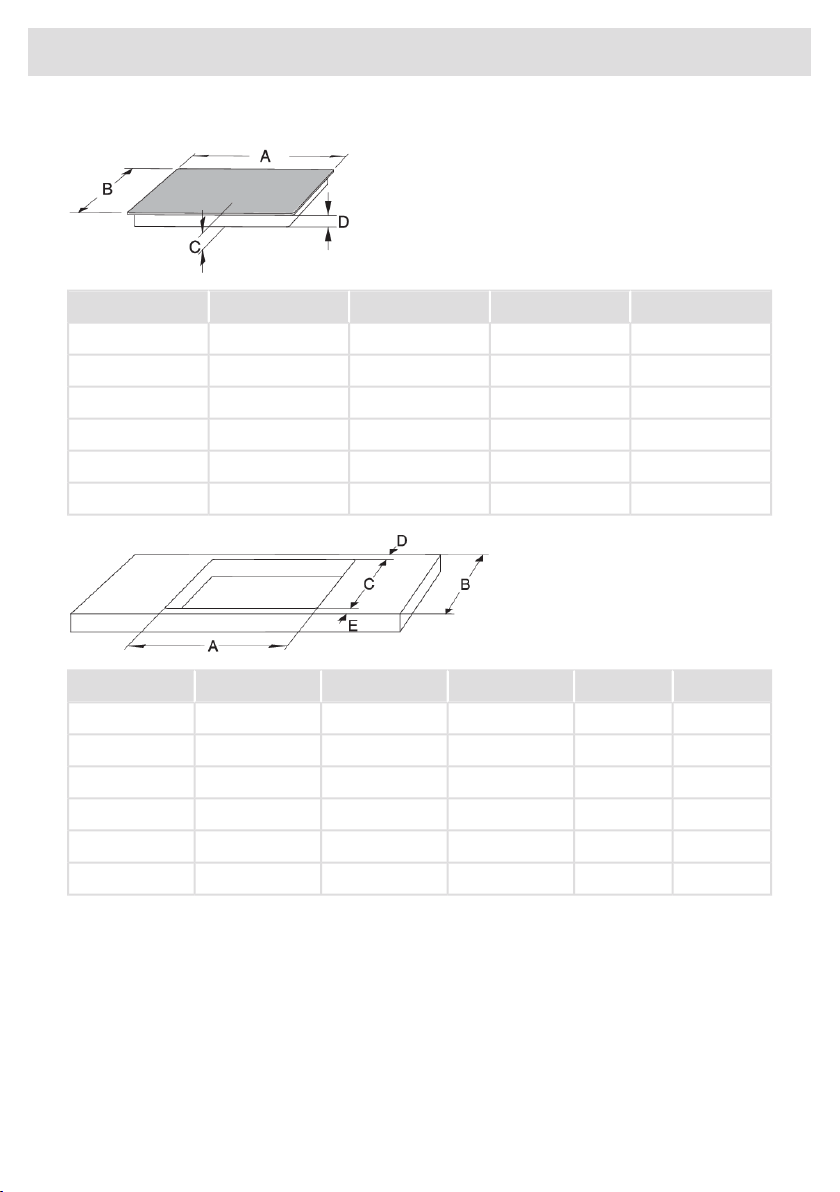
Dimensions
D (mm)C (mm)B (mm)A (mm)
465052238438 cm
465052264464 cm
465052272472 cm
465052280480 cm
465052290490 cm
46504121114111 cm
E (≥mm)D (≥mm)C (mm)B (≥mm)A (mm)
5040490-492600350-35238 cm
5040490-492600560-56264/72 cm
5040490-492600750-75280 cm
5040490-492600770-77280 cm - 5 zones
5040490-492600860-86290 cm
5040385-3875001070-1072111 cm
46
Installation
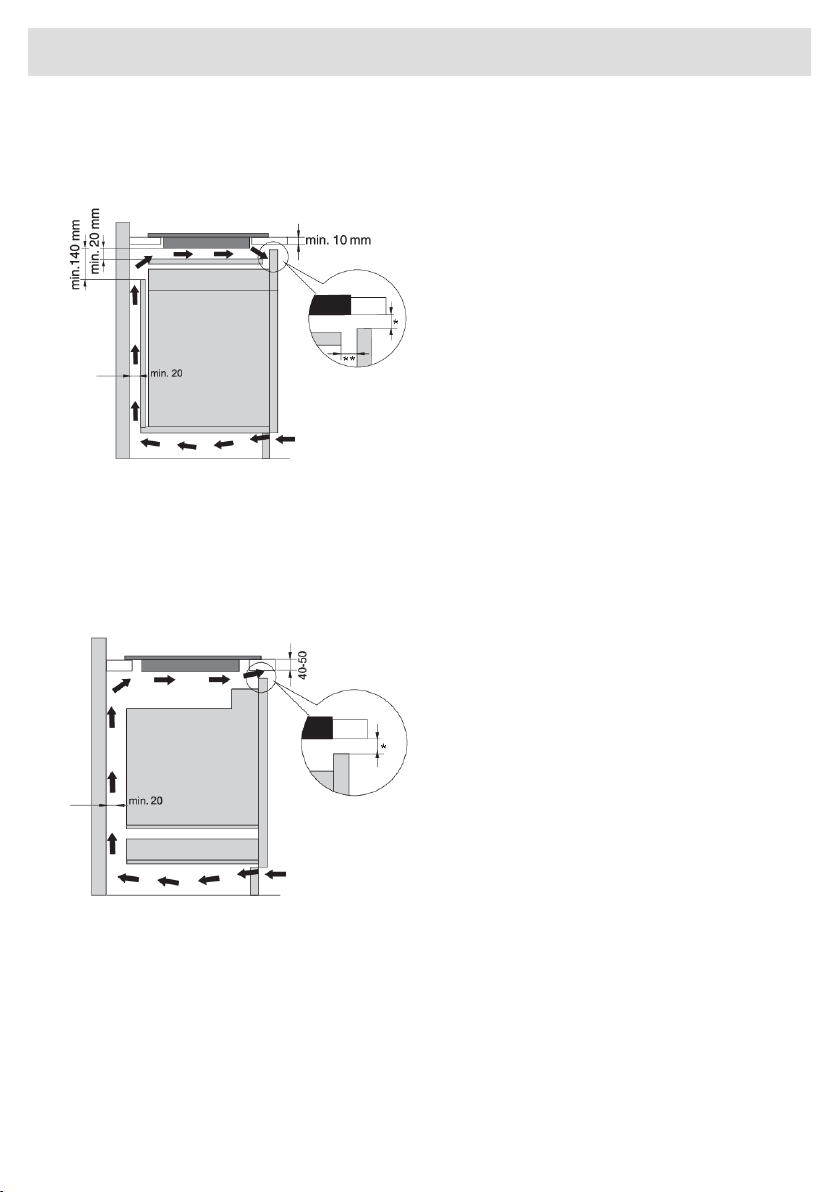
Air vents in the lower kitchen cabinet
• Normal operation of the induction cooking hob electronic components requires sufficient air
circulation.
Lower cabinet without an oven
• There must be an opening with a height of
no less than 140 mm along the entire width
of the cabinet in the cabinet rear wall.
• A horizontal partition panel should be
installed underneath the induction hob
along its entire length. There should be at
least 20 mm of clearance between the
lower end of the appliance and the
partition panel. Adequate ventilation
should be allowed from the rear side.
• The hob is fitted with a fan located in its lower part. If there is a drawer underneath the countertop,
do not use it to store small objects or paper as these could, if sucked into the fan, damage the
fan and the cooling system. Moreover, do not use the drawer to store aluminium foil or flammable
substances or liquids (such as sprays). Keep such substances away from the cooking hob.
Danger of explosion! There should be at least 20 mm of clearance between the contents of the
drawer and the fan inlet vents.
Lower cabinet with an oven
• Only install ovens with a cooling fan under
the induction hob. Before installing the
oven, the kitchen cabinet rear wall has to
be removed in the area of the opening for
installation. In addition, there should be an
opening of at least 6 mm in the front side,
along the entire width of the cabinet.
• If other appliances are installed under the
induction cooking hob, we cannot
guarantee their correct operation.
* For optimal hob performance, a ventilation gap of ≥6 mm is advised.
** A gap of 20 mm is recommended at the front between the cabinet and intermediate shelf for better
ventilation of the hob.
47
Installation
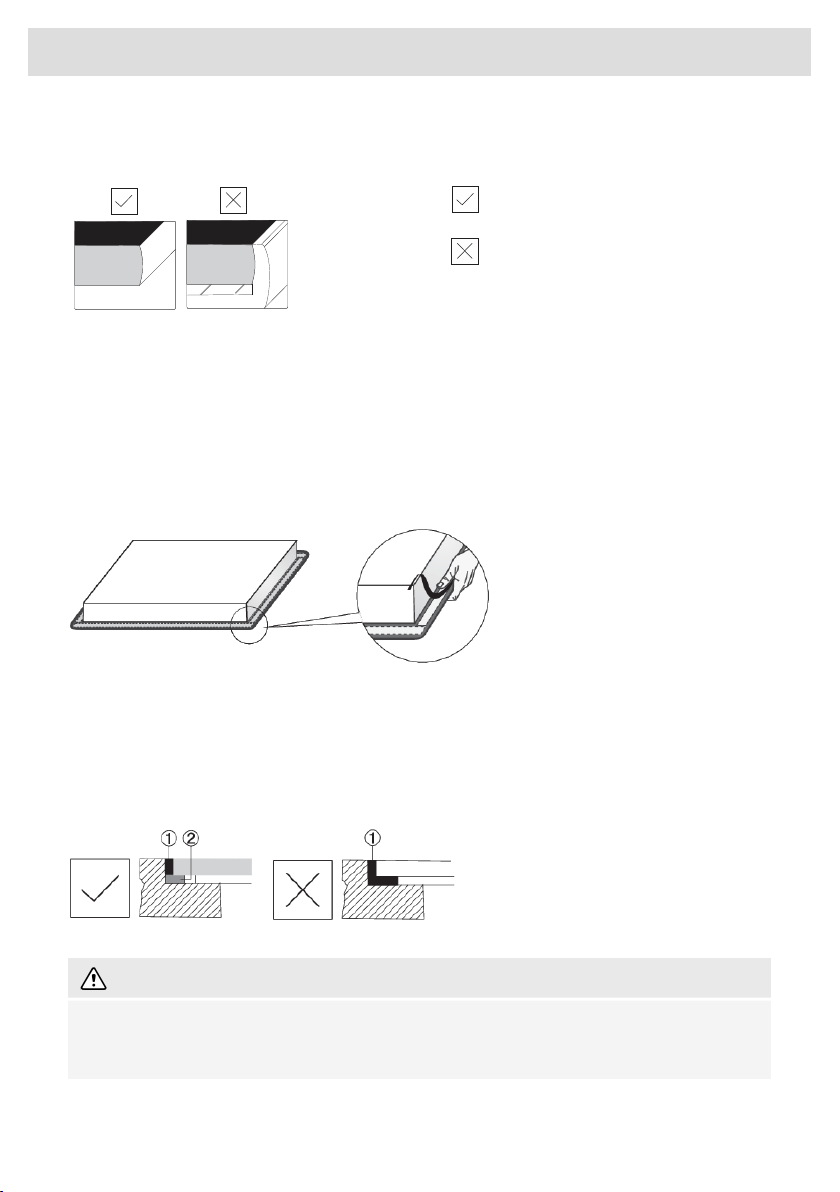
Flush-mount installation into the worktop
Appliances without faceted edges or decorative frames are suitable for flush mounting.
brushed edge
decorative frame
Installing the appliance
The appliance may only be installed into a temperature- and water-resistant countertop, such as a
countertop made of (natural) stone (marble, granite), or solid wood (the edges along the cut-out
have to be sealed). When installing into a countertop made of ceramics, wood, or glass, a wooden
sub-frame should be used. The frame is not supplied with the appliance. Internal dimension of the
basic unit should be at least equal to the internal cutout for the appliance. Only in this way the
appliance can be serviced from the underside in case a problem might occur. Attach sealing tape
along the perimeter of the bottom of the glass panel.
First, feed the power cord through the cutout. Place the appliance over the centre of the cutout.
Connect the appliance to the power mains (see chapter Technical installation). Before sealing the
appliance, test its operation. Seal the slot between the appliance and the countertop using a silicone
sealant. The silicone sealant used to seal the appliance has to be temperature-resistant (to at least
160 °C). Smooth out the silicone sealant using a suitable tool. Observe the instructions for use of
the selected silicone sealant. Do not switch on the appliance until the silicone sealant has dried
completely.
1. Silicone sealant
2. Sealing tape
WARNING!
Pay particular attention to built-in dimensions with (natural) stone countertops. When choosing
the silicone sealant, observe the countertop material and consult the countertop manufacturer.
Use of inappropriate silicone sealants can result in permanent discolouration of some parts.
48
Installation
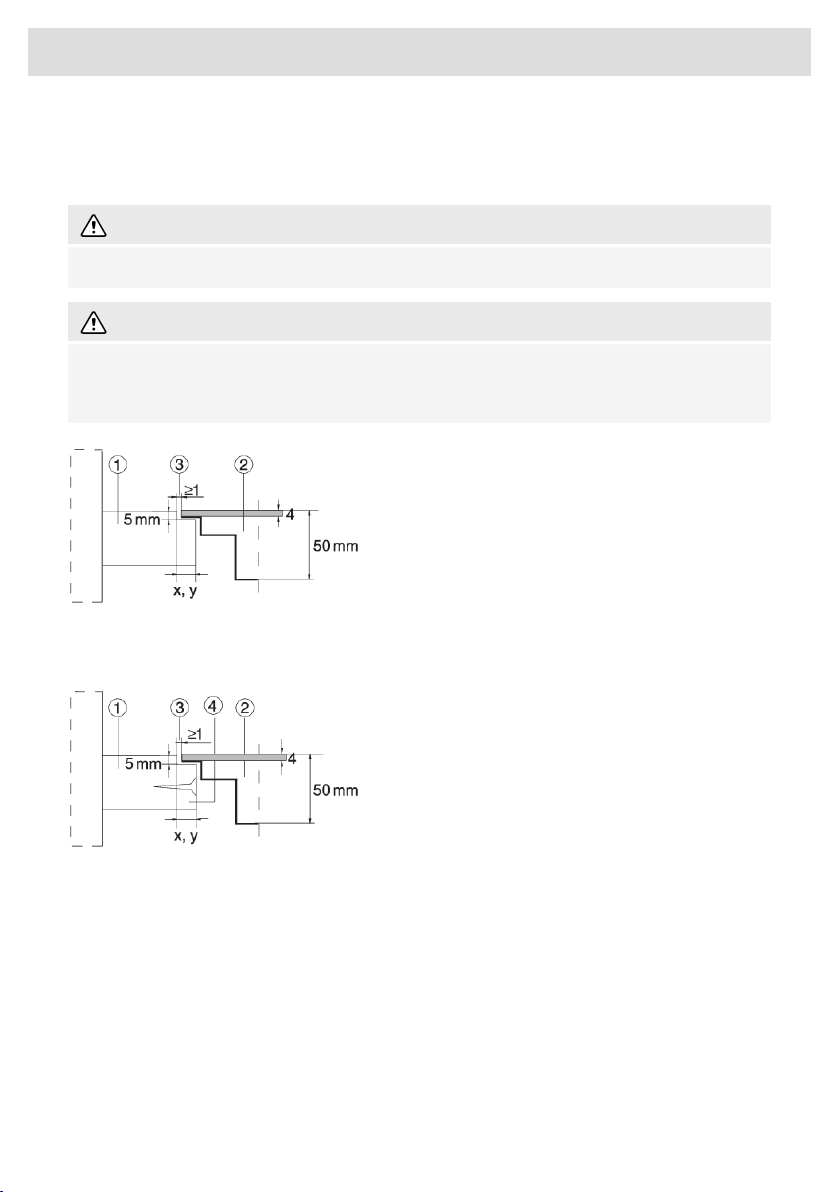
Removing the built-in appliance
Disconnect the appliance from the power mains. Use a suitable tool to remove the silicone gasket
from the perimeter. Remove the appliance by pushing it upwards from the bottom side.
WARNING!
Do not attempt to remove the appliance from the upper side of the counter!
WARNING!
The service department shall only be responsible for repair and servicing of the cooking hob.
Consult your specialized kitchen equipment dealer regarding the re-installation of the flush-mount
cooking hob.
Stone countertop
1. Countertop
2. Appliance
3. Slot
Given the margin of error (tolerance) for the glass ceramic plate of the appliance, and the cutout in
the countertop, the slot is adjustable (min. 2 mm).
Ceramic, wooden, or glass countertop
1. Countertop
2. Appliance
3. Slot
4. Wooden frame, thickness 16 mm.
49
Installation
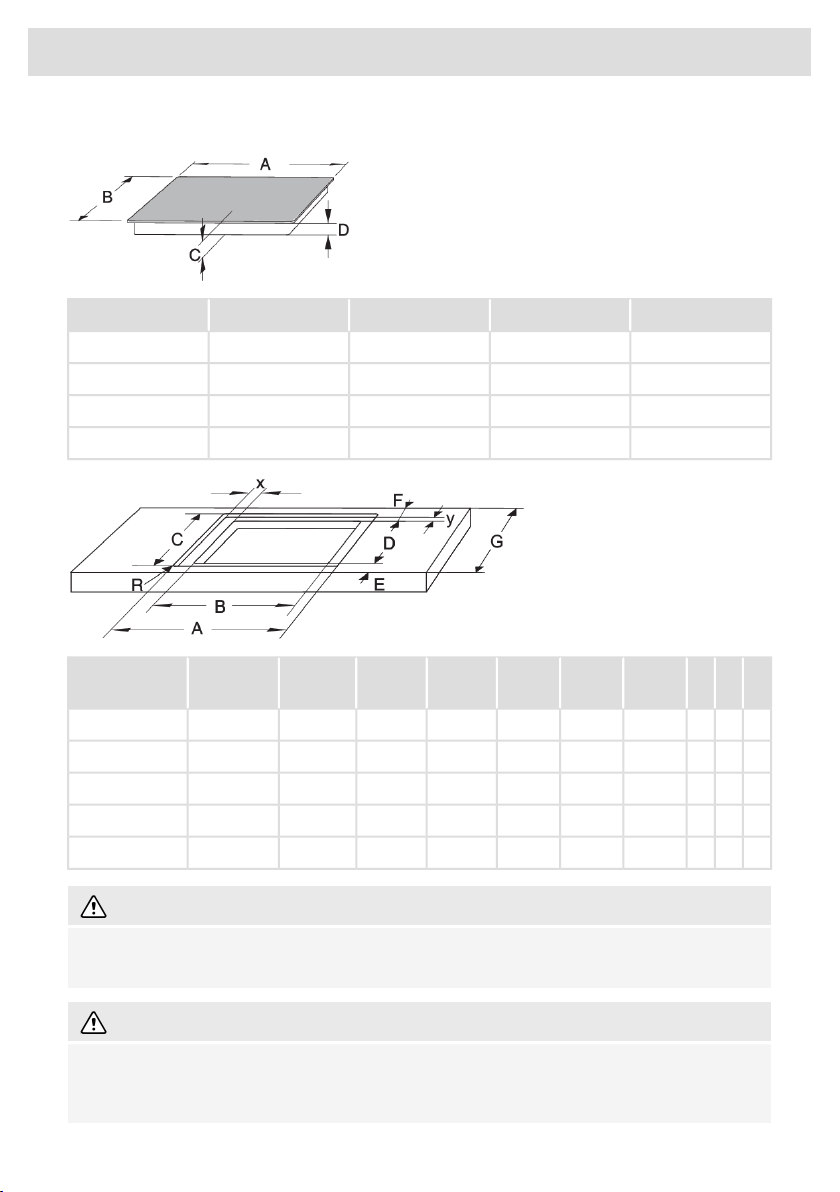
Installation into the worktop - flush mount (depending on the model)
D (mm)C (mm)B (mm)A (mm)
465051072072 cm
465051080080 cm
465051090090 cm
46504101110111 cm
YXRG
(≥mm)
F
(≥mm)
E
(≥mm)
D (mm)C (mm)B (mm)A (mm)
128266004050490-492514-515560-562724-72572 cm
122766004050490-492514-515750-752804-80580 cm (4 zone)
121766004050490-492514-515770-772804-80580 cm (5 zone)
122266004050490-492514-515860-862904-90590 cm
142265004050385-387414-4151070-10721114-1115111 cm
WARNING!
If the oven is installed under a flush-mounted cooking hob, then the worktop thickness should
be at least 38 mm.
WARNING!
The service department shall only be responsible for repair and servicing of the cooking hob.
Consult your specialized kitchen equipment dealer regarding the re-installation of the flush-mount
cooking hob.
50
Installation
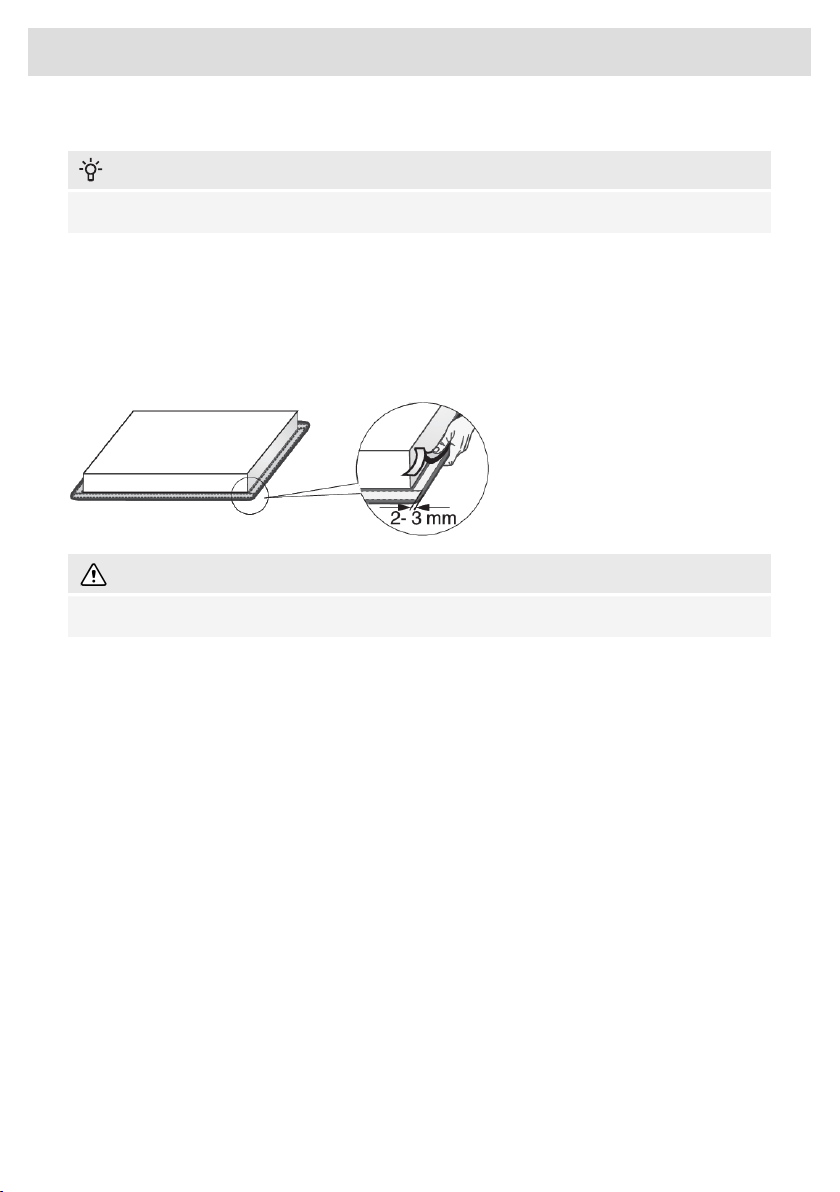
Fitting the foam gasket
INFORMATION!
Some appliances come with the gasket already fitted!
Before installing the appliance into a kitchen worktop, attach the foam gasket supplied with the
appliance to the bottom side of the glass ceramic hob.
• Remove the protective film from the gasket.
• Attach the gasket to the bottom side of the glass (2–3 mm away from the edge). The gasket has
to be applied along the entire edge of the glass. The gasket may not overlap in the corners.
• When fitting the gasket, make sure it is not damaged by or in contact with any sharp objects.
WARNING!
Do not install the appliance without this gasket!
• The worktop has to be completely level.
• Protect the cut out surfaces.
51
Installation
Connecting the cooking hob to the power mains
• Power mains protection must conform to the relevant regulations.
• Before connecting the appliance, make sure the voltage indicated on the rating plate conforms
to the voltage in your power mains.
• There should be a switching device in the electrical installation that can disconnect all poles of
the appliance from the power mains, with a minimum clearance of 3 mm between the contacts
when open. Suitable devices include fuses, protective switches etc.
• The connection should be adjusted to the current and fuses.
• After installation, the parts carrying electrical current and insulated parts shall be protected
against contact.
Connection
1. Check the voltage. Before connecting the appliance, make sure the voltage specified on the
rating plate conforms to the voltage of your power mains. The voltage of your power mains
(220–240 V between L and N) should be checked by an expert using an appropriate measuring
device.
2. Open the cover of the connection terminal box.
3. Connect the wires according to your type of appliance.
4. The jumpers are provided seperately.
5. Change the power limitation in the Settings when needed. See chapter Settings Con for
connection setting.
WARNING!
The appliance may only be connected by an authorised expert. False connection can destroy
parts of the appliance. In such case, there is no right to warranty. Disconnect the appliance from
the power mains before any repair or maintenance operation.
Power cord
• Run the power cord through a cord strain relief (clamp) which protects the cable from being
pulled out.
Connection diagram
For appliance types: BI3CA… .
NOTE!
Note: The appliance type can be found on the rating plate on the bottom of the appliance.
Power cord core cross sectional area should be at least 1,5 mm² for the following current limiter
settings which should be adjusted to your circuit breakers:
52
Electrical installation
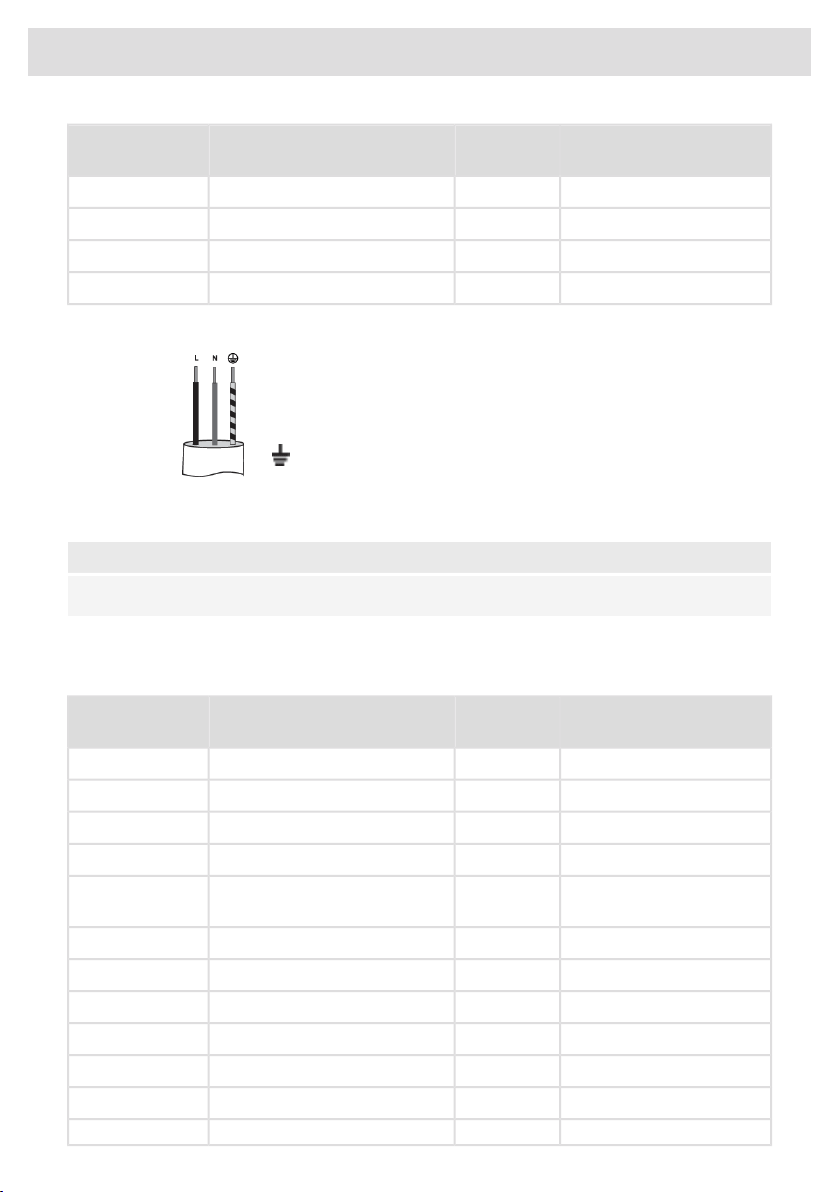
Number and cross section
of Power cord wires
Power cord
type
Connection typeCurrent limiter
settings
3x1,5 mm²H05V2V2-F1 phase, 1 neutral conductor1x16A
3x1,5 mm²H05V2V2-F1 phase, 1 neutral conductor1x13A
3x1,5 mm²H05V2V2-F1 phase, 1 neutral conductor1x10A
3x1,5 mm²H05V2V2-F1 phase, 1 neutral conductor1x06A
Voltage between line and neutral conductor must be 220–240 V~.
1 phase, 1 neutral conductor (220–240 V~, 50-60 Hz)
L = black/brown
N = blue
= yellow-green
For appliance types: BI1CA…, BI6CA…, BI6CB…, BI7CA…, BI8CA…, BI8CB…, BI9CE…
NOTE!
Note: The appliance type can be found on the rating plate on the bottom of the appliance.
Voltage between line and neutral conductor must be 220–240 V~. Voltage between lines must be
380–415 V~. Power cord core cross sectional area should be at least as listed in Table for the
following current limiter settings which should be adjusted to your circuit breakers:
Number and cross section
of Power cord wires
Power cord
type
Connection typeCurrent limiter
settings
4x1,5 mm²H05VV-F2 phases, 1 neutral conductor2x16A
4x1,5 mm²H05VV-F2 phases, 1 neutral conductor2x13A
4x1,5 mm²H05VV-F2 phases, 1 neutral conductor2x10A
4x1,5 mm²H05VV-F2 phases, 1 neutral conductor2x06A
5x1,5 mm²H05VV-F2 phases, 2 neutral conductors
(only for NL)
2x16A
3x4,0 mm²H05VV-F1 phase, 1 neutral conductor1x32A
3x4,0 mm²H05VV-F1 phase, 1 neutral conductor1x25A
3x4,0 mm²H05VV-F1 phase, 1 neutral conductor1x20A
3x4,0 mm²H05VV-F1 phase, 1 neutral conductor1x16A
3x4,0 mm²H05VV-F1 phase, 1 neutral conductor1x13A
3x4,0 mm²H05VV-F1 phase, 1 neutral conductor1x10A
3x4,0 mm²H05VV-F1 phase, 1 neutral conductor1x06A
53
Electrical installation

The following connections are possible.
1 phase, 1 neutral conductor (220–240 V~, 50-60 Hz)
To reach the rated maximum power a fuses of 32A is needed.
Install a jumper between terminals 1 and 2 and between terminals 4
and 5.
2 phases, 1 neutral conductor (380–415 V 2N~, 50-60 Hz)
To reach the rated maximum power two fuses of 16A are needed.
Install a jumper between terminals 4 and 5.
(only for NL)
2 phases, 2 neutral conductors (220–240 V 2-2N~, 50-60 Hz)
To reach the rated maximum power two fuses of 16A are needed.
The 2 fases (L1 and L2) should be secured by only one and the same
earth leakage breaker. It is not allowed to run L1/N1 threw a different
earth leakage breaker than L2/N2.
For appliance types: BI9CA…, BI9CB…, BI9CC… .
NOTE!
Note: The appliance type can be found on the rating plate on the bottom of the appliance.
Voltage between line and neutral conductor must be 220–240 V~. Voltage between lines must be
380–415 V~. Power cord core cross sectional area should be at least as listed in Table for the
following current limiter settings which should be adjusted to your circuit breakers:
Number and cross section
of Power cord wires
Power cord
type
Connection typeCurrent limiter
settings
5x1,5 mm²H05V2V2-F3 phases, 1 neutral conductor3x16A
5x1,5 mm²H05V2V2-F3 phases, 1 neutral conductor3x13A
5x1,5 mm²H05V2V2-F3 phases, 1 neutral conductor3x10A
5x1,5 mm²H05V2V2-F3 phases, 1 neutral conductor3x06A
4x1,5 mm²H05V2V2-F2 phases, 1 neutral conductor2x16A
4x1,5 mm²H05V2V2-F2 phases, 1 neutral conductor2x13A
4x1,5 mm²H05V2V2-F2 phases, 1 neutral conductor2x10A
54
Electrical installation
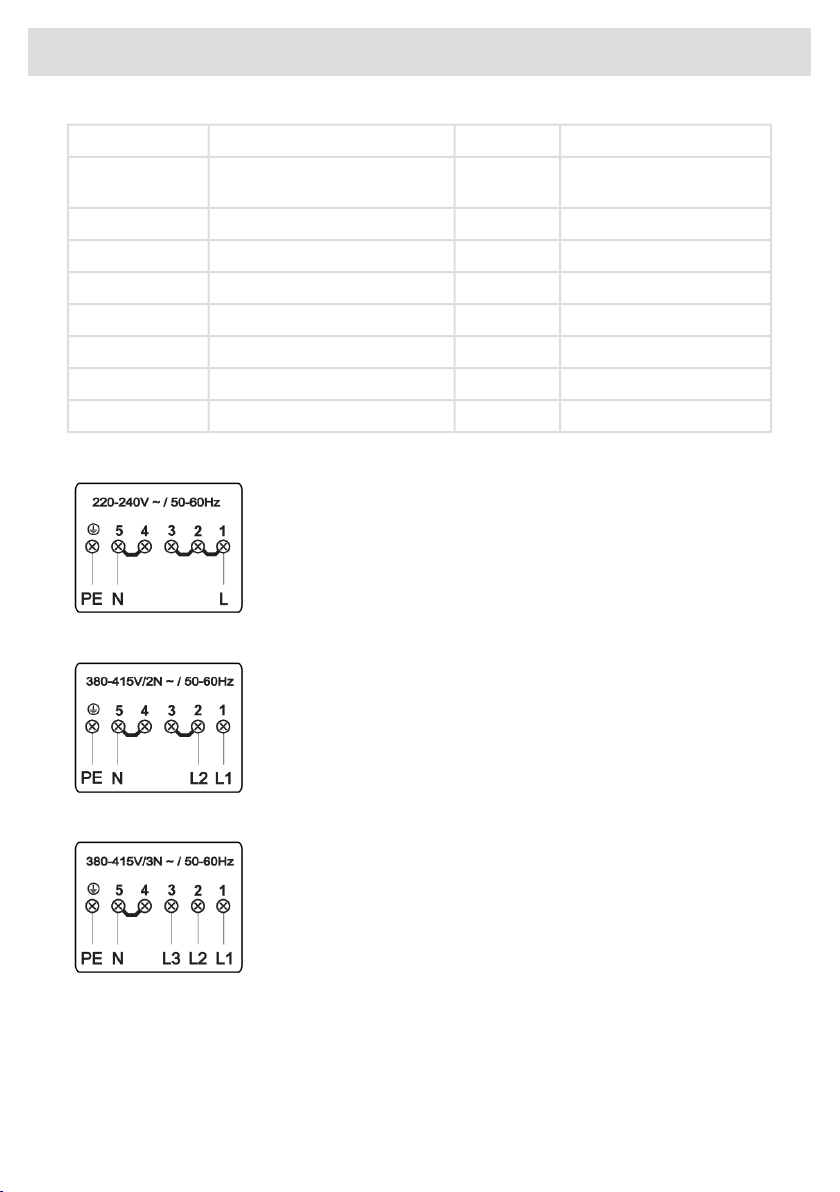
4x1,5 mm²H05V2V2-F2 phases, 1 neutral conductor2x06A
5x1,5 mm²H05V2V2-F2 phases, 2 neutral conductors
(only for NL)
2x16A
4x4,0 mm²H05V2V2-F2 phases, 1 neutral conductors2x32A
3x6,0 mm²H05V2V2-F1 phase, 1 neutral conductor1x48A
3x6,0 mm²H05V2V2-F1 phase, 1 neutral conductor1x35A
3x4,0 mm²H05V2V2-F1 phase, 1 neutral conductor1x32A
3x4,0 mm²H05V2V2-F1 phase, 1 neutral conductor1x25A
3x4,0 mm²H05V2V2-F1 phase, 1 neutral conductor1x20A
3x4,0 mm²H05V2V2-F1 phase, 1 neutral conductor1x16A
The following connections are possible.
1 phase, 1 neutral conductor (220–240 V~, 50-60 Hz).
To reach the rated maximum power a fuse of 48A is needed.
Install a jumper between terminals 1 and 2, between terminals 2 and 3
and between terminals 4 and 5.
2 phases, 1 neutral conductor (380–415 V 2N~, 50-60 Hz).
To reach the rated maximum power two fuses of 32A are needed.
Install a jumper between terminals 2 and 3 and between terminals 4
and 5.
3 phases, 1 neutral conductor (380–415 V 3N ~, 50-60 Hz).
To reach the rated maximum power three fuses of 16A are needed.
Install a jumper between terminals 4 and 5.
55
Electrical installation
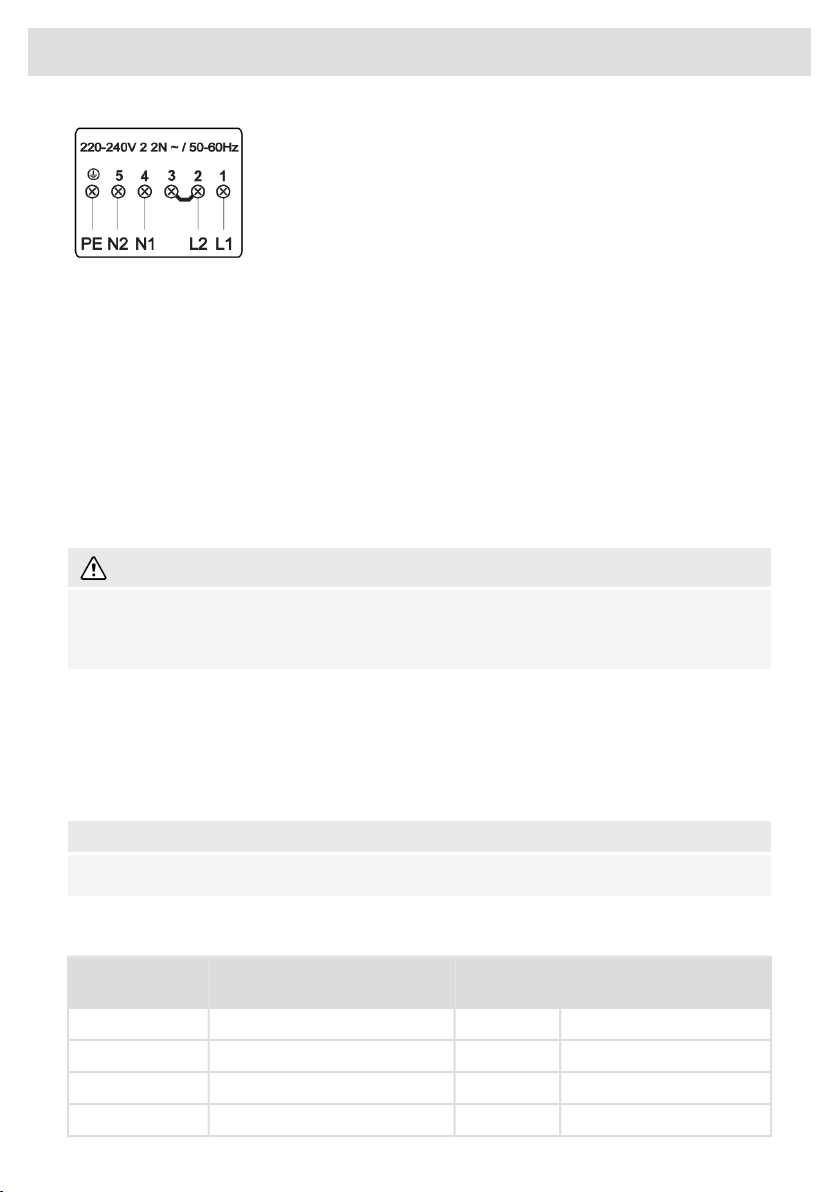
(only for NL)
2 phases, 2 neutral conductors (220–240 V 2-2N~, 50-60 Hz)
To reach the rated maximum power two fuses of 16A are needed.
The 2 fases (L1 and L2) should be secured by only one and the same
earth leakage breaker. It is not allowed to run L1/N1 threw a different
earth leakage breaker than L2/N2.
Install a jumper between terminals 2 and 3!
Connection only for BE
1. Check the voltage. Before connecting the appliance, make sure the voltage specified on the
rating plate conforms to the voltage of your power mains. The voltage of your power mains
(220–240 V between L1 and L2) should be checked by an expert using an appropriate measuring
device.
2. Open the cover of the connection terminal box.
3. Connect the wires according to your type of appliance.
4. The jumpers are provided seperately.
5. Change the power limitation in the Settings when needed. See chapter Settings Con for
connection setting.
WARNING!
The appliance may only be connected by an authorised expert. False connection can destroy
parts of the appliance. In such case, there is no right to warranty. Disconnect the appliance from
the power mains before any repair or maintenance operation.
Power cord
• Run the power cord through a cord strain relief (clamp) which protects the cable from being
pulled out.
Connection diagram
For appliance types: BI3CA… .
NOTE!
Note: The appliance type can be found on the rating plate on the bottom of the appliance.
Power cord core cross sectional area should be at least 1,5 mm² for the following current limiter
settings which should be adjusted to your circuit breakers:
Number and cross section
of Power cord wires
Power cord
type
Connection typeCurrent limiter
settings
3x1,5 mm²H05V2V2-F2 phase conductors1x16A
3x1,5 mm²H05V2V2-F2 phase conductors1x13A
3x1,5 mm²H05V2V2-F2 phase conductors1x10A
3x1,5 mm²H05V2V2-F2 phase conductors1x06A
56
Electrical installation
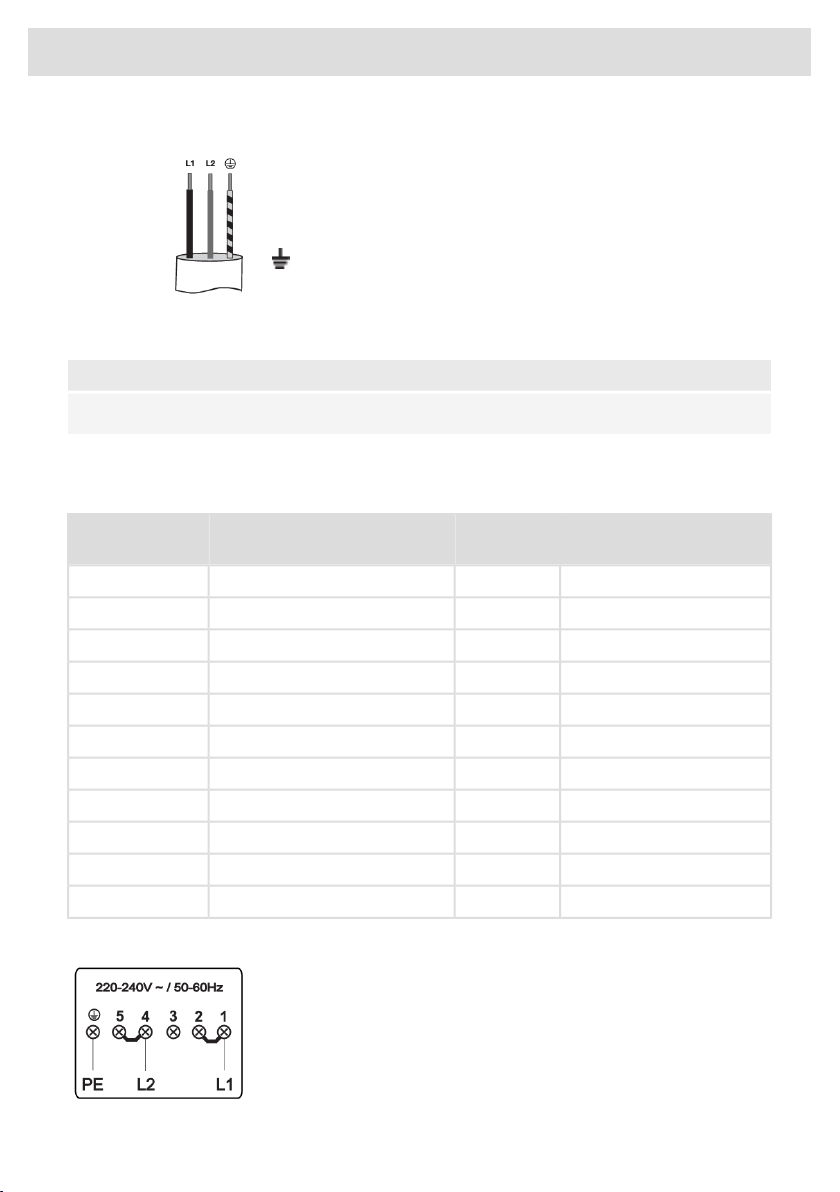
Voltage between line conductors must be 220–240 V~.
2 phase conductors (220–240 V~, 50-60 Hz)
L1 = black/brown
L2 = blue
= yellow-green
For appliance types: BI1CA…, BI6CA…, BI6CB…, BI7CA…, BI8CA…, BI8CB…, BI9CE…
NOTE!
Note: The appliance type can be found on the rating plate on the bottom of the appliance.
Voltage between lines must be 220–240 V~. Power cord core cross sectional area should be at least
as listed in Table for the following current limiter settings which should be adjusted to your circuit
breakers:
Number and cross section
of Power cord wires
Power cord
type
Connection typeCurrent limiter
settings
4x1,5 mm²H05VV-F3 phase conductors2x16A
4x1,5 mm²H05VV-F3 phase conductors2x13A
4x1,5 mm²H05VV-F3 phase conductors2x10A
4x1,5 mm²H05VV-F3 phase conductors2x06A
3x4,0 mm²H05VV-F2 phase conductors1x32A
3x4,0 mm²H05VV-F2 phase conductors1x25A
3x4,0 mm²H05VV-F2 phase conductors1x20A
3x4,0 mm²H05VV-F2 phase conductors1x16A
3x4,0 mm²H05VV-F2 phase conductors1x13A
3x4,0 mm²H05VV-F2 phase conductors1x10A
3x4,0 mm²H05VV-F2 phase conductors1x06A
The following connections are possible.
2 phases (220–240 V~, 50-60 Hz)
To reach the rated maximum power a fuses of 32A is needed.
Install a jumper between terminals 1 and 2 and between terminals 4
and 5.
57
Electrical installation
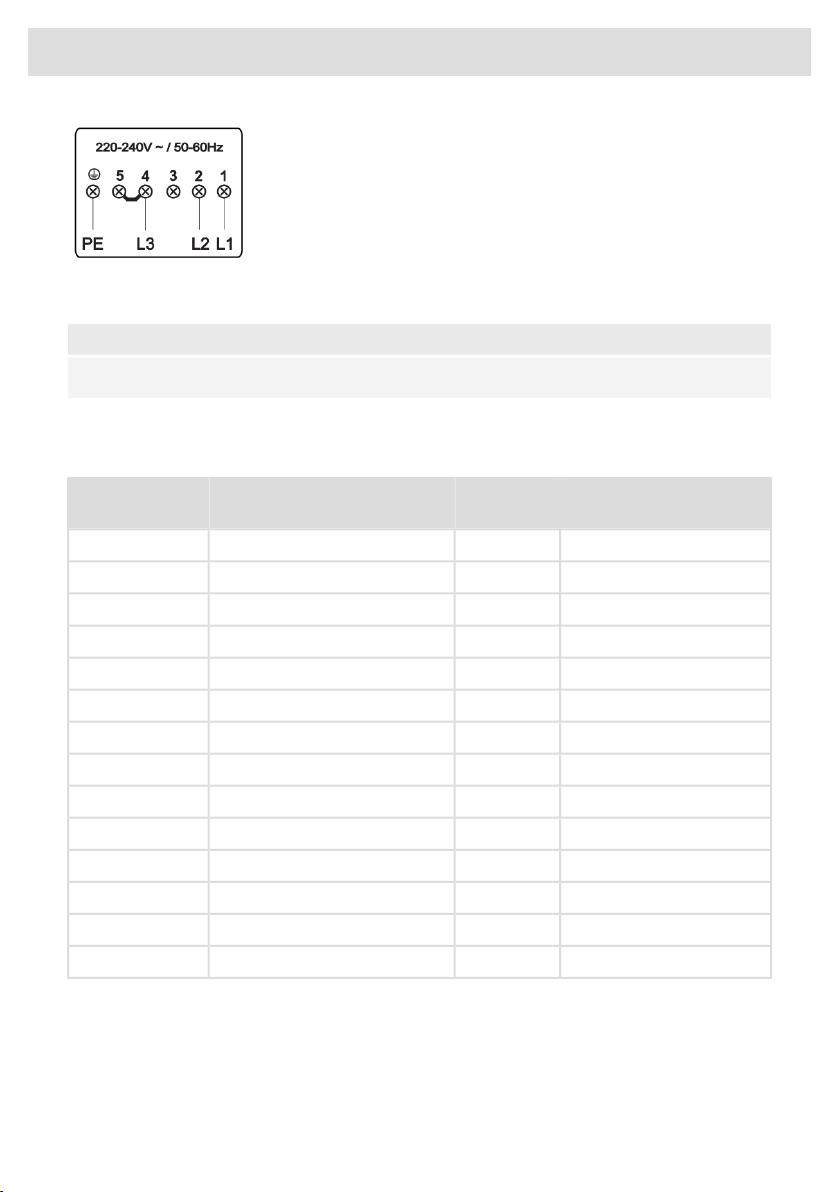
3 phases (220–240 V~, 50-60 Hz)
To reach the rated maximum power a fuses of 32A is needed.
Install a jumper between terminals 4 and 5.
For appliance types: BI9CA…, BI9CB…, BI9CC… .
NOTE!
Note: The appliance type can be found on the rating plate on the bottom of the appliance.
Voltage between lines must be 220–240 V~. Power cord core cross sectional area should be at least
as listed in Table for the following current limiter settings which should be adjusted to your circuit
breakers:
Number and cross section
of Power cord wires
Power cord
type
Connection typeCurrent limiter
settings
4x4,0 mm²H05V2V2-F3 phase conductors3x16A
4x4,0 mm²H05V2V2-F3 phase conductors3x13A
4x4,0 mm²H05V2V2-F3 phase conductors3x10A
4x4,0 mm²H05V2V2-F3 phase conductors3x06A
3x1,5 mm²H05V2V2-F3 phase conductors2x16A
3x1,5 mm²H05V2V2-F3 phase conductors2x13A
3x1,5 mm²H05V2V2-F3 phase conductors2x10A
3x1,5 mm²H05V2V2-F3 phase conductors2x06A
3x6,0 mm²H05V2V2-F2 phase conductors1x48A
3x6,0 mm²H05V2V2-F2 phase conductors1x35A
3x4,0 mm²H05V2V2-F2 phase conductors1x32A
3x4,0 mm²H05V2V2-F2 phase conductors1x25A
3x4,0 mm²H05V2V2-F2 phase conductors1x20A
3x4,0 mm²H05V2V2-F2 phase conductors1x16A
The following connections are possible.
58
Electrical installation
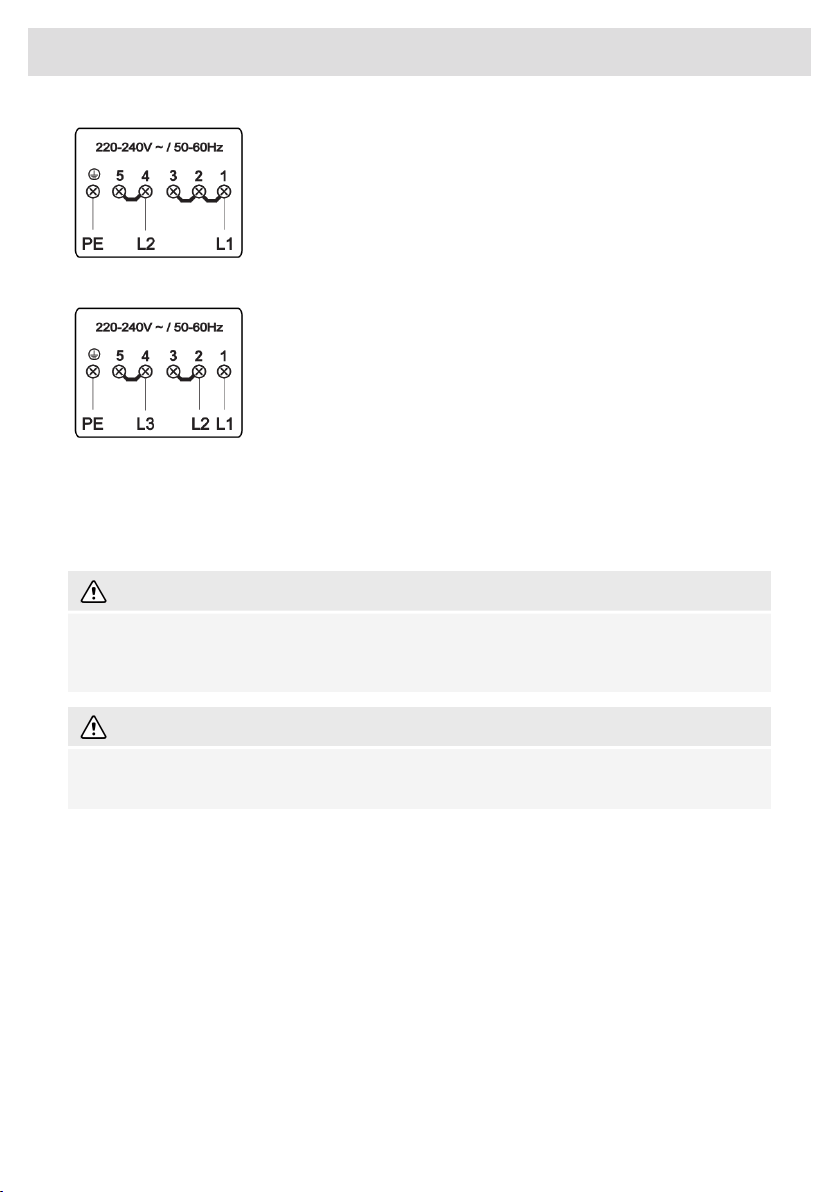
2 phases (220–240 V~, 50-60 Hz).
To reach the rated maximum power a fuse of 48A is needed.
Install a jumper between terminals 1 and 2 and between terminals 4
and 5.
3 phases (220–240 V~, 50-60 Hz).
To reach the rated maximum power a fuses of 48A is needed.
Install a jumper between terminals 2 and 3 and between terminals 4
and 5.
Current limiter
See chapter Settings, under parameter Con - Current limiter to set the parameter. This parameter
must be set before any pan is placed on the hob or cooking zone activated
WARNING!
Current limiter setting must be set according to your connection and circuit breakers by a
registered and qualified installer. Please read the Safety regulations and the Installation instruction
carefully.
WARNING!
Setting a lower value of the Current limiter parameter may cause a reduced performance of the
induction hob.
59
Electrical installation
Disposal of packaging and appliance
In the manufacturing of this appliance durable materials were used. Make sure to dispose of this
equipment responsibly at the end of its lifecycle. Ask the authorities for more information regarding
this.
The appliance packaging is recyclable. The following may have been used:
• cardboard;
• polythene film (PE);
• CFC-free polystyrene (PS hard foam).
Dispose of these materials in a responsible manner and in accordance
with government regulations.
As a reminder of the need to dispose of household appliances
separately, the product is marked with the symbol of a crossed-out
wheeled dustbin. This means that at the end of its working life, the
product must not be disposed of as urban waste. It must be taken to a
special local authority differentiated waste collection centre or to a
dealer providing this service.
Disposing of a household appliance separately avoids possible negative
consequences for the environment and health deriving from
inappropriate disposal and enables the constituent materials to be
recovered to obtain significant savings in energy and resources.
Declaration of conformity
We declare that our products meet the applicable European Directives,
Decisions and Regulations and the requirements listed in the standards
referenced.
60
Environmental aspects
Wi-Fi moduleRadio equipment type:
2.412GHz - 2.472GHzOperating frequency range:
17.7dBm EIRPMaximum output power:
2.7dBiMaximum antenna gain:
HSCIM - 1 moduleRadio equipment type:
2402.0MHz - 2480.0MHzFrequency range:
<10dBmCarrier Output:
G1DEmission type:
Hereby, ASKO declare that the radio equipment mentioned above is in compliance with Directive
2014/53/EU. The full text of the EU declaration of conformity is available at the following internet
address: www.celsiuscooking.com/DoC.
61
Compliance information
830370
The appliance identification card is located on the bottom of the appliance.
Stick the appliance identification card here.
ASKO APPLIANCES AB • SOCKERBRUKSGATAN 3, SE-531 40 LIDKÖPING, SWEDEN • WWW.ASKO.COM
-a2