User Manual
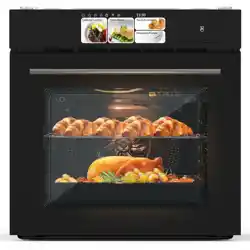
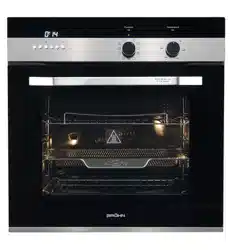
60 cm Built-in Electric Oven. Model Code: TRO605SS / TRO605BK
Please read this manual carefully before using. and keep it for future reference.
P a g e | 3
ONLINE: TRINITYAPPLIANCES.COM.AU
CONTENTS
PACKAGE. 4
IMPORTANT - CHECK FOR ANY DAMAGE OR MARKS .. 4
HANDLING 4
BEFORE USING YOUR NEW APPLIANCE 4
SAFETY WARNINGS. 5
IMPORTANT INFORMATION .. 5
GENERAL WARNINGS .. 5
INSTALLATION ADVICE. 5
USAGE CONDITIONS AND RESTRICTIONS 6
ELECTRICAL SAFETY 7
PRODUCT OVERVIEW 9
INTRODUCING THE OVEN. 9
INSTALLATION .. 12
PREPARING THE CABINET 12
FASTENING THE OVEN 13
ELECTRICAL CONNECTION 14
OPERATION .. 16
OVEN FUNCTIONS AND OPERATION .. 16
PROGRAMMABLE TIMER / DISPLAY .. 18
5.2.1 SELECTING MANUAL OPERATION MODE 18
5.2.2 SETTING THE TIME OF DAY .. 18
5.2.3 SETTING THE MINUTE MINDER .. 19
SETTINGS THE COOKING DURATION TIME 19
DELAYED COOKING / SETTING THE START AND END OF COOKING TIME. 20
FIRST TIME USE OVEN .. 21
NORMAL USE .. 21
ENERGY SAVING TIPS. 21
COOKING GUIDELINES. 22
SELECTION RECOMMENDATIONS. 22
CLEANING AND MAINTENANCE 25
KEEP YOUR OVEN IN SHAPE .. 25
STEAM CLEANING 25
REPLACING OVEN LAMP 26
DISASSEMBLING/ASSEMBLING OVEN DOOR. 26
CLEANING OVEN GLASS. 27
TROUBLESHOOTING. 28
TECHNICAL SPECIFICATIONS 30
DISPOSAL 31
CUSTOMER CARE. 32
P a g e | 4
ONLINE: TRINITYAPPLIANCES.COM.AU
1 PACKAGE
1.1 IMPORTANT - CHECK FOR ANY DAMAGE OR MARKS
Please thoroughly inspect your goods at the delivery time. if you notice any damage to your goods:
Please notify the delivery team at the time of delivery and do NOT accept damaged
Please notify us immediately as the problem can be instantly solved and damaged
When you open the package and find the appliance is damaged or marked. you must report it within 24 hours. Do not install or connect the item. keep the package as original. if you wish to claim for damage/marks under the manufacturer’s warranty. This does not affect your statutory rights.
Evidence of damage will be required.
1.2 HANDLING
Do not use the door and/or handle to carry or move the appliance. Carry out the movement and transportation in the original packaging. Pay maximum attention to the appliance while loading/unloading and handling. Make sure that the packaging is securely closed during handling and transportation. Protect from external factors (such as humidity. water. etc.) that may damage the
Be careful not to damage the appliance due to bumps. crashes. drops. etc. while
1.3 BEFORE USING YOUR NEW APPLIANCE
Read this guide. taking special note of the Safety Warnings’ section. Remove any protective film that may still be on your appliance. This instruction manual has been prepared jointly for multiple models. Some of the
NOTE: This instruction manual has been prepared jointly for multiple models. Some of the specifications explained in the manual. may be slightly different or not be included in your appliance. Pay attention to the explanations with illustrations while reading the manual.
P a g e | 5
ONLINE: TRINITYAPPLIANCES.COM.AU
2 SAFETY WARNINGS
2.1 IMPORTANT INFORMATION
Read this manual thoroughly before you start using the appliance.
The safety precautions instructions reduce the risk of fire. electric shock and injury when correctly complied to.
Please take notice of all warnings. follow the instructions. basic precautions and accident prevention measures when using this appliance.
NOTE: This appliance should be installed by a licensed electrician or warranty will be voided.
2.2 GENERAL WARNINGS
Cooking process shall always be supervised. Never try to put out the fire with water. Only shut down the device circuit and then
Do not heat closed cans and glass jars. The pressure may lead jars to explode. Be careful when using alcohol in your foods. Alcohol will evaporate at high
After each use. check if the unit is turned off. If the appliance is faulty or has a visible damage. do not operate the appliance. Do not touch the plug with wet hands. Do not pull the cord to plug off. always hold
The packaging materials are dangerous for children. Keep packaging materials
2.3 INSTALLATION ADVICE
Make sure that furniture and housing are able to withstand high temperatures from
Vinyl and laminate kitchen furniture are prone to heat damage or being discoloured
Make sure that no cables come into contact with were the oven can get hot. Do not install oven next to soft furnishings or curtains. If power cord is damaged. it must be replaced immediately by a qualified electrician
P a g e | 6
ONLINE: TRINITYAPPLIANCES.COM.AU
2.4 USAGE CONDITIONS AND RESTRICTIONS
Supervision over children is to ensure that they do not play with the appliance. Never
This appliance is not to be used by persons (including children) with reduced
Never leave the oven unattended while in use. oils and fats may catch fire while
Only for indoor domestic use only. It is not to be used for industrial or commercial
Do not use this product for anything other than its intended purpose. and only use it
In use. the door window may become hot. Make sure not to touch it or that no
Damage or malfunction caused from foreign objects is not covered by your warranty
This oven is not to be used by an external timer or a complete separate control
Make sure you turn off the oven before you commence cleaning. Do not use the oven for heating an area or drying clothes. Make sure you do not use the oven if any part has been damaged or does not work
Incorrect use can result in property damage. injury or death. We assume no liability
Oven door must stay closed when using the grill function. Oven handle is not a towel
While cooking. don’t place pans. oven trays. plates or aluminium foils. other
Make sure to always place items on shelves provided. Do not place the baking paper
Place the oven shelves and a tray correctly on the wire racks. The shelve or tray shall
Make sure when removing anything from the oven. always use an oven mitt.
P a g e | 7
ONLINE: TRINITYAPPLIANCES.COM.AU
Do not use aluminium anywhere within the oven grills or to cover the grill pan or wrap
Do not lift or move appliance by the oven door or handle. this may cause damage
Clean the oven on a regular basis so oils and fats do not build up. as this can cause
Do not touch hot surfaces. The heating element and other parts inside the oven
When opening the oven door. make sure to avoid contact with hot parts of the oven
There is a danger of fire when you leave items inside the oven for too long. especially
Do not use the appliance with its front door glass removed or broken. When the door is open. do not place any heavy object on the door or allow children
Do not use abrasive cleaners or sharp metal scrapers to clean the glass as the
This appliance is for household use only. don’ use it outdoors.
2.5 ELECTRICAL SAFETY
Plug the appliance in a grounded socket protected by a fuse conforming to the
Have a licensed electrician set grounding equipment and install the oven. The
The circuit breaker switches of the oven shall be placed so that end user can reach
The power supply cord (the cord with plug) shall not contact the hot parts of the
The rear surface of the oven also heats up when the oven is operated. Electrical
Do not tighten the connecting cables to the oven door and do not run them over
Unplug the unit during installation. service. maintenance. cleaning and repair. Cut off all supply circuit connections before accessing the terminals.
P a g e | 8
ONLINE: TRINITYAPPLIANCES.COM.AU
If the power supply cable is damaged. it must be replaced by its manufacturer or
Make sure the plug is inserted firmly into wall socket to avoid sparks. Do not use steam cleaners for cleaning the appliance. otherwise electric shock may
An omnipolar switch capable to disconnect power supply to the appliance is
P a g e | 9
ONLINE: TRINITYAPPLIANCES.COM.AU
3 PRODUCT OVERVIEW
3.1 INTRODUCING THE OVEN
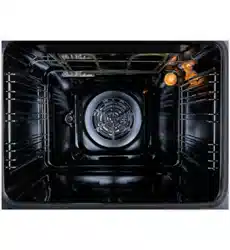
The oven large capacity offers the option of cooking on multi shelves at the same
The first time you use your appliance. heat the empty oven with its door closed
Never put objects directly on the bottom of the oven or cover it with aluminium
1. Control Panel 2. Wire Shelf 3. Tray 4. Door
5. Handle 6. Fan Motor (behind steel place) 7. Lamp 8. Grill Heating Element
P a g e | 10
ONLINE: TRINITYAPPLIANCES.COM.AU
OPTIONAL ACCESSORIES:
Deep Tray
Tray
Big Shelf
Telescopic Rail
Grill Rack
Tray Handle
OVEN PROGRAMMER/TIMER DISPLAY 10 - Auto Function Symbol 11 - Minute Minder Symbol 12 - Manual Operation Symbol
CONTROL PANEL:
1. Oven Function Selector 2. Temperature controller 3. Minute Minder Button 4. Duration Button 5. End Cook Button
6. Manual Operation Button 7. Decrease Button 8. Increase Button 9. LED Display
P a g e | 11
ONLINE: TRINITYAPPLIANCES.COM.AU
FUNCTION SELECTOR There are 5 options when deciding what to use:
TEMPERATURE SELECTOR Turn the temperature regulator knob clockwise to set the required temperature.
The oven function must be set alongside temperature selection.
P a g e | 12
ONLINE: TRINITYAPPLIANCES.COM.AU
4 INSTALLATION
WARNING: Check for any damage on the product before installing it.
Do not have product installed if it's damaged. Damaged products pose danger for your safety.
The power supply to the appliance must be cut off before any adjustments or maintenance work is done on it.
4.1 PREPARING THE CABINET
To ensure the proper working order of the built-in oven. the cabinet must be of a suitable size.
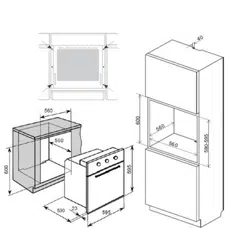
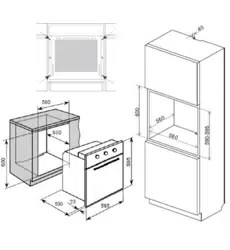
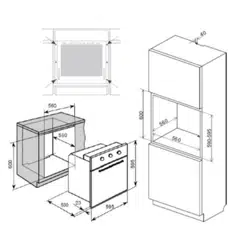
The sizes of the cabinet for installing the oven under a benchtop or in a column unit are shown below.
To provide adequate ventilation. there must be appropriate ventilation openings in the front bottom and the top part of the cabinet. Cooling fan shall take extra steam out and prevent outer surfaces of appliance from overheating during operation of oven. This is a necessary condition for better appliance operation and better cooking. Cooling fan shall continue operation after cooking is finished. Fan shall automatically stop after cooling is completed. A clearance must be left behind the enclosure where you'll place the appliance for efficient and good operation. This clearance shouldn't be ignored as it's required for ventilation system of the appliance to operate.
The unit panels next to the cooker must be heat resistant. In the case of veneered wood units. glues must be resistant to a temperature of 120℃.
Do not install the product next to refrigerators or coolers. The heat emitted by the product increases the energy consumption of cooling devices.
In accordance with safety standards. once the appliance has been mounted. there must be no possible contact with electrical parts. Any protective parts must be secured so that they can only be removed with the use of tools.
P a g e | 13
ONLINE: TRINITYAPPLIANCES.COM.AU
Product Dimensions Aperture Dimensions
Height: 595mm 600mm
Width: 595mm 560mm
Depth: 530mm 560mm (min)
4.2 FASTENING THE OVEN
Do not use door and/or handle to carry or move the product.
Place the oven into the cabinet with two or more people. Ensure that oven's frame
Supply cord must NOT be under the oven. squeeze in between oven and furniture or
P a g e | 14
ONLINE: TRINITYAPPLIANCES.COM.AU
Open the oven door and fasten the oven to the cabinet using four screws “A” as
Check that oven doesn't move after mounting. If oven isn't mounted in accordance
4.3 ELECTRICAL CONNECTION
IMPORTANT!
This appliance should be installed and connected to the power supply by a licensed electrician or warranty void.
The connection must be in accordance with the current versions of the following:
AS/NZS 3000 Wiring Rules Electricity Safety Regulations 2010 The installation instructions within this user manual
Wiring requirements: The oven MUST be installed in compliance with:
Wiring connections in AS/NZS 3000 Wiring Rules. Local regulations. building codes. other statutory regulations and standards. Make sure supply voltage corresponds with your mains supply voltage. This appliance must be earthed.
Connection to the power supply: Below connection information is for reference only.
The oven comes pre-terminated with the fitted cord and appropriately rated plug.
The socket-outlet fitted connection to the final sub-circuit in the fixed wiring that is
The oven supplied with the fitted cord and no plug fitted.
The junction connection using appropriately rated terminals and a junction box must
P a g e | 15
ONLINE: TRINITYAPPLIANCES.COM.AU
The hard wiring connection:
Remove terminal cover plate from rear panel of the oven. Fit wires through and connect to the appropriate terminals. Engage wires into plastic clip. Secure plastic clip. Replace cover plate onto rear panel.
Connection Diagram
220-240 V earthed one-phase connection
L (Brown) wire to terminal marked “L” N (Blue) wire to terminal marked “N” E (Yellow-Green) wire to PE terminal
Connecting the electricity supply cable to the mains Ovens equipped with a three-pole power supply cable are designed to operate
The Data Plate located on the oven frame behind the door gives information about rating. A functional. rated current power switch MUST be provided near the appliance in an
Wiring must not be bent or compressed and must be protected against
Disconnection in the fixed wiring must occur in accordance with the AS/NZS 3000 wiring
The oven MUST be properly earthed. This oven must be connected with cable of 75°C rating minimum. This product has passed the insulation resistance test after manufacture. If the resistance
Connecting to the mains services and commissioning This appliance must be installed by a licensed electrician. according to all codes and regulations of: Electrical supply authorities. Building regulations. Local government and council authorities. AS/NZS 5601.1 (particular attention to clause 6.10.1. including figure 6.3 and subclause
6.10.1.11).
AS/NZS 3000 (particular attention to clauses 4.7.1 and 3.9)
P a g e | 16
ONLINE: TRINITYAPPLIANCES.COM.AU
5 OPERATION
5.1 OVEN FUNCTIONS AND OPERATION
Operation of the oven is controlled by the function knobs. temperature controller and a timer.
To set required function turn the knob to the selected position.
Oven switch ON / OFF
To turn the oven on. the function. temperature and time must be selected.
The oven can be switched off by setting both of the function knobs to ”OFF” position.
To set required temperature turn the knob to the selected temperature position.
P a g e | 17
ONLINE: TRINITYAPPLIANCES.COM.AU
OVEN FUNCTIONS
Function Description
Oven light
Separate light control allows the light to be switched on. even when the oven is not in cooking function. Iilluminates cavity. useful when cleaning.
Defrosting
Select this function to thaw more delicate foods. In this mode the room temperature air used. Useful for the gentle defrosting of frozen food. Only the alarm function can be used with the defrost oven function. None of the other timer modes will work with the defrost function.
Back element
This method of cooking uses the heat from the circular element distributed by the fan. This fan circulates the hot air around the cavity so the food can be put in different places and still be cooked at the same time. Useful. for multi-shelf cooking. reheating cooked foods. pastries and complete oven meals. It will cook at a lower temperature and be faster than baking.
The excellent heat distribution makes it possible to use lower temperatures when cooking roasts. This results in less loss of juices. meat which is more tender and a decrease in the loss of weigh for the roast. The ventilated mode is especially suited for cooking fish. which can be prepared with the addition of a limited amount of condiments. thus maintaining their flavour and appearance. The ventilated mode can also be used to thaw white or red meat. fish and bread by setting the desired temperature.
P a g e | 18
ONLINE: TRINITYAPPLIANCES.COM.AU
Grill
This function uses the inner part of the top element. which directs heat downwards onto the food. Can be used for grilling portions of bacon. toast and meat products such as steak. sausages. chicken and fish. The high. direct grill temperature immediately browns meat. thus stopping juice dispersion and keeping meat more tender. The grill is particularly recommended for cooking dishes requiring a high superficial temperature. Useful for grilling and toasting bread. open sandwiches etc. and browning baked dishes.
Fan & Grill
This setting uses the top heat combined with hot air circulation and is suitable where quick browning is required and “sealing” the juices in. such as steaks. hamburgers. some vegetables etc.
Useful for grilling thicker cuts of meat such as rolls and roulades. chicken. Lower temperatures can be used than when using the Grill function. as the fan distributes the heat to the food straight away.
Can be used for grilling meat products such as steak. sausages. chicken and fish. This will allow the heat to penetrate into the food and helps avoid food surface overcooked.
5.2 PROGRAMMABLE TIMER / DISPLAY
5.2.1 SELECTING MANUAL OPERATION MODE When your appliance is connected to your mains supply for the first time. the numbers on the timer display will flash. Before you can select a cooking function or set a temperature. you must set the appliance into “Manual Operation Mode”.
To select manual operation mode. press the “Manual Operation” button on the
5.2.2 SETTING THE TIME OF DAY After setting your oven for manual operation. you should also set the time of day.
P a g e | 19
ONLINE: TRINITYAPPLIANCES.COM.AU
After pressing the “manual operation” button. use the “minus” and “plus” buttons to
5.2.3 SETTING THE MINUTE MINDER You are able to set the minute minder at any time. regardless of whether an oven function has been selected. You can set a period of time using the minute minder function and an alarm will sound when that period of time has elapsed.
• Press the “minute minder” button. the display will show a value of 00:00. Set a period
• Once the display has your countdown time. let go of the “minus” and “plus” buttons.
The minute minder symbol should appear on the display.
• When a countdown is set. it is possible to shorten or lengthen the time but using the
“minus” and “plus” buttons.
• An alarm will sound when the countdown time has over. The alarm can be silenced
IMPORTANT: The oven will continue to heat once the alarm has been silenced. if you have finished cooking. then turn the oven function selector and thermostat control knob to 0/OFF position.
5.3 SETTINGS THE COOKING DURATION TIME This function will allow you to set a countdown time similar to the minute minder function.
However. the oven will no longer continue to heat. once the countdown period has elapsed.
• Use the thermostat control knob to set the temperature that you require. The
Use the oven function selector knob to select the mode of cooking that you require.
• It is then possible to set the duration of the cooking time that you require. Press the “duration” button and the display will show a value 00:00. Set the period
Once the display has got to the countdown you want. let go of the “minus” and
“plus” buttons. The countdown will start and the sign AUTO will appear on the display.
Once a countdown time has been set. it is possible to shorten or lengthen the time
An alarm will sound when the countdown time has elapsed and the oven will switch
The alarm can be silenced by pressing the “duration” button. You will need to return the oven to manual operation mode. once the duration
P a g e | 20
ONLINE: TRINITYAPPLIANCES.COM.AU
IMPORTANT: If you do not turn the thermostat control knob and oven function selector knob to 0/OFF. then the appliance will continue to operate as soon as you press the “Manual Operation” button.
5.4 DELAYED COOKING / SETTING THE START AND END OF COOKING TIME This function will allow you to set a time in the future that the oven switches on at and a time that the oven will switch off at.
• Use the thermostat control knob to set the temperature that you require. The manual
Use the oven function selector knob to select the mode of cooking that you require. Press the “cooking duration” button and the display will show a value of 00:00. Set
Immediately press the “end of cooking” button and the timer display will show the
The oven’s timer will calculate what time it needs to switch on at. so that your food
When the time of day reaches the end of the cooking time that you set. the oven
You will need to return the oven to manual operation mode. once the start and end
WARNING!
For personal safety and to avoid any potential fire risk. do not program the timer and
For food safety reasons. do not leave easily spoilt foods in the oven for too long when
When baking. we do not recommend programming the oven for a delayed start as the cake mixture may dry out and the raising agent may lose their effectiveness.
Example: if the oven operation has to be finished at 12:05 and shall last 1hr30min. both times have to be set respectively: “END OF COOKING” for 12:05; and “COOKING DURATION” for 1.30 so the timer will switch on the oven at 10:35 and turn off the oven at 12:05.
P a g e | 21
ONLINE: TRINITYAPPLIANCES.COM.AU
5.5 FIRST TIME USE OVEN
Here are the things you must do at first use of your:
1. Remove labels or accessories attached inside the oven remove protective film on
2. Remove dust and package residues by wiping inside of the oven with a damp cloth.
Inside of oven must be empty. Plug the cable of appliance into the electrical socket.
3. Set the thermostat button to the temperature 180 °C and run the oven for about half
4. Wipe inside of the oven with a slightly warm water with detergent after it becomes
5.6 NORMAL USE
1. Adjust thermostat button and temperature at which you want to cook to start
2. You can set cooking time to any desired time by using the timer. Timer will turn off
3. Cooling system of the appliance will continue to operate after cooking is completed.
Do not cut the power of appliance in this situation which is required for appliance to cool down. System will shut down after cooling is completed.
5.7 ENERGY SAVING TIPS
Following details will help use your product ecologically and economically:
Use dark coloured and enamel containers that conduct the heat better in the oven. Do not open the oven door frequently while cooking. The oven will not lose heat. Try not to cook multiple dishes simultaneously in the oven. You may cook at the same
Turn off the oven a few minutes before the expiration time of cooking. In this case.
Defrost the frozen food before cooking.
P a g e | 22
ONLINE: TRINITYAPPLIANCES.COM.AU
6 COOKING GUIDELINES
6.1 SELECTION RECOMMENDATIONS
The following table shows the information of food types and identified their cooking values.
Cooking times can vary depending on the network voltage. quality of raw food to be cooked. quantity and temperature. Dishes to cook by using these values might not appeal to your taste. You can set various values for obtaining different tastes and results appealing to your taste by making tests.
Preheating According to the specific recipes. the oven often recommended to be preheated before placing the food into it. If the oven must be preheated the"Turbo back heater and fan" mode is an energy safe option. Once the food has been placed in the oven. The most appropriate cooking mode can then be selected.
Using the grill The multi-function oven offers you three different grilling modes. Use the “Grill"setting for grilling in perfect mode small portions like toasted sandwiches. hotdogs. etc. to perfection.
The "Maxi Grill"position is the best for grilling foods rapidly.
For a better distribution of heat. not only to brown the surface but also to cook the bottom part. select"Maxi Grill fan forced"function. This mode can also be used for browning foods at the end of the cooking process.
Always use the grill with the oven door closed. This will allow you both to attain excellent results and to save energy. When using any of the three grilling modes. it is recommended that the thermostat knob be turned to the 175℃. as it is the most efficient way to use the grill. When utilizing the grill. place the rack at the lower levels. To catch grease or fat and prevent smoke. place a dripping-pan at the bottom rack level.
Baking pastries When baking pastries. always place them in the oven after it has been preheated. Make sure you wait until the oven has been preheated thoroughly. the indicator red "E"light will turn off. Do not open the door while the pastry is cooking in order to prevent it from dropping. Batters must not be too runny. as this will result in prolonged cooking times.
Possible issues when baking and optional solutions:
Issue Solution
Pastry is too dry Increase the temperature by 10℃ and reduce the cooking time.
Pastry dropped Use less liquid or lower the temperature by 10℃.
P a g e | 23
ONLINE: TRINITYAPPLIANCES.COM.AU
Pastry is too dark on top Place it on a lower rack. lower the temperature. and increase the cooking time.
Cooked well on the inside but sticky on the outside
Use less liquid. lower the temperature. and increase the cooking time.
The pastry sticks to the pan Grease the pan well and sprinkle it with a dusting of flour.
Used more than one level and pastry not all at the same cooking point
Use a lower temperature setting. It is not necessary to remove the food from all the racks at the same time.
Cooking Pizza When cooking pizza use of the fan forced modes is common:
Lower. pper heating element with fan or Turbo back heater fan forced
Preheat the oven for about 7-10 minutes. Use a light aluminium pizza pan. placing it on the shelved supplied with the oven.
If the tray is used. this will extend the cooking time. making it difficult to get a crispy crust.
Do not open the oven door frequently while the pizza is cooking. If the pizza has a lot of toppings. it is recommended that the cheese be placed
Cooking Fish and Meat Meat must weigh at least 1 Kg in order to prevent it from drying out. When cooking white meat. fowl and fish. use low temperature settings (150℃-220℃). For red meat that should be well done on the outside while tender and juicy in the inside. it is a good idea to start with a high temperature setting (200℃-220℃) for a short time. then turn the oven down afterwards. In general. the larger the roast. the lower the temperature setting to allow cook the food from inside. Place the meat on the centre of the rack and place the tray/dripping pan beneath it to catch the fat.
Make sure that the shelves and trays are properly inserted and in the centre of the oven. If you would like to increase the amount of heat from below. use the low rack heights. For savory roasts. especially duck and wild game meats. dress the meat with lard or bacon on the top. Cooking times may vary according to the nature of the foods. its homogeneity and volume.
P a g e | 24
ONLINE: TRINITYAPPLIANCES.COM.AU
Cooking in oven tips:
Fault Cause Solution
The upper crust is dark and the lower part too pale
Not enough heat from the bottom
Use the natural convection position Use deeper baking tins Lower the temperature Put the food on a lower shelf
The lower part is dark and the upper crust too pale
Excessive heat from the bottom
Use the natural convection position Use lower side tins Lower the temperature Put the food on a higher shelf
The outside is over cooked and the inside not cooked enough
Too high temperature
Lower the temperature and increase cooking time
The outside is too dry even though of the right color
Too low temperature
Increase the temperature and reduce cooking time.
P a g e | 25
ONLINE: TRINITYAPPLIANCES.COM.AU
7 CLEANING AND MAINTENANCE
7.1 KEEP YOUR OVEN IN SHAPE
Don’t clean the appliance when it still hot! The inside and external surface of the oven
If you use your oven for an extended period of time. condensation may form. Dry it
Do not clean inner parts. panel. trays and other parts of the product with hard tools
Rinse after wiping the parts at inner parts of the product with soapy cloth. then dry
Clean glass surfaces with special glass cleaning material. Do not clean your oven with steam cleaners. Never use combustibles like acid. thinner and gas while cleaning your product. Do not wash any part of the product in dishwasher. Use dish-washing liquid. warm water and a soft cloth for stubborn dirt. then dry off the
There is a rubber seal surrounding the oven opening which guarantees its perfect
Never line the oven bottom with aluminium foil. as the consequent accumulation of
7.2 STEAM CLEANING
1. Pour 250ml of water (1 glass) into a bowl placed in the oven on the first level from the
2. Close the oven door.
3. Set the temperature knob to 50℃. and the function knob to bottom heater position.
4. Heat the oven chamber for approximately 30 minutes.
5. Open the oven door. wipe the chamber inside with a cloth or sponge and wash using
Caution! Possible moisture or water resides under the cooker can result from steam cleaning. After cleaning the oven chamber wipe it dry.
P a g e | 26
ONLINE: TRINITYAPPLIANCES.COM.AU
7.3 REPLACING OVEN LAMP
WARNING: First disconnect the power of appliance and ensure that appliance is cold.
Remove the power plug from electrical socket or disconnect the power supply by tripping off circuit breaker (opening circuit) or removing fuse.
To avoid the possibility of an electric shock. ensure that the appliance is switched off before replacing the bulb.
1. Set all control knobs to the position off ”0” and disconnect
2. Unscrew and wash the lamp cover and then wipe it dry.
3. Unscrew the light bulb from the socket. replace the bulb with
4. Screw the bulb in. making sure it is properly inserted
5. Screw in the lamp cover.
7.4 DISASSEMBLING/ASSEMBLING OVEN DOOR
To make it easier to clean the inside of your oven. the oven door can be removed. by proceeding as follows:
Removing the doors
P a g e | 27
ONLINE: TRINITYAPPLIANCES.COM.AU
7.5 CLEANING OVEN GLASS
Remove the inner glass panel
IMPORTANT: Remember where the glass panel been removed from and reassemble the door correctly. Do not mix the glasses or rearrange the order.
P a g e | 28
ONLINE: TRINITYAPPLIANCES.COM.AU
8 TROUBLESHOOTING
You may solve the problems you may encounter with your product by checking the following points.
Check the table below and try out the suggestions.
Problem Possible Cause What to Do
Oven does not operate
Power supply not available
Check for power supply.
Check household fuse box.
Replace the fuse or reset the circuit breaker.
Oven is not in “Operation” mode
Check that a cooking function and temperature has been selected.
Oven stops during cooking
Plug comes out from the wall socket Re-install the plug into wall socket.
Turns off during cooking
Too long continuous operation.
Let the oven cool down after long cooking cycles.
Check for any abnormal sound from the cooling fan assembly.
Cooling fan not operating Listen the sound from the cooling fan.
Oven not installed in a location with good ventilation
Make sure clearances specified in operating instructions are maintained.
More than one plugs in a wall socket Use only one plug for each wall socket.
The grill and top oven element is not working. or cuts out for long periods of time during use.
Prevent overheating
Allow oven to cool down for 2 hours.
Once its temperature normal. check whether appliance is working properly.
Outer surface of the oven gets very hot during operation.
Oven not installed in a location with good ventilation
Make sure clearances specified in operating instructions are maintained.
Oven door is not opening properly
Food residues jammed between the door and internal cavity
Clean the oven well and try to re-open the door.
Internal light is dim or does not operate
Foreign object covering the lamp during cooking
Clean internal surface of the oven and check again. Make sure light bulb is not loose. try to move and tighten it.
Lamp might be failed Replace with a lamp of same specifications.
No proper grounding
P a g e | 29
ONLINE: TRINITYAPPLIANCES.COM.AU
Electric shock when touching the oven
Ungrounded wall socket is used
Make sure power supply is grounded properly.
Water dripping Water or steam may generate under certain conditions depending on the water content of food being cooked.
This is not a fault of the appliance
Let the oven cool down and then wipe dry with a cloth. Don’t leave food in oven after finished cooking. especially with closed door and the oven has been switched off.
Steam coming out from a gaps of the oven door Moisture condensation remaining inside the oven
The cooling fan continues to operate after cooking is finished
The fan operates for a certain period for ventilation of internal cavity of the oven
A cooling fan is fitted inside the appliance to cool inside and external surface down. This is not a fault of the appliance but normal operation function.
Oven does not heat
Oven door is open Close the door and restart.
Oven controls not correctly adjusted
Read the section regarding operation of the oven and reset the oven.
Fuse tripped or circuit breaker turned off
Replace the fuse or reset the circuit breaker. If this is repeating frequently. call an electrician.
Smoke coming out during operation
When operating the oven for the first time
Smoke comes out from the heaters.
This is not a fault. After 2-3 cycles. there will be no more smoke.
Food on heater
Let the oven to cool down and clean food residues from the ground of the oven and surface of upper heater.
When operating the oven burnt or plastic odour coming out
Plastic or other not heat resistant material are being used
Use suitable. heat resistant accessories.
Oven does not cook well
Oven door is opened frequently during cooking
Do not open oven door frequently. if the food you are cooking does not require turning. If you open the door frequently internal temperature drops and therefore cooking result will be influenced.
P a g e | 30
ONLINE: TRINITYAPPLIANCES.COM.AU
9 TECHNICAL SPECIFICATIONS
Electric oven size 73 Iitres
Oven size 595mm x 530mm x 595mm (WxDxH)
Weight Approx. 28kg
Voltage rating 220-240V~ 50/60 Hz
Power rating max.1.8kw
Energy rating
Note: The values provided with the appliance or its accompanying documents are laboratory readings in accordance with the respective standards. These values may differ depending on the use and ambient conditions. Figures in this guide are schematic and may not be exactly match your product. We continually strive to improve our products. The specifications and designs might be changed without notice.
P a g e | 31
ONLINE: TRINITYAPPLIANCES.COM.AU
10 DISPOSAL
This appliance requires special waste disposal. For further information regarding the treatment. recovery and recycling of this product please contact your local council. household waste disposal service or the store of purchase.
The packaging materials are recyclable.
P a g e | 32
ONLINE: TRINITYAPPLIANCES.COM.AU
11 CUSTOMER CARE
Please be advised that without the proof of purchase. your warranty may not
For your convenience. please record:
STORE NAME/CONTACT DETAILS: ..
PURCHASE DATE: ..
PRODUCT MODEL N: … ..
PRODUCT SERIAL N: ..
The warranty will be voided. if not installed by a licensed professional.
For your own protection. please record installer’s details:
Installer’s Trade Name:
Trade Licence N: .
Date of Installation: … ..
Installation Receipt: ..
For further information on the appliance. service. spare parts or to obtain dimension and installation information. please contact our customer service or visit website.
Please have above information and documents on hands before contacting customer service
Phone: 1300 615 001
Email: [email protected]
Web: trinityappliances.com.au