Pub No. 49-60820 Rev. 1 01-19 GEA
Write the model and serial numbers here:
Model # _______________________________
Serial # _______________________________
Find these numbers on a label on the left side, near
the middle of the refrigerator compartment.
Bottom Freezer Refrigerators
Models that start with CFE are Standard Depth Models (SD)
Models that start with CYE and CWE are Counter Depth Models (CD)
Contents
Safety Information ...............................3
Using the Refrigerator
Features ......................................6
Controls ......................................7
Dispenser ....................................11
Water Filter ...................................12
Hot Water ....................................13
Single Serve Keurig K-Cup Brewer ................14
Appliance Communication .......................15
Fresh Food Storage Options .....................16
Climate Zone & Temperature
Controlled Drawer .............................18
Freezer ......................................20
Automatic Ice maker ...........................21
Care And Cleaning .............................22
Replacing the Lights ...........................23
Installation Instructions
Preparing to Install the Refrigerator ................24
Installing the Refrigerator ........................26
Installing the Anti-Tip Bracket ....................32
Installing the Water Line ........................37
Troubleshooting Tips ...........................18
Normal Operating Conditions .....................40
Truth or Myth .................................43
Limited Warranty ...............................45
Consumer Support
RPWFE Water Filter Cartridge
Limited Warranty ..............................46
Performance Data Sheet ........................47
Consumer Support .............................48
Owner's Manual and Installation Instructions
ENGLISH/FRANÇAIS/ESPAÑOL
TM

2 49-60820 Rev. 1
THANK YOU FOR MAKING CAFÉ A PART OF YOUR HOME.
We take pride in the craftsmanship, innovation and design that goes into every Café product, and
we think you will too. Among other things, registration of your appliance ensures that we can deliver
important product information and warranty details when you need them.
Register your Café appliance now online. Helpful websites are available in the Consumer Support
section of this Owner’s Manual. You may also mail in the pre-printed registration card included in the
packing material.
TM
49-60820 Rev. 1 3
CAUTION
To reduce the risk of injury when using your refrigerator, follow these basic safety precautions.
Ŷ 'RQRWFOHDQJODVVVKHOYHVRUFRYHUVZLWKZDUP
water when they are cold. Glass shelves and
covers may break if exposed to sudden temperature
changes or impact, such as bumping or dropping.
Tempered glass is designed to shatter into many
small pieces if it breaks.
Ŷ .HHSILQJHUVRXWRIWKH³SLQFKSRLQW´DUHDV
clearances between the doors and between the
doors and cabinet are necessarily small. Be careful
closing doors when children are in the area.
Ŷ 'RQRWUHIUHH]HIUR]HQIRRGVZKLFKKDYHWKDZHG
completely.
Ŷ ,QUHIULJHUDWRUVZLWKDXWRPDWLFLFHPDNHUVDYRLG
contact with the moving parts of the ejector
mechanism, or with the heating element that
releases the cubes. Do not place fingers or hands
on the automatic ice making mechanism while the
refrigerator is plugged in.
SAFETY INFORMATION
READ AND SAVE THESE INSTRUCTIONS
IMPORTANT SAFETY INFORMATION
READ ALL INSTRUCTIONS BEFORE USING THE APPLIANCE
INSTALLATION
WARNING
EXPLOSION HAZARD
Keep flammable materials and vapors, such as gasoline, away from refrigerator. Failure to do so can result in fire,
explosion, or death.
WARNING
TIP OVER HAZARD.
Built-in style models (models CYE and CWE) are top heavy, especially with any doors open. These models
must be secured with the anti-tip floor bracket to prevent tipping forward, which could result in death or serious
injury. Read and follow the entire installation instructions for installing the anti-tip floor bracket packed with your
refrigerator.
WARNING
To reduce the risk of fire, explosion, electric shock, or injury when using your refrigerator, follow
these basic safety precautions:
Ŷ 7KLVUHIULJHUDWRUPXVWEHSURSHUO\LQVWDOOHG
and located in accordance with the Installation
Instructions before it is used.
Ŷ 8QSOXJWKHUHIULJHUDWRUEHIRUHPDNLQJUHSDLUV
replacing a light bulb, or cleaning.
NOTE: Power to the refrigerator cannot be
disconnected by any setting on the control panel.
NOTE: Repairs must be performed by a qualified
Service Professional.
Ŷ 5HSODFHDOOSDUWVDQGSDQHOVEHIRUHRSHUDWLQJ
Ŷ 'RQRWXVHDQH[WHQVLRQFRUG
Ŷ 'RQRWVWRUHRUXVHJDVROLQHRURWKHUIODPPDEOH
vapors and liquids in the vicinity of this or any other
appliance.
Ŷ 'RQRWVWRUHH[SORVLYHVXEVWDQFHVVXFKDVDHURVRO
cans with a flammable propellant in this appliance.
Ŷ 7RSUHYHQWVXIIRFDWLRQDQGHQWUDSPHQWKD]DUGV
to children, remove the fresh food and freezer
doors from any refrigerator before disposing of it or
discontinuing its use.
Ŷ 7RDYRLGVHULRXVLQMXU\RUGHDWKFKLOGUHQVKRXOGQRW
stand on, or play in or with the appliance.
Ŷ &KLOGUHQDQGSHUVRQVZLWKUHGXFHGSK\VLFDOVHQVRU\
or mental capabilities or lack of experience and
knowledge can use this appliance only if they are
supervised or have been given instructions on safe
use and understand the hazards involved.
Ŷ 7KLVDSSOLDQFHLVLQWHQGHGWREHXVHGLQKRXVHKROG
and similar applications such as: staff kitchen areas
LQVKRSVRIILFHVDQGRWKHUZRUNLQJHQYLURQPHQWV
IDUPKRXVHVE\FOLHQWVLQKRWHOVPRWHOVEHG
EUHDNIDVWDQGRWKHUUHVLGHQWLDOHQYLURQPHQWV
catering and similar non-retail applications.
Ŷ 'RQRWDSSO\KDUVKFOHDQHUVWRWKHUHIULJHUDWRU
Certain cleaners will damage plastic which may
cause parts such as the door or door handles to
detach unexpectedly. See the Care and Cleaning
section for detailed instructions.
Ŷ &RQQHFWWRSRWDEOHZDWHUVXSSO\RQO\ZLWKZDWHU
pressure maximum of 120 psi (827 kilopascals).
4 49-60820 Rev. 1
SAFETY INFORMATION
IMPORTANT SAFETY INFORMATION
READ ALL INSTRUCTIONS BEFORE USING THE APPLIANCE
READ AND SAVE THESE INSTRUCTIONS
PROPER DISPOSAL OF YOUR OLD REFRIGERATOR
Do not, under any circumstances, cut or remove the third (ground) prong from the power cord. For
personal safety, this appliance must be properly grounded.
The power cord of this appliance is equipped with a
3-prong (grounding) plug which mates with a standard
3-prong (grounding) wall outlet to minimize the
possibility of electric shock hazard from this appliance.
Have the wall outlet and circuit checked by a qualified
electrician to make sure the outlet is properly
grounded.
Where a standard 2-prong wall outlet is encountered, it
is your personal responsibility and obligation to have it
replaced with a properly grounded 3-prong wall outlet.
Do not use an adapter.
The refrigerator should always be plugged into its own
individual electrical outlet which has a voltage rating
that matches the rating plate.
A 115 Volt AC, 60 Hz, 15- or 20-amp fused, grounded
electrical supply is required. This provides the best
performance and also prevents overloading house
wiring circuits which could cause a fire hazard from
overheated wires.
Never unplug your refrigerator by pulling on the power
cord. Always grip plug firmly and pull straight out from
the outlet.
Immediately discontinue use of a damaged supply
cord. If the supply cord is damaged, it must be
replaced by a qualified service professional with an
authorized service part from the manufacturer.
When moving the refrigerator away from the wall, be
careful not to roll over or damage the power cord.
CONNECTING ELECTRICITY
WARNING
ELECTRICAL SHOCK HAZARD
Plug into a grounded 3-prong outlet
Do not remove the ground prong
Do not use an adapter
Do not use an extension cord.
Failure to follow these instructions can result in death, fire, or electrical shock.
WARNING
SUFFOCATION AND ENTRAPMENT HAZARD
Failure to follow these disposal instructions can result in death or serious injury
IMPORTANT: Child entrapment and suffocation
are not problems of the past. Junked or abandoned
refrigerators are still dangerous even if they will sit
IRU³MXVWDIHZGD\V´,I\RXDUHJHWWLQJULGRI\RXUROG
refrigerator, please follow the instructions below to help
prevent accidents.
Before You Throw Away Your Old Appliance
Ŷ7DNHRIIWKHIUHVKIRRGDQGIUHH]HUGRRUV
Ŷ Leave the shelves in place so that children may not
easily climb inside.
Refrigerant and Foam Disposal:
Dispose of appliance in accordance with Federal and Local Regulations. Flammable insulation material used
requires special disposal of your appliance. Contact your local authorities for the environmentally safe disposal of
your appliance.
49-60820 Rev. 1 5
IMPORTANT SAFETY INFORMATION
READ ALL INSTRUCTIONS BEFORE USING THE APPLIANCE
SAFETY INFORMATION
READ AND SAVE THESE INSTRUCTIONS
WARNING
Scalding Hazard.
The hot water dispenser is capable of heating water to a temperature of approximately 185°F (85°C). Water
temperatures above 125°F (52°C) can cause severe burns or death from scalding. Children, the disabled, and the
elderly are at highest risk of being scalded.
HOT WATER DISPENSER
Use this appliance only for its intended purpose as described in this Owner’s Manual. To reduce the risk of
severe burns, scald injuries, or death when using your hot water dispenser, the instructions below must be
followed:
Ŷ Do not leave container unattended around children
during or after hot water dispense.
Ŷ Do not permit children to use the hot water dispenser.
Ŷ The hot water dispensing knob requires both twist and
push motions in order to reduce the risk of hot water
being dispensed unintentionally or by small children.
Do not tamper with or modify the hot water dispensing
knob.
Ŷ The water coming from the dispenser is very hot.
8VHH[WUHPHFDXWLRQZKHQGLVSHQVLQJDQGGULQNLQJ
water. Allow water to cool to a drinkable temperature
before drinking. Your container should be close to
the dispensing point to minimize the splashing of hot
water.
Ŷ When dispensing hot water, the container can become
YHU\KRW8VHDWHPSHUDWXUHLQVXODWLQJFRQWDLQHUVXFK
DVFHUDPLFRUIRDP8VLQJFRQWDLQHUPDWHULDOVVXFKDV
paper or plastic may result in a burn while holding the
cup. Do not use glass containers, as thermal shock
can cause the container to break and may result in
scalding or lacerations.
Ŷ Always follow the formula manufacturer’s instructions
for preparation of baby formula. When dispensing
ZDWHUEHORZÛ)FPDOZD\VWHVWWKH
temperature of the water before drinking.
Ŷ The first time the hot water feature is used, confirm if
you live above 5000 feet (1524 meters) (high altitude).
This limits the temperature of the hot water system to
avoid boiling. To access the high altitude selection, go
to the settings menu if available or for other models
press Fridge and Door Alarm together to cycle from
Hi AL to Lo AL (high altitude to low altitude).
Ŷ A newly installed water filter cartridge will cause water
to spurt from the dispenser. Run 2 gallons (7.57 liters)
of water through the cold water dispenser (about 5
PLQXWHVWRUHPRYHDLUIURPWKHV\VWHP8QWLOWKLVDLU
is removed from the system through the cold water
dispenser, DO NOT use the hot water dispenser as
it may result in spurting of hot water and lead to hot
water scalding.
Ŷ Do not use with water that is microbiologically unsafe
or of unknown quality.
Ŷ The hot water dispenser is designed to only dispense
water. Do not attempt to heat or dispense anything
other than water. Do not attempt to disassemble or
clean the tank.
Ŷ Do not modify the hot water system. Service with
factory replacement part only.
6 49-60820 Rev. 1
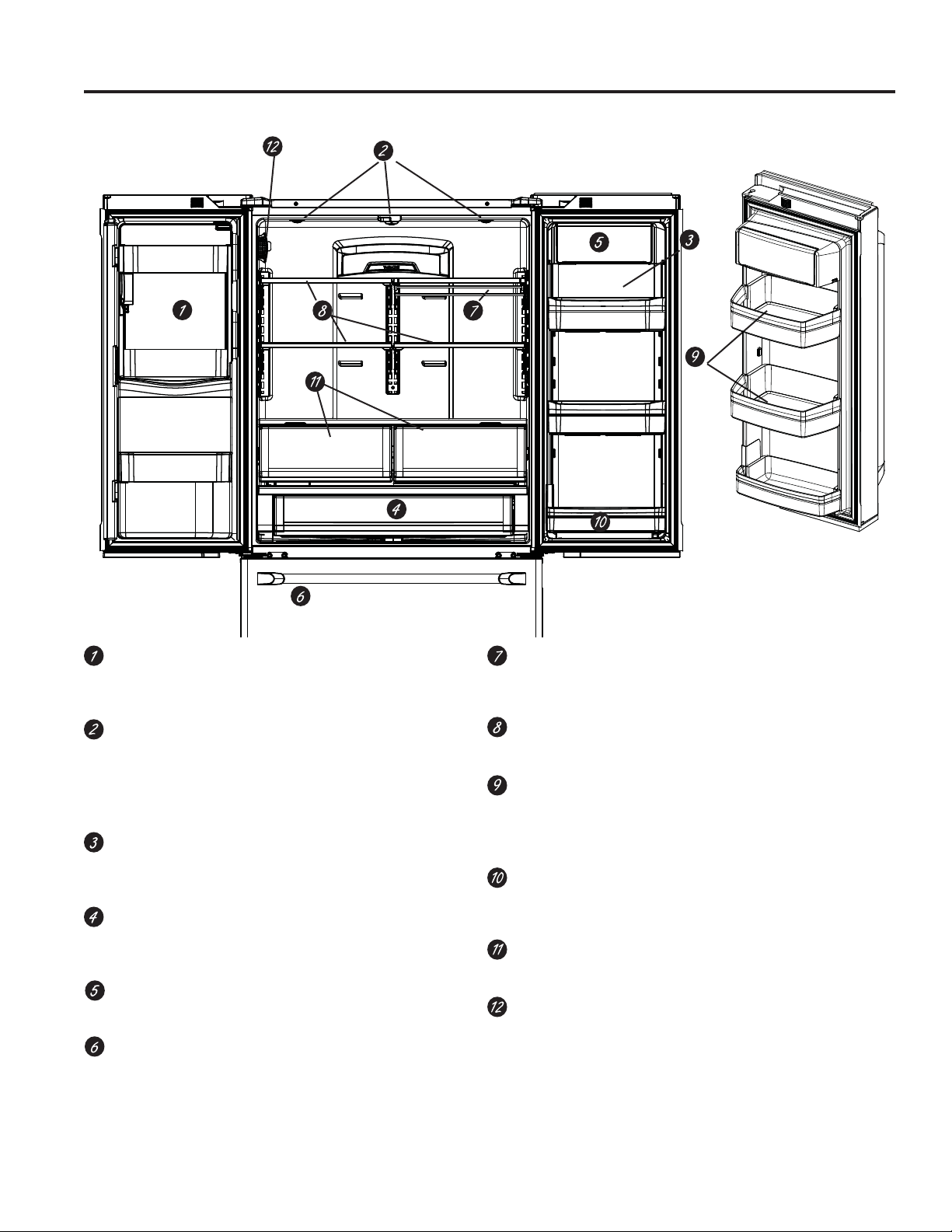
Space-saving ice maker*
Ice maker and bin are located on the door creating
more usable storage space.
Showcase LED lighting
LED lighting is positioned throughout the interior to
spotlight areas in the refrigerator. LEDs are located
under the fresh food door to light the freezer when
opened.
Drop-down tray*
Allows for extra door storage when you need it and
tucks away when you don’t.
Full-width temperature controlled drawer
Adjustable temperature control bin that can
accommodate larger items.
Dairy bin
Separate compartment for your items.
Ice bin/Ice maker*
Ice maker with ice storage bins.
QuickSpace™ shelf*
Functions as a normal full-sized shelf when needed
and easily slides back to store tall items below.
Spillproof shelves
Designed to capture your spills for easier clean up.
Anti-slip Mat
Liner that captures spills, keeps containers from
shifting when the door is opened and is easily
removable for cleaning.
Removable door bin
Can be removed for those with a wall limiting the
door opening.
Climate zone bin
Separate bins for produce storage.
Water filter
Filters water and ice.
* Select models only.
Features
USING THE REFRIGERATOR: Features
49-60820 Rev. 1 7
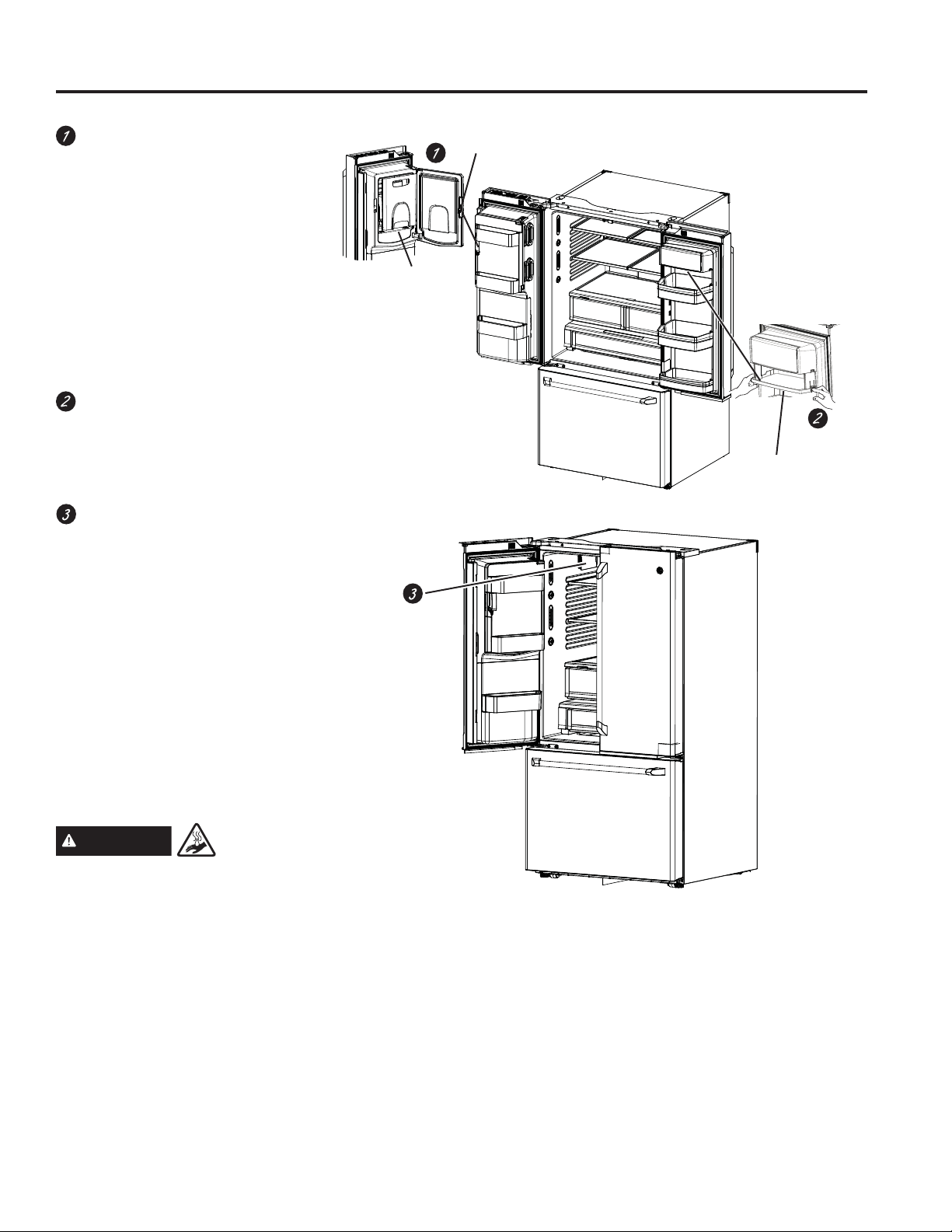
Door ice bin*
1. Open left fresh food door.
2. Pull down latch to release bin
door.
8VLQJKDQGKROGOLIWLFHEXFNHW
up and out to clear locators in
bottom of bin.
4. To replace the ice bucket, set
it on the guide brackets and
push until the ice bucket seats
properly.
5. If bucket cannot be replaced,
rotate the Ice Bucket Fork 1/4
turn clockwise.
Drop down dairy bin*
1. Open right fresh food door.
2. Depress both buttons on lower
sides and bin will drop down.
3. Reverse to reinstall.
Ice/water filter
Remove filter/bypass plug
Push the indent on the cover
and open filter door. If your unit
is equipped, pull out on filter/
bypass plug and pull straight
back to remove.
Installing the filter cartridge
Push the indent at the bottom of
the cover and open. Lift door and
align tabs on filter to filter/holder
and push filter into place.
NOTE: Certified to reduce
chlorine-resistant cysts, lead,
select pharmaceuticals, and
more.
Drop tray
(tray open)
Ice bucket
Latch
*Select Models Only
Features
USING THE REFRIGERATOR: Features
WARNING
Scalding
Hazard.*
8VHRIWKHKRWZDWHUGLVSHQVHUSULRUWR
purging air from the system may result in
spurting of hot water and lead to hot water
VFDOGLQJ)ROORZWKHLQVWUXFWLRQVIRU³:DWHU
)LOWHU6WHS´RQSDJHWRSXUJHDOODLU
from the system through the cold water
dispenser prior to using the hot water
dispenser.
The first time the hot water feature is
used, confirm if you live above 5000 feet
(1524 meters) (high altitude). This limits
the temperature of the hot water system to
avoid boiling. To access the high altitude
selection, see Controls.
8 49-60820 Rev. 1
Temperature Express Modes Settings
Water
Lock
Controls
Precise
Fill
Hot
Water
Light
Water Crushed Cubed
NOTE: For optimal temperature performance, we
recommend to avoid placing food or other items
directly at the air flow vents or the fresh food air
tower, thus blocking the air flow.
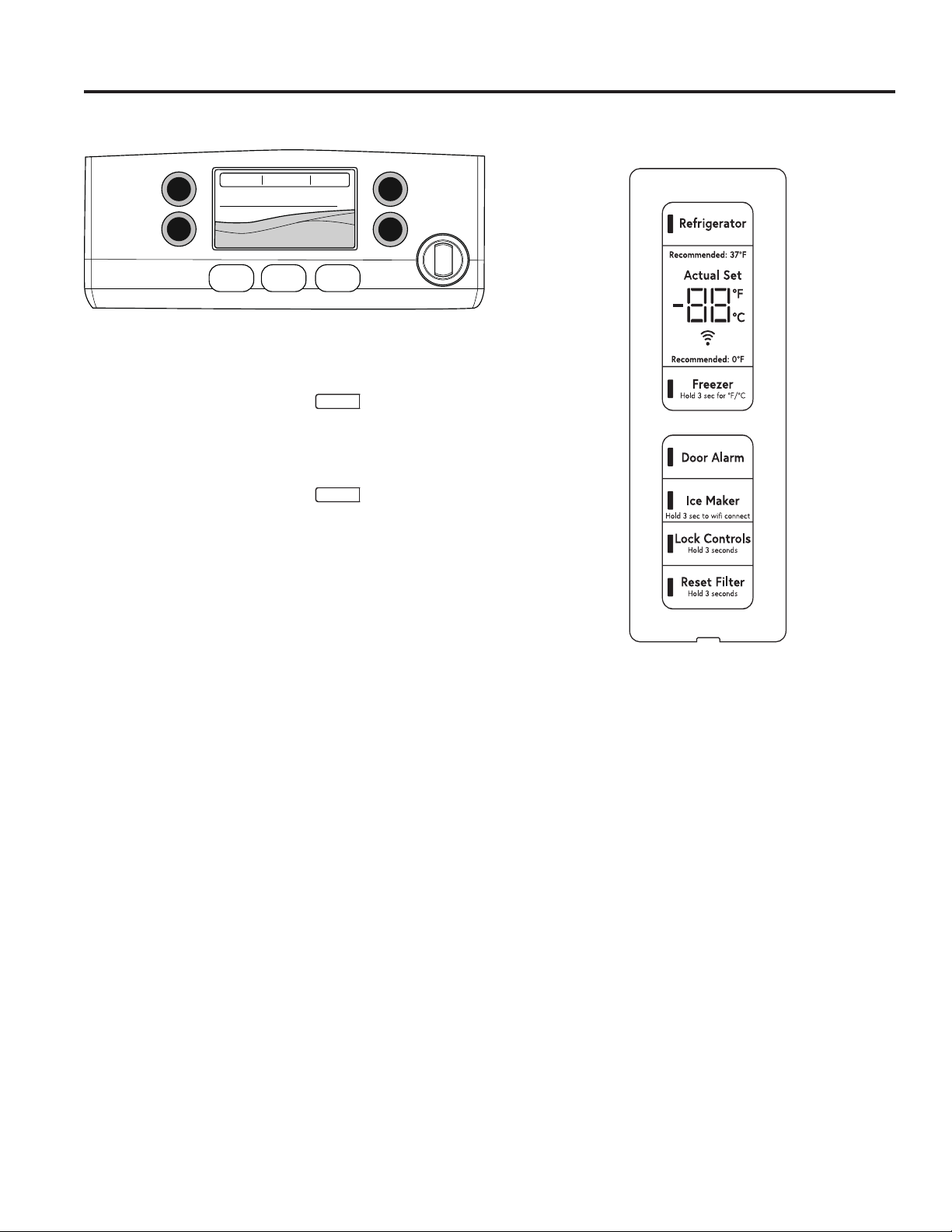
Changing the Temperature for Control Style
CYE/CFE
To Change the Refrigerator Temperature:
Access By: Temperature Button
Temperature
Activate By:%HORZWKHZRUG³5HIULJHUDWRU´XVHWKHDUURZV
to select the desired temperature. Press DONE when
finished to return to HOME screen.
To Change the Freezer Temperature:
Access By: Temperature Button
Temperature
Activate By:%HORZWKHZRUG³)UHH]HU´XVHWKHDUURZVWR
select the desired temperature. Press DONE when finished
to return to HOME screen.
To turn OFF cooling system, access SETTINGS from the
HOME screen. Page over and tap COOLING SYSTEM
ON. Press DONE to return to HOME screen.
To turn ON cooling system, access SETTINGS from the
HOME screen. Page over and tap COOLING SYSTEM
OFF. Press DONE to return to HOME screen.
Turning the cooling system off stops the cooling to
refrigerator, but it does not shut off the electrical power.
CYE/CFE Control Style CWE Control Style
Changing Temp. for Control Style CWE
Temperature Display is located on inside of left-hand
refrigerator door. To change the temperature, press
and release the REFRIGERATOR or FREEZER pad.
The ACTUAL TEMP light will come on and the display
will show the actual temperature. To change the
temperature, tap either the
REFRIGERATOR or FREEZER pad until the desired
temperature is displayed.
To turn OFF cooling system, press and hold the
REFRIGERATOR and FREEZER pads simultaneously
for 3 seconds. When the cooling system is OFF the
display should read OFF.
To turn ON cooling system, press either
REFRIGERATOR or FREEZER pad. The display will
show the preset temperature settings of 37°F (3°C)
for refrigerator and 0°F (-18°C) for freezer. Turning the
cooling system off stops the cooling to refrigerator, but it
does not shut off the electrical power.
Controls
USING THE REFRIGERATOR: Controls
49-60820 Rev. 1 9
The temperature controls are preset in the factory at 37°F for the refrigerator compartment and 0°F for the freezer
compartment. Allow 24 hours for the temperature to stabilize to the preset recommended settings.
The temperature controls can display both the SET temperature as well as the actual temperature in the refrigerator
and freezer. The actual temperature may vary slightly from the SET temperature based on usage and operating
environment.
NOTE: The refrigerator is shipped with protective film covering the temperature controls. If this film was not
removed during installation, remove it now.
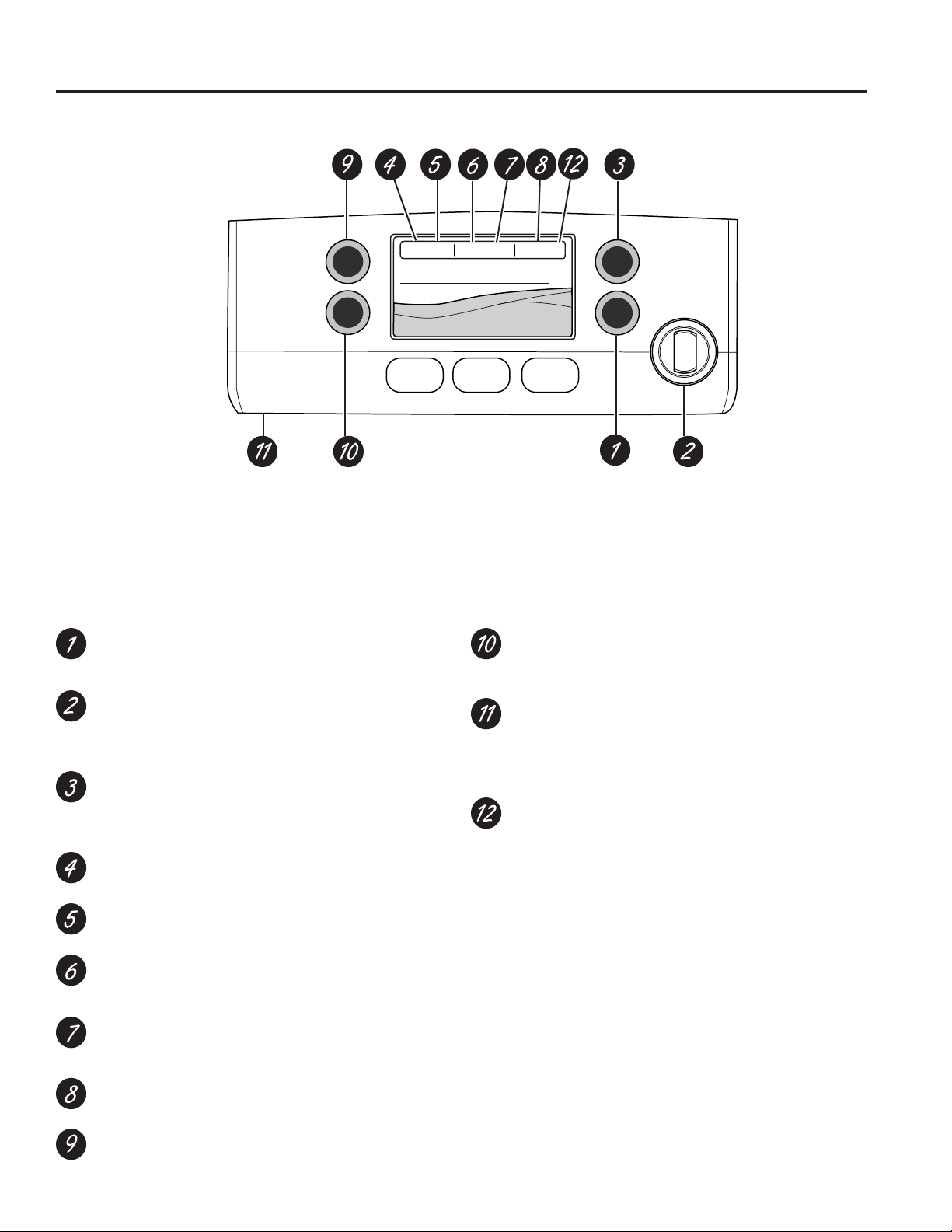
Temperature Express Modes Settings
Water
Lock
Controls
Precise
Fill
Hot
Water
Light
Water Crushed Cubed
Hot Water
Dispenses up to 10 ounces of filtered hot water from
user selected ranges of 90°F to 185°F.
Hot Water Knob
Illuminates to indicate hot water is ready. Dispenses
with two motions: a counter-clockwise twist and then
push to dispense.
Precise Fill
Precisely dispenses filtered water in accurate
measurements in ounces, cups, quarts, or liters
using paddle.
Refrigerator temp control
Adjust freezer compartment temperature.
Fresh food temp control
Adjust fresh food compartment temperature.
TurboFreeze™ setting
Activate TurboFreeze to quickly restore freezer
temperatures after frequent door openings.
TurboCool™ setting
Activate TurboCool to quickly restore fresh food
temperature after frequent door openings.
Humidity setting
Humidity setting can be normal or high.
Lock controls
Press and hold 3 seconds to lock out ice and water
dispenser and all feature and temperature buttons.
LED dispenser light
LED lighting that can be turned on/off to light your
dispenser.
Photo Upload
,QVHUW86%PHPRU\VWLFNWRXSORDGSHUVRQDOSKRWRV
to the refrigerator LCD screen. LCD will provide on
screen prompts to load and view slideshow. Make
VXUHWKHSKRWRVDUHLQWKHURRWGLUHFWRU\LQ\RXU86%
Additional Settings
• Connected Home ready
• Slideshow
• Reset filter
• Ice maker on/off
• Door alarm
• Sound control
• Cooling system On/Off
• Metric/English units
• Altitude
Additional Modes
• Sabbath Mode
Press and hold lock & light simultaneously for 3
seconds to enter/exit Sabbath mode. Sabbath
Mode will turn off or dim interior lights, temperature
control and advanced features. Compressor will
run on a timed defrost when in Sabbath mode.
Control Style A, External Controls CFE/CYE Models
Controls
USING THE REFRIGERATOR: Controls
10 49-60820 Rev. 1
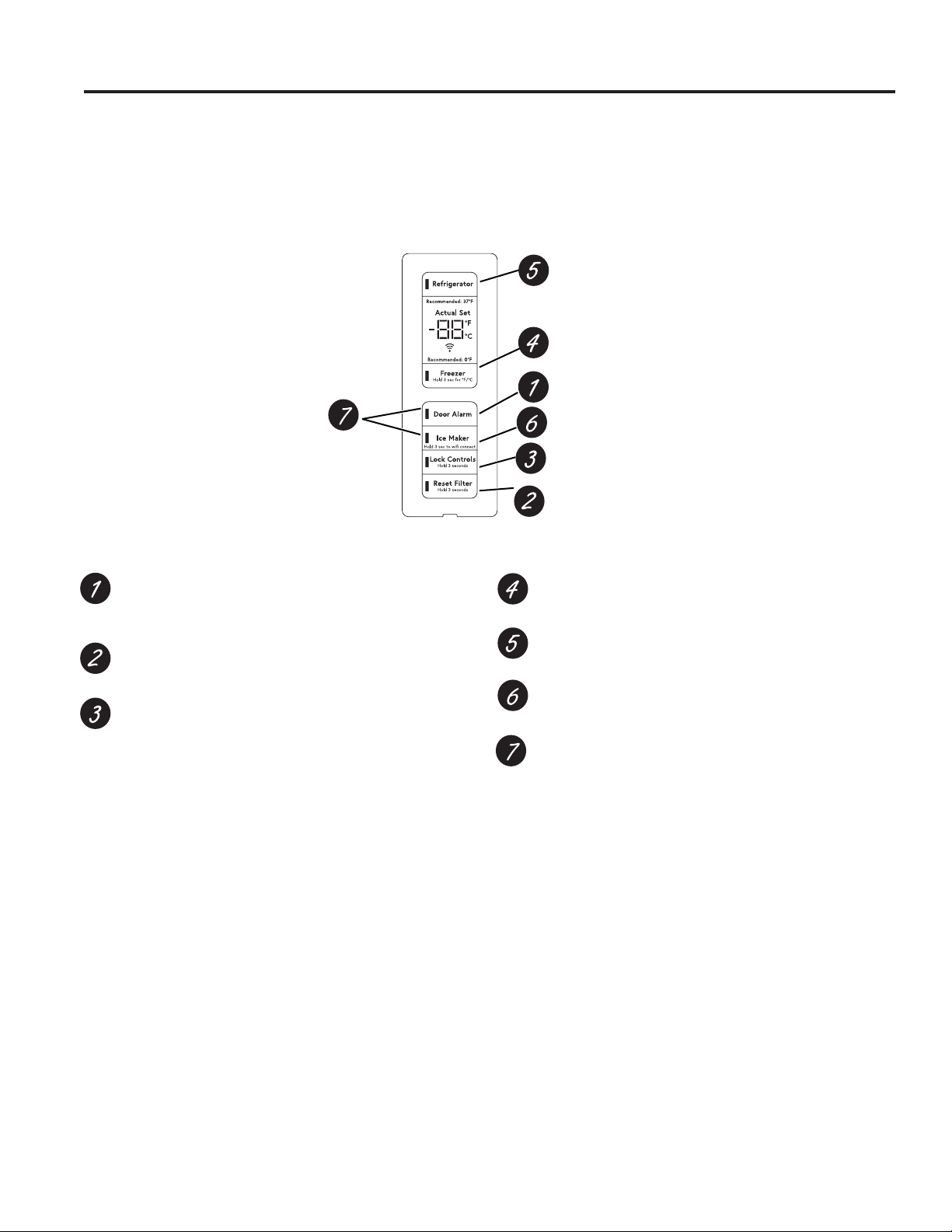
Controls Style B, Internal Controls CWE Models
Door Alarm
Sounds to alert when the freezer or fresh food doors
have been left open.
Reset Filter
Hold for 3 seconds after replacing filter.
Lock Controls
Press and hold 3 seconds to lock out ice and water
dispenser and all feature and temperature buttons.
Freezer temp control
Adjust freezer compartment temperature
Refrigerator temp control
Adjust fresh food compartment temperature
Ice maker setting
Turn your ice makers on/off.
Sabbath Mode
Press and hold Door Alarm and Ice Maker
simultaneously for 5 seconds to enter/exit Sabbath
Mode.
Controls
USING THE REFRIGERATOR: Controls
49-60820 Rev. 1 11
Dispenser tray
Important Facts About Your Dispenser
Ŷ Do not add ice from trays or bags to the door ice
maker bucket. It may not crush or dispense.
Ŷ Avoid overfilling glass with ice and use of narrow
glasses. Backed-up ice can jam the chute or cause the
door in the chute to freeze shut. If ice is blocking the
chute remove the ice bucket, poke it through with a
wooden spoon.
Ŷ Beverages and foods should not be quick-chilled in the
door ice maker bin. Cans, bottles or food packages in
the storage drawer may cause the ice maker or auger
to jam.
Ŷ To keep dispensed ice from missing the glass, put
the glass close to, but not touching, the dispenser
opening.
Ŷ Some crushed ice may be dispensed even though you
selected CUBED ICE. This happens occasionally when
a few cubes accidentally get directed to the crusher.
Ŷ After crushed ice is dispensed, some water may drip
from the chute.
Ŷ Sometimes a small mound of snow will form on the
door in the ice chute. This condition is normal and
usually occurs when you have dispensed crushed ice
repeatedly. The snow will eventually evaporate.
If no water is dispensed when the refrigerator is first
installed, there may be air in the water line system. Press
the dispenser paddle for at least five minutes to remove
trapped air from the water line and to fill the water
system. To flush out impurities in the water line, throw
away the first six full glasses of water.
To remove Dispenser Tray
Ŷ Pull Dispenser Tray out until it stops.
Ŷ Locate tab in the center on the bottom and push up.
Ŷ Pull Dispenser Tray assembly out.
Ŷ Lift metal Dispenser Tray out at center notch to clean.
To reinstall Dispenser Tray
Ŷ Place the Dispenser Tray cover on top of catch tray
and position under the two plastic retainers on either
side.
Ŷ Center Dispenser tray, and align with center guides.
Ŷ Push in until is firmly in place.
Water & Ice Dispenser
(See About the controls
with temperature settings
& About the control
features)
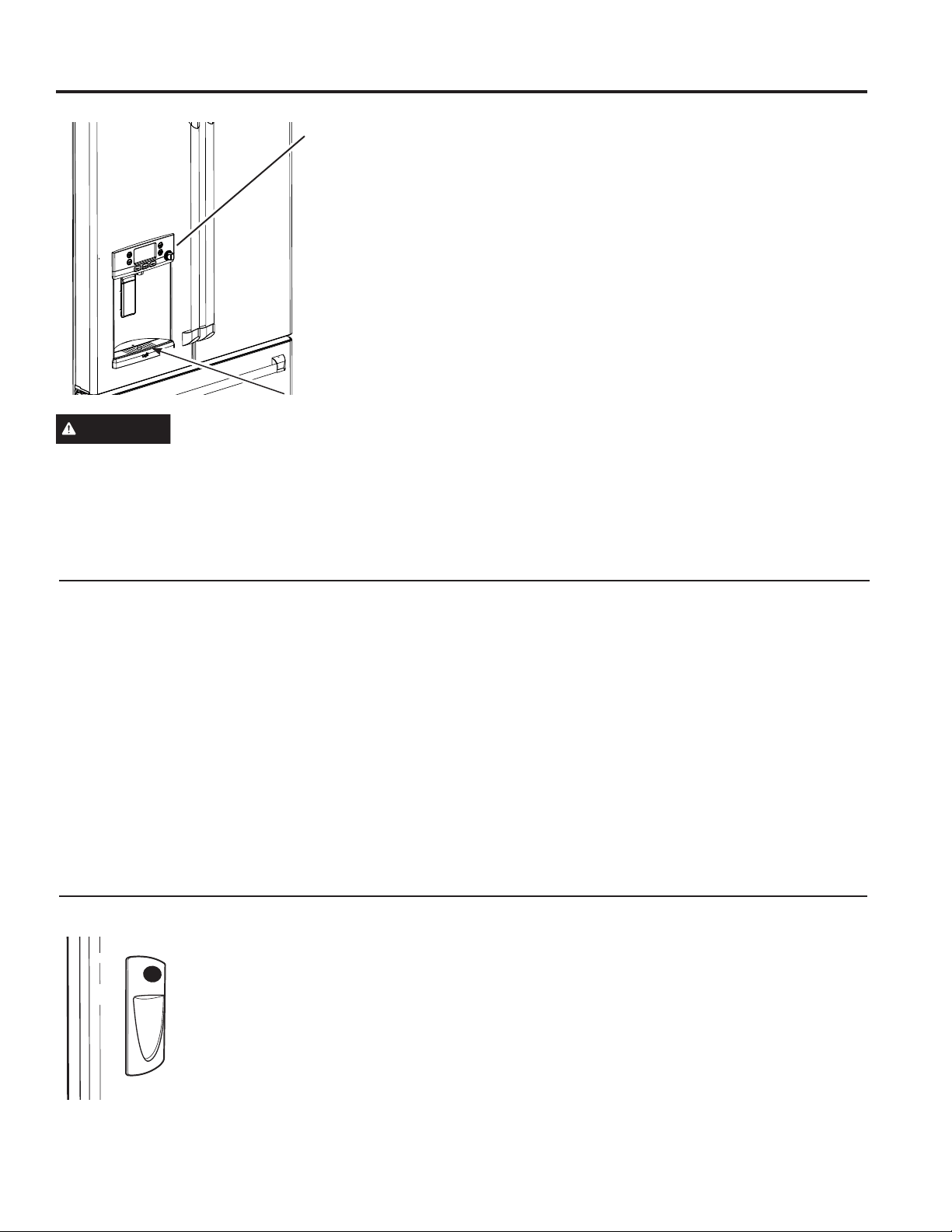
To Use the Internal Water Dispenser (CWE Models Only)
The water dispenser is located on
the left wall inside the refrigerator
compartment.
To dispense water:
1. Hold the glass against the recess.
2. Push the water dispenser button.
3. Hold the glass underneath the
dispenser for 2–3 seconds after
releasing the dispenser button.
Water may continue to dispense
after the button is released.
If no water is dispensed when the refrigerator is first
installed, there may be air in the water line system. Press
the dispenser button for at least 5 minutes to remove
trapped air from the water line and to fill the water
system. During this process, the dispenser noise may be
loud as the air is purged from the water line system. To
flush out impurities in the water line, throw away the first
6 glassfuls of water.
NOTE: To avoid water deposits, the dispenser should
be cleaned periodically by wiping with a clean cloth or
sponge.
WARNING
LACERATION HAZARD
Ŷ Never put fingers or any other object into ice crusher
discharge opening. Doing so can result in contacting
the ice crushing blades and lead to serious injury or
amputation
Ŷ 8VHDVWXUG\JODVVZKHQGLVSHQVLQJLFH$GHOLFDWH
glass may break and result in personal injury.
Dispenser (CFE & CYE Models Only)
USING THE REFRIGERATOR: Dispenser
12 49-60820 Rev. 1
WARNING
To reduce the risk associated with choking, do not allow children under 3 years of age to have
access to small parts during the installation of this product. The disposable filter cartridge should be replaced every
6 months at the rated capacity, or sooner if a noticeable reduction in flow rate occurs.
For the maximum benefit of your filtration system, GE Appliances, a Haier company, recommends the use of GE
$SSOLDQFHVEUDQGHGILOWHUVRQO\8VLQJ*($SSOLDQFHVEUDQGHGILOWHUVLQ&DIpUHIULJHUDWRUVSURYLGHVRSWLPDOSHUIRUPDQFH
and reliability. Our filters meet rigorous industry NSF standards for safety and quality that are important for products
that are filtering your water. There is no assurance that brands other than GE Appliances filters meet our standards for
quality, performance and reliability.
If you have questions, or to order additional filter cartridges, visit gewaterfilters.com. In Canada, visit
cafeappliances.ca/service or consult the yellow pages for the nearest Camco Service Center.
Water Filter Cartridge - RPWFE
USING THE REFRIGERATOR: Water Filter Cartridge - RPWFE
Water Filter Cartridge
The water filter cartridge is located in the fresh food
interior on the left side wall, near the top.
Select models use radio frequency identification (RFID)
to detect leaks and monitor filter status. The RFID
technology is certified by the FCC.
When to Replace the Filter Cartridge
The filter cartridge should be replaced every six months
or earlier if 170 gallons (643.52 liters) of water has
been dispensed or the flow of water to the dispenser or
icemaker decreases.
Touch Screen Models: A filter status message will
appear on the screen when the water filter needs to be
replaced. The filter status will automatically update when
the filter is replaced.
Non-touch Screen Models: A filter indicator light will
illuminate on the screen when the water filter needs to
be replaced.
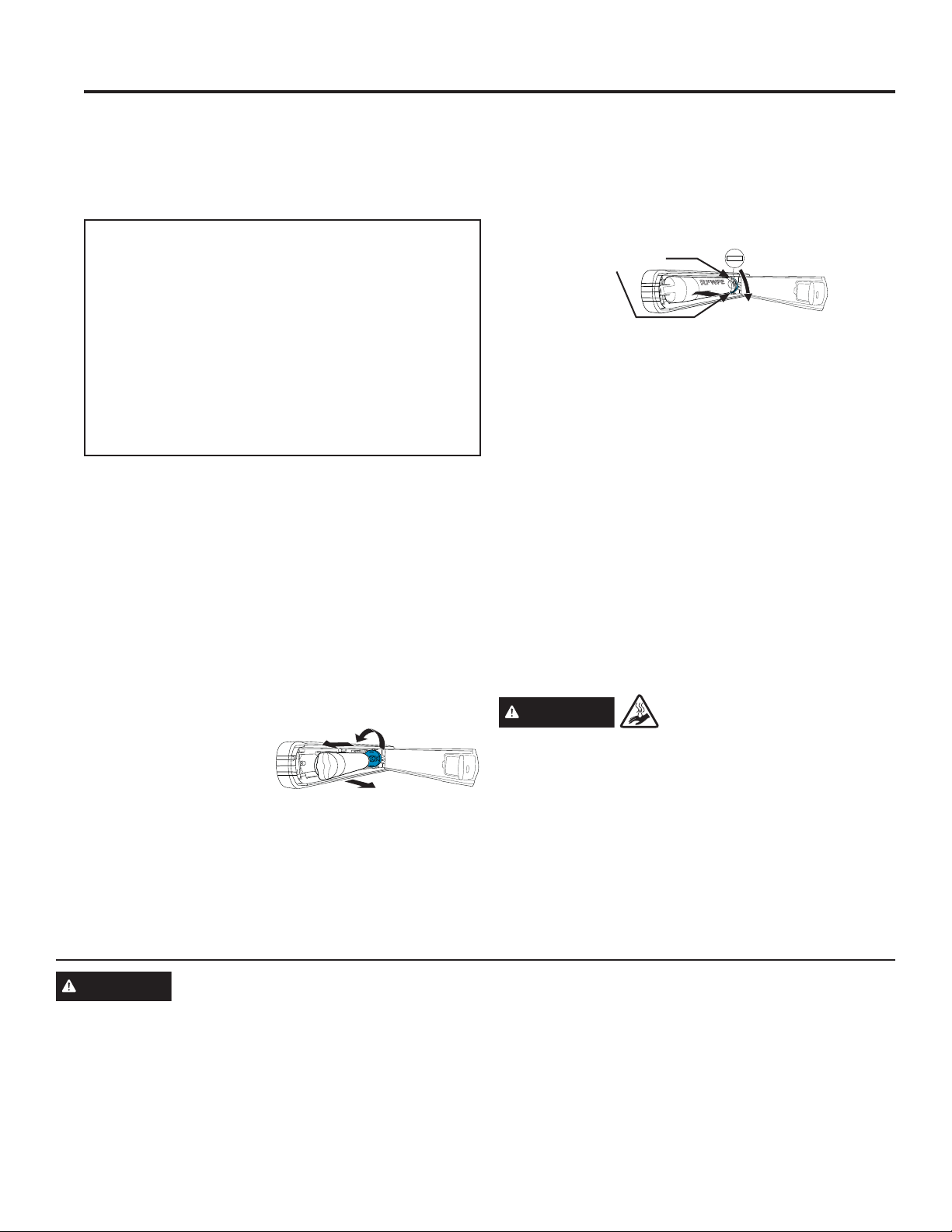
Removing the Filter Cartridge/Bypass Plug
1. Remove the old
cartridge or bypass plug
by opening the filter
door and pulling on the
bottom of the cartridge/
bypass plug to disengage it from the filter clips. Swing
the cartridge/bypass plug outward until you hear
the 'click' of the cartridge holder engaging with the
bracket.
2. Twist the cartridge/bypass plug one-quarter turn
counter-clockwise. After twisting, remove the cartridge/
bypass plug by pulling it away from the cartridge
holder. A small amount of water may drip out.
Installing the Filter Cartridge/Bypass Plug
1. Align the filter cartridge/bypass plug with the cartridge
holder with the word "FRONT" facing the top of the
unit. Push the cartridge/bypass plug toward the rear of
the unit until it is fully seated. Twist the filter cartridge/
bypass plug clockwise one-quarter turn, until the word
"FRONT" is facing outward.
2. While continuing to ensure cartridge/bypass plug is
fully seated in the holder, gently swing the filter inward
until it is in position. If filter will not swing easily, check
to ensure filter is properly aligned and fully seated
within the cartridge holder. The RED indicators should
not be visible.
NOTE: It is normal for water to appear discolored during
the initial system flush. Water color will return to normal
after first few minutes of dispensing.
Filter Bypass Plug
To reduce the risk of property damage due to water
leakage, you MUST use the filter bypass plug when
a replacement filter cartridge is not available. Some
models do not come equipped with the filter bypass
plug. To obtain a free bypass plug, visit us on-line
at cafeappliances.com/service. In Canada, visit
cafeappliances.ca/service. The dispenser and
icemaker will not operate without either the filter or the
bypass plug installed. The bypass plug is installed in the
VDPHZD\DVDILOWHUFDUWULGJH´
WARNING
SCALDING HAZARD.*
8VHRIWKHKRWZDWHUGLVSHQVHUSULRUWRSXUJLQJDLUIURP
the system may result in spurting of hot water and lead
to hot water scalding. Follow the instructions above to
purge all air from the system through the cold water
dispenser prior to using the hot water dispenser.
FCCID: ZKJ-EBX1532P001 ICID:
10229A-EBX1532P001
“This device complies with part 15 of the FCC Rules.
Operation is subject to the following two conditions:
(1) This device may not cause harmful interference, and
(2) this device must accept any interference received,
including interference that may cause undesired
operation.”
“This device complies with Industry Canada licence-
exempt RSS standard(s). Operation is subject to the
following two conditions: (1) this device may not cause
interference, and (2) this device must accept any
interference, including interference that may cause
undesired operation of the device.”
FRONT
3
4
Red indicators
should not be
visible
1
2
*Select Models Only
49-60820 Rev. 1 13
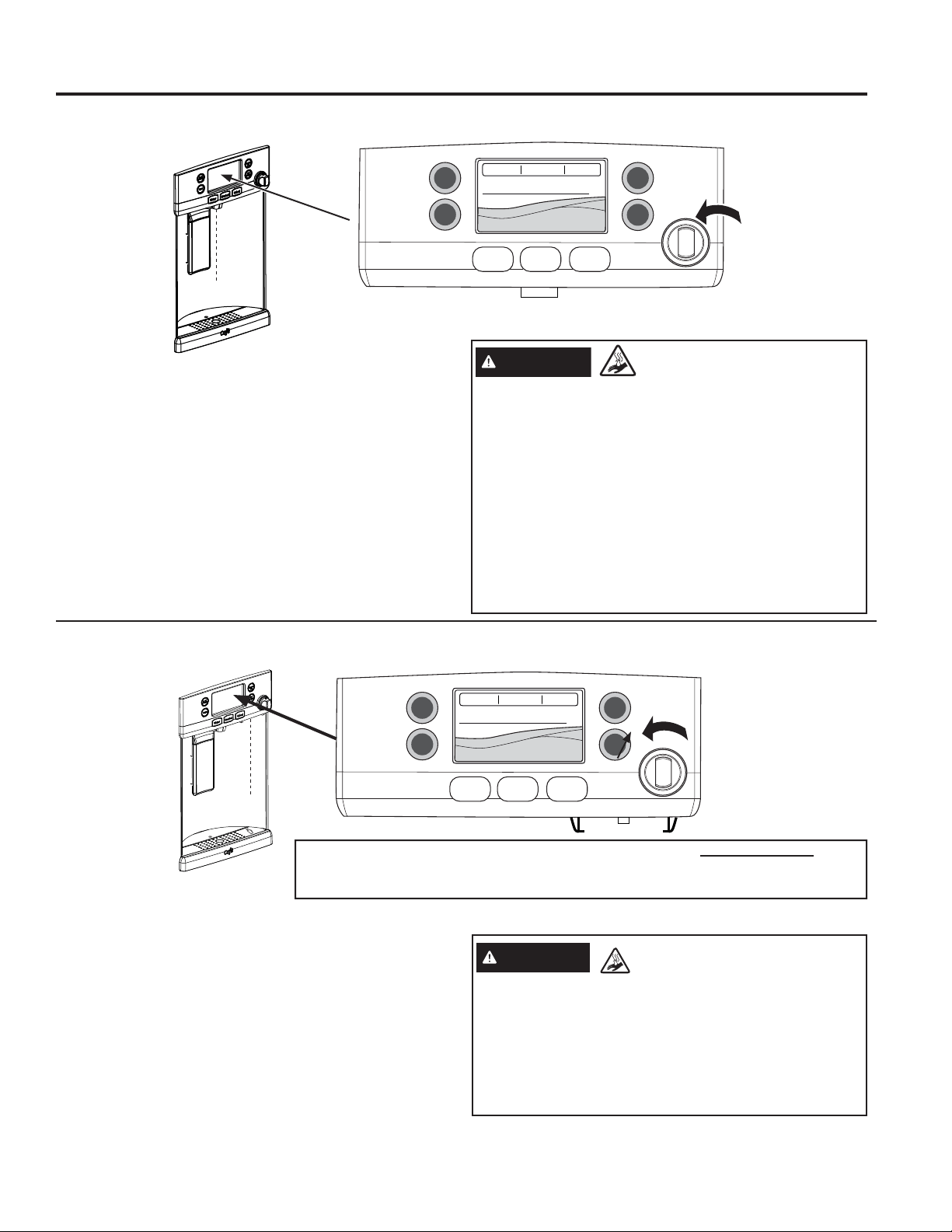
To Use Hot Water Dispenser
Ŷ Press HOT WATER button.
Ŷ Select desired water temperature on the LCD screen
(90, 150, 170, 185, or Custom).
Ŷ When hot water is ready (indicated on the screen and
by a beeping sound) hold container with left hand
centered in the recess under the spout.
Ŷ To dispense water, rotate the hot water knob
counterclockwise and then push it in. The knob must
be held in during dispense.
Important Facts about HOT WATER
To Use Hot Water Dispenser
Ŷ Press HOT WATER button.
Ŷ Select desired water temperature on the LCD screen
(90, 150, 170, 185, or Custom).*
Ŷ,IVHOHFWLQJ³.HXULJ.&XS3RG´WKHKRWZDWHUV\VWHP
will change into K-Cup mode. See page 14 for K-Cup
mode instructions.
Ŷ When hot wa ter is ready (indicated on the screen
and by a beeping sound) hold container with left hand
centered in the recess under the spout.
Ŷ To dispense water, rotate the hot water knob
counterclockwise and then push it in. The knob must
be held in during dispense.
Important Facts about HOT WATER
Temperature Express Modes Settings
Water
Lock
Controls
Precise
Fill
Hot
Water
Light
Water Crushed Cubed
On Café refrigerators equipped with the K-Cup brewing system, ALL HOT WATER is
dispensed from stainless steel dispense tube located under the right side of the control
panel. The hot water is not dispensed from the center of the recess area.
WARNING
Scalding Hazard
Ŷ See Hot Water Warning: Scalding Hazard above.
Ŷ Do no permit children to use the brewer.
Ŷ Always use a container that is suitable for hot liquids
(ceramic, foam, etc.)
Ŷ Do not brew into a mug made of glass. Doing so
may cause the glass to crack or break.
Hot Water Only Models
For Models with K-Cup Brewing System
Temperature Express Modes Settings
Water
Lock
Controls
Precise
Fill
Hot
Water
Light
Water Crushed Cubed
WARNING
SCALDING HAZARD.
Ŷ The water coming from the dispenser is very hot and
can cause scalds or burns. Read all warnings on
page 5 prior to use.
Ŷ Always use a container that is suitable for hot liquids
(ceramic, foam, etc.)
Ŷ The maximum single hot water dispense amount
is 10 oz. Additional hot water can be dispensed by
restarting the hot water feature through the LCD
screen.
Ŷ HOT WATER works best with household water
pressure of 40 to 100 psi.
Ŷ HOT WATER will time out if unused and may require
a short reheat time.
Hot Water
USING THE REFRIGERATOR: Hot Water
14 49-60820 Rev. 1
Push to
open
Close brewer.
Lid will click
when secure.
Temperature Express Modes Settings
Water
Lock
Controls
Precise
Fill
Hot
Water
Light
Water Crushed Cubed
Rails for the
brewer
Mug icon for
placement
Red brew
spout
for mug
alignment
1
2
3
4 5
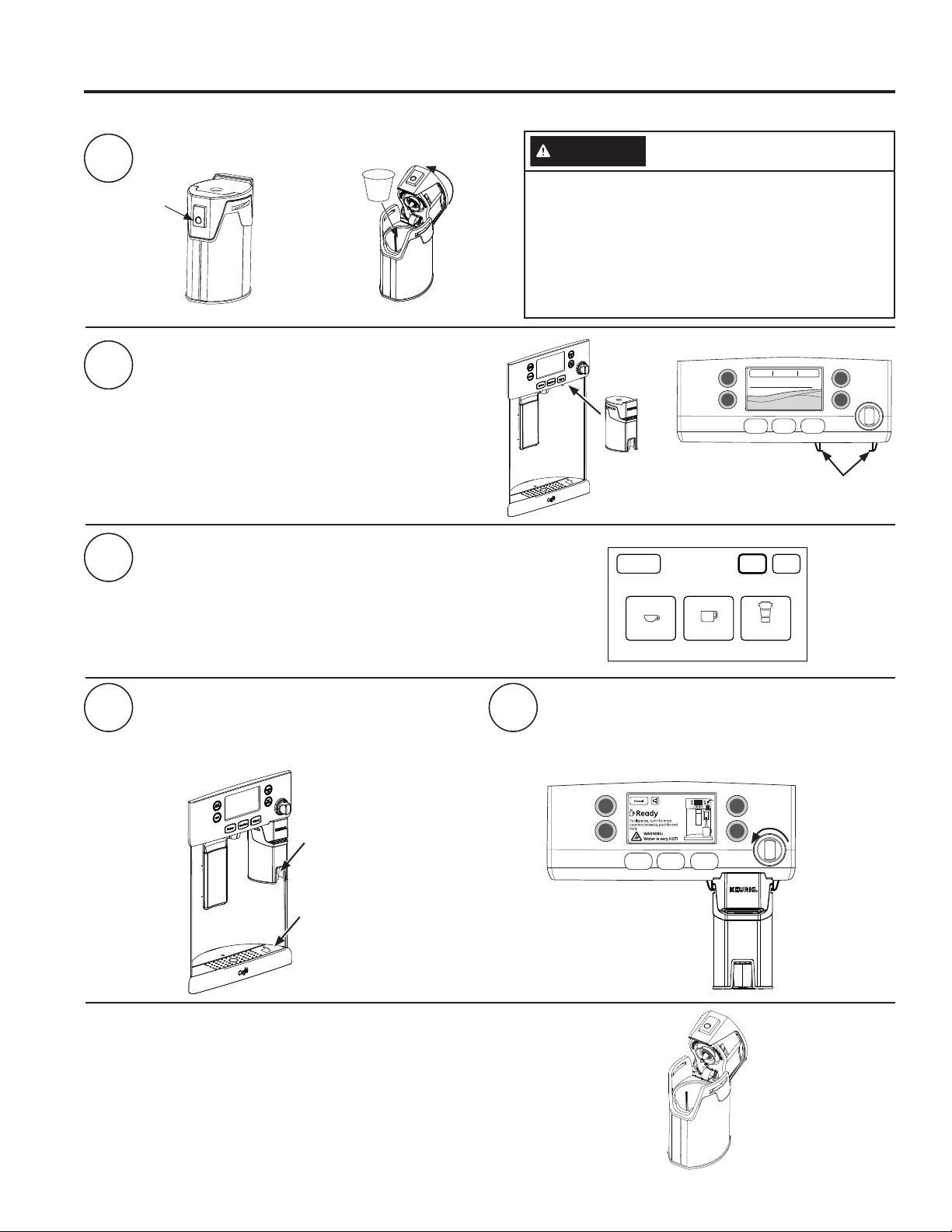
Load Keurig K-Cup into brewer.
Two ways to brew:
1. Press Hot Water. Select K-Cup Pod.
OR
2. Slide the brewer into the rails.
Pick your size.
NOTICE: If using a powdered beverage, select the Cocoa setting.
Place your mug under the brewer (on the
tray mug icon and under the red brew spout).
NOTICE: Make sure the mug being used is large
enough for the size selected.
Rotate the hot water knob counterclockwise
and push in to brew and dispense.
NOTICE: Press any button or dispenser paddle, or open
either the left or right door to cancel dispense.
Lock
Controls
Precise
Fill
Hot
Water
Light
Water Crushed Cubed
6oz Brew
Cancel
6oz
8oz
10oz
Coffee CocoaCoffee
Serving Size
How to use the single serve dispenser
Drop K-Cup
into brewer and
press down
firmly.
CAUTION
Cut/Puncture Hazard.
•
There are two sharp needles located inside the
K-Cup brewer. To avoid risk of injury, do not put
\RXUILQJHUVLQVLGHWKHEUHZHU8VHFDXWLRQZKHQ
cleaning.
•
Keep the K-Cup brewer out of the reach of children,
as they may be injured in using the K-Cup brewer
incorrectly.
Cleaning the brewer
Ŷ
The K-Cup brewer is dishwasher safe. To clean it, open the lid and place the
K-Cup brewer in the top rack of your dishwasher and run in a normal wash
cycle.
Ŷ
To maximize performance of your brewer, it is recommended to rinse it
thoroughly after washing to remove all soap residue.
Ŷ
Periodic cleaning of dispenser recess area is recommended as staining may
occur with usage of the K-Cup brewer.
Single Serve Keurig K-Cup Brewer
USING THE REFRIGERATOR: Single Serve Keurig K-Cup Brewer
49-60820 Rev. 1 15
REGULATORY INFORMATION
FCC/IC Compliance Statement:
This device complies with Part 15 of the FCC Rules. Operation is subject to the following two conditions:
1. This device may not cause harmful interference, and
2. This device must accept any interference received, including interference that may cause undesired operation.
This equipment has been tested and found to comply with the limits for a Class B digital device, pursuant to Part
15 of the FCC Rules. These limits are designed to provide reasonable protection against harmful interference in a
residential installation. This equipment generates uses and can radiate radio frequency energy and, if not installed
and used in accordance with the instructions, may cause harmful interference to radio communications. However,
there is no guarantee that interference will not occur in a particular installation. If this equipment does cause harmful
interference to radio or television reception, which can be determined by turning the equipment off and on, the user
is encouraged to try to correct the interference by one or more of the following measures:
• Reorient or relocate the receiving antenna.
• Increase the separation between the equipment and receiver.
• Connect the equipment into an outlet on a circuit different from that to which the receiver is connected.
• Consult the dealer or an experienced radio/television technician for help.
Labelling: Changes or modifications to this unit not expressly approved by the manufacturer could void the user’s
authority to operate the equipment.
WiFi Connect (for customers in the United States,
its territories, and Canada)
WiFi Connect Enabled*
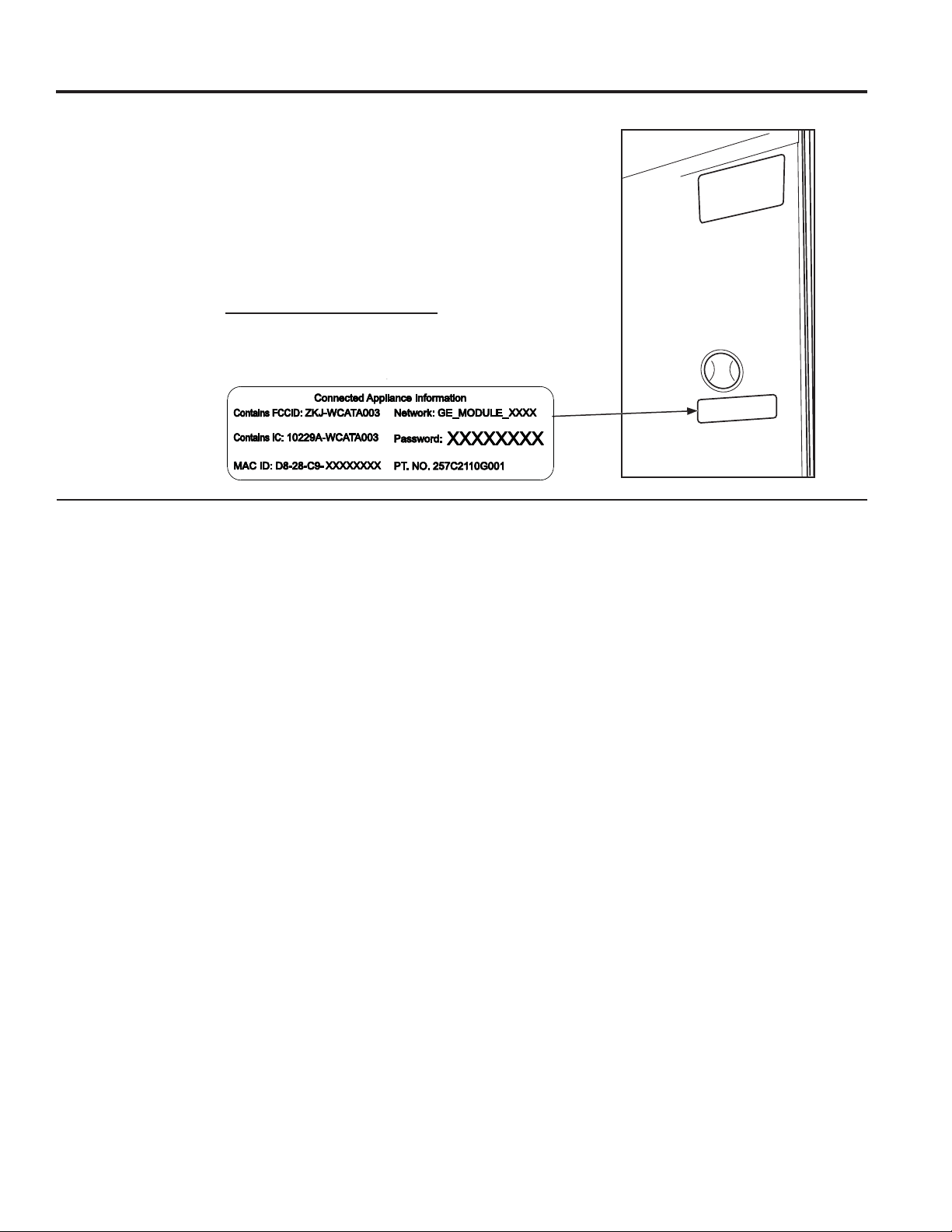
If your refrigerator has a Connected Appliance information label located
on the inside as shown, your refrigerator can be connected to your WiFi
network, allowing it to communicate with your smart phone for remote
monitoring, control and notifications. Depending on the refrigerator
model you have, you either have a WiFi communication card built into
the product, or a port for an external WiFi ConnectPlus Module (sold
separately). Please visit cafeappliances.com/connect to learn more about
connected appliance features, and to learn what connected appliance apps
will work with your Smart Phone.
Appliance Communication
USING THE REFRIGERATOR: Appliance Communication
*Select Models Only
16 49-60820 Rev. 1
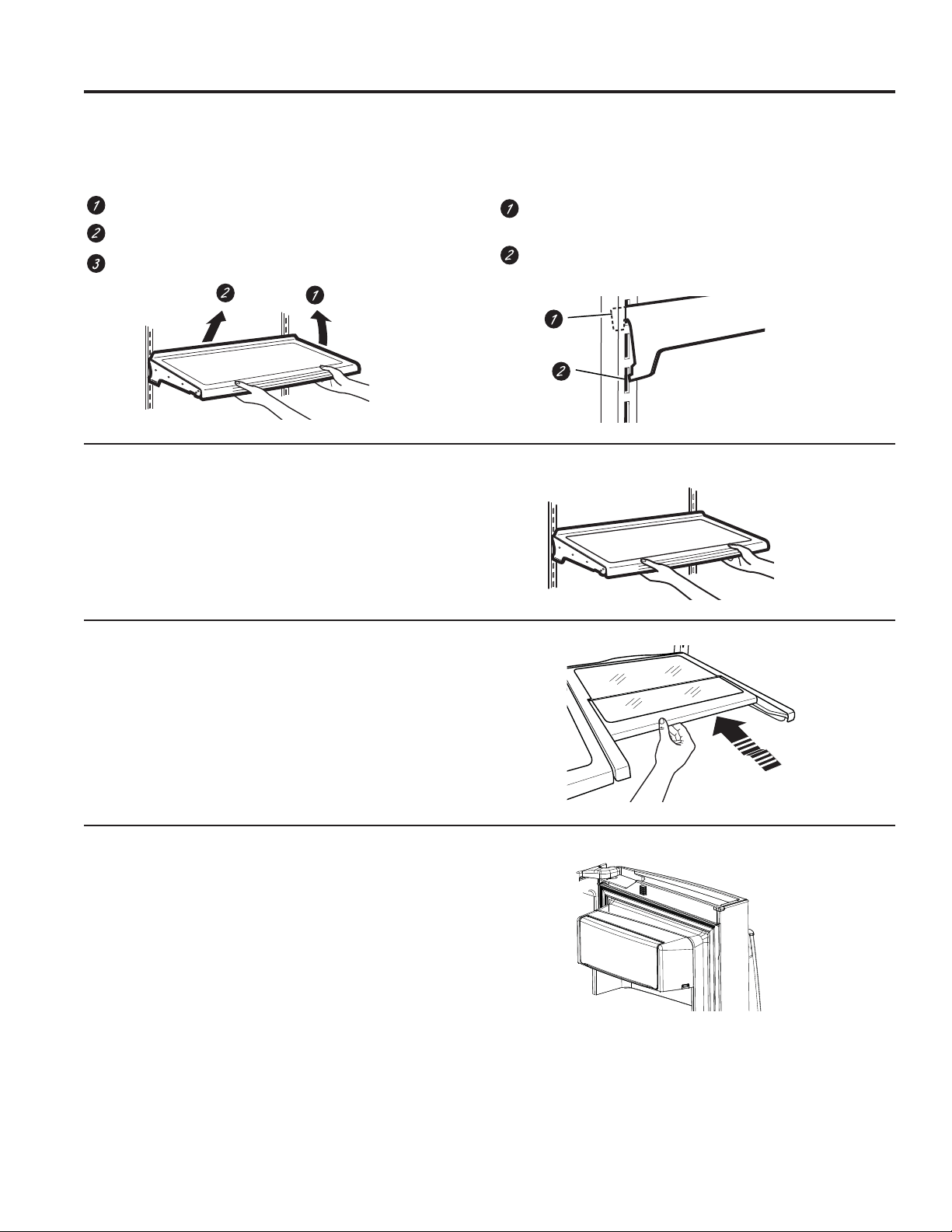
Rearranging the Shelves
Shelves in the refrigerator compartment are adjustable.
To remove:
Remove all items from the shelf.
Tilt the shelf up at the front.
Lift the shelf up at the back and bring the shelf out.
To replace:
While tilting the shelf up, insert the top hook at the
back of the shelf in a slot on the track.
Lower the front of the shelf until the bottom of the
shelf locks into place.
Spillproof Shelves
Spillproof shelves have special edges to help prevent
spills from dripping to lower shelves.
Quick Space Shelf *
This shelf splits in half and slides under itself for storage of
tall items on the shelf below.
This shelf can be removed and replaced or relocated (just
like spillproof shelves).
NOTE: The back half of the Quick Space Shelf is not
adjustable.
*Select Models Only
Non-Adjustable Dairy Bin*
To remove: Lift the dairy bin straight up, then pull out.
To replace: Engage the bin in the molded door supports
and push down. The bin will lock in place. See page 36.
Fresh Food Storage Options
USING THE REFRIGERATOR: Fresh Food Storage Options
49-60820 Rev. 1 17
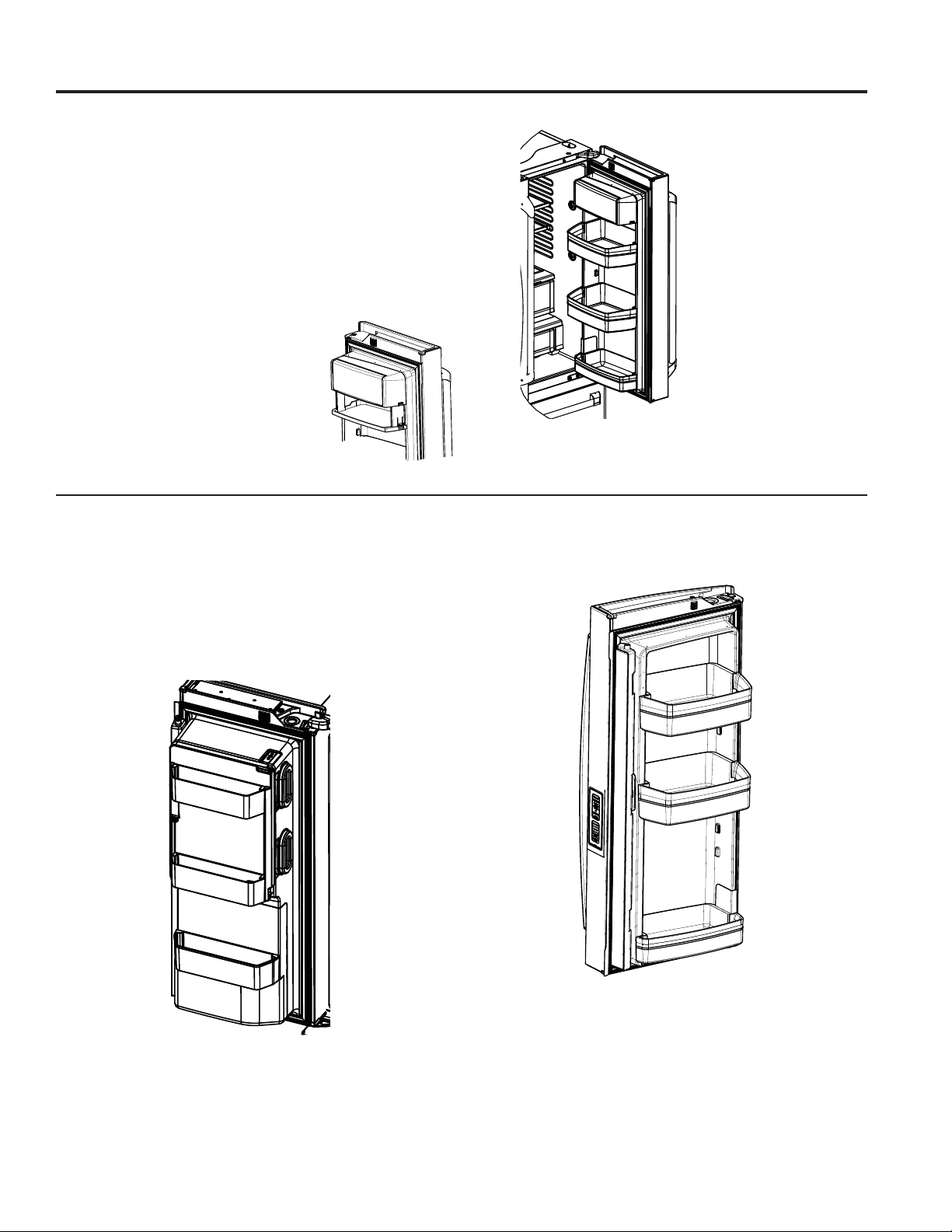
Non-Adjustable Bins on the Door
(Dispenser Models - Left Hand Door)
To remove: Lift the bin straight up, then pull out.
To replace: Engage the bin in the molded supports on
the door and push down. It will lock in place.
The ice maker door bins are not interchangeable, note the
location upon removal and replace the bin in its proper
location.
Non-Dispense Models
(Left Hand Door)
Adjustable Bins on the Door
Adjustable bins can easily be carried from refrigerator to
work area.
To remove: Lift bin straight up, then pull out.
To replace or relocate: Slide in the bin just above the
molded door supports, and push down. The bin will lock
in place.
Drop down tray *
(tray open)
1. Open right fresh food door
2. Depress both buttons on lower sides
of bin and bin will drop down.
3. Reverse to reinstall.
*Select Models Only
Fresh Food Storage Options
USING THE REFRIGERATOR: Fresh Food Storage Options
18 49-60820 Rev. 1
32° 34° 38°
NOTE: Temperatures indicate the appropriate
temperatures for the food and actual
temperatures may vary based on normal
operation and other factors such as door
openings and fresh food set point.
CAUTION
Laceration Hazard.
Do not store glass bottles at this setting. If
they are frozen, they can break and result in
personal injury.
Meat Beverage Deli
Select
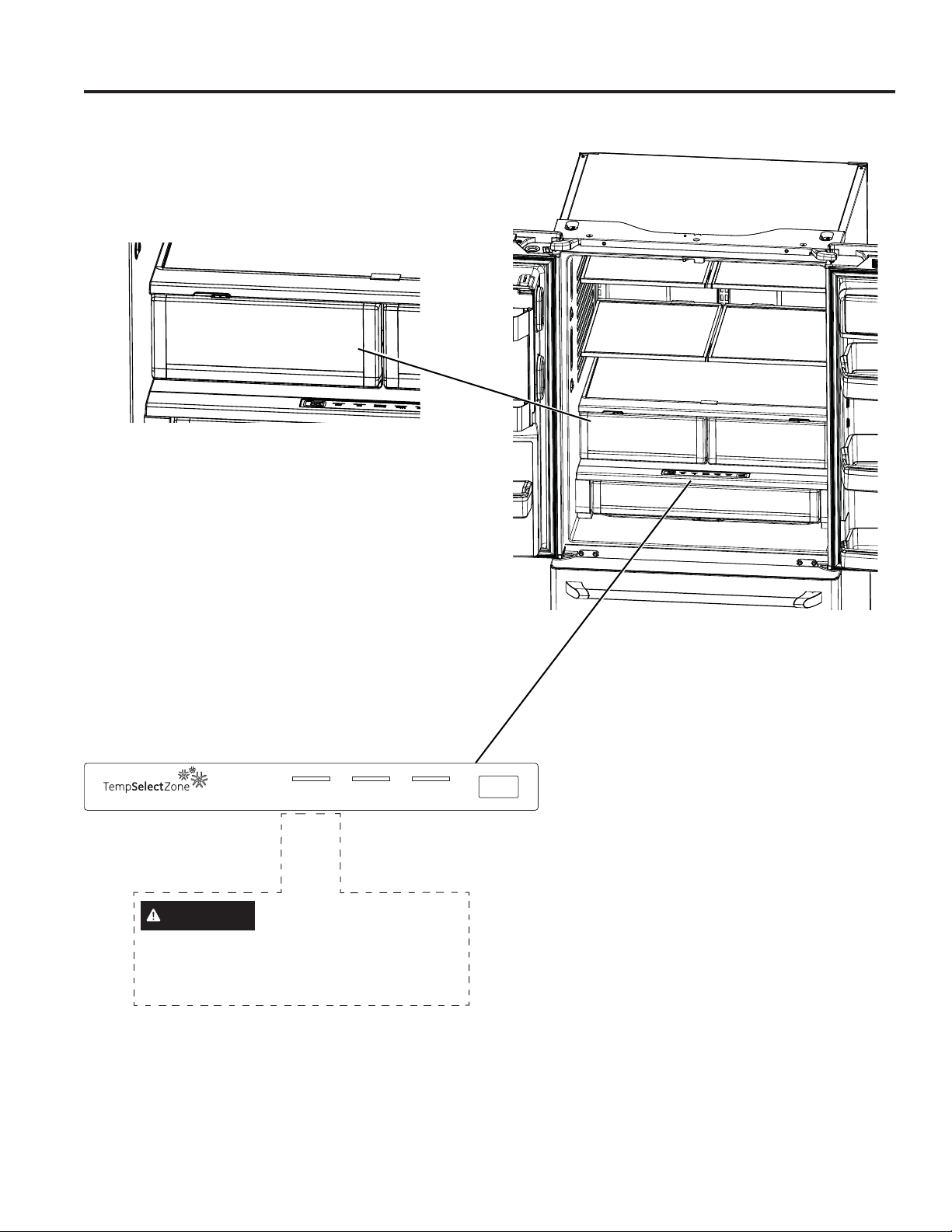
Climate Zone & Temperature Controlled Drawer
USING THE REFRIGERATOR: Climate Zone & Temperature Controlled Drawer
ClimateZone
Keep fruits and vegetables organized in separate
compartments for easy access.
Excess water that may accumulate in the bottom of the
drawers or under the drawers should be wiped dry.
Temperature Controlled Drawer
The Temperature Controlled Drawer is a full-width
drawer with adjustable temperature control. This drawer
can be used for large miscellaneous items.
To change setting, press select button.
49-60820 Rev. 1 19
How to Remove and Replace Drawer
To remove:
Pull the drawer out to the stop position.
Lift the front of the drawer up and out.
To replace:
Pull left and right slides until fully extended.
Place drawer back in first and rotate drawer front down
to seat on slide.
Push the drawer in to closed position.
*Select Models Only
Climate Zone & Temperature Controlled Drawer
USING THE REFRIGERATOR: Climate Zone & Temperature Controlled Drawer
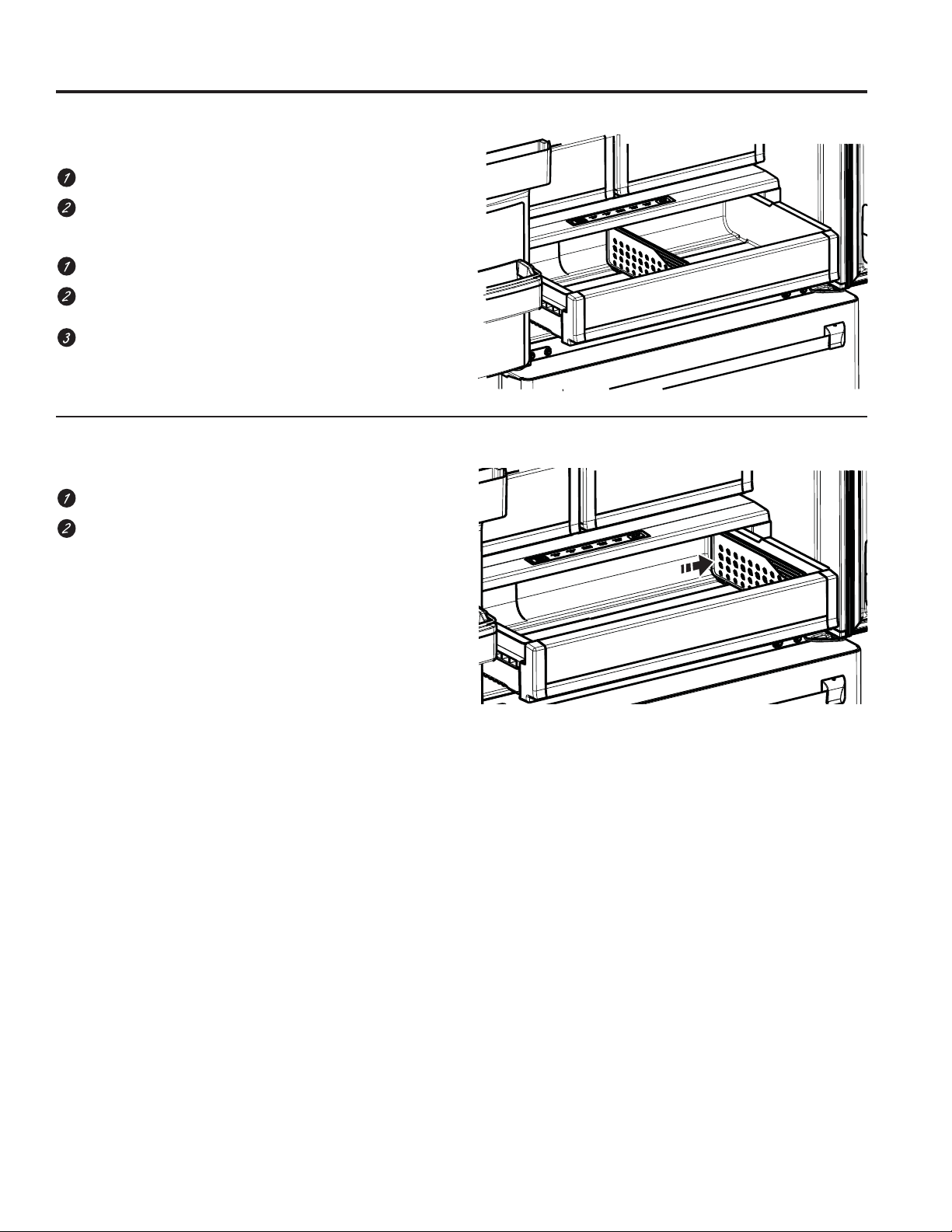
How to Remove and Replace Drawer Divider*
To remove:
Pull the drawer out to the stop position.
Slide pan divider to right to release it from pan.
To replace:
Reverse steps 1 and 2 to replace drawer divider.
20 49-60820 Rev. 1
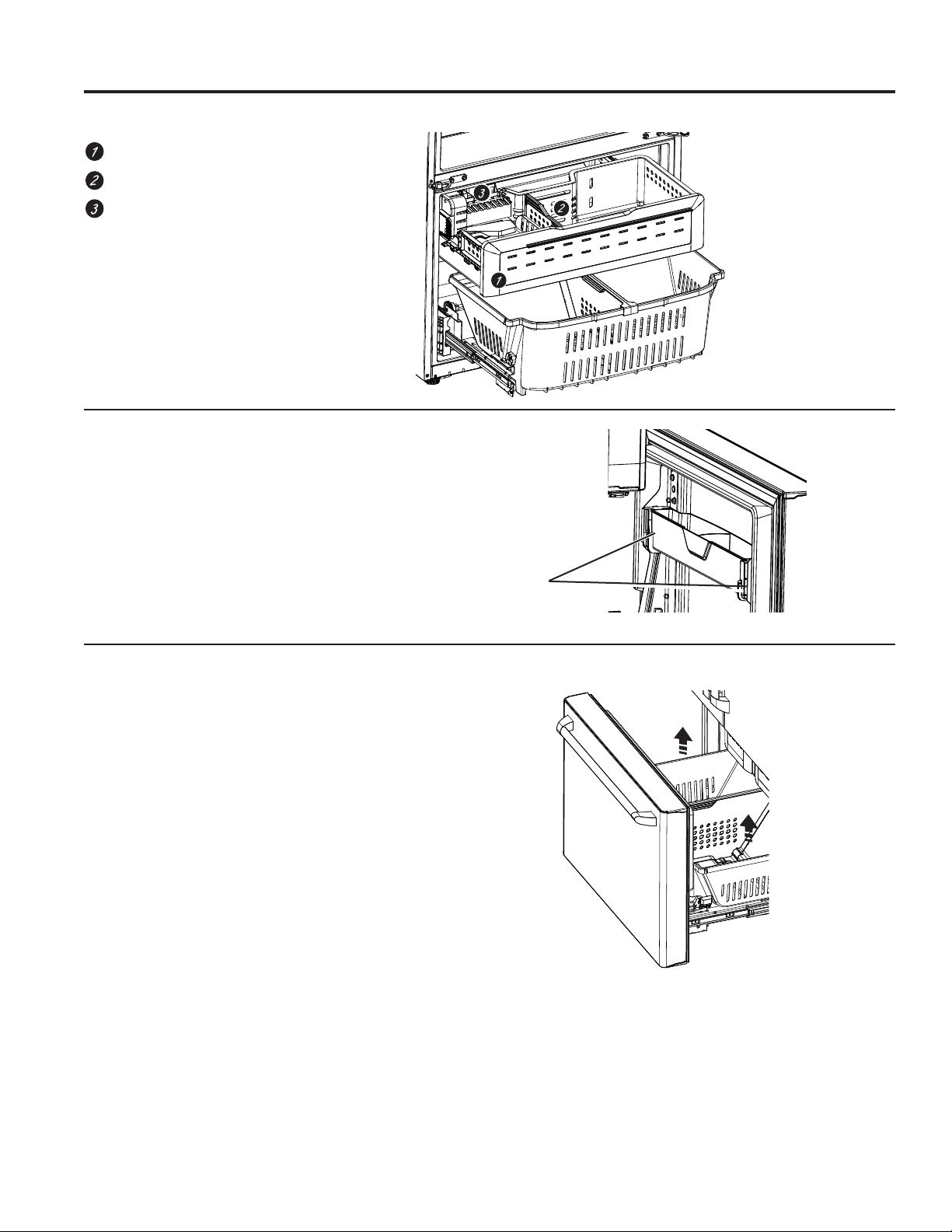
Freezer Basket and Drawer
Basket
Drawer
Ice Bucket*
Non-Adjustable Bin in the Freezer
To remove: Push in plastic tab on either left or
right side.
To replace: Slide bin into location until it locks
into place.
Basket Removal
To remove, CFE only:
1. Open freezer door to the stop position.
2. Remove freezer door bin by pushing plastic tab on
either left or right side to release bin hinge pin.
3. Remove freezer basket by lifting up the rear of the
basket and moving basket rearward until the front of
the basket can be rotated upward and out.
4. Lift it out to remove.
To remove, CYE and CWE only:
1. Open fresh food doors.
2. Open freezer doorto the stop position.
3. Remove freezer basket by lifting up the rear of the
basket and rotate it upward.
4. Lift it out to remove.
To replace:
Reverse step 1 thru 4 to replace.
*Select Models Only
Baskets, Drawers, and Bins
USING THE FREEZER: Baskets, Drawers, and Bins
Plastic Tabs
49-60820 Rev. 1 21
*Select Models Only
A newly installed refrigerator may take 12 to 24 hours to begin making ice.
WARNING
Connect to potable water supply
only.
A cold water supply is required for automatic icemaker
operation. The water pressure must be between 40
and 120 psi (275-827 kilopascals).
Automatic Ice maker*
The ice maker will produce seven cubes per cycle
approximately 100–130 cubes in a 24-hour period,
depending on freezer compartment temperature, room
temperature, number of door openings and other use
conditions.
The ice maker will fill with water when it cools to 15°F
(–10°C). A newly installed refrigerator may take 12 to 24
hours to begin making ice cubes.
If the refrigerator is operated before the water line
connection is made to the unit or if the water supply to
an operating refrigerator is turned off, make sure that
the ice maker is turned off. Once the water has been
connected to the refrigerator, the ice maker may be
turned on. See the table below for details.
You may hear a buzzing sound each time the ice maker
fills with water.
Throw away the first few batches of ice to allow the
water line to clear.
Be sure nothing interferes with the sweep of the feeler
arm.
When the bin fills to the level of the feeler arm, the ice
maker will stop producing ice. It is normal for several
cubes to be joined together.
If ice is not used frequently, old ice cubes will become
cloudy, taste stale and shrink.
NOTE: In homes with lower-than-average water
pressure, you may hear the ice maker cycle multiple
times when making one batch of ice.
CAUTION
To minimize the risk of personal injury,
avoid contact with the moving parts of the ejector
mechanism, or with the heating element that releases
the cubes. Do not place fingers or hands on the
automatic ice making mechanism while the refrigerator is
plugged in.
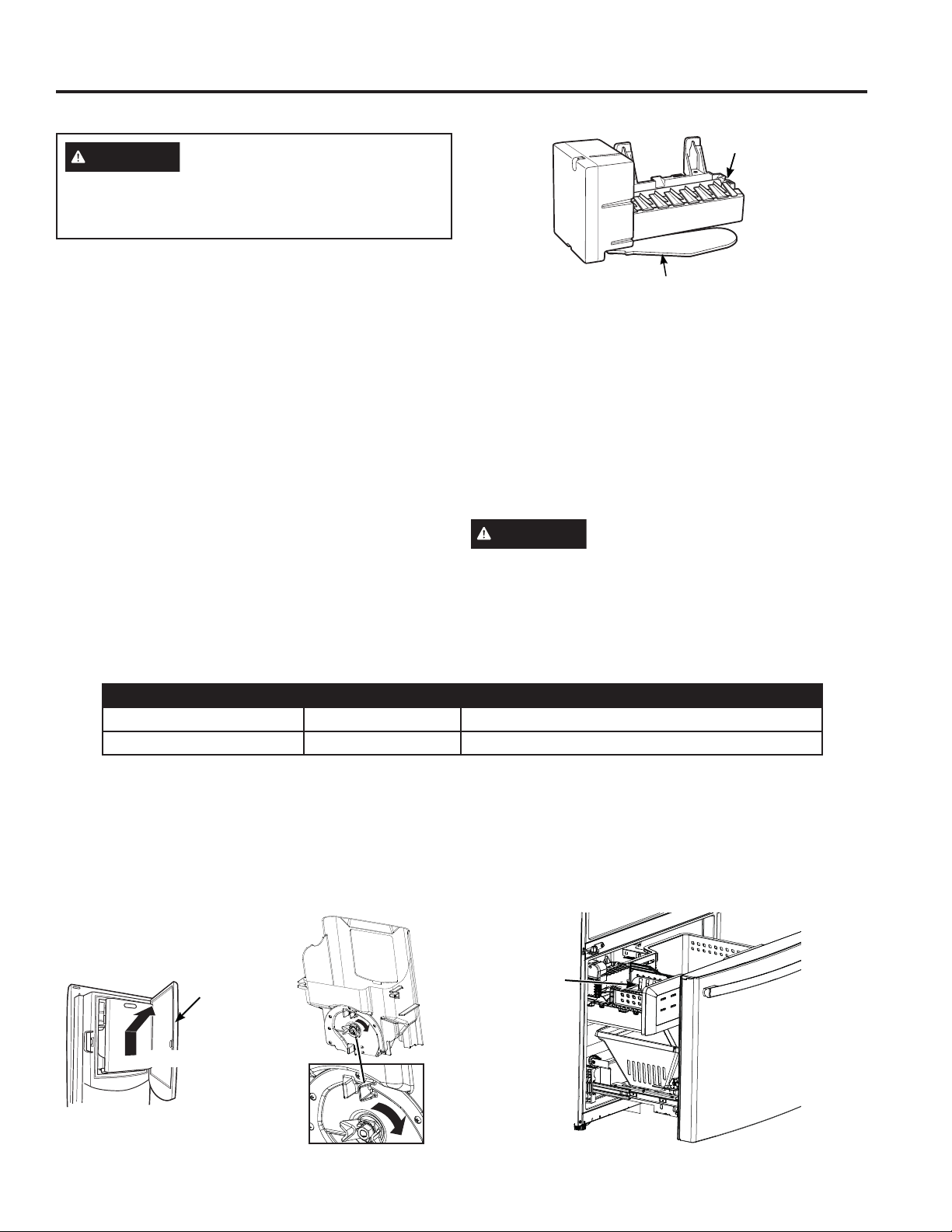
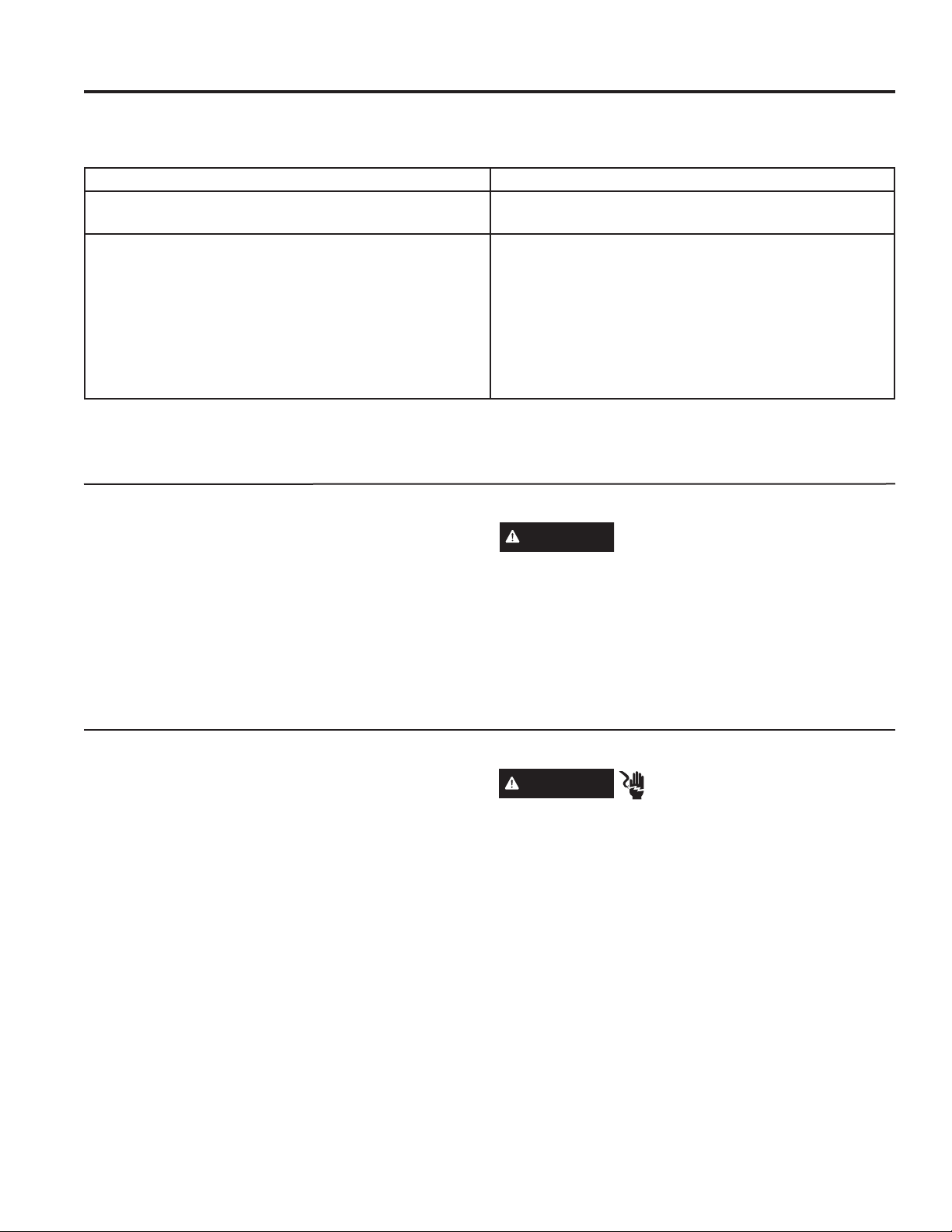
Lift and pull
Ice Box
Door
Ice Bucket and Dispenser*
• Open the ice box door on inside of the left door.
• Pull up and out on the ice bucket in the left hand door
to remove it from the compartment .
• To replace the ice bucket, set it on the guide brackets
and push until the ice bucket seats properly.
• If bucket cannot be replaced,
rotate the ice bucket fork 1/4
turn clockwise.
Freezer Ice Bucket*
The ice storage is in the freezer compartment drawer.
• Open the freezer drawer.
• The ice bucket is located on the left side of the upper
basket.
• Pull the upper basket forward to remove the ice bucket.
Feeler Arm
Ice
maker
Display Type (See Page 8) Model # How to turn the ice maker on/off
Control Style A CYE/CFE 8VHWKHVHWWLQJVPHQXRQWKHWRXFKVFUHHQ
Control Style B CWE 8VHWKH³,&(0$.(5´EXWWRQRQWKHFRQWURO
How to Turn the Ice Maker On/Off
Freezer
Ice
Bucket
Automatic Ice Maker
USING THE FREEZER: Automatic Ice Maker
22 49-60820 Rev. 1
Cleaning the Outside
Cleaning the Inside
Unplug the refrigerator before cleaning.
If this is not practical, wring excess moisture out of
sponge or cloth when cleaning around switches, lights or
controls.
8VHDQDSSOLDQFHZD[SROLVKRQWKHLQVLGHVXUIDFH
between the doors.
8VHZDUPZDWHUDQGEDNLQJVRGDVROXWLRQ²DERXWD
tablespoon (15 ml) of baking soda to a quart (1 liter) of
water. This both cleans and neutralizes odors. Rinse and
wipe dry.
CAUTION
Do not clean glass shelves or
coverswith warm water when they are cold. Glass
shelves and covers may break if exposed to sudden
temperature changes or impact such as bumping or
dropping. Tempered glass is designed to shatter into
many small pieces if it breaks.
Do not wash any plastic refrigerator parts in the
dishwasher.
Behind the Refrigerator
Be careful when moving the refrigerator away from
the wall. All types of floor coverings can be damaged,
particularly cushioned coverings and those with
embossed surfaces.
Raise the leveling legs located at the bottom front of the
refrigerator.
Pull the refrigerator straight out and return it to position
by pushing it straight in. Moving the refrigerator in a side
direction may result in damage to the floor covering or
refrigerator.
Lower the leveling legs until they touch the floor.
WARNING
ELECTRICAL SHOCK
HAZARD
When pushing the refrigerator back, make sure you
don’t roll over the power cord or water supply line.
Care and Cleaning
CARE AND CLEANING
Directions for Cleaning Outside Surfaces, Door Handles, and Trim
DO USE DO NOT USE
Soft, clean cloth or sponge Abrasive cloths, scrubbing sponges, scouring or steel
wool pads
Mild detergent mixed with warm water
$SSURYHGVWDLQOHVVVWHHOFOHDQHUV9LVLWWKH&DIp
Appliances parts store for approved stainless steel
cleaners: cafeappliances.com/parts
Cleaners with oxalic acid such as Bar Keepers Friend
Soft Cleanser™ can be used to remove surface rust,
tarnish and small blemishes on stainless steel surfaces
only.
Abrasive powders or sprays
Window Sprays or Ammonia
Citrus or plant oil-based cleaners
Acidic or vinegar-based cleaners
Oven cleaners
Cleaners containing acetone (propanone)
Any cleaner with WARNING about plastic contact
NOTE: DO NOT allow stainless steel cleaner to come in contact with any plastic parts such as trim pieces, handle
hardware and liners. If unintentional contact of cleaners with plastic parts does occur, clean plastic part with a
sponge and mild detergent mixed with warm water.
49-60820 Rev. 1 23
Preparing for Vacation
For long vacations or absences, remove food and
unplug the refrigerator. Clean the interior with a baking
soda solution of one tablespoon (15 ml) of baking soda
to one quart (1 liter) of water. Leave the doors open.
LCD Models: turn refrigerator off at control .
If the temperature can drop below freezing, have a
qualified service technician drain the water supply
system to prevent serious property damage due to
flooding.
1. Turn refrigerator off or unplug the refrigerator.
2. Empty ice bucket
3. Turn water supply off
If you cut the water supply off, turn off the ice
maker.
8SRQUHWXUQLQJIURPYDFDWLRQ
1. Replace the water filter.
2. Run 2 gallons (7.57 liters) of water through the cold
water dispenser (about 5 minutes) to flush the system.
3. Dispense 185°F (85°C) hot water 3 times (10 oz.
each) to flush the system.
Preparing to Move
Secure all loose items such as shelves and drawers by
taping them securely in place to prevent damage.
When using a hand truck to move the refrigerator, do not
rest the front or back of the refrigerator against the hand
truck. This could damage the refrigerator.
Handle only from the sides of the refrigerator.
Be sure the refrigerator stays in an upright position
during moving.
Refrigerator Lights (LEDs)
There is LED lighting in fresh food compartment and on
the bottom of the fresh food doors to light the freezer
compartment.
An authorized technician will need to replace the LED
light.
If this assembly needs to be replaced, schedule service
on-line at cafeappliances.com/service.
Care and Cleaning
CARE AND CLEANING: Replacing the Lights
LED Lights
24 49-60820 Rev. 1
TOOLS YOU MAY NEED
BEFORE YOU BEGIN
Read these instructions completely and carefully.
WARNING
Tip Over Hazard.
Built-in style models (model CYE and CWE) are top
heavy, especially with any doors open. These models
must be secured with the anti-tip floor bracket to
prevent tipping forward, which could result in death or
serious injury. Read and follow the entire installation
instructions for installing the anti-tip floor bracket
packed with your refrigerator.
•
IMPORTANT — Observe all governing codes
and ordinances. Save these instructions for local
inspector’s use.
• Note to Installer – Be sure to leave these
instructions with the Consumer.
• Note to Consumer – Keep these instructions for
future reference.
• Skill level – Installation of this appliance requires
basic mechanical skills.
• Completion time – Refrigerator Installation
can vary
Water Line Installation
30 minutes
• Proper installation is the responsibility of the
installer.
• Product failure due to improper installation is not
covered under the Warranty.
PREPARATION
MOVING THE REFRIGERATOR INDOORS
If the refrigerator will not fit through a doorway, the
refrigerator door and freezer drawer can be removed.
• To remove the refrigerator door, see the Installing
the Refrigerator section.
• To remove the freezer drawer, see the Removing
the Freezer Drawer section.
WATER SUPPLY TO THE ICE MAKER AND
DISPENSER
If the refrigerator has an ice maker, it will have to
be connected to a cold water line. A Café water
supply kit (containing tubing, shutoff valve, fittings
and instructions) is available at extra cost from your
dealer, by visiting our website at
cafeappliances.com/parts. In Canads, visit
cafeappliances.ca/parts.
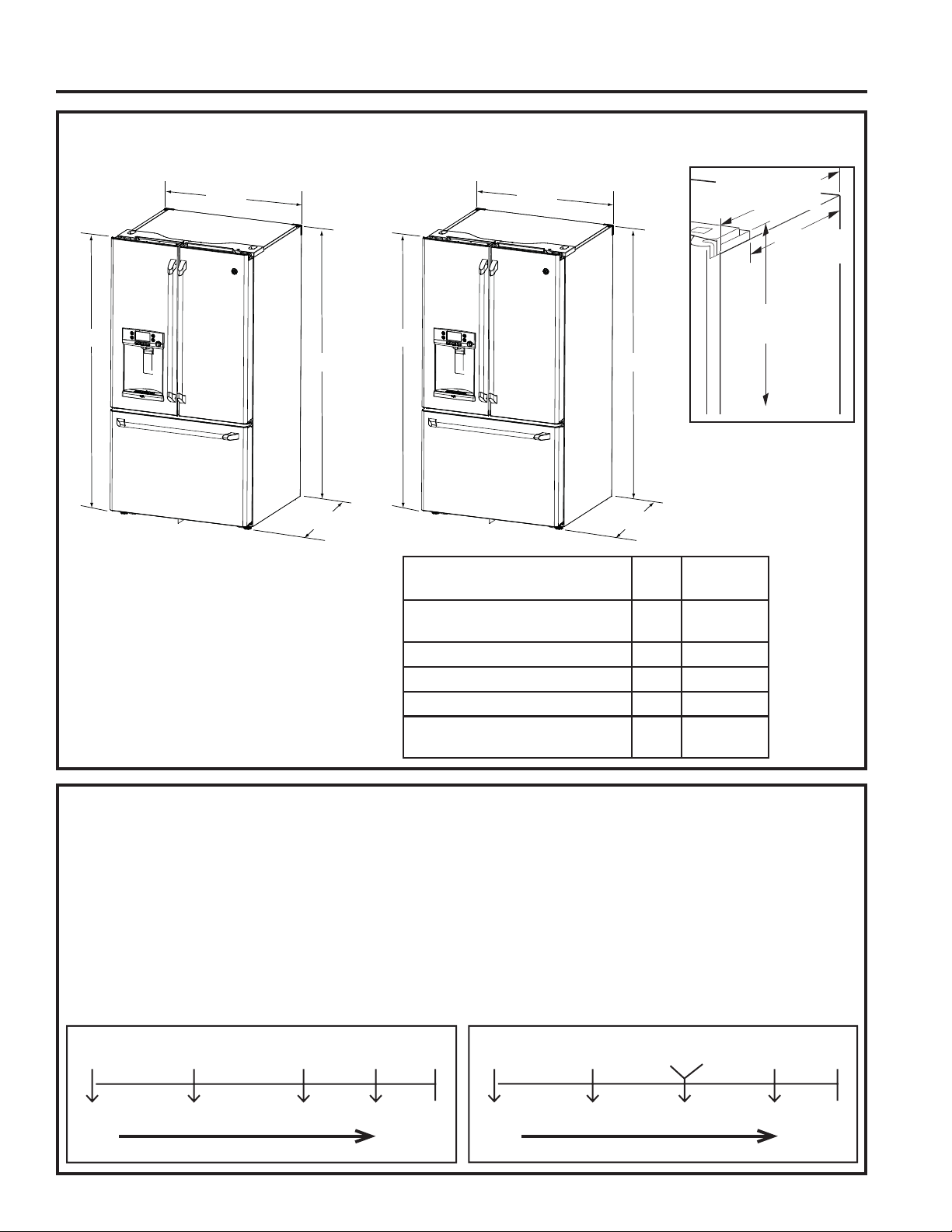
Adjustable Wrench
1/4´ Outer Diameter
Compression Nut
and Ferrule (sleeve)
Phillips-Head Screwdriver
Ǫ´ Socket Ratchet/Driver
1/8´´1/4´& ´
Allen Wrenches
Pencil
1/8´Drill Bit and
Electric or Hand Drill
Tape Measure
1/4´Nut Driver
Pliers
Level
Flat-Head Screwdriver
Torx T20, T25
INSTALLATION INSTRUCTIONS
Installation
Instructions
Bottom Freezer
Refrigerator
Questions? Visit our Website at: cafeappliances.com
In Canada, visit cafeappliances.ca
49-60820 Rev. 1 25
DIMENSIONS
Case Depth w/o
Doors 29
3
»8
´
CFE
24
3
»8
´
CYE
Height from
floor to hinge
cover top 69
7
»8´
Additional Dimensions
23
1
»4´&)(
18
1
»4´&<(
All measurements are given with leveling leg fully retracted.
CFE CYE,
CWE
Overall Height to Top of
Hinge Cover
69
7
»8
´ 69
7
»8
´
Height to Top of Cabinet
69´ 69´
Case Depth without Doors 29
3
»8
´ 24
3
»8
Overall Exterior Case Width
35
3
»4´ 35
3
»4´
Overall Exterior Depth Doors/
Drawers with Handles
ó´ ó´
If your model number starts with CFE
MOVING THE REFRIGERATOR
8VLQJWKHFKDUWEHORZGHWHUPLQHLIWKHZLGWKRI\RXU
passageway can accommodate the depth of the
refrigerator. Ensure you have clearance to prevent
damage to the refrigerator before safely moving it to
the final location.
• If passageways are large enough to accommodate
the refrigerator without removing the handles skip to
Step 6. Leave tape, film and all packaging on doors
until the refrigerator is in the final location.
• NOTE: Use a padded hand truck or moving
straps to move this refrigerator. Place the
refrigerator on the hand truck with a side against
the truck. We strongly recommend that two
people move and complete this installation.
CFE OnlyCYE, CWE Only
35
3
»4´35
3
»4´
´´
36
1
»4´31
1
»4´
69
7
»8
´69
7
»8
´
INSTALLATION INSTRUCTIONS
Fully
Assembled
36.25”
Removing
Handles
35.25”
Removing
LH Door
33.75”
Case w/
Fz Slides
30.25”
Case
Only
(no hinges)
Case
Only
(no hinges)
29.375”
Remove door parts in order until dimension is less than opening
If your model number starts with CYE, CWE
Fully
Assembled
31.25”
Removing
Handles
30.25”
Removing
LH Door
Removing
Handles
(CWE)
28.75”
Case w/
Fz Slides
25.25” 24.375”
Remove door parts in order until dimension is less than opening
Installation Instructions
26 49-60820 Rev. 1
REFRIGERATOR LOCATION
Ŷ Do not install the refrigerator where the
temperature will go below 60°F (16°C) because
it will not run often enough to maintain proper
temperatures.
Ŷ Do not install the refrigerator where the
temperature will go above 100°F (37°C) because
it will not perform properly.
Ŷ Do not install the refrigerator in a location exposed
to water (rain, etc.) or direct sunlight.
Ŷ Install it on a floor strong enough to support it fully
loaded.
CLEARANCES
Allow the following clearances for ease of
installation, proper air circulation and plumbing and
electrical connections.
6LGHV ´PP
7RS ´PP&DELQHW+LQJH&RYHU
%DFN ´PP
REMOVING THE REFRIGERATOR
DOORS
Ŷ IMPORTANT NOTE: This refrigerator is 36
1
/4´GHHS
(31
1
/4´IRU&<(PRGHOV'RRUVDQGSDVVDJHZD\V
leading to the installation location must be at least
36
1
/4´ZLGHLQRUGHUWROHDYHWKHGRRUVDQGKDQGOHV
attached to the refrigerator while transporting it into
the installation location. If passageways are less
than 36
1
/4´WKHUHIULJHUDWRUGRRUVDQGKDQGOHVFDQ
easily be scratched and damaged. The top cap and
doors can be removed to allow the refrigerator to be
safely moved indoors. If passageways are less than
31
1
/4´VWDUWZLWK6WHS
Ŷ If it is not necessary to remove doors, skip to Step
11. Leave tape and all packaging on doors until the
refrigerator is in the final location.
Ŷ NOTE:8VHDSDGGHGKDQGWUXFNWRPRYHWKLV
refrigerator. Place the refrigerator on the hand
truck with a side against the truck. We strongly
recommend that TWO PEOPLE move and complete
this installation.
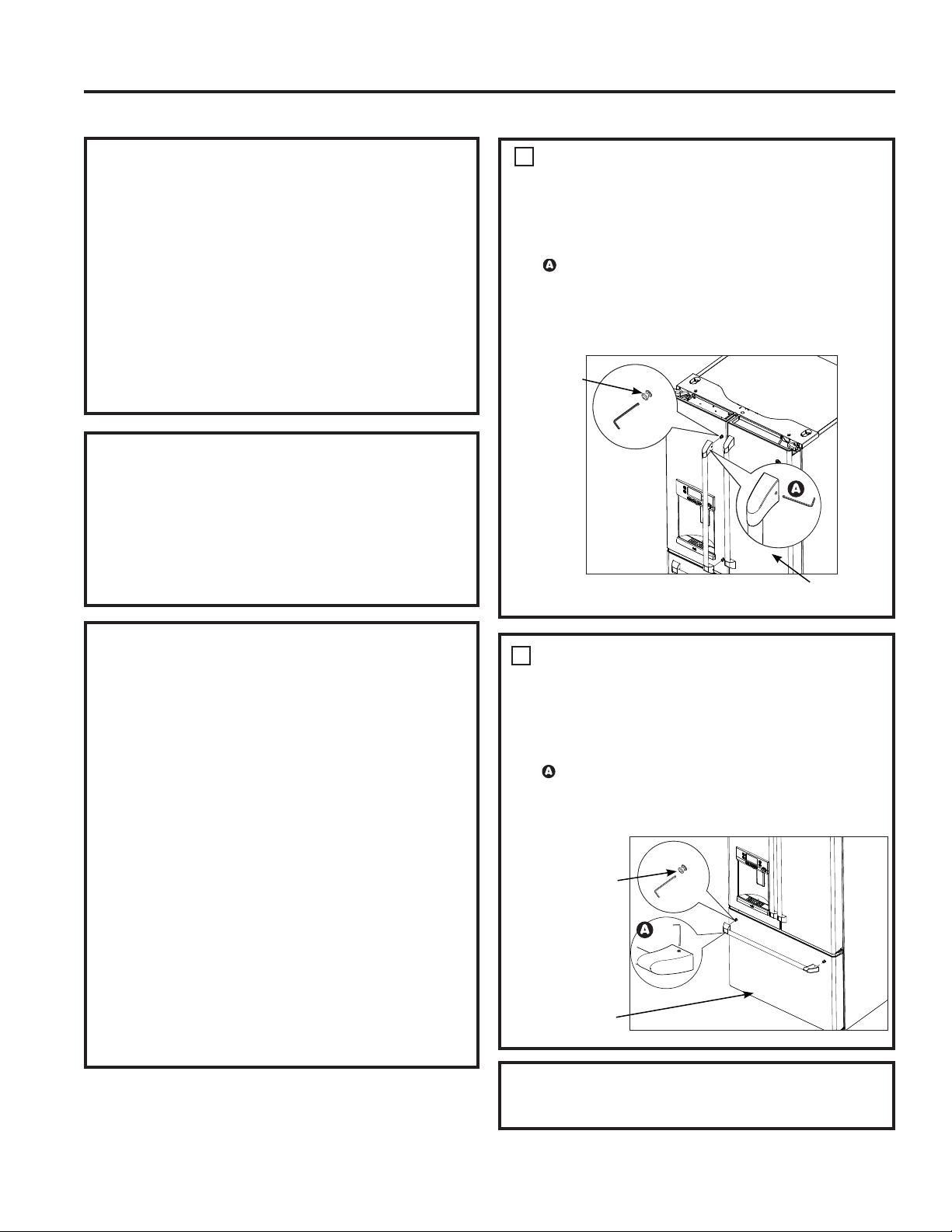
REMOVE THE FRESH FOOD
DOOR HANDLE
Handle Design varies based on models, however
Installation is same.
Stainless steel and plastic handles:
/RRVHQWKHVHWVFUHZVZLWKWKH´$OOHQ
wrench and remove the handle.
NOTE: If the handle mounting fasteners need
to be tightened or removed, use a 1/4´ Allen
wrench.
1
REMOVE THE FREEZER DOOR
HANDLE
Handle Design varies based on models, however
Installation is same.
Stainless steel and plastic handles:
/RRVHQWKHVHWVFUHZVZLWKWKH´$OOHQ
wrench and remove the handle.
NOTE: If the handle mounting fasteners need to
be tightened or removed, use a 1/4´ Allen wrench.
2
Mounting
Fasteners
Leave film
on until after
installation
Mounting
Fasteners
Leave film
on until after
installation
Reinstall the handles using the same procedure as
removing.
Installation Instructions
INSTALLATION INSTRUCTIONS
INSTALLING THE REFRIGERATOR
49-60820 Rev. 1 27
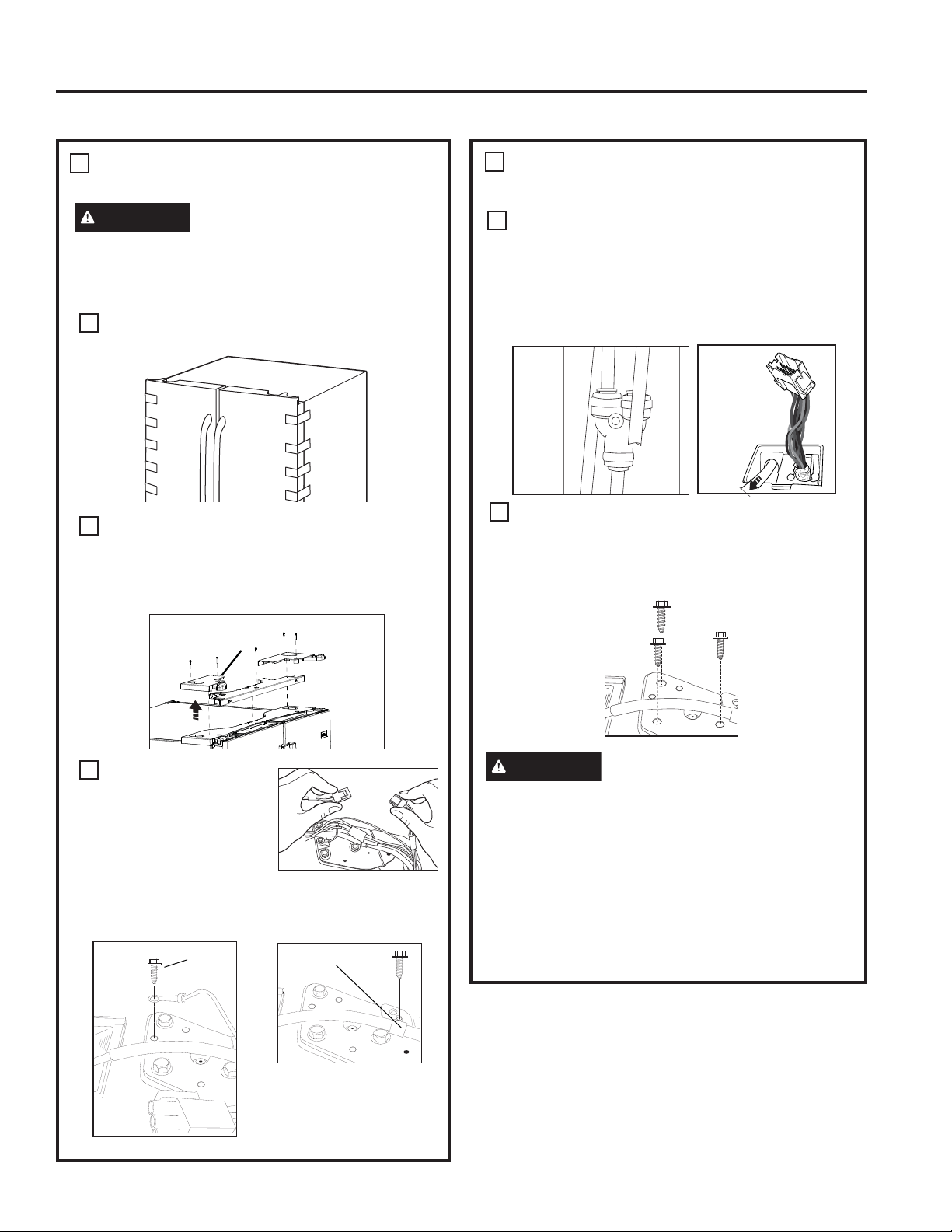
REMOVE THE REFRIGERATOR
DOORS (cont)
Disconnect the water line from the back of the
unit by pressing down on the dark grey collar
while pulling up on the water line.
Pull waterline through case conduit from the top
to free the line for door removal. The water line is
more than 4’ long and may need to be taped to
Door for accessibility when reinstalling.
8VLQJD´VRFNHWUDWFKHWGULYHUUHPRYHWKH
screws securing the top hinge to the cabinet,
then lift the hinge straight up to free the hinge pin
from the location in the top of the door.
CAUTION
Lifting Hazard.
Single person lift could cause injury. Use
assistance when handling, moving or lifting the
refrigerator doors.
NOTE: when removing door, to prevent damage to
door and electronics, carefully place the door in a
proper location.
NOTE: The lower door hinge pin and hinge are keyed
and must be matched correctly for the door to self
close properly. Please follow the directions carefully.
REMOVE THE REFRIGERATOR
DOORS
WARNING
Follow all steps for removing
and reinstalling the door. Failure to follow these
instructions, leaving off parts, or overtightening
screws, can lead to the door falling off and result in
injury and property damage.
A
Securely tape the door shut with masking tape
or have a second person support the door.
B
Start with left-hand door first: Remove the hinge
cover on top of the left refrigerator door by
removing all hex screws and pulling it up. Do the
same for the right-hand door and the middle
cover.
C
Disconnect both
electrical connectors at
the top cover.
5HPRYHWKH´KH[
head screw to
disconnect the ground
wire from the hinge.
5HPRYHWKH´KH[KHDGVFUHZWRUHPRYHWKH
strain relief from the water line.
3
3
E
D
Ground
screw
Strain
Relief
Hinge
Cover
INSTALLATION INSTRUCTIONS
Installation Instructions
INSTALLING THE REFRIGERATOR (Cont.)
28 49-60820 Rev. 1
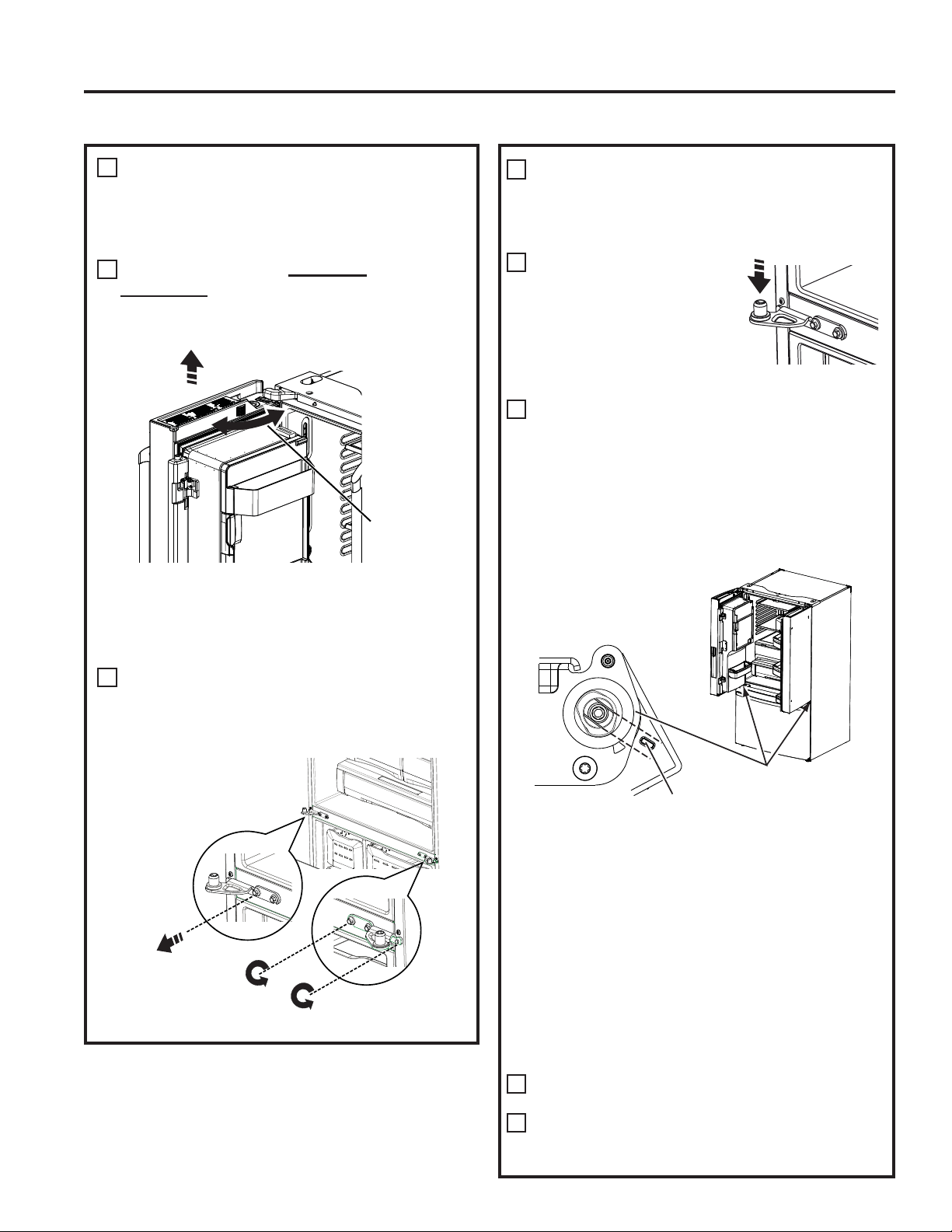
REINSTALLING THE
REFRIGERATOR DOORS
Reverse steps 1 through 4 to reinstall refrigerator,
follow details below for critical alignments.
Reinstall center hinge
first and torque the
screws to 65 in-lb (7.34
N-m). With the LH door
at 90º to the front of the
case, lower the refrigerator
door onto the center hinge.
Ensure that the door and hinge align correctly.
Rotate doors closed and make sure moveable
center sealing portion of the door aligns with
the striker. If the door will not self-close after
reinstalling, remove door, turn door upside down,
FKHFNDOLJQPHQWPDUNDQGDUURZWKHUHLVDQ
alignment mark on the door closure mechanism It
corresponds to an alignment mark on the bottom
end cap. Rotate door closure mechanism to align
mark and arrow, reinstall door).
Securely tape the door shut with masking tape
or have a second person support the door.
Reinstall the top hinge and torque the screws to
65 in-lb (7.34 N-m).
Be sure to reinstall the ground wire and strain relief
to the top hinge.
Reinstall the hinge cover. NOTE: Ensure wires
are not pinched or under screw bosses before
tightening screws.
REMOVE THE REFRIGERATOR
DOORS (cont)
NOTE: for proper installation later, please follow
the next step carefully.
Fresh Food doors to be REMOVED and
INSTALLED opened at 90° with case front.
REMOVE OPPOSITE DOOR
Follow the same procedure on the opposite
door. There are no wires or water lines on the
opposite side
REMOVE CENTER HINGE
(if necessary)
5HPRYHWKHƎVFUHZVVHFXULQJWKHFHQWHUKLQJHWR
WKHFDELQHW8VH7GULYHUWRUHPRYHRXWERDUGVFUHZ
F
Lift up & off
center hinge
Open Door to
90°
4
A
5
B
Loosen Outer screws
Remove
center screw
C
align marks
8QGHUVLGHRI)UHVK)RRG'RRU
If door cannot be installed at 90° follow steps below:
1. If space or model limits opening door to less than 180°, then:
a) Remove door, carefully turn door upside down.
b) Check alignment of door closure mechanism shaft on
underside of door. The flats on the shaft should
correspond to alignment tab on plastic ring or mark
on bottom end cap.
F,IVKDIWLVQRWDOLJQHGWRWDEPDUNXVLQJ´$OOHQ
wrench, rotate door closure mechanism shaft
counterclockwise for right door and clockwise for left
door. Then align flat with tab/mark.
d) Install the door at 90°.
D
3
Installation Instructions
INSTALLATION INSTRUCTIONS
INSTALLING THE REFRIGERATOR (Cont.)
49-60820 Rev. 1 29
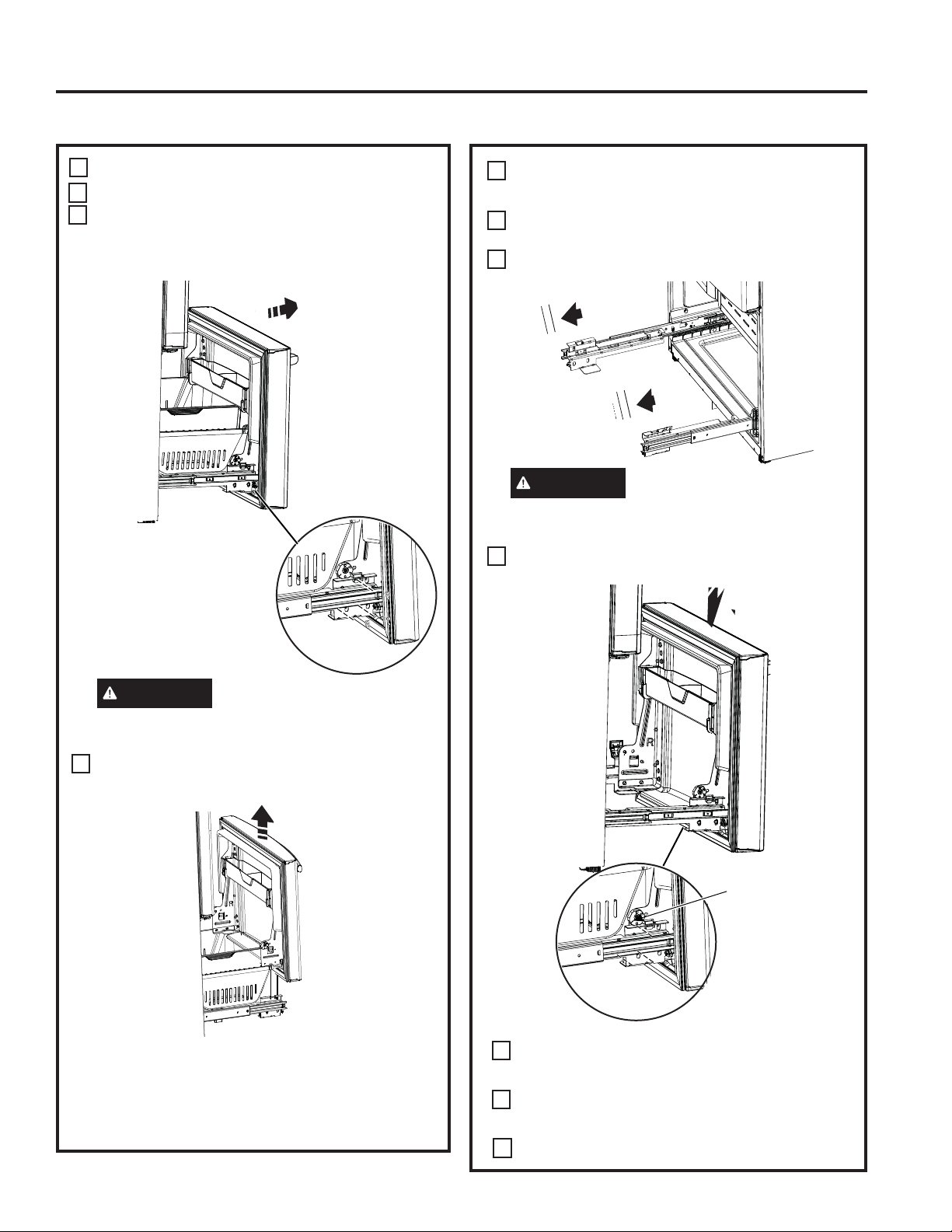
REMOVE THE FREEZER DOOR
Pull the freezer door open to full extension.
Remove 3 attachment screws, located at the
bottom on each side of the freezer door using
´KH[VRFNHWGULYHU
CAUTION
Lifting Hazard
)UHH]HUGRRULVKHDY\8VHERWKKDQGVWR
secure the door before lifting.
Lift the freezer door to disengage it from the
slide mechanism
The door can safely rest on the bottom. Do not
rest the door on any other surfaces to avoid
scratches.
Push the slide mechanism back completely until
it self retracts.
A
B
C
6
REPLACING THE FREEZER
DOOR
Pull the slide Mechanism to full extension using
both hands simultaneously.
Remove the basket resting on the slides.
CAUTION
Lifting Hazard
)UHH]HUGRRULVKHDY\8VHERWKKDQGVWRVHFXUH
the door before lifting.
Lift the freezer door and place it on the slide
mechanism
Replace the attachment screws and torque the
screws to 65 in-lb (7.34 N-m).
For adjusting freezer door gaps, follow the
instructions on pg 30.
Replace the basket
A
B
C
D
7
E
F
Align and insert
tab on freezer
door bracket
into slot on
freezer slide
bracket.
INSTALLATION INSTRUCTIONS
Installation Instructions
INSTALLING THE REFRIGERATOR (Cont.)
30 49-60820 Rev. 1
IMPORTANT!
The 6 mounting screws (3 on each side) are NOT interchangeable with the center or top hinge screws.
Drawer screws have flat washer heads, and other screws have lines/ribs on washer heads.
After installation of the freezer door, check for uniform gaps (top and bottom of right and left hand side) with the
template provided.
In the event of excessive gaps use the following steps to adjust the freezer door.
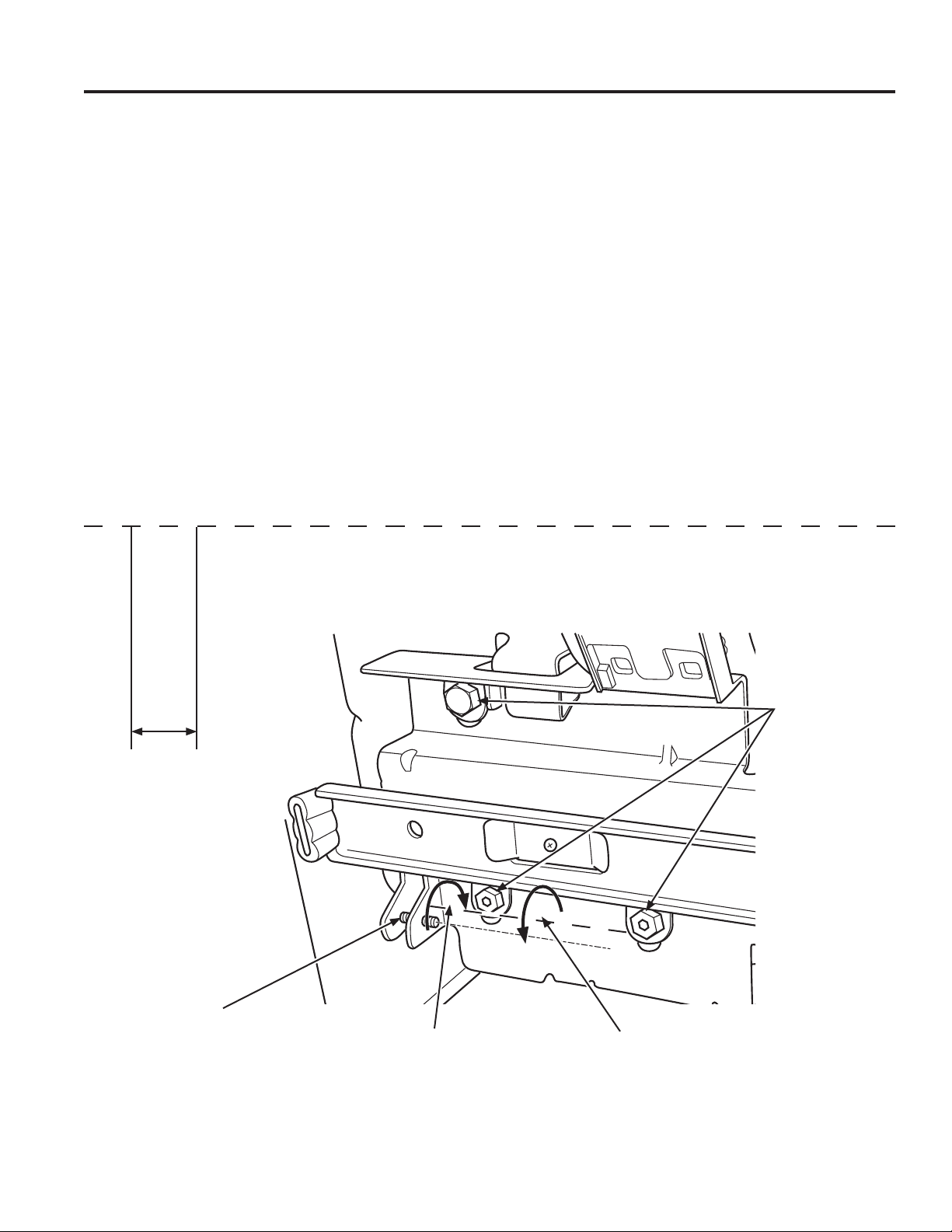
Step 1 - Loosen the 3 screws on each side (right and left) of the freezer door.
Step 2 - Adjust set screw clockwise if gap at the top is too big (see template). 7XUQWKHVHWVFUHZXVLQJ´KH[
key clockwise by quarter to half a rotation
Step 3 - Adjust set screw counter-clockwise if gap at the bottom is too big (see template). Turn the set screw using
´KH[NH\FRXQWHUFORFNZLVHE\TXDUWHUWRKDOIDURWDWLRQ
Step 4 - Tighten the 3 screws on each side (right and left).
Step 5 - Re-check the gaps using the template and repeat steps 1 to 4 if required and complete with step 5.
Instructions for adjusting freezer door gaps:
Fold here for using template
(1.5 cm)
´
Template for checking gaps.
*DSVKRXOGEH´FP
or below.
Gabarit pour vérifier les écarts.
L’écart doit être de 0,6 po (1,5
cm) ou moins.
Plantilla para el control de
espacios. El espacio debería
VHUGH´FPRLQIHULRU
Step 1
Étape 1
Paso 1
Step 4
Étape 4
Paso 4
Set Screw
Vis d’ajustement
Tornillo del Set
Step 3
Étape 3
Paso 3
Step 2
Étape 2
Paso 2
Plier ici pour utiliser le gabarit Dóblelo aquí para usar la plantilla
Installation Instructions
INSTALLATION INSTRUCTIONS
INSTALLING THE REFRIGERATOR (Cont.)
49-60820 Rev. 1 31
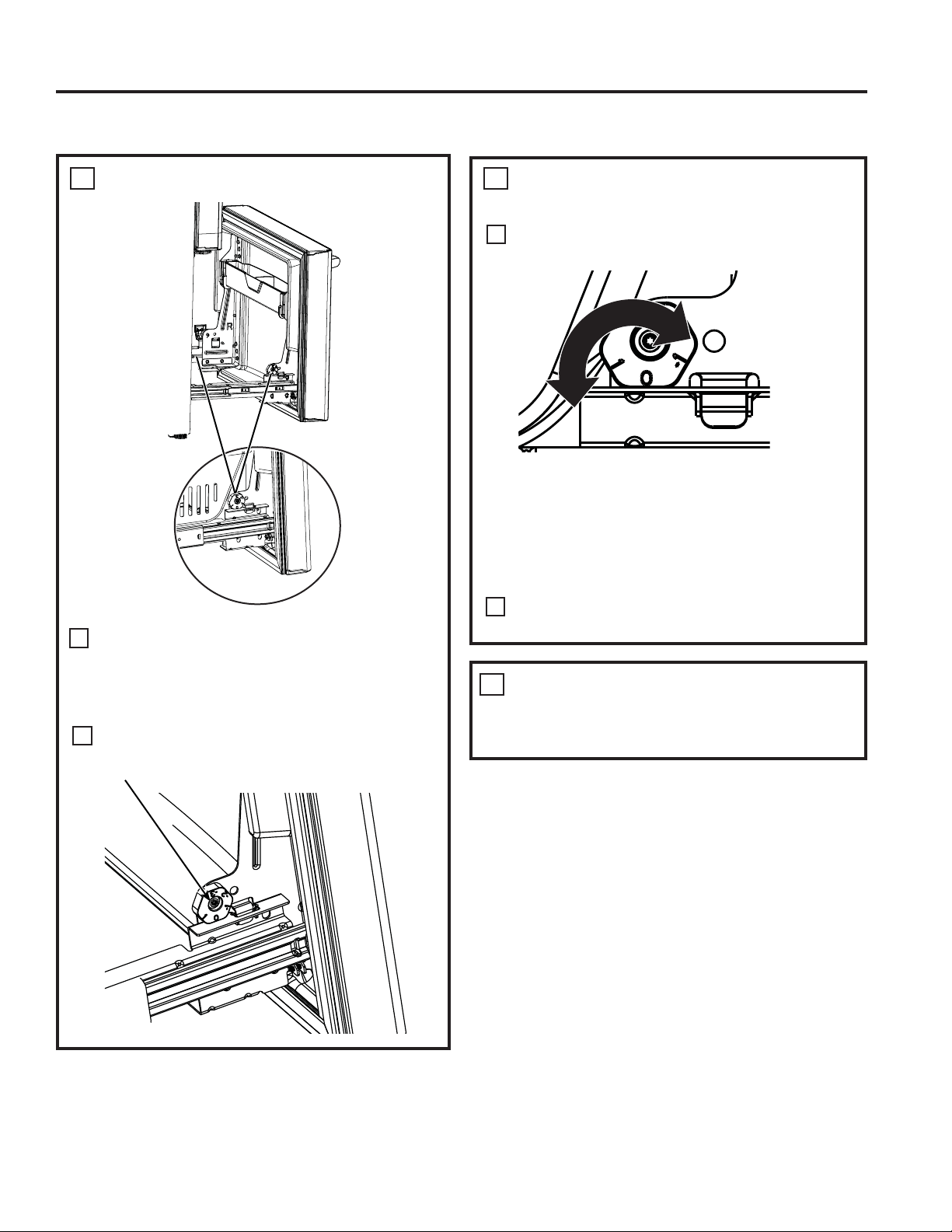
LEVEL THE FREEZER DOOR
Locate the height adjuster cam in the freezer
door. Slightly loosen the three door attachment
VFUHZVRQERWKVLGHVXVLQJD´KH[VRFNHW
driver.
Locate and loosen the cam screw using the
T-27 screw driver.
8
A
B
REMOVE PACKAGING
Remove all tape, foam and protective packing
from shelves and drawers.
10
LEVEL THE FREEZER DOOR
(cont.)
Lift the door on the side requiring adjustment,
rotate the cam to required position.
After adjustment tighten the 3 attachment
screws using to 65 in-lb (7.34 N-m).
9
0 - Initial position
/LIWE\´FP
/RZHUE\´FP
/RZHUE\´FP
/RZHUE\´FP
A
B
INSTALLATION INSTRUCTIONS
Installation Instructions
INSTALLING THE REFRIGERATOR (Cont.)
32 49-60820 Rev. 1
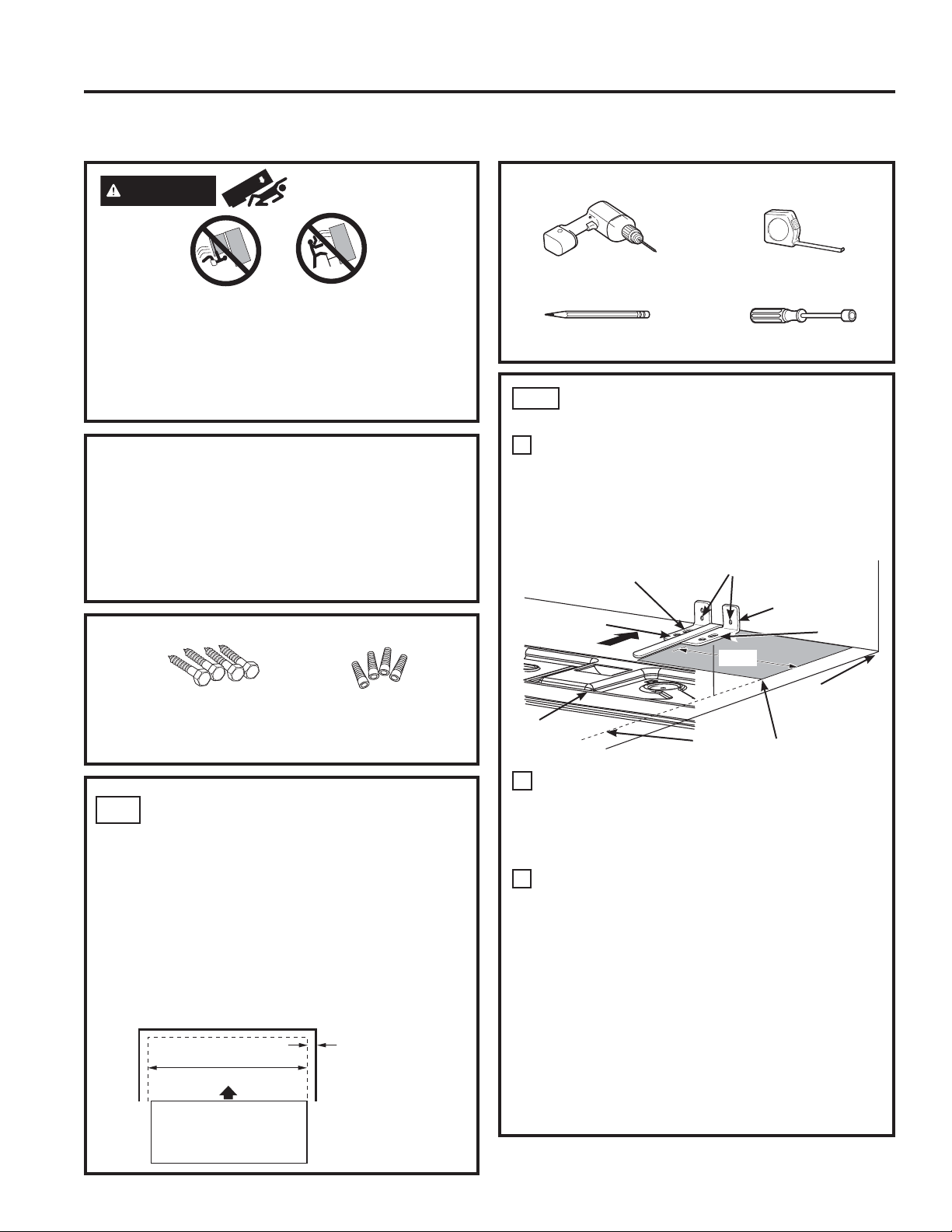
MEASURE CABINET
OPENING AVAILABLE VS.
REFRIGERATOR WIDTH
Measure width of cabinet opening where
refrigerator will be placed, W.
Be sure to account for any countertop overhang,
baseboard thickness and any clearance desired.
:LGWK:VKRXOGQRWEHOHVVWKDQ´
cm). The refrigerator will be placed approximately
in the middle of this opening.
MATERIALS YOU MAY NEED (not included)
TOOLS YOU WILL NEED
Pencil
´PP'ULOO%LWDQG
Electric or Hand Drill
Tape measure
´PP1XW'ULYHU
Lag Bolts
´PP[´PP
Anchor Sleeves
´PP2'
For Anti-Tip Bracket Mounted on CONCRETE Floors Only
Drill Bit Appropriate for Anchors
AT-1
LOCATING THE ANTI-TIP
FLOOR BRACKET
Place the anti-tip floor bracket locator template
(included inside the anti-tip kit) onto the floor
up against the rear wall, within W, and in line
with the desired location of the RH side of the
refrigerator (see Figure 1).
Place the anti-tip floor bracket onto the locator
template with its RH floor holes lined up with
the floor holes indicated on the template sheet,
DSSUR[LPDWHO\ó´FPIURPWKHHGJH
of the sheet or the RH side of the refrigerator.
Hold down in position and use the anti-tip floor
bracket as a template for marking the holes
based upon your configuration and type of
construction as shown in Step 3. Mark the hole
locations with a pencil, nail or awl.
NOTE:
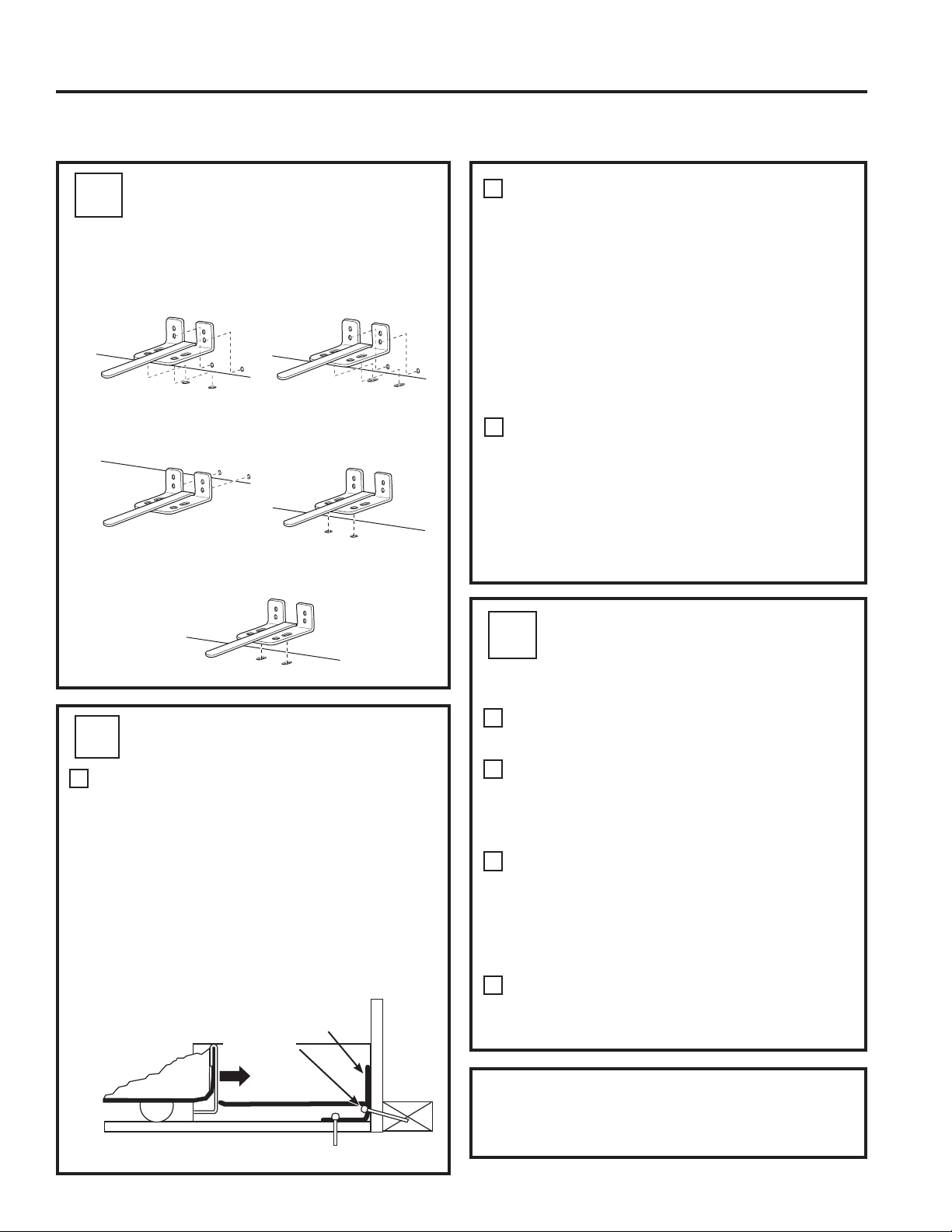
,WLV5(48,5('WRXVHDWOHDVWVFUHZVWR
mount the floor bracket (one on each side of
the anti-tip floor bracket). Both must be into
either the wall or the floor. Figure 2 indicates
all the acceptable mounting configurations for
screws. Identify the screw holes on the anti-tip
floor bracket for your configuration.
AT-2
A
B
C
Baseboard
Thickness or
Countertop
Overhang
(Whichever Is
Larger) Plus
Any Desired
Clearance
Rear Wall
Front
RH Side
W
REFRIGERATOR
Figure 1 – Installation Overview
Base Bracket
on the
Refrigerator
2 Wall Holes
RH Side of
Refrigerator
Floor – Concrete
(2 Holes)
Floor – Wood
(2 Holes)
ó´
Locator
Template Sheet
Floor Bracket
to Install
RH Holes
Rear RH
Corner of
Cabinet Wall
WARNING
Tip Over Hazard.
Built-in style models (CYE, CWE) are top heavy,
especially with any doors open. These models must
be secured with the anti-tip floor bracket to prevent
tipping forward, which could result in death or
serious injury. Read and follow the entire installation
instructions for installing the anti-tip floor bracket
packed with your refrigerator.
NOTE:
If you did not receive an anti-tip bracket with your
purchase, visit us online at
cafeappliances.com/parts to receive one at no cost.
In Canada, cafe.applances.ca/parts.
For installation instructions of the bracket, visit:
cafeappliances.com/literature. In Canada, cafe.
applances.ca/literature.
Installation Instructions
INSTALLATION INSTRUCTIONS
INSTALLING THE REFRIGERATOR (Cont.)
Anti-Tip Floor Bracket Installation (Models CYE and CWE only)
49-60820 Rev. 1 33
AT-2
LOCATING THE ANTI-TIP
FLOOR BRACKET (cont.)
Recommended Installation
– Wood
Recommended Installation
– Concrete
Minimum Acceptable #1 –
Wall Plate Stud
Minimum Acceptable #2
– Wood Floor
Minimum Acceptable #3
– Concrete Floor
Figure 2 – Acceptable Screw Placement
Locations
CONCRETE Wall and Floor Construction:
• Anchors required (not provided):
HDFK´PP[´PPODJEROWV
HDFK´PP2'VOHHYHDQFKRUV
• Drill the recommended size holes for the
anchors into the concrete at the center of the
holes marked in Step 2.
•
Install the sleeve anchors into the drilled holes.
Place the anti-tip floor bracket as indicated in Step
2. Remove the locator template from the floor.
• Install the lag bolts through the anti-tip floor
bracket and tighten appropriately.
WOOD Wall and TILE Floor Construction:
• For this special case, locate the 2 wall holes
LGHQWLILHGLQ)LJ'ULOODQDQJOHG´PP
pilot hole (approx. as shown in Fig. 3) in the
center of each hole.
• Mount the anti-tip floor bracket using the
Minimum Acceptable Installation #1, as
illustrated in Fig. 2.
C
B
AT-3
ANTI-TIP BRACKET
INSTALLATION
WOOD Wall and Floor Construction:
'ULOOWKHDSSURSULDWHQXPEHURI´PP
pilot holes in the center of each floor bracket
hole being used (a nail or awl may be used if
a drill is not available) AND remove the locator
template from the floor.
• Mount the anti-tip floor bracket by fastening the
2, or recommended 4, #10-16 hex-head screws
tightly into place as illustrated in Figure 3.
A
AT-4
POSITIONING THE
REFRIGERATOR TO ENGAGE
THE ANTI-TIP FLOOR AND
BASE BRACKETS
Before pushing the refrigerator into the opening,
plug the power cord into the receptacle and
connect waterline (if equipped). Check for leaks.
Locate the refrigerator’s RH side and move back
approximately in line with the RH side of the
cabinet opening, W. This should position the
anti-tip floor bracket to engage the anti-tip base
bracket on the refrigerator.
Gently roll the refrigerator back into the cabinet
opening until it comes to a complete stop.
Check to see if the refrigerator front lines up
with the cabinet front face. If not, carefully rock
the refrigerator forward and backward until
engagement occurs and you notice that the
refrigerator is fully pushed up against the rear wall.
If Applicable: Adjust the rear (and front) wheel
height settings to fully engage the rear anti-tip
brackets, while also aligning the refrigerator
front with the cabinet front face.
A
C
B
D
Figure 3 – Attachment to Wall and Floor
NOTE: If you pull the refrigerator out and away from
the wall for any reason, make sure the anti-tip floor
bracket is engaged when the refrigerator is pushed
back against the rear wall.
Rear RH Corner
of the Refrigerator
Floor
Wall
Plate
Stud
Floor
Bracket
2 Screws
Must Enter
Wood or
Metal Stud
Wall
Installation Instructions
INSTALLING THE REFRIGERATOR (Cont.)
Anti-Tip Floor Bracket Installation (Models CYE and CWE only)
INSTALLATION INSTRUCTIONS
34 49-60820 Rev. 1
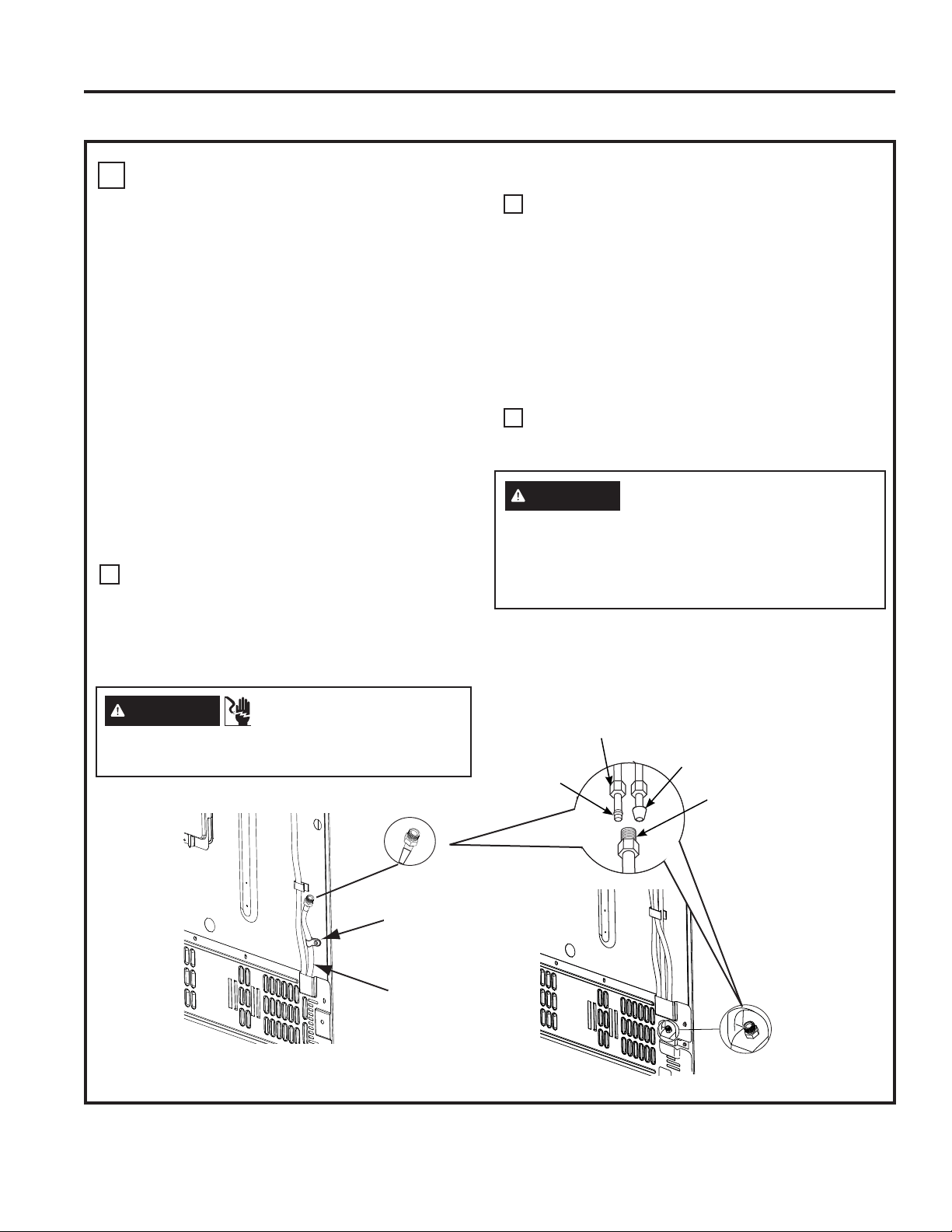
CONNECTING THE REFRIGERATOR TO THE HOUSE WATER LINE
A cold water supply is required for automatic
ice maker operation. If there is not a cold water
supply, you will need to provide one. See
Installing the Water Line section.
NOTES:
• Before making the connection to the
refrigerator, be sure the refrigerator power
cord is not plugged into the wall outlet.
• If your refrigerator does not have a water
filter, we recommend installing one if your
water supply has sand or particles that
could clog the screen of the refrigerator’s
water valve. Install it in the water line near
the refrigerator. If using SmartConnect
™
Refrigerator Tubing Kit, you will need an
additional tube (WX08X10002) to connect the
filter. Do not cut plastic tube to install filter.
• Before connecting the water line to the house,
purge the house line for at least 2 minutes.
If you are using copper tubing, place a
compression nut and ferrule (sleeve) onto the
end of the tubing coming from the house cold
water supply.
If you are using the SmartConnect
™
tubing, the
nuts are already assembled to the tubing.
If you are using copper tubing, insert the end
of the tubing into the refrigerator connection, at
the back of the refrigerator, as far as possible.
While holding the tubing, tighten the fitting.
If you are using SmartConnect
™
tubing,
insert the molded end of the tubing into the
refrigerator connection, at the back of the
refrigerator, and tighten the compression nut
until it is hand tight. Then tighten one additional
turn with a wrench. Over tightening may cause
leaks.
Fasten the tubing into the clamp provided to
hold it in position. You may need to pry open
the clamp.
11
A
B
C
Installation Instructions
INSTALLATION INSTRUCTIONS
INSTALLING THE REFRIGERATOR (Cont.)
1/4” Compression
Nut
Ferrule
(sleeve)
SmartConnect
™
Tubing
Refrigerator
Connection
1/4” Tubing
Tuyau de 1/4 po
Tubería de 1/4“
Tubing Clamp
Bride
Abrazadera del tubo
OR
Tubing Clamp
´7XELQJ
WARNING
ELECTRIC SHOCK
HAZARD
Attach tubing clamp using existing hole only. DO
NOT drill into the refrigerator.
WARNING
Connect to potable water supply only.
A cold water supply is required for automatic
icemaker operation. The water pressure must be
between 40 and 120 psi (275-827 kilopascals)
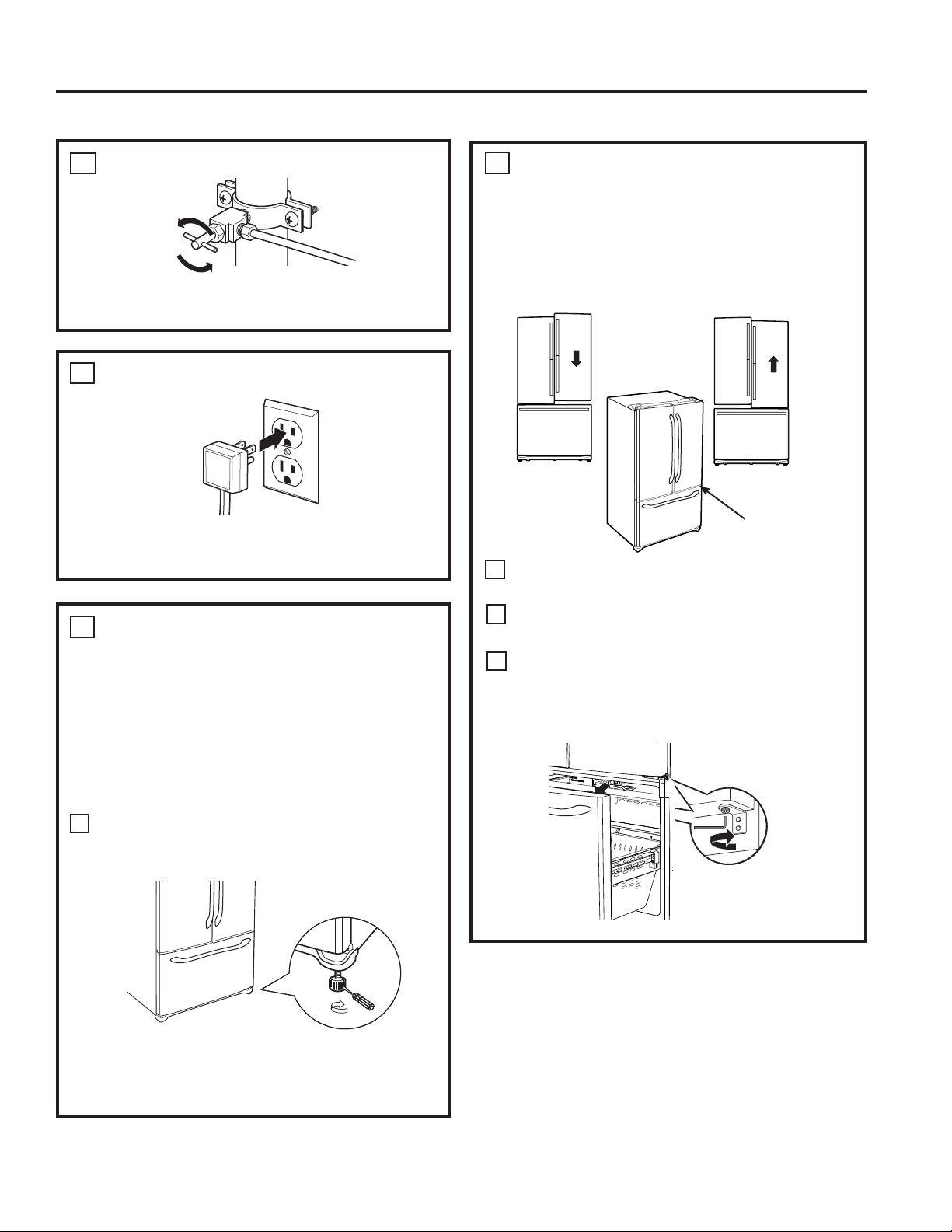
49-60820 Rev. 1 35
TURN ON THE WATER SUPPLY
Turn the water on at the shutoff valve (house
water supply) and check for any leaks.
12
PLUG IN THE REFRIGERATOR
See the grounding information attached to the
power cord.
13
LEVEL THE REFRIGERATOR
The leveling legs have 2 purposes:
1. Leveling legs adjust so the refrigerator is
firmly positioned on the floor and does not
wobble.
2. Leveling legs serve as a stabilizing brake
to hold the refrigerator securely in position
during operation and cleaning. The leveling
legs also prevent the refrigerator from tipping.
Turn the leveling legs clockwise to raise
the refrigerator, counterclockwise to lower it.
NOTICE: To avoid possible property damage,
the leveling legs must be firmly touching the
floor.
14
A
Flat-Head Screwdriver
Raise
LEVEL THE REFRIGERATOR
DOORS
Remember a level refrigerator is necessary for
getting the doors perfectly even. If you need
help, review the previous section on leveling the
refrigerator.
If you open the freezer door, you can see
the center hinge.
,QVHUW´$OOHQZUHQFKLQWRWKHVKDIWRIWKH
center hinge.
Adjust the height by turning clockwise
or counterclockwise. When you turn
counterclockwise, the door will move up.
15
A
B
When
the left
door is
lower than
the right
door.
When
the left
door is
higher
than
the right
door.
Adjustment
point
C
RAISE
INSTALLATION INSTRUCTIONS
Installation Instructions
INSTALLING THE REFRIGERATOR (Cont.)
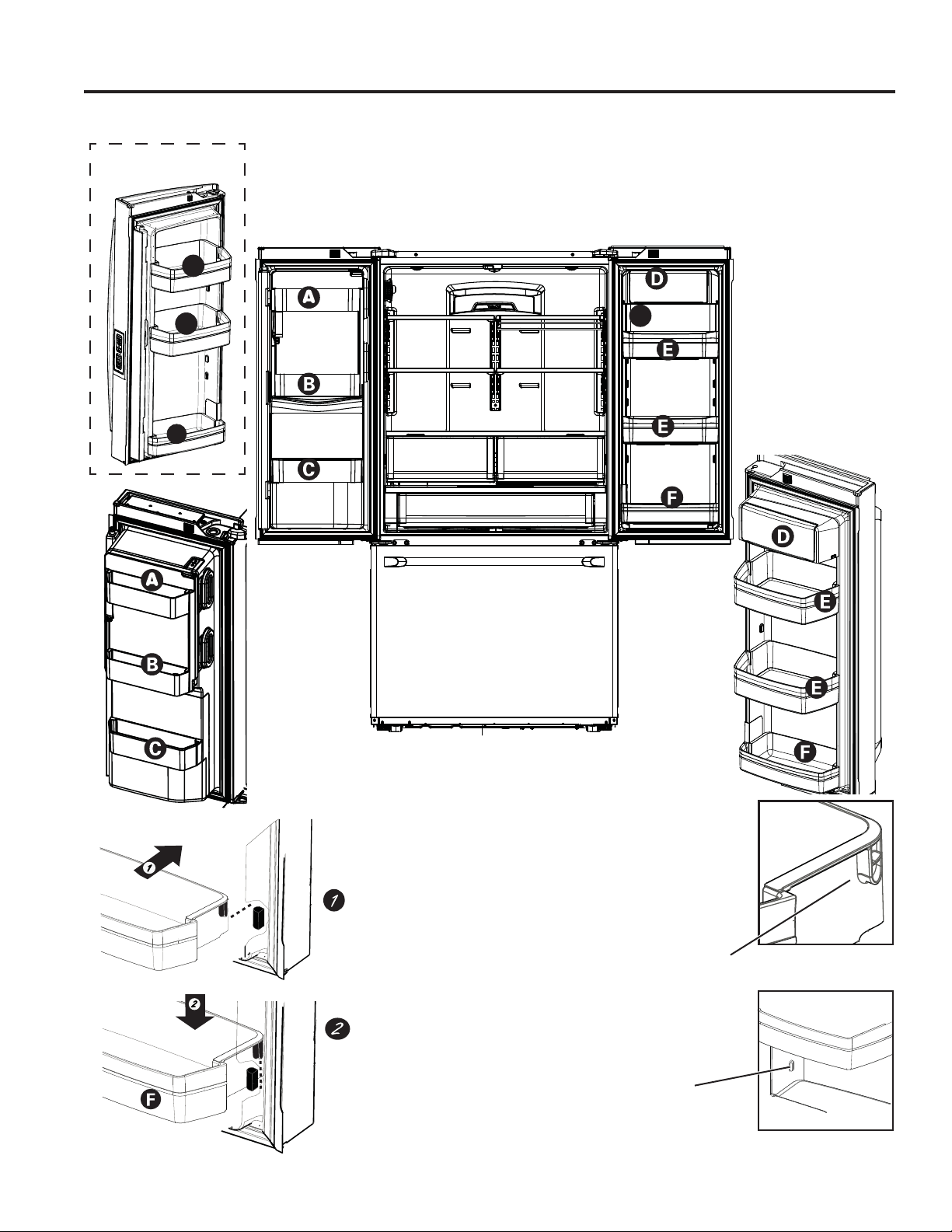
36 49-60820 Rev. 1
Refrigerator Assembly Instructions, suggested assembly.
G
To place bins into doors:
Match your bin with the letter shown.
Position the bin hooks over the bin locator
and push forward until inserted fully.
Bin locator
each side
Bin hook
rear each side
Push bin down until locked into position.
J
H
H
Non-Dispense
Models
Installation Instructions
INSTALLATION INSTRUCTIONS
INSTALLING THE REFRIGERATOR (Cont.)
49-60820 Rev. 1 37
WHAT YOU WILL NEED
• Copper or SmartConnect
™
Refrigerator Tubing kit,
´RXWHUGLDPHWHUWRFRQQHFWWKHUHIULJHUDWRUWRWKH
water supply. If using copper, be sure both ends of
the tubing are cut square.
To determine how much tubing you need:
measure the distance from the water valve on the
back of the refrigerator to the water supply pipe.
Be sure there is sufficient extra tubing to allow
the refrigerator to move out from the wall after
installation.
SmartConnect
™
Refrigerator Tubing Kits are available
in the following lengths:
8’ (2.4 m) – WX08X10006
15’ (4.6 m) – WX08X10015
25’ (7.6 m) – WX08X10025
BEFORE YOU BEGIN
Recommended copper water supply kits are WX8X2,
WX8X3 or WX8X4, depending on the amount of tubing
you need. Approved plastic water supply lines are
SmartConnect
™
Refrigerator Tubing (WX08X10006,
WX08X10015 and WX08X10025).
When connecting your refrigerator to a Reverse
Osmosis Water System, the only approved installation is
with a RVKit. For other reverse osmosis water systems,
follow the manufacturer’s recommendations.
If the water supply to the refrigerator is from a
Reverse Osmosis Water Filtration System (RO)
AND the refrigerator also has a water filter, use
WKHUHIULJHUDWRU¶VILOWHUE\SDVVSOXJ8VLQJWKH
refrigerator’s water filtration cartridge in conjunction
with an RO water filter can result in hollow ice
cubes. Some models do not come equipped with
the filter bypass plug. To obtain a free bypass plug,
visit cafeappliances.com/service. In Canads, visit
cafeappliances.ca/service.
This water line installation is not warranted by the
refrigerator or ice maker manufacturer. Follow
these instructions carefully to minimize the risk of
expensive water damage.
Water hammer (water banging in the pipes) in house
plumbing can cause damage to refrigerator parts and
lead to water leakage or flooding. Call a qualified
plumber to correct water hammer before installing
the water supply line to the refrigerator.
To prevent burns and product damage, do not hook
up the water line to the hot water line.
For LCD Models: If the refrigerator is operated before
the water connection is made to the ice maker,
VHH,&(0$.(5XQGHU³VHWWLQJV´PHQXRIWKH/&'
Operations section and follow the screen commands
to turn the ice maker OFF.
Do not install the ice maker tubing in areas where
temperatures fall below freezing.
When using any electrical device (such as a power
drill) during installation, be sure the device is double
insulated or grounded in a manner to prevent the
hazard of electric shock, or is battery powered.
All installations must be in accordance with local
plumbing code requirements.
INSTALLATION INSTRUCTIONS
Installation Instructions
INSTALLING THE WATER LINE
WARNING
Connect to potable water supply only.
A cold water supply is required for automatic
icemaker operation. The water pressure must be
between 40 and 120 psi (275-827 kilopascals)
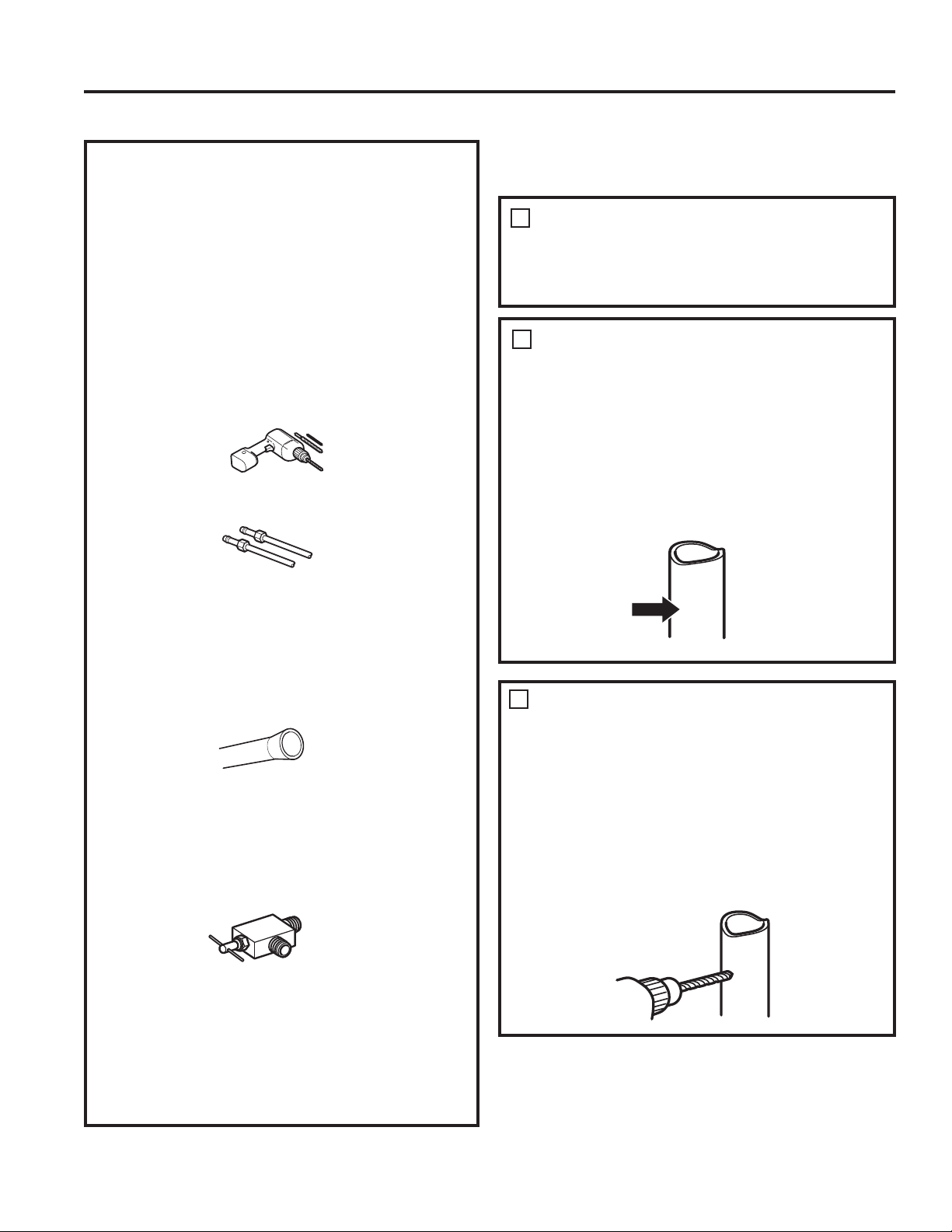
38 49-60820 Rev. 1
WHAT YOU WILL NEED (Cont.)
NOTE: The only GE Appliances, a Haier company,
approved plastic tubing is that supplied in
SmartConnect
™
Refrigerator Tubing kits. Do not
use any other plastic water supply line because the
line is under pressure at all times. Certain types of
plastic will crack or rupture with age and cause water
damage to your home.
• A water supply kit (containing tubing, shutoff valve
and fittings listed below) is available at extra cost
from your dealer or from cafeappliances.com/
parts. In Canada, visit cafeappliances.ca/parts.
• A cold water supply. The water pressure must be
between 20 and 120 p.s.i. (1.4–8.1 bar).
• Power drill.
´RUDGMXVWDEOHZUHQFK
• Straight and Phillips blade screwdriver.
7ZR´RXWHUGLDPHWHUFRPSUHVVLRQQXWV
DQGIHUUXOHVVOHHYHV²WRFRQQHFWWKHFRSSHU
tubing to the shutoff valve and the refrigerator water
valve.
OR
• If you are using a SmartConnect
™
Refrigerator
Tubing kit, the necessary fittings are preassembled
to the tubing.
• If your existing copper water line has a flared fitting
at the end, you will need an adapter (available at
plumbing supply stores) to connect the water line to
the refrigerator OR you can cut off the flared fitting
with a tube cutter and then use a compression
fitting. Do not cut formed end from SmartConnect
™
Refrigerator tubing.
• Shutoff valve to connect to the cold water line.
The shutoff valve should have a water inlet with a
PLQLPXPLQVLGHGLDPHWHURI´DWWKHSRLQWRI
connection to the COLD WATER LINE. Saddle-type
shutoff valves are included in many water supply
kits. Before purchasing, make sure a saddle-type
valve complies with your local plumbing codes.
2
CHOOSE THE VALVE
LOCATION
Choose a location for the valve that is easily
accessible. It is best to connect into the side of
a vertical water pipe. When it is necessary to
connect into a horizontal water pipe, make the
connection to the top or side, rather than at the
bottom, to avoid drawing off any sediment from
the water pipe.
3
DRILL THE HOLE FOR THE
VALVE
'ULOOD´KROHLQWKHZDWHUSLSHHYHQLIXVLQJ
a self-piercing valve), using a sharp bit. Remove
any burrs resulting from drilling the hole in the
pipe.
Take care not to allow water to drain into the drill.
)DLOXUHWRGULOOD´KROHPD\UHVXOWLQUHGXFHG
ice production or smaller cubes.
1
SHUT OFF THE MAIN WATER
SUPPLY
Turn on the nearest faucet long enough to clear
the line of water.
Install the shutoff valve on the nearest frequently
used drinking water line.
Installation Instructions
INSTALLATION INSTRUCTIONS
INSTALLING THE WATER LINE (Cont.)
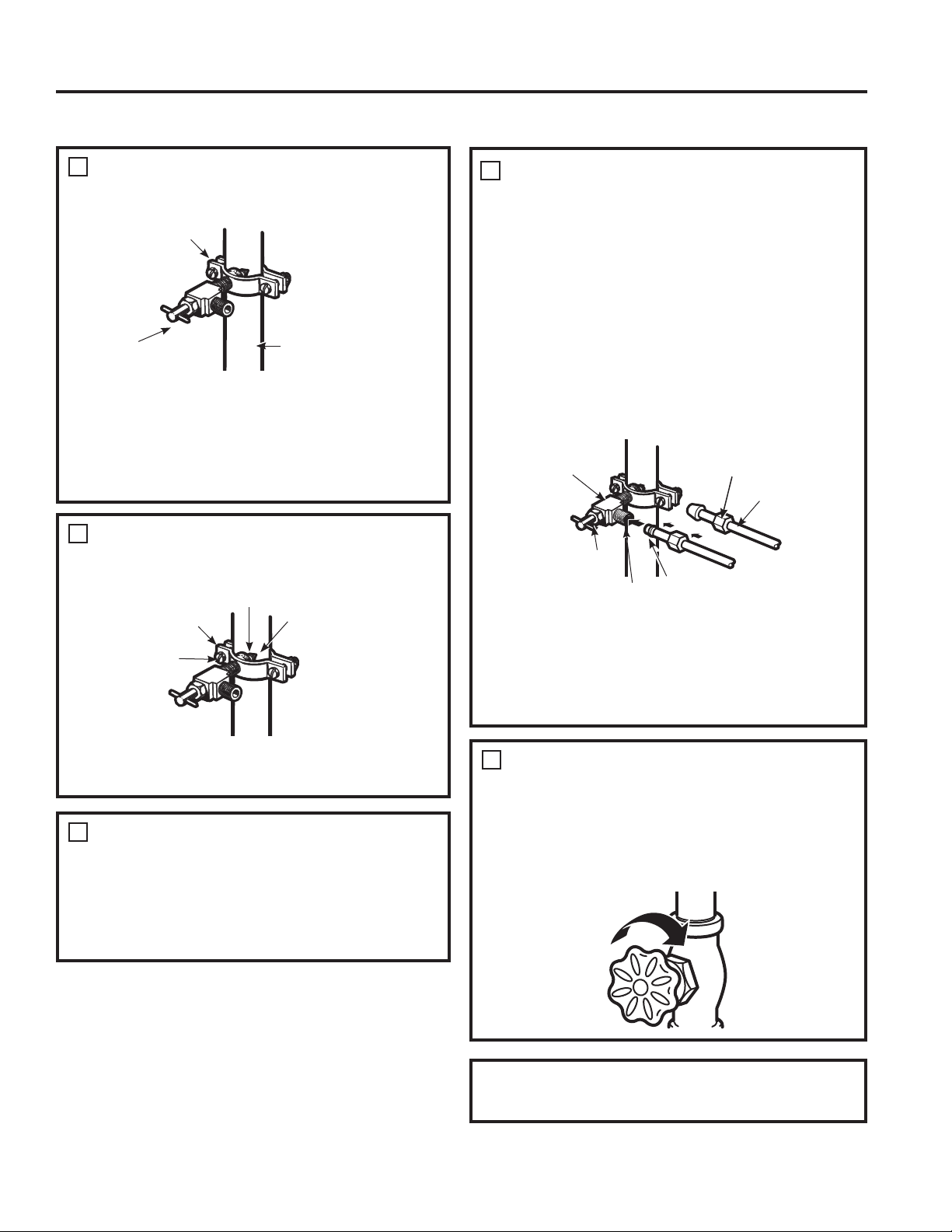
49-60820 Rev. 1 39
4
FASTEN THE SHUTOFF VALVE
Fasten the shutoff valve to the cold water pipe
with the pipe clamp.
NOTE: Commonwealth of Massachusetts
Plumbing Codes 248CMR shall be adhered
to. Saddle valves are illegal and use is not
permitted in Massachusetts. Consult with your
licensed plumber.
5
TIGHTEN THE PIPE CLAMP
Tighten the clamp screws until the sealing
washer begins to swell.
NOTE: Do not over tighten or you may crush
the tubing.
6
ROUTE THE TUBING
Route the tubing between the cold water line and
the refrigerator.
Route the tubing through a hole drilled in the
wall or floor (behind the refrigerator or adjacent
base cabinet) as close to the wall as possible.
8
FLUSH OUT THE TUBING
Turn the main water supply on and flush out the
tubing until the water is clear.
Shut the water off at the water valve after about
one quart (1 liter), or 2 minutes, of water has
been flushed through the tubing.
Place the compression nut and ferrule (sleeve)
for copper tubing onto the end of the tubing and
connect it to the shutoff valve.
Make sure the tubing is fully inserted into the valve.
Tighten the compression nut securely.
For plastic tubing from a SmartConnect
™
Refrigerator Tubing kit, insert the molded end
of the tubing into the shutoff valve and tighten
compression nut until it is hand tight, then tighten
one additional turn with a wrench. Over tightening
may cause leaks.
NOTE: Commonwealth of Massachusetts
Plumbing Codes 248CMR shall be adhered to.
Saddle valves are illegal and use is not permitted
in Massachusetts. Consult with your licensed
plumber.
CONNECT THE TUBING TO THE
VALVE
7
Saddle-Type
Shutoff Valve
Compression Nut
Packing Nut
Outlet Valve
Ferrule (sleeve)
SmartConnect
™
Tubing
Pipe Clamp
Vertical Cold
Water Pipe
Saddle-Type
Shutoff Valve
Washer
Inlet End
Pipe Clamp
Clamp
Screw
To complete the installation of the refrigerator, go
back to Step 11 in Installing the Refrigerator.
INSTALLATION INSTRUCTIONS
Installation Instructions
INSTALLING THE WATER LINE (Cont.)
40 49-60820 Rev. 1
Newer refrigerators sound different from older refrigerators.
Modern refrigerators have more features and use newer technology.
HUMMM...
WHOOSH...
Ŷ The new high efficiency compressor may run faster
and longer than your old refrigerator and you may
hear a high-pitched hum or pulsating sound while it
is operating.
Ŷ <RXPD\KHDUDZKRRVKLQJVRXQGZKHQWKHGRRUV
close. This is due to pressure equalizing within the
refrigerator.
Ŷ $IWHUGLVSHQVLQJLFHDPRWRUZLOOFORVHWKHLFHFKXWH
to keep warn room air from entering the ice bucket,
maintaining ice at a freezing temperature.
The hum of the motor closing the ice chute is
normal, shortly after dispensing ice.
Ŷ
You may hear the fans spinning at high speeds.
This happens when the refrigerator is first plugged
in, when the doors are opened frequently or when
a large amount of food is added to the refrigerator
or freezer compartments. The fans are helping to
maintain the correct temperatures.
Ŷ
The fans change speeds in order to provide optimal
cooling and energy savings.
CLICKS, POPS,
CRACKS and SNAPS
Ŷ You may hear cracking or popping sounds when
the refrigerator is first plugged in. This happens as
the refrigerator cools to the correct temperature.
Ŷ Expansion and contraction of cooling coils during
and after defrost can cause a cracking or popping
sound.
Ŷ On models with an ice maker, after an ice making
cycle, you may hear the ice cubes dropping into the
ice bucket.
Ŷ On models with a dispenser, during water dispense,
you may hear the water lines move at initial
dispense and after dispenser button is released.
WATER SOUNDS
Ŷ The flow of refrigerant through the cooling coils may
make a gurgling noise like boiling water.
Ŷ Water dropping on the defrost heater can cause
a sizzling, popping or buzzing sound during the
defrost cycle.
Ŷ A water dripping noise may occur during the defrost
cycle as ice melts from the evaporator and flows
into the drain pan.
Ŷ Closing the door may cause a gurgling sound due to
pressure equalization.
Do you hear what I hear? These conditions are normal.
START UP COOLING
It can take up to 24 hours for the refrigerator and
freezer temperatures to match the display. During that
time refrigerator and freezer door openings should be
minimized.
TIPS
Ŷ Freezer cools first.
Ŷ 5HIULJHUDWRUFRPSDUWPHQWFRROVODVWLWPD\WDNH
several hours after the freezer.
Ŷ 7XUQLQJRIILFHPDNHUPDNHVERWKIUHVKIRRGDQG
freezer food cool faster.
Normal Operating Conditions.
TROUBLESHOOTING TIPS: Normal Operating Conditions
49-60820 Rev. 1 41
Problem Possible Causes What to Do
Water filter indicated as installed
incorrectly or a leak is present
message on LCD screen.
Water filter installed backward or is
leaking.
Check for leak. If no leak is present,
remove filter/bypass plug, rotate 180°
and reinstall.
Water filter indicator light remains
lit after replacing filter.
Filter timer has not been reset or
filter is installed backward.
Internal Dispense models:
-Press and hold reset button for 3
seconds
External Dispense models:
-Remove filter and rotate 180°and
reinstall.
Handle is loose/handle has a
gap.
Handle needs adjusting See Attach Fresh Food Handle and
Attach the Freezer Handle sections for
detailed instructions.
Refrigerator beeping This is door alarm Turn off or disable with door closed.
If door open and alarm is sounding, you
can only snooze the alarm.
Not cooling The cooling system is off See About Controls.
Water has poor taste/odor Water dispenser has not been used
for a long time
Dispense water, until all water in system
is replenished.
Water in glass is warm Normal when refrigerator is first
installed
Wait 24 hours for the refrigerator to
completely cool down.
Water dispenser has not been used
for a long time
Dispense water, until all water in system
is replenished.
Water system has drained Allow several hours for replenished
supply to chill.
Water dispenser does not work Water supply line turned off or not
connected
See Installing the Water Line.
Water filter clogged or filter/bypass
plug not installed
Replace filter cartridge or remove filter
and install bypass plug.*
Air may be trapped in the water
system
Press the dispenser arm for at least 5
minutes.
Water in reservoir is frozen because
the controls are set too cold
Set the refrigerator control to a
warmer setting and wait 24 hours.
If the water does not dispense after
24 hours, schedule service on-line at
cafeappliances.com/service
Water spurting from dispenser Newly installed filter cartridge Run cold water from the dispenser for
5 minutes (about 2 gallons)..
Water is leaking from dispenser Air may be present in the water line
system, causing water to drip after
being dispensed
Dispense water for at least 5 minutes to
remove air from system
No water or ice cube production Supply line or shutoff valve is
clogged
Call a plumber
Water filter is clogged Replace filter cartridge or remove filter
and install bypass plug*
Filter cartridge not properly installed Remove and reinstall filter cartridge,
being certain that it locks in place.
Ice maker is turned off Check that the ice maker is turned on.
See About the Automatic Ice Maker.
*Some models do not come equipped with the filter bypass plug. To obtain a free bypass plug, visit us on-line at
cafeappliances.com/service. In Canads, visit cafeappliances.ca/service.
Troubleshooting Tips... Before you schedule service
TROUBLESHOOTING TIPS
Save time and money! Review the charts on the following pages first and you may not need to schedule service.
42 49-60820 Rev. 1
Problem Possible Causes What to Do
PRECISE FILL will not fill container Normal, PRECISE FILL requires use
of dispenser paddle
For a specific amount of water, select
PRECISE FILL to dispense water
Photos not found 3KRWRVQRWLQURRWGLUHFWRU\RI86% Make sure the photos are in the root
GLUHFWRU\LQ\RXU86%
Photos not in JPEG format Photos must be in JPEG format
&DPHUD3&XVHGZLWK86%FRUG 0XVWXVHD86%GULYH
Freezer cooling, fresh food not
cooling
Normal, when refrigerator first plugged
in or after extended power outage
Wait 24 hours for temperature in both
compartments to reach selected
temperatures.
Ice dispenser opens after closing
freezer drawer
Normal The ice dispenser door may open
after closing freezer door to allow
access
Hot water does not work Operation disabled 0DNHVXUH³+RW:DWHU'LVDEOHG´LV
not selected
Low water pressure Make sure water line is not kinked
Water supply line turned off or not
connected
See Installing the Water Line
Water filter clogged or filter/bypass
plug not installed
Replace filter cartridge or remove
filter and install bypass plug*
Hot water continues to dispense for
a short time after releasing the knob
Water filter is partially clogged or low
water pressure (<40 psi)
Replace filter cartridge or remove
filter and install bypass plug* or
increase water pressure
Difficult to open the Icebox door Icebox door gasket might stick to main
door if it remains closed for a long
duration
Disengage the door latch, wait for 3
minutes then open the Icebox door
Fresh food door not closing fully Fresh food door gasket may have
unseated and interfering with
articulating mullion operation
Reseat the gasket all the way in the
groove
Low brewing flow rate There may have been a dent at the
bottom of K-Cup causing the pin
to pierce the filter allowing coffee
grounds clogging the bottom pin
Avoid using damaged/dented K-cups,
and clean the lower needle before
next brew
Low brewing flow rate / water drips
from inner door
Top needle of the brewer clogged 8QFORJWKHWRSQHHGOHKROHVXVLQJD
paper clip and rinse brewer. Rinse
brewer after every use.
Brewer stuck in the door bracket Dispenser is in hot water dispense
mode instead of brew mode while the
brew module is installed
Cancel hot water dispense mode so
hot water tube will retract from the
brew module
Brewer is not detected by the
screen menu or hot water leaking
from top of the brewer
Incorrect assembly of brewer in the
bracket
Make sure the Keurig Logo is in the
front. Push brewer all the way in the
brackets
Coffee dispensed with splash or
bubble bursting
Blocked vent hole in the brewer Make sure the vent hole at the
bottom of the brewer is clear from
food or any other contamination
Beverage quality not as expected You may be using non-standard or out
dated K-Cups
Recommend using official Keurig
K-cups that are not past expiration
and have not been damaged
Liquid drips from the brewer after
brewer cycle is completed and the
brewer is removed from the bracket
It is possible for liquids to be retained
by the brewer and drip when it is
removed
8VHDFORWKRUFRQWDLQHUWRFDSWXUH
the drips when brewer is removed
*Some models do not come equipped with the filter bypass plug. To obtain a free bypass plug, visit us on-line at
cafeappliances.com/service. In Canads, visit cafeappliances.ca/service.
Troubleshooting Tips... Before you schedule service
TROUBLESHOOTING TIPS
49-60820 Rev. 1 43
Truth or Myth? Answer Explanation
The refrigerator water filter may require
replacement prior to six months of use
758( The water filter indicator will indicate the need to replace the
water filter every six months or 170 gallons (643.52 liters) of
water dispensed (select models only). Water quality varies
from city to city. If water flow from the dispenser slows, or ice
production decreases, the water filter should be replaced,
even though the filter indicator may not indicate the need for
replacement.
The automatic ice maker in my
refrigerator will produce ice when the
refrigerator is plugged in to a power
receptacle.
MYTH The refrigerator must be connected to water, and the ice
maker must be turned on. Make sure the ice maker is turned
on, only after the water line is connected and water is turned
on. The ice maker can be turned on/off from the controls and
ensure the ice maker is on, as indicated on the refrigerator
control panel. See Automatic Ice Maker section.
After the refrigerator has been plugged
in and connected to water, I will
immediately have unlimited chilled water
available from the water dispenser.
MYTH The water dispenser tank located inside the refrigerator stores
water for dispensing. The water in this tank requires 24 hours
to chill after installation. High usage conditions will not allow
time for the water to chill.
After water dispenses, a few drops of
water are normal.
758( A few drops of water may fall from the dispenser, after the
dispenser paddle has been released. To minimize the drops,
remove the glass slowly from the dispenser.
I will never see frost inside the freezer
compartment.
MYTH Frost inside the freezer typically indicates that the door is
not properly sealed, or has been left open. If frost is found,
clear the frost using a plastic spatula and towel, then check
to ensure that no food packages or containers are preventing
the freezer door from closing. Check the refrigerator control
panel to ensure the door alarm is on.
Before you schedule service, review the detailed troubleshooting tips in the Owner’s manual. If
needed, service can be scheduled by visiting us online at cafeappliances.com/service.
In Canada, visit cafeappliances.ca/service
Truth or Myth
SERVICE
Problem Possible Causes What to Do
Delay when using Keurig K-cup Pod
dispenser
To ensure a quality beverage is
delivered, a short delay is required
to ensure the refrigerator is
operating correctly
Ensuring consistent, quality operation
requires the refrigerator to delay
dispense for a short period of time
After brewing, my powdered
beverage is not fully cleared from
the used pod
Depending on size selected, the
powder may not dissolve fully.
Some powdered beverages
develop into ‘clumps’ when left
sitting for some time
Shake the powdered pods before
brewing to break up these clumps and
allow better clearing. For powdered
beverage with no filter, use the Cocoa
cycle selection
Brewer lid is difficult to close K-cup is not fully seated Press K-cup all the way down into the
brewer prior to closing the lid. Lower
needle must puncture K-cup bfore
closing the brewer lid
Brewer leaks during the brew cycle Trouble in closing brewer lid or
damaged K-cup
Press K-cup all the way down into the
brewer prior to closing the lid. Lower
needle must puncture K-cup bfore
closing the brewer lid. Recommend
using official Keurig K-cups that have
not been damaged and have a good
seal between the top cover and plastic
bottom
Troubleshooting Tips... Before you schedule service
TROUBLESHOOTING TIPS
44 49-60820 Rev. 1
Truth or Myth? Answer Explanation
When the refrigerator is installed, or after
replacing the water filter, I must dispense
water for five minutes.
758(
A newly installed refrigerator or water filter contains air in the water
lines. Press the dispenser paddle and dispense cold water for at least
5 minutes to remove air from the water line, and flush the filter.
To fill the ice bucket to the maximum
capacity, I should dispense 12 and 18 hours
after installation.
758( Dispensing 3-4 cubes 12 hours and 18 hours after installation, allows
ice to disperse within the ice bucket, which in turns calls on the ice
maker to produce additional ice. Normal ice production = 100 cubes
in 24 hours.
I can use the water filter bypass plug to
determine if the filter requires replacement.
758( Decrease in flow from the water dispenser, or decreased ice
production, may indicate the need to replace the water filter. Install
the water filter bypass plug (provided with the refrigerator on some
models*), and check flow from the dispenser. If water flow returns to
normal with the bypass plug in place, replace the water filter.
The top of the refrigerator doors will always
be aligned.
MYTH Several things can affect the fresh food door alignment, including the
floor the refrigerator is installed on and loading of doors. If the top
RIWKHIUHVKIRRGGRRUVDUHQRWDOLJQHGXVHD´DOOHQZUHQFKWR
adjust the right/left hand door. The adjustment screw is located on
WKHERWWRPULJKWRUOHIWKDQGVLGHRIWKHGRRURSHQWKHIUHH]HUGRRUWR
access the screw.
Refrigerator door handles can be easily
tightened.
758( If door handles are loose or have a gap, the handle can be adjusted
XVLQJD´DOOHQZUHQFKRQVHWVFUHZVORFDWHGRQWKHHQGVRIWKH
handles.
There may be odor and taste problems with
your ice.
758( After starting the ice maker throw away 24 hours of ice production to
avoid odor and taste problems.
I can make fine adjustments to the fresh food
doors to align them.
758( ,IWKHIUHVKIRRGGRRUVDUHQRWDOLJQHGXVHD´$OOHQZUHQFKWR
adjust the right hand door. The adjustment screw is located on the
bottom of the right/left door. Open the freezer door to access.
Door handles should always be removed for
installation.
MYTH Check chart on reverse side of this instruction. If the doors must be
removed do not remove the handles, or if the refrigerator will fit easily
through the passage way opening. Adjust handles that are loose or
KDYHDJDSE\DGMXVWLQJ´VHWVFUHZVRQHLWKHUHQGRIKDQGOHV
Door removal is always required for
installation.
MYTH Check chart on reverse side of this instruction. Doors should only be
removed when necessary to prevent damage from passage way or
access to final location.
Refrigerator doors that won’t close after
installation, can be adjusted to close properly.
758( Door mechanism works best if installed at 90°+. If installed at 180°,
remove the door from the mid hinge, and swing the door 180° before
reinstalling. See Reinstalling the Refrigerator Doors.
There is an adjustment to rear wheels. MYTH Front leveling legs are adjustable and should be used to balance the
refrigerator. Leveling legs are used to make initial fresh food door
adjustment.
Check for leaks after all water connections
are made.
758( While purging the air from the water system, check all water line
connections for leaks. Check the connection to the household water
supply at back of refrigerator, and door water line connect.
My LCD display will always be on when I
plug the power cord in at installation.
MYTH If the refrigerator has been stored in a cold environment, the LCD
may be slow to give a proper display. Give the refrigerator enough
time to warm up, and the display should be okay.
Any packaging residue can be cleaned off
the refrigerator using any cleaner.
MYTH Do not use wax, polish, bleach, or other products containing chlorine
on Stainless Steel panels, door handles and trim. Check this
LQVWUXFWLRQXQGHU³&OHDQLQJWKH2XWVLGH´IRUIXOOGHWDLOV
*Some models do not come equipped with the filter bypass plug. To obtain a free bypass plug, visit us on-line at
cafeappliances.com/service. In Canads, visit cafeappliances.ca/service.
Truth or Myth
TROUBLESHOOTING TIPS
Truth or Myth
SERVICE
Before you schedule service, review the detailed troubleshooting tips in the Owner’s manual.
If needed, service can be scheduled by visiting us online at cafeappliances.com/service.
In Canada, visit cafeappliances.ca/service
49-60820 Rev. 1 45
Ŷ Service trips to your home to teach you how to use
the product.
Ŷ,PSURSHULQVWDOODWLRQGHOLYHU\RUPDLQWHQDQFH
Ŷ)DLOXUHRIWKHSURGXFWLILWLVDEXVHGPLVXVHGRU
used for other than the intended purpose or used
commercially.
Ŷ/RVVRIIRRGGXHWRVSRLODJH
Ŷ5HSODFHPHQWRIKRXVHIXVHVRUUHVHWWLQJRIFLUFXLW
breakers.
Ŷ'DPDJHWRILQLVKVXFKDVVXUIDFHUXVWWDUQLVKRU
small blemishes not reported within 48 hours of
delivery.
Ŷ5HSODFHPHQWRIWKHZDWHUILOWHUFDUWULGJHLI
included, due to water pressure that is outside
the specified operating range or due to excessive
sediment in the water supply.
Ŷ5HSODFHPHQWRIWKHOLJKWEXOEVLILQFOXGHGRU
water filter cartridge, if included, other than as
noted above.
Ŷ'DPDJHWRWKHSURGXFWFDXVHGE\DFFLGHQWILUH
floods or acts of God.
Ŷ,QFLGHQWDORUFRQVHTXHQWLDOGDPDJHFDXVHGE\
possible defects with this appliance.
Ŷ3URGXFWQRWDFFHVVLEOHWRSURYLGHUHTXLUHGVHUYLFH
Ŷ'DPDJHFDXVHGE\DQRQ*($SSOLDQFHV%UDQG
water filter.
What Café Will Not Cover:
For the Period of: Café Will Replace
One Year
From the date of the
original purchase
Any part of the refrigerator which fails due to a defect in materials or workmanship.
During the limited one-year warranty, Café will also provide, free of charge, all labor
and related service to replace the defective part.
Thirty Days
(Water filter, if included)
From the original
purchase date of the
refrigerator
Any part of the water filter cartridge which fails due to a defect in materials or
workmanship. During this limited thirty-day warranty, Café will also provide, free of
charge, a replacement water filter cartridge.
Five Years
From the date of the
purchase
Any part of the sealed refrigerating system (the compressor, condenser, evaporator an all
connecting tubing) which fails due to a defect in materials or workmanship.
During this limited five-year sealed refrigerating system warranty, Café will also
provide, free of charge, all labor and related service to replace the defective part in the
sealed refrigerating system.
Staple your receipt here. Proof of the original purchase
date is needed to obtain service under the warranty.
cafeappliances.com
All warranty service is provided by our Factory Service Centers, or an authorized service technician. To schedule service
online, visit us at cafeappliances.com/service. Please have your serial number and your model number available when
scheduling service. In Canada, visit cafeappliances.ca/service.
LIMITED WARRANTY
Café Refrigerator Limited Warranty
EXCLUSION OF IMPLIED WARRANTIES
Your sole and exclusive remedy is product repair as provided in this Limited Warranty. Any implied warranties,
including the implied warranties of merchantability or fitness for a particular purpose, are limited to one year or the
shortest period allowed by law.
For US Customers: This limited warranty is extended to the original purchaser and any succeeding owner for products
SXUFKDVHGIRUKRPHXVHZLWKLQWKH86$,IWKHSURGXFWLVORFDWHGLQDQDUHDZKHUHVHUYLFHE\D&DIp$XWKRUL]HG6HUYLFHU
is not available, you may be responsible for a trip charge or you may be required to bring the product to an Authorized
Café
Service location for service. In Alaska, the limited warranty excludes the cost of shipping or service calls to your
home.
Some states do not allow the exclusion or limitation of incidental or consequential damages. This limited warranty
gives you specific legal rights, and you may also have other rights which vary from state to state. To know what your
legal rights are, consult your local or state consumer affairs office or your state’s Attorney General.
Warrantor: GE Appliances, a Haier company
Louisville, KY 40225
For Customers in Canada: This limited warranty is extended to the original purchaser and any succeeding owner
for products purchased in Canada for home use within Canada. In-home warrant service will be provided in areas
where it is available and deemed reasonable by Mabe to provide.
Warrantor Canada: MC Commercial, Inc., Burlington, Ontario, L7R 5B6
Servicing your refrigerator may require the use of the onboard data port for diagnostics. This gives a
Café Factory Service technician the ability to quickly diagnose any issues with your appliance and helps
Café improve its products by providing Café with information on your appliance. If you do not want your
appliance data to be sent to Café, please advise your technician NOT to submit the data to Café at the time
of service.
46 49-60820 Rev. 1
* If your GE Appliances part fails because of a manufacturing defect within thirty days from the date of original purchase for use, we will give you
a new or, at our option, a rebuilt part without charge. Return the defective part to the parts supplier from whom it was purchased together with a
FRS\RIWKH³SURRIRISXUFKDVH´IRUWKHSDUW,IWKHSDUWLVGHIHFWLYHDQGVKRZVQRVLJQVRIDEXVHLWZLOOEHH[FKDQJHG7KHZDUUDQW\GRHVQRW
cover the failure of parts which are damaged while in your possession, are abused, or have been installed improperly. It does not cover the cost
of returning the part to the supplier from whom it was purchased nor does it cover the cost of labor to remove or install it to diagnose the fault. It
does not cover parts used in products in commercial use except in the case of air conditioning equipment. In no event shall GE Appliances be
liable for consequential damages.
Warrantor: GE Appliances, a Haier company
Louisville, KY 40225
Seller:
Name
Address
City State Zip
Signature Date
Buyer:
Name
Address
City State Zip
Signature Date
Staple your receipt here. Proof of the original purchase
date is needed to obtain service under the warranty.
What GE Appliances will not cover:
Ŷ Service trips to your home to teach you how to use
the product.
Ŷ Improper installation.
Ŷ Failure of the product if it is abused, misused, used for
other than the intended purpose or used commercially.
Ŷ Replacement of house fuses or resetting of circuit
breakers.
Ŷ Replacement of the water filter cartridge due to water
pressure that is outside the specified operating range
or due to excessive sediment in the water supply.
Ŷ Damage to the product caused by accident, fire,
floods, or acts of God.
Ŷ Incidental or consequential damage caused by
possible defects with this appliance.
RPWFE Water Filter Cartridge Limited Warranty
This warranty is extended to the original purchaser and any succeeding owner for products purchased for home use
ZLWKLQWKH86$,Q$ODVNDWKHZDUUDQW\H[FOXGHVWKHFRVWRIVKLSSLQJRUVHUYLFHFDOOVWR\RXUKRPH
Some states do not allow the exclusion or limitation of incidental or consequential damages. This warranty gives you
specific legal rights, and you may also have other rights which vary from state to state. To know what your legal rights
are, consult your local or state consumer affairs office or your state’s Attorney General.
For Purchases Made In Iowa: This form must be signed and dated by the buyer and seller prior to the
consummation of this sale.
This form should be retained on file by the seller for a minimum of two years.
For the period of GE Appliances will replace
Thirty Days
From the date
of the original
purchase
Any part of the water filter cartridge which fails due to a defect in materials
or workmanship during this limited thirty-day warranty.*
Contact us at cafeappliances.com/parts
EXCLUSION OF IMPLIED WARRANTIES
Your sole and exclusive remedy is part exchange as provided in this Limited Warranty. Any implied warranties,
including the implied warranties of merchantability or fitness for a particular purpose, are limited to six months or
the shortest period allowed by law.
49-60820 Rev. 1 47
Performance Data Sheet Model: RPWFE
Ŷ6\VWHPFHUWLILHGE\,$30257DJDLQVW16)$16,6WDQGDUGVDQG3IRUWKHUHGXFWLRQRIFODLPVVSHFLILHGRQWKH
performance data sheet and at iapmort.org.
Ŷ$FWXDOSHUIRUPDQFHPD\YDU\ZLWKORFDOZDWHUFRQGLWLRQV
It is essential that the manufacturer’s recommended installation,
maintenance and filter replacement requirements be carried out for the
product to perform as advertised. See Installation Manual for Warranty
information.
Application Guidelines/Water Supply Parameters
Service Flow 0.5 gpm (1.89 lpm)
Water Supply Potable Water
Water Pressure 25-120 psi (172-827 kPa)
Water Temperature 33°F-100°F (0.6°C-38°C)
Capacity 170 gallons (643.5 liters)
Substance Tested for Reduction
Influent challenge
concentration
(mg/L)
Maximum permissible
product water
concentration (mg/L)
Avg %
Reduction
Chlorine Taste and Odor 2.0 mg/L +/- 10% N/A > 99
Chloramine Taste and Odor 3.0 mg/L +/- 10% 0.5 > 99
Particulate, Class I At least 10,000/mL N/A 91.4
Cysts 50,000/L N/A > 99.99
Lead 0.15 0.01 98.85
Mercury 0.006 0.002 96.95
Asbestos 107 to 108 fibers/ L N/A > 99
Toxaphene 0.015 +/- 10% 0.003 86.95
VOC (Chloroform surrogate chemical) 0.300 0.015 > 99
Alachlor 0.050 0.001 > 98
Atrazine 0.100 0.003 > 97
Benzene 0.081 0.001 > 99
Carbofuran 0.190 0.001 > 99
carbon tetrachloride 0.078 0.0018 98
chlorobenzene 0.077 0.001 > 99
chloropicrin 0.015 0.0002 99
2,4-D 0.110 0.0017 98
dibromochloropropane (DBCP) 0.052 0.00002 > 99
o-Dichlorobenzene 0.08 0.001 > 99
p-Dichlorobenzene 0.040 0.001 > 98
1,2-dichloroethane 0.088 0.0048 95
1,1-dichloroethylene 0.083 0.001 > 99
cis-1,2-dichloroethylene 0.170 0.0005 > 99
trans-1,2-dichloroethylene 0.086 0.001 > 99
1,2-dichloropropane 0.080 0.001 > 99
cis-1,3-dichloropropylene 0.079 0.001 > 99
dinoseb 0.170 0.0002 99
Endrin 0.053 0.00059 99
Ethylbenzene 0.088 0.001 > 99
ethylene dibromide (EDB) 0.044 0.00002 > 99
bromochloroacetonitrile 0.022 0.0005 98
dibromoacetonitrile 0.024 0.0006 98
dichloroacetonitrile 0.0096 0.0002 98
trichloroacetonitrile 0.015 0.0003 98
1,1-dichloro-2-propanone 0.0072 0.0001 99
1,1,1-trichloro-2-propanone 0.0082 0.0003 96
heptachlor (H-34, Heptox) 0.025 0.00001 > 99
heptachlor epoxide 0.0107 0.0002 98
hexachlorobutadiene 0.044 0.001 > 98
hexachlorocyclopentadiene 0.060 0.000002 > 99
Lindane 0.055 0.00001 > 99
methoxychlor 0.050 0.0001 > 99
pentachlorophenol 0.096 0.001 > 99
simazine 0.120 0.004 > 97
Styrene 0.150 0.0005 > 99
1,1,2,2-tetrachloroethane 0.081 0.001 > 99
Tetrachloroethylene 0.081 0.001 > 99
Toluene 0.078 0.001 > 99
2,4,5-TP (silvex) 0.270 0.0016 99
tribromoacetic acid 0.042 0.001 > 98
1,2,4-Trichlorobenzene 0.160 0.0005 > 99
1,1,1-trichloroethane 0.084 0.0046 95
1,1,2-trichloroethane 0.150 0.0005 > 99
trichloroethylene 0.180 0.0010 > 99
bromoform 0.300 0.015 95
bromodichloromethane 0.300 0.015 95
chlorodibromomethane 0.300 0.015 95
xylenes 0.070 0.001 > 99
Meprobamate 400 +/- 20% 60 > 99
Atenolol 200 +/- 20% 30 > 99
Carbamazepine 1400 +/- 20% 200 > 99
DEET 1400 +/- 20% 200 > 99
Metolachlor 1400 +/- 20% 200 > 99
Trimethoprim 140 +/- 20% 20 > 99
Linuron 140 +/- 20% 20 > 99
TCEP 5000 +/- 20% 700 > 99
TCPP 5000 +/- 20% 700 > 99
Phenytoin 200 +/- 20% 30 > 99
Ibuprofen 400 +/- 20% 60 > 99
Naproxen 140 +/- 20% 20 > 99
Estrone 140 +/- 20% 20 > 99
Bisphenol A 2000 +/- 20% 300 > 99
Nonyl phenol 1400 +/- 20% 200 > 99
PFOA/PFOS 1.5 mg/L +/- 10% 0.07 99.25
NOTE: While the testing was performed under standard
laboratory conditions, actual performance may vary.
Replacement Cartridge: RPWFE. For estimated costs of
replacement elements please call 1.877.959.8688 or visit our
website at cafeappliances.com/parts
WARNING
To reduce the risk associated with
ingestion of contaminants:
• Do not use with water that is microbiologically unsafe or
of unknown quality without adequate disinfection before
and after the system. Systems certified for cyst reduction
may be used on disinfected water that may contain filterable
cysts.
NOTICE
To reduce the risk of water leakage or flooding, and to
ensure optimal filter performance:
• Read and follow use instructions before installation and use
of this system.
• Installation and use MUST comply with all state and local
plumbing codes.
• Do not install if water pressure exceeds 120 psi (827 kPa).
If your water pressure exceeds 80 psi, you must install a
pressure-limiting valve. Contact a plumbing professional if
you are uncertain how to check your water pressure.
• Do not install where water hammer conditions may occur.
If water hammer conditions exist you must install a water
hammer arrester. Contact a plumbing professional if you are
uncertain how to check for this condition.
• Do not install on hot water supply lines. The maximum
operating water temperature of this filter system is 100º F
(38º C).
• Protect filter from freezing. Drain filter when temperatures
drop below 33ºF (0.6ºC).
• Change the disposable filter cartridge every six months or
sooner if you observe a noticeable reduction in water flow
rate.
• Failure to replace the disposable filter cartridge at
recommended intervals may lead to reduced filter
performance and cracks inthe filter housing, causing water
leakage or flooding.
• This System has been tested according to NSF/ANSI 42,
53, 401 and P473 for the reduction of the substances listed
below. The concentration of the indicated substances in
water entering the system was reduced to a concentration
less than or equal to the permissible limit for water leaving
the system, as specified in NSF/ANSI 42, 53, 401 and P473.
RPWFE System is certified by IAPMO
R&T against NSF/ANSI Standards 42,
53, 401, and P473 for the reduction of
claims specified on the performance
data sheet and at iapmort.org.
48 49-60820 Rev. 1
3ULQWHGLQ8QLWHG6WDWHV
CONSUMER SUPPORT
Consumer Support
Café Website
Have a question or need assistance with your appliance? Try the Café website 24 hours a day, any day of the year! You can also
shop for more great Café products and take advantage of all our on-line support services designed for your convenience. In the
86cafeappliances.com
Register Your Appliance
Register your new appliance on-line at your convenience! Timely product registration will allow for enhanced communication and
prompt service under the terms of your warranty, should the need arise. You may also mail in the pre-printed registration card
LQFOXGHGLQWKHSDFNLQJPDWHULDO,QWKH86cafeappliances.com/register
Schedule Service
Expert Café repair service is only one step away from your door. Get on-line and schedule your service at your convenience any
GD\RIWKH\HDU,QWKH86cafeappliances.com/service
Extended Warranties
Purchase a Café extended warranty and learn about special discounts that are available while your warranty is still in effect. You
can purchase it on-line anytime. Café Service will still be there after your warranty expires.
,QWKH86cafeappliances.com/extended-warranty
Remote Connectivity
For assistance with wireless network connectivity (for models with remote enable),
visit our website at cafeappliances.com/connect
Parts and Accessories
Individuals qualified to service their own appliances can have parts or accessories sent directly to their homes
(VISA, MasterCard and Discover cards are accepted). Order on-line today 24 hours every day.
,QWKH86cafeappliances.com/parts
Instructions contained in this manual cover procedures to be performed by any user. Other servicing generally should
be referred to qualified service personnel. Caution must be exercised, since improper servicing may cause unsafe
operation.
Contact Us
If you are not satisfied with the service you receive from Café, contact us on our website with all the details including your phone
number, or write to:
,QWKH86*HQHUDO0DQDJHU&XVWRPHU5HODWLRQV_&DIp$SSOLDQFHV$SSOLDQFH3DUN_/RXLVYLOOH.<
cafeappliances.com/contact

