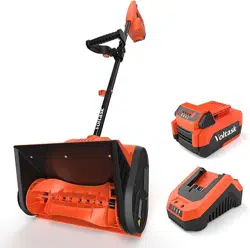
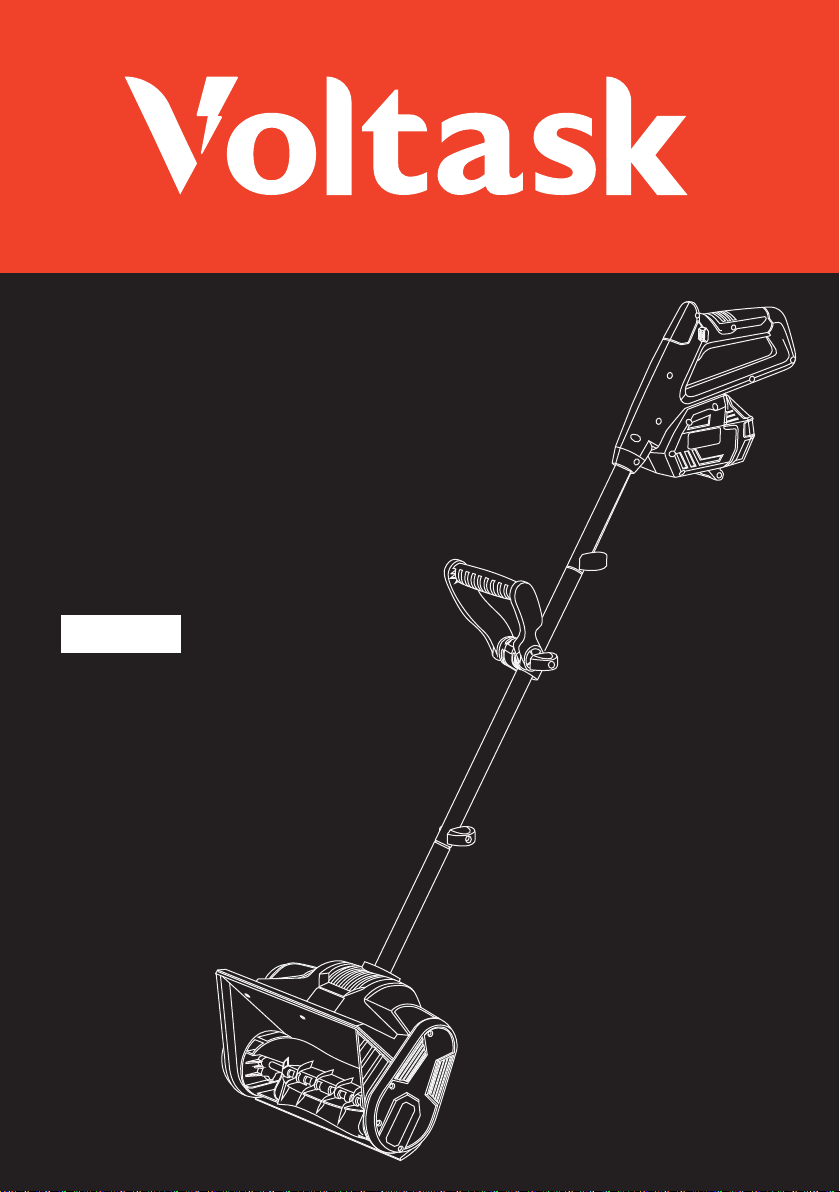
20V/12-INCH Cordless
Snow Shovel
SS-20D
SS-20D
USER MANUAL
Read All Instructions Before First Use.
Keep This Manual For Future Reference.
Model No.
Voltage
Max Throwing Distance
Clearing Width
Max Clearing Depth
Machine Weight (without battery)
Motor
Battery Capacity
Charger Input
No-Load Speed
SS-20D
20 V
20 ft. (6 m)
12 in. (30 cm)
6 in. (15 cm)
8.8 lb.
300 W
4.0 Ah
100–120V/50–60Hz/65W
2400 ± 10% RPM
12-Inch Cordless Snow Shovel
Read all safety rules and instructions carefully before operating this tool.
Save this user manual for future reference.
If you are selling this product secondhand, you must provide either
the original instruction manual or information on how to use
it in a safe way.
TECHNICAL SPECIFICATIONS
Thank you for purchasing our Voltask 12-Inch Cordless Snow Shovel.
Your support is much appreciated. Our products are designed and manufactured to meet
the highest standards for user safety. With proper care and maintenance, your Voltask will
provide you with years of safe, reliable, and trouble-free service. If you have any problems,
please email Voltask at [email protected].
Website: www.voltask.com
Email: [email protected]
FB: @voltasktools
IG: @voltasktools
This power tool is to be used only with the accessory parts listed under “Optional Accessories.”
This product is not intended for commercial use. Generally acknowledged accident-prevention
regulations and endorsed safety instructions must be observed.
Perform only the work described in these instructions. Any other use of this product is
improper. The manufacturer will not assume responsibility for damage resulting from such use.

CONTENTS
01
02
04
12
17
19
21
22
SYMBOLS
GENERAL SAFETY INSTRUCTIONS
PACKAGE CONTENTS
ASSEMBLY
OPERATION
MAINTENANCE AND STORAGE
OPTIONAL ACCESSORIES
TROUBLESHOOTING
11
KNOW YOUR SNOW SHOVEL
07
BATTERY AND CHARGER
23
WARRANTY
SS-20D
PACKAGE CONTENTS 01
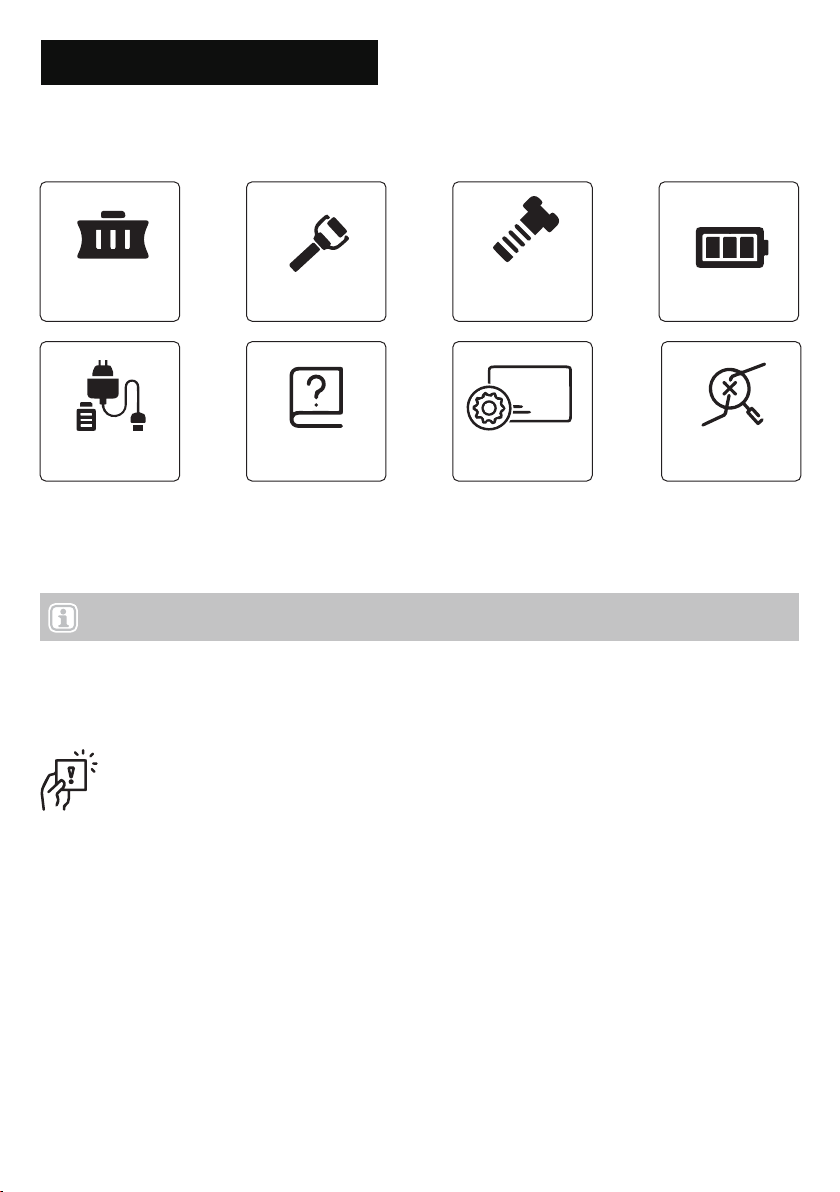
PACKAGE CONTENTS
Snow
shovel × 1
Assembly × 1
Accessories
package × 1
Battery pack × 1
Battery charger
× 1
User manual × 1 Warranty card
× 1
Carefully remove the cordless snow shovel and check to see that all of the above items are supplied.
Properly dispose of these materials in accordance with local regulations.
IMPORTANT! The equipment and packaging material are not toys. Do not let children play with plastic
film or bags, foil, or small parts. These items can block the airway and pose a suffocation risk!
NOTE: Do not discard the shipping carton and packaging material until you are ready to use your new
cordless snow shovel. (The packaging is made of recyclable materials.)
Troubleshooting
× 1
SS-20D
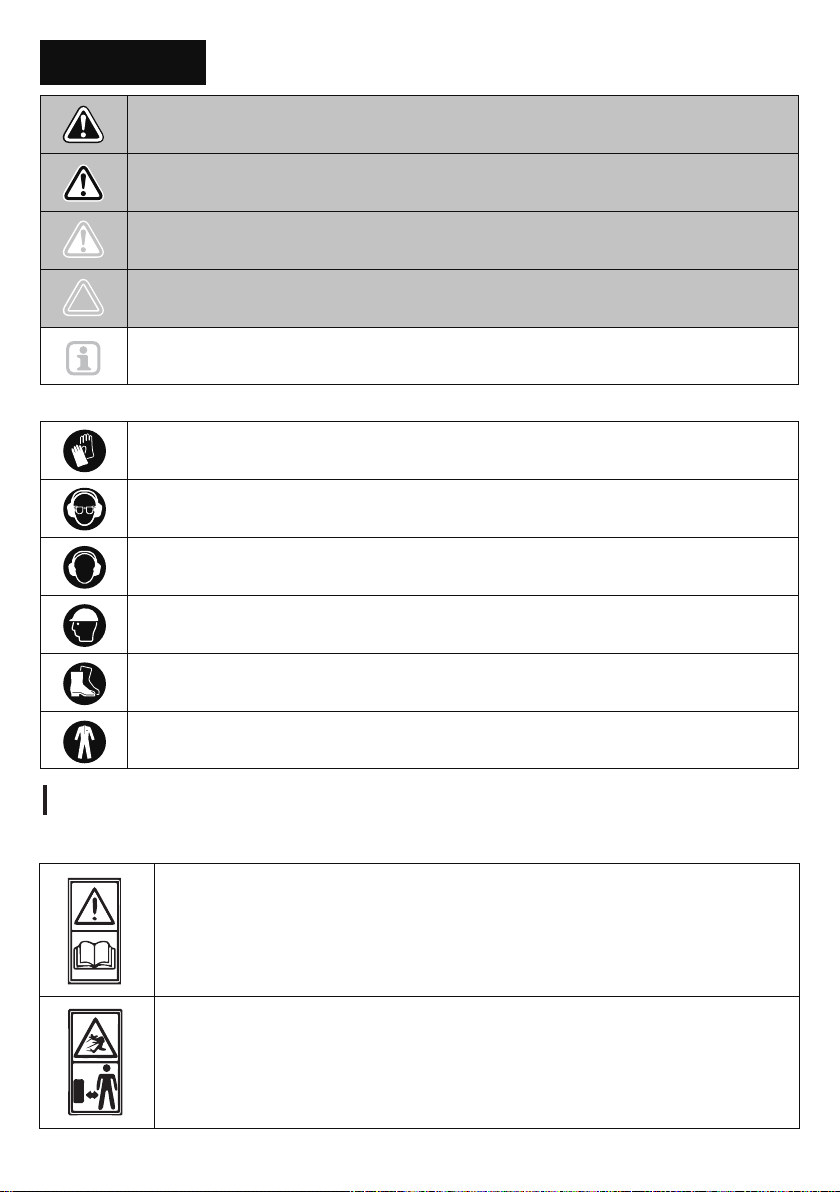
These symbols identify the required personal protective equipment:
SYMBOLS
SYMBOLS 02
DANGER! Direct danger to life and risk of injury! Directly dangerous situation that
may lead to death or severe injuries.
The following table depicts and describes safety symbols that may appear on this product. Read, understand,
and follow all instructions for the machine before attempting to assemble and operate it.
Hand protection: protective chainsaw gloves
Eye protection: wrap-around goggles/safety helmet with visor
Ear protection: earplugs/earmuffs
Head protection: safety helmet with visor
Foot protection: safety boots with gripping soles, steel toes, and leg protection
Clothing: close-fitting work clothes
CAUTION! Possible risk of injury!
Dangerous situation that may lead to injuries.
NOTICE! Risk of damage to the device! Situation that may lead to property damage.
Note: Information to help you better understand the processes involved.
WARNING! Probable danger to life and risk of injury! Generally dangerous situation
that may lead to death or severe injuries.
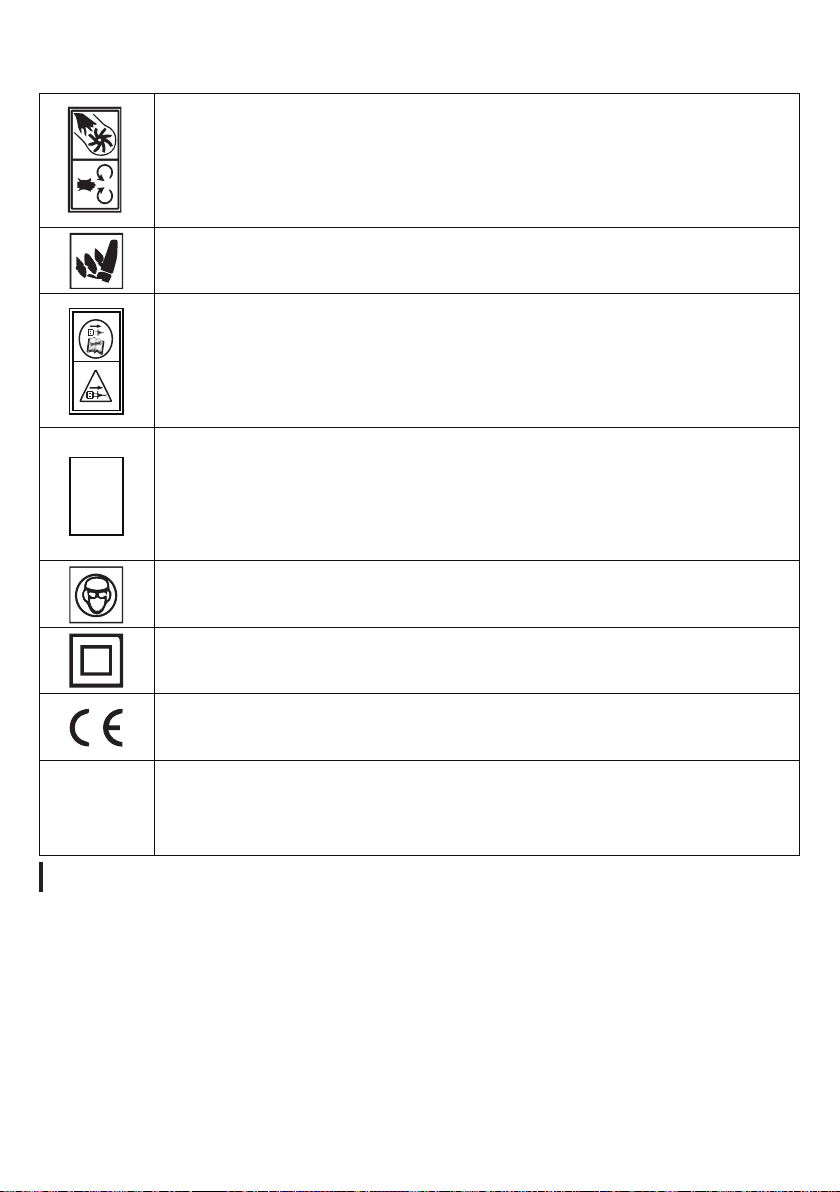
Explanation of Safety Symbols
Read the instruction manual.
The following warning symbols are to remind you of the safety precautions you should take
when operating the snow shovel.
Always keep children and pets away from the working area.
Always stay clear of the working area. The ejected snow may hurt you.
SS-20D
SYMBOLS 03
Keep hands away from the moving parts of the snow shovel. The rotating parts will hurt you.
Keep feet away from the moving parts of the snow shovel. The rotating parts will hurt you.
To reduce the risk of electric shock, disconnect from the power supply and replace a
damaged cord immediately.
Do not use hands to unclog the chute.
Wear safety goggles and ear protection.
Double-insulated for additional protection.
Conforms to relevant safety standards.
Defunct electrical products should not be disposed of with regular household waste. Please recycle
where facilities exist. Check with your local authority or retailer for recycling advice.
CAUTION! This product shall not be discarded with household waste. Instead, it shall be disposed of in a
collection system that conforms to the USEPA policy. Contact your local authorities or stockist for advice on
recycling. The product will then be recycled or dismantled to reduce its impact on the environment. Electric
and electronic equipment can be hazardous to the environment and to human health since such equipment
contains hazardous substances.
Environmental protection
SS-20D

GENERAL SAFETY INSTRUCTIONS 04
GENERAL SAFETY INSTRUCTIONS
IMPORTANT! All Users Must Read These Instructions Before Use!
Read all instructions before using this cordless snow shovel. Basic safety precautions should always
be followed to reduce the risk of fire, electric shock, and personal injury.
● You and any other operator of this snow shovel must read, understand, and follow these instructions in
their entirety, and should reread them at the start of each snow season. Failure to follow these instructions
may result in ELECTRIC SHOCK, FIRE, and/or serious PERSONAL INJURY.
NOTICE! The personal safety alert symbol is used in this manual to draw your attention
to a WARNING given along with the particular operating instruction.
This means that the operation requires special ATTENTION, CAUTION, and AWARENESS
General Safety WARNINGS!
SS-20D
● Keep work area clean and well lit: Cluttered, dark areas invite accidents.
● Use the right product: Do not use this machine for any job except that for which it is intended.
● Replacement parts: When servicing this unit, use only identical replacement parts. Replace or repair a
damaged charger cord immediately. Do not use the snow shovel on gravel surfaces unless the shovel is
adjusted for such surfaces in accordance with the operator’s manual.
● Keep children, bystanders, and pets away: All spectators, including pets, should be kept a safe distance
away from the work area.
● Dress properly: Do not wear loose or hanging clothing or jewelry. They can become caught in moving
parts. Wear rubber boots. The cordless snow shovel should not be operated in the hand-held position except
when the instructions provided in this manual deem such use permissible.
● Avoid accidental starting: Make sure the safety switch and the trigger switch are in the Off position before
inserting the battery into the unit. Do not carry the cordless snow shovel with the safety switch and the trigger
switch engaged.
● Moving parts: Keep hands and feet away from moving parts. Keep guards in place and in proper working
order.
● CAUTION! Exercise caution to prevent yourself from slipping or falling. Wear protective footwear that
protects your feet and improves your footing on slippery surfaces.
● Use safety glasses: Also use safety footwear, snug-fitting clothing, protective gloves, hearing protection,
and head protection.
● Stay alert: Watch what you are doing. Use common sense. Do not operate the cordless snow shovel when
you are tired or under the influence of alcohol or drugs.
● Do not force the tool: It will perform better, with less likelihood of personal or mechanical injury, if it is
used at the rate for which it was designed.
● Do not overreach: Keep proper footing and balance at all times.
● If the cordless snow shovel strikes a foreign object, follow these steps:
1. Stop the cordless snow shovel.
2. Remove the battery.
3. Inspect for damage.
4. Repair any damage before restarting and operating the snow shovel.
● Disconnect the tool: Turn off the power switch and remove the battery when it is not in use; before
servicing it; when changing accessories; and when performing any other maintenance task.
● Store idle tool indoors: When not in use, the cordless snow shovel should be stored indoors in a dry,
locked place out of the reach of children.
● Maintain the cordless snow shovel with care: Follow the applicable maintenance instructions for
replacing parts and changing accessories. Lubrication is not required.

GENERAL SAFETY INSTRUCTIONS 05
This is the safety alert symbol. It is used to alert you to potential personal injury hazards. Obey all
safety messages that follow this symbol to prevent possible injury or death. Improperly using or
maintaining this cordless snow shovel could result in injury or death. To reduce this potential,
comply with the following safety instructions.
This cordless snow shovel can amputate hands and feet if used incorrectly. It can also pick up
foreign objects, which can become dangerous projectiles when thrown into the air. Failure to
observe the following safety instructions could result in serious personal injury.
Training
Preparation
Operation
SS-20D
Read, understand, and follow all instructions on the machine and in the manual before operating this unit.
Thoroughly familiarize yourself with the controls and the proper use of the equipment. Know how to stop the
unit and disengage the controls quickly.
Children should never be allowed access to the equipment. Adults should never operate the equipment without
carefully reading and understanding these instructions.
Keep the area of operation clear of all persons, particularly small children and pets. Exercise caution to
prevent slipping or falling.
●
●
●
Thoroughly inspect the area where the equipment is to be used. Remove all doormats, sleds, boards, wires,
and other foreign objects.
Do not operate the equipment without wearing adequate winter garments. Avoid loose-fitting clothing and
accessories that can become caught in moving parts. Wear footwear that will improve your footing on slippery
surfaces.
Do not attempt to clear snow from gravel or crushed-rock surfaces. This product is intended for use only on
paved surfaces.
Never attempt to make any adjustments while the motor is running (except when specifically recommended by
the manufacturer).
Always wear safety glasses or eye shields during operation or while performing an adjustment or repair to
protect your eyes from foreign objects that may be thrown from the machine.
●
●
●
●
●
Do not put hands or feet near or under rotating parts. Keep clear of the discharge opening at all times.
Exercise extreme caution when operating on or crossing gravel driveways, walkways, or roads. Stay alert for
hidden hazards or traffic.
After striking a foreign object, stop the motor. Thoroughly inspect the cordless snow shovel for any damage.
Repair the damage before restarting and operating the cordless snow shovel. Should the unit start to vibrate
abnormally, stop the motor and check the unit immediately to ascertain the cause. Vibration is
generally a sign of trouble.
● Stop the motor and remove the battery whenever you leave the operating position; when transporting the
unit; before unclogging the rotor blade housing; and when making any repairs, adjustments, or inspections to
the unit.
When cleaning, repairing, or inspecting the cordless snow shovel, make sure that all moving parts have come
to a complete stop before beginning work.
Exercise extreme caution when operating on slopes.
Never operate the cordless snow shovel without proper guards and other safety devices in place and in proper
working order.
●
●
●
●
●
●
●

GENERAL SAFETY INSTRUCTIONS 06
Clearing a Clogged Rotor Housing
Maintenance and Storage
SS-20D
Never direct the discharge opening toward people or toward areas where property damage can occur. Keep
children, pets, and other bystanders away from the work area.
Do not overload the machine capacity by attempting to clear snow at too fast a rate.
Look behind you and use care when backing up with the cordless snow shovel. Never operate the cordless
snow shovel without good visibility or light. Always be sure of your footing and keep a firm hold on the handles.
Walk, never run, with the unit.
●
●
●
●
Hand contact with the rotating blades inside the rotor housing is the most common cause of injury associated
with cordless snow shovels. Never use your hands to clear a clogged rotor housing.
To clear the rotor housing:
Shut the motor off and remove the battery.
Wait 10 seconds to be sure the rotor blades have come to a complete stop.
Always use a clean-out tool, not your hands, to free the rotating blades.
●
●
Check all fasteners at frequent intervals for proper tightness to ensure that the equipment is in safe working
condition.
Always refer to the operator's manual for important details, such as how to properly store your cordless snow
shovel for an extended period of time.
Maintain or replace safety and instruction labels as needed.
Run the machine for a few minutes after you finish clearing snow to prevent the rotor blades from freezing.
●
●
●
●
●

BATTERY AND CHARGER SAFETY INSTRUCTIONS
07
BATTERY AND CHARGER SAFETY INSTRUCTIONS
Battery and Charger Safety Instructions
WARNING! Do not use a battery pack or appliance that is damaged or modified. Damaged or modified
WARNING! Use only approved replacement batteries; other batteries may damage the cordless snow
shovel and cause it to malfunction, which can lead to serious personal injury.
WARNING! To reduce the risk of electric shock, always unplug the charger before performing any
cleaning or maintenance. Do not allow water to flow into the charger. Use a ground fault circuit
interrupter (GFCI) to reduce shock hazards.
IMPORTANT! Analyses confirm that incorrect use and poor care of high-performance batteries are
the main factors responsible for personal and/or product damage.
SS-20D
NOTE! The safe temperature range for the battery is 41℉–105℉/5℃–40.5℃. Do not charge
the battery outside in freezing weather; charge it at room temperature
CAUTION! To reduce the risk of injury, charge the Voltask 20V lithium-ion battery pack only in
its designated Voltask lithium-ion charger.Other types of chargers present risk of fire, personal
injury, and damage. Do not wire a battery pack to a power supply plug or car cigarette lighter. Such
misuse will permanently disable or damage the battery pack.
Avoid dangerous environments. Do not charge the battery pack in rain or snow, or in otherwise damp or wet
locations. Do not use the battery pack or charger in explosive atmospheres (those containing gaseous fumes,
dust, or flammable materials) because sparks may be generated when inserting or removing the battery pack,
which could lead to a fire.
Charge in a well-ventilated area. Do not block the charger vents. Keep them clear to allow for proper
ventilation. Do not allow smoking or open flames near a charging battery pack. Vented gases may explode.
●
●
Take care of the charger cord. When unplugging the charger, pull the plug (not the cord) from the receptacle
to reduce the risk of damage to the electrical plug and cord. Never carry the charger by its cord or yank it by
the cord to disconnect it from the receptacle. Keep the cord away from heat, oil, and sharp edges. Make sure
the cord will not be stepped on, tripped over, or subjected to damage or stress when the charger is in use.
Do not use the charger with a damaged cord or plug. Replace a damaged charger immediately.
Do not use an extension cord unless it is absolutely necessary. Using a wrong, damaged, or improperly
wired extension cord poses a risk of fire and electric shock. If an extension cord must be used, plug the
charger into a properly wired 16-gauge or larger extension cord with a socket that matches the plug on the
charger. Make sure that the extension cord is in good electrical condition.
Charger is rated for 120V AC only. The charger must be plugged into an appropriate receptacle.
Use only recommended attachments. Use of an attachment not recommended or sold by the manufacturer
of the battery charger or battery pack may result in fire, electric shock, or personal injury.
Unplug charger when not in use. Make sure to remove battery packs from unplugged chargers.
●
●
●
●
●
batteries may behave unpredictably, resulting in fire, explosion, or risk of injury.
Do not modify or attempt to repair the appliance or the battery pack except as indicated in the
instructions for use and care.
Have your battery pack serviced by a qualified repair person using only identical replacement parts.
This will ensure that the safety of the battery pack is maintained.

BATTERY AND CHARGER SAFETY INSTRUCTIONS 08
Information about the Battery
SS-20D
Do not burn or incinerate battery packs. Battery packs may explode, causing personal injury or damage.
Toxic fumes and materials are created when battery packs are burned.
Do not crush, drop, or damage battery packs. Do not use the battery pack or charger if it has
sustained a sharp blow, been dropped or run over, or been damaged in any way (e.g., pierced with a nail, hit
with a hammer, or stepped on).
Do not disassemble. Incorrect reassembly poses a serious risk of electric shock, fire, and/or exposure to
toxic battery chemicals.
Battery chemicals cause serious burns. Never let a damaged battery pack contact the skin, eyes, or
mouth. If a damaged battery pack leaks battery chemicals, use rubber or neoprene gloves to safely dispose of
the pack. If skin is exposed to battery fluids, wash the affected area with soap and water, and rinse with
vinegar. If eyes are exposed to battery chemicals, immediately flush with water for 20 minutes and seek
medical attention. Remove and dispose of contaminated clothing.
Do not short-circuit. A battery pack will short-circuit if a metal object makes a connection between the
positive and negative contacts on the battery pack. Do not place a battery pack near anything that may cause
a short circuit, such as paper clips, coins, keys, screws, nails, and other metallic objects. A short-circuited
battery pack poses a risk of fire and severe personal injury.
Store your battery pack and charger in a cool, dry place. Do not store the battery pack or charger where
temperatures may exceed 105℉/40.5℃ , such as in direct sunlight or inside a vehicle or metal building during
the summer.
The battery pack supplied with your cordless snow shovel is only partially charged. The battery pack has to be
charged completely before you use the tool for the first time.
For optimum battery performance, avoid low discharge cycles by charging the battery pack frequently.
Store the battery pack in a cool place—ideally at 77℉/25℃—and charged to at least 40%.
Lithium-ion batteries are subject to a natural aging process. The battery pack must be replaced no later than
when its capacity falls to 80% of its capacity when new. Weakened cells in an aged battery pack are no
longer capable of meeting the high-power requirements needed for the proper operation of your snow shovel
and therefore pose a safety risk.
Do not throw battery packs into an open fire, as this poses a risk of explosion.
Do not ignite the battery pack or expose it to fire.
Do not exhaustively discharge batteries. Exhaustive discharge will damage the battery cells. The most
common cause of exhaustive discharge is lengthy storage or disuse of partially discharged batteries. Stop
working as soon as the performance of the battery falls noticeably or the electronic protection system triggers.
Place the battery pack in storage only after it has been fully charged.
Protect batteries and the tool from overloads. Overloads will quickly result in overheating and cell damage
inside the battery housing, even if this overheating is not apparent externally.
Prevent damage and shocks. Immediately replace batteries that have been dropped from a height of more
than 1 yd. or those that have been exposed to violent shocks, even if the housing of the battery pack appears
to be undamaged. The battery cells inside the battery may have suffered serious damage. In such instances,
please read the waste disposal information for proper battery disposal.
If the battery pack suffers overloading and overheating, the integrated protective cutoff will switch off the
equipment for safety reasons.
Use only original battery packs. The use of other batteries poses a fire risk and may result in injuries or an
explosion.
●
●
●
●
●
●
1.
2.
3.
4.
5.
6.
7.
8.
9.
10.
11.

Information About the Charger and the Charging Process
BATTERY AND CHARGER SAFETY INSTRUCTIONS 09
Protection From Environmental Influences
SS-20D
Please check the data marked on the rating plate of the battery charger. Be sure to connect the battery
charger to a power supply with the voltage marked on the rating plate. Never connect it to a different charger
voltage.
Protect the battery charger and its cord from damage. Keep the charger and its cord away from heat, oil, and
sharp edges.
Electrical plugs must match the socket. Never modify the plug in any way. Do not use any adapter plugs with
grounded appliances. Unmodified plugs and matching sockets will reduce the risk of electric shock.
Keep the battery charger, battery pack(s), and cordless tool itself out of the reach of children.
Do not use the supplied battery charger to charge other Voltask cordless tools unless indicated as compatible
by the manufacturer.
During periods of heavy use, the battery pack will become warm. Allow the battery pack to cool to room
temperature before inserting it into the charger to recharge.
Do not overcharge batteries. Do not exceed the maximum charging times. These charging times apply only to
discharged batteries. Frequent insertion of a charged or partially charged battery pack will result in
overcharging and cell damage. Do not leave batteries in the charger for days on end.
Never use or charge batteries if you suspect that it has been more than 12 months since the last time they
were charged. There is a high probability that the battery pack has already suffered serious and dangerous
damage (exhaustive discharge).
Charging batteries at a temperature below 41℉/5℃ will cause chemical damage to the cells and may cause a
fire.
Do not use batteries that have been exposed to heat during the charging process because the battery cells
may have suffered dangerous damage.
Do not use batteries that have suffered curvature or deformation during the charging process or those that
exhibit other atypical symptoms (gassing, hissing, cracking, etc.).
Never fully discharge the battery pack (maximum recommended depth of discharge is 80%). A complete
discharge of the battery pack will lead to premature aging of the battery cells.
1.
2.
3.
4.
5.
6.
7.
8.
9.
10.
12.
11.
Wear suitable work clothes and safety goggles.
Protect your cordless tool and the battery charger from moisture and rain, both of which can cause dangerous
cell damage.
Do not use the cordless tool or the battery charger near vapors and flammable liquids.
Do not keep the battery charger in places where the temperature is liable to reach over 105℉/40.5℃ . In
particular, do not leave the battery charger in a car that is parked in direct sunlight.
Protect batteries from overheating. Overloads, overcharging, and exposure to direct sunlight will result in
overheating and cell damage. Never charge or work with batteries that have been overheated; replace them as
soon as possible.
Store the charger and your cordless tool only in dry locations with an ambient temperature of
41℉-105℉/5℃-40.5℃. Store your lithium-ion battery pack in a cool, dry place at a temperature of 77℉/25℃ .
Protect the battery pack, charger, and cordless tool from humidity and direct sunlight. Store only batteries that
have been charged to at least 40%.
Prevent the lithium-ion battery pack from freezing. Battery packs that have been stored below 32℉/0℃ for
more than 60 minutes must be discarded.
1.
2.
3.
3.
4.
5.
7.

Proper Care of Battery and Charger
BATTERY AND CHARGER SAFETY INSTRUCTIONS 10
Off-Season Storage of Battery and Charger
SS-20D
WARNING! To reduce the risk of injury, always unplug the charger and remove the battery pack from
the charger before performing any maintenance task.
Proper Dispose of Battery and Charger
Always dispose of your battery pack according to federal, state, and local regulations. Search online and/or
contact a recycling agency in your area to find a suitable location for recycling the battery pack.
Battery Pack Recycling
WARNING! To reduce the risk of injury or explosion, never burn or incinerate a battery pack—even if
it is damaged, dead, or completely discharged. When batteries burn, they emit toxic fumes and
materials into the atmosphere.
CAUTION! Even discharged battery packs contain some energy. Before disposing of them, cover the
terminals with electrical tape to prevent shorting, which could cause a fire or explosion.
To reduce the risk of injury and damage, never immerse your battery pack or charger in liquid or allow any
liquid to flow inside these components.
Clean out dust and debris from charger vents and electrical contacts by blowing with compressed air.
Use only mild soap on a damp cloth to clean the battery pack and charger, keeping away from all electrical
contacts. Certain cleaning agents and solvents are harmful to plastics and other insulated parts. Some of
these harmful substances include gasoline, turpentine, lacquer thinner, paint thinner, chlorinated cleaning
solvents, ammonia, and household detergents containing ammonia. Never use flammable or combustible
solvents around battery packs, battery chargers, or tools.
The lithium-ion battery charger has no serviceable parts.
1.
2.
3.
4.
Batteries vary according to device. Consult your manual for specific information.
Install only new batteries of the same type in your product (where applicable).
Failure to insert batteries in the correct polarity, as indicated in the battery compartment or manual, may
shorten the life of the batteries or cause batteries to leak.
Do not mix old and new batteries.
Do not dispose of batteries in a fire or incinerator.
Batteries should be recycled or disposed of as per state and local guidelines.
To preserve our natural resources, please recycle or dispose of batteries properly. The batteries charged by
this charger may contain chemicals and metals that are harmful to the environment. Never dispose of
rechargeable batteries in your normal household garbage or in landfill sites because to do so will
unnecessarily pollute the environment.
1.
2.
3.
4.
5.
6.
Do not expose your battery pack or charger to water or rain, or otherwise allow these items to get wet.
Wetness could permanently damage the charger and the battery pack. Do not use oil or solvents to clean or
lubricate your battery pack as these substances can cause the plastic casing to become brittle and crack,
posing a serious risk of injury.
Store the battery pack and charger at room temperature away from moisture. Do not store these items in damp
locations, where corrosion of terminals may occur. As with other battery pack types, permanent capacity loss
can result if the pack is stored for long periods at high temperatures (above 105°F/40.5 ℃ ).
a.
b.
PRODUCT OVERVIEW 11
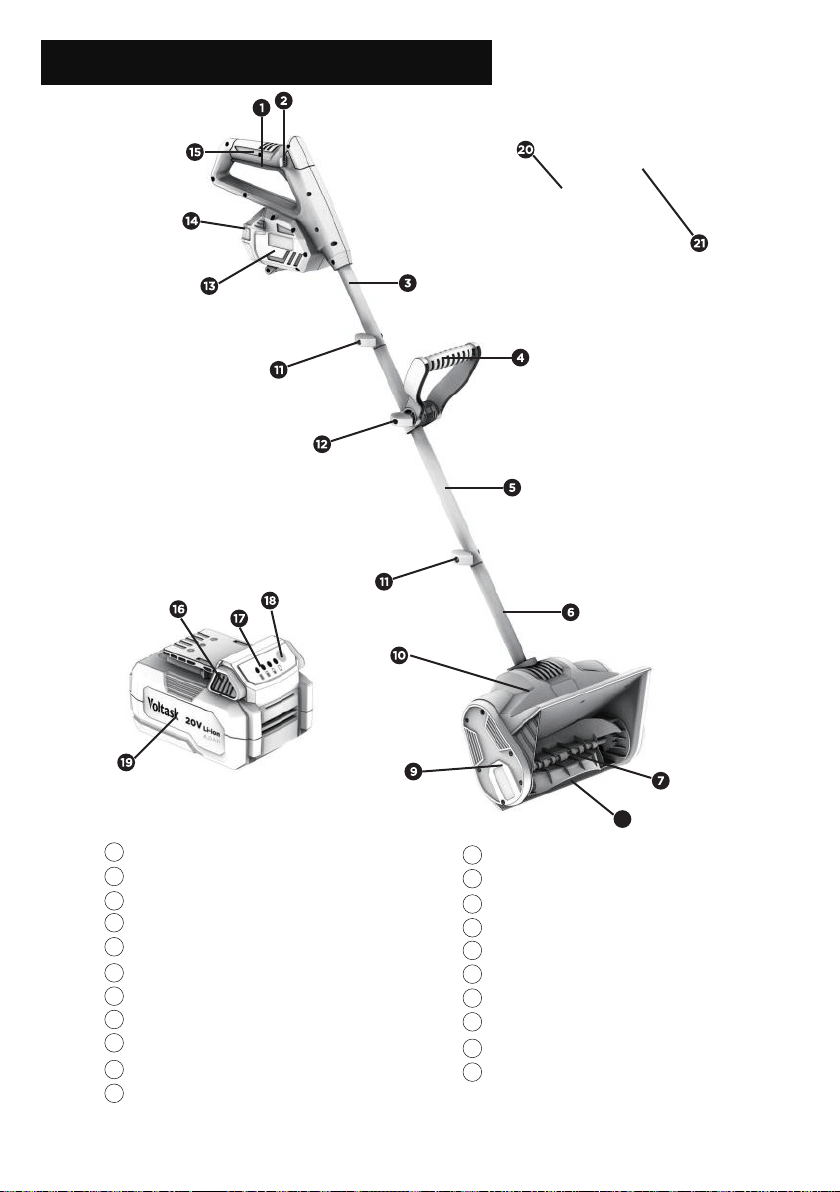
KNOW YOUR SNOW SHOVEL
Fig. 1
1
2
3
4
5
6
7
8
9
10
SS-20D
On/Off switch
Safety lock
Upper shaft
Auxiliary handle
Middle shaft
Lower shaft
Auger
Scraper blade
Belt drive cover
Motor housing
Shaft-locking knob + locking bolt
11
20
Auxiliary handle-locking knob
Battery compartment
Battery pack compartment cover
Main handle
Battery pack release button
Battery power Indicator light
Battery power button
Battery pack
Charging indicator light
Charger
21
12
13
14
15
16
17
18
19
8
ASSEMBLY 12
Fig. 2
Fig. 3
ASSEMBLY
Snow Shovel Assembly
Assembling the Main Shaft
WARNING! To prevent accidental starting that could cause serious personal injury, always remove
the battery pack from the tool when assembling parts.
WARNING! Do not attempt to modify this tool or make attachments/accessories not
recommended for use with this tool. Any such alteration or modification is a misuse and could
result in a hazardous condition leading to serious injury.
WARNING! Do not attempt to start the tool before it has been completely assembled.
SS-20D
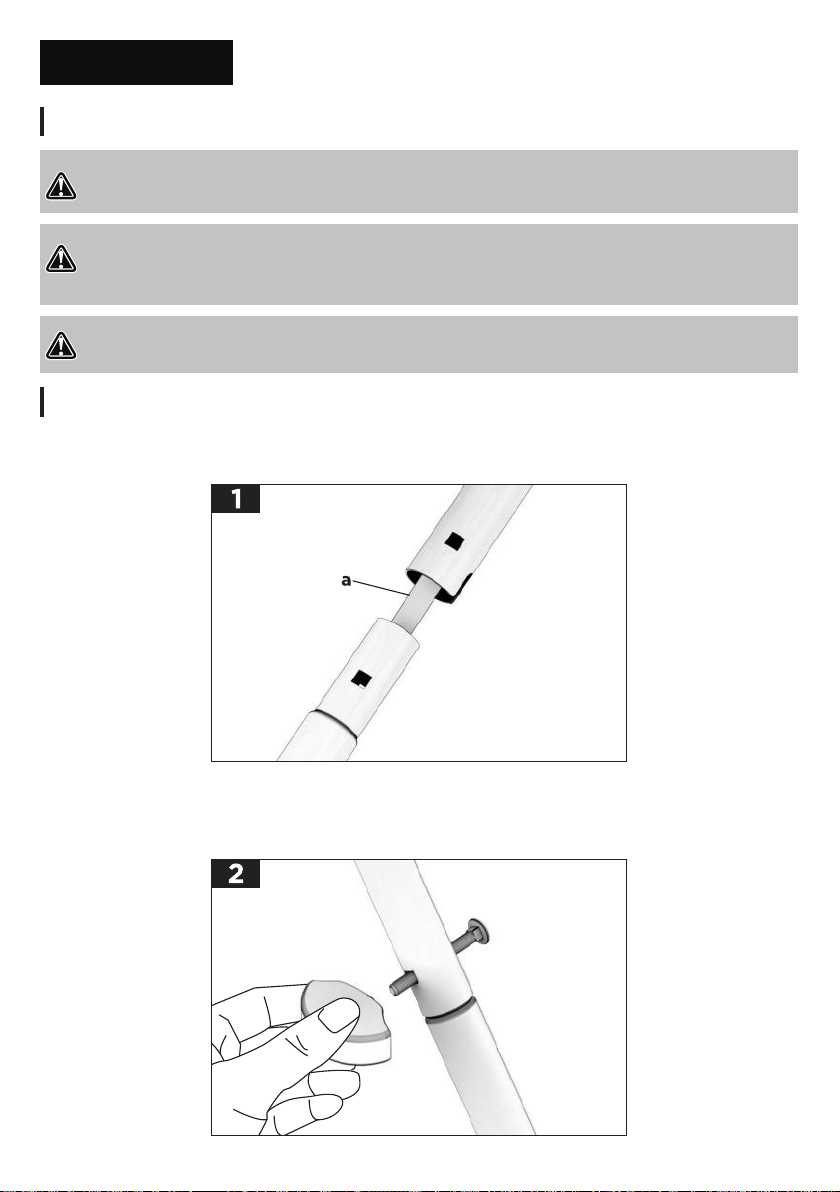
The tool arrives with the shaft-locking knobs and bolts detached and shafts loosened. You need to connect
and lock the three shafts together. Slide the middle shaft onto the lower shaft. Line up the two square
mounting holes on each tube. Make sure the cable (a) is clear of the square holes. (Fig.2)
a.
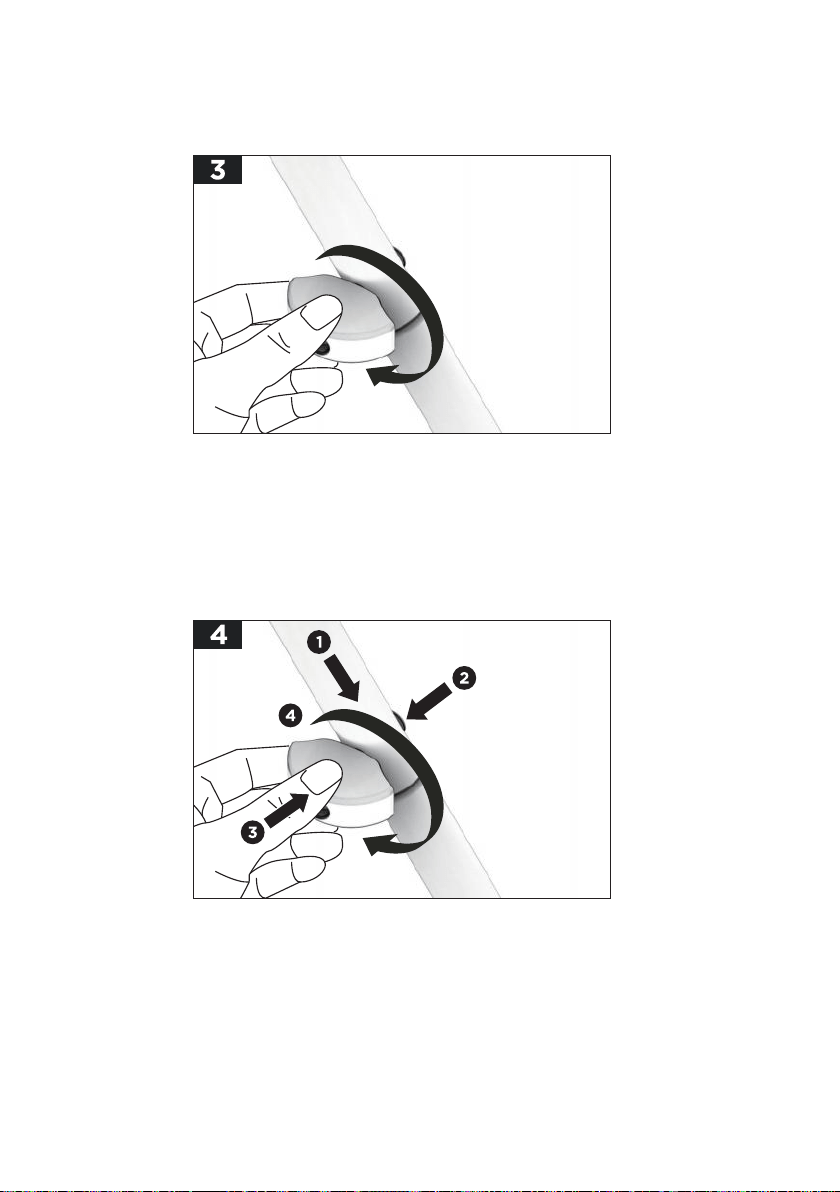
Align and insert the shaft-locking bolt through the aligned holes and into the end. Then insert the shaft-locking
knob into the end of the bolt from the other side. (Fig.3)
NOTICE: You may have to carefully move the cable inside the tube to one side if it blocks the path of the bolt.
b.
ASSEMBLY 13
Fig. 4
Fig. 5
SS-20D
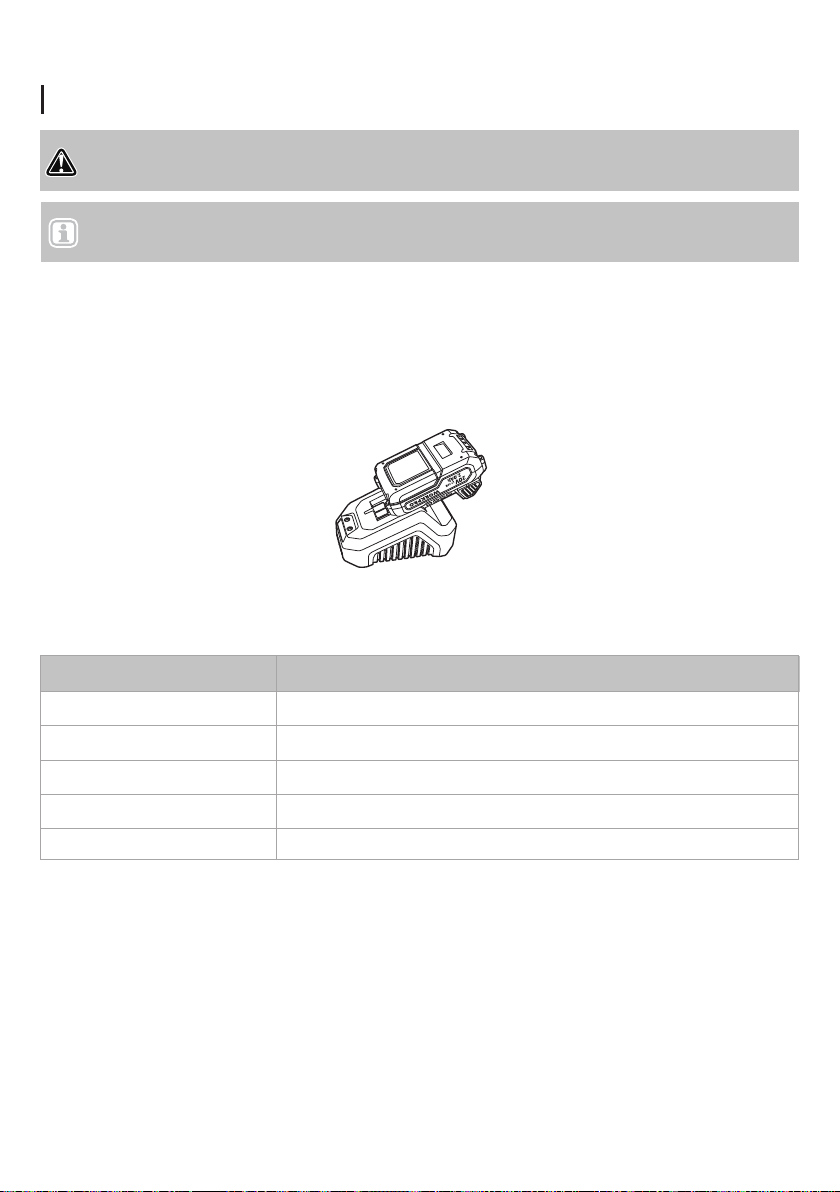
Turn the locking knob clockwise to tighten. Now, the middle shaft is locked to the lower shaft. (Fig.4)
c.
Slide the upper shaft onto the middle shaft. Line up the two square mounting holes on each tube. Align and
insert the shaft-locking bolt through the aligned holes and into the end. Then, insert the shaft-locking knob into
the end of the bolt from the other side. Tighten the knob by turning it clockwise. (Fig. 5)
NOTICE: Pay attention to the main handle direction when installing the upper shaft onto the middle shaft. The
main handle should be facing in the opposite direction from the snow outlet.
d.
ASSEMBLY 14
WARNING! Do not use the charger outdoors or expose it to wet or damp conditions. Water entering
the charger will increase the risk of electric shock.
Charging the Battery Pack
NOTICE: Lithium-ion battery packs are shipped partially charged. Fully charge your battery
pack before using it for the first time.
76%–100%
51%–75%
26%–50%
11%–25%
0%–10%
4 lights on
3 lights on
2 lights on
1 light on
1 light flashing
LED Indicator Battery Charge Level/Working Conditions
SS-20D
Connect the charger to the power supply (120V/60Hz). The red LED indicator will light up, indicating that the
charger is working correctly.
Align the raised ribs of the battery pack with the mounting slots in the charger. Slide the battery pack onto the
charger.
When the battery is inserted properly, the green LED indicator will blink slowly to indicate that the battery is
charging. The red light will turn off.
When the green light becomes steady, the battery is fully charged.
The battery pack is equipped with a push button for checking the charge level. Simply press the button and
read the battery indicator as follows:
a.
b.
c.
d.

ASSEMBLY 15
Use the table below to determine charger light patterns and possible causes. For all other issues,
contact Voltask customer service.
Charging the Battery Pack
LED Indicator
Battery Charge Level/Working Conditions
NOTE:
SS-20D
The battery pack will fully charge if left on the charger but will not overcharge. If the battery pack remains on
the charger for one month or more, it will perform self-maintenance and drop to a lower charge capacity. If this
occurs, remove the battery pack and reinstall it on the charger to recharge the battery fully.
A significantly reduced run time after fully charging the battery pack indicates that the batteries are near the
end of their usable life and must be replaced.
The charger may warm during charging. This is part of the normal operation of the charger. Charge in a
well-ventilated area.
●
●
●
Red light
ON
No load: There's no battery inserted in the charger.
Low voltage charging: The battery is heavily discharged.
It may take some time to recover to normal charging.
Normal charging: The battery is being charged.
Fully charged: The battery is fully charged and the charging
process is finished.
Temperature abnormal: Charging process stopped and will
restart when battery returns to normal temperature.
Over current charging: The current coming through the charger is
greater than what the charger can support. Stop charging as soon
as possible.
Abnormal performance: Something is wrong with the battery or the
charger. Contact Voltask Customer Service.
Green light
BLINKS
SLOWLY
BLINKS
RAPIDLY
BLINKS
SLOWLY
BLINKS
RAPIDLY
OFF
ON
ON
ON
OFF
OFF
OFF
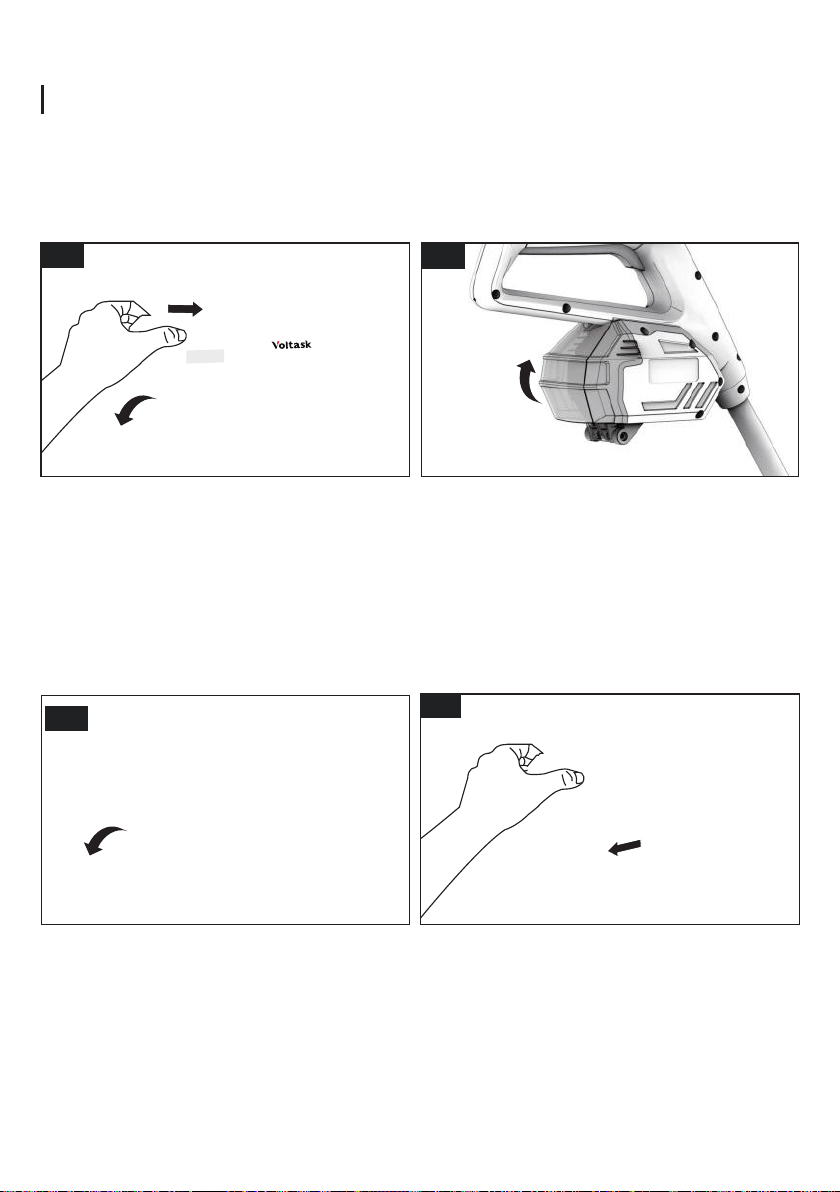
Fig. 6 Fig. 7
Fig. 8 Fig. 9
ASSEMBLY 16
Installing or Removing the Battery Pack
SS-20D
To install:
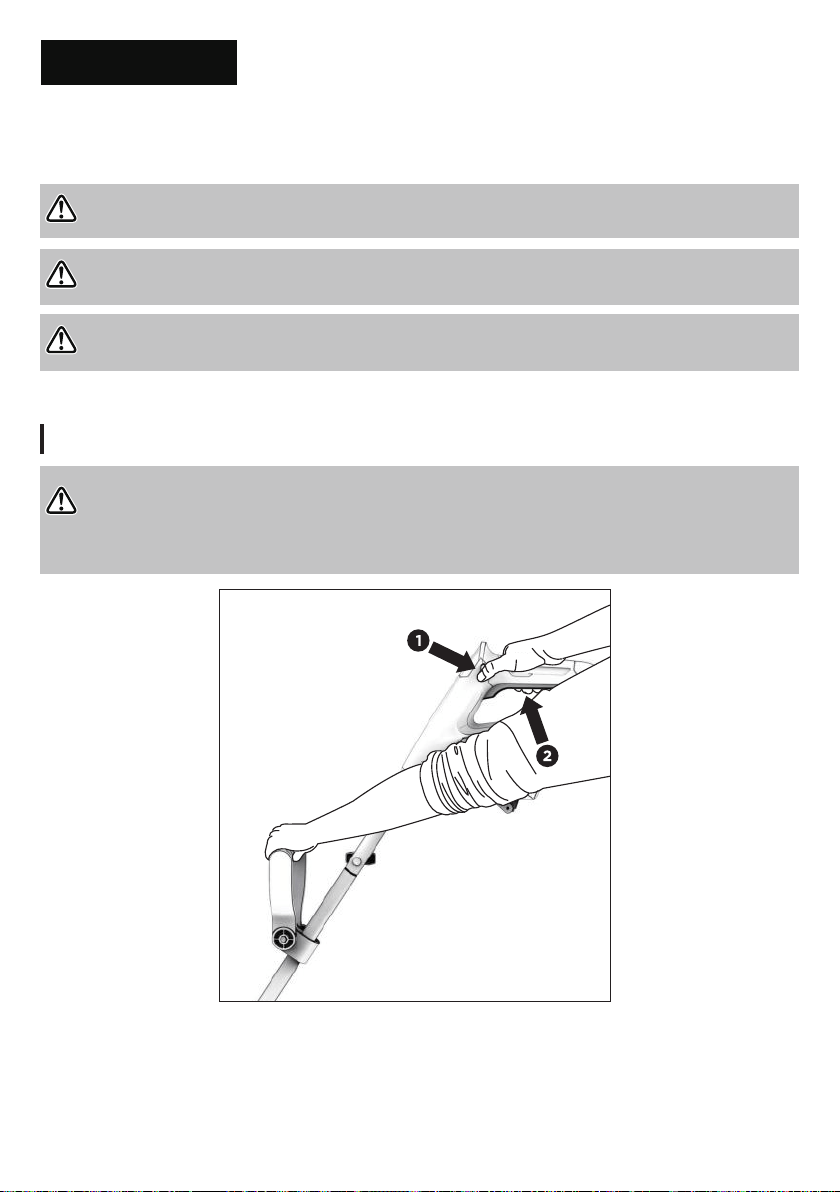
Open the battery pack compartment cover. Slide the battery pack into the port inside of the compartment.
Push to the end with sufficient force until it clicks to lock in place. (Fig.6)
Close the battery pack compartment cover. (Fig.7)
NOTICE: The battery can only be installed in one way.
a.
b.
To remove:
Open the battery pack compartment cover. (Fig.8)
Depress the battery pack release button on each side and hold them down. Pull the battery pack out from the
battery compartment. (Fig.9)
a.
b.
1 2
3
4
OPERATION 17
Starting the Machine
WARNING! Do not allow familiarity with this product to make you careless. Remember that a careless fraction
of a second is sufficient to inflict serious injury.
WARNING! Do not use any attachments or accessories not recommended by the manufacturer of this product.
The use of attachments or accessories not recommended can result in serious personal injury.
WARNING! Keep the area to be cleared free of stones, toys, or other foreign objects that the auger might pick
up and throw. Such items could be covered by snow and are easy to overlook; be sure to conduct a thorough
OPERATION
To stop the cordless snow shovel, release the On/Off switch.
Fig. 10
SS-20D
INTENDED USE
This snow shovel is intended to remove snow from sidewalks, steps, patios, decks, and other hard, flat
surfaces such as paved driveways. Use the tool only on hard, flat surfaces free of sand, stone, debris, wires,
and any other objects.
WARNING! To prevent injury, do not squeeze the trigger while the snow shovel is inverted. When starting,
make sure both the operator and the snow shovel are stable.
Hold the snow shovel firmly with two hands. Make sure the auger is not touching any surface. Depress and hold
the safety lock button on the handle grip. Then, squeeze the On/Off switch and hold it. Once the machine is
switched on, you can release the safety lock. (Fig. 10)
OPERATION 18
Operating Tips
Operating Tips
Fig. 11 Fig. 12
SS-20D
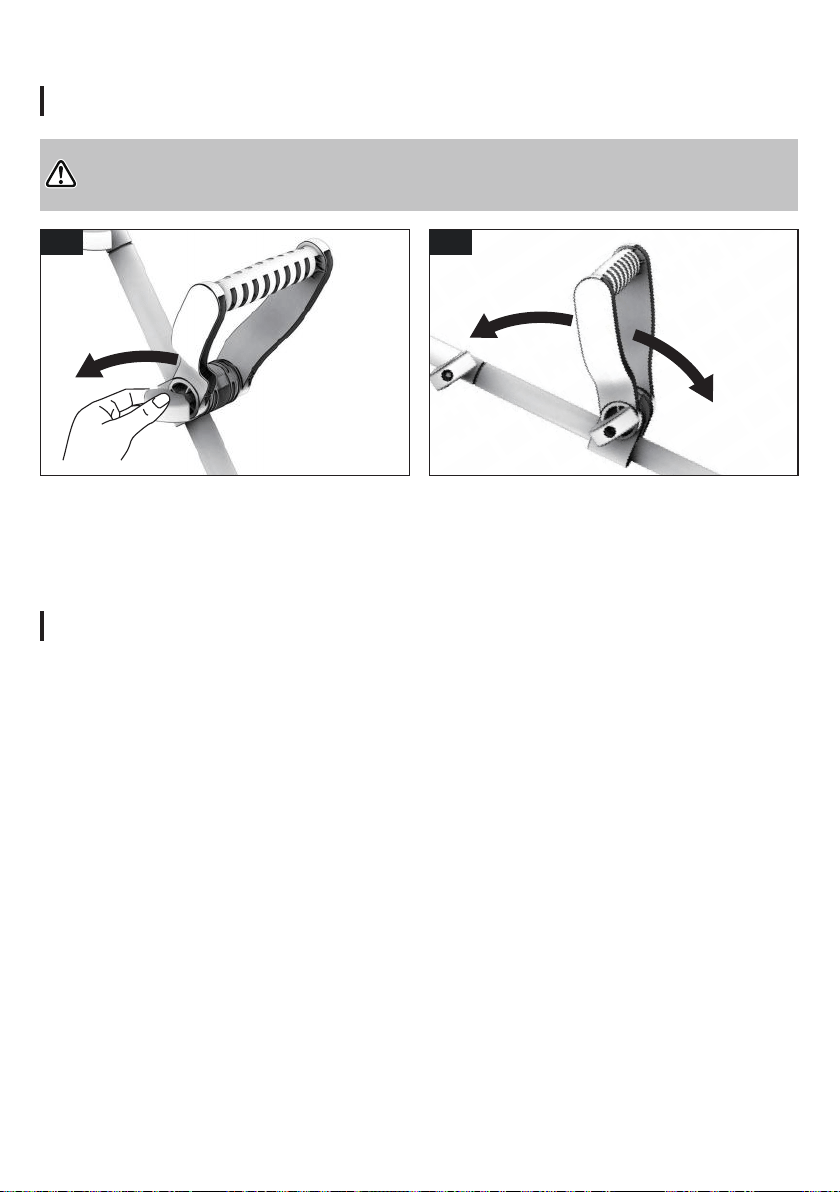
Rotate the auxiliary handle or adjust the height as needed to a comfortable position. (Fig.12)
Retighten the handle-locking knob by turning it clockwise. Be sure to tighten securely in order to prevent the
auxiliary handle from moving around or sliding.
WARNING! ALWAYS stop the machine and remove the battery pack before making any adjustment.
a. Stop the machine and remove the battery pack. Wait until the auger comes to a complete stop. Turn the
auxiliary handle-locking knob counterclockwise to loosen the handle. (Fig.11)
b.
c.
Start the cordless snow shovel. Push the shovel forward at a rate that is comfortable yet slow enough to clear
the path completely. The clearing width of the snow shovel and the depth of snowfall should dictate your
forward speed.
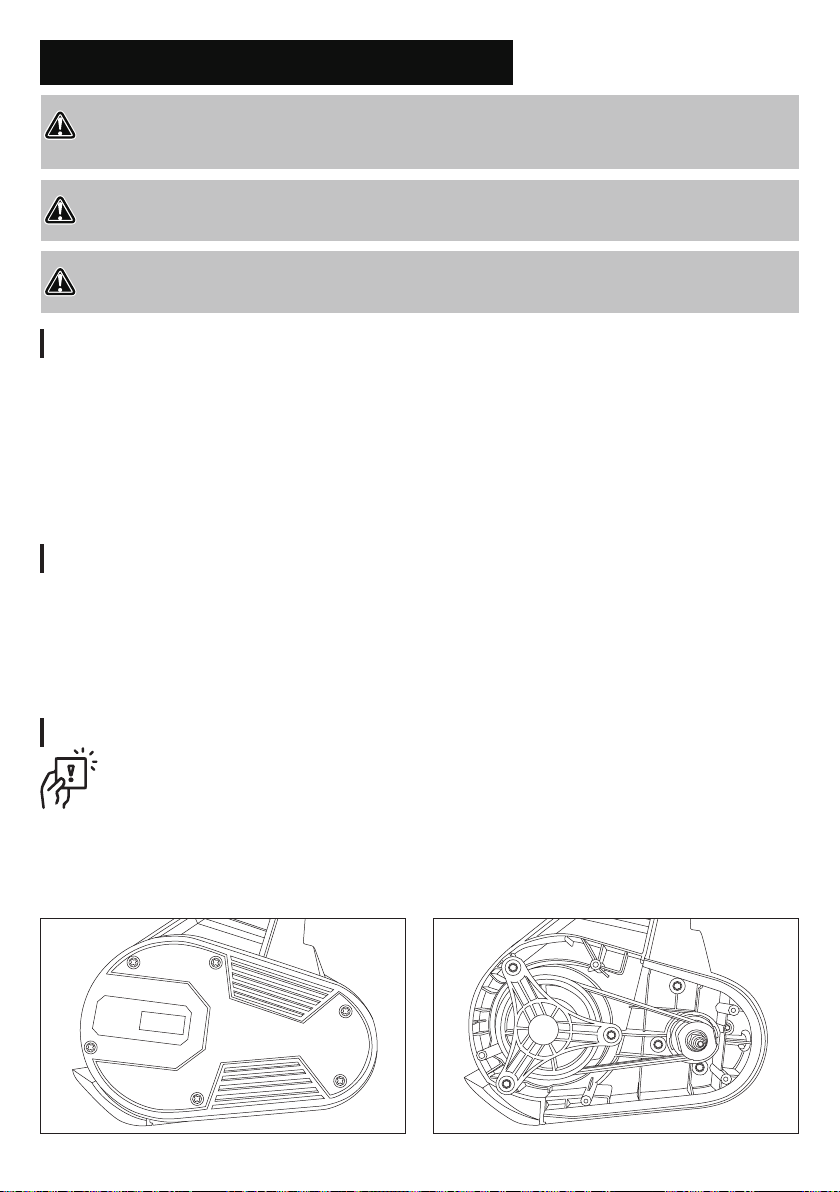
Direct the snow discharge to the right or to the left by holding the cordless snow shovel at a slight angle.
To remove snow most efficiently, throw the snow downwind and slightly overlap each swath.
When clearing deeper drifts, hold the cordless snow shovel by the upper and auxiliary handles, and use a
swinging or sweeping motion. Remove up to 6 in. (15 cm) of snow with each pass. Repeat as many times as
needed.
Remove the battery after using the cordless snow shovel. Hang the shovel so it will not be knocked or
damaged.
●
●
●
●
●
1 2
12”
CLEARING
WIDTH
MAINTENANCE AND STORAGE 19
MAINTENANCE AND STORAGE
Replacing the Drive Belt
Cleaning
Clearing a Clogged Auger
WARNING: Make sure to turn off the machine and remove the battery before performing any
maintenance task on your cordless snow shovel.
SS-20D
WARNING! When servicing, use only identical replacement parts. Use of any other parts may create a hazard
or cause product damage. To ensure safety and reliability, all repairs should be performed by a qualified service
technician.
WARNING! To prevent serious personal injury, remove the battery pack from the tool before servicing,
cleaning, changing add-on attachments, or removing material from the unit.
WARNING! For the user's safety, worn or damaged parts must be replaced. Replace with original replacement
parts only.
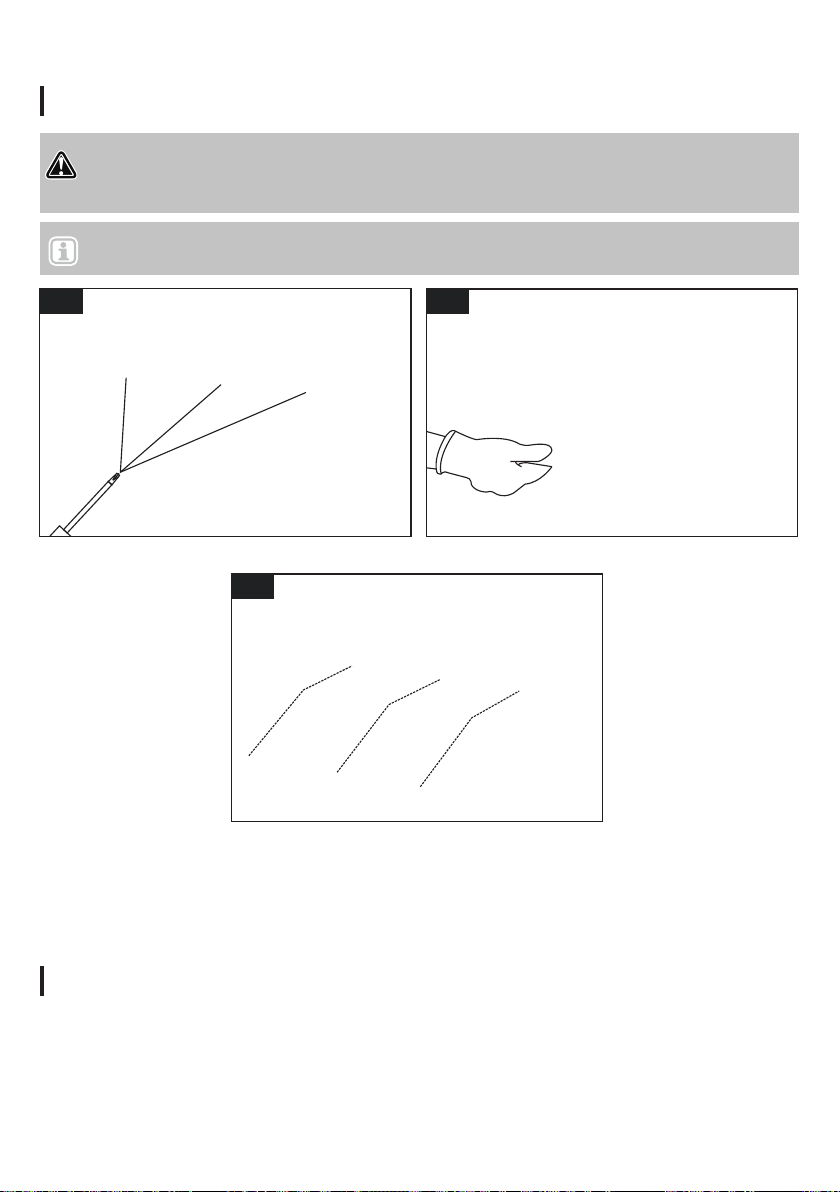
1. Remove screws and take off the cover.
2. Remove the screw, washer, pulley frame, and belt from the pulleys.
3. Install the new belt in the same groove as the old one.
4. Replace the screw, washer, and pulley frame.
5. Replace the cover and secure it with screws.
Hand contact with the rotating auger inside the motor housing is the most common cause of injury associated
with cordless snow shovels. Never use your hands to clear a clogged auger.
To clear the auger:
● Shut the motor off and remove the battery.
● Wait 10 seconds to be sure the auger has come to a complete stop.
● Always use a clean-out tool, not your hands, to free the auger.
Regular cleaning and maintenance of your snow shovel will ensure efficiency and prolong the life of the
product.
After each use, take apart and clean out the ice and debris from the ventilator and its slots, the auger, and the
scraper blade.
Your snow shovel requires no additional lubrication.
Wipe clean with a soft, water-soaked cloth and a soft brush. Never spray water onto the machine or otherwise
wet or immerse the machine.
Do not use detergents or solvents as these could cause irreparable damage to the snow shovel. Chemicals
can destroy plastic parts.
●
●
●
●
●
MAINTENANCE AND STORAGE 20
Replacing the Scraper Blade
Storage
Fig. 13
Fig. 15
Fig. 14
NOTICE: To replace the scraper blade, you need to prepare a star key set.
SS-20D
WARNING! Make sure to turn off the machine and remove the battery before performing any maintenance task
on your cordless snow shovel. The scraper blade is a wear item and should be replaced when necessary. A worn
scraper blade can cause extreme vibration and damage the auger.
Place the snow shovel on the ground or on a work bench. Turn the snow shovel over. Use a suitable
star key (not supplied) to remove the 3 screws that secure the scraper blade to the base of the unit. (Fig.13)
Remove the old scraper blade. (Fig.14)
Install the new scraper blade and fasten it securely to the housing with the 3 screws. (Fig.15)
a.
b.
c.
Examine the cordless snow shovel thoroughly for worn, loose, or damaged parts. Should you need to repair or
replace a part, contact Voltask customer service for assistance.
Remove the battery from the cordless snow shovel before storing the shovel.
Allow the shovel to dry thoroughly.
To protect the snow shovel from corrosion when storing for long periods, lightly oil the metal parts.
Store the cordless snow shovel indoors in a locked, dry, well-ventilated place out of the reach of children to
prevent unauthorized use or damage.
a.
b.
c.
d.
e.
1 2
3
OPTIONAL ACCESSORIES 21
OPTIONAL ACCESSORIES
Product
Item SKU
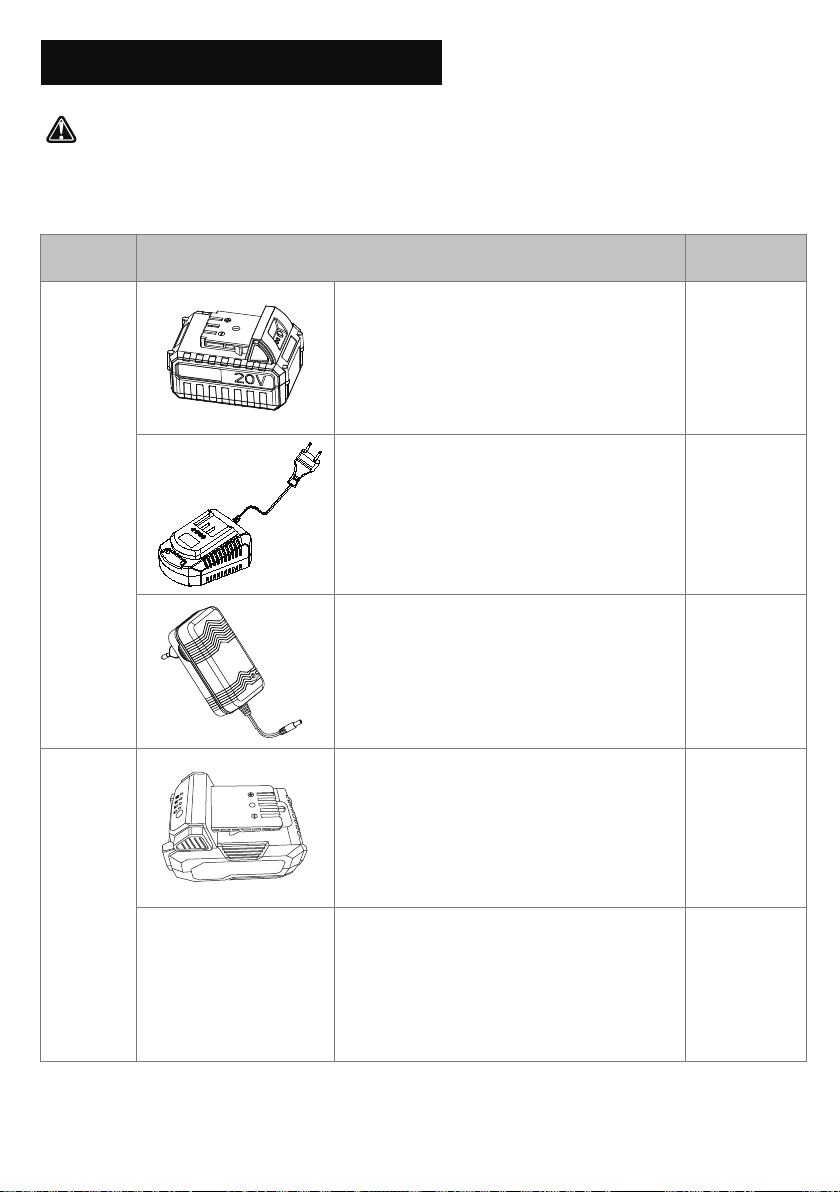
SS-20B
SS-20C
SS-20E
SS-40A
SS-40B
SS-20D
20V+4.0 Ah Lithium-Ion Battery
Battery Charge Time Max:
C-20: 2h
CD-20: 2h 40m
B-20-4
20V (2.2A) Quick Charger
C-20
20V (1.5A) Charger
CD-20
20V+4.0 Ah Lithium-Ion Battery
Battery Charge Time Max:
DY-C-20: 2h
DY-B-20-4
20V (2.4A) Quick Charger
DY-C-20
SS-20D
WARNING! ALWAYS use only authorized Voltask replacement parts and accessories. NEVER
use replacement parts or accessories that are not intended for use with this cordless snow shovel.
Contact Voltask if you are unsure whether it is safe to use a particular replacement part or accessory with your
cordless snow shovel. The use of any other attachment or accessory can be dangerous and could cause injury
or mechanical damage.

TROUBLESHOOTING 22
SS-20D
TROUBLESHOOTING
When Something Isn't Working
Problem
Possible Cause Solution
• Snow shovel
does not start
• Poor performance
• Battery not installed well • Make sure the battery is fully inserted.
• Battery depleted • Charge the battery.
• Lock-off button not
depressed
• Depress the lock-off button fully and
then squeeze the On/Off switch.
• Battery too cold • Remove battery from snow shovel.
Place battery on charger and allow
to charge for 10 minutes. Remove
from charger and install in snow
shovelfor use.
• Drive belt worn or damaged • Contact the service center for replacing.
• Auger worn or damaged • Contact the service center for replacing.
• Discharge blocked • Switch off the snow shovel, remove
the battery pack, and clean the
discharge.
• Abnormal vibrations
• Drive belt worn or damaged • Contact the service center for replacing.
• Motor is on but the auger
does not turn.
• Snow shovel leaves a
thin layer of snow
• Auger worn or damaged • Contact the service center for replacing.
• Scraper blade worn
• Replace the scraper blade.
• Driver belt damaged • Contact the service center for replacing.
• Scraper blade worn • Replace the scraper blade.
DANGER! Risk of injury! Improperly performed repairs can lead to the device not functioning safely. This
can endanger yourself and the environment.

WARRANTY 23
limited warranty on Voltask equipment
Website: www.voltask.com Email: [email protected] FB: @voltasktools IG: @voltasktools
WARRANTY
3-year
SS-20D
WARRANTY
This warranty applies only to the original purchaser at retail and may not be transferred.
Warranty applies if the product is used for personal, household, or family use.
Warranty is void if the product is used for commercial, industrial, or rental purposes.
Warranty does not include repairs due to the operator's abuse or negligence (including overloading
the product beyond capacity or immersion in water), or the failure to assemble, operate, maintain, or
store the product according to the instructions in the owner's manual.
This warranty is not transferable and applies only to products sold directly from an authorized
retailer. This warranty does not apply to any product, new or used, purchased through unauthorized
third-party channels.
Any incidental, indirect, or consequential loss, damage, or expense that may result from any defect,
failure, or malfunction of the product is not covered by the warranty.
Products sold damaged or incomplete, sold "as is," or sold as reconditioned are not covered under
the warranty.
Damage or liability caused by shipping, improper handling, improper assembly, incorrect voltage,
improper wiring, improper maintenance, improper modification, or the use of accessories and/or
attachments not specifically recommended is not covered by this warranty.
Expendable items that become worn during normal use are not covered by the warranty.
Warranty does not cover damage caused by cold, heat, rain, excessive humidity, corrosive
environments and materials, or other contaminants.
Warranty does not include installation, assembly, or normal adjustments explained in the owner's
manual.
The expense of delivering the product to the vendor and the expense of returning the product or
replacement parts to the owner is not covered by the warranty.
The warranty does not cover the normal deterioration of the exterior finish, including but not limited
to scratches, dens, paint chips, or any corrosion or discoloration caused by heat, abrasive cleaners,
and chemical cleaners.
Proof of purchase must accompany all warranty claims.
1.
2.
3.
4.
6.
7.
8.
9.
10.
11.
12.
13.
5.
Voltask warrants to the original owner that each new product and service part is free from defects in
materials and workmanship.
Voltask agrees to repair or replace any defective product or part for the warranty period as stated
above from the original date of purchase, except for the conditions and circumstances listed below: