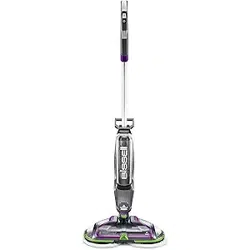
SPINWAVE
®
CORDLESS
_______________
USER GUIDE
2240F
F
L
O
O
R
C
L
E
A
N
I
N
G
E
X
P
E
R
T
S
E
S
T
.
1
8
7
6
U
.
S
.
A
.

www.BISSELL.com.au
2
IMPORTANT SAFETY INSTRUCTIONS
WARNING
TO REDUCE THE RISK OF FIRE, ELECTRIC SHOCK OR INJURY:
» This appliance can be used by children
aged from 8 years and above and
persons with reduced physical, sensory or
mental capabilities or lack of experience
and knowledge if they have been given
supervision or instruction concerning
use of the appliance in a safe way
and understand the hazards involved.
Cleaning and user maintenance shall not
be made by children without supervision.
» Children should be supervised to ensure
that they do not play with the appliance.
» Unplug from electrical socket when not
in use, before cleaning, maintaining,
or servicing the appliance, and if your
appliance has an accessory tool with
a moving brush, before connecting or
disconnecting the tool.
» Do not immerse in water or liquid.
» Keep hair, loose clothing, fingers, and all
parts of body away from openings and
moving parts of the appliance and its
accessories.
» Do not use with damaged cable or plug.
» If the charger supply cable is damaged, it
must be replaced by the manufacturer, its
service agent or similarly qualified person
in order to avoid a hazard.
» Do not incinerate the appliance even if it
is severely damaged. The batteries can
explode in a fire.
» The battery is to be disposed of safely.
» This appliance contains batteries that are
only replaceable by skilled persons.
» Under abusive conditions, liquid may be
ejected from the battery; avoid contact.
If contact accidentally occurs, flush with
water. If liquid contacts eyes, additionally
seek medical help. Liquid ejected from
the battery may cause irritation or burns.
» Recharge only with the charger specified
by the manufacturer. A charger that is
suitable for one type of battery pack
may create a risk of fire when used with
another battery pack.
» Unplug charger from electrical socket
when not in use, before cleaning,
maintaining or servicing the appliance,
and if your appliance has an accessory
tool with a moving brush, before
connecting or disconnecting the tool.
» This appliance contains batteries that are
non-replaceable.
» The battery must be removed from the
appliance before it is scrapped.
» Do not use with damaged cable or
charger. If appliance is not working as it
should, has been dropped, damaged, left
outdoors, or dropped into water, return it
to a service center.
» Turn OFF all controls before unplugging.
» Do not pull or carry charger by cable, use cable as a
handle, close door on cable, or pull cable around sharp
edges or corners.
» Keep charger cable away from heated surfaces.
» To unplug, grasp the charger plug, not the cable.
» Do not handle charger plug or appliance with wet hands.
» Battery pack and charger base output terminals are not to
be short-circuited.
» Do not charge the unit outdoors.
» The appliance must be disconnected from the supply
mains when removing the battery.
» Do not recharge, disassemble, heat above 60°C, or
incinerate.
» Keep batteries out of reach of children.
» Dispose of used batteries promptly.
» Never put batteries in mouth. If swallowed, contact your
physician or local poison control.
» Prevent unintentional starting. Ensure the switch is in the
OFF-position before picking up or carrying the appliance.
Carrying the appliance with your finger on the switch
or energising appliance that have the switch on invites
accidents.
» Do not use appliance that is damaged or modified.
Damaged or modified batteries may exhibit unpredictable
behavior resulting in fire, explosion or risk of injury.
» Do not expose appliance to fire or excessive temperature.
Exposure to fire or temperature above 130°C may cause
explosion.
READ ALL INSTRUCTIONS BEFORE USING YOUR APPLIANCE.
When using an electrical appliance, basic precautions should be observed, including the following:

www.BISSELL.com.au
3
SAVE THESE INSTRUCTIONS
ORIGINAL INSTRUCTIONS. FOR OPERATION ON A 220-240 VOLT
A.C. 50-60 HZ POWER SUPPLY ONLY.
THIS MODEL IS FOR HOUSEHOLD USE ONLY.
IMPORTANT INFORMATION
» Keep appliance on a level surface.
» To reduce the risk of a leaking condition, do not store unit where freezing may occur. Damage to internal components
may result.
» Follow all charging instructions and do not charge the
appliance outside of the temperature range specified in
the instructions. Charging improperly or at temperatures
outside of the specified range may damage the battery
and increase the risk of fire.
» Have servicing performed by a qualified repair person
using only identical replacement parts. This will ensure
that the safety of the product is maintained.
» Do not modify or attempt to repair the appliance except
as indicated in the instructions for use and care.
» Keep the temperature range of between 4-40°C when
charging battery, storing unit or during use.
» Plastic film can be dangerous. To avoid danger of
suffocation, keep away from children.
» Use only as described in this user guide.
» Use only manufacturer’s recommended attachments.
» If appliance is not working as it should, has been
dropped, damaged, left outdoors, or dropped into water;
do not attempt to operate it and have it repaired at an
authorised service center.
» Use extra care when cleaning on stairs.
» Do not use appliance in an enclosed space filled with
vapours given off by oil-based paint, paint thinner, some
moth-proofing substances, flammable dust, or other
explosive or toxic vapours.
» Use indoors only.
www.BISSELL.com.au
4
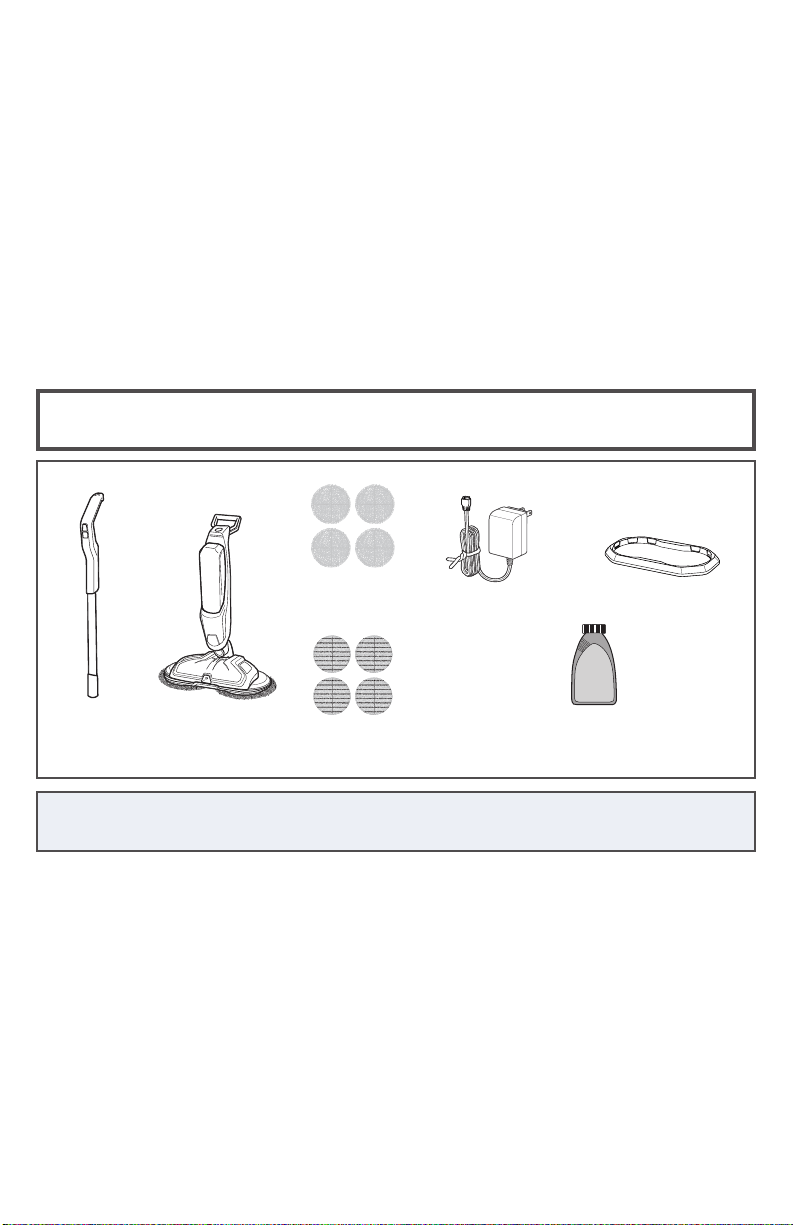
What’s In The Box?
NOTE: Standard accessories may vary by model. To identify what should be included with
your purchase, please refer to the “Carton Contents” list located on the carton top flap.
Thanks for buying a BISSELL®
SpinWave® Cordless
We love to clean and we’re excited to share one of our innovative
products with you. We want to make sure your hard surface floor
cleaner works as well as it does today for years to come, so this guide
has tips on using, maintaining, and if there’s a problem, troubleshooting.
Your cleaner needs a little assembly before getting to work, so flip to
the ‘Assembly’ section on page and let’s get started!
Safety Instructions...........2
Product View & Assembly ...5
Formula .....................6
Operations ...............6-12
Maintenance & Care ..... 13-14
Troubleshooting ............15
Warranty & Service .........16
Product Registration........16
(4) Scrubby
Pads
Handle
(4) Soft
Touch Pads
236 mL BISSELL
Multi-Surface Formula
Body of
Unit
Charging
Adapter Plug
Storage Tray
www.BISSELL.com.au
5
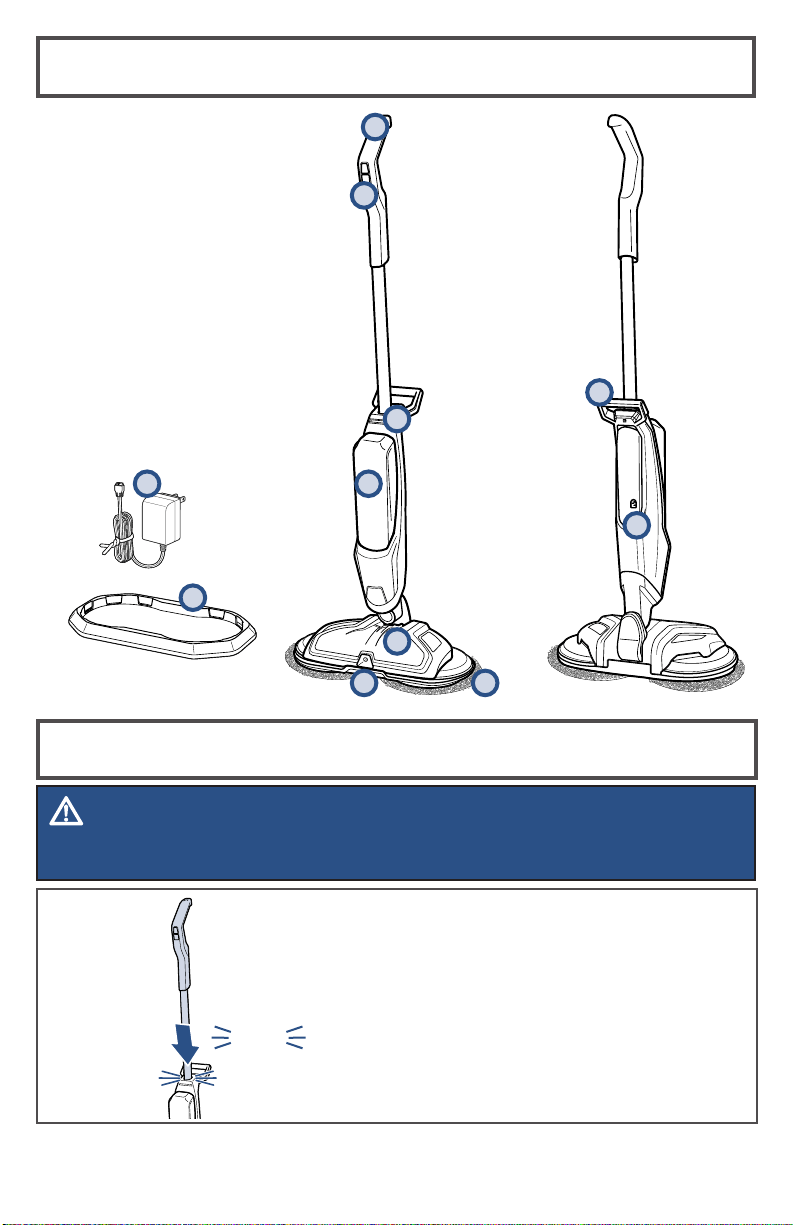
Product View
Assembly
Insert handle into body of unit
until you hear a “click”.
WARNING
Do not plug in your SpinWave® Cordless until you are familiar with all instructions
and operating procedures.
3
2
1
4
7
10
1 Handle
2 Digital Controls
3 Battery Status Indicator Lights
4 Clean Water Tank
5 Low Profile Foot
6 Power Spin Pads
7 Spray Nozzle
8 Charging Adapter Plug
9 Storage Tray
10 Carry Handle
11 Charging Port
click
5
6
9
8
11
www.BISSELL.com.au
6
SPINWAVE® CORDLESS
FORMULAS
Multi-Surface
Formula
Wood Floor
Formula
Great for cleaning
ALL sealed
hard floors
Restore your sealed
wood floors’
natural shine
WARNING
To reduce the risk of fire and electric shock due to internal component damage, use only
BISSELL® cleaning formulas intended for use with the hard floor device.
Keep plenty of SpinWave® Cordless
formulas on hand so you can clean
your sealed hard floors whenever it fits
your schedule. Always use SpinWave®
Cordless formulas in your machine.
Other formulas may harm the machine
and may void the warranty.
Cleaning Formulas
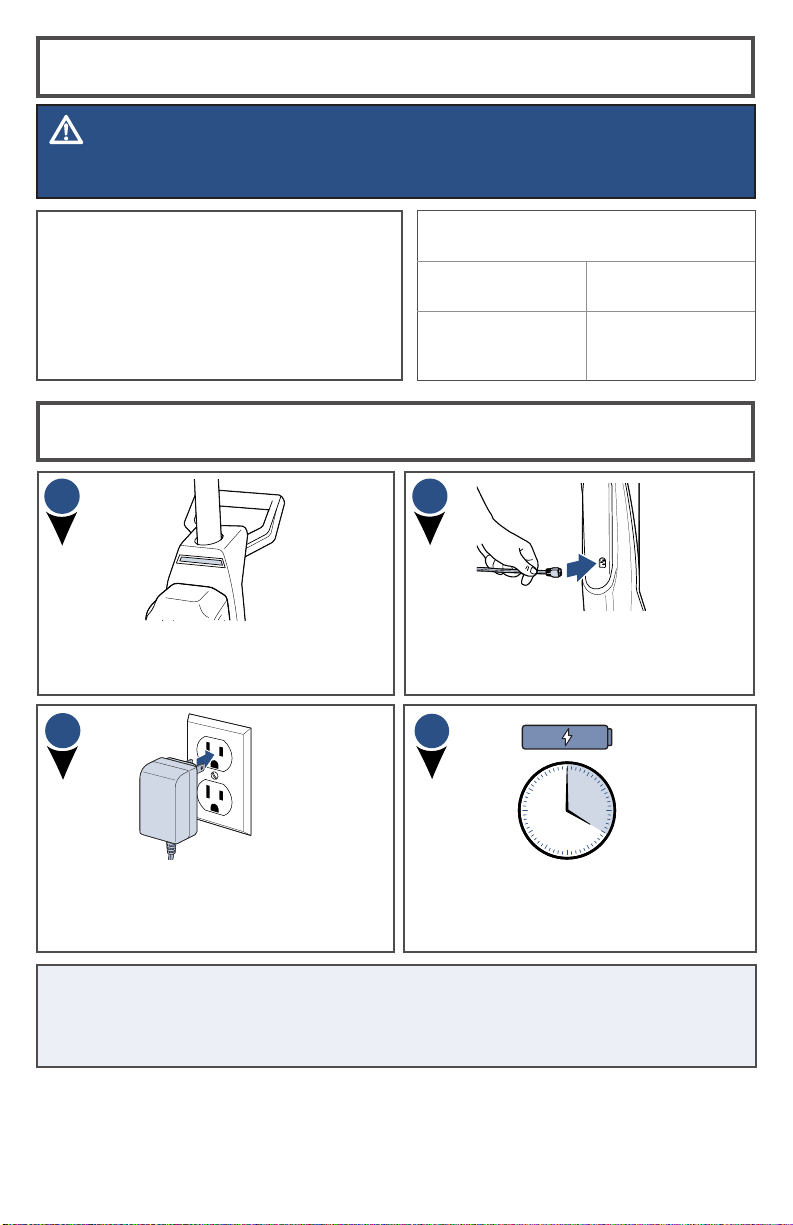
Charging the Battery
Plug the adapter into a suitable wall
outlet. The battery status indicator lights
will illuminate when charging.
1
2
Before charging, make sure unit is
OFF by ensuring the battery status
indicator lights are not illuminated.
For maximum run time, charge unit for 4
hours prior to use. Refer to chart on page
7 for understanding the charging status.
Insert the charging adapter plug into
the charging port on the back, right
side of the unit.
4h
3
4
NOTE: On first use, make sure unit is fully charged before use. To check the
battery status, turn the unit ON by puling the Handle back and pressing the
ON/OFF Button. Battery is fully charged when all three blue status lights are
illuminated.
www.BISSELL.com.au
7
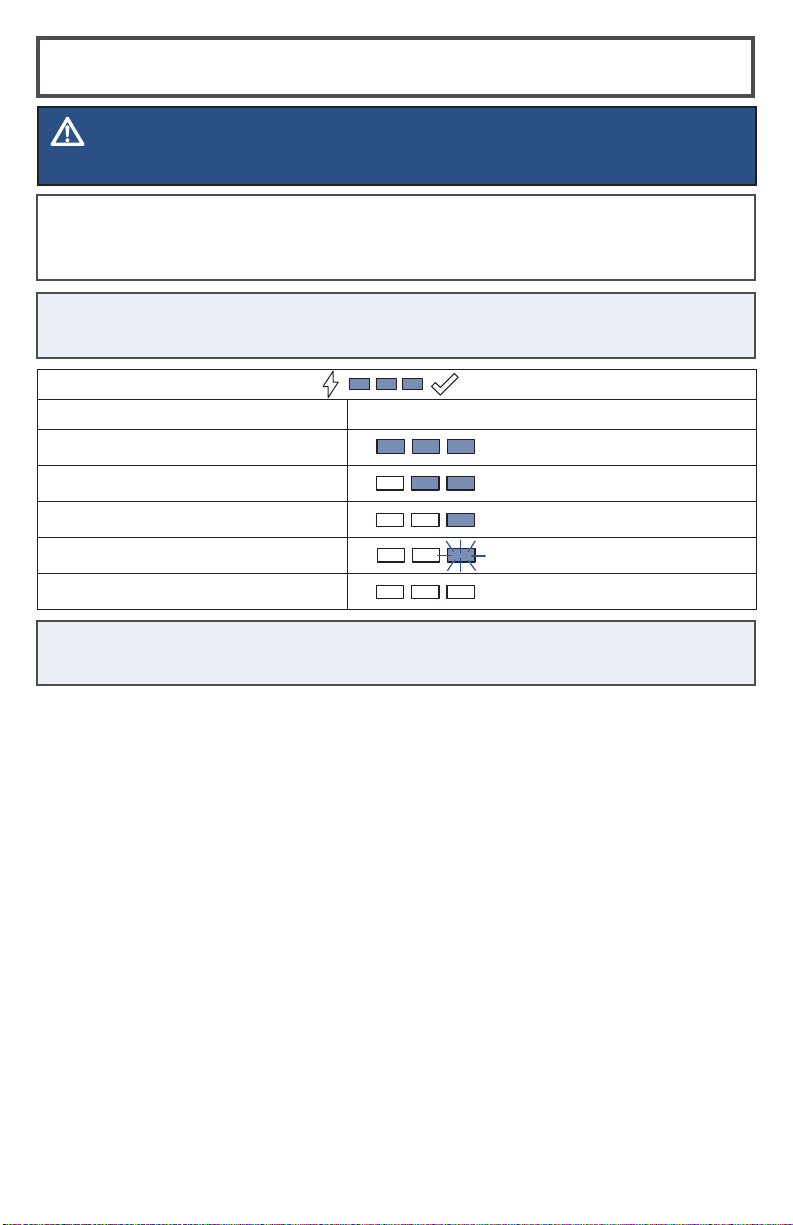
Your BISSELL® SpinWave® Cordless machine has an LED light display that will
turn on when the ON/OFF Button is pushed to show the battery life status. All
LED color is blue.
BATTERY STATUS LIGHT STATUS
100% to 67%
66% to 33%
32% to 10%
> 10%
0%
In Use LED Display
NOTE: Keep the temperature range between 40-104 °F when charging the
battery, storing unit or during use.
WARNING
Overcharging may cause battery damage, fire or explosion.
TIP: Be sure to charge unit when there is less than 10% power left and one LED
flashing blue.
www.BISSELL.com.au
8
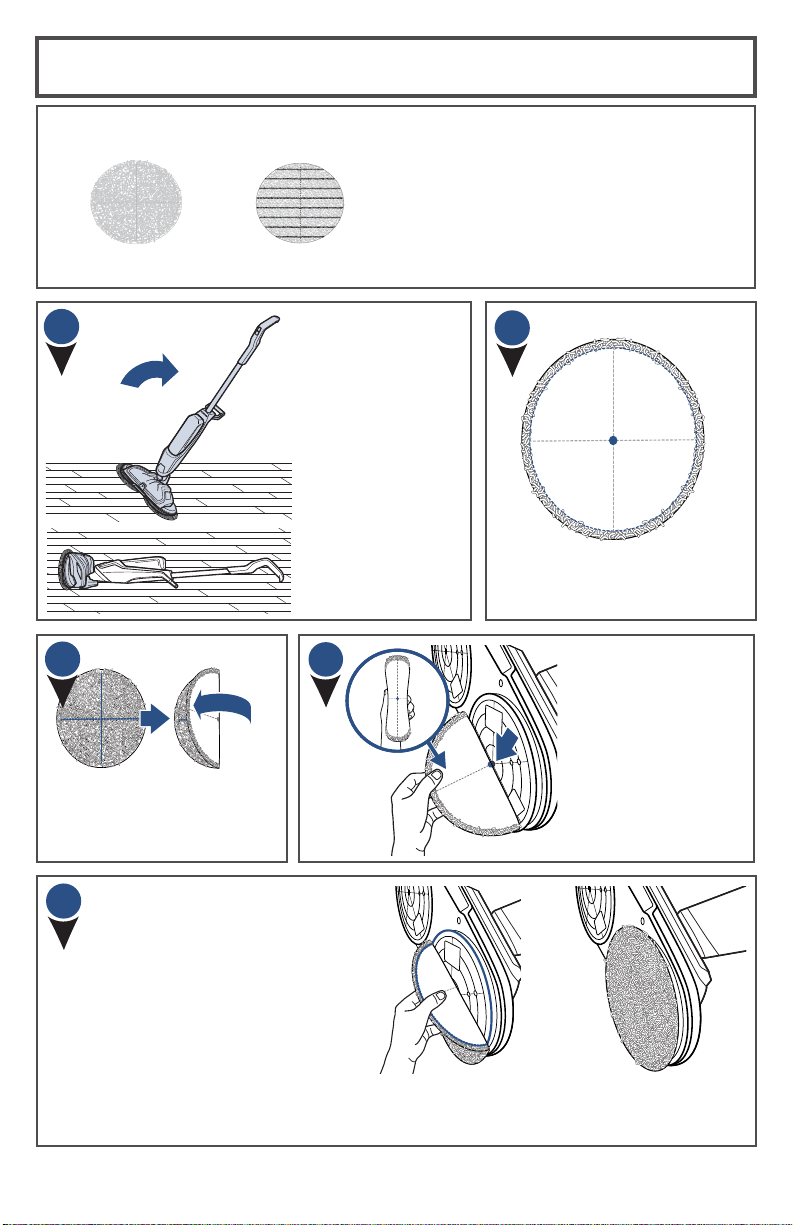
Attaching Mop Pads: Option 1
1
Your BISSELL® SpinWave® Cordless may
have come with two different mop pads:
(4) Scrubby Pads(4) Soft Touch Pads
The Soft Touch Pad is for everyday
use on delicate flooring like sealed
hardwoods and laminate.
The Scrubby Pad is used to power
through tough, sticky messes.
Your SpinWave®
Cordless may have
come with mop
pads attached. If
not, to attach mop
pads, carefully lay
machine down on
the floor.
2
The back of the mop pad
has a small dot in the
center of the pad.
Then, with the mop
pad folded, line up the
small dot in the center
of the pad with the
middle screw on the
bottom of the foot.
First, fold the pad in half,
making sure the cloth
material is inside the fold.
Lastly, line up the edge of
the mop pad with the inner
ring on the foot, attach
the mop pad to the hook
and loop material on the
bottom of the foot.
3
5
4

www.BISSELL.com.au
9
Attaching Mop Pads: Option 2
Your BISSELL® SpinWave® Cordless may
have come with two different mop pads:
(4) Scrubby Pads(4) Soft Touch Pads
The Soft Touch Pad is best for
everyday use on delicate flooring like
sealed hardwoods and laminate.
The Scrubby Pad is best used to
power through tough, sticky messes.
NOTE: These next steps are to help you apply the mop pads more accurately
onto the machine.
Place clean mop pads upside down in
the storage tray. The dot on each mop
pad should be facing up.
Hover the unit over the mop pads to
align in the center, then place the unit
down on the mop pads. Now they are
attached to the machine.
1
2
www.BISSELL.com.au
10
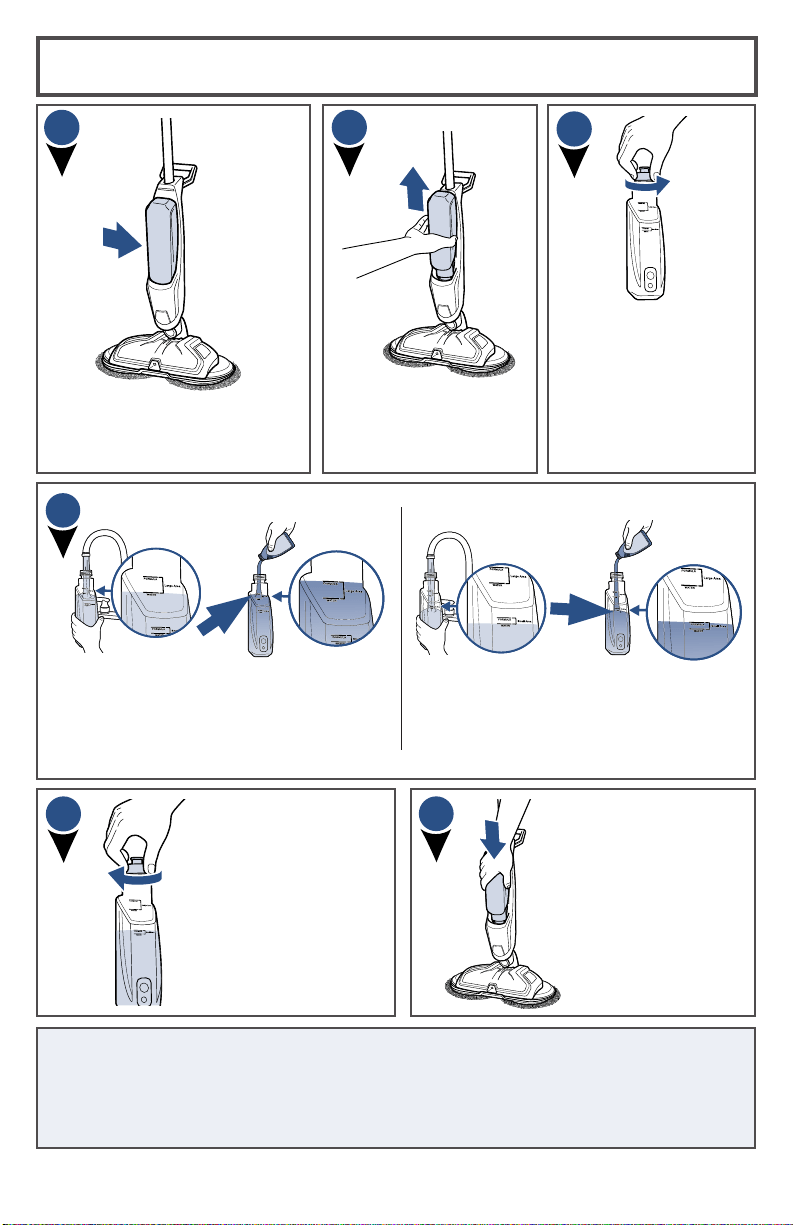
Filling Your Clean Water Tank
Lift the Clean Water Tank
straight up to remove
from the machine.
The Clean Water Tank is located
on the front of the machine.
Clean
Water
Tank
For small area cleaning
a. Fill Clean Water Tank with warm tap
water to the first water fill line.
b. Add BISSELL® SpinWave® Cordless
formula to the first formula fill line.
A few notes about filling the Clean Water Tank:
• Fill with warm (140°F/60°C MAX) tap water and add the appropriate
BISSELL formula. DO NOT USE BOILING WATER. DO NOT HEAT WATER OR
TANK IN MICROWAVE.
Unscrew the cap from
the Clean Water Tank.
The Clean Water Tank
has two measuring
volumes depending
on the amount of
space you would like
to clean.
For large area cleaning
a. Fill Clean Water Tank with warm tap
water to the second water fill line.
b. Add BISSELL® SpinWave® Cordless
formula to the second formula fill line.
Slide the Clean Water
Tank back into place
until you hear a click.
Screw the cap
back onto the
Clean Water Tank.
1
2
3
4
5
6
www.BISSELL.com.au
11
Cleaning Sealed Hard Floors
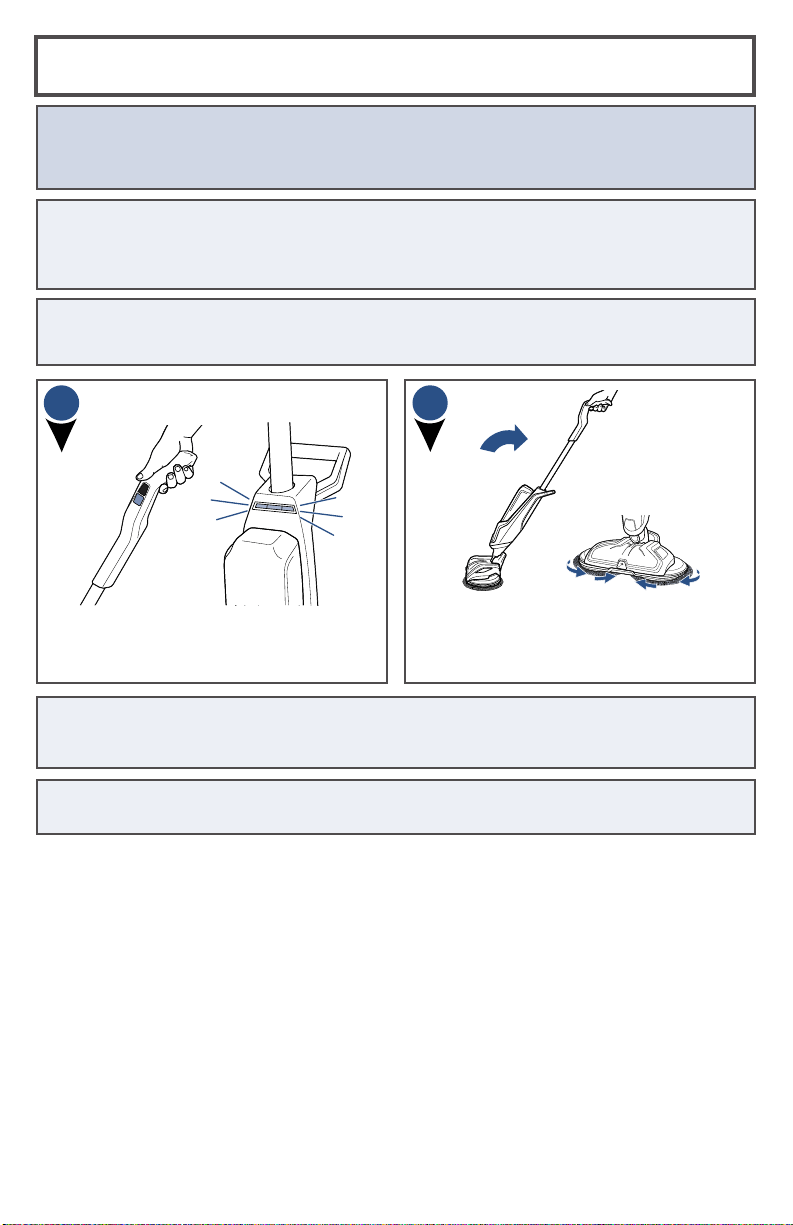
When fully charged, press the ON/OFF
Button and the three LED lights will
illuminate.
Recline the body of the unit backward
to start the rotating mop pads.
1
TIP 3: For optimum cleaning, perform overlapping cleaning strokes while dispensing
cleaning formula. Care should be taken to not overwet the floor surface, especially
when cleaning wood and other delicate floor surfaces.
ATTENTION: This machine is designed to be used only on sealed hard floors and
should not be used on carpet or rugs. For best cleaning results, sweep or vacuum the
floor surface prior to using to avoid scratching or damaging floors from sharp debris.
TIP 1: You may feel a slight vibration when turning ON the machine if the mop pads
are not aligned correctly. Wait a few seconds for the pads to adjust themselves. If this
doesn’t occur, turn the machine OFF and replace mop pads following the instructions
in ‘Attaching Mop Pads’ sections.
TIP 4: When cleaning near baseboards, edges or furniture you may feel a slight pull
from the unit due to bouncing off the surface.
TIP 2: When you press the ON/OFF Button to start the unit the LED lights will
illuminate, but the mop pads will not start rotating until the unit is reclined.
2
www.BISSELL.com.au
12
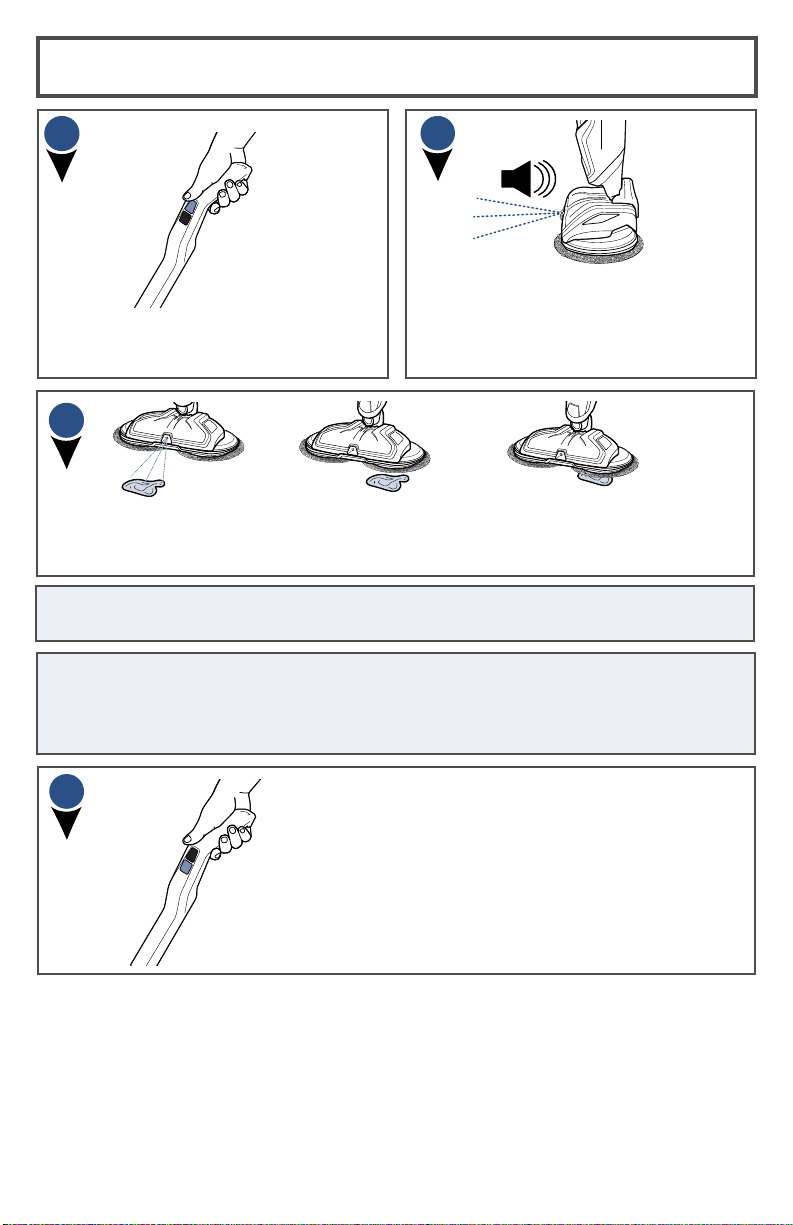
To clean, push the SPRAY Button to
dispense formula.
Formula will spray out of the nozzle on
the front of the foot. You should hear a
soft buzzing noise each time you press
the SPRAY Button to indicate formula
being dispensed.
For more difficult and stuck-on messes, spray formula directly on mess and line
up one of the mop pads parallel to the mess. Move mop pad over mess and slowly
move machine back and forth to clean, continuing to spray formula as needed.
4
6
5
NOTE: When finished cleaning, make sure to push the OFF Button before standing the
machine upright as the mop pads will continue to spin until the machine is turned OFF.
Cleaning Sealed Hard Floors (cont’d)
3
To power OFF the unit, press the unit ON/OFF
Button and put unit into upright position. The
LED lights will turn OFF.
NOTE: If unit is ON and gets placed in the upright position while still ON, unit will go
into standby mode. To power OFF, press the ON/OFF Button or the unit will turn OFF
by itself after 10 seconds of no action. You will know it is OFF when the LED lights are
no longer illuminated.
www.BISSELL.com.au
13
Cleaning Your SpinWave®
Cordless
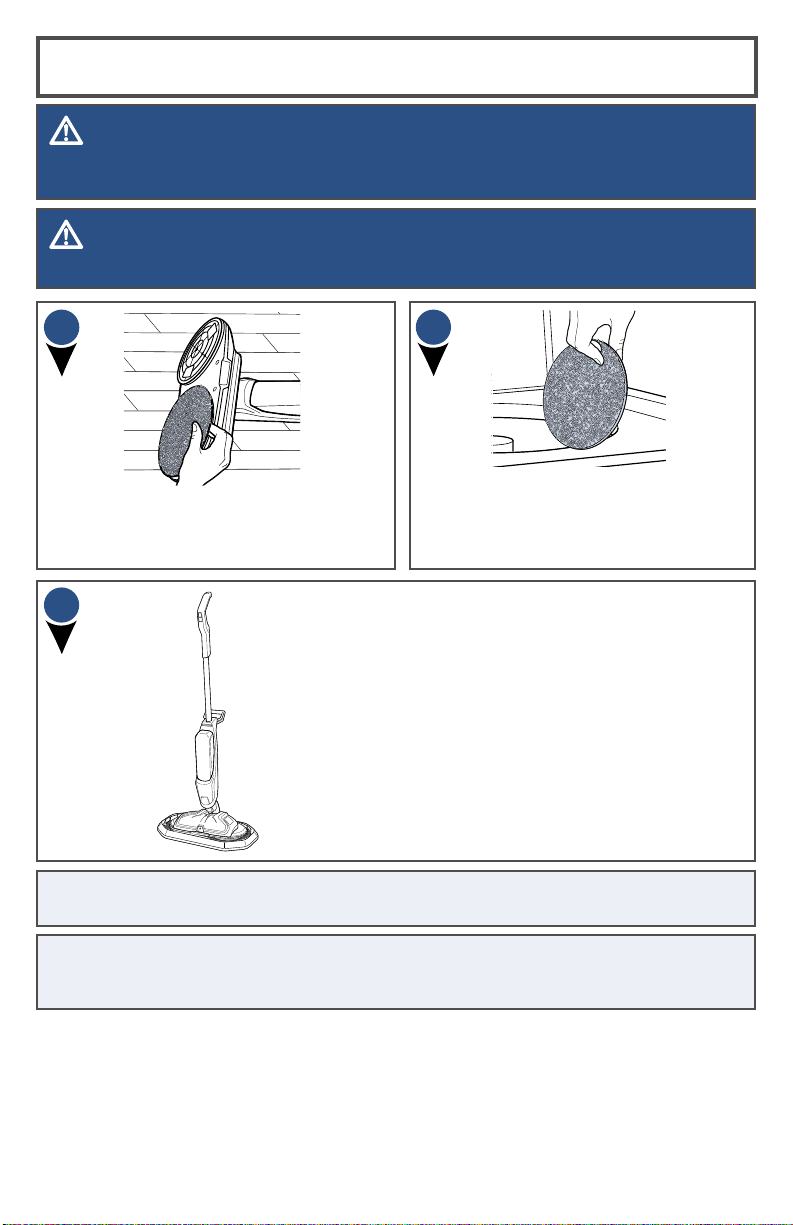
Machine wash separately in warm water.
Use only liquid detergents. Do not use
bleach or fabric softener. Tumble dry on
low. Do not iron. Do not dry clean.
To remove mop pads, simply pull pads
off the hook and loop material on the
bottom of the machine.
Store upright in storage tray in a dry,
protected area until the next use. Since this
product uses water, it must not be stored
where there is danger of freezing. Store with
dry mop pads. Wet mop pads may damage
wood and other delicate, sealed hard floors.
1
2
3
WARNING
Do not set the machine on carpet, rug or other fabric surface when mop pad is removed as
hook and loop material on foot may damage them.
WARNING
Do not store machine on wet mop pads as they may damage wood or other delicate floors.
NOTE: Any formula remaining in the Clean Water Tank should be emptied prior to
machine storage.
NOTE: Store cleaner in a protected, dry area. Since this product uses water, it must
not be stored where there is danger of freezing. Freezing may damage internal
components and may void the warranty.
www.BISSELL.com.au
14
WARNING
This product contains lithium-ion rechargeable batteries. According to local regulations,
removal and proper disposal of lithium-ion batteries is required. For removal of batteries
in your SpinWave® Cordless, see instructions on this page.
Disposing the Batteries
NOTICE: Disconnecting the battery will destroy the appliance and invalidate the
warranty.
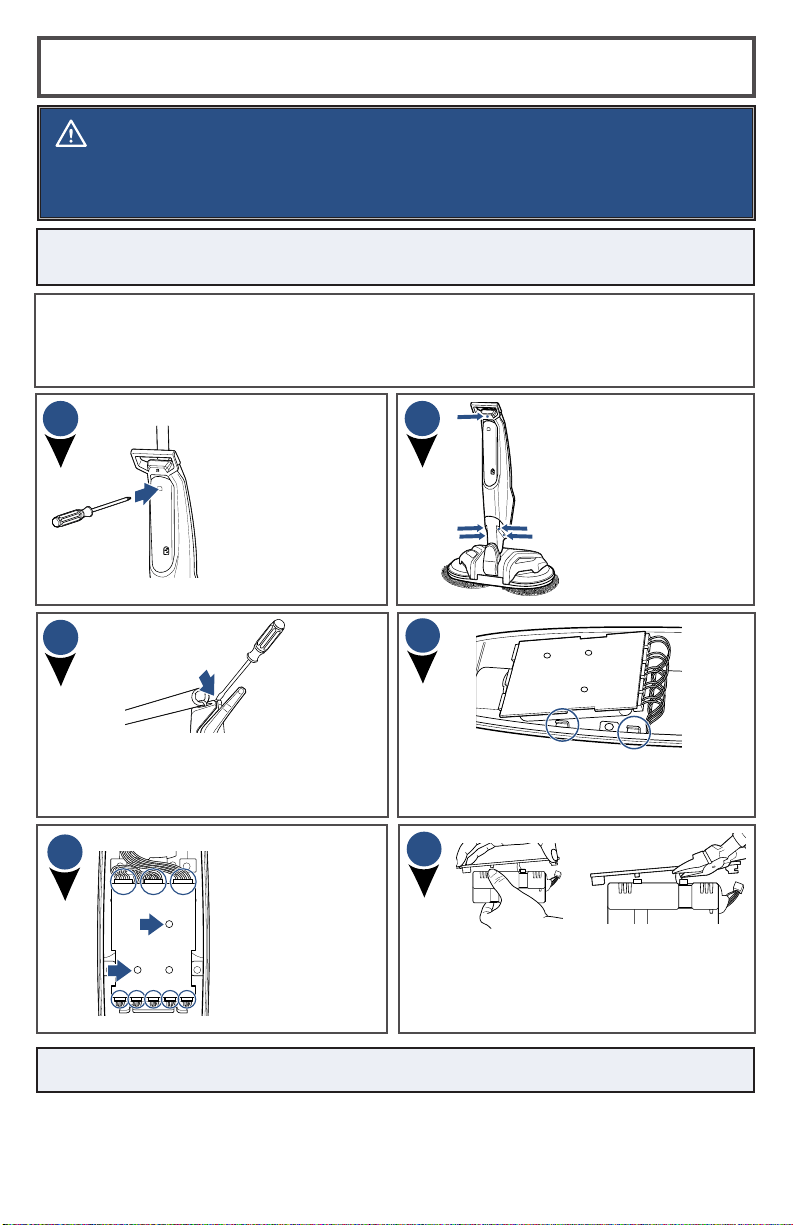
With a Phillips-head
screwdriver, remove
the 5 screws on the
back of the unit.
Insert screwdriver
into the hole on the
back of the unit
below the Carry
Handle in order
to disconnect the
handle.
1
4
3
2
Before proceeding, ensure that:
-The unit is disconnected from the charger.
-The Clean Water Tank has been removed from unit.
-You have flat-head and Phillips-head screwdrivers and rubber-handled wire cutters.
Remove the control panel with battery
pack. For leverage, you may need to use
the flat-head screwdriver to help remove.
Insert flat-head screwdriver between
the top front and back plates located
between the Carry Handle and main
handle to remove the front body plate.
5
6
Disconnect the
8 inputs that
are connected
to the control
panel. Then,
using a Phillips-
head screwdriver,
unscrew the two
screws on the
control board.
Pull the control panel back from the
battery pack. Then, with rubber-handled
wire cutters, clip the two metal poles to
disconnect the battery pack from the
control panel.
NOTE: Keep Battery Pack together – DO NOT separate individual batteries.

www.BISSELL.com.au
15
Problem Possible causes Remedies
Unit is
vibrating/
wobbling
Mop pads are not aligned with
foot.
Realign the mop pads on the foot.
Reduced
spray OR
no spray
Clean Water Tank may be empty.
Refill tank.
Clean Water Tank may not be
seated completely.
Turn power OFF.
Remove and reseat tank.
System isn’t completely primed. Hold trigger for 10 to 15 seconds to
make sure the formula has flowed to
the spray tips.
Not holding trigger to spray
formula.
Hold trigger continuously while using
the machine.
Spray tips on foot clogged. Turn power OFF. Use a pin to clean
the spray tip located front and center
of the machine.
Spin plates
are not
turning or are
wobbling
Mop pads are not installed
properly.
Turn power OFF and follow instructions
on page 6 for replacing mop pads.
Machine is standing upright. Recline machine.
Machine is
leaking
Cap of Clean Water Tank is not
closed properly.
Remove the Clean Water Tank and
re-apply the cap.
Unit will not
charge
Charger plug/cable not
connected.
Make sure charger plug is completely
plugged into wall outlet and charging
cable is completely plugged into port
on the back of unit.
Not the correct charger. Use only the charger that comes with
machine.
All three (3)
LED lights
flashing
Pads forced to stop spinning,
potentially due to stuck debris,
compressed under furniture or
was briefly stepped on.
Turn the unit OFF or wait 10 seconds
for the lights and machine to turn OFF.
Then, press the ON/OFF to start the
unit again.
Heavy and extended usage may
cause internal temperature of
machine to warm up slightly
past the typical operating
temperature.
Press ON/OFF Button on Handle one
time and wait for unit to cool down
and reset.
Two (2) LED
lights flashing
Functional issue with machine. Contact us for additional assistance.
Troubleshooting
WARNING
To reduce the risk of electric shock, turn power OFF and disconnect plug from electrical
outlet before performing maintenance or troubleshooting checks.
16
Visit the BISSELL website: www.BISSELL.com.au
When contacting BISSELL, have model number of cleaner available.
Please record your Model Number:
Please record your Purchase Date:
NOTE: Please keep your original sales receipt. It provides proof of the date
of purchase in the event of a guarantee claim. See guarantee for details.
This guarantee gives you specific legal rights, in addition to rights you may
have under the Australian Consumer Law. If you need additional instruction
regarding this guarantee or have questions regarding what it may cover,
please contact your local BISSELL Consumer Services on the details set out
below.
Limited 2 Year Guarantee
(from the date of purchase by
original purchaser)
Subject to the *CONDITIONS identified below, BISSELL will repair or replace
(with new, refurbished, lightly used, or remanufactured components or
products), at BISSELL’s option, free of charge, any defective or malfunctioning
part due to manufacturer defect. This guarantee applies to product used for
personal purposes, and not commercial or rental service. This guarantee does
not apply to fans or routine maintenance or consumable components such as
filters, belts, brush rolls, etc., damage or malfunction caused by negligence,
abuse, neglect, unauthorized repair, or any other use not in accordance with
the user guide. BISSELL recommends that the original packaging be kept
for the duration of the guarantee period in case such need arises within the
guarantee period that the item needs re-packing and transportation.
It may be necessary to obtain some of your personal information, such as a
mailing address, to fulfill terms of this guarantee. Any personal data will be
handled pursuant to BISSELL’s Privacy Policy, which can be found at
www.BISSELL.eu.
*CONDITIONS OF THE GUARANTEE
Subject to whether such loss is reasonably foreseeable, BISSELL and its
in-country distributors are not liable for incidental or consequential damages
of any nature associated with the use of this product.
FOR AUSTRALIAN CONSUMERS ONLY:
OUR GOODS COME WITH GUARANTEES THAT CANNOT BE EXCLUDED UNDER
THE AUSTRALIAN CONSUMER LAW. YOU ARE ENTITLED TO A REPLACEMENT
OR REFUND FOR A MAJOR FAILURE AND FOR COMPENSATION FOR ANY OTHER
REASONABLY FORESEEABLE LOSS OR DAMAGE. YOU ARE ALSO ENTITLED
TO HAVE THE GOODS REPAIRED OR REPLACED IF THE GOODS FAIL TO BE OF
ACCEPTABLE QUALITY AND THE FAILURE DOES NOT AMOUNT TO A MAJOR
FAILURE.
THIS GUARANTEE IS IN ADDITION TO OTHER RIGHTS OR REMEDIES UNDER LAW.
NOTHING IN THIS GUARANTEE EXCLUDES, LIMITS OR MODIFIES ANY LIABILITY
OF BISSELL WHICH IS IMPOSED BY LAW, OR LIMITS OR MODIFIES ANY REMEDY
AVAILABLE TO THE CONSUMER WHICH IS GRANTED BY LAW. TO MAKE A CLAIM
UNDER THIS GUARANTEE CONTACT BISSELL AUSTRALIA PTY LTD (DETAILS
BELOW). CONTACT BISSELL PRIOR TO RETURNING ANY GOODS. WHERE AGREED,
BISSELL WILL REIMBUSE REASONABLE POSTAGE / HANDLING COSTS (IF ANY)
FOR RETURNING GOODS TO BISSELL. TO CLAIM EXPENSES INCURRED IN MAKING
A CLAIM UNDER THIS GUARANTEE PLEASE PROVIDE BISSELL WITH A COPY OF
THE RECEIPT OF THE EXPENSES BY EMAIL OR POST.
If your BISSELL® product should require service or to claim under our limited guarantee,
please contact us as follows:
Website and Email:
www.BISSELL.com.au
www.BISSELL.co.nz
Telephone:
Australia: 1300-247-735
New Zealand: 0800-247-735
Write:
BISSELL AUSTRALIA PTY LIMITED
42 Rocco Dr.
Scoresby 3179
Victoria
Australia
Replacement parts and accessories are available for purchase.
To purchase visit www.BISSELL.com.au.
Consumer Guarantee
Consumer Care
©2019 BISSELL Inc.
Grand Rapids, Michigan
All rights reserved. Printed in China
Part Number 161-6499 01/19 RevC