www.eureka.com
1
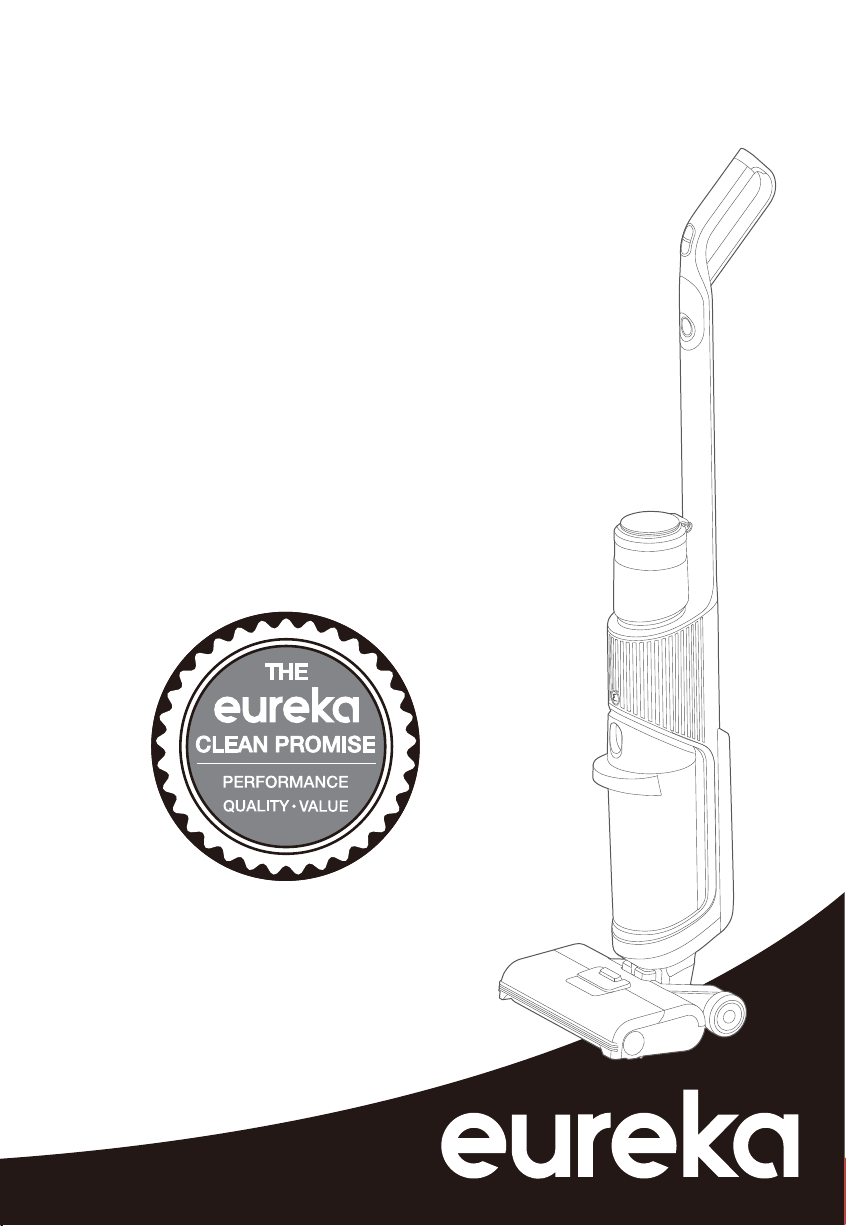
Thank you for purchasing your new Eureka vacuum!
Important instructions
For easy assembly, please take a few moments
to read this owner’s guide.
If you have questions about your new vacuum,
please contact our customer service HELPLINE
at 1-800-282-2886.
We’re here to help!
Eureka stands by our
Clean Promise seal.
Learn more at
www.eureka.com/cleanpromise
www.eureka.com
Owner’s Guide
NEW500 series
Wet/Dry vacuum cleaner; household type
2
Eureka Customer Service HELPLINE 1-800-282-2886
Contents
Important safeguards. . . . . . . . . . . . . . . . . . . . . . . . . . . . . . . . . 3
What comes in the carton ............................ .5
How to assemble your vacuum cleaner . . . . . . . . . . . . . . . . . . .6
............................ .6Installing clean water tank
How to clean hard floors .............................. 7
Using self-cleaning function. . . . . . . . . . . . . . . . . . . . . . . . . . . . 8
Maintenance: Emptying water tank ..................... . 8
How to clean the brushroll and cover .................... . 9
Problem solving ................................... .10
Technical Parameter ................................ .13
The Eureka limited warranty ......................... .11
How to order replacement parts ...................... .12
Write the model, type and serial number here:
Date of purchase (keep your receipt) ______________
Model number and type _________________________
Serial number ________________________________
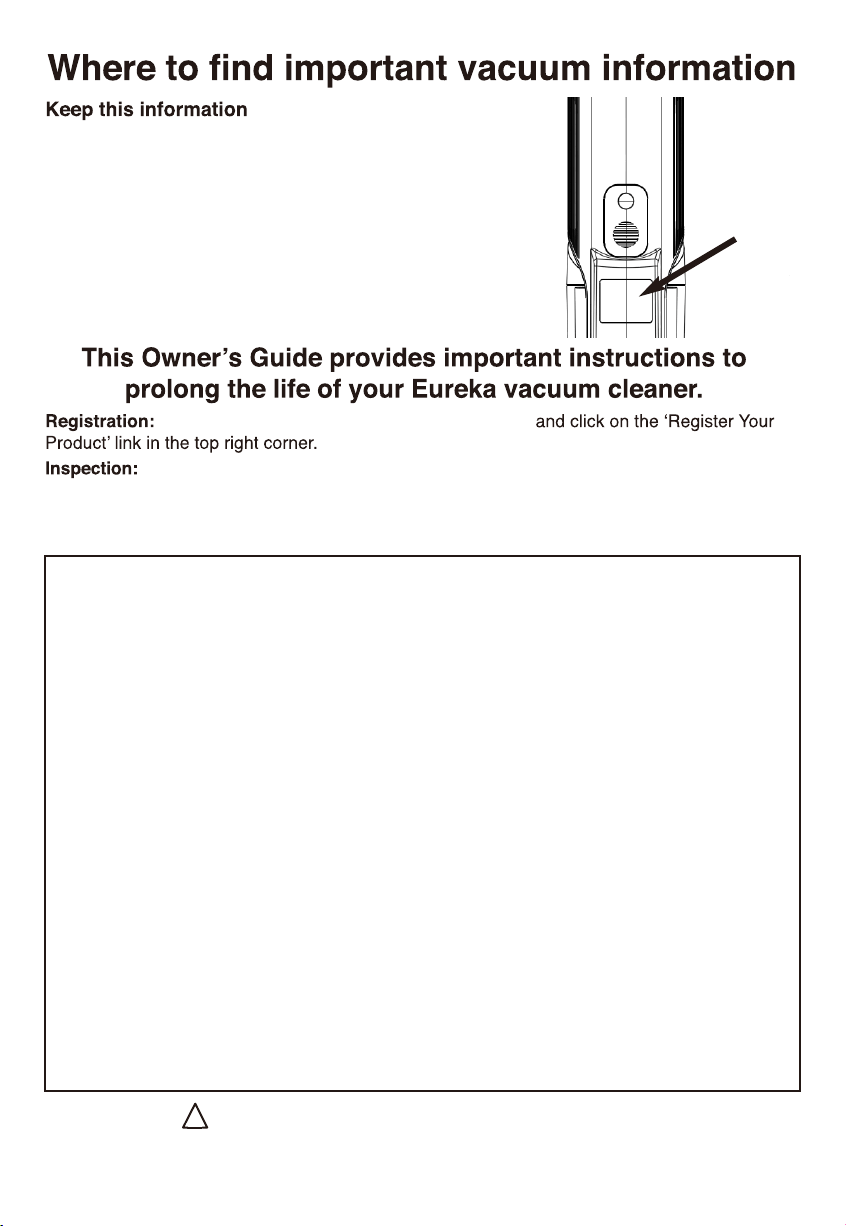
Find these numbers on a label on the middle back side
of the vacuum cleaner. Refer to these numbers when
ordering parts and accessories or if service is needed.
To register your product visit www.eureka.com
Carefully unpack and inspect your new Eureka vacuum cleaner for shipping damage.
Each unit is tested and thoroughly inspected before shipping. For instructions regarding any
shipping damage, call Eureka Customer Service HELPLINE 1-800-282-2886 immediately.
!
Follow caution information wherever you see this symbol.
www.eureka.com
3
WARNING
!
Failure to follow the warnings and
instructions may result in electric shock, fire
and/or serious injury.
• Do not use outdoors or on wet surfaces.
• Do not handle charger, including charger
plug, and charger terminals with wet hands.
Prevent unintentional starting. Ensure the switch is in
the off-position before picking up or carrying the
appliance.
Carrying the appliance with your finger on the switch
or energizing appliance that has the switch on invites
accidents.
Do not touch nozzle when the vacuum cleaner is on.
Danger.
Do not put any object into openings. Do not use with
any openings blocked; keep free of dust, lint, hair and
anything that may reduce air flow.
Do not use outdoors or on wet surfaces.
Do not operate the vacuum cleaner or charger if it has
been damaged in any way. If vacuum cleaner is not
working as it should, has been dropped, damaged, left
outdoors, or dropped into water, call the Eureka
Customer Service HELPLINE at 1-800-282-2886.
To avoid excessive heat and damage to the unit or
battery, the vacuum cleaner will not operate while
charging.
Do not allow to be used as a toy. Close attention is
necessary when used by or near children.
Use only as described in this manual. Use only
manufacturer’s recommended attachments.
Recharge only with the charger specified by the
manufacturer. A charger that is suitable for one type of
battery pack may create a risk of fire when used with
another battery pack.”
Do not pull or carry the charger by cord, use cord as a
handle, close a door on cord, or pull cord around sharp
edges or corners. Do not run appliance over cord. Keep
cord away from heated surfaces.
This charger is not intended for use by travelers.
Do not use extension cords or outlets with inadequate
current- carrying capacity for the charger.
Do not unplug by pulling on cord. To unplug, grasp the
plug, not the cord.
Do not handle charger or vacuum cleaner with wet
hands.
Use appliances only with specifically designated battery
packs. Use of any other battery packs may create a risk
of injury and fire.
•
•
•
•
•
•
•
•
•
•
•
•
•
•
•
DO NOT MUTILATE OR INCINERATE BATTERIES.
THEY BECOME DANGEROUS AT HIGH
TEMPERATURES.
Liquid ejected from the battery may cause irritation or
burns. If the liquid gets on the skin, (1) seek medical
attention, (2) wash quickly with soap and water, and
(3) neutralize with a mild acid such as lemon juice or
vinegar. If the liquid gets into the eyes, flush them
immediately with clean water for a minimum of 10
minutes.
When battery pack is not in use, keep it away from
other metal objects, like paper clips, coins, keys, nails,
screws or other small metal objects, that can make a
connection from one terminal to another. Shorting the
battery terminals together may cause burns or a fire.
This product is functioning at temperature range within
40°F - 104°F.
Do not use a battery pack or appliance that is damaged
or modified. Damaged or modified batteries may
exhibit unpredictable behavior resulting in fire,
explosion or risk of injury.
Do not expose a battery pack or appliance to fire or
excessive temperature. Exposure to fire or temperature
above 266°F may cause explosion.
Follow all charging instructions and do not charge the
battery pack or appliance outside of the temperature
range specified in the instructions. Charging
improperly or at temperatures outside of the specified
range may damage the battery and increase the risk of
fire.
Have servicing performed by a qualified repair person
using only identical replacement parts. This will ensure
that the safety of the product is maintained.
Do not modify or attempt to repair the appliance or the
battery pack except as indicated in the instructions for
use and care.
The terminals on both the vacuum cleaner and battery
should be kept free and clean of objects. Do not insert
metal objects inside the terminals.
This vacuum cleaner creates suction. Keep hair, loose
clothing, fingers, and all parts of body away from
openings and moving parts.
Do not pick up anything that is burning or smoking,
such as cigarettes, matches, or hot ashes.
Do not use without filters in place.
Use extra care when cleaning stairs.
Do not use to pick up flammable or combustible
liquids, such as gasoline, or use in areas where they
may be present.
•
•
•
•
•
•
•
•
•
•
•
•
•
•
•

4
Eureka Customer Service HELPLINE 1-800-282-2886
Store vacuum cleaner and charger indoors in a cool,
dry area.
To avoid electric shock and/or cleaner damage, do not
expose to weather elements.
Keep your work area well lit. Unplug electrical
appliances before vacuuming them.
Overcharging, short circuiting, reverse charging,
mutilating or incinerating the cells and the batteries
must be avoided.
If a cell or a battery has leaked or vented, it should be
replaced immediately using protective gloves.
If and when necessary, these cells or batteries must be
replaced with identical new ones from the same
manufacturer.
If a cell or a battery to be replaced is connected with
other cells or batteries in series, it is recommended
that the other cells or batteries be replaced with new
ones at the same time.
•
•
•
•
•
Reverse polarity installation of the cell or the battery in
the end product must be avoided.
Do not incinerate this appliance even if it is severely
damaged.
Contact local waste facility before discarding in trash.
Always use Eureka cleaning solution in your machine,
other cleaning solutions may damage the machine and
void the warranty.
Do not use an excessive amount of cleaning solution or
it may cause internal damage to the machine.
Do not immerse in liquid. Use only on surfaces
moistened by the cleaning process.
Use only on level surfaces for optimal cleaning
results.
Do not use to pick up toxic substances (solvents,
ammonia, gasoline, chlorine bleach, acidic substances,
drain cleaner, etc.).
Do not lift, carry or shake appliance while in use.
When in use do not lay the machine down flat or on its
side to prevent the dirty water from flowing into the
motor.
•
•
•
•
•
•
•
•
•
www.eureka.com
5
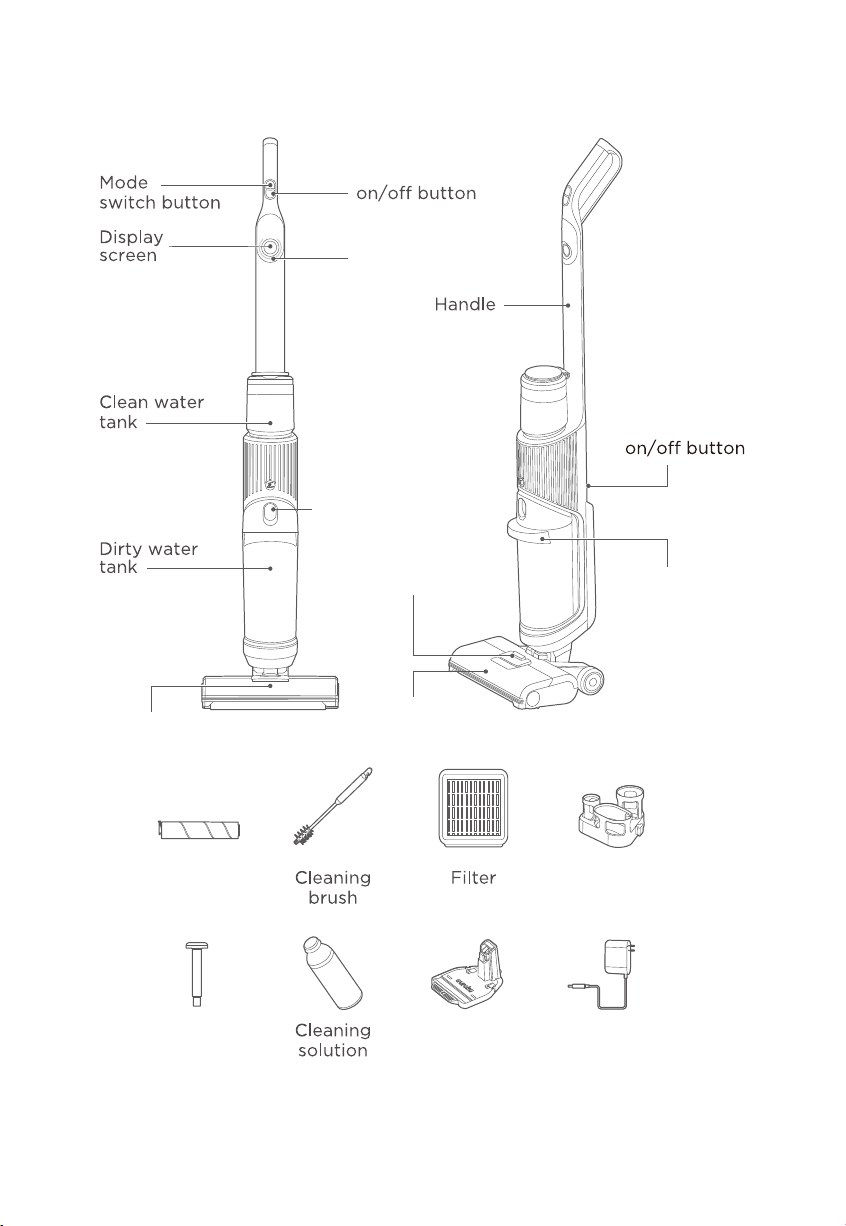
What Comes in the Carton
Dirt detection
indicator light
Dirty water tank
release button
Voice prompt
Brushroll cover
release button
Brushroll
Brushroll
Accessory
stand
Recharging/
storage base
Charging cord
Screw
(for securing
handle, use
screwdriver)
Brushroll cover
Dirty water tank
release handle
6
Eureka Customer Service HELPLINE 1-800-282-2886
Use warm water and Eureka cleaning solution. Always use Eureka cleaning solution in your machine, other cleaning
solutions may damage the machine and void the warranty.
Do not use water warmer than 140 degrees Fahrenheit. Do not use boiling water or heat water or tank in microwave.
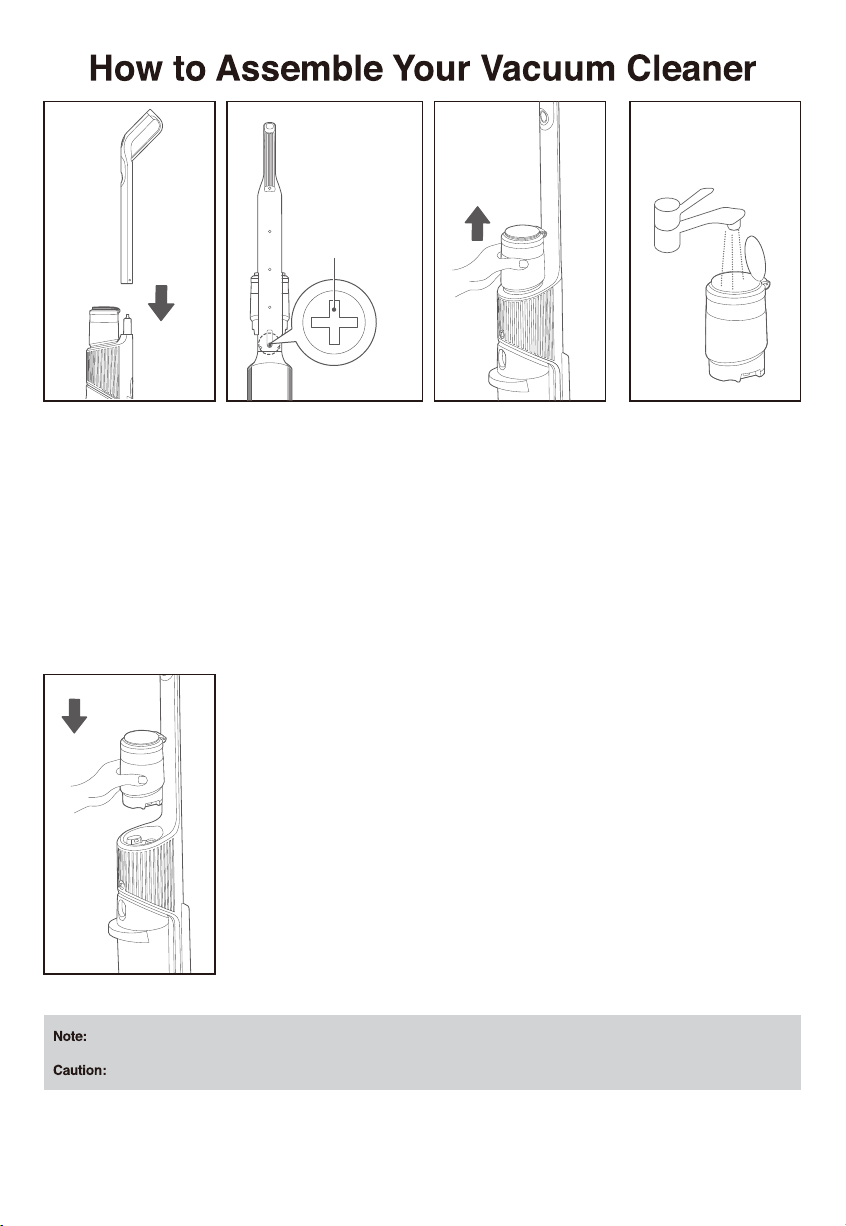
Insert end of handle into
the top of main body.
Locate the hole on the
back of the main body.
Use screwdriver to secure
into place.
To install the clean water tank, align it with the opening and press
down vertically until it clicks into place.
Open the lid of clean
water tank and fill it with
tap water. If deep clean-
ing is required, just pour
the cleaning solution into
the water tank again
according to the specified
proportion.
To remove the clean water
tank, hold the machine
body with one hand, and
grab the clean water tank
with the other hand and
pull it up and out vertically.
Installing Clean Water Tank
Use screwdriver
to secure into
place
www.eureka.com
7
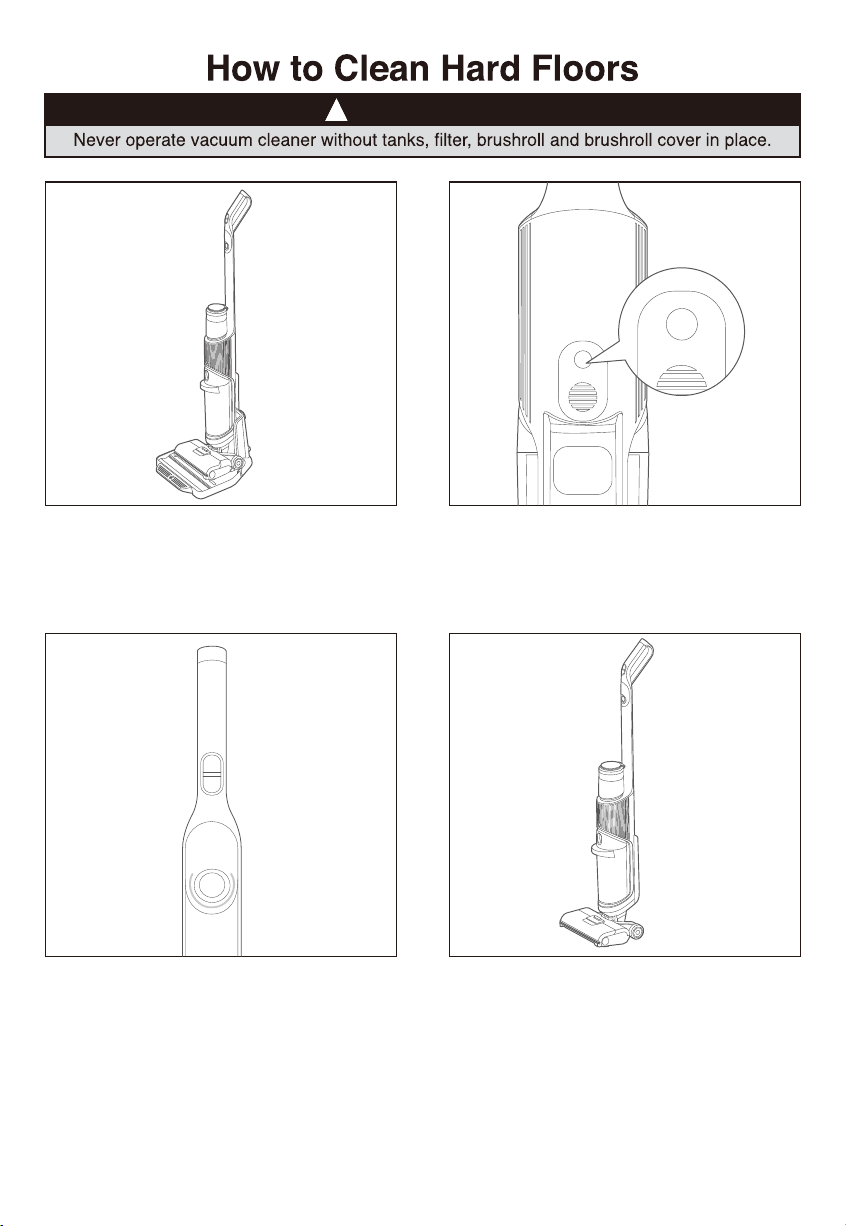
Take off the unit from charging base.
There is a half circle indicator light on the machine
display screen, which can indicate the floor dirty
level. Red represents the floor is dirty, and blue
represents the floor is clean. When the machine is
used to clean heavily dirty floor, the initial color is
red, and it will turn blue after cleaning.
This machine is equipped with upright detent
function, when the machine is placed upright, it
will stop running and enter into standby mode.
When the machine is powered on for the first time,
the voice function is turned on by default, which
can be turned off by pressing this button, and be
turned on by pressing this button again.
!
CAUTION
8
Eureka Customer Service HELPLINE 1-800-282-2886
!
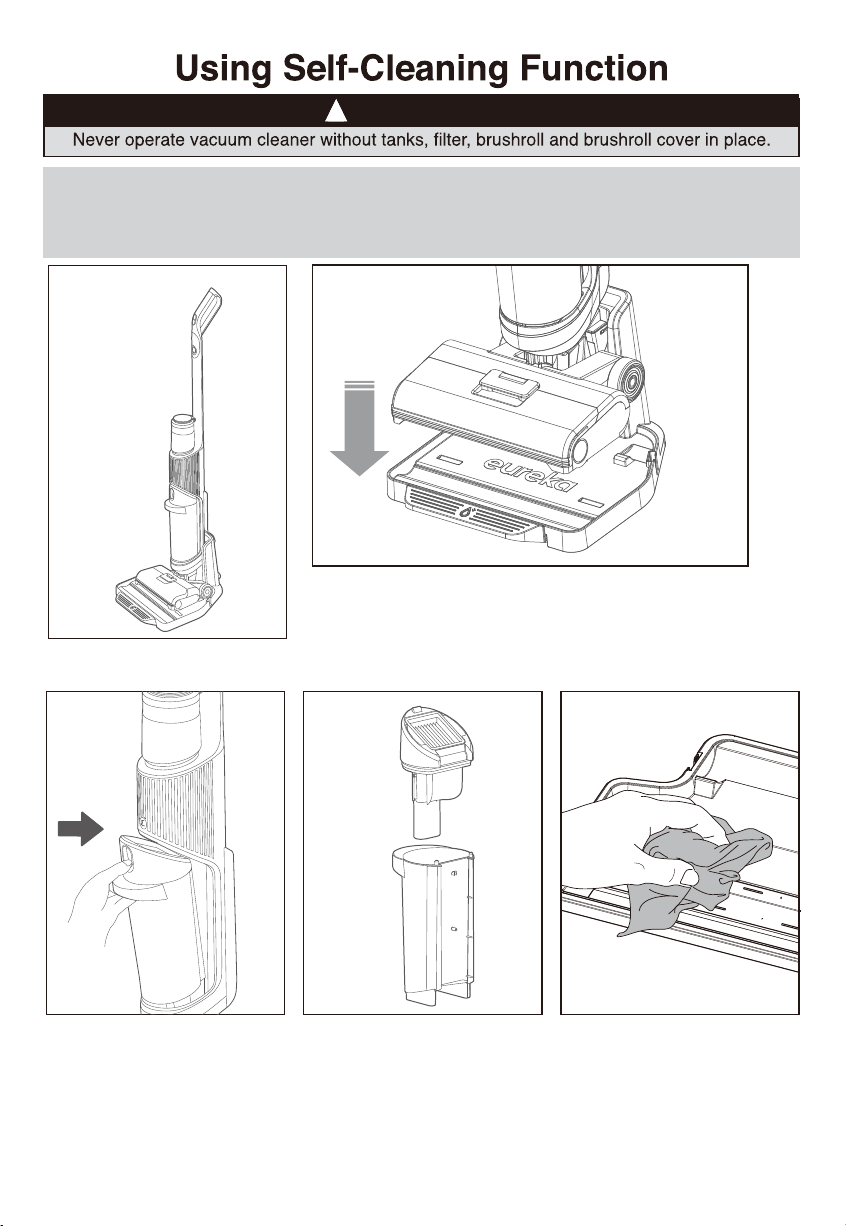
Do not remove the dirty water tank until after using the self-cleaning function empty
as this will allow remaining debris under the brushroll and suction tube to be sucked
into the dirty water tank.
After the machine is place on the recharge base, step on the
self-cleaning pedal with your foot to start the self-cleaning
operation. After completion, please clean the dirty water tank
in time to avoid odor.
Note: Empty and rinse out the clean water tank and allowed to dry before reinstalling. Do not store machine
with water and or cleaning solution in the tanks.
To disassemble the dirty water
tank, hold the machine body with
one hand, and push the button of
dirty water tank with the other hand
and pull it out at the same time
Before putting machine back onto
the base, be sure to wipe the
base to remove any remaining
water or debris.
1. First, remove the filter from the
top of dirty water tank.
2. Then wash the filter with clean
water. After it is completely dried,
reinstall it to the tank.
Emptying Water Tank
!
CAUTION
www.eureka.com
9
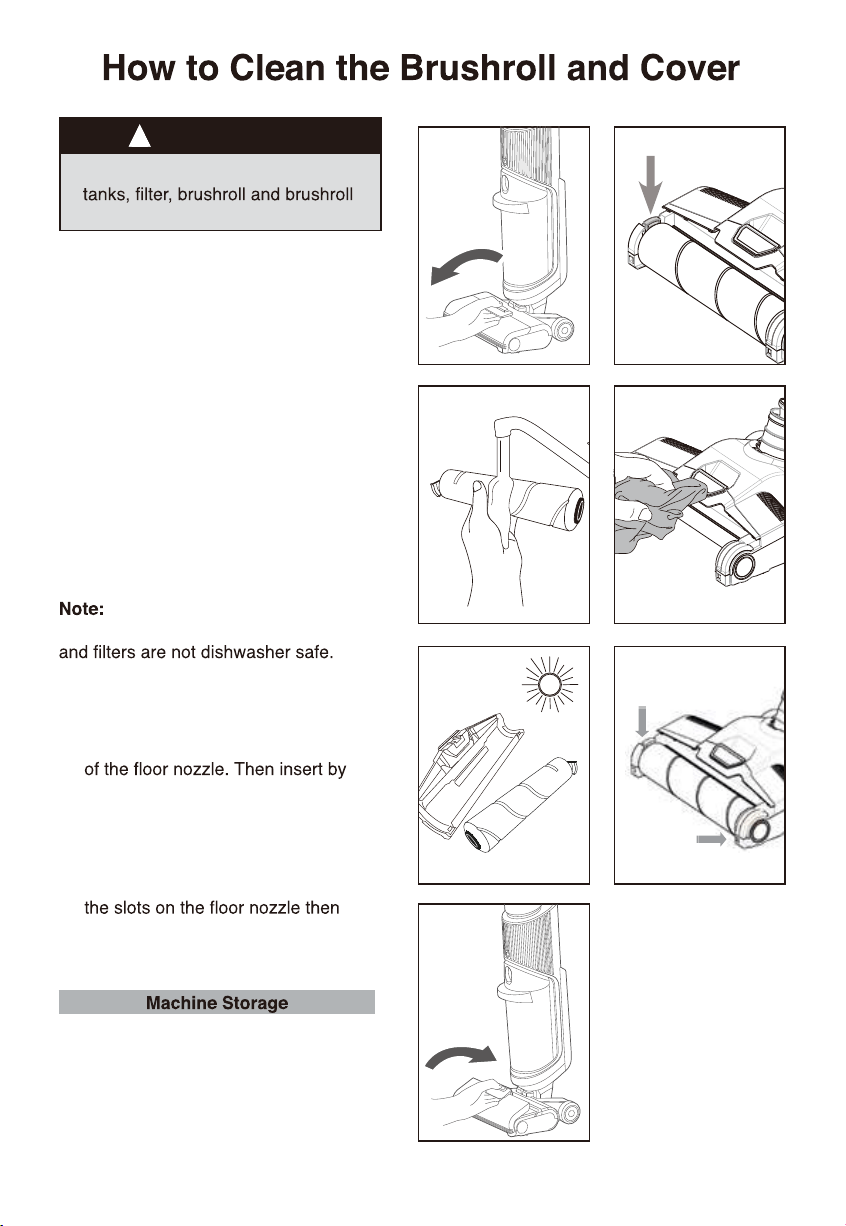
1. To remove the brushroll cover grasp
the release button and pull up and
forward.
2. Remove brushroll by pulling up on
the tab located on the left side.
3. Rinse brushroll and brushroll cover.
Use brushroll cleaning tool to help
remove debris and her on the roller.
4. Wipe the brushroll chamber
thoroughly to remove any debris.
5. Put the brush roll upright in the
drying stand let your brush roll and
cover dry thoroughly for 24 hours
before reassembling.
The brushroll, brushroll cover,
dirty water tank, clean water tank, lids
Please follow cleaning instructions in
this manual.
6. Install brushroll by inserting the right
end of the roller into the right side
aligning the tab on the left side with
the slot and pressing into place.
7. To reinstall the brushroll cover, tilt
the window back and align both tabs
on the lower edges of the cover with
push in and downwards until it clicks
into place.
Store the machine on its base in a dry,
protected area. Ensure machine is not
exposed to freezing temperatures or
internal components could be damaged
and warranty will be void.
1
Never operate vacuum cleaner without
cover in place.
!
2
3 4
!
CAUTION
10
Eureka Customer Service HELPLINE 1-800-282-2886
!
This vacuum cleaner has a special thermostat that protects the vacuum in case of motor
overheating.
proceed as follows: 1) Push the power switch to off and
unplug the vacuum. 2) Check the vacuum for a possible source of overheating such as a full
them and wait at least 30 minutes before attempting to use the vacuum. 3) After the 30 minute
period, plug the vacuum back in and turn on the switch. If the vacuum still does not work, call
the Eureka Customer Service HELPLINE at 1-800-282-2886.
The brushroll is entangled with debris,
brushroll is not properly installed or
vacuum is locked in the upright position.
Check brushroll chamber for debris
Recline machine to make sure
brushroll is activated
The dirty water tank has reached its
capacity
Empty dirty water tank
Brushroll, brushroll cover and/or dirty
water tank are not properly installed
Turn machine off and reinstall making
in place
The roller brush is entangled with debris
No power Recharge
Check brushroll chamber for debris
The suction nozzle or pipe is blocked Clean the debris in the suction nozzle
or pipe
is dirty
Empty dirty water tank and clean
Filter is clogged
and dry thoroughly before reinstalling
The suction nozzle is blocked Remove clogs/debris from pipe
and/or brushroll chamber
The dirty water tank has reached its
capacity
Empty dirty water tank
Clean water tank is empty
The clean water tank is not properly
installed
Turn machine off and reinstall making
in place
properly installed
Turn machine off and reinstall making
in place
completely dry 24 hours
www.eureka.com
11
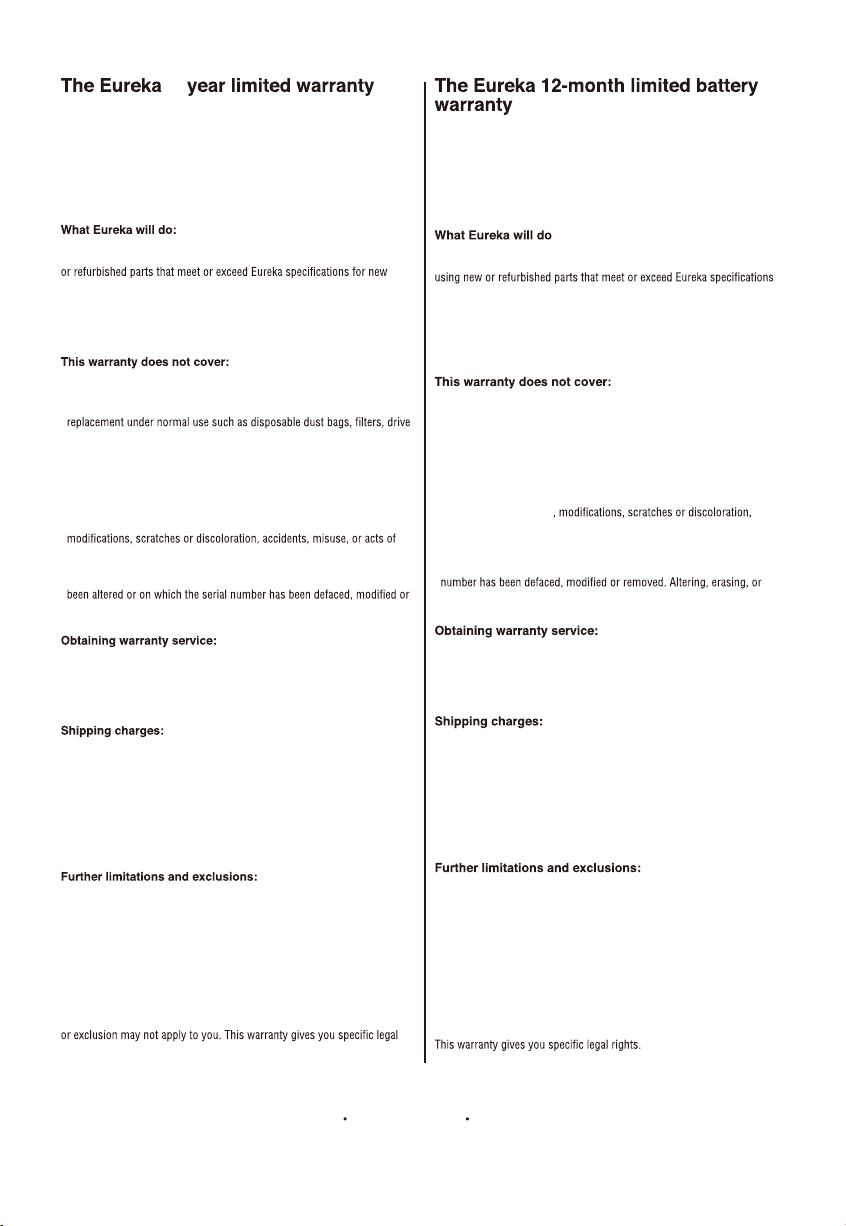
Midea America Corp. (“Eureka”), subject to the terms and conditions
herein, warrants this vacuum cleaner to be free from defects in material
and workmanship for a term of one and a half years from the date of
original purchase when used in accordance with the Eureka operating and
maintenance instructions and under normal household usage. This warranty
is granted only to the original purchaser and members of immediate
household, and is applicable only to original purchases from Eureka
authorized resellers.
Eureka will, at its option, repair or replace a defective vacuum or vacuum
part that is covered by this warranty. Repairs may be performed using new
parts. If Eureka elects to replace the vacuum, the replacement may be a
reconditioned unit. Depending on availability of products, Eureka reserves
the right to provide you with a replacement product that is the same or
similar, or substitute equivalent of the original product. As a matter of
warranty policy, Eureka will not refund the consumer’s purchase price.
sti dna eludom yrettab ehT .stnenopmoc yrettab dna eludom yrettaB •
components are covered by a separate one-year limited battery warranty.
eriuqer taht strap muucav dna muucav eht fo raet dna raew lamroN •
belts, light bulbs, brush-roll, bristles, impellers and cleaning.
esu elbanosaernu ro reporpmi :morf gnitluser snoitcnuflam ro segamaD •
or maintenance, abuse, negligence, failure to follow instructions contained
in any written materials that accompany the product, deterioration by
reason of excess moisture, corrosive atmosphere, lightning, power
surges, connections to improper voltage supply, unauthorized alteration,
or other external causes such as extremes in temperature or humidity,
God. This warranty also does not cover damage resulting from repair or
attempted repair by anyone other than Eureka or an authorized Eureka
Warranty Station. This warranty is not applicable to any product that has
removed. Altering, erasing, or forging any proof-of-purchase documents
voids any applicable product warranty.
To obtain warranty service you must contact the Eureka Service Team,
toll free, at 1-800-282-2886 or email [email protected],
to discuss the warranty claim and procedures to be followed. All warranty
claims must include submission of proof-of-purchase documentation. For
additional information, you may also visit www.eureka.com.
You will be responsible for any initial shipping and insurance charges if
the defective product(s) must be shipped for warranty service or warranty
evaluation; however, Eureka or a Eureka Authorized Warranty Station will
pay the return shipping charges if repairs are covered by the warranty.
When returning parts for repair, you must include the model, type and serial
number located on the rating plate. If any product submitted for warranty
service is found to be ineligible, an estimate of repair cost will be furnished
and the repair performed only if requested by the owner and upon receipt of
payment or acceptable arrangements for payment.
Any warranty that may be implied in connection with your purchase or use
of the vacuum, including any warranty of Merchantability or any warranty
of Fitness For A Particular Purpose is limited to the duration of this limited
warranty. Some states do not allow limitations on how long an implied
warranty lasts, so the above limitations may not apply to you.
Your relief for the breach of this warranty is limited to the relief expressly
provided above. In no event shall the manufacturer be liable for any
consequential or incidental damages you may incur in connection with your
purchase or use of the vacuum. Some states do not allow the exclusion or
limitation of incidental or consequential damages, so the above limitation
rights. You may also have other rights, which may vary by state.
Midea America Corp. (“Eureka”), subject to the terms and conditions
herein, warrants this Battery Module to be free from defects in material
and workmanship for a term of one year from the date of original purchase
when used in accordance with the Eureka operating and maintenance
instructions and under normal household usage. This warranty is granted
only to the original purchaser and members of immediate household, and
is applicable only to original purchases from Eureka authorized resellers.
:
Eureka will, at its option, repair or replace a defective Battery Module or
battery part that is covered by this warranty. Repairs may be performed
for new parts. If Eureka elects to replace the Battery Module, the
replacement may be a reconditioned unit. Depending on availability of
products, Eureka reserves the right to provide you with a replacement
product that is the same or similar, or substitute equivalent of the original
product. As a matter of warranty policy, Eureka will not refund the
consumer’s purchase price.
eriuqer taht strap yrettab dna eludoM yrettaB eht fo raet dna raew lamroN •
replacement under normal use.
elbanosaernu ro reporpmi :morf gnitluser snoitcnuflam ro segamaD •
use or maintenance, abuse, negligence, failure to follow instructions
contained in any written materials that accompany the product,
deterioration by reason of excess moisture, corrosive atmosphere,
lightning, power surges, connections to improper voltage supply,
unauthorized alteration, or other external causes such as extremes in
temperature or humidity
accidents, misuse, or acts of God. This warranty also does not cover
damage resulting from repair or attempted repair by anyone other than
Eureka or an authorized Eureka Warranty Station. This warranty is not
applicable to any product that has been altered or on which the serial
forging any proof-of-purchase documents voids any applicable product
warranty.
To obtain warranty service you must contact the Eureka Service Team,
toll free, at 1-800-282-2886 or email [email protected],
to discuss the warranty claim and procedures to be followed. All warranty
claims must include submission of proof-of-purchase documentation. For
additional information, you may also visit www.eureka.com.
You will be responsible for any initial shipping and insurance charges if
the defective product(s) must be shipped for warranty service or warranty
evaluation; however, Eureka or a Eureka Authorized Warranty Station will
pay the return shipping charges if repairs are covered by the warranty.
When returning parts for repair, you must include the model, type and
serial number located on the rating plate. If any product submitted for
warranty service is found to be ineligible, an estimate of repair cost will
be furnished and the repair performed only if requested by the owner and
upon receipt of payment or acceptable arrangements for payment.
Any warranty that may be implied in connection with your purchase or use
of the Battery Module, including any warranty of Merchantability or any
warranty of Fitness For A Particular Purpose is limited to the duration of
this limited warranty. Some states do not allow limitations on how long an
implied warranty lasts, so the above limitations may not apply to you.
Your relief for the breach of this warranty is limited to the relief expressly
provided above. In no event shall the manufacturer be liable for any
consequential or incidental damages you may incur in connection with
your purchase or use of the Battery Module. Some states do not allow
the exclusion or limitation of incidental or consequential damages, so the
above limitation or exclusion may not apply to you.
You may also have other
rights, which may vary by state.
2
Midea America Corp. 300 Kimball Ave Parsippany, NJ 07054 USA
12
Eureka Customer Service HELPLINE 1-800-282-2886
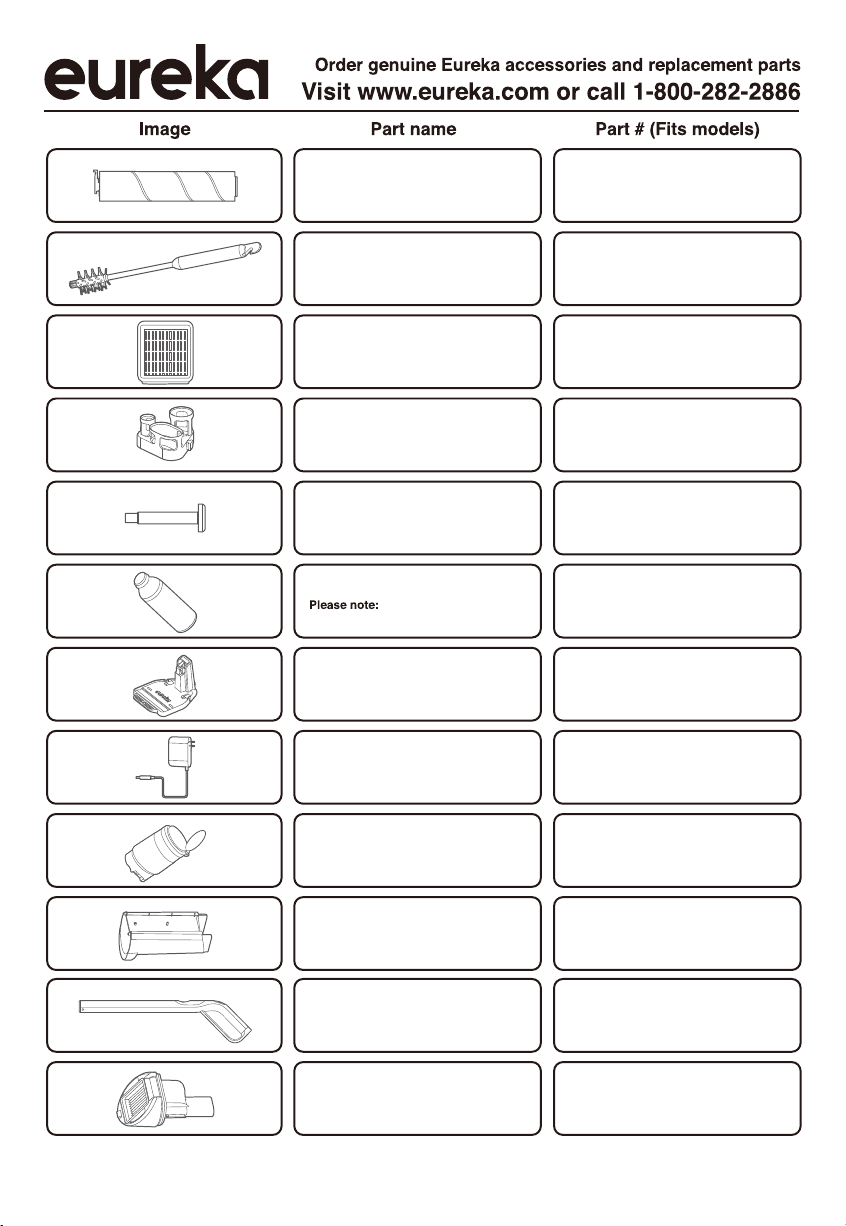
W1002
W1001
W1003
W1007
W1008
W1009
W1010
W1004
W1006
W1005
Brushroll
Filter
Recharging /
storage base
Cleaning brush
Cleaning solution
Dirt water tank
W1011
W1012
Handle
machine comes with
250ml bottle of cleaning solution
Filter top
Accessory stand
Bolt
Adapter
Clean water tank

www.eureka.com
13
Technical Parameter
Model NE W 500
W orking Voltage 21.6V
R ated P ow er 220W
B attery C apac it 4000m Ah
Adapter Model MC 2508A
Adapter R ated Input AC 100V-240V~ 50Hz /60Hz 0.8A
Adapter R ated O utput D C 25V =800m A
C harging Am bient Tem perature 0 C - 40 C
° °
Direct Current Symbol(Symbol IEC 60417-5031(2009-2))