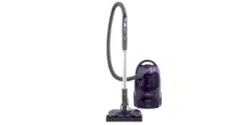
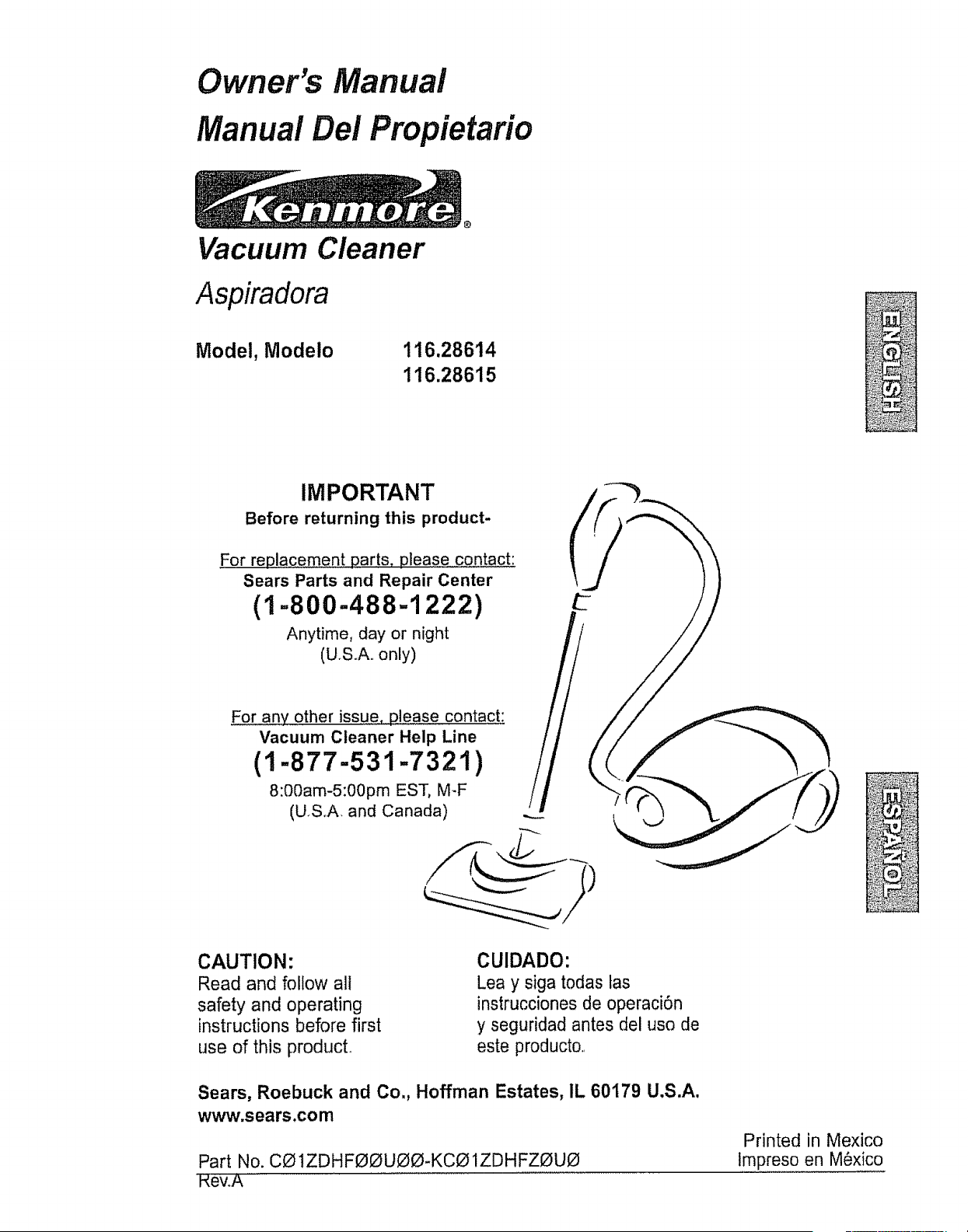
Owner's Manual
Manual Del Propietario
Vacuum Cleaner
Aspiradora
Model, Modelo
116.28614
116.28615
IMPORTANT
Before returning this product-
For replacement parts, please contact:
Sears Parts and Repair Center
(1=800-488=1222)
Anytime, day or night
(U.S.A.. only)
For any other is.sue,please contact:
Vacuum Cleaner Help Line
(1-877-531-7321)
8:00am-5:00pm EST, M_F
(USoA, and Canada)
CAUTION:
Read and follow all
safety and operating
instructions before first
use of this producL
CUIDADO:
Lea y siga todas tas
instrucciones de operaci6n
y seguridad antes del uso de
este product&
Sears, Roebuck and Co., Hoffman Estates, IL 60179 U.S.A.
www.sears.com
Part No. C01ZDHFOOU00-KC01ZDHFZOU0
HewA
Printed in Mexico
Impreso en M6xico
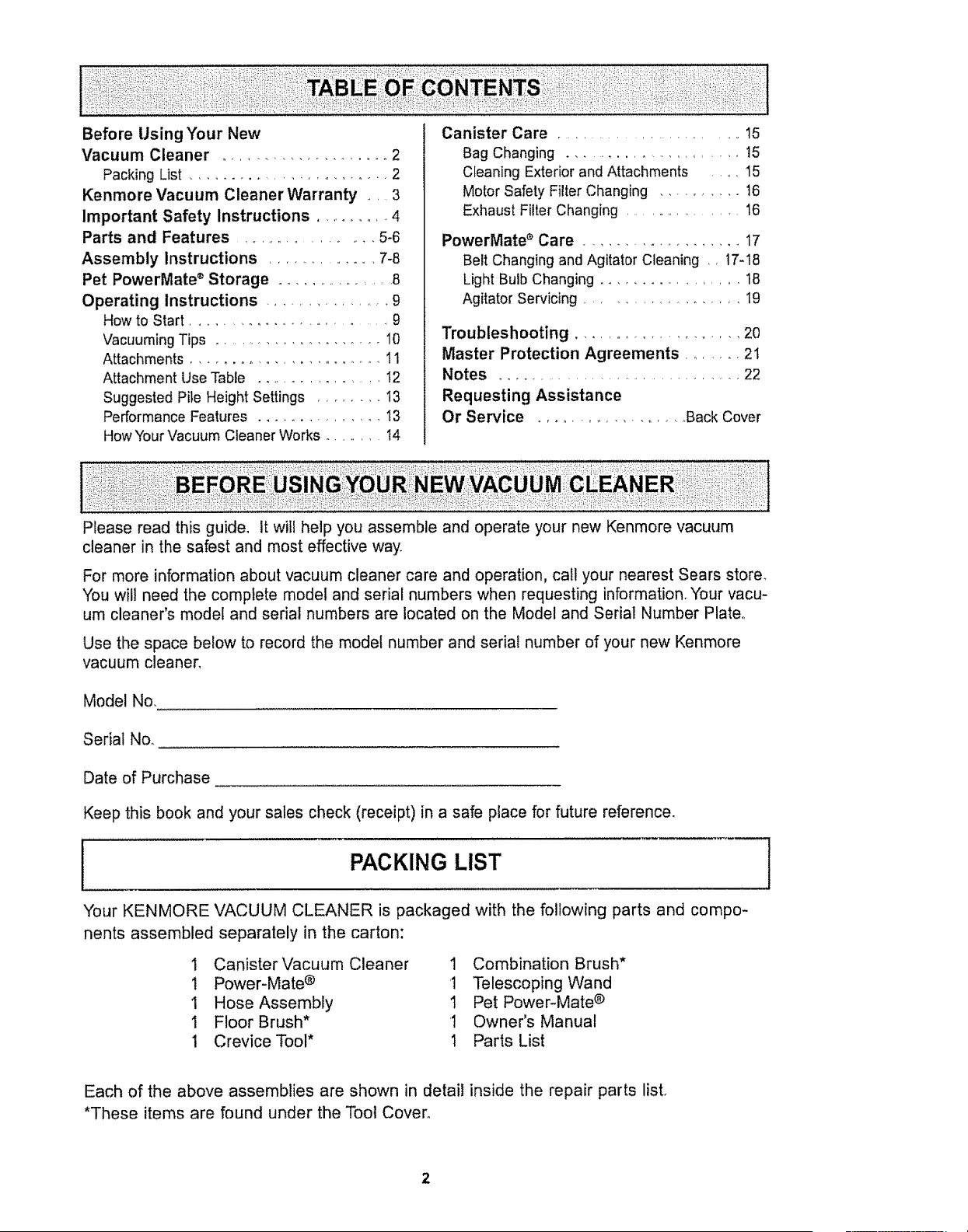
Before Using '(our New
Vacuum Cleaner ................... 2
Packing List ........................ 2
Kenmore Vacuum Cleaner Warranty .... 3
Important Safety Instructions ............ 4
Parts and Features ..................... 5-6
Assembly Instructions ............... 7-8
Pet PowerMate ® Storage ................. 8
Operating Instructions ................. 9
How to Start ............................. 9
Vacuuming Tips ...................... 10
Attachments .............................. 11
Attachment Use Table .................. I2
Suggested Pile Height Settings ........ I3
Performance Features ................. 13
How Your Vacuum Cleaner Works ......... 14
Canister Care .......................... 15
Bag Changing ........................ 15
Cleaning Exterior and Attachments ..... 15
Motor Safety Filter Changing .......... t6
Exhaust Filter Changing .................. 16
PowerMate e Care ..................... 17
Belt Changing and Agitator Cleaning ,, 17-18
Light Bulb Changing .................. 18
Agitator Servicing ................... 19
Troubleshooting ....................... 20
Master Protection Agreements ........ 21
Notes ..................................... 22
Requesting Assistance
Or Service ..................... Back Cover
Please read this guide, It will help you assemble and operate your new Kenmore vacuum
cleaner in the safest and most effective way.
For more information about vacuum cleaner care and operation, call your nearest Sears store_
You will need the complete model and serial numbers when requesting information. Your vacu-
um cleaner's model and serial numbers are located on the Model and Serial Number Plate°
Use the space below to record the model number and serial number of your new Kenmore
vacuum cleaner,
Model No.
Serial No..
Date of Purchase
Keep this book and your sales check (receipt) in a safe place for future reference.
PACKING LIST
'four KENMORE VACUUM CLEANER is packaged with the following parts and compo-
nents assembled separately in the carton:
I Canister Vacuum Cleaner 1 Combination Brush*
1 Power-Mate ® 1 Telescoping Wand
1 Hose Assembly 1 Pet Power-Mate ®
1 Floor Brush* 1 Owner's Manual
1 Crevice Tool* 1 Parts List
Each of the above assemblies are shown in detail inside the repair parts list.
*These items are found under the Tool Cover,
One"fear LimitedWarranty
When assembled,operatedand maintainedaccordingto all instructionssuppliedwith
the product,if thisvacuumcleanerfails dueto a defectin materialor workmanshipwithin
oneyearfrom the date of purchase,returnit to anySearsstore,SearsParts& Repair
Centeror other Kenmoreoutletforfree repair,
if thisvacuumcleaneris usedfor otherthan privatefamilypurposes,thiswarranty
appliesforonly 90 daysfromthe date of purchase.
This warranty covers only defects in material and workmanship. Sears will NOT
pay for:
1_ Expendable items that can wear out from normal use, including but not limited to
filters, belts, light bulbs, and bags.
2. A service technician to instruct the user in correct product assembly, operation or
maintenance.
3. A service technician to clean or maintain this product.
4. Damage to or failure of this product if it is not assembled, operated or maintained
according to all instructions supplied with the producL
5.. Damage to or failure of this product resulting from accident, abuse, misuse or use for
other than its intended purpose.
6. Damage to or failure of this product caused by the use of detergents, cleaners,
chemicals or utensils other than those recommended in all instructions supplied with
the product.
7. Damage to or failure of parts or systems resulting from unauthorized modifications
made to this product.
Disclaimer of implied warranties; limitation of remedies
Customer's sole and exclusive remedy under this limited warranty shall be product repair
as provided herein.. Implied warranties, including warranties of merchantability or fitness
for a particular purpose, are limited to one year or the shortest period allowed by law.
Sears shall not be liable for incidental or consequential damages_ Some states and
provinces do not allow the exclusion or limitation of incidental or consequential damages,
or limitations on the duration of implied warranties of merchantability or fitness, so these
exclusions or limitations may not apply to you.
This warranty applies only while this vacuum cleaner is used in the United States and
Canada.
This warranty gives you specific legal rights, and you may also have other rights which
vary from state to state.
Sears, Roebuck and Co°, Hoffman Estates, IL 60179
Sears Canada Inc., Toronto, Ontario, Canada MSB 2B8
Read all instructions in this manual before assembling or using your vacuum cleaner,
WARNI G
Your safety is important to us. To reduce the risk of fire, electrical shock,
injury to persons or damage when usin 9 your vacuum cleaner, follow basic
safe_y precautions including the following:
Use your vacuum cleaner only as
described in this manual° Use only with
Sears recommended attachments,.
Disconnect electrical supply before
servicing or cleaning out brush area.
Failure to do so could result in electrical
shock or brush suddenly starting_
Do not leave vacuum cleaner when
plugged ino Unplug from outlet when not in
use and before servicing
To reduce the risk of electrical shock - Do
not use outdoors or on wet surfaces.
Do not alfow to be used as a toy Close
attention is necessary when used by or
near children,
Do not use with damaged cord or plug. If
vacuum cleaner is not working as it should,
has been dropped, damaged, left outdoors,
or dropped into water, return it to a Sears
Service Center
Do not pull or carry by cord, use cord as a
handle, close door on cord, or pull cord
around sharp edges or corners. Do not run
vacuum cleaner over cord. Keep cord away
from heated surfaces.
Do not unplug by puliing on cord. To
unplug, grasp the plug, not the cord.
Do not handle plug or vacuum cleaner with
wet hands.
Do not put any objects into openings,
Do not use with any opening blocked; keep
free of dust, lint, hair and anything that may
reduce airflow
Keep hair, loose clothing, fingers, and all
parts of body away from openings and
moving parts_
Turn off all controls before unplugging.
Use extra care when cleaning on stairs. Do
not put on chairs, tables, etc. Keep on
floor.
Do not use vacuum cleaner to pick up
flammable or combustible liquids (gasoline,
cleaning fluids, perfumes, etco), or use in
areas where they may be present. The
fumes from these substances can create a
fire hazard or explosion.
Do not pick up anything that is burning or
smoking, such as cigarettes, matches, or
hot ashes°
Do not use vacuum cleaner without dust
bag andlor fillers in place,,
Always change the dust bag after
vacuuming carpet cleaners or freshener,
powders and fine dust. These products clog
the bag, reduce airflow and can cause the
bag to bursL Failure to change bag could
cause permanent damage to the vacuum
cleaner_
Do not use the vacuum cleaner to pick up
sharp hard objects, small toys, pins, paper
clips, etc. They may damage the vacuum
cleaner or dust bag.
Do not operate vacuum cleaner without the
exhaust filter or exhaust filter door in place
(If applicable)_
The hose contains electrical wires Do not
use when damaged, cut, or punctured_
Replace if cut or worn. Do not pick up
sharp objects.
Always turn off and unplug the vacuum
cleaner before connecting or disconnecting
either hose, HandFMate Jr,® (if applicable),
or nozzle
Hold plug when rewinding onto cord reelo
Do not allow plug to whip when rewinding
You are responsible for making sure that
your vacuum cleaner is not used by anyone
unable to operate it properly.
SAVE TH E iNSTRUCTiONS
Proper assembly and safe use of your vacuum cleaner are your responsibilities.
Your vacuum cleaner is intended for Household use. Read this Owner's Manual
carefully for important use and safety information. This guide contains safety
statements under warning and caution symbols°
4
it isimportantto knowyourvacuumcleaner'spartsandfeaturesto ensureits properandsafe
userReviewthesebeforeusingyourvacuumcleaner,
PartNo. PartNo.
Object StyleNo. in USA in Canada
HeadlightBulb .... 20-5240 20-40600
Belt CB*3 20-5218 20-40118
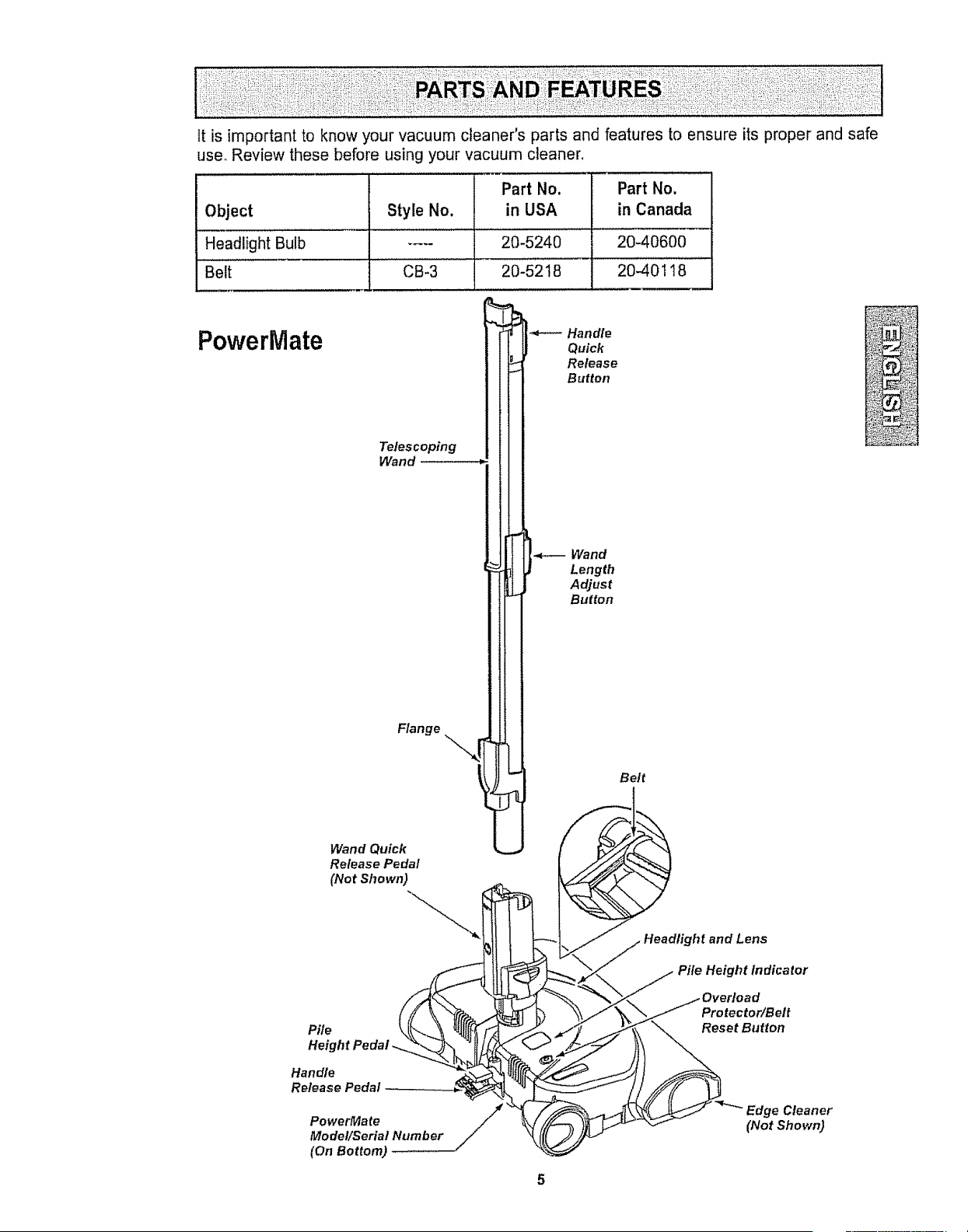
PowerMate
Telescoping
Wand
Flange
Wand Quick
Release Pedal
(Not Shown)
Handle
Quick
Release
Button
Wand
Length
Adjust
Button
Belt
and Lens
Pile Height Indicator
Pile
Height
Handle
Release Pedal
PowerMate
Model/Serial Number
(On Bottom)
5
Protector/Belt
Reset Button
Cleaner
(Not Shown)
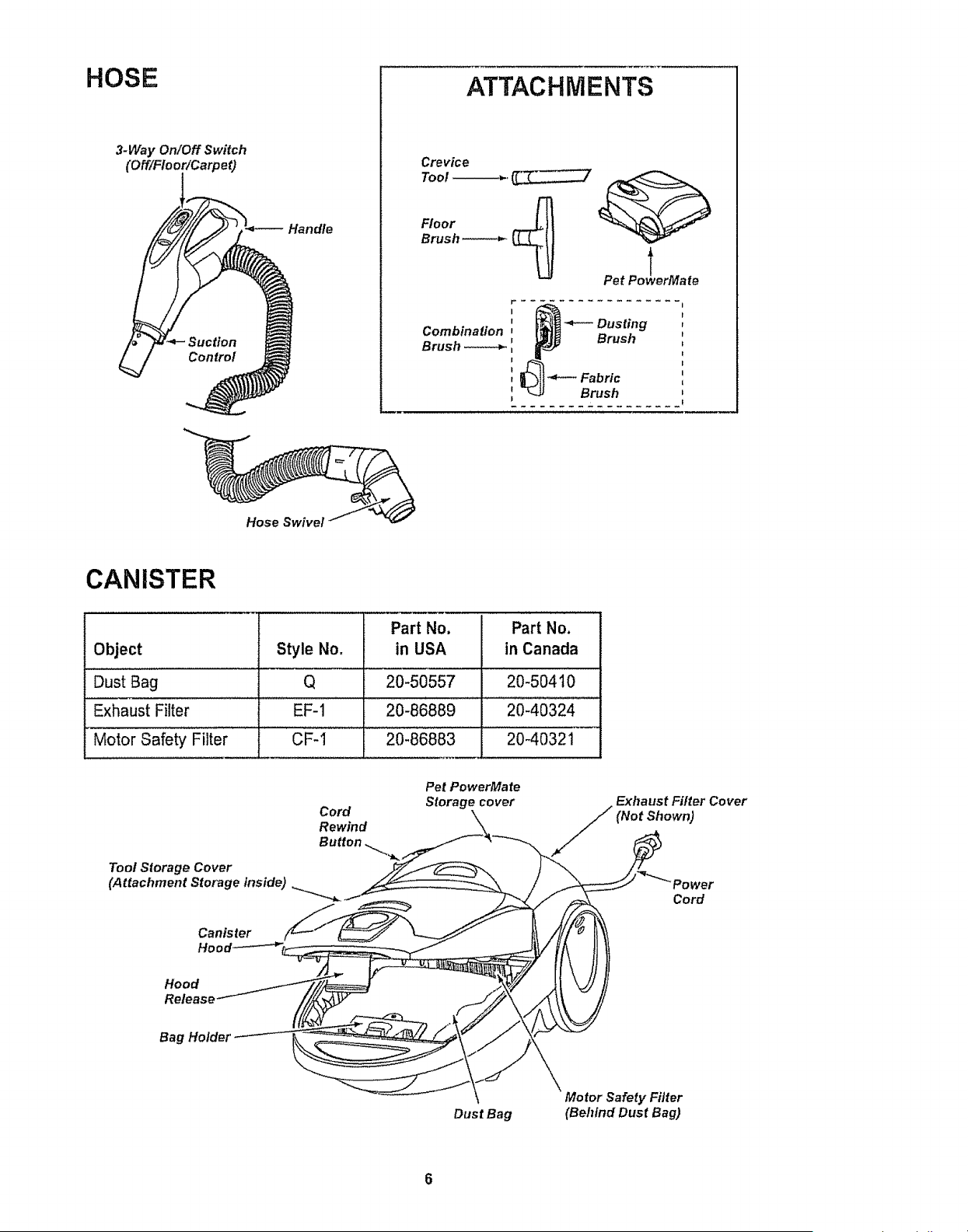
HOSE
3-Way OnlOff Switch
(OfflFIoorlCarpet)
Handle
ATTACHMENTS
Crevice
Tool _.
Floor
Brush
Combination
Brush
Pet Po _werMate
I t
' _ Dusting
1
Brush _,
I
€
I |
t
f _ Fabric
Brush
Hose Swivel
CANISTER
Part No. Part No.
Object Style No. in USA in Canada
Dust Bag Q 20-50557 20-50410
Exhaust Filter EF-1 20-86889 20-40324
Motor Safety Filter CF-I 20-86883 20-40321
Cord
Pet PowerMate
Storage cover
Exhaust Filter Cover
(Not Shown)
_ Cord
Dust Bag
\
Motor Safety Filter
(Behind Dust Bag)
Please pay special attention to these hazard alert boxes, and follow any instruc-
tions given. WARNING statements alert you to such dangers as fire, electric
shock, burns and personal injury, CAUTION statements alert you to such dangers
as personal injury and/or property damage.
WARNING
Electrical Shock Hazard
DO NOT plug into electrical supply until
assembly is complete. Failure to do so
could result in electrical shock or
injury.
Before assembling vacuum cleaner, check
the PACKING LIST. Use this list to verify
that you have received all the components of
your new Kenmore vacuum cleaner.
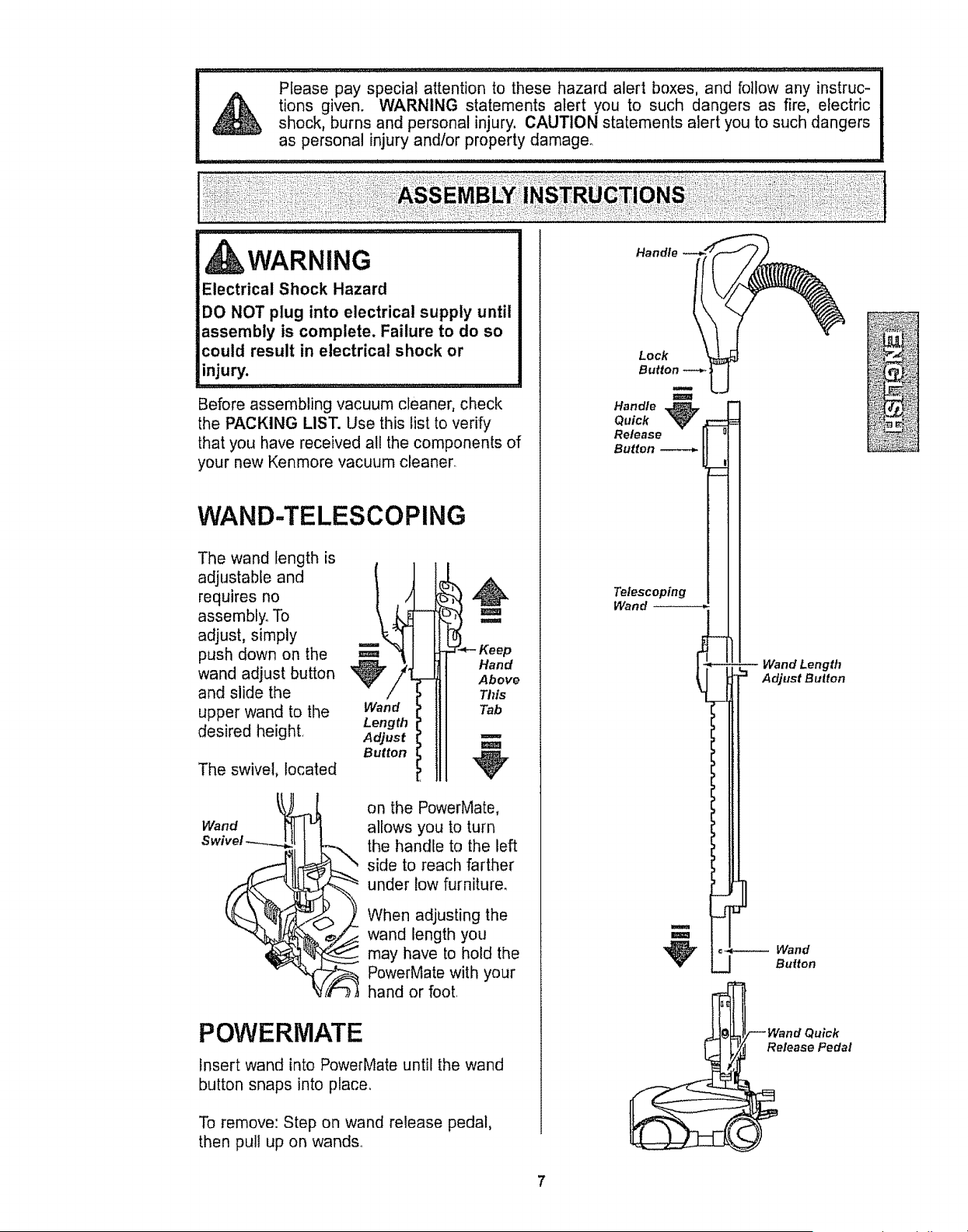
WAND-TELESCOPING
The wand length is
adjustable and __2
requires no
assembly. To
adjust, simply
push down on the
wand, ju, bo.oo
and slide the
upper wand to the Wand
Length
desired height Adjust
Button
The swivel, located
'_J"*'-Keep
Hand
Above
This
Tab
u
m
Wand
on the PowerMate,
allows you to turn
the handle to the left
side to reach farther
under low furniture.
When adjusting the
wand length you
may have to hold the
PowerMate with your
hand or foot,
POVVERMATE
insert wand into PowerMate until the wand
button snaps into peace.
To remove: Step on wand release pedal,
then pull up on wands..
Lock
Button
Handle
Quick --
Release o
Button
_jl
Telescoping
Wand
N
U
-- Wand Length
"1 Adjust Buiton
=_---- Wand
__ Button
}uick
Release Pedal
i_?& __
CANISTER
1, Open the canister hood,,
2. Check to see that the dust bag is proper-
ty installed. See BAG CHANGING for
instructions.,
3. Check to see that the motor safety filter is
properly installed, See MOTOR SAFETY
FILTER CHANGING for instructions.,
HOOD AND TOOL
STORAGE COVER
It is normal for the canister hood and tool
storage cover to come off when opened fur-
ther than needed. Line up the hinge slots,
insert the hinges into the slots, and close
the hood and tool storage cover to reinstaE
CAUTION
Never open canister hood with the tool
storage cover open. This will help to
prevent damage from occurring to the
canister hood and/or tool storage cover.
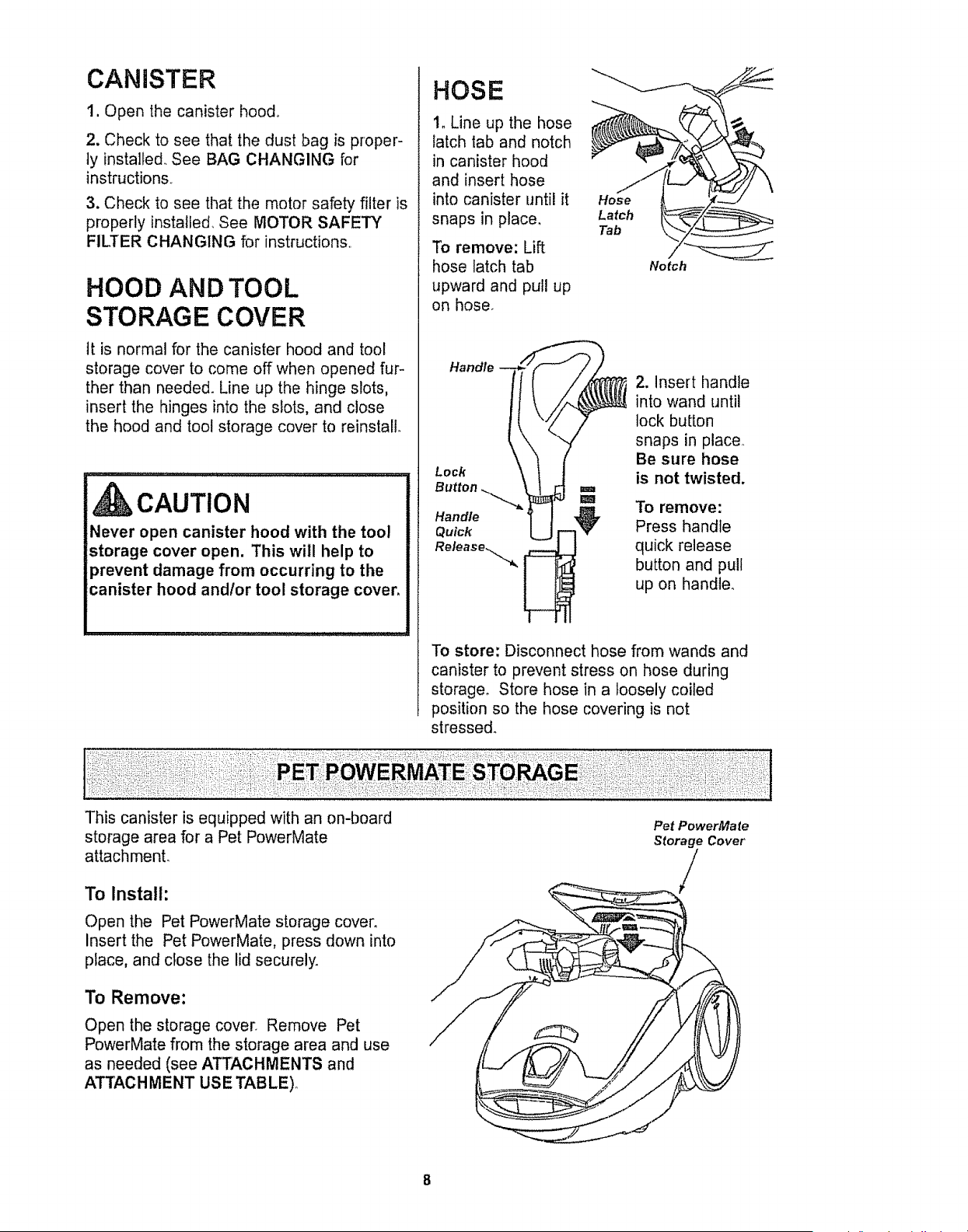
HOSE
1. Line up the hose
latch tab and notch
in canister hood
and insert hose
into canister until it
snaps in place.
To remove: Lift
hose latch tab
upward and pull up
on hose_
Hose
Latch
Tab
Notch
Handle
Lock
Button
Handle
Quick
2. Insert handle
into wand until
lock button
snaps in place
Be sure hose
is not twisted.
To remove:
Press handle
quick release
button and pull
up on handle_
To store: Disconnect hose from wands and
canister to prevent stress on hose during
storage° Store hose in a loosely coiled
position so the hose covering is not
stressed.
This canister is equipped with an on-board
storage area for a Pet PowerMate
attachment.
To Install:
Open the Pet PowerMate storage cover.
Insert the Pet PowerMate, press down into
place, and close the lid securely.
To Remove:
Open the storage cover. Remove Pet
PowerMate from the storage area and use
as needed (see ATTACHMENTS and
ATTACHMENT USE TABLE)°
Pet PowerMate
Storage Cover
/

CAUTION
Moving partsl To reduce the risk of personal injury,
DO NOT touch the agitator when vacuum cleaner is
on. Contacting the agitator while it is rotating can
cut, bruise or cause other injuries. Always turn of
and 1Jnplug from electrical outlet before servicing.
Use caution when operating near children.
HOW TO START
Cord
Rewind
Button _ _
1, Pull cord out
of canister to
desired length_
The cord will
not rewind until
the cord rewind
button is
pushed,
NOTE: To reduce the risk of electric shock,
this vacuum cleaner has a polarized plug;
one blade is wider than the other, This plug
will fit in a polarized outlet only one way, If
the plug does not fit fully in the outlet,
reverse the plug if it still does not fit, con-
tact a qualified electrician to install the prop-
er outleL Do not change the plug in any
way,
2. Plug the polarized power cord into a 120
Volt outlet located near the floor,
To rewind: Turn off
and unplug the vac-
uum cleaner. Hold
the plug while
rewinding to prevent
damage or injury
from the moving -,_
cord. Push cord
rewind button.
WARNING
Personal Injury and Product Damage
Hazard
• DO NOT plug in if switch is in ON
position. Personal injury or property
damage could result.
• The cord moves rapidly when
rewinding. Keep children away
and provide a clear path when
rewinding the cord to prevent
personal injury.
• DO NOT use outlets above counters.
Damage from cord to items in
surrounding area could occur.
Height _ U[_
Pedal -__
Handle(_,. "_UI{'TK"'
Rpeeled_se.__
__ ile Height
Indicator
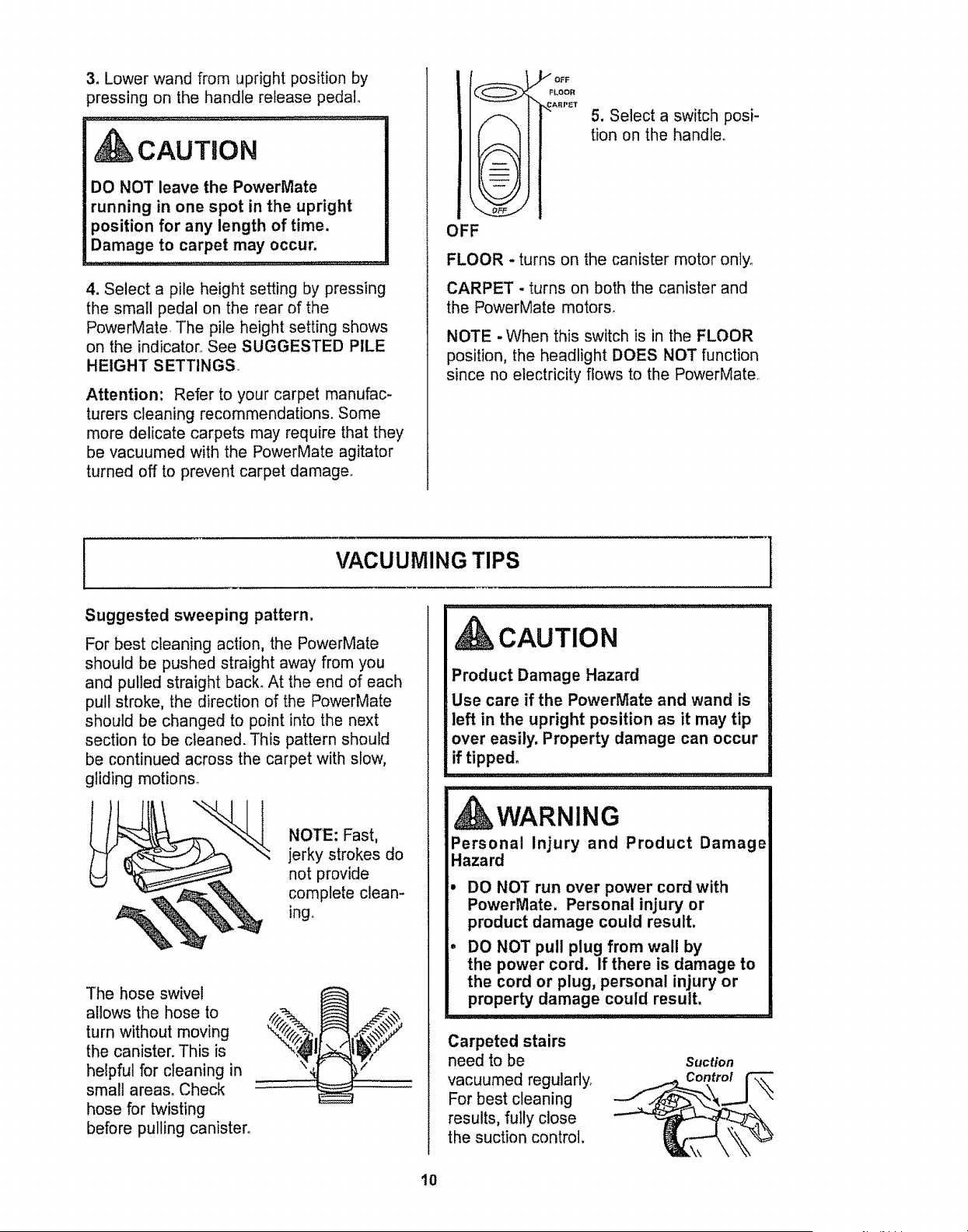
3. Lower wand from upright position by
]ressing on the handle release pedal°
CAUTnON
DO NOT leave the PowerMate
running in one spot in the upright
position for any length of time.
Damage to carpet may occur.
u :: ++.++_+.+++_++.++o+++++
4, Select a pile height setting by pressing
the small pedal on the rear of the
PowerMate+ The pile height setting shows
on the indicator+ See SUGGESTED PILE
HEIGHT SETTINGS.
Attention: Refer to your carpet manufac-
turers cleaning recommendations+ Some
more delicate carpets may require that they
be vacuumed with the PowerMate agitator
turned off to prevent carpet damage+
ARPET
OFF
5. Select a switch posi-
tion on the handle.
FLOOR - turns on the canister motor onlyo
CARPET - turns on both the canister and
the PowerMate motors+
NOTE -When this switch is in the FLOOR
position, the headlight DOES NOT function
since no electricity flows to the PowerMate+
VACUUMING TIPS
I
Suggested sweeping pattern.
For best cleaning action, the PowerMate
should be pushed straight away from you
and pulled straight back. At the end of each
pull stroke, the direction of the PowerMate
should be changed to point into the next
section to be cleaned. This pattern should
be continued across the carpet with slow,
gliding motions°
NOTE: Fast,
jerky strokes do
not provide
complete clean-
ing.
The hose swivel
allows the hose to
turn without moving
the canister. This is
helpful for cleaning in
small areas. Check
hose for twisting
before pulling canister.
CAUTION
Product Damage Hazard
Use care if the PowerMate and wand is
left in the upright position as it may tip
over easily. Property damage can occur
if tipped.
WARNING
Personal Injury and Product Damage
Hazard
=
• DO NOT run over power cord with
PowerMate. Personal injury or
product damage could result.
DO NOT pull plug from wall by
the power cord. If there is damage to
the cord or plug, personal injury or
property damage could result.
Carpeted stairs
need to be
vacuumed regularly+
For best cleaning
results, fully close
the suction control.
Suction
10
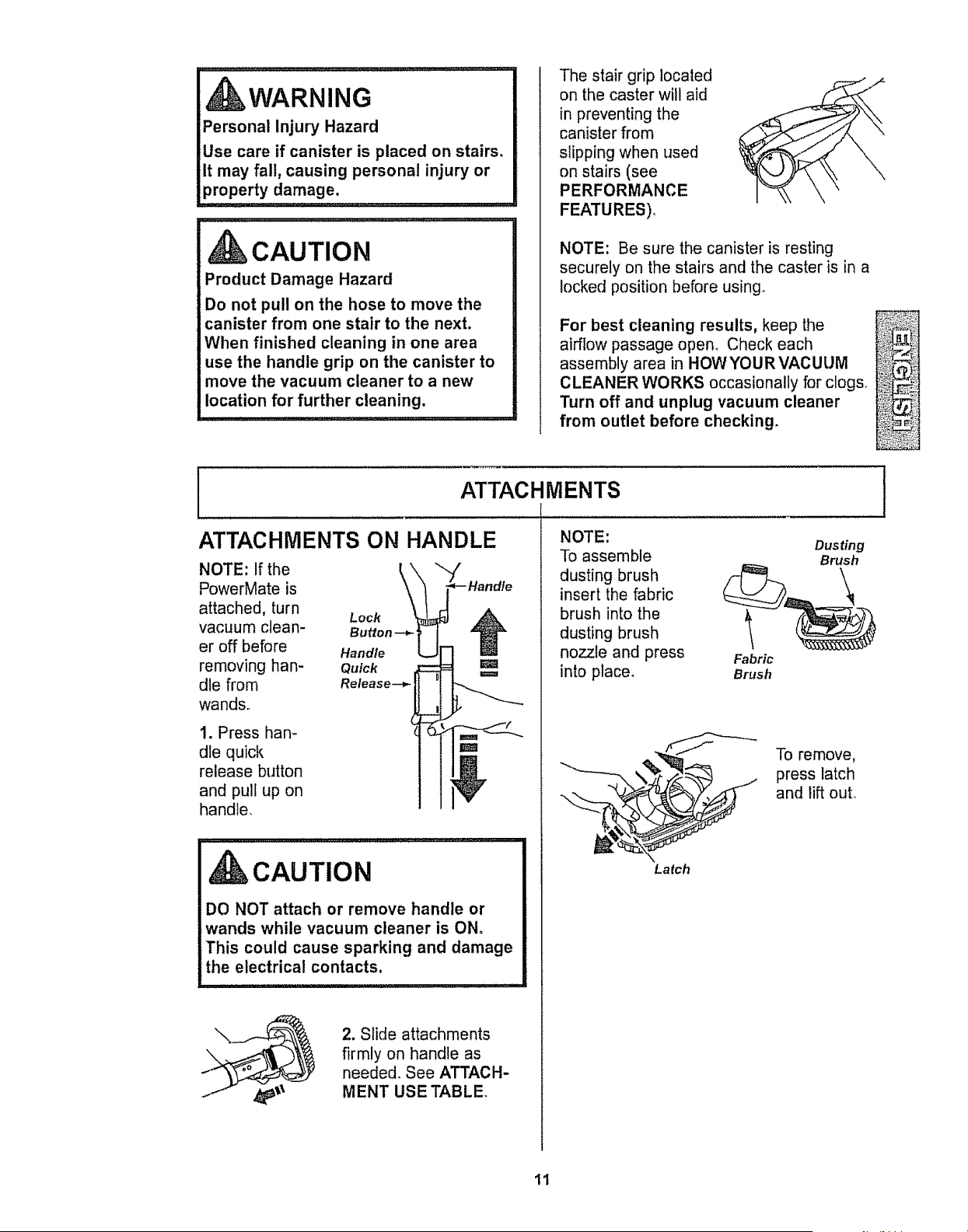
WARNING
Personal Injury Hazard
Use care if canister is placed on stairs.
It may fall, causing personal injury or
propert y damage. .........
CAUTION
Product Damage Hazard
Do not pull on the hose to move the
canister from one stair to the next,
When finished cleaning in one area
use the handle grip on the canister to
move the vacuum cleaner to a new
location for further cleaning.
The stair grip located
on the caster will aid
in preventing the
canister from
slipping when used
on stairs (see
PERFORMANCE
FEATURES),
NOTE: Be sure the canister is resting
securely on the stairs and the caster is in a
locked position before using_
For best cleaning results, keep the .......................
airflow passage open_ Check each _:'_._!,
assembly area in HOWYOURVACUUM _i_'_;_
CLEANER WORKS occasionally for clogso _,._._,...._
Turn off and unplug vacuum cleaner _Z:,_;_;,
from outlet before checking_ _:__'_!i
ATTACHMENTS
ATTACHMENTS ON HANDLE
NOTE: If the
PowerMate is
attached, turn
vacuum cleaR-
er off before
removing han-
dle from
wands.
1. Press han-
dle quick
release button
and pull up on
handle.
Lock
Button--_
Hand/e
Quick
Retease--_
CAUTION
DO NOT attach or remove handle or
wands while vacuum cleaner is ON,
This could cause sparking and damage
the electrical contacts.
2. Slide attachments
firmly on handle as
needed. See ATTACH-
MENT USE TABLE
NOTE:
To assemble
dusting brush
insert the fabric
brush into the
dusting brush
nozzle and press
into place,
Fabric
Brush
Latch
Dusting
Brush
\
To remove,
press latch
and lift out°
1
It
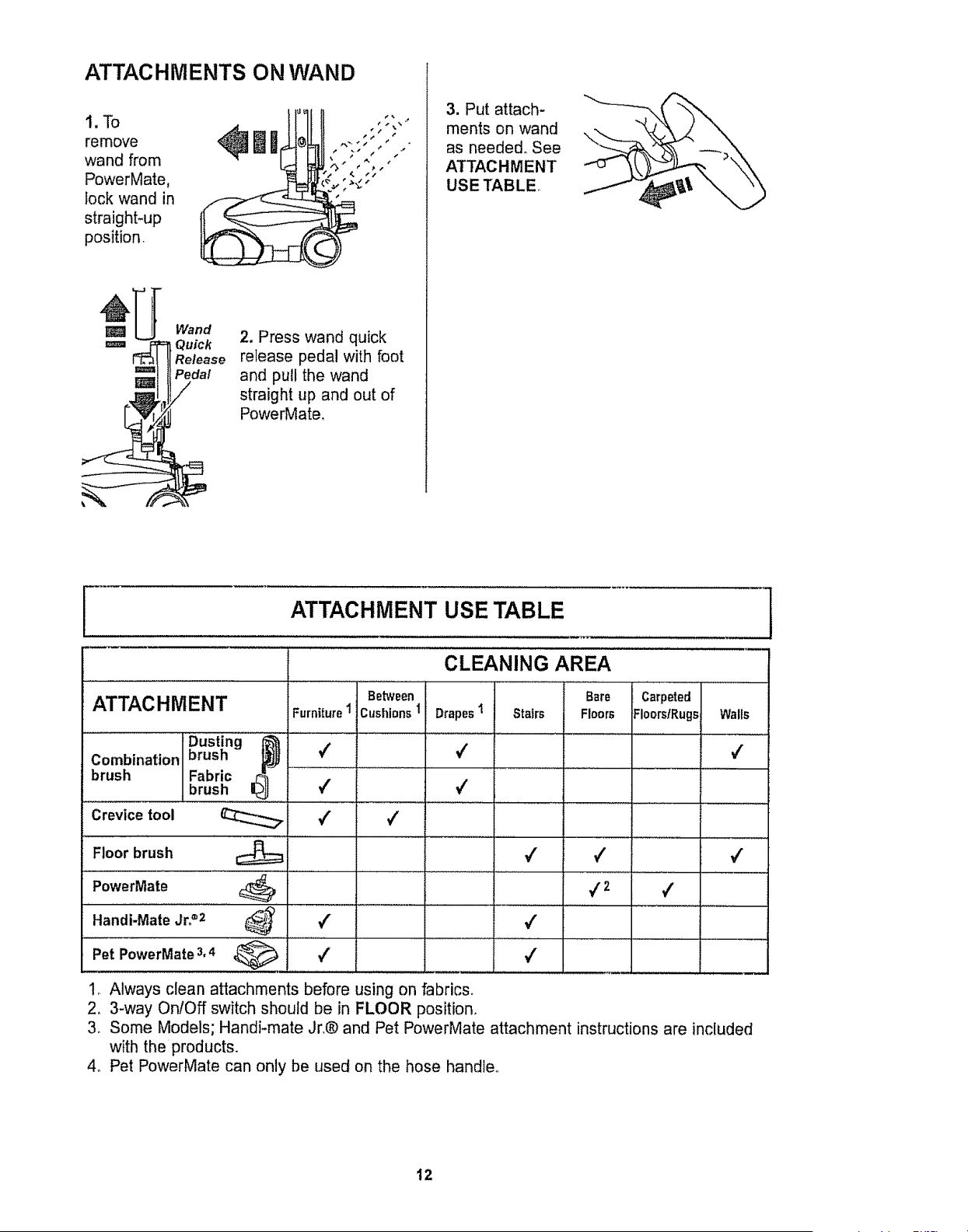
ATTAC HMENTS ON WAN D
1.To IJl
remove lim
wand from
PowerMate,
lock wand in
straight*up
position,
Wand
, Quick
Release
Pedal
2. Press wand quick
release pedal with foot
and pull the wand
straight up and out of
PowerMate,
3. Put attach-
ments on wand
as needed. See
ATTACHMENT
USE TABLE.
ATTACHMENT USE TABLE
CLEANING AREA
Bare
Drapes1 Stairs Floors
4
Between
ATTACHMENT Furniture 1 Cushions 1
Dusting I@_
Combination brush 4
brush Fabric
brush 4 4
Crevice tool 4 4
Floor
brush _ 4
PowerMate L:_
i ........... i ..........
4 4
Handi-Mate
Jr22
Pet PowerMate 3,4 4 4
Carpeted
Floors/Rugs
/
4 2 #
Waits
4
4
! *LAlways clean attachments before using on fabrics,
2, 3-way OnlOff switch should be in FLOOR position,
3, Some Models; Handi-mate Jr,® and Pet PowerMate attachment instructions are included
with the products,
4o Pet PowerMate can only be used on the hose handleo
12
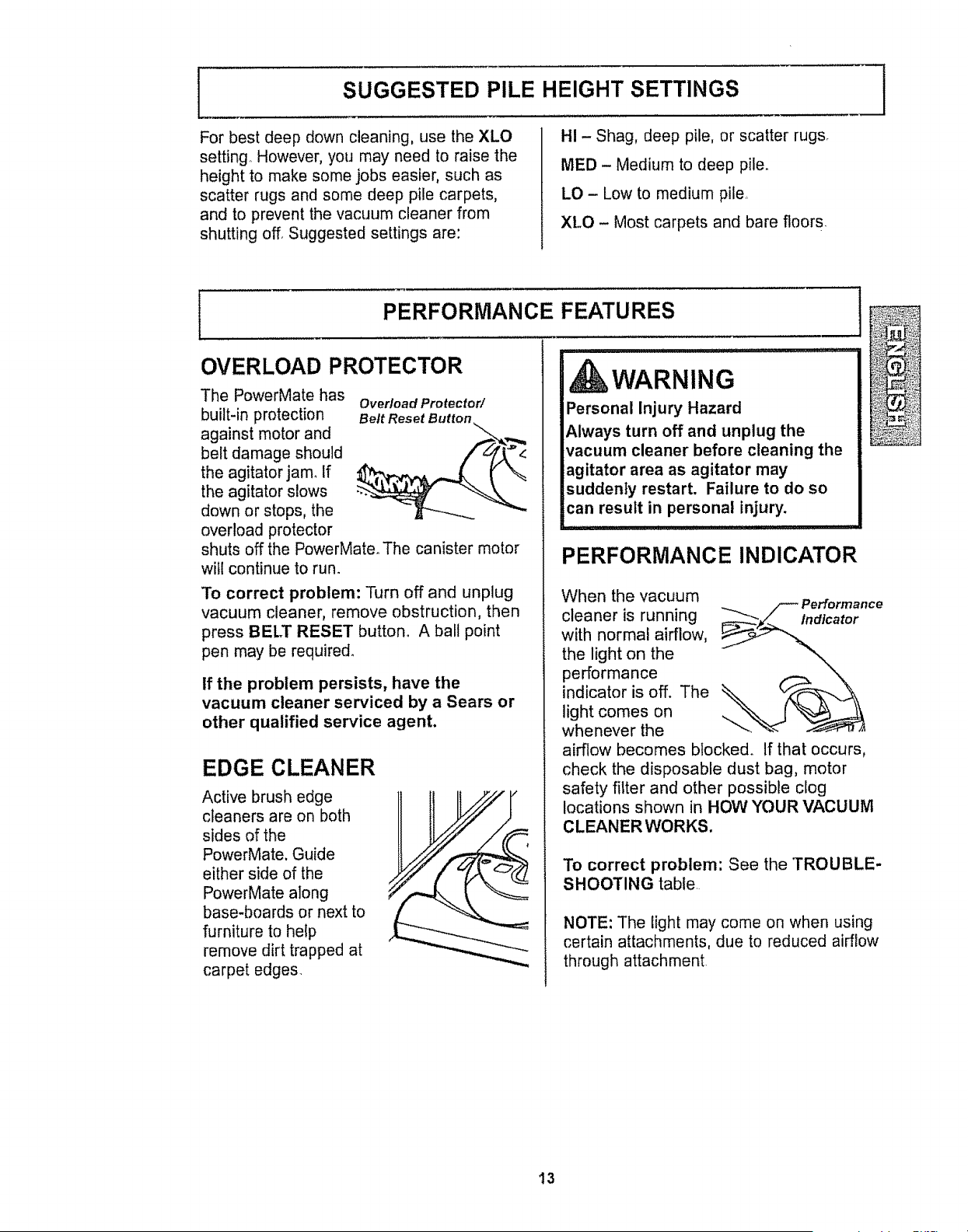
SUGGESTED PILE HEIGHT SETTINGS
For best deep down cleaning, use the XLO
setting° However, you may need to raise the
height to make some jobs easier, such as
scatter rugs and some deep pile carpets,
and to prevent the vacuum cleaner from
shutting off, Suggested settings are:
HI - Shag, deep pile, or scatter rugs.
MED - Medium to deep pile.
LO - Low to medium pile,
XLO - Most carpets and bare floors.
J
PERFORMANCE FEATURES
OVERLOAD PROTECTOR
The PowerMate has Overload Protector/
built-in protection Bert Reset Button
against motor and
belt damage should
the agitator jam. If
the agitator slows
down or stops, the
overload protector
shuts off the PowerMate. The canister motor
will continue to run.
To correct problem: Turn off and unplug
vacuum cleaner, remove obstruction, then
press BELT RESET button° A ball point
pen may be required.
If the problem persists, have the
vacuum cleaner serviced by a Sears or
other qualified service agent.
EDGE CLEANER
Active brush edge
cleaners are on both
sides of the
PowerMate. Guide
either side of the
PowerMate along
base-boards or next to
furniture to help
remove dirt trapped at
carpet edges.
_LJL _ I ! I II Uil[!,ll! iii .... !!,! L_!U _!,,,,,, ,,,
WARNING
Personal Injury Hazard
Always turn off and unplug the
vacuum cleaner before cleaning the
agitator area as agitator may
suddenly restart, Failure to do so
can result in personal injury.
PERFORMANCE INDICATOR
When the vacuum
_.._ /--" Performance
cleaner is running _'/___tndlcator
with normal airflow, _"..._
the light on the
performance
indicator is off. The
light comes on
whenever the
airflow becomes blocked. If that occurs,
check the disposable dust bag, motor
safety fi_ter and other possible clog
locations shown in HOW YOUR VACUUM
CLEANER WORKS.
To correct problem: See the TROUBLE-
SHOOTING table.
NOTE: The light may come on when using
certain attachments, due to reduced airflow
through attachment.
13
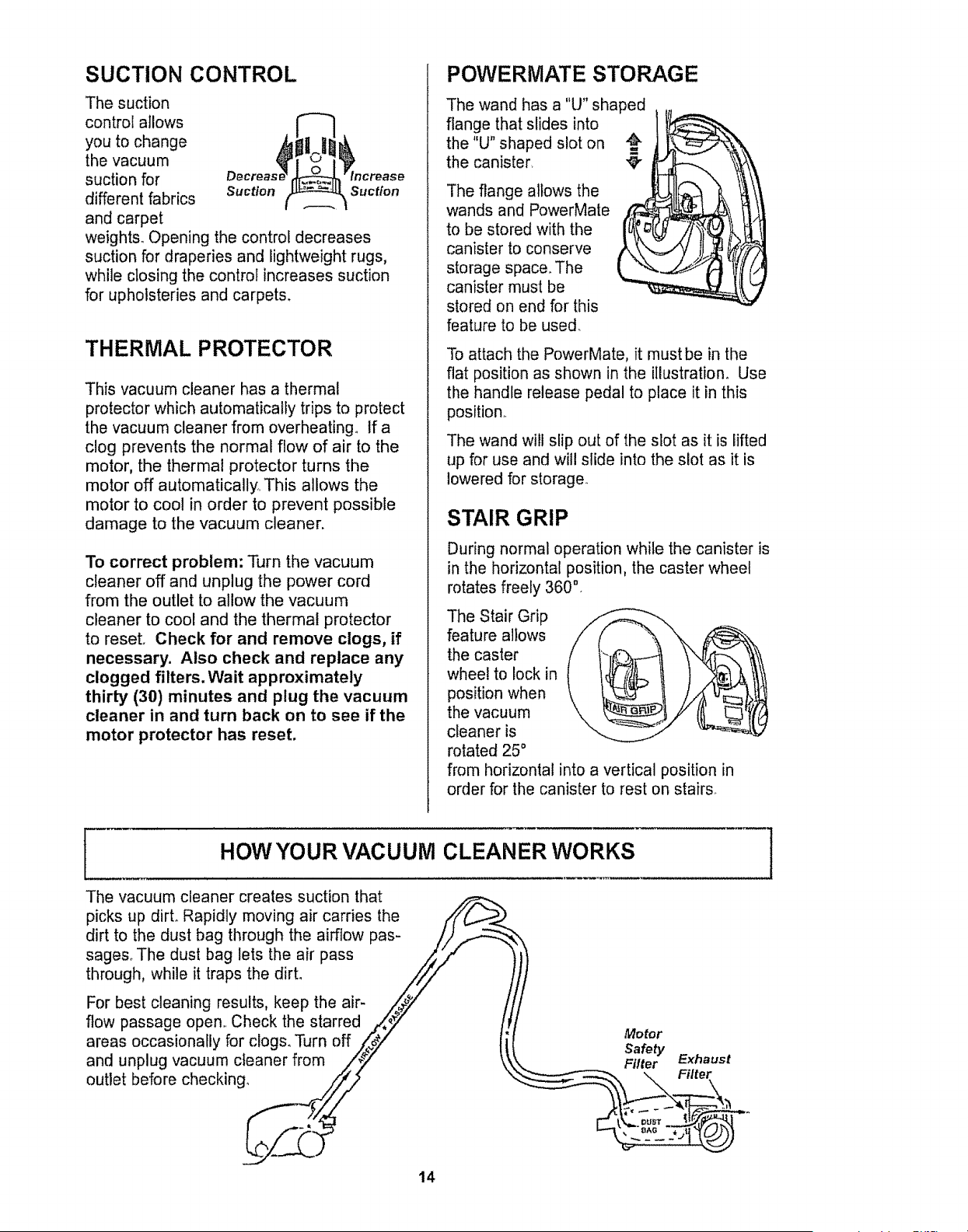
SUCTION CONTROL
The suction
control atlows
you to change
the vacuum
suction for
different fabrics suction
and carpet
weights. Opening the control decreases
suction for draperies and lightweight rugs,
while closing the control increases suction
for upholsteries and carpets.
Suction
THERMALPROTECTOR
This vacuum cleaner has a thermal
protector which automatically trips to protect
the vacuum cleaner from overheating° If a
clog prevents the normal flow of air to the
motor, the thermal protector turns the
motor off automatically This allows the
motor to cool in order to prevent possible
damage to the vacuum cleaner.
To correct problem: Turn the vacuum
cleaner off and unplug the power cord
from the outlet to allow the vacuum
cleaner to cool and the thermal protector
to reset. Check for and remove clogs, if
necessary. Also check and replace any
clogged filters. Wait approximately
thirty (30) minutes and plug the vacuum
cleaner in and turn back on to see if the
motor protector has reset.
POWERMATE STORAGE
The wand has a "U" shaped
flange that slides into
the "U" shaped slot on
the canister, "_
The flange allows the
wands and PowerMate
to be stored with the
canister to conserve
storage space. The
canister must be
stored on end for this
feature to be used_
To attach the PowerMate, it must be in the
flat position as shown in the illustration. Use
the handle release pedal to place it in this
position.
The wand will slip out of the slot as it is lifted
up for use and will slide into the slot as it is
lowered for storage.
STAIR GRIP
During normal operation while the canister is
in the horizontal position, the caster wheel
rotates freely 360 °
The Stair Grip
feature allows
the caster
wheel to lock in
position when
the vacuum
cleaner is
rotated 25 °
from horizontal into a vertical position in
order for the canister to rest on stairs
HOW YOUR VACUUM CLEANER WORKS !
The vacuum cleaner creates suction that
picks up dirt° Rapidly moving air carries the
dirt to the dust bag through the airflow pas-
sages_ The dust bag lets the air pass
through, while it traps the dirt.
For best cleaning results, keep the air-
flow passage open Check the starred Motor
areas occasionally for clogs. Turn off Safety
and unplug vacuum cleaner from Filter Exhaust
outlet before checking. . \ Filter
14
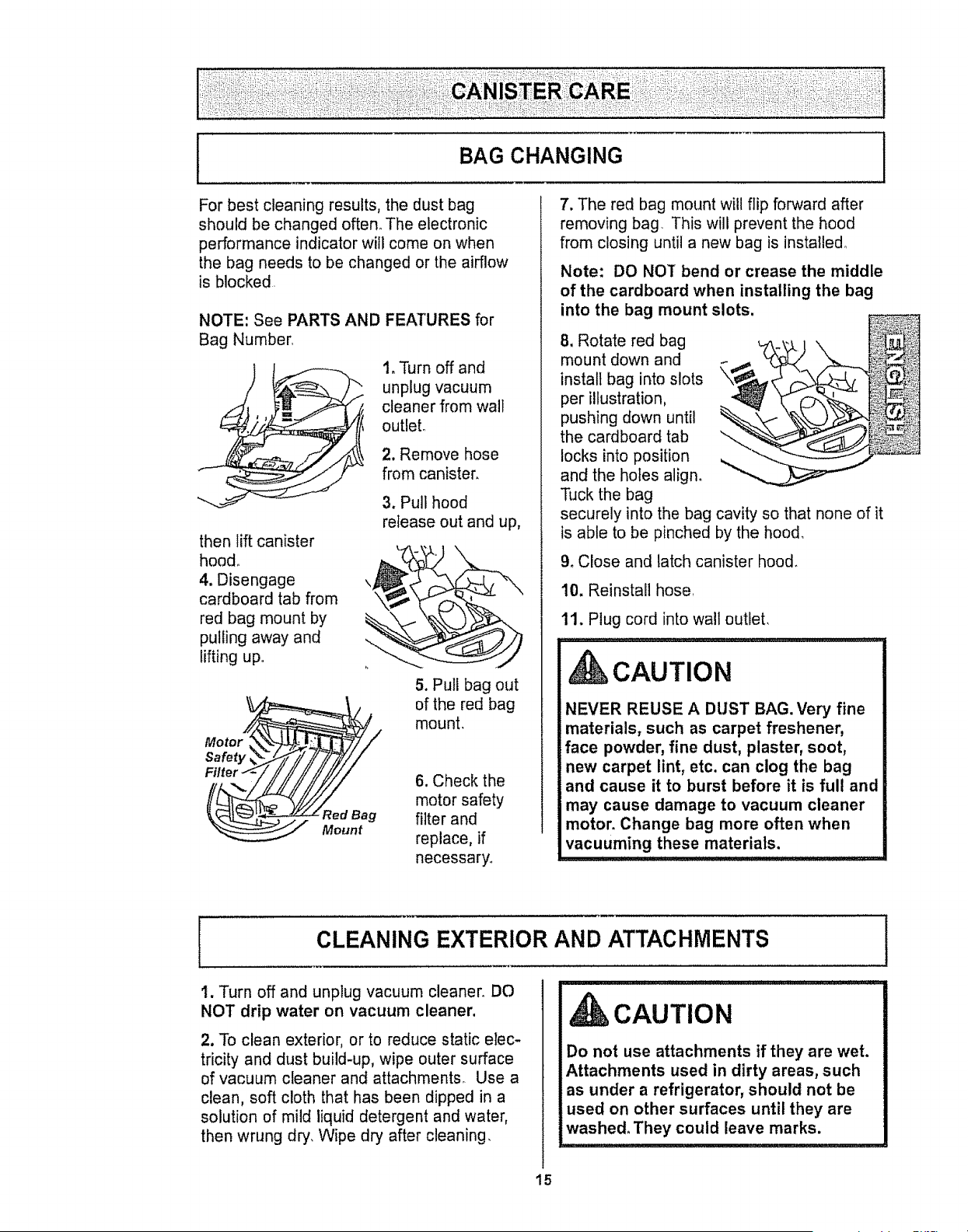
BAG CHANGING I
For best cleaning results, the dust bag
should be changed often° The electronic
performance indicator will come on when
the bag needs to be changed or the airflow
is blocked
NOTE: See PARTS AND
Bag Number
then lift canister
hood°
4. Disengage
cardboard tab from
red bag mount by
pulling away and
lifting up
MotorY/_/
,ter ii ii ii /ii/i/
Mount
FEATURES _r
1. Turn off and
unplug vacuum
cleaner from walt
outlet°
2. Remove hose
from canister,
3. Pull hood
release out and up,
5. Pull bag out
of the red bag
mount.
6. Check the
motor safety
filter and
replace, if
necessary.
7. The red bag mount will flip forward after
removing bag This will prevent the hood
from closing until a new bag is installed.
Note: DO NOT bend or crease the middle
of the cardboard when installing the bag
into the bag mount slots,
8. Rotate red bag
mount down and
install bag into slots
per illustration,
pushing down until
the cardboard tab
locks into position
and the holes align.
Tuck the bag
securely into the bag cavity so that none of it
is able to be pinched by the hood,
9. Close and latch canister hood.
10. Reinstall hose
11. Plug cord into wall outlet,
CAUTION
NEVER REUSE A DUST BAG. Very fine
materials, such as carpet freshener,
face powder, fine dust, plaster, soot,
new carpet lint, etc. can clog the bag
and cause it to burst before it is full and
may cause damage to vacuum cleaner
motor. Change bag more often when
vacuuming these materials.
CLEANING EXTERIOR AND ATTACHMENTS
i. Turn off and unplug vacuum cleaner. DO
NOT drip water on vacuum cleaner,
2. To clean exterior, or to reduce static elec-
tricity and dust build-up, wipe outer surface
of vacuum cleaner and attachments_ Use a
clean, soft cloth that has been dipped in a
solution of mild liquid detergent and water,
then wrung dry. Wipe dry after cleaning,
CAUTION
Do not use attachments if they are wet.
Attachments used in dirty areas, such
as under a refrigerator, should not be
used on other surfaces until they are
washed. They could leave marks.
15
MOTOR SAFETY FILTER CHANGING ]
WARNING
Electrical Shock Hazard
Turn off and unplug vacuum cleaner
from electrical outlet, Do not operate
the vacuum cleaner without the motor
safety filter, Be sure the filter is dry and
properly installed to prevent motor
failure and/or electrical shock,
........ ,,,,,,,,,,,,,, , , , , , ,
MOTOR SAFETY FILTER
ELECTROSTATIC
This filter must be replaced when dirty.. It
should be replaced regularly depending on
use conditions. The filter CANNOT be
washed as it will lose its dust trapping
ability.
NOTE: See PARTS AND FEATURES for
Motor Safety Filter number.
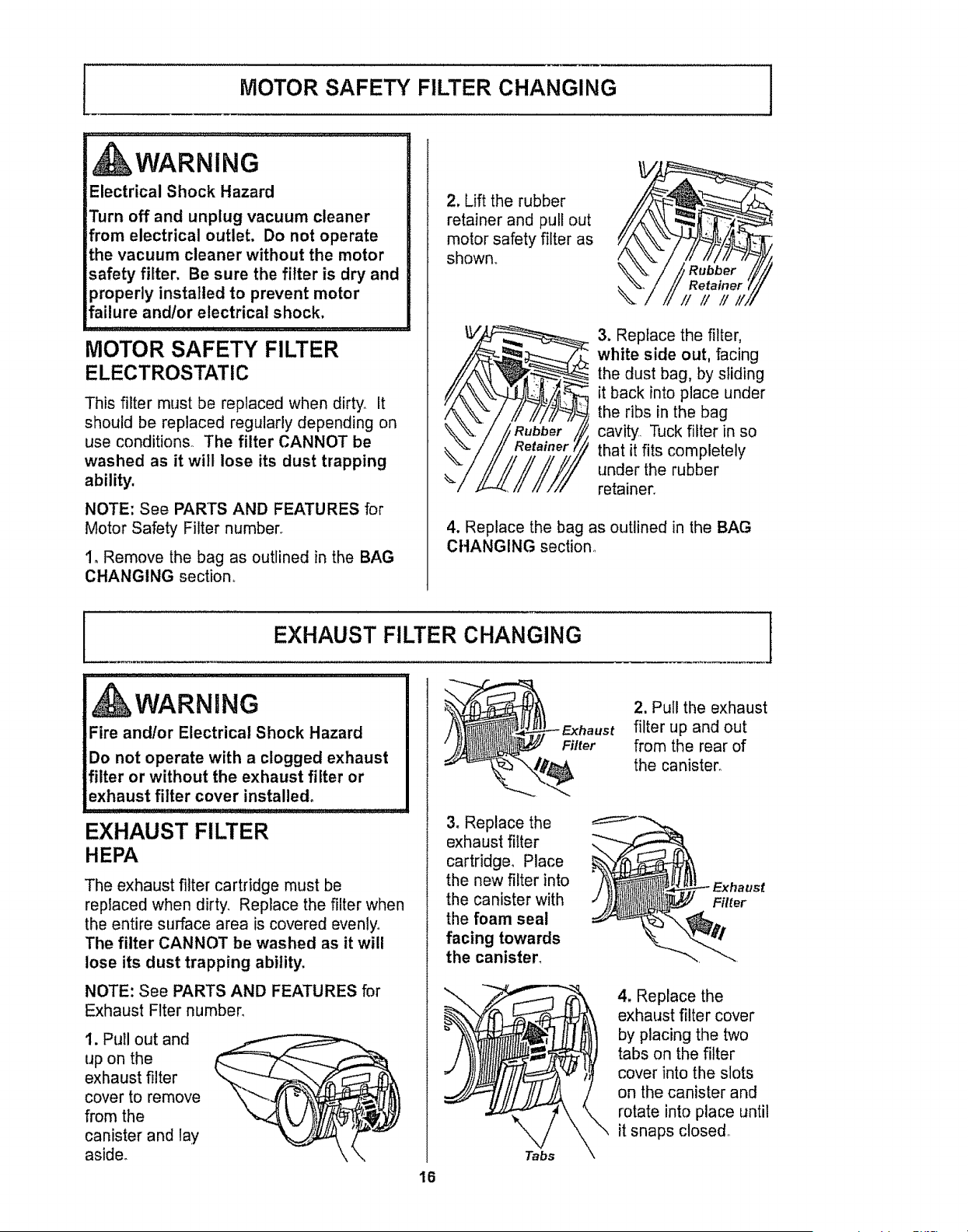
1. Remove the bag as outlined in the BAG
CHANGING section,,
2, Lift the rubber
retainer and pull out
motor safety filter as
shown.,
3. Replace the filter,
white side out, facing
the dust bag, by sliding
it back into place under
the ribs in the bag
cavity, Tuck filter in so
that it fits completely
under the rubber
retainer.
4. Replace the bag as outlined in the BAG
CHANGING section°
EXHAUST FILTER CHANGING I
........................................ , , , , , ,
WARNING
Fire and!or Electrical Shock Hazard
Do not operate with a clogged exhaust
filter or without the exhaust filter or
exhaust filter cover installed°
EXHAUST FILTER
HEPA
The exhaust filter cartridge must be
replaced when dirty. Replace the filter when
the entire surface area is covered evenly°
The filter CANNOT be washed as it will
lose its dust trapping ability.
NOTE: See PARTS AND FEATURES for
Exhaust Flter number,
1. Pull out and
up on the
exhaust filter
cover to remove
from the
canister and lay
aside.
Filter
3. Replace the
exhaust filter
cartridge° Place
the new filter into
the canister with
the foam seal
facing towards
the canister,
Tabs
16
2. Pull the exhaust
filter up and out
from the rear of
the canister°
Filter
4, Replace the
exhaust filter cover
by placing the two
tabs on the filter
cover into the slots
on the canister and
rotate into place until
it snaps closed,,
Alwaysfollowall safetyprecautionswhenperformingmaintenanceto thePowerMate,
WARNING
Electrical Shock Or Personal Injury Hazard
Disconnect electrical supply before performing maintenance to the vacuum cleaner.
Failure to do so could result in electrical shock or personal injury from vacuum cleaner
suddenly starting.
BELT CHANGING AND AGITATOR CLEANING
TO REMOVE BELT TO CLEAN AGITATOR:
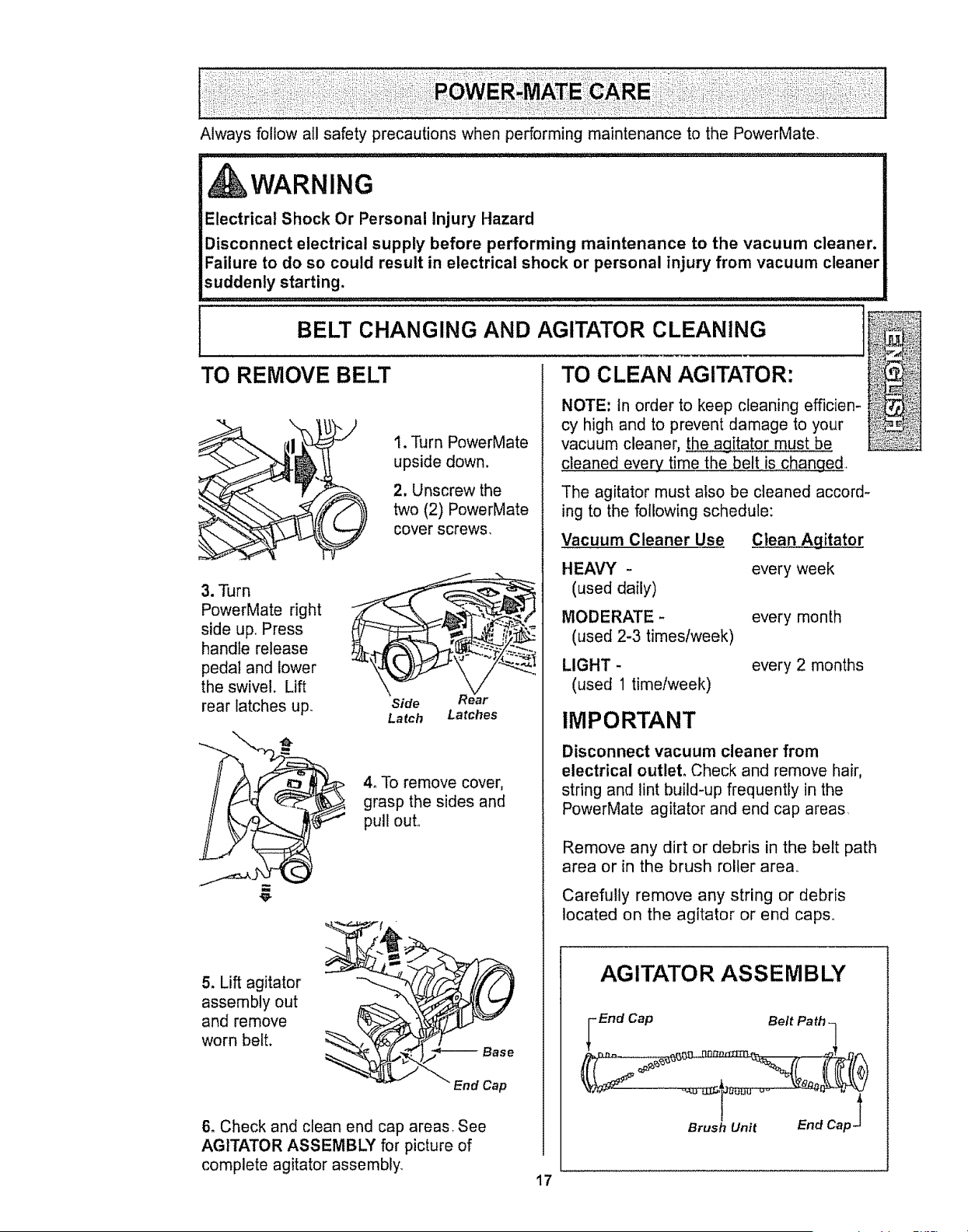
t. Turn PowerMate
upside down.
2. Unscrew the
two (2) PowerMate
cover screws.
3. "Parn
PowerMate right
side up, Press
handle release
pedal and lower
the swivel. Lift
rear latches up.
Side R ear
Latch Latches
4o To remove cover,
grasp the sides and
pull out.
5. Lift agitator
assembly out
and remove
worn belt.
/
_ End Cap
6. Check and clean end cap areas. See
AGITATOR ASSEMBLY for picture of
complete agitator assembly.
NOTE: In order to keep cleaning efficien-
cy high and to prevent damage to your
vacuum cleaner, theagitator must be
cleaned every time the belt is changed.
The agitator must also be cleaned accord-
ing to the following schedule:
Vacuum Cleaner Use
HEAVY -
(used daily)
MODERATE -
(used 2-3 times/week)
LIGHT -
(used 1 timetweek)
IMPORTANT
Disconnect vacuum cleaner from
electrical outlet. Check and remove hair,
string and lint build-up frequently in the
PowerMate agitator and end cap areas,
Clean Agitator
every week
every month
every 2 months
Remove any dirt or debris in the belt path
area or in the brush roller area,
Carefully remove any string or debris
located on the agitator or end caps,
AGITATOR ASSEMBLY
End Cap
Brush Unit
End Cap _
17
TO REPLACE BELT
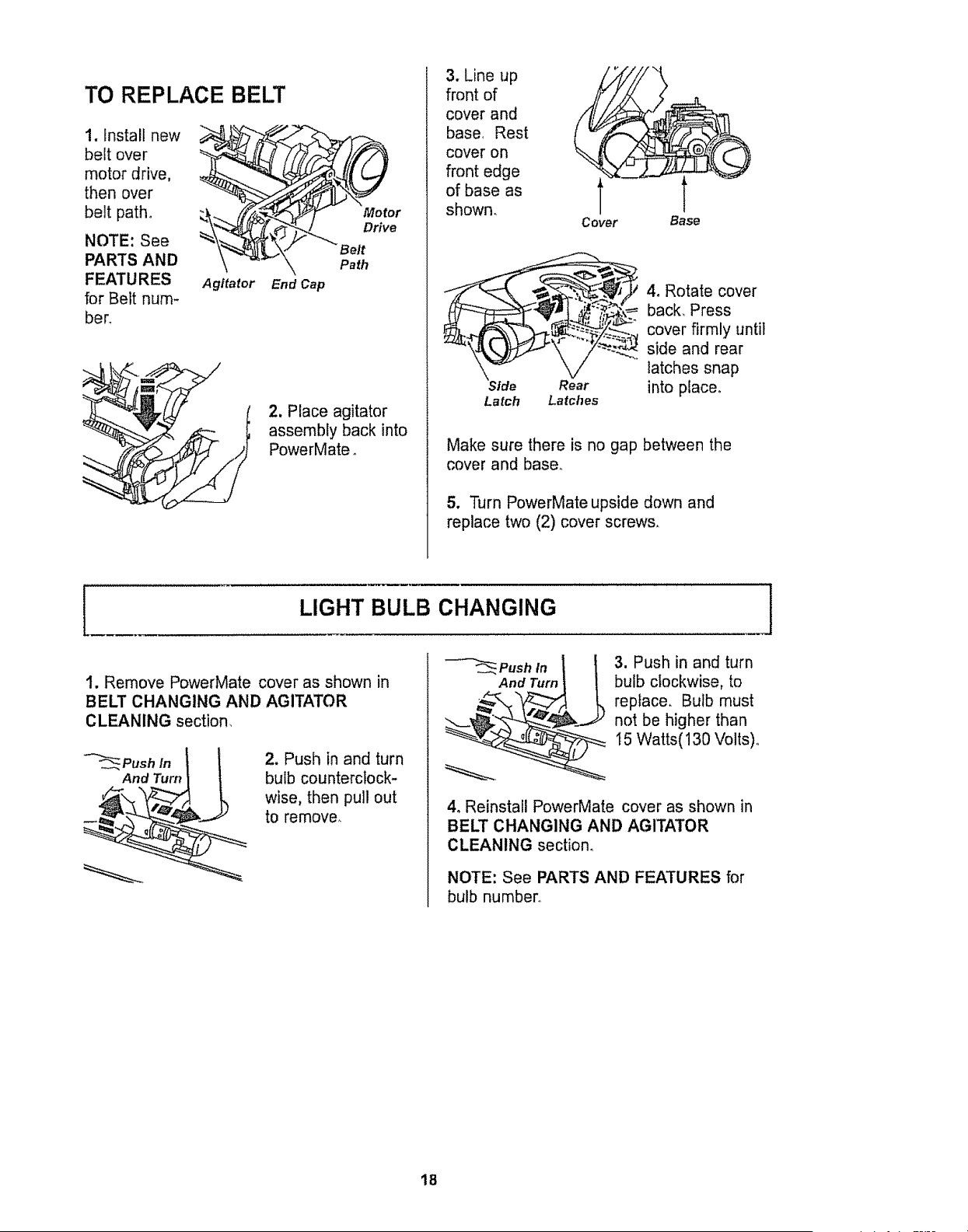
!. install new
belt over
motor drive,
then over
belt path°
NOTE: See
PARTS AND
FEATURES
for Belt hum-
hero
Agitator End Cap
Motor
Drive
Path
2, Place agitator
assembly back into
PowerMate.
3. Line up
front of
cover and
base, Rest
cover on
front edge
of base as
shown.
Side
Latch
Cover Base
4, Rotate cover
i {_- back,, Press
_._ cover firmly until
_ side and rear
latches snap
Rear into place,
Latches
Make sure there is no gap between the
cover and base°
5. Turn PowerMate upside down and
replace two (2) cover screws,
I
LIGHT BULB CHANGING
1. Remove PowerMate cover as shown in
BELT CHANGING AND AGITATOR
CLEANING section,
2. Push in and turn
bulb counterclock-
wise, then pull out
to remove,,
--'-'_Push in l! 3. Push in and turn
And Turn L-_ bulb clockwise, to
._,/-&,_'_:___ replace, Bulb must
not be higher than
15 Watts( 130 Volts)°
4. Reinstall PowerMate cover as shown in
BELT CHANGING AND AGITATOR
CLEANING section,
NOTE: See PARTS AND FEATURES for
bulb number,,
1
18
AGITATOR SERVICING
_WARNING
Electrical Shock Or Personal Injury
Hazard
Disconnect electrical supply before per-
forming maintenance to the vacuum
cleaner. Failure to do so could result in
electrical shock or personal injury from
vacuum cleaner suddenly starting°
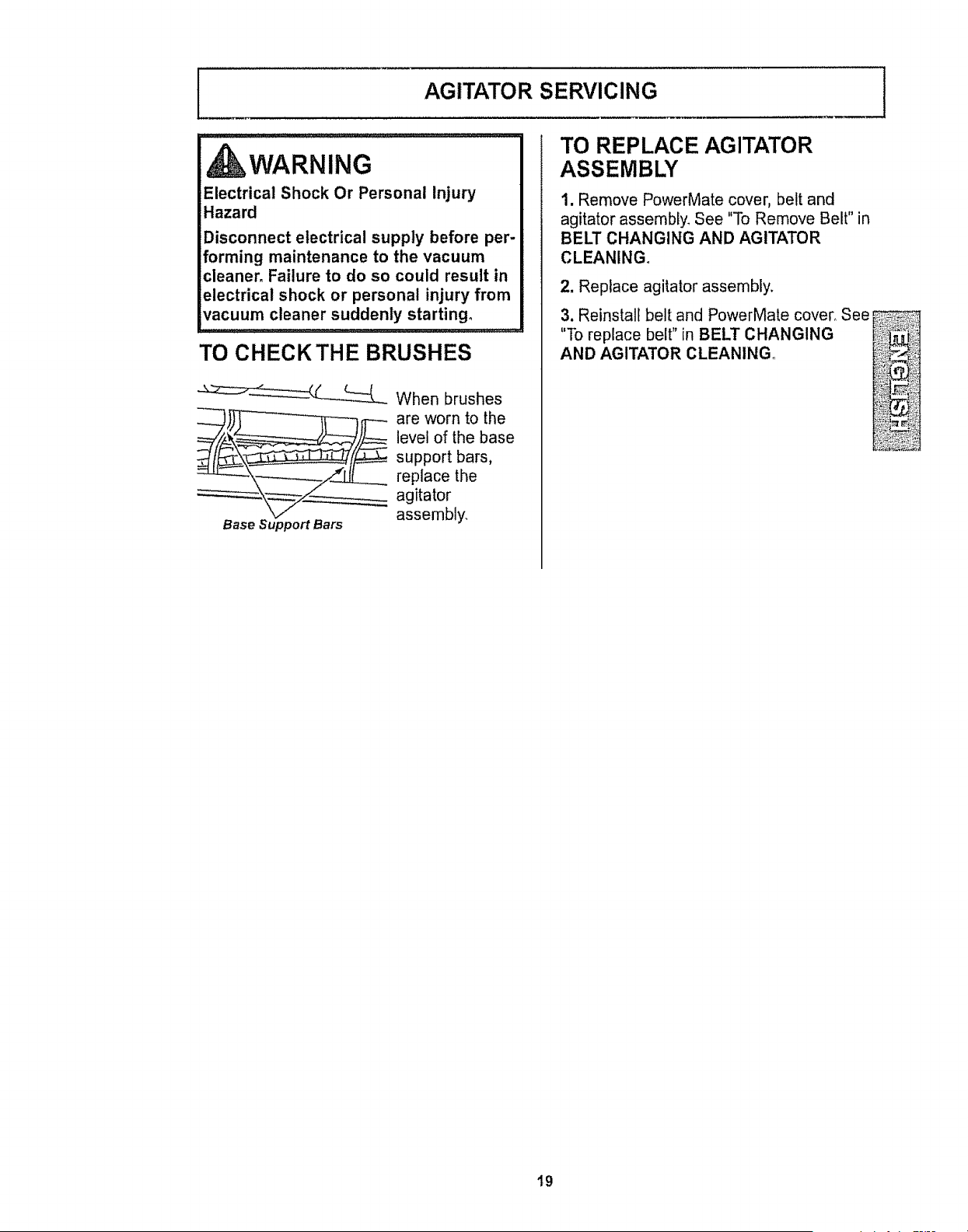
TO CHECK THE BRUSHES
When brushes
£__are worn tot he
level of the base
support bars,
replace the
agitator
Base Support Bars assembly,
TO REPLACE AGITATOR
ASSEMBLY
1, Remove PowerMate cover, belt and
agitator assembly_ See "To Remove Belt" in
BELT CHANGING AND AGITATOR
CLEANING°
2. Replace agitator assembly,
3. Reinstall belt and PowerMate cover, See
"To replace belt" in BELT CHANGING
AND AGITATOR CLEANING,,
J
@
19
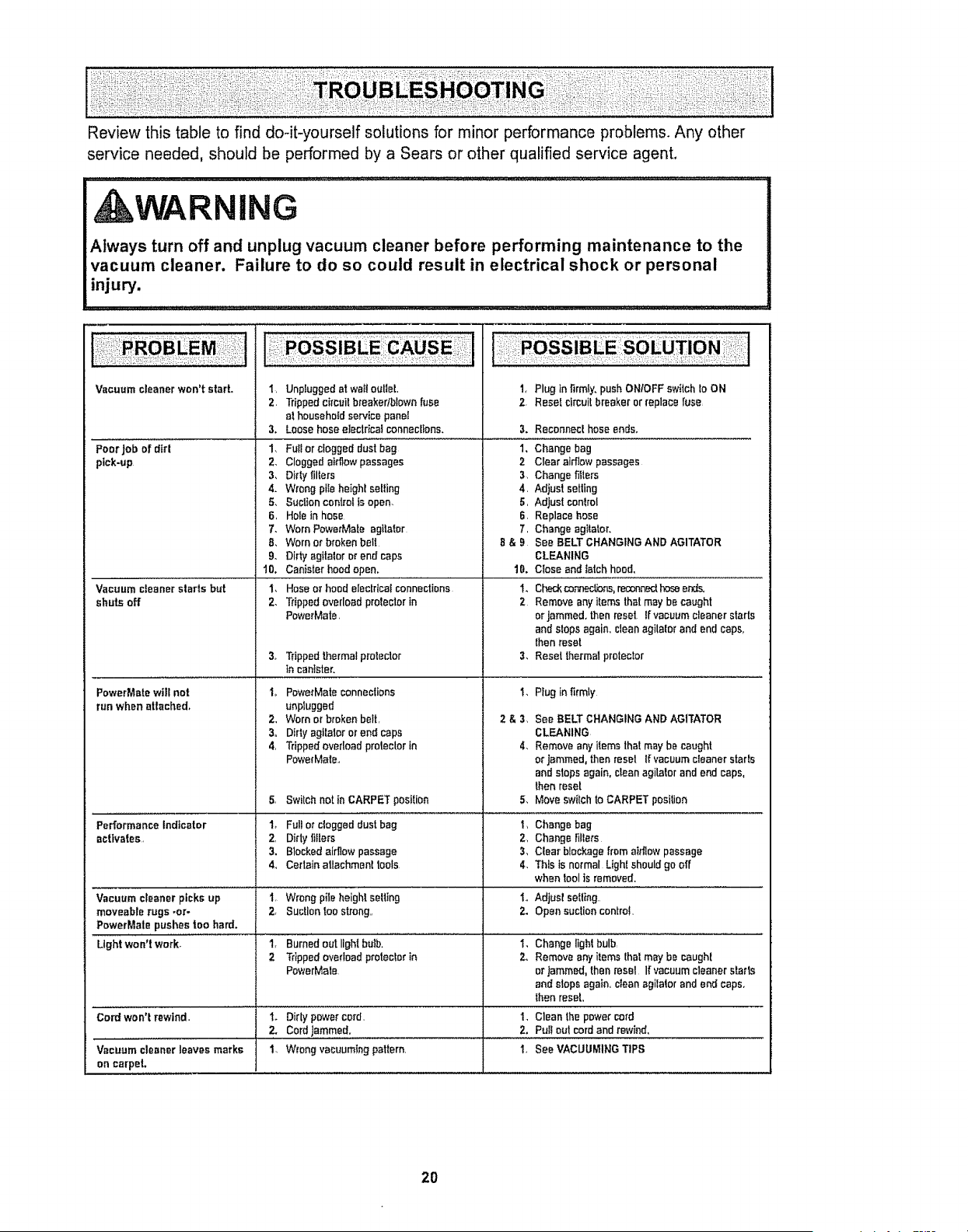
Review this table to find do-it-yourself solutions for minor performance problems. Any other
service needed, should be performed by a Sears or other qualified service agent.
,AWARNING
Always turn off and unplug vacuum cleaner before performing maintenance to the
vacuum cleaner. Failure to do so could result in electrical shock or personal
injury.
Vacuumcleanerwon't start. 1,
2.
3,
Poor Jobof dirt 1.
pick-up 2.
3,
4-
5.,
6,
7.
8,
9.
10.
Vacuumcleanerstarts but 1,
shuts off 2.
PowerMatewilt not I_
run when attached,
2,
3.
4,
5.
Performanceindicator
activates,
Vacuumcleaner picksup
moveablerugs .or-
PowerMals pushestoo herd.
Unpluggedat wattoutlet.
Trippedcircuitbreakertblewnfuse
alhouseholdset;Icepanel
Loosehose electrical connections,
Full or clogged dust beg
Clogged afrifow passages
Dirty fillers
Wrong pits heighl selling
Suctioncontrolisopen.
Holeinhose
Worn PowerMate agitator
Worn or broken boll
Dirty agftalor or end caps
Canister hood open_
Hose or hood electrical connections
Tripped overload prolector in
PowerMale,
3o Trippedthermalproloctor
in canister.
PowetMate connections
unplugged
Worn or broken belt,
Dirty agilalor or end cope
Tripped overload protector in
PowerMate.,
1, Plug In flrmly_ push ON/OFF switch Io ON
2 Reset circuit breaker or replace fuse
3. Reconnecthose ends,
1, Change bag
2 Clear airflowpassages
3. Change filters
4. Adjust setting
5, Adjust conlrol
6. Replacehose
7, Change agitator,
8 & B See BELTCHANGFNGAND AGITATOR
CLEANING
10. Close and latchhood.
I. Checkcor.'mclions,moonnedDoseends.
2 Removeany items thatmaybe caught
orjammed, then reset, lfvacuum ctoanerstarts
and slopsagain,cleanagilalor andend caps,
thenreset
3, Reset thermalprotector
1,
Plug in firmly
See BELT CHANGING AND AGITATOR
CLEANING
Remove any items that may be caught
or jammed, than reset If vacuum cfeaner starls
and stops again, clean agilator and end caps,
then reset
Switch not in CARPETposiflon 5. MoveswitchtoCARPET posilion
1_ Full or cloggeddusl bag t, Changebag
2, Dirly fillers 2, Changenllers
3. Blockedairflowpassage 3, Clear blockagefrom attilowpassage
4., Certain ettechmanltools 4, This ts normal Light shouldgo off
when toolts removed.
I, Wrongpile height selling 1oAdjusl selling,
2, Suctiontoo strong,, 2. Open suclion contro!,
Light Won'i work'i........... I, Burnedout lightbulb, I, Changeiighi bulb
2 Trippedoverloadprotectorin 2. Removeany items thai maybe caughl
PowerMale or Jammed,thenresel If vacuumcleanerslams
andslops again, cleanagitator andendcaps.
thenreseL
Cordwon't rewind, t. Dirtypower cord. I. Cleanthe powercord
2. Cordjarnrn.ed. . 2, Pulfoul cordand rewind,
Vacuumcleanerleavesmarks I. Wrongvacuumingpattern. 1, SeeVACUUMINGTIPS
on carpeL
2O
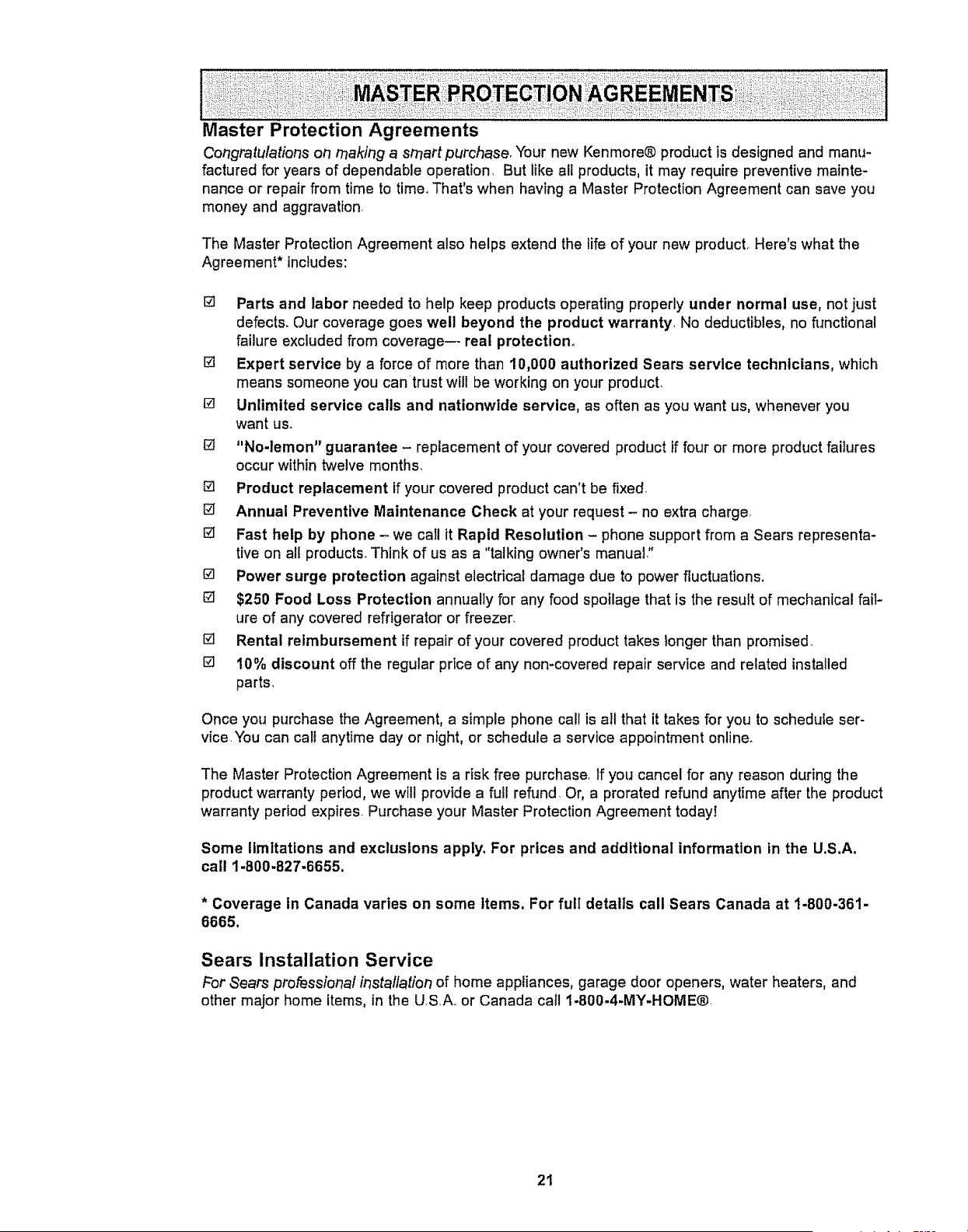
Master Protection Agreements
Congratulations oft making a srnartpurchase_ Your new Kenmore® product is designed and manu-
factured for years of dependable operation_ But like all products, it may require preventive mainte-
nance or repair from time to time° That's when having a Master Protection Agreement can save you
money and aggravation,
The Master Protection Agreement also helps extend the life of your new product_ Here's what the
Agreement* includes:
[] Parts and labor needed to help keep products operating properly under normal use, not just
defects. Our coverage goes well beyond the product warranty, No deductibles, no functional
failure excluded from coverage-- real protection°
[] Expert service by a force of more than 10,000 authorized Sears service technicians, which
means someone you can trust will be working on your product.
[] Unlimited service calls and nationwide service, as often as you want us, whenever you
want us.
[] "No-lemon" guarantee - replacement of your covered product If four or more product failures
occur within twelve months.
[] Product replacement if your covered product can't be fixed.
[] Annual Preventive Maintenance Check at your request- no extra charge,
[] Fast help by phone - we call it Rapid Resolution - phone support from a Sears representa-
tive on all products. Think of us as a "talking owner's manual,"
[] Power surge protection against electrical damage due to power fluctuations.
[] $250 Food Loss Protection annually for any food spoilage that is the result of mechanical fail-
ure of any covered refrigerator or freezer.
[] Rental reimbursement if repair of your covered product takes longer than promised.
[] I0% discount off the regular price of any non-covered repair service and related installed
parts,
Once you purchase the Agreement, a simple phone call is all that it takes for you to schedute ser-
vice.You can calf anytime day or night, or schedule a service appointment online.
The Master Protection Agreement is a risk free purchase. If you cancel for any reason during the
product warranty period, we will provide a full refund Or, a prorated refund anytime after the product
warranty period expires. Purchase your Master Protection Agreement todayl
Some limitations and exclusions apply° For prices and additional information in the U,S,A,
call 1.800.827.6655,
* Coverage In Canada varies on some Items. For full details call Sears Canada at 1-800-361-
6665,
Sears Installation Service
For Sears professional irTstallation of home appliances, garage door openers, water heaters, and
other major home items, in the U,S.A_ or Canada call 1-800-4-MY-HOME®.
21

22
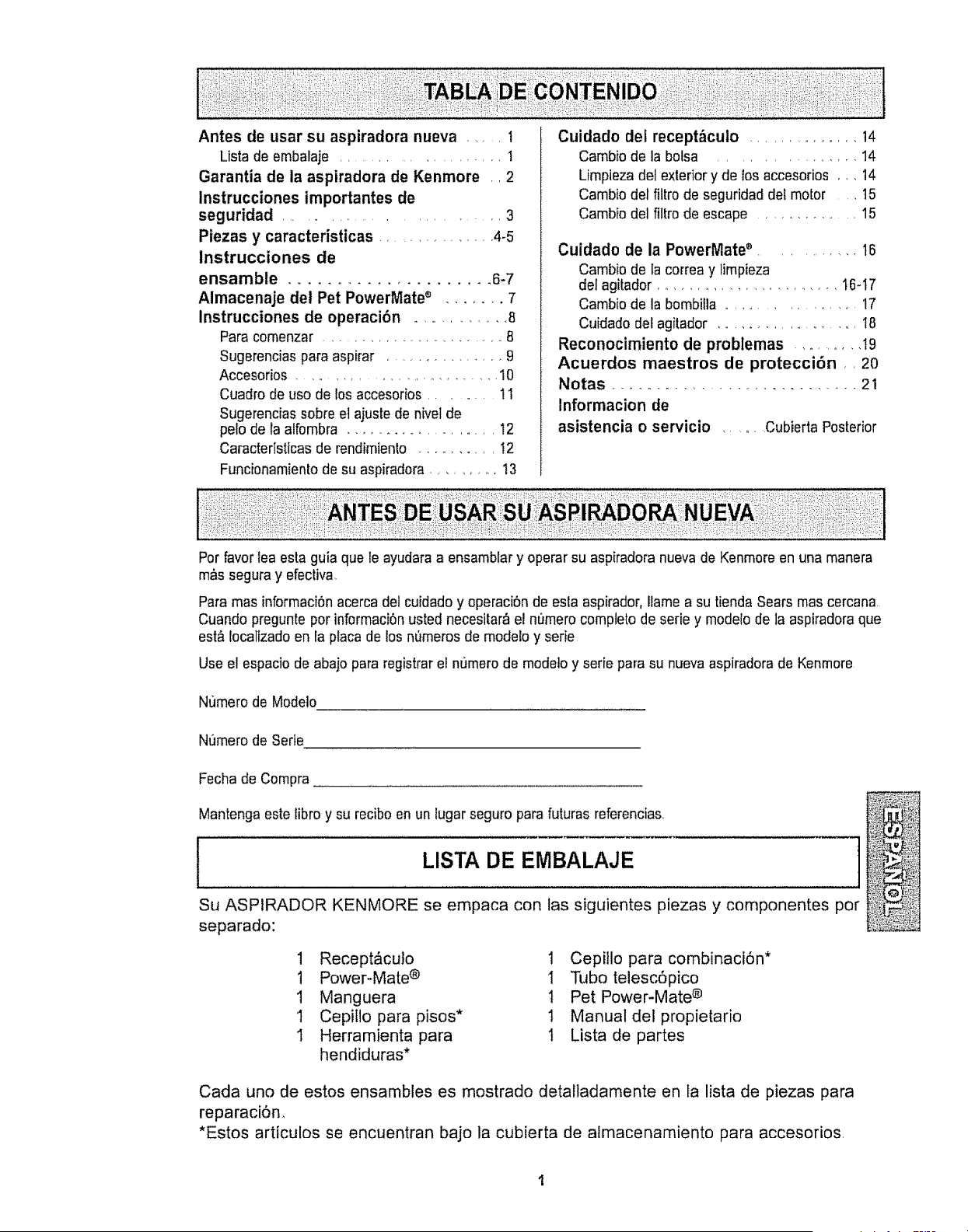
Antes de usar su aspiradora nueva ...... 1
Listade embalaje ................... 1
Garantia de la aspiradora de Kenmore., 2
Instrucciones importantes de
seguridad ...................... 3
Piezas y caracteristicas ............. 4-5
Instrucciones de
ensamble ..................... 6-7
Almacenaje del Pet PowerMate ® ....... 7
Instrucciones de operacibn .............. 8
Para comenzar ...................... 8
Sugerencias para aspirar ................ 9
Accesorios ......................... I0
Cuadro de uso de los accesorios ....... 11
Sugerencias sobre el ajuste de nivel de
pe!o de la affombra ................... 12
Caracteristicas de rendimiento .......... 12
Funcionamiento de su aspiradora .......... 13
Cuidado det recept_culo .............. 14
Cambio de la bolsa ................ 14
Limpieza del exterior y de los accesorios ,,, 14
Cambio del filtro de seguridad det motor , 15
Cambio del filtro de escape .............. 15
Cuidado de la PowerMate _ ............ 16
Cambio de la correa y limpieza
del agitador ........................ 16-17
Cambio de la bombitla ...................... 17
Cuidado del agitador ....................... 18
Reconocimiento de problemas .......... 19
Acuerdos maestros de proteccibn ,, 20
Notas ............................ 21
Informacion de
asistencia o servicio ...... Cubierta Posterior
Por favorlea esta guia que te ayudara a ensambfary operar su aspiradora nueva de Kenmore en una manera
m&s segura y efectiva.
Para mas informaci6n acerca del cuidado y operaci6n de esla aspirador, flame a su tienda Sears mas cercana
Cuando pregunte por informaci6n usted necesitar_ el numero completo de serie y modelo de la aspiradora que
est& Iocalizado en la placa de los nQmerosde mode!o y serie
Use el espacio de abajo para registrar el numero de modetoy serie para su nueva aspiradora de Kenmore
Numero de Modelo
Numero de Serie
Fecha de Compra
Mantenga este tibro y su recibo en un lugar seguro para futuras referencias,
LISTA DE EMBALAJE
Su ASPIRADOR KENMORE se empaca con las siguientes piezas y componentes pot
separado:
1 Recept&cuto 1 Cepillo para combinaci6n*
1 Power-Mate ® 1 Tubo telesc6pico
1 Manguera t Pet Power-Mate ®
1 Cepillo para pisos* 1 Manual del propietario
I Herramienta para 1 Lista de partes
hendiduras*
Cada uno de estos ensambles es mostrado detalladamente en _a lista de piezas para
reparaciSn,
*Estos articulos se encuentran bajo la cubierta de almacenamiento para accesorios,
Garantia limitada de un aSo
Si estaaspiradorafalla por un defectoen sus materialeso fabricaci6nen el periodode
un aSodesdela fechade compra,cuandose instala,manejay mantienesiguiendo
todas las instruccionesincluidascon el producto,devu@lvalaa cualquiertiendaSears,
SearsParts& RepairCenter(Centrode Reparacionesy PiezasSears)o a otro
distribuidorKenmoreparaquereparenel aparatode formagratuita
Siesta aspiradorase utiliza paraotrosfines que no seauso familiarprivado,esta
garantiaesvalidasolamentedurante90 dias desde la fechade compra,
Esta garantia cubre exclusivamente los defectos de materiales y fabricacibn.
Sears NO pagara;
t. Los elementos desechables que puedan desgastarse con un uso normal, incluyendo
sin car_cter excluyente, filtros, correas, lamparas y bolsas.
2. Un t@cnico del servicio t@cnico para que enseSe al usuario a instalar, manejar o
mantener correctamente el producto.
3. Un t@cnico del servicio t@cnico para limpiar o mantener este producto.
4. DaSos o averia de este producto si no se ha instalado, manejado o mantenido
siguiendo todas las instrucciones incluidas con el producto.
5. DaRos o averia de este producto originados por accidente, abuso, uso incorrecto o
uso del producto para otros fines distintos de los indicados
6. DaSos o averia de este producto causados por el uso de detergentes, limpiadores,
productos quimicos o utensilios diferentes a los recomendados en todas las
instrucciones que se incluyen con el producto.
7o Danos o averia de las piezas o sistemas causados por modificaciones no
autorizadas que se hayan hecho a este producto.
Limitaci6n de responsabilidad de las garantias implicitas; limitaci6n de remedios
_1 unico y exclusivo remedio del cliente bajo esta garantla limitada sera la reparaci6n del
producto segun Io indicado en este documento. Las garantias implicitas, incluyendo las
garantias de comerciabilidad o idoneidad para un prop6sito especifico, se limitan a un
aSo o el periodo mas corto permitido por la ley_ Sears no sera responsable por dafios
incidentales ni consecuenciales. Algunos estados o provincias no permiten la exclusi6n
o iimitaci6n de da5os incidentales o consecuenciales, ni limitaciones en la duracibn de
las garantias impticitas de comerciabilidad o idoneidad, por io que estas exclusiones o
limitaciones podrian no aplicar en su caso.
Esta garantia aplica solamente cuando esta aspiradora se utiliza en Estados Unidos o
Canada.
Esta garantia te otorga derechos legales especificos, y usted podria tener otros
derechos que varian en funci6n de cada estado.
Sears, Roebuck and Co., Hoffman Estates, IL 60179
Sears Canada Inc.,Toronto, Ontario, Canada M5B 2B8
Lea las instrucciones en este manual antes de armar o usar su aspirador.
ADVERTENCIA
Su seguridad es muy importante pare nosotros. Pare reducir el riesgo de incendio,.
cheque el_ctrico, lesibn corporal o daEos al utilizar su aspiradora, actQe de acuerdo
con precauciones b&sicas de seguridad, entre elias:
Use su aspiradora Unicamente en la forma
descrita en este manual.. Use Enicamente con
accesorios recomendados per Sears.
Desconecte el cord6n el_ctrico antes de
componer o timpiar el _rea del cepitlo. De Io
contrario, et cepilto podria arrancar de forma
imprevista o podria producirse un cheque
el_ctrico.
No abandone la aspiradora cuando est_
conectada. Descon6ctela cuando no la est_
usando y antes de darle servicio.
Pare reducir el riesgo de cheque electrico, no
use su aspiradora al aire libre ni sobre
superficies mojadas.
No permita que sea utilizada come juguete,
Se requiere tener mayor cuidado cuando sea
utitizada en la proximidad de ni_os o per
nifios.
No use la aspiradora si el cord6n o el enchufe
est&n dafiados. Si la aspiradora no est&
funcionando adecuadamente o si se ha
dejado caer, est_ daSada, se ha dejado
expuesta a la tntemperie o se ha dejado caer
en agua, devu61vala a un Centre de servicio
de Sears.
No jale ni transporte la aspiradora per el
cord6n; no use el cord6n come mango; no
cierre puertas sobre el cord6n; no jale el
cord6n sobre rebordes agudos ni esquinas.
No pase la aspiradora sobre el cord6n°
Mantenga et cord6n alejado de superficies
calientes.
No desconecie la aspiradora tirando del
cord6n el_ctrico Pare desconectarla, jale el
enchufe, no el cord6n..
No toque la aspiradora ni el enchufe con los
manes mojadas.
No coteque objetos en los abeduras,
No utilice la aspiradora si alguna abertura
est_ bloqueada; mant_ngala libre de polvo,
pelusa, cabellos y cualquiera cosa que podria
disminuir el flujo de aire_
Mantenga el cabello, rope suelta, dodos y
todas las partes del cuerpo alejados de las
aberturas y piezas mec_nicas.
Apague todos los controles antes de
desenchufar_
Tonga cuidado especial al utilizar la
aspiradora en escatones_. No la coloque sobre
stiles, mesas, etc_ Mant_ngala en el piso.
No use la aspiradora pare aspirer liquidos
inflamabtes o combustibles (gasolina, ltquidos
para limpieza, perfumes, etc.) ni la use en
lugares donde _stos podrfan ester presentes.
Los vapores de estas sustancias pueden crear
un peligro de incendio o explosi6n.
No levante ninguna cosa que se est_
quemando o emitiendo humo, come
cigarriilos, cerillos o cenizas calientes.
No use la aspiradora sin toner instalada la
boise para potvo ylo los filtros.
Cambie slernpre la boisa para polvo despu_s
de aspirer limpiadores de aifombras o
desodorantes, taicos y pelves lines+ Estos
productos atascan la botsa, reducen el flujo de
aire y pueden causer que 6sta se rompa_ Si
no cambia la bolsa podrla ocastonar dose
permanente a la aspiradorao
No use la aspiradora para levanlar objetos
agudos, juguetes pequer_os, alfileres,
sujetapapeles, etco Podrlan daSar la
aspiradora o la boise pare polvo,
No epere sin el filtro de escape ni la cubierta
del filtro de escape instalados.
La manguera contiene cables electricos. No
la use cuando est_ daSada, corrode, o
perforada_ Reemplace si est_ cortada o
desgastada.. No levante objetos afilados.
Siempre apagu_ y desconecte la aspiradora
antes de conectar o desconectar la manguera,
Handi-Mate Jr,@ (si aplicable), o la boquilla
Sujete el enchufe con la mane al enrollar el
cord6n et6ctrico, Para desconectada, jale el
enchufe, no el cord6n
Usted es responsable de asegurar que su
aspiradora no sea utilizada per ninguna
persona que no pueda manejarla
correctamente.
GUARDE ESTAS INSTRUCCIONES
El armado y use seguro de su aspiradora son su responsabilidad, Esta aspiradora ha side
diseSada exclusivamente pare use dom_stico. La aspiradora deber_ almacenarse en un lugar
seco yen el interioro Lea este Manual del pro.p_ietario detenidamente, pues contiene
informaci6n !mportante sobre ' seguridad y use< Esta guia contiene informaci6n sobre
seguriaad de_)ajo ae simooios ae aaver_encia cuidado,
i i i i i J J i Hill illll i illlnl
_2N
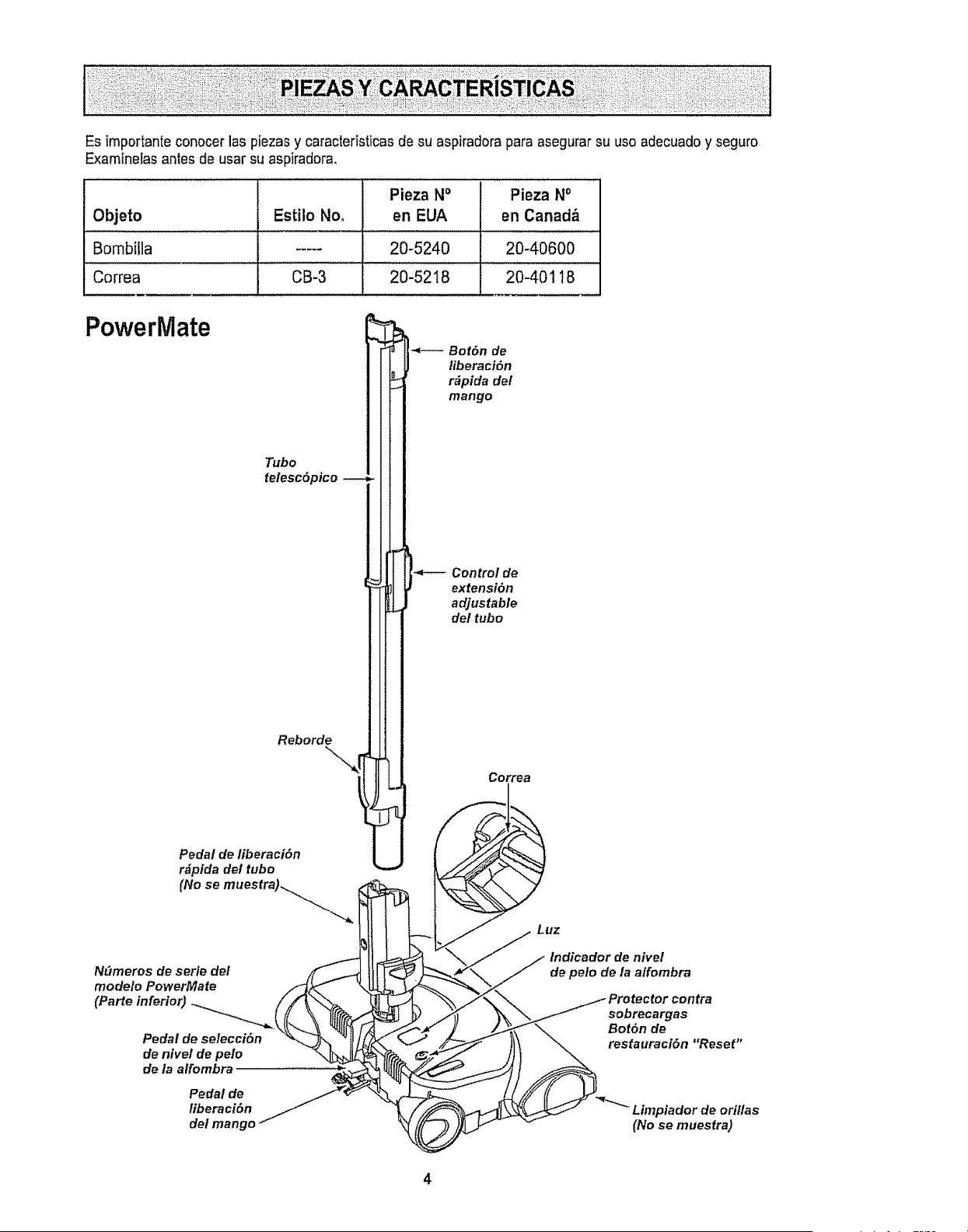
Es importante conocer las piezas y caracteristicas de su aspiradora para asegurar su uso adecuado y seguro
Examinelas antes de usar su aspiradora,
Pieza NO Pieza No
Objeto Estilo Noo en EUA en Canada.
Bombilla ..... 20-5240 20-40600
Correa CB-3 20-5218 20-40118
PowerMate
Tubo
telesc6pico
Reborde\%_[
Pedal de fiberaci6n
r_pida det tubo
(No se muestra)_
Ndmeros de serie del /F_ I_.
modelo PowerMate /_j_
Pedal de selecci6n '_ N I,
de nivel de pelo _'_
de ta alfombra
Pedal de
liberaci6n
del mango
I
n
i
Bot6n de
liberaci6n
r_pida del
mango
Contro! de
extensi6n
adjustable
de/tubo
Correa
Luz
indicador de nivel
de peto de la affombra
_ rotector contra
sobrecargas
\\ Bot6n de
restauraci6n "Reset"
_ "_"_ Limpiador de orillas
(No se muestra)
4
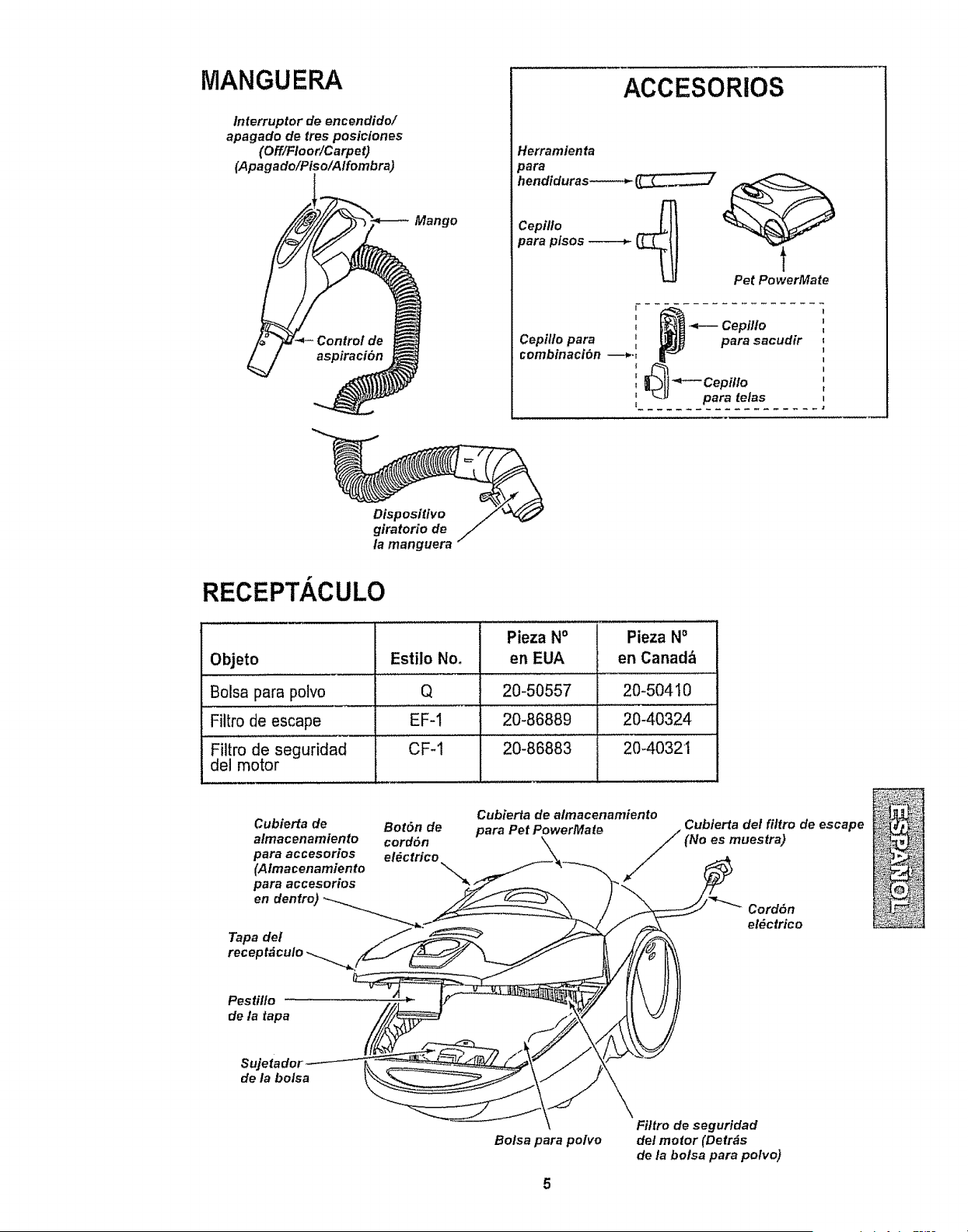
MANGUERA
lnterruptor de encendido/
apagado de tres posiciones
(Off/Floor/Carpet)
(Apagado/Piso/A/fombra)
Mango
ACCESORiOS
Herrarnfenta
3ara
_endiduras-----_
Cepillo
para pisos
Pet PowerMate
Dispositivo
giratorio de
la manguera
RECEPT, ,CULO
Pieza N° Pieza No
Objeto Estilo No, en EUA en Canad_
Bolsa para polvo Q 20-50557 20-504 I0
Filtro de escape EF-1 20-86889 20-40324
Filtro de seguridad CF-t 20-86883 2040321
del motor
Cubierta de Bot6n de
almacenamiento cordSn
para accesorios e!_ctrico
(Almacenamiento
para accesorios
en dentro)
Tapa del
Cubierta de almacenamiento
Cubierta det filtro de escape
para Pet PowerMate / (No es muestra)
/
Cord6n
el#ctrico
Pestitlo
de la tapa
Sujetador
de la botsa
Bolsa para potvo
5
Filtro de seguridad
del motor (Detrhs
de la bolsa para polvo)
Perfavor ponga especialalenciSn a _stos recuadroscon aferta de riesgo Advertencia: Este
informaci6n le alertar_ del peligro de fuego, cheques el6ctricos, quemadas y tesiones Cuidado:
Esta informaci6n le alertara de peligros come lesiones y daSosde propiedad.
........................!
IPeligro de cheque el_ctrico
INo conecte la aspiradora hasta que termine de
larmarla. De Io contrario podria causar un
Ichoque el6ctrico o lesi6n corporal.
r,
Antes de armar la aspiradora, cheque la LISTA DE
EMBALAJE. Use esta lista para verificar que ha
recibido todas las componentes de su nueva aspi-
radora Kenmore.
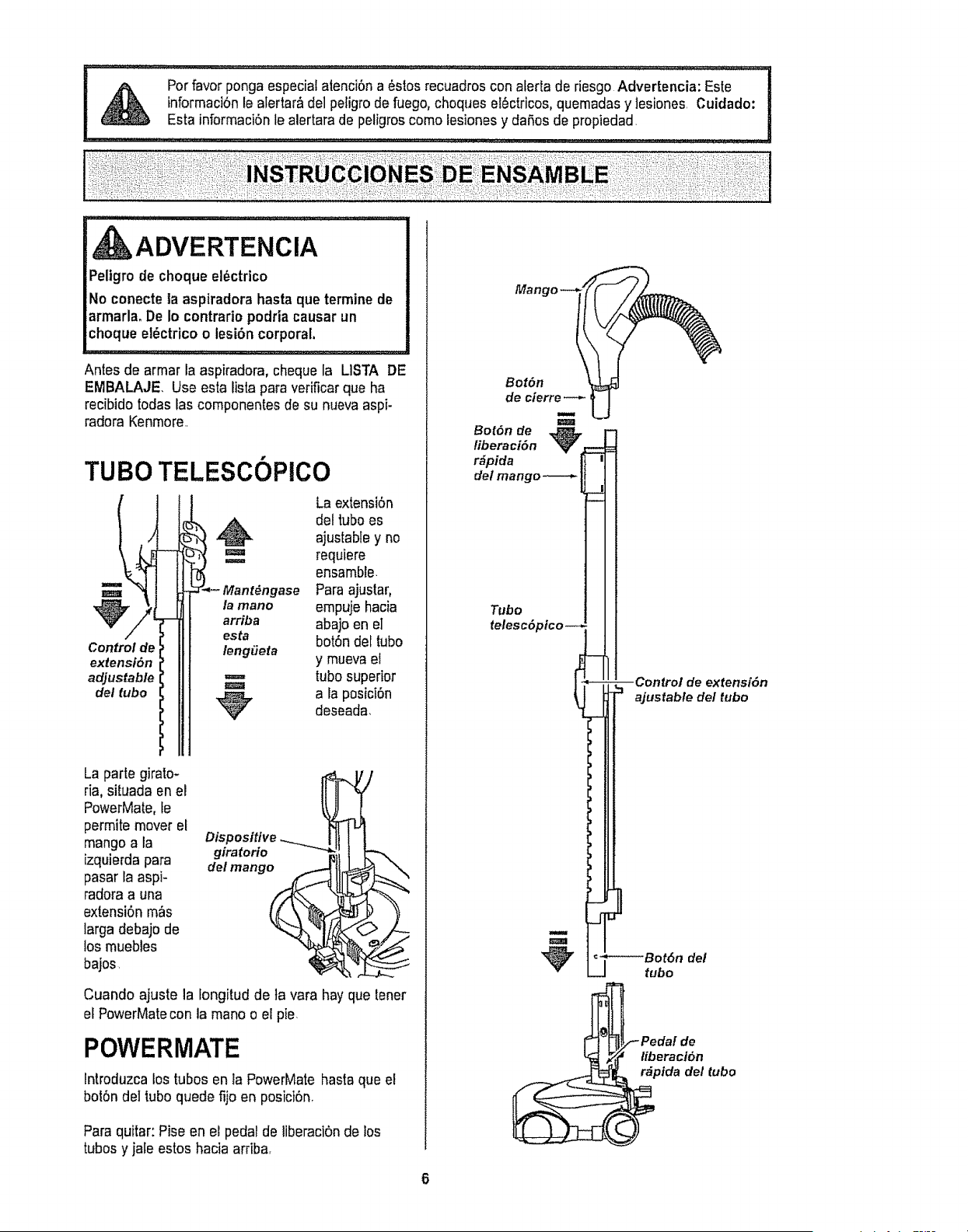
TUBe
Control de
extensi6n
adjustable
del tube
TELESCOPlCO
La extensiOn
1_. del tube es
ajustabley no
requiere
ase Paraajuslar,
. empuje hacia
abajo en el
esta botOndel tube
leng#eta
y muevael
tube superior
_p, a la posiciOn
deseada.
La parle gimlo-
ria, situada en el
PowerMate,le
permite mover el
mango a la
izquierda para
pasar la aspi-
radora a una
extensiSnm_s
larga debajo de
los muebles
bajos.
Cuando ajuste la fongitud de la vara hay que lener
el PowerMatecon la mane o el pie.
POWERMATE
lntroduzca los tubes en la PowerMate hasta que el
botSndel tube quede fijo en posici6nr
Paraquitar: Pise en el pedal de liberaciOnde los
tubes y jale estos hacia arriba,
Manl
Bot6n
de cierre
Bot6n de _ l
liberaci6n V
'11
_" i__--r --Control de extensi6n
L = ajustable del tube
I oJL----Botdn del
V U t.bo
liberaci6n
r_pida del tube
RECEPT, CULO
1. Abra la tapa dei recept_culo,,
2. Examineque la bofsa para poIvo este instalada
correctamente Consuite las instrucciones de insta-
laci6n en la GAMBle DE LA BOLSA.
3. Examineque el fittro de seguridad del motor este
instaladocorrectamenteoConsulte las instrucciones
de instalaciSnen CAMBIO DEL FILTRO DE
SEGURIDADDEL MOTOR,
LA TAPAY LA CUBIERTA
Es normal que ta tapa del recept&cutose desprenda
al ser abierta m_s de Io necesario, Para cotocar nue-
vamente la tapa, alinee fas ranuras de ta bisagra, in-
sertefas y cierre ia tapa.
CUIDADO
Nunca debe abrir la capucha del contenedor
estando la tapa abierta. Asi se evitar_ daSes a
lacaPucha del contenedor y/o a tatapa.
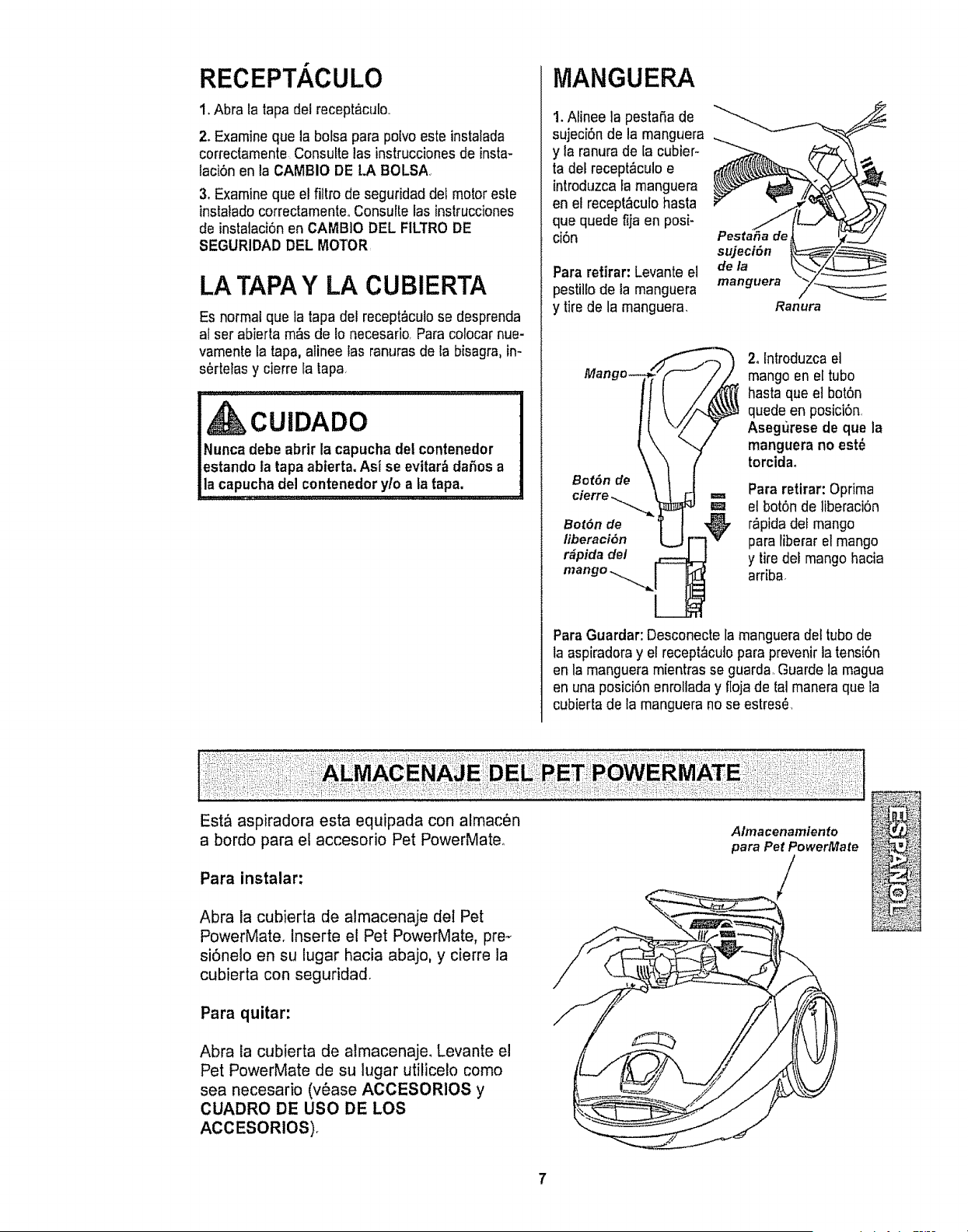
MANGUERA
1. Aiinee la pestaSa de
sujeci6n de la manguera
y la ranurade [a cubier-
ta del recept,_culoe
introduzca Famanguera
en el recept&culo hasta
que quede f{ja en posi-
ci6n
Para refirar: Levante el
pestillo de la manguera
y tirede la manguera.
Pesta_a de
sujeciSn
dela
manguera
Ranura
Bot6n de
BorOn de
liberaci6n
r_pida de/
2. Introduzcael
mango en el tube
hasta que e] bot6n
quede en posiciSn,
Asegi_rese de que la
manguera no est_
torcidao
Para retirar: Optima
el bot6n de liberaci6n
r_pidadei mango
para iiberar el mango
y tiredel mango hacia
arriba.
Para Guardar: Desconecte la manguera del tube de
la aspiradoray el recept_cuto para prevenir latensi6n
en la manguera mientras se guarda_Guarde la magua
en una posici6n enroliaday fioja de tal manera que la
cubierta de la manguera no se estres6,
Est& aspiradora esta equipada con almac6n
a bordo para el accesorio Pet PowerMateo
Para instalar:
Abra la cubierta de almacenaje del Pet
PowerMate. Inserte el Pet PowerMate, pre-
si6nelo en su lugar hacia abajo, y cierre la
cubierta con seguridad
Para quitar:
Abra la cubierta de almacenaje. Levante el
Pet PowerMate de su lugar utilice!o come
sea necesario (v_ase ACCESORIOS y
CUADRO DE use DE LOS
ACCESORtOS).
Almacenamiento
para PetPowerMate
CUIDADO
IPartes en movimientol Para reducir el rlesgo de daSos
corporales, no toque el agttador cuando la aspiradora est_
encendida. El tocar el agitador mlentras que est_ glrando
puede cortar, contusionar o causar otras lesiones. Siempre
apague y desconecte del tomacorrlente antes de dar
mantenimtento. Tenga cuidado al aspirar cerca de niSos.
PARA COMENZAR
Bot6n
de! cord6n
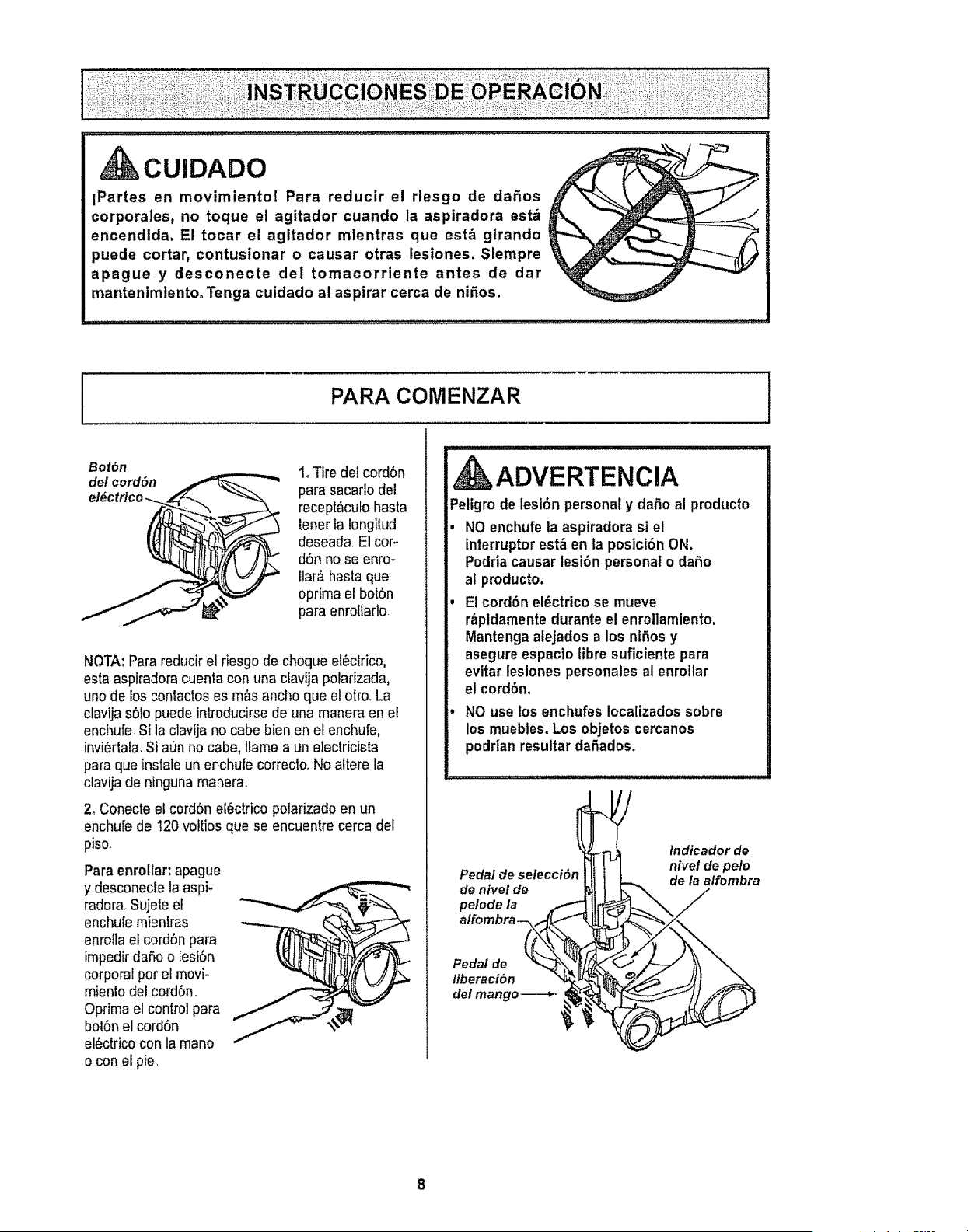
1. Tire del cord6n
para sacarlo del
recept&cufohasta
tenerta longitud
deseada El cor-
d6n no se enro-
llar_ hasta que
optima el bol0n
para enroltarto
NOTA: Para reducir el riesgo de cheque el_clrico,
estaaspiradora cuenta con una clavija polarizada,
unode los contactos es m_s ancho que el otro+La
clavijas61opuede introducirse de una manera en el
enchufe Si la ciavija no cabe bien en e! enchufe,
invi6rtala.Si aun no cabe, llame a un electricista
para queinstate un enchufe correcto.No altere la
clavijade ntngunamanerao
2. Conecte el cord6n el0ctrico polarizado en un
enchufede 120 voltios que se encuentre cerca del
piso.
Para enmllar: apague
y desconecle la aspi-
radora Sujete el
enchufemientras
enrolta el cord6n para
impedir da_,oo lesi6n
corporal per el movi-
miento del cord6n,
Oprima el control para
bot6n el cord6n
el6ctrico con la mane
o con el pie,
, ADVERTENCIA
Peligro de lesi6n personal y daSo al producto
NO enchufe la aspiradora si el
interrupter est,_ en la posici6n ON,
Podria causar ]esi6n personal o daSo
al producto.
El cord6n el_ctrico se mueve
r_pidamente durante el enroilamiento.
Mantengaatejados a los niSos y
asegure espacio libre suficiente para
evitar lesiones personales al enrollar
el cord6n.
NO use los enchufes Iocalizados sobre
los muebles. Los objetos cercanos
podrian resultar daSados_
Pedal de selecci6n
de nivel de
pelode la
atfombra_
fndicador de
nivel de pele
de la affombra
Pedal de
liberaci6n
det mango-_--_-
8
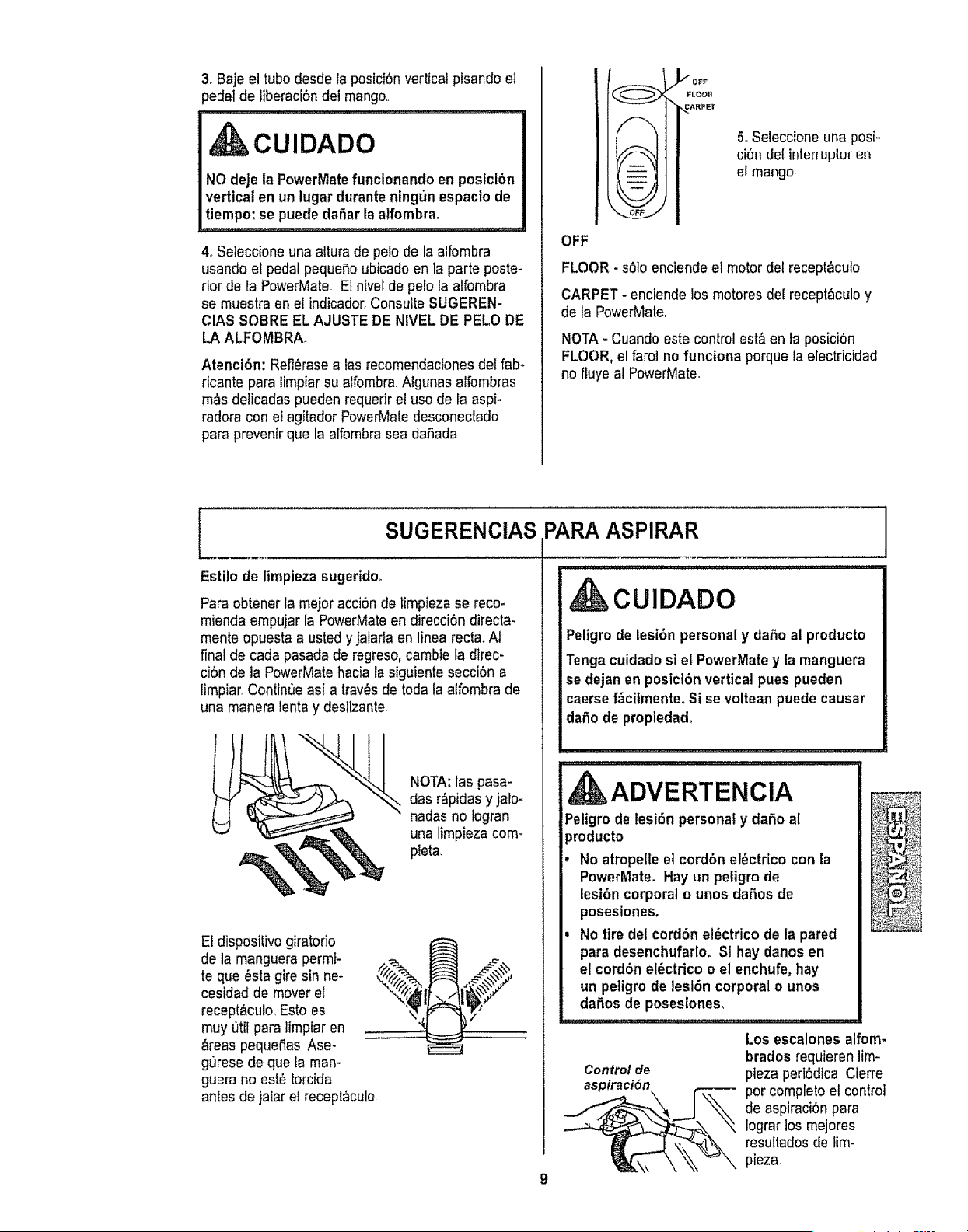
3. Baje el tube desde la posici6n vertical pisando e]
_edal de liberaci6ndel mango,,
CUIDADO
NO deje ia PowerMate funcionando en posicibn
vertical en un lugar duranteningun espacio de
tiempo: se puede dafter la alfombrao
4oSeleccione una altura de pelode la alfombra
usando el pedal pequefio ubicado en la parle poste-
rior de la PowerMate El nivel de pelo la alfombra
se muestra en el indicador, Consulte SUGEREN-
ClAS SOBRE EL AJUSTE DE NIVEL DE PELO DE
LA ALFOMBRA
Atenci6n: Refi_rase a tas recomendacionesdel fab-
ricante para limpiar su atfombra Algunas alfombras
m,_sdelicadas pueden requerir et use de la aspi-
radora con ei agitador PowerMatedesconectado
para prevenir que la alfombra sea daEada
f--i'
5. Seleccione una posi-
ci6n det interrupteren
el mango,
OFF
FLOOR - s61oenciende et motor del recept_culo
CARPET - enciende los motores del receptaculo y
de la PowerMate,
NOTA- Cuando este control est&en la posici6n
FLOOR, el farol no funciona porque la electricidad
no fluye al PowerMate.
SUGERENCIAS PARA ASPIRAR
Estilo de limpieza sugerido_
Pare obtener la meier acci6n de limpieza se reco-
mienda empujar la PowerMateen direcciEndirecta-
mente opuesta a usted y jalarla en linea recta,,AI
final de cada pasada de regreso,cambie la direc-
ci6n de la PowerMatehacia la siguiente secci6n a
limpiar,Contint3easi a trav_sde toda fa alfombra de
una manera lenta y deslizante.
NOTA: las pasa-
des r&pidas y jalo-
nadas no Iogran
una limpieza com-
pleta,
El dispositivo giratorio
de la manguera permi-
te que _sta gire sin ne-
cesidad de mover el
recept&culo,Esto es
rnuy 0til para limpiar en
areas pequeEas,Ase-
gurese de que la man-
guera no este torcida
antes de jaiar el recept_cuto
CUIDADO
Peligro de lesi6n personal y da5o al producto
Tenga cuidado si el PowerMatey la manguera
se dejan en posicibn vertical pues pueden
caerse f_cilmente. Si se voltean puede causar
dafio de propiedad,
9
L, L,,,J,,.L,,, ,,,L,L'I"J,,
ADVERTENCIA
Peligro de lesi6n personal y dafio al
)roducto
No atropelle et cord6n et6ctrico con la
PowerMate. Hay un peligro de
lesi6n corporal o unos daEosde
poseslones.
No tire del cord6n el_ctrico de la pared
pars desenchufarlo, Si hay danes en
el cord6n el_ctrico o el enchufe, hay
un peligro de lesl6n corporal o unos
defies de posesiones,
Control de
aspiraci6n F--_
Los escalones alfom-
brados requieren lim-
pieza peri6dica Cierre
per complete el control
de aspiraci6n pare
Iograr los mejores
resultados de lim-
pieza
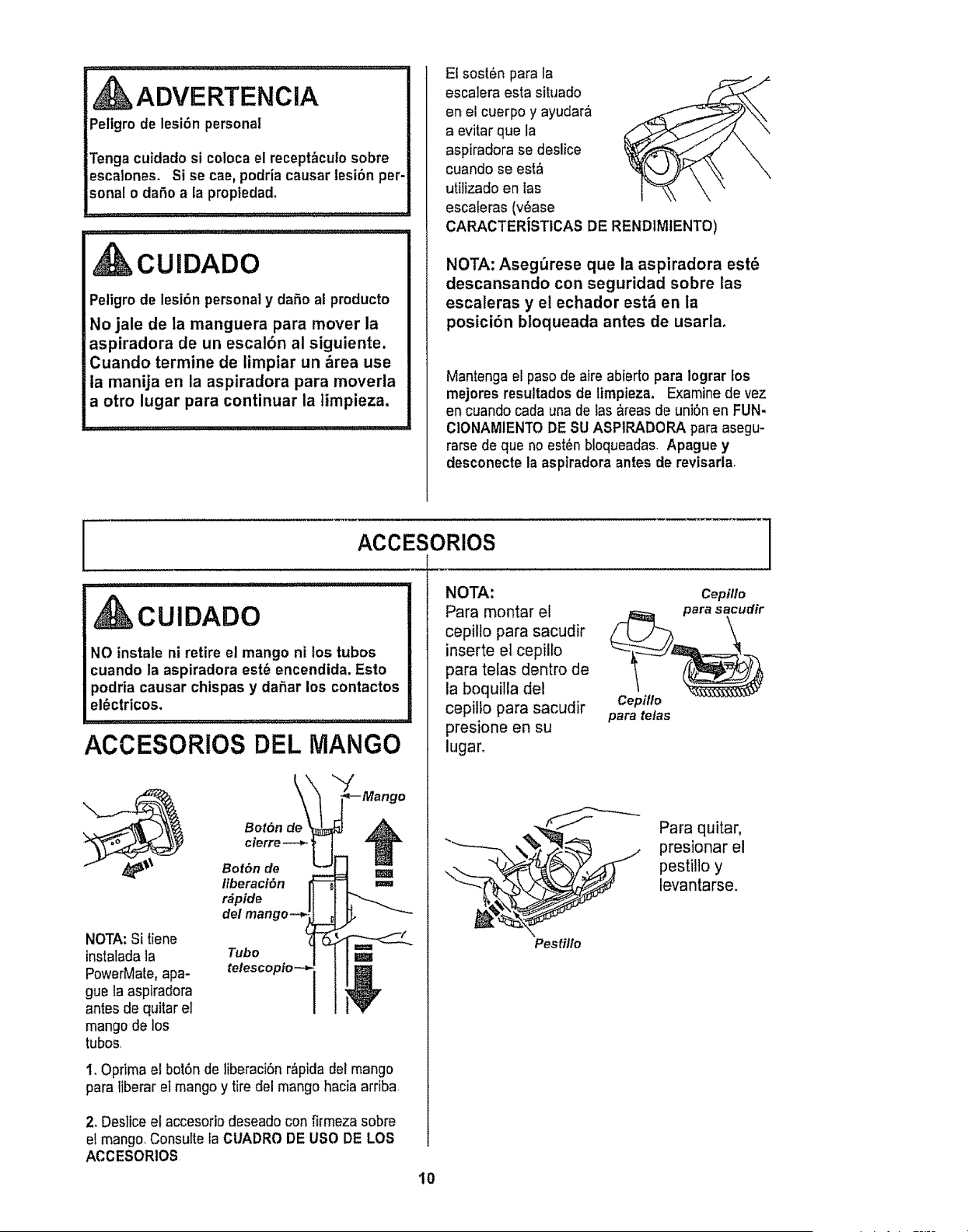
{ ADVERTENCIA
iPeltgro de lesi6n personal
Tenga culdado si coloca el recept_cuto sobre
escalones. Si se cae, podria causar lesibn per-
sonal o dafio a la propieda&
CUIDADO
Peligro de lesi6n personal y daSo al producto
No jale de ta manguera para mover la
aspiradora de un escalbn al siguiente.
Cuando termine de iimpiar un &tea use
la manija en la aspiradora para moverla
a otro lugar para continuar la timpieza.
El sost6n para la
esca]era esta situado
en el cuerpo y ayudar&
a evitar que la
aspiradora se deslice
cuando se est,'_
utilizado en las
escaferas (v6ase
CARACTERiSTICAS DE RENDIMIENTO)
NOTA: Aseg_rese que la aspiradora est_
descansando con seguridad sobre las
escaleras y el echador est& en la
posicibn bloqueada antes de usarla,
Mantenga el paso de aire abierto para Iograr los
mejores resultades de limpieza. Examine de vez
en cuando cada una de ias _.reasde uni6n en FUN-
CIONAMIENTO DE SU ASPIRADORA para asegu-
rarse de que no est_n bloqueadas. Apague y
desconecte la aspiradora antes de revisarla,
I ACCESORIOS
Cepillo
CUIDADO
NO instale ni retire el mango ni los tubos
cuando la aspiradora est6 encendida. Esto
podria causar chispas y dafiar los contactos
el_ctricos.
ACCESORIOS DEL MANGO
NOTA: Si tiene
instaladala
PowerMate,apa-
gue la aspiradora
antes de quitar el
mango de los
tubos
Tubo
telesco "
io Optima el bot6n de liberaci6n r&pida del mango
para liberar et mango y tire del mango hacia arriba
2_Deslice el accesorio deseado con firmeza sobre
el mango,Consulte la CUADRO DE USO DE LOS
ACCESORIOS
NOTA:
Para montar el
cepillo para sacudir
inserte et cepillo
para telas dentro de
la boquilla del
cepilto para sacudir
presione en su
lugaro
Cepiflo
para tetas
%',_iF_--_-_ Para quitar,
presionar el
pestillo y
levantarse,
Pestillo
10
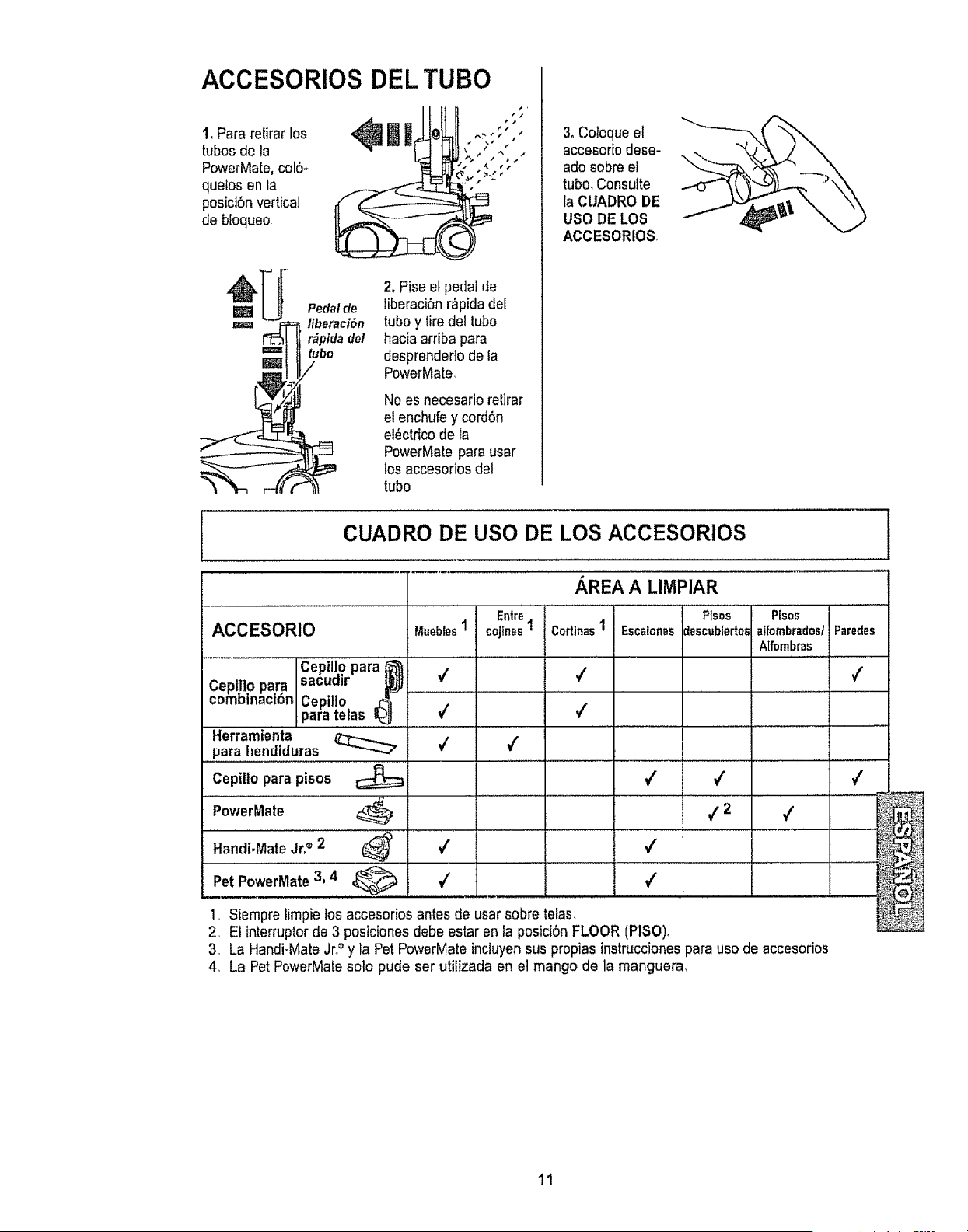
ACCESORIOS DEL TUBO
1. Para retirar los
tubos de la
PowerMate.cof6-
quelos en la
posiciSnvertical
de btoqueo
Pedal de
iu iberaci6n
r_ptda del
bo
2. Pise et pedal de
liberaciOnr_pida del
tuboy tire del tubo
hacia arfiba para
desprender]o de la
PowerMate,
No es necesario retirar
el enchufey cordSn
el_ctrlco de ta
PowerMate para usar
los accesorios del
tubo
3oColoque el
accesor[odese-
ado sobre el
tubo, Consulte
la CUADRO DE
USO DE LOS
ACCESORIOS
CUADRO DE USO DE LOS ACCESORIOS
Entre. Pisos
cojlnes1 alfombradost
Alfombras
ACCESORIO
Cepillo para _'_
Cepi!to para sacudir ._
comDinaci6n Cepillo _¢_
para telas I_
Herramienta
para hendiduras
Cepilto para pisos
PowerMate
Handi.Mate Jr.® 2
Mueblest
4
./
4
4
v'
AREA A LltVIPIAR
Pisos
Corttnas1 Escalonesdescubiertos
4
4
4
_2
Pet PDwerMate3, 4 _.. V'
1, Siempre limpie los accesorios antes de usar sobre telas,
2,
3.
4o
,(
v'
El interruptor de 3 posiciones debe estar en la posiciSnFLOOR (PISO),
4
Pa'i::.....
...................
La Handi-Mate Jr." y la Pet PowerMate incluyensus propias instruccionespara uso de accesorios,
La Pet PowerMatesolo pude ser utilizada en el mango de la manguera,
2
11
SUGERENCIAS SOBRE EL AJUSTE DE NIVEL DE PELO DE LA ALFOMBRAJ
Use el ajuste XLO (bajo) para obtener la mejor lim-
pieza a fondo_Pot otra parle, quiz_s se requieraele-
var el nivet para facilitar algunas tareas, como por
ejemplo cuando se trata de tapetes y atgunas alfom-
bras de pete largo, y para impedir que ia aspiradora
se apague. Se sugieren los siguientes ajustes:
HI- Pelo muy largo y suelto, tapetes, alfornbras
muy acojinadas
MED - Peto mediano a largo.
LO - Pelo corto a mediano.
XLO - La mayoria de las alfombras y pisos
descubiertos
l CARACTERJSTICAS DE RENDIMIENTO J
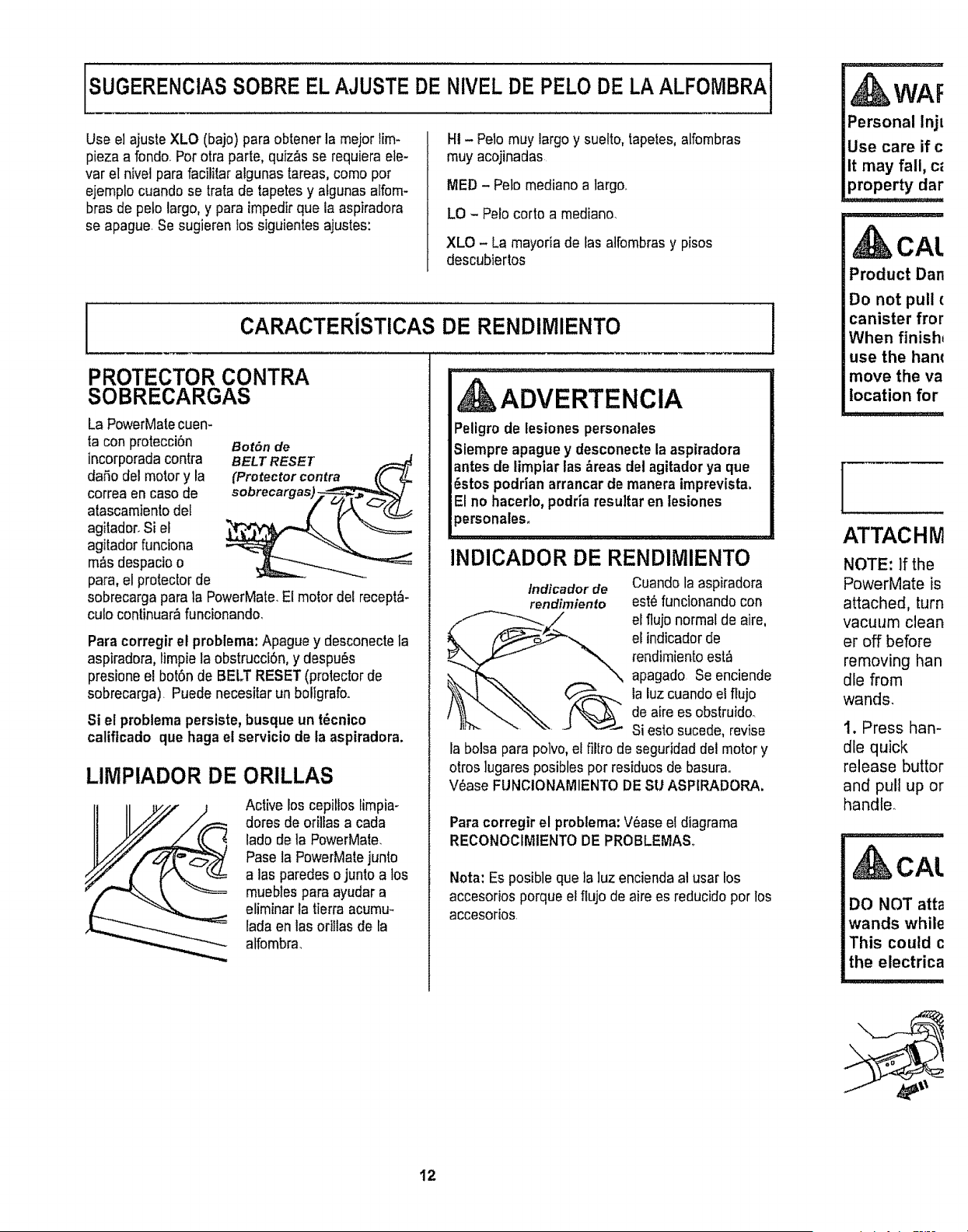
PROTECTOR CONTRA
SOBRECARGAS
La PowerMatecuem
ta con protecciSn Bot6n de
incorporada contra
dafio del motory la
correa en caso de
atascamiento del
agitador_Si el
agitador funciona
m_s despacio o
para, el protector de
sobrecarga para la PowerMate.El motor del recept&-
culo continuar_funcionando.
Para corregirel problema:Apague y desconectela
aspiradora, limpie la obstrucci6n, y despu6s
presione el bot6n de BELT RESET (protector de
sobrecarga). Puede necesitar un bollgrafo..
Si el problema persiste, busque un t_cnico
catiftcado que haga el servicio de la aspiradora.
LIMPIADOR DE ORILLAS
Active los cepitlos limpia-
dotes de odllas a cada
lado de ta PowerMate.
Pase la PowerMatejunto
alas paredes o junto a los
mueblespara ayudar a
eliminarla tierra acumu-
lada en las oriIlasde la
alfombra.
ADVERTENCIA
Peligro de lesiones personales
Siempre apague y desconecte la aspiradora
antes de limpiar las _reas det agitador ya que
6stos podrian arrancar de manera imprevista.
El no hacerlo, podria resultar en lesiones
personales,
INDICADOR DE RENDIMIENTO
Cuando la aspiradora
estOfuncionandocon
/ndicadorde
rendimiento
_..._ l flujo normal de aire,
eEindicadorde
rendimientoest_
apagado Se enciende
__"_ _ ,a luzcuandoe, flujo
de aire es obstruido.
' Si esto sucede, revise
la bolsa para polvo,el filtro de seguridad del motor y
otros ]ugaresposibles pot residuosde basurao
V_ase FUNCIONAMIENTODE SU ASPIRADORA.
Para corregir el problema: Vease el diagrama
RECONOCINIIENTODE PROBLEMA&
Nota: Es posible que la ]uz encienda al usar los
accesorios porque el flujo de aire es reducido por los
accesorios.
WAF
Personal InjL
Use care if c
it may fail, c_
property dar
CAL
Product Dan
Do not pull €
canister fror
When finish_
use the ham
move the va
location for
, ,=,,
[
ATTACHM
NOTE: If the
PowerMate is
attached, turn
vacuum clean
er off before
removing han
die from
wands.
1. Press han-
dle quick
release buttor
and pull up or
handle.
CAL
DO NOT atta
wands while
This could c
the electrica
12
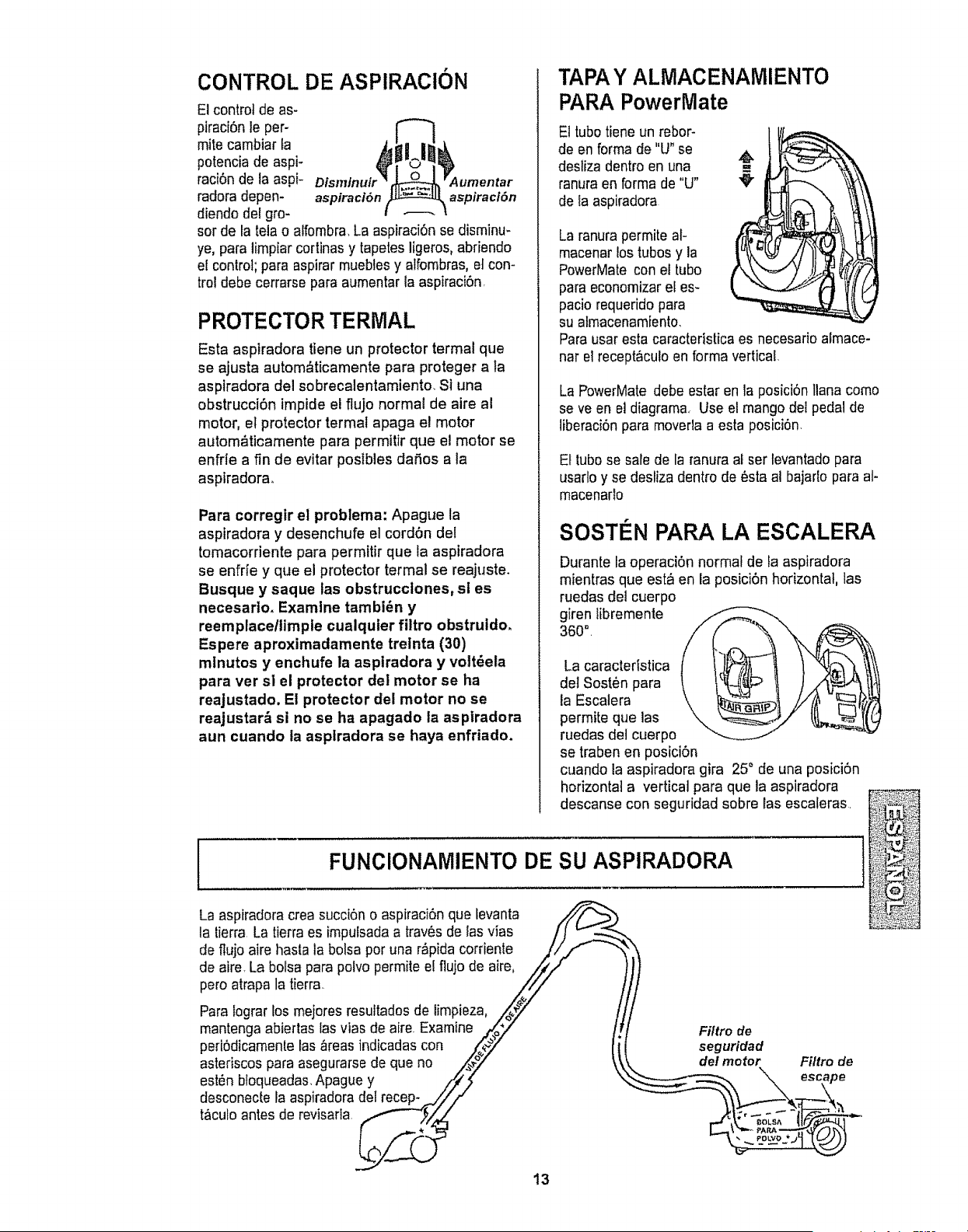
CONTROL DE ASPIRACION
El control de as-
piraci6n le per-
mite cambiar ta
potencia de aspi-
raci6n de la aspF
radora depen- aspiraci6n aspiracl6n
diendo del gro-
sot de fa telao atfombra. La aspiraci6n se disminu-
ye, para limpiar cortinas y tapetes ligeros, abriendo
ei control; para aspirar mueblesy alfombras, et con-
trol debe cerrarse para aumentar la aspiraci6n
PROTECTOR TERMAL
Esta aspiradora tiene un protector termal que
se ajusta autom_ticamente para proteger a ta
aspiradora del sobrecalentamiento, St una
obstruccibn impide el flu]o normal de aire al
motor, el protector termal apaga el motor
autom&ticamente para permitir que el motor se
enfrle a fin de evitar postbles daSos a la
aspiradora.
Para corregir el problema: Apague la
aspiradora y desenchufe el cord6n del
tomacorriente para permttir que la aspiradora
se enfde y que el protector termal se reajuste.
Busque y saque ias obstrucctones, sl es
necesarlo. Examine tambi_n y
reemplacetltmple cualquier filtro obstrutdo.
Espere aproximadamente trelnta (30)
mlnutos y enchufe la asptradora y volt_ela
para ver si el protector del motor se ha
reajustado. El protector del motor no se
reajustar,_ si no se ha apagado la aspfradora
aun cuando la aspiradora se haya enfriado,
TAPA Y ALMACENAMIENTO
PARA PowerMate
El tube tieneun rebor-
de en forma de "U"se
desliza dentro en una
ranuraen forma de "U"
de ia aspiradora
La ranura permite al-
macenar !ostubes y la
PowerMate con el tube
para economizar el es-
pacio requerido para
su almacenamiento,
Parausar esta caractedstica es necesario afmace-
nar el recept_culo en forma vertical.
La PowerMate debe estar en la posici6n liana come
seve en et diagram& Use el mango dei pedal de
liberaci6n para moverla a esta posici6n.
Et tube se safe de la ranura al ser levantado para
usarlo y se desliza dentro de _sta al bajarto para al-
macenarlo
SOSTEN PAPA LA ESCALERA
Durante raoperaci6n normal de la aspiradora
mientras que esta en la posici6n horizontal, las
ruedas del cuerpo
giren libremente
360",
La caracteristica
del Sost_n para
la Escalera
permite que las
ruedas del cuerpo
se traben en posici6n
cuando la aspiradora gira 25° de una posici6n
horizontal a vertical para que la aspiradora
descanse con seguridad sobre Easescaleras,
FUNCIONAMIENTO DE SU ASPIRADORA
La aspiradora crea succi6n o aspiraci6n que fevanta
la tierra.La tierra es imputsadaa trav_s de las vias /J _.-_
de flujo aire hasta la bolsa per una r_pida corriente /i/,f
de aire La bolsa para polvo permite el flujo de aire, ////
pero atrapa la tierra. Z7
Para lograr los mejores resuttadosde limpieza, ,/oozily" t
mantenga abiertas las vias de aire. Examine ._._/" /
peri6dicamente las _reas indicadas con _,,_/" _
asteriscos para asegurarse de que no ,,,_" _i
est_n bfoqueadas,Apague y /f//_
desconecte la aspiradora del recep- J//"
t_culo antes de revisarta,r,_-_ _
13
Filtro de
seguridad
de! motor Filtro de
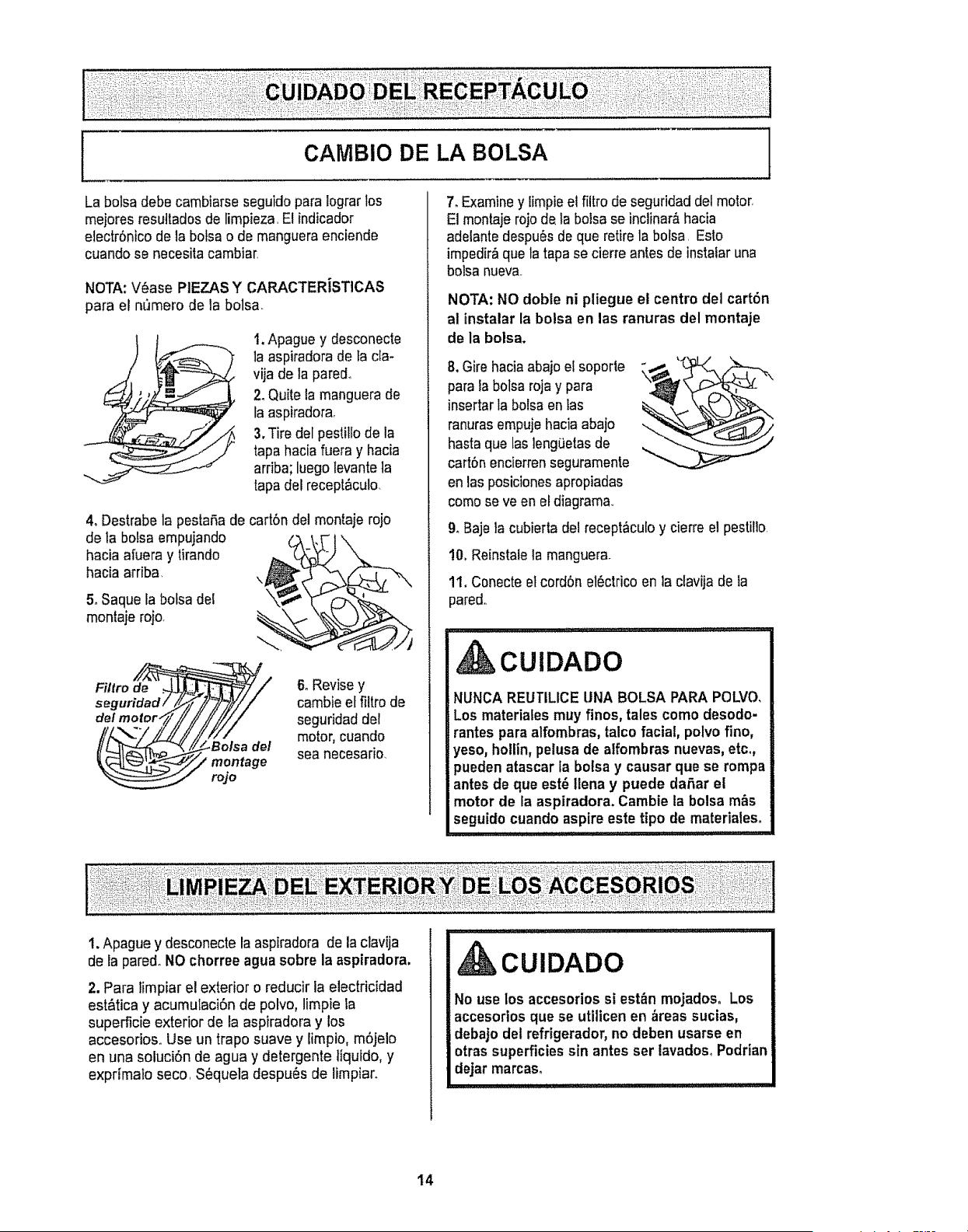
La bolsa debe cambiarse seguido para 1ograrlos
mejores resu]tados de limpieza, El indicador
electr6nico de la botsa o de manguera enciende
cuando se necesita cambiar,
NOTA: V6ase PIEZAS Y CARACTERiSTICAS
para el n_mero de la bolsa
1. Apague y desconecte
la aspiradora de la cla-
vija de la pared.
2. Quite la manguera de
la aspiradora,
3, Tire del pestillo de la
tapa hacia fuera y hacia
arriba; luego levante la
tapa del recept&culo.
4. Destrabe la pestafia de cart6n del montaje rojo
de la boLsaempujando
hacia afuera y tirando
hacia arriba.
\
5_Saque la bolsa del \
montaje rojo,
Filtro de ,-.
seguridad/
del motor,
6oRevisey
cambie el filtrode
seguridad der
motor, cuando
sea necesario.
7. Examine y Eimpieel filtro de seguridad del motor,
El montaje rojode la bolsa se inclinar&hacia
adelante despu6s de que retire la botsa, Esto
impedir_ que ta tapa se cierre antes de instaiar una
bolsa nueva,
NOTA: NO doble ni pliegue el centre del cart6n
al tnstalar la bolsa en las ranuras del montaje
de la bolsa.
parala bolsa rojay para _.,__ "
insertarla bolsa en tas
ranurasempuje hacia abajo
basraque las lengOetasde
cart6nencierren seguramente
en las posiciones apropiadas
comese ve en eldiagrama,
9_Bajeia cubierta del recept&culoy cierre el pestil]o
!0, Reinstale la manguerao
tl. Conecte el cord6n el6ctricoen la clavija de la
pared.,
,,1. iJ .....................L, :::_ _:.
CUIDADO
NUNCA REUTILICE UNA BOLSA PARA POLVO,
Los materiales muy fines, tales come desodo-
rantes para alfombras, talco facial, polvo fine,
yeso, hollin, pelusa de alfombras nuevas, etc.,
pueden atascar la botsay causar que se rompa
antes de que est_ Ilena y puede daSar el
motor de la aspiradora. Cambte la bolsa m&s
seguido cuando aspire este ripe de materialeso
i. Apague y desconecte la aspiradora de la clavija
de la pared° NO chorree agua sobre la aspiradora,
2. Para limpiar el exterior o reducir la electricidad
est&tica y acumulaci0n de polvo, limpie la
superficie exterior de la aspiradora y los
accesorioso Use un trapo suave y limpio, m6jelo
en una soluci6n de agua y detergente ]iquido, y
exprimalo seco, SOqueladespuOs de limpiar.
CUIDADO
No use los accesorios si est_n mojados. Los
accesorios que se utilicen en _reas sucias,
debajo det refrigerador, no deben usarse en
otras superficies sin antes ser lavados, Podrian
dejar marcas°
i ,H , H ,, , , .................... _z=
14
f
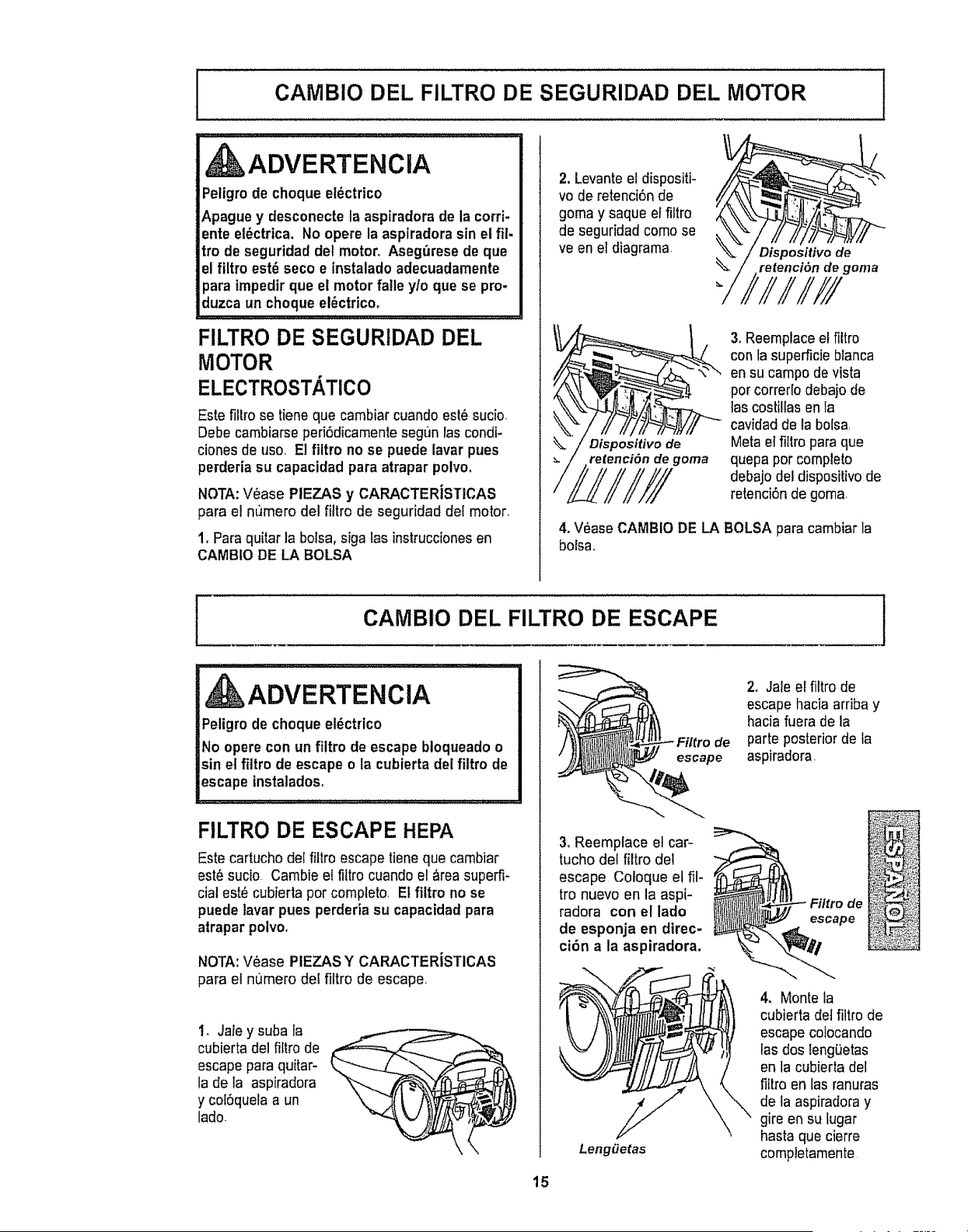
CAMBIO DEL FILTRO DE SEGURIDAD DEL MOTOR
1
_ADVERTENCIA
Petigrode cheque el_ctrico
Apague y desconecte la aspiradora de la corri.
ente et_ctrtca. No opere la asplradora sin et fil-
tro de seguridad del motor, Aseg_lresede que
el filtro est_ seco e instalado adecuadamente
para tmpedir que el motor fatle y/o que se pro-
duzca un cheque el_ctrico,
FILTRO DE SEGURIDAD DEL
MOTOR
ELECTROSTATICO
Este filro se tiene que cambiar cuando est_ sucio,
Debe cambiarse peri6dicamente seg_Jnlas condi-
ciones de use, El filtro no se puede lavar pues
perderia su capacidad para atrapar polvo,
NOTA:V#ase PIEZAS y CARACTERiSTICAS
para el nimero del fittro de seguridad del motor,
1, Paraquitar la boisa, siga las instrucciones en
CAMBIO DE LA BOLSA
2. Levanteel dispositi-
vo de retenci6nde
goma y saque el flltro
de seguridad come se
ve en el diagrama
Dispositivo de
retencl_n de goma
"/iIlIll
Dispositivo de
retention de goma
3, Reemplaceel fltro
con la superficie branca
en su campo de vista
percorrer[o debajo de
tas costllas en la
cavidad de la bolsa
Metael filro paraque
quepa per complete
debajo del dispositivo de
retenci6n de goma
4, V_ase CAMBIO DE LA BOLSA para cambiar la
bolsa,
CAMBIO DEL FILTRO DE ESCAPE 1
_ADVERTENCIA
Peligro de cheque el_ctrico
No opere con un fittro de escape bloqueado o
sin el filtro de escape o la cubierta del fittro de
escape instalados,
FILTRO DE ESCAPE HEPA
Este cartucho de{fltro escape tieneque cambiar
est_sucio Cambie e{fttro cuando el &reasuperfi-
cial este cubierta per complete, El filtro no se
puede iavar pues perderia su capacidad para
atrapar polvo,
NOTA: V_ase PIEZAS Y CARACTERiSTICAS
para el numero dei fltro de escape,
1, Jate y suba la
cubierta dei fltro de
escapepara quitar-
la de la aspiradora
y col6quela a un
lade.
de
escape
3oReemplace el car-
tucho del fitro de!
escape Coloque el ll-
tro nuevo en la aspi-
radora con el lade
de esponja en direc-
cibn a la aspiradora.
Leng_etas
2o Jate ef filtro de
escape hacia arriba y
hacia fuera de la
parte posteriorde la
aspiradora,
\
4, Monte la
cubierta def fttro de
escape colocando
fasdos lengietas
en la cubierta del
filro en las ranuras
de ta aspiradora y
gire en su lugar
hasta que cierre
compietamente
15
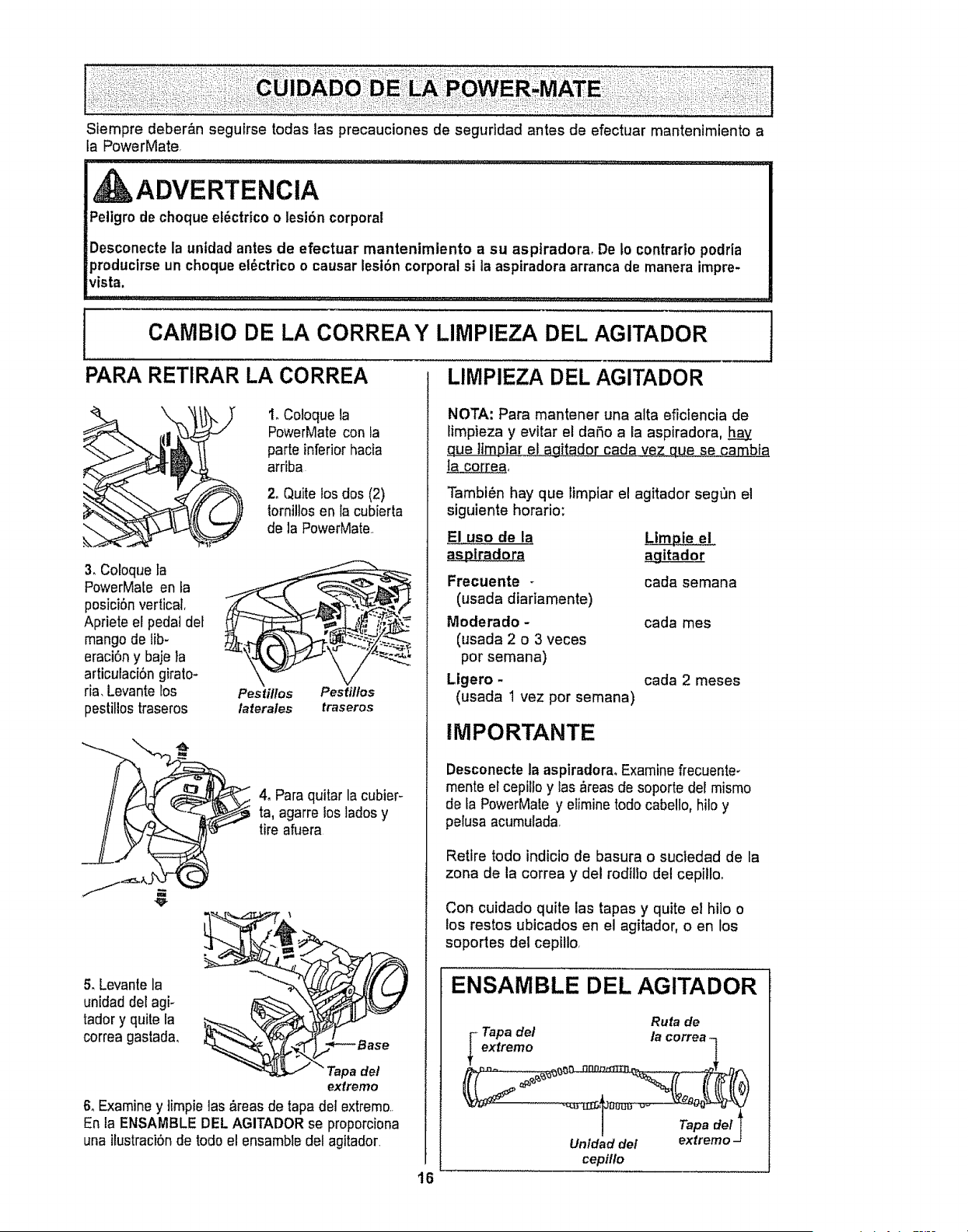
Stempre deber&n seguirse todas las precauciones de seguddad antes de efectuar mantenimiento a
la PowerMate,
ADVERTENCIA
Pellgro de choque e!_ctrico o lesi6n corporal
Desconecte la unidad antes de efectuar mantenimlento a su asptradora, De to contrario podria
producirse un choque el6ctrico o causar lesibn corporal si la aspiradora arranca de manera impre-
vista.
CAMBIO DE LA CORREA Y LIMPIEZA DEL AGITADOR
PARA RETIRAR LA CORREA LIMPIEZA DEL AGITADOR
I. Coloque la
PowerMate con ta
parte inferiorhacia
arriba
2, Quite losdos (2)
tornillosen la cubierta
de la PowerMate.
3, Coroque ta
PowerMate en ta
posiciSnvertical,
Apriete el pedal del
mango de lib-
eraci6n y baje la
articulaciSn girato-
ria, Levantelos
pestitiostraseros
Pestillos Pest#los
iaterales traseros
4oPara quitar la cubier-ta, agarre loslades y
tire afuera
& Levantela
unidad del agF
tadory quite la
correa gastada,
_a de!
extremo
& Examine y ]impie las _reas de tapa de] extremo..
En la ENSAMBLE DEL AGITADOR se proporciona
una ilustraciSn de todo el ensamble del agitador,
16
NOTA: Para mantener una alta efictencia de
Iimpieza y evitar el daSo a la aspiradora, h_.a.y
_ue limDiar_[agitador carla vez que se_cambia.
la co[lea,
Tambi_n hay que limpiar el agitador seg,bn e!
siguiente horario:
El use de la Limpie el
as__s_ptradora agitador
Frecuente -
(usada diariamente)
Moderado -
(usada 2 o 3 veces
por semana)
Ligero -
(usada 1 vez por semana)
cada semana
cada mes
cada 2 meses
IMPORTANTE
Desconecte la aspiradora, Examinefrecuente-
mente ercepilfo y las _reas de soporte deFmismo
de fa PowerMate y eiimine todo cabello, hilo y
pelusa acumulada
Retire todo indiciode basura o suctedad de la
zona de la correa y del rodfllo del cepitloo
Con cuidado quite las tapas y quite el hilo o
los restos ubicados en el agitador, o en los
soportes del cepillo,
ENSAMBLE DEL AGITADOR
_ apa de/
extremo
Rufa de
/a correa-
Unldad del
cepillo
Tapa del
extrerno -

PARA RETIRAR LA CORREA
1. Instale una
correa nueva
sobre e[
impulsordel
motor y tuego
sobre la ruta
de la correa
Agitador Tapadel
extremo
NOTA:V_ase PIEZAS Y CARACTERiSTICAS
para el nt]mero de la correa
2. Coloque otra vez
la unidad del agita-
dor en ia
PowerMate.
3_Alinee la parte
frontal de la
cubierta con la
base Coloque la
cub[erta sobre el
bordedelantero
de la base como
se muestra.
Base
Pestillos Pestitlos
laterales traseros
4. Gire [acubierta
hada atr&s, Apriete
con poca fueFza
hastaque los
pestitioslateralesy
traseras encierren
seguramente
CerciSrese que no hay espacio entre [a cubierta y
la base,
5. Coloque la PowerMate con la parte inferior hacia
arriba e inserte los dos (2) torni[!os en la cubierta
I CAMBIO DE LA BOMBILLA
14Quite fa cubierta de la PowerMate como se
describe en [asecci6n CAMBIO DE LA CORREA Y
LIMP1EZADEL AGITADOR,
Empuje hacia
adentro y gire
2. Empuje hacia aden-
troy gire la bombilla en
el sentido contrario al
de las agujas del re]oj,
luego tire hacia afuera
para sacar_
t
Empujehacia
adentro y gire
3. Empuje hacia
adentro y gire en el
sentido at de las agu-
jas del re[oj para
reemptazar, La bom-
bi[la no debe ser m&s
de 15 vatios (130
voltios),
4_Reinstale [a cubierta de la PowerMate como
se describe en la seccibn CAMBIO DE LA COR-
REAY LIMPIEZA DEL AGITADOR
NOTA:V_ase PIEZAS y CARAGTERISTlCAS
para el numero de la bombiIla,
17
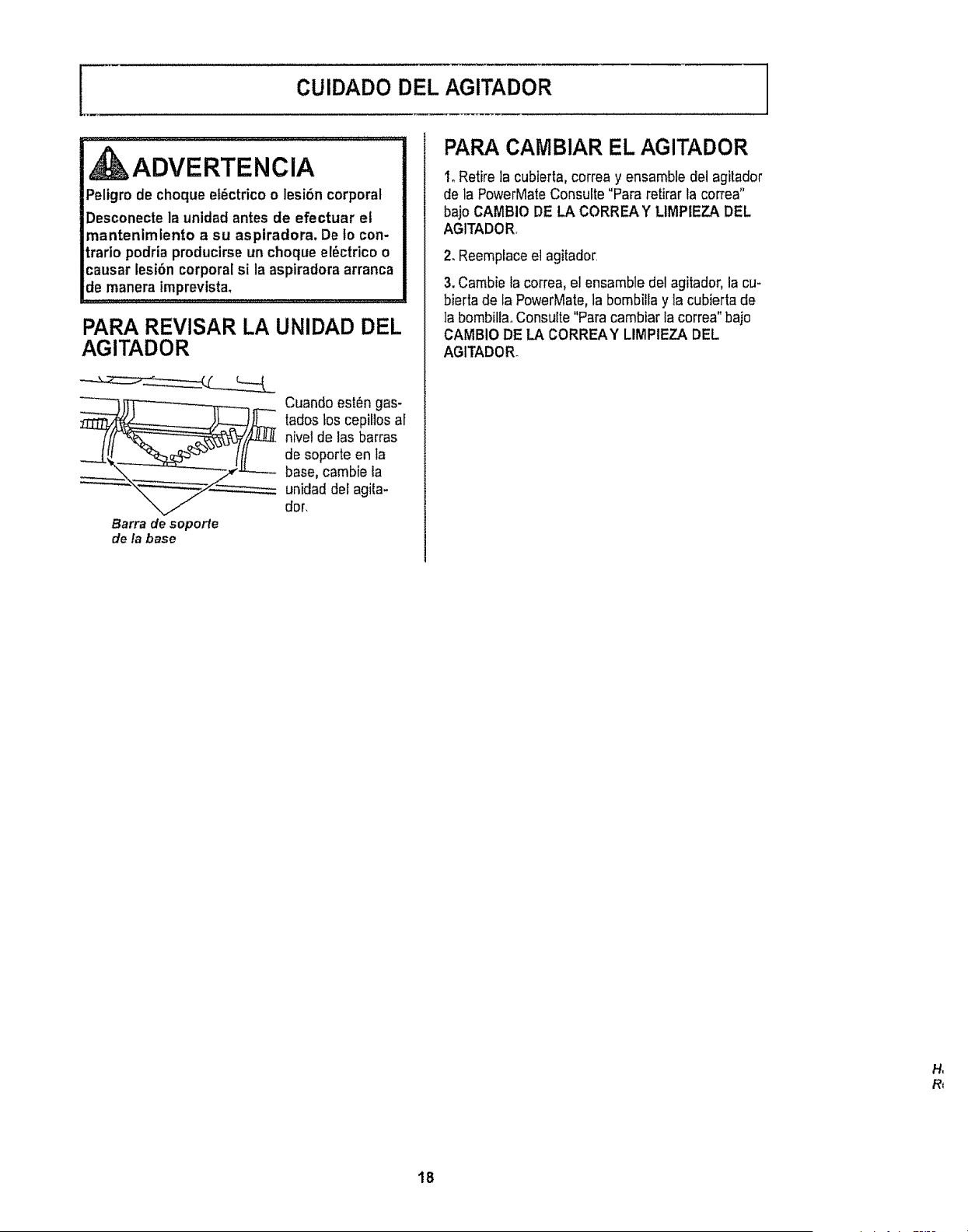
[
CUIDADO DEL AGITADOR
_ADVERTENCIA
Peligro de choque et6ctrico o lesi6n corporal
Desconecte la unidad antes de efectuar el
mantenimlento a su aspiradora. De fo con-
trario podria producirse un choque el6ctrico o
causar lesi6n corporalsi la aspiradora arranca
de manera imprevtsta.
PARA REVlSAR LA UNIDAD DEL
AGITADOR
Barra de soporte
de ta base
Cuando est6n gas-
tadoslos cepilios ar
nivet de las barras
de soporte en la
base, cambie la
unidadder agita-
dor,
PARA CAMBIAR EL AGITADOR
I. Retire la cubierta, correa y ensamble del agitador
de la PowerMateConsulte "Para retirar la correa"
bajo CAMBIO DE LA CORREAY LIMPIEZA DEL
AGITADOE
2. Reemplaceel agitado_
3. Cambie fa correa, el ensamble del agitador, la cu-
bierta de la PowerMate, la bombilia y ]acubierta de
]a bombittaoConsulte "Para cambiar la correa" bajo
CAMBIO DE LA CORREAY LIMPIEZA DEL
AGITADORo
H_
R_
18
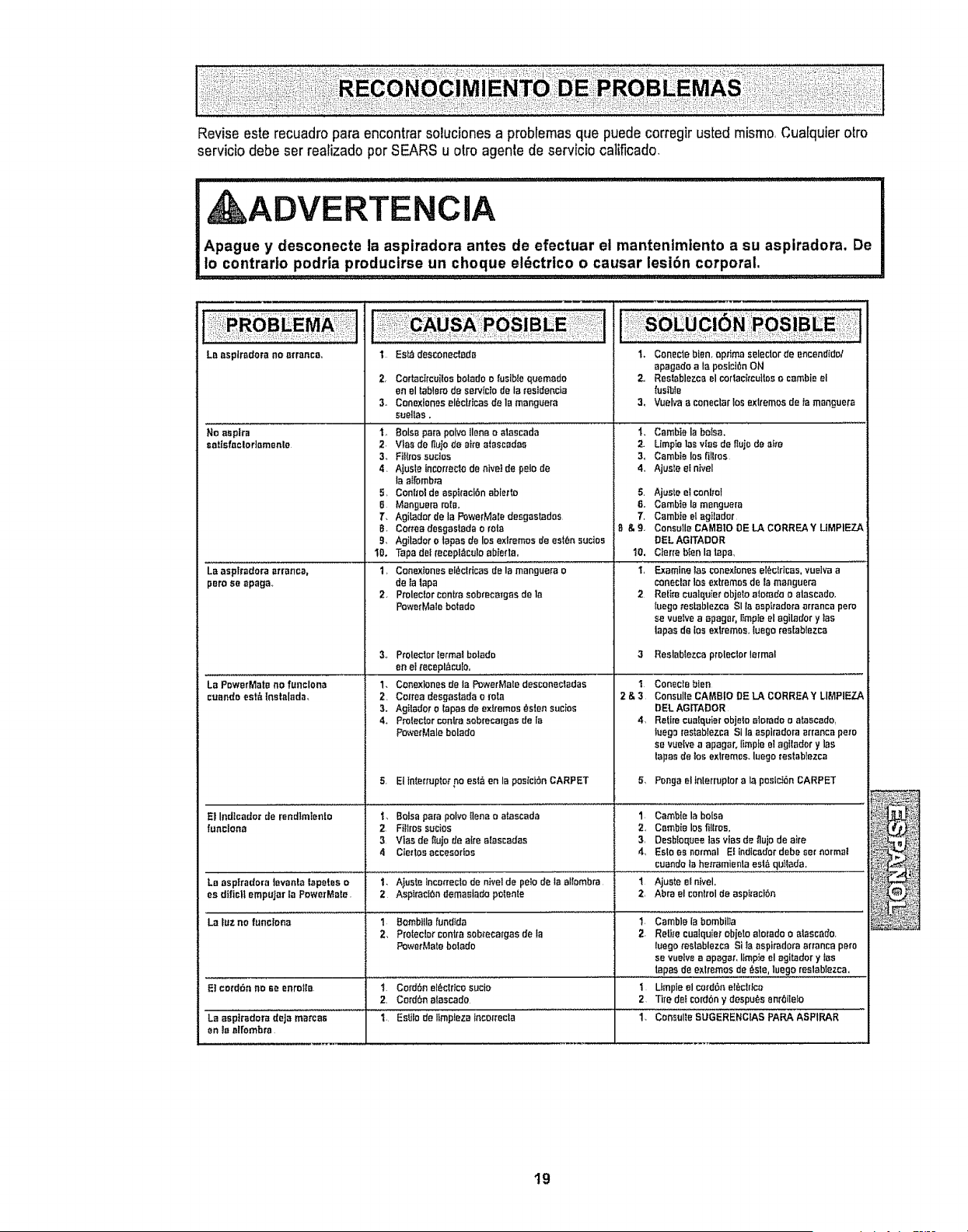
Revise este recuadro para encontrarsoluciones a problemas que puedecorregir usted mismo, Cua[quierotro
servicio debeser realizado per SEARS u otto agente de servtcio calificado,
, , ,,,, ,, ,,,, ,,, ,,,, ,,,,,,,,,, ,,, ,................. • ................................. _,_L, _L'_'L"L'L''"L'_'.....
ADVERTENCIA
Apague y desconecte la aspiradora antes de efectuar el mantentmiento a su aspiradora, De
lo contrario podria producirse un cheque el_ctrico o causar lesibn corporal.
Le asp|fedora no _rr_nc&,
No asplra
satIsfnclor]amento
La aaptradera arranca,
peru so apaga,
L,Pow_;M,t_,0 i,,:io,,
cuando eat& |net_l=tda.
1 Eat_ desconedada
2, Cortactrcuilos bolado o fusibfo quemado
en el tablarode sarvlctode la residencb
3. Conexiones el6clrtcas do la maoguera
suelIas,
I. Balsa pare polvo liana o atascada
2. Vtas`de flute_Jea#e a_as`cadas`
3_ Fit{ros sucios
4. Ajuste inters'acrede nivet de paiode
la alfombra
5, Conffol de asp_rack_nabledo
8 Manguera mla,
7. Agi[ador de la PowerMaledeegaslados
8 Correa dasgasladao role
9. Agilador o tapes de los exlremos de es`t_ns`ucios`
10. Tape dal recepl_cub ab;arta.
1, Co.extenes`el_emcas`de='_"_anguarao
de ta lapa
2 Pm{eclorcenffa s`obrecargas`de {a
PowerMalebotado
&, ProlectorIermal bolado
on e__acapl_culo.
1, Cenexienes de la PowerMa_edes`conecladas`
2. Coffee desgastada e fete
3. Agilador o rapes de exffemos _sten s`ucios`
4_ Pro{actor centres`ebrecargasde ia
PowerMale bolado
5 El tnterrupto_rno eat&en la posIclSnCARPET
i. Bels`apara polvo _lanae eras`cede
2 Fi_lras`sucios
3 Vies`de _ujo de eke a{as`cadas
4 Clerics accesodos
t,, Conecie bien. optima s`elecforde encendido/
apagadoala pos`ictenON
2, Restablezcael codacSrcuitas`o cambie el
{ustbte
3, Vuelva a coneclar tos exlremos`de la manguera
I, Cambie la boIs`a.
2. Llmpie ]as v{as de fiujode aide
3, Cambte los, fiIlros
4. Ajuste el ntvel
5, Ajuste e! central
6., Cambiela manguera
7, Cambte el egJlader
B & 9=, Consulle CAMBIO DE LA CORREA Y LtMPIEZA
eEL AGITADOR
10. Cierre bIen la tap&
'L Examinetas conextonesel_clriCas, vuelvaa ..........
conectarIce extremes`de {a manguera
2 Reti_'acualquier ebje[o a_Dtadeo atascade.
luego testablezce Slta asplrado_raarranca pore
se vuefve a epagat, limp_eel agilador y _as
tapas de {ca extremes, luege res[ablezea
3 Reslabiezoa prelecterlarmal
2&3
4,
Cone_,a_ie.i ...............
Consulle CAMBIO DE LA CORRF.:AY LIMPIEZA
DEL AGITADOR
Retire cualquierobjetea|orade o atas`cado_
_uegorestabtezca SI la aspiradoraarrancape_o
s`erue{re a apagar,limple el agilader y las
lapes de los extremes, luege res{ab_ezca
& Penga el inlerruptor ala pesiclen CARPET
E1Indtcador de rendfmtente 1, Camble la balsa
functona 2, C=zmbielos fitlree,
3, Desbloquee las vies`de fluje de aire
4, Este es normal Ef lndicedor debesar normal
cuandela he_Tamie£laes`l_,qu}tada_
la asptradora ]evanla tapetes o 1- Ajuste Ineorreclade nivelde polode la affambra 1 Ajus`tee{ nfvel.
es dtfic)! empujar _aPewmMate. 2 Asptract_a domes`ladepelen{e 2, Abra el centralde as`pi_acibn
La _uzno func_ena 1 gomb_lla {undida 1. Cambie la bembilla
2, Protector contraaeb_ecargasde la 2. Relirecualquier ebjetoalerada e alescado,
PowatMatebolade luege _'es`lablezcaSi la aspiradora arrance pore
se vueivea apagar, limpte el agitador y tas
lapas`de exlrem'as de _sle, luego reslablezca.
Et cotd6n no Be enrolla t Corden el_clr_cosucie I LImpleel corden el_ctrica
2. Cerden alaacado 2 Tire dot cordeny despu_e anrellelo
La aepiradera deJameccas I. EsUlode ltmpieza {ncerrecta..................................... 1. Con_l{e SUGERENCIAS PARA ASPIRAR ....
an la e{rombra,
19
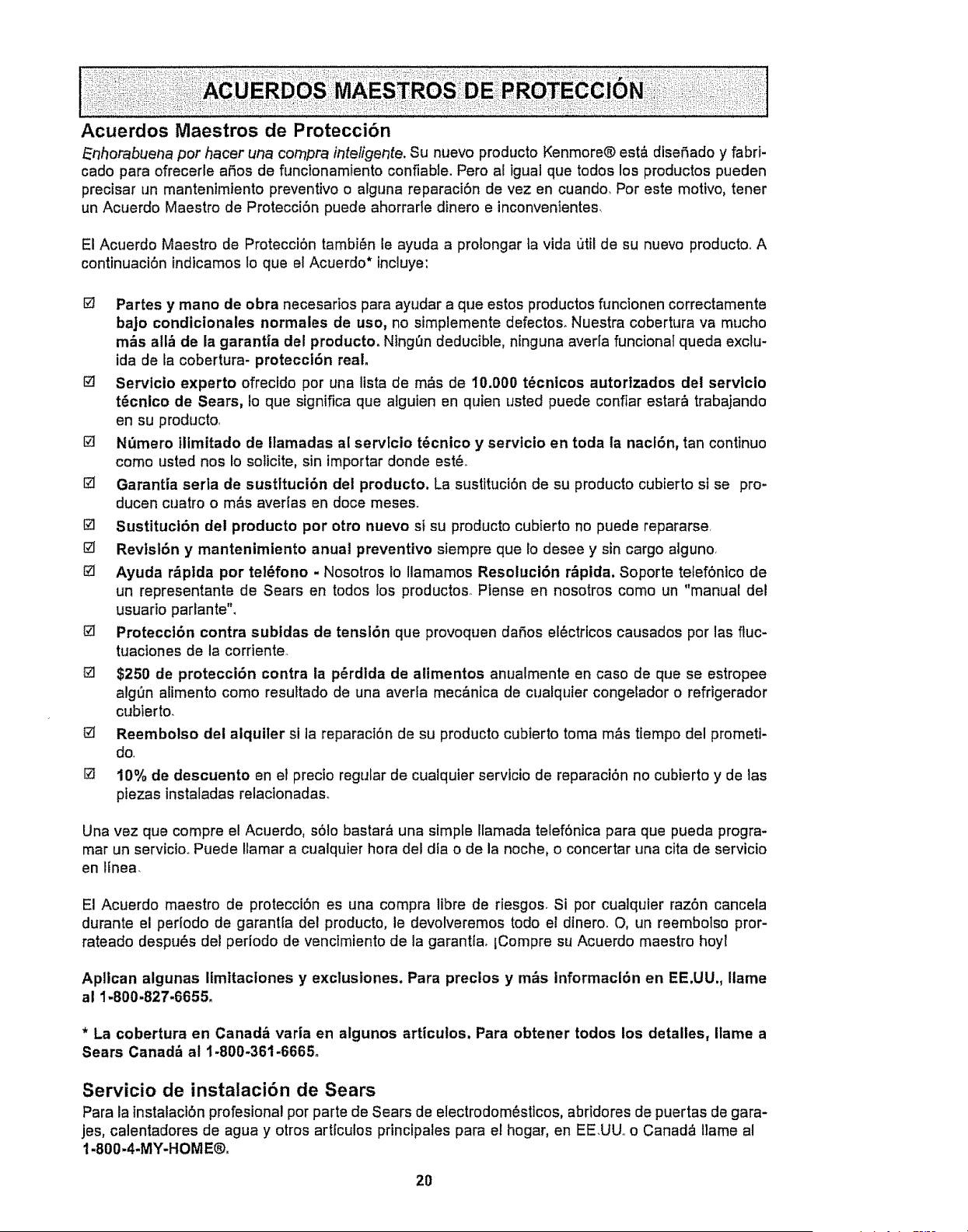
Acuerdos Maestros de Protecci6n
_nhorabuena per hacer una cornpra intelLgerTte.Su nuevo producto Kenmore® est_ diser_ado y fabri-
cado para ofrecerle afios de funcionamiento confiable. Pero al igual qua todos los productos pueden
precisar un mantenimIento preventivo o alguna reparaci6n de vez en cuando. Por este motivo, tenet
un Acuerdo Maestro de Protecci6n puede ahorrarle dinero e inconvenfentes.
El Acuerdo Maestro de Protecci6n tambi_n le ayuda a prolongar ta vida util de su nuevo producto_ A
continuaci6n indicamos lo que el Acuerdo* incluye:
[] Partes y mano de obra necesarios para ayudar a qua estos productos functonen correctamente
bajo condicionales normales de uso, no simplemente defectos. Nuestra cobertura va mucho
m_s all_ de la garantia del producto. Ning0n deducible, ninguna averla funcional queda exclu-
ida de la cobertura- protecci6n real.
[] Servicio experto ofrecido por una lista de m&s de I0.000 t_cnicos autorizados del servlcio
t_cnico de Sears, Io qua significa qua alguien en quien usted puede confiar estar_ trabajando
en su producto.
[] N_3mero ilimitado de Ilamadas al servlcio t6cnico y servlcio en toda la nacl6n, tan continuo
como usted nos Io solicite, sin lmportar donde est&
I_ Garantia seria de sustltuci6n dei producto. La sustituci6n de su producto cubierto si se pro-
ducen cuatro o m&s aver{as en doce meses.
[] Sustituct6n del producto per otto nuevo si su producto cubierto no puede repararse
[] Revtsl6n y mantenimiento anual preventtvo siempre que 1odesee y sin cargo alguno,
[] Ayuda r&ptda por tel_fono - Nosotros to llamamos Resoluci6n r&pida. Soporte telefSnico de
un representante de Sears en todos tos productos, Piense en nosotros como un "manuat del
usuado parlante",
Protecct6n contra subtdas de tensl6n que provoquen daSos el6ctricos causados por las fluc-
tuaciones de la corriente.
[] $250 de protecci6n contra la p6rdlda de alimentos anualmente en caso de que se estropee
algQn alimento como resuttado de una averla mec&nica de cualquier congetador o refrigerador
cubierto.
[] Reembolso dei alquiler si la reparaci6n de su producto cubierto toma m&s ttempo del prometi-
do,
[] 10% de descuento en el precto regular de cualquier servicio de reparaci6n no cubierto y de las
piezas instaladas relacionadaso
Una vez que compre el Acuerdo, s61o bastar& una simple Iramada telef6nica para que pueda progra-
mar un servicio_ Puede Ilamar a cualquier hora del dfa o de la noche, o concertar una cita de servicio
en linea.
El Acuerdo maestro de protecci6n es una compra libre de riesgos. Si por cualquier raz6n cancela
durante el periodo de garant{a del producto, le devolveremos todo el dinero. O, un reembolso pror-
rateado despu_s del periodo de vencimiento de la garantiao fCompre su Acuerdo maestro hoyl
Apllcan algunas Ilmitaclones y exclustones. Para prectos y m_s informacl6n en EE.UU., Ilame
al 1-800-827-6655.
* La cobertura en Canadb varia en algunos articutos. Para obtener todos los detalles, Ilame a
Sears Canad_ al 1-800-361-6665o
Servicio de instalacibn de Sears
Para la instalaci6n profesional por parte de Sears de electrodom_sticos, abridores de puertas de gara-
jes, calentadores de agua y otros articulos principales para el hogar, en EE.UU_ o Canad& llame al
1-800-4-MY-HOME®,
2O

2I

Get it fixed, at your home or ours!
Your Home
For expert troubleshooting and home solutions advice:
www.manage myhome.corn
For repair- in your home - of all major brand appliances,
lawn and garden equipment, or heating and cooling systems,
no matter who made it, no matter who sold it!
For the replacement parts, accessories and
owner's manuals that you need to do-it-yourself
For Sears professional installation of home appliances
and items like garage door openers and water heaters
1-800-4-MY-HOME® callan!time,, dayornight
(1-800-469-4663) (U.S.A. and Canada)
www.sears.corn www.sears.ca
Our Home
For repair of carry-in items like vacuums, lawn equipment,
and electronics, call anytime for the location of the nearest
Sears Parts & Repair Service Center
1-800-488-1222 (U.S,Ao) 1-800-469-4663 (Canada)
www.sears.com www.sears.ca
To purchase a protection agreement on a product serviced by Sears:
1-800.827.6655 (U.S,Ao) 1-800-361-6665(Canada)
Para pedir servicio de reparaci6n Au Canada pour service en frangais:
a domicitio, y para ordenar piezas: 1.800.LE.FOYER_,_c
1-BBB-SU-HOGAR® (1-800.533-6937)
(I-888-784-6427) www.searsoca
S@.@w,,g
© SearsBrands,LLC
@RegisteredTrademarkf -rMTrademark I sMService Mark of Sears Brands.LLC
@Marca Regislradaf "r,_Marcade F_bricat s_ Marca de Servicio de Sears Brands, LLC
MCMarquede commercef MOMarque d6pos_e de Sears Brands, LLC