PRODUCT
MANUAL
WITH USB TYPE-C CONNECTOR
AND HEADPHONE JACK
LAVALIER
MICROPHONE
MO-CPL2

THANK YOU FOR CHOOSING
POLSEN.
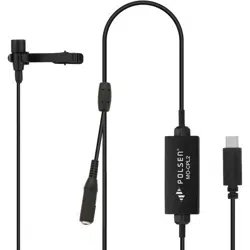
The MO-CPL2 lavalier microphone is compatible with
smartphones, tablets, and computers that have a
USB Type-C™ connector. This microphone delivers
rich and detailed audio that’s much better than the
built-in microphone on a mobile device or computer,
and it will enhance the production value of podcasts,
interviews, and videos.
The microphone features an in-line A/D converter
that’s capable of recording audio with sample rates
up to 16 bits and 44.1 kHz. The microphone’s
omnidirectional polar pattern provides excellent
off-axis response, even if a subject turns their head
while speaking. It also boasts a wide frequency
response and high sensitivity for superb audio quality
for all your projects.
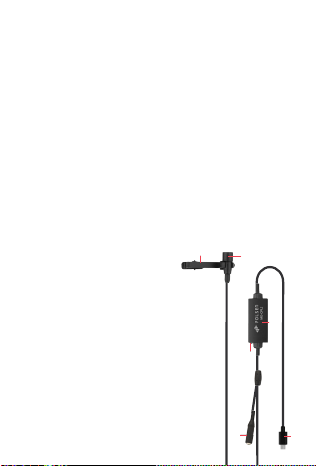
OVERVIEW
1. Tie clip
2. Omnidirectional mic capsule
3. LED indicator
4. A/D converter
5. Headphone jack
6. USB Type-C connector
Also included:
• Foam windscreen
• Carry pouch
PRECAUTIONS
• Please read and follow these instructions, and keep
this manual in a safe place.
• Keep this product away from water and any
flammable gases or liquids.
• Do not attempt to disassemble or repair this
product.
• Make sure that this product is intact and that there
are no missing parts.
• All images are for illustrative purposes only.
3
4
6
5
1
2

RECORDING INSTRUCTIONS
Important! The MO-CPL2 is disabled when an
incoming phone call is received. To ensure your
recording is not interrupted by a phone call, enable
Airplane Mode in your phone's settings.
1. Plug the USB-C connector into your mobile device
or computer. The LED indicator on the A/D
converter will blink to confirm that it’s connected
and receiving power.
2. Plug your headphones into the headphone jack.
Note: The headphone jack is for playback only. You
cannot monitor your recording through the
headphones.
3. Place the windscreen over the mic capsule, attach
the mic clip, and then attach the clip to your
subject. The mic should be approximately 6 to 8
inches from the sound source.
4. Open a compatible audio or video recording app on
your device. The LED indicator on the A/D converter
lights up during recording.
5. When you’ve finished recording, press the stop
button. The microphone will be disabled. Listen to
the playback through the headphones.
RECORDING TIPS
• For the best recording quality, the MO-CPL2
microphone should be approximately 6 to 8 inches
from the sound source.
• Always use the foam windscreen to diminish vocal
plosives (e.g., the “pop” from P and B sounds) and
wind noise.
• To prevent cable tension that can move the
microphone and create handling noise during
recording, create a loop in the cable, and tape it to
the inside of a garment.
• If you experience excessive breath noises or
inconsistent levels due to head movement, try
attaching the mic upside down.

RECORDING INSTRUCTIONS
Important! The MO-CPL2 is disabled when an
incoming phone call is received. To ensure your
recording is not interrupted by a phone call, enable
Airplane Mode in your phone's settings.
1. Plug the USB-C connector into your mobile device
or computer. The LED indicator on the A/D
converter will blink to confirm that it’s connected
and receiving power.
2. Plug your headphones into the headphone jack.
Note: The headphone jack is for playback only. You
cannot monitor your recording through the
headphones.
3. Place the windscreen over the mic capsule, attach
the mic clip, and then attach the clip to your
subject. The mic should be approximately 6 to 8
inches from the sound source.
4. Open a compatible audio or video recording app on
your device. The LED indicator on the A/D converter
lights up during recording.
5. When you’ve finished recording, press the stop
button. The microphone will be disabled. Listen to
the playback through the headphones.
RECORDING TIPS
• For the best recording quality, the MO-CPL2
microphone should be approximately 6 to 8 inches
from the sound source.
• Always use the foam windscreen to diminish vocal
plosives (e.g., the “pop” from P and B sounds) and
wind noise.
• To prevent cable tension that can move the
microphone and create handling noise during
recording, create a loop in the cable, and tape it to
the inside of a garment.
• If you experience excessive breath noises or
inconsistent levels due to head movement, try
attaching the mic upside down.

ONE-YEAR LIMITED WARRANTY
This Polsen product is warranted to the original purchaser to be free
from defects in materials and workmanship under normal consumer
use for a period of one (1) year from the original purchase date or
thirty (30) days after replacement, whichever occurs later. The
warranty provider’s responsibility with respect to this limited warranty
shall be limited solely to repair or replacement, at the provider’s
discretion, of any product that fails during normal use of this product
in its intended manner and in its intended environment. Inoperability
of the product or part(s) shall be determined by the warranty provider.
If the product has been discontinued, the warranty provider reserves
the right to replace it with a model of equivalent quality and function.
This warranty does not cover damage or defect caused by misuse,
neglect, accident, alteration, abuse, improper installation or
maintenance. EXCEPT AS PROVIDED HEREIN, THE WARRANTY
PROVIDER MAKES NEITHER ANY EXPRESS WARRANTIES NOR ANY
IMPLIED WARRANTIES, INCLUDING BUT NOT LIMITED TO ANY IMPLIED
WARRANTY OF MERCHANTABILITY OR FITNESS FOR A PARTICULAR
PURPOSE. This warranty provides you with specific legal rights, and
you may also have additional rights that vary from state to state.
To obtain warranty coverage, contact the Polsen Customer Service
Department to obtain a return merchandise authorization (“RMA”)
number, and return the defective product to Polsen along with the
RMA number and proof of purchase. Shipment of the defective
product is at the purchaser’s own risk and expense.
For more information or to arrange service, visit
www.polsenaudio.com or call Customer Service at 212-594-2353.
Product warranty provided by the Gradus Group.
www.gradusgroup.com
Polsen is a registered trademark of the Gradus Group.
© 2020 Gradus Group LLC. All Rights Reserved. GG1
SPECIFICATIONS
Transducer Type Electret condenser
Pattern Omnidirectional
Frequency Response 20 Hz to 20 kHz
Sensitivity -30 dB ±3 dB at 1 kHz (0 dB=1 V/Pa)
Sample Rate 16 bit, 44.1 kHz
Connectors USB Type-C
1/8 in. (3.5 mm) stereo
Power Consumption 40 mA
Cable Length 5.25 ft. (1.6 m)
Weight 2.4 oz. (68 g)
Capsule Dimensions Length: 0.65 in. (16.5 mm)
Diameter: 0.3 in. (8 mm)
Compatibility:
Smartphones, tablets, and computers
with USB Type-C connectors
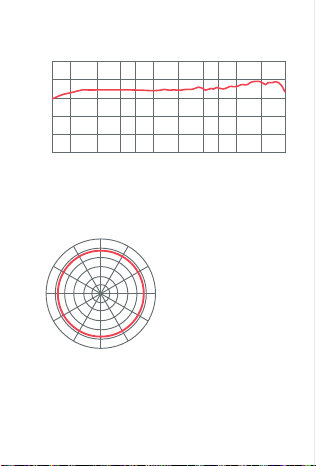
FREQUENCY RESPONSE
POLAR PATTERN
0°
30°
60°
90°
120°
150°
180°
210°
240°
270°
300°
330°
-30
-40
-50
-60
-70
-80
Relative Response in dB
30 50 100 200 300 500 1K 2K 3K 5K 10K 20K
Frequency in Hertz

ONE-YEAR LIMITED WARRANTY
This Polsen product is warranted to the original purchaser to be free
from defects in materials and workmanship under normal consumer
use for a period of one (1) year from the original purchase date or
thirty (30) days after replacement, whichever occurs later. The
warranty provider’s responsibility with respect to this limited warranty
shall be limited solely to repair or replacement, at the provider’s
discretion, of any product that fails during normal use of this product
in its intended manner and in its intended environment. Inoperability
of the product or part(s) shall be determined by the warranty provider.
If the product has been discontinued, the warranty provider reserves
the right to replace it with a model of equivalent quality and function.
This warranty does not cover damage or defect caused by misuse,
neglect, accident, alteration, abuse, improper installation or
maintenance. EXCEPT AS PROVIDED HEREIN, THE WARRANTY
PROVIDER MAKES NEITHER ANY EXPRESS WARRANTIES NOR ANY
IMPLIED WARRANTIES, INCLUDING BUT NOT LIMITED TO ANY IMPLIED
WARRANTY OF MERCHANTABILITY OR FITNESS FOR A PARTICULAR
PURPOSE. This warranty provides you with specific legal rights, and
you may also have additional rights that vary from state to state.
To obtain warranty coverage, contact the Polsen Customer Service
Department to obtain a return merchandise authorization (“RMA”)
number, and return the defective product to Polsen along with the
RMA number and proof of purchase. Shipment of the defective
product is at the purchaser’s own risk and expense.
For more information or to arrange service, visit
www.polsenaudio.com or call Customer Service at 212-594-2353.
Product warranty provided by the Gradus Group.
www.gradusgroup.com
Polsen is a registered trademark of the Gradus Group.
© 2020 Gradus Group LLC. All Rights Reserved. GG1