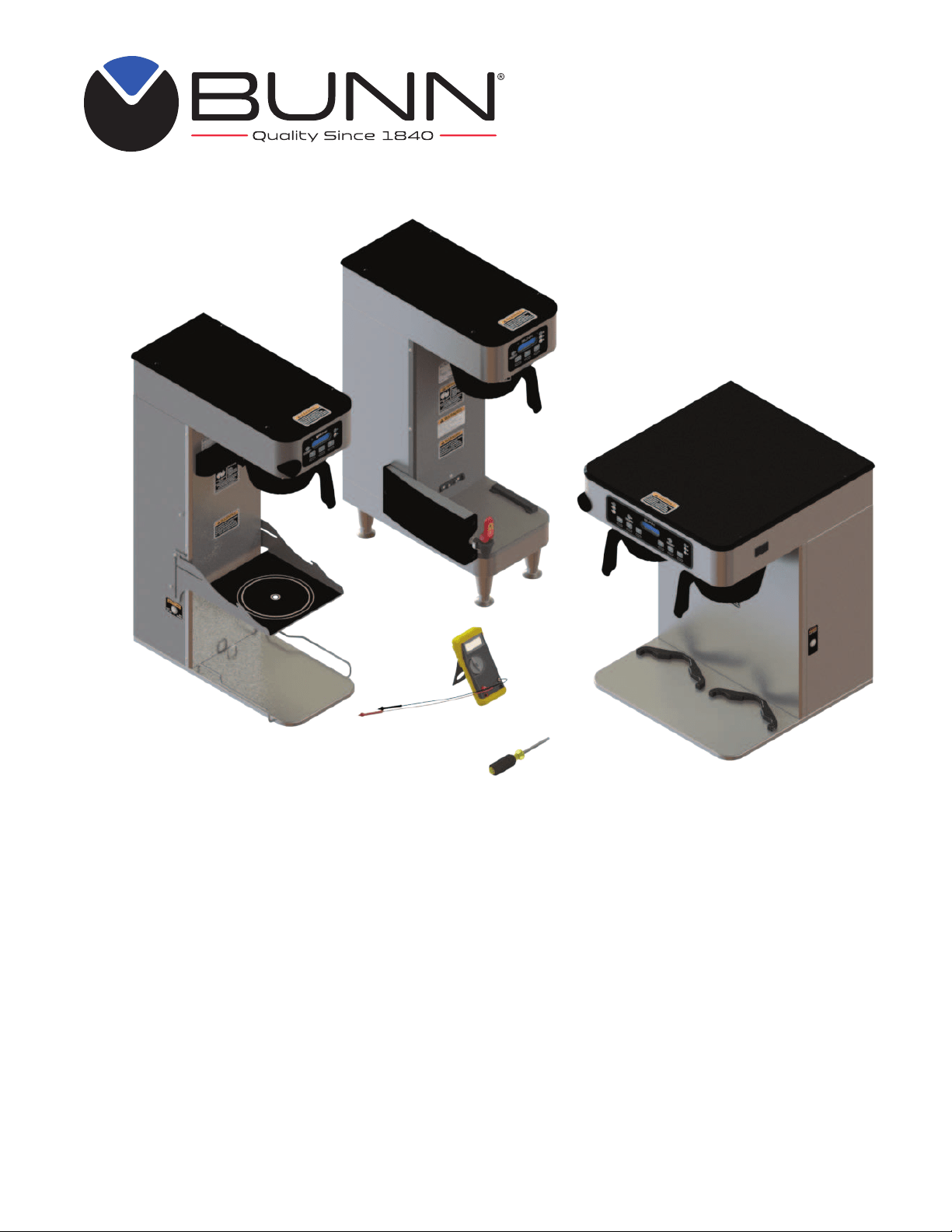
ITB/ITCB/HV
ICB SH/DV/TWIN
New Infusion Series
®
SERVICE MANUAL
INSTALLATION & OPERATING GUIDE
BUNN-O-MATIC CORPORATION
POST OFFICE BOX 3227
SPRINGFIELD, ILLINOIS 62708-3227
PHONE: (217) 529-6601 FAX: (217) 529-6644
www.bunn.com
54299.0000C 05/21 ©2017 Bunn-O-Matic Corporation
To ensure you have the latest revision of the Operating Manual, Illustrated Parts Catalog, Programming Manual, or Service
Manual, please visit the Bunn-O-Matic website, at www.bunn.com. This is absolutely FREE, and the quickest way to obtain
the latest catalog and manual updates. For Technical Service, contact Bunn-O-Matic Corporation at 1-800-286-6070.

2
54299 031314
BUNN-O-MATIC COMMERCIAL PRODUCT WARRANTY
Bunn-O-Matic Corp. (“BUNN”) warrants equipment manufactured by it as follows:
1) Airpots, thermal carafes, decanters, GPR servers, iced tea/coffee dispensers, MCR/MCP/MCA single cup brewers, ther-
mal servers and ThermoFresh® servers (mechanical and digital) 1 year parts and 1 year labor.
2) All other equipment - 2 years parts and 1 year labor plus added warranties as specified below:
a) Electronic circuit and/or control boards - parts and labor for 3 years.
b) Compressors on refrigeration equipment - 5 years parts and 1 year labor.
c) Grinding burrs on coffee grinding equipment to grind coffee to meet original factory screen sieve analysis - parts and
labor for 4 years or 40,000 pounds of coffee, whichever comes first.
These warranty periods run from the date of installation BUNN warrants that the equipment manufactured by it will be
commercially free of defects in material and workmanship existing at the time of manufacture and appearing within the
applicable warranty period. This warranty does not apply to any equipment, component or part that was not manufactured
by BUNN or that, in BUNN’s judgment, has been affected by misuse, neglect, alteration, improper installation or operation,
improper maintenance or repair, non periodic cleaning and descaling, equipment failures related to poor water quality,
damage or casualty. In addition, the warranty does not apply to replacement of items subject to normal use including but
not limited to user replaceable parts such as seals and gaskets. This warranty is conditioned on the Buyer 1) giving BUNN
prompt notice of any claim to be made under this warranty by telephone at (217) 529-6601 or by writing to Post Office Box
3227, Springfield, Illinois 62708-3227; 2) if requested by BUNN, shipping the defective equipment prepaid to an authorized
BUNN service location; and 3) receiving prior authorization from BUNN that the defective equipment is under warranty.
THE FOREGOING WARRANTY IS EXCLUSIVE AND IS IN LIEU OF ANY OTHER WARRANTY, WRITTEN OR ORAL, EX-
PRESS OR IMPLIED, INCLUDING, BUT NOT LIMITED TO, ANY IMPLIED WARRANTY OF EITHER MERCHANTABILITY OR
FITNESS FOR A PARTICULAR PURPOSE. The agents, dealers or employees of BUNN are not authorized to make modi-
fications to this warranty or to make additional warranties that are binding on BUNN. Accordingly, statements by such
individuals, whether oral or written, do not constitute warranties and should not be relied upon.
If BUNN determines in its sole discretion that the equipment does not conform to the warranty, BUNN, at its exclusive op-
tion while the equipment is under warranty, shall either 1) provide at no charge replacement parts and/or labor (during the
applicable parts and labor warranty periods specified above) to repair the defective components, provided that this repair
is done by a BUNN Authorized Service Representative; or 2) shall replace the equipment or refund the purchase price for
the equipment.
THE BUYER’S REMEDY AGAINST BUNN FOR THE BREACH OF ANY OBLIGATION ARISING OUT OF THE SALE OF THIS
EQUIPMENT, WHETHER DERIVED FROM WARRANTY OR OTHERWISE, SHALL BE LIMITED, AT BUNN’S SOLE OPTION
AS SPECIFIED HEREIN, TO REPAIR, REPLACEMENT OR REFUND.
In no event shall BUNN be liable for any other damage or loss, including, but not limited to, lost profits, lost sales, loss of
use of equipment, claims of Buyer’s customers, cost of capital, cost of down time, cost of substitute equipment, facilities
or services, or any other special, incidental or consequential damages.
392, A Partner You Can Count On, Air Infusion, AutoPOD, AXIOM, BrewLOGIC, BrewMETER, Brew Better Not Bitter, Brew-
WISE, BrewWIZARD, BUNN Espress, BUNN Family Gourmet, BUNN Gourmet, BUNN Pour-O-Matic, BUNN, BUNN with
the stylized red line, BUNNlink, Bunn-OMatic, Bunn-O-Matic, BUNNserve, BUNNSERVE with the stylized wrench design,
Cool Froth, DBC, Dr. Brew stylized Dr. design, Dual, Easy Pour, EasyClear, EasyGard, FlavorGard, Gourmet Ice, Gourmet
Juice, High Intensity, iMIX, Infusion Series, Intellisteam, My Café, Phase Brew, PowerLogic, Quality Beverage Equipment
Worldwide, Respect Earth, Respect Earth with the stylized leaf and coffee cherry design, Safety-Fresh, savemycoffee.com,
Scale-Pro, Silver Series, Single, Smart Funnel, Smart Hopper, SmartWAVE, Soft Heat, SplashGard, The Mark of Quality in
Beverage Equipment Worldwide, ThermoFresh, Titan, trifecta, TRIFECTA (sylized logo), Velocity Brew, Air Brew, Beverage
Bar Creator, Beverage Profit Calculator, Brew better, not bitter., Build-A-Drink, BUNNSource, Coffee At Its Best, Cyclonic
Heating System, Daypart, Digital Brewer Control, Element, Milk Texturing Fusion, Nothing Brews Like a BUNN, Picture
Prompted Cleaning, Pouring Profits, Signature Series, Sure Tamp, Tea At Its Best, The Horizontal Red Line, Ultra are either
trademarks or registered trademarks of Bunn-O-Matic Corporation. The commercial trifecta® brewer housing configura-
tion is a trademark of Bunn-O-Matic Corporation.

3
INTRODUCTION
This equipment will brew a half-gallon batch of coffee into an awaiting dispenser. It can be easily
configured for 120V 15 amp, 120/208V 20 amp or 120/240V 20 amp. The brewer may have a hot water
faucet for allied beverage use. It is only for indoor use on a sturdy counter or shelf.
CONTENTS
Warranty .............................................................................................................2
Contents ..............................................................................................................3
Troubleshooting ..................................................................................................4
Diagnostic Displays .............................................................................................9
Access ..............................................................................................................10
Control Board ....................................................................................................11
Membrane Switch .............................................................................................13
Bypass Valves ...................................................................................................14
Brew Valves ......................................................................................................15
Refill Valves ......................................................................................................16
Tank Heaters .....................................................................................................17
Limit Thermostat ...............................................................................................18
Temperature Probe............................................................................................19
DV Selector Switch ...........................................................................................21
Power Switch ....................................................................................................22
SoftHeat Power .................................................................................................23
Schematic Wiring Diagrams ..............................................................................26
54299 030718

4
TROUBLESHOOTING
A troubleshooting guide is provided to suggest probable causes and remedies for the most likely problems
encountered. If the problem remains after exhausting the troubleshooting steps, contact the Bunn-O-Matic
Technical Service Department.
• Inspection, testing, and repair of electrical equipment should be performed only by qualified service person-
nel.
• All electronic components have ac line voltage and some have low voltage dc potential on their terminals.
Shorting of terminals or the application of external voltages may result in board failure.
• Intermittent operation of electronic circuit boards is unlikely. Board failure will normally be permanent. If
an intermittent condition is encountered, the cause will likely be a switch contact or a loose connection at a
terminal or crimp.
• Solenoid removal requires interrupting the water supply to the valve. Damage may result if solenoids are
energized for more than ten minutes without a supply of water.
• The use of two wrenches is recommended whenever plumbing fittings are tightened or loosened. This will
help to avoid twists and kinks in the tubing.
• Make certain that all plumbing connections are sealed and electrical connections tight and isolated.
• This brewer is heated at all times. Keep away from combustibles.
WARNING
• Exercise extreme caution when servicing electrical equipment.
• Unplug the brewer when servicing, except when electrical tests are specified.
• Follow recommended service procedures.
• Replace all protective shields or safety notices.
Before troubleshooting this brewer, check for the following:
Control Boards
1. Make sure ribbon cable is properly attached to the control board (ALL PINS INSERTED INTO PLUG).
2. Make sure before servicing brewer that voltage is present at control board.
3. Press any warmer switch or observe if any indicator lights are glowing on the control panel. If so, proceed
with testing. If not, check for voltage across pins 9 & 11 of the 14 pin connector (black and white wires). If
voltage is present, replace the control board. If voltage is not present, check wiring and voltage across terminal
block (black and white). Correct the problem and retest before proceeding with testing.
NOTE: In the event of board replacement, technician will need to re-program customer's settings and/or recipes,
as well as re-calibrate the temperature probe in program level 2 and re-enter the serial number in level 2.
54299 070517

5
Will not refill
Refill does not shut off
Power "ON"
Refill does not shut off
Power "OFF"
PROBABLE CAUSE REMEDY
PROBLEM
1. Power off to brewer
2. Water shut off
3. Error Message
4.ON/OFF Switch
(If equipped)
5. Lime build up on Probe(s)
6. Refill Valve or Control Board
1. Lime build up on probe
2. Water Level Sensing System
3. Refill valve or control board
1. Refill valve
Press ENABLE BREW switch on
control panel to determine if power
is ON.
Make sure water is ON.
Brewer has shut down due to mal-
function (See Diagnostic Section in
this manual).
Make sure ON/OFF Switch is "ON"
and indicator is lit.
Remove the Level Probe(s) and
check for lime deposit on tip. Clean
and reinstall.
Check valve.
Remove Level Probe and check
for lime deposits on tip. Clean and
reinstall.
Replace control board
Check valve.
Clean or replace valve as needed.
TROUBLESHOOTING (cont.)
REFILL CIRCUIT
54299 070517

6
HEATING CIRCUIT
1. Display's error message
2. Water not touching main (short)
level probe
3. Water Level Probe Sensing
System
4. Temperature Probe
5. Limit Thermostat or TCO
6. Tank Heater
7. Off Board Triac
1. Lime build up on temperature
probe, tank or tank heater
2. Temperature Probe
3. Control Board
1. Plumbing lines
2. Water supply
3. Lime build up
Brewer has shut down due to mal-
function. See Diagnostics.
Remove level probe and grommet.
Look into hole on tank lid. Water
must be within approximately one
inch from top of tank.
Check refill circuit. Heaters will not
turn on if water is not grounding
level probe.
Check/replace
Check/replace
Check/replace
Check/replace
Inspect probe and tank assembly
for excessive lime deposits. Delime
as required.
Check/replace
Check/replace
Plumbing lines should not rest on
the counter top.
The brewer must be connected to
a cold water supply.
Remove the tank lid and clean in-
side of tank with a deliming agent,
if necessary.
Water does not heat to proper
temperature
IMPORTANT: Make sure no tem-
perature tests are taken before
the display reads ready. Tank tem-
perature must be stabilized before
readings are taken.
Spitting or excessive steaming
(cont.)
Brewer is making unusual noises
TROUBLESHOOTING (cont.)
PROBABLE CAUSE REMEDY
PROBLEM
54299 070517

7
TROUBLESHOOTING (cont.)
PROBLEM
PROBABLE CAUSE REMEDY
BREWING CIRCUIT
Brew cycle will not start
Consistently low beverage level in
the dispenser or beverage overflows
dispenser
1. Display's error message
2. No water
3. No power or incorrect voltage to
the brewer
4. ON/OFF switch not in the "ON"
position
5. Low water temperature (Brew
lockout is enabled)
6. Water not touching refill probe
inside tank
7. Membrane Switch
8. Dispense valve
9. Control board
1. Brew volume
NOTE: Volume adjustments must
be made with sprayhead installed.
2. Lime build up
3. Dispense Valve
Brewer has shut down due to mal-
function. See Diagnostics.
Water lines and valves to the brewer
must be open.
Check for voltage across the termi-
nals at the terminal block.
The indicator lamp must be lit
Allow brewer to heat until ready, or
disable the brew lockout feature.
Water must be in contact with refill
probe before brew cycle will start.
Check/replace
Check/replace
Check/replace
Inspect the dispense valve and
sprayhead for excessive lime de-
posits. Delime as required.
Remove dispense valve and clear
any obstructions. Rebuild or replace
valve if necessary. (See page 15)
Check/replace
54299 070517

8
TROUBLESHOOTING (cont.)
PROBLEM PROBABLE CAUSE REMEDY
BREWING CIRCUIT (cont.)
Dripping from sprayhead
Weak beverage
Dry coffee grounds remain in the
funnel
Low beverage serving temperature
1. Lime build up
2. Dispense valve
1. Sprayhead
2. Water temperature
3. Filter type
4. Coffee grind
5. Funnel loading
1. Sprayhead
2. Funnel loading
1. Thermal server/airpot not pre-
heated before brew cycle
Inspect the tank assembly for ex-
cessive lime deposits. Delime as
required.
Check/replace
A clean sprayhead must be used for
proper extraction.
Place an empty brew funnel on an
empty decanter beneath the spray-
head. Initiate brew cycle and check
the water temperature immediately
below the sprayhead with a ther-
mometer. The reading must not be
less than 195°F (91°C). Adjust the
temperature setting to increase the
water temperature. Refer to Initial
Set-up instructions.
BUNN® paper filters must be used
for proper extraction.
A fine drip or grind must be used
for proper extraction.
The BUNN® paper filter must be
centered in the funnel and the bed of
grounds leveled by shaking gently.
Make sure sprayhead is present and
holes are clear and unobstructed.
The BUNN® paper filter must be
centered in the funnel and the bed of
grounds leveled by shaking gently.
Preheat server
54299 070517

9
DIAGNOSTICS
PROBABLE CAUSE REMEDY
MESSAGE
Temperature Too Low
Heating Time Too Long
Fill Time Too Long
Temp Sensor Out Of Range, Check
For Bad Connections
Temp Sensor Out Of Range, Check
Wire For Shorts
1. Water temperature in the tank
does not meet the ready tempera-
ture.
1. Tank Heater failure.
2. Control Board/Thermistor failure
1. Water shut off to brewer
2. Supply line too small or ob-
structed
3. Inlet Solenoid failure
4. Control Board Failure
5. ON/OFF switch is OFF
1. Temperature Sensor Probe open
1. Temperature Sensor Probe
wire(s) shorted
A) Wait for the brewer to heat to
the proper temperature.
B) Disable the BREW LOCKOUT
function. Refer to programming
section for procedure.
Replace or repair as needed
Replace or repair as needed
Check water supply shut-off
Replace or repair as needed
Replace or repair as needed
Replace or repair as needed
Turn switch ON
Replace or repair as needed
Replace or repair as needed
54299 070517
10
COMPONENT ACCESS
This section provides procedures for testing and
replacing various major components used in this
brewer should service become necessary. Refer to
Troubleshooting for assistance in determining the
cause of any problem.
WARNING - Inspection, testing, and repair of electri-
cal equipment should be performed only by qualified
service personnel. The brewer should be unplugged
when servicing, except when electrical tests are re-
quired and the test procedure specifically states to
plug in the brewer.
WARNING - Disconnect the brewer from the power
source before the removal of any panel or the replace-
ment of any component.
All components are accessible by the removal of
the top cover or front access panel.
Refer to wiring diagrams at the back of this
manual when reconnecting wires.
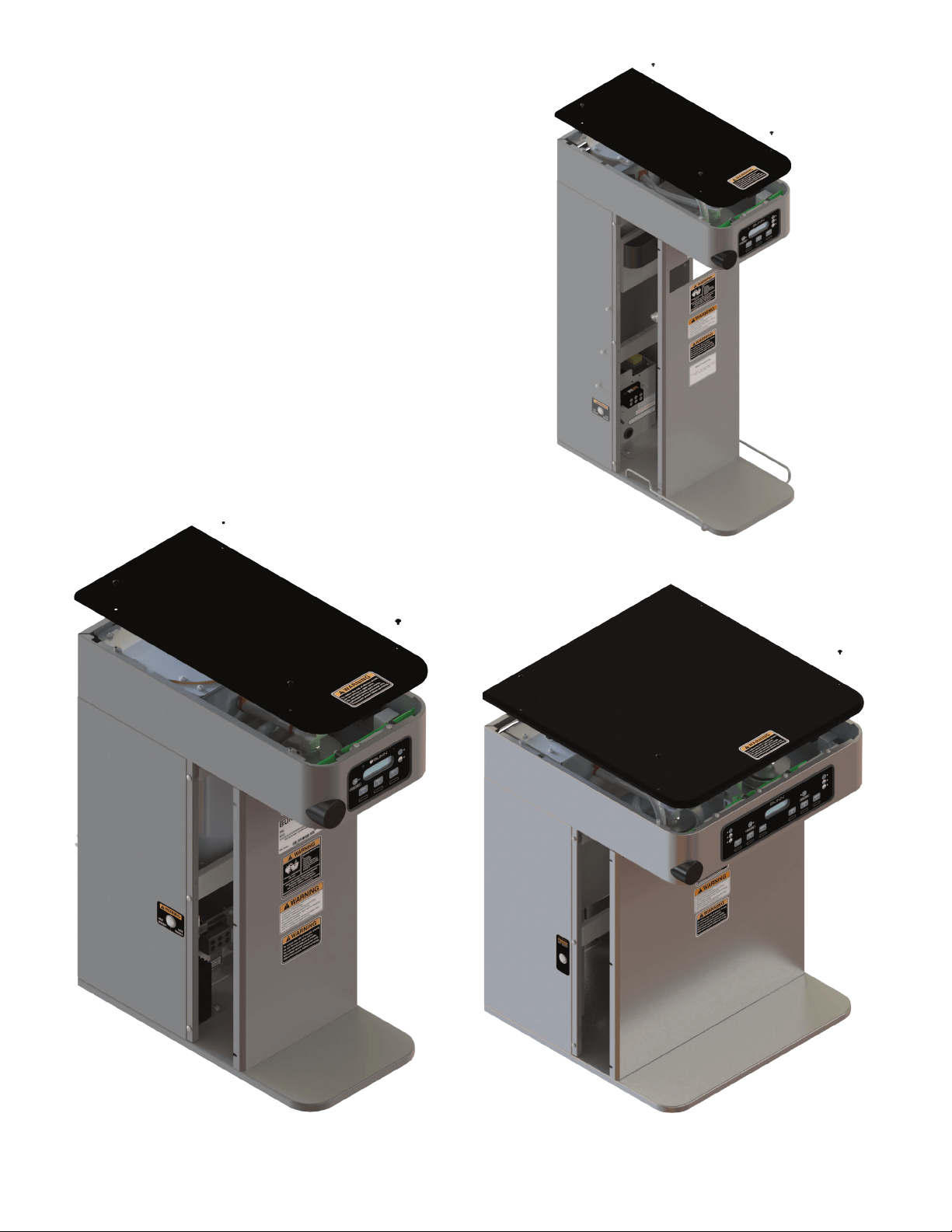
FIG. 10-1 ICB/ITCB HV
COMPONENT ACCESS
FIG. 10-2 ITB/ITCB COMPONENT ACCESS
FIG. 10-3 ICB/ITCB HV TWIN
COMPONENT ACCESS
54299 070517
11
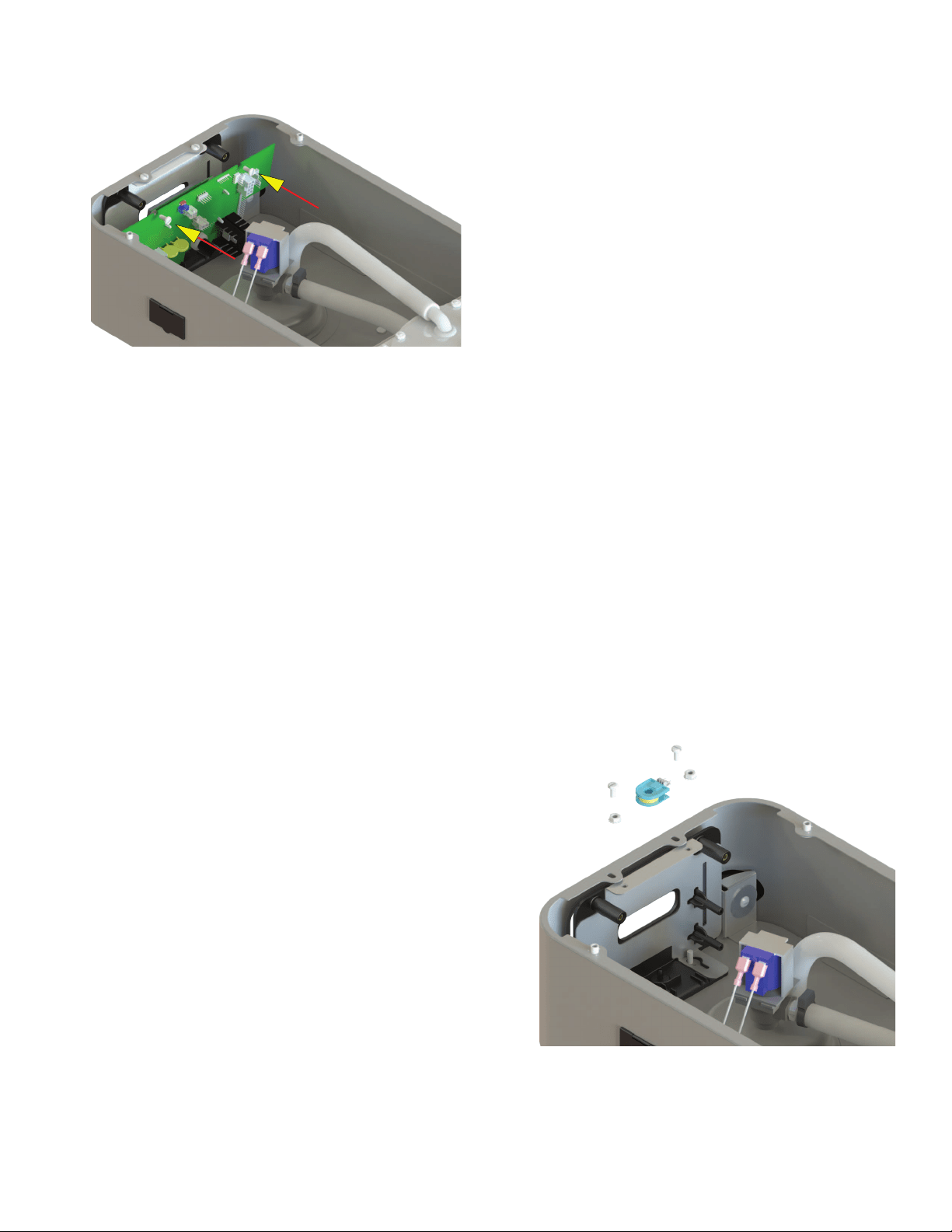
Location:
The Control Board is located inside the top cover
behind the front face plate.
Test Procedures:
The test procedures for the control board will vary
depending upon the problems experienced by the
brewer. Refer to the Troubleshooting section which
is divided into three sections, Refill Circuit, Heating
Circuit, and Brewing Circuit.
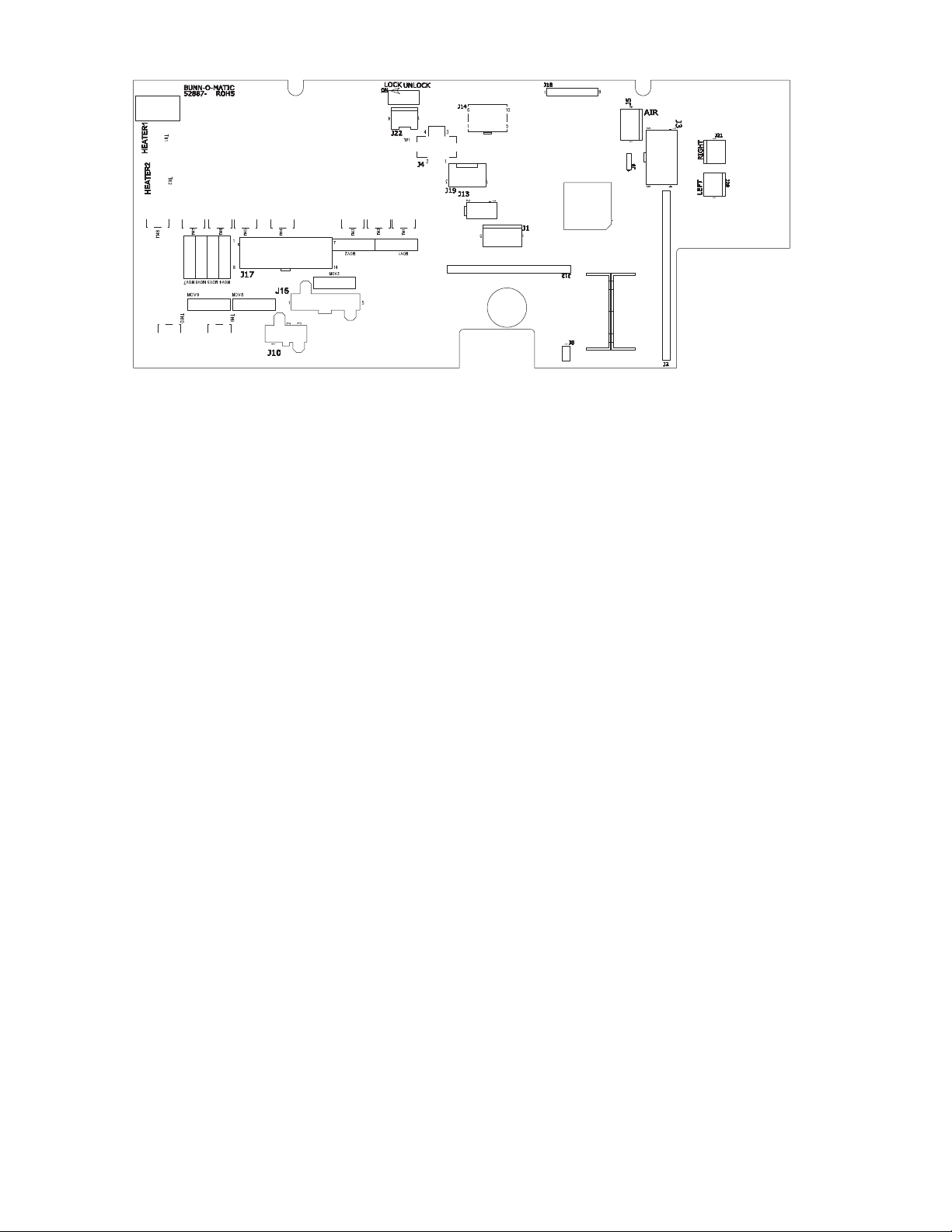
Check for Power to board:
1. Insert one meter lead in J17-pin 9 and the other
lead in J17-pin 11.
2. With the power connected to brewer, the voltage
reading to the board should be the line voltage
rated for that model.
If no voltage is present, check wiring to the
board. If voltage is present, and brewer does
not power on, go to step 3
3. Check for line voltage at J15-1 BLK to J15-2 WHI.
If no voltage is present, replace the control
board. If voltage is present, go to step 4
4. Check for 12VAC at J15-4 to J15-2 Yellow wires.
If no voltage is present, replace the trans-
former. If voltage is present, and brewer does
not power on, replace the control board.
FIG. 11-1 CONTROL BOARD
Removal and Replacement:
1. Disconnect brewer from power source.
2. Disconnect the wires from the relay on the control
board.
3. Disconnect all of the connectors from the control
board.
4. Remove the two screws securing the control board
to the faceplate.
5. Tilt the control board inward to clear the display
section.
6. Place the bottom edge of the new control board in
the cradle, tilt the board forward, and secure with
the two nuts to the hood.
7. Re-install connectors.
Faceplate Removal and Replacement:
1. Disconnect brewer from power source.
2. Disconnect the ribbon cable from the control board.
3. Models with faucet: Drain tank to below faucet
outlet fitting. Remove hose, nut and washer from
faucet. Remove faucet assembly.
4. Remove the two screws and two nuts securing
the face plate to the hood.
5. Carefully pull the ribbon cable through the front
opening of the hood.
6. Installation is the reverse order.
CONTROL BOARD
FIG. 11-2 FACEPLATE REMOVAL
54299 070517
12
CONTROL BOARD-ICB TWIN/ITCB DV HV/ITCB TWIN HV TRIAC MAP
CONTROL BOARD-ICB/ITCB TRIAC MAP
FIG. 12 TRIAC MAP
Triac: Load Component:
TH1/MOV3/BR2 Left Funnel Lock
TH2/MOV1 Refill solenoid
TH3/MOV2/BR3 Right Funnel Lock
OFFBOARD Tank Heaters
TH4/MOV6 Left Brew Solenoid
TH5/MOV4 Right Brew Solenoid
TH6/MOV5 Left Bypass Solenoid
TH7/MOV7 Right Bypass Solenoid
Connector:
J17-13/J17-14
J17-5
J17-6/J17-7
TR1/TR2
J17-3
J17-2
J17-1
J17-10
Triac: Load Component:
TH1/MOV3/BR2 Funnel Lock
TH2/MOV1 Refill solenoid
TH4/MOV6 Brew Solenoid
OFFBOARD Tank Heater(s)
TH6/MOV5 Dilution or Bypass Solenoid
Connector:
J17-13/J17-14
J17-5
J17-3
TR1
J17-1
CONTROL BOARD-ITB TRIAC MAP
Triac: Load Component:
TH6/MOV5 Main or Left Dilution
TH2/MOV1 Refill solenoid
TH4/MOV6 Brew Solenoid
TH7/MOV7 Right Dilution
TH9/MOV8 Sweetner
OFFBOARD Tank Heater
TH1/MOV3/BR2 Funnel Lock
Connector:
J17-1
J17-5
J17-3
J17-10
J10-3
TR1
J17-13/J17-14
54299 070517
13
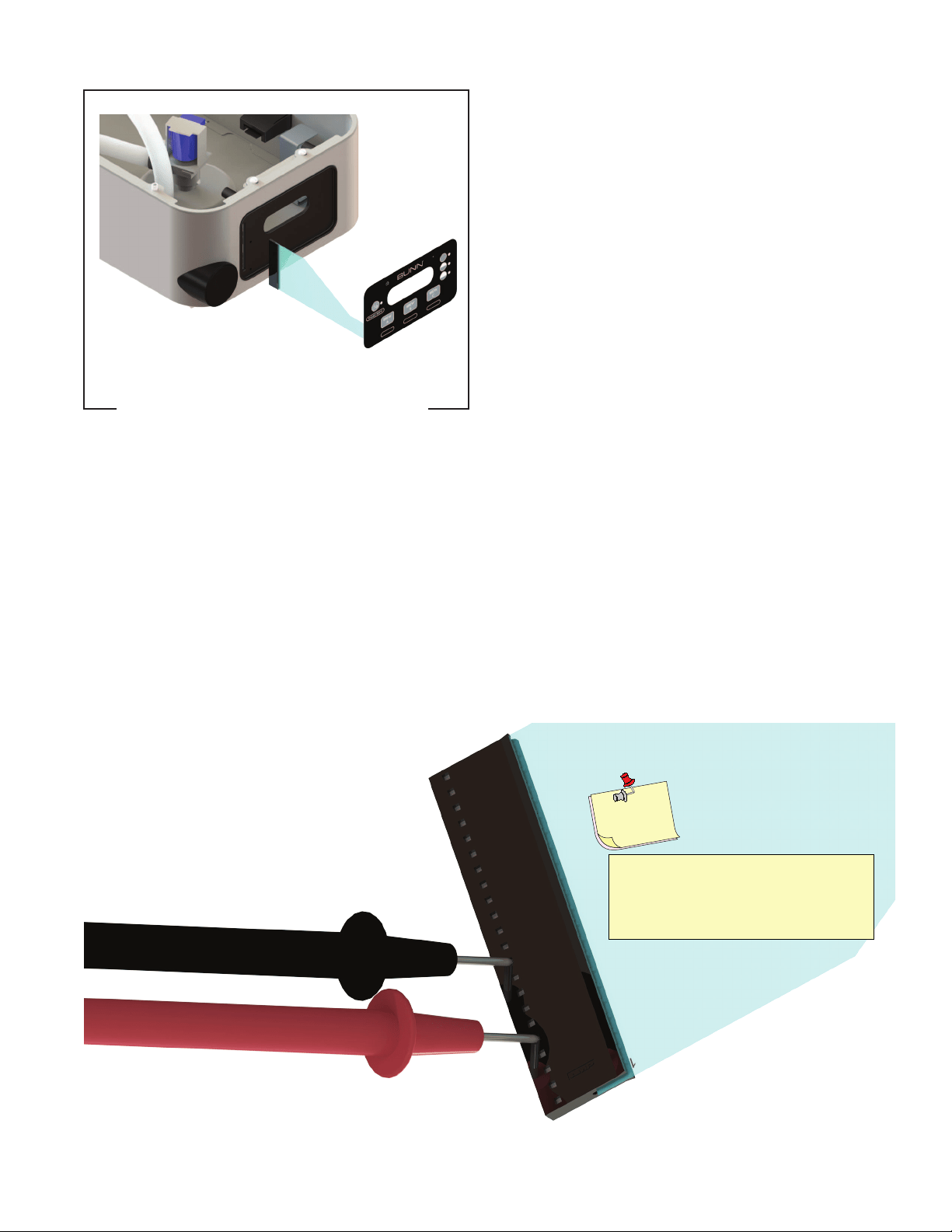
Location:
The Membrane Switch is located on the front face plate.
Test Procedures:
There are two methods for testing the membrane
switch. The easiest method is to use the built in test
mode. Refer to the Programing Section for Service
Tools/Test Switches. If for some reason you can't get
into the program modes, or brewer won't power up,
you can test it with an ohmmeter or continuity tester.
Refer to the schematic to trace the appropriate pins.
FIG. 13-1 MEMBRANE SWITCH
NOTE: Pin 22 is the static shield & will not
provide a reading to the other pins. There
are two commons in this circuit, pins 9 & 10.
Disconnect brewer from power source before
disconnecting ribbon cable from control
board.
Removal and Replacement:
1. Disconnect the ribbon cable from the 22-pin con-
nector on the control board.
2. Gently peel the membrane switch from the front
face plate assembly.
4 Remove any adhesive that remains on the front
face plate.
5. Remove the adhesive backing from the new mem-
brane switch. Insert the ribbon cable through the slot
in the front face plate and apply the membrane switch
to the front face plate.
6. Connect the ribbon cable to the 22-pin connector on
the control board making sure every pin on the control
board is inserted into the ribbon cable connector.
Wrap a thin paper clip around each meter
lead and extend past the tip by ¼" - ½". You
may need to sand off the clear coating on
some clips!
Helpful
Hint
FIG. 13-2 MEMBRANE SWITCH CONTINUITY
MEMBRANE SWITCH
54299 070517
14
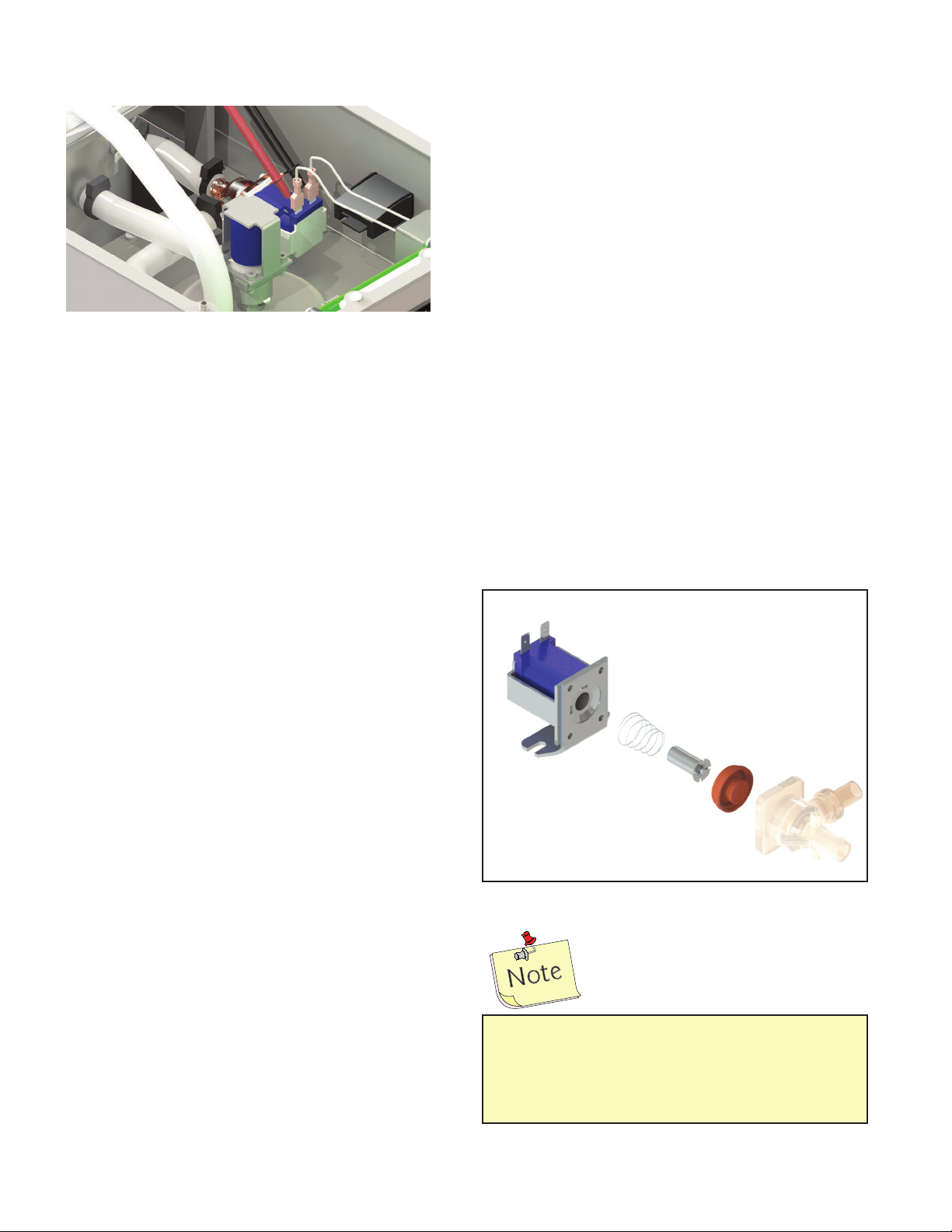
Location:
The bypass valve is located inside the top cover behind
the front face plate.
Test Procedures:
1. Refer to the Programing Section for Service Tools/
Test Outputs/Bypass Valve.
2. Be sure brew funnel & server are in place before
activating valve.
3. Check the valve for coil action. Turn on the valve
with the test mode. Listen carefully in the vicinity of
the brew valve for a click as the coil pulls the plunger
in.
If no sound is heard as described, proceed to #4.
If the sound is heard as described, there may be
a blockage in the valve , hose, tank, or sprayhead.
Disconnect the brewer from the power source.
Remove the valve and inspect for blockage, and
de-lime all related areas.
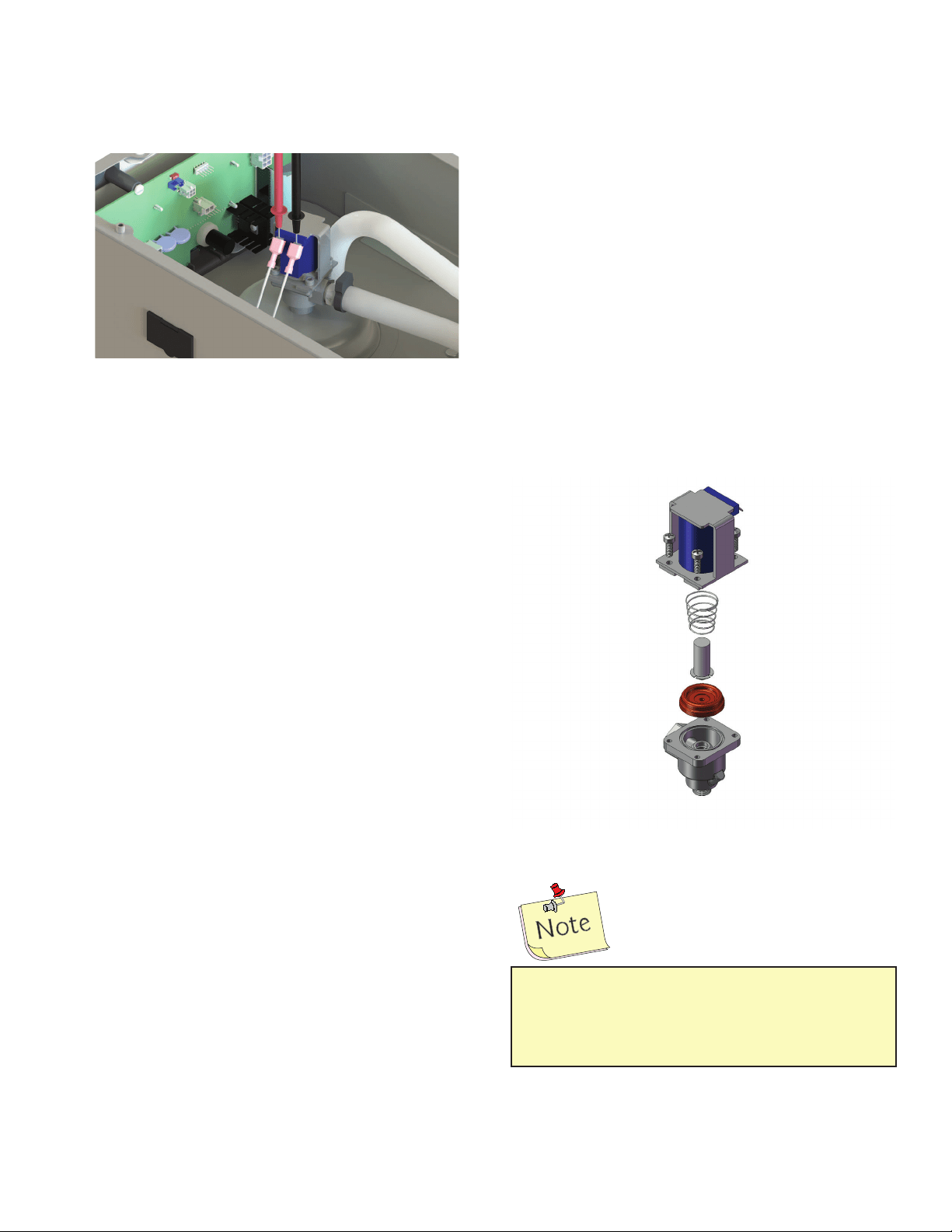
4. Connect the voltmeter leads to the coil terminals.
Turn on the valve with the test mode.
The indication will be 2-3VAC off, 120VAC on. Set
the meter to DC volts. The indication should be 150-
160VDC when off, 0V when on. If the polarity of meter
leads are reversed, reading will indicate -150-160VDC.
(Double these readings for 240 volt coils)
If voltage is present as described, but no coil action is
observed, brew valve is defective. Replace valve and
test again to verify repair.
If voltage is not present as described, refer to Wiring
Diagrams and check the brewer wiring harness. Also
check the control board and switch for proper operation.
Removal and Replacement:
1. Disconnect the brewer from the power source.
2. Disconnect wires from the valve.
3. Drain enough water from the tank so the water
level is below the outlet.
4. Remove hoses from the valve.
5. Remove the two #8-32 nuts securing the valve to
the sprayhead panel.
6. Install new valve using the two #8-32 nuts.
7. Reconnect hoses to the valve and secure in place
with clamps.
FIG. 14-2 EXPLODED VIEW
FIG. 14-1 BYPASS VALVE
Due to the internally rectified coil, do not
attempt to test this type of coil with an ohm-
meter. The reading will be open or very high
resistance, depending on the polarity of your
meter leads.
BYPASS VALVE ON ALL ICB's
54299 030818
15
Location:
The brew valve is located inside the top cover behind
the front face plate.
Test Procedures:
1. Refer to the Programing Section for Service Tools/
Test Outputs/Brew Valve.
2. Be sure brew funnel & server are in place before
activating valve.
3. Check the valve for coil action. Turn on the valve
with the test mode. Listen carefully in the vicinity of
the brew valve for a click as the coil pulls the plunger
in.
If no sound is heard as described, proceed to #4.
If the sound is heard as described, there may be a
blockage in the valve , hose, tank, or sprayhead. Dis-
connect the brewer from the power source. Remove
the valve and inspect for blockage, and de-lime all
related areas.
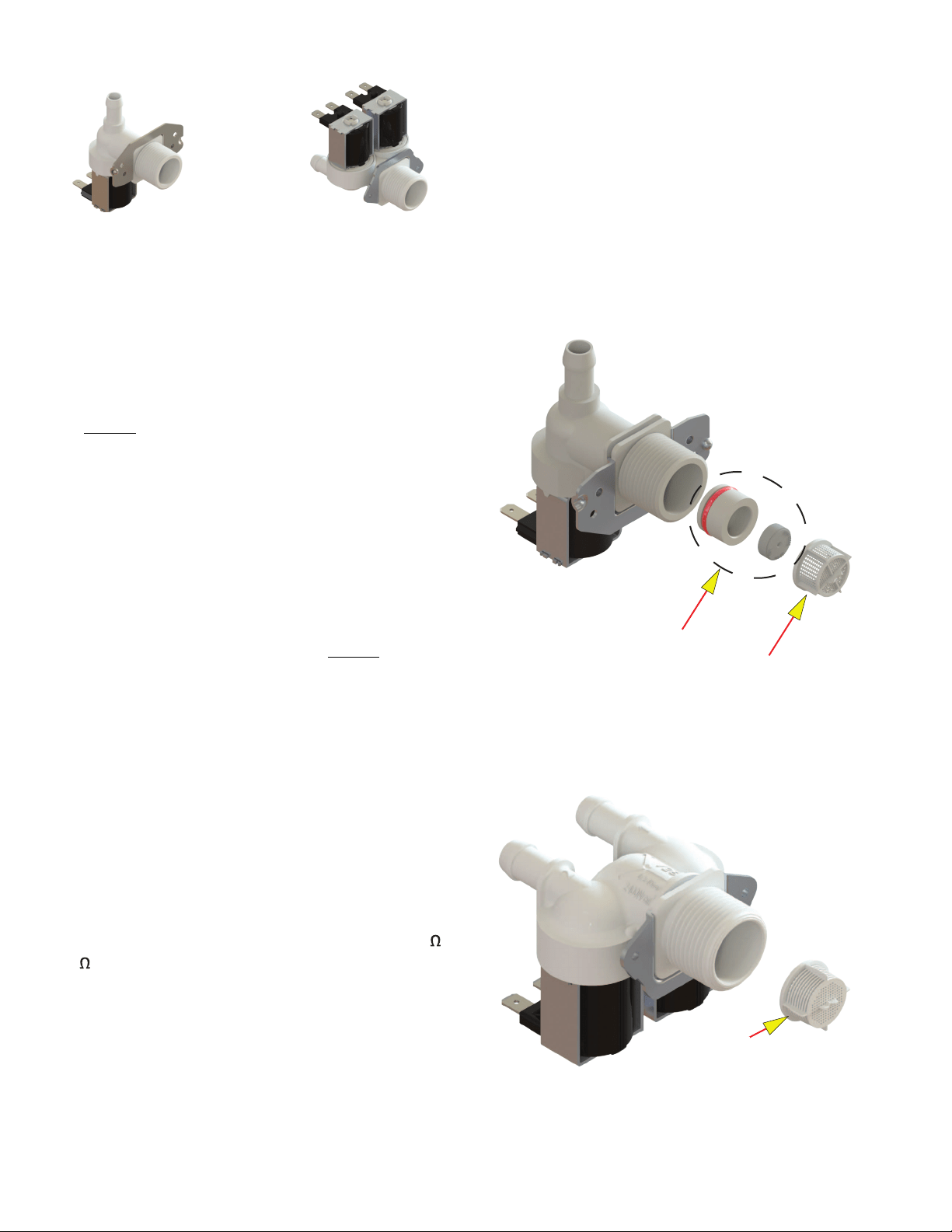
4. Connect the voltmeter leads to the coil terminals.
Turn on the valve with the test mode.
The indication will be 2-3VAC off, 120VAC on. Set
the meter to DC volts. The indication should be 150-
160VDC when off, 0V when on. If the polarity of meter
leads are reversed, reading will indicate -150-160VDC.
(Double these readings for 240 volt coils)
If voltage is present as described, but no coil action
is observed, valve is defective. Replace valve and test
again to verify repair.
If voltage is not present as described, refer to Wiring
Diagrams and check the brewer wiring harness. Also
check the control board and membrane switch for
proper operation.
Removal and Replacement:
1. Disconnect the brewer from the power source.
2. Disconnect wires from the valve.
3. Drain enough water from the tank so the water
level is below the outlet.
4. Remove sprayhead and hose from the valve.
5. Remove the nut securing the valve to the sprayhead
panel.
6. Install new valve using the nut from step 5.
7. Reinstall sprayhead and hose to the valve and
secure in place with clamps.
FIG. 15-2 BREW VALVE
FIG. 15-1 BREW VALVE
Due to the internally rectified coil, do not attempt to
test this type of coil with an ohmmeter. The reading
will be open or very high resistance, depending
on the polarity of your meter leads.
BREW VALVE
54299 070517
16
REFILL VALVES
Location:
The refill valve is located inside the front of the
brewer.
Test Procedures:
1. Enter programming level 2, scroll to "Service Tools"
then scroll to "Refill Valve".
2. Briefly activate the refill valve in the test mode.
With a voltmeter, check the voltage across the coil
wires.
3. The indication must be 120 volts ac for two wire
120 volt models and three wire 120/208 -240 volt
models or 230 volts ac for two wire 230 volt models.
If voltage is present, proceed to # 4.
If voltage is not present, refer to Wiring
Diagrams and check main wiring harness.
If harness checks ok, replace control board.
4. Check the refill valve for coil action. Briefly activate
the refill valve in the test mode and listen carefully near
the refill valve for a "clicking" sound as the magnetic
coil pulls the plunger in.
If the sound is heard as described and water
will not pass through the refill valve, there
may be a blockage in the water line before
the refill valve or, the solenoid valve may
require inspection for wear, and removal of
waterborne particles.
If the sound is not heard as described, pro-
ceed to # 5.
5. Disconnect the brewer from the power source. 6.
Check for resistance across the coil terminals (200
-2k depending on which coil is being checked).
If resistance is not present as described,
replace the refill valve.
If resistance is present as described, check
for debris in the valve.
Removal and Replacement:
1. Remove both wires from the refill valve.
2. Verify that the white shutoff clamp between valve
and tank is squeezed shut.
3. Disconnect both water lines at the valve.
4. Remove the two screws securing the valve to the
component mounting bracket.
5. Using the two screws, install the new valve to the
component mounting bracket.
6. Securely fasten the water lines to the valve.
7. Refer to wiring diagrams when reconnecting the
wires.
8. Install access panels and covers and refer to Initial
Set-up for refill and operation.
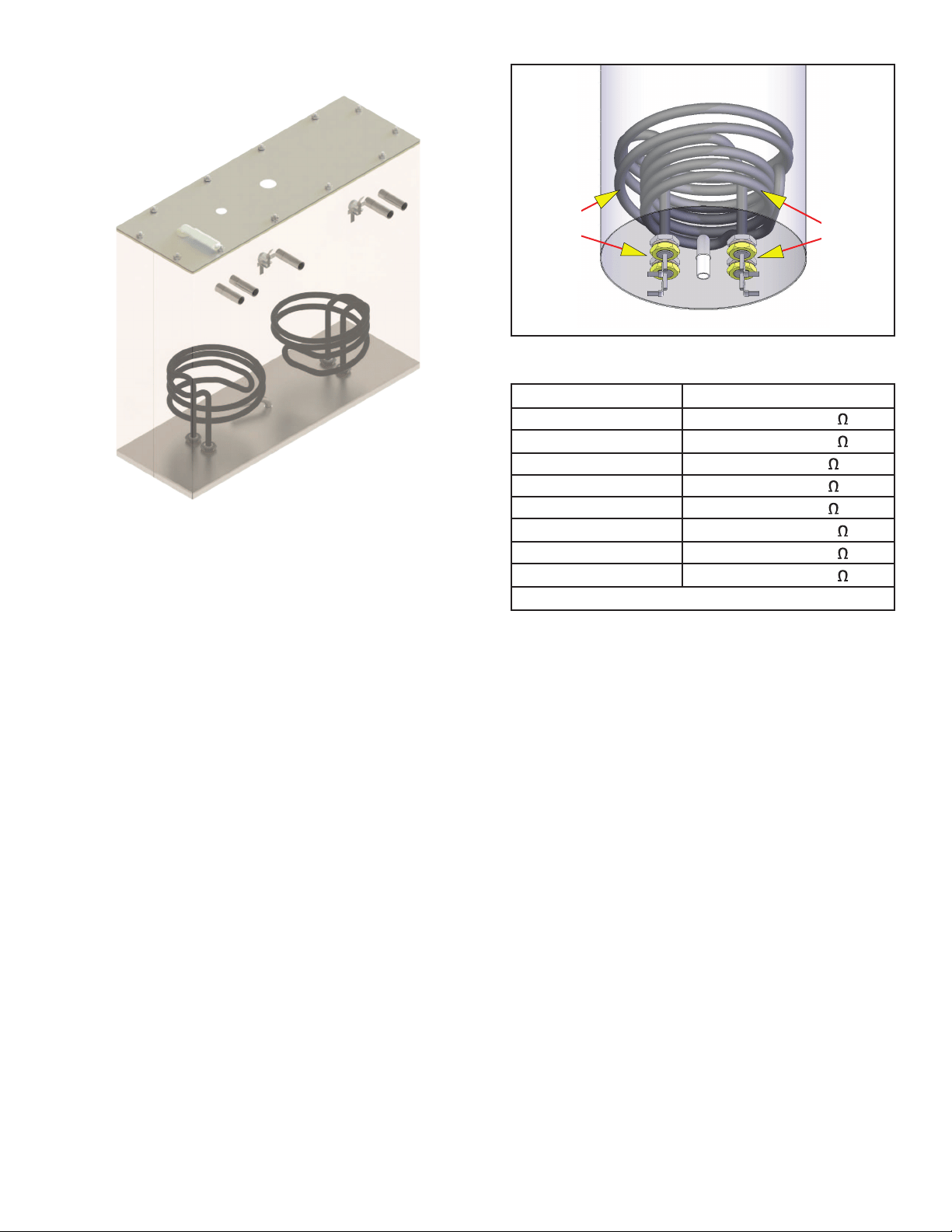
FIG. 16-1 REFILL VALVES
ICB & & ITB
ITCB & ITB-DD
STRAINER
STRAINER
Flow control used
on dual dilution
models only
54299 030818
17
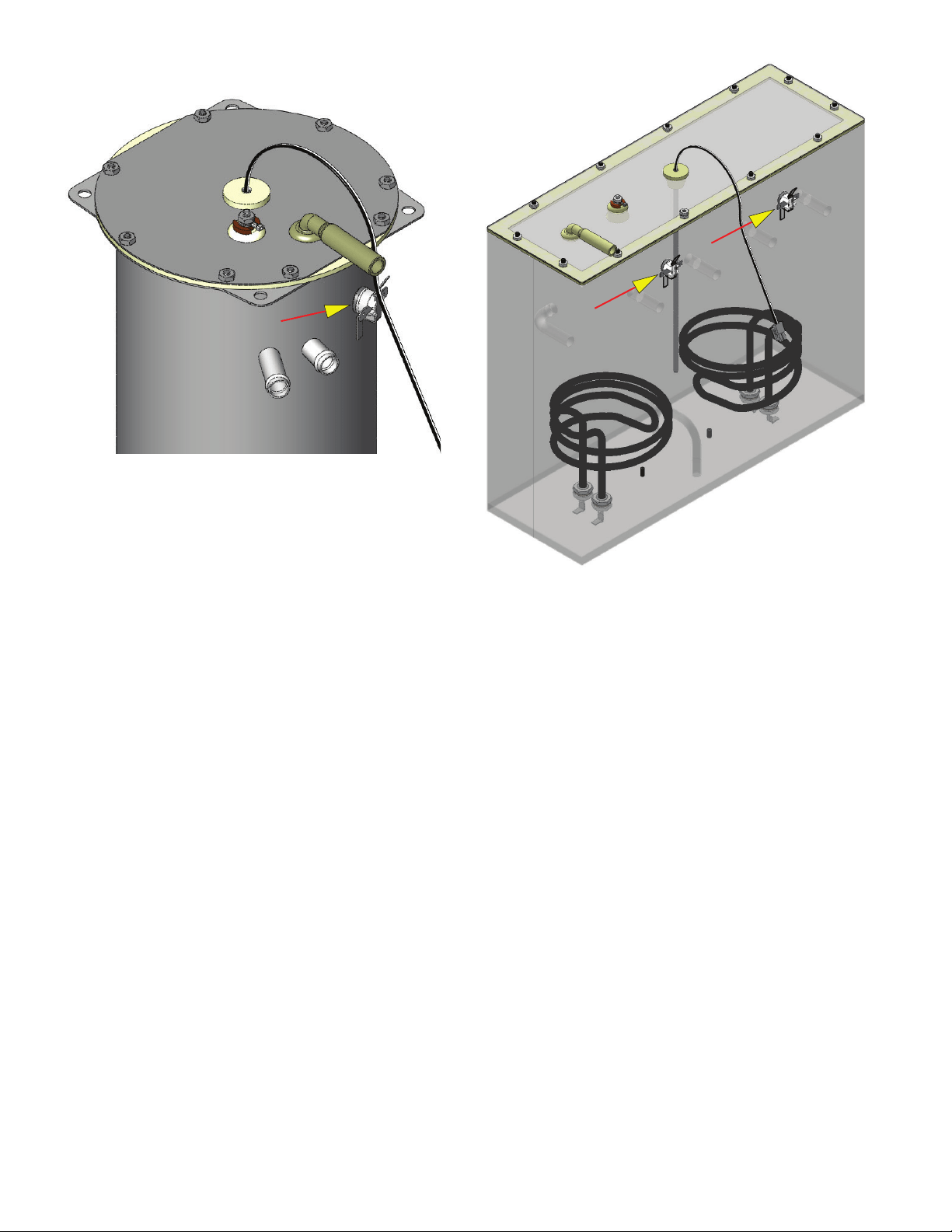
FIG. 17-2 DV TANK HEATERS
Location:
The tank heaters are located inside the tank and secured
to the tank bottom.
Test Procedures:
1. With a voltmeter, check voltage across the white
wire (120V Models) or red wire (120/208-240V
Models) from the terminal block and black wire
from the control board. Connect brewer to the
power source. The indication must be 120 volts
ac for two wire 120 volt models or 208-240 volts
ac for three wire 120/208-240 volt models (during
a heating cycle).
2. Disconnect the brewer from the power source.
If voltage is present as described, proceed to #3.
If voltage is not present as described, refer to the Wir-
ing Diagrams and check wiring harness.
3. Disconnect the wires from the tank heater terminals.
4. Check resistance value across tank heater terminals
and compare to chart.
If resistance is present as described, reconnect the
wires, the tank heater is ok.
If resistance is not present as described, replace the
tank heater.
TANK HEATERS
1425W
Small
Dia.
2268W
Large
Dia.
1425W-120V 9.5-11.0
3500W-240V 15.1-17.6
1680W-120V 7.9-9.2
1800W-120V 7.4-8.7
2268W-120V 5.9-6.9
3000W-208V 12.9-15.1
3000W-240V 17.9-20.7
3500W-200V 10.5-12.2
TERMINAL TO SHEATH - INFINITE (OPEN)
HEATER RESISTANCE
NOTE- If any resistance is read between sheath and
either terminal, remove and inspect heater for cracks
in the sheath.
Removal and Replacement:
1. Remove the top cover and front access panel as
previously described.
2. Drain water from the tank.
3. Disconnect all the hoses from the tank.
4. Remove the temperature probe from the grommet
in the tank lid.
5. Remove the level probe from it's grommet.
6. Disconnect the green wire from the tank lid.
7. Disconnect the wires from tank heater terminals.
8. Remove the nuts securing the tank lid to the tank.
9. Remove the hex nuts securing the tank heater to
the bottom of the tank. Remove tank heater(s) with
gaskets and discard.
10. Install new tank heater(s) with gaskets to the
bottom of the tank and secure with two hex nuts.
11. Install tank lid and secure with nuts.
12. Reconnect the wires to tank heater terminals.
FIG. 17-1 ICB TWIN TANK HEATERS
54299 070517
18
LIMIT THERMOSTAT
Location:
The limit thermostat is located on the tank lid (on the
front of the tank on twins).
Test Procedures:
1. Disconnect the brewer from the power source and
allow to cool.
2. Disconnect the wires from the limit thermostat.
3. With an ohmmeter, check for continuity across
the limit thermostat terminals.
If continuity is present as described, the limit thermostat
is operating properly.
If continuity is not present as described, replace the
limit thermostat.
Removal and Replacement:
1. Remove the wires from limit thermostat terminals.
2. Carefully slide the limit thermostat out from under
the retaining clip and remove limit thermostat.
3. Carefully slide the new limit thermostat into the
retaining clip. Ensure the metal face has good contact
with tank.
FIG. 18-1 LIMIT THERMOSTAT
FIG. 18-2 LIMIT THERMOSTATS
54299 070517
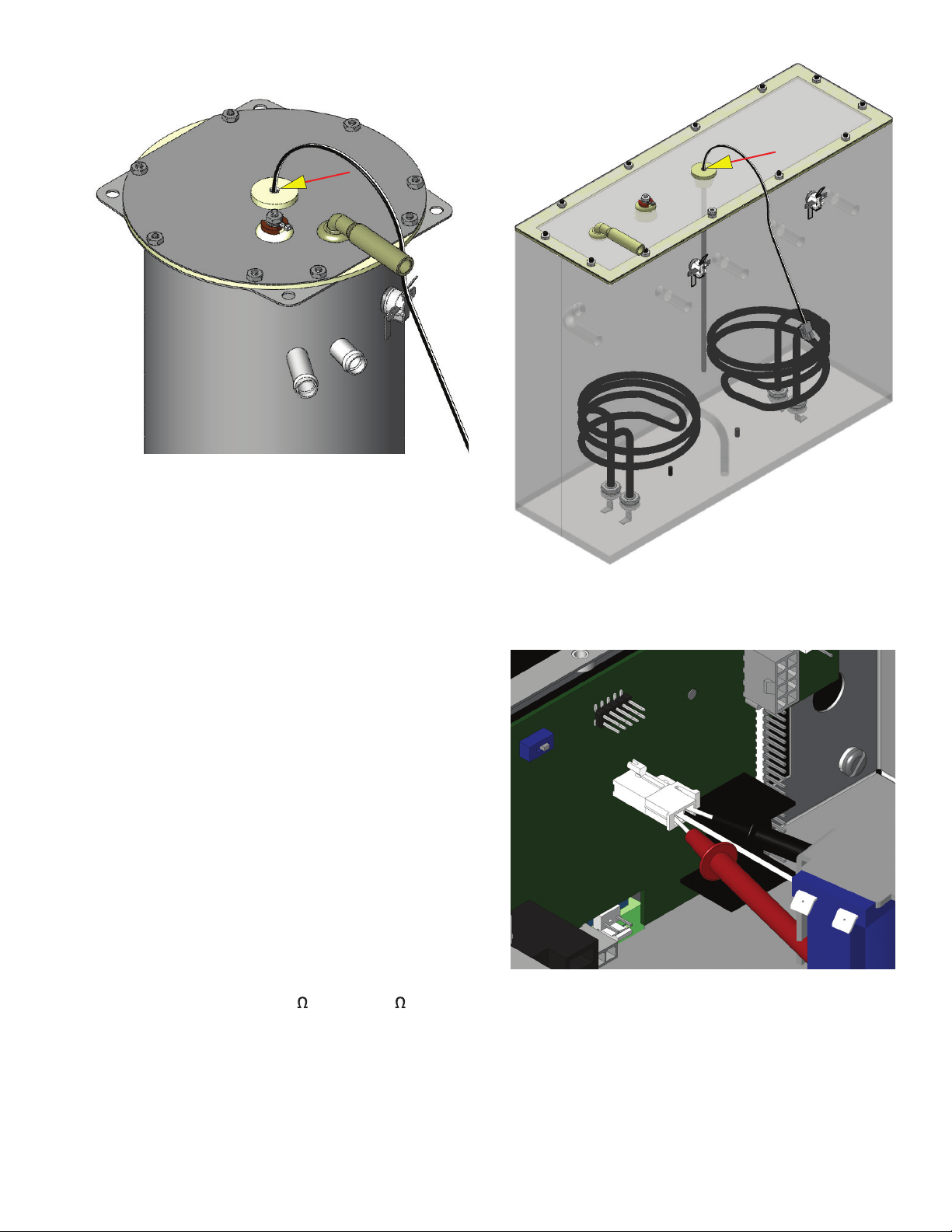
19
Location:
The temperature probe is inserted through the
tank lid assembly.
Test Procedures:
1. Disconnect the brewer from the power source.
2. With a DC voltmeter, check voltage across the two
wires at J13 (J3 on ITB) on control board (black
probe to black wire, red probe to white wire refer
to FIG 19-2). Connect the brewer to the power
source. The indication should be between 4vdc
(cool) to 1vdc at ready temperature.
3. Disconnect the brewer from the power source.
If voltage is present as described, circuit is working
correctly.
If voltage is not present as described, proceed to #4.
4. Disconnect temperature probe from J9 on control
board. Check the resistance across the two ter-
minals of the temperature probe. The indication
should be between 10.5K
cool to 870 at ready
temperature.
If resistance is to specification, replace the control
board.
If resistance is not to specification, replace the tem-
perature probe.
Removal and Replacement:
CONTINUED
Removal and Replacement:
FIG. 19-1 TEMPERATURE PROBE
TEMPERATURE PROBE
FIG. 19-3 TESTING TEMPERATURE PROBE
FIG. 19-2 TEMPERATURE PROBE
54299 070517
20
(-) DONE (+)
200° CAL 200°
TEMPERATURE PROBE
1. Disconnect the brewer from the power source.
2. Disconnect the two pin connector from J9 on
control board.
3. Pull temperature probe out of it's grommet.
4. Install in reverse order.
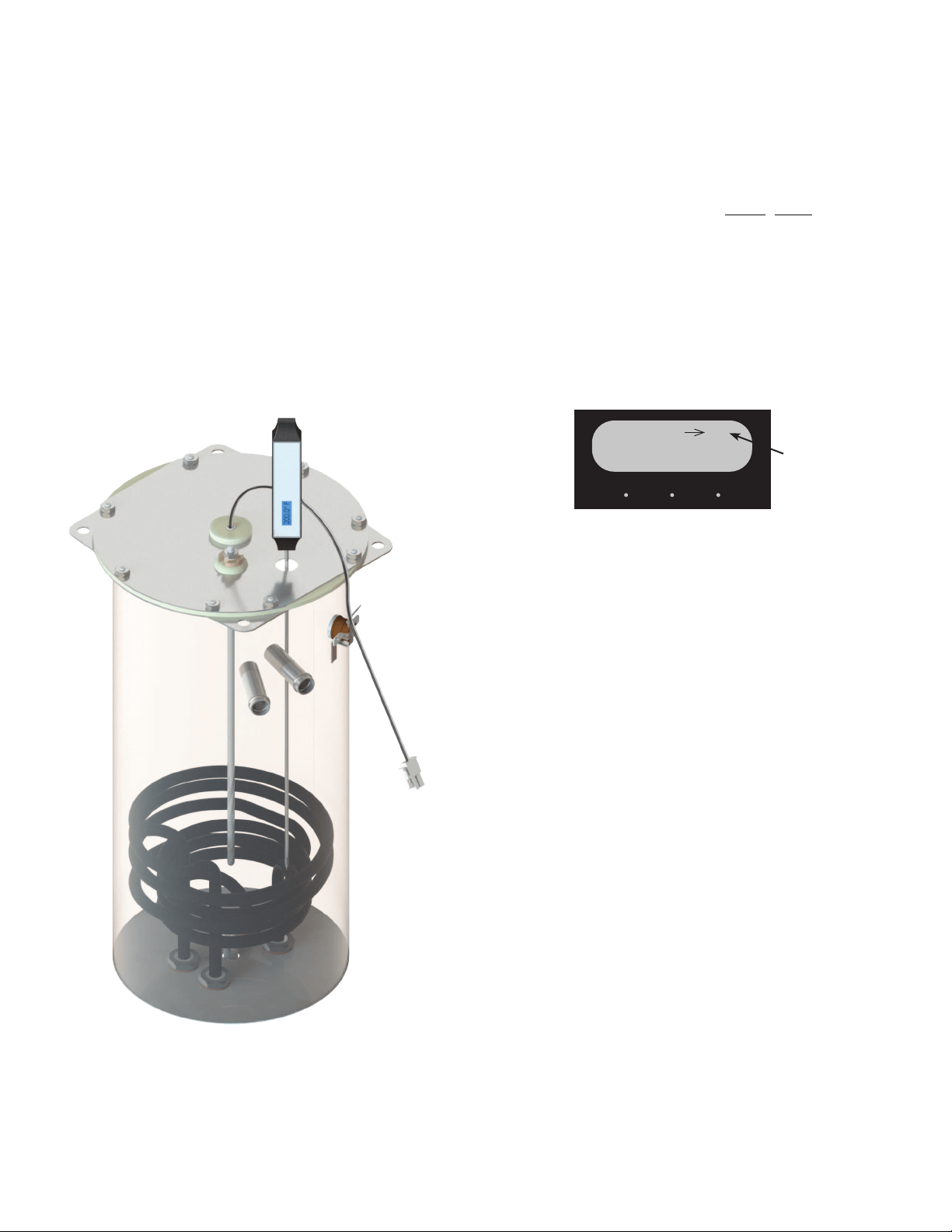
Calibration:
1. Remove silicon vent fitting from tank lid.
2. Insert a digital temp probe through the exposed
vent hole in tank lid to the same depth as the fac-
tory temp probe. FIG 20-1.
3. Press and hold the "Hidden" button until display
FIG. 20-1 CALIBRATE TEMP PROBE
FIG. 20-2 CALIBRATION
Adjust this
number
reads "CAL TEMPERATURE SENSOR?" "NO/YES"
4. Select "YES". The display should show something
similar to the screen below (FIG 20-2).
NOTE: Variables such as tank set temperature could
show different numbers than the example shown
here. Tank must be at it's ready temp before
calibrating.
5. Press the + (Control) button to increase or - (Digi-
tal) button to decrease temperature reading until
it matches the reading on the thermometer.
6. Exit program mode, remove thermometer, and
install vent fitting. Calibration is complete
54299 070517
21
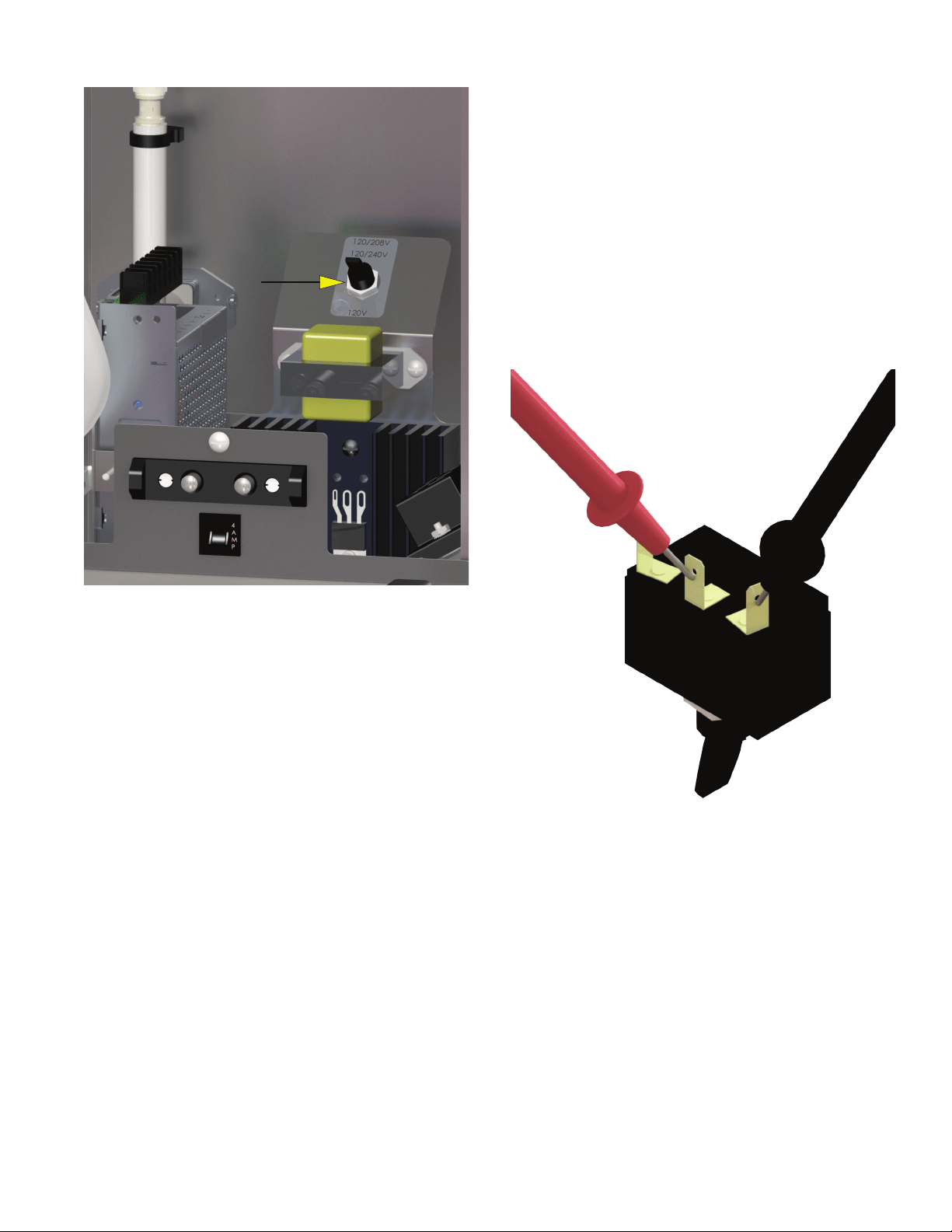
Location:
The voltage selector switch is located on the
component mounting bracket on the base plate.
Test Procedure:
1. Disconnect the brewer from the power source.
2. Disconnect the wires from the selector switch. With
the selector switch in the 120V position, check for
continuity between the two right terminals of the
switch.
3. With the selector switch in the 120/208-240V
position, check for continuity between the two left
terminals.
If continuity is not present as described, replace the
switch.
Removal and Replacement:
1. Disconnect the brewer from the power source.
2. Disconnect the three wires from the selector switch.
3. Remove the switch mounting nut from the under
side of component mounting bracket; remove
switch from bracket.
4. Install new switch in component mounting bracket
and secure with mounting nut.
FIG. 21-2 VOLTAGE SELECTOR
SWITCH TERMINALS
VOLTAGE SELECTOR SWITCH
FIG. 21-1 VOLTAGE SELECTOR SWITCH
54299 070517
22
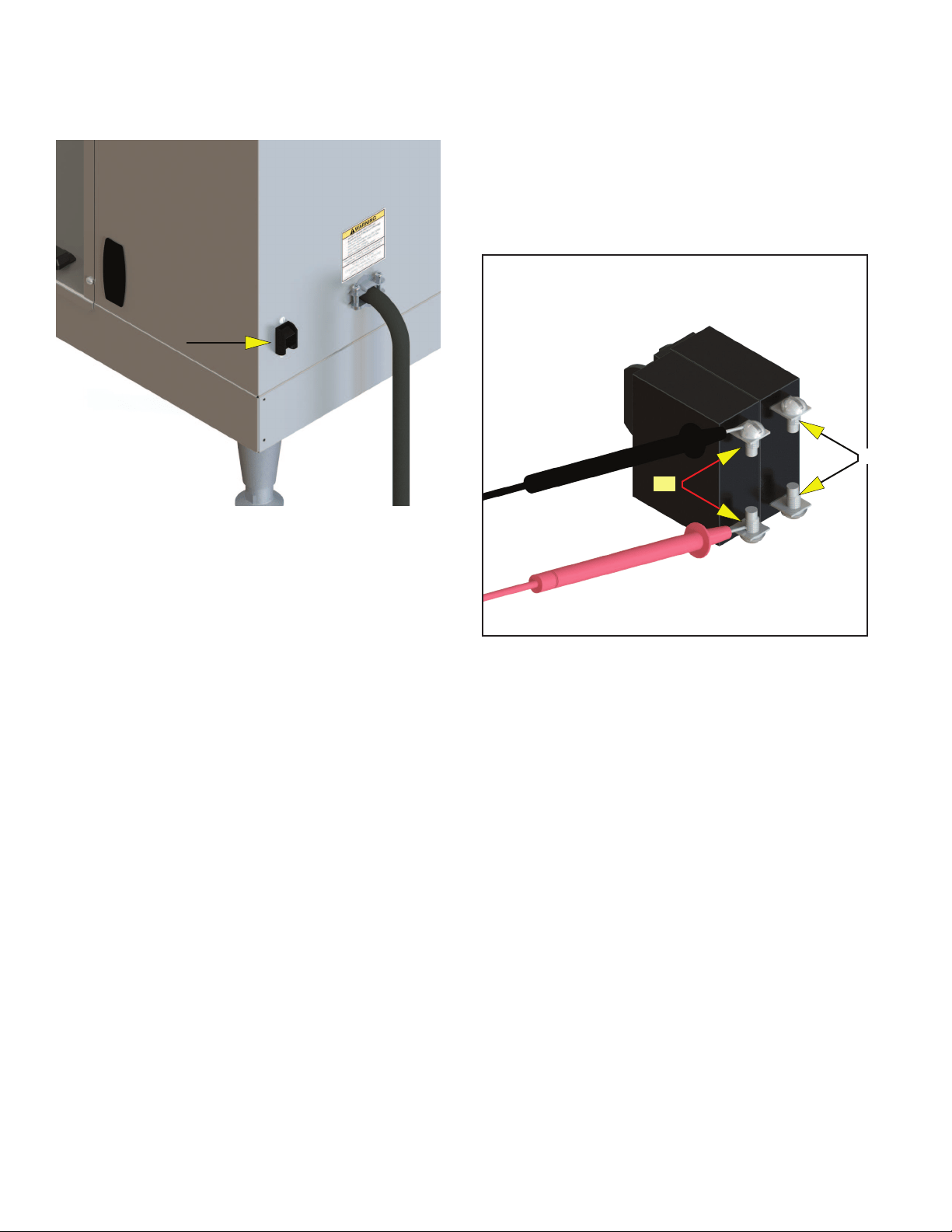
POWER SWITCH
FIG. 22-1 POWER SWITCH (ICB SHOWN)
Location:
The power switch is located on the lower right
side of the trunk (ICB) or lower rear panel (ITCB).
Test Procedure:
1. Disconnect the brewer from the power source.
2. Disconnect the wires from the power switch. With
the switch in the ON position, check for continuity
between the upper and lower terminals on each
side of the switch.
There should be continuity between the two left ter-
minals and between the two right terminals when ON,
no continuity when OFF.
If continuity is not present as described, replace the
switch.
Removal and Replacement:
1. Disconnect the brewer from the power source.
2. Disconnect the wires from the power switch.
3. Remove the switch mounting screws from the left
side of trunk.
4. Install new switch in trunk with the two 6-32 x ¼˝
mounting screws.
L2
L1
FIG. 22-2 POWER SWITCH
54299 030718
23
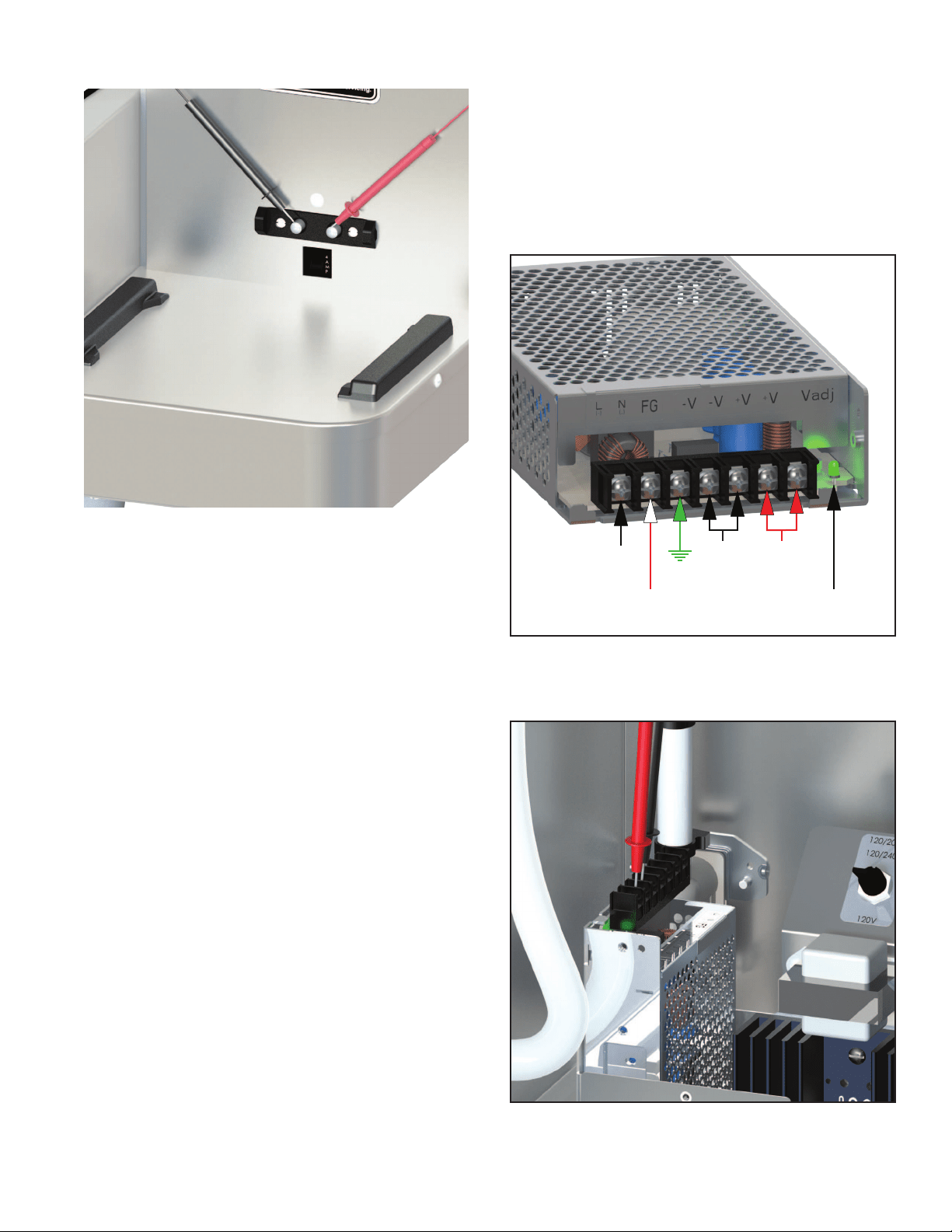
SOFTHEAT POWER
FIG. 23-1 SOFTHEAT CONTACTS
Location:
The SoftHeat contacts are located on the lower
front of the trunk.
Test Procedure:
1. Check circuit breaker, reset if tripped.
2. Remove server(s).
3. Set meter to DC 24 volts scale. Check for 24VDC
between the right (+) and left (-) terminals. Fig.
23-1.
If voltage is not present as described, continue to # 4.
4. Remove front panel . Verify LED is illuminated.
Fig. 23-2 & 3.
5. If illuminated, Check output of power supply for
24VDC. If not illuminated, Set meter to AC 208-240
volts scale (depending on the incoming line volt-
age). Place the meter probes on the power supply
"Line in" terminals. Voltage should read about the
same as line voltage across main terminal block.
Removal and Replacement:
1. Disconnect the brewer from the power source.
2. Disconnect the wires from the power supply.
3. On the Twin, remove two screws securing power
supply to base. On the single, remove two screws
securing component mounting bracket to base,
then remove four screws securing power supply
to component mounting bracket. NOTE: When
installing new power supply, verify the voltage
selector switch is set to the proper voltage.
L2 or
NEUTRAL
L1
FIG. 23-2 SH POWER SUPPLY
54299 030718
FIG. 23-3 TEST OUPUTS
+
24V
-
24V
POWER
LED

24
TROUBLESHOOTING SOFT HEAT FEATURE AT BREWER:
Issue: SH server lights not working when sitting on brewer
1. Check to make sure server is fully engaged and touching brewer contacts.
2. Check brewer contacts with multimeter, should be getting 24 VDC
3. If no power is showing up at brewer contacts remove front panel. Power off brewer, check that wiring
connections to the back of the contacts are secure and not loose. Tighten if loose and power back up to
confirm 24 VDC with multimeter
4. If connections are secure take off platform cover and look at PLC board. Make sure there is no water or
coffee on the PLC board or other visible damage. If there is evidence of drips, please check server guide
rails. They should fully tightened with a sealing washer, replace if necessary.
5. The Green LED on the 24VDC Supply, located to the right of the terminal block, should be ON.
6. Check connection J3-16 and J3-8 (red and black wire coming from power supply) are giving 24VDC to the
PLC board. If not getting adequate voltage check connections on power supply, ensure L1 & L2 are sup-
plying 208V or 240V on standard models or 120V from L1 and N if DV.
7. If voltage properly routed to power supply, but not seeing 24 VDC at J3-16/J3-8, replace power supply
(ensure it is flipped to 230V for standard 208V and 240V models or 120V for DV units.)
8. Check that the terminals are fully seated in the J3 Connector.
9. On the PLC Board, the HRT LED (LED1) should be blinking, On for 1 Sec and Off for 1 Sec.
10. Check SH Server LEDs on another Brewer or Stand.
Issue: SH Server lights up, but doesn’t turn solid after brew (standard slow blink)
1. Check to make sure server is fully engaged and touching brewer contacts
2. Check brewer contacts with multimeter, should be getting 24 VDC
3. Enter program mode, go to Service, and toggle to SH Version # screen. Readout should show PLC App
01.XX and PLC Boot 01.XX, if this doesn’t show up on the second line, please check harness connection at
J9 on main board (wht/grn/blk wires). If connections are showing good, check PLC board for any signs of
damage.
4. On the PLC Board, the HRT LED (LED1) should be blinking, On for 1 Sec and Off for 1 Sec.
5. If SH Version # is reading for PLC board, next check to see if the server itself is being read. Also under
service and SH Version# the screen should read SH 01.XX on the top line. Note that the SH Server must
be docked at the Brewer for 10 to 20 seconds before the SH Version# screen is entered.
6. If SH version is being detected, but still blinking after brews, the conductance probes in the faucet shank
of server could be dirty or covered. Empty server, remove faucet shank, and take wire brush to clean out
server. Build up of coffee grounds and coffee could prevent server from seeing product and create a nui-
sance trip where the server thinks it is empty.
Issue: SH server blinks rapidly after brew completed.
1. SH server has an error, try brewing into it again. If failure continues to happen to this lone server, please
have it replaced.
Issue: SH brewer not detecting server stand (Wireless models only)
1. Ensure server stand is a wireless model, data plate will denote model type with wireless in description. If
not a wireless server stand a wireless kit will need to be ordered.
2. If the server stand is a wireless model, check first to see if contacts are showing 24 VDC.
3. Take off stand cover, check to ensure all 3 LEDS are lighting up on wireless PLC that the HRT LED is flash-
ing On for 1 Sec, and Off for 1 Sec. The BT LED will be ON if the Stand is part of a Wireless Network or
flashing if it is searching. The WIFI LED should be OFF in a Stand
54299 030718

25
4. Check to make sure nothing metal is sitting under server stand or metal walls blocking signal for server
stand to brewer. (Stand may need repositioned close or away from material that will block the radio sig-
nal)
Issue: SH stand dropping from webpage dashboard (Wireless models only)
1. Check under dashboard configuration for Brewer that network is locked (Areas with high traffic of Blue-
tooth and wifi create potential for connectivity issues, locking network out after setup will minimize this
potential)
TROUBLESHOOTING SOFT HEAT FEATURE AT BREWER:
54299 030718
26
TRANSFORMER 10VA
BLK
WHI
YEL
YEL
BLK
WHI
GRN
PNK
BLK
PRIMARY
12VAC
PNK
WHI
GRN
LEVEL PROBE
t
TEMP
PROBE
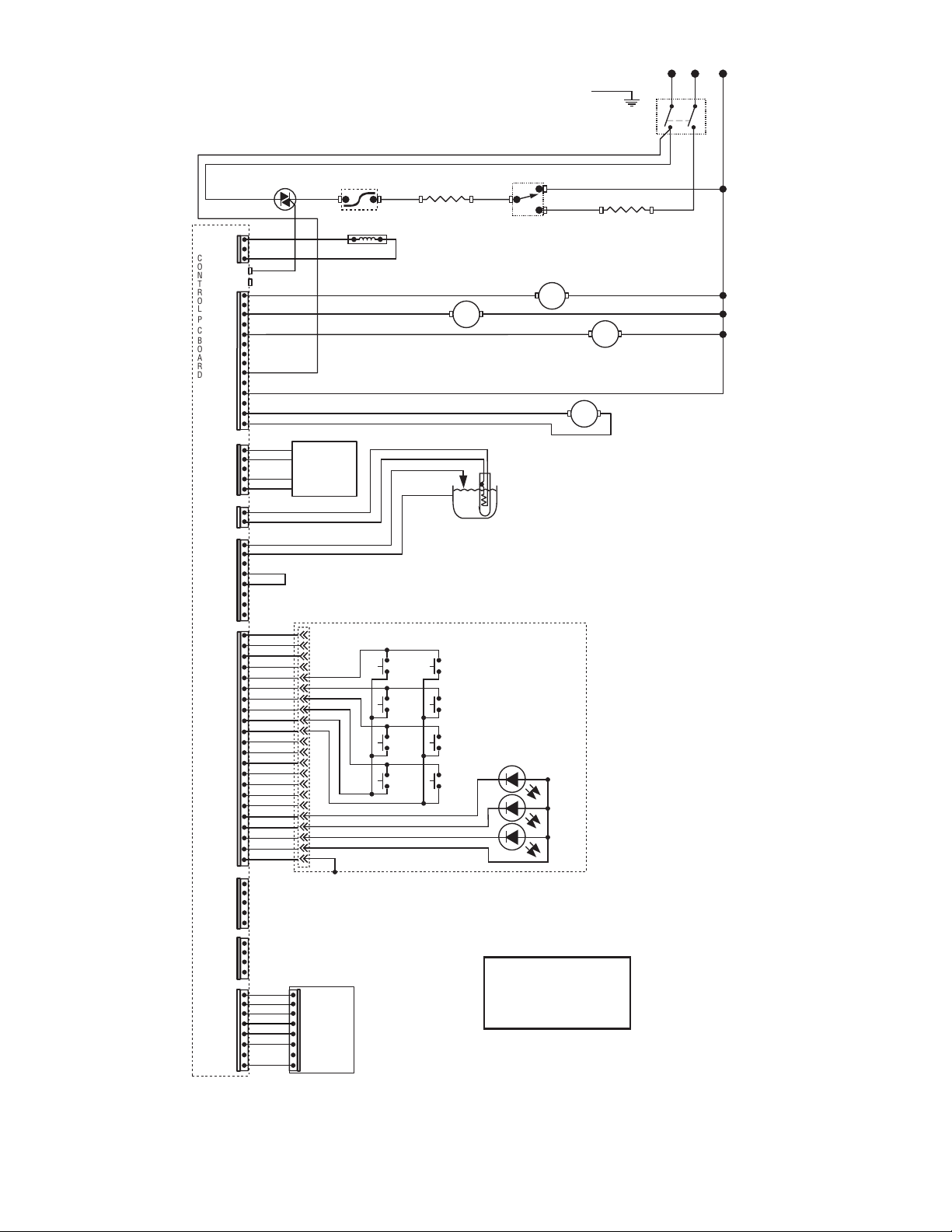
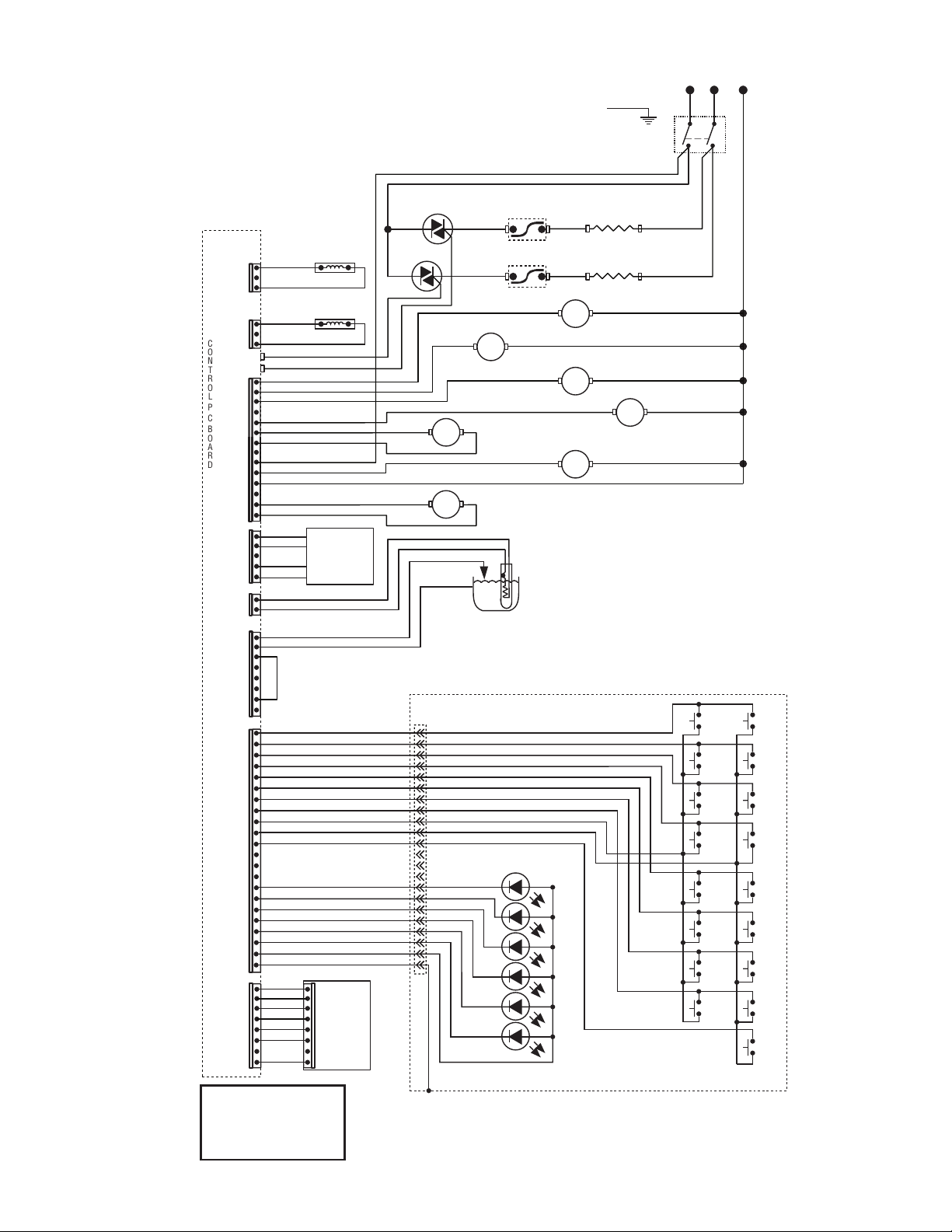
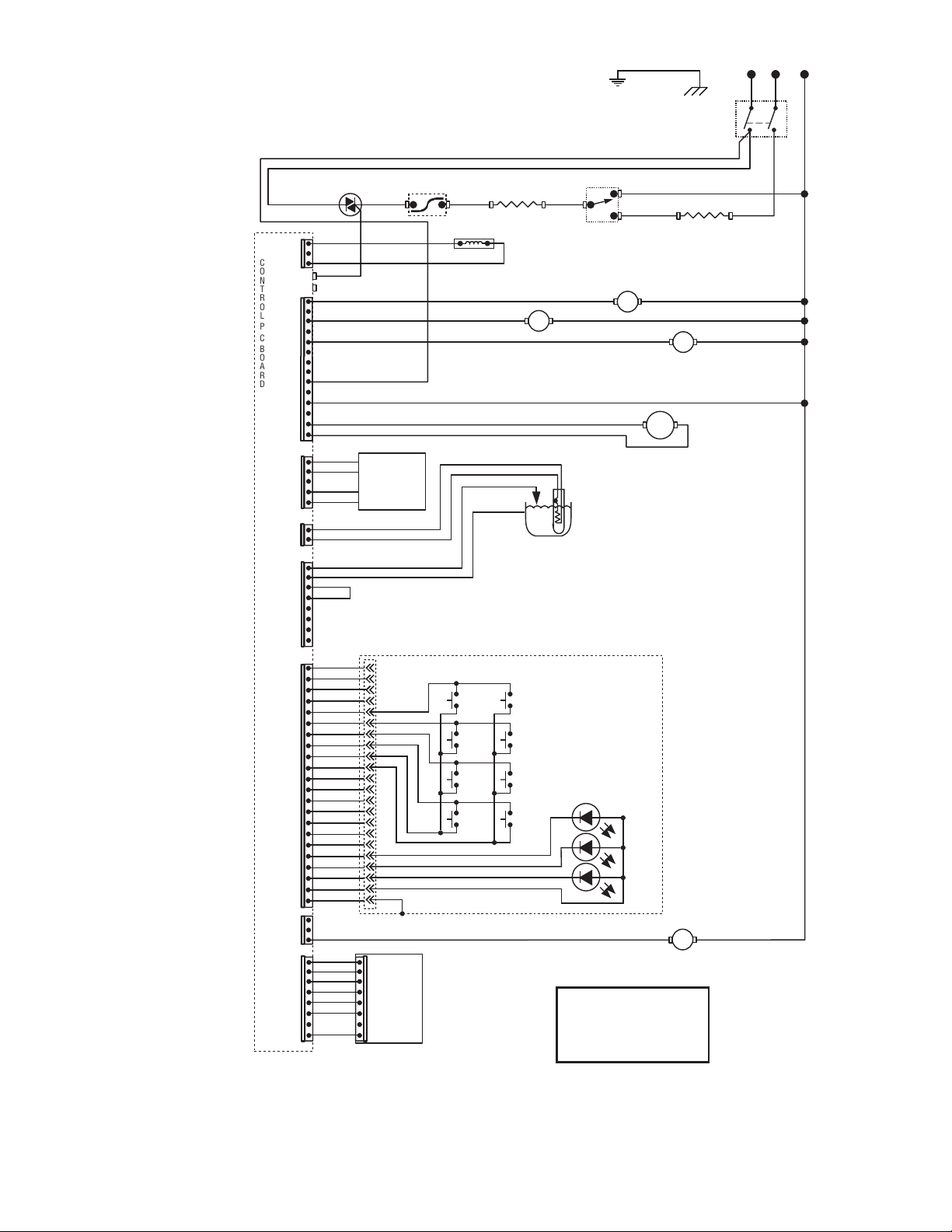
SCHEMATIC WIRING DIAGRAM ITCB-DV
53869.0000B 06/17 ©2017 BUNN-O-MATIC CORPORATION
LIMIT THERMOSTAT
WHI
WHI
WHI/VIO
WHI/VIO
WHI/VIO
WHI
WHI
REFILL
DISPENSE
J1-1
J1-2
J17-1
J17-5
J15-1
J15-5
J17-10
J17-14
C
O
N
T
R
O
L
P
C
B
O
A
R
D
TR1
TR2
VIO
BLK
TAN
BLK-14
BLU-14
WHI/GRN
WHI/GRN
WHI/BLU
WHI
WHI/BLU
FUNNEL SENSOR
120V AC 2 WIRE
120/208V AC 3 WIRE
120/240V AC 3 WIRE
SINGLE PHASE
BLK
BRN/BLK
BRN/WHI
BRN/BLK
BRN/WHI
CONTROL PANEL ASSY
J2-1
1
22
J2-5
J2-15
J2-20
J2-22
J2-10
PROG L
BREW
A
PROG R
BREW
C
STATIC
SHIELD
J3-1
J3-8
J3-5
WHI-14
WHI/VIO-14
BLU-14
RED-14
TANK HEATER
1680W
TANK HEATER
1800W
SELECTOR SWITCH
J13-1
DILUTION
SOL
SOL
SOL
J16-1
J16-5
1 3
FULL
FULL
HALF
HALF
ON/OFF
ON/OFF
BREW
B
GRN
BLK-18
N
L1
L2
WHI
BLK
RED
BLK-14
MAIN ON/OFF SWITCH
(1425W ITCB-C-DV ONLY)
TRIAC
FUNNEL
LOCK
SOL
J4-1
J4-4
USB
CBA
J18A-1
J18A-5
J18A-8
VIO
VIO
54299 070517
27
BLK
PNK
WHI
GRN
LEVEL PROBE
t
TEMP
PROBE
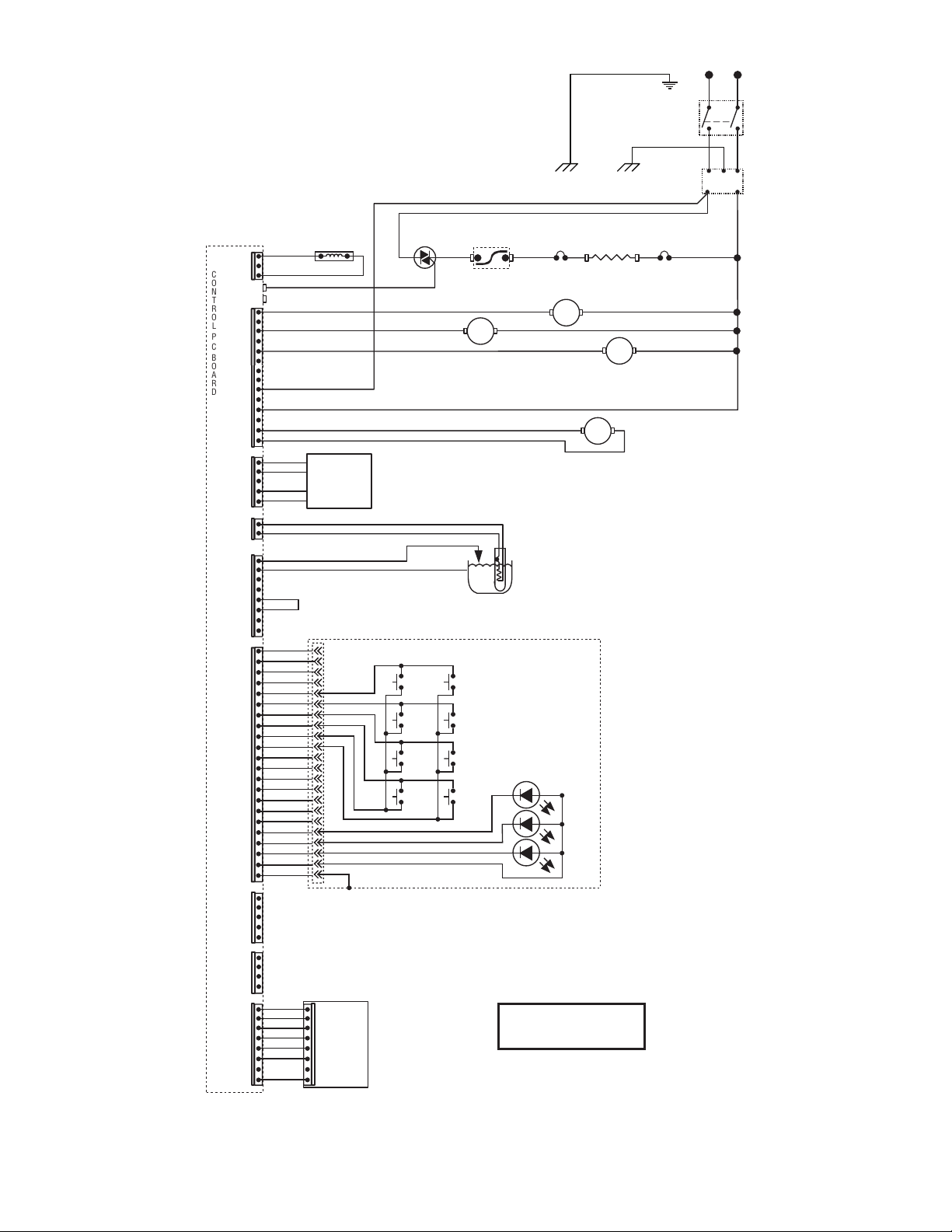
SCHEMATIC WIRING DIAGRAM
ITCB-A,B&CE w/TRIACS
53869.0001A 05/14 ©2015 BUNN-O-MATIC CORPORATION
TAN
RED
RED
WHI/VIO
WHI/VIO
WHI/VIO
RED
RED
REFILL
DISPENSE
J1-1
J1-2
J17-1
J17-5
J15-1
J15-5
J17-10
J17-14
C
O
N
T
R
O
L
P
C
B
O
A
R
D
TR1
TR2
VIO
WHI/GRN
WHI/GRN
WHI/BLU
RED
WHI/BLU
FUNNEL SENSOR
200-240V AC 2 WIRE
SINGLE PHASE
BLK
CONTROL PANEL ASSY
J2-1
1
22
J2-5
J2-15
J2-20
J2-22
J2-10
PROG L
BREW
A
PROG R
BREW
C
STATIC
SHIELD
J3-1
J3-8
J3-5
J13-1
DILUTION
SOL
SOL
SOL
1 3
FULL
FULL
HALF
HALF
ON/OFF
ON/OFF
BREW
B
TRIAC
LIMIT
THERMOSTAT
BLU-14
TANK HEATER
RED
BLK-18
BLK-14
BRNBRN
BLU
BLU
L1
N
EMI FILTER
GRN/YEL
Chassis Ground
GRN/YEL
Chassis Ground
MAIN ON/OFF
SWITCH
RED-14
BLK-14
THERMAL
FUSE
THERMAL
FUSE
TRANSFORMER 10VA
BLK
WHI
YEL
YEL
PRIMARY
12VAC
BLK
WHI
GRN
PNK
BRN/BLK
BRN/WHI
BRN/BLK
BRN/WHI
FUNNEL
LOCK
SOL
J16-1
J16-5
J4-1
J4-4
USB
CBA
J18A-1
J18A-5
J18A-8
VIO
VIO
54299 070517
28
TRANSFORMER 10VA
BLK
WHI
YEL
YEL
BLK
WHI
GRN
PNK
BLK
PRIMARY
12VAC
PNK
WHI
GRN
LEVEL PROBE
t
TEMP
PROBE
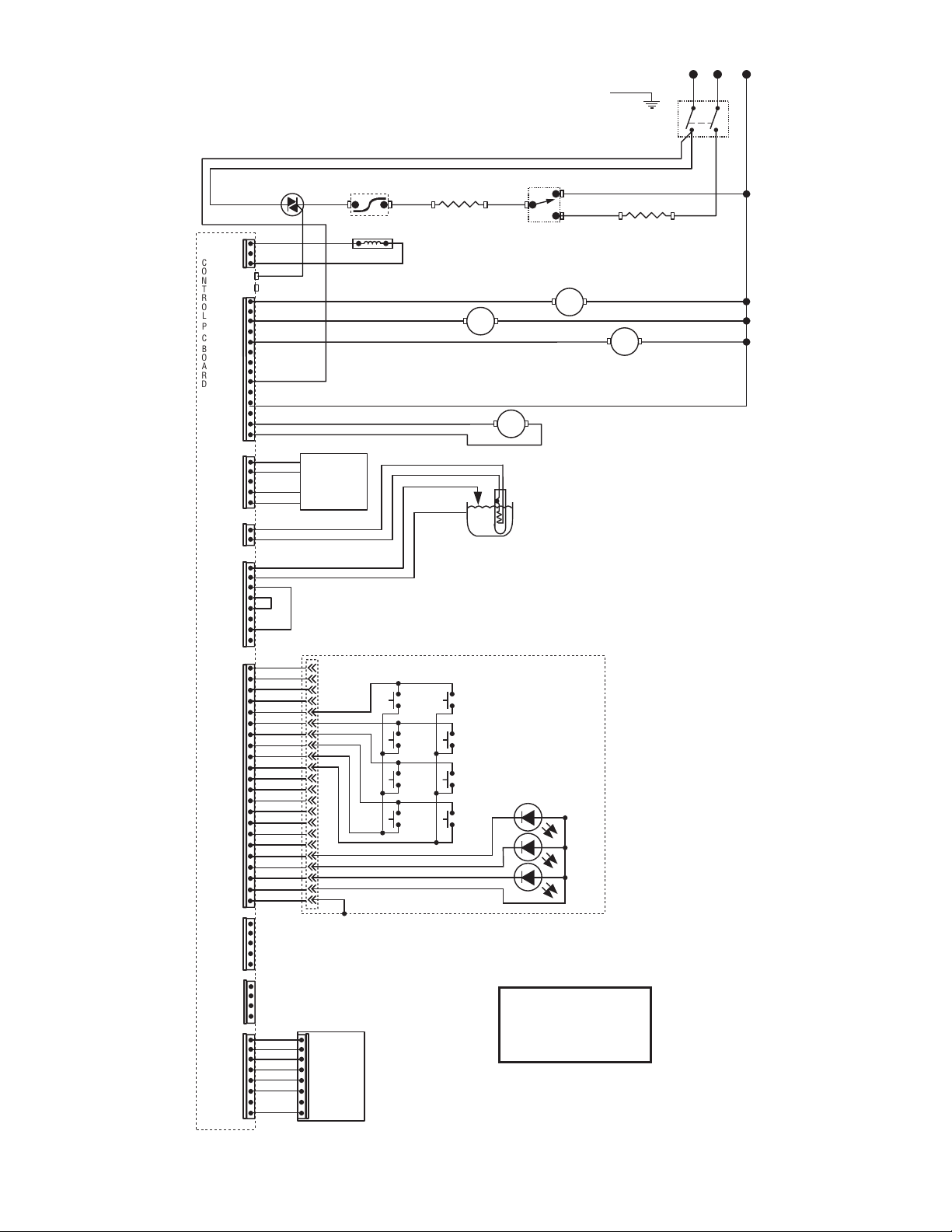
SCHEMATIC WIRING DIAGRAM ICB-DV
37299.0009A 05/17 ©2017 BUNN-O-MATIC CORPORATION
TAN
WHI
WHI
WHI/RED
WHI/VIO
WHI/RED
WHI
WHI
REFILL
DISPENSE
J1-1
J1-2
J17-1
J17-5
J15-1
J15-5
J17-10
J17-14
C
O
N
T
R
O
L
P
C
B
O
A
R
D
TR1
TR2
VIO
WHI/GRN
WHI/GRN
WHI/BLU
WHI
WHI/BLU
FUNNEL SENSOR
120V AC 2 WIRE
120/208V AC 3 WIRE
120/240V AC 3 WIRE
SINGLE PHASE
BLK
CONTROL PANEL ASSY
J2-1
1
22
J2-5
J2-15
J2-20
J2-22
J2-10
PROG L
BREW
A
PROG R
BREW
C
STATIC
SHIELD
J3-1
J3-8
J3-5
J13-1
BYPASS
SOL
SOL
FUNNEL LOCK
(Optional)
BRN/BLK
BRN/WHI
SOL
SOL
J16-1
J16-5
1 3
FULL
FULL
HALF
HALF
ON/OFF
ON/OFF
BREW
B
LIMIT THERMOSTAT
BLK
BLK-14
BLU-14
WHI-14
WHI/VIO-14
BLU-14
RED-14
TANK HEATER
1680W
TANK HEATER
2268W
SELECTOR SWITCH
GRN
BLK-18
N
L1
L2
WHI
BLK
RED
BLK-14
MAIN ON/OFF SWITCH
(Late Models only)
TRIAC
J4-1
J4-4
USB
CBA
J18A-1
J18A-5
J18A-8
54299 070517
29
TRANSFORMER 10VA
BLK
WHI
YEL
YEL
BLK
WHI
GRN
PNK
BLK
PRIMARY
12VAC
PNK
WHI
GRN
LEVEL PROBE
t
TEMP
PROBE
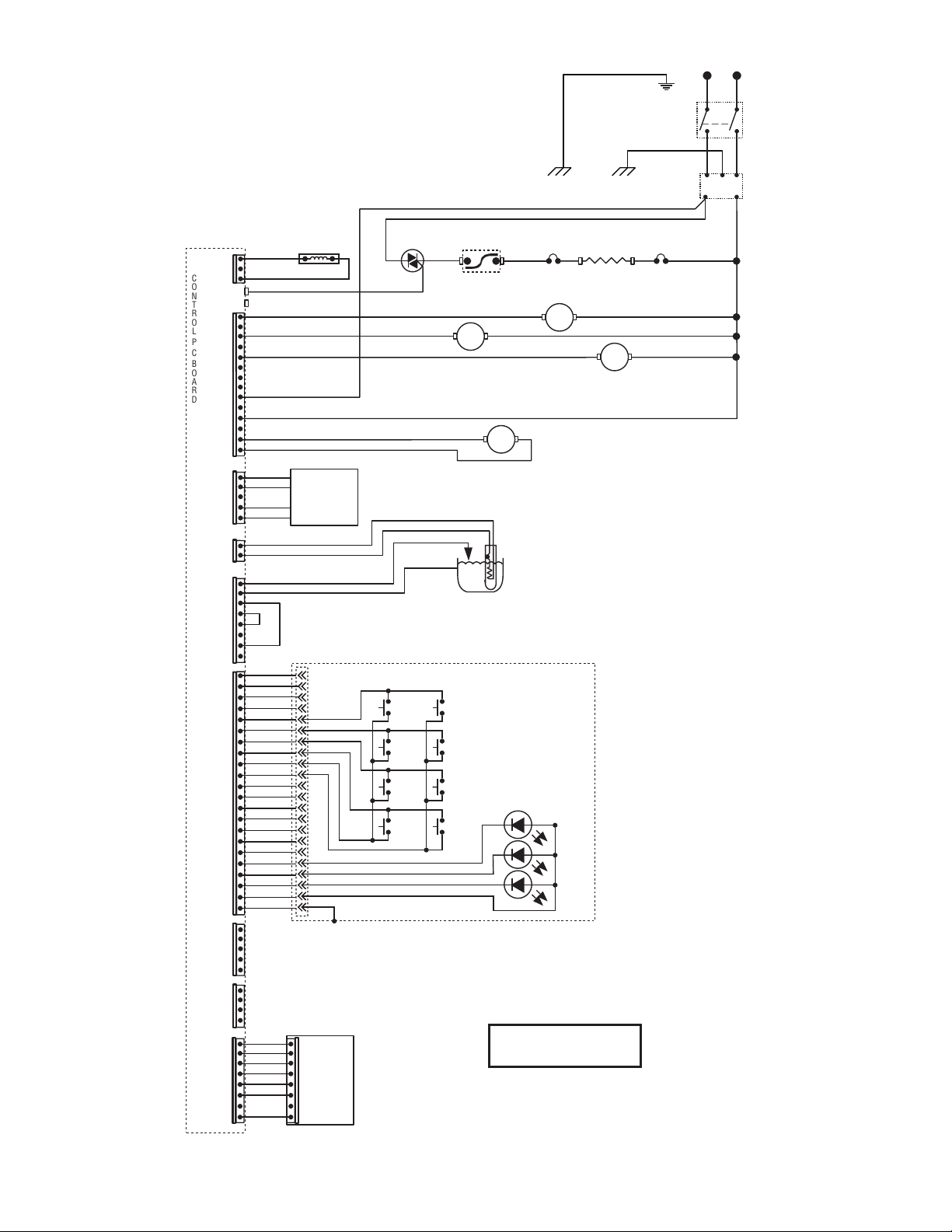
SCHEMATIC WIRING DIAGRAM ICB TWIN
37299.0011A 06/17 ©2017 BUNN-O-MATIC CORPORATION
BLU-14
TAN
LIMIT
THERMOSTAT
WHI
WHI
WHI/RED
WHI/YEL
WHI
WHI
REFILL
RIGHT
DISPENSE
J21-1
J21-3
J17-1
J17-5
J15-1
J15-5
J17-10
J17-14
C
O
N
T
R
O
L
P
C
B
O
A
R
D
TR1
TR2
YEL
TAN
BLU-14
WHI/GRN
WHI/BLU
WHI
RIGHT
FUNNEL SENSOR
120/208 OR 120/240
VOLTS AC
3 WIRE + GND
SINGLE PHASE
BLU-14
LIMIT
THERMOSTAT
BLU-14
BLK
CONTROL PANEL ASSY
J2-1
1
22
J2-5
J2-15
J2-20
J2-22
J2-10
PROG
“Control”
PROG
“Brewer”
PROG
“Digital”
RIGHT
BREW
A
LEFT
PROG
RIGHT
BREW
B
STATIC
SHIELD
J3-1
J3-8
J3-5
GRY
RED-14
TANK HEATER
RED-14
TANK HEATER
J13-1
LEFT
BYPASS
SOL
SOL
LEFT
FUNNEL LOCK
BRN/BLK
BRN/WHI
SOL
RIGHT
FUNNEL LOCK
BLU
BLU/BLK
SOL
SOL
WHI
RIGHT
BYPASS
SOL
WHI
ORN
LEFT
DISPENSE
SOL
1 3
WHI/VIO
J20-1
J20-3
VIO
LEFT
FUNNEL SENSOR
1 3
LEFT
FULL
LEFT
FULL
LEFT
HALF
LEFT
HALF
LEFT
ON/OFF
LEFT
ON/OFF
RIGHT
BREW
C
LEFT
BREW
A
RIGHT
PROG
LEFT
BREW
C
RIGHT
FULL
RIGHT
FULL
RIGHT
HALF
RIGHT
HALF
RIGHT
ON/OFF
RIGHT
ON/OFF
LEFT
BREW
B
GRN
BLK-18
N
L1
L2
WHI
BLK
RED
BLK-14
MAIN ON/OFF SWITCH
(Late Models only)
TRIAC
TRIAC
MT2
MT2
MT1
MT1
USB
CBA
J18A-1
J18A-5
J18A-8
54299 070517
30
TRIAC
TRANSFORMER 10VA
BLK
WHI
YEL
YEL
BLK
WHI
GRN
PNK
BLK
PRIMARY
12VAC
PNK
WHI
GRN
LEVEL PROBE
t
TEMP
PROBE
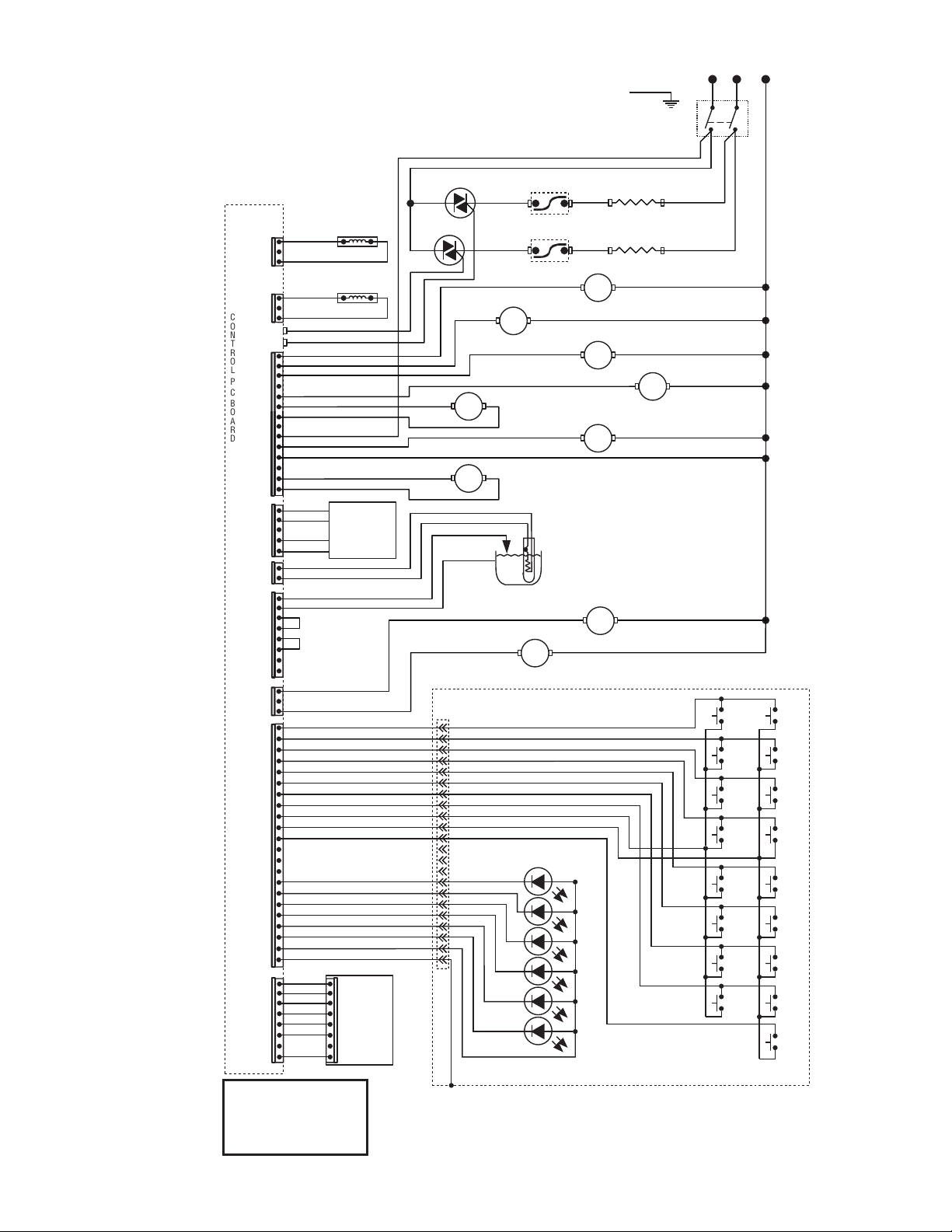
SCHEMATIC WIRING DIAGRAM
ICBA,ICBB & CE w/TRIACS
37299.0010A 05/17 ©2017 BUNN-O-MATIC CORPORATION
TAN
LIMIT
THERMOSTAT
RED
RED
WHI/RED
WHI/VIO
WHI/RED
RED
RED
REFILL
DISPENSE
J1-1
J1-2
J17-1
J17-5
J15-1
J15-5
J17-10
J17-14
C
O
N
T
R
O
L
P
C
B
O
A
R
D
TR1
TR2
VIO
BLU-14
WHI/GRN
WHI/GRN
WHI/BLU
RED
WHI/BLU
FUNNEL SENSOR
200-240V AC 2 WIRE
SINGLE PHASE
BLK
CONTROL PANEL ASSY
J2-1
1
J2-5
J2-15
J2-20
J2-22
J2-10
PROG L
BREW
A
PROG R
BREW
C
STATIC
SHIELD
J3-1
J3-8
J3-5
TANK HEATER
J13-1
BYPASS
SOL
SOL
FUNNEL LOCK
(Optional)
BRN/BLK
BRN/WHI
SOL
SOL
1 3
FULL
FULL
HALF
HALF
ON/OFF
ON/OFF
BREW
B
RED
BLK-18
BLK-14
BRN
BRN
BLU
BLU
L1
N
EMI FILTER
GRN/YEL
Chassis Ground
GRN/YEL
Chassis Ground
MAIN ON/OFF
SWITCH
RED-14
BLK-14
THERMAL
FUSE
THERMAL
FUSE
J4-1
J4-4
USB
CBA
J18A-1
J18A-5
J18A-8
J16-1
J16-5
54299 070517
31
TRANSFORMER 10VA
BLK
WHI
YEL
YEL
BLK
WHI
GRN
PNK
BLK
PRIMARY
12VAC
PNK
WHI
GRN
LEVEL PROBE
t
TEMP
PROBE
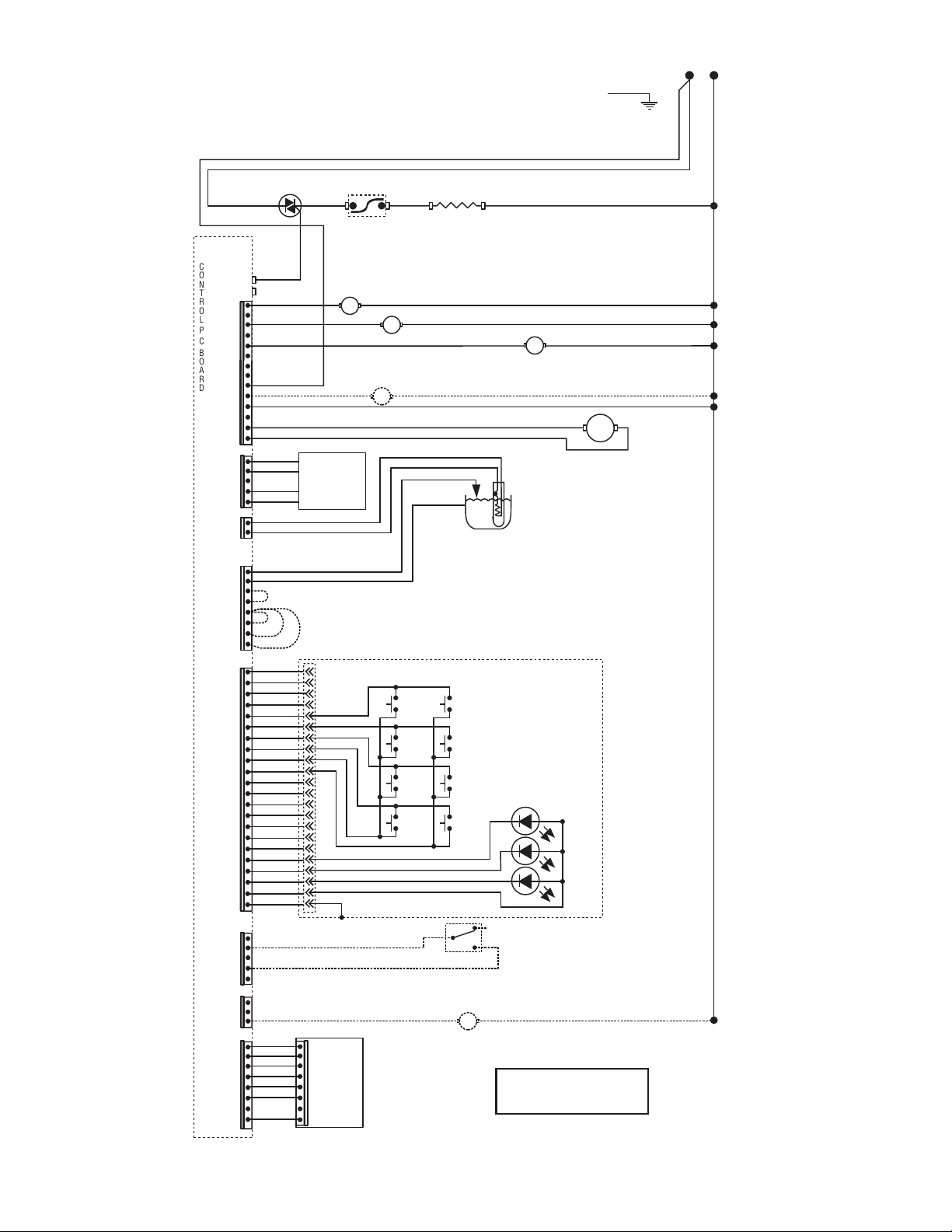
SCHEMATIC WIRING DIAGRAM ITCB HV TWIN
37299.0012A 06/17 ©2017 BUNN-O-MATIC CORPORATION
BLU-14
TAN
LIMIT
THERMOSTAT
WHI
WHI
WHI/RED
WHI/YEL
WHI
WHI
REFILL
RIGHT
DISPENSE
J21-1
J21-3
J17-1
J17-5
J15-1
J15-5
J17-10
J17-14
C
O
N
T
R
O
L
P
C
B
O
A
R
D
TR1
TR2
YEL
TAN
BLU-14
WHI/GRN
WHI/BLU
WHI
RIGHT
FUNNEL SENSOR
120/208 OR 120/240
VOLTS AC
3 WIRE + GND
SINGLE PHASE
BLU-14
LIMIT
THERMOSTAT
BLU-14
BLK
CONTROL PANEL ASSY
J2-1
1
22
J2-5
J2-15
J2-20
J2-22
J2-10
PROG
“Control”
PROG
“Brewer”
PROG
“Digital”
RIGHT
BREW
A
LEFT
PROG
RIGHT
BREW
B
STATIC
SHIELD
J3-1
J3-8
J3-5
GRY
RED-14
TANK HEATER
RED-14
TANK HEATER
J13-1
LEFT
BYPASS
SOL
SOL
LEFT
FUNNEL LOCK
BRN/BLK
BRN/WHI
SOL
RIGHT
FUNNEL LOCK
BLU
BLU/BLK
SOL
SOL
WHI
RIGHT
BYPASS
SOL
WHI
ORN
LEFT
DISPENSE
SOL
1 3
WHI/VIO
J20-1
J20-3
VIO
LEFT
FUNNEL SENSOR
1 3
LEFT
FULL
LEFT
FULL
LEFT
HALF
LEFT
HALF
LEFT
ON/OFF
LEFT
ON/OFF
RIGHT
BREW
C
LEFT
BREW
A
RIGHT
PROG
LEFT
BREW
C
RIGHT
FULL
RIGHT
FULL
RIGHT
HALF
RIGHT
HALF
RIGHT
ON/OFF
RIGHT
ON/OFF
LEFT
BREW
B
GRN
BLK-18
N
L1
L2
WHI
BLK
RED
BLK-14
MAIN ON/OFF
SWITCH
TRIAC
TRIAC
MT2
MT2
MT1
MT1
USB
CBA
J18A-1
J18A-5
J18A-8
WHI/YEL
WHI/YEL
WHI/VIO
WHI/VIO
J10-1
J10-3
WHI
RIGHT
DILUTION
SOL
WHI
LEFT
DILUTION
SOL
54299 070517
32
TRANSFORMER 10VA
BLK
WHI
YEL
YEL
BLK
WHI
GRN
PNK
BLK
PRIMARY
12VAC
PNK
WHI
GRN
LEVEL PROBE
t
TEMP
PROBE
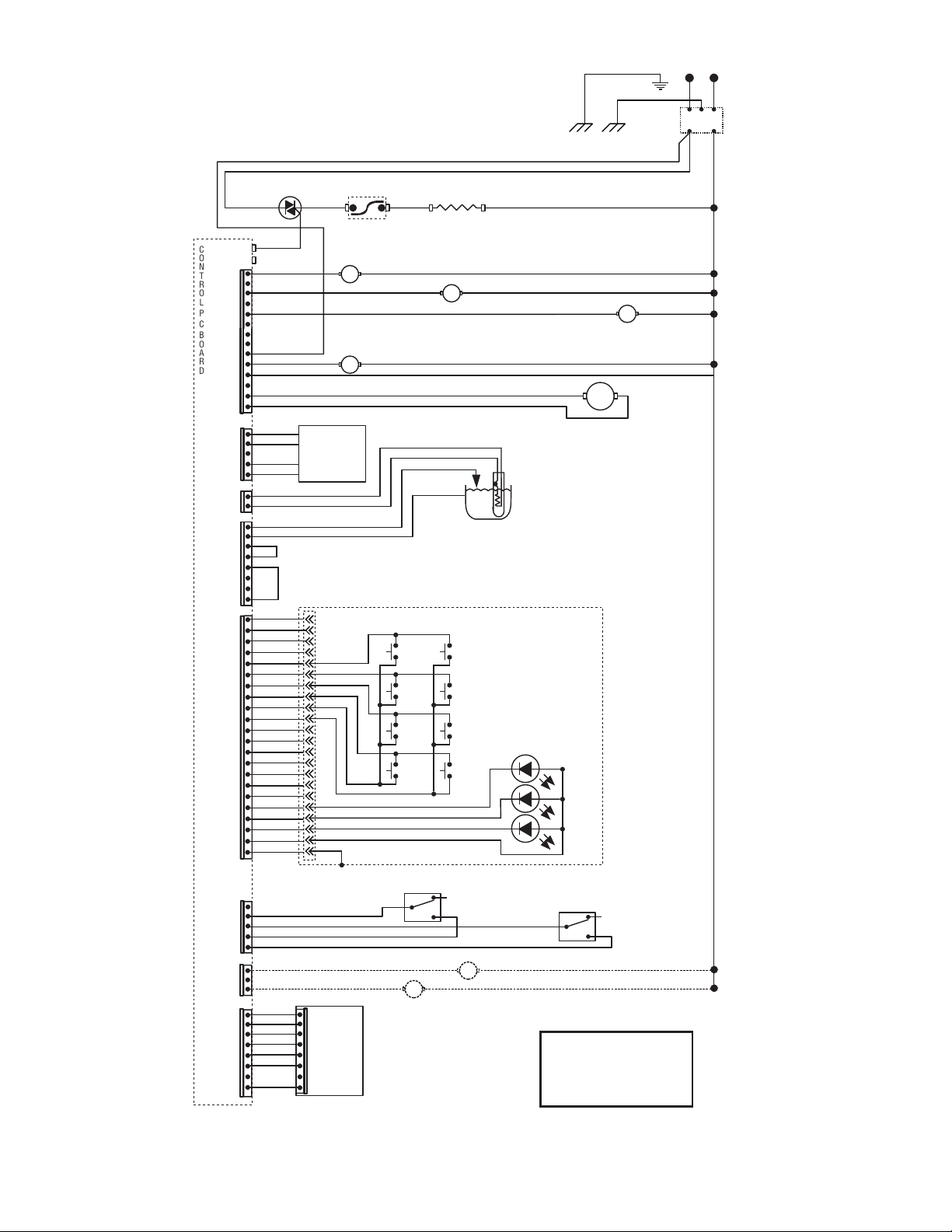
SCHEMATIC WIRING DIAGRAM
ITB
48835.0003A 05/17 ©2017 BUNN-O-MATIC CORPORATION
LIMIT THERMOSTAT
WHI/VIO
J17-1
J17-5
J15-1
J15-5
J17-10
J17-14
C
O
N
T
R
O
L
P
C
B
O
A
R
D
TR1
TR2
BLK
TAN
BLK-16
BLU-14
WHI/GRN
WHI/BLU
WHI
120V AC 2 WIRE
SINGLE PHASE
BLK
CONTROL PANEL ASSY
J2-1
1
22
J2-5
J2-15
J2-20
J2-22
J2-10
PROG L
BREW
A
PROG R
BREW
C
STATIC
SHIELD
WHI-16
TANK HEATER
1680W
J1-1
J1-5
J10-1
J10-3
J18A-1
J18A-8
J18A-5
FULL
FULL
HALF
HALF
ON/OFF
ON/OFF
BREW
B
GRN
BLK-18
N
L1
WHI
BLK
BLK-14
TRIAC
2. JUMPER FOR DUAL DILUTION MODELS ONLY
4. JUMPER 4 & 2 FOR ITB MODELS ONLY
3. JUMPER FOR DUAL DILUTION MODELS w/SWEETENER ONLY
1. JUMPER FOR SWEETENER MODELS ONLY
J2-1
J2-8
J2-5
J3-1
WHI/ORN
ORN
1
4
2
OPTIONAL LOW PRODUCT
DETECT SWITCH
3
WHI/RED
WHI/YEL
REFILL
DISPENSE
DILUTION (MAIN or LEFT)
SOL
SOL
SOL
RIGHT DILUTION (DUAL DILUTION MODELS ONLY)
SOL
WHI
WHI
OPTIONAL SWEETENER
SOL
WHI
WHI
WHI
WHI
USB
CBA
BRN/BLK
BRN/WHI
BRN/BLK
BRN/WHI
FUNNEL
LOCK
SOL
54299 070517
33
TRANSFORMER 10VA
BLK
WHI
YEL
YEL
BLK
WHI
GRN
PNK
BLK
PRIMARY
12VAC
PNK
WHI
GRN
LEVEL PROBE
t
TEMP
PROBE
WHI
DILUTION
WHI/VIO
WHI/VIO
SOL
SCHEMATIC WIRING DIAGRAM ITCB-DV HV
43828.0004A 06/17 ©2017 BUNN-O-MATIC CORPORATION
TAN
WHI
WHI
WHI/RED
WHI/VIO
WHI/RED
WHI
WHI
REFILL
DISPENSE
J1-1
J1-2
J10-1
J10-3
J17-1
J17-5
J15-1
J15-5
J17-10
J17-14
C
O
N
T
R
O
L
P
C
B
O
A
R
D
TR1
TR2
VIO
BLK
WHI/GRN
WHI/GRN
WHI/BLU
WHI
WHI/BLU
FUNNEL SENSOR
120V AC 2 WIRE
120/208V AC 3 WIRE
120/240V AC 3 WIRE
SINGLE PHASE
BLK
CONTROL PANEL ASSY
J2-1
1
J2-5
J2-15
J2-20
J2-22
J2-10
PROG L
BREW
A
PROG R
BREW
C
STATIC
SHIELD
J3-1
J3-8
J3-5
J13-1
BYPASS
SOL
SOL
SOL
1 3
FULL
FULL
HALF
HALF
ON/OFF
ON/OFF
BREW
B
BLK-18
N
L1
L2
WHI
BLK
RED
BLK-14
MAIN ON/OFF SWITCH
GRN/YEL
Chassis GroundEarth Ground
LIMIT THERMOSTAT
BLK-14
BLU-14
WHI-14
WHI/VIO-14
BLU-14
RED-14
TANK HEATER
1680W
TANK HEATER
2268W
SELECTOR SWITCH
TRIAC
USB
CBA
J18A-1
J18A-5
J18A-8
BRN/BLK
BRN/WHI
BRN/BLK
BRN/WHI
FUNNEL
LOCK
SOL
54299 070517

34
TRANSFORMER 10VA
BLK
WHI
YEL
YEL
BLK
WHI
GRN
PNK
BLK
PRIMARY
12VAC
PNK
WHI
GRN
LEVEL PROBE
t
TEMP
PROBE
RED
DILUTION
WHI/VIO
WHI/VIO
SOL
SCHEMATIC WIRING DIAGRAM ITCBA HV
43828.0006A 03/20 ©2020 BUNN-O-MATIC CORPORATION
TAN
RED
RED
WHI/RED
WHI/VIO
WHI/RED
RED
RED
REFILL
DISPENSE
J1-1
J1-2
J10-1
J10-3
J17-1
J17-5
J15-1
J15-5
J17-10
J17-14
C
O
N
T
R
O
L
P
C
B
O
A
R
D
TR1
TR2
VIO
BLK
WHI/GRN
WHI/GRN
WHI/BLU
RED
WHI/BLU
FUNNEL SENSOR
200-240V AC 2 WIRE
SINGLE PHASE
BLK
CONTROL PANEL ASSY
J2-1
1
J2-5
J2-15
J2-20
J2-22
J2-10
PROG L
BREW
A
PROG R
BREW
C
STATIC
SHIELD
J3-1
J3-8
J3-5
J13-1
BYPASS
SOL
SOL
SOL
1 3
FULL
FULL
HALF
HALF
ON/OFF
ON/OFF
BREW
B
BLK-18
L1
L2
BRN
BLU
BLK-14
MAIN ON/OFF SWITCH
GRN/YEL
Chassis GroundEarth Ground
LIMIT THERMOSTAT
BLK-14
BLU-14
RED-14
TRIAC
USB
CBA
J18A-1
J18A-5
J18A-8
BRN/BLK
BRN/WHI
BRN/BLK
BRN/WHI
FUNNEL
LOCK
SOL
BRN
BLU
EMI FILTER
GRN/YEL
Chassis Ground
TANK HEATER
THERMAL
FUSE
THERMAL
FUSE
35
TRANSFORMER 10VA
BLK
WHI
YEL
YEL
BLK
WHI
GRN
PNK
BLK
PRIMARY
12VAC
PNK
WHI
GRN
LEVEL PROBE
t
TEMP
PROBE
SCHEMATIC WIRING DIAGRAM
ITBA-DUAL DILUTION/SWEETENER
48835.0004A 06/17 ©2017 BUNN-O-MATIC CORPORATION
LIMIT THERMOSTAT
WHI/VIO
J17-1
J17-5
J15-1
J15-5
J17-10
J17-14
C
O
N
T
R
O
L
P
C
B
O
A
R
D
TR1
TR2
BLK
TAN
BLK-16
BLU-14
WHI/GRN
WHI/BLU
RED
220-240V AC 60HZ
2 WIRE
SINGLE PHASE
BLK
CONTROL PANEL ASSY
J2-1
1
22
J2-5
J2-15
J2-20
J2-22
J2-10
PROG L
BREW
A
PROG R
BREW
C
STATIC
SHIELD
RED-16
TANK HEATER
J1-1
J1-5
FULL
FULL
HALF
HALF
ON/OFF
ON/OFF
BREW
B
BLK-18
N
L1
RED
BLK
BLK-14
TRIAC
J3-1
J3-8
J3-5
J3-1
WHI/ORN
ORN
LEFT LOW PRODUCT
DETECT SWITCH
WHI/VIO
VIO
RIGHT LOW PRODUCT
DETECT SWITCH
WHI/YEL
REFILL
DISPENSE
LEFT DILUTION
SOL
SOL
SOL
RIGHT DILUTION
SOL
BLK
RED
EMI FILTER
RED
RED
RED
RED
RED
Chassis Ground
GRN/YEL
NO
NC
NO
NC
BRN/BLK
BRN/WHI
BRN/BLK
BRN/WHI
FUNNEL
LOCK
SOL
BLU/BLK
REDRIGHT SWEETENER
SOL
WHI/RED
REDLEFT SWEETENER
SOL
J10-1
J10-3
J18A-1
J18A-8
J18A-5
USB
CBA
54299 070517
36
37
TRANSFORMER 10VA
BLK
WHI
YEL
YEL
BLK
BLK
WHT
WHT
GRN
GRN
BLK
BLK
BLK
BLK
BLK
BRN
RED
RED
BLK
RED
BLK
RED
+ -
+
-
WHI
GRN
PNK
BLK
PRIMARY
12VAC
PNK
WHI
GRN
LEVEL PROBE
t
TEMP
PROBE
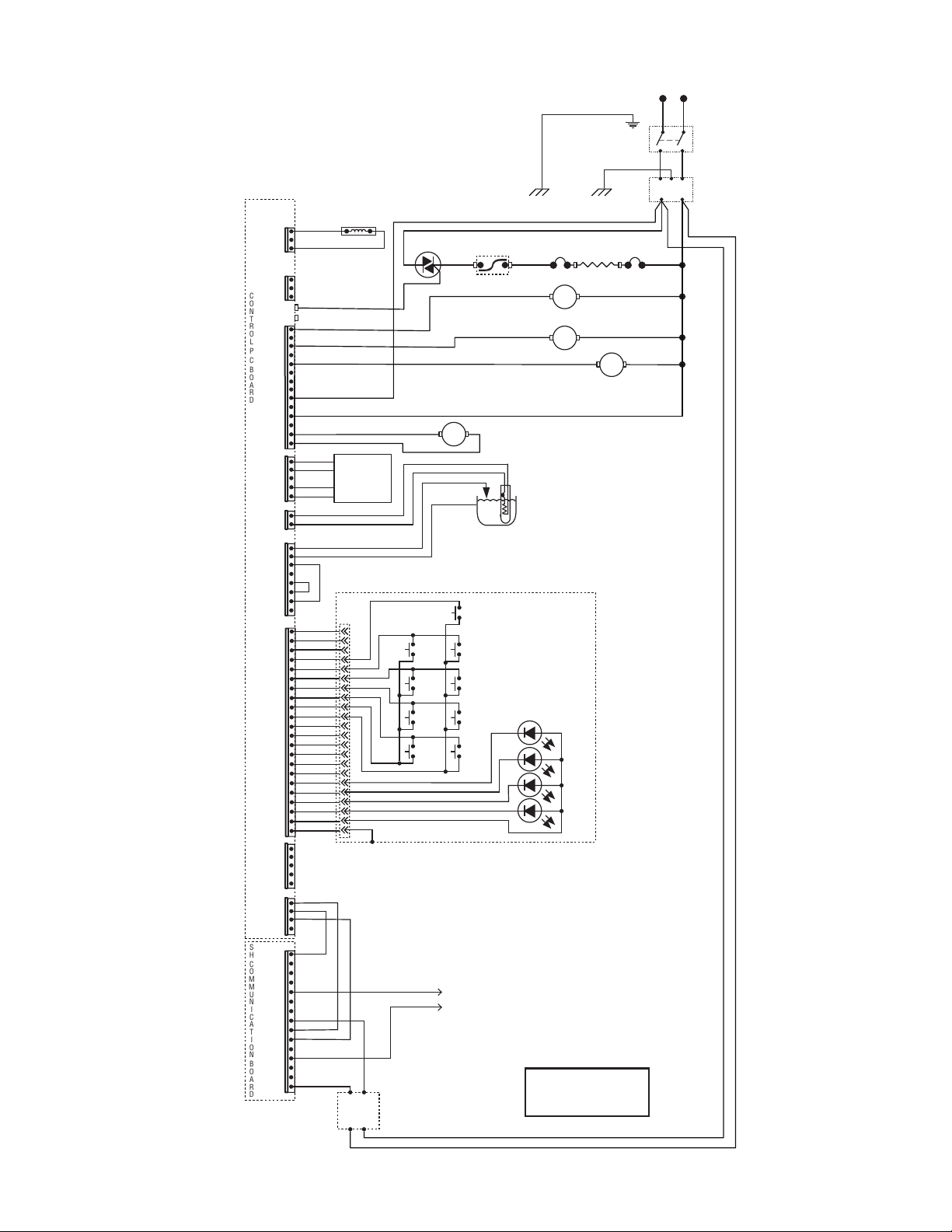
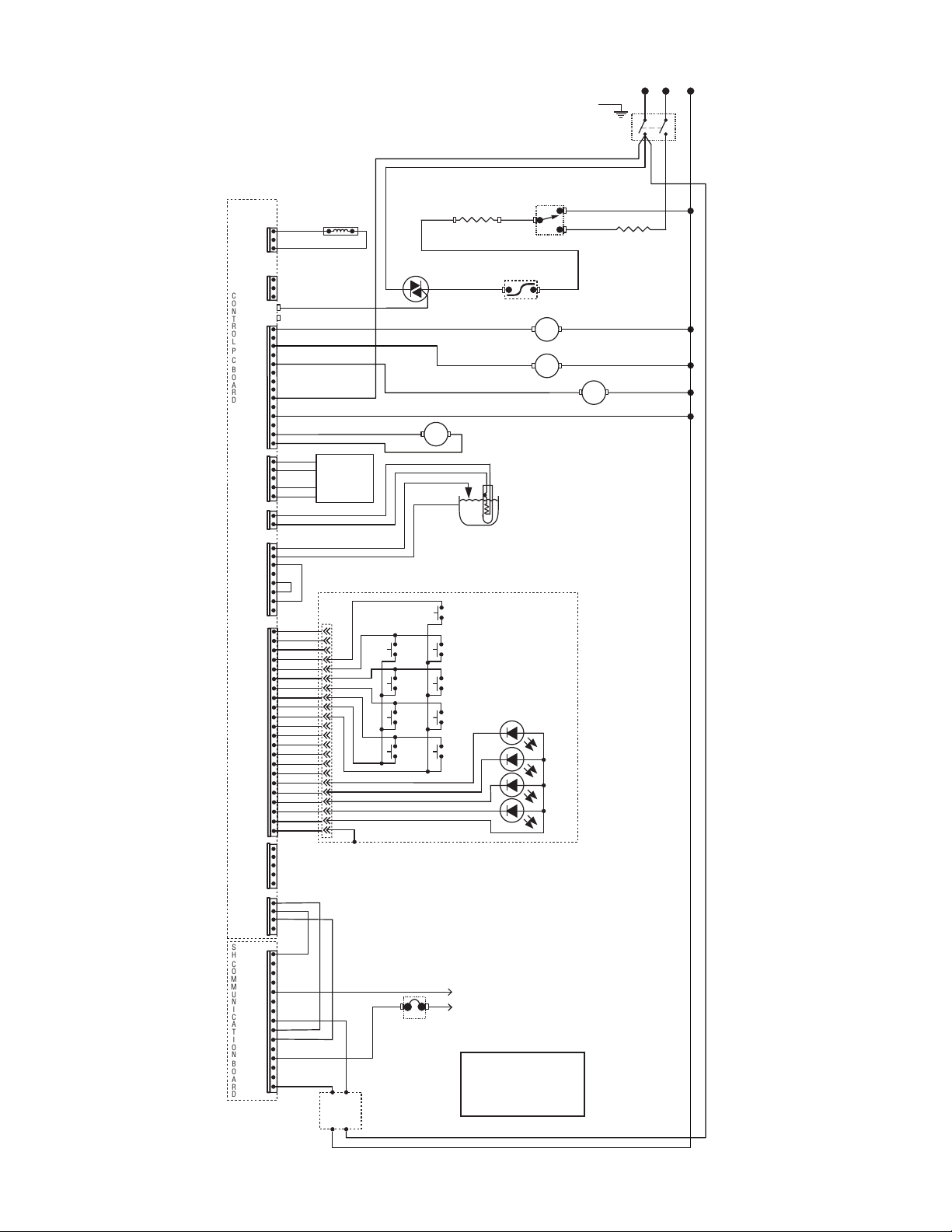
SCHEMATIC WIRING DIAGRAM ICBA SH
53494.0001B 02/18 ©2017 BUNN-O-MATIC CORPORATION
TAN
RED
RED
WHI/RED
RED
RED
REFILL
J21-1
J21-3
J17-1
J17-5
J15-1
J15-5
J17-10
J17-14
C
O
N
T
R
O
L
P
C
B
O
A
R
D
S
H
C
O
M
M
U
N
I
C
A
T
I
O
N
B
O
A
R
D
TR1
TR2
WHI/GRN
WHI/BLU
RED
200-240 VOLTS AC
2 WIRE + GND
SINGLE PHASE
LIMIT
THERMOSTAT
BLU-14
BLK
POWER
SUPPLY
24vdc
SERVER
J3-1
J3-5
J3-16
J3-10
J3-1
J3-8
J3-5
TANK HEATER
J13-1
BYPASS
EMI
FILTER
SOL
SOL
FUNNEL LOCK
(Optional)
BRN/BLK
BRN/WHI
SOL
SOL
DISPENSE
J16-1
J16-5
J4-1
J4-4
WHI/VIO
J20-1
J20-3
VIO
FUNNEL SENSOR
1 3
BLK-18
BLK-14
TRIAC
MT2 MT1
GATE
CONTROL PANEL ASSY
J2-1
1
J2-5
J2-15
J2-20
J2-22
J2-10
PROG L
BREW
A
PROG R
BREW
C
STATIC
SHIELD
LARGE
LARGE
MED
MED
SMALL
ON/OFF
ON/OFF
BREW
B
SMALL
GRN/YEL
GRN/YEL
L1
L2
BRN
BLU
BRN
BLU
MAIN
ON/OFF
SWITCH
Chassis GroundChassis Ground
THERMAL
FUSE
BLU
-14
RED
-14
THERMAL
FUSE
38
TRANSFORMER 10VA
BLK
WHI
YEL
YEL
BLK
BLK
WHT
WHT
GRN
GRN
BLK
BLK
BLK
BLK
BLK
BRN
RED
WHT
BLK
WHT
BLK
WHT
+ -
+
-
WHI
GRN
PNK
BLK
PRIMARY
12VAC
PNK
WHI
GRN
LEVEL PROBE
t
TEMP
PROBE
SCHEMATIC WIRING DIAGRAM ICB SH DV
53494.0003A 03/18 ©2018 BUNN-O-MATIC CORPORATION
TAN
WHI
WHI
WHI
WHI/RED
WHI
WHI
REFILL
J21-1
J21-3
J17-1
J17-5
J15-1
J15-5
J17-10
J17-14
C
O
N
T
R
O
L
P
C
B
O
A
R
D
S
H
C
O
M
M
U
N
I
C
A
T
I
O
N
B
O
A
R
D
TR1
TR2
WHI/GRN
WHI/BLU
WHI
120V AC 2 WIRE
120/208V AC 3 WIRE
120/240V AC 3 WIRE
SINGLE PHASE
BLK
POWER
SUPPLY
24vdc
SERVER
J3-1
J3-5
J3-16
J3-10
J3-1
J3-8
J3-5
J13-1
BYPASS
SOL
SOL
FUNNEL LOCK
(Optional)
BRN/BLK
BRN/WHI
SOL
SOL
DISPENSE
J16-1
J16-5
J4-1
J4-4
WHI/VIO
J20-1
J20-3
VIO
FUNNEL SENSOR
1 3
GRN
BLK-18
N
L1
L2
WHI
BLK
RED
RED
BLK-14
MAIN ON/OFF SWITCH
TRIAC
MT2
MT1
4
AMP
CONTROL PANEL ASSY
J2-1
1
J2-5
J2-15
J2-20
J2-22
J2-10
PROG L
BREW
A
PROG R
BREW
C
STATIC
SHIELD
LARGE
LARGE
MED
MED
SMALL
ON/OFF
ON/OFF
BREW
B
SMALL
SELECTOR
SWITCH
BLK-14
BLK-14
WHI-14
WHI/VIO-14
BLU-14
RED-14
TANK HEATER
1800W
TANK HEATER
2268W
GATE
BLK-14
LIMIT
THERMOSTAT