@YAMAHA
Owner's Manual
English for North America
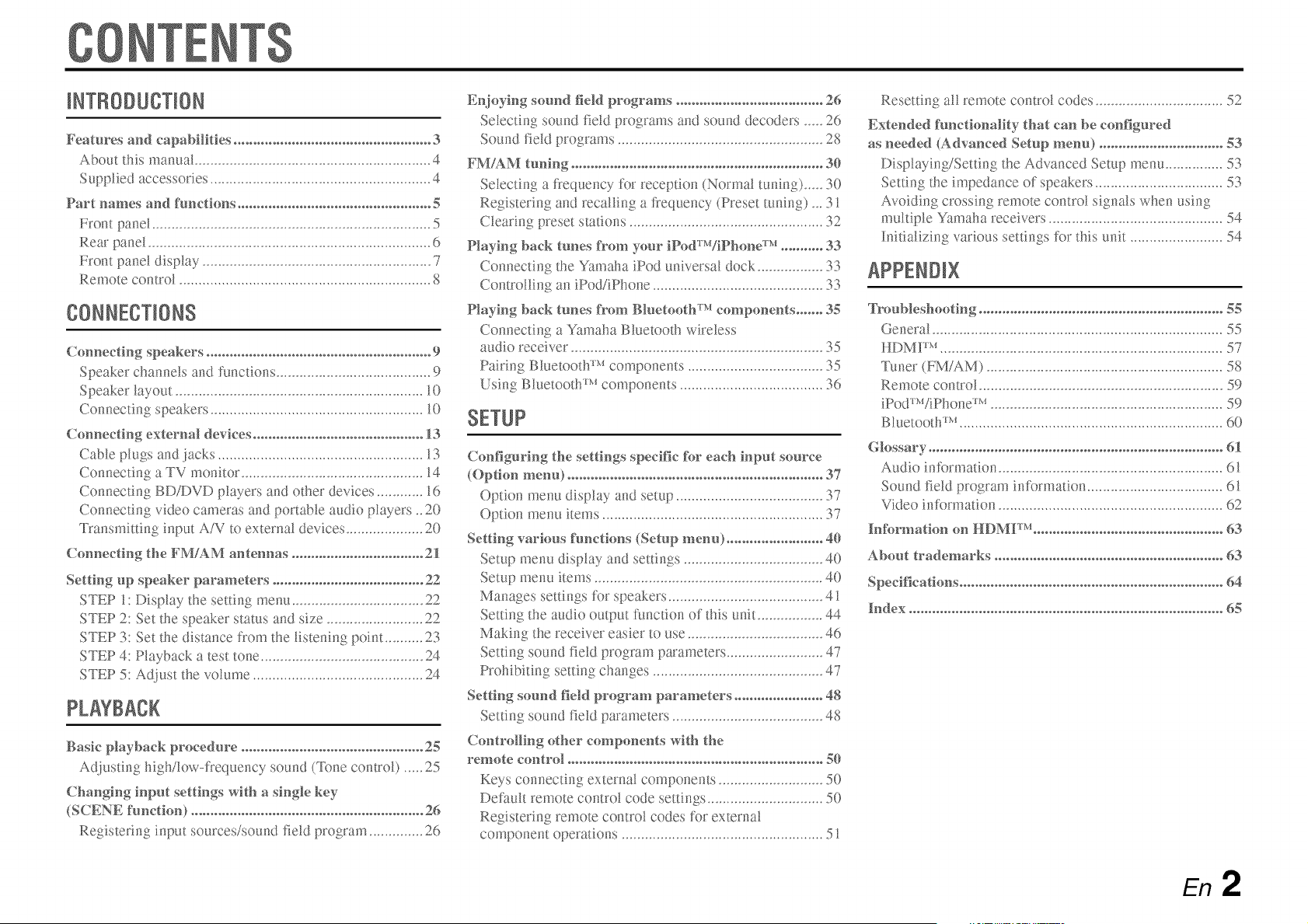
Cormectf_g speakers .......................................................... 9
SpeakeR channds arid functions ........................................ 9
SpeakeR layout ................................................................ 10
Connecting speakers ....................................................... 10
Cormectl_g externM devkes ............................................ 13
Cable plugs and jacks ..................................................... 13
Connecting a TV monitor ............................................... 14
Connecting BD/DVD players and other devices ............ 16
Connectir_g video cameras arid portable audio players _20
Transmitting input AiV to external devices .................... 20
Connectf_g t}_eFM/AM aR_tennas .................................. 21
Setth N up speaker parameters ....................................... 22
STEP 1: Display the setting menu .................................. 22
STEP 2: Set the speaker status arid size ......................... 22
STEP 3: Set the distance from the listening point .......... 23
STEP 4: Playback a test tone .......................................... 24
STEP 5: Adjust the volume ............................................ 24
Bask playback procedure ............................................... 25
Adjusting high/low-frequency sound (%me control) ..... 25
f_put setth_gs wft}_ a sf_gle key
(SCENE fimct[o_) ............................................................ 26
Registering input sources/sound fidd program .............. 26
ER_joyhN sound field programs ...................................... 26
Selecting sound field programs and sound decoders ..... 26
Sound field programs ..................................................... 28
FM/AM tunf_g ................................................................. 30
Sdecting a frequency for reception (Normal tuning) ..... 30
Registering arid recalling a frequency (Preset tuning) _. 31
Clearing preset stations .................................................. 32
Playh_g back tunes @ore your fDMrr'VfP/mne Tr'_........... 33
Connectir_g the Yamaha iPod universal dock ................. 33
Controlling an iPod/iPhone ............................................ 3?,
Playh_g back tunes @ore Bh_etoot}f rr'_components ....... 35
Connecting a Yamaha Bluetooth wireless
audio receiver ................................................................. 35
Pairing Bluetooth TMcomponents ................................... 35
Using Bluetooth _Mcomponents ..................................... 36
SETUP
Cor_figurf_g the settf_gs specific tbr each h_put source
(Op@m menu) .................................................................. 37
Option menu display arid setup ...................................... 37
Option menu items ......................................................... 37
Settling various f{mctfons (Setup menu) ......................... 40
Setup menu display arid settings .................................... 40
Setup menu items ........................................................... 40
Manages settings %r speakers ........................................ 41
Setting the audio output function of this unit ................. 44
Making the receiver easier to use ................................... 46
Setting, sound field program parameters ......................... 47
Prohibiting setting changes ............................................ 47
Settling sound field program parameters ....................... 48
Setting sound field parameters ....................................... 48
Controlll_g ot}_er components wlt}_t}_e
remote control .................................................................. 50
Keys connecting external compor_ents ........................... 50
Default remote control code settings .............................. 50
Registering remote control codes for external
component operations .................................................... 51
Resetting al! remote control codes ................................. 52
Extended fimctlo_MRy t}_at caR_be co_figured
as _eeded (AdvaR_ced Setup memo ................................ 53
Displaying/Settb_g the Advanced Setup menu ............... 53
Setting the impedance of speakers ................................. 53
Avoidir_g crossing remote contro! signals when using
multiple Yamaha receivers ............................................. 54
Initializing various settings £)r this unit ........................ 54
About trademarks ........................................................... 63
En 2

tl
• Built-in high-quality, high-power 5-channel amplifier
• 1-button input/sound field program switching (SCENE function) ....................... 26
• Speaker connections for 2- to 5.1-channel configurations
- Speaker channels and functions ................................................................................................................. 9
- Speaker layout .......................................................................................................................................... 10
- Speaker cable connection ......................................................................................................................... 10
- Speaker impedance configuration ............................................................................................................ 10
- Subwoofer cable connection .................................................................................................................... 12
• Acoustic parameter adjustment to match your speakers and listening
environment
- Setting for speaker acoustic parameters ................................................................................................... 22
- Specifying the settings for each speaker .................................................................................................. 41
- Volume control for each speaker .............................................................................................................. 42
- Speaker distance settings ......................................................................................................................... 42
- Sound quality control with the equalizer <Graphic Equalizer> .............................................................. 43
- Test tone speaker adjustment ................................................................................................................... 43
- Bass and treble level adjustment <Tone Control> ................................................................................... 25
• External device connection and playback
- Cables and input/output jacks for this unit .............................................................................................. 13
- TV connection .......................................................................................................................................... 14
- TV audio playback through this receiver ................................................................................................. 15
- Connections for BD/DVD players (recorders) and other devices ............................................................ 16
- Audio signal output to the TV connected via the HDMI jack ................................................................. 45
- Correction of lag between audio and video signals <Lipsync> ............................................................... 44
- External audio and video recorder connections ....................................................................................... 20
- HDMIiAV video input combining other audio input ............................................................................... 38
- Front panel external device connections (for video cameras, portable music players, etc.) .................... 20
- Protective cover for fiont panel jacks ........................................................................................................ 4
- Changing the input source names <Input Rename> ................................................................................ 46
- Configuring the settings specific for each input source <Option menu> ................................................ 37
- Playback from external devices ............................................................................................................... 25
- Playback fiom an iPod/iPhone (iPod/iPhone and components sold separately) ..................................... 33
- Playback fiom a Bluetooth component (Bluetooth and components sold separately) ............................ 35
• FM/AM Tuner
- FMiAM broadcast listening ..................................................................................................................... 30
- Simple preset tuning ................................................................................................................................ 31
• Multi-channel, multi-format playback
- Sound field effect selection ...................................................................................................................... 2(_
- Playback without sound field effects ....................................................................................................... 27
- Stereo playback ........................................................................................................................................ 27
- Sound field effect configuration .............................................................................................................. 48
- Compressed-music playback ................................................................................................................... 26
• Front panel information display
- Front panel display information switching ................................................................................................ 7
- Front panel display brightness adjustment <Dimmer> ............................................................................ 47
- Digital video/audio signal information display <Signal Info> ................................................................ 38
• Volume/sound quality adjustment functions
- Easy listening at low vohnnes <Adaptive DRC> .................................................................................... 44
- Maximum volume settings ....................................................................................................................... 45
- Startup volume settings ............................................................................................................................ 45
- Adjusting volume between input sources <Volume Trim> ..................................................................... 37
• Remote control operation
- Remote control names and fimctions ......................................................................................................... 8
- Insert batteries into the remote control ...................................................................................................... 4
- External device operation with this unit's remote control ....................................................................... 50
- Multiple Yamaha receiver operation without signal interference <Remote ID Switching> .................... 54
• Other features
- Standby mode after prolonged non-operation <Auto Power Down function> ........................................ 47
- Standby mode alter a specific amount of time <Sleep timer> ................................................................... 8
- To charge the iPod/iPhone when this unit is in standby mode <iPod Standby Charge> ......................... 34
- Initializing various settings for this unit .................................................................................................. 54
- Prohibiting setting changes <Memory Guard> ........................................................................................ 47
iiii!i!iiiii iiii!i!iiiii
About this manual
• This manual is printed prior to production. Design and
specifications are subject to change in part as a result of
improvements, etc. In case of differences between the manual and
product, the product has priority.
• "@HDN1H" (example) indicates the name of the parts on the
remote control. Refer to the "Part names and functions" (_)
for the information about each position of the parts.
• ;_;_ indicates that the reference is in the footnote. Refer to the
corresponding nmnbers on the bottom of the page.
• _m indicates the page describing the related information.
Click on the "
• at the bottom of the page to display the
corresponding page in "Part names and functions."
Front panel
Rear panel
Front panel display
} Remote control
Supp#ed accessodes
Check that you received all of the following parts.
• Remote control
• Batteries (AAA. R03. UM-4) x 2
• AM loop antenna
• Indoor FM antenna
• VIDEO AUX input cover
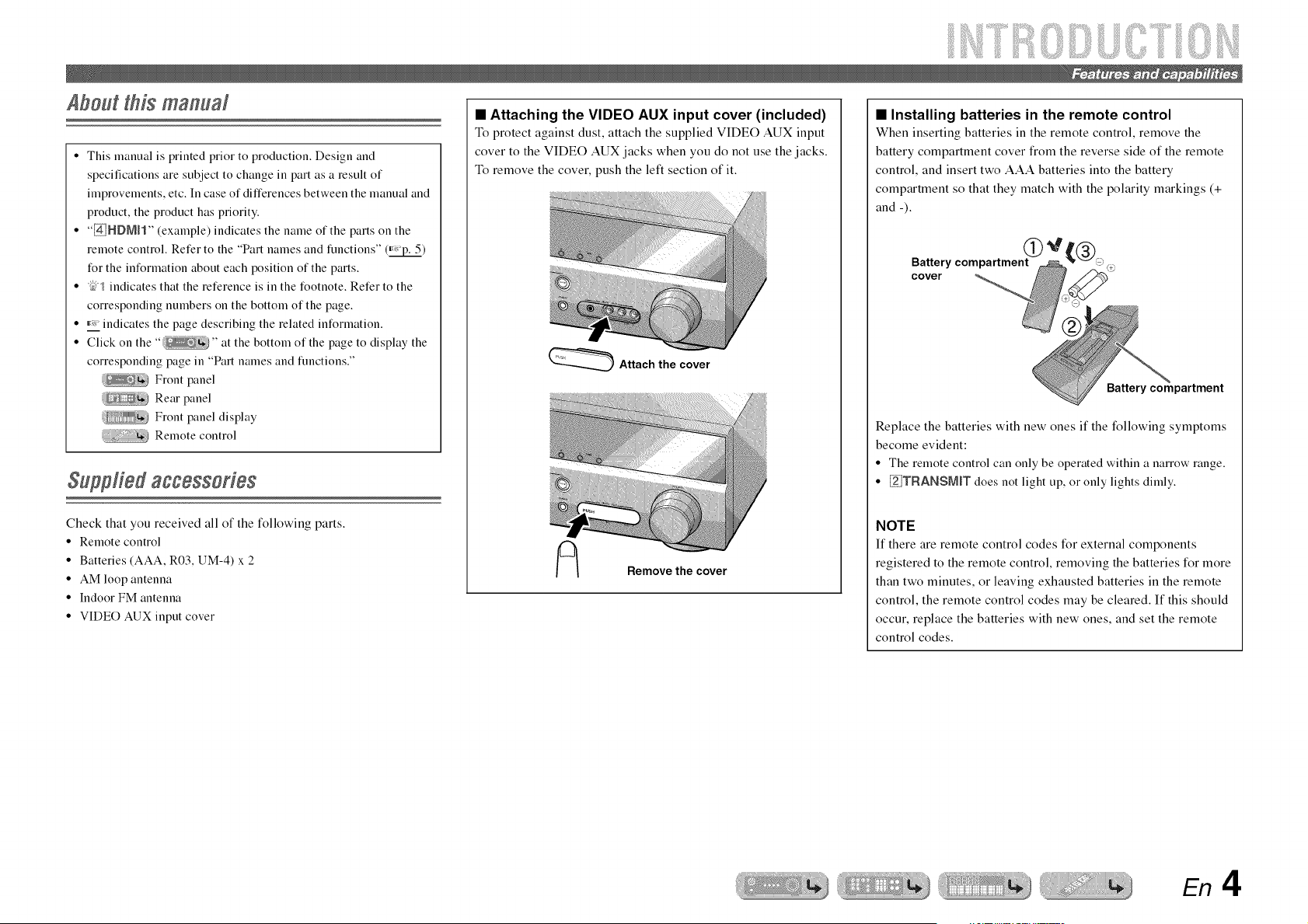
• Attaching the VIDEO AUX input cover (included)
To protect against dust, attach the supplied VIDE() AUK input
cover to the VIDEO AUX jacks when you do not use the jacks.
To remove the cover, push the left section of it.
_ Attach the cover
Remove the cover
• Installing batteries in the remote control
When inserting batteries in the remote control, remove the
battery compartment cover from the reverse side of the remote
control, and insert two AAA batteries into the battery
compartment so that they match with the polarity markings (+
and -).
Battery compartment
cover
Battery compartment
Replace the batteries with new ones if the following symptoms
become evident:
• The remote control can only be operated within a narrow range.
• _TRANSMmT does not light up, or only lights dimly.
NOTE
If there are remote control codes for external components
registered to the remote control, removing the batteries for more
than two minutes, or leaving exhausted batteries in the remote
control, the remote control codes may be cleared. If this should
occur, replace the batteries with new ones, and set the remote
control codes.
En 4
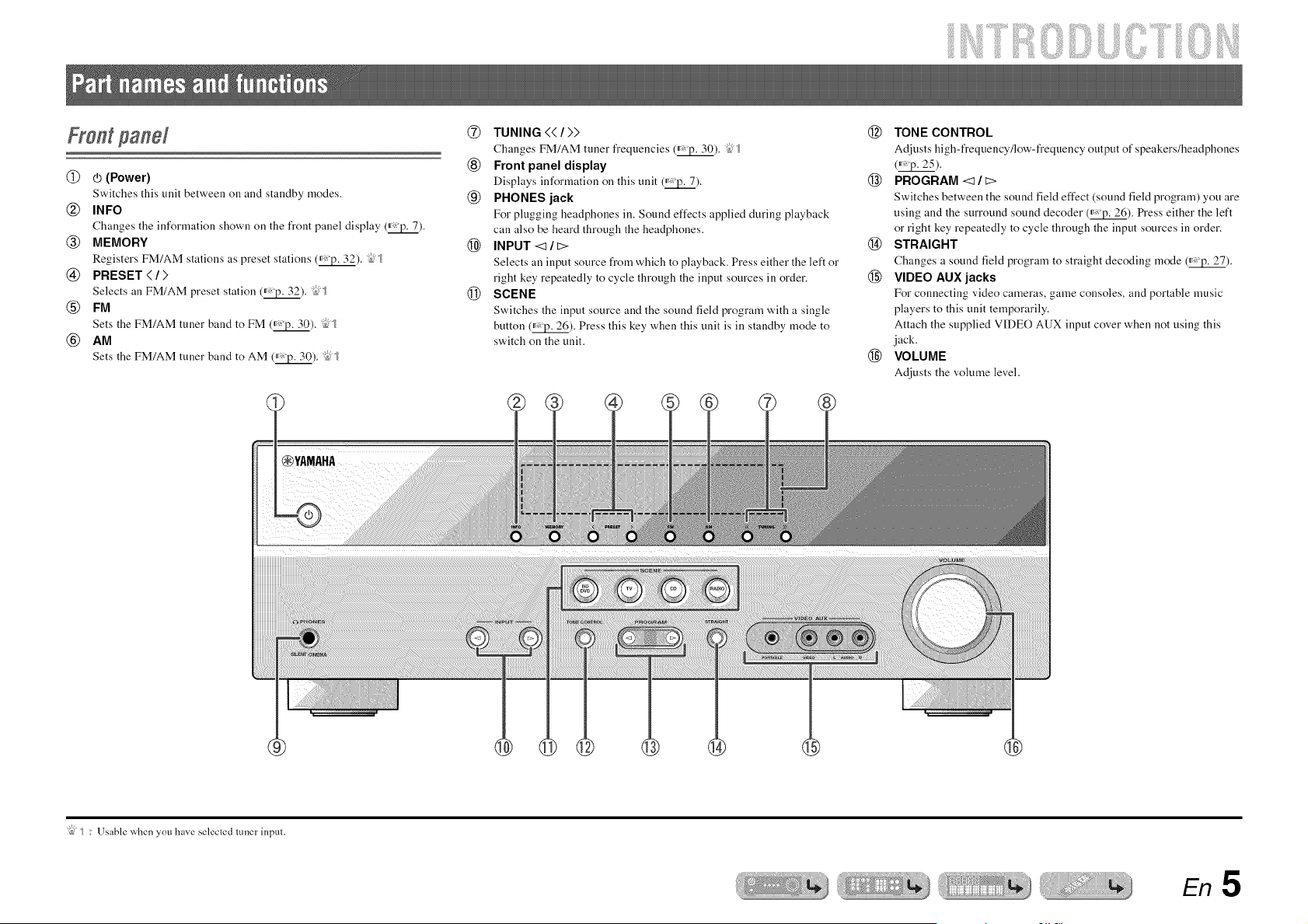
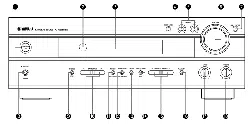
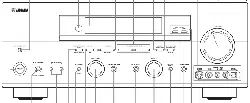
@ _ (Power)
Switches this unit between on and standby modes.
@ INFO
Changes the inforlllation shown on the front panel display (_).
@ MEMORY
Registers FM/AM stations as preset stations (_). "i_J_
@ PRESET</>
Selects an FM/AM preset station (_). "ibJ_
® FM
Sets the FM/AM tuner band to FM (_). "ib5_
® AM
Sets the FM/AM tuner band to AM (_). "145
®
®
®
@
®
TUNING << / >>
Changes FM/AM tuner frequencies (_). "ib5_
Front panel display
Displays information on this unit (_).
PHONES jack
For plugging headphones in. Sound effects applied during playback
can also be heard through the headphones.
INPUT -_ / E:>
Selects an input source from which to playback. Press either the left or
right key repeatedly to cycle through the input sources in order.
SCENE
Switches the input source and the sound field program with a single
button (_). Press this key when this unit is in standby mode to
switch on the unit.
@ TONE CONTROL
Adjusts high-frequency/low-frequency output of speakers/headphones
(_'p. 25).
@ PROGRAM <:1 / E:>
Switches between the sound field effect (sound field program) you are
using and the surround sound decoder (_). Press either the left
or right key repeatedly to cycle through the input sources in order.
@ STRAIGHT
Changes a sound field program to straight decoding mode (_).
@ VIDEO AUXjacks
For connecting video cameras, game consoles, and portable music
players to this unit temporarily.
Attach the supplied VIDEO AUX input cover when not using this
jack.
@ VOLUME
Adjusts the volume level.
"ibj _ : Usable when you have selecled tuner inpul.
En 5
iiii!i!iiiii iiii!i!iiiii
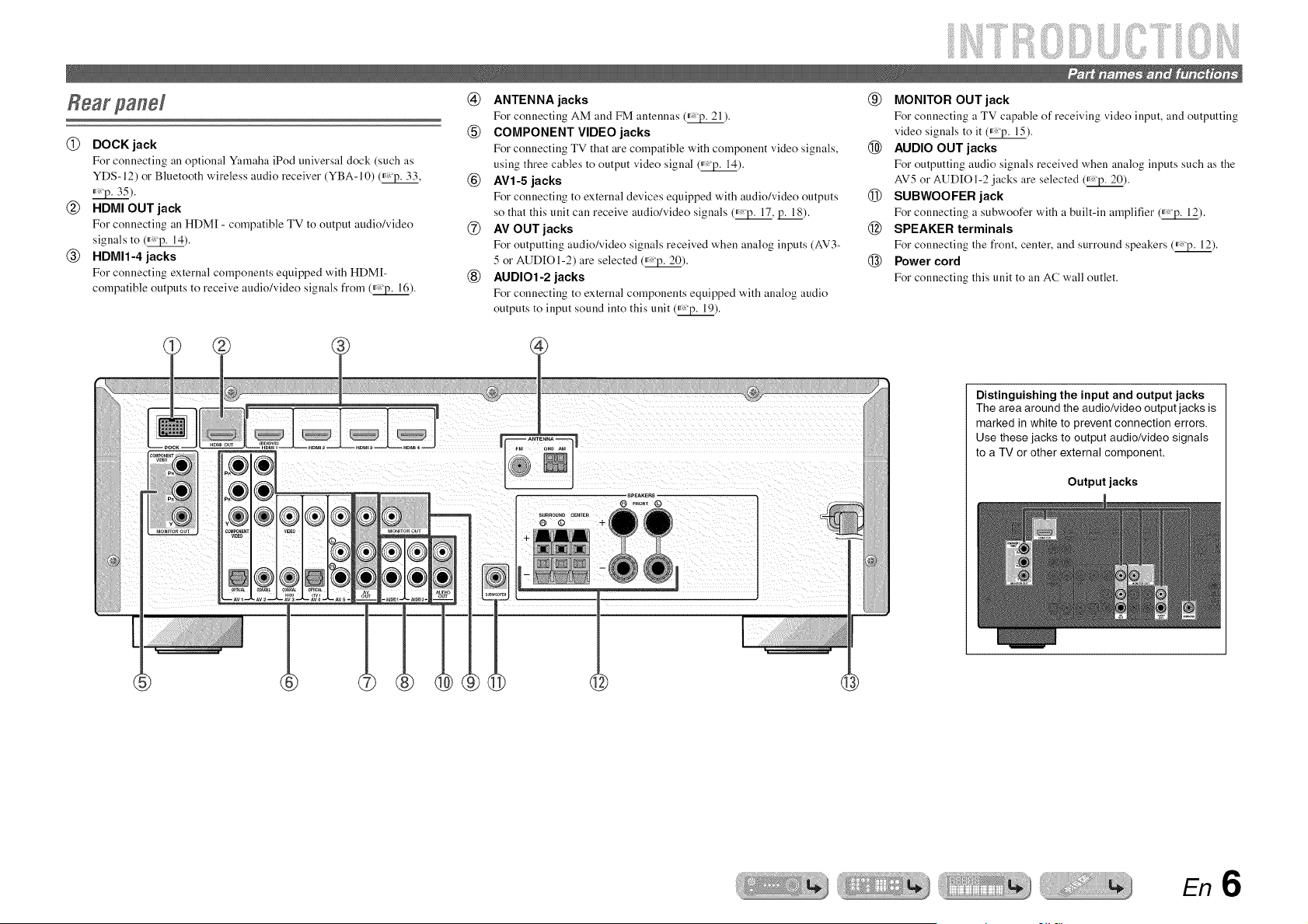
@ DOCK jack
For connecting an optional Yamaha iPod universal dock (such as
YDS-12) or Bluetooth wireless audio receiver (YBA-10) (_'p. 33,
_).
@ NDMIOUT jack
For connecting an HDM[ - compatible TV to output audio/video
signals to (_).
@ NDMIt-4 jacks
For connecting external components equipped with HDM[-
compatible outputs to receive audio/video signals from (_).
@ ANTENNA jacks
For connecting AM and FM antennas (_).
(_) COMPONENT VIDEO jacks
For connecting TV that are compatible with component video signals,
using three cables to output video signal (_).
@ AVI-5 jacks
For connecting to external devices equipped with audio/video outputs
so that this unit can receive audio/video signals (_, p. 18).
@ AV OUT jacks
For outputting audio/video signals received when analog inputs (AM3-
5 or AUDIOI-2) are selected (_).
(_) AUDIO1-2 jacks
For connecting to external components equipped with analog audio
outputs to input sound into this unit (_).
(_) MONITOR OUT jack
For connecting a TV capable of receiving video input, and outputting
video signals to it (_'p. 15).
@ AUDIO OUT jacks
For outputting audio signals received when analog inputs such as tile
AV5 or AUDIO 1-2 jacks are selected (_).
@ SUBWOOFER jack
For connecting a subwoofer with a built-in amplifier (_).
@ SPEAKER terminals
For connecting tile front, center, and surround speakers (_).
@ Power cord
For connecting this unit to all AC wall outlet.
[]
¸¸¸¸7¸¸¸¸¸ ;
Distinguishing the input and output jacks
The area around the audio/video output jacks is
marked in white to prevent connection errors.
Use these jacks to output audio/video signals
to a TV or other external component.
Output jacks
En6
iiii!i!iiiii iiii!i!iiiii
Front panel display
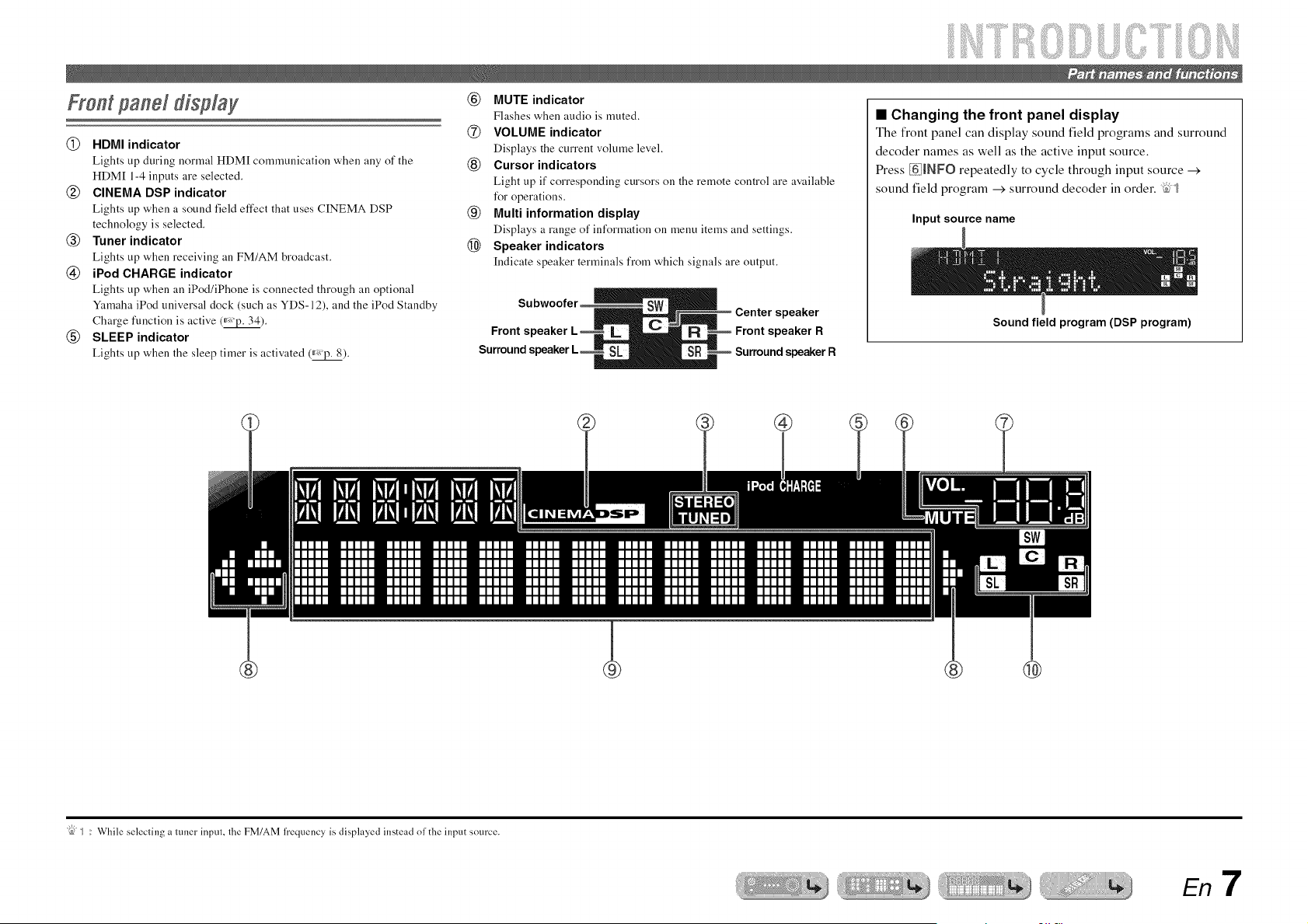
(_) HDMI indicator
Lights up during normal HDM[ communication when any of the
HDM[ 1-4 inputs are selected.
(g) CINEMA DSP indicator
Lights up when a sound field effect that uses CINEMA DSP
technology is selected.
(_) Tuner indicator
Lights up when receiving an FM/AM broadcast.
(_) iPod CHARGE indicator
Lights up when an iPod/iPhone is connected through an optional
Yamaha iPod universal dock (such as YDS-12), and the iPod Standby
Charge function is active (_).
(_) SLEEP indicator
Lights up when the sleep timer is activated (_*_'p.8).
(_) MUTE indicator
Flashes when audio is muted.
@ VOLUME indicator
Displays the current volume level.
(_) Cursor indicators
Light up if corresponding cursors on the remote control are available
for operations.
(_) Multi information display
Displays a range of information on menu items and settings.
@ Speaker indicators
[ndicate speaker terminals from which signals are output.
speaker
Front s R
Surround s ;peaLer R
• Changing the front panel display
The front panel can display sound field programs and surround
decoder names as well as the active input source.
Press _tNFO repeatedly to cycle through input source --->
sound field program --->surround decoder in order. "_=;'_
Input source name
Sound field program (DSP program)
®
®
"{bJ_ : While selecling a ttmer inpul, lhe FM/AM h'equency is displayed instead oldie input source.
En 7

......iiiiiiiiiiiii
Remote control
[]
%
%
,[]
,[]
%
,[]
[]
[] Remote control signal transmitter
Transmits infrared signals.
[] TRANSMIT
Lights up when a signal is output from the remote control.
[] SOURCE _ (SOURCE Power)
Switches an external component on and off,
[] Input selector
Select an input source on this unit from which to playback.
[]
HDMI1-4
AT1-5
AUDIO1-2
V-AUX
[A]/[B]
DOCK
TUNER
Tuner keys
Operates the FM/AM
input.
HDMll-4 jacks
AV 1-5 jacks
AUDIOI-2 jacks
Front panel VIDEO AUX jacks
Changes the external component you operating
with the _iExternaM component operation
keys; without changing inputs.
A Yamaha iPod universal dock or Bluetooth
wireless audio receiver connected to the DOCK
jack.
FM/AM tuner
tuner. These keys are used when using the tuner
FM Sets the FM/AM tuner band to FM.
AM Sets the FM/AM tuner band to AM.
MEMORY Presets radio stations.
PRESET/'- / v Selects a preset station.
TUNING _ / v Changes tuning frequencies.
[] INFO
Cycles the information displayed on the front panel display (the name
of the currently selected input source, the sound field program, the
surround decoder, the FM/AM tuner frequency, etc.)(_'p. 7).
[_ Sound selection keys
Switch between the sound field effect (sound field program) you are
using and the surround decoder (_).
[] SCENE
Switches the input source and the sound field program with a single
button (_'p. 26). Press this key when this unit is in standby mode to
switch on the unit.
[] SETUP
Displays a detailed Setup menu for this unit (_).
[] Cursor/x / v / <1/ _>, ENTER, RETURN
Cursor A / V / <1/ {> Select menu items and change settings when
settings menus, etc are displayed.
ENTER Confirms a selected item.
RETURN Returns to the previous screen when setting
menus are displayed, or ends the menu display.
[] External component operation keys
Operate recording, playback, and menu displays etc. for external
components. "Sit
[] Numeric keys
Enter numbers.
[] TVcontrol keys
Operate a monitor such as a TV.
[] CODE SET
Sets remote control codes for external component operations (_,
_).
[] RECEIVER _ (RECEIVER Power)
Switches this unit between on and standby modes.
[] SLEEP
Sets this unit to place itself in standby mode automatically after a
specified period of time has elapsed (sleep timer). Press this key
repeatedly to set the time for the sleep timer ikmction. The fl'ont panel
display indicator lights up when the sleep timer is activated.
_I_!IIEilIitl[ITmll_mm_lfitlml_W_
[] OPTION
Displays the Option menu for each input source (_).
[] VOLUME ./-
Adjusts the volume level (_).
[] MUTE
Turns the mute function of the sound output on and off (_).
: gull Call use separale []External component operation keys lk_reach input source Io operate regislered componenls. Remote control codes musl be regislered tk_r
each inpul ill advance if you wish to operale external components (_,p. 50).
En8
6 E $
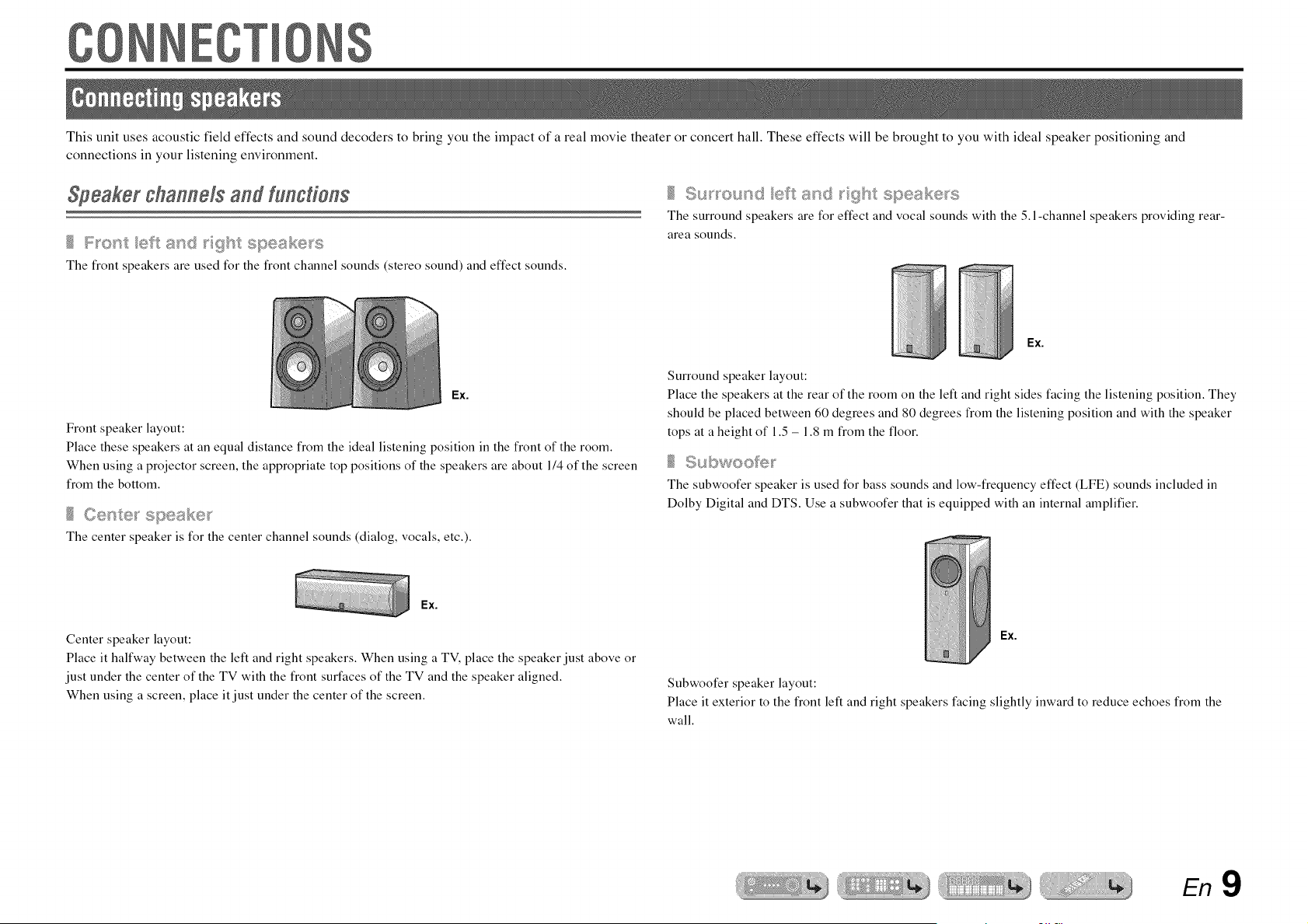
This unit uses acoustic field effects and sound decoders to bring you the impact of a real movie theater or concert hall. These effects will be brought to you with ideal speaker positioning and
connections in your listening environment.
Speaker channels and Yunctiens
The front speakers are used for the front channel sounds (stereo sound) and effect sounds.
Ex.
Front speaker layout:
Place these speakers at an equal distance from the ideal listening position in the front of the room.
When using a projector screen, the appropriate top positions of the speakers are about 114of the screen
from the bottom.
Tile center speaker is for tile center channel sounds (dialog, vocals, etc.).
Ex.
Center speaker layout:
Place it halfway between the left and right speakers. When using a TV, place the speaker just above or
just under the center of the TV with the front surfaces of the TV and the speaker aligned.
When using a screen, place it just under the center of the screen.
The surround speakers are for effect and vocal sounds with the 5. l-channel speakers providing rear-
area sounds.
Ex.
Surround speaker layout:
Place the speakers at the rear of the room on the left and right sides facing the listening position. They
should be placed between 60 degrees and 80 degrees from the listening position and with the speaker
tops at a height of 1.5 - 1.8 m from the floor.
Subwoofe_
The subwoofer speaker is used for bass sounds and low-frequency effect (LFE) sounds included in
Dolby Digital and DTS. Use a subwoofer that is equipped with an internal amplifier.
Ex.
Subwoofer speaker layout:
Place it exterior to the front left and right speakers facing slightly inward to reduce echoes from the
wall.
En9
iiiiiiiiiiii!i i
iiii!i!iiiii iiii!i!iiiii
gonnecHngspeakers
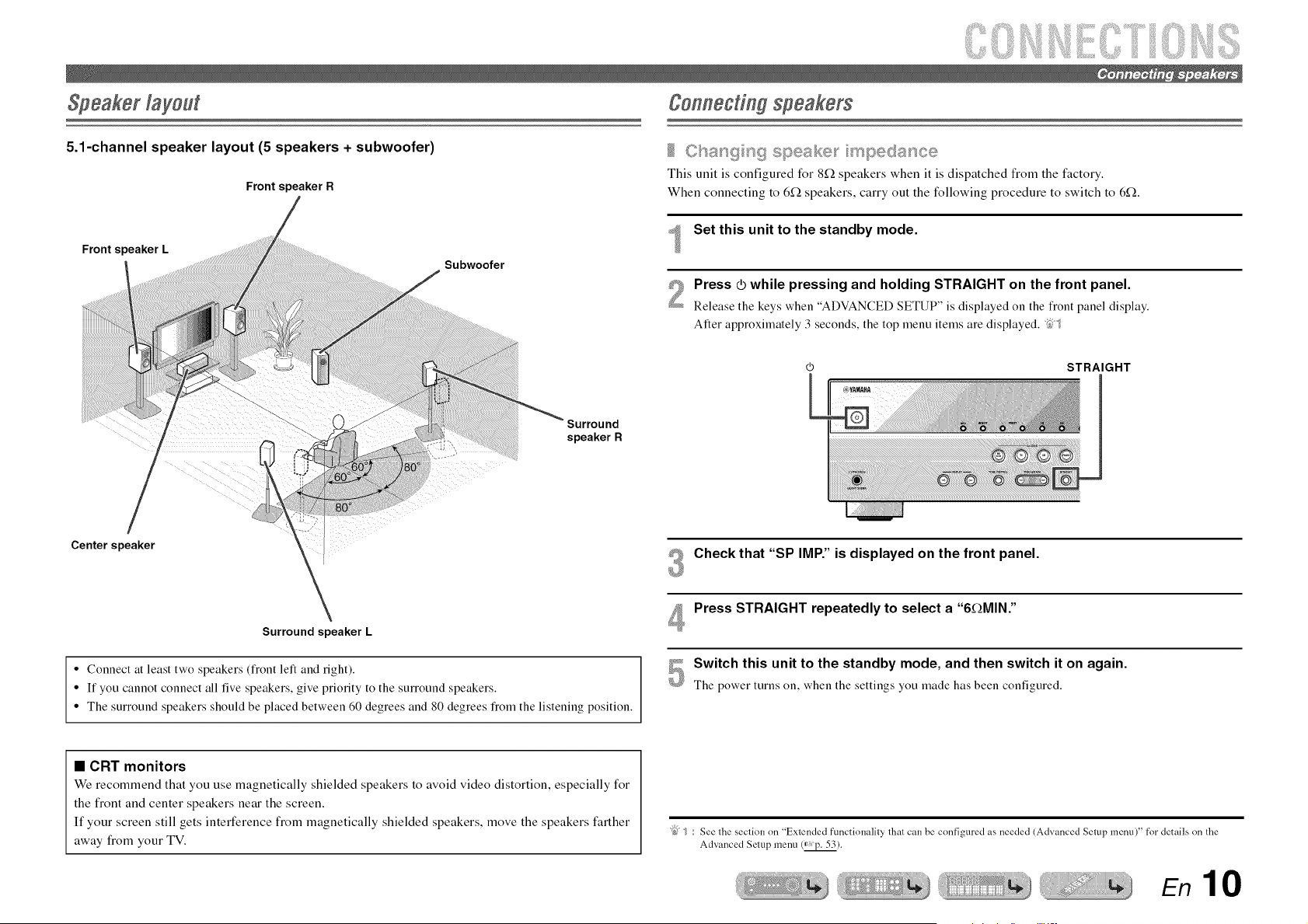
5.1-channel speaker layout (5 speakers + subwoofer)
Frontspeaker R
Front speaker L
Subwoofer
This unit is configured for 8f2 speakers when it is dispatched from the factory.
When connecting to 6f_ speakers, carry out the following procedure to switch to 6_.
Set this unit to the standby mode.
Press _ while pressing and holding STRAIGHT on the front panel.
Release the keys when "ADVANCED SETUP" is displayed on the fiont panel display.
After approximately 3 seconds, the top menu items are displayed. ;25_
J, Surround
speaker R
STRAIGHT
Center speaker
Surround speaker L
• Connect at least two speakers (fiont left and fight).
• If you cannot connect all five speakers, give priority to the surround speakers.
• The surround speakers should be placed between 60 degrees and 80 degrees from the listening position.
#_ Check that "SP IMP." is displayed on the front panel.
@
Press STRAIGHT repeatedly to select a "6_MIN."
Switch this unit to the standby mode, and then switch it on again.
The power turns on, when the settings you made has been configured.
• CRT monitors
We recommend that you use magnetically shielded speakers to avoid video distortion, especially for
the front and center speakers near the screen.
If your screen still gets interference from magnetically shielded speakers, move the speakers farther
away from your TV.
: See lhe seclion nn "Exlended functionality lhal can be configured as needed {Advanced Selup menu)" for details nn the
Advanced Setup menu (_ p. 53).
En 10

Connect your speakers to their respective terminals on the rear panel.
Front speaker
Surround speaker R L
R L
® ®
Subwoofer Center speaker
CAUTION
• Remove the AC power cord of this unit flom the power outlet before connecting the speakers.
• Generally speaker cables consist of two parallel insulated cables. One of these cables is a different
color, or has a line running along it, to indicate different polarity. Insert the different colored (or lined)
cable into the '%" (positive, red) terminal on this unit and the speakers, and the other cable into the "-"
(minus, black) terminal.
• Be careful that the core of the speaker cable does not touch anything or come into contact with the metal
areas of this unit. This may damage this unit or the speakers. If the speaker cables short circuit,
"CHECK SP WIRES!" will appear on the flont panel display when this unit is switched on.
En 11
iiiiiiiiiiii!i i
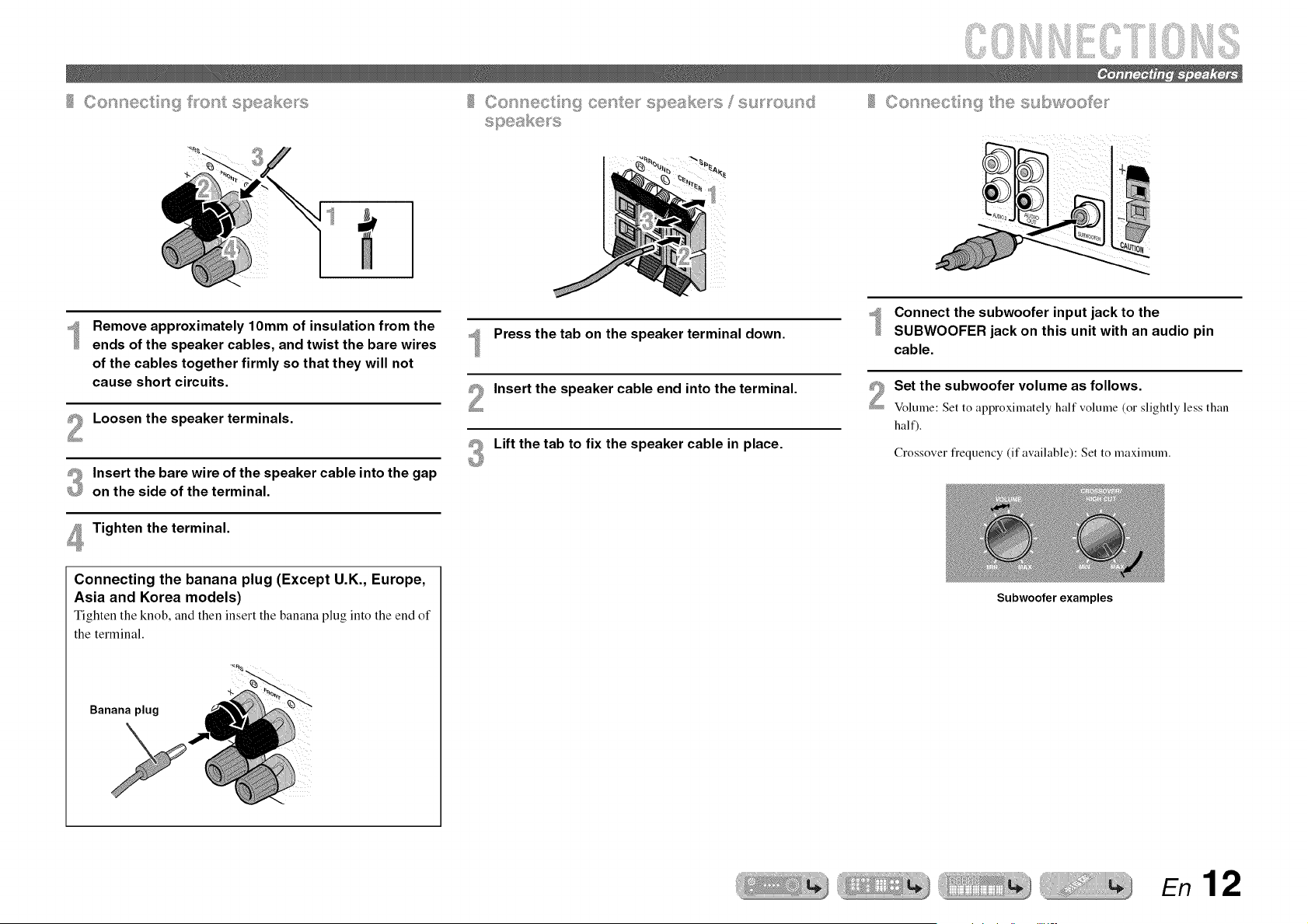
Remove approximately lOmm of insulation from the
ends of the speaker cables, and twist the bare wires
of the cables together firmly so that they will not
cause short circuits.
Loosen the speaker terminals.
Insert the bare wire of the speaker cable into the gap
on the side of the terminal.
Tighten the terminal.
Connecting the banana plug (Except U.K., Europe,
Asia and Korea models)
Tighten the knob, and then insert the banana plug into the end of
the terminal.
Banana plug
Press the tab on the speaker terminal down.
Insert the speaker cable end into the terminal.
Lift the tab to fix the speaker cable in place.
Connect the subwoofer input jack to the
SUBWOOFER jack on this unit with an audio pin
cable.
Set the subwoofer volume as follows.
Volume: Set to approximately hall volume (or slightly less than
half).
Crossover flequency (if available): Set to maximum.
Subwoofer examples
En 12
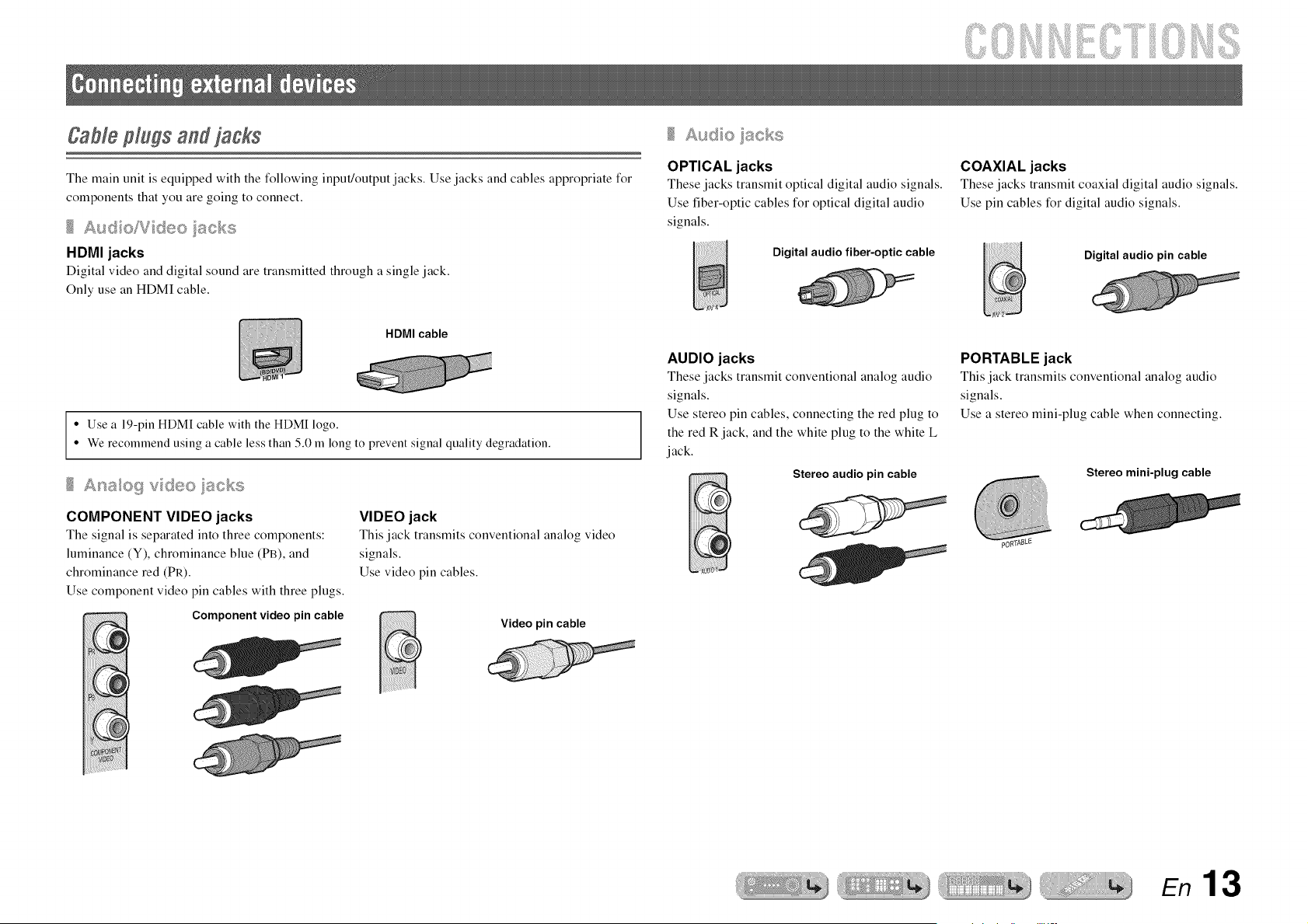
The main unit is equipped with the following input/output jacks. Use jacks and cables appropriate for
components that you are going to connect.
Aud oiV deo iiscks
HDMI jacks
Digital video and digital sound are transmitted through a single jack.
Only use an HDMI cable.
OPTICAL jacks
These jacks transmit optical digital audio signals.
Use fiber-optic cables for optical digital audio
signals.
Digital audio fiber-optic cable
COAXIAL jacks
These jacks transmit coaxial digital audio signals.
Use pin cables for digital audio signals.
Digital audio pin cable
HDMI cable
• Use a 19-pin HDMI cable with the HDMI logo.
• We recommend using a cable less than 5.0 m long to prevent signal quality degradation.
£_ao9 vdeo_scks
COMPONENT VIDEO jacks
The signal is separated into three components:
luminance (Y), chrominance blue (PB), and
chrominance red (PR).
Use component video pin cables with three plugs.
Component video pin cable
VIDEO jack
This jack transmits conventional analog video
signals.
Use video pin cables.
Video pin cable
AUDIO jacks
These jacks transmit conventional analog audio
signals.
Use stereo pin cables, connecting the red plug to
the red R jack, and the white plug to the white L
jack.
Stereo audio pin cable
PORTABLE jack
This jack transmits conventional analog audio
signals.
Use a stereo mini-plug cable when connecting.
Stereo mini-plug cable
En 13
iiiiiiiiiiii!i_i
_iiii!i!iiiii_iiii!i!iiiii
Connectinga TVmonitor
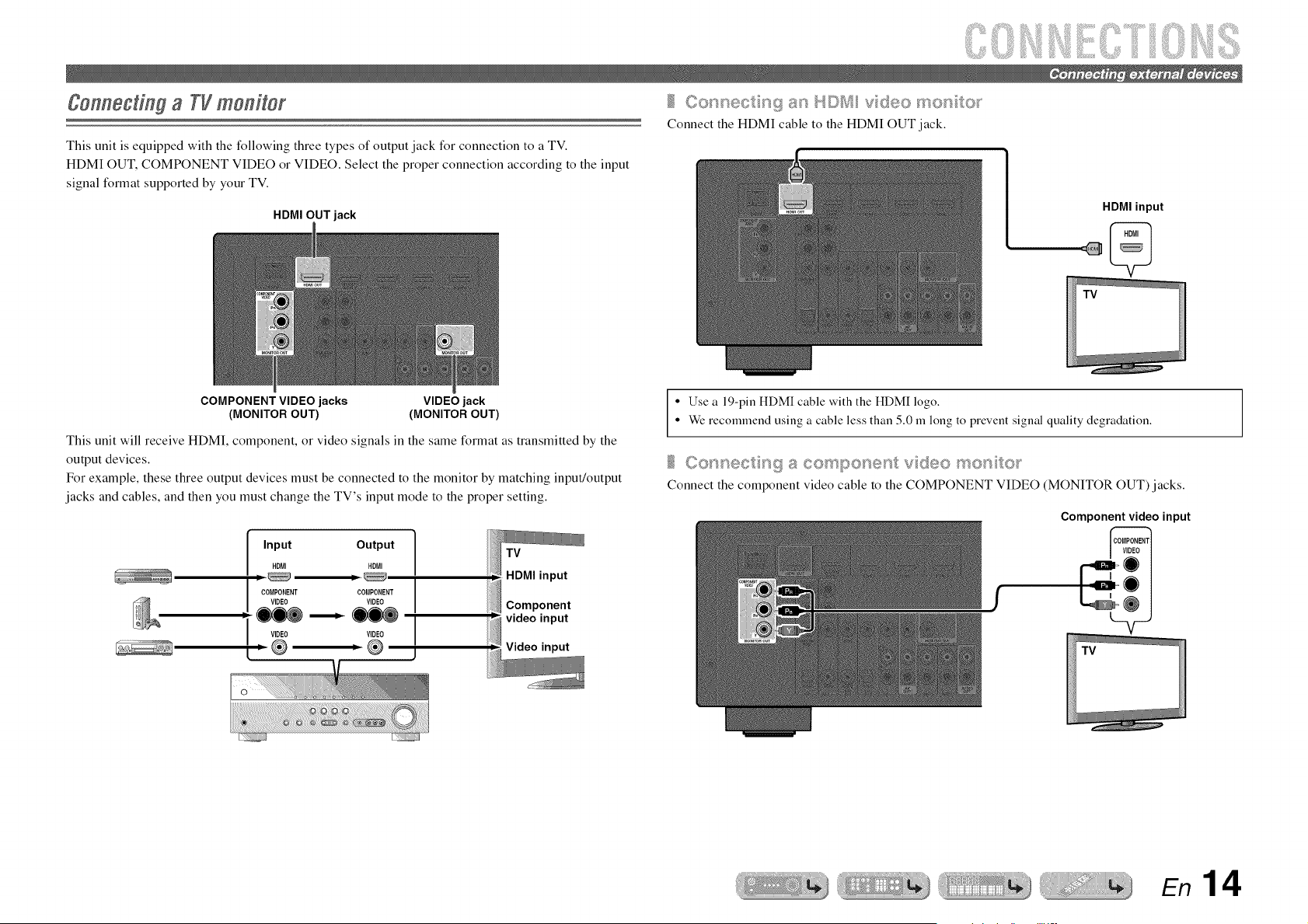
This unit is equipped with the following three types of output jack for connection to a TV.
HDMI OUT, COMPONENT VIDEO or VIDEO. Select the proper connection according to the input
signal format supported by your TV.
HDMI OUT jack
Connect the HDMI cable to the HDMI OUT jack.
HDMI input
COMPONENT VIDEO jacks
(MONITOR OUT)
VIDEO jack
(MONITOR OUT)
This unit will receive HDMI, component, or video signals in the same format as transmitted by the
output devices.
For example, these three output devices must be connected to the monitor by matching input/output
jacks and cables, and then you must change the TV's input mode to the proper setting.
Input Output
HDMI HDMI
m m
COMPONENT COMPONENT
VIDEO VIDEO
VIDEO VIDEO
® ,®
1
i
I
J
• Use a 19-pin HDMI cable with the HDMI logo.
• We recommend using a cable less than 5.0 m long to prevent signal quality degradation.
Connect the component video cable to the COMPONENT VIDEO (MONITOR OUT)jacks.
Component video input
En 14
iiiiiiiiiiii!i i
iiii!i!iiiii iiii!i!iiiii
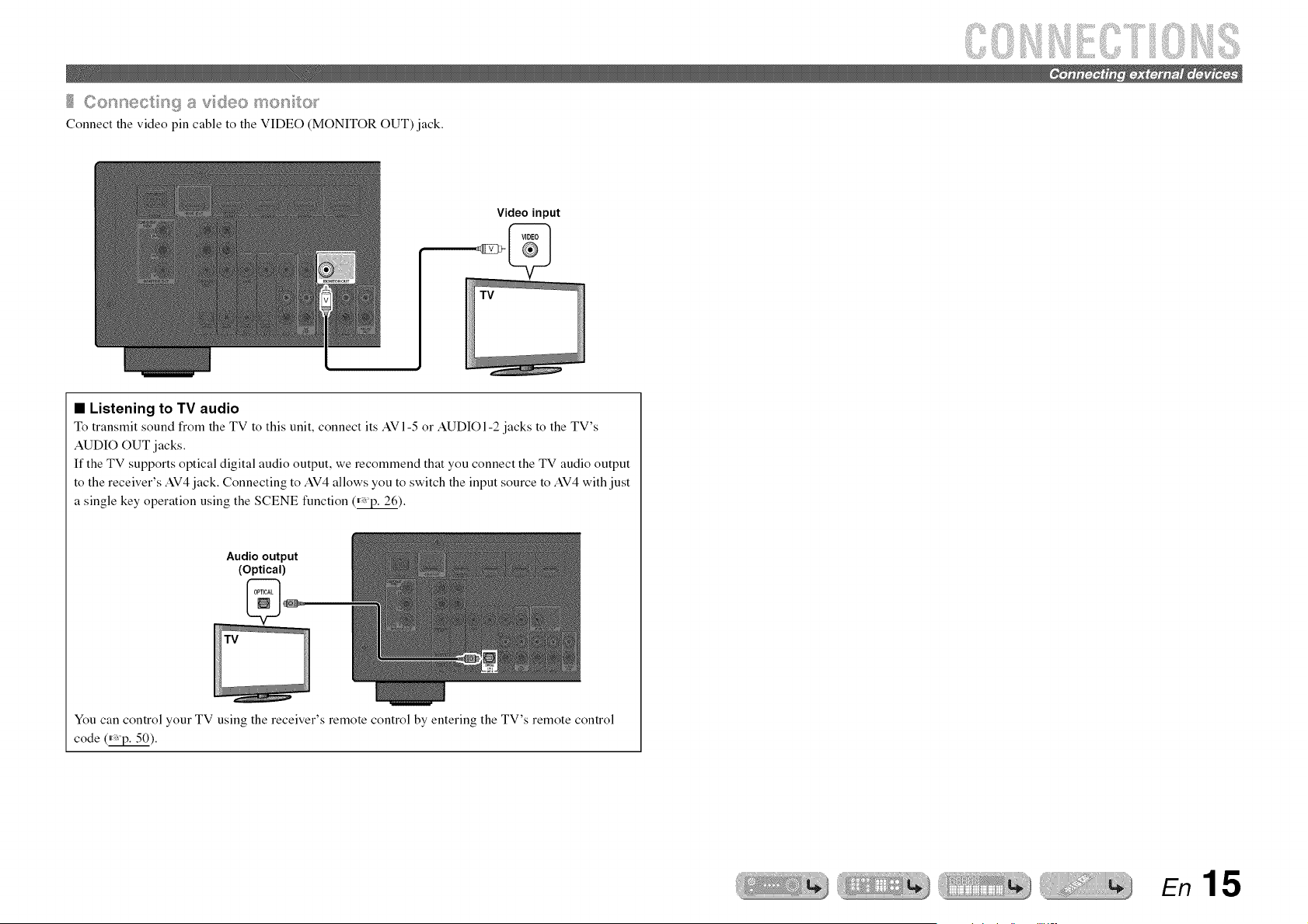
Connect the video pin cable to the VIDEO MONITOR OUT) jack.
Video input
• Listening to TV audio
To transmit sound from the TV to this umt, connect its AVI-5 or AUDIO 1-2 jacks to the TV's
AUDIO OUT jacks.
If the TV supports optical digital audio output, we recommend that you connect the TV audio output
to the receiver's AV4 jack. Connecting to AV4 allows you to switch the input source to AV4 with just
a single key operation using the SCENE function (_avp.26).
Audio output
(Optical)
You can control your TV using the receiver's remote control by entering the TV's remote control
code (_).
En 15
iiiiiiii
@ Input seRector
[_ ENTER
!_i OPTION
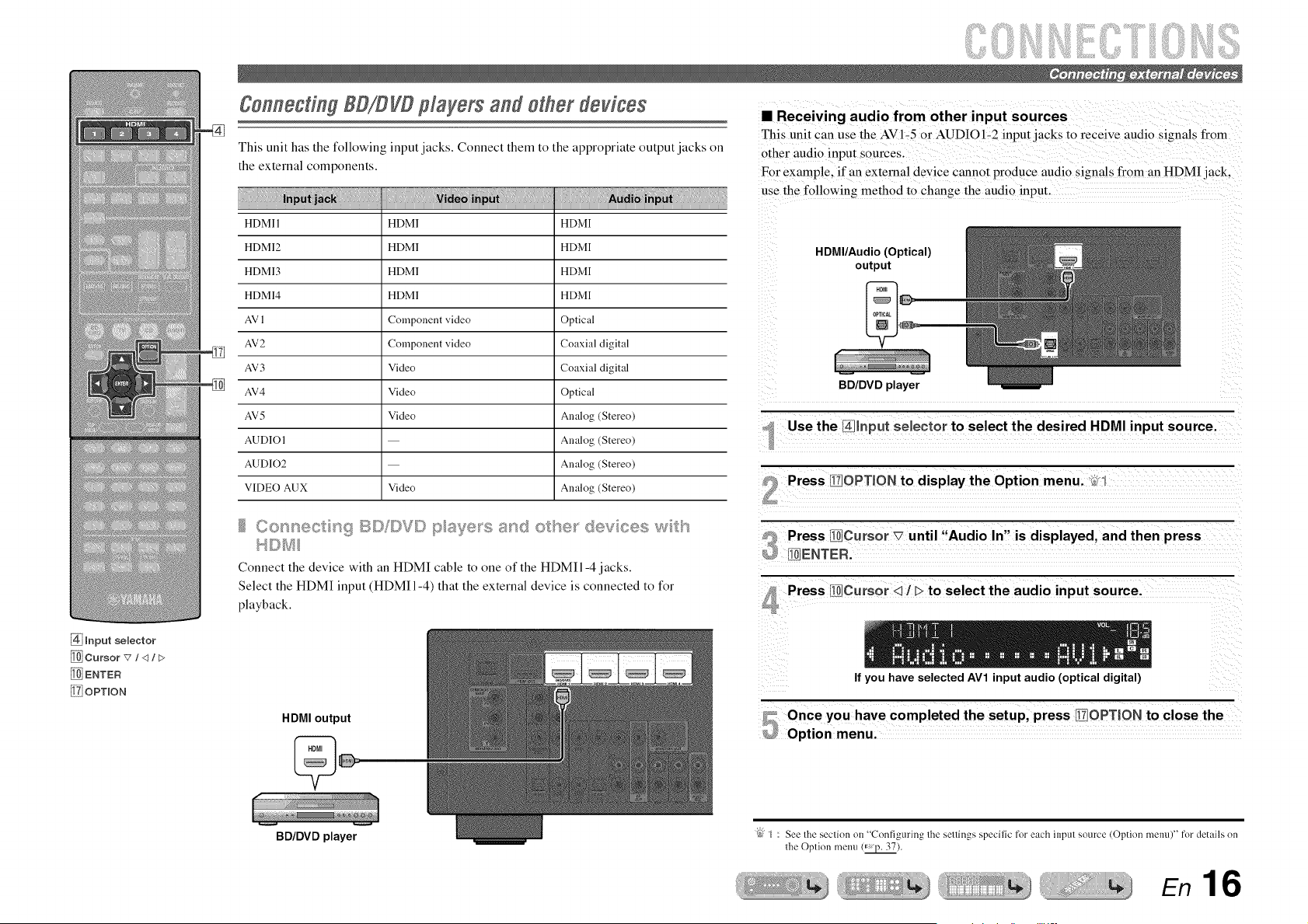
@nnech g BD/DVDplayers and other devices
This unit has the following input jacks. Connect them to the appropriate output jacks on
the external components.
HDMI 1 HDM] HDMI
HDMI2 HDM] HDMI
HDMI3 HDM] HDMI
HDMI4 HDM] HDMI
AV 1 Component video Optical
AV2 Component video Coaxial digital
AV3 Video Coaxial digital
AV4 Video Optical
AV5 Video Analog (Stereo)
AUD]OI Analog (Stereo)
AUDIO2 Analog (Stereo)
VIDEO AUX Video Analog (Stereo)
14©_Jll
Connect the device with an HDMI cable to one of the HDMI1-4 jacks.
Select the HDMI input (HDMI1-4) that the external device is connected to for
playback.
HDMI output
• Receiving audio from other input sources
This unit can use the AV 1-5 or AUDIO 1-2 input jacks to receive audio signals from
other audio input sources.
For example, if an external device cannot produce audio signals from an HDMI jack,
use the followin_ method m change the audio input.
HDMI/Audio (Optical)
output
w
BD/DVD player
Use the I_llnput selector to select the desired HDMI input source.
Press Ii_/OPTION to display the Option menu. _;_1
Press 10]Cursor x7 until "Audio In" is displayed, and then press
Ii ENTER.
Press ]li]Cursor <11> to select the audio input source.
If you have selected AV1 input audio (optical digital)
BD/DVD player
(_" ] : See the seclion on "Configuring the settings specific for each input source (Option memO" for details nn
the Optinn metal (_ p. 37).
En 16
iiiiiiiiiiii!i i
iiii!i!iiiii iiii!i!iiiii
cabes
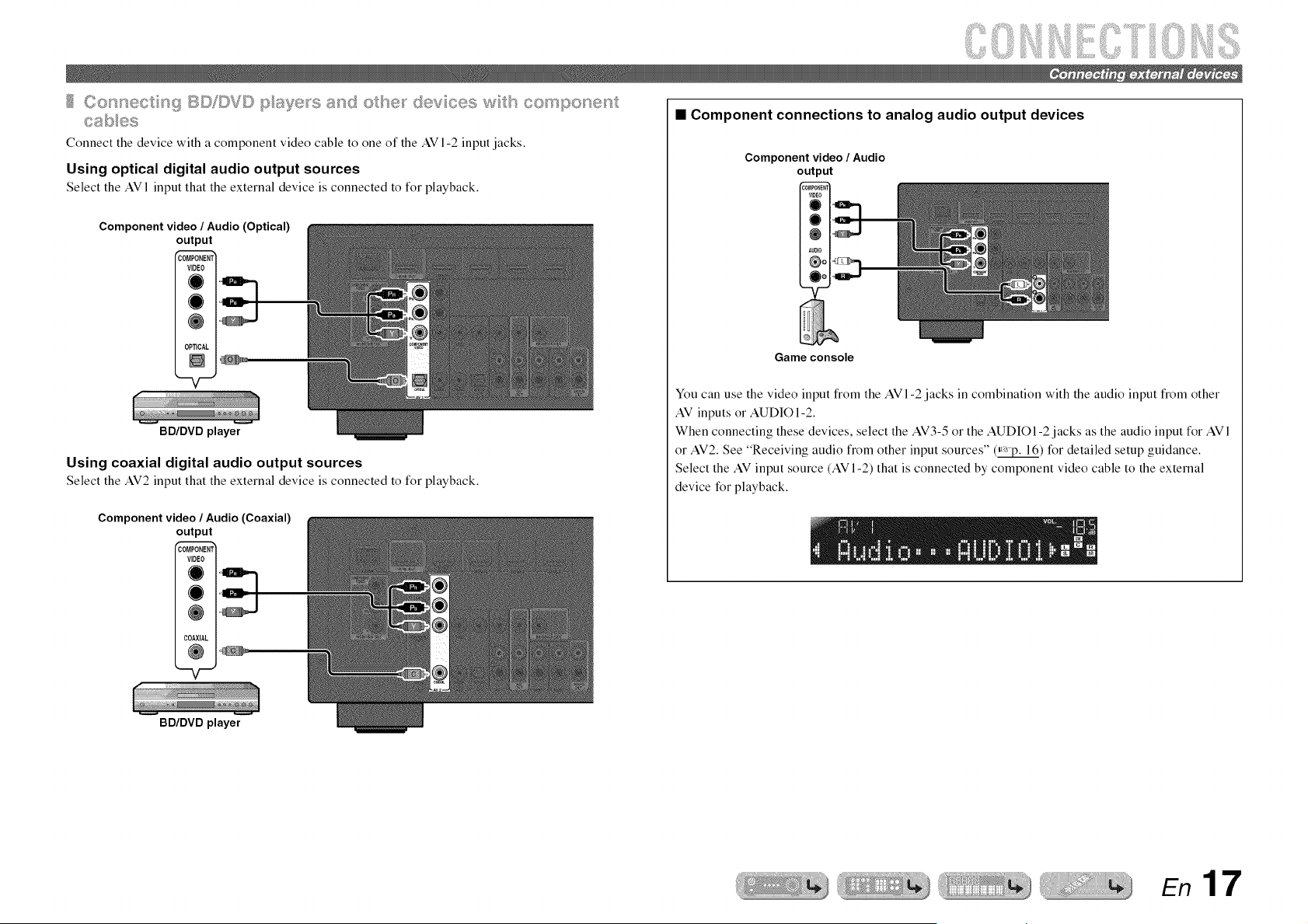
Connect the device with a component video cable to one of the AV 1-2 input jacks.
Using optical digital audio output sources
Select the AVI input that the external device is connected to for playback.
Component video / Audio (Optical)
out _ut
COM
V
0F
_ENTI
:AL t
BD/DVD player
Using coaxial digital audio output sources
Select the AV2 input that the external device is connected to for playback.
Component video / Audio (Coaxial)
out _ut
COM _ENTI
V N
CC IAL t
• Component connections to analog audio output devices
Component video / Audio
output
Game console
You can use the video input from the AV1-2 jacks in combination with the audio input from other
AV inputs or AUDIO1-2.
When connecting these devices, select the AV3-5 or the AUDIO1-2 jacks as the audio input for AVI
or AV2. See "Receiving audio from other input sources" (_) for detailed setup guidance.
Select the AV input source (AV 1-2) that is connected by component video cable to the external
device for playback.
BD/DVD player
En 17
iiiiiiiiiiii!i i
iiii!i!iiiii iiii!i!iiiii
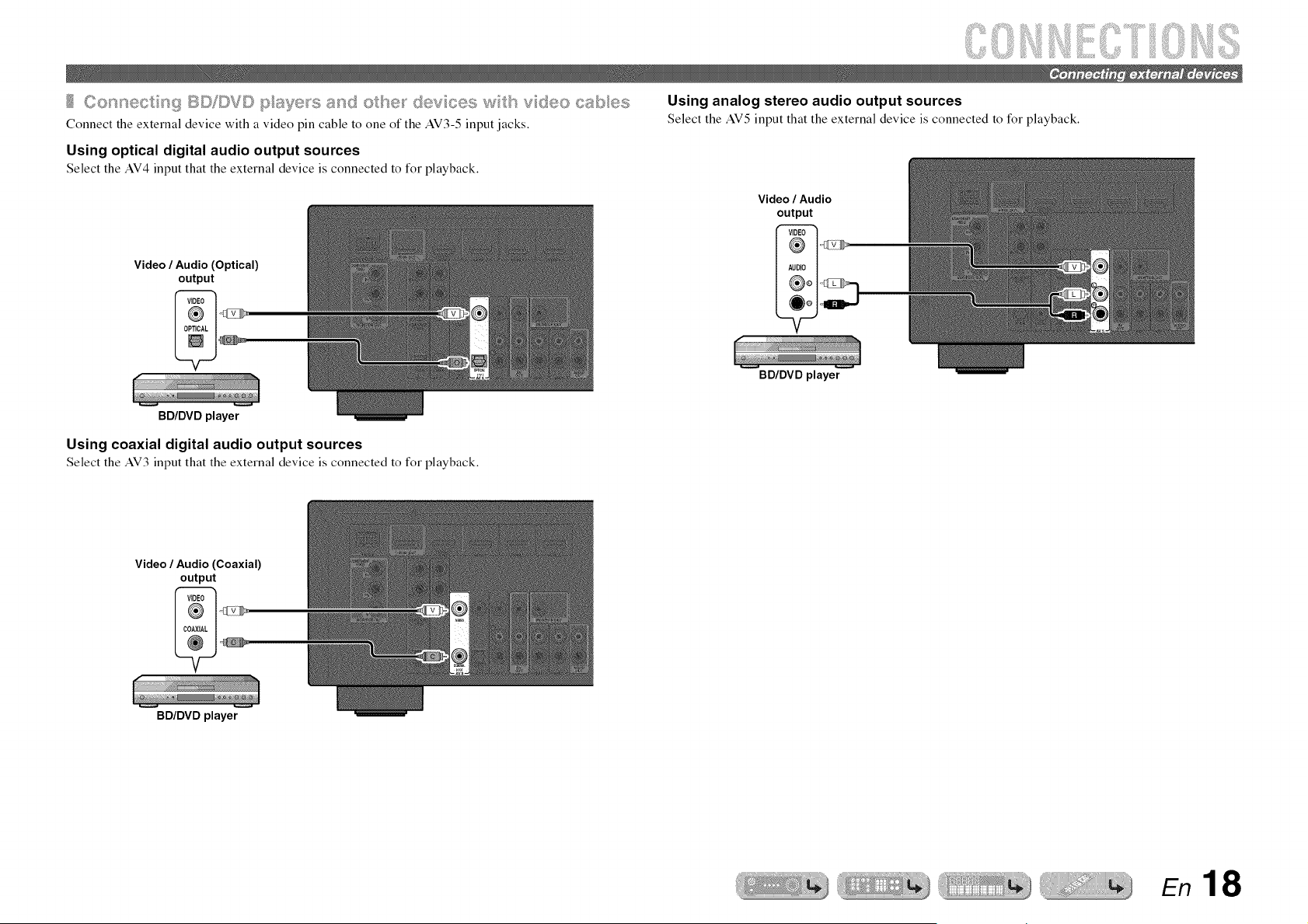
,,+_o_ect_( BD©_D and©tse_ _{:_{v ;es w tsvdeocabes
Connect the external device with a video pin cable to one of the AV3-5 input jacks,
Using optical digital audio output sources
Select the AV4 input that the external device is connected to for playback.
Video/ Audio(Optical)
output
Using analog stereo audio output sources
Select the AV5input that the external device is connected to for playback.
Video / Audio
output
BD/DVDplayer
Using coaxial digital audio output sources
Select the AV3 input that the external device is connected to for playback.
Video/ Audio(Coaxial)
output
BD/DVD player
BD/DVD player
En 18
iiiiiiiiiiii!i i
iiii!i!iiiii iiii!i!iiiii
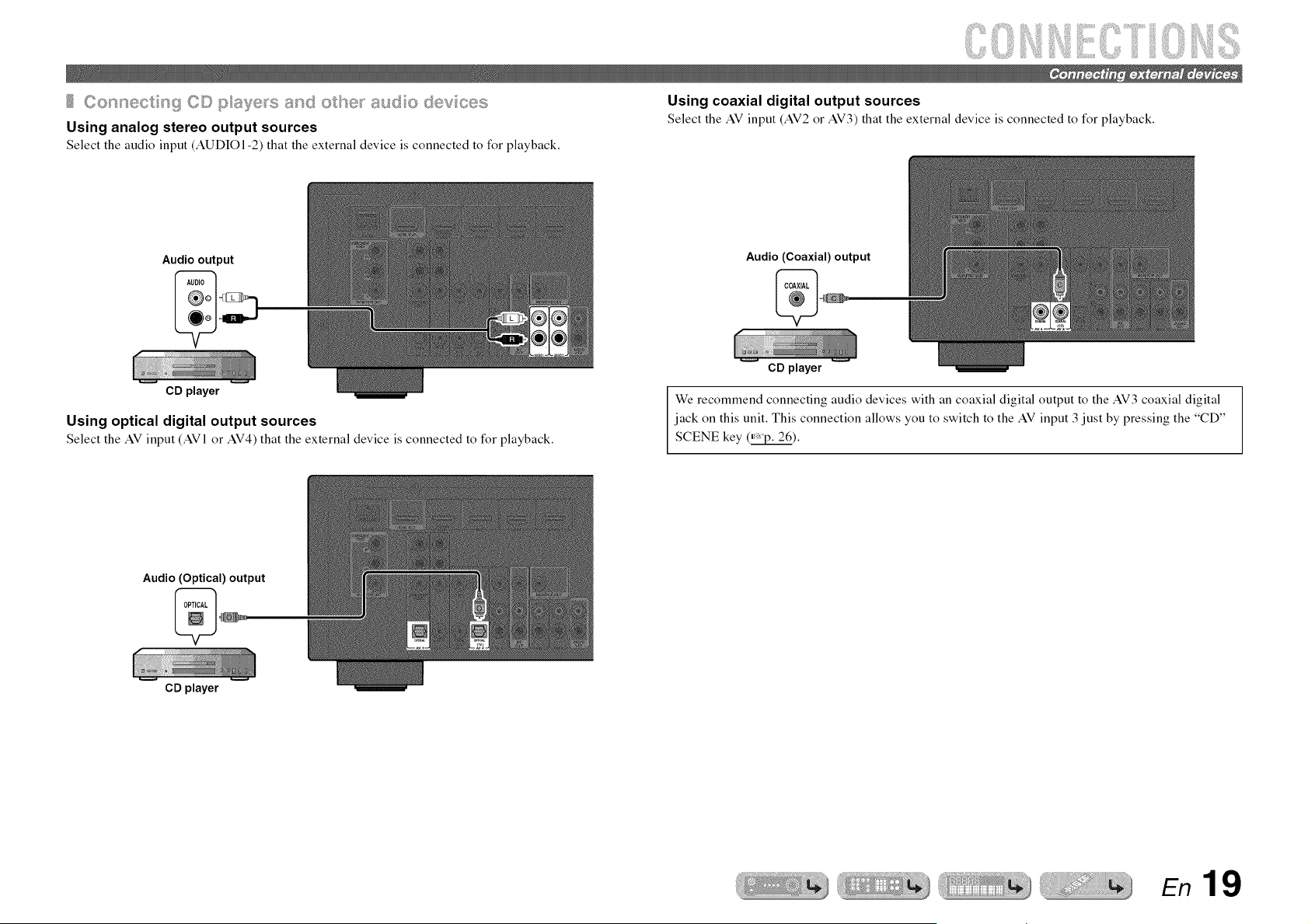
,,_,_o_e,,, _gC©pa_je_sandotse_ _sudo
Using analog stereo output sources
Select the audio input (AUDIO1-2) that the external device is connected to for playback.
Using coaxial digital output sources
Select the AVinput (AV2or AV3)that the external device is connected to for playback.
Audio output
CD player
Audio (Coaxial) output
Using optical digital output sources
Select the AV input (AVl or AV4)that the external device is connected to for playback.
CD player
We recommend connecting audio devices with an coaxial digital output to the AV3 coaxial digital
jack on this unit. This connection allows you to switch to the AV input 3 just by pressing the "CD"
SCENE key (_).
Audio (Optical) output
CD player
En 19
iiiiiiiiiiii!i i
iiii!i!iiiii iiii!i!iiiii
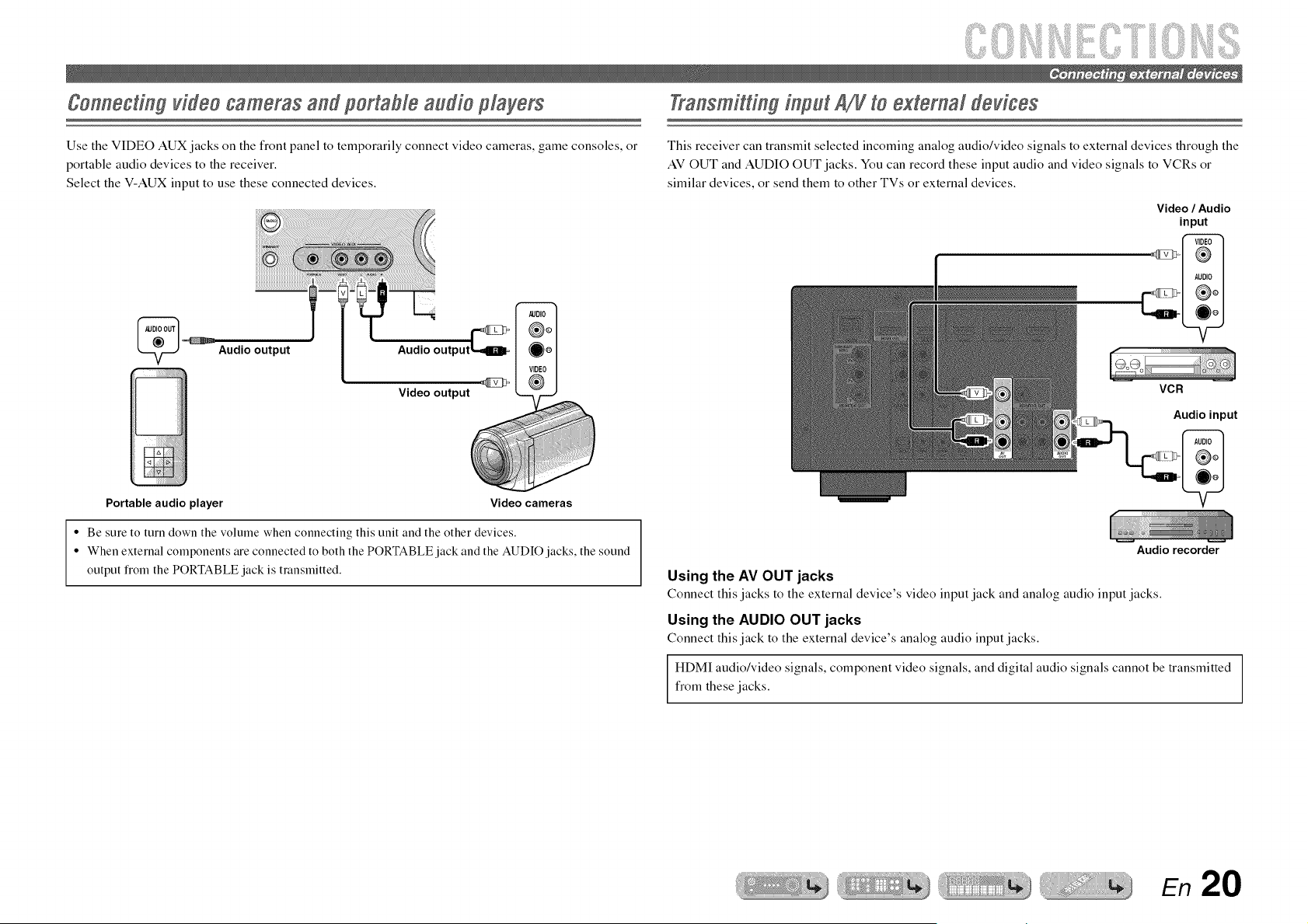
Use the VIDEO AUX jacks on the front panel to temporarily connect video cameras, game consoles, or
portable audio devices to the receiver.
Select the V-AUX input to use these connected devices.
Audio output Audio output
Video output
Transmitting input AN to external dovicos
This receiver can transmit selected incoming analog audio/video signals to external devices through the
AV OUT and AUDIO OUT jacks. You can record these input audio and video signals to VCRs or
similar devices, or send them to other TVs or external devices.
Video / Audio
input
VCR
Audio input
Portable audio player
Video cameras
• Be sure to turn down the volume when connecting this unit and the other devices.
• When external components are connected to both the PORTABLE jack and the AUDIO jacks, the sound
output flom the PORTABLE jack is transmitted.
Audio recorder
Using the AV OUT jacks
Connect this jacks to the external device's video input jack and analog audio input jacks.
Using the AUDIO OUT jacks
Connect this jack to the external device's analog audio inputjacks.
HDMI audio/video signals, component video signals, and digital audio signals cannot be transmitted
from these jacks.
En 20
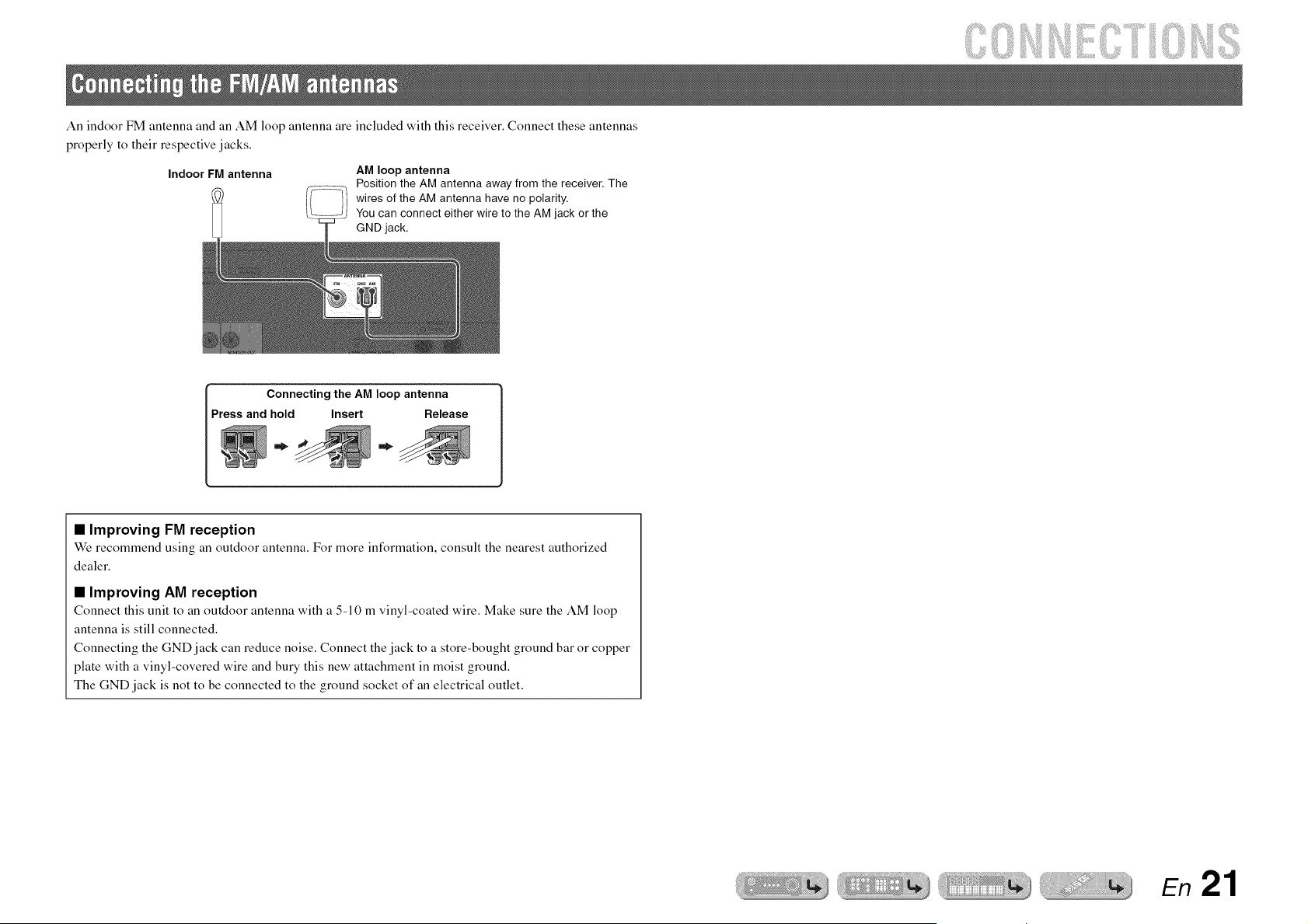
An indoor FM antenna and an AM loop antenna are included with this receiver. Connect these antennas
properly to their respective jacks.
IndoorFM antenna
AM loop antenna
Position the AM antenna away from the receiver. The
wires of the AM antenna have no polarity.
You can connect either wire to the AM jack or the
GND jack.
Connecting the AM loop antenna
Press and hold Insert Release
• Improving FM reception
We recommend using an outdoor antenna. For more information, consult the nearest authorized
dealer.
• Improving AM reception
Connect this unit to an outdoor antenna with a 5-10 m vinyl-coated wire. Make sure the AM loop
antenna is still connected.
Connecting the GND jack can reduce noise. Connect the jack to a store-bought ground bar or copper
plate with a vinyl-covered wire and bury this new attachment in moist ground.
The GND jack is not to be connected to the ground socket of an electrical outlet.
En 21
[]
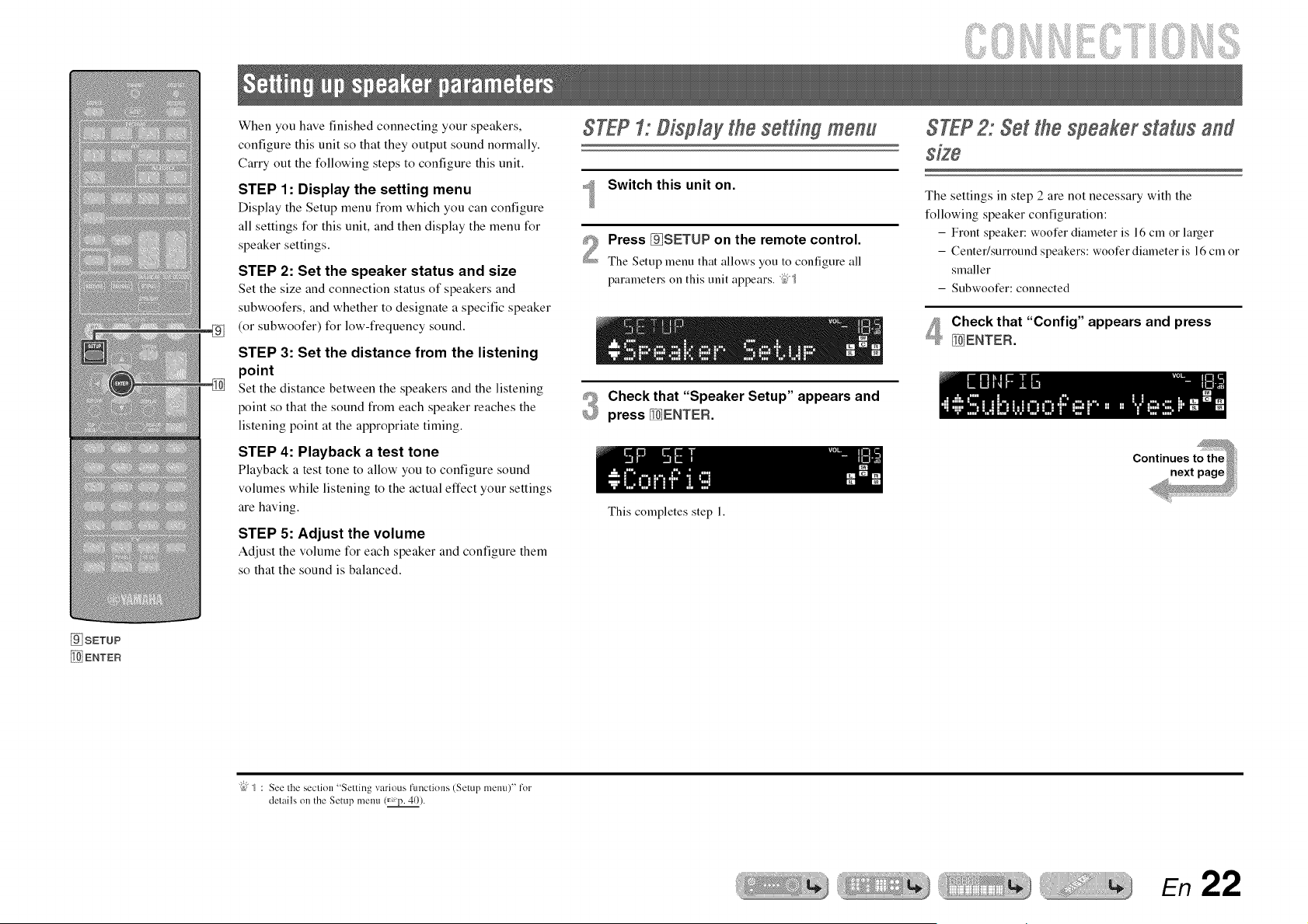
When you have finished connecting your speakers,
configure this unit so that they output sound normally.
Carry out the following steps to configure this unit.
STEP 1: Display the setting menu
Display the Setup menu from which you can configure
all settings for this unit, and then display the menu for
speaker settings.
STEP 2: Set the speaker status and size
Set the size and connection status of speakers and
subwoofers, and whether to designate a specific speaker
(or subwoofer) for low-frequency sound.
STEP 3: Set the distance from the listening
point
Set the distance between the speakers and the listening
point so that the sound from each speaker reaches the
listening point at the appropriate timing.
STEP 4: Playback a test tone
Playback a test tone to allow you to configure sound
volumes while listening to the actual effect your settings
are having.
STEP 5: Adjust the volume
Adjust the volume for each speaker and configure them
so that the sound is balanced.
STEP1: Display the settin# menu
Switch this unit on.
Press []SETUP on the remote control.
The Setup menu that allows you to configure all
parameters on this unit appears. ;2;{
#_ Check that "Speaker Setup" appears and
_9 press _ENTEFL
This completes step 1.
STEP2: Set the speaker status and
The settings in step 2 are not necessary with the
following speaker configuration:
- Front speaker: woofer diameter is 16 cm or larger
- Center/surround speakers: woofer diameter is 16 cm or
smaller
- Subwoofer: connected
Check that "Config" appears and press
_ENTEFL
"{bJ_ : See the seclion "Setting various ftmctinns (Setup memO" for
details on the Setup metal (_,p. 40).
En 22
_ Cursor 2x/v /<1/E>
_ ENTEF_
RETURN
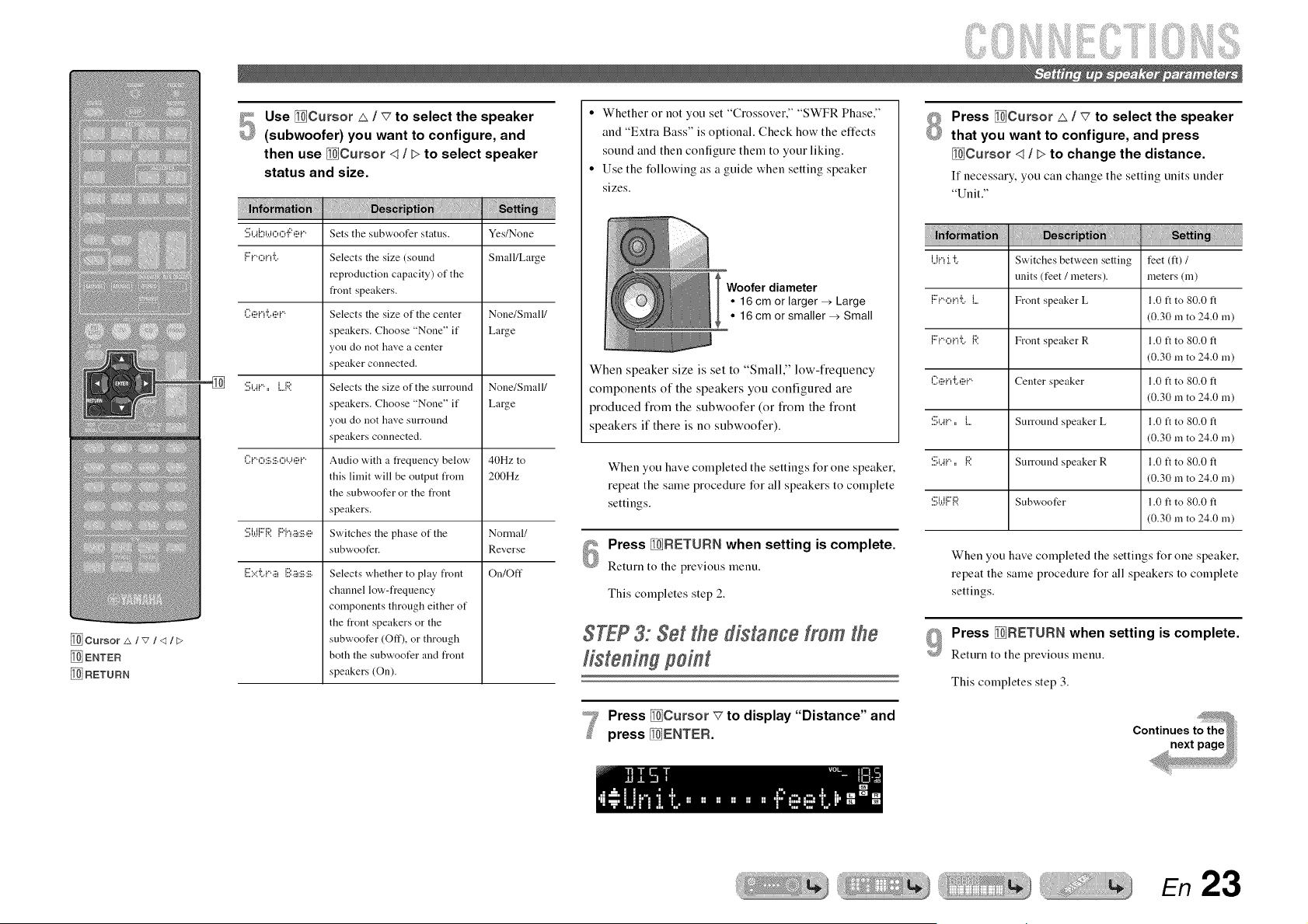
_P_ Use _Cursor _ / v" to select the speaker
(subwoofer) you want to configure, and
then use _Cursor <1/ > to select speaker
status and size.
i!!! ii !ii!ii!iiii!iiii
'.!!!;L4l:)b.h:::.:::,']::',iii'i""Sets the subwoofer status. Yes!None
{::'i"'oi"!'i:.. Selects the size (sound Small/Large
reproduction capacity) of the
front speakers.
C:,ii_i'Ti:..,ii_i"" Selects the size of the center None/Small/
speakers. Choose "None" if Large
you do not have a center
speaker connected.
'.!!!;_.._i""== i....1:;?. Selects the size of the surround None/Small/
speakers. Choose "None" if Large
you do not have surround
speakers connected.
C:i'o:iii.:il;.o'...',iil,i'" Audio with a frequency below 40Hz to
this limit will be output from 200Hz
the subwoofer or the front
speakers.
'.:::,b.IN'=:'.l"'{"i._ii!:ii_.eSwitches the phase of the Normal/
subwoofer. Reverse
E:=.::'i:..i"'.ii_l!!!l._ii!:ii_.:ii_.Selects whether to play front On/Off
channel low-frequency
components through either of
the front speakers or the
subwoofer (Off), or through
both the subwoofer and front
speakers (On).
• Whether or not you set "Crossover," "SWFR Phase,"
and "Extra Bass" is optional. Check how the effects
sound and then configure them to your liking.
• Use the following as a guide when setting speaker
sizes.
Woofer diameter
• 16 cm or larger _ Large
• 16 cm or smaller _ Small
When speaker size is set to "Small," low-frequency
components of the speakers you configured are
produced from the subwoofer (or from the front
speakers if there is no subwoofer).
When you have completed the settings for one speaker,
repeat the same procedure for all speakers to complete
settings.
Press _FiETURN when setting is complete.
Return to the previous menu.
This completes step 2.
STEP3: Set the distance from the
Press _Cursor v to display "Distance" and
press _ENTEFL
Press _Cursor _ / _7 to select the speaker
that you want to configure, and press
_Cursor <1/ > to change the distance.
If necessary, you can change the setting units under
"Unit."
l...li."_:I."I:.. Switches between setting feet (ft) /
units (feet / meters), meters (m)
F::i"'c:,i"_'i:..{.... Front speaker L 1.0 ft to 80.0 ft
(0.30 m to 24.0 m)
F::i"',:::,i"_'i:..1:;?. Front speaker R 1.0 ft to 80.0 t't
(0.30 m to 24.0 m)
(_:,ii?i"_'i:..ei"" Center speaker 1.0 ft to 80.0 t't
(0.30 m to 24.0 m)
'.!!;_..ai"'==l.... Surround speaker L 1.0 ft to 80.0 t't
(0.30 m to 24.0 m)
'.!!;i..ai.".==1:;?. Surround speaker R 1.0 ft to 80.0 t't
(0.30 m to 24.0 m)
'.:::,b._{"1'=:'. Subwoofer 1.0 t't to 80.0 t't
(0.30 m to 24.0 m)
When you have completed the settings for one speaker,
repeat the same procedure for all speakers to complete
settings.
Press _FiETURN when setting is complete.
Return to the previous menu.
This completes step 3.
En 23
[9_SETUP
[_ Cursor A/v/<3/E>
[_] ENTER
RETURN
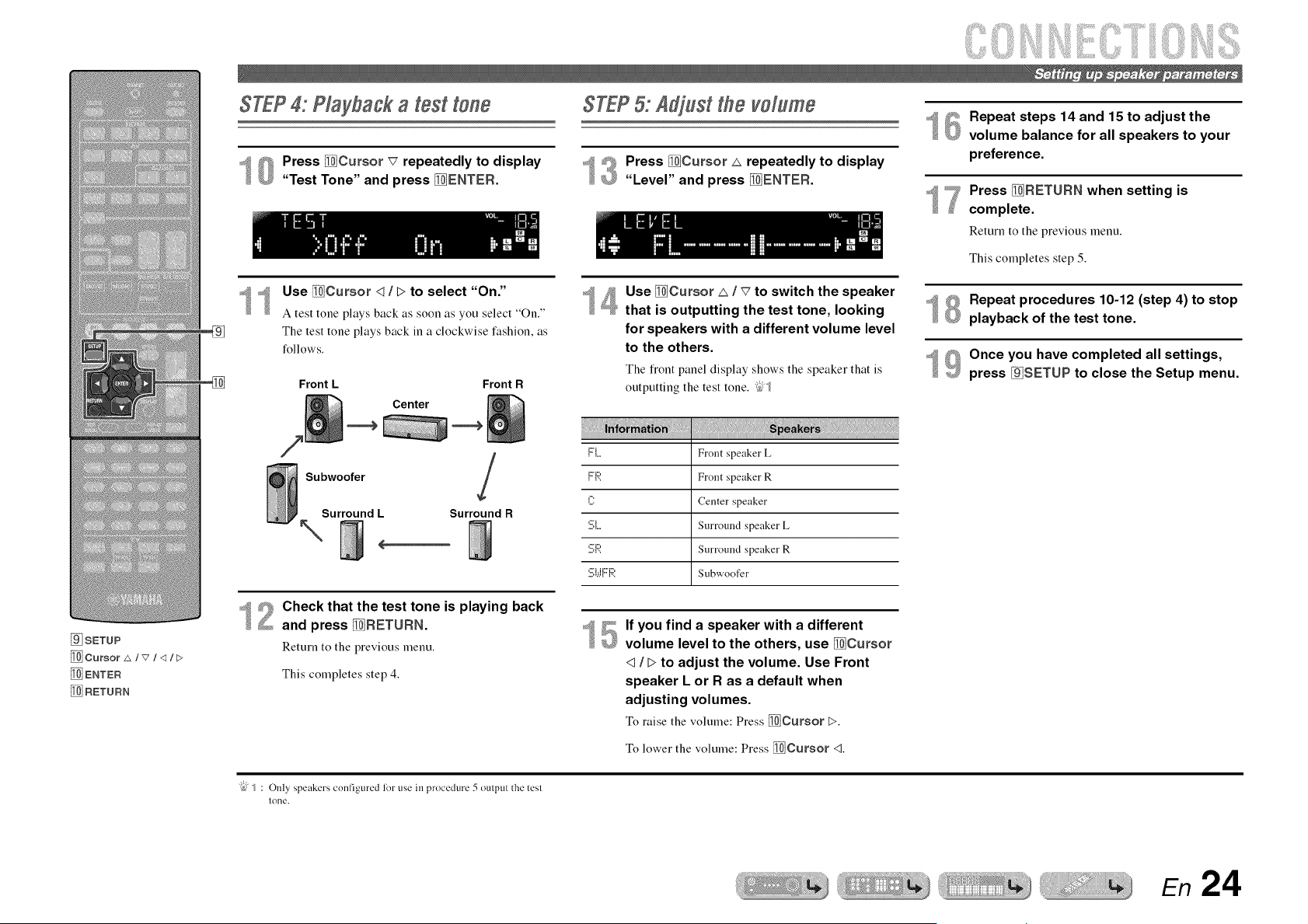
STEP4: Playbagk a test tone
8 Press _Cursor _7 repeatedly to display
"Test Tone" and press _ENTER.
Use _Cursor 4 / L> to select "On."
A test tone plays back as soon as you select "On."
The test tone plays back in a clockwise fashion, as
follows.
Front L Front R
Center
====_ ====_
Subwoofer
Surround L
\
Surround R
2 Check that the test tone is playing back
and press _RETURN.
Return to the previous menu.
This completes step 4.
STEP5: Adjust the volume
_'_ Press _Cursor _ repeatedly to display
£_ "Level" and press _ENTER.
4 Use _Cursor _ / _7to switch the speaker
that is outputting the test tone, looking
for speakers with a different volume level
to the others.
The fiont panel display shows the speaker that is
outputting the test tone. ;_;_
]:::i.... Front speaker L
,m:::',... Front speaker R
C Center speaker
'.!!;1.... Surround speaker L
'.!!;1:;?. Surround speaker R
'.:::,b.l{"1',:', Subwoofer
If you find a speaker with a different
volume level to the others, use _Cursor
q / > to adjust the volume. Use Front
speaker L or R as a default when
adjusting volumes.
To raise the volume: Press _Cursor !>.
To lower the volume: Press _Cursor <1.
15
18
lg
Repeat steps 14 and 15 to adjust the
volume balance for all speakers to your
preference.
Press _RETURN when setting is
complete.
Return to the previous menu.
This completes step 5.
Repeat procedures 10-12 (step 4) to stop
playback of the test tone.
Once you have completed all settings,
press _SETUP to close the Setup menu.
"{bJ_ : Only speakers configured for use in procedure 5 output the test
tone.
En 24
P G
@ mnput seRector
VOLUME +/o
_MUTE
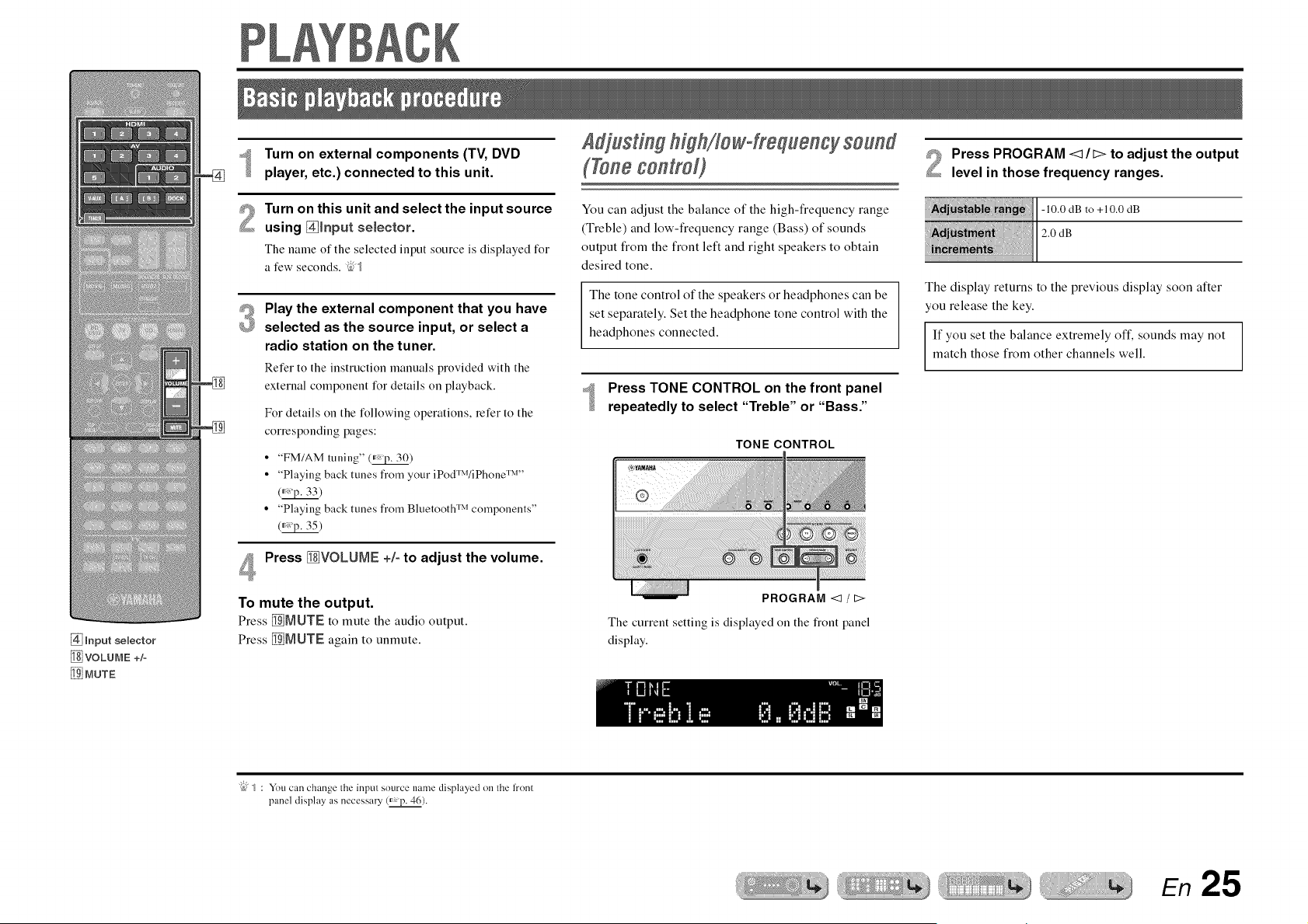
Turn on external components (TV, DVD
player, etc.) connected to this unit.
Turn on this unit and select the input source
using _[nput selector.
The name of the selected input source is displayed for
a few seconds. ;_
#_ Play the external component that you have
£_ selected as the source input, or select a
radio station on the tuner.
Refer to the instruction manuals provided with the
external component for details on playback.
For details on the following operations, refer to the
corresponding pages:
• "FM/AM tuning" (_)
• "Playing back tunes from your iPodTM/iPhone TM''
• "Playing back tunes from Bluetooth "lMcomponents"
(_'p. 35)
Press _VOLUME +/- to adjust the volume.
To mute the output.
Press _MUTE to mute the audio output.
Press _MIJTE again to unmute.
(ToneconlroO
You can adjust the balance of the high-frequency range
(Treble) and low-frequency range (Bass) of sounds
output from the front left and right speakers to obtain
desired tone.
The tone control of the speakers or headphones can be
set separately. Set the headphone tone control with the
headphones connected.
Press TONE CONTROL on the front panel
repeatedly to select "Treble" or "Bass."
TONE CONTROL
PROGRAM </t>
The current setting is displayed on the flont panel
display.
2
Press PROGRAM <lit> to adjust the output
level in those frequency ranges.
-10.0 dB to +10.0 dB
2.0 dB
The display returns to the previous display soon after
you release the key.
If you set the balance extremely off, sounds may not
match those from other channels well.
"{bJ_ : You can change the inpul source name displayed on lhe h'ont
panel display as necessary (_ p. 46).
En 25
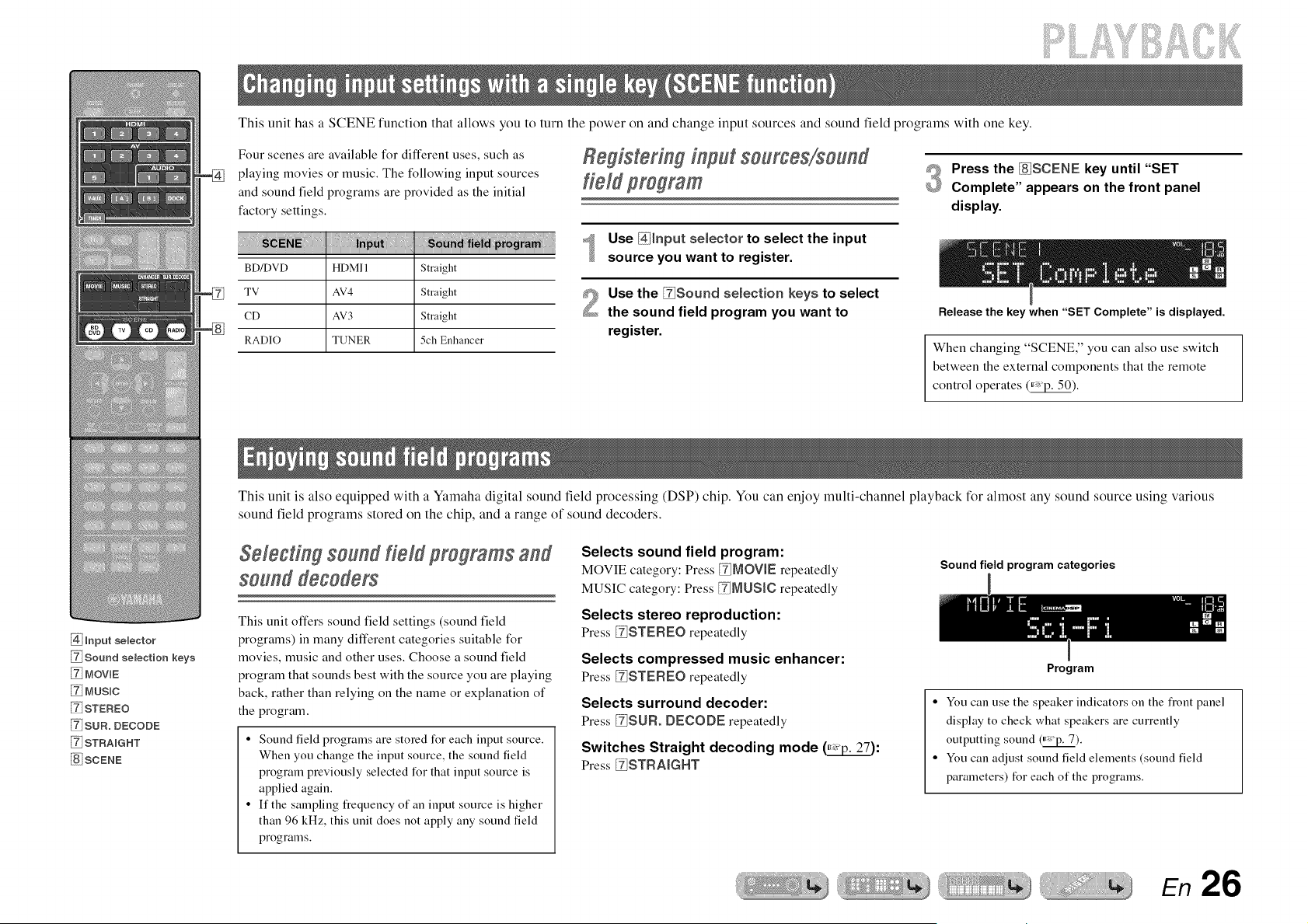
This unit has a SCENE function that allows you to turn the power on and change input sources and sound field programs with one key.
Four scenes are available for different uses, such as
playing movies or music. The following input sources
and sound field programs are provided as the initial
factory settings.
BD/DVD HDMI 1 Straight
TV AV4 Straight
CD AV3 Straight
RADIO TUNER 5ch Enhancer
Registering input sourges/sound
field program
Use @Input selector to select the input
source you want to register.
Use the Fg!Sound selection keys to select
the sound field program you want to
register.
#_ Press the [8iSCENE key until "SET
@ Complete" appears on the front panel
display.
Release the key when "SET Complete" is displayed.
When changing "SCENE," you can also use switch
between the external components that the remote
control operates (_).
@ mnput selector
Sound selection keys
MOVmE
[_ MUSIC
[_ STEREO
[_ SUR. DECODE
[_ STRAIGHT
I8] SCENE
This unit is also equipped with a Yamaha digital sound field processing (DSP) chip. You can enjoy multi-channel playback for ahnost any sound source using various
sound field programs stored on the chip, and a range of sound decoders.
Selecting sound field programs and
seund deceders
This unit offers sound field settings (sound field
programs) in many different categories suitable for
movies, music and other uses. Choose a sound field
program that sounds best with the source you are playing
back, rather than relying on the name or explanation of
the program.
• Sound field programs are stored for each input source.
When you change the input source, the sound field
program previously selected for that input source is
applied again.
• If the sampling frequency of an input source is higher
than 96 kHz, this unit does not apply any sound field
programs.
Selects sound field program:
MOVIE category: Press _MOVIE repeatedly
MUSIC category: Press _ML!StC repeatedly
Selects stereo reproduction:
Press _STEREO repeatedly
Selects compressed music enhancer:
Press _STEREO repeatedly
Selects surround decoder:
Press _SUR. DECODE repeatedly
Switches Straight decoding mode _:
Press _STRAIGHT
Sound field program categories
Program
• You can use the speaker indicators on the fiont panel
display to check what speakers are currently
outputting sound (_).
• You can adjust sound field elements (sound field
parameters) for each of the programs.
En 26
iiiiii iilB:iiiiiiii!iiii!i
_i_iiiii!ii!:! i}iii!;!ii!i! _i_iiiii!ii!i!si!iii_.....
Enoyn 9 unproc®ss®d p ayback
{S_a 9Is decod n{S mode}
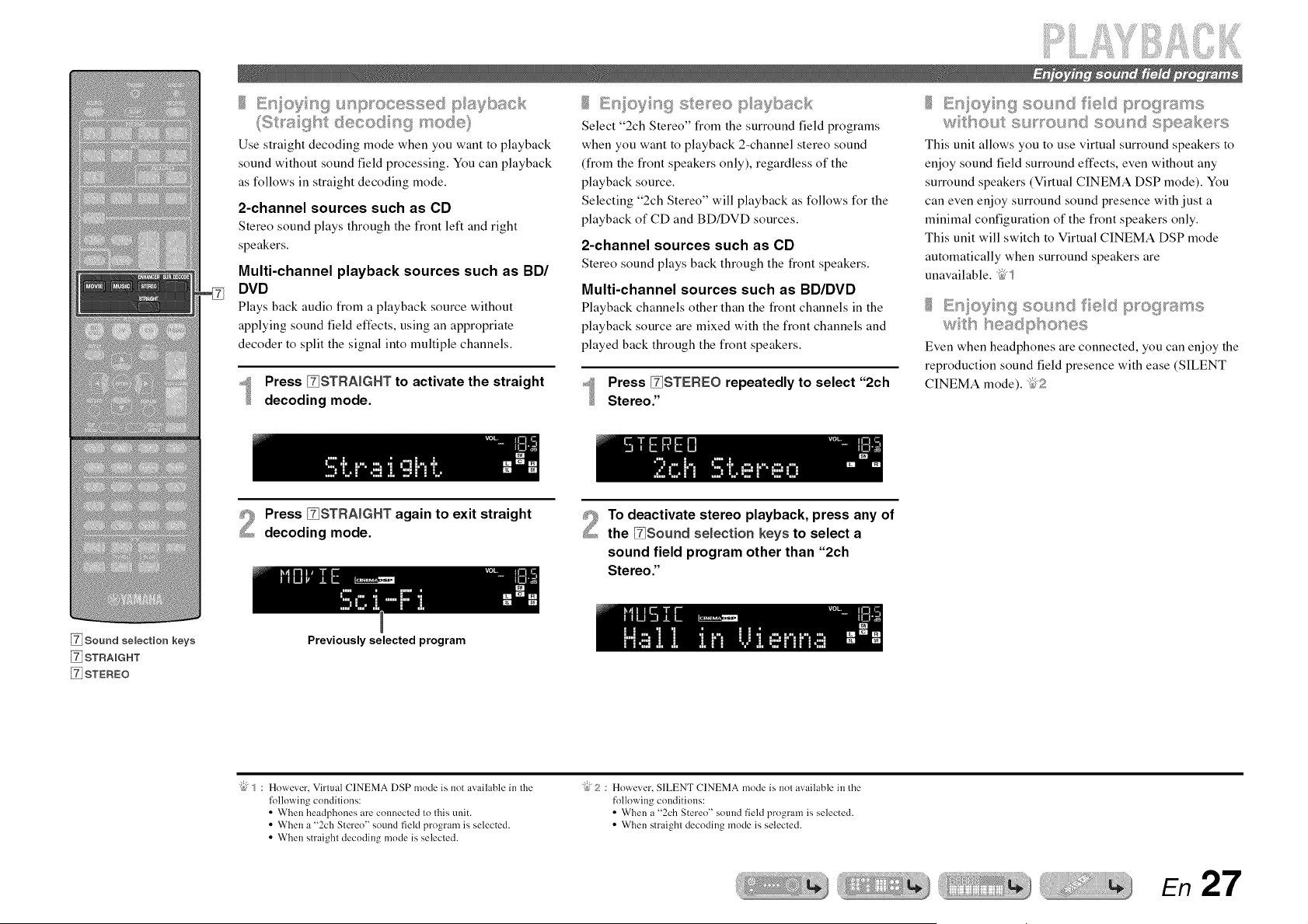
Use straight decoding mode when you want to playback
sound without sound field processing. You can playback
as follows in straight decoding mode.
a-channel sources such as CD
Stereo sound plays through the front left and right
speakers.
Multi-channel playback sources such as BD/
DVD
Plays back audio from a playback source without
applying sound field effects, using an appropriate
decoder to split the signal into multiple channels.
Press _STRAIGHT to activate the straight
decoding mode.
Select "2ch Stereo" from the surround field programs
when you want to playback 2-channel stereo sound
(from the front speakers only), regardless of the
playback source.
Selecting "2ch Stereo" will playback as follows for the
playback of CD and BD/DVD sources.
2-channel sources such as CD
Stereo sound plays back through the front speakers.
Multi-channel sources such as BD/DVD
Playback channels other than the front channels in the
playback source are mixed with the front channels and
played back through the front speakers.
Press _STEREO repeatedly to select "2ch
Stereo."
En oS_ n!_ sound fed p_o9 ares
w tBout su_ound sound speak÷_s
This unit allows you to use virtual surround speakers to
enjoy sound field surround effects, even without any
surround speakers (Virtual CINEMA DSP mode). You
can even enjoy surround sound presence with just a
minimal configuration of the front speakers only.
This unit will switch to Virtual CINEMA DSP mode
automatically when surround speakers are
unavailable. _' _
E_s ovn_;_, _ ;;_ sound fed ptogta¢_ :;_,
wts seadptsones
Even when headphones are connected, you can enjoy the
reproduction sound field presence with ease (SILENT
CINEMA mode). _5,;?
Press _STRAIGHT again to exit straight
decoding mode.
To deactivate stereo playback, press any of
the _Souad selection keys to select a
sound field program other than "2ch
Stereo."
Sound selection keys
STRAIGHT
STEREO
Previously selected program
"@ _ : However, Virtual CINEMA DSP mode is not available in the
lollowing conditions:
• When headphones are connected to this unit.
• When a "2ch Stereo" sound field program is selected.
• When straight decoding mode is selected.
"@2 : However, SILENT CINEMA mode is not available in the
following couditious:
• When a "2ch Stereo" sound field program is selected.
• When straight decoding mode is selected.
En 27
iiiiiiii!iiii!i
Sound@ld programs
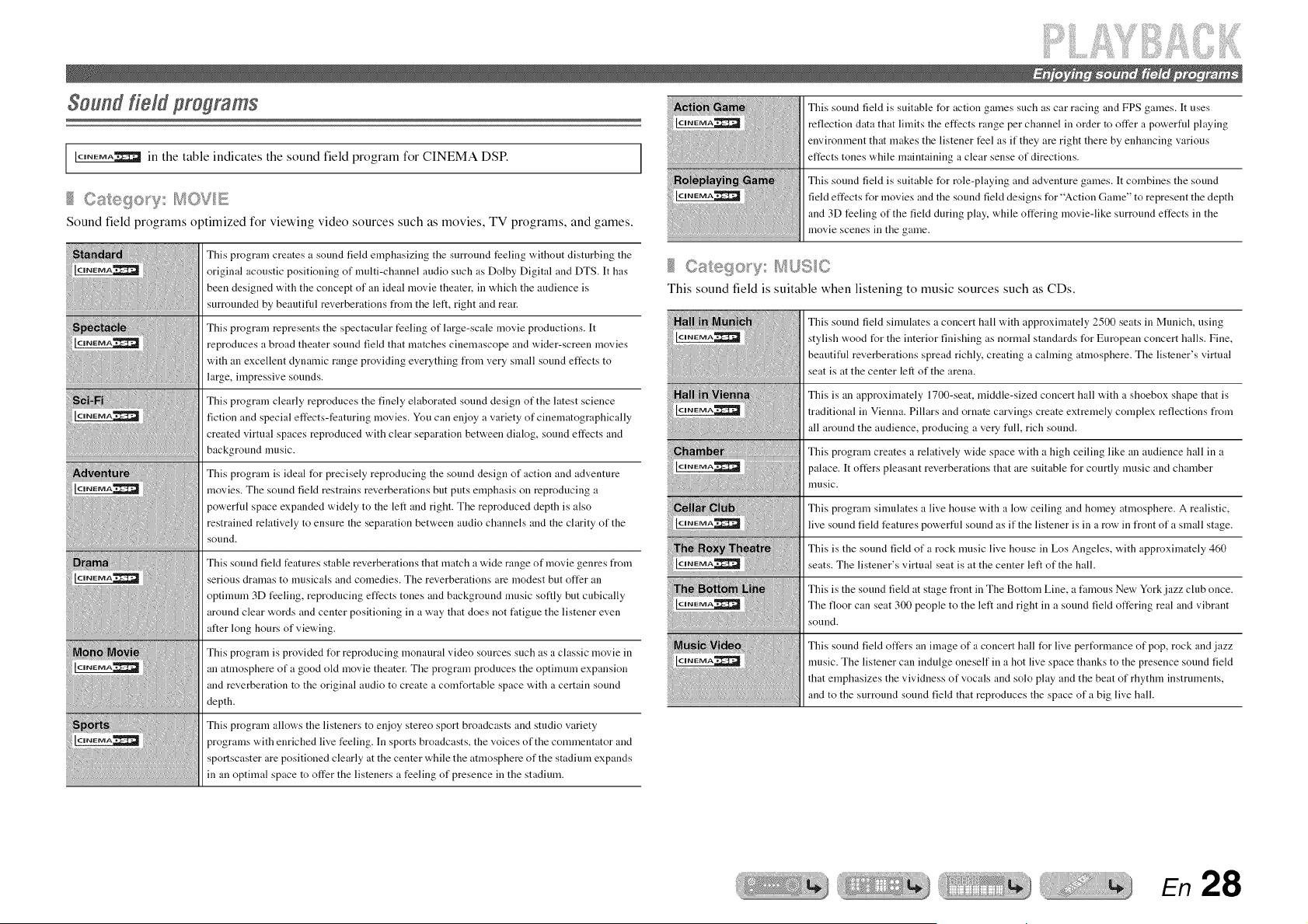
IC'NEMA'2_ in the table indicates the sound field program for CINEMA DSP.
...... _/t,,,, EB CaRego_y fss_ "
Sound field programs optimized for viewing video sources such as movies, TV programs, and games.
This program creates a sound field emphasizing the surround feeling without disturbing the
original acoustic positioning of multi-channel audio such as Dolby Digital and DTS. It has
been designed with the concept of an ideal movie theater, in which the audience is
surrounded by beautiful reverberations from the left, right and rear.
This program represents the spectacular feeling of large-scale movie productions. It
reproduces a broad theater sound fiekt that matches cinemascope and wider-screen movies
with an excellent dynamic range providing everything from very small sound effects to
large, impressive sounds.
This program clearly reproduces the finely elaborated sound design of the latest science
fiction and special effects-featuring movies. You can enjoy a variety of cinematographically
created virtual spaces reproduced with clear separation between dialog, sound effects and
background music.
This program is ideal for precisely reproducing the sound design of action and adventure
movies. The sound field restrains reverberations but puts emphasis on reproducing a
powerful space expanded widely to the left and right. The reproduced depth is also
restrained relatively to ensure the separation between audio channels and the clarity of the
sound.
This sound field features stable reverberations that match a wide range of movie genres from
serious dramas to musicals and comedies. The reverberations are modest but offer an
optimum 3D feeling, reproducing effects tones and background music softly but cubically
around clear words and center positioning in a way that does not fatigue the listener even
alter long hours of viewing.
This program is provided t_r reproducing monaural video sources such as a classic movie in
an atmosphere of a good old movie theater. The program produces the optimum expansion
and reverberation to the original audio to create a comfortable space with a certain sound
depth.
This program allows the listeners to enjoy stereo sport broadcasts and studio variety
programs with enriched live feeling. In sports broadcasts, the voices of the commentator and
sportscaster are positioned clearly at the center while the atmosphere of the stadium expands
in an optimal space to offer the listeners a feeling of presence in the stadium.
This sound field is suitable for action games such as car racing and FPS games. It uses
reflection data that limits the effects range per channel in order to offer a powerfld playing
environment that makes the listener feel as if they are right there by enhancing various
effects tones while maintaining a clear sense of directions.
This sound field is suitable for role-playing and adventure games. It combines the sound
field effects for movies and the sound field designs for "Action Game" to represent the depth
and 3D feeling of the field during play, while offering movie-like surround effects in the
movie scenes in the game.
This sound field is suitable when listening to music sources such as CDs.
This sound field simulates a concert hall with approximately 2500 seats in Munich, using
stylish wood t_r the interior finishing as normal standards t_r European concert halls. Fine,
beautifld reverberations spread richly, creating a cahning atmosphere. The listener's virtual
seat is at the center left of the arena.
This is an approximately 1700-seat, middle-sized concert hall with a shoebox shape that is
traditional in Vienna. Pillars and ornate carvings create extremely complex reflections from
all around the audience, producing a very full, rich sound.
This program creates a relatively wide space with a high ceiling like an audience hall in a
palace. It offers pleasant reverberations that are suitable for courtly music and chamber
music.
This program simulates a live house with a low ceiling and homey atmosphere. A realistic,
live sound fiekt features powerfid sound as if the listener is in a row in front of a small stage.
This is the sound fiekt of a rock music live house in Los Angeles, with approximately 460
seats. The listener's virtual seat is at the center left of the hall.
This is the sound field at stage front in The Bottom Line, a fimaous New York jazz club once.
The floor can seat 300 people to the left and right in a sound fiekt offering real and vibrant
sound,
This sound field offers an image of a concert hall t_r live pert_rmance of pop, rock and jazz
music. The listener can indulge oneself in a hot live space thanks to the presence sound field
that emphasizes the vividness of vocals and solo play and the beat of rhythm instruments,
and to the surround sound fiekt that reproduces the space of a big live hall.
En 28
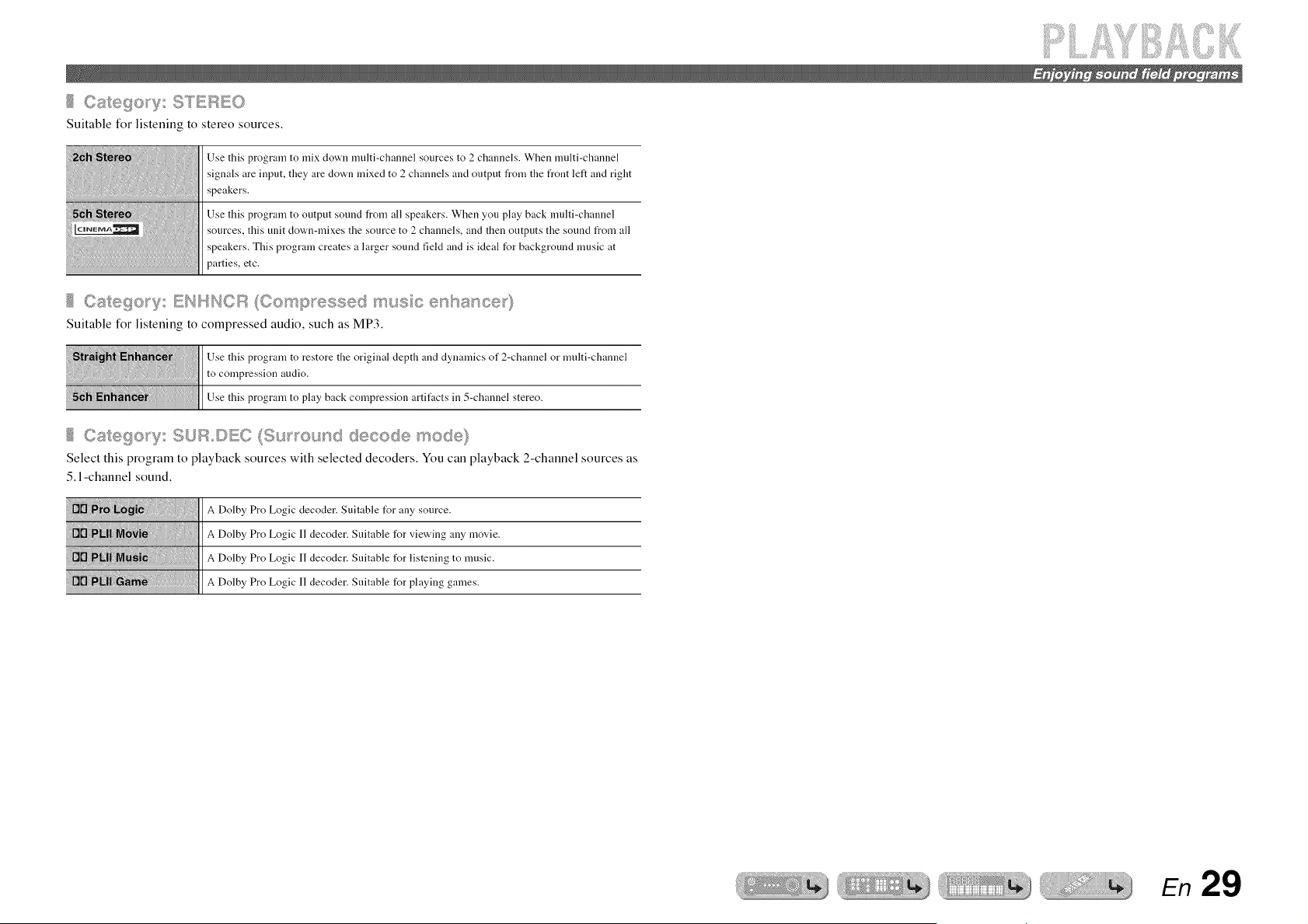
Suitable for listening to stereo sources.
Use this program to mix down multi-channel sources to 2 channels. When multi-channel
signals are input, they are clown mixed to 2 channels and output from the front left and right
speakers.
Use this program to output sound from all speakers. When you play back multi-channel
sources, this unit down-mixes the source to 2 channels, and then outputs the sound from all
speakers. This program creates a larger sound field and is ideal for background music at
parties, etc.
Suitable for listening to compressed audio, such as MP3.
Use this program to restore the original depth and dynamics of 2-channel or multi-channel
to compression audio.
Use this program to play back compression artitk_cts in 5-channel stereo.
Select this program to playback sources with selected decoders. You can playback 2-channel sources as
5.1-channel sound.
A Dolby Pro Logic decoder. Suitable t_r any source.
_Dolby_roLog,c.decoder_u"able_orv,ew,n_auymov,e
Dolby_roLogic"decoder_u"able_orlistenin_tomusic
A Dolby Pro Logic II decoder. Suitable for playing games.
En 29
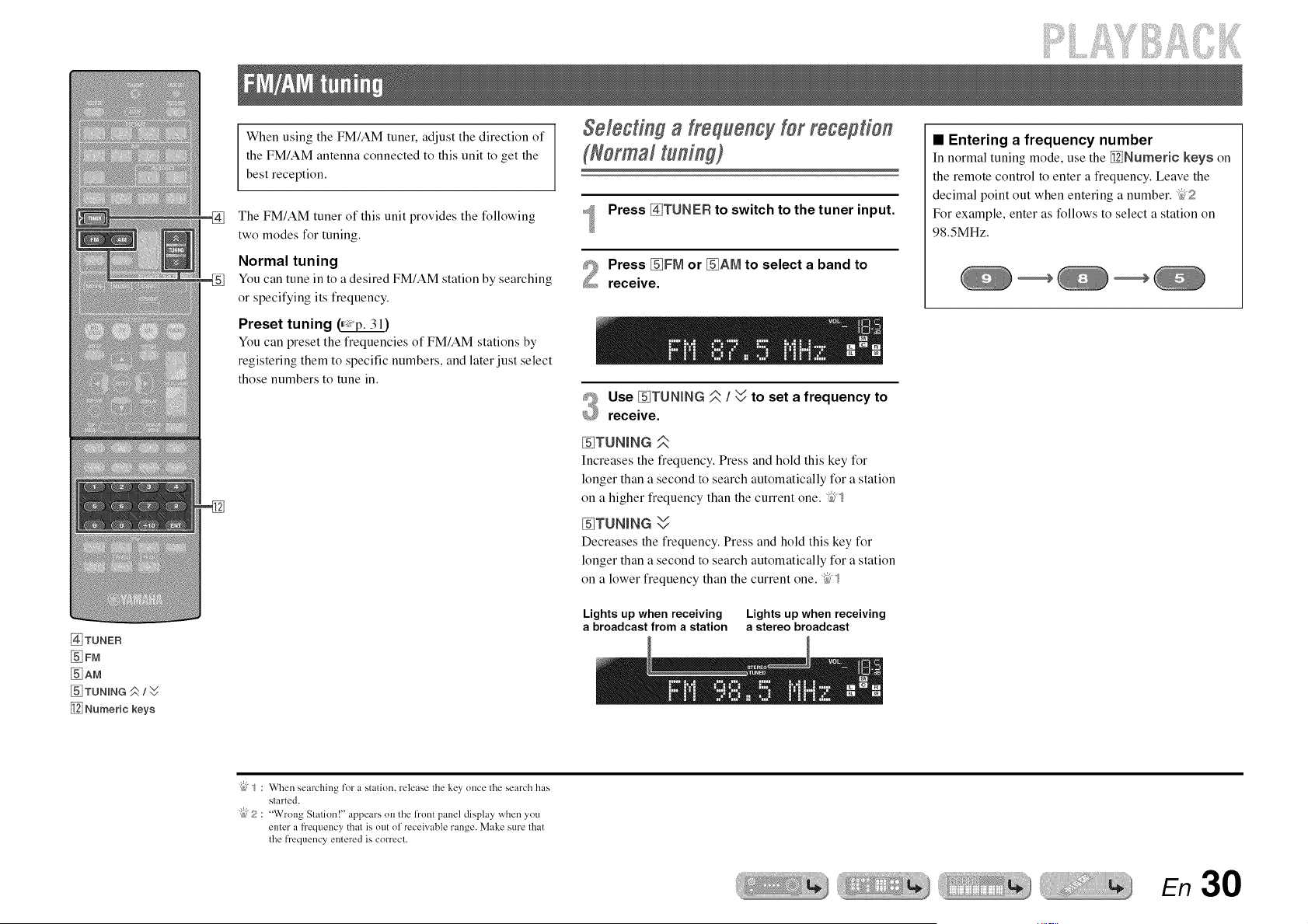
@TUNER
_FM
_AM
_ TUNmNG #/W
Numeric keys
When using the FM/AM tuner, adjust the direction of
the FM/AM antenna connected to this unit to get the
best reception.
The FM/AM tuner of this unit provides the following
two modes for tuning.
Normal tuning
You can tune in to a desired FM/AM station by searching
or specifying its frequency.
Preset tuning _)
You can preset the frequencies of FM/AM stations by
registering them to specific numbers, and later just select
those numbers to tune in.
SelectiW a lrequency lot mgeption
(Normal tuning)
Press _TUNER to switch to the tuner input.
Press _FIVI or _AIVl to select a band to
receive.
Use _TUNtNG _. I W to set a frequency to
receive.
_TUNmNG
Increases the frequency. Press and hold this key for
longer than a second to search automatically for a station
on a higher frequency than the current one. _;"_
%TUNmNG W
Decreases the frequency. Press and hold this key for
longer than a second to search automatically for a station
on a lower frequency than the current one. _;"_
Lights up when receiving Lights up when receiving
a broadcast from a station a stereo broadcast
• Entering a frequency number
In normal tuning mode, use the _Numeric keys on
the remote control to enter a frequency. Leave the
decimal point out when entering a number. "_:'f?
For example, enter as follows to select a station on
98.SMHz.
"{bJ"_: When searching for a station, release the key once the search has
started.
"{bJJ;? "Wrong Station!" appears on the fl'ont panel display when you
enter a frequency that is out of receivable range. Make sure that
the fl'equency entered is correct.
ER
iiiiii[]iiiiiiJ ,¸ii!i!i!i .....
_i_iiiii!ii!_! _i_iii!ii!i!%=,.....
%
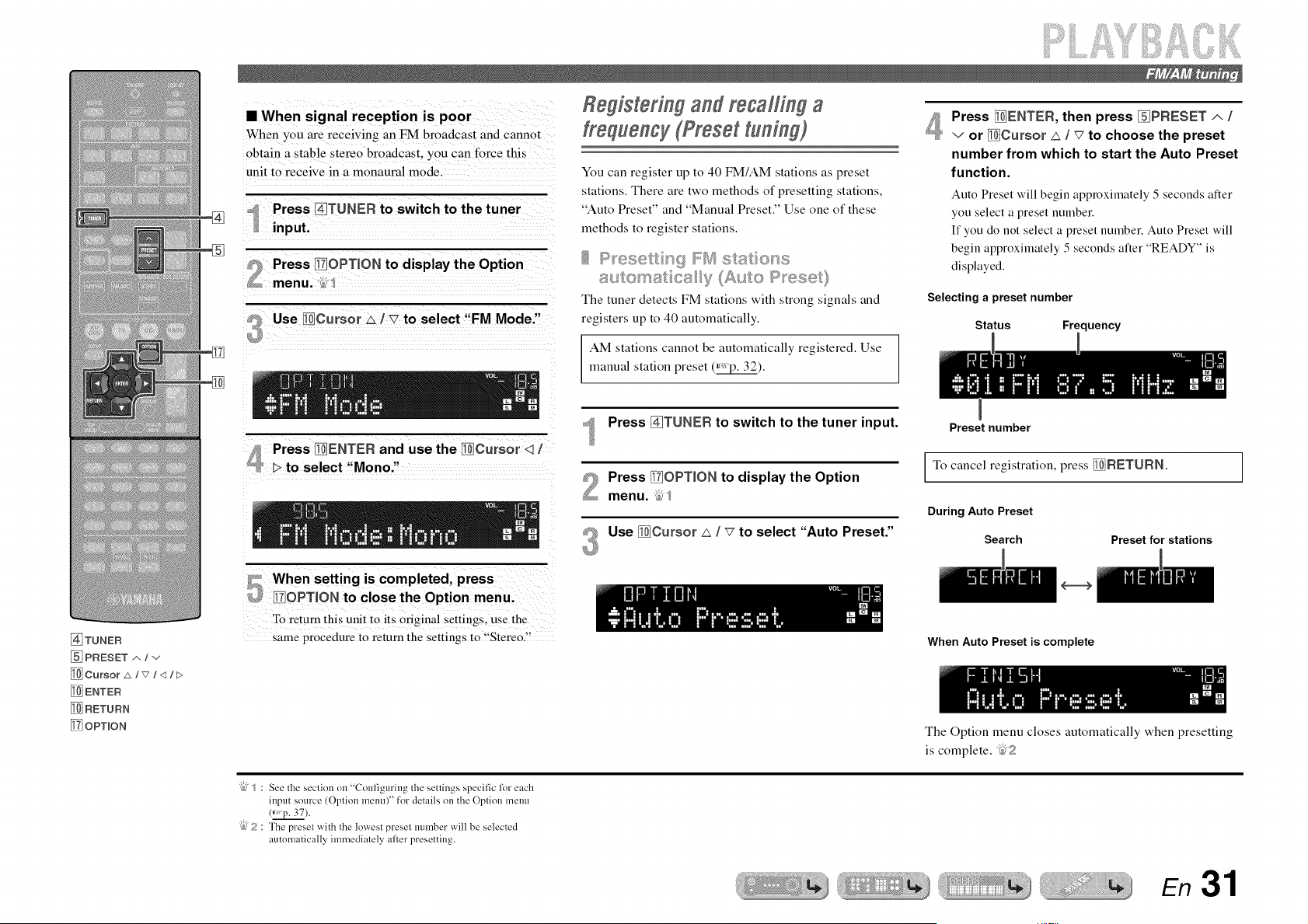
• When signal reception is poor
When you are receiving an FM broadcast and cannot
obtain a stable stereo broadcast, you can force this
unit to receive in a monaural mode.
1 Press [_]TUNER to switch to the tuner
input.
Use liCursor _ 1 v to select "FM Mode."
Relisterl l and recalling a
frequency (Preset tuni@)
You can register up to 40 FM/AM stations as preset
stations. There are two methods of presetting stations,
"Auto Preset" and "Manual Preset." Use one of these
methods to register stations.
.... ...... _,+
The tuner detects FM stations with strong signals and
registers up to 40 automatically.
AM stations cannot be automatically registered. Use
manual station preset (_).
Press _TUNER to switch to the tuner input.
Press _OPTION to display the Option
menu. _,]
Use _Cursor _ / _ to select "Auto Preset."
3
Press [_ENTEF{, then press _PRESET _ /
v or _Cursor _ / _7to choose the preset
number from which to start the Auto Preset
function.
Auto Preset will begin approximately 5 seconds alter
you select a preset number.
If you do not select a preset number. Auto Preset will
begin approximately 5 seconds alter "READY" is
displayed.
Selecting a preset number
Status Frequency
Preset number
To cancel registration, press _RETURN.
During Auto Preset
Search Preset for stations
[_TUNER
PRESET _'. / v
[_ Cursor _/v/q/F>
[_ ENTEF{
[_ RETUFtN
_] OPTION
To retLtrn this unit to its Original settings, use the
same procedure to return the settings to '{Stereo.!!
When Auto Preset is complete
The Option menu closes automatically when presetting
is complete. _"_?
"@/ : See the section on "Configuring the settings specific lot each
input source (Option menu)" for details on the Option menu
(* p. 37).
"{bJJ;? The preset with the lowest preset number will be selected
automatically immediately afler presetting.
En 31
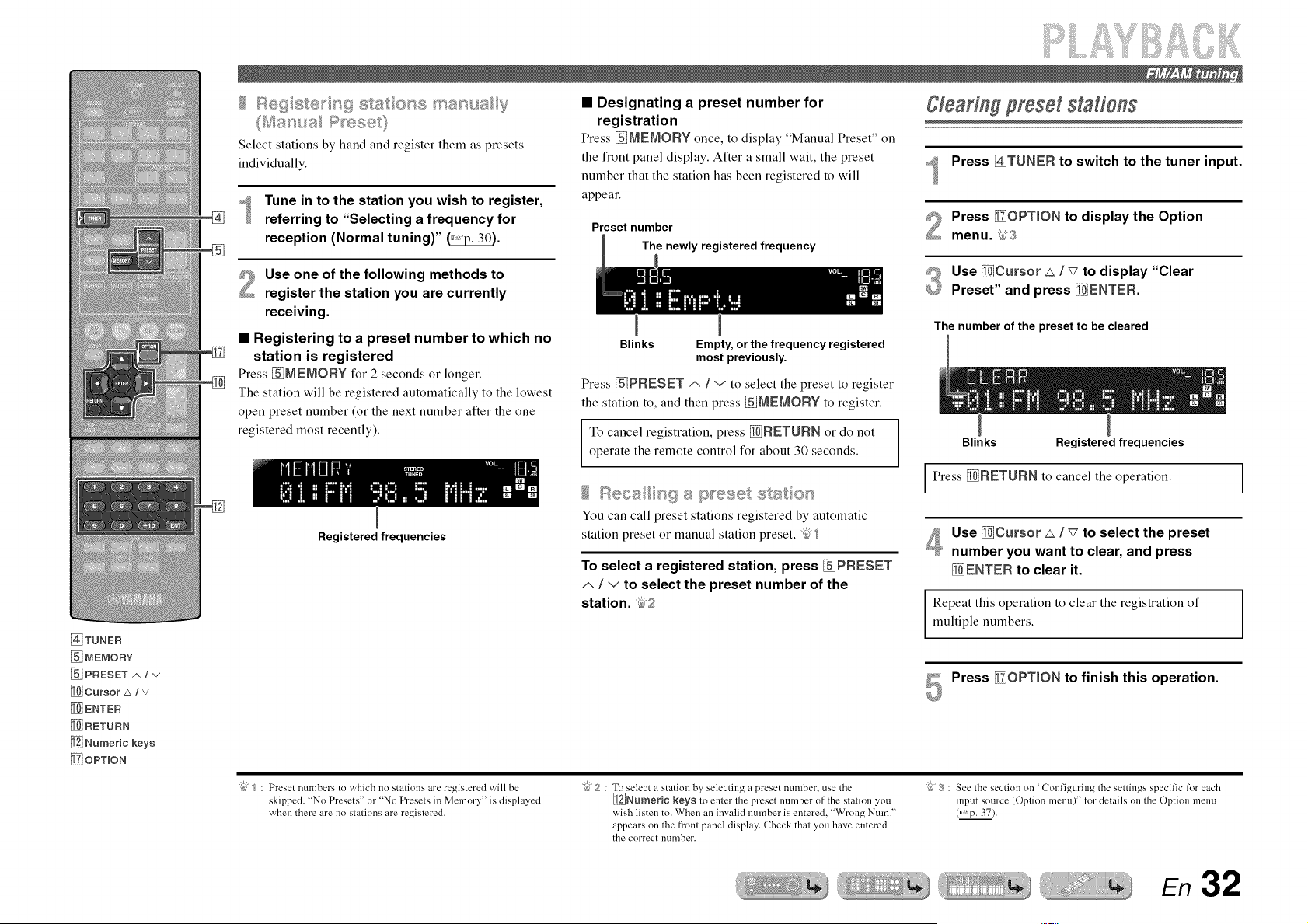
@TUNER
MEMORY
PRESET A / v
Cursor _x / v
_ENTER
_RETURN
Numeric keys
!_7iOPTION
Select stations by hand and register them as presets
individually.
_ Tune in to the station you wish to register,
referring to "Selecting a frequency for
reception (Normal tuning)" (_.
Use one of the following methods to
register the station you are currently
receiving.
• Registering to a preset number to which no
station is registered
Press _jMEMORY for 2 seconds or longer.
The station will be registered automatically to the lowest
open preset number (or the next number after the one
registered most recently).
Registered frequencies
• Designating a preset number for
registration
Press _IVlEMORY once, to display "Manual Preset" on
the front panel display. After a small wait, the preset
number that the station has been registered to will
appear.
Preset number
The newly registered frequency
Blinks
Empty, or the frequency registered
most previously.
Press _PRESET/', / v to select the preset to register
the station to, and then press _MEMORY to register.
To cancel registration, press _RETURN or do not
operate the remote control for about 30 seconds.
You can call preset stations registered by automatic
station preset or manual station preset. _5"_
To select a registered station, press _PRESET
/,, / v to select the preset number of the
station. _,2
gleadng preset statie#s
Press _TUNER to switch to the tuner input.
Press [_OPT_ON to display the Option
menu. _5,S
#_ Use _Cursor £ / _7to display "Clear
_ Preset" and press _ENTER.
The number of the preset to be cleared
Blinks Registered frequencies
Press _RETURN to cancel the operation.
Use _Cursor _ / _ to select the preset
number you want to clear, and press
_ENTER to clear it.
Repeat this operation to clear the registration of
multiple numbers.
Press _iOPT_ON to finish this operation.
"{bf_ : Preset numbers to which no stations are registered will be
skipped. "No Presets" or "No Presets in Memory" is displayed
when there are no stations are registered.
"{b_2 : To select a statkm by selecting a preset number, use the
_Numeric keys to enter the preset number of the station you
wish listen to. When an invalkl number is entered. "Wrong Num."
appears on the fi'ont panel display. Check [hal you have entered
the correct number.
"@ 3 : See the section on "Conliguring lhe sellings specific for each
input source (Oplion memO" for details on the Option menu
(_p. 37).
En 32
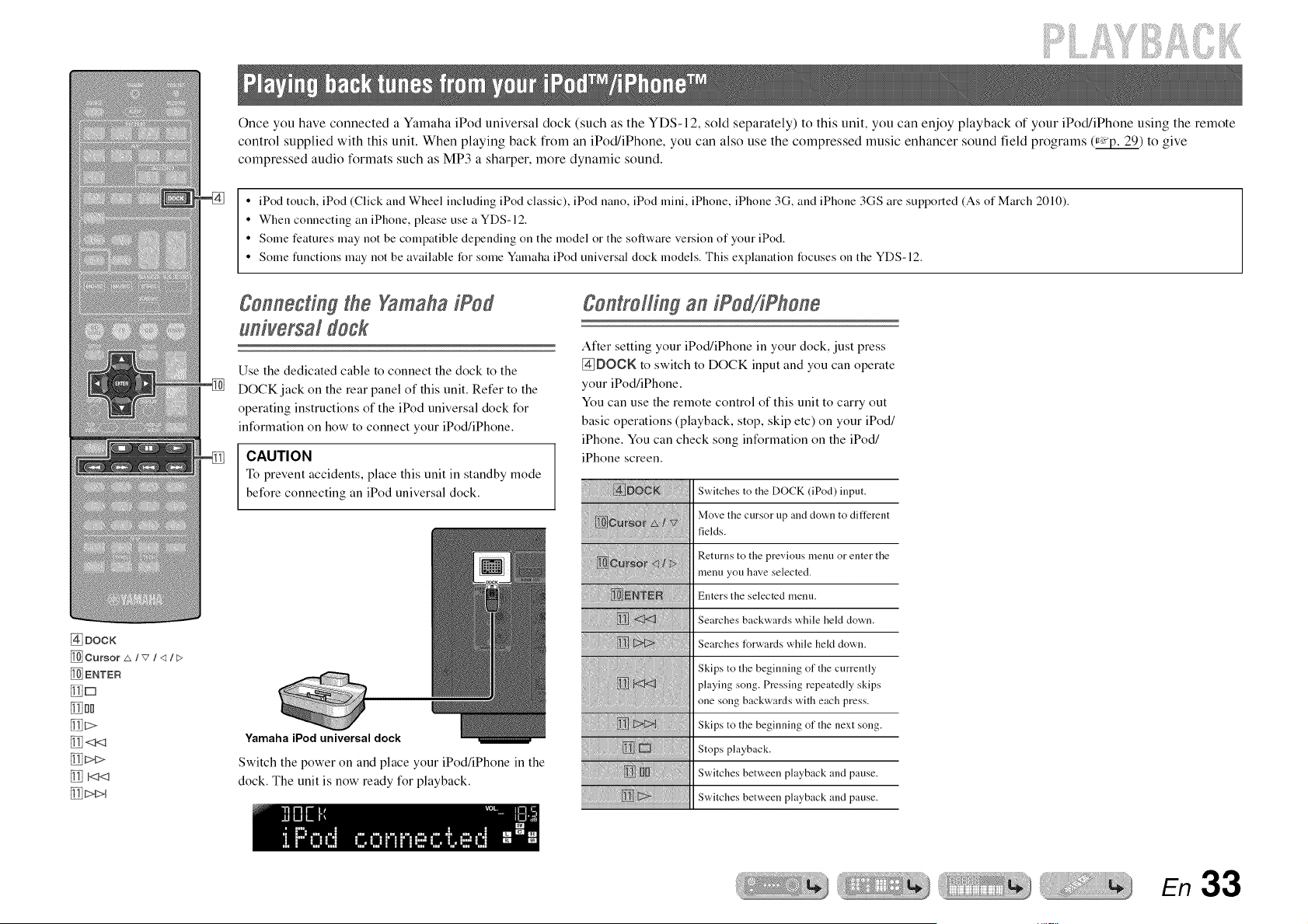
Once you have connected a Yamaha iPod universal dock (such as the YDS- 12, sold separately) to this unit, you can enjoy playback of your iPod/iPhone using the remote
control supplied with this unit. When playing back from an iPod/iPhone, you can also use the compressed music enhancer sound field programs (_) to give
compressed audio formats such as MP3 a sharper, more dynamic sound.
• iPod touch, iPod (Click and Wheel including iPod classic), iPod nano, iPod mini, iPhone, iPhone 3G, and iPhone 3GS are supported (As of March 2010).
• When connecting an iPhone, please use a YDS-12.
• Some features may not be compatible depending on the model or the software version of your iPod.
• Some functions may not be available for some Yamaha iPod universal dock models. This explanation focuses on the YDS-12.
Connecting the Yamaha iPod
universal dogk
Use the dedicated cable to connect the dock to the
DOCK jack on the rear panel of this unit. Refer to the
operating instructions of the iPod universal dock for
information on how to connect your iPod/iPhone.
CAUTION
To prevent accidents, place this unit in standby mode
before connecting an iPod universal dock.
Controllingan iPod/iPhone
After setting your iPod/iPhone in your dock, just press
@DOCK to switch to DOCK input and you can operate
your iPod/iPhone.
You can use the remote control of this unit to carry out
basic operations (playback, stop, skip etc) on your iPod/
iPhone. You can check song information on the iPod/
iPhone screen.
@ DOCK
_ Cursor _/v /<1 It>
_ENTER
_D
[_DD
_<3<_ Yamaha iPod universal dock
[_> Switch the power on and place your iPod/iPhone in the
[_ _ dock. The unit is now ready for playback.
Switches to the DOCK (iPod) input.
Move the cursor up and down to different
fields.
Returns to the previous menu or enter the
menu you have selected.
Enters the selected menu.
Searches backwards while held down.
Searches forwards while hekt down.
Skips to the beginning of the currently
playing song. Pressing repeatedly skips
one song backwards with each press.
Skips to the beginning of the next song.
Stops playback.
Switches between playback and pause.
Switches between playback and pause.
En 33
S!i!i!
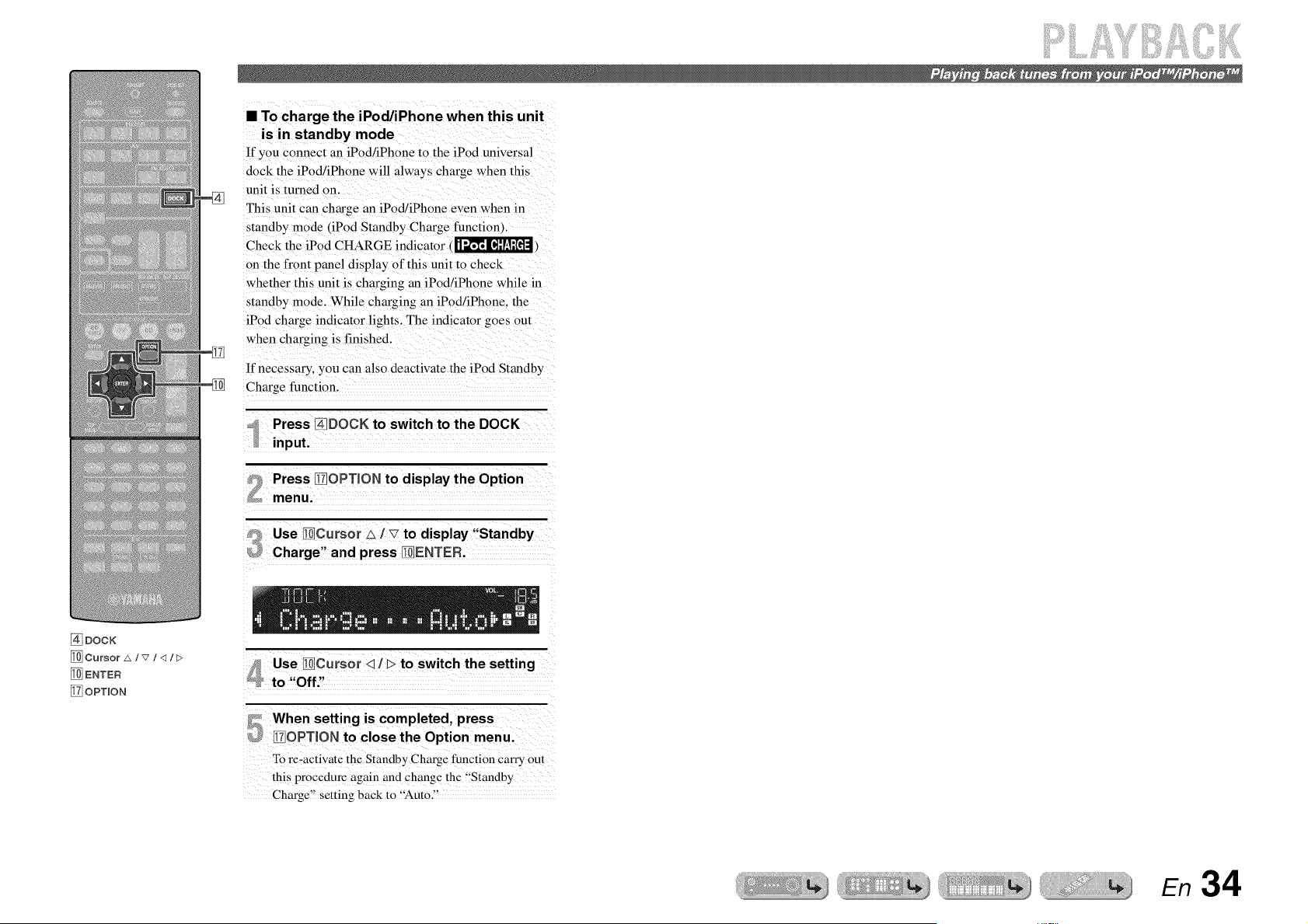
• To chargethe iPod/iPhone when this unit
is in standby mode
If you connect an iPod/iPhone to the iPod universal
dock the iPod/iPhone will always charge when this
unit is turned on.
This unit can charge an iPod/iPhone even when in
standby mode (iPod Standby Charge function).
Check the iPod CHARGE indicator (_,
on the front panel display of this unit to check
whether this unit is charging an iPod/iPhone while in
standby mode. While charging an iPod/iPhone, the
iPod charge indicator lights. The indicator goes out
when charging is finished
If necessary, you can also deactivate the iPod Standby
Charge function.
Press II_IOPTION to display the Option
menu.
Use 1101Cursor_ / _7to display "Standby
Charge" and press }_IENTER.
@DOCK
[_ENTER
_iOPTION
Use I!i_jCursor <_/ _>to switch the setting
to "Off"
5
When setting is completed, press
_7OPTION to close the Option menu.
To re-activate the Standby Charge ftmctiou carry out
this procedure again and change the "Standby
Charge" setting back to "'Auto."
En 34
iiiiii[]iiiJii S
You can connect a Yamaha Bluetooth wireless audio receiver (such as the YBA-10, sold separately) to this unit and enjoy wireless playback from Bluetooth-compatible
portable music players. _
NOTE
When playing back from a Bluetooth component for the first time, you must first pair the devices (register the Bluetooth components). When establishing a wireless connection
you must carry out pairing on both this unit and on the Bluetooth component.
[_ DOCK
MEMORY
[_ Cursor A / v
_ ENTEF_
[_ RETUF_N
!_i OPTION
%
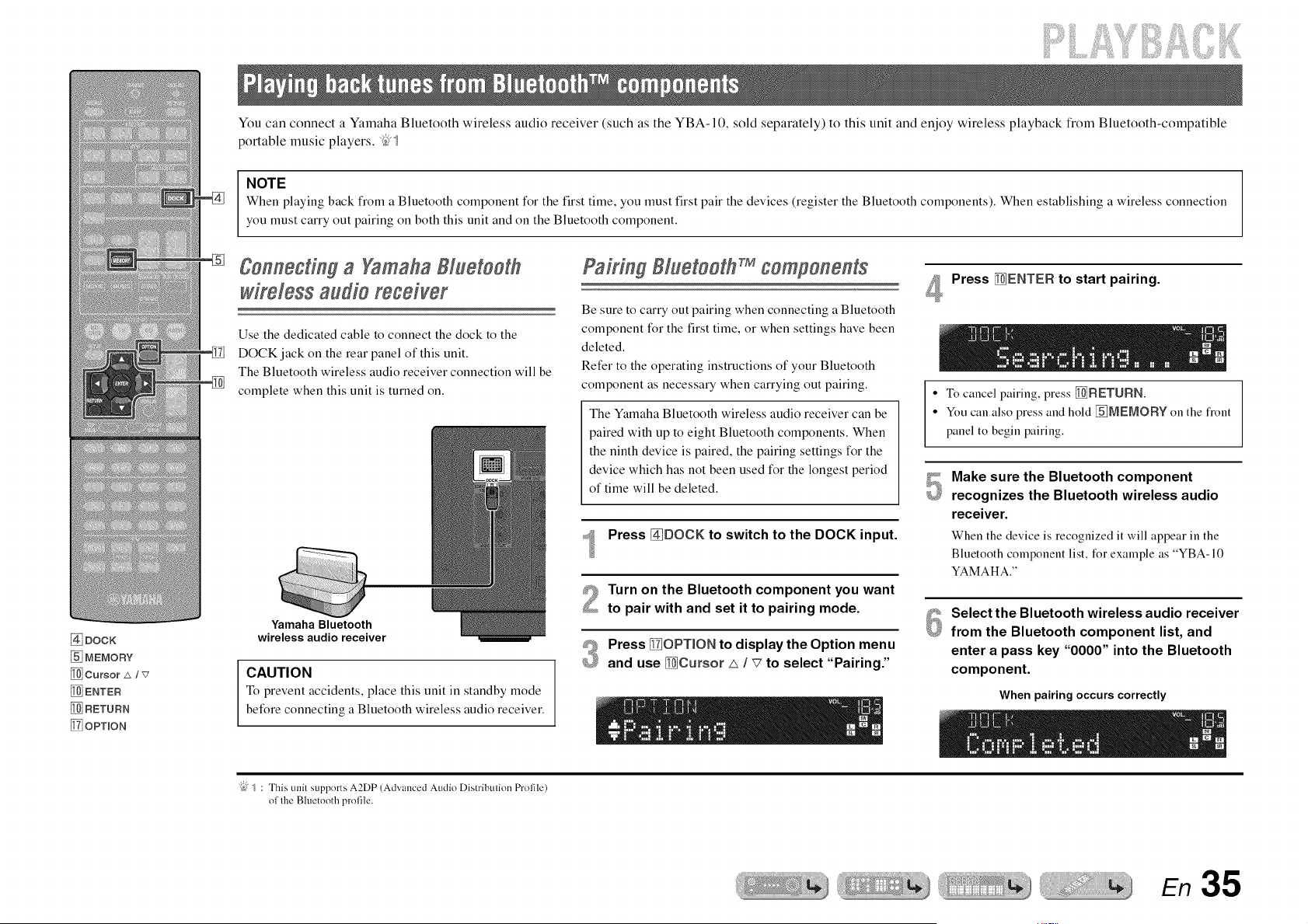
gonnectiW a Yamaha81uetooth
wireless audio receiver
Use the dedicated cable to connect the dock to the
DOCK jack on the rear panel of this unit.
The Bluetooth wireless audio receiver connection will be
complete when this unit is turned on.
Yamaha Bluetooth
wireless audio receiver
CAUTION
To prevent accidents, place this unit in standby mode
before connecting a Bluetooth wireless audio receiver.
PaMn181uetooth components
Be sure to carry out pairing when connecting a Bluetooth
component for the first time, or when settings have been
deleted.
Refer to the operating instructions of your Bluetooth
component as necessary when carrying out pairing.
The Yamaha Bluetooth wireless audio receiver can be
paired with up to eight Bluetooth components. When
the ninth device is paired, the pairing settings for the
device which has not been used for the longest period
of time will be deleted.
Press _DOCK to switch to the DOCK input.
Turn on the Bluetooth component you want
to pair with and set it to pairing mode.
#_ Press _OPTION to display the Option menu
£_ and use _Cursor _ / _7 to select "Pairing."
Press _ENTER to start pairing.
• To cancel pairing, press _RETURN.
• You can also press and hold _IEMORY on the flont
panel to begin pairing.
Make sure the Bluetooth component
recognizes the Bluetooth wireless audio
receiver.
When the device is recognized it will appear in the
Bluetooth component list, for example as "YBA-10
YAMAHA."
Select the Bluetooth wireless audio receiver
from the Bluetooth component list, and
enter a pass key "0000" into the Bluetooth
component.
When pairing occurs correctly
"{bJ/ : This unit supports A2DP (Advanced Audio Distribulion Profile)
ol lhe Bhletooth prolile.
En 35
Using Bluetooth components
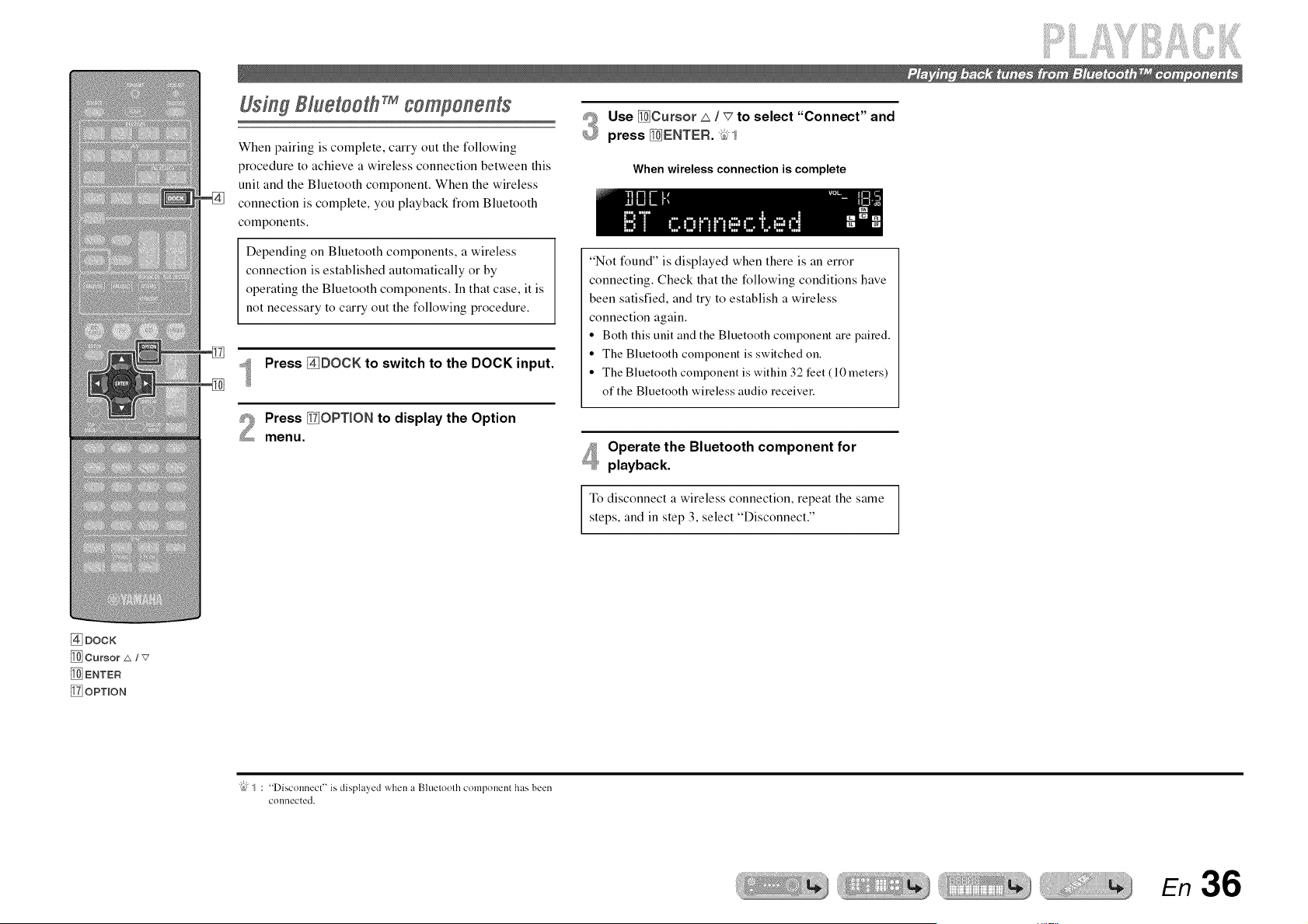
When pairing is complete, carry out the following
procedure to achieve a wireless connection between this
unit and the Bluetooth component. When the wireless
connection is complete, you playback from Bluetooth
components.
Depending on Bluetooth components, a wireless
connection is established automatically or by
operating the Bluetooth components. In that case, it is
not necessary to carry out the following procedure.
Press _DOCK to switch to the DOCK input.
Press [_OPT_ON to display the Option
menu.
@
Use _Cursor A / _7to select "Connect" and
press _ENTER. _,1
When wireless connection is complete
"Not found" is displayed when there is an error
connecting. Check that the following conditions have
been satisfied, and try to establish a wireless
connection again.
• Both this unit and the Bluetooth component are paired.
• The Bluetooth component is switched on.
• The Bluetooth component is within 32 feet (10 meters)
of the Bluetooth wireless audio receiver.
Operate the Bluetooth component for
playback.
To disconnect a wireless connection, repeat the same
steps, and in step 3, select "Disconnect."
@DOCK
DENTED
_iOPTION
"{bJ_ : "Disconnect" is displayed when a Bluetoodl component has been
connected.
En 36
SETUP
@ mnput seRector
[_ Cursor £_/v/<1/E>
_ENTER
[_ RETURN
I_] OPTION
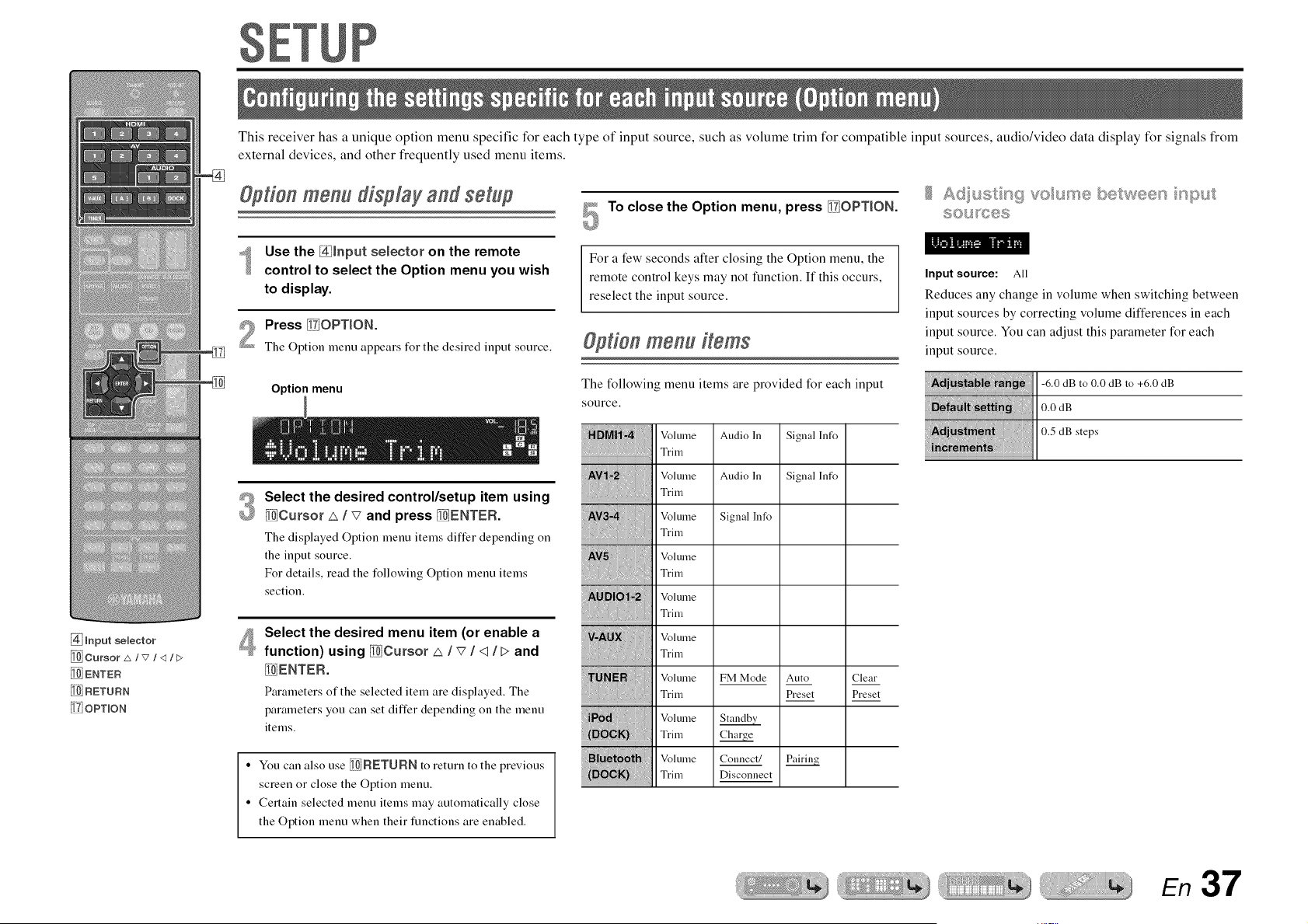
This receiver has a unique option menu specific for each type of input source, such as volume trim for compatible input sources, audio/video data display for signals from
external devices, and other fl'equently used menu items.
@tien menu display and setup
Use the [_lnput selector on the remote
control to select the Option menu you wish
to display.
Press _iOPT_ON.
The Option menu appears for the desired input source.
Option menu
@
Select the desired control/setup item using
_Cursor _ / v and press _ENTEFL
The displayed Option menu items differ depending on
the input source.
For details, read the following Option menu items
section.
4
Select the desired menu item (or enable a
function) using _Cursor _ / v / <1/ > and
_ENTER.
Parameters of the selected item are displayed. The
parameters you can set differ depending on the menu
items.
• You can also use _FIETUFIN to return to the previous
screen or close the Option menu.
• Certain selected menu items may automatically close
the Option menu when their functions are enabled.
To close the Option menu, press _]OPT_ON.
For a few seconds after closing the Option menu, the
remote control keys may not function. If this occurs,
reselect the input source.
Option menu items
The following menu items are provided for each input
source.
Audio InVolume
Trim
Volume Audio In
Trim
{_ Volume Signal ]rife
.... Triln
Volume
Trim
_NN_ Voluule
i Vo,um
Vo,um
Vo,um
_N _ Voluule Co,luect/
Signal lnfo
Signal lnfo
Auto
Preset
Pairin_
Clear
Preset
S©L_F0@8
Input source: All
Reduces any change in volume when switching between
input sources by correcting volume differences in each
input source. You can adjust this parameter for each
input source.
-6.0 dB to 0.0 dB to +6.0 dB
0.0 dB
0.5 dB steps
En 37

vdeo and sudo
Input source: HDMII-4, AVI-2
Combines video from HDMI or AV input sources with analog/
digital audio inputs in situations such as:
- an external device is connected with an HDM[ cable but cannot
transmit audio through HDMI
- an external device with component video output and analog audio
output (such as certain game consoles) are connected to the
system
Inputs that change the audio source
Assignable audio input jacks
To change assignments, select an input source (HDMI1-4 or AVl-2)
as the video input first, and then select audio input jacks in this
menu.
Set as follows according on the desired combination of audio input
jacks.
Optical digital audio Select AVI or AV4. Connect the external component
input audio cable to the optical jack for the selected input.
Coaxial digital audio Select AV2 or AV3. Connect the external component
input audio cable to the coaxial jack for the selected input.
Analog audio input Select one of AV5, AUDIOI, or AUDIO2. Connect
the external component audio cable to the audio jack
for the selected input.
• For details of settings, refer to "Receiving audio fiom other input
sources" (_p. 16) and "Component connections to analog audio
output devices" (_).
• To return audio inputs to their previous settings, display this item
again, and select the original input jack.
©spayn 9 _sfo_xsa_ on on sud oiv dee
Input source: HDMll-4, AVI-4
Displays information on digital audio and video signals on the
front panel display. You can display the signal information by
pressing _ENTEN on the menu item and using _Cursor _ / _7.
Menu item
Information
Audio information
Format of audio signals.
The number of input signal channels (front/surround/
LFE).
For example, if input signal channels are 3 front
channels, 2 surrounds and LFE, "3/2/0.1" is
displayed.
The sampling frequency of analog-to-digital
The bit rate of input signal per second.
Video information
Format and resolution of video input signal.
Format and resolution of video output signal.
Error messages about HDMI signals and components.
Error message
....................i"4i")l":F:)i:::'i'_'i"'l"li"" HDCP authentication failed.
The number of connected HDMI
components is over the limit.
• "No Signal" is displayed when no signals are being received,
and "---" is displayed if this unit cannot recognize the incoming
signal.
• The bit rate may vaU during playback.
En38
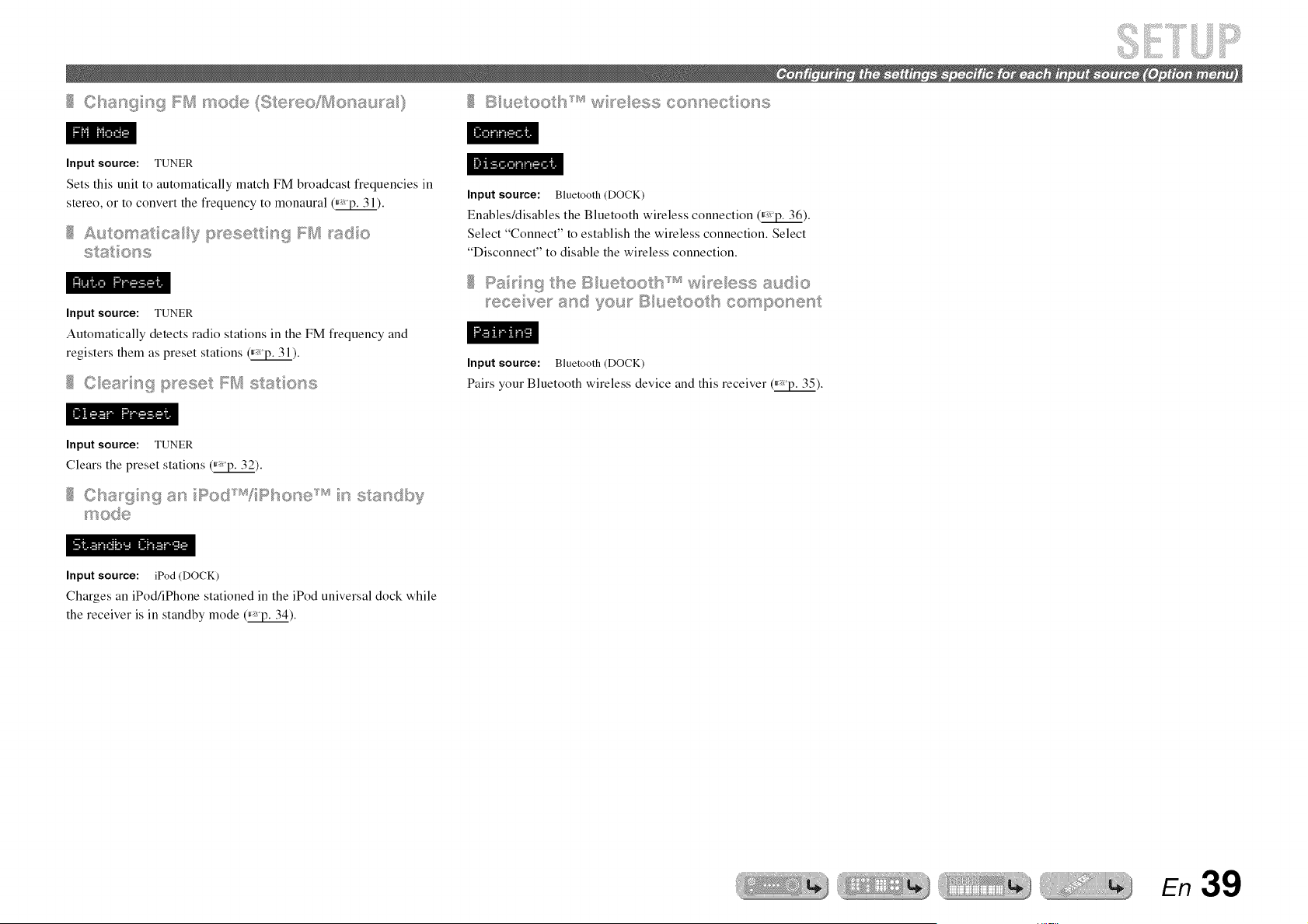
............ _'_O_,_....
Input source: TUNER
Sets this unit to automatically match FM broadcast frequencies in
stereo, or to convert the frequency to monaural (_).
Input source: TUNER
Automatically detects radio stations in the FM frequency and
registers them as preset stations _).
Input source: Bluetooth (DOCK)
Enables/disables the Bluetooth wireless connection (_).
Select "Connect" to establish the wireless connection. Select
"Disconnect" to disable the wireless connection.
Input source: Bluetooth (DOCK)
Pairs your Bluetooth wireless device and this receiver ff_vp.35).
Input source: TUNER
Clears the preset stations (_).
Ct_8_9 _"_g_"_ Po__'_'_ P_so__e_'_ __ ss__<,Ib_F
t_ O_@
Input source: iPod (DOCK)
Charges an iPod/iPhone stationed in the iPod universal dock while
the receiver is in standby mode (_).
En 39
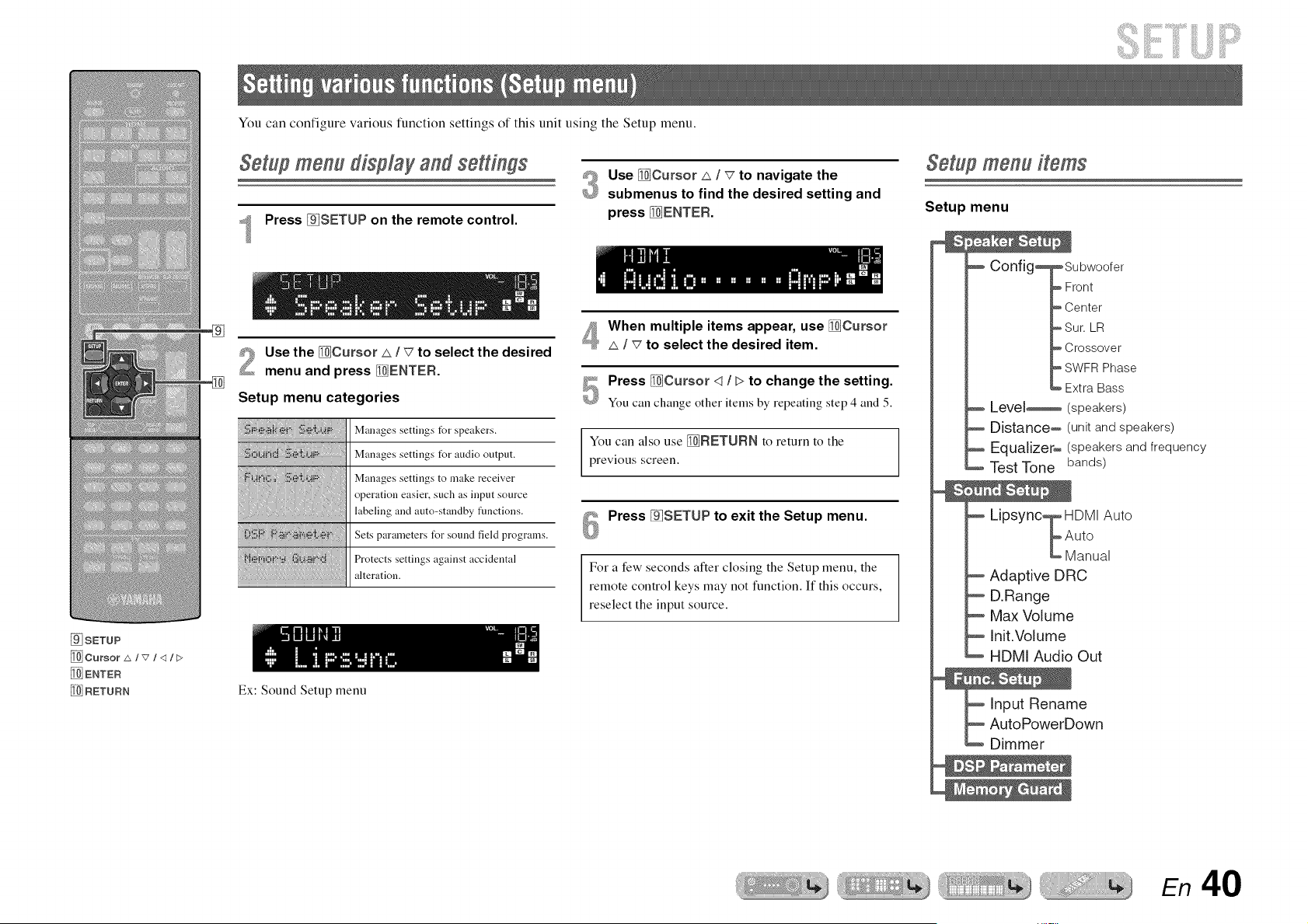
You can configure various function settings of this unit using the Setup menu.
Setup menu display and settings
Press _SETUP on the remote control.
#_ Use [_Cursor _ / _7to navigate the
£_ submenus to find the desired setting and
press _ENTER.
Setup menu items
Setup menu
[9_SETUP
[_ Cursor 2x/v/<1/E>
[1_ENTER
RETURN
%
Use the _Cursor zx / _ to select the desired
menu and press _ENTER.
Setup menu categories
Manages settings for speakers.
Manages settings t_r audio output.
Manages settings to make receiver
operation easier, such as input source
labeling and auto-standby flmctions.
Sets parameters t_r sound field programs.
Protects settings against accidental
alteration.
Ex: Sound Setup menu
When multiple items appear, use _Cursor
I _7to select the desired item.
Press _Cursor <1/ > to change the setting.
You can change other items by repeating step 4 and 5.
You can also use _RETURN to return to the
previous screen.
Press _SETUP to exit the Setup menu.
For a few seconds after closing the Setup menu, the
remote control keys may not function. If this occurs,
reselect the input source.
Config_
Level_
Distance_
Equalizer_
Test Tone
Subwoofer
Front
Center
Sur. LR
Crossover
SWFRPhase
Extra Bass
(speakers)
(unit and speakers)
(speakers and frequency
bands)
Lipsync_ HDMI Auto
k
Auto
Manual
Adaptive DRC
D.Range
Max Volume
Init.Volume
HDMI Audio Out
e
own
En 40
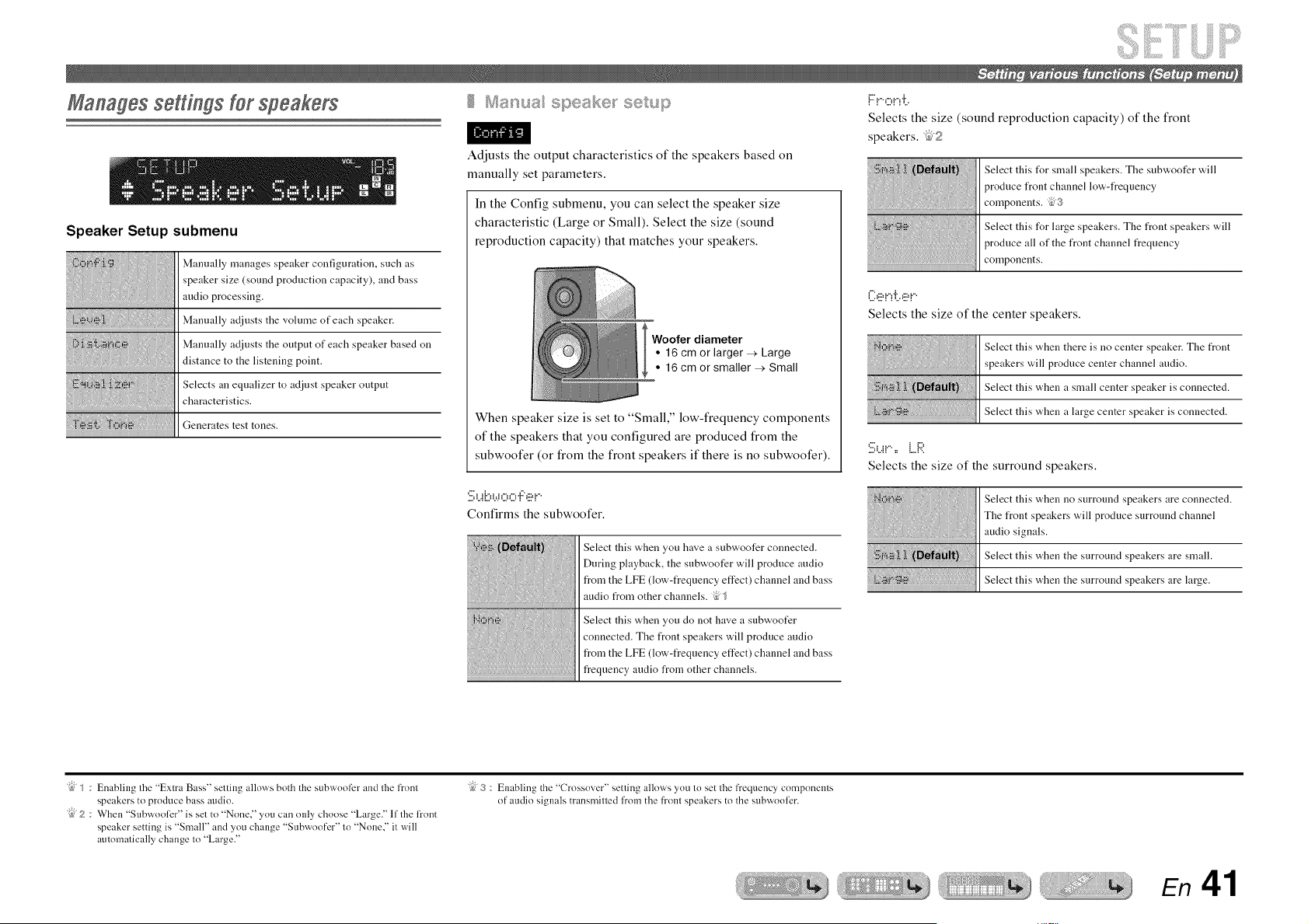
ManagessettingsYetspeakers
Speaker Setup submenu
Manually manages speaker configuration, such as
speaker size (sound production capacity), and bass
audio processing.
Manually adjusts the volume of each speaker.
Manually adjusts the output of each speaker based on
distance to the listening point.
Selects an equalizer to adjust speaker output
characteristics.
Generates test tones.
Adjusts the output characteristics of the speakers based on
manually set parameters.
In the Config submenu, you can select the speaker size
characteristic (Large or Small). Select the size (sound
reproduction capacity) that matches your speakers.
l Woofer diameter
• 16 cm or larger _ Large
• 16 cm or smaller _ Small
When speaker size is set to "Small," low-frequency components
of the speakers that you configured are produced from the
subwoofer (or from the front speakers if there is no subwoofer).
'.iii]L.!i:::,bJ,:::,,:::,'!:',!!!'!....
Confirms the subwoofer.
Select this when you have a subwoofer connected.
During playback, the subwoofer will produce audio
from the LFE (low-frequency effect) channel and bass
audio from other channels.
Select this when you do not have a subwoofer
connected. The front speakers will produce audio
from the LFE (low-frequency effect) channel and bass
frequency audio from other channels.
i:::",......... ,.....i.
Selects the size (sound reproduction capacity) of the front
speakers. _52
Select this tUr small speakers. The subwoofer will
produce front channel low-frequency
components. _3
Select this for large speakers. The front speakers will
produce all of the front channel frequency
components.
ill}_!!!,!"!"i:.._!!!,!....
Selects the size of the center speakers.
Select this when there is no center speaker. The front
speakers will produce center channel audio.
Select this when a small center speaker is connected.
Select this when a large center speaker is connected.
:iii;u!,= LR
Selects the size of the surround speakers.
Select this when no surround speakers are connected.
The front speakers will produce surround channel
audio signals.
Select this when the surround speakers are small.
Select this when the surround speakers are large.
"{bJS : Enabling the "Extra Bass" setting allows both the subwoofer and the front
speakers to produce bass audio.
"ibj2 : When "Subwoolizr" is set to "None"' you can only choose "Large." lfthe l?ont
speaker setting is "Small" and you change "Subwoofer" to "None," it will
automatically change to "Large."
"{bJ3 : Enabling the "Crossover" setling allows you lo set lhe fi'equency components
of audio signals transmilled h'om the fi'ont speakers to the subwoofer.
En 41
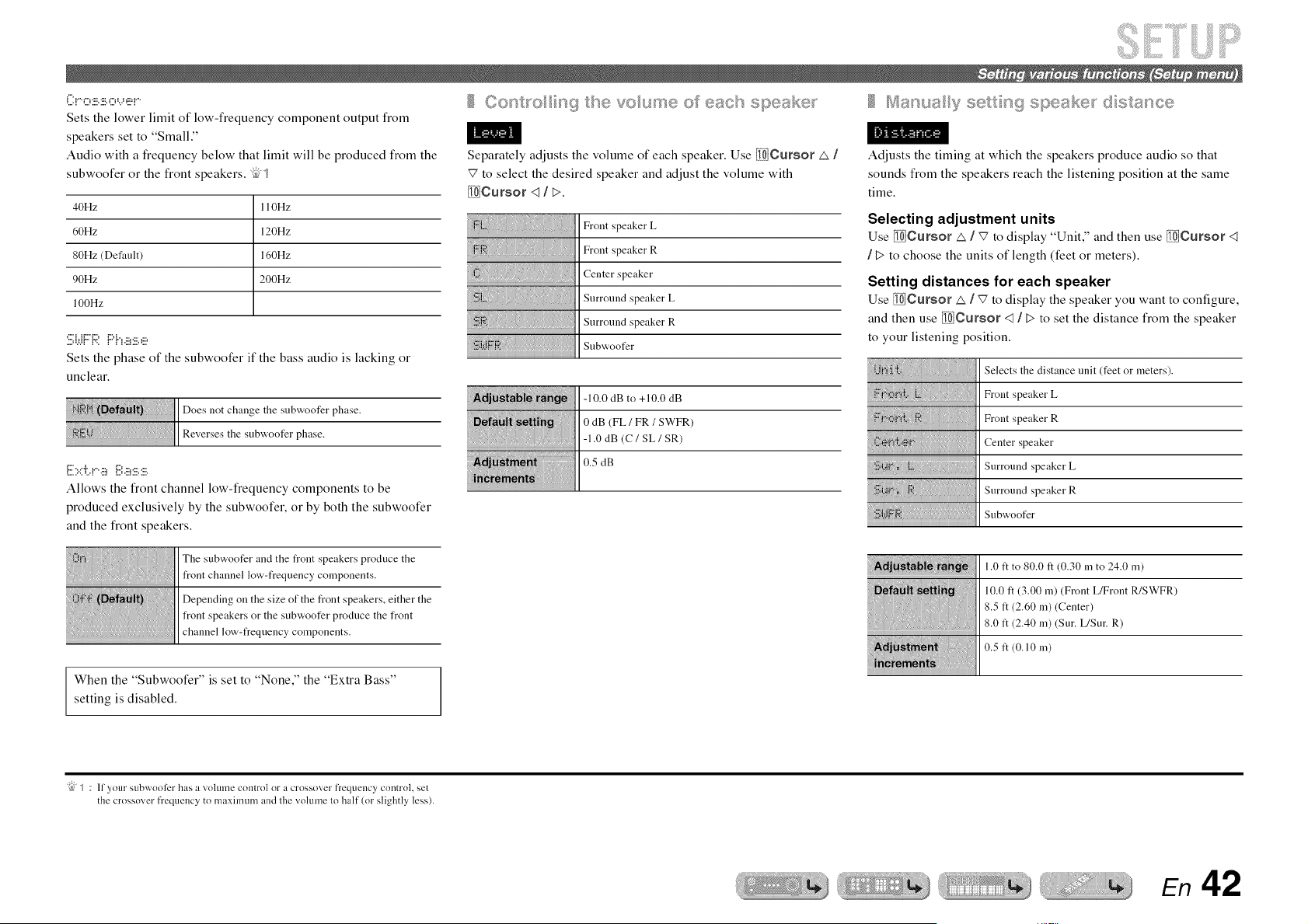
(_:!""O:5:!.::'.O_...__!.:,'!....
Sets the lower limit of low-frequency component output from
speakers set to "Small."
Audio with a frequency below that limit will be produced from the
subwoofer or the front speakers. %'_
40Hz 110Hz
60Hz 120Hz
80Hz (Default) 160Hz
90Hz 200Hz
100Hz
bW! !_:'.{'ha:!!!.,!!?
Sets the phase of the subwoofer if the bass audio is lacking or
unclear.
Does not change the subwoofer phase.
Reverses the subwoofer phase.
E::.::i-.!.-aii:.i:a:!!!.:!::.
Allows the front channel low-frequency components to be
produced exclusively by the subwoofer, or by both the subwoofer
and the front speakers.
The subwoofer and the front speakers produce the
front channel low-frequency components.
Depending on the size of the front speakers, either the
front speakers or the subwoofer produce the front
channel low-frequency components.
When the "Subwoofer" is set to "None," the "Extra Bass"
setting is disabled.
Separately adjusts the volume of each speaker. Use _Cursor _ /
_7 to select the desired speaker and adjust the volume with
_Cursor <1/ >.
Front speaker L
Front speaker R
Center speaker
Surround speaker L
Surround speaker R
Subwoofer
-10.0 dB to +10.0 dB
0 dB (FL / FR / SWFR)
-1.0 dB (C / SL / SR)
0.5 dB
Adjusts the timing at which the speakers produce audio so that
sounds from the speakers reach the listening position at the same
time.
Selecting adjustment units
Use _Cursor _ / _7 to display "Unit," and then use _Cursor <1
/ t> to choose the units of length (feet or meters).
Setting distances for each speaker
Use _Cursor zx I v' to display the speaker you want to configure,
and then use _Cursor <1/ > to set the distance from the speaker
to your listening position.
} }{{} {
{{:{_'-:{!::f,<{}{}}{}{}{{{}{{{{
>> { }B
< };>;._ .............................
Selects the distance unit (feet or meters).
Front speaker L
Front speaker R
Center speaker
Surround speaker L
Surround speaker R
Subwoofer
1.0 ft to 80.0 ft (0.30 m to 24.0 m)
10.0 ft (3.00 m) (Front L/Front R/SWFR)
8.5 ft (2.60 m) (Center)
8.0 ft (2.40 m) (Sur. L/Sur. R)
0.5 ft (0.10 m)
"{bJ_ : 11 your subwoofer has a volume control or a crossover frequency control, set
the crossover frequency to maximum and lhe volume lo half (or slightly less).
En 42
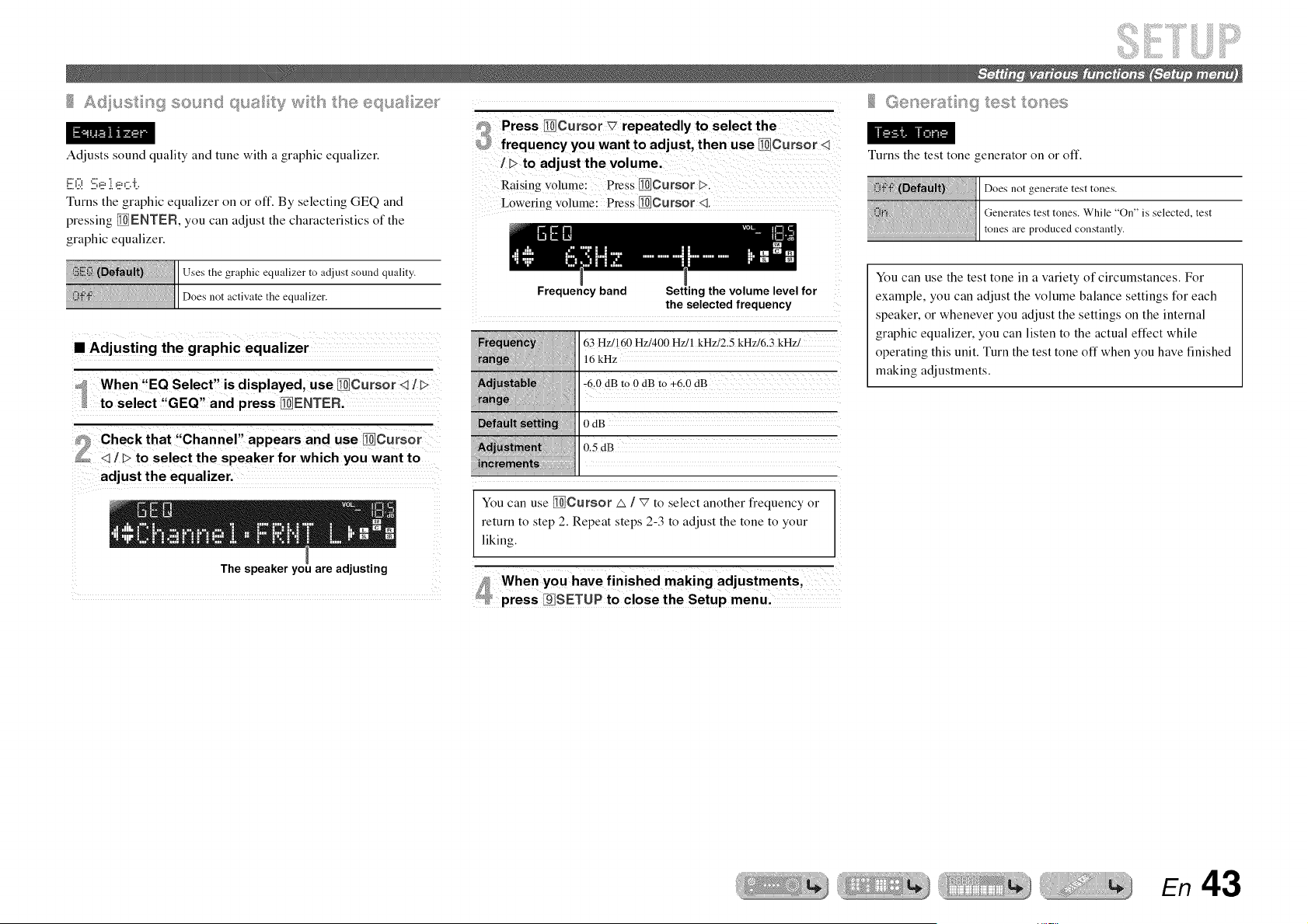
Ad ust n9 sound _" ,'..... _,_u_>ty w tsetse equa ze__
Adjusts sound quality and tune with a graphic equalizer.
E:(:! :i:.i:ei e,:::.i:..
Turns the graphic equalizer on or off. By selecting GEQ and
pressing _ENTER, you can adjust the characteristics of the
graphic equalizer.
,,a_r<_.:_ it [i Uses the graphic equalizer to adjust sound quality.
II
::: ::::::::::::::::::::::::::::ll not activate the equalizer.
x x x x x x x x x x x x x x
• Adjusting the graphic equalizer
f 1> to adjust the volume.
Raising volume: Press II{i]Cursor {>.
Lowering volume: Press II_}Cursor <1.
Frequency band Setting the volume level for
the selected frequency
160 Hzi400 Hz/l kHzi2.5 kHz/6.3 kHzi
16 kHz
-6.0 dB to 0 dB m +6.0 dB
0 dB
L5 dB
Turns the test tone generator on or off.
Does not generate test tones.
Generates test tones. While "On" is selected, test
tones are produced constantly.
You can use the test tone in a variety of circumstances. For
example, you can adjust the volume balance settings for each
speaker, or whenever you adjust the settings on the internal
graphic equalizer, you can listen to the actual effect while
operating this unit. Turn the test tone off when you have finished
making adjustments.
adjust the equalizer,
The speaker you are adjusting
You can use [lg_,_Cursor _ / _7 to select another frequency or
return to step 2. Repeat steps 2-3 to adjust the tone to your
liking.
When you have finished making adjustments,
press ;§]SETUP to close the Setup menu.
En 43
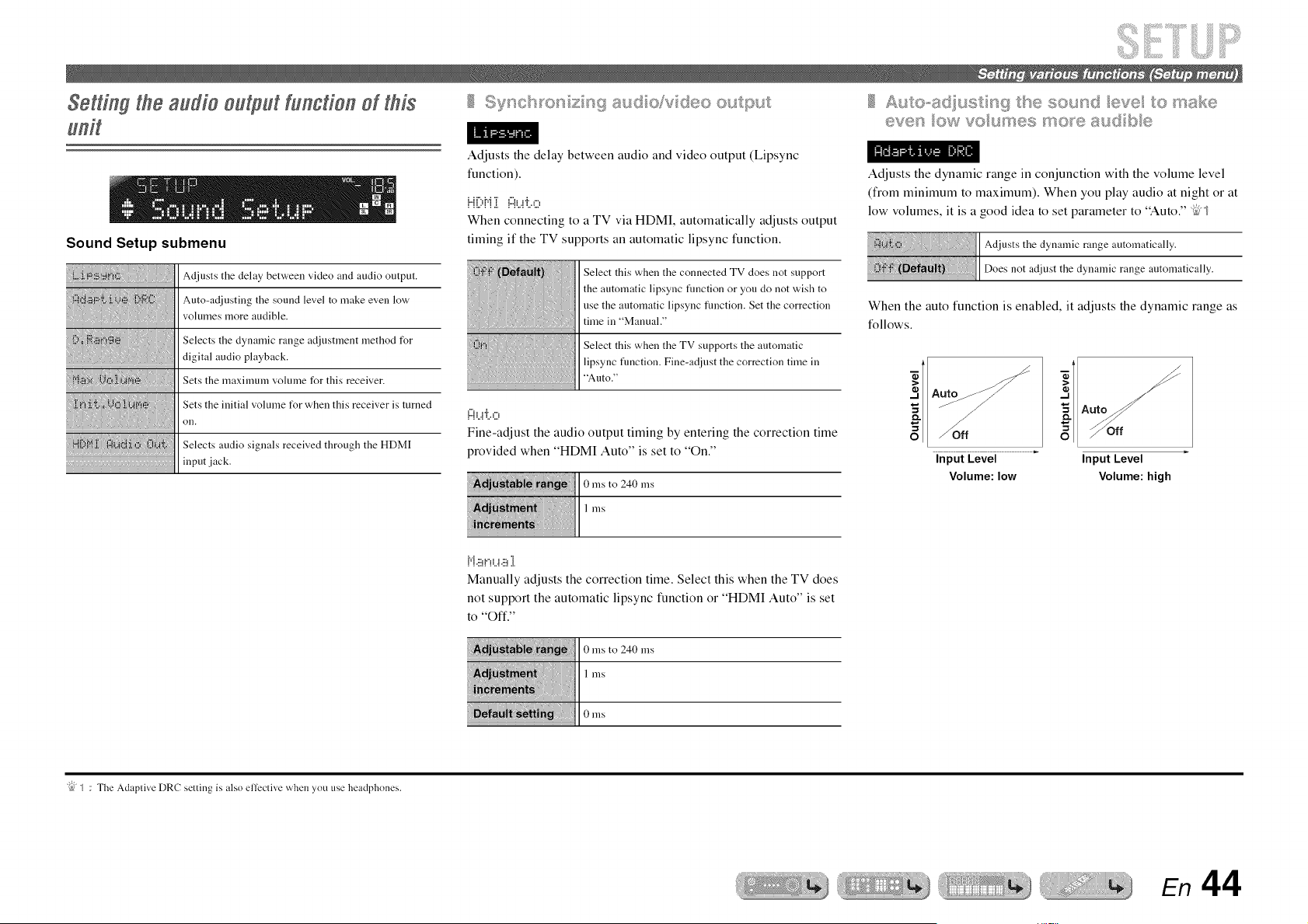
Setting the audio output function oi this
Sound Setup submenu
Adjusts tile delay bet'a, een video and audio output.
Auto-adjusting the sound level to make even low
volumes more audible.
Selects the dynamic range adjustment method for
digital audio playback.
Sets the maximmn volmne for this receiver.
Sets the initial volume tOr when this receiver is turned
on.
Selects audio signals received through the HDMI
input jack.
Adjusts the delay between audio and video output (Lipsync
function).
H",,M "r ,"_, ,a....
When connecting to a TV via HDMI, automatically adjusts output
timing if the TV supports an automatic lipsync function.
Select this when the connected TV does not support
the automatic lipsync fimction or you do not wish to
use the automatic lipsync fimction. Set the correction
time in "Manual."
Select this when the TV supports the automatic
lipsync fimction. Fine-adjust the correction time in
"Auto."
{:::{i...!"J:,,0
Fine-adjust the audio output timing by entering the correction time
provided when "HDMI Auto" is set to "On."
0 ms to 240 ms
1 ms
Adjusts the dynamic range in conjunction with the volume level
(from minimum to maximum). When you play audio at night or at
low volumes, it is a good idea to set parameter to "Auto." _5"_
the dynamic range automatically.
iii: :,:IIDoesnot adjust the dynamic range automatically.
When the auto function is enabled, it adjusts the dynamic range as
follows.
Off
Input Level
Volume: low
Input Level
Volume: high
{"{8!"!L.!8 ].
Manually adjusts the correction time. Select this when the TV does
not support the automatic lipsync function or "HDMI Auto" is set
to "Oft'."
0 ms to 240 ms
I nlS
0 nlS
"{bJ_ : The Adaptive DRC setting is also elfeclive when you use headphones.
En 44
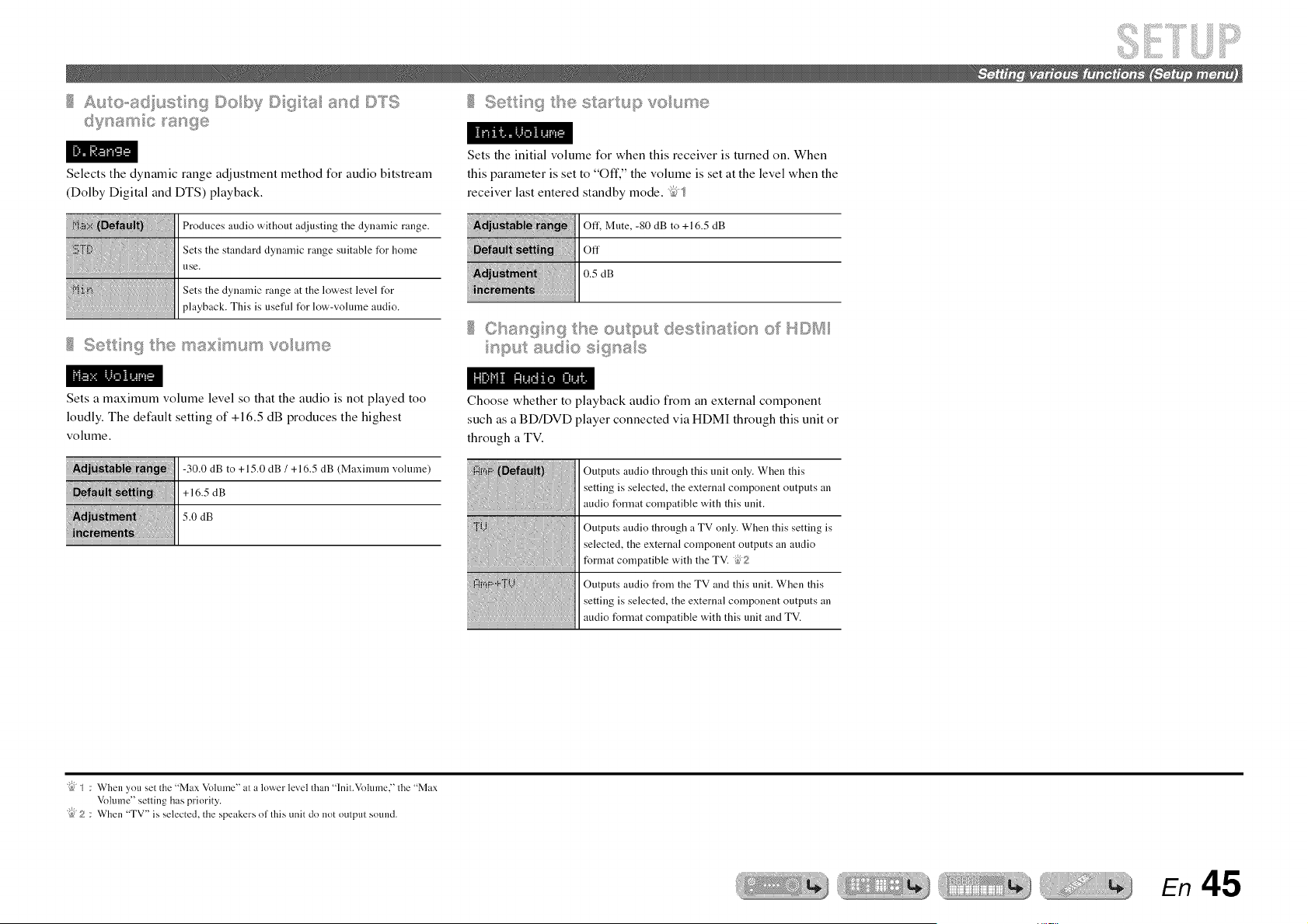
£1,,_®oe(xu_ n 9©uby©q a and©T$
Selects the dynamic range adjustment method for audio bitstream
(Dolby Digital and DTS) playback.
Produces audio without adjusting the dynamic range.
Sets the standard dynalnic range suitable for home
use.
Sets the dynamic range at the lowest level t_r
playback. This is useful t_r low-volulne audio.
Se n 9 _tse max;mum voume
1<_ _. It _1. ""
Sets a maximum volume level so that the audio is not played too
loudly. The default setting of +16.5 dB produces the highest
volume.
-30.0 dB to +15.0 dB / +16.5 dB (Maximum volume)
+16.5 dB
5.0 dB
Se n 9 _esa_upvoume
Sets the initial volume for when this receiver is turned on. When
this parameter is set to "Off," the volume is set at the level when the
receiver last entered standby mode. _5<_
Off', Mute, -80 dB to +16.5 dB
Off
0.5 dB
Choose whether to playback audio from an external component
such as a BD/DVD player connected via HDMI through this unit or
through a TV.
Outputs audio through this unit only. When this
setting is selected, the external component outputs an
audio format compatible with this unit.
Outputs audio through a TV only. When this setting is
selected, the external component outputs an audio
format compatible with the TV. 62
Outputs audio from the TV and this unit. When this
setting is selected, the external component outputs an
audio format compatible with this unit and TV.
"{bJS : When you set the "Max Volume" at a lower level than "lnit.Vohnne," lhe "Max
Volume" selling has priority.
"{}J2 : When "TV" is selected, the speakers ol lhis unit do not oulptlt sotnld.
En 45
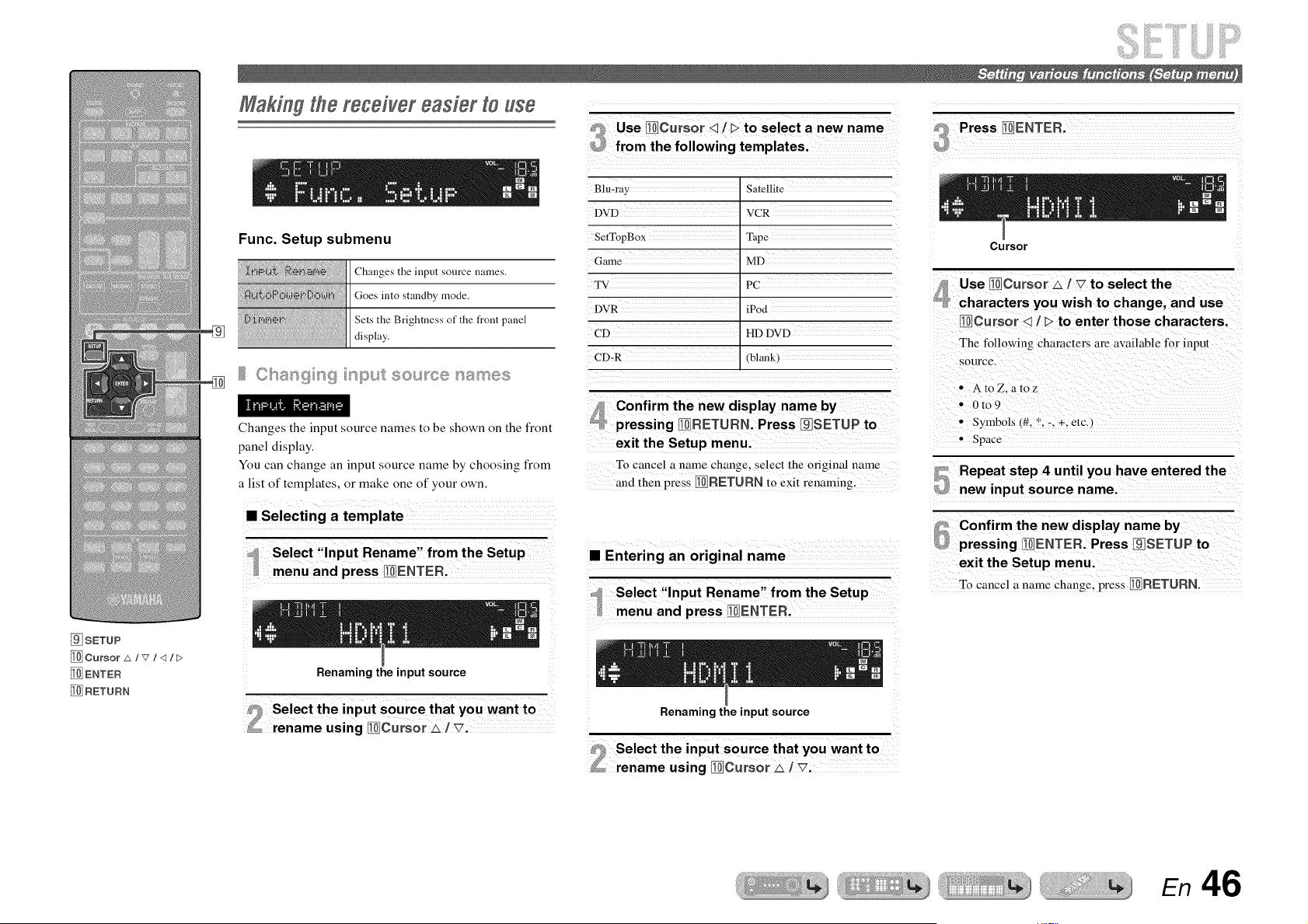
Making the receiver easier to use
Func. Setup submenu
Changes the input source names.
Goes into standby mode.
Sets the Brightness of the front panel
display.
Clsan9 n9 npu_£ sou_ce names
Changes the input source names to be shown on the front
panel display.
You can change an input source name by choosing from
a list of templates, or make one of your own.
• Selecting a template
_ Use _JCursor _ / I>to select a new name
_ from the following templatesl
Satellite
DvD vcR
SetTopBox Tape
Game MD
TV PC
DVR iPod
cD imDw
CD=R (bhmk)
f_ confirm the new display name by
_ pressing _RETURN. Press _SETUP to
exit the Setup menui
To cancel a name change, select the original ham e
and then press _RETURN to exit renaming.
x x x x x x x x x x
• Entering an original name
@ Press _ENTER'
Cursor
Use _curs0r _ iV to select the
_ characters you wish to change, and use
_Cursor q ] _ to enter those characters.
0t09
SymbOls i#, *; i; _; etc,)
Space
Pressing _ENTER. Press I_SETUP to
exit the Setup menu,
To cance! a name Change, press _RETLJRN.
_SETUP
_ENTER
RETURN
Renaming the input source
Renaming the input source
En 46
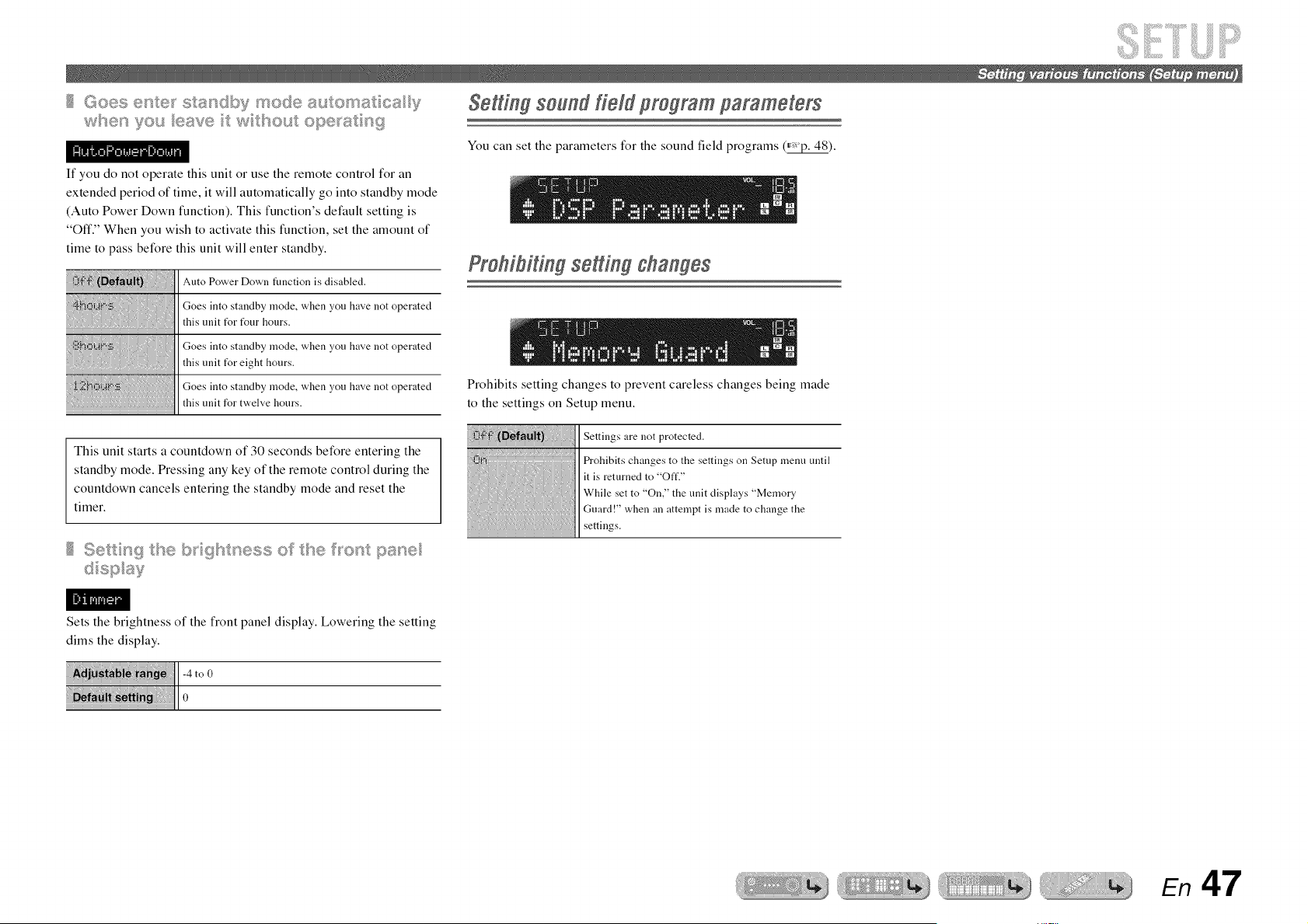
70u _>vw t wttsout a_w_w+s__w
If you do not operate this unit or use the remote control for an
extended period of time, it will automatically go into standby mode
(Auto Power Down function). This function's default setting is
"Off." When you wish to activate this function, set the amount of
time to pass before this unit will enter standby.
Auto Power Down function is disabled.
Goes into standby mode, when you have not operated
this unit f_r f_ur hours.
Goes into standby mode, when you have not operated
this unit f_r eight hours.
Goes into standby mode, when you have not operated
this unit for twelve hours.
This unit starts a countdown of 30 seconds before entering the
standby mode. Pressing any key of the remote control during the
countdown cancels entering the standby mode and reset the
timer.
Setting sound @ld program parameters
You can set the parameters for the sound field programs (_).
ProhiUh g setting changes
Prohibits setting changes to prevent careless changes being made
to the settings on Setup menu.
Settings are not protected.
Prohibits changes to the settings on Setup menu until
it is returned to "Off."
While set to "On," the unit displays "Memory
Guard!" when an attempt is made to change the
settings.
Sets the brightness of the front panel display. Lowering the setting
dims the display.
-4 toO
iiii i iiiiiiiiiiiiii!ll0
En 47

ii ...............................E
[]SETUP
_Cur$or A/v /q/E>
_ENTER
Although the sound field programs would satisfy you as they are with the default parameters, you can arrange the effect by setting the sound field elements (parameters).
To adjust the sound effects suitable for acoustical conditions of audio/video sources or rooms, perform the following operations.
Setting sound lield parameters
Press []SETUP to display the Setup menu.
Use _Cursor _ / _7to select "DSP
Parameter" and press _ENTEFL
[
#_ Use _Cursor q / > to choose the sound
_ field program you want to edit.
Sound field program to be edited
4
Press _Cursor _ l _ to select the
parameter that you want to change, and
press _Cursor q / > to change the
parameter.
Sound field parameter Choices
When there are multiple parameters in the sound field
program you are configuring, repeat step 4 as
necessary to change other parameters.
_P_ Once you have completed editing, press
[]SETUP to close the Setup menu.
• To initialize the sound field parameters
To set the parameters of the sound field program back
to default, press _Gursor _7 repeatedly during
editing to select "Initialize" and press _Gm'sor I>.
When "Press Again >" is displayed, press _Gursor
D again to initialize.
To cancel operations, press _Cursor q when "Press
Again" appears and return to the original display.
Change the effect level (level of the sound field effect to
be added). You can adjust the level of the sound field
effect while checking the sound effect.
,110.
Adjust "DSP Level" as follows:
• The effect sound is too soft.
• There are no differences between effects of the sound
field programs.
-+ Increase the effect level.
• The sound is dull.
• The sound field effect is added too much.
-+ Reduce the effect level.
En 48
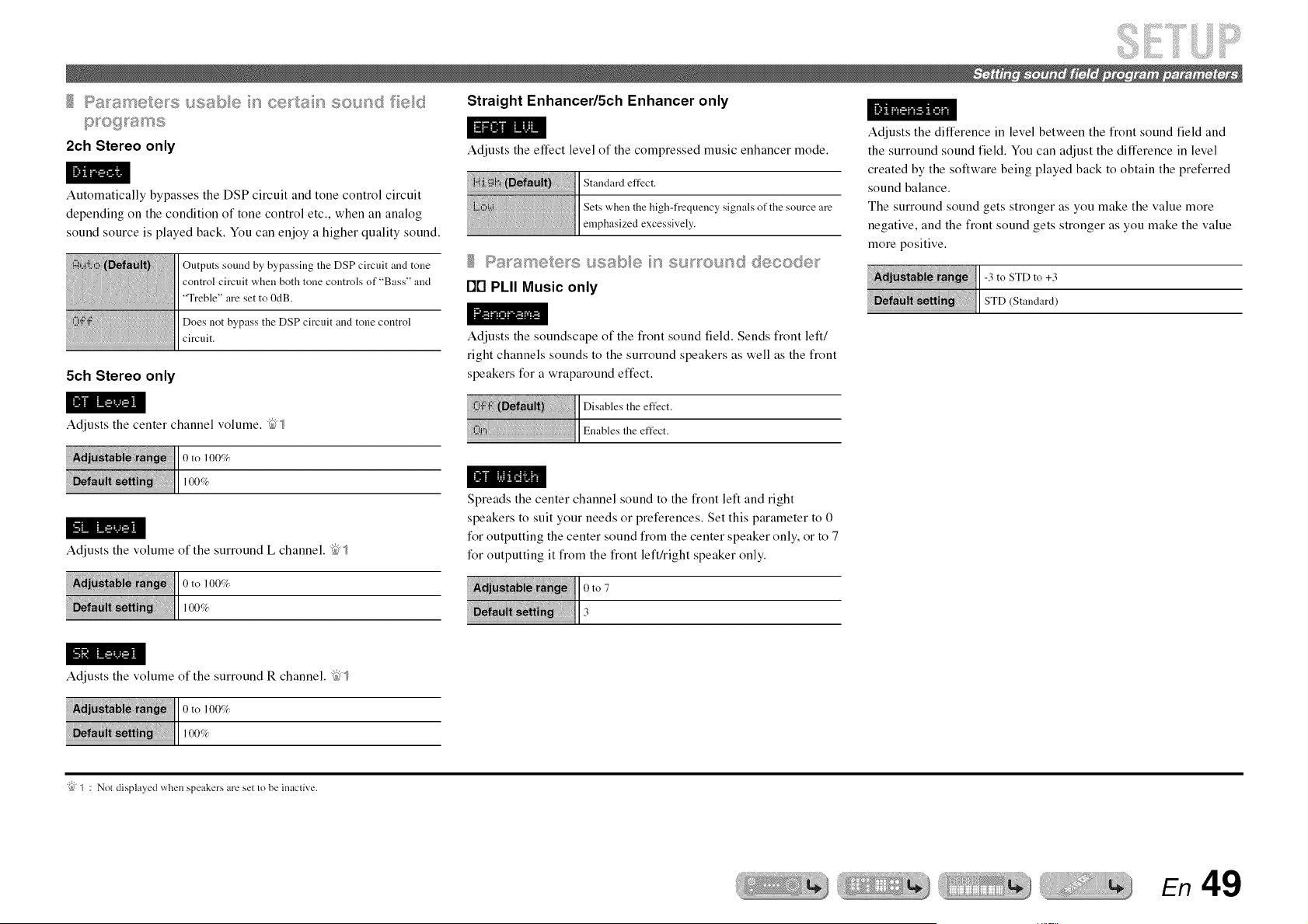
2ch Stereo only
Automatically bypasses the DSP circuit and tone control circuit
depending on the condition of tone control etc., when an analog
sound source is played back. You can enjoy a higher quality sound.
Outputs sound by bypassing the DSP circuit and tone
control circuit when both tone controls of "Bass" and
"Treble" are set to 0dB.
Does not bypass the DSP circuit and tone control
circuit.
5ch Stereo only
Straight Enhancer/5ch Enhancer only
Adjusts the effect level of the compressed music enhancer mode.
Standard effect.
Sets when the high-frequency signals of the source are
emphasized excessively.
I-]rl PLII Music only
Adjusts the soundscape of the front sound field. Sends front left/
right channels sounds to the surround speakers as well as the front
speakers for a wraparound effect.
Adjusts the difference in level between the front sound field and
the surround sound field. You can adjust the difference in level
created by the software being played back to obtain the preferred
sound balance.
The surround sound gets stronger as you make the value more
negative, and the front sound gets stronger as you make the value
more positive.
_:u_ _ ]1-3toSTDto+3
! ._ !i]1STD<Staudard,
Adjusts the center channel volume. _,_
@NIl0to 100G
Adjusts the volume of the surround L channel. _"_
0to
Spreads the center channel sound to the front left and right
speakers to suit your needs or preferences. Set this parameter to 0
for outputting the center sound from the center speaker only, or to 7
for outputting it from the front left/right speaker only.
Adjusts the volume of the surround R channel. _"_
tl0to
"{bJ_ : Not displayed when speakers are set to be inaclive.
En 49
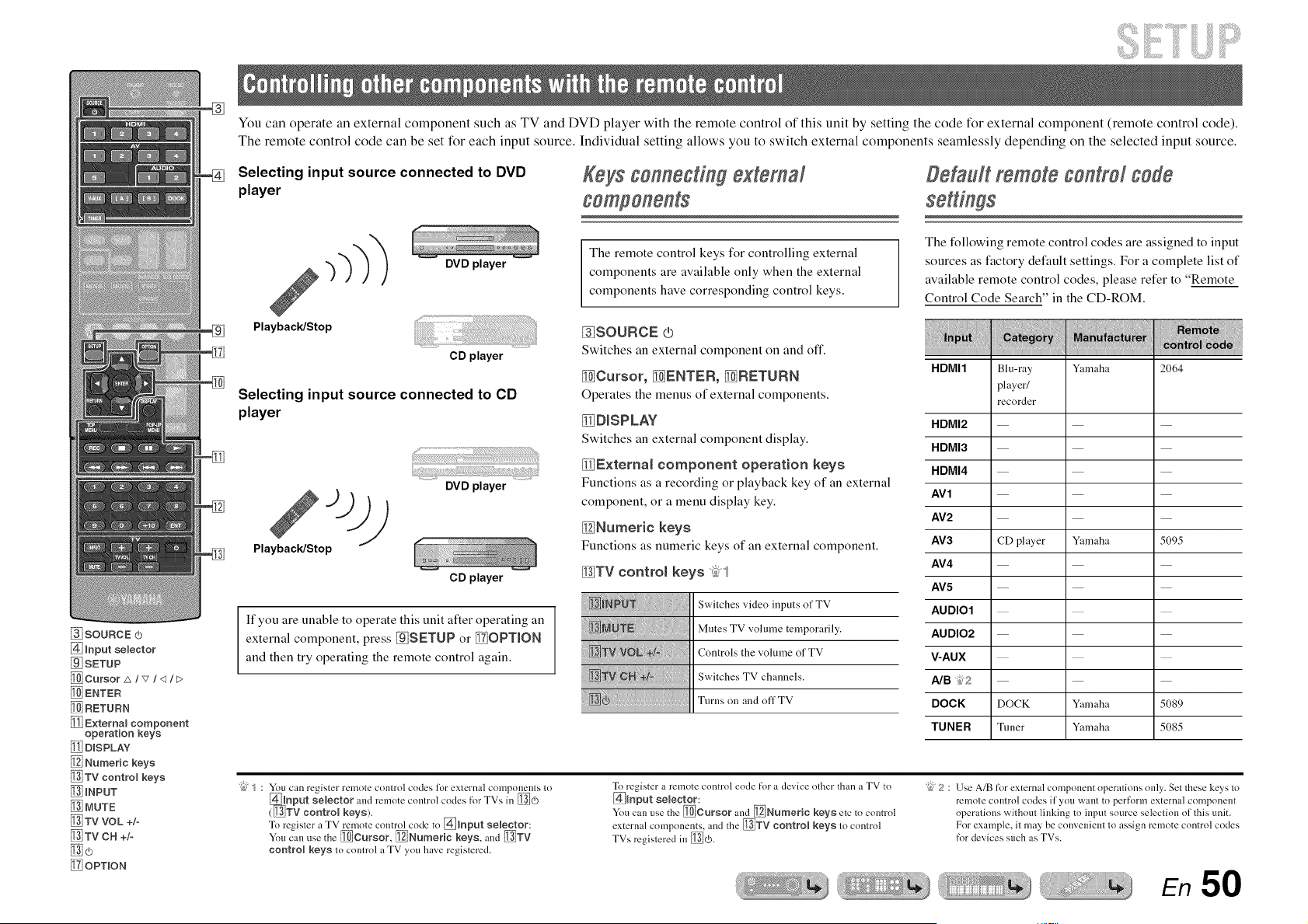
®
You can operate an external component such as TV and DVD player with the remote control of this unit by setting the code for external component (remote control code).
The remote control code can be set for each input source. Individual setting allows you to switch external components seamlessly depending on the selected input source.
Selecting input source connected to DVD
player
Keys connecting external
Default remote control code
_SOURCE (b
[_ Input selector
[] SETUP
[_ Cursor z&/v/<I It>
_ENTER
[_ RETURN
Externam component
operation keys
[_ DISPLAY"
Numeric keys
_TV control keys
_INPUT
[_ MUTE
TV VOL +/-
[_ TV C H +/o
!_7iOPTION
[]
Playback/Stop
DVD player
CD player
Selecting input source connected to CD
player
iv)
Playback/Stop
DVD player
CD player
If you are unable to operate this unit after operating an
external component, press []SETUP or _iOPTION
and then try operating the remote control again.
The remote control keys for controlling external
components are available only when the external
components have corresponding control keys.
_SOURCE (b
Switches an external component on and off.
_Cursor, [_ENTER, _RETURN
Operates the menus of external components.
_D_SPLAY
Switches an external component display.
_Externat component operation keys
Functions as a recording or playback key of an external
component, or a menu display key.
_Numeric keys
Functions as numeric keys of an external component.
_TV control keys _
iii @N @@!!
Switches video inputs of TV
Mutes TV volume temporarily.
Controls the volume of TV
Switches TV channels.
Turns on and off TV
The following remote control codes are assigned to input
sources as factory default settings. For a complete list of
available remote control codes, please refer to "Remote
Control Code Search" in the CD-ROM.
HDMI1 Blu-ray Yamaha 2064
player/
recorder
HDMI2
HDMI3
HDMI4
AV1
AV2
AV3 CD player Yamaha 5095
AV4
AV5
AUDIO1
AUDIO2
V-AUX
A/B _2
DOCK DOCK Yamaha 5089
TUNER Tuner Yamaha 5085
"{bJ_ : You can register remote control codes lor exlernal componenls to
(_nput selector and remote control codes for TVs in _(_
gv control keys).
To regisler a TV remote control code to @mnput selector:
You can use the _Cursor, _Numeric keys, and _TV
control keys to control a TV you have registered.
To register a remote control code for a device other than a TV to
@Input semector:
You can use the _Cursor and _Numeric keys etc to control
external components, and the _TV control keys to control
TVs registered in D0).
"{bJ2 : Use A/B for external component operations only. Set these keys to
remote control codes if you want to perform external component
operations without linking to input source selection of this unit.
For example, it may be convenient to assign remote control codes
for devices such as TVs.
En 50
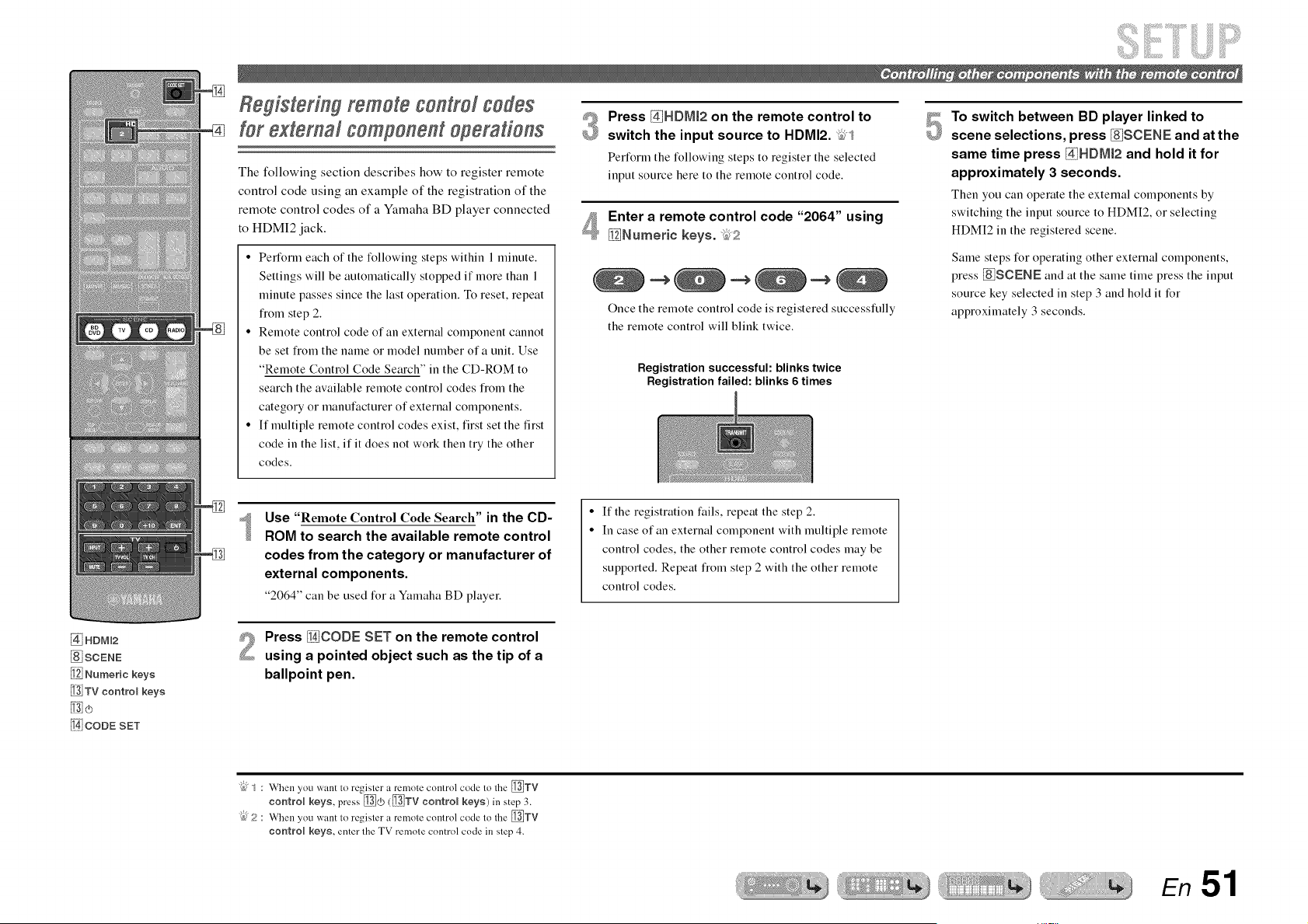
Registering remote control codes
for external component operations
The following section describes how to register remote
control code using an example of the registration of the
remote control codes of a Yamaha BD player connected
to HDMI2 jack.
• Perfotln each of the %llowing steps within 1 minute.
Settings will be automatically stopped if more than 1
minute passes since the last operation. To reset, repeat
IYomstep 2.
• Remote control code of an external component cannot
be set fiom the name or model number era unit. Use
"Remote Control Code Search" in the CD-ROM to
search the available remote control codes IYomthe
category or manufacturer of external components.
• If multiple remote control codes exist, first set the first
code in the list, if it does not work then try the other
codes.
#_ Press @HDMI2 on the remote control to
£_ switch the input source to HDMI2. _2,1
Perform the following steps to register the selected
input source here to the remote control code.
Enter a remote control code "2064" using
_Numeric keys. kl,f_
Once the remote control code is registered successfully
the remote control will blink twice.
Registration successful: blinks twice
Registration failed: blinks 6 times
5
To switch between BD player linked to
scene selections, press _SCENE and at the
same time press _HDMt2 and hold it for
approximately 3 seconds.
Then you can operate the external components by
switching the input source to HDMI2, or selecting
HDMI2 in the registered scene.
Same steps for operating other external components,
press [di$CENE and at the same time press the input
source key selected in step 3 and hold it for
approximately 3 seconds.
Use "Remote Control Code Search" in the CD-
ROM to search the available remote control
codes from the category or manufacturer of
external components.
"2064" can be used for a Yamaha BD player.
If the registration fails, repeat the step 2.
In case of an external component with multiple remote
control codes, the other remote control codes may be
supported. Repeat tYomstep 2 with the other remote
control codes.
@ HDNI2
_SCENE
Numeric keys
_TV centrel keys
CODE SET
Press _CODE SET on the remote control
using a pointed object such as the tip of a
ballpoint pen.
"{bJ_ : When you want 1o register a remole comrol code Io the _TV
contrN keys, press _) (_TV control keys) in step 3.
"{bJ5? When you want 1o register a remote control code 1o the _TV
control keys, enter Ihe TV remole control code in slep 4.
En 51
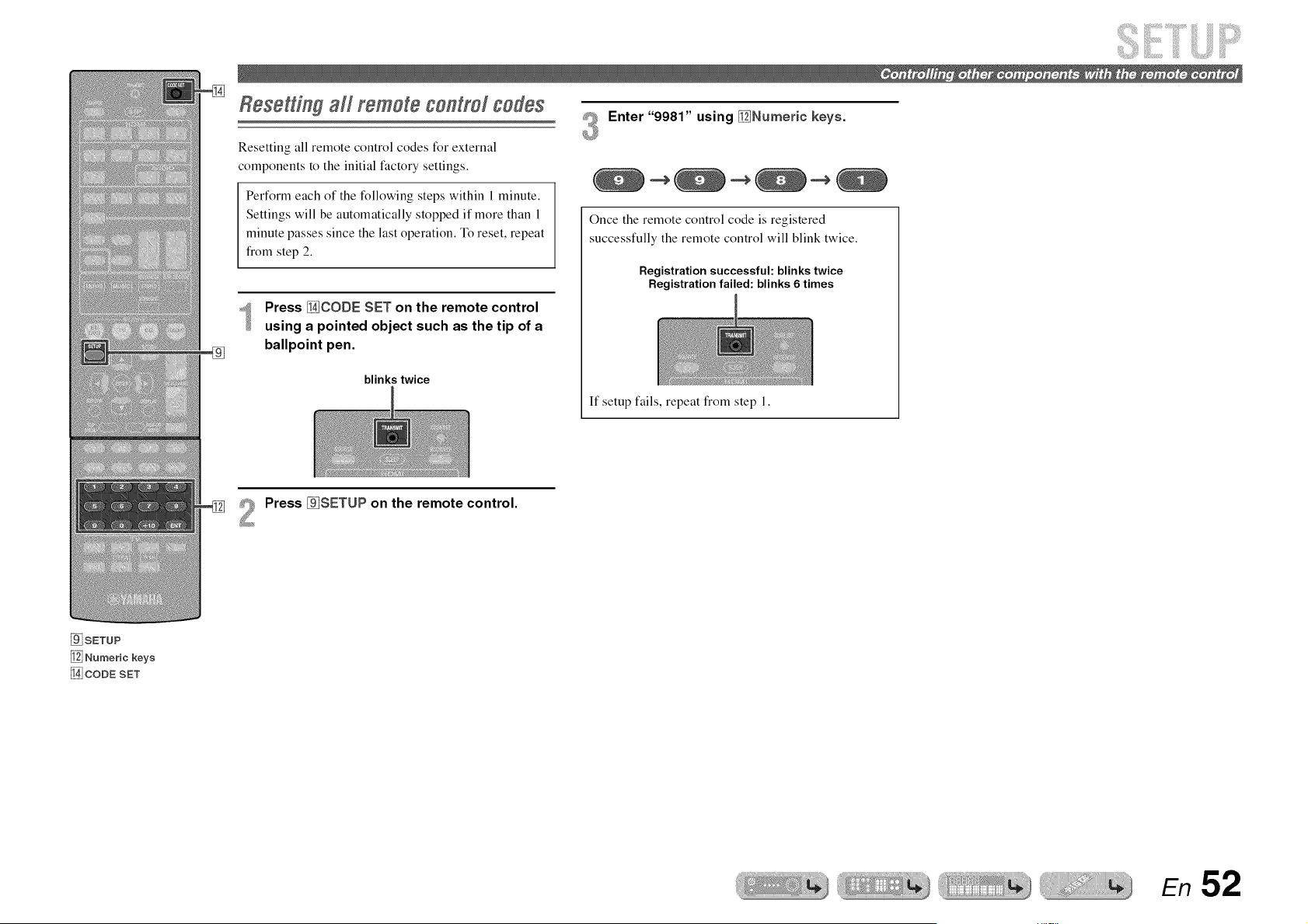
Resettingall remotecontrolcodes
Resetting all remote control codes for external
components to the initial factory settings.
Perform each of the following steps within 1 minute.
Settings will be automatically stopped if more than 1
minute passes since the last operation. To reset, repeat
from step 2.
Press _CODE SET on the remote control
using a pointed object such as the tip of a
ballpoint pen.
blinks twice
#_ Enter "9981" using _Numeric keys.
Once the remote control code is registered
successfully the remote control will blink twice.
Registration successful: blinks twice
Registration failed: blinks 6 times
If setup fails, repeat from step 1.
Press _SETUP on the remote control.
SETUP
_j Numeric keys
CODE SET
En 52
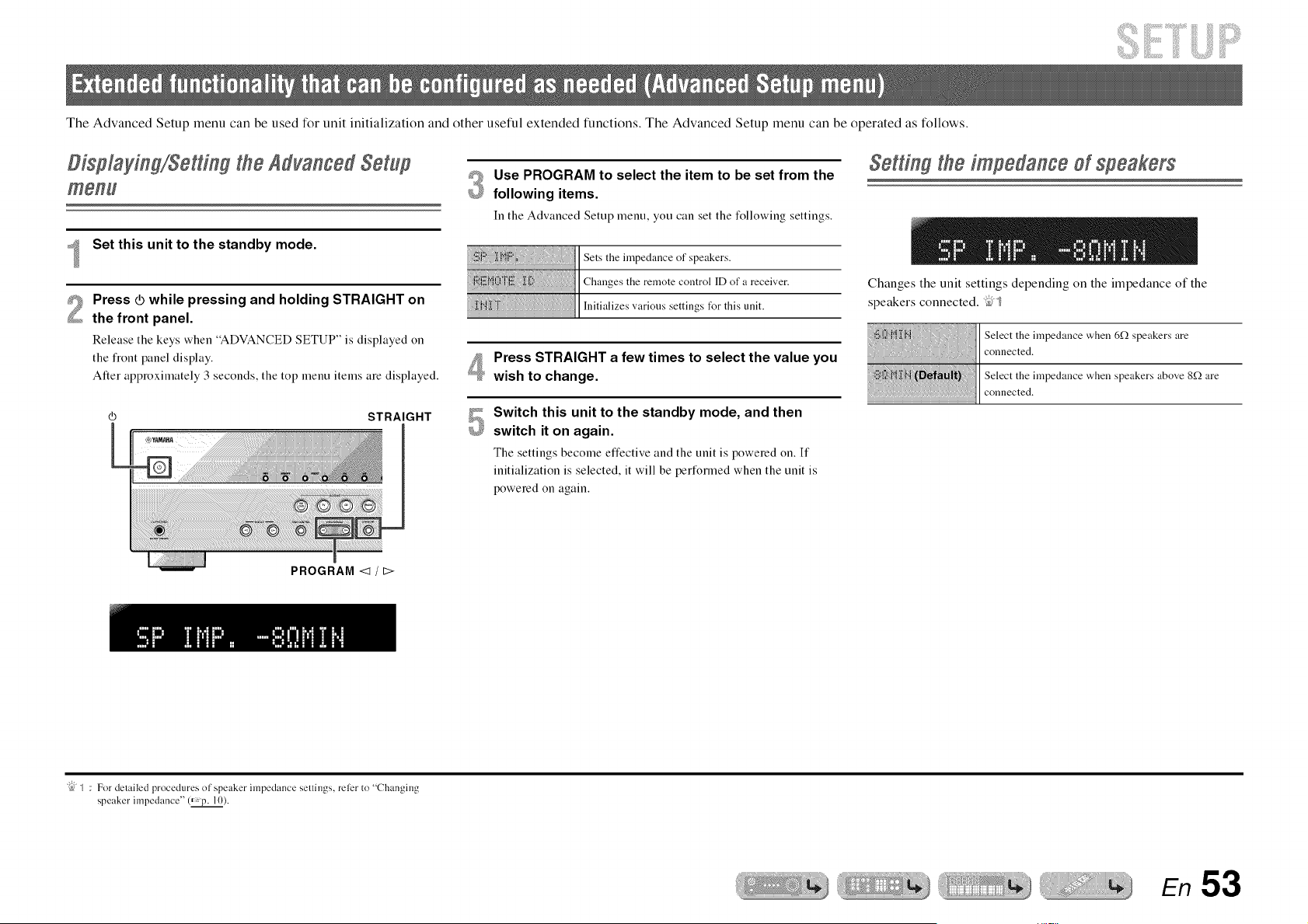
The Advanced Setup menu can be used for unit initialization and other useful extended functions. The Advanced Setup menu can be operated as follows.
i++++++++!iii++ii!:iiiii+++++++¸
Displaying/Setting the Advanced Setup
msnu
Set this unit to the standby mode.
2
Press _ while pressing and holding STRAIGHT on
the front panel.
Release the keys when "ADVANCED SETUP" is displayed on
the fiont panel display.
After approximately 3 seconds, the top menu items are displayed.
STRAIGHT
#_ Use PROGRAM to select the item to be set from the
+_ following items.
In the Advanced Setup menu, you can set the following settings.
I Sets the impedance of speakers.
Press STRAIGHT a few times to select the value you
wish to change.
_P+ Switch this unit to the standby mode, and then
switch it on again.
The settings become effective and the unit is powered on. If
initialization is selected, it will be performed when the unit is
powered on again.
Sorting tho impodango of spoakors
Changes the unit settings depending on the impedance of the
speakers connected. _;"_
Selecttheimpedance when 6f2speakers are
connected.
Selecttheimpedance when speakers above 8f_are
connected.
PROGRAM <1 / t>
"{bJ+ : For detailed procedures of speaker impedance settings, refer to "Changing
speaker impedance" (_p. 10).
En 53
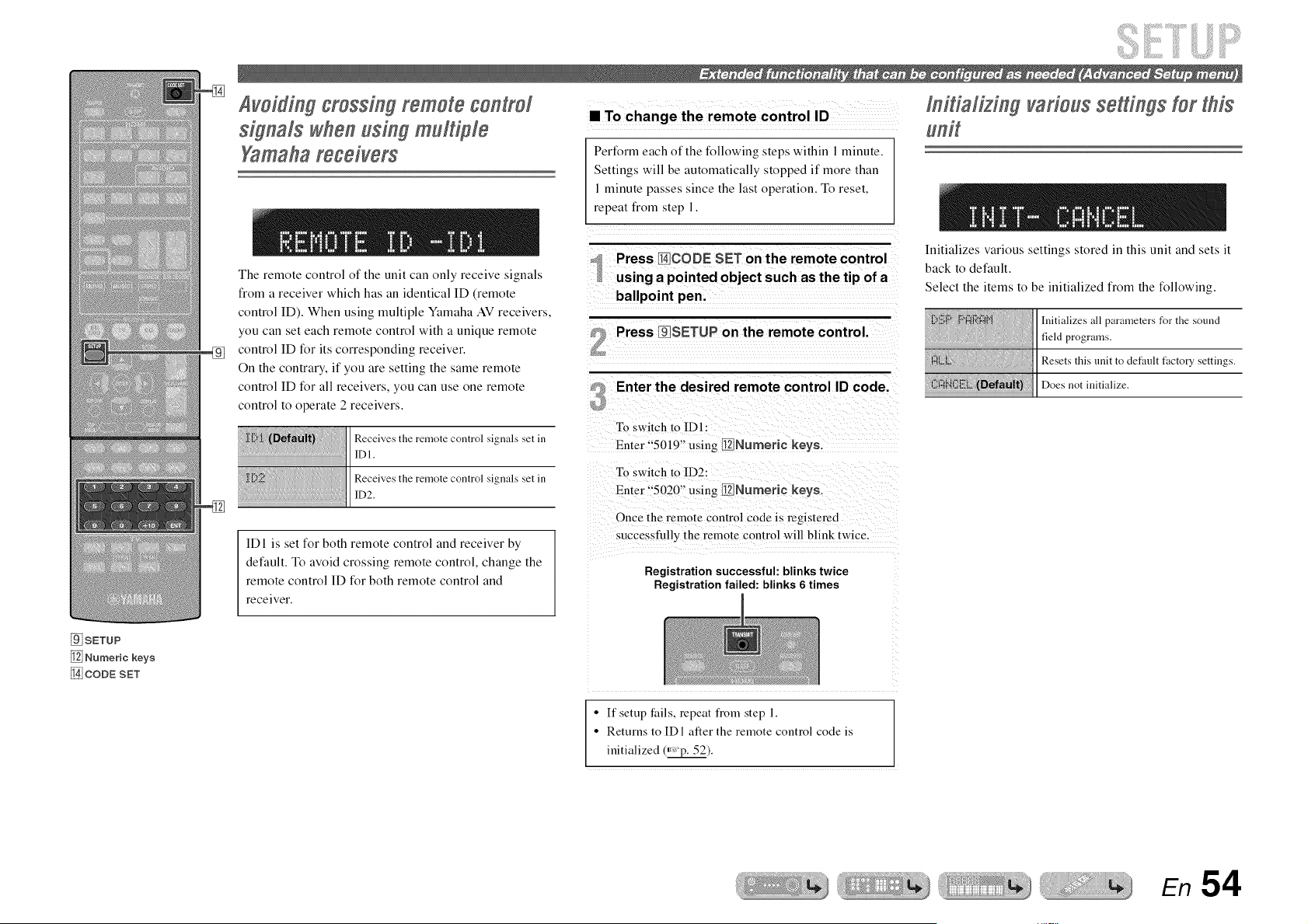
Avoiding crossing remote control
signals when using multiple
Yamaharegeivers
The remote control of the unit can only receive signals
from a receiver which has an identical ID (remote
control ID). When using multiple Yamaha AV receivers,
you can set each remote control with a unique remote
control ID for its corresponding receiver.
On the contrary, if you are setting the same remote
control ID for all receivers, you can use one remote
control to operate 2 receivers.
Receives the remote control signals set in
IDI.
Receives the remote control signals set in
ID2.
ID1 is set for both remote control and receiver by
default. To avoid crossing remote control, change the
remote control ID for both remote control and
receiver.
• To change the remote control ID
Perform each of the following steps within 1 minute.
Settings will be automatically stopped if more than
1 minute passes since the last operation. To reset,
repeat from step 1.
Press I_!CODE SET on the remote control
using a pointed object such as the tip of a
ballpoint pen.
Press _qlSETUP on the remote control.
Enter the desired remote control ID code.
To switch to ID1 :
Enter "5019" using [ii21]Numerie keys.
To switch to ID2:
Enter "5020" using Ii_Numeric keys.
Once the remote control code is registered
successfully the remote control will blink twice.
Registration successful: blinks twice
Registration failed: blinks 6 times
In#iafizing various settings Yorthis
Initializes various settings stored in this unit and sets it
back to default.
Select the items to be initialized from the following.
Initializes all parameters for the sound
field programs.
Resets this unit to default factory settings.
Does not initialize.
SETUP
_j Numeric keys
CODE SET
• If setup l:ails, repeat flom step 1.
• Returns to IDI alter the remote control code is
initialized (_).
En 54
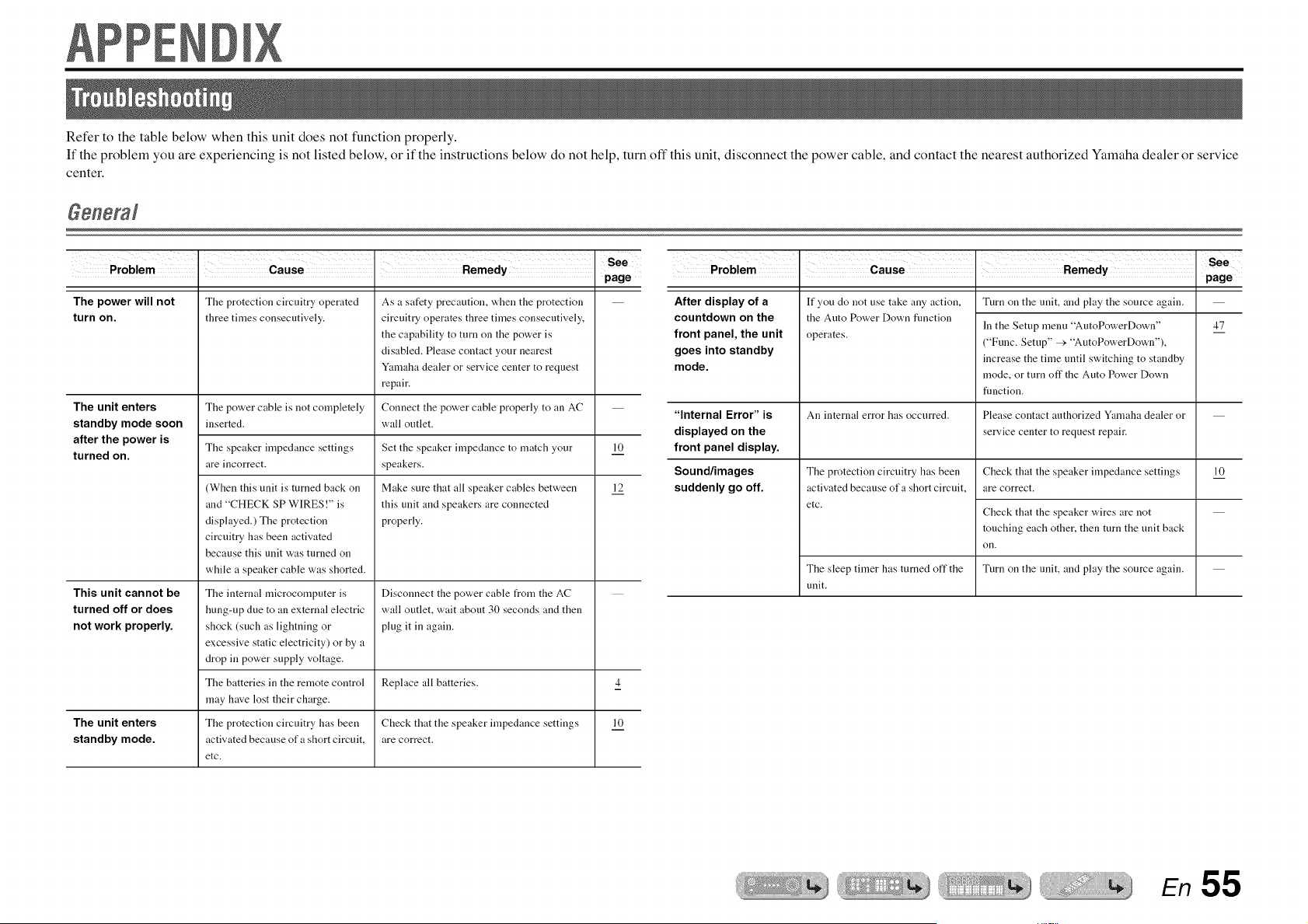
Refer to the table below when this unit does not function properly.
If the problem you are experiencing is not listed below, or if the instructions below do not help, turn off this unit, disconnect the power cable, and contact the nearest authorized Yamaha dealer or service
center.
• page
The power will not
turn on.
The protection circuitry operated
three times consecutively.
As a safety precaution, when the protection
circuitry operates three times consecutively,
the capability to turn on the power is
disabled. Please contact your nearest
Yamaha dealer or service center to request
repair.
Connect the power cable properly to an AC
wall outlet.
The unit enters The power cable is not completely
standby mode soon inserted.
after the power is
The speaker impedance settings 10
turned on.
are incorrect.
12
This unit cannot be
turned off or does
not work properly.
(When this unit is turned back on
and "CHECK SP WIRES!" is
displayed.) The protection
circuitry has been activated
because this unit was turned on
while a speaker cable was shorted.
The internal microcomputer is
hung-up due to an external electric
shock (such as lightning or
excessive static electricity) or by a
drop in power supply voltage.
The batteries in the remote control
may have lost their charge.
The protection circuitry has been
activated because of a short circuit,
etc.
Set the speaker impedance to match your
speakers.
Make sure that all speaker cables between
this unit and speakers are connected
properly.
Disconnect the power cable from the AC
wall outlet, wait about 30 seconds and then
plug it in again.
Replace all batteries. 4
The unit enters Check that the speaker impedance settings 10
standby mode. are correct.
Problem . Cause Remedy See
• page
After display of a
countdown on the
front panel, the unit
goes into standby
mode.
If you do not use take any action,
the Auto Power Down flmction
operates.
An internal error has occurred.
The protection circuitry has been
activated because of a short circuit,
etc.
Turn on the unit, and play the source again.
In the Setup menu "AutoPowerDown"
("Func. Setup" >"AutoPowerDown"),
increase the time until switching to standby
mode, or turn off the Auto Power Down
flmction.
Please contact authorized Yamaha dealer or
service center to request repair.
Check that the speaker impedance settings
are correct.
Check that the speaker wires are not
touching each other, then turn the unit back
on.
Turn on the unit, and play the source again.
"Internal Error" is
displayed on the
front panel display.
Sound/images
suddenly go off.
47
10
The sleep timer has turned off the
unit.
En 55

!ii;iii!iiii! !i!i ;;iiiiiiiiiii iiiiiiii!iii!i!21Li iill ilili :ililil
• page
No sound. Incorrect input or output cable 16
connections.
Ifa DVI-HDMI cable is used to
connect the unit with an external
component, then it is necessary to
use an audio input jack t_r a
different input to output audio.
Speaker connections are not
secure.
Connect the cables properly. If the problem
persists, the cables may be detective.
Display the HDMI Input Option menu for
the connected cable, select "Audio In," and
select the jack to use t_r audio input.
38
Secure the connections. 12
The HDMI components connected Connect HDMI components that support the 38
to the unit do not support the HDCP copy protection standards.
HDCP copy protection standards.
The audio input into the device is In the Setup menu, set the HDMI Audio Out 45
set to playback through the TV. ("Sound Setup" _'. "HDMI Audio Out") to
other than "TV."
No appropriate input source has Select an appropriate input source with 25
been selected. _lnput selector (on the remote control).
The volume is turned clown or Turn up the volume.
muted.
Signals that this unit cannot Use an input source that has signals that can
reproduce are being input from a be reproduced on this unit.
source component, such as a CD-
ROM.
No picture. A video jack (ex. Video input > Use video jacks of the same type (ex. Video 14
HDMI output) type different to the input _'. Video output) to connect to the TV.
input vkteo is being used to try to
display content on the TV.
An appropriate video input is not Select an appropriate video input on the TV.
selected on the TV.
Problem . Cause Remedy See
• page
The speaker is malfunctioning.
Check the Speaker indicators on
the front panel display. If the
corresponding indicator lights up,
connect another speaker and check
if sound is output.
The playback component or
speakers are not connected
properly.
Output from that speaker is
disabled.
No sound is output
from a specific
speaker.
Only the center
speaker outputs
substantial sound.
The volume of that speaker is set
to the minimum in "Speaker
Setup" in the Setup menu.
(If hardly any sound comes from
one channel)
Speaker output balance is not set
correctly.
Sound may not be output from
certain channels, depending on the
input source or sound field
program.
When a nlouaural source sound
fiekt program is applied, t_r some
surround decoders, sound from all
channels is output from the center
speaker.
If sound is not output, the unit may be
malflmctioning.
Connect the cables properly. If the problem
persists, the cables may be defective.
Check the Speaker indicators on the front
panel display. If the corresponding indicator
is turned off, try the t_llowing.
1) Change to a different input source.
2) With the selected sound field program,
sound is not output from that speaker. Select
another sound fiekt program.
3) "None" may have been selected for that
speaker on this unit. Display "Speaker
Setup" in the Setup menu. and set respective
parameters to enable output from that
speaker ("Speaker Setup" >"Config").
Display "Speaker Setup" in the Setup menu
and adjust the volume ("Speaker Setup" >
"Level").
Balance the volume of each speaker from
"Level" in the Setup menu ("Speaker Setup"
> "Level").
Try another sound field program.
Try another sound field program.
12,16
7,41
42
42
26
26
En 56
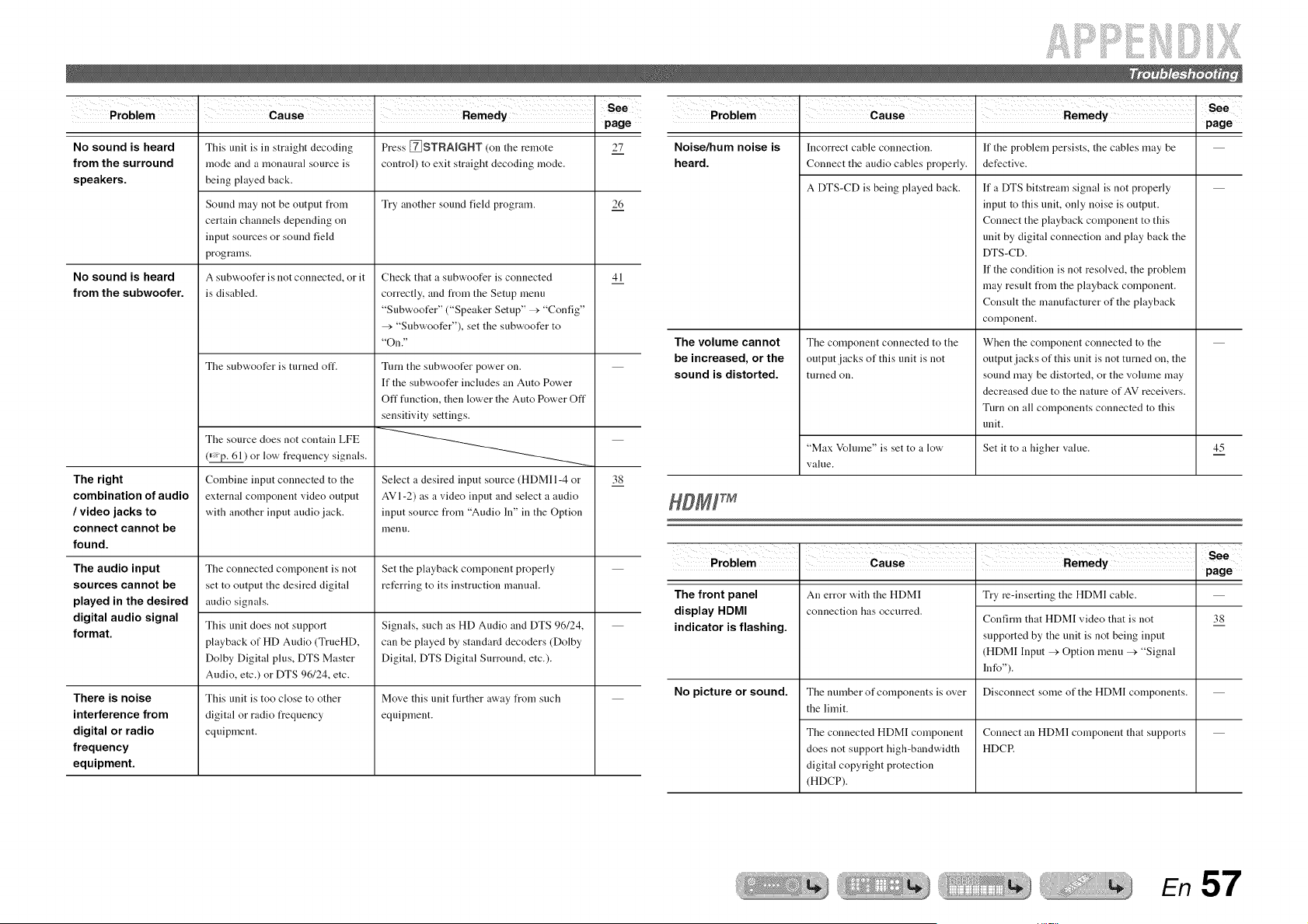
!ii;iii!iiii! !i!i ;;iiiiiiiiiii iiiiiiii!iii!i!21Lii iill ilili :ililil
• page
No sound is heard Press [_STRAIGHT (on the remote 27
from the surround control) to exit straight decoding mode.
speakers.
Try another sound field program. 26
No sound is heard
from the subwoofer.
41
The right
combination of audio
/ video jacks to
connect cannot be
found.
The audio input
sources cannot be
played in the desired
digital audio signal
format.
There is noise
interference from
digital or radio
frequency
equipment.
This unit is in straight decoding
mode and a monaural source is
being played back.
Sound may not be output from
certain channels depending on
input sources or sound field
programs.
A subwoofer is not connected, or it
is disabled.
The subwoofer is turned off.
The source does not contain LFE
(=_¢p. 61) or low frequency signals.
Combine input connected to the
external component video output
with another input audio jack.
The connected component is not
set to output the desired digital
audio signals.
This unit does not support
playback of HD Audio (TrueHD,
Dolby Digital plus, DTS Master
Audio, etc.) or DTS 96124, etc.
This unit is too close to other
digital or radio frequency
equipment.
Check that a subwoofer is connected
correctly, and from the Setup menu
"Subwoofer" ("Speaker Setup" _'. "Config"
_'. "Subwoofer"), set the subwoofer to
"On."
Turn the subwoofer power on.
If the subwoofer includes an Auto Power
Off flmction, then lower the Auto Power Off
sensitivity settings.
Select a desired input source (HDMI 1-4 or
AVI-2) as a video input and select a audio
input source from "Audio In" in the Option
menu.
Set the playback component properly
referring to its instruction manual.
Signals such as HD Audio and DTS 96/24,
can be played by standard decoders (Dolby
Digital, DTS Digital Surround, etc.).
Move this unit fimher away from such
equipment.
38
Problem . Cause Remedy See
• page
Noise/hum noise is
heard.
The volume cannot
be increased, or the
sound is distorted.
Incorrect cable connection.
Connect the audio cables properly.
A DTS-CD is being played back.
The component connected to the
output jacks of this unit is not
turned on.
"Max Volume" is set to a low
vall.le.
If the problem persists, the cables may be
defective.
If a DTS bitstream signal is not properly
input to this unit, only noise is output.
Connect the playback component to this
unit by digital connection and play back the
DTS -CD.
If the condition is not resolved, the problem
may result t_om the playback component.
Consult the manufacturer of the playback
component.
When the component connected to the
output jacks of this unit is not turned on, the
sound may be distorted, or the volume may
decreased due to the nature of AV receivers.
Turn on all components connected to this
unit.
Set it to a higher value.
45
• ' page
The front panel
display HDMI
indicator is flashing.
No picture or sound.
An error with the HDMI
connection has occurred.
The number of components is over
the limit.
The connected HDMI component
does not support high-bandwidth
digital copyright protection
(HDCP).
Try re-inserting the HDMI cable.
Confirm that HDMI video that is not
supported by the unit is not being input
(HDMI Input > Option menu _'. "Signal
lnfo").
Disconnect some of the HDMI components.
Connect an HDMI component that supports
HDCP.
38
En 57
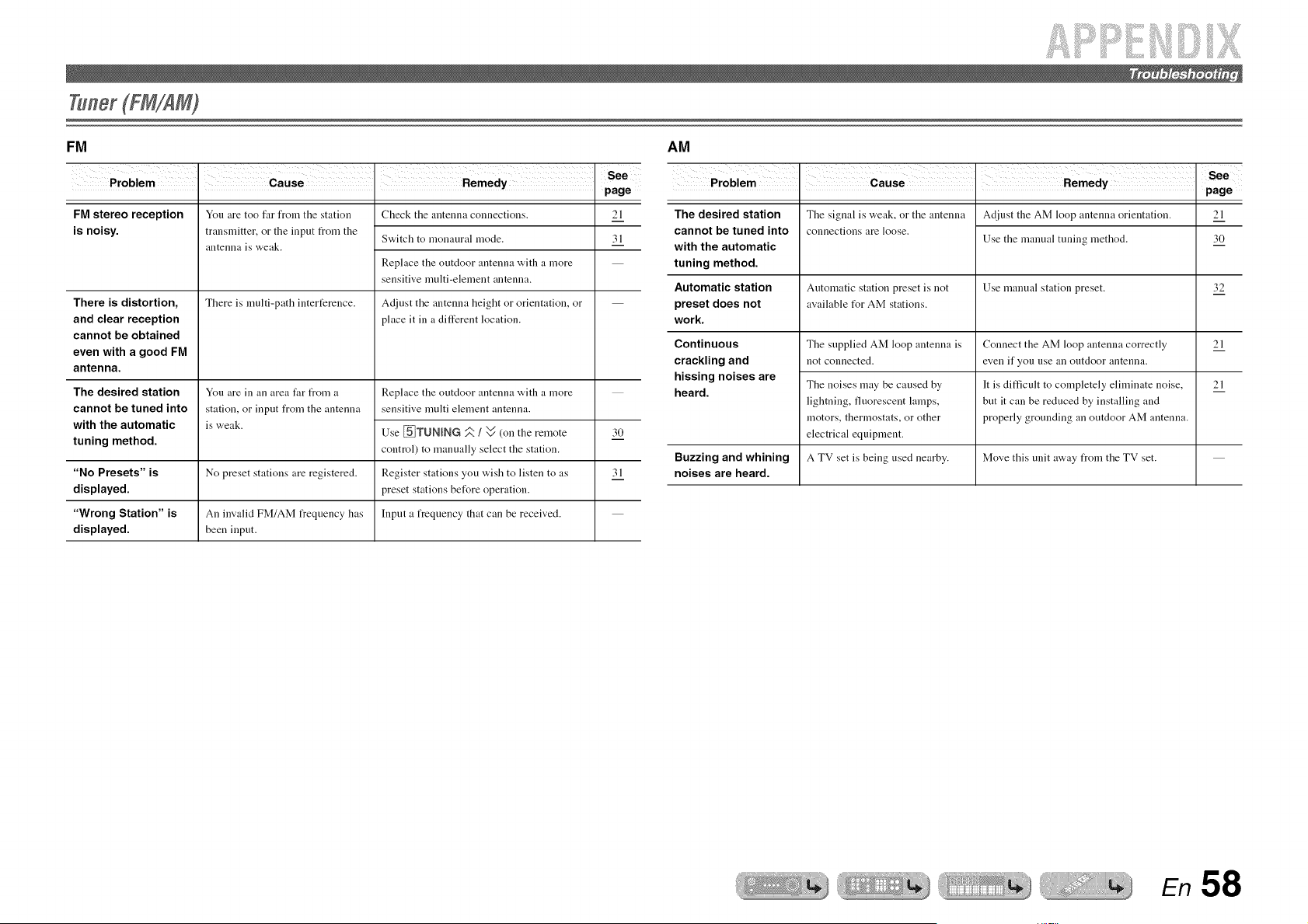
!ii;iii!iiii! !i!i ;;iiiiiiiiiii iiiiiiii!iii!i!21Li iill ilili :ililil
Tuner(FM/AM)
FM AM
• page
FM stereo reception
is noisy.
There is distortion,
and clear reception
cannot be obtained
even with a good FM
antenna.
The desired station
cannot be tuned into
with the automatic
tuning method.
You are too far from the station
transmitter, or the input from the
antenna is weak.
There is multi-path interference.
You are in an area far from a
station, or input from the antenna
is weak.
Check the antenna connections.
Switch to monaural mode.
Replace the outdoor antenna with a more
sensitive multi-element antenna.
Adjust the antenna height or orientation, or
place it in a different location.
21
31
Replace the outdoor antenna with a more
sensitive multi element antenna.
Use ._TUNING _ / v (on the remote
control) to manually select the station.
Register stations you wish to listen to as
preset stations bet_re operation.
Input a frequency that can be received.
30
"No Presets" is No preset stations are registered. 3 l
displayed.
"Wrong Station" is An invalid FM/AM frequency has
displayed, been input.
• page
The desired station
cannot be tuned into
with the automatic
tuning method.
Automatic station
preset does not
work.
The signal is weak, or the antenna
connections are loose.
Adjust the AM loop antenna orientation.
Use the manual tuning method.
21
30
Automatic station preset is not Use manual station preset. 32
available t_r AM stations.
Continuous The supplied AM loop antenna is Connect the AM loop antenna correctly 21
crackling and not connected, even if you use an outdoor antenna.
hissing noises are
The noises may be caused by It is difficult to completely eliminate noise, 21
heard.
lightning, t]uorescent lamps, but it can be reduced by installing and
motors, thermostats, or other properly grounding an outdoor AM antenna.
electrical equipment.
Buzzing and whining A TV set is being used nearby. Move this unit away from the TV set.
noises are heard.
En 58
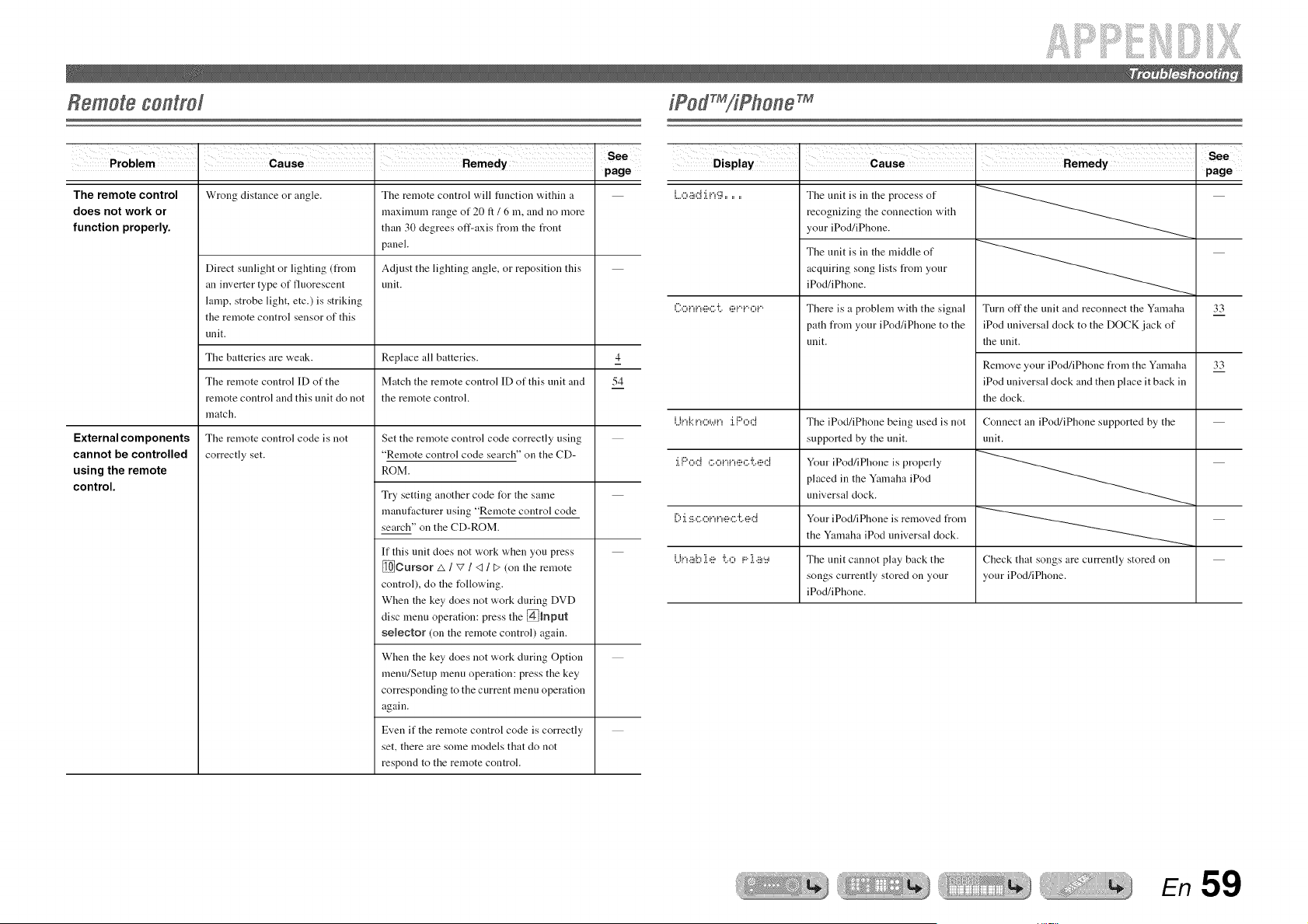
Remote control
• . page
The remote control Wrong distance or angle. The remote control will function "a,ithin a
does not work or maximum range of 20 ft / 6 m, and no more
function properly, than 30 degrees off-axis from the front
panel.
Adjust the lighting angle, or repositiou this
unit.
Direct sunlight or lighting (from
an inverter type of fluorescent
lamp, strobe light, etc.) is striking
the remote control sensor of this
unit.
The batteries are weak. Replace all batteries. 4
The remote control ID of the Match the remote control ID of this unit and 54
remote control and this unit do not the remote control.
match.
External components The remote control code is not
cannot be controlled correctly set.
using the remote
control.
Set the remote control code correctly using
"Remote control code search" on the CD-
ROM.
Try setting another code for the same
manufacturer using "Remote control code
search" on the CD-ROM.
If this unit does not work when you press
_Cursor A / v / <1/ t> (on the remote
control), do the following.
When the key does not work during DVD
disc menu operation: press the @hput
selector (on the remote control) again.
When the key does not work during Option
menu/Setup menu operation: press the key
corresponding to the current menu operation
again.
Even if the remote control code is correctly
set, there are some models that do not
respond to the remote control.
• . page
l....0 ._ii!Ci :i.i"! g ......
([:0 iqi."!,ii?C.•i:.. _iii,i.".i."•,:::_i.'.
The unit is in the process of
recognizing the connection with
your iPod/iPhone.
The unit is in the middle of
acquiring song lists from your
iPod/iPhone.
There is a problem with the signal
path from your iPod/iPhone to the
unit.
Turn off the unit and reconnect the Yamaha
iPod universal dock to the DOCK jack of
the unit.
Remove your iPod/iPhone from the Yamaha
iPod universal dock and then place it back in
the dock.
33
33
Lii.,l.::i.>:::,.,.ii.,:i.l:::',:::.::i The iPod/iPhone being used is not Connect an iPod/iPhone supported by the
supported by the unit. unit.
:i.Pod ,:::.,:::,i"•_i",!!!',:::.'i:..,!!!'dYore iPod/iPhone is propmly
placed in the Yamaha iPod
universal clock.
ill:':i.:iii.,:::.oi"!i"uii_,:::.'i:..,iii,,::J Your iPod/iPhone is removed from
the Yamaha iPod universal dock.
i...ii.!•_ild::_ie.i:.•,:::,F::•i•iii!,:::i The unit cannot play back the Check that songs are currently stored on
songs currently stored on your your iPod/iPhone.
iPod/iPhone.
En 59
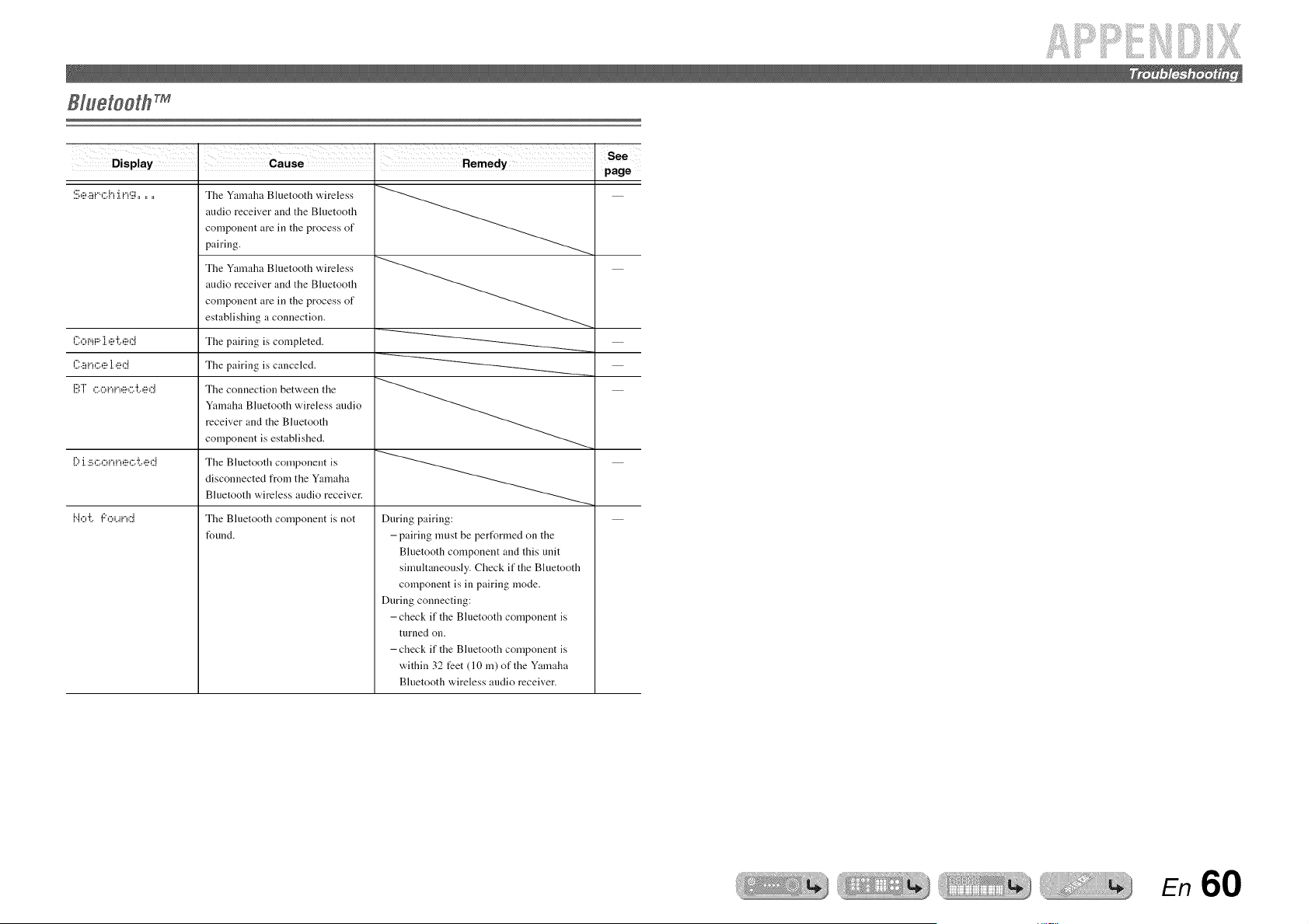
• . page
:!!;e ,_ii_r, ,::;i_i.r_g ......
{?o r,_F,ii•e •i:..e ,::i
{?a i._c e i.e,::i
i!!!',T ,::;o i._i._e,:::..i;e d
[) J.:!!!.,:50i"!i"!,!!_,:5"{..,!!!'d
The Yamaha Bluetooth wireless
audio receiver and the Bluetooth
component are in the process of
pairing.
The Yamaha Bluetooth wireless
audio receiver and the Bluetooth
component are in the process of
establishing a connection.
The pairing is completed.
The pairing is canceled.
The connection between the
Yamaha Bluetooth wireless audio
receiver and the Bluetooth
component is established.
The Bluctooth component is
disconnected from the Yamaha
Bluetooth wireless audio receiver.
The Bluetooth component is not
found.
1".iO "i:.. 'I:"Oi..4i"!_:::i
During pairing:
- pairing must be pert_rmed on the
Bluetooth component and this unit
simultaneously. Check if the Bluetooth
component is in pairing mode.
During connecting:
-check if the Bluetooth component is
turned on.
- check if the Bluetooth component is
within 32 feet (10 m) of the Yamaha
Bluetooth wireless audio receiver.
E/'/
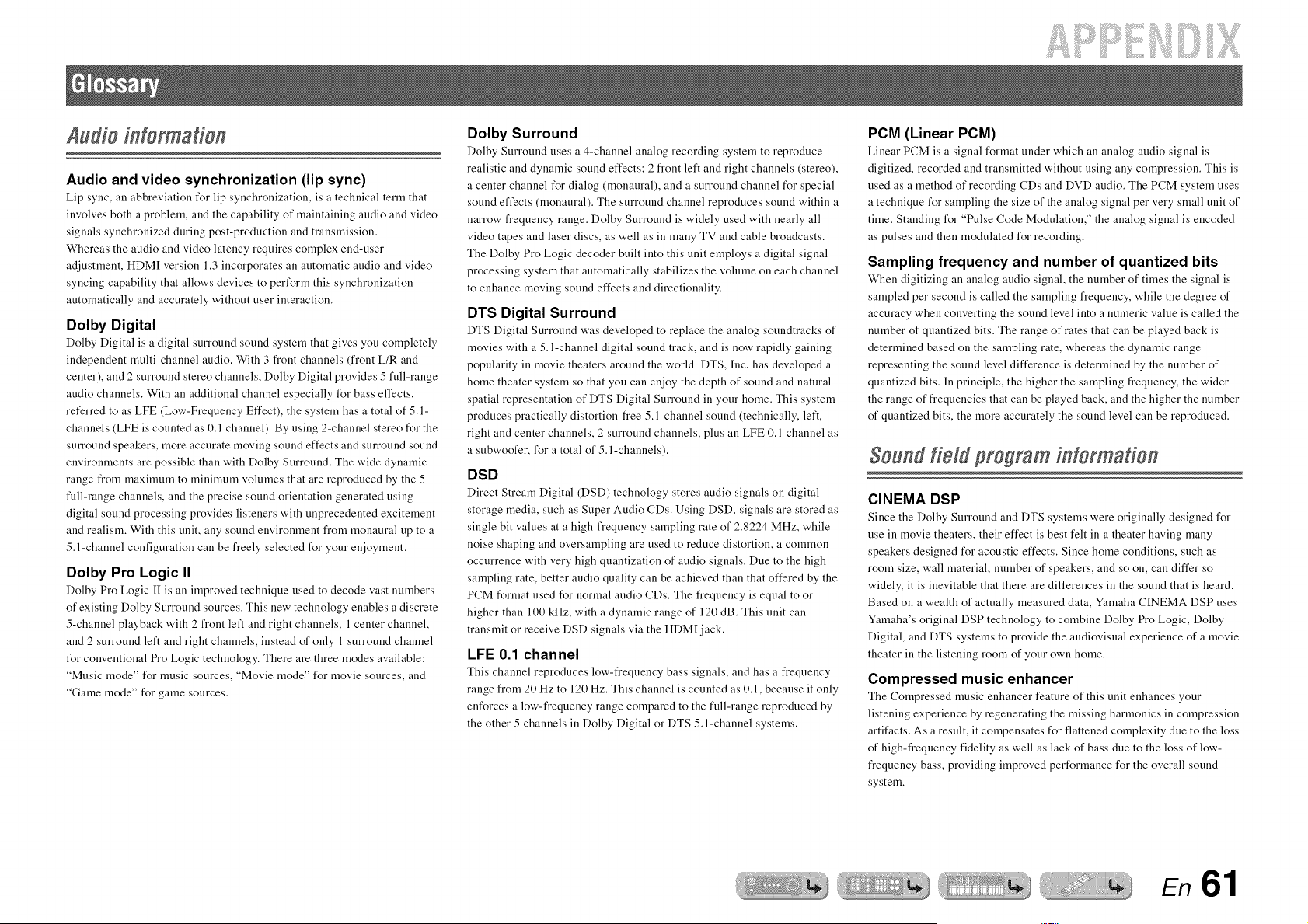
if!i:i:i :iiiiiiiiiii!! iii iiiilil
Audio information
Audio and video synchronization (lip sync)
Lip sync, all abbreviation for lip synchronization, is a technical term that
involves both a problem, and the capability of maintaining audio and video
signals synchronized during post-production and transmission.
Whereas the audio and video latency requires complex end-user
adjustment, HDM[ version 1.3 incorporates an automatic audio and video
syncing capability that allows devices to perform this synchronization
automatically and accurately without user interaction.
Dolby Digital
Dolby Digital is a digital surround sound system that gives you completely
independent multi-channel audio. With 3 front channels (front L/R and
center), and 2 surround stereo channels, Dolby Digital provides 5 full-range
audio channels. With an additional channel especially for bass effects,
referred to as LFE (Low-Frequency Effect), the system has a total of 5. l-
channels (LFE is counted as 0.1 channel). By using 2-channel stereo for the
surround speakers, more accurate moving sound effects and surround sound
environments are possible than with Dolby Surround. The wide dynamic
range from maximum to minimum volumes that are reproduced by the 5
ikdl-range channels, and the precise sound orientation generated using
digital sound processing provides listeners with unprecedented excitement
and realism. With this unit, any sound environment from monaural up to a
5. l-channel configuration can be freely selected for your enjoyment.
Dolby Pro Logic II
Dolby Pro Logic [I is an improved technique used to decode vast numbers
of existing Dolby Surround sources. This new technology enables a discrete
5-channel playback with 2 front left and right channels, 1 center channel,
and 2 surround left and right channels, instead of only 1 surround channel
for conventional Pro Logic technology. There are three modes available:
"Music mode" for music sources, "Movie mode" for movie sources, and
"Game mode" for game sources.
Dolby Surround
Dolby Surround uses a 4-channel analog recording system to reproduce
realistic and dynamic sound effects: 2 front left and right channels (stereo),
a center channel for dialog (monaural), and a surround channel for special
sound effects (monaural). The surround channel reproduces sound within a
narrow frequency range. Dolby Surround is widely used with nearly all
video tapes and laser discs, as well as in many TV and cable broadcasts.
The Dolby Pro Logic decoder built into this unit employs a digital signal
processing system that automatically stabilizes the volume on each channel
to enhance moving sound effects and directionality.
DTS Digital Surround
DTS Digital Surround was developed to replace the analog soundtracks of
movies with a 5. l-channel digital sound track, and is now rapidly gaining
popularity in movie theaters around the world. DTS, Inc. has developed a
home theater system so that you can enjoy the depth of sound and natural
spatial representation of DTS Digital Surround in your home. This system
produces practically distortion-free 5. l-channel sound (technically, left,
right and center channels, 2 surround channels, plus an LFE 0.1 channel as
a subwoofer, for a total of 5. l-channels).
DSD
Direct Stream Digital (DSD) technology stores audio signals on digital
storage media, such as Super Audio CDs. Using DSD, signals are stored as
single bit values at a high-frequency sampling rate of 2.8224 MHz, while
noise shaping and oversampling are used to reduce distortion, a common
occurrence with very high quantization of audio signals. Due to the high
sampling rate, better audio quality can be achieved than that offered by the
PCM format used for normal audio CDs. The frequency is equal to or
higher than 100 kHz, with a dynamic range of 120 dB. This unit can
transmit or receive DSD signals via the HDM[ jack.
LFE 0.1 channel
This channel reproduces low-frequency bass signals, and has a frequency
range from 20 Hz to 120 Hz. This channel is counted as 0.1, because it only
enforces a low-frequency range compared to the full-range reproduced by
the other 5 channels in Dolby Digital or DTS 5.l-channel systems.
PCM (Linear PCM)
Linear PCM is a signal format under which an analog audio signal is
digitized, recorded and transmitted without using any compression. This is
used as a method of recording CDs and DVD audio. The PCM system uses
a technique for sampling the size of the analog signal per very small unit of
time. Standing for "Pulse Code Modulation," the analog signal is encoded
as pulses and then modulated for recording.
Sampling frequency and number of quantized bits
When digitizing an analog audio signal, the number of times the signal is
sampled per second is called the sampling frequency, while the degree of
accuracy when converting the sound level into a numeric value is called the
number of quantized bits. The range of rates that can be played back is
determined based on the sampling rate, whereas the dynamic range
representing the sound level difference is determined by the number of
quantized bits. [n principle, the higher the sampling frequency, the wider
the range of frequencies that can be played back, and the higher the number
of quantized bits, the more accurately the sound level can be reproduced.
Soundfield program information
CINEMA DSP
Since the Dolby Surround and DTS systems were originally designed for
use in movie theaters, their effect is best felt in a theater having many
speakers designed for acoustic effects. Since home conditions, such as
room size, wall material, number of speakers, and so on, can differ so
widely, it is inevitable that there are differences in the sound that is heard.
Based on a wealth of actually measured data, Ymnaha CINEMA DSP uses
Ymnaha's original DSP technology to combine Dolby Pro Logic, Dolby
Digital, and DTS systems to provide the audiovisual experience of a movie
theater in the listening room of your own home.
Compressed music enhancer
The Compressed music enhancer feature of this unit enhances your
listening experience by regenerating the missing harmonics in compression
artifacts. As a result, it compensates for flattened complexity due to the loss
of high-frequency fidelity as well as lack of bass due to the loss of low-
frequency bass, providing improved performance for the overall sound
system.
En 61
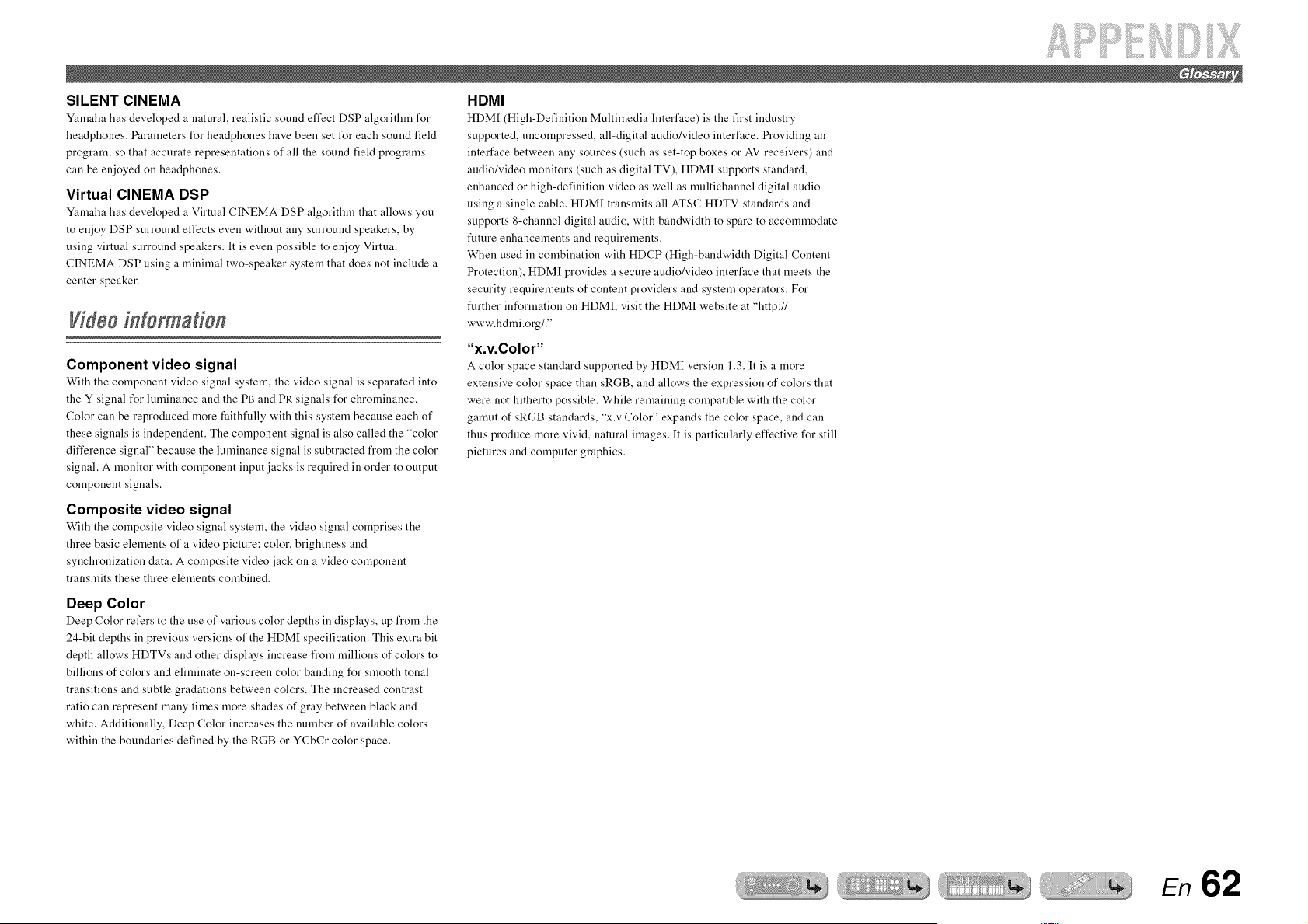
SILENT CINEMA
Yamaha has developed a natural, realistic sound effect DSP algorithm for
headphones. Parameters for headphones have been set for each sound field
program, so that accurate representations of all the sound field programs
can be enjoyed on headphones.
Virtual CINEMA DSP
Yamaha has developed a Virtual CINEMA DSP algorithm that allows you
to enjoy DSP surround effects even without any surround speakers, by
using virtual surround speakers. It is even possible to enjoy Virtual
CINEMA DSP using a minimal two-speaker system that does not include a
center speaker.
Video information
Component video signal
With tile component video signal system, tile video signal is separated into
the Y signal for luminance and the PB and PR signals for chrominance.
Color can be reproduced more faithfully with this system because each of
these signals is independent. The component signal is also called the "color
difference signal" because the luminance signal is subtracted from the color
signal. A monitor with component input jacks is required in order to output
component signals.
Composite video signal
With the composite video signal system, the video signal comprises the
three basic elements of a video picture: color, brightness and
synchronization data. A composite video jack on a video component
transmits these three elements combined.
Deep Color
Deep Color refers to tile use of various color depths in displays, tip from tile
24-bit depths in previous versions of the HDM[ specification. This extra bit
depth allows HDTVs and other displays increase from millions of colors to
billions of colors and eliminate on-screen color banding for smooth tonal
transitions and subtle gradations between colors. The increased contrast
ratio can represent many times more shades of gray between black and
white. Additionally, Deep Color increases the number of available colors
within the boundaries defined by the RGB or YCbCr color space.
HDMI
HDM[ (High-Definition Multimedia Interface) is tile first industry
supported, uncompressed, all-digital audio/video interface. Providing an
interface between any sources (such as set-top boxes or AV receivers) and
audio/video monitors (such as digital TV), HDM[ supports standard,
enhanced or high-definition video as well as multichannel digital audio
using a single cable. HDM[ transmits all ATSC HDTV standards and
supports 8-channel digital audio, with bandwidth to spare to accommodate
future enhancements and requirements.
When used in combination with HDCP (High-bandwidth Digital Content
Protection), HDM[ provides a secure audio/video interface that meets the
security requirements of content providers and system operators. For
ikirther information on HDM[, visit the HDM[ website at "http://
www.hdmi.org/."
"x.v.Color"
A color space standard supported by HDM[ version 1.3. It is a more
extensive color space than sRGB, and allows the expression of colors that
were not hitherto possible. While remaining compatible with the color
gamut of sRGB standards, "x.v.Color" expands the color space, and can
thus produce more vivid, natural images. It is particularly effective for still
pictures and computer graphics.
En 62
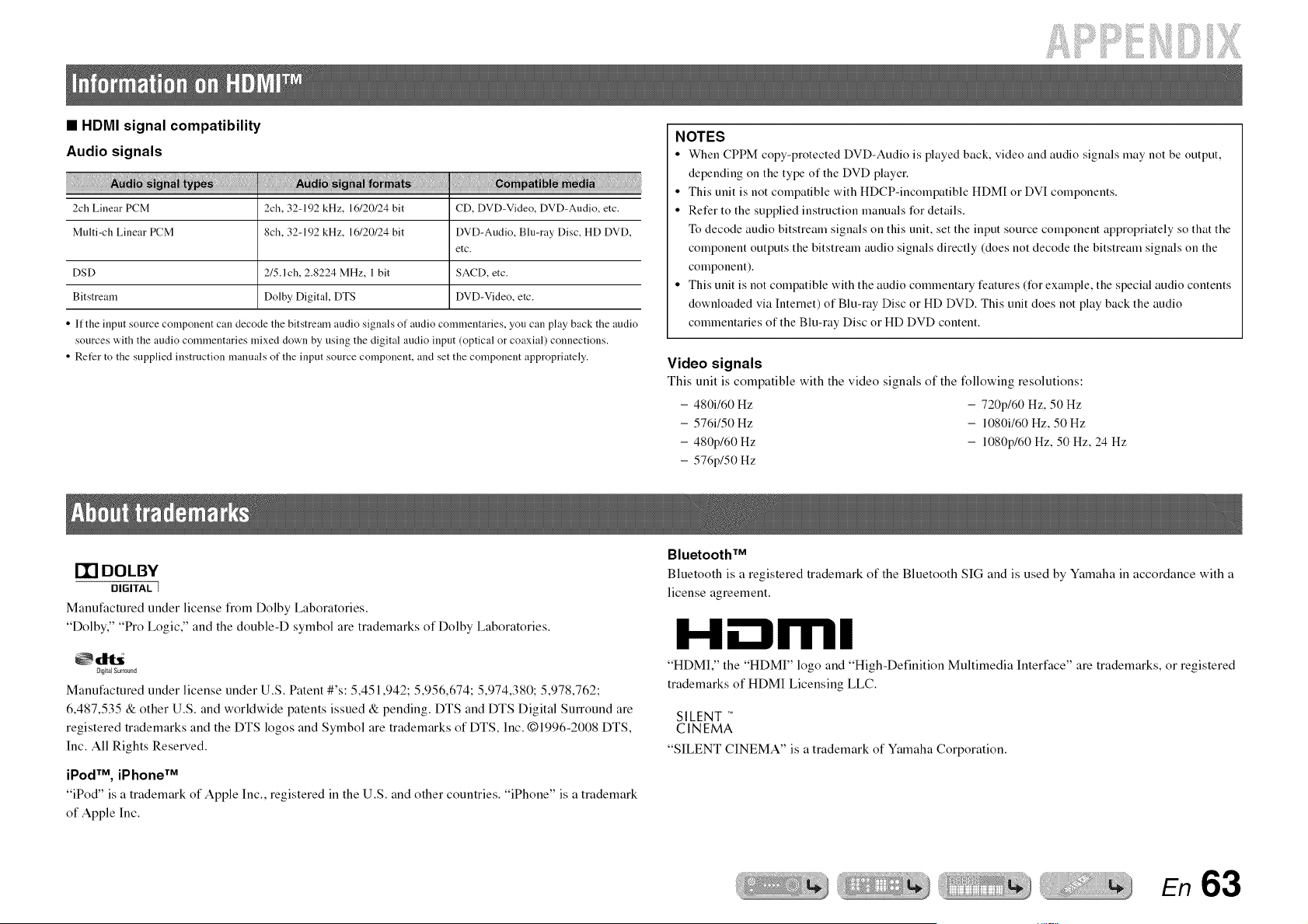
if!i ii iiiilil
• HDMI signal compatibility
Audio signals
2ch Linear PCM 2ch, 32-192 kHz, 1(,/20/24 bit CD, DVD-Video, DVD-Audio, etc.
Multi-ch Linear PCM 8ch, 32-192 kHz, 1(,/20/24 bit DVD-Audio, Blu-ray Disc, HD DVD,
etc.
DSD 2/5.1ch, 2.8224 MHz, 1 bit SACD, etc.
Bitstream Dolby Digital, DTS DVD-Video, etc.
• If the input source component can decode the bitstream audio signals of audio commentaries, you can play back the audio
sources with the audio commentaries mixed down by using the digital audio input (optical or coaxial) connections.
• Refer to the supplied instruction manuals of the input source component, and set the component appropriately.
NOTES
• When CPPM copy-protected DVD-Audio is played back. video and audio signals may not be output,
depending on the type of the DVD player.
• This unit is not compatible with HDCP-incompatible HDM[ or DVI components.
• Refer to the supplied instruction manuals for details.
To decode audio bitstream signals on this unit. set the input source component appropriately so that the
component outputs the bitstream audio signals directly (does not decode the bitstream signals on the
component).
• This unit is not compatible with the audio commentary features (for example, the special audio contents
downloaded via Intemet) of Blu-ray Disc or HD DVD. This unit does not play back the audio
commentaries of the Blu-ray Disc or HD DVD content.
Video signals
This unit is compatible with the video signals of the following resolutions:
- 480i160 Hz - 720p160 Hz, 50 Hz
- 576i150 Hz - 1080i160 Hz, 50 Hz
- 480p160 Hz - 1080p/60 Hz, 50 Hz, 24 Hz
- 576p150 Hz
I'l"l DOLBY
DIGITAL I
Manufactured under license from Dolby Laboratories.
"Dolby," "Pro Logic," and the double-D symbol are trademarks of Dolby Laboratories.
Digital Surround
Manufactured under license under U.S. Patent #'s: 5,451,942; 5,956,674; 5,974,380; 5,978,762;
6,487,535 & other U.S. and worldwide patents issued & pending. DTS and DTS Digital Surround are
registered trademarks and the DTS logos and Symbol are trademarks of DTS, Inc. @1996-2008 DTS,
Inc. All Rights Reserved.
iPod TM, iPhone TM
"iPod" is a trademark of Apple Inc., registered in the U.S. and other countries. "iPhone" is a trademark
of Apple Inc.
BluetoothTM
Bluetooth is a registered trademark of the Bluetooth SIG and is used by Yamaha in accordance with a
license agreement.
Hnrrll
"HDMI," the "HDMI" logo and "High-Definition Multimedia Interface" are trademarks, or registered
trademarks of HDMI Licensing LLC.
SILENT T_
CINEMA
"SILENT CINEMA" is a trademark of Yamaha Corporation.
En 63
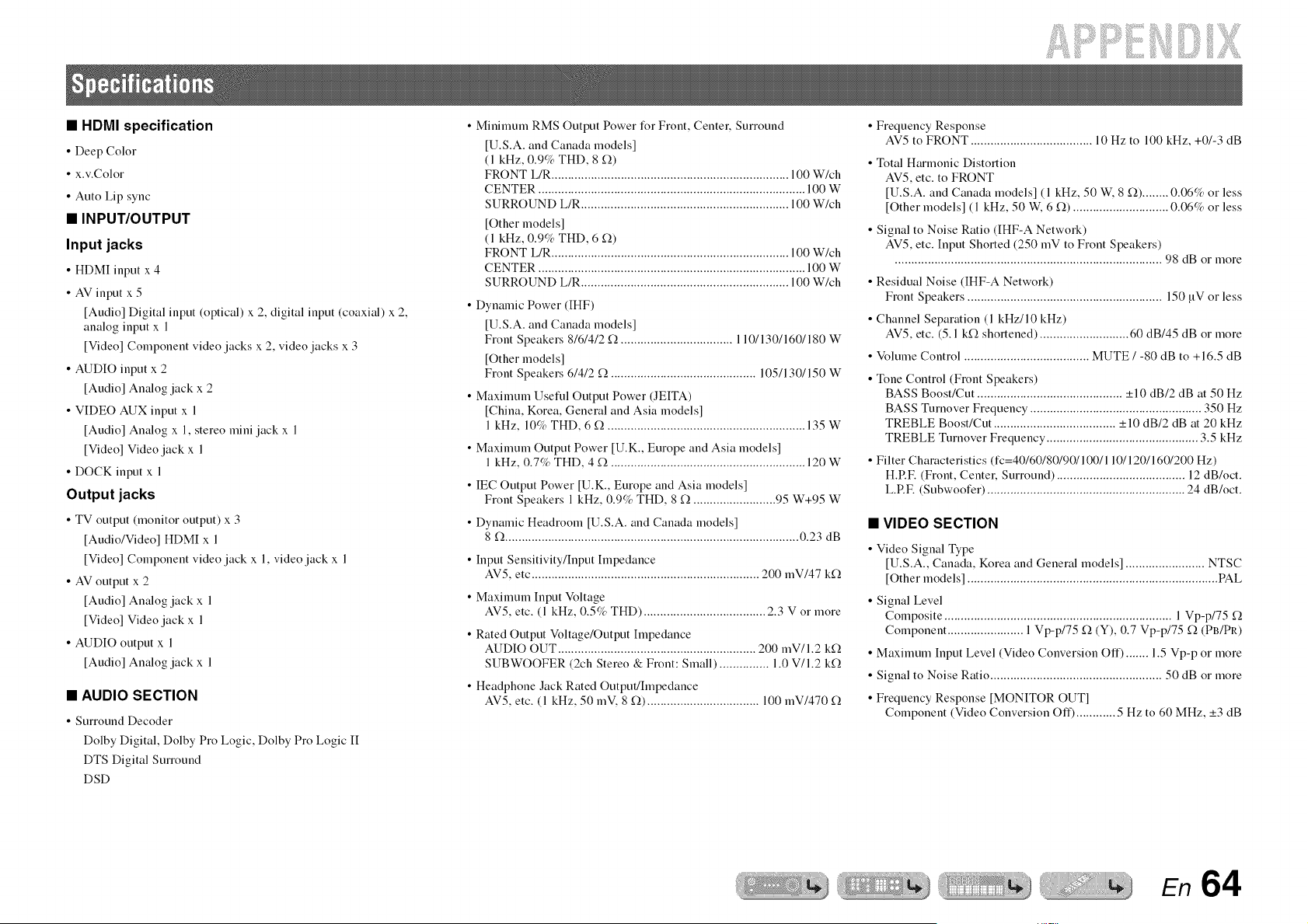
if!i:iiiEii iiiilil
• HDMI specification
• Deep Color
• x.v.Color
• Auto Lip sync
• INPUTIOUTPUT
Input jacks
• HDMI input x 4
• AV input x 5
[Audio] Digital input (optical) x 2, digital input (coaxial) x 2.
analog input x 1
[Video] Component video jacks x 2. video jacks x 3
• AUDIO input x 2
[Audio] Analog jack x 2
• VIDEO AUX input x 1
[Audio] Analog x 1. stereo mini jack x 1
[Video] Video jack x 1
• DOCK input x 1
Output jacks
• TV output (monitor output) x 3
[Audio/Video] HDMI x 1
[Video] Component video jack x 1, video jack x 1
• AV output x 2
[Audio] Analog jack x 1
[Video] Video jack x 1
• AUDIO output x 1
[Audio] Analog jack x 1
• AUDIO SECTION
• Surround Decoder
Dolby Digital, Dolby Pro Logic, Dolby Pro Logic II
DTS Digital Surround
DSD
• Minimum RMS Output Power %r Front. Center. Surround
[U.S.A. and Canada models]
(1 kHz. 0.9% THD. 8 '2).)
FRONT L/R ........................................................................ 100 W/ch
CENTER ................................................................................. 100 W
SURROUND L/R ............................................................... 100 W/ch
[Other models]
(1 kHz. 0.9% THD. 6 '2).)
FRONT L/R ........................................................................ 100 W/ch
CENTER ................................................................................. 100 W
SURROUND L/R ............................................................... 100 W/ch
• Dynamic Power (IHF)
[U.S.A. and Canada models]
Front Speakers 8/6/4/2 '2),.................................. 110/130/160/180 W
[Other models]
Front Speakers 6/4/2 '2),............................................ 105/130/150 W
• Maximum Useful Output Power (JEITA)
[China. Korea. General and Asia models]
1 kHz. 10% THD. 6 '2)............................................................. 135 W
• Maximum Output Power [U.K., Europe and Asia models]
1 kHz. 0.7% THD. 4 _2.)........................................................... 120 W
• IEC Output Power [U.K., Europe and Asia models]
Front Speakers 1kHz. 0.9% THD. 8 '2).......................... 95 W+95 W
• Dynamic Headroom [U.S.A. and Canada models]
8 '2).......................................................................................... 0.23 dB
• Input Sensitivity/Input Impedance
AV5, etc ..................................................................... 200 mV/47 k'2),
• Maximum Input Voltage
AV5. etc. (1 kHz. 0.5% THD) ..................................... 2.3 V or more
• Rated Output Voltage/Output Impedance
AUDIO OUT ............................................................ 200 mV/l.2 k'2).
SUBWOOFER (2ch Stereo & Front: Small) ............... 1.0 V/I.2 k'2).
• Headphone Jack Rated Output/Impedance
AV5, etc. (1 kHz, 50 mV, 8 '2),).................................. 100 mV/470 '2),
• Frequency Response
AV5 to FRONT ..................................... 10 Hz to 100 kHz, +01-3 dB
• Total Harmonic Distortion
AV5, etc. to FRONT
[U.S.A. and Canada models] (1 kHz, 50 W, 8 '2),)........ 0.06% or less
[Other models] (1 kHz, 50 W, 6 '2),)............................. 0.06% or less
• Signal to Noise Ratio (IHF-A Network)
AV5. etc. Input Shorted (250 mV to Front Speakers)
................................................................................. 98 dB or more
• Residual Noise (IHF-A Network)
Front Speakers ........................................................... 150 uV or less
• Channel Separation (1 kHz/10 kHz)
AV5, etc. (5.1 k'2),shortened) ........................... 60 dB/45 dB or more
• Volume Control ...................................... MUTE / -80 dB to +16.5 dB
• Tone Control (Front Speakers)
BASS Boost/Cut ............................................ -+10 dB/2 dB at 50 Hz
BASS Turnover Frequency .................................................... 350 Hz
TREBLE Boost/Cut ..................................... -+10 dB/2 dB at 20 kHz
TREBLE Turnover Frequency .............................................. 3.5 kHz
• Filter Characteristics (fc=40/60/80/90/100/11 O/120/160/200 Hz)
H.RF. (Front, Center, Surround) ....................................... 12 dB/oct.
L.RF. (Subwoofer) ............................................................ 24 dB/oct.
• VIDEO SECTION
• Video Signal Type
[U.S.A.. Canada. Korea and General models] ........................ NTSC
[Other models] ............................................................................ PAL
• Signal Level
Composite ..................................................................... 1 Vp-p/75 '2).
Component ....................... 1 Vp-p/75 '2).(Y), 0.7 Vp-p/75 '2).(PB/PR)
• Maximum Input Level (Video Conversion Off) ....... 1.5 Vp-p or more
• Signal to Noise Ratio .................................................... 50 dB or more
• Frequency Response [MONITOR OUT]
Component (Video Conversion Off) ............ 5 Hz to 60 MHz. _+3dB
En 64
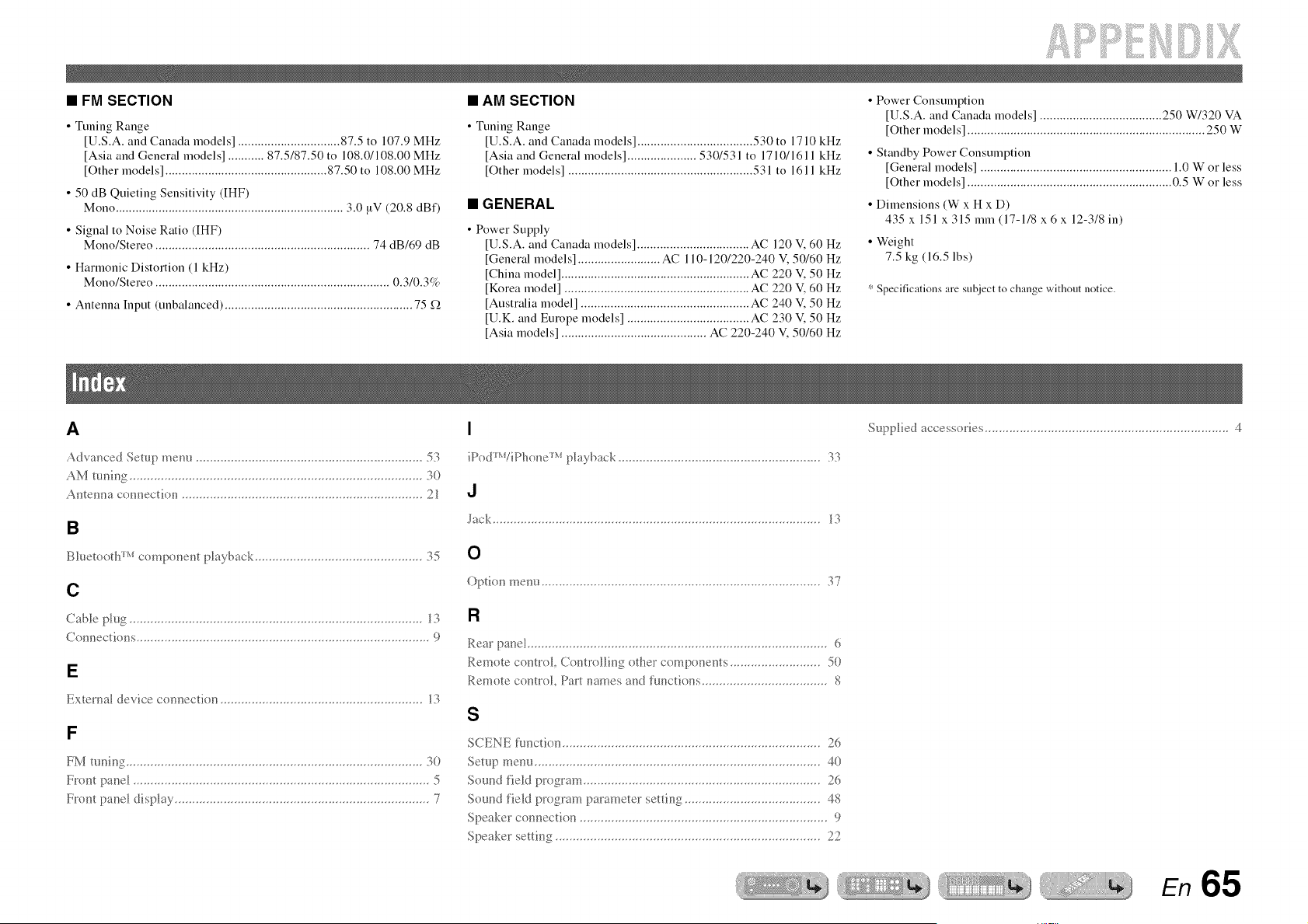
• FM SECTION
• Tuning Range
[U.S.A. and Canada models] ............................... 87.5 to 107.9 MHz
[Asia and General models] ........... 87.5/87.50 to 108.0/108.00 MHz
[Other models] ................................................. 87.50 to 108.00 MHz
• 50 dB Quieting Sensitivity (IHF)
Mono ..................................................................... 3.0 uV (20.8 dBf)
• Signal to Noise Ratio (IHF)
Mono/Stereo ................................................................. 74 dB/69 dB
• Harmonic Distortion (1 kHz)
Mono/Stereo ....................................................................... 0.3/0.3%
• Antenna Input (unbalanced) ......................................................... 75 D.
• AM SECTION
• Tuning Range
[U.S.A. and Canada models] ................................... 530 to 17 l0 kHz
[Asia and General models] ..................... 530/531 to 1710/1611 kHz
[Other models] ........................................................ 531 to 1611 kHz
• GENERAL
• Power Supply
[U.S.A. and Canada models] .................................. AC 120 V, 60 Hz
[General models] ......................... AC 110-120/220-240 V, 50/60 Hz
[China model] ......................................................... AC 220 ¥ 50 Hz
[Korea model] ........................................................ AC 220 ¥ 60 Hz
[Australia model] ................................................... AC 240 ¥ 50 Hz
[U.K. and Europe models] ..................................... AC 230 ¥ 50 Hz
[Asia models] ............................................ AC 220-240 V, 50/60 Hz
• Power Consumption
[U.S.A. and Canada models] ..................................... 250 W/320 VA
[Other models] ........................................................................ 2,50 W
• Standby Power Consumption
[General models] .......................................................... 1.0 W or less
[Other models] .............................................................. 0.5 W or less
• Dimensions (W x H x D)
435 x 151 x 315 mm (17-1/8 x 6 x 12-3/8 in)
• Weight
7.5 kg (16.5 lbs)
* Specifications are subject to change without notice.
A
Advanced Setup menu 53
AM tuning 30
Antenna cunnectiun 21
B
BIuetooth _'_ curnponent playback 35
C
Cable plug 13
Connectiuns 9
E
External device connectiun 13
F
FM tuning 30
Front pand 5
Front pane] disp]ay 7
I
iPod_WiPhone _'_ pla5 back 33
d
Jack 13
0
Optiun menu 37
R
Rear pand 6
Remute contro]_ Controlling other components 50
Remote contrd, Part names and functiuns 8
S
Supplied accessuiies ...................................................................... 4
En 65

@YAMAHA
© 2010 Yamaha Corporation All rights reserved.
YAMAHA CORPORATION
@ YC434BO/OMEN1
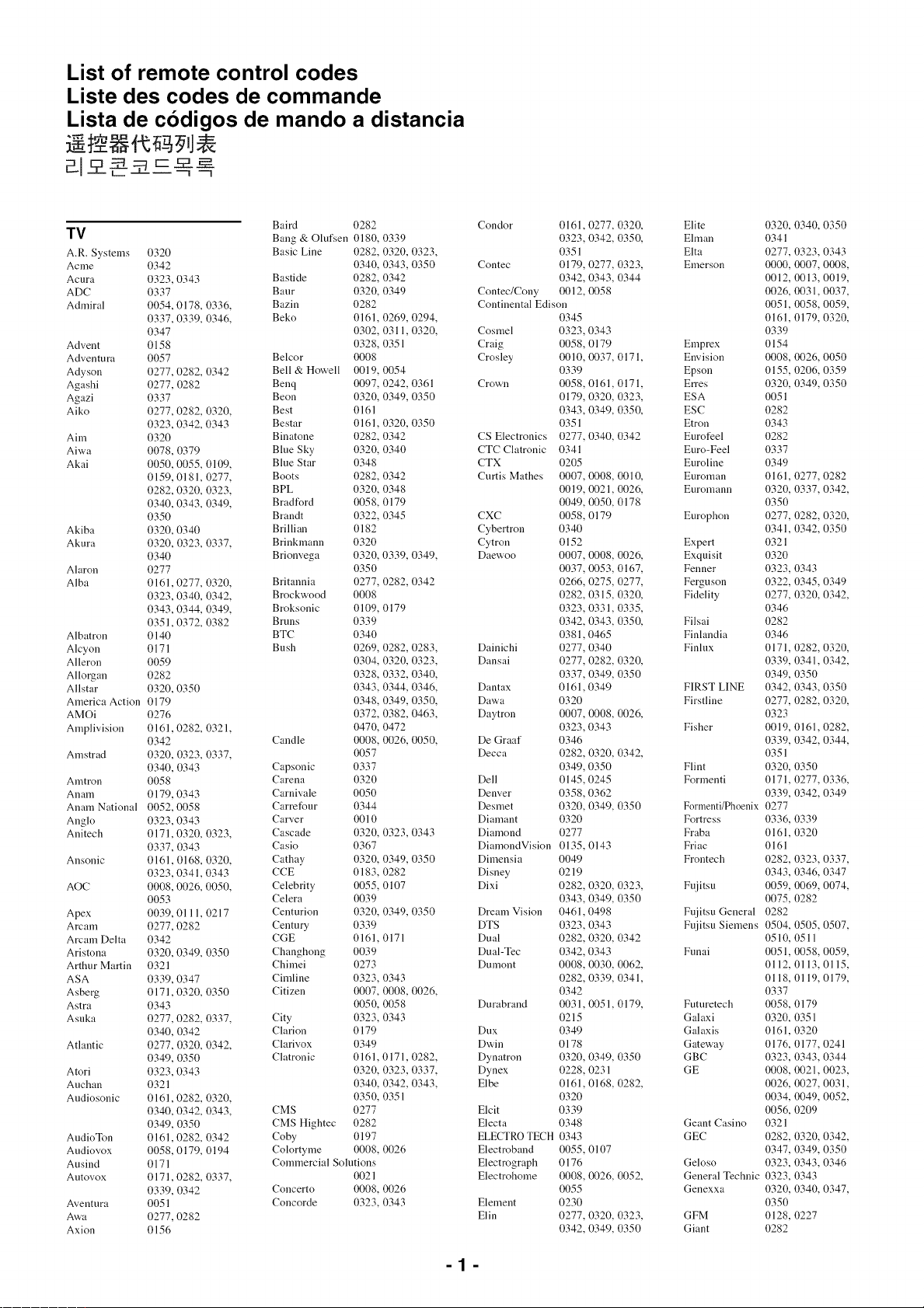
List of remote control codes
Liste des codes de commande
Lista de codigos de mando a distancia
"_ Capp _ I
Baird 0282
TV Bang & Olufsen 0180, 0339
A.R. Systems 0320 Basic Line 0282, 0320, 0323,
Acme 0342 0340, 0343, 0350
Acura 0323, 0343 Bastide 0282, 0342
ADC 0337 Baur 0320, 0349
Admiral 0054, 0178, 0336, Bazin 0282
0337, 0339, 0346, Beko 0161, 0269, 0294,
0347 0302, 0311, 0320,
Advent 0158 0328, 0351
Adventura 0057 Belcor 0008
Adyson 0277, 0282, 0342 Bell & Howell 0019, 0054
Agashi 0277, 0282 Benq 0097, 0242, 0361
Agazi 0337 Beon 0320, 0349, 0350
Aiko 0277, 0282, 0320, Best 0161
0323, 0342, 0343 Bestar 0161, 0320, 0350
Aim 0320 Binatone 0282, 0342
Aiwa 0078, 0379 Blue Sky 0320, 0340
Akai 0050, 0055, 0109, Blue Star 0348
0159, 0181, 0277, Boots 0282, 0342
0282, 0320, 0323, BPL 0320, 0348
0340, 0343, 0349, Bradford 0058, 0179
0350 Brandt 0322, 0345
Akiba 0320, 0340 Brillian 0182
Akura 0320, 0323, 0337, Brinkmann 0320
0340 Brionvega 0320, 0339, 0349,
Alaron 0277 0350
Alba 0161,0277, 0320, Britannia 0277, 0282, 0342
0323, 0340, 0342, Brockwood 0008
0343, 0344, 0349, Broksonic 0109, 0179
0351,0372, 0382 Bruns 0339
Albatron 0140 BTC 0340
Alcyon 0171 Bush 0269, 0282, 0283,
Alleron 0059 0304, 0320, 0323,
Allorgan 0282 0328, 0332, 0340,
Allstar 0320, 0350 0343, 0344, 0346,
America Action 0179 0348, 0349, 0350,
AMOi 0276 0372, 0382, 0463,
Amplivision 0161,0282, 0321, 0470, 0472
0342 Candle 0008, 0026, 0050,
Amstrad 0320, 0323, 0337, 0057
0340, 0343 Capsonic 0337
Amtron 0058 Carena 0320
Anam 0179, 0343 Carnivale 0050
Anam National 0052, 0058 Carrefour 0344
Anglo 0323, 0343 Carver 0010
Anitech 0171,0320, 0323, Cascade 0320, 0323, 0343
0337, 0343 Casio 0367
Ansonic 0161, 0168, 0320, Cathay 0320, 0349, 0350
0323, 0341,0343 CCE 0183, 0282
AOC 0008, 0026, 0050, Celebrity 0055, 0107
0053 Celera 0039
Apex 0039, 0111, 0217 Centurion 0320, 0349, 0350
Arcam 0277, 0282 Century 0339
Arcam Delta 0342 CGE 0161, 0171
Aristona 0320, 0349, 0350 Changhong 0039
Arthur Martin 0321 Chimei 0273
ASA 0339, 0347 Cimline 0323, 0343
Asberg 0171,0320, 0350 Citizen 0007, 0008, 0026,
Astra 0343 0050, 0058
Asuka 0277, 0282, 0337, City 0323, 0343
0340, 0342 Clarion 0179
Atlantic 0277, 0320, 0342, Clarivox 0349
0349, 0350 Clatronic 0161,0171, 0282,
Atori 0323, 0343 0320, 0323, 0337,
Auchan 0321 0340, 0342, 0343,
Audiosonic 0161,0282, 0320, 0350, 0351
0340, 0342, 0343, CMS 0277
0349, 0350 CMS Hightec 0282
AudioTon 0161,0282, 0342 Coby 0197
Audiovox 0058, 0179, 0194 Colortyme 0008, 0026
Ausind 0171 Commercial Solutions
Autovox 0171,0282, 0337, 0021
0339, 0342 Concerto 0008, 0026
Aventura 0051 Concorde 0323, 0343
A'a,a 0277, 0282
Axion 0156
Condor 0161, 0277, 0320, Elite
0323, 0342, 0350, Elman
0351 Elta
Contec 0179, 0277, 0323, Emerson
0342, 0343, 0344
Contec/Cony 0012, 0058
Continental Edison
0345
Cosmel 0323, 0343
Craig 0058, 0179 Emprex
Crosley 0010, 0037, 0171, Envision
0339 Epson
Crown 0058, 0161, 0171, Erres
0179, 0320, 0323, ESA
0343, 0349, 0350, ESC
0351 Etron
CS Electronics 0277, 0340, 0342 Eurofeel
CTC Clatronic 0341 Euro-Feel
CTX 0205 Euroline
Curtis Mathes 0007, 0008, 0010, Euroman
0019, 0021, 0026, Euromann
0049, 0050, 0178
CXC 0058, 0179 Europhon
Cybertron 0340
Cytron 0152 Expert
Daewoo 0007, 0008, 0026, Exquisit
0037, 0053, 0167, Fenner
0266, 0275, 0277, Ferguson
0282, 0315, 0320, Fidelity
0323, 0331, 0335,
0342, 0343, 0350, Filsai
0381,0465 Finlandia
Dainichi 0277, 0340 Finlux
Dansai 0277, 0282, 0320,
0337, 0349, 0350
Dantax 0161,0349 FIRST LINE
Dawa 0320 Firstline
Daytron 0007, 0008, 0026,
0323, 0343 Fisher
De Graaf 0346
Decca 0282, 0320, 0342,
0349, 0350 Flint
Dell 0145, 0245 Formenti
Denver 0358, 0362
Desmet 0320, 0349, 0350 F0rmenti/Ph0enix
Diamant 0320 Fortress
Diamond 0277 Fraba
DiamondVision 0135, 0143 Friac
Dimensia 0049 Frontech
Disney 0219
Dixi
Dream Vision
DTS
Dual
Dual-Tec
Dumont
Durabrand
Dux
Dwin
Dynatron
Dynex
Elbe
Elcit
Electa
ELECTRO TECH
Electroband
Electrograph
Electrohome
Element
Elin
0282 0320, 0323,
0343, 0349, 0350
0461,0498
0323, 0343
0282 0320, 0342
03420343
0008,0030,0062,
0282 0339, 0341,
0342
0031, 0051, 0179,
0215
0349
0178
0320, 0349, 0350
0228,0231
0161, 0168, 0282,
0320
0339
0348
0343
0055, 0107
0176
0008, 0026, 0052,
0055
0230
0277, 0320, 0323,
0342, 0349, 0350
Fujitsu
Fujitsu General
Fujitsu Siemens
Funai
Futuretech
Galaxi
Galaxis
Gateway
GBC
GE
Geant Casino
GEC
Geloso
General Technic
Genexxa
GFM
Giant
0320,
0341
0277,
0000,
0012,
0026,
0051,
0161,
0339
0154
0008,
0155,
0320,
0051
0282
0343
0282
0337
0349
0161,
0320,
0350
0277,
0341,
0321
0320
0323,
0322,
0277,
0346
0282
0346
0171,
0339,
0349,
0342,
0277,
0323
0019,
0339,
0351
0320,
0171,
0339,
0277
0336,
0161,
0161
0282,
0343,
0059,
0075,
0282
0504,
0510,
0051,
0112,
0118,
0337
0058,
0320,
0161,
0176,
0323,
0008,
0026,
0034,
0056,
0321
0282,
0347,
0323,
0323,
0320,
0350
0128,
0282
0340,0350
0323, 0343
0007,0008,
0013, 0019,
0031, 0037,
0058, 0059,
0179, 0320,
0026, 0050
0206, 0359
0349,0350
0277,0282
0337, 0342,
0282,0320,
0342,0350
0343
0345, 0349
0320, 0342,
0282,0320,
0341, 0342,
0350
0343,0350
0282,0320,
0161, 0282,
0342,0344,
0350
0277,0336,
0342,0349
0339
0320
0323, 0337,
0346,0347
0069, 0074,
0282
0505, 0507,
0511
0058, 0059,
0113, 0115,
0119, 0179,
0179
0351
0320
0177, 0241
0343, 0344
0021, 0023,
0027, 0031,
0049, 0052,
0209
0320, 0342,
0349,0350
0343,0346
0343
0340,0347,
0227
-1-
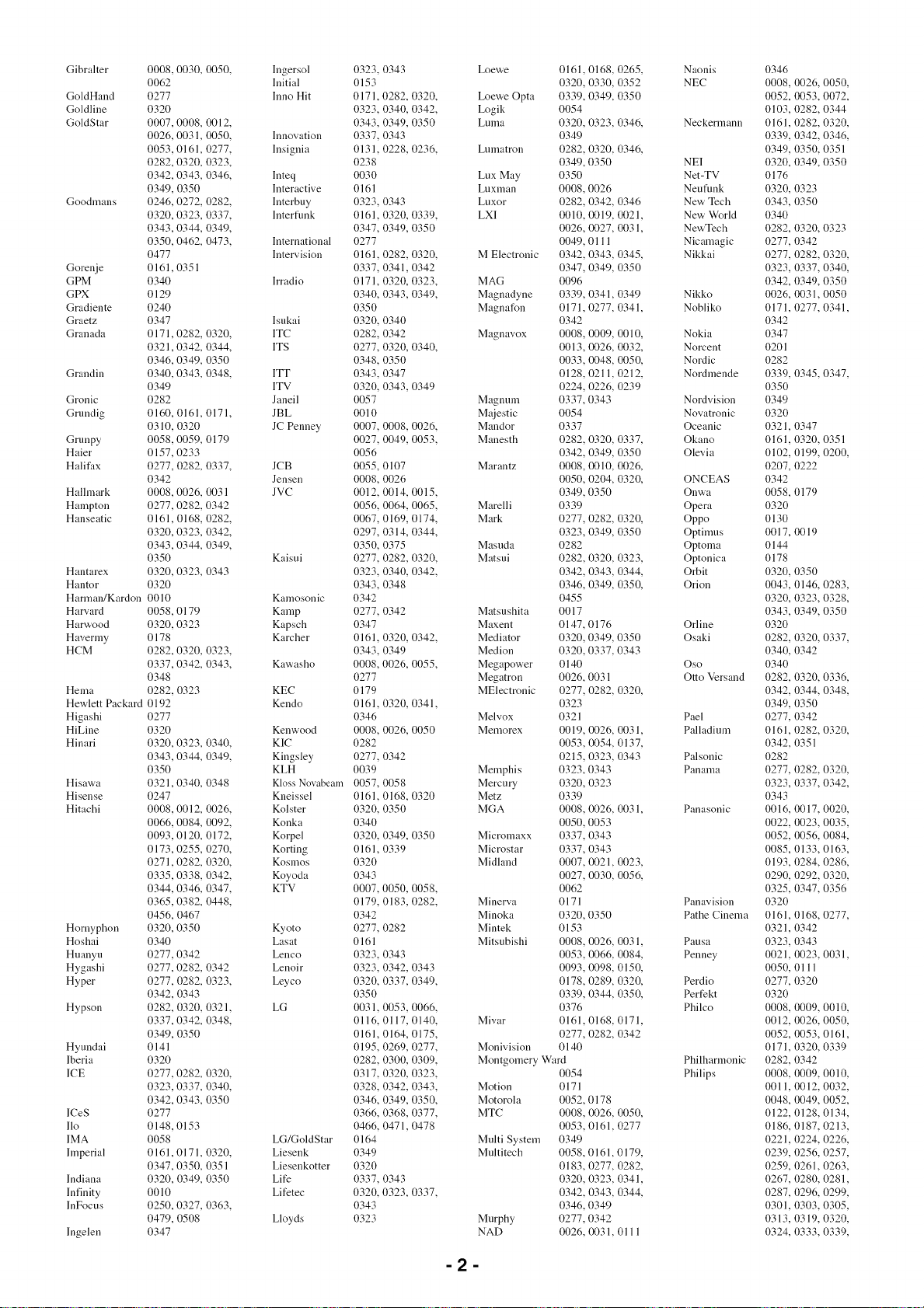
Gibralter
GoldHand
Goldline
GoldStar
Goodmans
Gorenje
GPM
GPX
Gradiente
Graetz
Granada
Grandin
Gronic
Grundig
Grunpy
Haier
Halifax
Hallmark
Hampton
Hanseatic
Hantarex
Hantor
Harman/Kardon
Harvard
Harwood
Havermy
HCM
Hema
Hewlett Packard
Higashi
HiLine
Hinari
Hisawa
Hisense
Hitachi
Hornyphon
Hoshai
Huanyu
Hygashi
Hyper
Hypson
Hyundai
lberia
ICE
ICeS
I1o
IMA
hnperial
Indiana
Infinity
lnFocus
lngelen
0008,
0062
0277
0320
0007,
0026,
0053,
0282,
0342,
0349,
0246,
0320,
0343,
0350,
0477
0161,
0340
0129
0240
0347
0171,
0321,
0346,
0340,
0349
0282
0160,
0310,
0058,
0157,
0277,
0342
0008,
0277,
0161,
0320,
0343,
0350
0320,
0320
0010
0058,
0320,
0178
0282,
0337,
0348
0282,
0192
0277
0320
0320,
0343,
0350
0321,
0247
0008,
0066,
0093,
0173,
0271,
0335,
0344,
0365,
0456,
0320,
0340
0277,
0277,
0277,
0342,
0282,
0337,
0349,
0141
0320
0277,
0323,
0342,
0277
0148,
0058
0161,
0347,
0320,
0010
0250,
0479,
0347
0030, 0050,
0008, 0012,
0031,0050,
0161, 0277,
0320, 0323,
0343,0346,
0350
0272,0282,
0323, 0337,
0344, 0349,
0462,0473,
0351
0282, 0320,
0342, 0344,
0349, 0350
0343, 0348,
0161, 0171,
0320
0059, 0179
0233
0282, 0337,
0026,0031
0282,0342
0168, 0282,
0323,0342,
0344, 0349,
0323,0343
0179
0323
0320, 0323,
0342, 0343,
0323
0323,0340,
0344, 0349,
0340, 0348
0012,0026,
0084,0092,
0120, 0172,
0255,0270,
0282, 0320,
0338, 0342,
0346,0347,
0382, 0448,
0467
0350
0342
0282, 0342
0282, 0323,
0343
0320, 0321,
0342, 0348,
0350
0282, 0320,
0337, 0340,
0343, 0350
0153
0171, 0320,
0350, 0351
0349, 0350
0327, 0363,
0508
Ingersol
Initial
Inno Hit
Innovation
Insignia
Inteq
Interactive
Interbuy
Interflmk
International
Intervision
Irradio
Isukai
ITC
ITS
ITT
ITV
Janeil
JBL
JC Penney
JCB
Jensen
JVC
Kaisui
Kamosonic
Kamp
Kapsch
Karcher
Kawasho
KEC
Kendo
Kenwood
KIC
Kingsley
KLH
Kl0ss N0vabeam
Kneissel
Kolster
Konka
Korpel
Korting
Kosmos
Koyoda
KTV
Kyoto
Lasat
Lenco
Lenoir
Leyco
LG
LG/GoldStar
Liesenk
Liesenkotter
Life
Lifetec
Lloyds
0323,
0153
0171,
0323,
0343,
0337,
0131,
0238
0030
0161
0323,
0161,
0347,
0277
0161,
0337,
0171,
0340,
0350
0320,
0282,
0277,
0348,
0343,
0320,
0057
0010
0007,
0027,
0056
0055,
0008,
0012,
0056,
0067,
0297,
0350,
0277,
0323,
0343,
0342
0277,
0347
0161,
0343,
0008,
0277
0179
0161,
0346
0008,
0282
0277,
0039
0057,
0161,
0320,
0340
0320,
0161,
0320
0343
0007,
0179,
0342
0277,
0161
0323,
0323,
0320,
0350
0031,
0116,
0161,
0195,
0282,
0317,
0328,
0346,
0366,
0466,
0164
0349
0320
0337,
0320,
0343
0323
0343
0282, 0320,
0340,0342,
0349, 0350
0343
0228,0236,
0343
0320, 0339,
0349, 0350
0282, 0320,
0341, 0342
0320, 0323,
0343,0349,
0340
0342
0320, 0340,
0350
0347
0343,0349
0008,0026,
0049, 0053,
0107
0026
0014, 0015,
0064, 0065,
0169, 0174,
0314, 0344,
0375
0282, 0320,
0340,0342,
0348
0342
0320, 0342,
0349
0026,0055,
0320, 0341,
0026, 0050
0342
OO58
0168, 0320
0350
0349, 0350
0339
0050, 0058,
0183,0282,
0282
0343
0342, 0343
0337, 0349,
0053, 0066,
0117, 0140,
0164, 0175,
0269,0277,
0300,0309,
0320, 0323,
0342,0343,
0349, 0350,
0368, 0377,
0471,0478
0343
0323, 0337,
Loewe 0161, 0168, 0265, Naonis
0320, 0330, 0352 NEC
Loewe Opta 0339, 0349, 0350
Logik 0054
Luma 0320, 0323, 0346, Neckermann
0349
Lumatron 0282, 0320, 0346,
0349, 0350 NEI
Lux May 0350 Net-TV
Luxman 0008, 0026 Neufunk
Luxor 0282, 0342, 0346 New Tech
LXI 0010, 0019, 0021, New World
0026, 0027, 0031, NewTech
0049, 0111 Nicamagic
M Electronic 0342, 0343, 0345, Nikkai
0347, 0349, 0350
MAG 0096
Magnadyne 0339, 0341, 0349 Nikko
Magnafon 0171, 0277, 0341, Nobliko
0342
Magnavox 0008, 0009, 0010, Nokia
0013, 0026, 0032, Norcent
0033, 0048, 0050, Nordic
0128, 0211, 0212, Nordmende
0224, 0226, 0239
Magnum 0337, 0343 Nordvision
Majestic 0054 Novatronic
Mandor 0337 Oceanic
Manesth 0282, 0320, 0337, Okano
0342, 0349, 0350 Olevia
Marantz 0008, 0010, 0026,
0050, 0204, 0320, ONCEAS
0349, 0350 Onwa
Marelli 0339 Opera
Mark 0277, 0282, 0320, Oppo
0323, 0349, 0350 Optinms
Masuda 0282 Optoma
Matsui 0282, 0320, 0323, Optonica
0342, 0343, 0344, Orbit
0346, 0349, 0350, Orion
0455
Matsushita 0017
Maxent 0147, 0176 Orline
Mediator 0320, 0349, 0350 Osaki
Medion 0320, 0337, 0343
Megapower 0140 Oso
Megatron 0026, 0031 Otto Versand
MElectronic 0277, 0282, 0320,
0323
Melvox 0321 Pael
Memorex 0019, 0026, 0031, Palladium
0053, 0054, 0137,
0215, 0323, 0343 Palsonic
Memphis 0323, 0343 Panama
Mercury 0320, 0323
Metz 0339
MGA 0008, 0026, 0031, Panasonic
0050, 0053
Micromaxx 0337, 0343
Microstar 0337, 0343
Midland 0007, 0021, 0023,
0027, 0030, 0056,
0062
Minerva 0171 Panavision
Minoka 0320, 0350 Pathe Cinema
Mintek 0153
Mitsubishi 0008, 0026, 0031, Pausa
0053, 0066, 0084, Penney
0093, 0098, 0150,
0178, 0289, 0320, Perdio
0339, 0344, 0350, Perfekt
0376 Philco
Mivar 0161, 0168, 0171,
0277, 0282, 0342
Monivision 0140
Montgomery Ward Philharmonic
0054 Philips
Motion 0171
Motorola 0052, 0178
MTC 0008, 0026, 0050,
0053, 0161, 0277
Multi System 0349
Multitech 0058, 0161,0179,
0183, 0277, 0282,
0320, 0323, 0341,
0342, 0343, 0344,
0346, 0349
Murphy 0277, 0342
NAD 0026, 0031, 0111
-2-
0346
0008,
0052,
0103,
0161,
0339,
0349,
0320,
0176
0320,
0343,
0340
0282,
0277,
0277,
0323,
0342,
0026,
0171,
0342
0347
0201
0282
0339,
0350
0349
0320
0321,
0161,
0102,
0207,
0342
0058,
0320
0130
0017,
0144
0178
0320,
0043,
0320,
0343,
0320
0282,
0340,
0340
0282,
0342,
0349,
0277,
0161,
0342,
0282
0277,
0323,
0343
0016,
0022,
0052,
0085,
0193,
0290,
0325,
0320
0161,
0321,
0323,
0021,
0050,
0277,
0320
0008,
0012,
0052,
0171,
0282,
0008,
0011,
0048,
0122,
0186,
0221,
0239,
0259,
0267,
0287,
0301,
0313,
0324,
0026, 0050,
0053, 0072,
0282,0344
0282,0320,
0342,0346,
0350, 0351
0349, 0350
0323
0350
0320, 0323
0342
0282,0320,
0337, 0340,
0349,0350
0031, 0050
0277, 0341,
0345, 0347,
0347
0320, 0351
0199,0200,
0222
0179
0019
0350
0146,0283,
0323,0328,
0349,0350
0320, 0337,
0342
0320, 0336,
0344,0348,
0350
0342
0282,0320,
0351
0282,0320,
0337, 0342,
0017, 0020,
0023, 0035,
0056,0084,
0133, 0163,
0284,0286,
0292,0320,
0347,0356
0168,0277,
0342
0343
0023, 0031,
0111
0320
0009,0010,
0026, 0050,
0053, 0161,
0320, 0339
0342
0009,0010,
0012, 0032,
0049, 0052,
0128,0134,
0187, 0213,
0224,0226,
0256,0257,
0261,0263,
0280,0281,
0296,0299,
0303, 0305,
0319, 0320,
0333, 0339,
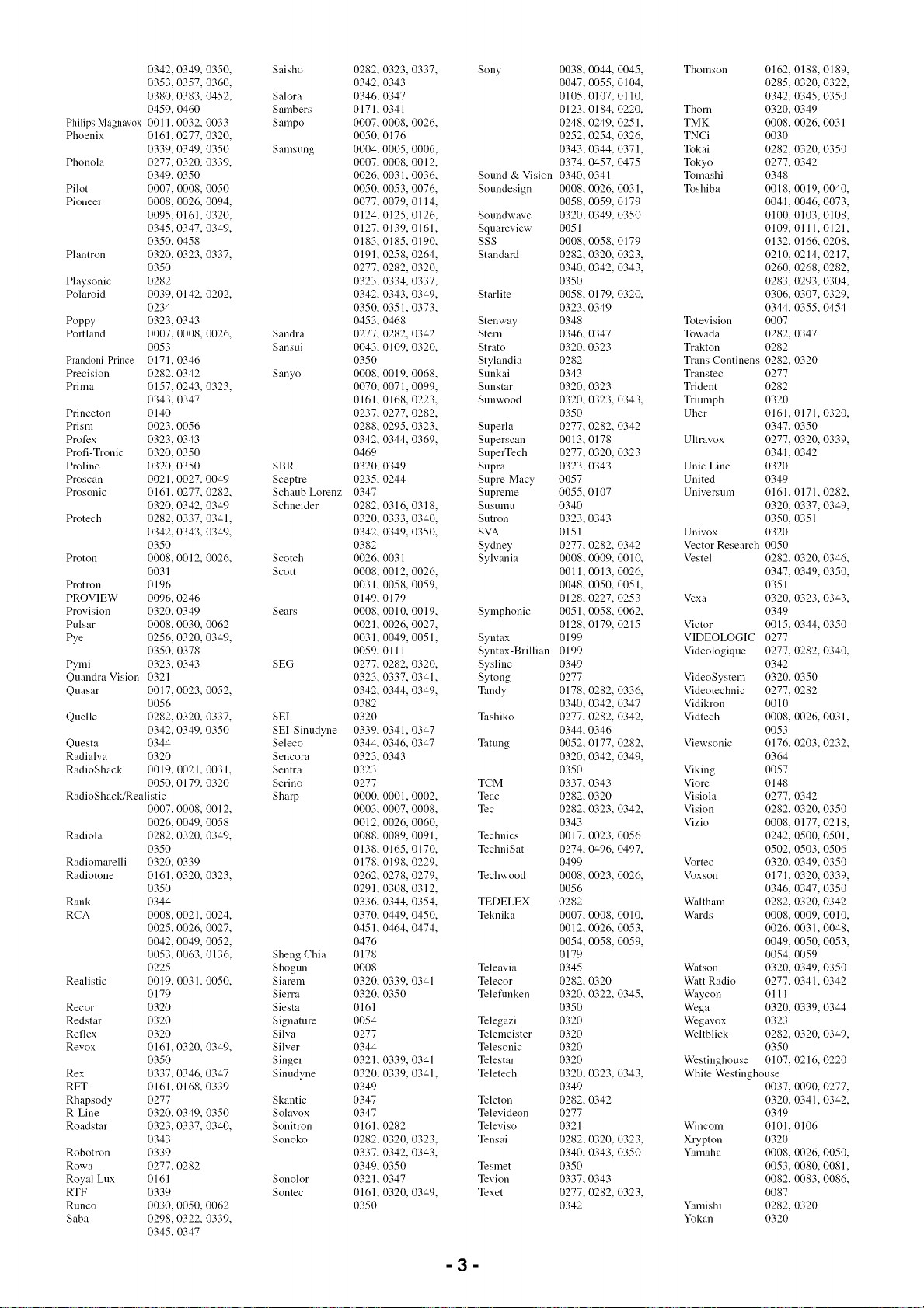
0342,0349,0350, Saisho
0353,0357,0360,
0380,0383,0452, Salora
0459,0460 Sambers
PhilipsMagnav0x0011,0032,0033 Sampo
Phoenix 0161,0277,0320,
0339,0349,0350 Samsung
Phonola 0277,0320,0339,
0349,0350
Pilot 0007,0008,0050
Pioneer 0008,0026,0094,
0095,0161,0320,
0345,0347,0349,
0350,0458
Plantron 0320,0323,0337,
0350
Playsonic 0282
Polaroid 0039,0142,0202,
0234
Poppy 0323,0343
Portland 0007,0008,0026, Sandra
0053 Sansui
Prand0ni-Prince0171,0346
Precision 0282,0342 Sanyo
Prima 0157,0243,0323,
0343,0347
Princeton 0140
Prism 0023,0056
Pmfex 0323,0343
Profi-Tronic0320,0350
Proline 0320,0350 SBR
Proscan 0021,0027,0049 Sceptre
Prosonic 0161,0277,0282, SchaubLorenz
0320,0342,0349 Schneider
Protech 0282,0337,0341,
0342,0343,0349,
0350
Proton 0008,0012,0026, Scotch
0031 Scott
Protron 0196
PROVIEW0096,0246
Provision 0320,0349 Sears
Pulsar 0008,0030,0062
Pye 0256,0320,0349,
0350,0378
Pymi 0323,0343 SEG
QuandraVision0321
Quasar 0017,0023,0052,
0056
Quelle 0282,0320,0337, SEI
0342,0349,0350 SEI-Sinudyne
Questa 0344 Seleco
Radialva 0320 Sencora
RadioShack0019,0021,0031, Sentra
0050,0179,0320 Serino
RadioShack/Realistic Sharp
0007,0008,0012,
0026,0049,0058
Radiola 0282,0320,0349,
0350
Radiomarelli0320,0339
Radiotone0161,0320,0323,
0350
Rank 0344
RCA 0008,0021,0024,
0025,0026,0027,
0042,0049,0052,
0053,0063,0136, ShengChia
0225 Shogun
Realistic 0019,0031,0050, Siarem
0179 Sierra
Recor 0320 Siesta
Redstar 0320 Signature
Reflex 0320 Silva
Revox 0161,0320,0349, Silver
0350 Singer
Rex 0337,0346,0347 Sinudyne
RFT 0161,0168,0339
Rhapsody0277 Skantic
R-Line 0320,0349,0350 Solavox
Roadstar 0323,0337,0340, Sonitron
0343 Sonoko
Robotron 0339
Rowa 0277,0282
RoyalLux 0161 Sonolor
RTF 0339 Sontec
Runco 0030,0050,0062
Saba 0298,0322,0339,
0345,0347
0282,
0342,
0346,
0171,
0007,
0050,
0004,
0007,
0026,
0050,
0077,
0124,
0127,
0183,
0191,
0277,
0323,
0342,
0350,
0453,
0277,
0043,
0350
0008,
0070,
0161,
0237,
0288,
0342,
0469
0320,
0235,
0347
0282,
0320,
0342,
0382
0026,
0008,
0031,
0149,
0008,
0021,
0031,
0059,
0277,
0323,
0342,
0382
0320
0339,
0344,
0323,
0323
0277
0000,
0003,
0012,
0088,
0138,
0178,
0262,
0291,
0336,
0370,
0451,
0476
0178
0008
0320,
0320,
0161
0054
0277
0344
0321,
0320,
0349
0347
0347
0161,
0282,
0337,
0349,
0321,
0161,
0350
0323,0337,
0343
0347
0341
0008,0026,
0176
0005.0006,
0008,0012,
0031.0036,
0053,0076,
0079,0114,
0125,0126,
0139,0161,
0185,0190,
0258,0264,
0282.0320,
0334.0337,
0343,0349,
0351,0373,
0468
0282,0342
0109,0320,
0019,0068,
0071,0099,
0168,0223,
0277,0282,
0295,0323,
0344,0369,
0349
0244
0316,0318,
0333,0340,
0349,0350,
0031
0012,0026,
0058,0059,
0179
0010,0019,
0026,0027,
0049,0051,
0111
0282,0320,
0337,0341,
0344,0349,
0341,0347
0346,0347
0343
0001,0002,
0007,0008,
0026,0060,
0089,0091,
0165,0170,
0198,0229,
0278,0279,
0308.0312.
0344,0354,
0449,0450,
0464,0474,
0339,0341
0350
0339,0341
0339,0341,
0282
0320,0323,
0342,0343,
0350
0347
0320,0349,
Sony
Sound&Vision
Soundesign
Soundwave
Squareview
SSS
Standard
Starlite
Stenway
Stern
Strato
Stylandia
Sunkai
Sunstar
Sunwood
Superla
Superscan
SuperTech
Supra
Supre-Macy
Supreme
Susunnl
Sutron
SVA
Sydney
Sylvania
Symphonic
Syntax
Syntax-Brillian
Sysline
Sytong
Tandy
Tashiko
Tatung
TCM
Weac
Tec
Technics
TechniSat
Techwood
TEDELEX
Teknika
Teleavia
Telecor
Teleflmken
Telegazi
Telemeister
Telesonic
Telestar
Teletech
Teleton
Televideon
Televiso
Tensai
Tesmet
Tevion
Texet
0038,
0047,
0105,
0123,
0248,
0252,
0343,
0374,
0340,
0008,
0058,
0320,
0051
0008,
0282,
0340,
0350
0058,
0323,
0348
0346,
0320,
0282
0343
0320,
0320,
0350
0277,
0013,
0277,
0323,
0057
0055,
0340
0323,
0151
0277,
0008,
0011,
0048,
0128,
0051,
0128,
0199
0199
0349
0277
0178,
0340,
0277,
0344,
0052,
0320,
0350
0337,
0282,
0282,
0343
0017,
0274,
0499
0008,
0056
0282
0007,
0012,
0054,
0179
0345
0282,
0320,
0350
0320
0320
0320
0320
0320,
0349
0282,
0277
0321
0282,
0340,
0350
0337,
0277,
0342
0044, 0045, Thomson 0162,
0055, 0104, 0285,
0107, 0110, 0342,
0184, 0220, Thorn 0320,
0249, 0251, TMK 0008,
0254, 0326, TNCi 0030
0344, 0371, Tokai 0282,
0457, 0475 Tokyo 0277,
0341 Tomashi 0348
0026,0031, Toshiba 0018,
0059, 0179 0041,
0349, 0350 0100,
0109,
0058, 0179 0132,
0320, 0323, 0210,
0342,0343, 0260,
0283,
0179, 0320, 0306,
0349 0344,
Totevision 0007
0347 Towada 0282, 0347
0323 Trakton 0282
Trans Continens 0282, 0320
Transtec 0277
0323 Trident 0282
0323, 0343, Triumph 0320
Uher 0161,
0282,0342 0347,
0178 Ultravox 0277,
0320, 0323 0341,
0343 Unic Line 0320
United 0349
0107 Universum 0161,
0320,
0343 0350,
Univox 0320
0282, 0342 Vector Research 0050
0009, 0010, Vestel 0282,
0013,0026, 0347,
0050, 0051, 0351
0227, 0253 Vexa 0320,
0058,0062, 0349
0179, 0215 Victor 0015,
VIDEOLOGIC 0277
Videologiqne 0277,
0342
VideoSystem 0320,
0282, 0336, Videotechnic 0277,
0342, 0347 Vidikron 0010
0282, 0342, Vidtech 0008,
0346 0053
0177, 0282, Viewsonic 0176,
0342, 0349, 0364
Viking 0057
0343 Viore 0148
0320 Visiola 0277,
0323, 0342, Vision 0282,
Vizio 0008,
0023,0056 0242,
0496,0497, 0502,
Vortec 0320,
0023,0026, Voxson 0171,
0346,
Waltham 0282,
0008, 0010, Wards 0008,
0026, 0053, 0026,
0058, 0059, 0049,
0054,
Watson 0320,
0320 Watt Radio 0277,
0322, 0345, Waycon 0111
Wega 0320,
Wegavox 0323
Weltblick 0282,
0350
Westinghouse 0107,
0323, 0343, White Westinghouse
0037,
0342 0320,
0349
Wincom 0101, 0106
0320, 0323, Xrypton 0320
0343, 0350 Yamaha 0008,
0053,
0343 0082,
0282, 0323, 0087
Yamishi 0282, 0320
Yokan 0320
0188, 0189,
0320, 0322,
0345, 0350
0349
0026,0031
0320, 0350
0342
0019, 0040,
0046,0073,
0103,0108,
0111, 0121,
0166, 0208,
0214,0217,
0268,0282,
0293,0304,
0307,0329,
0355, 0454
0171, 0320,
0350
0320, 0339,
0342
0171,0282,
0337, 0349,
0351
0320, 0346,
0349,0350,
0323, 0343,
0344,0350
0282,0340,
0350
0282
0026, 0031,
0203,0232,
0342
0320, 0350
0177,0218,
0500, 0501,
0503,0506
0349,0350
0320, 0339,
0347,0350
0320, 0342
0009,0010,
0031, 0048,
0050,0053,
0059
0349,0350
0341, 0342
0339, 0344
0320, 0349,
0216,0220
0090,0277,
0341,0342,
0026, 0050,
0080,0081,
0083,0086,
-3-
Yoko 0161,0277, 0282,
0320, 0323, 0337,
0340, 0342, 0343,
0349, 0350
Yorx 0340
Zannssi 0282, 0346
Zenith 0008, 0028, 0029,
0030, 0031, 0054,
0061, 0062
VGR
ABS 1016
Adventura 1069
Adyson 1008
Aiwa 1024, 1026, 1027,
1069
Akai 1021, 1027
Akiba 1008, 1029
Akura 1008, 1027, 1029
Alba 1008, 1009, 1024,
1025, 1029, 1030
Alienware 1016
Ambassador 1030
American High 1068
Amstrad 1008, 1009, 1026
Anitech 1008, 1029
Apex 1088
ASA 1028, 1031
Asha 1070
Asnka 1008, 1026, 1028,
1029, 1031
Audio Dynamics 1064
Audiosonic 1009
Andiovox 1071
Baird 1009, 1025, 1026,
1027
Bang & Ohffsen 1017
Basic Line 1008, 1009, 1024,
1025, 1029, 1030
Baur 1028
Beaumark 1070
Bell & Howell 1065
Bestar 1009, 1025, 1030
Black Panther Line
1009, 1025
Blaupunkt 1028
Bondstec 1008, 1030
Broksonic 1100
Bush 1008, 1009, 1024,
1025, 1029, 1049,
1051, 1063, 1217
Calix 1071
Candle 1070, 1071
Canon 1068
Cathay 1009
Catron 1030
CGE 1026, 1027
Cimline 1008, 1024, 1029
CineVision 1104
Citizen 1070, 1071
Clatronic 1008, 1030
Colortyme 1064
Condor 1009, 1025, 1030
Craig 1070, 1071
Crown 1008, 1009, 1025,
1029, 1030
Curtis Mathes 1064, 1068, 1070
Cybernex 1070
CyberPower 1016
Daewoo 1009, 1025, 1030,
1038, 1069, 1223
Dansai 1008, 1009, 1029
Dantax 1024
Daytron 1009, 1025
DBX 1064
De Graaf 1028
Decca 1026, 1027, 1028
Dell 1016
Denko 1008
DiamondVision 1096
DigiFnsion 1014
DIRECTV 1019, 1105, 1110,
1111, 1113, 1116,
1122
Dish Network 1018
Dishpro 1018
Dual 1009, 1027, 1028
Dnmont 1026, 1028 JC Penney
Durabrand 1114
Dynatech 1069 JCL
Echostar 1018 JVC
Elbe 1009
Elcatech 1008
Electrohome 1071
Electrophonic 1071
Elsay 1008
Elta 1008, 1009, 1029
Emerson 1008, 1020, 1068, Kaisui
1069, 1071 Karcher
ESC 1009, 1025 Kendo
Etzuko 1008, 1029
Expressvu 1018 Kenwood
Fergnson 1027 Kodak
Fidelity 1008, 1026 Korpel
Finlandia 1028 Kyoto
Finlux 1026, 1027, 1028 Lenco
Firstline 1008, 1024, 1029, Leyco
1031 LG
Fisher 1065
Flint 1024
F0rmenti/Phoenix 1028 Lifetec
Frontech 1030 Linksys
Fuji 1068 Lloyd's
Fujitsu 1026 Loewe Opta
Fnnai 1026, 1069 Logik
Galaxy 1026 Lumatron
Garrard 1069 Luxor
Gateway 1016 LXI
GBC 1029, 1030 M Electronic
GE 1068, 1070 Magnavox
GEC 1028
Geloso 1029 Magnin
General 1030 Manesth
General Technic 1024 Marantz
GOI 1018
GoldHand 1008, 1029 Mark
Goldstar 1026, 1031, 1064, Marta
1071 Matsui
Goodmans 1008, 1009, 1025, Matsushita
1026, 1029, 1030, Media Center PC
1031 Mediator
Gradiente 1069 Medion
Graetz 1027 MEI
Granada 1028 Memorex
Grandin 1008, 1009, 1025,
1026, 1029, 1030,
1031
Grnndig 1028, 1029 Memphis
Hanseatic 1009, 1028, 1031 MGN Technology
Harley Davidson 1069 Micromaxx
Harman/Kardon 1064 Microsoft
Harwood 1008 Microstar
HCM 1008, 1029 Migros
Headquarter 1065 Mind
Hewlett Packard 1016 Mitsubishi
Hinari 1008, 1009, 1024, Motorola
1029 MTC
Hisawa 1024 Mnltitech
Hitachi 1011, 1026, 1027,
1028, 1046, 1062
HNS 1110 Murphy
Howard Computers NEC
1016 Neckermann
HP 1016 NEI
HTS 1018 Nesco
Hughes 1111, 1113, 1122 Nikkai
Hughes Network Systems Nikko
1110, 1116 Niveus Media
Humax 1012, 1110, 1113 Noblex
Hush 1016 Nokia
Hypson 1008, 1009, 1024, Nordmende
1029 Northgate
iBUYPOWER 1016 Oceanic
hnpego 1030 Okano
hnperial 1026 Olympus
Inno Hit 1008, 1009, 1025, Optimns
1028, 1029, 1030 Orion
Innovation 1024
Instant Replay 1068 Orson
Interbuy 1008, 1031 Osaki
Interflmk 1028
Intervision 1009, 1026 Otto Versand
Irradio 1008, 1029, 1031 Palladium
ITT 1027
ITV 1009, 1025, 1031
1064, 1065, 1068, Panasonic 1000, 1022, 1044,
1070, 1071 1055, 1068, 1072,
1068 1085, 1090, 1091,
1007, 1018, 1027, 1120, 1121, 1214
1039, 1064, 1065, Pathe Marconi 1027
1066, 1067, 1078, Perdio 1026
1089, 1092, 1093, Philco 1008, 1068
1094, 1095, 1113, Philips 1006, 1013, 1028,
1208, 1209, 1212, 1035, 1040, 1045,
1213, 1215, 1218 1046, 1050, 1058,
1008, 1029 1059, 1061, 1068,
1028 1076, 1101, 1110,
1008, 1024, 1025, 1113, 1116, 1117,
1030 1122, 1126, 1210,
1027, 1064, 1065 1211
1068, 1071 Philips Magnavox 1076
1008, 1029 Phonola 1028
1008 Pilot 1071
1025 Pioneer 1028, 1036
1008, 1029 Polaroid 1088, 1099
1010, 1026, 1031, Portland 1009, 1025, 1030
1047, 1054, 1056, Prinz 1026
1071, 1103, 1221 Profex 1029
1024 Proline 1026
1016 Proscan 1019
1069 Prosonic 1009, 1024
1028, 1031 Pulsar 1114
1008, 1029 Pye 1028, 1102
1009, 1025 Quarter 1065
1008 Quartz 1065
1071 Quasar 1068
1026 Qnelle 1026, 1028
1020, 1068, 1114, Radialva 1008
1126 RadioShack 1071
1071 RadioShack/Realistic
1008, 1029 1065, 1068, 1069,
1028, 1064, 1065, 1070, 1071
1068 Radiola 1028
1009 Radix 1071
1071 Randex 1071
1024, 1031 RCA 1019, 1068, 1070,
1068 1075, 1110, 1113,
1016 1122, 1125
1028 Realistic 1065, 1068, 1069,
1024 1070, 1071
1068 ReplayTV 1022, 1123
1023, 1026, 1031, Rex 1027
1065, 1068, 1069, RFT 1008, 1028, 1030
1070, 1071, 1098, Ricavision 1016
1114 Roadstar 1008, 1009, 1025,
1008, 1029 1029, 1031
1070 Royal 1008
1024 Runco 1114
1016 Saba 1027
1024 Saisho 1024, 1029
1026 Samsnng 1002, 1034, 1041,
1016 1043, 1057, 1060,
1026, 1028, 1079 1070, 1084, 1110,
1068 1116, 1122, 1124,
1070 1220, 1222
1008, 1026, 1028, Sanmrai 1008, 1030
1029, 1030, 1069, Sanky 1114
1070 Sansui 1023, 1027, 1106,
1026 1115
1027, 1064, 1065 Sanyo 1032, 1065, 1070
1027, 1028 Saville 1009
1028 SBR 1028
1008, 1029 Schanb Lorenz 1026, 1027
1008, 1009, 1030 Schneider 1008, 1009, 1024,
1071 1025, 1026, 1028,
1016 1029, 1030, 1031
1070 Sears 1065, 1068, 1071
1009, 1027 SEG 1008, 1009, 1029
1027 SEI-Sinndyne 1028
1016 Seleco 1027
1026, 1027 Sentra 1008, 1030
1008, 1009, 1024 Sentron 1008, 1029
1068 Sharp 1003, 1033, 1077,
1071 1107, 1127, 1219
1023, 1024, 1051, Shintom 1008, 1029
1115, 1217 Shivaki 1031
1026 Shogun 1070
1008, 1026, 1029, Siemens 1031
1031 Silva 1031
1028 Silver 1009
1008, 1027, 1029, Singer 1068
1031 Sinndyne 1028
Solavox 1030
Sonic Blue 1022, 1123
-4-
Sonneclair 1008
Sonoko 1009, 1025
Sontec 1031
Sony 1001, 1016, 1048,
1053, 1073, 1074,
1080, 1081, 1082,
1083, 1108, 1118,
1216
Stack 1016
Stack 9 1016
Standard 1009, 1025
Stern 1009
STS 1068
Sunkai 1024
Sunstar 1026
Suntronic 1026
Sunwood 1008, 1029
Superscan 1020
Sylvania 1020, 1068, 1069,
1102, 1126
Symphonic 1008, 1069, 1126
Systemax 1016
Tagar Systems 1016
Taisho 1024
Tandberg 1009
Tandy 1065
Tashiko 1026, 1071
Tatung 1026, 1027, 1028
TCM 1015, 1024, 1042
Teac 1009, 1069
Tec 1008, 1009, 1030
Technics 1068
Teknika 1068, 1069, 1071
Teleavia 1027
Telefimken 1027
Teletech 1008, 1009
Tenosal 1008, 1029
Tensai 1008, 1026, 1029,
1031
Tevion 1024
Thomson 1005, 1027
Thorn 1027
Tivo 1108, 1110, 1111,
1113, 1117, 1118,
1119, 1122
TMK 1070
Tokai 1008, 1029, 1031
Tonsai 1029
Toshiba 1004, 1016, 1027,
1028, 1037, 1049,
1052, 1086, 1087,
1097, 1109, 1112,
1194
Totevision 1070, 1071
Touch 1016
Towada 1008, 1029
Towika 1008, 1029
TVA 1030
Uher 1031
UltimateTV 1019
Ultravox 1009
Unitech 1070
United Quick Star 1009, 1025
Universum 1026, 1028, 1031
Vector Research 1064
Video Concepts 1064
Videon 1024
Videosonic 1070
Viewsonic 1016
Voodoo 1016
Wards 1068, 1069, 1070,
1071
Weltblick 1031
XR-1000 1068, 1069
Yamaha 1064, 1065
Yamishi 1008, 1029
Yokan 1008, 1029
Yoko 1008, 1029, 1030,
1031
Zenith 1114
ZT Group 1016
DVD
4Kns 2051
Accurian 2142
Advent 2155, 2251
AEG 2362
Airis 2364 Easy Home 2359
Aiwa 2322 Eclipse 2354
Akai 2145, 2177, 2179, E-Dem 2364
2248 Electrohome 2362
Akura 2356 Elin 2362
Alba 2064, 2165, 2186, Elta 2341, 2361, 2362
2337, 2346 Emerson 2129, 2137, 2150
Alco 2149 Enterprise 2129
Alize 2361 Enzer 2380
Allegro 2133 Epson 2247
Amitech 2362 ESA 2137
Amphion MediaWorks Finlux 2354, 2362, 2367
2195 Fintec 2377
AMW 2195, 2363 Fisher 2134
Apex 2030, 2124, 2125, Funai 2137
2126, 2127, 2130, Gateway 2051
2131 GE 2029, 2131, 2156
Apple 2241 Gericom 2351
Arrgo 2138 GFM 2226
Asono 2364 Giec 2382
Aspire 2152, 2222 Global Solutions 2355
Astar 2240 Global Sphere 2355
ATACOM 2364 Go Video 2133,2213
Audiovox 2061, 2149 Goodmans 2165, 2280, 2291,
Avious 2367 2358, 2371, 2376,
A'a,a 2363 2382
Axion 2249 GPX 2227
Bang & Olnfsen 2128 Gradiente 2151
Baze 2367 Graetz 2380
BB K 2364 Greenhill 2131
Bellagio 2363 Grnndig 2349
Best Buy 2359 Grunkel 2362, 2366
Blaupnnkt 2131 GVG 2377
Blue Parade 2157 H&B 2358
Boghe 2382 H her 2364
Brainwave 2362 Haaz 2354, 2355
Brandt 2148, 2188 Haier 2254
Broksonic 2145, 2146 Harman/Kardon 2047, 2135
Bush 2064, 2110, 2170, HiMAX 2359
2268, 2290, 2346, Hitachi 2062, 2090, 2115,
2358, 2367, 2383 2274, 2282, 2316,
California Audio Labs 2359, 2380
2151 Hiteker 2130
Cambridge Audio 2354 Home Tech Industries
CAT 2352, 2353 2364
CAVS 2192 Hyundai 2366
Centrum 2353 Ilo 2245
CGV 2354, 2362 Initial 2131, 2245
Changhong 2140 Innovation 2182
Cinetec 2363 Insignia 2002, 2137, 2253
CineVision 2133, 2237 Integra 2157
Clatronic 2358, 2367 Irradio 2053
Coby 2031, 2046, 2360 iSymphony 2246
Conia 2383 JBL 2135
Continental Edison JVC 2020, 2096, 2097,
2363 2099, 2100, 2101,
Crown 2362 2102, 2103, 2106,
C-Tech 2355 2107, 2160, 2257,
Curtis Mathes 2139 2260, 2262, 2263,
CVG 2377 2321, 2324, 2326,
CyberHome 2022, 2098, 2138, 2327, 2343, 2464,
2187, 2336 2465, 2468, 2469,
Cytron 2244 2471
Daenyx 2363 Jwin 2198
Daewoo 2001, 2133, 2276, Kansai 2360
2298, 2330, 2362, Kawasaki 2149
2363, 2377 Kennex 2362
Daewoo International Kenwood 2041, 2151, 2348
2363 KeyPlng 2362
Dalton 2357 Kiiro 2362
Dansai 2362, 2381 Kingavon 2358
Daytek 2184, 2195, 2363 Kiss 2380
Dayton 2363 KLH 2131, 2149
DEC 2358 Koda 2358
Decca 2362 Koss 2013, 2148, 2158
Denon 2059, 2151, 2193, KXD 2359
2332 Landel 2143
Denver 2356, 2358, 2360, Lasonic 2132
2370 Lawson 2355
Denzel 2380 Lecson 2381
Desay 2205 Lenco 2358, 2362, 2367
Diamond 2354, 2355 Lenoxx 2136, 2153
DiamondVision 2225, 2232 LG 2002, 2033, 2038,
Disney 2010, 2028 2057, 2129, 2133,
DK Digital 2339 2189, 2191, 2223,
Dmtech 2176 2238, 2270, 2288,
Dual 2380 2335, 2373, 2375
Durabrand 2136 Life 2182
DVX 2355 Lifetec 2182
Limit
Liquid Video
Liteon
Loewe
LogicLab
Magnavox
Magnex
M_@stic
Marantz
Marqnant
Matsui
McIntosh
Mecotek
Medion
Melnorex
MiCO
Micromaxx
Microsoft
Microstar
Minoka
Minowa
Mintek
Mitsubishi
Mizuda
Monyka
Mnstek
Mx Onda
Mystral
Naiko
Nesa
Neufunk
Nevir
Next Base
Nexxtech
NU-TEC
Onkyo
Oopla
Oppo
Optim
Optimns
Orava
Orbit
Orion
Oritron
P&B
Pacit_c
Panasonic
Parasound
peeKTON
Philips
Phonotrend
Pioneer
Pointer
Polaroid
Portland
Powerpoint
2355
2158
2043,
2320
2355
2025,
2150,
2230,
2367
2360
2328
2362
2148,
2199
2362
2182
2028,
2354,
2182
2156
2182
2362
2367
2131,
2003
2358,
2380
2186
2354
2366
2362
2131
2380
2362
2143
2243
2383
2159,
2051
2196,
2381
2180
2358
2363
2073,
2148,
2358
2355
2011,
2042,
2066,
2116,
2119,
2122,
2159,
2167,
2175,
2275,
2281,
2301,
2197
2364
2008,
2044,
2053,
2108,
2159,
2174,
2230,
2267,
2289,
2302,
2338,
2467
2367
2016,
2019,
2094,
2157,
2212,
2299,
2306,
2309,
2344,
2379
2362
2125,
2362
2363
2051,2142
2050,2137,
2159,2224,
2358
2378
2145,2234
2382
2245
2359
2368
2255
2110
2158
2024,2034,
2058,2062,
2067,2093,
2117,2118,
2120,2121,
2123,2151,
2164,2166,
2172,2173,
2209,2214,
2277,2278,
2282,2283,
2374,2470
2012,2025,
2050,2051,
2060,2072,
2111,2147,
2163,2169,
2181,2185,
2261,2266,
2286,2287,
2295,2300,
2317,2328,
2342,2350,
2017,2018,
2035,2092,
2095,2109,
2180,2190,
2269,2272,
2304,2305,
2307,2308,
2310,2311,
2345,2347,
2215,2235
-5-
Prima
Proceed
Proscan
Pmsonic
Protron
Provision
Pye
Q'a, estar
Raite
RCA
RedStar
Regent
Reoc
Rimax
Rio
Roadstar
Ronin
Rotel
Rowa
Rownsonic
Saba
Sabaki
Saivod
Sampo
Samsung
Sansui
Sanyo
ScanMagic
Schaub Lorenz
Schneider
Scientific Labs
Scott
Seeltech
SEG
Sharp
Shinsonic
Sigmatek
Silva
Singer
Skymaster
Skyworth
Slim Art
SM Electronic
Sonic Blue
Sontech
Sony
Soundmaster
Soundmax
Spectra
Spectroniq
Standard
Star Cluster
Starmedia
Sungale
Sunkai
Superscan
Supervision
Sylvania
Symphonic
Synn
T.D.E. Systems
Tatung
TCM
2252
2130
2156
2360,
2202
2358
2144
2148
2380
2021,
2105,
2156,
2356,
2153
2355
2361
2133
2331,
2363
2203
2154,
2353
2148,
2355
2362
2141
2000,
2112,
2115,
2216,
2264,
2279,
2329,
2073,
2355,
2134,
2292
2186
2362
2176
2355
2161,
2364
2162,
2380
2006,
2091,
2220,
2236,
2245
2359,
2356
2354,
2325,
2356
2362
2355
2133
2366
2004,
2009,
2023,
2052,
2070,
2075,
2087,
2208,
2258,
2285,
2314,
2319,
2355
2355
2363
2201
2355
2355
2358,
2204
2362
2150
2355
2012,
2178,
2108,
2355
2366
2001,
2182,
2377
2029,2104,
2131,2149,
2157,2229
2360,2362
2358
2383
2188
2045,2077,
2113,2114,
2151,2200,
2219,2228,
2265,2271,
2294,2303,
2365
2145,2354,
2362
2145,2217,
2357
2355,2363,
2040,2088,
2182,2194,
2221,2231,
2293,2340
2364
2355
2355
2005,2007,
2014,2015,
2026,2027,
2068,2069,
2071,2074,
2084,2085,
2168,2171,
2210,2211,
2273,2284,
2312,2313,
2315,2318,
2466
2364
2137,2150,
2230,2239
2230
2362
2297
Teac 2149, 2333, 2355,
2383
Tec 2356
Technics 2151
Technika 2362,2367
Telefimken 2353
Tensai 2362
Tevion 2182,2355,2357
Theta Digital 2157
Thomson 2183,2188,2334,
2372
Tokai 2356,2380
Top Suxess 2364
Toshiba 2032,2036,2037,
2039,2048,2049,
2054,2055,2072,
2073,2076,2078,
2079,2086,2145,
2159,2218,2233,
2256,2259,2296,
2369
TRANSc0ntinents 2363,2367
Transonic 2367
Trio 2362
Trutech 2242
TruVision 2359
TSM 2364
Umax 2361
United 2367
Urban Concepts 2159
US Logic 2245
Venturer 2149
Viewmaster 2364
Vocopro 2206
VocoStar 2207
Waitec 2364
Welltech 2382
Westinghouse 2063, 2250
Whart_dale 2354, 2355
Woxter 2361, 2364
Xbox 2156,2183
Xlogic 2355,2362
XMS 2362
Xoro 2382
Yamada 2051,2361,2363
Yamaha 2056,2064,2065,
2080,2081,2082,
2083,2089,2118,
2151,2323
Yamakawa 2363,2380
Yukai 2186
Zenith 2002,2129,2133,
2159,2223
Blu-ray Disc
LG 2033
Panasonic 2011,2209,2214
Pioneer 2212
Samsung 2045,2113
Sharp 2194,2220,2221
Sony 2075
Yamaha 2064
DVR
Bush
Hitachi
Panasonic
Philips
Pioneer
RCA
Samsung
Sharp
Sony
Toshiba
Yamaha
2110
2090
2066,2067,2093,
2116,2117,2119,
2120,2122,2123
2108,2111
2016,2017,2018,
2019,2092,2094,
2095,2109
2105
2113,2219
2088,2091
2084,2085,2087
2086
2089,2118
DVD Recorder
Aspire 2222
Astar 2240
Broksonic 2146
Go Video 2213
Hitachi 2062
Insignia 2002
Irradio 2053
JVC 2100, 2101, 2106,
2107
LG 2033,2057,2223,
2238
Liteon 2043
Panasonic 2011,2034,2058,
2062,2116,2117,
2119,2120,2121,
2123
Philips 2008,2044,2050,
2051,2147
Pioneer 2017,2035
Pye 2144
Samsung 2000,2112,2216
Sansui 2073
Sanyo 2217
Sony 2004,2005,2007,
2052,2068,2069,
2074,2208,2210,
2211
Sylvania 2239
Toshiba 2032,2036,2037,
2039,2049,2054,
2055,2076
Yamaha 2056
Cable
ABC 3002, 3003, 3017,
3066, 3067, 3086,
3093, 3119, 3122
ADB 3020
Adelphia 3081
Alcatel 3016
Americast 3124
Amstrad 3022, 3098
Antronix 3065, 3070
Archer 3070
Arcon 3098
AT&T 3095
Axis 3098
Bell South 3124
Cable Vision 3092
Cabletenna 3065
Cabletime 3104
Cableview 3087
Cleannaster 3127
ClearMax 3127
Clyde Cablevisi0n 3105
Colour Voice 3068
Comcast 3084, 3088, 3117
Comcrypt 3107
Comtronics 3069
Contec 3074
Coolmax 3127
COX 3084
Cryptovision 3110
Director 3084
Eastern 3075
Everquest 3123
Fidelity 3098
Filnmet 3107
Filnmet Cablecrypt
3111
Filnmet Comcrypt
3111
Finlux 3097
Focus 3126
Foxtel 3022
France Telecom 3100, 3101
Freebox 3023
GC Electronics 3070
GE 3066, 3093
GEC 3105
Gemini 3072, 3123
General Instrument
3017, 3025, 3066,
3084, 3090, 3096,
3117
Goldstar 3120
Gooding 3099
Grundig 3098, 3099
Hamlin 3073, 3078
Hirschmann 3097
Hitachi 3066
HomeChoice 3106
Humax 3021,3080,3083
ITTNokia 3097
Jasco 3123
Jerrokt 3017,3018,3025,
3066,3072,3084,
3090,3096,3119,
3123
JVC 3099
Kabel Deutschland
3024,3027,3121
Macab 3101
Magnavox 3079
Maspro 3099
Matsui 3099
MegaCable 3117
Memorex 3076, 3122
Minerva 3099
Mnet 3107
Motorola 3025,3026,3084,
3088,3090,3095,
3117
Movie Time 3077, 3109
Mr Zapp 3101
Multichoice 3107
Multitech 3127
NEC 3064
NET Brazil 3085
Nokia 3097
Noos 3101
NSC 3077
Oak 3074
Pace 3006,3089,3121
Palladium 3099
Panasonic 3112,3118,3122
Paragon 3122
Philips 3068,3071,3079,
3099,3100,3101,
3103
Pioneer 3001,3006,3094,
3098,3114,3116,
3120
Popular Mechanics
3126
Proscan 3066,3093
Pulsar 3122
PVP Stemo Visual Matrix
3018
Quasar 3122
RadioShack 3123,3127
RCA 3030, 3031, 3087,
3118
Realistic 3070
Recoton 3126
Regal 3078
Regency 3075
Rembrandt 3066
Runco 3122
Sagem 3101
Samsung 3069,3089,3114,
3120
SAT 3098
Scientific Atlanta 3000,3001,3002,
3003,3006,3028,
3029,3081,3086,
3089,3094,3095,
3108
Signal 3072,3123
Signature 3066
Sony 3092,3125
Sprucer 3118
Standard Component
3115
Starcom 3017,3072,3119,
3123
Stargate 3072, 3123
Starquest 3072, 3123
Supercable 3090
Supermax 3127
Tele+l 3107,3111
Telepiu 3107
Thomson 3082, 3091
TIME WARNER 3084
Tocom 3067
Torx 3017
Toshiba 3122
Tristar 3127
Tudi 3102
Tusa 3072,3123
6
TV86
Unika
United Cable
Universal
Universum
V2
Videoway
View Star
Viewnlaster
Vision
Visiopass
Vortex View
Wittenberg
Zenith
Zentek
Sattelite
AB Sat
AccessHD
ADB
AGS
Akai
Alba
Aktes
Allsat
Allsonic
Alltech
Alpha
Alpha Digital
Alphastar
Amitronica
Amstrad
Anglo
Ankaro
Anttron
Apollo
Armstrong
Artec
Asat
ASLF
Astacom
Astra
Astro
AudioTon
Aurora
Austar
Axiel
Axis
Best
Blaupunkt
Blue Sky
Boca
Boston
Brain Wave
Broadcast
Broco
BSkyB
BT
Bubu Sat
Bush
Cambrktge
Canal Satellite
Canal+
CaptiveWorks
Channel Master
Chaparral
CHEROKEE
Chess
CityCom
Clatronic
CNT
Comag
Commlink
Comtech
Condor
Connexions
Conrad
3077 Conrad Electronic 4217, 4219 Grundig
3065, 3070 Contec 4050
3018, 3119 Coolsat 4096
3065, 3070 Cosat 4048 H_.insel & Gretel
3097, 3099 Coship 4109 Hantor
3127 Crown 4011 Hanuri
3019 Daeryung 4014 Hauppauge
3074, 3077, 3079 Daewoo 4057, 4217 Heliocom
3127 DDC 4007 Helium
3127 Delega 4007 Hinari
3097, 3100, 3101 Dew 4050 Hirschmann
3127 Diamond 4051
3098 Digiality 4219 Hisawa
3113, 3122, 3124 Digital Stream 4105 Hisense
3126 DIRECTV 4056, 4064, 4067, Hitachi
4068, 4070, 4071,
4074, 4107, 4116, Homecast
4119, 4121, 4122, Houston
4216, 4217 4123, 4127, 4192, HTS
4104 4193, 4194, 4195, Hughes
4220 4196, 4197, 4198,
4216 4199, 4200, 4201, Hughes Network Systems
4053, 4055 4202, 4203, 4206, 4071
4001,4004, 4006, 4207, 4221 Humax
4007, 4062, 4217 Discoverer 4212
4005, 4007, 4010 Discovery 4216 Huth
4048, 4053, 4055 Diseqc 4216
4005, 4008, 4024 Dish Network 4018, 4065, 4089,
4217 4092, 4094, 4095, Hypson
4053 4117 Ilo
4104 Dishpro 4018, 4117 hnex
4077 Distrisat 4053 Innovation
4217 Ditristrad 4048 Insignia
4011, 4035, 4217, DNT 4014, 4053, 4055 Intertronic
4218 Drake 4072 Intervision
4217 DStv 4222 I'I-T Nokia
4005, 4008, 4024, Dune 4024 Jerrokt
4217 Echostar 4014, 4018, 4065, Johansson
4001,4004 4089, 4117, 4217 JOK
4001 Einhell 4001,4005, 4011, JSR
4011,4053 4217, 4218 JVC
4100 Elap 4216, 4217
4053, 4055 Elekta 4010 Kamm
4217 Elsat 4217 Kathrein
4216 Elta 4001, 4008, 4024,
4009, 4011, 4054, 4048, 4053, 4055
4217, 4219 Emanon 4001 Kathrein Eurostar
4004, 4008, 4010, Emme Esse 4008, 4024 Klap
4015, 4024, 4213, Engel 4217 Konig
4218, 4219 Ep Sat 4006 Kosmos
4004, 4048 EURIEULT 4031 KR
4222 Eurodec 4052 Kreisehneyer
4222 Europa 4053, 4218, 4219 K-SAT
4216 Europhon 4219 Kyostar
4008, 4009, 4024, Eurosat 4011 L&S Electronic
4050 Eurosky 4024, 4011, 4008, Lasat
4008, 4024 4215,4218, 4219
4015 Eurostar 4011, 4215, 4219
4217 Eutelsat 4217 Lasonic
4011,4054, 4059, Exator 4001, 4004 Lenco
4217 Expressvu 4117
4216 Fenner 4024, 4212, 4217 Leng
4013 Ferguson 4006, 4052, 4214 Lennox
4012 Fidelity 4218 Lenson
4217 Finlandia 4006 Lexus
4035, 4041 Finlux 4006 LG
4216 FinnSat 4050, 4052 Lifesat
4217 Flair Mate 4217
4006, 4045 Foxtel 4222 Lifetec
4218 Freecom 4001, 4049, 4218 Lorenzen
4213 FTEmaximal 40241 4217 Lorraine
4213 Fuba 40241 4001, 4008, Lupus
4099 40141 40151 40551 Luxor
4007, 4110 4215 Lyonnaise
4075 Galaxis 4024, 4005, 4008, Macab
40091 40501 40481 Magnavox
4216 42151 4222 Manata
4212, 4217
4006, 4215, 4219 GE 40931 4066, 4111, Manhattan
4013 4197
4010 General Instrument Marantz
4080, 4081, 4082, 4073, 4019 Mascom
4083, 4086 GMI 4011 Maspro
4005 GOI 4117 Matsui
4050 Goldbox 4213 Max
4008, 4024, 4219 GoldStar 4049 Mediabox
4014, 4024 Goodmans 4029, 4002, 4006 Mediamarkt
4024, 4215, 4218, Goodmind 4111 Mediasat
4219 Grandin 4031 Medion
Grothusen 4001, 4049 Medison
4006, 4004, 4015,
4035, 4211, 4218,
4222
4219
4001,4013
4010
4044
4219
4219
4007
4024,4015,4210,
4218, 4219, 4216
4013
4016
4114, 4006, 4199,
4203
4087,4084,4085
4048
4117
4064, 4068, 4194,
4192, 4196, 4202
4097,4025,4030,
4060
4005, 4011, 4012,
4013, 4050, 4048,
4219,4223
4031
4016
4031
4008
4107
4011
4048,4219
4006
4019
4013
4216
4048
4089, 4065, 4117,
4029
4217
4015, 4055, 4053,
4063, 4034, 4042,
4215, 4216, 4217
4215
4216
4219
4049
4004
4015
4217
4001
4024
4024, 4010, 4008,
4054, 4215, 4212,
4219
4108
4024, 4001, 4049,
4215, 4219, 4217
4013
4048
4218
4053
4103,4107,4049
4024, 4008, 4212,
4217
4008
4219
4049
4024, 4008
4218
4052
4052
4127, 4101
4031,4216,4217
4006,4010,4048,
4216
4055
4010
4006,4217
4216
4219
4213
4011
4009,4213,4218
4024,4008,4217
4217
Mega
Memorex
Metronic
Metz
Micro electronic
Micro Technology
MicroGem
Micromaxx
Microstar
Microtec
Minerva
Mitsubishi
Mitsumi
Morgan's
Motorola
Multichoice
Multitec
Muratto
Mysat
Navex
Neuhaus
Neusat
Next Level
NextWave
Nikko
Nokia
Nordmende
Nova
Novis
Oceanic
Octagon
Okano
Optex
Optus
Orbitech
OSat
Otto Versand
Pace
Pacific
Packsat
Palcom
Palladium
Palsat
Panasat
Panasonic
Panda
Pansat
Patriot
Paysat
PCT
Philco
Philips
Phoenix
Phonotrend
Pioneer
Polsat
Predki
Premiere
Priesner
Primestar
Profile
Prolnax
Prosat
Proscan
Protek
Proton
Provision
Quadral
Quelle
Quiero
RadioShack
Radiola
Radix
4055,
4127
4031,
4004,
4217
4015
4218,
4217
4106
4024,
4008
4217
4015
4006,
4054
4011,
4053,
4090,
4019
4222
4212
4049
4217
4013
4009,
4219,
4217
4019
4223
4011,
4006,
4001,
4010,
4222
4013
4051
4001,
4011
4048
4213,
4001,
4218
4004
4015
4006,
4043,
4051
4216
4007
4011,
4212,
4222
4121,
4006,
4221,
4006,
4125
4216
4127
4110
4101
4071,
4006,
4061,
4216,
4203,
4050
4006,
4046,
4052
4013
4048,
4011
4076
4216
4006
4007,
4093,
4197
4051
4016
4010
4024,
4008,
4015,
4052
4019
4055,
4014,
4053
4028, 4001,
4005, 4010,
4219, 4217
4008
4015, 4202
4054, 4055,
4217
4091, 4088,
4048,4218,
4217
4217
4040
4006,4007,
4052
4004,4050
4222, 4223
4212, 4213,
4015, 4035,
4047,4216
4218
4218
4126, 4124,
4035, 4036,
4198
4219
4068, 4127,
4055, 4053,
4033,4213,
4196,4202,
4201, 4206
4005, 4048
4213
4213
4005
4066, 4122,
4007, 4005,
4216
4215, 4219
4053
4037
-7-
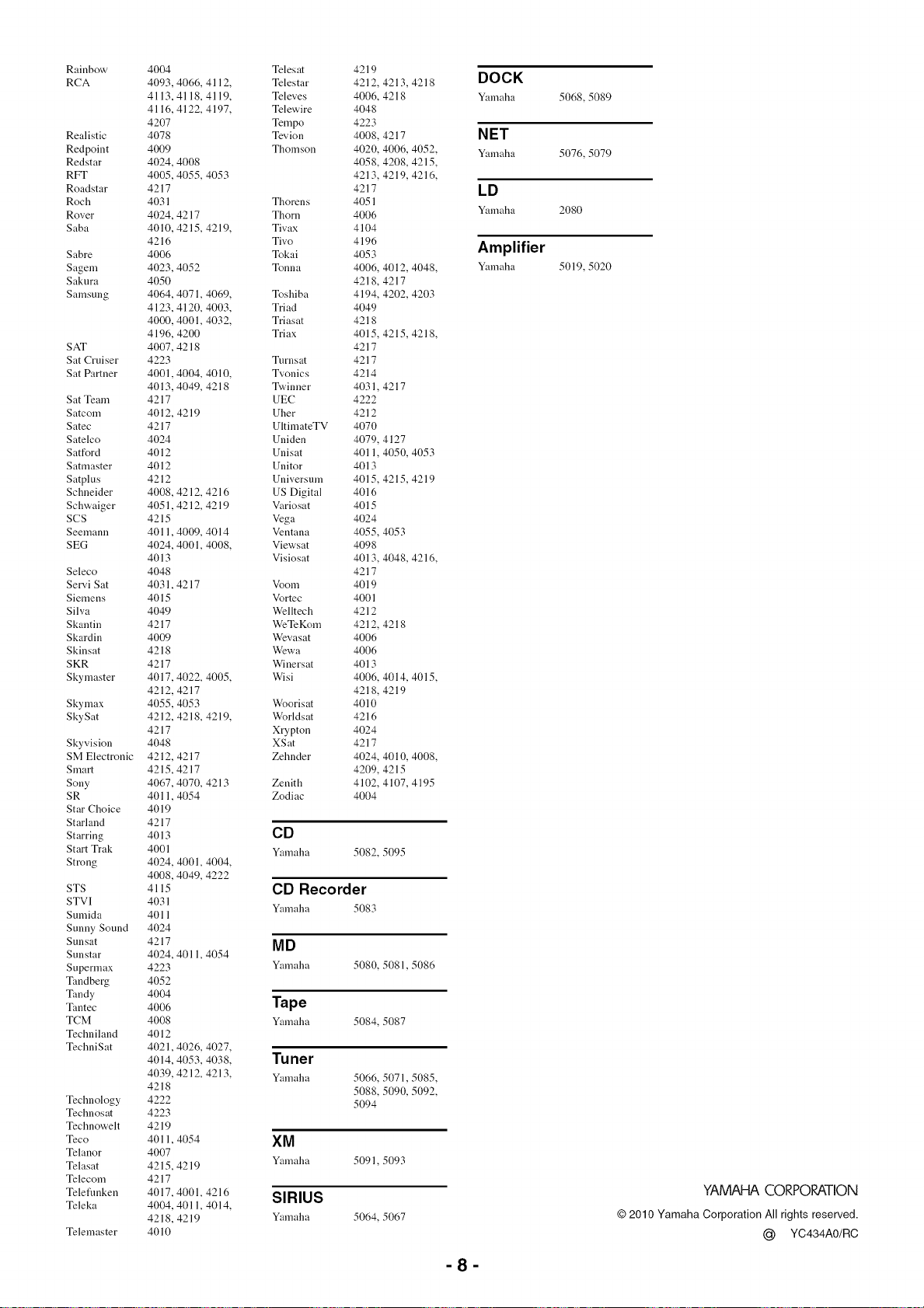
Rainbow
RCA
Realistic
Redpoint
Re&tar
RFT
Roadstar
Roch
Rover
Saba
Sabre
Sagem
Sakura
Samsung
SAT
Sat Cruiser
Sat Partner
Sat Team
Satcom
Satec
Satelco
Satford
Satmaster
Satplus
Schneider
Schwaiger
SCS
Seemann
SEG
Seleco
Servi Sat
Siemens
Silva
Skantin
Skardin
Skinsat
SKR
Skymaster
Skymax
SkySat
Skyvision
SM Electronic
Smart
Sony
SR
Star Choice
Starland
Starring
Start Trak
Strong
STS
STVI
Sumida
Sunny Sound
Sunsat
Sunstar
Supermax
Tandberg
Tandy
Tantec
TCM
Techniland
TechniSat
Technology
Technosat
Technowelt
Teco
Telanor
Telasat
Telecom
Teleflmken
Teleka
Telemaster
4004
4093,
4113,
4116,
4207
4078
4009
4024,
4005,
4217
4031
4024,
4010,
4216
4006
4023,
4050
4064,
4123,
4000,
4196,
4007,
4223
4001,
4013,
4217
4012,
4217
4024
4012
4012
4212
4008,
4051,
4215
4011,
4024,
4013
4048
4031,
4015
4049
4217
4009
4218
4217
4017,
4212,
4055,
4212,
4217
4048
4212,
4215,
4067,
4011,
4019
4217
4013
4001
4024,
4008,
4115
4031
4011
4024
4217
4024,
4223
4052
4004
4006
4008
4012
4021,
4014,
4039,
4218
4222
4223
4219
4011,
4007
4215,
4217
4017,
4004,
4218,
4010
4066,4112,
4118, 4119,
4122, 4197,
4008
4055, 4053
4217
4215,4219,
4052
4071,4069,
4120, 4003,
4001,4032,
4200
4218
4004, 4010,
4049, 4218
4219
4212,4216
4212,4219
4009,4014
4001, 4008,
4217
4022,4005,
4217
4053
4218, 4219,
4217
4217
4070, 4213
4054
4001, 4004,
4049,4222
4011,4054
4026,4027,
4053, 4038,
4212,4213,
4054
4219
4001, 4216
4011, 4014,
4219
Telesat 4219
Telestar 4212, 4213,4218
Televes 4006, 4218
Telewire 4048
Tempo 4223
Tevion 4008, 4217
Thomson 4020, 4006, 4052,
4058, 4208, 4215,
4213, 4219, 4216,
4217
Thorens 4051
Thorn 4006
Tivax 4104
Tivo 4196
Tokai 4053
Tonna 4006, 4012, 4048,
4218, 4217
Toshiba 4194, 4202, 4203
Triad 4049
Triasat 4218
Triax 4015,4215,4218,
4217
Turnsat 4217
Tvonics 4214
T'a,inner 4031,4217
UEC 4222
Uher 4212
UltimateTV 4070
Uniden 4079, 4127
Unisat 4011, 4050, 4053
Unitor 4013
Universum 4015, 4215, 4219
US Digital 4016
Variosat 4015
Vega 4024
Ventana 4055, 4053
Viewsat 4098
Visiosat 4013, 4048, 4216,
4217
Voom 4019
Vortec 4001
Welltech 4212
WeTeKom 4212, 4218
Wevasat 4006
Wewa 4006
Winersat 4013
Wisi 4006, 4014, 4015,
4218, 4219
Woorisat 4010
Worldsat 4216
Xrypton 4024
XSat 4217
Zehnder 4024, 4010, 4008,
4209, 4215
Zenith 4102, 4107, 4195
Zodiac 4004
CD
Yamaha 5082, 5095
CD Recorder
Y:unaha 5083
MD
Yamaha
5080,5081,5086
Tape
Yamaha 5084, 5087
Tuner
Yamaha
5066,5071,5085,
5088,5090,5092,
5094
XM
Yamaha 5091, 5093
SIRIUS
Yamaha 5064, 5067
DOCK
Y:unaha 50(,8, 5089
NET
Y:unaha 5076, 5079
LD
Yamaha 2080
Amplifier
Y:unaha 5019, 5020
-8-
YAMAHA CORPORATION
© 2010 Yamaha Corporation All rights reserved.
@ YC434AO/RC
@
@
AV Receiver
English
Safety Brochure
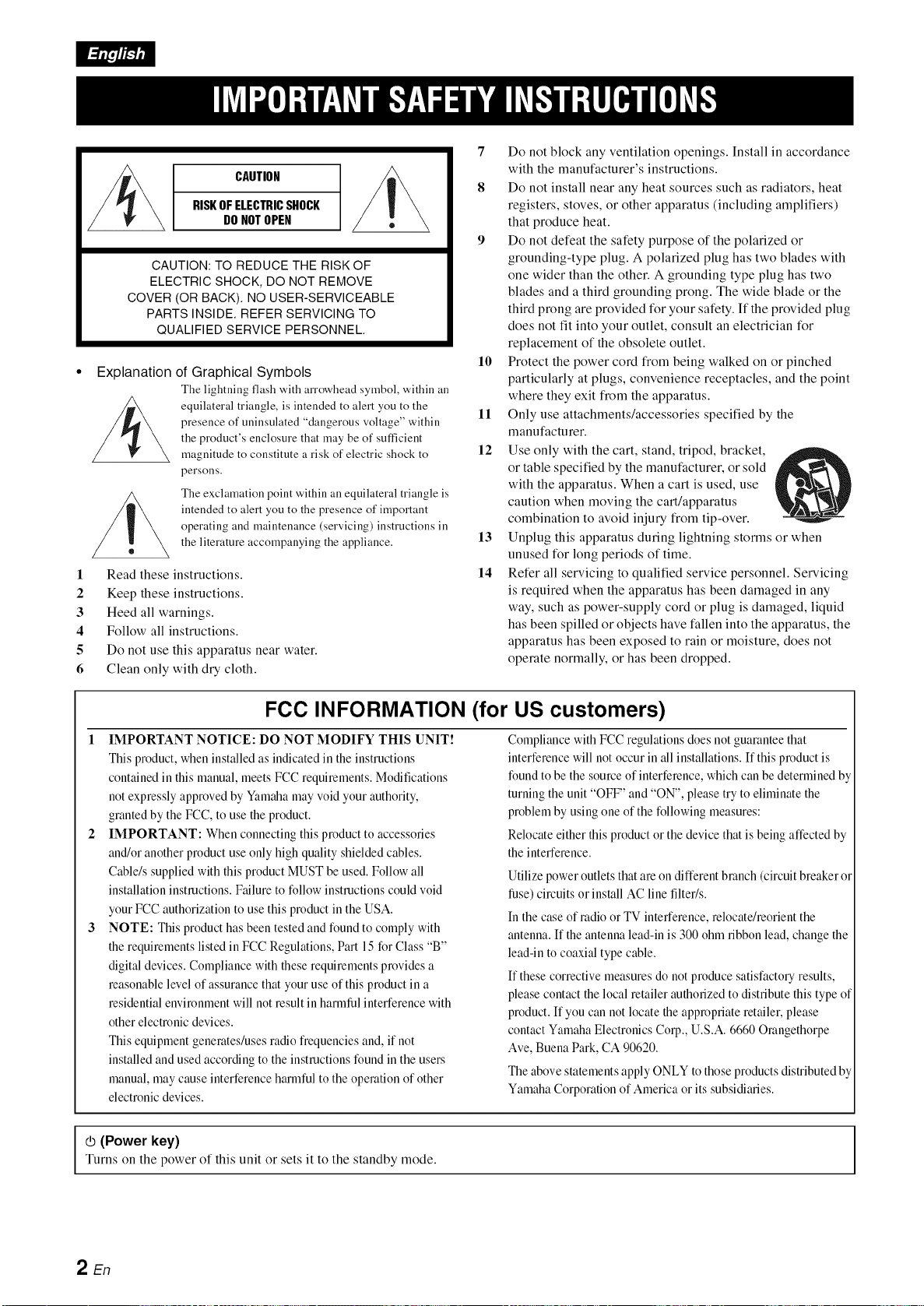
CAUTION
RISKOFELECTRICSHOCK
DONOTOPEN
CAUTION: TO REDUCE THE RISK OF
ELECTRIC SHOCK, DO NOT REMOVE
COVER (OR BACK). NO USER-SERVICEABLE
PARTS INSIDE. REFER SERVICING TO
QUALIFIED SERVICE PERSONNEL.
Explanation of Graphical Symbols
The lightning flash with arrowhead symbol, within all
equilateral triangle, is intended to alert you to the
presence of uninsulated "dangerous voltage" within
the product's enclosure that may be of sufficient
magnitude to constitute a risk of electric shock to
persons.
The exclamation point within an equilateral triangle is
intended to alert you to the presence of important
operating and maintenance (servicing) instructions in
the literature accompanying the appliance.
1 Read these instructions.
2 Keep these instructions.
3 Heed all warnings.
4 Follow all instructions.
5 Do not use this apparatus near water.
6 Clean only with dry cloth.
7
8
10
11
12
13
14
Do not block any ventilation openings. Install in accordance
with the manufacturer's instructions.
Do not install near any heat sources such as radiators, heat
registers, stoves, or other apparatus (including amplifiers)
that produce heat.
Do not defeat the safety purpose of the polarized or
grounding-type plug. A polarized plug has two blades with
one wider than the other. A grounding type plug has two
blades and a third grounding prong. The wide blade or the
third prong are provided for your safety. If the provided plug
does not tit into your outlet, consult an electrician for
replacement of the obsolete outlet.
Protect the power cord from being walked on or pinched
particularly at plugs, convenience receptacles, and the point
where they exit from the apparatus.
Only use attachments/accessories specified by the
manufacturer.
Use only with the cart, stand, tripod, bracket,
or table specified by the manufacturer, or sold
with the apparatus. When a cart is used, use
caution when moving the cart/apparatus
combination to avoid injury from tip-over.
Unplug this apparatus during lightning storms or when
unused for long periods of time.
Refer all servicing to qualified service personnel. Sewicing
is required when the apparatus has been damaged in any
way, such as power-supply cord or plug is damaged, liquid
has been spilled or objects have fallen into the apparatus, the
apparatus has been exposed to rain or moisture, does not
operate normally, or has been dropped.
FCC INFORMATION (for US customers)
I IMPORTANT NOTICE: DO NOT MODIFY THIS UNIT!
This product, when installed as indicated in the instructions
contained in this manual, meets FCC requirements. Modifications
not expressly approved by Yamaha may void your authority,
granted by the FCC, to use the product.
IMPORTANT: When connecting this product to accessories
and/or another product use only high quality shielded cables.
Cable/s supplied with this product MUST be used. Follow all
installation instructions. Failure to follow instructions could void
your FCC authorization to use this product in the USA.
NOTE: This product has been tested and found to comply with
the requirements listed in FCC Regulations, Part 15 for Class "B"
digital devices. Compliance with these requirements provides a
reasonable level of assurance that your use of this product in a
residential envimnraent will not result in hamfful interference with
other electronic devices.
This equipment generates/uses radio frequencies and, if not
installed and used according to the instructions found in the users
manual, may cause interference hamfful to the operation of other
electronic devices.
Compliance with FCC regulations does not guarantee that
interference will not occur in all installations. If this product is
found to be the somve of interference, which can be detemfined by
turning the unit "OFF" and "ON", please try to eliminate the
pmblera by using one of the following measures:
Relocate either this product or the device that is being affected by
the interference.
Utilize power outlets that are on different branch (circuit breaker or
fuse) @vuits or install AC line filter/s.
In the case of radio or TV interference, relocate/reorient the
antenna. If the antenna lead-in is 300 ohm ribbon lead, change the
lead-in to coaxial type cable.
If these corrective measures do not produce satisfactory results,
please contact the local retailer authorized to distribute this type of
product. If you can not locate the appropriate retailer, please
contact Yamaha Electronics Corp., U.S.A. 6660 Orangethorpe
Ave, Buena Park, CA 90620.
The above statements apply ONLY to those products distributed by
Yamaha Corporation of America or its subsidiaries.
_ (Power key)Turns on the power of this unit or sets it to the standby mode.
2 En
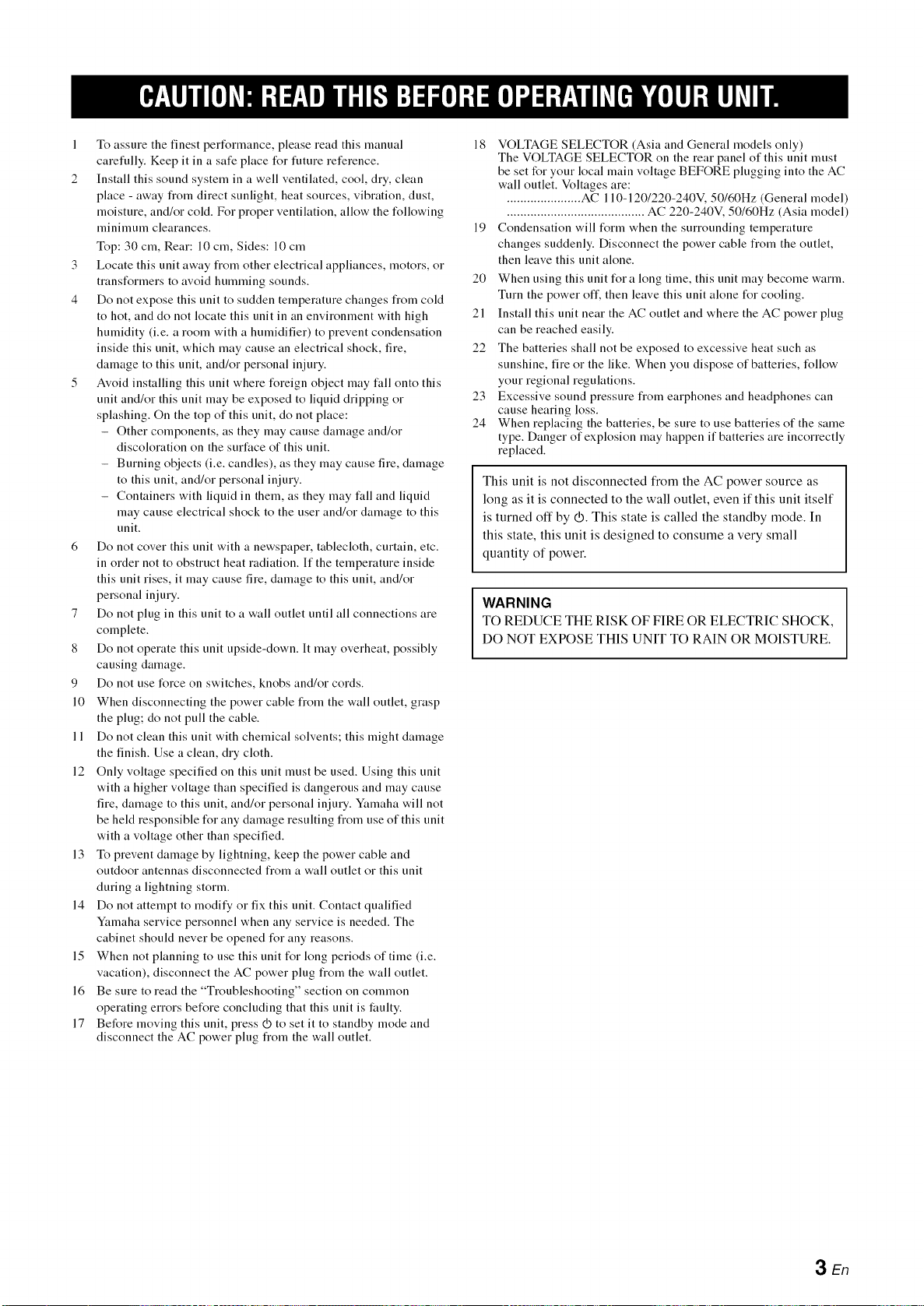
1 To assure the finest perl\_rmance, please read this manual
carefully. Keep it in a safe place t\_r future reference.
2 Install this sound system in a well ventilated, cool, dry, clean
place - away from direct sunlight, heat sources, vibration, dust,
moisture, and/or cold. For proper ventilation, allow the l\_llowing
minimum clearances.
Top: 30 cm, Rear: 10 cm, Sides: 10 cm
3 Locate this unit away from other electrical appliances, motors, or
transl\_rmers to avoid humming sounds.
4 Do not expose this unit to sudden temperature changes from cold
to hot, and do not locate this unit in an environment with high
humidity (i.e. a room with a humidifier) to prevent condensation
inside this unit, which may cause an electrical shock, fire,
damage to this unit, and/or personal injury.
5 Avoid installing this unit where l\_reign object may fall onto this
unit and/or this unit may be exposed to liquid dripping or
splashing. On the top of this unit, do not place:
- Other components, as they may cause damage and/or
discoloration on the surface of this unit.
- Burning objects (i.e. candles), as they may cause fire, damage
to this unit, and/or personal injury.
- Containers with liquid in them, as they may fall and liquid
may cause electrical shock to the user and/or damage to this
unit.
6 Do not cover this unit with a newspaper, tablecloth, curtain, etc.
in order not to obstruct heat radiation. If the temperature inside
this unit rises, it may cause fire, damage to this unit, and/or
personal injury.
7 Do not plug in this unit to a wall outlet until all connections are
complete.
8 Do not operate this unit upside-down. It may overheat, possibly
causing damage.
9 Do not use l\_rce on switches, knobs and/or cords.
10 When disconnecting the power cable from the wall outlet, grasp
the plug; do not pull the cable.
11 Do not clean this unit with chemical solvents; this might damage
the finish. Use a clean, dry cloth.
12 Only voltage specified on this unit must be used. Using this unit
with a higher voltage than specified is dangerous and may cause
fire, damage to this unit, and/or personal injury. Yamaha will not
be held responsible t\_r any damage resulting from use of this unit
with a voltage other than specified.
13 To prevent damage by lightning, keep the power cable and
outdoor antennas disconnected from a wall outlet or this unit
during a lightning storm.
14 Do not attempt to modify or fix this unit. Contact qualified
Yamaha service personnel when any service is needed. The
cabinet should never be opened l\_r any reasons.
15 When not planning to use this unit t\_r long periods of time (i.e.
vacation), disconnect the AC power plug from the wall outlet.
16 Be sure to read the "Troubleshooting" section on common
operating errors bel\_re concluding that this unit is faulty.
17 Before moving this unit, press _ to set it to standby mode and
disconnect the AC power plug from the wall outlet.
18 VOLTAGE SELECTOR (Asia and General models only)
The VOLTAGE SELECTOR on the rear panel of this unit must
be set for your local main voltage BEFORE plugging into the AC
wall outlet. Voltages are:
...................... AC 110-1201220-240V. 50160Hz (General model)
......................................... AC 220-240V, 50160Hz (Asia model)
19 Condensation will l\_rm when the surrounding temperature
changes suddenly. Disconnect the power cable from the outlet,
then leave this unit alone.
20 When using this unit l\_r a long time, this unit may become warm.
Turn the power off, then leave this unit alone l\_r cooling.
21 Install this unit near the AC outlet and where the AC power plug
can be reached easily.
22 The batteries shall not be exposed to excessive heat such as
sunshine, fire or the like. When you dispose of batteries, tk_llow
your regional regulations.
23 Excessive sound pressure from earphones and headphones can
cause hearing loss.
24 When replacing the batteries, be sure to use batteries of the same
type. Danger of explosion may happen if batteries are incorrectly
replaced.
This unit is not disconnected from the AC power source as
long as it is connected to the wall outlet, even if this unit itself
is turned off by _. This state is called the standby mode. In
this state, this unit is designed to consume a very small
quantity of power.
WARNING
TO REDUCE THE RISK OF FIRE OR ELECTRIC SHOCK,
DO NOT EXPOSE THIS UNIT TO RAIN OR MOISTURE.
3 En
• Notes on remote controls and batteries
• Do not spill water or other liquids on the remote control.
• Do not drop the remote control.
• Do not leave or store the remote control in the following
conditions:
- places of high humidity, such as near a bath
- places of high temperatures, such as near a heater or stove
- places of extremely low temperatures
- dusty places
• Insert the battery according to the polarity markings (+ and -).
• Change all batteries if you notice the following conditions:
- the operation range of the remote control narrows
- the transmit indicator does not flash or is dim
• If the batteries run out, immediately remove them from the
remote control to prevent an explosion or acid leak.
• If you find leaking batteries, discard the batteries
immediately, taking care not to touch the leaked material. If
the leaked material comes into contact with your skin or gets
into your eyes or mouth, rinse it away immediately and
consult a doctor. Clean the battery compartment thoroughly
before installing new batteries.
• Do not use old batteries together with new ones. This may
shorten the life of the new batteries or cause old batteries to
leak.
• Do not use different types of batteries (such as alkaline and
manganese batteries) together. Specification of batteries may
be different even though they look the same.
• Before inserting new batteries, wipe the compartment clean.
• If the remote control is without batteries for more than 2
minutes, or if exhausted batteries remain in the remote
control, the contents of the memory may be cleared. In such a
case, install new batteries and set the remote control code.
• Dispose of batteries according to your regional regulations.
FOR CANADIAN CUSTOMERS
To prevent electric shock, match wide blade of plug to wide
slot and tully insert.
This Class B digital apparatus complies with Canadian
ICES-003.
POUR LES CONSOMMATEURS CANADIENS
Pour O/iter les chocs (lectriques, introduire la lame la plus
large de la fiche dans la borne correspondante de la prise et
pousser jusqu'au fond. Cet appareil numdrique de la classe B
est conforme _ la norme NMB-003 du Canada.
IMPORTANT
Please record the serial number of this unit in the space
below.
MODEL:
Serial No.:
The serial number is located on the rear of the unit. Retain
this Owner's Manual in a sate place for future reference.
• For U.K. customers
It the socket outlets in the home are not suitable for the plug
supplied with this appliance, it should be cut off and an
appropriate 3 pin plug fitted. For details, refer to the instructions
described below.
The plug severed from the mains lead must be destroyed, as a
plug with bared flexible cord is hazardous if engaged in a live
socket outlet.
• Special Instructions for U.K. Model
IMPORTANT
THE WIRES IN MAINS LEAD ARE COLOURED IN
ACCORDANCE WITH THE FOLLOWING CODE:
Blue: NEUTRAL
Brown: LIVE
As the colours of the wires in the mains lead of this apparatus
may not correspond with the coloured markings identifying
the terminals in your plug, proceed as follows:
The wire which is coloured BLUE must be connected to the
terminal which is marked with the letter N or coloured
BLACK. The wire which is coloured BROWN must be
connected to the terminal which is marked with the letter L or
coloured RED.
Making sure that neither core is connected to the earth
terminal of the three pin plug.
We Want You Listening For A Lifetime
LISTENING
ForALi_me
Yamaha and the Electronic Industries Association's Consumer Electronics Group want you to get the most out of your
equipment by playing it at a sate level. One that lets the sound come through loud and clear without annoying blaring or
distortion - and, most importantly, without affecting your sensitive hearing. Since hearing damage from loud sounds is
often undetectable until it is too late, Yamaha and the Electronic Industries Association's Consumer Electronics Group
recommend you to avoid prolonged exposure from excessive volume levels.
4 En
Limited Guarantee for European Economic Area (EEA) and Switzerland
Thank you for having chosen a Yamaha product. [n the unlikely event that your Yamaha product needs guarantee service, please contact the dealer from
whom it was purchased. [f you experience ally difficulty, please contact Yamaha representative office in your country. You call find full details on our
website (http://www.yamaha-hifi.com/or http://www.yamaha-uk.cond for U.K. resident).
The product is guaranteed to be flee from defects in workmanship or materials for a period of two years from the date of the original purchase. Yamaha
undertakes, subject to the conditions listed below, to have the faulty product or any part(s) repaired, or replaced at Yamaha's discretion, without any charge
for parts or labour. Yamaha reserves the right to replace a product with that of a similar kind and/or value and condition, where a model has been
discontinued or is considered uneconomic to repair.
Conditions
1 The original invoice or sales receipt (showing date of purchase, product code and dealer's name) MUST accompany the defective product, along with a
statement detailing the fault. [n the absence of this clear proof of purchase, Yamaha reserves the right to refuse to provide flee of charge service and the
product may be returned at the customer's expense.
2 The product MUST have been purchased from an AUTHORISED Yamaha dealer within the European Economic Area (EEA) or Switzerland.
3 The product must not have been the subject of any modifications or alterations, unless authorised in writing by Yamaha.
4 The following are excluded from this guarantee:
a. Periodic maintenance and repair or replacement of parts due to normal wear and tear.
b. Damage resulting from:
(1) Repairs performed by the customer himself or by an unauthorised third party.
(2) [nadequate packaging or mishandling, when the product is in transit from the customer. Please note that it is the customer's responsibility to
ensure the product is adequately packaged when returning the product for repair.
(3) Misuse, including but not limited to (a) failure to use the product for its normal purpose or in accordance with Yamaha's instructions on the proper
use, maintenance and storage, and (b) installation or use of the product in a manner inconsistent with the technical or safety standards in force in
the country where it is used.
(4) Accidents, lightning, water, fire, improper ventilation, battery leakage or any cause beyond Yamaha's control.
(5) Defects of the system into which this product is incorporated and/or incompatibility with third party products.
(6) Use of a product imported into the EEA and/or Switzerland, not by Yamaha, where that product does not conform to the technical or safety
standards of the country of use and/or to the standard specification of a product sold by Yamaha in the EEA and/or Switzerland.
5 Where the guarantee differs between the country of purchase and the country of use of the product, the guarantee of the country of use shall apply.
6 Yamaha may not be held responsible for any losses or damages, whether direct, consequential or otherwise, save for the repair or replacement of the
product.
7 Please backup any custom settings or data, as Yamaha may not be held responsible for any alteration or loss to such settings or data.
8 This guarantee does not affect the consumer's statutory rights under applicable national laws in force or the consumer's rights against the dealer arising
from their sales/purchase contract.
Information for Users on Collection and Disposal of Old Equipment
and Used Batteries
These symbols on the products, packaging, and/or accompanying documents mean that used electrical and
electronic products and batteries should not be mixed with general household waste.
For proper treatment, recovery and recycling of old products and used batteries, please take them to
applicable collection points, in accordance with your national legislation and the Directives 2002/96/EC
and 20061661EC.
Pb
By disposing of these products and batteries correctly, you will help to save valuable resources and prevent
any potential negative effects on human health and the environment which could otherwise arise from
inappropriate waste handling.
For more information about collection and recycling of old products and batteries, please contact your local
municipality, your waste disposal service or the point of sale where you purchased the items.
[Information on Disposal in other Countries outside the European Union]
These symbols are only valid in the European Union. If"you wish to discard these items, please contact
your local authorities or dealer and ask for the correct method of disposal.
Note for the battery symbol (bottom two symbol examples):
This symbol might be used in combination with a chemical symbol. In this case it complies with the
requirement set by the Directive for the chemical involved.
5 En

@YAMAHA
© 2010 Yamaha Corporation All rights reserved.
YAMAHA CORPORATION
(_ YC434A0/SBEN