USER
MANUAL
EN User Manual
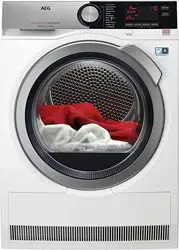
Tumble Dryer
T8DHC876C

IMPORTANT INFORMATION THAT MAY IMPACT
YOUR MANUFACTURER'S WARRANTY
Adherence to the directions for use in this manual is extremely
important for health and safety. Failure to strictly adhere to the
requirements in this manual may result in personal injury,
property damage and affect your ability to make a claim under
the AEG manufacturer’s warranty provided with your product.
Products must be used, installed and operated in accordance
with this manual. You may not be able to claim on the AEG
manufacturer’s warranty in the event that your product fault is
due to failure to adhere to this manual.
FOR PERFECT RESULTS
Thank you for choosing this AEG product. We have created it to
give you impeccable performance for many years, with
innovative technologies that help make life simpler features you
might not find on ordinary appliances. Please spend a few
minutes reading to get the very best from it.
Visit our website for:
Get usage advice, brochures, trouble shooter, service information:
www.aeg.com
Register your product for better service:
www.registeraeg.com
CUSTOMER CARE AND SERVICE
Always use original spare parts.
When contacting our Authorised Service Centre, ensure that
you have the following data available: Model, PNC, Serial
Number.
The information can be found on the rating plate.
Warning / Caution-Safety information
General information and tips
Environmental information
Subject to change without notice.
2/64
CONTENTS
1. SAFETY INFORMATION.......................................................... 6
1.1 Children and vulnerable people safety
.............................6
1.2 General Safety ................................................................ 7
2. CONDITIONS OF USE..............................................................9
3. SAFETY INSTRUCTIONS.......................................................10
3.1 Installation...................................................................... 10
3.2 Electrical connection...................................................... 10
3.3 Use.................................................................................11
3.4 Internal lighting...............................................................11
3.5 Care and cleaning.......................................................... 12
3.6 Compressor....................................................................12
3.7 Service........................................................................... 12
3.8 Disposal......................................................................... 12
4. PRODUCT DESCRIPTION......................................................14
5. CONTROL PANEL..................................................................15
5.1 Display........................................................................... 15
6.
WI-FI - CONNECTIVITY SETUP.........................................18
6.1 Installing and configuring
AEG Home............................ 18
6.2 Wireless connection configuration................................. 19
6.3 Remote control from application AEG Home
............. 20
6.4 Over-the-air update
........................................................ 21
7. PROGRAM.............................................................................. 23
7.1 Program and options selection compatibility..................25
8. OPTIONS.................................................................................27
8.1 Dryness Level ............................................................... 27
8.2 Quiet Mode.....................................................................27
8.3 ECO............................................................................... 27
8.4 Anti-crease .................................................................... 27
8.5 Refresh...........................................................................27
8.6 Time Drying ...................................................................27
8.7 Time Drying on Wool program....................................... 28
3/64

8.8 Delay Start.....................................................................
28
8.9 Buzzer
............................................................... 28
9. BEFORE FIRST USE.............................................................. 30
9.1 Unusual smell.................................................................30
9.2
Noises............................................................................ 30
10. DAILY USE............................................................................32
10.1
Preparing the laundry...................................................32
10.2 To achieve best drying results..................................... 33
10.3 Loading the laundry......................................................33
10.4 Turning on the appliance..............................................34
10.5 Auto Off function.......................................................... 34
10.6 Setting a program.........................................................35
10.7
Options.........................................................................35
10.8 Child lock option...........................................................36
10.9 Starting a program....................................................... 36
10.10
Program change.........................................................37
10.11 Program end.............................................................. 37
11. HINTS AND TIPS.................................................................. 38
11.1
Ecological hints............................................................ 38
11.2 Adjustment of default dryness level............................. 38
11.3
Deactivating the tank indicator
.................................39
12. CARE AND CLEANING
........................................................ 40
12.1 Cleaning the filter......................................................... 40
12.2 Emptying the water container.......................................41
12.3 Cleaning the condenser............................................... 42
12.4 Cleaning the drum........................................................44
12.5 Cleaning the control panel and housing.......................44
12.6 Cleaning the airflow slots............................................. 45
13. TROUBLESHOOTING.......................................................... 46
13.1 Error Codes..................................................................46
13.2 Troubleshooting........................................................... 48
13.3 Possible causes of unsatisfactory drying results:.........53
4/64
CONTENTS
14. TECHNICAL DATA............................................................... 54
15. ACCESSORIES.....................................................................
56
15.1 Draining kit................................................................... 56
15.2 Pedestal with drawer....................................................56
16. WARRANTY .........................................................................58
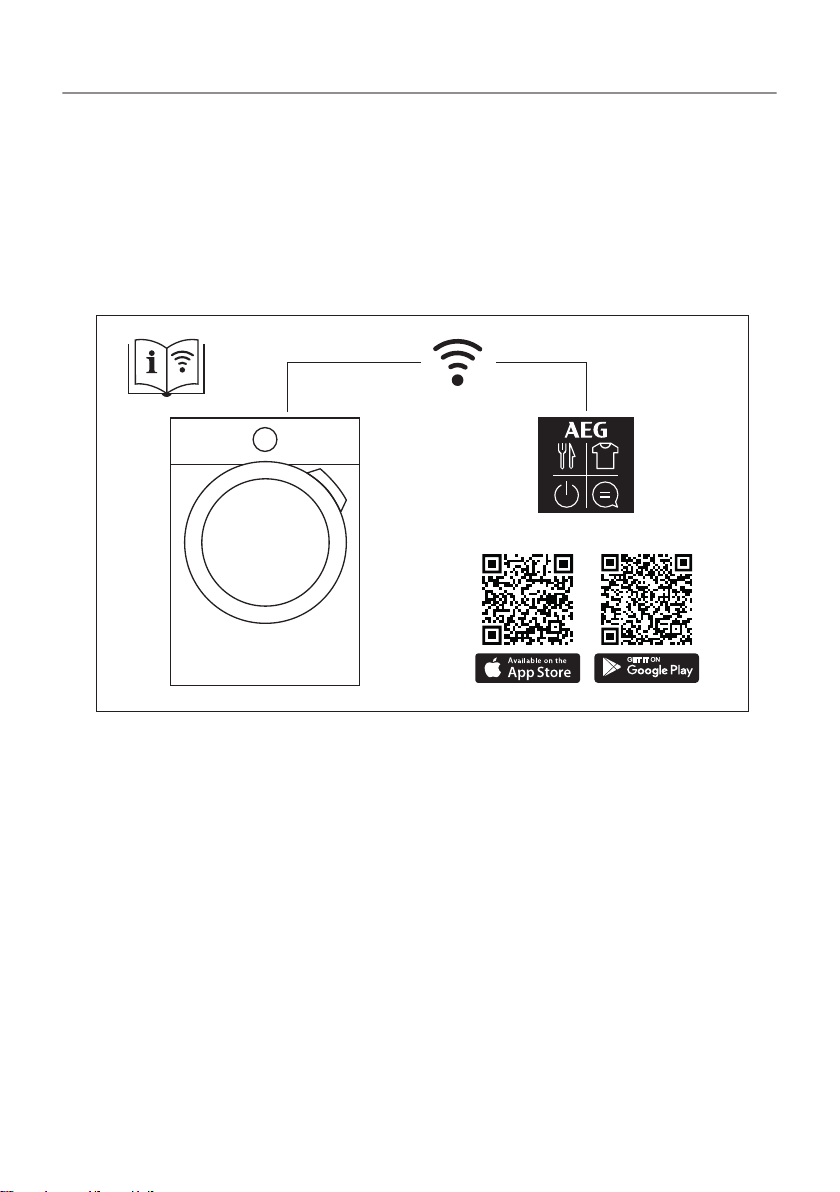
AEG Home app
5/64
CONTENTS
1. SAFETY INFORMATION
Before the installation and use of the appliance, carefully read
the supplied instructions. The manufacturer is not responsible
if an incorrect installation and use causes injuries and
damage. Always keep the instructions with the appliance for
future reference.
- Read the supplied instructions.
- Warning; Risk of fire / Flammable materials
1.1 Children and vulnerable people safety
WARNING!
Risk of suffocation, injury or permanent disability.
• This appliance can be used by children aged from 8 years
and above and persons with reduced physical, sensory or
mental capabilities or lack of experience and knowledge if
they have been given supervision or instruction concerning
the use of the appliance in a safe way and understand the
hazards involved.
• Children between 3 and 8 years of age and persons with
very extensive and complex disabilities shall be kept away
from the appliance unless continuously supervised.
• Children of less than 3 years of age should be kept away
from the appliance unless continuously supervised.
• Do not let children play with the appliance.
• Keep all packaging away from children and dispose of it
appropriately.
• Keep detergents away from children.
• Keep children and pets away from the appliance when the
door is open.
• If the appliance has a child safety device, it should be
activated.
6/64

• Children shall not carry out cleaning and user maintenance
of the appliance without supervision.
1.2 General Safety
• Do not change the specification of this appliance.
• The appliance can be installed as freestanding or below a
kitchen counter with correct space (refer to the Installation
leaflet).
• Do not install the appliance behind a lockable door, a sliding
door or a door with a hinge on the opposite side, that would
prevent the appliance door from being fully open.
• The ventilation opening in the base must not be covered by
a carpet, mat, or any floor covering.
• CAUTION: The appliance must not be supplied through an
external switching device, such as a timer, or connected to a
circuit that is regularly switched on and off by a utility.
• Connect the mains plug to the mains socket only at the end
of the installation process. Make sure that the mains plug is
accessible after installation.
• If the mains power supply cable is damaged, it must be
replaced by the manufacturer, its Authorised Service Centre
or similarly qualified persons to avoid an electrical hazard.
• Do not exceed the maximum load of 8,0 kg (refer to the
"program chart" chapter).
• Do not use the appliance if items have been soiled with
industrial chemicals.
• Wipe away lint or packaging debris that has accumulated
around the appliance.
• Do not run the appliance without a filter. Clean the lint filter
before or after each use.
• Do not dry unwashed items in the tumble dryer.
7/64
SAFETY INFORMATION

• Items that have been soiled with substances such as
cooking oil, acetone, alcohol, petrol, kerosene, spot
removers, turpentine, waxes and wax removers should be
washed in hot water with an extra amount of detergent
before being dried in the tumble dryer.
• Items such as foam rubber (latex foam), shower caps,
waterproof textiles, rubber backed articles and clothes or
pillows fitted with foam rubber pads should not be dried in
the tumble dryer.
• Fabric softeners, or similar products, should only be used as
specified by the product manufacturer’s instructions.
• Oil-affected items can ignite spontaneously, especially when
exposed to heat sources such as in a tumble dryer. The
items become warm, causing an oxidation reaction in the oil.
Oxidation creates heat. If the heat cannot escape, the items
can become hot enough to catch fire. Piling, stacking or
storing oil-affected items can prevent heat from escaping
and create a fire hazard.
• If it is unavoidable that fabrics that contain vegetable or
cooking oil or have been contaminated by hair care products
be placed in a tumble dryer they should first be washed in
hot water with extra detergent -this will reduce, but not
eliminate, the hazard.
• Remove all objects from items that could be a source of fire
ignition such as lighters or matches.
• WARNING: Never stop a tumble dryer before the end of the
drying cycle unless all items are quickly removed and
spread out so that the heat is dissipated.
• Before any maintenance operation, deactivate the appliance
and disconnect the mains plug from the socket.
8/64
SAFETY INFORMATION

2. CONDITIONS OF USE
This appliance is intended to be used in household and similar
applications such as:
•
farm houses;
• by clients in hotels, motels, bed & breakfast and other residential
type environments;
• areas for communal use in blocks of flats or in launderettes.
9/64
3. SAFETY INSTRUCTIONS
3.1 Installation
•
Remove all the packaging.
• Do not install or use a damaged appliance.
• Follow the installation instructions supplied with the appliance.
• Always take care when moving the appliance as it is heavy.
Always use safety gloves and enclosed footwear.
• Do not install or use the appliance where the temperature can be
lower than 5°C or higher than 35°C.
• The floor area on which the appliance is to be installed must be
flat, stable, heat resistant and clean.
• Make sure that there is air circulation between the appliance and
the floor.
• Always keep the appliance vertical when it is being moved.
• The rear surface of the appliance must be put against a wall.
• When the appliance is in its permanent position, check if it is
levelled correctly with the aid of a spirit level. If it is not, adjust the
feet accordingly.
3.2 Electrical connection
WARNING!
Risk of fire and electric shock.
• Connect the mains plug to the mains socket only at the end of the
installation. Make sure that there is access to the mains plug after
the installation.
•
The appliance must be earthed.
• Make sure that the parameters on the rating plate are compatible
with the electrical ratings of the mains power supply.
• Always use a correctly installed shockproof socket.
• Do not use multi-plug adapters and extension cables.
• Do not pull the mains cable to disconnect the appliance. Always
pull the mains plug.
10/64
• Do not touch the mains cable or the mains plug with wet hands.
3.3 Use
WARNING!
Risk of injury, electric shock, fire, burns or damage to the
appliance.
• This appliance is for household use only.
• Do not dry damaged (torn, frayed) items that contain padding or
fillings.
• If laundry has been washed with a stain remover, carry out an
additional rinse cycle before starting a drying cycle.
• Dry only fabrics that are suitable to dry in the appliance. Follow
the cleaning instruction on the item label.
• Do not drink or prepare food with the condensed water/distilled
water. It can cause health problems to people and pets.
• Do not sit or stand on the open door of the appliance.
• Do not dry dripping wet clothes in the appliance.
3.4 Internal lighting
WARNING!
Risk of injury.
• Concerning the lamp(s) inside this product and spare part lamps
sold separately: These lamps are intended to withstand extreme
physical conditions in household appliances, such as
temperature, vibration, humidity, or are intended to signal
information about the operational status of the appliance. They
are not intended to be used in other applications and are not
suitable for household room illumination.
• Visible LED radiation, do not look directly into the beam.
• To replace the internal lighting, contact the Authorised Service
Centre.
11/64
SAFETY INSTRUCTIONS
3.5 Care and cleaning
WARNING!
Risk of injury or damage to the appliance.
• Do not use water spray and steam to clean the appliance.
• Clean the appliance with a moist soft cloth. Use only neutral
detergents. Do not use abrasive products, abrasive cleaning
pads, solvents or metal objects.
• Be careful when you clean the appliance to prevent damage to
the cooling system.
3.6 Compressor
WARNING!
Risk of damage to the appliance.
• The compressor and its system in the tumble dryer is filled with a
special agent which is free from fluoro-chloro-hydrocarbons. This
system must stay tight. The damage of the system can cause a
leakage.
3.7 Service
• To repair the appliance contact the Authorised Service Centre.
• Use original spare parts only.
3.8 Disposal
WARNING!
Risk of injury or suffocation.
• Disconnect the appliance from the mains electrical and water
supplies.
• Cut off the mains electrical cable close to the appliance and
dispose of it.
• Remove the door catch to prevent children or pets from
becoming trapped in the drum.
12/64
SAFETY INSTRUCTIONS

• Dispose of the appliance in accordance with local requirements
for the disposal of Waste Electrical and Electronic Equipment
(WEEE).
13/64
SAFETY INSTRUCTIONS
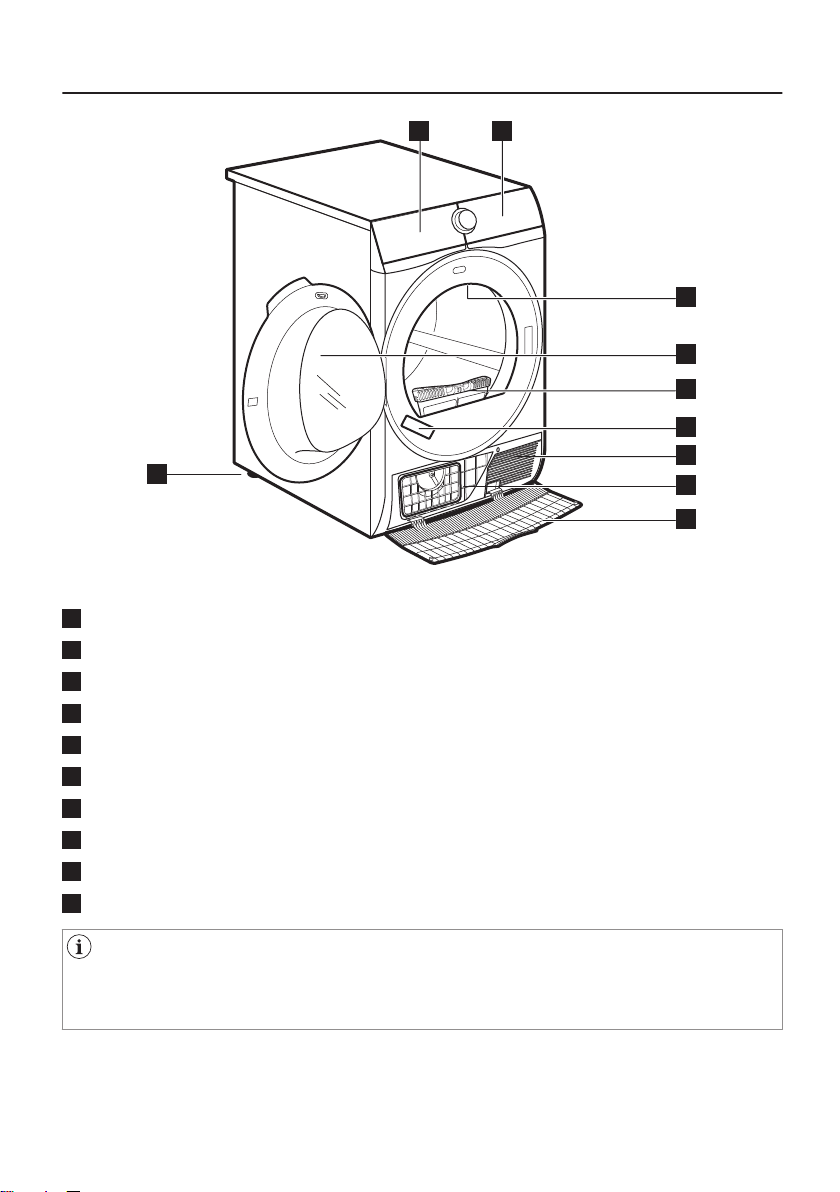
4. PRODUCT DESCRIPTION
1 2
8
3
4
5
6
7
10
9
1
Water container
2
Control panel
3
Internal lighting
4
Appliance door
5
Filter
6
Rating plate
7
Airflow slots
8
Condenser lid
9
Condenser cover
10
Adjustable feet
For ease of loading laundry or ease of installation the door is
reversible. (see separate leaflet).
14/64
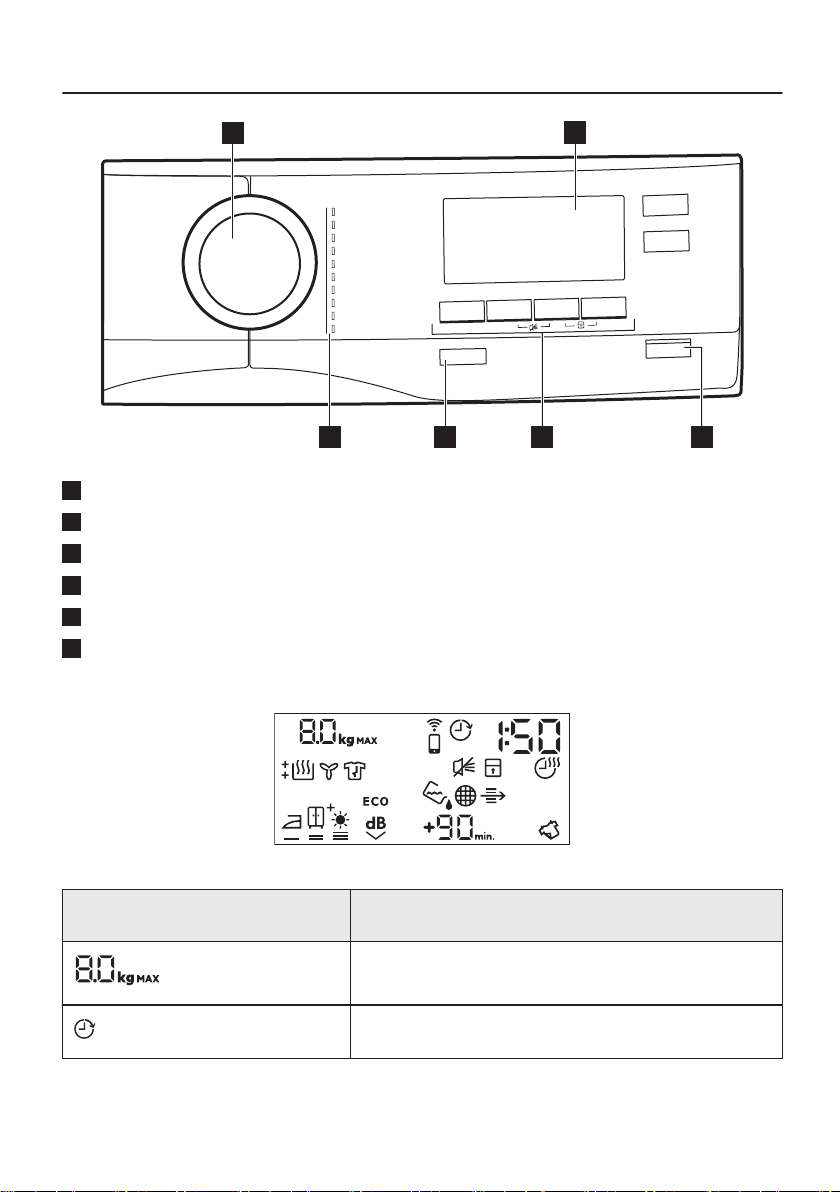
5. CONTROL PANEL
2
3
5
1
6
4
1
P
rogram dial
2
Display
3
Start/Pause button
4
Options
5
On/Off button with
Auto Off
function
6
Programs
5.1 Display
Symbol on the display Symbol description
laundry maximum load
delay start option on
15/64
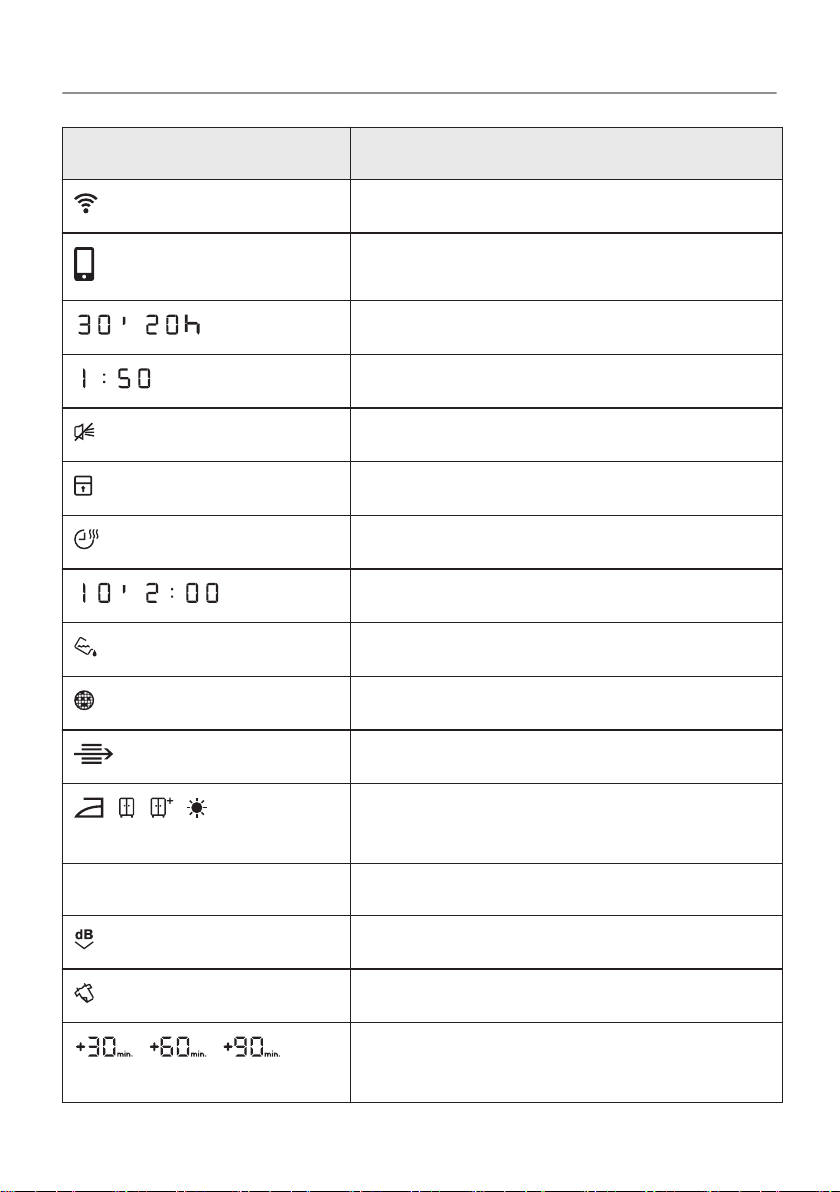
Symbol on the display Symbol description
wireless connection
remote control
-
delay start selection (30min-20h)
cycle time indication
buzzer off
child lock on
time drying option on
-
time drying selection (10min-2h)
indicator:
drain the water container
indicator:
clean the filter
indicator:
check the condenser
, , ,
laundry dryness option: iron dry, cup‐
board dry, cupboard dry +, extra dry
ECO ECO option on
Quiet Mode option on
Refresh option on
, ,
extension of the default anti-crease
phase: +30min, +60min, +90min)
16/64
CONTROL PANEL

Symbol on the display Symbol description
indicator:
drying phase
indicator:
cooling phase
indicator:
crease guard phase
17/64
CONTROL PANEL
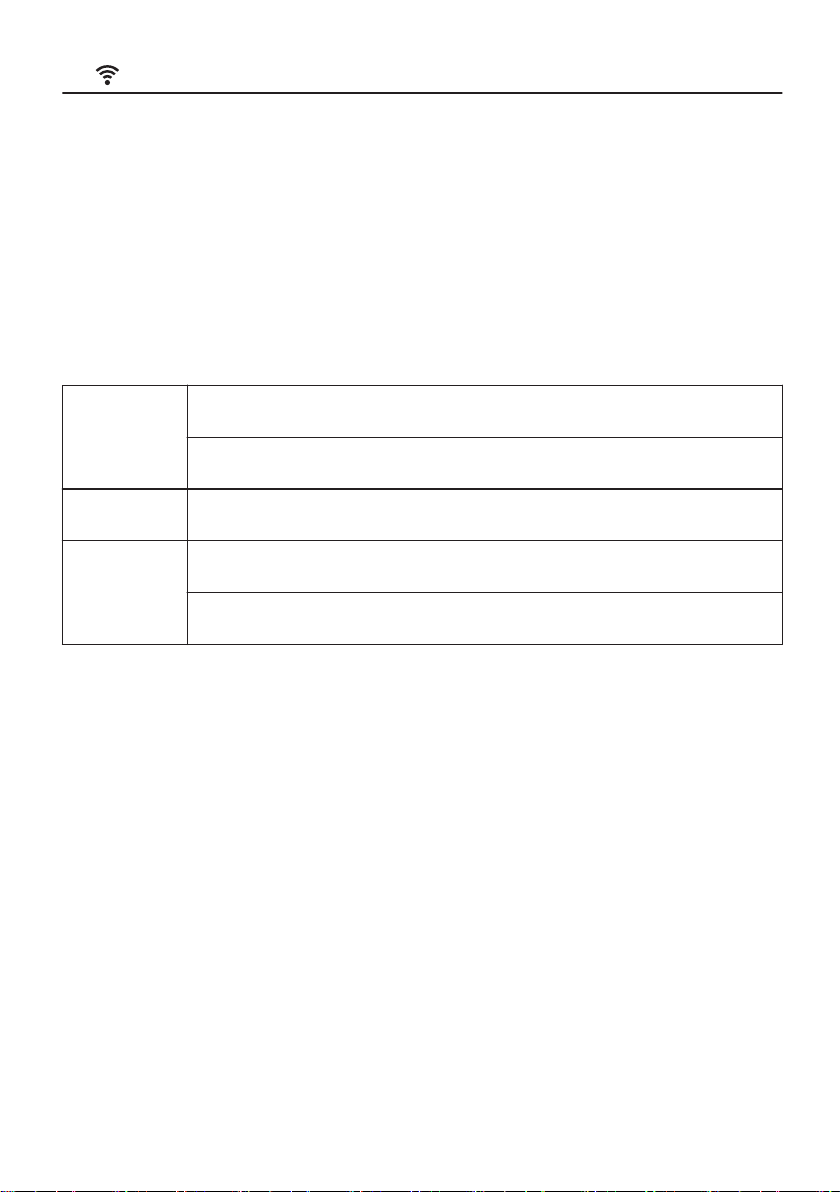
6. WI-FI - CONNECTIVITY SETUP
This chapter describes how to connect the smart appliance to the
Wi-Fi network and to link it to a mobile devices.
By this functionality you can receive notifications, monitor and
control your tumble dryer from your mobile devices.
To connect the appliance to enjoy the full range of features and
services you need:
•
Wireless network at home with internet connection enabled.
• Mobile device connected to wireless network.
Fre‐
quency
Wi-Fi:
2.4 - 5GHz
Bluetooth Low Energy 5.0: 2 GHz
Protocol 802.11 abgn, WEP, WPA, WPA2
Max
power
Wi-Fi:
<23 dBm (200mW)
Bluetooth Low Energy 5.0: <20 dBm (100mW)
6.1 Installing and configuring AEG Home
When connecting the tumble dryer to the application, stand near it
with Your smart device.
Make sure that your smart device is connected to the wireless
network.
1. Go to the App Store on your smart device.
2. Download and install App
AEG Home .
3. Make sure you started a Wi-fi connection in the dryer. If not go to
the section below.
4. Start the application. Select the country and language and login
with Your email and password. If you do not have an account,
create a new one following the instructions in AEG Home.
5. Follow the instructions on the App for the appliance registration
and configuration.
A message appears on the appliance display to confirm that the
configuration was successful.
18/64
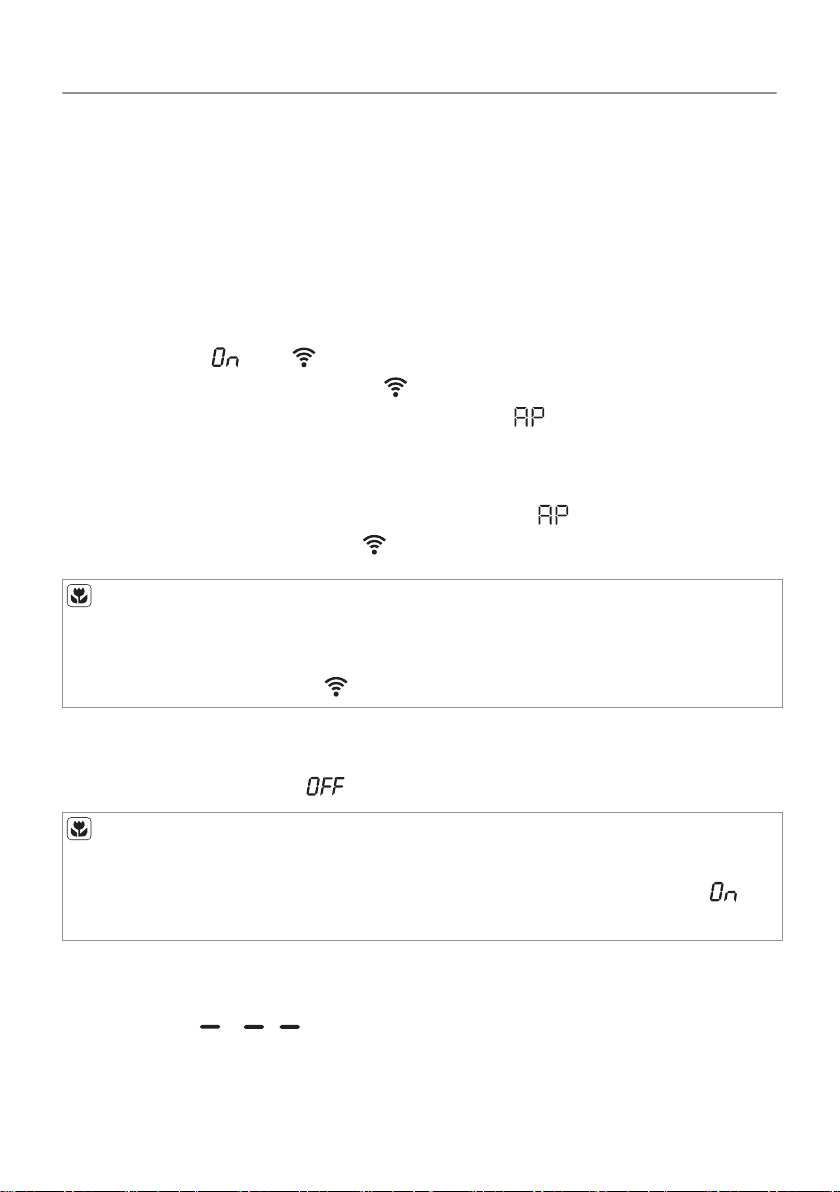
6.2 Wireless connection configuration
Before you begin configuration download and install AEG Home
application on your smart device.
1. Push the On/Off button to switch on the appliance.
2. Wait approximately 8 seconds.
3. Touch and hold the Refresh and Delay Start buttons
simultaneously for a few seconds until a 'click' sound is heard.
The symbols: and appear on the display. After few seconds
remains only flashing symbol:
. Wireless module is activating
around 1 minute. When ready the symbol: (Access Point)
appears on the display. Access Point is open around 3 minutes.
4. Configure AEG Home
application on your smart device.
If the configuration is successful the symbol:
(Access Point)
disappears and the symbol: stops flashing.
Each time you switch the appliance on, the appliance attempt to
connect to the network automatically. When the connection is
established the symbol:
stops flashing.
To switch off the wireless connection , touch and hold down
Refresh and Delay Start buttons at the same time for 3
seconds. The symbol:
appears on the display.
Appliance stores last connection configuration. To use wireless
features of the appliance the wireless connection must be in
mode.
To remove the wireless credentials, touch and hold down
Refresh and Delay Start buttons at the same time for 10 seconds.
The symbol: appears on the display.
19/64
WI-FI - CONNECTIVITY SETUP
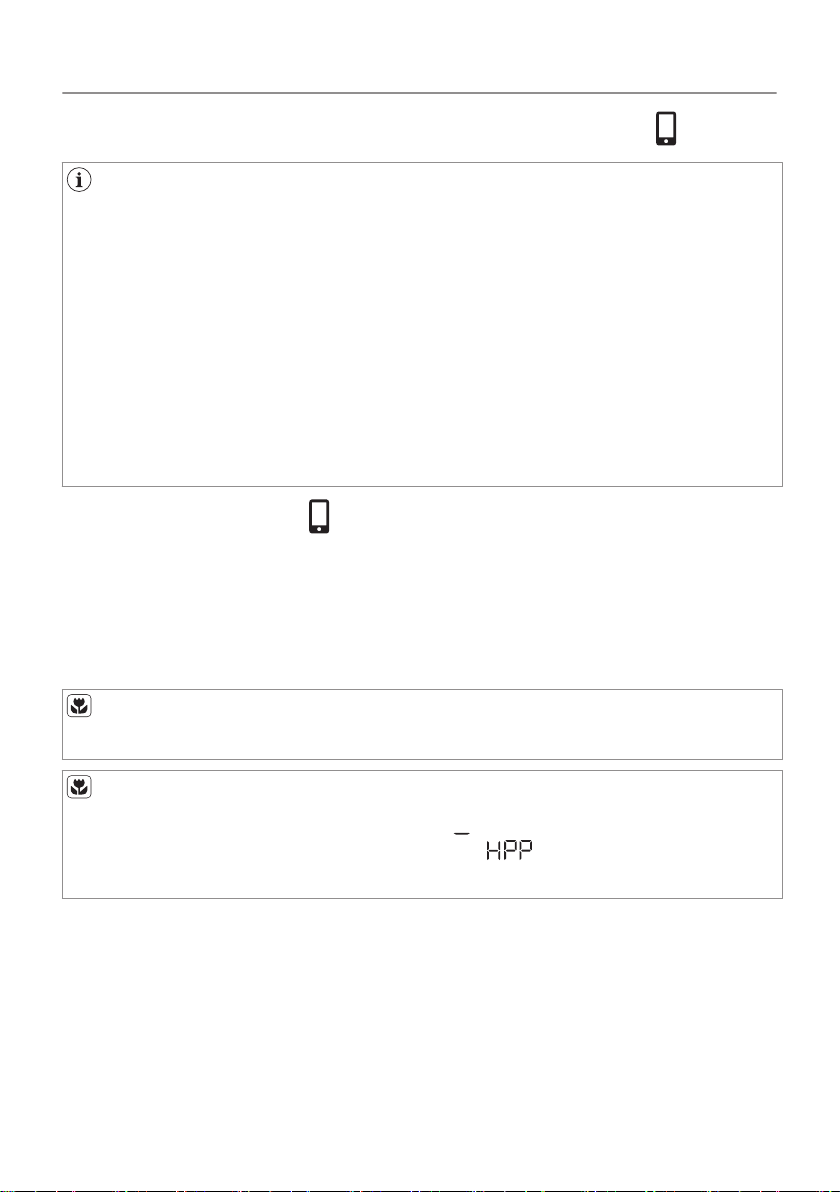
6.3 Remote control from application AEG Home
AEG Home allows you to control your laundry through a mobile
device.
It contains a large number of programs, useful features and
product information tailored perfectly to the appliance. Through
the app you can select the programs already available from the
appliance control panel, plus unlock additional programs
available only from a mobile device. Additional programs can
change over the time along with new versions of the app.
It's personalized laundry care - all from your mobile device.
One of the AEG Home application features is to remotely control
appliance by:
• standard or additional program selection
• program start and stop
• program status view
It works only when remote control is enabled.
in remote mode each program and option selection from
extended application list is signalled by symbol on the
display.
Remote control activation
To operate remotely the tumble dryer you must activate this
function on the appliance control panel.
To enable the remote control:
1. Check wireless connection between the appliance and smart
device.
20/64
WI-FI - CONNECTIVITY SETUP
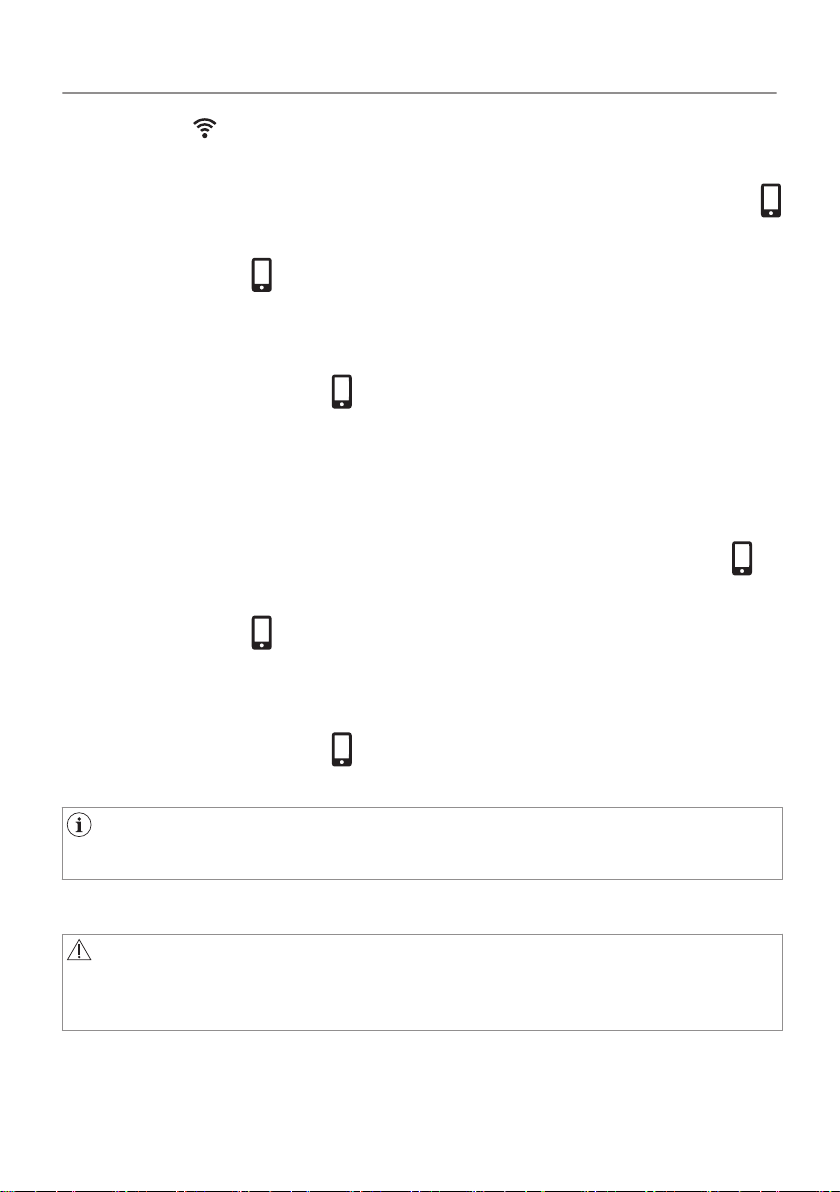
The symbol must be on the display and your appliance must be
accessible from
AEG Home application.
2. Touch and hold down the Time Drying and Delay Start buttons
at the same time.
The symbol must
appear on the display. Remote control is
enabled.
Another possibility to enable remote control is to touch
Start/Pause
button. The symbol must
appear on the display. Remote control
is enabled.
Remote control deactivation
To disable the remote control:
Touch and hold down the
Time Drying and Delay Start buttons
at
the same time.
The symbol must disappear from the display. Remote control is
disabled.
Another possibility to disable remote control is to touch
Start/Pause
button. The symbol must
disappear from the display. Remote
control is disabled.
Remote control is disabled once the appliance door are opened.
6.4 Over-the-air update
WARNING!
During the update it is highly recommended to not turn off or
unplug the appliance.
The App may propose an update for downloading new features.
The update is accepted via App only.
21/64
WI-FI - CONNECTIVITY SETUP

If a program is running, the App notifies that the update will start at
the end of the program.
During the update, the appliance shows a message telling that
update is running.
The appliance will usable again at the end of the update, without
any notification about successful update.
If an error occurs, the appliance warns that update has failed: just
press any buttons or turn the knob to return to normal use.
22/64
WI-FI - CONNECTIVITY SETUP
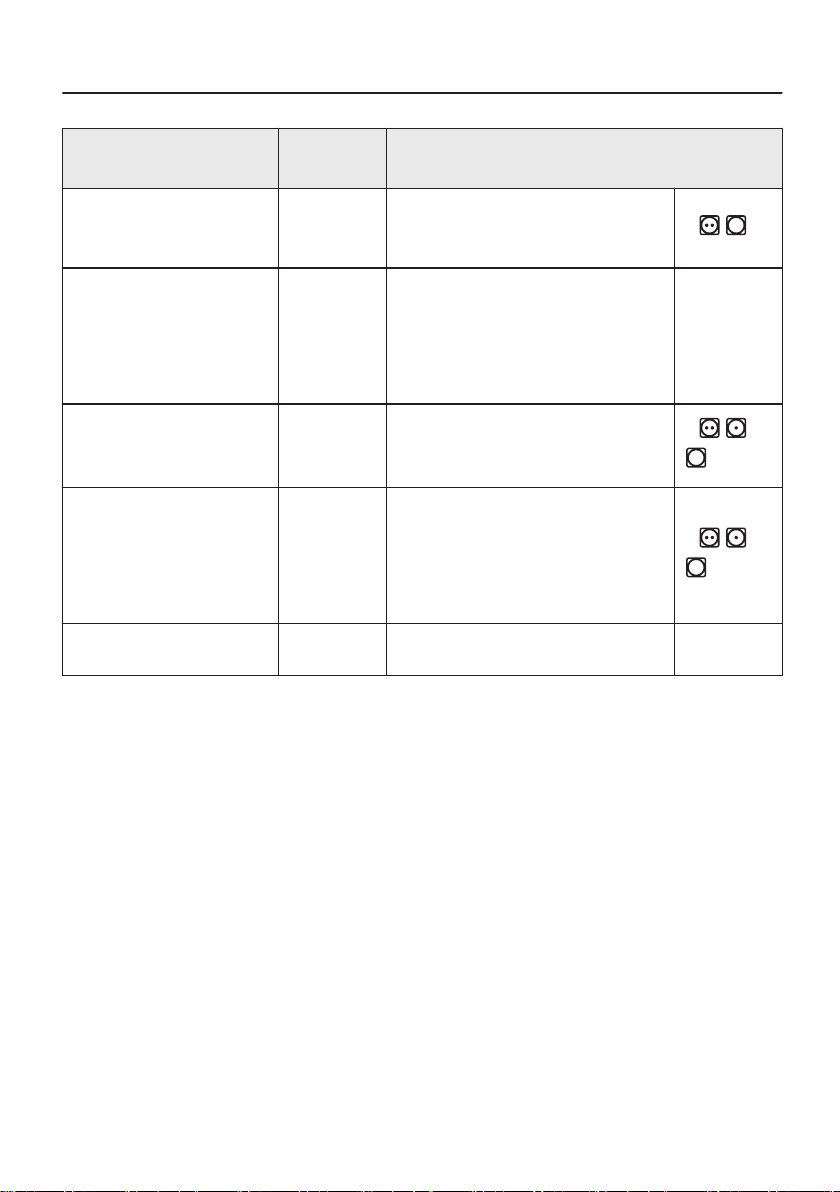
7. PROGRAM
Program
Load
1)
Properties / Fabric mark
Cottons Eco
2)
8,0 kg
Cotton fabrics - Extra
dry
/
Cottons 8,0 kg
Cycle defined to dry cot‐
tons items of different
size / different weaving
altogether.
Synthetics 3,5 kg
Synthetic and mixed fab‐
rics.
/
Mixed XL 6 kg
Mix of garments made of
cotton, cotton-synthetic
blend and synthetic fab‐
ric.
/
Delicates 4 kg Delicate fabrics.
23/64
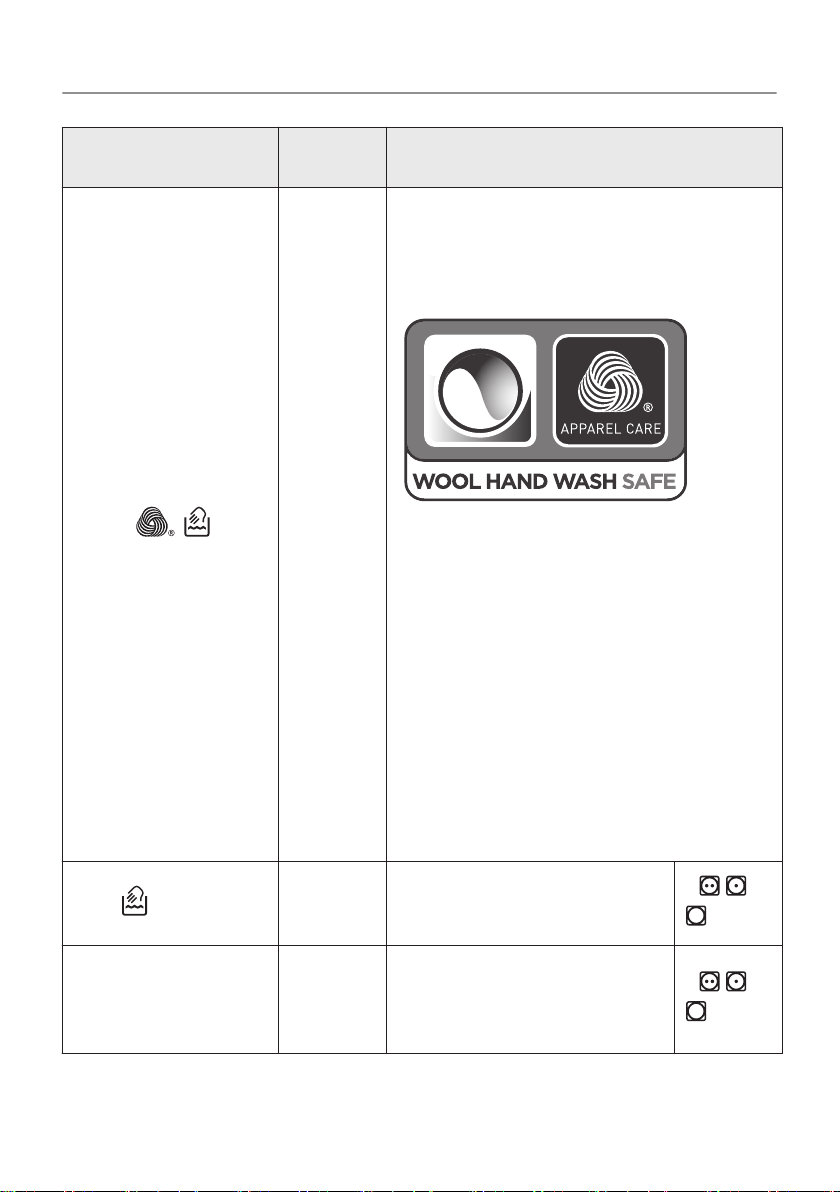
Program
Load
1)
Properties / Fabric mark
Wool
1 kg
Woollen fabrics. Gentle drying for
hand-washable woollens. Remove
items immediately when the pro‐
gram is completed.
The wool drying cycle of this ma‐
chine has been approved by The
Woolmark Company for the drying
of wool garments labelled as
"hand wash" provided that the gar‐
ments are dried according to the
instructions issued by the manu‐
facturer of this machine. Follow the
garment care label for other laun‐
dry instructions. M1741
The Woolmark symbol is a Certifi‐
cation mark in many countries.
Silk
1 kg
Gentle drying of hand-
washable silks.
/
Bedlinen XL 4,5 kg
Up to three bed linen
sets, one of which can
be double size.
/
24/64
PROGRAM
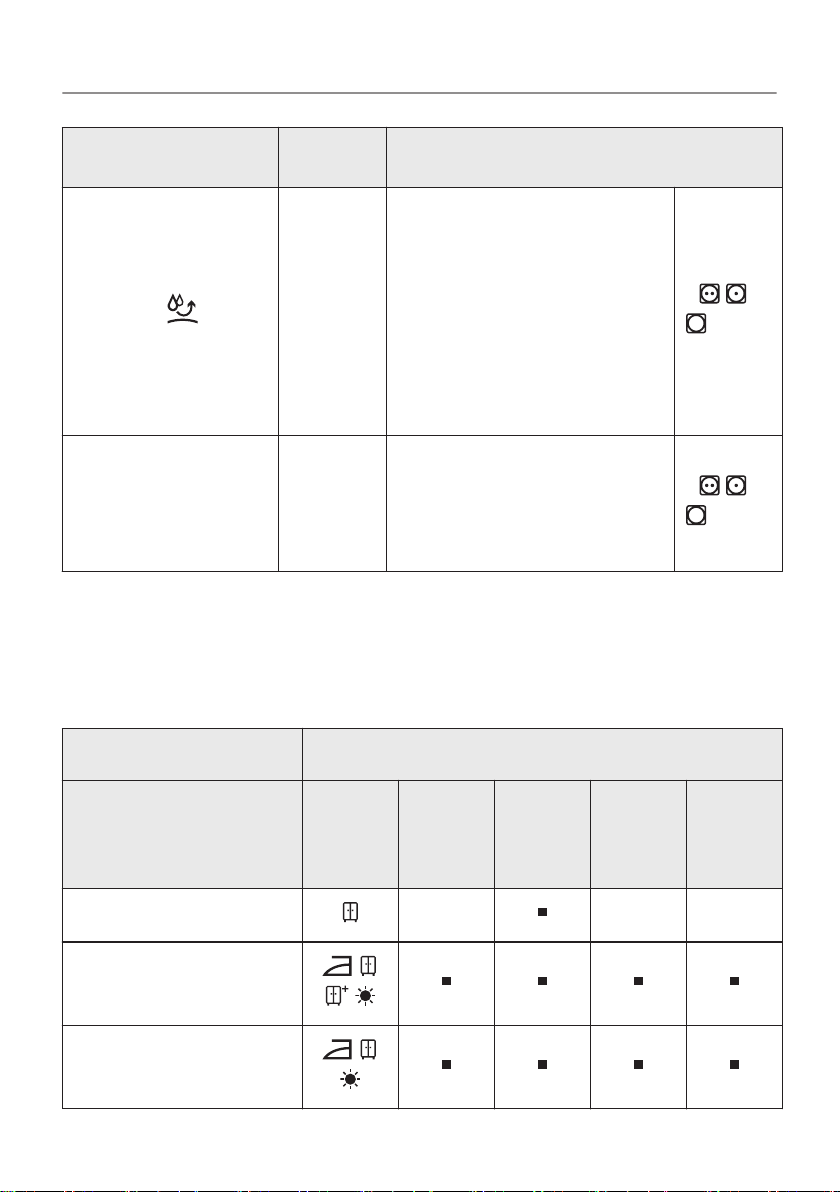
Program
Load
1)
Properties / Fabric mark
Outdoor
2 kg
Outdoor clothing, techni‐
cal, sports fabrics, wa‐
terproof and breathable
jackets, shell jackets
with a removable fleece
or inner insulation. Suit‐
able for drying in tumble
dryer.
/
Duvet 3 kg
Single or double duvets
and pillows (with feather,
down or synthetic fil‐
lings).
/
1)
The maximum weight refers to dry items.
2)
For test institute only: the Cotton Eco program is the "Standard cotton program"
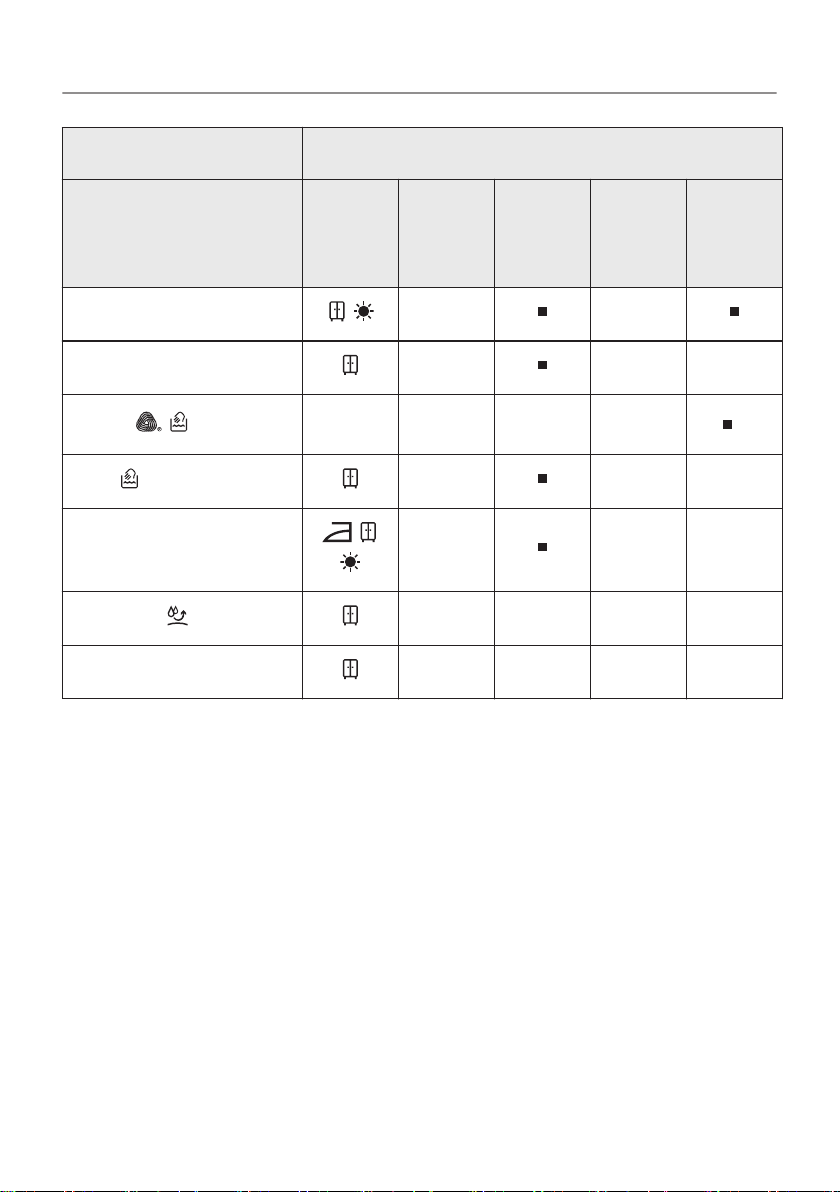
7.1 Program and options selection compatibility
Options
Program
1)
Dry‐
ness
Level
Quiet
Mode
Anti-
creas
e
Re‐
fresh
Time
Dry‐
ing
Cottons Eco
Cottons
Synthetics
25/64
PROGRAM
Options
Program
1)
Dry‐
ness
Level
Quiet
Mode
Anti-
creas
e
Re‐
fresh
Time
Dry‐
ing
Mixed XL
Delicates
Wool
2)
Silk
Bedlinen XL
Outdoor
Duvet
1) Aside from the program, you can set one or more options at the same time.
2) See chapter OPTIONS: Time Drying on Wool program
26/64
PROGRAM
8. OPTIONS
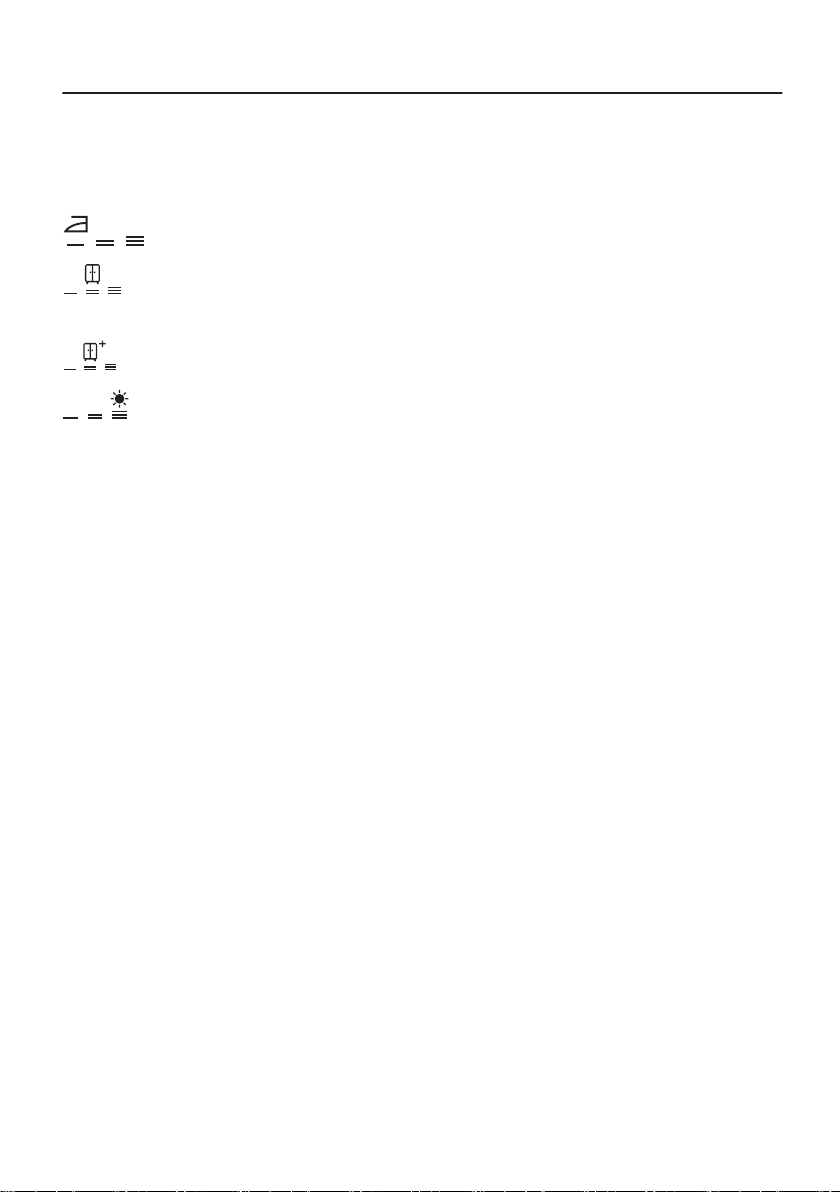
8.1 Dryness Level
This option helps to achieve requested laundry dryness. Possible
selections:
- ready to iron - iron dry level.
- ready to store -
cupboard dry level - default selection
which is related to the program.
- ready to store - cupboard dry + level.
- ready to store - extra dry
level.
8.2 Quiet Mode
The appliance operates with low noise without effect on the drying
quality. The appliance operates slowly with longer cycle time.
8.3 ECO
This option is on by default with all programs.
The power consumption is at the minimum level.
8.4 Anti-crease
Extends up to 120 minutes the anti-crease phase (30 minutes) at
the end of the drying cycle. After drying phase drum rotates from
time to time to prevent creases. Laundry can be removed during
the anti-crease phase.
8.5 Refresh
To refresh clothes that were in storage. Maximal load cannot
exceed 1 kg.
8.6 Time Drying
For cottons, synthetics and mixed. Lets the user to set drying time
from minimum 10 min to maximum of 2 hours (in 10 min steps).
When this option is maximum, load indicator disappears.
27/64
The cycle lasts as long as set drying time regardless of the size
of a load and its dryness.
TIME DRYING RECOMMENDATION
10 - 20 min action of cool air only (no heater).
20 - 40 min
additional drying to improve dryness after previ‐
ous drying cycle.
> 40 min
full drying of the small laundry loads up to 4 kg,
well spun (>1200 rpm).
8.7 Time Drying on Wool program
Option applicable to Wool program to adjust final dryness level to
more dry or less dry.
8.8 Delay Start
Lets to delay the start of a drying program from minimum of 30
minutes to maximum of 20 hours.
1. Set the drying program and options.
2. Touch Delay Start button again and again.
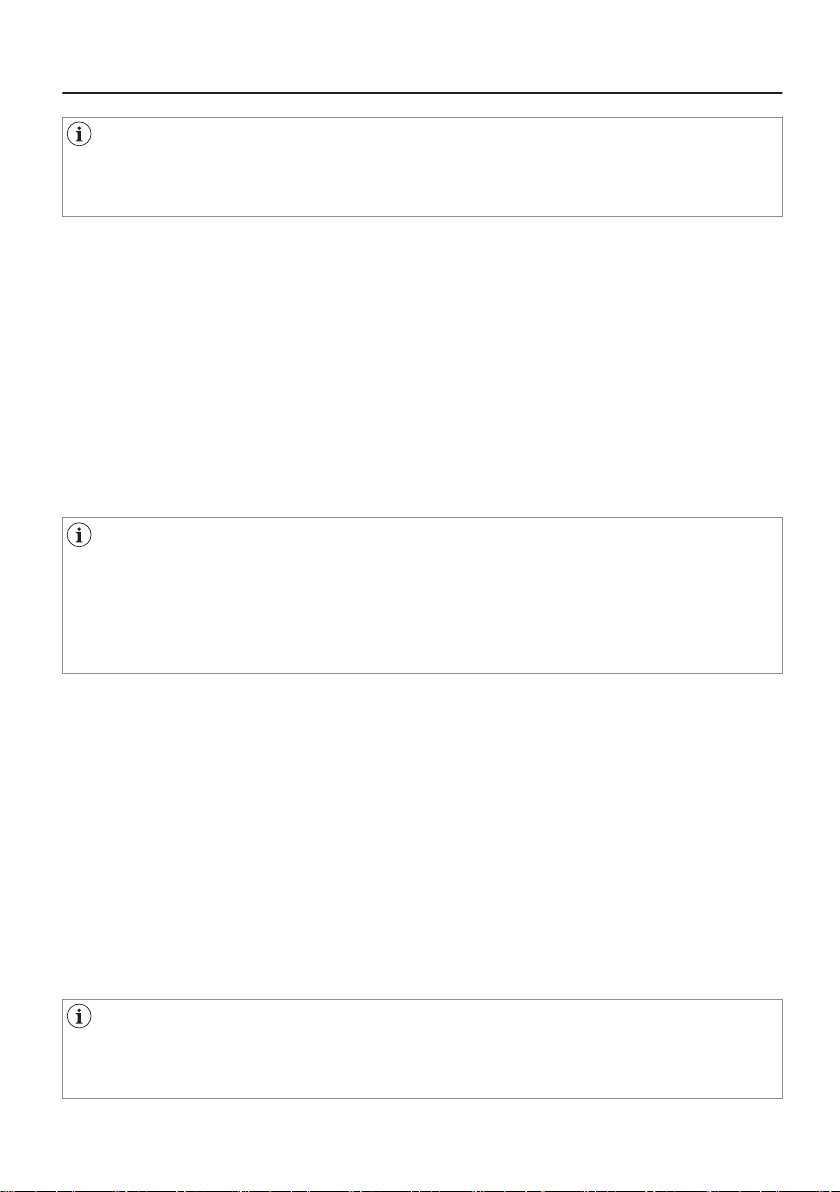
Time of delay is on the display (e.g. if the program has to
start after 12 hours.)
3. To activate Delay Start option, touch the Start/Pause button.
Time to start decreases on the display.
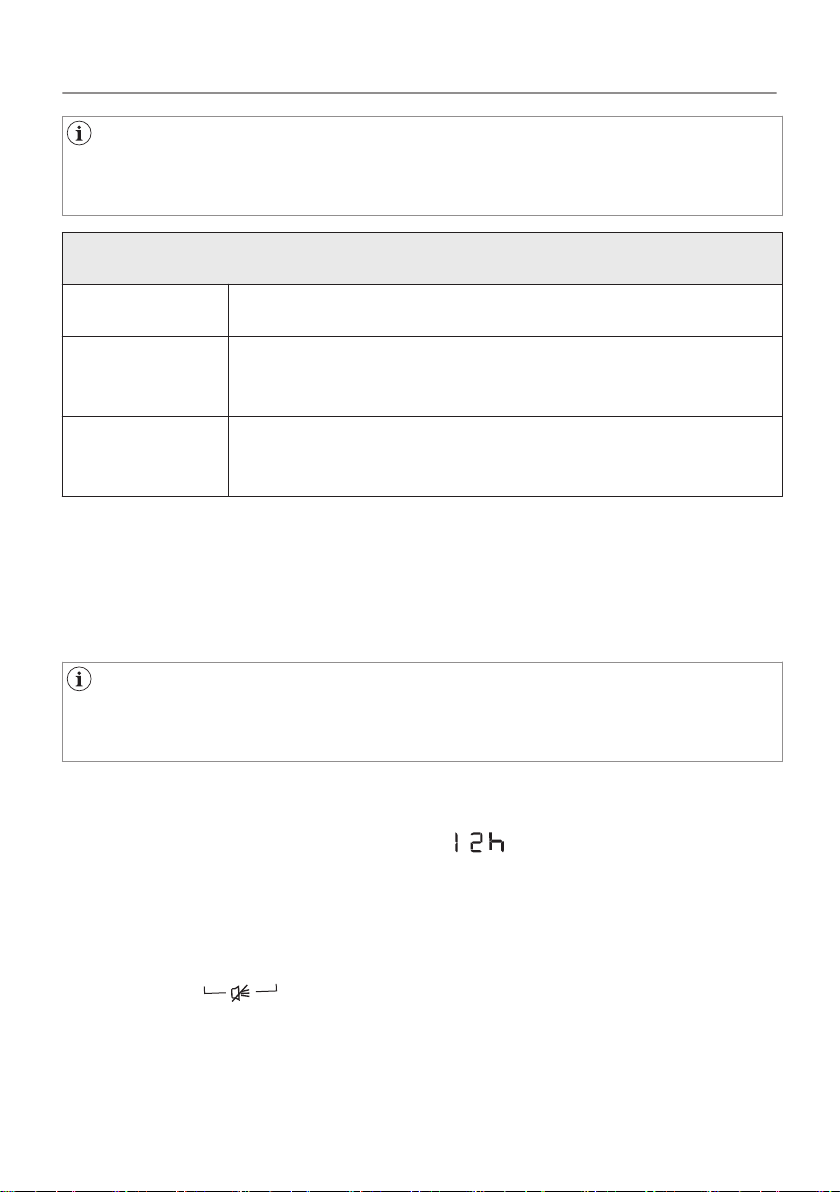
8.9 Buzzer
The sound is heard at the:
•
cycle end
• start and end of crease guard phase
28/64
OPTIONS

The buzzer option is by default always on. You can use this option
to activate or deactivate the sound.
29/64
OPTIONS
9. BEFORE FIRST USE
Rear drum locks are removed automatically when dryer is
activated for the first time. Possible to hear some noise.
To unlock the rear drum locks:
1. Switch on the appliance.
2. Set any program.
3. Press the Start/Pause button.
Drum starts to rotate. Rear drum locks are automatically
deactivated.
Before you use the appliance to dry items:
•
Clean the tumble dryer drum with a moist cloth.
• Start a 1 hour program with moist laundry.
At the beginning of the drying cycle (first 3-5 min) there could be
a slightly higher sound level. This is due to the compressor
starting up. This is normal for compressor powered appliances
such as refrigerators and freezers.
9.1 Unusual smell
The appliance is tightly packed.
After product unpacking you can feel an unusual smell. This is
normal for brand new products.
Appliance is built of several different types of material which all
together can generate unusual smell.
Over usage time, after few drying cycles unusual smell gradually
disappears.
9.2 Noises
Different noises may be heard at different times during the
drying cycle. They are perfectly normal operating sounds.
30/64
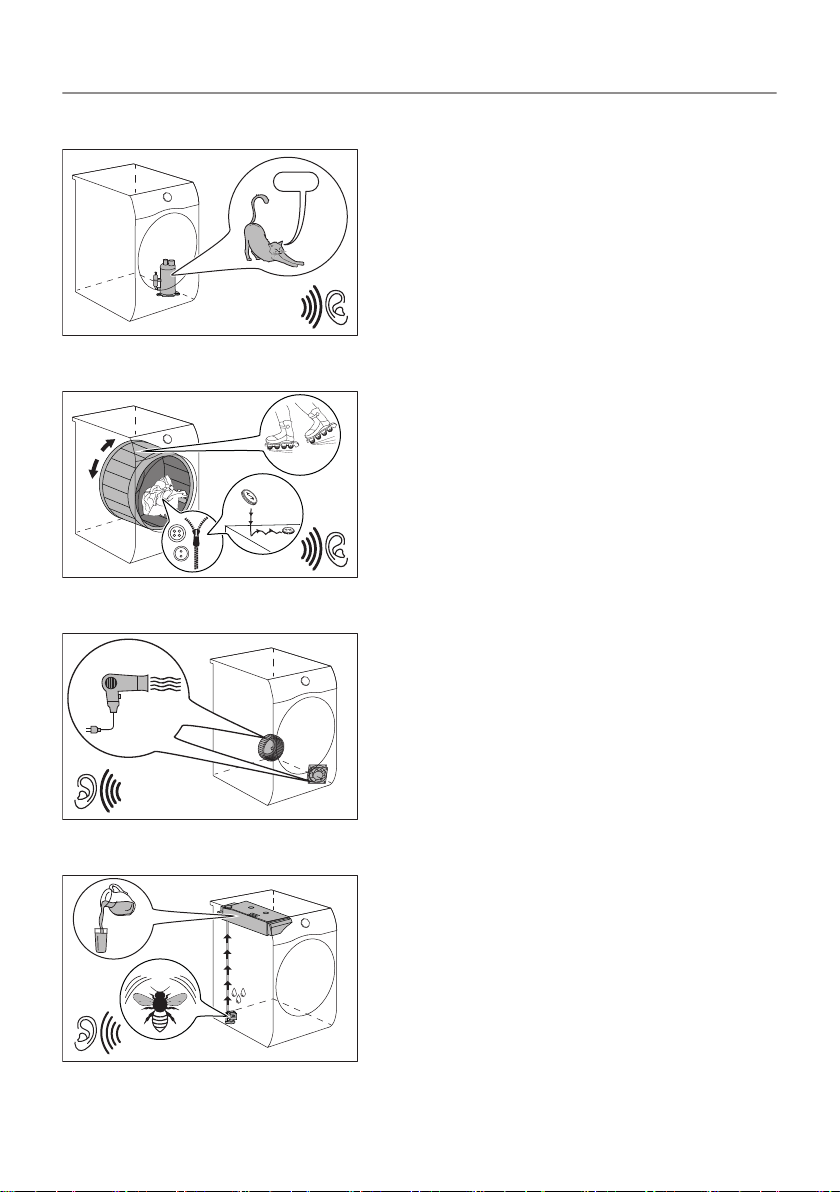
Working compressor.
Brrrr
Rotating drum.
Working fans.
Working pump and transferring condensation to the tank.
31/64
BEFORE FIRST USE

10. DAILY USE
10.1 Preparing the laundry
Very often the clothes after washing cycle are kneaded and
tangled altogether.
Drying kneaded and tangled clothes is inefficient.
To assure proper air flow and even drying it is recommended to
shake and load one by one the clothes to the tumble dryer.
To assure proper drying process:
•
Close the zips.
• Close the fasteners of duvet covers.
• Do not dry ties or ribbons loose (e.g. apron ribbons). Tie them
before you start a program.
• Remove all items from pockets.
• Turn items with the internal layer made of cotton inside out.
Cotton layer must be faced outwards.
• Always set the program suitable for the type of laundry.
• Do not put light and dark colours together.
• Use suitable program for cottons, jersey and knitwear to reduce
shrinkage.
• Do not exceed the maximum load stated in the programs chapter
or shown on the display.
• Dry only the laundry that is suitable for tumble drying. Refer to
the fabric label on the items.
• Do not dry large and small items together. Small items can be
trapped inside the large items and remain wet.
• Shake the large clothes, fabrics before placing in the tumble
dryer. It is to avoid moist places inside the fabric after the drying
cycle.
32/64
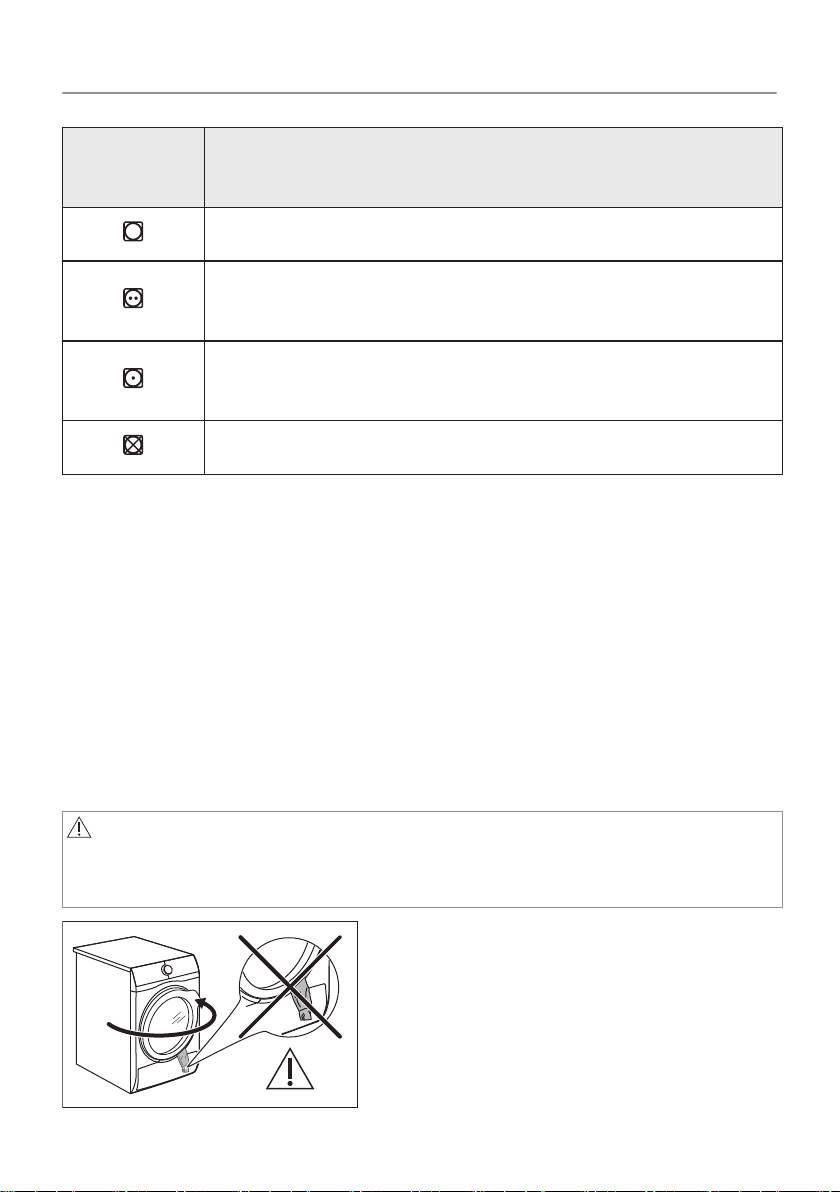
Fabric la‐
bel
Description
Laundry is suitable for tumble drying.
Laundry is suitable for tumble drying at higher tem‐
peratures.
Laundry is suitable for tumble drying at low temper‐
atures only.
Laundry is not suitable for tumble drying.
10.2 To achieve best drying results
• The selected program must be adequate to the type of dried
clothes.
• The filter must be clean. Clogged filter makes drying inefficient.
• It is recommended to shake items before loading. Loose items
are more liable for drying.
• The recommended load of dried items must be respected.
• The airflow slots must be clean.
10.3 Loading the laundry
CAUTION!
Ensure the laundry is not trapped between the appliance door
and the rubber seal.
33/64
DAILY USE
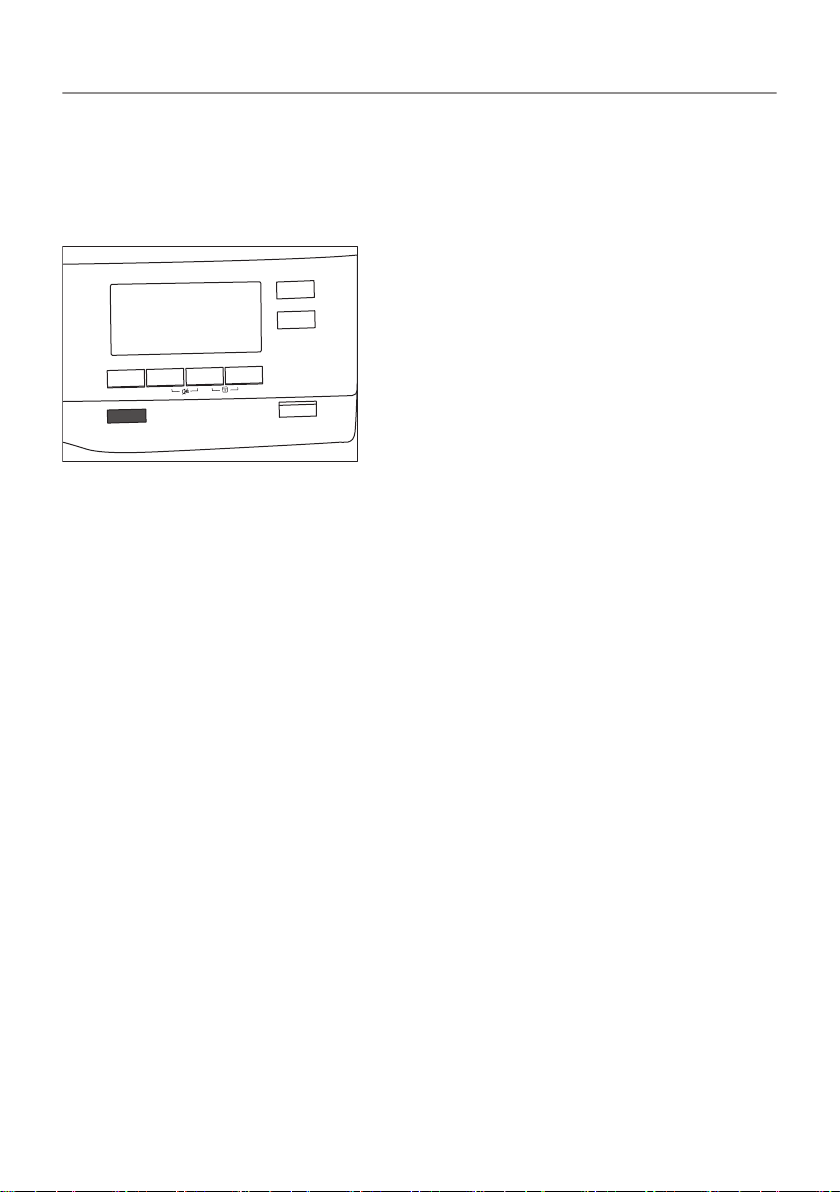
1. Pull open the appliance door.
2. Load the laundry one item at a time.
3. Close the appliance door.
10.4 Turning on the appliance
4
To turn on the appliance:
Push the On/Off button.
If the appliance is on, some indicators appear on the display.
10.5 Auto Off function
To decrease the energy consumption, the Auto Off function turns
the appliance off automatically:
• if the Start/Pause touch button is not touched within 5 minutes.
• 5 minutes after a cycle ends.
Push the On/Off button to turn on the appliance.
If the appliance is on, some indications appear on the display.
34/64
DAILY USE
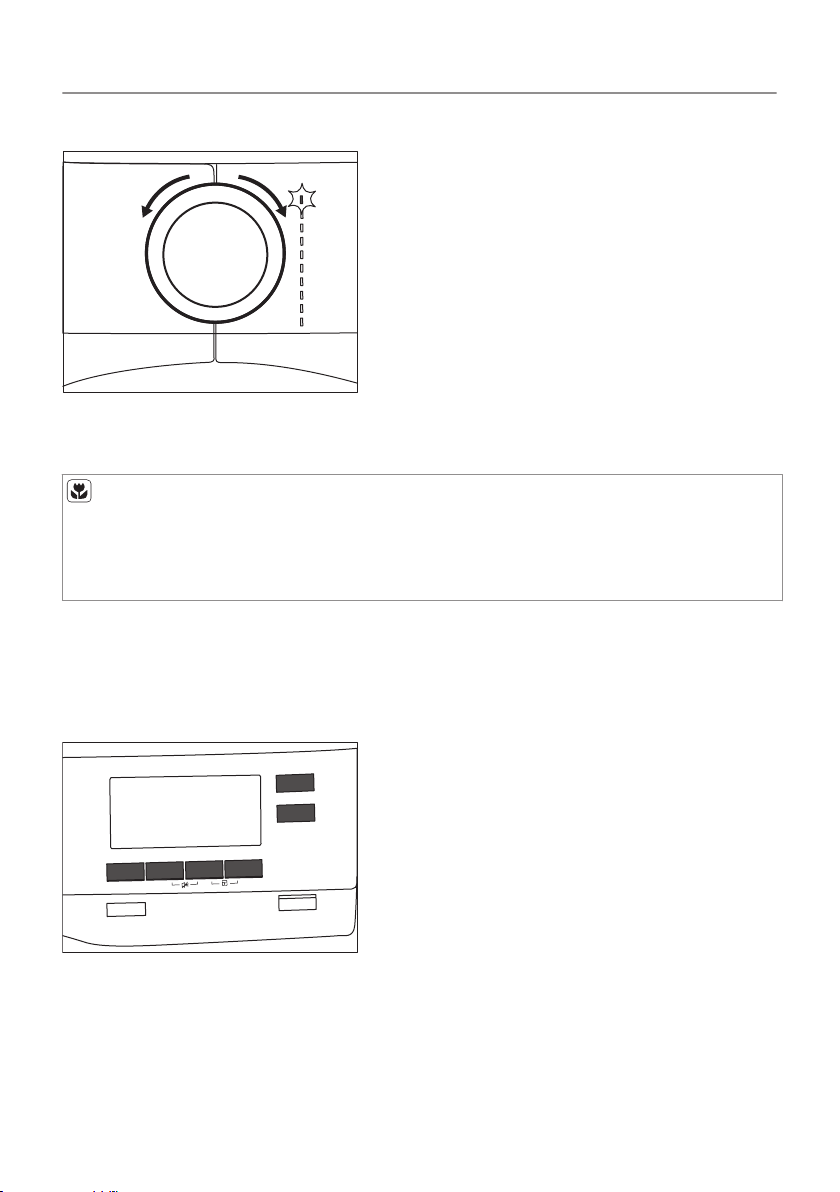
10.6 Setting a program
Use the program dial to set the program.
The approximate program duration appears on the display.
Real drying time will depend on type of the load (quantity and
composition), the room temperature and the humidity of your
laundry after spin drying phase.
10.7 Options
Together with the program you can set 1 or more special
options.
To activate or deactivate an option touch the relevant button or a
two button combination.
its symbol appears on the display or the led above the
corresponding button lights up.
35/64
DAILY USE
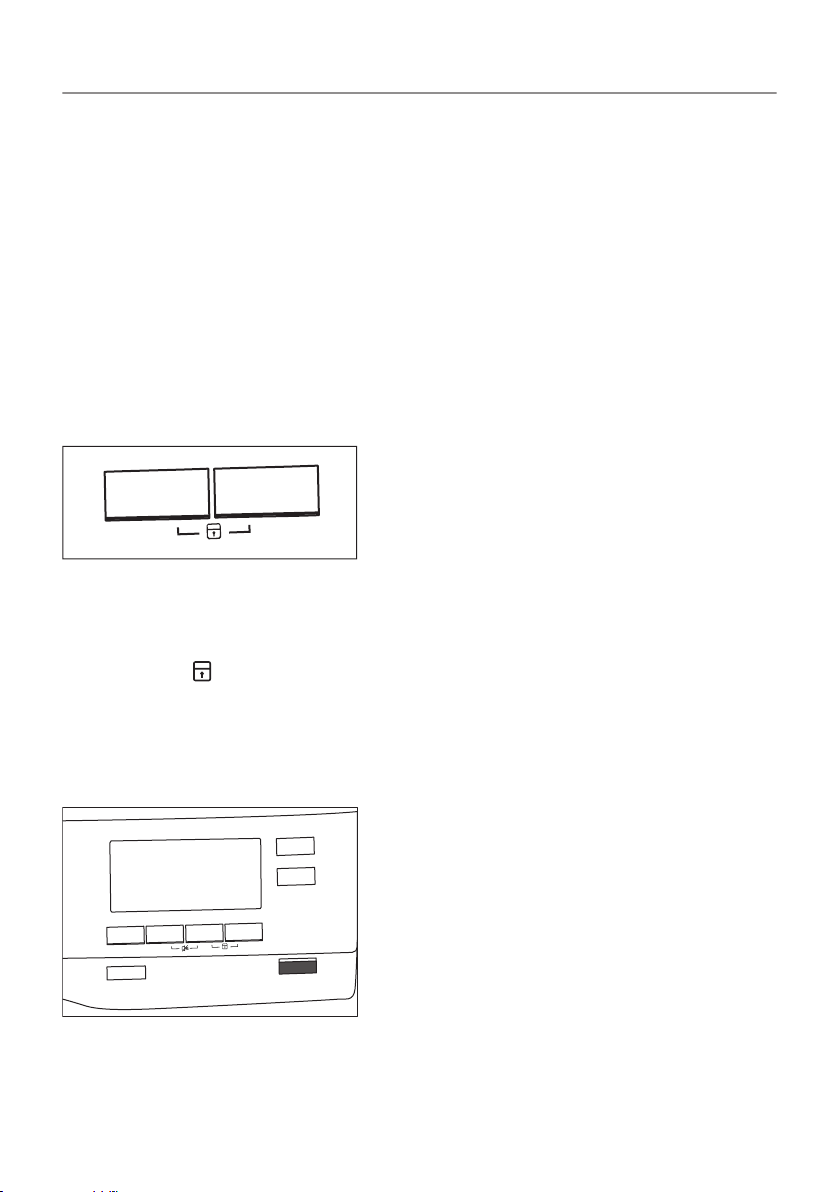
10.8 Child lock option
The child lock can be set to prevent children from playing with the
appliance. The child lock option locks all touch buttons and the
program dial (this option does not lock the On/Off button).
You can activate the child lock option:
• before you touch the Start/Pause button - the appliance cannot
start
• after you touch the Start/Pause button - programs and option
selection is unavailable.
Child lock option activation:
1. Turn the dryer on.
2. Select 1 of the available programs.
3. Touch and hold down 2 buttons at the same time.
The symbol
appears on the display.
4. To deactivate the child lock, touch the above buttons again until
the symbol disappears.
10.9 Starting a program
4
To start the program:
Touch the Start/Pause button.
36/64
DAILY USE
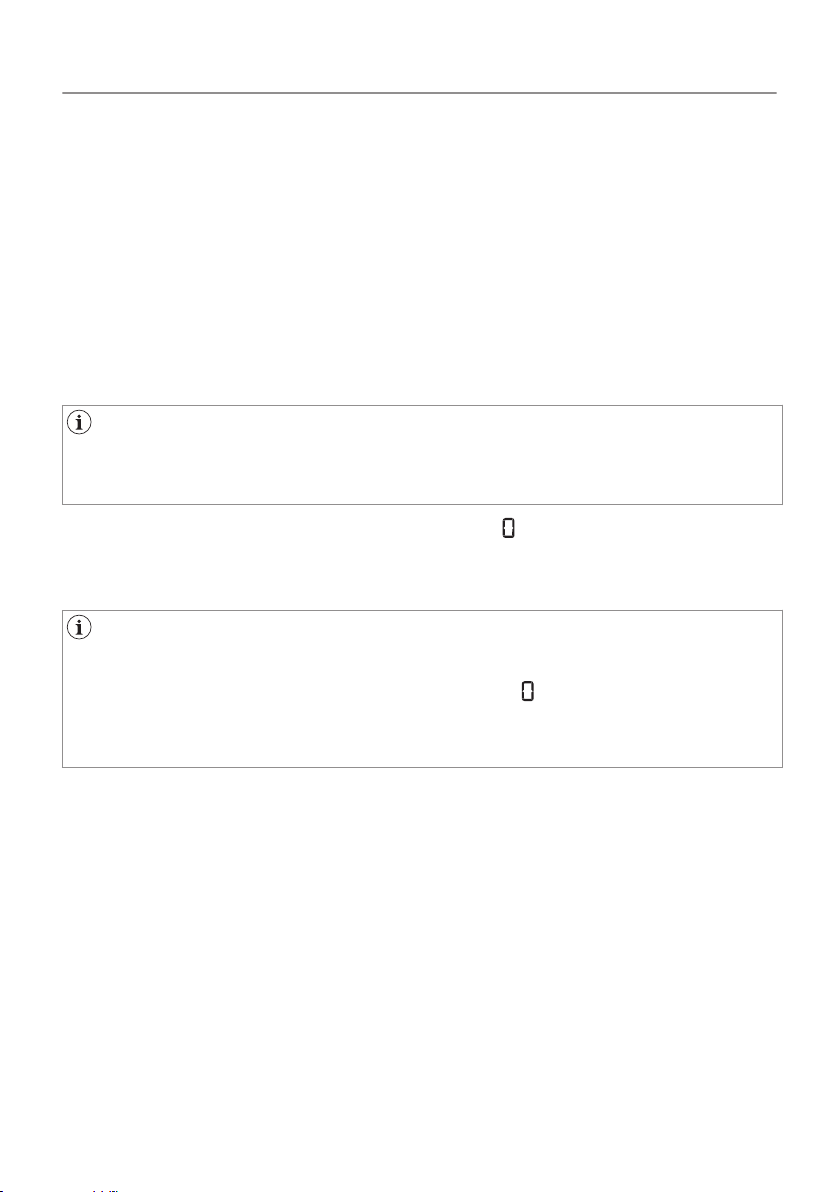
The appliance starts and the LED above the button stops flashing
and stays on.
10.10 Program change
To change a program:
1. Push the On/Off button to turn the appliance off.
2. Push the On/Off button again to turn on the appliance.
3. Set a new program.
10.11 Program end
Clean the filter and drain the water container after each drying
cycle. (See chapter CARE AND CLEANING.)
If the drying cycle is finished, the symbol appears on the display.
If the Buzzer option is activated, the acoustic signal sounds
intermittently for 1 minute.
If you do not turn off the appliance, the anti-crease phase starts
(not active with all programs). Flashing symbol signals the
execution of the anti-crease phase. Laundry can be removed
during this phase.
To remove the laundry:
1. Push the On/Off button for 2 seconds to turn the appliance off.
2. Open the appliance door.
3. Remove the laundry.
4. Close the appliance door.
Possible causes of unsatisfactory drying results:
• Inadequate default dryness level settings. See chapter
Adjustment of default dryness level
• Room temperature is too low or too high. Optimal room
temperature is between 18°-25°C.
37/64
DAILY USE
11. HINTS AND TIPS
11.1 Ecological hints
• Spin the laundry well before drying.
• Do not exceed the load sizes which are specified in the programs
chapter.
• Clean the filter after each drying cycle.
• Do not use fabric softener to wash and then dry. In the tumble
dryer laundry becomes soft automatically.
• The water from the water container can be used to iron the
clothes. You must first filter the water to eliminate remaining
textile fibres (simple coffee filter is suitable).
• Always keep the airflow slots at the bottom of the appliance clear.
• Make sure there is good airflow where the appliance is to be
installed.
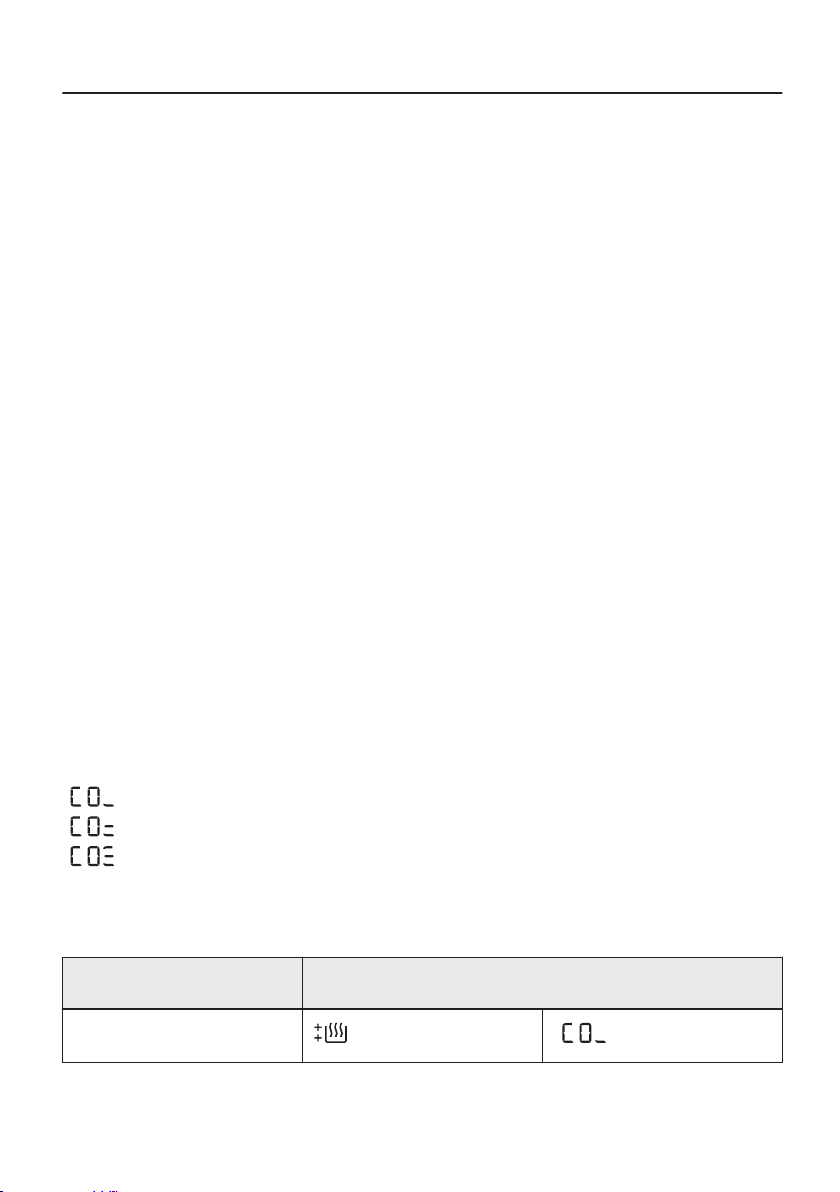
11.2 Adjustment of default dryness level
To change the default dryness level:
1. Turn the appliance on.
2. Wait approximately 8 seconds.
3. Select 1 of the available programs.
4. Touch and hold down the Quiet Mode and Refresh buttons at
the same time.
One of the symbols appears on the display:
- Maximum dryness
- Extra dryness
- Standard dryness
5. Touch the Start/Pause button repeatedly until you reach the
desired dryness level.
Dryness level Display symbol
Maximum dryness
38/64
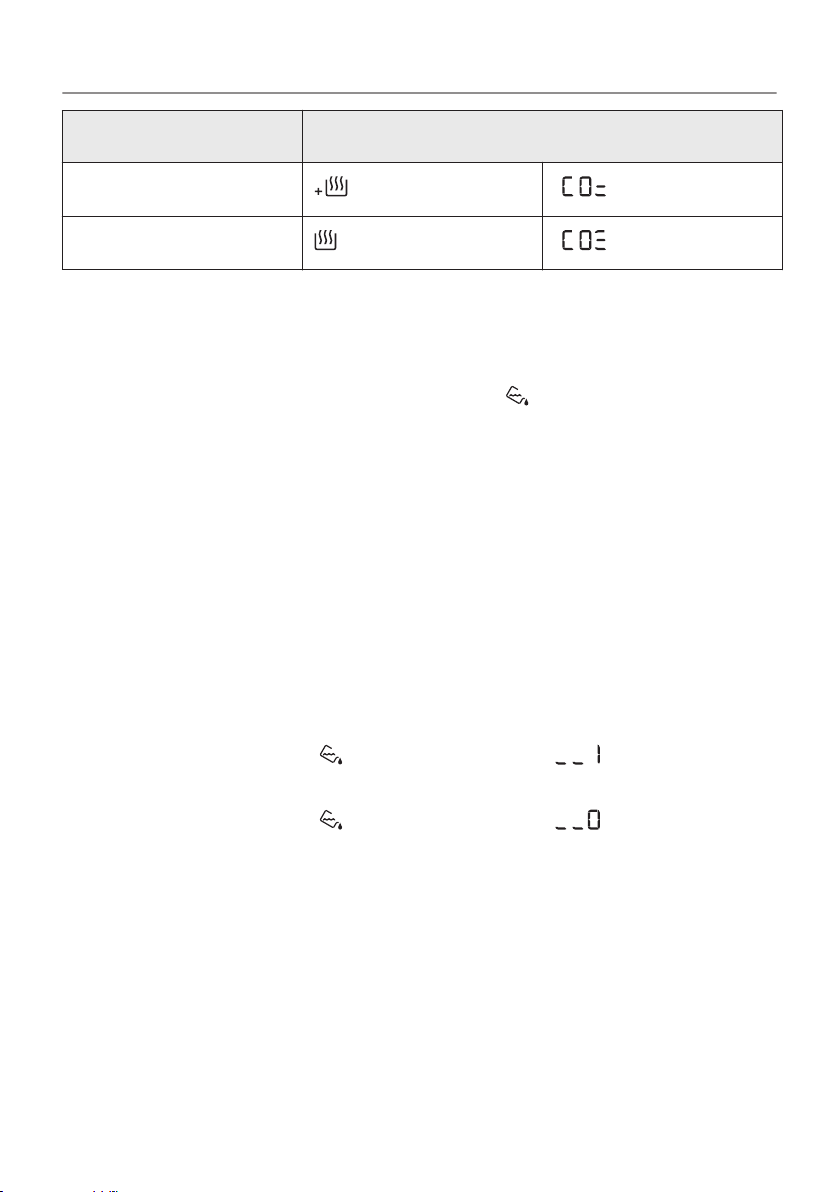
Dryness level Display symbol
Extra dryness
Standard dryness
6. To memorise the setting touch and hold down the Quiet Mode
and Refresh
buttons at the same time for approximately 2
seconds.
11.3 Deactivating the tank indicator
The water container indicator is activated by default. It illuminates
at the end of the drying cycle or during the cycle if the water
reservoir is full. If the draining kit is installed the water container is
drained automatically and the indicator can be deactivated.
To deactivate the indicator:
1. Turn the appliance on.
2. Wait approximately 8 seconds.
3. Select 1 of the available programs.
4. Touch and hold down Refresh and Time Drying buttons at the
same time.
One of 2 configurations is possible:
• the Tank indicator: is on if the symbol appears - the
water container indicator is permanently activated
•
the Tank indicator:
is off if the symbol appears - the
water container indicator is permanently deactivated
39/64
HINTS AND TIPS
12. CARE AND CLEANING
12.1 Cleaning the filter
At the end of each cycle the
Filter
symbol comes on the display
and you must clean the filter.
The filter collects the lint during the drying cycle.
To achieve the best drying performances clean the filter
regularly , clogged filter lead to longer cycles and energy
consumption increase.
Use your hand to clean the filter , and if necessary , a vacuum
cleaner .
CAUTION!
Avoid the use of water to clean the filter. Instead throw away lint
in the dustbin ( avoid dispersion of plastic fiber in water
ambient).
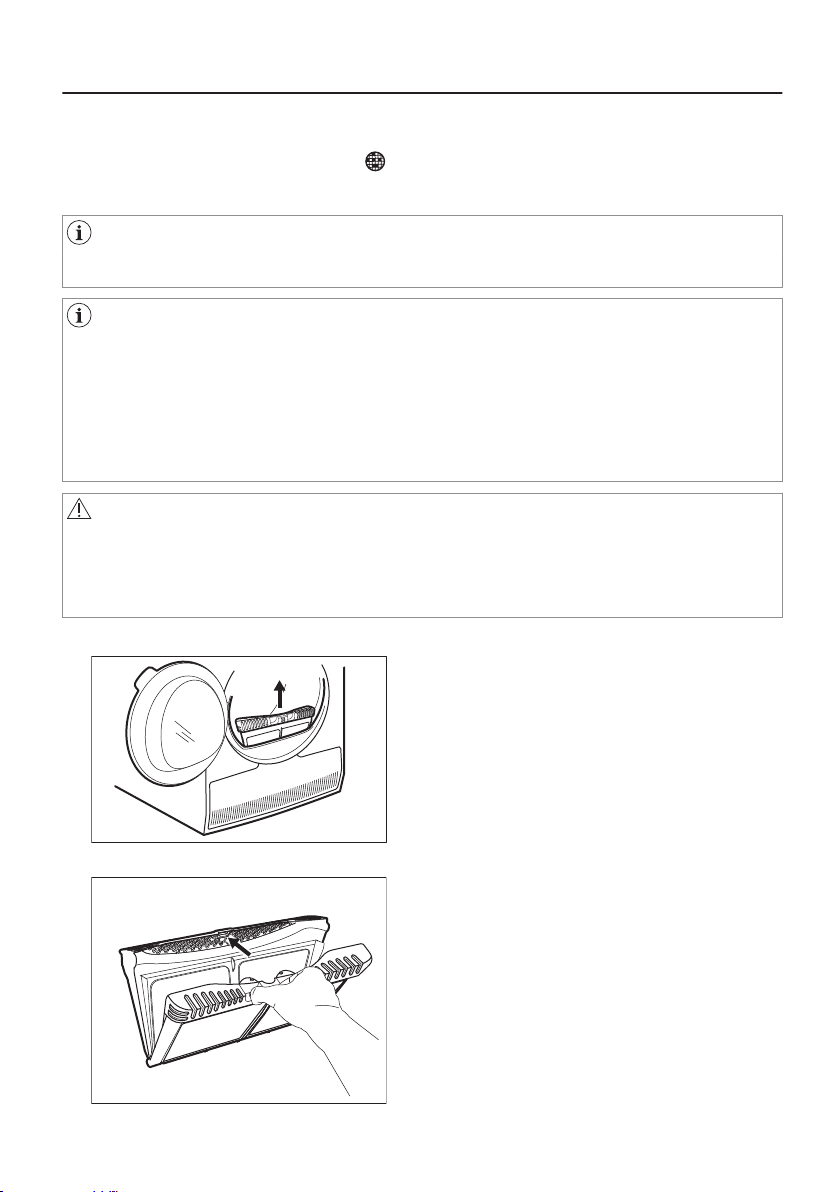
1. Open the door. Pull the filter up.
2. Push the hook to open the filter.
40/64
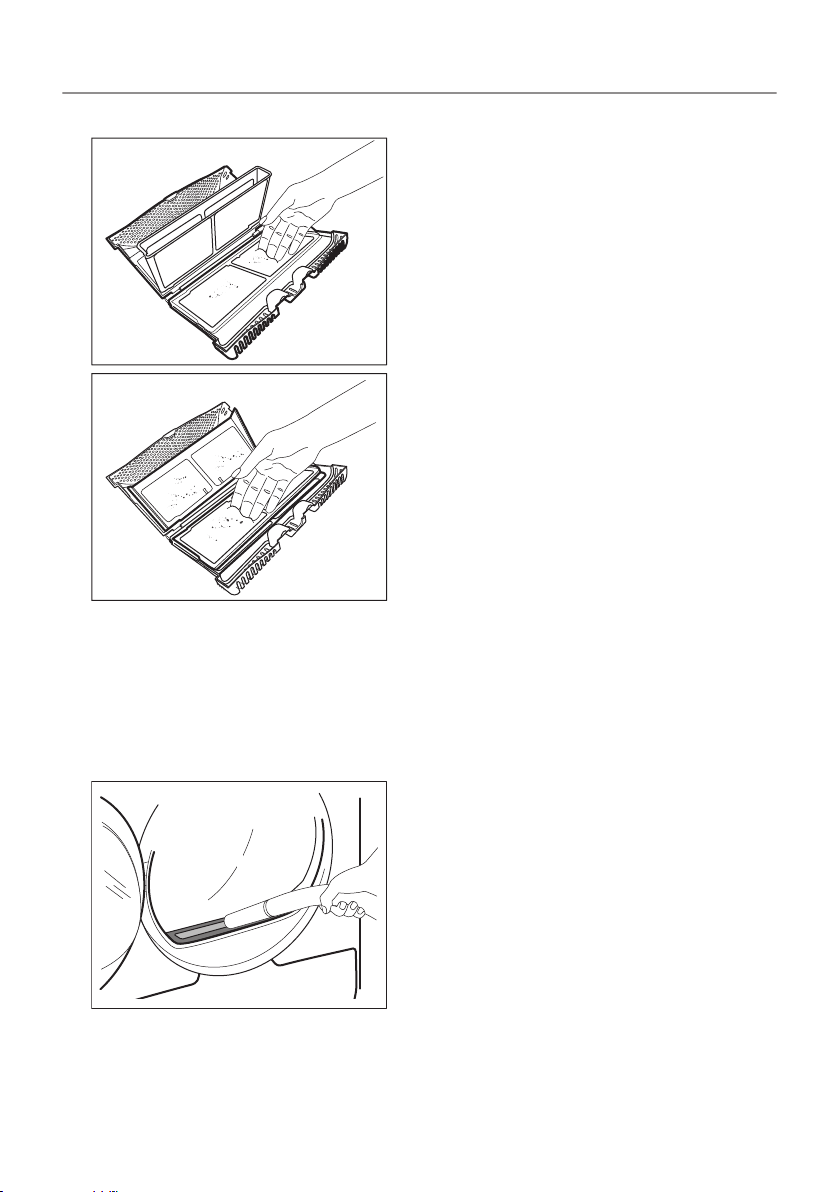
3. Gather lint with hand from both internal parts of the filter.
Throw the lint in the dustbin.
4. If necessary, clean the filter with a vacuum cleaner. Close the
filter.
5. If necessary, remove lint from the filter socket and gasket. You
can use a vacuum cleaner. Place the filter back inside the filter
socket.
12.2 Emptying the water container
Empty the condensed water container after each drying cycle.
41/64
CARE AND CLEANING
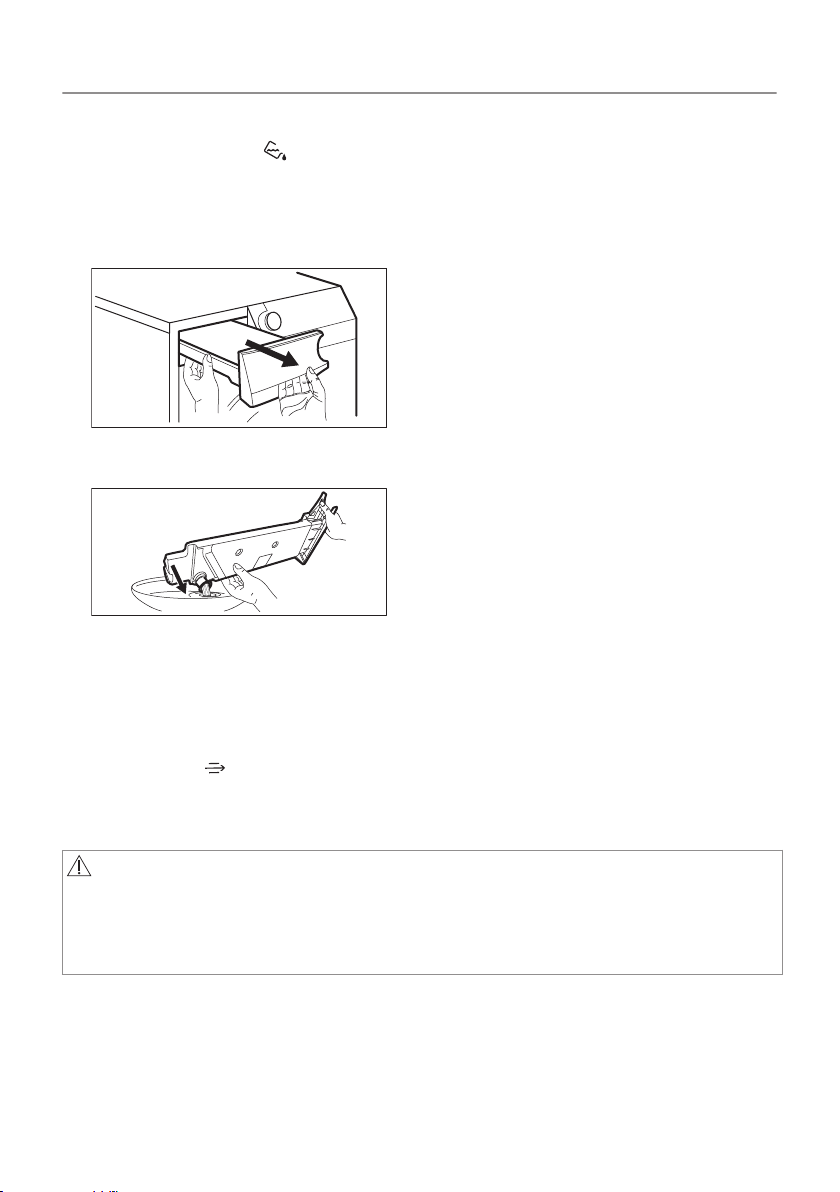
If the condensed water container is full, the program stops
automatically. The
Tank
symbol comes on the display and you
must empty the water container.
To empty the water container:
1. Pull the water container out keeping it in a horizontal position.
2. Pull the plastic connection out and drain the water into a basin or
equivalent receptacle.
3. Push the plastic connection back in and place the water
container back into position.
4. To continue the program press the Start/Pause button.
12.3 Cleaning the condenser
If the symbol
Condenser
flashes on the display, inspect the
condenser and its compartment. If it is dirty, clean it. Do the check
not less than once a 6 months.
WARNING!
Do not touch the metal surface with bare hands. Risk of injury.
Wear protective gloves. Clean carefully to avoid damaging the
metal surface.
To inspect:
42/64
CARE AND CLEANING
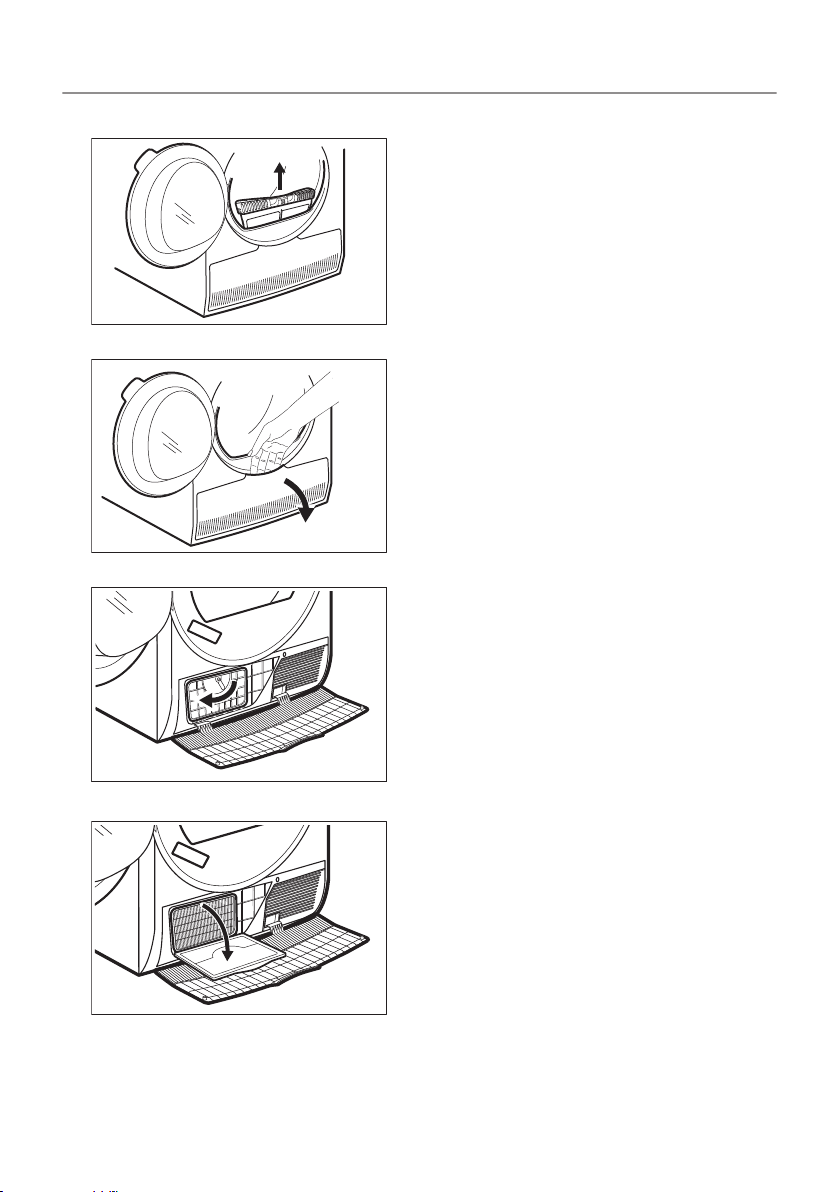
1. Open the door. Pull the filter up.
2. Open the condenser cover.
3. Turn the lever to unlock the condenser lid.
4. Lower the condenser lid.
43/64
CARE AND CLEANING
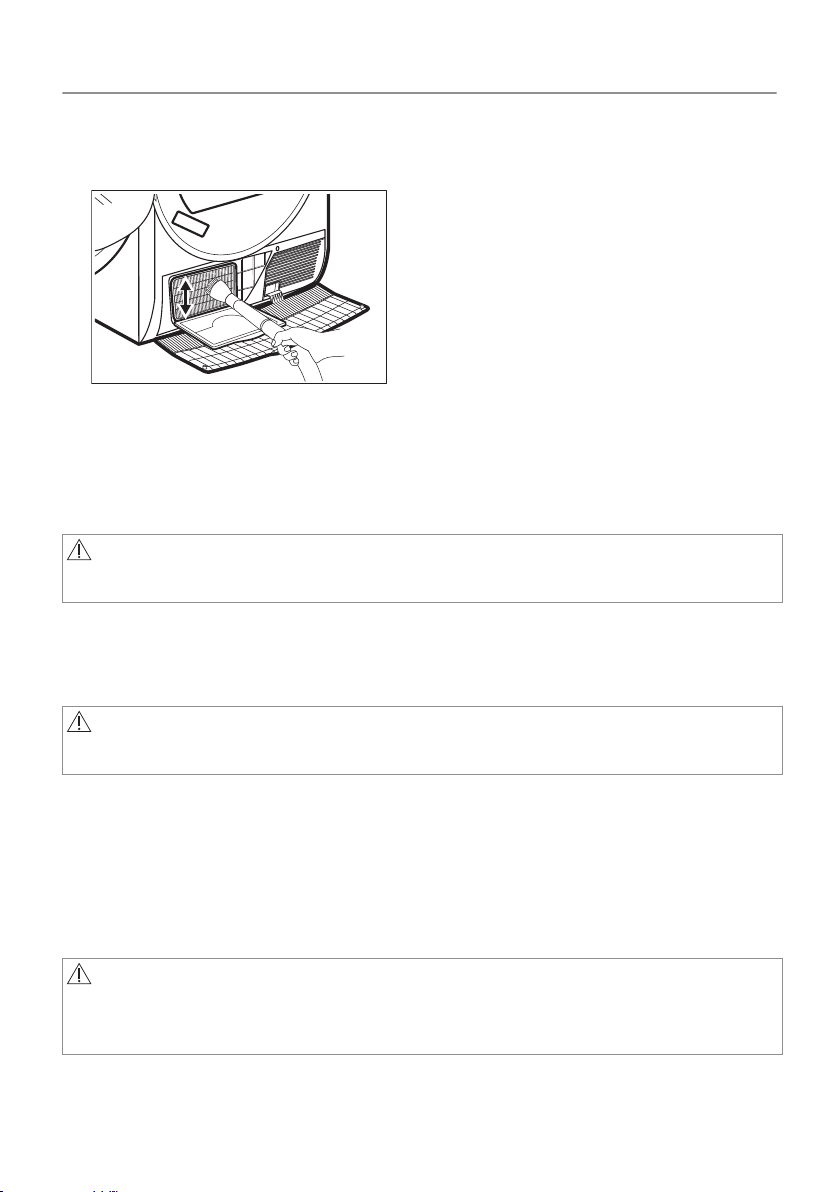
5. If necessary, remove the fluff from the condenser and its
compartment. You can use a wet cloth and/or a vacuum cleaner
with a brush attachment.
6. Close the condenser lid.
7. Turn the lever until it clicks into position.
8. Put the filter back.
12.4 Cleaning the drum
WARNING!
Disconnect the appliance before you clean it.
Use a standard neutral soap detergent to clean the inner surface of
the drum and drum lifters. Dry the cleaned surfaces with a soft
cloth.
CAUTION!
Do not use abrasive materials or steel wool to clean the drum.
12.5 Cleaning the control panel and housing
Use a standard neutral soap detergent to clean the control panel
and housing.
Use a moist cloth to clean. Dry the cleaned surfaces with a soft
cloth.
CAUTION!
Do not use furniture cleaning agents or cleaning agents which
can cause corrosion.
44/64
CARE AND CLEANING

12.6 Cleaning the airflow slots
Use a vacuum cleaner to remove fluff from the airflow slots.
45/64
CARE AND CLEANING
13. TROUBLESHOOTING
WARNING!
Refer to Safety chapters.
13.1 Error Codes
The appliance does not start or it stops during operation.
First try to find a solution to the problem (refer to the table). If the
problem persists, contact the Authorised Service Centre.
WARNING!
Deactivate the appliance before carrying out any check.
In case of major problems, the acoustic signals operate, the
display shows an alarm code and the Start/Pause button may
flash continuously:
Possible
cause
Possible cause Remedy
E5A
Appliance Motor over‐
loaded.
Too much laundry or en‐
trap in the drum.
The program was not
completed. Remove the
laundry from the drum,
set the program and
restart the cycle.
E97
Internal fail. No commu‐
nication between elec‐
tronic elements of the
appliance.
The program was not
finished properly or the
appliance stoped too
early. Switch the appli‐
ance off and on again. If
the alarm code ap‐pears
again, contact the
Authorised Service Cen‐
tre.
46/64
Possible
cause
Possible cause Remedy
EH0
The mains supply is un‐
stable.
When the appliance is
showing EH0, please
wait until main supply is
stable than press start. If
the appliance pause the
cycle without any indica‐
tion then press the cycle
start. If the warning will
occur check the power
cord / socket integrity or
main supply.
If the display shows other alarm codes, deactivate and activate the
appliance. If the problem continues, contact the Authorised Service
Centre.
In case of different problem with the Tumble dryer check the table
below for possible solutions.
47/64
TROUBLESHOOTING
13.2 Troubleshooting
Problem Possible cause Remedy
The tumble
dryer does
not oper‐
ate.
The tumble dryer is not
connected to the mains
supply.
Connect it to the mains
socket. Check the fuse
in the fuse box (domes‐
tic installation).
The door is open. Close the door.
The On/Off button was
not pushed.
Push the On/Off button.
The Start/Pause button
was not touched.
Touch the Start/Pause
button.
The appliance is in
standby mode.
Push the On/Off button.
48/64
TROUBLESHOOTING
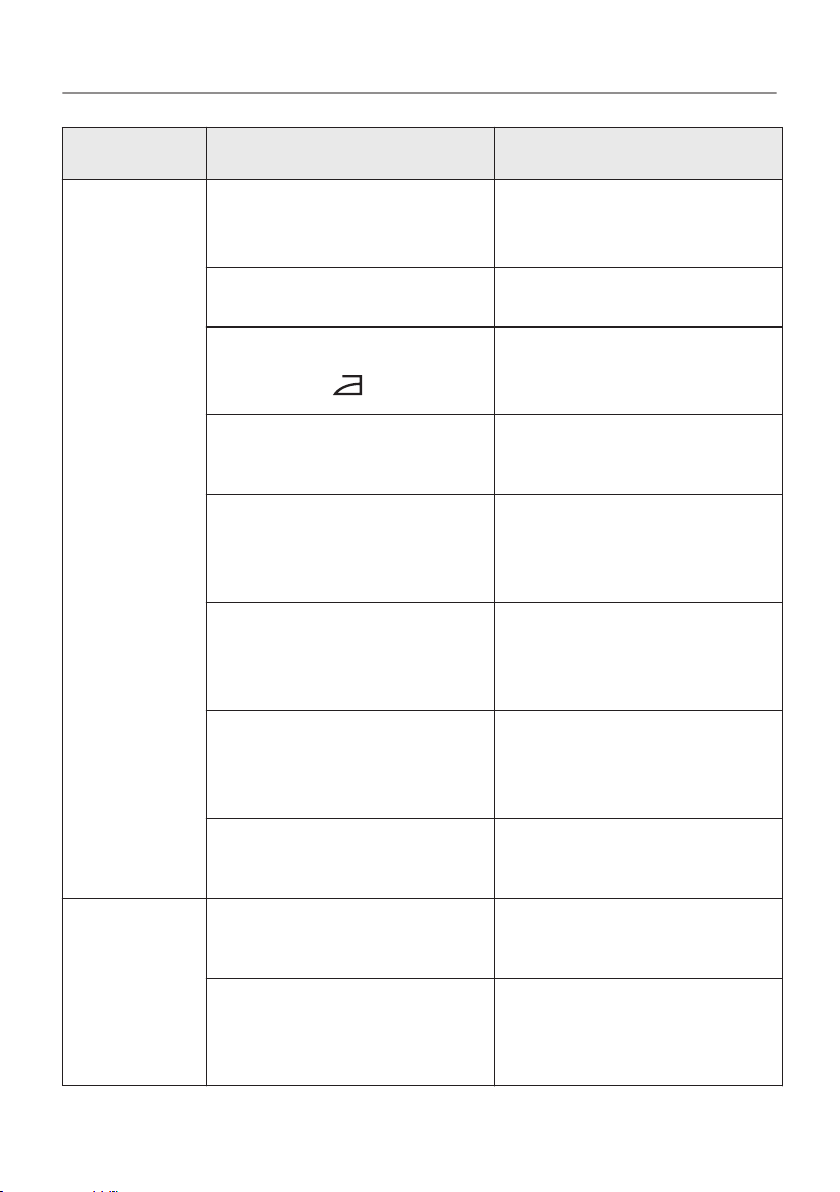
Problem Possible cause Remedy
Unsatisfac‐
tory drying
result.
Incorrect program se‐
lection.
Select a suitable
program.
1)
The filter is clogged.
Clean the filter.
2)
Dryness Level option
was set to
iron dry
.
3)
Change Dryness Level
option to a higher level.
The load was too large. Do not exceed the maxi‐
mum load size.
The airflow slots are
clogged.
Clean the airflow slots at
the bottom of the appli‐
ance.
There is some dirt on
the humidity sensor in
the drum.
Clean the front surface
of the drum.
The dryness level was
not set to the desired
level.
Adjust the dryness lev‐
el.
4)
The condenser is clog‐
ged.
Clean the condenser.
2)
The load‐
ing door
does not
close
The filter is not locked
into position.
Put the filter in the cor‐
rect position.
Laundry is trapped be‐
tween the door and the
seal.
Remove trapped items
and close the door.
49/64
TROUBLESHOOTING
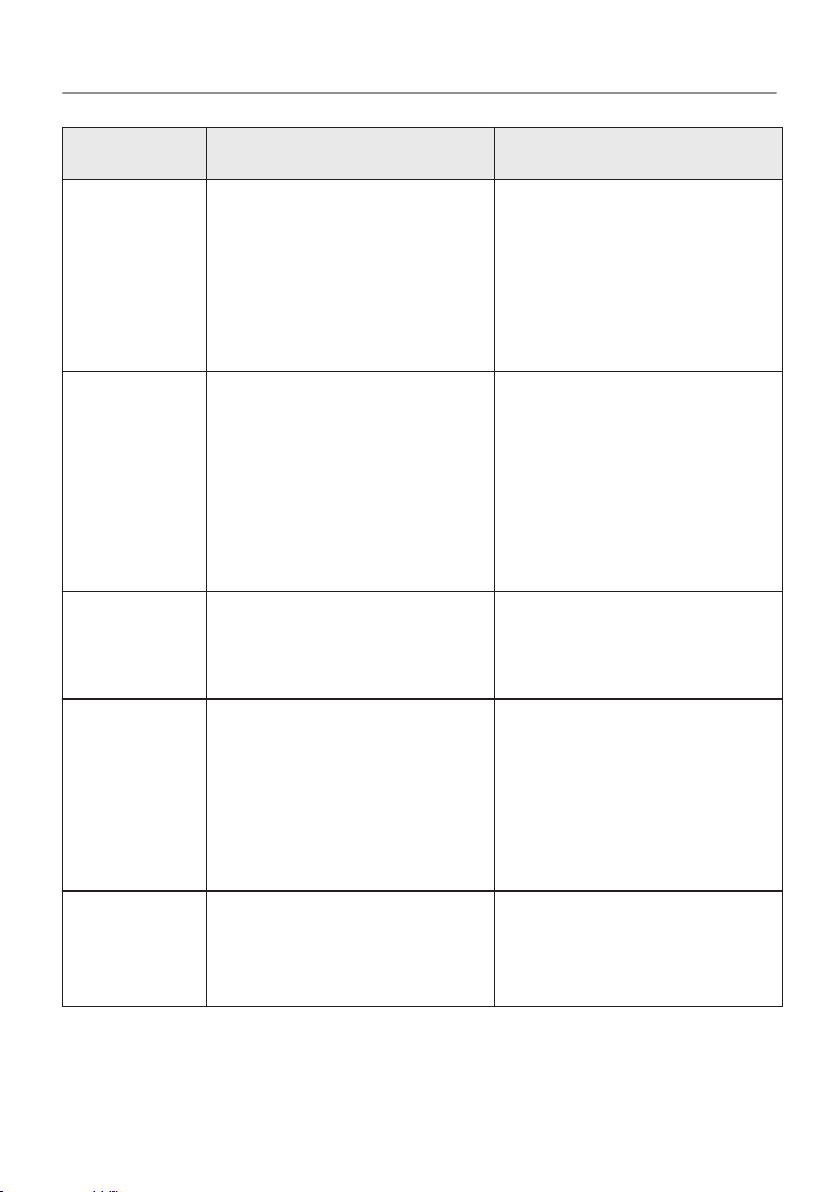
Problem Possible cause Remedy
It is not
possible to
change the
pro‐
gram or
option.
After a cycle starts it is
not possible to change
the program or option.
Turn the tumble dryer off
and on. Change the pro‐
gram or option as re‐
quired.
It is not
possible to
select an
option. An
acoustic
signal is
emitted.
The option you tried to
select is not available for
the selected program.
Turn the tumble dryer off
and on. Change the pro‐
gram or option as re‐
quired.
There is no
drum light
Defective drum lamp. Contact the service cen‐
tre to replace the drum
lamp.
Unexpec‐
ted dura‐
tion time
appears on
the dis‐
play.
The drying duration is
calculated according to
load size and damp‐
ness.
This is automated - the
appliance is working cor‐
rectly.
A pro‐
gram is
inactive.
The water container is
full.
Drain the water contain‐
er, push the Start/Pause
button.
2)
50/64
TROUBLESHOOTING
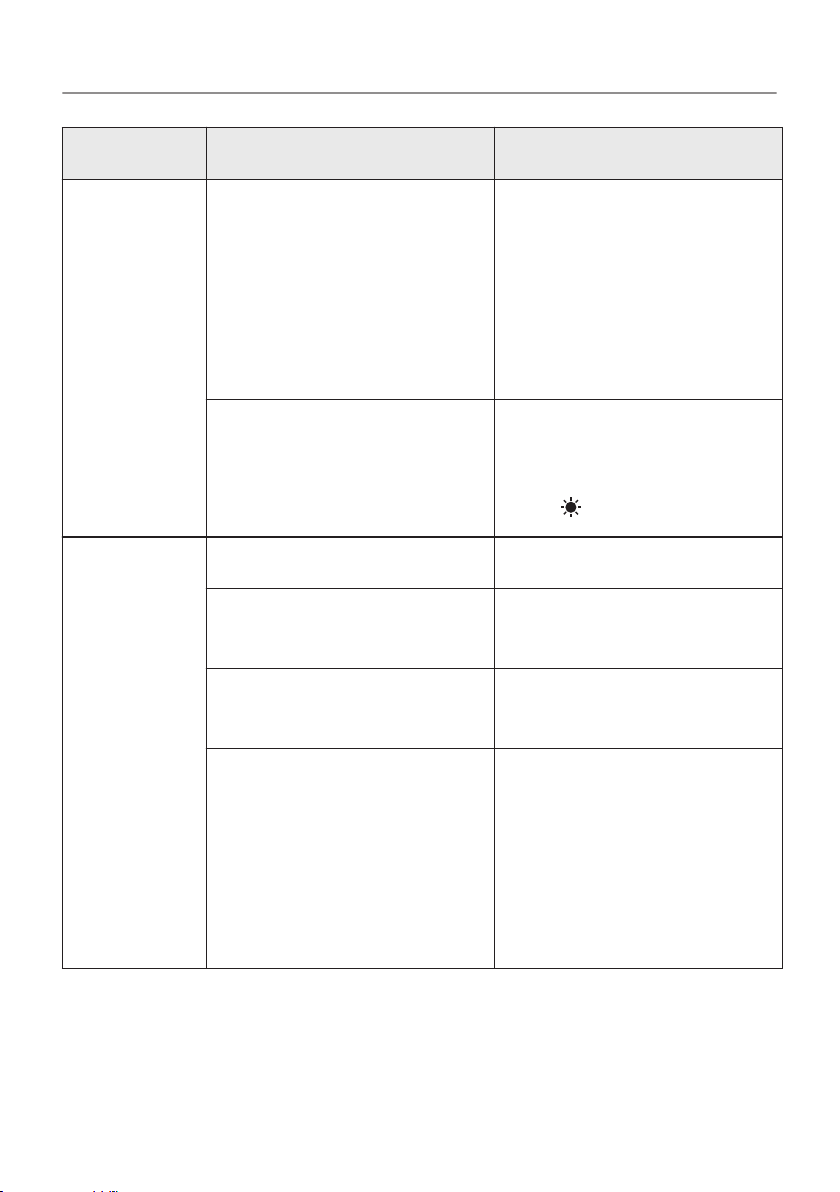
Problem Possible cause Remedy
The drying
cycle is too
short.
The load size is small. Select a time program.
The time value must be
related to the load. To
dry one item or a small
amount of laun‐dry we
recommend short drying
times.
The laundry is too dry. Select an appropriate
time
program or a
higher dryness level
(e.g.
extra dry
)
Drying cy‐
cle too
long
5)
The filter is clogged. Clean the filter.
The load is too large. Do not exceed the maxi‐
mum load size.
The laundry was not
spun sufficiently.
Spin the laundry well in
the washing machine.
Too low or too high
room temperature - this
is not the appliance mal‐
function.
Ensure a room tempera‐
ture higher than +5°C
and lower than +35°C.
Optimal room tempera‐
ture to achieve best dry‐
ing results is between
18°-25°C.
51/64
TROUBLESHOOTING
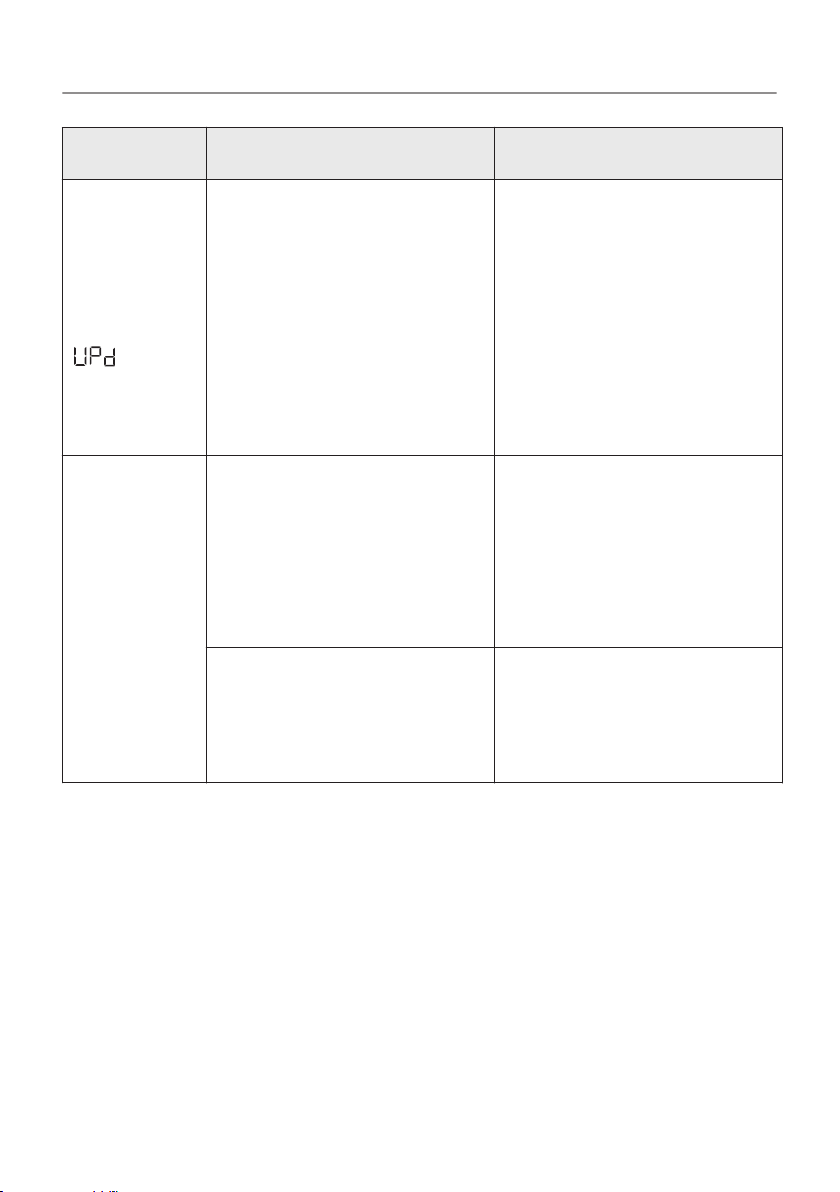
Problem Possible cause Remedy
The dis‐
play
shows:
.
All buttons are inactive,
except the Start/Pause.
The appliance down‐
loads the APP updates.
Wait until the update
process is complete. If
you deactivate the appli‐
ance during update, it
resumes when you acti‐
vate the appliance
again.
No wire‐
less con‐
nection or
connection
often
brakes off.
The wireless home net‐
work does not work.
Check wireless home
network configuration.
Restart the router. If
problem still exists con‐
tact your wireless serv‐
ice provider.
The smart device or the
appliance or both are
not paired with the wire‐
less network.
Repeat connection con‐
figuration steps on smart
device or the appliance
or both.
52/64
TROUBLESHOOTING
Problem Possible cause Remedy
The con‐
nection
with the
appliance
through
the AEG
Home ap‐
plication
does not
work fre‐
quently.
Poor or missing connec‐
tion between the tumble
dryer and router.
Assure proper connec‐
tion between the appli‐
ance and the home rout‐
er. Move the router clos‐
er to the appliance.
Equip your home net‐
work with wireless range
extender.
Do not use at the same
time microwave oven
and remote control. The
microwave oven can dis‐
rupt the connection sig‐
nal.
1) Follow the program description — see the PROGRAMS chapter .
2) See the
CARE AND CLEANING
chapter.
3) Only dryers with the Dryness Level option.
4) See the HINTS AND TIPS chapter .
5) Note: After a maximum of 5 hours the drying cycle ends automatically.
13.3 Possible causes of unsatisfactory drying results:
• The filter is clogged. Clogged filter makes drying inefficient.
• The airflow slots are clogged.
•
The drum is dirty.
• Inadequate default dryness level settings. See chapter
Adjustment of default dryness level
• Room temperature is too low or too high. Optimal room
temperature is between 18°-25°C.
53/64
TROUBLESHOOTING
14. TECHNICAL DATA
Height x Width x Depth 850 x 596 x 638 mm (maximum
663 mm)
Max. depth with the appliance
door open
1108 mm
Max. width with the appliance
door open
958 mm
Adjustable height 850 mm (+ 15 mm - feet regu‐
lation)
Drum volume 118 l
Maximum load volume 8,0 kg
Voltage 230-240 V
Frequency 50 Hz
Total power 700 W
Type of use Household
Permitted ambient temperature + 5°C to + 35°C
Level of protection against in‐
gress of solid particles and
moisture ensured by the pro‐
tective cover, except where the
low voltage equipment has no
protection against moisture
IPX4
This product contains fluorinated greenhouse gases, hermetically
sealed
54/64

Gas designation R134a
Weight 0,30 kg
Global-warming potential
(GWP)
1430
55/64
TECHNICAL DATA
15. ACCESSORIES
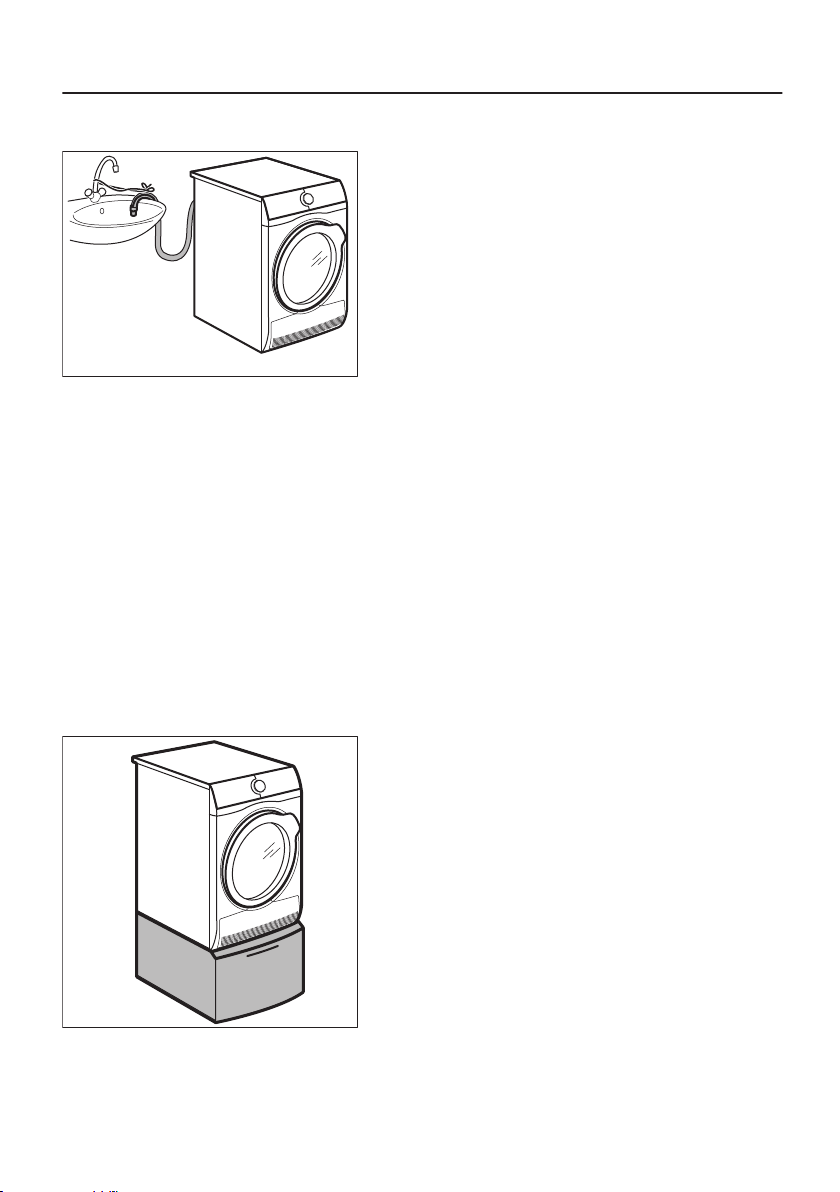
15.1 Draining kit
Accessory name: DK11.
Included with your AEG appliance.
For thorough draining of the condensed water into a basin, siphon,
gully, etc. After installation, the water container is drained
automatically. The water container must stay in the appliance.
The installed hose must be minimum 50 cm to maximum 100 cm
from floor level. The hose cannot be in a loop. Decrease the length
of the hose if necessary.
Read carefully the instructions supplied with the accessory.
15.2 Pedestal with drawer
Accessory name: PDST60.
Available from your authorised vendor.
56/64

For increasing the height of the appliance in order to ease loading
and unloading of laundry.
The drawer can be used for laundry storage e.g. towels, cleaning
products etc.
Read carefully the instructions supplied with the accessory.
57/64
ACCESSORIES

16. WARRANTY
FOR SALES IN AUSTRALIA AND NEW ZEALAND
ALL AEG BRANDED APPLIANCES
This document sets out the terms and conditions of the
product warranties for AEG Appliances. It is an important
document. Please keep it with your proof of purchase
documents in a safe place for future reference should there be
a manufacturing defect in your Appliance. This warranty is in
addition to other rights you may have under the Australian
Consumer Law.
1.
In this warranty:
a) ‘ACL’ or ‘Australian Consumer Law’ means Schedule 2 to the
Competition and Consumer Act 2010;
b) ‘Appliance’ means any Electrolux product purchased by you
and accompanied by this document;
c) ‘ASC’ means Electrolux’s authorised serviced centres;
d) ‘AEG’ is the brand controlled by Electrolux Home Products
Pty Ltd of 163 O’Riordan Street, Mascot NSW 2020, ABN 51
004 762 341 in respect of Appliances purchased in Australia
and Electrolux (NZ) Limited (collectively “Electrolux”) of 3-5
Niall Burgess Road, Mount Wellington, in respect of
Appliances purchased in New Zealand;
e) ‘Warranty Period’ means the period specified in clause 3 of
this warranty;
f) ‘you’ means the purchaser of the Appliance not having
purchased the Appliance for re-sale, and ‘your’ has a
corresponding meaning.
2. Application: This warranty only applies to new Appliances,
purchased and used in Australia or New Zealand and is in
addition to (and does not exclude, restrict, or modify in any way)
other rights and remedies under a law to which the Appliances or
services relate, including any non-excludable statutory
guarantees in Australia and New Zealand.
3. Warranty Period: Subject to these terms and conditions, this
warranty continues for in Australia for a period of 60 months and
in New Zealand for a period of 60 months, following the date of
original purchase of the Appliance.
4. Repair or replace warranty: During the Warranty Period,
Electrolux or its ASC will, at no extra charge if your Appliance is
58/64

readily accessible for service, without special equipment and
subject to these terms and conditions, repair or replace any parts
which it considers to be defective. Electrolux may, in its absolute
discretion, choose whether the remedy offered for a valid
warranty claim is repair or replacement. Electrolux or its ASC
may use refurbished parts to repair your Appliance. You agree
that any replaced Appliances or parts become the property of
Electrolux.
5. Travel and transportation costs: Subject to clause 7,
Electrolux will bear the reasonable cost of transportation, travel
and delivery of the Appliance to and from Electrolux or its ASC.
Travel and transportation will be arranged by Electrolux as part
of any valid warranty claim.
6. Proof of purchase is required before you can make a claim
under this warranty.
7. Exclusions: You may not make a claim under this warranty
unless the defect claimed is due to faulty or defective parts or
workmanship. This warranty does not cover:
a) light globes, batteries, filters or similar perishable parts;
b) parts and Appliances not supplied by Electrolux;
c) cosmetic damage which does not affect the operation of the
Appliance;
d) damage to the Appliance caused by:
– negligence or accident;
– misuse or abuse, including failure to properly maintain or
service;
– improper, negligent or faulty servicing or repair works done
by anyone other than an Electrolux authorised repairer or
ASC;
– normal wear and tear;
– power surges, electrical storm damage or incorrect power
supply;
– incomplete or improper installation;
– incorrect, improper or inappropriate operation;
– insect or vermin infestation;
– failure to comply with any additional instructions supplied
with the Appliance;
59/64

In addition, Electrolux is not liable under this warranty if:
– the Appliance has been, or Electrolux reasonably believes
that the Appliance has been, used for purposes other than
those for which the Appliance was intended, including
where the Appliance has been used for any non-domestic
purpose;
– the Appliance is modified without authority from Electrolux
in writing;
– the Appliance’s serial number or warranty seal has been
removed or defaced.
8. How to claim under this warranty: To enquire about claiming
under this warranty, please follow these steps:
a. carefully check the operating instructions, user manual and
the terms of this warranty;
b. have the model and serial number of the Appliance available;
c. have the proof of purchase (e.g. an invoice) available;
d. telephone the numbers shown below.
9. Australia: For Appliances and services provided by Electrolux in
Australia: Electrolux goods come with guarantees that cannot be
excluded under the Australian Consumer Law. You are entitled
to a replacement or refund for a major failure and for
compensation for any other reasonably foreseeable loss or
damage. You are also entitled to have the Appliance repaired or
replaced if the Appliance fails to be of acceptable quality and the
failure does not amount to a major failure. ‘Acceptable quality’
and ‘major failure’ have the same meaning as referred to in the
ACL.
10.New Zealand: For Appliances and services provided by
Electrolux in New Zealand, the Appliances come with a
guarantee by Electrolux pursuant to the provisions of the
Consumer Guarantees Act, the Sale of Goods Act and the Fair
Trading Act. Where the Appliance was purchased in New
Zealand for commercial purposes the Consumer Guarantee Act
does not apply.
11.Confidentiality: You accept that if you make a warranty claim,
Electrolux and its agents including ASC may exchange
information in relation to you to enable Electrolux to meet its
obligations under this warranty.
60/64
Important Notice
Before calling for service, please ensure that the steps listed in
clause 8 above have been followed.
SERVICE AUSTRALIA
aeg.com/au
FOR SERVICE
or to find the address of your
nearest authorised service cen‐
tre in Australia
PLEASE CALL 1300 363 664
OR EMAIL
customercare@aegaustra‐
lia.com.au
For the cost of a local call (Australia only)
FOR SPARE PARTS
or to find the address of your
nearest spare parts centre in
Australia
PLEASE CALL 13 13 50
OR EMAIL
customercare@aegaustra‐
lia.com.au
For the cost of a local call (Australia only)
SERVICE NEW ZEALAND
aegnewzealand.co.nz
FOR SERVICE
or to find the address of your
nearest authorised service cen‐
tre in New Zealand
PLEASE CALL 0800 234 234
OR EMAIL
customercare@electro‐
lux.co.nz
(New Zealand only)
FOR SPARE PARTS
or to find the address of your
nearest spare parts centre in
New Zealand
PLEASE CALL 0800 10 66 20
OR EMAIL
customercare@electro‐
lux.co.nz
(New Zealand only)
AEG_Warr_May_17
17. ENVIRONMENTAL CONCERNS
Recycle materials with the symbol . Put the packaging in relevant
containers to recycle it. Help protect the environment and human
61/64

health by recycling waste of electrical and electronic appliances. Do
not dispose of appliances marked with the symbol with the
household waste. Return the product to your local recycling facility
or contact your municipal office.
62/64
*

63/64
AEG Home app
The software in this product is partly based on free and open source software.
To access the source code of these free and open source software and to see the full
copyright information and applicable license terms, please visit:
http://aeg.opensoftwarerepository.com.
www.aeg.com/au
136970490-A-492020