1
Questions or Concerns?
Please contact us Mon–Fri, 9:00 am–5:00 pm PST/PDT
at [email protected] or at (888) 726-8520.
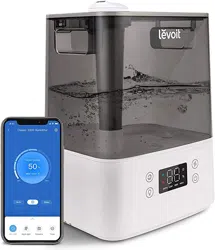
Hybrid Ultrasonic Humidifier
Model No.: LV600HH
READ AND SAVE THESE INSTRUCTIONS
EN ES FR

TABLE OF CONTENTS TABLE OF CONTENTS
SPECIFICATIONS SPECIFICATIONS
Specifications
Package Contents
Safety Information
Operation
LED Display
Button Controls
Getting Started
Using Your Humidifier
Using the Aroma Box
Preventing Water Leak
Keeping Things Clean
• General Cleaning
• Cleaning the Aroma Pad
• Replacing the Remote Control Battery
• Disinfecting the Humidifier
Troubleshooting
Warranty Information
Customer Support
Specifications
Package Contents
Safety Information
Operation
LED Display
Button Controls
Getting Started
Using Your Humidifier
Using the Aroma Box
Preventing Water Leak
Keeping Things Clean
• General Cleaning
• Cleaning the Aroma Pad
• Replacing the Remote Control Battery
• Disinfecting the Humidifier
Troubleshooting
Warranty Information
Customer Support
2
3
5
6
7
8
9
10
11
12
13
13
14
14
14
15
17
17
Power Supply AC 120V, 60Hz
Rated Power 280W
Eective Range 430–753 ft ² (40–70 m²)
Water Tank Capacity 1.5 gal (5.6 L)
Max Cool Mist Output 300 mL/h
Max Warm Mist Output 500 mL/h
Power Supply AC 120V, 60Hz
Rated Power 280W
Eective Range 430–753 ft ² (40–70 m²)
Water Tank Capacity 1.5 gal (5.6 L)
Max Cool Mist Output 300 mL/h
Max Warm Mist Output 500 mL/h
EN ES

3
TABLE OF CONTENTS
PACKAGE CONTENTS
PACKAGE CONTENTS
PACKAGE CONTENTS
SPECIFICATIONS
Specifications
Package Contents
Safety Information
Operation
LED Display
Button Controls
Getting Started
Using Your Humidifier
Using the Aroma Box
Preventing Water Leak
Keeping Things Clean
• General Cleaning
• Cleaning the Aroma Pad
• Replacing the Remote Control Battery
• Disinfecting the Humidifier
Troubleshooting
Warranty Information
Customer Support
Power Supply AC 120V, 60Hz
Rated Power 280W
Eective Range 430–753 ft ² (40–70 m²)
Water Tank Capacity 1.5 gal (5.6 L)
Max Cool Mist Output 300 mL/h
Max Warm Mist Output 500 mL/h
1 x Hybrid Ultrasonic Humidifier
1 x Remote Control
1 x 3V CR2025 Battery (Pre-Installed)
2 x Aroma Pads (1 Pre-Installed)
2 x Absorption Pads (1 Pre-Installed)
1 x Cleaning Brush
1 x User Manual
1 x Hybrid Ultrasonic Humidifier
1 x Remote Control
1 x 3V CR2025 Battery (Pre-Installed)
2 x Aroma Pads (1 Pre-Installed)
2 x Absorption Pads (1 Pre-Installed)
1 x Cleaning Brush
1 x User Manual
1 x Hybrid Ultrasonic Humidifier
1 x Remote Control
1 x 3V CR2025 Battery (Pre-Installed)
2 x Aroma Pads (1 Pre-Installed)
2 x Absorption Pads (1 Pre-Installed)
1 x Cleaning Brush
1 x User Manual
FR EN
ES
FR

4
EN
THANK YOU FOR PURCHASING THE
LV600HH HYBRID ULTRASONIC
HUMIDIFIER BY LEVOIT.
If you have any questions or concerns, please reach out to us at
[email protected]. We hope you enjoy your new air purifier!
SHARE THE LEVOIT LOVE
Find @LevoitLifestyle on social media for wellness +
style inspiration. We make every space mindful and chic.
@LevoitLifestyle
#LevoitLove • #LevoitLifestyle
EN
Hybrid Ultrasonic Humidifier
Model No.: LV600HH

5
EN
SAFETY INFORMATION
• Only use this humidifier as described in this manual.
• Place the humidifier and cord so that the humidifier will
not be knocked over.
• When not in use, turn the machine o and disconnect
from power source by removing the plug from the
outlet.
• Do not overfill the water tank, as this may cause electric
shock.
• Do not use this humidifier in wet environments.
• Keep the humidifier out of reach from children.
• Do not open the base or remove the water level sensor
for self-servicing.
• Always unplug your humidifier from the power outlet
before cleaning your humidifier or detaching the water
tank from the humidifier base.
• Always make sure to place the humidifier on a flat, level
surface before operation.
• Only fill the water tank with clean water. Never fill the
water tank with any other liquids.
• Do not place the humidifier near sources of heat, such
as stove tops, ovens, or radiators.
• Do not place the humidifier directly on floors, carpets,
or rugs.
• Do not use attachments that are not recommended
by the manufacturer as replacement parts for this
humidifier.
• Do not cover the nozzle while the humidifier is on.
Doing so may damage the humidifier.
• Ensure that the plug fits properly into a polarized socket.
• Do not handle the power cord or plug with wet hands.
Keep the plug and power cord away from liquids.
• Your humidifier has a polarized plug (one prong is wider
than the other), which fits into a polarized outlet only
one way. This is a safety feature to reduce the risk of
electric shock. If the plug does not fit, reverse the plug.
If it still does not fit, do not use the plug in that outlet.
Do not bypass this safety feature.
To reduce the risk of fire, electric shock, or other injury, follow all instructions and safety guidelines.
General Safety
Plug and Cord
READ AND
SAVE THESE
INSTRUCTIONS
• Remove the water tank from the base before moving
the humidifier.
• Do not immerse the humidifier base, power cord, or
plug in water.
• Do not add essential oils, supplemental water treatment
liquids, or additional water filters into the water tank.
• If the humidifier is damaged or is not functioning
properly, stop using it and contact Customer Support
immediately (see page 17).
Not for commercial use. Household use only.
6
EN
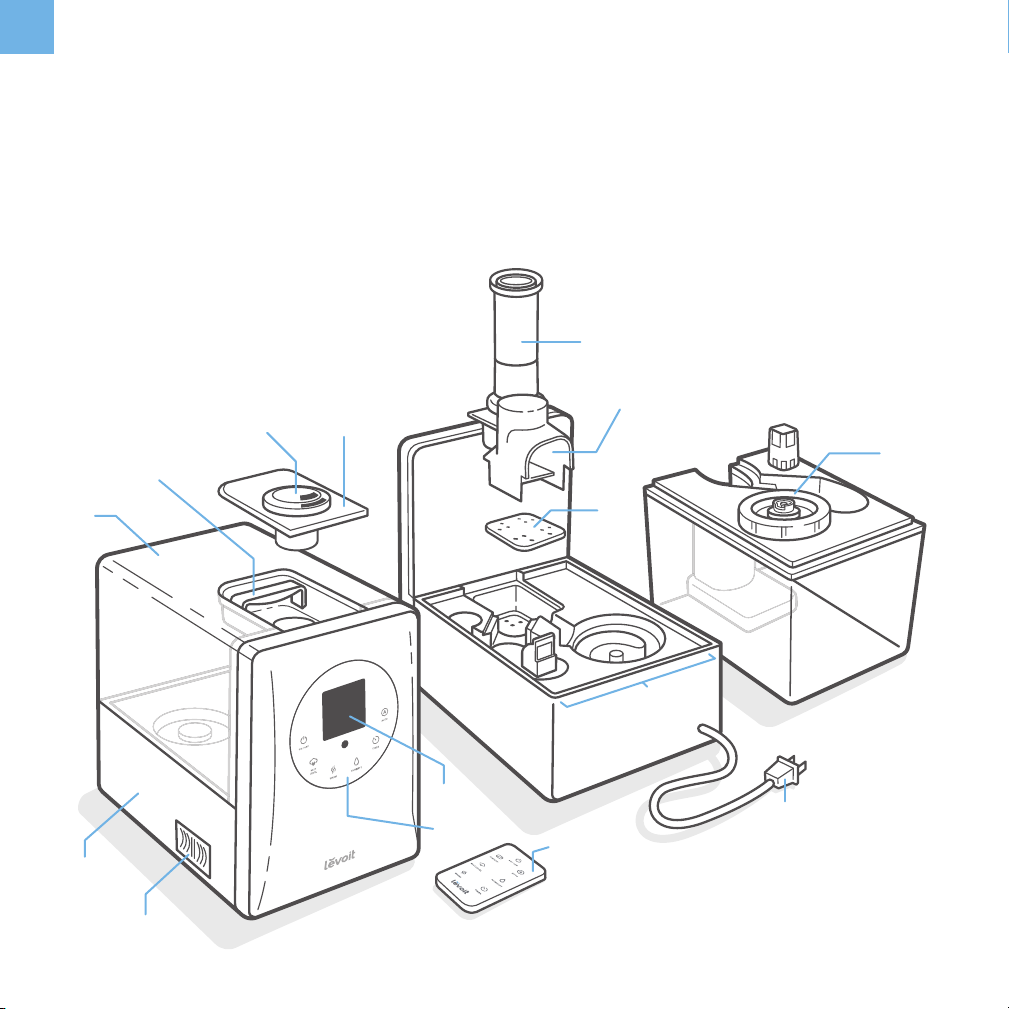
GETTING TO KNOW YOUR HUMIDIFIER
A. Nozzle Cap
B. Nozzles
C. Handle
D. Water Tank
E. Base
F. Aroma Box
G. LED Display
H. Control Panel
A
K
J
L
M
N
I
H
O
B
C
D
D
E
F
G
I. Remote Control
J. Mist Tube
K. Mist Channel
L. Absorption Pad
M. Inner Chamber
N. Power Cord
O. Water Tank Cap
Underside of
water tank
Back
Front

7
EN
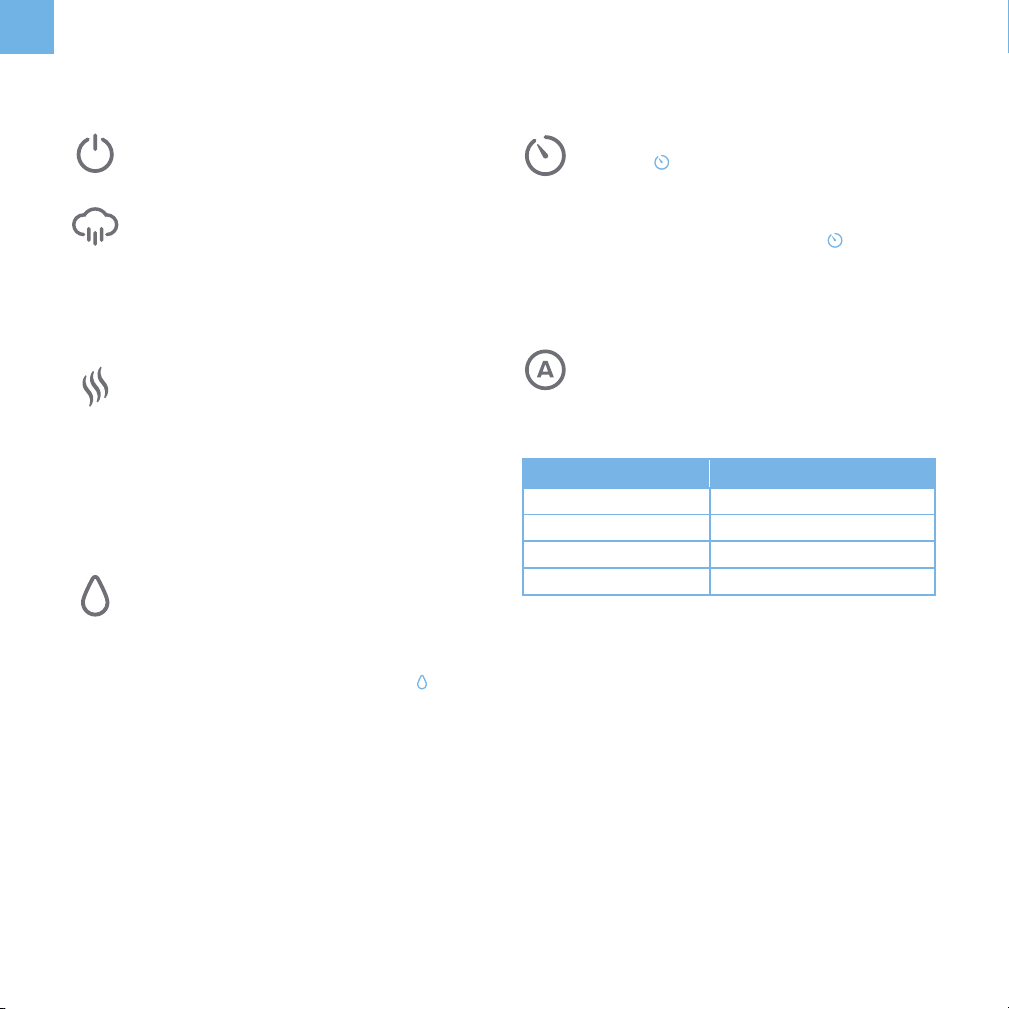
LED DISPLAY
A. High Temperature Warning
B. Set Humidity Function
C. Relative Humidity (RH) Level
D. Mist Level
E. Timer
F. Warm Mist Setting
G. Auto Mode Indicator
H. Low Water Indicator
A
B
C
D
E
F G H
8
EN
BUTTON CONTROLS
Power Button
• Tap to turn your humidifier on or o.
Mist Level Button
• Tap repeatedly to change the mist level.
There are 3 mist level settings.
Humidity Level Button
• Tap repeatedly to change the Relative
Humidity (RH) percentage between 40% and
80%. The humidity level on the display will
flash 5 times to confirm your selection. To exit
the humidity function, tap and hold
for 3
seconds.
Warm Mist Button
• Tap repeatedly to change or turn on/o the
warm mist setting.
Auto Mode Button
• Tap to start Auto Mode. The humidifier will
produce mist as needed to maintain the
relative humidity (RH) at a comfortable level.
Timer Button
• Tap
repeatedly to choose a time.
• When you stop tapping, the display will flash
3 times and the timer will start.
• To exit the timer function, tap
repeatedly
or tap and hold until it shows “-- --”.
• The humidifier will automatically power o
once the timer is finished.
Note:
• When you first turn on the humidifier, the
default mist level is 2.
Note:
• Once the humidity percentage of the
environment reaches the set RH percentage,
it will automatically stop misting. It will start
misting again when the humidity drops to 5%
below the set level.
• After setting the RH percentage, the display
will alternate between showing the set RH
percentage and the current humidity level.
Note:
• Be careful when using the warm mist
function, as the mist may be hot.
• The warm mist function can be used while
Auto Mode is on.
Note:
• Changing the mist level while in Auto Mode
will cancel the Auto Mode function.
• The timer can be set while the humidifier is in
Auto Mode.
Relative Humidity Mist Level
< 60% RH 3
60%–63% RH 2
64%–67% RH 1
> 68% RH Humidifier automatically shuts o
9
EN
GETTING STARTED
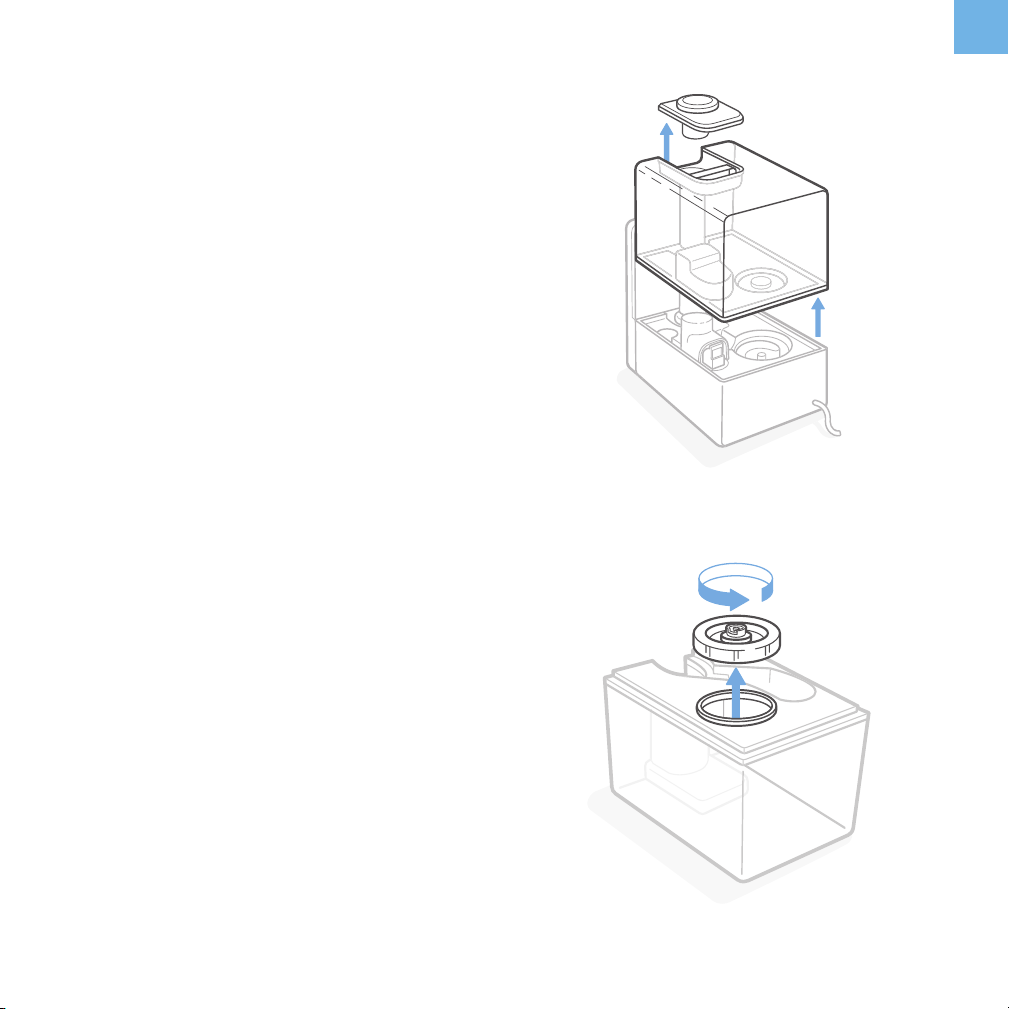
1. Remove the nozzle cap from the top of the water tank.
[Figure 1.1]
2. Lift the handle, then pull up on the handle to remove the
water tank from the base. [Figure 1.1]
3. Flip the tank over and twist the water tank cap
counterclockwise to remove it. [Figure 1.2]
4. Fill the tank with cold or room temperature water. The
maximum capacity is 1.5 gallons (5.6 L).
5. Replace the water tank cap. Twist the cap clockwise to
secure it tightly to the water tank.
6. Carefully place the water tank back onto the base,
aligning the water tank cap with the inner chamber.
Note:
• Fill the water tank with distilled water, at least half
full.
• Do not fill the water tank with hot water. Only use
cold or room temperature water.
• Do not add water through the nozzle, the mist tube,
or the inner chamber.
• Do not add essential oils through the nozzle, the
inner chamber, or into the water tank.
Note:
• Wipe o any excess water on the top and bottom of
the base before replacing the water tank.
Figure 1.1
Figure 1.2
7. Place the nozzle cap back on the top of the water tank.
10
EN
General Operation Turning O the Display
Automatic Shut O
Figure 2.1
OPERATION
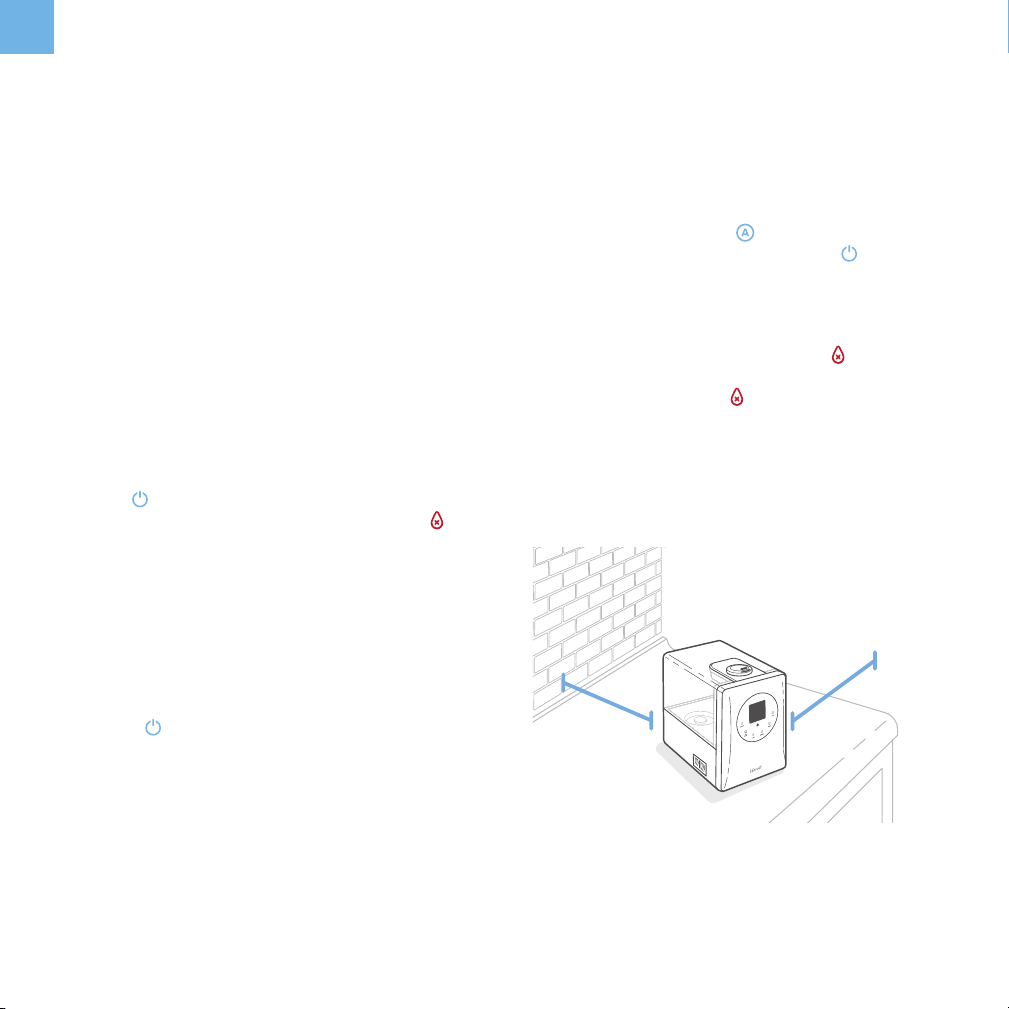
1. Place the humidifier on level, elevated surfaces, such
as tables or nightstands. Make sure the room is well-
ventilated.
While the humidifier is operating, the display will
automatically dim itself after 30 seconds. If you want to turn
o the display, press and hold for 3 seconds. To turn
the display back on, press any button, except .
The humidifier will automatically turn o and
will appear
when all of the water in the tank has been diused. The
display will continue showing until more water is added
to the water tank.
Note:
• Position the humidifier at least 12 inches (30 cm)
away from walls to prevent them from getting wet.
[Figure 2.1]
• Do not place the humidifier directly on floors,
carpets, or rugs.
• Turn the humidifier’s nozzle away from any furniture
to prevent your furniture from getting wet.
Note:
• Do not attempt to inhale the mist directly from the
nozzle.
Note:
• If the relative humidity in your room exceeds 68%,
use the low mist setting or turn o the humidifier.
• When you first turn on the humidifier, the default
mist level is 2.
• There are 2 nozzles on the nozzle cap that can
rotate 360° to diuse mist in any direction.
2. Plug in the humidifier. The humidifier will chime.
3. Tap
once to turn on the humidifier. The humidifier
will start misting. If there is no water in the tank, will
light up. Unplug the humidifier and refill the water tank.
(See Getting Started, page 9).
4. (Optional) Press the mist level controls to change the
mist level.
5. Press
to turn o the humidifier.
12 in
(30 cm)
12 in
(30 cm)
11
EN
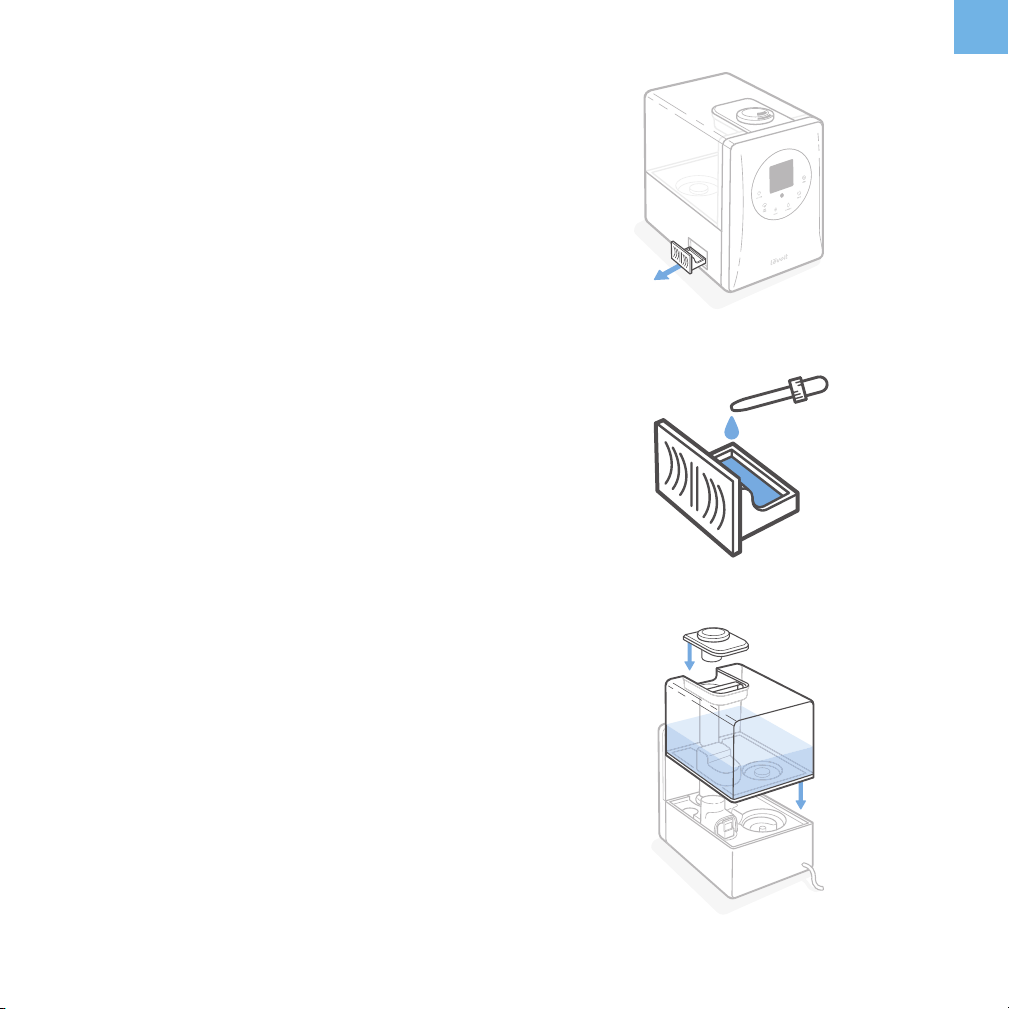
Figure 3.1
Figure 3.2
Figure 3.3
USING THE AROMA BOX
Note:
• You can also add medicated vaporizing steam
liquid to the aroma pad.
• The aroma pad can be cleaned and reused after
diusing essential oils (see Cleaning the Aroma
Pad, page 14).
1. Turn o and unplug the humidifier.
2. Locate the aroma box at the back of the base.
3. Pull out the aroma box. [Figure 3.1]
4. Put 2-3 drops of essential oil on the aroma pad.
[Figure 3.2]
5. Replace the aroma box. Fill the water tank with water
and place it back on the base (see Getting Started,
page 9). [Figure 3.3]
6. Plug in and turn on the humidifier.
Your humidifier can be used as an aroma diuser to provide
added comfort in your home.

12
EN
PREVENTING WATER LEAKS
• Make sure the silicone ring in the water tank cap is
secured at all times. [Figure 4.1]
• Twist and secure the cap tightly onto the water tank.
[Figure 4.2]
If not placed properly, the water tank on your humidifier
may leak.
Note: A small gap between the cap and the tank is
normal.
• Before moving the humidifier, remove the tank from
the base and empty any excess water from the inner
chamber.
• Wipe o any excess water on the top and bottom of the
base.
• Do not shake the humidifier or place it on an inclined
surface. Make sure to place the humidifier on a flat, level
surface. [Figure 4.3]
Figure 4.3
Figure 4.1
Figure 4.2
13
EN
KEEPING THINGS CLEAN
CAUTION: General Cleaning
• Always make sure the humidifier is unplugged when
cleaning.
• The water in the inner chamber near the transducer
may still be warm after turning o the humidifier. Allow
the humidifier to cool before cleaning. Use caution
when pouring out the water.
• Do not use liquid detergents.
• Use distilled water instead of tap water to prevent hard
water buildup in your humidifier.
• Do not submerge base in water.
• Clean your humidifier at least once a month.
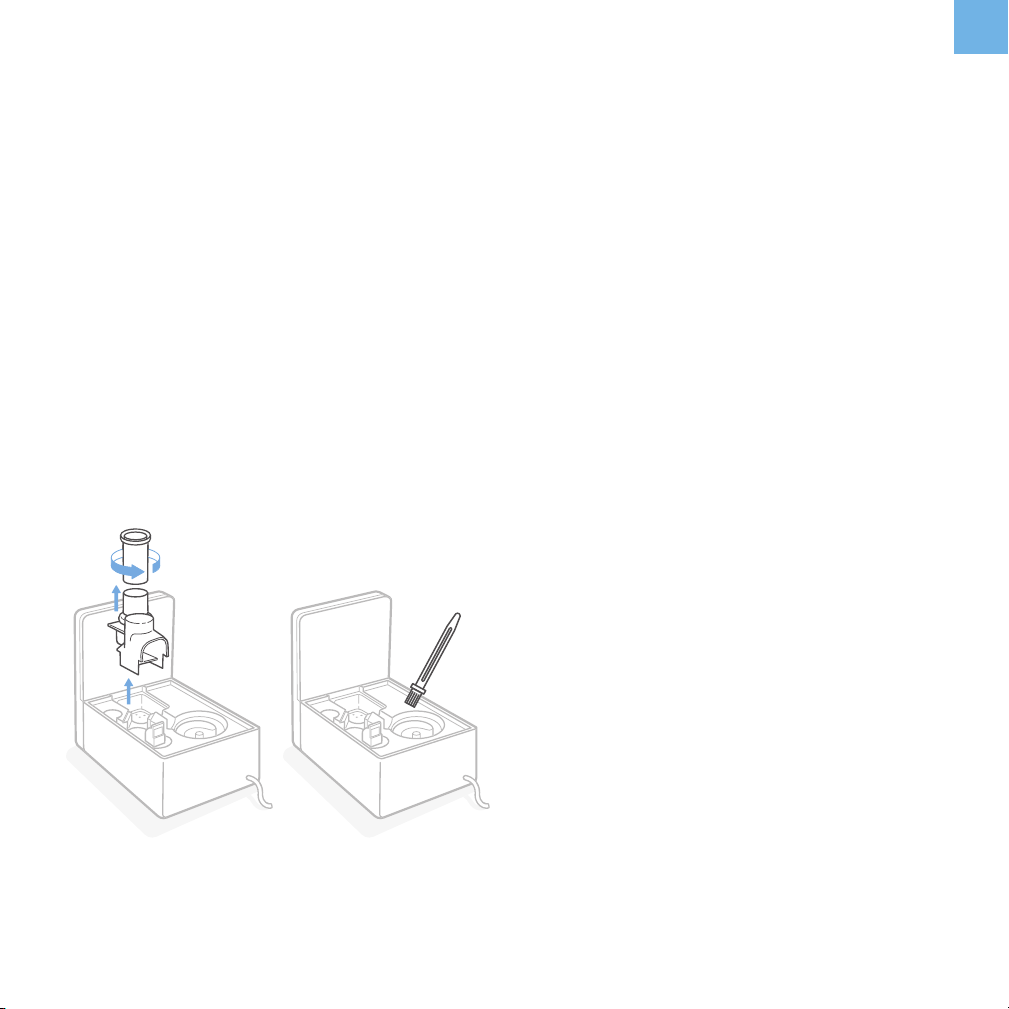
Figure 5.1
1. Unplug the humidifier.
2. Remove the nozzle cap from the water tank. Rinse the
nozzle and the cover under clean, running water. Set it
aside to air dry.
3. Remove the water tank from the base and pour out any
excess water from the inner chamber. Fill the tank with
2 cups of distilled white vinegar and 2 cups of water.
Replace the cap and gently shake to coat all sides of
the water tank.
4. Remove the mist channel and mist tube. Detach the
mist tube from the mist channel by twisting the tube
counterclockwise. [Figure 5.1] Rinse both parts in clean
water and dry thoroughly.
5. Remove the absorption pad inside the heating element
and rinse under clean water. Dry the pad with a clean,
dry cloth.
6. Add 1 cup of distilled white vinegar to the inner
chamber.
7. Allow the vinegar to soak inside both the water tank
and inner chamber for 30 minutes.
8. Use the included cleaning brush to remove any scale
buildup inside the water tank or in the inner chamber.
[Figure 5.2]
9. Pour out the vinegar from the water tank and the inner
chamber and thoroughly rinse with warm water.
Figure 5.2
Note: Do not submerge the base in water.
10. Dry all parts with a clean, dry cloth. Make sure all
parts of the humidifier are completely dry before
reassembling or storing.
14
EN
Disinfect the water tank before or after storing the humidifier
for long periods of time. You should also disinfect if there is
any mold buildup inside the water tank or inner chamber.
Cleaning the Aroma Pad Disinfecting the Humidifier
Replacing the Remote Control Battery
1. Pull out the aroma box.
2. Remove the aroma pad from the aroma box.
3. Rinse the pad under warm, running water.
4. Dry with a clean cloth and place it back into the aroma
box.
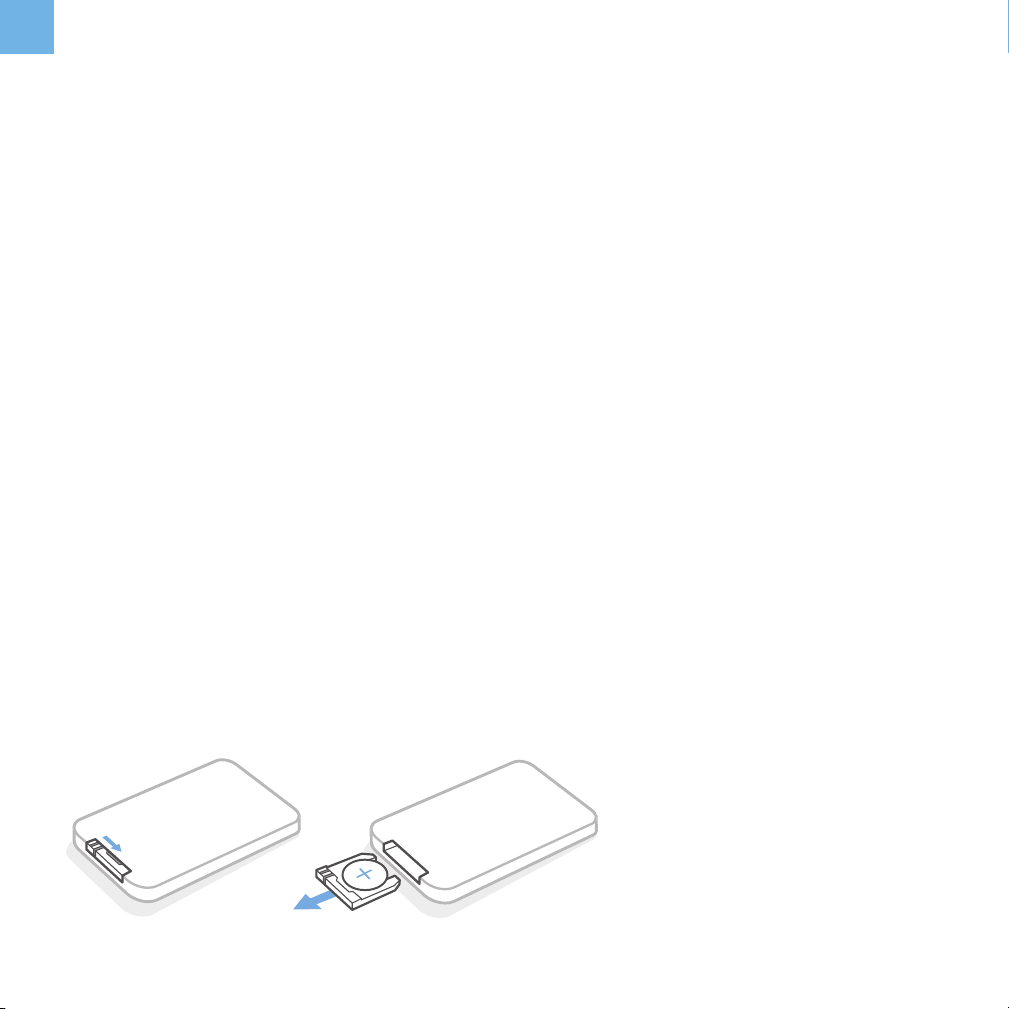
1. Remove the battery compartment by pinching the tab in
and pulling the compartment out. [Figures 6.1–6.2]
2. Remove the old battery.
3. Replace with a new 3V CR2025 battery.
1. Clean the water tank as instructed in General Cleaning
(page 13).
2. Fill the water tank with 1 teaspoon of bleach and 1 gallon
of clean water. Reseal the water tank, then gently shake
the water tank to ensure all of the sides are coated with
the mixture.
3. Put ¼ teaspoon of bleach and 1 cup of clean water into
the base.
4. Allow the solutions in both parts to sit for 30 minutes.
5. Pour out the mixtures from both the water tank and
base. Rinse both parts thoroughly under clean, running
water.
6. Allow the water tank and base to completely air dry
before reassembling the humidifier.
NOTE:
• Do not pour liquid cleaners or detergents into the
aroma pad and box.
NOTE: Make sure that the polarities match.
NOTE: The remote control will not work if held more than
16 ft (4.8 m) away from the humidifier.
Note:
• Always wear gloves to protect your hands while
using bleach.
• A 3% hydrogen peroxide solution may also be used
to disinfect the humidifier.
• Do not use the humidifier immediately after
disinfecting. This may be a health hazard.
4. Replace the battery compartment.
Figure 6.1 Figure 6.2
Pinch Pull out

15
EN
TROUBLESHOOTING
Problem Possible Causes Solution
No mist coming out of vent.
Humidifier is not plugged in.
Plug the humidifier into a powered electrical
outlet.
Humidifier is not turned on.
Press
to turn on the humidifier.
No water in tank.
Add at least 2 cups of clean water into the
water tank.
Water level is low.
Humidifier makes a loud or
unusual noise.
Water tank does not fit properly.
Turn o and unplug the humidifier, then align
the water tank cap with its matching opening
in the inner chamber.
Water level is low.
Add at least 2 cups of clean water into the
water tank.
Humidifier is not level. Place humidifier on a flat, level surface.
Humidifier is malfunctioning.
Turn o, unplug, and stop using the humidifier.
Contact Customer Support (page 17).
Humidifier produces an
unusual smell.
Humidifier is new.
Remove the water cap, and place the water
tank in a cool, dry place for 12 hours.
Residual smell from diusing essential
oil on the aroma pad.
Remove the aroma pad, rinse it under clean
water, and allow it to dry.
Water is dirty, or water has been in the
tank for a long time.
Clean the humidifier (see General Cleaning,
page 13).
Mist is coming out from the
base.
Water tank is not positioned correctly.
Turn o and unplug the humidifier, then align
the water tank cap with its matching opening
in the inner chamber.
High temperature warning is
on the display.
The heating element is running
without any water in the humidifier.
Unplug the humidifier, add water to the
water tank, and turn on the humidifier. If the
high temperature warning is still on, contact
Customer Support (page 17).

16
EN
Problem Possible Causes Solution
Relative Humidity (RH) level
displayed is incorrect.
Room is larger than the eective range
of the humidifier.
Move the humidifier to a room that is within
the eective range of 430–753 ft² (40–70 m²).
Relative humidity in the room is too
high.
If the relative humidity in the room is over
68%, set the humidifier to the lowest mist
setting or turn o the humidifier.
Moisture has built up inside of the
humidity sensor.
Turn o the humidifier and allow the humidity
sensor to air dry before using again.
The nozzle is facing the direction of
the humidity sensor.
Turn the nozzle so that it is facing away from
the humidity sensor.
Humidity sensor is broken or
defective.
Contact Customer Support (page 17).
White dust appears around the
humidifier.
Water being used has a high mineral
content.
Use distilled water to fill the humidifier.
Humidifier was not properly cleaned
after last use.
Clean the humidifier (see General Cleaning,
page 13). Remember to clean the water
tank at least once a month.
Puddle of water forms below
the base.
Mist setting is too high. Switch the humidifier to a lower mist setting.
Room is not well-ventilated.
Open a window to ensure proper airflow for
your humidifier, or move the humidifier to a
more well-ventilated room.
TROUBLESHOOTING (cont.)
If your problem is not listed, please contact Customer Support (page 17).

17
EN
WARRANTY INFORMATION
TERMS & POLICY
Levoit warrants all products to be of the highest quality in material,
craftsmanship, and service, eective from the date of purchase to
the end of the warranty period.
Levoit will replace any product found to be defective due to
manufacturer flaws based on eligibility. Refunds are available within
the first 30 days of purchase. Refunds are only available to the
original purchaser of the product. This warranty extends only to
personal use and does not extend to any product that has been
used for commercial, rental, or any other use in which the product is
not intended for. There are no warranties other than the warranties
expressly set forth with each product.
This warranty is non-transferrable. Levoit is not responsible in
any way for any damages, losses, or inconveniences caused by
equipment failure by user negligence, abuse, or use noncompliant
with the user manual or any additional safety, use, or warnings
included in the product packaging and manual.
This warranty does not apply to the following:
• Damage due to abuse, accident, alteration, misuse, tampering, or
vandalism.
• Improper or inadequate maintenance.
• Damage in return transit.
• Unsupervised use by children under 18 years of age.
Levoit and its subsidiaries assume no liability for damage caused
by the use of the product other than for its intended use or as
instructed in the user manual. Some states do not allow this
exclusion or limitation of incidental or consequential losses so the
foregoing disclaimer may not apply to you. This warranty gives you
specific legal rights and you may also have other rights which may
vary from state to state.
ALL EXPRESSED AND IMPLIED WARRANTIES, INCLUDING THE
WARRANTY OF MERCHANTABILITY, ARE LIMITED TO THE
PERIOD OF THE LIMITED WARRANTY.
Additional 1-Year Warranty
You can extend your 1-year warranty by an additional year. Log
onto www.levoit.com/warranty and enter your order number (for
example, from Amazon or Houzz) to register your new product for
the extended warranty.
If you are unable to provide the order number for your product,
please type a short note in the order number field along with the
date you received your product.
Defective Products & Returns
If your product proves defective within the specified warranty period,
please contact Customer Support via [email protected] with your
order number. DO NOT dispose of your product before contacting
us. Once Customer Support has approved your request, please
return the unit with a copy of the invoice or your order number.
Product Name Hybrid Ultrasonic Humidifier
Model Number LV600HH
Default Warranty Period 1 year
For your own reference, we strongly recommend that you record
your order number and date of purchase.
Date of Purchase
Order Number
CUSTOMER SUPPORT
If you encounter any issues or have any questions
regarding your new product, feel free to contact our helpful
Customer Support Team. Your satisfaction is our goal!
Arovast Corporation
1202 N. Miller St., Suite A
Anaheim, CA 92806
Email: [email protected]
Toll-Free: (888) 726-8520
Support Hours
Mon–Fri, 9:00 am–5:00 pm PST/PDT
*Please have your order invoice and order number ready before
contacting Customer Support.

Connect with us @LevoitLifestyle

19
Levoit.com
V6.0