XPD2 Belt Pack
USB Digital Wireless System
Quick Start Guide

2
Important Safety Information
If you want to dispose this product, do not mix it with general
household waste. There is a separate collection system for used
electronic products in accordance with legislation that requires proper
treatment, recovery and recycling.
Private household in the 28 member states of the EU, in Switzerland and
Norway may return their used electronic products free of charge to designated
collection facilities or to a retailer (if you purchase a similar new one).
For Countries not mentioned above, please contact your local authorities for a
correct method of disposal.
By doing so you will ensure that your disposed product undergoes the necessary
treatment, recovery and recycling and thus prevent potential negative effects
on the environment and human health.
Hereby, Samson Technologies Corp., declares that this Stage XPD2
(RX:RXD2, TX:HXD1 or PXD1) is in compliance with the essential
requirements and other relevant provisions of Directive 2014/53/EU.
The declaration of conformity may be consulted at:
http://www.samsontech.com/site_media/support/manuals/Stage_XPD2_DOC.pdf
Important Safety Information
Attention should be drawn to the environmental aspects of battery disposal
The use of apparatus in moderate climates
CAUTION
Danger of explosion if battery is incorrectly replaced.
Replace only with the same or equivalent type.
Batteries (battery pack or batteries installed) shall not be exposed to
excessive heat such as sunshine, fire or the like.
Copyright 2018, Samson Technologies Corp. v1.1
Samson Technologies Corp.
278-B Duffy Ave
Hicksville, NY 11801
www.samsontech.com
iPad, iPhone, and iPod touch are trademarks of Apple Inc., registered in the
U.S. and other countries. iPad Air and iPad mini are trademarks of Apple
Inc. The trademark “iPhone” is used with a license from Aiphone K.K.

XPD2 USB Digital Wireless System 3
Important Safety Information
FCC Notice
1. This device complies with Part 15 of the FCC Rules. Operation is subject
to the following two conditions:
(1) This device may not cause harmful interference.
(2) This device must accept any interference received, including
interference that may cause undesired operation.
2. Changes or modifications not expressly approved by the party responsible
for compliance could void the user’s authority to operate the equipment.
FCC Statement
This equipment has been tested and found to comply with the limits for a
Class B digital device, pursuant to Part 15 of the FCC Rules. These limits
are designed to provide reasonable protection against harmful interference in
a residential installation.
This equipment generates uses and can radiate radio frequency energy
and, if not installed and used in accordance with the instructions, may
cause harmful interference to radio communications. However, there is no
guarantee that interference will not occur in a particular installation. If this
equipment does cause harmful interference to radio or television reception,
which can be determined by turning the equipment off and on, the user is
encouraged to try to correct the interference by one or more of the following
measures:
Reorient or relocate the receiving antenna.
Increase the separation between the equipment and receiver.
Connect the equipment into an outlet on a circuit different from that to
which the receiver is connected.
Consult the dealer or an experienced radio/TV technician for help.
RF Warning Statement
The device has been evaluated to meet general RF exposure requirement.
The device can be used in portable exposure condition without restriction.
This device complies with RSS-310 of Industry Canada. Operation is subject
to the condition that this device does not cause harmful interference.

4
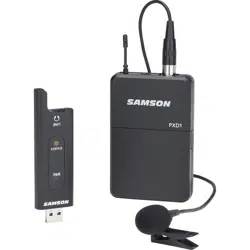
Samson XPD2 USB Digital Wireless System brings the convenience of
wireless to your computer recordings and beyond. With a wireless receiver
built into a USB stick and a beltpack transmitter, with a lavelier or headset
microphone, the Stage XPD2 allows you to wirelessly record stunning audio
straight to your Mac/PC and favorite digital audio software. It’s the ideal
wireless system for presentations, podcasting, YouTube performances,
karaoke video games, voice over projects and much more. Additionally, the
Stage XPD2 is the perfect accessory for expanding the Samson Expedition
Series Portable PA Systems that include USB wireless ports, for full range
wireless capability in live applications.
XPD2 operates in the license-free 2.4GHz frequency band, is extremely
fast and easy to setup and with 100 feet of operating range (environment
dependent) the system provides plenty of room to work wirelessly.
We recommend you keep the following records for reference, as well as a
copy of your sales receipt.
Serial number: _______________________________
Date of purchase: _______________________________
If you have any questions or comments regarding the XPD2 USB Digital
Wireless System or any other products from Samson, do not hesitate to
contact us at [email protected].
With proper care and maintenance, your XPD2 USB Digital Wireless System
will operate trouble-free for many years. Should your XPD2 USB Digital
Wireless System ever require servicing, a Return Authorization (RA) number
must be obtained before shipping your unit to Samson. Without this number,
the unit will not be accepted. Please visit www.samsontech.com/ra for an
RA number prior to shipping your unit. Please retain the original packing
materials and, if possible, return the unit in its original carton. If your XPD2
USB Digital Wireless System was purchased outside of the United States,
contact your local distributor.
Introduction
XPD2 USB Digital Wireless System 5
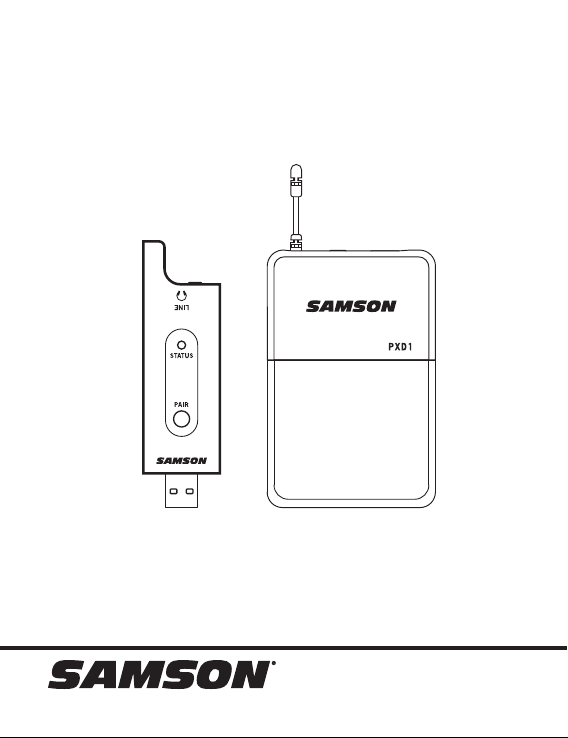
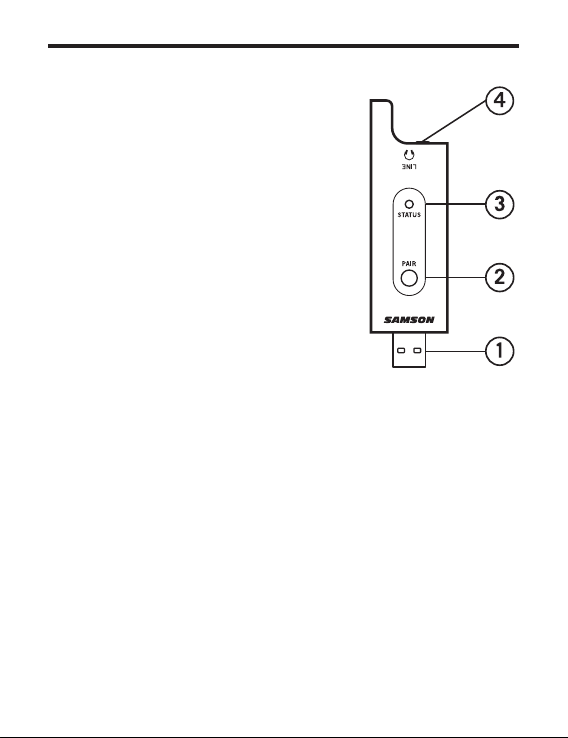
RXD2 Controls
1. USB Connector - Plugs into the USB jack
on the rear panel of a wirelessly enabled
Samson audio device. The receiver can
also plug directly into a computer USB
port and will be recognized as a USB
audio device. The unit passes audio to the
device and receives power from the device
through this connector. If connecting
the LINE output to an analog device, the
RXD2 can be powered using a standard 5
Volt adapter.
2. PAIR Switch - Press >5 seconds to enter
pairing mode.
3. STATUS Indicator - This LED displays the
operation mode:
Amber: Normal Operation
Flashing Amber: Pairing
No Light: Not paired; Transmitter out of
range; No Power
4. LINE / Headphone Output - Use this 3.5mm
jack when connecting to an analog line
input or headphones for monitoring.
6
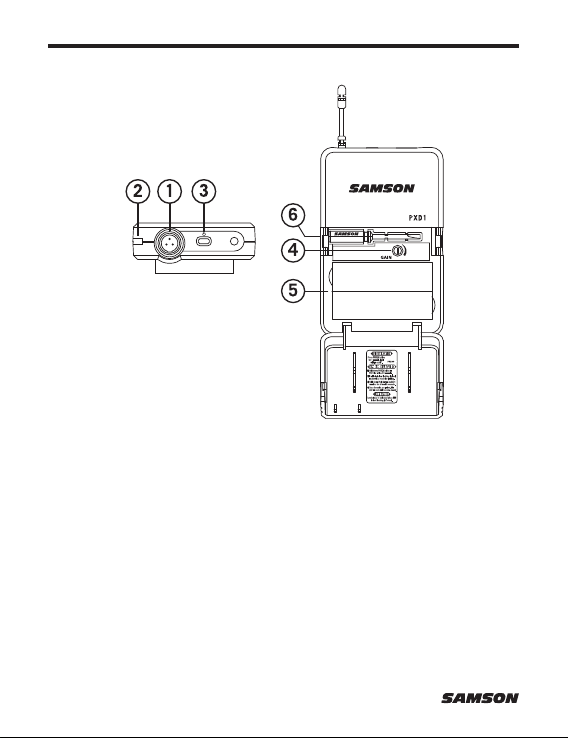
PXD1 Controls
1. Input Connector - Connect the input device via the mini-XLR connector.
The PXD1 is supplied with either a lavalier or headset microphone.
2. Status Indicator - This LED displays the operation mode:
Amber: Normal Operation
Flashing Amber: Pairing / Low Battery
3. Power/Pair Switch - Press for <5 seconds to turn the unit on or off.
Press for more than 5 seconds to enter pairing mode.
4. Input GAIN Control - This control adjusts the transmitter input sensitivity.
5. Battery Holder - Insert two standard AA (LR6) batteries here, being sure
to observe the plus and minus polarity markings shown. WARNING: Do
not insert the batteries backwards; doing so can cause severe damage
to the PXD1 and will void your warranty.
6. Screwdriver - Used to adjust the input GAIN control.

XPD2 USB Digital Wireless System 7
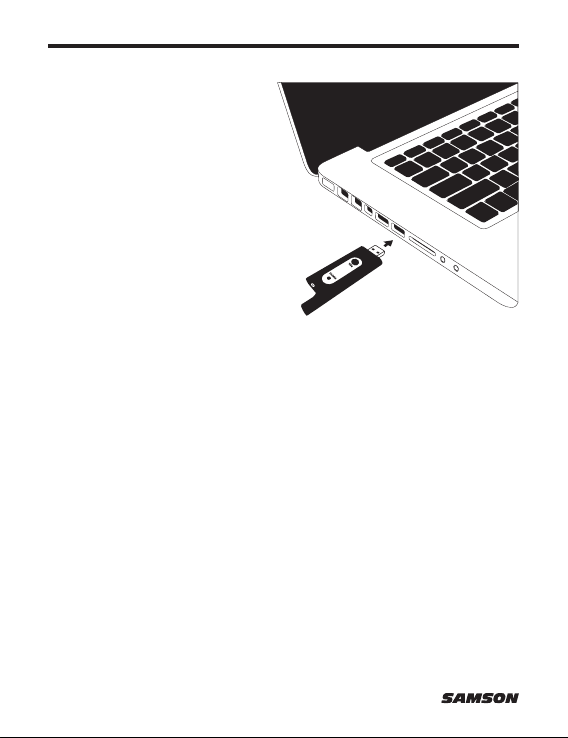
1. Plug the RXD2 USB receiver into the USB jack on a wireless-enabled
Samson audio device, or to an available USB port on a computer.
Note: When using the XPD2 wireless system with a computer, you
must set the computer’s audio input device to “Samson RXD Wireless
Receiver”. In most computer operating systems, an audio software
must be used to record or monitor the audio from the USB receiver.
2. Place a fresh set of AA (LR6) batteries in the transmitter battery
holder, taking care to observe the polarity markings.
3. If using a Samson audio device, turn the wireless level knob on the
audio device completely counterclockwise, then turn the power of the
audio device to the ON position.
4. Turn on the power to the transmitter by pressing and holding Power
switch; the indicator LED will light amber.
5. If the transmitter and receiver have not been previously paired, press
and hold the button on the RXD2 receiver for >5 seconds, until it
begins to flash. Press and continue to hold the Power button on
the transmitter until the LED indicators on both units light steady,
indicating that the receiver and transmitter are paired and ready for
operation.
6. Speak or sing into the microphone at a normal performance level and
raise the input level on the audio device until the desired level is
reached. For best signal-to-noise operation, set the input Gain control
as high as possible without overloading.
7. If you hear distortion turn down the input level on the audio device.
If distortion is still audible, use the supplied screwdriver to turn the
Gain control in the PXD1 transmitter slowly counterclockwise until the
distortion disappears.
Conversely, if you hear a weak, noisy signal at the desired volume
level and with the wireless level control of the audio device is set to
maximum, use the screwdriver to turn the Gain control in the PXD1
transmitter slowly clockwise until the signal reaches an acceptable
level.
Quick Start
8
Computer Setup
Windows
1. The first time you plug the
XPD2 into a USB port,
Windows will install the USB
driver for that port.
2. To set the XPD2 as your default
input/recording device, or
to change its settings, open
the Control Panel, Hardware
& Sound settings, then click
SOUND. Under Recording
tab, select the “Samson RXD
Wireless Receiver” from the list
of devices and press the Set
Default button to set it as the default audio input device.
3. To set the gain of the microphone, click the Properties button, and
then select the Levels tab. Slide the control until the desired level is
reached.
Apple MAC OSX
1. Plug the RXD2 receiver into an available USB port.
2. Select the XPD2 as the computer’s audio input, open System
Preferences from the dock or the main Apple Menu.
3. Next, open the Sound preferences, choose the Input tab and select
“Samson RXD Wireless Receiver”. To set the gain of the microphone,
adjust the Input volume slider at the bottom of the Sound dialog box.
The Input Level meter will show the recording level.
XPD2 USB Digital Wireless System 9
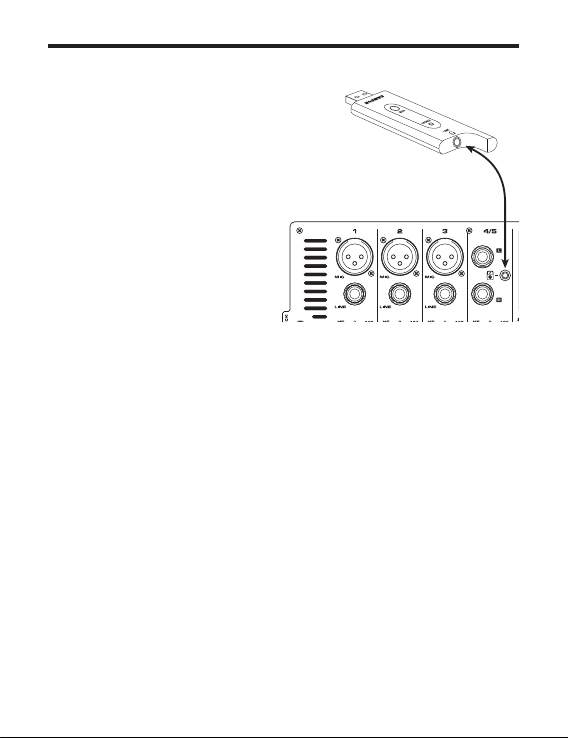
Connecting to a Line Input
The XPD2 wireless system can work
with any audio gear that accepts a
line input like a mixer or portable PA
system. Follow these steps to connect
your XPD2 system using the analog
output:
1. Plug the RXD2 receiver into a
standard 5 Volt USB adapter
and plug the adapter into an
available AC outlet.
2. Turn the volume on the input
channel that you are connecting
to the XPD2 system all the way
down.
3. Using a 1/8” (3.5mm) cable, connect the RXD1 LINE / Headphone
output to the line input on the audio device.
4. Turn on the power to the transmitter by pressing and holding Power
switch; the indicator LED will light amber.
5. Speak or sing into the microphone at a normal performance level and
raise the input level control on the input channel until the desired
level is reached.
10
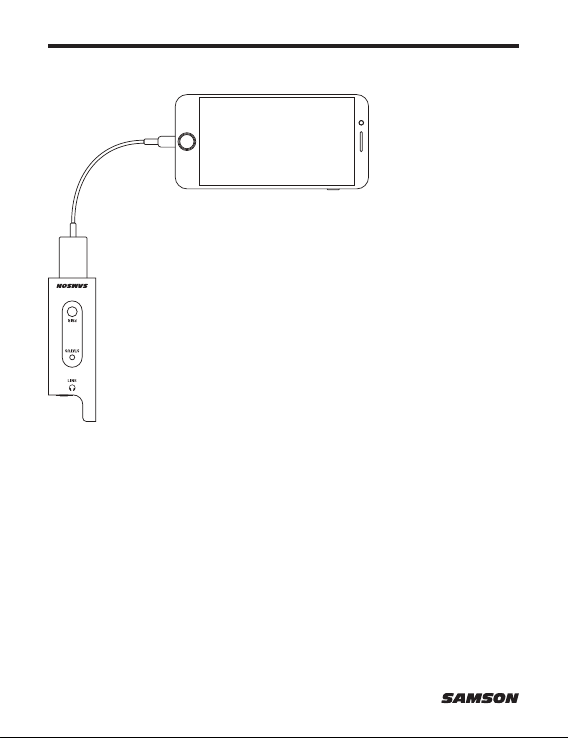
The RXD2 receiver can be used with a smartphone to add a
wireless microphone to your live streams or mobile filmmaking.
To use the XDP2 system with an iPhone or iPad, you will
need to use the Apple Lightning to USB Camera Adapter (not
included).
To use the XPD2 system with an Android device, you will need
to use a Host OTG adapter.
You can connect headphones to the 1/8” (3.5mm) Headphone
output to monitor the wireless signal.
Connecting to a smartphone

XPD2 USB Digital Wireless System 11
Simultaneous Systems 2
Working Range 100’ line of sight
Working Frequency 2.404~2.476 GHz
Modulation type GFSK
Audio Frequency Response 20 Hz – 17 kHz (-1 dB)
T.H.D <0.1% (at 1 kHz, -10 dBu)
Signal to Noise >85 dB
Operating Temperature -10°C ~ +40°C
PXD1 Transmitter
Input Connector Mini-XLR (P3)
RF Power <10 mW EIRP
Power Requirements Two AA (LR6) alkaline batteries
Battery Life 20 hours
Audio Sample Rate 32 kHz
Dimensions (HxLxD) 3.75” x 2.44” x 0.75”
96mm x 62mm x 18.5mm
Weight 0.2lb / 93g
RXD2 Receiver
Max. Analog Audio Output Level 9 dBu
Headphone Output 22 mW into 16 Ω or 32 Ω
Operating Voltage 5V DC
Dimensions (LxDxH) 3.5” x 0.9” x .31”
89mm x 23mm x 8mm
Weight 0.35oz / 10g
Specifications
At Samson, we are continually improving our products, therefore
specifications and images are subject to change without notice.

Samson Technologies Corp.
278-B Duffy Ave
Hicksville, New York 11801
Phone: 1-800-3-SAMSON (1-800-372-6766)
www.samsontech.com
Follow us:
Having Trouble with your XPD2 Wireless System?
We can help!
CONTACT OUR SUPPORT TEAM: [email protected]
Our experts can help you resolve any issues.
@samson @samsontech @samson_technologies