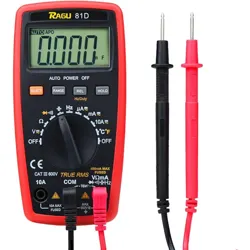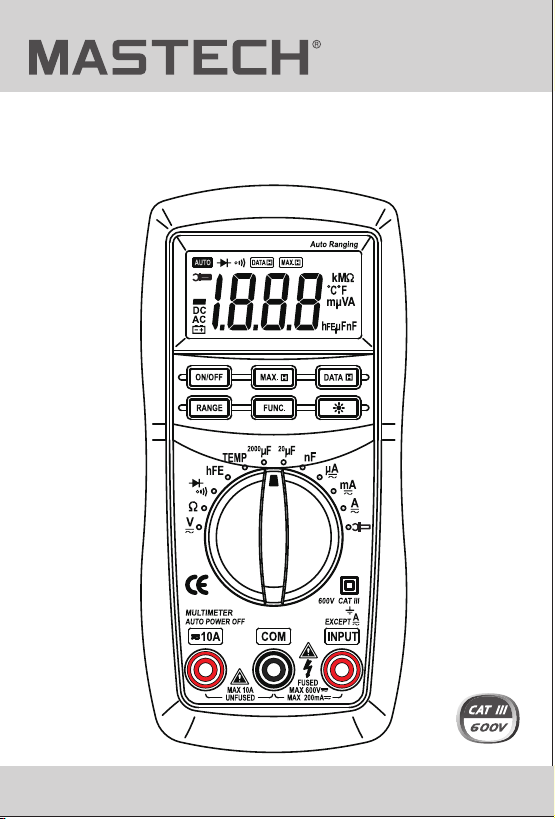
MS8221C
DIGITAL MULTIMETER
USER'S MANUAL
1. Safety Information
1.1 Preliminary
CONTENTS
2.
2.1
2.2 Switch, Buttons and Input Jack
Elucidation
Description
Names of Components
3.1
3.2
General specifications
Electrical specifications
4.
4.2
Operating Instruction
Data Hold
4.3 Maximum Hold
4.4 Function Transform
4.5 Range Transform
4.6 Back Light
1.2 During use
1.3 Symbols
1.4 Maintenance
3. Specifications
4.1 Power -up
1
1
2
3
4
4
5
6
6
6
7
12
12
12
13
13
13
13

MS8221C
DIGITAL MULTIMETER
USER'S MANUAL
1. Safety Information
1.1 Preliminary
CONTENTS
2.
2.1
2.2 Switch, Buttons and Input Jack
Elucidation
Description
Names of Components
3.1
3.2
General specifications
Electrical specifications
4.
4.2
Operating Instruction
Data Hold
4.3 Maximum Hold
4.4 Function Transform
4.5 Range Transform
4.6 Back Light
1.2 During use
1.3 Symbols
1.4 Maintenance
3. Specifications
4.1 Power -up
1
1
2
3
4
4
5
6
6
6
7
12
12
12
13
13
13
13

CONTENTS
5.
5.1
5.2
Maintenance
Battery Replacement
Fuse Replacement
5.3 Test Leads Replacement
4.7 Auto Power Off
4.8 Preparation for Measurement
4.9 DC Voltage Measuring
4.10 AC Voltage Measuring
4.11 DC Current Measuring
4.12
4.13
4.15
AC Current Measuring
DC Current Measuring
(with clamp, optional)
Resistance Measuring
4.17 Capacitance Measuring
4.18 Diode Testing
4.19 Continuity Testing
4.16 Temperature Measuring
4.20 Transistor Testing
6. Accessories
4.14
AC Current Measuring
(with clamp, optional)
1.Safety Information
This multimeter has been designed according to
EN-61010 concerning electronic measuring instruments
with an overvoltage category CAT III 600V and pollution 2.
With proper use and care, the digital multimeter will
give you 1 years of satisfactory service.
Follow all safety and operating instructions to ensure
that the meter is used safely and is kept in good
operating condition.
To ensure safe operation, and in order to exploit
to the full the functionality of the meter, please
follow the directions in this section carefully.
WARNING
1.1 Preliminary
1.1.1 When using the meter, the user must observe all
normal safety rules concerning:
• Protection against the dangers of electrical current.
Protection of the meter against misuse.
1.1.2 When the meter is delivered, check that it has not
been damaged in transit.
1.1.3 When poor condition under harsh preservation or
shipping conditions caused, inspect and confirm
this meter without delay.
1.1.4 Test leads must be in good condition. Before using
verify that the insulation on test leads is not
damaged and/or the leads wire is not exposed.
1.1.5 Full compliance with safety standards can be
guaranteed only if used with test leads supplied.
If necessary, they must be replaced with the same
model or same electric ratings.
•
01
14
14
15
19
17
20
21
24
28
26
30
33
32
35
36
36
36
37
37
CONTENTS
5.
5.1
5.2
Maintenance
Battery Replacement
Fuse Replacement
5.3 Test Leads Replacement
4.7 Auto Power Off
4.8 Preparation for Measurement
4.9 DC Voltage Measuring
4.10 AC Voltage Measuring
4.11 DC Current Measuring
4.12
4.13
4.15
AC Current Measuring
DC Current Measuring
(with clamp, optional)
Resistance Measuring
4.17 Capacitance Measuring
4.18 Diode Testing
4.19 Continuity Testing
4.16 Temperature Measuring
4.20 Transistor Testing
6. Accessories
4.14
AC Current Measuring
(with clamp, optional)
1.Safety Information
This multimeter has been designed according to
EN-61010 concerning electronic measuring instruments
with an overvoltage category CAT III 600V and pollution 2.
With proper use and care, the digital multimeter will
give you 1 years of satisfactory service.
Follow all safety and operating instructions to ensure
that the meter is used safely and is kept in good
operating condition.
To ensure safe operation, and in order to exploit
to the full the functionality of the meter, please
follow the directions in this section carefully.
WARNING
1.1 Preliminary
1.1.1 When using the meter, the user must observe all
normal safety rules concerning:
• Protection against the dangers of electrical current.
Protection of the meter against misuse.
1.1.2 When the meter is delivered, check that it has not
been damaged in transit.
1.1.3 When poor condition under harsh preservation or
shipping conditions caused, inspect and confirm
this meter without delay.
1.1.4 Test leads must be in good condition. Before using
verify that the insulation on test leads is not
damaged and/or the leads wire is not exposed.
1.1.5 Full compliance with safety standards can be
guaranteed only if used with test leads supplied.
If necessary, they must be replaced with the same
model or same electric ratings.
•
01
14
14
15
19
17
20
21
24
28
26
30
33
32
35
36
36
36
37
37

02 03
1.2 During Use
1.2.1 Before using, you must select the right input jack,
function and range.
1.2.2 Never exceed the protection limit values indicated
in specifications for each range of measurement.
1.2.3 When the meter is linked to a measurement circuit,
do not touch unused terminals.
1.2.4 At the manual range, when the value scale to be
measured is unknown beforehand, set the range
selector at the highest position.
1.2.5 Do not measure voltage if the voltage on the
terminals exceeds 600V above earth ground.
1.2.6 Always be careful when working with voltages
above 60V DC or 30V AC rms, keep fingers
behind the probe barriers while measuring.
1.2.7 Never connect the meter leads across a voltage
source while the transform switch is in the
current, resistance, temperature, battery, diode,
transistor or continuity mode. Doing so can
damage the meter.
1.2.8 Before rotating the transform switch to change
functions and ranges, disconnect test leads from
the circuit under test.
1.2.9 Never perform resistance, temperature,
transistor, diode and continuity measurements
on live circuits.
1.2.10 Never use the meter under the condition of the
explosive air, steam or dirt.
1.2.11 If any faults or abnormalities are observed,
the meter can not be used any more and it has
to be checked out.
1.3 Symbols
1.2.12 Never use the meter unless the rear case is in
place and fastened fully.
1.2.13 Please do not store or use meter in areas
exposed to direct sunlight, high temperature,
humidity or condensation.
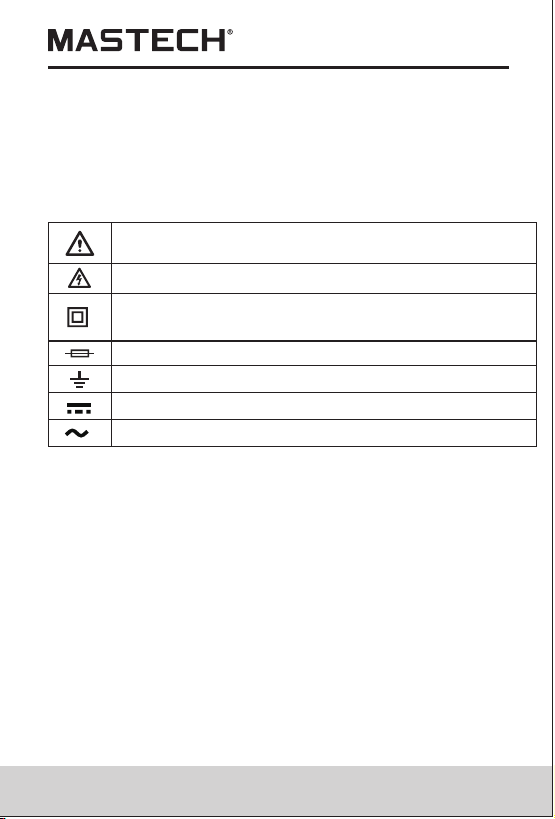
Note-Important safety information, refer to the
instruction manual.
Earth (ground) TERMINAL
Caution, possibility of electric shock
Equipment protected throughout by double
insulation or reinforced insulation.
Direct current
Alternating current
CAT III: MEASUREMENT CATEGORY III is applicable to
test and measuring circuits connected to the distribution
part of the building's low-voltage MAINS installation.
Fuse must be replaced as per the specification herein.
02 03
1.2 During Use
1.2.1 Before using, you must select the right input jack,
function and range.
1.2.2 Never exceed the protection limit values indicated
in specifications for each range of measurement.
1.2.3 When the meter is linked to a measurement circuit,
do not touch unused terminals.
1.2.4 At the manual range, when the value scale to be
measured is unknown beforehand, set the range
selector at the highest position.
1.2.5 Do not measure voltage if the voltage on the
terminals exceeds 600V above earth ground.
1.2.6 Always be careful when working with voltages
above 60V DC or 30V AC rms, keep fingers
behind the probe barriers while measuring.
1.2.7 Never connect the meter leads across a voltage
source while the transform switch is in the
current, resistance, temperature, battery, diode,
transistor or continuity mode. Doing so can
damage the meter.
1.2.8 Before rotating the transform switch to change
functions and ranges, disconnect test leads from
the circuit under test.
1.2.9 Never perform resistance, temperature,
transistor, diode and continuity measurements
on live circuits.
1.2.10 Never use the meter under the condition of the
explosive air, steam or dirt.
1.2.11 If any faults or abnormalities are observed,
the meter can not be used any more and it has
to be checked out.
1.3 Symbols
1.2.12 Never use the meter unless the rear case is in
place and fastened fully.
1.2.13 Please do not store or use meter in areas
exposed to direct sunlight, high temperature,
humidity or condensation.
Note-Important safety information, refer to the
instruction manual.
Earth (ground) TERMINAL
Caution, possibility of electric shock
Equipment protected throughout by double
insulation or reinforced insulation.
Direct current
Alternating current
CAT III: MEASUREMENT CATEGORY III is applicable to
test and measuring circuits connected to the distribution
part of the building's low-voltage MAINS installation.
Fuse must be replaced as per the specification herein.

04 05
1.4 Maintenance
1.4.1 Please do not attempt to adjust or repair the
meter by removing the rear case while voltage
is being applied. A technician who fully
understands danger involved should only carry
out such actions.
1.4.2 Before opening the battery cover or case of the
meter, always disconnect test leads from all
tested circuits.
1.4.3 To avoid the wrong reading causing electricity
attack, when the meter displays“ ”, you must
change the battery.
1.4.4 For continue protection against fire, replace fuse
only with the specified voltage and current
ratings: F 200mA/250V (quick acting).
1.4.5 Do not use abrasives or solvents on the meter,
use a damp cloth and mild detergent only.
1.4.6 Always set the power switch to the OFF position
when the meter is not in use.
1.4.7 If the meter is to be stored for a long period of
time, the batteries should be removed to prevent
damage to the unit.
2. Description
- This meter is a portable professional measuring
instrument with handsome LCD and back light
easily reading.
- Single operation of a transform switch makes
measurement convenient. Overload protection and
low battery indication are provided, this meter is
ideal for use in the fields, workshop, school, hobby
and home applications.
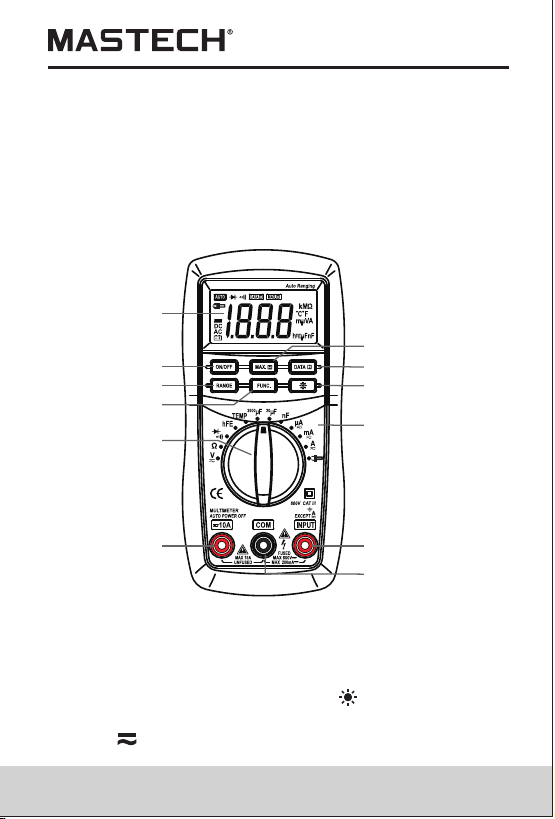
2.1 Names of Components
- This meter has function of auto range and manual
range.
- This meter has function of auto power off.
- This meter is with the functions of data hold and
maximum value hold.
(1) LCD Display
(2) ON/OFF Button
(3) RANGE Button
(4) FUNC. Button
(5) Transform Switch
(6) 10A Jack
(7) INPUT Jack
(8) COM Jack
(9) Panel
(10) Button
(11) DATA-H Button
(12) MAX. H Button
(1)
(2)
(3)
(4)
(5)
(6) (7)
(8)
(9)
(10)
(11)
(12)
04 05
1.4 Maintenance
1.4.1 Please do not attempt to adjust or repair the
meter by removing the rear case while voltage
is being applied. A technician who fully
understands danger involved should only carry
out such actions.
1.4.2 Before opening the battery cover or case of the
meter, always disconnect test leads from all
tested circuits.
1.4.3 To avoid the wrong reading causing electricity
attack, when the meter displays“ ”, you must
change the battery.
1.4.4 For continue protection against fire, replace fuse
only with the specified voltage and current
ratings: F 200mA/250V (quick acting).
1.4.5 Do not use abrasives or solvents on the meter,
use a damp cloth and mild detergent only.
1.4.6 Always set the power switch to the OFF position
when the meter is not in use.
1.4.7 If the meter is to be stored for a long period of
time, the batteries should be removed to prevent
damage to the unit.
2. Description
- This meter is a portable professional measuring
instrument with handsome LCD and back light
easily reading.
- Single operation of a transform switch makes
measurement convenient. Overload protection and
low battery indication are provided, this meter is
ideal for use in the fields, workshop, school, hobby
and home applications.
2.1 Names of Components
- This meter has function of auto range and manual
range.
- This meter has function of auto power off.
- This meter is with the functions of data hold and
maximum value hold.
(1) LCD Display
(2) ON/OFF Button
(3) RANGE Button
(4) FUNC. Button
(5) Transform Switch
(6) 10A Jack
(7) INPUT Jack
(8) COM Jack
(9) Panel
(10) Button
(11) DATA-H Button
(12) MAX. H Button
(1)
(2)
(3)
(4)
(5)
(6) (7)
(8)
(9)
(10)
(11)
(12)

06 07
• Button
This button is used to the switch of back light.
• Transform Switch
This switch is used to select functions and desired
ranges.
• 10A Jack
Input terminal for current 0~10A
• INPUT Jack
Input terminals except 10A
• COM Jack
Common terminal for measurement
3. Specifications
Accuracy is specified for a period of year after
calibration and at 18˚C to 28˚C(64˚F to 82˚F) with
relative humidity to 75%.
3.1 General Specifications
3.1.1 Auto ranges and manual range.
3.1.2 Max. Voltage Between Terminals And Earth
Ground: 600V DC or AC
2.2 Switch, BUTTONS and Input Jack Elucidation
• ON/OFF Button
This Button is used to the switch of power.
• RANGE Button
This button is used to transform Auto range or manual
range.
• FUNC. Button
This button is used to transform function.
• DATA-H Button
This Button is used to the switch of data hold.
• MAX.H Button
This Button is used to the switch of maximum value hold.
3.1.14 Operating Temperature: 0˚C to 40˚C
(32˚F to 104˚F)
3.1.15 Storage Temperature: -10˚C to 50˚C
(10˚F to 122˚F)
3.1.16 Dimension: 158×74×32 mm
3.1.17 Weight: approx. 250g (including battery)
3.2 Electrical Specifications
Circumstance Temperature: 23±5˚C
Relative Humidity: < 75%
3.2.1 DC Voltage
Range
Resolution
Accuracy
200mV
2V
20V
200V
600V
0.1mV
0.001V
0.01V
0.1V
1V
±(0.7% of rdg + 2 digits)
- Input Impedance: 10MΩ
3.1.3 Fuse Protection: F 200mA/250V (quick acting).
3.1.4 Operating Altitude: 2000 meters (7000 ft.)
maximum
3.1.5 Display: 16mm LCD
3.1.6 Max. Show Value: 1999 (3 1/2)
3.1.7 Polarity Indication: '-' indicates negative polarity.
3.1.8 Overrange Indication: Display 'OL'
3.1.9 Sampling Time: approx. 0.4 second
3.1.10 Unit showing: showing of function and electrical
capacity.
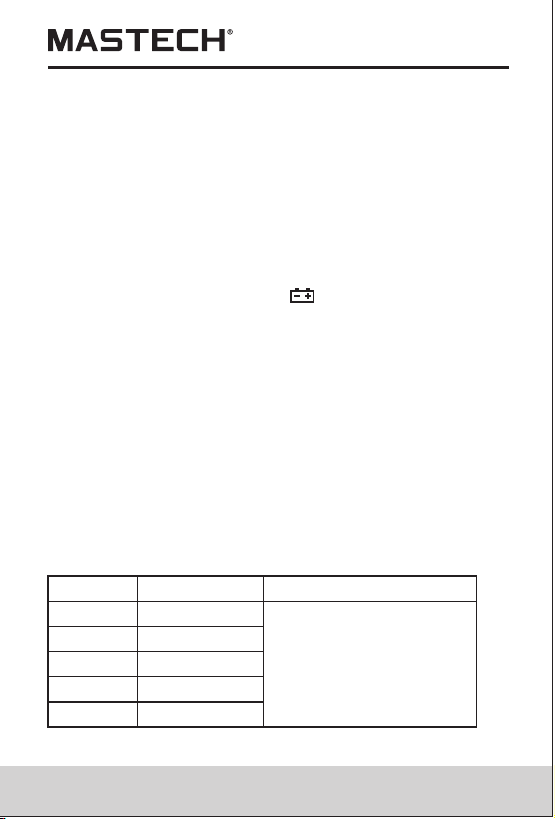
3.1.11 Low Battery Indication: ' ' displayed
3.1.12 Auto power off time: 15 min.
3.1.13 Power Supply: 1.5V×3 AAA batteries.
06 07
• Button
This button is used to the switch of back light.
• Transform Switch
This switch is used to select functions and desired
ranges.
• 10A Jack
Input terminal for current 0~10A
• INPUT Jack
Input terminals except 10A
• COM Jack
Common terminal for measurement
3. Specifications
Accuracy is specified for a period of year after
calibration and at 18˚C to 28˚C(64˚F to 82˚F) with
relative humidity to 75%.
3.1 General Specifications
3.1.1 Auto ranges and manual range.
3.1.2 Max. Voltage Between Terminals And Earth
Ground: 600V DC or AC
2.2 Switch, BUTTONS and Input Jack Elucidation
• ON/OFF Button
This Button is used to the switch of power.
• RANGE Button
This button is used to transform Auto range or manual
range.
• FUNC. Button
This button is used to transform function.
• DATA-H Button
This Button is used to the switch of data hold.
• MAX.H Button
This Button is used to the switch of maximum value hold.
3.1.14 Operating Temperature: 0˚C to 40˚C
(32˚F to 104˚F)
3.1.15 Storage Temperature: -10˚C to 50˚C
(10˚F to 122˚F)
3.1.16 Dimension: 158×74×32 mm
3.1.17 Weight: approx. 250g (including battery)
3.2 Electrical Specifications
Circumstance Temperature: 23±5˚C
Relative Humidity: < 75%
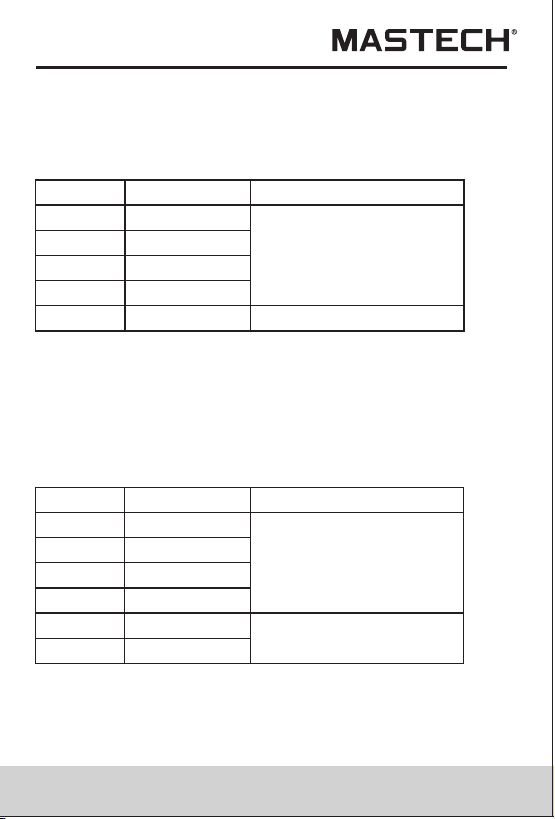
3.2.1 DC Voltage
Range
Resolution
Accuracy
200mV
2V
20V
200V
600V
0.1mV
0.001V
0.01V
0.1V
1V
±(0.7% of rdg + 2 digits)
- Input Impedance: 10MΩ
3.1.3 Fuse Protection: F 200mA/250V (quick acting).
3.1.4 Operating Altitude: 2000 meters (7000 ft.)
maximum
3.1.5 Display: 16mm LCD
3.1.6 Max. Show Value: 1999 (3 1/2)
3.1.7 Polarity Indication: '-' indicates negative polarity.
3.1.8 Overrange Indication: Display 'OL'
3.1.9 Sampling Time: approx. 0.4 second
3.1.10 Unit showing: showing of function and electrical
capacity.
3.1.11 Low Battery Indication: ' ' displayed
3.1.12 Auto power off time: 15 min.
3.1.13 Power Supply: 1.5V×3 AAA batteries.
08 09
- Overload Protection: 200mV range: 250V DC or AC
rms, 2V-600V ranges: 600V DC or AC rms.
- Max. Input Voltage: 600V DC
3.2.2 AC Voltage
Range
Resolution
Accuracy
200mV
2V
20V
200V
600V
0.1mV
0.001V
0.01V
0.1V
1V
±(0.8% of rdg + 3 digits)
±(1.0% of rdg + 3 digits)
- Input Impedance: 10MΩ
- Overload Protection: 200mV range: 250V DC or AC
rms, 2V-600V ranges: 600V DC or AC rms.
- Frequency Range: 40 to 400Hz
- Response: Average, calibrated in rms of sine wave.
- Max. Input Voltage: 600V AC rms
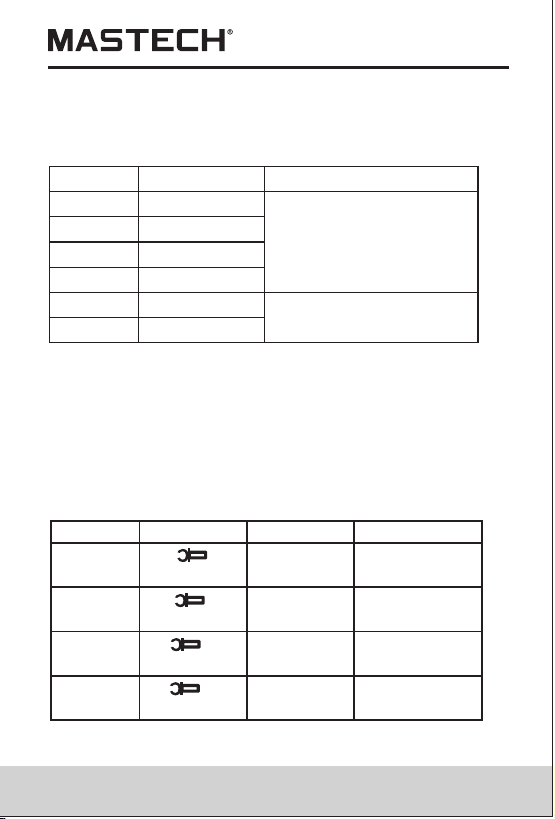
3.2.3 DC Current
Range
Resolution
Accuracy
200μA
2000μA
20.00mA
2.000A
0.1μA
1μA
0.01mA
0.1mA
0.001A
±(1.2% of rdg + 3 digits)
200.0mA
10.00A 0.01A
±(2.0% of rdg + 10 digits)
- Overload Protection: µA, mA ranges: F 200mA/250V
fuse (quick acting), 2A, 10A range: unfused.
- Max. Input Current: INPUT Jack: 200mA,
10A Jack: 10A
- Overload Protection: µA, mA ranges: F 200mA/250V
fuse (quick acting), 2A, 10A range: unfused.
- Max. Input Current: INPUT Jack: 200mA, 10A Jack:10A
- Frequency Range: 40 to 400Hz
- Response: Average, calibrated in rms of sine wave.
-Voltage Drop:200µA、20mA、2A: 20mV, 2000µA、
200mA、10A range: 200mV
3.2.5 DC Current (with clamp, optional)
Range
Resolution
Accuracy
0.1mV/0.1A
±(1.2 % of rdg
+3 digits)
meter
200A
0.1A /0.1mV
Typical
±(2.0 %)
±(1.2 % of rdg
±3 digits)
Typical
±(2.0 %)
DC Clamp
DC Clamp
meter
0 to 200A
2000A
0 to 2000A
1mV/1A
1A/1mV
- Overload Protection: 250V DC or AC rms
- Max. Input Voltage: 200mV
- Voltage Drop:200µA、20mA、2A: 20mV, 2000µA、
200mA、10A range: 200mV
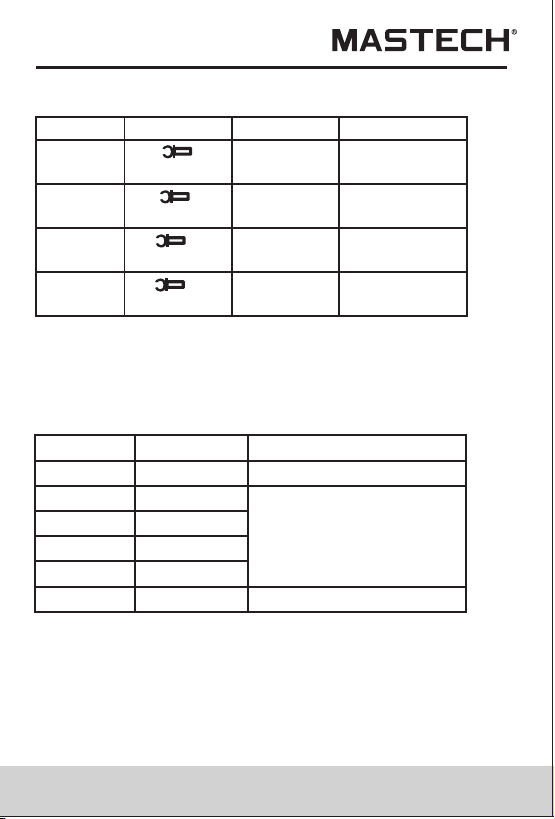
3.2.4 AC Current
Range
Resolution
Accuracy
200μA
2000μA
20.00mA
2.000A
±(1.5% of rdg + 5 digits)
200.0mA
10.00A 0.01A
±(3.0% of rdg + 10 digits)
0.1μA
1μA
0.01mA
0.1mA
0.001A
08 09
- Overload Protection: 200mV range: 250V DC or AC
rms, 2V-600V ranges: 600V DC or AC rms.
- Max. Input Voltage: 600V DC
3.2.2 AC Voltage
Range
Resolution
Accuracy
200mV
2V
20V
200V
600V
0.1mV
0.001V
0.01V
0.1V
1V
±(0.8% of rdg + 3 digits)
±(1.0% of rdg + 3 digits)
- Input Impedance: 10MΩ
- Overload Protection: 200mV range: 250V DC or AC
rms, 2V-600V ranges: 600V DC or AC rms.
- Frequency Range: 40 to 400Hz
- Response: Average, calibrated in rms of sine wave.
- Max. Input Voltage: 600V AC rms
3.2.3 DC Current
Range
Resolution
Accuracy
200μA
2000μA
20.00mA
2.000A
0.1μA
1μA
0.01mA
0.1mA
0.001A
±(1.2% of rdg + 3 digits)
200.0mA
10.00A 0.01A
±(2.0% of rdg + 10 digits)
- Overload Protection: µA, mA ranges: F 200mA/250V
fuse (quick acting), 2A, 10A range: unfused.
- Max. Input Current: INPUT Jack: 200mA,
10A Jack: 10A
- Overload Protection: µA, mA ranges: F 200mA/250V
fuse (quick acting), 2A, 10A range: unfused.
- Max. Input Current: INPUT Jack: 200mA, 10A Jack:10A
- Frequency Range: 40 to 400Hz
- Response: Average, calibrated in rms of sine wave.
-Voltage Drop:200µA、20mA、2A: 20mV, 2000µA、
200mA、10A range: 200mV
3.2.5 DC Current (with clamp, optional)
Range
Resolution
Accuracy
0.1mV/0.1A
±(1.2 % of rdg
+3 digits)
meter
200A
0.1A /0.1mV
Typical
±(2.0 %)
±(1.2 % of rdg
±3 digits)
Typical
±(2.0 %)
DC Clamp
DC Clamp
meter
0 to 200A
2000A
0 to 2000A
1mV/1A
1A/1mV
- Overload Protection: 250V DC or AC rms
- Max. Input Voltage: 200mV
- Voltage Drop:200µA、20mA、2A: 20mV, 2000µA、
200mA、10A range: 200mV
3.2.4 AC Current
Range
Resolution
Accuracy
200μA
2000μA
20.00mA
2.000A
±(1.5% of rdg + 5 digits)
200.0mA
10.00A 0.01A
±(3.0% of rdg + 10 digits)
0.1μA
1μA
0.01mA
0.1mA
0.001A
10 11
- Overload Protection: 250V DC or AC rms
- Max. Input Voltage: 200mV
- Frequency Range: 40 to 400Hz
- Response: Average, calibrated in rms of sine wave.
3.2.6 AC Current (with clamp, optional)
Range
Resolution
Accuracy
0.1mV/0.1A
±(1.5 % of rdg
+5 digits)
meter
200A
0.1A /0.1mV
Typical
±(3.0 %)
±(1.5 % of rdg
±3 digits)
Typical
±(3.0 %)
AC Clamp
AC Clamp
meter
0 to 200A
2000A
0 to 2000A
1mV/1A
1A/1mV
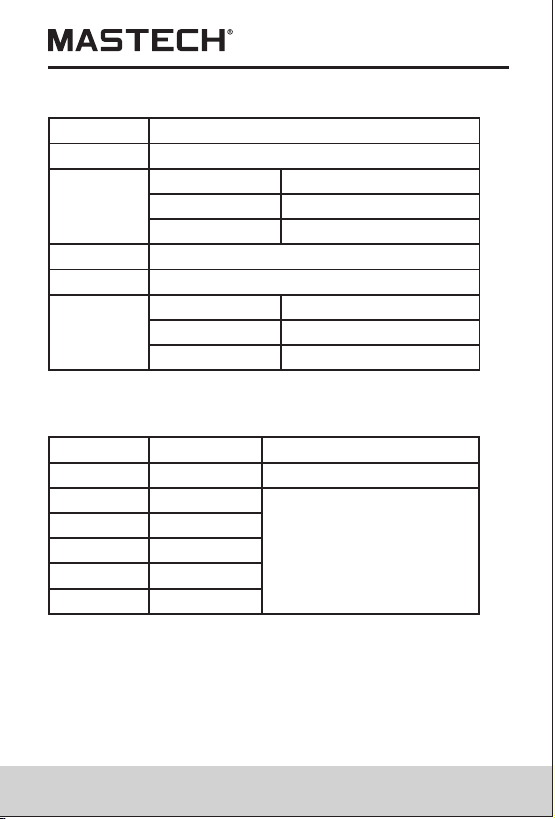
3.2.7 Resistance
Range
Resolution
Accuracy
±(1.0% of rdg + 3 digits)
±(1.0% of rdg + 1 digit1)
±(1.0% of rdg + 5 digits)
200Ω
2kΩ
20kΩ
200kΩ
2MΩ
20MΩ
0.1Ω
0.001kΩ
0.01kΩ
0.1kΩ
0.001MΩ
0.01MΩ
- Open Circuit Voltage: 0.25V
- Overload Protection: 250V DC or AC rms
- Overload Protection:
20nF~20μF Ranges: F 200mA/250V fuse (quick acting),.
200μF/1000μF Ranges: No Overload Protection.
3.2.9 Capacitance
Range
Resolution Function
0.01nF
0.1nF
0.001μF
20nF
200nF
2μF
0.01μF
0.1μF
1μF
20μF
200μF
1000μF
±(4.0% of rdg + 10digits)
±(4.0% of rdg + 3digits)
- Open circuit voltage: approx. 0.5V
- Overload Protection: 250V DC or AC rms
3.2.8 Temperature
Range
-20 to 1000˚C ˚C
Resolution
1˚C
Accuracy
-20 to 0 ˚C ˚C
0 to 400˚C ˚C
400 to 1000˚C ˚C
±(5% of rdg + 4digits)
±(1% of rdg + 3digits)
±(2% of rdg + 3digits)
Range
-0 ~1800˚F ˚F
Resolution
1˚F
Accuracy
-0 ~50˚F ˚F
50 ~750˚F ˚F
750 ~1800˚F ˚F
±(5% of rdg + 4digits)
±(1% of rdg + 3digits)
±(2% of rdg + 3digits)
- Overload Protection: 250V DC or AC rms
10 11
- Overload Protection: 250V DC or AC rms
- Max. Input Voltage: 200mV
- Frequency Range: 40 to 400Hz
- Response: Average, calibrated in rms of sine wave.
3.2.6 AC Current (with clamp, optional)
Range
Resolution
Accuracy
0.1mV/0.1A
±(1.5 % of rdg
+5 digits)
meter
200A
0.1A /0.1mV
Typical
±(3.0 %)
±(1.5 % of rdg
±3 digits)
Typical
±(3.0 %)
AC Clamp
AC Clamp
meter
0 to 200A
2000A
0 to 2000A
1mV/1A
1A/1mV
3.2.7 Resistance
Range
Resolution
Accuracy
±(1.0% of rdg + 3 digits)
±(1.0% of rdg + 1 digit1)
±(1.0% of rdg + 5 digits)
200Ω
2kΩ
20kΩ
200kΩ
2MΩ
20MΩ
0.1Ω
0.001kΩ
0.01kΩ
0.1kΩ
0.001MΩ
0.01MΩ
- Open Circuit Voltage: 0.25V
- Overload Protection: 250V DC or AC rms
- Overload Protection:
20nF~20μF Ranges: F 200mA/250V fuse (quick acting),.
200μF/1000μF Ranges: No Overload Protection.
3.2.9 Capacitance
Range
Resolution Function
0.01nF
0.1nF
0.001μF
20nF
200nF
2μF
0.01μF
0.1μF
1μF
20μF
200μF
1000μF
±(4.0% of rdg + 10digits)
±(4.0% of rdg + 3digits)
- Open circuit voltage: approx. 0.5V
- Overload Protection: 250V DC or AC rms
3.2.8 Temperature
Range
-20 to 1000˚C ˚C
Resolution
1˚C
Accuracy
-20 to 0 ˚C ˚C
0 to 400˚C ˚C
400 to 1000˚C ˚C
±(5% of rdg + 4digits)
±(1% of rdg + 3digits)
±(2% of rdg + 3digits)
Range
-0 ~1800˚F ˚F
Resolution
1˚F
Accuracy
-0 ~50˚F ˚F
50 ~750˚F ˚F
750 ~1800˚F ˚F
±(5% of rdg + 4digits)
±(1% of rdg + 3digits)
±(2% of rdg + 3digits)
- Overload Protection: 250V DC or AC rms
12 13
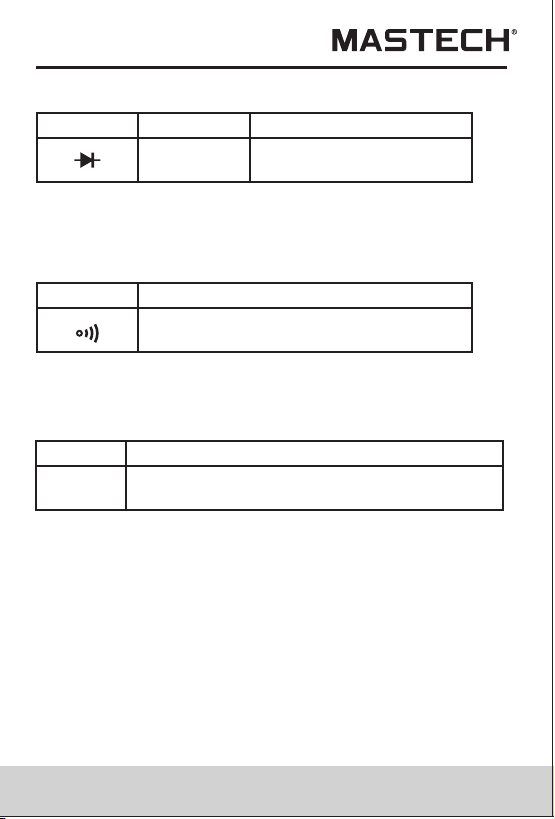
3.2.10 Diode
3.2.12 Transistor hFE
Range
Resolution Function
Display :read approximate
forward voltage of diode
1mV
- Forward DC Current: approx. 1mA
- Reversed DC Voltage: approx.1.5V
- Overload Protection: 250V DC or AC rms
3.2.11 Continuity
Range
Function
Built-in buzzer will sound, if resistance
is lower than 50Ω.
- Open circuit voltage: approx. 0.5V
- Overload Protection: 250V DC or AC rms
Range
Function
Display: read approximate hFE value
(0-1000) of transistor under test (ALL TYPE)
- Base Current: approx. 2μA,
Vce: approx. 1V
-Overload Protection: F 200mA/250V fuse (quick acting)
4. Operating Instruction
4.1 Power-UP
Press the ‘ON/OFF’ button to turn the meter ON or OFF.
4.2 Data Hold
If you need data hold when measuring, you can put on
‘DATA-H’ button, it will hold the reading; if you put the
button again, data hold is not continue.
hFE
4.5 Range Transform
The auto range is used when measuring the current,
voltage, capacitance and resistance. Put down the ‘RANGE’
if the manual range is needed. Each time you put down,
range will go upward; the minimum range is transformed
if ‘RANGE’ is put down at the maximum range. If the
‘RANGE’ is put down more than two seconds, auto range
is used again.
4.6 Back Light
If the light is dark to make the reading difficult when
measuring, you can press ‘ ’ button to turn on the back
light, which will last for 15 seconds. Continuous pressing
the button for two seconds will turn off the back light.
Note:
LED is the main source of back light. Its working current
is large, although the meter has the timer equipment
(time is 15 seconds and it will off automatically after 15
seconds); often use back light will shorten the battery
life, you'd better not to use the back light so frequently if
it's not necessary.
4.3 Maximum Value Hold
If you need data hold when measuring, you can put on
‘MAX.H’ button, it will hold the maximum value; if you
put the button again, maximum value hold is not continue.
4.4 Function Transform
Put down the ‘FUNC.’ when measuring the current and
voltage. Meter will be transformed between DC and AC
range. Put 'FUNC.' when measuring the temperature,
meter will transform between ˚Cand ˚F range. Put ‘FUNC.’
when measuring the diode and continuity, meter will
transform among them.

12 13
3.2.10 Diode
3.2.12 Transistor hFE
Range
Resolution Function
Display :read approximate
forward voltage of diode
1mV
- Forward DC Current: approx. 1mA
- Reversed DC Voltage: approx.1.5V
- Overload Protection: 250V DC or AC rms
3.2.11 Continuity
Range
Function
Built-in buzzer will sound, if resistance
is lower than 50Ω.
- Open circuit voltage: approx. 0.5V
- Overload Protection: 250V DC or AC rms
Range
Function
Display: read approximate hFE value
(0-1000) of transistor under test (ALL TYPE)
- Base Current: approx. 2μA,
Vce: approx. 1V
-Overload Protection: F 200mA/250V fuse (quick acting)
4. Operating Instruction
4.1 Power-UP
Press the ‘ON/OFF’ button to turn the meter ON or OFF.
4.2 Data Hold
If you need data hold when measuring, you can put on
‘DATA-H’ button, it will hold the reading; if you put the
button again, data hold is not continue.
hFE
4.5 Range Transform
The auto range is used when measuring the current,
voltage, capacitance and resistance. Put down the ‘RANGE’
if the manual range is needed. Each time you put down,
range will go upward; the minimum range is transformed
if ‘RANGE’ is put down at the maximum range. If the
‘RANGE’ is put down more than two seconds, auto range
is used again.
4.6 Back Light
If the light is dark to make the reading difficult when
measuring, you can press ‘ ’ button to turn on the back
light, which will last for 15 seconds. Continuous pressing
the button for two seconds will turn off the back light.
Note:
LED is the main source of back light. Its working current
is large, although the meter has the timer equipment
(time is 15 seconds and it will off automatically after 15
seconds); often use back light will shorten the battery
life, you'd better not to use the back light so frequently if
it's not necessary.
4.3 Maximum Value Hold
If you need data hold when measuring, you can put on
‘MAX.H’ button, it will hold the maximum value; if you
put the button again, maximum value hold is not continue.
4.4 Function Transform
Put down the ‘FUNC.’ when measuring the current and
voltage. Meter will be transformed between DC and AC
range. Put 'FUNC.' when measuring the temperature,
meter will transform between ˚Cand ˚F range. Put ‘FUNC.’
when measuring the diode and continuity, meter will
transform among them.
14 15
When the battery voltage is less than 4V, it will show ‘ ’.
But if you use back light at the same time, maybe ‘ ’
will come up even if the battery voltage is more than 4V,
because the working current is higher and the voltage
will decline. (When ‘ ’ shows, the accuracy of the
measurement can not be assured.) You need not replace
the battery. When you use normally (back light is not
using), ‘ ’ will not show up. You need replace it till ‘ ’
show again.
4.7AUTO Power Off
If there's no any operation within fifteen minutes after
power is on, meter will auto power off with five short
sounds and a long sound in a minute.
After auto power off, if stir the transform switch or put
down any button of 'FUNC.', 'DATA-H', 'MAX.H', 'RANGE',
meter will recover the working condition.
If presses the ‘DATA-H’ when power is on, auto power
off disable.
4.8 Preparation For Measurement
4.8.1 Put on the ‘ON/OFF’ button. If the battery voltage
is less than 3.8V, display will show ‘ ’, the battery
should be changed at this time.
4.8.2 The ‘ ’besides the input jack shows that the input
voltage or current should be less than specification
on the sticker of the meter to protect the inner
circuit from damaging.
4.8.3 Select a function and a range for the item to be
measured through rotating the transform switch
accordingly. When the value scale to be measured
is unknown beforehand, set the range selector at
the highest position.
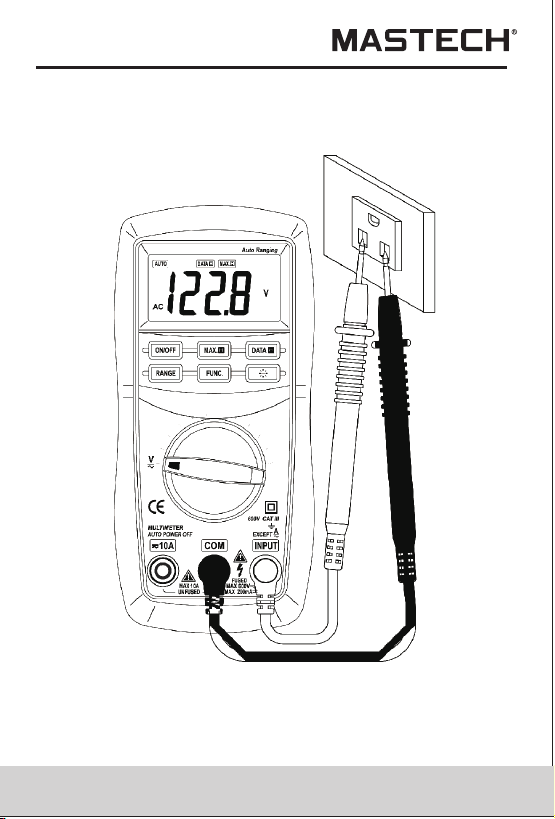
4.9 Measuring DC Voltage
You can't input the voltage which more than 600V
DC, it's possible to show higher voltage, but it's
may destroy the inner circuit.
Pay attention not to get an electric shock when
measuring high voltage.
WARNING
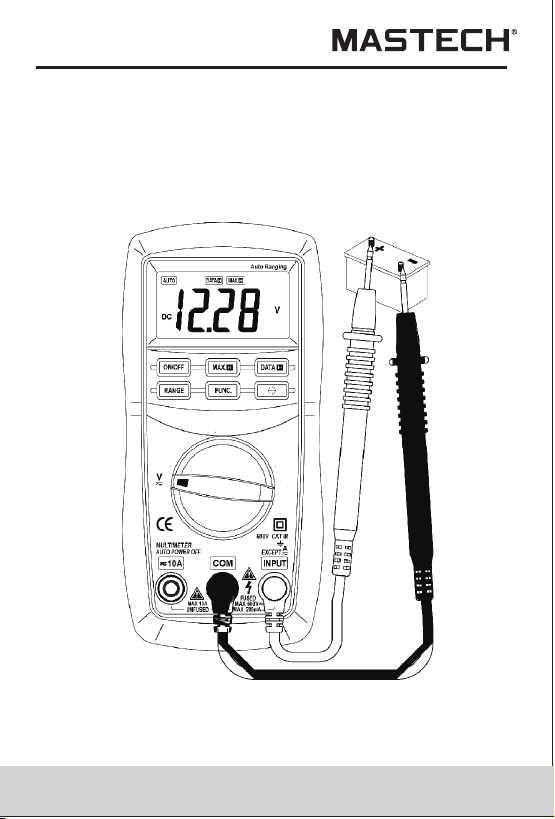
4.9.1 Connect the black test lead to the COM jack and
the red test lead to the INPUT jack.
4.9.2 Set the transform switch at the V range position.
4.9.3 Put down the 'FUNC.' to enter the DC
measurement. Auto range or manual range can
be transformed by putting the 'RANGE'.
4.9.4 Connect test leads across the source or load
under measurement.
4.9.5 You can get a reading from LCD display.
The polarity of the red test lead connection will
be indicated.
Note:
• At the little voltage range, the meter will show
unsteady reading when test leads haven't reach the
circuit, it's normal because the meter is very
sensitivity. When test leads touch the circuit, you can
get the true reading.
• At the manual range mode, when only the figure 'OL'
is displayed, it indicates overrange situation and the
higher range has to be selected.
4.8.4 When connection, first connect to the public testing
line, then to the electriferous testing line. When
you'll remove it, you should remove the
elecriferous one.
14 15
When the battery voltage is less than 4V, it will show ‘ ’.
But if you use back light at the same time, maybe ‘ ’
will come up even if the battery voltage is more than 4V,
because the working current is higher and the voltage
will decline. (When ‘ ’ shows, the accuracy of the
measurement can not be assured.) You need not replace
the battery. When you use normally (back light is not
using), ‘ ’ will not show up. You need replace it till ‘ ’
show again.
4.7AUTO Power Off
If there's no any operation within fifteen minutes after
power is on, meter will auto power off with five short
sounds and a long sound in a minute.
After auto power off, if stir the transform switch or put
down any button of 'FUNC.', 'DATA-H', 'MAX.H', 'RANGE',
meter will recover the working condition.
If presses the ‘DATA-H’ when power is on, auto power
off disable.
4.8 Preparation For Measurement
4.8.1 Put on the ‘ON/OFF’ button. If the battery voltage
is less than 3.8V, display will show ‘ ’, the battery
should be changed at this time.
4.8.2 The ‘ ’besides the input jack shows that the input
voltage or current should be less than specification
on the sticker of the meter to protect the inner
circuit from damaging.
4.8.3 Select a function and a range for the item to be
measured through rotating the transform switch
accordingly. When the value scale to be measured
is unknown beforehand, set the range selector at
the highest position.
4.9 Measuring DC Voltage
You can't input the voltage which more than 600V
DC, it's possible to show higher voltage, but it's
may destroy the inner circuit.
Pay attention not to get an electric shock when
measuring high voltage.
WARNING
4.9.1 Connect the black test lead to the COM jack and
the red test lead to the INPUT jack.
4.9.2 Set the transform switch at the V range position.
4.9.3 Put down the 'FUNC.' to enter the DC
measurement. Auto range or manual range can
be transformed by putting the 'RANGE'.
4.9.4 Connect test leads across the source or load
under measurement.
4.9.5 You can get a reading from LCD display.
The polarity of the red test lead connection will
be indicated.
Note:
• At the little voltage range, the meter will show
unsteady reading when test leads haven't reach the
circuit, it's normal because the meter is very
sensitivity. When test leads touch the circuit, you can
get the true reading.
• At the manual range mode, when only the figure 'OL'
is displayed, it indicates overrange situation and the
higher range has to be selected.
4.8.4 When connection, first connect to the public testing
line, then to the electriferous testing line. When
you'll remove it, you should remove the
elecriferous one.
16 17
• At the manual range mode, when the value scale to
be measured is unknown beforehand, set the range
selector at the highest position.
4.10 Measuring AC Voltage
You can't input the voltage which more than 600V
rms AC, it's possible to show higher voltage, but
it's may destroy the inner circuit.
Pay attention not to get an electric shock when
measuring voltage.
WARNING
4.10.1 Connect the black test lead to the COM jack and
the red test lead to the INPUT jack.
4.10.2 Set the transform switch at the V range position.
4.10.3 Put down the 'FUNC.' to enter the AC
measurement. Auto range or manual range can
be transformed by putting the 'RANGE'.
4.10.4 Connect test leads across the source or load
under measurement.
4.10.5 You can get reading from LCD.
Note:
• At the little voltage range, the meter will show
unsteady reading when test leads haven't reach the
circuit, it's normal because the meter is very
sensitivity. When test leads touch the circuit, you can
get the true reading.
At the manual range mode, when only the figure 'OL'
is displayed, it indicates overrange situation and the
higher range has to be selected.
At the manual range mode, when the value scale to
be measured is unknown beforehand, set the range
selector at the highest position.
•
•
16 17
• At the manual range mode, when the value scale to
be measured is unknown beforehand, set the range
selector at the highest position.
4.10 Measuring AC Voltage
You can't input the voltage which more than 600V
rms AC, it's possible to show higher voltage, but
it's may destroy the inner circuit.
Pay attention not to get an electric shock when
measuring voltage.
WARNING
4.10.1 Connect the black test lead to the COM jack and
the red test lead to the INPUT jack.
4.10.2 Set the transform switch at the V range position.
4.10.3 Put down the 'FUNC.' to enter the AC
measurement. Auto range or manual range can
be transformed by putting the 'RANGE'.
4.10.4 Connect test leads across the source or load
under measurement.
4.10.5 You can get reading from LCD.
Note:
• At the little voltage range, the meter will show
unsteady reading when test leads haven't reach the
circuit, it's normal because the meter is very
sensitivity. When test leads touch the circuit, you can
get the true reading.
At the manual range mode, when only the figure 'OL'
is displayed, it indicates overrange situation and the
higher range has to be selected.
At the manual range mode, when the value scale to
be measured is unknown beforehand, set the range
selector at the highest position.
•
•
18
19
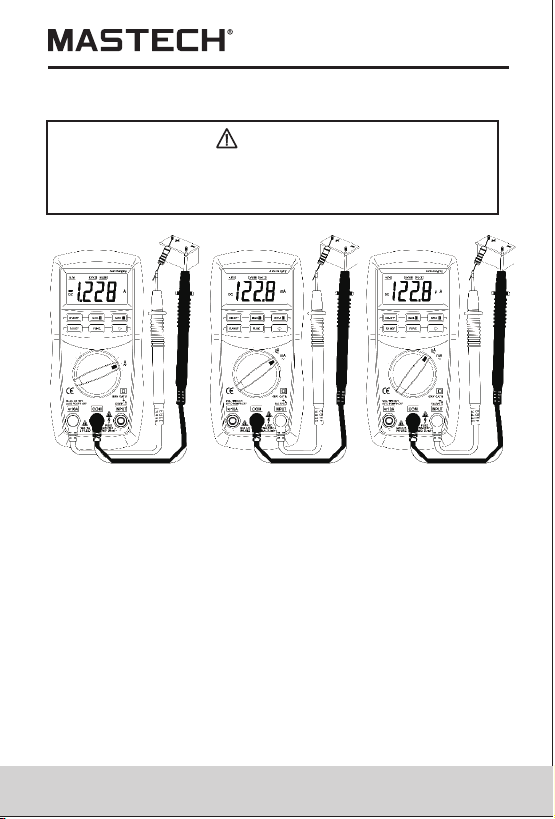
4.11 Measuring DC Current
Shut down the power of the tested circuit, then
connect the meter with the circuit for
measurement.
WARNING
4.11.1 Connect the black test lead to the COM jack and
the red test lead to the INPUT jack for a
maximum of 200mA current. For a maximum of
10A, move the red lead to the 10A jack.
4.11.2 Set the transform switch at the desired µA, mA
or A range position.
4.11.3 Put down the 'FUNC.' to enter the DC
measurement. Auto range or manual range can
be transformed by putting the 'RANGE'.
4.11.4 Connect test leads in series with the load under
measurement.
4.11.5 You can get reading from LCD. The polarity of
red test lead will be indicated.
18
19
4.11 Measuring DC Current
Shut down the power of the tested circuit, then
connect the meter with the circuit for
measurement.
WARNING
4.11.1 Connect the black test lead to the COM jack and
the red test lead to the INPUT jack for a
maximum of 200mA current. For a maximum of
10A, move the red lead to the 10A jack.
4.11.2 Set the transform switch at the desired µA, mA
or A range position.
4.11.3 Put down the 'FUNC.' to enter the DC
measurement. Auto range or manual range can
be transformed by putting the 'RANGE'.
4.11.4 Connect test leads in series with the load under
measurement.
4.11.5 You can get reading from LCD. The polarity of
red test lead will be indicated.
20
21
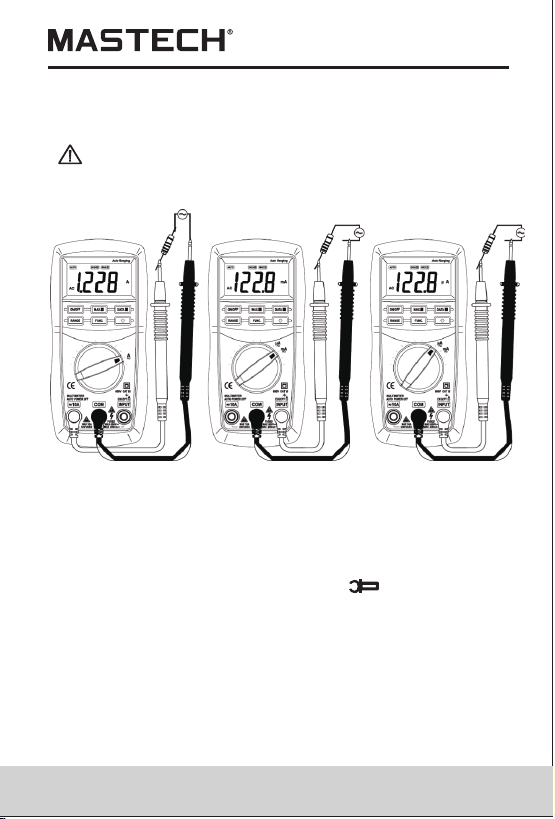
4.12 Measuring AC Current
Note:
• When only the figure 'OL' is displayed, it indicates
overrange situation and the higher range has to be
selected.
When the value scale to be measured is unknown
beforehand, set the range selector at the highest
position.
means the socket of INPUT maximum current is
200mA, over current will destroy the fuse. 10A's
maximum current is 10A, no fuse protection.
•
• “ ”
Shut down the power of the tested circuit, then
connect the meter with the circuit for
measurement.
WARNING
4.12.1 Connect the black test lead to the COM jack and
the red test lead to the INPUT jack for a
maximum of 200mA current. For a maximum of
10A, move the red lead to the 10A jack.
4.12.2 Set the transform switch at the desired µA,
mA or A range position.
4.12.3 Put down the 'FUNC.' to enter the AC
measurement. Auto range or manual range can
be transformed by putting the 'RANGE'.
4.12.4 Connect test leads in series with the load under
measurement.
4.12.5 You can get reading from LCD.
Note:
• When only the figure 'OL' is displayed, it indicates
overrange situation and the higher range has to
be selected.
When the value scale to be measured is unknown
beforehand, set the range selector at the highest
position.
‘ ’ means the socket of INPUT maximum current
is 200mA, over current will destroy the fuse. 10A's
maximum current is 10A, no fuse protection.
•
•
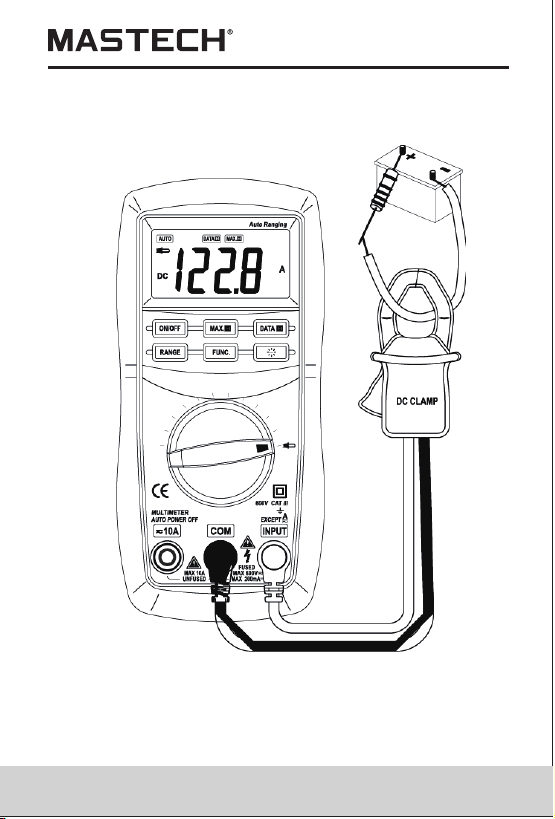
4.13 DC Current Measuring (With Clamp, optional)
4.13.1 Connect the black output lead of clamp to the
COM jack and the red one to the INPUT jack
of the meter.
4.13.2 Set the transform switch at the range position.
4.13.3 Put down the 'FUNC.' to enter the DC
measurement. Auto range or manual range can
be transformed by putting the 'RANGE'.
4.13.4 Clamp the circuit under measured.
4.13.5 You can get reading from LCD. The polarity of
red output lead will be indicated.
Note:
• Select the DC clamp to measure the DC current.
20
21
4.12 Measuring AC Current
Note:
• When only the figure 'OL' is displayed, it indicates
overrange situation and the higher range has to be
selected.
When the value scale to be measured is unknown
beforehand, set the range selector at the highest
position.
means the socket of INPUT maximum current is
200mA, over current will destroy the fuse. 10A's
maximum current is 10A, no fuse protection.
•
• “ ”
Shut down the power of the tested circuit, then
connect the meter with the circuit for
measurement.
WARNING
4.12.1 Connect the black test lead to the COM jack and
the red test lead to the INPUT jack for a
maximum of 200mA current. For a maximum of
10A, move the red lead to the 10A jack.
4.12.2 Set the transform switch at the desired µA,
mA or A range position.
4.12.3 Put down the 'FUNC.' to enter the AC
measurement. Auto range or manual range can
be transformed by putting the 'RANGE'.
4.12.4 Connect test leads in series with the load under
measurement.
4.12.5 You can get reading from LCD.
Note:
• When only the figure 'OL' is displayed, it indicates
overrange situation and the higher range has to
be selected.
When the value scale to be measured is unknown
beforehand, set the range selector at the highest
position.
‘ ’ means the socket of INPUT maximum current
is 200mA, over current will destroy the fuse. 10A's
maximum current is 10A, no fuse protection.
•
•
4.13 DC Current Measuring (With Clamp, optional)
4.13.1 Connect the black output lead of clamp to the
COM jack and the red one to the INPUT jack
of the meter.
4.13.2 Set the transform switch at the range position.
4.13.3 Put down the 'FUNC.' to enter the DC
measurement. Auto range or manual range can
be transformed by putting the 'RANGE'.
4.13.4 Clamp the circuit under measured.
4.13.5 You can get reading from LCD. The polarity of
red output lead will be indicated.
Note:
• Select the DC clamp to measure the DC current.

22
23
c. If the sensitivity of the selected clamp is high
(0.1A/1mV), the indicated value will be 10 times
higher than the measured value. For example, the
measured current is 10A, then the indicated value
will be 100.0A.
At the manual range mode, when only the figure 'OL'
is displayed, it indicates overrange situation and the
higher range has to be selected.
At the manual range mode, when the value scale to
be measured is unknown beforehand, set the range
selector at the highest position.
Matching problem about the meter and the sensitivity
of the clamp:
a. The sensitivity of 200A range is 200mV, that of
2000A is 2V; the sensitivity of the matching clamp is
0.1A/0.1mV. The present indicated value is same to
the measured value.
b. If the sensitivity of the selected clamp is low
(0.1A/0.01mV), the indicated value will be 10 times
lower than the measured value. For example, the
measured current is 100A, then the indicated value
will be 10.0A.
•
•
•
22
23
c. If the sensitivity of the selected clamp is high
(0.1A/1mV), the indicated value will be 10 times
higher than the measured value. For example, the
measured current is 10A, then the indicated value
will be 100.0A.
At the manual range mode, when only the figure 'OL'
is displayed, it indicates overrange situation and the
higher range has to be selected.
At the manual range mode, when the value scale to
be measured is unknown beforehand, set the range
selector at the highest position.
Matching problem about the meter and the sensitivity
of the clamp:
a. The sensitivity of 200A range is 200mV, that of
2000A is 2V; the sensitivity of the matching clamp is
0.1A/0.1mV. The present indicated value is same to
the measured value.
b. If the sensitivity of the selected clamp is low
(0.1A/0.01mV), the indicated value will be 10 times
lower than the measured value. For example, the
measured current is 100A, then the indicated value
will be 10.0A.
•
•
•

24
25
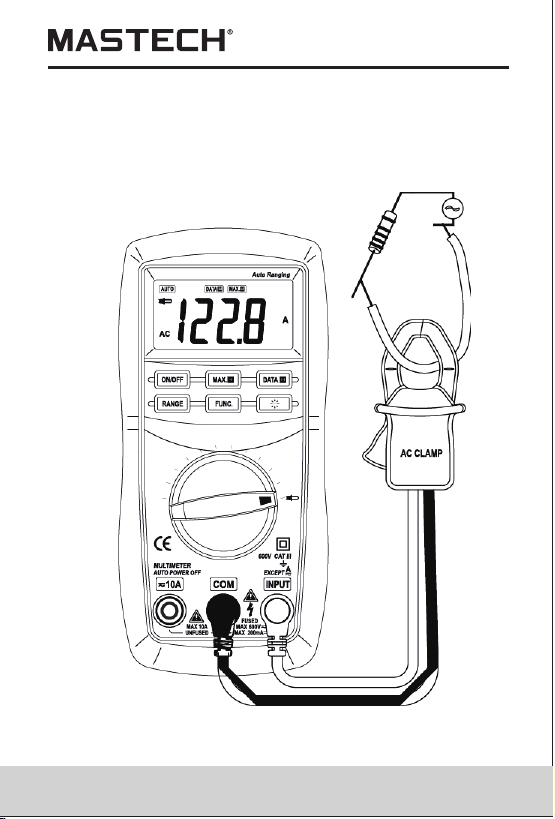
4.14 AC Current Measuring (With Clamp,
Optional)
4.14.1 Connect the black output lead of clamp to the
COM jack and the red one to the INPUT jack
of the meter.
4.14.2 Set the transform switch at the range position.
4.14.3 Put down the 'FUNC.' to enter the AC
measurement. Auto range or manual range can
be transformed by putting the 'RANGE'.
4.14.4 Clamp the circuit under measured.
4.14.5 You can get reading from LCD.
Note:
• Select the AC clamp to measure the AC current.
At the manual range mode, when only the figure 'OL'
is displayed, it indicates overrange situation and the
higher range has to be selected.
At the manual range mode, when the value scale to
be measured is unknown beforehand, set the range
selector at the highest position.
Matching problem about the meter and the sensitivity
of the clamp:
a. The sensitivity of 200A range is 200mV, that of
2000A is 2V; the sensitivity of the matching clamp is
0.1A/0.1mV. The present indicated value is same to
the measured value.
•
•
•
b. If the sensitivity of the selected clamp is low
(0.1A/0.01mV), the indicated value will be 10 times
lower than the measured value. For example, the
measured current is 100A, then the indicated value
will be 10.0A.
c. If the sensitivity of the selected clamp is high
(0.1A/1mV), the indicated value will be 10 times
higher than the measured value. For example, the
measured current is 10A, then the indicated value
will be 100.0A.
24
25
4.14 AC Current Measuring (With Clamp,
Optional)
4.14.1 Connect the black output lead of clamp to the
COM jack and the red one to the INPUT jack
of the meter.
4.14.2 Set the transform switch at the range position.
4.14.3 Put down the 'FUNC.' to enter the AC
measurement. Auto range or manual range can
be transformed by putting the 'RANGE'.
4.14.4 Clamp the circuit under measured.
4.14.5 You can get reading from LCD.
Note:
• Select the AC clamp to measure the AC current.
At the manual range mode, when only the figure 'OL'
is displayed, it indicates overrange situation and the
higher range has to be selected.
At the manual range mode, when the value scale to
be measured is unknown beforehand, set the range
selector at the highest position.
Matching problem about the meter and the sensitivity
of the clamp:
a. The sensitivity of 200A range is 200mV, that of
2000A is 2V; the sensitivity of the matching clamp is
0.1A/0.1mV. The present indicated value is same to
the measured value.
•
•
•
b. If the sensitivity of the selected clamp is low
(0.1A/0.01mV), the indicated value will be 10 times
lower than the measured value. For example, the
measured current is 100A, then the indicated value
will be 10.0A.
c. If the sensitivity of the selected clamp is high
(0.1A/1mV), the indicated value will be 10 times
higher than the measured value. For example, the
measured current is 10A, then the indicated value
will be 100.0A.
26
27
When measuring in-circuit resistance, be sure
the circuit under test has all power removed and
that all capacitors have been discharged fully.
WARNING
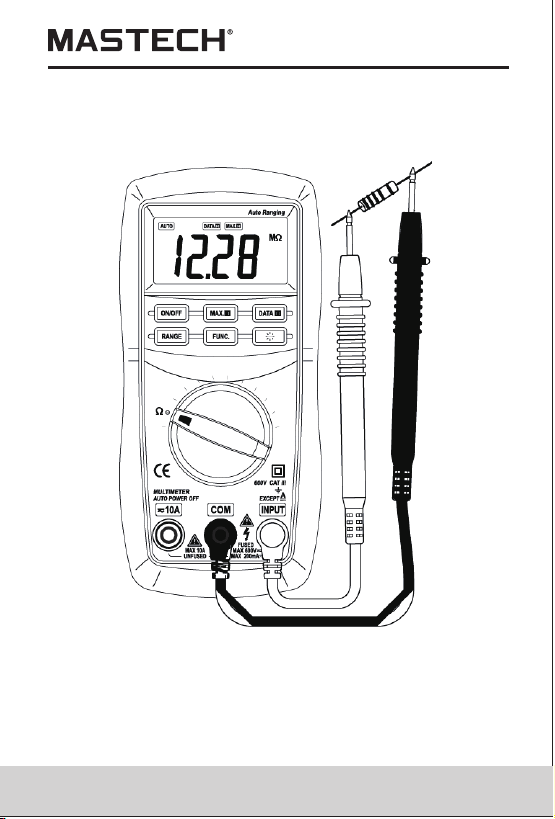
4.15 Measuring Resistance
4.15.1 Connect the black test lead to the COM jack and
the red test lead to the INPUT jack.
4.15.2 Set the transform switch at the Ω range position.
Auto range or manual range can be transformed
by putting the 'RANGE'.
4.15.3 Connect test leads across the resistance under
measurement.
4.15.4 You can get reading from LCD.
Note:
• At the manual range mode, when only the figure 'OL'
is displayed, it indicates overrange situation and the
higher range has to be selected.
For measuring resistance above 1MΩ, the meter may
take a few seconds to get stable reading.
•
• When the input is not connected, i.e. at open circuit,
the figure 'OL' will be displayed for the overrange
condition.
26
27
When measuring in-circuit resistance, be sure
the circuit under test has all power removed and
that all capacitors have been discharged fully.
WARNING
4.15 Measuring Resistance
4.15.1 Connect the black test lead to the COM jack and
the red test lead to the INPUT jack.
4.15.2 Set the transform switch at the Ω range position.
Auto range or manual range can be transformed
by putting the 'RANGE'.
4.15.3 Connect test leads across the resistance under
measurement.
4.15.4 You can get reading from LCD.
Note:
• At the manual range mode, when only the figure 'OL'
is displayed, it indicates overrange situation and the
higher range has to be selected.
For measuring resistance above 1MΩ, the meter may
take a few seconds to get stable reading.
•
• When the input is not connected, i.e. at open circuit,
the figure 'OL' will be displayed for the overrange
condition.
28
29
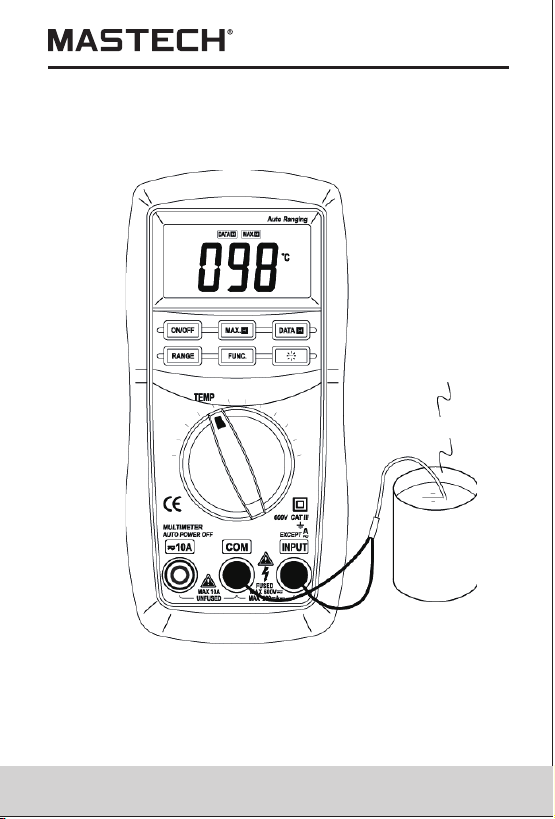
4.16 Measuring Temperature
To avoid electrical shock, do not connect the
thermocouples with the electriferous circuit.
WARNING
4.16.1 Set the transform switch at the TEMP range
position.
4.16.2 range or range can be transformed by
putting the 'FUNC.'.
4.16.3 The LCD display will show the current
environment temperature.
4.16.4 When measuring the temperature with
thermocouple, 'K' type probe for this meter can
be used. Insert the black plug to the COM jack
and the red one to the INPUT jack, touch the end
of the temperature sensor to the area or surface
of the object for measurement.
4.16.5 You can get reading from LCD.
˚C ˚F
Note:
• With better hermetization, the meter's temperature
measured circuit and environment need a little longer
time to reach heat balance, and then accurate
reading can be gotten.
28
29
4.16 Measuring Temperature
To avoid electrical shock, do not connect the
thermocouples with the electriferous circuit.
WARNING
4.16.1 Set the transform switch at the TEMP range
position.
4.16.2 range or range can be transformed by
putting the 'FUNC.'.
4.16.3 The LCD display will show the current
environment temperature.
4.16.4 When measuring the temperature with
thermocouple, 'K' type probe for this meter can
be used. Insert the black plug to the COM jack
and the red one to the INPUT jack, touch the end
of the temperature sensor to the area or surface
of the object for measurement.
4.16.5 You can get reading from LCD.
˚C ˚F
Note:
• With better hermetization, the meter's temperature
measured circuit and environment need a little longer
time to reach heat balance, and then accurate
reading can be gotten.
30
31
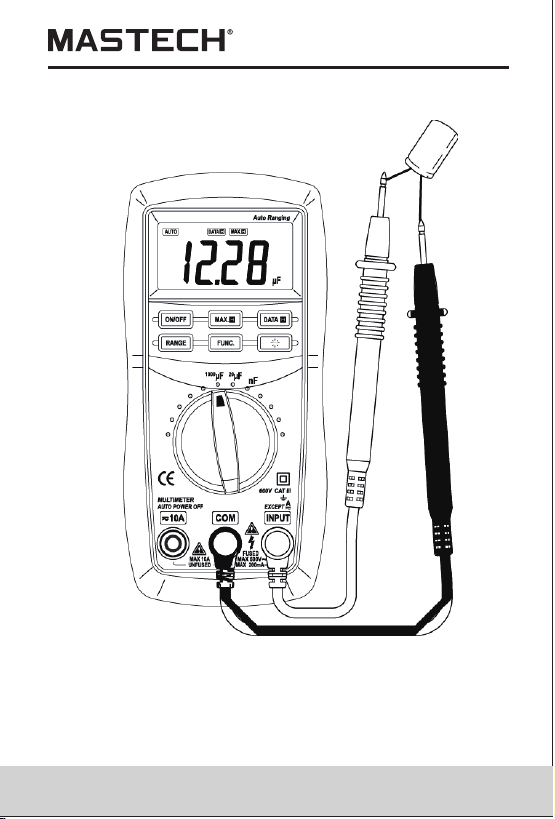
4.17 Measuring Capacitance
4.17.1 Connect the black test lead to the COM jack
and the red test lead to the INPUT jack.
4.17.2 Set the transform switch at the desired nF, 20μF
or 2000μF range position.
4.17.3 Auto range or manual range can be transformed by
4.17.4 Before connect test leads across two sides of the
capacitor under measurement, be sure that the
putting the ‘RANGE’.
capacitor han been discharged fully.
4.17.5 You can get reading from LCD.
4.17.6 When frequent capacitor testing is needed, put the
plug of multifunction test socket into COM and
INPUT and put the capacitor foot into two long socket
of capacitor testing equipment, capacitor testing is
ready.
To avoid electrical shock, be sure the capacitance
have been discharged fully before measuring the
WARNING
capacitance of a capacitor
Note:
• At the small capacitor range, the reading will include the
small value because some influence from the distribution
of test leads. It will not influence the accuracy of measuring.
30
31
4.17 Measuring Capacitance
4.17.1 Connect the black test lead to the COM jack
and the red test lead to the INPUT jack.
4.17.2 Set the transform switch at the desired nF, 20μF
or 2000μF range position.
4.17.3 Auto range or manual range can be transformed by
4.17.4 Before connect test leads across two sides of the
capacitor under measurement, be sure that the
putting the ‘RANGE’.
capacitor han been discharged fully.
4.17.5 You can get reading from LCD.
4.17.6 When frequent capacitor testing is needed, put the
plug of multifunction test socket into COM and
INPUT and put the capacitor foot into two long socket
of capacitor testing equipment, capacitor testing is
ready.
To avoid electrical shock, be sure the capacitance
have been discharged fully before measuring the
WARNING
capacitance of a capacitor
Note:
• At the small capacitor range, the reading will include the
small value because some influence from the distribution
of test leads. It will not influence the accuracy of measuring.
32
33
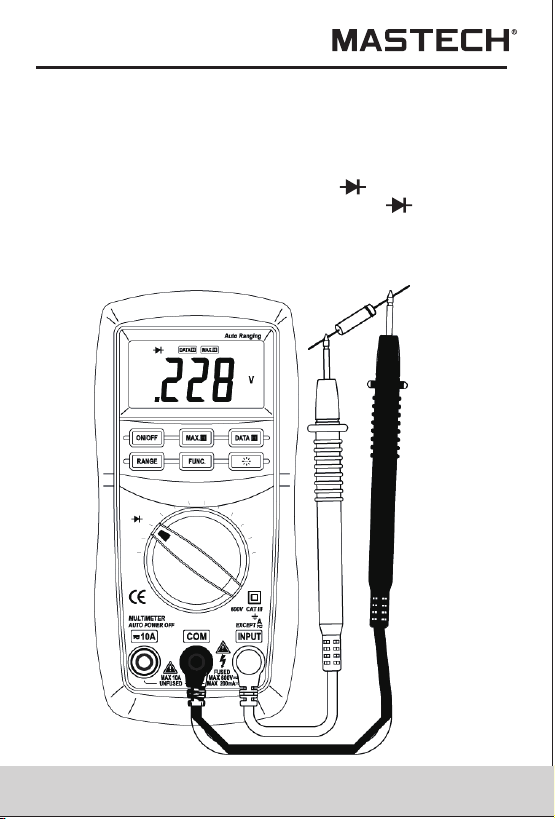
4.18 Testing Diode
4.18.1 Connect the black test lead to the COM jack and
the red test lead to the INPUT jack. (The polarity
of red lead is '+')
4.18.2 Set the transform switch at the range position.
4.18.3 put down the 'FUNC.' transformed at test.
4.18.4 Connect the red lead to the anode, the black
lead to the cathode of the diode under testing.
4.18.5 You can get reading from LCD.
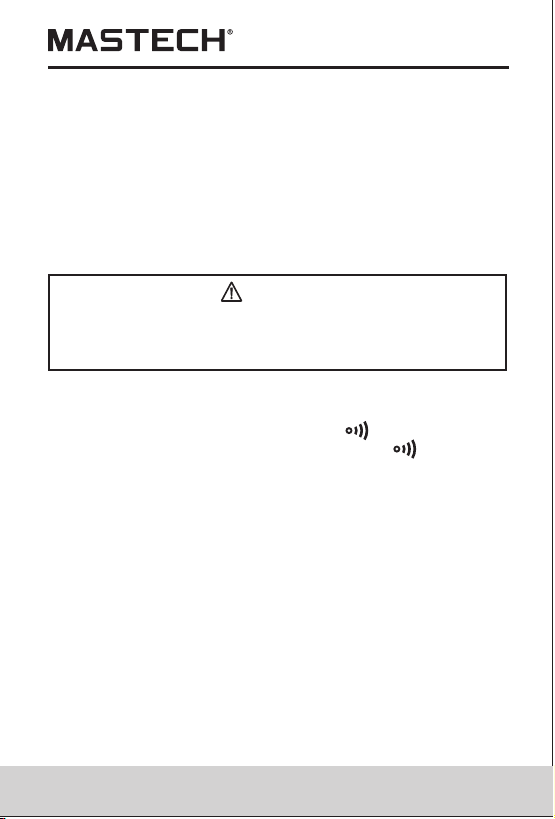
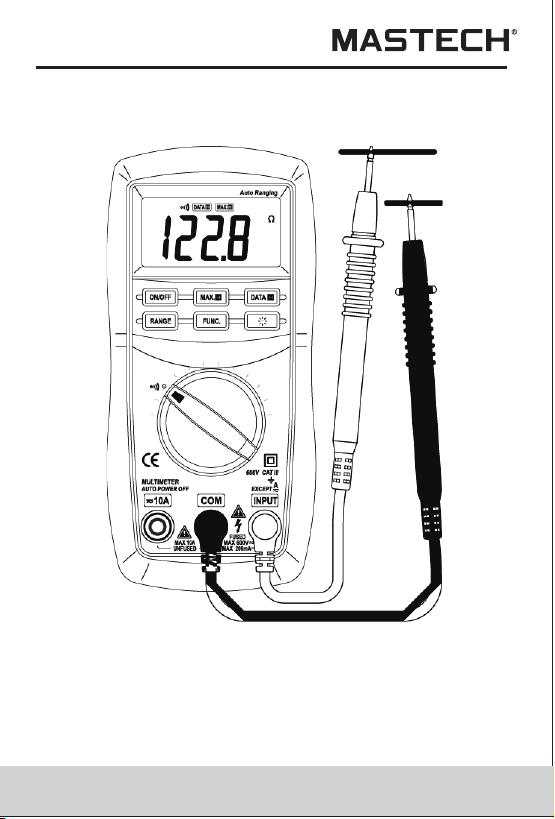
4.19 Continuity Test
When testing the circuit continuity, be sure that
the power of the circuit has been shut down and
all capacitors have been discharged fully.
WARNING
4.19.1 Connect the black test lead to the COM jack and
the red test lead to the INPUT jack.
4.19.2 Set the transform switch at the range position.
4.19.3 put down the 'FUNC.' transformed at continuity
test.
4.19.4 Connect test leads across two points of the circuit
under testing.
4.19.5 If continuity exists (i.e., resistance less than
about 50 ), built-in buzzer will sound.Ω
Note:
• If the input open circuit (or the circuit resistance
measured is higher than 200 ), then the figure‘0L’
will be displayed.
Ω
Note:
• The meter will show the approximate forward voltage
drop of the diode.
If the lead connection is reversed, only figure 'OL' will
be displayed.
When the input is not connected, i.e. at open circuit,
the figure 'OL' will be displayed.
•
•
32
33
4.18 Testing Diode
4.18.1 Connect the black test lead to the COM jack and
the red test lead to the INPUT jack. (The polarity
of red lead is '+')
4.18.2 Set the transform switch at the range position.
4.18.3 put down the 'FUNC.' transformed at test.
4.18.4 Connect the red lead to the anode, the black
lead to the cathode of the diode under testing.
4.18.5 You can get reading from LCD.
4.19 Continuity Test
When testing the circuit continuity, be sure that
the power of the circuit has been shut down and
all capacitors have been discharged fully.
WARNING
4.19.1 Connect the black test lead to the COM jack and
the red test lead to the INPUT jack.
4.19.2 Set the transform switch at the range position.
4.19.3 put down the 'FUNC.' transformed at continuity
test.
4.19.4 Connect test leads across two points of the circuit
under testing.
4.19.5 If continuity exists (i.e., resistance less than
about 50 ), built-in buzzer will sound.Ω
Note:
• If the input open circuit (or the circuit resistance
measured is higher than 200 ), then the figure‘0L’
will be displayed.
Ω
Note:
• The meter will show the approximate forward voltage
drop of the diode.
If the lead connection is reversed, only figure 'OL' will
be displayed.
When the input is not connected, i.e. at open circuit,
the figure 'OL' will be displayed.
•
•
34
35
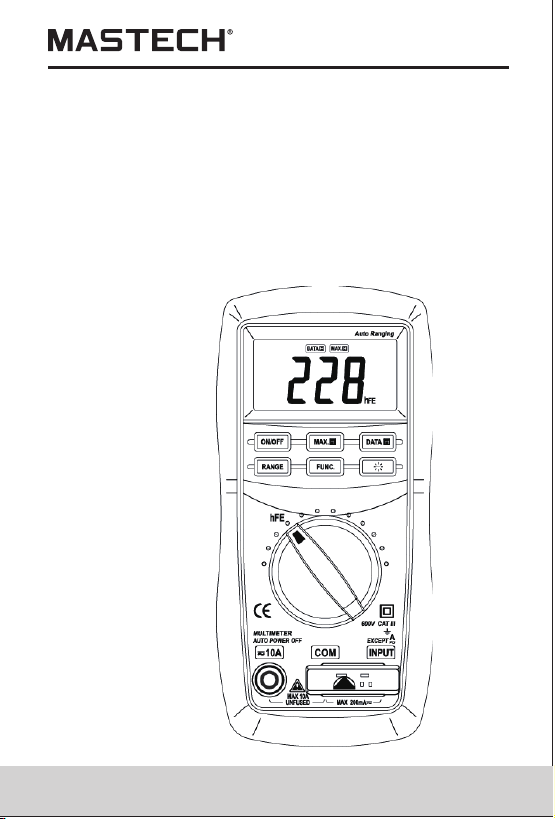
4.20 Testing Transistor
4.20.1 Set the transform switch at the hFE range position.
4.20.2 Put two plugs '-' and '+' of multifunction test
socket into COM jack and INPUT jack respectively.
4.20.3 Identify whether the transistor is NPN or PNP
type and insert emitter, base and collector leads
into the proper holes of the transistor on the
multifunction test socket for testing.
4.20.4 You can get reading from LCD.
Note:
• Do not put the
plug into the
wrong jack.
34
35
4.20 Testing Transistor
4.20.1 Set the transform switch at the hFE range position.
4.20.2 Put two plugs '-' and '+' of multifunction test
socket into COM jack and INPUT jack respectively.
4.20.3 Identify whether the transistor is NPN or PNP
type and insert emitter, base and collector leads
into the proper holes of the transistor on the
multifunction test socket for testing.
4.20.4 You can get reading from LCD.
Note:
• Do not put the
plug into the
wrong jack.
36
5. Maintenance
5.2 Fuse Replacement
5.2.1 Fuse rarely need replacement and blow almost
always as a result of the operator's error.
5.2.2 Loosen the fixing screw of the battery cover
and remove it.
5.2.3 Replace the blown fuse with ratings specified.
5.2.4 Put the battery cover as its origin.
6. Accessories
(1) Test Leads: Electric Ratings 600V 10A one piece
Battery:1.5V, AAA three pieces
Operating Manual
(2)
(3) one piece
(4) Thermocouple (K type) one piece
(4) Multifunction test socket one piece
R-00-05-2080
Replace test leads if leads become damaged or worn.
Use meet EN 61010-031 standard, rated CAT III 600V,
MAX 10A or better test leads.
WARNING
5.3 Replacing Test Leads
5.1 Replacing The Batteries
WARNING
To avoid electric shock, make sure that the test
leads have been clearly move away from the
circuit under measurement before opening the
battery cover of the meter.
5.1.1 If the sign “ ” appears, it means that the
batteries should be replaced.
5.1.2 Loosen the fixing screw of the battery cover and
remove it.
5.1.3 Replace the exhausted batteries with new ones.
5.1.4 Put the battery cover back and fix it again to its
origin form.
Note:
Do not reverse the polarity of the batteries.
WARNING
Do not mix old and new batteries. Do not mix
alkaline, standard (carbon-zinc), or rechargeable
(ni-cad, ni-mh, etc) batteries.
36
5. Maintenance
5.2 Fuse Replacement
5.2.1 Fuse rarely need replacement and blow almost
always as a result of the operator's error.
5.2.2 Loosen the fixing screw of the battery cover
and remove it.
5.2.3 Replace the blown fuse with ratings specified.
5.2.4 Put the battery cover as its origin.
6. Accessories
(1) Test Leads: Electric Ratings 600V 10A one piece
Battery:1.5V, AAA three pieces
Operating Manual
(2)
(3) one piece
(4) Thermocouple (K type) one piece
(4) Multifunction test socket one piece
R-00-05-2080
Replace test leads if leads become damaged or worn.
Use meet EN 61010-031 standard, rated CAT III 600V,
MAX 10A or better test leads.
WARNING
5.3 Replacing Test Leads
5.1 Replacing The Batteries
WARNING
To avoid electric shock, make sure that the test
leads have been clearly move away from the
circuit under measurement before opening the
battery cover of the meter.
5.1.1 If the sign “ ” appears, it means that the
batteries should be replaced.
5.1.2 Loosen the fixing screw of the battery cover and
remove it.
5.1.3 Replace the exhausted batteries with new ones.
5.1.4 Put the battery cover back and fix it again to its
origin form.
Note:
Do not reverse the polarity of the batteries.
WARNING
Do not mix old and new batteries. Do not mix
alkaline, standard (carbon-zinc), or rechargeable
(ni-cad, ni-mh, etc) batteries.