Use & Care Guide
Manual de Uso y Cuidado
KenmoreElit
116o21814
Vacuum Cleaner Help Line:
1-877-531-7321
8:00am-5:00pm EST, M-F
(U.S.A. and Canada)
Sears Brands Management Corporation
Hoffman Estates, JL60179 USA
www.kenmore.com
www.sears.com
www.kmart.com
Ill I Jdl_
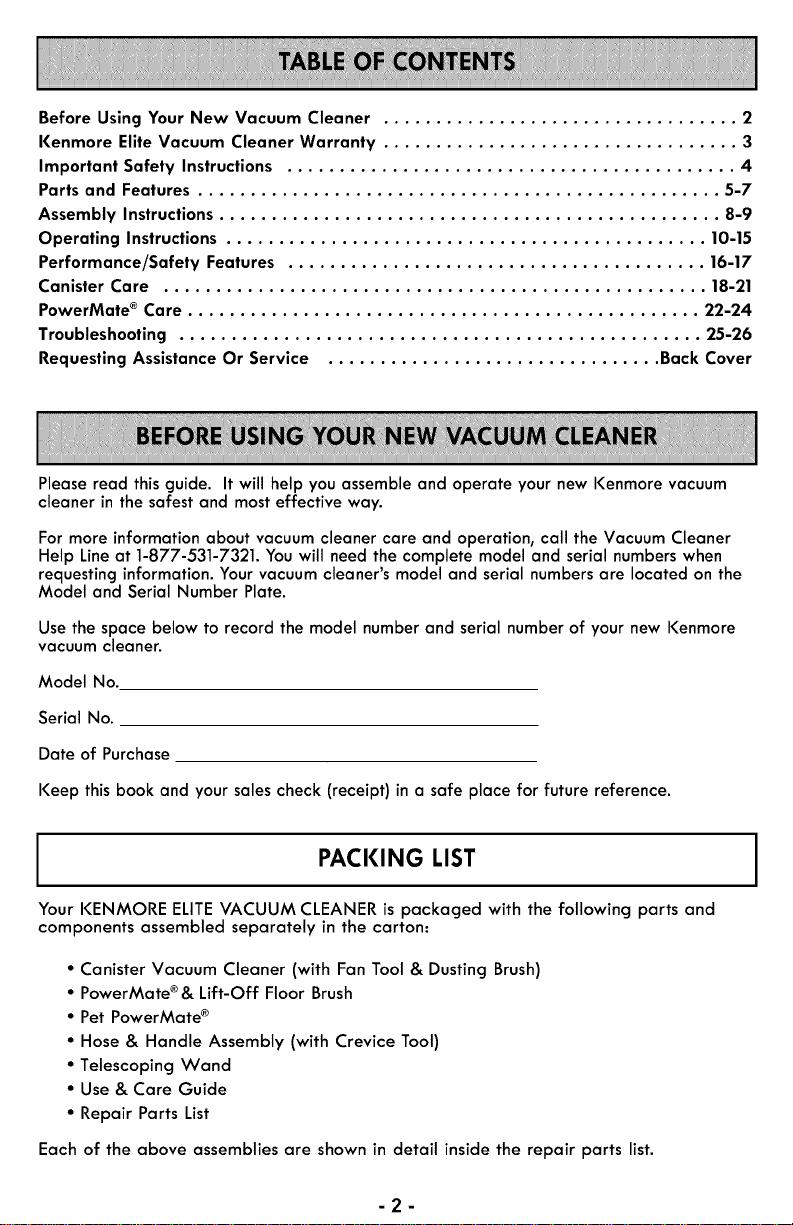
Before Using Your New Vacuum Cleaner .................................. 2
Kenmore Elite Vacuum Cleaner Warranty .................................. 3
Important Safety Instructions ........................................... 4
Parts and Features .................................................. 5-7
Assembly Instructions ................................................ 8-9
Operating Instructions .............................................. 10-15
Performance/Safety Features ........................................ 16-17
Canister Care .................................................... 18-21
PowerMate ® Care ................................................. 22-24
Troubleshooting .................................................. 25-26
Requesting Assistance Or Service ................................ Back Cover
Please read this guide. It will help you assemble and operate your new I<enmore vacuum
cleaner in the safest and most effective way.
For more information about vacuum cleaner care and operation, call the Vacuum Cleaner
Help Line at 1-877-531-7321. You will need the complete model and serial numbers when
requesting information. Your vacuum cleaner's model and serial numbers are located on the
Model and Serial Number Plate.
Use the space below to record the model number and serial number of your new I<enmore
vacuum cleaner.
Model No.
Serial No.
Date of Purchase
Keep this book and your sales check (receipt) in a safe place for future reference.
PACKING LIST
Your I<ENMORE ELITEVACUUM CLEANER is packaged with the following parts and
components assembled separately in the carton:
• Canister Vacuum Cleaner (with Fan Tool & Dusting Brush)
• PowerMate ®& Lift-Off Floor Brush
• Pet PowerMate ®
• Hose & Handle Assembly (with Crevice Tool)
• Telescoping Wand
• Use & Care Guide
• Repair Parts List
Each of the above assemblies are shown in detail inside the repair parts list.
-2-
KENMORE LIMITED WARRANTY
FOR ONE YEAR from the date of sale this appliance iswarranted against defects in
material or workmanship when it iscorrectly installed, operated and maintained
according to all supplied instructions.
WITH PROOF OF SALE, return a defective appliance to the retailer from which it was
purchased for free repair or replacement at option of seller.
This warranty applies for only 90 DAYS from the sale date if this appliance is ever used
for other than private household purposes.
Thiswarranty covers ONLY defects in material and workmanship, and will NOT pay
for:
1. Expendable items that can wear out from normal use,including but not limited to
filters, belts, bags or screw-in base light bulbs.
2. A service technician to clean or maintain this appliance, or to instruct the user in
correct appliance installation, operation and maintenance.
3. Service calls to correct appliance installation not performed by Sears authorized
service agents, or to repair problems with housefuses, circuit breakers, house wiring,
and plumbing or gas supply systemsresulting from suchinstallation.
4. Damage to or failure of this appliance resulting from installation not performed by
Sears authorized service agents, including installation that was not in accord with
electrical, gas or plumbing codes.
5. Damage to or failure of this appliance, including discoloration or surface rust, if it is
not correctly operated and maintained according to all supplied instructions.
6. Damage to or failure of this appliance, including discoloration or surface rust,
resulting from accident, alteration, abuse, misuse or use for other than its intended
purpose.
7. Damage to or failure of this appliance, including discoloration or surface rust,
caused by the useof detergents, cleaners, chemicals or utensilsother than those
recommended in all instructions supplied with the product.
8. Damage to or failure of parts or systemsresulting from unauthorized modifications
made to this appliance.
9. Service to an appliance if the model and serial plate is missing, altered, or cannot
easily be determined to have the appropriate certification logo.
Disclaimer of implied warranties; limitation of remedies
Customer'ssole and exclusive remedy under this limited warranty shall be product
repair or replacement as provided herein. Implied warranties, including warranties of
merchantability or fitness for a particular purpose, are limited to one year or the
shortest period allowed by law. Seller shall not be liable for incidental or consequential
damages. Some states and provinces do not allow the exclusion or limitation of
incidental or consequential damages, or limitation on the duration of implied warranties
of merchantability or fitness, sothese exclusions or limitations may not apply to you.
This warranty applies only while this appliance isused in the United States.
This warranty gives you specific legal rights, and you may also have other rights which
vary from state to state.
Sears Brands Management Corporation, Hoffman Estates, IL 60179
-3-
Read all instructionsin the manual before assembling or using your vacuum cleaner
WARNING
Your safety is important to us. To reduce the risk of fire, electrical shock, injury to
persons or damage when using your vacuum cleaner, follow basic safety precautions.
Use your vacuum cleaner only as Do not put on chairs, tables, etc. Keep on
described in this manual. Use only with
Sears recommended attachments.
Disconnect electrical supply before
servicing or cleaning out brush area.
Failure to do so could result in electrical
shock or brush suddenly starting.
Do not leave vacuum cleaner when
plugged in. Unplug from outlet when not
in use and before servicing.
To reduce the risk of electrical shock - Do
not use outdoors or on wet surfaces.
Do not allow to be used as a toy. Close
attention is necessary when used by or
near children.
Do not use with damaged cord or plug. If
vacuum cleaner is not working as it
should, has been dropped, damaged, left
outdoors, or dropped into water, return it
to a Sears Service Center.
Do not pull or carry by cord, use cord as
a handle, close door on cord, or pull cord
around sharp edges or corners. Do not
run vacuum cleaner over cord. Keep cord
away from heated surfaces.
Do not unplug by pulling on cord. To
unplug, grasp the plug, not the cord.
Do not handle plug or vacuum cleaner
with wet hands.
Do not put any objects into openings.
Do not use with any opening blocked;
keep free of dust, lint, hair and anything
that may reduce airflow.
Keep hair, loose clothing, fingers, and all
parts of body away from openings and
moving parts.
Turn off all controls before unplugging.
Use extra care when cleaning on stairs.
floor.
Do not use vacuum cleaner to pick up
flammable or combustible liquids
(gasoline, cleaning fluids, perfumes, etc.),
or use in areas where they may be
present. The fumes from these substances
can create a fire hazard or explosion.
Do not pick up anything that is burning or
smoking, such as cigarettes, matches, or
hot ashes.
Do not use vacuum cleaner without dust
bag and/or filters in place.
Always change the dust bag after
vacuuming carpet cleaners or freshener,
powders and fine dust. These products
clog the bag, reduce airflow and can
cause the bag to burst. Failure to change
bag could cause permanent damage to
the vacuum cleaner.
Do not use the vacuum cleaner to pick up
sharp hard objects, small toys, pins, paper
clips, etc. They may damage the vacuum
cleaner or dust bag.
Do not operate vacuum cleaner without
the exhaust filter or exhaust filter door in
place.
The hose contains electrical wires. Do not
use when damaged, cut, or punctured.
Replace if cut or worn. Do not pick up
sharp objects.
Always turn off and unplug the vacuum
cleaner before connecting or
disconnecting either hose, HandiMate Jr.
(if applicable), or nozzle.
Hold plug when rewinding onto cord reel.
Do not allow plug to whip when
rewinding.
You are responsible for making sure that
your vacuum cleaner is not used by
anyone unable to operate it properly.
SAVE THESE INSTRUCTIONS
Proper assembly and safe use of your vacuum cleaner are your responsibilities. Your
vacuum cleaner is intended for Household use. Read this Use & Care Guide carefully
for important use and safety information. This guide contains safety statements under
warning and caution symbols.
-4-
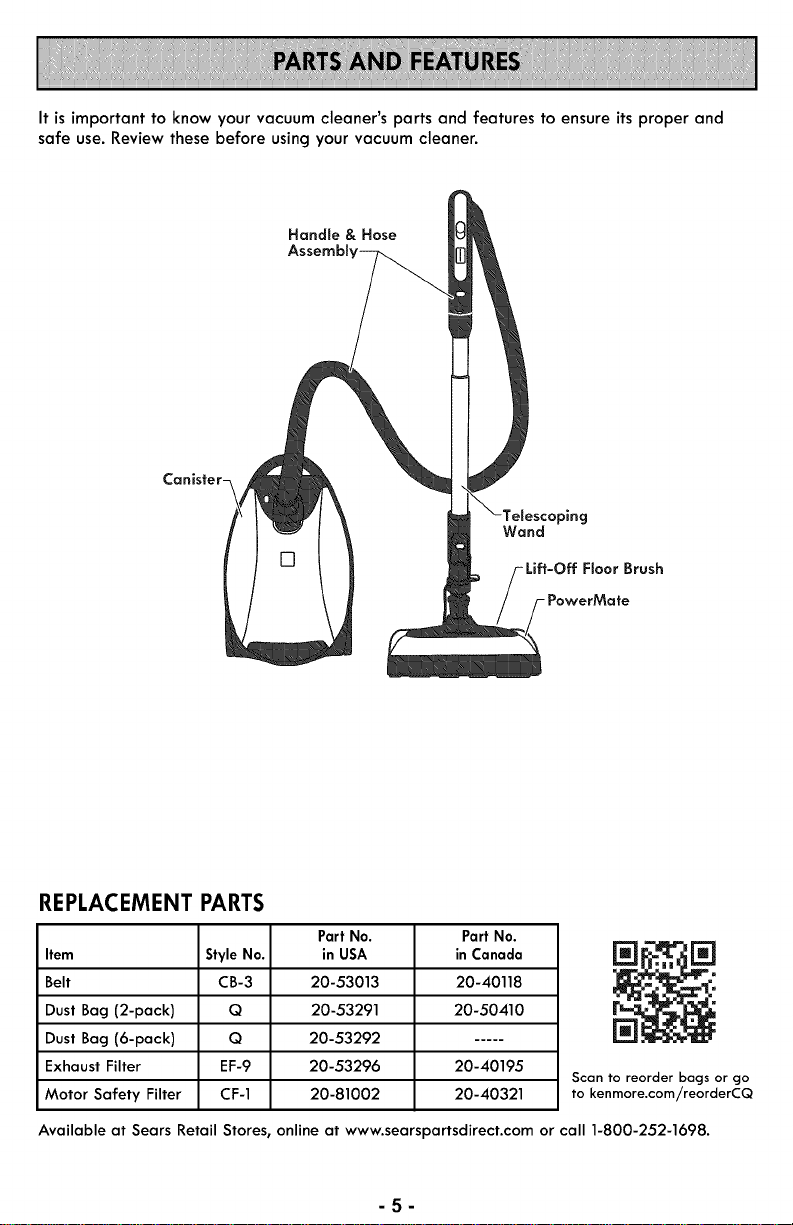
It is important to know your vacuum cleaner's parts and features to ensure its proper and
safe use. Review these before using your vacuum cleaner.
Handle & Hose
Wand
Floor Brush
- PowerMate
REPLACEMENT PARTS
Part No.
Item Style No. in USA
Belt CB-3 20-53013
Dust Bag (2-pack) Q 20-53291
Dust Bag (6-pack) Q 20-53292
Exhaust Filter EF-9 20-53296
Motor Safety Filter CF-1 20-81002
Part No.
in Canada
20-40118
20-50410
20-40195
20-40321
Scan to reorder bags or go
to kenmore.com/reorderCQ
Available at Sears Retail Stores, online at www.searspartsdirect.com or call 1-800-252-1698.
-5-
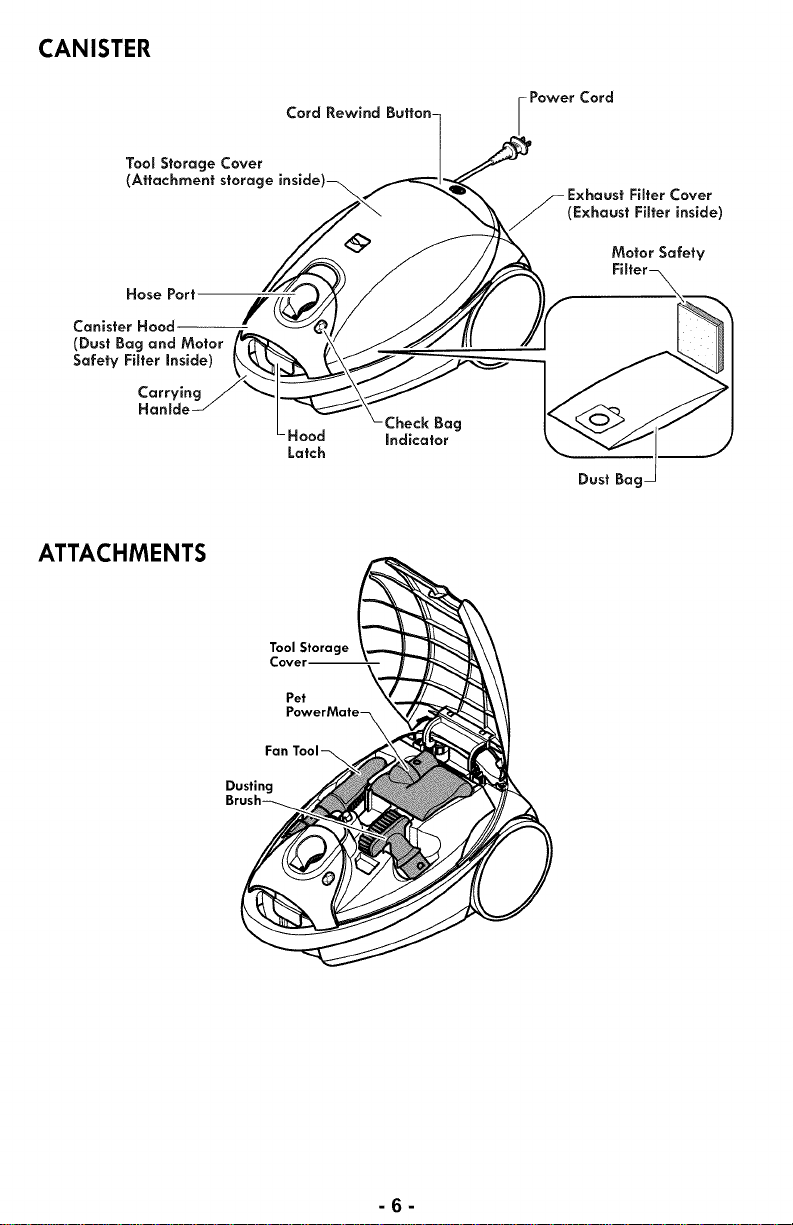
CANISTER
Tool Storage Cover
(Attachment storage
Hose Port
Canister Hood f
(Dust Bag and Motor
Safety Filter inside)
Carrying
Hanlde
Cord Rewind Button-
Check Bag
Hood indicator
Latch
i Power Cord
Cover
(Exhaust Filter inside)
Motor Safety
Dust Bag
ATTACHMENTS
Tool Storage
Cover--
Pet
Fan Tool-_
Dusting
-6-
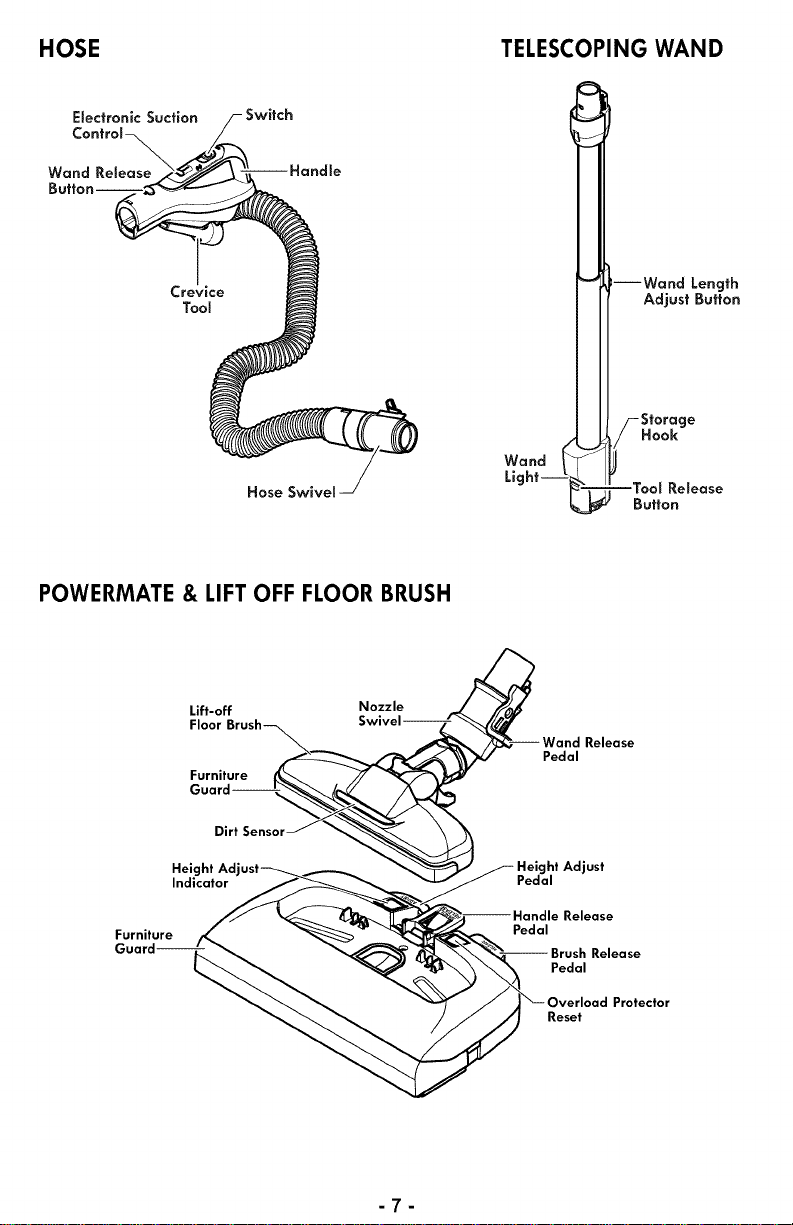
HOSE TELESCOPING WAND
ESectronicSuction
ControJ
Wand ReSease
Crevice
Tool
;witch
Hose Swivel
Wand
Light--
:--Wand Length
Adjust Button
Storage
Hook
=TooS Re,ease
Button
POWERMATE & LIFT OFF FLOOR BRUSH
Lift-off
Floor
Furniture
Nozzle
Pedal
Release
Dirt
Height Adjust _
Indicator
Furniture
t Adjust
Pedal
Pedal
Reset
Protector
-7-
Please pay special attention tothese hazard alert boxes, and follow any instruc-
,_ tions given. WARNING statements alert you to such dangers as fire, electric
shock, burnsand personalinjury. CAUTION statements alert you tosuchdangers
as personal injury and/or property damage.
Before assembling vacuum cleaner, check the PACKING LIST (page 2). Use this list to
verify that you have received and identified all the components of your new Kenmore
vacuum cleaner.
,_ WARNING
ElectricalShock Hazard
DO NOT plug intoelectrical supply until
assembly iscomplete. Failure to do so
could result in electrical shockor injury.
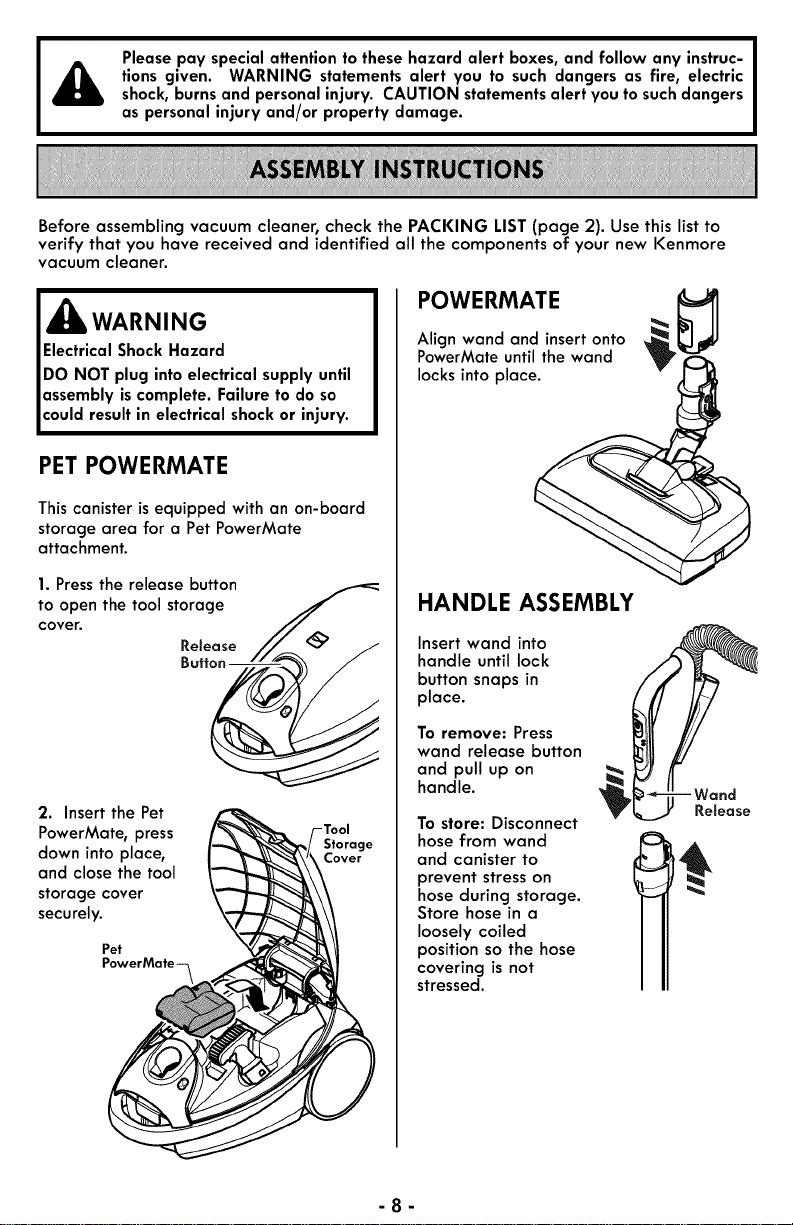
PET POWERMATE
This canister isequipped with an on-board
storage area for a Pet PowerMate
attachment.
1. Press the release button
to open the tool storage
cover.
Release
2. Insertthe Pet
PowerMate, press
down into place,
and close the tool
storage cover
securely.
Pet
PowerMate-_
Storage
POWERMATE
Align wand and insertonto
PowerMate untilthe wand
locksinto place.
<
HANDLE ASSEMBLY
Insert wand into
handle until lock
button snaps in
place.
To remove: Press
wand release button
and pull up on
handle.
To store: Disconnect
hose from wand
and canister to
prevent stresson
hose during storage.
Store hose in a
loosely coiled
position so the hose
covering is not
stressed.
Release
-8-
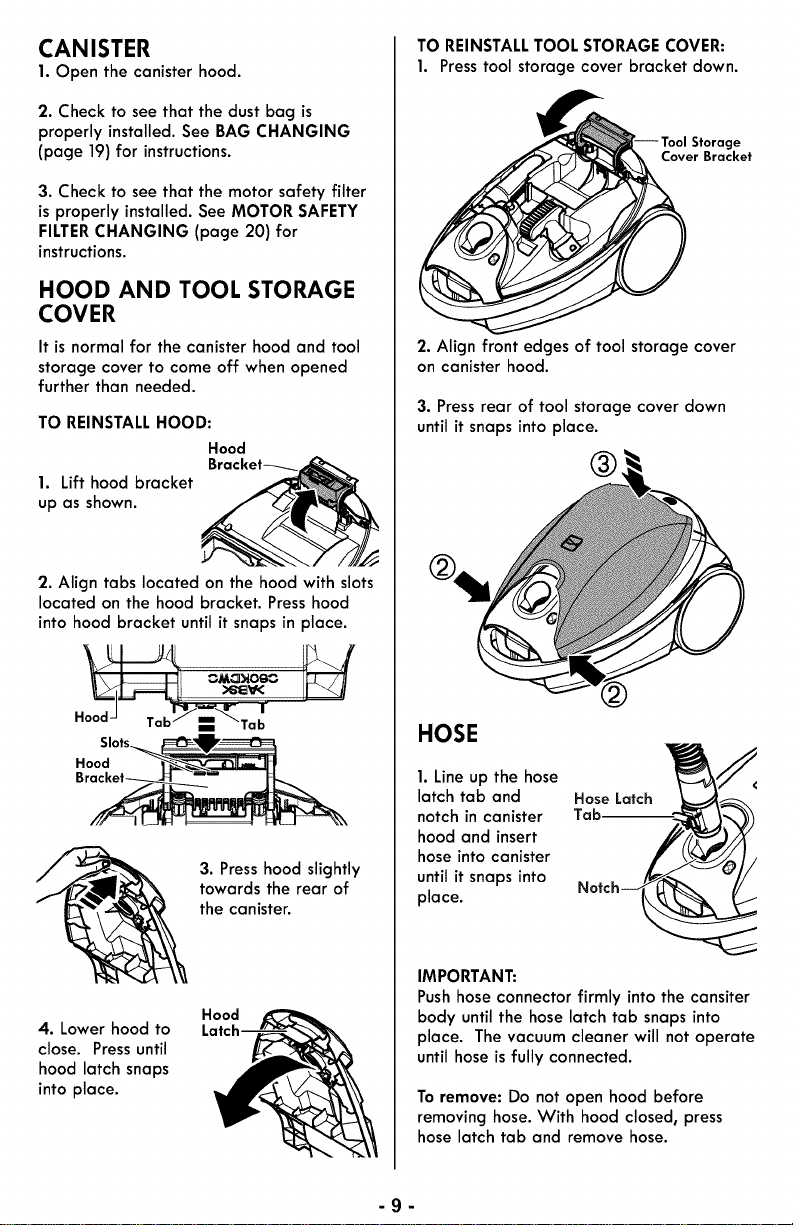
CANISTER
1. Open the canister hood.
2. Check to see that the dust bag is
properly installed.See BAG CHANGING
(page 19)for instructions.
3. Check to see that the motor safety filter
isproperly installed. See MOTOR SAFETY
FILTERCHANGING (page 20) for
instructions.
HOOD AND TOOL STORAGE
COVER
It is normal for the canister hood and tool
storage cover to come off when opened
further than needed.
TO REINSTALL HOOD:
Hood
Bracket----.
1. Lift hood bracket
up as shown.
2. Align tabs located on the hood with slots
located on the hood bracket. Press hood
into hood bracket until it snaps in place.
_"_Tal_
Slots
Hood
3. Press hood slightly
towards the rear of
the canister.
4. Lower hood to
close. Pressuntil
hood latch snaps
into place.
Hood
TO REINSTALLTOOL STORAGE COVER:
1. Presstool storage cover bracket down.
Cover Bracket
2. Align front edges of tool storage cover
on canister hood.
3. Press rear of tool storage cover clown
until it snaps into place.
®,
HOSE
1. Line up the hose
latch tab and
notch in canister
hood and insert
hose into canister
until it snaps into
place.
Hose Latch
Tab.--
IMPORTANT:
Push hoseconnectorfirmly into the cansiter
body until the hose latch tab snaps into
place. The vacuum cleaner will not operate
until hose is fully connected.
To remove: Do not open hood before
removing hose. With hood closed, press
hose latch tab and remove hose.
-g-
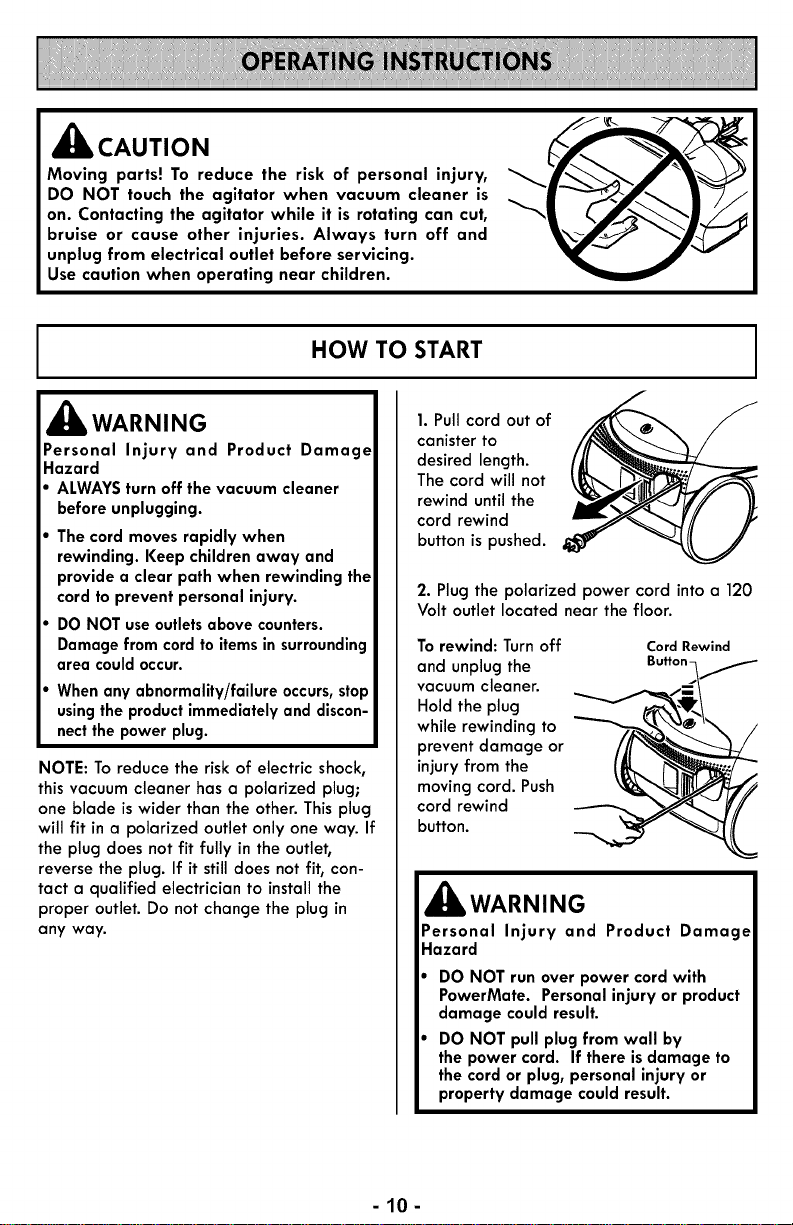
_lb CAUTION
Moving parts! To reduce the risk of personal injury,
DO NOT touch the agitator when vacuum cleaner is
on. Contacting the agitator while it is rotating can cut,
bruise or cause other injuries. Always turn off and
unplug from electrlcal outlet before servicing.
Use caution when operating near chlldren.
HOW TO START
,_ WARNING
Personal Injury and Product Damage
Hazard
ALWAYSturn off the vacuum cleaner
before unplugging.
The cord moves rapidly when
rewinding. Keep children away and
provide a clear path when rewinding the
cord to prevent personal injury.
DO NOT useoutletsabove counters.
Damagefrom cord to itemsin surrounding
area couldoccur.
Whenany abnormality/failure occurs,stop
usingthe productimmediatelyand discon-
nectthe power plug.
NOTE: To reduce the risk of electric shock,
this vacuum cleaner has a polarized plug;
one blade is wider than the other. This plug
will fit in a polarized outlet only one way. If
the plug does not fit fully in the outlet,
reverse the plug. If it still does not fit, con-
tact a qualified electrician to install the
proper outlet. Do not change the plug in
any way.
1. Pull cord out of ,z'_ _,_'2_ J
canister to
desired length.
The cord will not
rewind until the
cord rewind
button is pushed.
2. Plug the polarized power cord intoa 120
Volt outlet located near the floor.
To rewind: Turn off
and unplug the
vacuum cleaner.
Hold the plug
while rewinding to
prevent damage or
injury from the
moving cord. Push
cord rewind
button.
Cord Rewind
_Jllb WARNING
Personal Injury and Product Damage
Hazard
DO NOT run over power cord with
PowerMate. Personal injury or product
damage could result.
DO NOT pull plug from wall by
the power cord. If there is damage to
the cord or plug, personal injury or
property damage could result.
-10-
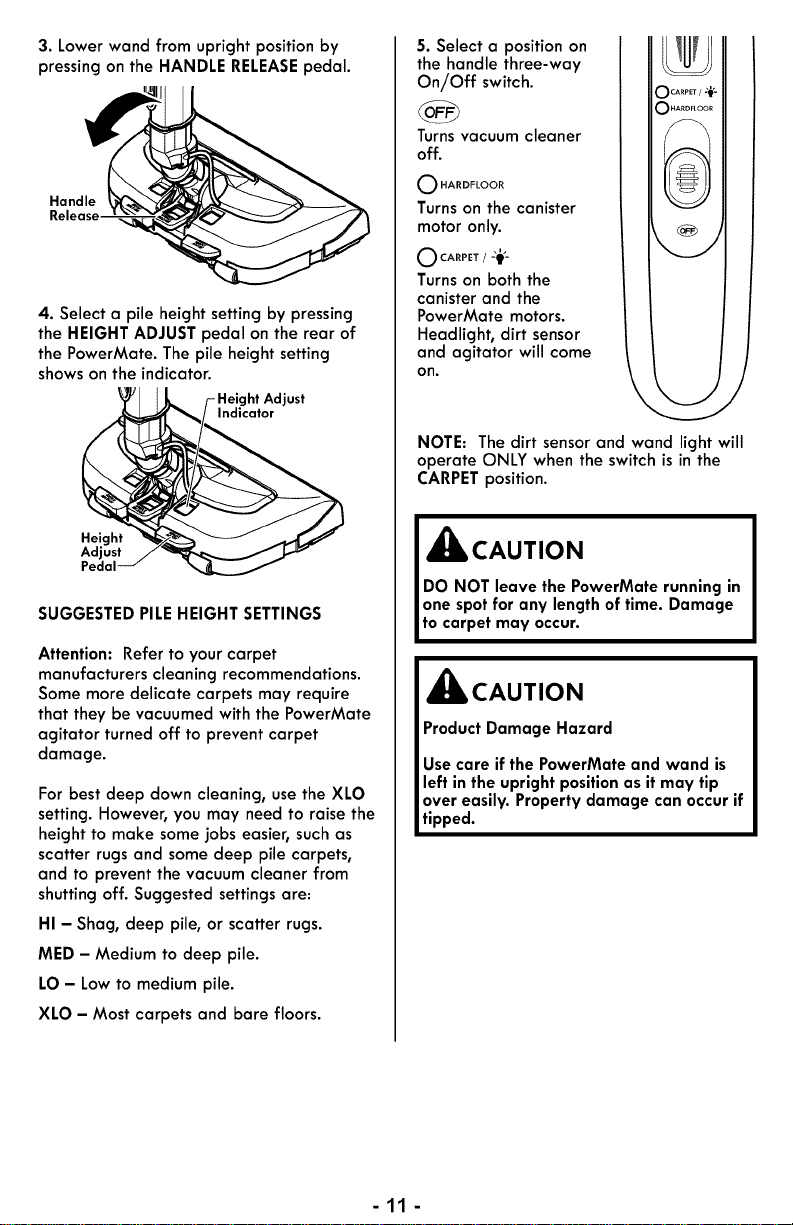
3. Lowerwand from upright positionby
pressingon the HANDLE RELEASEpedal.
Handle
Release-
4. Select a pile height setting by pressing
the HEIGHT ADJUST pedal on the rear of
the PowerMate. The pile heightsetting
showson the indicator.
Indicator
Height
Adjust
Pedal
SUGGESTEDPILEHEIGHT SETTINGS
Attention: Refer to your carpet
manufacturers cleaning recommendations.
Some more delicate carpets may require
that they be vacuumed with the PowerMate
agitator turned off to prevent carpet
damage.
For best deep down cleaning, usethe XLO
setting. However, you may need to raise the
height to make some jobs easier, such as
scatter rugs and some deep pile carpets,
and to prevent the vacuum cleaner from
shutting off. Suggested settings are:
HI - Shag, deep pile, or scatter rugs.
MED - Medium to deep pile.
LO - Low to medium pile.
XLO - Most carpets and bare floors.
5. Select a position on
the handle three-way
On//Off switch.
Turnsvacuum cleaner
off.
O HARDFLOOR
Turns on the canister
motor only.
O CA.P,T/-_#-
Turnson both the
canister and the
PowerMate motors.
Headlight, dirt sensor
and agitator will come
on.
NOTE: The dirt sensor and wand light will
operate ONLY when the switch is in the
CARPETposition.
,_ CAUTION
DO NOT leave the PowerMate running in
one spot for any length of time. Damage
to carpet may occur.
,_ CAUTION
Product Damage Hazard
Usecare if the PowerMate and wand is
left in the uprightpositionas it may tip
over easily. Property damage can occur if
tipped.
-11-
VACUUMING TIPS
FOR BEST CLEANING RESULTS SUGGESTED SWEEPING PATTERN
SUCTION
• Use highpower on the CONTROL
suctioncontrol _ ,_
located on the handle. ,m
• Keep the airflow passage open. Check
each assembly area in REMOVING
CLOGS (page 18) occasionally for clogs.
Turn off and unplug vacuum cleaner from
outlet before checking.
STAI RS
Personal Injury Hazard
Usecare if canister isplaced on stairs. It
may fall, causing personal injury or
property damage.
_IL CAUTION
Product Damage Hazard
Do not pull on the hoseto move the
canister from one stair to the next. When
finishedcleaning in one area usethe
handle grip on the canister to move the
vacuum cleaner to a new location for
further cleaning.
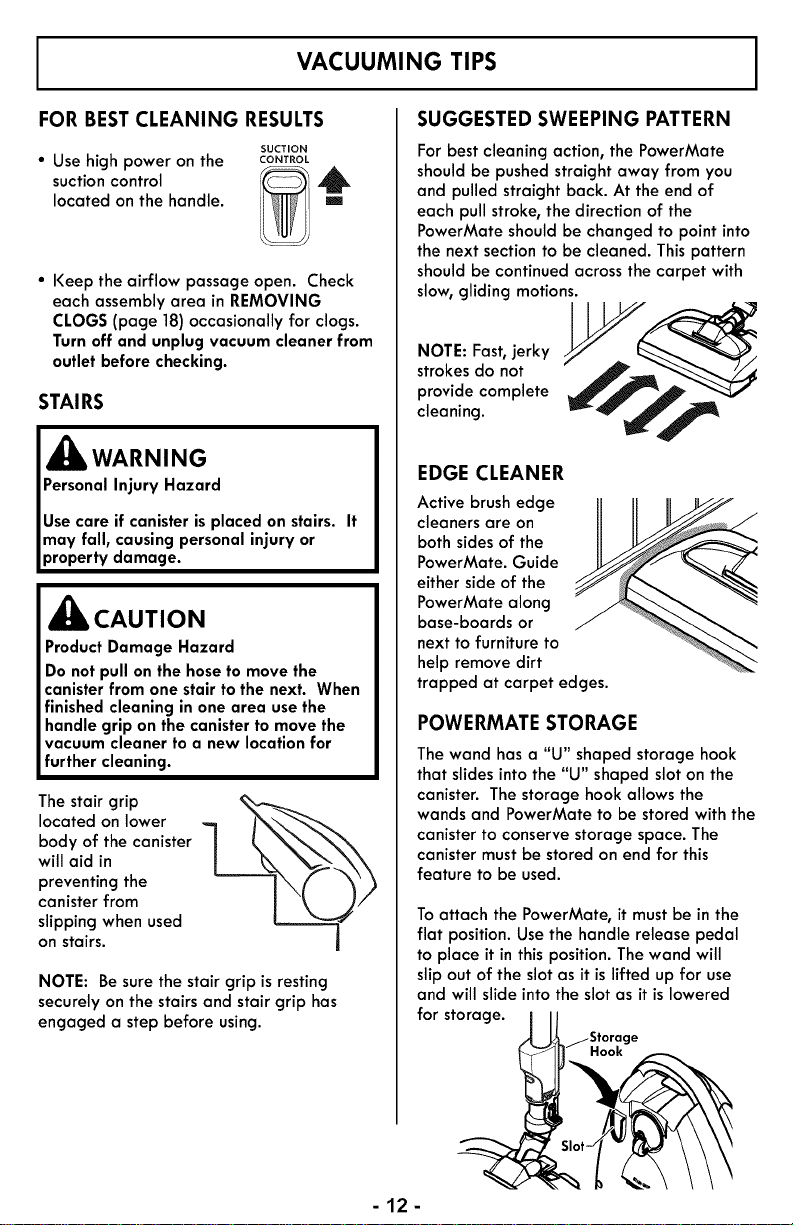
The stair grip
located on lower
body of the canister
will aid in
preventing the
canister from
slipping when used
on stairs.
NOTE: Be sure the stair grip is resting
securely on the stairs and stair grip has
engaged a step before using.
For best cleaning action, the PowerMate
shouldbe pushed straight away from you
and pulled straight back. At the end of
each pull stroke, the direction of the
PowerMate should be changed to point into
the next section to be cleaned. This pattern
should be continued across the carpet with
slow, gliding motions.
O,Eastr
strokes do not
provide complete _1__
cleaning.
EDGE CLEANER
Active brush edge
cleaners are on
both sidesof the
PowerMate. Guide
either side of the
PowerMate along
base-boards or
next to furnitureto
help remove dirt
trapped at carpet edges.
POWERMATE STORAGE
The wand hasa "U" shaped storage hook
that slidesintothe "U" shaped sloton the
canister. The storage hook allows the
wands and PowerMate to be stored with the
canister to conserve storage space. The
canister must be stored on end for this
feature to be used.
Toattach the PowerMate, it must be in the
flat position. Use the handle release pedal
to place it in this position. The wand will
slip out of the slot as it is lifted up for use
and will slide into the slot as it is lowered
for storage.
jStorage
_ Hook
-12-
ATTACHMENTS
ATTACHMENTS ON WAND
CAUTION
DO NOT attach or remove handle or
wands while vacuum cleaner isON. This
could cause sparking and damage the
electrical contacts or electroniccontrols.
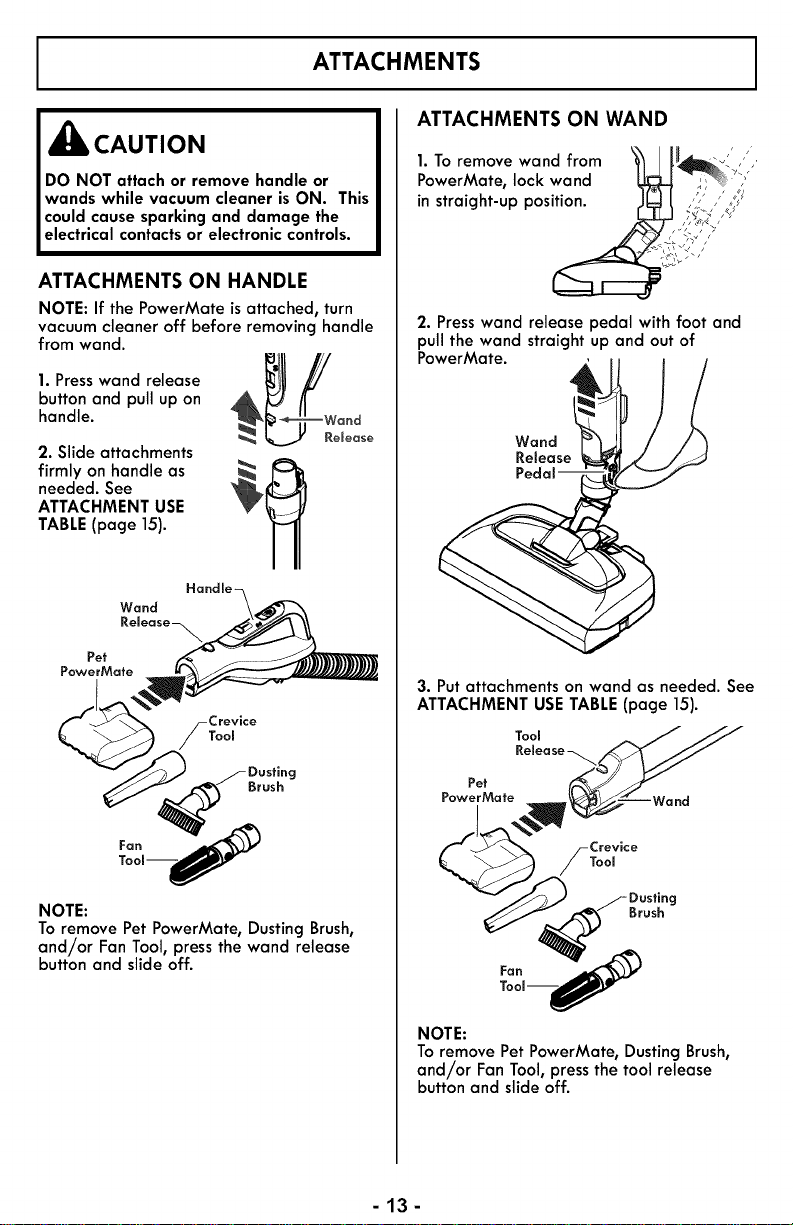
ATTACHMENTS ON HANDLE
NOTE: If the PowerMate is attached, turn
vacuum cleaner off before removing handle
from wand.
sa eease
button and pull up on
handle. _ --
se
2. Slide attachments
firmly on handle as _
needed. See
ATTACHMENT USE
TABLE(page 15).
Crevice
Tool
Brush
NOTE:
Toremove Pet PowerMate, Dusting Brush,
and/or Fan Tool,pressthe wand release
button and slide off.
1. To remove wand from _
PowerMate, lock wand
in straight-up pos_
2. Presswand release pedal with foot and
pull the wand straight up and out of
PowerMate.
Wand
Release
3. Put attachments on wand as needed. See
ATTACHMENT USE TABLE (page 15).
Tool A J J_
.elease JJ
Pot
'oo
Tool--_,,_
NOTE:
To remove Pet PowerMate, Dusting Brush,
and/or Fan Tool, press the tool release
button and slide off.
-13-
CROSSOVER BARE FLOOR NOZZLE FAN TOOL
_kWARNING
ElectricalShock Hazard
Toreduce the riskof electric shock- DO
NOT use on wet surfaces.
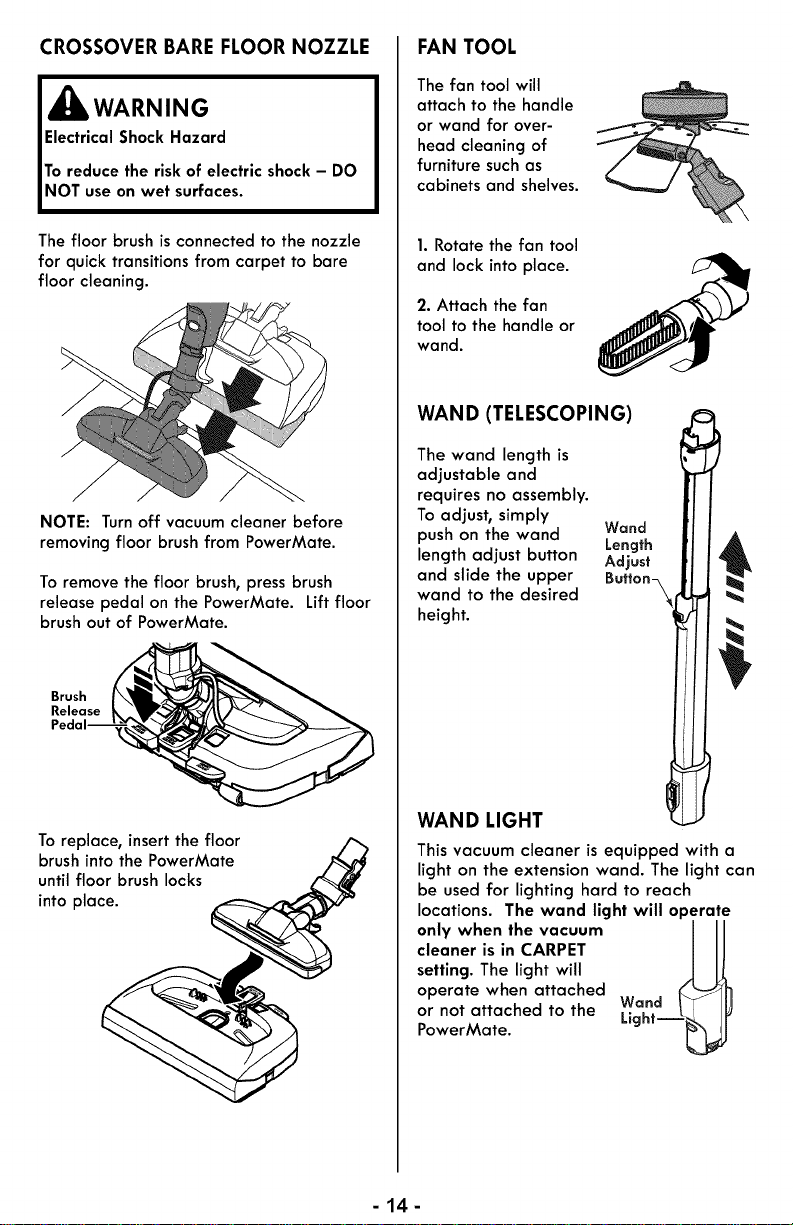
The floor brush is connected to the nozzle
for quick transitions from carpet to bare
floor cleaning.
NOTE: Turn off vacuum cleaner before
removingfloor brush from PowerMate.
To remove the floor brush, press brush
release pedal on the PowerMate. Lift floor
brush out of PowerMate.
Brush
Release
Toreplace, insertthe floor
brush into the PowerMate
until floor brush locks
into place.
The fan tool will
attach to the handle
or wand for over-
head cleaning of
furniture such as
cabinets and shelves.
1. Rotate the fan tool
and lock into place.
2. Attach the fan
tool to the handle or
wand.
WAND (TELESCOPING)
The wand length is
adjustable and
requires no assembly.
To adjust, simply
push on the wand
length adjust button
and slide the upper
wand to the desired
height.
Wand
Length
Adjust
Button_
WAND LIGHT
This vacuum cleaner isequipped with a
light on the extension wand. The light can
be used for lighting hard to reach
locations. The wand light will operate
only when the vacuum Ill
cleaner is in CARPET
setting. The light will
operate when attached
or not attached to the Wand
PowerMate. Light--_
-44-
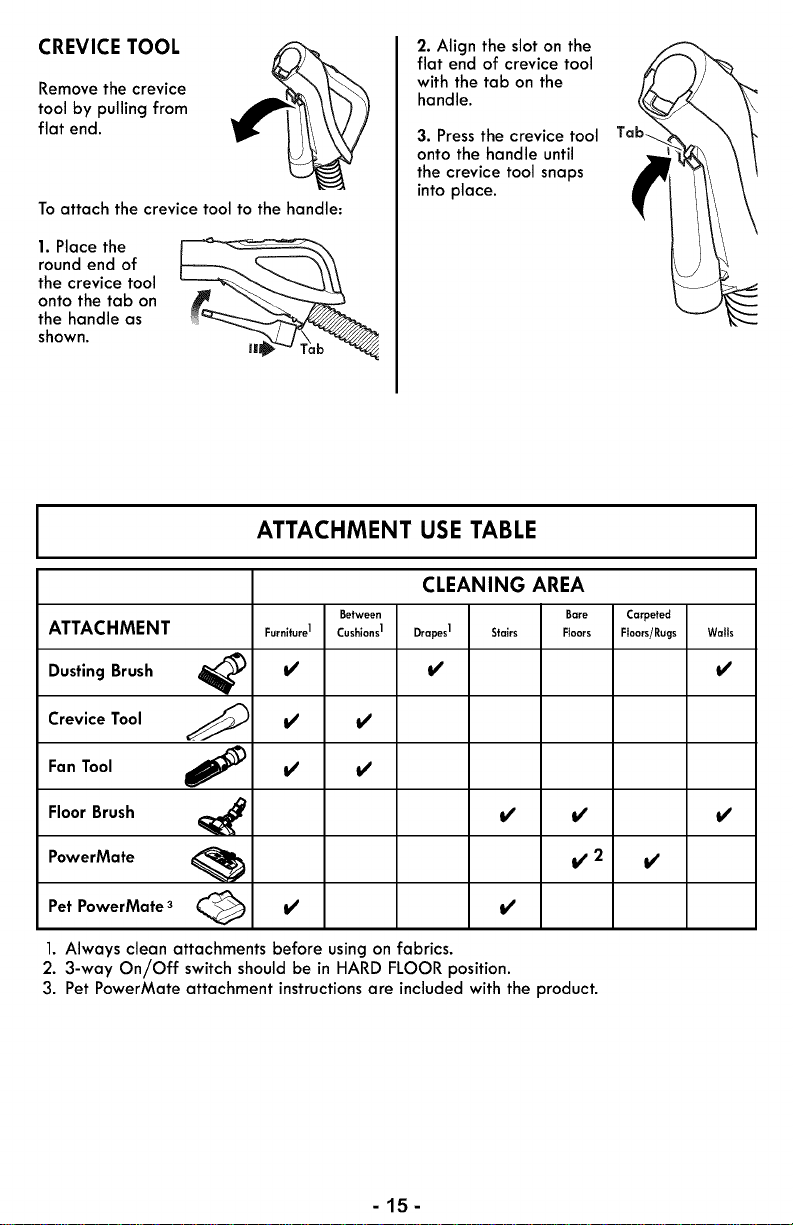
CREVICE TOOL
Remove the crevice
tool by pulling from
flat end.
Toattach the crevice tool to the handle:
1. Place the
round end of
the crevice tool
onto the tab on
the handle as
shown.
2. Align the slot on the
flat end of crevice tool
with the tab on the
handle.
3. Pressthe crevice tool
onto the handle until
the crevice tool snaps
into place.
ATTACHMENT USE TABLE
CLEANING AREA
Between Bare Carpeted
ATTACHMENT Furnituro1 Cushions1 Drapes1 Stairs FI.... Floors/Rugs Walls
DustingBrush _ _/' _/' _/'
Crevice Tool _ _/' _/'
Fan Tool _ _/' _/'
Floor Brush _ _/' _/' _/'
PowerMate _ I/2 I/
Pet PowerMate 3 (_ _/' _/'
1. Always clean attachments before using on fabrics.
2. 3-way On/Off switch should be in HARD FLOORposition.
3. Pet PowerMate attachment instructions are included with the product.
-15-
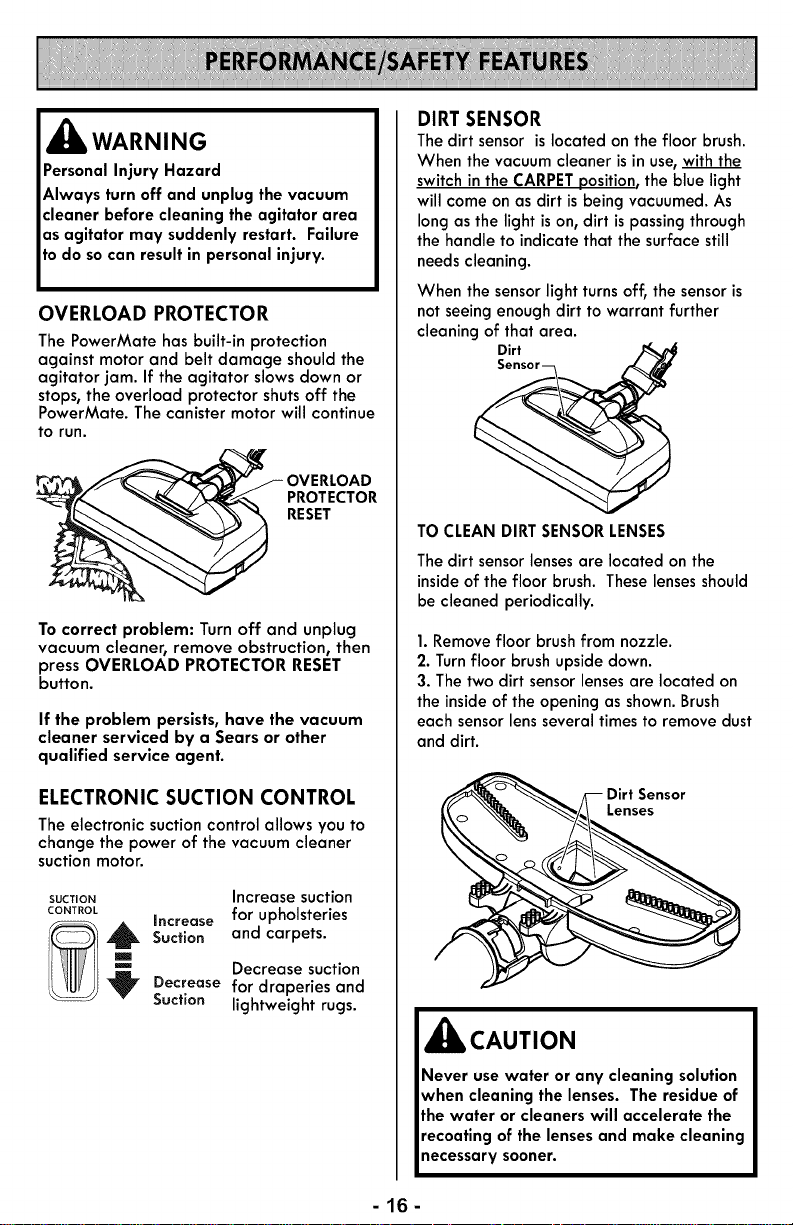
,_ WARNING
Personal Injury Hazard
Always turn off and unplug the vacuum
cleaner before cleaning the agitator area
as agitator may suddenly restart. Failure
todo socan resultin personalinjury.
OVERLOAD PROTECTOR
The PowerMate has built-in protection
against motor and belt damage shouldthe
agitator jam. If the agitator slows clown or
stops, the overload protector shuts off the
PowerMate. The canister motor will continue
to run.
Tocorrect problem: Turn off and unplug
vacuum cleaner, remove obstruction, then
press OVERLOAD PROTECTOR RESET
button.
If the problem persists,have the vacuum
cleaner serviced by a Sears or other
qualified service agent.
ELECTRONIC SUCTION CONTROL
The electronic suction control allows you to
change the power of the vacuum cleaner
suction motor.
SUCTION Increase suction
CONTROL Increase for upholsteries
_ Suction and carpets.
Decrease suction
Decrease for draperiesand
Suction lightweight rugs.
DIRT SENSOR
Thedirt sensor islocated onthe floor brush.
When the vacuumcleaner isin use,withthe
switchin the CARPETposition,the blue light
will come on as dirt isbeing vacuumed.As
longas the light ison, dirt ispassingthrough
the handle to indicate that the surfacestill
needscleaning.
When the sensorlight turns off, the sensoris
notseeingenoughdirt to warrant further
cleaning of that area.
Dirt
Sensor_.___
TO CLEANDIRTSENSORLENSES
Thedirt sensorlensesare located on the
insideof the floor brush. These lensesshould
be cleaned periodically.
1.Removefloor brush from nozzle.
2. Turnfloor brush upside down.
3. The two dirt sensor lensesare located on
the inside of the opening as shown. Brush
each sensor lensseveral times to remove dust
and dirt.
__ irt Sensor
Lenses
,_ CAUTION
Never use water or any cleaning solution
when cleaning the lenses. The residueof
the water or cleaners will accelerate the
recoating of the lensesand make cleaning
necessary sooner.
-16-
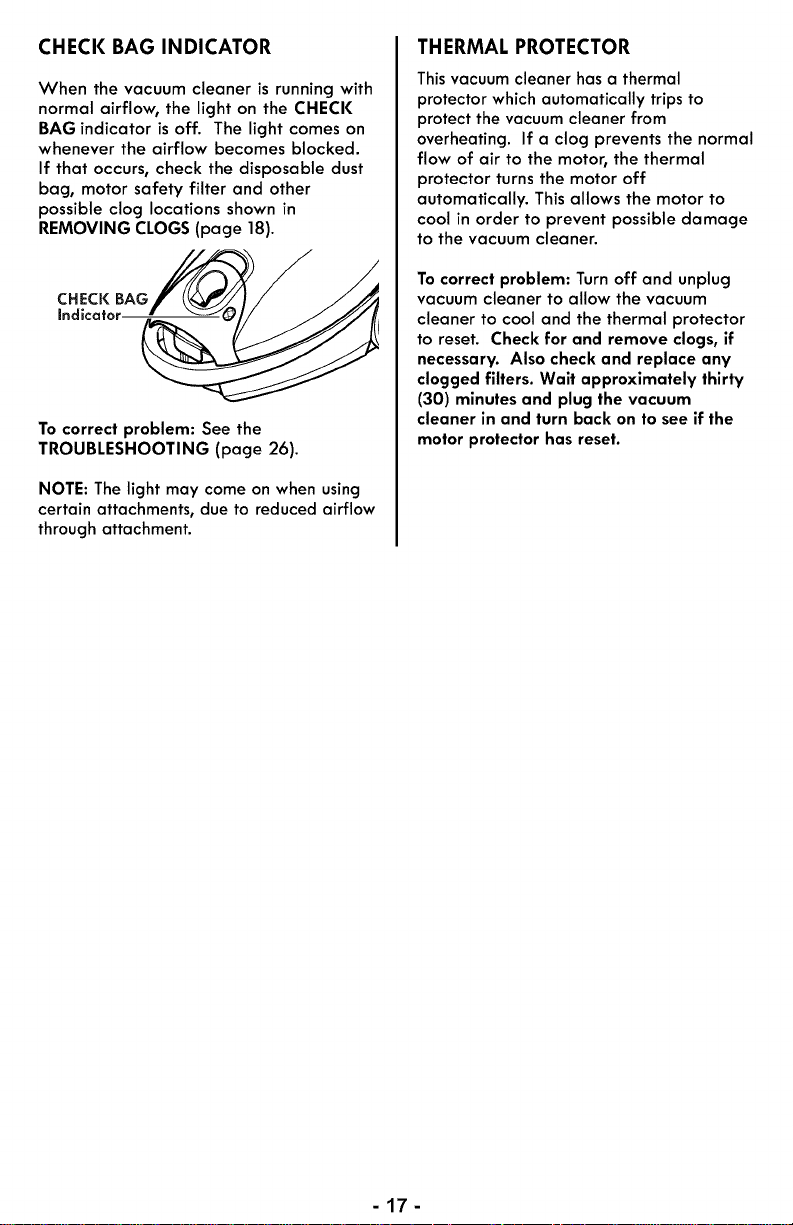
CHECK BAG INDICATOR
When the vacuum cleaner is running with
normal airflow, the light on the CHECK
BAG indicator is off. The light comes on
whenever the airflow becomes blocked.
If that occurs, check the disposable dust
bag, motor safety filter and other
possible clog locations shown in
REMOVING CLOGS (page 18).
CHECK BAG
Indicator.
To correct problem: See the
TROUBLESHOOTING (page 26).
NOTE: The light may come on when using
certain attachments, clueto reduced airflow
through attachment.
THERMAL PROTECTOR
This vacuum cleaner has a thermal
protector which automatically trips to
protect the vacuum cleaner from
overheating. If a clog prevents the normal
flow of air to the motor, the thermal
protector turns the motor off
automatically. This allows the motor to
cool in order to prevent possible damage
to the vacuum cleaner.
Tocorrect problem: Turn off and unplug
vacuum cleaner to allow the vacuum
cleaner to cool and the thermal protector
to reset. Check for and remove clogs, if
necessary. Also check and replace any
clogged filters. Wait approximately thirty
(30) minutes and plug the vacuum
cleaner in and turn back on to see if the
motor protector has reset.
-17-
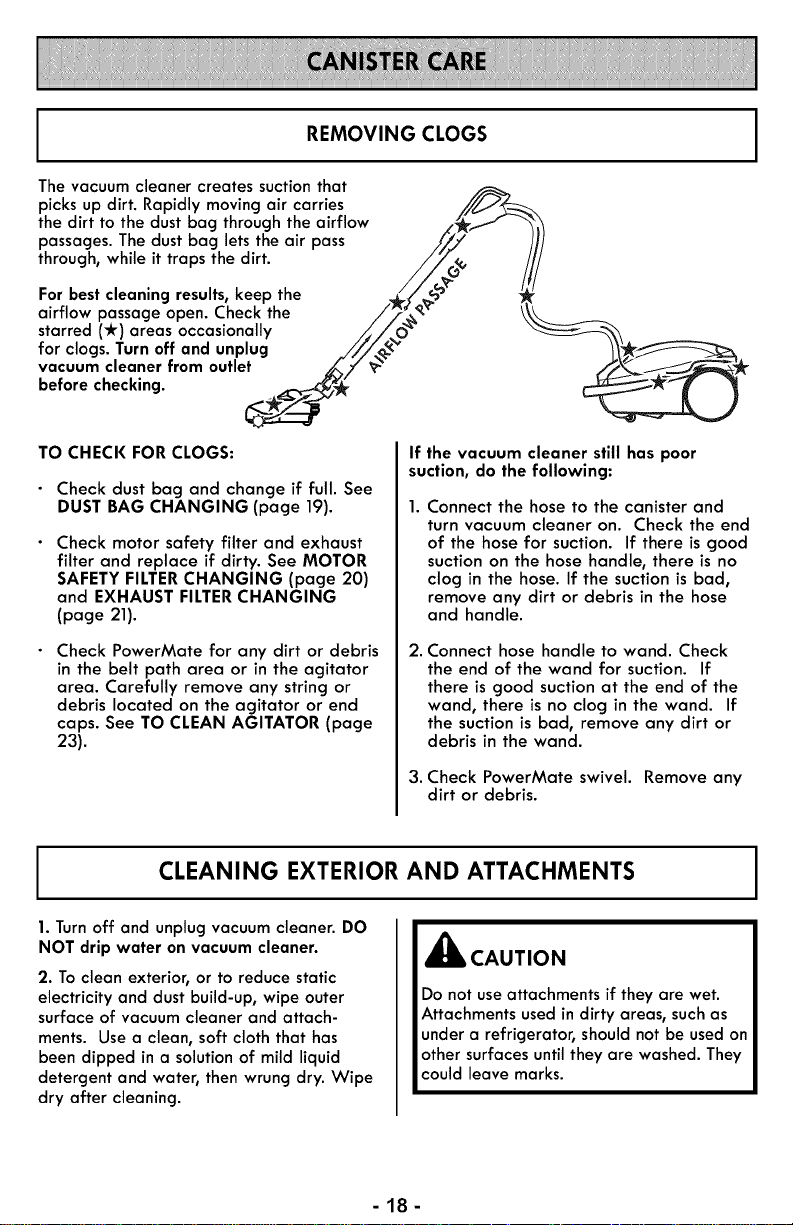
REMOVING CLOGS
The vacuum cleaner creates suctionthat
picks up dirt. Rapidly moving air carries //_2
the dirt to the dustbag through the airflow _,_ -'_
passages. The dust bag lets the air pass /_J /Ii
through, while it traps the dirt. _/7C__ ///
For best cleanlng results,keep the ,_J_%_'- _
airflow passage open. Check the f_,,_,_- ____ _,_
starred (*) areas occasionally ,,_//_ _'_
for clogs. Turn off and unplug .,/'f/,_L__" /\__
vacuum cleaner from outlet _';2"_- ,_/;_.I __
before checking. _ __
TO CHECK FOR CLOGS:
Check dust bag and change if full. See
DUST BAG CHANGING (page 19).
Check motor safety filter and exhaust
filter and replace if dirty. See MOTOR
SAFETY FILTERCHANGING (page 20)
and EXHAUST FILTERCHANGING
(page 21).
Check PowerMate for any dirt or debris
in the belt path area or in the agitator
area. Carefully remove any string or
debris located on the agitator or end
caps. See TO CLEAN AGITATOR (page
23).
If the vacuum cleaner still has poor
suction, do the following:
Connect the hose to the canister and
turn vacuum cleaner on. Check the end
of the hose for suction. If there is good
suction on the hose handle, there is no
clog in the hose. If the suction is bad,
remove any dirt or debris in the hose
and handle.
2. Connect hose handle to wand. Check
the end of the wand for suction. If
there is good suction at the end of the
wand, there is no clog in the wand. If
the suction is bad, remove any dirt or
debris in the wand.
3. Check PowerMate swivel. Remove any
dirt or debris.
CLEANING EXTERIOR AND ATTACHMENTS
1.Turn off and unplug vacuum cleaner. DO
NOT drip water on vacuum cleaner.
2. Toclean exterior, or to reduce static
electricity and dust build-up, wipe outer
surface of vacuum cleaner and attach-
ments. Use a clean, soft cloth that has
been dipped in a solution of mild liquid
detergent and water, then wrung dry. Wipe
dry after cleaning.
,_k CAUTION
Do not useattachments if they are wet.
Attachments usedin dirty areas, suchas
under a refrigerator, should not be used on
other surfaces until they are washed. They
could leave marks.
-18-
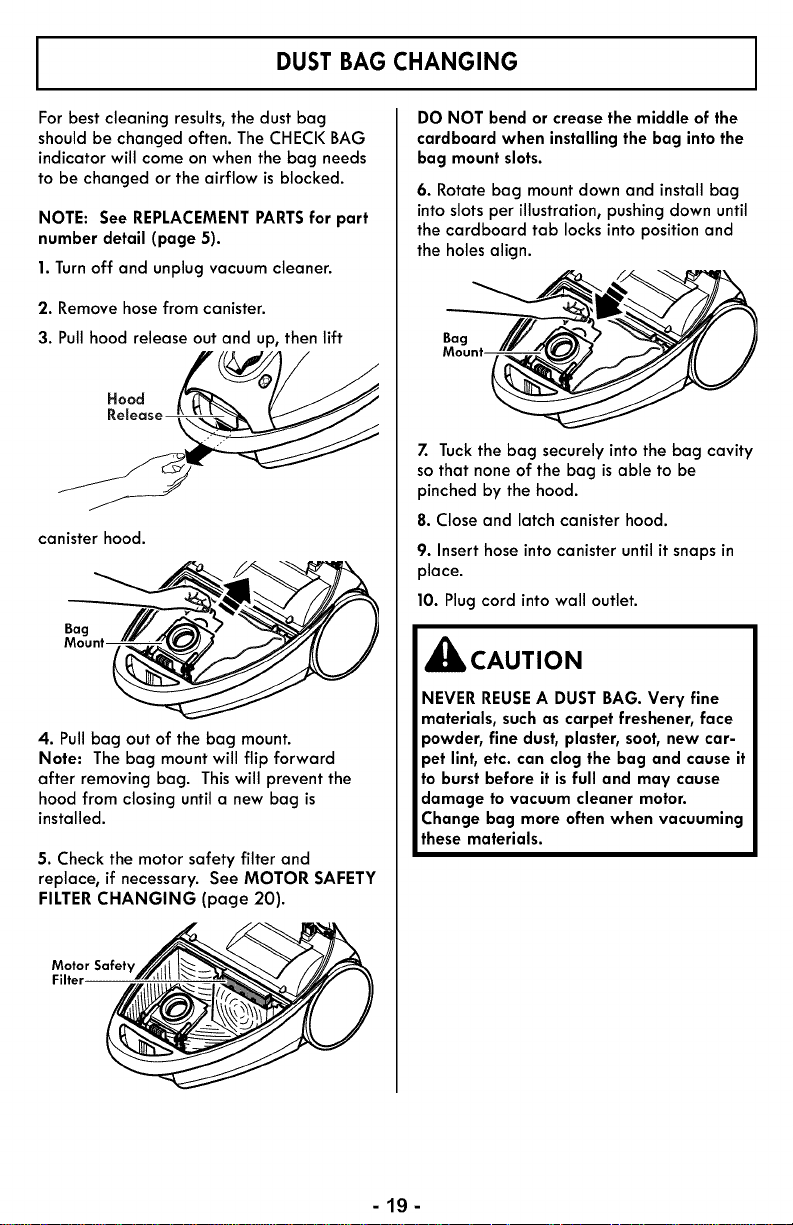
DUST BAG CHANGING
For best cleaning results, the dust bag
should be changed often. The CHECK BAG
indicator will come on when the bag needs
to be changed or the airflow is blocked.
NOTE: See REPLACEMENTPARTSfor part
number detail (page 5).
1.Turnoff and unplugvacuum cleaner.
2. Remove hose from canister.
3. Pullhood release out and up, then lift
Hood
canister hood.
Mount
4. Pullbag out of the bag mount.
Note: The bag mount will flip forward
after removing bag. This will prevent the
hood from closing until a new bag is
installed.
5. Check the motor safety filter and
replace, if necessary. See MOTOR SAFETY
FILTERCHANGING (page 20).
Motor Safety
Filter
DO NOT bend or crease the middle of the
cardboard when installing the bag intothe
bag mount slots.
6. Rotate bag mount down and install bag
intoslotsper illustration,pushing clown until
the cardboard tab locks into position and
the holes align.
7. Tuckthe bag securely into the bag cavity
so that none of the bag is able to be
pinched by the hood.
8. Close and latch canister hood.
9. Inserthose into canister until it snapsin
place.
10. Plug cord into wall outlet.
_IL CAUTION
NEVER REUSEA DUST BAG. Very fine
materials, such as carpet freshener,face
powder, fine dust, plaster,soot, new car-
pet lint, etc. can clog the bag and cause it
to burst before it isfull and may cause
damage to vacuum cleaner motor.
Change bag more often when vacuuming
these materials.
-lg-
MOTOR SAFETY FILTER CHANGING
J,_ WARNING
ElectricalShock Hazard
Turnoff and unplug vacuum cleaner from
electrical outlet. Do not operate the
vacuum cleaner without the motorsafety
filter. Be surethe filter isdry and properly
installedto prevent motor failure and/or
electrical shock.
MOTOR SAFETY FILTER
ELECTROSTATIC
Thisfilter must be replaced when dirty. It
should be replaced regularly depending on
use conditions. The filter CANNOT be
washed as it will lose its dust trapping
ability.
NOTE: See REPLACEMENTPARTSfor part
number detail (page 5).
1. Remove the bag as outlined in the DUST
BAG CHANGING (page 19)section.
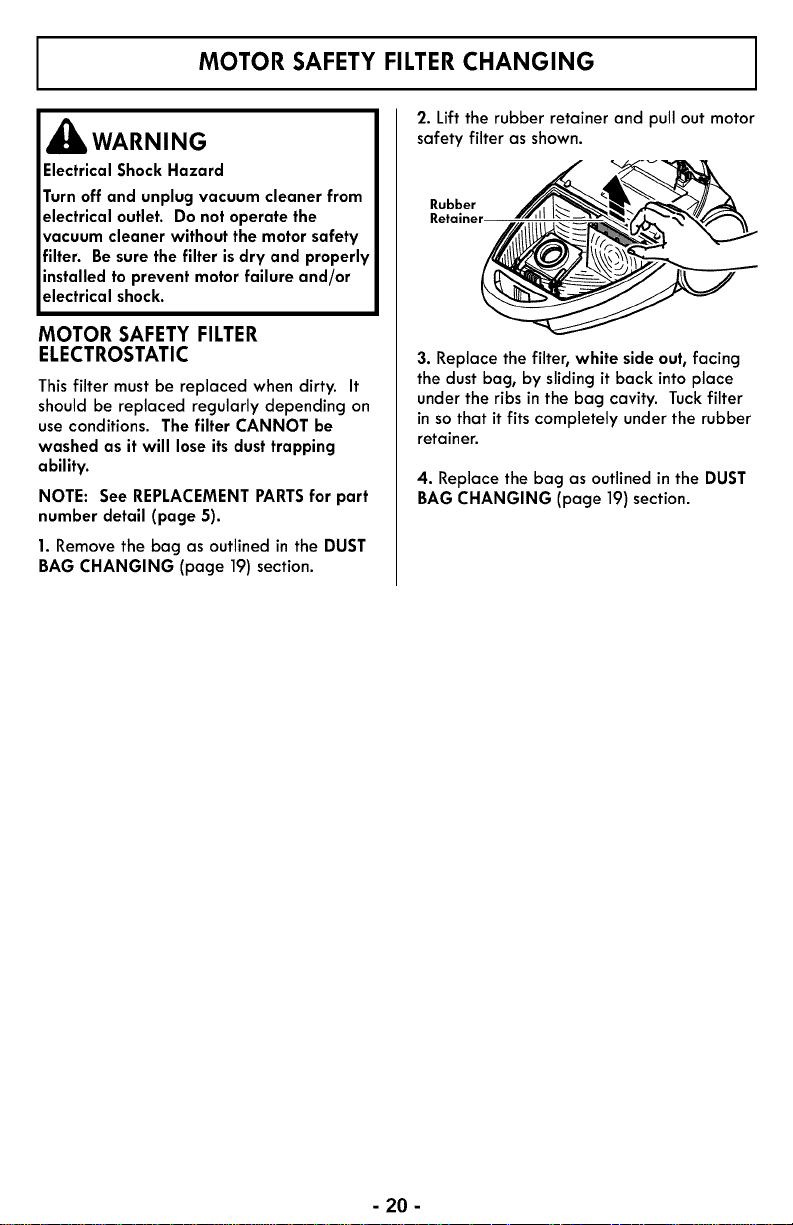
2. Lift the rubber retainer and pull out motor
safety filter as shown.
Rubber
3. Replace the filter, white side out,facing
the dust bag, by sliding it back intoplace
under the ribs in the bag cavity. Tuckfilter
in so that it fits completely under the rubber
retainer.
4. Replace the bag as outlined in the DUST
BAG CHANGING (page 19)section.
- 20 -
EXHAUST FILTER CHANGING
,_ WARNING
Fire and/or ElectricalShock Hazard
Do not operate with a clogged exhaust
filter or without the exhaust filter
installed. Do not operate without filter
cover installed.
EXHAUST FILTER - HEPA MEDIA
The exhaust filter cartridge must be
replaced when dirty. Replace the filter
when the entire surface area is covered
evenly. The filter CANNOT be washed as
it will lose its dust trapping ability.
NOTE: See REPLACEMENTPARTSfor part
number detail (page 5).
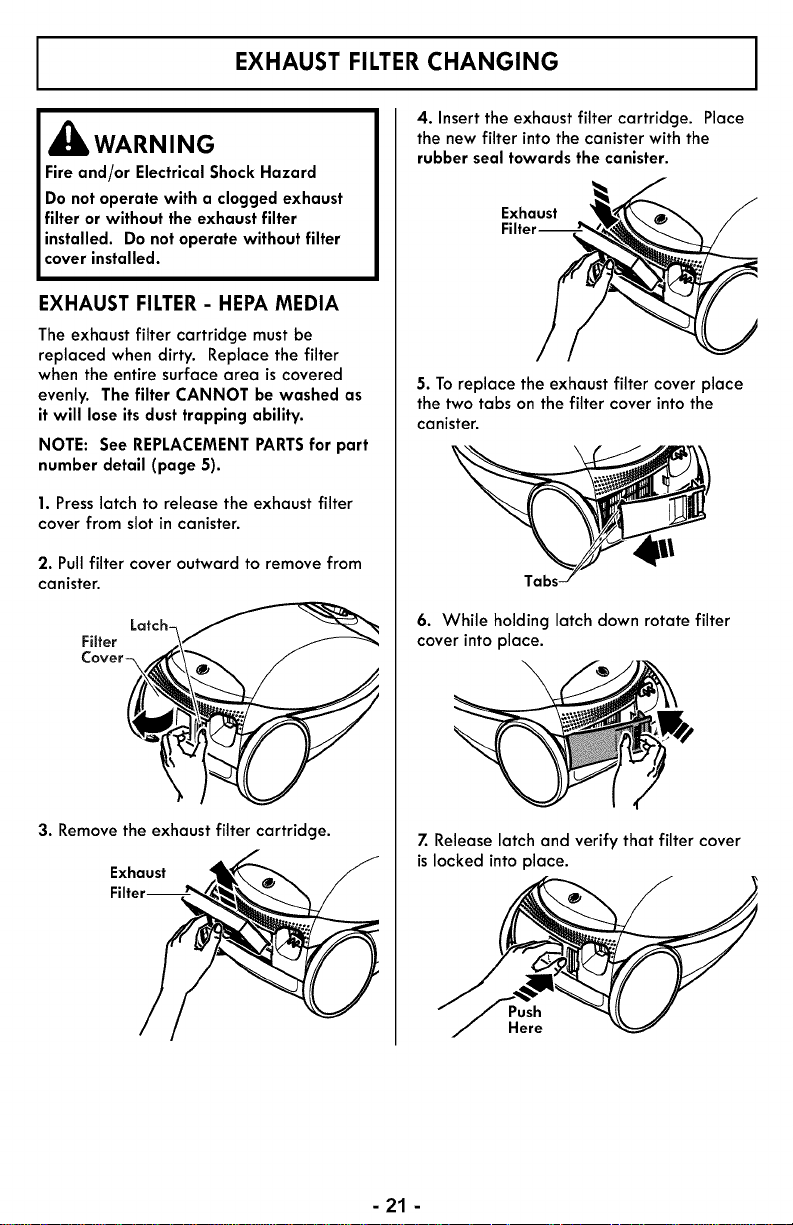
1. Presslatch to release the exhaust filter
cover from slot in canister.
2. Pullfilter cover outward to remove from
canister.
Filter Latch_.\'_'_'__ _
3. Remove the exhaust filter cartridge.
Exhaust __
Filter----_
4. Insert the exhaust filter cartridge. Place
the new filter into the canister with the
rubber seal towards the canister.
Exhaust
5. To replace the exhaust filter cover place
the two tabs on the filter cover into the
canister.
6. While holding latch clown rotate filter
cover into place.
\
7. Release latch and verify that filter cover
is locked into place.
Push
Here
- 21 -
Always follow all safety precautions when performing maintenance to the PowerMate.
,_ WARNING
ElectricalShockOr PersonalInjury Hazard
Always turn off and unplug vacuum
cleaner before performing maintenance
to the vacuum cleaner. Failure todo so
could resultin electrical shockor personal
injury from vacuum cleaner suddenly
starting.
BELTCHANGING AND AGITATOR CLEANING
TO REMOVE BELT
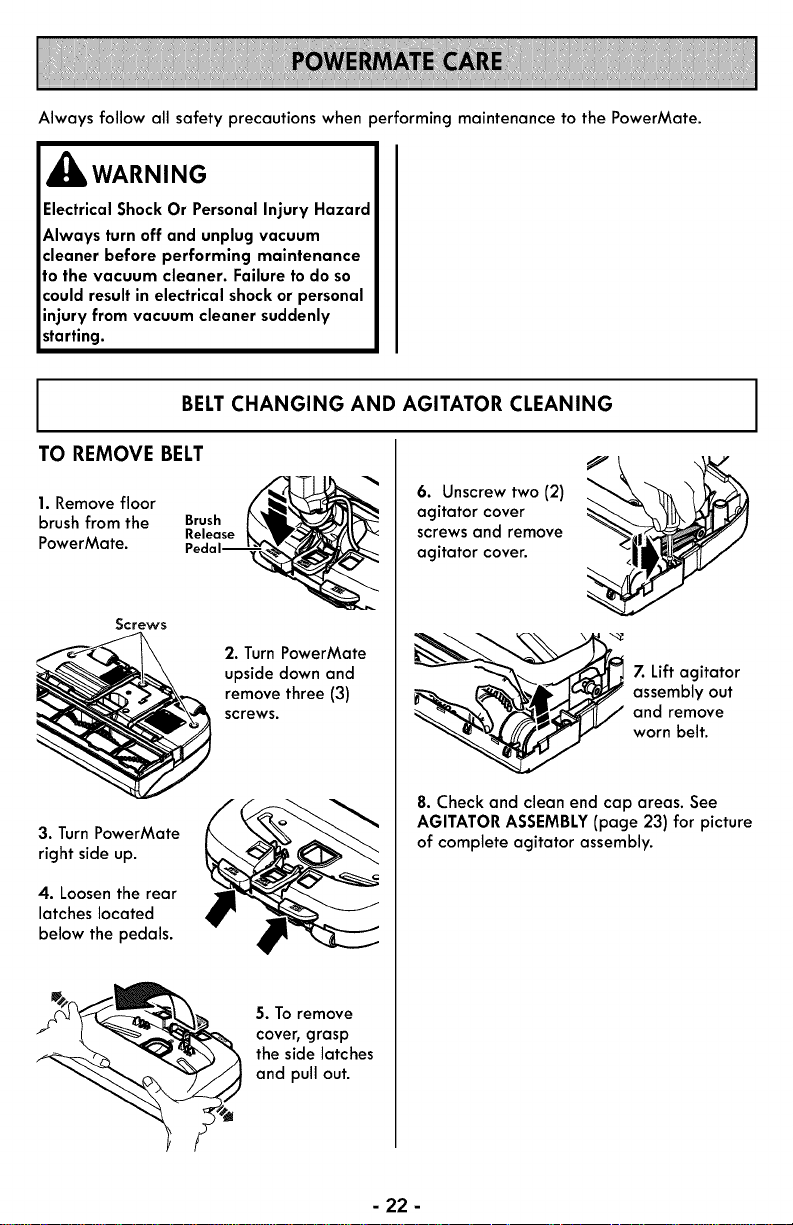
1. Remove floor
brush from the
Screws
PowerMate.
2. Turn PowerMate
upside down and
remove three (3)
screws.
3. TurnPowerMate
right side up.
4. Loosen the rear
latches located
below the pedals.
5. Toremove
cove_ grasp
the side latches
and pull out.
6. Unscrew two (2)
agitator cover
screws and remove
agitator cover.
7. Lift agitator
assembly out
and remove
worn belt.
8. Check and clean end cap areas. See
AGITATOR ASSEMBLY(page 23) for picture
of complete agitator assembly.
- 22 -
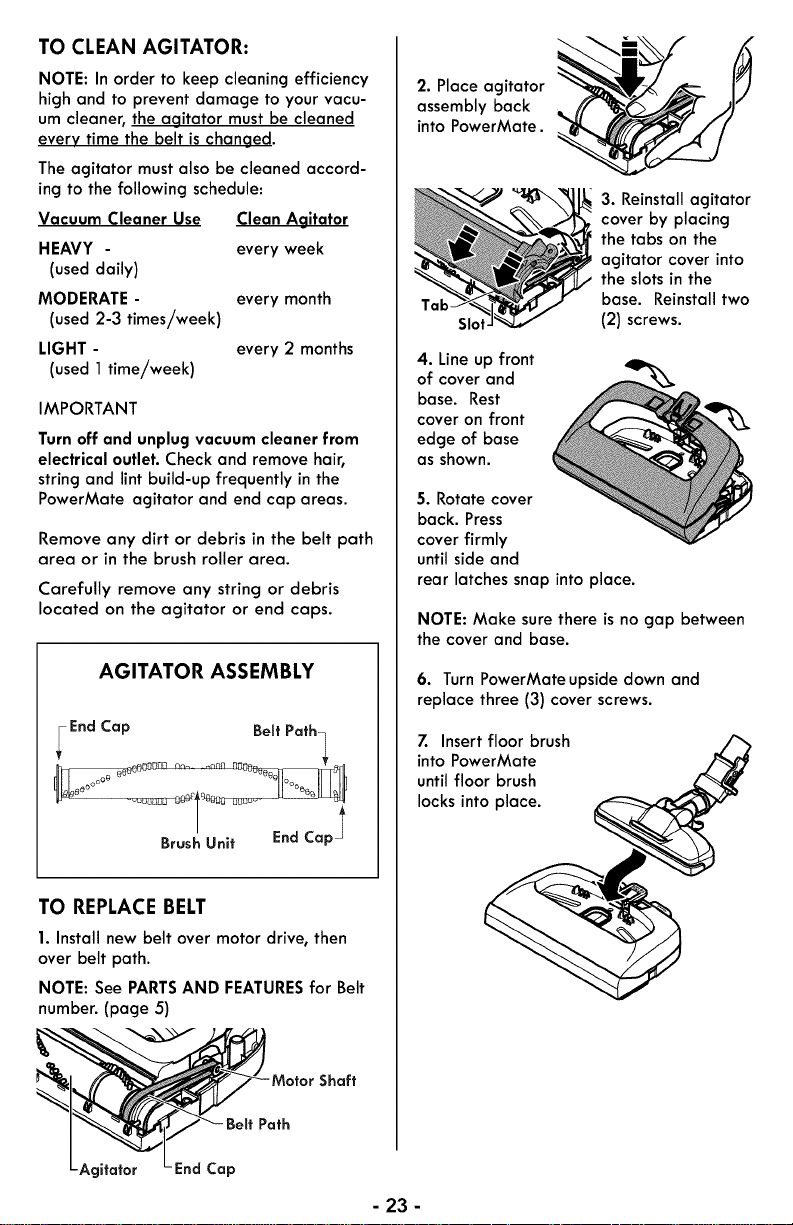
TO CLEAN AGITATOR:
NOTE: In order to keep cleaning efficiency
high and to prevent damage to your vacu-
um cleaner, the agitator must be cleaned
every time the belt ischanged.
The agitator must also be cleaned accord-
ing to the following schedule:
Vacuum Cleaner Use Clean Agitator
HEAVY - every week
(useddaily)
MODERATE - every month
(used2-3 times/week)
LIGHT - every 2 months
(used 1 time/week)
IMPORTANT
Turn off and unplug vacuum cleaner from
electrical outlet. Check and remove hair,
string and lint build-up frequently in the
PowerMate agitator and end cap areas.
Remove any dirt or debris in the belt path
area or in the brush roller area.
Carefully remove any string or debris
located on the agitator or end caps.
AGITATOR ASSEMBLY
-End Cap Belt Path_
TO REPLACE BELT
1. Install new belt over motor drive, then
over belt path.
NOTE: See PARTSAND FEATURESfor Belt
number. (page 5)
Motor Shaft
Path
itator End Cap
2. Place agitator
assembly back
into PowerMate.
SIo
4. Line up front
of cover and
base. Rest
cover on front
edge of base
as shown.
3. Reinstall agitator
cover by placing
the tabs on the
agitator cover into
the slots in the
base. Reinstall two
(2) screws.
5. Rotate cover
back. Press
cover firmly
until side and
rear latches snap into place.
NOTE: Make surethere isno gap between
the cover and base.
6. Turn PowerMateupside down and
replace three (3) cover screws.
7. Insert floor brush
into PowerMate
until floor brush
locks into place.
- 23 -
AGITATOR SERVICING
_IbWARNING
ElectricalShock Or PersonalInjury
Hazard
Always turn off and unplug vacuum
cleaner before performing maintenance
to the vacuum cleaner. Failure to do so
could resultin electrical shockor personal
injury from vacuum cleaner suddenly
starting.
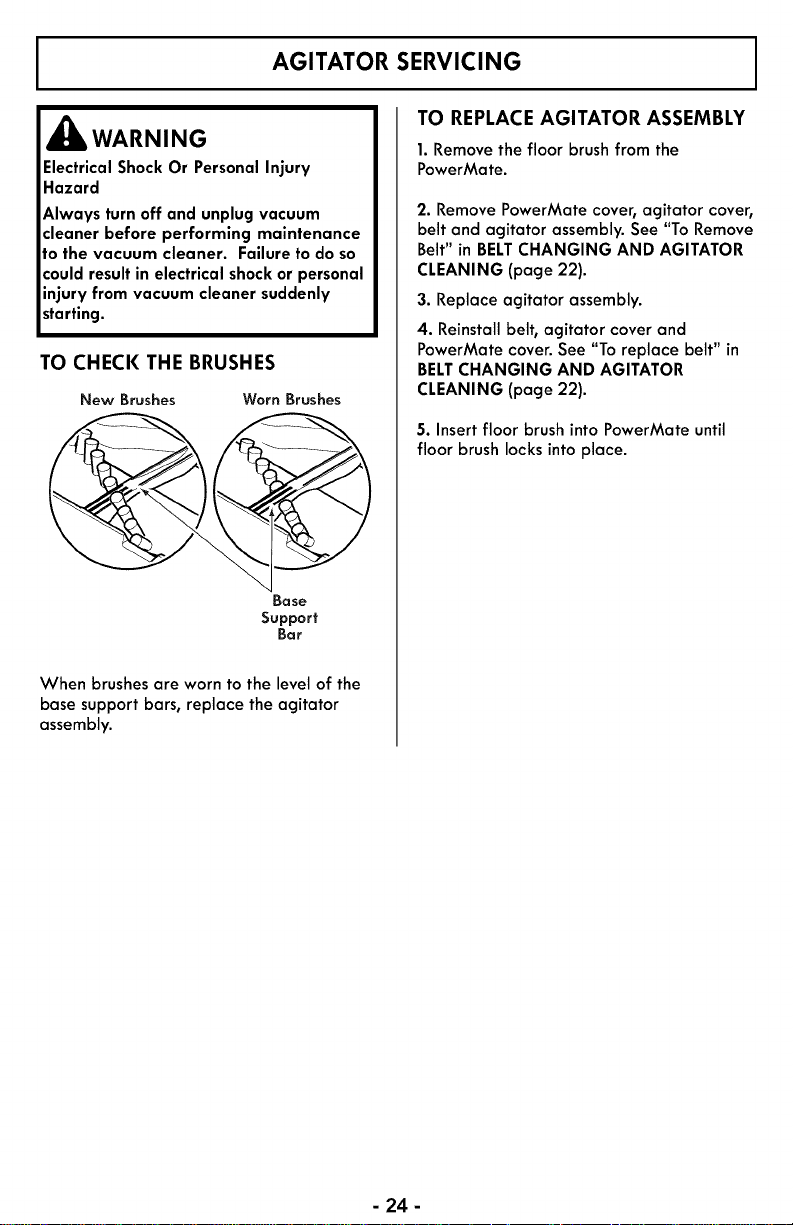
TO CHECK THE BRUSHES
New Brushes Worn Brushes
Base
Support
Bar
When brushes are worn to the level of the
base support bars, replace the agitator
assembly.
TO REPLACE AGITATOR ASSEMBLY
1.Removethe floor brush from the
PowerMate.
2. Remove PowerMate cover, agitator cover,
belt and agitator assembly. See "To Remove
Belt" in BELTCHANGING AND AGITATOR
CLEANING (page 22).
3. Replace agitator assembly.
4. Reinstall belt, agitator cover and
PowerMate cover. See "Toreplace belt" in
BELTCHANGING AND AGITATOR
CLEANING (page 22).
5. Insertfloor brush into PowerMate until
floor brush locks into place.
- 24 -
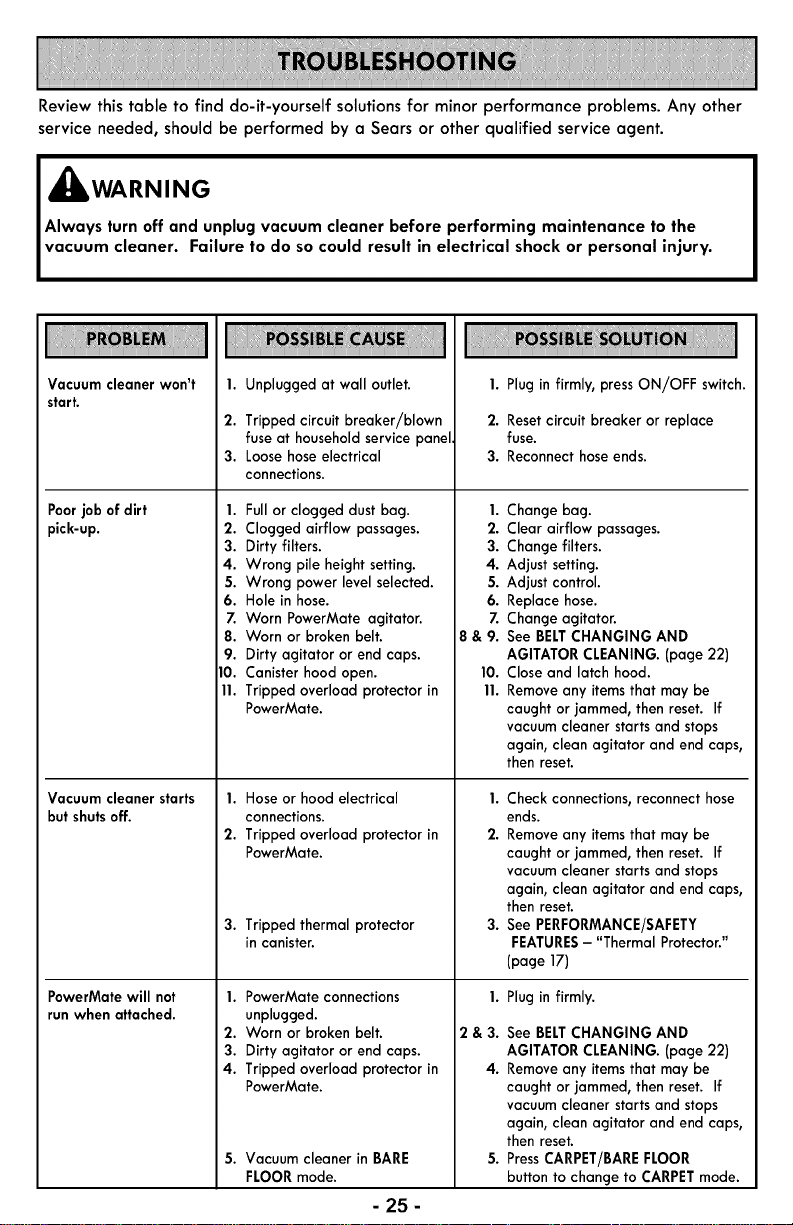
Review this table to find do-it-yourself solutions for minor performance problems. Any other
service needed, should be performed by a Sears or other qualified service agent.
,_ WARN ING
Always turn off and unplug vacuum cleaner before performing maintenance to the
vacuum cleaner. Failure to do so could result in electrical shock or personal injury.
Vacuum cleaner won't
start.
1. Unplugged at wall outlet.
2. Tripped circuit breaker/blown
fuse at household servicepanel.
3. Loose hose electrical
connections.
Poorjob of dirt 1.
pick-up. 2.
3.
4.
5.
6.
Z
8.
9.
10.
11.
Vacuum cleaner starts
butshutsoff.
PowerMate will not
runwhen attached.
Full or clogged dustbag.
Clogged airflow passages.
Dirty filters.
Wrong pile height setting.
Wrong power level selected.
Hole in hose.
Worn PowerMate agitator.
Worn or broken belt.
Dirty agitator or end caps.
Canister hood open.
Tripped overload protector in
PowerMate.
1. Hose or hood electrical
connections.
2. Tripped overload protector in
PowerMate.
3. Tripped thermal protector
in canister.
1. PowerMate connections
unplugged.
2. Worn or broken belt.
3. Dirty agitator or end caps.
4. Tripped overload protector in
PowerMate.
5. Vacuum cleaner in BARE
FLOOR mode.
1.
2.
3.
4.
5.
6.
7.
8&9.
10.
11.
1. Plug in firmly, pressON/OFF switch.
2. Resetcircuit breaker or replace
fuse.
3. Reconnecthose ends.
Change bag.
Clear airflow passages.
Change filters.
Adjust setting.
Adjust control.
Replace hose.
Change agitator.
See BELTCHANGING AND
AGITATOR CLEANING. (page 22)
Closeand latch hood.
Removeany itemsthat may be
caught or jammed, then reset. If
vacuumcleaner startsand stops
again, clean agitator and end caps,
then reset.
1. Check connections, reconnect hose
ends.
2. Removeany itemsthat may be
caught or jammed, then reset. If
vacuum cleaner starts and stops
again, clean agitator and end caps,
then reset.
3. See PERFORMANCE/SAFETY
FEATURES- "Thermal Protector."
(page 17)
1.
2&3.
4.
5.
Plug in firmly.
See BELTCHANGING AND
AGITATOR CLEANING. (page 22)
Removeany itemsthat may be
caught or jammed, then reset. If
vacuumcleaner startsand stops
again, clean agitator and end caps,
then reset.
PressCARPET/BAREFLOOR
buttonto change to CARPETmode.
- 25-
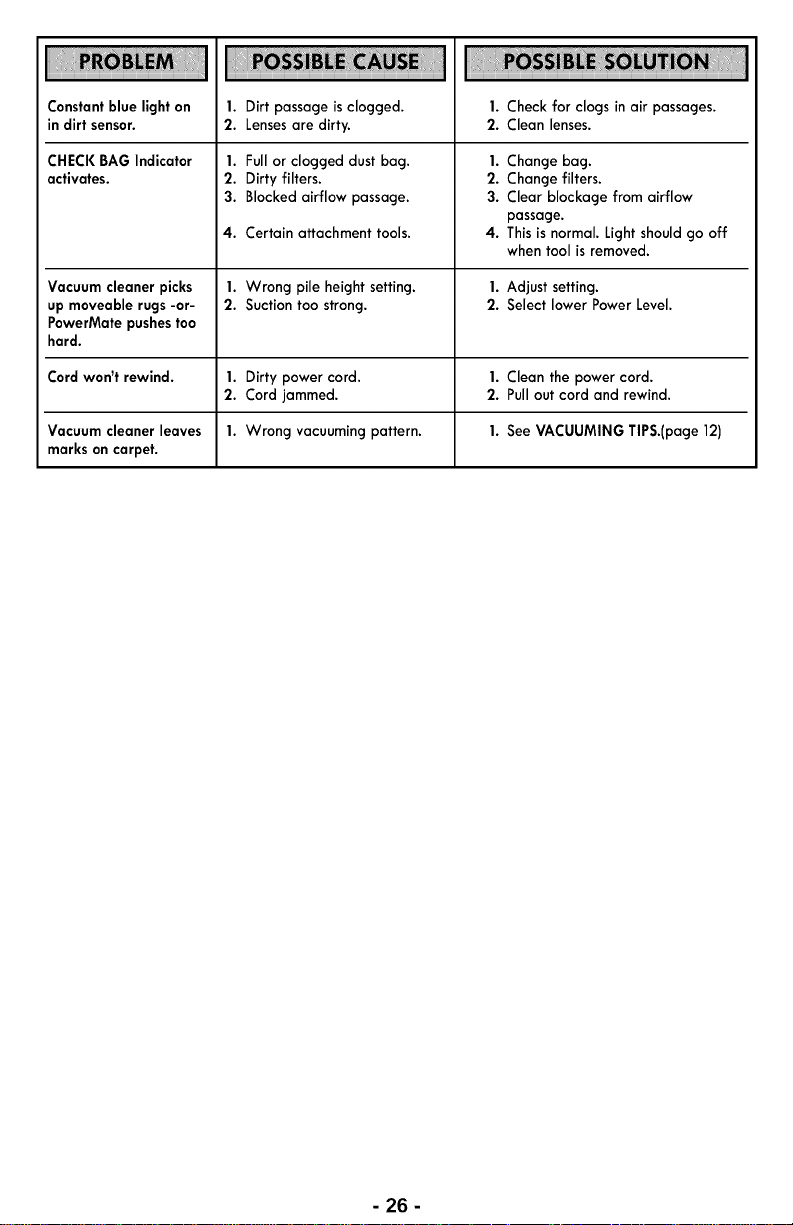
Constantblue lighton
in dirt sensor.
CHECKBAG Indicator
activates.
1. Dirt passage is clogged.
2. Lensesare dirty.
1. Full or clogged dust bag.
2. Dirty filters.
3. Blocked airflow passage.
1. Checkfor clogs inair passages.
2. Clean lenses.
4. Certain attachment tools. 4.
Vacuum cleaner picks 1. Wrong pile heightsetting. 1. Adjust setting.
up moveable rugs-or- 2. Suctiontoo strong. 2. Select lower Power Level.
PowerMate pushestoo
hard.
Cord won't rewind. 1. Dirty power cord. 1. Clean the power cord.
2. Cord jammed. 2. Pullout cord and rewind.
Vacuum cleaner leaves 1. Wrong vacuumingpattern. 1. See VACUUMING TIPS.(page 12)
markson carpet.
1. Change bag.
2. Change filters.
3. Clear blockage from airflow
passage.
This is normal. Light should go off
when tool is removed.
- 26-
Antes de usar su aspiradora nueva ........................................... 1
Garantia de la aspiradora de Kenmore Elite ................................... 2
Instrucciones importantes de seguridad ....................................... 3
Piezas y caracteristicas .................................................. 4-6
Instrucciones de ensamble ............................................... 7-8
Instrucciones de operaci6n .............................................. 9-14
Caracteristicas de Rendimiento/Seguridad .................................. 15-16
Cuidado del recept6culo ............................................... 17-20
Cuidado de la PowerMate® ............................................. 21-23
Reconocimiento de problemas ........................................... 24-25
Informaci6n de asistencia o servicio ............................. Posterior Cubierta
Porfavor lea esta gufa que le ayudara a ensamblar y operar su aspiradora nueva de Kenmore
en una manera m6s seguray efectiva.
Para mas informaci6n acerca del cuidado y operaci6n de esta aspiradora, Ilame a la Uneade
Ayuda de aspiradoras al 1-877-531-7321. Cuando pregunte por informaci6n ustednecesitar6 el
n6mero completo de serie y modelo de la aspiradora que est6 Iocalizado en la placa de los
n6merosde modelo y serie.
Use el espacio de abajo para registrar el n6mero de modelo y serie para su nuevaaspiradora de
Kenmore.
NOmerode Modelo
NOmero de Serie
Fecha de Compra
Mantenga este libro y su recibo en un lugar seguro para futuras referencias.
LISTA DE EMBALAJE
Su ASPIRADOR KENMORE ELITEse empaca con las sicjuientespiezas y componentes
pot separado:
• Recept6culo (con la herramienta para ventilador y el cepillo para sacudir)
• PowerMate ®& Cepillo para piso desmontable
• Pet PowerMate ®
• Ensamble del mango y la manguera (con la herramienta para hendiduras)
• Tubo telesc6pico
• Manual de uso y cuidado
• Lista de partes
Carla uno de estos ensambles es mostrado detalladamente en la lista de piezas para
reparaci6n.
-1-
Garantia limitada de Kenmore
DURANTE un aria a partir de la fecha de compra este aparato est6 garantizado contra
defectos de material o mano de obra cuando sees instalado correctamente, operado y
mantenido segOn las instrucciones suministradas.
CON LA PRUEBADE COMPRA, devuelva el aparato defectuoso a la tienda donde Io
compr6 para la reparaci6n o reemplazo sin costo a discreci6n del vendedor.
Esta garant[a es v61ida solamente durante 90 d[as desde la fecha de compra,
si la aspiradora se utiliza para otros fines que no sean el uso familiar privado.
Esta garantia cubre EXCLUSIVAMENTE los defectos de materiales V fabricaci6n V NO
pagar6:
1. Loselementos desechables que puedan desgastarse con un uso normal, incluyendo
sin car6cter excluyente, filtros, correas, bolsas., y bombillas con rosca en la base.
2. Un t_cnico del servicio t_cnico para limpiar o mantener este aparato, o para que
ensefie al usuario a instalar, manejar o mantener correctamente el producto.
3. Llamadas de servicio para corregir instalaciones de unaparato no realizadas pot
agentes de servicios autorizados pot Sears o para reparar problemas con fusibles
de casas, interruptores de circuitos, cableado de casa, y plomer[a o sistemas de
alimentaci6n de gas que resulten de la instalaci6n.
4. Dafios o fallas en este aparato que resulten de una instalaci6n no realizada pot
agentes de servicio autorizados pot Sears, incluyendo instalaci6n que no fue de
acuerdo a los c6digos de electricidad, gas o plomer[a.
5. Dafios o fallas de este aparato, incluyendo descoloraci6n u oxido en la superficie, si
no se ha manejado correctamente o mantenido siguiendo todas las instrucciones
incluidas con el producto.
6. Dafios o fallas de este aparato, incluyendo descoloraci6n u oxido en la superficie,
originados pot accidente, alteraci6n, abuso, uso incorrecto o usodel producto para
otros fines distintos de los indicados.distintos de los indicados.
7. Dafios o fallas de este aparato, incluyendo descoloraci6n u oxido en la superficie,
causados pot el uso de detergentes, limpiadores, productos qu[micos o utensilios
diferentes a los recomendados en todas las instruccionesque se incluyen con el
producto.
8. Dafios o aver[as de las piezas o sistemas causados pot modificaciones no
autorizadas que se hayan hecho a este producto.
9. Servicio a un aparato si el modelo y etiqueta de serie faltan, son alteradas o sino
se puede determinar f6cilmente si tienen el logo de certificaci6n apropiado
Limitaci6n de responsabilidad de las garantias implicitas; limitaci6n de remedios
I_16nico y exclusivo remedio del cliente bajo esta garant[a limitada set6 el reemplazo
del aparato segOnIo indicado en este documento. Lasgarant[as impl[citas, incluyendo
las garant[as de comerciabilidad o idoneidad para un prop6sito espec[fico, se limitan a
un afio o el per[odo m6s corto permitido pot la ley. Elcomerciante no set6 responsable
pot dafios incidentales ni consecuenciales. Algunos estados no permiten la exclusi6n o
limitaci6n de dafios incidentales o consecuenciales, ni limitaciones en la duraci6n de las
garant[as impl[citas de comerciabilidad o idoneidad, pot Io que estasexclusiones o
limitaciones podr[an no aplicar en sucaso.
Esta garant[a aplica solamente cuando este aparato se utiliza en Estados Unidos.
Esta garant[a le otorga derechos legales espec[ficos, y usted podr[a tenet otros
derechos que var[an en funci6n de cada estado.
Sears Brands Management Corporation, Hoffman Estates,IL 60179
-2-
Lea las instrucciones en este manual antes de armar o usar su asplrador.
, kADVERTENCIA
Su seguridad es muy importante para nosotros. Para reducir el riesgo de incendio, cho-
que el6ctrico, lesi6n corporal o dafios al utilizar su aspiradora, act6e de acuerdo con
precauciones b6sicas de seguridad, entre elias:
Usesuaspiradora 6nicamente en la forma Apacjuetodosloscontrolesantesde
descrita en este manual. Use 0nicamente con
accesorios recomendados por Sears.
Desconecte el cord6n el6ctrico antes de
componer o limpiar el 6rea del cepillo. De Io
contrario, el cepillo podrla arrancar de forma
imprevista o podrla producirse un choque
el6ctrico.
No abandone la aspiradora cuando est6
conectada. Descon6ctela cuando no la est6
usando y antes de darle servicio.
Para reducir el riescjode choque el6ctrico, no
use su aspiradora al aire libre ni sobre
superficies mojadas.
No permita que sea utilizada como jucjuete. Se
requiere tenet mayor cuidado cuando sea
utilizada en la proximidad de nifios o pot
nifios.
No use la aspiradora si el cord6n o el enchufe
est6n dafiados. Si la aspiradora no est6
funcionando adecuadamente o si se ha
dejado caer, est6 dafiada, se ha dejado
expuesta a la intemperie o se ha dejado caer
en acjua, devu61vala a un Centro de servicio
de Sears.
No jale ni transporte la aspiradora pot el
cord6n; no use el cord6n como mango; no
cierre puertas sobre el cord6n; no jale el
cord6n sobre rebordes acjudos ni esquinas. No
pase la aspiradora sobre el cord6n. Mantencja
el cord6n alejado de superficies calientes.
No desconecte la aspiradora tirando del
cord6n el6ctrico. Para desconectarla, jale el
enchufe, no el cord6n.
No toque la aspiradora ni el enchufe con las
manos mojadas.
No coloque objetos en las aberturas.
No utilice la aspiradora si alcjuna abertura
est6 bloqueada; mant6ncjala libre de polvo,
pelusa, cabellos y cualquiera cosa que podrla
disminuir el flujo de aire.
Mantenga el cabello, ropa suelta, dedos y
todas las partes del cuerpo alejados de las
aberturas y piezas mec6nicas.
GUARDE ESTAS
desenchufar.
Tengo cuidado especial al utilizar la
aspiradora en escalones. No sobre sillas,
mesas, etc. Mant6ncjala en el piso.
No use la aspiradora para aspirar liquidos
inflamables o combustibles (cjasolina, llquidos
para limpieza, perfumes, etc.) ni la use en
lucjares donde 6stos podrian estar presentes.
Los vapores de estas sustancias pueden crear
un pelicjro de incendio o explosi6n.
No levante nincjuna cosa que se est6
quemando o emitiendo humo, como cicjarrillos,
cerillos o cenizas calientes.
No use la aspiradora sin tenet instalada la
bolsa para polvo y/o los filtros.
Cambie siempre la bolsa para polvo despu6s
de aspirar limpiadores de alfombras o
desodorantes, talcos y polvos finos. Estos
productos atascan la bolsa, reducen el flujo de
aire y pueden causar que 6sta se rompa. Si no
cambia la bolsa podrla ocasionar dafio
permanente a la aspiradora.
No use la aspiradora para levantar objetos
acjudos, jucjuetes pequefios, alfileres,
sujetapapeles, etc. Podrlan dafiar la
aspiradora o la bolsa para polvo.
No opere sin el filtro de escape ni la cubierta
del filtro de escape instalados.
La manguera contiene cables el6ctricos. No la
use cuando est6 dafiada, cortada, o
perforada. Reemplace siest6 cortada o
descjastada. No levante objetos afilados.
Siempre apacju6 y desconecte la aspiradora
antes de conectar o desconectar la mancjuera,
Handi-Mate Jr.® (si aplicable), o la boquilla.
Sujete el enchufe con la mano al enrollar el
cord6n el6ctrico. Para desconectarla, jale el
enchufe, no el cord6n.
Usted es responsable de asecjurar que su
aspiradora no sea utilizada pot nincjuna
persona que no pueda manejarla
correctamente.
NSTRUCCIONES
El armado y uso seguro de su aspiradora son su responsabilidad. Esta aspiradora ha
sido disefiada exclusivamente para uso dom6stico. La aspiradora deber6 almacenarse
en un lugar seco y en el interior. Lea este manual de uso y cuidado detenidamente, pues
contiene informaci6n importante sobre seguridad y uso. Esta guia contiene informaci6n
sobre seguridad debajo de simbolos de advertencia cuidado.
-3-
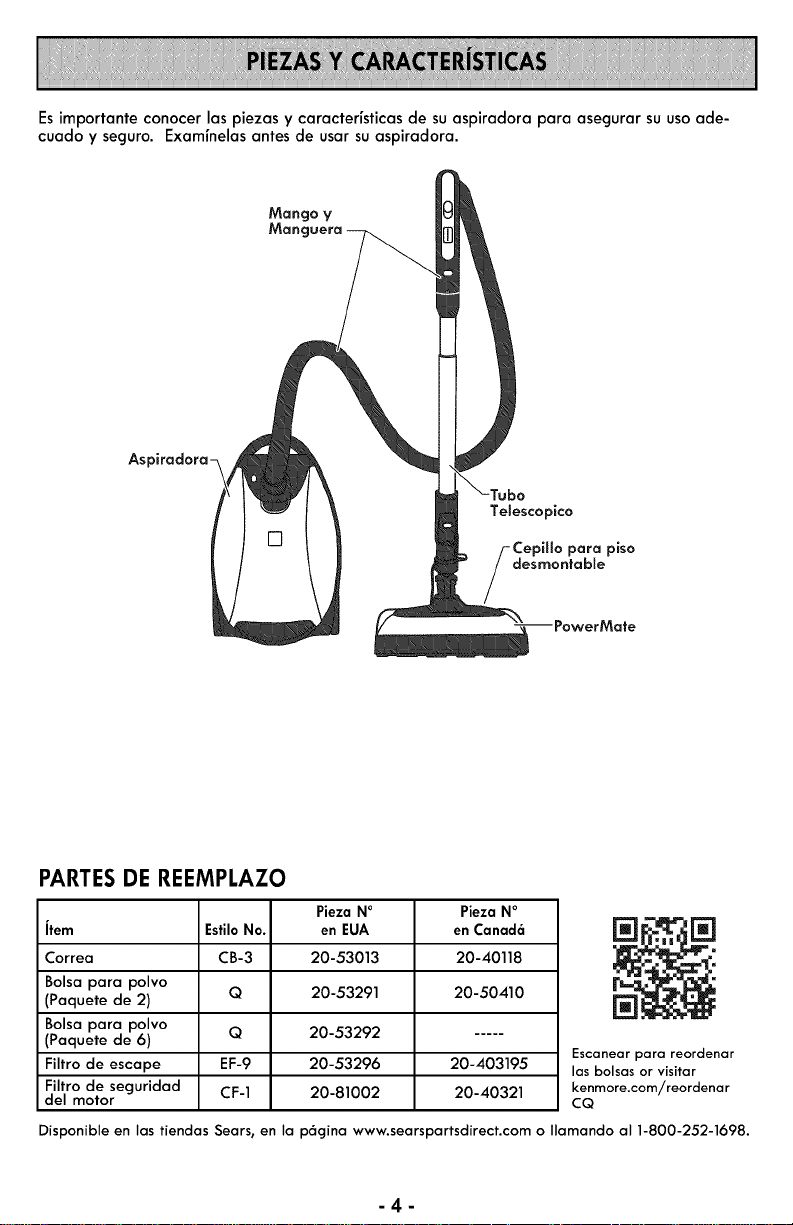
Esimportante conocer las piezas y caracter[sticasde suaspiradora para asegurar su usoade-
cuado y seguro. Exam[nelasantes de usar suaspiradora.
As
Te[escopico
CepH[o para piso
desmontab[e
-- PowerMate
PARTESDE REEMPLAZO
Pieza NO
Jtem EstiloNo. en EUA
Correa CB-3 20-53013
Bolsa para polvo
(Paquete de 2) Q 20-53291
Bolsa para polvo
(Paquete de 6) Q 20-53292
Filtro de escape EF-9 20-53296
Filtro de seguridad CF-1 20-81002
del motor
Pieza NO
en Canad6
20-40118
20-50410
20-403195
20-40321
[]
Escanear para reordenar
las bolsas or visitar
kenmore.com/reordenar
CQ
Disponible en Ias tiendas Sears, en Ia p6gina www.searspartsdirect.com o Ilamando al 1-800-252-1698.
-4-
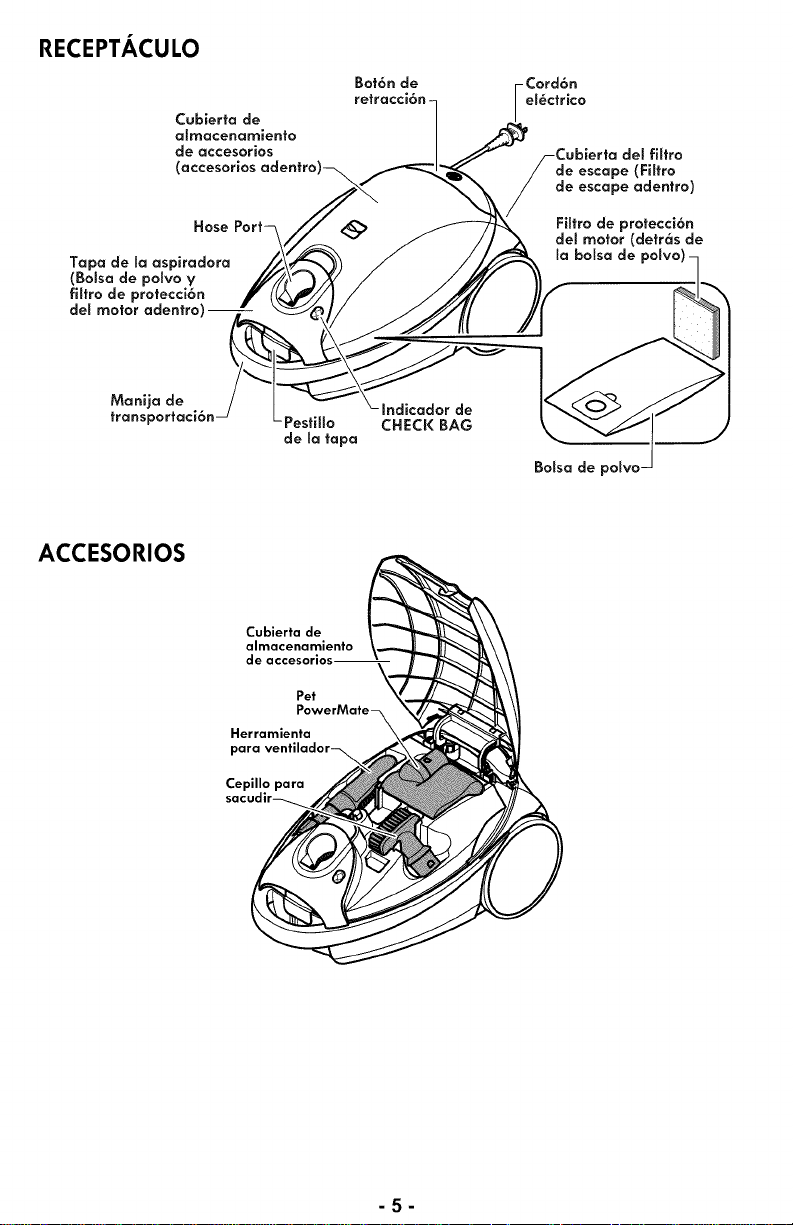
RECEPTACULO
Cubierta de
almacenamiento
de accesorios
(accesorios adentro
Hose
Tapa de la aspiradora
(Bolsa de poSvoV
filtro de protecci6n
del motor adentro)
Bot6n de
retracci6n-
-Cord6n
el_ctrico
filtro
de escape (Filtro
de escape adentro)
Filtro de protecci6n
del motor (detr6s de
_a bolsa de polvo)
Pestillo
de la tapa
Indicador de
CHECK BAG
Bolsa de poIvo-
ACCESORIOS
Cubierta de
almacenamiento
de
Pet
Herramienta
Cepillo para
-5-
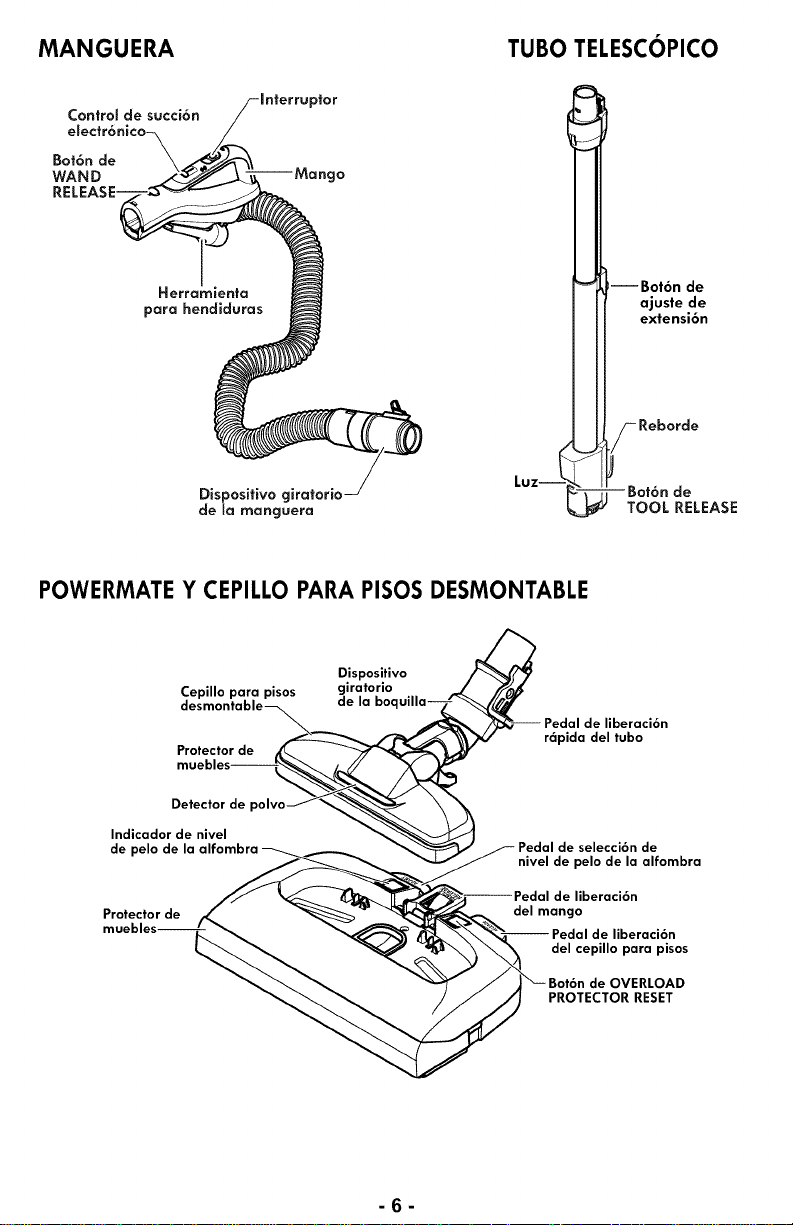
MANGUERA TUBO TELESCOPICO
ControS de succi6n
Bot6n de
WAND
RELEA:
Herrc
para hendiduras
Dispositivo giratorio
de la manguera
Luz--
--Bot6n de
ajuste de
extensi6n
-Reborde
- Bot6n de
TOOL RELEASE
POWERMATE Y CEPILLO PARA PISOS DESMONTABLE
Dispositivo
Cepillo para pisos c_ierat°ri°
la boc
Protector de
de liberaci6n
r6pida del tubo
Detector de
Indicador de nivel
de pelo de la alfombra
Protector de
de selecci6n de
nivel de pelo de la alfombra
de liberaci6n
del mango
de liberaci6n
del cepillo para pisos
de OVERLOAD
PROTECTOR RESET
-fi-
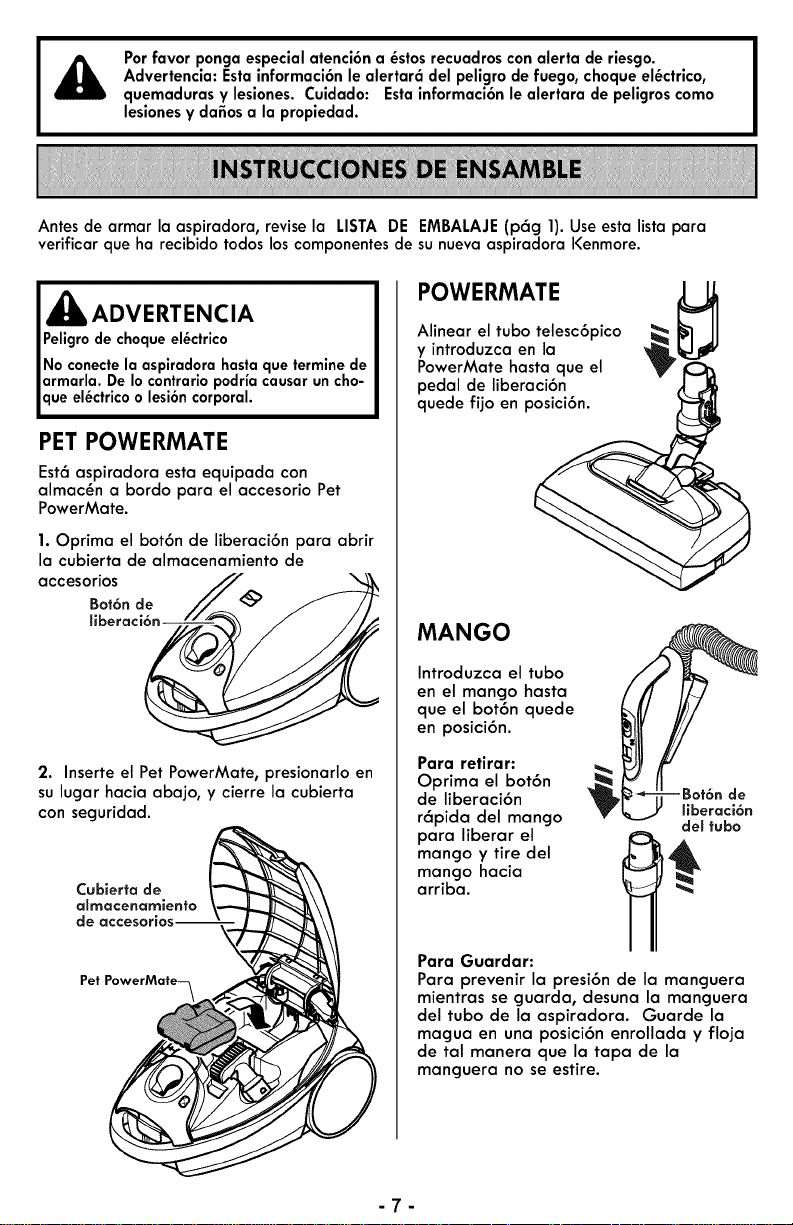
Porfavor pongaespecialatenci6na _stos recuadros conalerta de riesgo.
Advertencia:Estainformaci6nlealertar6 del peligrode fuego,choqueel_ctrico,
quemadurasy lesiones. Cuidado: Estainformaci6nle alertara de peligroscomo
lesionesy dafiosa la propiedad.
Antes de armar la aspiradora, revise la LISTA DE EMBALAJE(p6g 1). Use esta lista para
verificarque ha recibido todoslos componentes de su nuevaaspiradoraKenmore.
ADVERTENCIA
ue el_ctrico o lesi6n cor
PET POWERMATE
Est6 aspiradora esta equipada con
almac_n a bordo para el accesorio Pet
PowerMate.
1. Optima el bot6n de liberaci6n para abrir
la cubierta de almacenamiento de
accesorios
Bot6nde J_
hberacl
2. Inserte el Pet PowerMate, presionarlo en
su lugar hacia abajo, y cierre la cubierta
con seguridad.
Pet PowerMate--_
POWERMATE
Alinear el tubo telesc6pico
y introduzca en la
PowerMate hasta que el
pedal de liberaci6n
quede fijo en posici6n.
MANGO
Introduzca el tubo
en el mango hasta
que el bot6n quede
en posici6n.
Para retirar:
Oprimo el bot6n
de liberaci6n de
r6pida del mango ffberaci6n
del tubo
para liberar el _
mango y tire del
mango hacia
arriba.
Para Guardar:
Para prevenir la presi6n de la manguera
mientras se guarda, desuna la manguera
del tubo de la aspiradora. Guarde la
magua en una posici6n enrollada y floja
de tal manera que la tapa de la
manguera no se estire.
-7-
RECEPTACULO
1. Abra la tapa del recept6culo.
2. Examine que la bolsa para polvo este
instalada correctamente. Consulte las ins-
trucciones de instalaci6n en: CAMBIO DE
LA BOLSA (p6g 18).
3. Examine que el filtro de seguridad del
motor este instalado correctamente.
Consulte las instrucciones de instalaci6n
en: CAMBIO DEL FILTRO DE SEGURIDAD
DEL MOTOR (p6g 19).
LA TAPA Y LA CUBIERTA
Esnormal que la tapa del recept6culo se
desprenda al set abierta m6s de Io
necesario.
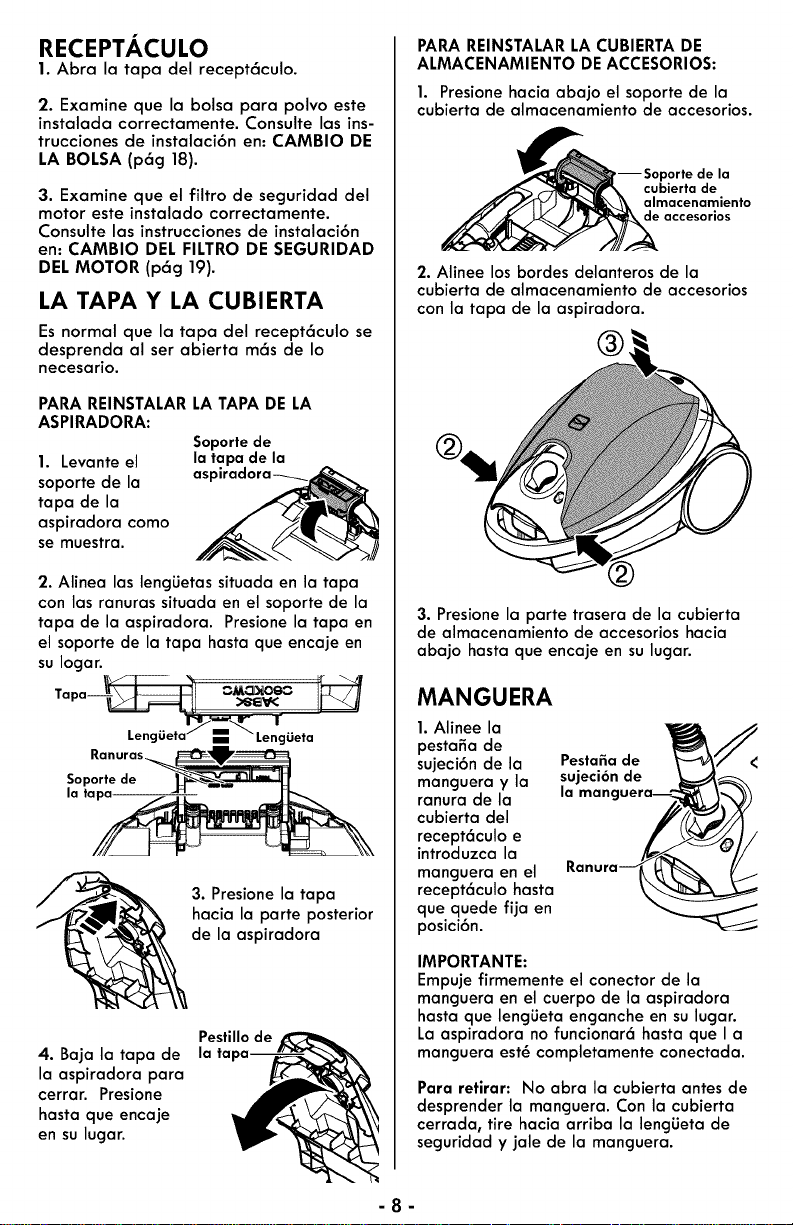
PARA REINSTALARLATAPA DE LA
ASPIRADORA:
1. Levante el
soporte de la
tapa de la
aspiradora como
se muestra.
Soporte de
la tapa de la
asl:
2. Alinea las leng_Jetassituada en la tapa
con las ranuras situada en el soporte de la
tapa de la aspiradora. Presione la tapa en
el soporte de la tapa hasta que encaje en
su Iogar.
Soporte de
la tapa
3. Presione la tapa
hacia la parte posterior
de la aspiradora
4. Baja la tapa de
la aspiradora para
cerrar. Presione
hasta que encaje
en su lugar.
Pestillo de
la
PARA REINSTALARLA CUBIERTADE
ALMACENAMIENTO DEACCESORIOS:
1. Presione hacia abajo el soporte de la
cubierta de almacenamiento de accesorios.
--Soporte de la
cubierta de
almacenamiento
de accesorios
2. Alinee los bordes delanteros de la
cubierta de almacenamiento de accesorios
con la tapa de la aspiradora.
®,
3. Presione la parte trasera de la cubierta
de almacenamiento de accesorios hacia
abajo hasta que encaje en su lugar.
MANGUERA
1.Alinee la
pesta_a de
sujeci6n de la
manguera y la
ranura de la
cubierta del
recept6culo e
introduzca la
manguera en el
recept6culo hasta
que quede fija en
posici6n.
Pestafia de
sujeci6n de
la mane
IMPORTANTE:
Empuje firmemente el conector de la
manguera en el cuerpo de la aspiradora
hasta que leng_Jetaenganche en su lugar.
La aspiradora no funcionar6 hasta que I a
manguera est_ completamente conectada.
Para retirar: No abra la cubierta antes de
desprender la manguera. Con la cubierta
cerrada, tire hacia arriba la leng_Jetade
seguridad y jale de la manguera.
-8-
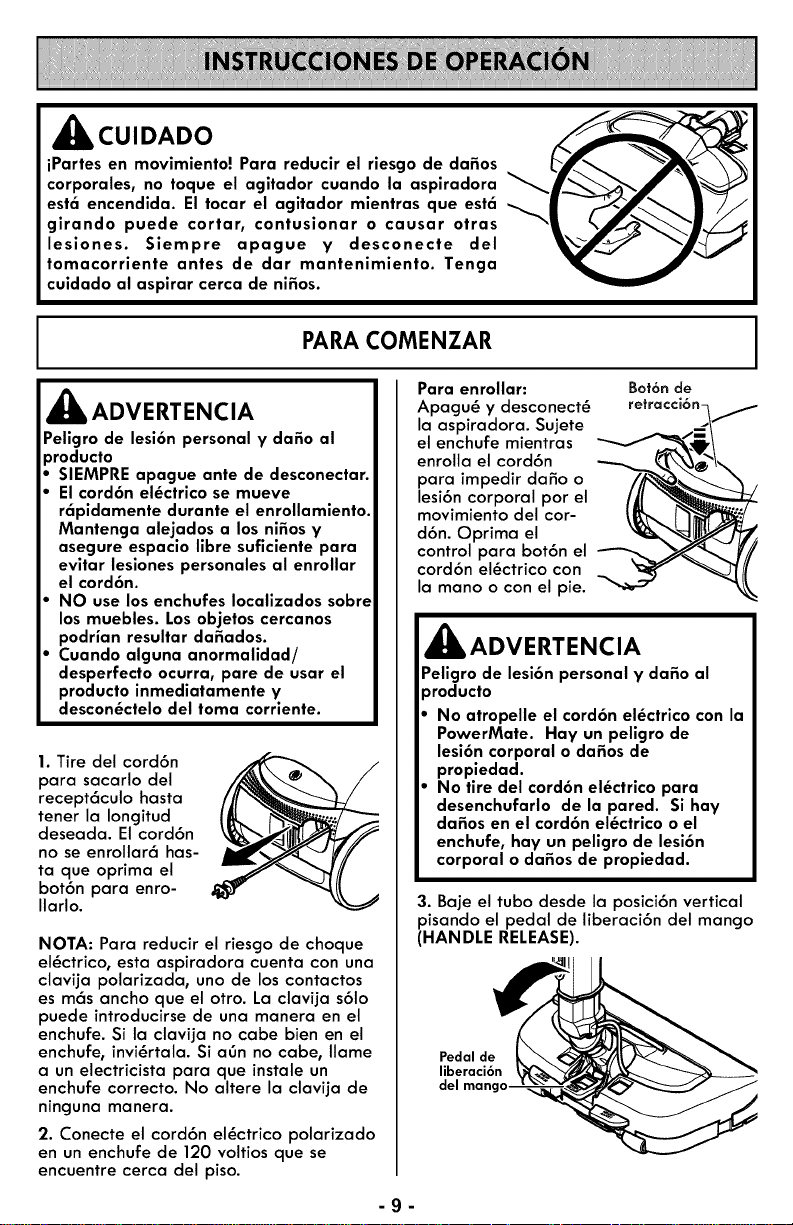
Acu,oAoo
iPartes en movimiento! Para reducir el riesgo de dafios
corporales, no toque el agitador cuando la aspiradora
est6 encendida. El tocar el agitador mientras que est6
girando puede cortar, contusionar o causar otras
lesiones. Siempre apague V desconecte del
tomacorriente antes de dar mantenimiento. Tenga
cuidado al aspirar cerca de nifios.
PARA COMENZAR
J_k ADVERTENCIA
Peligro de lesi6n personal V dafio al
oroducto
SIEMPRE apague ante de desconectar.
El cord6n el_ctrico se mueve
r6pidamente durante el enrollamiento.
Mantenga alejados a los nifios V
asegure espacio libre suficiente para
evitar lesiones personales al enrollar
el cord6n.
NO use losenchufes Iocalizados sobre
los muebles. Losobjetos cercanos
podrian resultar dafiados.
Cuando alguna anormalidad/
desperfecto ocurra, pare de usar el
producto inmediatamente V
descon_ctelo del toma corriente.
1. Tire del cord6n
para sacarlo del
recept6culo hasta
tener la Iongitud
deseada. El cord6n
no se enrollar6 has-
ta que oprima el
bot6n para enro-
Ilarlo.
NOTA: Para reducir el riesgo de choque
el_ctrico, esta aspiradora cuenta con una
clavija polarizada, uno de los contactos
es m6s ancho que el otro. La clavija s61o
puede introducirse de una manera en el
enchufe. Si la clavija no cabe bien en el
enchufe, invi_rtala. Si aOn no cabe, Ilame
a un electricista para que instale un
enchufe correcto. No altere la clavija de
ninguna manera.
2. Conecte el cord6n el_ctrico polarizado
en un enchufe de 120 voltios que se
encuentre cerca del piso.
Para enrollar:
Apagu_ y desconect_
la aspiradora. Sujete
el enchufe mientras
enrolia el cord6n
para impedir dafio o
lesi6n corporal pot el
movimiento de[ cor-
d6n. Optima el
control para bot6n el
cord6n el_ctrico con
la mano o con el pie.
Bot6n de
retracci6n-
,_ ADVERTENCIA
Peligro de lesi6n personal V dafio al
_roducto
No atropelle el cord6n el_ctrico con la
PowerMate. Hay un peligro de
lesi6n corporal o dafios de
propiedad.
No tire del cord6n el_ctrico para
desenchufarlo de la pared. Sihay
dafios en el cord6n el_ctrico o el
enchufe, hay un peligro de lesi6n
corporal o da_os de propiedad.
3. Baje el tubo desde la posici6n vertical
pisando el pedal de liberaci6n del mango
(HANDLE RELEASE).
Pedal de
liberaci6n
del
-g-
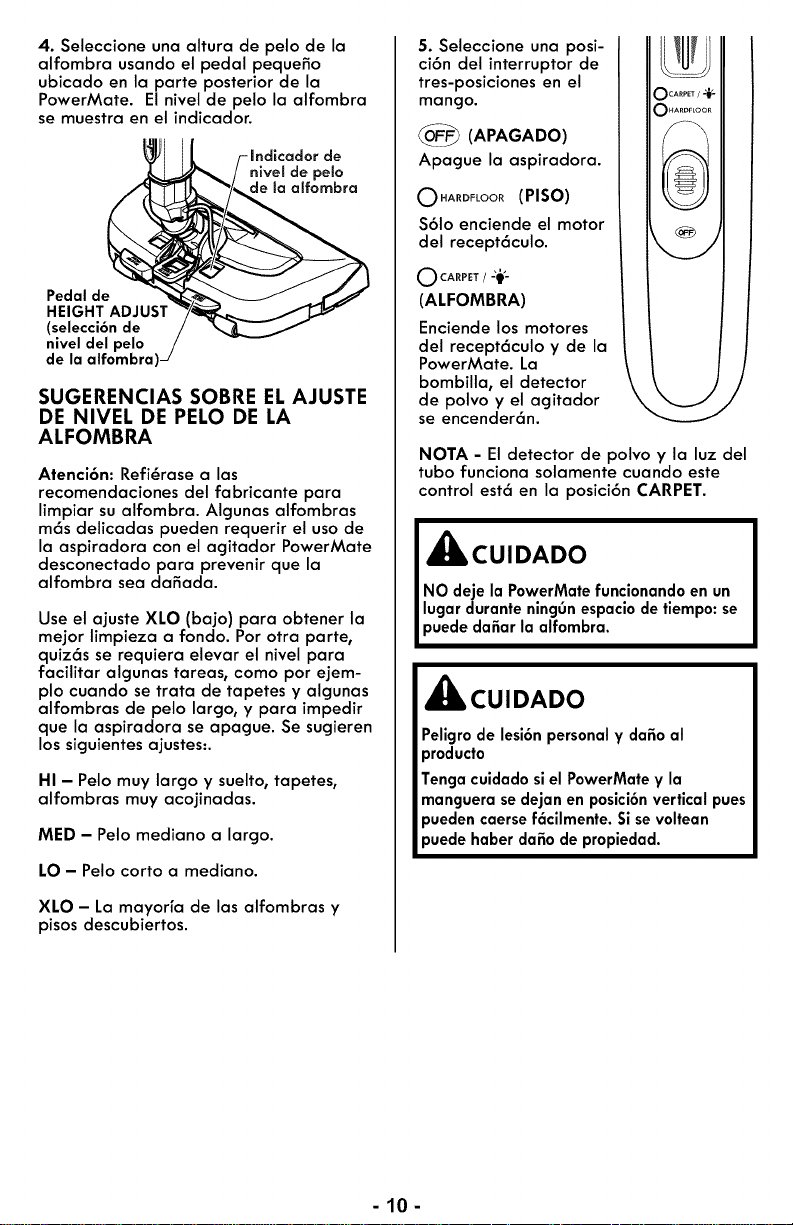
4. Seleccione una altura de pelo de la
alfombra usando el pedal pequefio
ubicado en la parte posterior de la
PowerMate. El nivel de pelo la alfombra
se muestra en el indicador.
-Indicador de
nivel de pelo
de la a_fornbra
Pedal de
HEIGHT ADJUST
(selecci6n de
nivel del pelo
de la alfombra)-
SUGERENCIAS SOBRE ELAJUSTE
DE NIVEL DE PELO DE LA
ALFOMBRA
Atenci6n: Refi_rase a las
recomendaciones del fabricante para
limpiar su alfombra. Algunas alfombras
m6s delicadas pueden requerir el uso de
la aspiradora con el agitador PowerMate
desconectado para prevenir que la
alfombra sea dafiada.
Use el ajuste XLO (bajo) para obtener la
mejor limpieza a fondo. Por otra parte,
quiz6s se requiera elevar el nivel para
facilitar algunas tareas, como por ejem-
plo cuando se trata de tapetes y algunas
alfombras de pelo largo, y para impedir
que la aspiradora se apague. Se sugieren
lossiguientes ajustes:.
HI - Pelo muy largo y suelto, tapetes0
alfombras muy acojinadas.
MED - Pelo mediano a largo.
LO - Pelo corto a mediano.
XLO - La mayoHa de las alfombras y
pisos descubiertos.
5. Seleccione una posi-
ci6n del interruptor de
tres-posiciones en el
mango.
_ (APAGADO)
Apague la aspiradora.
O.A.DFLOOR(PISO)
$61o enciende el motor
del recept6culo.
O CARPET / 29,_
(ALFOMBRA)
Enciende los motores
del recept6culo y de la
PowerMate. La
bombilla, el detector
de polvo y el agitador
se encender6n.
NOTA - El detector de polvo y la luz del
tubo funciona solamente cuando este
control est6 en la posici6n CARPET.
_jlb CUIDADO
NO deje la PowerMate funcionando en un
lugar durante ningOn espacio de tiempo: se
puede dafiar la alfombra.
_CUIDADO
Peligro de lesi6n personal y dafio al
producto
Tenga cuidado si el PowerMate y la
manguera se dejan en posici6n vertical pues
)ueden caerse f6cilmente. Si se voltean
)uede haber da_o de propiedad.
-10-
SUGERENCIAS PARA ASPIRAR
ESTILO DE LIMPIEZA SUGERIDOPARA LOGRAR LOS MEJORES
RESULTADOS DE LIMPIEZA
SUCTION
CONTROL
• Use el Nivel de Poder _
(SUCTIONCONTROL) m
en alto.
• Mantenga el paso de aire abierto.
Examine de vez en cuando cada una
de las 6teas de uni6n en QUITAR LOS
RESIDUOS DE BASURA EN LOS
CONDUCTOS para asegurarse de que
no est_n bloqueadas. Apagu_ y
desconect_ la aspiradora antes revisar.
ESCALERAS
,_k ADVERTENCIA
Peligrode lesi6n personal
Tengacuidado sicoloca el recept6culosobre
escalones. Sisecae, podriacausarlesi6n
personalo dafio a la propiedad.
,_ CUIDADO
Peligrode lesi6n personaly dafioal pro-
ducto
No jale de la manguera para mover la
aspiradora de un escal6n al siguiente.
Cuando termine de limpiar un 6rea usela
manija en la aspiradora para moverla a
otrolugar para continuar la limpieza.
El sost_npara la escalera esta situado en el
parte inferior del cuerpo y ayudar6 a evitar
que la aspiradora se deslice cuando seest6
utilizado en las escaleras.
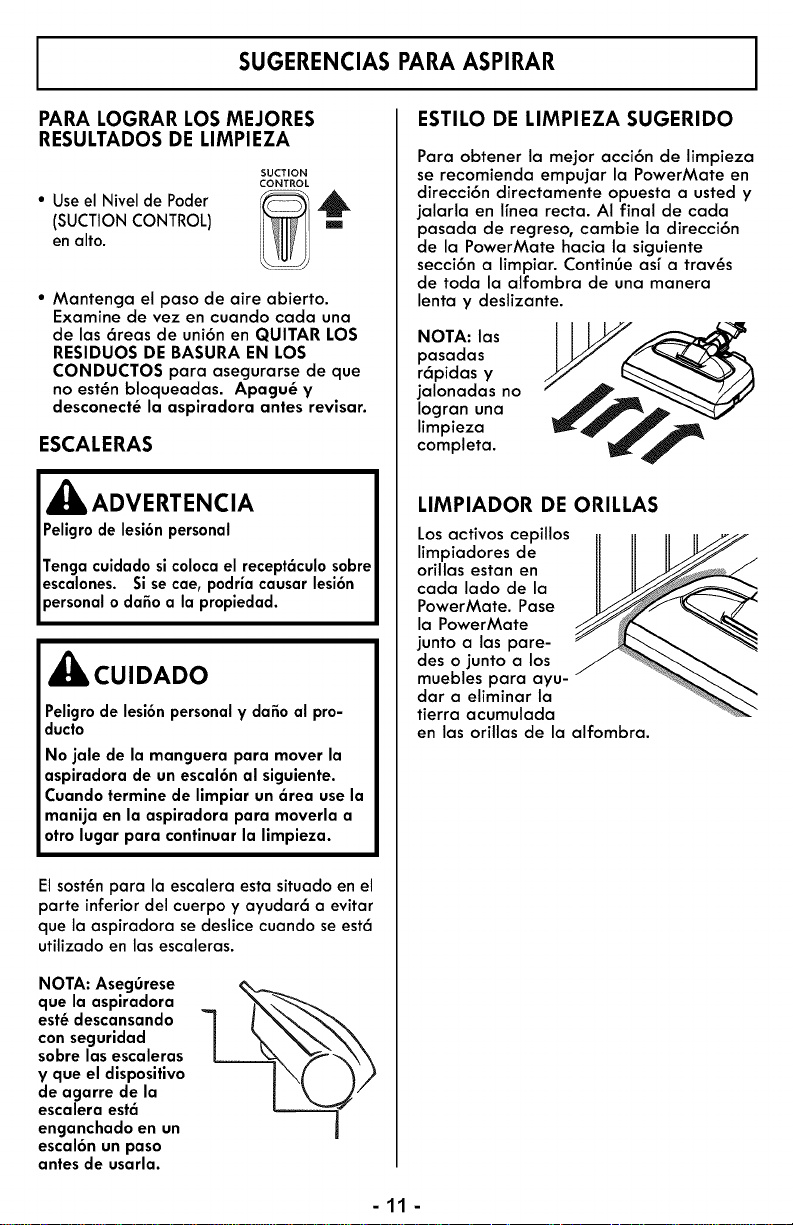
NOTA: Aseg0rese
que la aspiradora
est_descansando
con seguridad
sobrelas escaleras
y que el dispositivo
de agarre de la
escalera est6
enganchado en un
escal6n un paso
antes de usarla.
Para obtener la mejor acci6n de limpieza
se recomienda empujar la PowerMate en
direcci6n directamente opuesta a usted y
jalarla en ffnea recta. AI final de cada
pasada de regreso, cambie la direcci6n
de la PowerMate hacia la siguiente
secci6n a limpiar. ContinOe asf a trav_s
de toda la alfombra de una manera
lenta y deslizante.
NOTA: las
pasadas
r6pidas y
jalonadas no
Iogran una
limpieza
completa.
LIMPIADOR DE ORILLAS
Losactivos cepillos
limpiadores de
orillas estan en
cada lado de la
PowerMate. Pase
la PowerMate
junto a las pare-
des o junto a los
muebles para ayu-
dara eliminar la
tierra acumulada
en las orillas de la alfombra.
-11-
ACCESORIOS
ACCESORIOS DEL TUBO
,_ CUIDADO
NO instale ni retire el mango ni lostubos
cuando la aspiradora est_ encendida. Esto
podria causar chispas y dafiar los contac-
tosel_ctricos o control electr6nico.
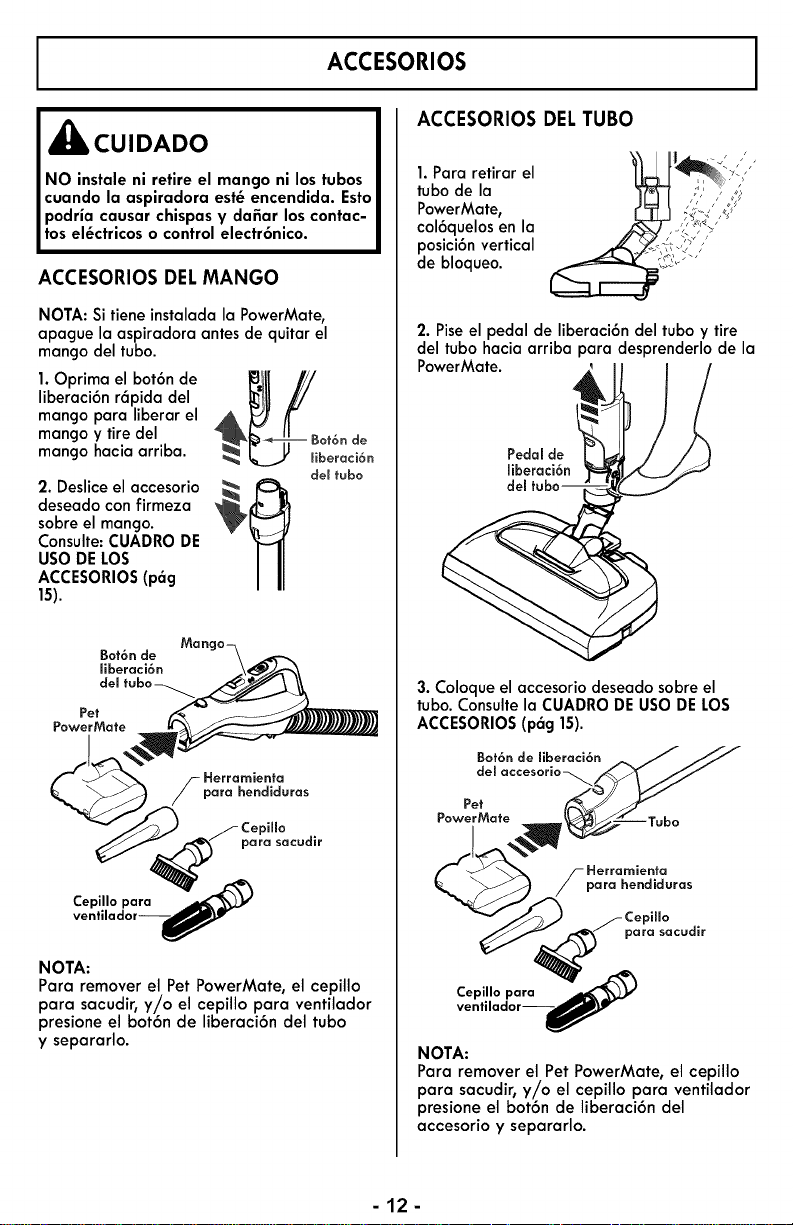
ACCESORIOS DELMANGO
NOTA: Si tiene instaladala PowerMate,
apague la aspiradora antes de quitar el
mango del tubo.
1.Oprima el bot6n de _4_k_JUj'//_jLJ!
liberaci6n r6pida del
mango para liberar el
mango y tiredel Bot6nde
mango hacia arriba, liberaci6n
del fubo
2. Deslice el accesorio _ K::_,
deseado con firmeza
sobre el mango.
Consulte:CUADRODE
USO DELOS
ACCESORIOS(pag
15).
Bot6n de
Eberaci6n
dem
Pet
PowerMate
Herramienta
para hendiduras
para sacudir
Cepillo para _'_
ventilador--_f)Y"
NOTA:
Para removerel Pet PowerMate, el cepillo
para sacudir,y/o el cepillo para ventilador
presione el bot6n de liberaci6n del tubo
y separarlo.
. araretrore
tubo de la
PowerMate, , , , _,",:._,'_/"
col6quelos en la ,_7-'///"_'? _'/_'
posici6n vertical _['i'
de bloqueo. ;;i'_';'"
2. Piseel pedal de liberaci6n del tubo y tire
del tubo hacia arriba para desprenderlo de la
PowerMate. I
Pedal de
miberaci6n
dem
3. Coloqueel accesorio deseado sobre el
tubo.Consultela CUADRODE USODE LOS
ACCESORIOS(p6g 15).
Bot6n de liberaci6n _ J JJ
dem accesorio _.__
Pet
__ / _e;rahmie_;_u ra s
"__/C:rP_ff;a cudir
ventilador--_Ir
NOTA:
Para remover el Pet PowerMate, el cepillo
para sacudir,y//o el cepillo para ventilador
presione el bot6n de liberaci6n del
accesorio y separarlo.
-12-
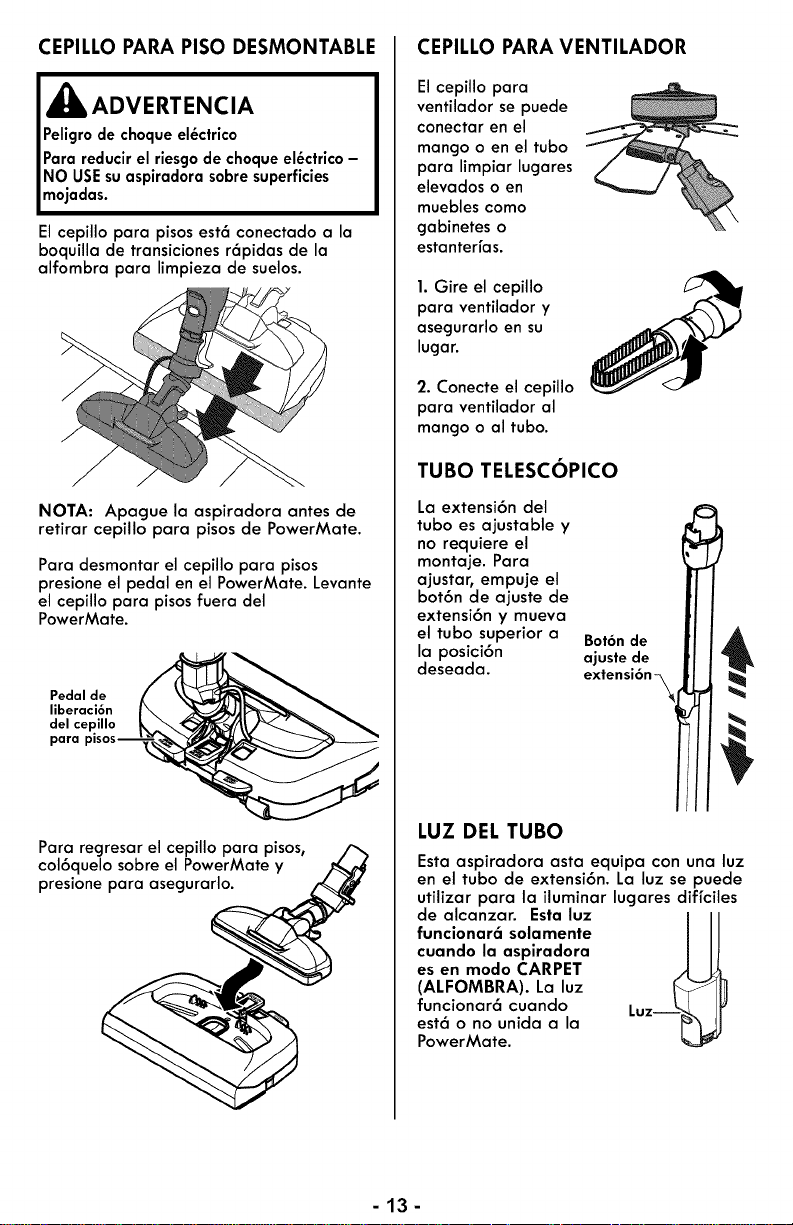
CEPILLO PARA PISO DESMONTABLE
I,_ ADVERTENCIA
IPeligrode el_ctrico
choque
Para reducirel riesgode choque el_ctrico-
NO USEsuaspiradorasobresuperficies
mojadas.
Elcepillo para pisosest6 conectado a la
boquilla de transicionesr6pidas de la
alfombra para limpieza de suelos.
NOTA: Apague la aspiradora antes de
retirar cepillo para pisos de PowerMate.
Para desmontar el cepillo para pisos
presione el pedal en el PowerMate. Levante
el cepillo para pisos fuera del
PowerMate.
Pedal de
liberaci6n
del cepillo
para
Para regresar el cepillo para pisos,
col6quelo sobre el PowerMate y
presione para asegurarlo.
CEPILLO PARA VENTILADOR
El cepillo para
ventilador se puede
conectar en el
mango o en el tubo
para limpiar lugares
elevados o en
muebles como
gabinetes o
estanterfas.
1. Gire el cepillo
para ventilador y
asegurarlo en su
lugar.
2. Conecte el cepillo
para ventilador al
mango o al tubo.
TUBO TELESCOPICO
La extensi6n del
tubo es ajustable y
no requiere el
montaje. Para
ajustar, empuje el
bot6n de ajuste de
extensi6n y mueva
el tubo superior a
la posici6n
deseada.
Bot6nde
ajustede
extensi6n
LUZ DEL TUBO
Esta aspiradora asta equipa con una luz
en el tubo de extensi6n. La luz se puede
utilizar para la iluminar lugares diffciles
de alcanzar. Esta luz
funclonar6 solamente
cuando la asplradora
es en modo CARPET
(ALFOMBRA). La luz
funcionar6 cuando
est6 o no unida a la
PowerMate.
-13-
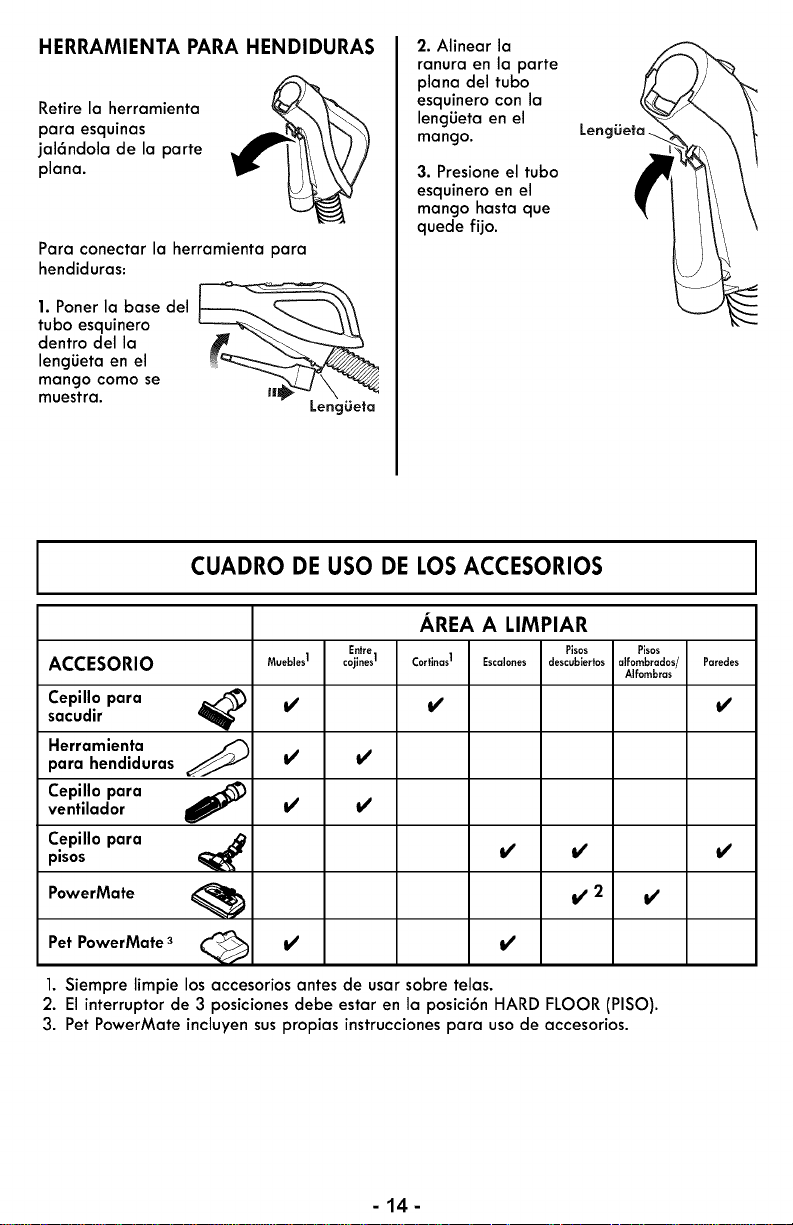
HERRAMIENTA PARA HENDIDURAS
Retire la herramienta
para esquinas
jal6ndola de la parte
plana.
Para conectar la herramienta para
hendiduras:
1. Porter la base del
tubo esquinero
dentro del la
lengiJeta en el
mango como se
muestra.
LengLieta
2. Alinear la
ranura en la parte
plana del tubo
esquinero con la
lengiJeta en el
mango.
3. Presione el tubo
esquinero en el
mango hasta que
quede fijo.
LengOeta.
CUADRO DE USO DE LOS ACCESORIOS
AREA A LIMPIAR
Entre Pisos Pisos
ACCESORIO Muebles1 cojlnes1 Cortlnas1 Escal.... descublertos alfombrados/ Paredes
Alfombras
Cepillo para _) _/, _/, _/,
sacudir
Herramienta _'_para hendiduras _/' _/'
Cepillo para
ventilador _/' _/'
Cepillo para
pisos _ _
PowerMate _ If' 2 If'
Pet PowerMate 3 _ _/' _/'
1. Siempre limpie los accesorios antes de usarsobre telas.
2. El interruptor de 3 posiciones debe estar en la posici6n HARD FLOOR (PISO).
3. Pet PowerMate incluyen sus propias instrucciones para uso de accesorios.
-14-
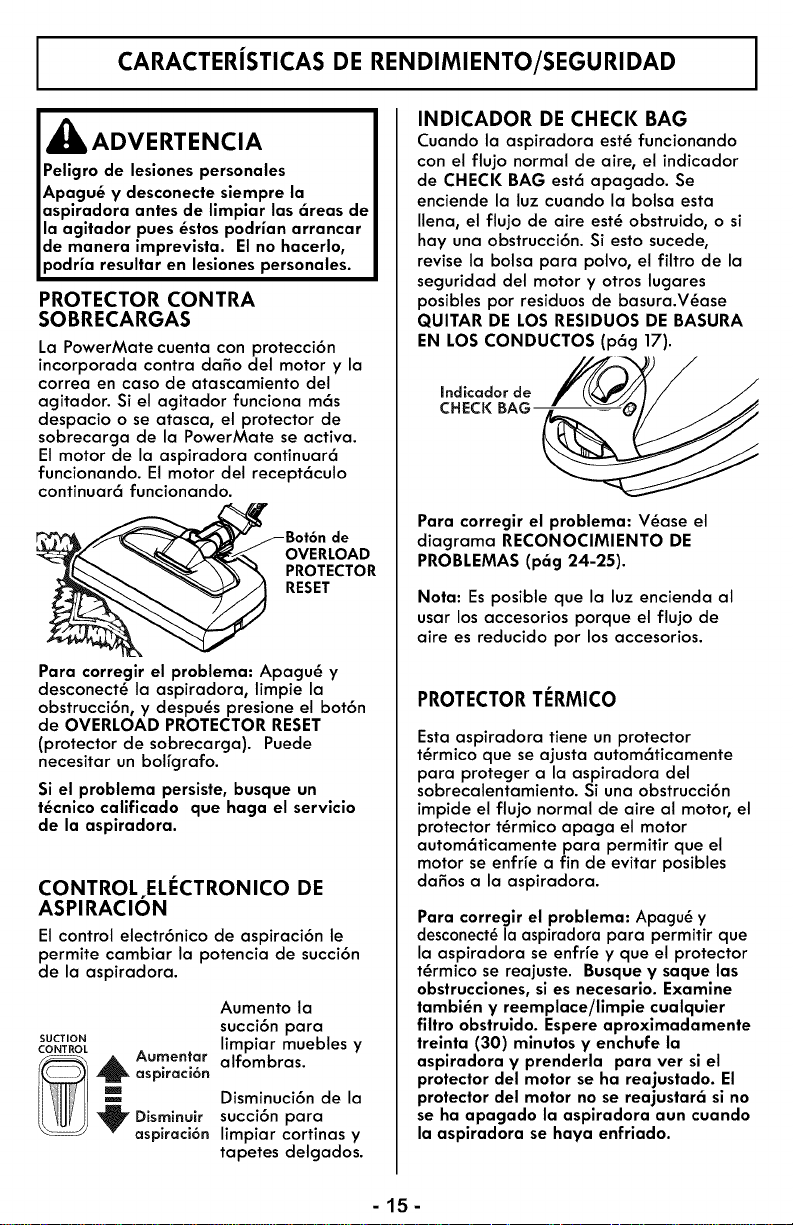
CARACTERISTICAS DE RENDIMIENTO/SEGURIDAD
_ADVERTENCIA
Peligro de lesiones personales
Apagu_ y desconecte siempre la
aspiradora antes de limpiar las 6reas de
la agitador pues _stos podrian arrancar
de manera imprevista. Elno hacerlo,
podria resultar en lesiones personales.
PROTECTOR CONTRA
SOBRECARGAS
La PowerMate cuenta con protecci6n
incorporada contra daffo del motor y la
correa en caso de atascamiento del
agitador. Si el agitador funciona m6s
despacio o se atasca, el protector de
sobrecarga de la PowerMate se activa.
El motor de la aspiradora continuar6
funcionando. El motor del recept6culo
continuar6 funcionando.
JL_--_ _ \'_ "_ PROTECTOR
__T__ RESET
Para corregir el problema: Apagu_ y
desconect_ la aspiradora, limpie la
obstrucci6n, y despu_s presione el bot6n
de OVERLOAD PROTECTOR RESET
(protector de sobrecarga). Puede
necesitar un bolfgrafo.
Si el problema persiste, busque un
t_cnico calificado que haga el servicio
de la aspiradora.
CONTROL ELI_CTRONICO DE
ASPIRACION
El control electr6nico de aspiraci6n le
permite cambiar la potencia de succi6n
de la aspiradora.
Aumento la
succi6n para
SUCTION limpiar muebles y
CONTROL
_,_ Aumentar alfombras.
aspiraci6n
m_ Disminuci6n de la
Disminuir succi6n para
aspiraci6n limpiar cortinas y
tapetes delgados.
INDICADOR DE CHECK BAG
Cuando la aspiradora est_ funcionando
con el flujo normal de aire, el indicador
de CHECK BAG est6 apagado. Se
enciende la luz cuando la bolsa esta
Ilena, el flujo de aire est_ obstruido, o si
hay una obstrucci6n. Si esto sucede,
revise la bolsa para polvo, el filtro de la
seguridad del motor y otros lugares
posibles por residuos de basura.V_ase
QUITAR DE LOS RESIDUOS DE BASURA
EN LOS CONDUCTOS (p6g 17).
[ndicador de
CHECK BAG
Para corregir el problema: V_ase el
diagrama RECONOCIMIENTO DE
PROBLEMAS (p6g 24-25).
Nota: Es posible que la luz encienda al
usar los accesorios porque el flujo de
aire es reducido pot los accesorios.
PROTECTORTERMICO
Esta aspiradora tiene un protector
t_rmico que se ajusta autom6ticamente
para proteger a la aspiradora del
sobrecalentamiento. Si una obstrucci6n
impide el flujo normal de aire al motor, el
protector t_rmico apaga el motor
autom6ticamente para permitir que el
motor se enfr_e a fin de evitar posibles
da5os a la aspiradora.
Para corregir el problema: Apagu_ y
desconect_ la aspiradora para permitir que
la aspiradora se enfrfe y que el protector
t_rmico se reajuste. Busque y saque las
obstrucciones, si es necesario. Examine
tambi_n y reemplace/limpie cualquier
filtro obstruldo. Espere aproxlmadamente
treinta (30) minutos y enchufe la
aspiradora y prenderla para ver si el
protector del motor se ha reajustado. El
protector del motor no se reajustar6 sl no
se ha apagado la aspiradora aun cuando
la aspiradora se haya enfriado.
-15-
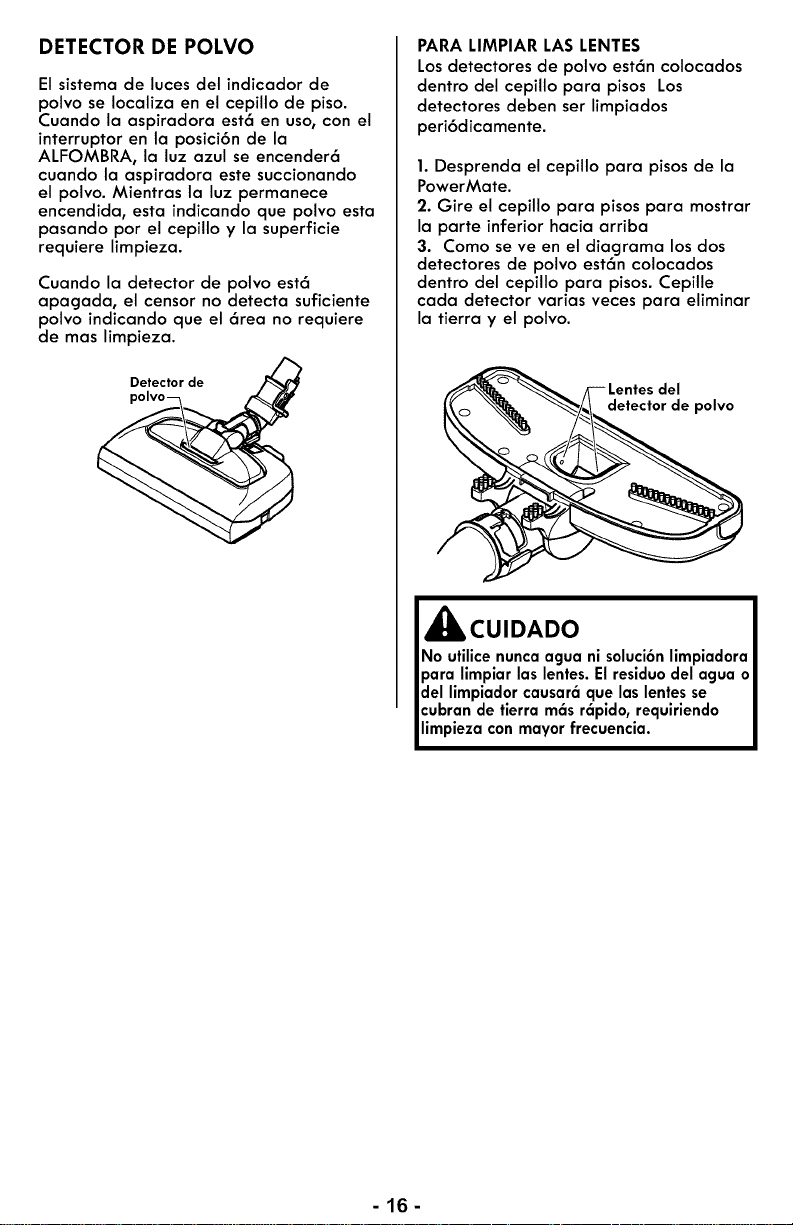
DETECTOR DE POLVO
El sistema de luces del indicador de
polvo se Iocaliza en el cepillo de piso.
Cuando la aspiradora est6 en uso, con el
interruptor en la posici6n de la
ALFOMBRA, la luz azul se encender6
cuando la aspiradora este succionando
el polvo. Mientras la luz permanece
encendida, esta indicando que polvo esta
pasando por el cepillo y la superficie
requiere limpieza.
Cuando la detector de polvo est6
apagada, el censor no detecta suficiente
polvo indicando que el 6rea no requiere
de mas limpieza.
Detector de /_
po,vo .
PARA LIMPIAR LAS LENTES
Los detectores de polvo est6n colocados
dentro del cepillo para pisos Los
detectores deben set limpiados
peri6dicamente.
1. Desprenda el cepillo para pisos de la
PowerMate.
2. Gire el cepillo para pisos para mostrar
la parte inferior hacia arriba
3. Como se ve en el diagrama los dos
detectores de polvo est6n colocados
dentro del cepillo para pisos. Cepille
cada detector varias veces para eliminar
la tierra y el polvo.
__ Lentesdel
detectorde polvo
,_ CUIDADO
No utilicenuncaagua ni soluci6nlimpiadora
para limpiar las lentes.Elresiduodelagua o
del limpiadorcausar_que laslentesse
cubrande tierra m_sr6pido,requiriendo
limpieza con mayorfrecuencia.
-lfi-
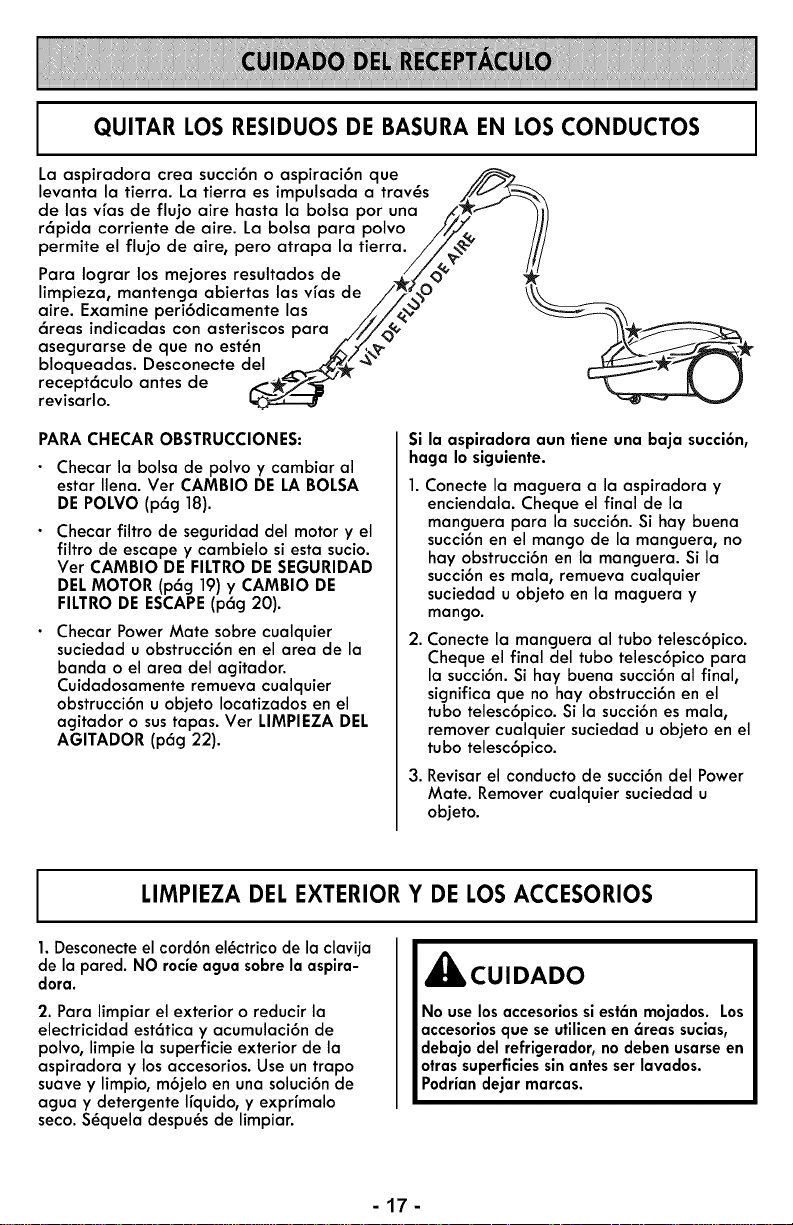
QUITAR LOS RESIDUOS DE BASURA EN LOS CONDUCTOS
La aspiradora crea succi6n o aspiraci6n que
levanta la tierra. La tierra es impulsada a trav_s //_
de las vfas de flujo aire hasta la bolsa por una /,_,f _1/
r6pida corriente de aire. La bolsa para polvo /,'//,_, ///
permite el flujo de aire, pero atrapa la tierra./Z_ v ///
Para Iograr los mejores resultados de ,_//<)_"
limpieza, mantenga abiertas las vfas de /_, _O _\
aire. Examine peri6dicamente las i,,Si_ _-__
6reas indicadas con asteriscos para ///,/_,_< -_ "__
asegurarse de que no est_n _,..,/_,,_." ,,_%._/__
bloqueadas. Desconecte del _ _ "_" __-_-'_
recept6culo antes de ,<-_i 2s_'_ _ _. )
revisarlo. I_
PARACHECAR OBSTRUCCIONES:
Checar la bolsa de polvo y cambiar al
estar Ilena. Ver CAMBIO DE LA BOLSA
DE POLVO (p6g 18).
Checar filtro de seguridad del motor y el
filtro de escape y cambielo si esta sucio.
Ver CAMBIO DE FILTRODE SEGURIDAD
DELMOTOR (p6g 19)y CAMBIO DE
FILTRODE ESCAPE(p6g 20).
Checar Power Mate sobre cualquier
suciedad u obstrucci6n en el area de la
banda o el area del agitador.
Cuidadosamente remueva cualquier
obstrucci6n u objeto Iocatizados en el
agitador o sustapas. Vet LIMPIEZA DEL
AGITADOR (p6g 22).
Si la aspiradora aun tiene una baja succi6n,
haga Io siguiente.
Conecte la maguera a la aspiradora y
enciendala. Cheque el final de la
manguera para la succi6n. Si hay buena
succi6n en el mango de la manguera, no
hay obstrucci6n en la manguera. Si la
succi6n es mala, remueva cualquier
suciedad u objeto en la maguera y
mango.
2.
Conecte la manguera al tubo telesc6pico.
Cheque el final del tubo telesc6pico para
la succi6n. Si hay buena succi6n al final,
significa que no hay obstrucci6n en el
tubo telesc6pico. Si la succi6n es mala,
remover cualquier suciedad u objeto en el
tubo telesc6pico.
3. Revisar el conducto de succi6n del Power
Mate. Remover cualquier suciedad u
objeto.
LIMPIEZA DEL EXTERIOR Y DE LOS ACCESORIOS
1.Desconecte el cord6n el_ctrico de la clavija
de la pared. NO rocieagua sobre la aspira-
dora.
2. Para limpiar el exterior o reducir la
electricidad est6tica y acumulaci6n de
polvo, limpie la superficie exterior de la
aspiradora y los accesorios. Use un trapo
suave y limpio, m6jelo en una soluci6n de
agua y detergente Ifquido, y exprfmalo
seco. S_quela despu_s de limpiar.
,_ CUIDADO
No uselos accesoriossi est_n mojados. Los
accesoriosque seutilicenen 6reas sucias,
debajo del refrigerador,nodeben usarseen
otrassuperficiessinantesserlavados.
Podriandejar marcas.
-17-
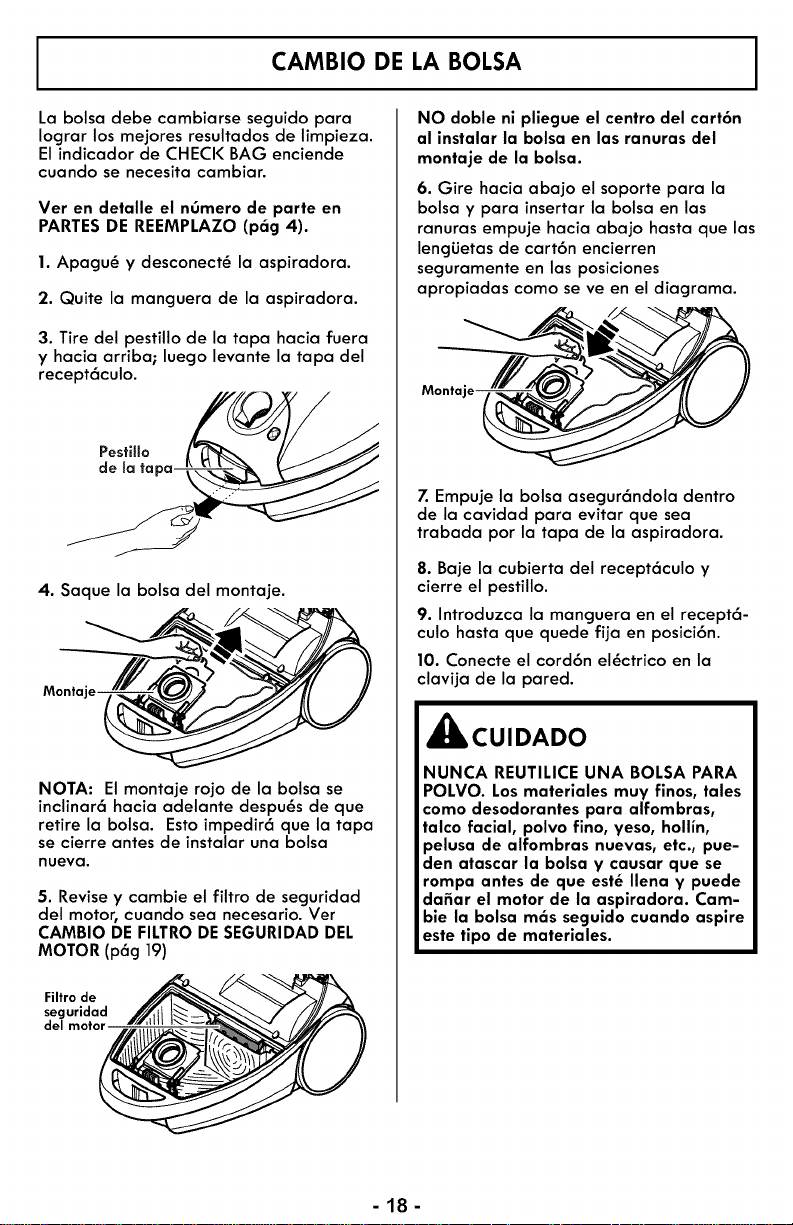
CAMBIO DE LA BOLSA
La bolsa debe cambiarse seguido para
Iograr los mejores resultados de limpieza.
El indicador de CHECK BAG enciende
cuando se necesita cambiar.
Vet en detalle el n0mero de parte en
PARTESDE REEMPLAZO (p6g 4).
1. Apagu_ y desconect_ la aspiradora.
2. Quite la manguera de la aspiradora.
3. Tire del pestillo de la tapa hacia fuera
y hacia arriba; luego levante la tapa del
recept6culo.
Pestillo
de la ta
4. Saque la balsa del montaje.
Monta
NOTA: El montaje rojo de la bolsa se
inclinar6 hacia adelante despu_s de que
retire la bolsa. Esto impedir6 que la tapa
se cierre antes de instalar una bolsa
nueva.
5. Revise y cambie el filtro de seguridad
del motor, cuando sea necesario. Ver
CAMBIO DE FILTRODESEGURIDAD DEL
MOTOR (p6g 19)
Filtro de
seguridad
del motor
NO doble ni pliegue el centro del cart6n
al instalar la bolsa en las ranuras del
montaje de la bolsa.
6. Gire hacia abajo el soporte para la
bolsa y para insertar la bolsa en las
ranuras empuje hacia abajo hasta que las
lencjiJetasde cart6n encierren
seguramente en las posiciones
apropiadas como se ve en el diagrama.
Montaje_
7. Empuje la balsa asegur6ndola dentro
de la cavidad para evitar que sea
trabada pot la tapa de la aspiradora.
8. Baje la cubierta del recept6culo y
cierre el pestillo.
9. Introduzca la manguera en el recept6-
culo hasta que quede fija en posici6n.
10. Conecte el cord6n el_ctrico en la
clavija de la pared.
_CUIDADO
NUNCA REUTILICE UNA BOLSA PARA
POLVO. Losmateriales muy finos, tales
como desodorantes para alfombras,
talco facial, polvo fino, yeso, hollin,
pelusa de alfombras nuevas, etc., pue-
den atascar la bolsa y causar que se
rompa antes de que est_ Ilena y puede
dafiar el motor de la aspiradora. Cam-
bie la bolsa m6s seguido cuando aspire
este tipo de materiales.
-18-
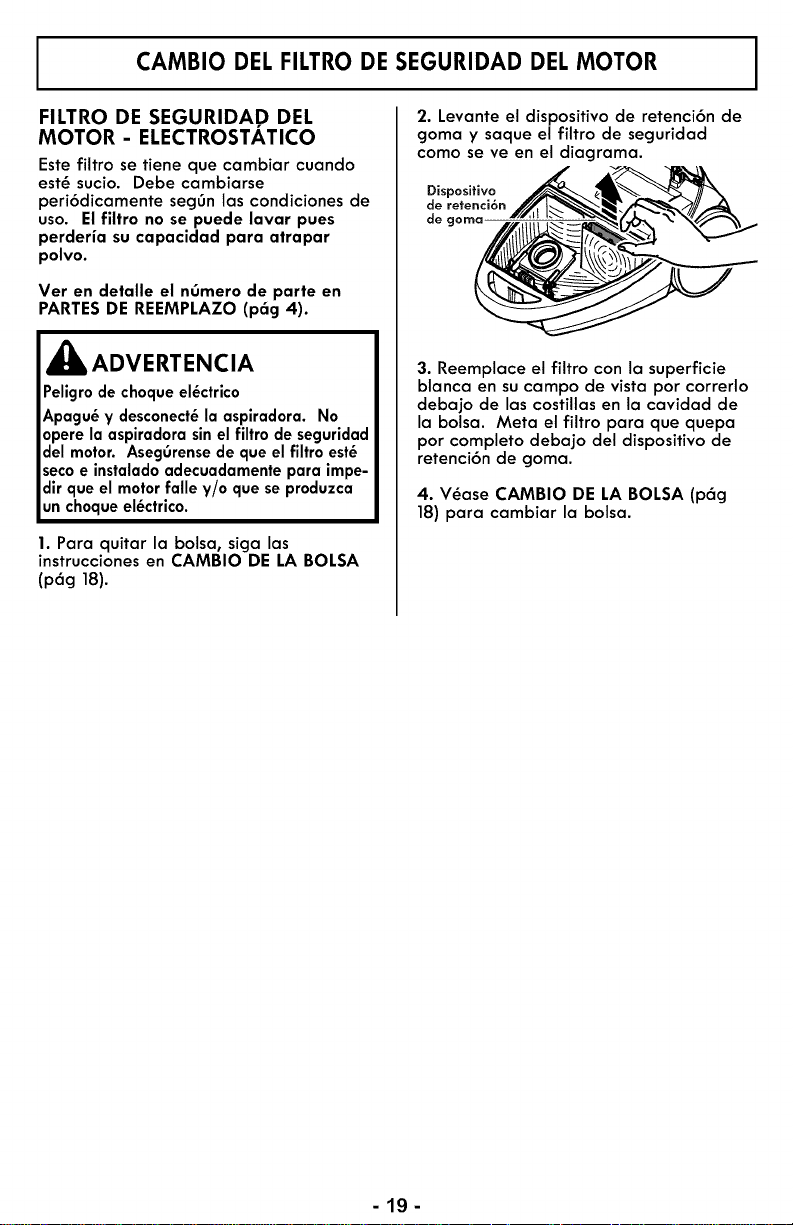
CAMBIO DEL FILTRO DE SEGURIDAD DEL MOTOR
FILTRO DE SEGURIDAp DEL
MOTOR- ELECTROSTATICO
Este filtro se tiene que cambiar cuando
est_ sucio. Debe cambiarse
peri6dicamente segOn las condiciones de
uso. Elfiltro no se puede lavar pues
perderia su capacidad para atrapar
polvo.
Vet en detalle el nOmero de parte en
PARTESDE REEMPLAZO (p6g 4).
l_k ADVERTENCIA
Peligrode choqueel_ctrico
Apagu_ y desconect_la aspiradora. No
operela aspiradorasinel filtro de seguridad
del motor. AsegOrensedeque el filtro est_
secoe instaladoadecuadamentepara impe-
dir que el motorfalle y/o que seproduzca
unchoqueel_ctrico.
1. Para quitar la bolsa, siga las
instrucciones en CAMBIO DE LA BOLSA
(pag 18).
2. Levante el dispositivo de retenci6n de
goma y saque el filtro de seguridad
como se ve en el diagrama.
Dispositivo
de retenci6n
de goma
3. Reemplace el filtro con la superficie
blanca en su campo de vista por correrlo
debajo de las costillas en la cavidad de
la bolsa. Meta el filtro para que quepa
por completo debajo del dispositivo de
retenci6n de goma.
4. V_ase CAMBIO DE LA BOLSA (p6g
18) para cambiar la bolsa.
-lg-
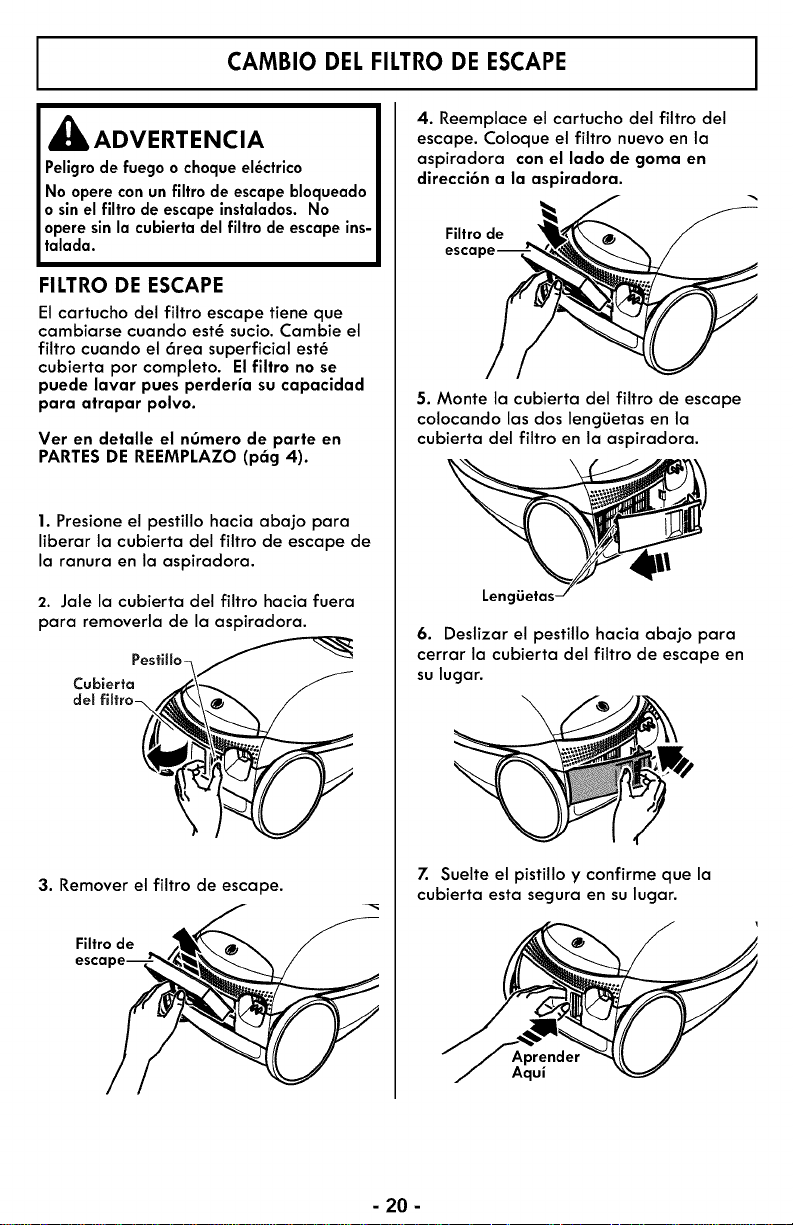
CAMBIO DEL FILTRO DE ESCAPE
,_ ADVERTENCIA
Peligrode fuegoo ¢hoqueel_ctri¢o
No opere conunfiltro de escape bloqueado
o sinel filtro de escape instalados. No
operesinla cubierta del filtro de escape ins-
talada.
FILTRO DE ESCAPE
El cartucho del filtro escape tiene que
cambiarse cuando est_ sucio. Cambie el
filtro cuando el 6tea superficial est_
cubierta pot completo. El filtro no se
puede lavar pues perderia su capacidad
para atrapar polvo.
Vet en detalle el nOmero de parte en
PARTES DE REEMPLAZO (p6g 4).
1. Presione el pestillo hacia abajo para
liberar la cubierta del filtro de escape de
la ranura en la aspiradora.
2. Jale la cubierta del filtro hacia fuera
para removerla de la aspiradora.
PestiHo-
Cubierta
del
3. Remover el filtro de escape.
Filtro de
esca
4. Reemplace el cartucho del filtro del
escape. Coloque el filtro nuevo en la
aspiradora con el lado de goma en
direcci6n a la aspiradora.
Filtro de
esca
5. Monte la cubierta del filtro de escape
colocando las dos lengiJetas en la
cubierta del filtro en la aspiradora.
Len(
6. Deslizar el pestillo hacia abajo para
cerrar la cubierta del filtro de escape en
su lugar.
\
Z Suelte el pistillo y confirme que la
cubierta esta segura en su lugar.
Aprender
Aqui
- 20 -
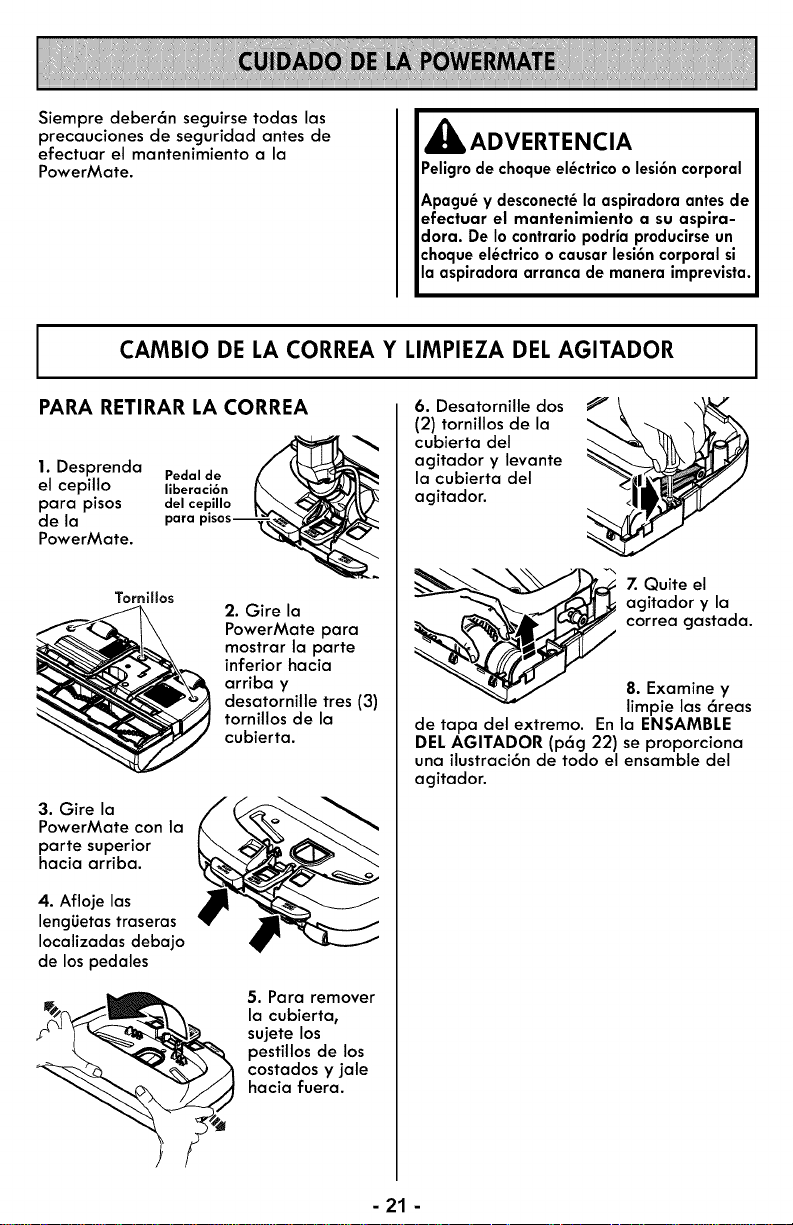
Siempre deber6n seguirse todas las
precauciones de seguridad antes de
efectuar el mantenimiento a la
PowerMate.
,_ ADVERTENCIA
Peligrode choqueel_ctricoo lesi6ncorporal
Apagu_ y desconect_la aspiradoraantesde
efectuar el mantenimiento a su aspira-
dora. De lo contrariopodria producirseun
choqueel_ctricoo causarlesi6ncorporalsi
la aspiradoraarranca de manera imprevista.
CAMBIO DE LA CORREA Y LIMPIEZA DEL AGITADOR
PARA RETIRAR LA CORREA
1. Desprenda
el cepillo
para pisos
de la
PowerMate.
Pedal de _/'__
liberaci6n I_
del cepillo _,,,_
para piso s -----"_
TorniHos
2. Gire la
PowerMate para
mostrar la parte
inferior hacia
arriba y
desatornille tres (3)
tornillos de la
cubierta.
3. Gire la
PowerMate con la
parte superior
hacia arriba.
4. Afloje las
leng_Jetas traseras
Iocalizadas debajo
de los pedales
5. Para remover
la cubierta,
sujete los
pestillos de los
costados y jale
hacia fuera.
6. Desatornille dos
(2) tornillos de la
cubierta del
agitador y levante
la cubierta del
agitador.
Z Quite el
agitador y la
correa gastada.
8. Examine y
limpie las 6teas
de tapa del extremo. En la ENSAMBLE
DEL AGITADOR (p6g 22) se proporciona
uno ilustroci6n de todo el ensamble del
agitador.
- 21 -
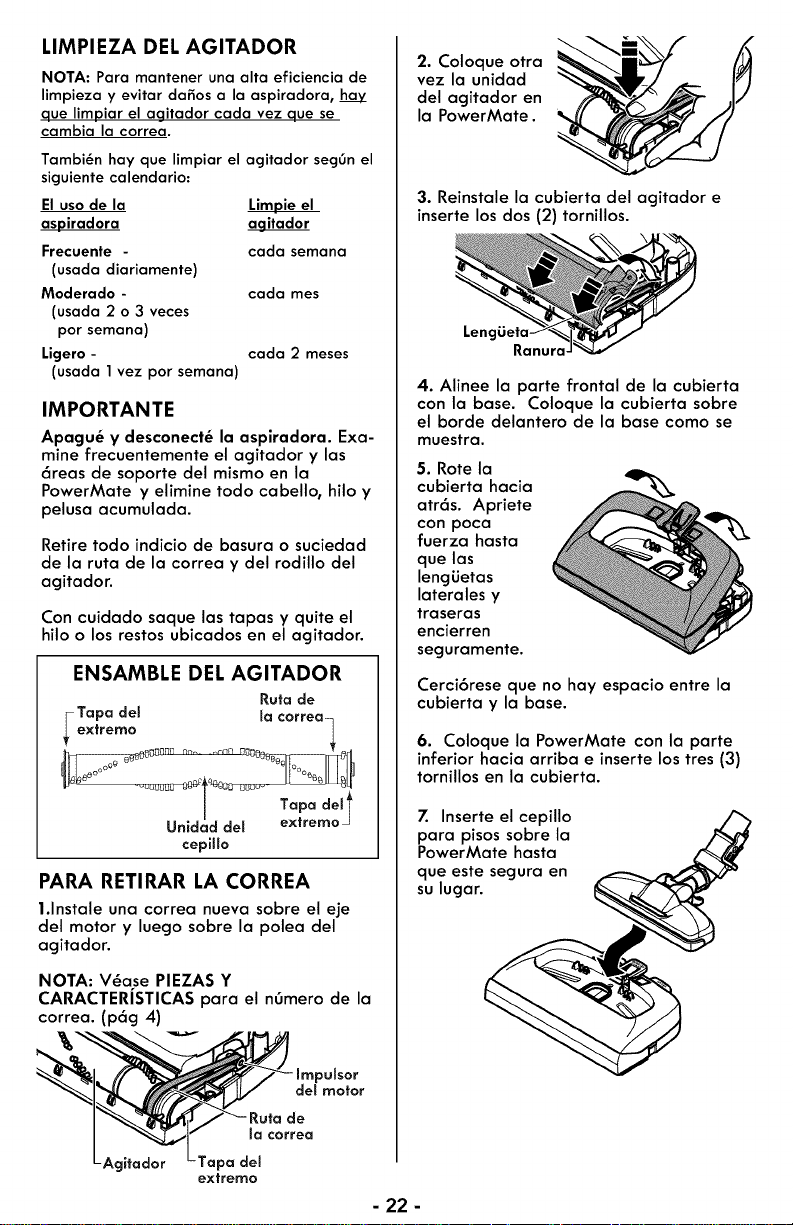
LIMPIEZA DEL AGITADOR
NOTA: Para mantener una alta eficiencia de
limpieza y evitar dafios a la aspiradora,
que limpiar el agitador cada vez que se
cambia la correa.
Tambi_n hay que limpiar el agitador seggn el
siguiente calendario:
El uso de la
aspiradora aqitador
Frecuente - cada semana
(usada diariamente)
Moderado - cada mes
(usada 2 o 3 veces
por semana)
Ligero - cada 2 meses
(usada 1vez por semana)
IMPORTANTE
Apagu_ y desconect_ la aspiradora. Exa-
mine frecuentemente el agitador y las
6reas de soporte del mismo en la
PowerMate y elimine todo cabello, hilo y
pelusa acumulada.
Retire todo indicio de basura o suciedad
de la ruta de la correa y del rodillo del
agitador.
Con cuidado saque las tapas y quite el
hilo o los restos ubicados en el agitador.
ENSAMBLE DEL AGITADOR
Rutade
Tapa del la correa_
ex_rerlr_o
!
nNr! n nn nn
Unidad del extremo
cepillo
PARA RETIRAR LA CORREA
l.lnstale una correa nueva sobre el eje
del motor y luego sobre la polea del
agitador.
NOTA: V_ase PIEZAS Y
CARACTERISTICAS para el nOmero de la
correa. (p6g 4)
itador
ImpuSsor
del motor
Ruta de
_acorrea
pa del
extremo
2. Coloque otra
vez la unidad
del agitador en
la PowerMate. '_
3. Reinstale la cubierta del agitador e
inserte los dos (2) tornillos.
Lenc
4. Alinee la parte frontal de la cubierta
con la base. Coloque la cubierta sobre
el borde delantero de la base como se
muestra.
5. Rote la
cubierta hacia
atr6s. Apriete
con poca
fuerza hasta
que las
lengiJetas
laterales y
traseras
encierren
seguramente.
Cerci6rese que no hay espacio entre la
cubierta y la base.
6. Coloque la PowerMate con la parte
inferior hacia arriba e inserte los tres (3)
tornillos en la cubierta.
7. Inserte el cepillo
para pisos sobre la
PowerMate hasta
que este segura en
su lugar.
- 22 -
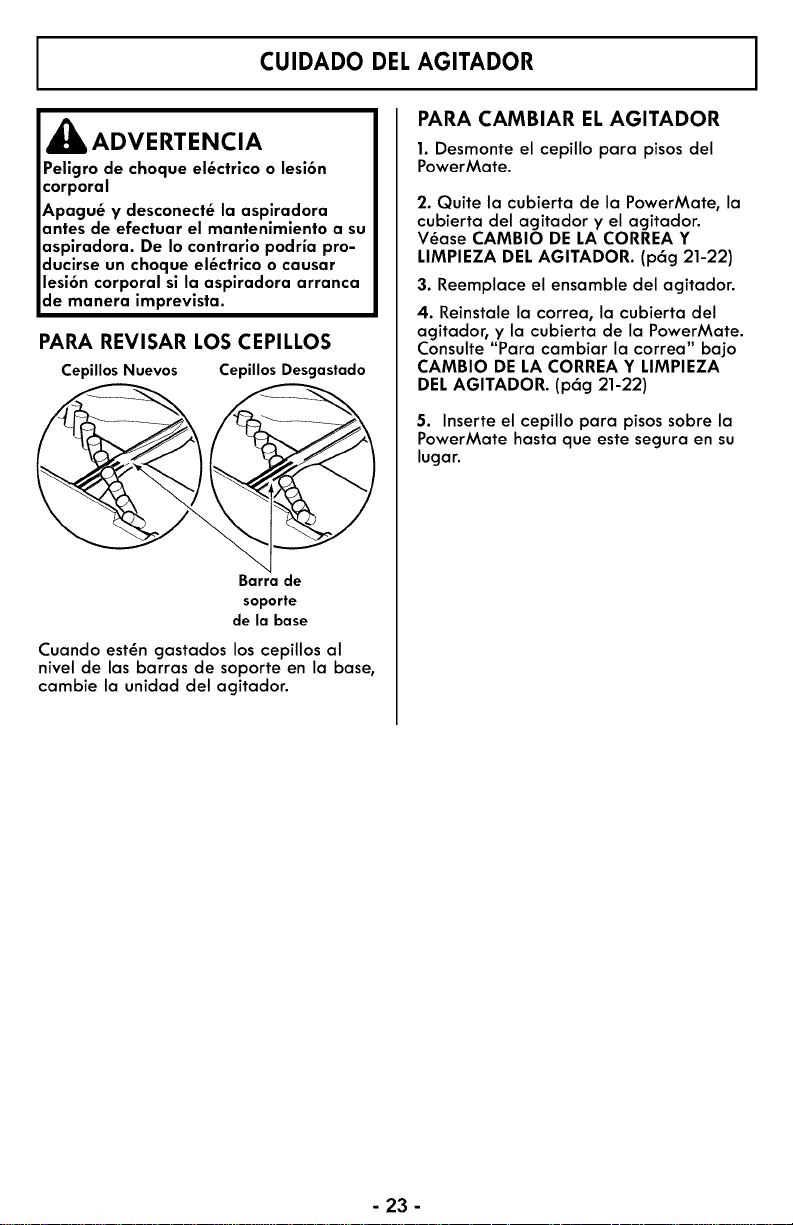
CUIDADO DEL AGITADOR
_ADVERTENCIA
Peligro de choque el_ctrico o lesi6n
corporal
Apagu_ y desconect_ la aspiradora
antes de efectuar el mantenimiento a su
aspiradora. De Io contrario podria pro-
ducirse un choque el_ctrico o causar
lesi6n corporal si la aspiradora arranca
de manera imprevista.
PARA REVISAR LOS CEPILLOS
Ce )illos Nuevos CepillosDesgastado
Barra de
soporte
de la base
Cuando est_n gastados los cepillos al
nivel de las barras de soporte en la base,
cambie la unidad del agitador.
PARA CAMBIAR EL AGITADOR
1. Desmonte el cepillo para pisos del
PowerMate.
2. Quite la cubierta de la PowerMate, la
cubierta del acjitador y el agitador.
V_ase CAMBIO DE LA CORREA Y
LIMPIEZA DELAGITADOR. (p6g 21-22)
3. Reemplace el ensamble del agitador.
4. Reinstale la correa, la cubierta del
agitador, y la cubierta de la PowerMate.
Consulte "Para cambiar la correa" bajo
CAMBIO DE LA CORREA Y LIMPIEZA
DEL AGITADOR. (p6g 21-22)
5. Inserte el cepillo para pisos sobre la
PowerMate hasta que este segura en su
lugar.
- 23 -
Revise este recuadro para encontrar soluciones a problemas que puede corregir usted mismo.
Cualquier otro servicio debe ser realizado por SEARS u otro agente de servicio calificado.
ADVERTENCIA
Apagu_ y desconect_ la aspiradora antes de efectuar el mantenimiento a su
aspiradora. De Io contrario podria producirse un choque el_ctrico o causar lesi6n
corporal.
La aspiradora no
arranca.
No aspira
satisfactoriamente.
La aspiradora
arranca, pero se
apaga.
La PowerMate no
funciona cuando est_
instalada.
1.
2.
3.
Est6 desconectada.
Cortacircuitos botado o fusibl_
quemado en el tablero de
servicio de la residencia.
Conexiones el6ctricas de la
la manguera.
1. Bolsa para polvo Ilena o
atascada.
2. Vias de flujo de aire
atascadas.
3. Filtros sucios.
4. Ajuste incorrecto de nivel de
pelo de la alfombra.
5. Incorrecta selecci6n de nivel
de poder.
6. Manguera rota.
Z Agitador de la PowerMate
desgastados.
8. Correa desgastada o rota.
9. Agitador o tapas de los
extremos sucios.
10. Tapa del recept6culo abierta.
11. Protector contra sobrecargas
de la PowerMate botado.
1. Conexiones el6ctricas de la
manguera o de la tapa.
2. Protector contra sobrecargas
de la PowerMate botado.
3. Protector t6rmico botado
en el recept6culo.
1. Conexiones de la PowerMate
desconectadas.
2. Correa desgastada o rota.
3. Agitador o tapas de extremos
de 6ste sucios.
4. Protector contra sobrecargas
de la PowerMate botado.
5. El switch no esta en la
posici6n CARPET (alfombra).
1. Conecte bien, presione el
bot6n ON/OFF.
2. Restablezca el cortacircuitos o
cambie el fusible.
3. Vuelva a conectar los
extremos de manguera sueltas.
1.
2.
3.
4.
5.
6.
Z
8&9.
10.
11.
Cambie la bolsa.
Limpie las vias de flujo de aire.
Cambie los filtros.
Ajuste el nivel.
Ajuste el control.
Cambie la manguera.
Cambie la agitador.
Consulte CAMBIO DE LA
CORREA Y LIMPIEZA DEL
AGITADOR. (p6g 21-23)
Cierre bien la tapa..
Consulte CARACTERISTICAS
RENDIMIENTO/SEGU RIDAD
"Protector contra sobrecargas
(pag 16).
1. Examine las conexiones
el_ctricas, vuelva a conectar
los extremos de la manguera.
2. Consulte CARACTERISTICAS
RENDIMIENTO/SEGU RIDAD
"Protector contra sobrecargas
(p6g 16).
3. Consulte CARACTERISTICAS
DE RENDIMIENTO/
SEGURIDAD - "Protector
T&mico." (p6g 17)
1.
2&3.
Conecte bien.
Consulte CAMBIO DE LA
CORREA Y LIMPIEZA DEL
AGITADOR. (p6g 21_23)
4. Consulte CARACTERISTICAS
RENDIMIENTO/SEGU RIDAD
"Protector contra sobrecargas
(p6g 16).
5. Mover el switch a la posici6n
CARPET (alfombra). (p6g 10)
- 24 -
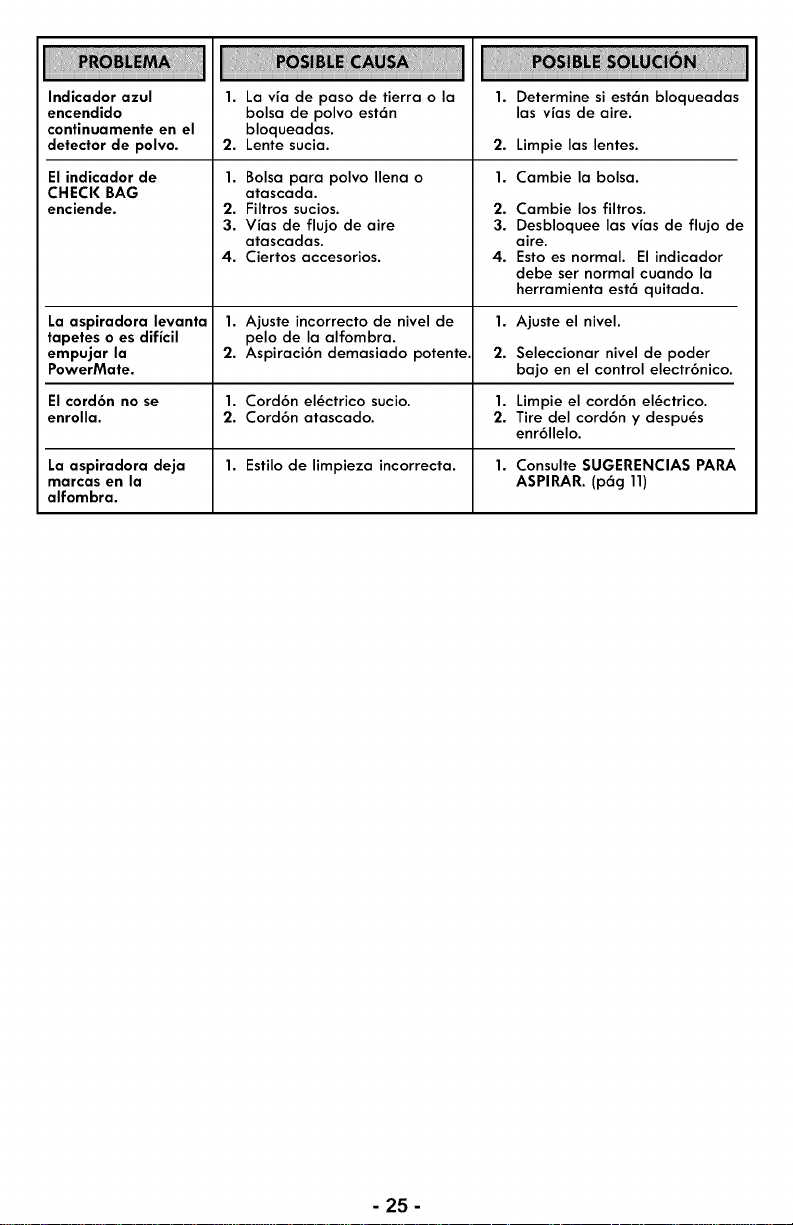
Indicador azul
encendido
continuamente en el
detector de polvo.
El indicador de
CHECK BAG
enciende.
1. La via de paso de tierra o la
bolsa de polvo est6n
bloqueadas.
2. Lente sucia.
1. Bolsa para polvo Ilena o
atascada.
2. Filtros sucios.
3. Vias de flujo de aire
atascadas.
4. Ciertos accesorios.
2.
1.
2.
3.
4.
Determine si est6n bloqueadas
las vias de aire.
Limpie las lentes.
Cambie la bolsa.
Cambie los filtros.
Desbloquee las vias de flujo de
aire.
Esto es normal. El indicador
debe ser normal cuando la
herramienta est6 quitada.
La aspiradora levanta 1. Ajuste incorrecto de nivel de 1. Ajuste el nivel.
tapetes o es dificil pelo de la alfombra.
empujar la 2. Aspiraci6n demasiado potente, 2. Seleccionar nivel de poder
PowerMate. bajo en el control electr6nico.
Elcord6n no se 1. Cord6n el_ctrico sucio. 1. Limpie el cord6n el_ctrico.
enrolla. 2. Cord6n atascado. 2. Tire del cord6n y despu_s
enr611elo.
La aspiradora deja 1. Estilo de limpieza incorrecta. 1. Consulte SUGERENCIAS PARA
marcas en la ASPIRAR. (p6g 11)
alfombra.
- 25-

Your Home
For troubleshooting, product manuals and expert advice:
www.managemylife,com
For repair - in your home - of all major brand appliances,
lawn and garden equipment, or heating and cooling systems,
no matter who made it, no matter who sold it!
For the replacement parts, accessories and
owner's manuals that you need to do-it-yourself.
For Sears professional installation of home appliances
and items like garage door openers and water heaters.
1-800-4-MY-HOME ® Ca, anytime, day or night
(I-800-469-4663) (U.S.A. and Canada
www,sears,com www,sears,ca
TM
® Registered Trademark / Trademark of KCD IP, LLC in the United States, or Sears Brands, LLC in other countries
® Marca Registrada / TMMarca de Fabrica de KCD IP, LLC en Estados Unidos, o Sears Brands, LLC in otros paises
McMarque de commerce / MDMarque depos6e de Sears Brands, LLC
C01ZDWCIOUO0 / KCOIZDWCZOUO