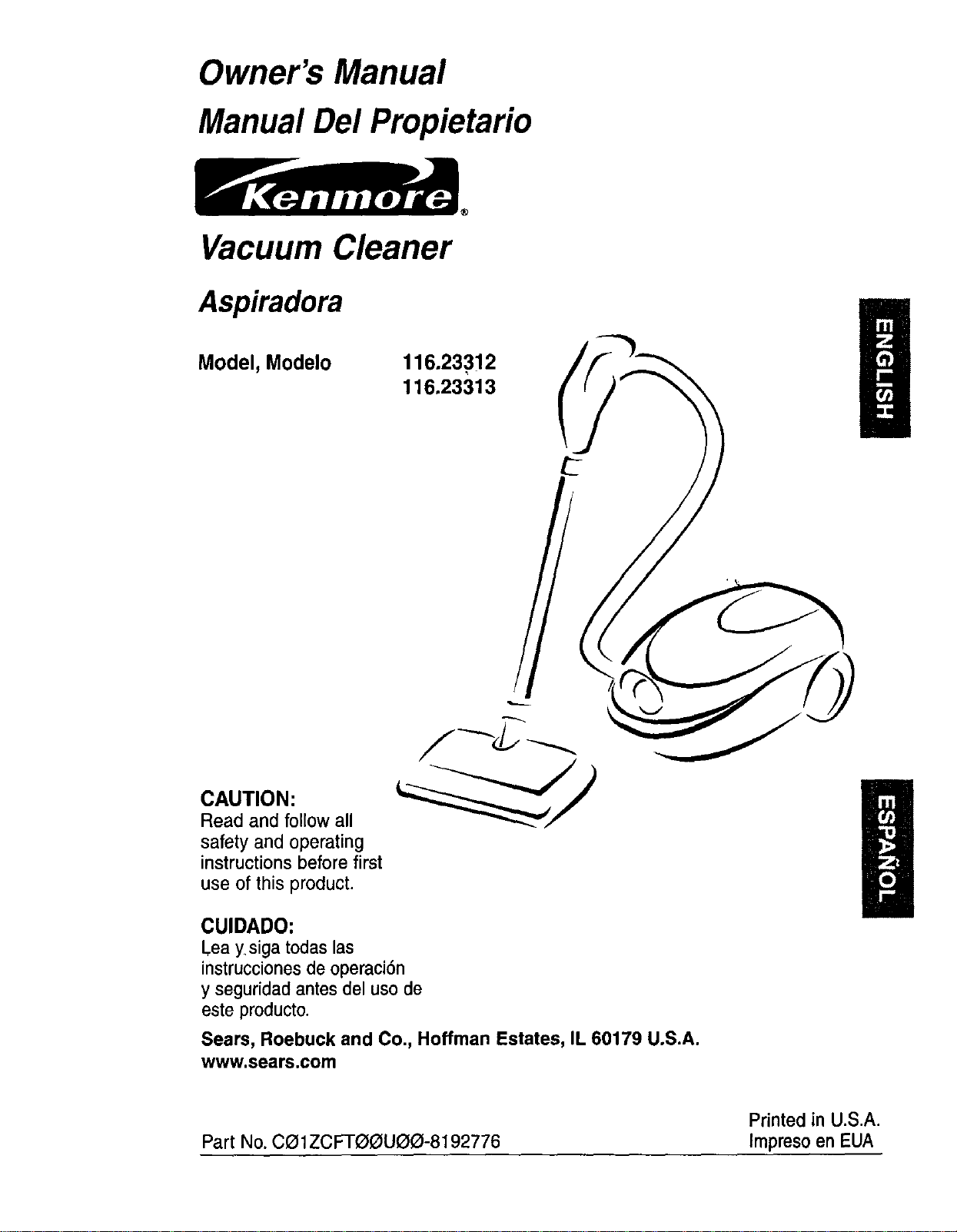
Owner's Manual
Manual Del Propietario
Vacuum Cleaner
Aspiradora
Model, Modelo
116.23312
116.23313
CAUTION:
Read and followall
safety and operating
instructions before first
use of this product.
CUIDADO:
Lea ysiga todaslas
instruccionesde operaci6n
y seguridadantesdel usode
este producto.
Sears, Roebuck and Co., Hoffman Estates, IL 60179 U.S.A.
www.sears.com
Printed in U.S.A.
Part No. Ca1ZCFTf30U(3_-8192776 Impreso en EUA
Before Using Your New Vacuum ....... 2
Kenmore Vacuum Cleaner Warranty ... 2
Important Safety Instructions ......... 3
Parts and Features ................. 4-5
Assembly Instructions ............. 6-7
Use ................................ 8
How to Start ........................ 8
VacuumingTips ..................... 9
Suggested Pile HeightSettings ......... 9
Attachments....................... 10
Attachment Use Chart ............... 10
PerformanceFeatures ............... 11
How Your Vacuum Works ............ 12
Canister Care ...................... 12
Bag Changing ..................... 12
Cleaning Exteriorand Attachments ..... 13
Motor Safety Filter Changing .......... 13
Exhaust Filter Changing .............. 14
Power-Mate ®Care .................. 14
Light Bulb Changing ................. 15
Belt Changing and AgitatorCleaning .. 15-16
Agitator Servicing ................... 17
Troubleshooting .................... 18
Requesting Assistance
Or Service .................. Back Cover
Please read this guide. It will help you assemble and operate your new Kenmore vacuum in
the safest and most effective way.
For more information about vacuum cleaner care and operation, call your nearest Sears store.
You will need the complete model and serial numbers when requesting information. Your vacu-
um's model and serial numbers are located on the Model and Serial Number Plate.
Use the space below to record the model number and serial number of your new Kenmore
vacuum.
Model No.
Serial No.
Date of Purchase
Keep this book and your sales check (receipt) in a safe place for future reference.
LIMITED ONE YEAR WARRANTY ON KENMORE VACUUM CLEANER
This warranty is for one year from the date of purchase, and includes only private household
vacuum cleaner use. During the warranty year, when this vacuum cleaner is operated and
maintained according to the owner's manual instructions, Sears will repair any defects in
material or workmanship free of charge.
This warranty excludes vacuum bags, belts, light bulbs, and filters, which are expendable parts
and become worn during normal use.
For warranty service, return this vacuum cleaner to the nearest Sears Service Center in
the United States,
This warranty applies only while this product is in use in the United States. This warranty gives
you specific legal rights, and you may also have other rights which vary from state to state.
Sears, Roebuck and Co., 13/817WA, Hoffman Estates, IL 60179
Yoursafety is importantto us,To reducethe risk of fire,electricalshock,injury
to personsor damagewhenusing your vacuumcleaner,follow basic safety pre-
cautions including the following:
Readthis manualbeforeassemblingor
usingyourvacuumcleaner.
Use your cleaner onlyas described in this
manual. Use only withSears recommended
attachments.
To reduce the risk of electrical shock - Do
not use outdoors or on wet surfaces.
Disconnect electrical supply before servic-
ing or cleaning out brush area. Failure to
do so could result in electrical shock or
brush suddenly starting.
Always turn cleaner off before connecting
or disconnecting the hose or Power-Mate ®.
Always turn cleaner off before unplugging.
Do not unplugby pullingoncord. To
unplug,graspthe plug,notthe cord.
Hold plug whenrewindingontocordreel.
Donotallowplugto whipwhen rewinding.
Do not use withdamaged cordor plug. If
cleaner is notworkingas itshould,has
beendropped,damaged, left outdoors,or
droppedintowater,returnit to a Sears
ServiceCenter.
Do not pull or carry by cord, use cord as a
handle, close door on cord, or pullcord
around sharp edges or corners. Do not run
_cleaner overcord. Keep cord away from
heated surfaces.
Do not leave cleaner whenplugged in.
Unplug from outlet whennot in use and
beforeservicing.
Do not allowto be used as a toy. Close
attentionisnecessarywhen usedbyor
near children.
Do not handle plug or cleanerwithwet
hands.
Do not put anyobjectsintoopenings.
Do not operate the cleanerwitha punc-
tured hose. The hose contains electrical
wires. Replace if cut or worn. Avoid picking
up sharp objects.
Do not use with any opening blocked; keep
free of dust, lint, hair and anything that may
reduce air flow.
Keep hair, loose clothing, fingers, and all
parts of body away from openings and mov-
ing parts.
Do not use cleaner without dust bag and/or
filters in place.
Always change the dust bag after vacuum-
ing carpet cleaners or freshener, powders
and fine dust. These products clog the bag,
reduce airflow and can cause the bag to
burst. Failure to change bag could cause
permanent damage to the _eaner.
Do not use the cleaner to pick up sharp
hard objects, small toys, pins, paper clips,
etc. They may damage the cleaner or dust
bag.
Do not pick up anything that is burning or
smoking, such as cigarettes, matches, or
hot ashes.
Do not use cleaner to pick up flammable or
combustible liquids (gasoline, cleaning flu-
ids, perfumes, etc.), or use in areas where
they may be present. The fumes from these
substances can create a fire hazard or
explosion.
Use extra care when cleaning on stairs. Do
not put on chairs, tables, etc. Keep on floor.
You are responsible for making sure that
your vacuumcleaner is not usedby anyone
unable to operate it properly.
Do not operate without exhaust filter or
exhaust filter cover installed.
SAVE THESE INSTRUCTIONS
Proper assembly and safe use of your vacuum cleaner are your responsibilities. Your cleaner
is intended only for household use. Read this Owner's Manual carefully for important use and
safety information. This guide contains safety statements under warning and caution symbols.
Please pay special attention to these boxes and follow any instructions given. WARNING
statements alert you to such dangers as fire, electrical shock, burns and personal injury.CAU
TION statements alert you to such dan,qers as personal iniurY and/or propertydamaqe.
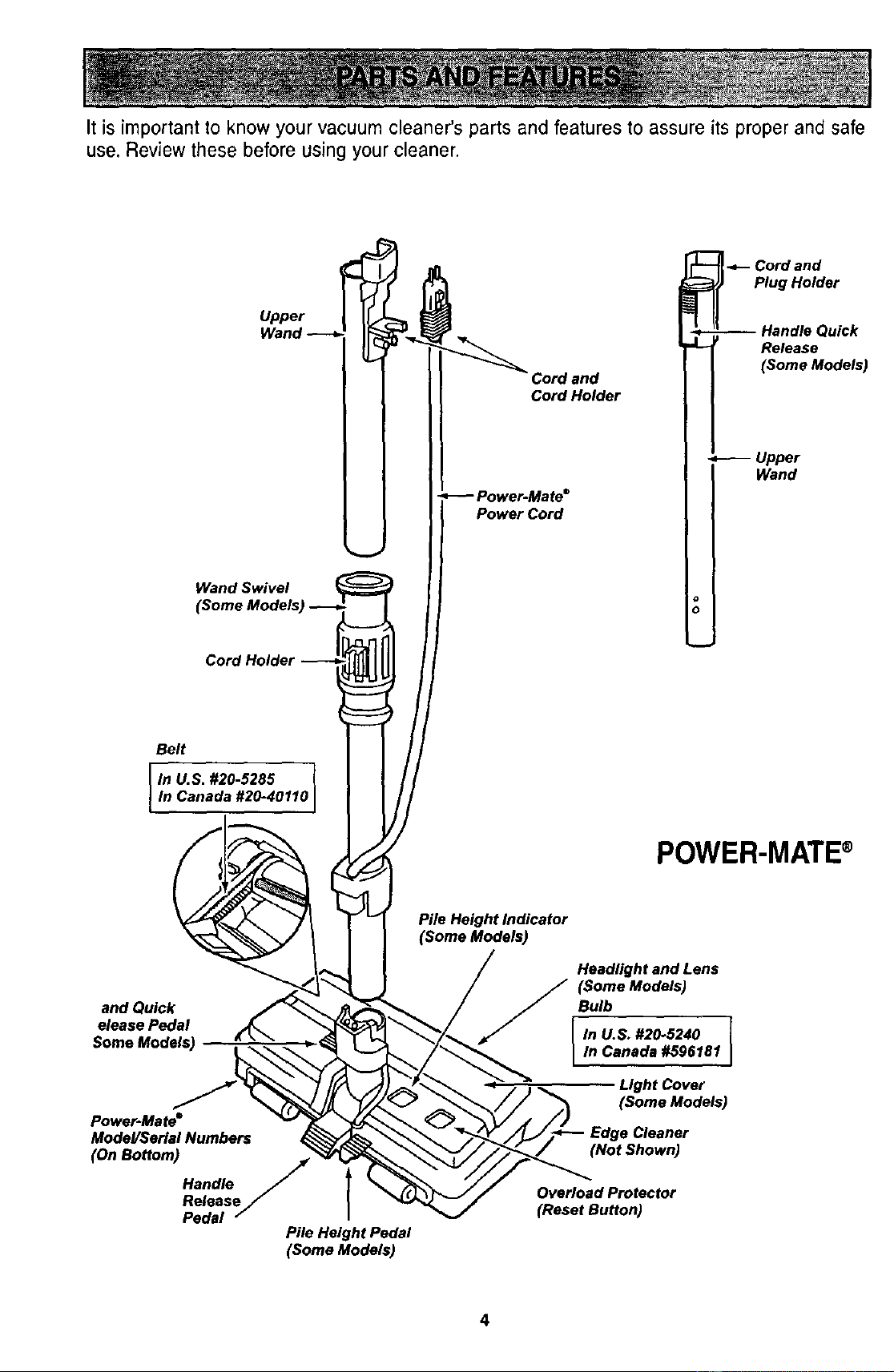
It is important to know your vacuum cleaner's parts and features to assure its proper and safe
use. Review these before using your cleaner.
Upper
Wand Swivel
(Some Models) _ [
Cordand
CordHolder
Power Cord
_- Cord and
Plug Holder
-- Handle Quick
Release
(Some Models)
-- Upper
Wand
Belt
In U.S. #20-5285
In Canada #20-40110
POWER-MATE®
and Quick
elease Pedal
Power-Mate"
Model/Serial Numbers
(On Bottom)
Handle
Release
Pedal
Pile Height Indicator
(Some Models)
Headlight and Lens
(Some Models)
Bulb
In U.S. #20-5240 ]
In Canada #596181 I
I
Light Cover
(Some Models)
Edge Cleaner
(Not Shown)
Pile Height Pedal
(Some Models)
Overload Protector
(Reset Button)
4
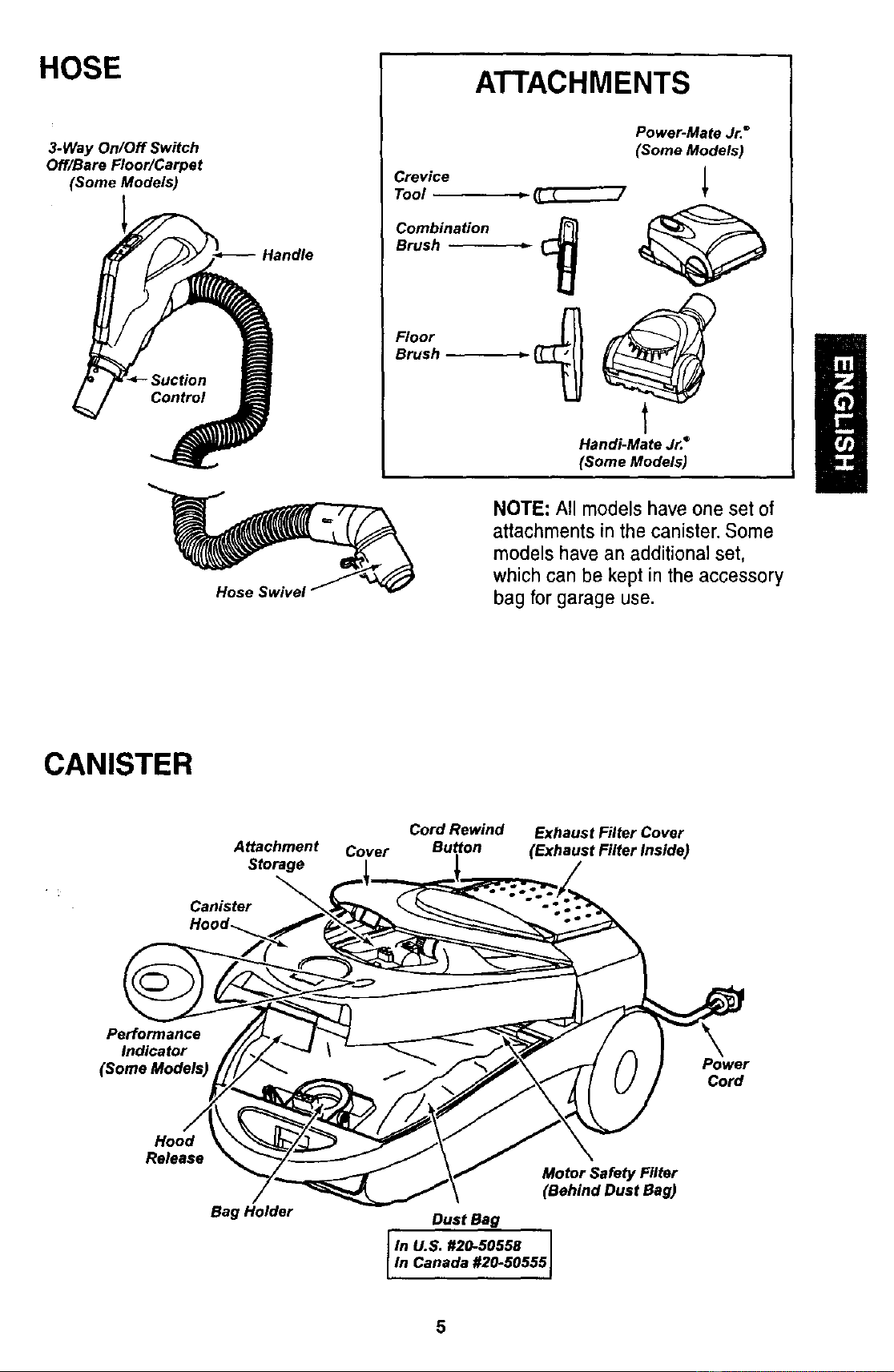
HOSE
3-Way On/Off Switch
Off/Bare Floor/Carpet
(Some Models)
Handle
ATTACHMENTS
Crevice
Tool _
Combination
Brush
Floor
Brush
Power-Mate Jr."
(Some Models)
Handi-Mate Jr.°
(Some Models)
NOTE: All models have one set of
attachments in the canister. Some
models have an additional set,
whichcan be kept in the accessory
bag for garage use.
CANISTER
Attachment
Storage
Canister
Cover
Cord Rewind
Button
Exhaust Filter Cover
(Exhaust Filter Inside)
Performance
Indicator
(Some Models)
Power
Cord
Hood
Release
Bag Holder
Motor Safety Filter
(Behind Dust Bag)
Dust Bag
llnu.s.#2o-so558I
In Canada #20-50555J
Electrical Shock Hazard
DO NOT plug into electrical supply
until assembly is complete. Failure
to do so could result in electrical
shock or injury.
Before assembling vacuum, check the
PACKING LIST on the cover of the separate
Repair Parts List. Use this list to verify that
you have received all the components of
your new Kenmore vacuum.
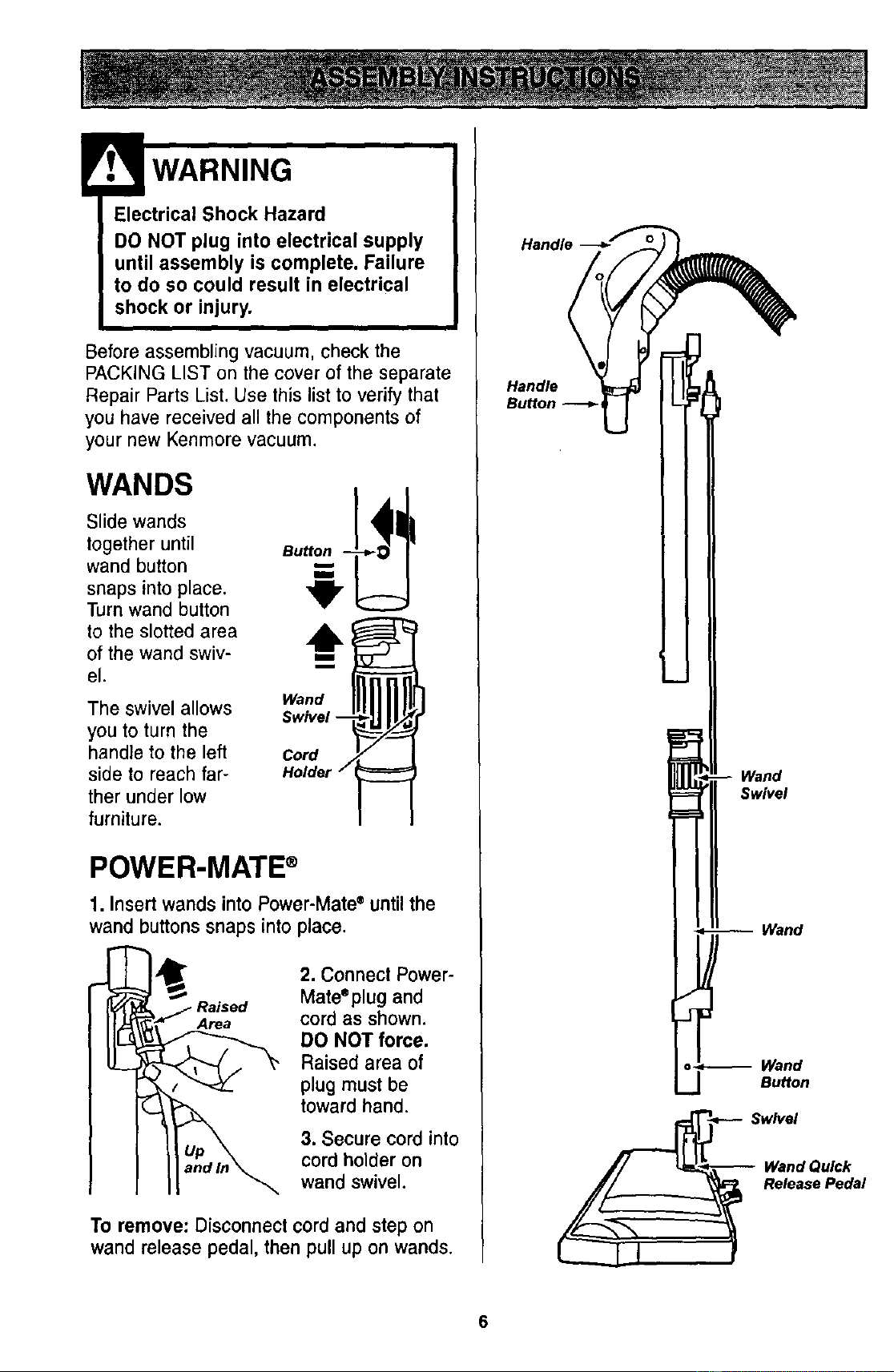
WANDS
Slide wands
together until
wand button
snaps into place.
Turn wand button
to the slotted area
of the wand swiv-
el.
The swivel allows
you to turn the
handle to the left
side to reach far-
ther under low
furniture.
Bu@on
,b
Wand
Swivel --
Cord
Holder
POWER-MATE ®
1. Insert wands into Power-Mate • until the
wand buttons snaps into place.
Area
2. Connect Power-
Mateeplug and
cord as shown.
DO NOT force.
Raised area of
plug must be
toward hand.
3. Secure cord into
cord holder on
wand swivel.
To remove: Disconnect cord and step on
wand release pedal, then pull up on wands.
Handle
Handle
Wand
Swivel
Wand
o_ Wand
Bu_on
__ Release Pedal
6
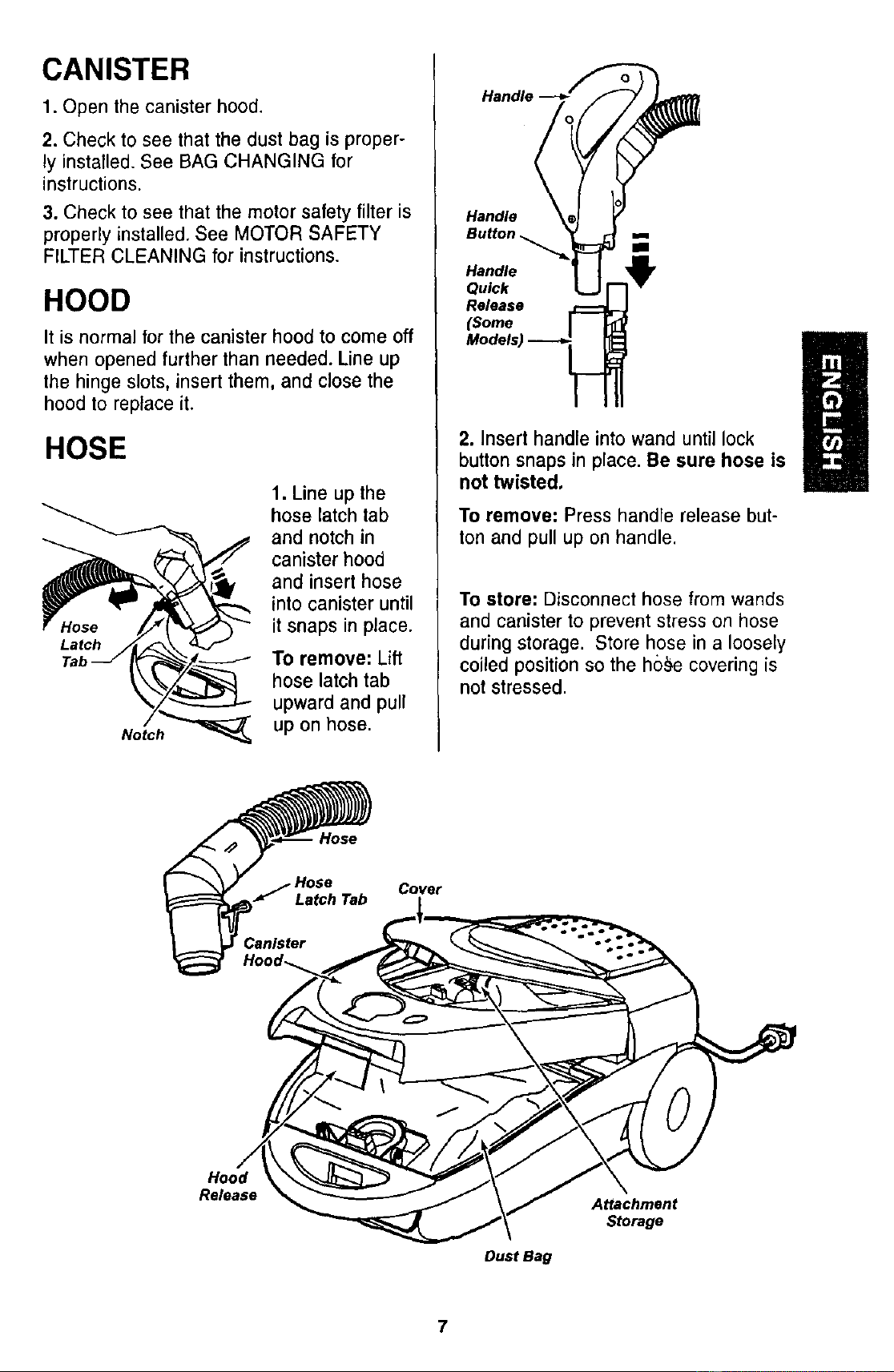
CANISTER
1. Open the canister hood.
2. Check to see that the dust bag is proper-
ly installed. See BAG CHANGING for
instructions.
3. Check to see that the motor safety filter is
properly installed. See MOTOR SAFETY
FILTER CLEANING for instructions.
HOOD
It is normal for the canister hood to come off
when opened further than needed. Line up
the hinge slots, insert them, and close the
hood to replace it.
HOSE
Notch_
1. Line up the
hose latch tab
and notch in
canister hood
and insert hose
into canister until
it snaps in place.
To remove: Lift
hose latch tab
upward and pull
up on hose.
Handle-
M dels) _
2. Insert handle into wand until lock
button snaps in place. Be sure hose is
not twisted,
To remove: Press handle release but-
ton and pull up on handle.
To store: Disconnect hose from wands
and canister to prevent stress on hose
during storage. Store hose in a loosely
coiled position so the hs_)e covering is
not stressed.
Hose
Cover
Latch Tab ,l,
Release
Dust Bag
Attachment
Storage
7
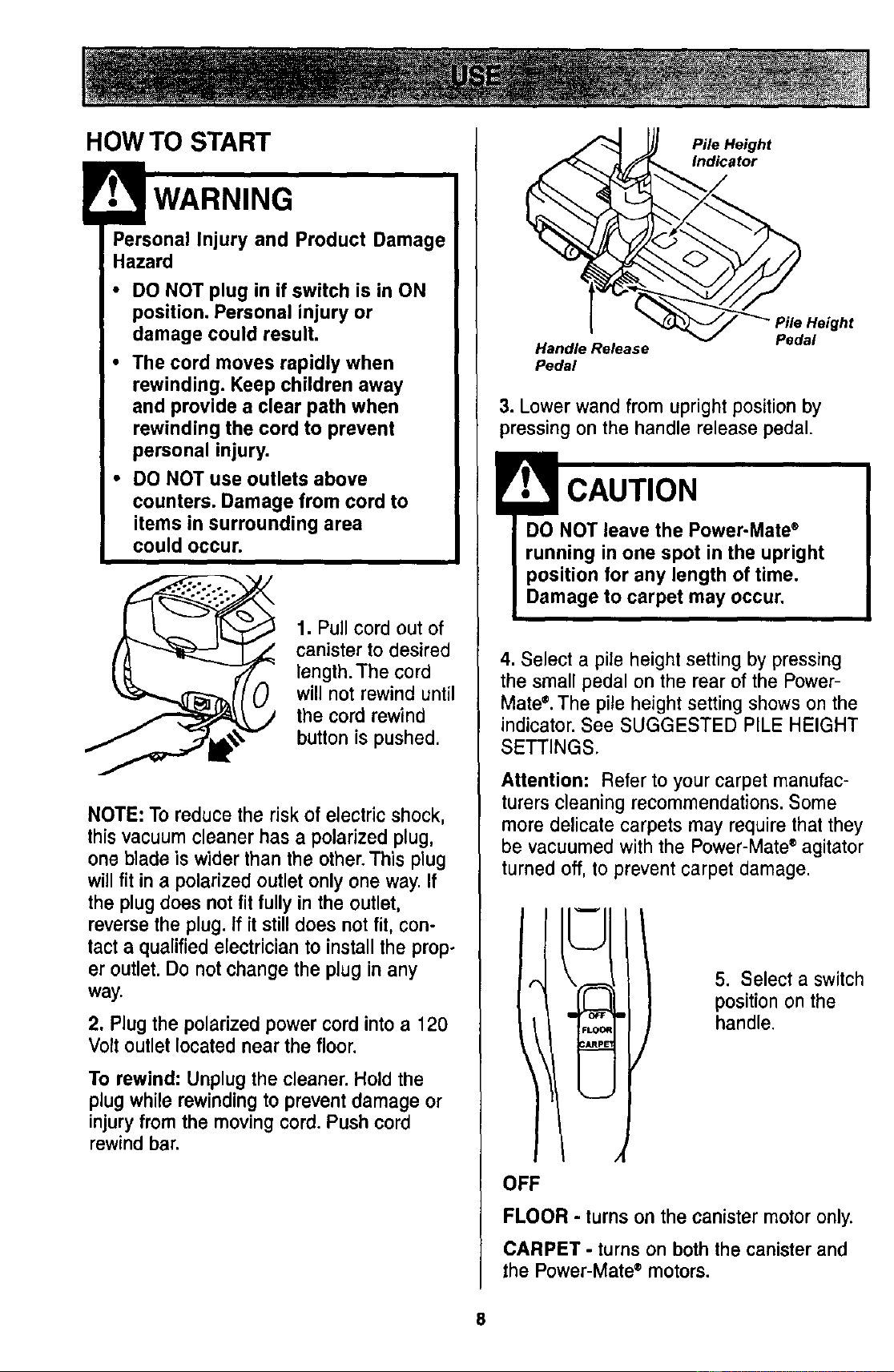
HOW TO START
Pe_SaOr;alInjury and Product Damage
• DO NOT plug in if switch is in ON
position. Personal injury or
damage could result.
• The cord moves rapidly when
rewinding. Keep children away
and provide a clear path when
rewinding the cord to prevent
personal injury.
• DO NOT use outlets above
counters. Damage from cord to
items in surrounding area
could occur.
1. Pull cord out of
canister to desired
length. The cord
will not rewind until
the cord rewind
button is pushed.
NOTE: To reduce the risk of electric shock,
thisvacuumcleaner has a polarized plug,
one blade is wider than the other.This plug
willfit in a polarized outlet onlyone way.If
the plugdoes not fit fully in the outlet,
reversethe plug. If it stilldoes not fit, con-
tact a qualifiedelectricianto installthe prop-
er outlet. Do not change the plug in any
way.
2, Plug the polarized power cord into a 120
Volt outlet located near the floor.
To rewind: Unplug the cleaner. Hold the
plug while rewinding to prevent damage or
injury from the moving cord. Push cord
rewind bar.
Pile Height
icator
Handle Release
Pedal
3. Lower wand from upright position by
pressing on the handle release pedal.
CAUTION
DO NOT leave the Power-Mate ®
running in one spot in the upright
position for any length of time.
Damage to carpet may occur.
4. Select a pile height setting by pressing
the small pedal on the rear of the Power-
Mate `=. The pile height setting shows on the
indicator. See SUGGESTED PILE HEIGHT
SETTINGS.
Attention: Refer to your carpet manufac-
turers cleaning recommendations.Some
more delicate carpets may requirethat they
be vacuumedwith the Power-Mate®agitator
turned off,to prevent carpet damage.
FLO0
c_J
5. Select a switch
position on the
handle.
OFF
FLOOR - turns on the canister motor only.
CARPET - turns on both the canisterand
the Power-Mate® motors.
8
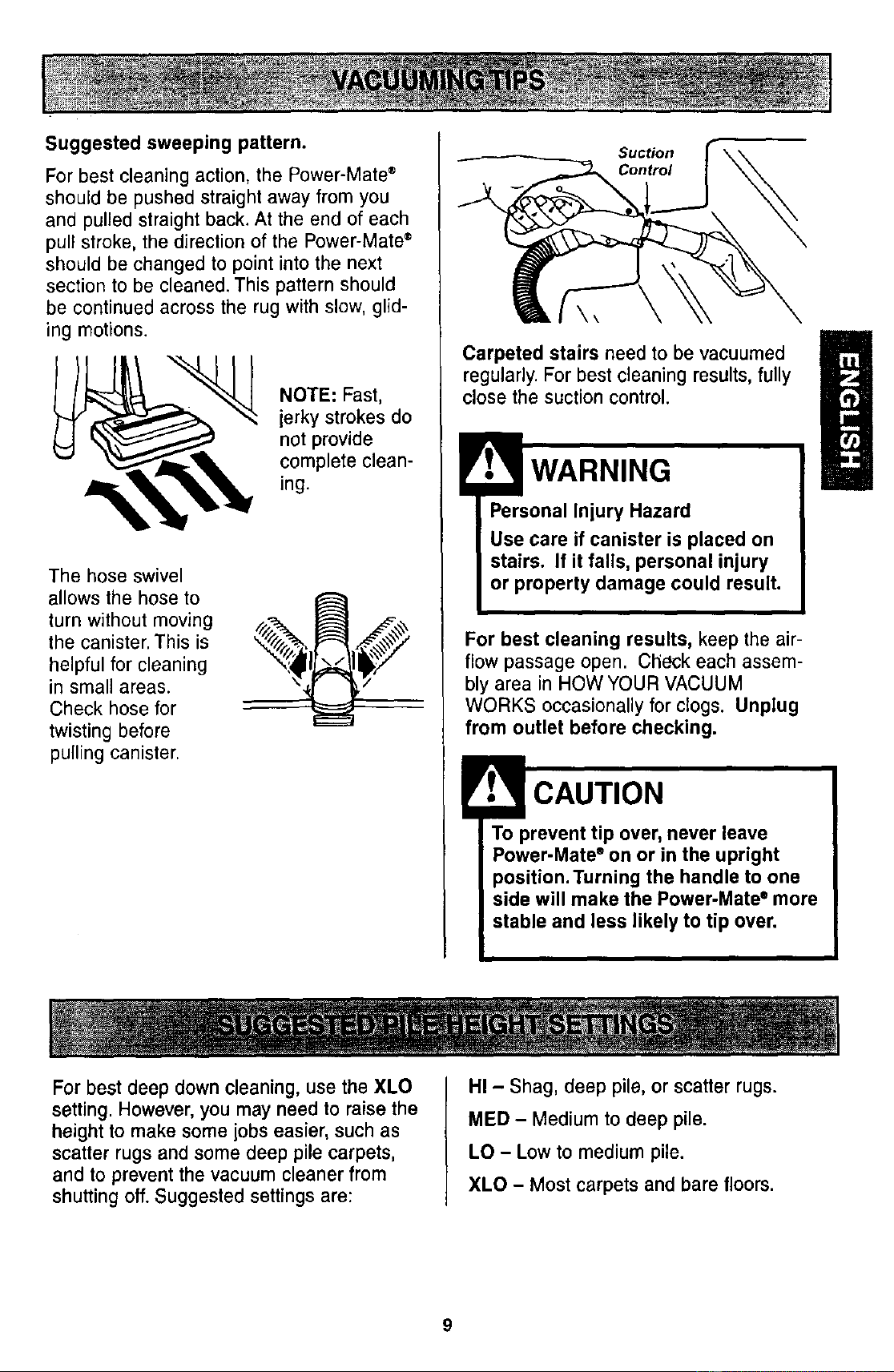
Suggested sweeping pattern.
For best cleaning action, the Power-Mate ®
should be pushed straight away from you
and pulled straight back. At the end of each
pull stroke, the direction of the Power-Mate ®
should be changed to point into the next
section to be cleaned. This pattern should
be continued across the rug with slow, glid-
ing motions.
NOTE: Fast,
jerky strokes do
not provide
complete clean-
ing.
The hose swivel
allows the hose to
turn without moving
the canister. This is
helpful for cleaning
in small areas.
Check hose for
twisting before
pulling canister.
Suction
Control
Carpeted stairs need to be vacuumed
regularly. For best cleaning results, fully
close the suction control.
WARNING
Personal Injury Hazard
Use care if canister is placed on
stairs. If it falls, personal injury
or property damage could result.
For best cleaning results, keep the air-
flow passage open. Check each assem-
bly area in HOW YOUR VACUUM
WORKS occasionally for clogs. Unplug
from outlet before checking.
To prevent tip over, never leave
Power-Mate ® on or in the upright
)osition.Turning the handle to one
side will make the Power-Mate ° more
stable and less likely to tip over.
For best deep down cleaning, use the XLO
setting. However, you may need to raise the
height to make some jobs easier, such as
scatter rugs and some deep pile carpets,
and to prevent the vacuum cleaner from
shutting off. Suggested settings are:
HI - Shag, deep pile, or scatter rugs.
MED - Medium to deep pile.
LO - Low to medium pile.
XLO - Most carpets and bare floors.
9
I CAUTION
DO NOT attach or remove handle or
wands while cleaner is ON. This
could cause sparking and damage
the electrical contacts.
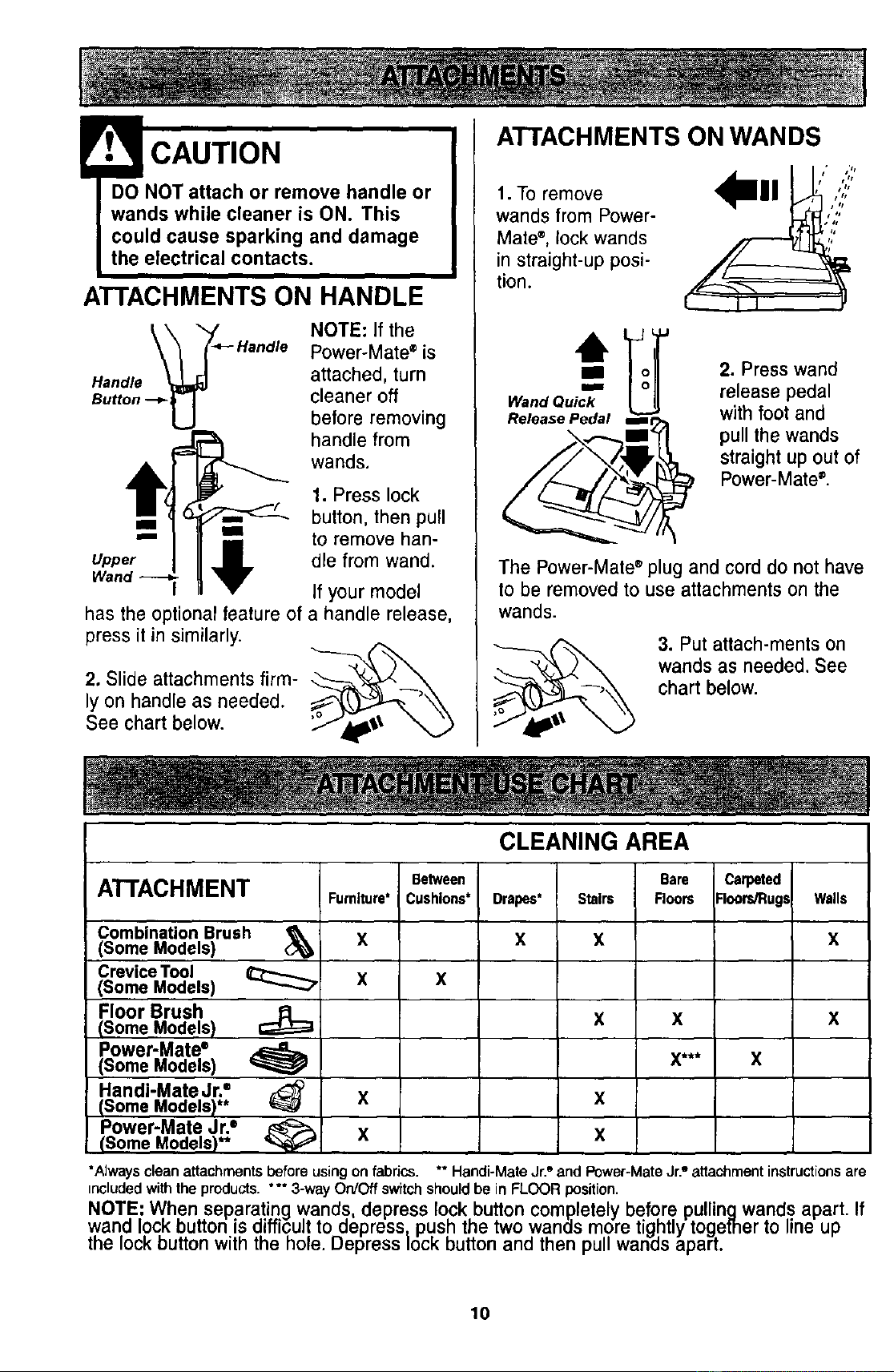
ATTACHMENTS ON HANDLE
Handle
NOTE: If the
Power-Mate ®is
attached, turn
cleaner off
before removing
handle from
wands.
m
Upper
Wand
has the optionalfeature of
press it in similarly.
2. Slide attachments firm-
ly on handle as needed.
See chart below.
1. Press lock
button, then pull
to remove han-
dle from wand.
If your model
a handle release,
ATTACHMENTS ON WANDS
t. To remove
wands from Power-
Mate ®, lock wands
in straight-up posi-
tion.
Release Pedal m
i It
J_s
2. Press wand
release pedal
with foot and
pull the wands
straight up out of
Power-Mate ®.
The Power-Mate®plug and cord do not have
to be removed to use attachments on the
wands.
3. Put attach-ments on
wands as needed. See
chart below.
CLEANING AREA
Between Bare Carpeted
ATTACHMENT Furniture" Cushions* Drapes* Stairs Floors Floors/Rugs Walls
Combination Brush _(Some Models) X X X X
Crevice Tool
X
X
(Some Models)
Floor Brush
X X X
(Some Models)
Power-Mate*
(Some Models) _ X*** X
Handi-Mate Jr."
X X
(Some Models)**
Power-Mate Jr.=
X X
(Some Models)**
*Always clean attachmentsbefore usingon fabrics.
includedwith theproducts. *** 3-way On/Off switchshouldbe in FLOOR position.
NOTE: When separating wands depress lock button completely before pullingwands apart.
wand lock button is difficult to depress push the two wands more tightly together to line up
the mockbutton w th the h, e. Depress ock button and then pul wan_ls apart.
** Q Q
Handi-MateJr. and Power-MateJr. attachmentinstructions are
If
10
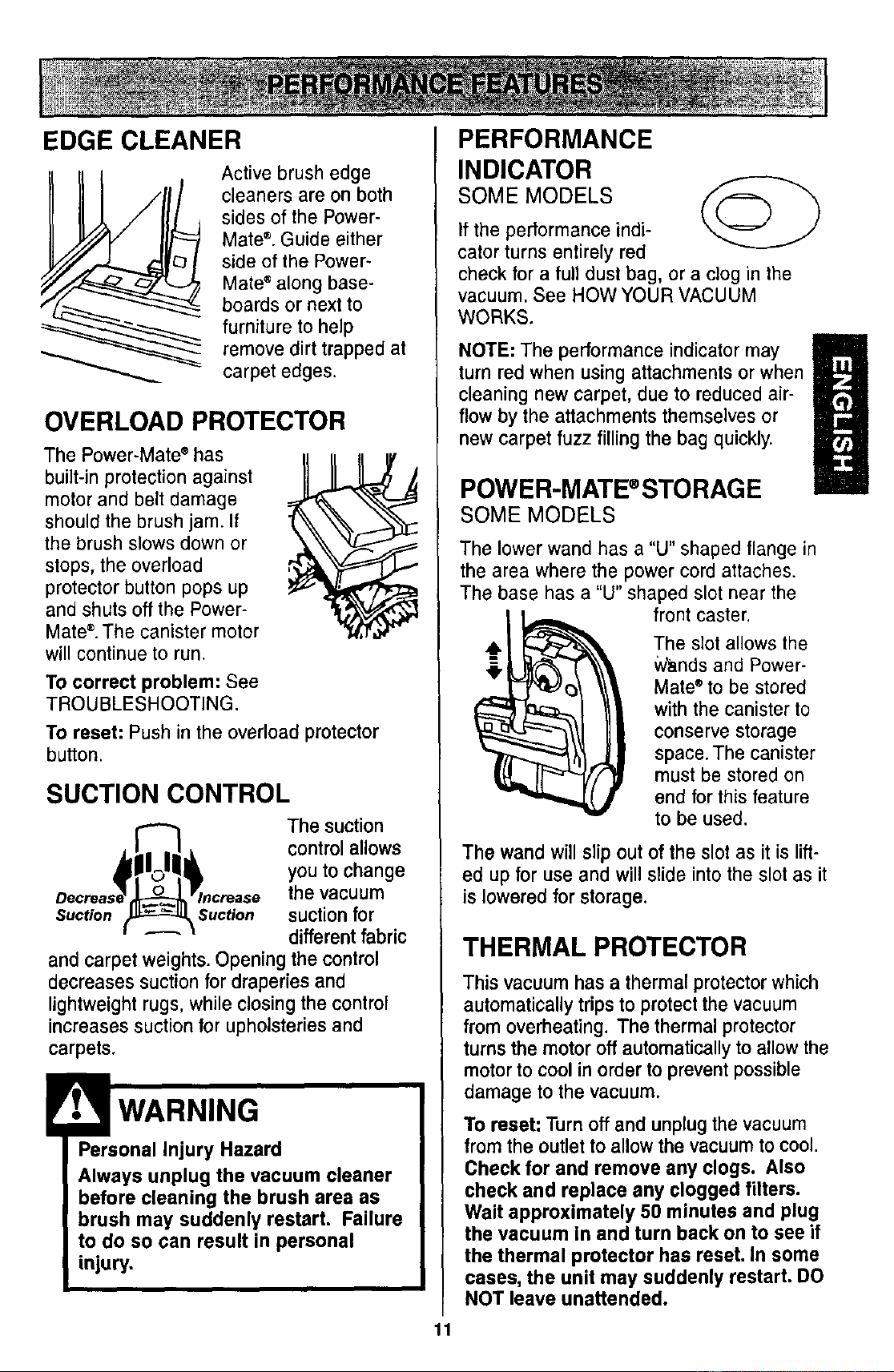
EDGE CLEANER
Active brush edge
cleaners are on both
sides of the Power-
Mate ®. Guide either
side of the Power-
Mate ®along base-
boards or next to
furniture to help
remove dirt trapped at
carpet edges.
OVERLOAD PROTECTOR
The Power-Mate" has
built-in protection against
motor and belt damage
should the brush jam. If
the brush slows down or
stops, the overload
protector button pops up
and shuts off the Power-
Mate ®. The canister motor
will continue to run.
To correct problem: See
TROUBLESHOOTING.
To reset: Push in the overload protector
button.
SUCTION CONTROL
The suction
control allows
you to change
the vacuum
Suction \Suction suctionfor
different fabric
and carpet weights. Opening the control
decreases suction for draperies and
lightweight rugs, while closing the control
increases suction for upholsteries and
carpets.
Personal Injury Hazard
Always unplug the vacuum cleaner
before cleaning the brush area as
brush may suddenly restart, Failure
to do so can result in personal
injury.
PERFORMANCE
INDICATOR
SOME MODELS
If the performance indi-
cator turns entirely red
check for a full dust bag, or a clog in the
vacuum. See HOW YOUR VACUUM
WORKS.
NOTE: The performance indicator may
turn red when using attachments or when
cleaning new carpet, due to reduced air-
flow by the attachments themselves or
new carpet fuzz filling the bag quickly.
POWER-MATE ®STORAG E
SOME MODELS
The lower wand has a "U" shaped flange in
the area where the power cord attaches.
The base has a "U" shaped slot near the
front caster.
The slot allows the
Wands and Power-
Mate ®to be stored
with the canister to
conserve storage
space. The canister
must be stored on
end for this feature
to be used.
The wand will slip out of the slot as it is lift-
ed up for use and will slide into the slot as it
is lowered for storage.
THERMAL PROTECTOR
This vacuum has a thermal protector which
automatically trips to protect the vacuum
from overheating. The thermal protector
turns the motor off automatically to allow the
motor to cool in order to prevent possible
damage to the vacuum.
To reset: Turn off and unplug the vacuum
from the outlet to allow the vacuum to cool.
Check for and remove any clogs. Also
check and replace any clogged filters.
Wait approximately 50 minutes and plug
the vacuum in and turn back on to see if
the thermal protector has reset. In some
cases, the unit may suddenly restart. DO
NOT leave unattended.
11
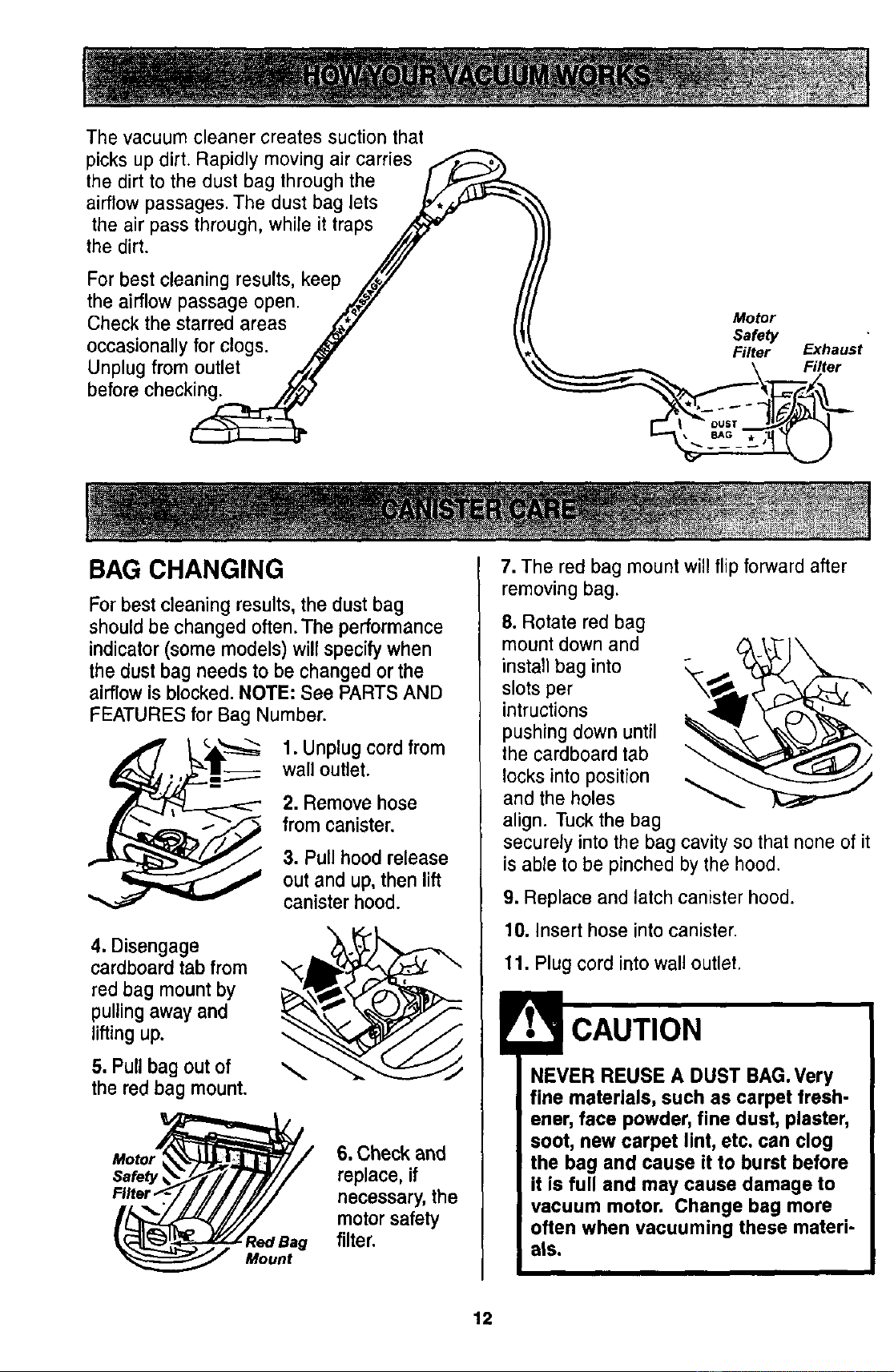
The vacuum cleaner creates suction that
picks up dirt. Rapidly moving air carries
the dirt to the dust bag through the
airflow passages. The dust bag lets
the air pass through, while it traps
the dirt.
For best cleaning results, keep
the airflow passage open.
Check the starred areas
occasionally for clogs.
Unplug from outlet
before checking.
Motor
Safety
Filter
Exhaust
Filter
BAG CHANGING
For best cleaning results, the dust bag
should be changed often.The performance
indicator (some models) will specify when
the dust bag needs to be changed or the
airflow is blocked. NOTE: See PARTS AND
FEATURES for Bag Number.
1. Unplug cord from
wall outlet.
2. Remove hose
from canister.
3. Pull hood release
out and up, then lift
canister hood.
4. Disengage
cardboard tab from
red bag mount by
pulling away and
lifting up.
5. Pull bag out of
the red bag mount.
Motor_# / 6. Check and
Safety_j/_// replace, if
FUterf.'/J///JY// necessary, the
(_Bag m°t°r safety
filter.
Mount
7. The red bag mount will flip forward after
removing bag.
8. Rotate red bag
mount down and
install bag into
slots per
intructions
pushing down until
the cardboard tab
locks into position
and the holes
align. Tuck the bag
securely into the bag cavity so that none of it
is able to be pinched by the hood.
9. Replace and latch canister hood.
10. Insert hose into canister.
11. Plug cord into wall outlet.
NEVER REUSE A DUST BAG. Very
fine materials, such as carpet fresh-
ener, face powder, fine dust, plaster,
soot, new carpet lint, etc. can clog
the bag and cause it to burst before
it is full and may cause damage to
vacuum motor. Change bag more
often when vacuuming these materi-
als.
12
1. Unplug cord from wall outlet. DO NOT
drip water on cleaner.
2. Clean exterior using a clean, soft cloth
that has been dipped in a solution of mild
liquid detergent and water, then wrung dry.
Wipe dry after cleaning.
3. To reduce static electricity and dust build-
up, wipe outer surface of cleaner and
attachments.
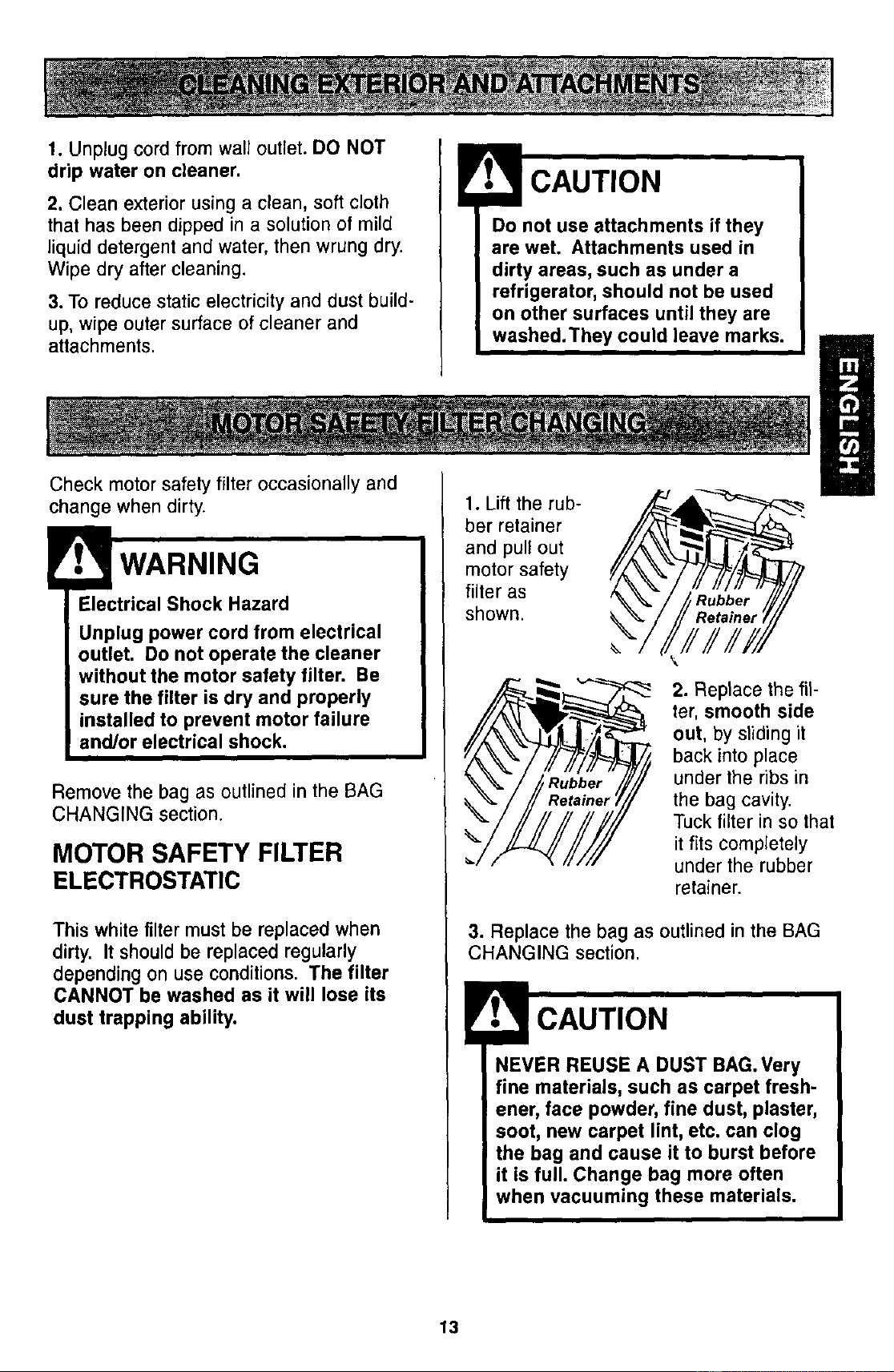
Check motor safety filter occasionally and
change when dirty.
Electrical Shock Hazard
Unplug power cord from electrical
outlet. Do not operate the cleaner
without the motor safety filter. Be
sure the filter is dry and properly
installed to prevent motor failure
and/or electrical shock.
Remove the bag as outlined in the BAG
CHANGING section.
MOTOR SAFETY FILTER
ELECTROSTATIC
This white filter must be replaced when
dirty. It should be replaced regularly
depending on use conditions. The filter
CANNOT be washed as it will lose its
dust trapping ability.
Do not use attachments if they
are wet. Attachments used in
dirty areas, such as under a
refrigerator, should not be used
on other surfaces until they are
washed.They could leave marks.
1. Lift the rub- _IL_
ber retainer
and pull out
motor safety
filter as
k
2. Replace the fil-
ter, smooth side
out, by sliding it
back into place
under the ribs in
the bag cavity.
Tuck filter in so that
it fits completely
under the rubber
retainer.
3. Replace the bag as outlined in the BAG
CHANGING section.
NEVER REUSE A DUST BAG.Very
fine materials, such as carpet fresh-
ener, face powder, fine dust, plaster,
soot, new carpet lint, etc. can clog
the bag and cause it to burst before
it is full. Change bag more often
when vacuuming these materials.
13
WARNING
Fire and/or Electrical Shock Hazard
Do not operate with a clogged
exhaust filter or without the exhaust
filter or exhaust filter cover installed.
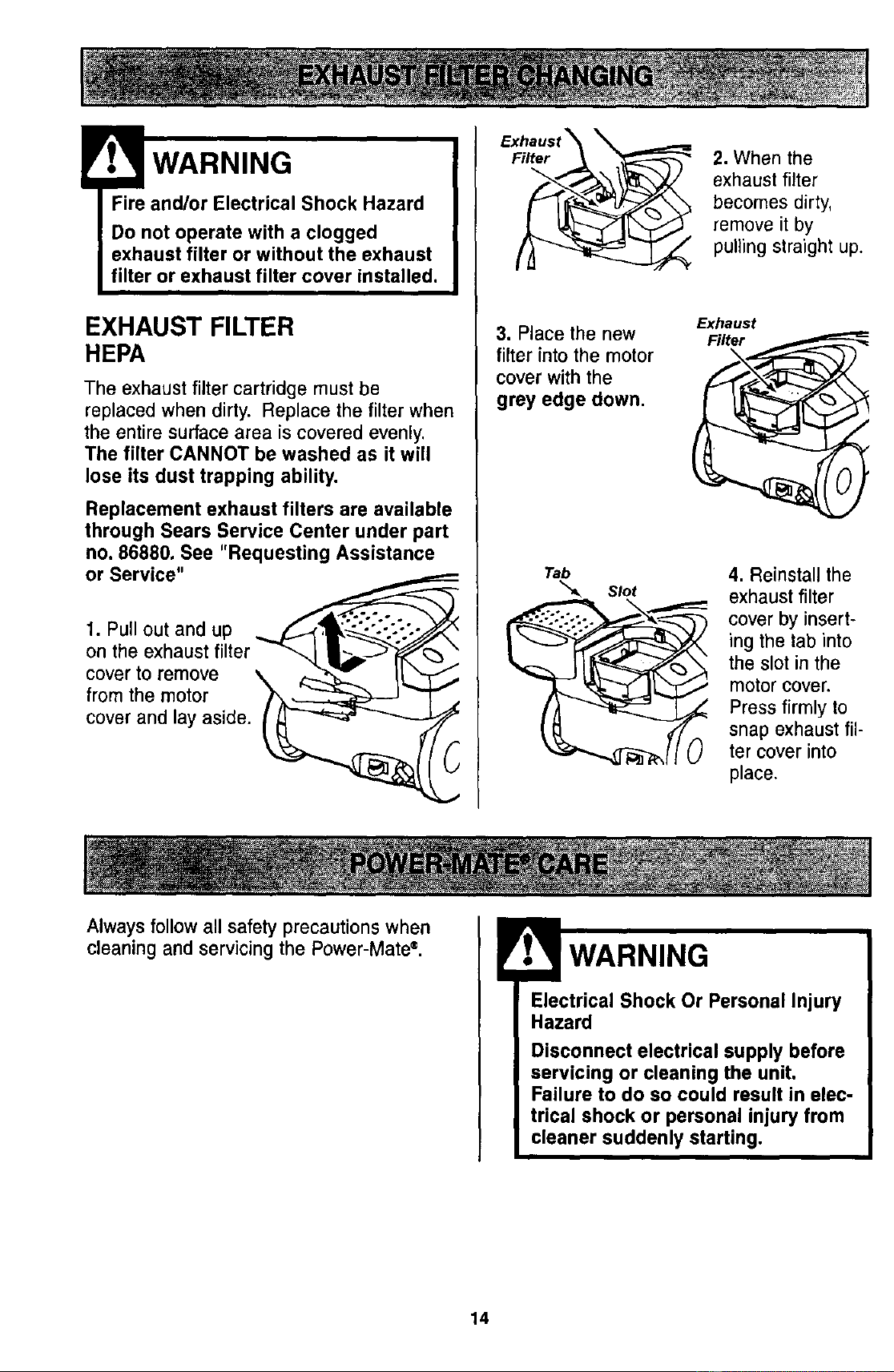
EXHAUST FILTER
HEPA
The exhaust filter cartridge must be
replaced when dirty. Replace the filter when
the entire surface area is covered evenly.
The filter CANNOT be washed as it will
lose its dust trapping ability.
Replacement exhaust filters are available
through Sears Service Center under part
no. 86880. See "Requesting Assistance
or Service"
1. Pull out and up
on the
cover to remove
from the motor
cover and lay aside.
3. Place the new
filter into the motor
cover with the
grey edge down.
Tab
"_ slot
2. When the
exhaust filter
becomes dirty,
remove it by
pulling straight up.
Exhaust
Filter
4. Reinstall the
exhaust filter
cover by insert-
ing the tab into
the slot in the
motor cover.
Press firmly to
snap exhaust fil-
ter cover into
place.
Always follow all safety precautions when
cleaningand servicingthe Power-Mate®.
Electrical Shock Or Personal Injury
Hazard
Disconnect electrical supply before
servicing or cleaning the unit.
Failure to do so could result in elec-
trical shock or personal injury from
cleaner suddenly starting.
14
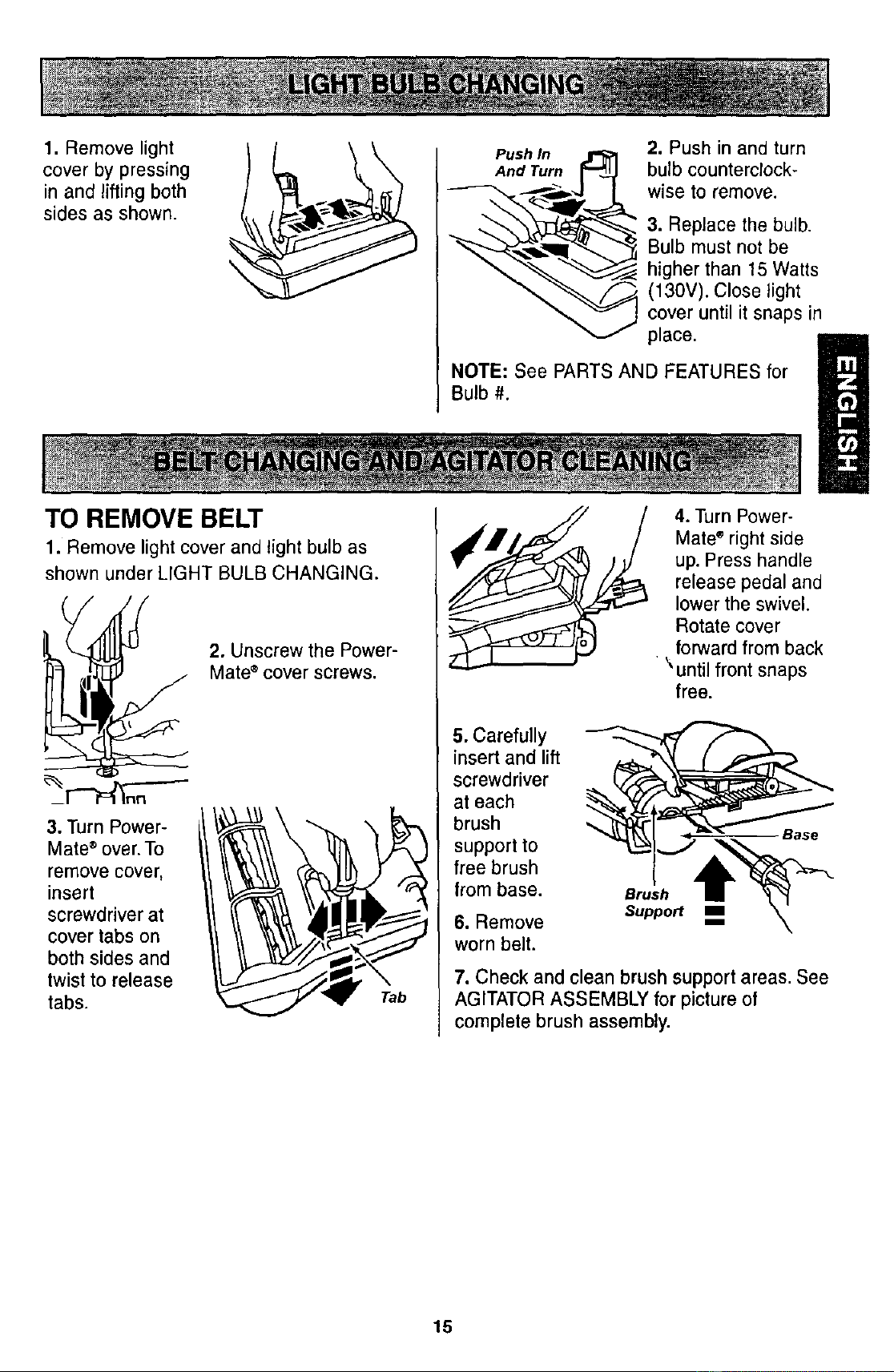
1. Remove light
cover by pressing
in and lifting both
sides as shown•
TO REMOVE BELT
1. Remove light cover and light bulb as
shown under LIGHT BULB CHANGING.
2. Unscrew the Power-
Mate ®cover screws.
3. Turn Power-
Mate ®over. To
remove cover,
insert
screwdriver at
cover tabs on
both sides and
twist to release
tabs.
Tab
PushIn _ 2, Push in and turn
And Turn r_,q.._ bulb counterclock-
wise to remove.
3. Replace the bulb•
Bulb must not be
higher than 15 Watts
__ (130V). Close light
cover until it snaps in
place.
NOTE: See PARTS AND FEATURES for
Bulb #.
4. Turn Power-
Mate ®right side
up. Press handle
release pedal and
lower the swivel.
Rotate cover
forward from back
• \ until front snaps
free.
5. Carefully
insert and lift
screwdriver
at each
brush
support to
free brush
from base.
6. Remove
worn belt.
Brush
Suppo_
i
Base
7. Check and clean brush support areas. See
AGITATOR ASSEMBLY for picture of
complete brush assembly.
15
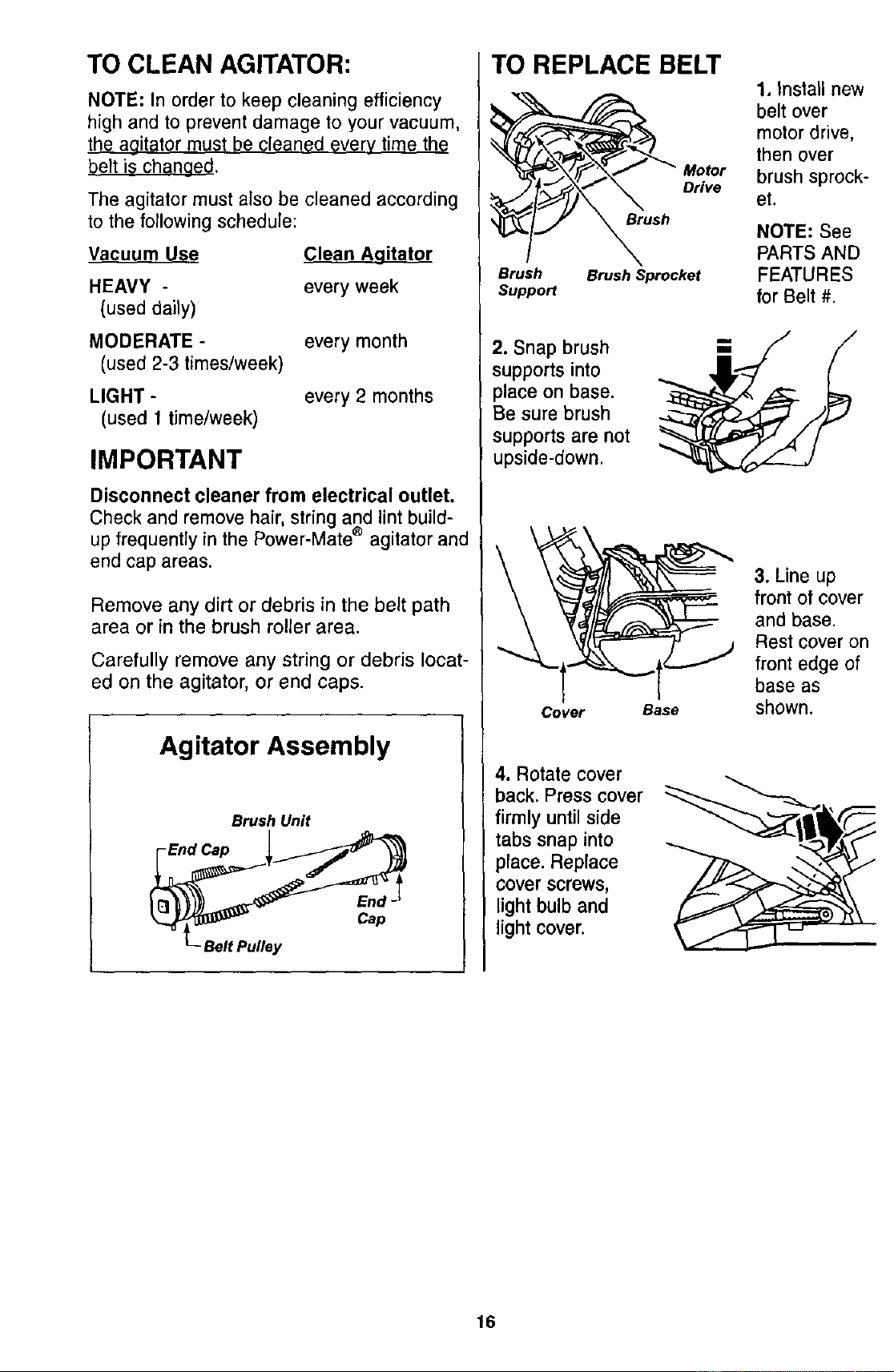
TO CLEAN AGITATOR:
NOTE: In order to keep cleaning efficiency
high end to prevent damage to your vacuum,
the agitator must be cleaned every time th_
belt is changed.
The agitator must also be cleaned according
to the following schedule:
Vacuum Use
HEAVY -
(used daily)
MODERATE -
(used 2-3 times/week)
LIGHT -
(used 1 time/week)
Clean Agitator
every week
every month
every 2 months
IMPORTANT
Disconnect cleaner from electrical outlet.
Check and remove hair, string and lint build-
up frequently in the Power-Mate ® agitator and
end cap areas.
Remove any dirt or debris in the belt path
area or in the brush roller area.
Carefully remove any string or debris locat-
ed on the agitator, or end caps.
Agitator Assembly
Brush Unit
End Cap
L- Belt Pulley
TO REPLACE BELT
MoOr
Drive
Brush
Brush Brush Sprocket
Suppo_
2. Snap brush --
supports into
)lace on base.
Be sure brush
supports are not
upside-down.
Cover Base
4. Rotate cover
back. Press cover
firmly until side
tabs snap into
place. Replace
cover screws,
light bulb and
light cover,
1. Install new
belt over
motor drive,
then over
brush sprock-
et.
NOTE: See
PARTS AND
FEATURES
for Belt #.
3. Line up
front of cover
and base.
Rest cover on
front edge of
base as
shown.
16
Electrical Shock Or Personal Injury
Hazard
Disconnect electrical supply before
servicing or cleaning the unit.
Failure to do so could result in elec-
trical shock or personal injury from
cleaner suddenly starting.
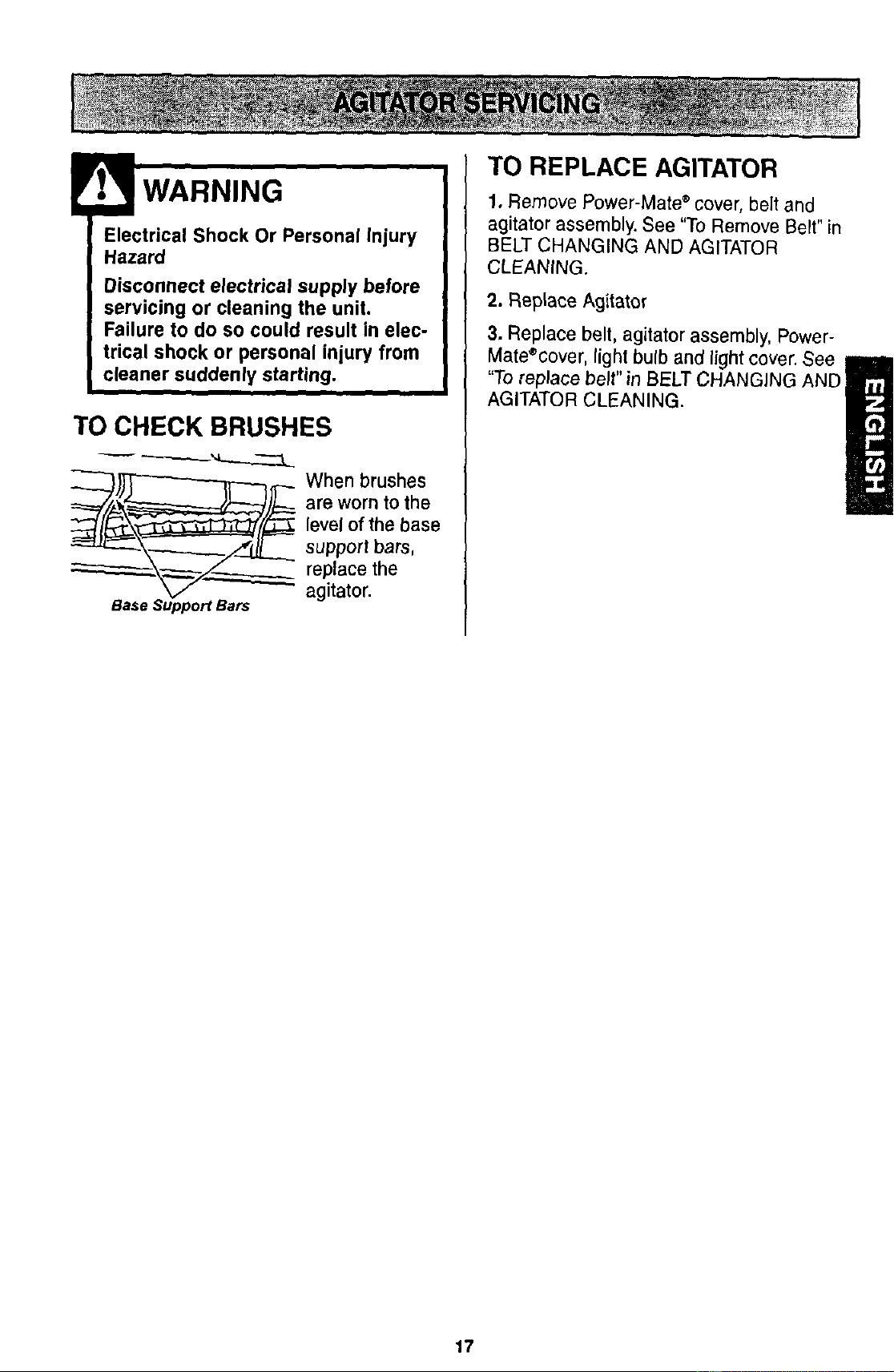
TO CHECK BRUSHES
When brushes
are worn to the
level of the base
support bars,
replace the
agitator.
TO REPLACE AGITATOR
1. Remove Power-Mate ®cover, belt and
agitator assembly. See "To Remove Belt" in
BELT CHANGING AND AGITATOR
CLEANING.
2. Replace Agitator
3. Replace belt, agitator assembly, Power-
Mate®cover, light bulb and light cover. See
"To replace belt" in BELT CHANGING AND
H
AGITATOR CLEANING.
17
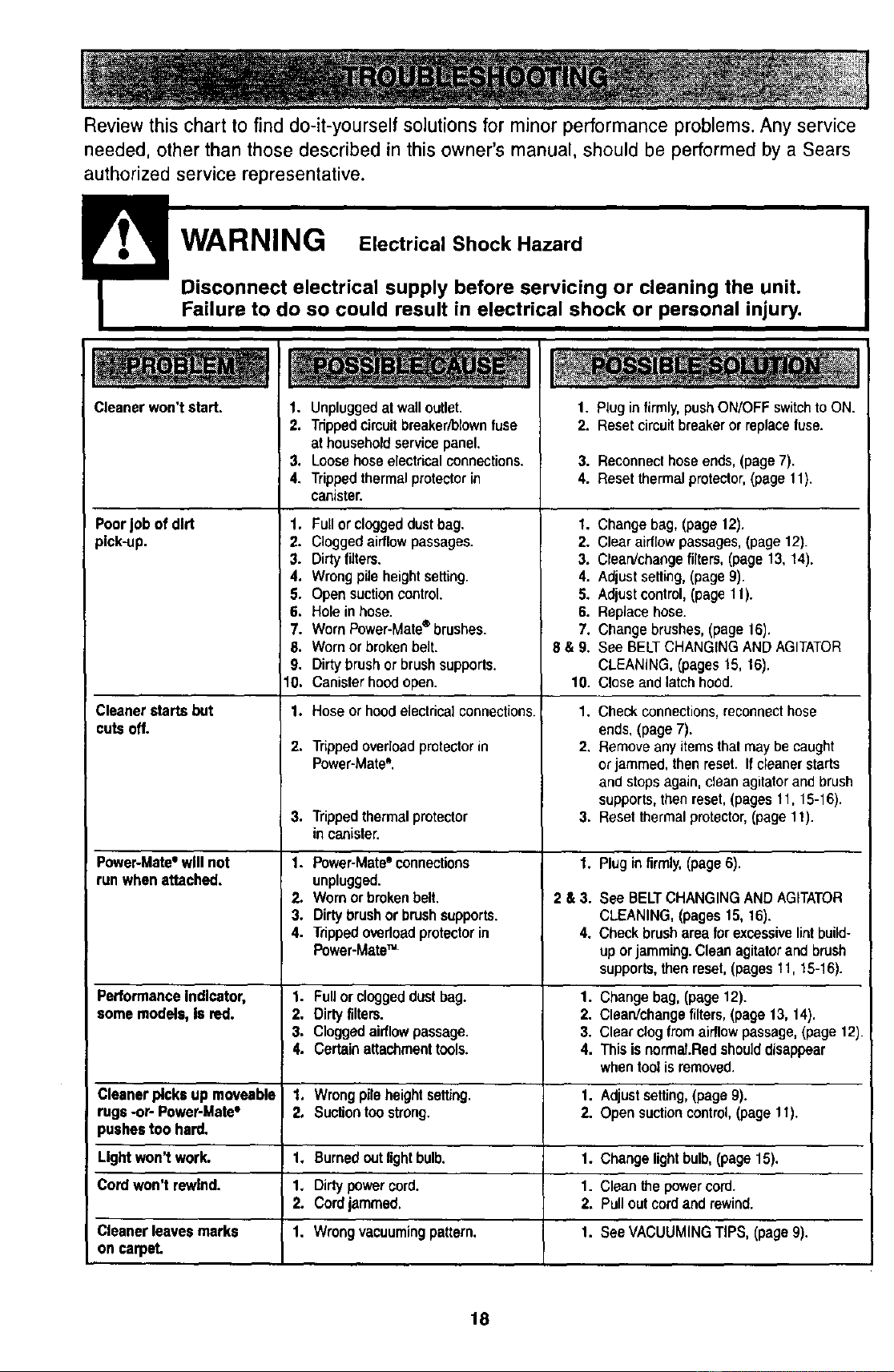
Review this chart to find do-it-yourself solutions for minor performance problems. Any service
needed, other than those described in this owner's manual, should be performed by a Sears
authorized service representative.
!
Disconnect electrical supply before servicing or cleaning the unit.
Failure to do so could result in electrical shock or personal injury,
Cleaner won't start.
Poorjob of dirt
pick-up.
Cleaner startsbut
cuts off.
1. Unpluggedatwalloutlet.
2. Tdppedcimuitbreaker/blownfuse
at householdservice panel.
3. Loosehoseelectricalconnections.
4. Trippedthermalprotectorin
canister.
1. Fullor cloggeddust bag.
2. Cloggedairflow passages.
3. Dirty filters.
4. Wrong pile height setting.
5. Open suction control.
6. Hole in hose.
7. Worn Power-Mate®brushes.
6. Wornor broken belt.
9. Dirty brush or brushsupports.
10. Canister hood open.
1. Hose or hoodelectdcal connections.
2.
Tdppedoverload protector in
Power-Mate".
1. Plug infirmly, pushON/OFF switchto ON.
2. Reset circuit breaker or replacefuse.
3. Reconnecthose ends,(page 7).
4. Reset thermalprotector,(page11).
1. Change bag, (page 12).
2. Clear airflow passages,(page 12).
3. Ctsan/changefilters, (page 13, 14).
4. Adjust setting,(page 9).
5. Adjust control, (page 11).
6. Replace hose.
7. Change brushes, (page 16).
8 & 9. See BELT CHANGINGAND AGITATOR
CLEANING, (pages 15, 16).
10. Close and latch hood.
1. Check connections,reconnecthose
ends, (page 7).
2. Remove any itemsthat maybe caught
or jammed, thenreset. If cleanerstarts
and stops again, cleanagitator and brush
supports,then reset, (pages 11, 15-16).
3. Reset thermal protector,(page 11).3. Trippedthermal protector
in canister.
Power-Mate=will not 1. Power-Matee connections 1. Plug in firmly, (page 6).
runwhen attached, unplugged.
2. Wornorbroken belt. 2 & 3. See BELTCHANGINGAND AGITATOR
3. Dirtybrush orbrushsupports. CLEANING,(pages15, 16).
4. Trippedovedoedprotectorin 4. Checkbrush area forexcessivelintbuild-
Power-Mate" uporjamming.Cleanagitatorand brush
supports,thenreset,(pages11, 15-16).
PerformanceIndicator, 1. Fullor cloggeddustbag. 1. Changebag, (page12).
some models, Is red. 2. Dirtyfilters. 2. Clean/change filters, (page13, 14).
3. Cloggedaidlowpassage. 3. Clearclogfromairflowpassage,(page12).
4. Certainattachmenttools. 4. Thisis normal.Redshoulddisappear
whentoolisremoved.
Cleaner Picksup moveable 1. Wrongpileheightseffiog. 1. Adjustsetting,(page9).
rugs -or- Power-Mata° 2. Suctiontoostrong. 2. Opensuctioncontrol,(page11).
pushestoo hard.
Lightwon't work. 1. Burnedoutlightbulb. 1. Changelightbulb,(page15).
Cordwon't rowlnd. 1. Dirtypowercord. 1. Cleanthe powercord.
2. Cordjammed. 2. Pulloutcordand rewind.
Cleaner leavesmarks 1. Wrongvacuumingpattern. 1. SeeVACUUMINGTIPS, (page 9).
on carpet.
18
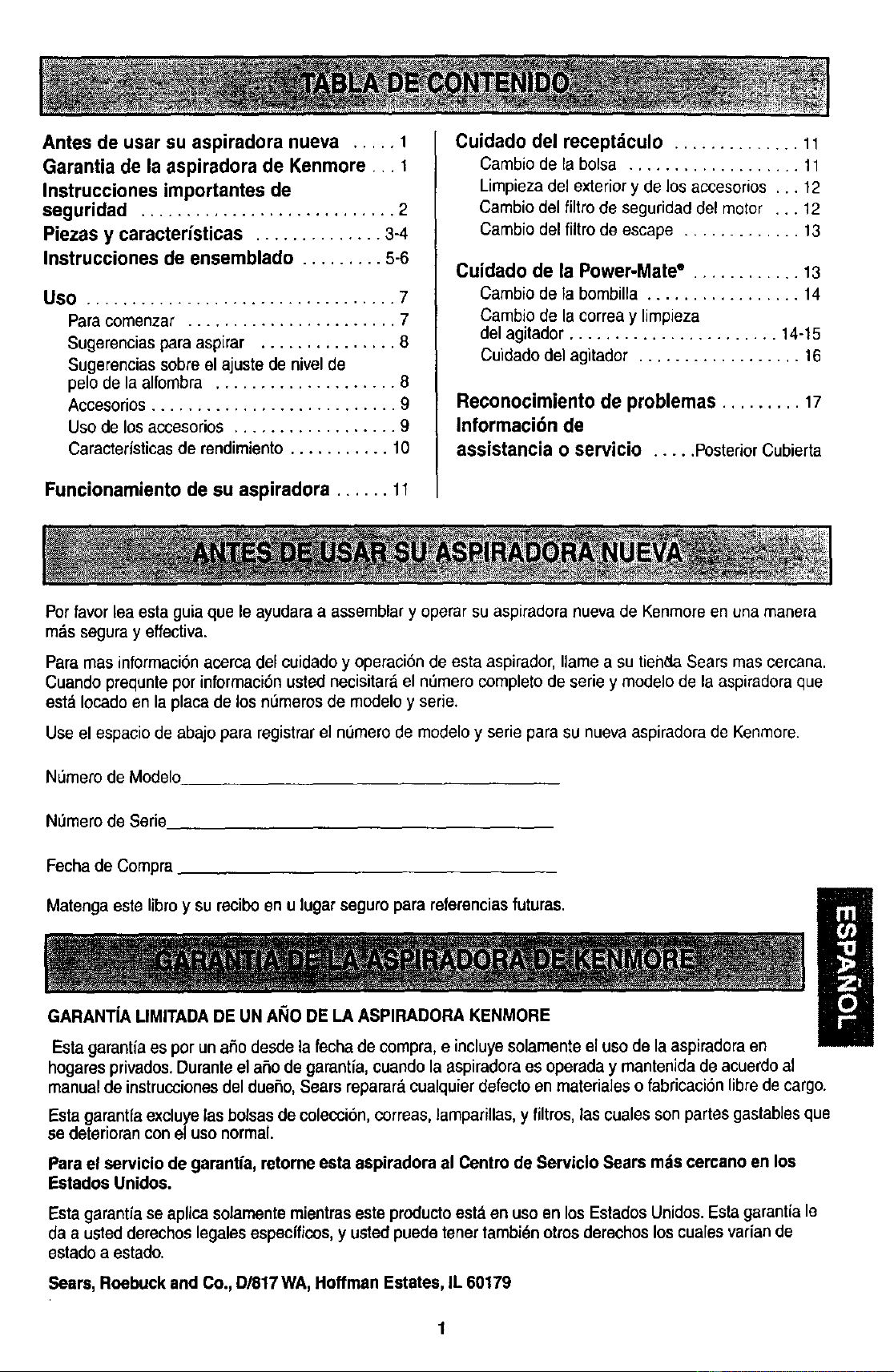
Antesdeusarsuaspiradoranueva ..... 1
Garantia de la aspiradora de Kenmore ... 1
Instrucciones importantes de
seguridad ............................ 2
Piezas y caractedsticas .............. 3-4
Instrucciones de ensemblado ......... 5-6
Use .................................. 7
Para comenzar ....................... 7
Sugerencias para aspirar ............... 8
Sugerencias sobreel ajuste de nivel de
pelo de la alfombra .................... 8
Accesorios ........................... 9
Uso de los accesorios .................. 9
Caracteristicas de rendimiento ........... 10
Funcionamiento de su aspiradora ...... 11
Cuidado del receptdculo .............. 11
Cambio de la bolsa ................... 11
Limpiezadel exteriory de los accesorios... 12
Cambio del filtrode seguridaddel motor ... 12
Cambio del filtro de escape ............. 13
Cuidado de la Power-Mate" ............ 13
Cambio de la bombilla ................. 14
Cambio de la correa y limpieza
del agitador ....................... 14-15
Cuidado del agitador .................. 16
Reconocimiento de problemas ......... 17
Informaci6n de
assistancia o servicio ..... PosteriorCubierta
Por favor lea esta guia que le ayudara a assemblar y operar su aspiradora nuevade Kenmore en una manera
mds segura y effectiva.
Para mas informaci6n acerca del cuidadoy operaci6n de esta aspirador,Ilamea su tienda Sears mas cercana.
Cuando prequnte por informaci6n usted necisitar;_el nL_merocomplete de serie y modelo de la aspiradora que
esta Iocado en la placa de los n_meros de modelo y serie.
Use el espacio de abajopara registrar el nOmerode modelo y serie para su nueva aspiradora de Kenmore.
NL_merede Modelo
NOmerode Serie
Fechade Compra
m
Matengaeste libro y surecibo en u lugar seguropara referencias futuras. B
U
GARANTiA LIMITADA DE UN AI;iO DELA ASPIRADORA KENMORE
Estagarantiaes porunaSodesdela fecha de compra,e incluyesolamenteel usode laaspiradora en
hogares privados.Duranteel aSode garantfa,cuandolaaspiradoraes operaday mantenida de acuerdoal
manualde instruccionesdel duefio,Sears reparar_cualquierdefectoenmateria]es o fabricaci6n libredecargo.
Esta garantfa excluye las bolsas de colecci6n,correas, lamparillas, y filtros, las cualesson partes gastables que
se deterioran con eluso normal.
Parael servlclo de gamntfa, retorneesta aspiradora al Centro de Serviclo Sears mds cereanoen los
Estados Unidoa.
Esta garantfa se aplicasolamente mientras este producto est._en use en los Estados Unidos.Esta garantia le
daa ustedderechoslegalesespecificos,y ustedpuedetenertambidnotrosderechosloscualesvariande
estado a estado.
Sears, Roebuckand Co., D/817WA,Hoffman Estates,IL 60179
ADVERTENCIA
Su seguridad es muy importante para nosotros. Para reducir el riesgode incendio,choque
el_ctrico,lesi6n corporal o dahos al utilizar su aspiradora, actBede acuerdocon precauciones
bdsicasde seguridad,entre elias:
Leaestemanualantesde armaro utilizarsuaspira-
dora.
Usesuaspiradera0nicamenteenla formadescfita
enestemanual.Useunicamenteconaccesorios
recomendadesper Sears.
Parareducirel riesgode choqueel6ctfico,no use
suaspiraderaalaira libranisobresuperficiesmoja-
das.
Desconecteel cord6nel_ctricoantesde componer
olimpiarel dreadelcepillo.De Iocontrafio,elcepillo
_odfiaarrancardeform imprevistaopodfia
)roducirseunchoqueeldctrico.
Siempredebeapagarlaaspiradoraantesde
conectaro desconectarlarnanguerade la Power-
Mate".
Siempredebe apagarsuaspiraderaantesde des-
conectarla.
No desconectelaaspiradoratirandodel cord6n
electfico. Paradesconectarla,haleel enchufe,no el
cord6n.
Sujeteel enchufecon la manoal enrollarel cord6n
el6ctrico.Paradesconectarla,haleen enchufe,no el
cord6n.
No uselaaspiradorasi el cord6no el enchufeestd
dafiado.Si la aspiradoranoest&funcionandoade-
cuadamenteosi se ha dejadecaer,est', daflada, se
ha dejadoexpuestaa la intemperieo se ha dejado
caer enagua, devu_lvalaa unCentrode servicio de
Sears.
No haleni transpertelaaspiradoraper el cord6n;no
use el cord6ncomo mango;no cierre puertassobre
el cord6n;no haleel cord6nsobra rebordesagudos
ni esquinas.Nopase laaspiraderasobre el cord6n.
Mantengael cordenalejadode superficiescalientes.
No abandonela aspiradoracuandoest_ conectada.
Descon_ctelacuandono la est_usando y antes de
darleservicio.
No permitaque seautilizadacomojuguete.Se
requiemtenermayorcuidadecuandosea utilizada
enlapmximidadde nifioso per nifios.
No toquela aspiradoranielenchufeconlasrnanos
mojadas.
No use laaspiraderasi la mangueraest', rota.La
mangueracontienealambreselectricos.Cdmbielasi
esta rotao desgastada.Eviteaspirar objetos
agudes.
No coloqueobjetosen lasaberturas.
No utilicela aspiradorasi algunaaberturaest&blo-
queada;mant_ngalalibrade pelvo,pelusa,cabellos
y cualquieracosaque podriadisminuirel flujo de
aire.
Mantengaelcabello,ropasuelta, dedosy todaslas
partesdelcuerpealejadosdelasaberturasy piezas
mec_nicas.
No uselaaspiradorasintenerinstaladalabolsa
parapolvo y/o losfiltros.
Cambiesiemprela bolsaparapolvodespu_sde
aspirarlimpiadoresde alfombraso desoderantes,
talcos y pelvosfinos.Estosproductosatascanla
bolsa,reducenel flujo deaire y puedencausarque
_stase rompa.Si no cambiala bolsapodrfa ocasio-
nar dafiopermanentea laaspiradora.
No use la aspiradoraparalevantarobjetosagudos,
juguetespequefios,alfileres,sujetapapeles,eta
Podriandafiar la aspiraderao la bolsapara polvo.
No levanteningunacosaque seestequemandoo
emitiendohumo,como cigarrillos,cerilloso cenizas
calientes.
No uselaaspiradoraparaaspirarIfquidesinflama-
bles ocombustibles(gasoUna,Ifquidosparalim-
pieza,perfumes,etc.) ni la useen lugaresdende
estos pedrianestarpresentes.Losvaperesde estas
sustanciaspuedencrear un peligrode incendioo
explosi6n.
Tenga cuidadoespecialal utilizarla aspiradoraen
escalones.No tacoloque sobresillas,mesas,etc.
Mant6ngalaen el piso.
Ustedes responsablede asegurarquesu aspira-
dorano sea utilizadaper ningunapersonaque no
pueda manejarlacorrectamente.
No opere sin el filtrode escape ni la cubiertadel ill-
tro de escapeinstalades.
GUARDE ESTAS INSTRUCClONES
El armadoy uso segurode su aspiradorason su responsabilidad.Estaaspiradora ha sido disefiada
exclusivamentepara usodom_stico.Laaspiradoradeber_,almacenarseen unlugarsecoy onelinterior.
LeaesteManualdel propiotariodetenidamente,puescontieneinformaci6nimportantesobre seguridady
uso.Estaquiacontieneinformaci6nsobreseguridaddebajode simbolosde advertienciacoidado. Por
favorpongaatenci6nespeciala estasinstruccionesdadas. Advertencla:Esteinformaei6nlealertaracon
elpoligrode fuego, choqueseloctricos,quemadasy lesiones.Cuidado: Esteinformaci6nlealertaraa
peli_lroscomolesionos }1dafios de propiedad.
2
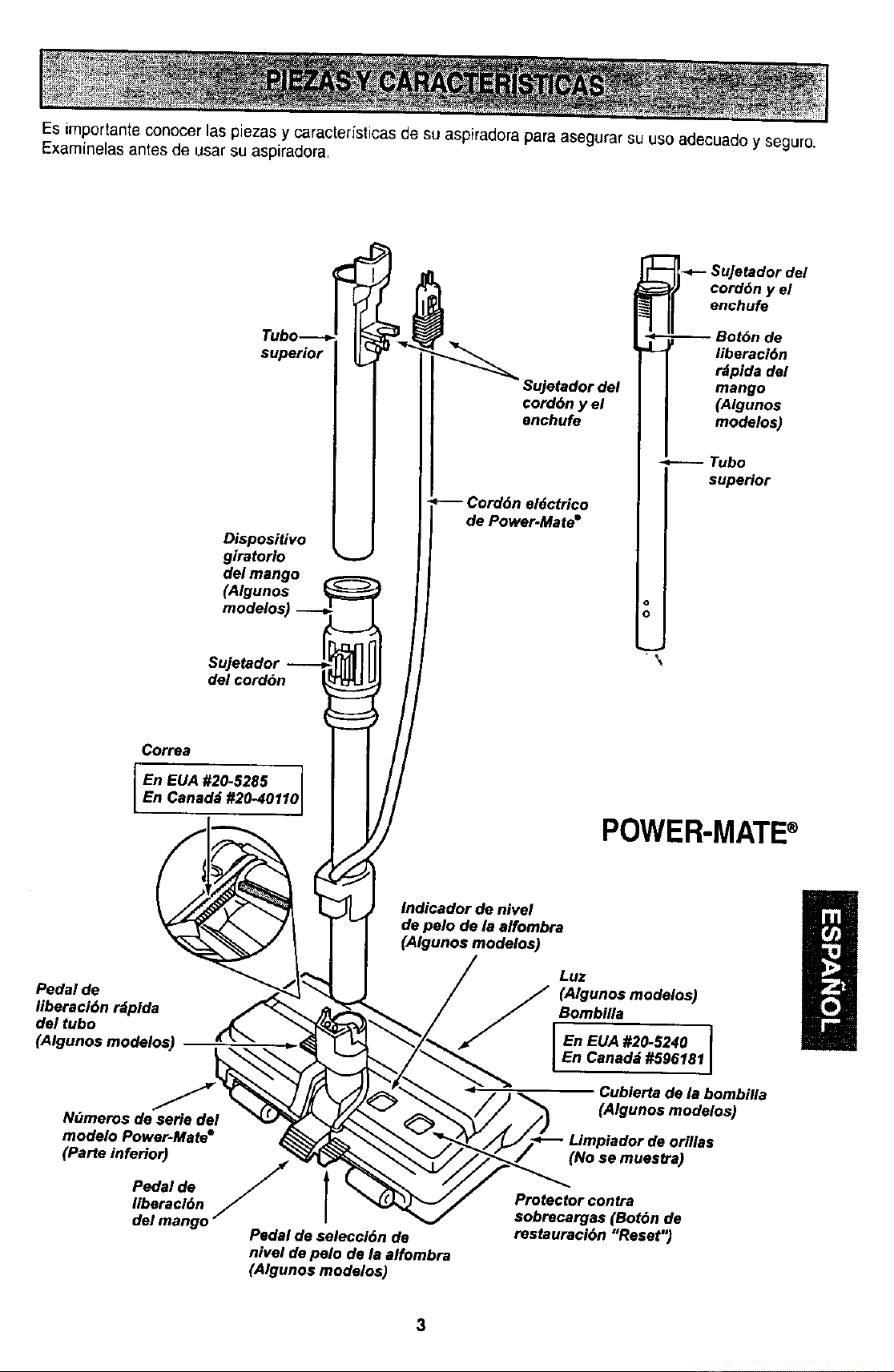
Es importante conocer Laspiezas y ¢.,aracter(sticasde su aspiradora para asegurar su uso adecuadoy seguro.
Examinelas antes de usar su aspiradora.
superior
Dispositivo
giratorlo
del mango
(Algunos
Sujetador
del cord6n
Su]etador del
cord6n y el
enchufe
Cord6n el_ctrtco
de Power.Mate =
-_-- uJetador del
cord6n y el
enchufe
I superior
I
°1
o
Correa
I En EUA #20-5285
En Canad;J #20-40110
POWER-MATE®
Indicador de nivel
de pelo de la affombra
(Algunos modelos)
Pedal de
Iiberaci6n rdplda
del tubo
N_meros de serie del
modelo Power-Mate e
(Paste inferior)
Pedal de /
liberacl6n
del mango
Pedal de seleccl6n de
nivel de pelo de la alfombra
(Algunos modelos)
Luz
_ A_unos modelo_
Bomb_a
I En EUA #2_5240
En Canadd#S96181
Cubierta de le bombilla
(Algunos modelos)
(No se muestra)
Protector €ontra
sobrecargas (Bot6n de
restauraci6n "Reset")
3
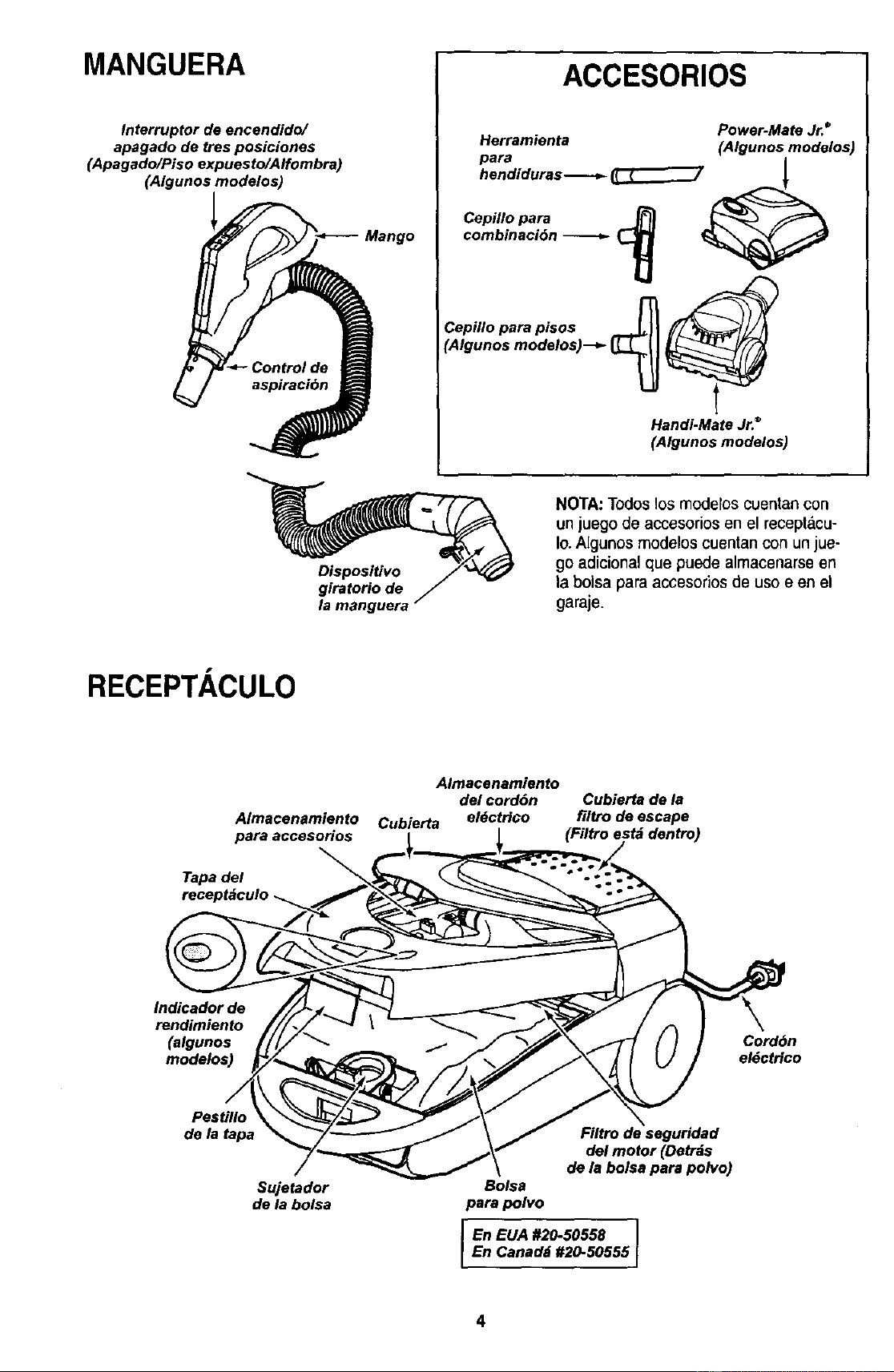
MANGUERA
Interruptor de encendido/
apagado de tres posiciones
(Apagado/Piso expuesto/Alfombra)
(Algunos modelos)
ACCESORIOS
Herramienta Power-Mate Jr.*
pare (Algunos modalos)
combinaci6n _ _
Cepillo pare pisos -_11
CA,ounosmo o,os
Handi-Mate Jr.®
(Algunos modelos)
Dispositivo
g{ratorio de
la manguera
NOTA:To(loslos modelos cuentan con
unjuego de accesoriosen el receptdcu.
Io.Algunosmodelos cuentanconunjue-
goadicionalque puedealmacenarseen
la bolsaparaaccesoriosde uso e en el
garaje.
RECEPTACULO
Almacenamiento
para accesorio$
Tape del
receptdculo
Almacenamiento
del cord6n Cubierta de/a
Cubierta el6ctrlco filtro de escape
(Filtro est_ dentro)
Indicador de
rendimiento
(algunos
modelos)
Cordbn
el6ctrfco
Pestillo
de la tapa
Sujetador
de la bolsa
Ffltro de seguridad
del motor (Detrds
de la boise pare polvo)
Boise
pare polvo
I En EUA #20-50558
En Caned6 #20-50555
ADVERTENClA
Peligrode choqueeldctrico
No conecte la aspiradora hasta que termine
de armada. DeIo contrario podrfa causar
un choqueeldctrico o lesi6n corporal.
Antes de armar la aspiradora, chequeela LISTA
DE EMBALAJE en la cubierta separada de la Lista
de Partes para Reparacion. Use esta lista para veri-
ficar que ha recibido todas las componentes de su
nueva aspiradora Kenmore.
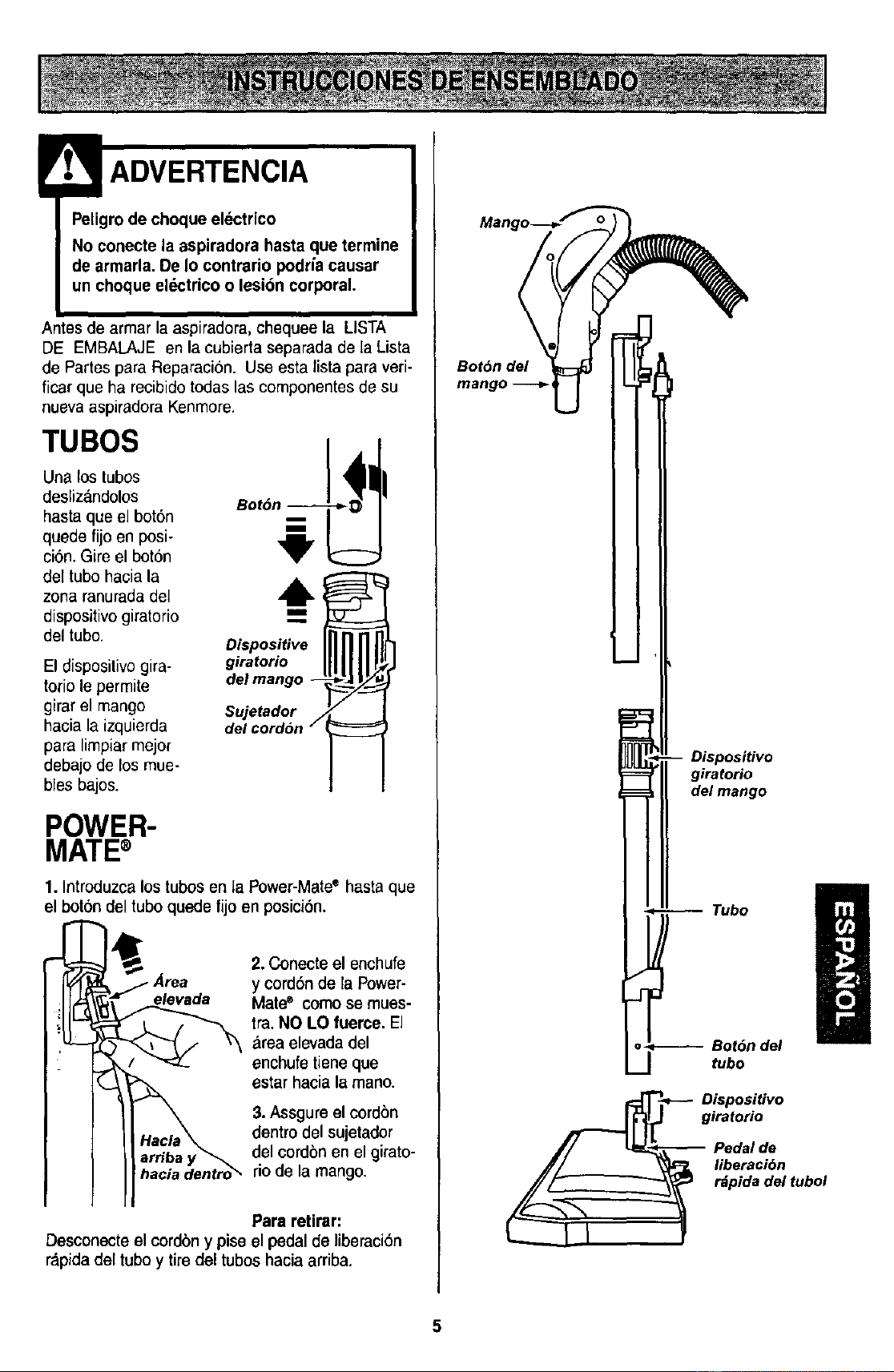
TUBOS
Una los tubos
desliz_ndolos
hasta que el bot6n
quede fijo en posi-
ci6n. Gire el bot6n
del tubo haciala
zona ranuradadel
dispositivo giratorio
del tubo.
El dispositivo gira-
torio le permite
girar el mango
hacia la izquierda
para limpiar mejor
debajo de losmue-
bles bajos.
!
Dispositive
giratorio
delmango --
Sujetador
del cordSn /
POWER-
MATE®
1. Introduzca lostubos en la Power-Matee hasta que
el boron cleltubo quede fijo en posici6n.
Area
elevada
hacia dentro_"
2. Conecteel enchufe
y cord6nde la Power-
Mate" comose mues-
tra.NO LO fuerce. El
area elevadadel
enchufetieneque
estarhaciala mano.
3.Assgure el cordon
dontro del sujetador
del cordbnen el girato-
rio de la mango.
Para retirar:
Desconecte el cordbny piseel pedalde liberacibn
r_pidadel tuboy tiredel tuboshaciaarriba.
Dispositivo
giratorio
del mango
Dispositivo
giratorio
Pedal de
liberaci6n
r_pida del tubol
5
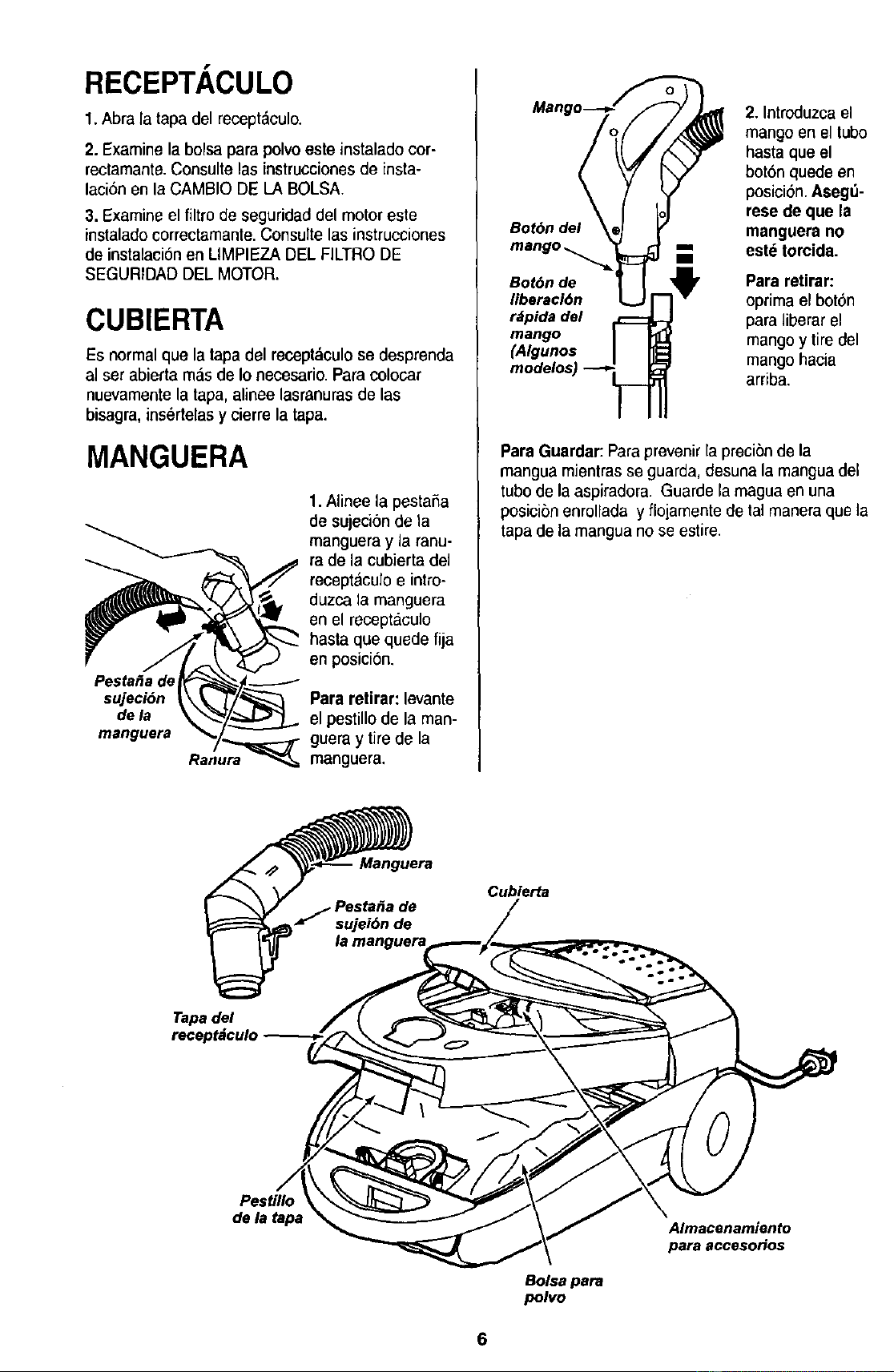
RECEPTACULO
1. Abra la tapa del recept&culo.
2. Examine la bolsa para polvo este instalado cor-
rectamante.Consulte las instruccionesde insta-
laci6n en la CAMBIO DE LA BOLSA.
3. Examineel filtro de seguridad del motor este
instaladocorrectamante.Consulte las instrucciones
de instalaci6n en LIMPIEZA DEL FILTRODE
SEGURIDAD DEL MOTOR.
CUBIERTA
Es normalque la tapa del recept&culose desprenda
al ser abierta m&sde Io necesario.Para colocar
nuevamente la tapa, alinee lasranurasde las
bisagra, ins_rtelasy cierre la tapa.
MANGUERA
1.Alinee la pestaSa
de sujeci6n de la
_ anguera y la ranu-
ra de la cubierta del
receptaculo e intro-
duzca la manguera
en el receptaculo
r J/ _._ hasta que quede fijaen poslc_on.
Pes!a_a de_ _-._.--_
suJeci6n _\ e/_ Pararetirar: levante
dela _ _ el pestillode la man-
gueray tirede la
manguera Ranu_ manguera.
2. Introduzca el
mango en el tubo
hasta que el
bot6n quede en
posicion. Aseg_-
rese de que la
Bot6n del manguera no
mango _ m est_ torcida.
Bot6n de Para retirar:
liberaci6n optima el boton
rdpidadel paraliberar el
mango mangoy tiredel
(A/gunos mangohacia
arriba,
ParaGuardar:Paraprevenirla preci6n de la
mangua mientras se guarda,desuna la manguadel
tube de la aspiradora. Guarde la maguaen una
posicibn enrollada y flojamente de ta] manera que la
tapa de lamangua no se estire.
Manguera
Cubierta
Tapa del
Pestillo
de la tape
Bolsa para
polvo
Almacenamiento
para accesoHos
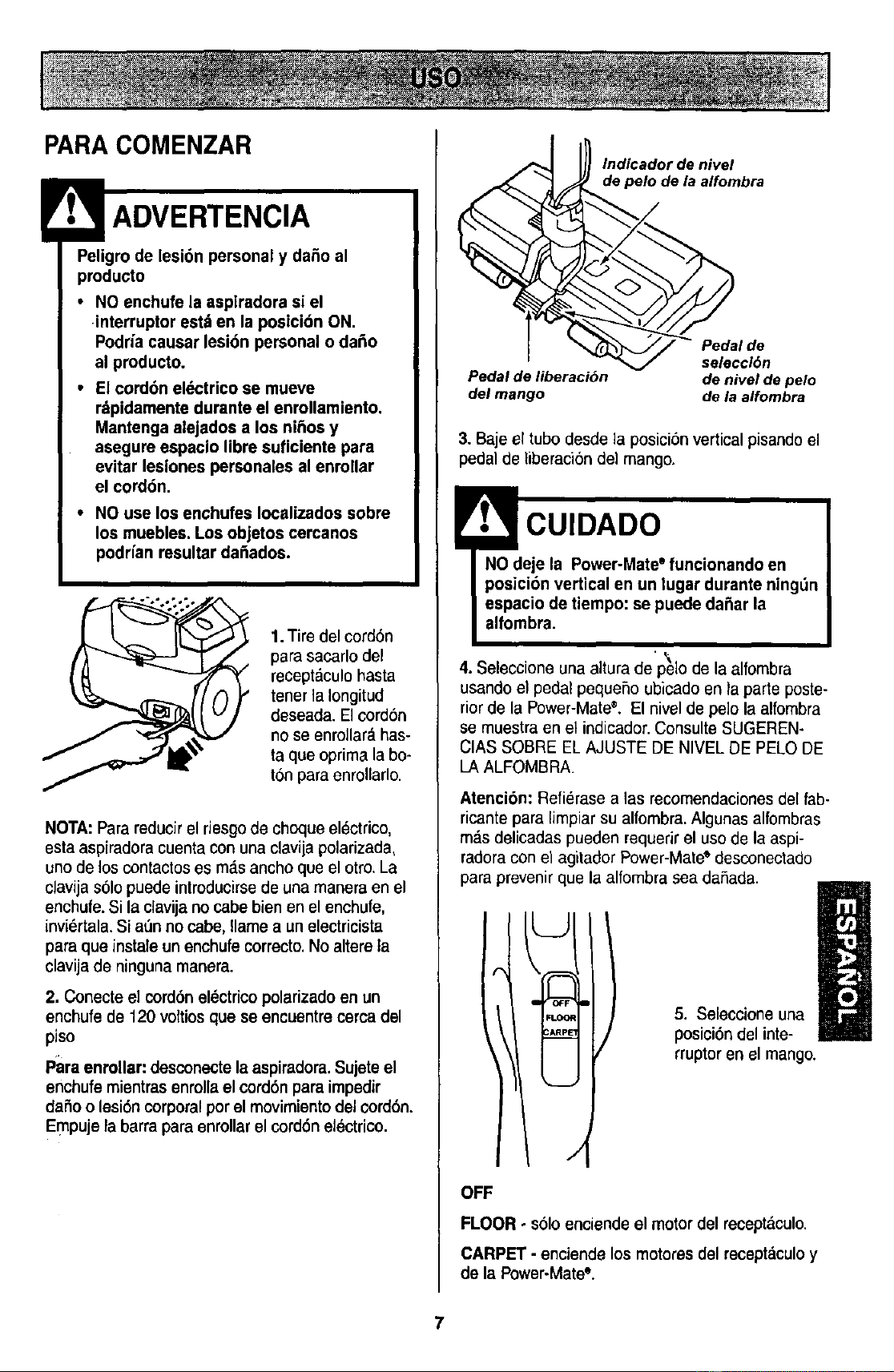
PARACOMENZAR
_eodgrotdoe lesi6n personal y daho al
• NO enchufe la aspiradora si el
interruptor estden la posicion ON.
Podria causar lesi6n personal o daho
al producto.
• El cord6n el_ctrico se mueve
rdpidamentedurante el enrollamiento.
Mantenga alejados a los nihos y
asegureespacio libre suficiente para
evitar lesiones personales al enrollar
el cord6n,
• NO use los enchufes Iocalizadossobre
los muebles. Los objetos cercanos
podHanresultar da_ados.
1.Tire del cord6n
para sacarlo del
receptdculo hasta
tenet la Iongitud
deseada. Elcord6n
no se enrollara has-
ta que oprima la bo-
ton paraenrollarlo.
NOTA:Para reducirel riesgo de choque electrico,
esta aspiradoracuenta con una clavija polarizada,
uno de los contactos es mds ancho que el otto. La
clavija s61opuede introducirse de una manera en el
enchufe.Si la clavija no cabe bien en el enchufe,
inviertala. Si at_nno cabe, flamea un electricista
para que instale un enchufe correcto.No altere ta
clavija de ninguna manera.
2, Conecte el cord6n elSctricopolarizado en un
enchufe de 120 voftios que seencuentre cercadel
piso
p_iraenrollar: desconecte la aspiradora.Sujete el
enchufe mientras enrollael cord6n para impedir
da5o o lesi6n corporal per el movimientodel (x)rd6n.
EmPuje la barra para enrollar el cord6n electrico.
lndicador de nivel
Io de la alfombra
• V selecci6n
Pedal deliberaci6n denivelde pelo
del mango dela alfombra
3. Baje el tubo desde la posici6n vertical pisandoel
pedal de liberaci6n del mango.
! CUIDADO
NO deje la Power-Mate° funcionandoen
posici6n verticalen un lugar durante ning_n
espacio detiempo: se puede dafiar la
alfombra.
.\
4. Seleccione una altura de pelo de la alfombra
usando el pedal pequeSoubicado en la parte poste-
riorde la Power-Mate'L El nivel de pe]o la alfombra
se muestra en el indicador.Consulte SUGEREN-
CIAS SOBRE EL AJUSTE DE NIVEL DE PELO DE
LA ALFOMBRA.
Atenci6n: Refi_rase alas recomendacionesde[ fab-
ricante para limpiar su alfombra.Algunas alfombras
m._sdelicadas pueden requerir el uso de la aspi-
radoracon el agitador Power-Mate"desconectado
para prevenir que la alfombra sea da,Sada.
FLC,
5. Seleccione una
posici6n del inte-
rruptor en el mango.
OFF
FLOOR - s61oenciende el motordel recept._culo.
CARPET - enciendelos motoresdel receptdculoy
de la Power-Mate".
7
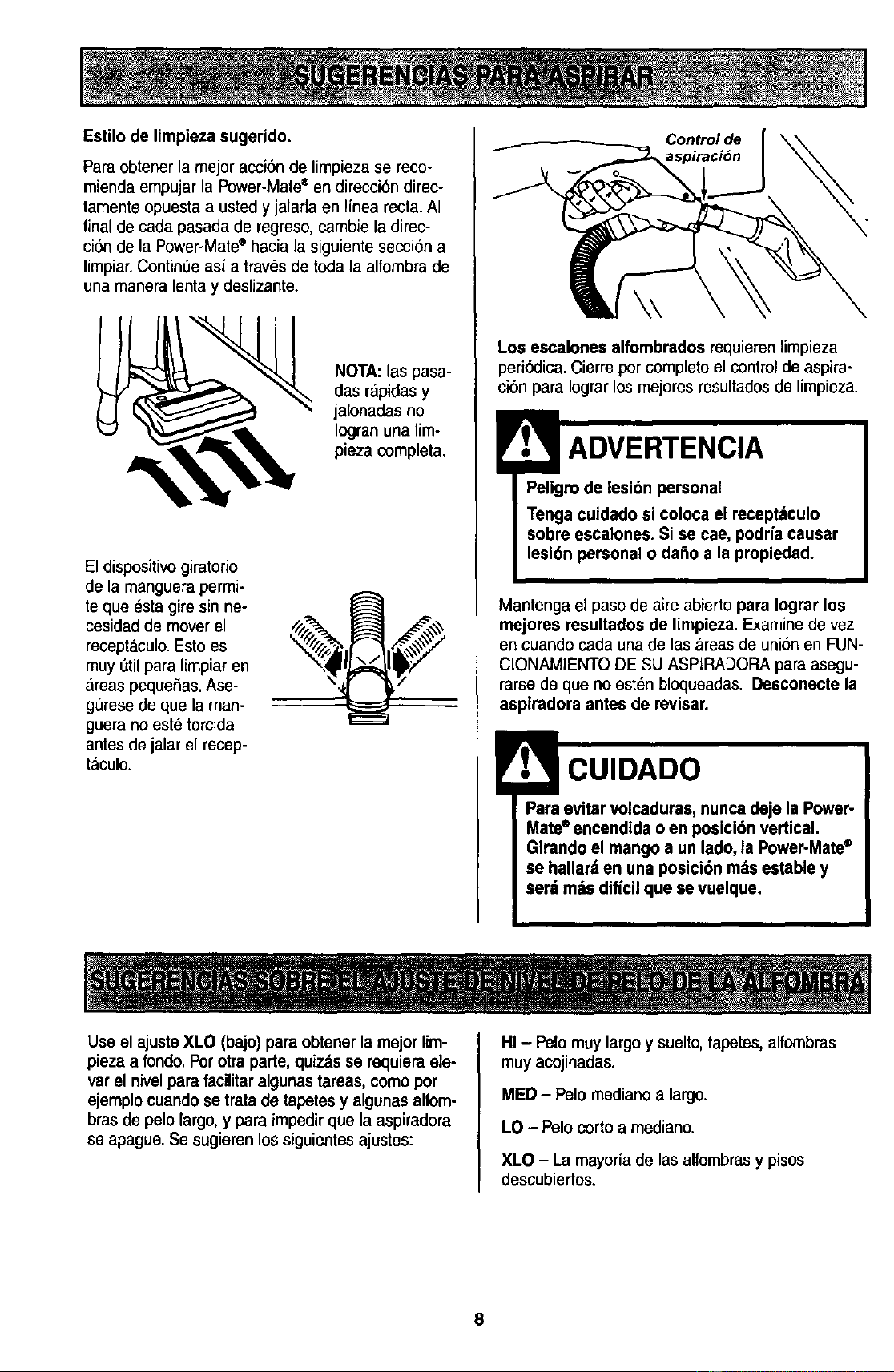
Estilo de limpiezasugerido.
Para obtener lamejor acci6n de limpiezase reco-
mienda empujar la Power-Mate®en direcci6n direc-
tamente opuesta a usted y jalafla en linea recta. AI
final de cada pasada de regreso,cambie la direc-
ci6n de la Power-Male® hacia la siguiente seccion a
limpiar.Contineeasi a traves de toda la alfombra de
una maneralenta y deslizante.
NOTA:las pasa-
das rapidas y
jalonadas no
Icgran una lim-
pieza completa.
El dispositivogiratofio
de la manguera permio
te que _sta gire sin ne-
cesidad de mover el
receptaculo.Esto es
muy etil para limpiar en
areas pequefias. Ase-
g6rese de que la man-
guera no est_ torcida
antes de jalar el recep-
taculo.
Control de
Los escalonesalfombrados requierenlimpieza
periSdica.Cierre porcompletoel controlde aspira-
ci6n paraIograrlosmejoresresultadosde limpieza.
ADVERTENCIA
Peligro de lesidn personal
Tenga cuidadosi coloca el recept_culo
sobreescalones. Si se cae, podriacausar
lesi6n personalo daSo a la propiedad.
Mantenga el paso de aire abierto para Iograrlos
mejores resultadosde limpieza.Examinede vez
en cuando cadaunade las_.reasde unionen FUN-
CIONAMIENTO DE SU ASPtRADORAparaasegu-
rarsode queno estdnbloqueadas.Deaconecte la
aaplradora antesde revisar.
CUIDADO
Paraevitar volcaduras,nuncadeje la Power-
Mate®encendida oen posicl6n vertical.
Girandoel mangoa un lado, la Power-Mate®
se hallarrten una posici6n rods establey
serd tortsdiffcilque se vuelque.
Use el ajuste XLO (bajo) para obtenerla mejorlim-
pieza a rondo.Pot otraparte, quizds se requiemele-
varelnivelparafacilitar algunastareas,comepor
ejemplocuandose tratade tapetesy algunasalfom-
bras de pelolargo,y paraimpedirque laaspiradora
seapague.Se sugierenlossiguientesajustes:
HI - Polo muylargo y suelto,tapetes,alfombras
muy acojinadas.
MED - Polo mediano a largo.
LO - Polo corto a mediano.
XLO - La mayoria de las alfombras y pisos
descubiertos.
8
! CUIDADO
NO instale ni retire el mango ni los tubos
cuando la aspiradora est_ encendida.
Esto podria causar chispas y dahar los
¢ontactos eldctricos.
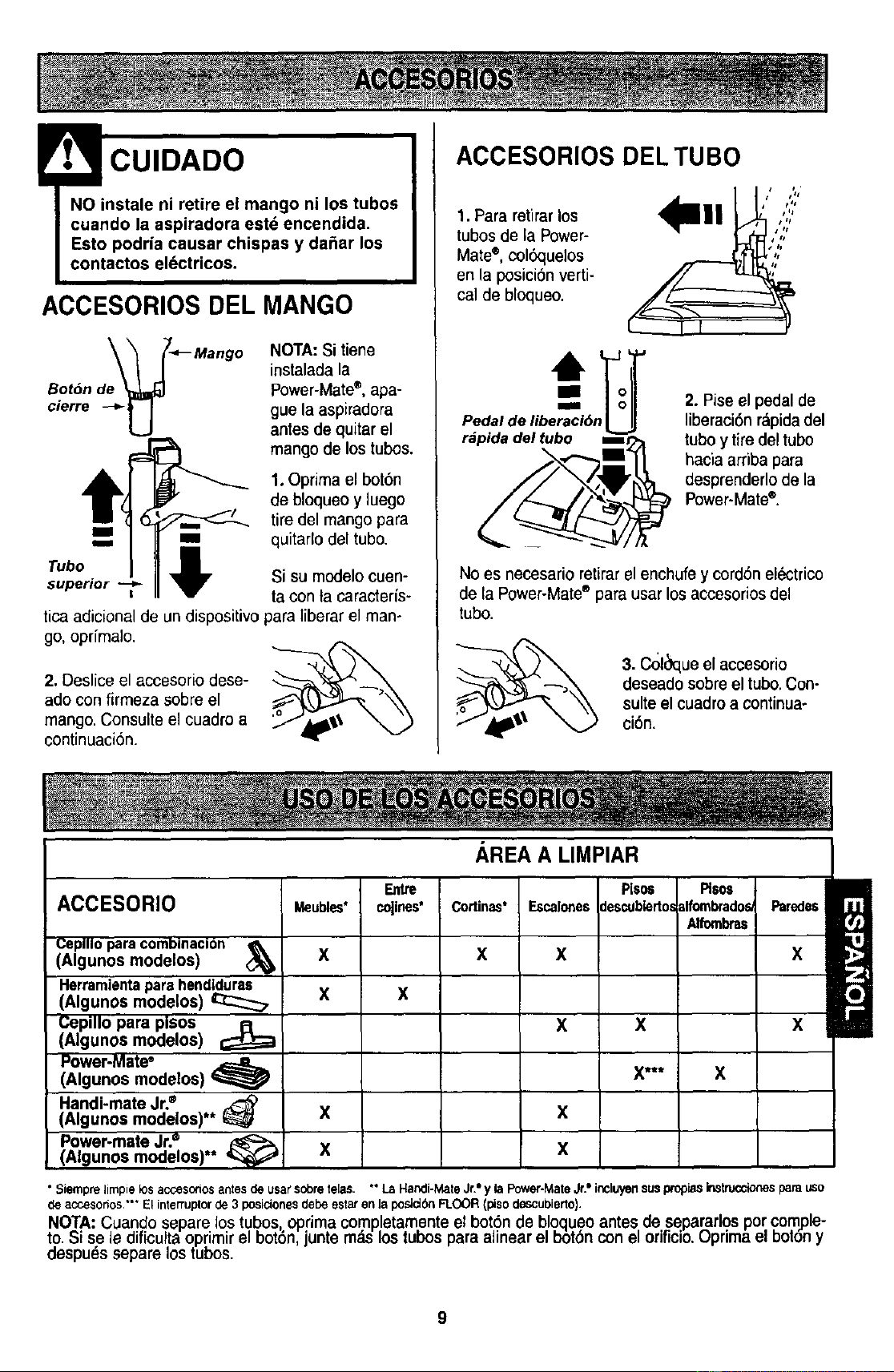
ACCESORIOS DEL MANGO
Bot6n de
cierre
NOTA:Si tiene
instaladala
Power-Mate®,apa-
gue la aspiradora
antesdequitarel
mangode lostubos.
m
Tubo
superior --_
!
1.Oprima el bot6n
de bloqueo y luego
tire del mango para
me quitarlo del tubo.
'q_ Si su modelo cuen-
ta con ta caracteris-
tica adicional de un dispositivo paraliberar el man-
go, oprfmalo.
(',%.
2. Deslice el accesorio dese- _---_"_
ado con firmezasobre el
mango. Consulte el cuadro a
continuaci6n.
ACCESORIOS DELTUBO
1. Pararetirarlos
tubos de la Power-
Mate*, col_quelos
en la posici6n verti-
cal de bloqueo.
,,,,','
J t *l
/
s ts
• ii
Pedal de libe_r_ci6n_
rdpida del tubo mr
2. Pise el pedal de
liberaci6n rapida del
tuboy tire del tubo
hacia arriba para
desprenderlo de la
Power.Matee.
No es necesario retirar el enchufe y cord6n el_ctrico
de la Power-Mate® para usar los accesorios del
tubo.
3. C_l_que el accesorio
deseadosobreel tubo.Con-
suiteel cuadroa continua-
ci6n.
AREA A LIMPIAR
ACCESORIO Escalones
Ceplllo paracombinacion
(Algunos modelos) _lb
Herramlentaparehend_:::_
(Algunos modelos)
Cepillo para pisos
(Algunos modelos) _!
_ubl_ t
X
X
colin®s*
X
Cortin_*
X
x
x
Power-Mate"
(Algunos modelos)
Handi-mate Jr.®
(Algunos modelos)** _ X X
Power-mate Jr.®
X X
(Ngunos modelos)**
Piso6 i Plsos
descublerto=tlfombrados/
/Ufornbras
X
X*** X
Paredes
X
X
• Siemprelimpielos accesodosantesde usarsobretelas. ""La Handi-MateJr,"y la Power-MateJr."incluyensuspropiasinstruccionesparauso
de accesodes.-* El interruplor de 3 posiciones debe estaren la posJdSn FLOOR (piso deScubJerto).
NOTA: Cuando separe los tubos oprima completamente el bot6n de bloquao antes de separarlos por com,ple-
to. Sise ledificulta oprimir el bot6n, junte m._slos tubos para alinear el bbt6n con el erificio. Optima el borony
despuds separe lostubos.
9
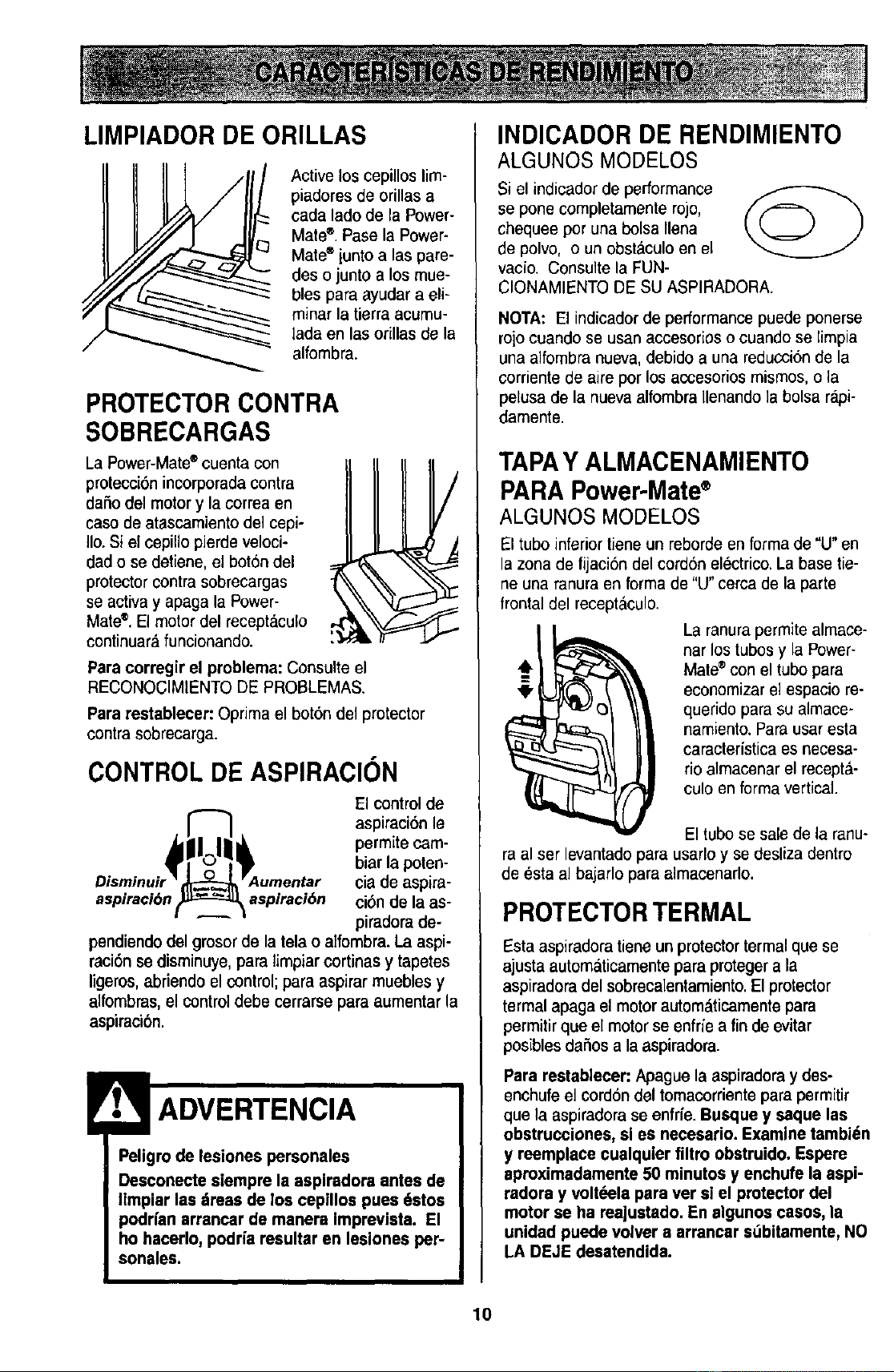
LIMPIADOR DE ORILLAS
Active los cepillos lim-
piadores de orillasa
cada lado de la Power-
Mate®.Pase la Power-
Mate='iunto alas pare-
des o junto a los mue-
bles para ayudar a eli-
minar la tierra acumu-
lada en las orillas de la
alfombra.
PROTECTOR CONTRA
SOBRECARGAS
La Power-Mate®cuentacon
protecci6nincorporada contra
dafiodel motory la correa en
casodeatascamientode1cepi-
Iio.Si el cepillopierdeveloci-
dado se detiene,elbot6n del
protectorcontrasobrecargas
se activay apaga la Power-
Mate®.El motor del recept&culo
continuar&funcionando.
I
/
Paracorregir el problema: Consulte el
RECONOGIMIENTODE PROBLEMAS.
Pararestablecer: Optima el bot6n del protector
contra sobrecarga.
CONTROL DE ASPIRACION
El control de
aspiraci6n le
permite cam-
biar la poten-
cia de aspira-
aspiraci6n aspiraci6n ci6nde la as-
piradorade-
pendiendodel gmsorde la tela oalfombra.La aspi-
raci6nse disminuye,para limpiarcortinasy tapetes
ligeros,abriendo elcontrol; para aspirarmueblesy
alfombras,el controldebe cerrarsepara aumentarla
aspiraci6n.
Peligrode lesiones personales
Desconectesiempre la asplradora antes de
Ilmpiar las dreas de los cepillos pues 6stos
podrfanarrancar de manera imprevista. El
ho hacerlo,podfia resultar en lesiones per-
sonales.
INDICADOR DE RENDIMIENTO
ALGUNOS MODELOS
Si el indicador de performance
se pone completamente rojo,
chequee per una bolsa Ilena
de polvo, o un obstaculo en el
vacio. Consulte la FUN-
CIONAMIENTO DE SUASPIRADORA.
NOTA: El indicadorde performance puede ponerse
rojocuando se usan accesorios o cuando se limpia
una alfombra nueva, debido a una reducci6nde la
corriente de aire per los accesoriosmismos, o la
pelusa de la nuevaalfombra Ilenando la bolsa rapi-
damente.
TAPAY ALMACENAMIENTO
PARA Power-Mate®
ALGUNOS MODELOS
El tuboinferior tiene un reborde en forma de "U" en
la zona de fijaci6n del cord6n elOctrico.La base tie-
ne una ranura en forma de "U"cerca de la parte
trontal del receptaculo,
La ranurapermite almace-
nar los tubos y la Power-
Mate®con el tubo para
economizar el espacio re-
querido para su almace-
namiento. Parausar esta
caracteristica es necesa-
rio almacenar el recepta-
culo en forma vertical.
El tubo se salede la ranu-
ra al ser levantadopara usarloy se desliza dentro
de esta al bajarlo para almacenarlo.
PROTECTORTERMAL
Estaaspiradora tiene un protector termal que se
ajusta automaticamentepara proteger a la
aspiradora del sobrecalentamiento.El protector
termal apaga el motor autom&ticamentepara
permitir que el motorse enfrfe a fin de evitar
posiblesdafios a la aspiradora.
Pararestablecer"Apaguela aspiradoray des-
enchufe el cord6n del tomacorrientepara permitir
quela aspiraclorase enfrfe.Busque y saque las
obstruccionee,sl es necesario.Examinetambi_n
y reemplacecualquterfiltro obstruido. Espere
aproximadamente50 minutosy enchufe la aspi-
radora y volt_ela para ver si el protectordel
motor se ha rea]ustado.En slgunoscasos, la
unidad puedevolver a arrancar s_bitamente,NO
LA DEJEdesatendida.
10
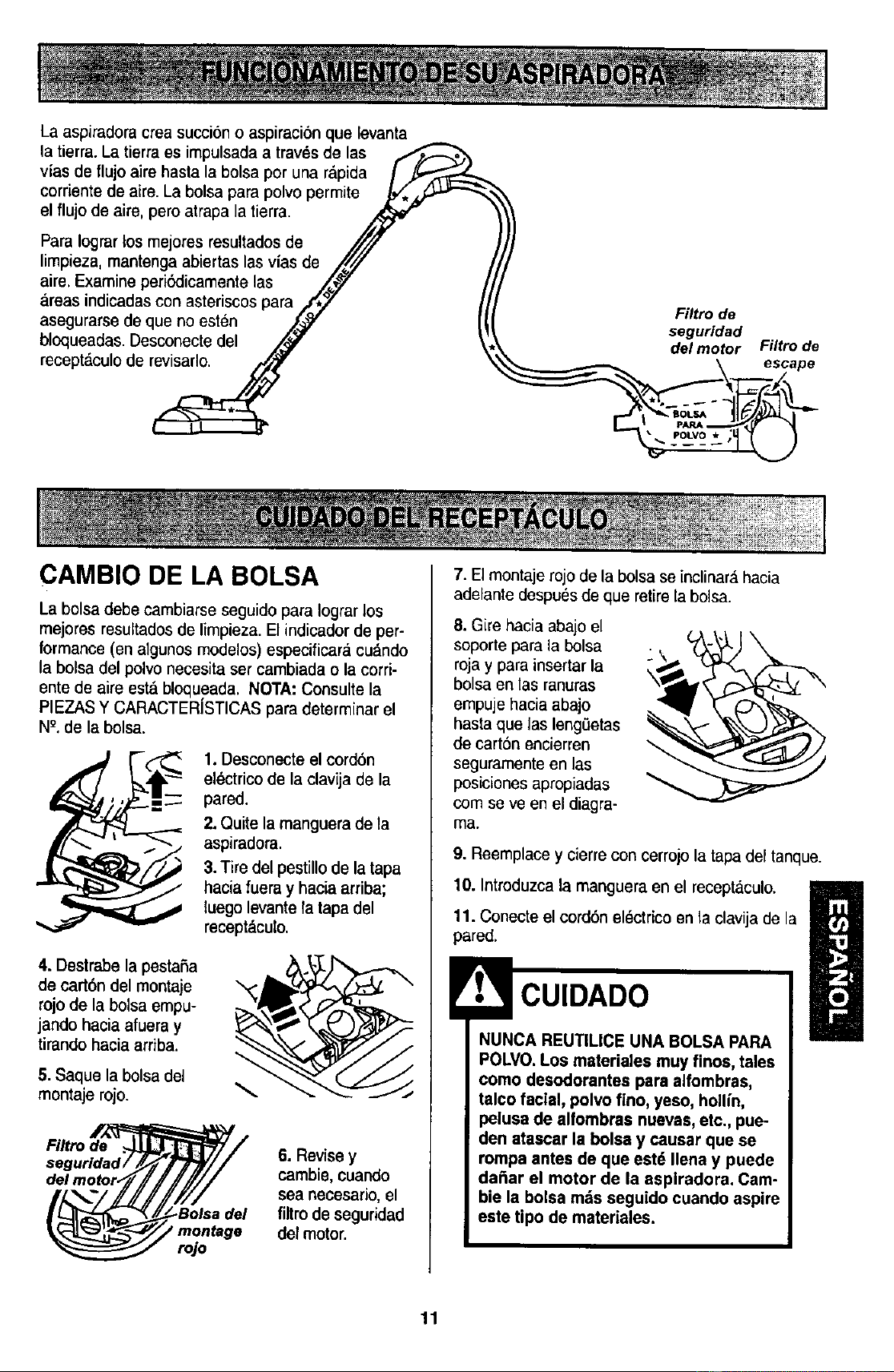
Laaspiradoracreasucci6noaspiraci6nqueievanta
latierra.Latierraesimpulsadaatravesdelas
viasdeflujoairehastalabolsaporunar&pida ] ._-"-_
corriente de aire.La bolsa para polvo permite _,
el flujo de aire, pero atrapa la tierra.
ParaIograr los mejores resultados de /f_/"
limpieza, mantenga abiertas las vias de .,/L//" t
aire. ExamineperiSdicamente las /._ /A
areas indicadas con asteriscospara _,_ [[
asegurarse de que no esten .,_'Y I_
bloqueadas. Desconectedel _
recept_,culode revisarlo. ,_ ',
Filtro de
seguridad
del motor Filtro de
\ escape
CAMBIO DE LA BOLSA
La bolsa debe cambiarse seguido para Iograr los
mejores resultadosde limpieza. El indicador de per-
formance (en algunos modelos) especificar&cu&ndo
la bolsa del polvo necesita set cambiada o la cord-
ente de aire est&bloqueada. NOTA: Consulte la
PIEZASY CARACTERISTICASpara determinar el
NK de la bolsa.
1. Desconecte el cord6n
el_ctrico de la clavija de la
pared.
2.Quite la manguera de la
aspiradora.
3.Tire del pestillo de la tapa
hacia fuera y hacia arriba;
luego levante Tatapa del
recept_culo.
4. Destrabe la pestaSa
de cart6ndel montaje
rojode la bolsa empu-
jando haciaafueray
tirandohaciaarriba.
5. Saque la bolsa del
montaje rojo.
Filtro de
rojo
6. Revise y
cambie,cuando
sea necesario,el
firm de seguridad
del motor.
7. El montaje rojo dela bolsa se inclinar_,hacia
adelante despuesde que retire la bolsa.
8. Gire hacia abajo el
soporte para la bolsa
rojay para insertar la
bolsa en las ranuras
empuje hacia abajo
hasta que las leng,3etas
de cart6n encierren
seguramente en las
posiciones apropiadas
corn se ve en el diagra-
ma,
9. Reemplacey cierre con cerrojola tapa del tanque.
10. Introduzcala manguera en el receptaculo.
ll
11. Conecte el cordbn el_cirico en la clavija de la
pared.
NUNCA REUTIUCE UNA BOLSA PARA
POLVO.Los materiales muy finos, tales
como desodorantes para alfombras,
talco facial, polvo fino, yeso, hollin,
pelusade alfombraa nuevas,etc., pue-
den atascar la bolsa y causar que se
rompa antes de que est_ Ilena y puede
daSar el motor de la aspiradora. Cam-
bie la bolsa mrs seguido cuando aspire
este tipo de materiales.
11
1. Desconecteel cord6n electrico de la clavija de la
pared. NOchoree agua sobre la aspiradera.
2. Limpie el exterior con un trapo suavey limpio, que
ha side exprimidodespu_s de remojar en unasolu-
cion de agua y detergente liquido ligero. Seque el
exterior con untrapo seco despu_s de limpiar.
3. Limpie la superficieexterior del receptaculo y de
los accesorios para reducir la electricidad est_tica y
la acumulaci6nde polvo.
CUIDADO
No use los accesorios si est_n mojados.
Los accesorios que se utilicen en _reas
sucias, debajo del refrigerador,no deben
usarse en otras superficies sin antes ser
lavados.Podrfandejar maroas.
Examine el filtro de seguridad del motor de vez en
cuando y cambio coando este sucio.
Peligrode cheque el_ctrico
Desenchufeel corddn de la corrienteel_c-
trica. No opere la aspiradora sin el filtro de
seguridad del motor. Asegeurese de que el
filtro estdseco e instalado adecuadamente
para impedirque el motor falle y/o que se
produzca un cheque el6ctrico.
Para quitar labolsa, siga las instrucciones en CAM-
BIO DE LABOLSA.
FILTRO DE SEGURIDAD DEL
MOTOR ELECTROSTATICO
Estefiitro blanco debe ser cambiado cuando este
sucio. Debe cambiarseperi(_licamente seg_inlas
condiciones de use. El filtro no se puede lavar
pues perdeda su capacidad para atraparatrapar
polvo.
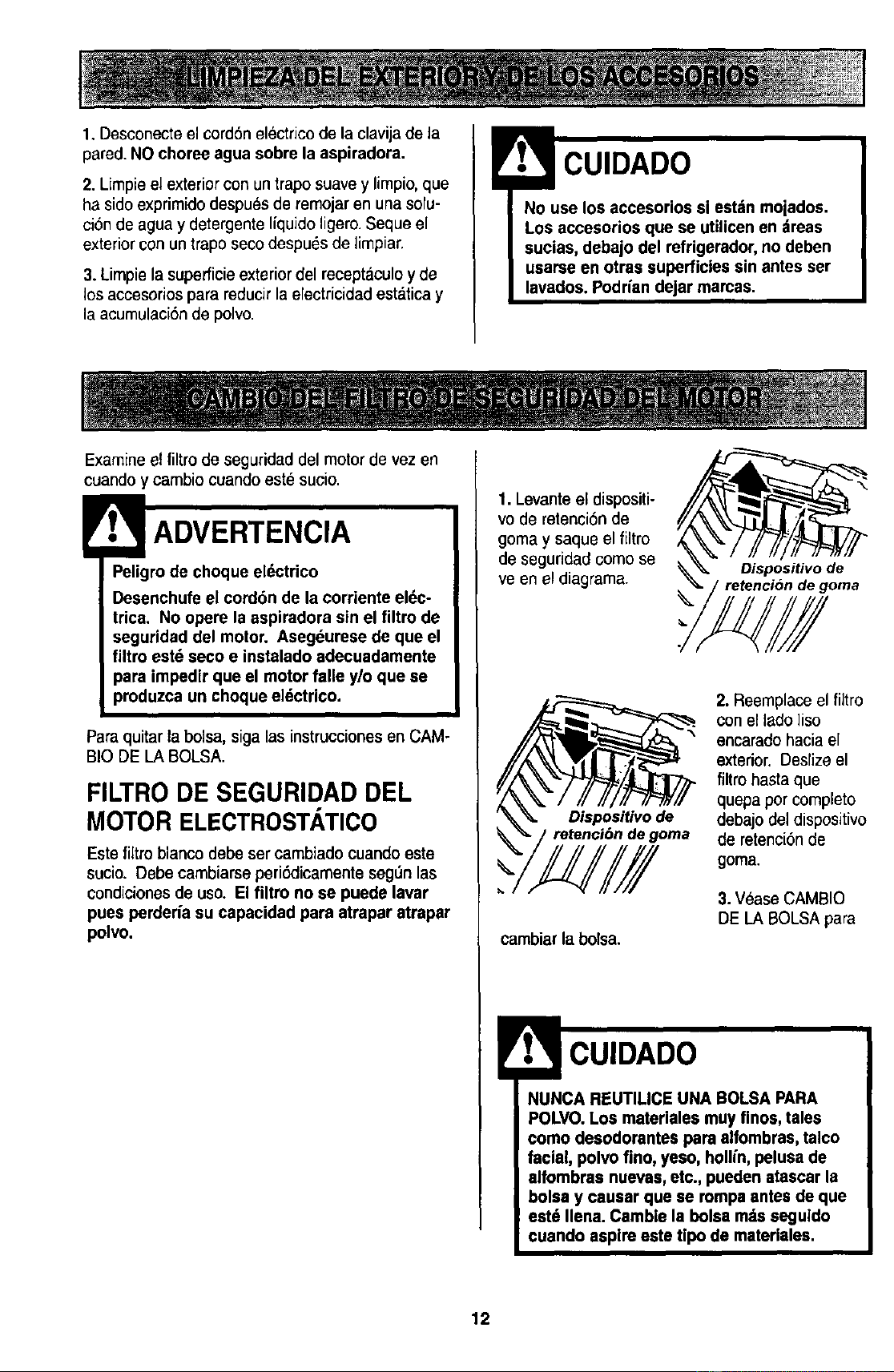
1.Levante el dispositi-
vo de retenci6nde
goma y saque el filtro
de seguridad comese
ve en el diagrama.
\
Oispositivo de
retenci6n de goma
Dispositivo de
retenci6n de goma
cambiar la bolsa.
2. Reemplaceel filtro
conel lade ]iso
encarado hacia el
exterior.Deslizeel
filtro hastaque
quepa per complete
debajo del dispositivo
de retenci6n de
goma.
3.Vease CAMBIO
DE LA BOLSA para
NUNCA REUTILICE UNA BOLSAPARA
POLVO.LOSmaterlalesmuy fines, tales
come desodorantes para alfombras, talco
facial, polvofine, yeso, hollin,pelusa de
alfombras nuevas,etc., pueden atascar la
bolsa y causar que se rompa antesde que
est6 Ilena. Camble la bolsarodsseguldo
cuando aspireeste tipo de materiales.
12
! ADVERTENCIA
Peligrode choque eldctrico
No opera con un filtro de escape bloqueado
o sin el filtro de escape o la cubierta del ill-
tro de escape instalados.
FILTRO DE ESCAPE
HEPA
Este cartucho del filtroescapetieneque cambiar
este sucio. Cambie el filtro cuando el _.reasuperfi-
cial este cubierta pot comp]eto. El filtro no se
puede lavar pues perderfa su cspacidad para
atrapar altrapar polvo.
Repuestosde los filtros de extracci6n estdn
disponibles a travds del centro deservicio de
sears bajoel no. De parte 86680. Ver
"lnformaci6n de assistanciao servicio"
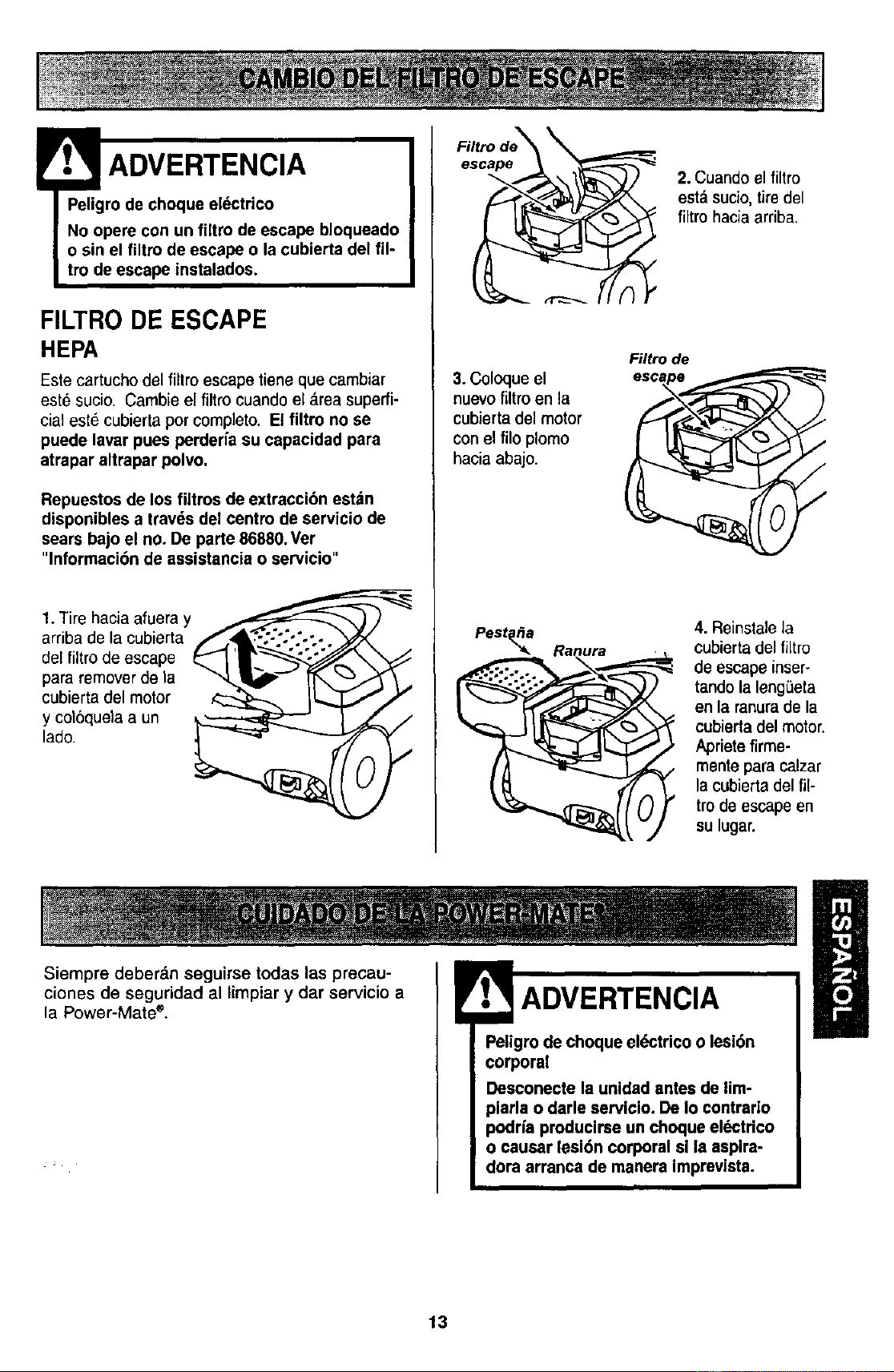
1. Tire hacia afuera y _,_}
arriba de la cubierta Jf'_4_,"_'.".'-*_'-'_. _ _.
del filtrode escape _ _r_.,,_ _\
para removerde la "_!_P'_ [-r_ _- ,_ _.,
cubierta del motor _ IL._-T _ f
y coloquela aun _ _ _ /
i 2. Cuandoel filtro
est_ sucio, tiredel
filtro hacia arriba.
3.Coloque el
nuevo filtro en la
cubiertadel motor
con el filo plomo
hacia abajo.
Filtro de
V
/
/
4. Reinstalela
cubierta del filtro
de escape inser-
tando la leng_eta
en la ranurade la
cubierta del motor.
Apriete firme-
mentepara calzar
la cubierta del fi[-
tro de escape en
su lugar.
Siempre deber&n seguirse todae las precau-
ciones de seguridad al limpiar y dar servicio a
la Power-Mate *,
.ADVERTENCIA
Peligrode choque ePJctricoo lesi6n
corporal
Desconecte la unidadantes de lim-
plarla o darle servicio. De Io contrario
podda producirse un choque eldctrico
o causar lesi6n corporal si la asplra-
dora arranca de manera imprevista.
13
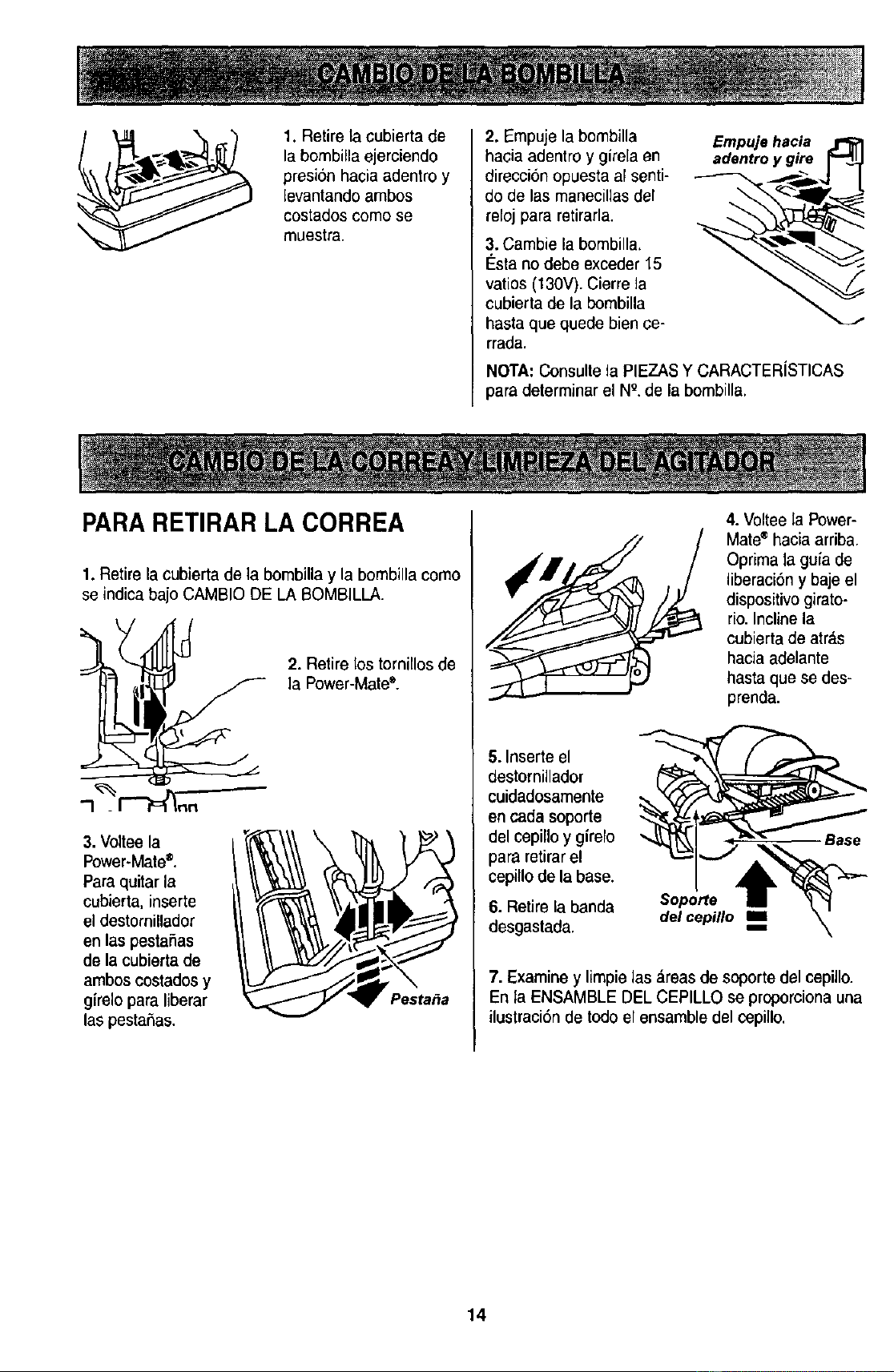
1. Retire la cubierta de
labombilla ejerciendo
presi6n hacia adentro y
levantando ambos
costados como se
muestra.
2. Empuje la bombilla
hacia adentro y girela en
direcci6n opuesta al senti-
do de las manecillas del
reloj para retirarla.
3. Cambie la bombilla,
I_stano debe exceder 15
vatios (130V). Cierrela
cubierta de la bombilla
hasta que quede bien ce-
rrada.
Empujehacia
adentroy gire r_q._
NOTA: Consultela PIEZASY CARACTERiSTICAS
para determinar el NQ,de la bombilla.
PARA RETIRAR LA CORREA
1. Retirelacubiertadela bombillay la bombillacomo
se indica bajo CAMBIO DE LA BOMBILLA.
2. Retire los tornillos de
la Power-Mate".
3. Voltee la
Power.Mate®.
Para quitar la
cubierta, inserte
el destornillador
en las pestaSas
de la cubierta de
ambos costadosy
girelo para liberar
las pesta5as.
Pesta_a
4. Voltee la Power-
Mate®hacia arriba.
Oprima la guia de
liberaci6n y baje el
dispositivogirato-
rio. Incline la
cubierta de atr_,s
hacia adelante
hasta que se des-
prenda.
5. Inserte el
destornillador
cuidadosamente
en cada soporte
del cepinoy girelo
para retirarel
cepillo de la base.
6. Retire la banda
desgastada.
Soporte
del cepillo m=
Base
7. Examine y limpie tas _,reasde soporte del cepillo.
En la ENSAMBLE DEL CEPILLO se proporciona una
ilustraci6n de todo el ensamble del cepillo.
14
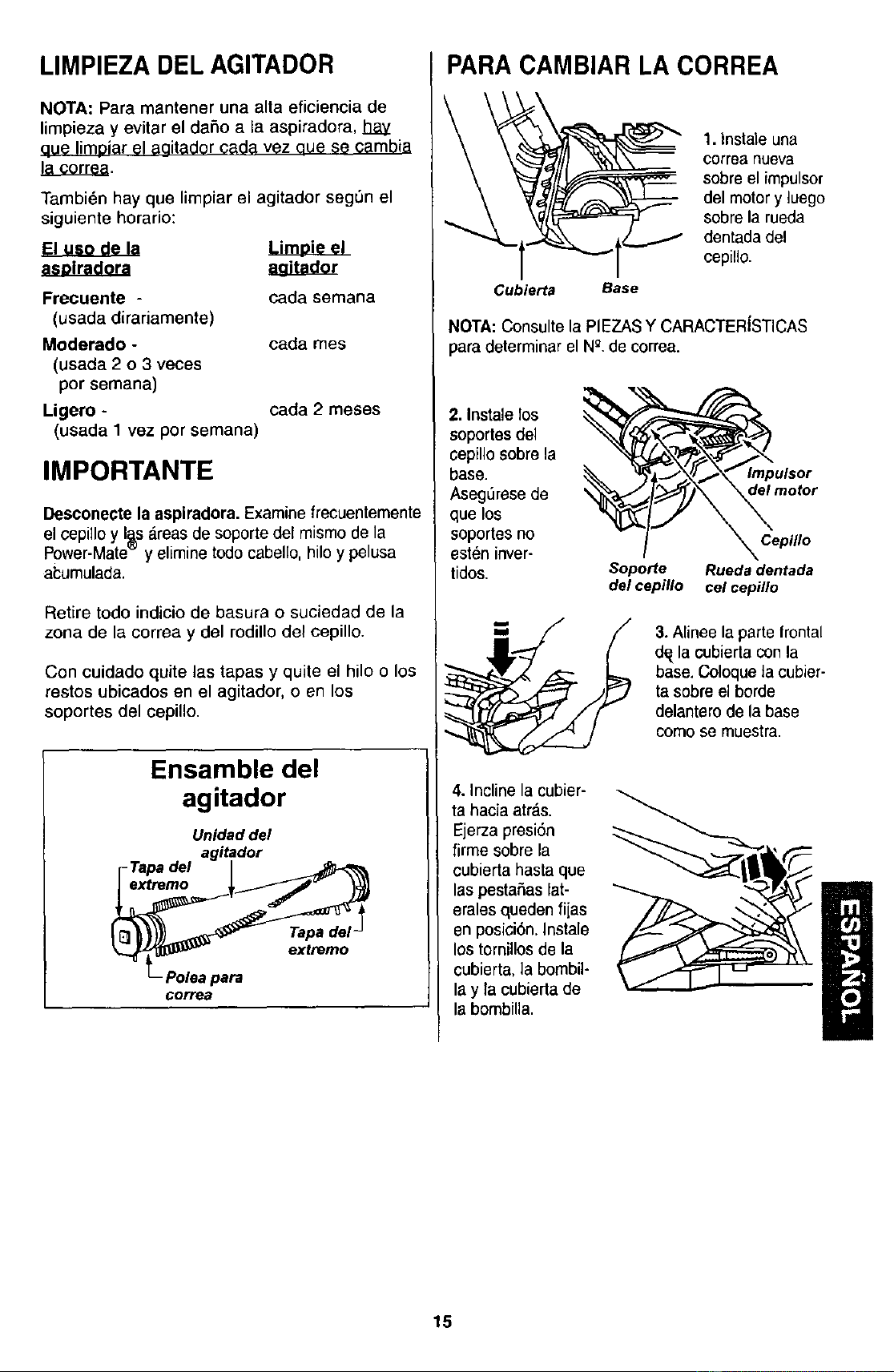
LIMPIEZA DEL AGITADOR
NOTA: Para mantener una alta eficiencia de
limpieza y evitar el daSo a la aspiradora, hay
aue limDiar el aaitador cada vez aue se cambia
!_,._ •
Tambi6n hay que limpiar el agitador seg_n el
siguiente horario:
Frecuente -
(usada dirariamente)
Moderado -
(usada 2 o 3 veces
por semana)
Ligero -
(usada 1 vez por semana)
cada semana
cada rnes
cada 2 meses
IMPORTANTE
Desconecte laaspiradora. Examine frecuentemente
elcepillo y I_s_.reasde soportedel mismo de la
Power-Mate y eliminetodo cabello,hilo y pelusa
ai;umulada.
Retire todo indicio de basura o suciedad de la
zona de la correa y del rodillo del cepillo.
Con cuidado quite las tapas y quite el hilo o los
restos ubicados en el agitador, o en los
soportes del cepillo.
Ensamble del
agitador
Unidaddel
agitador
r-Tapadel |
corre8
PARA CAMBIAR LA CORREA
1. Instaleuna
correa nueva
sobre el impulsor
del motor y luego
sobre la rueda
dentada del
cepillo.
Cubierta Base
NOTA: Consulte la PIEZASY CARACTERtSTICAS
para determinar el Ng.de correa.
2. Instale los
soportes del
cepillo sobre la
base.
AsegL_resede
que los
soportes no
est_n inver-
tidos.
Impulsor
del motor
Cepillo
Soporte Rueda dentada
del cepillo cel cepillo
3. Alinee la parte frontal
dq la cobierta con la
base. Coloque la cubier-
ta sobre el borde
delantero de la base
como se muestra.
4. Inclinelacubier-
ta hacia atras.
Ejerza presi6n
firme sobre la
cubierta hasta que
las pestaSas lat-
erales queden fijas
en posici6n. Instale
los tornillos de la
cubierta, la bombil-
lay la cubierta de
la bombiUa.
15
Peligrodechoqueel_ctricoo lesi6ncorpo-
ral
Desconectelaunidadantesdelimpiarlao
darleserviclo.DeIocontrariopodriapro-
ducirseunchoqueel6ctricoocausar
lesi6ncorporalsilaaspiradora arranca de
manera imprevista.
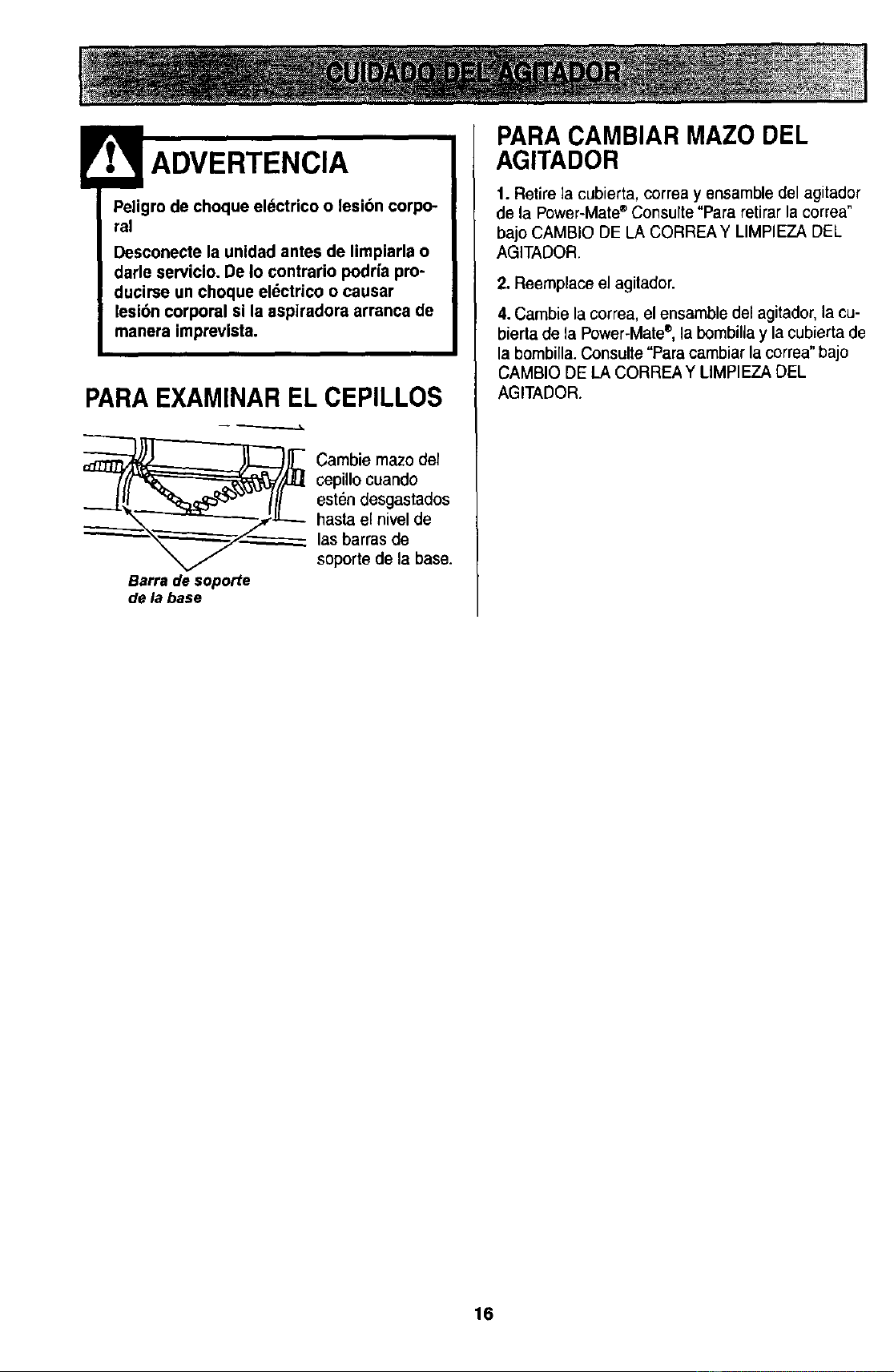
PARAEXAMINAR EL CEPILLOS
_j_ ambie mazo def
cepUlocuando
est6n desgastados
hasta el nivel de
las barras de
soporte de la base.
Barrade soporte
delabase
PARA CAMBIAR MAZO DEL
AGITADOR
1. Retire la cubierta, correa y ensamble del agitador
de la Power-Mate®Consulte"Para retirar la correa"
bajo CAMBIO DE LA CORREAY LIMPIEZA DEL
AGITADOR.
2. Reemplace el agitador.
4. Cambie la correa, el ensamble del agitador,la cu-
bierta de la Power°Mate®,la bombilla y la cubierta de
la bombilla.Consulte "Para cambiar la correa"bajo
CAMBIO DE LA CORREA Y UMPIEZA DEL
AGITADOR.
16
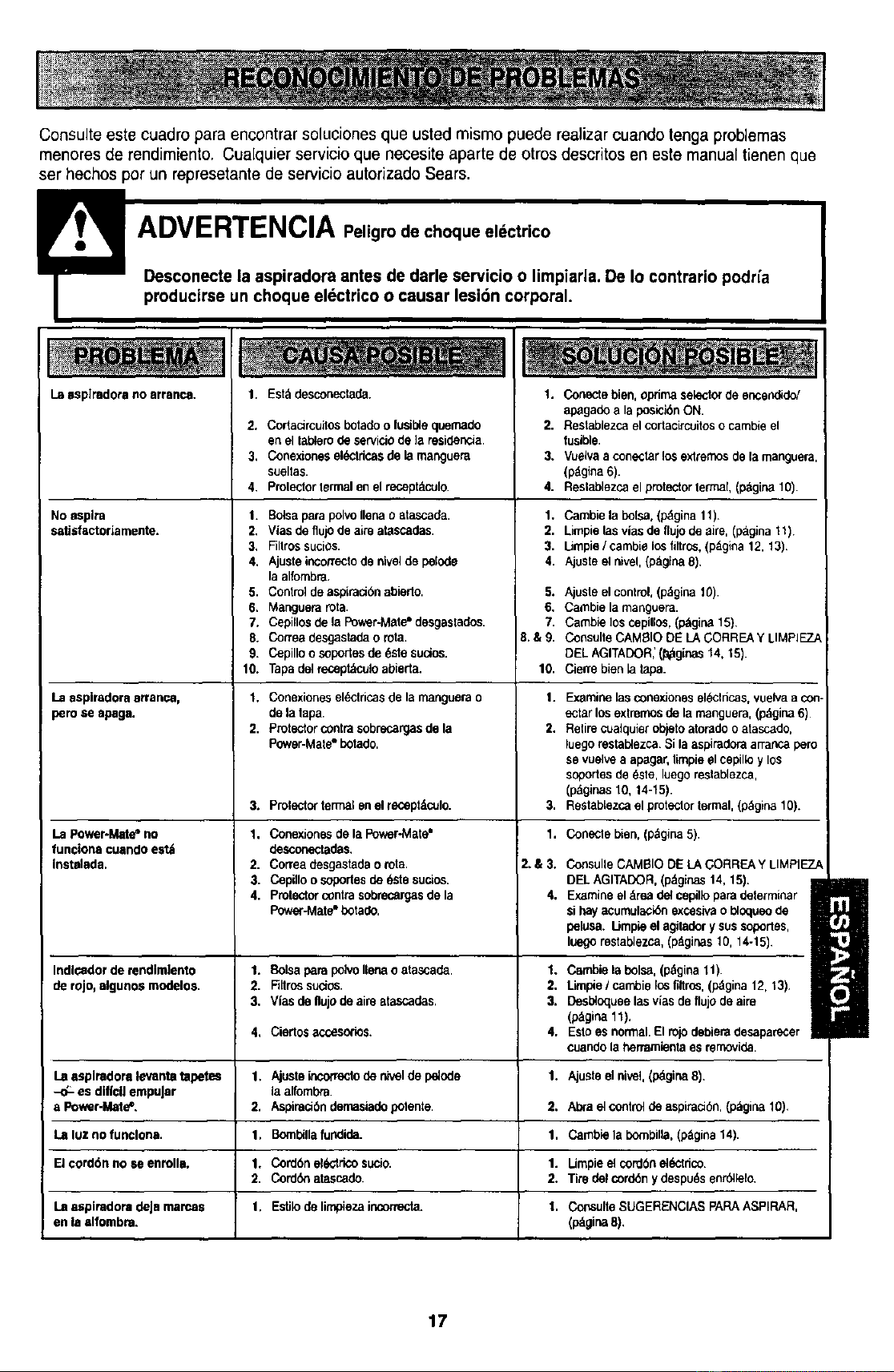
Consulte este cuadro para encontrar soluciones que usted mismo puede realizar cuandotenga problemas
menores de rendimiento. Cualquier servicio que necesite aparte de otros descritos en este manual tienen que
ser hechos por un represetante de servicio autorizado Sears.
Laasp]radora no arranca.
No asplta
satisfactoriamente.
Laaspiradoraarranca,
perose apaga.
LaPowe_Mate=no
funcionscuando estlt
instelada.
Indlcadordemndlmiento
de rojo,elgunos modelos.
La asplradoralevantatapetes
-d:- es diffcilempuJar
a Power-Mate*.
La Iuz no funclona.
El cord6n no se enmlla.
La aspiradoradeJamamas
en la alfombra.
1. Eel&desconeclada.
2. Cortacircuitos botado o fusible quemado
en el lablero de servido de ]a residenela.
3. Conexionos el_lricas de la manguera
sueltas.
4. Prolector lermal en el receptdculo.
1. BelsaparapolvoIlenao atascada.
2. Vias de tlujOdeaim atascadas.
3. Fillrossucios.
4. Ajusteinconectode nivelde pelode
la alfornbra,
5. Contreldeaspiraci6nabierlo.
6. Manguerarota.
7. Cepillosde la Po_r-Mate=desgastados.
8. Correadesgastadao rota.
9. Cepilloosoporlesde 6stesucios.
10. Tapadelreceptdculoabierta.
1. Conexionesel6clricasdela rnanguerao
de lalapa.
2. Protectorcontrasobrecargasdela
Power-Mate"botado.
3. Prolector termal en el recept&culo.
1. Conexionesde la Poor-Mate"
desconectadas.
2. Correadesgastadao rota.
3. Cepilloo soportesde 6stesucio6.
4. Protectorcontrasobrecargasde la
Powe_4,,late"botade.
1. Bolsapara pdvollenao atascada.
2. Fillrossucios.
3, Vlas de flujo de aimetascades.
4. Ciedosaccesodos,
1. Ajuste_correclo de niveldepelode
laaffomt_a.
2. Aspiraci6ndernasiadepotente.
1. Bombillafundida.
1. Cordbnel6dricosucio.
2. Corck}natascado.
1. Estilode limpiezaincormcta_
1. Conectebien, oprimaselsctcrde encend_do/
apagadea la poelelbnON.
2. Restablezcael cortacircuitoso cambieel
fusible.
3. Vuelvaa conectarlosextrernosde la manguera,
(pdgina6).
4. Reslablezcael protectorlermal,(p;_gina10).
1. Cambie la bolsa, (p_gina 11).
2. Limpielasviasdeflujodeelre, (ptLgina 11)
3. IJmpie /cambie los filtrc_, (p_gina 12, 13)
4. Ajoste el nivel, (pdgina 8)
5. AjosIe el control, (p&gina 10).
6. Cambie la manguera.
7. Cambie los cepiflos, (p_gina 15)
8.&9. Conselte CAM_IO DE LA CORREA Y LIMPIEZ._
eEL AGITADOR_ (_ginas 14, 15).
10. Cierre bien la tapa.
1. Examine las conexiones el_clricas, vuelva a con
ectar los extremos de la rnanguera, (p&gina 6)
2. Retire cuelquier objeto atorado o atascado,
luego restablezca. Si la aspiradora arranc_ pero
se vuelv_ a apagar, limpie el eepillo y los
soportes de dste, luego reelablezca,
(pdginas 10, 14-15).
3. ReslabLezca el proteclor retinal, (p&gina 10).
1. Coneclebien,(p_gina5).
2.&3.
4,
ConsulleCAMBIO DEtEAGORREAY LIMPIEZ/
DELAGITADOR.(p_ginas14, 15).
Examineeldrea delcepilloparadeterminar
sihayacumulack_nexcesivao I_oqueode
pelusa.Limp_eel agitadorysussoporles,
luegorestablezca,(p,_ginas10, 14-15).
1. Cambie la bolsa,(pdgina11).
2, Limpie/ cambielos fiitros,(p_gina12, 13)
3. Desbioqueelas viasde flujo de aire
(p&gina11),
4, Eslo es normal.El rolodebieradesapamcer
cuandola herramientaasrernovida.
1. Ajueteel nivel,(p_,gi_ 8),
2. Abra el controlde aspirad6n,(p&gina10),
1. Gamble la bombilla, (odgina 14).
1. Umpieel cord6nel6ctrico.
2. Tiredel cordSny despu_sen_lelo.
1. ConsulteSUGERENCIASpAPA ASPIRAR,
(p,_gina8).
1
17

Get it fixed, at your home or ours!
Your Home
For repair - In your home - of all major brand appliances,
lawn and garden equipment, or heating and cooling systems,
no matter who made it, no matter who sold it!
For the replacement parts, accessories and
owner's manuals that you need to do-it-yourself.
For Sears professional installation of home appliances
and items like garage door openers and water heaters.
1-800-4-MY-HOME ¢ Anytime, day or night
(1-800-469-4663) (U.S,A. and Canada)
WWW.sear8.com www_sears.c8
ourHorns
For repair of carry-in products like vacuums, lawn equipment,
and electronics, call or go on-line for the nearest
Sears Parts and Repair Center.
1-800-488-1222 Anytime, day or night (U.S.A. only)
www.tears.com
To purchase a protectionagreement (U.S.A.)
or maintenance agreement (Canada) on a product servicedby Sears:
1-800-827-6655 (u.s_.) 1-800-361-8665 (Canada)
Para pedirservicio de reparacibn
a domicilio, y para ordenarpiezas:
1-888-SU-HOGAR su
(1-888.784-642"7)
Au Canada pour service en _:
1-8004.E-FOYER _
(1-800-533-6937)
www.sears.ca
6F/AR
©8e_._ Rodxx_andC_
® Registered Trademark I TM Trademark / suService Mark of Sears, Roebuck and Co.
® Marca Registreda I _u Marca de F=tbdca/ _ Mama de Serviclo de Sears, Roebuck and Co.
McMarque de commerce / uo Marque d6posde de Sears, Roebuck and Co.
