Operating and Installation Instructions
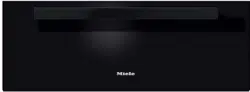
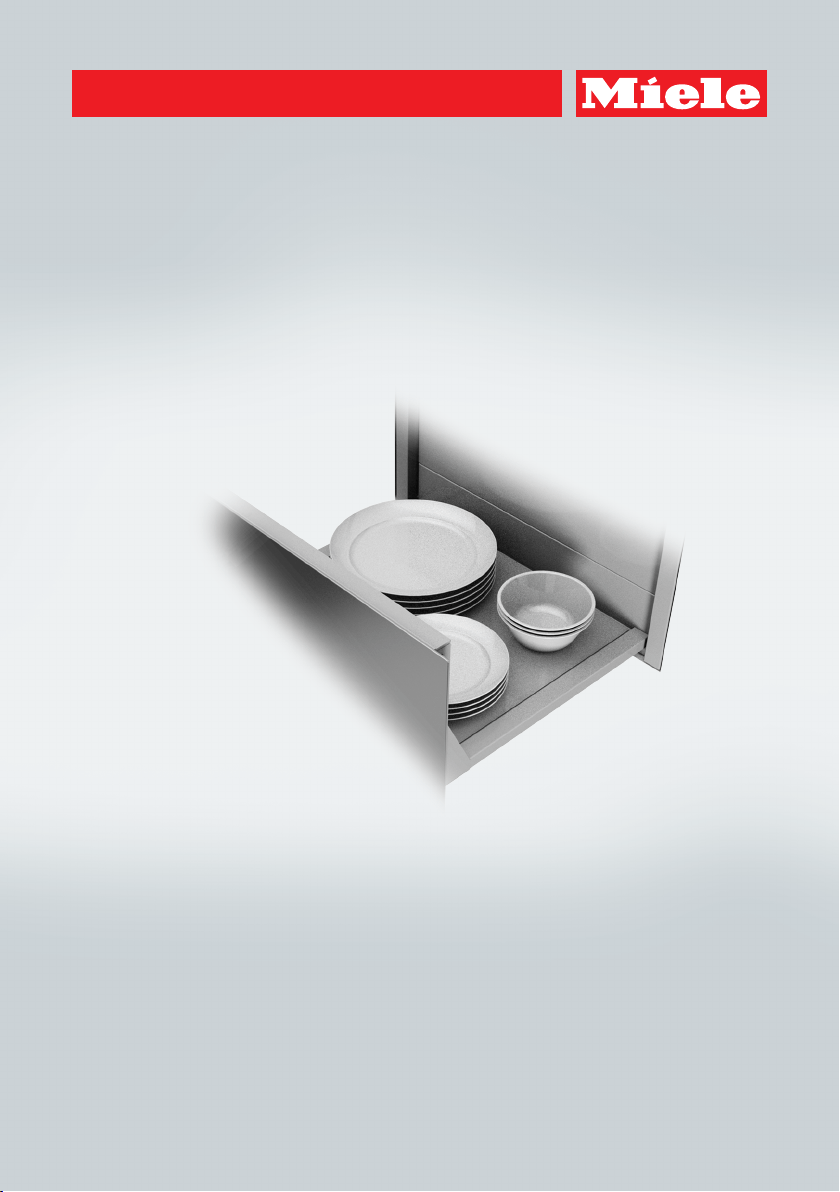
Warming drawer
To prevent accidents and machine damage, read these instructions be-
fore installation or use.
en-US M.-Nr. 10 768 500

Contents
2
IMPORTANT SAFETY INSTRUCTIONS ................................................................ 4
Caring for the environment ................................................................................ 11
Overview............................................................................................................... 12
Included accessories............................................................................................. 13
Control panel ....................................................................................................... 14
Before first use .................................................................................................... 15
Cleaning the drawer for the first time.................................................................... 15
Heating the drawer for the first time...................................................................... 15
Operation.............................................................................................................. 16
Basic operation ..................................................................................................... 16
Operating modes................................................................................................... 17
Duration................................................................................................................. 17
Temperature settings............................................................................................. 17
Keeping food warm............................................................................................. 19
Tips........................................................................................................................ 19
Settings ................................................................................................................. 20
Warming dishes ................................................................................................... 21
Tips........................................................................................................................ 21
Warming times ...................................................................................................... 21
Capacity ................................................................................................................ 21
Other uses............................................................................................................ 23
Sabbath mode...................................................................................................... 24
Cleaning and care ............................................................................................... 25
Frequently Asked Questions .............................................................................. 27
Optional accessories .......................................................................................... 29
IMPORTANT SAFETY INSTRUCTIONS - INSTALLATION ................................. 30
Instructions for installation ................................................................................ 31
Installation dimensions....................................................................................... 32
Installation............................................................................................................ 34
Electrical connection .......................................................................................... 35

Contents
3
Technical Service................................................................................................. 36
Contact in case of fault ......................................................................................... 36
Data plate .............................................................................................................. 36
Warranty ................................................................................................................ 36
MieleCare ............................................................................................................. 37
IMPORTANT SAFETY INSTRUCTIONS
4
This drawer conforms to current safety requirements. Improper
use can, however, lead to personal injury and damage to property.
To avoid the risk of accidents and damage to the appliance,
please read these instructions carefully before using the appliance
for the first time. They contain important notes on installation,
safety, use and maintenance.
Miele cannot be held liable for damage occurring as a result of
non-compliance with these instructions.
Keep these instructions in a safe place and pass them on to any
future owners.
IMPORTANT SAFETY INSTRUCTIONS
5
Appropriate use
This drawer is intended for domestic use and use in other similar
environments.
The drawer is not intended for outdoor use.
The warming drawer is intended for domestic use only as de-
scribed in these instructions. All other use is at the owner's own risk
and could be dangerous.
Persons who lack physical, sensory or mental abilities, or experi-
ence with the appliance should not use it without supervision or in-
struction by a responsible person.
IMPORTANT SAFETY INSTRUCTIONS
6
Safety with children
As with any appliance, close supervision is necessary when used
by children.
Do not leave children unattended: Children should not be alone or
unsupervised in the area where the appliance is installed. Do not al-
low them to sit or stand on the appliance.
Be sure to supervise any children in the vicinity of the drawer, and
do not let them play with it.
The drawer gets hot when in use and remains hot for quite a while
after being switched off. Keep children away from the drawer until it
has cooled down and there is no danger of burning.
Danger of suffocation! Ensure that any plastic wrappings, bags,
etc. are disposed of safely and kept out of the reach of children.
IMPORTANT SAFETY INSTRUCTIONS
7
Technical safety
Unauthorized installation, maintenance, and repairs can cause
considerable danger for the user. Installation, maintenance, and re-
pairs must only be carried out by a Miele authorized technician.
A damaged drawer can be dangerous. Always check for visible
signs of damage. Never use a damaged appliance.
Reliable and safe operation of the drawer can only be assured if it
has been connected to the electrical supply.
Be certain the drawer is properly installed and grounded by a
qualified technician. To guarantee the electrical safety of this appli-
ance, continuity must exist between the appliance and an effective
grounding system. It is imperative that this basic safety requirement
be met. If there is any doubt, have the electrical system of the house
checked by a qualified electrician.
Before connecting the appliance to the power supply, ensure that
the connection data (voltage and frequency) on the data plate of the
drawer match the electrical supply.
This data must correspond in order to avoid the risk of damage to
the warming drawer. Consult a qualified electrician if in any doubt.
Do not connect the drawer to the electrical supply with a power
bar or extension cord. These are a fire hazard and do not guarantee
the required safety of the appliance.
For safety reasons, the drawer may only be used when it has been
fully installed.
This drawer may not be used in non-stationary locations (e.g. on a
ship).
Any contact with live connections or tampering with the electrical
or mechanical components of the drawer will endanger your safety
and may lead to appliance malfunctions.
Do not open the casing of the drawer under any circumstances.
IMPORTANT SAFETY INSTRUCTIONS
8
Any repairs not performed by a Miele authorized service techni-
cian will void the warranty.
Defective components should be replaced by Miele original parts
only. Only with these parts can the manufacturer guarantee the
safety of the appliance.
If the plug has been removed or the power cord is not supplied
with a plug, the drawer must be connected to the power supply by a
suitably qualified electrician.
If the power cord is damaged, it must be replaced with a special
power cord (see “Electrical connection”).
The drawer must be completely disconnected from the power
supply during installation, maintenance and repair work. This can be
ensured as follows:
– The circuit breaker has tripped, or
– The fuse of the electrical installation is completely removed, or
– The plug (if present) is removed from the outlet. In the process,
pull the plug not the cord.
If the drawer is installed behind a cabinet door, do not close the
door while the drawer is in operation. Heat and moisture can build up
behind the closed door and cause damage to the range and to the
surrounding cabinets and flooring. Do not close the door until the
drawer has completely cooled down.
IMPORTANT SAFETY INSTRUCTIONS
9
Correct use
You can burn yourself on a hot warming drawer. When using the
appliance, protect your hands by wearing heat-resistant pot holders.
Only use dry pot holders. Wet or damp textiles conduct heat more
effectively and produce steam, which poses a burn hazard.
Fire hazard.
Do not store any plastic containers or combustible objects in the
warming drawer. They can melt or catch fire when the appliance is
switched on.
Due to the high temperatures radiated by the warming drawer,
nearby flammable objects can catch fire while the appliance is in
use. Do not use the warming drawer to heat the room.
Never use paper towels or other similar objects in place of the
non-slip mat supplied with the appliance.
The maximum load capacity of the telescopic drawer rails is
55lbs (25kg). If you overload the drawer or lean/stand on it when it
is open, you will damage the rails.
The underside of the warming drawer gets hot when the appliance
is in use. Be careful not to touch it when the drawer is open.
The non-slip mat is heat-resistant up to 395°F (200°C).
It is possible for the bottom of cookware to exceed this temperature,
especially after it has been used to sear food. Allow the cookware to
cool down for a minute or two before placing it in the warming
drawer.
Cookware made of plastic or aluminum foil will melt at high tem-
peratures. When keeping food warm, use only heat-resistant cook-
ware made of porcelain, glass, etc.
Liquids that get inside the warming drawer can cause the appli-
ance to short-circuit. Open and close a loaded drawer carefully to
prevent liquids from spilling.
IMPORTANT SAFETY INSTRUCTIONS
10
Keeping Warm mode is to be used for keeping hot dishes
warm, not for heating up cold food. Make sure that any food placed
in the drawer is at a high enough temperature.
In some foods, bacterial growth may occur if the temperature is
too low. Set the appliance to an adequate warming temperature.
Loose fitting or hanging garments present a fire hazard. Wear
proper apparel while operating the appliance.
Smother the fire or flames, or use a dry chemical extinguishing
agent or foam fire extinguisher.
Before serving, be sure food is at a safe temperature. This is par-
ticularly important when preparing food for babies and children.
Never warm undiluted alcohol in the warming drawer, this can
easily ignite.
Exercise caution when warming food with a high sugar content. If
heated for too long the sugar may caramelize or ignite.
Never add water to food in a hot drawer. The steam created could
cause serious burns or scalds.
Cleaning and maintenance
Do not use a steam cleaner to clean the drawer.
The steam may reach electrical components and cause a short cir-
cuit.
SAVE THESE INSTRUCTIONS AND REVIEW THEM PERIODICALLY
Caring for the environment
11
Disposal of the packing mate-
rial
The cardboard box and packing materi-
als protect the appliance during ship-
ping. They have been designed to be
biodegradable and recyclable.
Ensure that any plastic wrappings,
bags, etc. are disposed of safely and
kept out of the reach of children. Dan-
ger of suffocation!
Disposal of your old appliance
Electrical and electronic appliances
contain valuable materials. They also
contain certain substances, compounds
and components which were essential
for the proper functioning and safe use
of the equipment. Handling these mate-
rials improperly by disposing of them in
your household waste can be harmful to
your health and the environment. There-
fore, please do not dispose of your old
appliance with regular household waste
and follow local regulations on proper
disposal.
Consult with local authorities, dealers or
Miele in order to dispose of and recycle
electrical and electronic appliances.
Miele assumes no responsibility for
deleting any personal data left on the
appliance being disposed. Please en-
sure that your old appliance is kept
away from children until removal. Ob-
serve safety requirements for appli-
ances that may tip over or pose an en-
trapment hazard.
Overview
12
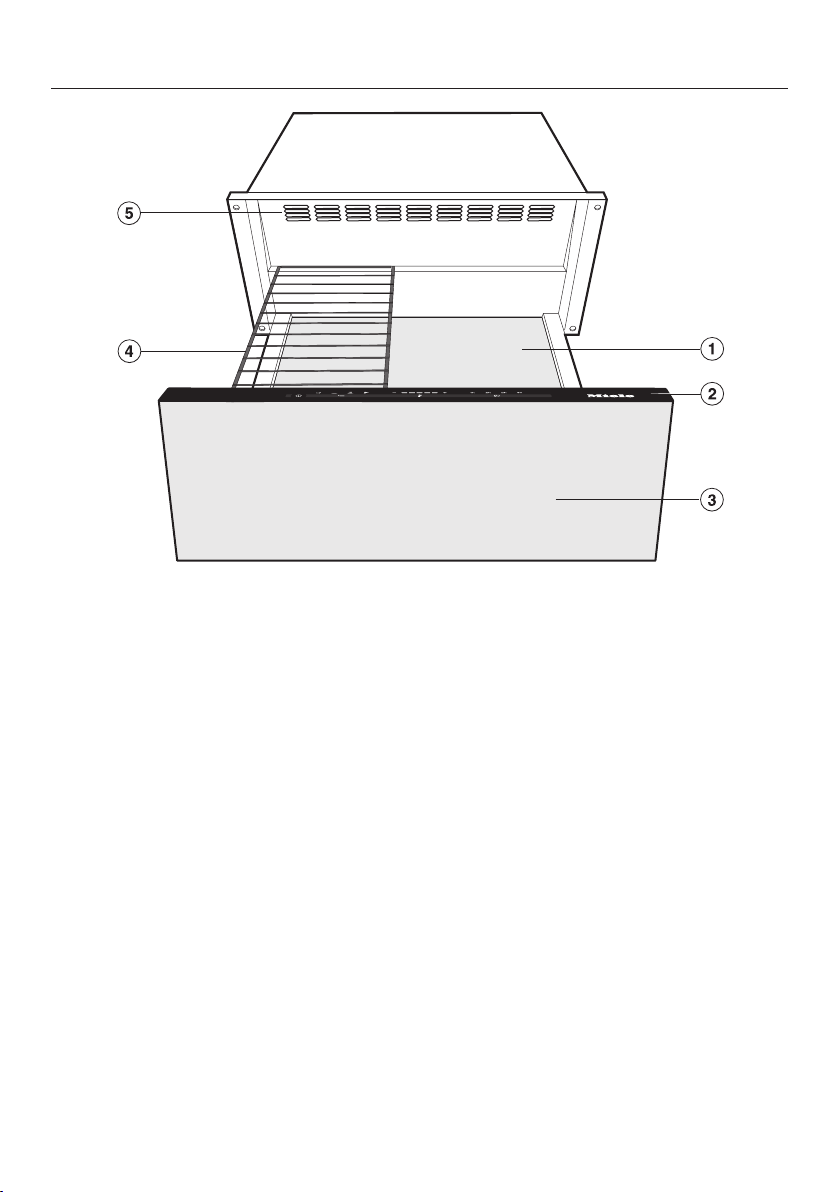
a
Non-slip mat
b
Control panel
c
Push/pull opening mechanism
The drawer can be opened and
closed by pressing lightly in the mid-
dle of the drawer front.
d
Dishwasher-safe rack
e
Air vents
Overview
13
Included accessories
The accessories supplied with your ap-
pliance, as well as a range of optional
ones, are available to order from Miele
(see “Optional accessories”).
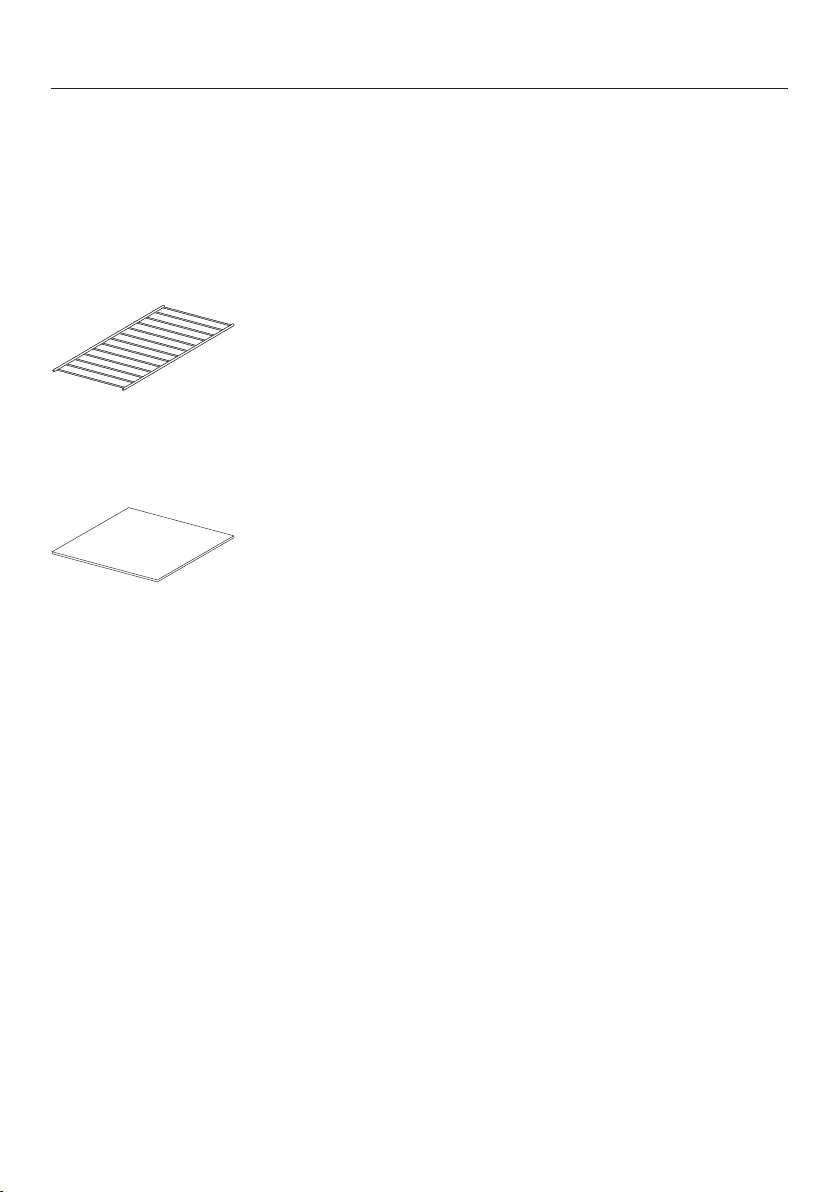
Dishwasher-safe rack
For increasing the loading area.
Non-slip mat
For keeping dishware secure.

Control panel
14
Sensor buttons
Sensor button Description
On/Off button
Menu Selects the operating mode
Temperature Sets the temperature
Duration Sets the duration
Display
Display Description
Warm Cups/Glasses mode
Warm Dishes/Plates mode
Keep Warm mode
Low Temperature mode
Temperature display with segment bars
1h Duration of 1hour
2h Duration of 2hours
3h Duration of 3hours
4h Duration of 4hours
Before first use
15
Please adhere the extra appliance
data plate (supplied) in the space pro-
vided in the “After sales service” sec-
tion of this manual.
Remove any protective foil and stick-
ers.
Cleaning the drawer for the
first time
Remove the non-slip mat, if present,
and the rack from the drawer and
clean them with warm water and liq-
uid dish soap, using a clean soft
sponge or damp microfiber cloth.
Dry the mat and the rack with a soft
cloth.
Wipe the drawer inside and out with a
damp cloth to remove any dust or
left-over packaging.
Dry all surfaces with a soft cloth.
Return the non-slip mat and the rack,
if necessary, to the drawer.
Heating the drawer for the first
time
With the drawer empty, heat the appli-
ance for at least two hours.
Tap the button to switch on the
drawer.
Tap the “Menu” button repeatedly un-
til the symbol lights up.
Tap the “Temperature” button repeat-
edly until the outer right segment of
the temperature display lights up.
Tap the “Duration” button repeatedly
until “2h” lights up.
Close the drawer.
The drawer switches off automatically
after two hours.
The drawer is equipped with a contact
switch. The drawer's heater and fan
will only operate when the drawer is
closed.
Because the metal components are
protected by a conditioning agent, there
will be a slight odor the first time the
drawer is heated up. The harmless odor
will dissipate after a short time and
does not indicate a faulty connection or
appliance defect. During this time,
make sure the kitchen is well ventilated.
Operation
16
Basic operation
The button must remain free of
debris and liquids. Failure to keep
the sensor button clean may cause it
to become unresponsive or to switch
uncontrollably.
Liquids that get inside the drawer
can cause a short-circuit.
Open and close a loaded drawer
carefully to prevent liquids from
spilling.
Open the drawer.
Tap the button to switch on the
drawer.
Tap the “Menu” button repeatedly un-
til the desired mode lights up.
Tap the “Temperature” button repeat-
edly until the segment of the desired
temperature lights up in the tempera-
ture display.
Tap the “Duration” button repeatedly
until the desired hour lights up.
Close the drawer.
Operation
17
Operating modes
The following modes are available:
– Warming cups and glasses
– Warming dishes and plates
– Keep Warm
– Low temperature
The next time the appliance is
switched on, the previously selected
operating mode will automatically ap-
pear on the control panel as the active
setting.
The drawer is equipped with a fan that
distributes the warmed air within the
drawer. The fan runs
– continuously in the “Warm
Cups/Glasses” and “Warm
Dishes/Plates” modes.
– and at intervals in the “Keep
Warm” and “Low Temperature”
modes.
You can use the drawer to keep food
warm while warming dishes at the same
time. To do so, select the “Keep
Warm” mode.
Caution!
Dishes take longer to warm up in this
mode as in the “Warm Dishes/
Plates” mode, but can get very hot!
Duration
Do not leave the drawer unattended
for too long in continuous operation
mode. Keeping food warm for a long
time can result in it drying out or
even self-igniting. Your drawer is fit-
ted with a safety switch-off mecha-
nism which switches the appliance
off after a maximum of 12 hours of
continuous operation.
The drawer is set to continuous opera-
tion (exception: Low temperature).
A limited duration can be selected by
tapping the “Duration” button: tap once
for 1 hour (1h), twice for 2 hours (2h),
and so on. The maximum duration is
4hours.
Tapping the button for a fifth time re-
turns the appliance to continuous oper-
ation.
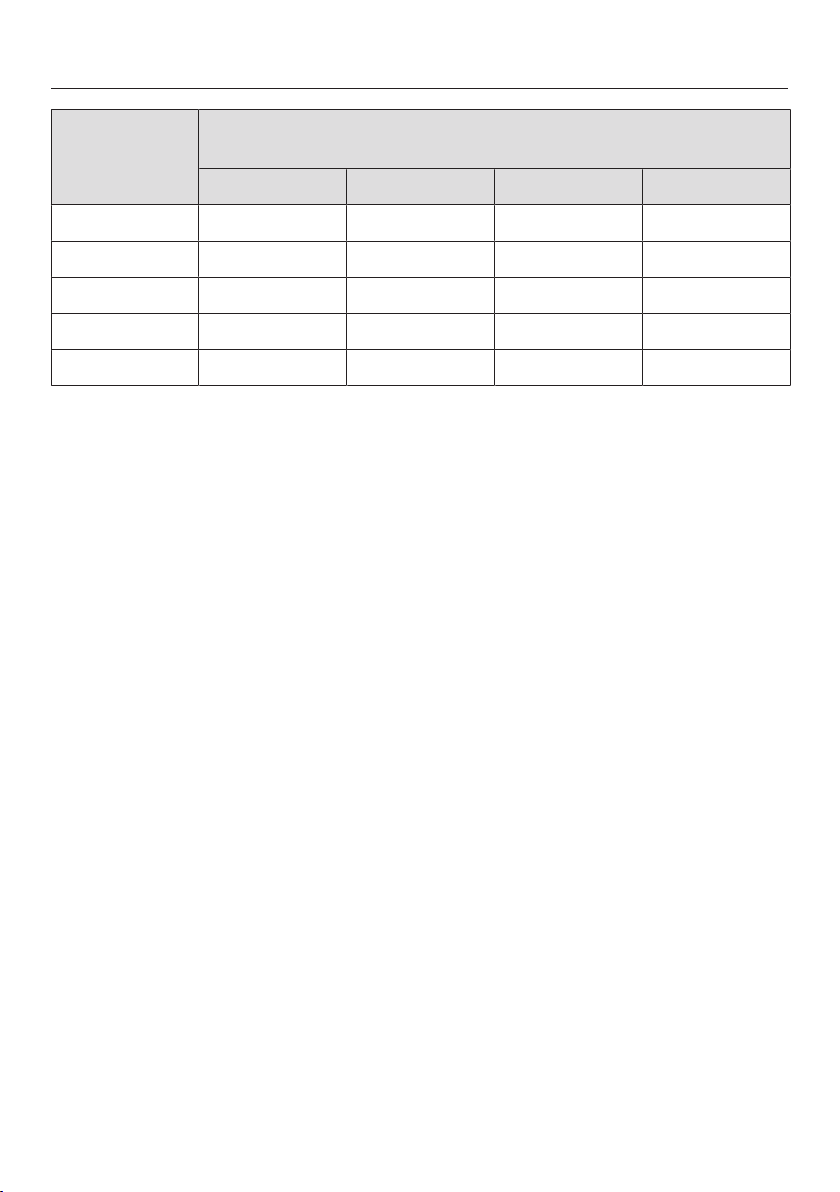
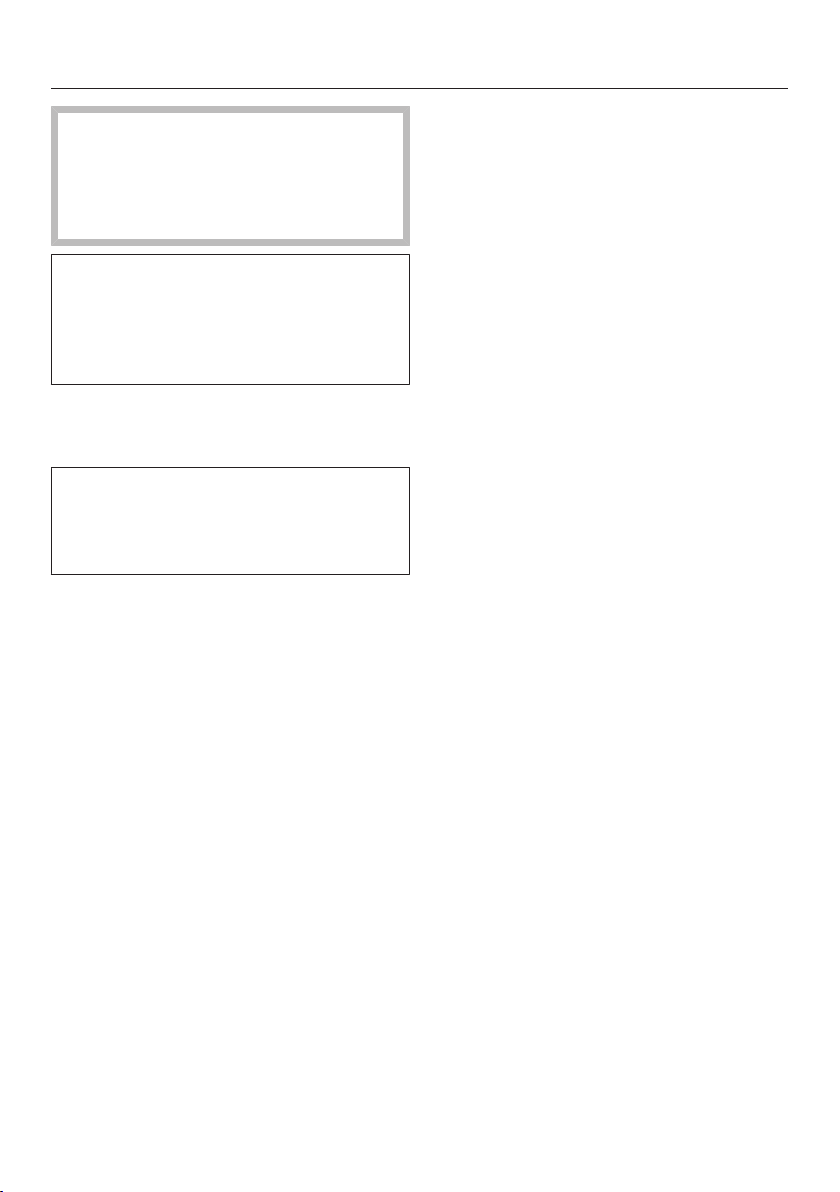
Temperature settings
A temperature range is assigned to
each operating mode. The default rec-
ommended temperatures appear in
bold. The temperature can be changed
in 5° increments by tapping the “Tem-
perature” button.
The next time the drawer is switched
on, the previously selected temperature
is automatically shown in the display as
the current setting (exception: Low tem-
perature).
Operation
18
Temperature
display
Temperature
°F / °C *
105 / 40 140 / 60 150 / 65 150 / 65
115 / 45 150 / 65 160 / 70 160 / 70
120 / 50 160 / 70 170 / 75 170 / 75
130 / 55 170 / 75 175 / 80 175 / 80
140 / 60 175 / 80 185 / 85 185 / 85
* approximate temperatures, measured in the center of an empty drawer
Keeping food warm
19
The minimum temperatures for keep-
ing food warm (150°F / 65°C) may
not be exceeded. Use only the “Keep
Warm” mode to ensure that the
minimum temperature is maintained.
This operating mode is designed to
keep food warm immediately after it
has been cooked, i.e. when it is still
hot. It is not intended for reheating
food that is cold.
Select the mode.
Select the desired time setting.
The drawer must be preheated for
about 15 minutes to ensure that the
temperature required for keeping food
warm is reached.
Place the dishware inside the drawer
for preheating.
After 15minutes, remove the pre-
heated dishware from the warming
drawer and fill it with the hot food.
Use pot holders to remove the dish-
ware.
Place the dishes in the drawer and
close it carefully to prevent liquid
foods from spilling.
Tips
– Place the hot food in pre-warmed
dishes. To preheat dishes, place them
in the drawer while it is being pre-
heated.
– Cover roasted or fried foods that are
to remain crispy. Use a higher tem-
perature to keep this type of food
warm.
– Cover food with a high moisture con-
tent, liquids and foods which can de-
velop a skin, with aluminum foil or a
plate.
– To avoid spilling the food, do not
overfill dishes.
– Freshly cooked food is hotter than
food which has been kept warm.
Serve food that has been kept warm
on preheated plates.
– Foods begin to lose their nutrients
during the cooking process and con-
tinue to do so while being kept warm.
The longer food is kept warm, the
greater the loss of nutrients.
– We do not recommend keeping food
warm for too long, as it will continue
to cook.
– The food may cool down if the drawer
is opened frequently.
– Do not slam the drawer open or shut.
Liquids could spill over and get into
the vents or inside the drawer.
Keeping food warm
20
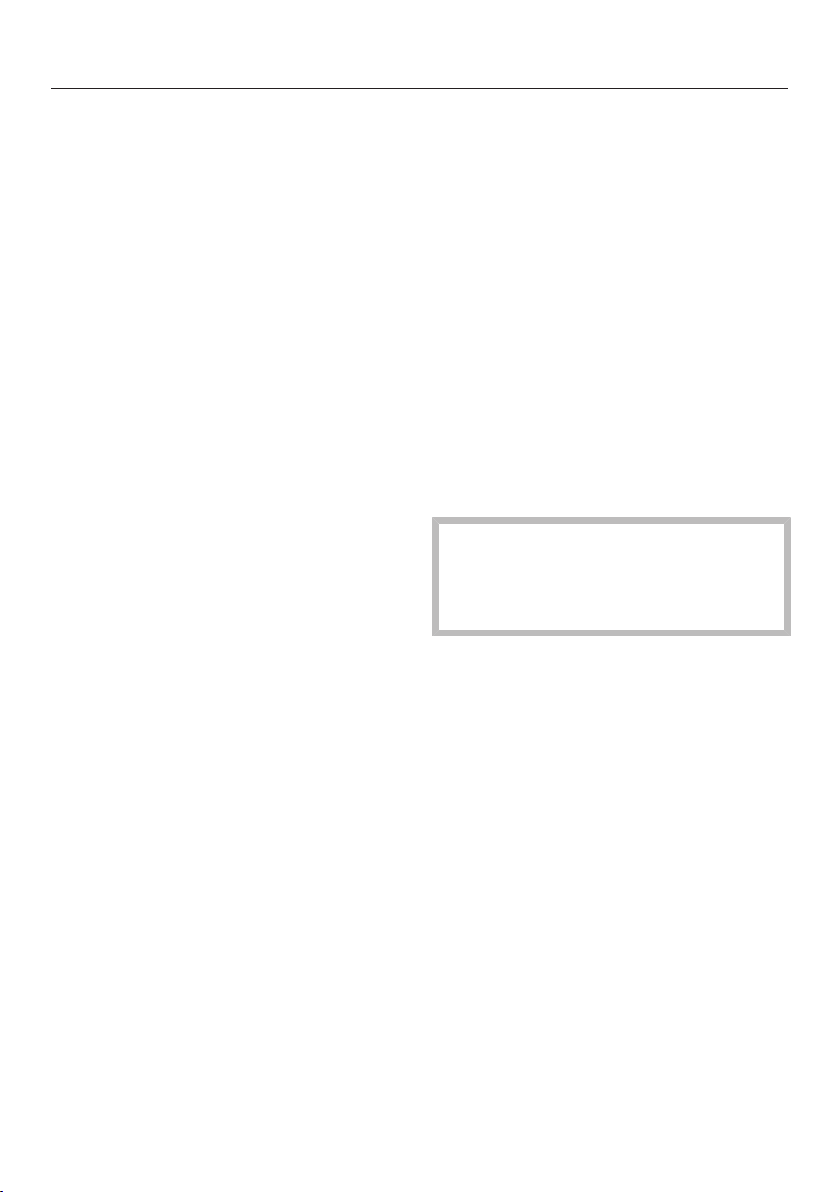
Settings
Food Cook-
ware
Cover
dishes
Temperature
setting for
Position
Bot-
tom
Rack*
Steak, rare Plate No x x
Casserole/Gratin Casserole
dish
Yes x
Roast Plate Yes x
Casserole Pot Yes x
Fish sticks Pan No x
Meat in gravy/
sauce
Pot Yes x
Vegetables in
sauce
Pot Yes x
Stew Pot Yes x
Mashed potatoes Pot Yes x
Plated meal Plate Yes x
Baked/Boiled pota-
toes with skin
Plate/pot Yes x
Breaded cutlets Pan No x
Pancakes Plate No x x
Pizza Plate No x
Boiled potatoes Pot Yes x
Sauce Pot Yes x
Strudel Plate No x
Warming bread loaf – No x x
Warming rolls – No x x
* dependending on the appliance model
Warming dishes
21
Tips
– Distribute the dishware over the
whole area of the drawer whenever
possible. Stacks of plates heat up
more slowly than individual pieces. If
it is not possible to avoid large stacks
of plates, place them at the front of
the drawer.
Use the rack (depending on the appli-
ance model).
– Do not place large serving dishes in
front of the air vents in an upright po-
sition. This will block the warm air
outlets, and the plates and dishes will
not warm evenly.
– For cups and glasses, only select the
“Warm Cups/Glasses” mode to
ensure that the maximum tempera-
ture (140°F/60°C) is not exceeded.
– Warmed dishes and plates cool down
rapidly. Do not remove them until you
are ready to use them.
Warming times
Various factors will affect the warming
times:
– The material and thickness of the
dish
– The amount of dishes placed in the
drawer
– The arrangement of the dishes in the
drawer
– The temperature setting
Due to these factors, it is not possible
to provide exact warming times. The
following information can be used as a
guide:
In the mode, it will take approxi-
mately
– 30–35 minutes to evenly warm
6place settings
– 40–45 minutes to evenly warm
12place settings
As you continue to use the appliance,
you will get to know which setting best
fits your needs.
Capacity
The telescopic runners can support
55 lbs/25kg.
Overloading the drawer will damage
the runners.
The quantity that can be loaded will de-
pend to a great extent on the weight
and size of your own dishware.
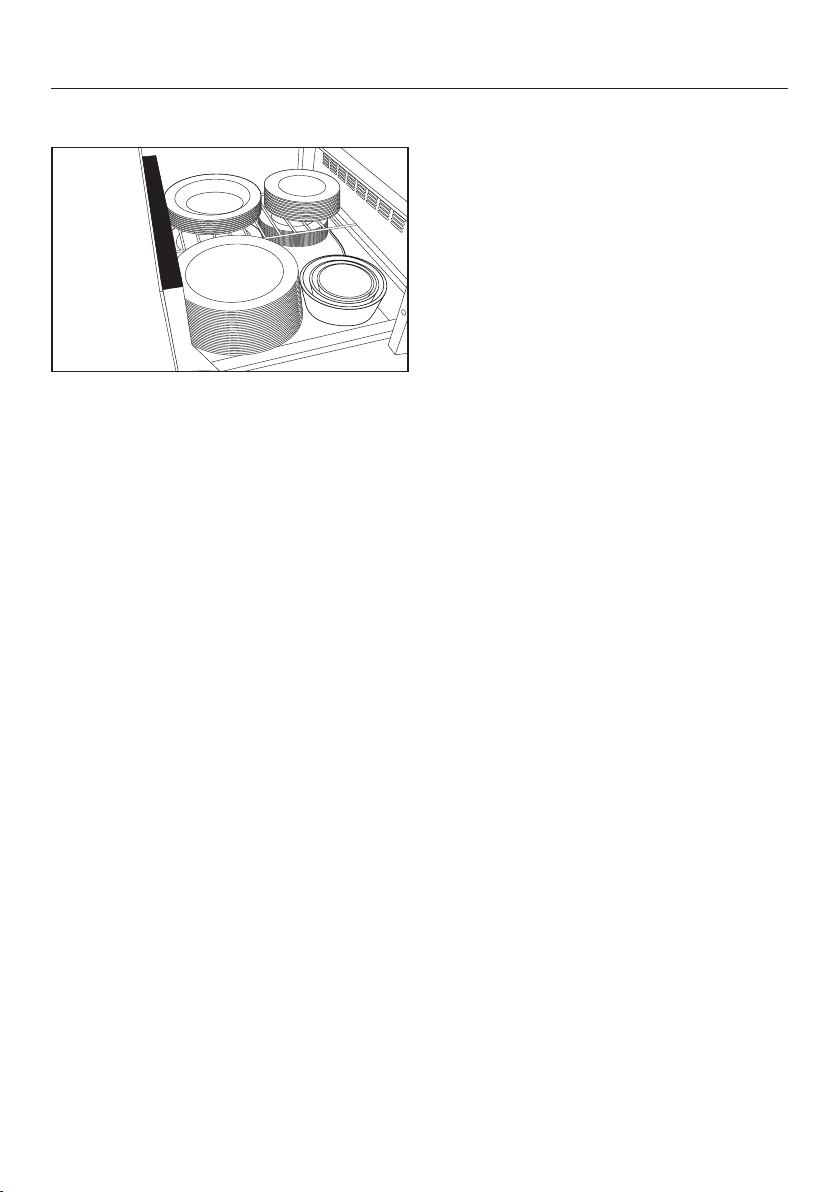
You can increase the load area by using
the rack supplied with the appliance.
Position the rack to suit. With two racks
you can increase the load area even
more by placing one rack on the left
and the other on the right. Another rack
can be obtained from Miele or from
your Miele dealer (see “Optional acces-
sories”).
Warming dishes
22
The following loading examples are intended to serve as a guide:
12 place settings
12 dinner plates 10 ¹/₄" (26 cm)
12 deep soup plates 9" (23cm)
12 dessert plates 7 ¹/₂" (19cm)
1 oval platter 12 ¹/₂" (32cm)
1 serving bowl 7 ¹/₂" (19cm)
1 serving bowl 6 ¹/₄" (16cm)
1 serving bowl 5" (13cm)
Or one of the following arrangements:
40 dinner plates 10 ¹/₄" (26 cm)
60 deep soup plates 9" (23cm)
45 soup bowls 4" (10cm)
20 dinner plates
20 deep soup plates
10 ¹/₄" (26cm)
9" (23cm)
20 pizza plates 14 ¹/₄" (36cm)
142 espresso cups 2 ¹/₄" (5.9cm)
90 cappuccino cups 3 ¹/₂" (8.8cm)
30 tea glasses 2³/₄" (6.7cm) / 3 ¹/₄" (8cm) high
Other uses
23
Food Cookware Cover
dishes
[h:min]
Defrosting
berries
Bowl/plate No 12:50
Dissolving
gelatin
Bowl No 12:15
Proofing Bowl Yes, with
plate
12:30
Preparing
yogurt
Yogurt jars
with lids
– 5:00
Soaking rice
pudding
Pot Yes, with lid 12:40
Melting
Chocolate
Bowl No 12:20
Defrosting
vegetables
Bowl No 1:00
Temperaturesetting / Temperaturesetting / Duration
Sabbath mode
24
For the observance of religious rules,
the drawer can be programmed for the
duration of the Sabbath. It switches
off automatically after 72 hours and
normal mode is re-established. When
this function is activated, the timer is
deactivated and the buttons must be
pressed for longer than usual.
Activate
Tap the “Duration” button and keep it
pressed.
While keeping the “Duration” button
pressed, tap the button and keep
it pressed.
Keep both buttons pressed until all
four timer displays appear.
Set the required mode and tempera-
ture.
Deactivate
You can deactivate the Sabbath func-
tion before the time has expired.
Tap the button and keep it pressed
until all indicators go out.
The drawer is in normal mode again.
Cleaning and care
25
Risk of injury!
The steam from a steam cleaner
could reach electrical components
and cause a short circuit.
Do not use a steam cleaner to clean
the warming drawer.
Unsuitable cleaning agents can dis-
color and damage the surfaces of
the appliance. Only use liquid dish
soap and warm water applied with a
soft sponge or cloth.
All surfaces are susceptible to
scratching. Scratches on glass sur-
faces may cause a breakage.
Immediately remove any residues left
by cleaning agents.
Allow the drawer to cool down to a
safe temperature before cleaning.
The drawer and accessories should
be cleaned and dried thoroughly after
each use.
Unsuitable cleaning agents
To better maintain your appliance avoid
the following:
– Cleaners containing soda, ammonia,
thinners, or chlorides
– Descaling agents
– Abrasive cleaning agents, such as
powder or cream cleansers, pumice
stones
– Solvent-based cleaners
– Stainless steel cleaners
– Dishwasher cleaners
– Oven sprays
– Hard, abrasive sponges and brushes,
such as pot scrubbers or scrub
sponges
– Sharp metal scrapers
Cleaning and care
26
Cleaning the drawer front and
interior
The On/Off button must remain free of
grime and liquids. Failure to keep the
sensor button clean may cause it to
become unresponsive or to switch un-
controllably.
It is best to remove normal soiling im-
mediately using a clean sponge and a
solution of warm water and liquid
dish soap or with a clean, damp mi-
crofiber cloth.
Wipe with clean water afterwards.
After cleaning, dry the surfaces with a
soft cloth.
Glass cleaning agent can be used for
the appliance front.
The long exposure time of glass
cleaning agents can damage the sur-
face.
Wash off the cleaning agent immedi-
ately and make sure that no puddles
form.
Cleaning the non-slip mat
Do not clean the non-slip mat in the
dishwasher or washing machine.
Never place it in the oven to dry!
Remove the non-slip mat for clean-
ing.
Clean the mat by hand only, using
warm water and a small amount of
liquid dish soap, and then dry using a
cloth.
Do not return the non-slip mat to the
warming drawer until it is completely
dry.
Frequently Asked Questions
27
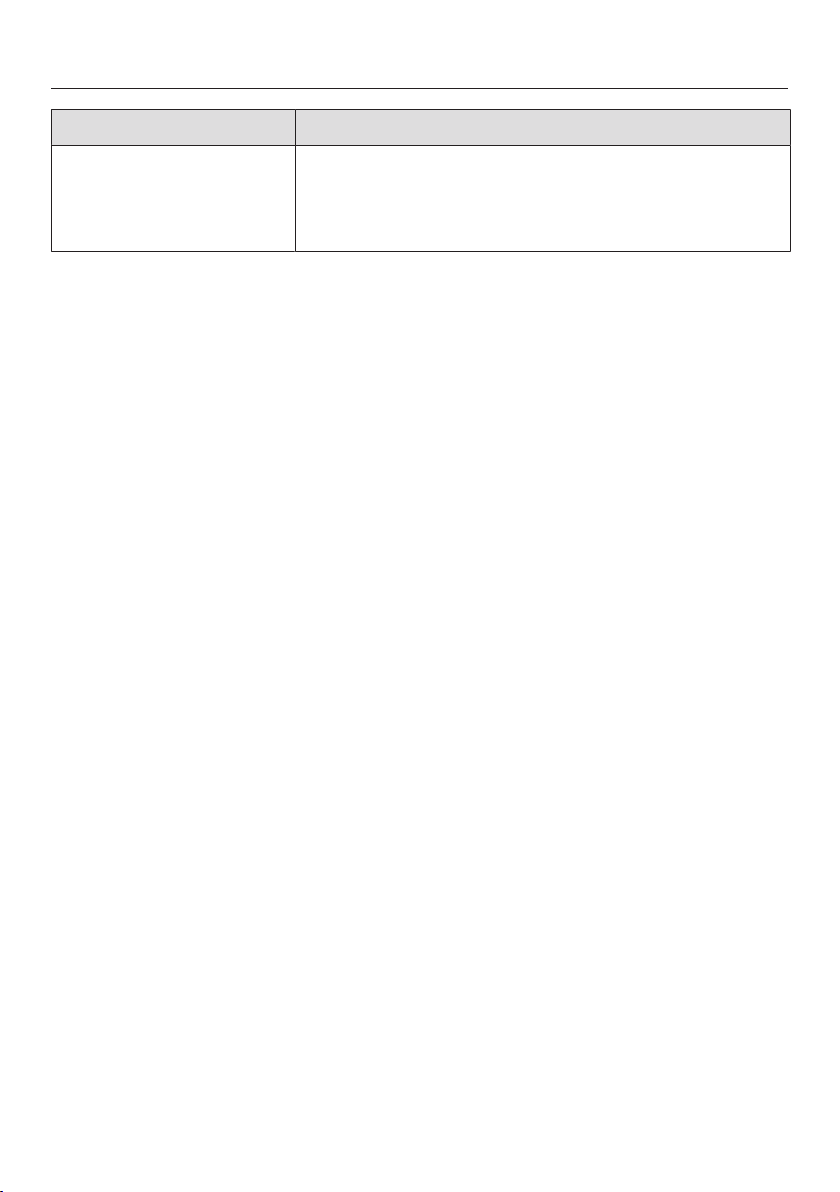
With the help of the following guide minor faults in the performance of the ma-
chine, some of which may result from incorrect operation, can be remedied with-
out contacting the Service Department.
This guide may help you to find the reason for the fault, and how to correct it.
Problem Possible cause and solution
The drawer does not
heat up.
The plug is not properly inserted.
Insert the plug.
The circuit breaker has tripped.
Check the fuse (minimum fuse rating: see data
plate). If the drawer still will not turn on after reacti-
vating the fuse, contact a qualified electrician or
Miele Technical Service.
The food is not hot
enough.
The “Keep Warm” mode is not set.
Set the correct operating mode.
The temperature setting is too low.
Select a higher temperature.
The air vents are covered.
Make sure that air can circulate freely.
The food is too hot. The “Keep Warm” mode is not set.
Set the correct operating mode.
The temperature setting is too high.
Select a lower temperature.
The dishes are not hot
enough.
The “Warm Dishes/Plates” mode is not set.
Set the correct operating mode.
The temperature setting is too low.
Select a higher temperature.
The air vents are covered.
Make sure that air can circulate freely.
The dishes have not been warmed long enough.
The warming-up time for dishes is influenced by
various factors (see “Warming dishes”).
The dishes are too hot. The “Warm Dishes/Plates” or “Warm Cups/
Glasses” mode is not set.
Set the correct operating mode.
The temperature setting is too high.
Select a lower temperature.
Frequently Asked Questions
28
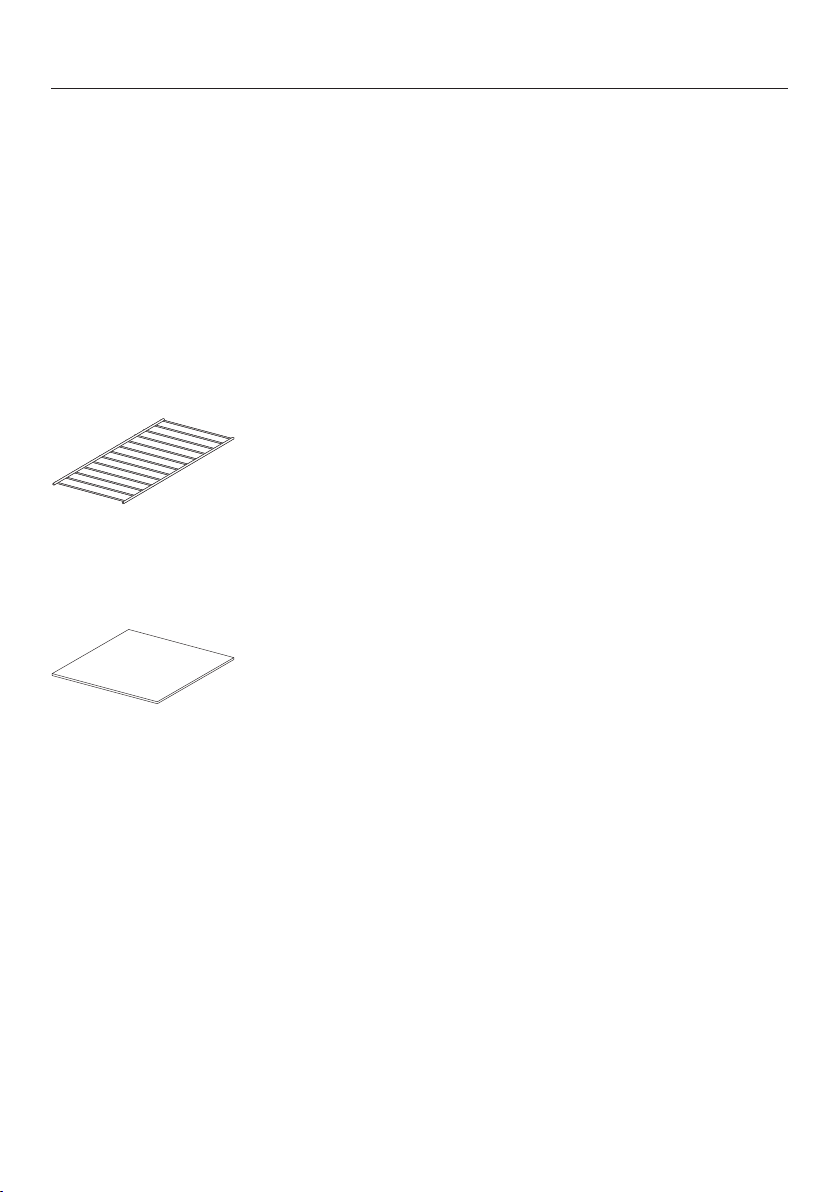
Problem Possible cause and solution
Noise occurs during op-
eration
The noise is caused by the fan, which distributes the
heat evenly throughout the drawer. The fan runs at
intervals in the “Keep Warm” and “Low temperature”
modes. This is not a fault.
Optional accessories
29
Miele offers a range of useful acces-
sories, as well as cleaning and condi-
tioning products for your appliance.
These products can be easily ordered
from the Miele webshop.
These products can also be ordered
from Miele Technical Service (see the
end of these operating instructions) or
your Miele dealer.
Rack
For increasing the loading area.
Non-slip mat
For keeping dishware secure.
IMPORTANT SAFETY INSTRUCTIONS - INSTALLATION
30
WARNING - Read all in-
structions before installation or
use of the drawer to prevent
injury and machine damage.
Before connecting the appli-
ance to the power supply, ensure
that the connection data (voltage
and frequency) on the data plate
of the drawer match the electri-
cal supply.
This data must correspond in or-
der to avoid the risk of damage
to the warming drawer. Consult a
qualified electrician if in any
doubt.
The electrical outlet must be
easily accessible after the instal-
lation of the drawer.
The drawer may only be built
in combination with those appli-
ances specified by Miele as be-
ing suitable. Miele cannot guar-
antee trouble-free operation if the
appliance is operated in combi-
nation with appliances other than
those quoted by Miele as being
suitable.
The base on which the drawer
and the combination appliance
are fitted must be fixed in place
and must support the weight of
both appliances.
When installing the combina-
tion appliance, it is essential to
follow the instructions given in
the operating and installation in-
structions supplied with it.
The drawer must be installed
in such a way that
– you can see the contents of
cookware. Otherwise you may
risk scalding or burning your-
self with hot water and food
when removing containers.
– there is enough space to pull
out the drawer.
Instructions for installation
31
The combination appliance is placed on
top of the drawer without the need for
an interim shelf.
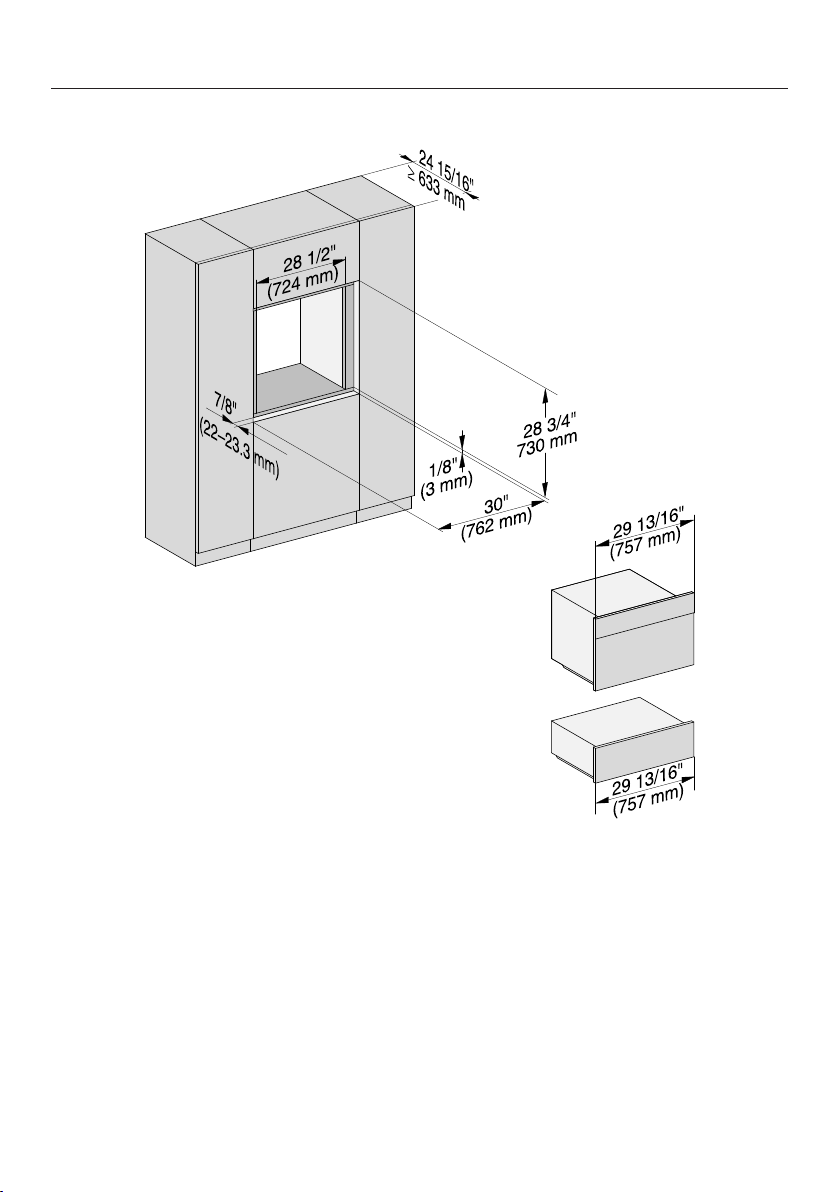
The installation dimensions for the food
warming drawer must be added to the
installation dimensions for the combina-
tion appliance to establish the niche
size required.
All dimensions in this instruction book-
let are given in mm and inches.
Note to the installer:
Please leave these instructions with the
consumer of the appliance for the local
building inspectors use.
SAVE THESE INSTRUCTIONS.
Installation dimensions
32
Installation with oven (H 6570/6670/6770/6870 BM)
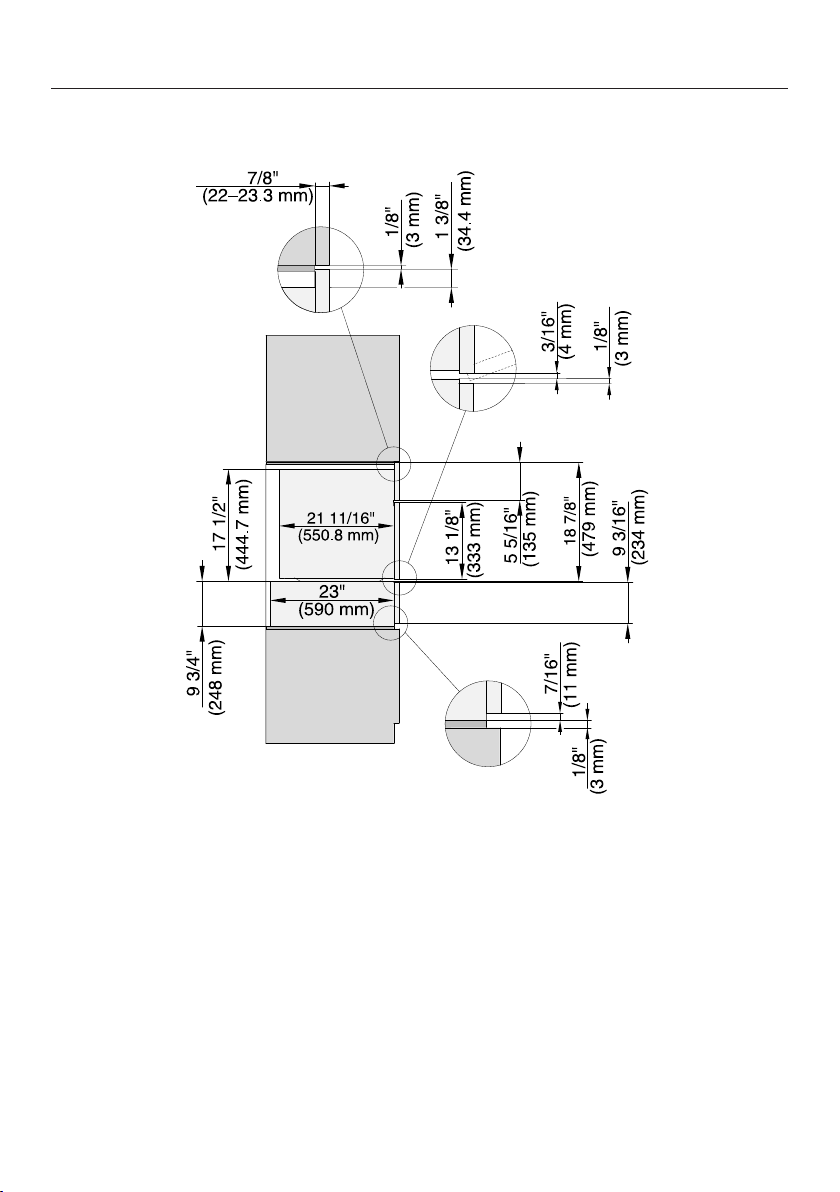
Installation dimensions
33
Side view
Installation
34
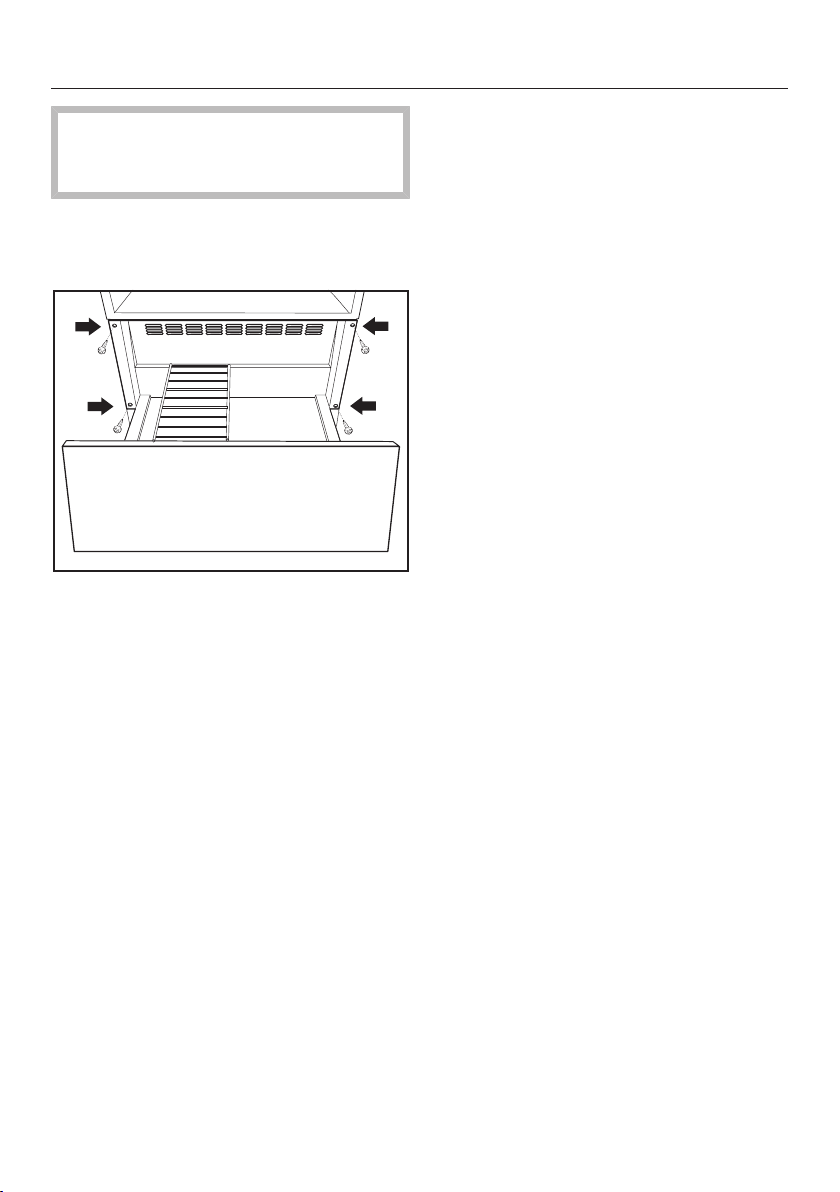
The base of the drawer must be
clean and level. This is important for
appliance to function correctly.
Push the drawer into the housing unit
as far as the vapor strip and align it at
a right angle.
Open the drawer, and use the
4screws supplied to secure it to the
side walls of the housing unit.
Install the combination appliance in
accordance with its own specific op-
erating and installation instructions.
Electrical connection
35
ATTENTION:
Before installation or servicing, dis-
connect the power supply by either
removing the fuse, manually “trip-
ping” the circuit breaker or unplug-
ging the appliance. Pull the plug not
the cord.
Repairs and service by unqualified
persons could be dangerous and the
manufacturer will not be held re-
sponsible.
Installation work and repairs should
only be performed by a qualified
technician in accordance with all ap-
plicable codes and standards. Instal-
lation, repair, and maintenance work
should only be performed by a
Miele-authorized service technician.
The voltage and frequency listed on
the rating label must correspond with
the household electrical supply to
prevent appliance damage.
Check these data before connection.
Consult an electrician if in doubt.
When another appliance is installed
in combination with the drawer to the
same circuit, operating both appli-
ances at the same time may cause
an overload.
If in doubt consult a qualified electri-
cian.
Installer:
Please leave these instructions with
the customer.
Connection
Make sure that the connection data
on the data plate (voltage, frequency,
and fuse rating) matches that of your
electrical supply.
Connection data
The drawer is ready for connection and
equipped with a 7' 2" (2,200mm) power
cord with a plug.
120V / 15A / 60Hz
Make sure that the connecting socket is
accessible after the installation of the
drawer.
Technical Service
36
Contact in case of fault
In the event of a fault which you cannot remedy yourself, please contact your
Miele dealer or Miele Technical Service.
Contact information for Miele Technical Service can be found at the end of this
document.
Please quote the model and serial number of your appliance when contacting
Miele. Both pieces of information can be found on the data plate.
Data plate
Adhere the extra data plate supplied with the appliance in the space below. Make
sure that the model number matches the one specified on the back cover of this
document.
Warranty
For further information, please refer to your warranty booklet.
MieleCare
37
This service is available in USA only.
MieleCare, our Extended Service Con-
tract program, gives you the assurance
of knowing that your appliance invest-
ment is covered by 5years of worry free
ownership.
MieleCare is the only Extended Service
Contract in the industry that guarantees
repairs by a Miele Authorized Service
Provider using genuine Miele parts.
Only genuine Miele parts installed by
factory trained professionals can guar-
antee the safety, reliability, and
longevity of your Miele appliance.
Please note that unless expressly ap-
proved in writing by Miele’s Service de-
partment, Extended Service Contracts
offered by other providers for Miele
products will not be recognized by
Miele. Our goal is to prevent unautho-
rized (and untrained) service personnel
from working on your Miele products,
possibly doing further damage to them,
you and/or your home.
To learn more about MieleCare Ex-
tended Service Contracts, please con-
tact your appliance dealer or visit us
online at:
www.mieleusa.com


9 Independence Way
Princeton, NJ 08540
Phone:
Fax:
www.mieleusa.com
U.S.A.
Miele, Inc.
National Headquarters
Please have the model and serial number
of your appliance available when
contacting Technical Service.
Canada
Importer
Miele Limited
Headquarters and Miele Centre
800-843-7231
609-419-4298
Technical Service & Support
Phone:
Fax:
161 Four Valley Drive
Vaughan, ON L4K 4V8
www.miele.ca
800-999-1360
888-586-8056
Customer Care Centre
Phone:
800-565-6435
905-532-2272
International Headquarters
Miele & Cie. KG
Carl-Miele-Straße 29
33332 Gütersloh
Germany
M.-Nr. 10 768 500 / 00en-US
ESW 6585 / ESW 6885