5
HeartRateControl
Model No. 831,294150
Serial No.
! Serial
11IIIUNumber
• Assembly
• Operation
• Maintenance
• Part List and Drawing
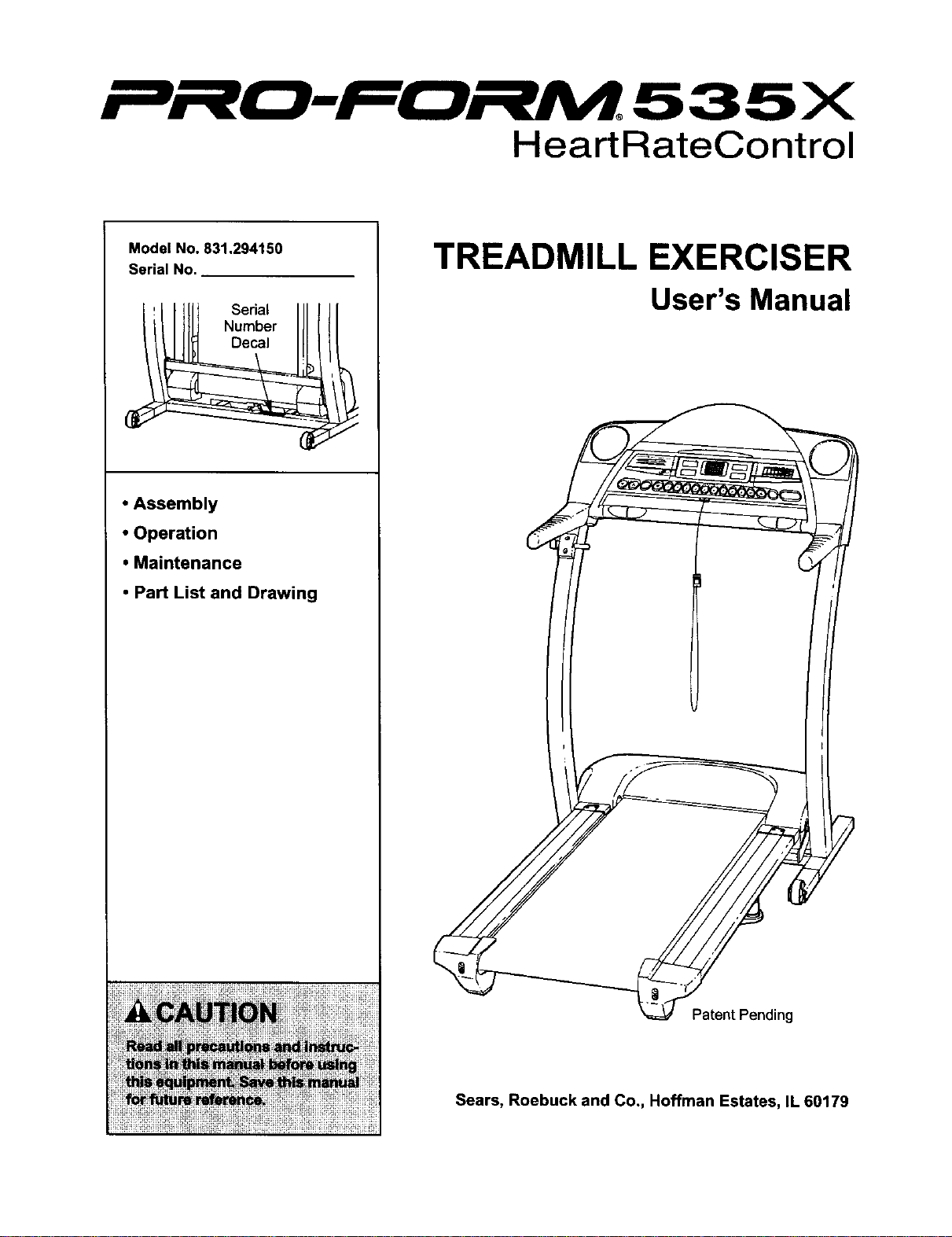
TREADMILL EXERCISER
User's Manual
Patent Pending
Sears, Roebuck and Co., Hoffman Estates, IL 60179
5
HeartRateControl
TABLE OF CONTENTS
IMPORTANT PRECAUTIONS ................................................................. 3
BEFORE YOU BEGIN ....................................................................... 5
ASSEMBLY ............................................................................... 6
OPERATION AND ADJUSTMENT ............................................................. 9
HOW TO FOLD AND MOVE THE TREADMILL .................................................. 22
TROUBLESHOOTING ...................................................................... 24
CONDITIONING GUIDELINES ............................................................... 26
ORDERING REPLACEMENT PARTS .................................................. Back Cover
FULL 90 DAY WARRANTY ........................................................... Back Cover
Note: An EXPLODED DRAWING and a PART LIST are attached in the center of this manual.
2

IMPORTANT PRECAUTIONS
iiiiii!iii!iiiiii!iiiii!i!iii !iiiiiiiiii!iiii!i i
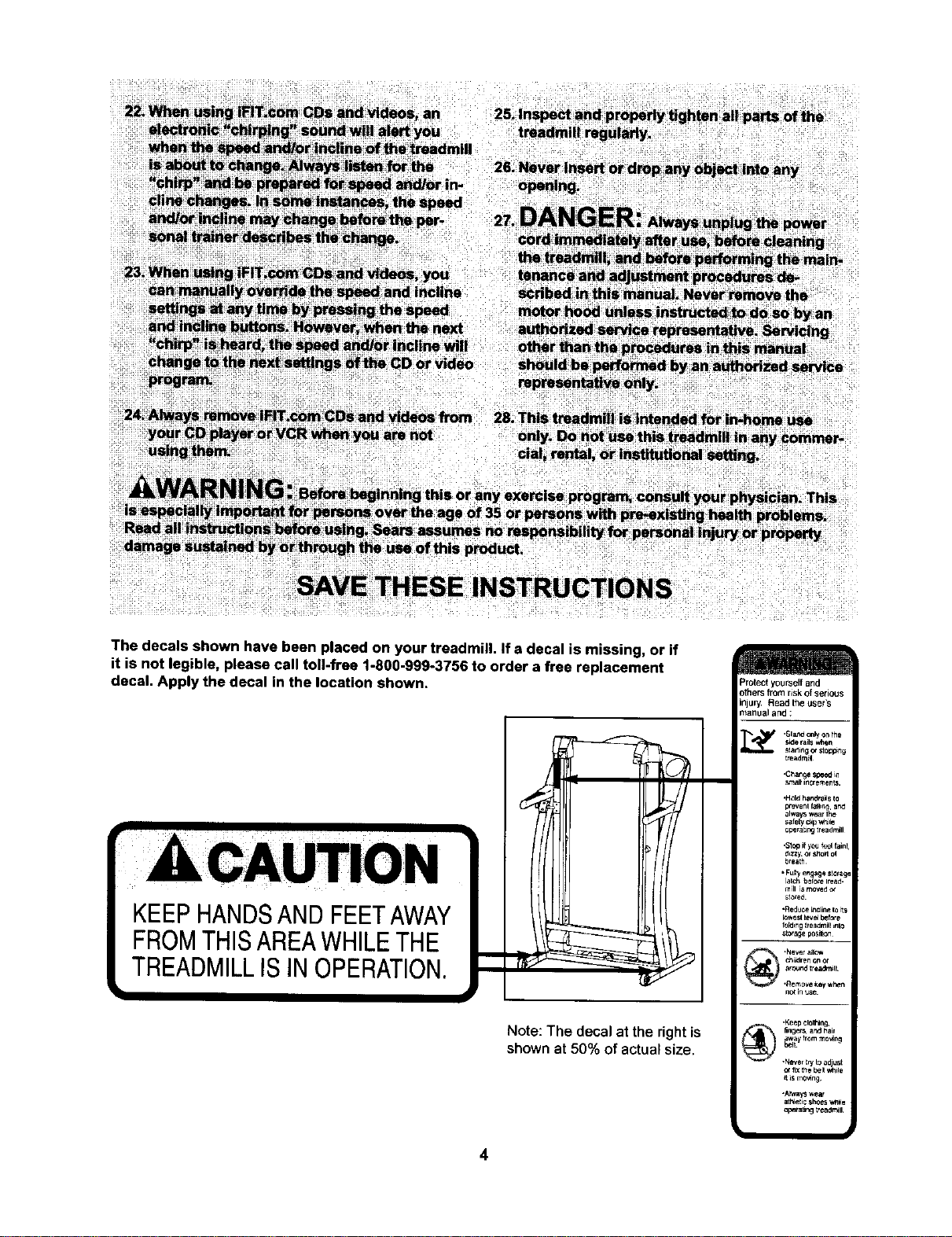
The decals shown have been placed on your treadmill, if a decal is missing, or if
it is not legible, please call toll-free 1-800-999-3756 to order a free replacement
decal. Apply the decal in the location shown.
KEEPHANDSANDFEETAWAY
FROMTHISAREAWHILETHE
TREADMILLISINOPERATION.
Note: The decal at the right is
shown at 50% of actual size.
=rotectyourselfand
)thersfromriskof serious
r, Read theuser's
_anual and:
•Keep clothing,
fingers and i_ai_
•N_r try tn ad ust
or _X toe I:_ t _tFe
il is mo_n_
•A_wlWSwear
op_[tJng treadmill
BEFORE YOU BEGIN
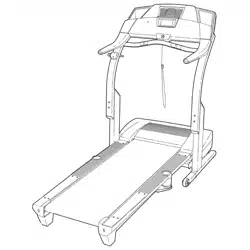
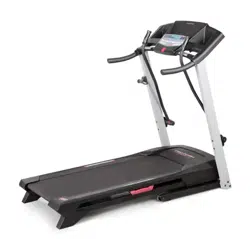
Thank you for selecting the revolutionary PROFORM ®
535x treadmill. The 535x treadmill combines advanced
technology with innovative design to help you get the
most from your exercise program in the convenience
and privacy of your home. And when you're not exer-
cising, the unique 535x can be folded up, requiring less
than half the floor space of other treadmills.
For your benefit, read this manual carefully before
using the treadmill. If you have questionsafter read-
ing this manual, call 1-800-4-MY-HOME ®(1-800-469-
4663).To help us assist you, please note the product
model number and serial number before calling. The
model number of the treadmill is 831.294150. The ser-
ial number can be found on a decal attached to the
treadmill (see the front cover of this manual for the lo-
cation).
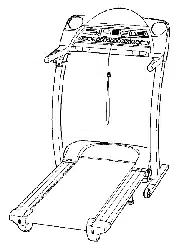
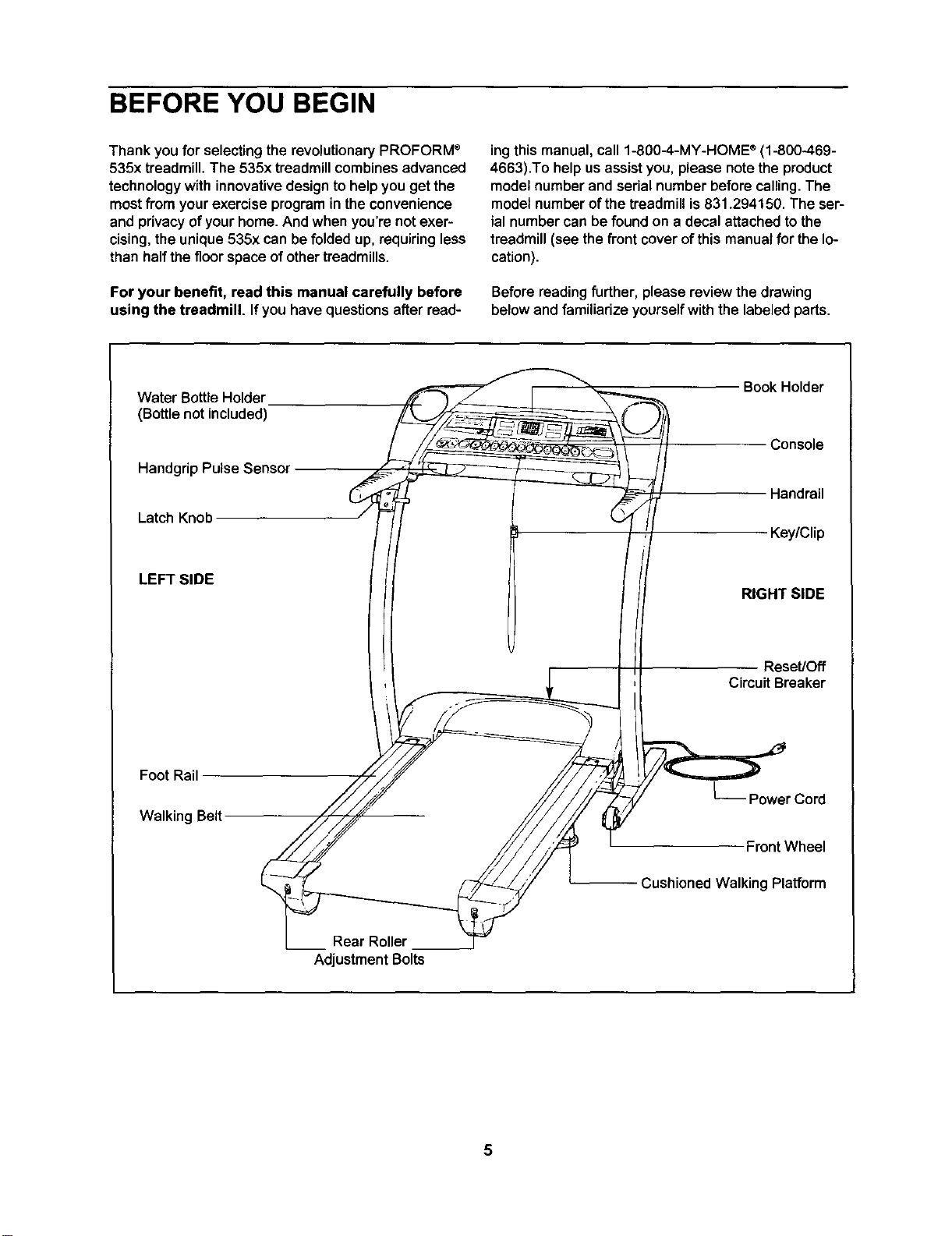
Before reading further, please review the drawing
below and familiarize yourself with the labeled parts.
Water Bottle Holder
(Bottle not included)
Handgrip Pulse Sensor
Latch Knob
LEFT SIDE
Foot Rail
Walking Belt
___ Rear Roller
Adjustment Bolts
Book Holder
Console
Handrail
Key/Clip
RIGHT SIDE
Reset/Off
Circuit Breaker
L__ Power Cord
Front Wheel
Cushioned Walking Platform
5
ASSEMBLY
Assembly requires two persons. Set the treadmillina cleared area and remove all packingmaterials. Do not
disposeof the packingmaterialsuntilassembly iscompleted.Note: Ifa part needed forassembly isnot in the
parts bag, firstcheckto see ifithas been pre-assembled. If a part is missing, call toll-free 1-800-999-3756.
Assembly requires your own Phillips screwdriver _, wire cutters _ end rubber
mallet _.
Note: The undersideof the treadmillwalkingbelt is coated with high-performance lubricant. During shipping,a
small amount of lubricantmay be transferred to the top of the walking belt or the shipping carton. This is a normal
condition and does not affect treadmill performance. If there is lubricant on top of the walking belt, simply wipe off
the lubricant witha softcloth and a mild, non-abrasive cleaner.
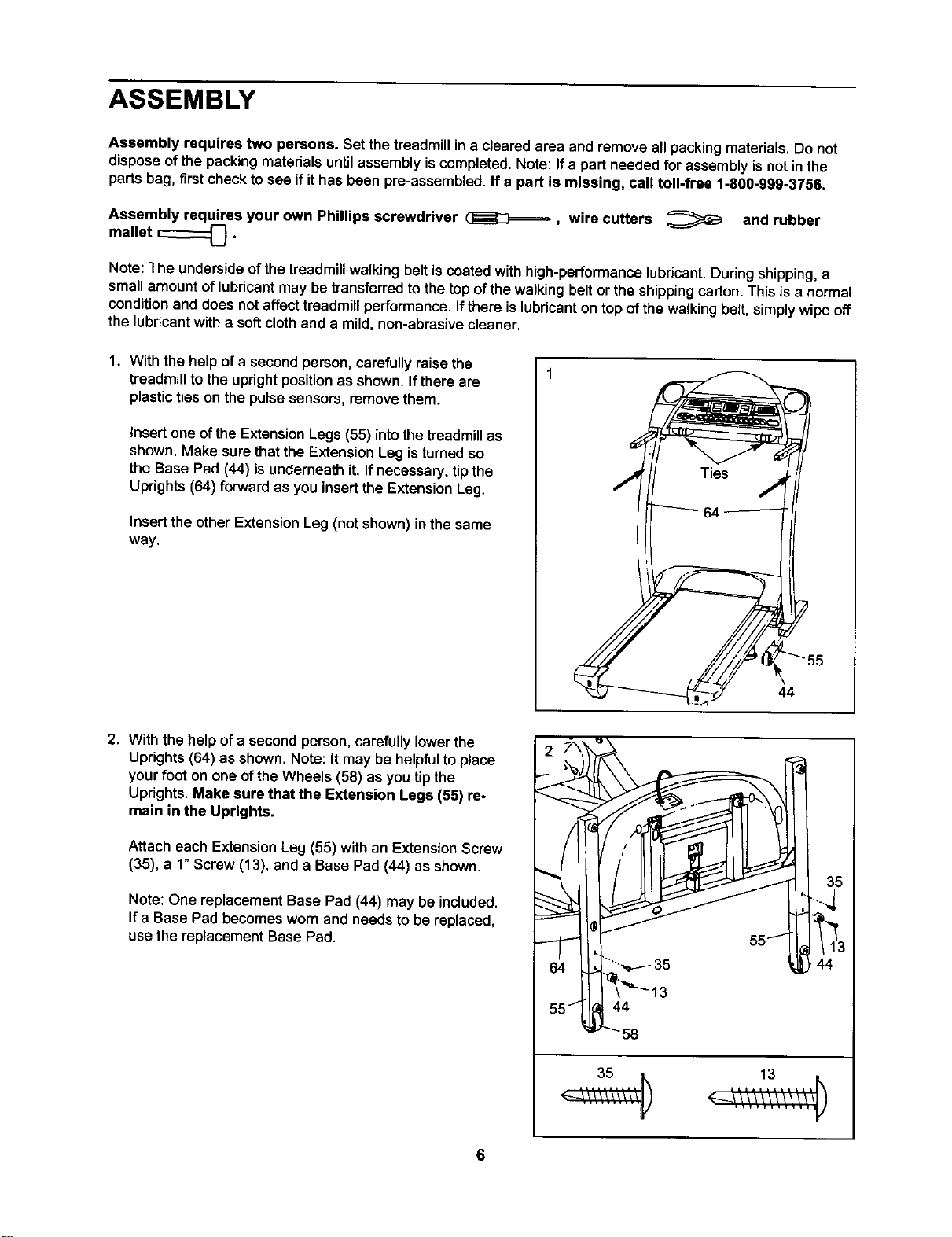
1. With the help ofa second person, carefully raise the
treadmilltothe uprightpositionas shown•Ifthere are
plasticties on the pulsesensors, removethem.
Insert one of the ExtensionLegs (55) into the treadmillas
shown. Make sure that the Extension Leg is turned so
the Base Pad (44) is underneath it. If necessary, tip the
Uprights (64) forward as you insert the Extension Leg.
Insert the other Extension Leg (not shown) in the same
way,
44
2. With the help of a second person, carefully lower the
Uprights (64) as shown. Note: It may be helpful to place
your foot on one ofthe Wheels (58) as you tip the
Uprights. Make sure that the Extension Legs (55) re-
main in the Uprights.
Attach each ExtensionLeg (55) with an Extension Screw
(35), a 1"Screw (13), and a Base Pad (44) as shown,
Note: One replacement Base Pad (44) may be included.
If a Base Pad becomes worn and needs to be replaced,
use the replacement Base Pad.
6
13
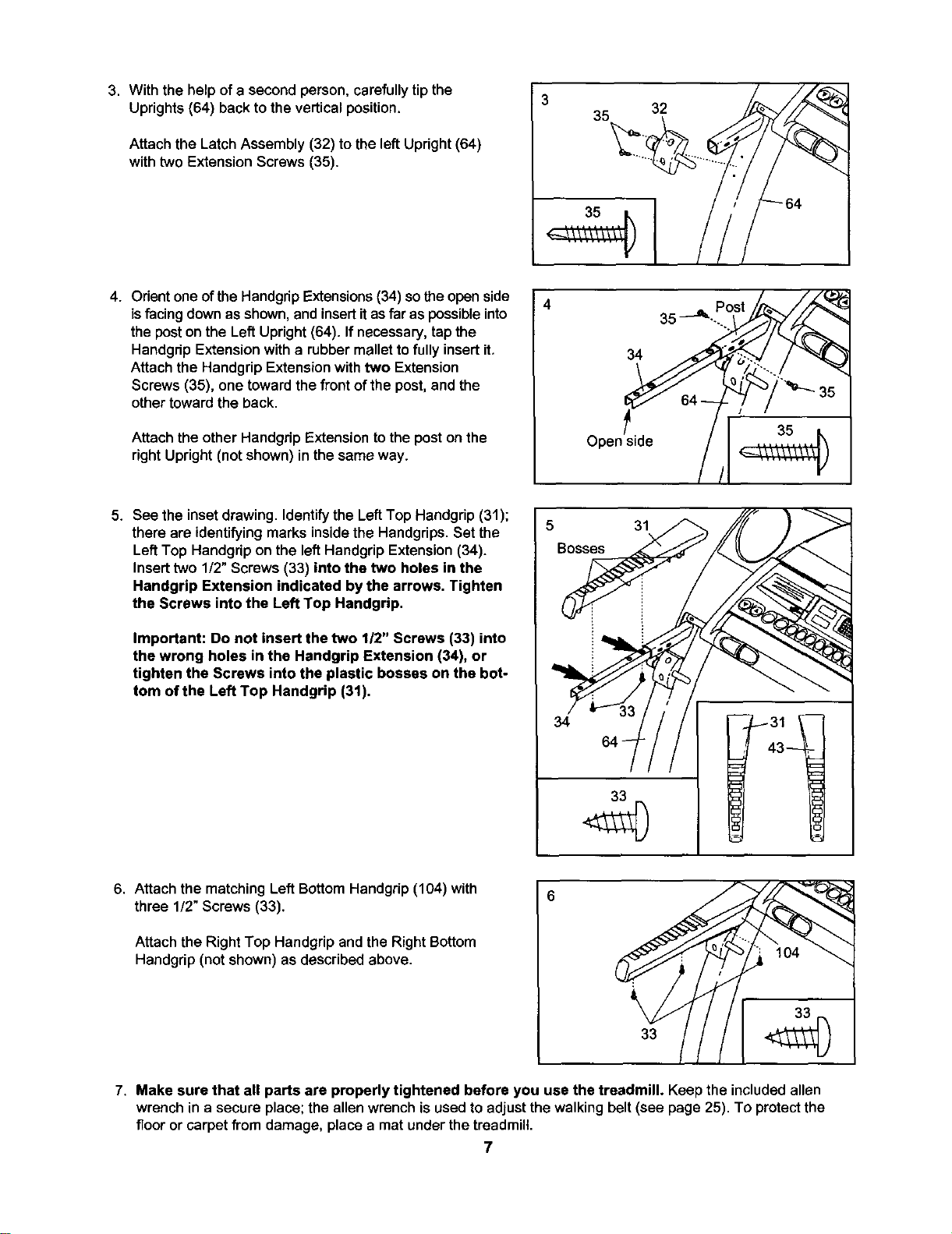
3. With the help of a second person, carefully tip the 3
Uprights (64) back to the vertical position. 32
Attach the Latch Assembly (32) to the left Upright (64)
with two Extension Screws (35).
35
4
4. Orientone of the Handgrip Extensions (34) so the openside
isfacing down as shown, and insert itas far as possible into
the post on the Left Upright (64). If necessary, tap the
Handgdp Extension with a rubber mallet to fully insert it,
Attach the Handgrip Extension with two Extension
Screws (35), one toward the front of the post, and the
other toward the back.
Attach the other Handgrip Extension to the post on the
right Upright (not shown) in the same way.
34
side
5. See the inset drawing. Identify the Left Top Handgrip (31);
there are identifying marks inside the Handgrips. Set the
Left Top Handgrip on the left Handgrip Extension (34).
Insert two 1/2" Screws (33) into the two holes in the
Handgrip Extension indicated by the arrows. Tighten
the Screws into the Left Top Handgrip.
Important: Do not insert the two 1/2" Screws (33) into
the wrong holes in the Handgrip Extension (34), or
tighten the Screws into the plastic bosses on the bot-
tom of the Left Top Handgrip (31).
5
Boss/__
33
6. Attach the matching Left Bottom Handgrip (104) with
three 1/2" Screws (33).
Attach the RightTop Handgrip and the Right Bottom
Handgrip (not shown) as described above.
6
7. Make sure that all parts are properly tightened before you use the treadmill. Keep the includedallen
wrenchin a secure place;the allen wrenchis usedto adjustthewalking belt(see page 25), To protect the
flooror carpet from damage, place a mat under the treadmill
7
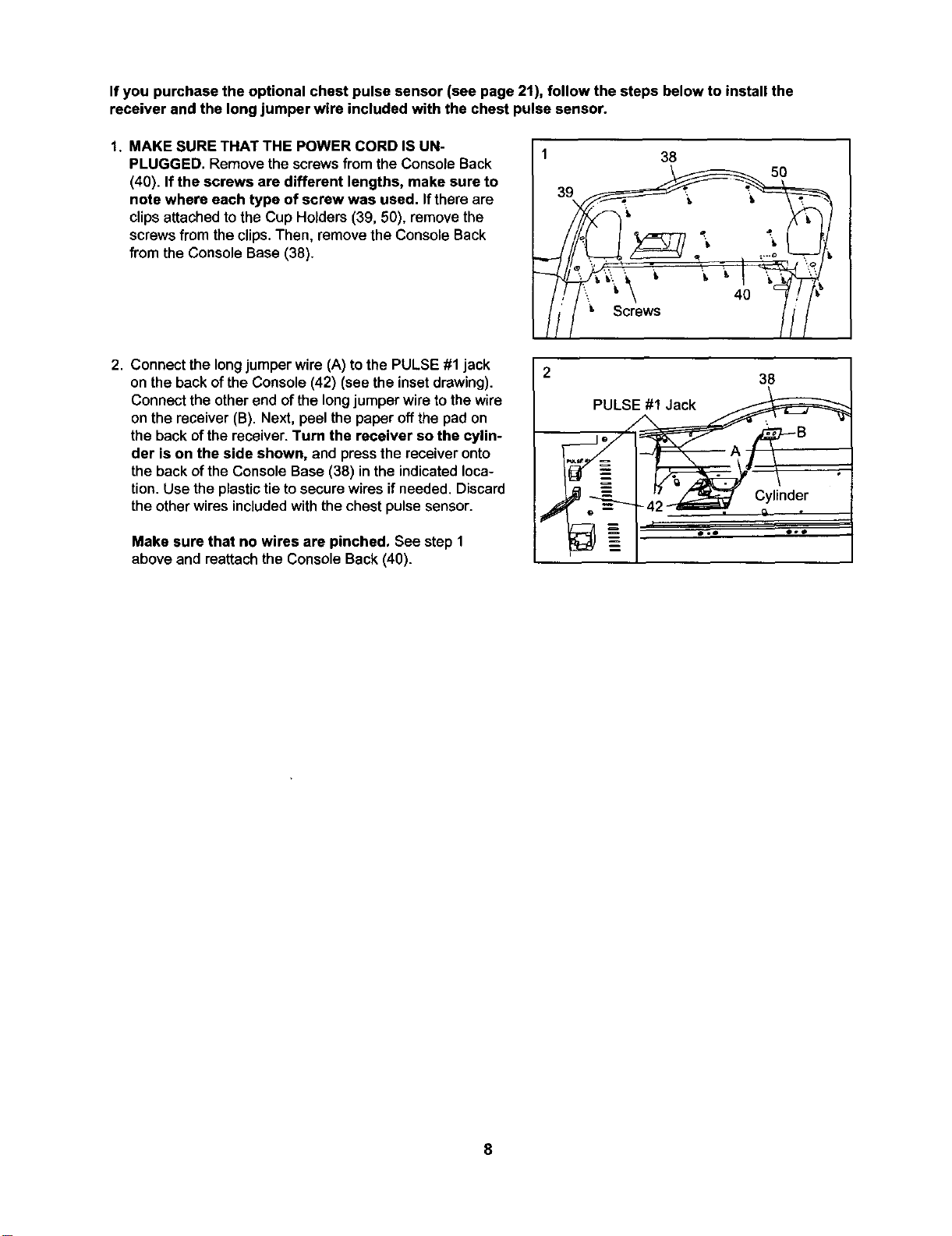
If you purchase the optional chest pulse sensor (see page 21), follow the steps below to install the
receiver and the long jumper wire included with the chest pulse sensor.
1. MAKE SURE THAT THE POWER CORD IS UN-
PLUGGED. Remove thescrewsfrom the Console Back
(40). If the screws are different lengths, make sure to
note where each type of screw was used, Ifthere are
clips attached to the Cup Holders (39, 50), remove the
screws from the clips. Then, remove the Console Back
from the Console Base (38).
38
Screws
50
2. Connect the long jumper wire (A) to the PULSE #1 jack
on the back of the Console (42) (see the inset drawing).
Connect the other end of the long jumper wire to the wire
on the receiver (B). Next, peel the paper off the pad on
the back of the receiver. Turn the receiver so the cylin-
der is on the side shown, and press the receiver onto
the back of the Console Base (38) in the indicated loca-
tion. Use the plastic tie to secure wires if needed. Discard
the other wires included with the chest pulse sensor.
Make sure that no wires are pinched. See step 1
above and reattach the Console Back (40).
38
PULSE##1Jack
_--_j" / A B
_ _=------'_"_-~42 _, Cylinder
' ... ..
8
OPERATION AND ADJUSTMENT
THE PERFORMANT LUBE TM WALKING BELT
Your treadmillfeatures a walkingbelt coated with
PERFORMANT LUBETM, a high-performance lubricant.
iMPORTANT: Never apply silicone spray or other
substances to the walking belt or the walking plat-
form. Such substances will deteriorate the walking
belt and cause excessive wear.
HOW TO PLUG IN THE POWER CORD
an equipment-grounding conductor and a grounding
plug.Plug the power cord into a surge suppressor,
and plug the surge suppressor into an appropriate
outlet that is properly installed and grounded in
accordance with all local codes and ordinances.
Important: The treadmill is not compatible with
GFCl-equipped outlets.
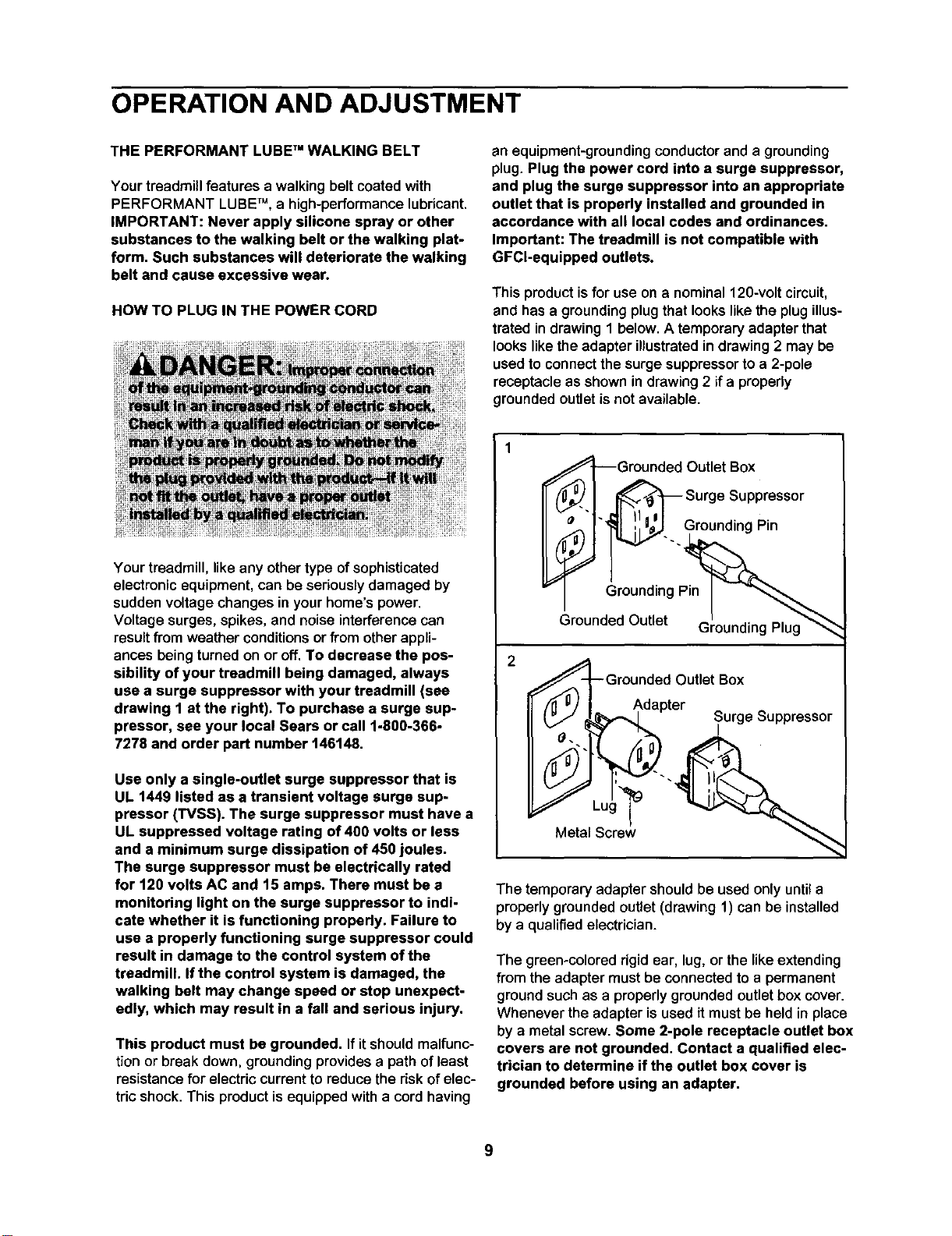
This product isfor use on a nominal 120-volt circuit,
and hasa groundingplugthatlookslikethe plugillus-
trated indrawing 1 below. A temporaryadapterthat
lookslikethe adapter illustratedindrawing2 may be
used toconnectthe surgesuppressorto a 2-pole
receptacleas shownin drawing2 if a propedy
groundedoutletis notavailable.
Your treadmill, like any othertype of sophisticated
electronic equipment, can be seriously damaged by
sudden voltage changes in your home's power.
Voltage surges, spikes, and noise interference can
result from weather conditions or from other appli-
ances being turned on or off. To decrease the pos-
sibility of your treadmill being damaged, always
use a surge suppressor with your treadmill (see
drawing 1 at the right). To purchase a surge sup-
pressor, see your local Sears or call 1-800-366-
7278 and order part number 146148.
Use only a single-outlet surge suppressor that is
UL 1449 listed as a transient voltage surge sup-
pressor (TVSS). The surge suppressor must have a
UL suppressed voltage rating of 400 volts or less
and a minimum surge dissipation of 450 joules.
The surge suppressor must be electrically rated
for 120 volts AC and 15 amps. There must be a
monitoring light on the surge suppressor to indi-
cate whether it is functioning properly. Failure to
use a properly functioning surge suppressor could
result in damage to the control system of the
treadmill. If the control system is damaged, the
walking belt may change speed or stop unexpect-
edly, which may result in a fall and serious injury.
This product must be grounded. If itshouldmalfunc-
tion or break down, grounding provides a path ofleast
resistance for electric current to reduce the risk of elec-
tric shock. This product is equipped with a cord having
,,,_A---Grounded Outlet Box
_i_._ _ Surge Suppressor
_ i_..GroundingPin
Gr "ngpl___,_
Grounded Outlet ' "_-'_
Grounding Plug
GrOundedOutlet Box
__"ter Surge Suppressor
Metal Screw
The temporary adapter shouldbe used only until a
properly grounded outlet(drawing 1) can be installed
by a qualified electrician.
The green-colored rigid ear, lug, or the likeextending
from the adapter must be connected to a permanent
ground such as a properly grounded outlet box cover.
Whenever the adapter is used it must be held in place
by a metal screw. Some 2-pole receptacle outlet box
covers are not grounded. Contact a qualified elec-
trician to determine if the outlet box cover is
grounded before using an adapter.
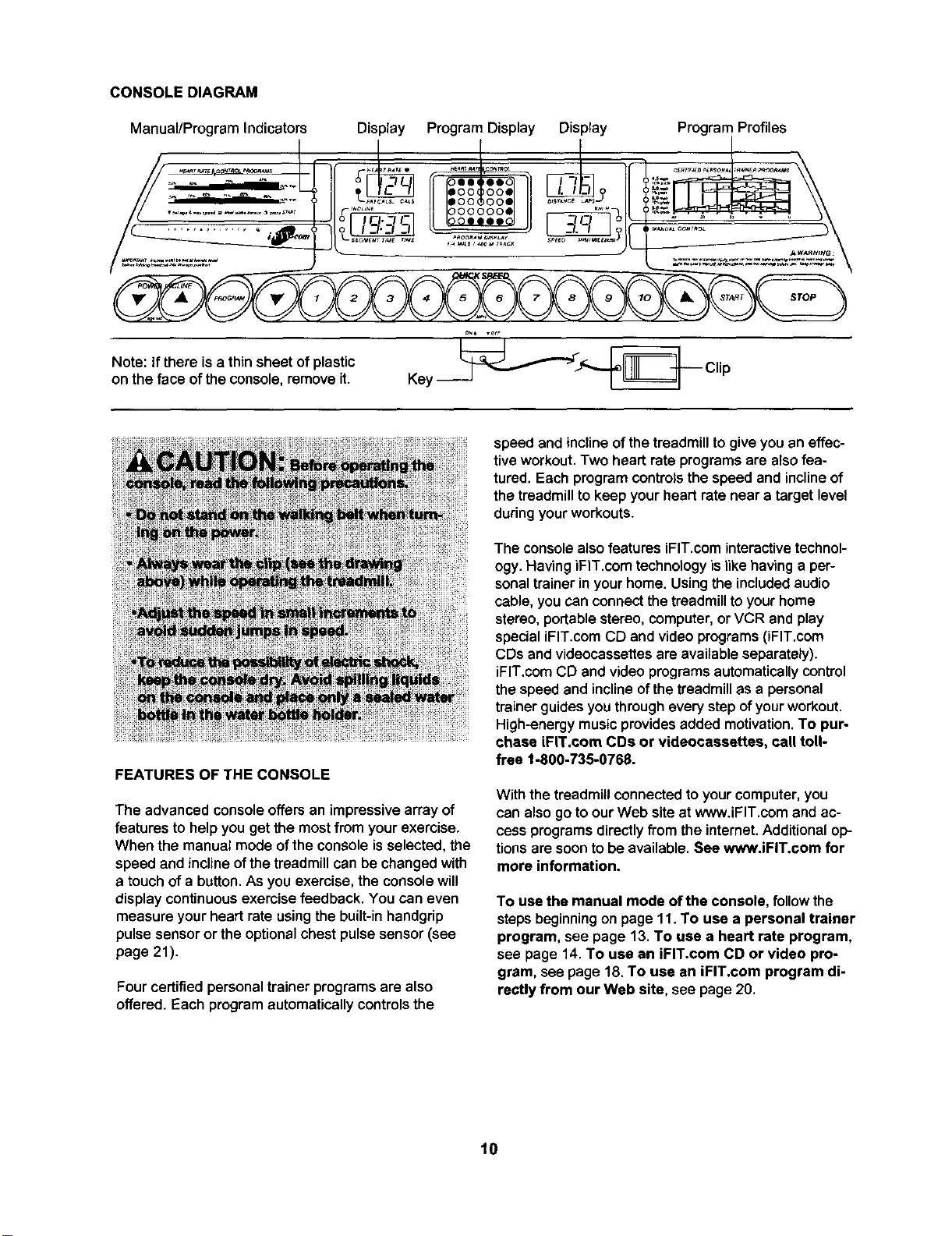
CONSOLEDIAGRAM
Manual/Program Indicators Display Program Display Display Program Profiles
Note: If there is a thin sheet of plastic
on the face of the console, remove it.
oN, ,off
FEATURES OF THE CONSOLE
The advanced console offers an impressive array of
features to help you get the most from your exercise,
When the manual mode ofthe console isselected,the
speed and incline ofthe treadmillcan be changedwith
a touchofa button.As you exercise,the consolewill
display continuousexercisefeedback. You can even
measure your heart rateusingthe built-in handgrip
pulsesensoror the optionalchest pulsesensor(see
page 21).
Four certified personal trainer programs are also
offered. Each program automaticallycontrolsthe
speed and inclineofthe treadmillto giveyou an effec-
tive workout. Two heart rate programs are also fea-
tured. Each program controls the speed and incline of
the treadmill to keep your heart rate near a target level
during your workouts.
The console also features iFIT.com interactive technol-
ogy. Having iFl'l".com technology is like having a per-
sonal trainer in your home. Using the included audio
cable, you can connect the treadmill to your home
stereo, portable stereo, computer, or VCR and play
special iFIT.com CD and video programs (iFIT.com
CDs and videocassettes are available separately).
iFIT.com CD and video programs automatically control
the speed and incline of the treadmill as a personal
trainer guides you through every step of your workout.
High-energy music provides added motivation. To pur-
chase iFIT.com COs or videocassettes, call toll-
free 1-800-735-0768.
With the treadmill connected to your computer,you
can also go to our Web site at www.iFIT.com and ac-
cess programs directly from the internet. Additional op-
tions are soon to be available. See www.iFIT.com for
more information.
To use the manual mode ofthe console, follow the
steps beginning on page 11. To use a personal trainer
program, see page 13. To use a heart rate program,
see page 14. To use an iFIT.com CD or video pro-
gram, see page 18.To use an iFIT.com program di-
rectly from our Web site, see page 20.
10
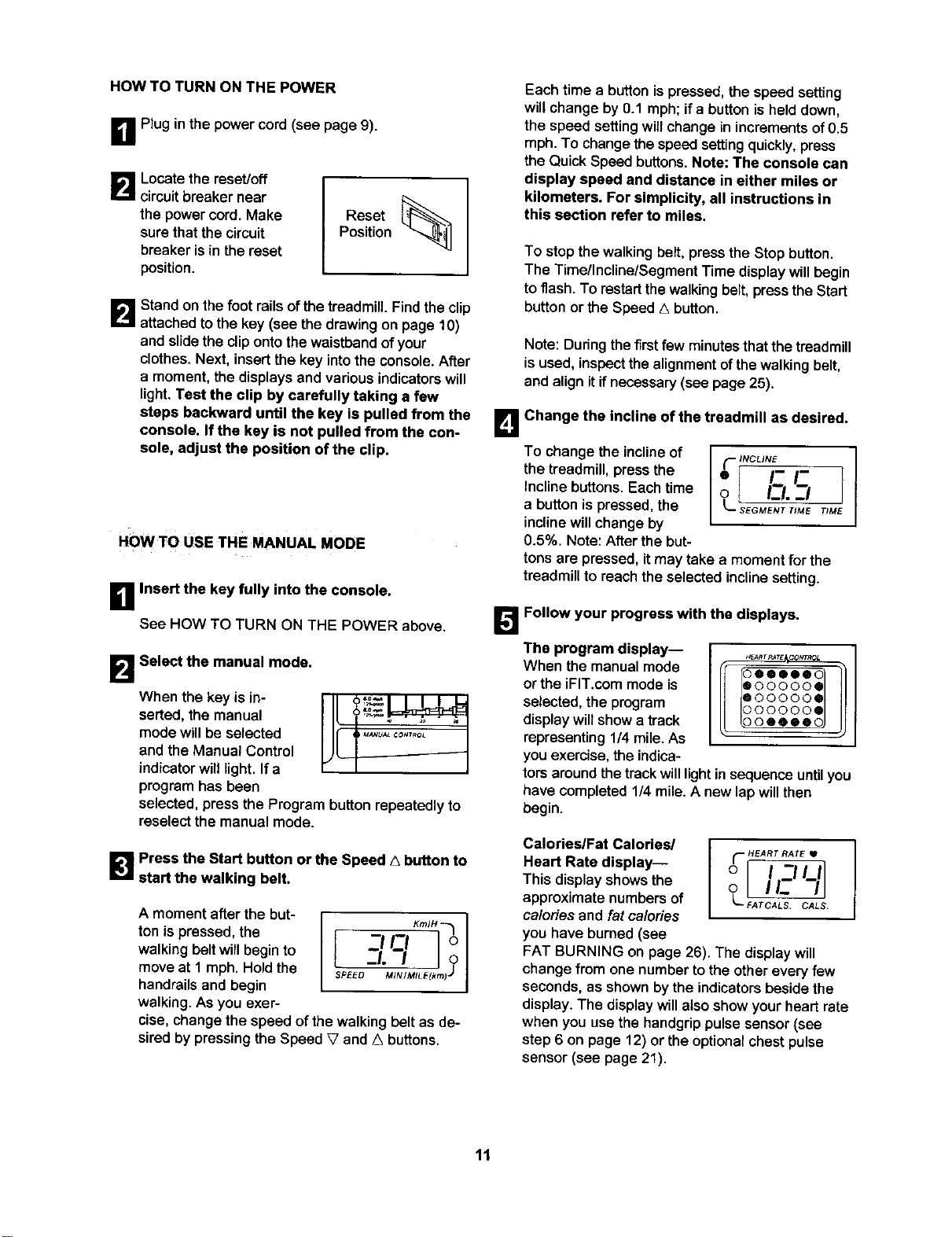
HOW TO TURN ON THE POWER
B Pluginthe power cord(see page 9).
B Locatethe reset/off I [_
circuit breaker near
the power cord. Make Reset
sure thatthe circuit Position
breaker is in the reset
position.
B Stand on the foot rails of the treadmill. Find the clip
attached to the key (see the drawing on page 10)
and slide the clip onto the waistband of your
clothes.Next, insert the key into the console. After
a moment, the displays and various indicatorswill
light. Test the clip by carefully taking a few
steps backward until the key is pulled from the
console. If the key is not pulled from the con-
sole, adjust the position of the clip.
HOWTO USE THE MANUAL MODE
B Insert the key fully into the console.
See HOW TO TURN ON THE POWER above.
B Select the manual mode.
When the key is in-
serted, the manual
modewillbe selected
and the Manual Control
indicator will light. Ifa
programhas been
selected, press the Program buttonrepeatedly to
reselect the manuel mode.
I[-
JC.............
B Press the Start button or the Speed A button to
start the walking belt.
A moment after the but-
ton is pressed, the
walking beltwill begin to
move at 1 mph. Hold the
handrailsand begin
walking. As you exer-
I KmlH "_
t Z#I_-'I Iol
I.-I____1o
SPEED_ MIN/MILE(kmk J
cise, change the speed of the walkingbelt as de-
sired by pressingthe Speed V and ,_ buttons.
Each time a button is pressed, the speed setting
will change by 0.1 mph; ifa button is held down,
the speed setting will change inincrements of 0.5
mph. To change the speed setting quickly, press
the Quick Speed buttons. Note: The console can
display speed and distance in either miles or
kilometers. For simplicity, all instructions in
this section refer to miles.
To stop the walking belt, press the Stop button.
The Time/Incline/Segment Time display will begin
to flash.To restart thewalkingbelt, pressthe Start
button or the Speed A button.
Note: During the firstfew minutes thatthe treadmill
isused, inspect the alignmentof the walking belt,
and align itif necessary (see page 25).
To change the inclineof
the treadmill, pressthe
Inclinebuttons. Eachtime
a button is pressed, the
incline will change by
0.5%. Note: After the but-
B Change the incline of the treadmill as desired.
}NCLINE I
ol II.-I 1
L SEGM'E_T "_ME TIME
tons are pressed, itmay take a moment for the
treadmillto reachthe selected inclinesetting.
!]
The program display--
When the manualmode
or the iFIT.com mode is
selected, the program
displaywillshowa track
representing1/4 mile.As
you exercise,theindica-
Follow your progress with the displays.
HEARTRAT_CO_L
I ooeee 0
eoooooe
eoooooe
ooooos
tors aroundthe track willlight insequenceuntil you
have completed 1/4 mile. A new lap will then
begin.
Calories/Fat Calories/
Heart Rate display--
This displayshowsthe
approximate numbersof
ca/ories and fat ca/odes
you have burned (see
_ HEART RATE tl
FAT BURNING on page 26). The display will
change from one number to the other every few
seconds, as shown by the indicators beside the
display. The display will also show your heart rate
when you use the handgrip pulse sensor (see
step 6 on page 12) or the optional chest pulse
sensor (see page 21).
11
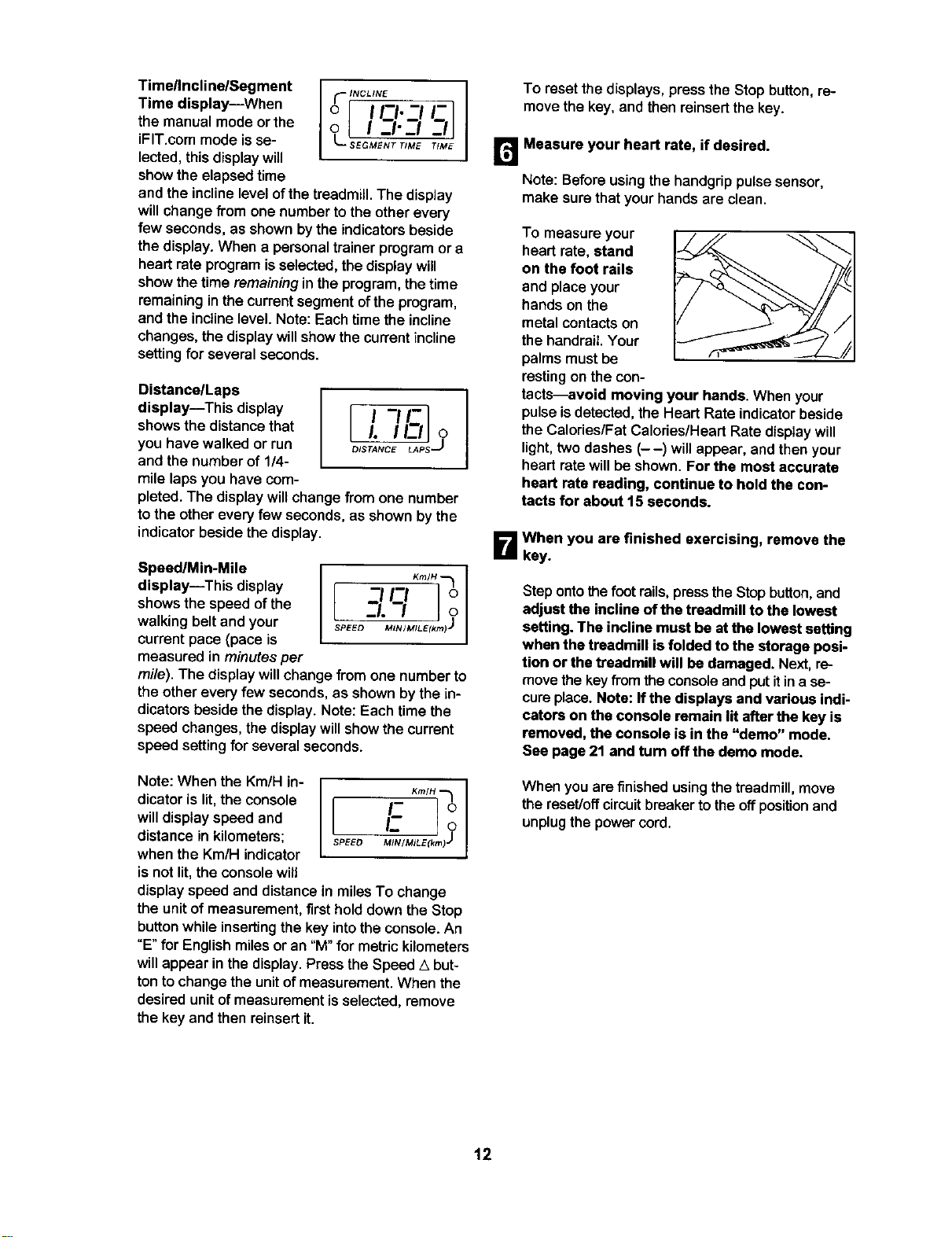
Timellncline/Segment
Time display--When
the manualmode orthe
iFIT.com mode isse-
lected,thisdisplaywill
show the elapsedtime
I
o I I_1. -I -
o I I-I-i
L
and the incline level of the treadmill. The display
will change from one number to the other every
few seconds, as shown bythe indicators beside
the display. When a personal trainer program or a
heart rate program is selected,the display will
show the time remaining in the program, the time
remaining in the current segment of the program,
and the incline level. Note: Each time the incline
changes, the display will show the current incline
setting for several seconds.
Distance/Laps
display--This display
shows the distance that
you have walked or run
and the numberof 1/4-
mile lapsyou have com-
It -J#Z1 I
i. IIz2J?
pleted. The display willchange from one number
to the other every few seconds, as shown by the
indicator beside the display.
Speed/Min-Mile
display--This display
shows the speed of the
walking belt and your
current pace (pace is
measured in minutesper
K,n/H"--1I
o
I o,
SPEED MIN/M/LE(km) J
mile). The display willchange from one number to
the other every few seconds, as shown by the in-
dicators beside the display. Note: Each time the
speed changes, the display will show the current
speed setting for several seconds.
Note: When the Km/H in-
dicator is lit, the console
will display speed and
distance in kilometers;
when the Km/H indicator
is not lit, the console will
KmlH "_
I- 0
[
SPEEO _INIMJLE(km_-j
display speed and distance in miles To change
the unit of measurement, first hold down the Stop
button while inserting the key into the console. An
"E" for English miles or an "M" for metric kilometers
will appear in the display. Press the Speed A but-
ton to change the unit of measurement. When the
desired unit of measurement is selected, remove
the key and then reinsert it.
To resetthe displays, press the Stop button, re-
move the key.and then reinsertthe key.
r_ Measure your heart rate, if desired.
Note: Beforeusingthe handgrip pulse sensor,
make sure thatyour handsare clean.
To measure your
heart rate, stand
on the foot rails
and place your
hands onthe
metal contactson
the handrail Your
palms mustbe
restingon the con-
tactHvoid moving your hands. When your
pulseisdetected,the Heart Rate indicatorbeside
the Calories/Fat Calories/Heart Rate displaywill
light,twodashes (--) willappear, and thenyour
heart ratewillbe shown. For the most accurate
heart rate reading, continue to hold the con-
tacts for about 15 seconds.
B When you are finished exercising, remove the
key.
Step onto the foot rails, press the Stop button, and
adjust the incline of the treadmill to the lowest
setting. The incline must be at the lowest setting
when the treadmill is folded to the storage posi-
tion or the treadmill will be damaged. Next, re-
move the key from the console and put it in a se-
cure place. Note: If the displays and various indi-
cators on the console remain lit after the key is
removed, the console is in the "demo" mode.
See page 21 and turn offthe demo mode.
When you are finished using the treadmill, move
the reset/off circuit breaker to the offposition and
unplug the powercord.
12
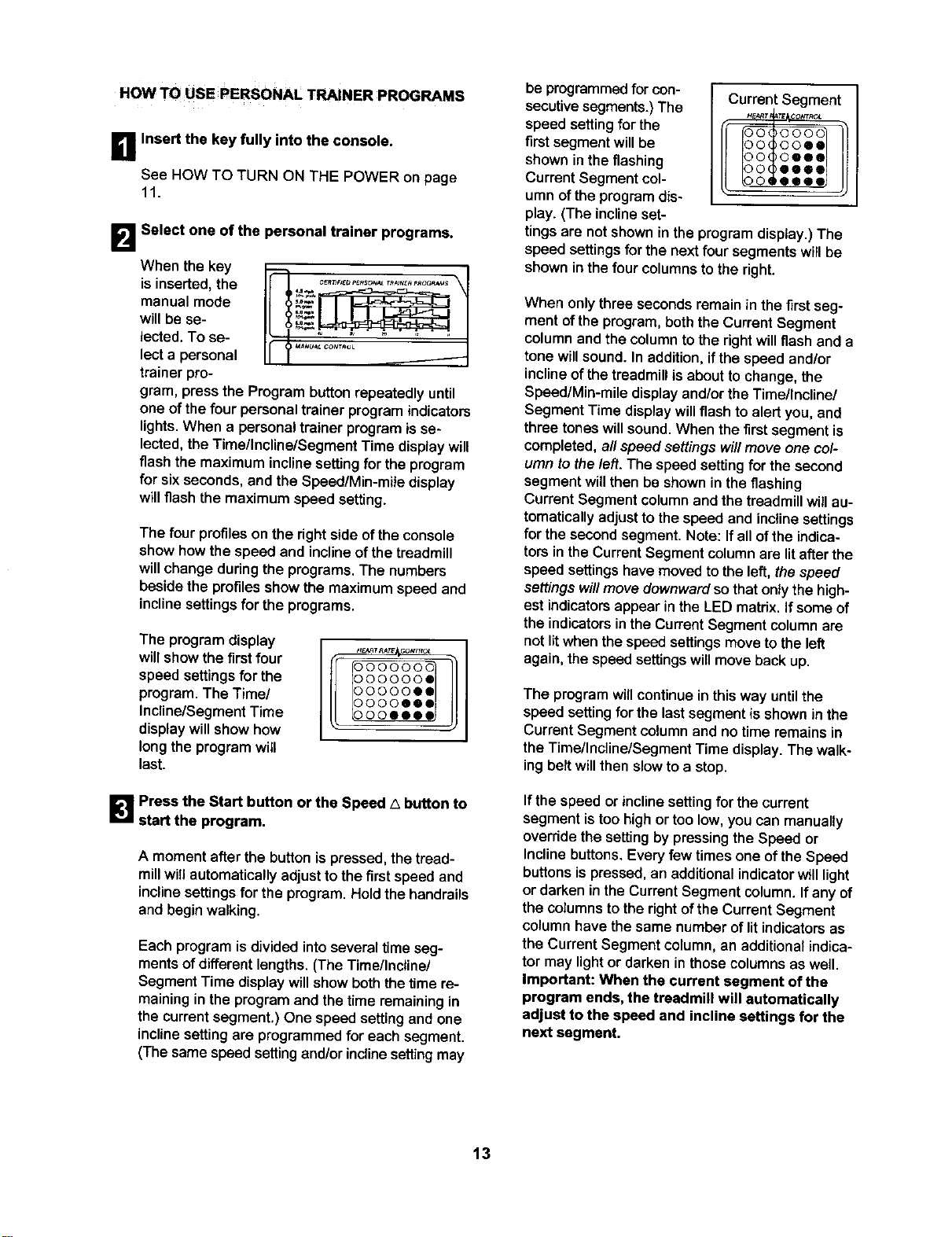
HOW TO USE PERSONAL TRAINER PROGRAMS
B Insert the key fully into the console.
See HOW TO TURN ON THE POWER on page
11.
B Select one of the personal trainer programs.
When the key
is inserted,the
manualmode
willbe se-
lected. To se-
lecta personal
trainer pro-
gram, press the Program buttonrepeatedly until
one of the fourpersonal trainer programindicators
lights. When a personal trainer program isse-
lected, the Time/Incline/Segment Time display will
flash the maximum inclinesetting for the program
for six seconds, and the Speed/Min-mile display
will flash the maximum speed setting.
The four profileson the right sideofthe console
show how the speed and inclineof the treadmill
will change during the programs. The numbers
beside the profiles show the maximum speed and
incline settings for the programs.
The program display
will show the first four
speed settings for the
program. The Time/
Incline/Segment Time
display will show how
long the program will
last.
DOOOOOG
DOOOOOe
DOOOOOI
DOOOOOI
B Press the Start button or the Speed A button to
start the program.
A moment after the button is pressed, the tread-
millwillautomatically adjust to the firstspeed and
incline settings for the program. Hold the handrails
and begin walking.
Each program is divided intoseveral timeseg-
ments of different lengths. (The Time/Incline/
Segment Time display will show both the time re-
maining in the program and the time remaining in
the current segment.) One speed setting and one
incline setting are programmed for each segment.
(The same speed setting and/or incline setting may
be programmed for con-
secutive segments.)The
speed setting for the
first segment will be
shown in the flashing
Current Segment col-
umn of the program dis-
play. (The incline set-
Current Segment
tings are not shown in the program display.) The
speed settings for the next four segments will be
shown in the four columns to the right.
When only three seconds remain in the first seg-
ment of the program, both the CurrentSegment
column and the column to the right will flash and a
tone will sound. In addition, if the speed and/or
incline of the treadmill is about to change, the
Speed/Min-mile display and/or the Time/Incline/
Segment Time display will flash to alert you, and
three tones will sound. When the first segment is
completed, all speed settingswill move one col-
umn to the left. The speed setting for the second
segment will then be shownin the flashing
Current Segment column and the treadmill will au-
tomatically adjust to the speed and incline settings
for the second segment. Note: If all of the indica-
tors in the Current Segment column are lit after the
speed settings have moved to the left, the speed
settings will move downwardso that only the high-
est indicators appear inthe LED matrix, if some of
the indicators in the Current Segment column are
not litwhen the speed settingsmove to the left
again, the speed settings will move back up.
The program will continue in this way until the
speed setting for the last segment is shown in the
Current Segment column and no time remains in
the Time/Incline/Segment Time display. The walk-
ing belt will then slow to a stop.
If the speed or incline setting for the current
segmentis too highor too low, you can manually
override the setting by pressing the Speed or
Incline buttons. Every few times one of the Speed
buttons is pressed, an additional indicator wIUlight
or darken in the Current Segment column. If any of
the columns to the right of the Current Segment
column have the same number of lit indicators as
the Current Segment column, an additional indica-
tor may light or darken in those columns as well.
Important: When the current segment of the
program ends, the treadmill will automatically
adjust to the speed end incline settings for the
next segment.
13
To stop the program temporarily, press the Stop
button. The Time/Incline/Segment Time display
will begin to flash. To restart the program, press
the Start button or the Speed z_button. To end the
program, press the Stop button, remove the key,
and then reinsert the key.
B Follow your progress with the displays.
See step 5 on page 11.
B Measure your heart rate if desired.
See step 6 on page 12.
r_When the program is completed, remove the
key from the console.
When the programhas ended, make sure that
the incline of the treadmill is at the lowest set-
ting. Next, remove the key from the consoleand
putitin a safe place. Note: Ifthe displays and
various indicators on the console remain lit
after the key is removed, the console is in the
"demo" mode. See page 21 and turn off the
demo mode.
When you are finished using the treadmill, move
the reset/off circuit breaker to the off position and
unplug the power cord.
HOW TO USE HEART RATE PROGRAMS
Follow the steps below to usea heart rateprogram.
Note: You must wear the optional chest pulse sen-
sor (see page 21) to use a heart rate program.
B Put on the chest pulse sensor.
See the instructions included with the optional
chest pulse sensor.
B Insert the kay fully into the console.
See HOW TO TURN ON THE POWER on page
11.
lZl
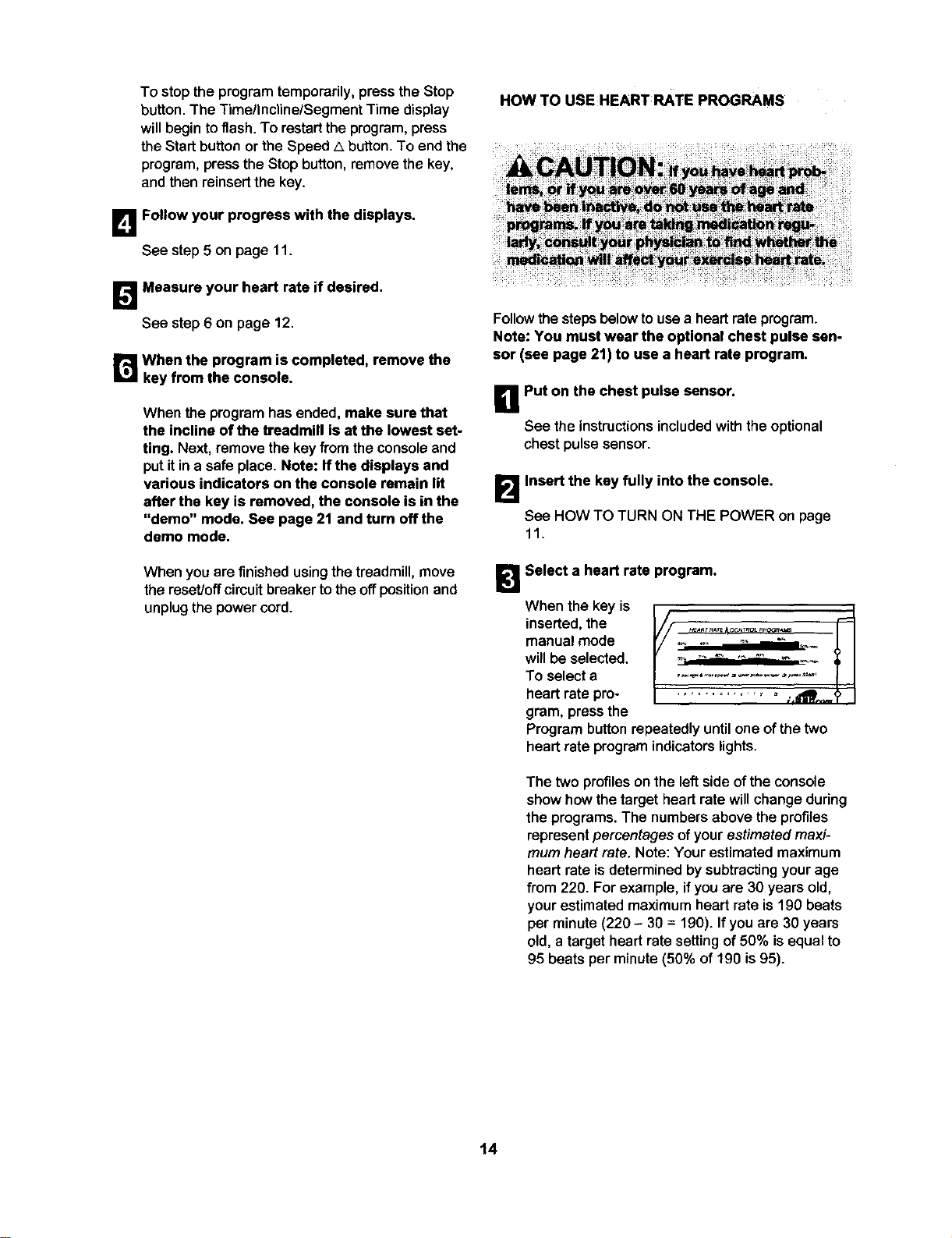
Select a heart rate program.
When the key is
inserted, the
manual mode
will be selected.
To selecta ....... --'...........
heart ratepro............... _.dW/_
gram, press the
Program button repeatedly until one of the two
heart rate program indicators lights.
The two profiles on the left sideof the console
showhow the target heart rate will change during
the programs. The numbers above the profiles
represent percentages of your estimated maxi-
mum heart rate. Note: Your estimated maximum
heart rate is determined by subtracting your age
from 220. For example, if you are 30 years old,
your estimated maximum heart rate is 190 beats
per minute (220 - 30 = 190). If you are 30 years
old, a target heart rate setting of 50% is equal to
95 beats per minute (50% of 190 is 95).
14
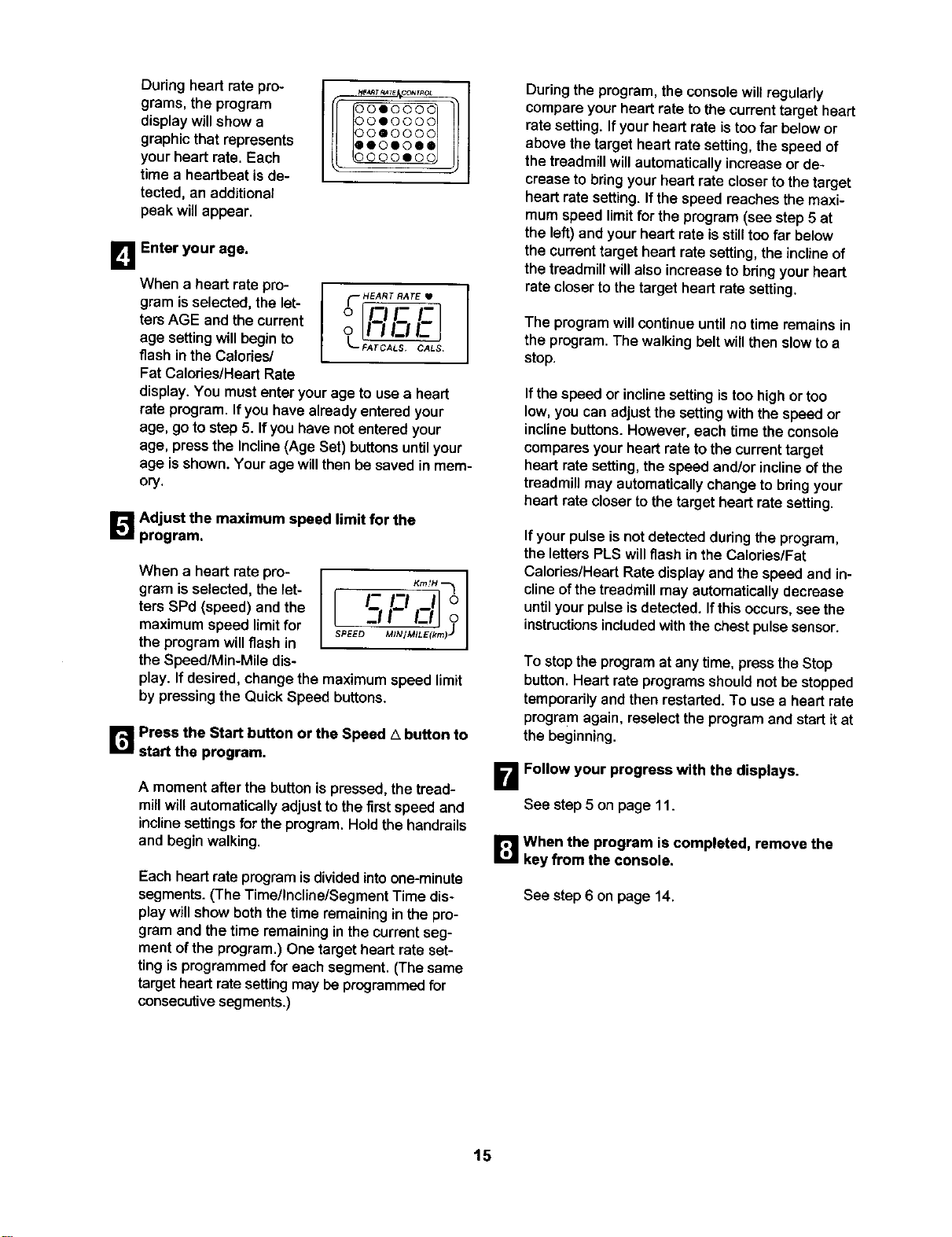
During heart rate pro-
grams, the program
display will show a
graphic that represents
your heart rate. Each
time a heartbeat is de-
tected, an additional
peak will appear.
HE_T_T_ C_r_o
DOIO00C
90IO00C
DOQO00C
DQOIOII
DO00IOC
I_1 Enter your age.
When a heart rate pro-
(- HEART RATE •
gram isselected,the let- o _
ters AGE and the current o i !_li__ !..,I
age settingwillbegin to L-_ArcA_ _LS
flash in the Calories/
Fat Calories/Heart Rate
display.You must enter your age to use a heart
rate program. If you have already entered your
age, go to step 5. If you have not entered your
age, press the Incline (Age Set) buttons until your
age isshown. Your age will then be saved in mem-
ory.
_'._ Adjust the maximum speed limit for the
program.
When a heart ratepro-
gram is selected,the let-
ters SPd (speed) and the
maximum speed limitfor
the programwillflash in
the Speed/Min-Mile dis-
l c
L II_ o
SPEED_ M/NIM/LE(km)J
play. If desired, change the maximum speed limit
by pressing the Quick Speed buttons.
r_ Press the Start button or the Speed A button to
start the program.
A moment afterthe button is pressed, the tread-
mill willautomatically adjustto the first speed and
inclinesettingsfor the program.Holdthe handrails
and begin walking.
Each heartrate program isdivided into one-minute
segments.(The Time/Incline/Segment Time dis-
play willshow boththe time remainingin the pro-
gram and the time remaininginthe currentseg-
ment ofthe program.)One target heart rate set-
ting is programmed for each segment. (The same
target heart rate setting may be programmed for
consecutive segments.)
Duringthe program, the consolewill regularly
compareyour heart rate to the current target heart
rate setting. If your heart rate is too far below or
above the target heart rate setting, the speed of
the treadmill will automatically increase or de-
crease to bring your heart rate closer to the target
heart rate setting, ff the speed reaches the maxi-
mum speed limit for the program (see step 5 at
the left) and your heart rate is still too far below
the current target heart rate setting, the incline of
the treadmill will also increase to bring your heart
rate closer to the target heart rate setting.
The programwillcontinue untilno timeremainsin
the program. The walking belt will then slowto a
stop.
ifthe speed or incline settingis too high or too
low, you can adjustthe settingwith the speed or
incline buttons. However, each time the console
compares your heart rate to the current target
heart rate setting, the speed and/or incline of the
treadmill may automatically change to bring your
heart rate closer to the target heart rate setting.
If your pulse is not detected during the program,
the letters PLS will flash in the Calories/Fat
Calories/Heart Rate display and the speed and in-
cline of the treadmill may automatically decrease
until your pulse is detected. Ifthis occurs, see the
instructions included with the chest pulse sensor.
To stopthe program at any time, press the Stop
button. Heart rate programs shouldnot be stopped
temporarily and then restarted. To use a heart rate
program again, reselect the program and start it at
the beginning.
B Follow your progress with the displays.
See step 5 on page 11.
ir_ when the program is completed, remove the
key from the console.
See step 6 on page 14.
15
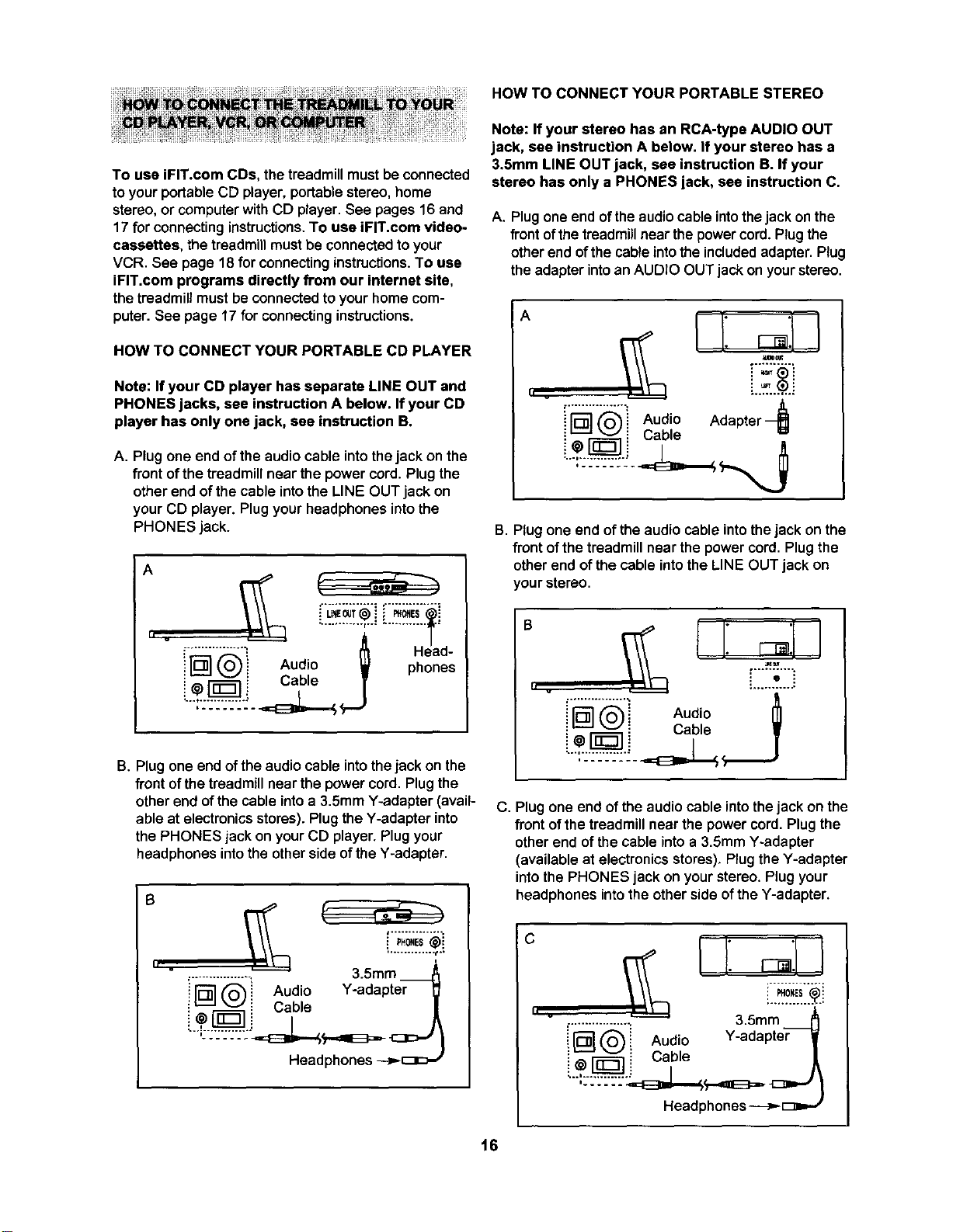
HOW TO CONNECT YOUR PORTABLE STEREO
To use iFIT.com CDs, the treadmillmustbe connected
toyour portableCD player, portablestereo,home
stereo,or computerwithCD player. See pages 16 and
17 for connectinginstructions.To use iFIT.com video-
cassettes, the treadmillmustbe connectedto your
VCR. See page 18 for connectinginstructions.To use
iFIT.com programs directly from our internet site,
the treadmill mustbe connectedtoyourhome com-
puter.See page 17 for connectinginstructions.
HOW TO CONNECT YOUR PORTABLE CD PLAYER
Note: If your CD player has separate LINE OUT and
PHONES jacks, see instruction A below. If your CD
player has only one jack, see instruction B.
A. Plug one end of the audio cable into the jack on the
front of the treadmill near the power cord. Plug the
other end of the cable into the LINE OUT jack on
your CD player. Plug your headphones into the
PHONES jack.
A
II .
............... °
i _'1 (_i Audio _ pHh°enes
e
B. Plug one end of the audio cable into the jack on the
front of the treadmill near the power cord. Plug the
other end of the cable into a 3.5mm Y-adapter (avail-
able at electronics stores). Plug the Y-adapter into
the PHONES jack on your CD player. Plug your
headphones into the other side of the Y-adapter.
B
• ' u
i PH0.ES@i
i
:................ _, 3.5mm
i iD"] _ i Audio Y-adapter
i v i Cable /
Headphones _c_c:-,"
Note: If your stereo has an RCA-type AUDIO OUT
jack, see instruction A below. If your stereo has a
3.5ram LINE OUT jack, see instruction B. If your
stereo has only a PHONES jack, see instruction C.
A. Plug one end of theaudiocable intothejack onthe
front of the treadmill near the power cord. Plug the
other end of the cable intothe included adapter. Plug
the adapter into an AUDIO OUT jack on your stereo.
A
II v
i[]@i AudioAdapter
• Cable
B. Plug one end of the audio cable intothe jack on the
front of the treadmill near the power cord. Plug the
other end of the cable into the LINE OUT jack on
your stereo.
h .
[iiiii-.ii:i
i _ v i Cable •
C. Plug one end of the audio cable into the jack on the
front of the treadmill near the power cord. Plug the
other end of the cable into a 3.5mm Y-adapter
(available at electronics stores), Plug the Y-adapter
into the PHONES jack on your stereo. Plug your
headphones into the other side of the Y-adapter,
C
II v
,................; 3.5mm ._
[] _")i Audio Y-adapter i
i _ _ Cable /
Headphones-.--_,-[:_D-,"
16
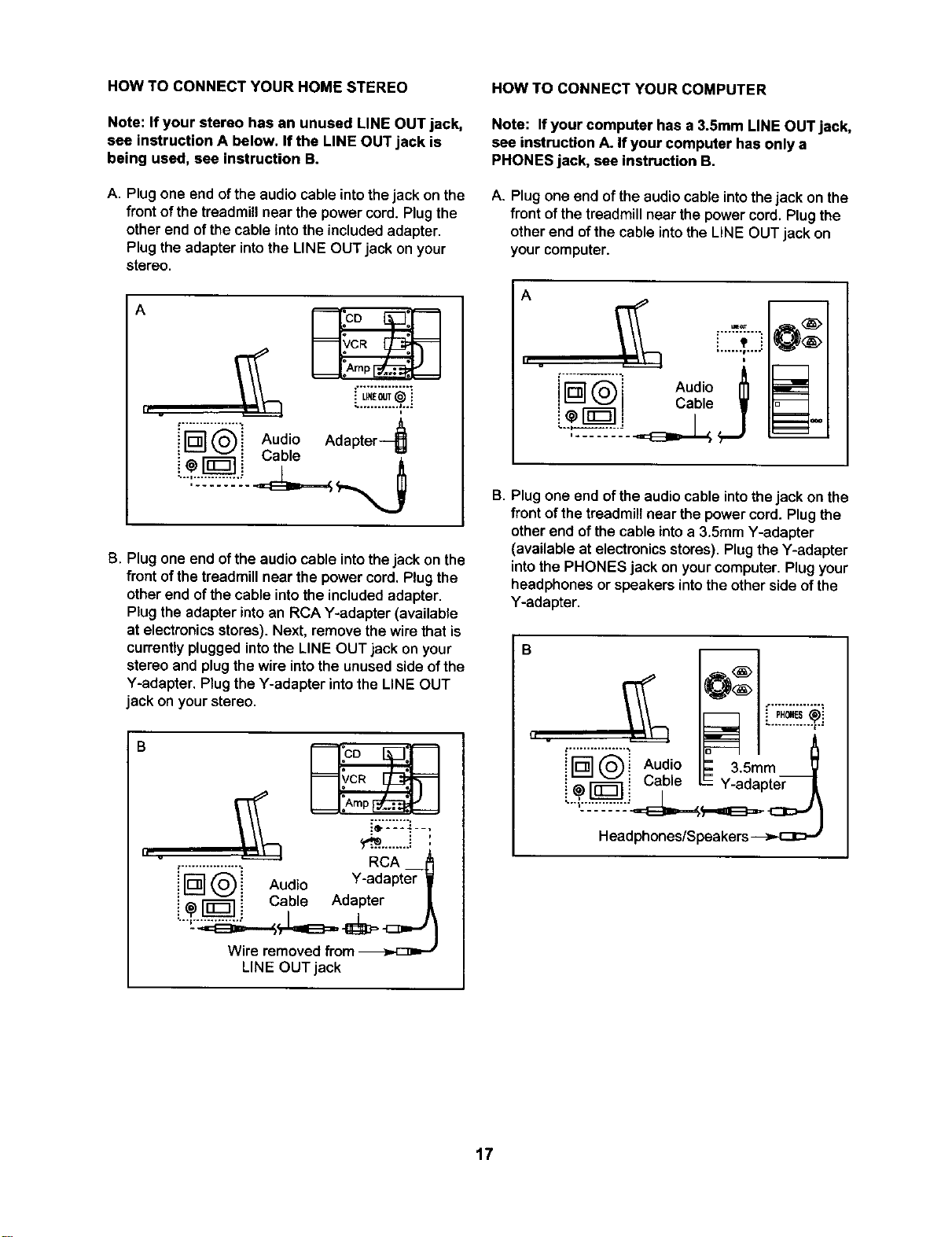
HOW TO CONNECT YOUR HOME STEREO
Note: If your stereo has an unused LINE OUT jack,
see instruction A below. Ifthe LINE OUT jack is
being used, see instruction B.
A. Plug one end of the audio cable intothe jack on the
front of the treadmill near the power cord. Plug the
other end of the cable into the included adapter.
Plug the adapter into the LINE OUT jack on your
stereo.
A
I, v
['__ Audio Adapter-_
i_ vl Cabe "/',
...."::'2:'2"2.
B. Plug one end of the audio cable into the jack on the
front of the treadmill near the power cord. Plug the
other end of the cable into the included adapter.
Plug the adapter into an RCA Y-adapter (available
at electronics stores). Next, remove the wire that is
currently plugged into the LINE OUT jack on your
stereo and plug the wire into the unused side of the
Y-adapter. Plug the Y-adapter into the LINE OUT
jack on your stereo.
h v
_;:::_ __,
_...........i '
.................. RCA _
i rD] __i Audio Y-adapter V
! ,,__-] ! Cable Adapter |
Wire removed from
LINE OUT jack
HOW TO CONNECT YOUR COMPUTER
Note: If your computer has a 3.5mm LINE OUT jack,
see instruction A. If your computer has only a
PHONES jack, see instruction B,
A. Plug one end of the audio cable into the jack on the
front of the treadmill near the power cord. Plug the
other end of the cable into the LINE OUT jack on
your computer.
Audio
i LL_! Cable V
B. Plug one end of the audio cable into the jack on the
front of the treadmill near the power cord. Plug the
other end of the cable into a 3.5mm Y-adapter
(available at electronics stores). Plug the Y-adapter
into the PHONES jack on your computer. Plug your
headphones or speakers into the other side of the
Y-adapter.
B
il v
i oi u, io.
!@ _ _ = Y-adapter
17
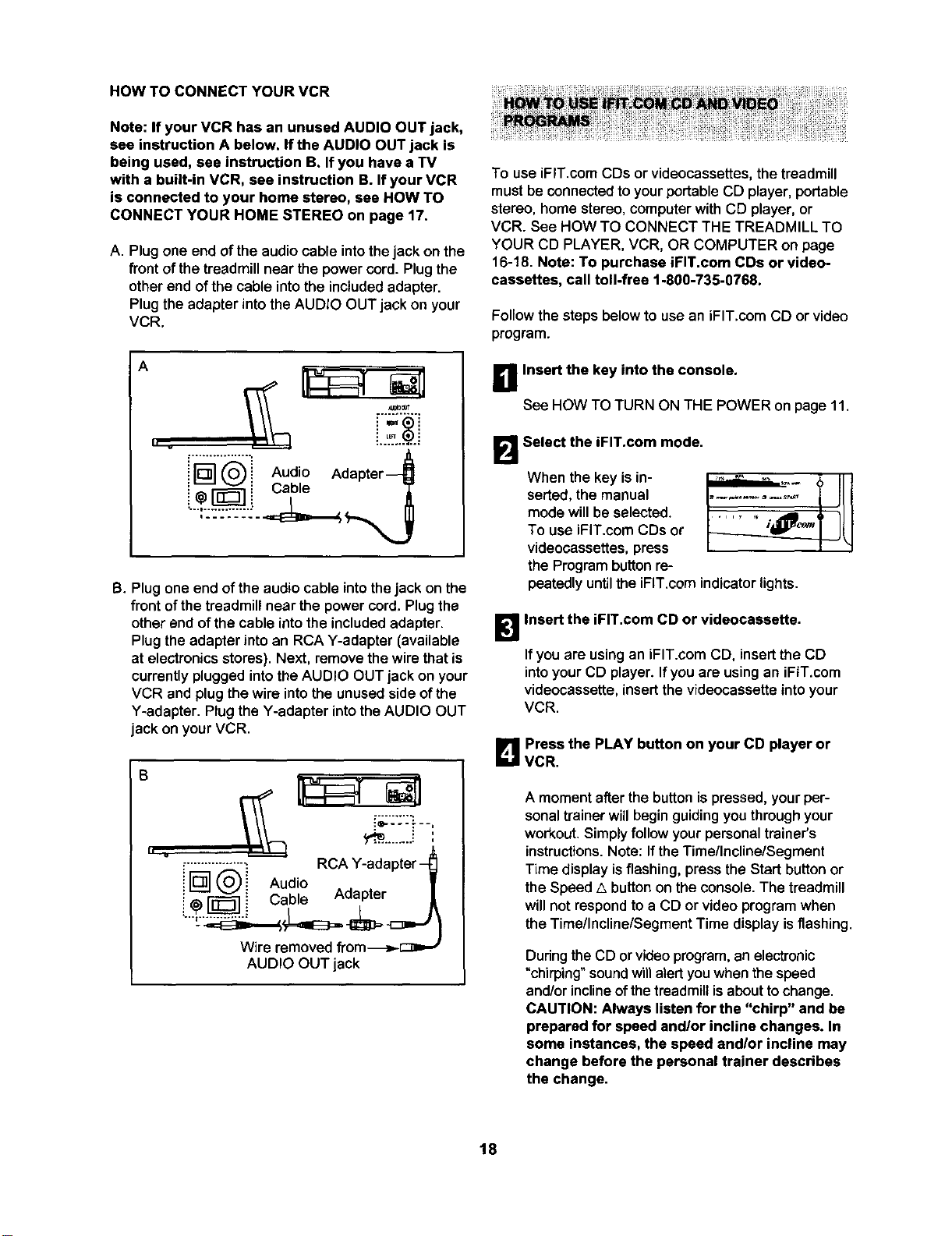
HOW TO CONNECT YOUR VCR
Note: If your VCR has an unused AUDIO OUT jack,
see instruction A below. If the AUDIO OUT jack is
being used, see instruction B. If you have a TV
with a built-in VCR, see instruction B. If your VCR
is connected to your home stereo, see HOW TO
CONNECT YOUR HOME STEREO on page 17.
A. Plugone end ofthe audio cable intothejack on the
front of the treadmill near the power cord. Plug the
other end of the cable into the included adapter.
Plug the adapter into the AUDIO OUT jack on your
VCR.
A
i q@i Audio
i @["_---]i Cable
B. Plug one end of the audio cable into the jack on the
front of the treadmill near the power cord, Plug the
other end of the cable into the included adapter.
Plug the adapter into an RCA Y-adapter (available
at electronics stores). Next, remove the wire that is
currently plugged into the AUDIO OUT jack on your
VCR and plug the wire into the unused side of the
Y-adapter. Plug the Y-adapter into the AUDIO OUT
jack on your VCR.
i=:-':'.:- --,
................z RCA Y-adapter-
iN@i Audio
• - _ : Cable Adapter
Wire removed from-_>.-C:_=,--
AUDIO OUT jack
To use iFIT.com COs or videocassettes, the treadmill
must be connected to your portable CD player, portable
stereo, home stereo, computer with CD player, or
VCR. See HOW TO CONNECT THE TREADMILL TO
YOUR CD PLAYER, VCR, OR COMPUTER on page
16-18. Note: To purchase iFIT.com CDs or video-
cassettes, call toll-free 1-800-735-0768.
Follow the steps below to use an iFIT.com CO or video
program.
a Insert the key into the console.
See HOW TO TURN ON THE POWER on page 11.
B Select the iFIT.com mode.
When the key is in- ,,.._..._,.__._,._
serted,the manual .............
mode will be selected.
To use iFIT.com CDs or
videocassettes, press
the Program button re-
peatedly until the iFIT.com indicator lights.
_'_ Insert the iFIT.com CD or videocassette.
If you are usingan iFIT.com CD, insert the CD
intoyourCD player. Ifyou are usingan iFIT.com
videocassette,insertthevideocassetteintoyour
VCR.
B Press the PLAY button on your CD player or
VCR.
A moment afterthe button ispressed, your per-
sonal trainer willbegin guiding you through your
workout. Simply follow your personal trainer's
instructions. Note: If the Time/Incline/Segment
Time display isflashing, press the Start button or
the Speed A button on the console. The treadmill
will not respond to a CD or video program when
the Time/Incline/Segment Time display is flashing.
Duringthe CD or video pmgrem, an electronic
"chirping" sound willalert youwhen the speed
and/orinclineofthetreadmillisabouttochange.
CAUTION: Always listen for the "chirp" and be
prepared for speed and/or incline changes. In
some instances, the speed andlor incline may
change before the personal trainer describes
the change.
18
If the speed or incline settings are too high or too
low, you can manually override the settings at any
time by pressing the Speed or Incline buttons on
the console. However, when the next "chirp" is
heard, the speed andlor incline will change to
the next settings of the CD or video program.
To stop the walking belt at any time, press the
Stop button on the console. The Time/Incline/
Segment Time display will begin to flash. To
restart the program, press the Start button or the
Speed a button. After a moment, the walking belt
will begin to move. When the next "chirp" is
heard, the speed and incline will change to the
next settings of the CD or video program.
When the CD or video program is completed, the
walking belt will stop and the Time/Incline/Segment
Time display will begin to flash. Note: To use an-
other CD or video program, press the Stop button
or remove the key and go to step 1 on page 18.
Note: if the speed or incline of the treadmill
does not change when a "chirp" is heard:
• Make sure that the iFIT.com indicator is lit and
that the Time/Incline/Segment Time display is
not flashing. If the Time/InclinelSegment Time
display is flashing, press the Start button or
the Speed A button on the console.
•Adjust the volume of your CD player or VCR.
If the volume is too high or too low, the con-
sole may not detect the program signals.
• Make sure that the audio cable is properly
connected, that it is fully plugged in, and that
it is not wrapped around a power cord.
• If you are using your portable CD player and
the CD skips, set the CD player on the floor or
another flat surface instead of on the console.
• See the instructions near the bottom of page
25.
_'.'_ Follow your progress with the LED track and
the displays.
See step 5 on page 11.
r_ Measure your heart rate if desired.
See step6 on page 12.
B When the program is completed, remove the
key.
See step 6 on page 14.
CAUTION: Always remove iFIT.com CDs and
videocassettes from your CD player or VCR
when you are finished using them.
19
Our Web site at www.iFIT.com allows you to access
basic programs, audio programs, and video programs
directly from the internet. Additional options are soon to
be available. See www.iFIT.com for details.
To use programs from our Web site, the treadmill must
be connected to your home computer. See HOW TO
CONNECT YOUR COMPUTER on page 17. In
addition, you must have an internetconnection and
an internet service provider. A list of specific system re-
quirements will be found on our Web site.
Follow the steps below to use a program from our
Web site.
_11 Insert the key into the console.
See HOW TO TURN ON THE POWER on page 11.
6
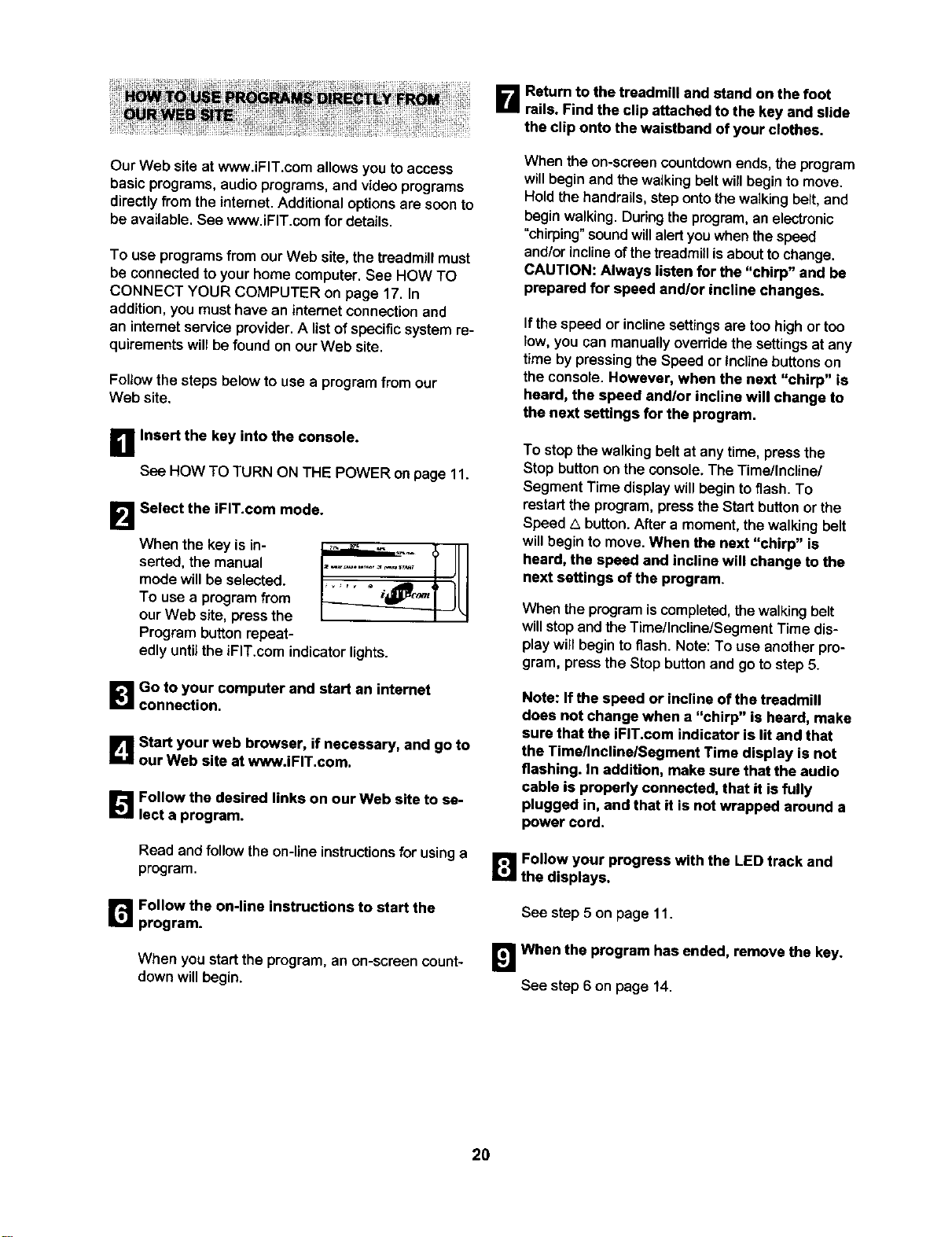
Select the iFIT.com mode.
When the key is in-
serted, the manual
mode will be seleoted.
To use a program from
our Web site, press the
Program button repeat-
_ _ r v • i C_t q --
.,_ _iO_t q
edly until the iFIT.com indicator lights.
l_lGo to your computer and start an internet
connection.
Lq Start your web browser, if necessary, and go to
our Web site at www.iFIT.com.
[]Follow the desired links on our Web site to se-
lect a program.
Read and follow the on-lineinstructions for using a
program.
r_ Follow the on-line instructions to start the
program.
When you start the program, an on-screen count-
down will begin.
B Rsturn to the treadmill and stand on the foot
rails. Find the clip attached to the key and slide
the clip onto the waistband of your clothes.
When the on-screen countdown ends, the program
will begin and the walkingbelt will begin to move.
Hold the handrails, step onto the walking belt, and
begin walking. Dudng the program, an electronic
"chirping" soundwillalert youwhen the speed
and/or incline of the treadmill is about to change.
CAUTION: Always listen for the "chirp" and be
prepared for speed and/or incline changes.
If thespeed or incline settingsare too high or ton
low, you can manually override the settingsat any
time by pressing the Speed or Incline buttons on
the console. However, when the next "chirp" ia
heard, the speed and/or incline will change to
the next seffings for the program.
To stop the walking belt at any time, press the
Stop button onthe console.The Tirnellncline/
Segment Time display will begin to flash. To
restart the program, press the Start button or the
Speed _.button. After a moment, the walking belt
will begin to move. When the next "chirp" is
heard, the speed and incline will change to the
next settings of the program.
When the program iscompleted, the walkingbelt
willstopand the TimellnclinelSegment Time dis-
play will begin to flash. Note: To use another pro-
gram, press the Stop button and go to step 5.
Note: If the speed or incline of the treadmill
does not change when a "chirp" is heard, make
sure that the iFIT.com indicator is lit and that
the Time/Incline/Segment Time display is not
flashing. In addition, make sure that the audio
cable is properly connected, that it is fully
plugged in, and that it is not wrapped around a
power cord.
Follow your progress with the LED track and
the displays.
See step 5 on page 11.
!_1 When the program has ended, remove the key.
See step 6 on page 14.
2O
THE INFORMATION MODE/DEMO MODE
The console features an information mode that keeps
track of the total number of hours that the treadmill has
been operated and the total number of miles that the
walking belt has moved. The information mode also al-
lows you to switch the console from miles per hour to
kilometers per hour. In addition, the information mode
allows you to turn on and turn off the demo mode.
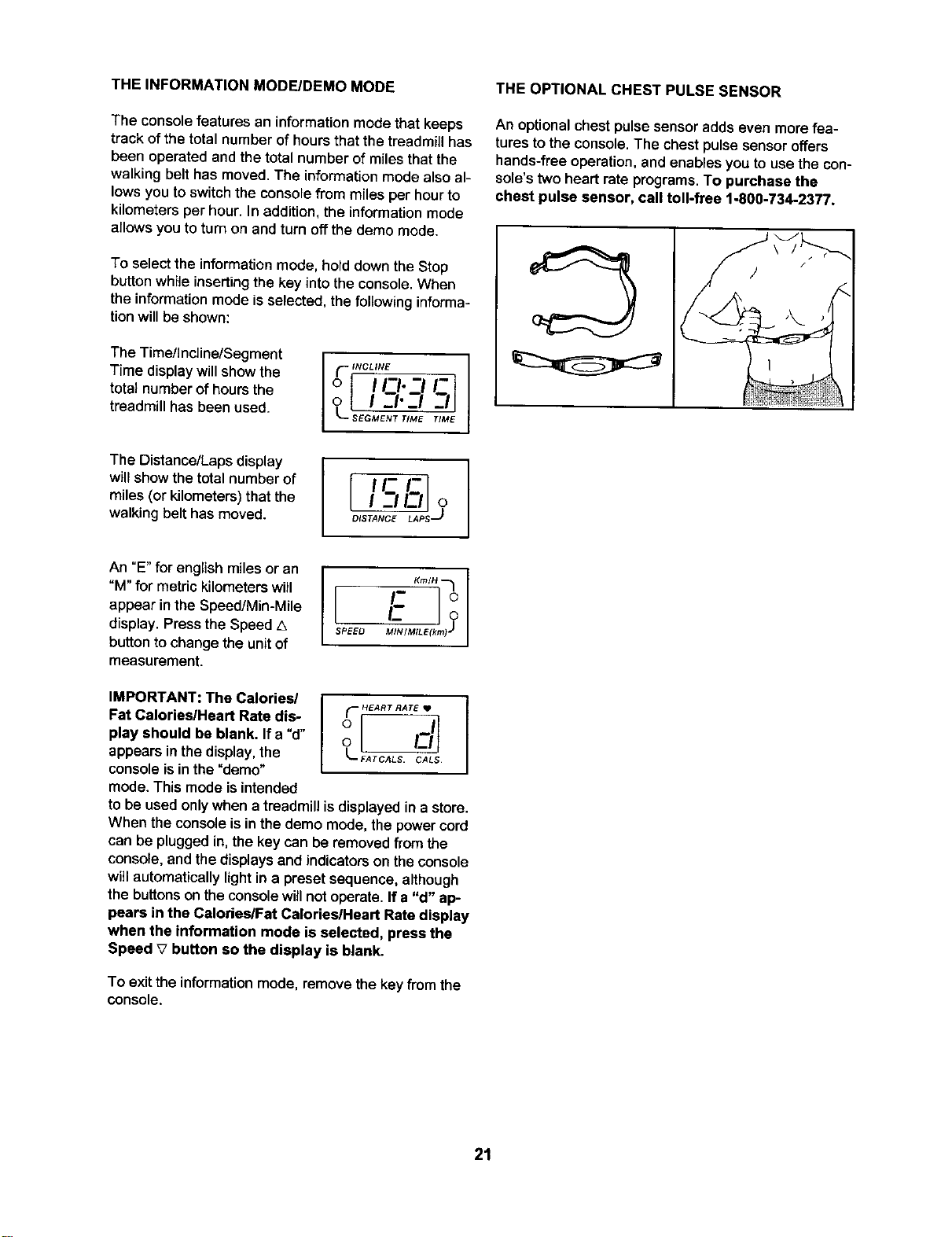
To select the information mode, hold down the Stop
button while inserting the key into the console. When
the information mode is selected, the following informa-
tion will be shown:
The Time/Incline/Segment
Time display will show the
total number of hours the
treadmill has been used.
_" INCLINE
o I1-1.-_1 5
o l I-I'-i
SEGMENT T_ME TIME
THE OPTIONAL CHEST PULSE SENSOR
An optionalchest pulse sensoradds even more fea-
tures to the console. The chestpulse sensor offers
hands-free operation, end enables you to use the con-
sole's two heart rate programs. To purchase the
chest pulse sensor, call toll-free 1-800-734-2377.
The Distance/Laps display
wiltshow the total numberof
miles (or kilometers) that the
walking belt has moved.
IFC.]
OlST_ LAPS
An °E"for english miles oran
"M" for metric kilometers will
appear in the Speed/Min-Mile
display. Press the Speed z_
button to change the unit of
measurement.
SPEEO _mlLe(km_ _
IMPORTANT: The Calories/
Fat Calories/Heart Rate dis-
play should be blank. If a "d"
appears inthe display,the
console isinthe "demo"
mode. Thismode isintended
I
HEART RATE • I
O_-FATCALS. CALS
I
to be used only when a treadmill is displayed in a store.
When the console is in the demo mode, the power cord
can be plugged in,the key can be removed from the
console, and the displays and indicators on the console
will automatically light in a preset sequence, although
the buttons on the console willnot operate. If a "d" ap-
pears in the Calories/Fat CalodeslHeart Rate display
when the information mode is selected, press the
Speed V button so the display is blank.
To exitthe informationmode, remove the key from the
console.
21
HOW TO FOLD AND MOVE THE TREADMILL
HOW TO FOLD THE TREADMILL FOR STORAGE
Before folding the treadmill, adjust the incline to the
lowest position. If this is not done, the treadmill may be
permanently damaged, Next, unplug the power cord,
CAUTION: You must be able to safely lift 45 pounds (20
kg) in order to raise, lower, or move the treadmill,
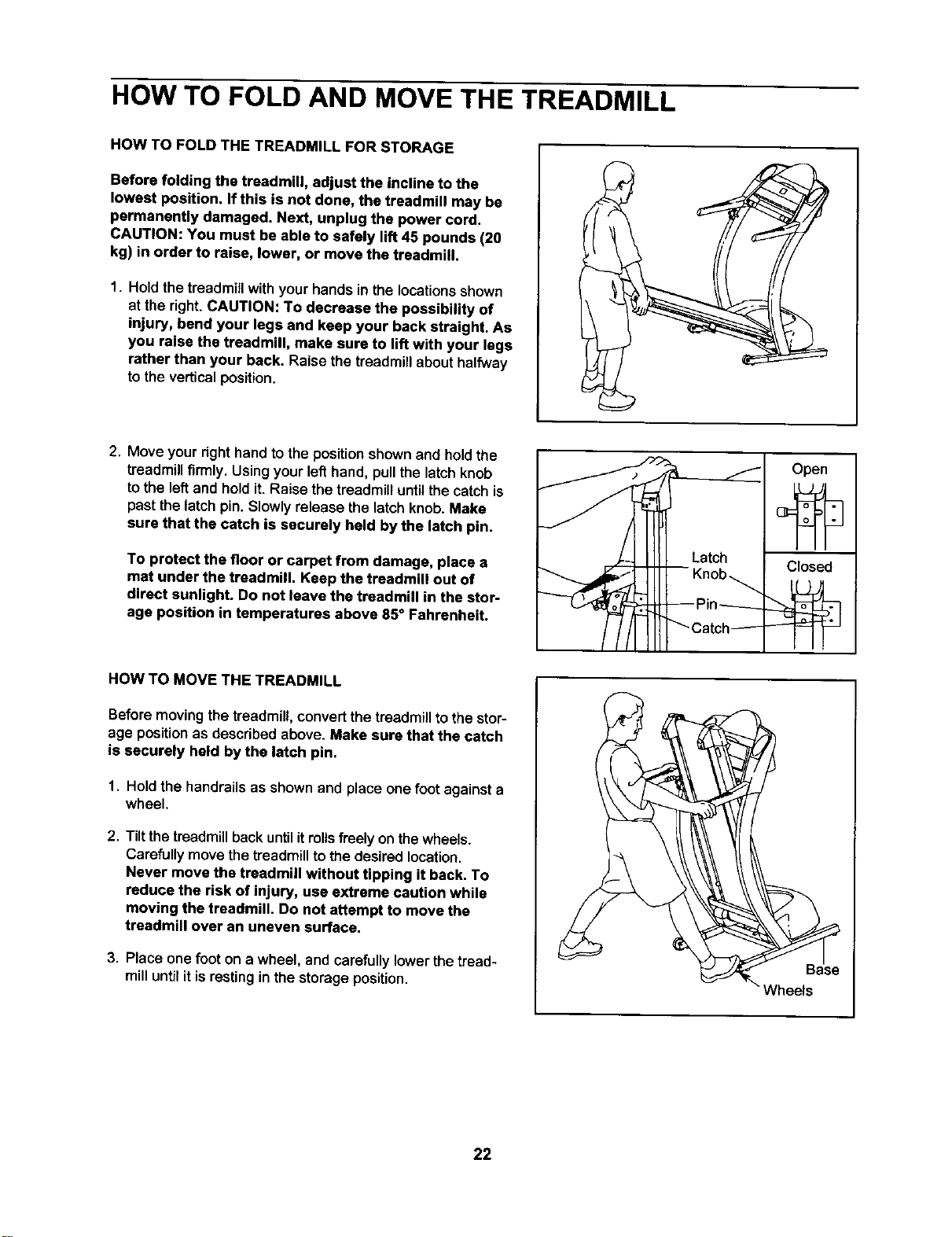
1. Hold the treadmillwithyour hands in the locationsshown
at the right. CAUTION: To decrease the possibility of
injury, bend your legs and keep your back straight. As
you raise the treadmill, make sure to lift with your legs
rather than your back. Raise thetreadmillabouthalfway
to the verticalposition,
2. Move yourright hand to the position shownand hold the
treadmill firmly. Using your left hand, pull the latch knob
to the left and hold it. Raise the treadmill until the catch is
past the latch pin. Slowly release the latch knob. Make
sure that the catch is securely held by the latch pin.
To protect the floor or carpet from damage, place a
mat under the treadmill. Keep the treadmill out of
direct sunlight. Do not leave the treadmill in the stor-
age position in temperatures above 85 ° Fahrenheit.
Open
Closed
HOW TO MOVE THE TREADMILL
Before movingthe treadmill,convert the treadmill to the stor-
age positionas describedabove. Make sure that the catch
is securely held by the latch pin.
1. Holdthe handrails as shownand place one foot against a
wheel.
2. Tiltthe treadmillback until it mils freely on thewheels.
Carefullymovethe treadmillto thedesired location.
Never move the treadmill without tipping it back. To
reduce the risk of injury, use extreme caution while
moving the treadmill. Do not attempt to move the
treadmill over an uneven surface.
3. Place one foot on a wheel, and carefullylower the tread-
mill until it is resting in the storage position.
Wheels
22

HOW TO LOWER THE TREADMILL FOR USE
1. Hold the upper end of the treadmillwithyour right hand
as shown. Using your left:hand, pull the latch knob to the
left and hold it. Pivot the treadmill down until the frame is
past the pin. Slowly release the latch knob.
2. Hold the treadmillfirmly with both hands, and lower the
treadmill to the floor. Do not drop the treadmill frame
to the floor. CAUTION: To decrease the possibility of
injury, bend your legs and keep your back straight,
23
TROUBLESHOOTING
Most treadmill problems can be solved by following the simple steps below. Find the symptom that
applies, and follow the steps listed. If further assistance is needed, call toll-free 1-8O0-4-MY-HOME ®
(1-800-469-4663).
PROBLEM: The power does not turn on
SOLUTION: a. Make sure thatthe powercord isplugged intoa surge suppressor, and that the surge suppressor
ispluggedintoa properlygroundedoutlet(see page 9). Use onlya single-outletsurgesuppressor
that meets all ofthe specificationsdescribedon page 9. Important:The treadmillis notcompatible
with GFCl-equipped outlets.
b. Afterthe powercord has been plugged in,make sure thatthe key isfully insertedintothe console.
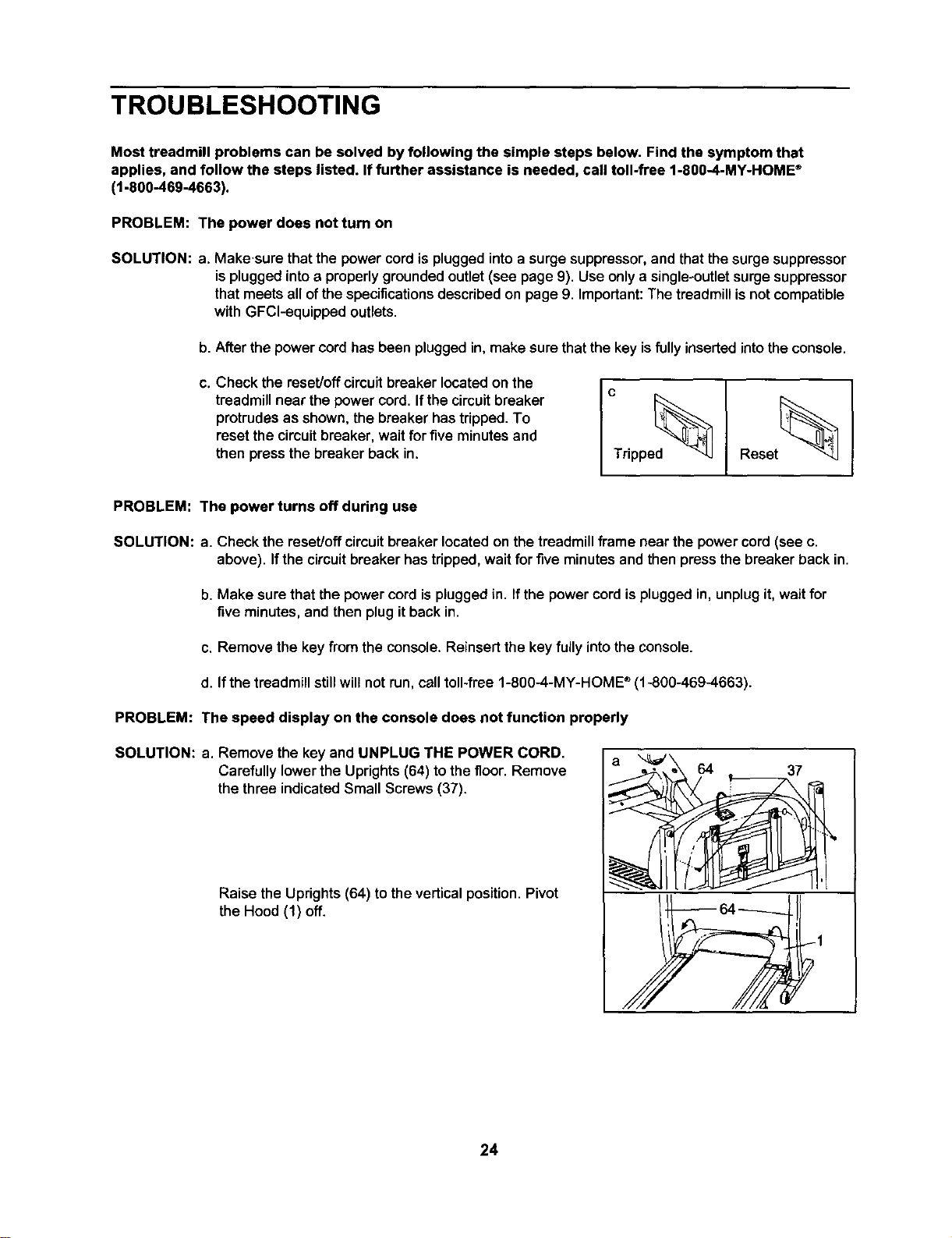
C.
Check the reset/offcircuit breaker locatedon the
treadmillnear the power cord.If the circuit breaker
protrudesas shown,the breakerhastdpped. To
reset the circuitbreaker, waitfor five minutesand
then pressthe breaker back in.
Reset_
PROBLEM: The power turns off during use
SOLUTION: a. Check the reset/offcircuit breaker locatedon the treadmillframe near the power cord (see c.
above). Ifthe circuitbreakerhastdpped, waitfor five minutesand then press the breaker back in.
b. Make sure thatthe power cord isplugged in. Ifthe power cord isplugged in,unplug it, wait for
five minutes, and then plug it back in.
c. Remove the key from the console. Reinsertthe key fully intothe console.
d. If the treadmillstill will not run, call toll-free 1-800-4-MY-HOME ®(1-800-469-4663).
PROBLEM: The speed display on the console does not function properly
SOLUTION: a. Remove the key and UNPLUG THE POWER CORD.
Carefullylowerthe Uprights(64) tothe floor.Remove
thethree indicatedSmall Screws(37).
Raise the Uprights (64) to the verticalposition. Pivot
the Hood (1) off.
a 64
• 37
24
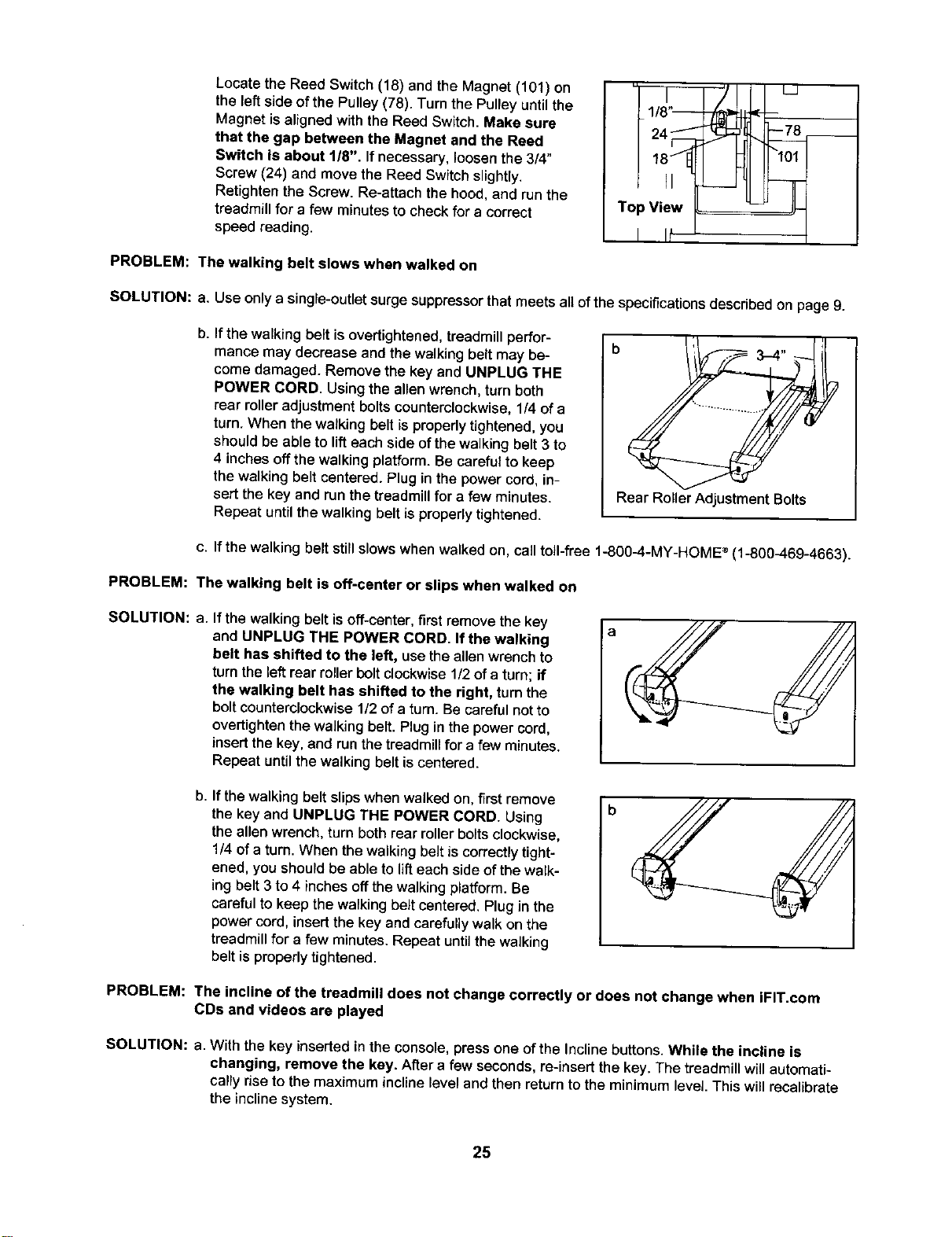
Locate the Reed Switch (18) and the Magnet (101) on
the left side of the Pulley (78). Turn the Pulley until the
Magnet is aligned with the Reed Switch. Make sure
that the gap between the Magnet and the Reed
Switch is about 118", Ifnecessary, loosenthe 3/4"
Screw (24) and move the Reed Switch slightly.
Retighten the Screw. Re-attach the hood, and run the
treadmill for a few minutes to check for a correct
speed reading.
Top View _ ==_=_
PROBLEM: The walking belt slows when walked on
SOLUTION: a. Use only a single-outlet surge suppressor that meets all ofthe specifications described on page 9.
b,
If the walking belt isovertightened, treadmill perfor-
mance may decrease and the walking belt may be-
come damaged. Remove the key and UNPLUG THE
POWER CORD. Using the allen wrench, turn both
rear roller adjustment bolts counterclockwise, 1/4 of a
turn. When the walking belt is properly tightened, you
should be able to lift each side of the walking belt 3 to
4 inches off the walking platform. Be careful to keep
the walking belt centered. Plug in the power cord, in-
sert the key and run the treadmill for a few minutes.
Repeat until the walking belt is properly tightened.
b , _
_.- 3-4
Rear Roller Adjustment Bolts
c. If the walking belt still slows when walked on, call toll-free 1-800_.-MY-HOME ®(1-800_.69-4663).
PROBLEM: The walking belt is off-center or slips when walked on
SOLUTION: a. If the walking belt isoff-center, first remove the key
and UNPLUG THE POWER CORD. If the walking
belt has shifted to the left, use the allen wrench to
turn the left rear roller bolt clockwise 1/2 of a turn; if
the walking belt has shifted to the right, turn the
bolt counterclockwise 1/2 of a turn. Be careful not to
overtighten the walking belt. Plug in the power cord,
insert the key, and run the treadmill for a few minutes.
Repeat until the walking belt is centered.
a
b,
If the walking belt slips when walked on, first remove
the key and UNPLUG THE POWER CORD. Using
the allen wrench, turn both rear roller bolts clockwise,
1/4 of a turn, When the walking belt is correctly tight-
ened, you should be able to lift each side of the walk-
ing belt 3 to 4 inches off the walking platform. Be
careful to keep the walking belt centered. Plug in the
power cord, insert the key and carefully walk on the
treadmill for afew minutes. Repeat until the walking
belt is properly tightened.
b
PROBLEM: The incline of the treadmill does not change correctly or does not change when iFIT.com
CDs and videos are played
SOLUTION: a. With the key inserted in the console, press one of the Incline buttons. While the incline is
changing, remove the key. After a few seconds, re-insert the key. The treadmill will automati-
cally riseto the maximum incline level and then return to the minimum level. This will recalibrate
the incline system.
25
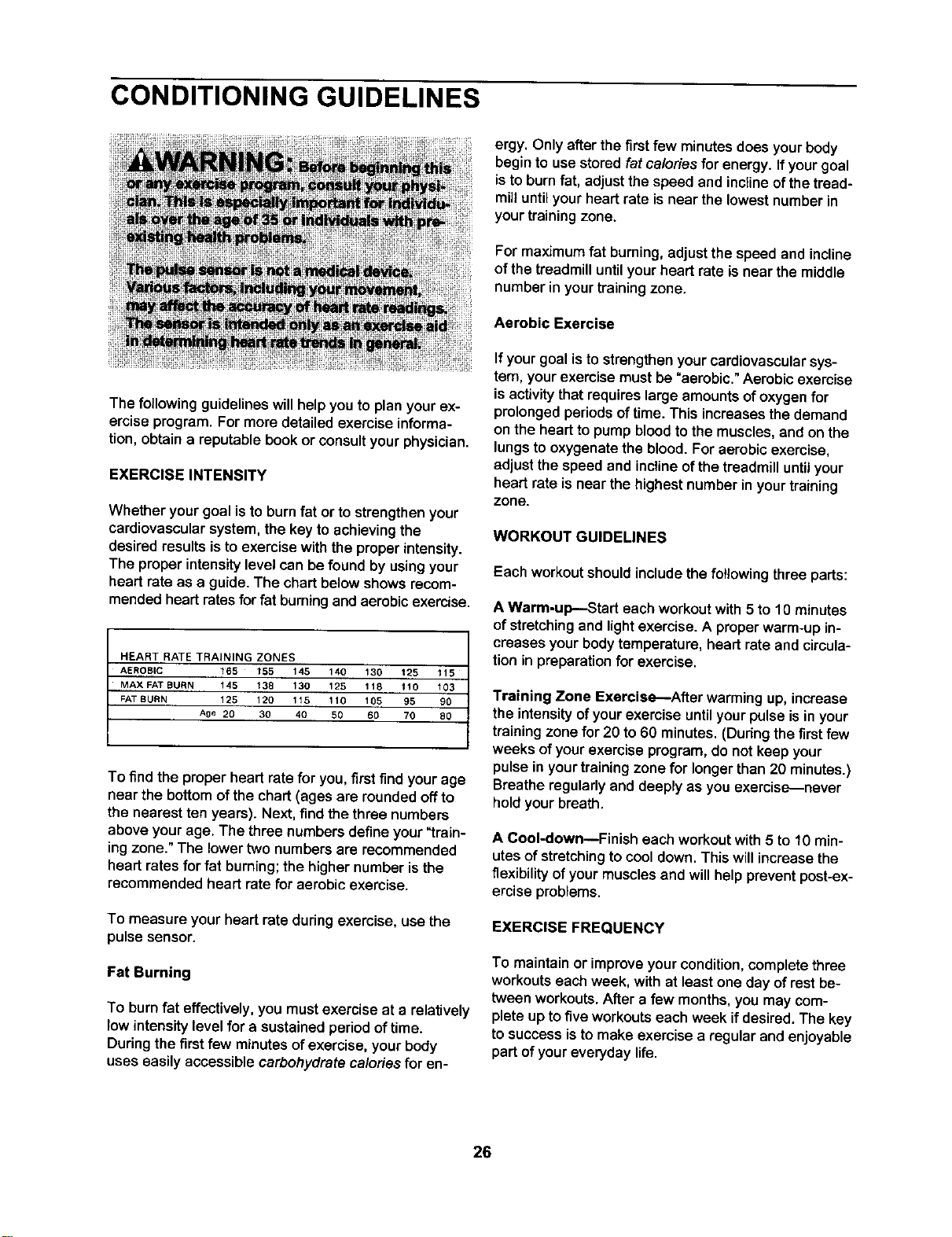
CONDITIONING GUIDELINES
The following guidelines willhelp you to plan yourex-
ercise program. For more detailed exercise informa-
tion, obtain a reputable book or consult your physician.
EXERCISE INTENSITY
Whether your goal isto burn fat or tostrengthen your
cardiovascular system, the key to achieving the
desired results is to exercise with the proper intensity.
The proper intensity level can be found by using your
heart rate as a guide. The chart below shows recom-
mended heart rates for fat burning and aerobic exercise.
HEART RATE TRAINING ZONES
AEROBIC 165 155 145 140 130 125 115
MAX FAT BURN t45 138 130 125 118 110 103
FAT BURN 125 120 115 110 105 95 90
Age 20 30 40 50 60 70 80
To find the proper heart rate for you, first find your age
near the bottom of the chart (ages are rounded off to
the nearest ten years). Next, find the three numbers
above your age. The three numbers define your "train-
ing zone." The lower two numbers are recommended
heart rates for fat burning; the higher number is the
recommended heart rate for aerobic exercise.
To measure your heart rate during exercise, use the
pulsesensor.
Fat Burning
To burn fat effectively, you mustexercise at a relatively
low intensity level for a sustained period of time.
During the first few minutes of exercise, your body
uses easily accessible carbohydrate calories for en-
ergy. Onlyafter the first few minutes does your body
begin to use storedfat calories for energy. If your goal
is to burn fat, adjust the speed and incline of the tread-
mili until your heart rate is near the lowest number in
your training zone.
For maximum fat burning, adjust the speed and incline
of the treadmill until your heart rate is near the middle
number in your training zone.
Aerobic Exercise
If your goal istostrengthen yourcardiovascular sys-
tem, your exercise must be "aerobic." Aerobic exercise
is activity that requires large amounts of oxygen for
prolonged periods of time. This increases the demand
on the heart to pump blood to the muscles, and on the
lungs to oxygenate the blood. For aerobic exercise,
adjust the speed and incline of the treadmill until your
heart rate is near the highest number in your training
zone.
WORKOUT GUIDELINES
Each workoutshould includethe following three parts:
A Warm-up--Start each workoutwith 5 to 10 minutes
of stretching and light exercise. A proper warm-up in-
creases yourbodytemperature,heart rate and circula-
tion in preparationfor exercise.
Training Zone Exercise--After warming up,increase
the intensity of your exercise until your pulse is in your
training zone for 20 to 60 minutes. (During the first few
weeks of your exercise program, do not keep your
pulse in your training zone for longer than 20 minutes.)
Breathe regularly and deeply as you exercise-never
hold your breath.
A Cool-down--Finish each workout with 5 to 10 min-
utes of stretchingto cooldown. This willincreasethe
flexibility of yourmuscles and willhelp preventpost-ex-
ercise problems.
EXERCISE FREQUENCY
To maintain or improve your condition, complete three
workouts each week, with at least one day of rest be-
tween workouts. After a few months, you may com-
plete up to five workouts each week if desired. The key
to success is to make exercise a regular and enjoyable
part of your everyday life.
26
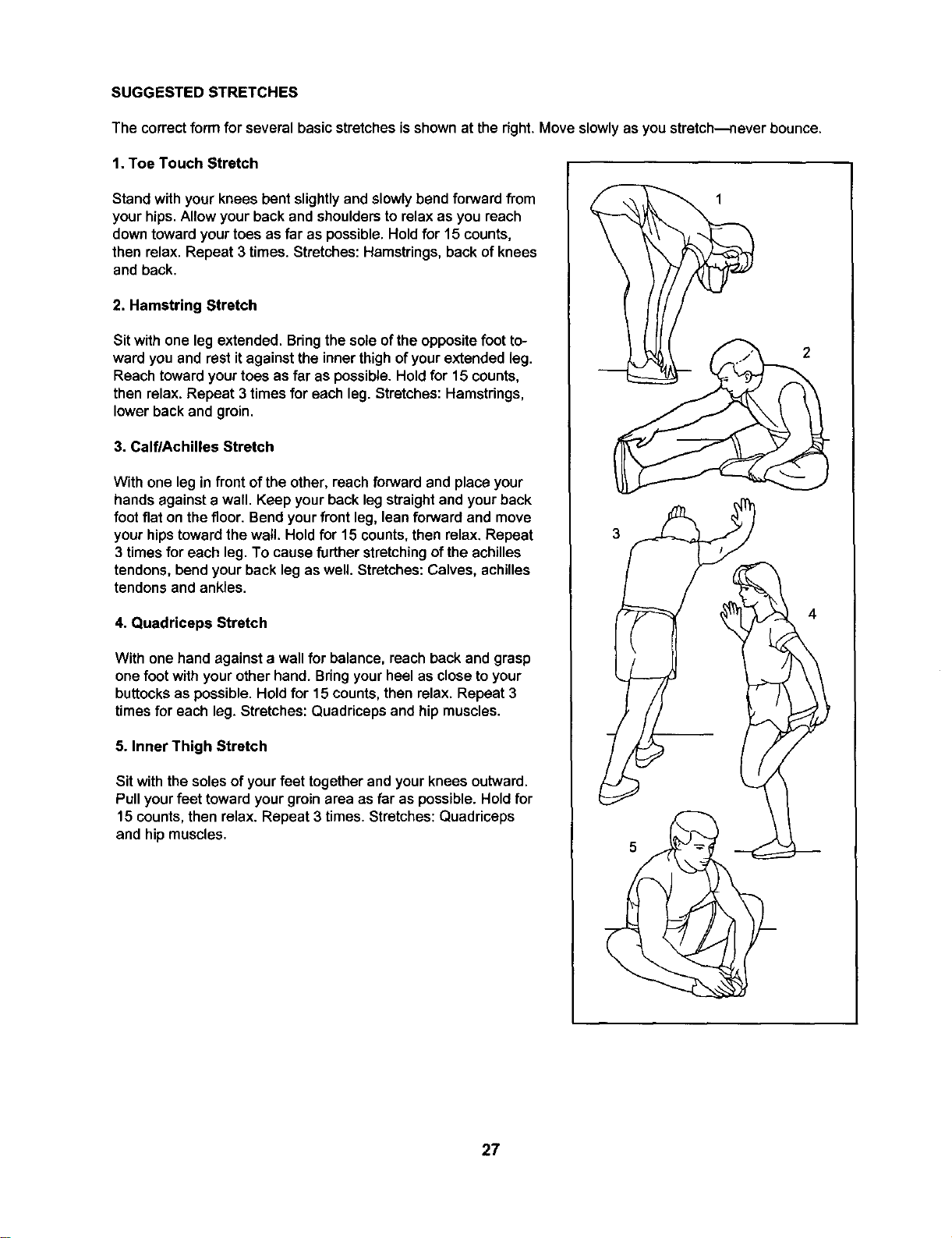
SUGGESTED STRETCHES
The correct form for several basic stretchesisshown at the right.Move slowlyas you stretch---never bounce.
1. Toe Touch Stretch
Stand withyour knees bent slightlyand slowly bend forward from
yourhips.Allow yourback and shouldersto relax as you reach
downtowardyourtoes as far as possible.Holdfor 15 counts,
then relax. Repeat 3 times. Stretches:Hamstrings,backof knees
and back.
2, Hamstring Stretch
Sit withone leg extended. Bringthe sole ofthe oppositefoot to-
ward you and restit againstthe innerthighofyour extendedleg.
Reach towardyourtoes as far as possible.Holdfor 15 counts,
then relax.Repeat 3 times for each leg.Stretches: Hamstrings,
lowerbackand groin.
3. Calf/Achilles Stretch
With one leg in front of the other, reach forward and place your
hands against a wall. Keep your back leg straight and your back
foot flat on the floor. Bend your front leg, lean forward and move
your hips toward the wall. Hold for 15 counts, then relax. Repeat
3 times for each leg. To cause further stretching of the achilles
tendons, bend your back leg as well. Stretches: Calves, achilles
tendons and ankles.
4. Quadriceps Stretch
With one hand against a wall for balance, reach back and grasp
one foot with your other hand. Bring your heel as close to your
buttocks as possible. Hold for 15 counts, then relax. Repeat 3
times for each leg. Stretches: Quadriceps and hip muscles.
5. Inner Thigh Stretch
Sit with the solesof yourfeet together and your knees outward.
Pullyour feet toward your groin area as far as possible. Hold for
15 counts, then relax. Repeat 3 times. Stretches: Quadriceps
and hip muscles.
2
27
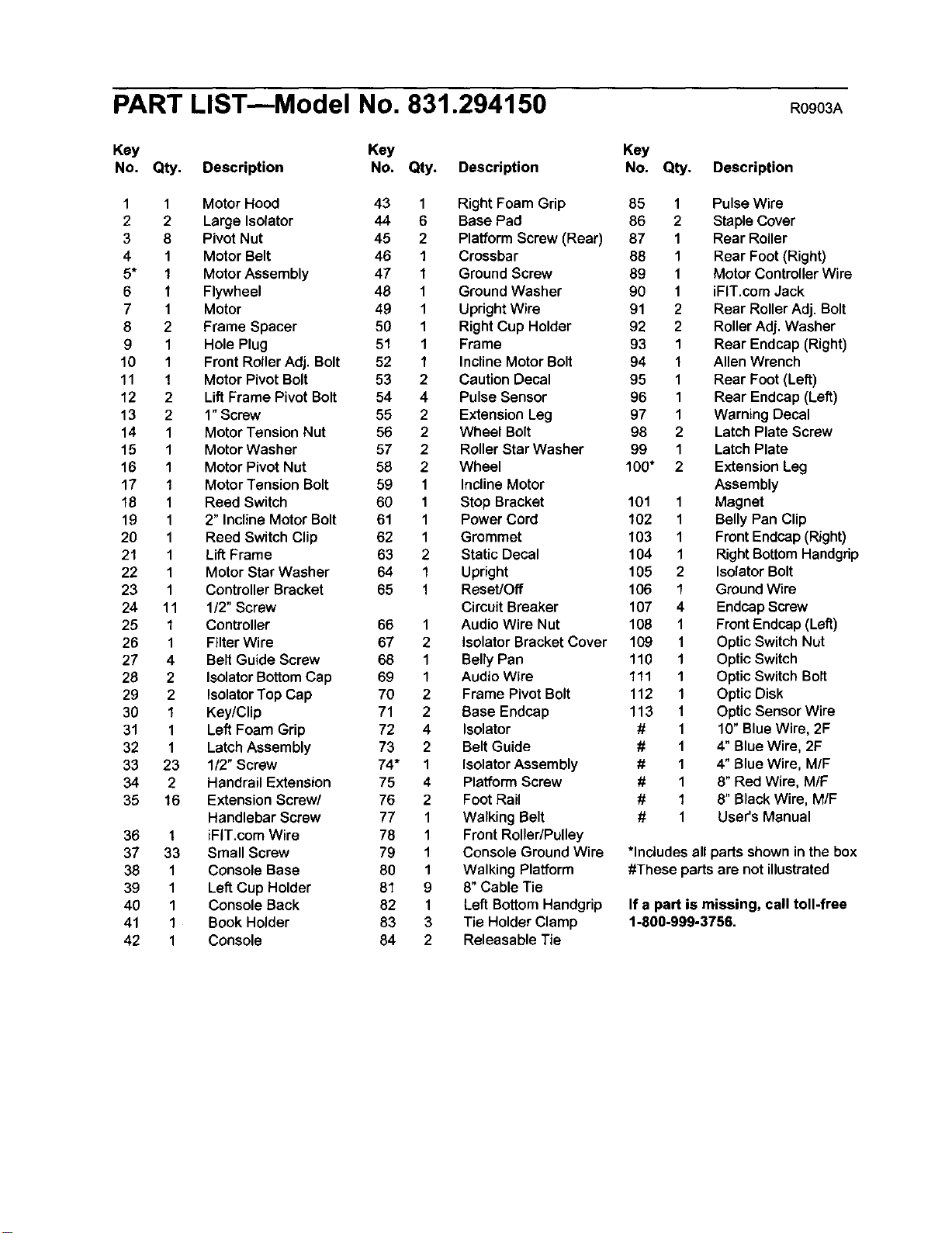
PART LIST--Model No. 831.294150 Rog0 A
Key Key Key
No. Qty. Description No. Qty. Description No. Qty. Description
1 1 Motor Hood 43 1 Right Foam Grip
2 2 Large Isolator 44 6 Base Pad
3 8 Pivot Nut 45 2 Platform Screw (Rear)
4 1 Motor Belt 46 1 Crossbar
5* 1 Motor Assembly 47 1 Ground Screw
6 1 Flywheel 48 1 Ground Washer
7 1 Motor 49 1 Upright Wire
8 2 Frame Spacer 50 1 Right Cup Holder
9 1 Hole Plug 51 1 Frame
10 1 Front RollerAdj. Bolt 52 1 InclineMotor Bolt
11 1 Motor Pivot Bolt 53 2 Caution Decal
12 2 Lift Frame Pivot Bolt 54 4 Pulse Sensor
13 2 1"Screw 55 2 Extension Leg
14 1 Motor Tension Nut 56 2 Wheel Bolt
15 1 Motor Washer 57 2 Roller Star Washer
16 1 Motor Pivot Nut 58 2 Wheel
17 1 Motor Tension Bolt 59 1 Incline Motor
18 1 Reed Switch 60 1 Stop Bracket
19 1 2" Incline Motor Bolt 61 1 Power Cord
20 1 Reed Switch Clip 62 1 Grommet
21 1 Lift Frame 63 2 Static Decal
22 1 Motor Star Washer 64 1 Upright
23 1 Controller Bracket 65 1 Reset/Off
24 11 1/2" Screw Circuit Breaker
25 1 Controller 66 1 Audio Wire Nut
26 1 Filter Wire 67 2 Isolator Bracket Cover
27 4 Belt Guide Screw 68 1 Belly Pan
28 2 Isolator Bottom Cap 69 1 Audio Wire
29 2 IsolatorTop Cap 70 2 Frame Pivot Bolt
30 1 Key/Clip 71 2 Base Endcap
31 1 Left Foam Grip 72 4 Isolator
32 1 Latch Assembly 73 2 Belt Guide
33 23 1/2" Screw 74* 1 Isolator Assembly
34 2 Handrail Extension 75 4 Platform Screw
35 16 ExtensionScrew/ 76 2 Foot Rail
Handlebar Screw 77 1 Walking Belt
36 1 iFIT.com Wire 78 1 Front Roller/Pulley
37 33 Small Screw 79 1 ConsoleGround Wire
38 1 Console Base 80 1 Walking Platform
39 1 LeftCup Holder 81 9 8"Cable Tie
40 1 Console Back 82 1 LeftBottomHandgrip
41 1 Book Holder 83 3 Tie HolderClamp
42 1 Console 84 2 Releasable Tie
85 1 Pulse Wire
86 2 Staple Cover
87 1 Rear Roller
88 1 Rear Foot (Right)
89 1 Motor Controller Wire
90 1 iFIT.com Jack
91 2 Rear Roller Adj. Bolt
92 2 RollerAdj. Washer
93 1 Rear Endcap (Right)
94 1 Allen Wrench
95 1 Rear Foot (Left)
96 1 Rear Endcap (Left)
97 1 Warning Decal
98 2 Latch Plate Screw
99 1 Latch Plate
100" 2 Extension Leg
Assembly
101 1 Magnet
102 1 BellyPan Clip
103 1 FrontEndcap(Right)
104 1 RightBottomHandgrip
105 2 IsolatorBolt
106 1 Ground Wire
107 4 EndcapScrew
108 1 FrontEndcap(Left)
109 1 OpticSwitch Nut
110 1 OpticSwitch
111 1 Optic Switch Bolt
112 1 Optic Disk
113 1 Optic Sensor Wire
# 1 10" Blue Wire, 2F
# 1 4" Blue Wire, 2F
# 1 4" BlueWire, M/F
# 1 8" Red Wire, M/F
# 1 8" BlackWire, M/F
# 1 User's Manual
*Includesall parts shownin the box
#These parts are not illustrated
If a part is missing, call toll-free
1-800-999-3756.
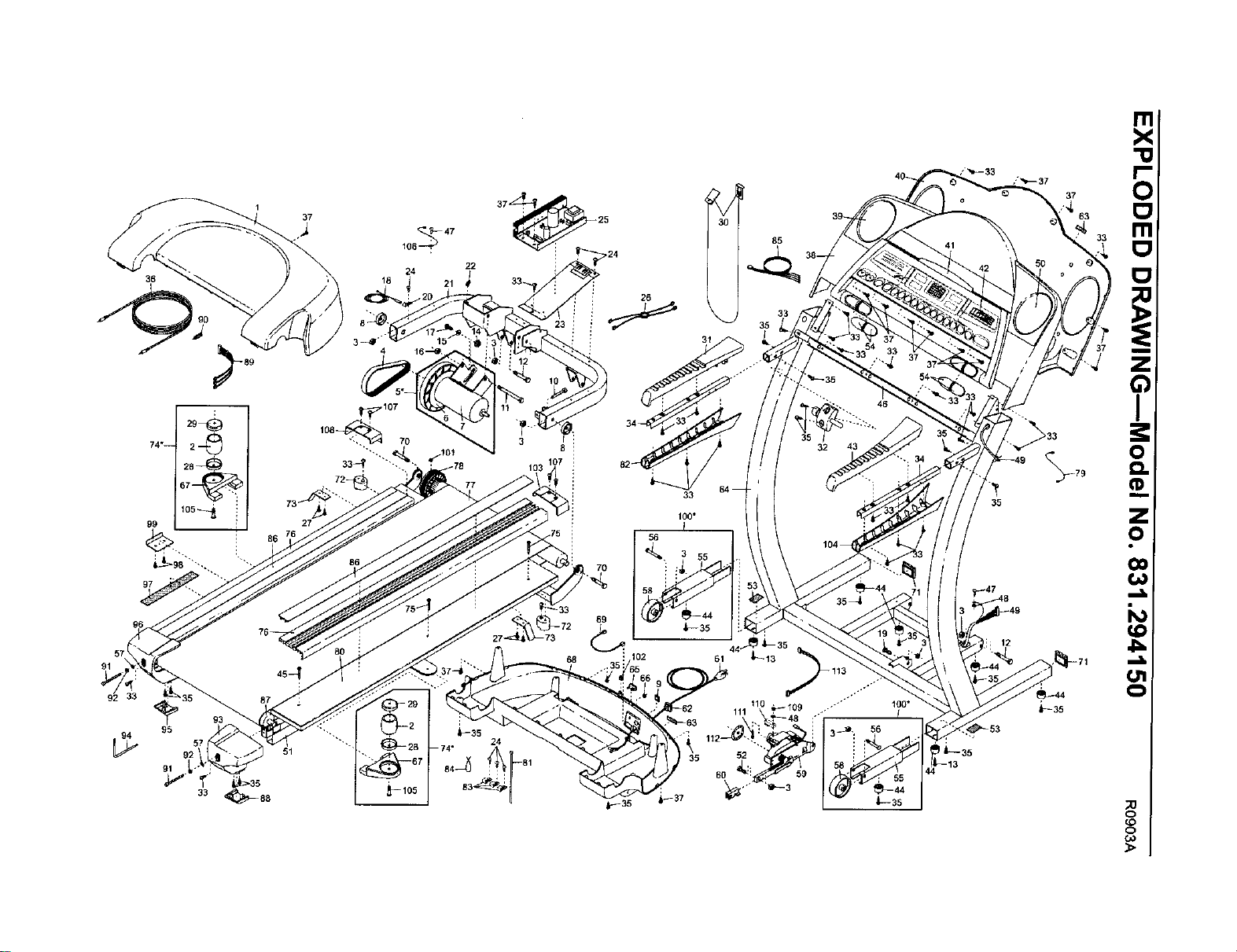
36
105_
99
97
92
95
91
33
1
37
3
4
51
_47
106 :
24
18 21
37_25
22
3
103
~33
26
102
30
35
3t
56
35
37
63

f
YourHome
For repair - in your home - of all major brand appliances, lawn and garden equipment,
or heating and cooling systems, no matter who made it, no matter who sold itl
For the replacement parts, accessories, and user's manuals that you need to do-it-yourself.
For Sears professional installation of home appliances
and items like garage door openers and water heaters.
lo800-4-MY-HOM E® Anytime,day or night
(1-800-469-4663) (U.S.A. and Canada)
www.sears,com W_NW.e_Brs.ca
Our Home
For repair of carry-in products like vacuums, lawn equipment,
and electronics, call or go on-line for the location of your nearest
Sears Parts and Repair Center.
1-800-488-1222 Anytime,day or night(U.S.A. only)
www.sears.com
To purchase a protectionagreement (U.S.A.)
or maintenance agreement (Canada) on a product serviced by Sears:
1-800-827-6655 (U.S.A.) 1-800.361-6665 (C_ada)
Para pedir serviciode reparacibn a domicilio,y para ordenar piezas:
1-888-SU-HOGAR sM (1-888-784-6427)
SEARS
® Registered Trademark / TMTrademark / s_ Service Mark of Sears, Roebuck and Co.
® Mama Registrada / TuMarea de F&bdca / SMMarca de Se_icio de Sears, Roebuck and Co.
FULL 90 DAY WARRANTY
For 90 days from the date ofpurchase, if failure occurs due to defect in materialor workmanshipin this
Sears Treadmill Exerciser, contact the nearest Sears Service Center throughout the United States and
Sears will repair or replace the Treadmi_Exerciser, free ofcharge.
This warrantydoes not applywhen the Treadmill Exerciser isused commerciallyor for rentalpurposes.
This warrantygivesyou specificlegal rights, and you may also have otherrights whichvaryfrom state to
state.
Sears, Roebuck and Co., Dept. 817WA, Hoffman Estates, IL 60179
J
Part No. 201528 R0903A Printed in USA © 2003 Sears, Roebuckand Co.