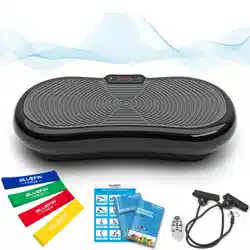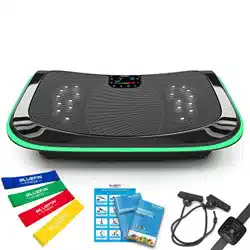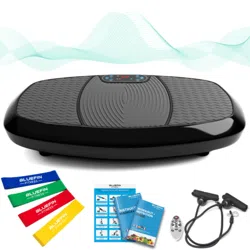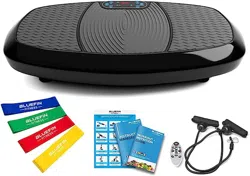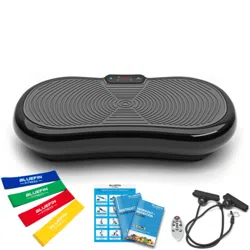
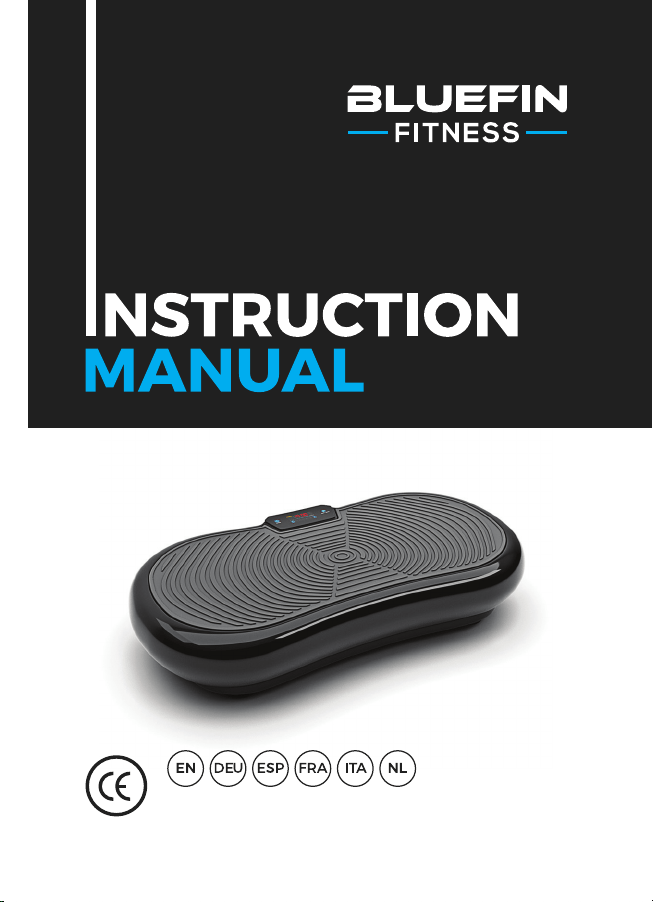
For use with BLUEFIN FITNESS Ultra Slim Vibration Plate

WHAT’S IN
THE BOX?
1 x Bluefin Ultra Slim Vibration Plate
1 x UK Power Cable
1 x EU Power Cable
1 x Instruction Manual
1 x Workout + Nutrition Guide
1 x Exercise Chart
2 x Workout Cables
Using Accessories:
Your vibration plate comes with 2 bungee cables for use in upper body
exercises in conjunction with the plate. Attach the silver clips on the
bungees to the corresponding silver ring on either side of the bottom of the
plate. Please do not attempt to attach or detach accessories from the plate
while in use.
Unbox your Bluefin vibration plate and place it on a flat, hard surface. If the
surface is slightly uneven, adjust the feet under the plate. If you live in a flat
or an apartment building we recommend placing a yoga mat or rug beneath
the plate to absorb any noise. Bluefin fitness plates are very quiet but all
vibration plates make at least some noise.
Insert the power cable into the back of the plate and plug the other end into
the electrical outlet. Make sure the plate is close enough to the electrical
outlet that the cord is not stretched. Ensure that the power switch next
to the plug is turned on. If the switch is illuminated, the machine is on.
When not in use, switch the machine off and ensure that this button is not
illuminated.
Familiarise yourself with the screen and remote before stepping onto the
plate. Place your feet on either side of the plate for more intensity and bet-
ter balance. Please be sure to step on the plate slowly and carefully before
starting any workout setting. We recommend beginning with speeds below
120 or using program setting P1.
Insert 2x AAA batteries into the remote control.
GETTING
STARTED
CONTROLS
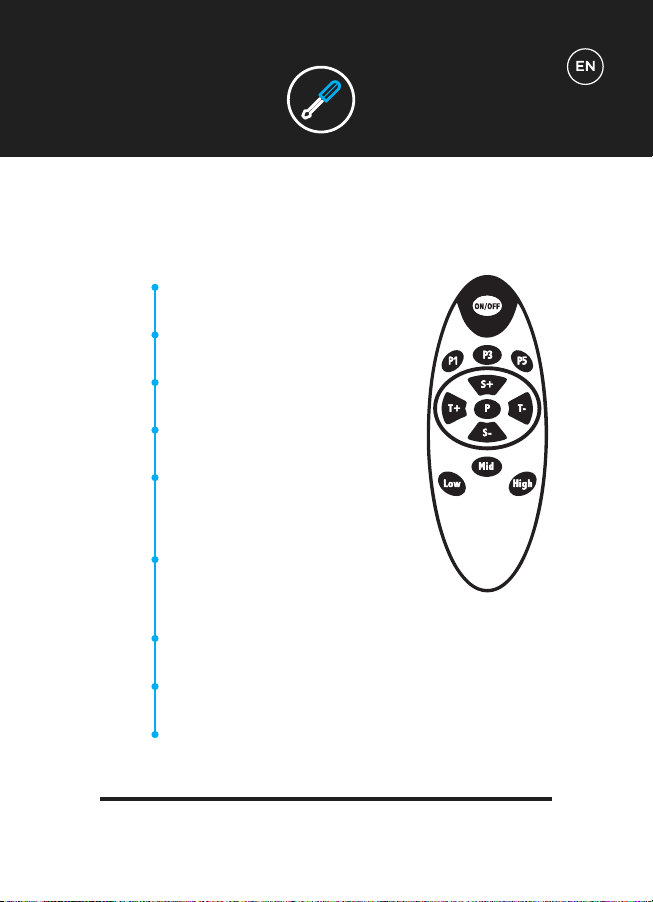
Using Your Remote:
(i) Select for Program 1.
(ii) Press ON/OFF to start.
(i) Select for Program 3.
(ii) Press ON/OFF to start.
(i) Select for Program 5.
(ii) Press ON/OFF to start.
(i) Scroll through Programs 1 to 5.
(ii) Once selected, press ON/OFF to start.
Increase or decrease time setting from
01:00 to 20:00.
NB/ Only available for Manual Program
prior to workout.
Increase or decrease speed level from 1
to 180.
NB/ Only available for Manual Program
during workout.
Quick-start select for speed level 60.
NB/ Only available for Manual Program during workout.
Quick-start select for speed level 120.
NB/ Only available for Manual Program during workout.
Quick-start select for speed level 180.
NB/ Only available for Manual Program during workout.
CONTROLS
P1
P3
P5
P
T+/-
S+/-
Low
Mid
High
CONTROLS
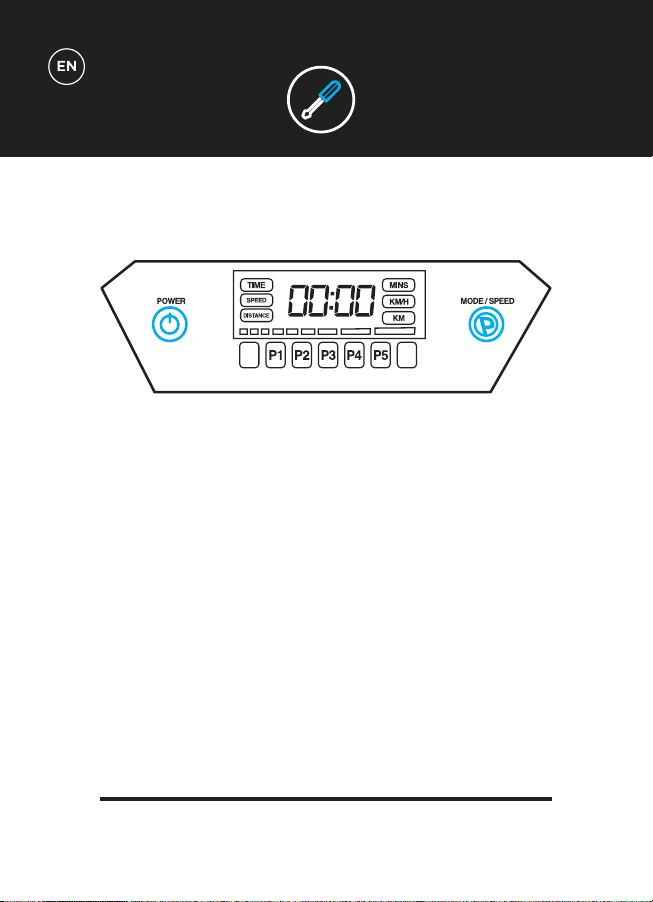
Using Your Display:
The display will show information for Time, Speed and Distance mid-workout.
Besides the remote control, you can also use the following display buttons to control
your vibration plate.
POWER: Press to start and stop your workout.
MODE / SPEED - prior to workout:
(i) Scroll through Programs 1 to 5.
(ii) Once selected, press ON/OFF to start.
MODE / SPEED - during workout:
Press and/or hold to increase speed.
Speed can also be decreased once maximum speed level has been reached.
NB/ Only available for Manual Program during workout.
CONTROLS
Manual Workouts:
The time can be programmed up to 20 minutes.
The speed level can be programmed up to 180.
Programmed Workouts:
10 minute low-intensity program. Perfect for warming-up, gentle
massage and recovery after exercise.
10 minute low-to-moderate-intensity program. Perfect for gradual
weight-loss and cellulite reduction.
10 minute moderate-intensity program. Perfect for gradual weight-
loss, muscle-toning and intensive massage.
10 minutes high-intensity program. Perfect for muscle-toning and
improving core-strength.
10 minute ultra-high-intensity program. Perfect for all-round power
and weight-loss training.
WORKOUT
SETTINGS
M
P1
P2
P3
P4
P5
TECH
SPECS
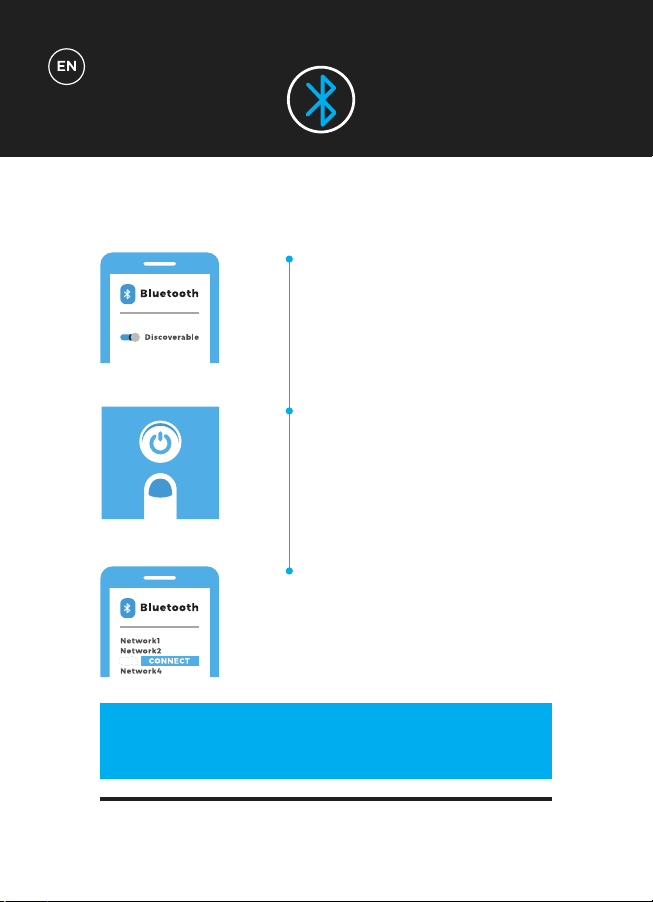
BLUETOOTH
1
2
3
Ensure your device has Bluetooth
turned on and the device is ‘discov-
erable’.
Turn your Bluefin Vibration Plate
‘ON’. The Bluetooth module stimply
turns on once the Vibration Plate
has powered up.
The Vibration Plate will now appear
in the Bluetooth devices list on
your phone or tablet. You are now
connected to the Vibration Plate and
are ready to go!
ZZ
CONTROL YOUR MUSIC & VOLUME
DIRECTLY FROM YOUR DEVICE!
TECH
SPECS
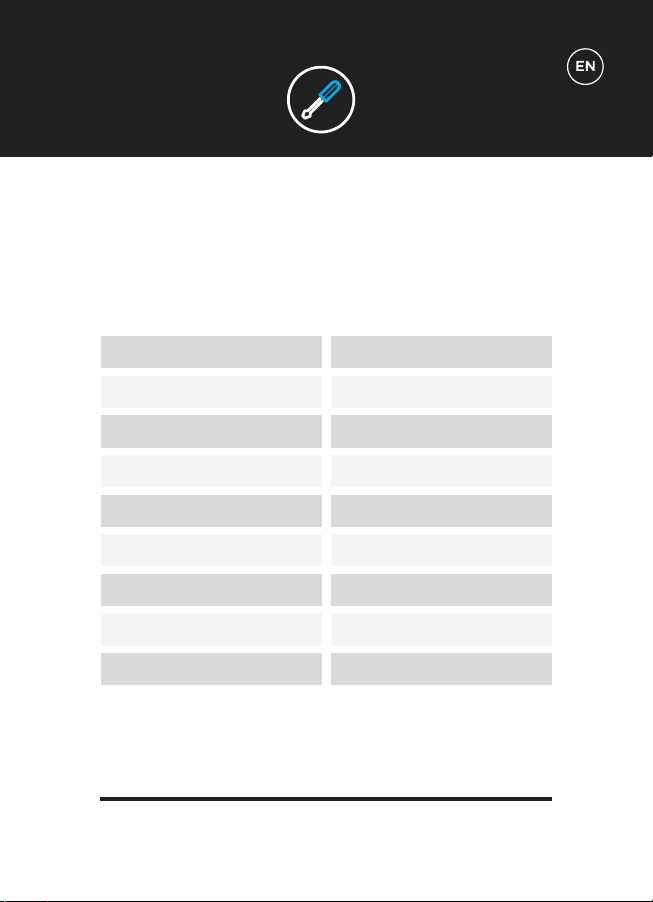
MOTOR
FUNCTIONS
POWER REQUIRED
LEVELS
PROGRAMS
MANUAL FUNCTION
USER WEIGHT
UNIT WEIGHT
WARRANTY
Single Motor
Vibration
AC 100-240v
180 levels
5 built in programs
180 levels & variable time control
Maximum: 150kg
19kg
Lifetime Motor Warranty
BLUETOOTH
WARRANTY
General wear and marks from use.
Water damage.
Damage due to impromper use.
Chassis damage and scratching due to impromper use or dropping.
Electronic damage due to impromper use or dropping.
The Bluefin warranty covers any technical faults with your item. If you need to make
a warranty claim contact us via email at support@bluefintrading.co.uk
Your warranty begins on receipt of delivery, technical faults are covered for 12
months and the motor is covered for life!
If you have any questions regarding your warranty please email us at:
support@bluefintrading.co.uk
Your warranty does not cover the following:
LIFETIME MOTOR WARRANTY
For the latest & up-to-date EU declaration of conformity for this product, please visit:
www.bluefinfitness.com/manuals/slim_DoC.pdf
Importer Address:
Bluefin Trading Ltd
Keelham Farm
Hebden Bridge
UK
HX7 8TG
www.bluefinfitness.com
WARRANTY
EU-Declaration of
Conformity

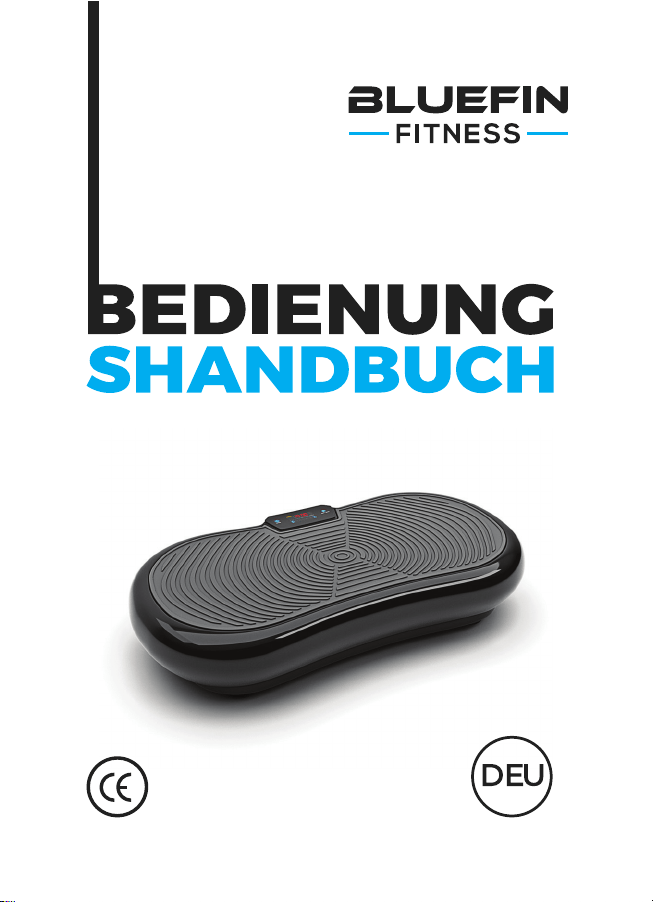
Für den Gebrauch der BLUEFIN FITNESS
Ultra Slim Vibrationsplatte

WAS IST IN
DER BOX?
Verwenden des Zubehörs:
Deine Vibrationsplatte enthält 2 Trainings-Bänder für das Oberkörper-
Training in Kombination mit der Vibrations-Platte. Befestige die silbernen
Clips an den Trainingsbändern an den entsprechenden Silberringen,
die sich auf beiden Seiten an der Unterseite des Geräts befinden. Bitte
versuche nicht, während des Gebrauchs der Vibrations-Platte Zubehör an
dem Gerät anzubringen oder zu entfernen.
1 x Bluefin Ultra Slim Vibrations-Platte
1 x Stromkabel UK
1 x Stromkabel EU
1 x Bedienungsanleitung
1 x Trainings- & Ernährungsplan
1 x Übungsübersicht
2 x Trainingsbänder
ERSTE
SCHRITTE
BEDIENELEMENTE
Packe deine Bluefin Vibrations-Platte aus und platziere sie auf einer
flachen, harten Oberfläche. Wenn die Oberfläche leicht uneben ist, stelle die
Füße unter dem Gerät entsprechend ein. Wenn du in einer Wohnung oder
einem Wohnhaus wohnst, empfehlen wir dir, eine Yogamatte oder einen
Teppich unter das Gerät zu legen, um Geräusche zu absorbieren. Bluefin
Fitness-Geräte sind zwar sehr leise, jedoch machen Vibrationsplatten
zumindest einige Geräusche.
Stecke das Netzkabel in die Rückseite des Geräts und das andere Ende
in die Steckdose. Stelle sicher, dass sich das Gerät nahe genug an der
Steckdose befindet, sodass das Kabel nicht gespannt wird. Stelle zudem
sicher, dass der Netzschalter neben dem Stecker eingeschaltet ist. Wenn
der Schalter leuchtet, ist das Gerät eingeschaltet. Schalte das Gerät bei
Nichtgebrauch aus und achte darauf, dass diese Taste nicht leuchtet.
Mache dich mit dem Bildschirm und der Fernbedienung vertraut, bevor
du dich auf die Vibrations-Platte stellst. Platziere beide Füße mittig auf
dem Gerät, um eine höhere Intensität und ein besseres Gleichgewicht zu
erreichen. Bitte achte darauf, dass du langsam und vorsichtig auf das Gerät
trittst, bevor du mit dem Training beginnst. Wir empfehlen dir, mit einer
Geschwindigkeit von unter 120 zu beginnen oder die Programmeinstellung
P1 zu verwenden.
Lege 2 x AAA Batterien in die Fernsteuerung ein.
BEDIENELEMENTE
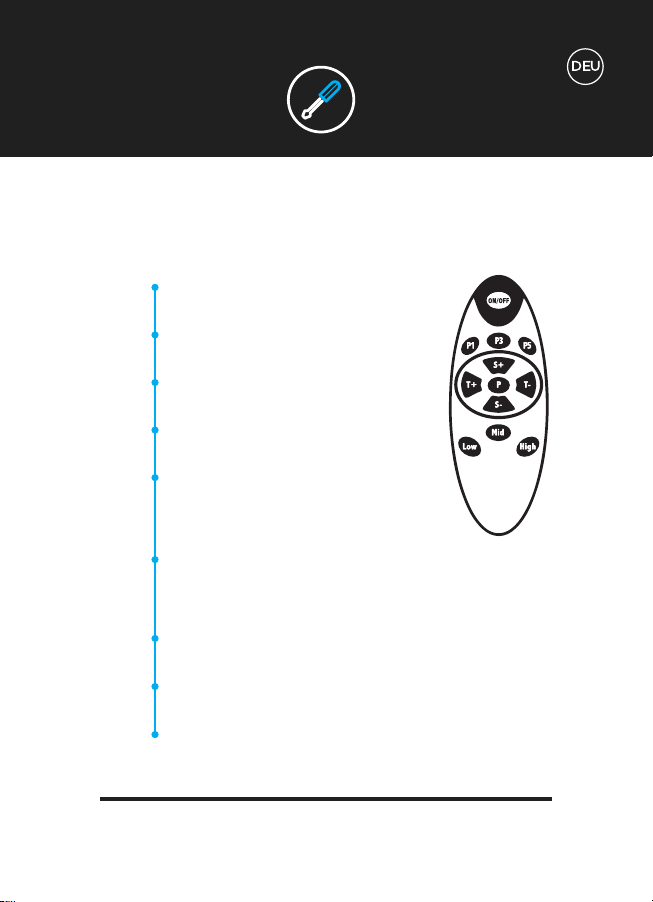
Verwenden Ihrer Fernbedienung:
(i) Auswahl für Programm 1. (ii) Drücke auf EIN /
AUS, um mit dem Training zu beginnen.
(i) Auswahl für Programm 3. (ii) Drücke auf EIN /
AUS, um mit dem Training zu beginnen.
(i) Auswahl für Programm 5. (ii) Drücke auf EIN /
AUS, um mit dem Training zu beginnen.
(i) Durch Programme 1 bis 5 blättern. (ii) Drücke
nach der Auswahl ON/OFF, um zu beginnen.
Zeiteinstellung von 01:00 bis 20:00 erhöhen oder
verringern.
NB / Nur für manuelles Programm vor dem
Training verfügbar.
Geschwindigkeit von 1 bis 180 erhöhen oder
verringern.
NB / Nur für manuelles Programm vor dem Training verfügbar.
Schnellstartauswahl für Geschwindigkeitsstufe 60.
NB / Nur für manuelles Programm vor dem Training verfügbar.
Schnellstartauswahl für Geschwindigkeitsstufe 120.
NB / Nur für manuelles Programm vor dem Training verfügbar.
Schnellstartauswahl für Geschwindigkeitsstufe 180.
NB / Nur für manuelles Programm vor dem Training verfügbar.
P1
P3
P5
P
T+/-
S+/-
Low
Mid
High
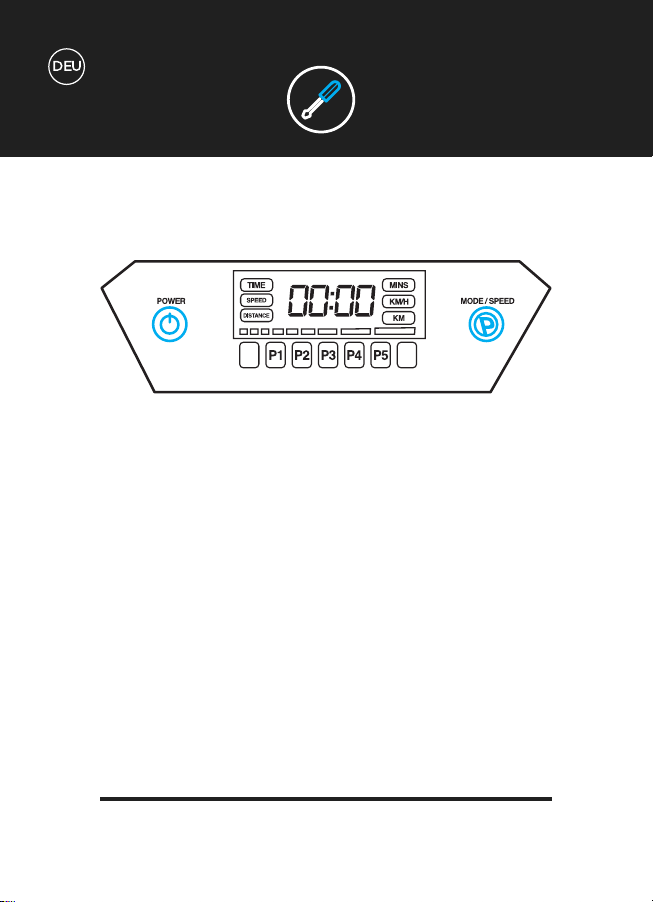
Verwendung des Displays:
Das Display zeigt Informationen zu Zeit, Geschwindigkeit und Entfernung während
des Trainings an.
Neben der Fernbedienung kannst du auch die folgenden Anzeigetasten verwenden,
um deine Vibrations-Platte zu steuern.
POWER: Drücke diese Taste, um dein Training zu beginnen oder zu beenden.
MODE / SPEED - Vor dem Workout:
(i) Durch Programme 1 bis 5 blättern.
(ii) Drücke nach der Auswahl ON/OFF, um zu beginnen.
MODE / SPEED - Während des Workouts:
Drücken und/oder halten, um die Geschwindigkeit zu erhöhen.
Die Geschwindigkeit kann ebenfalls verringert werden, sobald die maximale
Geschwindigkeit erreicht ist.
NB / Nur für manuelles Programm vor dem Training verfügbar.
BEDIENELEMENTE

BEDIENELEMENTE
Manuelle Workouts:
Die Zeit kann bis zu 20 Minuten einprogrammiert werden.
Die Geschwindigkeitsstufe kann bis zu 180 einprogrammiert werden.
Programmierte Workouts:
10 Minuten Programm mit geringer Intensität. Perfekt zum
Aufwärmen, sanften Massieren und Erholen nach dem Training.
10-minütiges Programm mit geringer bis mittlerer Intensität. Perfekt
für langsamen Gewichtsverlust und Cellulite-Reduktion.
10 Minuten Programm mittlerer Intensität. Perfekt für langsamen
Gewichtsverlust, Muskelaufbau und intensive Massage.
10 Minuten hochintensives Programm. Perfekt für Muskelaufbau und
Verbesserung der Core-Stabilität.
10 Minuten Programm mit ultrahoher Intensität. Perfekt für Allround-
Kraft- und Gewichtsverlusttraining.
TRAININGS-
EINSTELLUNGEN
M
P1
P2
P3
P4
P5
TECHNISCHE
SPEZIFIKATIONEN
BLUETOOTH
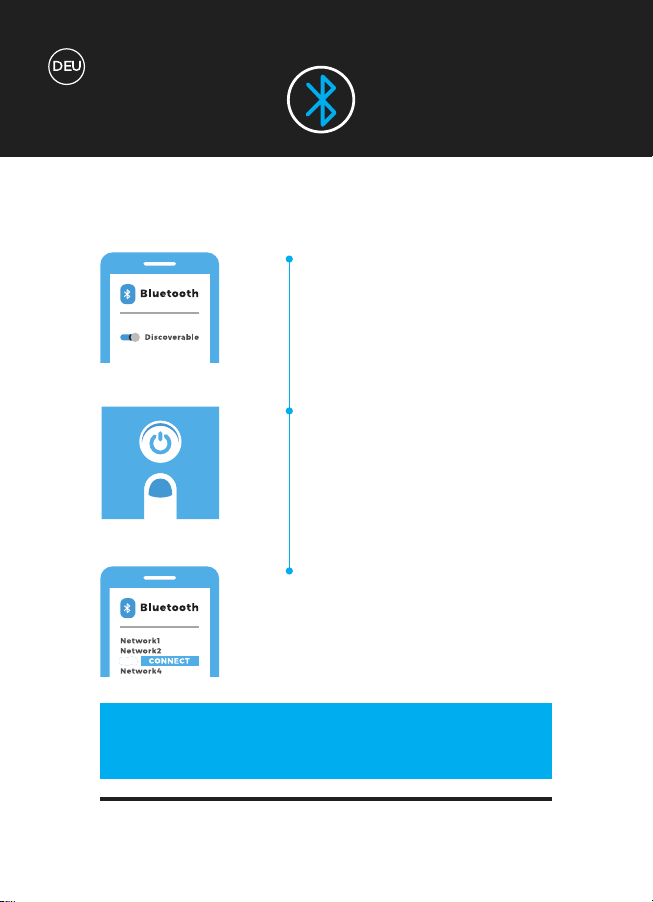
1
2
3
Stelle sicher, dass auf deinem Gerät
Bluetooth aktiviert ist und dass das
Gerät erkennbar ist.
Schalte deine Bluefin Vibrations-
platte ein. Das Bluetooth-Modul
wird nach dem Einschalten der Vi-
brationsplatte sofort eingeschaltet.
Die Vibrationsplatte wird jetzt in der
Liste der Bluetooth-Geräte auf dei-
nem Telefon oder Tablet angezeigt.
Du bist jetzt mit der Vibrationsplatte
verbunden und kannst loslegen!
ZZ
KONTROLLIERE MUSIK & LAUTSTÄRKE
DIREKT MIT DEINEM GERÄT!
TECHNISCHE
SPEZIFIKATIONEN
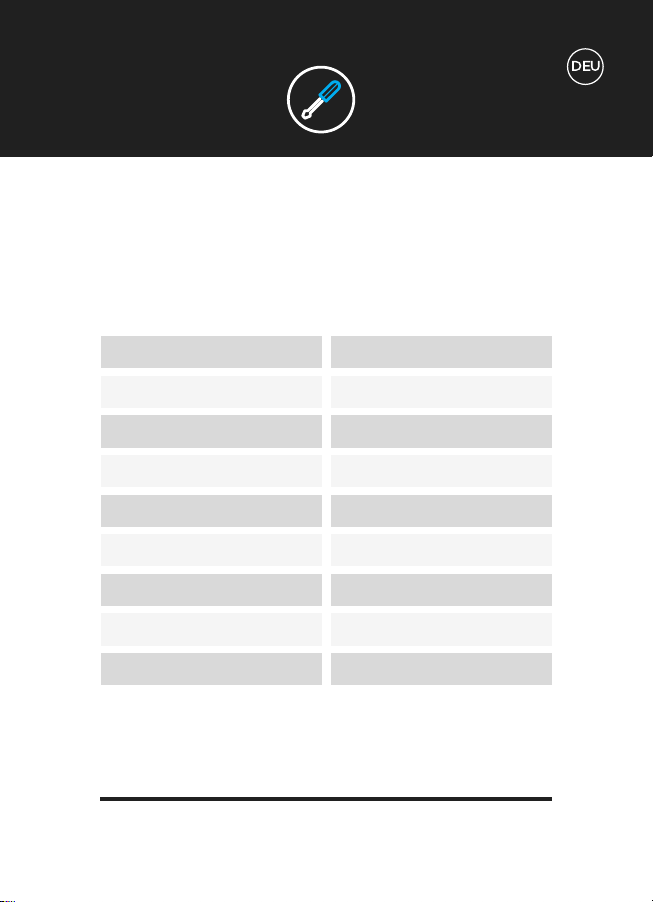
MOTOR
FUNKTIONEN
BENÖTIGTE STROMQUELLE
STUFEN
PROGRAMME
MANUELLE FUNKTION
NUTZERGEWICHT
GEWICHT DES GERÄTES
GARANTIE
Einzelmotor
Vibration
AC 100-240v
180 Stufen
5 eingebaute Programme
180 Stufen & variable Zeitkontrolle
Maximum: 150kg
19kg
Lebenslange Motorgarantie
BLUETOOTH
GARANTIE
Allgemeine Gebrauchsspuren und Abnutzungsspuren.
Wasserschaden.
Schäden durch unsachgemäßen Gebrauch.
Gehäuseschäden und Kratzer durch unsachgemäßen Gebrauch oder Herunter-
fallen.
Elektronischer Schaden durch unsachgemäßen Gebrauch oder Herunterfallen.
Die Bluefin Garantie deckt alle technischen Fehler deines Gerätes ab. Wenn du
einen Garantieanspruch geltend machen möchtest, kontaktiere uns per E-Mail unter
support@bluefintrading.co.uk
Deine Garantie beginnt mit dem Erhalt der Lieferung, technische Fehler sind 12
Monate lang versichert und der Motor ist lebenslang versichert!
Wenn du Fragen zu deiner Garantie hast, sende uns bitte eine E-Mail an:
support@bluefintrading.co.uk
Deine Garantie umfasst die folgenden Aspekte nicht:
LEBENSLANGE MOTOR GARANTIE
Die neueste und aktuelle EU-Konformitätserklärung für dieses Produkt finden Sie
unter: www.bluefinfitness.com/manuals/slim_DoC.pdf
Importeur Adresse:
Bluefin Trading Ltd
Keelham Farm
Hebden Bridge
UK
HX7 8TG
www.bluefinfitness.com
GARANTIE
EU-Konformität-
serklärung

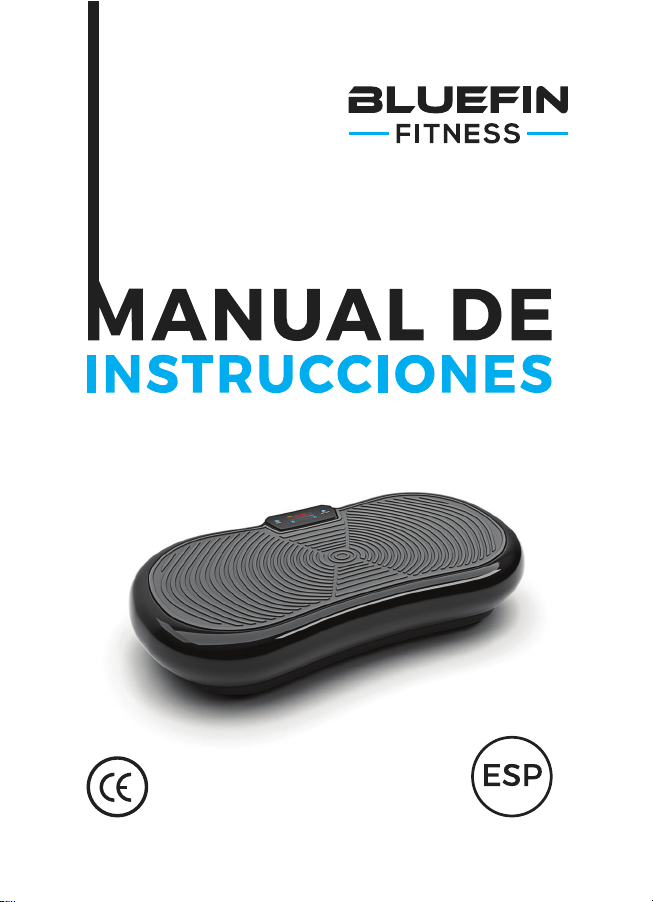
Para usar con la Plataforma Vibradora
Ultra Slim de Bluefin Fitness BLUEFIN
FITNESS

¿QUÉ HAY EN
EL PACK?
1 x Plataforma Vibradora Ultra Slim de Bluefin Fitness
1 x Cable de Alimentación para UK
1 x Cable de Alimentación para UE
1 x Manual de Instrucciones
1 x Guía de Ejercicios + Nutrición
1 x Cuadro de Ejercicios
2 x Cables para Entrenamiento
Accesorios de uso:
La plataforma vibradora viene con dos cables elásticos para hacer
ejercicios de la parte alta del cuerpo en combinación con la plataforma.
Fija los enganches plateados de los elásticos a las correspondientes anillas
plateadas situadas a cada lado del fondo de la plataforma. Por favor,
no intentes enganchar o desenganchar los accesorios de la plataforma
mientras la estés usando.
Desempaqueta la plataforma vibradora de Bluefin y colócala sobre una
superficie lisa y dura. Si la superficie es ligeramente irregular, ajusta los
pies de la plataforma. Si vives en un bloque de apartamentos o pisos, te
recomendamos que coloques una esterilla de yoga o una alfombra bajo la
plataforma para absorver cualquier ruido. Las plataformas de Bluefin son
muy silenciosas pero todas la plataformas vibratorias hacen algo de ruido.
Introducee el cable eléctrico en la parte trasera de la plataforma y enchufa
el otro extremo en el enchufe de la pared. Asegúrate de que la plataforma
está bastante cerca del enchufe de la pared de tal forma que el cable no
quede tirante. Asegúrate de que el interruptor situado al lado del enchufe
se haya encendido. Si el interruptor está encendido, entonces la máquina
está encendida. Cuando no la estés usando, apaga la máquina y asegúrate
de que este botón no está iluminado.
Familiarízate con la pantalla y el mando antes de subirte a la plataforma.
Coloca los pies sobre ambos lados de la plataforma para conseguir una
mayor intensidad y un mejor equilibrio. Por favor, asegúrate de subirte a la
plataforma lentamente y con cuidado antes de empezar cualquier tipo de
entrenamiento. Recomendamos empezar con velocidades por debajo de 120
o usar una configración programada P1.
Introduzca 2 x pilas AAA en el mando a distancia.
COMO
EMPEZAR
CONTROLES
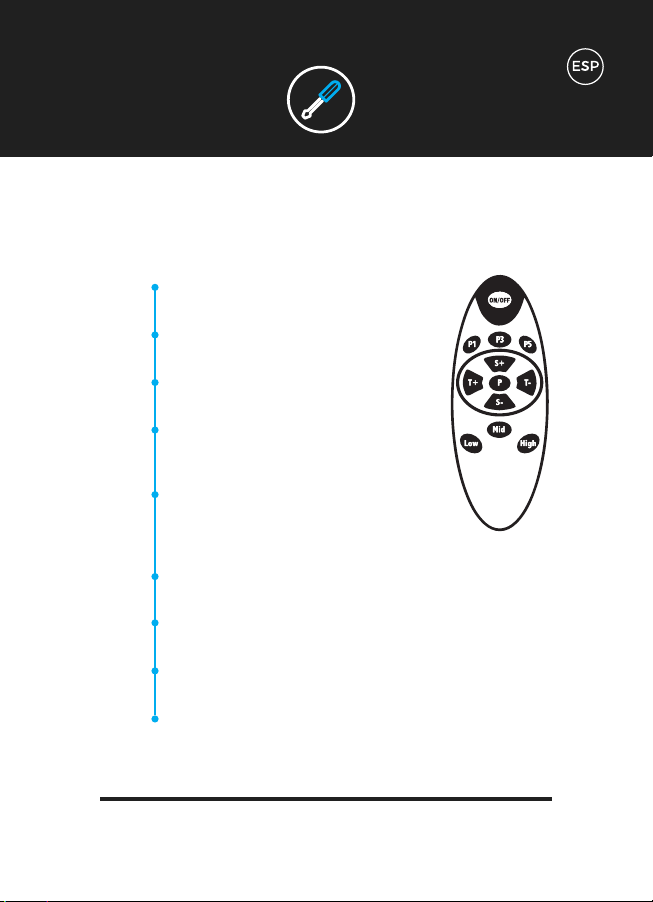
Usar la control remoto:
(i) Seleccionar Programa 1.
(ii) Presionar ON / OFF para empezar.
(i) Seleccionar Programa 3.
(ii) Presionar ON / OFF para empezar.
(i) Seleccionar Programa 5.
(ii) Presionar ON / OFF para empezar.
(i) Navegar por los Programas del 1 al 5.
(ii) Una vez seleccionado, presionar ON / OFF
para empezar.
Seleccionar aumentar o disminuir tiempo desde
01:00 hasta 20:00.
Nota: Sólo disponible para Programa Manual
antes del entrenamiento.
Aumentar o disminuir nivel de velocidad desde 1 hasta 180.
Nota: Sólo disponible para Programa Manual durante el entrenamiento.
Selección rápida de nivel de velocidad 60.
Nota: Sólo disponible para Programa Manual durante el entrenamiento.
Selección rápida de nivel de velocidad 120.
Nota: Sólo disponible para Programa Manual durante el entrenamiento.
Selección rápida de nivel de velocidad 180.
Nota: Sólo disponible para Programa Manual durante el entrenamiento.
CONTROLES
P1
P3
P5
P
T+/-
S+/-
Low
Mid
High
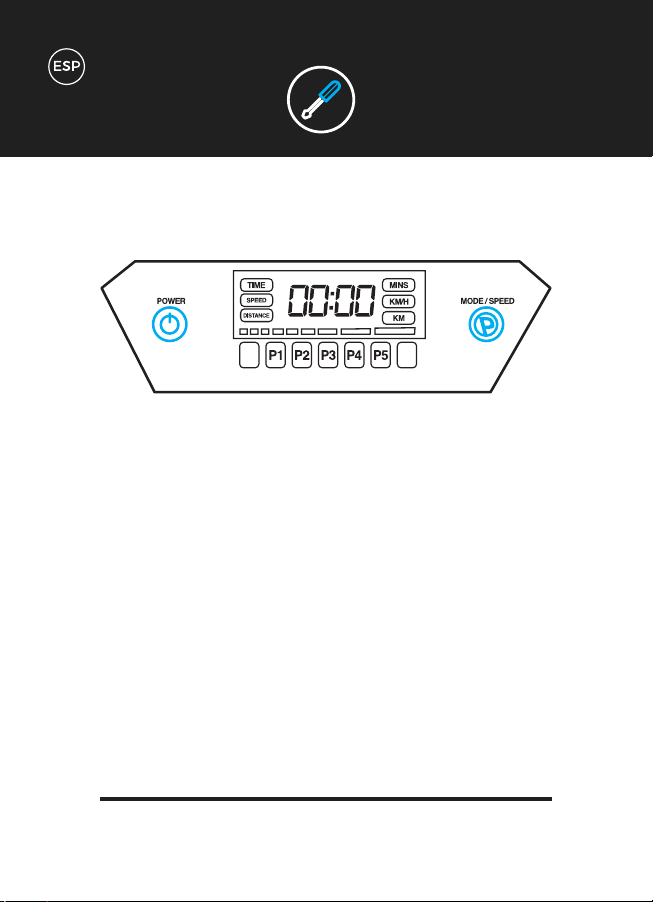
Usar la Pantalla:
La pantalla muestra la información sobre el Tiempo, la Velocidad y la Distancia
durante el entrenamiento.
Además del mando a distancia, puedes utilizar los siguientes botones de la pantalla
para controlar tu plataforma vibradora.
POWER: Presionar para empezar o parar tu entrenamiento.
MODE / SPEED - antes del entrenamiento.:
(i) Navega por los Programas del 1 al 5.
(ii) Una vez seleccionado, presionar ON / OFF para empezar.
MODE / SPEED - durante el entrenamiento:
Presiona y/o mantén presionado para aumentar la velocidad.
La velocidad también se puede disminuir una vez que se ha alcanzado el nivel
máximo de velocidad.
Nota: Sólo disponible para Programa Manual durante el entrenamiento.
CONTROLES

Entrenamientos Manuales:
Se puede programar el tiempo hasta 20 minutos.
El nivel de velocidad se puede programar hasta 180.
Entrenamientos Programados:
Programa de baja intensidad de 10 minutos. Perfecto para calentar,
masaje suave y recuperación tras el ejercicio.
Programa de baja a moderada intesidad de 10 minutos. Perfecto para
una pérdida de peso gradual y reducción de la celulitis.
Programa de intensidad moderada de 10 minutos. Perfecto para una
pérdida de peso gradual, tonificación muscular y masaje intenso.
Programa de alta intensidad de 10 minutos. Perfecto para tonificación
muscular y reforzar la zona abdominal.
Programa de ultra alta intensidad de 10 minutos. Perfecto para
entrenamiento total y entrenamiento para perder peso.
CONFIGURACIÓN DEL
ENTRENAMIENTO
M
P1
P2
P3
P4
P5
CONTROLES
ESPECIFICACIONES
TÉCNICAS
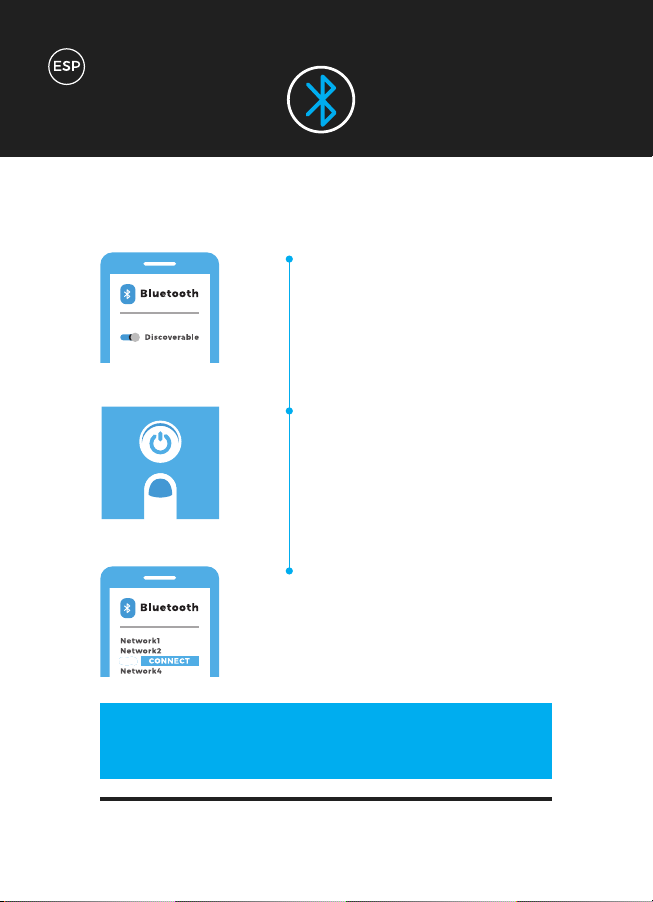
BLUETOOTH
1
2
3
Asegúrate de que tu dispositivo
tiene el Bluetooth encendido y el
dispositivo es “detectable”.
Enciende tu Plataforma Vibratoria
de Bluefin. El módulo de Bluetooth
simplemente se enciende una vez
que la Plataforma Vibradora se ha
encendido.
La Plataforma Vibradora aparecerá
ahora en la lista de dispositivos Blue-
tooth de tu teléfono o tablet. Ahora
ya estás conectado a la plataforma
vibradora y ¡listo para empezar!
ZZ
¡CONTROLA LA MÚSICA Y EL VOLUMEN
DIRECTAMENTE DESDE TU DISPOSITIVO!
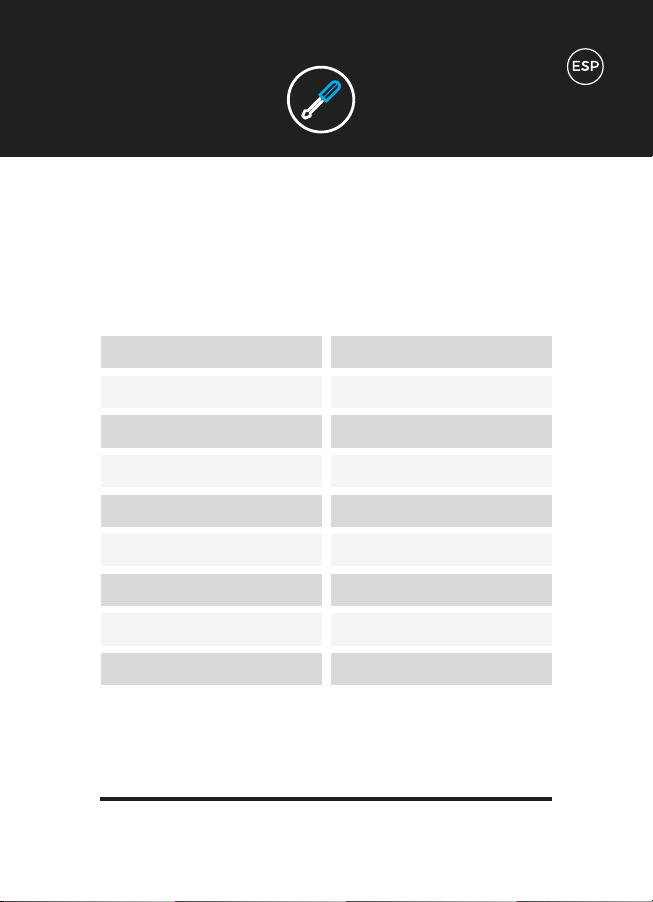
ESPECIFICACIONES
TÉCNICAS
MOTOR
FUNCIONES
ELECTRICIDAD
NIVELES
PROGRAMAS
FUNCIÓN MANUAL
PESO DEL USUARIO
PESO DEL APARATO
GARANTÍA
Motor simple
Vibración
AC 100-240v
180 niveles
5 Programas incorporados
180 niveles y control de tiempo variable
Maximum: 150kg
19kg
Garantía del Motor de por vida
BLUETOOTH
GARANTÍA
Uso general y marcas de uso.
Daño por agua.
Daño debido a un uso inapropiado.
Daños o arañazos en el chasis debido a un uso inapropiado o caída.
Daño eletrónico debido a uso inapropiado o caída.
La garantía de Bluefin cubre cualquier fallo técnico de su artículo. Si necesita hacer
una reclamación, póngase en contacto con nosotros en support@bluefintrading.co.uk
Tu garantía comienza al recibir el pedido, los fallos técnicos se cubren durante 12
meses y el motor está cubierto de por vida.
Si tienes alguna duda con respecto a su garantía, por favor, mándanos un email a:
support@bluefintrading.co.uk
Tu garantía no cubre lo siguiente:
GARANTÍA DEL MOTOR DE POR VIDA
Para obtener la declaración de conformidad de la UE más reciente y actualizada para
este producto, visite: www.bluefinfitness.com/manuals/slim_DoC.pdf
Dirección del importador:
Bluefin Trading Ltd
Keelham Farm
Hebden Bridge
UK
HX7 8TG
www.bluefinfitness.com
GARANTÍA
UE - Declaración de
Conformidad

À utiliser avec la plateforme vibrante
Ultra Slim de BLUEFIN FITNESS

QU’EST-CE QU’IL Y
A DANS LA BOÎTE ?
1 x Plateforme Vibrante Ultra Slim de Bluefin
1 x Câble d’alimentation UK
1 x Câble d’alimentation EU
1 x Manuel d’instruction
1 x Entraînement + Guide Nutrition
1 x Diagramme d’Entraînement
2 x Câbles d’Entraînement
Utiliser ses accessoires:
Votre plateforme vibrante est livré avec deux câbles élastiques afin de
les utiliser pour la partie supérieure de votre corps avec la plateforme.
Attachez les clips argentés sur les câbles élastiques aux anneaux argentés
correspondant sur chaque côté du dessous de la plateforme. Veuillez ne
pas essayer d’attacher ou de détacher les accessoires de la plateforme
pendnat que vous l’utilisez.
Déballez votre platefome vibrante Bluefin et mettez-la sur une surface
plate et dure. Si la surface est un peu inégale, ajustez les pieds sous la
plateforme. Si vous vivez dans un appartement ou un immeuble, nous
recommandons de placer un tapis de yoga sous la plateforme afin d’ab-
sorber le bruit. Les plateformes Bluefin Fitness sont très silencieuses mais
toute plateforme vibrante fait forcément un peu de bruit.
Insérez le câble d’alimentation à l’arrière de la plateforme et branchez l’au-
tre côté à une prise électrique. Vérifiez que la plateforme soit assez proche
de la prise électrique pour que le le câble d’alimentation ne soit pas trop
tendu. Assurez-vous que le bouton d’alimentation à côté de la prise soit sur
‘on’. Si le bouton est allumé, c’est que la machine est en marche. Lorsque
vous ne l’utilisez pas, éteignez la machine de manière à ce que le bouton ne
soit pas allumé.
Familiarisez vous à l’écran et à la télécommande avant de monter sur la
plateforme. Placez vos pieds sur chaque côté de la plateforme pour plus
d’intensité et plus d’équilibre. Assurez-vous de monter doucement sur
la plateforme avant de commencer n’importe quel entraînement. Nous
recommandons de commencer avec des vitesses sous les 120 ou d’utiliser
le programme P1.
Insérez x2 Piles AAA dans la télécommande.
DÉBUTER
PROGRAMMES
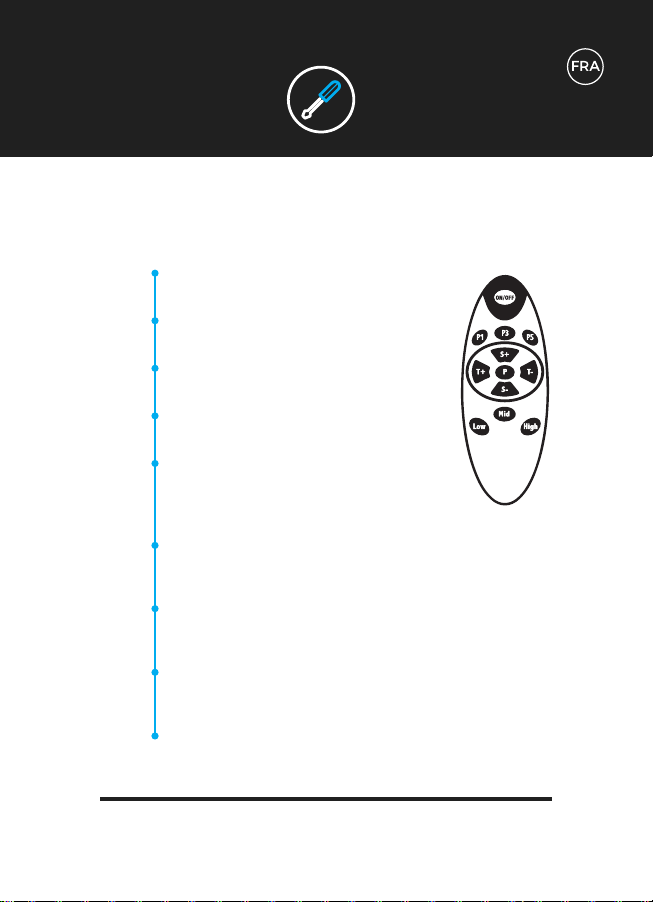
Utilisation de la télécommande
(i) Choisir Programme 1. (ii) Appuyez sur ON/OFF
pour commencer.
(i) Choisir Programme 3. (ii) Appuyez sur ON/OFF
pour commencer.
(i) Choisir Programme 5. (ii) Appuyez sur ON/OFF
pour commencer.
(i) Parcourir les Programmes 1 à 5. (ii) Une fois
sélectionné, appuyez sur ON/OFF pour commencer.
Augmenter ou diminuer le le paramètre de temps
de 01:00 à 20:00.
NB/ Seulement disponible pour le Programme
Manuel avant l’entraînement.
Augmenter ou diminuer le niveau de vitesse de 1 à 180.
NB/ Seulement disponible pour le Programme Manuel pendant
l’entraînement.
Choix de lancement rapide à la vitesse de niveau 60.
NB/ Seulement disponible pour le Programme Manuel pendant
l’entraînement.
Choix de lancement rapide à la vitesse de niveau 120.
NB/ Seulement disponible pour le Programme Manuel pendant
l’entraînement.
Choix de lancement rapide à la vitesse de niveau 180.
NB/ Seulement disponible pour le Programme Manuel pendant
l’entraînement.
PROGRAMMES
P1
P3
P5
P
T+/-
S+/-
Low
Mid
High
PROGRAMMES
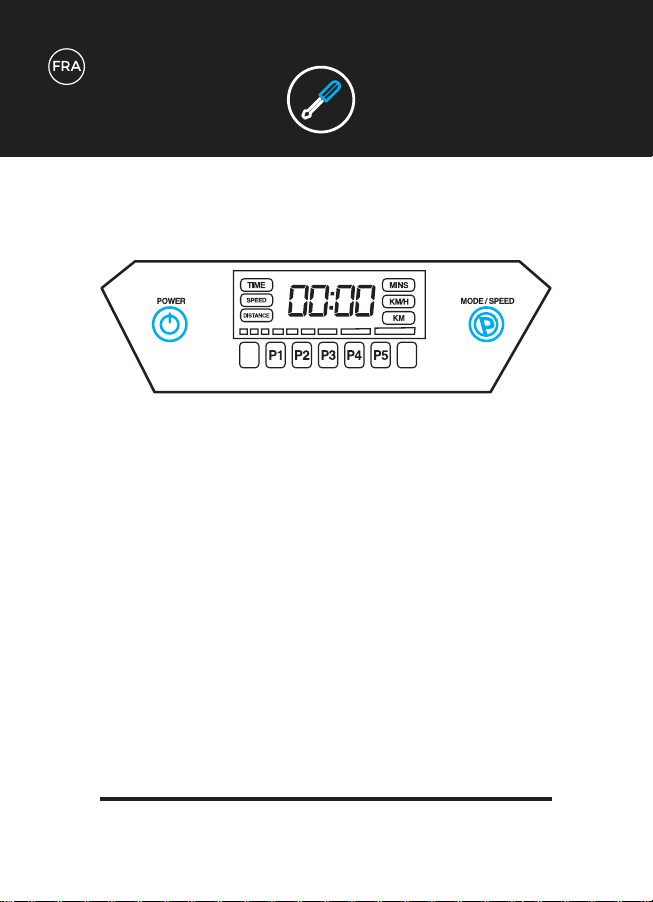
Utiliser votre Affichage:
Cette affichage vous montrera les informations liées au Temps, à la Vitesse et à la
Distance mi-entraînement.
En plus de la télécommande, vous pouvez également utiliser les boutons d’affichage
afin de contrôler votre plateforme vibrante.
POWER: Appuyez afin de commencer ou arrêter votre entraînement.
MODE / SPEED - avant l’entraînement:
(i) Parcourir les Programmes 1 à 5.
(ii) Une fois sélectionné, appuyez sur ON/OFF pour commencer.
MODE / SPEED - pendant l’entrainement:
Appuyez et/ou maintenez pour augmenter la vitesse.
La vitesse peut égalemenet être diminuée afin de maximiser la vitesse de course une
fois qu’elle a été atteinte.
NB/ Seulement disponible pour les Programmes Manuels pendant l’entraînement.
PROGRAMMES
Entraînements Manuels::
Le temps peut être programmé jusqu’à 20 minutes.
La vitesse peut être programmée jusqu’à 180.
Entraînements Programmés:
Programme faible intensité de 10 minute. Parfait pour s’échauffer, les
massages légers ou la récupération après l’entraînement.
10 minutes de programme d’intensité faible-à-modérée. Parfait pour
une perte de poids graduelle et une réduction de la cellulite.
10 minutes de programme d’intentisité modérée. Parfait pour une
perte de poids graduelle, un raffermissement musculaire et un
massage intensif.
10 minutes de programme haute intensité. Parfait pour un
raffermissement des muscles et une amélioration de la base
musculaire.
10 minutes de programme ultra haute intensité. Parfait pour tous les
entraînements intensifs et la perte de poids.
PARAMÈTRES
D’ENTRAÎNEMENT
M
P1
P2
P3
P4
P5
CHARACTÉRISTIQUES
TECHNIQUES
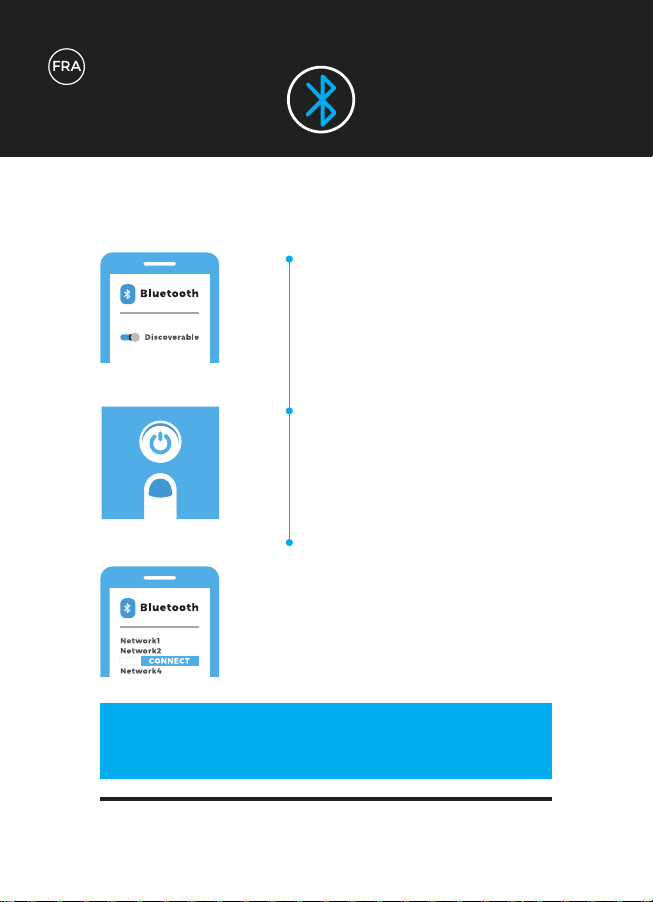
BLUETOOTH
1
2
3
Vérifiez que le Bluetooth de votre
appareil est activé et mettez la
machine sur ‘découvrable’.
Allumez votre Plateforme Vibrante
Bluefin. Le module Bluetooth se
met automatiquement en route
lorsque la plateforme est allumée.
La Plateforme Vibrante va main-
tenant apparaître dans la liste des
équipements sur votre téléphone
ou tablette. Vous êtes maintenant
connecté à la Plateforme Vibrante
et vous êtes prêt à démarrer !
ZZ
CONTRÔLEZ DIRECTEMENT VOTRE MUSIQUE &
VOTRE SON DEPUIS VOTRE APPAREIL !
CHARACTÉRISTIQUES
TECHNIQUES
MOTEUR
FONCTIONS
PUISSANCE REQUISE
NIVEAUX
PROGRAMMES
FONCTION MANUELLE
POIDS UTILISATEUR
UNITÉ DE POIDS
GARANTIE
Moteur Simple
Vibration
AC 100-240v
180 Niveaux
5 programmes intégrés
180 niveau & contrôle du temps variable
Maximum: 150kg
19kg
Garantie Moteur à Vie
BLUETOOTH
GARANTIE
Usure générale et marques d’usure.
Dégâts des eaux.
Dégâts dûs à une utilisation inadéquate.
Dégâts au chassis et éraflures dûs à une utilisation inadéquate ou à une chute.
Dégâts électroniques dûs à une utilisation inadéquate ou à une chute.
La garantie Bluefin couvre tous les défauts techniques de votre objet. Si vous devez faire
une réclamation de garantie, contactez-nous par email à support@bluefintrading.co.uk
Votre garantie commence à la réception, les défauts techniques sont garantis
pendant 12 mois et le moteur est garanti à vie !
Si vous avez une question concernant la garantie, veuillez nous envoyer un email à
support@bluefintrading.co.uk
Votre garantie ne couvre pas les cas suivants:
GARANTIE MOTEUR A VIE
Pour la déclaration de conformité UE la plus récente et à jour pour ce produit,
veuillez visiter: www.bluefinfitness.com/manuals/slim_DoC.pdf
Adresse de l’importateur:
Bluefin Trading Ltd
Keelham Farm
Hebden Bridge
UK
HX7 8TG
www.bluefinfitness.com
GARANTIE
Déclaration de
Conformité-UE

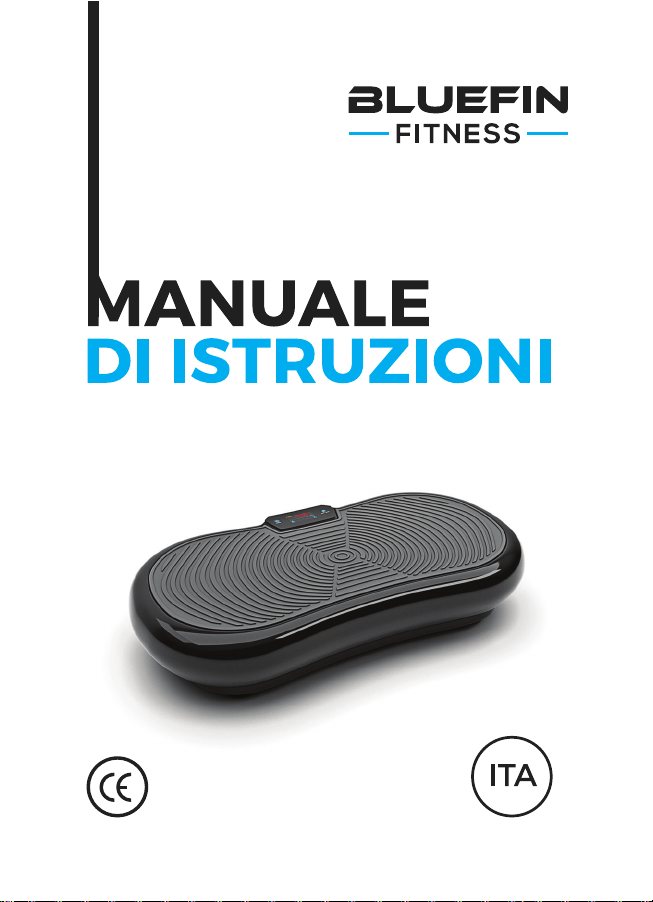
Da utilizzare con la Pedana Vibrante
BLUEFIN FITNESS Ultra Slim

COSA CONTIENE
LA SCATOLA?
1 x Pedana Vibrante Ultra Slim Bluefin
1 x Cavo di Alimentazione UK
1 x Cavo di Alimentazione EU
1 x Manuale di Istruzioni
1 x Guida per l’Allenamento + Guida Nutrizionale
1 x Tabella degli Esercizi
2 x Corde Elastiche da Allenamento
Utilizzo degli Accessori:
La Pedana Vibrante viene consegnata insieme a 2 corde elastiche da
utilizzare negli esercizi per la parte superiore del corpo, in combinazione
con la pedana. Fissare le clip argentate delle corde elastiche al
corrispondente anello d’argento su entrambi i lati della parte inferiore
della pedana. Non tentare di fissare o staccare gli accessori dalla pedana
durante l’uso.
Tirare fuori la pedana vibrante Bluefin dall’imballaggio e posizionarla su
una superficie piatta e dura. Se la superficie è leggermente irregolare,
regolare i piedini della pedana. Se vivete in un appartamento o in un condo-
minio, vi consigliamo di posizionare un tappetino da yoga o un tappeto sotto
la piastra, in modo tale da assorbire il rumore. Le pedane Bluefin Fitness
sono molto silenziose ma tutte le pedane vibranti producono un minimo di
rumore.
Connettere il cavo di alimentazione alla parte posteriore della pedana e
collegare l’altra estremità alla presa elettrica. Accertarsi che la pedana sia
abbastanza vicina alla presa elettrica in modo da non tirare eccessivamente
il cavo. Accertarsi che l’interruttore di alimentazione accanto alla spina sia
acceso. Se l’interruttore è illuminato, la macchina è accesa. Quando non
viene utilizzata, spegnete la macchina e assicuratevi che questo pulsante
non sia illuminato.
Acquisire familiarità con lo schermo e con il telecomando prima di salire
sulla pedana. Posizionate i piedi su entrambi i lati della pedana per
ottenere una maggiore intensità e un migliore equilibrio. Fate attenzione a
salire lentamente sulla pedana, prima di avviare qualsiasi impostazione di
allenamento. Si consiglia di iniziare con velocità inferiori a 120 o di utilizzare
l’impostazione P1 del programma.
Inserire 2x batterie AAA nel telecomando.
PER
INIZIARE
CONTROLLI
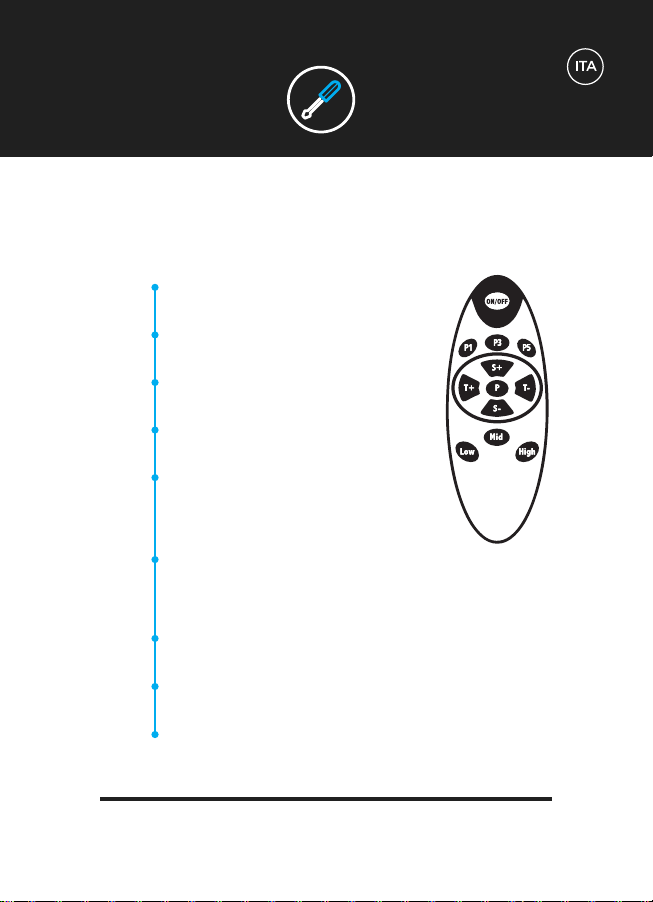
Usando il telecomando:
(i) Selezionare per Programma 1.
(ii) Premere ON / OFF per avviare.
(i) Selezionare per Programma 3.
(ii) Premere ON / OFF per avviare
(i) Selezionare per Programma 5.
(ii) Premere ON / OFF per avviare.
(i) Scorrere i Programmi da 1 a 5. (ii) Una volta
selezionato, premere ON / OFF per avviare.
Aumentare o diminuire l’impostazione del tempo
da 01:00 a 20:00.
NB / Disponibile solo per il Programma Manu-
ale prima dell’allenamento.
Aumentare o diminuire il livello di velocità da
1 a 180.
NB / Disponibile solo per il Programma Manuale durante l’allena-
mento.
Selezione Quick-start per il livello di velocità 60.
NB / Disponibile solo per il Programma Manuale durante l’allenamento.
Selezione Quick-start per il livello di velocità 120.
NB / Disponibile solo per il Programma Manuale durante l’allenamento.
Selezione Quick-start per il livello di velocità 180.
NB / Disponibile solo per il Programma Manuale durante l’allenamento.
CONTROLLI
P1
P3
P5
P
T+/-
S+/-
Low
Mid
High
CONTROLS
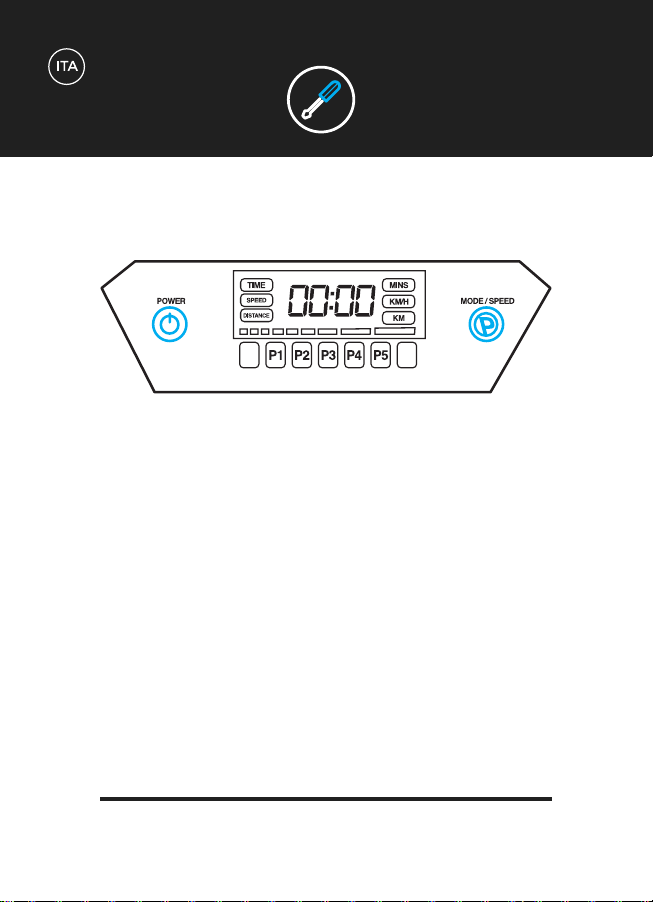
Utilizzare il Display:
Il display mostrerà le informazioni relative a Tempo, Velocità e Distanza durante
l’allenamento.
Oltre al telecomando, è anche possibile utilizzare i seguenti pulsanti del display per
controllare la pedana vibrante.
POWER: premere per avviare e interrompere l’allenamento.
MODE / SPEED - prima dell’allenamento:
(i) Scorrere i Programmi da 1 a 5.
(ii) Una volta selezionato, premere ON / OFF per avviare.
MODE / SPEED - durante l’allenamento:
Premere e/o tenere premuto per aumentare la velocità.
La velocità può anche essere ridotta una volta raggiunto il livello massimo di velocità.
NB / Disponibile solo per il Programma Manuale durante l’allenamento.
CONTROLS
Allenamenti Manuali:
Il tempo può essere programmato fino a 20 minuti.
Il livello di velocità può essere programmato fino a 180.
Allenamenti Programmati:
Programma di 10 minuti a bassa intensità. Perfetto per il
riscaldamento, massaggio delicato e recupero dopo l’esercizio.
Programma da 10 minuti con intensità da bassa a moderata. Perfetto
per la perdita di peso graduale e la riduzione della cellulite.
Programma di 10 minuti con intensità moderata. Perfetto per dimagrire
gradualmente, tonificare i muscoli e massaggiare intensamente.
Programma da 10 minuti con alta intensità. Perfetto per tonificare i
muscoli e migliorare la forza del core
Programma da 10 minuti ad altissima intensità. Perfetto per
l’allenamento completo per la potenza e la perdita di peso.
IMPOSTAZIONI DI
ALLENAMENTO
M
P1
P2
P3
P4
P5
SPECIFICHE
TECNICHE
BLUETOOTH
1
2
3
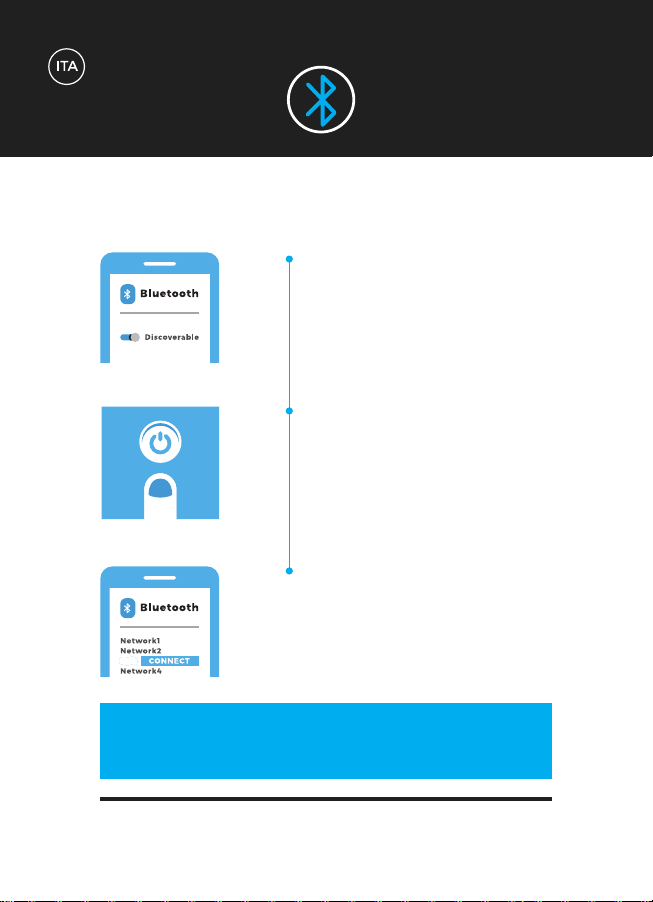
Assicurati che il tuo dispositivo
abbia il Bluetooth attivato e che il
dispositivo sia “rilevabile”.
Accendete la vostra pedana vibrante
Bluefin con ‘ON’. Il modulo Blue-
tooth si accenderà senza problemi
una volta che la Pedana Vibrante si
sarà attivata.
La Pedana Vibrante verrà ora vis-
ualizzata nell’elenco dei dispositivi
Bluetooth sul telefono o sul tablet.
Ora siete collegati alla pedana
vibrante e siete pronti per partire!
ZZ
CONTROLLATE LA MUSICA E IL VOLUME
DIRETTAMENTE DAL VOSTRO DISPOSITIVO!
SPECIFICHE
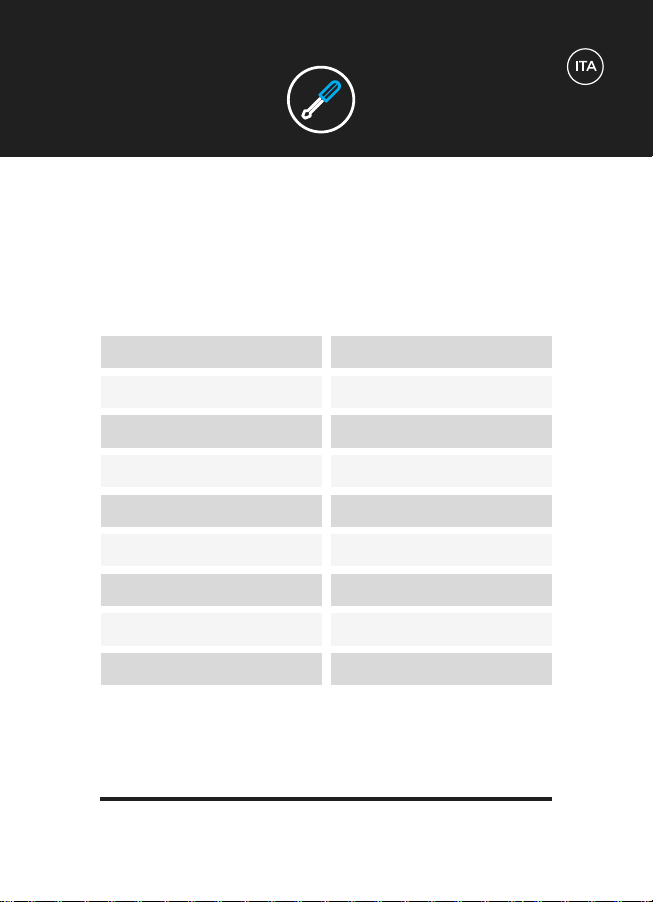
TECNICHE
MOTORE
FUNZIONI
POTENZA RICHIESTA
LIVELLI
PROGRAMMI
FUNZIONE MANUALE
PESO UTENTE
PESO DEL PRODOTTO
GARANZIA
Motore Singolo
Vibrazione
AC 100-240v
180 livelli
5 programmi integrati
180 livelli & controllo del tempo variabile
Maximum: 150kg
19kg
Garanzia a Vita sul Motore
BLUETOOTH
GARANZIA
Usura generale e segni dovuti all’utilizzo.
Danno dovuto all’acqua.
Danni dovuti all’uso improprio.
Danni al telaio e graffi dovuti all’uso improprio o a cadute.
Danni elettronici causati dall’uso improprio o da cadute.
La garanzia Bluefin copre qualsiasi difetto tecnico relativo al vostro articolo. Se avete
bisogno di presentare una richiesta di garanzia, contattaci via e-mail all’indirizzo
support@bluefintrading.co.uk
La garanzia si attiva al momento del ricevimento della consegna, i problemi tecnici
sono coperti per 12 mesi e il motore è coperto a vita!
In caso di domande sulla garanzia, inviarteci un’e-mail a:
support@bluefintrading.co.uk
La vostra garanzia non copre i seguenti:
GARANZIA MOTORE A VITA

Per la più recente e aggiornata dichiarazione di conformità UE per questo prodotto,
visitare: www.bluefinfitness.com/manuals/slim_DoC.pdf
Indirizzo dell’importatore:
Bluefin Trading Ltd
Keelham Farm
Hebden Bridge
UK
HX7 8TG
www.bluefinfitness.com
GARANZIA
Dichiarazione di
Conformità CE

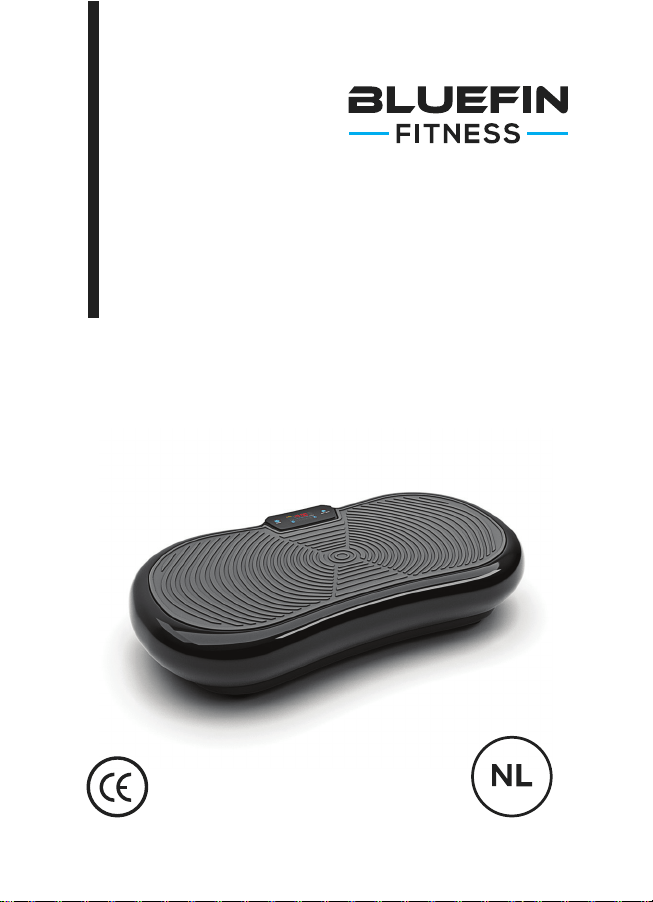
Voor gebruik met de BLUEFIN FITNESS
Ultra Slim Trilplaat
HANDLEIDING

WAT ZIT ER IN
DE DOOS?
1 x Bluefin Ultra Slim Trilplaat
1 x VK Stekker
1 x EU Stekker
1 x Handleiding
1 x Trainings- + Voedingsgids
1 x Oefeningentabel
2 x Trainingskabels
Accessoiregebruik:
De trilplaat komt met 2 kabels voor bovenlichaamsoefeningen in
combinatie met de trilplaat. Bevestig de zilveren clips van de kabels met de
corresponderende zilveren ring aan beide kanten van de onderkant van de
plaat. Verbind en verwijder geen accessoires tijdens het gebruik.
Pak je Bluefin trilplaat uit en plaats hem op een plat, hard oppervlak. Als
het oppervlak oneven is, pas dan de voeten onder de plaat aan. Als je in ee
flat of appartementengebouw woont raden wij een yogamat aan onder de
plaat om geluidsoverlast te voorkomen. Bluefin fitnessplaten zijn erg stil,
maar elke trilplaat maakt wel wat geluid.
Verbind de stekker via de achterkant van de trilplaat met een stopcontact.
Garandeer dat de trilplaat dicht genoet bij het stopcontact is zodat de
stekker niet uitgestrekt hoeft te worden. Zorg dat de aan/uit-knop aanstaat.
Als de knop licht geeft, dan staat de machine aan. Zet de machine buiten
gebruik uit, en zorg dat de knop geen licht meer geeft.
Word bekend met het scherm en de afstandsbediening voordat je op de
plaat stapt. Plaats je voeten op beide uiteinden van de plaat voor meer
intensiteit en een betere balans. Garandeer dat je rustig en voorzichtig op
de plaat stap voordat je begint aan een trainingsprogramma. We raden aan
te beginnen met snelheden onder de 120 of de instelling P1 te gebruiken.
Stop 2 AAA batterijen in de afstandsbediening.
AAN DE
SLAG
CONTROLS
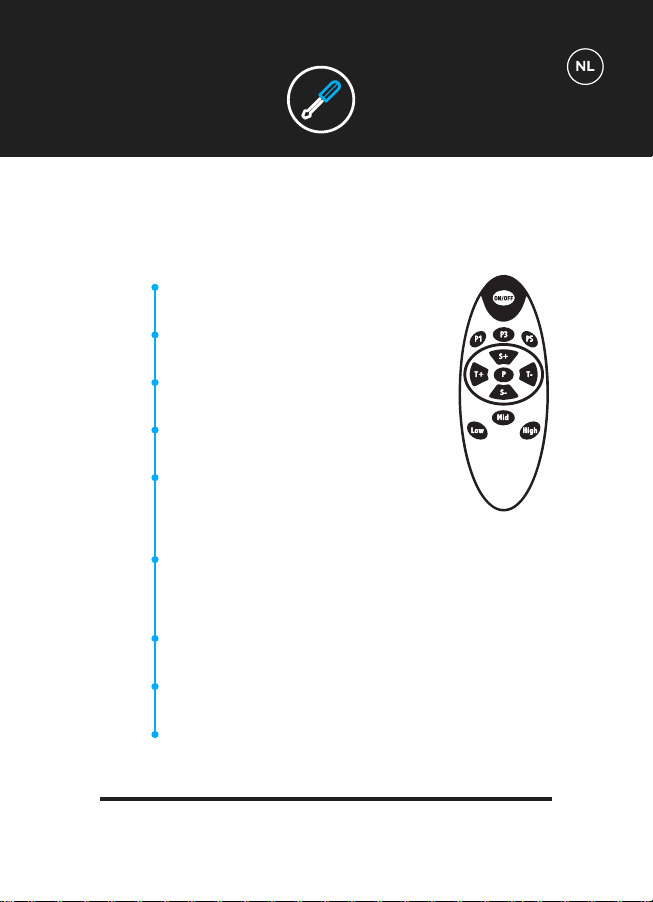
Afstandsbediening:
(i) Selecteer voor Programma 1.
(ii) Klik op ON/OFF om te starten.
(i) Selecteer voor Programma 3.
(ii) Klik op ON/OFF om te starten.
(i) Selecteer voor Programma 5.
(ii) Klik op ON/OFF om te starten.
(i) Wissel tussen programma’s 1 tot en met 5. (ii)
Zodra geselecteerd, klik op ON/OFF om te starten.
Verleng of verkort de tijd van 01:00 tot 20:00.
NB/ Alleen beschikbaar voor Handmatig Pro-
gramma voor de training.
Verhoog of verlaag het snelheidsniveau van 1 tot 180.
NB/ Alleen beschikbaar voor Handmatig Programma tijdens de training.
Snelstart optie voor een snelheidsniveau van 60.
NB/ Alleen beschikbaar voor Handmatig Programma tijdens de training.
Snelstart optie voor een snelheidsniveau van 120.
NB/ Alleen beschikbaar voor Handmatig Programma tijdens de training.
Snelstart optie voor een snelheidsniveau van 180.
NB/ Alleen beschikbaar voor Handmatig Programma tijdens de training.
CONTROLS
P1
P3
P5
P
T+/-
S+/-
Low
Mid
High
CONTROLS
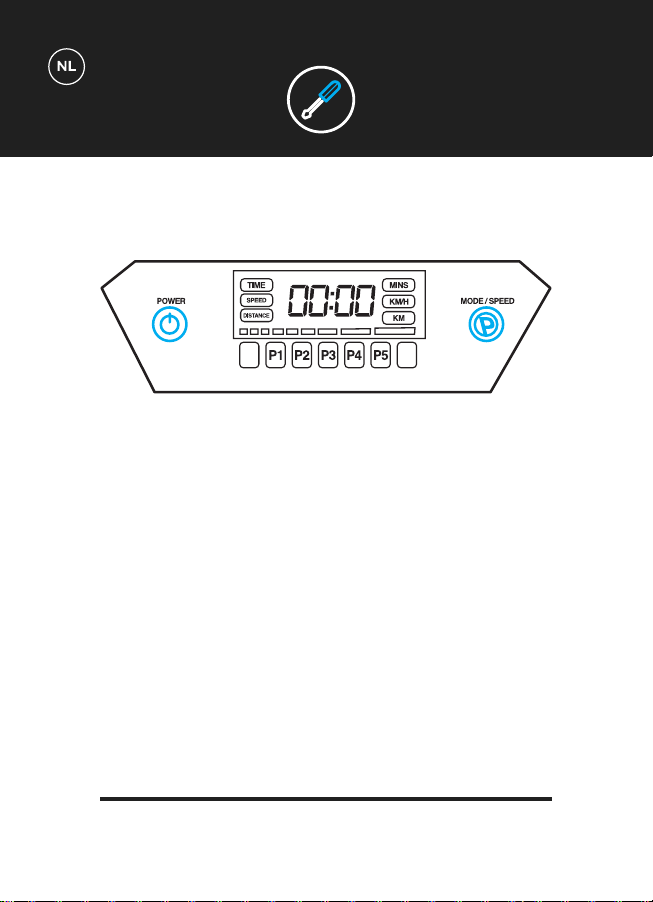
Gebruik maken van het paneel:
Het paneel zal tijd, snelheid en afstand tijdens de training weergeven.
Naast de afstandsbediening kunnen ook de knoppen gebruikt worden om je trilplaat
te controleren.
POWER: Klik om te starten en stoppen met je training.
MODE / SPEED - voor de training:
(i) Scroll door programma’s 1 tot en met 5.
(ii) Zodra geselecteerd, klik op ON/OFF om te starten.
MODE / SPEED - tijdens de training:
Klik en/of houd ingedrukt om snelheid te verhogen.
Snelheid kan ook verminderd worden wanneer het maximale snelheidsniveau is
bereikt.
NB/ Alleen beschikbaar voor Handmatig Programma tijdens training.
CONTROLS
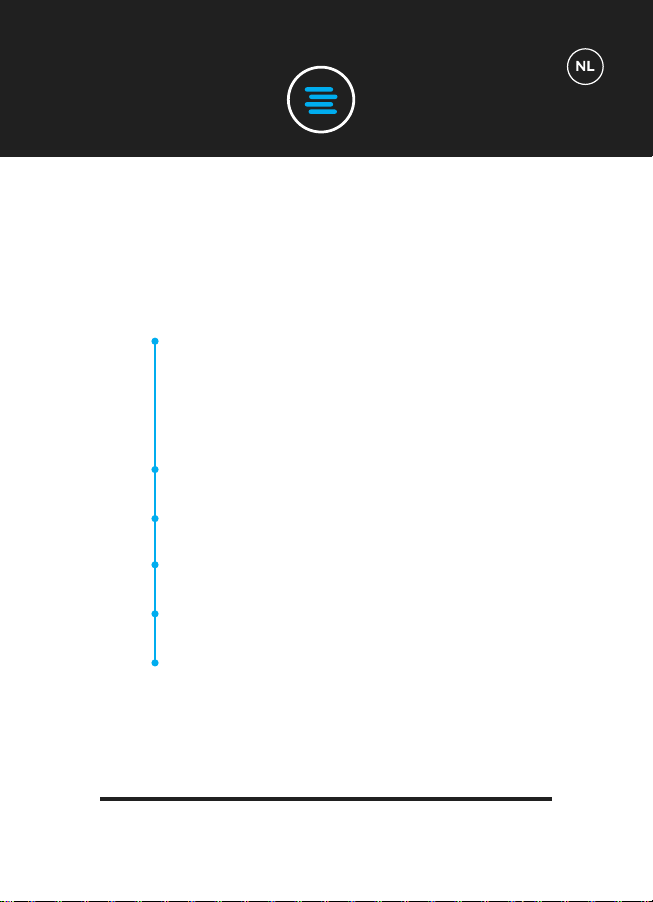
Handmatige Trainingen:
De tijd kan geprogrammeerd worden tot 20 minuten.
De snelheid kan geprogrammeerd worden tot 180.
Voorgeprogrammeerde Trainingen:
10 minuten, lage-intensiteitsproggramma. Perfect om op te warmen,
rustige massage en herstel na het traingen.
10 minuten lage/middelmatige-intensiteitsprogramma. Perfect voor
geleidelijk gewichtsverlies en cellulitevermindering.
10 minuten middelmatige-intensiteitsprogramma. Perfect voor
geleidelijk gewichtsverlies, spiervorming en intensieve massage.
10 minuten hoge-intensiteitsprogramma. Perfect voor spiervorming en
verbetering van de sterkte van je core.
10 minuten ultra hoge-intensiteitsprogramma. Perfect voor een
alomvattende krachts- en gewichtsverliestraining.
TRAININGSOPTIES
M
P1
P2
P3
P4
P5
TECHNISCHE
SPECIFICATIES
BLUETOOTH
1
2
3
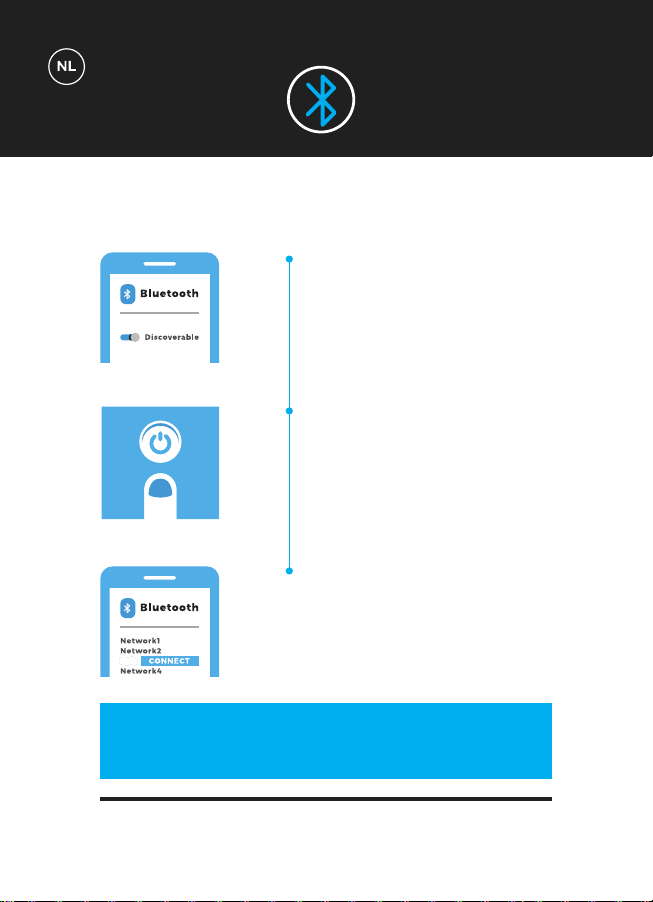
Garandeer dat jouw apparaat
Bluetooth aan heeft en dat het
‘vindbaar’ is.
Zet je Bluefin Trilplaat ‘AAN’. De
Bluetooth-module zal aangaan
zodra de Trilplaat klaar is.
De Trilplaat zal nu verschijnen in
een lijst met Bluetooth-apparaten
op je telefoon of tablet. Je bent nu
verbonden met de Trilplaat en klaar
voor de start!
ZZ
BEHEER MUZIEK & VOLUME DIRECT
VANAF JE APPARAAT
TECHNISCHE
SPECIFICATIES
MOTOR
FUNCTIE’S
STROOM VEREIST
NIVEAU’S
PROGRAMMA’S
HANDMATIGE FUNCTIE
GEBRUIKERSGEWICHT
EENHEIDSGEWICHT
GARANTIE
Enkele Motor
Vibratie
AC 100-240v
180 niveau’s
5 ingebouwde programma’s
180 niveau’s & variabale tijd
Maximaal: 150kg
19kg
Levenslange motorgarantie
BLUETOOTH
GARANTIE
Krassen en andere gebruiksschade.
Waterschade.
Schade door onjuist gebruik.
Chassisschade en krassen door onjuist gebruik of laten vallen.
Electronische schade door onjuist gebruik of laten vallen.
De Bluefin garantie geldt voor alle technische misstanden met je apparaat. Als je een
garantieclaim wilt doen kunt je ons bereiken via support@bluefintrading.co.uk
Je garantie begint bij bewijs van ontvangst, technische fouten zijn 12 maanden
verzekerd en de motor is levenslang verzekerd.
Als je vragen hebt omtrent garantie e-mail ons dan via
support@bluefintrading.co.uk
De garantie geldt niet voor de volgende situaties:
LEVENSLANGE MOTORGARANTIE
Ga voor de meest recente en actuele EU-conformiteitsverklaring voor dit product
naar: www.bluefinfitness.com/manuals/slim_DoC.pdf
Importeur adres:
Bluefin Trading Ltd
Keelham Farm
Hebden Bridge
UK
HX7 8TG
www.bluefinfitness.com
GARANTIE
EU-Conformite-
itsverklaring
support@bluefintrading.co.uk
www.bluefinfitness.com