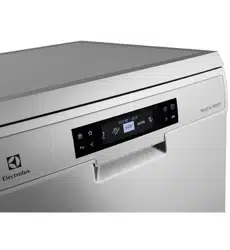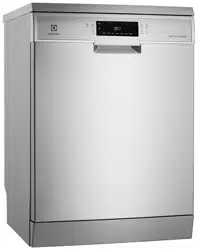
User manualDishwasher
ESF6768KXA

2 electrolux.com.au
CONGRATULATIONS
Thank you for purchasing an Electrolux dishwasher.
You’ve chosen a product that brings with it decades
of professional experience and innovation. Ingenious
and stylish, it has been designed with you in mind.
So whenever you use it, you can be safe in the
knowledge that you’ll get great results every time.
Welcome to Electrolux.
REGISTERING YOUR APPLIANCE
Please visit our website www.electrolux.com.au/register
to quickly and easily register your product.
BEFORE USING YOUR APPLIANCE
Check for any damage or marks. If you find the appliance
damaged or marked you must report it within 7 days to
claim for damages under the manufacturers warranty.
Before you use the appliance, we recommend that you
read through the whole user manual which provides
the description of the product and its functions. It is
important that the product is installed correctly and that
you read the safety instructions carefully to avoid misuse
and hazards.
For future reference, please store this booklet in a
safe place.
This appliance complies with the requirements of
Australian Standard AS/NZS 60335.2.5.
CONDITIONS OF USE
This appliance is intended to be used in household
and similar applications such as:
• Staff kitchen areas in shops, offices and
other working environments
• Farm houses
• By clients in hotels, motels and other residential
type environments
• Bed and breakfast type environments.
BEFORE YOU CALL
Please ensure you read the instruction manual fully
before you call for service, or a full service fee could be
applicable. Record model and serial number here:
Model number:
___________________________________
Serial number: ____________________________________
PNC number: _____________________________________
CONTENTS
Safety information .................................................... 3
Product description
...................................................5
Getting familiar with your machine
.............................6
Programs
..................................................................7
Options .....................................................................9
Before first use
........................................................10
Daily use
.................................................................. 11
Settings
...................................................................12
Hints and tips
..........................................................17
Loading your dishwasher
.........................................19
Care and cleaning
....................................................21
Consumption values ................................................22
Power half load consumption values
........................ 23
Troubleshooting
.......................................................24
Technical specifications
...........................................27
Installation
...............................................................28
Warranty
.................................................................. 31
IMPORTANT INFORMATION THAT MAY
IMPACT YOUR MANUFACTURER’S
WARRANTY
Adherence to the directions for use in this
manual is extremely important for health
and safety. Failure to strictly adhere to the
requirements in this manual may result
in personal injury, property damage and
affect your ability to make a claim under the
Electrolux manufacturer’s warranty provided
with your product. Products must be used,
installed and operated in accordance with this
manual. You may not be able to claim on the
Electrolux manufacturer’s warranty in the event
that your product fault is due to failure
to adhere this manual.
3
• Some dishwasher detergents are strongly alkaline.
They can be extremely dangerous if swallowed.
Avoid contact with the skin and eyes and keep
children away from the dishwasher when the door
is open.
• Before any maintenance operation, deactivate the
appliance and disconnect the mains plug from
the socket.
• Do not use high pressure water sprays and/or
steam to clean the appliance.
• If the appliance has ventilation openings in the base,
they must not be covered e.g. by carpet.
• The appliance is to be connected to the water mains
using the new supplied hose-sets. Old hose-sets
must not be used.
Safety instructions
Installation
• Remove the packaging.
• Do not install or use a damaged appliance.
• Do not install or use the appliance where the
temperature is less than 0°C.
• Follow installation instructions supplied with
appliance.
• Make sure that the appliance is installed below and
adjacent to safe structures.
Electrical connection
WARNING!
Risk of re and electrical shock
• The appliance must be earthed.
• Make sure the parameters on the rating plate are
compatible with the electrical ratings of the main
power supply.
• Always use a correctly installed shock proof socket.
• Do not use multi-plug adapters and extension
cables.
• Make sure not to cause damage to the mains plug
and the mains cable. Should the mains cable need
to be replaced, this must be carried out by our
Authorised Service Centre.
• Connect the mains cable to the mains socket only
at the end of the installation. Make sure that there is
access to the mains plug after installation.
• Do not pull the mains cable to disconnect the
appliance. Always pull the mains plug.
Water connection
• Do not cause damage to the water hoses.
• Before connection to new pipes, pipes not used
for a long time, where repair work has been carried
out or new devices fitted (water meters etc.), let the
water flow until it is clean and clear.
SYMBOLS
WARNING!
This symbol indicates information concerning your
personal safety.
CAUTION!
This symbol indicates information on how to avoid
damaging the appliance.
IMPORTANT!
This symbol indicates tips and information about
use of the appliance.
ENVIRONMENT!
This symbol indicates tips and information about
economical and ecological use of the appliance.
Before the installation and use of the appliance, carefully
read the supplied instructions. The manufacturer is not
responsible for any injuries or damages that are the
result of incorrect installation or usage. Always keep the
instructions in a safe and accessible location for future
reference.
Children and vulnerable people safety
• This appliance can be used by children aged from
8 years and above and persons with reduced
physical, sensory or mental capabilities or lack of
experience and knowledge if they have been given
supervision or instruction concerning the use of the
appliance in a safe way and understand the hazards
involved.
• Do not let children play with the appliance.
• Keep detergents away from children.
• Keep children and pets away from the appliance when
the door is open.
• Children shall not carry out cleaning and user
maintenance of the appliance without supervision.
General Safety
• Do not change the specification of the appliance.
• The operating water pressure (minimum and
maximum) must be between 0.03MPa
(0.3bar - 1 MPa (10bar)
• Obey the maximum number of 15 place settings.
• If the supply cord is damaged, it must be replaced
by the manufacturer, it Authorised Service Centre or
similarly qualified persons in order to avoid a hazard.
• Put cutlery in the cutlery basket with the sharp ends
pointing down or put them in the cutlery drawer in
horizontal position with the sharp edge down.
• Do not leave the appliance with the open door
unattended to avoid stepping accidentally onto it.
SAFETY INFORMATION

4 electrolux.com.au
SAFETY INFORMATION
Use
• Do not sit or stand on the open door.
• Dishwasher detergents are dangerous. Follow the
safety instructions on the detergent packaging.
• Do not drink and play with the water in the appliance
• Do not remove the dishes from the appliance until
the program is complete. Some detergent may
remain on the dishes.
• The appliance can release hot steam if you open the
door while a program operates.
• Do not put flammable products or items that are
wet with flammable products in, near or on the
appliance.
Disposal
WARNING!
• Risk of injury or suocation
• Disconnect the appliance from the mains
power supply.
• Cut o the mains cable and discard it.
• Remove the door catch to prevent children and
pets to get closed in the appliance.
Environmental concerns
• Recycle the materials with the symbol
. Put the
packaging in applicable containers to recycle it.
Help protect the environment and human health
and to recycle waste of electrical and electronic
appliances. Do not dispose appliances marked with
the symbol with the household waste. Return the
product to your local recycling facility or contact
your municipal office
• Ensure that there are no visible water leaks during
and after the first use of the appliance.
• If the water inlet hose is damaged immediately close
the water tap and disconnect the mains plug from
the mains socket. Contact the Authorised Service
Centre to replace the water inlet hose.
5
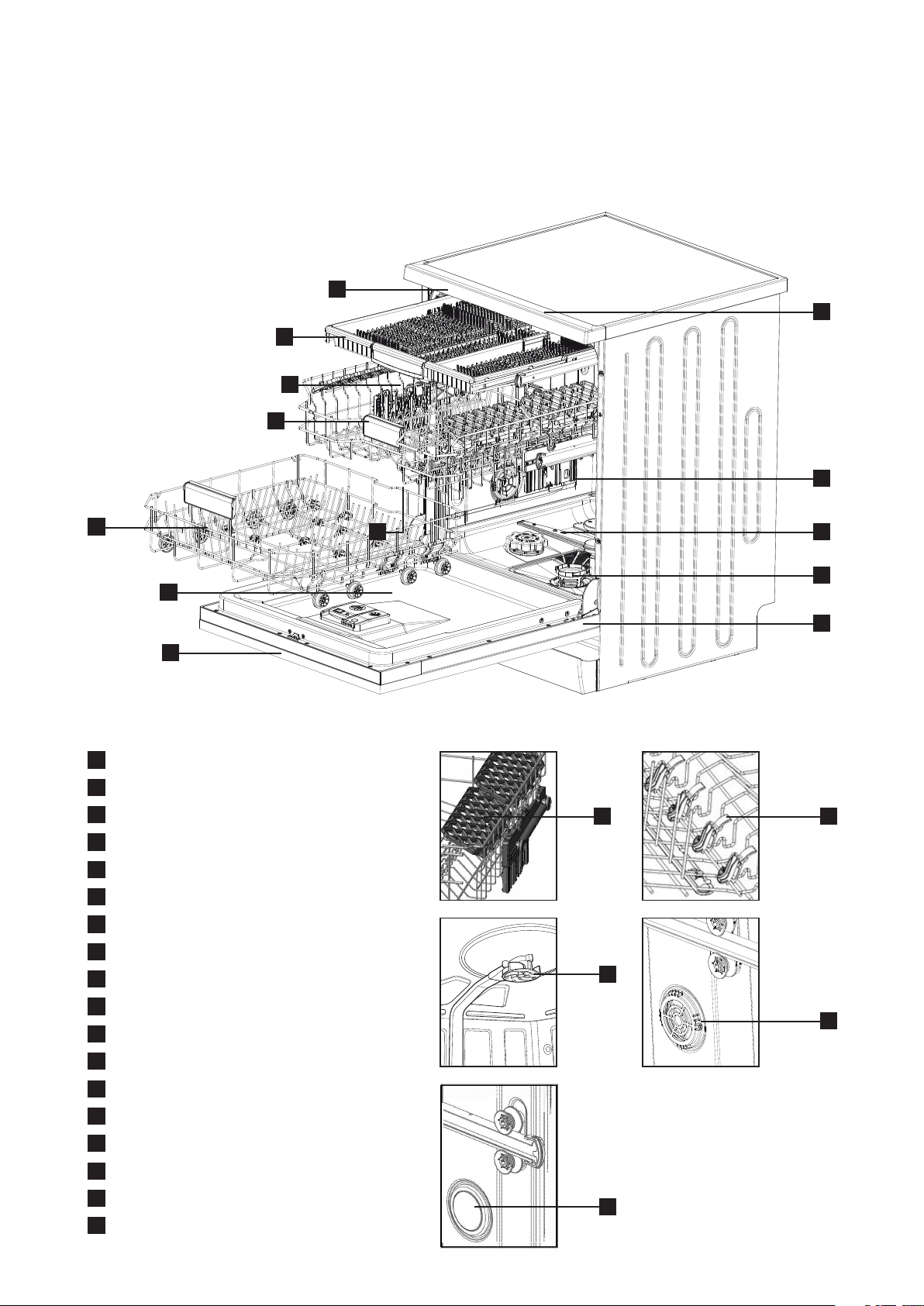
PRODUCT DESCRIPTION
15
1
3
13
14
6
10
11
7
12
17
8
9
5
16
2 4
1
Worktop
2
Glass stem grip on cup racks
3
Upper basket with cup racks
4
Upper basket direct wash system
5
Upper spray arm
6
Lower basket with folding supports
7
Lower spray arm triple wash system
8
Filters
9
Rating plate
10
Control panel
11
Detergent and rinse-aid dispenser
12
Upper basket height adjusting mechanism
13
Basket handle
14
Cutlery tray
15
Ceiling spray
16
Turbo drying unit
17
Auto door opening
18
Light
18
6 electrolux.com.au
GETTING FAMILIAR WITH YOUR MACHINE
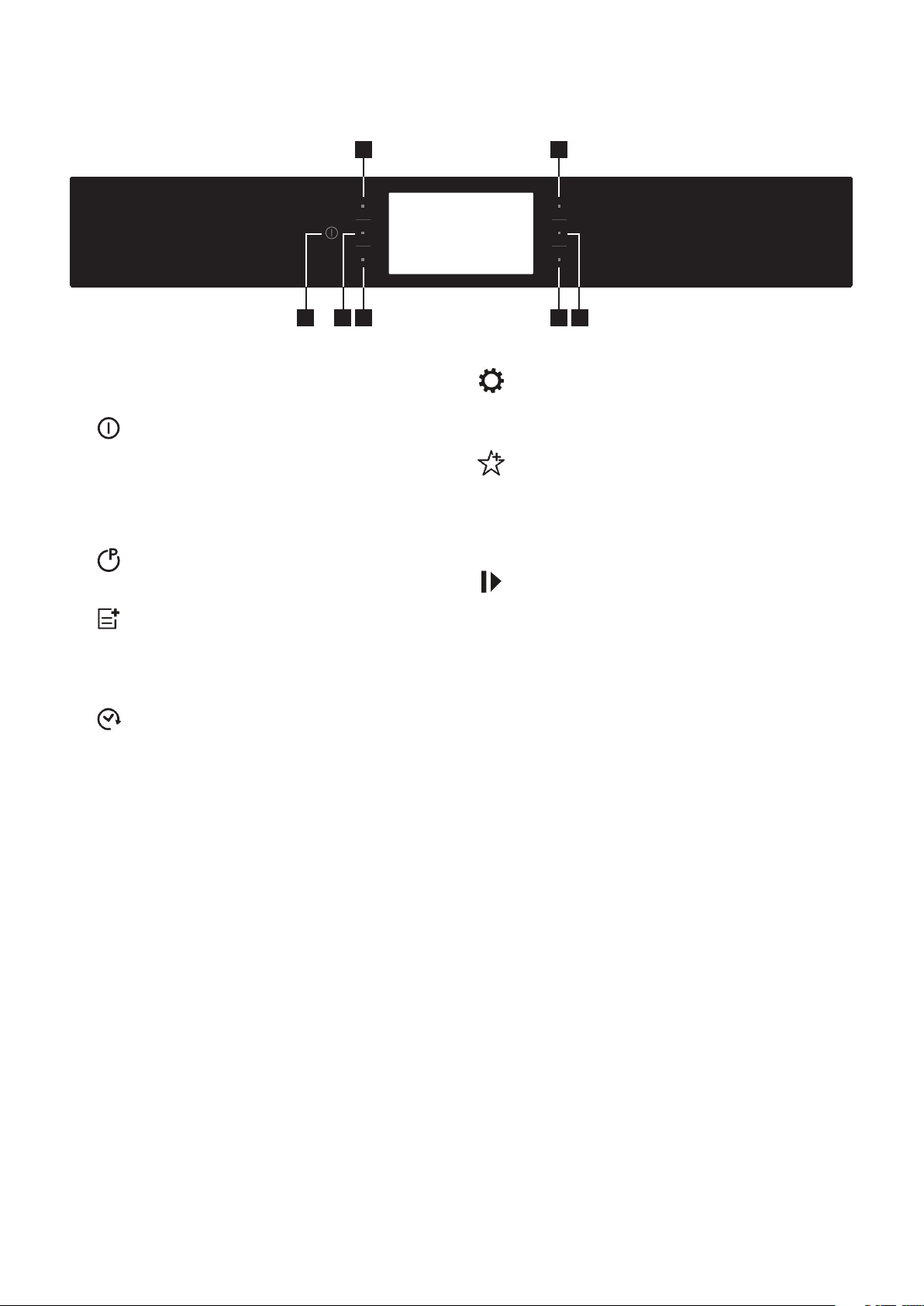
1 3 6
2
7
5
4
Program Selection and Operating
the Machine
1. On/O Button
The machine will be energised when the On/
Off button is pressed and held until the screen
is turned on. The machine will be switched off
when you press and hold the On/Off button
again until the display turns black.
2. Program Button
Allows you to select the appropriate program.
3. Option Button
Allows you to use the functions in the additional
functions menu. Also acts as the ‘back’ button
when the settings are being changed.
4. Time Delay Button
Allows you to delay the starting time of the
selected program for a period between 30
minutes to 24 hours. You can see the delay time
on the Remaining Time/Delay Time indicator.
“TIME DELAY ACTIVE!”
5. Settings Button
You can navigate the settings menu by pressing
the settings button before starting the Program.
6. Favourite Button
It allows you to enter the “Favourite” menu
that includes 5 favourite Programs you have
previously saved. Also is forward button when
the settings are being changed.
7. Start/Pause Button
When you press the Start/Pause button, the
Program you have selected will start and the
washing bar will be shown on the display. You
can track the time remaining until the end of the
washing on the display. If you press this button
during an active program, the program will
pause and the remaining time will stop.
The program will resume when you press this
button again.
7
PROGRAMS
Program
Degree of soil type
of load
Program phases Options
Detergent Amount
Prewash
- Cold rinse Delay start, Power Half load,
Child lock
-
Jet Wash 14'
Low soil levels, fresh
light soil, coffee, milk, tea
Main wash 35°C
Hot rinse
Delay start, Power Half load,
Child lock, Energy Save
25 Powder, Gel
Quick 30'
Low soil levels, fresh
light contamination,
coffee, tea, milk, cold
meat, vegetables
Main wash 40°C
Cold rinse
Hot rinse
Delay start, Power Half load,
Child lock, Extra drying,
Energy Save
15 Powder, Gel
Eco
Normal soil levels, old
soups, sauces, pastries,
egg, rice, potato and
oven foods, fried foods
Cold rinse
Main wash 50°C
Warm rinse
Hot rinse
Delay start, Power half load,
tablet, child lock, extra fast,
extra hygiene, extra drying,
extra silent, Energy save
40 Powder, Tablet,
Capsule
FlexiWash
60°C
For both delicate
glassware and heavily
soiled crockery at the
same time
40˚C wash, 65˚C
Lukewarm rinse, Hot
rinse, Dry
Delay start, Power half load,
tablet, child lock, extra fast,
extra hygiene, extra drying,
extra silent, Energy save
30 Powder, Tablet,
Capsule
Super 50'
Medium soil levels,
old soups, sauces,
pastries, egg, rice,
potato and oven foods,
fried foods
Main wash 65°C
Warm rinse
Hot rinse
Delay start, Power half
load, tablet, child lock,
extra hygiene, extra drying,
Energy save
40 Powder, Gel
AutoFlex
30°C - 50°C
Automatically adjusts
the washing time,
temperature and
amount of water by
determining the level
of soil
Washing steps
are determined
automatically
according to the
level of soil
Delay start, Power Half
load, Tablet, Child lock,
Extra hygiene, Extra drying,
Energy save
25 Powder, Gel
AutoFlex
50°C - 60°C
Delay start, Power Half
load, Tablet, Child lock,
Extra hygiene, Extra drying,
Energy save
30 Powder, Tablet
AutoFlex
60°C- 70°C
Delay start, Power Half
load, Tablet, Child lock,
Extra hygiene, Extra drying,
Energy save
30 Powder, Tablet
Steam Wash
Heavy soil levels,
old soups, sauces,
pastries, egg, rice,
potato and oven foods,
fried foods
Delay start, Power Half
load, Tablet, Child lock,
Extra hygiene, Extra drying
30 Powder, Tablet,
Capsule
Warning: In Jetwash 14 min, Quick 30 min and Super 50 min programs, there is no drying phase.
FlexiWash
This program is to wash both delicate/less soiled dishes and heavily soiled dishes at the same time. The delicate dishes
on the upper basket are washed at a lower pressure and the heavily soiled dishes on the lower basket are washed at a
higher pressure.
8 electrolux.com.au
You may change the program according to your
preferences by selecting additional options to the
washing program. The washing programs have been
designed so as to obtain the best cleaning considering
the type and amount of food soil properties of the
washing materials. The additional functions were
developed in order to save time, water and electricity
and thus allow you to wash your dishes more
conveniently. For example, if you think your dishes are
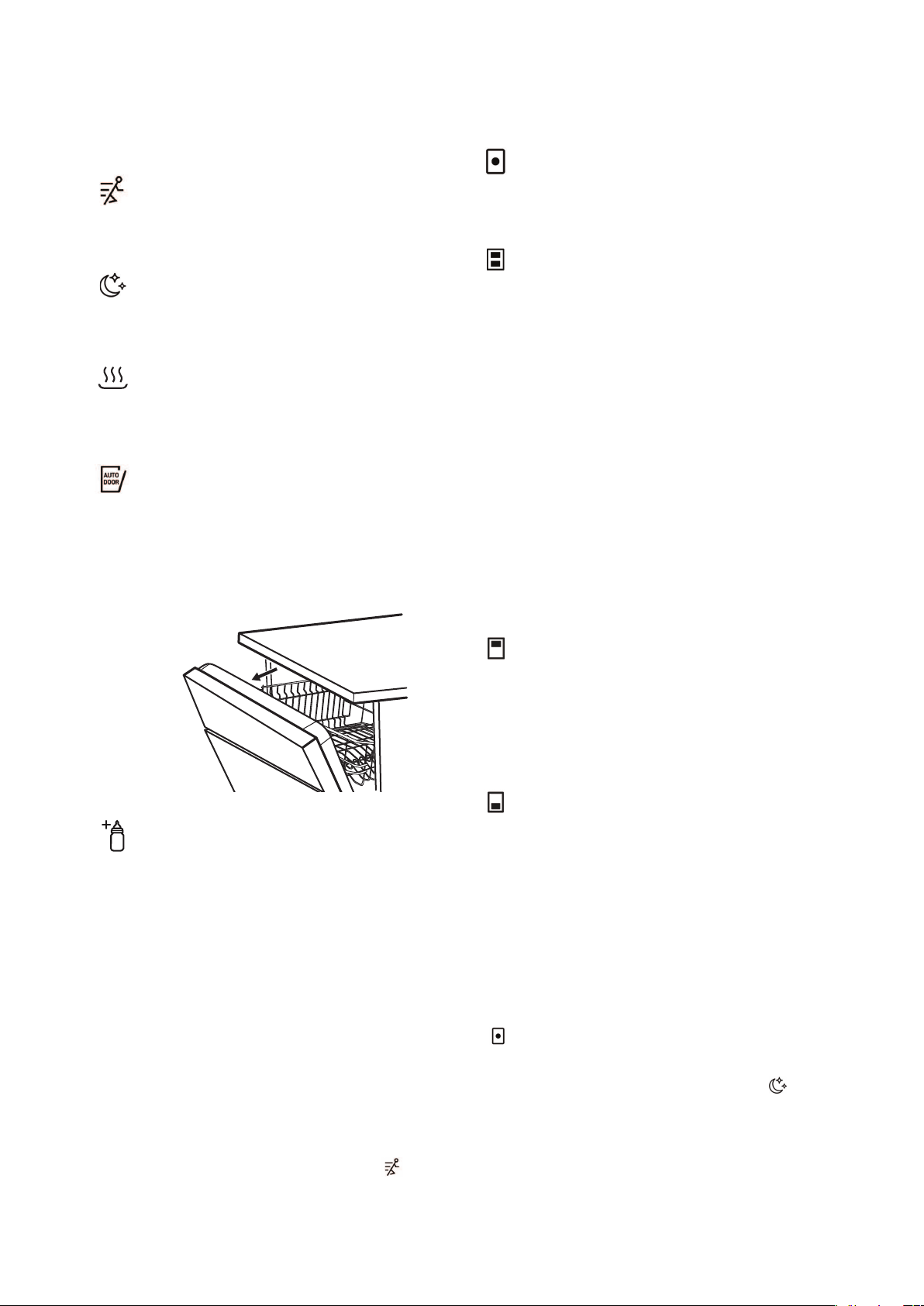
slightly dirty, you may select the Fast function
and
make your washing process more economical in terms
of time and water.
If you are going to use a multipurpose detergent, you obtain
better performance by selecting Tablet detergent
function.
If you live in a place where electricity is cheaper to use
at night, you might select the silent function
and wash your dishes more economically and silently;
this function was developed also for a more sensitive
washing process.
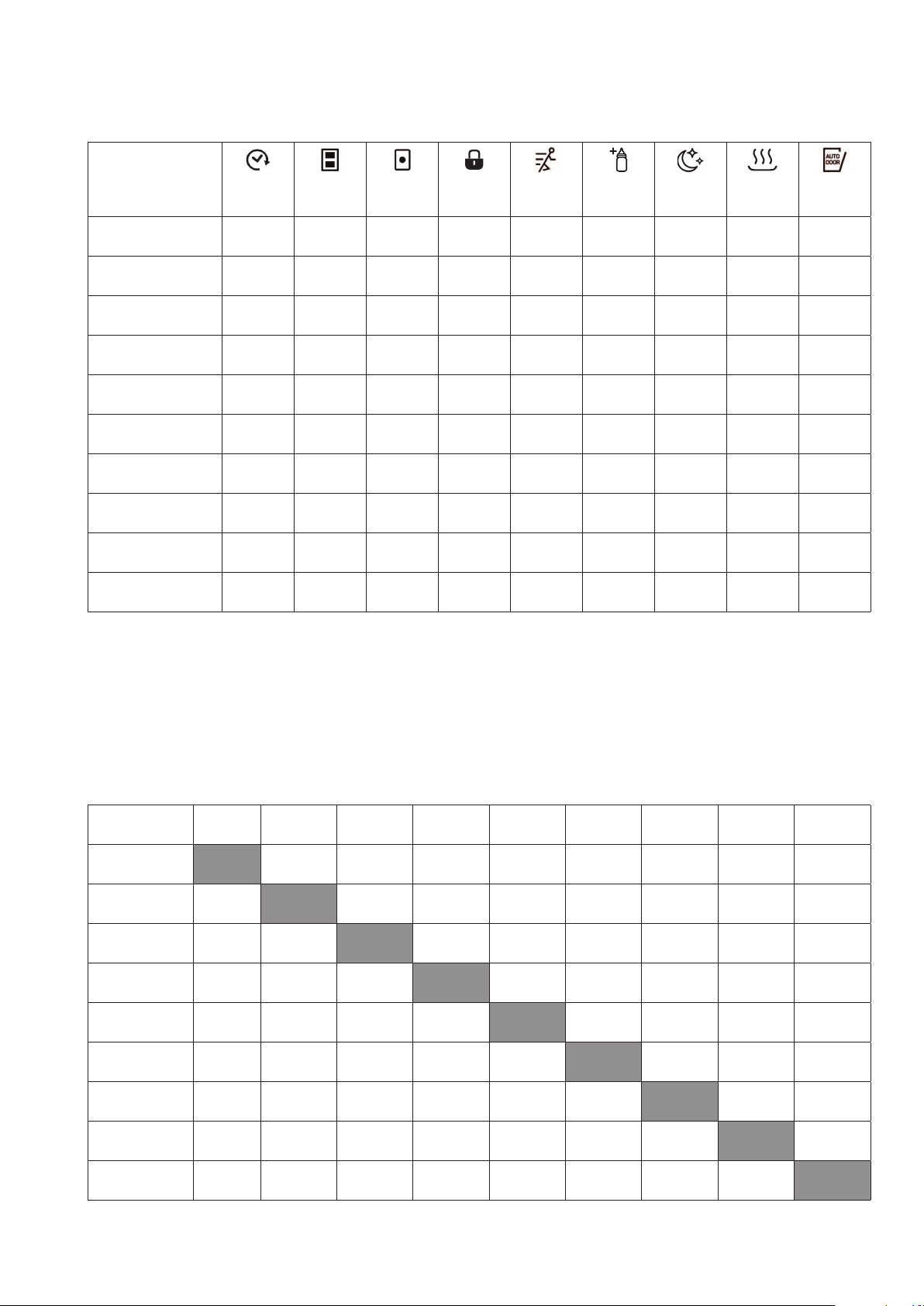
Additional options are not suitable for every program; you
might find below the functions suitable for the programs.
For the programs not suitable for functions, you will see
that the function indicator is not illuminated.
PROGRAMS (CONTINUED)
Additional Options
Extra Fast Option
Increases the water pressure of the selected
Program, thus shortens its duration and reduces
the amount of water.
Extra Silent Option
Allows for a sensitive and silent washing cycle by
making the Program wash the dishes with lower
pressure.
Extra Drying Option
Using the extra drying option, you can have
drier dishes by adding extra drying steps to the
Program you have selected.
Energy Save Option – Auto Door
Thanks to the energy save option, the automatic
door opening mechanism will be activated when
the Program is complete. Door will open for 10cm
when drying and rinsing is complete and the
steam in the machine will be released for better
drying performance.
Extra Hygiene Option
You can select the hygiene option for dishes
requiring extra hygiene and achieve a more
hygienic wash by changing the washing
temperature and duration of the current Program.
Tablet Detergent Option
Please use the Tablet Detergent option when
using combined detergents containing salt, rinse
aid and extra features.
Power Half Load Option
With the half load option, three different washes
can be performed, namely in the upper basket,
lower basket and both baskets. If you have a
small amount of dishes you need to wash in the
machine, you can activate the half load option as
an addition to some programs. If you have dishes
in both baskets, select the icon that lights both
figures by selecting the half load option.
If you have dishes in the upper basket only, select
the icon where the figure above is lit. Therefore,
only the upper basket of your machine will
perform washing. For this reason, make sure you
do not have dishes in the lower basket. If you
have dishes in the lower basket only, select the
icon where the figure below is lit. Therefore, only
the lower basket of your machine will perform
washing. Make sure that there are no dishes in
the upper basket while using this feature.
Power Half Load upper basket –
DIRECT WASH
For a partial load where there are difficult to
remove food soils the dishware can be located
over the direct wash jets in the upper baskets.
These additional jets will provide a direct spray to
the interior of the dishware.
Power Half Load lower basket –
TRIPLE WASH
For a partial load where there are difficult to
remove food soils. Large soiled items should be
placed over the triple wash sprays at the back of
the lower basket.
9
Programs
Time Delay
Power Half
Load
Tablet Child Lock
Extra
Fast
Extra
Hygiene
Extra Silent
Extra
Drying
*Energy
Save
Prewash
P P O P O O O O O
Jet Wash 14’
P P O P O O O O P
Quick 30’
P P O P O O O P P
Eco
P P P P P P P P P
FlexiWash 60°C
P P P P P P P P P
Super 50‘
P P P P O P O P P
AutoFlex
30°C - 50°C
P P P P O P O P P
AutoFlex
50-60°C
P P P P O P O P P
AutoFlex
60°/70°C
P P P P O P O P P
Steam Wash
P P P P O P O P O
“O“ Function cannot be selected “P” function can be selected.
*Note: Energy Save will add extra time to the program cycle.
OPTIONS
Options
Delay
Start
Power Half
Load
Tablet
Child
Lock
Extra Fast
Extra
Hygiene
Extra
Silent
Extra
Drying
Energy
Save
Delay Start
P P P P P P P P
Power Half Load
(3 modes)
P P P P P P P P
Tablet
P P P P P P P P
Child Lock
P P P P P P P P
Extra Fast
P P P P O O P P
Extra
Hygiene
P P P P O O O P
Extra Silent
P P P P O O P P
Extra Drying
P P P P P O P P
Energy Save
P P P P P P P P
10 electrolux.com.au
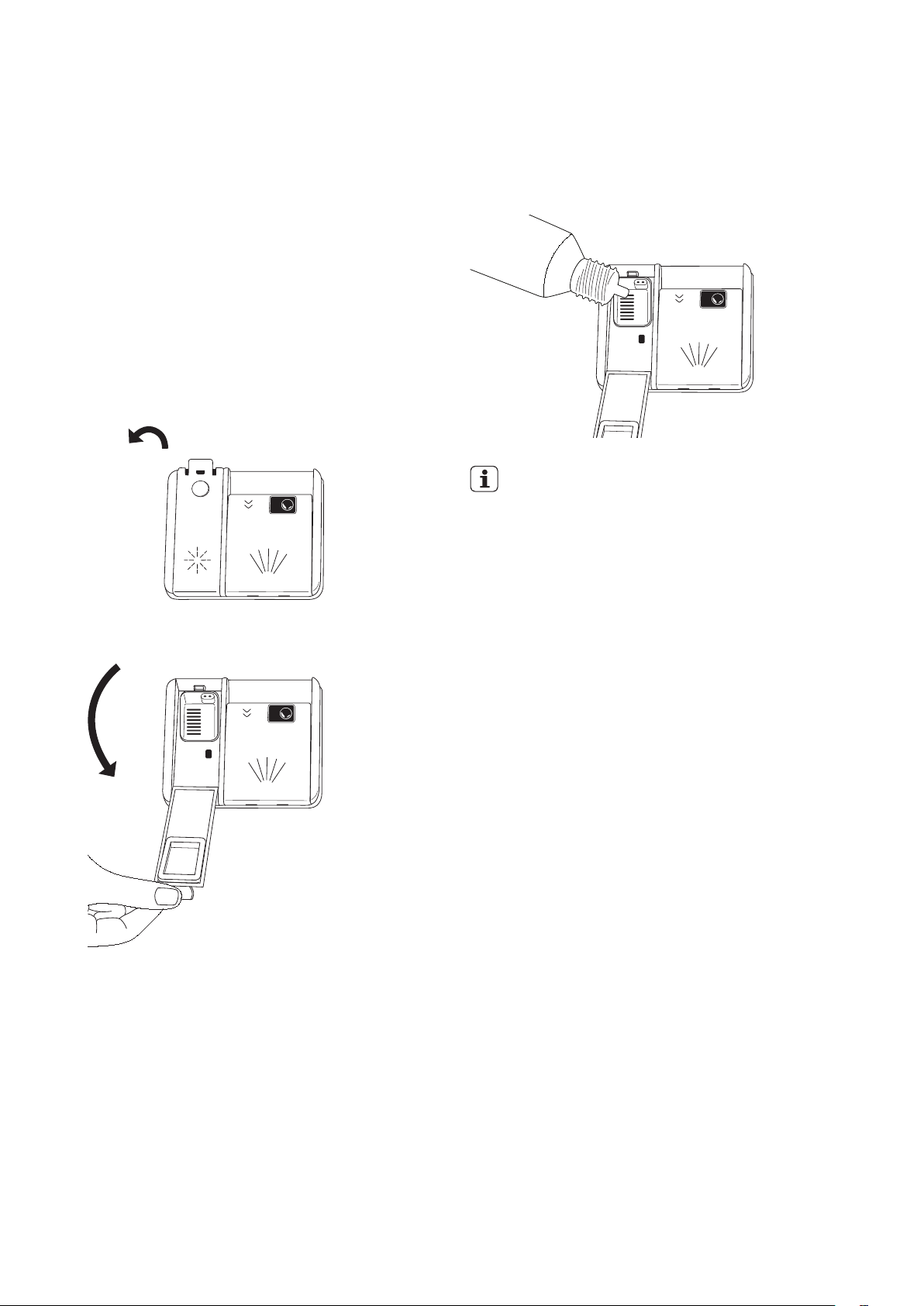
1. Fill the rinse aid dispenser.
2. Turn on the water tap.
3. Start a program (‘Super 50’ is recommended) to
remove any processing residuals that can still be
inside the appliance. Do not use detergent and do
not load the baskets.
Filling the rinse-aid and setting
To fill the rinse aid compartment, open the rinse-aid
compartment cap. Fill the compartment with rinse aid
until MAX level and then close the cap. Be careful not to
overfill the rinse aid compartment and wipe up any spills.
Rinse aid level is changed by using Rinse aid menu.
BEFORE FIRST USE
Be careful not to overfill the rinse aid compartment
and wipe up any spills.
RINSE-AID
IMPORTANT!
Fill the rinse aid dispenser when the indicator on
the display illuminates.
If you use multi-tablets we recommend to always
use rinse aid for better drying performance, also
in combination with multi tablets containing
rinsing agent.
11
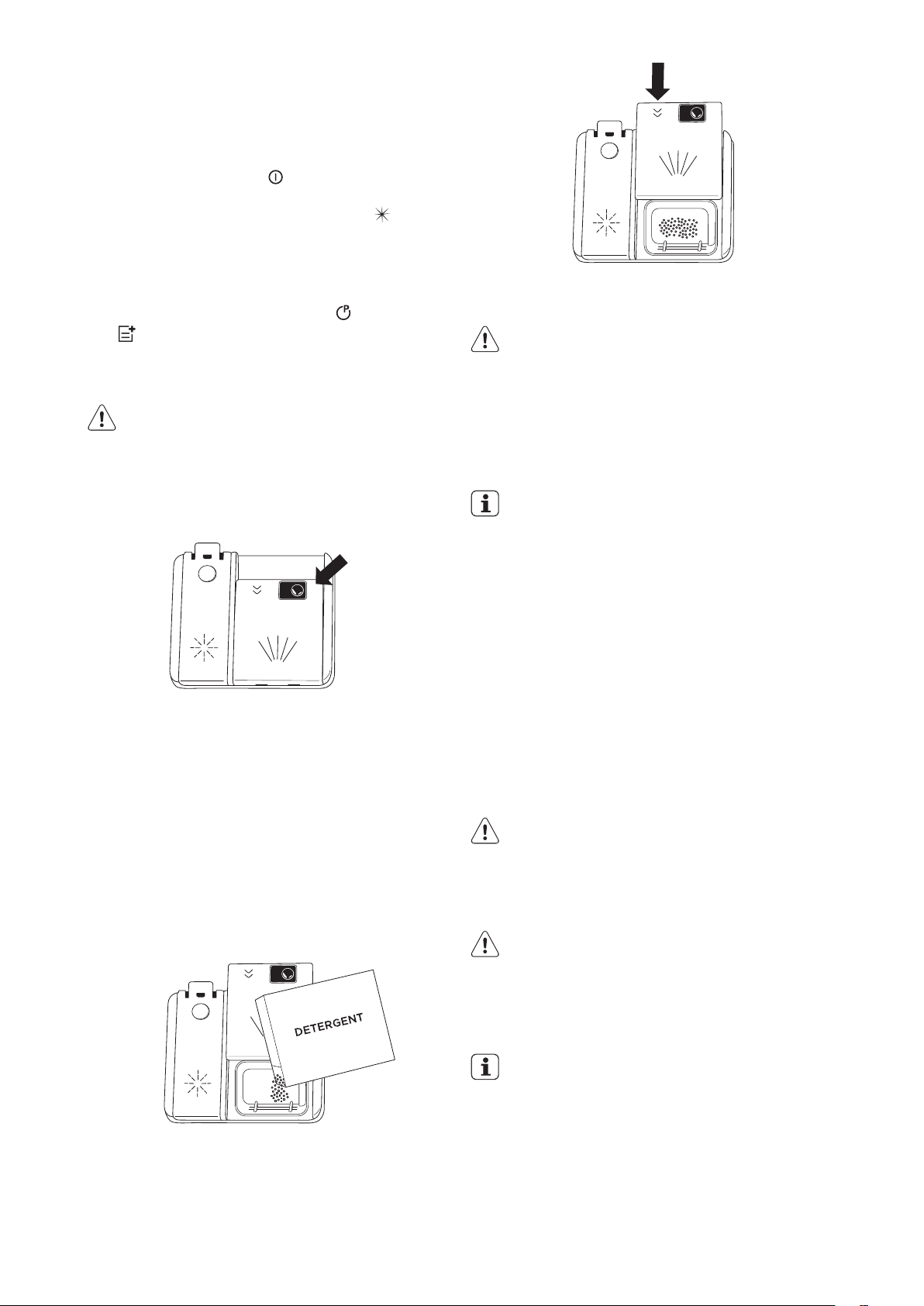
To close the detergent container, push the cover as
shown until it locks.
CAUTION
Solubility of the tablet detergents produced
by dierent companies can vary depending on
the temperature and time. Therefore, it is not
recommended to use tablet detergents in short
programs. It is more suitable to use powder
detergents for these programs.
IMPORTANT!
If your dishes have been dirty for a long period, if
there is dried food waste on them and if you have
fully loaded the dishwasher, pour 5cm
3
detergent
into the pre-wash compartment and start your
machine.
You may have to add more detergent into your
machine, depending on the degree of soil and on
the water hardness level.
Opening the door while the appliance operates
If you open the door while a program is running, the
appliance stops. It may affect the energy consumption
and the program duration. When you close the door,
the appliance continues from the point of interruption.
CAUTION!
Do not try to close the appliance door within
1 minute after Auto Door automatically opens it,
as this may cause damage to the appliance.
CAUTION
When opening the door of the machine while a
program is in progress, open the door slightly
in order to avoid spillage of hot water with
detergent, or excessive steam.
IMPORTANT!
Make sure that there is detergent in the
detergent dispenser before you start a new
program.
End of program.
When the program is completed, open the door and
press the power button to turn off the appliance.
Turn off the water tap.
DAILY USE
1. Turn on the water tap.
2. Press the on/off button
to activate the appliance.
Make sure that the appliance is in program
selection mode. If the rinse aid indicator is on, fill
the rinse aid dispenser.
3. Load the basket.
4. Add the detergent.
5. Set the start, the correct program
and options
for the type of load and the degree of soil. See
Settings section for more detail.
Adding the detergent
CAUTION
Only use detergent specically designed for
dishwashers
Press the latch to open the detergent container as
shown in the image.
Detergent container has level lines inside. It is possible to
measure the right detergent amount using these lines.
The detergent container can take a maximum of 40cm
3
detergent.
Open the dishwasher detergent container and pour
25cm
3
if your dishes are heavily soiled or 15cm
3
if they are
less soiled.
You may have to add more detergent into your machine,
depending on the degree of soil and the water hardness
in your area.
If your dishes are from the previous day and there is
dried food waste on them, or if you have fully loaded the
dishwasher, pour 5cm
3
detergent onto the base of the
door and start your machine.
12 electrolux.com.au
SETTINGS
Turning on the machine
1. Press and hold the On/Off button until the screen is
turned on.
2. Eco
program will be selected the
first time the
appliance is turned on.
Note: W
hen turned on after first use the program will
default to the program last used, unless a favourite
program
has been set up. In that case it will default to
favourite 1. Other favourite programs 2, 3, etc will follow
if set up.
12 electrolux.com.au13
SETTINGS
1.
2.
.
''
1.
2.
3.
4.
5.Factorysettings
6.Brightness
7.Language
8.Eco mode
6
7
3. Select the desired Program by pressing the Program
button successively.
Select the washing Program according to your dishes,
using the Program listed on the previous page.
4. You can select options
according to the options
list on previous page.
5. You can start the Program by pressing the Start/
Pause button
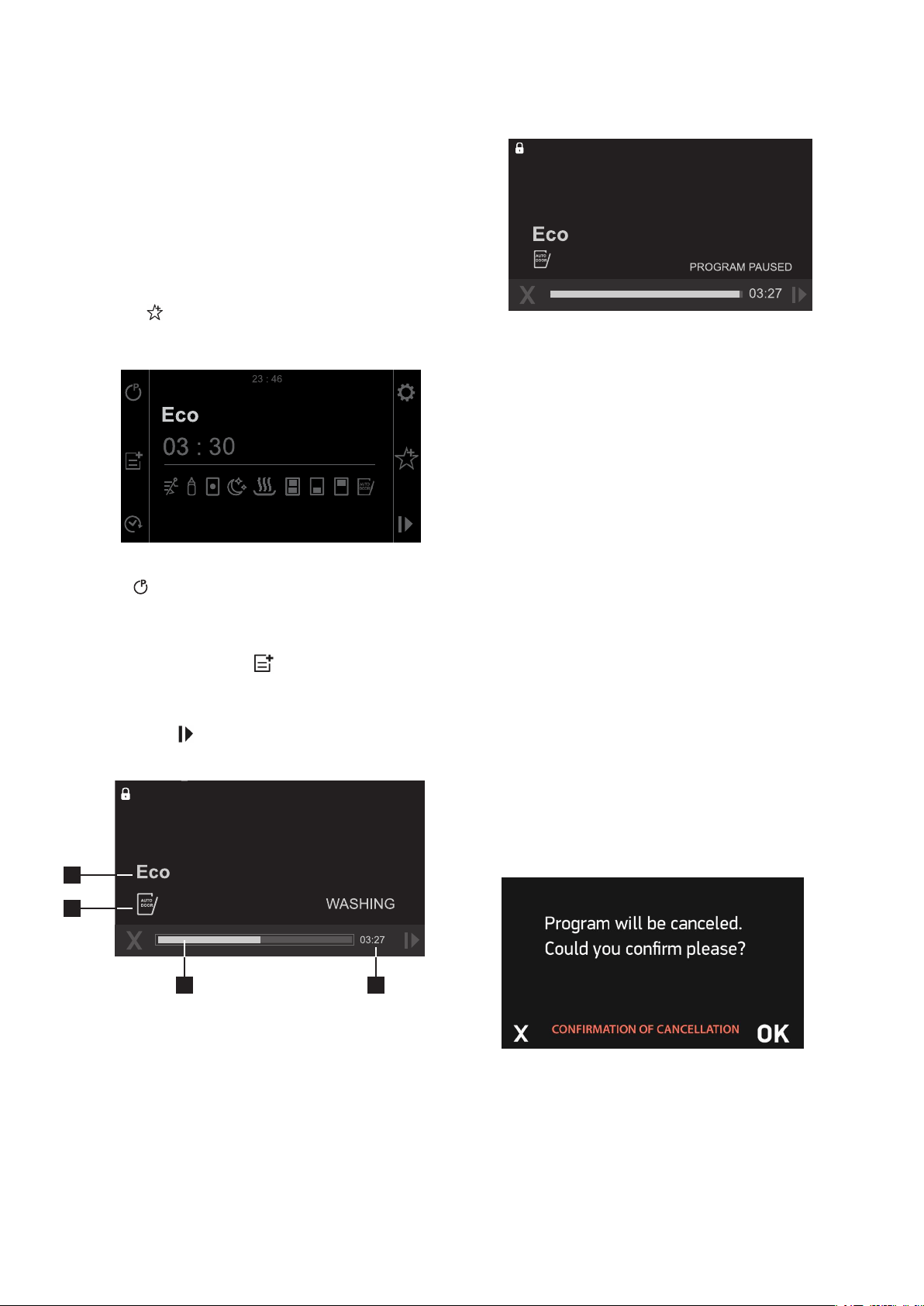
. “WASHING” will be shown on the
display and the Program you have selected will start.
When the Program starts working, you can track the
name of the Program on the display information line (1),
the remaining time on the remaining time indicator (2),
the progress of the Program on the progress bar (3), the
options you have selected on the options indicator (4).
NOTE: Be careful not to open the door of the
machine while it is running. If you need to open,
pause the Program by pressing the Start/Pause button.
“PROGRAM PAUSED!” warning will be shown on the
display. You can open the door after you have seen
this warning.
Steam may be released when you open the door of your
machine. Be careful. Press the Start/Pause button again
after closing the machine door. The Program will resume
and the screen will display “WASHING”.
Program Monitoring
You can track the progress of the Program using the
progress bar. Remaining time and program pleaces
expressions (washing, program finished) will be shown
on the display.
NOTE: If the door of the machine is opened or power
gets disconnected during washing, the Program will
resume when the door is closed or the power is supplied
again.
NOTE: In order for the drying process to be performed
more quickly, you may manually slightly open the
machine door after a few minutes when the Program has
ended and you have seen the “PROGRAM FINISHED”.
Alternately activate the ‘Auto Door’ option and the door
will open automatically at the end of the Program.
Cancelling the Program
1. Press the cancel button located on the left-hand side
of the washing bar to cancel a program in progress.
2. The display will show “Program will be cancelled.
Could you confirm please?” warning.
12 electrolux.com.au13
SETTINGS
1.
2.
.
''
1.
2.
3.
4.
5.Factorysettings
6.Brightness
7.Language
8.Eco mode
6
7
3. The Program will be cancelled when you press the
confirm button on the bottom-right corner of the display
and the display will show “CANCELLING”.
1
1
1 1
4
3 2

13
4. 1 minute after you cancel the program “PROGRAM
FINISHED” warning will be displayed.
5. You can now select a new Program, additional
options or time setting by pressing the back button.
NOTE: Detergent or rinse aid residues may be present in
the machine or on the dishes being washed depending
on the washing step of the Program you have cancelled.
Settings Menu
Press the settings button to access the settings
menu. Menu contents are as follows;
1. Time settings
2. Date settings
3. Volume settings
4. Rinse aid settings
5. Factory settings
6. Brightness
7. Language
8. Eco mode
Press back to exit the menu.
NOTE: You can access the short details of the related
menu by pressing the info button on the top right corner
of the screen.
1. Time settings
Switch to “TIME SETTINGS” menu using the Forward/
backward buttons. When you enter the “TIME
SETTINGS” by pressing confirm, hour section is
selected. New hour can be set when you press confirm.
You can select the desired hour by pressing Forward/
Backward. The new hour is set by pressing confirm.
The hour set will not be saved if you press back instead
of confirm. Switch to the minute setting section by
pressing forward. New minute can be set when you
press confirm. You can select the desired minute by
pressing Forward/Backward. The new minute is set by
pressing confirm and the new hour setting will be saved.
The minute set will not be not saved if you press back
instead of confirm.
2. Date settings
Switch to the “DATE SETTINGS” menu using the
Forward/backward buttons. When you enter “DATE
SETTINGS” by pressing confirm, “DAY” section will
be shown at first. Press confirm to change the day on
the display. Change the selection using the “Forward/
Backward” buttons and press confirm to save.
Secondly, “MONTH” section will be shown when you
press forward. Follow the steps you followed for the day
setting to change the selection.
Finally, move to the “YEAR” section. Follow the steps
you followed for day and month settings to change the
selected year.
3. Volume settings
You can set the level of the audio warnings that your
machine emits. Default volume level is “2”, shown in blue
when you first start your machine. 0 is the silent level and
5 is the highest volume level. Select the desired volume
level using forward/backward buttons after entering the
menu. Press confirm once the required volume setting
is chosen.
4. Rinse aid settings
Switch to “RINSE AID” menu using the Forward/
backward buttons and press confirm to enter the menu.
The level selected in blue shows the last selected rinse
aid level. Select the new level using forward/backward
buttons. The newly selected level will be saved by
pressing confirm and will turn to blue.
6. Brightness
You can adjust the display brightness of your machine
here. Brightness level is “5”, shown in blue when you first
start your machine. 0 is the lowest brightness level and
5 is the highest. Select the desired brightness level using
forward/backward buttons after entering the menu,
and the newly selected level will be saved by pressing
confirm.
7. Language
Switch to the “LANGUAGE” menu using Forward/
backward buttons. Press confirm to enter the Language
menu. Language selected in blue shows the selected
language. Select the new language using forward/
backward buttons, and the newly selected language will
be saved by pressing confirm.
14 electrolux.com.au
8. Eco mode
The internal light lights up when you open the door of
the machine. Select “Yes” with the forward/backward
buttons
to activate the Eco mode and press OK.
The following describes how Eco mode affects
functionality during various stages of dishwashing:
The program selection screen:
• If there is no user interference to the machine during
15 minutes, the machine turns off.
• If there is no user interference to the machine during
2 minutes the backlight turns off.
• When the door is opened, the inner light turns ON
and after 2 minutes it turns OFF.
When a program is operating:
• The backlight is always ON.
• When the door is opened, the inner light turns ON
and after 2 minutes it turns OFF.
To deactivate Eco mode, select “No” with the forward/
backward button
and press OK. In this case, internal
illumination will be lit as long as the door is open.
5. Factory settings
When you enter the menu, “Yes” will be selected and
“All settings will be reset. Could you confirm please?”
expression will be displayed when you confirm with
the confirm button. Press cancel if you do not confirm.
Press confirm to return your machine to the Factory
settings. Factory settings menu will appear again.
Your machine’s factory settings are as follows;
• Favourite Programs are deleted
• Eco-mode is active
• Volume level is 2
• Display brightness level is 5
• Economical time interval is between 22:00-06:00
• Hour is 00:00
• Date is 01.01.2016
Your settings will not be changed if you select “No”
and press confirm.
Favourite Program Setting
You can add the programs and options that you
consider are best for your dishes and you frequently
use to the Programs list in the favourites menu. To set
your favourite Program;
1. Select the Program that you want to select using
the Program button
.
2. Add the suitable options for the wash using the
options button
if you want to add additional
options to this Program.
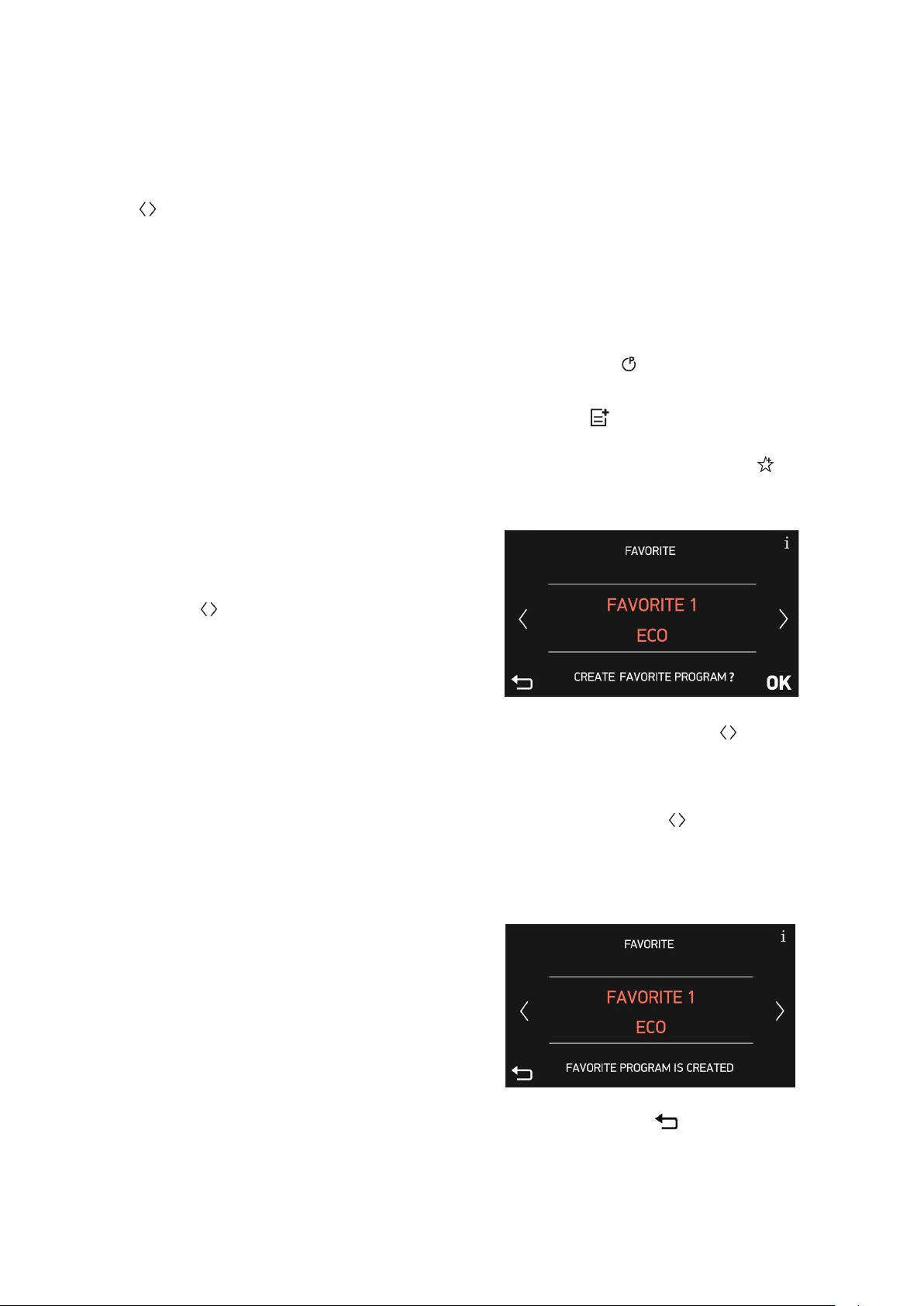
3. When you press the favourites button
after
completing your Program and option selection, the
screen below will be displayed.
14 electrolux.com.au15
8
The internal light lights up when you open the door of the
machine. Select “Yes” with the forward/backward key
to activate the Eco mode and press OK.
The following describes how Eco mode affects
functionality during various stages of dishwashing:
The program selection screen:
•If there is no user interference to the machine during 15
minutes, machine turns off.
•If there is no user interference during 2 minutes, display
backlight becomes off.
•When the door is opened, the inner light turns ON and
after 2 minutes it turns OFF
When a program is operating:
•The backlight is always ON.
•When the door is opened, the inner light turns ON and
after 2 minutes it turns OFF.
To deactivate Eco mode, select “No” with the forward/
backward key
and press OK. In this case, internal
illumination will be lit as long as the door is open.
5
When you enter the menu, “Yes” will be selected and
“All settings will be reset. Could you conrm please?”
expression will be displayed when you conrm with
the conrm key. Press cancel if you do not conrm.
Press conrm to return your machine to the Factory
settings. Factory settings menu will appear again.
Your machine’s factory settings are as follows;
•Favourite Programs are deleted
•Eco-mode is active
•Volume level is 2
•Display brightness level is 2
•Hour is 00:00
After you press “OK”, your favourite Program and options
you have added will be.
You can prevent others from changing your settings while
your machine is operating. Press and hold the child lock
key
on the top left corner of the screen for 3 sec.
“Child lock on” warning will be displayed and a warning
tone will be heard when the child lock is active.
Child lock indicator on the top left corner of the screen
will turn to the locked position. All keys are non-functional
when the child lock is active.
Press and hold the child lock key
for 3 seconds to
cancel the child lock. “Child lock off” warning will be
displayed on the screen and a warning tone will be heard.
Child lock indicator will turn to unlocked position.
•Date is 01.01.2018
Your settings will not be changed if you select “No” and
press conrm.
You can add the programs and options that you consider
are best for your dishes and you frequently use to the
Programs list in the favourites menu. To set your favourite
Program;
1.Select the Program that you want to select using the
Program key
.
2.Add the suitable options for the wash using the options
key if you want to add additional options to this
Program.
3.When you press the favourites key after completing
your Program and option selection, the screen below will
be displayed.
4.Use forward/backward keys to save the selection
in any of the selections (Favourite1, Favourite2, Favourite3,
Favourite4 and Favourite5).
5.Move Favourite1 to the center of the screen using
forward/backward keys if your are going to save the
selection to Favourite1.
6.The prompt ‘Create favourite program?’ will appear.
Press OK to conrm and save.
7. Press the back key if you do not want to save.
8.You will be redirected to the favourite Program selection
menu when you press OK again.
You can delay the starting time of the selected Program
up to 24 hours. Delay setting cannot be made after the
Program has started. The selected Program should not be
started for you to set the delay time.
1.Press the delay key and increase delay for the time
required for the delay.
2.Set the delay time to the desired time using forward/
backward keys . Delay time is increased for 30 minutes
with the forward key and decreased for 30 minutes with
the backward key. Select the delay time by pressing the
conrm key. You can start the delay time countdown by
pressing the start/pause key. The display will show “TIME
DELAY ACTIVE”, and the delay time and the Program time
will be alternately shown on the display until the end of this
time. The selected Program will start when countdown
ends. The time required for the started Program to end will
be shown on the indicator display. All keys except for On/
Off and Delay keys will be disabled when delay is active.
Press the delay key to cancel the delay and press
conrm by selecting “00:00” as the delay time. The display
will show the latest selected Program and options. Delay
time will not be shown.
Press the delay key again to set a new delay time.
Select the new time using forward/backward keys and
press the start/pause key to start the delay time.
The rinse aid helps to dry the dishes without streaks and
stains. The rinse aid is automatically released during the
hot rinse phase. When rinse aid chamber is empty, “LOW
RINSE-AID” warning is shown on the display notifying
to rell rinse aid.
When you stop using combined detergents
•Fill the rinse aid compartment
•Set the suitable rinse aid setting
SETTINGS (CONTINUED)
4. Use forward/backward buttons to save
the selection in any of the selections (Favourite1,
Favourite2, Favourite3, Favourite4 and Favourite5).
5. Move Favourite1 to the center of the screen using
forward/backward buttons
if your are going to
save the selection to Favourite1.
6. The prompt ‘Create favourite program?’ will
appear. Press OK to confirm and save.
14 electrolux.com.au15
8
The internal light lights up when you open the door of the
machine. Select “Yes” with the forward/backward key
to activate the Eco mode and press OK.
The following describes how Eco mode affects
functionality during various stages of dishwashing:
The program selection screen:
•If there is no user interference to the machine during 15
minutes, machine turns off.
•If there is no user interference during 2 minutes, display
backlight becomes off.
•When the door is opened, the inner light turns ON and
after 2 minutes it turns OFF
When a program is operating:
•The backlight is always ON.
•When the door is opened, the inner light turns ON and
after 2 minutes it turns OFF.
To deactivate Eco mode, select “No” with the forward/
backward key
and press OK. In this case, internal
illumination will be lit as long as the door is open.
5
When you enter the menu, “Yes” will be selected and
“All settings will be reset. Could you conrm please?”
expression will be displayed when you conrm with
the conrm key. Press cancel if you do not conrm.
Press conrm to return your machine to the Factory
settings. Factory settings menu will appear again.
Your machine’s factory settings are as follows;
•Favourite Programs are deleted
•Eco-mode is active
•Volume level is 2
•Display brightness level is 2
•Hour is 00:00
After you press “OK”, your favourite Program and options
you have added will be.
You can prevent others from changing your settings while
your machine is operating. Press and hold the child lock
key
on the top left corner of the screen for 3 sec.
“Child lock on” warning will be displayed and a warning
tone will be heard when the child lock is active.
Child lock indicator on the top left corner of the screen
will turn to the locked position. All keys are non-functional
when the child lock is active.
Press and hold the child lock key
for 3 seconds to
cancel the child lock. “Child lock off” warning will be
displayed on the screen and a warning tone will be heard.
Child lock indicator will turn to unlocked position.
•Date is 01.01.2018
Your settings will not be changed if you select “No” and
press conrm.
You can add the programs and options that you consider
are best for your dishes and you frequently use to the
Programs list in the favourites menu. To set your favourite
Program;
1.Select the Program that you want to select using the
Program key
.
2.Add the suitable options for the wash using the options
key if you want to add additional options to this
Program.
3.When you press the favourites key after completing
your Program and option selection, the screen below will
be displayed.
4.Use forward/backward keys to save the selection
in any of the selections (Favourite1, Favourite2, Favourite3,
Favourite4 and Favourite5).
5.Move Favourite1 to the center of the screen using
forward/backward keys if your are going to save the
selection to Favourite1.
6.The prompt ‘Create favourite program?’ will appear.
Press OK to conrm and save.
7. Press the back key
if you do not want to save.
8.You will be redirected to the favourite Program selection
menu when you press OK again.
You can delay the starting time of the selected Program
up to 24 hours. Delay setting cannot be made after the
Program has started. The selected Program should not be
started for you to set the delay time.
1.Press the delay key and increase delay for the time
required for the delay.
2.Set the delay time to the desired time using forward/
backward keys . Delay time is increased for 30 minutes
with the forward key and decreased for 30 minutes with
the backward key. Select the delay time by pressing the
conrm key. You can start the delay time countdown by
pressing the start/pause key. The display will show “TIME
DELAY ACTIVE”, and the delay time and the Program time
will be alternately shown on the display until the end of this
time. The selected Program will start when countdown
ends. The time required for the started Program to end will
be shown on the indicator display. All keys except for On/
Off and Delay keys will be disabled when delay is active.
Press the delay key to cancel the delay and press
conrm by selecting “00:00” as the delay time. The display
will show the latest selected Program and options. Delay
time will not be shown.
Press the delay key again to set a new delay time.
Select the new time using forward/backward keys and
press the start/pause key to start the delay time.
The rinse aid helps to dry the dishes without streaks and
stains. The rinse aid is automatically released during the
hot rinse phase. When rinse aid chamber is empty, “LOW
RINSE-AID” warning is shown on the display notifying
to rell rinse aid.
When you stop using combined detergents
•Fill the rinse aid compartment
•Set the suitable rinse aid setting
SETTINGS (CONTINUED)
7. Press the back button if you do not want
to save.
8. You will be redirected to the favourite Program
selection menu when you press OK again.
SETTINGS (CONTINUED)
15
After you press “OK”, your favourite Program and options
you have added will be saved to the Favourite you have
selected.
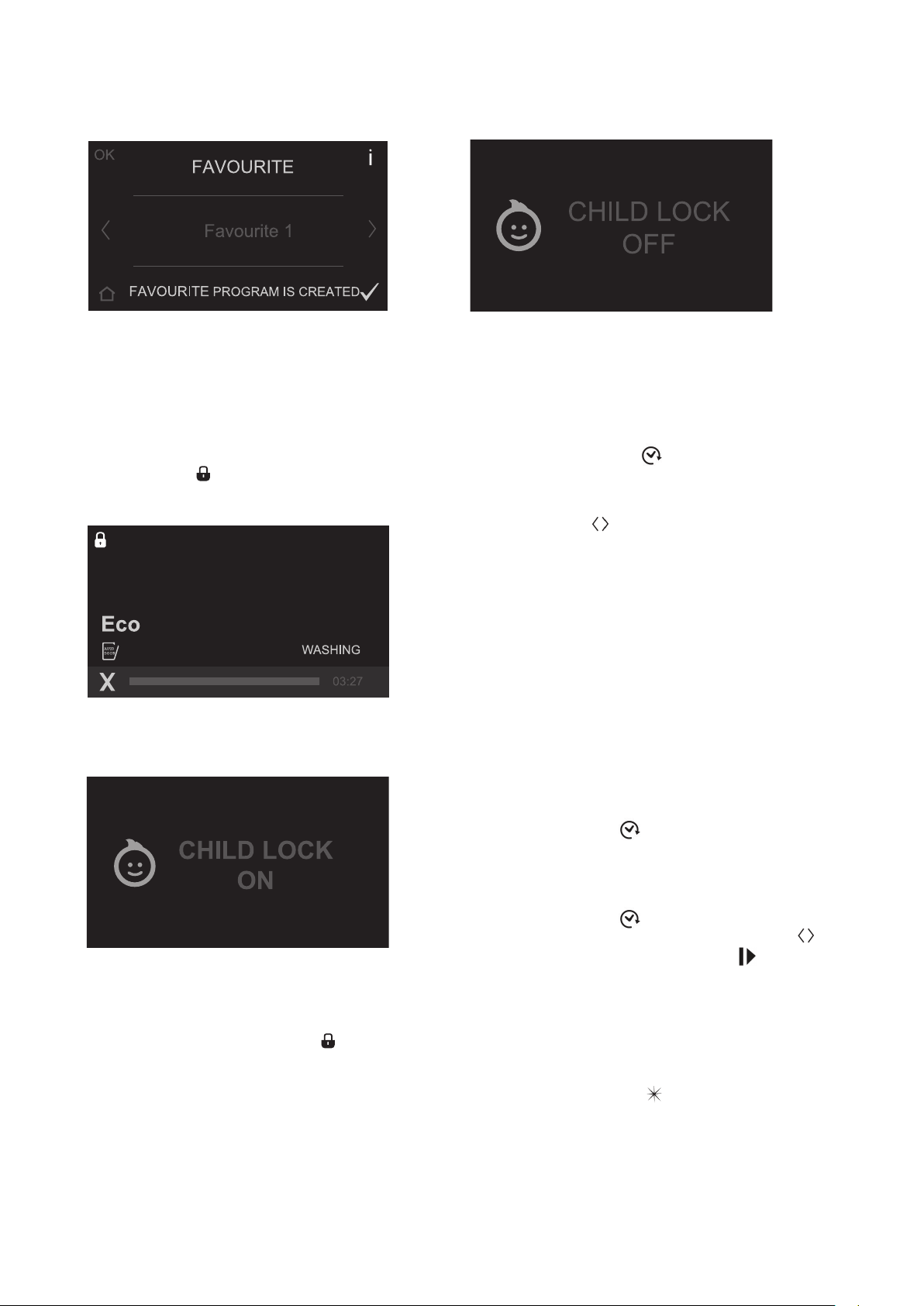
Child Lock
You can prevent others from changing your settings
while your machine is operating. Press and hold the
child lock button
on the top left corner of the screen
for 3 sec.
“Child lock on” warning will be displayed and a warning
tone will be heard when the child lock is active.
Child lock indicator on the top left corner of the
screen will turn to the locked position. All buttons are
non-functional when the child lock is active.
Press and hold the child lock button
for 3 seconds
to cancel the child lock. “Child lock off” warning will
be displayed on the screen and a warning tone will be
heard. Child lock indicator will turn to unlocked position.
Time Delay for Wash Program (Delay):
You can delay the starting time of the selected Program
up to 24 hours. Delay setting cannot be made after the
Program has started. The selected Program should not
be started for you to set the delay time.
1. Press the delay button
and increase delay for the
time required for the delay.
2. Set the delay time to the desired time using forward/
backward buttons
. Delay time is increased for 30
minutes with the forward button and decreased for 30
minutes with the backward button. Select the delay time
by pressing the confirm button. You can start the delay
time countdown by pressing the start/pause button.
The display will show “TIME DELAY ACTIVE”, and the
delay time and the Program time will be alternately
shown on the display until the end of this time. The
selected Program will start when countdown ends.
The time required for the started Program to end will be
shown on the indicator display. All buttons except for
On/Off and Delay buttons will be disabled when delay is
active.
If you want to cancel or set a new time when the
machine is in delay
Press the delay button
to cancel the delay and
press confirm by selecting “00:00” as the delay time.
The display will show the latest selected Program and
options. Delay time will not be shown.
Press the delay button
again to set a new delay
time. Select the new time using forward/backward
buttons and press the start/pause button to start the
delay time.
Rinse Aid
The rinse aid helps to dry the dishes without streaks and
stains. The rinse aid is automatically released during the
hot rinse phase. When rinse aid chamber is empty,
“LOW RINSE-AID” warning
is shown on the display
notifying to refill rinse aid.
When you stop using combined detergents
• Fill the rinse aid compartment
• Set the suitable rinse aid setting

16 electrolux.com.au
Auto Door
CAUTION!
Do not try to close the appliance door within 1
minute after automatic open. This can cause
damage to the appliance.
In case of presence of children, if you want to
keep the door closed in the end of the cycle,
do not activate the Auto Door. Auto Door is not
automatically activated with all programs and
must be selected.
To improve the drying performance refer to the
Programs charts to select a program with hotter
temperatures.
If the machine door is opened during washing or
the power is cut o, the machine will continue the
program when the door is shut or the power is
back.
SETTINGS (CONTINUED)

17
General
The following hints will ensure optimal cleaning and
drying results in daily use and also help to protect the
environment.
Before loading dishes
• Remove larger residues and food scraps from the
dishes into the waste bin.
• When needed, use the prewash program (if
available) or select a program with a prewash
phase.
• For best results distribute the plates, cups and
cutlery evenly in the baskets.
• When loading the appliance, make sure that the
dishes can be completely reached and washed
by the water released from the spray arm nozzles.
Make sure that items do not touch or cover each
other.
• You can use dishwasher detergent and rinse aid or
you can use the multi-tablets (e.g. ‘’3-in-1’’, ‘’4-in-
1’’, ‘’All-in-1’’). Follow the instructions written on the
packaging.
• Select the program according to the type of load
and degree of soil.
NOTE: With the Eco (Economic 50°C) program you
have the most ecient use of water and energy
consumption for crockery and cutlery with normal soil.
ENVIRONMENT!
Operate the machine after it is completely full.
Use pre-washing program only when necessary.
If the appliance is in a location where the risk of freezing
exists, you must completely drain the water that has
remained in the machine. Turn off the tap and drain the
water from the inlet hose.
Using rinse aid and detergent
• Only use rinse aid and detergent for dishwashers. Other
products can cause damage to the appliance.
• At least once a month run the appliance with the use of
appliance cleaner which is particularly suitable for this
purpose.
• Detergent tablets do not fully dissolve with short
programs. To prevent detergent residue on the
tableware, we recommend that you use the tablets with
long programs.
• Do not use more than the correct quantity of detergent.
Refer to the instructions on the detergent packaging.
Before starting a program
Make sure that:
• The filters are clean and correctly installed.
• The spray arms are not clogged.
• There is dishwasher rinse aid (unless you use multi-
tablets).
• The position of the items in the baskets is correct.
• The program is applicable for the type of load and for the
degree of soil.
• The correct quantity of detergent is used.
CAUTION!
Ensure that the dishes loaded in the baskets will
not block the upper and lower spray arms and
prevent them from spinning.
Loading the baskets
• Only use the appliance to wash items that are
dishwasher-safe.
• Do not put in the appliance items made of wood, horn,
aluminium, pewter and copper.
• Do not put in the appliance items that can absorb water
(sponges, household cloths).
• Put hollow items (cups, glasses and pans) with the
opening down.
• Soak (soften) and remove any burnt food from your
crockery before placing in the dishwasher.
• Put cutlery and small items in the cutlery drawer.
• Put light items in the upper basket. Make sure that the
items do not move.
• Make sure that the spray arms can move freely before
you start a program.
HINTS AND TIPS
18 electrolux.com.au
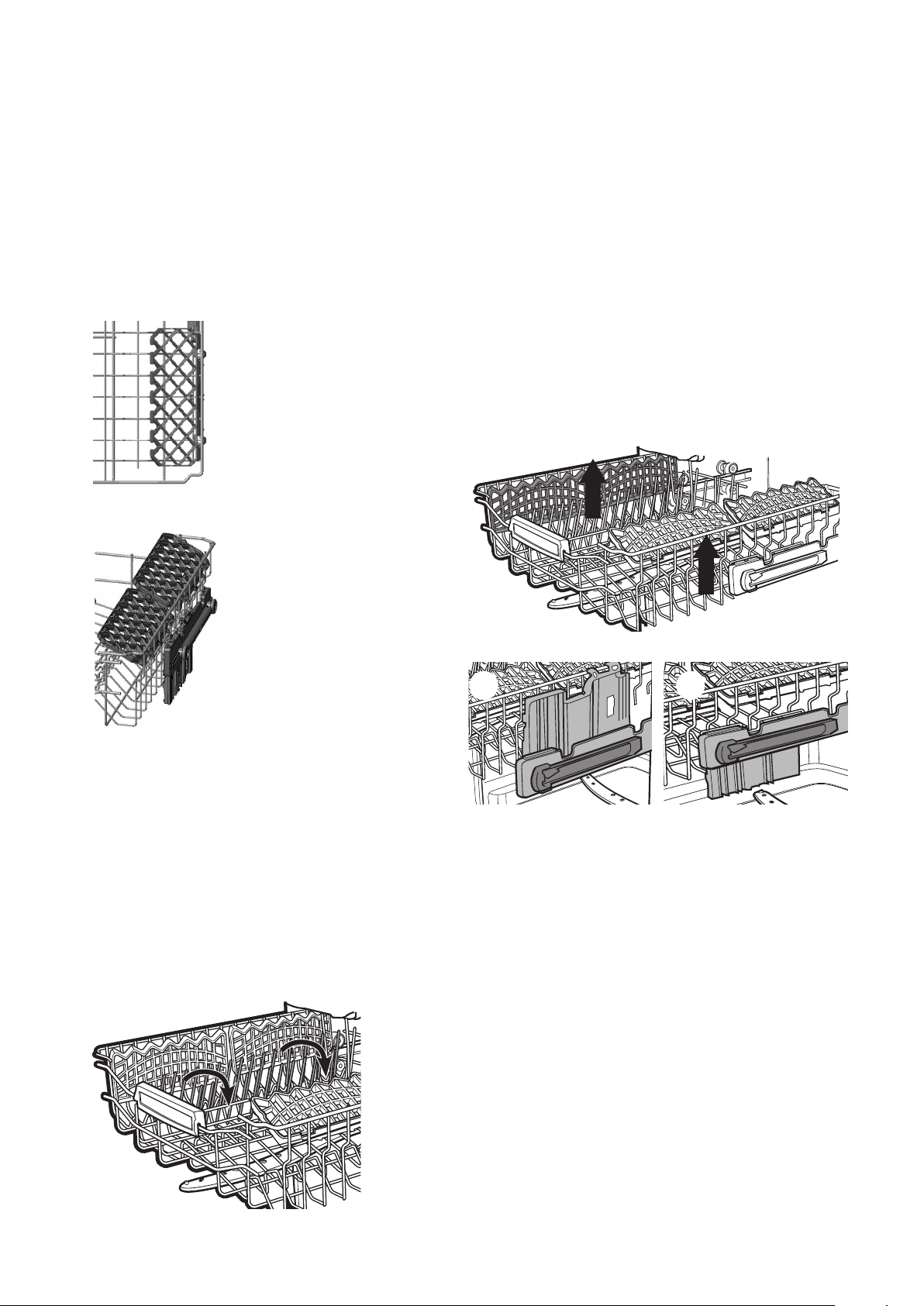
Height adjustable cup rack
These racks are designed to increase the capacity of the
top basket. You can place your glasses and cups on the
racks. You can adjust the height of these racks. Thanks
to this feature, you can place different sizes of glasses
under these racks.
If you have delicate stemmed glasses, the soft supports
will support and protect the glasses.
Upper basket
Due to the height adjustment mechanism mounted on
the basket, you can use your cup racks at two different
heights.
In addition, you can place long forks, knives and spoons
on these racks horizontally, so that they do not block the
rotation of the spray arm.
Upper basket folding racks
Folding tines (prongs) on the upper basket are designed
to allow you to place larger items such as pots, pans,
etc, easily. Each rack can be folded separately or
together, depending on the space required.
Upper basket height adjustment while it is full
Basket height adjustment mechanism on the upper
basket of your machine is designed to let you adjust the
height of your upper basket (refer to diagram 1) upwards
or (refer to diagram 2 ) downwards, without removing it
from your machine when it is full, to create large spaces
at the upper or bottom area of your machine as needed.
The basket of your machine is set to the upper position
from the factory.
In order to raise your basket, hold it from both sides and
pull it upwards. In order to lower it, hold it from both sides
again, pull upwards and then lower carefully.
Make sure that both sides are in the same position (up or
down).
1 2
HINTS AND TIPS (CONTINUED)
19
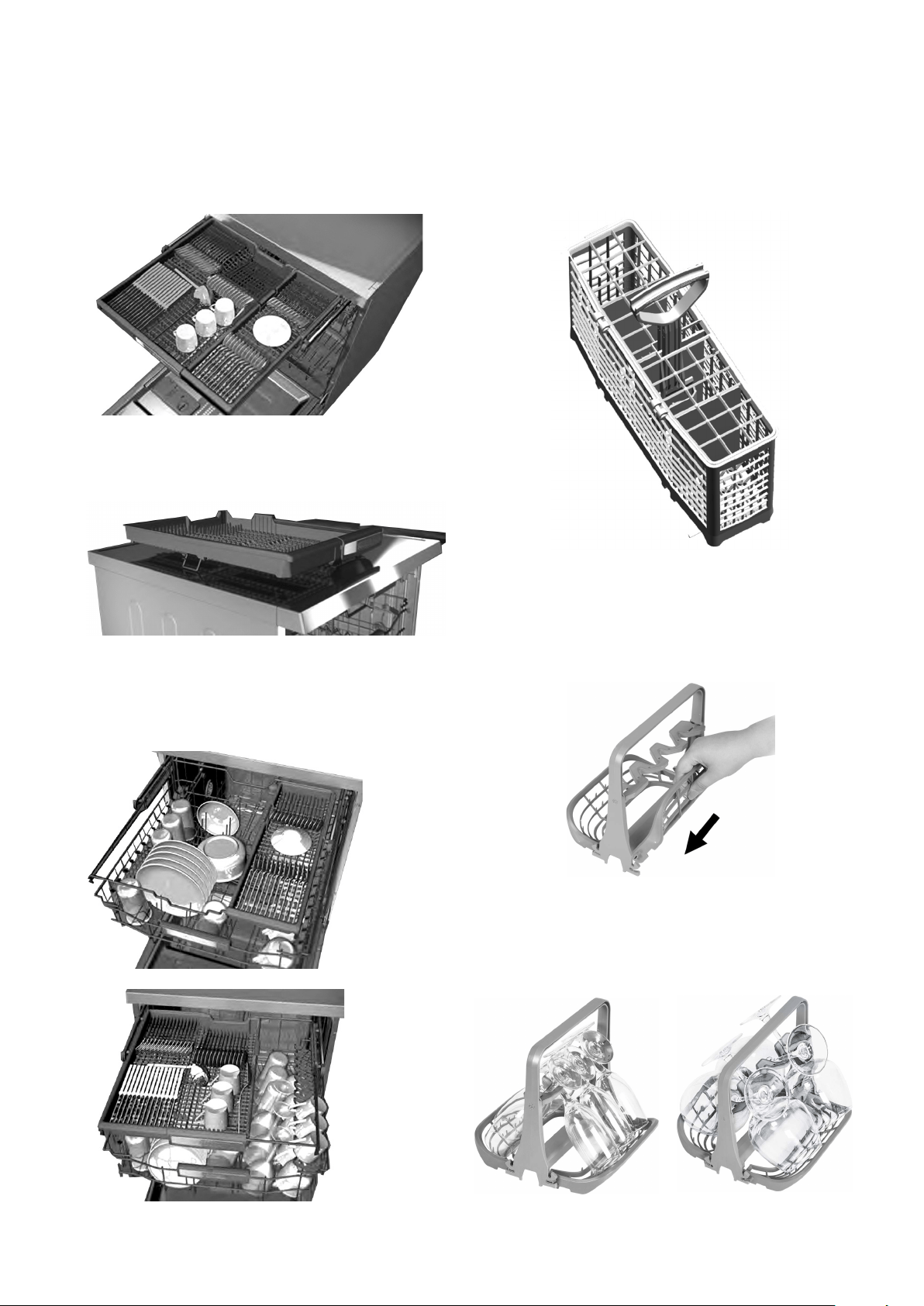
Upper Cutlery Tray
The upper cutlery tray is designed for you to place
forks, spoons and knives, long and small items.
If desired, when the program has completed, the tray
can be taken out with your cutlery.
The upper cutlery basket is composed of two pieces;
if you need to make space for the dishes in the upper
basket, you can take out the left or right part of the
upper cutlery basket in order to create more space.
LOADING YOUR DISHWASHER
Alternate cutlery basket (Accessory)
An alternate cutlery basket is available as an accessory if
needed. This can be located in the lower basket.
Wine glass holder (Accessory)
The sides of the wine glass holder fold up to allow for
compact size when storing.
18 electrolux.com.au19
LOADING YOUR DISHWASHERHINTS AND TIPS (CONTINUED)
This position provides to be compact and storing way of
wine glass holder.
This position provides to be placeable of wine glass
holder in dishwasher.
When the sides are fully expanded, wine glasses can be
placed in the holder using the secure and space efficient
formation below.
18 electrolux.com.au19
LOADING YOUR DISHWASHERHINTS AND TIPS (CONTINUED)
This position provides to be compact and storing way of
wine glass holder.
This position provides to be placeable of wine glass
holder in dishwasher.
20 electrolux.com.au
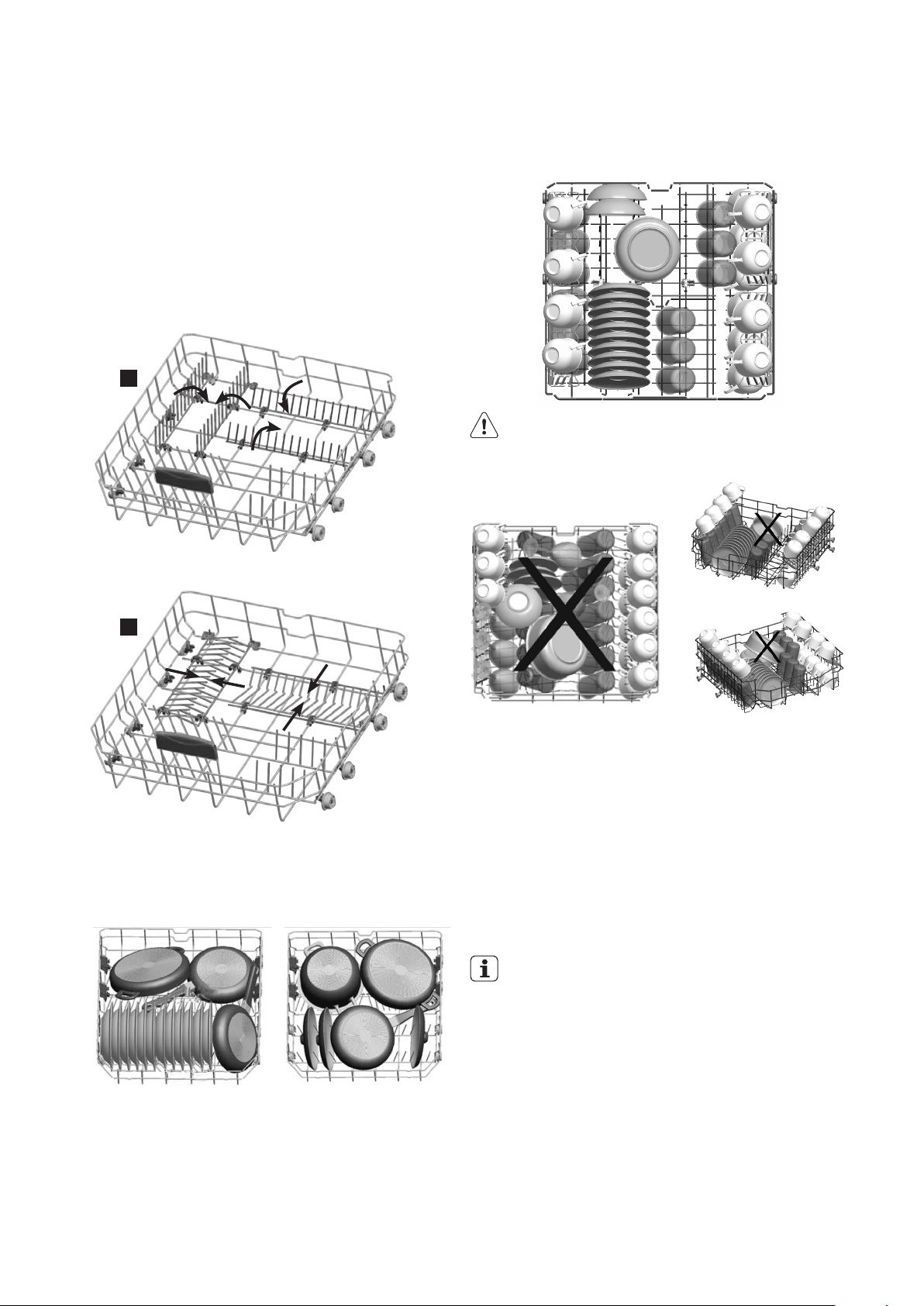
Lower Basket Folding Racks
Folding tines (prongs) consisting of four parts that
are located on the lower basket of your machine are
designed in order to let you place big items easier such
as pots, pans, etc. If required, each rack can be folded
separately, or all of them can be folded and larger
spaces created. You can use folding tines (prongs) in the
upright position, or by folding.
Alternative basket loads
Lower Basket
Upper Basket
WARNING!
Examples of incorrect loading
* Illustration only
Upper Cutlery Tray
The upper cutlery tray is designed for you to place forks,
spoons and knives, long and small items.
1. Let the tableware cool down before you remove it from
the appliance. Hot items can be easily damaged.
2. First remove items from the lower basket, then from
the upper basket.
IMPORTANT!
At the end of the program, water can still remain on
the sides and on the door of the appliance.
For better drying results, set the auto door
function, or open the door 5-10cm and allow
tableware to cool down for 30-40 minutes.
Whenever you are away on holiday for an extended
period:
• Unplug the machine and then turn the water off.
• Leave the door slightly ajar in order to prevent the
formation of unpleasant smells.
• Keep the machine interior clean.
LOADING YOUR DISHWASHER (CONTINUED)
2
1
21
Switch off the power supply or disconnect the product
before any maintenance or cleaning operation.
Cleaning the machine at regular intervals prolongs the
machine’s service life.
Oil and lime may accumulate in the machines washing
section. To clean the machine:
Fill the detergent compartment with detergent without
loading any dishes into the machine. Select a program
that runs at high temperature and start the machine.
Alternatively, a dishwasher descaler which is available
from most supermarkets can be used.
Cleaning the seals in the machine door
To clean any accumulated residues in the door seals,
wipe the seals regularly by using a dampened cloth.
Cleaning the machine
Clean the filters and spray arms at least once a week.
Unplug your machine and turn off its tap before
starting to clean. Do not use hard materials when
cleaning your machine. Wipe with a fine cleaning
material and a dampened cloth.
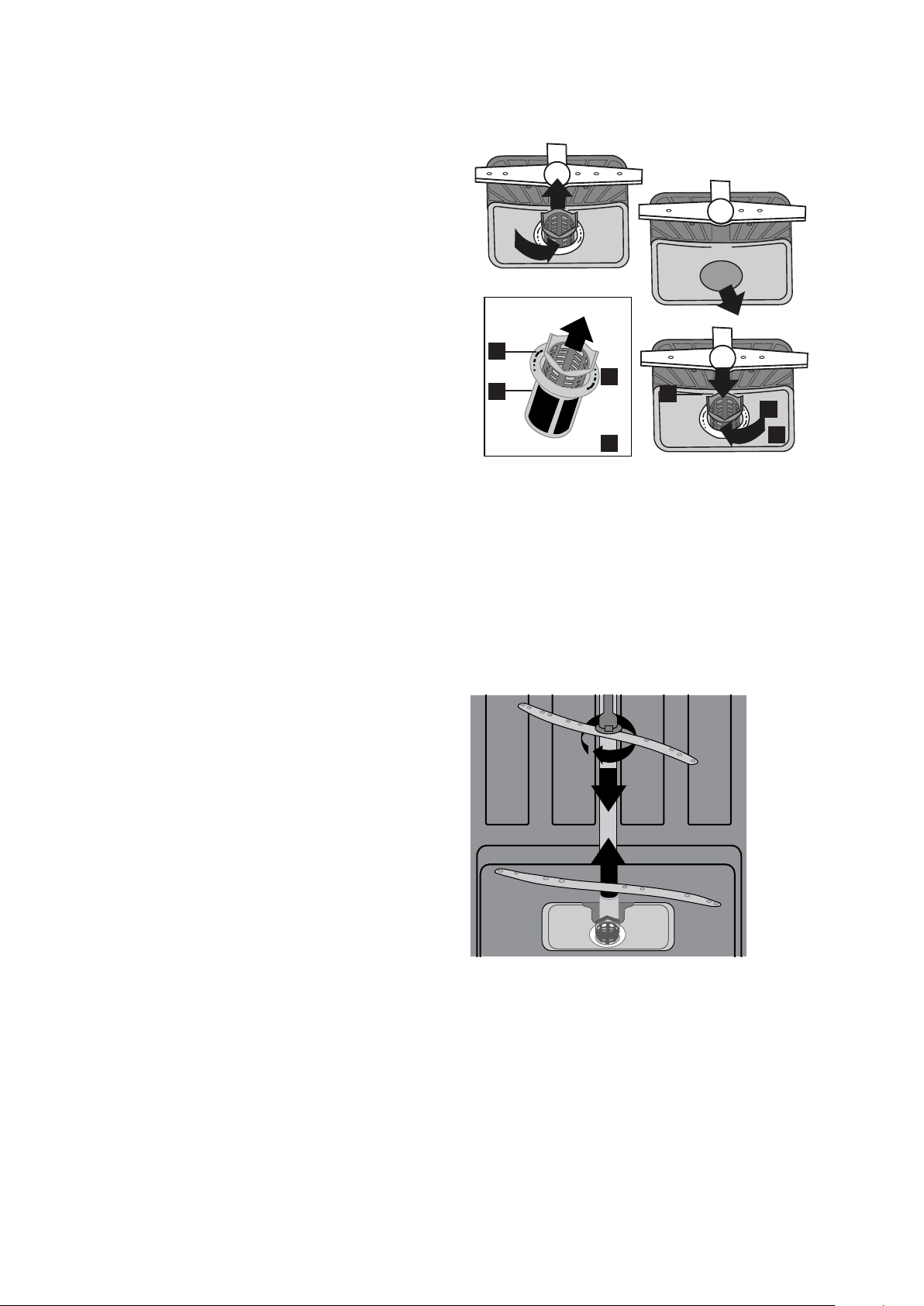
Filters
Check if any food wastes have remained on the
coarse and fine filters. If any food waste is found, remove
the filters and clean them thoroughly with water under
the tap.
a. Micro Filter
b. Coarse Filter
c. Metal
1. To remove and clean the filter combination (a+b), turn
it counter clockwise and remove it by lifting upwards.
(picture 1)
2. Then pull the coarse filter out of the micro filter.
Rinse the filters with water under the tap and
reassemble. (picture 2)
3. Pull and remove the metal filter (c) and clean.
(picture 3).
4. Reposition the metal filter in the machine.
5. Relocate the filter combination (a+b) into the metal
filter and turn it in the direction of the arrow. It is
locked when the arrows on the micro filter can be
seen on either side. (picture 4)
6. Never use your dishwasher without any filter.
7. Incorrect fitting of the filter will reduce the washing
effectiveness.
8. Clean filters are very important in terms of the proper
running of the machine.
.
Spray arms
Check whether or not the holes for the upper and lower
spray arms are clogged. If there is any clogging, remove
the spray arms and clean them under water.
You can remove the lower spray arm by pulling it
upwards, while the upper spray arm can be removed by
turning the nut to the left.
Be sure that the nut is perfectly tightened when refitting
the upper spray arm.
Hose lter
The inlet hose filter reduces contamination (sand, clay,
rust etc.) that might be occasionally carried in through
the mains water supply or the indoor plumbing, and
avoids damage to the dishwasher components. Check
the filter and the hose from time to time and clean them
if necessary. To clean the filter, first turn off your tap and
then remove the hose.
After removing the filter from the hose, clean it under the
tap. Insert the cleaned filter back into its place
inside the hose. Refit the hose, turn on the tap and
check for leaks.
CARE AND CLEANING
4
2
3
1
c
b
a

22 electrolux.com.au
CONSUMPTION VALUES
Program Water (l) Energy (kWh) Duration (min)
Prewash 4.2 0.02 15
Jet Wash 14' 6.6 0.34 14
Quick 30' 10.9 0.74 30
*Eco
12.2 0.65 215
FlexiWash 60°C 15.4 1.43 113
Super 50' 10.7 1.29 50
AutoFlex 30°C-50°C 10 .6 -17.7 0.92 77-91
AutoFlex 50°C - 60°C 10.9 -18.5 1.18 107-122
AutoFlex 60°C- 70°C 12.3-24.6 1.58 109 -179
Steam Wash 20.3 1.3 161
Caution: Values above have been tested according to
related Standards in laboratory conditions, these values
may vary due to environment conditions (mains voltage,
water pressure, water inlet temperature and ambient
temperatures).
*With this program you have the most efficient use
of water and energy consumption for crockery and
cutlery for normal soil (This is the standard program
for Test Institutes).
Off mode and end of cycle mode tests in accordance with
AS/NZS Standards must be carried out with Eco mode
brightness level.
Information for Test institutes
For all necessary information for test performance, send
an email to dishwasher@standardtest.info and provide
the model and PNC number on the rating plate.

23
POWER HALF LOAD CONSUMPTION VALUES
Program Water (l) Energy (kWh) Duration (min)
Prewash 4.2 0.02 15
Jet Wash 14' 6.6 0.34 14
Quick 30' 10.9 0.74 30
Eco
10.5 0.65 144
FlexiWash 60°C 11.1 0.97 103
Super 50' 10.7 1.23 47
AutoFlex 30°C - 50°C 9.9 - 13.7 1.33 65-85
AutoFlex 50°C - 60°C 10.5 - 14.3 1.11 87-110
AutoFlex 60°C - 70°C 11.9 - 19.9 1.28 89-168
Steam Wash 15.6 1.28 149
24 electrolux.com.au
TROUBLESHOOTING
If the appliance does not start or it stops during
operation, first check if you can solve the problem by
yourself with the help of the information in the table or
contact an Authorised Service Centre.
WARNING!
Repairs not properly done may result in serious
risk to the safety of the user. Any repairs must be
performed by qualied personnel.
With some problems, the display shows an alarm
code. The majority of problems that can occur
can be solved without the need to contact an
Authorised Service Centre.
Problem and alarm code Possible cause and solution
You cannot activate the appliance.
• Make sure that the mains plug is connected to the mains socket.
• Make sure that there is no damaged fuse in the fuse box.
The program does not start
• Make sure that the appliance door is closed.
• If the delay start is set, cancel the setting or wait for the end of the countdown.
The appliance does not fill with water.
The display shows F5
• Make sure that the water tap is open.
• Make sure that the pressure of the water supply is not too low. For this
information, contact your local water authority.
• Make sure that the water tap is not clogged.
• Make sure that the filter in the inlet hose is not clogged.
• Make sure that the inlet hose has no kinks or bends.
The appliance does not drain the water
The display shows F2
• Make sure that the sink spigot is not clogged.
• Make sure that the filter in the outlet hose is not clogged.
• Make sure that the interior filter system is not clogged.
• Make sure that the drain hose has no kinks or bends.
The anti-flood device is on.
The display shows F1
• Close the water tap and contact an Authorised Service Centre
The appliance stops and starts more
times during operation.
• It is normal. It provides optimal cleaning results and energy savings.
The program lasts too long.
• Select the Extra Fast option to shorten the program time.
• If the delayed start option is set, cancel the delay setting or wait for the end of
the countdown.
The remaining time in the display
increases and skips nearly to the end
of program time.
• This is not a defect. The appliance is working correctly

25
If the program won’t start
• Check if the plug is connected.
• Check your indoor fuses.
• Be sure that the water inlet tap is turned on.
• Be sure that you have closed the machine door.
• Be sure that you switched off the machine by
pressing the Power On / Off button.
• Be sure that the water inlet filter and the machine
filters are not clogged.
If detergent residues are left in the detergent
compartment
• Detergent has been added when the detergent
compartment was wet.
If water is left inside the machine at the end of the
program
• The water drain hose is clogged or twisted.
• The filters are clogged.
• The program is not finished yet.
If the machine stops during a wash operation
• Power failure.
• Water inlet failure.
• Program can be on standby mode.
If shaking and hitting noises are heard during a
wash operation
• Dishes placed incorrectly.
• Spray arm hitting the dishes.
If there are partial food wastes left on the dishes
• Dishes placed incorrectly into the machine, sprayed
water did not reach related places.
• Basket overly loaded.
• Dishes leaning against one another.
• Very small amount of detergent added.
• An unsuitable, rather weak wash program selected.
• Spray arm clogged with food wastes.
• Filters clogged.
• Filters incorrectly fitted.
• Water drain pump clogged.
If there are whitish stains on the dishes
• A very small amount of detergent is being used.
• Rinse aid dosage setting at a very low level.
• A detergent without phosphate used; try one that
contains phosphate.
If the dishes are not dry
• A program without a dry operation selected.
• Rinse aid dosage set too low
• Dishes unloaded too soon
If there are rust stains on the dishes
• Stainless-steel quality of the dishes washed is not
dishwasher grade.
• High level of salt in the wash water.
• Poor mains grounding.
If the ‘Turn on the Tap’ warning shows during
operation
When you see “Turn on the tap” warning;
• Make sure water is not cut off.
• Make sure the tap is turned on.
• Call the authorised service if there is water and the
tap is turned on.
Call an Authorised Service Centre if the problem still
persists after the controls or in case of any malfunction
not described above.
When you see the messages above, error codes are
stated before definitions. You can find these details on
page 27 of your manual.

26 electrolux.com.au
Error code Possible cause and solution Control
F1 Overfill
• Power off your machine and close the tap.
• Contact the customers services centre.
F2 Not draining
• Water discharge hose is clogged.
• Water drainage hose kinked, check installation.
• The filters of your machine might be clogged.
• Power off–on your machine and activate the
program cancellation command.
• If the error continues, contact the Customer
Care Centre.
F3 Inlet valve faulty
• Close the tap.
• Contact the Customer Care Centre.
F5 Inadequate water supply
• Make sure the water tap is fully open and that
there is mains water available.
• Water inlet hose kinked, check installation.
• Close the water tap, disconnect the hose from
the tap and clean the filter at the connection.
• Restart your machine, contact the service if the
error resumes.
F6 Faulty heater sensor
• Contact the Customer Care Centre.
F7 Over temperature • Contact the Customer Care Centre.
F8 Heating error • Contact the Customer Care Centre.
F9 Diverter valve faulty • Contact the Customer Care Centre.
FE Power supply problem • Contact the Customer Care Centre.
Error codes, cause and solution
TROUBLESHOOTING (CONTINUED)

27
TECHNICAL SPECIFICATIONS
ESF6768KXA
Technical specications
Capacity
15 place settings
Height with worktop
850mm
Height (without worktop)
820mm
Width
598mm
Depth
598mm
Net weight
62kg
Electricity input
220–240V, 50Hz
Total power
1900W
Current
10A
Water supply pressure
0.03 MPa (0,3 bar) – 1 MPa (10 bar)
Water supply
Hot or Cold water, max 60
o
C, 10L/min
28 electrolux.com.au
INSTALLATION
28
Positioning the machine
When considering the location for the dishwasher,
ensure that there is adequate space to enable loading
and unloading of the dishes.
• Do not put your machine in any location where
the ambient temperature can fall below 5°C.
• Before positioning, take the machine out of its
packaging by following the warnings located on
the package.
• Position the machine close to a water tap and
drain. You need to position your machine, taking
into consideration that its connections will not be
altered once they are made.
• Do not grip the machine by its door or panel in
order to move it.
• Take care to leave a certain clearance from all sides
of the machine so that you can comfortably move
it back and forth during cleaning.
• Make sure that the water inlet and outlet hoses do
not get squeezed while positioning the machine.
Also, make sure that the machine does not stand
on the electrical cable. Adjust the machine’s feet
so that it is level and stable. Proper positioning of
the machine ensures problem-free opening and
closing of its door.
• If the door of your machine does not close properly,
check if the machine is stable on the floor; if not,
adjust the feet and ensure it is level and stable.
Water connection
Ensure that the indoor plumbing is suitable for installing
a dishwasher and complies with AS/NZS 3500.1. Also,
we recommend that you fit a filter at the entrance of
your place or apartment so as to avoid any damage to
your machine because of any contamination (sand, clay,
rust etc) that might be occasionally
carried in through the main’s water
supply or the indoor plumbing, and
to avoid problems of staining and
formation of deposits after washing.
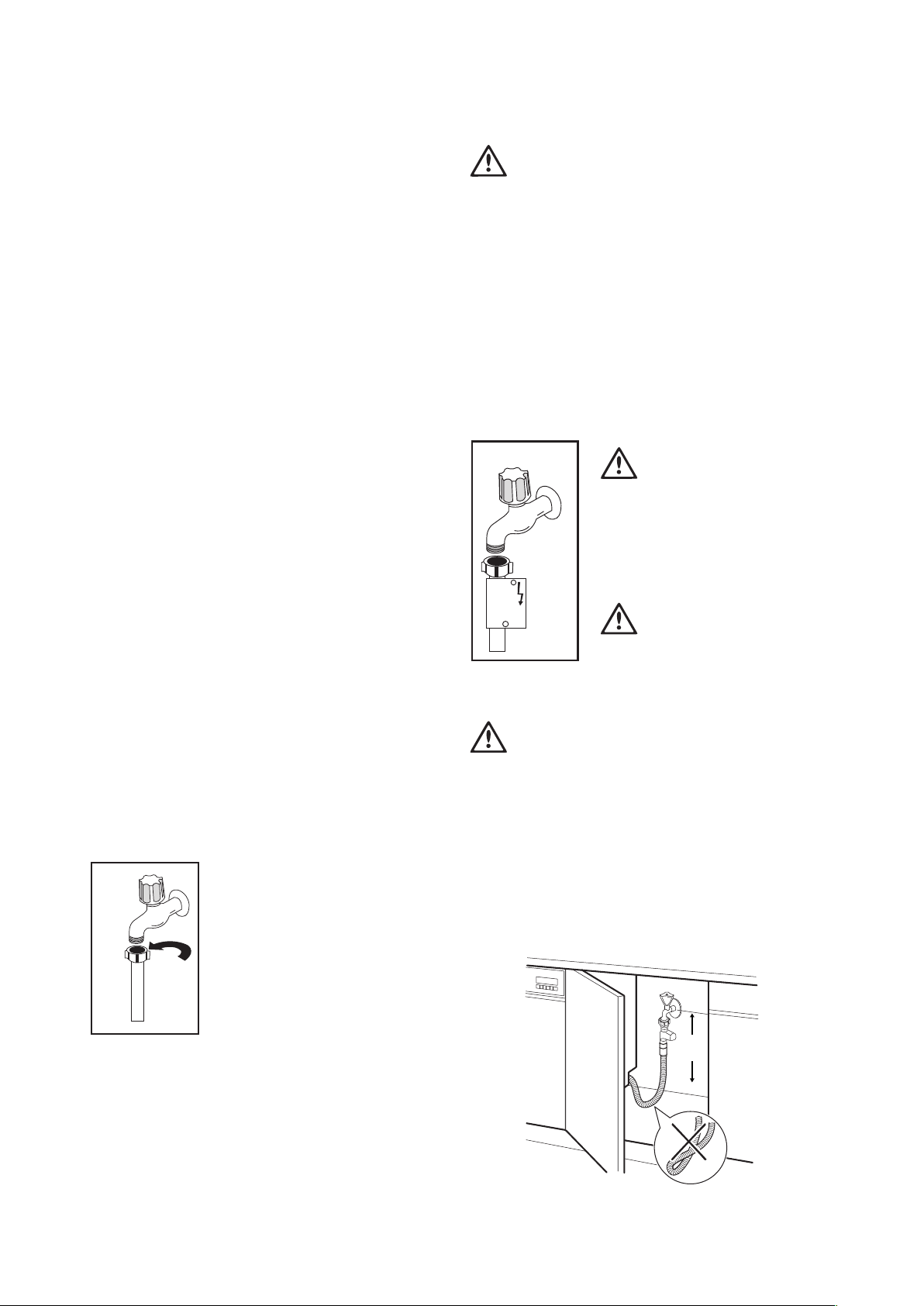
Water inlet hose
Do not use the water inlet hose of
your old machine, you must use
the new water inlet hose supplied
with your machine. Before connecting the water inlet
hose to the water tap, ensure clean water is flowing
from the tap before making the connection. Connect
the water inlet hose directly to the water inlet tap. The
pressure supplied by the tap should be at a minimum
of 0.03 MPa and at a maximum of 1 MPa. If the water
pressure is above 1 MPa, a pressure-relief valve should
be installed.
WARNING
Only turn the locking nut to secure hose –
do not turn the hose.
• The first time you use the appliance, make sure that
there is no leakage.
• The water inlet hose has a safety valve and a
sheath with an inner mains cable.
• After the connections are made, the tap should be
turned on fully and checked for water tightness.
For the safety of your machine, make sure to
always turn off the water inlet tap after each wash
program is finished.
WARNING
NOTE: Aquastop inlet hose has
components using 240V. Do not
cut Aquastop inlet hose. Do not let
it get folded, twisted, kinked
or crushed.
WARNING
NOTE: A water tempering valve is
required if the water temperature
is over 60°C.
CAUTION
Always use new hoses when you connect the
appliance to the water supply. Old hoses must
not be used. The water inlet hose must be
examined at an interval of twelve months for
deterioration and replaced if necessary.
In order to pass the safety valve through the
kitchen cabinets, an opening of at least 45mm x
90mm is needed.
30cm
min.
29
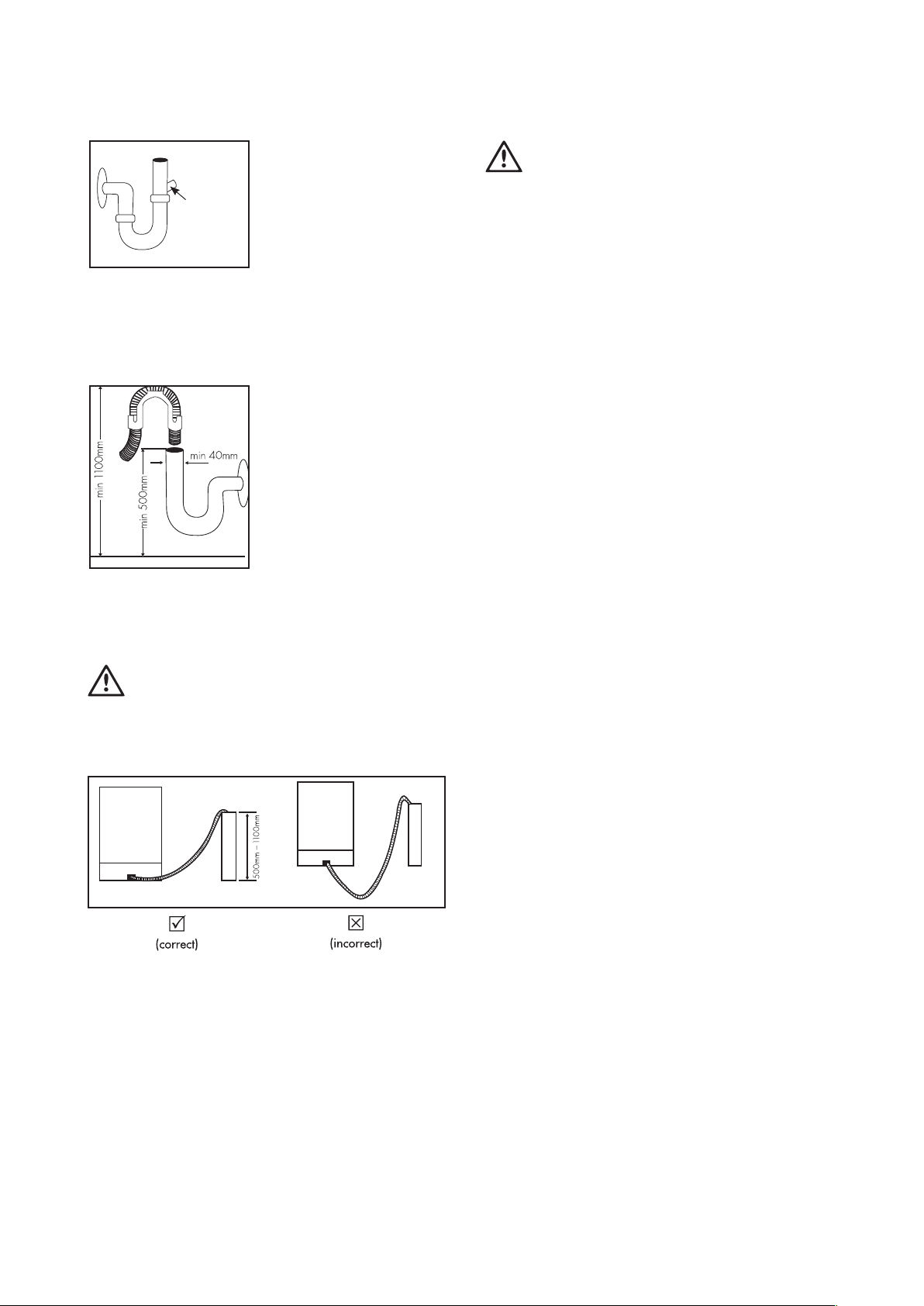
Water drain hose
If you connect the water
drain hose to a trap spigot
under the sink, remove the
plastic membrane. If you
do not remove the entire
membrane, remaining food
can cause blockage in
the drain hose spigot. Ensure a hose clamp is used to
secure the hose to the spigot.
Water drain hose
The water drain hose can
be connected either directly
to the water drain hole or to
the sink outlet spigot. Using
a hose hook (if available),
the water can be drained
directly into the sink by
positioning the hose hook
over the edge of the sink.
This connection should be at a minimum of 50cm
and at a maximum of 110cm above the base of the
dishwasher.
WARNING
Maximum drain hose length is 4m. Longer hose
length will prevent correct draining,
and result in poor wash performance.
WARNING
Electrical Connection
The plug of your machine should be connected to an
earthed outlet that supplies suitable voltage and current.
If there is no earthing installation, have a competent
electrician carry out an earthing installation. In case of
usage without earthing installed, our company will not be
responsible for any loss of usage that might occur.
The indoor fuse current value should be 10-16 A.
Your machine is designed for 220-240 V. The machine
should not be plugged in during installation.
• Always use the molded plug supplied with your
machine.
• Running at low voltage will cause a decline in
washing quality.
• The machine’s electrical cable should be replaced
by an authorised service or an authorised electrician
only. Failure to do so may lead to accidents.
• For safety purposes, always make sure to
disconnect the plug when a wash program
is finished.
• In order not to cause an electric shock, do not
unplug when your hands are wet.
• When disconnecting your machine from the mains
supply, always pull from the plug. Never pull the
cord itself.
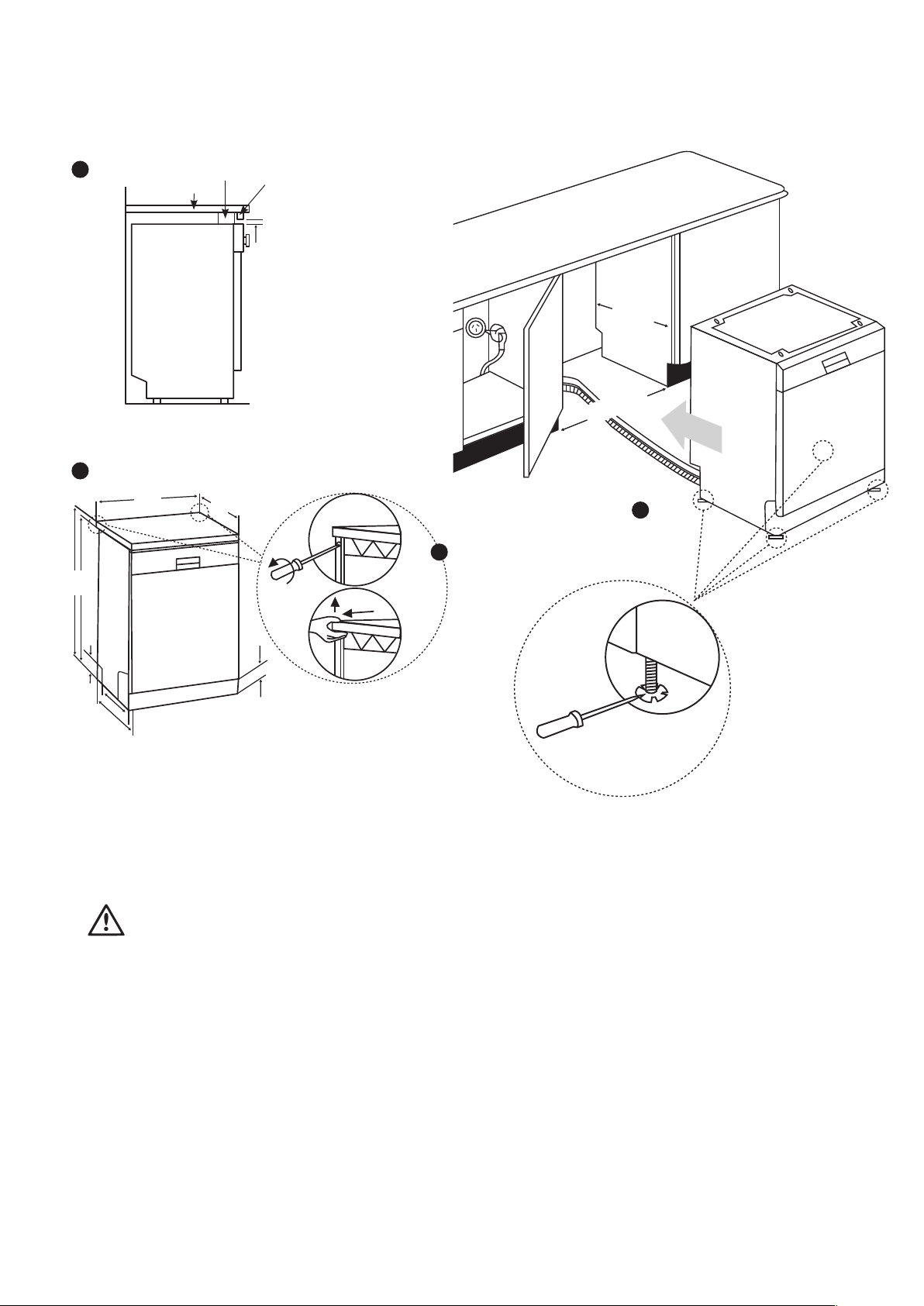
Fitting the machine undercounter
If you wish to fit your machine undercounter, check
whether you have sufficient space under your
countertop and whether the wiring-plumbing is suitable
to do so.
1. To ensure the stability of the dishwasher for
an underbench installation, if the underbench
dimension is greater than 820mm, any gap between
the dishwasher and the underside of the benchtop
should be bridged with a packing piece. This may
be achieved by wedging a piece of timber between
the dishwasher and the benchtop as shown
2. If required, remove the worktop as shown in the
illustration.
3. To remove the worktop, remove the screws that
hold the worktop which are located at the rear of
the machine; then push the front panel 1cm from
the front
Remove
entire internal
membrane
30 electrolux.com.au
INSTALLATION (CONTINUED)
1. towards the rear and lift it.
2. Adjust the machine feet according to the slope
of the floor.
3. Fit your machine by pushing it undercounter without
letting the hoses get crushed or bent.
WARNING
After removal of worktop, ensure the opening for the
dishwasher is according to the following dimensions.
Timber
wedging
piece
Bench top
3mm gap
Filler piece
cut to suit
installation
1
570
465
97
85
598
596
850
820
2
3
min. 600mm
570mm
5

31
This document sets out the terms and conditions of the product
warranties for Electrolux Appliances. It is an important document.
Please keep it with your proof of purchase documents in a safe place
for future reference should there be a manufacturing defect in your
Appliance. This warranty is in addition to other rights you may have
under the Australian Consumer Law.
1. In this warranty:
(a) ‘ACL’ or ‘Australian Consumer Law’ means Schedule 2 to the
Competition and Consumer Act 2010;
(b) ‘Appliance’ means any Electrolux product purchased by you and
accompanied by this document;
(c) ‘ASC’ means Electrolux’s authorised serviced centres;
(d) ‘Electrolux’ is the brand controlled by Electrolux Home Products Pty
Ltd of 163 O’Riordan Street, Mascot NSW 2020, ABN 51 004 762
341 in respect of Appliances purchased in Australia and Electrolux
(NZ) Limited (collectively “Electrolux”) of 3-5 Niall Burgess Road, Mount
Wellington, in respect of Appliances purchased in New Zealand;
(e) ‘WarrantyPeriod’meanstheperiodspeciedinclause3ofthis
warranty;
(f) ‘you’ means the purchaser of the Appliance not having purchased
the Appliance for re-sale, and ‘your’ has a corresponding meaning.
2. Application: This warranty only applies to new Appliances, purchased
and used in Australia or New Zealand and is in addition to (and does not
exclude, restrict, or modify in any way) other rights and remedies under
a law to which the Appliances or services relate, including any non-
excludable statutory guarantees in Australia and New Zealand.
3. Warranty Period: Subject to these terms and conditions, this warranty
continues for in Australia for a period of 24 months and in New Zealand
for a period of 24 months, following the date of original purchase of the
Appliance.
4. Repair or replace warranty: During the Warranty Period, Electrolux
or its ASC will, at no extra charge if your Appliance is readily accessible
for service, without special equipment and subject to these terms and
conditions, repair or replace any parts which it considers to be defective.
Electrolux may, in its absolute discretion, choose whether the remedy
oeredforavalidwarrantyclaimisrepairorreplacement.Electroluxorits
ASC may use refurbished parts to repair your Appliance. You agree that
any replaced Appliances or parts become the property of Electrolux.
5. Travel and transportation costs: Subject to clause 7, Electrolux will
bear the reasonable cost of transportation, travel and delivery of the
Appliance to and from Electrolux or its ASC. Travel and transportation will
be arranged by Electrolux as part of any valid warranty claim.
6. Proof of purchase is required before you can make a claim under this
warranty.
7. Exclusions: You may not make a claim under this warranty unless the
defect claimed is due to faulty or defective parts or workmanship. This
warranty does not cover:
(a) lightglobes,batteries,ltersorsimilarperishableparts;
(b) parts and Appliances not supplied by Electrolux;
(c) cosmeticdamagewhichdoesnotaecttheoperationofthe
Appliance;
(d) damage to the Appliance caused by:
(i) negligence or accident;
(ii) misuse or abuse, including failure to properly maintain or service;
(iii) improper, negligent or faulty servicing or repair works done by
anyone other than an Electrolux authorised repairer or ASC;
(iv) normal wear and tear;
(v) power surges, electrical storm damage or incorrect power supply;
(vi) incomplete or improper installation;
(vii) incorrect, improper or inappropriate operation;
(viii) insect or vermin infestation;
(ix) failure to comply with any additional instructions supplied with
the Appliance;
In addition, Electrolux is not liable under this warranty if:
(a) the Appliance has been, or Electrolux reasonably believes that the
Appliance has been, used for purposes other than those for which
the Appliance was intended, including where the Appliance has
been used for any non-domestic purpose;
(b) theApplianceismodiedwithoutauthorityfromElectroluxinwriting;
(c) the Appliance’s serial number or warranty seal has been removed
or defaced
8. How to claim under this warranty: To enquire about claiming under
this warranty, please follow these steps:
(a) carefully check the operating instructions, user manual and the terms
of this warranty;
(b) have the model and serial number of the Appliance available;
(c) have the proof of purchase (e.g. an invoice) available;
(d) telephone the numbers shown below.
9. Australia: For Appliances and services provided by Electrolux in
Australia: Electrolux goods come with guarantees that cannot be
excluded under the Australian Consumer Law. You are entitled to a
replacement or refund for a major failure and for compensation for any
other reasonably foreseeable loss or damage. You are also entitled to
have the Appliance repaired or replaced if the Appliance fails to be of
acceptable quality and the failure does not amount to a major failure.
‘Acceptable quality’ and ‘major failure’ have the same meaning as
referred to in the ACL.
10. New Zealand: For Appliances and services provided by Electrolux
in New Zealand, the Appliances come with a guarantee by Electrolux
pursuant to the provisions of the Consumer Guarantees Act, the Sale
of Goods Act and the Fair Trading Act. Where the Appliance was
purchased in New Zealand for commercial purposes the Consumer
Guarantee Act does not apply.
11.Condentiality: You accept that if you make a warranty claim, Electrolux
and its agents including ASC may exchange information in relation to you
to enable Electrolux to meet its obligations under this warranty.
Warranty
FOR SALES IN AUSTRALIA AND NEW ZEALAND
APPLIANCE: ELECTROLUX DISHWASHERS
Important Notice
Before calling for service, please ensure that the steps listed in clause 8 above have been followed.
FOR SERVICE
ortondtheaddressofyournearest
authorised service centre in Australia
PLEASE CALL 13 13 49
For the cost of a local call (Australia only)
AUSTRALIA
ELECTROLUX HOME PRODUCTS
163 O’Riordan Street, Mascot NSW 2020
electrolux.com.au
FOR SPARE PARTS
ortondtheaddressofyournearest
spare parts centre in Australia
PLEASE CALL 13 13 50
For the cost of a local call (Australia only)
FOR SERVICE
ortondtheaddressofyournearest
authorised service centre in New Zealand
PLEASE CALL 0800 10 66 10
(New Zealand only)
NEW ZEALAND
ELECTROLUX (NZ) Limited
3-5 Niall Burgess Road, Mount Wellington
electrolux.co.nz
FOR SPARE PARTS
ortondtheaddressofyournearest
spare parts centre in New Zealand
PLEASE CALL 0800 10 66 20
(New Zealand only)
EDish_Warr_Jul17
shop.electrolux.com.au
Electrolux Home Products Australia
telephone: 1300 363 640
fax: 1800 350 067
email: customercare@electrolux.com.au
web: electrolux.com.au
Electrolux Home Products New Zealand
telephone: 0800 436 245
fax: 0800 225 088
email: customercare@electrolux.co.nz
web: electrolux.co.nz
To add a touch of
professional inspiration
to your home, visit
electrolux.com.au
or electrolux.co.nz
electrolux.com.au
or electrolux.co.nz
P/No. 52217762-A.
© 2019 Electrolux Home Products Pty Ltd.
EMAN_ESF6768KXA_11Apr19
52252124 R35